#helpdesk-selive
1 messages · Page 215 of 1
 rapid nexus
 kindred fox
rapid nexus
still doesn't work
kindred fox
rapid nexus
still doesn't work
Where does it error out?
kindred fox
Without clicking Show Details button it’s difficult to know where the problem is
 edgy geyser
@long bobcat Im referring the Activity Feed
rapid nexus
okay it's working, thank you!
edgy geyser
Why the skip, mute and pause buttons in the Activity Feed doesn't work?
 toxic fern
Does it behave the same way on the website?
 long bobcat
rapid nexus
okay it's working, thank you!
long bobcat
rapid nexus
okay it's working, thank you!
nice glad to hear that
@hallow pagoda can you record your screen for me?
and launch OBS as admin, show us the white docks, try to access the SE menu, try to login if you have the option to, then close OBS, and provide us with the latest log + recording?
@plush trail can you do the same please?
alternatively if you both [@hallow pagoda @plush trail] want to go to your add \ remove programs and uninstall OBS.Live, you can try installing this version and see if that helps
https://cdn.streamelements.com/obs/dist/obs-streamelements-installer-wrapper/windows/latest/obs-streamelements-setup-stable.exe
 unique raft
Using :FORCE FIELD ANIMATED SUPER THEME" love it, but cannot get the Social Buttons on top of each scene to have my name instead of "STREAMELEMENTS"
kindred fox
unique raft
Using :FORCE FIELD ANIMATED SUPER THEME" love it, but cannot get the Social Butt...
Make sure you’re selecting the correct layer and saving after making changes
long bobcat
in addition to  all widgets have settings you can access by clicking the layer and then pressing 'settings' below
if it's a text widget you can edit the text from there. and then make sure to indeed save
about this #helpdesk-selive message @plush trail @hallow pagoda
if you didn't install the stable version and you still have the white docks issue, and you're willing to share your screen with development, let me know
we would like to understand this and while installing the stable version can resolve this temporarily, it's still not allowing us to understand the root cause of this problem you're facing
let me know please, you can @ me
even if you agree to the screen share session we would still need the recording of the screen and the log from that replication as instructed above
unique raft
Got it Thank you all!
I was changing the name of the widgets because I did not realize the "settings" tab was for each widget. Thank you so much!
long bobcat
our pleasure :}
unique raft
Is there a way to make this edit for all scenes or do I need to do each individually?
long bobcat
if you already have a widget in several overlays you'll need to manually change
alternatively you can edit one of the widgets, and then duplicate it to other overlays
unique raft
Okay thank you.
I just switched from Streamlabs to OBS Studio, so there is a bit of a learning curve.
long bobcat
naturally
Please feel free to refer to the following set of articles for great information on the getting started process - https://strms.net/getting-started
unique raft
I appreciate that. By chance do you know if there is a way to stream to multiple platforms on OBS like there is on Streamlabs?
long bobcat
at the moment we don't support multistreaming
unique raft
Okay Thank you
long bobcat
no worries!
 frigid rivet
Did they take the option away to change stream info of of obs
Or did I miss an extension
kindred fox
frigid rivet
Did they take the option away to change stream info of of obs
View > docks > stream information
 flint citrus
how can i put my streamelements account on online
and my activity feed is not working does anybody know the problem
 dapper iglooBOT
@flint citrus ⤵️
Please ask your question in one helpdesk channel only. A support volunteer or StreamElements staff member will assist you as soon as they are available. Asking in multiple places will only result in confusion, not faster answers. Thank you for your patience.
 subtle remnant
Not sure if right channel (apologies up front), I just started using OBSlive but my question is more about my streamelements profile settings where youtube, facebook, twitter links show up (assuming these are used for overlays?). Bottom line is they are all wrong and I can't find where I update/correct them. Again, sorry if wrong channel.
 ocean rivet
subtle remnant
Not sure if right channel (apologies up front), I just started using OBSlive but...
ocean rivet
subtle remnant
Not sure if right channel (apologies up front), I just started using OBSlive but...
these links will not be used for your overlays but rather for your streamelements profile page, you can edit those links here: https://streamelements.com/dashboard/profile
subtle remnant
ocean rivet
these links will not be used for your overlays but rather for your streamelement...
I was on that page and can click onto each line, but cannot edit them for some reason. Do I have to unlock them somewhere?
ocean rivet
subtle remnant
I was on that page and can click onto each line, but cannot edit them for some r...
all socials will have your username by default but you can replace that text
subtle remnant
ocean rivet
all socials will have your username by default but you can replace that text
Ok, I was finally able to clear out the text by hitting the space bar and can copy/paste new paths onto the lines I need, but it will not let me leave any blank. What if i don't have a facebook page?
ocean rivet
subtle remnant
Ok, I was finally able to clear out the text by hitting the space bar and can co...
you can put something like N/A
subtle remnant
ocean rivet
you can put something like N/A
No dice there; insists on a url. Will just leave for now. Follow-up question from your 1st response; where do the links for the overlays come from?
ocean rivet
subtle remnant
No dice there; insists on a url. Will just leave for now. Follow-up question f...
if you go to your overlays you'll be able to copy the URL of each overlay (by clicking the three dots)
 subtle remnant
ocean rivet
if you go to your overlays you'll be able to copy the URL of each overlay (by cl...
subtle remnant
ocean rivet
if you go to your overlays you'll be able to copy the URL of each overlay (by cl...
Sorry, wasn't clear. The overlays have "buttons" for youtube, twitter, etc. When someone clicks on one, where does that link come from?
dapper iglooBOT
@subtle remnant ⤵️
To edit the text of a widget, click on it and select Settings at the bottom left.
ocean rivet
subtle remnant
Sorry, wasn't clear. The overlays have "buttons" for youtube, twitter, etc. Wh...
those are just default names included in the overlays, you can change them like this ^
 round igloo
is there any difference between SE Chat and OBS built in chat?
ocean rivet
round igloo
is there any difference between SE Chat and OBS built in chat?
SE chat has bttv/ffz emotes

 ocean rivet
round igloo
wait but so does obs chat?
ocean rivet
round igloo
wait but so does obs chat?
ah, you're totally right
they are both the same then 😄
round igloo
yeah thats what it seemed like to me, just wanted to be sure :D
 vapid kettle
hello i have a ? about the timer in obslive wile using stream elements. how do i start the timer if i am using the start screen in the browser(sorry if the question is not clear enough english is my second language)
 sinful yacht
Hello.. Im trying to follow all the msgs above but TBH i just am not following.
I updated obs and I had bit defender msg pop up saying something about suspicious something and after obs updated.. i lost my chat/activity feed and now I don't have my overlays/alerts working from SE.
Is there anyone I can talk to? to help me through the steps via sharing my screen or something?
I'm just not that technical a person and going files and switching paths or whatever I'm just not comfortable with
@long bobcat just read that you may be able to help?
ocean rivet
vapid kettle
hello i have a ? about the timer in obslive wile using stream elements. how do i...
what timer are you referring to?
vapid kettle
 ocean rivet
sinful yacht
Hello.. Im trying to follow all the msgs above but TBH i just am not following.
...
ocean rivet
sinful yacht
Hello.. Im trying to follow all the msgs above but TBH i just am not following.
...
we don't do 1on1s but you can re-add your chat/activity feed from the streamelements menu > obs.live docks
vapid kettle
ocean rivet
what timer are you referring to?
this timer sorry i did not copy to this message
 ocean rivet
vapid kettle
this timer sorry i did not copy to this message
ocean rivet
vapid kettle
this timer sorry i did not copy to this message
let me check
vapid kettle
ocean rivet
let me check
vapid kettle
ocean rivet
let me check
much appreciated
sinful yacht
ocean rivet
we don't do 1on1s but you can re-add your chat/activity feed from the streamelem...
hi ty for the response.. they are white still
ocean rivet
vapid kettle
this timer sorry i did not copy to this message
you have two options to restart the timer, first one is to right click the browser source > properties > scroll down and hit refresh cache of current page
ocean rivet
vapid kettle
this timer sorry i did not copy to this message
second option is to right click the browser source > properties > check refresh source when scene becomes active and this will restart it every time you switch scenes
vapid kettle
ocean rivet
second option is to right click the browser source > properties > check refresh ...
thank you very much i appreciate it so much ! have a good day 🙂
sinful yacht
@ocean rivet .. sorry they are white still and none of my alerts or overlays are coming through
ocean rivet
sinful yacht
<@!131420870244564992> .. sorry they are white still and none of my alerts or ov...
can you show me a screenshot of what you're seeing?
sinful yacht

normally i would see my background, sub/follower goal & activity in the main screen.. chat on the right and activity feed from stream elements on the left
ocean rivet
sinful yacht
normally i would see my background, sub/follower goal & activity in the main scr...
any chance you blocked obs.live by mistake on your bitdefender popup?
sinful yacht
I have not blocked anything.. it happened right after the update
been using obs for 3 months now
same settings and such
ocean rivet
sinful yacht
I have not blocked anything.. it happened right after the update
can you try to add obs.live to your permitted apps in bitdefender?
sinful yacht
ocean rivet
can you try to add obs.live to your permitted apps in bitdefender?
i don't see anywhere saying that i can on it's dashboard?
 sinful yacht
ocean rivet
https://www.bitdefender.com/consumer/support/answer/13427/
sinful yacht
ocean rivet
https://www.bitdefender.com/consumer/support/answer/13427/
i did see this while trying..
 ocean rivet
sinful yacht
i did see this while trying..
ocean rivet
sinful yacht
i did see this while trying..
restore it 😄
sinful yacht
ocean rivet
https://www.bitdefender.com/consumer/support/answer/13427/
i tried restoring but says no access to path or something
ocean rivet
sinful yacht
i tried restoring but says no access to path or something
then add it to the list of permitted apps and re-install obs.live
 sinful yacht
ocean rivet
then add it to the list of permitted apps and re-install obs.live
sinful yacht
ocean rivet
then add it to the list of permitted apps and re-install obs.live
copy and paste and add that?
ocean rivet
sinful yacht
you'd have to reach out to bitdefender support and see if they can help you with that since this is pretty much out of our hands 
sinful yacht
ocean rivet
you'd have to reach out to bitdefender support and see if they can help you with...
sorry.. i get lost in that vid.. .after selecting file i select obs?
ocean rivet
sinful yacht
sorry.. i get lost in that vid.. .after selecting file i select obs?
there are written instructions in the link I sent along with the gif
 random brook
so i renamed the folder and then tried to install obs again... i get this...

bitdefender has nothing to do with this or am i missing something
ocean rivet
random brook
bitdefender has nothing to do with this or am i missing something
did you uninstall obs.live from the windows uninstall feature?
sinful yacht
ocean rivet
there are written instructions in the link I sent along with the gif
so i picked obs and restarted and it's still white?.. do i have to reinstall?
ocean rivet
random brook
i'll try it all again just to be sure
also try running the installer as admin
ocean rivet
sinful yacht
so i picked obs and restarted and it's still white?.. do i have to reinstall?
yeah, try a fresh install
random brook
ocean rivet
also try running the installer as admin
got it
sinful yacht
ocean rivet
yeah, try a fresh install
now i got this?
 ocean rivet
sinful yacht
now i got this?
ocean rivet
sinful yacht
now i got this?
run the installer as admin
sinful yacht
ocean rivet
run the installer as admin
oh .. how do i do that now?
ocean rivet
sinful yacht
oh .. how do i do that now?
right click the installer > run as administrator
sinful yacht
do i close that .. run it as admin then try to install again?
sinful yacht
ocean rivet
yup
same thing
ocean rivet
sinful yacht
same thing
try using the obs.live installer, and check the "obs studio" option during the installation
ocean rivet
sinful yacht
everything came back
glad to hear that!
random brook
so as soon as i start up obs, it says that obs.live needs an update... i already downloaded the most recent version...
i mean at least i got further than before
but it's getting frustrating in new ways now
anyway - i do appreciate the help and i "think" i'm ok again...
cheers
ocean rivet
@random brook let us know if you encounter any other issues!
sinful yacht
ocean rivet
glad to hear that!
sorry.. but.. i tried to load my game up and it wasn't capturing the game as game capture even tho it kept all the settings.. i erase the source and it erased the entire scene.. i try now to rebuild and starting the game capture but it's not capturing it?
ocean rivet
sinful yacht
sorry.. but.. i tried to load my game up and it wasn't capturing the game as gam...
does switching your game to windowed make any difference?
sinful yacht
no
hmm.. ok i set it as adm.. and i think that did it.. sucks i have to do the scene but it's working.. but not the gameplay is stuttering when i leave window.. whats the setting to make it like i never left that screen so it runs smooth?
ocean rivet
sinful yacht
hmm.. ok i set it as adm.. and i think that did it.. sucks i have to do the scen...
not sure what you mean, but disabling preview can help with that
sinful yacht
ocean rivet
not sure what you mean, but disabling preview can help with that
so sorry for the questions.. where is that?.. before when i left the gamescreen and went to obs the game would be running smooth but it looks like it's lagging in the window in obs
ocean rivet
sinful yacht
so sorry for the questions.. where is that?.. before when i left the gamescreen ...
right click your preview window and uncheck enable preview
 solid citrus
I'm trying to create my alerts, but they are not working in OBS
 shell moth
i downloaded the latest update for obs.live and now all my games lag when i stream
ocean rivet
solid citrus
I'm trying to create my alerts, but they are not working in OBS
make sure your adding you overlay as a 1920x1080 browser source
 wary estuary
hello....Is there any timetable on the new OBS 27 update (and subsequently the OBS.Live) that's coming with the new transition types in them? Saw a youtube video talking about the new update coming "soon"
shell moth
i downloaded the latest update for obs.live and now all my games lag when i stream
solid citrus
ocean rivet
make sure your adding you overlay as a 1920x1080 browser source
Just did, and it still is not working
Saved the widget and everything, but nothing is happening
ocean rivet
shell moth
i downloaded the latest update for obs.live and now all my games lag when i stre...
can you please share your logs so we can forward them to the dev team?
dapper iglooBOT
@solid citrus ⤵️
OBS > Settings > Advanced > Scroll down > Enable or disable Browser Source Hardware Acceleration, depending on its current state > Restart OBS
https://i.imgur.com/ggMe9ZE.png
solid citrus
Tried again, and nothing
shell moth
ocean rivet
can you please share your logs so we can forward them to the dev team?
Do I dm you the logs
ocean rivet
shell moth
Do I dm you the logs
yeah, thats fine
solid citrus
Do I need to connect via my account on OBS? Currently connected to Restream.io
ocean rivet
solid citrus
Do I need to connect via my account on OBS? Currently connected to Restream.io
doesnt matter, overlays should still be visible in your obs
can you try adding a static image to your overlay and see if it shows up in your obs?
 paper parcel
i keep gettin installation aborted error....lil help?
dapper iglooBOT
@paper parcel ⤵️
Please provide a proper screenshot with the issue visible. If not sure how to take a screenshot, you can check here: https://www.take-a-screenshot.org
paper parcel
uuummmm....okay......
solid citrus
ocean rivet
can you try adding a static image to your overlay and see if it shows up in your...
It does

 ocean rivet
paper parcel
ocean rivet
paper parcel
try running as admin / choose to install obs studio as well
ocean rivet
then try including obs studio during the installation
ocean rivet
solid citrus
solid citrus
It does
I tried it, and it worked, but only when I open stream elements from my obs vs. the browser. Should that happen?
ocean rivet
solid citrus
I tried it, and it worked, but only when I open stream elements from my obs vs. ...
what do you mean?
solid citrus
I pressed this, and it started emulating alerts from this link, and not from the original link in the browser:
 ocean rivet
solid citrus
I pressed this, and it started emulating alerts from this link, and not from the...
ocean rivet
solid citrus
I pressed this, and it started emulating alerts from this link, and not from the...
make sure you have the "preview live on stream" option enabled
 solid citrus
....I feel dumb now. Thanks for the help!
ocean rivet
solid citrus
....I feel dumb now. Thanks for the help!
np!
solid citrus
I'll be in touch if it happens again just in case, hehehehe
 indigo rivet
Anybody else update not working? My OBS is saying it needs to update StreamElements but stream elements is saying "installation aborted"... My OBS was working fine yesterday btw
ocean rivet
indigo rivet
Anybody else update not working? My OBS is saying it needs to update StreamEleme...
try choosing to install obs studio during the install process
you'll have to run the installer though
indigo rivet
What do you mean? I open streamelements OBS and it tells me it has a strea,elemnets update. Then ask if I wasnt to allow it to make changes, I click yes (proceeding with install) then it says "installation aborted" and if I click "show details" this is the last line...
System::Call kernel32::MoveFileEx failed for C:\Windows\System32\msvcp140.dll
took me a few tries of canceling the update, but it now pops up a window saying "OBS.Live needs an update"
ocean rivet
indigo rivet
took me a few tries of canceling the update, but it now pops up a window saying ...
try running the installer by itself, download it with the link I provided
indigo rivet
I was able to update
 ruby flax
Hello, could someone help me, today I formatted my computer and when I went to install obs live again, something very strange happens.
The installation is complete but installs only OBS Studio, when I put it to install again only the option OBS.Live Add-ON appears checked, but it is never installed.
note: no error appears during installation
ocean rivet
ruby flax
Hello, could someone help me, today I formatted my computer and when I went to i...
is your obs installed in the default location?
ruby flax
yes
ocean rivet
ruby flax
yes
try installing the stable version instead: https://cdn.streamelements.com/obs/dist/obs-streamelements-installer-wrapper/windows/latest/obs-streamelements-setup-stable.exe
ruby flax
Thank you, in this version you gave me it installed perfectly
 dapper iglooBOT
@rugged quail ⤵️
StreamElements menu, on top of OBS > Logout > Login
 charred lava
why am i run in to frames missed due to rendering lag and fps dropping after the update please
 iron leaf
i am also having an issue installing the update. 😭
 ocean rivet
@strong fulcrum @iron leaf try reverting back to the stable version: https://cdn.streamelements.com/obs/dist/obs-streamelements-installer-wrapper/windows/latest/obs-streamelements-setup-stable.exe
iron leaf
@ocean rivet i can run things fine without the update... would this just "revert" to the version i am currently running? do you think this would help the update install somehow?
ocean rivet
iron leaf
<@!131420870244564992> i can run things fine without the update... would this ju...
yeah, it will just keep the old version so you wouldnt need to install again
our devs are aware of these issues and will hopefully have a fix soon
iron leaf
you're not really being clear here. i can just click on "not now" and skip the update. no need to revert?
 simple scarab
Guys how to get back to obs default version from beta version someone please help
 shy mountain
Streamelements on top -> OBS.Live Versions -> Stable or Default
simple scarab
Yes that's how I went to the beta version but there is no such thing now in the beta version can I share screenshot here?
shy mountain
yes
simple scarab

 visual berry
how do you save all settings in streamelements? coz i have had one to many boo boo when changing settings and breaks everything..lmao
 vast wren
visual berry
how do you save all settings in streamelements? coz i have had one to many boo b...
vast wren
visual berry
how do you save all settings in streamelements? coz i have had one to many boo b...
you can save your settings on the cloud
 visual berry
vast wren
you can save your settings on the cloud
visual berry
vast wren
you can save your settings on the cloud
thank you
kindred fox
visual berry
thank you
Make sure you rename your profile and scene collection to something other than “untitled” or “default”
visual berry
kindred fox
Make sure you rename your profile and scene collection to something other than “...
good idea..thanks for the heads up..
kindred fox
visual berry
good idea..thanks for the heads up..
Only because if you don’t rename it there have been issues restoring the backup 😉
So rename both the profile and scene collection
 sullen slate
please can any one help me that how can i download live obs deck
 rugged quail
sullen slate
please can any one help me that how can i download live obs deck
rugged quail
sullen slate
please can any one help me that how can i download live obs deck
I see you're already getting help in the #helpdesk-youtube channel, ask your questions there 
 bitter mortar
Hi everyone
Am I able to have alerts for facebook and Twitch at the same time? I multistream to 3 platforms. Trovo, Twitch and facebook. My trovo alerts are all manual, but I have no alerts on stream from facebook/twitch which I need to add. (I used to use streamlabs so I am a noob here).
 odd kraken
StreamElements does not support native multi streaming with alerts. So you can only add multiple different platform based alert boxes to your OBS, but they won't sync up, as the account are each individual.
toxic fern
And there's an extremely high chance they'll trigger at the same time.
charred lava
why am i starting to get frames missed to rendering lag after the update yesterday can so one help me please
dapper iglooBOT
@charred lava ⤵️
Please provide a log from your last stream. To do this, in OBS go to Help > Log Files > Upload Last Log File and paste the link to the log file here.
long bobcat
do you see increased CPU usage as well?
charred lava
long bobcat
is this log collected after replicating the issue @charred lava ? 
essentially the log needs to be collected after launching OBS.Live as admin > replicating the issue > closing OBS > collecting the log
also if you don't mind adding the txt file here rather than uploading it
did you experience rendering lag prior to updating OBS.Live?
@dense fiber are you able to ignore the update? and now after the update has failed, what do you see within OBS.Live? are the obs.live tools still available to you?
 stable pebble
Ok, need help ASAP cause I'm pretty much dead in the water rn lol. Had issues with streamlabs obs.live like game alt-tabbing and the stream panels turning black, 11 gb of ram usage from obs, etc. So i decided I want to reinstall obs, uninstalled it without a hitch but after going through the setup screen and clicking what folder i want it to be in. It isnt there, like as in a folder was made with streamelements files but no .exe file anywhere on my pc.
charred lava
it happen move on five m all other games are fine but it say that my pc can run GTA V
stable pebble
 stable pebble
then after the reboot no exe

 nova scaffold
stable pebble
then after the reboot no exe
nova scaffold
stable pebble
then after the reboot no exe
Hi. Can you check the installation folder for the exe file? The shortcut might have been deleted, but the exe should be present
stable pebble
I'm getting a drink rn but I gotchu
 dense fiber
long bobcat
<@!198993016826888192> are you able to ignore the update? and now after the upda...
dense fiber
long bobcat
<@!198993016826888192> are you able to ignore the update? and now after the upda...
Sorry for the delay. Had to run to the store. I ignored the update and obslive is still running fine. I will just skip it.
stable pebble

 steel mural
stable pebble
steel mural
stable pebble
The OBS.Live desktop shortcut uses the normal obs64.exe. So you can go into your bin\64bit\ folder -> right click obs64.exe -> Send to Desktop
 stable pebble
i see, thanks
im just used to actually typing in streamelements and seeing a streamelements shortcut
steel mural
Hm.. I'm not sure how the Windows start menu behaves, but you can try the following:
- Rename the shortcut on your Desktop to
StreamElements OBS.Live - Right click the shortcut -> properties -> "Change Icon..." at the bottom mid and select the "streamelements" ICO file from your screenshot above
When that's done, check if you can find it like you're used to
stable pebble
looking like my backup may not work which would make me cry.


i backed it up right before i uninstalled
nova scaffold
stable pebble
looking like my backup may not work which would make me cry.
Is your OBS running as Admin, let's start with this.
stable pebble
i think i forgot to do that when i booted it up this first time, ill try it now
didnt work
nova scaffold
stable pebble
i think i forgot to do that when i booted it up this first time, ill try it now
Got an idea, try to rename the profile and scene collection in OBS from Untitled to something else
And then try to import
stable pebble
how would you do that?
 mental zealot
Hello, I am trying to edit some scenes and have run in to an issue. I am trying to mute an audio source and browser source on a scene that I want active on another. WHen I hide the sources in the one scene, they mute in my main scene where I want them active. Same with remove. It does not remove from the one scene, it changes all of them. Is there a way to do this?>
nova scaffold
stable pebble
how would you do that?
Top menu - Profile - rename the profile. Repeat that for the scene collection too.
nova scaffold
stable pebble
didnt work
That might be a bug, was reported already. Give us some time to check it
stable pebble
i did delete like pretty much all obs content on my pc but its a cloud backup so that wouldnt matter right?
stable pebble
like all the overlays and media sources and stuff yeah
just dleted all the programs like streamlabs obs and streamelement
nova scaffold
stable pebble
just dleted all the programs like streamlabs obs and streamelement
I mean exported profiles and scene collections from OBS before you deleted it
stable pebble
i just cloud saved my profile right before i deleted everything
nova scaffold
stable pebble
i just cloud saved my profile right before i deleted everything
Ok, we are looking what we can do here and what is not working
stable pebble
ok so ive been up all night so imma hit the bed but @ me if you can figure it out. Tonights stream just might be barebones for me lol
mental zealot
Never mind, figured it out. I added them as part of a group and that group was shared by the two scenes. By removing the group, and re-adding the sources individually again with different names allowed me to separate the sources.
From what ive found though, theres no way to remove existing sources from the program itself really, is there? Example - I readded my alerts as "Alerts SE" so i knew it was different from "SE Alerts", but now, is there a way to remove "SE Alerts" from the menu when I go to add a source since that is no good now?
Like, I do not need that old alert box as a source, its just there and there is no real reason for it to be if I clicked on it and hit the "-"
 thick solar
Hi I got the popup for a new version, but whenever I click update in OBS the install fails with this error:
 nova scaffold
thick solar
Hi I got the popup for a new version, but whenever I click update in OBS the ins...
nova scaffold
thick solar
Hi I got the popup for a new version, but whenever I click update in OBS the ins...
Try to restart the PC and then run the installer again
 faint crest
Hello I have audio set to monitor and output but I can't hear anything. Help?
dense fiber
thick solar
Hi I got the popup for a new version, but whenever I click update in OBS the ins...
I get the exact same issue. Rebooted, tried everything. I just skipped the update and checked the "do not remind me" box.
 hallow timber
Any ideas guys? Im stuck and it interferes with going live ontime
 next pulsar
thick solar
Hi I got the popup for a new version, but whenever I click update in OBS the ins...
next pulsar
thick solar
Hi I got the popup for a new version, but whenever I click update in OBS the ins...
I had this before and resolved it by uninstalling streamlabs obs.live in the windows control panel, restarting and then running the installer again
 frosty gate
Having the same issue
tried reinstalling OBS Live and it wont even uninstall now
the uninstaller itself seems to fail
just tried reinstalling from the installer from the website and that's also getting stuck
just says "ExecShell"
nova scaffold
frosty gate
Having the same issue
Hi.
First: do you have a backup of your profies and scene collection just in case?
frosty gate
Managed to get it working by uninstalling via safe mode. Reinstalling now
nova scaffold
If you can, avoid V27, new OBS Studio version
it is not 100% reliable currently with OBS.Live
frosty gate
That was definitely the issue
seems to be working now that it's not v27
huh
Thanks for the help!
nova scaffold

 visual storm
Hey guys. Is there any reason why I didn't have to use hardware acceleration before to run my alerts but with new alerts I now have to unless they freeze?
 patent walrus
I am having the exact same issues as @frosty gate except trying to uninstall in safe mode aborts the same way as uninstalling normally.
OK, I seem to be back up and running but I have no idea why.
 hidden latch
Hi, I'm trying to update OBS.Live but the installer is asking to close itself. When I close it, the whole install shuts down and it's stuck in this endless loop
 ocean rivet
hidden latch
Hi, I'm trying to update OBS.Live but the installer is asking to close itself. W...
ocean rivet
hidden latch
Hi, I'm trying to update OBS.Live but the installer is asking to close itself. W...
can you click show details and send a screenshot again?
hidden latch
ocean rivet
can you click show details and send a screenshot again?
It's ok. I ended up just doing a fresh install
 white dove
how do i get the game over lay to work with the game capture
 gloomy arrow
I'm having the same install error others have reported. I think these details are the same as what was shared by someone else but just in case

weirdly, it failed once yesterday and then seemed to work, but then prompted me to update today with the OBS Studio update and now keeps throwing the same error
running as admin doesn't change anything
 teal sandal
toxic fern
You need to use the previous version for now.
teal sandal
toxic fern
You need to use the previous version for now.
thanks for advising - I thought I was the only one to be affected by the update issue
 silent quarry
im trying to update OBS live and whenever it updates, it says this:

 cobalt cipher
nova scaffold
If you can, avoid V27, new OBS Studio version
cobalt cipher
nova scaffold
If you can, avoid V27, new OBS Studio version
Any idea when we can use 27? It has a lot of features I'm dying to use, particularly the track matte transitions & especially...undo (:
toxic fern
@cobalt cipher Grab the zip file from here and run as is. It'll grab whatever settings from the other one automatically like it's installed https://github.com/obsproject/obs-studio/releases/tag/27.0.0
cobalt cipher
I'm confused, an hour ago you said not to update it & the staff are saying not to
is v27 compatible, or no?
cobalt cipher
ah no I do want to use OBSL which is why I was wondering if they knew when this might get worked out 🙂
 idle shuttle
hi, i uninstalled obs.live earlier today on accident. I've tried 3 times to install it again but after i reboot my pc nothing happens.
 half rose
at me the update works but without any game it use 50% cpu and gpu 😄 😄 deinstall and use obs vanilla 😄
ocean rivet
idle shuttle
hi, i uninstalled obs.live earlier today on accident. I've tried 3 times to inst...
try installing this version instead: https://cdn.streamelements.com/obs/dist/obs-streamelements-installer-wrapper/windows/latest/obs-streamelements-setup-stable.exe
 dapper iglooBOT
@fluid pagoda ⤵️
OBS > Settings > Advanced > Scroll down > Enable or disable Browser Source Hardware Acceleration, depending on its current state > Restart OBS
https://i.imgur.com/ggMe9ZE.png
 fluid pagoda
Didnt work
ocean rivet
fluid pagoda
Didnt work
try reverting back to the stable version. streamelements menu > obs.live versions > stable
ocean rivet
fluid pagoda
Didnt work as well
- close obs
- delete contents of this folder:
%appdata%\obs-studio\plugin_config\obs-browser\Cache - open obs
fluid pagoda
didnt work as well
ocean rivet
fluid pagoda
didnt work as well
can you add google as a browser source to see if that shows up?
 fringe python
anyone around to help me out?
trying to reinstall obs. but it wont even let me uninstall. starts the uninstall process then says installation aborted, setup was not completed successfully
ocean rivet
@fluid pagoda try this:
- Open Windows settings
- Go to system > display
- scroll all the way to the bottom
- open the "Graphics settings"
- click on browse
- select the OBS executable file (Default location: C:\Program Files\obs-studio\bin\64bit\obs64.exe)
- after adding it, click on its name, click on options
- select Power Saving/High performance depending on which one is your dedicated card
fringe python
i updated, my chat box, noti box and everything dissapeared, then couldnt log out and re log in to fix. so trying to uninstall and reinstall
 quaint sonnet
I am trying to import my streamlabs scenes to OBS.LIVE but it says failed to import scenes. Anyone have a fix to this?
ocean rivet
fringe python
i updated, my chat box, noti box and everything dissapeared, then couldnt log ou...
you can add those docks back in view > docks and streamelements menu > obs.live docks
fringe python
wasnt there after i updated. something may have went wrong as i couldnt even log out
ocean rivet
fringe python
wasnt there after i updated. something may have went wrong as i couldnt even log...
did you update to obs 27?
fluid pagoda
ocean rivet
<@!353310536089206790> try this:
> 1. Open Windows settings
> 2. Go to system >...
Yea still didnt work 😦
 lost junco
hi everyone! I am having an issue with my alerts, whenever someone new follows me, I do not get the animation, and on my Streamelements Activity Feed (the one included with OBS.Live) it won't show up, only the tips are shown there, and to see who follows me I have to open Twitch Activity Feed (the one that is included with OBS Studio), but still no animation shows up in my alertbox, any ideas?
fringe python
@ocean rivet whatever update just popped up the past 2 days. i was waiting to do it when i didnt have people waiting for me.
lost junco
I already tried uninstalling and reinstalling everythin, logged out and logged in again on Streamelements
dapper iglooBOT
@lost junco ⤵️
Please provide your account ID found at the top of this page: https://streamelements.com/dashboard/account/channels This ID is public info and safe to share here.
ocean rivet
@lost junco I'll do a quick refresh of your account and that will solve it so paste that here when you can 😄
ocean rivet
fringe python
<@!131420870244564992> whatever update just popped up the past 2 days. i was wai...
do you see the streamelements menu?
 vivid fiber
Hi my elgato will not show up after the new update
lost junco
ocean rivet
do you see the streamelements menu?
Yeah, I can see the streamelements menu
ocean rivet
lost junco
Yeah, I can see the streamelements menu
I was replying to another user 
ocean rivet
lost junco
6079ee4ed2ea8108533008dd
should be fixed now 😄
fluid pagoda
Any other suggestions for my issue @ocean rivet ?
ocean rivet
fluid pagoda
Any other suggestions for my issue <@!131420870244564992> ?
try using regular obs studio and check if the issue persists
lost junco
ocean rivet
should be fixed now 😄
Let me give it a try
quaint sonnet
@ocean rivet are you free atm?
lost junco
@ocean rivet my hero!!! Thanks a lot, just told my bro to follow me on his second account and it worked!!!!!!
fluid pagoda
Sk1ll it is fine for normal obs but streamelement's obs is messed up
ocean rivet
quaint sonnet
<@!131420870244564992> are you free atm?
if you have a question post it here 😄
ocean rivet
fluid pagoda
Sk1ll it is fine for normal obs but streamelement's obs is messed up
can you upload your logs?
vivid fiber
help trying to stream and mt elgato wont capture
quaint sonnet
thank you, my question is how do I export my Streamlabs scenes to OBs.LIve. When I try to do it from the the first time opening it, it says failed to export.
stable pebble
Same for me, it's a known issue they are trying to fix @quaint sonnet
ocean rivet
vivid fiber
help trying to stream and mt elgato wont capture
it randomly stopped working? has there been any elgato updates lately?
fringe python
ok @ocean rivet i just redownloaded and opened up obs. everything popped back up. but its still telling me to update
ocean rivet
quaint sonnet
thank you, my question is how do I export my Streamlabs scenes to OBs.LIve. When...
can you post your logs after the import fails?
vivid fiber
there was an upadate when i opended obs and now its not capturing smh
ocean rivet
fringe python
ok <@!131420870244564992> i just redownloaded and opened up obs. everything popp...
just ignore that message for now, until the new update is more stable
fringe python
heard that. good lookin out
stable pebble
Yeah actually is alot of the problems rn because there was a new update?
quaint sonnet
stable pebble
Because I remember trying to get that update like yesterday or the day before but it kept saying it failed to update but obviously when I reinstalled se it came with the new update
ocean rivet
stable pebble
Because I remember trying to get that update like yesterday or the day before bu...
yeah, the updater seems to be having some issues
vivid fiber
so I cant stream now cuz this dang failed update
ocean rivet
vivid fiber
so I cant stream now cuz this dang failed update
try reverting back to the old version, you can do that by uninstalling and installing this one: https://cdn.streamelements.com/obs/dist/obs-streamelements-installer-wrapper/windows/latest/obs-streamelements-setup-stable.exe
vivid fiber
ocean rivet
try reverting back to the old version, you can do that by uninstalling and insta...
omg thank you its working again
should i refuse the new update if it keeps popping back up?
ocean rivet
vivid fiber
should i refuse the new update if it keeps popping back up?
yeah, just ignore it for now
quaint sonnet
My logs are posted!
ocean rivet
quaint sonnet
My logs are posted!
thanks, I'll forward these logs to the dev team
 jaunty elk
My gpu is up to date and this just randomly started happening. Any idea what it is?
 ocean rivet
jaunty elk
My gpu is up to date and this just randomly started happening. Any idea what it ...
ocean rivet
jaunty elk
My gpu is up to date and this just randomly started happening. Any idea what it ...
which gpu?
jaunty elk
@ocean rivet 1080ti
Ya it says my drivers are up to date. So I have no clue what to do
ocean rivet
jaunty elk
Ya it says my drivers are up to date. So I have no clue what to do
did this start to happen with the latest obs.live update or no?
jaunty elk
Ya I just tried to update it
ocean rivet
jaunty elk
Ya I just tried to update it
so it wasn't happening before this?
jaunty elk
No
ocean rivet
jaunty elk
No
can you upload your logs?
jaunty elk
It wont even let me open it up
ocean rivet
jaunty elk
It wont even let me open it up
then try reverting back to the old version, uninstall obs.live and install from this link: https://cdn.streamelements.com/obs/dist/obs-streamelements-installer-wrapper/windows/latest/obs-streamelements-setup-stable.exe
jaunty elk
Seems to be working now. Thank you a ton
 slim wyvern
How do i get the overlays I make on Streamelements show on OBS Live?
dapper iglooBOT
@slim wyvern ⤵️
To add your overlays to OBS, add a new browser source in your scene. Paste your overlay URL in the browser source properties, set the dimensions to 1920x1080 (unless you changed them on the website) and check Shutdown source when not visible. https://youtu.be/KDvLynUqXI4
 clever niche
hello all, im new to obs live, but i'm loving it... when should we expect it to be updated to the obs 27 version officially released today?
ocean rivet
clever niche
hello all, im new to obs live, but i'm loving it... when should we expect it to ...
can't give an ETA, our devs have to work on it and test everything before it goes live
clever niche
ocean rivet
can't give an ETA, our devs have to work on it and test everything before it goe...
figured as much, thank you so much homie!
 sand comet
how do i get my overlays from streamelements in obslive as a overlay
 ocean canyon
I updated the new obs but it doesnt seem to finish downloading the streamelements part of it
any suggestions?
thick solar
My obs.live refuses to uninstall in regular or safe mode. How do i get this program to uninstall? The latest update to obs.live completely broke it for me.
ocean canyon
Mine won't even start the streamelements download
thick solar
Mine was working fine until the update that was pushed today. The update failed to install and since then obs.live both doesn’t work but won’t stop popping up that there is an update that it wants to install which always fails. The uninstaller fails in the same way
ocean canyon
damn I was actually trying to stream right now and then all this happened
thick solar
I am fine with just uninstalling for now but I can’t even do that. Am I stuck uninstalling and reinstalling obs? That would be really bothersome.
ocean canyon
do you lose all the settings if you do that?
dapper iglooBOT
@sand comet ⤵️
To add your overlays to OBS, add a new browser source in your scene. Paste your overlay URL in the browser source properties, set the dimensions to 1920x1080 (unless you changed them on the website) and check Shutdown source when not visible. https://youtu.be/KDvLynUqXI4
thick solar
No I have backups. It would just take a while to make sure everything worked. If there’s some files I can just delete to manually uninstall obs.live that is what I would like to do
 mossy python
How do I sign out of ground control?
 honest echo
For all the users that have issues with the lastest update, try to uninstall OBS.Live and OBS Studio completely, but leave this unchecked https://i.imgur.com/LBaHgM1.png
 ocean canyon
does it matter which one we uninstall first?
honest echo
mossy python
How do I sign out of ground control?
Close GC, Press Win+R > type "cmd" and press enter > enter this in the cmd window: del %homepath%\.se-gc\config.json, then open GC again
honest echo
ocean canyon
does it matter which one we uninstall first?
obs.live always first then obs studio (obs.live unnistaller will fail if your PC doesn't have obs studio installed)
thick solar
I can not uninstall obs.live
mossy python
honest echo
Close GC, Press Win+R > type "cmd" and press enter > enter this in the cmd windo...
Done. Thanks!
thick solar
What do I do?
ocean canyon
you mind if screen share what i got with you in a call?
thick solar
Uninstaller fails in the same way the update failed
honest echo
@thick solar try reverting back to the old version, you can do that by uninstalling and installing this one: https://cdn.streamelements.com/obs/dist/obs-streamelements-installer-wrapper/windows/latest/obs-streamelements-setup-stable.exe
thick solar
Uninstalling what?
ocean canyon
yall mind doing a call for this? im so lost
 gleaming quiver
okay so I have not updated to the newest obs and I did the obs.live update earlier today.
But when I open obs now the obs.live update window still pops up saying it needs an update, even though its the same update I just did earlier today.
Is it because I haven't done the obs update(won't be updating till an obs.live compatible version is out)?
 rugged cliff
My chat and notifications completely disappeared with the new update, how do i get them back????
thick solar
New update is pretty busted. The update might have failed and you are in the same loop as a lot of us now.
rugged cliff
Any way to just remove the update?? If its gonna mess everything up no point in having it
thick solar
I'm here looking for that answer. The update broke the uninstaller too.
ocean canyon
cant even install it either
uninstall*
Can't even try to stream plain obs since all my overlays are screwed
honest echo
Make sure to have OBS Studio installed then try to uninstall OBs.live then uninstall obs studio , but leave this unchecked https://i.imgur.com/LBaHgM1.png and install everything from this link https://cdn.streamelements.com/obs/dist/obs-streamelements-installer-wrapper/windows/latest/obs-streamelements-setup-stable.exe
thick solar
Again, please, Renziito, what do we do when we can not uninstall obs.live.
stable pebble
wait so we have to go with obs studio, like streamelements is dead rn?
ocean rivet
stable pebble
wait so we have to go with obs studio, like streamelements is dead rn?
the latest version is causing issues for some users, installing the stable version fixes it
rugged quail
it says i am logged into my old twitch so idk what to do
 trail cove
Hi! I recently downloaded Streamlabs OBS but my overlays/scenes are not there.
I have them all set up on my profile
thick solar
But to install the stable version we need to first uninstall the broken version. What is the manual way to uninstall obs.live when the uninstaller fails?
ocean rivet
thick solar
But to install the stable version we need to first uninstall the broken version....
can you show a screenshot of the uninstall process?
rugged cliff
Can someone answer my question please????????
trail cove
Can someone answer my question please?
trail cove
trail cove
Hi! I recently downloaded Streamlabs OBS but my overlays/scenes are not there.
this one
dapper iglooBOT
@trail cove ⤵️
We're not able to troubleshoot issues with using our overlays in StreamLabs OBS (SLOBS) as we don't have the tools to support their software. We recommend using OBS Studio or OBS Studio with our plugin OBS.Live.
thick solar
ocean rivet
can you show a screenshot of the uninstall process?
Add or Remove Programs ---> Run Uninstaller ---> Screenshot. It 's the exact same error the updater gives.

I tried running this in safe mode as well, but got the same result.
trail cove
LoL, you guys develop a software based on OBS but can't troubleshoot nor find a solution to a problem of a software that is powered by yourselves
lol
ocean rivet
trail cove
LoL, you guys develop a software based on OBS but can't troubleshoot nor find a ...
you mentioned streamlabs obs, our team developed obs.live, not slobs
trail cove
whatever.
ocean rivet
thick solar
I tried running this in safe mode as well, but got the same result.
give me a moment while I look into this
thick solar
Thank you
ocean canyon
do you even see the streamelements launcher anymore?
I can't find it after i tried the manual uninstall
ocean rivet
ocean canyon
I can't find it after i tried the manual uninstall
if you have obs.live installed you can open the regular obs shortcut
ocean canyon
ok because whenever i try to open my streamelements now it just goes to obs studio
ocean rivet
ocean canyon
ok because whenever i try to open my streamelements now it just goes to obs stud...
does it include the streamelements features?
ocean rivet
thick solar
Thank you
I'll have to report this to the devs but we will have to wait until tomorrow for an answer
ocean rivet
ocean canyon
all my overlays and stuff are essentially turned off
did you update to obs 27?
ocean canyon
im having the same issue as ehrie
thick solar
Okay, thanks. I will check back tomorrow
ocean rivet
thick solar
Okay, thanks. I will check back tomorrow
can you give me your logs file?
before you go
ocean canyon
ocean rivet
did you update to obs 27?
yes my obs is updated to 27
thick solar
ocean rivet
can you give me your logs file?
Sure, refresh my memory please where I can find those
ocean rivet
ocean canyon
yes my obs is updated to 27
obs.live will not work with obs 27 yet, you need to uninstall obs studio while keeping user settings and then install the stable version of obs.live from this link: https://cdn.streamelements.com/obs/dist/obs-streamelements-installer-wrapper/windows/latest/obs-streamelements-setup-stable.exe
ocean rivet
thick solar
Sure, refresh my memory please where I can find those
obs help menu > log files > upload last log file
ocean canyon
how do i go about keeping user settings?
 ocean canyon
when i uninstall that screen will pop up?
ocean rivet
thick solar
https://obsproject.com/logs/SUntWggm4V8t3mFP
thanks, I'll get back to you once they reply
ocean canyon
nvm got it
ocean rivet
ocean canyon
when i uninstall that screen will pop up?
yup
@thick solar you also have obs 27?
ocean canyon
sorry im asking like millions of questions
once i uninstall just install the stable version?
thick solar
Yes, that update popped up first this morning. Everything was fine, streamelements was working fine. Then the next time I opened OBS the streamelements update popped up and here we are.
ocean rivet
ocean canyon
once i uninstall just install the stable version?
yup
rugged cliff
My obs is working fine, i jist lost my chat and notifications....how do I get them back???????????????????
ocean rivet
thick solar
Yes, that update popped up first this morning. Everything was fine, streamelemen...
obs.live is not yet compatible with obs 27, that update will break obs.live
ocean rivet
rugged cliff
My obs is working fine, i jist lost my chat and notifications....how do I get th...
streamelements menu > obs.live docks
@thick solar can you try uninstalling regular obs studio while keeping user settings?
ocean rivet
ocean canyon
so should i just not update my obs atm?
yeah, if you want to keep using obs.live dont update to 27 yet
ocean rivet
ocean canyon
thanks so much for your help
np!
thick solar
So I uninstalled OBS. OBS.Live still shows as installed. Per previous instructions this was bad. What do I do now?
Trying to run the OBS.Live uninstaller now it just crashes.
ocean rivet
thick solar
Trying to run the OBS.Live uninstaller now it just crashes.
same error?
thick solar
I feel like I'm in a worse place now than I was 5 minutes ago
No error, just crashes.
ocean rivet
try installing obs 26.1.1 now https://github.com/obsproject/obs-studio/releases/download/26.1.1/OBS-Studio-26.1.1-Full-Installer-x64.exe
ocean canyon
sorry few more questions
 jolly stratus
I launch OBS.Live and part of the application is white
ocean canyon
how do i get back my stream information page and twitch stats like views follows
ocean rivet
jolly stratus
I launch OBS.Live and part of the application is white
OBS (Open Broadcaster Software) is free and open source software for video recording and live streaming. Stream to Twitch, YouTube and many other providers or record your own videos with high quality H264 / AAC encoding.
ocean rivet
ocean canyon
how do i get back my stream information page and twitch stats like views follows
reconnect your twitch account from obs settings > stream and then go to view > docks and activate whatever you need
thick solar
That..seems to have worked. I still can't uninstall obs.live but atleast obs works? Small victories.
I'm not pushing that update button this time.
ocean rivet
thick solar
I'm not pushing that update button this time.
lol yeah, ignore it for now
thick solar
I really want the new version of OBS, though :/
ocean rivet
our devs need to make sure everything is fully compatible with obs 27 before including it for obs.live
thick solar
patience patience then. Thanks for the help.
ocean canyon
great everything works now
jolly stratus
ocean rivet
install this: https://obsproject.com/visual-studio-2019-runtimes-64-bit
I installed Visual Studio 2019 Runtimes and it still is white
ocean rivet
jolly stratus
I installed Visual Studio 2019 Runtimes and it still is white
can you show me a screenshot?
jolly stratus
 ocean rivet
jolly stratus
ocean rivet
jolly stratus
obs.live will not work with obs 27 yet, uninstall obs 27, and reinstall using this installer: https://github.com/obsproject/obs-studio/releases/download/26.1.1/OBS-Studio-26.1.1-Full-Installer-x64.exe
 ocean rivet
 strong fulcrum
this just keeps happening
strong fulcrum
this just keeps happening
cancel the installation and install this: https://obsproject.com/visual-studio-2017-runtimes - then try again
 ocean rivet
strong fulcrum
i already have it
ocean rivet
strong fulcrum
i already have it
does obs.live work if you don't update?


 ocean rivet
strong fulcrum
<@!131420870244564992>
ocean rivet
strong fulcrum
<@!131420870244564992>
then dont update, lets wait until our devs fix the issue with the installer
strong fulcrum
oh so its a universal issue
ocean rivet
strong fulcrum
oh so its a universal issue
yeah, it doesnt work for everyone
jolly stratus
ocean rivet
obs.live will not work with obs 27 yet, uninstall obs 27, and reinstall using th...
it still doesn't work
NVm I got it my fire wall was blocking it
 empty sapphire
It seems that there's an encoding issue in the program, had to uninstall it to get everything working correctly. Mind you, I love Stream Elements, but can't work with that encoding issue. Mind you I was also working with the latest update too.
stable pebble
ok i cant with streamelements for a bit after this really, been dealing with this for days where my game gets alttabbed and then obs live just black screens and slowly builds up my ram to 10gb of usage
 shy mountain
empty sapphire
It seems that there's an encoding issue in the program, had to uninstall it to g...
shy mountain
empty sapphire
It seems that there's an encoding issue in the program, had to uninstall it to g...
Please note that OBS.Live is a plugin for OBS Studio - we do not touch the encoding process of OBS Studio in any way what so ever. What ever issue you might have had prior to this reinstall is most certainly not related to the plugin.
shy mountain
stable pebble
And what versions are are you on? OBS Studio version is on top left and OBS.Live is on bottom right
empty sapphire
shy mountain
Please note that OBS.Live is a plugin for OBS Studio - we do not touch the encod...
And yet it was the Streamelements program that once I took it off, everything started working right.
shy mountain
What OBS Studio version are you on when you had this issue?
I just noticed you mention this Mind you I was also working with the latest update too.
 glass sentinel
After this last update my capture card is not working on obs live anymore. It is just showing a black screen! Any idea what is the problem or how to solve it?
shy mountain
OBS.Live is not updated to OBS 27.0.0
Either downgrade to a lower OBS Studio version or remove OBS.Live, which might require you to again downgrade, else the uninstaller might not work for the plugin.
 wintry heath
hey, i have a bit of an issue with obs. I have bluetooth headphones that dont support playback while charging. I have to plug them into my pc via usb if i want to have audio while charging. but my pc recognizes the wired headphones as a different device than the bluetooth. i have some sources that i want to monitor. as monitoring device i have "default". my system switches devices without a problem, but in order to monitor the sources again i have to select a different source first and go back to default. it only affects the monitor, output is fine. hope someone can help me out
dapper iglooBOT
@wintry heath ⤵️
Obs.live is a plugin for OBS Studio for the best OBS support, please join their Official Discord @ https://discord.gg/obsproject
empty sapphire
shy mountain
What OBS Studio version are you on when you had this issue?
I'm working with the current version of OBS, we just had the update today, shoot both the plug in and the OBS program had an update today.
shy mountain
OBS.Live is not updated for OBS 27.0.0
v27 came out no less then 12 hours ago and we don't really get an early notification that the full version is coming out - we get notified the same as everyone else
shy mountain
If you remove OBS.Live, does the issue still persist?
 wet marlin
how do i get follower alerts and stuff
dapper iglooBOT
@wet marlin ⤵️
Check out our YouTube channel https://www.youtube.com/c/streamelements/videos with tutorial videos from setting up the basics, to in-depth details on how to use our product.
New to OBS? Here is a 4 step quick start guide https://obsproject.com/wiki/OBS-Studio-Quickstart
Want to learn even more? Here is an in-depth overview https://obsproject.com/wiki/OBS-Studio-Overview
stable pebble
how would you remove obs.live while remaining to have streamelements/obs studio, cause i have the option to remove obs live greyed out upon install
also this is what obs does right before it inevitably crashes

@shy mountain
vast wren
stable pebble
also this is what obs does right before it inevitably crashes
Have you uninstalled the OBS itself?
stable pebble
yep
many times
i uninstalled old version to get new version
and then went back to old version
stable pebble
 stable pebble
its not killing me currently
i get alt tabbed out of my game and obs goes black for a split second and then sometimes makes the chat and activity feed goblack til i refresh
but after this alt tab kinda thing it starts going up
 shy mountain
when it starts going up really high in the usage
stable pebble
i will say that if i uninstall, im no currently able to grab cloud sync scenes
shy mountain
expand and check which subtask is doing that
stable pebble
got admin mode runnin too
shy mountain
if its a obs-browser-page then its a source
shy mountain
end the task and see which source is no longer working
and is it happening without obs.live installed?
stable pebble
stable pebble
how would you remove obs.live while remaining to have streamelements/obs studio,...
this
shy mountain
control panel -> programs -> streamelemntts obs.live
stable pebble
i thought streamelements and obs live were not the same thing
like i could have SE without obs.live
shy mountain
uuh
toxic fern
Streamelements is just the brand
shy mountain
what?
toxic fern
That makes no sense.
stable pebble
or are they mixed in together
toxic fern
There is no streamelements thing.
toxic fern
Nope. It's just the brand name.
stable pebble
so there's obs,obs studio,SE with live and streamlabs?
shy mountain
OBS = OBS Studio
toxic fern
OBS studio, OBS Studio with OBS.Live, SLOBS.
stable pebble
so streamelements is an addon to obs studio?
toxic fern
OBS.Live is.
shy mountain
Streamelements is our company name
OBS.Live is the 'brand' name for the plugin
but yes
shy mountain
yes
stable pebble
ok so ditch all of obs.live and just go obs studio
shy mountain
yes and see if the memory usage increases from that
stable pebble
but is it gonna have my stream cloud sync files
shy mountain
what cloud sync files?
 shy mountain
scenes and profile data does not get automatically synced with our backup option
meaning that you do that manually to back them up and then use them
stable pebble
can i save the overlay file off of this
stable pebble
and then export the file to obs studio
shy mountain
the only thing you are loosing is the docks
not your profile and scene data
that stays untouched
stable pebble
gotcha but im saying i currently cannot access them
shy mountain
if it did, i would tell you to back them up
stable pebble
like this is what happens when i try
shy mountain
I assume you are about to give a screenshot?
stable pebble
 shy mountain
Help -> log file -> upload current log file
stable pebble
shy mountain
The problem is self explanatory

Thanks for making fun on me while you are live 🙂
Right, then end the stream
do the back up
if it fails
give me the log again

on the bottom of the log file
the same issue is shown
you are live
stable pebble
 grave ruin
Does obs.live support the new obs update?
toxic fern
Not yet.
grave ruin
Ok, will we get an announcement when?
toxic fern
Should be something in #270206314561404928 when that happens.
grave ruin
Thanks!
 shell shore
hey, tried restoring an obs live backup and it just sits at 0%
 fallow ruin
hello when i create my overlays on streamelements it is good but once i do it on obs or twitch studio it is too big. I can't seem to narrow it down.
here is what it does to me I miss the bottom and the right side
 dapper iglooBOT
@fallow ruin ⤵️
The default resolution for StreamElements overlays (theme and custom) is 1920x1080. Please add them in OBS at their full resolution and use CTRL+F to fit to screen if necessary. You can then downscale your stream in OBS settings > Video if you'd like https://i.imgur.com/6bWXxjR.png
 sharp turret
I guess the same process, I would recommend using obs studio or obs studio with obs.live plugin.
 soft quest
i seem to be having a problem with my obs client where i cant see my chat or activity feed or anything. is there a way i can reconnect or refresh my page somehow?
sharp turret
StreamElements menu > OBS.Live Docks
soft quest
when i clicked those on and off it didnt change the white box
im not sure whats wrong exactly either
dapper iglooBOT
StreamElements menu, on top of OBS > Logout > Login
sharp turret
try this
sharp turret

sharp turret
Run OBS Studio as administrator
fallow ruin
soft quest
i seem to be having a problem with my obs client where i cant see my chat or act...
ok
soft quest
ill try
fallow ruin
sharp turret
I guess the same process, I would recommend using obs studio or obs studio with ...
ok
soft quest
now i cant even click on the top menus
i think something got corrupted when it updated
if i uninstall reinstall nothing bad will happen right?
sharp turret
What is your OBS Studio's version?
sharp turret
soft quest
if i uninstall reinstall nothing bad will happen right?
Control panel -> programs -> uninstall StreamElements OBS.Live from there
soft quest
mmk so not the entire obs program
sharp turret
just the OBS.Live plugin
sharp turret
You can download the plugin here: https://streamelements.com/obslive
soft quest
mmk
fallow ruin
the problem when I but 1920x1080 it does not cover everything and I'm afraid that this channel stalled in stream
 sharp turret
soft quest
mmk
sharp turret
soft quest
mmk
And don't update OBS Studio to 27, obs.live is not yet compatible with obs 27.
 thin loom
A friend after obs updated can no longer use Stream Elements overlays.
sharp turret
fallow ruin
the problem when I but 1920x1080 it does not cover everything and I'm afraid tha...
Screenshot OBS Settings > Video tab
 placid iron
Guys is just a little thing that is happening with a friend, when he's playing Counter Strike and when he goes on full screen his shortcuts doesn't work
dapper iglooBOT
@placid iron ⤵️
Obs.live is a plugin for OBS Studio for the best OBS support, please join their Official Discord @ https://discord.gg/obsproject
placid iron
Can be something on CS? Yesterday was working properly
thin loom
thin loom
A friend after obs updated can no longer use Stream Elements overlays.
can anybody help me? OBS doesn't read the URLs, I don't know if the problem is with Stream Elements or OBS.
dapper iglooBOT
@thin loom ⤵️
To add your overlays to OBS, add a new browser source in your scene. Paste your overlay URL in the browser source properties, set the dimensions to 1920x1080 (unless you changed them on the website) and check Shutdown source when not visible. https://youtu.be/KDvLynUqXI4
sharp turret
@soft quest 1) Uninstall OBS.Live
2) Uninstall OBS Studio but leave this unchecked https://i.imgur.com/LBaHgM1.png
3) Download and install OBS Studio https://github.com/obsproject/obs-studio/releases/tag/26.1.1 (OBS-Studio-26.1.1-Full-Installer-x64.exe)
4) Download and install OBS.Live plugin https://streamelements.com/obslive

And don't update OBS Studio to 27
 prisma adder
Hi, kinda need some help my OBS studio virtual camera isnt working i really want to fix it!! so then if im on whatsapp or something i can make it see me and my screen!! PLEASEEEEEEEEEEEEEEEEEEEEEEEEE HELP!
rip
dapper iglooBOT
@prisma adder ⤵️
Obs.live is a plugin for OBS Studio for the best OBS support, please join their Official Discord @ https://discord.gg/obsproject
sharp turret

prisma adder
alr ty
 karmic cargo
how do i cancel a current sponsorship i am doing? i am fed up with all the issues
dapper iglooBOT
@karmic cargo ⤵️
Please contact us via email for support with your campaign or sponsorship. You can use our contact form here: https://streamelements.com/contact Thank you.
 robust umbra
Hello, i just updated my obs and now i can't use the obs live docks
long bobcat
updated to OBS 27?
 pale cypress
Anyone else getting a black screen when using game capture since the update?
 viral vigil
Does anyone know how to use the overlays?
long bobcat
https://strms.net/getting-started @viral vigil 
what update @pale cypress ? OBS 27 or OBS.Live?
pale cypress
long bobcat
https://strms.net/getting-started <@!741794026780360785> <:danucdPRAY:8146211345...
Well i had updates to both today, but it turns out I found the issue, it was MSI Afterburner and Rivatuner causing it to not work.
long bobcat
oh you solved it? nice. glad to hear GJ
 sand spindle
OBS Live update is now "required" but it instantly fails to install. A snippet in the log: C:\Users\me\AppData\Local\Temp\nsd3D31.tmp\msvcp140_1.dll Extract: msvcp140_1.dll... 100% Output folder: C:\WINDOWS\System32 System::Call kernel32::MoveFileEx failed for C:\WINDOWS\System32\msvcp140_1.dll System::Call kernel32::MoveFileEx failed for C:\WINDOWS\System32\msvcp140_1.dll
toxic fern
Did you update to v27 by chance?
sand spindle
Everything was perfect before this requirement. I installed latest OBS, hoping that would actually fix it, and it didn't
This error was BEFORE I updated
rugged cliff
ocean rivet
streamelements menu > obs.live docks
I don't have a streamelements menu option
At least not anymore
toxic fern
What version of OBS do you have?
rugged cliff
It updated yesterday so the 27....it worked fine i just lost my chat panel and notifications panel and want to get them back
rugged cliff
Which are??
toxic fern
And do not update OBS when given the prompt.
 upbeat verge
hey, was hoping someone could help me please. I was looking to see if OBS has a feature that allows you to use a hotkey to turn on a source but instead of it just being a "press" could i use "hold"?
For example:
I want viewers to see when im talking in game or to chat, when holding my in-game push to talk id like something to light up on the scene to resemble that.
rugged cliff
Its not allowing an uninstall
toxic fern
Do you have OBS open?
rugged cliff
Says it is but nothing happens
toxic fern
@upbeat vergeThere is a way but it requires a couple extra things to do so.
upbeat verge
@toxic fern thats brilliant! is there anything i can do to find out how? youtube etc or?
toxic fern
Just requires downloading a couple things then choosing them in OBS.
upbeat verge
oh that sounds great! do you know what id need to download?
upbeat verge
@toxic fern ty buddy
rugged cliff
I got it to work, thanks bro
robust umbra
long bobcat
updated to OBS 27?
yes
robust umbra
toxic fern
Follow this https://discord.com/channels/141203863863558144/494513233416421386/8...
Version 26.1.2?
toxic fern
Unless you're on a mac no.
robust umbra
Which one was the latest?
toxic fern
26.1.1
 noble ibex
hi guys so on obs live i did something and now i cant see my chat and all the thing on the left witch is the newest followers and stuff could somebody help me please? and now i am fucked please help me
robust umbra
noble ibex
hi guys so on obs live i did something and now i cant see my chat and all the th...
Follow this #helpdesk-selive message
noble ibex
robust umbra
Follow this https://discord.com/channels/141203863863558144/494513233416421386/8...
do i need to do al my settings back?
toxic fern
As long as you follow that no.
toxic fern
Yes for both of them.
 noble ibex
it is telling me to restart my pc do i do that?
toxic fern
yes
 frank sail
hi folks. i'm seeing some discussion about this already, but: i just upgraded to obs studio 27. obs.live is still opening up and seems to be working ok, saying it's still version 26.1.2 – but i see some advice above NOT to upgrade to obs 27 yet. should i figure out a way to roll obs studio back? will there likely be issues or since obs.live seems to be working should i just run with it?
toxic fern
Click the discord link above if you want everything working fine.
 soft knot
frank sail
hi folks. i'm seeing some discussion about this already, but: i just upgraded to...
soft knot
frank sail
hi folks. i'm seeing some discussion about this already, but: i just upgraded to...
We got reports for a variety of issues, so we can't tell you exactly what to look for. We recommend you don't upgrade to OBS 27 yet.
noble ibex
it dose not work and now when i open normal obs it just shows my overlays OMG
i have reinstalled OBS live 2 times and its not in my folde
pls someone help me
robust umbra
So i have reinstalled streamelements for like 3 times and the docks are still not working...NVM ITS WORKING NOW
noble ibex
same this is so anoying
toxic fern
Does it say 26.1.1 or 27 in the top left?
 weak nest
hey anyone can help me my Aktivitfeed is lost 😦
 quick atlas
weak nest
hey anyone can help me my Aktivitfeed is lost 😦
quick atlas
weak nest
hey anyone can help me my Aktivitfeed is lost 😦
Please do not ping the staff and support directly. You should be able to go to the Streamelements Menu > OBS.Live Docks > "Activity Feed"
weak nest
ok i am sorry 😄 and thx
 spiral zodiac
How do i insert game into stream game is not showing on display capture
ocean canyon
spiral zodiac
How do i insert game into stream game is not showing on display capture
Make a new source for it Add Source>Game Capture>Run game or capture certain window
 balmy basin
is there a way to have streamelements as a separate application from OBS?
it would be easier to record with the normal OBS app and stream with the OBS.live one
quick atlas
balmy basin
is there a way to have streamelements as a separate application from OBS?
OBS.Live is just a plugin, so there isn't a "stand-alone" version to use
balmy basin
I heard there was one before but it got removed
some versions are better for streaming and some for recording, so having two differents apps would be great
 cloud oak
but obs live just adds some docks/functionality to OBS, it's not it's own software 🤔
anyone on staff got a rough estimate of when we might see an update for live to support obs 27? i'm holding fire for now, but there are some real nice features on it i'd like to use 
sand spindle
So, just to confirm, SE does NOT yet support OBS 27 well?
Because I still cannot get it updated. Instant fail. From this: #helpdesk-selive message
 unborn lichen
I just had an update so once I updated the application I tried to stream. I attemped to activate my capture card and my camera and the game play is were not projected on to my monitor. Idk if its the streamelements app or somethi g else?
cloud oak
prior posts so far seem to suggest you need to roll back to 26.1.1 if you want to use obs live right now, and there was a post earlier saying to hold fire until an update announcement was made
 keen valve
Im new here and need support. I have unistalled and reinstalled and
My obs seems to crash instead of closing everytime i end stream. This was going on before the last update so i waitied to see if it was addressed. I am not sure whatelse to try
unborn lichen
cloud oak
prior posts so far seem to suggest you need to roll back to 26.1.1 if you want t...
I tried to restore and it says there was nothing to restore. Do i need to reinstall
?
cloud oak
I believe so, but I'm not staff or anything, just going off previous messages 👍
Below the post you replied to I linked a staff message about rolling back OBS directed at someone else having issues :)
unborn lichen
Thank you
 silver urchin
The new Update for OBS Live has really messed up my overlays They are no longer showing, chat box and stream update update box are white and I can not use them. Please help
Also my game audio stopped working
quick atlas
silver urchin
The new Update for OBS Live has really messed up my overlays They are no longer ...
obs.live has been having issues with obs 27, we suggest you uninstall obs 27, and reinstall using this installer: https://github.com/obsproject/obs-studio/releases/download/26.1.1/OBS-Studio-26.1.1-Full-Installer-x64.exe
 spice crypt
So would this be somewhere I could get help figuring out a crash?
If so, here's the crashlog.
 amber dragon
Hey! so ive been trying to import my scenes and all that from slobs to obslive and it isnt working.
i just get a error
 fierce crater
Hey, can someone help me with capturing a game? it wont show up unless i use display capture but that shows everything
dapper iglooBOT
@fierce crater ⤵️
Obs.live is a plugin for OBS Studio for the best OBS support, please join their Official Discord @ https://discord.gg/obsproject
stable pebble
can anybody explain this
 kindred fox
stable pebble
can anybody explain this
kindred fox
stable pebble
can anybody explain this
You didn’t check the box for “shutdown source when inactive” in your browser source settings?
 onyx viper
After upgrading to windows 10, my alerts stutter in obs.live. Audio stuttering. Please advise.
dapper iglooBOT
@onyx viper ⤵️
Please provide a log from your last stream. To do this, in OBS go to Help > Log Files > Upload Last Log File and paste the link to the log file here.
onyx viper
Opened obs to get the log and it wanted to update the program. Now it is hung up on ‘waiting for obs to exit’ even though the program did close itself.
shy mountain
Stop update -> restart PC -> Start OBS -> try and reproduce issue of stuttering -> log
 finite barn
hey, is ikt possible to hide the stream preview in obs.live?
finite barn
but i cant remove it completly so i can add other widgets on that spot?
shy mountain
no
shy mountain
You can either lock the preview or lock the source it self
 finite barn
did both, it still resized all time i select the source
so i have to drag and resize widgets then
shy mountain
Either I'm not understanding what you want to do or this is not happening right now when you lock the source
finite barn
so is there a chance that it will not do it? 😄
shy mountain
I've never seen this issue before
and im actually able to reproduce it with other sources
like so
finite barn
ye its like, sometime i click on them and then i have to reopen the window cause i even can't resize the chat widget again
so i restart obs.live
obs.live fullscreen makes it bit better but i dont want it fullscreen tbh
shy mountain
just to point out, obs.live is a plugin for obs studio
and this behavior might be a normal thing from obs studio
i am checking with our devs though
finite barn
one more question, the viewer count is only available for activity feed widget, no way to add it to char widget?
 abstract kraken
Apologies if this is the wrong place.
I accidentally banned a user from requesting songs in Media Request whilst I was trying to ban a song instead.
I found a way to unban songs but I can't seem to find a place to unban a user.
shy mountain
give username
abstract kraken
His twitch username?
sanikit_
shy mountain
should be good now
abstract kraken
Thank you 🙂
 trail wadi
hello i am very sad i am trying to set up my streak deck and set one of the buttons to scene and i clicked on it and it completely erased all my obs settings, scenes, etc.
trail wadi
uhhh yeah just says scenes lol
shy mountain
?
 trail wadi
i dont think it was meant to reset everything i just clicked it and it wasnt set up to a specifric scene
 floral granite
Hello, I seem to be having trouble with my Stream Elements OBS where it won't allow me to login / connect with my twitch (or YouTube) and all I get is a blank white loading screen when I click login. It occurred after a update yesterday. Many thanks if you can help in any way. 🙂
shy mountain
If yes, thats a scene switcher, most likely you've switched to a different scene in OBS
trail wadi
yes.. but theres no other scene its just all empty
like none of my old scenes.
OH WAIT
ok nvm hehe
stable pebble
@kindred fox
 shy mountain
trail wadi
OH WAIT
shy mountain
trail wadi
OH WAIT
was i correct?
shy mountain
stable pebble
<@!128166843360739328>
I'm still waiting on you to uninstall obs.live to see if that is causing the memory build up
@trail wadi i was recording a video of the scene switcher my self and am happy you managed to figure it out as well 
trail wadi
THANK U ILY HAHAHA IM STUPID BUT THANKS FOR HELPING ME
 slate tendon
Question when you login to OBS on another device all your scenes should still be there, correct ?
Everything is gone
Im afraid my scenes on my Desktop are reset now too
😦
Frustrating
shy mountain
Scene and profile data is saved locally by default, unless you back it up manually via the export options for profile data and scene collection or you use our backup option in OBS.Live
shy mountain
If you are using OBS.Live, you are not suppose to get your scenes and sources automatically
if you reinstalled your PC or switched to a different PC with OBS>Live installed
You can still find your overlays here: https://streamelements.com/dashboard/overlays

StreamElements
The Ultimate All in One Platform for Streamers
and will have to add them manually if you haven't backed up your scene collection
or haven't used the backup option from the Streamelements menu in OBS
slate tendon
Okay Ill just try to add a scene manually but hope it wont reset on my desktop when I do that
 marble stirrup

 shy mountain
in that case, restart PC and try the update again
if it doesn't work -> https://obs.live

OBS.Live | Open Broadcaster Software Streaming Knowledge Base
OBS (open broadcaster software) knowledge base for live streaming. Find articles and videos about streaming with OBS.
teal sandal
Hi guys, I've got OBS Live version 26.1.1 and being told to update to version 27.0.0. However, I keep receiving an "Update Failed" error message when I am trying to update my OBS.
Please can you advise?
shy mountain
OBS.Live is not updated for OBS 27.0.0
If you want to use 27.0.0 you will have to not use OBS.Live
until we update it
 loud plover
hi
my twitch title on obs live arent showing up again
i run it as normal and as admin still nothing
u guys need fix this i am this close just go back to normal or streamlabs again
this so unstable software
nova scaffold
loud plover
hi
Can you provide more details about the title not showing up?
OBS.Live is stable in general, but updating to OBS Studio V27 might cause some issues currently
loud plover
the title where u change game category and title of the stream that bar tag arent showing up
only chat and media request are showing up
plus and missing files pop up too
which i removed that myself but why each time i open obs live it comes up
nova scaffold
loud plover
the title where u change game category and title of the stream that bar tag aren...
Open the Activity Feed dock from the top menu:
StreamElements - OBS.Live docks - Activity Feed
nova scaffold
This is where the title and game fields are

Click on the 3 stripes in the activity feed and then settings
loud plover
But i am not talking about taht
that
i know that but title bar had his own bar
that is activity
i cant be switch back forward
it has his own bar
like stream infomation bar
tab
plus the missing files alert pop up when i open the software is kinda annyion
it not missing
i delete myself
cuz i didnt need it
nova scaffold
This is located in the Top menu - View
loud plover
ok
nova scaffold
The missing files alert is critical and should be fixed first
nova scaffold
Please provide the information from the popup so we can help you fix it
loud plover
i fix that isue
issue
now i am dealing with this stupid alert. Like its not missing
i remove it myself
nova scaffold
Please post a screenshot from it so we can see what it is about and how to fix it
loud plover
i have remove it from my overlay myself. aint missing it bugs me it pop up each time i open damn obs live

what
toxic fern
Actually disregard.
Are you using 27 with OBS.Live?
That's the more appropriate question.
loud plover
27 wut
toxic fern
Version 27 or 26.
loud plover
i am using obs live from streamelement
toxic fern
What does it say in the top left.
loud plover
i donwload what ever i found on their website
let me check
amm it say obs. 2.7.0.0
but where will i get old version and will i lose my overlay etc
nova scaffold
Export your profile and scene collection from the top menu and then you can reinstall everything without losing your settings and scenes
 old totem
hi im having an issue about obs and games, whenever i alt tab im loosing fps, occasionally my stream shut down and pc freeze. my PC spec is powerful, i dont know what is problem
 rancid whale
there is a channel where I can ask about hardware upgrades?
toxic fern
rancid whale
thanks
loud plover
toxic fern
Here https://discord.com/channels/141203863863558144/494513233416421386/84972639...
thanks if i donwload the 26 will i lose my overlay
nova scaffold
loud plover
thanks if i donwload the 26 will i lose my overlay
No, you can save your profiles and scene collections as described above.
loud plover
can i donwload old on over this 27 without delete old one
if delete it it will delete everything
toxic fern
It won't delete unless you say for it to.
There's a specific option.
This may be for an older version but it still applies https://i.imgur.com/yQexz4h.png
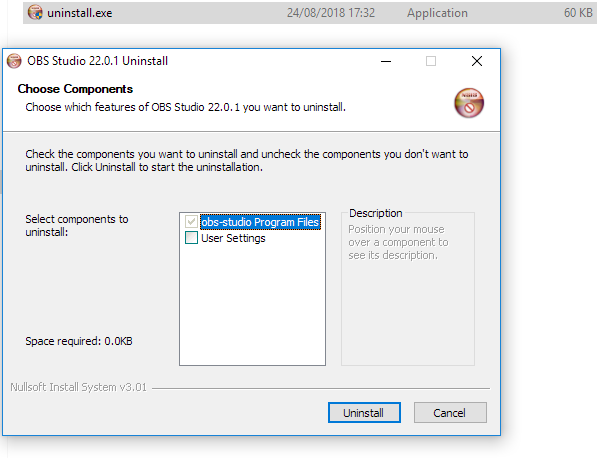
Don't click that an you're perfectly fine.
loud plover
btw
where did the media request go
i got the 26
i cant find the media request on this one
toxic fern
You have to reinstall OBS.Live for that.
old totem
now im missing activity feed
nova scaffold
loud plover
yet nothing
Check the dock settings please, media request is not enabled by default on installation
 toxic fern
You don't have OBS.Live installed.
loud plover
and that picture i took is run as admin
toxic fern
If you do have it installed you didn't click the right icon.


 toxic fern
That's just OBS.
toxic fern
OBS.Live | Open Broadcaster Software Streaming Knowledge Base
OBS (open broadcaster software) knowledge base for live streaming. Find articles and videos about streaming with OBS.
loud plover
i had obs live ealier u said i should delete the 27
but will this bring back to 27 then
loud plover
ok
there done
hahah
now i see them all
i hope this will fix the unstable that sometime these tab bar goes away or annyion file missing come up
i will report back now time go back start this stream. thanks loves
have nice day ❤️
toxic fern
That's a thing with v27 for the missing files.
old totem
it keep tells me when i alt tab encoder is heavy
what should i do?
i have amd 5600x and asus 3070 there is no possible reason i have high settings or something
nova scaffold
old totem
it keep tells me when i alt tab encoder is heavy
Overloaded encoder is always an issue with too much usage on your hardware - can be your CPU or GPU. You can check OBS Logs to find what happened and adjust the settings accordingly.
old totem
nova scaffold
Overloaded encoder is always an issue with too much usage on your hardware - can...
i dont quite understand, im kinda new to streaming. can you direct me where can i find this OBS logs please?
nova scaffold
old totem
i dont quite understand, im kinda new to streaming. can you direct me where can ...
OBS - top menu - Help - Log Files.
Then you need to check the issues in the logs and see what is overloaded, also your OBS has a display to show you the usage - what is overloaded.
old totem
nova scaffold
OBS - top menu - Help - Log Files.
Then you need to check the issues in the log...
 nova scaffold
old totem
nova scaffold
old totem
0,6-0,7% rendering/encoding lag is not that bad.
This will result in short lag spikes on stream, but nothing critical
old totem
i stream warzone, and whenever i have to go into windows, and then back, when loading the game back on screen it freeze, tells me encoder is overloaded. sometimes crash obs and sometimes i have to unplug PC because i cant do anything
nova scaffold
old totem
i stream warzone, and whenever i have to go into windows, and then back, when lo...
Then you need to check google and maybe talk to the people from OBS Project. We can't really diagnose crashes related to specific third party games etc.
In general encoding/rendering lag means your hardware is overloaded.