#helpdesk-selive
1 messages · Page 203 of 1
 nova scaffold
Please screenshot that
@rugged quail we need it in that format to find the error

 rugged quail
Says that when i click on it to preview
 nova scaffold
Click through all 4 CORS errors at the top, we need the actual error
rugged quail
nova scaffold
Click through all 4 CORS errors at the top, we need the actual error
When i click on any on the errors it says failed to load
Under type for CORS it says Fetch for 1 and xhr for the other 3
nova scaffold
rugged quail
When i click on any on the errors it says failed to load
Under type for CORS it...
Checking. Without the correct error code we do not get far
rugged quail
I don't understand how this happened because it was working fine and then today this happened out of no where
nova scaffold
Well we try to figure that out now and without the correct data we can't see why it happens
rugged quail
So went to streamelement and didn't login and checked the errors and this is what is said before i logged in

 cinder dust
hi my source tab is not there at all how do i get it back
 wise silo
cinder dust
hi my source tab is not there at all how do i get it back
wise silo
cinder dust
hi my source tab is not there at all how do i get it back
What do you mean source tab is not there>
cinder dust
next to ur scenes there should be sources and its not there
wise silo
Oh, on OBS.
cinder dust
ya
nova scaffold
rugged quail
So went to streamelement and didn't login and checked the errors and this is wha...
We will check that with developers, might take a bit longer - getting late here.
 rugged quail
nova scaffold
We will check that with developers, might take a bit longer - getting late here.
rugged quail
nova scaffold
We will check that with developers, might take a bit longer - getting late here.
No worries
cinder dust
omg thank u
 vagrant jasper
Is chat broke for everyone or just me?
 full thunderBOT
@vagrant jasper StreamElements menu, on top of OBS > Logout > Login
nova scaffold
rugged quail
No worries
Btw can you provide us your location? Might be a network issue, might be a cloudflare issue.
rugged quail
nova scaffold
Btw can you provide us your location? Might be a network issue, might be a cloud...
Cape town, South Africa
nova scaffold
rugged quail
Cape town, South Africa
Ok, forwarded. If you have access to a VPN, could you test with it?
rugged quail
nova scaffold
Ok, forwarded. If you have access to a VPN, could you test with it?
I don't have a vpn
nova scaffold
rugged quail
I don't have a vpn
We are checking if there are possible network issues
rugged quail
nova scaffold
We are checking if there are possible network issues
Okay cool
vagrant jasper
Thanks support I wanted to make sure it wasn't just me before having to do effort
Also I just restarted OBS and that fixed it oddly enough lol
 nocturne plover
hello, i had a question. none of my custom layouts will transfer to my obs live from streamelements. i cant even preview them in streamelements?
i have tried other browser liinks in my streamelements browser scene and they work fine.
 uncut thorn
so im having bad issues with not being able to download on my new windows 10 laptop keeps saying something missing to reinstall and it should fix the issue but the issue is still there any idea how to fix it
 stray steeple
i tryied it'a obs the problem i can't understand why the stream with it it's laggy and that witch stramlabs is stable
i need help pls
wise silo
nocturne plover
hello, i had a question. none of my custom layouts will transfer to my obs live ...
As in you cant add a overlay to your OBS.Live?
wise silo
uncut thorn
so im having bad issues with not being able to download on my new windows 10 lap...
Can you send a screenshot of the error?
 wise silo
I.. wiould highly suggest installing this https://www.microsoft.com/en-us/download/details.aspx?id=52685
uncut thorn
ok ill give that a try
@wise silo yeah still having the same problem
@wise silo it sayd unable to install when there is a newer verison of the app installed
 ocean rivet
download and install these two things https://obsproject.com/visual-studio-2017-runtimes
OBS (Open Broadcaster Software) is free and open source software for video recording and live streaming. Stream to Twitch, YouTube and many other providers or record your own videos with high quality H264 / AAC encoding.
 opal sparrow
hello I am having an issue with obs studio, I can stream fine and I can record but when i try to run recording as i have in the past while live my obs immediately crashes
uncut thorn
@ocean rivet thanks a lot it helped
opal sparrow
I know its not much but I'll send someone $10 if they can help me get this sorted 😩
 granite vessel
hello if i delete obs.live and install it back does it delete / reset all my settings / scenes ?
rugged quail
Hello all. I recently got a new headset (Artic 5) and ever since my OBS doesn't record audio.
 fallen marlin
My twitch stream overlay doesn't update whenever someone follows. So if someone presses the follow button the goal bar doesn't go up, the latest follower doesn't change, and the alert box doesn't do the alert. Can someone please tell me some things I can do to fix?
full thunderBOT
@fallen marlin Please provide your account ID found at the top of this page: https://streamelements.com/dashboard/account/channels This ID is public info and safe to share here.
fallen marlin
5ff799475785311d8dac5f22
 quick atlas
fallen marlin
5ff799475785311d8dac5f22
quick atlas
fallen marlin
5ff799475785311d8dac5f22
You should be seeing those events come through now
fallen marlin
yes i saw them
 magic linden
i am having trouble starting my stream through obslive
it keeps saying couldn't access the specified channel or stream key, please double-check your stream key if it's correct there may be a problem connecting to the server
 fleet bolt
my overlay does not load on the obs and the screen is black only, can someone help me ?

I haven't been able to solve this problem for a long time
quick atlas
fleet bolt
my overlay does not load on the obs and the screen is black only, can someone he...
Does the overlay work in the online overlay editor?
 soft cloak
hey i have a question, how do i get rid of obs.live stream elements plus in completely in my obs?
 quick atlas
magic linden
is my screen suppose to look like this for streaming stream elements?
quick atlas
magic linden
is my screen suppose to look like this for streaming stream elements?
It looks like you added the browser source, but didn't use the URL from stream elements.
 unreal osprey
Any idea why my Blue Snowball iCE & Logitech StreamCam are not sync'ing?
 ionic whale
hi , i have been using obs.live for a while now and from the last update my chat doesnt work i dont know what happened can someone help me??
full thunderBOT
@ionic whale StreamElements menu, on top of OBS > Logout > Login
ionic whale
thanks
fleet bolt
quick atlas
Does the overlay work in the online overlay editor?
No, i mount it on the website but in the app it doesn’t appear
magic linden
quick atlas
It looks like you added the browser source, but didn't use the URL from stream e...
thank you
I am trying add some overlays but when I add it to stream elements the width and height is off do you know a good height and width that I should have the overlays as?
 full thunderBOT
The default resolution for StreamElements overlays (theme and custom) is 1920x1080. Please add them in OBS at their full resolution and use CTRL+F to fit to screen if necessary. You can then downscale your stream in OBS settings > Video if you'd like https://i.imgur.com/6bWXxjR.png

 spark flicker
im getting this error and crashing multiple times pls help

 digital wigeon
can i get some help with my bots for some reason the commands are not wanting to work when they are typed in chat
 vast wren
digital wigeon
can i get some help with my bots for some reason the commands are not wanting to...
vast wren
digital wigeon
can i get some help with my bots for some reason the commands are not wanting to...
what do you mean? also, are you using a custom bot?
digital wigeon
im using the bots that are on stream elements and it when someone types in a command say like !8ball that commands dose not want to work either do the other ones if that makes sense
vast wren
digital wigeon
im using the bots that are on stream elements and it when someone types in a com...
whats your account id? ill check
digital wigeon
captmerica0313
is my profile
5f8bb57dc7407748850bf64e
unless im doing something wrong and not catching it
 lilac sleet
how do i stream from my ps5 to obs?
vast wren
digital wigeon
captmerica0313
try this /unban streamelements and then /mod streamelements
digital wigeon
ok one sec
@vast wren done and its still not wanting to work i had it working like a month ago
vast wren
digital wigeon
<@!689904735917965342> done and its still not wanting to work i had it working l...
youve used the commands i gave you ? /unban streamelements and then /mod streamelements
digital wigeon
yes
vast wren
first /unban streamelements then /mod streamelements
digital wigeon
when i do that and type in /mod streamelements is says that they are already a moderator
vast wren
ok
digital wigeon
no message pops up
full thunderBOT
"1) Right click on your OBS desktop shortcut and open the Properties
2) In the Target field, add the following to the very end: --remote-debugging-port=40404 (don't forget to add a space before the current path)
3) Open OBS (or restart if it was open)
4) Open your web browser and type in: localhost:40404
5) Click on StreamElements - Activity feed
6) Navigate to the Console tab
7) Type the following into the console and hit enter: store.customBot.removeCustomBotIntegration()
8) Try setting the custom bot name
9) Remove the additional flag in step 2 from your shortcut properties."
vast wren
@digital wigeon sorry meant this 👆
digital wigeon
ok ill let you know what happens when im done
vast wren
K
 drowsy river
I am so new to this but I am trying StreamElements Overlays but cant seem to get my Social media links embedded in the overlays? Anyone know how I do that?
full thunderBOT
New to StreamElements?
Check out our YouTube channel https://www.youtube.com/c/streamelements/videos
with tutorial videos from setting up the basics, to in-depth details on how to use our product.
New to OBS? Here is a 4 step quick start guide
https://obsproject.com/wiki/OBS-Studio-Quickstart
Want to learn even more? Here is an in-depth overview
https://obsproject.com/wiki/OBS-Studio-Overview
digital wigeon
@vast wren hey i did that it worked but making a custombot name do i need to make a twitch account for it?
vast wren
digital wigeon
<@!689904735917965342> hey i did that it worked but making a custombot name do i...
if you want to use a custom name then yes
digital wigeon
ok im not worried about that at this time thanks for your help yall are awsome
 lyric bone
had a problem to open live now, it appears to me "it was not possible to access the specified channel or the transmission key, check your transmission key. if it is correct, there may be a Server connection problem "
With that I can't go live ... I already restarted the modem, the computer and the obs, what to do?
rugged quail
Having an issue with obs after getting a new monitor
Just tried to do a stream, obs said it was running at 60fps, but the video looked all stuttery, upload speed 5k, at 720p
spark flicker
spark flicker
im getting this error and crashing multiple times pls help
anyone?
vast wren
spark flicker
anyone?
HI, Try first opening the OBS as admin, if that doesn't work uninstall it and reinstall again
rugged quail
would the new monitor not being a 60 fps monitor cause an issue?
vast wren
rugged quail
would the new monitor not being a 60 fps monitor cause an issue?
I dont think monitor specs have anything to do with it
rugged quail
not sure what the issue would be then, was fine yesterday, all that i changed was monitors hooked up
 golden smelt
Hey guys, so i wanna ask, just bought a webcam that can go all the way up to 4K. I am aware that i dont need it to have that high resolution. But my problem is that when i play, my fps game drop and my webcam quality is not that good too. Is there a technic or a solution to reduce lag?
rugged quail
whats your systems specs
 rare forge
Hi i am trying to install OBS.live and this message keeps coming up after installation can anyone help

 sharp turret
rare forge
Hi i am trying to install OBS.live and this message keeps coming up after instal...
sharp turret
rare forge
Hi i am trying to install OBS.live and this message keeps coming up after instal...
OBS (Open Broadcaster Software) is free and open source software for video recording and live streaming. Stream to Twitch, YouTube and many other providers or record your own videos with high quality H264 / AAC encoding.
rare forge
thank you 🙂 @sharp turret
golden smelt
rugged quail
whats your systems specs
i7 RTX 1660 Ti
24GB Ram
I dont remember the rest as ill check it soon and update you. But what is it specifically youre looking for
 copper garden
Hi I add to my Obs alert box from the streamelements and I add alert for sub and when I get a sub I can see that but I cant hear the alert, I can hear it just when I open t
streamelements
 soft knot
copper garden
streamelements
soft knot
copper garden
streamelements
Can you hear the alert sound in the overlay editor?
copper garden
ya
spark flicker
spark flicker
im getting this error and crashing multiple times pls help
i reinstalled it but still same problem
vast wren
What versions are you trying to install?
spark flicker
vast wren
What versions are you trying to install?
26.1.1
rare forge
Good Morning/Afternoon/Evening - can i change the alert sound?
 compact ice
I'm incapable of logging in/authenticating the plugin. It returns this error:
An error occurred, please try again or enter the JWT token manually.
vast wren
login to your Se portal and use the JWT token
compact ice
where do I put it in tho 😅 ?
vast wren
compact ice
where do I put it in tho 😅 ?
Where do you see this error?
compact ice
when I try to get past this

Goes through googles authentication fine but once it lands on the streamelements page
after this it gives the error

 sick gyro
what's up guys! I just got the elgato stream deck and am trying to find the actions in the "more action" menu but can't find the obs.live settings. I'm on a macbook pro. TIA
full thunderBOT
If you are having issues with Elgato hardware or software, we recommend reaching out to their support here: https://e.lga.to/help
vast wren
try this https://streamelements.com/logout

StreamElements
The Ultimate All in One Platform for Streamers
vast wren
you manage to login to twitch? @compact ice
compact ice
yeah it worked with twitch
vast wren
what is your twitch username?
compact ice
KarlWyn_Channel
rare forge
vast wren
when you edit the overlay you can also edit the alert sound
thank you ive found it 🙂
vast wren
compact ice
KarlWyn_Channel
are you using chrome?
compact ice
Firefox. Should i try chrome?
vast wren
yes
compact ice
Alright ill try that later today, had to leave for work
vast wren
np
rugged quail
hello i have a problem with obs and with my youtube chatbox
when i add my my chat box i have this message

an error has occured even with streamlabs and obs
can you help me ?
 faint eagle
hey! im trying to add a pre-edited layout onto my OBS from streamelements, but it will not fill my screen fully? someone who knows what i should do?
full thunderBOT
The default resolution for StreamElements overlays (theme and custom) is 1920x1080. Please add them in OBS at their full resolution and use CTRL+F to fit to screen if necessary. You can then downscale your stream in OBS settings > Video if you'd like https://i.imgur.com/6bWXxjR.png
rugged quail
hello i have a problem with obs and with my youtube chatbox
when i add my my chat box i have this message
an error has occured even with streamlabs and obs
can you help me ?

 wanton spruce
what does that say in english?
 untold moth
Custom bot name isn't working in OBS Live as of last night / this morning... was working previously
Any advice on what to check? The bot/tipping setup shows completed
 prisma citrus
hi there anyone have any info on why two cameras wont work on obs
untold moth
untold moth
Custom bot name isn't working in OBS Live as of last night / this morning... was...
Nevermind... found it reset back to default under Activity Feed > Stream Settings... maybe when OBS Live updated it reset a setting... sorry for the minor freak out
 cedar turret
Hey, trying to set up my gaming scene. Added game capture, specific window but nothing shows up in the preview box.
 odd kraken
@cedar turret
It might be worth asking in the OBS discord here: https://discord.gg/obsproject
 wary cove
how do i only allow a specific playlist be used for media request
odd kraken
There is no whitelist feature. Best option would be to moderate the queue.
You can add a backup playlist and shuffle that one.
 stark copper
question i set up auto tweeting and it did not infact tweet out i went live ,i also still do not receive any emails with my stats which i had been receiving up to last month. Can someone people help me fix this?
i asked about this a while ago and nothing really happened
 vague kestrel
There a way where I can if i'm taking a break and have music playing in the back ground but have where my voice and the other streamers voice not coming threw the stream, on two different sources ?
 coral pier
hi guys! question; i cant get my display capture or window capture to work. im trying to stream sims on my 2015 macbook pro
full thunderBOT
Obs.live is a plugin for OBS Studio for the best OBS support, please join their Official Discord @ discord.gg/obsproject
 edgy canyon
Hey, i have a problem with my Media share, every time it plays it doubles, i have check if i have any other windows open with media share or if anything is copying it but i just cant fix it
full thunderBOT
@edgy canyon Make sure to :ballot_box_with_check: “Shutdown source when not visible” for all browser sources (all OBS scenes). If using studio mode, uncheck “Swap Preview/Output Scenes After Transitioning.” Also, keep in mind that sound can play from any overlay loaded in the browser (editor or launched). https://i.imgur.com/6bWXxjR.png https://i.imgur.com/yY0wcFl.png
 edgy canyon
Thank you SOOOO MUCH!
 quiet portal
I can not get my custom bot name to reconnect either through the Ground Control or The OBS.Live plugin any help for that it has been like this for a few days now it just disappeared I have tried to reconnect but the name never appears
compact ice
ok I asked earlier for advice on logging into the plug in and now I tried with chrome as I was told
this time i get this error

the discussion from earlier for the steps that have already been tried
compact ice
compact ice
I'm incapable of logging in/authenticating the plugin. It returns this error:
``...
.
 fickle dove
So I'm having an issue where my follower alerts are not playing on stream. I've followed several tutorial videos and looked up how to fix this issue but it's not showing up when I go live. It shows up when I test it but nothing when someone follows when I'm live. Also, on my dashboard it doesn't show any of my followers, even though it shows all my other stats and I can't find any solution to this online
 full thunderBOT
@fickle dove Please provide your account ID found at the top of this page: https://streamelements.com/dashboard/account/channels This ID is public info and safe to share here.
fickle dove
full thunder
<@!384802939450949634> Please provide your account ID found at the top of this p...
5ff737ec52e7be7c070c34d8
 wary dew
fickle dove
5ff737ec52e7be7c070c34d8
wary dew
fickle dove
5ff737ec52e7be7c070c34d8
fixed, missed events can't be shown but new ones will show up
fickle dove
wary dew
fixed, missed events can't be shown but new ones will show up
Thank you very much!
compact ice
ok so I managed to get logged in by adding a twitch channel to my streamelements account and then logging in via twitch but I can't find a way to switch it over to the youtube acct mode or something 🤔
 tranquil steppe
Hi, i am having issues with the streamelements plugin when it is installed the obs UI changes and the font sizes are different then normal (bigger)

 marsh pawn
How can i delete it ?
compact ice
I can still use obs normally without authenticating right? if i cant manage to fix it before tomorrow?
or am i gonna need to reinstall
granite vessel
hello when u uninstall obs.live and install it back and sign in do u still keep all your settings and scenes ???
 cerulean tendon
hello, how can i clear the renvue history top tippers ?
ocean rivet
cerulean tendon
hello, how can i clear the renvue history top tippers ?
go to your revenue history and click here

it will select all your tips on that page and you can click the delete selected button at the bottom
cerulean tendon
i already tried and deleted the tip list, but still the top tippers wont clear
ocean rivet
go back to an earlier date for the from date
compact ice
ok so i managed to fix my issue. turns out i had my vpn on 🤦♂️
 urban fractal
Hello, my logitech c922 camera is no longer being picked up by obs. This is very recent, as of this past weekend. Any reason as to why this may have suddenly happened? logitech capture and G-hub show picture but I can't get the picture to come on any scene no matter how I layer it
 worn pagoda
My obs is only going live to YouTube even though I changed to custom rtmp in the settings and put in new key & url ? Any way to make it change to the mew rtmp and not go to YouTube when I click start streaming ?
full thunderBOT
@worn pagoda StreamElements menu, on top of OBS > Logout > Login
 viscid drum
any help, went live earlier 40 ppl in no one mentioned a thing i went back to the vod and theres a weird desktop audio echo, no idea why? any help also when trying to monitor audio it doesnt work for desktop audio
 silent herald
heya, is there any way to mass import words into the banned words list?
cause doing it one-by-one is really darn tedious
 cyan bloom
i have an issue which i unable to set my stream to 1080 60fps... just up to 720.... kindly assist....
 pallid pivot
Can someone assist me as my OBS and Facebook Creator Studio are not connecting. So right now I am live on stream but my OBS system will not show me likes shares updates nothing
rugged quail
Hi i'm trying to migrate from streamlabs stuff to SE. (alert box and stuff) I'm really confused. :<
 timid panther
Hi, Anyone here know how to solve why the "now playing song popup" isnt appearing from the html browser? Download it from Zyphen's. Using tuna settings. I already put it in the same directory as all the Snip.txt file. Put the png in the same directory too. Currently using Vlc to play music from stream. Music from Harris Heller Streambeats downloaded to my computer. It will be great if someone here know a solution

 red vessel
Is there a way to reset the custom bot settings without using the localhost:40404 solution? Unfortunately I can't get to the localhost site no matter what settings I try on my PC. I've been experiencing the issue where I sign into the custom bot, but it just takes me back to the Activity Feed and doesn't show the option to change the name or send a test message. Other things I've tried:
-Uninstalling and re-installing OBS.Live
-Removing the SE bot from my channel and re-adding it
-Removing SE connection from the bot account and attempting to add the bot again.
 honest echo
@red vessel why you can't get into the 40404 site?
red vessel
It gives me ERR_CONNECTION_REFUSED on every browser. I tried clearing my cache, changing my proxy settings, and flushing my DNS, but it still won't load.
Edit: I've also disabled my firewall for a minute to test, no luck
honest echo
@red vessel you open the shortcut that you added the --remote part, correct?
red vessel
Yes, I did!
honest echo
Mind to join a call and show me the steps?
red vessel
Of course!
Thanks again Renziito!
The solution was that I didn't launch OBS using the StreamElements shortcut before going to the localhost site, I was using OBS Studio's shortcut initially.
honest echo

 brazen harness
Any advice on as to why my streamelements alerts arent showing on my OBS.Live when triggering them via the streamelements website? across multiple different overlays, I resigned into OBS.live and did about 20 minutes of googling and Im at a loss.
I can hear it, but not see it which is the issue, the source isn't hidden and it's on the top of my sources list
full thunderBOT
@brazen harness OBS > Settings > Advanced > Scroll down > Enable or disable Browser Source Hardware Acceleration, depending on its current state > Restart OBS
https://i.imgur.com/ggMe9ZE.png

 proven ridge
Hey I downloaded and installed OBS and now it's telling me that some files are missing

 shy mountain
Uninstall OBS.Live, get this installer: https://cdn.streamelements.com/obs/dist/obs-streamelements-installer-wrapper/windows/latest/obs-streamelements-setup-stable.exe -> install and see if this fixes it
proven ridge
The error has come up again
shy mountain
OBS (Open Broadcaster Software) is free and open source software for video recording and live streaming. Stream to Twitch, YouTube and many other providers or record your own videos with high quality H264 / AAC encoding.
proven ridge
Thank you, that is working now ☺️
 proud spindle
Hello, I'm having some trouble with the overlays from the stream elements website. I've tried using them in both OBS and in Streamlabs (my main program for streaming) and no matter what I do it only ever shows the top left part of the scene. is there something I'm doing wrong?
full thunderBOT
The default resolution for StreamElements overlays (theme and custom) is 1920x1080. Please add them in OBS at their full resolution and use CTRL+F to fit to screen if necessary. You can then downscale your stream in OBS settings > Video if you'd like https://i.imgur.com/6bWXxjR.png
We're not able to troubleshoot issues with using our overlays in StreamLabs OBS (SLOBS) as we don't have the tools to support their software. We recommend using OBS Studio or OBS Studio with our plugin OBS.Live.
proud spindle
Oh wow! thanks so much ❤️
silent herald
silent herald
heya, is there any way to mass import words into the banned words list?
Sorry, I mean this
 toxic fern
There is not. That's the only method.
silent herald
Could do with that adding IMO, should be as simple as adding a function which parses a list and then populates from it
full thunderBOT
Check out the StreamElements ideas board: https://strms.net/ideas. You'll be able to add ideas, upvote ideas you agree with and track their progress with email notifications. Adding and upvoting ideas also helps the staff know which ideas should be prioritized so please take some time to upvote.
silent herald
There's five of them already for the same issue, so I'll just upvote those
 vague charm
I'm having trouble getting the game capture to work automatically and i'm having to manually select the exe if i swap game, had a play around with the settings but cant figure out best settings for auto picking up the game
silent herald
full thunderBOT
@vague charm StreamElements menu, on top of OBS > Logout > Login
 wicked flax
Bom dia, meu bot parou de responder comandos no chat e os temporizadores também, alguém consegue me ajudar ?
full thunderBOT
@wicked flax Go to the Dashboard > Right side > Part channel > Join channel(https://streamelements.com/dashboard)
 rugged quail
My Desktop/output aint capturing any of my music/friends
 bitter edge
why if i use myself as custom bot all the commands just stop working?
full thunderBOT
If your commands recently stopped working and you're using OBS.Live and a custom bot name do the following:
- In OBS.Live, click on the hamburger menu (three stripes) at the top left of your activity feed
- Click on Stream Settings > Custom bot name
- In the Custom bot name field select Set custom bot name, not your already existing username (with capital letters). Note: If you already connected an account that way, the third entry will show as the account name (see image https://i.imgur.com/sO7fWOX.png).
- Scroll a bit down and click on the purple Connect Custom Bot Account button
- Log in as usual and Authorize the custom bot name
- Back in the Activity feed, click on the Send Test Message button and check if your custom bot name starts working again
 bitter edge
so i can't use myself as bot or i can but i need to specify my name in the "custom bot" setting?
rugged quail
Why isnt my desktop/output audio not capturing my friends/spotify
full thunderBOT
Obs.live is a plugin for OBS Studio for the best OBS support, please join their Official Discord @ discord.gg/obsproject
 amber zephyr
Is there a staff member i can share my screen with? Im having trouble uninstalling streamelements i need to uninstall and reinstall it but it wont let me fully delete it
can i show someone?
 regal cedar
So is Media Request Plug-in not working? Like it’s just a purple box?
I have restarted my computer a few times and refreshed everything. I’m not sure why the media request plugin won’t load
Oh I fixed it. For those of you who have issues in the future I fixed it like this: in the menu bar at the top, click stream elements. At the bottom click log out. After it has logged you out, log back in and it should work
 unique pasture
Hey ive been having issues when streaming saying theres an encoding error and dropping frames it says to lower some stuff and i did but its still happening ive checked my internet and thers no issues there and one my friends is having the same issues
 cobalt valve
Is anyone else having problems with host alerts in the stream elementes?
I know more than 30 people with this problem
 faint wharf
question to anyone, if I use fiverr for my own custom twitch overlay, how do I upload it to obs live?
 distant breach
cobalt valve
Is anyone else having problems with host alerts in the stream elementes?
I know ...
distant breach
cobalt valve
Is anyone else having problems with host alerts in the stream elementes?
I know ...
Hosts need to have, i believe more than 2 viewers (can't solo host alert)
cobalt valve
@distant breach But that's the point, it doesn't make sense to have 2
nowhere else is it like this
distant breach
faint wharf
question to anyone, if I use fiverr for my own custom twitch overlay, how do I u...
For a full overlay; the only real way to do that is to be an editor on their account and transfer it
full thunderBOT
@cobalt valve "Due to changes to Twitch API, we have filtered out hosts and will only show these ones on your activity feed:
- All hosts coming from an online channel with at least 1+ viewer
- Auto host events with at least 1 viewer - only from a channel that just went offline
Note: If you see X channel has hosted you with no viewers on the back, that is considered an offline host or a host with 0 viewers, we do not show these."
 primal summit
Hello, i never had this problem before when i laucnh obs live it says WOOPS, OBS has crashed! 😦
launch*
i can't open it
cobalt valve
full thunder
<@!202582013553672193> "Due to changes to Twitch API, we have filtered out hosts...
Got it, and it doesn't make a lot of sense, since hosting with a viewer would be the equivalent of raid so this filtering doesn't make sense
 median niche
Trying to import overlays from Streamlabs and keep getting his error - this didn't use to happen in the past.
Any thoughts? 😦
 primal summit
nobody can help me please ?
i can't even open obs live i have a white screen of the program and then i have this message " Whoops, OBS has crashed!
soft knot
Did you just install OBS.Live?
 static dagger
im live right now. One of my scenes shows a completely black screen. Please help
Restarting OBS does not work
restarting computer did not fix it
primal summit
i'm missing two files "graphics-hook32.dll" and "win-capture.dll" can i download them somewhere please ?
static dagger
i regret switching to this app tbh
i can't even stream without having everything go wrong
 pliant ravine
hey
so i havent used the app in a long while
and everytime i open it, it says theres an update for the live add on
so i update it
but then it just resets back to the old obs version without live
any ideas?
full thunderBOT
@static dagger Obs.live is a plugin for OBS Studio for the best OBS support, please join their Official Discord @ discord.gg/obsproject
soft knot
primal summit
i'm missing two files "graphics-hook32.dll" and "win-capture.dll" can i download...
Probably relevant for you as well. ⤴️
static dagger
Yeah I switched to regular OBS and fixed the problem :D
pliant ravine
pliant ravine
any ideas?
well that worked ig
i just fully uninstalled then reinstalled
cobalt valve
@full thunder but even so no matter the amount I’m never notified via chet da live or in the activity chat
 languid kettle
the chat and the activity feed don't show to me
 true geyser
My streamelements is randomly sending the following message: "response message", never had this before!
sharp turret
true geyser
My streamelements is randomly sending the following message: "response message",...
check timers
true geyser
Will do! haven;t changed anything in weeks though so weird it's just started happening!
yeah nothings different with my timers :/
toxic fern
Pinned messages in #helpdesk-twitch
 zealous heart
Hello. I have a problem with my microphone. I have an external sound card that I have a studio microphone connected to. For some reason, my mic is only played on the left speaker. This probably has to do with mono and stereo sounds. My question is how do I set so windows takes in the microphone as mono instead of stereo. I can not find a solution. It becomes useless when I stream. #helpdesk-selive
full thunderBOT
Obs.live is a plugin for OBS Studio for the best OBS support, please join their Official Discord @ discord.gg/obsproject
sharp turret
languid kettle
the chat and the activity feed don't show to me
StreamElements menu > OBS.Live Docks > Activity feed and chat

 narrow sun
hello, im having a problem with my webcam not working, i have it on the right one but it wont show up on the live?
full thunderBOT
@narrow sun Obs.live is a plugin for OBS Studio for the best OBS support, please join their Official Discord @ discord.gg/obsproject
narrow sun
ty
languid kettle
sharp turret
StreamElements menu > OBS.Live Docks > Activity feed and chat
i know its from this but the OBS.LIVE docks i can't click it
full thunderBOT
@languid kettle StreamElements menu, on top of OBS > Logout > Login
languid kettle
thx @sharp turret its worked
sharp turret
You're welcome! 
languid kettle
but when i want to replay the follow or any thing from the activity feed its not replay
 shy stirrup
Hi All, I just installed OBS Live, I have a stream overlay that I've created, I'm trying to use it in OBS Live, but can't find a tutorial on how. Any suggestions?
true geyser
@sharp turret I checked my SE timers but I still get the random 'response message' in chat. Any ideas?
sharp turret
toxic fern
Pinned messages in <#199460642975907840>
@true geyser ^^^
 glossy tree
hey ive been having issues with the import from streamlabs feature
its been saying an error occured
ocean rivet
glossy tree
hey ive been having issues with the import from streamlabs feature
try using the web version https://streamelements.com/dashboard/account/import?provider=streamlabs
bitter edge
hello, my stream elements shop does not show correctly the contents of my shop. I have 10 items purchaseable (unlimited quantity checked), but on the link only shows 3 of them.
i mean the stream perk shop
bitter edge
how do i publish?
wary dew
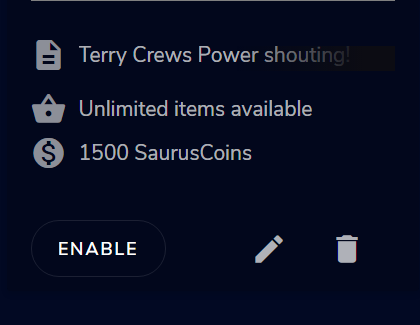
https://i.imgur.com/X27TdSE.png the enable button makes it available in your shop
 full thunderBOT
@bitter edge Please provide your account ID found at the top of this page: https://streamelements.com/dashboard/account/channels This ID is public info and safe to share here.
bitter edge
5ec135a1c69a8967af013377
the sotre is this: https://streamelements.com/micheleniente/store
StreamElements
The Ultimate All in One Platform for Streamers
it shows only certain items, not all of them
4/13
wary dew
I've send it to staff, they will take a look as soon as they have the time 😄
bitter edge
thank you!
rugged quail
Hey guys, for some reason my "custom bot" disconnected and it wont reconnect, any ideas how to fix it? It used to work properly but now it doesnt, wierd....
wary dew
bitter edge
thank you!
https://i.imgur.com/U2aEOrG.png check this in the settings of the items 😉
 wicked flax
full thunder
<@!227167201289961472> Go to the Dashboard > Right side > **Part channel** > **J...
wicked flax
full thunder
<@!227167201289961472> Go to the Dashboard > Right side > **Part channel** > **J...
Já está ativo.
bitter edge
wary dew
https://i.imgur.com/U2aEOrG.png check this in the settings of the items 😉
ok i'll try
bitter edge
wary dew
https://i.imgur.com/U2aEOrG.png check this in the settings of the items 😉
yes it was the "redeemable via website", THANKS! i had no idea that the website was the store. SOLVED
wary dew
 charred lava
hey i streaming to D live with your streamelments is there any why that i can add there chat in to obs live
wary dew
Nope, StreamElements does not support D-live
Also not that if you are using a StreamElements tipping link there it's a violation of TOS
 opaque magnet
anyone have issues with with streamelements not updating or failing to update
 forest parcel
Anyone know why if i have my webcam small it looks perfectly fine but when i enlarge it becomes grainy/blurry or something?
 idle quail
how do i free up disk space
 quartz karma
All my Docks got fucked up, and now I cant find or activate my "stats" dock...anyone got a solution
quick atlas
quartz karma
All my Docks got fucked up, and now I cant find or activate my "stats" dock...an...
You should be able to go to View > Docks > Stats
quartz karma
quick atlas
You should be able to go to View > Docks > Stats
I have tried that. its already been "checked" meaning it should be visible, it is not. Ive also already attempt unchecking and rechecking, as well as closing and reopening the whole app
quick atlas
quartz karma
I have tried that. its already been "checked" meaning it should be visible, it i...
Is it minimized or popped out? You can move the docked windows out of the app so it may be loading elsewhere
quartz karma
quick atlas
Is it minimized or popped out? You can move the docked windows out of the app so...
nope, no extra windows
 odd echo
Hello, I need help.
quick atlas
quartz karma
nope, no extra windows
View > Docks > Reset UI Maybe try this?
quartz karma
quick atlas
View > Docks > Reset UI Maybe try this?
did that too, ive reset twice, and then reorganized all of my docks
quick atlas
quartz karma
did that too, ive reset twice, and then reorganized all of my docks
Let me look at the options real quick
quartz karma
quick atlas
Let me look at the options real quick
nevermind ive found them
quartz karma
quick atlas
Let me look at the options real quick
preciate the assisstance
rugged quail
how come my recent followers resets everytime I launch my stream?
I had some tickers set up but they wont show the data unless I replay the alerts
 lofty hound
I need help with my Alerts on stream elements
Been on this for three weeks and I haven’t been able to and I’ve been looking at YouTube videos and it’s like nothing nothing nothing to look at on YouTube First Amendment works and I really need help and now hoping that someone can help me out to put my alerts with OBS live
rugged quail
whats the issue. I figured out my alerts. maybe I can help?

 rapid latch
how do i set up alerts
 uncut jacinth
I need help, I changed my name recently and my streamelements bot isnt in chat
im not sure how to re setup the bot settings
full thunderBOT
@uncut jacinth If you changed your name on Twitch, please follow these steps:
- Visit https://streamelements.com/logout and then log in again by connecting with Twitch.
- On the right side of the dashboard page that opens, select Join under bot settings. If it says Part select that and then select Join to send the bot to the chat. Don't forget to mod the bot by typing /mod streamelements in your channel if you have not already.
- Post your old and your new name here so that we can update your channel's chatstats tracking (must be done by staff).
full thunderBOT
@uncut jacinth Go to the Dashboard > Right side > Part channel > Join channel(https://streamelements.com/dashboard)
quick atlas
uncut jacinth
Right?
What's your new name?
uncut jacinth
RadAye
quick atlas
uncut jacinth
RadAye
Chatstats should be all set
uncut jacinth
I appreciate it
compact ice
am I able to have likes & concurrent views docked like the chat in the obslive plug in?
shy mountain
compact ice
am I able to have likes & concurrent views docked like the chat in the obslive p...
If you are streaming on Facebook - those cannot be shown on OBS.Live's docks due to FB not having APIs for those.
Or rather the viewer count doesn;'t have one
compact ice
youtube
shy mountain
Since when does Youtube have "likes"? 
rugged quail
shy mountain
Since when does Youtube have "likes"? <:Thonk:349019578451361794>
literally forever
shy mountain
oh right the thumbs up thing. I don't think we even get events for those at all
no we don't as its not an open API thing most likely or YT told us to not show those
 shy mountain
If the dashboard doesn't have the Likes as an event, we don't have it in general
AS for teh viewers, no, there is no way for us to get the current viewers on the stream and show in on OBS.Live's dock
compact ice
alright
 sharp pumice
i have this issue and dont know what it is, i start up the stream and get massive framedrops, i lowered bitrate, restarted pc, restarted router, nothing works
full thunderBOT
@sharp pumice Please provide a log from your last stream. To do this, in OBS go to Help > Log Files > Upload Last Log File and paste the link to the log file here.
sharp pumice
this should be from today as i am trying to stream right now
anyone that can help ?
would appreciate it allot
shy mountain
https://obsproject.com/tools/analyzer?log_url=https%3A%2F%2Fobsproject.com%2Flogs%2FHR259IW1BPc7x59T
OBS (Open Broadcaster Software) is free and open source software for video recording and live streaming. Stream to Twitch, YouTube and many other providers or record your own videos with high quality H264 / AAC encoding.
 main mountain
Hi, so i tried importing nerdordie overlays using the quick streamelements url install, but it says "platform mismatch" ?
vast wren
main mountain
Hi, so i tried importing nerdordie overlays using the quick streamelements url i...
you sure you're trying to use an SE overlay?
toxic fern
You're trying to import an overlay for a platform other than what you're logged in with.
main mountain
@vast wren yes there are three files in the nerdordie package, one for obs, one for streamlabs, and one for SE (urls)
toxic fern
For example it's a Facebook one but you're logged in with twitch.
main mountain
I only have one platform...
toxic fern
What is the name of the file you're trying to use.
main mountain
I'm a fidiot
nevermind I got it, I thought i had to install all of them (I'm new). Thank you so much ahhaah
 thick zephyr
hello, i´ve got a problem. i can´t open obs or streamlabs on my computer aufter installing
if i try to open obs there will pop up a window with VCRUNTIME140_1.dll not found
vast wren
thick zephyr
hello, i´ve got a problem. i can´t open obs or streamlabs on my computer aufter ...
streamlabs or OBS.live (streamelements)?
thick zephyr
downloaded from elements homepage
obs studios im tring to open
but same error when clicking on the StreamElements OBS.Live icon on my desktop
vast wren
thick zephyr
downloaded from elements homepage
Uninstall OBS.Live, get this installer: https://cdn.streamelements.com/obs/dist/obs-streamelements-installer-wrapper/windows/latest/obs-streamelements-setup-stable.exe -> install and see if this fixes it
if that doesnt work try https://obsproject.com/visual-studio-2017-runtimes
OBS (Open Broadcaster Software) is free and open source software for video recording and live streaming. Stream to Twitch, YouTube and many other providers or record your own videos with high quality H264 / AAC encoding.
vast wren
you've uninstalled the OBS fully?
thick zephyr
i just now unistalled and rebooted
tring now again
but yes before alos uninstalled but without reboot
still same error
thick zephyr
thanks a lot!. i finaly got it to work
rugged quail
Can i create with Streamelements a Donation Goal ? When yes how ?
vast wren
rugged quail
Can i create with Streamelements a Donation Goal ? When yes how ?
yes, you can add it as a widget in the overlays
rugged quail
where i can add it?
full thunderBOT
@rugged quail New to StreamElements?
Check out our YouTube channel https://www.youtube.com/c/streamelements/videos
with tutorial videos from setting up the basics, to in-depth details on how to use our product.
New to OBS? Here is a 4 step quick start guide
https://obsproject.com/wiki/OBS-Studio-Quickstart
Want to learn even more? Here is an in-depth overview
https://obsproject.com/wiki/OBS-Studio-Overview
rugged quail
Where i can change the Merch Design ?
rugged quail
full thunder
<@456226577798135808> New to StreamElements?
Check out our YouTube channel <http...
Didnt help me to create a goal
 visual mirage
hi does any one know where i would go for mic audio issue in obs? I tried using the audio chat but no one is responding
 vital copper
hey there! 🙂 My Dashboard and activiy feed dont show me Followers. Also the alerts for follwers dont pop up at the stream if ig get live. how i can fix that? 🙂
rare forge
median niche
Trying to import overlays from Streamlabs and keep getting his error - this didn...
I am having the same issue, did you resolve this problem?
nova scaffold
rare forge
I am having the same issue, did you resolve this problem?
Most common import issue are large files or incompatible files.
Try to remove anything that is over 30Mb - this is our file size limit. And then import again
nova scaffold
vital copper
hey there! 🙂 My Dashboard and activiy feed dont show me Followers. Also the al...
Do you have your account ID for us?
https://streamelements.com/dashboard/account/channels
Copy the account ID from that page^ and post it here.
median niche
rare forge
I am having the same issue, did you resolve this problem?
Unfortunately no, still waiting to hear from staff
vital copper
5ff96bc0dc4aef1e7f880ae4
rare forge
how do i export overlay's? i pressed i will do it later when installing OBS.live and i cant find the option - only for alerts
full thunderBOT
@rare forge To add your overlays to OBS, add a new browser source in your scene. Paste your overlay URL in the browser source properties, set the dimensions to 1920x1080 (unless you changed them on the website) and check Shutdown source when not visible. https://youtu.be/KDvLynUqXI4
visual mirage
does anyone have information my mic question
rare forge
i want to export my old overlay from streamlads OBS to OBS.live
i purchased one from OWED
nova scaffold
rare forge
i want to export my old overlay from streamlads OBS to OBS.live
importing is what will transfer your overlays
you can also contact own3dTV and they will give you the version of the overlay for StreamElements
most of the overlays have that
nova scaffold
vital copper
5ff96bc0dc4aef1e7f880ae4
follower alerts should be fixed
vital copper
nova scaffold
follower alerts should be fixed
THANKS A LOT
 cerulean sphinx
How do I remove OBS Live from OBS?
nova scaffold
cerulean sphinx
How do I remove OBS Live from OBS?
Uninstall the OBS.Live in the program menu (windows).
This will return you back to OBS Studio

 cerulean sphinx
I don't see it?

 cerulean sphinx
Where is the directory?
 graceful lotus
Chat box not working and camera doesnt work randomly
rugged quail
Why isnt my desktop/output audio not capturing my friends/spotify. I Have a Output setup as well I Dont know how/why this happend
 timber ingot
hello I'm having a problem going live. I signed into YouTube the last time I used obs.live....I'm now trying to stream on twitch and every time I click go live it tries to go live on YouTube instead
toxic fern
@rugged quail That is a question for the OBS server as I previously told you.
full thunderBOT
@timber ingot StreamElements menu, on top of OBS > Logout > Login
timber ingot
full thunder
<@!595640939851153408> **StreamElements** menu, on top of OBS **> Logout > Login...
I'm using OBS.live
timber ingot
timber ingot
I'm using OBS.live
Thank You! I did the same thing but using the streamelements > logout > login and all is well
 shy sable
Hi I've lost my window where I could setup stream information like Title, tags and other in my StreamElements OBS.live. It is a minor issue but I can't find any clue on google or in software where to turn it back on. Thank you...
nova scaffold
shy sable
Hi I've lost my window where I could setup stream information like Title, tags a...
Check the docks in OBS.Live
shy sable
nova scaffold
Check the docks in OBS.Live
I did but did not found the window. I tried RESET too. Window did not returned. Maybe there was an update that changed this?
 nova scaffold
shy sable
I did but did not found the window. I tried RESET too. Window did not returned. ...
nova scaffold
shy sable
I did but did not found the window. I tried RESET too. Window did not returned. ...
This window is a dock from OBS and should be present there. Part of the functionality is present in the activity field and can also be done with chat commands.
shy sable
nova scaffold
This window is a dock from OBS and should be present there. Part of the function...
Thank you! I found it in Activity feed. I can use that one.
rugged quail
why i obs don't import my streamlabs scenes
rugged quail
Ok i imported url to my obs by adding browser and it only shows part of overlay not full thing.... help
full thunderBOT
@rugged quail To add your overlays to OBS, add a new browser source in your scene. Paste your overlay URL in the browser source properties, set the dimensions to 1920x1080 (unless you changed them on the website) and check Shutdown source when not visible. https://youtu.be/KDvLynUqXI4
rugged quail
full thunder
<@456226577798135808> To add your overlays to OBS, add a new browser source in y...
Yeah I did all that but the changing of the dimensions. "Duh SuperGirl face to palm" Thank you so much. I am really new to this so ever little bit helps
nova scaffold
rugged quail
Yeah I did all that but the changing of the dimensions. "Duh SuperGirl face to p...
Do not worry, we help you out if needed 🙂
rugged quail
how do i set a command to read users name that uses it
nova scaffold
rugged quail
how do i set a command to read users name that uses it
try the ${touser} variable
nova scaffold
rugged quail
how do I remove just stream elements from obs?
Uninstall OBS.Live in the program settings in windows


 rugged quail
nova scaffold
try the ${touser} variable
rugged quail
nova scaffold
try the ${touser} variable
it worked
rugged quail
nova scaffold
Thank you! That worked
 torn lintel
Hey I wanted to stream to twitch today instead of youtube, but when I hit go live, it pops up the thing for "make new youtube stream or use existing?"
nova scaffold
torn lintel
Hey I wanted to stream to twitch today instead of youtube, but when I hit go liv...
You need to log out at the top and log back in with Twitch
OBS.Live thinks you want Youtube, even tho you changed the stream settings 🙂
torn lintel
the top of where?
nova scaffold
torn lintel
the top of where?
Top menu > StreamElements > Logout
torn lintel
okay thank you!
 ember trench
full thunder
<@!376500362234036225> Please provide a log from your last stream. To do this, i...
ember trench
full thunder
<@!376500362234036225> Please provide a log from your last stream. To do this, i...
same issue here, suddenly kb/s jumps all around and shows red/orange/yellow, no other changes on my end, windows updated maybe? can't stream, viewers confirmed issues https://obsproject.com/logs/osHVfOGzYMsrSkf-
 static glen
Hi guys, i have a problem with my obs and ps4. If i start the stream on ps4 and start the stream on obs it tells me to add streamkey and when i did that its saus that my streamkey is wrong or channel is invalid
 frigid grail
Hey all, so Im having an issue with obs not picking up audio from rocket league anymore, worked fine last week but no idea why it's not now. Any help would be appreciated
rugged quail
What is the best way to put in a shout out command to get it to go through to post up their twitch
ember trench
ember trench
same issue here, suddenly kb/s jumps all around and shows red/orange/yellow, no ...
ISP issues, it seems, for now, of course they said everything is fine on their end
 quaint pelican
are steamelements overlay fully working? how do i use them in obs? Its just giving a URL ?
full thunderBOT
@quaint pelican To add your overlays to OBS, add a new browser source in your scene. Paste your overlay URL in the browser source properties, set the dimensions to 1920x1080 (unless you changed them on the website) and check Shutdown source when not visible. https://youtu.be/KDvLynUqXI4
 elder heron
i'm trying to import my stuff from streamlabs and every time, it fails when it gets to alerts. what am i doing wrong??
sorry if its a stupid question. i'm having a bad day
quick atlas
elder heron
i'm trying to import my stuff from streamlabs and every time, it fails when it g...
Sometimes big assets will cause the import to fail, so you may have to do it without certain assets.
elder heron
i'll try again. thants
i clicked that i dont want to import alerts and its still trying and then crashing??
quick atlas
Would you be able to remove the assets from the alerts, then add them back once they import?
 granite oak
hi, my chatstats has the error 404, page not found
full thunderBOT
@granite oak Please provide your account ID found at the top of this page: https://streamelements.com/dashboard/account/channels This ID is public info and safe to share here.
granite oak
606240f9693abedbbb1a1dee
quick atlas
granite oak
606240f9693abedbbb1a1dee
Have you changed you username at all recently?
quick atlas
granite oak
ive had the same username in a minute
Should be up now
granite oak
ty very much @quick atlas 🙂
is it normal that it says that ive got 0 total messages?
i guess it starts from scratch?
quick atlas
Yes, since it was just setup it's not going to have any old info, but it should start recording from now on
granite oak
ok perfect thank you very much
 delicate light
Hello I am not sure if this is the right place to ask but I think having OBS open is causing massive frame drops. When I start a game they will suddenly drop below 15 fps. I have a 3080 and an I9 cpu so I dont think its a gear issue
graceful lotus
Hi, Im having problem with my chat not loading in OBS Live everything else works but chat doesnt "Error Loading Data."
full thunderBOT
@graceful lotus StreamElements menu, on top of OBS > Logout > Login
graceful lotus
I had some driver issues so i uninstalled the driver and installed it again, it worked 😄
lilac sleet
what is a JWT token?
full thunderBOT
You can find your JWT token on your account channels page (Show Secrets to reveal the token): https://streamelements.com/dashboard/account/channels
READ ME: This is a private security token. Do NOT share this token here or other public places, only with a StreamElements staff member in private.
lilac sleet
got it, tyvm
 random hare
Hello, I am trying to set up my Scene transition and The timing is weird...how do I fix it? Like when I transition it goes to the screen first
full thunderBOT
@random hare Obs.live is a plugin for OBS Studio for the best OBS support, please join their Official Discord @ discord.gg/obsproject
 lofty flume
Hi, I am having trouble with overlay sizing. I installed the overlay but its very "zoomed in" when it loads into OBS, I attempted to resize via the settings in overlay manager but there is no reference for frame/view area..is there a way to autosize once the browser source imports to obs?
full thunderBOT
The default resolution for StreamElements overlays (theme and custom) is 1920x1080. Please add them in OBS at their full resolution and use CTRL+F to fit to screen if necessary. You can then downscale your stream in OBS settings > Video if you'd like https://i.imgur.com/6bWXxjR.png
lofty flume
I'll give it a shot, thank you!
 raw scroll
I dont have a game capture card/elgato just yet. Im new to streaming. I play on xbox but stream on my laptop. I have a console companion on my laptop, so I set my game capture to that but it doesnt seem to be working.
 grim dragon
Fired up OBS with the OBS.live plugin, asked me if I wanted to import my stuff from Streamlabs, keeps failing when i try to import the overlay
shy mountain
@raw scroll I don't know what console companion is. If its not OBS, then we are not able to help you troubleshoot the software.
@grim dragon The import can fail if you are:
- trying to import files bigger then 30MB
- trying to import sources that their actual source file is missing from the PC/file location
- copyrighted assets from SL
grim dragon
Thanks ill keep messing with it
raw scroll
It workes on streamlabs obs
I set the game capture in obs to capture my game play and nothing shows. Its just a black screen
raw scroll
So i play xbox, a consol companion basically allows me to connect to my xbox through the laptop....it comes standard in most laptops
 shy mountain
I see and when trying to capture that in OBS its black screen?
raw scroll
Yes


Thats the settings I have for it. It's basically what I used in streamlabs and it worked. I much rather use obsstudio though
full thunderBOT
@raw scroll Obs.live is a plugin for OBS Studio for the best OBS support, please join their Official Discord @ discord.gg/obsproject
 karmic grotto
try using window capture rather then game capture to capture stuff that aren't games :X @raw scroll
raw scroll
@karmic grotto thanks I will give that a try
 finite lance
Is the overlay working for anyone? I can’t log in to the website
shy mountain
I am able to open the website.
full thunderBOT
@finite lance Right click on the BrowserSource > Properties > Scroll down a bit > Refresh cache of current page
finite lance
Ok ty
 deft wing
I have a quick question, is it possible for Free Media Share to only play a duration of a video? For example linking a 5 minute video but have it set to only play 45 seconds of it by default?
shy mountain
unfortunately no
deft wing
So the only way to play a partial video is by donation?
wary dew
Correct
finite lance
I cant log into the site with twitch any more... even after clearing my cache and refreshing it
shy mountain
Are you getting an error?
shy mountain
Are you having issues opening twitch?
finite lance
no
shy mountain
So you can't login to our dashboard or OBS.Live?
finite lance
yes...
shy mountain
Left or Right?
shy mountain
Are you having issues logging into our dashboard or obs.live?
you are answering me with a "yes"
which doesn't answer anything
shy mountain
So you are trying to login here: https://streamelements.com/dashboard ?
StreamElements
The Ultimate All in One Platform for Streamers
and you are not able to?
shy mountain
- This issue is NOT related to OBS.Live and #helpdesk-selive (the channel you are reporting this issue)
- This most likely is related to your browser, extentions or your ISP just not allowing you specific connections currently.
finite lance
ok but it is also un able to connect to my twitch account through the obs live after i log out
shy mountain
Something on your side is blocking the authentication part of Twitch
if you can load our main website page
but can't load the authentication of Twitch, then something is being blocked on your side
currently i do not see anyone else reporting similar issue
so its a local issue
i can't help much then just assume
 sick lintel
i have a problem with the custom bot name, it always glitches and don't work and the only way to make it work again is reinstall obs, am not sure what makes it stop working.. any idea how to fix this?
full thunderBOT
@sick lintel If your commands recently stopped working and you're using OBS.Live and a custom bot name do the following:
- In OBS.Live, click on the hamburger menu (three stripes) at the top left of your activity feed
- Click on Stream Settings > Custom bot name
- In the Custom bot name field select Set custom bot name, not your already existing username (with capital letters). Note: If you already connected an account that way, the third entry will show as the account name (see image https://i.imgur.com/sO7fWOX.png).
- Scroll a bit down and click on the purple Connect Custom Bot Account button
- Log in as usual and Authorize the custom bot name
- Back in the Activity feed, click on the Send Test Message button and check if your custom bot name starts working again
sick lintel
sick lintel
i have a problem with the custom bot name, it always glitches and don't work and...
please help am really tiered of reinstalling everytime to fix this
shy mountain
So did you try the above steps?
 ashen pagoda
Hey, I have a question, my chat isn't showing up in the chat bar, how can i fix this
on the set-up thing
ashen pagoda
Basically, when I'm live it doesn't show my chat in the chat overlay, meaning I need a separate tab open for my stream
shy mountain
Are you referring to the overlay chat widget or the obs.live chat dock? @ashen pagoda
ashen pagoda
obs live dock
full thunderBOT
@ashen pagoda StreamElements menu, on top of OBS > Logout > Login
 dreamy quiver
is it possible to separate music audio and alerts? So into 2 separate tracks?
 empty mist
Hey so my obs keeps saying encoding error and then it ends stream
full thunderBOT
@empty mist Obs.live is a plugin for OBS Studio for the best OBS support, please join their Official Discord @ discord.gg/obsproject
@dreamy quiver How to separate Media Request (MR) audio in OBS:
(Please follow one of the steps for your set up)
MUTE MR FOR YOURSELF, STREAM CAN HEAR
- Make a new overlay in the editor, ONLY add the Media Request widget.
- Add a new browser source in OBS, add the URL and set the dimensions correctly.
- Tick the box for Control audio via OBS https://cdn.discordapp.com/attachments/364869138809618432/815892834841264138/unknown.png
- Go to Edit > Advanced Audio, set your MR overlay to Monitor Off. Note: This will play through the Desktop Audio, if you mute your desktop audio, it will mute the MR.
CONTROL AUDIO SEPARATELY FROM YOU AND STREAM
- For this you will need a VAC (use command
!vac). - Run your MR either in Chrome or in Ground Control (use command
!gc). Note: Do NOT click on SHOW ON STREAM. - Set Chrome or GC in the VAC as an audio input and output.
- Add the audio output from VAC as an audio input in OBS. Note: This will not be able to show the video in OBS.
It is currently not possible to separate audio for yourself and stream if you ALSO want to show the video in OBS.
The only way to do this would be to follow the last set of instructions above and then use Window Capture on GC or Chrome.
Thank you :SEheart:

 rare wagon
Hi there! People from the HelpDesk! Since a week now my QuickMenu to set the stream title etc in my OBS dissapeared and I cant seem to put it back on, but that could be because I don't know what I am looking for...... Is there a quick fix..?
Thanks for your time!
Beish.
shy mountain
Streamelements on top -> OBS.Live Docks -> Activity feed.
On the dock it self -> burger menu button (top left) -> Stream settings
rare wagon
@shy mountain thankyou for the help
 hallow reef
Hello everybody, I have a problem regarding NVIDIA filters. I have add filters on game and in OBS (game capture) there is a flickering. I've also tried to change it in windows capture but there is a big lagging in frame in obs capture. How can I solve it? thanks
full thunderBOT
@hallow reef Obs.live is a plugin for OBS Studio for the best OBS support, please join their Official Discord @ discord.gg/obsproject
sick lintel
full thunder
<@!330972802360541186> If your commands recently stopped working and you're usin...
yes i tried this nothing works only solution is reinstall obs ,, and it's getting boring to do that every time the bot name glitches
 manic yarrow
Hoping someone can help me - I have an alert for a subscription to twitch but when the alert displays on my OBS it randomly blurs the text - not sure why but can’t seem to fix it. I’ve tried deleting the browser link and adding a new one. U can see in this pic the same alert, 1 on OBS and 1 on StreamElements

 clever violet
Hello there! I am having problems with my OBS..Whenever I open it it says Failed to Authenticate with Twitch...This was after I set up the two step verification access...Can anyone help me?
 sharp turret
clever violet
Hello there! I am having problems with my OBS..Whenever I open it it says Failed...
sharp turret
clever violet
Hello there! I am having problems with my OBS..Whenever I open it it says Failed...
Disconnect and reconnect account in OBS Settings > Stream
bitter edge
i wanted to put a cooldown on the "slots" module, i did from the commands tab but users are able to spam the command without cooldown... how so?
 mystic minnow
Hello...I am having trouble linking to my youtube that i wish to use now...when I select start streaming i keep getting directed to my fscebook I was using
full thunderBOT
@mystic minnow StreamElements menu, on top of OBS > Logout > Login
bitter edge
bitter edge
i wanted to put a cooldown on the "slots" module, i did from the commands tab bu...
user cooldown is set at 60 seconds but everyone can spam it with no cooldown
mystic minnow
Ah HA! Thank you!!!!
clever violet
sharp turret
Disconnect and reconnect account in OBS Settings > Stream
Thanks, I tried that, and it didn't work...Another thing is since this error is happening, the panel in which I set up the title of the live stream, the name of the game, and etc is gone now. No idea how to put it back there.. 😕
sharp turret
clever violet
Thanks, I tried that, and it didn't work...Another thing is since this error is ...
View > Docks > Stream Information
 clever violet
sharp turret
View > Docks > Stream Information
clever violet
sharp turret
View > Docks > Stream Information
This option is not showing for me...possible my two problems are connected. It can't recognise my twitch account, although it is showing as connected..
sharp turret
Can you relog again?
that should fix the issue
OBS Settings > Stream
also here:
full thunderBOT
StreamElements menu, on top of OBS > Logout > Login
clever violet
Ok this time it worked! thanks @sharp turret !! all fixed, both problems at once
sharp turret
You're welcome!
 thorny hemlock
Hi, I am having the same issue that JessiMiss was having - Stream Titles etc not available and it was telling me I have failed to Authenticate. I Hit Affiliate Tuesday and this is my next stream since hitting that. I have re-logged in and used an Authentication code along with my Password, but I am still not seeing my stream info in OBS 26.1.1
I am due to go live in 27 minutes and am panicking just a little.
sharp turret
relog in OBS Settings > Stream
thorny hemlock
I had signed in on another menu, but not that one. Derp 😐
Thanks So Much, Daniii_
sharp turret
 dusky plume
How do i import my alert box overlay into obs.live
full thunderBOT
@dusky plume To add your overlays to OBS, add a new browser source in your scene. Paste your overlay URL in the browser source properties, set the dimensions to 1920x1080 (unless you changed them on the website) and check Shutdown source when not visible. https://youtu.be/KDvLynUqXI4
rugged quail
Hey why i cant add szenes?
 sudden olive
Hello! I have my OBS Live set to dark mode, but I just opened my chat window and only the chat window is in the default white mode, everything else is still in dark mode... I can't find anywhere to change it back to dark mode.. anyone know how to do that?
sharp turret
sudden olive
Hello! I have my OBS Live set to dark mode, but I just opened my chat window and...
Check the pinned messages
sudden olive
sharp turret
Check the pinned messages
Thank you! I would have never found that! lol
 frigid mauve
hey, i have a problem with obs/streamelements. my windows/browser/twitch/obs settings are all in english but my Stream Information and Chat are in a different language. is there any way how to change it to English?
 bold helm
Hey! I've currently got a follower goal set on my overlay but its not showing the correct amount of followers
full thunderBOT
@bold helm To reset goals:
- from the Overlay Editor > Session data on top right (monitor symbol) > Goals tab > reset progress of desired goal
- from the Dashboard > Activity feed on the left > Widget data on the right > Goals tab -> reset progress of desired goal
Note: Goal widgets (progress) only counts up and doesn't go down automatically, if you lose followers/subs.
 runic widget
hey my twitch chat thing disappeared is there any way to bring it back?
wary dew
View > Docks > Chat
runic widget
its not there
full thunderBOT
@runic widget Please provide a proper screenshot with the issue visible. If not sure how to take a screenshot, you can check here: https://www.take-a-screenshot.org
frigid mauve
hey, i have a problem with obs/streamelements. my windows/browser/twitch/obs settings are all in english but my Stream Information and Chat are in a different language. is there any way how to change it to English?
 rigid plover
can i add my live chat on my live?
karmic grotto
what platform u are streaming on ? @rigid plover
full thunderBOT
New to StreamElements?
Check out our YouTube channel https://www.youtube.com/c/streamelements/videos
with tutorial videos from setting up the basics, to in-depth details on how to use our product.
New to OBS? Here is a 4 step quick start guide
https://obsproject.com/wiki/OBS-Studio-Quickstart
Want to learn even more? Here is an in-depth overview
https://obsproject.com/wiki/OBS-Studio-Overview
karmic grotto
theres a widget for chat in the editor.
 west ingot
So I have my OBS stream set up to twitch but when I click Start Streaming, it tries to connect to YouTube.
mystic minnow
When I start a live stream in FB it shows live, it shows my video, shows my comments on the FB page but OBS is not picking up that i am live and showing the comments on the chat screen
continues to say start streaming to activate chat and I have logged out and logged back in and still getting the same issue
 warped chasm
Hey, I added a VLC Video Source for my StreamMusic thing, it worked last time, but it doesn't show up on the Audio Mixer.
nvrmnd
full thunderBOT
@west ingot StreamElements menu, on top of OBS > Logout > Login
mystic minnow
I have done that 3 times - still have the same issue - after so long I can still see my video streaming over but OBS Chat says could not find live video
mystic minnow
OBS Chat is not connecting
quick atlas
mystic minnow
OBS Chat is not connecting
You mentioned you logged in and out, have you tried logging into a different platform and back into facebook?
mystic minnow
yes. I tried facebook...logged out went into yutube...same result...back out and into facebook and still the same thing
quick atlas
mystic minnow
yes. I tried facebook...logged out went into yutube...same result...back out and...
Have you tried removing the business integration on the FB page, and re-adding StreamElements?
mystic minnow
No I have not - how do I do that?
quick atlas
mystic minnow
No I have not - how do I do that?
I believe this page should show how to do that: https://blog.streamelements.com/streamelements-makes-streaming-on-facebook-gaming-even-better-b4543ba14b0f
rugged quail
Hey! My obs.live does nto show up, any help ;D? https://amx.cool-k.id/emCfC778a.png
 distant breach
is this the icon on the desktop @rugged quail ?

 earnest sleet
everytime i stream my obs stays connected for a few minutes and then dc's and its only obs doing that
rugged quail
distant breach
is this the icon on the desktop <@456226577798135808> ?
yeah
distant breach
hmmm.. i'm not sure
 peak finch
need help with streaming with the dropped frames i think
rugged quail
distant breach
hmmm.. i'm not sure
oof ..:(
 steep needle
i record 8 mins video, i want end recording but its not working
rugged quail
distant breach
hmmm.. i'm not sure
do i need to turn on a stream for me to see it?
distant breach
rugged quail
do i need to turn on a stream for me to see it?
no. it should just come up when you open it; with the StreamElements dropdown menu as an option
 potent sequoia
Hello .. I have problem with my monthly top tipper .. if a tipper tipped me lets say 2 times but each time he used different nickname his total tip doesn’t change in the top monthly even though i have it on ( must login but can change nickname )
peak finch
need help with streaming with the dropped frames i think
full thunderBOT
@peak finch Dropped Frames means that you have a bad connection between your device and the streaming platform and most likely something related to your ISP not handling the connection properly.
Speed tests usually cannot help solve this problem and its best to use this guide: https://obsproject.com/wiki/Dropped-Frames-and-General-Connection-Issues
If you stream to twitch, use the !twitchtest command and do a connection test to your regional servers.
 jaunty root
why dont i see my twitch chat in my obs
full thunderBOT
@jaunty root StreamElements menu, on top of OBS > Logout > Login
 sharp solstice
Hi, hope this is the right place to ask for help! I'm using OBS.Live and for the life of me can't figure out how to get some kind of notification that a Loyalty Store item was redeemed. In particular, I'm using it to play a sound. When I do a test, there's no alert, it doesn't show up in my Activity feed, and the StreamElements bot doesn't broadcast that "username redeemed the sound"
Is there a way for the streamer to quickly know without having to minimize and check the loyalty store history who redeemed something?
 storm bronze
i am not sure if i am in the right channel, but i am having issues with stream elements. I have set up a HOST notification, and a RAID notification, but when someone hosts my channel, no notification happens......... if i get a raid below 10, i get my RAID alert that i set, which is good........ but if the raid is over 10, the raid alert doesn't show, instead then the HOST notification shows and not the raid. why isn't the raid showing? i want the raid to show,but also i would like host notification to show when there is an actual host. it seems the host is overriding the raid if it's over 10. it's driving me mad, i ideally want both to play at the times that they should. thanks!!!
sharp solstice
sharp solstice
Hi, hope this is the right place to ask for help! I'm using OBS.Live and for the...
Ahh nevermind LOL, I just added it as a stream perk and it works fine now...
quick atlas
storm bronze
i am not sure if i am in the right channel, but i am having issues with stream e...
I believe this is determined by how Twitch handles raids and hosts, and not something we can actually change on our end
 umbral meteor
I am streaming to facebook and on obs live my notifications are not coming through. I even did a test and shared my stream, it showed up on my facebook dashboard but not obs live dashboard.
full thunderBOT
@umbral meteor StreamElements menu, on top of OBS > Logout > Login
quick atlas
umbral meteor
It still didn't update.
Have you tried removing the Streamelements facebook integration, then re-adding it?
umbral meteor
how do I do that?
 full gale
Can anyone help me get my alert audio to work on obs.live
full thunderBOT
@full gale If you are not hearing your alerts and/or Media Request, you are most likely using the Control Audio via OBS option in your browser source properties.
To make sure you hear the alerts and the stream also hears them, follow along the screenshot bellow.
https://cdn.discordapp.com/attachments/199460642975907840/685371800456134686/unknown.png
 full gale
I've done that
My alerts are built into my overlay. When I test them in the overlay editor they work fine. When I preview in browser, I don't hear the sound through the browser, only through my overlay editor and when I have it in OBS, no audio through there either
shy mountain
Do you have OBS muted?
I see you've also responded to the DM chain, so I'll close that
full gale
Herm, what do you mean muted?
shy mountain
by OBS muted, do you have all other sounds playing through OBS and checked the windows mixer?
full gale
I have my desktop audio going through OBS just fine if that's what you mean
I opened my volume mixer and nothing is muted
 full gale
Yeah nothing is muted
shy mountain
so when you play an alert
does it raise the volume bar?
in the volume mixer for OBS?
umbral meteor
Now obs live is random on what notifications it wants to alert me on in my stream... frustrating
full thunderBOT
@umbral meteor If you are not seeing likes/shares on your current stream or page, that might be due to how the privacy settings of the person liking/sharing your stream are set.
If they are set to private we won't be able to see the events.
Specifically for shares, if they share in private groups, we won't be able to see the event.
full gale
No there is not audio when I play an alert.
When I preview the overlay in my browser, should there be audio on that browser page? Because there is not.
full thunderBOT
@full gale Please provide your account ID found at the top of this page: https://streamelements.com/dashboard/account/channels This ID is public info and safe to share here.
umbral meteor
I had someone that follows my page share my stream to my page and like the stream on a test that i did. It showed him liking the video, but not sharing the video. I can share my video and facebook live producer will show that i shared the video, but not him.
shy mountain
Ok so their share privacy settings are set to private
full gale
My account ID is the abundance of numbers, correct?
shy mountain
yes
full gale
5c1a72996041465686af11f0
shy mountain
which overlay?
full gale
copy of updated connorwoods bottom bar
Obnoxious name I know, just don't feel like changing it haha
shy mountain
idk how you are hearing it in the editor, but this message pops up when trying to emulate an alert righ tnow
 shy mountain
 full gale
That scared the hell out of me
shy mountain
on the activity feed
full gale
You're amazing!
Thank you very much
As if that's all it was
Okay so I stream using a dual pc setup
I have my activity feed opened on my other PC and not the PC that I use OBS on
Do I need to have my activity feed opened for alert audio to work
shy mountain
no
full gale
This has been something I have been trying to figure out for over a year
Thank you very much!
shy mountain
As long as the overlay is loaded in OBS
sound will be produced
and as long as its not muted
full gale
@shy mountain Another question - for whatever reason I am hearing extra alert audio suddenly.
full thunderBOT
Make sure to :ballot_box_with_check: “Shutdown source when not visible” for all browser sources (all OBS scenes). If using studio mode, uncheck “Swap Preview/Output Scenes After Transitioning.” Also, keep in mind that sound can play from any overlay loaded in the browser (editor or launched). https://i.imgur.com/6bWXxjR.png https://i.imgur.com/yY0wcFl.png
full gale
I'm not hearing it on loop or anything. But when I replay a sub alert to test my audio, I hear the default boop sound as well as my saved alert audio in my overlay manager
As well for my bits cheered over 1000 bits, there is the default bit audio, but I deleted that in the overlay manager
All my other alerts are fine, no audio or anything which is what I want for right now. I want to get rid of the bit alert audio as well. And I only want to hear the alert audio I have saved for my sub alerts and variations
shy mountain
full gale
As well for my bits cheered over 1000 bits, there is the default bit audio, but ...
did you check the variations?
shy mountain
full gale
I'm not hearing it on loop or anything. But when I replay a sub alert to test my...
sounds like 2 overlays or 2 alert widgets
full gale
Yeah - the 2 overlays clicked in my head. I have a main overlay box and a camera overlay where the alerts are synced so everything changes colours at the same time. Just forgot to take the audio off the webcam overlay! Thanks again!
 steel heath
Dunno if anyone has had the same issue as me, but here goes nothing. I've had OBS with OBS.live for a while now, and it's been working perfectly, until recently.
When using a browser source, there is no actual video output from it. Just sound
If I disable hardware acceleration in OBS it works, but I'd rather not do that. Anyone down to help me figure out what the problem is?
full thunderBOT
Please provide a log from your last stream. To do this, in OBS go to Help > Log Files > Upload Last Log File and paste the link to the log file here.
toxic fern
Just so I can see something....
steel heath
Not sure why OBS thinks I'm on Windows version 2009, when I'm on 20H2, but maybe that's not the issue
Also, this is weird...
Your GPU is maxed out and OBS can't render scenes fast enough. Running a game without vertical sync or a frame rate limiter will frequently cause performance issues with OBS because your GPU will be maxed out. OBS requires a little GPU to render your scene.
I have a 2080 Super
shy mountain
https://obsproject.com/tools/analyzer?log_url=https%3A%2F%2Fobsproject.com%2Flogs%2F9B1S98hfIAAXI1aI
OBS (Open Broadcaster Software) is free and open source software for video recording and live streaming. Stream to Twitch, YouTube and many other providers or record your own videos with high quality H264 / AAC encoding.
steel heath
I've read through that @shy mountain, but no luck there...
full thunderBOT
@steel heath Obs.live is a plugin for OBS Studio for the best OBS support, please join their Official Discord @ discord.gg/obsproject
 kind linden
Is there a way to end a stream remotely?
shy mountain
Unfortunately, no
steel heath
Flaeri — Today at 8:58 AM
all bets are off unfortauntely, I have no idea. obs.live replaces our browser source, and I dont know what it does or how it works, or what they've changed 🙂
From OBS Discord...
shy mountain
Wait, so the issue here is a video is not showing up in the browser source?
not the overload issue?
is that video via an overlay from us or via an external source?
steel heath
Well yeah, the issue is the browser source. I posted a bit up, but I can describe my issue again.
Browser source isn't working with hardware acceleration on, and I don't want to turn it off...
shy mountain
Well i did look up as apparent, hence why I'm looking to confirm where this video is coming from
steel heath
I can hear sounds from let's say, a follower, but that's it. No visual
Even overlays don't show
Just audio
shy mountain
Whats your OBS.Live version? Bottom right of the OBS UI
steel heath
21.3.9.731
full thunderBOT
@steel heath Please provide your account ID found at the top of this page: https://streamelements.com/dashboard/account/channels This ID is public info and safe to share here.
steel heath
5da145f1ce49344b6f370f7d
shy mountain
which overlay?
 dense venture
Hey:) I need help trying to get the overlays to show up on OBS studio, i shows me I can import from streamlabs but I have the stream element one I want
steel heath
Just heard the alerts you played, but still nothing showing @shy mountain
shy mountain
Wait are you on the beta branch?
steel heath
Nope
shy mountain
OBS.Live/Win client build 21.3.9.731 was deployed to the beta release group:
This is what I see internally because I can't get 21.3.9 installed the default and stable branches
steel heath
Actually, it seems like I am.. Don't know how that came to be, but I'm trying to switch back now!
shy mountain
Streamelements on top -> OBS.Live Versions -> Stable or default
shy mountain
test and see if this helps
steel heath
Will do
shy mountain
dense venture
Hey:) I need help trying to get the overlays to show up on OBS studio, i shows m...
Once the import is done, your overlays are here: https://streamelements.com/dashboard/overlays
steel heath
Unfortunately, didn't work..
Trying stable as well
Unfortunately, doesn't work
None of them
shy mountain
I find this strange as the alert is working with hardware accel. turned on for me and the NOD alerts are showing up
full thunderBOT
Please provide a log from your last stream. To do this, in OBS go to Help > Log Files > Upload Last Log File and paste the link to the log file here.
shy mountain
give me that last log
shy mountain
usually that suggests you haven't placed the right resolution settings on the source
steel heath
1920x1080 on all of the sources
here you go
also, take a look at this:
https://cdrx.xyz/4pHY.png
 shy mountain
tha ram seem to be coming from the main OBS client not a browser source
steel heath
I'll troubleshoot that later
shy mountain
here is mine

i did see you are using NDI in the log
but i don't know if that is the cause
steel heath
yeah but it's not working. I'll remove it
shy mountain
we only add docks, which are essentially the browser-page processes
steel heath
Maybe that will do something, but idk
shy mountain
and don't touch anything else in OBS besides the browser source
as for the overlays not loading
i reported it to the devs, but its saturday, so its gonna take a day or two to get an answer
steel heath
Removed all of the unused plugins, but still nothing
Could this be a GPU issue?
or GPU driver issue?
shy mountain

this might be beyond what we can actually help here
or you can simply just uninstall obs.live
and see if the RAM usage is still high
steel heath
It's so weird, because everything was working flawlessly until it didn't
dense venture
I see them there but theyre not appearing on my stream or on obs
full thunderBOT
@dense venture To add your overlays to OBS, add a new browser source in your scene. Paste your overlay URL in the browser source properties, set the dimensions to 1920x1080 (unless you changed them on the website) and check Shutdown source when not visible. https://youtu.be/KDvLynUqXI4
 polar comet
hey!! question.. how can I open stream elements on my second monitor. for every other program i open, I just drag it to the second monitor.. but its not allowing me to
shy mountain
wdym its not allowing you?
polar comet
like i literally cannot drag it
shy mountain
this is the first time ever i've heard a program not being allowed on a 2nd monitor by a simple drag and drop
polar comet
LOL right??
shy mountain
Can you make the window smaller?
polar comet
yeah you're a legend
i got it
finally ffs
thanks bro i appreciate it!! @shy mountain
but lets say i want to shrink it
any other shortcuts?
 humble flare
guys i cant restore my clod backups , restore botton do not work , any ideea how can i fix this ?
 shy mountain
- I responded to your email
- I've already reported your account to the devs to take a look at the backups
humble flare
ohh ok, i hope we can fix this soon 😦 btw its an option where i can dowload my backup file manualy ?
 carmine whale
Hey Guys is there a way to get the Reward Request queue in OBS?
Its buggy on my phone and I have only 2 monitors
shy mountain
reward request?
carmine whale
with channel points
Twitch channelpoints
If I use a custom dock it says access denied
shy mountain
We don't have an integration with the twitch channel points redemptions
 harsh idol
Hello .. I have setup my super theme in OBS, but the background clip has no sound 😦
full thunderBOT
@harsh idol If you are not hearing your alerts and/or Media Request, you are most likely using the Control Audio via OBS option in your browser source properties.
To make sure you hear the alerts and the stream also hears them, follow along the screenshot bellow.
https://cdn.discordapp.com/attachments/199460642975907840/685371800456134686/unknown.png
harsh idol
Ok, i did that .. I can hear the alerts but not the sound from the background file
I am using the Justice League Super Theme
shy mountain
If you are referring to the starting, ending and brb overlays
those videos do not have audio
frigid mauve
hey, i have a problem with obs/streamelements. my windows/browser/twitch/obs settings are all in english but my Stream Information and Chat are in a different language. is there any way how to change it to English?
humble flare
@shy mountain its an option where i can dowload my backup file manualy ?
shy mountain
no
humble flare
well u got it , we need that option to avoid this situations ...
karmic grotto
tbh u can use obs native backup if u want to do manually backups u know? @humble flare
just export your profile and scene collections
 wise stirrup
Has anyone got soundtrack to work properly with the streamelements obs? I'm not certain it's setup correctly cause I'm doing the testing they said and it's not showing audio in the source when I use a media player that's not soundtrack
full thunderBOT
@wise stirrup Obs.live is a plugin for OBS Studio for the best OBS support, please join their Official Discord @ discord.gg/obsproject
true geyser
Hi there,
I checked my timers and they are working again but now and again I still get the random 'response message' from SE in chat. It seems to do it after every hype command and also randomly. Any ideas?
shy mountain
 true geyser
oh ma gerd
thanks
<
I do still have the issue that whenever I use my hype command it pops up with response message too, but I'm guessing it may be a similar issue?
shy mountain
probably a double command
true geyser
i'll look into that, thanks
ah thanks! I had response copied into my stream deck command ><
 frank adder
How to uninstall in obs? I don't need it
nova scaffold
frank adder
How to uninstall in obs? I don't need it
Just the OBS.Live plugin or OBS in total?
nova scaffold
frank adder
Just obs live
Go to the programs section in windows and uninstall OBS.Live
frank adder
Ok
 torn sandal
Hey , my streamelements isnt getting twitch data across (eg follows) so not showing on activity panel and the alerts not working?
nova scaffold
torn sandal
Hey , my streamelements isnt getting twitch data across (eg follows) so not show...
Please provide us your account ID from that page:
https://streamelements.com/dashboard/account/channels
StreamElements
The Ultimate All in One Platform for Streamers
torn sandal
5ff75b44aca67ece57b61a9d
nova scaffold
ok, need a few minutes
nova scaffold
torn sandal
5ff75b44aca67ece57b61a9d
and it is fixed.
torn sandal
thank you , ill stream later to double check but thank you.
 vernal slate
👋 help me pls, ошибка аутентификации с restream failed to get token from remote
nova scaffold
vernal slate
👋 help me pls, ошибка аутентификации с restream failed to get token from remot...
Может в #🇷🇺︱русский пойдём?
full thunderBOT
@nova scaffold Welcome to the helpdesk! The regular helpdesk channels are in English but we do provide multi-language support in the following channels: #🇩🇪︱deutsch | #🇫🇷︱français | #🇪🇸︱español | #🇵🇹︱português | #🇳🇱︱nederlands | #🇮🇹︱italiano | #🇵🇱︱polski | #🇨🇳︱中文語言服務區-chinese | #🇯🇵︱日本語-japanese | #🇭🇺︱magyar | #🇰🇷︱한국어-korean | #🇹🇭︱ไทย-thai | #🇷🇺︱русский | #🇺🇦︱українська | #🇨🇿︱czech
nova scaffold
I'm staff here, bot go away 
 restive wraith
hi I'm having an issue with OBS.live on Mac. I installed OBS live awhile ago and today I checked to automatically install updates. Now everytime I open OBS.live/OBS it downloads the same update, and quits. and then when i open obs live again it does the same thing. so i'm stuck in an update cycle for the same update that somehow isn't registering. Does anyone know how I can fix this
as of now ive installed this update like 10 times
i cant even open streamelements now it just automatically goes to the installer every time
i awas actually able to hit "cancel" so here is the update my computer is trying to install

I was doing a Fb live test and my activity feed and chat didn't work, is it due to this update?
 fallow solstice
My display capture doesent fit in the screen i tried removing it and much more every time i adjust it it either is bigger than the screen or smaller how do i fix that?
nova scaffold
fallow solstice
My display capture doesent fit in the screen i tried removing it and much more e...
Hit Ctrl+F (or transform>fit to screen), that should do it.
fallow solstice
thank you
fallow solstice
nova scaffold
Hit Ctrl+F (or transform>fit to screen), that should do it.
I used it it still doesent fit to screen
its to big
nova scaffold
fallow solstice
I used it it still doesent fit to screen
You can adjust the source size manually as you wish, anything will fit - please use the transform options and drag the source borders to fix it.
 gusty meadow
Hi! I need some help -- I am streaming to another channel today (instead of my own) and i cannot seem to log out of my account on a browser and into another
nova scaffold
gusty meadow
Hi! I need some help -- I am streaming to another channel today (instead of my o...
In OBS.Live - go to the top menu > StreamElements > Logout
Website is separated from OBS.Live btw. - so if you need the site, log out there aswell
gusty meadow
I can log out of the site -- when I click log in im guessing its pulling from my "remember me" setting, because it just auto logs me back in - Ill clear my cookies/cache from the site
nova scaffold
gusty meadow
I can log out of the site -- when I click log in im guessing its pulling from my...
https://streamelements.com/logout
That link will force login you out of the site. Also there is a logout button at the top right that you can use.
StreamElements
The Ultimate All in One Platform for Streamers
gusty meadow
As soon as i click twitch - It auto logs me back in to my personal account
Sorry if i am not explaining it well - I havent had coffee yet LOL
nova scaffold
It uses your saved settings in the browser for the login
Disable auto-login in your browser.
gusty meadow
Im looking for the saved passwords/ info in the backend of my browser. Fun stuff - I cant find it
the only thing I can think of is to clear my cookies and cache and hope that it clears it
nova scaffold
gusty meadow
Im looking for the saved passwords/ info in the backend of my browser. Fun stuff...
Yes that would help. You can do that for both StreamElements and Twitch.
That will force you to enter login details next time.
 static plover
ok i was trying to link my youtube and twitch and i signed into my youtube and and nki
now i cant link them
full thunderBOT
@static plover Account Merging - Please note:
- Merging accounts only allows faster ways to switch between accounts
- Merging accounts does not allow data sharing between accounts - different streaming platforms, different type of events
- Merging accounts allows duplicating/sharing overlays between the accounts
If you understand the limitations of merging and want to proceed, please find the JWT tokens (!jwt) from both accounts you want to merge and you will be directed to DM them to a staff member
static plover
ok
 granite goblet
Hi there, I am having trouble getting Tiltify charity donation alerts to work in OBS live. They work in streamelements and in OBS when I test but when I donate the alert doesn't come through. How can I fix this?
static plover
i how do i find !jwt
full thunderBOT
You can find your JWT token on your account channels page (Show Secrets to reveal the token): https://streamelements.com/dashboard/account/channels
READ ME: This is a private security token. Do NOT share this token here or other public places, only with a StreamElements staff member in private.
static plover
sorry my brain right now is not working
nova scaffold
granite goblet
Hi there, I am having trouble getting Tiltify charity donation alerts to work in...
have you selected the campaign for Tiltify in the widget? need to make sure that the right campaign is selected.
nova scaffold
me - i can do it
granite goblet
nova scaffold
have you selected the campaign for Tiltify in the widget? need to make sure that...
oops no I think that was it. thanks! one more question though, is there a way to reduce the delay of alerts in OBS live? sometimes they take seconds to minutes to come through after an event has happened?
nova scaffold
granite goblet
oops no I think that was it. thanks! one more question though, is there a way to...
alerts should be instant, unless there is a queue of alerts
there is no way to reduce the delay in general
depends on alerts from where
static plover
ok so who do i message
i messaged two different staff and i got this 10:11 AM]
BOT
Clyde: Your message could not be delivered. This is usually because you don't share a server with the recipient or the recipient is only accepting direct messages from friends. You can see the full list of reasons here: https://support.discord.com/hc/en-us/articles/360060145013
static plover
thank you
 ocean mauve
Hello I am having some issues and was hoping to get some assistance. I'm new to streaming. I have Elgato HD60S, Logitech camera, Acer Nitro laptop and I'm trying to live stream my PS5 and Switch play but my laptop sounds like its going to explode due to my fans. Is there some suggested settings?
nova scaffold
ocean mauve
Hello I am having some issues and was hoping to get some assistance. I'm new to ...
First thing: check the encoder settings. If your laptop has a newer Nvidia GPU, you can use the NVenc encoder.
If not, you need to use x264 with the ultrafast or superfast preset. That lowers the CPU usage by a lot, but the quality suffers.
so you will trade stream quality for less hardware load and lower temps
and put something under the laptop to raise it, it wants to breath just like you 🙂
ocean mauve
Thanks for the tips we have them on a tilted nation mount. My girlfriend and i have the same laptop and are having the same issue so hopefully this works on both
 solar path
cannot get the facebook login to show. also cant get the camcorder to show
 subtle herald
why can i not stream/record CS:GO
full thunderBOT
Valve has implemented a trusted mode which does not allow OBS to hook CS:GO using Game Capture. Read more in their announcement post here https://blog.counter-strike.net/index.php/2020/07/30736/.
Additionally, they have no plans on allowing OBS in trusted mode.
https://support.steampowered.com/kb_article.php?ref=8835-KLXV-0292#whitelist
You will need to run the game in either windowed or borderless fullscreen and use Window Capture instead.
Alternately, you can launch the game with -allow_third_party_software.
 proven pilot
I am having issues with attempting to install my moobot to my obslive. I have the chrome extension installed and when I'm logged in both to stream elements website and to moobot's website I get an error 404 page not found from chrome.
I don't want to give up moobot because I pay for it
Nevermind I guess I'll be holding off on using obslive till the moobot issue is fixed.
 digital star
Hello i am having an issue with the subscriber alert playing my animation. it is staying on default animation even after i upload different animation(s). The sub animation works fine on a different notification.
 wintry magnet
did you save when you changed it?
digital star
yes i tried it multiple times. and refreshed browser
wary dew
did you check all the variations of the sub alert?
digital star
i removed all variations and it worked ty
wary dew
digital star
🥰
 tough wagon
Hello
I need help with the JL new Theme from StreamElements
The Purchase alert, from Alert box doesn't work
 old portal
guys, I'm having a problem applying StreamElements overlays and alerts to my OBS. I put the link in the browser option, but the overlay information and alerts do not appear, only the audio works. help pls
 rigid gate
RESOLVED, THANK YOU
full thunderBOT
@old portal The default resolution for StreamElements overlays (theme and custom) is 1920x1080. Please add them in OBS at their full resolution and use CTRL+F to fit to screen if necessary. You can then downscale your stream in OBS settings > Video if you'd like https://i.imgur.com/6bWXxjR.png
rigid gate
SNAP that solved my problem too, thank you!
old portal
full thunder
<@!305761778199953408> The default resolution for StreamElements overlays (theme...
I did it that way and it didn't work with any overlay and alerts, only the sound of the alerts works, the screen goes black when I add the overlay in the browser option

when i'm going to add a browser, the initial url works normally (this is in portuguese which is my native language)

but when I place any overlay / alert link from StreamElements the screen only goes black and only the sounds work
do the test of the overlay / alert link in google chrome and it opens normally
full thunderBOT
@old portal OBS > Settings > Advanced > Scroll down > Enable or disable Browser Source Hardware Acceleration, depending on its current state > Restart OBS
https://i.imgur.com/ggMe9ZE.png
old portal
full thunder
<@!305761778199953408> OBS > **Settings** > **Advanced** > Scroll down > Enable ...
did not solve the problem :/
 broken wave


 raven barn
full thunder
<@!201748850577375232> To reset goals:
- from the Overlay Editor > **Session dat...
raven barn
full thunder
<@!201748850577375232> To reset goals:
- from the Overlay Editor > **Session dat...
Is there a delay on resetting goals? My "all-time total tips" number in one of my overlays isn't reset to 0, even though I've reset the goal data. Or am I missing something? To clarify: I want my all-time total tips label to start on 0 (or do I need to reset "totals" for that to happen?).
quick atlas
raven barn
Is there a delay on resetting goals? My "all-time total tips" number in one of m...
You probably need to adjust your totals for that, and you should be able to manually do that instead of resetting as well
raven barn
quick atlas
You probably need to adjust your totals for that, and you should be able to manu...
I tried setting a manual number in goals data, but it only affects my goals bar. Text labels (all-time total) doesn't reset. So my text label and goal/bar doesn't match. It looks like totals are locked, and can only be reset (not adjusted individually).
quick atlas
raven barn
I tried setting a manual number in goals data, but it only affects my goals bar....
You may also have to look at the settings in the overlay editor, as those can be set by time period as well.
 trail dragon
how can i make a top donator thing on my stream?
quick atlas
trail dragon
how can i make a top donator thing on my stream?
You can find overlays that display this for your stream
trail dragon
o thanks
raven barn
quick atlas
You may also have to look at the settings in the overlay editor, as those can be...
Yeah, I can. Session data would be too short of a period, while last week/month doesn't really fit when the goal is a future goal..
 raw onyx
Hey can someone help me? So i want to use a custom bot name with my streamelements bot is this a thing still if so how do I do it thanks? also my dms are open if you wanna walk me through it there
 tribal vessel
is anybody able to help me? I opened my obs and for some reason my chat window and status window aren't showing up anymore and there's no option in view/dock to select them
did they patch this out or something?
tribal vessel
obs studio
full thunderBOT
@tribal vessel StreamElements menu, on top of OBS > Logout > Login
raw onyx
Can I have a screenshot of your obs
tribal vessel
I found stream chat but I can't find the window that allows me to change my status and game that I'm playing
 raw onyx
ok click on View>Docks>Stream information
tribal vessel
there isn't an option for that
there use to be as of yesterday but when i opened up obs today there wasn't
raw onyx
oh thats weird
raw onyx
not sure because mine has an option for Stream information dock
tribal vessel
idk what to do and i was supposed to start stream over 45 minutes ago
raw onyx
Well you can go to your twitch creator dashboard and edit it there
tribal vessel
ok kind of annyoing though