#helpdesk-selive
1 messages · Page 187 of 1
 rugged quail
 sharp turret
You're welcome! 
rugged quail
stupid affiliate lol
 willow heron
is it not supposed to have activty feed working fine ?
 wary dew

just calm down man
your problem has already been send to staff and they will fix it when they have time
willow heron
ok, thank you
rugged quail
Thx to u all
 sleek cedar
i cant figure out how to setup a theme
 full thunderBOT
@sleek cedar New to StreamElements?
Check out our YouTube channel https://www.youtube.com/c/streamelements/videos
with tutorial videos from setting up the basics, to in-depth details on how to use our product.
New to OBS? Here is a 4 step quick start guide
https://obsproject.com/wiki/OBS-Studio-Quickstart
Want to learn even more? Here is an in-depth overview
https://obsproject.com/wiki/OBS-Studio-Overview
 copper cave
 warm karma
If I'm in one scene with the camera, then go to another, then back to the scene with the camera, the camera hangs. What can I do about it?
wary dew
not make a new camera source for every scene but use the existing source again
otherwise it will try to activate the camera that is already being used
full thunderBOT
@warm karma Obs.live is a plugin for OBS Studio for the best OBS support, please join their Official Discord @ discord.gg/obsproject
warm karma
Sorry I mean OBS.Live
 uncut lotus
I just updated couple days ago and now every time i use OBS live it crashes my NVIDIA Broadcaster app and crashes camera completely. I have to restart computer to get everthing working
 nova scaffold
I suggest not running 2 capture tools at the same time. You can also revert the update back to the previous, stable version.
It is generally not recommended running multiple tools that can capture, with cameras it will not even work.
wary dew
uncut lotus
I just updated couple days ago and now every time i use OBS live it crashes my N...
that is a problem with Nvidia's drivers, they tweeted about it
 raw wave
Hi there! Can someone give me a little bit of help? I do not have the window top bar for moving OBS.Live at all, the one where the minimize, maximize close buttons should be.It's the only app that for some reason doesn't have it.
Here's a screenshot so you understand what I'm talking about.
 supple gorge
raw wave
Hi there! Can someone give me a little bit of help? I do not have the window top...
supple gorge
raw wave
Hi there! Can someone give me a little bit of help? I do not have the window top...
Make sure its active in your taskbar and click alt+space
Then select move with either arrow keys or your mouse
and then use the arrow keys to move it down so you can see it
nova scaffold
@raw wave you can also drag the OBS.Live window by holding it on the edge, no need for the top bar to be visible.
You can make it smaller and move it like that. And try to solution above^
raw wave
So I'm guessing there's no graphical way of fixing this
raw wave
supple gorge
Make sure its active in your taskbar and click alt+space
I was already using this, thanks though!
I thought that I disabled something
 errant rose
I need assistance. It is in relation to my overlay. The alerts are perfect. No hiccups.
Problem is setting up text from say latest, follower, sub etc.
I only wish for them to appear on certain scenes and not others. How do I solve this problem??
raw wave
I'm guessing you'll have to make an alert box that displays text and one that doesn't and use them based on the scenes.
Other than that I don't really know if it's achievable
supple gorge
^^^ Different overlays for each scene unfortunately
raw wave
Yeah
supple gorge
Luckily now you can copy from your other overlays so you don't start from scratch
 low bridge
Hey, has anyone got any experience streaming with OBS Studio with an RTX 3080? My OBS GPU Usage hits like 60-70% just being open, not even streaming. It seems like a LOT of people have this issue, and Im hoping for a solution. My 1080 shouldnt have been better at streaming >.>
full thunderBOT
@low bridge Obs.live is a plugin for OBS Studio for the best OBS support, please join their Official Discord @ discord.gg/obsproject
 delicate zenith
how to add streamelements addons obs 24.0.3?
i don't want latest version of obs!
full thunderBOT
@delicate zenith OBS.Live is a Plugin for OBS created by StreamElements. You can download OBS.Live here: https://streamelements.com/obslive
Please make sure you have the latest version of OBS installed, Current Version: 26.0.2. You can install OBS here: https://obsproject.com/
 solemn canyon
Im using obs studio with obs live, and my stream chat stays blank on the app while im streaming, but shows when i open the twitch app.
errant rose
@supple gorge How do I do that??
supple gorge
errant rose
<@!125349830238273536> How do I do that??
That little button after selecting a layer in the widget editor
Will ask if you want to put it in the current overlay or another
errant rose
@supple gorge thank u
supple gorge
errant rose
<@!125349830238273536> thank u
No prob 😄
 rugged cliff
so I was having an issue with my alerts working, its been fixed , but I also noticed that on some of my overlay screens my latest follow and latest sub aren't populating....how do I fix that?
 high barn
So when im streaming i no longer have control over the sounds in my headset. Like its all one level. There is no 50/50 chat and game sounds. Which makes it hard af to hear the talking when guns are shootin off. Any tips?
 sly snow
when i add a browser source with alerts from streamelements the souce shows the login screen
errant rose
@supple gorge One problem has now become another. My text and alert are out of place. Boy it never ends. How do I fix this up??
supple gorge
errant rose
<@!125349830238273536> One problem has now become another. My text and alert are...
Just unlock it and move it in your scenes?
OH NVM
I see! You have to go into the new overlay and fix it manually
Unfortunately
errant rose
Manually you say?? Let me lock them and see what happens
 rough sedge
hello, how do i reset ground control?
 digital steeple
how do i bring my overlays from site to obs live?
full thunderBOT
@digital steeple To add your overlays to OBS, add a new browser source in your scene. Paste your overlay URL in the browser source properties, set the dimensions to 1920x1080 (unless you changed them on the website) and check Shutdown source when not visible. https://youtu.be/KDvLynUqXI4
sly snow
someone knows how to fix it? im using the link overlay that is copied from the site....
I'm following all the tutorials
alerts from streamlabs works, but stream elements doesnt
 tranquil girder
Can I ask questions moving overlays to light stream here?
If I’m shrinking a 1080 overlay to 720, do I physically have to move all the elements to their respective spots?
 unreal holly
I need help how can i use a Overlay
 gray raptor
I had a box where it showed my followers, subscribers, viewers and stuff, I opened obslive and it was gone how do I get that back
full thunderBOT
@unreal holly New to StreamElements?
Check out our YouTube channel https://www.youtube.com/c/streamelements/videos
with tutorial videos from setting up the basics, to in-depth details on how to use our product.
New to OBS? Here is a 4 step quick start guide
https://obsproject.com/wiki/OBS-Studio-Quickstart
Want to learn even more? Here is an in-depth overview
https://obsproject.com/wiki/OBS-Studio-Overview
gray raptor
it doesnt have the answer I need
 sweet birch
hey guys I have a ? I'm wondering how I set my settings to use more of my gpu vs cpu
 night plank
Hi there, does the streamelements chat in the OBS Live add on work with Facebook live or just Twitch?
 short lodge
For some reason, OBS.live video is very choppy with DirectX 12 games. If I switch the game to DX11, it works fine. Any ideas why this would be? DX12 offers a lot better FPS performance in game, thus it would be preferable to use.
full thunderBOT
@short lodge Obs.live is a plugin for OBS Studio for the best OBS support, please join their Official Discord @ discord.gg/obsproject
 honest echo
@night plank Yes
@sweet birch what comes to my mind, is settings > output > Streaming > Encoder (select Hardware instead of sofware)
full thunderBOT
To add your overlays to OBS, add a new browser source in your scene. Paste your overlay URL in the browser source properties, set the dimensions to 1920x1080 (unless you changed them on the website) and check Shutdown source when not visible. https://youtu.be/KDvLynUqXI4
honest echo
@sly snow please provide your account ID to check into this
full thunderBOT
Please provide your account ID found at the top of this page: https://streamelements.com/dashboard/account/channels This ID is public info and safe to share here.
honest echo
That's your GPU 🙂
sweet birch
also there are some games that for some reason when I try to stream them the stream just crashes dont know why games like phasmaphobia
oooo ok thats good but unfortunatley lately my cpu has been maxing and i dont know why grrrrr
honest echo

sweet birch
guess i need to run my malware detector cuz nothign has changed that i'm aware of
the issue with the games was before the cpu issue though
the games run fine & I capture them the same way I capture other games but as soon as i go live with them the stream crashes any ideas?
full thunderBOT
@sweet birch A crash log is required to investigate the cause of your issue. Please upload the last crash log.
- In OBS, click the Help menu
- Select Crash Reports and then Upload Last Crash Report
- Copy the URL and paste it to the chat here.
Note: If you are not able to follow the above steps, open your file explorer and go here: %appdata%\obs-studio\crashes and provide the last listed file.
sweet birch
ok i will try it in qa little bit I'll go live with it and then get the log ty
 haughty turtle
can someone pls help me to learn how to add an overlay from strem elements to obs pls
full thunderBOT
@haughty turtle To add your overlays to OBS, add a new browser source in your scene. Paste your overlay URL in the browser source properties, set the dimensions to 1920x1080 (unless you changed them on the website) and check Shutdown source when not visible. https://youtu.be/KDvLynUqXI4
night plank
Hi there, my streamelements chat and music player doesn't seem to work with facebook live
They don't show up on stream
And the player says there are no widgets to display the player, even though its on there.
 supple mason
Hey Does anyone know how to test the alerts once you have the box in OBS?
 proper patrol
sly snow
honest echo
<@!446392232853897216> please provide your account ID to check into this
proper patrol
sly snow
honest echo
<@!446392232853897216> please provide your account ID to check into this
Im in contact with the twitter support
 inner drift
i have a ? i was streaming and my overlays and alerts just dissaperaed and i tred to refresh and it comes up blank.. any idea how fix it
rugged quail
I started using streamelements for my alerts, but using streamlabsOBS for streaming.. when people host, sub or follow me, there is no feed showing up in OBS, but only on streamelements website. anyway to fix so I can have the feed showing live in obs?
 sage geode
full thunderBOT
sage geode
full thunderBOT
@sage geode Obs.live is a plugin for OBS Studio for the best OBS support, please join their Official Discord @ discord.gg/obsproject
@stone bramble Read and follow our server rules:
- We do not tolerate toxicity! Treat the community team, staff and all members with respect.
- No advertisement or channel promotion, anywhere on the server.
- No NSFW/NSFL
- No unsolicited DMs or friend requests to server members
Make sure to read the #welcome in any server you join.
 vagrant anvil
activity feed is delayed by like 7-8 hours
full thunderBOT
@vagrant anvil Please provide your account ID found at the top of this page: https://streamelements.com/dashboard/account/channels This ID is public info and safe to share here.
vagrant anvil
the id is 5f0a79f0e0377e999a984941
rugged quail
I started using streamelements for my alerts, but using streamlabsOBS for streaming.. when people host, sub or follow me, there is no feed showing up in OBS, but only on streamelements website. anyway to fix so I can have the feed showing live in obs?
 eternal sand
my scene transtions section is missing
rugged quail
hi im having an issue using obs and streamelements plug in
I followed a few guides, logged everything in and set up my alerts and the scaling, copy the url and put it in the browser section and tried to using the editors simulate to see how it looks on my end of obs and nothing every shows up on my side
full thunderBOT
@rugged quail You can test alerts via the Emulate bell on the lower left side of the Overlay Editor. Simply go to your Dashboard > My Overlays > pencil/edit button on the overlay. Make sure the Preview LIVE on stream option is on to see the alert in OBS/XSplit** https://streamable.com/vtulg9
 rugged quail
yes tried that
full thunderBOT
@rugged quail OBS > Settings > Advanced > Scroll down > Enable or disable Browser Source Hardware Acceleration, depending on its current state > Restart OBS (This does not apply for OBS on Mac)
https://i.imgur.com/ggMe9ZE.png
 rugged cliff
Currently live.......my alerts still are not working i was told yesterday they were fixed and active
full thunderBOT
@rugged cliff Please provide your account ID found at the top of this page: https://streamelements.com/dashboard/account/channels This ID is public info and safe to share here.
sly snow
honest echo
<@!446392232853897216> please provide your account ID to check into this
my account id is 5cdde4ec77ca8f155c785744
honest echo
@sly snow Hey, you said that you don't have the right URL, the URL that i provided by DMs is the right one
rugged cliff
5ff5fbc987f4725fccc8aa72
honest echo
@rugged cliff everything seems to be working
 grand nymph
I have a problem, when i want to create an alertbox i dont have the option for edit the follow alerts
rugged cliff
honest echo
<@!769591355466317854> everything seems to be working
thats the problem, all the tests an emulations work, but during live streaming nobody can see or hear them, including me
so there is some kind of technical glitch somewhere, or i did something wrong and didn't realize it
honest echo
@rugged cliff i followed you and i hear everything
rugged cliff
honest echo
<@!769591355466317854> i followed you and i hear everything
can you see them as well?
 ember parcel
hi everyone! I have been having an issue where my chat on obs.live for youtube doesn't come up. It just started doing this and I've tried all I know to do. I am going to do more research but wanted to see if there may be a possible easy fix.
I looked in the YT chat as well and see that it's a known issue. Thanks!
 north root
Im having problems wit frames dropping from 50 to 22.9 when i tab into the game?
 keen nebula
Good morning, I want to import overlays from SLOBS. Unfortunately it gets stuck at 3/15 overlays every time. Internetspeed drops to 0/0KB when trying to upload the 3rd overlay. I restarted the PC and restarted the application as Administrator. Tried it with SLOBS open and closed. Does someone has any idea what could be the problem? Thanks in advance. 🙂
 slate cedar
Hi, Facing one issue for long. Although I have changed all my settings to stream to Twitch. As soon as I start streaming, the dialog always shows for Youtube streaming..! I updated settings from File menu of OBS & from Setting screen too. But still same. ! Any help .. ?! 😦
full thunderBOT
@slate cedar StreamElements menu, on top of OBS > Logout > Login
 lament orchid
no its not, the sound on it is fine, discord works, my shit on my end works, obs is trash
 celest sparrow
Hi all. Is it possible to have 2 different sub goals going? For example. I would like to have a daily sub goal of 30 as a goal. Also having a seperate sub goal to reach 200. I know I can reset the widget data every day for the daily, but that will then affect the long term goal
full thunderBOT
To reset goals:
- from the Overlay Editor > Session data on top right (monitor symbol) > Goals tab > reset progress of desired goal
- from the Dashboard > Activity feed on the left > Widget data on the right > Goals tab -> reset progress of desired goal
Note: Goal widgets (progress) only counts up and doesn't go down automatically, if you lose followers/subs.
 late furnace
you can put 100 goals but they all will fire off at the same time
we do have custom ones in #widget-share if you like to look
celest sparrow
so, NO, to different goals?
 exotic silo
hi i cant get game audio on obs how do i do it
rugged quail
is there a way to make my streamelements alerts appear in streamlabs OBS or not??
late furnace
No. As we are competitors SL wont work in SE. Vice versa
they intend to blocc everything
full thunderBOT
@exotic silo Obs.live is a plugin for OBS Studio for the best OBS support, please join their Official Discord @ discord.gg/obsproject
late furnace
@celest sparrow i dont think you can split that as the subs are read from the Twitch API and if you had 10 ghoals for subs they will all fire off at the same time
but you can separate them and have one be 10 and one be 50 but they will fire off at the same time
celest sparrow
yeah i didnt think so, thanks for the reclarification
late furnace
if you want to get into a more detail we have coders in #dev-chat but im pretty surte it cant be done cause of the API it reads
 acoustic edge
I can't get my overlay to play the video that in it for the Mac version of OBS.Live is there a way to solve this?
keen nebula
Anyone? )-:
Good morning, I want to import overlays from SLOBS. Unfortunately it gets stuck at 3/15 overlays every time. Internetspeed drops to 0/0KB when trying to upload the 3rd overlay. I restarted the PC and restarted the application as Administrator. Tried it with SLOBS open and closed. Does someone has any idea what could be the problem? Thanks in advance. 🙂
 blissful shard
Good Morning.
I noticed that my Tiltfy fundraiser one didn't play the alert two did not show in my activity feed. Any help?
 tiny citrus
hello trying to get everything going. When attempting to setup my layout on obs.live it says I need to update to v26.1.2. My regular OBS is at this version but obs.live is not. How do I update?
uncut lotus
I am playing a game so internet connection isnt the issue.
Crashed trying to go live after receiving connection error
uncut lotus
I switched IP band to default and it started working again
 lone rose
so confused
i got chat overlay working making a custom overlay, then i switch the background to custom (transparent) and now it doesnt work
it populates the chat on the editor, but not on stream
night plank
Is there any way of getting some support other than here? I don't seem to be getting any joy here. Appreciate that there is not a lot of staff/support in here, but that doesn't mean I can wait days for help.
All I want to know is how the media player is supposed to work on facebook live as well as the chat function as neither seem to come up on OBS. I get an error message saying there's no widget setup, but it is.
lone rose
your best bet is prob to email them or just watch videos on youtube until u figure it out
seems to be what im having to do
i made it work
thanks for the non-support
 sharp fiber
Heey, the last follow and tip are displed correctly on inside of streamelements en the preview but not in obas
obs
 torn egret
hello,
i am having an issue when i am on live.
i added Alerts and from some reason they arent shown in the live...
the live is on youtube.
and Test to the alerts - Working and shown!
 dusky meteor
Just seeing if there were any updates on the follower notifications?
full thunderBOT
@dusky meteor Please provide your account ID found at the top of this page: https://streamelements.com/dashboard/account/channels This ID is public info and safe to share here.
rugged cliff
2 questions....1 how do I add music to specific overlay screens, and 2 how can I get my countdown timer to actually start running on my starting soon page?
 strong flame
hi guys, having trouble with my chat showing up on my stream in obs for my intermission page
 lapis laurel
this is what is appearing instead of my camera, seems to be infinitely large in every direction
everything worked great yesterday, now I can't get it to show up properly
this is happening with both webcams
full thunderBOT
@lapis laurel Obs.live is a plugin for OBS Studio for the best OBS support, please join their Official Discord @ discord.gg/obsproject
wary dew
View > Docks > Transitions
eternal sand
thank you i appreciate ythat
 timber oyster
Hopefully I can get some help with this. When I stream COD Warzone all my audio works fine. However in game voice comms to not come in on my stream
I can hear myself, the game and all other audio but no teammates
 quick heath
Is there a bug in obs right now cause my obs is super laggy and discoloured
 grave cloak
I am trying to import my layouts from SLOBS and they are getting all jacked up
full thunderBOT
@grave cloak Please provide a proper screenshot with the issue visible. If not sure how to take a screenshot, you can check here: https://www.take-a-screenshot.org
 tulip hamlet
Never show your overlay link.
grave cloak
tulip hamlet
Never show your overlay link.
thx
full thunderBOT
@grave cloak Please provide your account ID found at the top of this page: https://streamelements.com/dashboard/account/channels This ID is public info and safe to share here.
grave cloak
5f5e06e19d43a91f0e3a6e6e
tulip hamlet
grave cloak
5f5e06e19d43a91f0e3a6e6e
Was this overlay acquired from Streamlabs? The importer will never import Streamlabs-owned assets.
grave cloak
tulip hamlet
Was this overlay acquired from Streamlabs? The importer will never import Stream...
yes
grave cloak
tulip hamlet
Was this overlay acquired from Streamlabs? The importer will never import Stream...
So, I can't make a browser source layout for anything that I get from SLOBS?
tulip hamlet
No. They're owned by Streamlabs. Naturally, that means you can't use them on a competitor's site.
grave cloak
tulip hamlet
No. They're owned by Streamlabs. Naturally, that means you can't use them on a c...
makes sense, just goes against the suggestions I've been receiving. Yet another reason to move over to OBS studio
 frosty dust
My streamelements overlay doesn't show on obs, I've used other browser sources and they work fine but with the overlay all it shows is some grey diagonal lines
full thunderBOT
@frosty dust Please provide a proper screenshot with the issue visible. If not sure how to take a screenshot, you can check here: https://www.take-a-screenshot.org
frosty dust
tulip hamlet
That's... just the UI indicating your browser source is outside the bounds of the canvas.
Also, please look in that website for how to take a proper screenshot. When needing details, a camera pic is not sufficient.
frosty dust
Uh ok, it's just that I still can't see my overlay at all. As I said other websites are showing so I don't know if the issue has to be with the streamelements website
Sorry for the pic, I don't have discord on my computer
 sick dock
I have a problem. I have a gif for a alert that when its triggered it is on a loop, I have it saved on my desktop not to loop> I dont want it to loop on Streamelements but for some reason it does
tulip hamlet
sick dock
I have a problem. I have a gif for a alert that when its triggered it is on a lo...
If you want something to play start to finish once, use a video, not a gif.
sick dock
hmmm ok, Its just weird cuz i have another gif thats starts and stops
 untold socket
i have a question when i linked my twitch account to streamelements the statistics did not transfer it says i have nothing
like 0 follower
tulip hamlet
The main dashboard shows recents, not totals.
And since you've just connected, you haven't had any recents.
untold socket
ok thank you
sick dock
Well now for instance if a use a video the backround isnt transparent
tulip hamlet
sick dock
Well now for instance if a use a video the backround isnt transparent
It can be, if you use a video format that supports transparency.
untold socket
how do i fix my follower goal so it is caught up to 24 instead of 1 follower so it can be accurate
full thunderBOT
@untold socket To reset goals:
- from the Overlay Editor > Session data on top right (monitor symbol) > Goals tab > reset progress of desired goal
- from the Dashboard > Activity feed on the left > Widget data on the right > Goals tab -> reset progress of desired goal
Note: Goal widgets (progress) only counts up and doesn't go down automatically, if you lose followers/subs.
untold socket
i cant find session data
wait that put it back down to 0 i want it up to 25
how do i fix that
sick dock
@untold socket under widget data go to goals and replace follower goal progress with 25 instead of 0
untold socket
ty
 glacial vigil
What are the settings I need to have my starting, main screens at in Streamelements?
full thunderBOT
@glacial vigil To add your overlays to OBS, add a new browser source in your scene. Paste your overlay URL in the browser source properties, set the dimensions to 1920x1080 (unless you changed them on the website) and check Shutdown source when not visible. https://youtu.be/KDvLynUqXI4
glacial vigil
Im trying to transition fromSLOBS to here
 dim cargo
how do i put my social info into the overlay
full thunderBOT
@dim cargo To edit the text of a widget, click on it and select Settings at the bottom left.
dim cargo
im changing things on the editor but its not being recorded when i import it into obs
ok
do the alerts need to be programmed or anything by me or its all automatic? please forgive my lack of knowledge of computer jargon.
 trail fog
Setting up a new Overlay on Streamelements, and the font shown in the streamelements preview does not match the font in OBS
 wise silo
@dim cargo is all automatic in a sense. ALl you ahve to do is got o the overlay editor and add the alertbox and make sure the alerts you wish to use are enabled!
@trail fog mind posting a screenshot of the issue?
wise silo
Whats the font name by chance?
full thunderBOT
@trail fog Google Fonts
More than 900 google fonts are supported at this time. You can preview them here: https://fonts.google.com/
Custom Fonts
Steps:
- Install the font on the streaming PC or choose a pre-installed windows font.
- In the overlay widget settings, select Text Settings
- Click on Enable Custom Font
- Type the name of the font as it appears in the windows font directory (This is usually
C:\Windows\Fonts)
Note: After installing fonts, the browser and OBS must be restarted for the font to appear.
trail fog
I'm using the Righteous font that is within Streamelements
wise silo
Then follow the above instructions as thats not a default windows font! Once you get it installed on your PC itll show up just like it does in the overlay editor 
trail fog
Ahhh, alright! Awesome, thanks for the help!
Worked perfectly! I figured it was a user error thing. Thanks again!
 heavy island
When the green status square constantly shifts fromgreen to red that means the internet connection isn't stable right
 rain cove
Hi, I'm all new to StreamElements and OBSLive. I was expecting the themes I chose in StreamElements to automatically show up in OBS which doesn't seem to be the case. How do tell OBS which scenes to load?
heavy island
you do that from your overlay manager
On the streamelements website, then you copy the url into your globe icon addition in obs
full thunderBOT
@rain cove To add your overlays to OBS, add a new browser source in your scene. Paste your overlay URL in the browser source properties, set the dimensions to 1920x1080 (unless you changed them on the website) and check Shutdown source when not visible. https://youtu.be/KDvLynUqXI4
rain cove
Ok, so the URLs of each individual scene in preview mode, I guess.
heavy island
Yes, you need to put the url from each scene into the browser source like starting soon etc
rain cove
ok, thanks
rain cove
Scenes are in place, and my chat window looks fine in all of them (where browser is the only source) except for the live screen where it's hidden by the other sources (regardless is screen capture or game capture).
 soft aurora
Hi, My StreamPC OBS keeps crashing every 2-3 hours. Any clue why might that be happening?
full thunderBOT
@soft aurora Obs.live is a plugin for OBS Studio for the best OBS support, please join their Official Discord @ discord.gg/obsproject
 earnest mural
Hello. I installed obs.live plugin into my already installed obs and when I did that I couldn't stream. My stream wouldn't show up in the game directory. This continued even after i uninstalled the obs.live plugin. can someone help me?
 warped stag
Hey, experiencing some issues streaming to Twitch. No dropped frames, but sporadic stuttering. Might be related to a new second webcam (Logi StreamCam)
Tried restarting OBS and the PC. Had this problem a few days ago too
high barn
So how do i add an alert box rhat doesnt come with the overlay. But is already set up. ? Like how do i add the black gold lines alerts to and alpha gaming overlay?
Do i just disable the alert box and add another browser source?
earnest mural
warped stag
Tried restarting OBS and the PC. Had this problem a few days ago too
are you referring to me?
warped stag
earnest mural
are you referring to me?
I am not
full thunderBOT
Please provide a log from your last stream. To do this, in OBS go to Help > Log Files > Upload Last Log File and paste the link to the log file here.
 shy mountain
@high barn if you are looking for something specific to use from Alpha Gaming, it might be best to ask in that discord, as they have instructions on how to use their stuff
full thunderBOT
@earnest mural Obs.live is a plugin for OBS Studio for the best OBS support, please join their Official Discord @ discord.gg/obsproject
 charred bear
if anyone knows how to make my twitch clips into notifications sound and all i would love you forever!
warped stag
@charred bear edit them and upload the edit
 frigid parrot
Ive never used discord before and im not sure if im doing this right but i need help being able to start my stream, Ive properly set up OBS To the furthest extent of my knowledge but once I click "start streaming" i dont show up on twitch. Im not entirely sure if thats how it works or not but I was lead to believe that when i click the start streaming button that I would be live on twitch, maybe I just don't know how to properlly tell if im live or not but i have no idea, pls help
shy mountain
@charred bear or you can download the clips with this: https://clipr.xyz/ and then as StateSC2 said, edit them and upload them
Clipr is a Twitch Clip Downloader to help you easily download Twitch clips. Never look for another Twitch clip downloader. Program free, BS free, just download twitch clips.
full thunderBOT
@frigid parrot Please provide your account ID found at the top of this page: https://streamelements.com/dashboard/account/channels This ID is public info and safe to share here.
frigid parrot
this was the code: 5ffcffa2c5a0e191cc195a36
shy mountain
Are you sure you've setup your streamkey properly and then hit "Start Streaming"?
frigid parrot
Thats the thing I have no idea and ive no idea how to check it, ive seen the youtube videos but they all say the same things
full thunderBOT
@frigid parrot New to StreamElements?
Check out our YouTube channel https://www.youtube.com/c/streamelements/videos
with tutorial videos from setting up the basics, to in-depth details on how to use our product.
New to OBS? Here is a 4 step quick start guide
https://obsproject.com/wiki/OBS-Studio-Quickstart
Want to learn even more? Here is an in-depth overview
https://obsproject.com/wiki/OBS-Studio-Overview
 grim hearth
Im in need of assistance
I have a problem with my streaming using overlays
its only showing part of the overlay
full thunderBOT
@grim hearth The default resolution for StreamElements overlays (theme and custom) is 1920x1080. Please add them in OBS at their full resolution and use CTRL+F to fit to screen if necessary. You can then downscale your stream in OBS settings > Video if you'd like https://i.imgur.com/6bWXxjR.png
 shy mountain
OBS.Live is a plugin for OBS Studio
grim hearth
oh im silly
shy mountain
Show a screenshot of what you see
shy mountain
Right
full thunderBOT
The default resolution for StreamElements overlays (theme and custom) is 1920x1080. Please add them in OBS at their full resolution and use CTRL+F to fit to screen if necessary. You can then downscale your stream in OBS settings > Video if you'd like https://i.imgur.com/6bWXxjR.png
shy mountain
Follow the instructions again
charred bear
warped stag
<@!641718545738235934> edit them and upload the edit
like in any software?
warped stag
@charred bear yep, if you want audio-only you can use something like audacity. video you can render with davinci resolve. both are free programs
charred bear
warped stag
<@!641718545738235934> yep, if you want audio-only you can use something like au...
What about vegas?
quick heath
I just had to delete all my obs and setting cause I couldn’t get any help with my laggy issues
Guess I’ll try to reinstall everything abs start from scratch
full thunderBOT
@quick heath New to StreamElements?
Check out our YouTube channel https://www.youtube.com/c/streamelements/videos
with tutorial videos from setting up the basics, to in-depth details on how to use our product.
New to OBS? Here is a 4 step quick start guide
https://obsproject.com/wiki/OBS-Studio-Quickstart
Want to learn even more? Here is an in-depth overview
https://obsproject.com/wiki/OBS-Studio-Overview
 static tiger
i just redownloaded obslive after not streaming for a while i want to stream on twitch but my chat and activity panels are for youtube (as thats where i was streaming at the time) how do i change it so it is set up for twitch?
full thunderBOT
@static tiger StreamElements menu, on top of OBS > Logout > Login
static tiger
thank you
 raw dock
My streamelements bot won't put my set timers in chat ... whats wrong
shy mountain
 jolly spear
is there a way to change the name of my streamelements bot?
nova scaffold
@jolly spear yes, you need to use OBS.Live for it. In the activity feed are additional settings where you can set the custom bot name.
jolly spear
thank you @nova scaffold
full thunderBOT
@jolly spear Currently renaming the bot fully works with OBS.Live.
You can follow this video guide to set it up: https://discordapp.com/channels/141203863863558144/494513233416421386/561516184718278676
If you don't want to use OBS.Live and want to stick with Ground Control, please let us know your Twitch username.
 green mica
hello i have 3 problems ... 1. my dashboard shows nothing... 2. my activity feed dont work too and 3.my alerts work to 50%(emulate alert works...but live alerts dont trigger) and i have no clue and my english is only basic...
nova scaffold
@green mica Hi. Can you give us your twitch channel name?
green mica
sure BorstiSDT
nova scaffold
@green mica should be fixed now. Test with a real alert and let us know if it works.
 hollow ember
Do anyone know how to get my video capture device to work? it's not getting any sound
 restive isle
does anyone know how to get the chat box on your overlay
 vagrant cosmos
Go to manage streams on tiwch or where you stream click the 3 dots next to where it says chats and click pop out then go to obs and in sources click + the add browser source and bingo chat box!!!!
@restive isle did you get that bro
 ivory elk
I use OBS live for FB and now trying to integrate my Twitch channel into it. I have signed into my twitch account on OBS live, but Stream Elements are connecting to the changes. Not sure what step I'm missing for the changes to be recognized between the two
For clarification, it's still showing my FB overlays and I cannot get them to switch to my Twitch after signing into my twitch account on Stream Elements and OBS live.
restive isle
@vagrant cosmos got it thanks bud
vagrant cosmos
@restive isle forsure anytime we a family on here bro follow for follow twitch: FNLAD
keen nebula
Hi Guys, can someone help me?
I am trying to import Streamlabs OBS into obs.live but it gets stuck everytime at 3/15.
After this, internetspeed drops to 0kb/s and stops. I let obs open for the night and woke up to see the same thing..
Reïnstalled everything, and ran it as administrator.
 red cosmos
Hello there, quick infoo, I have a ripsaw box from Razer and I would like to get the sound from my ps4 to my stream through OBS, what should I do ?
wise silo
red cosmos
Hello there, quick infoo, I have a ripsaw box from Razer and I would like to get...
You would need to setup your capture card & software, then capture the software on your OBS.
wise silo
ivory elk
I use OBS live for FB and now trying to integrate my Twitch channel into it. I h...
You will need to hide your facebook overlays and show your twitch overlays.
ivory elk
wise silo
You will need to hide your facebook overlays and show your twitch overlays.
OMG.... I knew I was missing something small. Thank you. Need another cup of coffee
quick heath
So this is a unique problem. My camera is not showing up on my main screen for streaming. It shows up on my chat screen though.
full thunderBOT
@quick heath Please provide a log from your last stream. To do this, in OBS go to Help > Log Files > Upload Last Log File and paste the link to the log file here.
 grand ibex
hi, my activity feed in obs.live doesn't update, could someone help with this? (The dashboard on stream elements website also hasn't updated)
 ripe remnant
I have a unique problem my only alerts that work is raid. Can anyone explain what’s wrong like my dashboard only reads the raids and leaves everything else at zero it makes it so no other alerts are shown anyone know why here’s a picture
 pine eagle
Hello there. Quick question about alerts in SE web, I am trying to create a specific sound alert for a specific amount for donations. But when I did that, it plays both sounds, the specific sound and the one for general donations, it also does TTS even though I turned off TTS for that variation. Any idea how I can fix that? Thank you!
 lean topaz
Not sure of the best place to ask this but I have a question about the social media rotator on the Stream Elements site
 thorny crypt
Quick question, is there any way for me to switch my stream title and stream game from OBS.Live before starting my stream? a bit like this window in streamlabs?
 snow agate
had to stop my stream tonight as it kept going unstable,it was saying to check my internet connection, but I'm on 500mb Down and 30mb Up
here's the log file
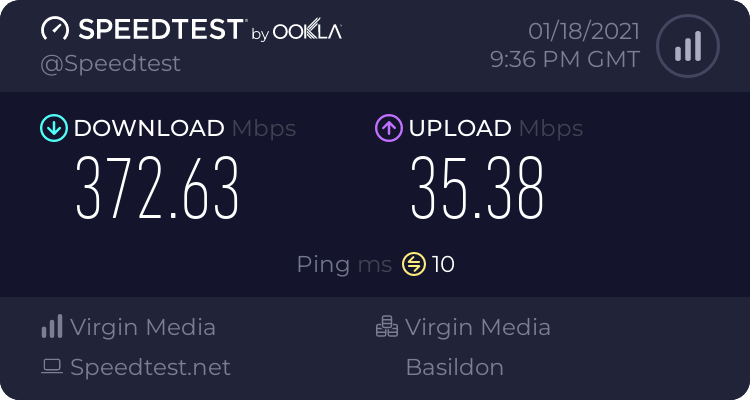
was also wondering if I should roll back to the previous version of OBS?
 solid rock
When changing the images on alerts, some of the alerts show the proper image but others are still showing the default animation. How do I fix this?
wary dew
check all the variations of the alert type
sharp turret
thorny crypt
Quick question, is there any way for me to switch my stream title and stream gam...
Yes you can in activity feed->menu->stream settings
thorny crypt
Thank you!! 😄
sharp turret
You're welcome!
snow agate
anyone?
full thunderBOT
@snow agate Welcome to the helpdesk! Please let us know how we can assist you today and a support volunteer or staff member will assist you as soon as they are available. Thank you for your patience.
snow agate
I'm literally three posts above
full thunderBOT
@snow agate Obs.live is a plugin for OBS Studio for the best OBS support, please join their Official Discord @ discord.gg/obsproject
 kindred ledge
Hey guys. I got an Overlay from StreamElements with the font Bubbler one. The problem is, that i cant make the text bold in OBS too like in StreamElements. How can I solve this?
honest echo
make sure that you have the font with its variations installed on your PC too
full thunderBOT
Google Fonts
More than 900 google fonts are supported at this time. You can preview them here: https://fonts.google.com/
Custom Fonts
Steps:
- Install the font on the streaming PC or choose a pre-installed windows font.
- In the overlay widget settings, select Text Settings
- Click on Enable Custom Font
- Type the name of the font as it appears in the windows font directory (This is usually
C:\Windows\Fonts)
Note: After installing fonts, the browser and OBS must be restarted for the font to appear.
kindred ledge
I downloaded the font from Google.
This is right, isnt it?
Or can i get the Bold one extra?
honest echo
That should be enough
Could you provide a screenshot on how do you see it on the web editor and on OBS?
 sharp berry
How do I cancel orders I placed?
kindred ledge
sharp berry
and an order my friend placed
honest echo
@sharp berry orders in OBS?
sharp berry
sorry wrong channel lol
kindred ledge
honest echo
@kindred ledge you need an extra font with the bold to be installed on your PC, but since you are adding a text source directly on OBS and its related with SE itself you may need to ask to their support server
kindred ledge
The Support Server of OBS?
And what exactly should i ask them? I thought i need to get that font somewhere
honest echo
Like i said since that isn't related with SE the best please to ask is OBS support server, but yes i think that you need the bold variation of that font too
kindred ledge
Shouldnt SE provide that since it is on their site?
honest echo
The font that we have are from google
kindred ledge
Ok, I will ask there. Thank you for your help;D
honest echo
@kindred ledge remember that the font isn't our is from google
kindred ledge
Yeah. The people from OBS are ignoring me. yeay
quick heath
I can't get my camera to work on my OBS. I have tried everything and its still not showing up. This started happening about 2 days ago. I have uninstalled and reinstalled everything and not change. Sometimes it works on my Chat screen.
 storm flicker
hello, my stream keeps crashing since i updated OBS any suggestions?
 charred lava
 livid basin
kindred ledge
Yeah. The people from OBS are ignoring me. yeay
livid basin
kindred ledge
Yeah. The people from OBS are ignoring me. yeay
Not an OBS channel, it's StreamElements who are ignoring everyone. Worst customer service EVER!
honest echo
livid basin
Not an OBS channel, it's StreamElements who are ignoring everyone. Worst custom...
what do you mean?
full thunderBOT
@obtuse barn StreamElements menu, on top of OBS > Logout > Login
honest echo
Let's try this ⤴️
 obtuse barn
I did that, tried to log in and a white dock just flashes
livid basin
I have 2 installs of OBS.Live.
One for each of two brands. I run either install in "Portable Mode" so they maintain separate setup/config/resource/scene data.
One of the installs works great without any issues, but the other can't install updates. It gsdaets as far as downloading, then begins the update but immediately stops with an error panel that just says: "Update Failed" with no error codes. I've re-installed several times but it always has the same result.
I'm guessing the issue has to do with having two installs, but I figured I'd drop in here and ask for confirmation and potential work-a-rounds.
honest echo
I didn't say OBS is ignoring no one @livid basin , He said that because after we troubleshoot his issue here he went to OBS discord server and he felt that they ignore him, You join just today and your first message is this one. If you had/have any issue with StreameElements, please ask it instead of showing that attitude that helps no one
obtuse barn
honest echo
Let's try this ⤴️
I did that, tried to log in and a white dock just flashes
honest echo
@obtuse barn ok, did you open OBS with admin rights?
obtuse barn
Yes I did
honest echo
the default docks (Stream information and Twitch Stats) and the streaemelements docks (activitu feed) is having the same issue on your end
obtuse barn
I believe so yeah
I tried adding the normal chat and it is also white
Well, now I can't check because most if it is completely white
honest echo
So all OBS is acting weird not StreamElements on your end...
Let's try to disconnect your account and connect it back (Settings > Stream > Disconnect then Connect Account again)
honest echo
Select service (twitch) and then connect your account
honest echo
o.O!
obtuse barn
?
honest echo
You should be able to see something like this
honest echo
maybe the issue is because you have an old version of OBS
i have 26.1.1 and you have 26.0.2
obtuse barn
hmm how do I update
honest echo
obtuse barn
Will I lose most of my settings?
 pure quest
a friend and i are starting streaming, and whenever i open OBS live, when i click stream streamelements at the top, none of the activity feeds or chat boxes are showing up but i have it all connected to my twitch
full thunderBOT
@pure quest Please provide a proper screenshot with the issue visible. If not sure how to take a screenshot, you can check here: https://www.take-a-screenshot.org
pure quest
i fixed it nevermind
 topaz veldt
Hi. New here. Do i just ask a support question here?
full thunderBOT
@topaz veldt Welcome to the helpdesk! Please let us know how we can assist you today and a support volunteer or staff member will assist you as soon as they are available. Thank you for your patience.
topaz veldt
I have an issue with video layers stuttering in StreamElements on my OBS. I can't figure out why. I am on a Mac Pro so have all power I need from the system ( I believe). Thanks.
 sharp hedge
Hello it seems I have problems with me chat box
How would I go by resetting the chat box
 buoyant forge
hi is there someone that can help me merge keys to two accounts i have one that i sign in with facebook and one with twitch but i need them to be thee same?
 hollow torrent
Quick question: What's the latest version of SE's OBS.Live?
 exotic light
Hey guys! Got a Questions, i opened OBS.Live after a long time again. The chatbox is not working for me. Its white instead of the Streamelements blue and i cant post messanges ether open the Settings. Anybody know a fix for this?
full thunderBOT
@exotic light StreamElements menu, on top of OBS > Logout > Login
exotic light
oh wow, ty. i reinstalled it and it did not work... Now the chat is still white but working again. ty!
 zenith otter
Hi, I have this problem that the big screen camera works in the area of the live scene does not work , how to fix it?
rugged quail
Hello, I would like to know, please, if there is any way to hear the sound when someone coments or gives a like. I can see it on the screen, but I am not able to hear it. Thanks 🙂
I changed the option to control audio by OBS, was that the problem? Thanks
full thunderBOT
@rugged quail If you are not hearing your alerts and/or Media Request, you are most likely using the Control Audio via OBS option in your browser source properties.
To make sure you hear the alerts and the stream also hears them, follow along the screenshot bellow.
https://cdn.discordapp.com/attachments/199460642975907840/685371800456134686/unknown.png
 rugged quail
full thunder
<@456226577798135808> If you are not hearing your alerts and/or Media Request, y...
rugged quail
full thunder
<@456226577798135808> If you are not hearing your alerts and/or Media Request, y...
That was it. Thanks 🙂
rugged quail
how to add a alert for re sub??
 upbeat dome
hello i have a problem with my Obs live/Streamelements and Twitch. I made a alert box with with sounds and everything and have added it to my obs and everything works. But sometimes I overlook a follow and only notice it later. Can I somehow do that I also hear a sound or something so I know that an alert came?
rugged quail
how to add a alert for re sub?? Please help
 spare path
Hey there, the countdown timer keeps reseting, when switching scenes in obs. How do i stop the restart playback when source becomes active.
 gentle sphinx
When someone subs to me on stream my alerts don't come up but they show up after i close down obs and open it back up
Does anyone know how to fix this?
 untold wraith
I have own3d pro and use the Damask overlay and alerts, but for some reason the alerts don't work. How do I fix that?
 smoky quarry
why does my overlay not show when i play among us or rocket league
 spring plank
With OBS, I run a second portable one for my replay buffer, is there a way I can make it so it never opens with OBS.Live active?
Because every time it opens it asks me to login, I'm logged in on my streaming OBS, but I don't want to log into my recording/portable one and just use it normally.
Also how do I make it so OBS.Live can minimise to system tray and not be in the task bar? Without the add-on you just tick the boxes, but with it installed minimising it just minimises it to the task bar and not the system tray.
smoky quarry
why does my overlay not show when i play among us or rocket league
@fiery parrot
 viscid escarp
when i start my stream it doesnt stream to my account
full thunderBOT
@viscid escarp StreamElements menu, on top of OBS > Logout > Login
viscid escarp
thx
spring plank
spring plank
With OBS, I run a second portable one for my replay buffer, is there a way I can...
Bump
spring plank
spring plank
Also how do I make it so OBS.Live can minimise to system tray and not be in the ...
Bump
 long grotto
 lethal nymph
Hey guys! Can I somehow copy all alerts including video, images/ animations etc. and then insert them in another overlay so I dont have to do them all all over? 🙂
wary dew
yes
lethal nymph
(So specific stuff from one overlay to another - is that possible?)
How so, @wary dew - and thanks for answering 🙂
wary dew
select the widget in the left bar, then click on the double papers icon and copy it to another overlay
lethal nymph
You're a god. Thanks @wary dew !
 tidal anchor
hello  just wanted to know how I make the chat dark theme. without letting it get back to white theme every time i open obs
wary dew
check the pinned messages here
tidal anchor
yes sir
Okay ive done that and how can I make it not change back after I reopen my obs
tidal anchor
:/
wary dew
did you have it set to black on Twitch itself as well?
tidal anchor
yes everywhere
lethal nymph
Sorry for yet another question - just bought a complete overlay and a bit confused (as a new streamer-sorta-thing). I have an overlay with latest donation, follower and sub - and then "Cheer" .. But im not sure how to add a "Latest XYZ" to that part - is it the same as "Bit" or which label should I use there?
wary dew
bits = cheers
lethal nymph
Okay, I seriously owe you a beer. Thanks man!
 late harbor
what causes this asking for a friend
rugged cliff
how can I add my capture card to OBS, its not even registering on my PC
full thunderBOT
@rugged cliff Obs.live is a plugin for OBS Studio for the best OBS support, please join their Official Discord @ discord.gg/obsproject
rugged cliff
full thunder
<@!769591355466317854> Obs.live is a plugin for OBS Studio for the best OBS supp...
getting no response there, I'm already a member
lethal nymph
Hey. Just tried testing out my new overlay (animations etc.) while playing and in CSGO i get dropped around 150-250 fps if im testing alerts. Do you know if thats because of the animations or something I can do to avoid such a huge drop?
lethal nymph
No takers? Anybody know if thats just normal or im doing something wrong 😄
spring plank
With OBS, I run a second portable one for my replay buffer, is there a way I can make it so it never opens with OBS.Live active?
Because every time it opens it asks me to login, I'm logged in on my streaming OBS, but I don't want to log into my recording/portable one and just use it normally.
Also how do I make it so OBS.Live can minimise to system tray and not be in the task bar? Without the add-on you just tick the boxes, but with it installed minimising it just minimises it to the task bar and not the system tray.
Bump x2
 native knoll
hey guys i dunno if im just being an idiot with this lol. up until recently my OBS with SteamElements OBS Live had windows such as Stream Details (to change title of stream, game etc) along with a mini window for number of viewers followers etc, but since an update ive not been able to find either - am i looking in wrong places or do they just not exist anymore?
 covert gust
I am having trouble getting my overlay onto OBS
full thunderBOT
@covert gust To add your overlays to OBS, add a new browser source in your scene. Paste your overlay URL in the browser source properties, set the dimensions to 1920x1080 (unless you changed them on the website) and check Shutdown source when not visible. https://youtu.be/KDvLynUqXI4
 zealous kayak
I've searched around a couple spots but haven't found an answer, my base canvas resolution is 2560x1440, is there a way to have an overlay with that resolution or is the max 1920x1080? I tried adjusting it in the dashboard but it seems to just default back to 1920x1080
full thunderBOT
@zealous kayak The default resolution for StreamElements overlays (theme and custom) is 1920x1080. Please add them in OBS at their full resolution and use CTRL+F to fit to screen if necessary. You can then downscale your stream in OBS settings > Video if you'd like https://i.imgur.com/6bWXxjR.png
zealous kayak
My problem is my base canvas is my base canvas resolution is higher than 1080p, so the overlays at their default resolution is too small. Is it possible to create overlays larger than 1920x1080 or do I need to drop my base canvas resolution down to 1080p from 2560x1440?
oh
im dumb, i figured out the fit to screen
fit to screen stretched it for me
full thunderBOT
@visual jacinth Obs.live is a plugin for OBS Studio for the best OBS support, please join their Official Discord @ discord.gg/obsproject
 half nebula
dont know if this has been answered before or not but everytime i open OBSLive my chat reverts to Light Mode, i have it set to dark mode everywhere, how can i get it to stop switching to light mode?
tulip hamlet
half nebula
dont know if this has been answered before or not but everytime i open OBSLive m...
Try closing OBS, delete %appdata%\obs-studio\plugin_config\obs-browser\obs_profile_cookies, start it up again, and switch to Dark Mode once more.
 neon monolith
Hello!
I'm having an issue where new followers are not appearing in my activity feed, like at all? everything else works perfectly fine, except this
spring plank
With OBS, I run a second portable one for my replay buffer, is there a way I can make it so it never opens with OBS.Live active?
Because every time it opens it asks me to login, I'm logged in on my streaming OBS, but I don't want to log into my recording/portable one and just use it normally.
Also how do I make it so OBS.Live can minimise to system tray and not be in the task bar? Without the add-on you just tick the boxes, but with it installed minimising it just minimises it to the task bar and not the system tray.
bump x3
full thunderBOT
@neon monolith Please provide your account ID found at the top of this page: https://streamelements.com/dashboard/account/channels This ID is public info and safe to share here.
neon monolith
full thunder
<@!414889402045825065> Please provide your account ID found at the top of this p...
5ff731903d2bf108dcb6319b
neon monolith
I got it to work now!
 lament spruce
hi. so im switching from streamlabs obs to obs live. i tried just exporting the settings, but it says alerts fail...which make sense, cuz they're from streamlabs. I currently have everything i had before, but i have a question about the chat/alerts. is there a way to have it be the same?
my chat had a cool custom CSS animation and all of that, but I dont see an option to do that on the website.
tulip hamlet
lament spruce
hi. so im switching from streamlabs obs to obs live. i tried just exporting the ...
You would need to make a custom chat widget on your own for that. The default chat widget cannot be customized with custom CSS.
lament spruce
aw, okay. for the 'custom chat widget', thats on the website, right? Is the only option to have it appear immediately? (the messages) no like, smooth transitions?
tulip hamlet
"Custom chat widget" as in "you make a custom widget and you code the whole thing from scratch."
Or look in #widget-share for things the community has made.
The default chat widget does not have message animations.
 warm rapids
Question is it possible to link to both twitch and youtube simultaneously?
tulip hamlet
warm rapids
Question is it possible to link to both twitch and youtube simultaneously?
StreamElements does not have multistreaming support.
warm rapids
Damn ok thank you, it was worth a shot.
One more question, are your stream element overlays only for twitch or can they before youtube as well?
I am using the twitch connection only because it wouldn't let me take donations via YouTube but if I could switch between the 2 and have the overlays interact for each it would be ideal.
tulip hamlet
warm rapids
I am using the twitch connection only because it wouldn't let me take donations ...
There will never be any interaction between your Twitch and YouTube channels in StreamElements. As mentioned, we do not have multistreaming support.
warm rapids
Sorry mixed questions can be confusing. What I mean is if I switch to connecting to YouTube as opposed to Twitch will I have to use a different Overlay to get the same functionality?
lament spruce
how can I make an image bigger? for example, how can i make this image bigger to fill out the whole box?
 rancid obsidian
hi
i have an overlay from stream elements but all alerts work apart from the donation/tip one and they come through into my account but never pop up
full thunderBOT
@rancid obsidian Please provide your account ID found at the top of this page: https://streamelements.com/dashboard/account/channels This ID is public info and safe to share here.
rancid obsidian
6005dc383c81f6d801458804
this works when i click the preview alert button however does not work in my actual stream
tulip hamlet
rancid obsidian
6005dc383c81f6d801458804
You're using a Streamlabs link in your panels.
rancid obsidian
where and what does that mean
tulip hamlet
We're not Streamlabs.
Using their link does nothing in our system.
You need to be using your StreamElements tipping link.
rancid obsidian
i tried using a labs donate alert to replace the one that wasnt working in the overlay but i taken it off earlier so there shouldnt be one
rancid obsidian
can u tell me how to find please
tulip hamlet
On your Twitch page.
tulip hamlet
You have provided a Streamlabs donation link in your Twitch panels on your Twitch page.
This will not work, as we are StreamElements, not Streamlabs.
You must use your StreamElements tipping page link to get StreamElements alerts.
rancid obsidian
the donate button is set up with streamlabs
totally get it now
i thought that was the only way
i can set up with you guys?
full thunderBOT
@rancid obsidian New to StreamElements?
Check out our YouTube channel https://www.youtube.com/c/streamelements/videos
with tutorial videos from setting up the basics, to in-depth details on how to use our product.
New to OBS? Here is a 4 step quick start guide
https://obsproject.com/wiki/OBS-Studio-Quickstart
Want to learn even more? Here is an in-depth overview
https://obsproject.com/wiki/OBS-Studio-Overview
rancid obsidian
i can use the image but just need to change the link right?
tulip hamlet
Yes.
full thunderBOT
@lament spruce Please ask your question in one helpdesk channel only. A support volunteer or StreamElements staff member will assist you as soon as they are available. Asking in multiple places will only result in confusion, not faster answers. Thank you for your patience.
lament spruce
Alright, just didnt understand if i should ask the question here or #helpdesk-twitch
tulip hamlet
lament spruce
how can I make an image bigger? for example, how can i make this image bigger to...
Change the selected layout.
Only column layout will scale the image up.
lament spruce
Would it be under position, size and style? (if so, i dont see it there)
lament spruce
Ohh, okay. thanks!
 frail burrow
Hello, is it possible to have alerts come in from twitch and facebook at the same time?
tulip hamlet
frail burrow
Hello, is it possible to have alerts come in from twitch and facebook at the sam...
StreamElements does not have multistreaming support.
frail burrow
Damn, was looking forward to that.
 cosmic zodiac
Is anyone familiar with removing the cursor while using graphic display?
charred bear
2 questions
- How do I get my resub notifications to show up?
- Does anyone know the best way to get my clips onto my phone ?
 craggy gorge
I think this question would go here. my display and game captures wont capture anything at all. its just a black screen. anyone have a fix to this?
nevermind fixed it
now only the display capture doesnt work. any fixes?
lament spruce
so im a bit confused on bit alerts. i want it to have a different image depending on the amount (1, 100, 1000, 5000, 10000). I set the variations up, but it still only displays the 'main' one.
full thunderBOT
@craggy gorge Obs.live is a plugin for OBS Studio for the best OBS support, please join their Official Discord @ discord.gg/obsproject
tulip hamlet
lament spruce
so im a bit confused on bit alerts. i want it to have a different image dependin...
Did you hit save?
lament spruce
Yeah, but im still testing it on the website. Its still using the default settings and image.
tulip hamlet
lament spruce
Yeah, but im still testing it on the website. Its still using the default settin...
I'm looking at your variations and do not see any changes made in your cheer alerts.
Not only do you need to save the variation, but you need to save the whole overlay using the Save button in the top right.
 velvet shell
So I got the overlays set up and switched over to OBS live, streamed for about two hours, none of the alerts popped up
I had people viewing the stream and a few followed.
full thunderBOT
@velvet shell Please provide your account ID found at the top of this page: https://streamelements.com/dashboard/account/channels This ID is public info and safe to share here.
 oak hinge
Hi Everybody
velvet shell
6002b41553459d0fa9b8b521
tulip hamlet
velvet shell
6002b41553459d0fa9b8b521
Your webhooks have been resubscribed and you should receive new follower events moving forward.
velvet shell
Okay, thank you!
oak hinge
Im new to this and im trying to stream my ps4 to twitch and Facebook
full thunderBOT
@oak hinge Consoles do not have native support for overlays. You would need a capture card, PS4 remote play or Xbox companion app and a PC with OBS in order to have overlays over your console gameplay.
We have a blog post about how to set up console streaming with our essential tools: https://blog.streamelements.com/how-to-stream-on-console-7b620b1c46c3
 hot wyvern
can someone contact me tomorrow around 7pm est? I need to go over my setup using the Elgato Wave 3 and OSB studio to stream live. I've been having some recurring issues
full thunderBOT
@hot wyvern If you are having issues with Elgato hardware or software, we recommend reaching out to their support here: https://e.lga.to/help
vagrant anvil
activity feed is delayed by a few hours, which is causing alerts not to show up (I stream on yt btw)
shy mountain
known: #helpdesk-youtube message
 wide elk
i clicked something and my screen is zoomed in and only showing a certain part of it... i need assistance if possible
full thunderBOT
@buoyant brook Not all staff are able to assist with support issues. Please refrain from pinging them or sending them DMs unless asked to.
 buoyant brook
I am using the Sub Goal widget but the current sub count number is incorrect... how can I fix this?
full thunderBOT
@buoyant brook To reset goals:
- from the Overlay Editor > Session data on top right (monitor symbol) > Goals tab > reset progress of desired goal
- from the Dashboard > Activity feed on the left > Widget data on the right > Goals tab -> reset progress of desired goal
Note: Goal widgets (progress) only counts up and doesn't go down automatically, if you lose followers/subs.
 hidden jackal
Yesterday i tried to stream warzone, i use a streach resolution on the game, on the preview of obs i saw all normal but on the live there was 2 black bars one on the right and on the left. Do someone know how to fix this?
shy mountain
Can you show a screenshot?
hidden jackal
@shy mountain done
shy mountain
Right, I didn't ask to be DMed the screenshot
hidden jackal
shy mountain
Better to show then tell
lethal nymph
Hey guys. If using "Animated overlays" on i.e CSGO (single pc stream), is it normal to drop 150-250 fps when ingame? With the alerts etc going on, it drops a looot 😄 - Is it my settings, or is that normal?
shy mountain
It drops a lot by how much?
Also yes, it is quite possible to drop the FPS, as animated overlays affect your CPU
but if you are runnign the game at 250FPS and it drops to 150FPS
that should not be a concern tbh
lethal nymph
Okay, thanks a million. Tried making some of the animations into static images instead - the alert animations are too cool to make static, and it feels a bit more smooth now, only dropping like 75-100 fps. Well usually doing 400+ fps in CSGO and yesterday while testing it went to 150 if i tested the alerts through the browser (while OBS was open).
shy mountain
Streaming in general takes up a good chunk of resources from your PC
lethal nymph
And going from 400+ to 100-150ish is pretty visible while ingame - but thanks, now I know I have to maybe cut down the animations while ingame, and use them in "static" scenes instead 😄
shy mountain
so dropping form 1000000000 FPS to 100 is normal
shy mountain
Also note that no one on Twitch will be able to see past 30 or 60FPS
lethal nymph
Was just wondering if I did anything wrong 😛
shy mountain
due to how you are encoding
so there is no point in going overkill on the FPS
anything past 144FPS is just overkill imo
unless you are on a 240hz monitor, then go max 240FPS
lethal nymph
Well, with a 240hz monitor im guessing the aim is to hit that mark steadily 😄
ye exactly mate
lethal nymph
Ah yeah good idea.
I'll implement that asap.
Erhm, suddenly my webcam isn't showing up. In one scene (now the CSGO-ingame-thing) it works fine. But when I switch to "Just talking" scene its suddenly just all Black :s. Know any standard-stupid-stuff newbies do, because thats probably what i did 😄
shy mountain
delete the video source in the just talking scene
go to the other scene where its working
right click the video source of the webcam
copy
go back to just talking
right click in sources -> paste as reference
lethal nymph
Damn. So godlike. Thanks dude!
 wanton bay
I am attempting to stream Battlefront 2. When it is captured through the obs app it only shows the top left of the screen, and cant quite seem to figure out how to fix it.
full thunderBOT
@wanton bay Obs.live is a plugin for OBS Studio for the best OBS support, please join their Official Discord @ discord.gg/obsproject
wanton bay
Thanks!
warped stag
Having significant issues with OBS performance the past few days. Log file here: https://obsproject.com/logs/ASi7Upl6GZNZSFVJ
PC specs are pretty solid. Streaming SC:BW, so nothing should be too taxing. Had no issues until recently
But there's skipped frames due to encoding lag and memory leaks, according to the log
shy mountain
https://obsproject.com/tools/analyzer?log_url=https%3A%2F%2Fobsproject.com%2Flogs%2FASi7Upl6GZNZSFVJ
OBS (Open Broadcaster Software) is free and open source software for video recording and live streaming. Stream to Twitch, YouTube and many other providers or record your own videos with high quality H264 / AAC encoding.
I would suggest to read up on the guides linked for the issues
if that doesn't help -> https://discord.gg/obsproject
 tulip urchin
has anybody had issues installing the Reaper plugin and not being available in obs?
 toxic fern
@tulip urchin You'd wanna ask in the server above.
tulip urchin
toxic fern
<@!782933651670171720> You'd wanna ask in the server above.
Thank you 👍
shy mountain
Chat messages?
are you referring to the chat widget in the overlays?
or in twitch chat in general?
 cosmic seal
How can I export projects from streamelements to obs???
shy mountain
export projects?
cosmic seal
Yes
cosmic seal
This one
shy mountain
thats called overlays 😄
cosmic seal
Yes
shy mountain
To add your overlays to OBS, add a new browser source in your scene. Paste your overlay URL in the browser source properties, set the dimensions to 1920x1080 (unless you changed them on the website) and check Shutdown source when not visible. https://youtu.be/KDvLynUqXI4
cosmic seal
Thanks man
 shadow igloo
Slm
shy mountain
transparency where?
cosmic seal
Nothing now
 barren dock
HII
 hollow ore
Hello when I try to change the video alert for the subscriber alert, it doesn't work. it works for the followers, donations and other ones but for the subscriber and cheer alerts it doesn't work at all, neither does the sound change work.
 wide portal
this might be an odd question to ask but are there any tweaks that enable you to snap any dock to the same width as the main stream display window? I cant for some reason and it only docks at top or bottom full width which is something I would like to avoid so I can make full use of vertical length for my left chat window.
 half ridge
can someone help me my browser source isn't loading and i've tried everything and also how do i change the name of my bot ?
shy mountain
@hollow ore check the variations of the alert
@wide portal unfortunately, no
@half ridge can you elaborate?
wide portal
aww darn, I hope an update might resolve this. Would have loved to place my audio mixer at the top and another at the bottom, oh well, thanks anyways @shy mountain 🙂
shy mountain
i guess you can something like this
not sure what exactly you are looking to acomplish here
wide portal
yeah i tried something like it but it would kill off the chat dock a little :/
lethal nymph
Hey awesome folkes! When I do a transition (stinger) from ie. gamescene to Just talk (with cam) - before the transition goes through, its possible to see me on the webcam without the overlay - then after the stinger it then shows the overlay, cam etc - is there any way that the overlay is loaded or it doesnt "show" the cam etc. without overlay before its changed completely?
wide portal
chat works best with full vertical length imo so you can catch up if chat gets busy
half ridge
shy mountain
<@!760462766753447936> can you elaborate?
when i try to load a overlay it doesnt show up
shy mountain
@lethal nymph that would be a question for the OBS guys here: https://discord.gg/obsproject
lethal nymph
Oh okay thanks man!
half ridge
and how do i change the name of the streamelements bot
shy mountain
@half ridge The default resolution for StreamElements overlays (theme and custom) is 1920x1080. Please add them in OBS at their full resolution and use CTRL+F to fit to screen if necessary. You can then downscale your stream in OBS settings > Video if you'd like https://i.imgur.com/6bWXxjR.png
Currently renaming the bot fully works with OBS.Live.
You can follow this video guide to set it up: https://discordapp.com/channels/141203863863558144/494513233416421386/561516184718278676
If you don't want to use OBS.Live and want to stick with Ground Control, please let us know your Twitch username.
hollow ore
shy mountain
<@!397665630825873411> check the variations of the alert
damn thank you that helped !
lethal nymph
Hey folkes! Dont know where to ask this question - but is there any way to integrate MobilePay (danish payment-method) as alerts etc. when using OBS Live? Know there's SE and paypal but i've seen other streamers (DK) use mobilepay alerts, dont know if their fix will work on obs live as they are using another software.
shy mountain
We don't have any intergration with them, so our alerts will not work if you receive a tip via them
spring plank
With OBS, I run a second portable one for my replay buffer, is there a way I can make it so it never opens with OBS.Live active?
Because every time it opens it asks me to login, I'm logged in on my streaming OBS, but I don't want to log into my recording/portable one and just use it normally.
Also how do I make it so OBS.Live can minimise to system tray and not be in the task bar? Without the add-on you just tick the boxes, but with it installed minimising it just minimises it to the task bar and not the system tray.
bump x4
shy mountain
With OBS, I run a second portable one for my replay buffer, is there a way I can make it so it never opens with OBS.Live active?
So you have 2 installations of OBS?
If yes, then one of them should not have OBS.Live, if no, then the portable version is installed in the same location as the normal OBS and they both share the OBS.Live plugin.
Also how do I make it so OBS.Live can minimise to system tray and not be in the task bar? - not sure I understand here. Let me test
oh so its not when you stream
its just generally not being minimized there
I saw what it is
I'll report it, but no guarantee on an ETA
lethal nymph
spring plank
> With OBS, I run a second portable one for my replay buffer, is there a way I c...
Oh okay. Just saw some ppl doing some work-around with emulator-stuff etc and got it to work somehow. If I want to make a request, should I just do this in "developers-api" or?
spring plank
I figured it out, I uninstalled obs live and just stuck the activity feed as a custom dock directly in obs studio
smoky quarry
how come myoverlay doesnt show when i play games and i cant access the scenes
 grizzled condor
Is there a way to get two browser sources to play in rotation with one another, like an image slideshow but with links instead of images?
smoky quarry
how come myoverlay doesnt show when i play games and i cant access the scenes
lament spruce
tulip hamlet
Not only do you need to save the variation, but you need to save the __whole ove...
I have done that.
ah wait, nvm
sorry!
smoky quarry
how come my overlay doesnt show when i play games and i cant access the scenes any help?
 wooden horizon
Hey, currently the SE Activity Feed in OBS doesnt show me any new followers. Anyone know why? Selected it in filters and also tried to reconnect my account
 hard drift
Hey! Does anybody know how to unlink Twitch from streamelements?
It's driving me insane and i've unlinked it from twitch it self but doesn't log out of OBS
rugged quail
not sure if this is the right area...i have a stinger with no sound, is there a way for me to add sound to it?
 haughty niche
im trying to figure out how to set up themes after i put them under my themes, i know i can edit them and all that but there were also links given for each one put no idea where to put them, and since i stream on twitch i want to make sure that it would show up on that
 brisk raptor
how to add edit stream info?
 agile briar
 sly musk
haughty niche
im trying to figure out how to set up themes after i put them under my themes, i...
sly musk
haughty niche
im trying to figure out how to set up themes after i put them under my themes, i...
when you set up your OBS, you want to add a browser source. Add the overlay weblink you're given into the browser source, and make sure you size it to 1920x1080
 short glen
So when someone hosts me the notification and the alert aren't appearing in the activity feed, can anyone please help me out
 dreamy frost
hi i just got OBSLive i just want my chat box to be in dark mode?
 craggy wind
good morning i am luke a little streamer and i need a support on the streelements i download his installer i run more he n opens the installer n opens i already used him several times and he is very good if u can help me
 brazen solstice
hi, i have two challenges to do but i cant see them. can you help me with this? This is Magic The Gathering Creator Program
 toxic ingot
i cant save my alerts browser, im trying to put variations on for certain alerts and it wont save can i get a bit of help? Thankyou
 tribal gull
Goodday
Goodday
How do i restart my countdown timer if i wasnt able to go live when it reached zero
tulip hamlet
tribal gull
How do i restart my countdown timer if i wasnt able to go live when it reached z...
It starts every time the page loads. So reload the overlay.
 mild jewel
Hiya! I need some help with streamelements and obs. I setup my own alerts and follow goals and recent follow things in streamelements, and when I emulate the alerts the follow box and the alerts show through on obs when i'm offline. But when I streamed yesterday, none of the alerts were showing up apart from one raid I got at the end in which I could only hear the sound effects. The follower goal wasn't updating either and neither was the recent follower. Help!
full thunderBOT
@mild jewel Please provide your account ID found at the top of this page: https://streamelements.com/dashboard/account/channels This ID is public info and safe to share here.
mild jewel
5ffa10ae63d9686f39f2049c
tribal gull
What is "invalid refresh token"
rugged quail
please forgive the total noob question, i'm trying to make these countdown timers do countup instead and running into hella issues
supposedly there is a countup widget on this discord somewhere per a forum post from 1yr ago o.o
 forest parcel
Is there a thing that can help me line up elements?
Say for example, the auto updating text for followers and subs or the alert box on different scenes?
tulip hamlet
rugged quail
supposedly there is a countup widget on this discord somewhere per a forum post ...
You can check #widget-share for community created widgets.
 pale stirrup
who to test the alert on obs.live
full thunderBOT
@pale stirrup You can test alerts via the Emulate bell on the lower left side of the Overlay Editor. Simply go to your Dashboard > My Overlays > pencil/edit button on the overlay. Make sure the Preview LIVE on stream option is on to see the alert in OBS/XSplit** https://streamable.com/vtulg9

 lyric slate
Hello, the activity feed on obs live does not show any followers. Nor do they show up on the website. This leads to the alerts not working. They work when I test them, but not when i get a follower when i am live. Is there a solution?
full thunderBOT
@lyric slate Please provide your account ID found at the top of this page: https://streamelements.com/dashboard/account/channels This ID is public info and safe to share here.
lyric slate
5ff77fc3aca67e7d70b6fdd6
It says I have zero followers on the website too. Sorry if it’s the wrong place to post this
tulip hamlet
lyric slate
It says I have zero followers on the website too. Sorry if it’s the wrong place ...
Dashboard is recents, not totals. Past information is never retrieved; a history is not sent through Twitch's API. Your webhooks have been resubscribed and you should receive new follower events moving forward.
lyric slate
I do not have any follower events
even though i have gotten followers after i set up a stream elements account
im afraid that when people sub to me, it wont show up
tulip hamlet
lyric slate
even though i have gotten followers after i set up a stream elements account
Emphasis on moving forward. The fix was just applied.
full thunderBOT
@lyric slate New to StreamElements?
Check out our YouTube channel https://www.youtube.com/c/streamelements/videos
with tutorial videos from setting up the basics, to in-depth details on how to use our product.
New to OBS? Here is a 4 step quick start guide
https://obsproject.com/wiki/OBS-Studio-Quickstart
Want to learn even more? Here is an in-depth overview
https://obsproject.com/wiki/OBS-Studio-Overview
 coral bramble
Hey there, currently my stream is flickering due to the browser capture for the overlays when there's a lot of movement, was wondering if there was something I can do to prevent it
 fast birch
Good evening, anyone available to help out?
full thunderBOT
@fast birch Welcome to the helpdesk! Please let us know how we can assist you today and a support volunteer or staff member will assist you as soon as they are available. Thank you for your patience.
@coral bramble Obs.live is a plugin for OBS Studio for the best OBS support, please join their Official Discord @ discord.gg/obsproject
fast birch
my activity feed and chat tell me to connect to twitch but im streaming to facebook gaming. Is there any way to reset these widgets
?
full thunderBOT
@fast birch StreamElements menu, on top of OBS > Logout > Login
fast birch
Genius, thank you
 sharp halo
How do I import my overlay into OBS Live? I'm so new to all of this and none of it makes sense.
grizzled condor
I have my custom chat bot set up, but it's accidentally the name of my main account and not my bot account. Can someone tell me how to dissociate my main account from the bot name?
tulip hamlet
grizzled condor
I have my custom chat bot set up, but it's accidentally the name of my main acco...
Select the third option in the dropdown list and click disconnect.
grizzled condor
tulip hamlet
Select the third option in the dropdown list and click disconnect.
Which dropdown list? I'm not seeing it in my OBS Stream Info window. I just see the options to name it Streamelements, mrdancypants, and MrDancyPants.
tulip hamlet
Yes, the third one.
Select the third one in that list.
That's the "custom" name.
It's in order:
Default
Your account (not working at the moment)
Custom connected account
grizzled condor
Right, I want to change the custom connected account to one that isn't my main account.
tulip hamlet
So, again: Select the third one. Then the disconnect button will be visible.
 heady blade
Hello, I had originally set up obs.live with youtube studio, but now trying to set up with Twitch. In the main settings everything is under twitch, but when I hit Start Streaming, it prompts me with Start Streaming to Youtube. How do I fix this?
tulip hamlet
heady blade
Hello, I had originally set up obs.live with youtube studio, but now trying to s...
StreamElements menu, on top of OBS > Logout > Login
 remote moat
Sometime between yesterday and today I no longer have the ability to access the SE control panel via OBS/OBS Live. No updates were applied in that period and I've never had this happen before.
 vagrant hazel
anyone know how i can just get the media request text - like song title and user that requested it - and put it into OBS ? just the text
 steady matrix
Hi there so I have an issue where my obs preview is perfectly smooth but the output into twitch is very unstable. I think it is with my stream output settings and/or encoder but I just can't figure it out.
And I am currently stuck on "stopping stream"
 clever cove
hi, can anyone tell me the possible reasons why my Stream has no sound?
tulip hamlet
clever cove
hi, can anyone tell me the possible reasons why my Stream has no sound?
Obs.live is a plugin for OBS Studio for the best OBS support, please join their Official Discord @ discord.gg/obsproject
 buoyant lance
is it possible to multistream with obs lve ?
tulip hamlet
StreamElements does not have multistreaming support.
buoyant lance
i see. thank you for the information
lyric slate
Thank you so much! Alerts are working now!
 lost kelp
Hello! I've recently started streaming on 2 separate twitch channels. On my new one, I've successfully been able to stream, however it seems that nothing shows up on the SE activity feed during & after stream... [but everything is normal when I switch to my main account] is this a known issue with having more than 1 account on the same computer?
shy mountain
@lost kelp Please provide your account ID found at the top of this page: https://streamelements.com/dashboard/account/channels This ID is public info and safe to share here.
lost kelp
shy mountain
<@!468411467138334720> Please provide your account ID found at the top of this ...
5ff70c4a87f4729a12ce6ae3
shy mountain
Should be good now
 shrewd berry
why is my Audio mixer not showing up on obs streamelements.. Need help
shy mountain
View -> docks -> audio mixer
 quartz dragon
there is a pause button when record a video? i can't find that
shy mountain
@quartz dragon Obs.live is a plugin for OBS Studio for the best OBS support, please join their Official Discord @ discord.gg/obsproject
10
 frigid sleet
is there any way to get out of the "fullscreen" when i double click the window? it seems to get stuck there untill i restart
thanks in advance
now it doesnt even work with restarting
shy mountain
windows button + shift + arrow key down
shy mountain
stuck like this right?
i managed to unstuck it with up arrow
i thought it was down arrow as I sometimes do this my self
and do this combo of keys and unstuck it but can't remember if its down or up
shy mountain
or that
frigid sleet
seems like i switched to fullscreen thingy and with that it locks it
thanks again keizar! appreciate it!
lost kelp
shy mountain
Should be good now
thank you so much!!!
 lunar sequoia
Hey there! A quick question: Is OBS.live coming to mac? Or is there any solution to use it on mac?
shy mountain
streamelements.com/obslive -> download for mac
lunar sequoia
OMG
thank u!! i only saw it the links in my dashboard and it said its only for windows
im so lost
thank you so much and have a nice day (:
shy mountain
You can only see the download to mac version if you are on a mac
lunar sequoia
i am
shy mountain
what version is the OS?
shy mountain
Big Sur?
shy mountain
I'm confused. Did you manage to download it or no?
toxic fern
https://strms.net/obslive_mac @lunar sequoia
lunar sequoia
i found it right here
but on this link https://streamelements.com/dashboard/obslive it looks like the first picture
so i dont found the "download for mac" in my dashboard
lunar sequoia
youre welcome, i was so hyped - should have spoken more clearly lol
so now, as i said - have a nice day (:
 gentle musk
I got a weird bug. If i send a message in the obslive application and i am logged in to my main stream account then i send a chat from my second account and there is a broadcaster in front of the second account name
and i did already logged out in the application and then logged in with my main account
gentle musk
In my obs live application there is a chat. If i chat in that application then i chat with my second account named 'decommentators' and in front of the name there is a broadcaster sign before the name. But my main account where i stream on is the account 'twitchstudiomax' and thats the official broadcaster account where i want to chat with in the application
 acoustic frost
I had all my streamelements stuff setup and i just changed my name on twitch from Jack666n to JackSinful and now none of my chat alerts or anything like that is working. Any help would be greatly appreciated. Account ID - 5feb249ff664eb028d30c059
short glen
Hi so my host and cheer notification go off in my chat but the alert for the alert box doesn't go off for it. The test does but the actual live alert doesn't appear. Can I please get some help with this problem?
 simple orbit
I want to play the custom sound alerts which are redeemed on my channel with channel points via chat, without the animation, is that possible? If i hide the animation box, with the eye symbol, it prevents the audio from being played too, just wondering if there is a way around that
shy mountain
@gentle musk StreamElements menu, on top of OBS > Logout > Login
@acoustic frost have you tried to logout and login to our dashboard?
acoustic frost
@shy mountain I have already tried that no luck.
shy mountain
@short glen Due to changes to Twitch API, we have filtered out hosts and will only show these ones on your activity feed:
- All hosts coming from an online channel with at least 1+ viewer
- Auto host events with at least 1 viewer - only from a channel that just went offline
Note: If you see X channel has hosted you with no viewers on the back, that is considered an offline host or a host with 0 viewers, we do not show these.
@simple orbit there are 2 ways - just remove the images from the store items or make the source super super tiny and behind/bellow other sources
shy mountain
acoustic frost
<@!120611700993949696> I have already tried that no luck.
ooh chat alerts, go here: https://streamelements.com/dashboard -> part channel -> join channel
@simple orbit that doesn't look like anything related to us, but ok
acoustic frost
@shy mountain Fixed it thx!
rugged quail
Hi all
What is the advantage of obs. Live?
I already have obs studio installed. To get live features, do i have to install obs.live? Or just the plugin will do?
shy mountain
it adds these docks
and helps you with custom bot setup
do i have to install obs.live? Or just the plugin will do? this is essentially the same
rugged quail
Thanks mate. So i just inatall plugin and its ready to go?
shy mountain
yes
rugged quail
Many thanks
gentle musk
shy mountain
<@!269837747328516096> **StreamElements** menu, on top of OBS **> Logout > Login...
I already did that but didn't work
short glen
shy mountain
<@!461809297777623055> Due to changes to Twitch API, we have filtered out hosts ...
The people hosting me have at least 1 or 2 views, and what about the cheers the alert box isn't going off for it either
shy mountain
@gentle musk Ok, so just to make sure I understand this. You are streaming to a different account but the OBS.Live chat dock is on a different account?
@short glen are these people who are hosting you streaming when they host you?
gentle musk
Yes
And if i chat then there stands a broadcast sign in front of the name
but if i logout and login to right account there is still the second account
short glen
shy mountain
<@!461809297777623055> are these people who are hosting you streaming when they ...
No
shy mountain
@short glen so read the information again about the hosts and how we filter them 🙂
@gentle musk Make sure you also change your stream key when switching accounts
or if you don't use the stream key
disconnect -> connect in Settings -> stream
gentle musk
Yes it worked, thanks!
short glen
shy mountain
<@!461809297777623055> so read the information again about the hosts and how we ...
Some of them are just ending their streams then hosting me, and no notification pops up for them, and the other issues is the alert box doesn't go off for when viewers cheer
 brittle loom
how do i find the link for tips and shit
shy mountain
@brittle loom https://streamelements.com/dashboard/tipping-settings
brittle loom
legend
 ashen palm
I’m afk right now so I can’t share any screen shots. I’m trying to add widgets / alerts to my stream so copying the link, say for a follower alert, adding a browser source in OBS, resizing it / making sure it’s on the top layer etc but when I try to emulate the alert it just shows up in the SE editor? I’ve clicked save etc. In the top right of the window it says preview, when I click that it tells me I need to copy the link into OBS. Can someone help? I’m starting to gain followers a bit more regularly now and without the alerts I can’t thank them!
shy mountain
@ashen palm Please provide your account ID found at the top of this page: https://streamelements.com/dashboard/account/channels This ID is public info and safe to share here.
 exotic pebble
According to setup instructions on a NoD overlay, I am to click "Launch overlay", such a clickable thing I do not see.
wary dew
Because that is outdated
Click on the link icon in the top right to get the overlay URL
And then you can paste it inside OBS
 exotic pebble
Thank you, progress is being made.
Can anyone tell me what the advantages of having the overlay setup via this method? When I just used OBS Studio it imported everything into there a bit haphazaardly but afforded me a lot of control in terms of disabling elements using streamdeck, am I going to lose some of these controls within OBS to the browser... editor?
haughty niche
sly musk
when you set up your OBS, you want to add a browser source. Add the overlay webl...
thank you so much, it was easier than i thought lol 💩
sly musk
haughty niche
thank you so much, it was easier than i thought lol 💩
100%!! you're welcome!
 polar wedge
Heya this has been happening really randomly from time to time when I launch OBS, where the Media Request dock/window will be blank. Same thing happens with Ground Control as well, where it's just blank.
Left window shows my main OBS client with preview + Media Request dock. Right window shows Ground Control after selecting Media Request. No issue with the other functions, only Media Request.
Sometimes it randomly fixes itself if I keep restarting the OBS client, but it's starting to get a little annoying so it'd be great if anyone could assist with any possible solution or insight to this issue.
Thanks!
full thunderBOT
@polar wedge StreamElements menu, on top of OBS > Logout > Login
polar wedge
Ah alright, got it. Thanks!
ashen palm
shy mountain
<@!721439765853110294> Please provide your account ID found at the top of this p...
5f6ff71549a32556589c858d
exotic pebble
Social Media images not automatically loaded into streamelements browser-side, is it intended that the user will place static sources within their OBS?
Nevermind, it is in the ending screen but not the starting screen and probably a question for NoD, not you guys.
 mental whale
Any insight how to remove "VOD Audio for Soundtrack By Twitch" from within OBS ? I uninstalled Soundtrack but it still shows up in my audio mixer within OBS
 fluid bronze
Can anyone help me with the command of counts? I wanna to put this command in my chat, so, the count isn't change the number, i wanna to numbers change when the command ar activate
 opaque nexus
my overlay isnt showing up ive tried logging out and back in and it hasnt workinh?
 obsidian valve
i am using streamelements obslive for my streams and using streamlabs alerts, i was wondering if there is a way to get my tips (im using streamlabs tipping page) to get the tips in my acitivity feed, they only appear after stream when i import tip history via the chrome extension
 timid glen
Can anyone help. I just switched from streamlabs OBS to Streamelements and OBS.Live but my recenet followers, subscirbers, and cheers wont transfer over into stream elements. Does anyone know how to export recent events from twitch or streamlabs and import them into stream elements?
nova scaffold
@timid glen just deployed a small fix and did a test follow from my channel. You should see it in your activity feed on both the website and OBS.Live.
timid glen
@nova scaffold Thank! I saw that come through, what I am hoping to do is retrieve my old cheers,subs, etc so it shows in my overlays as thanks. If that makes sense
nova scaffold
They should appear over time in your activity feed.
timid glen
great ty!
opaque nexus
when i put 1080p and 1920 can only see half of the overlay can anyone help?
nova scaffold
@opaque nexus the overlay is 1920x1080 (default), not the other way around.
If you have changed the resolution of the overlay on our system, you need to match the numbers in the browser source in your streaming software.
opaque nexus
nova scaffold
<@!660118216500052010> the overlay is 1920x1080 (default), not the other way aro...
ive changed it to the numbers now its not showing at all
nova scaffold
@opaque nexus can you tell me the overlay name?
opaque nexus
nova scaffold
<@!660118216500052010> can you tell me the overlay name?
purple wave
nova scaffold
@opaque nexus can i DM you? links are sensitive information.
opaque nexus
nova scaffold
<@!660118216500052010> can i DM you? links are sensitive information.
yeah no problem dm me
 gusty radish
Whenever I click on my dashboard, it keeps bringing me to the streamer I manage and I can't go to my personal dashboard. I've tried logging out and everything short of removing my self from managing their dashboard
nova scaffold
@gusty radish try to use that link and then log back in with your personal channel:
https://streamelements.com/logout
gusty radish
nova scaffold
<@!258286165155643392> try to use that link and then log back in with your perso...
You're a life saver. That worked! Thank you
lethal nymph
Hi! If I want to have a button binded to a specific sound - is there any guide on how to do that? For instance, if I press X a "Cheer/ lasugh/ drumroll" will automatically start.
 strong dirge
Uhh any streamelements fokes out there? I cant get my chat on my cam overlay to look clean and thin. like this, mine is just looking chunky... https://i.imgur.com/5sW3fyU.png


sry for the english btw
rugged quail
Hello. I am looking for some help with my Studio. I add a media source in sources but it only plays at half speed. It's a 10 second looping mov file @30fps that lags like hell and the speed settings don't change it either. I would really appreciate some help with this
 honest gorge
best settings for a medium end laptop stream settings?
full thunderBOT
@honest gorge There are no "best settings".
Please understand that every setup will be very different.
Any guides or videos that claim otherwise are misinforming. Your best option is to start with a base and adjust as necessary.
You can run the OBS auto-configuration tool. To use the auto-config, click on the Tools menu in OBS, select Auto-Configuration Wizard, and then just follow the on-screen directions.
You can use this tool to get baseline settings for your hardware and adjust as necessary from there.
Test, test, and test again. We are happy to offer suggestions for any issues you may be having afterward, but not a list of settings.
Thank you
@rugged quail Obs.live is a plugin for OBS Studio for the best OBS support, please join their Official Discord @ discord.gg/obsproject
honest gorge
oh thers a configuration tool?
exotic pebble
can't uninstall stream elements
nova scaffold
@exotic pebble have you tried to uninstall it in safe mode?
exotic pebble
windows safe mode?
I want to use it but hte only reason i'm uninstalling is because I had black screen issue and tried the wrong solution first, i had obs studio with stream elements added on
I then tried installing the obs+streamelements installer from streamelements website and it just does nothing when i try to open it and the above when trying to uninstall
nova scaffold
@exotic pebble so yeah your easiest solution is the safe mode, uninstall everything, then do a clean install afterwards. Should prevent you from having scuffed installations if you just try to override it.
exotic pebble
snoop around the appdata files and delete those 2 or just let installer handle it?
It's trying to install it still lmao
nova scaffold
Just restart into safe mode, clean everything up including the registry and then perform a clean install from scratch.
If you try to bypass that, you will bump into issues sooner or later.
exotic pebble
I am in safe mode, it doesn't want to know. It won't let me open ccleaner.
nova scaffold
That's weird, at this stage i would send someone to google.
 fiery fjord
@full thunder my recordings through obs live have stuttering audio and no audio coming from my capture card
 steel urchin
i was wondering what i need to do to get my streamlabs imported alertbox to work
exotic pebble
@nova scaffold FYI I fixed it by installing OBS studio, that then allowed me to uninstall Streamelements, I uninstalled everything did a cleanup and a clean-install, black screen on game capture issue also disappeared. Thanks for all your swift help dude =]
nova scaffold
@fiery fjord then first: i would check audio settings that the audio device is actually enabled (your capture card) and then check encoder settings and audio settings in general.
fiery fjord
My audio devices are enabled and work perfectly while streaming. The stuttering from my mic and no audio from the card are one in recordings
nova scaffold
Have you tried to change the encoder itself and the encoder settings for recording?
Including the video format that you record in?
In general OBS.Live is a plugin and it does NOT affect core recording/streaming settings.
fiery fjord
I use the nvenc encoder for both. I record in mkv and remux to mp4
 pliant atlas
Hello I am having troubles with getting likes shares and other alerts on my obs live stream. I can seem to get the alerts for when my stars donations pop up but nothing else. not sure what else to do. I have tried widgets as well in streamlabs but no luck. Anyone have any suggestions?
nova scaffold
fiery fjord
I use the nvenc encoder for both. I record in mkv and remux to mp4
try x264 and see if the problem persists.
fiery fjord
X264 solved the stuttering, however the elgato still has no audio in the recording
nova scaffold
@fiery fjord in that case you need to make sure that recording is actually picking up the audio device and writing it to the right audio track.
fiery fjord
How do I do that? I have all audio tracks selected for recording
nova scaffold
Just check the settings which tracks are recorded, if you have multi-channel recording and if the signal actually goes through.
steel urchin
i cannot seem to get my alerts to pop up in obs studio
 fervent lake
is there a way to have a image cover something by hold the button and than when you release it goes away
 fervent estuary
Hey guys hope all is well. I have another question...
Can someone explain to me why in OBS when I edit items in one scene it edits/move it across all scenes and how do I make it stop? If you need more clarification I'll be more than happy to explain further
 sudden ingot
Hey, is it possible to make a single command do different things depending on the game that I'm currently streaming? 🤔
Like, let's say I got a modslist for several games but I want it to only print the link for the current one that I'm streaming?
tulip hamlet
sudden ingot
Hey, is it possible to make a single command do different things depending on th...
Not possible.
fervent lake
is there a way to have a image cover something by hold the button and than when you release it goes away
full thunderBOT
@fervent lake Obs.live is a plugin for OBS Studio for the best OBS support, please join their Official Discord @ discord.gg/obsproject
 cyan tulip
Hello everyone! how you doing today? Could someone help me with a problem i am having with Followers not showing in my Stream Elements Dashboard?
full thunderBOT
@cyan tulip Welcome to the helpdesk! Please let us know how we can assist you today and a support volunteer or staff member will assist you as soon as they are available. Thank you for your patience.
cyan tulip
Hello! The dashboard on stream elements its showing i have 0 followers even though I have 10, I have another problem with my alerts but I would like to start with that one 🙂 Thank you very much in advance for your help
tulip hamlet
cyan tulip
Hello! The dashboard on stream elements its showing i have 0 followers even thou...
Dashboard is recents, not totals. Past month by default. If you've only just connected, events prior to connecting do not appear.
cyan tulip
I have gained 5 followers just today and its not showing for some reason. even on obs Activity feed it shows 0
full thunderBOT
@cyan tulip Please provide your account ID found at the top of this page: https://streamelements.com/dashboard/account/channels This ID is public info and safe to share here.
cyan tulip
5ff5da4abbb66a729d2c63d0
tulip hamlet
cyan tulip
5ff5da4abbb66a729d2c63d0
Your webhooks have been resubscribed and you should receive new follower events moving forward.
cyan tulip
in the dashboard there is a bar which is 50% filled (chat bot, tips, alerts and overlay, other tools), i have only set the first 2
does that mean anything at all? if i dont want to add alerts and overlays from the ready-up sets it shouldnt be a problem/interfere with the follower's count right?
if you want i can crop the screen out and show you what i mean?
tulip hamlet
cyan tulip
does that mean anything at all? if i dont want to add alerts and overlays from t...
It means you haven't clicked 2 of the 4 buttons in the onboarding.
cyan tulip
Yes but do I have to complete it and make it 100%?
tulip hamlet
No.
cyan tulip
or is it okay for me to leave it at 50%?
Ok i thought so just wanted to make sure thank you
sorry for the silly question
The activity feed shows "you have no steam activity"
should that be okay moving forward?
tulip hamlet
Yes. Again, past events will not suddenly populate. Twitch does not send a history through their API.
cyan tulip
sorry stream*
Okay its just that during the whole 3 hours i was streaming the activity feed wouldnt load with the followers i have getting
I looked online before bothering anyone but couldnt find anything thats why i came here
Is it okay if I take some more of your time as I have 2 more problems which I am trying to find a solution to but once again i couldnt not find a solution online
I am just going to write them down for when you have time, I have heard in a couple of videos that "Stream Elements Ground Control" is essential for alerts to pop during a stream and I was wondering if that's correct as I am already running the obs latest version and I use Stream Elements.com for my alerts and overlays/ second problem I am facing: during the stream I was doing today the followers alerts wouldnt come out and the follower goal bar wouldnt fill but if i try and play a fake alert through stream elements it does come up in both obs and in the live stream and I have looked for hours but cant find a solution
tulip hamlet
cyan tulip
I am just going to write them down for when you have time, I have heard in a cou...
Ground Control is not required for alerts.
And again: Your webhooks have been resubscribed and you should receive new follower events moving forward.
cyan tulip
Okay thank you so much @tulip hamlet and sorry for the ignorance! Keep up the amazing work guys thank you
 lyric tapir
I want to use a overlay from the site but I can't fit it to my obs screen. How can I fit it?
rugged quail
Ok so ive really enjoyed using StreamElements so far the animations are very high quality and I really like the design of the overlay im using. But I want to set it up a notch and add in music in my brb or stream starting soon overlay. Is there anyway to add this? (I use Obs Studios btw)
full thunderBOT
@lyric tapir The default resolution for StreamElements overlays (theme and custom) is 1920x1080. Please add them in OBS at their full resolution and use CTRL+F to fit to screen if necessary. You can then downscale your stream in OBS settings > Video if you'd like https://i.imgur.com/6bWXxjR.png
tulip hamlet
rugged quail
Ok so ive really enjoyed using StreamElements so far the animations are very hig...
You add music in OBS, not in the overlay.
lyric tapir
Fixed ❤️
sudden ingot
tulip hamlet
Not possible.
Ty for the quick reply
 sturdy agate
Hello, I used to stream back in 2017 and I have recently started streaming again a few days ago. I am having trouble with my alerts. I have no sound when people follow, sub, etc. in obs. The alert shows up but there is no sound
 honest hull
Hi guys, I have a question idk if somebody could help me to solve. When I'm recording/streaming in obs a video from Youtube (just think about a karaoke for example) the audio from the source (YT) and the mic gets unsync. There's no other unsync problems with other sources. Do you know if its possible to solve this (and how)? I've already uncheck the time stamps box in the desktop audio properties :/
tulip hamlet
sturdy agate
Hello, I used to stream back in 2017 and I have recently started streaming again...
Check your OBS audio settings, and check whether or not you checked "Control audio via OBS" in your browser source properties.
full thunderBOT
@honest hull Obs.live is a plugin for OBS Studio for the best OBS support, please join their Official Discord @ discord.gg/obsproject
sturdy agate
I have "Control audio via OBS" enabled.
I have my headset as my defualt playback device
tulip hamlet
Control audio via OBS is a little different. Try disabling it.
sturdy agate
it still doesnt work