#helpdesk-selive
1 messages · Page 183 of 1
 drifting raven
 rugged quail
ok so it seems my youtube plugin in streamelements is not working . any idea's? tried uninstall/re-install a few times
 full thunderBOT
@rugged quail StreamElements menu, on top of OBS > Logout > Login
 glad pilot
Good night, I have a problem related to the streamelements bot, it was working perfectly, until I changed my twitch name in the middle of a live, the live went down and when the bot returned it didn't work anymore ... what do I do?
full thunderBOT
@glad pilot If you changed your name on Twitch, please follow these steps:
- Visit https://streamelements.com/logout and then log in again by connecting with Twitch.
- On the right side of the dashboard page that opens, select Join under bot settings. If it says Part select that and then select Join to send the bot to the chat. Don't forget to mod the bot by typing /mod streamelements in your channel if you have not already.
- Post your old and your new name here so that we can update your channel's chatstats tracking (must be done by staff).
glad pilot
@full thunder thanks
 dawn fern
Hello! I need some help! streamelements works fine for me on some computers, but not on this one ... when I try to capture the discord window it looks all black, I'll give you a screenshot
is there any way to fix it?
full thunderBOT
@dawn fern Obs.live is a plugin for OBS Studio for the best OBS support, please join their Official Discord @ discord.gg/obsproject
dawn fern
full thunder
<@!260244925445046272> Obs.live is a plugin for OBS Studio for the best OBS supp...
thank you
 meager dirge
is anyone available to help me fix something real quick?
full thunderBOT
@meager dirge Welcome to the helpdesk! Please let us know how we can assist you today and a support volunteer or staff member will assist you as soon as they are available. Thank you for your patience.
meager dirge
I'm trying to change the name of my Streamlabs bot but it won't work
 tulip hamlet
You'd have to ask Streamlabs.
full thunderBOT
@meager dirge Currently renaming the bot fully works with OBS.Live.
You can follow this video guide to set it up: https://discordapp.com/channels/141203863863558144/494513233416421386/561516184718278676
If you don't want to use OBS.Live and want to stick with Ground Control, please let us know your Twitch username.
full thunderBOT
@meager dirge "1) Right click on your OBS desktop shortcut and open the Properties
2) In the Target field, add the following to the very end: --remote-debugging-port=40404 (don't forget to add a space before the current path)
3) Open OBS (or restart if it was open)
4) Open your web browser and type in: localhost:40404
5) Click on StreamElements - Activity feed
6) Navigate to the Console tab
7) Type the following into the console and hit enter: store.customBot.removeCustomBotIntegration()
8) Try setting the custom bot name
9) Remove the additional flag in step 2 from your shortcut properties."
meager dirge
where is the console tab?
oh wait it was in a drop down menu
that works
thanks so much
 agile kiln
Thank you for this also, I've been having this problem for a while and this finally fixed it!
 forest sequoia
how do poeple request media?
tulip hamlet
Usually the !songrequest or !sr command.
 brave haven
Hi, could anyone help me with this issue, the SE bots message would not appear in the chat overlay but it does appear in the twitch chat message. Or is that normal? Thanks.
tulip hamlet
The chat widget is set to hide bot messages by default. Edit the widget settings.
brave haven
tulip hamlet
The chat widget is set to hide bot messages by default. Edit the widget settings...
Thank you. Ill look into it.
rugged quail
so i need help with streamelements overlays
i want to make overlays for some people but How do I share StreamElements overlays?
like create a link and when they click it,it will set up on there account
 shy mountain
At the current moment its not possible to share overlays.
rugged quail
but i seen people do it like alpha gaming
shy mountain
You can get invited as an editor to the people and duplicate the overlay to their accounts
rugged quail
oh ok. thanks for the help
 dawn idol
my widgets dont have any sound even though i added personal sound? any tips?
full thunderBOT
@dawn idol If you are not hearing your alerts and/or Media Request, you are most likely using the Control Audio via OBS option in your browser source properties.
To make sure you hear the alerts and the stream also hears them, follow along the screenshot bellow.
https://cdn.discordapp.com/attachments/199460642975907840/685371800456134686/unknown.png
 dawn idol
@full thunder i did this, any way through obs.live i can test?
full thunderBOT
@dawn idol You can test alerts via the Emulate bell on the lower left side of the Overlay Editor. Simply go to your Dashboard > My Overlays > pencil/edit button on the overlay. Make sure the Preview LIVE on stream option is on to see the alert in OBS/XSplit** https://streamable.com/vtulg9
 dawn idol
@full thunder thank you!!! been wondering for weeks!!!
rugged quail
How to make a subscriber alert without gif or image, i want a alert with only text?
Can anyone help me?
 long bobcat
you don't have to set an image or a gif
you can remove the image in the alertbox, just edit the alert and press X on the corner of the image to remove it [if there's one there]
 lost marten
Any help on moving all my scenes from SLOBS to OBS
long bobcat
what's the issue?
lost marten
@long bobcat So im looking to move from SLOBS to normal OBS, and wondering if there is a way to transfer all my scenes and sources, without doing it manually and one by one
long bobcat
There's the import tool in OBS.Live and the website
long bobcat
lost marten
So like how do i save my current one in SLOBS, to then import it lol
done now thank you @long bobcat
long bobcat
no worries
rugged quail
Does anyone know why desktop audio is not workign on obs
full thunderBOT
@rugged quail Obs.live is a plugin for OBS Studio for the best OBS support, please join their Official Discord @ discord.gg/obsproject
rugged quail
When I want to go live and I click on the Start Streaming button, I get this notification

Before I wanted to go live I entered my streamkey. But when I want to go live and click on the button I get this error. And is the stream server set to custom?
shy mountain
And where are you trying to stream to?
rugged quail
Youtube - RTMP
full thunderBOT
@rugged quail StreamElements menu, on top of OBS > Logout > Login
rugged quail
full thunder
<@456226577798135808> **StreamElements** menu, on top of OBS **> Logout > Login*...
I already did that, but it didn't works
Fixed!
 acoustic rampart
Hi There, The quality of my mic on a Twitch stream sounds lower from when I record it on obs, Is there a setting that I need to fix ?
full thunderBOT
@acoustic rampart Obs.live is a plugin for OBS Studio for the best OBS support, please join their Official Discord @ discord.gg/obsproject
shy mountain
And OBS.Live is a plugin for OBS Studio
we do not touch any of the audio settings in OBS Studio
 urban bloom
is there anyone here can help me ?
full thunderBOT
@urban bloom Welcome to the helpdesk! Please let us know how we can assist you today and a support volunteer or staff member will assist you as soon as they are available. Thank you for your patience.
urban bloom
full thunder
<@!311139613215424522> Welcome to the helpdesk! Please let us know how we can as...
I ALREADY HAVE MY SCENES ON MY STREAM ELEMENTS BUT I NEEDED TO REFORMAT MY PC, AFTER REFORMATTING MY PC I DOWNLOAD AGAIN STREAM ELEMENTS THEN I LOG IN SAME AS I ALWAYS DO BUT NOW THE SCENES AND SOURCES ARE NOT SHOWING I TRIED TO MAKE A NEW ONE BUT WHEN I PUT A NAME FOR MY SOURCES IT SAID THE NAME IS ALREADY USED
HOW CAN I IMPORT MY SCENES AND SOURCES AGAIN?
 wary dew
by turning off caps lock
if you made a backup you can just download the backup from the cloud
if you didn't do that you need to set everything up from the ground again
urban bloom
thanks for the help
but i am doing now is making a new one but when i add names that is similar to my old sources the warning is telling me that the name i use is already used even if there is nothing in my sources
OOOPPSS I THINK I ALREADY KNOW BY THE WAY THANKS FOR YOUR HELP MEN
 lament orchid
WHY IS MY SOUND SOMETIMES JUST LAGGING, IM TIRED OF THIS SHIT AND LAST TIME I ASKED NOBODY HELPED
sometimes when i shift to another scene all my sound just start lagging
@full thunder
 zinc lintel
when i try to open video capture device it crashes stream element what can i do to fix it?
 odd smelt
when i copy my alert link into obs it only shows half the alert can soneone help @full thunder
full thunderBOT
@odd smelt The default resolution for StreamElements overlays (theme and custom) is 1920x1080. Please add them in OBS at their full resolution and use CTRL+F to fit to screen if necessary. You can then downscale your stream in OBS settings > Video if you'd like https://i.imgur.com/6bWXxjR.png
 odd smelt
thank you so much ive been trying to figure this out fore weeks @full thunder #
zinc lintel
when i try to open video capture device it crashes stream element what can i do to fix it? @full thunder
 narrow bear
I imported tips from SLOBS and I think I must have synced it a few too many times because my top tippers is wrong by about 5x. I have deleted all of the duplicated entries that I can find but I can not for the life of me find a spot for it to recalculate.
@full thunder
 round girder
Is there a way to only import scenes and not my alerts with the transfer? My alerts have been stuck at 50 percent for a bit now
full thunderBOT
@zinc lintel Obs.live is a plugin for OBS Studio for the best OBS support, please join their Official Discord @ discord.gg/obsproject
round girder
I already imported my alerts on the chrome extension so I don't need to double up I guess
 bronze mirage
how do you switch the activity feed from twitch channel to youtube channel in obs.live?
full thunderBOT
@bronze mirage StreamElements menu, on top of OBS > Logout > Login
 brazen juniper
Need help setting up a custom chat bot, seemed to have done all required steps however setting is not appearing in Ground Control @full thunder
 rapid bronze
full thunderBOT
rapid bronze
full thunderBOT
@rapid bronze Welcome to the helpdesk! Please let us know how we can assist you today and a support volunteer or staff member will assist you as soon as they are available. Thank you for your patience.
 unique lodge
Anyone know how to setup a replay recording? I want to record short clips while I am streaming and I cant get it working right
 solar hill
I'm trying to import my scenes from StreamLabs and it continually says it failed and I've restarted, updated, etc and it's not working. Is there more I can try?
tulip hamlet
unique lodge
Anyone know how to setup a replay recording? I want to record short clips while ...
Check #widget-share for possible community-created solutions.
tulip hamlet
solar hill
I'm trying to import my scenes from StreamLabs and it continually says it failed...
The import will fail if you are uploading assets that are too large or Streamlabs-owned assets.
solar hill
tulip hamlet
The import will fail if you are uploading assets that are too large or Streamlab...
Okay, thank you. I'll keep an eye on it.
 umbral pebble
Hi. Im been having trouble with my OBS. Every time i try to load it up on my computer i keep getting a VCRUNTIME140_1.dll error. what can i do to fix this problem? i have uninstalled it and reinstalled it and still nothing
full thunderBOT
@umbral pebble Please provide a proper screenshot with the issue visible. If not sure how to take a screenshot, you can check here: https://www.take-a-screenshot.org
umbral pebble
 night plank
Hi all. I was hoping someone could help me with a problem I seem to be having with alerts
full thunderBOT
@umbral pebble Obs.live is a plugin for OBS Studio for the best OBS support, please join their Official Discord @ discord.gg/obsproject
@night plank Welcome to the helpdesk! Please let us know how we can assist you today and a support volunteer or staff member will assist you as soon as they are available. Thank you for your patience.
night plank
I use OBS Studio and am looking to use Stream Elements for my Alerts and Labels. I have uploaded my own video animations for my alerts and I can see them in Stream Elements. I've then taken the hyperlink and pasted it into OBS Studio as a Browser, but nothing comes up.
When I change the layout of the video animation in Stream Elements, it shows up. It's definitely not an OBS issue as it was showing it, but when I played about with the margins in stream elements, it seems to have pushed the animation position off the visible area
Not sure if this is a stream elements issue or OBS Studio issue
I don't have this OBS Live thing I hear about
Do I need that?
full thunderBOT
@night plank The default resolution for StreamElements overlays (theme and custom) is 1920x1080. Please add them in OBS at their full resolution and use CTRL+F to fit to screen if necessary. You can then downscale your stream in OBS settings > Video if you'd like https://i.imgur.com/6bWXxjR.png
night plank
Oh, I was using the corners to resize. Is that wrong?
@full thunder I understand about overlays, that's clear.
What I'm trying to do is add my alerts though
full thunderBOT
@night plank To add your overlays to OBS, add a new browser source in your scene. Paste your overlay URL in the browser source properties, set the dimensions to 1920x1080 (unless you changed them on the website) and check Shutdown source when not visible. https://youtu.be/KDvLynUqXI4
night plank
Ohhhhhhhh'
So I'm supposed to setup alerts and labels in StreamElements exactly how I want them to look in OBS Studio
Then add them all as an overlay via the URL I get from Stream Elements?
tulip hamlet
Yes, that's the general idea.
night plank
My issue though is with the alert box
The position of the video when it animates is the top centre. When I resize it to where I want it to be placed, it doesn't show
full thunderBOT
@night plank Please provide a proper screenshot with the issue visible. If not sure how to take a screenshot, you can check here: https://www.take-a-screenshot.org
night plank
Okey dokey
Oh I see where I am going wrong. I need to save each time I make an amendment
 vagrant violet
Hello, Would you guys happen to know if its possible to remove someone that has been banned from the stream from a give away?
tulip hamlet
There's no way to remove a name from a giveaway, no, but if you draw it, you can just ignore it and draw another winner.
vagrant violet
That's unfortunate, Its going to be live but Okay, I'll make it work. Thank You
 polar pumice
how i make alerts in obs live?
full thunderBOT
@polar pumice We've released our new Overlay Editor revamp. You can check out the changes and how to work with it here: https://youtu.be/X5VzXjqAsjk
Check out our blog post as well: https://blog.streamelements.com/streamelements-overlay-editor-just-got-even-better-c22cb5b4853e
@polar pumice To add your overlays to OBS, add a new browser source in your scene. Paste your overlay URL in the browser source properties, set the dimensions to 1920x1080 (unless you changed them on the website) and check Shutdown source when not visible. https://youtu.be/KDvLynUqXI4
night plank
Hi there, is it possible to add my own fonts to stream elements?
full thunderBOT
@night plank Google Fonts
More than 900 google fonts are supported at this time. You can preview them here: https://fonts.google.com/
Custom Fonts
Steps:
- Install the font on the streaming PC or choose a pre-installed windows font.
- In the overlay widget settings, select Text Settings
- Click on Enable Custom Font
- Type the name of the font as it appears in the windows font directory (This is usually
C:\Windows\Fonts)
Note: After installing fonts, the browser and OBS must be restarted for the font to appear.
 mental tangle
Hey how do i set my alerts to show up on my stream?
night plank
How does stream elements chat work? I have connected my twitch account to stream elements. Is there any way of also connecting facebook and youtube too?
tulip hamlet
night plank
How does stream elements chat work? I have connected my twitch account to stream...
StreamElements does not have multistreaming support.
full thunderBOT
@mental tangle To add your overlays to OBS, add a new browser source in your scene. Paste your overlay URL in the browser source properties, set the dimensions to 1920x1080 (unless you changed them on the website) and check Shutdown source when not visible. https://youtu.be/KDvLynUqXI4
night plank
Thanks Nath, so is it just twitch chat then?
 jagged trench
Ok
 balmy zodiac
i need help
full thunderBOT
@balmy zodiac Welcome to the helpdesk! Please let us know how we can assist you today and a support volunteer or staff member will assist you as soon as they are available. Thank you for your patience.
balmy zodiac
I'm trying to start streaming, and I right as I click start stream a message saying " an encoder error has occurred"
full thunderBOT
@balmy zodiac Obs.live is a plugin for OBS Studio for the best OBS support, please join their Official Discord @ discord.gg/obsproject
tulip hamlet
round girder
How does one get past this step?
The import will fail if you are uploading assets that are too large or Streamlabs-owned assets.
zinc lintel
when i try to open video capture device it crashes stream element what can i do to fix it? Can I please get hep
round girder
@tulip hamlet Thats good to know thank you
@tulip hamlet is there a way to have it not import the alerts? I uploaded the alerts with the chrome extension
 full dawn
is there a way to make the youtube chat in OBS.live dark mode?
 toxic fern
@full dawn pinned messages in #helpdesk-youtube
 half cobalt
Hello Guys, I'm experiencing a big issue. Basically, in random moments twitch stream upload goes to 0kb/s for 30 seconds. I've called my Insternet Service Provider and they checked everything on my network but seems to be fine. They also tried to Change my Modem.
The problem persists. I've tried with 3 different computers but the problem is the same.
During Twitch Inspector tests, when it goes down I ran a speed test but my connection it's ok.
Anyone has ever experienced this problem?
My speed test informations:
ping: 6ms
Download: 33 Mbps
Upload: 17,5 Mbps
I kindly ask you to anyone to help me please
long bobcat
it's an OBS\twitch thing
it happens when you send too much data, to which the server doesn't respond kindly
i think their bug is the 0KB\S + green indicator instead of a legitimate disconnection error or something
upload and download speeds don't seem related
try to review your setup and check what can be 'reduced' in terms of usage
resolution etc.
half cobalt
I think the same. I've tried to use a different program to run tests but nothing has changed.
For your info I use the following settings:
Double PC Setup
On streaming PC 6000 bitrate
Output Res: 1600x900 60fps
long bobcat
yeah I tried everything
happens on 720, 1664, 1080
there's an error I see in the logs that seems to be related, but online i could only find old OBS forum discussions that say that this is a connection issue
I don't think this bug is too widespread to make OBS notice it
but yeah I have seen this more than once but not too many time
restart your stream PC before you go live, it might help
half cobalt
Already tried to restart streaming PC, re-install OBS, Restart Connectivity device but nothing has changed 😦
long bobcat
I have no solution for that as well
I just restart stream PC before
sometimes this happens and sometimes it doesn't. which baffles me
but OBS don't seem to recognize this as an issue 
or at least didn't get enough complaints about it for it to be thoroughly checked
or rather, could be a twitch server issue, too
but I'd say if there's an unexpected response from their servers, OBS should be able to handle it properly and not in a weird, ambiguous way
that shows that you're still live when you're not actually transmitting any data 
 sturdy moat
hi
half cobalt
I've tried to write to Twitch Support. It's very strange because I've been streaming for 2 years with same values and from last monday I'm experiencing this error....
long bobcat
for me it also started after a certain update for OBS I believe
and don't even get me started on twitch support response times 
I didn't contact them for this issue, but still, seeing their handling made me think it's not worth my time
 distant breach
@sturdy moat ... sorry i'm having to update OBS
hahah i'm going to give this 1 try; and when i fail; let the OBS smart people take over 🤣
sturdy moat
okiedike
distant breach
in the source panel; right click -> browser source
full thunderBOT
@sturdy moat The default resolution for StreamElements overlays (theme and custom) is 1920x1080. Please add them in OBS at their full resolution and use CTRL+F to fit to screen if necessary. You can then downscale your stream in OBS settings > Video if you'd like https://i.imgur.com/6bWXxjR.png
sturdy moat
i will try again
still no overlay
on the main screen but its there
as i saved this in the my overlays section i thought this would just load with the install of the obslive
long bobcat
what? :D
no.
what are you trying to do and what's the issue right now?
your screenshot shows the overlay, have you deliberately removed the link?
sturdy moat
yes for the screenshot
long bobcat
so what when u press 'OK' nothing shows us?
sturdy moat
the overlay shows there but when i press ok im looking at a blank screen
long bobcat
are you sure nothing is positioned above this browser source in obs? like a game\display capture?
and another thing, is this the first setup ever? or was this working for you as expected and you saw the overlay above your game, but has stopped working?
sturdy moat
full thunderBOT
@sturdy moat OBS > Settings > Advanced > Scroll down > Enable or disable Browser Source Hardware Acceleration, depending on its current state > Restart OBS (This does not apply for OBS on Mac)
https://i.imgur.com/ggMe9ZE.png
 sturdy moat
no this is the first time using streamelements for an overlay and hoping to be the first time using this obslive
its currently enabled should i disable it ??
wary dew
yes
sturdy moat
ok done this and im still looking at a blank screen i'll delete current source and retry
no joy, same should i try uninstalling obslive and reinstalling it?
wary dew
DM me a screenshot of the browser source properties but WITH the URL in it 😉
rugged quail
I have an issue that when i open OBS live it comes like this -
and even i created a source but still it shows like that , what should i do'/
?
full thunderBOT
@rugged quail StreamElements menu, on top of OBS > Logout > Login
rugged quail
Oh Ok thx!
 lofty depot
Hey does anyone know how super themes, themes and overlays work together I understand what they are suppose too do but I don't understand how to get started using them and how to make them work together?
full thunderBOT
@lofty depot To add your overlays to OBS, add a new browser source in your scene. Paste your overlay URL in the browser source properties, set the dimensions to 1920x1080 (unless you changed them on the website) and check Shutdown source when not visible. https://youtu.be/KDvLynUqXI4
lofty depot
that doesn't help at all ^
shy mountain
You create the themed overlay from the themes gallery
and you just add them to OBS
simple as that
lofty depot
shy mountain
You create the themed overlay from the themes gallery
so i find a super theme or normal theme i wanna use then add overlays i want to it then add it to OBS?
shy mountain
yes
lofty depot
ok thank you
Also is it possible to add alerts or widgets that aren't from the super theme i'm using to the theme?
shy mountain
yes, you are free to edit the super theme ones you've created it on your account
lofty depot
cool
 static token
Morning i have an answer can i take old version of obs live?
 crisp stump
im not getting any alerts from stream elements
 old pike
only raids and host are registering so my alerts dont work
 rotund smelt
So this just started today, i went to stream everything was normal, my frames in game and on obs were fine then as soon as i started streaming my stream frames went to 4fps and i dont know why.does anyone have a solution
 lofty flame
I was able to capture with the 4k capture utility program but not in stream elements
 unreal wind
hey my overlays from streamlabs obs arent transferring over to stream elements. I do the thing where it imports it, it says successfully imported but nothing appears.
full thunderBOT
@unreal wind In order to import scenes/overlays from SLOBS, you need to have OBS.Live installed.
After you install OBS.Live, click on StreamElements on top, then on Import from other services and then click on StreamLabs - Import Now
Each scene from SLOBS will be imported as a stand alone Overlay here: https://streamelements.com/dashboard/overlays
full thunderBOT
@unreal wind To add your overlays to OBS, add a new browser source in your scene. Paste your overlay URL in the browser source properties, set the dimensions to 1920x1080 (unless you changed them on the website) and check Shutdown source when not visible. https://youtu.be/KDvLynUqXI4
 solid pilot
I just recently updated OBS, and now it will not open at all. Any fix for this? it's pretty frustrating.
rugged quail
I have a problem. When I emulate my alert box, the alert is displayed. But when I subscribe with an alt account on my youtube account it does not appear. How do I fix this?
 sharp turret
@rugged quail See
in #helpdesk-youtube last message
rugged quail
Oki!
 narrow fjord
full thunderBOT
narrow fjord
full thunderBOT
We're not able to troubleshoot issues with using our overlays in StreamLabs OBS (SLOBS) as we don't have the tools to support their software. We recommend using OBS Studio or OBS Studio with our plugin OBS.Live.
 full flame
I exported my overlay from streamelements into OBS Studio, but when I test the alert, nothing shows up in OBS?
full thunderBOT
@full flame To add your overlays to OBS, add a new browser source in your scene. Paste your overlay URL in the browser source properties, set the dimensions to 1920x1080 (unless you changed them on the website) and check Shutdown source when not visible. https://youtu.be/KDvLynUqXI4
rugged quail
How can I change the size of the gif in my alertbox?
 sly maple
Is OBS.Live compatible with MacOS? If not, what service should I use?
sharp turret
sly maple
Is OBS.Live compatible with MacOS? If not, what service should I use?
Currently it's in beta
But applications for OBS Live for Mac beta testers is closed.
So you have to wait to official release.
 kindred fox
sly maple
Is OBS.Live compatible with MacOS? If not, what service should I use?
kindred fox
sly maple
Is OBS.Live compatible with MacOS? If not, what service should I use?
I would expect it soon™ please note soon could mean Blizzard Entertainment soon or CD Projekt Red soon
 sterile leaf
What could be the reason why my donation on Twitch did not appear on my stream?
 sleek prairie
Hi there (and happy holidays for everyone) I am importing my SOBS into OBS, but the import is stopping at 42 % it seems to be active in the program. But not sure how to counter this.
 sick dock
Is it a bad idea to run obs with a second gpu? I have a one pc setup and I’m getting tired of putting a FPS limit low so that obs doesn’t lag. Would a second gpu dedicated for obs benefit me?
 vagrant anvil
it isn't capturing my desktop audio idk wut to do
rugged quail
I have just updated my OBS and i cant get any sound for my desktop audio?
vagrant anvil
SAME
full thunderBOT
@rugged quail Obs.live is a plugin for OBS Studio for the best OBS support, please join their Official Discord @ discord.gg/obsproject
 frozen breach
Can anyone help with customizing bot name in streamelements? I try to go through all kinds of tutorial, I still couldn't find the option to add a custom bot into streamelements. It's getting real frustrating
full thunderBOT
@frozen breach Currently renaming the bot fully works with OBS.Live.
You can follow this video guide to set it up: https://discordapp.com/channels/141203863863558144/494513233416421386/561516184718278676
If you don't want to use OBS.Live and want to stick with Ground Control, please let us know your Twitch username.
 open linden
Hi, apologies if the wrong chat. Trying to move alert variables in editor to different locations. Is there an easy way to do this?
frozen breach
full thunder
<@!789564634050199574> Currently renaming the bot fully works with OBS.Live.
Yo...
I couldn't find the "Set custom bot name" under that drop down to connect to a new account... That's what is frustrating to me, I don't get it
full thunderBOT
@frozen breach Please provide a proper screenshot with the issue visible. If not sure how to take a screenshot, you can check here: https://www.take-a-screenshot.org
frozen breach
full thunder
<@!789564634050199574> Please provide a proper screenshot with the issue visible...
tulip hamlet
@frozen breach The last option is the name you've already set. You can select it and disconnect it.
sleek prairie
Is there a solution to importing from SOBS to OBS just stops halfways or give a error message after completing .really confusing.
frozen breach
tulip hamlet
<@!789564634050199574> The last option is the name you've already set. You can s...
Where can I disconnect it?
tulip hamlet
Select it and scroll down.
frozen breach
tulip hamlet
Select it and scroll down.
Okay I think I found it. Thanks...
frozen breach
tulip hamlet
Select it and scroll down.
So I have a create a dummy Twitch account for that yes?
tulip hamlet
frozen breach
So I have a create a dummy Twitch account for that yes?
You must create a Twitch account for whatever name you want to give the bot, yes.
frozen breach
tulip hamlet
You must create a Twitch account for whatever name you want to give the bot, yes...
Roger that. Thank you.
sleek prairie
OBS is really confusing, you cant add simple stuff into it XD do one need years of programming to use it 😛 ?
been trying to add a simple widget for like a hour now, its just not working
full thunderBOT
@sleek prairie New to StreamElements?
Check out our YouTube channel https://www.youtube.com/c/streamelements/videos
with tutorial videos from setting up the basics, to in-depth details on how to use our product.
New to OBS? Here is a 4 step quick start guide
https://obsproject.com/wiki/OBS-Studio-Quickstart
Want to learn even more? Here is an in-depth overview
https://obsproject.com/wiki/OBS-Studio-Overview
sleek prairie
full thunder
<@!328592175182905346> New to StreamElements?
Check out our YouTube channel <htt...
why is the import of alerbox and tips not working on chrome extension XD
tulip hamlet
sleek prairie
why is the import of alerbox and tips not working on chrome extension XD
Have one tab open and logged into StreamElements, one tab open and logged into Streamlabs, and then run the extension.
sleek prairie
tulip hamlet
Have one tab open and logged into StreamElements, one tab open and logged into S...
right. okay. let seee
there we go
thx
SOBS had problems showing all my donations and bits , is it a acess problem to twitch sourcing it away for some of the programs? I noticed it tracked trough your program correctly.
sleek prairie
tulip hamlet
Have one tab open and logged into StreamElements, one tab open and logged into S...
can I assume all widget sources from SOBS are the one to get removed as a source so the import can initiate properly ?
 pseudo rain
Hey hey, I noticed last night that when I went to use my chatbox to !settitle my chatbox seems to grow with each letter I typed until it capped out at 4 lines (as if I was to shift+enter). The commands still work but the chatbox growing seems odd. Anyway to fix this?
full thunderBOT
@pseudo rain Please provide a proper screenshot with the issue visible. If not sure how to take a screenshot, you can check here: https://www.take-a-screenshot.org
pseudo rain
just posted it
 hardy imp
Has anyone of you gotten the problem after recent updates that OBS says "starting stream"
But never starts?
full thunderBOT
@hardy imp Obs.live is a plugin for OBS Studio for the best OBS support, please join their Official Discord @ discord.gg/obsproject
sleek prairie
How can add the stuff I just imported? why is it not in the OBS?
full thunderBOT
@sleek prairie To add your overlays to OBS, add a new browser source in your scene. Paste your overlay URL in the browser source properties, set the dimensions to 1920x1080 (unless you changed them on the website) and check Shutdown source when not visible. https://youtu.be/KDvLynUqXI4
sleek prairie
I done this but the transfered overlay is confusing and not named. I tought this would be easy to jump over. its really nnot
 limpid forge
Hey guys! I have a pretty specific issue, but I'm trying to create a Game Capture for Genshin Impact, and it just shows black? I'm very new to using SE so It might be a silly question. I got it set up with the Laucher, but the actual game wont show.
full thunderBOT
@limpid forge Obs.live is a plugin for OBS Studio for the best OBS support, please join their Official Discord @ discord.gg/obsproject
hardy imp
Yeah except that community is even less actively helpful than this one
kindred fox
hardy imp
Has anyone of you gotten the problem after recent updates that OBS says "startin...
Try downloading obs.live from the website and reinstalling it
kindred fox
limpid forge
Hey guys! I have a pretty specific issue, but I'm trying to create a Game Captur...
Make sure obs is running as admin and make sure to try capturing the game window specifically instead of the launcher
sleek prairie
.How can I pick up the alert widget URL link from twitch +
full thunderBOT
@sleek prairie To add your overlays to OBS, add a new browser source in your scene. Paste your overlay URL in the browser source properties, set the dimensions to 1920x1080 (unless you changed them on the website) and check Shutdown source when not visible. https://youtu.be/KDvLynUqXI4
sleek prairie
full thunder
<@!328592175182905346> To add your overlays to OBS, add a new browser source in ...
yes u got that auto message last time. but where do one pick them up? SOBS had them build in, here I have to find the source.
tulip hamlet
Your account on the StreamElements website.
full thunderBOT
@sleek prairie New to StreamElements?
Check out our YouTube channel https://www.youtube.com/c/streamelements/videos
with tutorial videos from setting up the basics, to in-depth details on how to use our product.
New to OBS? Here is a 4 step quick start guide
https://obsproject.com/wiki/OBS-Studio-Quickstart
Want to learn even more? Here is an in-depth overview
https://obsproject.com/wiki/OBS-Studio-Overview
sleek prairie
tulip hamlet
Your account on the StreamElements website.
im there right now. I want to find widgets then i guess? not overlay
sleek prairie
yes but I need the source URL first, do they come from widget section on the web site ( as SOBS had them on their OBS program)
tulip hamlet
There is no widget section of the site.
Widgets are components of overlays.
You add them to overlays.
Then you add the overlays to OBS.
sleek prairie
So create blank overlay, then widget then ?
full thunderBOT
@sleek prairie We've released our new Overlay Editor revamp. You can check out the changes and how to work with it here: https://youtu.be/X5VzXjqAsjk
Check out our blog post as well: https://blog.streamelements.com/streamelements-overlay-editor-just-got-even-better-c22cb5b4853e
full thunderBOT
@sleek prairie You can test alerts via the Emulate bell on the lower left side of the Overlay Editor. Simply go to your Dashboard > My Overlays > pencil/edit button on the overlay. Make sure the Preview LIVE on stream option is on to see the alert in OBS/XSplit** https://streamable.com/vtulg9
 sleek prairie
I feel like im talking to an AI, are you taking over the world in the near future ?
tulip hamlet
Much faster to trigger a command than type it all out myself.
sleek prairie
haha I done that a lot my self. Even have commands triggering on certain words themself.
but when you take over the world; please dont take away cookies. thank you.
sleek prairie
tulip hamlet
Much faster to trigger a command than type it all out myself.
Thx for the help, now its looking a lot better. I need a bit goal tracker, you know how I can add that? (I use it to level up a digial pet with a custom HTML) I cant find selective goals.
tulip hamlet
You can add a cheer goal to your overlay in the overlay editor.
sleek prairie
tulip hamlet
You can add a cheer goal to your overlay in the overlay editor.
Of course... im looking at those damn widgets themes as i would been on SOBs, thx
oh hell... kappagen... this is what my viewers wanted. this will be the emote death of me.
sleek prairie
tulip hamlet
You can add a cheer goal to your overlay in the overlay editor.
can i custom change the graphics of the goal? I cant see a edit option for the code.
tulip hamlet
There is no custom CSS option for the goal widgets. If you would like a custom goal widget, you'll need to add the Custom Widget to your overlay and provide the HTML/CSS/JS yourself.
You can also check #widget-share for community created options.
sleek prairie
tulip hamlet
You can also check <#457957557470887947> for community created options.
ahh thank you, my first real problem then, its okay, I had some major problems with SOBS and tracking my donations and bits given, so this seems better. when you say widget share you mean its user created not on the theme part of the streamlabels page ?
tulip hamlet
It's a link to another channel. Click it.
sleek prairie
tulip hamlet
It's a link to another channel. Click it.
yea I see it; im not that good with the code, il see if it works if I source the goal visuals from SOBS over a custom widget, might work, not sure.
 lavish topaz
Just wondering if there is support for OBS.live on Mac OS?
tulip hamlet
It's currently in beta.
sleek prairie
tulip hamlet
It's currently in beta.
Any way to acess my cloud for streamelements in a easy way? i have 15 times the same items per each source there becasue it bugged out on the import and took it all in now all the sudden.
shy mountain
@sleek prairie you can open the media gallery by using the alert widget and that way you can delete the imported assets
 steady citrus
hi I'm having a problem with the media player in the streamelements browser ... he stopped making automatic music playback and every time a song ends, I have to type "! play" in the chat to enter the next song ... there is one solution for that ??
sleek prairie
ehmagod why am i not getting my bits graphic to save, it just keep making it into emotes!
steady citrus
sleek prairie
ehmagod why am i not getting my bits graphic to save, it just keep making it in...
hey.. excuse, you can help me ??
sleek prairie
I dont use music in my streams so dont know about this thing, im sure they will answer you in time, they been helping me wel ltoday.
full thunderBOT
@steady citrus StreamElements menu, on top of OBS > Logout > Login
shy mountain
sleek prairie
ehmagod why am i not getting my bits graphic to save, it just keep making it in...
i'm not understanding the issue here
steady citrus
sleek prairie
I dont use music in my streams so dont know about this thing, im sure they will ...
ok thx
sleek prairie
shy mountain
i'm not understanding the issue here
My bits graphic keep reseting between changes; so when I set all my bits for hypercup to be f.ex a image. I then save, then I test it, its emotes only, I go into the edit again, it has reset to default (only on bits) also not showing the graphics thats default, itst really confusing and weird.
steady citrus
full thunder
<@!240612464817995776> **StreamElements** menu, on top of OBS **> Logout > Login...
i already do this
continue same thing 😦
sleek prairie
So removed my permission for SOBS in case that was the reason, I cant understand why BITS wont save in OBS Live, it keeps setting it back.
sleek prairie
Yes I linked the source correctly
then from the web page on the overlay editor I have nothing that interfers. but when I edit the icons then save, it wont show them on test
shy mountain
I want to point out that #helpdesk-selive is used for issues/questions related to our plugin for OBS Studio, not for general questions/queries with our tools and features.
sleek prairie
it always show emotes. like its beeing overwritten.
okay so I cant get help with the OBS when I use your settings , where do I got then ?
shy mountain
We can generally help with OBS Studio settings, but if its something we can't help
we usually provide a link to the OBS disocrd
that being said your current issue is NOT related to OBS Studio or our plugin
sleek prairie
yea but im using stream elements stuff from your page.
shy mountain
but I am unable right now to take a look at the hypecup you are trying to edit
sleek prairie
how is that now in this part Xd
shy mountain
The hypecup that you are trying to edit and adjust is a general widget from us
meaning it has NOTHING to do with OBS.Live right now
OBS.Live provides 3 docks to OBS Studio
sleek prairie
okay then Il give up then
shy mountain
and some QOL features in general
Right ok, so either give me like 30 mintues to finish up what I'm doing
or just idk
sleek prairie
okay il try some forums or figure out where the error is then and source support somwhere else.
shy mountain
Ok let me get this straight
you are editing the bits/cheers emotes in the hypecup
correct?
and you claim that the settings go back to default?
and you think thats OBS.Live - a plugin for OBS Studio's fault?
sleek prairie
Im not sure if the streamelements have a communication problem with the app (hypercup) or if the cloud us not working correctly.
shy mountain
Dude
sleek prairie
ONLY bits graphics are the problem in the app
shy mountain
the cup is ours
what are you referring to here "streamelements have a communication problem with the app (hypercup)"?
sleek prairie
everything else functions
shy mountain
Are you using someone else's bit cup or something?
sleek prairie
no? why in the world would I do that, IM in my stream elements account, im seeing my hyperlink into the OBS correctly, I see my files f.ex donations (a coin PNG file) working so its correct there. Its just that bits just keeps on test dumping emotes. and then at some point reseting the file I tried adding (and the other bit images removed come back)
I tought some widget was overwriting something, so I removed some of them, but I cannot see how it works.
shy mountain
Ok so you are editing our hypecut, which has nothing to do with the channel you are asking for help here.
Just give me your account id and I'll take a look at what you are trying to do
full thunderBOT
@sleek prairie Please provide your account ID found at the top of this page: https://streamelements.com/dashboard/account/channels This ID is public info and safe to share here.
sleek prairie
yes that has been said, so I need to figure out if the app has some support then.
hang on
shy mountain
what app?
sleek prairie
when i say "app" i am refering to the hypercup. its just how i view it as an app
5d23fad8f98f29583acf07b0
shy mountain
thats called a widget
and its part of our tools/features that we provide for the overlays
meaning that
sleek prairie
yea okay sorry; Widget it is.
shy mountain
I provide support for everything here
there is no forum you can look at unfortunately
this is the forum
sleek prairie
yea okay lets see if I can find out where the error is first, now some background. I am transfering from SOBS to OBS. so i been setting up the stream for the last couple of hours. and it looks good. But I do have this problem and not sure if SOBS been disturbing, so I am trying to figure out if I can remove the API acess it has in case its that.
shy mountain
Which image you want for bits?
sleek prairie
to find out why it keeps tossing that file away
are we editing at the same time here maybe ,il stop in my end
shy mountain
yes i am
sleek prairie
the problem is around "add variation" I dont see it saving after I done that and removed the default ones. I refresh the page its back to default. everything else works.
sleek prairie
ahhh!!!
so the names are the values that responds to the command trough bits from the twitch API then ?
shy mountain
also if you edit the default variations, make sure this is disabled, unless you are providing a sprite sheet image
yes
sleek prairie
I am not known with sprite sheets, okay let me try edit this
and see if it works now then
 iron beacon
How do I add overlays into obs?
full thunderBOT
@iron beacon To add your overlays to OBS, add a new browser source in your scene. Paste your overlay URL in the browser source properties, set the dimensions to 1920x1080 (unless you changed them on the website) and check Shutdown source when not visible. https://youtu.be/KDvLynUqXI4
iron beacon
Thank you.
sleek prairie
shy mountain
also if you edit the default variations, make sure this is disabled, unless you ...
but im still seeing emotes , as the images in the cup.
its really weird.
shy mountain
the testing may not give the emotes you want
sleek prairie
ahhhh lets see if saves then
shy mountain
you still sort of need to type out the message
in the custom message
like cheer100 or something
in the testing option that is
sleek prairie
SOBS can simulate this you see trough the app they have, but they cant keep track of my donations and bits donos , so I came here 😛
and while I have a empty xmas, it took waaay many hours to find this out , but Im sure im in goal soon
testing options , wait cna i write it in chat?
testing. ahh i choose the amount i see it thx
finally! that did it, custom choose the amounts.
I tought bits where custom numbers.
okay jeez, its 7.41 AM here I been trough 3 die hard filmes and enough coffe to be boris in Goldeneye... all to just solve bits.... its a wonderful world.
while saving the icons, I now get this message " Seems like you edited the default cheer token. We're going to change all cheer tokens of the same tier to these settings.
This will update all tokens of tier 1 (Kappa1, 4Head1, etc...)"
not sure what that means
shy mountain
Since there are custom cheer emotes like Kappa1, Kappa100, etc
those emotes will be replaced with yours
sleek prairie
ahh so this affects them all, well that wont be a problem.
SOBs could multiply them , so more came down per amount of bits used ,but this is more than enough in goal for me, thx for the help, going from SOBs to OBs was a lot harder than I tought, but Im sure its worth it for stability and simplifications.
full thunderBOT
@boreal turret The default resolution for StreamElements overlays (theme and custom) is 1920x1080. Please add them in OBS at their full resolution and use CTRL+F to fit to screen if necessary. You can then downscale your stream in OBS settings > Video if you'd like https://i.imgur.com/6bWXxjR.png
shy mountain
i'm 200% sure you haven't placed the right resolution in the browser source properties
so the suggestion is accurate
shy mountain
Thats your monitor's resolution
 boreal turret
ya
shy mountain
But not the overlay's resolution
twitch also forces you to stream in 1080p and not 1440p
boreal turret
Ooop
shy mountain
so you need to adjust accordingly in OBS
shy mountain
So you read what the bot said, we wouldn't be going back and forth right now on the same thing the bot said 🙂
boreal turret
I know 😦
I misread it
is there anyway I can increase the quality of my overlay
found it
and changed it to 60fps
❤️
 viral rain
hello, can someone help me add a recent followers label on my overlay?
sharp turret
@viral rain Sure, you find it in overlay editor this screenshot for goal but click on latest
Or just search recent followers
sleek prairie
My labels dont have the same stats as the streamlabs dashboard, its really weird.
viral rain
i found the label and have it popped up will it scroll the name once placed where i want it?
shy mountain
@sleek prairie if you've recently singed up with us, past data is not imported from SL and not gathered from Twitch. Only the totals is gathered.
@viral rain if you set the scroll text option in the settings, then yes
sleek prairie
shy mountain
<@!328592175182905346> if you've recently singed up with us, past data is not im...
yes, everything is showing really well on your page, but not in labels, lIke f.ex the top donators have all the people im "missing" from SOBS, and Bits are also correct. But when going to labels (who jokefully was the reason I was first thinking of changing) It does not show the same list.
viral rain
Great Thank you very much im learning this all from scratch. Merry Christmas
sleek prairie
btw, do I need to permit a bot from streamelements somwhere ?
shy mountain
you need to mod it
sleek prairie
how do i Connect the bot into the chat first?
shy mountain
https://streamelements.com/dashboard -> right side -> join channel

StreamElements
The Ultimate All in One Platform for Streamers
shy mountain
sleek prairie
yes, everything is showing really well on your page, but not in labels, lIke f.e...
what overlay are you editing?
sleek prairie
shy mountain
what overlay are you editing?
I tried adding a custom overlay with just the "top cheereers" or "top Donators" for a leaderboard, it then shows a different list than streamelements is showing :/
 lime crow
Hello, I am putting the twitch donation alerts and I get double, the one that is not edited and the one that is, can anyone help me with that?
full thunderBOT
@lime crow Make sure to ballot_box_with_check: “Shutdown source when not visible” for all browser sources (all OBS scenes). If using studio mode, uncheck “Swap Preview/Output Scenes After Transitioning.” Also, keep in mind that sound can play from any overlay loaded in the browser (editor or launched). https://i.imgur.com/6bWXxjR.png https://i.imgur.com/yY0wcFl.png
 shy mountain
sleek prairie
I tried adding a custom overlay with just the "top cheereers" or "top Donators" ...
shy mountain
sleek prairie
I tried adding a custom overlay with just the "top cheereers" or "top Donators" ...
I will ask this again, what or which overlay are you editing? I want to see what you have saved so that I can more accurately answer what is happening here.
Also the widget you are adding is not a 3rd party tool/feature that will show different data from some other obscure location - every widget in our overlay editor pulls data that we have gathered up.
sleek prairie
shy mountain
I will ask this again, what or which overlay are you editing? I want to see what...
Oh, in that case its named "Leaderboards" just made one again now. It shows the wrong amount tough. Its 10-15 times higher than the original amount also.... but il let you take a peek at it and I wont touch the edit .
shy mountain
Fixed it
lime crow
This is the problem with my alarms, the green one is my alarm already edited and the red one appears ... (The red one is the base I use)
full thunderBOT
@lime crow Please provide your account ID found at the top of this page: https://streamelements.com/dashboard/account/channels This ID is public info and safe to share here.
sleek prairie
shy mountain
Fixed it
awesome. im making a bit tracker now and then im actually done, haha im gratefull for this. Can I ask from a nerdy perspective why its tracking wrong ?
shy mountain
if you've imported multiple tips and removed them manually
the system just needed a little admin refresh
sleek prairie
shy mountain
if you've imported multiple tips and removed them manually
ahh Il see if the error is the same with bits then. that was just missing users.
sleek prairie
shy mountain
if you've imported multiple tips and removed them manually
Leaderboard bits (feeding ) is now also saved, but I suspect this one tracks directly from the OBS or something ? and you might not be able to fix the missing users from your end ?
shy mountain
@lime crow it seems you have 2 overlays loaded into your OBS
both overlays have the alert widget
the intro/outro have their own alert widget
shy mountain
sleek prairie
Leaderboard bits (feeding ) is now also saved, but I suspect this one tracks di...
no that data is gathered directly from Twitch - if anything is amiss, then the people who have cheered before need to cheer at least 1 bit to see if its accurate with their total bits given so far
But considering this, its accurate
sleek prairie
shy mountain
no that data is gathered directly from Twitch - if anything is amiss, then the p...
okay thx, This one is not a big crisis, its just me trying to learn the system.
ahhh i just looked at the streamelements leaderboard and tought that was the one missing
lime crow
shy mountain
the intro/outro have their own alert widget
solved, thank you very much, you helped me a lot
sleek prairie
shy mountain
But considering this, its accurate
but thank you, I belive I am in goal now its about setting up the streamdeck correct and audio and im off to go into night city again .
sleek prairie
shy mountain
no that data is gathered directly from Twitch - if anything is amiss, then the p...
I do know that some bits are missing tough, I just dont know why. several users have donated large and small amounts and is not existing. BUT I they spent bits on the Streaming Avatars I use in my stream, might be they dont connect there somehow.
shy mountain
idk how they are missing when they are literally in the all-time cheerers on your twitch channels' chat
what ever is shown in that all-time
is shown 1 to 1 in the widget with us
if twitch is not tracking bits properly from a 3rd party extensio
sleek prairie
shy mountain
idk how they are missing when they are literally in the all-time cheerers on you...
yea I do not think the problem is in your end here thats for sure.
shy mountain
that is not our problem
sleek prairie
but where is this tracking from = https://streamelements.com/dashboard/tipping/top-cheerers
StreamElements
The Ultimate All in One Platform for Streamers
shy mountain
From your twitch account
yes i notice that one person is missing, but i have no explanation as to why
maybe they refunded the bits or something
sleek prairie
shy mountain
From your twitch account
There is this website giving off these streaming avatars with a overlay trough twitch that lets people buy skins and stuff for their avatar. thats where I suspect some of the points are from. But its still trough twitch. so yea I wont bother you with that, but maybe I could give a request. Could that top cheerers section be linked in the future I cold source it from your self f.ex . I will just copy it off that for now and just update a text file. Thx for all the help. and I appreciate the patience in this holiday time spectrum 🙂
distant breach
@sleek prairie ..... the Twitch stats are from Twitch.... If you want to grab that data directly you'll have to ping the Twitch API. If you want to grab that data inside of an overlay, you can use the StreamElements objects.
sleek prairie
distant breach
<@!328592175182905346> ..... the Twitch stats are from Twitch.... If you want to...
you mean I should check if the twitch API is working with streamelements correctly ?
distant breach
the Twitch API is always working, and SE API is also always connected? ... i'm confused with how you want to access the 'cheer' data; can you switch over to #dev-chat and ask over there?
sleek prairie
distant breach
the Twitch API is always working, and SE API is also always connected? ... i'm c...
il look into this a bit later. Im trying to figure out how to make small goals for bits, its counting all bits in total for goals. any tips there?
distant breach
this channel is for OBS.Live support .... so like input/output/sound settings.
any question about the Overlays should be in the platform channel
sleek prairie
yea okay ^^
distant breach
there are no bits/follows etc in OBS
rugged quail
How can i change the size of my gif in the alertbox?
full thunderBOT
@rugged quail New to StreamElements?
Check out our YouTube channel https://www.youtube.com/c/streamelements/videos
with tutorial videos from setting up the basics, to in-depth details on how to use our product.
New to OBS? Here is a 4 step quick start guide
https://obsproject.com/wiki/OBS-Studio-Quickstart
Want to learn even more? Here is an in-depth overview
https://obsproject.com/wiki/OBS-Studio-Overview
lavish topaz
How do you add this to Mac?
wary dew
You can't yet, it's in closed beta at the moment, so sometime next year
lavish topaz
Ok, I was just making sure I wasn’t missing anything
zinc lintel
when i try to open video capture device it crashes stream element what can i do to fix it? Can I please get hep
I’m trying to stream on Christmas can I get some help
full thunderBOT
@zinc lintel Obs.live is a plugin for OBS Studio for the best OBS support, please join their Official Discord @ discord.gg/obsproject
rugged quail
Merry Xmas everybody!! I had a question and was wondering, is there a way to have the activity view in OBS.LIVE show you all the alerts? also receiving alerts would be great too! Lets say someone likes your facebook page, u get an alert, and it shows on stream and on your activity list on OBS.LIVE.........then u have someone like your youtube and the same thing happens.
wary dew
Not possible, we don't have support for multistreaming
You can't be logged in to all accounts at once when using OBS.Live
rugged quail
I understand that, theres no way to alter the coding for it to happen? like not restream or anything just get all the alerts in 1 activity dock
wary dew
If it was easy, it would already exist 😉
full thunderBOT
@rugged quail Check out the StreamElements ideas board: https://strms.net/ideas. You'll be able to add ideas, upvote ideas you agree with and track their progress with email notifications. Adding and upvoting ideas also helps the staff know which ideas should be prioritized so please take some time to upvote.
rugged quail
cant build on easy though hahaha dang well i thought that would be a great feature, streamlabs has it so ill just stick with them for the alerts. and ill just do the plugins with SE
 lusty mesa
can i import a custom font to Streamelements.com so I can customize my stuff further?
full thunderBOT
@lusty mesa Google Fonts
More than 900 google fonts are supported at this time. You can preview them here: https://fonts.google.com/
Custom Fonts
Steps:
- Install the font on the streaming PC or choose a pre-installed windows font.
- In the overlay widget settings, select Text Settings
- Click on Enable Custom Font
- Type the name of the font as it appears in the windows font directory (This is usually
C:\Windows\Fonts)
Note: After installing fonts, the browser and OBS must be restarted for the font to appear.
 cloud marten
I just updated the new obs.live version, and now obs won't open whatsoever. It shows up in task manager for a few seconds, then disappears and refuses to start.
Has anyone else had this issue, or can anyone point me in the right direction to try and fix this very unfortunate problem?
I'd even roll back the update if there is a way to?
I have very complex scenes and messing around with making a new %app-data% is not something I wish to ever do.
This was specifically an obs.live update that killed my OBS.
Any help would be extremely appreciated.
Thank you in advance. 
steady citrus
good afternoon, can i use other types of playlist other than youtube like soundcloud and spotify?
for streamelements in stream
 odd kraken
@steady citrus Not with the media request feature.
rugged quail
how to open media request without hearing it in my pc but it's working in the stream
steady citrus
odd kraken
<@!240612464817995776> Not with the media request feature.
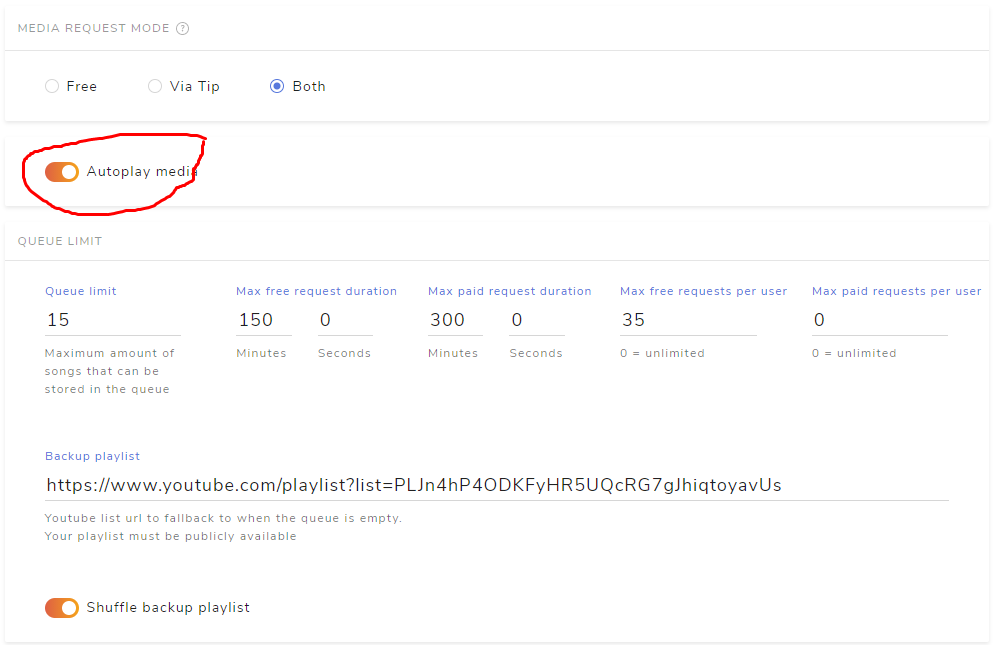
it's because I'm having a problem with the music playlist ... when the song ends, the next song doesn't start ... I have to give the command "! play"

 odd kraken
No idea. sorry.
steady citrus
look
steady citrus
odd kraken
No idea. sorry.
ah ok
odd kraken
Have you followed the bor response? What is the step you are having issues with?
rugged quail
how to open media request without hearing it in my pc but it's working in the stream @odd kraken
 teal sandal
I don't get it when I set my overlay resolution to 2560x1440p (which is my native resolution) it goes bigger if I put 2560x1440p in browser source too in OBS, dunno if it is OBS or SE related at this point 😦
and my base canvas is 2560x1440p too, output at 1080p
full thunderBOT
@teal sandal To add your overlays to OBS, add a new browser source in your scene. Paste your overlay URL in the browser source properties, set the dimensions to 1920x1080 (unless you changed them on the website) and check Shutdown source when not visible. https://youtu.be/KDvLynUqXI4
odd kraken
@rugged quail I am not the best person to answer this, but afaik you can create one single overlay with the media reuqest widget and add this to your OBS and then use the reroute option in OBS in the browser source to be able to set the output so you do not hear it.
rugged quail
Ok
 sweet mural
If I have a fall guys preset will the alerts automaticly work?
zinc lintel
my obs keeps crashing when i open video capture
full thunderBOT
@viral escarp Obs.live is a plugin for OBS Studio for the best OBS support, please join their Official Discord @ discord.gg/obsproject
 slow pecan
im having problems with my audio and window captures
 sonic terrace
How do i set up my Overlays for the OBS
 hollow rivet
I am unable to get my kappagen to work for hosts and raids (emote explosion) on streamlabs OBS
full thunderBOT
@sonic terrace To add your overlays to OBS, add a new browser source in your scene. Paste your overlay URL in the browser source properties, set the dimensions to 1920x1080 (unless you changed them on the website) and check Shutdown source when not visible. https://youtu.be/KDvLynUqXI4
hollow rivet
When someone hosts me or raids me, the emote explosion does not work
sterile leaf
Hello, I set the donation expiration date incorrectly. How can I fix date settings?
 tardy garden
slow pecan
im having problems with my audio and window captures
tardy garden
slow pecan
im having problems with my audio and window captures
im having the problems as well
has somebody assisted you with that ?
so i can get in touch with them
rugged quail
Hi I need some help on trying to connect my voice from my head set into my stream
From a capture card
full thunderBOT
@rugged quail If you are having issues with Elgato hardware or software, we recommend reaching out to their support here: https://e.lga.to/help
@slow pecan Obs.live is a plugin for OBS Studio for the best OBS support, please join their Official Discord @ discord.gg/obsproject
@tardy garden Obs.live is a plugin for OBS Studio for the best OBS support, please join their Official Discord @ discord.gg/obsproject
 scenic frost
So I have two monitors, and OBS identifies both with two different desktop audios. However, whenever I play music, it only shows up on one. What I would like is to have music playing on one and the audio playing on the other, and having my mic be seperate. Is this possible on OBSstudio or do I have to download voicemeter?
full thunderBOT
@scenic frost Obs.live is a plugin for OBS Studio for the best OBS support, please join their Official Discord @ discord.gg/obsproject
 fleet juniper
anyone that can help with alert setup? i have a few questions about why its not showing up or pulling any data from my youtube channel
 pallid moss
Can some one assist me? My OBS has crashed twice. I saved the log files to my clipboard.
full thunderBOT
@pallid moss A crash log is required to investigate the cause of your issue. Please upload the last crash log.
- In OBS, click the Help menu
- Select Crash Reports and then Upload Last Crash Report
- Copy the URL and paste it to the chat here.
Note: If you are not able to follow the above steps, open your file explorer and go here: %appdata%\obs-studio\crashes and provide the last listed file.
 hallow musk
hello
could someone help me? i just made a alert box and unfortunately there is no sound if someone shared/like my stream 🙂 thank you
full thunderBOT
@hallow musk If you are not hearing your alerts and/or Media Request, you are most likely using the Control Audio via OBS option in your browser source properties.
To make sure you hear the alerts and the stream also hears them, follow along the screenshot bellow.
https://cdn.discordapp.com/attachments/199460642975907840/685371800456134686/unknown.png
hallow musk
this is all i have in my obs.
and this. hope you could still help me to fix my prob. thank you ❤️
shy mountain
If the above doesn't help, then check your windows audio settings
hallow musk
i can't find in audio mixer(obs) the settings to edit for my alerts. eventho i have added alert in sources
shy mountain
Right click the source -> properties -> control audio via OBS -> apply -> ok
hallow musk
thanks KeiZar ❤️ you helped me alot ❤️
scenic frost
if you control audio via obs but cant hear it what should you do
pallid moss
shy mountain
@scenic frost check your windows settings
full thunderBOT
@pallid moss 1) Uninstall OBS.Live and OBS Studio completely, but leave this unchecked https://i.imgur.com/LBaHgM1.png
2) Download and install OBS Studio from https://obsproject.com/
3) If it doesn't crash, install OBS.Live too.
-
It's fixed? Nice!
-
It crashes again?
- Repeat steps 1 and 2
- Duplicate the current "Scene Collection" at the very top of OBS, call it something like "Backup" and remove all browser sources in that backup
- Install OBS.Live and see if it still crashes
- If yes, repeat steps 1 and 2, leave OBS.Live uninstalled, tell us that it didn't work and use your old default scene collection again.
 pallid moss
full thunder
<@!483745437098967060> 1) Uninstall OBS.Live and OBS Studio completely, but leav...
pallid moss
full thunder
<@!483745437098967060> 1) Uninstall OBS.Live and OBS Studio completely, but leav...
Where do I uninstall it from to see that box pop up?
 hidden charm
not sure where to post this but when i try to mod my friends channel on stream elements it just keeps taking me to log in page any help?:
full thunderBOT
@hidden charm Please logout of StreamElements at https://streamelements.com/logout and then login again to your account (Twitch/YouTube/Facebook).
kindred fox
Then try it again
hidden charm
yeah i logged out and logged in and it just keeps sending me to the main screen that says "my dashboard" and i click it and it just keeps sending me to that
kindred fox
hidden charm
yeah i logged out and logged in and it just keeps sending me to the main screen ...
Clear your browser cache
hidden charm
i cleared everything just now and it still wont let me!
toxic fern
You both need to do it. Not just you.
hidden charm
oh shit really okay thanks
scenic frost
alerts and media output aren't going through. monitor and output is on for both, the system device monitoring is default, what else can i do?
shy mountain
@scenic frost check your windows settings
scenic frost
@shy mountain my headphones just keeps registering as output and now my desktop audio won’t pick up on anything
shy mountain
That def. sounds like an issue we can't help at this point. You either pluged the headphones in the wrong jack slot or something is messed up with your Windows settings
 vagrant drift
hi folks and merry Christmas/happy holidays, Im about to rebuild my stream machine and I'm trying to figure out how to backup my obs.live settings. If i go into the cloud backup option in the menu it loads a blue/purple screen and does nothing. Am i being too impatient here or am i missing something?
shy mountain
You should be able to see this
But you can also back up your stuff manually
by clibking on scene colection and profile
and just export
and save that file
vagrant drift
so if i save the json and import form that Im ok
shy mountain
ye
vagrant drift
shy mountain
do note that it won't include any physical files that you have as sources
vagrant drift
here what i get
full thunderBOT
@vagrant drift StreamElements menu, on top of OBS > Logout > Login
vagrant drift
full thunder
<@!316955262336499722> **StreamElements** menu, on top of OBS **> Logout > Login...
Huh this worked.
I reauthed with all my browsers thinking it was this
but didnt consider to login/out the extension
@shy mountain thank you for your help
 hexed grail
When I try to open the overlay editor in OBS I get an error "Invalid authorization token"
How can I refresh the token?
full thunderBOT
@hexed grail Please logout of StreamElements at https://streamelements.com/logout and then login again to your account (Twitch/YouTube/Facebook).
hexed grail
did not work
full thunderBOT
@hexed grail StreamElements menu, on top of OBS > Logout > Login
hexed grail
thx a lot!!
 distant rampart
Hi
Im using OBS 25.0.8 and everytime I start streaming it opens youtube stream... now I would to stream twitch. Howm can I change it?
full thunderBOT
@distant rampart StreamElements menu, on top of OBS > Logout > Login
sharp turret
Logout and login with twitch
distant rampart
ahhh ok it was easy.. thank you
sharp turret
Welcome 🙂
full thunderBOT
@formal willow If you have one monitor and/or would like the chat overlay on the screen, please look at the link below.
Please note this is not a plugin for OBS and not maintained by SE.
https://github.com/baffler/Transparent-Twitch-Chat-Overlay
lament orchid
sometimes when i shift to another scene all my sounds just start lagging on stream. No lag in discord or anything but the stream can hear everything just lagging. Im using a GOXLR to route all my sounds through, im using a custom made stinger scene transition, idk if its because of that tho. My sampling speed in obs is 48 khz and my channel is stereo. Its not every time i shift a scene but sometimes and its driving me insane
full thunderBOT
@lament orchid Obs.live is a plugin for OBS Studio for the best OBS support, please join their Official Discord @ discord.gg/obsproject
 dawn urchin
shy mountain
dawn urchin
shy mountain
 pallid fog
neither my subscriber alert nor my recent subscriber arent working
lusty mesa
Excuse me gentlemen, my top tipper list on my overlay shows me a increased total of currency than what is shown on the revenue history. How can i fix that?
 formal willow
hi i don't see the chat when i am in live
how i can fix?
lament orchid
sometimes when i shift to another scene all my sounds just start lagging on stream. No lag in discord or anything but the stream can hear everything just lagging. Im using a GOXLR to route all my sounds through, im using a custom made stinger scene transition, idk if its because of that tho. My sampling speed in obs is 48 khz and my channel is stereo. Its not every time i shift a scene but sometimes and its driving me insane
 south furnace
when i stream i can hear my alerts but my chat said that they cant how do i fix this?
full thunderBOT
@formal willow StreamElements menu, on top of OBS > Logout > Login
@lament orchid Obs.live is a plugin for OBS Studio for the best OBS support, please join their Official Discord @ discord.gg/obsproject
wary dew
lusty mesa
Excuse me gentlemen, my top tipper list on my overlay shows me a increased total...
did you import the currency from SL? sounds like a double up
wary dew
south furnace
when i stream i can hear my alerts but my chat said that they cant how do i fix ...
set the source to: monitor and output in the advanced sound settings
lusty mesa
@wary dew Yes I did, and now I've reverted that mistake but the tipping ammounts are still not in line with the change
full thunderBOT
@lusty mesa Please provide your account ID found at the top of this page: https://streamelements.com/dashboard/account/channels This ID is public info and safe to share here.
lusty mesa
5f969b16ac69c74a7ccbdd0a
wary dew
I'll ask if someone can delete the doubled currency
lusty mesa
Want me to send you 2 screenshots of the issue?
lusty mesa
@wary dew Because there are 3 different names on the top tipper list too that are from the same account, which can also be seen on the total tips page on streamelements. The other 2 are non-existent on the actual tipping history, however they are present on the top tipping list that I've added in the overlay
 formal willow
@wary dew no there is nothing
wary dew
Send in the screenshots @lusty mesa
full thunderBOT
@formal willow If you have one monitor and/or would like the chat overlay on the screen, please look at the link below.
Please note this is not a plugin for OBS and not maintained by SE.
https://github.com/baffler/Transparent-Twitch-Chat-Overlay
lusty mesa
@wary dew Im sending in private
formal willow
i fix
south furnace
wary dew
set the source to: monitor and output in the advanced sound settings
Well that shows me how stupid I am 🤣 how did I not think of that
 covert helm
does anyone know why stream elements sound isnt working in obs?
full thunderBOT
@covert helm Not all staff are able to assist with support issues. Please refrain from pinging them or sending them DMs unless asked to.
covert helm
ok
sorry
ive been trying to get this issue resolved for awhile and am just frustrated. sorry
i just figured they would be able to at least point me in the right direction is all
shoot i didnt see that was a bot lol
 steel mural
I mean.. you weren't really descriptive about your problem. No matter where, it's in your best interest to give as much info about your issue as possible. Then supporters (especially volunteers) are more motivated to get back to you (if they know the answer of course) 
 modest grotto
@full thunder I have ~ 500 Subs on Twitch and the counter on the overlay I created is showing 0. I tried deleting it & creating a new one but am not having any luck! Any suggestions? Thanks in advance!
full thunderBOT
@modest grotto To reset goals:
- from the Overlay Editor > Session data on top right (monitor symbol) > Goals tab > reset progress of desired goal
- from the Dashboard > Activity feed on the left > Widget data on the right > Goals tab -> reset progress of desired goal
Note: Goal widgets (progress) only counts up and doesn't go down automatically, if you lose followers/subs.
wary dew
try that menu, to add the number manually
modest grotto
@full thunder Thank you for the quick response! I did this but my "Subscriber Count" (+ > Labels > Subscribers > Total & All-Time > Subscriber Count) Is still showing as 0!
covert helm
so my alerts for subs and follows arent playing the sound i have set
ive made sure my sources and sounds are set to what they are supposed to be set to. they work when i emulate them but dont during the stream
@full thunder
do i need to have monito and output set to on for the overlay in advanced audio?
 tidal spruce
so heres where im stuck, i cant even get my overlay started
steel mural
Depends. Did you check "Control audio via OBS" in the source's properties? @covert helm If so, then yes you have to enable monitoring.
tidal spruce
i just switched from Streamlabs, to stream elements which suggested OBSlive. but i am lost how i add the URL they gave me
full thunderBOT
@tidal spruce To add your overlays to OBS, add a new browser source in your scene. Paste your overlay URL in the browser source properties, set the dimensions to 1920x1080 (unless you changed them on the website) and check Shutdown source when not visible. https://youtu.be/KDvLynUqXI4
covert helm
no i did not. so that has to be checked even if im using voicemeeter as my mixer?
tidal spruce
ty bot
covert helm
ill be sure to check that box and monitor and output though. thank you @steel mural
steel mural
You only have to check it when you want to have an extra volume slider in OBS
If it's not checked, it will go through "Desktop Audio"
covert helm
awesome thank you. got it fixed
tidal spruce
nothings showing up and i added the browser
modest grotto
@full thunder I have ~ 500 Subs on Twitch and the "Subscriber Count" on the overlay I created is showing 0. Any suggestions on how to fix this?
tidal spruce
Nothing is showing up from Streamelements to OBS
full thunderBOT
@tidal spruce OBS > Settings > Advanced > Scroll down > Enable or disable Browser Source Hardware Acceleration, depending on its current state > Restart OBS (This does not apply for OBS on Mac)
https://i.imgur.com/ggMe9ZE.png
rugged quail
Is anyone willing to take the time to fix my alerts?
 dull steeple
@full thunder In my app my Media tab has stopped working, I have restarted the app and uninstalled and reinstalled and its still not working
 slender cobalt
Hey! so I had like a stats dock pulled up to see stuff like how long ive been live, how many people, etc. also where u change the game and name of the stream. Does anyone know how to get it back? it suddenly dissapeared
 plain delta
Hello
i am having some trouble with my overlay
i copied my url and set everything up i just can't see the preview on my stream to make sure its working
 vivid trout
why is it so hard to change your bot name...i've done what you told me to do 10 times and still dont have the option....why cant it just be a easy thing to do
toxic fern
@vivid trout Pinned messages. Otherwise you need to follow this
full thunderBOT
If your commands recently stopped working and you're using OBS.Live and a custom bot name do the following:
- In OBS.Live, click on the hamburger menu (three stripes) at the top left of your activity feed
- Click on Stream Settings > Custom bot name
- In the Custom bot name field select Set custom bot name, not your already existing username (with capital letters). Note: If you already connected an account that way, the third entry will show as the account name (see image https://i.imgur.com/sO7fWOX.png).
- Scroll a bit down and click on the purple Connect Custom Bot Account button
- Log in as usual and Authorize the custom bot name
- Back in the Activity feed, click on the Send Test Message button and check if your custom bot name starts working again
 vivid trout
that setting doesn't exist in ground control i've been looking for days
 willow yoke
hi, can someone help me, I am unable to get my elgato capture card to work, the same message "one moment please..." will not go away.
 fierce marsh
willow yoke
hi, can someone help me, I am unable to get my elgato capture card to work, the ...
fierce marsh
willow yoke
hi, can someone help me, I am unable to get my elgato capture card to work, the ...
I just solved that problem I can hop in call and run you through it if you'd like
willow yoke
sounds great
 quick veldt
hi, i switch my thing from youtube to twitch but when i click start streaming it still pulls up the start on youtube thing
 solid mica
I have been running into an issue where the SE bot is not recognizing the !ticket <#> command for giveaways. You can go to the public page and enter but not from chat and SE doesn't allow me to post a different 'How to enter" chat message. am I missing something? I have logged out and back into SE and OBS and no change. Image for reference of my issue.
 tender furnace
i have an issue with streamelements not streaming when i hit the button and with a deckboard extension not working properly
 civic copper
I'm using one of the overlays from SE and was wondering how to fix this on the Overlay editor. It says, "Hidden when inactive" and I don't know how to change that setting specifically in the overlay settings. Any tips?
 tight glacier
Hello! I got a new webcam for Christmas and I set it up in OBS. However, it's not letting me change the size of the video. It's on a fixed size. Is there a way to change this?
 pastel gale
tight glacier
Hello! I got a new webcam for Christmas and I set it up in OBS. However, it's ...
pastel gale
tight glacier
Hello! I got a new webcam for Christmas and I set it up in OBS. However, it's ...
Hold ALT and resize it
tight glacier
Thanks!
 ripe zenith
hello i need helpuu
full thunderBOT
@ripe zenith Welcome to the helpdesk! Please let us know how we can assist you today and a support volunteer or staff member will assist you as soon as they are available. Thank you for your patience.
modest grotto
@dapper igloo I got 3 Day Temp Ban off twitch. I have 539 Subscribers showing in my Twitch Analytics, but when I try to add "Subscriber Count" to my overlays, it's displaying as 0. Know what I might be able to do to fix this? Thanks in advance!
 surreal tangle
hey! i just switched from stream labs and im having troubles entering widgets into obs live, is there a certain thing i should be doing?
full thunderBOT
@modest grotto Please logout of StreamElements at https://streamelements.com/logout and then login again to your account (Twitch/YouTube/Facebook).
@surreal tangle We've released our new Overlay Editor revamp. You can check out the changes and how to work with it here: https://youtu.be/X5VzXjqAsjk
Check out our blog post as well: https://blog.streamelements.com/streamelements-overlay-editor-just-got-even-better-c22cb5b4853e
@surreal tangle To add your overlays to OBS, add a new browser source in your scene. Paste your overlay URL in the browser source properties, set the dimensions to 1920x1080 (unless you changed them on the website) and check Shutdown source when not visible. https://youtu.be/KDvLynUqXI4
surreal tangle
oh okay perfect thank you so much!
 modest grotto
full thunder
<@!232602298226966528> Please logout of StreamElements at <https://streamelement...
modest grotto
full thunder
<@!232602298226966528> Please logout of StreamElements at <https://streamelement...
I tried this. Unfortunatley this did not work 😦
 zenith stream
OBS keeps crashing
 upbeat ore
guys, how to restart donations goals in streamelements?
i want a new donation goal since 0€
full thunderBOT
@upbeat ore To reset goals:
- from the Overlay Editor > Session data on top right (monitor symbol) > Goals tab > reset progress of desired goal
- from the Dashboard > Activity feed on the left > Widget data on the right > Goals tab -> reset progress of desired goal
Note: Goal widgets (progress) only counts up and doesn't go down automatically, if you lose followers/subs.
surreal tangle
how do i add a new overlay to my obs? @full thunder
full thunderBOT
@surreal tangle To add your overlays to OBS, add a new browser source in your scene. Paste your overlay URL in the browser source properties, set the dimensions to 1920x1080 (unless you changed them on the website) and check Shutdown source when not visible. https://youtu.be/KDvLynUqXI4
surreal tangle
okay sweet
 ionic yarrow
i have very particular issue
i noticed my alerts are lagging or straight up freezing
i tried to test out the default alerts to see if there is issue with my files and it does the same thing
especially with the sub and cheer alert
modest grotto
@full thunder I have been messaging you since this AM - would really appreciate a response! I was temp banned on twitch for 3 days now my "SUBSCRIBER COUNT" on my overlays is stick at 0. I logged in and out of the account, but there is still no change. What do you suggest I try to do? Thank you!
 torpid cedar
When I use the Display Capture source, it does not register my screen, and instead is just black with the overlay on top. What should I do to fix it?
 upper galleon
How do I change the "newest follower" and otehr things like that to the actual new follower
 lucid mirage
i accidentally deleted the live settings like where you can change what game your playing or the description
just wanted to know how to get it back
 versed sluice
I'm having problems with activating my overlays and since I clicked activate overlays in obs.live my stream elements page isnt working
 crude echo
I can hear myself as soon as i launch obs and all the monitoring is turned to off
 dreamy ruin
@full thunder my audio will not come through my stream was working 20 min ago
full thunderBOT
@dreamy ruin Obs.live is a plugin for OBS Studio for the best OBS support, please join their Official Discord @ discord.gg/obsproject
long bobcat
@crude echo either provide more info on why you think it's related to OBS.Live \ SE, or check your audio settings and also talk to OBS via above link 
@versed sluice what do you mean 'my streramelements page isn't working'?
@lucid mirage what did you delete?  what do you need help with?
@upper galleon what? you can edit the text of any alert in the widget settings 
@torpid cedar consult OBS
full thunderBOT
@modest grotto Please provide your account ID found at the top of this page: https://streamelements.com/dashboard/account/channels This ID is public info and safe to share here.
long bobcat
@ionic yarrow does this happen at certain occasions? are you using Chrome?
 sharp basin
Hello, I'm tryna get soundtrack by twitch to work with obs.live but the source isn;t there
full thunderBOT
@sharp basin Obs.live is a plugin for OBS Studio for the best OBS support, please join their Official Discord @ discord.gg/obsproject
 tame forge
Is there away me the streamer can see the twitch chat but not the viewers? also same question except with viewer count
long bobcat
where do you see the viewers and want to undo that?
 naive veldt
how can i get OBS out of full screen? i can't seem to get it out of full screen mode
tame forge
long bobcat
where do you see the viewers and want to undo that?
U talking to me????
naive veldt
nevermind i got it F11 to work
long bobcat
tame forge
U talking to me????

tame forge
long bobcat
<:YEP:755089975573217282>
Well on streamlabs it automtically has thos 2 features but i had problems with streamlabs so i decided to switch
long bobcat
I have no idea what you just said
you presented a question to which I requested elaboration
and doesn't clarify for me how we can assist you
you want to see chat but not viewers? what does that mean? and how is that different from also same question except with viewer count ?
tame forge
long bobcat
I have no idea what you just said
I just want to be able to see viewers and chat without my viewers seeing them
long bobcat
i still don't get it
i see chat and viewers and my viewers don't see it
either way they can see how many ppl are watching u on twitch
so not sure what you mean
 hushed grove
Hello! I can't seem to be able to get MediaRequests to work
It keeps saying "No active widgets were detected for media requests".
I loaded the overlay using the browser link
And there is indeed a Media request overlay on the theme
hushed grove
Not sure if I'm allowed to answer: Create a scene for whatever you want, then add a "Browser" Source. In the link, use the overlay link given on the website in your overlays
full thunderBOT
@vague furnace Not all staff are able to assist with support issues. Please refrain from pinging them or sending them DMs unless asked to.
@vague furnace To add your overlays to OBS, add a new browser source in your scene. Paste your overlay URL in the browser source properties, set the dimensions to 1920x1080 (unless you changed them on the website) and check Shutdown source when not visible. https://youtu.be/KDvLynUqXI4
rugged quail
Is here someone willing to take the time to fix my alerts?
wary dew
Try explaining what the problem is, that might be easier 😛
rugged quail
There is no problem, but I do not have time to create the alerts and to find out how
 vague furnace
i added the overlay to obs and they say no data how do i fix this?
 pallid parrot
@vague furnace Data for your labels will populate over time. If you registered recently it should be available soon
full thunderBOT
@rugged quail We've released our new Overlay Editor revamp. You can check out the changes and how to work with it here: https://youtu.be/X5VzXjqAsjk
Check out our blog post as well: https://blog.streamelements.com/streamelements-overlay-editor-just-got-even-better-c22cb5b4853e
wary dew
Check that video and instruction, there is no one here who is going to set everything up for you
vague furnace
so its just something I wait on then?
formal willow
formal willow
???
formal willow
formal willow
How i can zoom the chat?
?
long bobcat
you can't 'zoom the chat' @formal willow
what are you looking to achieve?
formal willow
little is read because the words are small. 2 months ago it was normal
long bobcat
how should I know what you changed during those 2 months @formal willow 
our chat is 1:1 twitch chat
if you want the letters to be bigger see if it's available in the twitch chat settings
you can also pop out the chat if you're using OBS.Live and change the window size how you see fit
formal willow
I tried to enlarge the window but the letters are always small
pallid parrot
Click gear in chat window, then change "Font Size" value
formal willow
I dont understand but after i try.
 violet pier
hello, does anyone know why my cursor disappears in game (rainbow six siege) whenever i have my obs turned on?
hushed grove
Hello! I can't seem to be able to get MediaRequests to work
It keeps saying "No active widgets were detected for media requests".
I loaded the overlay using the browser link
And there is indeed a Media request overlay on the theme
sterile leaf
Hello, my incoming donations are not filling the donation box on the air. Why?
 rigid grove
Hello guys, is there a way to use Virtual Cam on Elements-Obs? // Update: Fixed
full thunderBOT
@violet pier Obs.live is a plugin for OBS Studio for the best OBS support, please join their Official Discord @ discord.gg/obsproject
@rigid grove StreamElements menu, on top of OBS > Logout > Login
long bobcat
if that doesn't fix it make sure you have it properly set up
what does that mean @sterile leaf ?
full thunderBOT
@rigid grove Obs.live is a plugin for OBS Studio for the best OBS support, please join their Official Discord @ discord.gg/obsproject
 gentle river
can anyone help me how to add my paytm donation alert in obslive?
hushed grove
Hello! I can't seem to be able to get MediaRequests to work
It keeps saying "No active widgets were detected for media requests".
I loaded the overlay using the browser link
And there is indeed a Media request overlay on the theme
full thunderBOT
@hushed grove StreamElements menu, on top of OBS > Logout > Login
sharp turret
Try that
hushed grove
I'll try that!
sharp turret
If still not then this:
Right click on the BrowserSource > Properties > Scroll down a bit > Refresh cache of current page
hushed grove
Thanks! the first option worked!
Okay but now sound is playing x2
Okay fixed sorry
 sullen jay
hello everyone i wanted to ask does anyone know hot to fix the streamelement chat box its not working anymore.i tried refreshing or remove it then adding back its not working
i just ask this in the wrong channel jn mb
 analog storm
good morning everyone, ive had this issue for a little while now and I was wondering if anyone knew how to fix my chat box. Every time i try to use the settings it says "loading error data" and I get no messages coming through/ cant send messages out of my obs stream elements extension
full thunderBOT
@analog storm StreamElements menu, on top of OBS > Logout > Login
analog storm
ok i will try that thank you
sharp turret
sullen jay
hello everyone i wanted to ask does anyone know hot to fix the streamelement cha...
You mean chat box widget, or in OBS.Live the chat?
sullen jay
in the obslive
full thunderBOT
@sullen jay StreamElements menu, on top of OBS > Logout > Login
sharp turret
Try that
sullen jay
as in log out my twitch ac from obs ?
analog storm
it worked thank you!!!!
sharp turret
Welcome! :)
sullen jay
oh log out from the website ?
analog storm
finally lmao ive had that issue for a while didnt even think to just log out and log back in
sharp turret
Welcome!
full thunderBOT
@zenith palm To add your overlays to OBS, add a new browser source in your scene. Paste your overlay URL in the browser source properties, set the dimensions to 1920x1080 (unless you changed them on the website) and check Shutdown source when not visible. https://youtu.be/KDvLynUqXI4
 queen loom
Someone knows how to solve the problem of when I open obs I cannot hear my desktop or anything but in the stream if it is heard, I mean, I start obs and I do not hear anything but in the stream if it is heard someone helps me??
full thunderBOT
@queen loom Obs.live is a plugin for OBS Studio for the best OBS support, please join their Official Discord @ discord.gg/obsproject
rugged quail
is there a way i can add commands by doing !addcom instead of using the "!command add" prefix ?
 dawn apex
Hey guys. I am not sure if this is an OBS.Live issue or not, but I am having issues with getting the Steam version of Cuphead's audio captured
I hear it through my wav, through the desktop, but I can't capture it for some reason or another
Nevermind! I got it! 🙂
rugged quail
guys my streaming is not going live i keep on waiting for like 10 minutes and then Youtube says Connect streaming software to go live
Viewers will be able to find your stream once you go live I use obs
please help
How long do i usually have to wait
 astral jasper
Has anyone had an issue lately where the chatbot doesn’t respond when you go live? I’ve had it take 10+ mins before commands start working, but most of the time I have to logout of streamelements and log back in after I go live. Appreciate any assistance on this, thanks 🙂
full thunderBOT
@astral jasper If your commands recently stopped working and you're using OBS.Live and a custom bot name do the following:
- In OBS.Live, click on the hamburger menu (three stripes) at the top left of your activity feed
- Click on Stream Settings > Custom bot name
- In the Custom bot name field select Set custom bot name, not your already existing username (with capital letters). Note: If you already connected an account that way, the third entry will show as the account name (see image https://i.imgur.com/sO7fWOX.png).
- Scroll a bit down and click on the purple Connect Custom Bot Account button
- Log in as usual and Authorize the custom bot name
- Back in the Activity feed, click on the Send Test Message button and check if your custom bot name starts working again
rugged quail
someone please help me 😦
kindred fox
rugged quail
someone please help me 😦
go into your obs settings > Stream > make sure YouTube is selected in the drop-down menu
rugged quail
ok
yeaH IT SAYS COULD NOT FIND YOUR LIVE VIDEO ON YOUR YOUTUBE PAGE
sorry i had caps lock on
Could it be a internet problem @kindred fox
kindred fox
rugged quail
Could it be a internet problem <@!128166843360739328>
you might check youtube for guidance on streaming there. I'm not entirely sure on how it works with YouTube Streaming
rugged quail
@kindred fox could it be a internet issue
kindred fox
rugged quail
<@!128166843360739328> could it be a internet issue
No idea
 slow hazel
how do i change it so i stream at 1080p
 dark current
how do i change the language of activity feed
 quick flint
I would like to know if there will be support for the twitch soundtrack in the next update or is it planed
quick flint
rugged quail
Could it be a internet problem <@!128166843360739328>
are you a youtube partner
cause alot of times its that or did you find your stream key for youtube that can also be it too other then that I don't have a clue
rugged quail
whats a youtube partner
 tough plank
it's a partnership
quick flint
I was just suggesting I do much with youtube its just what I had a problem with a long time ago
quick flint
i never had that problem, but do you have echo
tough plank
i think is that
quick flint
I used it a while back but ever since the dcma on twitch I stopped using it
tough plank
oh ok
quick flint
rugged quail
no i am not
ah ok it was just a suggestion is all I was doing was just trying to help
quick flint
tough plank
oh ok
it could be that maybe you have your audio on one track I mean that all I would know
 inland wasp
Hey, just trying to set up my StreamElements on OBS and it's not detecting that I'm putting the tip link in my page's description so the setup won't move forward
 dense ridge
Hi! I was just wondering how does stream elements earn money? Because all of the services are free, and don’t have premium subscriptions or in app purchases
 idle brook
salut a tous, j'ai un probléme avec l'audio de mes stream, je voie la barre de son évoluée dans streamlabs mais je n'ais pas de son dant mon Live ni dant mes enregistrement 😣
full thunderBOT
@idle brook Welcome to the helpdesk! The regular helpdesk channels are in English but we do provide multi-language support in the following channels: #🇩🇪︱deutsch | #🇫🇷︱français | #🇪🇸︱español | #🇵🇹︱português | #🇳🇱︱nederlands | #🇮🇹︱italiano | #🇵🇱︱polski | #🇨🇳︱中文語言服務區-chinese | #🇯🇵︱日本語-japanese | #🇭🇺︱magyar | #🇰🇷︱한국어-korean | #🇹🇭︱ไทย-thai | #🇷🇺︱русский | #🇺🇦︱українська | #🇨🇿︱czech
 severe shell
hey i just find out that yall are having a beta test for mac i was wonder if it is still open
 next niche
how do i add my chat again
idk how lmao
i formated my pc
oh
got i t
its in stream elements
but its white af lmao
how can i change it
kindred fox
next niche
how can i change it
next niche
ur a god ty
 tulip urchin
has anybody else had an issue with the window capture source freezing mid stream and staying frozen?
full thunderBOT
@tulip urchin Obs.live is a plugin for OBS Studio for the best OBS support, please join their Official Discord @ discord.gg/obsproject
modest grotto
@full thunder 5fae2eb1c38dd0e378bb2245 MY twitch sub count is not updating for the second day in a row. My subcunt is 559 and it shows 1. I got temp banned for 3 days and this has not worked since then. Thanks
full thunderBOT
@modest grotto Please provide a proper screenshot with the issue visible. If not sure how to take a screenshot, you can check here: https://www.take-a-screenshot.org
modest grotto


 tulip hamlet
Looks fine on our end.
modest grotto
Shows up as 1 of me :/ @tulip hamlet
tulip hamlet
Try clearing your cache and cookies and relogging.
modest grotto
@tulip hamlet youre a legend man thank you so much ❤️
rugged quail
how do you transfer the overlays onto a scene on OBSlive
full thunderBOT
@rugged quail To add your overlays to OBS, add a new browser source in your scene. Paste your overlay URL in the browser source properties, set the dimensions to 1920x1080 (unless you changed them on the website) and check Shutdown source when not visible. https://youtu.be/KDvLynUqXI4
rugged quail
tysm
solid mica
@full thunder So I am still having issues where the SE bot won't respond to commands. I have removed the bot from the channel and gave it permission again. I have logged out and back in on everything, I.E. SE, Twitch. I have tried everything SE F.A.Q.s have directed me to do. I posted a help request earlier and have gotten no response. This is affecting my streams in the worst possible way as I either am having to deal with these bot issues live or I am not able to stream because I am dealing with it offline. Attached screenshot is what is happening, well not happening really PLEASE Help!
inland wasp
Hey, sorry, not sure how to take a screenshot of this but earlier I asked a question about being stuck at the tip setup in OBS because it wouldn't detect that I put the link in my Facebook page's description. Any advice?
 toxic geyser
Hi. What is de main benefit of using obs.live over default OBS docks (chat/activity feed) ?
full thunderBOT
@inland wasp Please provide a proper screenshot with the issue visible. If not sure how to take a screenshot, you can check here: https://www.take-a-screenshot.org
@solid mica StreamElements menu, on top of OBS > Logout > Login
kindred fox
toxic geyser
Hi. What is de main benefit of using obs.live over default OBS docks (chat/activ...
easier to use a custom bot name
quick flint
I just wanted ask is there going to support for twitch soundtrack
tulip hamlet
We generally do not comment on our roadmap.
quick flint
cause I can't find any info if streamelments obs going support it
ah ok
just thought I would ask
quick flint
tulip hamlet
We generally do not comment on our roadmap.
does the bot have spam filter for spam bots or do I have to make one so I don't have keep banning them myself
tulip hamlet
quick flint
does the bot have spam filter for spam bots or do I have to make one so I don't ...
There is a spam filters section in the dashboard on the site that you can configure how you'd like.
quick flint
tulip hamlet
There is a spam filters section in the dashboard on the site that you can config...
ah ok thank you very much 😄
 clever mountain
Everytime I click on start stream it keeps trying to connect me to YouTube instead of Twitch. Where's the setting for it to go right to Twitch?
full thunderBOT
@clever mountain StreamElements menu, on top of OBS > Logout > Login
clever mountain
full thunder
<@!329632726376382475> **StreamElements** menu, on top of OBS **> Logout > Login...
thank you
how do i fix the delay between obs and my live stream? there's a huge 30 second delay
full thunderBOT
@clever mountain Obs.live is a plugin for OBS Studio for the best OBS support, please join their Official Discord @ discord.gg/obsproject
 abstract minnow
Whenever I display capture (I play mainly Destiny 2 and it does not allow you to game capture) my stream stutters terribly. However I tried other games with GAME capture and the stuttering goes away. What do I do to fix this?
full thunderBOT
@abstract minnow Obs.live is a plugin for OBS Studio for the best OBS support, please join their Official Discord @ discord.gg/obsproject
 honest marsh
For some reason my custom bot name stopped working and I can't seem to get it working again. Every time I select "Connect Custom Bot Account"and sign in, it won't refresh or give me a field to enter the name. Even when I choose "Change to [twitch name]" and send test message, nothing shows up. It will only show test messages and allow chat commands if it's set as "StreamElements"
full thunderBOT
@honest marsh If your commands recently stopped working and you're using OBS.Live and a custom bot name do the following:
- In OBS.Live, click on the hamburger menu (three stripes) at the top left of your activity feed
- Click on Stream Settings > Custom bot name
- In the Custom bot name field select Set custom bot name, not your already existing username (with capital letters). Note: If you already connected an account that way, the third entry will show as the account name (see image https://i.imgur.com/sO7fWOX.png).
- Scroll a bit down and click on the purple Connect Custom Bot Account button
- Log in as usual and Authorize the custom bot name
- Back in the Activity feed, click on the Send Test Message button and check if your custom bot name starts working again
honest marsh
full thunder
<@!723049586511314945> If your commands recently stopped working and you're usin...
I've followed the above steps multiple times and still don't get the ability to change the name
toxic fern
What does it show for the 3rd option?
honest marsh
toxic fern
What does it show for the 3rd option?
"Set custom bot name" still
full thunderBOT
"1) Right click on your OBS desktop shortcut and open the Properties
2) In the Target field, add the following to the very end: --remote-debugging-port=40404 (don't forget to add a space before the current path)
3) Open OBS (or restart if it was open)
4) Open your web browser and type in: localhost:40404
5) Click on StreamElements - Activity feed
6) Navigate to the Console tab
7) Type the following into the console and hit enter: store.customBot.removeCustomBotIntegration()
8) Try setting the custom bot name
9) Remove the additional flag in step 2 from your shortcut properties."
toxic fern
Try that.
honest marsh
I was trying that and I can't get past the second step:
2) In the Target field, add the following to the very end: --remote-debugging-port=40404
When I paste that at the end of the "Target" field, it gives me an "Problem with Shortcut" error message.
toxic fern
Space between -- and previous bit
honest marsh
toxic fern
Space between -- and previous bit
dope that worked! but now im stuck on the 6th step. Maybe its late or just my stupidity but I don't know what "Console" tab they mean
toxic fern
Press F12
honest marsh
so im assuming i hit f12 while im on my web browser (chrome). I chose the "Console" tab and put the line that was mentioned. Hit enter and got a "Uncaught ReferenceError" red line message but went back to OBS and tried to follow the remaining steps but still nothing.
toxic fern
OBS is opened when you opened localhost:40404?
honest marsh
yup. When i put that in, it says "This site can't be reached." Not sure if that's part of the process
it finally loaded up the remote debugging page. following the rest of the steps now
honest marsh
toxic fern
OBS is opened when you opened `localhost:40404`?
thank you for your help!! it finally accepted my login! i appreciate your patience with me
 waxen patio
Any plans to add a "Switch Account" or "Switch Profile" option for OBS.Live? I stream on Twitch and Facebook and I'd love to be able to swap my connection a bit more easily.
full thunderBOT
@waxen patio Check out the StreamElements ideas board: https://strms.net/ideas. You'll be able to add ideas, upvote ideas you agree with and track their progress with email notifications. Adding and upvoting ideas also helps the staff know which ideas should be prioritized so please take some time to upvote.
 coral ivy
Hello. Is there any way to login to multiple instances of Stream Elements? I wish to be able to manage my chats for my Twitch, Fb, and Youtube
rugged quail
Quick question: Is it possible for me to use obs.live on an older version of OBS since the latest version is causing my computer a lot of problem
I'm using 24.0.3 now
kindred fox
rugged quail
Quick question: Is it possible for me to use obs.live on an older version of OBS...
Download the newest version from obs.live. Your version is really really really old
toxic fern
@coral ivy Not possible. Closest you'd have is using restream's chat.
coral ivy
Which I use currently, but sadly, they don't have the option to moderate individual chats :(. Thank you
rugged quail
ok thx for the help guys think i will use the lastest version and deal with the other problems
rugged quail
im having troubles with the font styles from SE. if shows on the preview from the overlay site but not on my actual OBS. It shows a different font 😦
full thunderBOT
@rugged quail Google Fonts
More than 900 google fonts are supported at this time. You can preview them here: https://fonts.google.com/
Custom Fonts
Steps:
- Install the font on the streaming PC or choose a pre-installed windows font.
- In the overlay widget settings, select Text Settings
- Click on Enable Custom Font
- Type the name of the font as it appears in the windows font directory (This is usually
C:\Windows\Fonts)
Note: After installing fonts, the browser and OBS must be restarted for the font to appear.
rugged quail
are you able to stream on the ps4 software and connect it to OBSlive
full thunderBOT
@rugged quail Consoles do not have native support for overlays. You would need a capture card, PS4 remote play or Xbox companion app and a PC with OBS in order to have overlays over your console gameplay.
We have a blog post about how to set up console streaming with our essential tools: https://blog.streamelements.com/how-to-stream-on-console-7b620b1c46c3
 hazy trail
i need help to transmit a game in live
full thunderBOT
New to StreamElements?
Check out our YouTube channel https://www.youtube.com/c/streamelements/videos
with tutorial videos from setting up the basics, to in-depth details on how to use our product.
New to OBS? Here is a 4 step quick start guide
https://obsproject.com/wiki/OBS-Studio-Quickstart
Want to learn even more? Here is an in-depth overview
https://obsproject.com/wiki/OBS-Studio-Overview
 hollow siren
Why doesn’t host alerts work for me even tho they are turned on
full thunderBOT
@hollow siren "Due to changes to Twitch API, we have filtered out hosts and will only show these ones on your activity feed:
- All hosts coming from an online channel with at least 1+ viewer
- Auto host events with at least 1 viewer - only from a channel that just went offline
Note: If you see X channel has hosted you with no viewers on the back, that is considered an offline host or a host with 0 viewers, we do not show these."
hollow siren
It worked before so why does it not work
long bobcat
cuz twitch changed it
long bobcat
@frank spindle post this again without the URL please
you ask whomever's helping you if you can send it to them
inland wasp
full thunder
<@!267027413567799296> Please provide a proper screenshot with the issue visible...
I can't get post this screen in the setup because it won't detect that I've put the link in my Facebook page's description
Passed this screen*
Sorry, it's early 😪
long bobcat
@frank spindle after discussing with dev - we have no hand whatsoever in that feature of OBS
full thunderBOT
Obs.live is a plugin for OBS Studio for the best OBS support, please join their Official Discord @ discord.gg/obsproject
 floral glade
Hello Fivem I want to stream but the game catcher doesn't detect it
full thunderBOT
@floral glade Obs.live is a plugin for OBS Studio for the best OBS support, please join their Official Discord @ discord.gg/obsproject
 graceful tiger
I want to stream at twitch but when I pres start streaming It start at YouTube how I can fix it
full thunderBOT
@graceful tiger StreamElements menu, on top of OBS > Logout > Login
rugged quail
Hi guys :D, so I have an issue with OBS. So I want to stream/record games like nba2k21,msfs2020, etc... but when I turn on obs game frame drops for about 15fps but still above 60, that fps is fine for me but obs and the game starts to lag, and I mean heavily lag, it doesn't look like 60fps at all. Streaming is awful same as recording. I checked cpu and gpu and they arent overloaded. I tried this with couple of games but same issue over and over again. I tried to ask OBS support on their server but they weren't able to help me because they don't know what the issue might be. Is anyone able to help me with this issue? 🙂
full thunderBOT
@rugged quail Obs.live is a plugin for OBS Studio for the best OBS support, please join their Official Discord @ discord.gg/obsproject
 sturdy zephyr
My overlay is not appering
full thunderBOT
@sturdy zephyr To add your overlays to OBS, add a new browser source in your scene. Paste your overlay URL in the browser source properties, set the dimensions to 1920x1080 (unless you changed them on the website) and check Shutdown source when not visible. https://youtu.be/KDvLynUqXI4