#helpdesk-selive
1 messages · Page 181 of 1
 candid shale
 primal stream
but viewers can request vids, right? no control over that if that is enbled
 primal stream
well
 remote canyon
hello i need help my obs isnt picking up any of my desktop audio :c and ive tried updateing my drivers, restarting my computer
 full thunderBOT
@remote canyon Obs.live is a plugin for OBS Studio for the best OBS support, please join their Official Discord @ discord.gg/obsproject
 long bobcat
generally you want to make sure the device in OBS is set to the device of your windows audio
but that depends on your exact setup, so might want to consult there ^
 lusty mesa
Can any1 help me understand why obs live is lagging for my viewers, aka dropping below 60fps, WITH my same lag-free settings as i use on slobs??
full thunderBOT
@lusty mesa Dropped Frames means that you have a bad connection between your device and the streaming platform and most likely something related to your ISP not handling the connection properly.
Speed tests usually cannot help solve this problem and its best to use this guide: https://obsproject.com/wiki/Dropped-Frames-and-General-Connection-Issues
If you stream to twitch, use the !twitchtest command and do a connection test to your regional servers.
lusty mesa
No no im not having frame drops like that,
long bobcat
in game FPS drops?
lusty mesa
Nope, just a general lagging experience for my viewers whenever action happens on screen. Its not my internet, as my speeds are even better than what you'd need. Could it be because i use display capture??
long bobcat
no idea, but it's usually the connection
even if your throughput is more than decent it's up to the amount of data you're streaming to whatever platform you're streaming on
if there's too much going on it will result in those symptoms
might want to consider changing bitrate or resolution
full thunderBOT
@lusty mesa Obs.live is a plugin for OBS Studio for the best OBS support, please join their Official Discord @ discord.gg/obsproject
lusty mesa
@long bobcat But thats strange, that makes no sense given that when i have the -exact same settings- on SLOBS, there is no such a lag for my viewers?
long bobcat
it doesn't make sense to me too @lusty mesa as SLOBS uses more of your CPU
but you are the one that needs to run through the testing and compare
afaik when stream is lagging\buffering for viewers it's usually due to rendering lags that are caused by too much data being transmitted
it doesn't mean you can't optimize your stream using OBS.Live or OBS Studio, but since every setup is more or less unique I'd say the user has to go through the testing
lusty mesa
So what does obs.live use? More gpu??
long bobcat
what?
no, our overlays are cloud based
and not saved on your pc
meaning not utilizing CPU for anything related to stream appearance
lusty mesa
I know my problem...My bitrate EXCEEDS 6500.
It spikes up to 8000+
Its twitch that is forcefully trying to bring it back down
causing the smoothness to dissapear, right?
How can i stop obs.live from exceeding 6500 bitrate?
long bobcat
it usually fluctuates, even if you choose a constant bitrate.
twitch allows up to 6k, so setting it to higher is sort of redundant
when your bitrate is too high it can cause congestion and rendering lags
i do not know how slobs handle it, but you can try lowering your bitrate in obs.live, and in obs settings > output > advanced > rate control - set to CBR [constant bitrate]
but again. there is no 100% here, you have to experiment with the settings and see what provides you with the best result
lusty mesa
wow, there is no constant bitrate in obs.live
no wait, sorry, there is
but it doesn't remain there. Rate control: CBR Bitrate: 6000
And yet, it spikes above that
long bobcat
as I said, it fluctuates, when it can send more it sends more
lusty mesa
But twitch doesn't allow that
So why does it try to send more
That is the reason for "the lag"
long bobcat
the reason for laggy stream is lack of optimization
the fact that your bitrate fluctuates upward during stream doesn't matter, it can still happen even if your stream is running smoothly
it's up to you to get to the settings that will work best with the streaming service
you did it with SLOBS, you can make it happens with OBS.Live too
lusty mesa
Its a shame, i really found stream elements to be superior but not in the software it seems
long bobcat
oh it very much is, it's up to you to find the sweet spot, as I already explained
nothing is preventing you from arriving at that smooth stream with OBS.Live
just a matter of trial and error
 mighty scarab
Will I have to connect my laptop to my PS4 to use the overlays or will i just have to have the obs open and running to use them and for them to show on stream?
@long bobcat
 wise sphinx
I never received my email for S.E. Pay and have money pending. I dont know what to do about getting this money.
 wary dew
You have to wait until the details are being verified, like it says in the yellow box
wise sphinx
It has been sitting in that status since March 2020 and per the instructions it stated that I would receive an email and set up the account. That never happened.
full thunderBOT
@wise sphinx Please contact us via email for support with SE.Pay. You can use our contact form here: https://streamelements.com/contact Thank you.
wise sphinx
I just did
 rugged kernel
Has anyone ever had any luck using google Sheets API to pull data into a streamelements custom widget? I'm trying to get 2 columns of data from a spread sheet to input either into stream elements or into OBS. Anyone that can help is amazing!
 late furnace

 drowsy lodge
Best/most useful plugins for obs? Streaming games?
 analog kindle
Alright so I'm trying to update my obs add on and this is the error that keeps happening. I tried updating from the app and straight from the website. I'm unsure of how to make this work. Advice is greatly appreciated!
 lean topaz
OBS Live has started crashing shortly after opening
 round igloo
How does one manually update OBS.Live? Automatic update fails, manually running the update from the obs data folder fails, running an OBS.Live installer just install the previous version...
I have OBS running in portable mode, so it's not installed where OBS usually installs by default...does the updater only work on a regular OBS installation or what?
 unique lodge
Does anyone know what options there are for me to create a window with my chat during my streams? I am trying to have an in VR overlay set up
 still hollow
Hey!
Where is the add a new Transition button? Am I missing something? 
 keen eagle
question i cannot get my stream deck to connect to scenes in obs live
keen eagle
still hollow
Hey!
Where is the add a new Transition button? Am I missing something? <:FeelsW...
its in that drop down
 rugged quail
does anyone know how i can keep my kb/s stable it keeps on dropping to 0 - 800 and it normally is at 2300.
 wise lava
hello, has anyone had issues with their widgets not updating with the latest follower/subscriber etc
 twin solar
I set up donations for twitch on obs studio. when someone donates will it pop up on my overlay?
rugged quail
does anyone know how i can keep my kb/s stable it keeps on dropping to 0 - 800 and it normally is at 2300.
 proper surge
Hi folks! Does anyone know if I can see when someone redeems a store item while in OBS Live? I have "redemptions" checked in the activity feed, but I don't see anything in chat or in that window when an item is purchased with points
 pallid fog
guys my streamelements is suddenly having frames droped in the middle of stream
full thunderBOT
@pallid fog Please provide a log from your last stream. To do this, in OBS go to Help > Log Files > Upload Last Log File and paste the link to the log file here.
pallid fog
 tulip hamlet
@pallid fog https://obsproject.com/tools/analyzer?log_url=https%3A%2F%2Fobsproject.com%2Flogs%2FyT1HxkZdhByff9kF
OBS (Open Broadcaster Software) is free and open source software for video recording and live streaming. Stream to Twitch, YouTube and many other providers or record your own videos with high quality H264 / AAC encoding.
pallid fog
what is that
pallid fog
all of them are the reasons? or any one of them?
 full rain
Anyone else having bitrate issues after todays update? I streamed last night flawlessly, and now i cant even hold a stable bitrate
full thunderBOT
@full rain Please provide a log from your last stream. To do this, in OBS go to Help > Log Files > Upload Last Log File and paste the link to the log file here.
tulip hamlet
@full rain https://obsproject.com/tools/analyzer?log_url=https%3A%2F%2Fobsproject.com%2Flogs%2FlMv7QCPr6kSXkMTN
Your connection is experiencing issues.
OBS (Open Broadcaster Software) is free and open source software for video recording and live streaming. Stream to Twitch, YouTube and many other providers or record your own videos with high quality H264 / AAC encoding.
rugged quail
i have a question. how do i add a Like a donation or Goal bar
full thunderBOT
@rugged quail New to StreamElements?
Check out our YouTube channel https://www.youtube.com/c/streamelements/videos
with tutorial videos from setting up the basics, to in-depth details on how to use our product.
New to OBS? Here is a 4 step quick start guide
https://obsproject.com/wiki/OBS-Studio-Quickstart
Want to learn even more? Here is an in-depth overview
https://obsproject.com/wiki/OBS-Studio-Overview
 copper ravine
how do change my cam from 4.9 to 16.9
 gleaming quiver
I missed what version of obs the obs.live update said it was for today. Does anyone know?
Just want to make sure it wasn't for obs version 26.1
 hollow tree
uhm how do you steam in twitch lamo
 clever nova
hello i need help
full thunderBOT
@hollow tree New to StreamElements?
Check out our YouTube channel https://www.youtube.com/c/streamelements/videos
with tutorial videos from setting up the basics, to in-depth details on how to use our product.
New to OBS? Here is a 4 step quick start guide
https://obsproject.com/wiki/OBS-Studio-Quickstart
Want to learn even more? Here is an in-depth overview
https://obsproject.com/wiki/OBS-Studio-Overview
@clever nova Welcome to the helpdesk! Please let us know how we can assist you today and a support volunteer or staff member will assist you as soon as they are available. Thank you for your patience.
clever nova
i did update obs live (streamelements) to version 20.12.9.680 and ever since i cannot get game/display capture to work... just showing black screen... might need to revert to previous version? please help
full thunderBOT
@clever nova Obs.live is a plugin for OBS Studio for the best OBS support, please join their Official Discord @ discord.gg/obsproject
tulip hamlet
clever nova
i did update obs live (streamelements) to version 20.12.9.680 and ever since i c...
OBS.Live does not alter how game or display captures work. You'll be better off asking for assistance in OBS Project's Discord.
 hidden glen
Hi team, I was wondering how to get the Request Media widget working again, it's being non responsive on my end
Media Request*
Ok nevermind it works again now ll
 sharp willow
i just updated by OBS.Live to version 20.10.28.638 and when it restarted non of my previous set StreamElements overlay are showing? #helpdesk-selive thank you
full thunderBOT
@sharp willow Please ask your question in one helpdesk channel only. A support volunteer or StreamElements staff member will assist you as soon as they are available. Asking in multiple places will only result in confusion, not faster answers. Thank you for your patience.
sharp willow
full thunder
<@!758603769721782292> Please ask your question in one helpdesk channel only. A ...
thank you, i didn't realize there was a help desk after i posted my initiall question in general. thank you for clarification.
gleaming quiver
someone just cheered bits and nothing is showing in my activity feed. Alerts work if I re-fire them but anything new so far since the update isn't showing up
re-logged and still nothing is showing up
sharp willow
gleaming quiver
someone just cheered bits and nothing is showing in my activity feed. Alerts wor...
so i'm not the only one thus far.
gleaming quiver
okay now it just picked up someone doing a cheer, but it just picked up the first one that never showed. Huge delay, it seems
sharp willow
gleaming quiver
okay now it just picked up someone doing a cheer, but it just picked up the firs...
mine sorta different issue, my chat overlay, kappagen and alerts aren't showing up at all.
rugged quail
someone speak portuguese to help me?
full thunderBOT
@rugged quail Welcome to the helpdesk! The regular helpdesk channels are in English but we do provide multi-language support in the following channels: #🇩🇪︱deutsch | #🇫🇷︱français | #🇪🇸︱español | #🇵🇹︱português | #🇳🇱︱nederlands | #🇮🇹︱italiano | #🇵🇱︱polski | #🇨🇳︱中文語言服務區-chinese | #🇯🇵︱日本語-japanese | #🇭🇺︱magyar | #🇰🇷︱한국어-korean | #🇹🇭︱ไทย-thai | #🇷🇺︱русский | #🇺🇦︱українська | #🇨🇿︱czech
rugged quail
my activity feed does not appear as follows, even with them selected, does anyone know how to solve?
full thunderBOT
@rugged quail Please provide your account ID found at the top of this page: https://streamelements.com/dashboard/account/channels This ID is public info and safe to share here.
 dapper flower
hi i need help my obs randomly starts streaming when im not streaming and while im streaming it randomly stops streaming what could be causing the issue?
can someone help me figure out how to make it stop doing that?
full thunderBOT
@dapper flower Obs.live is a plugin for OBS Studio for the best OBS support, please join their Official Discord @ discord.gg/obsproject
dapper flower
ok thanks
 north copper
is it safe to update to the newest version of OBS live?
tulip hamlet
@north copper Uh. Usually the questions is "is it safe to update OBS Studio?"
Plugins need time to catch up to the main program, not the other way around.
The most recent version does support OBS 26.1 if that's what you're trying to ask.
 severe totem
I'm having some issues with the color my capture is showing as in OBS. Running through a Razer Ripsaw HD capture card. Through OBS, I'm getting a very weird hue in the color scheme, but on my display output from the capture card, everything is normal. any thoughts?
full thunderBOT
Obs.live is a plugin for OBS Studio for the best OBS support, please join their Official Discord @ discord.gg/obsproject
 wispy tree
My alerts dont work on my atream and dose not ahow me my new followers on ateeam elementa any ideas how to fix these
 somber epoch
Hi, my Chat on OBS Studio is not working. When I open it I never see messages and when I click on settings it says "ERROR LOADING DATA"
full thunderBOT
@somber epoch StreamElements menu, on top of OBS > Logout > Login
 wintry blaze
 shy mountain
The chat widget has not been fixed yet.
No ETA on when its going to be fixed.
No ETA means - it can be fixed in 10 years or 6 months
 jaunty whale
Nice
 exotic star
help
full thunderBOT
@exotic star Welcome to the helpdesk! Please let us know how we can assist you today and a support volunteer or staff member will assist you as soon as they are available. Thank you for your patience.
rugged quail
i got a stream package from own3d and its suppose to be optimised for slobs and streamelements only i can't seem to add it to streamelemtns obs
full thunderBOT
@rugged quail New to StreamElements?
Check out our YouTube channel https://www.youtube.com/c/streamelements/videos
with tutorial videos from setting up the basics, to in-depth details on how to use our product.
New to OBS? Here is a 4 step quick start guide
https://obsproject.com/wiki/OBS-Studio-Quickstart
Want to learn even more? Here is an in-depth overview
https://obsproject.com/wiki/OBS-Studio-Overview
 floral pivot
I believe there's an issue getting the text font I see in the overlay editor to my OBSlive browser source. Seems the font gets lost, I can provide screenshots if it helps
full thunderBOT
@floral pivot Text not showing up over your alerts? Go to the Advanced Text Settings and set the top margin to 50, you can work your way to the right position from there.
Google Fonts
More than 900 google fonts are supported at this time. You can preview them here: https://fonts.google.com/
Custom Fonts
Steps:
- Install the font on the streaming PC or choose a pre-installed windows font.
- In the overlay widget settings, select Text Settings
- Click on Enable Custom Font
- Type the name of the font as it appears in the windows font directory (This is usually
C:\Windows\Fonts)
Note: After installing fonts, the browser and OBS must be restarted for the font to appear.
long bobcat
is that of any help?  @floral pivot
floral pivot
@long bobcat seems it was a matter of remaking the font in the overlay, i.e. using the one that came with the premade theme didn't apply but using the same thing by adding it manually worked. Must be some part of the OG's setting that breaks the font 🤷♂️
long bobcat
mmm a little buggy bug rears its head 
rugged quail
When i try setup chatbox on stream the text is not going under the first line it carries on going straight across and cutting off is there a way to fix this as i think i have tried everything
rugged quail
hey how do i stop my kb/s to stop dipping to 0 - 1000 and its normally 2300
 kindred fox
@rugged quail can you screenshot what you're referring to?
@rugged quail typically if you're dropping like that you have a network issue
rugged quail
Is there any settings I can change @kindred fox
 bronze condor
hello, im not sure if this is the right channel to ask but I can't find where to check my donations at all, it would be amazing if someone can get back to me as soon as possible on this as I am quite worried about it. I didn't get the tip donation alert either but I'm absolutely sure that i have received donations. I stream on twitch. if this is not the right channel to ask may I be directed to the appropriate channel?
kindred fox
rugged quail
Is there any settings I can change <@128166843360739328>
Don't know. depends on what your settings are currently.
rugged quail
What do you need to know
rugged quail
kindred fox
<@456226577798135808> can you screenshot what you're referring to?
yes i will screenshot also my links are showing up as ** when i put in a command
As in what parts of my settings
full thunderBOT
@bronze condor if a viewer tipped through PayPal but no information appears in your StreamElements account, this generally means PayPal has held the tip for verification. Until PayPal clears the tip and sends back a confirmation to your StreamElements account, no information will appear there and no alert will play, as that confirmation is the only way for us to be aware of a successful transaction. If you believe there may be an issue with the transaction, you'll need to contact PayPal support as StreamElements is only a passthrough service and never actually gets involved with the transaction or touches the money
kindred fox
@rugged quail the *** is a Twitch setting that you need to disable link moderation on your twitch channel via your Twitch channel settings on Twitch
kindred fox
rugged quail
As in what parts of my settings
probably encoder settings. did you by chance specify a single ingest server?
rugged quail
Yes
kindred fox
ok, then it's probably encoder settings
which I believe is in OBS Settings > Output
i think
rugged quail
Ok
bronze condor
full thunder
<@!188550705764630528> if a viewer tipped through PayPal but no information appe...
alright thank you so much i really do appreciate the very very quick response. Thank you so much have an amazing day!
kindred fox
are you using nvenc?
kindred fox
screenshot your encoder settings window
rugged quail
I’m on phone atm so sending pic
Cuz my WiFi down and I’m using data
That’s the output window
kindred fox
if you're streaming on your hotspot, that's probably why you can't stream
full thunderBOT
@rugged quail To add your overlays to OBS, add a new browser source in your scene. Paste your overlay URL in the browser source properties, set the dimensions to 1920x1080 (unless you changed them on the website) and check Shutdown source when not visible. https://youtu.be/KDvLynUqXI4
rugged quail
Under encoder bot there’s Software (x264) and Hardware (AMD)
kindred fox
what CPU do you have?
kindred fox
odds are your CPU is probably getting killed
rugged quail
Ryzen 5 3600 rtx 2060 16gb ddr4 ram
I mean it normally runs fine
But it recently started going bonkers
I haven’t done anything
Under encoder bot there’s Software (x264) and Hardware (AMD)
@rugged quail
Which should I use
rugged quail
No...
If you read it
I’m getting a big upgrade
Early jan
Then went to say the specs of my new pc I’m getting
@rugged quail
@rugged quail
Oop
Under encoder bot there’s Software (x264) and Hardware (AMD)
What should I use
kindred fox
Honestly I have no idea.
you might ask in the OBS Discord, as they may have a better idea why it's dropping like that
kindred fox
wish I could help more
rugged quail
@kindred fox that worked thanks
rugged quail
Should game mode be disabled while streaming?
kindred fox
It’s recommended
rugged quail
ok thanks @kindred fox
 main pond
Hello,
when i start Obslive today i have this on screen
i have last update
what i can do for repair this?
main pond
@kindred fox what i can do with this?
 vagrant niche
does anyone know why i cant minimize or change the size of OBS.Live when streaming? Also, why is this using 40% of my CPU? ?? SLOBS was using 5% w/ 8500bitrate
 turbid arch
Can reinstalling OBS fix huge fps drops sometimes?
 latent rivet
I'm having that exact same issue @dusky meteor
It's been like this for a while and I can't figure out what the problem is
 dusky meteor
latent rivet
I'm having that exact same issue <@!612098666005528586>
dusky meteor
latent rivet
I'm having that exact same issue <@!612098666005528586>
I went up to the StreamElements dropdown at the top of OBS, clicked on Uninstall OBS.Live and then redownloaded it from the website and it seems to be fine now
latent rivet
Also, my OBS has been crashing when I go to raid someone. As soon as I type in the command /raid in my chat in OBS, the entire thing crashes and my stream ends
Thank yoU! That didn't delete your overlays, did it @dusky meteor
?
dusky meteor
No it did not!
latent rivet
Awesome. I'll try that, thank you
dusky meteor
You're welcome!
we raid from the Twitch Creator Dashboard and it works fine. Maybe try that on your next stream and see if it happens?
latent rivet
I tried that my last raid and it worked alright, it's just a pain to have to pull it up out of the software :/
Maybe once I uninstall & reinstall it'll feel better
dusky meteor
we have both open when we stream, but I totally understand!
But definitely try it after the update
oops, uninstall/reinstall
 sullen vault
full thunderBOT
sullen vault
full thunderBOT
@sullen vault Please provide a proper screenshot with the issue visible. If not sure how to take a screenshot, you can check here: https://www.take-a-screenshot.org
 lavish valley
Is it safe to update OBS to 26.1 or should I wait until the OBS.Live plugin gets updated?
 oblique linden
What would cause all of a sudden random frame drops. Net speeds are fine. I havent changed anything as far as settings go. Idk.. Im lost =[
 magic horizon
Hello! I always have the Twitch activity feed and the OBS.Live on my screen, but with the last update I can't figure out where to activate it once again, can you help me please?
oblique linden
@magic horizon When the OBS is pulled up. Try clicking the StreamElements tab. Itll have a drop down where you can check those things. See if that works.
magic horizon
yeah, but it only gives me the activity feed on alerts, not rewards for example, that's a different tab
I cannot find the option now
tulip hamlet
lavish valley
Is it safe to update OBS to 26.1 or should I wait until the OBS.Live plugin gets...
It is safe, as long as you update OBS.Live too.
full thunderBOT
@oblique linden Please provide a log from your last stream. To do this, in OBS go to Help > Log Files > Upload Last Log File and paste the link to the log file here.
 hollow marsh
Hello, I was wondering if I could stream on two platforms at once from the same client? One could stream directly on twitch, the other as a virtual camera on YouTube. How do I get the game audio to appear on YouTube, if I'm using the virtual camera?
full thunderBOT
@hollow marsh Obs.live is a plugin for OBS Studio for the best OBS support, please join their Official Discord @ discord.gg/obsproject
 timber aspen
Hi there, potentially silly question, sorry, but I've noticed that if I have OBS.Live installed, the 'check for updates' button under OBS' help menu no longer appears. Is this intentional and how can I manually check for updates in OBS if OBS.L removes the button?
as an aside, I've noticed that OBS.Live breaks some functionality re minimising to system tray, but I can live with that.
 toxic jasper
Is there any way to change the activity feed and chat in obslive from twitch to youtube? I have both accounts linked on stream elements website but in obslive when I click on the activity feed menu tab, it only shows my twitch channel and the stream settings for twitch.
full thunderBOT
@toxic jasper StreamElements menu, on top of OBS > Logout > Login
 modest grotto
@full thunder im having trouble getting my revenue history to match the cheers/subs/resubs/sub gifts from my activity feed
@full thunder for whatever reason it's only showing me my Tips, nothing else
full thunderBOT
@modest grotto Please ask your question in one helpdesk channel only. A support volunteer or StreamElements staff member will assist you as soon as they are available. Asking in multiple places will only result in confusion, not faster answers. Thank you for your patience.
 civic copper
This isn't working on my OBS. My chat says it's waiting to go live but I'm live on Twitch and YouTube and this isn't working no matter how many times I refresh.
full thunderBOT
@civic copper StreamElements menu, on top of OBS > Logout > Login
modest grotto
@full thunder I apologize, I just asked multiple times this week and never received a response :/ but I will wait patiently for your response
thank you
full thunderBOT
@modest grotto Please provide your account ID found at the top of this page: https://streamelements.com/dashboard/account/channels This ID is public info and safe to share here.
civic copper
Thanks! That did the trick.
At least for the chat not coming up. Wil test youtube incoming and come back to #helpdesk-youtube if needed.
Is there a "dark" mode?
Was looking at settings and wasn't seeing it.
modest grotto
@full thunder 5fae2eb1c38dd0e378bb2245
tulip hamlet
@modest grotto Looks like it matches fine to me.
modest grotto
@tulip hamlet ok you're actually right, thanks for pointing that out! how come I'm not able to see sponsorships yet?
tulip hamlet
Because they haven't been offered to your account yet.
 empty stratus
Hi, I'm having an issue with the chat bot sending double messages. I tried removing the custom bot name and re-adding it and that seemed to work, but the next time I went to stream it was doubling again. Can I get some help with this?
full thunderBOT
@empty stratus Go to the Dashboard > Right side > Part channel > Join channel(https://streamelements.com/dashboard)
 gleaming quiver
I'm assuming we do not update to obs 26.1 correct?
empty stratus
full thunder
<@!321629146386268161> Go to the Dashboard > Right side > **Part channel** > **J...
That didn't seem to do anything, unfortunately, still getting double messages.
tulip hamlet
gleaming quiver
I'm assuming we do not update to obs 26.1 correct?
OBS.Live 20.12.9.680 supports OBS 26.1
gleaming quiver
🤩 thank you!
 neat garden
empty stratus
That didn't seem to do anything, unfortunately, still getting double messages.
neat garden
empty stratus
That didn't seem to do anything, unfortunately, still getting double messages.
i had the same once did you log out from SE through OBS?
i had to log out and back in
gleaming quiver
the obs update button under the help menu is gone, so I don't know how to get the update box for the new obs version back
rugged quail
I dont know if this is the right chat but in the overlay editor > Streamtools, chatbox doesn't show up and I would love to be able to access that function
kindred fox
@rugged quail this widget?
empty stratus
neat garden
i had the same once did you log out from SE through OBS?
That seems to have fixed it. Thanks a bunch!
neat garden
your welcome 😄
kindred fox
how do you not have it?
kindred fox
can you screenshot your editor?
kindred fox
what browser are you using?
kindred fox
asking staff
rugged quail
nvm fixed it
Future reference: Go out of the editor and select the correct account for which overlays your editing. I was on youtube.
kindred fox
that would do it 😄
 iron coral
I need a little help
full thunderBOT
@iron coral Welcome to the helpdesk! Please let us know how we can assist you today and a support volunteer or staff member will assist you as soon as they are available. Thank you for your patience.
iron coral
I can't get my ps4 that is connected to my capture card to show up on obs
neat garden
Youd have to ask about that in the OBS Discord
Obs.live is just a plugin for OBS Studio
full thunderBOT
@iron coral Obs.live is a plugin for OBS Studio for the best OBS support, please join their Official Discord @ discord.gg/obsproject
neat garden
thank you @full thunder
 ionic mason
sooooo i just updated to 26.1 because streamelements popped up saying install. now i cant open obs at all. it just doesnt load
has anyone run into this recently with this new update
 stray kernel
OBS.Live is compatible with OBS Studio 26.1?
stray kernel
I remember they posted something that the new OBS 26.1 update was incompatible with various plugins including OBS.Live .. Then OBS.Live was updated but they didn't post any changelog, so I don't know if it is already supported or not.
ionic mason
i just uninstalled and reinstalling now
highly unfortunate, but i wasnt paying full attention
stray kernel
OBS.Live didn't work for you in OBS 26.1?
 brazen urchin
so ive noticed this past couple weeks, i will be streaming and about a little after an hour my stream will crash but OBS still says im streaming and i have to force quit OBS and bring it back up for it to work again. anyone else have this problem?
 silent horizon
advice on what to fix asap please
every update i have to lower the quality of my stream, its not my PC nor is it my internet, which elaves OBS
leaves*
full thunderBOT
@silent horizon 1) Restart OBS
2) Start your stream/recording for about 30 seconds. Make sure you replicate any issues as best you can, which means having any games/apps open and captured, etc.
3) Stop your stream/recording.
4) Select Help > Log Files > Upload Current Log File. Copy the URL and paste the link here.
Note: If you do not see an obsproject.com URL, you will need to update OBS Studio to version 22+.
kindred fox
@silent horizon https://obsproject.com/tools/analyzer?log_url=https%3A%2F%2Fobsproject.com%2Flogs%2FAPsbz4n41Y3_I6P-
OBS (Open Broadcaster Software) is free and open source software for video recording and live streaming. Stream to Twitch, YouTube and many other providers or record your own videos with high quality H264 / AAC encoding.
 scarlet falcon
A channel points redemptions would be awesone integrated on the StreamElements activity feed! Is it possible?
 polar skiff
hello, i have a question reguarding the redemptions
when i add a sound by itself its totally fine, but when i add a video with sound (not seperate) then it duplicates the audio on top of itself. how can i stop that from happening?
rugged quail
hey. I'm trying to originally set up stream elements, and I can't get it to capture my game. How can i resolve this issue?
full thunderBOT
@rugged quail Obs.live is a plugin for OBS Studio for the best OBS support, please join their Official Discord @ discord.gg/obsproject
 little quartz
hey im having an issue with media request in obs
full thunderBOT
@little quartz Welcome to the helpdesk! Please let us know how we can assist you today and a support volunteer or staff member will assist you as soon as they are available. Thank you for your patience.
little quartz
I pull up the media request widget and it just has a blank screen, doesn't come up with the media request GUI
full thunderBOT
@little quartz Please provide a proper screenshot with the issue visible. If not sure how to take a screenshot, you can check here: https://www.take-a-screenshot.org
little quartz
full thunderBOT
@little quartz StreamElements menu, on top of OBS > Logout > Login
little quartz
that fixed it! thank y'all!
polar skiff
can anybody help with my issue with the audio duplication with redemptions?
drowsy lodge
any good "must use" plugins for obs?
long bobcat
@polar skiff you probably have the widget in a non-active scene. make sure to shut down source when not visible
full thunderBOT
The default resolution for StreamElements overlays (theme and custom) is 1920x1080. Please add them in OBS at their full resolution and use CTRL+F to fit to screen if necessary. You can then downscale your stream in OBS settings > Video if you'd like https://i.imgur.com/6bWXxjR.png
 long bobcat
the OBS.Live plugin @drowsy lodge
drowsy lodge
should i have all my widgets/alerts/overlay in the same browser sources or should I keep them in separate browser sources?
and what is the effect on my cpu/gpu?
long bobcat
do you intend to stop posting your questions in several channels @drowsy lodge ?
there's no affect on your CPU as our overlays are cloud based. and you can decide how to divide it yourself
 long bobcat
I personally have the MR in its own overlay, alerts and redemptions in their own overlay, and the visual stuff in their own overlay
long bobcat
media request
 peak wedge
im having a problem with my streamelements my videos are not fullscreen and i cant find the fix if anyone could dm me??
full thunderBOT
@peak wedge The default resolution for StreamElements overlays (theme and custom) is 1920x1080. Please add them in OBS at their full resolution and use CTRL+F to fit to screen if necessary. You can then downscale your stream in OBS settings > Video if you'd like https://i.imgur.com/6bWXxjR.png
 foggy swallow
Hey, I've just started OBS Live and it said there's a new obs studio update and i updated then it wouldn't launch (which i could fix by running the updater.exe in %AppData\Roaming\obs-studio\updates). And normally after i update OBS Studio and launch SE OBs Live it would tell me there's a new SE update to download but this time it doesn't. I then downloaded the SE Obs install from the website to see if that will fix it but no luck here either so now every time i try to launch SE OBS Live it breaks my OBS to not be ablet to launch at all untill i use the aforementioned updater.exe to fix regular OBS.
and when i have task manager opened it see the obs process starting but then it closes itself
when i look at the crash reports it says "(filename not available) (0)" for a bunch of files that actually do exist
another thing i've noticed is that in the crash report it seems OBS i tryign to acces files in this folder: c:\local\obs-studio\plugins\obs-browser\streamelements which is a non-existent folder as tehre's no c:\local
so something in the code of the new OBS Live update needs to be reworked to no try to access non-existing folders
hope this helps you in debugging
 solemn flame
Hello! Is there a way to switch my OBS.live widget settings from Twitch to FB Gaming and vice versa in OBS for when I stream on different platforms?
full thunderBOT
@foggy swallow 1) Uninstall OBS.Live and OBS Studio completely, but leave this unchecked https://i.imgur.com/LBaHgM1.png
2) Download and install OBS Studio from https://obsproject.com/
3) If it doesn't crash, install OBS.Live too.
-
It's fixed? Nice!
-
It crashes again?
- Repeat steps 1 and 2
- Duplicate the current "Scene Collection" at the very top of OBS, call it something like "Backup" and remove all browser sources in that backup
- Install OBS.Live and see if it still crashes
- If yes, repeat steps 1 and 2, leave OBS.Live uninstalled, tell us that it didn't work and use your old default scene collection again.
 long bobcat
try 
you can create profiles @solemn flame
profiles contain settings and layout and the relevant streaming service
you will need to still manually log out of streamelements and log back into it with the desired profile
Also make sure you read about it a bit in OBS forums in order to avoid any issues. it's pretty simple, but just don't go around deleting stuff without knowing what you're doing 
full thunderBOT
@solemn flame Obs.live is a plugin for OBS Studio for the best OBS support, please join their Official Discord @ discord.gg/obsproject
long bobcat
in case you want to diver deeper
 vivid timber
I've tried to edit and use some themes and they preview/edit blank. A blank page doesn't add anything to layout when I click to add widgets.
solemn flame
@long bobcat Thank you!
 west wagon
Hi all got a question about chat notification for the obs side is there a way to get a notification for the chat overlay so if someone types a message u get a notification im a small streamer so i dont get many ppl chatting and i have missed a message or 2 im trying to make it a priority to read chat more but as they say every little helps
rugged quail
when i use obs live with soundtrack by twitch it always crashes is there a way to fix this?
 sage copper
My application will not open
rugged quail
any other copyright free music program or something similar i can use
sage copper
My OBS.Live application will not open
 tough stag
What are the requirements for getting SE pay?
full thunderBOT
@tough stag SE.PAY is available for streamers who are at least 18 years old, with bank account under their name in one of the following countries and have at least 101 follower (Twitch) / 101 subscribers (YouTube):
Austria, Belgium, Czech Republic, Denmark, Finland, France, Germany, Ireland , Italy, Netherlands, Poland, Portugal, Slovakia, Spain, Sweden, Switzerland, United Kingdom, United States.
If you meet these criteria and don’t see SE.Pay, let us know.
For information on SE.Pay payment methods, their fees and settlement times see https://streamelements.com/dashboard/tipping/fees
tough stag
I live in Denmark, I'm 19, and I have 450 subs, but I can't do it
Where do I let streamelements know?
west wagon
rugged quail
when i use obs live with soundtrack by twitch it always crashes is there a way t...
ive never had a problem there but i run all in admin mode have u tried that
 magic quartz
i am struggling with custom commands can anyone help
rugged quail
west wagon
ive never had a problem there but i run all in admin mode have u tried that
no not yet i guess i can try that soon probably would fix it would you run both as admin?
sage copper
My OBS.Live application will not open
 spiral sleet
hi, ive just downloaded the update and now myt webcam source has a green flicker. My camlink works fine on other applications so its specific to OBS.Live. Can you help?
magic quartz
i have set up a Prime custom command and it will not post anything when i type it into my chat on streamelements OBS.live
 ocean heath
my follower goal widget is not in sync with my follower count on facebook
 empty warren
Would a inconsistent bitrate cause crazy frame drops? I have everything else set up like lots of YT vids show and I’ve recently been dropping frames. Also I have an 8700 and 1080ti and for whatever reason I drop my frames encoding from my GPU. Please PM if you can help
rugged quail
I have my stream elements open and the activity feed saying no stream activity, how do i get it so comments likes etc show up in there when i stream to facebook
i had a friend do it for me but for some reason it's stopped doing it
 valid lynx
Is there an easy option for doing closed captions ? I am streaming on Twitch and want to enable something, but I would prefer something that has options for the viewers to enable disable and adjust. Is this something I should be looking at OBS plugins for or Twitch plugins?
kindred fox
valid lynx
Is there an easy option for doing closed captions ? I am streaming on Twitch and...
You’re welcome
I recommend the obs plug-in by ratwithacompiler as it leverages the CC integration within the twitch overlay and users can enable/disable them
magic quartz
i have discovered that my entire chat bot for Streamelements does not function at all, roulette/gamble, commands, or any custom commands all do not post when a command is typed in chat
i have completed as many troubleshooting ideas i have found online
full thunderBOT
@magic quartz StreamElements menu, on top of OBS > Logout > Login
magic quartz
apart from that hahahha ok thank you iwill try now
ocean heath
my follower goal widget is not in sync with my follower count on facebook
west wagon
rugged quail
no not yet i guess i can try that soon probably would fix it would you run both ...
everything i use ti stream with is ran in admin its less strain and i find everything running more smoothly
magic quartz
unfortunately this has not fixed the issue @full thunder
full thunderBOT
@magic quartz Go to the Dashboard > Right side > Part channel > Join channel(https://streamelements.com/dashboard)
magic quartz
i have completed that troubleshoot
i have logged out and in on website a few times as well as OBS.live
deleted and recreated the commands
default commands are unresponsive also
i am trying to create a back up and to accomodate a reinstall now
but each time it hit 100% i get the file too large error message so i will have to input all my media again which is fine as my sources are named
i am sure that its the updates that have messed with it as it worked before when i ran a giveaway
i have had 3 udates for OBS live and one for the studio backing of it in the last 3 days
 fiery parrot
Every Time I update obs.live obs keeps wanting to update again. Because for some reason Obslive is trying to update to 26.0.2 instead of the newest version
valid lynx
kindred fox
http://bit.ly/2slOiV4
Thanks!
magic quartz
fiery parrot
Every Time I update obs.live obs keeps wanting to update again. Because for some...
yeah am reinstalling now]
fiery parrot
fixed, redownloaded and installed
magic quartz
upon reinstall from the link provided by the streamelements dashboard it asked me to update was that normal for you too
update to 26.1
first studio now live bnoth being updated to 26.1
not fixed, my default and custom commands do not respond
i do not have streamelements blocked either
 slate breach
how do I turn off chatbot?
magic quartz
haha i want the opposite
this is how to part the bot from your channel buddy
from your dashboard
kindred fox
magic quartz
not fixed, my default and custom commands do not respond
Are you using a custom bot name?
magic quartz
not to my knowledge seeing as i cannot find the menu to change it
would i usually be able to see Streamelements chat bot in the users list
in either OBS Live or dashboard
 snow bluff
i think this is the right spot to put this in... i tried to update obs and it wouldnt update... heres the image of the alert. also please ping me when someone replies (or even better have the person replying ping me) so i have a better chance of seeing this
kindred fox
magic quartz
would i usually be able to see Streamelements chat bot in the users list
I asked staff. Waiting for them to look at your issue
 lyric oriole
Hey has anybody had issue adding the custom bot option to Obslive? I go sign in and go through the Authorization approval and still won’t add it
magic quartz
@kindred fox thank you
 hoary raven
I updated yesterday to OBS Studio 26.1.0 / OBS.Live v20.12.9.680 and now my camera source is just a black box.
The camera still works in other applications, just not in OBS.Live.
I have removed and re-added the camera, restarted, checked connections - something with the software update seems to have started the issue.
Any ideas?
 humble atlas
the new update isn't coming up for me. It moved to OBS 26.1.0 without adding the new OBS.Live Update.
 placid citrus
i have updated Steamelements obs 26.1.0, my activity feed box is acting weird on my right Dell monitor, it was not doing that before but it does not do that on my left benQ monitor.
but if i toggle the activity feed box, it fixes the problem but my scene is pushed back to the right. how can we fix that ?
kindred fox
Different resolutions on the monitors?
Might also be how much screen real estate can be dedicated to the window
 simple glacier
how can i put an overlay
full thunderBOT
@simple glacier To add your overlays to OBS, add a new browser source in your scene. Paste your overlay URL in the browser source properties, set the dimensions to 1920x1080 (unless you changed them on the website) and check Shutdown source when not visible. https://youtu.be/KDvLynUqXI4
simple glacier
thanks
placid citrus
@kindred fox i always use streamelements on my right Dell monitor & i never had any issues until the update.
kindred fox
I don’t know what would cause that issue
placid citrus
@kindred fox well the Se.staff should be warned about that.
kindred fox
I have two monitors and haven’t seen the issue
placid citrus
@kindred fox OMG i fix the problem, i have change the display settings.
it seems 100% was recommend for my monitor and not 125%.
kindred fox

placid citrus
👍
 astral linden
Hey! I'm having an issue with my overlay browser sources, some are working but some others are not. Is this a problem on my end or something is happening server side?
full thunderBOT
@astral linden To add your overlays to OBS, add a new browser source in your scene. Paste your overlay URL in the browser source properties, set the dimensions to 1920x1080 (unless you changed them on the website) and check Shutdown source when not visible. https://youtu.be/KDvLynUqXI4
astral linden
Everything was fine like an hour ago, i already added sources, and when i add them as new i get the same result
astral linden
The ones that aren't working yes
full thunderBOT
@astral linden OBS > Settings > Advanced > Scroll down > Enable or disable Browser Source Hardware Acceleration, depending on its current state > Restart OBS (This does not apply for OBS on Mac)
https://i.imgur.com/ggMe9ZE.png
 kindred fox
Try this ^^
astral linden
This broke the ones that were working too lol
kindred fox
Enable hardware acceleration and try again
foggy swallow
@full thunder thanks for replying earlier today, was live and just checked the messaged now and it really did help doing steps 1,2,3. Appreciate theq quick response!
astral linden
kindred fox
Enable hardware acceleration and try again
Nothing changed 😫
kindred fox
Can you create a new scene and add one overlay at a time and see if they work?
astral linden
kindred fox
Can you create a new scene and add one overlay at a time and see if they work?
Same as the other scenes
kindred fox
And you selected “shutdown when not visible” in the browser source properties?
Obs is running as admin?
astral linden
Obs running as admin fixed it when loading but now i'm losing them one by one
kindred fox
And you checked the box in the source settings to shutdown when not visible?
astral linden
Yessir
kindred fox
So they were showing and then disappeared?
So if you add a single overlay to a scene does it disappear?
astral linden
They showed after the startup but as soon as i switch scenes and come back to the first they stop working
They are still there in sources but can't see them on screen
kindred fox
Check box for refresh right under shutdown
astral linden
Already checked
kindred fox
So here’s a random question: why do you have so many overlays in your scene?
astral linden
There's an overlay for follower alerts, one for all the other alerts, a widget for date and a widget for live viewers usually
But then again, it was fine until like 1h ago
It's been fine for some days
astral linden
Yeah but the widgets are more handy separated so i can edit them on the fly, so i would just go down to 3 from 4. Can this be related to the problem?
kindred fox
Might be
You can edit widget settings in the overlay editor
Try duplicating them to a single overlay and experiment from there
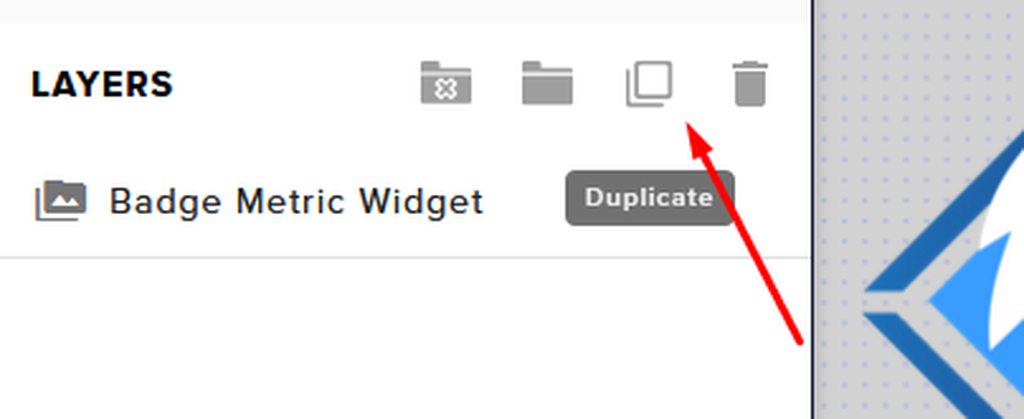
full thunderBOT
To duplicate or copy your widget to a new or existing overlay, select the widget and use the Duplicate button. https://imgur.com/a/Ng4uhRU
 kindred fox
Let’s try that and see what happens
astral linden
Wait english ain't my first language so let me see if i got it: i need to merge the 4 overlays in one and try it on a scene
Btw if i go to properties ->Open in StreamElements Overlay Editor it's just a blank page
kindred fox
Yup. You can just duplicate your widgets to a single overlay so they don’t lose settings
Open it via streamelements.com in chrome
astral linden
Yeah i usually do that wanted to see if it was supposed to happen
kindred fox
It’s supposed to work via obs but I believe it’s bugged at the moment
astral linden
It works, but as of right now even the other sources work
astral linden
Thanks for your patience!
kindred fox
No problem! If you have other questions feel free to ask!
astral linden
Will surely do, thanks again!
rugged quail
When I paste the link it shouldn't be like this but why does it
full thunderBOT
@rugged quail To add your overlays to OBS, add a new browser source in your scene. Paste your overlay URL in the browser source properties, set the dimensions to 1920x1080 (unless you changed them on the website) and check Shutdown source when not visible. https://youtu.be/KDvLynUqXI4
lyric oriole
lyric oriole
Hey has anybody had issue adding the custom bot option to Obslive? I go sign in ...
Any assistance with this issue? anything will be greatly appreciated
full thunderBOT
@lyric oriole "1) Right click on your OBS desktop shortcut and open the Properties
2) In the Target field, add the following to the very end: --remote-debugging-port=40404
3) Open OBS (or restart if it was open)
4) Open your web browser and type in: localhost:40404
5) Click on StreamElements - Activity feed
6) Navigate to the Console tab
7) Type the following into the console and hit enter: store.customBot.removeCustomBotIntegration()
8) Try setting the custom bot name
9) Remove the additional flag in step 2 from your shortcut properties."
full thunderBOT
@oak ivy Please provide a proper screenshot with the issue visible. If not sure how to take a screenshot, you can check here: https://www.take-a-screenshot.org
lyric oriole
full thunder
<@!550156595204718612> "1) Right click on your OBS desktop shortcut and open th...
stuck on step 6, can't find the console tab
 lyric oriole
Got it! Thanks 👍🏼 @full thunder
tulip hamlet
@oak ivy You have already put the screenshot in once. You don't need to do it another 3 times.
Reinstall everything.
 oak ivy
@tulip hamlet I thought I had to reply to the bot, or it wouldn't get through. my mistake
@tulip hamlet as in obs itself and obs.live?
tulip hamlet
Yes.
 round goblet
What do people suggest for video conferencing?
 echo tapir
Just want to drop by and report that there is an issue regarding updating. I started OBS on one PC (without OBS.Live) and got notified that there was an update to OBS Studio 26.1.0. Then on my secondary PC running OBS Studio with OBS.Live, it started and told me that there was an update, but because i already was updating another program i had to close OBS, After i could start OBS again i tried the StreamElements menu check for update and nothing. i tried multiple times and nothing. I got a friend who also run Studio with live and there was no update as well. Then i tried on my secondary machine just update OBS Studio from their website and after that i got notified from SE that there was an update. Same on my boddys pc
 faint monolith
is obs crashing for anyone else
 brave sun
i imported an overlay from streamlabs on the streamelements website, how do i use it>
 gloomy vessel
For update bug with "obs-virtualcam" still in use, close all programs (browsers especially)
Otherwise go to: <obs directory>\data\obs-plugins\win-dshow and delete "obs-virtualcam-module64.dll" or "obs-virtualcam-module32.dll"
full thunderBOT
@brave sun To add your overlays to OBS, add a new browser source in your scene. Paste your overlay URL in the browser source properties, set the dimensions to 1920x1080 (unless you changed them on the website) and check Shutdown source when not visible. https://youtu.be/KDvLynUqXI4
 glossy dragon
Sooo I would like some help please, when i go live the Activity feed and Chat will not work for me anymore is there anyway to reset it? Ive tried redoing the browser url and that didnt work at all. on the bottem right corner it look like i can maybe reset with "connect with twitch, but im on facebook.
 junior epoch
hey guys it seems like after the update the size od the text in your chat box is much smaller and harder to read. Is there a way to fix or increase it? Im having a hard time seeing it on my laptop
glossy dragon
NVM! found the answer! If you logout of streamelements on obs and log back in, it will work.
 formal pivot
 jaunty elk
Hey, is there a video or a forum that discusses the new feature that it doesn't play music on the VOD?
 ember spruce
Hello I set up everything on streamelements live but my subs, followers, and donos do not show up on streamelements. How do I fix this?
It doesn't show up on alerts or on the alert text box
full thunderBOT
@ember spruce Please provide a proper screenshot with the issue visible. If not sure how to take a screenshot, you can check here: https://www.take-a-screenshot.org
ember spruce
Any followers, subs, and donations do not appear up on streamelements live. Its just blank
The only thing that appears is cheers
tulip hamlet
You only signed up today. Twitch does not send a history of events.
Anything prior to signing up is unknown to the system.
ember spruce
I had it prior a few days ago
I even did a test run of a new follower and dollar donation and it does not appear
full thunderBOT
@ember spruce You can test alerts via the Emulate bell on the lower left side of the Overlay Editor. Simply go to your Dashboard > My Overlays > pencil/edit button on the overlay. Make sure the Preview LIVE on stream option is on to see the alert in OBS/XSplit** https://streamable.com/vtulg9
 ember spruce
Okie dokie thank you. I dont know why my old followers showed up last time. Must have been lucky
 pulsar merlin
full thunder
<@!550156595204718612> "1) Right click on your OBS desktop shortcut and open th...
pulsar merlin
full thunder
<@!550156595204718612> "1) Right click on your OBS desktop shortcut and open th...
I can get passed the first step. It keeps saying "the name " " specified in the Target box is not valid. Make sure the path and file name are correct," after hitting apply from the properties tab
tulip hamlet
pulsar merlin
I can get passed the first step. It keeps saying "the name " " specified in the...
There must be a space between the ending " and the --
 hoary patio
is anyone having issues with streamelements bot not showing up in chat when going live?
full thunderBOT
@hoary patio Please provide your account ID found at the top of this page: https://streamelements.com/dashboard/account/channels This ID is public info and safe to share here.
hoary patio
5eedd5f32a3f0425c70e3198
full thunderBOT
@hoary patio If your commands recently stopped working and you're using OBS.Live and a custom bot name do the following:
- In OBS.Live, click on the hamburger menu (three stripes) at the top left of your activity feed
- Click on Stream Settings > Custom bot name
- In the Custom bot name field select Set custom bot name, not your already existing username (with capital letters). Note: If you already connected an account that way, the third entry will show as the account name (see image https://i.imgur.com/sO7fWOX.png).
- Scroll a bit down and click on the purple Connect Custom Bot Account button
- Log in as usual and Authorize the custom bot name
- Back in the Activity feed, click on the Send Test Message button and check if your custom bot name starts working again
 hoary patio
will give it a try
pulsar merlin
@tulip hamlet yeah, I'm dumb. Lol. I noticed that after I saw the pop up message
hoary patio
thank you @tulip hamlet
 inland kayak
hey there! wondering if i can get some help please. i recently had to change my twtich password and now when i try to live stream on obs it doesnt work and i receive this message
but i cant seam to find anywhere on obs to paste the stream key, there is no option in the settings>stream tab to enter it
tulip hamlet
@inland kayak Stream key is not used if you logged in directly. Disconnect and reconnect, instead.
inland kayak
@tulip hamlet thankyou! that worked
 muted solstice
im having an issue where i cant see my viewer count in streamelements obs live
 stuck fjord
I have a quick question, my "connect custom name bot account" opens, I do the login thing but never loads into OBS Live for some reason. Should I uninstall and reinstall obs live to sort out this or could I do something else to fix it?
full thunderBOT
@stuck fjord "1) Right click on your OBS desktop shortcut and open the Properties
2) In the Target field, add the following to the very end: --remote-debugging-port=40404
3) Open OBS (or restart if it was open)
4) Open your web browser and type in: localhost:40404
5) Click on StreamElements - Activity feed
6) Navigate to the Console tab
7) Type the following into the console and hit enter: store.customBot.removeCustomBotIntegration()
8) Try setting the custom bot name
9) Remove the additional flag in step 2 from your shortcut properties."
stuck fjord
Would need the help of a mod cause properties is rejecting the "target" and not letting me start OBS in debug mode....
hoary raven
I updated yesterday to OBS Studio 26.1.0 / OBS.Live v20.12.9.680 and now my camera source is just a black box.
The camera still works in other applications, just not in OBS.Live.
I have removed and re-added the camera, restarted, checked connections - something with the software update seems to have started the issue.
Any ideas? Thanks in advance!
full thunderBOT
@hoary raven Obs.live is a plugin for OBS Studio for the best OBS support, please join their Official Discord @ discord.gg/obsproject
shy mountain
@stuck fjord make sure you add a space before the --
silent horizon
help asap
my partner has my old pc, when she selects go live it makes my channel go live
activity feed and chat are stil linked to my current pc but for some reason stream information makes me go live even though she is logged in on he stream elements
shy mountain
the streamkey needs to be changed as well
silent horizon
thankyou so much!!!
 cunning delta
i have creatted the save overlay 3 freaking time and it still isnt bein g used and nothing is explainging to me how to do anything PLEASE HELP
kindred fox
@cunning delta can you explain what you’re trying to do?
full thunderBOT
To add your overlays to OBS, add a new browser source in your scene. Paste your overlay URL in the browser source properties, set the dimensions to 1920x1080 (unless you changed them on the website) and check Shutdown source when not visible. https://youtu.be/KDvLynUqXI4
cunning delta
Trying to put this in my broadcast and the YouTube video they just sent me was 3 years old and didn't help
shy mountain
It being 3 years old doesn't mean its not up to do date
on how to add your overlays to OBS
in order for them to show up.
cunning delta
Well it didn't help me sadly and I'd how to make like who's subbing to me or anything pop up on my screen
Everyone looks different now then in their video
Is anyone going to help me or just tell me or just keep telling me I'm stupid for not understanding the video they sent me more or less
shy mountain
No one is saying you are stupid, btw.
You are currently referring to 2 different things, or so I rather things its 2 different things.
Are you having issues showing the overlays on stream?
As for the new subs
full thunderBOT
@cunning delta Users can choose to make the channels that they subscribe to public or private. By default, all settings are set to private.
Private: When a user's subscriptions are set to private, no other user can see what channels they subscribe to. A user's account does not show in a channel's Subscribers List, even if they are subscribed.
Public: When users subscriptions are set to public, another user can see what channels they subscribe to. User subscriptions are listed on their channel page and their account is listed in the Subscribers List for any channel they subscribe to.
If a user has it set to Private they will not show up in the activity feed. More info: https://support.google.com/youtube/answer/7280190
 amber nexus
my alerts are not working i think 🤔 .can anyone help me out
 wild crest
amber nexus
my alerts are not working i think 🤔 .can anyone help me out
wild crest
amber nexus
my alerts are not working i think 🤔 .can anyone help me out
mine too
please hel
full thunderBOT
@wild crest Right click on the BrowserSource > Properties > Scroll down a bit > Refresh cache of current page
@amber nexus Right click on the BrowserSource > Properties > Scroll down a bit > Refresh cache of current page
 hearty smelt
Hello! I'd like to request some assistance with getting alerts while doing restream. I've linked my Stream Elements account to both Twitch and Youtube, but I'll be using Restream to stream to Twitch, YouTube, & DLive. (And yes, I know about Twitch's exclusivity rules, no I'm not affiliate.)
Do I need to do anything special to get alerts to pop up from YouTube subscribes and DLive follows in addition to the standard Twitch follows?
long bobcat
SE doesn't support multistreaming
hearty smelt
I figured I'd probably have to figure out a way to run them as a browser source, was just hoping it was a bit easier than that, lol.
modest grotto
@full thunder For Some reason my Overlays arent showing up in My OBS
 blazing fjord
modest grotto
blazing fjord
modest grotto
@full thunder My widgets on StreamElements are all shifting over to the far right and arent showing up on my OBS
full thunderBOT
@modest grotto To add your overlays to OBS, add a new browser source in your scene. Paste your overlay URL in the browser source properties, set the dimensions to 1920x1080 (unless you changed them on the website) and check Shutdown source when not visible. https://youtu.be/KDvLynUqXI4
 hallow turtle
heyo any great tips on seperating my audio so like if i record it comes out having 1 channel with my game, then 1 channel with my microphone, how do I make that work?
 kindred gyro
Hey y’all, myself and a few colleagues have been having serious frame dropage issues. Has anyone found a fix to this? For me, I know it’s not my internet connection. Settings I have set at 6000kbs CBR. Thanks you!
 tribal maple
yo
guys how do i reset the goal of subs like it says i have 63 subs even tho i have like 8 how do i reset it so its like 6 out of lets say 25
@steep brook i see that u can help with these kinda stuff do u know any way i can do it?
 steep jackal
Is there an issue going on with OBS live SE? I did an update on Monday and since then it has not been working?
Chat, activity feed and preview window are all solid white. logged out and now can't log back in, uninstalled and reinstalled and same issue.....
today looks to be another day l can't stream :/
humble atlas
OBS.Live won't install the new update supporting the new OBS Update. Is there a fix for this?
 winter grove
tribal maple
guys how do i reset the goal of subs like it says i have 63 subs even tho i have...
winter grove
tribal maple
guys how do i reset the goal of subs like it says i have 63 subs even tho i have...
I saw the autobot responded to your post with some directions. Did that help?
long bobcat
yo @tribal maple just outta curiosity why did you tag Waffle?
tribal maple
she was the only one that had the green and i thought it would be the only one that could hear my message @long bobcat
long bobcat
what is 'the green'? 
anyways, please don't tag volunteers\staff members unless specifically requested to do so @tribal maple
long bobcat
thank u
empty warren
So I have shitty internet currently, I can still stream with a low bit rate and everything is fine, until I play Tarkov and I start dropping frames and getting dced in game? Why is this happening?
steep jackal
so guessing that is a no, or a we don't know?
 lusty crest
after the update yesterday OBS live is lagging a lot without even streaming. Anyone has a solution?
 plush bear
when I downloud it and press finish it doesn't start the program
and I can not find somewhere elles to op it
 distant rampart
hello could someone help me out please
currently i am trying to add a custom transition to my obs but there is no option to add a custom one
i only see scene transitions and the defult ones
full thunderBOT
@distant rampart Obs.live is a plugin for OBS Studio for the best OBS support, please join their Official Discord @ discord.gg/obsproject
 glossy apex
hi the Media request on obs is not working for me when it is enabled it pops up but is blank?
 warm heron
I also have a problem with the songrequest, when I click "show in stream" it starts to duplicate all the audio of the video, this has happened to me for a long time
full thunderBOT
@warm heron Make sure to ballot_box_with_check: “Shutdown source when not visible” for all browser sources (all OBS scenes). If using studio mode, uncheck “Swap Preview/Output Scenes After Transitioning.” Also, keep in mind that sound can play from any overlay loaded in the browser (editor or launched). https://i.imgur.com/6bWXxjR.png https://i.imgur.com/yY0wcFl.png

 fierce creek
im dropping frames non stop and it keeps reconnecting my stream. never has been an issue since i updated a few days ago
my internet is fine
any one else?
 wicked badger
hello i have error522 in the screen what can i do ?
full thunderBOT
@wicked badger Please provide a proper screenshot with the issue visible. If not sure how to take a screenshot, you can check here: https://www.take-a-screenshot.org
 silk swift
hello, how do i export loyalty points and users from SE?
wicked badger
error522 obs live
tulip hamlet
silk swift
hello, how do i export loyalty points and users from SE?
There is no export function.
tulip hamlet
wicked badger
error522 obs live
I don't see an error in that screenshot.
tulip hamlet
wicked badger
I still don't see an error.
wicked badger
in the ps4 screen make it big
tulip hamlet
OBS does not display errors in your preview window.
tulip hamlet
Ask Sony.
wicked badger
ok thanks
snow bluff
ok so i just made a custom widget and it doesnt show the whole widget... does anyone know why that might be?
full thunderBOT
@snow bluff The default resolution for StreamElements overlays (theme and custom) is 1920x1080. Please add them in OBS at their full resolution and use CTRL+F to fit to screen if necessary. You can then downscale your stream in OBS settings > Video if you'd like https://i.imgur.com/6bWXxjR.png
 proud palm
Hey Is anyone here to help me real quick?
kindred fox
@snow bluff you should use a file with a 1920 x 1080 resolution or scale your existing one in your editor to fit the 1920 x 1080 overlay canvas. Then when it is added to OBS it needs to be added as 1920 x 1080 resolution so it fits the canvas
full thunderBOT
@proud palm Welcome to the helpdesk! Please let us know how we can assist you today and a support volunteer or staff member will assist you as soon as they are available. Thank you for your patience.
 lyric lintel
Hello. For the past few sessions of streaming, I've ended by raiding another channel. However, it doesn't seem to actually let them know that I've raided. Is this a problem that's occurring now widely?
snow bluff
@kindred fox i just tried that and it showed slightly more but not all of it
waitr
wait*
i think i figured out what im doing
proud palm
Is there a way to stop my face from looking as red in my facecam?
Just rashes not standing out so much
rugged quail
i need help rq
full thunderBOT
@rugged quail Welcome to the helpdesk! Please let us know how we can assist you today and a support volunteer or staff member will assist you as soon as they are available. Thank you for your patience.
 chilly pecan
@full thunder my stream start pannel is gone how do i get it back
 still cobalt
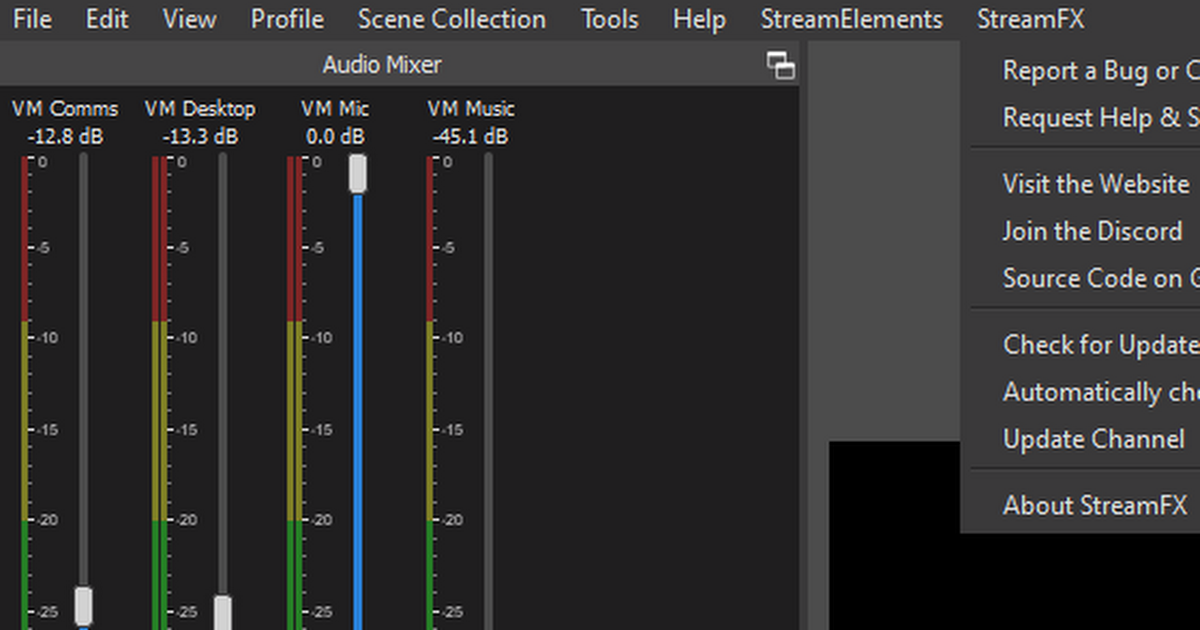
Does anybody know how to uninstall StreamFX?
@full thunder shall I just delete the files in the data folders?
https://drive.google.com/file/d/1wFlQLaJfLhzLQ7gBfg-7AuIeKlMknwLN/view?usp=drivesdk
Google Docs
tulip hamlet
We're not the creators of StreamFX. You're better off reaching out to them.
still cobalt
Will do. Tx
kindred fox
@chilly pecan
chilly pecan
thx
 lament crag
anyone know why my elgato is not picking up the game audio?
Streaming from Xbox to obs to twitch with an elgato
full thunderBOT
@lament crag Obs.live is a plugin for OBS Studio for the best OBS support, please join their Official Discord @ discord.gg/obsproject
full thunderBOT
@lament crag If you are having issues with Elgato hardware or software, we recommend reaching out to their support here: https://e.lga.to/help
 sullen monolith
heya, I got a quick question, I have an overlay I'd like to use, it's as a .overlay file but I'm not sure how to use it with obs live, I also have all the assets like the wav and webm files
tulip hamlet
We can't help with an .overlay file, but you can take your assets and import them into our overlay editor, to use our cloud-based overlay system.
full thunderBOT
@sullen monolith We've released our new Overlay Editor revamp. You can check out the changes and how to work with it here: https://youtu.be/X5VzXjqAsjk
Check out our blog post as well: https://blog.streamelements.com/streamelements-overlay-editor-just-got-even-better-c22cb5b4853e
sullen monolith
oh sweet thanks!
vagrant niche
hi does anyone know why my stream elements obs.live has no window to X it out, minimize it, resize it, etc? im on w10
kindred fox
Push F11
vagrant niche
just thank you. my braincell big dumb
kindred fox
No problem! Have fun!
 latent flame
Is it possible to run a poll through StreamElements like you can with cloudbot?
 stark sluice
hey not sure if this is the right place but I can't figure out how to share overlays with the person I made them for. Can I get some help?
vagrant niche
if you cant just drop them into a discord channel try dropbox or google drive or something
stark sluice
I mean how do I get the right link to give them
vagrant niche
What link?
If you made say a transparent overlay with some effect and it's a .png you just send them a .png in discord & they'll click that to DL the file
stark sluice
so they can have the overlay in their overlay manager and stuff
vagrant niche
an overlay manager?
vagrant niche
They click new overlay then select it from their computer
tulip hamlet
stark sluice
hey not sure if this is the right place but I can't figure out how to share over...
There is no share option. Overlays can only be duplicated between channels you have editor access to.
stark sluice
but I got one from the alpha gaming discord. It was a share link that gave me a custom overlay in StreamElements
vagrant niche
youre just sharing a file that contains an overlay
tulip hamlet
stark sluice
but I got one from the alpha gaming discord. It was a share link that gave me a ...
Verified vendors have links created for their offerings. It is not something provided to the general public.
junior epoch
Can someone please help me figure out how to enlarge my text in the area of the chatbox in OBS? Since the update the size of text and font changed and i can barely see chat now
 quartz tangle
how do i activate my overlay for obs studio i got one from there site but can't figure out how to use it
full thunderBOT
@quartz tangle To add your overlays to OBS, add a new browser source in your scene. Paste your overlay URL in the browser source properties, set the dimensions to 1920x1080 (unless you changed them on the website) and check Shutdown source when not visible. https://youtu.be/KDvLynUqXI4
 jovial kiln
The Sub goal widget says I have 61 subs, but I only have 26 according to twitch...is there a way to refresh this and fix it?
full thunderBOT
@jovial kiln To reset goals:
- from the Overlay Editor > Session data on top right (monitor symbol) > Goals tab > reset progress of desired goal
- from the Dashboard > Activity feed on the left > Widget data on the right > Goals tab -> reset progress of desired goal
Note: Goal widgets (progress) only counts up and doesn't go down automatically, if you lose followers/subs.
 naive sage
Hey i'm not getting any video on obs on stream?
full thunderBOT
@naive sage Obs.live is a plugin for OBS Studio for the best OBS support, please join their Official Discord @ discord.gg/obsproject
 junior dragon
Hello, I am having an issue where I am trying to update OBS.Live, but continue to get the error relayed in the picture.
The internet notes that the application must be closed and, if that doesn't work, Reboot my PC. I have tried both, and this error still occurs.
I attempted to uninstall both OBS.Live and OBS, but i reach an error stating simply "Installation Aborted."
 honest echo
@junior dragon close everything and open OBS with admin right and try again
junior dragon
I had no luck opening OBS with Admin. I was able to uninstall and re-install OBS & OBS.Live thereafter to get set up to 26.1.
 frosty plume
I need help please I’m trying to get my text to speech working I can hear it on my end but my viewers can’t hear it from their end I don’t know what else to do.
 real needle
Is there a way to remove the media request tab entirely from the obs setup?
 astral coral
Hi, I'm trying to set up my alert box overlays with custom images that i've designed but instead of using my custom images, Streamelements is using a dancing shark? anyone else ever have this happen to them? how do i fix it? lol such a random issue to be having
@full thunder?
 torn stump
is there any way to set up obs to multistream like streamlabs prime?
astral coral
i've been trying to get help too @torn stump i dont think anyone ever answers here
astral coral
good idea lol
my alerts are messing up... playing a video of the dancing shark instead of my custom designed alerts
its weird as hell
full thunderBOT
@astral coral New to StreamElements?
Check out our YouTube channel https://www.youtube.com/c/streamelements/videos
with tutorial videos from setting up the basics, to in-depth details on how to use our product.
New to OBS? Here is a 4 step quick start guide
https://obsproject.com/wiki/OBS-Studio-Quickstart
Want to learn even more? Here is an in-depth overview
https://obsproject.com/wiki/OBS-Studio-Overview
How to exclude audio sources for a stream or recording: https://obsproject.com/forum/resources/8/
VoiceMeeter Banana guide: https://obsproject.com/forum/resources/397/
How to exclude audio sources for a stream or recording: https://obsproject.com/forum/resources/8/
VoiceMeeter Banana guide: https://obsproject.com/forum/resources/397/
 trim hawk
Help please?! My obs just did an update, and it has completely stuffed up. It tried to update multiple times at the same time, and now it won't restart. All I get is an error message 'Failed to initialize service'.
shy mountain
Restart your PC and try and starting OBS again
trim hawk
tried that, no glory
shy mountain
Then my only other suggestion here is, to uninstall OBS.Live and then OBS Studio, afterwards either install OBS Studio and then OBS.Live, or simply use our installer from https://obs.live to get both at the same time

OBS.Live | Open Broadcaster Software Streaming Knowledge Base
OBS (open broadcaster software) knowledge base for live streaming. Find articles and videos about streaming with OBS.
its important to uninstall in that order
trim hawk
Back up and running. Thank you. I have lost my OBS virtual Cam in the tools menu though. I have reinstalled it, just in case that was needed, but it is still not listed in the tools menu. Will I need to do a full system restart again?
 trim hawk
26.1.0 (64 bit, windows)
trim hawk
it is there, but I use OBS virtual camera for Skype calls, and also use it in discord chat... it isn't working in either of those programs anymore
shy mountain
in this case I can only suggest to ask in the OBS discord here: https://discord.gg/obsproject
 frail wolf
hey guys when i media request in docks it just shows blank any ideas as to why?
full thunderBOT
@frail wolf StreamElements menu, on top of OBS > Logout > Login
trim hawk
Oh, I have to activate it there now? It used to be turned on auto in the Tools menu....
shy mountain
I remember it was a separate install as well, but i don't know how it actually works right now as I don't use it my self since it was integrated into OBS it self
trim hawk
I'll have to look into this more... can I start stream while virtual cam is also turned on using the control buttons? Hmm... why change something that wasn't broken? ok, time to relearn
shy mountain
Consider that OBS.Live is a plugin for OBS Studio
trim hawk
Thanks for your help with the other KeiZar
shy mountain
meaning that we had no design decision here or say into how virtual camera was integrated
 dapper depot
hi im struggling with changing the text in overlays and also getting my obs to work see my videos and overlays can i have help
long bobcat
feel free to elaborate on your issues, 1 by 1 though just so it's easier to assist with
trim hawk
I'm currtentluy livestreaming, everything in OBS is working, but my chat is not loading in the OBS window
I click on the chat cog and I get an 'Error Loading Data' error
full thunderBOT
@trim hawk StreamElements menu, on top of OBS > Logout > Login
trim hawk
Thank you
magic quartz
This is not a message for help as have fixed my issue, this is a message to inform others that if you are experiencing issues with the Streamelements chat bot then I have a solution for you,
It took me a while to figure it out and I have tested it back and forth, to make sure but I have discovered that the Streamelements chat bot does not function, instead I have had to change the name if the bot to my username for it to work
shy mountain
We do have several solutions for that 🙂
full thunderBOT
Go to the Dashboard > Right side > Part channel > Join channel(https://streamelements.com/dashboard)
If your commands recently stopped working and you're using OBS.Live and a custom bot name do the following:
- In OBS.Live, click on the hamburger menu (three stripes) at the top left of your activity feed
- Click on Stream Settings > Custom bot name
- In the Custom bot name field select Set custom bot name, not your already existing username (with capital letters). Note: If you already connected an account that way, the third entry will show as the account name (see image https://i.imgur.com/sO7fWOX.png).
- Scroll a bit down and click on the purple Connect Custom Bot Account button
- Log in as usual and Authorize the custom bot name
- Back in the Activity feed, click on the Send Test Message button and check if your custom bot name starts working again
shy mountain
and another one that is longer
 ornate citrus
Hey, I've got an issue going on my 2nd PC (Stream PC) involving SE OBS.Live. So I use OBS NDI plugin which involves having OBS up on both PCs. I use SE OBS.Live on both systems cuz why not. Anyway, it just keeps crashing ilding without me even hitting the start stream button. Idk if it's just OBS Studio itself or OBS.Live. The crash wouldn't let me update it so I downloaded the SE OBS.Live installer again to install latest update. It's updated now both ways for OBS Studio and SE OBS.Live and still crashes.
Stream PC has a
CPU: R3 2200G w/ stock cooler
ASRock x370 PRO4 mobo
8GB Team Group RAM
iGPU from CPU
It uses the H265 encoder aka from the iGPU. I've used SE OBS.Live for a few months and it has never done this to me before. Temps are always good on the CPU.
shy mountain
PC specs has nothing to do with the crash most of the time
full thunderBOT
@ornate citrus A crash log is required to investigate the cause of your issue. Please upload the last crash log.
- In OBS, click the Help menu
- Select Crash Reports and then Upload Last Crash Report
- Copy the URL and paste it to the chat here.
Note: If you are not able to follow the above steps, open your file explorer and go here: %appdata%\obs-studio\crashes and provide the last listed file.
ornate citrus
Thing is it doesn't say it crashed. It just closes on it's own. I haven't downloaded anything on it in a while.
full thunderBOT
@ornate citrus A crash log is required to investigate the cause of your issue. Please upload the last crash log.
- In OBS, click the Help menu
- Select Crash Reports and then Upload Last Crash Report
- Copy the URL and paste it to the chat here.
Note: If you are not able to follow the above steps, open your file explorer and go here: %appdata%\obs-studio\crashes and provide the last listed file.
shy mountain
this crash log is from 12th December
ornate citrus
ye no it only started like a couple days ago
shy mountain
5 days, i'd still consider a couple 
anywho
have you tried installing the NDI plugin after installing OBS.Live?
as in, remove NDI plugin, remove OBS.Live, remove OBS Studio
then install OBS studio + .Live from our installer
and then installing the NDI plugin?
and by remove i mean uninstalling
ornate citrus
OBS NDI was installed when I was using SLOBS then switch to OBS.Live as I only need NDI on the game PC to send the image from my game pc to the stream PC
The issue isn't the game pc, it's the stream PC
NDI is just a free alternative of a capture card
shy mountain
Ok, I wasn't asking where its installed though
But you did answer that the NDI plugin was installed before installing OBS.Live
or OBS Studio for that matter
so uninstall everything
in the order i mentioned
then install in the order I mentioned
ornate citrus
Does your install wizard also take a while to uninstall obslive?
It's on an ssd...
shy mountain
Did you uninstall OBS Studio first?
ornate citrus
no im going in ur order
shy mountain
Then it shouldn't take long at all. Its most likely downloading something to fix up OBS Studio
ornate citrus
It's just stuck https://gyazo.com/8b7e3030d750cb6fa7ae9386d2c2b1f5

 twilit scroll
hey guys my overlay isnt working on OBS its not showing anything from my overlay but it plays the sounds
full thunderBOT
@twilit scroll OBS > Settings > Advanced > Scroll down > Enable or disable Browser Source Hardware Acceleration, depending on its current state > Restart OBS (This does not apply for OBS on Mac)
https://i.imgur.com/ggMe9ZE.png
ornate citrus
could also just try to refresh the cache on ur overlays^
twilit scroll
@ornate citrus how would you do that?
full thunderBOT
@twilit scroll Right click on the BrowserSource > Properties > Scroll down a bit > Refresh cache of current page
twilit scroll
dosent work 😦
ornate citrus
did you check the box then in the advance tab in settings? see if that works
twilit scroll
i did that
ornate citrus
idek if i have that on
oh I do
restart ur obs
@shy mountain it's still aboring the uninstall
twilit scroll
nah i got it just had to make a new browser source for it idk why
thanks for the help
ornate citrus
It's saying "NO UR NOT ALLOWED" lol (twas a joke its not really saying anything besides setup was not completed successfully.
twilit scroll
just another question i have no idea CSGO is the only game i cant game capture
twilit scroll
tried that i think CS is just super weird
shy mountain
@ornate citrus just asked our devs and the uninstaller is not updated right now
since you have the NDI uninstalled, try using our installer now
ornate citrus
well we'll see if obs stays up or dies
hallow turtle
heyo so i made a donation goal, however it seems to have all my previous donations over the last 9 months using Stream elements and I cant seem to refresh it to zero
full thunderBOT
@hallow turtle To reset goals:
- from the Overlay Editor > Session data on top right (monitor symbol) > Goals tab > reset progress of desired goal
- from the Dashboard > Activity feed on the left > Widget data on the right > Goals tab -> reset progress of desired goal
Note: Goal widgets (progress) only counts up and doesn't go down automatically, if you lose followers/subs.
hallow turtle
perfect didnt even think of that thankyou to the bot
lusty mesa
Hey, Can someone help to why I cant put text over a video? in Streamelements overlay editor
But here it works?
kindred fox
Put it above the video in the layers list like in obs, or photoshop
lusty mesa
Yeah ive done that
Wont work
but look at this weird thing
Like when I put the two together, it works? Like what in the actual
kindred fox
Pretty sure your text widget isn’t at the top of your layer list
lusty mesa
kindred fox
Huh. That is not supposed to do that
lusty mesa
Yeah
Its bugged
And it wont revert no matter what I try
Its somehow impossible for the text to be put in front of that little video
kindred fox
Which theme is that?
lusty mesa
Not even an image will be put infront of it
Tried to work my way around the bug, wouldnt work smh
"Force Field"
kindred fox
Ok
lusty mesa
What is our next step
kindred fox
lusty mesa
What is our next step
you inverted the bottom video and placed it at the top?
I just replicated your scene and was unable to replicate the issue
what browser are you using to make your edits @lusty mesa ?
kindred fox
I literally inverted the bottom video widget, relocated it to the top, and added a new static text label
lusty mesa
Try and delete everything except that one widget
Oh and....It wont let me save a custom font on another overlay 😄
Like, the preview works! But not in action
full thunderBOT
Google Fonts
More than 900 google fonts are supported at this time. You can preview them here: https://fonts.google.com/
Custom Fonts
Steps:
- Install the font on the streaming PC or choose a pre-installed windows font.
- In the overlay widget settings, select Text Settings
- Click on Enable Custom Font
- Type the name of the font as it appears in the windows font directory (This is usually
C:\Windows\Fonts)
Note: After installing fonts, the browser and OBS must be restarted for the font to appear.
lusty mesa
Sorry not a "custom" as a custom,. but a custom as a "another one" than the theme default
kindred fox
Okay. I've replicated the issue and reported it to staff
 toxic rivet
Hey anyone german here for support questions?
Did any have a solution for my streaming problem?
i always get framerate Drops even if i Stream shooters.
I have a really Good pc but it wont work as well as i thought..
 inner saddle
So I was wonder what the best way to get notifications and alerts is for multistreaming. At the moment I am using Twitch, Youtube, and Facebook. Do I have to make overlays for each platform or is their a simpler solution. Thank you 😊
FYI I am using Restream
steep jackal
Ok...lets give this one last go, and see if someone has an answer.
Is there an issue going on with OBS live SE? I did an update on Monday and since then it has not been working?
Chat, activity feed and preview window are all solid white. logged out and now can't log back in, uninstalled and reinstalled and same issue.....
 empty sphinx
Hey 😆 I've been having some issues with my Follower alerts for a couple of weeks now - all of my other alerts (raids,bits,subs etc) work perfectly but I do not get any alert/sounds when I get a follow. My rolling 'new follower' widget also does not update... I'd appreciate any help regarding this! Thanks 👍
turbid arch
Can you relocate OBS to another drive?
still hollow
Why is my "top tip" label not working? All the other like "most recent tipper" works like normal in the set up on the website?
 urban forge
Anyone work with Soundtracks by Twitch? i had it working months ago and something went wrong. The VOD source is gone and when I click add source, its no longer there. I've deleted Soundtrack app and reinstalled several times. It's like the plugin wont install, when i go to settings it has a button to install but it doesnt do anything. I have reported it as a bug
 nimble wolf
Hello there ! I made a bad manipulation closing the chat and the activity feed on Obs.Live ! How can I re-open it ?
urban forge
go to Streamelements at the top next to Help, scroll down and click the checkmark for chat and activity feed
nimble wolf
Thanks you so much @urban forge !
urban forge
your welcome 🙂
kindred fox
urban forge
Anyone work with Soundtracks by Twitch? i had it working months ago and somethin...
Twitch soundtrack seems to be a problem for a lot of people, and I believe their licensing for the music available in the app doesn’t include streaming rights for streamers. You’re better off using something like streambeats or pretzel rocks
urban forge
i have heard of pretzel rocks, but is it similar where you can have music playing in stream but wont get any DMCA issues?
@kindred fox
kindred fox
pretzel.rocks and streambeats are both free music sources that will not get you any DMCA strikes/bans
They were designed that way because of how complex music licensing is, and streamers are normally too poor to afford the appropriate licenses to use copyrighted music on stream
urban forge
thank you @kindred fox , like i said i have heard of pretzel but dont really know anything about it. i guess ill check the google machine
pallid fog
during live stream obs is disconnecting and getting connected several times.....please help me with this
 sharp turret
pallid fog
during live stream obs is disconnecting and getting connected several times........
sharp turret
pallid fog
during live stream obs is disconnecting and getting connected several times........
Do you get dropped frames?
 cobalt gull
my overlay is like 4 fps... only doing this recently.. any idea why?
full thunderBOT
@cobalt gull OBS > Settings > Advanced > Scroll down > Enable or disable Browser Source Hardware Acceleration, depending on its current state > Restart OBS (This does not apply for OBS on Mac)
https://i.imgur.com/ggMe9ZE.png
pallid fog
recent member and subscriber alert is also not working......help me with this
full thunderBOT
@pallid fog StreamElements menu, on top of OBS > Logout > Login
kindred fox
rugged quail
it happened like this, how do i fix it
Streamelements menu > chat
pallid fog
i added starting stream url in browser source ......but a black screen is showing up
full thunderBOT
@pallid fog To add your overlays to OBS, add a new browser source in your scene. Paste your overlay URL in the browser source properties, set the dimensions to 1920x1080 (unless you changed them on the website) and check Shutdown source when not visible. https://youtu.be/KDvLynUqXI4
 gritty steppe
I need help with a giveaway
sharp turret
rugged quail
StreamElements does not support multistreaming. If you mean multistream
If you want to change the platform then you need logout and then login with other platform
full thunderBOT
@rugged quail StreamElements menu, on top of OBS > Logout > Login
gritty steppe
I have a friend that is trying to use stream elements for a giveaway, but the giveaway commands are not working in her chat. SHe has stream elements moderated
and is live
kindred fox
Giveaways are managed from the dashboard
 trim grail
so i dowloaded this and its just like the regular OBS. im having a hard time understanding how to add stuff to the scenes
full thunderBOT
@trim grail New to StreamElements?
Check out our YouTube channel https://www.youtube.com/c/streamelements/videos
with tutorial videos from setting up the basics, to in-depth details on how to use our product.
New to OBS? Here is a 4 step quick start guide
https://obsproject.com/wiki/OBS-Studio-Quickstart
Want to learn even more? Here is an in-depth overview
https://obsproject.com/wiki/OBS-Studio-Overview
@trim grail To add your overlays to OBS, add a new browser source in your scene. Paste your overlay URL in the browser source properties, set the dimensions to 1920x1080 (unless you changed them on the website) and check Shutdown source when not visible. https://youtu.be/KDvLynUqXI4
gritty steppe
kindred fox
Giveaways are managed from the dashboard
YEah, I know that, but when people type the command !ticket in chat nothing happens
kindred fox
gritty steppe
YEah, I know that, but when people type the command !ticket in chat nothing happ...
Are they live right now?
gritty steppe
yes
i have been messing with their giveaway thing to see if i could get it to work
but it wont register the command
kindred fox
are they using obs.live?
gritty steppe
they had the points to get them, but the command isnt registering for somereason
we tried offline hosting and online
kindred fox
Are they using OBS.Live?
gritty steppe
no they are using a different obs, but they have streamelements as a bot, and the command isnt working in chat or registering on the website
full thunderBOT
Go to the Dashboard > Right side > Part channel > Join channel(https://streamelements.com/dashboard)
kindred fox
try that
gritty steppe
she did
i had her part and repart
well leave and rejoin it is modded, and she restarted her stream
kindred fox
you're 100% sure not using obs.live?
gritty steppe
it says in chat the giveaway is active, but noone can buy tickets even though they have the points
yes
they are using slobs
kindred fox
Can you try restarting the giveaway
 storm stream
Is this the same as obs studio
kindred fox
and you're sure the bot is moderator in the stream?
gritty steppe
the issue isnt happening in her obs as much as it is the program of the bot itself
kindred fox
storm stream
Is this the same as obs studio
OBS.Live is a plug-in for OBS Studio providing StreamElements integrations
gritty steppe
and yes i checked that as well
yeah i use obs live for my own streams, but the giveaway feature can be used without the stream elements obs right?
kindred fox
I believe so?
gritty steppe
has this ever been an issue?
i tested out the giveaway thing on my personal channel and i didnt have the issue she is having where the ticket command doesnt register. i have also tried enter and entry
gritty steppe
see thats what i did i wasnt even live when i did that
gritty steppe
but it doesnt even give the you dont have enough points message
kindred fox
don't link the channel
 glad scarab


 full thunderBOT
@glad scarab Welcome to the helpdesk! The regular helpdesk channels are in English but we do provide multi-language support in the following channels: #🇩🇪︱deutsch | #🇫🇷︱français | #🇪🇸︱español | #🇵🇹︱português | #🇳🇱︱nederlands | #🇮🇹︱italiano | #🇵🇱︱polski | #🇨🇳︱中文語言服務區-chinese | #🇯🇵︱日本語-japanese | #🇭🇺︱magyar | #🇰🇷︱한국어-korean | #🇹🇭︱ไทย-thai | #🇷🇺︱русский | #🇺🇦︱українська | #🇨🇿︱czech
gritty steppe
thanks @kindred fox XD Did it just magically start working?
kindred fox
gritty steppe
i just restarted the giveaway
The default command !enter which handles giveaway entries was disabled. Staff enabled it on her account.
gritty steppe
oh okay XD thanks
kindred fox
you can leave it enabled, as it only works when giveaways are running
rugged quail
i am having an issue with a giveaway as well there isnt a draw winner button
just a close give away
tulip hamlet
You have to close it to draw winners.
rugged quail
oooo now i feel dumb lol thanks!
frosty plume
Please I need someone’s help
full thunderBOT
@frosty plume Welcome to the helpdesk! Please let us know how we can assist you today and a support volunteer or staff member will assist you as soon as they are available. Thank you for your patience.
frosty plume
I need help getting my TTS to come through to my viewers. It’ll come through my monitor but nothing comes through for my viewers
?
tulip hamlet
Check your OBS audio settings; it needs to be capturing the same device your alerts are playing through.
frosty plume
The alerts are coming through perfectly fine through my obs and my viewers can here the music and the alert sound but no tts.
round igloo
Why does the text field get so big whenever I type in chat within OBS.Live? This only happens with OBS.Live's chat, not with OBS's chat.
full thunderBOT
@round igloo StreamElements menu, on top of OBS > Logout > Login
 rugged flower
The built in chat for obs isn't connecting?
full thunderBOT
@rugged flower StreamElements menu, on top of OBS > Logout > Login
rugged flower
thanks a bunch
 runic flax
Hello, I'm looking into an issue where I do not have the option to add a custom bot name.
full thunderBOT
@runic flax Currently renaming the bot fully works with OBS.Live.
You can follow this video guide to set it up: https://discordapp.com/channels/141203863863558144/494513233416421386/561516184718278676
If you don't want to use OBS.Live and want to stick with Ground Control, please let us know your Twitch username.
runic flax
I am not given the options shown in the video guide, I do not have an option to connect another account
full thunderBOT
@runic flax Please provide a proper screenshot with the issue visible. If not sure how to take a screenshot, you can check here: https://www.take-a-screenshot.org
runic flax
tulip hamlet
The third option is your connected account. You can select it and disconnect it.
 elfin pilot
Hello
runic flax
ohhh tysm I don't remember adding that other account as a bot lol. all fixed thankyou!
 crimson rose
Hey ya'll
I exited out of my notifications dock but can't seem to get it back
It's not under "Docks" in OBS
ornate citrus
did you exit obs and reopen it to see if it comes back into the dock menu?
kindred fox
@crimson rose streamelements menu > activity feed
crimson rose
Thank youuu!