is there a way to make the default event list animations smoother? right now when I get a new event coming in, all the events move up instantly, the new event smoothly transitions in, and the last one plays its exit animation. only the last two happen at the same time, and the instant moving of the events is very jarring and looks awful
#helpdesk-twitch
1 messages · Page 971 of 1
 eternal agate
I'm kind of opposed to using a pre-made pack, I don't like the over-the-top flashy effects, is there any way to make the default one smoother?
 civic void
I hav 1 more problem, they won't help me in the OBS discord. My Minecraft crash when i alt tab from Minecraft to OBS, How can I fix that. I have no optifin, no shaders, no mods, its pure vanilla
 hardy briar
Hello! The statistics of Top Gifters in the StreamElements Leaderboards extension was broken by itself (I didn't change my nickname, didn't touch anything).
Nickname: RunningPuzyanning

 nimble dune
hardy briar
Hello! The statistics of Top Gifters in the StreamElements Leaderboards extensio...
nimble dune
hardy briar
Hello! The statistics of Top Gifters in the StreamElements Leaderboards extensio...
Hi, it's a known issue, devs are still working on it.
civic void
nimble dune
Hi, it's a known issue, devs are still working on it.
Do you know someone who can help me with the above problem?
hardy briar
nimble dune
Hi, it's a known issue, devs are still working on it.
thanks for the answer!
 tepid torrent
can I use stream elements to play a special sound when one of my viewers chat for the first time of the day
 craggy geyser
eternal agate
is there a way to make the default event list animations smoother? right now whe...
craggy geyser
eternal agate
is there a way to make the default event list animations smoother? right now whe...
like that?

 lament blade
somebody pls help in yt helpdesk
 round niche
Hi, I have issue with the alert box and the event list. Emulating the events works just fine, the alerts go off and shows up in the Activity Feed. But when someone actually follows the alerts don't go off and nothing shows up in the Activity Feed.
This means I have the right links since they show up in emulation but something makes it so it doesn't work for the actual followers.
Might be related: dashboard on the SE website doesn't update at all, shows 0 followers.
I have tried disconnecting SE from my twitch acc and logging out of both twitch and SE to then relog and reconnect.
I basically copy/pasted Jockemaan's message because it's exactly the same issue I'm having. 🙂
lament blade
round niche
Hi, I have issue with the alert box and the event list. Emulating the events wor...
same issue but with yt
eternal agate
craggy geyser
like that?
this is what mine looks like right now. it's the bland default event list but I'm alright with that, I just want the animation to be smooth and not all janky like it is rn
tepid torrent
craggy geyser
like that?
how did you get this?
eternal agate
this is what my current event list looks like, but it's on streamlabs. I want to move over to streamelements entirely
ideally I want my new event list to look exactly like the old one but moving over isn't that easy 🙃
 foggy vine
Alguien puede ayudarme? no funcionan mis comandos de chat y están bien configurados
 ionic kelp
#🇵🇹︱português
craggy geyser
eternal agate
this is what my current event list looks like, but it's on streamlabs. I want to...
let's continue in #dev-chat
craggy geyser
tepid torrent
how did you get this?
I'm a web dev 🙂
nimble dune
civic void
Do you know someone who can help me with the above problem?
I'd recommend asking OBS support or minecraft 🤷♂️
tepid torrent
craggy geyser
I'm a web dev 🙂
that looks so nice! can others (me) get that too?
craggy geyser
tepid torrent
that looks so nice! can others (me) get that too?
Yes, I can share it with you, but it is just a (almost) standart event list
tepid torrent
craggy geyser
Yes, I can share it with you, but it is just a (almost) standart event list
ooooh I'll look into that!
civic void
nimble dune
I'd recommend asking OBS support or minecraft 🤷♂️
OBS support didn't wnat to help, mincraft support is to long waiting time
 abstract jacinth
No data is written on my panel, how can I fix it please help?
Nickname: tahsinungor

 twin hill
Hi! streamelements bot are not working on mi channel but config panel say me thats is inside, someone can helpme?
 crude pecanBOT
@spring locust ⤵️
Please contact us via email for support with your campaign or sponsorship. You can use our contact form here: https://streamelements.com/contact Thank you.
nimble dune
twin hill
Hi! streamelements bot are not working on mi channel but config panel say me t...
Hi! Have you tried parting the bot and re-adding it? Wait 30 seconds after the parting and then re-join.
Also mod the bot
twin hill
yes i did but no waiting this time
abstract jacinth
@nimble dunepls help me?
twin hill
im going to try,thanks
nimble dune
twin hill
im going to try,thanks
Custom Bot Name enabled: true
crude pecanBOT
@twin hill ⤵️
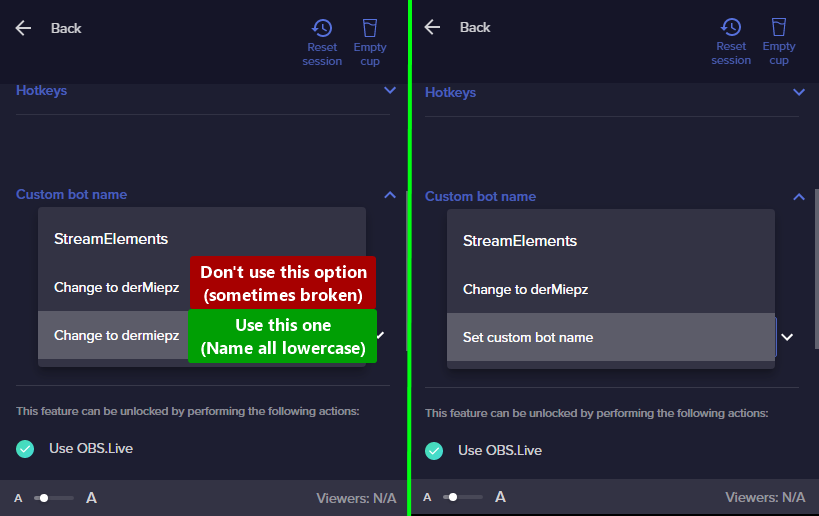
If your commands recently stopped working and you're using OBS.Live and a custom bot name do the following:
- In OBS.Live, click on the hamburger menu (three stripes) at the top left of your activity feed
- Click on Stream Settings > Custom bot name
- In the Custom bot name field select Set custom bot name, not your already existing username (with capital letters). Note: If you already connected an account that way, the third entry will show as the account name (see image https://i.imgur.com/re4theQ.png).
- Scroll a bit down and click on the purple Connect Custom Bot Account button
- Log in as usual and Authorize the custom bot name
- Back in the Activity feed, click on the Send Test Message button and check if your custom bot name starts working again
nimble dune
please try these steps ^
twin hill
crude pecan
<@268814221247119360> ⤵️
Really thanks you, i going to try 🙂
abstract jacinth
@nimble dunehelo pls help me?
 dry hare
abstract jacinth
<@!334412925739728918>helo pls help me?
dry hare
abstract jacinth
<@!334412925739728918>helo pls help me?
Did you just add the panel?
abstract jacinth
dry hare
Did you just add the panel?
it's been a few months
but it says no data, i couldn't understand
dry hare
abstract jacinth
but it says no data, i couldn't understand
If you go to your chatstats from the dashboard and look up your channel is there data there?
abstract jacinth
dry hare
If you go to your chatstats from the dashboard and look up your channel is there...
No data there @dry hare
 brave merlin
hey, i need help getting my dono Goal :)
 lucid blade
Hey, for whatever reason my alertbox echoes whenever it goes off on stream?
nimble dune
lucid blade
Hey, for whatever reason my alertbox echoes whenever it goes off on stream?
Check all the browser sources and enable the "shutdown source when not visible" option
lucid blade
ty
brave merlin
brave merlin
hey, i need help getting my dono Goal :)
when i get it from the website it opens my dono page...
nimble dune
brave merlin
hey, i need help getting my dono Goal :)
SE dashboard > revenue > tipping settings > tip panel setup
 brave merlin
nimble dune
SE dashboard > revenue > tipping settings > tip panel setup
brave merlin
nimble dune
SE dashboard > revenue > tipping settings > tip panel setup
it brings me to tip page, i mean dono goal...
dry hare
abstract jacinth
No data there <@128166843360739328>
does it say 404 or there's just no data?
abstract jacinth
dry hare
does it say 404 or there's just no data?
404
dry hare
abstract jacinth
404
did you change your name on twitch?
abstract jacinth
dry hare
did you change your name on twitch?
no i never changed
crude pecanBOT
@abstract jacinth ⤵️
Please provide your account ID found at the top of this page: https://streamelements.com/dashboard/account/channels This ID is public info and safe to share here.
dry hare
do that for me and post it here
brave merlin
nimble dune
SE dashboard > revenue > tipping settings > tip panel setup
i cant get it?
nimble dune
brave merlin
it brings me to tip page, i mean dono goal...
just click on it and it will copy the link to the clipboard
abstract jacinth
dry hare
do that for me and post it here
is this happening? 6169cc7421257f31ae5ba2aa
nimble dune
brave merlin
i want dono goal.
Dono goal? You wrote that you want the dono link
nimble dune
brave merlin
hey, i need help getting my dono Goal :)
here
brave merlin
nimble dune
here
wdym? it clearly says goal
 eternal swallow
Hello! I just tried both troubleshooting tips at the bottom of https://support.streamelements.com/en/articles/53-creating-a-custom-bot-name-with-obs-live and I'm still having trouble in getting the bot to work.
abstract jacinth
dry hare
do that for me and post it here
okey?
brave merlin
@nimble dune it keeps saying ur typing,,, u good?
 timid hedge
what do I need to get help?
brave merlin
timid hedge
what do I need to get help?
alot... this mf been on  for 30m 😭
 light goblet
localhost and IP do not work. I disabled the web socket and that did not work either.
nimble dune
brave merlin
wdym? it clearly says goal
You can add a tipping goal widget from the overlay editor (https://streamelements.com/dashboard/overlays?section=all)
crude pecanBOT
@brave merlin ⤵️
To add your overlays to OBS, add a new browser source in your scene. Paste your overlay URL in the browser source properties, set the dimensions to 1920x1080 (unless you changed them on the website) and check Shutdown source when not visible. https://youtu.be/KDvLynUqXI4
eternal swallow
timid hedge
what do I need to get help?
Can you help me or are you helping someone else?
crude pecanBOT
@eternal swallow ⤵️
Welcome to the helpdesk! Please let us know how we can assist you today and a support volunteer or staff member will assist you as soon as they are available. Thank you for your patience.
abstract jacinth
dry hare
staff will fix shortly
okey thx ❤️
eternal swallow
timid hedge
what do I need to get help?
I just need help with the chatbot issue. I already tried the troubleshooting at https://support.streamelements.com/en/articles/53-creating-a-custom-bot-name-with-obs-live
eternal swallow
eternal swallow
I just need help with the chatbot issue. I already tried the troubleshooting at ...
Like, am I missing something?
 shell dock
Buenos tardes como puedo obtener ayuda en español
nimble dune
@shell dock #🇪🇸︱español
eternal swallow
timid hedge
what do I need to get help?
And....I just realized I misread it. Sorry @timid hedge. My bad.
crude pecanBOT
@eternal swallow ⤵️
- Right-click your OBS desktop shortcut (not the OBS.Live shortcut) and navigate to Properties
- In the Target field, add the following to the very end:
--remote-debugging-port=40404(don't forget to add a space before the current path)
https://streamelements.is-serious.business/6ihr2EL.jpg - Open OBS (or restart if it was open)
- Open your web browser and type in:
localhost:40404(try127.0.0.1:40404if you see issues - https://streamelements.is-serious.business/3EGPQFJ.jpg) - Click on StreamElements - Activity feed - https://streamelements.is-serious.business/2kJYt2b.jpg
- Type the following into the console and hit enter:
store.customBot.removeCustomBotIntegration() - Try setting the custom bot name, make sure you follow https://strms.net/custombotname
- Remove the flag added in step 2 from your shortcut properties
dry hare
abstract jacinth
okey thx ❤️
stats will now work properly
eternal swallow
crude pecan
<@349744692537327618> ⤵️
I see it and I'll do it, again.
shell dock
apparently in the Spanish channel there is very lite atteion
abstract jacinth
dry hare
stats will now work properly
Thank you very much for your interest, what is the problem, may I know?
shell dock
apparently in the Spanish channel there is very little attention, could you help me here?
dry hare
abstract jacinth
Thank you very much for your interest, what is the problem, may I know?
something on the back end that needs to be fixed by staff
crude pecanBOT
@lament blade, posting suspicious links will result in not being able to post again.
shell dock
hi someone could help me? I already set up streamelements but it doesn't work on my stream
nimble dune
shell dock
hi someone could help me? I already set up streamelements but it doesn't work on...
Have you tried parting the bot and readding it? 🔽
crude pecanBOT
Go to the Dashboard > Right side > Part channel > Join channel (https://streamelements.com/dashboard) https://i.imgur.com/uYVb8OK.png
shell dock
I'm going to try
eternal swallow
eternal swallow
I see it and I'll do it, again.
I'm back and I'm none of the chatbot commands seem to work.
nimble dune
shell dock
I'm going to try
The bot isn't modded type /mod StreamElements in your chat as you have followers-only mode enabled.
eternal swallow
nimble dune
The bot isn't modded type `/mod StreamElements` in your chat as you have followe...
I gotta ask, was this suppose to be reply to mine?
nimble dune
eternal swallow
I gotta ask, was this suppose to be reply to mine?
No, the reply was for Roxoamoroxo
eternal swallow
nimble dune
No, the reply was for Roxoamoroxo
k
 rose narwhal
Hi there, a fried of me is currently streaming and we noticed that none of the followers show up in the Activity feed or in the alerts. The only things we see (not in activaty) are the "fake" follwers in the alerts.
Can someone help me with that?
nimble dune
eternal swallow
k
Did you choose the 3rd option? https://i.imgur.com/re4theQ.png
 rose narwhal
The strange thing is that he has a viewer count that works, also made in streamelements
eternal swallow
nimble dune
Did you choose the 3rd option? https://i.imgur.com/re4theQ.png
I did.
eternal swallow
nimble dune
Did you choose the 3rd option? https://i.imgur.com/re4theQ.png
I do have my bot account set as a mod. Could that be the issue?
eternal swallow
nimble dune
No
Twitch.tv/LAFgamesLive and the bot account is Twicth.tv/AlfredTheIrishDuck. Is that what you were asking for?
nimble dune
eternal swallow
Twitch.tv/LAFgamesLive and the bot account is Twicth.tv/AlfredTheIrishDuck. Is t...
just the name of your streaming channel needed
eternal swallow
k. LAFgamesLive
nimble dune
eternal swallow
k. LAFgamesLive
could you try these steps again? #helpdesk-twitch message
eternal swallow
nimble dune
could you try these steps again? https://discord.com/channels/141203863863558144...
Again? I've already tried them 5 times. For step 7, was I supposed to change "customBot" to my Twitch bot's username? Because I have not been doing that.
*"customBot" from step 6.
nimble dune
No
eternal swallow
Ok. I'm hesitant in trying those steps again because I already know it doesn't work.
nimble dune
eternal swallow
Again? I've already tried them 5 times. For step 7, was I supposed to change "cu...
For step 7 make sure you follow https://strms.net/custombotname Choose the 3rd option then login with desired account
nimble dune
eternal swallow
What if I just opened my StreamElements account today?
Could you try testing your default or custom commands in your chat as I'm getting timedout when using a command
eternal swallow
nimble dune
Could you try testing your default or custom commands in your chat as I'm gettin...
yeah.
rose narwhal
Okay so for the issue my friend had, a "part channel" and "join channel" of the bot fixed that. Is there a reason for that?
eternal swallow
nimble dune
Could you try testing your default or custom commands in your chat as I'm gettin...
I just tried my custom command !hi and no response.
eternal swallow
rose narwhal
Okay so for the issue my friend had, a "part channel" and "join channel" of the ...
Thank you. I'll try that if I can't get help here.
rose narwhal
idk if that also helps you tho^^
eternal swallow
nimble dune
Could you try testing your default or custom commands in your chat as I'm gettin...
Am I supposed to assign my custom commands to the bot?
eternal swallow
rose narwhal
idk if that also helps you tho^^
k.
nimble dune
eternal swallow
Am I supposed to assign my custom commands to the bot?
Is your commands set to online/offline or both?
eternal swallow
nimble dune
Is your commands set to online/offline or both?
Both. I did set up my commands before setting up my custom named bot.
I just got a "3 messages were deleted by a moderator.
streamelements timed out ddaniii_ for 600 seconds."
I just turned off spam protection for you.
nimble dune
eternal swallow
I just got a "3 messages were deleted by a moderator.
streamelements timed out d...
When you set the default name (StreamElements) the bot works?
1st option
eternal swallow
Yes.
eternal swallow
nimble dune
When you set the default name (StreamElements) the bot works?
If you want to, you can try it out for yourself.
nimble dune
eternal swallow
If you want to, you can try it out for yourself.
Ok, set the name back to option 3
then do this
crude pecanBOT
StreamElements menu, on top of OBS > Logout > Login
 wet ravine
No puedo activar las alertas para twitch
I can't activate the alerts for twitch, because in the stream i can't see the alerts
nimble dune
eternal swallow
Now I'm logged in. Now what?
press "send test message' and test the commands
shell dock
streamelements still doesn't work for me
shell dock
nimble dune
The bot isn't modded type `/mod StreamElements` in your chat as you have followe...
I already put the chat for everyone but it still doesn't work
eternal swallow
nimble dune
press "send test message' and test the commands
Nothing. When I logged in a popup for Twitch's homepage came up. Was I supposed to log into that as well?
nimble dune
shell dock
I already put the chat for everyone but it still doesn't work
Bot isn't in your channel
shell dock
I already gave him moderator on my channel
nimble dune
go to the dashboard and on the right side under bot settings click "join channel"
shell dock
nimble dune
go to the dashboard and on the right side under bot settings click "join channel...
where is the bot configuration
eternal swallow
nimble dune
go to the dashboard and on the right side under bot settings click "join channel...
Both of us?
nimble dune
eternal swallow
Nothing. When I logged in a popup for Twitch's homepage came up. Was I supposed ...
Can you send a screenshot?
eternal swallow
nimble dune
Can you send a screenshot?
Here it is.
 shell dock
nimble dune
<https://streamelements.com/dashboard>
shell dock
nimble dune
<https://streamelements.com/dashboard>
thanks bro
eternal swallow
eternal swallow
Here it is.
@nimble dune That's the Ground Control app logo on the top left, isn't it? I just realized.
shell dock
what are the import tools
wet ravine
@nimble dune need help
i cant use the alerts
I test the alerts and they work but within the stream it does not detect them
 nimble dune
eternal swallow
<@!334412925739728918> That's the Ground Control app logo on the top left, isn't...
nimble dune
eternal swallow
<@!334412925739728918> That's the Ground Control app logo on the top left, isn't...
no, just close that window  this should fix the issue with the custom bot name #helpdesk-twitch message please try again and make sure you follow all the steps
rose narwhal
@wet ravine My firend hat the same issue. Our fix:
Okay so for the issue my friend had, a "part channel" and "join channel" of the bot fixed that. Is there a reason for that?
its a copy paste from some messages above
wet ravine
They fixed it? I don't speak English but I'm trying to find a solution, since it affects the stream a lot
eternal swallow
nimble dune
no, just close that window <:PES_Hmmm:652091181983072266> this should fix the is...
Ok. I'll do it one more time.
rose narwhal
@wet ravine Go to your StreamElemets Dashboard, on the right side should be a "BOT SETTINGS" Card. There you click on "PART CHANNEL" and then "JOIN CHANNEL"
That fixed it for my friend

That could be your issue
rose narwhal
Yeah but for some reason it works when you do what i wrote, idk why, i guess the bot bugged
wet ravine
can you follow me for to check the alerts?
i log out
ando join again
but i know down
dont know
rose narwhal
your twitch is also your discord @?
rose narwhal
well have fun!
wet ravine
thanks for your help
eternal swallow
nimble dune
no, just close that window <:PES_Hmmm:652091181983072266> this should fix the is...
This is what I did:


 eternal swallow
This is what I did:
eternal swallow
eternal swallow
This is what I did:
And to show that overlays are active:
 dry hare
eternal swallow
And to show that overlays are active:
dry hare
eternal swallow
And to show that overlays are active:
did you remove the flag when you were finished?
eternal swallow
dry hare
did you remove the flag when you were finished?
Funny, I just remembered to do that before I read your question.
eternal swallow
dry hare
did you remove the flag when you were finished?
The flag is now removed and it's still not working. I think I'll just follow @rose narwhal 's how to.
eternal swallow
dry hare
did you remove the flag when you were finished?
@rose narwhal suggestion didn't work. I use a remote computer from Shadow.tech, is that even relevent for whatever strange reason? I don't see how that could be.
 full furnace
I am getting a 404 page when I go to my Chat Stats, This has been like this forever...it says there is no data.
Please ping me with an answer/response!
dry hare
eternal swallow
<@!127304422907707392> suggestion didn't work. I use a remote computer from Shad...
what do you mean you use a remote computer?
full furnace
full furnace
I am getting a 404 page when I go to my Chat Stats, This has been like this fore...
@dry hare when you are done helping them can you help me?
Thanks.
eternal swallow
Shadow.tech is a streaming service but for gaming. It's literally a gaming pc but located at one of Shadow's data centers and it's accessed remotely.
eternal swallow
dry hare
what do you mean you use a remote computer?
Did that make sense?
dry hare
eternal swallow
Did that make sense?
I have zero idea how to troubleshoot that
dry hare
full furnace
<@!128166843360739328> when you are done helping them can you help me?
did you change your name recently?
full furnace
dry hare
did you change your name recently?
Haven't changed it at all.
crude pecanBOT
@full furnace ⤵️
Please provide your account ID found at the top of this page: https://streamelements.com/dashboard/account/channels This ID is public info and safe to share here.
full furnace
61a3bedee88bad724addee8a
eternal swallow
dry hare
I have zero idea how to troubleshoot that
Ok. Well, I've about had it anyways. Thanks for the help @dry hare and @nimble dune Have a good one.
dry hare
full furnace
61a3bedee88bad724addee8a
fixed
full furnace
TYSM
Will anything happen if I change my name anytime soon?
Also, will it just start tracking data?
dry hare
you'll need to post your old name and new name
full furnace
Ok
full furnace
dry hare
you'll need to post your old name and new name
Tysm! <3
 grand fulcrum
Anyone know the commands I would use for !follower (display follower count) and !subs (display subscriber count)?
Also how do I set it up so It send a message every time someone follows my page?
Trying to get rid of nightbot atm
Streamelements seems to have more to offer 🙂
 latent plinth
${channel.followers} will show the number of followers for your channel, and ${channel.subs} will show the number of subs for your channel.
Chat Bot -> Modules -> Chat Alerts will send messages to chat when people follow/sub/etc. You can enable the parts you want.
 ocean warren
who do i talk to about getting my payout
it told me to contact help but i havent recieved a message back
@viscid pebble
 teal arch
Hi, I am trying to create a chatbot command that when used by a user will send him a whisper. can someone tell me how to achieve this?
latent plinth
teal arch
Hi, I am trying to create a chatbot command that when used by a user will send ...
When you create the command, go to Advanced Settings and change "User Level"
teal arch
Sorry I failed to explain my self I can't get the chatbot to send the private message(whisper) , I don't know how to get it to do it
I thought I had to create a simple custom command and use /w ${user} but is not working.
 brisk basalt
Hey hey, would this be the area to ask about tipping withdrawal, or would there be a better channel for that? I stream through twitch but my tipping is through Stream Elements
latent plinth
teal arch
I thought I had to create a simple custom command and use /w ${user} but is not...

You don't need /w ${user}
This is all I have for the command itself.
 teal arch
Thank you very much, I am new to using it and was very confused!
 hearty hull
Hello! Recently had the bot commands stop working in my channel. Tried restarting everything and parting and joining, no luck, thanks!
 modest wyvern
Hi trying to edit the alrerts with my new videos and such, having issues with the Cheer one, even though the video and audio is changed, it's still default?
nimble dune
@hearty hull Try this ⬇️
crude pecanBOT
@hearty hull ⤵️
If your commands recently stopped working and you're using OBS.Live and a custom bot name do the following:
- In OBS.Live, click on the hamburger menu (three stripes) at the top left of your activity feed
- Click on Stream Settings > Custom bot name
- In the Custom bot name field select Set custom bot name, not your already existing username (with capital letters). Note: If you already connected an account that way, the third entry will show as the account name (see image https://i.imgur.com/re4theQ.png).
- Scroll a bit down and click on the purple Connect Custom Bot Account button
- Log in as usual and Authorize the custom bot name
- Back in the Activity feed, click on the Send Test Message button and check if your custom bot name starts working again
nimble dune
modest wyvern
Hi trying to edit the alrerts with my new videos and such, having issues with th...
Check the cheer variations
modest wyvern
nimble dune
Check the cheer variations
Oof, such a simple thing to miss.. Thank you my friend.
 north pebble
Hello, how do I make the roulette use the points of the twitch channel?
 foggy heart
The roulette only uses loyalty points, there is no twitch integration
 flat path
Hello, I have an issue with my activity feed it doesn't show the new follows and tips only shows raids and hosts.
 hallow vault
My friend is having an issue with the Custom Bot Name thing where he changed the pass but now he can't get it to connect, despite doing a Disconnection on the account for the SE Custom Bot.
He does successfully Auth it but the "Send Test Message" is still greyed out and the account is not on the list of custom bot names that he can connect to.
He's getting pretty frustrated... I've tried helping him too, but I'm nearly at a loss too... we tried disconnecting the Stream Elemenets - Custom Bot Name but still no luck.
hearty hull
nimble dune
<@663580551508131840> Try this ⬇️
Perfect! Thanks a bunch!!
 brittle dagger
Hello, Can U help me please ? My streamelements bot is KO 😦
 vagrant meadow
my subscriber goal shows all past subscriptions and current, how do I make it so it only shows my current subs and goals?
crude pecanBOT
@brittle dagger ⤵️
Go to the Dashboard > Right side > Part channel > Join channel (https://streamelements.com/dashboard) https://i.imgur.com/uYVb8OK.png
@vagrant meadow ⤵️
To reset goals:
- from the Overlay Editor > Session data on top right (monitor symbol) > Goals tab > reset progress of desired goal
- from the Dashboard > Activity feed on the left > Widget data on the right > Goals tab -> reset progress of desired goal
Note: Goal widgets (progress) only counts up and doesn't go down automatically, if you lose followers/subs.
brittle dagger
Hi ! Thx for your answer. The bot has already join my channel @crude pecan
I have dissociate & join again but is already KO
vagrant meadow
crude pecan
<@345642389890662403> ⤵️
thank you ❤️
brittle dagger
Timer & command is down 😦
hallow vault
hallow vault
My friend is having an issue with the Custom Bot Name thing where he changed the...
Has anyone had this issue.... we've tried ALL kinds of stuff. So far for his account he cannot add ANY custom bot names... all he has is StreamElements, then his Twitch name, then "Set custom bot name".... when adding a new twitch account for that custom bot it will authorize but will not "keep" the new name... it just continues to say "Set custom bot name".
Seriously.... we're at our wits end here.
I'm sure someone else must have had this issue.
Will ping on twitter too.... maybe another time of day if someone is around that can assist.
Correction... I have been pinging on twitter too.
 candid halo
how do you make the media request widget work
hallow vault
This is AFTER successfully authorizing the other bot account name... I've tried it on my own personal account and that works fine.... but for him, when he's logged in, it just doesn't keep. Even if we try a completely different bot account, NOTHING keeps. He's already uninstalled once.... I'm afraid if he does it again, he will be ditching SE completely... which would be a shame.

This is frustrating as well.

and we can't get any help. :/
foggy heart
hallow vault
This is **AFTER** successfully authorizing the other bot account name... I've t...
I see your twitter posts as well, we try to get to everyone when we have the time! For this, we have a debug that you can try for the account
crude pecanBOT
- Right-click your OBS desktop shortcut (not the OBS.Live shortcut) and navigate to Properties
- In the Target field, add the following to the very end:
--remote-debugging-port=40404(don't forget to add a space before the current path)
https://streamelements.is-serious.business/6ihr2EL.jpg - Open OBS (or restart if it was open)
- Open your web browser and type in:
localhost:40404(try127.0.0.1:40404if you see issues - https://streamelements.is-serious.business/3EGPQFJ.jpg) - Click on StreamElements - Activity feed - https://streamelements.is-serious.business/2kJYt2b.jpg
- Type the following into the console and hit enter:
store.customBot.removeCustomBotIntegration() - Try setting the custom bot name, make sure you follow https://strms.net/custombotname
- Remove the flag added in step 2 from your shortcut properties
foggy heart
@hallow vault Try this out if you can
hallow vault
He tried this form response yesterday and the webpages could not be reached.
I'm referring to @jovial frost's issue with this.
I'm literally sitting on a call with him and we're stumped.
foggy heart
So step 4 is where you're getting stuck?
hallow vault
correct
foggy heart
What was the exact error when you tried that step?
hallow vault
He's tried that on different browsers well

so basically when we type in with either 127.0.0.1 or localhost we get this:

I'm getting him to do it now too.
instead of just clicking the link.
foggy heart
hallow vault
Can you screenshot the obs.live shortcut properties window (step 2) to see the target field
brittle dagger
crude pecan
me ?
hallow vault
will do
foggy heart
brittle dagger
me ?
Are you using a custom bot name with your account?
brittle dagger
3 month ago, yes and i using a name of my channel now
crude pecanBOT
@brittle dagger ⤵️
If your commands recently stopped working and you're using OBS.Live and a custom bot name do the following:
- In OBS.Live, click on the hamburger menu (three stripes) at the top left of your activity feed
- Click on Stream Settings > Custom bot name
- In the Custom bot name field select Set custom bot name, not your already existing username (with capital letters). Note: If you already connected an account that way, the third entry will show as the account name (see image https://i.imgur.com/re4theQ.png).
- Scroll a bit down and click on the purple Connect Custom Bot Account button
- Log in as usual and Authorize the custom bot name
- Back in the Activity feed, click on the Send Test Message button and check if your custom bot name starts working again
foggy heart
Try this one first
hallow vault
He changed it ... here's the shortcut

and he also gets the same issue

same for trying with Localhost
I need to hop off as I'm going to be streaming. His name is @jovial frost .... he should be here on the server. Once I'm done tonight, I'll be able to jump back in and take a look for any responses.
foggy heart
hallow vault
He changed it ... here's the shortcut
@jovial frost Make sure that field looks like this here: "C:\Program Files (x86)\obs-studio\bin\64bit\obs64.exe" --remote-debugging-port=40404. If you paste this and it doesn't work, try changing the port to something like 8469
brittle dagger
@foggy heart if i use "streamelements" bot name, it's OK but if i use "Change to "name of my channel" is KO. I dont use "Custom bot name" because it is not my préference.
 young ore
hey i need some help
i am trying to withdraw my dono funds but it keeps failing
is there anyone who could give me a hand because im so confused?
 wise grail
Hi, I'm currently sitting in my timers dashboard on StreamElements. I've been streaming for almost 2 years now and I've never found a harmonious balance with the amount of timed messages that get sent out simultaneously. Is there a nice balance to chat lines to online time? I currently have about 15 messages that I wish to put forward every stream, ideally 1 every 5 minutes eg in picture. Thank you 🙂
 young ore
is there any staff free?
crude pecanBOT
@young ore ⤵️
Welcome to the helpdesk! Please let us know how we can assist you today and a support volunteer or staff member will assist you as soon as they are available. Thank you for your patience.
young ore
i am unable to withdraw my tips
crude pecanBOT
@young ore ⤵️
Please contact us via email for support with SE.Pay. You can use our contact form here: https://streamelements.com/contact Thank you.
@brittle dagger ⤵️
- Right-click your OBS desktop shortcut (not the OBS.Live shortcut) and navigate to Properties
- In the Target field, add the following to the very end:
--remote-debugging-port=40404(don't forget to add a space before the current path)
https://streamelements.is-serious.business/6ihr2EL.jpg - Open OBS (or restart if it was open)
- Open your web browser and type in:
localhost:40404(try127.0.0.1:40404if you see issues - https://streamelements.is-serious.business/3EGPQFJ.jpg) - Click on StreamElements - Activity feed - https://streamelements.is-serious.business/2kJYt2b.jpg
- Type the following into the console and hit enter:
store.customBot.removeCustomBotIntegration() - Try setting the custom bot name, make sure you follow https://strms.net/custombotname
- Remove the flag added in step 2 from your shortcut properties
brittle dagger
It's OK ! Thank's a lot for your help ! ❤️
 vapid ruin
For the kappa emoji explosion to be triggered, is there a minimum amount that we can put so that somebody raiding with a party of one person doesn't trigger the explosion?
 bright latch
Hey I am having a problem with my alert box. When I play it on my OBS it zooms in really hard on the top left corner of the alert. I tried playing with the resolution and changing its orientation but nothing seems to change it.
crude pecanBOT
@bright latch ⤵️
The default resolution for StreamElements overlays (theme and custom) is 1920x1080. Please add them in OBS at their full resolution and use CTRL+F to fit to screen if necessary. You can then downscale your stream in OBS settings > Video if you'd like https://i.imgur.com/6bWXxjR.png
 jovial frost
foggy heart
<@!455372054225616896> Make sure that field looks like this here: `"C:\Program F...
jovial frost
foggy heart
<@!455372054225616896> Make sure that field looks like this here: `"C:\Program F...
Tried again with the 8469 as well and still "Can't reach page"
 white narwhal
i have a Problem with my Bot-Timer.... I set the Online-Intervall on 10 min. But the Bot send the Message only one time. What can i do?
On the Picture you see the settings

 oblique sable
I'm trying to set up a custom command via !command but it does not appear to be working. I've tried it both in the channel I moderate and my own channel. The reason for wanting to use !command instead of using the dashboard is so that I can set up custom commands for the streamer I moderate for without having to bug them to go and set it up through the dashboard, but at the moment it appears to maybe be broken?
 marsh loom
Hey!
the tipping setting is empty when I open it, does anyone knows how to fix?
please help
foggy heart
marsh loom
Hey!
the tipping setting is empty when I open it, does anyone knows how to fix?...
Do you have your screen zoomed in? Please try resetting the page to 100% view and test again
crude pecanBOT
@oblique sable ⤵️
You can add, remove and make changes to custom commands in chat with !command/!cmd flags:
!command add (commandname) (commandresponse) - allows you **to add **a new custom command
!command remove (commandname) - allows you to delete a custom command
!command edit (commandname) (commandresponse) - allows you to edit an existing custom command
!command show (commandname) - allows you to see the raw response of a command before variables are used
!command options (commandname) -(flag) - allows you to change settings for an existing custom command
More information here: #helpdesk-twitch message
 rustic olive
I was looking for a way to set a goal for a charity stream that includes bits towards the goal but I can't find anything. Is this possible?
marsh loom
foggy heart
Do you have your screen zoomed in? Please try resetting the page to 100% view an...
Thanks, it worked
oblique sable
crude pecan
<@107289961589436416> ⤵️
i was missing the "add" part, tyvm
 junior pine
Is there currently a way to see the !quote list for the bot on my end?
Also, is there a way to mass import quotes from a different bot? (working on switching the last bit of stuff from streamlabs)
flat path
Hello, I have an issue with my activity feed it doesn't show the new follows and tips only shows raids and hosts. Can you help me please?
 light bison
is there a way to edit the streamelements tipping page URL?
foggy heart
What are you looking to change the URL to? We can see if that's available and make a request
crude pecanBOT
@flat path ⤵️
Please provide your account ID found at the top of this page: https://streamelements.com/dashboard/account/channels This ID is public info and safe to share here.
flat path
61c16a7cb9681ccc1085af6b
light bison
foggy heart
What are you looking to change the URL to? We can see if that's available and ma...
its actually not for myself. where should i forward the person to send that request?
i know their actual username isn't available
foggy heart
light bison
its actually not for myself. where should i forward the person to send that requ...
Have them send an email here: https://streamelements.com/contact
StreamElements
StreamElements is the leading platform for live streamers on Twitch and Youtube. StreamElements includes Overlay management, ChatBot, Tipping, Alerts & Loyalty
light bison
ok thank you
foggy heart
flat path
61c16a7cb9681ccc1085af6b
I refreshed the account, you should be seeing those events now
flat path
foggy heart
I refreshed the account, you should be seeing those events now
Thank you
shell dock
hello I have a problem with the overlay, it is set to 1920 x 1080 and nothing works, black screen appears
crude pecanBOT
@shell dock ⤵️
OBS > Settings > Advanced > Scroll down > Enable or disable Browser Source Hardware Acceleration, depending on its current state > Restart OBS
https://i.imgur.com/ggMe9ZE.png
shell dock
bro i have twitch studio
dry hare
I can’t help if the overlays are being used in software other than obs. You’d have to contact support for twitch studio and ask them why they don’t work.
shell dock
a
latent plinth
If you can't log out from Twitch Studio, in your settings on Twitch go to connections and you can disconnect it.
shell dock
thanks man
 obtuse sentinel
hi everyone, i set up alerts with StreamElements but there seems to be a profanity filter on the alert text/usernames in the overlay. I looked around and didn't see a profanity filter.. unless I missed it. Can anyone point me in the right direction?
the only thing i found was tip moderation under tipping settings - does that affect subscriber alerts as well?
The username in this screenshot is r3petition

 odd blade
Hello, I currently have a problem where my follower alert is not going off when i get new followers. I know that the raid alert works, since i have gotten raided and the alert went off. Also, I have tested it by using the "emulate live on stream" for the followers and it works fine when emulating, but when new people follow me I do not get an alert.
 worldly escarp
odd blade
Hello, I currently have a problem where my follower alert is not going off when ...
worldly escarp
odd blade
Hello, I currently have a problem where my follower alert is not going off when ...
should be working now
 wary sandal
hey hey! I'm trying to alter the minimum bits needed for TTS when people cheer. I had it set to 100 for TTS and it worked great. Anything below that didn't spam me with TTS. However, I want to make it 20 so people can spam me more. I change this to 20 and its not having any impact. I've looked at all the variation settings and I see nowhere else that would impact it other than what I have circled here. This is under the "TTS Settings" for the cheer alerts.
Any ideas?
 wary sandal
Digging deeper into it, the issue is it simply will not allow me to play TTS for anything less than 100. No matter where I set it. The TTS just will not play unless its 100 bits ... even when I take all restrictions off.
I can change the donations any way I want no problems, the bits however are broken
ionic kelp
And stupid but still have to ask question: did you hit save in the top right?
wary sandal
yup yup. I hit save, refresh page and everything to make sure the save updated.
I can make all the same changes I want to the dollar values for donations and it updates proper. Bits/cheers however just go silent if i set it to anything below 100. It's so odd.
ionic kelp
If you click the 📎 in the top rightband open in a new window does it still not trigger?
ionic kelp
And if you open it in incognito?
wary sandal
Nothing :\
It really is only working if 100 bits and higher is set for the limit
its acting like it wont even accept anything less than 100 as a value to trigger TTS
ionic kelp
Lemme get this.
crude pecanBOT
Please provide your account ID found at the top of this page: https://streamelements.com/dashboard/account/channels This ID is public info and safe to share here.
ionic kelp
Here is fine
wary sandal
60f733d992bad533c673a141
ionic kelp
Could you try adding a new alertbox in the overlay and see if that works?
wary sandal
I just added another and it's the same scenario. It didn't play for anything less than 100 but it double played (naturally since there are 2 alerts now) for anything 100 and above
ionic kelp
Expected of course. Just wanted to check with that.
wary sandal
No worries, thanks a ton for looking into it for me. I think it's just broken :\
I appreciate your time tho! I don't want to eat up any more of it. I'lljust let my folks know the 20 bits thing wont be happening and I can look into it later
round niche
Hi, I have issue with the alert box and the Activity Feed. Emulating the events works just fine, the alerts go off and shows up in the Activity Feed. But when someone actually follows the alerts don't go off and nothing shows up in the Activity Feed.
This means I have the right links since they show up in emulation but something makes it so it doesn't work for the actual followers.
Dashboard on the SE website doesn't update at all, shows 0 followers.
I have tried disconnecting SE from my twitch acc and logging out of both twitch and SE to then relog and reconnect. 🙂
lament blade
round niche
Hi, I have issue with the alert box and the Activity Feed. Emulating the events ...
try it now
round niche
It still says "You have no stream activity." and emulating the alerts still works. I don't see a change.
wary sandal
wait did you ACTUALLY cheer 50 bits? haha thank you
wary sandal
but you can see how its not working? so odd. thank you tho!
round niche
lament blade
try it now
It worked! Thanks! 🙂
lament blade
np
wary sandal
It triggers the alert but the action announcement and the TTS itself doesn't come through unless its 100 bits or more (despite it being set to 1 or higher)
ionic kelp

This is what happens when you finally get enough sleep but wake up in the middle of the night you have off.
You tend to miss things.
Could.you try with another voice? Some have been buggy for some reasons.
wary sandal
but Brian is the best! haha
I did try and change it. I changed my 1+ bit variation and my 100+ bit variation to use amy instead. Same thing. Just no TTS from the 1 bit+ but works with the 100+
lament blade
I'm asking around
wary sandal
I appreciate it my friend, I really do but I'm not sure there is much more I can do. It's not the end of the world but I was hoping to let me chat extra abuse me for my bday/christmas. It'll be alright! I can't thank you enough for your time and help. Really awesome
ionic kelp
I definitely sure it's an issue with us and not you.
wary sandal
I can change my other varations to any value above 100 and it works as intended but anything below doesn't work.
Streamelements is awesome. Even if it is, its been fantastic for me regardless. I'm sure it will get flushed out eventually
glad i just wasnt losing my mind or missing something haha
thanks again ❤️
lament blade
@wary sandal please stop testing alerts for a couple of minutes, we're trying to test things ourselves
lament blade
it should work now
wary sandal
😮
lament blade
refresh your overlay editor
wary sandal
You did it!
lament blade
actually, the guy who I talk to when I need help did it 😂
lament blade
glad we could help!
wary sandal
❤️ ❤️
 ionic kelp
@green flameIt's a known issue being worked on.
 green flame
Sweet thank you!
 little crystal
hi, can someone help me with some issues regarding SE's chat box overlay?
I have set up chat overlay in SE web, other things work fine (alerts, cheers, tips) but my chat box wouldnt show anything even when i already have viewers chatting
i have tried working around a bit but i couldnt find any solution
 inner kernel
Someone gifted a set of subs a week ago, and one of them was assigned to StreamElements (which is my bot for timers and commands, etc). Is there any way to prevent SE from receiving gift subs?
lament blade
it's basically gifting a sub to your bot
not really possible to block, as far as I know
ionic kelp
Not from anywhere outside of the SE account that is.
 harsh patio
Looking for some assistance regarding Default and custom commands in Stream Elements Dashboard.
I'm trying to set up a loyalty system to request youtube videos for viewers. That has been set up already.
What I'm looking to do now is change the default message(unsure how something so demanded is not implemented yet) from "Request SONG" to Video. I do not wish to promote the idea of Songs for I do not wish for songs to be played.
I tried with custom commands but I cannot seem to figure out how to add a commands, only how to create a text response in chat.
Could anyone assist me or at least reassure me that this can be done in Stream Elements?
ionic kelp
Unfortunately you can't change the response for the command.
Much less make a custom command with a different one.
harsh patio
And I take it no one is intending to add the possibility of changing up default commands?
ionic kelp
As I'm not staff I can't say for it but it is something that is definitely wanted for good reasons.
Howerver
crude pecanBOT
Check out the StreamElements ideas board: https://strms.net/ideas. You'll be able to add ideas, upvote ideas you agree with and track their progress with email notifications. Adding and upvoting ideas also helps the staff know which ideas should be prioritized so please take some time to upvote.
harsh patio
As I see this was posted 4 years ago, I'd assume no one is working on it.
Thank you for your time Sudo.
 inner kernel
lament blade
not really possible to block, as far as I know
inner kernel
lament blade
not really possible to block, as far as I know
OK, thank you. Someone else suggested to me that some streamers like to have their bot use sub emotes, so maybe that’s part of the reason.
lament blade
hi! any help would be appreciated, my bot has been posting twice in my chat. All the timers and commands are chatted twice.

 limber spear
Hi! im struggling with setting up my donations. I have cancelled the paypal account was associated with streamelements and now i can't access the tipping settings page anymore to set up my new paypal account. when i click it it's just empty. any help would be appreciated.
 carmine vault
Hi
After changing my name, Chat stats and emote aint working anymore
tried to part the bot from the channel and everything, nothing helps.
crude pecanBOT
@carmine vault ⤵️
If you changed your name on Twitch, please follow these steps:
- Visit https://streamelements.com/logout and then log in again by connecting with Twitch.
- On the right side of the dashboard page that opens, select Join under bot settings. If it says Part select that and then select Join to send the bot to the chat. Don't forget to mod the bot by typing /mod streamelements in your channel if you have not already.
- Post your old and your new name here so that we can update your channel's chatstats tracking (must be done by staff).
carmine vault
The streamelemnt widget aint working
carmine vault
crude pecan
<@252552546286174210> ⤵️
Hi, did everything. My old name (1killion) new name ( Killion)
Do I have to do something else or the staff will look into it? 🙂
obtuse sentinel
hi everyone, i set up alerts with StreamElements but there seems to be a profanity filter on the alert text/usernames in the overlay. I looked around and didn't see a profanity filter.. unless I missed it. Can anyone point me in the right direction?
the only thing i found was tip moderation under tipping settings - does that affect subscriber alerts as well?
The username in this screenshot is r3petition
 timid hedge
I've seen moderators in twitch edit the sub goal counter and its title (the widget title) from the chat with a command, how can I do that?
obtuse sentinel
@timid hedge look up ${getcount} i use it for wins/losses or deaths.
!death = RIP Death count is now: ${count deaths} (this increases the count)
!deaths = I died ${getcount deaths} times so far... (this returns the count)
!deathreset = Deaths have been reset to ${count wins 0} (resets count to 0)
then in overlays under Labels - other - bot counter
 manic echo
I've noticed that for me emote wall, only animated BTTV emotes are animated. Any animated twitch sub emotes and 7tv emotes aren't animated. Is there a reason for this?
carmine vault
carmine vault
Hi, did everything. My old name (1killion) new name ( Killion)
Can you guys please tell me when this is ready?
craggy geyser
carmine vault
Can you guys please tell me when this is ready?
Staff will reply
 blazing spear
how do i put alerts onto my stream in obs studio?
crude pecanBOT
@blazing spear ⤵️
To add your overlays to OBS, add a new browser source in your scene. Paste your overlay URL in the browser source properties, set the dimensions to 1920x1080 (unless you changed them on the website) and check Shutdown source when not visible. https://youtu.be/KDvLynUqXI4
carmine vault
craggy geyser
Staff will reply
Thank you so much
 crystal hollow
So I am looking at pulling data from a JSON response of an api; but not wanting to return the raw text of the JSON response. Is there a way with StreamElements to parse JSON and only pull specific values?
nimble dune
obtuse sentinel
hi everyone, i set up alerts with StreamElements but there seems to be a profani...
Yes, in the tipping settings the profanity filter will affect all alerts (follows, subs, cheers, tips, hosts, raids) with both name and message.
crystal hollow
I'm looking to do this parsing within the scope of a custom command.
nimble dune
crystal hollow
So I am looking at pulling data from a JSON response of an api; but not wanting ...
obtuse sentinel
nimble dune
Yes, in the tipping settings the profanity filter will affect all alerts (follow...
wow thanks, i did not expect that! would love to see it in the overlay page. THANK YOU!
That was impossible to find by the way, nowhere on google/reddit or faq
crystal hollow
nimble dune
<#259680142459142144>
I have an external to StreamElements api that I wish to use in a custom command that returns JSON data, and I'm only looking to pull specific entries from this JSON result in the text output of a custom command. I'm not looking to pull data from StreamElements' own API.
nimble dune
crystal hollow
I have an external to StreamElements api that I wish to use in a custom command ...
best to ask in #dev-chat
 lone trellis
I've been considering swapping to stream elements, but the 1 thing holding me back is that I've seen several streamers complain (and have tried to fiddle with it myself too) that there is no way to display 1 viewer hosts in the dashboard (and alerts seems to be fiddly too). Since I do want to thank people who send me their hosts, even 1 viewer (only themselves), that is a must have for me, thus I didn't make the swap (yet). Am I missing a way to have those 1 viewer hosts show?
 empty dirge
lone trellis
I've been considering swapping to stream elements, but the 1 thing holding me ba...
empty dirge
lone trellis
I've been considering swapping to stream elements, but the 1 thing holding me ba...
That is possible, in the Host alert settings change the trigger condition from 2 to 1
crystal hollow
nimble dune
best to ask in <#259680142459142144>
So this means custom commands doesn't HAVE a way to specifically parse a JSON response from an api? Would I be better off programming a php script on an external server to call that handles this JSON response then?
lone trellis
@empty dirge so that allows me to have the alert. But it still won't show on the list on my dashboard?
 delicate matrix
anyone know if theres an issue with the Website, i cant get into my dashboard?
empty dirge
lone trellis
<@!128785397667856384> so that allows me to have the alert. But it still won't s...
I am pretty sure the Dashboard shows what Twitch sends to it, but I'll let someone more experienced answer that
nimble dune
delicate matrix
anyone know if theres an issue with the Website, i cant get into my dashboard?
try logging out and login https://streamelements.com/logout
delicate matrix
nimble dune
try logging out and login https://streamelements.com/logout
Thank you, will try
lone trellis
I have a 1 viewer host showing on streamlabs, that stream elements is not showing. I tried setting the filter to 1 now, maybe it works for a next host...
empty dirge
When using Studio Mode my alerts echo/play twice, is there a way to avoid that?
nimble dune
empty dirge
When using Studio Mode my alerts echo/play twice, is there a way to avoid that?
Make sure to ☑️ “Shutdown source when not visible” for all browser sources (all OBS scenes). If using studio mode, uncheck “Swap Preview/Output Scenes After Transitioning.” Also, keep in mind that sound can play from any overlay loaded in the browser (editor or launched). https://i.imgur.com/6bWXxjR.png https://i.imgur.com/yY0wcFl.png


 tame trail
Update my twitch name for kappagen plz I just changed my name from R0GUE_NPC (old) to SussyRogue (new) 
lament blade
What actions does the commands !nuke and !nukeusername do please

 ember edge
how can i start my stream
crude pecanBOT
@ember edge ⤵️
Check out this playlist https://youtube.com/playlist?list=PLCDDKlFdScbEwdx5AntcQIS1InkFJwHtv with tutorial videos from setting up the basics to in-depth details on how to use our product.
New to OBS? Here is a 4 step quick start guide https://obsproject.com/wiki/OBS-Studio-Quickstart
Want to learn even more? Here is an in-depth overview https://obsproject.com/wiki/OBS-Studio-Overview
ionic kelp
@static plume That's not available with the stock chat widget. You need to use something from #widget-share for that.
lament blade
What actions does the commands !nuke and !nukeusername do please
ember edge
'how do i go live i dont get it
 static plume
ionic kelp
<@!519308571029143555> That's not available with the stock chat widget. You need...
static plume
ionic kelp
<@!519308571029143555> That's not available with the stock chat widget. You need...
Thanks bro
crystal hollow
Is there a command variable I can use to format numbers with thousands (commas) separators?
latent plinth
crystal hollow
Is there a command variable I can use to format numbers with thousands (commas) ...
I don't see one.
crystal hollow
I'm wanting to just add commas to the output of ${channel.views} and ${channel.followers} and so on.
ionic kelp
You'd have to use a 3rd party api for that as those aren't "editable".
ionic kelp
tame trail
Update my twitch name for kappagen plz I just changed my name from R0GUE_NPC (ol...
Could you do this for me please
crude pecanBOT
Please logout of StreamElements at https://streamelements.com/logout and then login again to your account (Twitch/YouTube/Facebook).
 long ridge
Hi Leute. Kann man als Mod für den Streamer nen Raid / Host übernehmen?
ionic kelp
english bitte or #🇩🇪︱deutsch
 vernal copper
Hello, good afternoon, I have a problem and that is that when they make a donation the alert does not sound and it does not appear in the activity feed, I have the link that generates streamelements
white narwhal
i have a Problem with my Bot-Timer.... I set the Online-Intervall on 10 min. But the Bot send the Message only one time. What can i do?
On the Picture you see the settings
 dry hare
white narwhal
i have a Problem with my Bot-Timer.... I set the Online-Intervall on 10 min. But...
dry hare
white narwhal
i have a Problem with my Bot-Timer.... I set the Online-Intervall on 10 min. But...
Is there 5 lines of chat since the timer reset?
white narwhal
dry hare
Is there 5 lines of chat since the timer reset?
What means the Lines?
dry hare
You have a time constraint and a chat lines constraint. Meaning both requirements have to be met for the bot to trigger
white narwhal
Oh, so that means something like that e.g. 5 messages have to be written before the bot is triggered?
dry hare
Yes
white narwhal
Oh thank you. I did not understand. I thought that these are the lines that the bot has available.
dry hare
nope. it's a chat requirement to trigger the bot response.
white narwhal
And could I set that to 0 so that the bot would just post the message every 10 minutes or so?
ionic kelp
Technically yes but having at least 1 person post guaruntees it.
white narwhal
OK. Thank you :)
lament blade
just following up on my question earlier. my bot is chatting twice in my chat when commands/timers go off. Is there something I need to do to fix this?
 lusty badge
is there a way to reset my followers on stream elements cuz i got botted
 crude hawk

 wary umbra
Hi hi how do I format a bot command so that it inserts the username who initiated the command in the response? So for example if someone does (!lurk) how do I make it say (user) is lurking
latent plinth
wary umbra
Hi hi how do I format a bot command so that it inserts the username who initiate...
I think ${sender} is what you're looking for: Displays the message sender’s display name.
 karmic shard
I recently removed the OBS.Live plugin from my OBS as well as uninstalled OBS and reinstalled a clean version of OBS. Ever since installation, StreamElements bot has only worked when OBS is not open. If OBS is not open and I type a StreamElements command into my chat the command will work. I do not want to reinstall the OBS.Live plugin because I was having issues. Is it possible to have the bot without the plugin?
wary umbra
latent plinth
I **think** `${sender}` is what you're looking for: Displays the message sender’...
Thank you!!
 hollow thorn
Hello?
 sour grail
Mines not working either..I've tried parting and joining again but its not worked
 dire agate
Will the host alerts ever get fixed? Since twitch updated the API I have to use streamlabs alertbox to get the host alerts and my stream elements alertbox for the rest.
 upper halo
karmic shard
I recently removed the OBS.Live plugin from my OBS as well as uninstalled OBS an...
upper halo
karmic shard
I recently removed the OBS.Live plugin from my OBS as well as uninstalled OBS an...
Did you have a custom bot name? It sounds like maybe SE is trying to pass it off to the custom bot (which requires OBS.Live) no idea how to solve that though. Also (this shouldn't be the case) make sure your commands are not set to offline only (which is possible, not sure how you would use that.)
karmic shard
upper halo
Did you have a custom bot name? It sounds like maybe SE is trying to pass it of...
I did have a custom bot name. The commands are set to 'both'
upper halo
Maybe try using ground control (which contains some of the same logic as .live) and see if it works while that's open.
Otherwise you may have to reinstall obs.live long enough to turn off the custom name.
karmic shard
upper halo
Maybe try using ground control (which contains some of the same logic as .live) ...
I'm not familiar with ground control. Where can I find more information on this?
crude pecanBOT
@karmic shard ⤵️
If your commands recently stopped working and you're using OBS.Live and a custom bot name do the following:
- In OBS.Live, click on the hamburger menu (three stripes) at the top left of your activity feed
- Click on Stream Settings > Custom bot name
- In the Custom bot name field select Set custom bot name, not your already existing username (with capital letters). Note: If you already connected an account that way, the third entry will show as the account name (see image https://i.imgur.com/re4theQ.png).
- Scroll a bit down and click on the purple Connect Custom Bot Account button
- Log in as usual and Authorize the custom bot name
- Back in the Activity feed, click on the Send Test Message button and check if your custom bot name starts working again
upper halo
karmic shard
I'm not familiar with ground control. Where can I find more information on this?
karmic shard
upper halo
https://streamelements.com/groundcontrol
Thank you for your help!
upper halo
karmic shard
Thank you for your help!
I can DM it to you if you are open to that.
karmic shard
upper halo
I can DM it to you if you are open to that.
Sounds great! I don't think Ground control offers custom bot name. Looks like I'll have to reinstall OBS.Live
upper halo
Ok sending video, it includes a section on custom bot name.
Oh, you'll have to add me as a friend for me to DM
dry hare
Following the above steps listed by the bot will resolve your custom bot name issues
Ground control does not offer custom bot name and is no longer under development
dry hare
Obs.live works, unfortunately it is a result of how authentication tokens are stored and expire
It is also why I just set the bot to my name and don’t care.
karmic shard
Downloading OBS.Live does indeed allow the bot to work while OBS is open. When I try to change the bot name back to 'StreamElements' and 'save' nothing seems to change.
upper halo
Hmm.. I'm at work so I don't have a machine to try to replicate on. After you make that change does the bot respond without OBS.Live open?
karmic shard
upper halo
Hmm.. I'm at work so I don't have a machine to try to replicate on. After you m...
With OBS.Live closed and only using Chrome, the bot name changes to StreamElements.
upper halo
Ok, that's the expected behavior.
If you're ok without the custom name you should be able to run vanilla OBS
karmic shard
The odd thing is that I was using a second Twitch account as the custom bot name, not my own account. When OBS is open the name taking over for StreamElements is my own Twitch account.
upper halo
That's probably because the second account lost it's authentication. Weird.
karmic shard
Won't my main account lose authentication when I uninstall OBS.Live?
upper halo
Yes, without OBS.Live the bot will always respond as StreamElements
karmic shard
Will I run into the same issue when uninstalling OBS.Live?
upper halo
I don't think so.. If it is responding with OBS.Live off then it should keep responding with just OBS
karmic shard
The bot always responded when OBS was not open.
upper halo
I honestly don't know though... If it behaves the same it is over my head.
karmic shard
Alright, I will uninstall OBS.Live and hope for the best. Thanks for your time and help!
upper halo
Of course, please let us know how it goes. That is definitely a big glitch.
 dusk sorrel
hello, any reason why the !ticket command in chat would not be working for my SE giveawy? I've tried all the options I can think of with no luck.
lusty badge
is there a way to reset my followers on stream elements cuz i got botted\
nimble dune
dusk sorrel
hello, any reason why the !ticket command in chat would not be working for my SE...
Hi, check this page and make sure you have the "!enter" command enabled: https://streamelements.com/dashboard/bot/commands/default
 austere viper
my chat stats page is broken, does anyone know how i can fix it
it just goes to a 404 https://stats.streamelements.com/c/hrfarmer_
lament blade
My hosts alerts and my tts alerts on subs are not showing  i need help
dusk sorrel
nimble dune
Hi, check this page and make sure you have the "!enter" command enabled: <https:...
that was it thank you so much!
nimble dune
You're welcome!
nimble dune
lament blade
My hosts alerts and my tts alerts on subs are not showing <:Sadge:8454340464933...
Hi, have you enabled TTS for all of your sub variations? For example if you enabled TTS for sub alert, go to "Variations settings" panel and enable it for other variations too
and for the hosts alerts ⬇️
crude pecanBOT
Due to changes to Twitch API, we have filtered out hosts and will only show these ones on your activity feed:
- All hosts coming from an online channel with at least 1+ viewer
- Auto host events with at least 1 viewer - only from a channel that just went offline
Note: If you see X channel has hosted you with no viewers on the back, that is considered an offline host or a host with 0 viewers, we do not show these.
 ivory kettle
helpppp
i messed up my activity feed trying to change my bot name
I was trying to update my streamelements name in chat to show my bot name
 alpine zephyr
I'm trying to set up a custom cheer alert, it plays the sound I have set but not the GIF, any idea why that is?
nimble dune
ivory kettle
i messed up my activity feed trying to change my bot name
Hi, so you closed the activity feed dock or something similar? Could you send a screenshot?
ivory kettle
yes
i ll send screen shots


i dont know how to change the bot name to have it under my actual stream name
crude pecanBOT
@ivory kettle ⤵️
Currently renaming the bot fully works with OBS.Live. You can follow this video guide to set it up: https://discordapp.com/channels/141203863863558144/494513233416421386/561516184718278676
nimble dune
@ivory kettle Can you logout of OBS.Live and login with your streaming account, not with the bot account then follow the video? Under custom bot name login with the bot account.
StreamElements menu > Logout > Login
 rich zealot
Hi! Does anyone know how to fix the 404 error in chat stats on the leaderboard?
 finite vortex
Question if I make a donation to a streamer and her currency is Canadian does that charge me the currency exchange rate or will it charge my account the amount I donated in usd so what I mean is if I do 10$ Canadian will it auto convert the exchange rate from usd or will it charge me 10 usd
dry hare
rich zealot
Hi! Does anyone know how to fix the 404 error in chat stats on the leaderboard?
Old name + new name?
dry hare
finite vortex
Question if I make a donation to a streamer and her currency is Canadian does th...
I believe it charges Canadian monies at whatever the exchange rate is
rich zealot
dry hare
Old name + new name?
I haven't changed my name
crude pecanBOT
@rich zealot ⤵️
Please provide your account ID found at the top of this page: https://streamelements.com/dashboard/account/channels This ID is public info and safe to share here.
rich zealot
crude pecan
<@717564954550599730> ⤵️
6185bf0018d7724ee17c4533
dry hare
rich zealot
6185bf0018d7724ee17c4533
Give it a few
finite vortex
Same that's why I'm trying to figure it out
latent plinth
If your currency is USD and you donate $10 Canadian, it will charge you the current exchange rate. If they use Canadian and you do $10 USD, it'll autoconvert and you'll donate whatever that is in Canadian.
finite vortex
OK perfect thank you
alpine zephyr
One of the GIFs I am using for a custom bit donation is not appearing when I trigger the alert but the sound I have set up is, any reason why that might be?
dry hare
alpine zephyr
One of the GIFs I am using for a custom bit donation is not appearing when I tri...
Try using webm instead
alpine zephyr
I just tried using WebM and it is still doing the same thing. Just playing the sound, not the video.
AH! Never mind I think I got it! Somehow custom CSS was turned on!
 granite ether
Good night... Please, can someone tell me what the commands are for !filesay, !nuke and !nukeusername?
austere viper
austere viper
my chat stats page is broken, does anyone know how i can fix it
it just goes to ...
?
lament blade
so i'm trying to create my overlays for my stream but it seems that the elements in the editor do not snap where ever i move them. Could someone explain this?
latent plinth
austere viper
?
One of the staff will have to help you. They'll need your account id and your old/new usernames.
austere viper
ic
is there anywhere that i can see all of my old usernames because i changed my username a lot lol
or wait that probably doesnt matter
latent plinth
They may be able to do it with just the account id haha
latent plinth
Nah, drop it here and they'll get to it when they have a chance. Put all the information you have in one post so it's easier to find.
dry hare
austere viper
my chat stats page is broken, does anyone know how i can fix it
it just goes to ...
Did you change your name recently?
austere viper
yea
dry hare
lament blade
so i'm trying to create my overlays for my stream but it seems that the elements...
Click the grid icon on the right side of the bottom bar in the editor to enable/disable snapping
dry hare
austere viper
yea
Old name + new name
austere viper
sorry, how do i get my account id lol
ogh
old name: osuWHO
new hame: hrfarmer_
i thnk thats my last old name
lament blade
dry hare
Click the grid icon on the right side of the bottom bar in the editor to enable/...
I have but it doesn't seem to work...
dry hare
lament blade
I have but it doesn't seem to work...
What browser are you using?
lament blade
dry hare
What browser are you using?
Google Chrome
dry hare
lament blade
Google Chrome
🧐
 tiny sun
Hello,
I'm wondering if there is an easy way to automatically (or even manually) replenish the items in the loyalty store. I would like there to be 6 "song request items" available in my store at the start of every stream, but currently setting item quantity to "6" carries over bought items to the next stream so if lst stream 5 were bought, there is only 1 left. I'd prefer not to have to replenish all my redemptions before streaming every time. Is this a current feature?
Thank you
lament blade
dry hare
🧐
Lmfao
dry hare
tiny sun
Hello,
I'm wondering if there is an easy way to automatically (or even manually)...
I don’t believe that is currently a thing
crude pecanBOT
@tiny sun ⤵️
Check out the StreamElements ideas board: https://strms.net/ideas. You'll be able to add ideas, upvote ideas you agree with and track their progress with email notifications. Adding and upvoting ideas also helps the staff know which ideas should be prioritized so please take some time to upvote.
dry hare
Put it on there
tiny sun
thank you
dry hare
lament blade
Lmfao
I’m trying to figure out why snapping wouldn’t work… because it is annoyingly good on my editor
lament blade
dry hare
I’m trying to figure out why snapping wouldn’t work… because it is annoyingly go...
I could just use a different browser and see if it works
but the thing is if it were to work
that wouldn't be the ultimate solution to the problem
lament blade
dry hare
I’m trying to figure out why snapping wouldn’t work… because it is annoyingly go...
Just tested streamelements on a different browser doesn't seem to work either 💀
do I have to hold a key or something?
dry hare
Shouldn’t
It should say snapping enabled/disabled on the icon…
Might try emptying cache
dry hare
austere viper
old name: osuWHO
new hame: hrfarmer_
Fixed
lament blade
dry hare
Might try emptying cache
?
 lament blade
@dry hare just fyi that the issue still remains
 wise valve
Who can I reach out to talk to about the DreamTeam? I applied a little bit back and I havent heard anything.
dry hare
lament blade
<@!128166843360739328> just fyi that the issue still remains
i pinged staff to see if they can take a look at it
foggy heart
lament blade
<@!128166843360739328> just fyi that the issue still remains
Can I have your account ID?
 junior lily
i need some help please
junior lily
im there
empty dirge
When an alert happens the streamer hears the alerts and TTS, same when doing a test on the website, but on stream only the TTS is heard, any ideas why?
 river valve
empty dirge
When an alert happens the streamer hears the alerts and TTS, same when doing a t...
river valve
empty dirge
When an alert happens the streamer hears the alerts and TTS, same when doing a t...
I had an issue like that initially that was solved within the advanced audio properties of the audio mixer area for my alertbox. It was only set to monitor, not output, so only I could hear it
Not sure if yours is the same, but definitely confirm that in case that's an easy fix
empty dirge
river valve
I had an issue like that initially that was solved within the advanced audio pro...
Its muted, we don't use the Monitors
 lethal plover
Hey, how do you switch channels on streamelements?
ionic kelp
Switch where exactly?
lethal plover
One of my friend gave me access to his streamelements but im not sure how to access it
ionic kelp
Pic top right
lethal plover
It says that you are supposed to go to channel but it doesnt show anything
 plucky bough
I have a question for anyone here who may know: Is it best to have multiple browser sources or is it better to have all of one overlay on a single scene on the SE dashboard
dry hare
plucky bough
I have a question for anyone here who may know: Is it best to have multiple brow...
all in one
plucky bough
dry hare
all in one
Okay that's what I thought thank you!
 hard pumice
hey can anyone help me with a chatstats error?
 jade condor
Hello, i got a follower in one of my streams but never saw or heard the alert pop up. How can this be trouble shooted and solved?
lament blade
Can you see the follow on your activity feed?
lament blade
hard pumice
hey can anyone help me with a chatstats error?
Sure, what's up?
jade condor
lament blade
Can you see the follow on your activity feed?
Yes
lament blade
Try replaying the alert
jade condor
How can i do that? Do you mean in overlay settings i emulate a follow?
hard pumice
lament blade
Sure, what's up?
when i try to access chat stats it comes up with error 404
lament blade
what's your Twitch username, please?
hard pumice
its not mine its actually a friends but its anonebess
jade condor
lament blade
what's your Twitch username, please?
Me or mr Mylesy?
lament blade
my chat box wont work on my overlay. it will show up on the website but not on obs on my overlay
lament blade
jade condor
Me or mr Mylesy?
sorry, didn't see you replied. You can go to the activity feed and look at the follower event, there should be a replay alert button on the far right
lament blade
hard pumice
its not mine its actually a friends but its anonebess
should work now
jade condor
No worries. It did show up in obs that time. But will it work in the future or do i have to replay it any time somebody follows me?
jade condor
Alright, thank you
lament blade
sure
hard pumice
lament blade
should work now
awesome thanks heaps
lament blade
lament blade
my chat box wont work on my overlay. it will show up on the website but not on o...
uhhh
 hallow saddle
My stream elements alert box stops working after a bit. Does anyone know why that may happen or know a fix?
lament blade
lament blade
uhhh
what's your twitch name please
hallow saddle
GoodguyGastly
lament blade
lament blade
what's your twitch name please
starytown
hallow saddle
oh woops sorry 
lament blade
lament blade
starytown
when you add the overlays to OBS
what resolution are you adding them as?
lament blade
lament blade
when you add the overlays to OBS
the normal one i think
the overlay or chatbox?
you need to add them in 1920*1080
on obs
not 800*600
OH
okay
try it now, lemme know if it works
gotcha
lament blade
hallow saddle
My stream elements alert box stops working after a bit. Does anyone know why tha...
please explain your issue in more detail
hallow saddle
lament blade
please explain your issue in more detail
Yeah so I've had this issue a long time and it stopped me from using stream elements before. But when I import a custom alert box everything works fine and then after a few "emulate" tests it stops working for the website and OBS.
I do import them as browser sources at 1920x1080 too
lament blade
go through each alert in the editor and disable custom css on them, if it's turned on
let me know if that helps
it still isnt working :(
hallow saddle
lament blade
go through each alert in the editor and disable custom css on them, if it's turn...
copy! thank you!
lament blade
lament blade
it still isnt working :(
I can see it working in the editor
the text is very small and black, though
ik thats why it confuses me
oh

yeah
hm
you can change the text to white
get better visability
yeah it still didnt do anything

i removed the overlay and everything and it still doesnt work
I can't see the overlay in your list of sources
 halcyon needle

@lament blade u put ur chatlog popup as browser, then add ur CSS for styling ur chat section if u have one
if not just leave it
lament blade
no CSS needed, you can style it from the editor itself
halcyon needle
lament blade
no CSS needed, you can style it from the editor itself
incase he need sth man xd
btw can u help me with the facebook platform a lil bit? @lament blade
im having issue when im trying to login on streamelement both on web + OBS browser
lament blade
replied on the facebook channel 🙂
halcyon needle
jis
lament blade
halcyon needle
<@456226577798135808> u put ur chatlog popup as browser, then add ur CSS for sty...
how do i put my chatlog popup as a browser?

 lament blade
@halcyon needle you're not giving correct information at the moment
halcyon needle
u dont need to care about the CSS, stream element alr made for u
chatlog/alert both work the same way i import tho
lament blade
they need to add the overlay link from their editor as a browser source, with the 1920*1080 resolution and it'll work fine
halcyon needle
lament blade
they need to add the overlay link from their editor as a browser source, with th...
ah shit, i forgot the link i use its for youtube
sr for misunderstanding
lament blade
no worries, that's why staff is here 🙂
lament blade
I'm not sure what happens exactly, it just stops appearing?
hallow saddle
so interesting because if do an emulate and during the emulate I turn CSS back on it shows up for a split second
lament blade
lament blade
you need to add the overlay as a browser source
you wanted me to make a new overlay for my overlay and put it as a browser sourse? like make an overlay and put an image and make it a browser source right?
lament blade
lament blade
you wanted me to make a new overlay for my overlay and put it as a browser sours...
I'm trying to send you a DM
hallow saddle
So tried it with a brand new overlay and a fresh alert box and it emulated about two times and now it wont fire off
 prisma relic
hallow saddle
So tried it with a brand new overlay and a fresh alert box and it emulated about...
prisma relic
hallow saddle
So tried it with a brand new overlay and a fresh alert box and it emulated about...
What browser are you using?
hallow saddle
i am using chrome
prisma relic
press ctrl+shift+J for the console; is there a bunch of red text in there?
hallow saddle
yeah and this is weird

i dont go on facebook hardly ever or know why that would be
prisma relic
that looks alright.
when you emulate another event; do you get the same white text?
it walks through the widget steps; event started; playing stuff; endning stuff and moving to next
hallow saddle
it feels like when I start to customize anything it breaks
when I first load it up and dont touch anythign at all it fire off with no problems
but i change a sound or take an image out and nothing
prisma relic
🤔 ya; i'm seeing 2 things there; first is the second Facebook call; that one is odd with the sub call. that shouldn't happen. (i don't think*)
hallow saddle
as soon as i remove the image and replaced the audio file I got this if that helps

alright so i changed the layout
after removing the image
and its showing up
Should I make the alert box itself 1920x1080?
but this still doesnt help me with my custom overlay
prisma relic
the size won't matter... it is having a problem with that image or video?
and i'm not sure where that facebook thing is coming in; trying to load an overlay to check
do you have a facebook account connected to your SE account?
hallow saddle
God I hope not
but ive had this account for 7 yrs so maybe? Not sure why tho
or how to check
so this is the alert im trying to work with. when I try to change the theme select to cyber it wont switch
 prisma relic
That is going to be in the custom CSS; but that could also be causing the issue
hallow saddle
its so strange because now im not getting the facebook thing at all
prisma relic
is the custom CSS trying to do a Facebook call? where did you get these from?
prisma relic
Did you grab the SE code for Twitch?
hallow saddle
i just want the alerts from it 🥲
yeah I followed the link that auto installs it into SE
 prisma relic
You might want to try in their Discord for more support with that.
....but first; need to make sure that a completely new and fresh overlay is getting all of the events
with just the default alert box
hallow saddle
seems like thats working now. I didnt think it was working because it wasnt showing up in the box
prisma relic
Ah; ya; then I would jump over to the NoD server and ask them for some help on changing the theme
hallow saddle
okay so yeah
removing the image
shifts it so that I have to select a different layout
as soon as i do change it here it at least shows up

alright thank you for your time. I appreciate it!
prisma relic
No problem. good luck! something seems off with what you got. Hopefully they can help. if not you'll be sent back here 🤣 . the NoD team are good people though 🙂
hallow saddle
haha i hope so. Ive always wanted to use streamelements but it has never gotten along with my account for some odd reason.
its just cursed
prisma relic
🙂
 oblique salmon
First timer, here. Is this where I come for help?
prisma relic
welcome @oblique salmon. Sure is, if you need Twitch support
oblique salmon
Ok. Well... the last time I streamed was about 2 weeks ago, on Facebook. Tonight, I decided I wanted to go back to Twitch. I went into OBS and changed the stream settings back like normal. However, this time, when I go to 'start streaming' I get a box that pops up with 'start streaming to Facebook' - even though the destination has been changed.
crude pecanBOT
StreamElements menu, on top of OBS > Logout > Login
oblique salmon
Yeah, I did that, and it shows me logged in on my Twitch account.
ionic kelp
Screenshot stream tab of obs settings.

 ionic kelp
And you're sure you logged in with twitch from the streamelements menu? That says otherwise.
oblique salmon
yup
 ionic kelp
That's the website. Not OBS.
oblique salmon
oh. where's the streamelements menu in OBS?
ionic kelp
Very top left.
oblique salmon
ohhhhhh... so, log out from there and back in with Twitch??
ionic kelp

oblique salmon
wow...  ok thanks!
hallow saddle
@prisma relic manged to figure out the Nerd or die thing on my own. it was me trying to use a .wav or .ogg file instead of a .mp3.
as soon as I changed the audio file to that format it fired off.
 echo flame
I recently switched to OBS Studio/StreamElements from SLOBS and I haven't been able to get my raid alerts to happen when I get a raid. They only play a host alert regardless what order the raid or host occur in the activity feed. Any thoughts on a must-use setting I may be missing? I have 4 raids built for the number of people raiding... 1+, 10+, 25+ and 50+ and they're all built in the variations section. All the raids appear in the activity feed and the alerts can be triggered from StreamElements by clicking the replay button in the activity feed listing. They just don't happen when the actual raid does. Please help.
 terse mortar
Hey everyone! I had a question. Yesterday I was streaming and a view over mine was just interacting with the stream and answering me speaking to him. And he had a couple of messages in a row without anyone speaking in between. For some reason Stream elements decided to time him out for 300 seconds. I just don't know why because he was not spamming. My spam filters in stream element protection level is set at off with link protection and symbol protection enabled and neither off those are set at a time out above 100 seconds. Is there anyone that can help explain this behavior? Thanks in advance!
ionic kelp
@terse mortar remember the reason given for the timeout?
terse mortar
ionic kelp
<@214092543103729664> remember the reason given for the timeout?
Something with "Stream elements timed out [insert name] for 300 seconds due to spam" and then removed all his messages. Can't get the text exactly because I closed down OBS last night and the chat box in my stream does not display such notifications so it does not show up in the POV.
lament blade
Hello I put some words i dont want in my chat on the band list. I am still getting one of these phrases posted in chat: It's Wanna become famous? Buy followers, primes and views on bigfollows*com (bigfollows . com)! I have to delete it myself. is it suppose to be deleted by the bot instead.
 lavish pumice
you should just put "bigfollows" in your twitch banned phrases list
I have it like this and I haven't seen one of those in months

 heavy knoll
echo flame
heavy knoll
echo flame
Where can I get some tech support for raid/host alert issues?
lament blade
echo flame
Where can I get some tech support for raid/host alert issues?
what seems to be the issue?
 inland plinth
Hi, I have a question, is there an option to add math into varibles? for example: Subcount+1  is that possible?
ionic kelp
Hold 1
inland plinth
is that possible in overlays tho?
 merry swan
Hey guys, my bot just stopped working to respond to any commands... doesnt matter if build in commands like !commands or custom ones. Did part and rejoin the bot to the channel, still not working. Does someone have a similar problem?
crude pecanBOT
@merry swan ⤵️
If your commands recently stopped working and you're using OBS.Live and a custom bot name do the following:
- In OBS.Live, click on the hamburger menu (three stripes) at the top left of your activity feed
- Click on Stream Settings > Custom bot name
- In the Custom bot name field select Set custom bot name, not your already existing username (with capital letters). Note: If you already connected an account that way, the third entry will show as the account name (see image https://i.imgur.com/re4theQ.png).
- Scroll a bit down and click on the purple Connect Custom Bot Account button
- Log in as usual and Authorize the custom bot name
- Back in the Activity feed, click on the Send Test Message button and check if your custom bot name starts working again
nimble dune
^ please try these steps
merry swan
nimble dune
^ please try these steps
Thanks, its working again
 shadow crescent
So I tried to stream on twitch yesterday, usually I stream with no problem but since yesterday it try to connect to yt

 crude pecanBOT
@shadow crescent ⤵️
StreamElements menu, on top of OBS > Logout > Login
shadow crescent
Weird i did that yesterday and it didn't work but now it does thanks

 main sonnet
Hi, i asked couple of days ago, about help for my Alerts, i have this problem right now - I Want to setup 20-50-100 Subs Alerts, so when people gift me that amout of subs i get a diffrent alert, the problem i have rn is, that i cant move the Alert arround because i want it to be bigger and on a diffrent place on my screen, also its a diffrent alert, can someone help me with this ?
 coral tide
How do I prevent StreamElements updating during my streams?
Uninstall it?
Hello anyone?
<crickets>
Ok, so the lack of answer means I'll uninstall it and do vid for both twitch and youtube stating there is no help on discord
lavish pumice
sounds good, have fun
coral tide
Well they haven't answered my question so why wouldn't I do that.
lavish pumice
well perhaps if you waited more than 15 seconds for an answer
coral tide
You'd best check the time stamps, perhaps you might stfu
lavish pumice
ah yes I can see you're a nice person, people will soon be getting in line to help you
coral tide
Ok, that's fine I should stop flushing
 jaunty violet
how do i change my profile name?
jaunty violet
thanks man
 sacred needle
When I do any commands in my stream they don’t work?
Like !quote doesn’t work
Please help
 wintry grove
Does anyone know if it's possible to export layouts/etc that were created under a different login account, and reimport them into a different account?
dry hare
If you are the owner of one and have full control of the second you can duplicate between them
 tranquil apex
Nvm, I found the issue, the playlist was not public 🥲
 random marlin
My hypecup freezes randomly when I have bits enabled for it. Everything is fine when I have them turned off (Donations & Subs work perfectly fine).
lament blade
foggy heart
Can I have your account ID?
600756831d6ff9574e2acc2b
lament blade
dry hare
i pinged staff to see if they can take a look at it
Also thanks
 flat badge
Quick question, I was hoping to set up a custom command for !dadjoke I know there are some out there that will auto do it, but if I wanted to make my own list of jokes and have it pull randomly from that list would I have to make my own custom database and API call to that database? I know a little about doing that but wasn’t sure if I was making a bigger problem for myself going that way if there was an easier solution.
 upper herald
dry hare
If you are the owner of one and have full control of the second you can duplicat...
upper herald
dry hare
If you are the owner of one and have full control of the second you can duplicat...
hey, i need help, so I wanted to do this and it does not work and says, that the channel is already claimed

(I want to add my youtube channel)
crude pecanBOT
@upper herald ⤵️
Account Merging - Please note:
- Merging accounts only allow faster ways to switch between accounts
- Merging accounts does not allow data sharing between accounts - different streaming platforms, different type of events
- Merging accounts allows duplicating/sharing overlays between the accounts
If you understand the limitations of merging and want to proceed, please find the JWT tokens (!jwt) from both accounts you want to merge and fill out the form here: https://streamelements.com/contact with each token correctly labelled
You can find your JWT token on your account channels page (Show Secrets to reveal the token): https://streamelements.com/dashboard/account/channels
READ ME: This is a private security token. Do NOT share this token here or other public places, only with a StreamElements staff member in private.
lament blade
Chat Bot stopped working I followed directions that were posted above but once I authorized the bot for the channel nothing happens I still get Connect Custom Bot Account button only the Send Test Message I cannot press
I have tried 4 times maybe I need to login again to SE see what happens
crude pecanBOT
@lament blade ⤵️
- Right-click your OBS desktop shortcut (not the OBS.Live shortcut) and navigate to Properties
- In the Target field, add the following to the very end:
--remote-debugging-port=40404(don't forget to add a space before the current path)
https://streamelements.is-serious.business/6ihr2EL.jpg - Open OBS (or restart if it was open)
- Open your web browser and type in:
localhost:40404(try127.0.0.1:40404if you see issues - https://streamelements.is-serious.business/3EGPQFJ.jpg) - Click on StreamElements - Activity feed - https://streamelements.is-serious.business/2kJYt2b.jpg
- Type the following into the console and hit enter:
store.customBot.removeCustomBotIntegration() - Try setting the custom bot name, make sure you follow https://strms.net/custombotname
- Remove the flag added in step 2 from your shortcut properties
lament blade
TY
 flat walrus
can i use copyright music when its out of the VOD? because many streamers do it.. thx
 real copper
Will donations through tiltify register as a "tip" for the purposes of streamelements loyalty points?
ionic kelp
They will not
real copper
😭 Is there anyway to automatically grant points for a donation through tiltify when it's integrated?
crude pecanBOT
Check out the StreamElements ideas board: https://strms.net/ideas. You'll be able to add ideas, upvote ideas you agree with and track their progress with email notifications. Adding and upvoting ideas also helps the staff know which ideas should be prioritized so please take some time to upvote.
 pearl coyote
I've an issue regarding SFX through the store redemption not working- is this the appropriate channel for that?
real copper
ionic kelp
If you mean have it added to do that....
Thank you!
 proper pawn
Was referred into this text channel so I am going to copy and paste my issue.
Is Media Share donations no longer a thing? - Coz I am having troubles finding how to enable it on my dashboard. When I go to my donation page https://streamelements.com/USERNAME HERE/tip
It does not show the option to put in a YouTube link.
nimble dune
proper pawn
Was referred into this text channel so I am going to copy and paste my issue.
I...
Hey, make sure that you have the media request mode with "via tip" or "both" selected
https://streamelements.com/dashboard/mediarequest/settings
 delicate remnant
Hello,
I'm having a interesting issue with obs where I cant get the game capture to work (black screen) or it works but it screen is like a screenshot, but the cursor moves. Any ideas? I've tried everything I can find on how to fix it even to the point of uninstalling the software
nimble dune
proper pawn
on both that is*
weird, the media request mode is also set to both for me and it shows the option where to put the youtube link
 proper pawn
Yeah, I've been having this issue for awhile. I toggled between Tip, and Both. Nothing. It's been like this for awhile and could never figured out why. I had to use a different service from StreamElements for TTS but due to recent events I no longer want to support "said" competitor and now I am officially using StreamElements and back to having this issue and trying to figure out where I am going wrong.
nimble dune
proper pawn
Yeah, I've been having this issue for awhile. I toggled between Tip, and Both. N...
what If you disable the viewer requests (https://streamelements.com/dashboard/mediarequest/general) then logout and login using this link: https://streamelements.com/logout and enable viewer requests?
 nimble dune
delicate remnant
Hello,
I'm having a interesting issue with obs where I cant get the game capture...
nimble dune
delicate remnant
Hello,
I'm having a interesting issue with obs where I cant get the game capture...
Hey, I'd recommend asking the OBS support over at discord.gg/obsproject
delicate remnant
nimble dune
Hey, I'd recommend asking the OBS support over at discord.gg/obsproject
even if its with the obs.live i got from SE website?
dry hare
delicate remnant
Hello,
I'm having a interesting issue with obs where I cant get the game capture...
make sure OBS is always running as administrator
 frank sand
Im having issues with my audio output. I was able to get game audio on my streams before and i went to add new backgrounds to my stream and everything got erased. Once i readded everything it will not allow me to have game audio anymore
delicate remnant
dry hare
make sure OBS is always running as administrator
Yeah i always do, i fixed it, apparently it didnt like me running MSI afterburner
 glossy warren
im having trouble setting up my live sub count on obs studio, looking for some help if its possible!
 cyan egret
Hey, I searched around and seems like I can't personally fix the chatstats error 404 for my channel. I need to provide my old name and new name? I don't recall having a completely old name other than capitalization changes I found in my email. So old name would be "blingblaowin" new name now "BlingBlaowin". Any help is appreciated 😄
 feral mango
Is there a way to disable my tipping page temporarily?
latent plinth
cyan egret
Hey, I searched around and seems like I can't personally fix the chatstats error...
You'll need your account ID too.
cyan egret
61a6d6389ce5256d6d46cf8a is my account ID
nimble dune
feral mango
Is there a way to disable my tipping page temporarily?
Disconnect PayPal, SE.Pay under revenue > tipping settings
feral mango
thank you!
nimble dune
np
 orchid spire
Hello, i got a question. How do i make it that when someone follows me on twitch that i hear a sound but that the viewers also hear the sound?
crude pecanBOT
@orchid spire ⤵️
If you are not hearing your alerts and/or Media Request, you are most likely using the Control Audio via OBS option in your browser source properties.
To make sure you hear the alerts and the stream also hears them, follow along the screenshot bellow.
https://cdn.discordapp.com/attachments/199460642975907840/685371800456134686/unknown.png
orchid spire
ty that was it
nimble dune
You're welcome!
 stiff crescent
do i need to have a business account to receive donations?
stiff crescent
nimble dune
You're welcome!
nice
nimble dune
stiff crescent
do i need to have a business account to receive donations?
No, but it is recommended, as PayPal Business hides your real name.
latent plinth
Just remember to delete the "support contact" phone number
 wanton terrace
Hi guys, I am trying to customize a template chatbox overlay. I am having trouble with custom font, because the field ("enable custom fonts") is just not available within my template. Is there a way to add this field to the code? Thank you for your help
 summer basin
I clicked an invite link to add full access to a youtube channel to my SE account and now my dashboard won't load, even if I switch back to my Twitch channel
 crude pecanBOT
Please logout of StreamElements at https://streamelements.com/logout and then login again to your account (Twitch/YouTube/Facebook).
summer basin
ah, thanks. that at least lets me get into the Twitch account again. looks like that YouTube access is borked for some reason. oh well

 earnest bobcat
Not sure if this is the correct helpdesk but my custom bot name stopped working a few days ago and I can't get it to work again with the typical part/join channel, logging out and logging back in again or even removing it and adding it again. I think this happened once before and someone had to do something in particular but I can't remember what that was now.
for clarity the streamelements bot is there doing the same stuff but just not my custom bot name anymore
crude pecanBOT
@earnest bobcat ⤵️
If your commands recently stopped working and you're using OBS.Live and a custom bot name do the following:
- In OBS.Live, click on the hamburger menu (three stripes) at the top left of your activity feed
- Click on Stream Settings > Custom bot name
- In the Custom bot name field select Set custom bot name, not your already existing username (with capital letters). Note: If you already connected an account that way, the third entry will show as the account name (see image https://i.imgur.com/re4theQ.png).
- Scroll a bit down and click on the purple Connect Custom Bot Account button
- Log in as usual and Authorize the custom bot name
- Back in the Activity feed, click on the Send Test Message button and check if your custom bot name starts working again
earnest bobcat
Ok I already tried those steps before but I just tried them again and same problem
 untold escarp
hello, my obs keeps disconnecting me every hour
earnest bobcat
I go to authorise the bot, enter my password etc, click accept and all that but then the Send Test Message button remains greyed out

Last time this happened I seem to recall having to do something with looking at logs?
crude pecanBOT
@earnest bobcat ⤵️
- Right-click your OBS desktop shortcut (not the OBS.Live shortcut) and navigate to Properties
- In the Target field, add the following to the very end:
--remote-debugging-port=40404(don't forget to add a space before the current path)
https://streamelements.is-serious.business/6ihr2EL.jpg - Open OBS (or restart if it was open)
- Open your web browser and type in:
localhost:40404(try127.0.0.1:40404if you see issues - https://streamelements.is-serious.business/3EGPQFJ.jpg) - Click on StreamElements - Activity feed - https://streamelements.is-serious.business/2kJYt2b.jpg
- Type the following into the console and hit enter:
store.customBot.removeCustomBotIntegration() - Try setting the custom bot name, make sure you follow https://strms.net/custombotname
- Remove the flag added in step 2 from your shortcut properties
earnest bobcat
Oh yes that fixed it, thank you. I'll try to make a note of those instructions for if it happens again
 median sorrel
Hello, how do I get my stream summary emails? I stopped receiving them a couple of weeks ago and I can’t find them on the dashboard
stiff crescent
why do i need to do this man, i dont have the stuff for this ;-;
 dry hare
stiff crescent
why do i need to do this man, i dont have the stuff for this ;-;
dry hare
stiff crescent
why do i need to do this man, i dont have the stuff for this ;-;
One would assume to protect the account from fraud. Where are you seeing that message?
stiff crescent
dry hare
One would assume to protect the account from fraud. Where are you seeing that me...
dashboard
or hometab
 stiff crescent
dry hare
One would assume to protect the account from fraud. Where are you seeing that me...
stiff crescent
dry hare
One would assume to protect the account from fraud. Where are you seeing that me...
pls help ;-;
dry hare
stiff crescent
pls help ;-;
That looks like you are on the PayPal website. Is there a reason you are unable to validate your PayPal account?
stiff crescent
dry hare
That looks like you are on the PayPal website. Is there a reason you are unable ...
i dont have the stuff they asking me for ;-;
dry hare
How do you not have it?


 dry hare
Can’t help you there. Those are the requirements for having a PayPal account.
latent plinth
Any state/government issued ID should work.
dry hare
You would still need to go through PayPal for support.
stiff crescent
bru-
dry hare
That isn’t something anyone here has control over
stiff crescent
kk thx
dry hare
Is it because you’re under 13?
dry hare
Doesn’t even need to be a bill
dry hare
Mostly they want something postmarked recently to your address
stiff crescent
dry hare
Mostly they want something postmarked recently to your address
ok
what about the other stuff

 dry hare
State id
stiff crescent
kk
stiff crescent
dry hare
State id
but for the tutorials on making a paypal account they never said anything about the account confirmation stuff
they just say now you can use it without any problems or whatever
=/
crude pecanBOT
@median sorrel ⤵️
Please provide your account ID found at the top of this page: https://streamelements.com/dashboard/account/channels This ID is public info and safe to share here.
dry hare
stiff crescent
but for the tutorials on making a paypal account they never said anything about ...
Paypal has online chat. It isn’t something anyone here can really help you with
median sorrel
crude pecan
<@702816163327115325> ⤵️
5eaa9d188858b10e15f0e4d0
eternal swallow
Hello! I have a question about the Paragraph Protection spam filter.
It's been 10 minutes so I'll ask anyways.
What is the character limit?
That's literally the only question I have.
 fair helm
I'm trying to set up overlays on a 3440x1440 monitor, do I have to move everything around myself to make it fit? Or is there a way to have all the elements move on their own, based on your canvas resolution?
eternal swallow
fair helm
I'm trying to set up overlays on a 3440x1440 monitor, do I have to move everythi...
What streaming software are you using?
fair helm
OBS
I've got OBS set up right, but the stream elements overlays dont adjust based on my resolution. if that makes sense
eternal swallow
Ah, it does. You'll have to go to the streamelements website and adjust the resolution for each overlay. You may already know this but I'm not a streamelements rep.