#helpdesk-twitch
1 messages · Page 933 of 1
 last sleet
 jade solar
I did finally find where the variables are, I don't know if it was there last time I looked on that page but I am very surprised that just doing a web search for "streamelements variables" never indicated that page even existed... not very helpful if it's been flagged nocache or noindex.
I'd like to repeat @tough cypress 's question about making a SE command run a twitch command or even two; with all the hate raids going around it would be nice to set up a simple single command to run a few other commands for locking things down ASAP
 twin kindle
 crude pecanBOT
@twin kindle ⤵️
Please contact us via email for support with your campaign or sponsorship. You can use our contact form here: https://streamelements.com/contact Thank you.
 drowsy egret
jade solar
I did finally find where the variables are, I don't know if it was there last ti...
drowsy egret
jade solar
I did finally find where the variables are, I don't know if it was there last ti...
thanks for the feedback, it's something that's already in our team's radar
in the meantime, you can create a multi action button in your stream deck if you have one
 sudden panther
@drowsy egret Hello! I just started a partnetship with war of clans, SE notified me. My viewers are asking if they have to reach some level or goal to count in my requirements
crude pecanBOT
@sudden panther ⤵️
Please contact us via email for support with your campaign or sponsorship. You can use our contact form here: https://streamelements.com/contact Thank you.
 modest stone
Not sure if this is the right place for this question but i can't really see anywhere other than this channel,
I've currently in the process of moving everything over to streamelements from streamlabs, However i can't seem to find a comprehensive list of what to use to grab information in an overlay (Not a bot response)
I am trying to add an alert that goes {name} has gifted x subs to the channel
How do i grab the actual amount like i'm grabbing the name?
Thanks folks!
drowsy egret
modest stone
Not sure if this is the right place for this question but i can't really see any...
that would be {amount}
modest stone
drowsy egret
that would be {amount}
THANKYOU! 🙏 Do you know if there's a list of these and what they do?
drowsy egret
modest stone
THANKYOU! 🙏 Do you know if there's a list of these and what they do?
we don't have a list but the available variables usually appear below the alert message
 modest stone
drowsy egret
we don't have a list but the available variables usually appear below the alert ...
modest stone
drowsy egret
we don't have a list but the available variables usually appear below the alert ...
I thought they usually did however i'm using an alpharaptorgaming widget and they don't
 drowsy egret
modest stone
I thought they usually did however i'm using an alpharaptorgaming widget and the...
drowsy egret
modest stone
I thought they usually did however i'm using an alpharaptorgaming widget and the...
custom made widgets will not always have them listed since it's up to the devs to display them
modest stone
drowsy egret
custom made widgets will not always have them listed since it's up to the devs t...
I'd love to be able to build my own but i only know html and basic CSS and saying it's basic is a bit of a push,
Ideally i was looking to have a rotating bar like they have on news shows at the bottom but displaying things like, recent subs, Latest follow, Recent gift subs, Most gift subs etc.
 wide seal
Just started my stream up and Im having trouble with my game audio not showing up.
any suggestions
modest stone
wide seal
Just started my stream up and Im having trouble with my game audio not showing u...
Showing up as in not even showing in the volume meters?
drowsy egret
modest stone
I'd love to be able to build my own but i only know html and basic CSS and sayin...
you can probably find something similar in our #widget-share channel
modest stone
wide seal
no , like no sound at all
What you using to stream? PC or console? Could literally just be a HDMI cable needing plugged in again
wide seal
modest stone
What you using to stream? PC or console? Could literally just be a HDMI cable ne...
PC
modest stone
wide seal
it just started doing this as well
Also go into your settings, Audio settings and make sure that the game capture is set as the output,
Right click on the volume meters to bring up advanced audio properties too and make sure the source you normally get audio from is set to monitor and output
modest stone
drowsy egret
you can probably find something similar in our <#457957557470887947> channel
I'll need to have a look! Thanks for the advice! 💜
modest stone
wide seal
PC
If you're using OBS and i assume you would be being in here, I've found that OBS is very weird since the update, Sometimes things work fine right up until i hit live, Then suddenly things stop working and i just need to restart OBS
wide seal
Yeah it has been a little weird
wide seal
modest stone
Also go into your settings, Audio settings and make sure that the game capture i...
is this under Global Audio Device?
modest stone
How do you capture your game in OBS? Window capture or game capture?
wide seal
game capture
modest stone
Is this the first time it's happened?
 stark chasm
If anyone has multiple mods using the overlay editor, I just made a suggestion on the community board. Give it a thumbs up if you're interested in it 🙂
https://streamelements.helprace.com/i2686-multi-user-support-for-overlay-editor
 shrewd coral
Hey yall i had a question about facebook and twitch alerts. Is there anyway have them come through the same alertbox so that two alerts dont come in at the same time through two separate alert boxes?
shrewd coral
Is there anyway to ensure they arent coming in at the same time?
 ionic kelp
Nope
shrewd coral
dang
stark chasm
or make a custom widget :/
ionic kelp
Still will happen.
shrewd coral
Theres one very very clunky solution
pause alerts and manually watch and start them when i see alerts come in
😢
ionic kelp
That would be very clunky indeed as you can't have all the activity feeds open in the same browser/OBS as it'll switch to the other one when you try to login.
shrewd coral
separate browsers?
ionic kelp
Yup
shrewd coral
i can work with that 😆
 foggy elbow
I got a problem where my subs, the followage nor the watchtime works, it shows nothing but "0" on the stream chat O.o
I got close to 50 subs and when I do !subs it says "We currently have 0 Subscribers
PogChamp"
crude pecanBOT
@foggy elbow ⤵️
Go to the Dashboard > Right side > Part channel > Join channel (https://streamelements.com/dashboard) https://i.imgur.com/uYVb8OK.png
 limber stirrup
Can someone clarify if it's an issue if I do a sponsored stream of "Vikings: War of Clans" even though my content is in Portuguese? 'Cause on the terms it doesn't specify region or language but I wanted to get it straight before accepting it
wide seal
modest stone
Is this the first time it's happened?
yes, it started last wednesday or thursday
stark chasm
Are there any best practices for handling overlays?
 keen wigeon
stark chasm
Are there any best practices for handling overlays?
keen wigeon
stark chasm
Are there any best practices for handling overlays?
I'm not sure I understand what you mean by "best practices". Not too much you can break there. 🙂
Ask any specific questions and we'll answer!
 dry hare
stark chasm
Are there any best practices for handling overlays?
dry hare
stark chasm
Are there any best practices for handling overlays?
Put everything you need on your overlay and then add it to obs. Don’t try to create an overlay with alerts, and overlay with a webcam border, an overlay for goals. Make one overlay per scene and add one overlay to obs. Your computer will be much happier
 brazen fjord
Hi all! Looking to create to a daily subscriber goal for my overlay that I already use, any advice on how to do so?
 prisma relic
brazen fjord
Hi all! Looking to create to a daily subscriber goal for my overlay that I alrea...
prisma relic
brazen fjord
Hi all! Looking to create to a daily subscriber goal for my overlay that I alrea...
There are a couple built in counters/goals and several in the #widget-share
 mossy nest
I declined one of the sponsorships, and I want to be able to do it now, after some consideration. Is there a way to get back into the offer?
keen wigeon
mossy nest
I declined one of the sponsorships, and I want to be able to do it now, after so...
Send us a ticket at support@streamelements.com, we'll look into it.
mossy nest
Thank you!
brazen fjord
prisma relic
There are a couple built in counters/goals and several in the <#4579575574708879...
I see! I knew about the ones in widget share but never about the built in ones! How would I access those?
 lament blade
How long will It take to get sponsorships I’ve waited a while
crude pecanBOT
@lament blade ⤵️
Please contact us via email for support with your campaign or sponsorship. You can use our contact form here: https://streamelements.com/contact Thank you.
prisma relic
the custom widgets can get moved from the install link to any of the overlays with the 'duplicate' button

Sub goal is built in:
 brazen fjord
prisma relic
the custom widgets can get moved from the install link to any of the overlays wi...
brazen fjord
prisma relic
the custom widgets can get moved from the install link to any of the overlays wi...
Wow thanks so much!
prisma relic
or sub-count ... use 'session' for Daily

 spiral hazel
Maybe 1 year ago.
keen wigeon
spiral hazel
Maybe 1 year ago.
I created a new chat stats page for you. 👍
 night sleet
Changed my name on Twitch to promoplanetio, and my chat commands have been broken ever since.
Seems like the activity feed and the on screen alerts are fine.. (I logged out and re-logged in)
But yeah all commands are broken
crude pecanBOT
@night sleet ⤵️
Go to the Dashboard > Right side > Part channel > Join channel (https://streamelements.com/dashboard) https://i.imgur.com/uYVb8OK.png
prisma relic
don't join the bot back yet!
night sleet
Good bot
prisma relic
make the bot leave your channel. don't rejoin ... then logout.
crude pecanBOT
Please logout of StreamElements at https://streamelements.com/logout and then login again to your account (Twitch/YouTube/Facebook).
prisma relic
then log back in; and finally join bot back. .... then test.
 thick tendon
Hi. im not receiving anymore my stream summary emails 💔
 ashen copper
Where can I add new payment methods on the "new" version of the website? Can I upgrade to the old version of Streamelements?
keen wigeon
ashen copper
Where can I add new payment methods on the "new" version of the website? Can I u...
Which new payment methods?
ashen copper
Card, sms etc etc Just more than just payments PayPal
keen wigeon
thick tendon
Hi. im not receiving anymore my stream summary emails 💔
Can please you fill in this form with the email you usually get these reports to? https://streamelements.com/contact
Thanks!
 short thistle
Hey, wondering if anyone can help. I made a set of alerts for my friend and there's a problem with the 'host alert' we can't figure out. When someone hosts him, the alert doesn't appear. When you test the alert in streamelements it works every time though. There's been the odd occasion where the host alert has played when he has been raided. It's confusing me and i can't figure it out.
crude pecanBOT
@short thistle ⤵️
Due to changes to Twitch API, we have filtered out hosts and will only show these ones on your activity feed:
- All hosts coming from an online channel with at least 1+ viewer
- Auto host events with at least 1 viewer - only from a channel that just went offline
Note: If you see X channel has hosted you with no viewers on the back, that is considered an offline host or a host with 0 viewers, we do not show these.
short thistle
OK so if someone hosts with 1 viewer, that has been disabled Streamelements? I've just switched him over from StreamLabs alerts and it was working fine until we switched over there a few days ago
 visual copper
ive been looking into trying to get sponsors for my channel and was trying to see what id have to do if yall can help out id greatly appreciate it.
crude pecanBOT
@ashen copper ⤵️
Please provide your account ID found at the top of this page: https://streamelements.com/dashboard/account/channels This ID is public info and safe to share here.
 wind burrow
At the beta sweats stream element i cant buy any tickets
 worldly escarp
what do mean?
ionic kelp
Sounds like something you'd need do make a custom widget for tbh.
 silk oyster
Hello. StreamElements Leaderboards for some time already doesn't show peoples logos/icons. Does anybody know if that's gonna be fixed anytime soon?
keen wigeon
silk oyster
Hello. StreamElements Leaderboards for some time already doesn't show peoples lo...
This is currently intended. We don't load viewers' avatars.
silk oyster
@keen wigeon Can I ask why? This was actually the thing before and in my opinion it looked so much better
keen wigeon
silk oyster
<@!409020761571983361> Can I ask why? This was actually the thing before and in ...
I don't have the reason, unfortunately. Something having to do with how Twitch's API works with us.
silk oyster
@keen wigeon Too bad :/ Thanks for your help
 violet anvil
Hello there, we are currently having issue with !accountage command - reply says just "user not found" it doesn't matter if you just use !accountage or you tag someone
keen wigeon
violet anvil
Hello there, we are currently having issue with !accountage command - reply says...
Do all other commands work properly?
violet anvil
@keen wigeon yes - things like !watchtime for example works normally
ionic kelp
Are you doing @username by chance?
violet anvil


 sharp path
I have been customising the Events Rotator by CO6. It was working on my OBS as a browser source. I've added some new labels and alterred the cycle time but now I cannot get it to play in the Streamelements browser. I've tried changing various settings but it will not play at all. Any advice? EDIT: Found the solution. I had an apostrophe in some text and it stopped the whole thing. Removed it and now it works.
violet anvil
it doesn't work on my channel and not even on channel where i am mod
ionic kelp
Have to do it without it else it'll simply return that since there's no users with @ in their name.
Oh
 violet anvil
it's in czech language but "user not found"
 violet anvil
well... can i report it somewhere or you will handle that? 
ionic kelp
Already on it.
violet anvil
thank you ♥
 fiery vigil
hi, i cant seem to add new merch. after clicking save, it is on a loop of creating new merch. refreshed browser, cleared cache, tried another browser and nothing works.
Been at the same loop for hours
ionic kelp
fiery vigil
thanks

 crude pecanBOT
@midnight coyote ⤵️
Go to the Dashboard > Right side > Part channel > Join channel (https://streamelements.com/dashboard) https://i.imgur.com/uYVb8OK.png
@midnight coyote ⤵️
If your commands recently stopped working and you're using OBS.Live and a custom bot name do the following:
- In OBS.Live, click on the hamburger menu (three stripes) at the top left of your activity feed
- Click on Stream Settings > Custom bot name
- In the Custom bot name field select Set custom bot name, not your already existing username (with capital letters). Note: If you already connected an account that way, the third entry will show as the account name (see image https://i.imgur.com/re4theQ.png).
- Scroll a bit down and click on the purple Connect Custom Bot Account button
- Log in as usual and Authorize the custom bot name
- Back in the Activity feed, click on the Send Test Message button and check if your custom bot name starts working again
 midnight coyote
crude pecan
<@534092660349206530> ⤵️
midnight coyote
crude pecan
<@534092660349206530> ⤵️
i use normal obs not obs.live is it the same thing?
midnight coyote
crude pecan
<@534092660349206530> ⤵️
i resolved it i removed the bot and reinstalled it
foggy elbow
I got a problem where my subs, the followage nor the watchtime works, it shows nothing but "0" on the stream chat. I got close to 50 subs and when I do !subs it still says "We currently have 0 Subscribers PogChamp"


 humble magnet
Any staff willing to help me out with some questions in regard to the raid shadow legends promotion deal?
crude pecanBOT
@humble magnet ⤵️
Please contact us via email for support with your campaign or sponsorship. You can use our contact form here: https://streamelements.com/contact Thank you.
foggy elbow
I got a problem where my subs, the followage nor the watchtime works, it shows nothing but "0" on the stream chat. I got close to 50 subs and when I do !subs it still says "We currently have 0 Subscribers PogChamp"
crude pecanBOT
@foggy elbow ⤵️
Please logout of StreamElements at https://streamelements.com/logout and then login again to your account (Twitch/YouTube/Facebook).
 placid raptor
after you log back in, give it like 5 10 minutes. if not fixed, navigate to your activity feed > widget data > totals > press 'reset session' (make sure you're in the 'totals' tab)
foggy elbow
@placid raptor I tried it still says 0 O.o
nvm works
@placid raptor What about !watchtime and/or !followage ?
crude pecanBOT
@foggy elbow ⤵️
The !watchtime command is directly tied to the Loyalty system. The Loyalty system must be enabled for viewers' watchtime to count up.
To enable Loyalty, please go to the Loyalty section of your account: https://streamelements.com/dashboard/loyalty
Watchtime counts up every 10 minutes alongside Loyalty points, and only while the stream is live. Reruns will not be counted.
Please note that watchtime is not tracked by Twitch and there is no way to retroactively apply past watchtime to viewers.
placid raptor
also note:
Collapsing the chat causes them to be removed from the chat users list - this is a behavior from Twitch's side, make sure to suggest viewers to avoid collapsing the chat
Going full screen also results with the same behavior from the previous item, meaning they won't be a part of the chat users list if they watch the stream full screen
you can track your watchtime leaderboard in loyalty > leaderboard > watchtime
 cold yarrow
Ok dumb question but I only stream from my PS4. Do I need a computer for obs live or is stream elements enough?
cold yarrow
So if Im streaming to twitch from my PS4 can I use stream elements to add simple alerts/overlays?
crude pecanBOT
@cold yarrow ⤵️
Consoles do not have native support for overlays. You would need a capture card, PS4 remote play or Xbox companion app and a PC with OBS in order to have overlays over your console gameplay.
We have a blog post about how to set up console streaming with our essential tools: https://blog.streamelements.com/how-to-stream-on-console-7b620b1c46c3
foggy elbow
@warped star You have to login WITH your twitch account to OBS not just the streamkey
 warped star
@foggy elbow it says " invalid refresh token"
 nimble dune
warped star
<@!148271429954174977> it says " invalid refresh token"
nimble dune
warped star
<@!148271429954174977> it says " invalid refresh token"
Disconnect and reconnect account in OBS Settings > Stream
cold yarrow
Thank you
 smoky cobalt
guys i have a problem with the media request on streamelements
everytime someone post a url for a songrequest it always ends up to one weird video
like any link you post for the media request it just goes back to that one video
how can i fix this issue?
 fierce quest
why I only have paypal and there is no integration with DonatePay I'm from Moldova, you can somehow fix it using vpn or you can

 cold merlin
Hey guys I have wierd problem I cannot set up my bank account for transfer and I always get this error

 hallow vault
hey... not sure where to put this honestly... I'm looking to see who my "Top Chatters" are for a specific month (or even last rolling 30 days).... I'm not seeing this on the "Chat Stats" page from StreamElements... I was wondering if perhaps it was hidden / buried somewhere only for channel owners to view?
 coarse oxide
Hey I am also here because everytime I click on "My Dashboard" I am getting redirected to the main screen
crude pecanBOT
@coarse oxide ⤵️
Please logout of StreamElements at https://streamelements.com/logout and then login again to your account (Twitch/YouTube/Facebook).
coarse oxide
Thank you @crude pecan FIXED
crude pecanBOT
@cold merlin ⤵️
Please contact us via email for support with SE.Pay. You can use our contact form here: https://streamelements.com/contact Thank you.
 forest lark
Hi, I was offered a sponsorship for Raid, but accidentally clicked decline. Anyway to reset my account so I can take part in the campaign?
crude pecanBOT
@forest lark ⤵️
Please contact us via email for support with your campaign or sponsorship. You can use our contact form here: https://streamelements.com/contact Thank you.
limber stirrup
limber stirrup
Can someone clarify if it's an issue if I do a sponsored stream of "Vikings: War...
I still have no answers 😦
placid raptor
limber stirrup
I still have no answers 😦
sorry
you can do the campaign in your language, yes!
limber stirrup
okayy, thank you so much! 🙂
 lone spear
Hey I received an email for a vikings: war of clans sponsorship yesterday but there was no button for me to accept the offer on the page. Just wondering what I should do to start?
Currently sitting I'm the sites support chat but I've been stuck at 6 in the queue for a while so decided to come here
 fast peak
How do i get it to capture my game. I have it set to a certain window, and have the window as the game but it is not showing the game.
placid raptor
lone spear
Hey I received an email for a vikings: war of clans sponsorship yesterday but t...
being handled in tickets ⤴️
you can try using a game capture source instead of a window capture source @fast peak
nimble dune
fast peak
How do i get it to capture my game. I have it set to a certain window, and have ...
What game are your trying to capture?
fast peak
genshin impact
nimble dune
Run OBS Studio as administrator. @fast peak
fast peak
nimble dune
Run OBS Studio as administrator. <@!823317434853228575>
i have but its still not showing the game
nimble dune
fast peak
i have but its still not showing the game
are you using a desktop or laptop?
fast peak
desktop
crude pecanBOT
@fast peak ⤵️
Obs.live is a plugin for OBS Studio for the best OBS support, please join their Official Discord @ https://discord.gg/obsproject
 torpid hawk
hello is there a multi shout out command where 1 command line and a divider for the names allow to shout out multiple streamers like:
!mso streamer1 streamer2, streamer3
streamer1 info
streamer2 info
streamer3 info
 feral mango
For chatbot, will it still show deleted messages and is there a way to have custom css or to have any animation?
 twin prism
I logged out and logged back in today and the emotes now work again! Yaaaay!! Thank you!!! 
 nimble dune

 heavy night
Hey, I have add the streamelements activity feed as a dock in OBS Studio. The account linked is the wrong one and I can't find a way to disconnect. Any suggestions?
 hollow vortex
hi
i have 2 stream elements account 1 for youtube 1 for twitch. can i merge them so it is easy for me to manage
?
crude pecanBOT
@hollow vortex ⤵️
Account Merging - Please note:
- Merging accounts only allow faster ways to switch between accounts
- Merging accounts does not allow data sharing between accounts - different streaming platforms, different type of events
- Merging accounts allows duplicating/sharing overlays between the accounts
If you understand the limitations of merging and want to proceed, please find the JWT tokens (!jwt) from both accounts you want to merge and fill out the form here: https://streamelements.com/contact with each token correctly labelled
hollow vortex
thanks
 pastel breach
is there a way to modify the !sr bot response? not seeing media requests in the modules or commands or any way to edit
nimble dune
pastel breach
is there a way to modify the !sr bot response? not seeing media requests in the ...
Unfortunately no. !sr is an alias for !songrequest
pastel breach
Can the !songrequest response message be customized beyond the default?
lament blade
is it possible to "block" alerts with a specific name in it? for example i receive a lot of follows (that unfollows directly) with the name "hoss" and different numbers in it
wide seal
the stream can only hear my mic that is plugged into the pc
lament blade
how can i put my alerts from streamelements on obs in the right size because i can only see a quater off the alert
crude pecanBOT
@lament blade ⤵️
The default resolution for StreamElements overlays (theme and custom) is 1920x1080. Please add them in OBS at their full resolution and use CTRL+F to fit to screen if necessary. You can then downscale your stream in OBS settings > Video if you'd like https://i.imgur.com/6bWXxjR.png
@lament blade ⤵️
The default resolution for StreamElements overlays (theme and custom) is 1920x1080. Please add them in OBS at their full resolution and use CTRL+F to fit to screen if necessary. You can then downscale your stream in OBS settings > Video if you'd like https://i.imgur.com/6bWXxjR.png
drowsy egret
lament blade
is it possible to "block" alerts with a specific name in it? for example i recei...
you can do this from your tipping settings

 polar dust
Hey!
Today my Streamelements bot went nuts. It started saying that I have 0 subs on the channel and I couldn't change the title nor game via commands.
Kicking the bot out and inviting it back in, didn't help. What can I do?
 wide seal
Just started my stream up and Im having trouble with my game audio not showing up.
any suggestions
 languid dagger
Could i by chance get some overlay help
lament blade
@drowsy egret but this counts only for donations? i speak about follows
 carmine umbra
i need help
drowsy egret
lament blade
<@!131420870244564992> but this counts only for donations? i speak about follows
it works for all alerts
drowsy egret
polar dust
click the reset session button right there
carmine umbra
so my watchtime went away and i dont know how to fix it i just read on reddit about turning on the loyalty settings and i did but it still doesnt work
drowsy egret
languid dagger
Mind helping me with some overlay issues?
post it here 😄
drowsy egret
carmine umbra
so my watchtime went away and i dont know how to fix it i just read on reddit ab...
once you enable loyalty watchtime will start being tracked
@carmine umbra don't tag random roles
polar dust
drowsy egret
click the reset session button right there
I did it once before. The page has no data of my subscriber amount
carmine umbra
i know it resets the watchtime but do i just go live again and it will work?
crude pecanBOT
@carmine umbra ⤵️
The !watchtime command is directly tied to the Loyalty system. The Loyalty system must be enabled for viewers' watchtime to count up.
To enable Loyalty, please go to the Loyalty section of your account: https://streamelements.com/dashboard/loyalty
Watchtime counts up every 10 minutes alongside Loyalty points, and only while the stream is live. Reruns will not be counted.
Please note that watchtime is not tracked by Twitch and there is no way to retroactively apply past watchtime to viewers.
carmine umbra
crude pecan
<@375305469230579712> ⤵️
okay im gonna go live for like 15 min and see if it works
languid dagger
drowsy egret
post it here 😄
@drowsy egretso im trying to setup a specific alert for gifted subs. but when i test a gifted sub it also plays my normal sub alert
drowsy egret
languid dagger
<@!131420870244564992>so im trying to setup a specific alert for gifted subs. bu...
did you add it as an alert variation?
languid dagger
drowsy egret
did you add it as an alert variation?
Yes i tried a variation but it still played the sub alert
crude pecanBOT
@languid dagger ⤵️
Please provide your account ID found at the top of this page: https://streamelements.com/dashboard/account/channels This ID is public info and safe to share here.
spiral hazel
keen wigeon
I created a new chat stats page for you. 👍
Thank you 😊
How can I update it? It says I have 0 messages
drowsy egret
spiral hazel
Thank you 😊
How can I update it? It says I have 0 messages
it will do that automatically
 warped arrow
Hello, having trouble updating my subscriber and follower count. Where do you do that again? tia
spiral hazel
drowsy egret
it will do that automatically
Oh, ok. Thanks 🙂
warped arrow
nvm.. found it
languid dagger
@drowsy egret 59bab67ea1d04b5bc25a1120
drowsy egret
languid dagger
<@!131420870244564992> 59bab67ea1d04b5bc25a1120
which overlay is the one you're using?
languid dagger
drowsy egret
which overlay is the one you're using?
"Newest Alerts"
drowsy egret
languid dagger
"Newest Alerts"
save your overlay, I don't see the alertbox on my end
languid dagger
drowsy egret
save your overlay, I don't see the alertbox on my end
It is saved. Its just invisible rn

Its the gifted sub group
drowsy egret
ah I see it
drowsy egret
languid dagger
Its the gifted sub group
you needed to add a variation alert for the regular sub as well, and leave it blank
otherwise both are gonna trigger at the same time
it should be fixed if you refresh
languid dagger
drowsy egret
you needed to add a variation alert for the regular sub as well, and leave it bl...
Ok ill take a look 😄
@drowsy egretok i tested a gifted sub but it still plays both gifs and now there isnt any text
drowsy egret
languid dagger
<@!131420870244564992>ok i tested a gifted sub but it still plays both gifs and ...
you will need to play around with the variations, making sure the variations are added to all your alertboxes of that type
it's kinda tricky to get that right since you're working with more than one alertbox
all of them are gonna trigger at the same time
languid dagger
drowsy egret
you will need to play around with the variations, making sure the variations are...
So add the same from the gifted sub to the regular sub?
drowsy egret
languid dagger
So add the same from the gifted sub to the regular sub?
correct, just add it and remove the text/image from the alert
so it triggers a blank alert
 clever falcon
german?
languid dagger
clever falcon
german?
#🇩🇪︱deutsch
clever falcon
ich habe ine frage betrefend merch
languid dagger
clever falcon
ich habe ine frage betrefend merch
#🇩🇪︱deutsch
wide seal
need some help, i have a problem with my game audio
languid dagger
drowsy egret
correct, just add it and remove the text/image from the alert
So i added this to my sub gif box. This correct or should i place it somewhere else?
 drowsy egret
languid dagger
So i added this to my sub gif box. This correct or should i place it somewhere e...
drowsy egret
languid dagger
So i added this to my sub gif box. This correct or should i place it somewhere e...
you can emulate and see which alerts are being triggered at the same time
languid dagger
drowsy egret
you can emulate and see which alerts are being triggered at the same time
It played sub and gifted sub alert with no text again
 red cargo
whats the response time when you message / email streamelements?
drowsy egret
languid dagger
It played sub and gifted sub alert with no text again
I don't see any sub message in your gift alert
languid dagger
drowsy egret
I don't see any sub message in your gift alert
So i have 2 things for an alert. I have a text and a gif. Placed in different places. But the text isnt showing when i test an alert
drowsy egret
languid dagger
So i have 2 things for an alert. I have a text and a gif. Placed in different pl...
you dont have the gift variation in your text alertbox
languid dagger
drowsy egret
you dont have the gift variation in your text alertbox
For the gifted sub text bot or the subscriber text box?
drowsy egret
languid dagger
For the gifted sub text bot or the subscriber text box?
for the gifted sub text box
languid dagger
drowsy egret
for the gifted sub text box
There is one on there apparently

 scarlet thorn
Having issues getting OBS to switch to Twitch... Seems locked in YouTube streaming only..
drowsy egret
languid dagger
There is one on there apparently
thats not a gift variation, thats a regular 1-month sub, the gift variation is this one
 languid dagger
drowsy egret
thats not a gift variation, thats a regular 1-month sub, the gift variation is t...
languid dagger
drowsy egret
thats not a gift variation, thats a regular 1-month sub, the gift variation is t...
Ok pog thats working now. Ty ❤️
 scarlet thorn
OBS Keeps switching back to YouTube when I try to stream to Twitch
crude pecanBOT
@scarlet thorn ⤵️
StreamElements menu, on top of OBS > Logout > Login
 rocky furnace
i cant access my dashboard on pc
scarlet thorn
crude pecan
<@546087542613868546> ⤵️
Did not work... OBS Studio still defaults to YouTube
 rigid yacht
Hello,
Is it possible for me to use media share from streamelements in my streamlabs obs?
I was thinking there might be a url for each streamer's media share they can add to a browser source to get it to work anywhere but I can't seem to find one
Could anyone please help me
 tribal beacon
so i want to do an alert for 10 bits, but i want it to have 2 different versions that are done at 50% each. right now i have made 2 variations, and set them both to 50%, but it seems like it's doing a 50% check on both, and not collectively guaranteeing the alert. is there a way to do that? i hope this makes sense.
crude pecanBOT
@rigid yacht ⤵️
We're not able to troubleshoot issues with using our overlays in StreamLabs OBS (SLOBS) as we don't have the tools to support their software. We recommend using OBS Studio or OBS Studio with our plugin OBS.Live.
 fallen compass
The activity Feed is not reporting Follows, can someone help me with this?
 cursive horizon
how do i get CloudBot to say "thanks for the follow" when someone follows me? ( same question for bits & subs)
 rocky kraken
Hey, does anyone know how to fix the bug where streamelements randomly says "response message" ?
 drowsy linden
rocky kraken
Hey, does anyone know how to fix the bug where streamelements randomly says "res...
drowsy linden
rocky kraken
Hey, does anyone know how to fix the bug where streamelements randomly says "res...
hey, check this message: #helpdesk-twitch message
drowsy linden
cursive horizon
how do i get CloudBot to say "thanks for the follow" when someone follows me? ( ...
This is the StreamElements server. You'll need to ask it to Streamlabs.
rocky kraken
drowsy linden
hey, check this message: https://discord.com/channels/141203863863558144/1994606...
Thank you 🙏
crude pecanBOT
@fallen compass ⤵️
Please provide your account ID found at the top of this page: https://streamelements.com/dashboard/account/channels This ID is public info and safe to share here.
 tough swift
i creat timer with ${random.chatter} and its nice for i need and want, but i need ask, its possible use lucky subscribe ? if i can, how ?
 ebon gale
I just finished a sponsored campaign where it had required me to have a timed command go off in chat. I deleted the command once the campaign ended but it's continuing to post in my channel the timed alert. What can I do?
fallen compass
crude pecan
<@140299638531031040> ⤵️
6111d983684563d18e45a25a
drowsy linden
fallen compass
6111d983684563d18e45a25a
fixed!
fallen compass
@drowsy linden - You rock, thanks for the quick fix
 tepid phoenix
Hi, I'm sorry for the inconvenience, I wanted to ask for help, I haven't been able to use the chatstats command for days and I can't find a solution, it would be very much appreciated.
drowsy linden
tepid phoenix
Hi, I'm sorry for the inconvenience, I wanted to ask for help, I haven't been ab...
Hi! try this below
crude pecanBOT
@tepid phoenix ⤵️
Go to the Dashboard > Right side > Part channel > Join channel (https://streamelements.com/dashboard) https://i.imgur.com/uYVb8OK.png
 quaint wedge
Hi
Last time it was fixed. But I found the part of TOP FFZ EMOTES still shows NO DATA
Does this need to be wiped again? Or it can be fixed directly.
FIXED Thank you
ebon gale
ebon gale
I just finished a sponsored campaign where it had required me to have a timed co...
Can someone assist please
 heady glen
Got a question
tepid phoenix
drowsy linden
Hi! try this below
ok, but on the chatstats page it comes up "404 - Page Not Found" why does that happen?
drowsy linden
tepid phoenix
ok, but on the chatstats page it comes up "404 - Page Not Found" why does that h...
have you changed your name recently?
tepid phoenix
drowsy linden
have you changed your name recently?
yea
crude pecanBOT
@tepid phoenix ⤵️
If you changed your name on Twitch, please follow these steps:
- Visit https://streamelements.com/logout and then log in again by connecting with Twitch.
- On the right side of the dashboard page that opens, select Join under bot settings. If it says Part select that and then select Join to send the bot to the chat. Don't forget to mod the bot by typing /mod streamelements in your channel if you have not already.
- Post your old and your new name here so that we can update your channel's chatstats tracking (must be done by staff).
drowsy linden
tepid phoenix
yea
you will need to do just the last step
tepid phoenix
drowsy linden
you will need to do just the last step
I send my username here?
I have changed my username quite a few times, do I just put the old one before the new one?
drowsy linden
tepid phoenix
I send my username here?
Yup, the old and the new one, like this:
old name: obstak1
new name: obstak2
drowsy linden
tepid phoenix
I have changed my username quite a few times, do I just put the old one before t...
Yes, that's exactly!
tepid phoenix
oh, okey
old name: Makeew_
new name: xMalee
drowsy linden
tepid phoenix
oh, okey
old name: Makeew_
new name: xMalee
your current name aren't xMalee_ ?
tepid phoenix
oh, yes, I'm so sorry
drowsy linden
tepid phoenix
oh, yes, I'm so sorry
np! 1 sec.
drowsy linden
tepid phoenix
oh, yes, I'm so sorry
fixed.
tepid phoenix
it's working, thank you very much for helping me, you are very nice 
drowsy linden
tepid phoenix
it's working, thank you very much for helping me, you are very nice <:cutecat:85...

 twin lynx
Does anyone have the issue with streamelements leaderboards saying "no data" I finished two streams and had chatters, channel points & I have 2 subs, but it isn't showing. I tried reinstalling and logging in and out but nothing works
humble magnet
Hi, any admins/staff able to help me with something regarding a partnership question.
 shut oriole
I have a strange bug I'm trying to figure out. I added some enter/exit animations to my alerts. They work fine on my laptop when I test them, but when I test them on my streaming computer, none of them work. The just cycle without any exit/enter animations. I can't figure out why
crude pecanBOT
@humble magnet ⤵️
Please contact us via email for support with your campaign or sponsorship. You can use our contact form here: https://streamelements.com/contact Thank you.
 dusty mulch
Is the !accountage command broken. It stopped working yesterday and I've tried it in a multiple streams but I get the same results

 formal bronze
Hi I was doing some new overlays and I noticed dynamic font is not working. It looks like this when I'm setting it up

But in OBS it's tiny

and yes I have saved the file so that it will push it. I have even restarted OBS
If I pick the size of font myself it works correctly
shut oriole
I figured out my problem. I had to turn on animate windows in my system settings if anybody encounters the issue
drowsy linden
shut oriole
I figured out my problem. I had to turn on animate windows in my system settings...
thanks for sharing!
lament blade
dusty mulch
Is the !accountage command broken. It stopped working yesterday and I've tried i...
Hey, we're very much looking into this issue
 shell rampart
Hello
 muted tundra
lament blade
muted tundra
lament blade
How may we help
 chilly nacelle
crude pecan
<@696519072107462796> ⤵️
chilly nacelle
crude pecan
<@696519072107462796> ⤵️
I do have the same problem with the leaderboards and chat stats "Error 404 - not found".
I changed last month my channels name and wanted to add the extension. I Uninstalled the extension > logged out the SE dashboard > logged in the SE dashboard > installed again the extension. Then I added the chat bot.
Did I do everything correct or am I missing something?
crude pecanBOT
@chilly nacelle ⤵️
If you changed your name on Twitch, please follow these steps:
- Visit https://streamelements.com/logout and then log in again by connecting with Twitch.
- On the right side of the dashboard page that opens, select Join under bot settings. If it says Part select that and then select Join to send the bot to the chat. Don't forget to mod the bot by typing /mod streamelements in your channel if you have not already.
- Post your old and your new name here so that we can update your channel's chatstats tracking (must be done by staff).
chilly nacelle
old name: beardswithattitude
new name: reyneltv
 gaunt cedar
hey guys ive just recently switched from slobs to stream elements and set everything up including the chat bot but for some reason when i started my stream this evening none of the commands are working for me and ive tried to part the channel and reconnect it and also tried to fix all the commands but its still not doing anything and ive also reconnected the moderation and still nothing
nimble dune
gaunt cedar
hey guys ive just recently switched from slobs to stream elements and set everyt...
What's your channel name? No links.
gaunt cedar
nimble dune
What's your channel name? No links.
JinxosHellbringers
crude pecanBOT
@gaunt cedar ⤵️
If your commands recently stopped working and you're using OBS.Live and a custom bot name do the following:
- In OBS.Live, click on the hamburger menu (three stripes) at the top left of your activity feed
- Click on Stream Settings > Custom bot name
- In the Custom bot name field select Set custom bot name, not your already existing username (with capital letters). Note: If you already connected an account that way, the third entry will show as the account name (see image https://i.imgur.com/re4theQ.png).
- Scroll a bit down and click on the purple Connect Custom Bot Account button
- Log in as usual and Authorize the custom bot name
- Back in the Activity feed, click on the Send Test Message button and check if your custom bot name starts working again
 nimble dune
gaunt cedar
nimble dune
gaunt cedar
StreamElements menu > OBS.Live Docks > Activity feed
gaunt cedar
 nimble dune

 dry vault
My friend recently changed his username from "NightbotUHC" to "Greninja", and now the chatstats website says that it is not found for the new username
nimble dune
gaunt cedar
Still not doing anything?
Did you choose the 3rd option?
lament blade
okay so i have set up my alerts on obs but there is no sound but they show up there is only sound when i emulate
gaunt cedar
nimble dune
Did you choose the 3rd option?
Working now thank you and sorry to be a pain
 livid stirrup
Hi Everyone, hope you are well. Just wanted to find out how one can change the thumbnail of overlays and categorize them? I see if you download a theme it saves under theme name so want to do that
 lunar vortex
Hello everyone! Whenever I add my overlay as a Browser source it only says "Uh-Oh Invalid Authorization Token". I already tried to Log out of obs, log out of streamelements in obs, log out of both, rebuild the entire overlay, reinstalled everything completely but nothing seems to work. I'm kind of out of ideas and i cant find any mroe fixes on the internet or on here...
lament blade
chilly nacelle
old name: beardswithattitude
new name: reyneltv
fixed
lament blade
dry vault
My friend recently changed his username from "NightbotUHC" to "Greninja", and no...
fixed
lament blade
lament blade
okay so i have set up my alerts on obs but there is no sound but they show up th...
check your dashboard to see if your alerts aren't muted
lament blade
livid stirrup
Hi Everyone, hope you are well. Just wanted to find out how one can change the t...
that's not possible at the moment, no
 remote quarry
is there way to automatize daily subs goal progress (goals tab) to reset each stream? I have to do it by myself everytime I want to stream and it is kinda annoying 😦
lament blade
you could create a session sub count
and change the text on it to resemble a daily sub goal
remote quarry
so creating a session data and putting it to subscribers 5 will do the job?
chilly nacelle
lament blade
fixed
Will I see the stats appearing and increasing from my next streaming?
worldly escarp
chilly nacelle
Will I see the stats appearing and increasing from my next streaming?
it will update with new data yes
chilly nacelle
worldly escarp
it will update with new data yes
Okee, thank you! ❤️
 supple basalt
Heey there...hope someone can help me. I have trouble with Uploading .mp3 files for my alertbox. Just get a small info upload was failed...are there any issues at the Moment ?
 worldly escarp
how big is the file?
supple basalt
380kb
 worldly escarp
supple basalt
Heey there...hope someone can help me. I have trouble with Uploading .mp3 files ...
worldly escarp
supple basalt
Heey there...hope someone can help me. I have trouble with Uploading .mp3 files ...
Also are you using chrome?
supple basalt
yes i´m using Chrome
languid dagger
@worldly escarpcould i by chance get some help on overlay alerts? i am trying to specify someone cheering from 1 - 99 bits for an alert but when i test an alert for specifically 100 bits, both alerts play. is there a way around that?
worldly escarp
languid dagger
<@!689904735917965342>could i by chance get some help on overlay alerts? i am tr...
check the alerts variations
languid dagger
worldly escarp
check the alerts variations
I have but for some reason its still messing up
If u want, i can give you my ID so you can check
polar dust
Hello!
I tried asking for help yesterday but I didn't get much attention. So i'm going to try again 
Last night my SE-bot went nuts and erased my subscriber count. The data is 0, for unknown reason, and I can't use the chat commands to change title or game. The bot says: "something went wrong while trying to update the title."
All of this happened after I gave someone else editor permission to my SE-page. I don't believe he actually did anything wrong, though, but it seems to be a weird coincidence the very least.
I tried kicking the bot from my Twitch channel and inviting it back with no result. I have no subscriber data on my page and the bot isn't working right. Can someone help me, please?
 main musk
hey guys, if i press reset leaderboard for the loyalty points will it delete everybodys watchtime? i only want to delete the points
crude pecanBOT
@polar dust ⤵️
Please logout of StreamElements at https://streamelements.com/logout and then login again to your account (Twitch/YouTube/Facebook).
placid raptor
that usually helps. if it doesn't change in 5-10 minutes, go to your activity feed > widget data > totals > press 'reset session' @polar dust
polar dust
placid raptor
that usually helps. if it doesn't change in 5-10 minutes, go to your activity fe...
Alright! Testing those out 
placid raptor
ping me with your best emote once it's fixed @polar dust 
languid dagger
@placid raptorCould i by chance get some help on overlay alerts? i am trying to specify someone cheering from 1 - 99 bits for an alert but when i test an alert for specifically 100 bits, both alerts play. is there a way around that?
placid raptor
you want to create variations based on that logic @languid dagger
first variation should be 'at least 1'
second variation should be 'at least 100'
that way anything in the 1-99 range will trigger variation 1
and 100 and above will trigger the other one
languid dagger
Ah ok thats where i messed up then haha! Thanks 😄
 wraith frost
@placid raptor
placid raptor
@wraith frost
main musk
if i reset leaderboard does it just clear points or does it clear watchtime too
languid dagger
placid raptor
<@!335202751355027466>
TurkishPlayer — Today at 13:23
hi
how can i change my twitch link ?
My other twitch profile banned
wraith frost
@placid raptor hi
how can i change my twitch link ?
my other twitch profile banned
i want to save my overlays
placid raptor
main musk
if i reset leaderboard does it just clear points or does it clear watchtime too
it should reset points and not watchtime
crude pecanBOT
@wraith frost ⤵️
Please provide your account ID found at the top of this page: https://streamelements.com/dashboard/account/channels This ID is public info and safe to share here.
placid raptor
aaah you can't provide it
do you have linked accounts?
or was it a streamelements account for twitch only?
wraith frost
i can access my streamelements account right now
i just wanna change my twitch profile
i can see my overlays etc
placid raptor
well there's no way to 'replace' the twitch account for which you created this streamelements account
if you have access though, you should login to SE with your new twitch account, then add that account to your previous account so you can share your overlays between them
 spring jackal
Is there a way to display Subs/Gifted Subs that occured before I connected to Streamelements? My friends who bought a sub dont appear and its quite sad as I just became affiliate. In the dashbord of streamelements, only one sub appears but I have a total of 7 now.
That one sub occured after I already connected
Now that I see it, followers are also just at 15, thats after I got affiliate
wraith frost
i cant delete my old account
or i cant add new twitch account to
CHANNEL IS ALREADY CLAIMED
when i click add twitch account
placid raptor
you are trying to add the same channel, that won't work @wraith frost
placid raptor
spring jackal
Is there a way to display Subs/Gifted Subs that occured before I connected to St...
data is only shown in the activity feed after connecting to SE
it won't display past individual eevents
wraith frost
but i am disconnected my old channel i am connected to new channel
how can i transfer my overlays
 polar dust
placid raptor
ping me with your best emote once it's fixed <@!231525778406244353> <:Koppo:8014...
polar dust
placid raptor
ping me with your best emote once it's fixed <@!231525778406244353> <:Koppo:8014...
I'm afraid the session reset & logout didn't quite do it. Anything else we can try?
placid raptor
ok so you have 2 twitch account, yeah? and you have two separate streamelements account for each of those? @wraith frost
wraith frost
on security tab close my account all my SE account or my twitch ?
spring jackal
Here in english
 crude pecanBOT
@spring jackal ⤵️
Please logout of StreamElements at https://streamelements.com/logout and then login again to your account (Twitch/YouTube/Facebook).
placid raptor
i don't understand the issue at the moment, please explain it in a single message
do the logout and login please and tell me if something changed
wraith frost
yes
spring jackal
@placid raptor I did right now, still not showing. It actually shows statistics of february 2021. with 1$ tip and followers
but not my subs I got this month except 1
placid raptor
ok @wraith frost
go here in both accounts https://streamelements.com/dashboard/account/channels and DM me the JWT token (you need to toggle on 'show secrets')
i'll try to merge them for you so we can duplicate ovrelays
wraith frost
ok
placid raptor
I don't think it'll work here @spring jackal
can you please reach out via https://streamelements.com/contact with your account ID and an elaboration of your issue?
provide screenshots as well. we'll look into it and reply
spring jackal
Okay, will do, thanks!
polar dust
@placid raptor So yeah, the logout and session reset didn't quite do it. Anything else we can try?
placid raptor
did you reset session in totals @polar dust 
i just did that for u tho
it looks fixed
 placid raptor
much love back 
 undone fjord
Hello, is there a way to get the HypeCup to only show the emotes I set for it and not just random emotes? Thank you
lament blade
When will the leaderboarchallenge be available?

 coarse relic
Hi! I'm having an issue with the default !emotes command, when I use it nothing happens but my other commands are working.
I have it turned on, user level everyone, global/user CD = 1, command cost = 0, enable command when: Both.
As far as I can tell it should be working, especially since I configured multiple custom commands without an issue.
keen wigeon
coarse relic
Hi! I'm having an issue with the default !emotes command, when I use it nothing ...
Can you try !emotes update and tell us what happens?
coarse relic
keen wigeon
Can you try `!emotes update` and tell us what happens?
successfully updated emotes :)
coarse relic
coarse relic
> successfully updated emotes \:)
Figured it out, the command I was looking for was !emotes bttv. I don't know if that's somewhere on the dashboard and I missed it or I'm just small brain but a friend told me the command. Thanks for your help 
keen wigeon
coarse relic
Figured it out, the command I was looking for was ``!emotes bttv``. I don't know...
Great, thanks. 🙂
 echo sequoia
Hi guys, I'd like some help for Stream element Leaderboard. It keeps saying no data for everything(points, cheers, subs). I tried uninstalling the extension on twitch, and log out my dashboard, log back in and reinstall. However, it did not work for me.
 proven solstice
echo sequoia
Hi guys, I'd like some help for Stream element Leaderboard. It keeps saying no d...
proven solstice
echo sequoia
Hi guys, I'd like some help for Stream element Leaderboard. It keeps saying no d...
Hey! Did you change your Twitch name recently?
lament blade
Hey what's up everyone, I've been streaming on my PS4 for the past few weeks, but I don't know how to utilise OBS and streamelements, can someone explain how to set everything up
echo sequoia
Not recently, I did it long before I became an affiliate but before I become an affiliate, I did already start having StreamElements
@proven solstice
crude pecanBOT
@lament blade ⤵️
Consoles do not have native support for overlays. You would need a capture card, PS4 remote play or Xbox companion app and a PC with OBS in order to have overlays over your console gameplay.
We have a blog post about how to set up console streaming with our essential tools: https://blog.streamelements.com/how-to-stream-on-console-7b620b1c46c3
placid raptor
what are the previous and current names @echo sequoia ?
also 👇
crude pecanBOT
@echo sequoia ⤵️
Please provide your account ID found at the top of this page: https://streamelements.com/dashboard/account/channels This ID is public info and safe to share here.
lament blade
Oh so what can I use on Stream Elements, just dashboard?
echo sequoia
previous name: KawaiiiMaid, new name: Haurax
but in the dashboard, after logging out and in , it's already in my new name
ID: 5fed59546ff1c621a61216d3 @placid raptor
placid raptor
lament blade
Oh so what can I use on Stream Elements, just dashboard?
I suggest researching online on how to get a PS4 stream setup using a PC \ laptop and OBS
once you have the basis you'll be able to use our system normally
but our system does require using a program like OBS studio for overlays for example
lament blade
@placid raptor OK will do
proven solstice
@echo sequoia It should be fixed now.
echo sequoia
proven solstice
<@!749108128838058034> It should be fixed now.
Thank you, let me check and get back to you ❤️
@proven solstice sorry it is still not working 😦
both no data at the dashboard nor the extension on twitch
 dawn dock
Hi I'm a mod for the streamer, streamer's chat stats page shows 404 error and he said he forget did he change the name before or didn't change
Could you help to fix this?🙏
Here is the link
https://stats.streamelements.com/c/mama0321
Thank you❤️
ebon gale
I just finished a sponsored campaign where it had required me to have a timed command go off in chat. I deleted the command once the campaign ended but it's continuing to post in my channel the timed alert. What can I do?
Posted twice last night with 0 response. Please advice
placid raptor
@echo sequoia I refreshed your connection with twitch, but it looks like it's slowly catching up
I see a top sub and a top cheer in your extension
we will need the account ID of their channel @dawn dock
crude pecanBOT
@dawn dock ⤵️
Please provide your account ID found at the top of this page: https://streamelements.com/dashboard/account/channels This ID is public info and safe to share here.
placid raptor
the channel owner will need to provide you with this
echo sequoia
that's awkward @placid raptor because i cannot see anything getting updated on my side even refreshing and clear my cache 😦
placid raptor
ebon gale
Posted twice last night with 0 response. Please advice
Please part the bot from your dashboard > logout of StreamElements at https://streamelements.com/logout > log in again > re-invite the bot > mod it by typing /mod StreamElements in your Twitch chat (make sure it's not muted).
that shouldn't happen if the command is just disabled

StreamElements
The Ultimate All in One Platform for Streamers
placid raptor
echo sequoia
that's awkward <@!360074950838714368> because i cannot see anything getting upd...
using Chrome? 
dawn dock
placid raptor
the channel owner will need to provide you with this
OK I will ask him
ebon gale
Not only did I disable the command but I outright deleted it so I’m confusedZ I will try those steps thank you.
echo sequoia
@placid raptor yes lol
placid raptor
echo sequoia
<@!360074950838714368> yes lol
any extensions that might interfere with communication? adblocker or popup blocker or something?
because that's what I see @echo sequoia

could also be updated for you in a bit but worth checking nonetheless
echo sequoia
adblocker was already disabled
placid raptor
you already removed and reconfigured the extension?
echo sequoia
you mean the adblocker or extension for streamelements?
placid raptor
the leaderboard extension
echo sequoia
i did it like 3 times, xD
placid raptor

I mean it looks like something local. either that or it's a matter of time
can you try a different browser just for the sake of it?
placid raptor
let's try one more thing
in your twitch channel press F12 > go to the 'network' tab > tick the 'Disable cache' checkbox > while dev tools are open press and hold the tab's reload button and choose the 3rd option (empty cache and hard reload)
on chrome :X
placid raptor
you sure you're looking at cheers and subs too?
i'm not sure what to advise if it's something local. do you have another device you can try?
echo sequoia
there are still the old configuration, the updates on the reconfiguration are not showing, which is weird
no cheers nor sub, only points options
wait
cheers or subs are working now
but just no points
thank you very much for the help
I will try streaming to see if the points will be working
 thank you @proven solstice and @placid raptor


 IM SO HAPPY
placid raptor
IM SO HAPPY
placid raptor
see, I also forgot - the extension picks up data from chat
I should have tried that earlier

 placid raptor
echo sequoia
placid raptor
echo sequoia
your job is a crazily brain eating one, you guys are doing what we cannot do so easily, be proud xD
we cannot live a better life without you guys
placid raptor

that's nice of you to say, thank you <3
there's also no streamelements without all of you
so yeah :3
 lunar vortex
Hello everyone! Whenever I add my overlay as a Browser source it only says "Invalid Authorization Token". I already tried to Log out of obs, log out of streamelements in obs, log out of both, rebuild the entire overlay, reinstalled everything completely but nothing seems to work. I'm kind of out of ideas and i cant find any mroe fixes on the internet or on here...
keen wigeon
lunar vortex
Hello everyone! Whenever I add my overlay as a Browser source it only says "Inva...
Can you log into our website properly?
Another question: what happens when you post the ovelay URL into a regular browser tab?
lunar vortex
keen wigeon
Can you log into our website properly?
Another question: what happens when you p...
yeah i am logged in properly and when i post the url in a browser it works just fine
 silk tiger


 crude pecanBOT
@silk tiger ⤵️
Welcome to the helpdesk! The regular helpdesk channels are in English but we do provide multi-language support in the following channels: #🇩🇪︱deutsch | #🇫🇷︱français | #🇪🇸︱español | #🇵🇹︱português | #🇳🇱︱nederlands | #🇮🇹︱italiano | #🇵🇱︱polski | #🇨🇳︱中文語言服務區-chinese | #🇯🇵︱日本語-japanese | #🇭🇺︱magyar | #🇰🇷︱한국어-korean | #🇹🇭︱ไทย-thai | #🇷🇺︱русский | #🇺🇦︱українська | #🇨🇿︱czech
spiral hazel
Hey guys, yesterday were created a new chat stats page for me, but it didn't update the previous messages. It says I have 4k messages instead of 98k as my twitch stats says. Is there a way I can update these messages to the streamelements chat stats?
keen wigeon
spiral hazel
Hey guys, yesterday were created a new chat stats page for me, but it didn't upd...
Unfortunately no, new chat stats pages start counting from the time they are created onward.
spiral hazel
Huum ok, thanks !!
 ornate kestrel
hello.. its there a way i can mute the alerts that come through from stream elements .. trying to find a way to help with the hate raids
 sand violet
Hello, I’m not sure if this is the right place but I was wondering if anyone knew how long the withdrawal from SE.PAY to your bank takes? (i’m in the UK)
 twin sentinel
@ornate kestrel There is a button to mute alerts in the streamelements activity feed.
keen wigeon
sand violet
Hello, I’m not sure if this is the right place but I was wondering if anyone kne...
A few business days.
sand violet
thank you
crude pecanBOT
@lunar vortex ⤵️
Please provide your account ID found at the top of this page: https://streamelements.com/dashboard/account/channels This ID is public info and safe to share here.
lunar vortex
crude pecan
<@424550264293556245> ⤵️
6125f6a278b860768d645841
 hybrid charm
Hey guys! I have a question about the "Tips goal" widget. I decided to make one in the overlay for the first time, but when I use it, it shows tips received while I was still using a previous goal widget through stream-labs. Is there a way to reset it, so the tips goal shows 0 and goes up starting anew?
crude pecanBOT
@hybrid charm ⤵️
To reset goals:
- from the Overlay Editor > Session data on top right (monitor symbol) > Goals tab > reset progress of desired goal
- from the Dashboard > Activity feed on the left > Widget data on the right > Goals tab -> reset progress of desired goal
Note: Goal widgets (progress) only counts up and doesn't go down automatically, if you lose followers/subs.
hybrid charm
Thank you!
keen wigeon
lunar vortex
6125f6a278b860768d645841
- Close OBS
- Delete the contents of these folders:
%appdata%\obs-studio\plugin_config\obs-browser\cache
%appdata%\obs-studio\plugin_config\obs-browser\profile_cookies - Open OBS again
- Tell me what happened. 🙂
 fluid prawn
Hello guys
When i'm live on Twitch, if i ALT TAB the game and comeback, my live after 5 seconds go to 0 KB. I check my internet, it isn't the problem, I uninstall the OBS.LIVE and its the same problem. you guys can help?
log is here https://obsproject.com/logs/MosjonY0rEGG05vj
 brisk spire
Hi. Can someone help me? I'm creating a command (like !cmd name) to catch a text in a URL. But when i use $(urlfetch mysite.com/${1} ) that works just for singular names. If my name is BUBBLE POWER, it's just work for Bubble. How can i concatenate Bubble and Power in my code?
I can show you guys the code if it helps. And sorry for my english, i'm not NA 😦
drowsy linden
brisk spire
Hi. Can someone help me? I'm creating a command (like !cmd name) to catch a text...
answered on #🇵🇹︱português
lunar vortex
keen wigeon
1. Close OBS
2. Delete the contents of these folders:
%appdata%\obs-studio\plugi...
still the same issue :C
lunar vortex
keen wigeon
1. Close OBS
2. Delete the contents of these folders:
%appdata%\obs-studio\plugi...
although i dont know if its different for me or if u just tiped it shorter but i dont have a folder called profile_cookies, I only have obs_profile_cookies
lament blade
well the desktop audio is on my overlay but i the alert comes in fine its just the sound that is missing
which i have uploaded too
 feral gazelle
Hello, i changed my nickname in these days and the page of chat stats is bugged with 404 now. Previous previous name: Scrash05 , then Scrashtv and now ScrashNebula
brisk spire
drowsy linden
answered on <#485869331574554634> <a:SEHug:652136669201563648>
thank you so much!
 nocturne quiver
Hello there :D
As the person just above me, I have changed my name some time ago and my chatstats is bugged now.
Old name: 9twhosaysit
New: 9Tpercentmon
I've already done steps 1 and 2 mentioned in this message:
keen wigeon
@feral gazelle @nocturne quiver I'll take care of both of you.
keen wigeon
feral gazelle
Hello, i changed my nickname in these days and the page of chat stats is bugged ...
I renamed the Scrashtv chat stats page to the new username.
keen wigeon
nocturne quiver
Hello there :D
As the person just above me, I have changed my name some time ag...
Nothing under the old page, I created a new one for you.
 oblique apex
Hello, my name is Xena, I would like you to help me with a problem, and that is that I am new to your page, it turns out that I connect my Twitch on the web and I do not get the followers or subscribers that I have or anything, I do not know if for by chance you could help me.
keen wigeon
oblique apex
Hello, my name is Xena, I would like you to help me with a problem, and that is ...
Where are you looking at the followers/subscriber numbers? In the overlay widgets, or somewhere else?
oblique apex
I would like to put the last followers or subscribers in my streaming, but it does not detect them or from the beginning it comes out
:C
crude pecanBOT
@oblique apex ⤵️
Please provide your account ID found at the top of this page: https://streamelements.com/dashboard/account/channels This ID is public info and safe to share here.
 errant hawk
hi there! i know this will be a dumb question, but how do i put on my overlay that i just downloaded 🙂
nvm, literally just found the answer lol
 sullen gulch
Hey, how I can apply for a partnership?
 polar shoal
@viscid pebble hello for the last couple of streams streamelements bot has not been working while I'm live. Offline working just fine but online nothing no commands work. I've tired parting the bot and rejoin while live still nothing. Even right it now works but tonight when I go live it probably won't. Losing my mind here
feral gazelle
keen wigeon
<@!368055493848989698> <@!100001567268151296> I'll take care of both of you.
ty 
crude pecanBOT
@polar shoal ⤵️
If your commands recently stopped working and you're using OBS.Live and a custom bot name do the following:
- In OBS.Live, click on the hamburger menu (three stripes) at the top left of your activity feed
- Click on Stream Settings > Custom bot name
- In the Custom bot name field select Set custom bot name, not your already existing username (with capital letters). Note: If you already connected an account that way, the third entry will show as the account name (see image https://i.imgur.com/re4theQ.png).
- Scroll a bit down and click on the purple Connect Custom Bot Account button
- Log in as usual and Authorize the custom bot name
- Back in the Activity feed, click on the Send Test Message button and check if your custom bot name starts working again
ionic kelp
Bet that's the issue honestly.
keen wigeon
⤴️
 slow summit
Hey does anoyone know how to add the resub months to a label?
not finding a key guide for the labels anywhere
 fleet kestrel
Does the video need to be uploaded to Twitch or YouTube or does it matter?

 tough orchid
Bot down?
 ornate mason
down for me as well
 dense cairn
need help with scenes
nimble dune
ornate mason
down for me as well
Seems to be working for me
 dense cairn
I am trying to create two separate scenes using the same layout I need to somehow create two separate URLs to put into my steam labs OBS any help would be appreciated
 empty loom
Hello, I have a problem with live When someone presses the follow button, the notification does not appear
dense cairn
how do i change the quality of my stream everything is set at 1080 but the stream is at 720 any help would be great
 split pond
My chatbot has completely ceased to operate, may i have some assistance?
 dreamy dawn
umm the bots not working/ deleyed
 clear ridge
I have a question in regards to song requests. How would I actually hear the song myself and control the audio?
 hexed gull
guys, who can help me pls? Chatters leaderboard not working! (no data)
 north basalt
Any mods help my friend with their channel stats. Whenever they try to see their chat stats, they get a 404 error. They haven't changed their name, enabled loyalty and has above 100 followers. I have no clue why its not working. Twitch name: SkattySaffy
north basalt
hexed gull
guys, who can help me pls? Chatters leaderboard not working! (no data)
Have you enabled loyalty in the settings tab of your dashboard on their website and added the bot to your twitch channel?
hexed gull
north basalt
Have you enabled loyalty in the settings tab of your dashboard on their website ...
yes, i try it, but its not necessary
hexed gull
north basalt
Have you enabled loyalty in the settings tab of your dashboard on their website ...
need just add widget and its should start working
north basalt
I am having a similar issue
hexed gull
north basalt
I am having a similar issue
 hexed gull
north basalt
I am having a similar issue
hexed gull
north basalt
I am having a similar issue
but my friend use it and its works correctly
north basalt
Weird, hopefully we'll get a response from a support staff member soon
 charred raven
how do i preview my alerts on streamelements
 loud solstice
Hi I have problem with chat stats something about error 404
 mellow egret
hi where can i find the setting to change the background color of the dockable chat window?
 lavish forge
Hi, how do I get stream elements into chat?
 latent oracle
Man, I feel like this is such a basic question... but im stumped. when using/creating a Sub alert; I have Different video files for new sub vs gifted sub. how do i resize the video file to fit the canvas? not resize the layout/canvas, but actually resize the video file in the canvas. I cant access anything to shrink/grow/fit to fill ect
 sick osprey
hello any idea if the bot is down ???
mine will not work! tried making it leave and muting it but still no response and i made sure it was modded and not banned or timed out ?
 novel wolf
Does anyone know where you can view your current contributors / people that have signed up with your sponsorship links?
crude pecanBOT
@novel wolf ⤵️
Please contact us via email for support with your campaign or sponsorship. You can use our contact form here: https://streamelements.com/contact Thank you.
novel wolf
Gotcha, thanks!
 foggy heart
sick osprey
hello any idea if the bot is down ???
foggy heart
sick osprey
hello any idea if the bot is down ???
are you using a custom name bot?
foggy heart
latent oracle
Man, I feel like this is such a basic question... but im stumped. when using/cre...
generally you'll want to adjust the size before you add it to the overlay editor
crude pecanBOT
@lavish forge ⤵️
Check out this playlist https://youtube.com/playlist?list=PLCDDKlFdScbEwdx5AntcQIS1InkFJwHtv with tutorial videos from setting up the basics to in-depth details on how to use our product.
New to OBS? Here is a 4 step quick start guide https://obsproject.com/wiki/OBS-Studio-Quickstart
Want to learn even more? Here is an in-depth overview https://obsproject.com/wiki/OBS-Studio-Overview
foggy heart
loud solstice
Hi I have problem with chat stats something about error 404
Have you changed your username recently?
loud solstice
foggy heart
Have you changed your username recently?
nope it was always leafbow
crude pecanBOT
@loud solstice ⤵️
Please provide your account ID found at the top of this page: https://streamelements.com/dashboard/account/channels This ID is public info and safe to share here.
loud solstice
crude pecan
<@225800268506202114> ⤵️
60e31b754f1954df4ec5a374
foggy heart
loud solstice
60e31b754f1954df4ec5a374
Should be up now
 remote orbit
Hello, I have a problem, there is no date on the StreamElements Leaderboards panel. the name in the twitch did not change. I am from Russia, sorry if something is wrong in the text, I am writing through a translator
fleet kestrel
Does the video need to be uploaded to Twitch or YouTube or does it matter? (Fortnite Challenge)
 dawn dock
placid raptor
the channel owner will need to provide you with this
dawn dock
placid raptor
the channel owner will need to provide you with this
sorry that I just get the ID now
60f43eda5c08fe59f99e56dd
Hope you can fix it
 spark nebula
hello, can I make widget to show streaming title or category of twitch? If can, plz tell me how to make
 tawny bay
Anyone have a idea why 2 times I've gone live I instantly get a follow alert for the same person. Maybe the overlay is broken?
 barren sand
I cannot get the Chat bot to enter my twitch chat after changing name, I have logged out of SLOBS and parted the channel and re joined, still not bot, stream elements has MOD as well
crude pecanBOT
@barren sand ⤵️
If you changed your name on Twitch, please follow these steps:
- Visit https://streamelements.com/logout and then log in again by connecting with Twitch.
- On the right side of the dashboard page that opens, select Join under bot settings. If it says Part select that and then select Join to send the bot to the chat. Don't forget to mod the bot by typing /mod streamelements in your channel if you have not already.
- Post your old and your new name here so that we can update your channel's chatstats tracking (must be done by staff).
foggy heart
tawny bay
Anyone have a idea why 2 times I've gone live I instantly get a follow alert for...
Have you tried refreshing the overlay or deleting and readding it?
tepid phoenix
hi, sorry to bother you, I am a moderator of a friend of mine and a few days ago he changed his name and the chat stats stopped working, his old name was Renzoeduardo61 and his new name is RenzoGD_
has the bot and everything, only error when entering the page...
ionic kelp
@tepid phoenix fixed
latent oracle
foggy heart
generally you'll want to adjust the size before you add it to the overlay editor
THANKS. was hoping you wouldn't say that, lol.😋
tepid phoenix
ionic kelp
<@696519072107462796> fixed
Yes, thank you very much, thank you very much, very kindly

 vivid zodiac
I accidently banned StreamElements and I unbanned it but it will not come back up. How can I fix this?
crude pecanBOT
@vivid zodiac ⤵️
Go to the Dashboard > Right side > Part channel > Join channel (https://streamelements.com/dashboard) https://i.imgur.com/uYVb8OK.png
vivid zodiac
Thank you!
 winged ermine
Are there known issues with the chat bot currently? I understand the chat bot was working earlier today, but now it doesn't seem to be working. I've parted and joined the channel a few times now with no luck, even though it says successfully joined. It is listed in the users list per twitch.
 hardy hamlet
How do I get acces to sponsors
gaunt cedar
Hello i contacted you yesterday about the Selements chatbot it was working fine yesterday after fixing it up and now this morning it is not working again ive tried re linking it all and stuff like that but still no sign of life
 visual hemlock
Bot seems to be down right now
hardy hamlet
how do you unlock se.sponsorships or get access to the fortnite imposter trials challenge
gaunt cedar
visual hemlock
Bot seems to be down right now
If the chat bot is down man they obviously dont know about it as it says its working fine here
 winged ermine
It's odd though, because it will say it successfully reconnected to the chat when you part/join. One of the repeated iterations of that process, i did have a bit of "failed', but it did end up rejoining successfully after a bit...supposedly. still not responsive in twitch chat though
 abstract hemlock
@gaunt cedar whats your twitch username?
gaunt cedar
JinxosHellbringers
hardy hamlet
@abstract hemlock can u help me
@abstract hemlock if i dm you something can you help me after you help demon
abstract hemlock
winged ermine
It's odd though, because it will say it successfully reconnected to the chat whe...
StreamElements bot is working on our channel
abstract hemlock
gaunt cedar
JinxosHellbringers
same
winged ermine
let me try again then
gaunt cedar
When i put the commands in on obs its not doing anything
abstract hemlock
i'm on both channel right now and the bot is working
gaunt cedar
Thats really weird
visual hemlock
It's not working at all in one channel I mod for right now
abstract hemlock
if you have the custom bot name enabled, it may need to refresh the tokens of it
crude pecanBOT
If your commands recently stopped working and you're using OBS.Live and a custom bot name do the following:
- In OBS.Live, click on the hamburger menu (three stripes) at the top left of your activity feed
- Click on Stream Settings > Custom bot name
- In the Custom bot name field select Set custom bot name, not your already existing username (with capital letters). Note: If you already connected an account that way, the third entry will show as the account name (see image https://i.imgur.com/re4theQ.png).
- Scroll a bit down and click on the purple Connect Custom Bot Account button
- Log in as usual and Authorize the custom bot name
- Back in the Activity feed, click on the Send Test Message button and check if your custom bot name starts working again
abstract hemlock
visual hemlock
It's not working at all in one channel I mod for right now
i need to know the channel's name 😅
visual hemlock
Inkling_JL
winged ermine
I'm also modding for a channel, which is the one that's not working (tinymonstersgaming). It does not seem to be responding, i tried another part/join process. No custom bot name that i'm aware of
hardy hamlet
@abstract hemlock i sent you a dm on disc if u can look at it when u got time since I cant find help for it anywhere
abstract hemlock
visual hemlock
Inkling_JL
checking
abstract hemlock
winged ermine
I'm also modding for a channel, which is the one that's not working (tinymonster...
checking
winged ermine
abstract hemlock
checking
'preciate it!
gaunt cedar
Im the admin/streamer for my channel and Still nothing when i press the send test message @abstract hemlock
hardy hamlet
Does anyone know how to get access to the fortnite partner challenge
gaunt cedar
hardy hamlet
Does anyone know how to get access to the fortnite partner challenge
Sorry bud i dont know i wish you luck in trying to find out man did you try looking it up on google man?
hardy hamlet
I cant find it anywhere in the discord.google,reddit,or twitter its like some top secret thing im starting to think so thats why im trying to get a staff member to help
abstract hemlock
gaunt cedar
Im the admin/streamer for my channel and Still nothing when i press the send tes...
check the custom bot name please (its enabled on you channel)
abstract hemlock
crude pecan

gaunt cedar
abstract hemlock
check the custom bot name please (its enabled on you channel)
How do i do that?
abstract hemlock
If your commands recently stopped working and you're using OBS.Live and a custom bot name do the following:
- In OBS.Live, click on the hamburger menu (three stripes) at the top left of your activity feed
- Click on Stream Settings > Custom bot name
- In the Custom bot name field select Set custom bot name, not your already existing username (with capital letters). Note: If you already connected an account that way, the third entry will show as the account name (see image https://i.imgur.com/re4theQ.png).
- Scroll a bit down and click on the purple Connect Custom Bot Account button
- Log in as usual and Authorize the custom bot name
- Back in the Activity feed, click on the Send Test Message button and check if your custom bot name starts working again
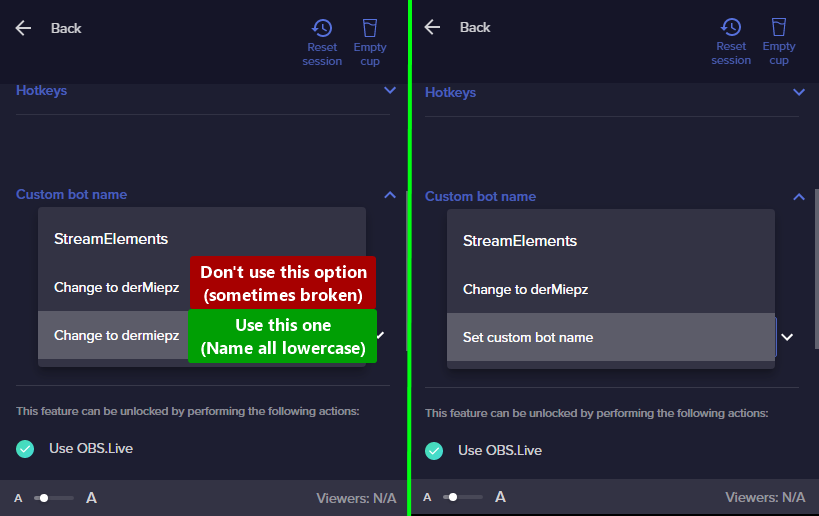 hardy hamlet
@gaunt cedar do u have access to se.sponsor tab if so are u able to check if theres any fortnite promo there for me
abstract hemlock
@hardy hamlet please stop
send us an email at support@streamelements.com with your accountID
gaunt cedar
abstract hemlock
If your commands recently stopped working and you're using OBS.Live and a custom...
In that case man yes it is enabled on the channel and authorised ive disconnected it and reconnected it a few times and still nothing
abstract hemlock
Are you using your own username as the bot name?
visual hemlock
Inkling_JL isn't
abstract hemlock
visual hemlock
Inkling_JL isn't
i know reporting the channel to our dev team
visual hemlock
ok thank you
abstract hemlock
winged ermine
'preciate it!
reporting the channel to our dev team
winged ermine
abstract hemlock
reporting the channel to our dev team
Sounds good, thanks
gaunt cedar
abstract hemlock
Are you using your own username as the bot name?
No its my bot channel
abstract hemlock
check if that account isn't ban on your channel or muted
gaunt cedar
And when i put it in there is nothing
crude pecanBOT
@gaunt cedar ⤵️
- Right-click on your OBS desktop shortcut and open the Properties
- In the Target field, add the following to the very end:
--remote-debugging-port=40404(don't forget to add a space before the current path) - Open OBS (or restart if it was open)
- Open your web browser and type in:
localhost:40404 - Click on StreamElements - Activity feed
- Navigate to the Console tab
- Type the following into the console and hit enter:
store.customBot.removeCustomBotIntegration() - Try setting the custom bot name
- Remove the additional flag in step 2 from your shortcut properties.
hardy hamlet
How do you get invited to the se.sponsorship
winged ermine
hardy hamlet
How do you get invited to the se.sponsorship
Not sure exact requirements, but my wife who is a twitch affiliate has the option for sponsorship, but i do not on my own channel (not an affiliate).
hardy hamlet
Im an affiliate on twitch and had good stats but never had it so I dont know if its just out of luck to get it or what
winged ermine
i dont believe she did anything special, it popped up. 🤷
gaunt cedar
abstract hemlock
could you check if isn't ban?
Ive typed that localhost part into my web browser its not letting me open the page?
abstract hemlock
gaunt cedar
Ive typed that localhost part into my web browser its not letting me open the pa...
make sure to restart OBS first
gaunt cedar
abstract hemlock
make sure to restart OBS first
Done and just to make sure im doing right the web browser just means into google chrome home page right?
winged ermine
gaunt cedar
Done and just to make sure im doing right the web browser just means into google...
yes, like this (should work in any browser though):
 gaunt cedar
winged ermine
yes, like this (should work in any browser though):
gaunt cedar
winged ermine
yes, like this (should work in any browser though):
what should come up cause its just bringing up stuff like a random serch
winged ermine
that's what my page shows, the second link from bottom is the one the instructions wants you to click on
 gaunt cedar
winged ermine
that's what my page shows, the second link from bottom is the one the instructio...
gaunt cedar
winged ermine
that's what my page shows, the second link from bottom is the one the instructio...
im not getting that im just getting this site cant be reached
winged ermine
then its not launched with the remote debugging enabled
gaunt cedar
its not allowing me to do
winged ermine
find your obs shortcut in windows explorer, make a copy of it and rename it to include "debug" or something obvious, right click > properties on the new shortcut and click in the target box, go to the very end of the box and put in --remote-debugging-port=40404, hit ok and open that shortcut.
if you hit the windows key, type in obs, right click and select Open File Location
gaunt cedar
im so confused man hehe
winged ermine
step 1: hit the windows key, type in obs, right click and select Open File Location
gaunt cedar
done
winged ermine
should have a window up with 'OBS' and 'uninstall'?
gaunt cedar
yeah ive done the right click and in properties now and put the debbuging in but it wont allow me to apply it as it keeps coming up with problem with shortcur
gaunt cedar

 gaunt cedar

 winged kernel
hello i have an issue, i have stream elements as a moderator in my twitch stream and my commands were working a few hours ago and now none of them are working anymore, does anyone know what to do?
winged ermine
winged kernel
hello i have an issue, i have stream elements as a moderator in my twitch stream...
The good Renziito i believe is looking into one issue potentially related to custom bot names, which im assisting with a smidge, my issue was elevated to devs. safe to say you're not the only one with chat bot issues tonight it seems 😦
gaunt cedar
Fixes and in the console
winged kernel
ohhh ok
winged ermine
gaunt cedar
Fixes and in the console
from there its just, plop the command into the console and hit enter
winged kernel
i hope it can be fixed!
winged ermine
winged kernel
ohhh ok
for troubleshooting as i gather, they will need the twitch channel that is experience the issues
gaunt cedar
Ok thank you so much @abstract hemlock and @winged ermine
winged kernel
who do i give my twin channel to?
 crude kite
hi, I've had the same issue with commands not working or alerts not coming through. I'm guessing it's related even tho I don't use a custom bot name
winged ermine
I would just put it here in this channel, im sure one of the fine staff will check it out when they have a chance
winged kernel
ok, my twitch is @gabystreams
the bot was working fine for my sister
it just stopped working for me
winged ermine
winged kernel
the bot was working fine for my sister
yea, i'm not streaming but the bot seems to work for my channel, but another channel it isnt. it posted in the chat that the stream went live, then no response afterwards
issue seems oddly intermittent...typical IT
those are the worst types of issues to troubleshoot
winged kernel
yeah it was working for me today then it just stopped
crude pecanBOT
@winged kernel ⤵️
Go to the Dashboard > Right side > Part channel > Join channel (https://streamelements.com/dashboard) https://i.imgur.com/uYVb8OK.png
worldly escarp
winged kernel
yes i did that but it still didnt work
are you using a custom bot?
winged kernel
im just using the stream elements bot
even the basic commands arent working
oh wait
it's working now!
thx for the help everyone 🙂
gaunt cedar
How do i type the command into the console there no text box
 tawdry sluice
So, I have a streamdeck and the Dueling system in my chat is very popular. Is there a way I can add a button to my streamdeck that will duel a random person in chat?
winged ermine
gaunt cedar
How do i type the command into the console there no text box
lol, just closed the debug obs, give me a sec
expand the thing at the right if you dont see console, open console then at the very bottom is the box. i'd recommend copy/paste the command into the box to make things easier, then hit enter.


@abstract hemlock oh hey, just tested it out of curiosity and the chat bot responded
gaunt cedar
Seems to be fixed thank you and can i try reconnecting the custom bot name to use it or would it be better to just leave it as streamelements
winged ermine
i couldnt answer, but i did see somewhere saying that one should utilize all lower case if using a custom bot name
visual hemlock
ty @abstract hemlock
lament blade
so again i ask for help how i can block FOLLOW alerts from specific accounts that includes the name "hoss" and then with different numbers. They are follow and unfollow directly just to spam the alerts. its annoying.
gaunt cedar
Ill leave it as the streamelements name to be on the safe side thanks again @winged ermine
winged ermine
@abstract hemlock did a bot/server die? lol
winged ermine
lament blade
so again i ask for help how i can block FOLLOW alerts from specific accounts tha...
ban or timeout?
winged ermine
gaunt cedar
Ill leave it as the streamelements name to be on the safe side thanks again <@14...
welcome, figured id help with simple things to alleviate staff for the important stuff 😉 lol
lament blade
winged ermine
ban or timeout?
in which way did a ban/timeout works that alerts gets not triggered? that are different accounts with different numbers
pls iam pissed already....dont response when u cant help
winged ermine
oh, i see what you mean...oh wow. cool.
@abstract hemlock oh, hey i forgot to say...thanks to you and whoever else worked the magic!
abstract hemlock
winged ermine
<@!487269278207311873> oh, hey i forgot to say...thanks to you and whoever else ...
 winged ermine
lol, i work in IT, i get how it goes when things break 🙂
dawn dock
Hi I'm a mod for the streamer, streamer's chat stats page shows 404 error and he said he forget did he change the name before or didn't change
His Account ID is 60f43eda5c08fe59f99e56dd
Could you help to fix this?🙏
Here is the link
https://stats.streamelements.com/c/mama0321
Thank you❤️
worldly escarp
dawn dock
Hi I'm a mod for the streamer, streamer's chat stats page shows 404 error and he...
If they didnt change the name the only way to fix it is to add the account to the chat stats, which will not show past data
dawn dock
worldly escarp
If they didnt change the name the only way to fix it is to add the account to th...
How can I do that?
worldly escarp
dawn dock
How can I do that?
Ill do that one sec
dawn dock
worldly escarp
Ill do that one sec
OK thanks🙏
worldly escarp
dawn dock
OK thanks🙏
should work now
dawn dock
Yeah, it work now, thank you so much❤️
 wicked needle
OMG EVERYTHING IS RUINED AND I CANT FIX IT, NOOO!
lament blade
@wicked needle what's the issue
wicked needle
Sorry, I had processed sugar and I was kidding, lol I jst had a quick chat command question
lament blade
Question: Is it possible to remove an account from the StreamElements channel function?
wicked needle
On the custom cht bot commands page, it lists the cool down, but doesnt say if that's minutes or seconds?
lament blade
seconds
wicked needle
Ah
lament blade
lament blade
Question: Is it possible to remove an account from the StreamElements channel fu...
you mean delete an account?
wicked needle
ALso, how long does it take for a custom command using one of the variables to take effect, like for time, I tried "PDT" and "PST" but SE is still posting in CET??
lament blade
lament blade
you mean delete an account?
Indeed
well, you can go to the security settings and close it from there @lament blade
lament blade
wicked needle
ALso, how long does it take for a custom command using one of the variables to t...
are those variables available when setting up the command?
wicked needle
they are from the variables page??
lament blade
just making sure 
once you setup the command and save it, the variables should take hold
 lament blade
can you try a different time zone?
wicked needle
okay! Also, I cant find the chat settings for the bot for subs, cheers, hosts raids, etc, settngs on SE site
oh shit, nvm, jst found it, sorry
lament blade
once you start the stream it should be auto removed
wicked needle
lament blade
can you try a different time zone?
WOrked for EST, but not PDT or PST????
 bold ingot
Hello, I just reset my twitch password and no my overlays dont work at all, can anyone help?
wicked needle
Well, if anyone knows the right short code for Pacifice Time for the SE bot time variable command, please let me know, tysm 
@bold ingot did you try removing your twitch account from OBS and then re-adding it?
wicked needle
fixes like 90% of the problems between OBS and Twitch, tbh
bold ingot
it didnt work @wicked needle
wicked needle
bold ingot
it didnt work <@!255143745048150027>
Did you try logging out of SE site/dashboard and logging back in?
bold ingot
yes
wicked needle
Meanwhile I have NO idea why SE custom time command is ignoring PST but not other timezones
bold ingot
wicked needle
Did you try logging out of SE site/dashboard and logging back in?
there a way i can get in a vc with you and show u what is going on
wicked needle
bold ingot
yes
I would, but *my knowledge is limited, I just happen to know that because I had a lot of Twitch issues w/ OBS
wicked needle
bold ingot
there a way i can get in a vc with you and show u what is going on
Did you fully exit OBS from your system tray and restart it?
wicked needle
bold ingot
thank you so much man!
👍
 lusty tulip
Any idea why my information was removed - for withdrawals etc?
lament blade
lusty tulip
Any idea why my information was removed - for withdrawals etc?
what do you mean?
wicked needle
Q: I want the phrase "can I post [blank]" to trigger the socials command, is this where I add the phrase?

When ppl ask to post links or pics, I want them to do it in DIscord
lament blade
that wouldn't be the regex
wicked needle
oh, so what shoudl I do?
Also, I used a SuperTheme for my initial overlays, and I wanted to setup a special alert for 69 bits, but I also dont want the alerts trigger until 100 bits or more for any other amounts. So, no alerts until 100 bits, except 69 bits which gets its own sound alert. Can I do that?
(my friends all run around to each others streams and do 69 bits all the time)
lament blade
There should be a variation setting that works for that, yes
wicked needle
SO how do I add the alert just for 69 bits?
 lament blade
that should be a variation
wicked needle
ok, i will mess w/ that and get back to you if i run into an issue
wicked needle
add each word or just the phrase to keyword?
lament blade
just the phrase
 lament blade
Yup, that's the one
wicked needle
poggies
Sad there's not a way to do this for all 5 overlays, I have to go in and do each one for each alert type, it's taken me hours
lament blade
I need help, i don’t see partnerships under revenue
@lament blade can you help me?
The partnership area becomes available when you have a pending offer
What do you mean?
@lament blade can i dm you?
I mean, you can only see that area if you have a pending sponsorship offer
What do i have to do to receive a sponsorship offer? @lament blade
You have to be a streamer that uses our platform
if our partner is interested, you'll get an offer
Oh ok, so to receive the offer of fortnite impostors i have to do a stream on fortnite?
With streamelements
That's not what I said, I did not specify a game, you just need to stream your regular content and be amazing
oh ok
I will try, i really want to be part of the fortnite sponsorship
Thanks for the help
@lament blade can you tell me when the sponsorship with fortnite impostors ends?
wicked needle
Crazy Kooky Question: Is there a way to play an alert or make the bot post a message the first time a specific Twitch user posts in chat for the first time that session???
undone fjord
Hiya, I have a twitch subscriber who changed their name and now store redemptions won't work for them on StreamElements, any idea why please?
wicked needle
Yeah, that does seem like a niche thing to add, bt tysm for the reply!
Separate Question, I have the Super Theme Scenes/Overlays, I run mic/no cam streams, so there is a video window on the Just chatting screen, how do I get it to play a video from on line or the the window/game capture?? Is there an easier/neater way to add a source then just a browser capture and YouTube URL, for instance?
 zenith widget
add a source to OBS -> adjust the size to fit the frame
wicked needle
Ah, that is what I did, it's just hard getting it centered on the video frame on the just chatting screen
it seems off
 zenith widget
make it a bit bigger and just place the source under the window
don't remember if that was cropped or not
wicked needle
place the source under the window?
ohhhhh
nvm
the order of the sources, i see now
neat!
thx for stopping by!
wicked needle
I have a slightly OBS Q, no one who was on knew the answer, maybe you might??? When I play Secret of Monkey Island (2009), and I put the game video settings on Fullscreen, the capture turns white, but on my screen, the game is fine. So I run it in Windowed mode and Window capture. Do you know of a way I might be able to capture it FS?? It makes the clickable area too close to the Win10 taskbar and sometimes the taskbar will appear over it and get in the way of gameplay
zenith widget
Thats a fairly old-ish game, so not really
crude pecanBOT
Obs.live is a plugin for OBS Studio for the best OBS support, please join their Official Discord @ https://discord.gg/obsproject
zenith widget
people from the OBS discord might now
 left mural
Hi guys, I read some messages about this but wanted to make sure I understood. To receive rewards for giving fortnite codes, you need to be a streamelements partner, and for that to happen, some brand has to call me with interest in mine. twitch channel? Right?
 echo ridge
Its hard to explain but on my overlay editor it is impossible for me to change something like an image or sound because the button for it is off the screen.

does anyone have a fix for this?
crude pecanBOT
@left mural ⤵️
Please contact us via email for support with your campaign or sponsorship. You can use our contact form here: https://streamelements.com/contact Thank you.
@echo ridge ⤵️
Please provide your account ID found at the top of this page: https://streamelements.com/dashboard/account/channels This ID is public info and safe to share here.
north basalt
Any mods help my friend with their channel stats. Whenever they try to see their chat stats, they get a 404 error. They haven't changed their name, enabled loyalty and has above 100 followers. I have no clue why its not working. Twitch name: SkattySaffy
 frail verge
Hey guys I switched from streamlabs to stream elements due to stream freezing and the video worked perfectly, the problem I'm having now though is my audio seems to crackle? Espe ially my microphone, I didn't seem to have this problem on Slobs is it a setting orrr?
zenith widget
north basalt
Any mods help my friend with their channel stats. Whenever they try to see their...
done
crude pecanBOT
@frail verge ⤵️
Obs.live is a plugin for OBS Studio for the best OBS support, please join their Official Discord @ https://discord.gg/obsproject
north basalt
Thank you @zenith widget ❤️
 wicked storm
My Stream Elements Activity Feed from the plug in for OBS Studio, doesn't seem to be able to replay any alerts when they come through, would there be a reason for that? The buttons on that activity feed just don't seem to do anything for some reason 🤔
ionic kelp
Mind screenahotting the icons for a sec?
wicked storm
 ionic kelp
And clicking the arrow does nothing?
wicked storm
ionic kelp
And clicking the arrow does nothing?
Yeah, they don't replay for some reason, it click and acts like it's doing something, but doesn't
ionic kelp
And if you try in browser from the website?
ionic kelp
If you have an overlay with us it should show something.
If they're entirely through streamlabs then nothing will show as we're 2 different companies.
wicked storm
Aah okay, that would be why then I guess, they are entirely through streamlabs. Interesting that the alerts appear in that activity feed though then, they just don't have the capacity to replay?
ionic kelp
They do but only via our alerts/overlay.
It's the equivalent of "Why won't this android app work on my iPhone?"
wicked storm
Yeahh obviously, I get it 🙂 thanks for le help
crude pecanBOT
@left mural ⤵️
Read and follow our server rules:
- We do not tolerate toxicity! Treat the community team, staff, and all members with respect.
- No advertisement or channel promotion, anywhere on the server.
- No NSFW/NSFL
- No unsolicited DMs or friend requests to server members
Make sure to read the #welcome in any server you join.
 meager vault
I don’t know if this is the right spot. Let me know if it’s not. I went to withdraw tips via SE.pay and once I hit withdraw I remember my bank account info was out of date. I no longer see the money in my withdrawal amount. Any help would be great thanks!
 tender ridge
crude pecanBOT
tender ridge
crude pecanBOT
@meager vault ⤵️
Please contact us via email for support with SE.Pay. You can use our contact form here: https://streamelements.com/contact Thank you.
meager vault
Thank you!!
 balmy bane
I have lost the broadcast chat in the obs and cannot turn it on. Can anyone help? 😦
 keen cosmos
hello?
i have a lil question about my allerts for twitch
basicaly here's the thing
I have my allerts on streamlabs (the site)
But my donations link is on streamelements
so even if the link is on stream elements will it still show the allerts or?
 limpid anchor
make alerts at streamelements, it won't work if not
keen cosmos
great...
 zinc ore
Hello, sometime ago I changed my Twitch username, now I'm not in the User Management list, so if I make a command Broadcaster only I cannot use it. Any way to fix that?
keen cosmos
setting it up
but part of the preview doesn't work
like i setted up a gif and font and all
undone fjord
zinc ore
Hello, sometime ago I changed my Twitch username, now I'm not in the User Manage...
I have this issue too, and so do my subscribers with SE not recognising them as subs after name changes
zinc ore
undone fjord
I have this issue too, and so do my subscribers with SE not recognising them as ...
That's really unfortunate, would be great if there was an option to instead of choosing the userlevel to attribute to a username, to be the number itself, like adding my own username with 1500 in the userlevel, so it would be Broadcaster. And would be good to attribute the userlevel number manually so streamers would be able to create more of levels. Like there's the VIP userlevel in Elements, but you can't assign it, it only auto-assigns when the VIP chats.
 willow sorrel
I WANT TO PARTCIPATE IN THE IMPOSTORS TRIALS
 obsidian frigate
Hey guys I juts done the most recent update and it wont actually complete the update? I have enough storage for it
keen cosmos
umh ok i'm fixing some stuff
but still have a problem with the editor
not saving my settings for gifted subs and such
doesn't save the new layout
nor the font changes
 viscid flame
hi
 opaque lava
Hey guys, the latest update is updating over and over, and always asking to update again after restarting, also obs is not recognising my browser sources anymore for alerts, anyone having the same issue ?
crude pecanBOT
@willow sorrel ⤵️
Please provide your account ID found at the top of this page: https://streamelements.com/dashboard/account/channels This ID is public info and safe to share here.
 ebon forum
obsidian frigate
Hey guys I juts done the most recent update and it wont actually complete the up...
ebon forum
obsidian frigate
Hey guys I juts done the most recent update and it wont actually complete the up...
if anyone had issues with the update I suggest uninstalling OBS.Live fully if it can be found in the 'add\ remove programs' section of your control panel
if it doesn't show there and you have no indication of OBS.Live being installed when you launch OBS Studio, restart the PC and install the plugin's stable version -
https://cdn.streamelements.com/obs/dist/obs-streamelements-installer-wrapper/windows/latest/obs-streamelements-setup-stable.exe
ebon forum
balmy bane
I have lost the broadcast chat in the obs and cannot turn it on. Can anyone help...
If you use OBS.Live - top menu - StreamElements - OBS.Live Docks - enable the chat dock there.
lament blade
Hey there. if I set the timeout length to -1 on streamelements
does that count as a ban for the user who says a banned word?
I too would also like to know
placid raptor
lament blade
does that count as a ban for the user who says a banned word?
yup
@lament blade 👆
lament blade
Thats sonething I was not aware of. Might use it at some point
but does it work for YT aswell?
as for some reason when i set it to -1 it doesn't ban them on YT
only Twitch
is it -0 or -1
what is the difference between -0 and -1 for timeout length
@placid raptor
placid raptor
it's either -1 or a positive number, don't think 0 is used
also don't think twitch and yt chat systems are the same and it's expected to work on twitch
lament blade
so how do i filter shit
on yt then
from appearing on chat
How do i apply for a partner with fortnite
obsidian frigate
So i had to uninstall obs and reinstall and it fixed the issues with the update but i dont have my viewer count anymore? is there a certain place to go for it? I cheched view docks and streamelements docks and it;s not their
 plush rover
Within streamelements, is there a setting you need to enable manually for the bot to tell you when someone follows you in chat, or does it do it automatically?
nimble dune
plush rover
Within streamelements, is there a setting you need to enable manually for the bo...
This is the StreamElements Discord.
Do you mean StreamElements?
nimble dune
Chat bot -> Modules -> Chat alerts
plush rover
Oh shit this section wasn't even loading for me earlier, so I assumed it was nothing😂
 rocky turret
Hi everyone hope your all well, does anybody know anyone who can help me in making these for my stream please?
thank you
 woeful knoll
when i want to edit a command on my wifes channel it says to try again later or do it thru the website, thru the website that command is not there but it keeps on saying it is, any ideas?
nimble dune
obsidian frigate
So i had to uninstall obs and reinstall and it fixed the issues with the update ...
StreamElements menu -> OBS.Live Docks -> Activity feed. In the StreamElements activity feed panel click the hamburger menu and click stream settings -> Show viewers count and save

@obsidian frigate or do you mean the twitch stats dock? View -> Docks -> Twitch Stats. Make sure you're logged into twitch in obs settings > stream
plush rover
nimble dune
Chat bot -> Modules -> Chat alerts
Thanks!
 burnt holly
Hey can some one help I have an issue with a sponsor I have for stream elements
crude pecanBOT
@burnt holly ⤵️
Please contact us via email for support with your campaign or sponsorship. You can use our contact form here: https://streamelements.com/contact Thank you.
burnt holly
Thanks!
 cedar seal
How can i participate for get codes when a fortnite promo is active? (like danger frog and doodler wrap)
obsidian frigate
nimble dune
StreamElements menu -> OBS.Live Docks -> Activity feed. In the StreamElements ac...
neither of these are giving me the option
as in the option for twitch stats are not there at all
I am logged in
 cedar spruce
Hello good afternoon.
are you giving this fortnite wrapping codes to streamers? if yes, what are the prerequisites to get it?
 nimble dune
obsidian frigate
I am logged in
nimble dune
obsidian frigate
I am logged in
Disconnect and reconnect account in OBS Settings -> Stream
obsidian frigate
nimble dune
Disconnect and reconnect account in OBS Settings -> Stream
roger that thank you
nimble dune
obsidian frigate
roger that thank you
also you don't see the OBS.Live Docks -> Activity feed option?
 marble tangle
cedar spruce
Hello good afternoon.
are you giving this fortnite wrapping codes to streamers? ...
marble tangle
cedar spruce
Hello good afternoon.
are you giving this fortnite wrapping codes to streamers? ...
You need to create a 5 minute video explaining the new among us game mode in fortnite
obsidian frigate
i see the docks but and have the activity feed but i mean the view count that you used to have before the update
it used to come up as a red number
 olive valley
Hi, i've one question.
Im triying to make BETS in the chanel with the royalty points.
Its possible make it all by commands?
And other its, its possible that the bet, not need 2 or more people betting? it could be maked a value that x2 the start bet??
 tacit pumice


 ornate verge
i still don´t have points on my streamelements Leaderboard NO DATA
lament blade
I need help is there some <@&364840891023622144> ?
I need help. I set up all my streamelement commands and turned them on but when I try doing them in my chat they dont work
crude pecanBOT
@lament blade ⤵️
Welcome to the helpdesk! Please let us know how we can assist you today and a support volunteer or staff member will assist you as soon as they are available. Thank you for your patience.
@lament blade ⤵️
Go to the Dashboard > Right side > Part channel > Join channel (https://streamelements.com/dashboard) https://i.imgur.com/uYVb8OK.png
 foggy marsh
I need help, i want to join to the impostor challenges, i sended a request but i dont have answer
 vital flower
I've made a StreamElements overlay for a friend, how would I go about sharing it to them?
dry hare
vital flower
I've made a StreamElements overlay for a friend, how would I go about sharing it...
They would need to grant you access to their account via there dashboard so you could duplicate the overlay to their account.
 blissful parrot
foggy marsh
I need help, i want to join to the impostor challenges, i sended a request but i...
blissful parrot
foggy marsh
I need help, i want to join to the impostor challenges, i sended a request but i...
Same here.
 jagged gazelle
foggy marsh
I need help, i want to join to the impostor challenges, i sended a request but i...
jagged gazelle
foggy marsh
I need help, i want to join to the impostor challenges, i sended a request but i...
I have also sent a request. Believe they're a bit tied up with emails at the moment. Best just to wait.
 vagrant willow
uh this might be a bit odd but has anyone had an issue trying to get to their dashboard from streamelements.com ??? i click it and it just refreshes and takes right back where i was
lament blade
Its been 4hrs for me
 trim geyser
I have a question about the music requests. How does this even work? Like is it an twitch channel extension I have to add or a source to OBS (preferably lol) like I'm so confused lol.. like how does it end up on stream
lament blade
I sent email at 10am