#helpdesk-twitch
1 messages · Page 917 of 1

 spring lake
@placid raptor Sure 
 warped radish
something like this where a name fades to another name for everyone who is subbed to me

if it cant be done automatically i have a list so i can put the names in manually
 placid raptor
this is an event rotator, it's showing subs and follows and stuff
warped radish
 placid raptor
wait, one sec
warped radish
ignore the icons and thats what im looking for
placid raptor
maybe you'll like this #widget-share message @warped radish
that should be it
but i'm not sure you can rotate only subs  never tried
oooh but I do have something I'm using to rotate subs only
i'm so stupid, lemme find it
placid raptor
oooh yeah I think this is the one
absolutely love it, the legend is @wanton mango 
placid raptor

 scenic wren
Hey, i recently tried the Stream Elements overlays and ive noticed it takes time for Stream Labs to load the scenes when i switch between them. is there a fix for that? is it because its a browser source? if so, can i download the overlay in anyway?
thx anyway <3
 prisma relic
are ya trying to use the StreamElements with streamLabs stuff @scenic wren ?
scenic wren
yeah.... cant i?
prisma relic
um; kind of ... ish; but you should pick one or the other. They are competing services ... so they don't work together.
i know which one I would suggest; but i'm biased.
prisma relic
streamlabs is streamlabs and SLOBS.
streamlabs is owned by Razer? or something? i forget. OBS is OPEN SOURCE
 drowsy linden
prisma relic
streamlabs is owned by Razer? or something? i forget. OBS is OPEN SOURCE
drowsy linden
prisma relic
streamlabs is owned by Razer? or something? i forget. OBS is OPEN SOURCE
Logitech.
warped radish
this widget is beautiful. the only thing is The names are all lower cased and theres no arial font
scenic wren
so i shouldnt use slobs? it just looks easier and more user friendly
prisma relic
🤣 thank you @drowsy linden ... i was thinking a "mouse" company
scenic wren
im not really experienced with streaming
scenic wren
prisma relic
🤣 thank you <@!232322257697898498> ... i was thinking a "mouse" company
lol
drowsy linden
😂 always happens to me too
prisma relic
that is up to you @scenic wren . I can tell you that there are no paid services here on Elements and that you get more money for your merch 🙂
prisma relic
SLOBS is very resource heavy. so that could be the issue.
scenic wren
is there a features difference?
prisma relic
I can't help trouble shoot that; you could start back to the just OBS Studio and see how that goes. Then try the .Live plugin 🙂
scenic wren
i dont really know how to use the plugins. but i guess ill figure it out
drowsy linden
I strongly recommend OBS studio as it works better with streamelements and is naturally lighter than SLOBS
scenic wren
but is streamelement really that good?
just realised im saying in a streamelements server
drowsy linden
lol
prisma relic
🙂
scenic wren
except merch🙃
 oblique steeple
Nope, you don't have to pay something to sell merch 
scenic wren
i meant buy xD
prisma relic
🙂 i got some merch to sell.
scenic wren
so how do streamelement make money?
i mean someone has to pay for the server and staff
oblique steeple
Can't go much into detail but campaigns, partnerships and investors.
prisma relic
welcome to Stream Elements @scenic wren 🙂 get millions of viewers and don't forget about me when you get big
scenic wren
hope it will happen 🥺
drowsy linden
don't forget me too 😂
scenic wren
i will give each of you a dollar 🥲
 tender verge
hi i need help if anyone is free, i have auto timers set up but there not working i am new to streaming so i don't know how to set them up in the correct way, please help 🙂
 dawn ibex
did personal twitch emotes get removed from the emotesplosion?
tender verge
tender verge
hi i need help if anyone is free, i have auto timers set up but there not workin...
it also dont tell me in chat if someone has hosted the channel???
placid raptor
for timers @tender verge #helpdesk-twitch message
 crude pecanBOT
@tender verge ⤵️
Due to changes to Twitch API, we have filtered out hosts and will only show these ones on your activity feed:
- All hosts coming from an online channel with at least 1+ viewer
- Auto host events with at least 1 viewer - only from a channel that just went offline
Note: If you see X channel has hosted you with no viewers on the back, that is considered an offline host or a host with 0 viewers, we do not show these.
tender verge
@placid raptor that dont make sense sorry, can i post a pic in the chat and from there you can assist me?
placid raptor
what doesn't make sense?
tender verge
im a little slow at all this stuff and when i put the chat line to 1 and people typed in chat it still didnt say it?

 barren trout
Can I use Instant Replay on OBS w/ the stream elements add on?
placid raptor
tender verge
im a little slow at all this stuff and when i put the chat line to 1 and people ...
gotta enable these intervals, they're not checked
placid raptor
barren trout
Can I use Instant Replay on OBS w/ the stream elements add on?
I think so. I never tried it but I guess it depends on how it's done. generally speaking the plugin shouldn't cause errors in installing other plugins
seems like gaming careers have a great tutorial on how to setup instant replay
tender verge
ok thanks
barren trout
@placid raptor I have everything currently setup but the command won't display the video on stream but will create a clip
 buoyant lily
my twitch was botted with followers and they were taken away but when i try to set up a follower goal it still says i have the botted followers
placid raptor
you edit goal progression via the activity feed > widget data > goals
save the settings and reload your overlays @buoyant lily
placid raptor
barren trout
<@!360074950838714368> I have everything currently setup but the command won't d...
ummm maybe ask around in general chat, it's not something specific to our plugin and sounds more like a configuration issue rather then the plugin preventing something from happening
barren trout
Sounds good thank you @placid raptor
buoyant lily
placid raptor
you edit goal progression via the activity feed > widget data > goals
save the s...
it worked thank you
 hollow arrow
Hi, recently come over to OBS from SLOBS and am loving Streamelements. Having an issue however regarding follower data. My activity feed shows no followers, i have to manually enter the follower on my overlay. My alert does not work because it does not recognize a follow. I know subs work and the raid alerts. Any guidance would be greatly appreciated.
crude pecanBOT
@hollow arrow ⤵️
Please provide your account ID found at the top of this page: https://streamelements.com/dashboard/account/channels This ID is public info and safe to share here.
 hard terrace
Trying to do an animated transition for my logo on my be right back page
hollow arrow
609a3f3c1b23f743a98c515f
placid raptor
hollow arrow
609a3f3c1b23f743a98c515f
should be good now
hollow arrow
placid raptor
should be good now
Thanks! Can I ask what the issue was? Just in case it happens again? Cheers!
placid raptor
we refreshed your connection with twitch. if it happens again you'll need to reach out again
hollow arrow
placid raptor
we refreshed your connection with twitch. if it happens again you'll need to rea...
Awesome, thanks!
placid raptor
no worries 
 cyan zodiac
hi i have a problem with chat bot, my commands are active but they do'nt work
 ionic kelp
channel name? no links.
cyan zodiac
i solved i remove the bot and i add it

 fallow falcon
Hello! My streamlabs leaderboard extension is saying no data. Account ID 60dfd42d41796720acf831e8. Super appreciate any help!
 flat ridge
hi i keep getting this message, ive reset the key, unmodded and re-modded, i even uninstalled and reinstalled. any help would be appreciated ID: 604d11eb1ccd531fea628507

 fossil turret
my chatbot stopped working. it is in my channel. it is a mod. it is not running timers are responding to commands. i have tried parting channel and rejoining to no avail.
or responding*\
ionic kelp
Channel name? no links.
 warped basalt
so looking at the Loyalty Points for Subs, and was wondering how Gifted Subs works. Looks like there was a response in a ticket from 3 years ago saying it was given to the person gifting the subs. Is that a true statement?
 woven elk
Hello 🙂 not sure if i am the only one, but my dashboard doesnt open anymore (just a white browser screen).
ionic kelp
What browser are you using?
woven elk
firefox (worked in the past)
crude pecanBOT
Our Dashboard and Overlay Editor are Chromium Optimized. We strongly recommend using Chrome. Opera GX and the new Microsoft Edge Chromium might work closest to Chrome as its also Chromium built. Firefox also works, but some things might look a bit different or not work. We do not recommend using Internet Explorer with our Dashboard as it does not support functions.
If the website doesn’t work on chrome, be sure none of your plugins is blocking our website or clear your cookies. You can try if the website works in an incognito tab.
 hardy apex
hi there, I just got an M1 Mac Mini and have been trying to set up OBS.live. Most things work fine (no crashes etc), but the issue I'm running into is that if I load a scene that includes a theme from Streamelements (i.e. includes a Browser source), and I click on the scene to load it in OBS.live, the scene loads....very....slowly. In other words, I'll click the "Stream starting soon" scene, and the overlay will take about 7-10 seconds to fully load on my screen, with different pieces gradually coming into view.
It seems to be caused by the Browser source specifically, since I can load my own local scenes instantly. In addition, in Streamlabs OBS, I can load all scenes instantly. I have a fast network connection, so it's not that--300mbps download speed from ISP, with hardwired Ethernet connections throughout (I ran a speed test anyway just to confirm it wasn't an issue caused by slow internet speed, and it confirmed 300mbps).
Any ideas on this?
crude pecanBOT
OBS > Settings > Advanced > Scroll down > Enable or disable Browser Source Hardware Acceleration, depending on its current state > Restart OBS
https://i.imgur.com/ggMe9ZE.png
 grim pelican
Hello, I am trying to set up shoutouts on streamelements but I keep getting this "Check out dpinktac0, they are playing Apex Legends at ***" instead of it linking to the twitch. I have tried all the things. please help
crude pecanBOT
If links in chat are appearing as ***** either mod the bot or disable block hyperlinks in your twitch channel settings: https://dashboard.twitch.tv/settings/moderation
hardy apex
crude pecan
That setting was enabled, I changed it to disabled, restarted, and it made zero difference.
crude pecanBOT
Please provide a log from your last stream. To do this, in OBS go to Help > Log Files > Upload Current Log File and paste the link to the log file here.
hardy apex
grim pelican
crude pecan
thank you! that did it!
 neat lance
Hey guys, is there anyway to alt tab (while playing a game in fullscreen) without it pausing the game for the stream? I know that windowed fullscreen works but with Valorant it makes the input lag noticeably worse
 green jackal
Hi guys, how can a streamer get their settings back after a name change?
 stone edge
ok can someone help me set up my obs live
crude pecanBOT
@green jackal ⤵️
If you changed your name on Twitch, please follow these steps:
- Visit https://streamelements.com/logout and then log in again by connecting with Twitch.
- On the right side of the dashboard page that opens, select Join under bot settings. If it says Part select that and then select Join to send the bot to the chat. Don't forget to mod the bot by typing /mod streamelements in your channel if you have not already.
- Post your old and your new name here so that we can update your channel's chatstats tracking (must be done by staff).
@stone edge ⤵️
Check out this playlist https://youtube.com/playlist?list=PLCDDKlFdScbEwdx5AntcQIS1InkFJwHtv with tutorial videos from setting up the basics to in-depth details on how to use our product.
New to OBS? Here is a 4 step quick start guide https://obsproject.com/wiki/OBS-Studio-Quickstart
Want to learn even more? Here is an in-depth overview https://obsproject.com/wiki/OBS-Studio-Overview
 keen wigeon
@stone edge if you have more specific questions feel free to ask here. 🙂
 tepid jacinth
hello! i have been having a huge lag problem for my streams. i'll be an hour into my streams and when i go to my twitch page, it only shows i have been streaming for half an hour and it needs to load every 10 seconds
green jackal
The streamer's alert settings are gone after doing steps 1 and 2. How can I fix it for him?
stone edge
Plus I do not know the height and everything
crude pecanBOT
@stone edge ⤵️
To add your overlays to OBS, add a new browser source in your scene. Paste your overlay URL in the browser source properties, set the dimensions to 1920x1080 (unless you changed them on the website) and check Shutdown source when not visible. https://youtu.be/KDvLynUqXI4
 brisk wren
@keen wigeon Hello I was told to ping you about some issues im having with my streamer's streamelements alerts.
keen wigeon
brisk wren
<@!409020761571983361> Hello I was told to ping you about some issues im having ...
Yes, what exactly isn't working?
brisk wren
Does a name change reset alert settings for a channel? We are getting mass sub alerts rather than them all joined into one alert, and TTS not working in some instances.
brisk wren
Ah, I'm sorry what do you mean by which overlay? As in what's the name of the channel?
keen wigeon
No, which overlay contains the alert box that he's using right now.
stone edge
Where do I find Streamelements alerts?
fossil turret
can anyone assist with why my chatbot won't respond to commands or post it's timers?
the streamelements bot is in my chat
crude pecanBOT
@fossil turret ⤵️
Please provide your account ID found at the top of this page: https://streamelements.com/dashboard/account/channels This ID is public info and safe to share here.
fossil turret
609874748565f4e4ff97ba62
i've tried to part channel and re-join, but it has not corrected the issue.
 vivid mural
do you know how to connect going live to my discord
keen wigeon
fossil turret
i've tried to part channel and re-join, but it has not corrected the issue.
So the commands I just tried worked. Let's see about the timers.
 prisma axle
can someone help me with the counter command variable
keen wigeon
prisma axle
can someone help me with the counter command variable
Sure, go ahead.
prisma axle
keen wigeon
Sure, go ahead.
i mod for a Roleplayer and when they get held hostage in the game, we wanted a counter to keep track on how many times we've been taken hostage and napped
so like each time we did !hostage itd say "This person has been held hostage x amount of times now"
keen wigeon
fossil turret
they were working as recently as Sunday
The bot is not modded. /mod StreamElements
 keen wigeon
Yeah, something glitched.
keen wigeon
prisma axle
so like each time we did !hostage itd say "This person has been held hostage x a...
Any way we can help?
prisma axle
keen wigeon
Any way we can help?
yeah i dont really know how to get the command variables and what order they go in
fossil turret
keen wigeon
Yeah, something glitched.

maybe i should try logging outta twitch on SE and logging back in?
keen wigeon
prisma axle
yeah i dont really know how to get the command variables and what order they go ...
Go with:
This person has been held hostage ${count deaths} amount of times now
crude pecanBOT
@fossil turret ⤵️
If your commands recently stopped working and you're using OBS.Live and a custom bot name do the following:
- In OBS.Live, click on the hamburger menu (three stripes) at the top left of your activity feed
- Click on Stream Settings > Custom bot name
- In the Custom bot name field select Set custom bot name, not your already existing username (with capital letters). Note: If you already connected an account that way, the third entry will show as the account name (see image https://i.imgur.com/re4theQ.png).
- Scroll a bit down and click on the purple Connect Custom Bot Account button
- Log in as usual and Authorize the custom bot name
- Back in the Activity feed, click on the Send Test Message button and check if your custom bot name starts working again
keen wigeon
Great 🙂
fossil turret
+1
neat lance
What's a good way to avoid my stream black screening when I alt-tab while playing games in fullscreen mode? I don't wanna play on any other mode since input lag is noticeably worse.
 acoustic bear
gente meu comando de bingo não está funcionando! quando eu escrevo !bingo twitch 200 aparece que os emoticons não foram encontrados
fossil turret
neat lance
What's a good way to avoid my stream black screening when I alt-tab while playin...
try setting the game capture exclusively to the game window, and not "auto"
 drowsy egret
acoustic bear
gente meu comando de bingo não está funcionando! quando eu escrevo !bingo twitch...
drowsy egret
acoustic bear
gente meu comando de bingo não está funcionando! quando eu escrevo !bingo twitch...
#🇵🇹︱português
drowsy linden
acoustic bear
gente meu comando de bingo não está funcionando! quando eu escrevo !bingo twitch...
I've already answered that question on #🇵🇹︱português.
acoustic bear
Sorry guys
 nimble dune
Chatstats needs fix
old username: miluone187 new: himynameismilu
 vapid heart
Hello, I keep having the problem in the stream that the chatbot doesn't keep up. For example, if you make a raffle and everyone enters !ticket very quickly one after the other. The bot then no longer gives feedback that the tickets have been purchased and also no longer executes any other commands for about 30 sec to 1 min. I even set the cool down time to 0 (for the individual user and the whole chat) and still the bot crashes regularly at about 10 requests in quick succession. This happens every now and then with too many requests at the same time. But how else to make a giveaway, if everyone wants to buy a ticket quickly.
neat lance
fossil turret
try setting the game capture exclusively to the game window, and not "auto"
Where do you do that? sorry
 brittle rampart
https://puu.sh/HUDdM.png
Tried doing a giveaway with 0 ticket entry to allow everybody to join regardless of points and upon typing !ticket, nothing happened.
 foggy heart
brittle rampart
https://puu.sh/HUDdM.png
Tried doing a giveaway with 0 ticket entry to allow eve...
foggy heart
brittle rampart
https://puu.sh/HUDdM.png
Tried doing a giveaway with 0 ticket entry to allow eve...
Do you have the entry command enabled in your dashboard?
brittle rampart
@foggy heart Thanks 🙂
 swift badge
Hello! I would like to keep my StreamElements account, but remove the chatbot from my Twitch chat. Any advice as to how to go about this?
crude pecanBOT
Go to the Dashboard > Right side > Part channel > Join channel (https://streamelements.com/dashboard) https://i.imgur.com/uYVb8OK.png
ionic kelp
Don't rejoin
swift badge
Thank you!
fossil turret
neat lance
Where do you do that? sorry
in the game capture source properties. this isn't streamelements related, tho i don't think. more generally OBS or SLOBS related
 amber trout
Is there any way to scale widgets and sources within a scene properly? Resizing ends up cutting off the image and doesn't scale anything.
ionic kelp
You have to do it in the overlay editor.
amber trout
That's what I'm trying to do.
crude pecanBOT
The default resolution for StreamElements overlays (theme and custom) is 1920x1080. Please add them in OBS at their full resolution and use CTRL+F to fit to screen if necessary. You can then downscale your stream in OBS settings > Video if you'd like https://i.imgur.com/6bWXxjR.png
amber trout
Right. So I'm trying to consolidate all my widgets and graphics for one scene into one browser source, i.e: webcam overlay, event list, etc. Anything I try and "resize" to smaller size doesn't scale the image or widget, but instead cuts it off.
If I have to have separate browser sources for each widget, is that not counter intuitive to what S.E is going for?
ionic kelp
Technically yes but there are valid instances where it is logical to do so.
amber trout
Perhaps. But due to scaling doesn't seem too logical to me. I could be wrong though.
I was able to scale everything in Slobs properly and efficiently, but would reaaaaallllly love continue using S.E
ionic kelp
The overlay itself is set to 1080p along with the browser source?
amber trout
Yea. But the widget within the overlay is 676px x 260px and I can't seem to keep everything and scale that smaller.
ionic kelp
Screenshot the layers in the overlay editor.
amber trout

The event list on the right. I need that smaller but this is what happens when I try to resize it.
It cuts off the end of the image
 ionic kelp
I think you're doing "crop" and not resize.
amber trout
That would make sense, yeah. But I'm unaware of how to change that
ionic kelp
Simply drag the corner. Are you using a hotkey combo with the mouse?
amber trout
No hotkeys, no. And I am dragging the corners when I try to resize it.
Yeah, dragging from the corners crops it for me.
 lament blade
how do i edit the bot for a channel that i have editor on
drowsy egret
@amber trout you will have to duplicate widgets into a new overlay if you want to resize them, a few of them will only be cropped when doing it from the overlay editor
ionic kelp
Depends on what you're wanting to do.
amber trout
@drowsy egret This is duplicated
ionic kelp
Certain things require the super mod level to work from cchat. Otherwise they'd need to do this.
crude pecanBOT
Follow these steps to grant managers/moderators access to your dashboard:
- Click on your channel name at the top of the dashboard
- Create a new invite at one of three access levels (Bot Supervisor, Editor, Full Control)
- Send this invite to a mod/manager to give them access to your dashboard. The link is one-time-use and expires after 72 hours if not accepted
Video tutorial: https://youtu.be/zl_h-ttZDF0
drowsy egret
amber trout
<@!131420870244564992> This is duplicated
then you can add that overlay to OBS and resize the entire source
drowsy egret
lament blade
can u answer my question
someone else just did
amber trout
drowsy egret
then you can add that overlay to OBS and resize the entire source
Right, I'm trying to consolidate my sources to one browser source though. Which is one of the main points for using this software, no?
drowsy egret
amber trout
Right, I'm trying to consolidate my sources to one browser source though. Which ...
well, there's no other way of doing this for now, having a single source could be better but it is also recommended to split your overlays in some cases, like this one
amber trout
So just to confirm, there's no ability to scale sources within an overlay inside the overlay editor?
drowsy egret
amber trout
So just to confirm, there's no ability to scale sources within an overlay inside...
for this particular widget, no
amber trout
Ok, thanks!
 unkempt yoke
I cannot get the site to load. :/
 amber trout
Thanks for the help guys!
 empty jungle
Hi I'm having one issue with streamelements panel extension . Channel points not working
 ionic kelp
You need to enable loyalty.
 dapper sequoia
does anyone know how come the subscriber total count sometimes doesn't work and shows the wrong number?
crude pecanBOT
Please logout of StreamElements at https://streamelements.com/logout and then login again to your account (Twitch/YouTube/Facebook).
unkempt yoke
dapper sequoia
does anyone know how come the subscriber total count sometimes doesn't work and ...
You may need to reset the cache.
ionic kelp
Do that, wait 10 minutes then log back in.
unkempt yoke
Double click the browser source and force cache reset.
empty jungle
ionic kelp
You need to enable loyalty.
thank you
dapper sequoia
ty it wortked thank you!
crude pecanBOT
@lament blade, posting suspicious links will result in not being able to post again.
@lament blade, posting suspicious links will result in not being able to post again.
 green grove
If I want the timer to never broadcast when offline. Do I just turn "offline interval" off?
 ionic kelp
correct
green grove
Cool thank you 🙂
 flint wren
hey all, Is it possible to get scrolling text that only shows up periodically, so like every 5 or 10 minutes
brittle rampart
@foggy heart Sorry for the ping but you helped earlier on this matter... About to do another giveaway... Any way to stop this from happening? 16k people in chat and the spam will be bad

 shy monolith
My SE chat bot hasn't been working...custom commands aren't working while live and timed messages aren't working.....I've tried to "part channel" and rejoin the channel but that doesn't fix it
crude pecanBOT
@shy monolith ⤵️
If your commands recently stopped working and you're using OBS.Live and a custom bot name do the following:
- In OBS.Live, click on the hamburger menu (three stripes) at the top left of your activity feed
- Click on Stream Settings > Custom bot name
- In the Custom bot name field select Set custom bot name, not your already existing username (with capital letters). Note: If you already connected an account that way, the third entry will show as the account name (see image https://i.imgur.com/re4theQ.png).
- Scroll a bit down and click on the purple Connect Custom Bot Account button
- Log in as usual and Authorize the custom bot name
- Back in the Activity feed, click on the Send Test Message button and check if your custom bot name starts working again
shy monolith
Woo that worked thank you!
 safe musk
Hello guys! I'm trying to make a custom chat overlay and I'm trying to achieve something like this

where the background of the username is the same color as his chat name
and make so the name stays white, and the background colored
would anyone know the code for the chat name color in css? Or is it more complicated than that?
drowsy egret
safe musk
would anyone know the code for the chat name color in css? Or is it more complic...
I suggest taking that question to #dev-chat
safe musk
Ok, thank you
 languid garden
can anyone help me make a starting soon screen for twitch ?
 tulip hollow
Does any know the picture sizes for your background & profile?
 brittle rampart
Obviously that's why. I want to disable the message.
drowsy egret
tulip hollow
Does any know the picture sizes for your background & profile?
I believe its 1920x310
brittle rampart
Can't use SE for giveawawys if this is in the chat every 0.01s since 16k people trying to enter a giveaway and they'll type it more than once
R9K mode will only stop so much
tulip hollow
drowsy egret
I believe its 1920x310
Will that be the background or profile?
drowsy egret
tulip hollow
Will that be the background or profile?
header, profile image is tied to the associated platform
tulip hollow
drowsy egret
header, profile image is tied to the associated platform
Thank You
 drowsy linden
I checked here and there is no way to disable it 🙁
drowsy egret
brittle rampart
Literally unusable 😦
I don't think there's a way to disable that, but you can ask them to buy tickets using the public giveaway page instead
brittle rampart
@drowsy egret  That should be an option to disable
languid garden
@here can anyone help me make a starting soon screen for twitch ?
drowsy egret
languid garden
@here can anyone help me make a starting soon screen for twitch ?
we have a few of them in the themes gallery
languid garden
where do i find that ?
 cold pewter
Hello and sorry if this was already answered in the past.
If I reset the loyalty leaderboard, will this reset the watchtime or only the points? (I kind of need to reset the points for everyone).
Thanks in advance (and please @ me with the reply, so that I am sure I find and read it) 🙂
 frank hollow
How to change my url in StreamElements?
Some numbers are showing and the nick doesn't have a number
ionic kelp
@cold pewterThat would be points. Watch time is another fun thing in itself.
@frank hollowThe link is tied to whatever your username on twitch is. However if you change it you need to log out and back in to update it.
Assuming someone from another platform hasn't stolen it already that is.
Is it for mercado26 or another one?
frank hollow
ionic kelp
Is it for `mercado26` or another one?
For someone else.
Can I send you by private?
frank hollow
ionic kelp
I'd prefer it were here. What's their username?
The VinieMattos streamer has always used this name. He changed it to another name and has now returned to VinieMattos.
And the URL appears as VinieMattos-6977 and not VinieMattos. Is there a way to keep only VinieMattos?
ionic kelp
@frank hollow It would require him filling out our contact form with some private information. If you could get him here (if he isn't already) we can handle it from there.
 gritty nest
Does the livestream chat on screen module only come from Twitch? I have a Trovo account that I stream on too, so I want to know if chat can come from both onto screen
frank hollow
ionic kelp
<@!257275446339698690> It would require him filling out our contact form with so...
Is there any way to send this form to him without him being here? I'm moderator of his channel and I send it to him now
drowsy egret
frank hollow
Is there any way to send this form to him without him being here? I'm moderator ...
ask him to send us an email at support@streamelements.com including the account id of both accounts, which can be found here: https://streamelements.com/dashboard/account/channels and we will be able to update his username
frank hollow
drowsy egret
ask him to send us an email at support@streamelements.com including the account ...
Tks ❤️
 pine locust
how do i set up the stream elements extension?
drowsy egret
pine locust
how do i set up the stream elements extension?
you just add it to your twitch panels, and if you go to its settings you will find all the different options
 narrow birch
Ever since the home page's UI change, the SE.Sponsorships part keeps showing me a "1" for my old, completed sponsorship. Any way to disable that?
(It also makes the Revenue button above it say "NEW")
pine locust
drowsy egret
you just add it to your twitch panels, and if you go to its settings you will fi...
is that in stream elements leader board i cant find the other one
narrow birch
the extension name is Streamelements Leaderboards, yes
narrow birch
oh, are you talking about the OBS.Live plugin?
that's a plugin you download for your OBS
pine locust
maybe i found it and set up the overlay from the extention... they accidentally uninstalled it ;-;
narrow birch
the Twitch extension has nothing to do with overlays
pine locust
i cant find anything other than leader board
narrow birch
https://streamelements.com/obslive I think this is what you're looking for
pine locust
ok... how can i work obs and stream on console idk how that works
drowsy egret
narrow birch
Ever since the home page's UI change, the SE.Sponsorships part keeps showing me ...
no way to disable that for now but thanks for the feedback 
crude pecanBOT
@pine locust ⤵️
Consoles do not have native support for overlays. You would need a capture card, PS4 remote play or Xbox companion app and a PC with OBS in order to have overlays over your console gameplay.
We have a blog post about how to set up console streaming with our essential tools: https://blog.streamelements.com/how-to-stream-on-console-7b620b1c46c3
nimble dune
nimble dune
Chatstats needs fix
old username: miluone187 new: himynameismilu
can a staff fix it?
drowsy egret
nimble dune
Chatstats needs fix
old username: miluone187 new: himynameismilu
I didn't find a stats page for the old account so I created a new one
 spice flint
Any idea about overlay working in preview but no part of it showing/working in obs. Was fine and I'm not sure what I've changed, if anything
nimble dune
drowsy egret
I didn't find a stats page for the old account so I created a new one
Okay thanks! 😄
 limpid flame
Hi, could you fix the chat stats of a friend? his old name is znico71 and his new name is nLco71, I would appreciate it :D
drowsy egret
limpid flame
Hi, could you fix the chat stats of a friend? his old name is znico71 and his ne...
should be fixed now
crude pecanBOT
@spice flint ⤵️
OBS > Settings > Advanced > Scroll down > Enable or disable Browser Source Hardware Acceleration, depending on its current state > Restart OBS
https://i.imgur.com/ggMe9ZE.png
limpid flame
drowsy egret
should be fixed now
yes it is fixed, ty :D
 crisp burrow
is anyone having trouble with SE loading on firefox? i saw a comment about it happening on reddit and else where but never seen a response about it.. this came out of nowhere just other-day for me dont know if its a update (via Firefox perhaps?) or whats causing it.. its just a white screen when i log in.. i could switch browsers as it works on other browsers when i logged in on a different one. but they way i do things/have things set up, in obs for example.. its not as simple as just changing browsers..
 bleak condor
Hi guys, I live every day on the Fortnite game twitch and I didn't have access to the poison frog enveloping codes, does anyone know how I can fix this?
drowsy egret
crisp burrow
is anyone having trouble with SE loading on firefox? i saw a comment about it ha...
we recommend chrome to access our website, other browsers are not fully optimized
crisp burrow
drowsy egret
we recommend chrome to access our website, other browsers are not fully optimize...
thanks for reply, good to know.. was something recently changed.every things been fine since i started using SE till just other day..
drowsy egret
crisp burrow
thanks for reply, good to know.. was something recently changed.every things bee...
not that I'm aware of, you can try clearing your cache
crisp burrow
drowsy egret
not that I'm aware of, you can try clearing your cache
hmm ok. could try it. i saw a post else where where someone said same thing, https://www.reddit.com/r/Twitch/comments/of1c8p/streamelements_not_working_in_firefox/ but they had cleared their cache and everything, so unsure that will do it but suppose it wouldn't hurt to try. its weird that just seemed to happen outta nowhere though.. thanks for info.
 tidal lodge
Hi I'm wondering how do i get my sub emotes to show up in commands? It just shows the emote script
drowsy egret
tidal lodge
Hi I'm wondering how do i get my sub emotes to show up in commands? It just show...
you need to give the bot a sub to your channel
tidal lodge
drowsy egret
you need to give the bot a sub to your channel
Okay thank you!
 cloud portal
Hey question I made a sub goal n follower goal but the stats in it is wrong.
 worldly escarp
cloud portal
Hey question I made a sub goal n follower goal but the stats in it is wrong.
worldly escarp
cloud portal
Hey question I made a sub goal n follower goal but the stats in it is wrong.
what do you mean wrong?
worldly escarp
the goal widget is showing stats by session
cloud portal
Is it showing like last month followers
worldly escarp
**not **the total of what you have
cloud portal
And total of 14 sub since I came affiliated?
But I currently only have 4 sub out of 15
But the overlay is showing 14/15 on screen
worldly escarp
let me take a look
cloud portal
Is there a setting i have to change to make it show current stats
Should 195/500 n 4/15
I went to labels then subscribers and then goal and clicked sub goals
worldly escarp
cloud portal
Is there a setting i have to change to make it show current stats
Go to the session data


 brittle mesa
My gf entire overlay got deleted...
She opened OBS, the overlay loaded for a second and then disappeared replaced by the stream elements home page. We logged into her SE account and it says there are no overlays.
keen wigeon
brittle mesa
My gf entire overlay got deleted...
What's her Twitch username?
brittle mesa
MsKillagain @keen wigeon
keen wigeon
This looks like a new account that wasn't set up at all - bot, tipping page, overlays.
 subtle bolt
Hi guys! I have a problem with the streamelements alert box,
(sorry for my english first of all)
When a new alert arrives, i get the respective alert and sound, like a follow for example,
but if get a new follow right there,
this new follow wont show up neither sound
I have OBS Live too, can be something related to that?
keen wigeon
subtle bolt
Hi guys! I have a problem with the streamelements alert box,
I'm not sure I understand the difference between the two cases you presented... What doesn't work exactly?
keen wigeon
A second follow by the same person? That doesn't show by design.
Or do you mean any follow that came shortly after a previous one?
subtle bolt
keen wigeon
Or do you mean any follow that came shortly after a previous one?
This
any idea? im trying everything ;_;
keen wigeon
Where do you see these follows?
keen wigeon
It's OK. 🙂
When you replay the follow from the activity feed, does the alert show then?
 raven jackal
is it possible to make a counter for a random hug command?
so like
/me $(sender) hugs ${random.chatter}. He already receiver X hugs.
 zenith widget
${count ${1} } might work, but not 100% sure
not sure if ${count $random.chatter} } will work, because I think both ${random.chatter} will choose 2 different people
even if its in the same command usage
subtle bolt
keen wigeon
It's OK. 🙂
When you replay the follow from the activity feed, does the alert sh...
it does from there
but its quite anoying :c
I have to be aware of that everytime
raven jackal
zenith widget
${count ${1} } might work, but not 100% sure
doesnt seem to work
subtle bolt
looks like a queue thing
subtle bolt
when i use the emulate function on streamlabs page it work fine, the second emulated follow shows up after the first one, but doesnt work like that on stream
 solid vapor
I'm not sure which helpdesk to put this one, but I've been trying to click this and sign up for weeks and the link is unclickable :c help?

 quiet nymph
Hi guys, sorry if I bother you but my problem is still here. All alerts work except subs one.
keen wigeon
quiet nymph
Hi guys, sorry if I bother you but my problem is still here. All alerts work exc...
Can you repeat the issue please?
quiet nymph
keen wigeon
Can you repeat the issue please?
All alerts work, also emulate events work, except subs' alerts
it seems they are stuck, when I try to emulate them they don't work
keen wigeon
Did you make sure the variations are set up properly?
quiet nymph
I think so, until a few days ago they worked then they stopped
keen wigeon
quiet nymph
I think so, until a few days ago they worked then they stopped
I emulated and it worked. What exactly doesn't work?
quiet nymph
Only subs alert don't work. If i emulate them they work but not the real one
Even if I try from my dashboard to resend my real sub alerts it doesn't work
only emulated ones work
 void flare
hi guys D; not sure if this is the correct place for this, but i'm trying to set up a tip jar, and literally anytime i add the browser source to OBS it's just .. not there? like, the box is there, but the jar is not? it's just an empty square. i tried refreshing everything and closing/reopening OBS and I also tried using a different jar , and it's still just... blank?
any ideas ? D;
crude pecanBOT
@void flare ⤵️
The default resolution for StreamElements overlays (theme and custom) is 1920x1080. Please add them in OBS at their full resolution and use CTRL+F to fit to screen if necessary. You can then downscale your stream in OBS settings > Video if you'd like https://i.imgur.com/6bWXxjR.png
void flare
omfg.... it's there now LUL thank you so much!!!!!
nimble dune
You're welcome! 
 iron phoenix
Guys help of poss since i did a streamlabs obs update 2weeks ago my pc randomly turns its self off it was fine before that does anybody have any ideas please
zenith widget
We are not Streamlabs support. If you have issued with their software, especially after updating, it is best to contact their support.
 olive turtle
Hello , does someone know how to make a only T1 sub count widget ? thanks
lament blade
Hi, How do I setup a custom font in my overlay? when I select Graystroke it doesn't show up.
crude pecanBOT
@lament blade, posting suspicious links will result in not being able to post again.
 slender prism
trying to start up bingo using Twitch global emotes. Keep getting message, "No emotes found!"
 oak lichen
Hey, I have money from my StreamelementsPay balanace that has still yet to be withdrawed, and even tho my bank details have been verified, I've been waiting for around 2 months to sort things out. Could I please go and talk to someone about this or try to get help from it?

 drowsy linden
slender prism
trying to start up bingo using Twitch global emotes. Keep getting message, "No ...
drowsy linden
slender prism
trying to start up bingo using Twitch global emotes. Keep getting message, "No ...
maybe this will help you #helpdesk-twitch message
crude pecanBOT
@oak lichen ⤵️
Please contact us via email for support with SE.Pay. You can use our contact form here: https://streamelements.com/contact Thank you.
 scarlet tiger
^needs to be handled via this form (sensitive info)
oak lichen
What in specific needs to be shown?
 rugged cairn
hi guys! I did an IRL setup via RTMP server and now I was wondering how do I send the audio of the alerts that are played on my pc to my phone so that they are sent to the speaker, the only solution I found was to copy the url of the alert source and copy it to a web page on the phone but it stops when I leave it. Anyone have a stable solution? I broadcast via Larix Broadcaster because Prisma and Streamlabs give me problems with RTMP
warped radish
hey i made a video for my overlay but i dont know how to get the background to go away
I made it green to obs chroma key it out but it just looks bad
oak lichen
I sent a response, hopefully something can be said soon
 ebon forum
warped radish
hey i made a video for my overlay but i dont know how to get the background to g...
ebon forum
warped radish
hey i made a video for my overlay but i dont know how to get the background to g...
You have to edit that locally with your software that you use, we do not have keying functionality in the editor.
warped radish
i have a .mov file but you guys dont accept .movs to my knowledge
oak lichen
ty?
warped radish
and transparent videos need .movs
rugged cairn
warped radish
rirender it in quicktime - gopro cineform rgb 12 bit + alpha / apple prores 4444 with alpha
ebon forum
This is why you need to edit the files yourself. @warped radish Transparent videos can be done in mp4 and webm - this is what we use.
ebon forum
webm with alpha channel is what we recommend
Premiere can't export webm directly, so you need to convert it
Usually with ffmpeg
warped radish
damn 😦
ebon forum
There is a really old webm plugin for premiere/media encoder
has not been updated for years, but it should be working
 torn pumice
I seem to be having some issues with connecting my Custom name bot in OBS live
 dry hare
warped radish
i have a .mov file but you guys dont accept .movs to my knowledge
dry hare
warped radish
i have a .mov file but you guys dont accept .movs to my knowledge
.webm is the best format
warped radish
thanks
dry hare
ebon forum
There is a really old webm plugin for premiere/media encoder
https://www.fnordware.com/WebM/ is the plug-in website
WebM plug-in for Adobe Premiere Pro and Adobe Media Encoder
ebon forum
Yeah that one is hella old at this point and i would not really recommend a plugin that old
oak lichen
oak lichen
What in specific needs to be shown?
just to echo, how long does it usually take for someone to respond
ebon forum
last update mid 2017 
ebon forum
oak lichen
just to echo, how long does it usually take for someone to respond
Let me see. You have issues with SE.Pay, right?
oak lichen
yes
crude pecanBOT
@oak lichen ⤵️
Please contact us via email for support with SE.Pay. You can use our contact form here: https://streamelements.com/contact Thank you.
oak lichen
I contacted the supportbot
i was just wondering how long does it usually take for a response, sorry should've clarified
ebon forum
If you have opened a ticket, then you need to wait, we try to respond as fast as we can. Check your mail too
oak lichen
oh ok, thanks
 celest laurel
Hi, im with problems with streamelements
my subscribers and tips arent appear on the app
what should i do ?
 eternal reef
Is this the right channel to ask about the SE sponsor program? 
ebon forum
eternal reef
Is this the right channel to ask about the SE sponsor program? <:sadgeiHmm:81461...
Depends on the question, but feel free to ask, if needed - we go over to DMs
 scarlet heron
Hi, I'm trying from my mac to insert the overlays and alerts that I created on StreamElements, but every time I insert them and activate them, starting the live it shows them to me, but shows them to me with the screen that says " You've just added a Browser source! Browser sources let you display a webpage from the internet or a local file and are commonly used for widgets and alerts Set the URL to the page you'd like to display " written should not come out in live, but to me instead starting the live you see it is written. I hope you can help me, thank you.
 elfin sparrow
scarlet heron
Hi, I'm trying from my mac to insert the overlays and alerts that I created on S...
elfin sparrow
scarlet heron
Hi, I'm trying from my mac to insert the overlays and alerts that I created on S...
It sounds like the blue screen you see if you make a browser source? Have you copied/ pasted the url for your overlay into the URL space inside the browser source?
 finite tide
elfin sparrow
finite tide
elfin sparrow
You mean the creator code?
scarlet heron
elfin sparrow
It sounds like the blue screen you see if you make a browser source? Have you c...
ok I did it, thank you very much
 robust steeple
Can you tell me what a overlay is please
elfin sparrow
robust steeple
Can you tell me what a overlay is please
Overlay is just a screen that sits on top of your game. It can include anything from a webcam to alerts for follows and stuff.
elfin sparrow
I dont THINK you need 1000 subs to stream, but try asking in the youtube helpdesk channel. They’ll know fer sherrr
 elfin sparrow
Lol if you find the answer to that, please report back. We’re all looking for the answer to that one. I think the answer we all came to is effort and consistency
robust steeple
Ok
 rare prairie
robust steeple
Ok will do and how do you get popular on YouTube a twitch any advice would help
rare prairie
robust steeple
Ok will do and how do you get popular on YouTube a twitch any advice would help
First advice, don't ask a poor guy how to become rich
elfin sparrow
^^^^ lol this guy knows the state of my affairs
robust steeple
Ok thank you wayne2077
rare prairie
robust steeple
Ok thank you wayne2077
My pleasure, it will cost you 50$
elfin sparrow
Worth of effort
robust steeple
No
rare prairie
Then you will not hear the second main advice of the life
robust steeple
Ok
 sturdy perch
Hi, can I edit the default commands used in loyalty points, for example rename !points
eternal reef
ebon forum
Depends on the question, but feel free to ask, if needed - we go over to DMs
Is there anything I can do to increase the amount of sponsor offers I get? I got one back in October when I believe it was introduced, but haven't gotten a single one since.
fallow falcon
Hello! My streamlabs leaderboard exension is saying no data Account ID 60dfd42d41796720acf831e8. When I look at stat chats it is giving me a 404.
 ebon forum
eternal reef
Is there anything I can do to increase the amount of sponsor offers I get? I got...
ebon forum
eternal reef
Is there anything I can do to increase the amount of sponsor offers I get? I got...
Those are automated in most cases, when your channel is eligible for the sponsorship - you get the offer.
 wary solstice
Running into this issue where I cant change any information for subscriber text message settings for the secondary text area. Cant edit anything for the secondary text
 quiet nymph
same error again today, tips and subs alerts don't work all the others yes
i even tried to make a new source with a new alert box but nothig, someone can help?
lament blade
I need urgent help, I was making the Blacklisted Words caps sensitive and now the bot does not take messages down
lament blade
Fixed my issue. Was not made aware that the list was already made caps sensitive
 main pebble
I changed my nick on twitch, and the streamelements bots and chat commands don't work. Someone help me please
crude pecanBOT
@main pebble ⤵️
If you changed your name on Twitch, please follow these steps:
- Visit https://streamelements.com/logout and then log in again by connecting with Twitch.
- On the right side of the dashboard page that opens, select Join under bot settings. If it says Part select that and then select Join to send the bot to the chat. Don't forget to mod the bot by typing /mod streamelements in your channel if you have not already.
- Post your old and your new name here so that we can update your channel's chatstats tracking (must be done by staff).
main pebble
I did this and it didn't work. My old nick was Andryigod and now it's Andrig0d.
 main pebble
Thanks guys, the problem has been resolved.
neat lance
How does one figure out what they want their channel theme to be (if that makes sense)? I don't know what my emotes should be, etc
elfin sparrow
neat lance
How does one figure out what they want their channel theme to be (if that makes ...
You can make really generic ones until you find a theme you want to stick with. A lot of people have “hype” “raid” “hi” emotes that are just text. You can replace them anytime you want as well
neat lance
Okay, thanks! They won't be high quality but its whatever
 keen cloud
Hey is it possible to have my chat bot use my channels emotes? I tried to do it but it wouldn't do it before
 cold leaf
Hey! I want to see who gifted me subs specifically in the month of May this year, I tried checking through my activity feed but it ends at the end of June. I would like to know if there is a way to check which twitch usernames gifted how many subs throughout that month?
ebon forum
keen cloud
Hey is it possible to have my chat bot use my channels emotes? I tried to do it ...
Yes but the channel has to be a subscriber. No sub emotes without sub.
keen cloud
And you have to gift the chatbot a sub right?
 tight tide
Hey guys, I would like to know if there is a way to remove this message when the draw is being made.
 drowsy linden
keen cloud
And you have to gift the chatbot a sub right?
drowsy linden
keen cloud
And you have to gift the chatbot a sub right?
if you are a twitch partner streamer, you are entitled to 3 lifetime subs for chatbots
keen cloud
Yeah I'm not
drowsy linden
tight tide
Hey guys, I would like to know if there is a way to remove this message when the...
cold leaf
Twitch partner 
nimble dune
keen cloud
Yeah I'm not
or use your own name as the bot
crude pecanBOT
@keen cloud ⤵️
Currently renaming the bot fully works with OBS.Live. You can follow this video guide to set it up: https://discordapp.com/channels/141203863863558144/494513233416421386/561516184718278676
 warm sparrow
Hello, Streamelements' dashboard website and stores don't load :c
nimble dune
warm sparrow
Hello, Streamelements' dashboard website and stores don't load :c
What browser are you using?
warm sparrow
Firefox, already cleared cache
nimble dune
Try chrome
crude pecanBOT
@warm sparrow ⤵️
Our Dashboard and Overlay Editor are Chromium Optimized. We strongly recommend using Chrome. Opera GX and the new Microsoft Edge Chromium might work closest to Chrome as its also Chromium built. Firefox also works, but some things might look a bit different or not work. We do not recommend using Internet Explorer with our Dashboard as it does not support functions.
If the website doesn’t work on chrome, be sure none of your plugins is blocking our website or clear your cookies. You can try if the website works in an incognito tab.
cold leaf
cold leaf
Hey! I want to see who gifted me subs specifically in the month of May this year...
.
warm sparrow
Hmm, worked in incognito lol
 shadow terrace
If I have a question about a sponsorship I did on stream, would this be the channel to ask it?
nimble dune
warm sparrow
Hmm, worked in incognito lol
Probably some extension causing issues, but I recommend using chrome
crude pecanBOT
@shadow terrace ⤵️
Please contact us via email for support with your campaign or sponsorship. You can use our contact form here: https://streamelements.com/contact Thank you.
warm sparrow
Hmm but i have the sames extension since i started, and just now the problem appeared. Adblockplus, bttv, ffz and darkreader
shadow terrace
Ty 👍
nimble dune
shadow terrace
Ty 👍
No problem
nimble dune
warm sparrow
Hmm but i have the sames extension since i started, and just now the problem app...
Disable adblockplus or darkreader and see if the website loading
wary solstice
wary solstice
Running into this issue where I cant change any information for subscriber text ...
any solution to this issue please?
cold leaf
wary solstice
Running into this issue where I cant change any information for subscriber text ...
did you enable custom font?
wary solstice
I cant, it straight up doesnt work
nimble dune
You're welcome!
lament blade
my tipping page has old twitch username after changing name
crude pecanBOT
@lament blade ⤵️
Please logout of StreamElements at https://streamelements.com/logout and then login again to your account (Twitch/YouTube/Facebook).
lament blade
tried that
nimble dune
I send you the steps in DM, because I can't post links @lament blade I misread it I thought you meant the tip link. Handled in DM.
cold leaf
Hey! I want to see who gifted me subs specifically in the month of May this year, I tried checking through my activity feed but it ends at the end of June. I would like to know if there is a way to check which twitch usernames gifted how many subs throughout that month? (Sent a second time, copypaste)
 fading ferry
Chat Stats showing 404 - Page Not Found, can this be set up for me or am I missing some prerequisite? My username is CyraStreams and I'm pretty sure I've never changed it
ebon forum
fading ferry
Chat Stats showing 404 - Page Not Found, can this be set up for me or am I missi...
https://stats.streamelements.com/c/cyrastreams
Fixed that for you, but since we had no data before - starts at 0 from now on.
fading ferry
That's alright, thank you very much
 hot portal
where i can find kappagen by streamelements
nimble dune
hot portal
where i can find kappagen by streamelements
Overlay editor

alerts > kappagen
cold leaf
Hey @nimble dune are you able to assist me?
 foggy zodiac
Hi all, ist there a way to activate chat stats? I always get a 404 error page :/
foggy heart
foggy zodiac
Hi all, ist there a way to activate chat stats? I always get a 404 error page :/
Any username changes?
foggy zodiac
foggy heart
Any username changes?
No none
crude pecanBOT
@foggy zodiac ⤵️
Please provide your account ID found at the top of this page: https://streamelements.com/dashboard/account/channels This ID is public info and safe to share here.
cold leaf
Hey! I want to see who gifted me subs specifically in the month of May this year, I tried checking through my activity feed but it ends at the end of June. I would like to know if there is a way to check which twitch usernames gifted how many subs throughout that month?
foggy zodiac
foggy heart
Any username changes?
Account ID
5ff7663c29f6f4c07ececba2
foggy heart
foggy zodiac
Account ID
5ff7663c29f6f4c07ececba2
Should be up now
foggy zodiac
foggy heart
Should be up now
Works! Thank you very much 

lament blade
When was the Blacklisted Words Filter made Caps Sensitive? I thought the Bot did not work
Also, why is it that the Bot's user level resets to 100?
 lethal cobalt
Hello, i have problem, i changed name on twith but now when someone sub me it dont show alert or anything in stats
@viscid pebble
crude pecanBOT
@lethal cobalt ⤵️
If you changed your name on Twitch, please follow these steps:
- Visit https://streamelements.com/logout and then log in again by connecting with Twitch.
- On the right side of the dashboard page that opens, select Join under bot settings. If it says Part select that and then select Join to send the bot to the chat. Don't forget to mod the bot by typing /mod streamelements in your channel if you have not already.
- Post your old and your new name here so that we can update your channel's chatstats tracking (must be done by staff).
 drowsy egret
lethal cobalt
old monroespw new realmonroe
drowsy egret
lethal cobalt
old monroespw new realmonroe
stats page updated
lethal cobalt
Thx but it still dont show my new sub anywhere
It shows i have one but nothing in activity feed
drowsy egret
lethal cobalt
It shows i have one but nothing in activity feed
if it doesn't show up in your twitch activity feed it means the sub hasn't gone through yet
lethal cobalt
he had it in chat normally, its arround 1 hour ago
drowsy egret
we receive events from twitch, if it's not in your twitch notifications you need to reach out to their support
lethal cobalt
where can i get some contact to it do you know please?
lethal cobalt
thanks a lot ❤️
crude pecanBOT
@shrewd plover, posting suspicious links will result in not being able to post again.
 verbal robin
Can a Staff help me?
 vital mantle
hey i need help
 hexed grotto
@celest oasis i need help
verbal robin
dont ping the staff mate
vital mantle
why
who do we ping
i need help adding credit cards as a donation method
please i just need help
verbal robin
watch yt vid or smth lol
verbal robin
@foggy heart Good Staff!
 lament blade
how can i withdraw money to paypal
vital mantle
vital mantle
i dont have the option to do credit cards
please help i just wanna get back to stream
@foggy heart
PLEASE SOMEONE HELP
@drowsy egret
drowsy egret
vital mantle
PLEASE SOMEONE HELP
no need to start tagging
is this for your twitch account?
vital mantle
yes
drowsy egret
SE.Pay requires having at least 101 followers
vital mantle
im not using SE.Pay?
drowsy egret
the credit cards option is part of SE.Pay
drowsy egret
vital mantle
umm is there another way
not really
hexed grotto
Can someone help me with the follower goal?
vital mantle
drowsy egret
not really
alright
drowsy egret
hexed grotto
Can someone help me with the follower goal?
what do you need?
lament blade
still looking for help foravor
hexed grotto
How do I change the amount of followers that I currently have from 0 to 45
lament blade
lament blade
still looking for help foravor
Literally I searched everywhere on Google but did not find
crude pecanBOT
@hexed grotto ⤵️
To reset goals:
- from the Overlay Editor > Session data on top right (monitor symbol) > Goals tab > reset progress of desired goal
- from the Dashboard > Activity feed on the left > Widget data on the right > Goals tab -> reset progress of desired goal
Note: Goal widgets (progress) only counts up and doesn't go down automatically, if you lose followers/subs.
drowsy egret
you can manually put 45 in there
lament blade
and for my problem? @drowsy egret do you have solution or you dont know
hexed grotto
does it still automatically update whenever i get a new follower
drowsy egret
lament blade
and for my problem? <@!131420870244564992> do you have solution or you dont kno...
sorry, I don't know
drowsy egret
hexed grotto
does it still automatically update whenever i get a new follower
correct
hexed grotto
thanks!
lament blade
What can I do if the Chatbot's User Level jumps back to 100?
This has been happening for a while now
 plucky kayak
hihi! I started a campaign with Raid: Shadow Legends, and I gave my link out to some folks already, but its not showing any of them on the goal bar, despite them having reached lvl 10?
 compact nexus
why does my watchtime keep saying 0?
crude pecanBOT
@compact nexus ⤵️
The !watchtime command is directly tied to the Loyalty system. The Loyalty system must be enabled for viewers' watchtime to count up.
To enable Loyalty, please go to the Loyalty section of your account: https://streamelements.com/dashboard/loyalty
Watchtime counts up every 10 minutes alongside Loyalty points, and only while the stream is live. Reruns will not be counted.
Please note that watchtime is not tracked by Twitch and there is no way to retroactively apply past watchtime to viewers.
compact nexus
yeah its on
 nova badge
Hey guys. I'm in some major need of assistance. I've been using OBS for quite awhile and as of late, the ONLY TIME I HAVE ISSUES, is when i'm IN GAME. If i'm on any other window it's perfect. But the second I click into my game, everything starts skipping on OBS.
I've got a really nice PC, Bitrate, fps, NVEC and all that are correct. I've updated drivers and reset router and called ISP. So it's not the internet. Would anyone PLEASE be able to help me.?
drowsy egret
nova badge
Hey guys. I'm in some major need of assistance. I've been using OBS for quite aw...
can you share your logs so we can check?
drowsy egret
nova badge
https://obsproject.com/logs/apzNi5YMMcP7bcK1
try updating to obs 27 and run obs as admin
 limber cloud
Hello! I cannot understand why but one user (just one) cannot buy anything with loyalty points
drowsy egret
limber cloud
Hello! I cannot understand why but one user (just one) cannot buy anything with ...
ask them to login to our website and to try again after that
limber cloud
The bot says that "he doesnt have enough points" but he does
hexed grotto
what should i stream?
limber cloud
@drowsy egret ok
nova badge
drowsy egret
try updating to obs 27 and run obs as admin
Says ther's no update
drowsy egret
nova badge
Says ther's no update
download obs from the main website, install it and then install obs.live on top of it
 sullen moss
I'm changing my selected video for "subscriber" alerts, but it doesn't seem to be updatiing, there's no variations or anything that I can see.
foggy heart
Is it still playing defaults instead of what you choose?
sullen moss
Well, I just purchased a "pack" from Visuals by Impulse, and it had a 1 click setup for Alerts.
I clicked it, and it did indeed, complete a 1 click setup, however for subscribers, it just had the "basic" animated Alert, whereas a sub is a big deal for me lols, so I changed it to the big fancy animated alert. In the top left preview, it shows the new alert, but when I emulate a subscriber, it shows the orginal, smaller one.

(shown here)
 lilac garden
I wanna link my twitch account to discord so my friends know when im streaming
sullen moss
User Settings > Connections
lilac garden
I did that what to do after that im on mobile
sullen moss
Any idea btw @foggy heart ?
 stoic cedar
Can anyone help mw i cant move my OBS to my other monitor
foggy heart
sullen moss
Any idea btw <@!801850149260886118> ?
So basically the alert didn't take for subs, and doesn't play the visuals by impulse one?
sullen moss
It's just not updated to the alert i've selected, however I've found out it is when I selected variant 6, even though their are no variants.
Let me show you
Nevermind I worked it out
but with that said, my Stinger doesn't have sound in OBS, for some reason
foggy heart
Do you have OBS set to use the stinger sound in the settings?
lilac garden
I have stream elements and im streaming on twitch how can i put it on discord. Do i link my twitch
sullen moss
Yes
foggy heart
lilac garden
I have stream elements and im streaming on twitch how can i put it on discord. D...
Are you looking to link your twitch to your discord?
sullen moss
Just connect your twitch to discord via User Settings > Connections
Then when you're live on Twitch, it will say under your discord profile.

Like this guy
 sullen palm
hola alguien sabe por que no me deja instalar el programa mi dice esto: no se pudo descargar el paquete de instalación de la última versión de obs.live
crude pecanBOT
@sullen palm ⤵️
Welcome to the helpdesk! The regular helpdesk channels are in English but we do provide multi-language support in the following channels: #🇩🇪︱deutsch | #🇫🇷︱français | #🇪🇸︱español | #🇵🇹︱português | #🇳🇱︱nederlands | #🇮🇹︱italiano | #🇵🇱︱polski | #🇨🇳︱中文語言服務區-chinese | #🇯🇵︱日本語-japanese | #🇭🇺︱magyar | #🇰🇷︱한국어-korean | #🇹🇭︱ไทย-thai | #🇷🇺︱русский | #🇺🇦︱українська | #🇨🇿︱czech
drowsy linden
sullen palm
hola alguien sabe por que no me deja instalar el programa mi dice esto: no se pu...
#🇪🇸︱español
sullen palm
me dicen por que no me deja instalar lo
 cloud shoal
How does one share a widget for everyone to import into their own scenes?
drowsy linden
sullen palm
me dicen por que no me deja instalar lo
only english here. I've already answered this question in #🇪🇸︱español
 storm knot
i can not get my mic to work at all on your obs
 grim wasp
hi... my friend is having issues with stream elements... the game she is playing audio is distorted on stream, but she can hear fine
she then tested another game and the second game had no audio
but she can hear fine on her end, she didn't change any of her settings
drowsy egret
cloud shoal
How does one share a widget for everyone to import into their own scenes?
they need to invite you as an editor and then you can duplicate your overlay into their account
drowsy egret
storm knot
i can not get my mic to work at all on your obs
is the device selected in the obs settings?
drowsy egret
grim wasp
but she can hear fine on her end, she didn't change any of her settings
ask her to disable the twitch vod track from obs settings
 frosty saffron
drowsy egret
ask her to disable the twitch vod track from obs settings
frosty saffron
drowsy egret
ask her to disable the twitch vod track from obs settings
I am that friend... I dont even have the twitch vod track enable in the obs setting.
cloud shoal
drowsy egret
they need to invite you as an editor and then you can duplicate your overlay int...
How can I do it so I anyone can copy the widget? I've made a custom widget I think will be useful.
drowsy egret
cloud shoal
How can I do it so I anyone can copy the widget? I've made a custom widget I thi...
this is reserved only for a few accounts
cloud shoal
kk
drowsy egret
frosty saffron
I am that friend... I dont even have the twitch vod track enable in the obs sett...
is the correct audio device selected in audio settings?
 urban compass
I am not getting dono/tip alerts, moderation is off. Anyone had this issue?
frosty saffron
drowsy egret
is the correct audio device selected in audio settings?
Yes it is
grim wasp
ya I looked at it
should be working
also same setup as she always had... if u want to check her vod u can see the audio issues... u can kind of hear the sound better when she speaks through mic a tad bit but the sound overall sounds distorted and is mostly inaudible
drowsy egret
frosty saffron
Yes it is
can you share a clip showing the audio issues?
crude pecanBOT
@urban compass ⤵️
If a viewer tipped through PayPal but no information appears in your StreamElements account, this generally means PayPal has held the tip for verification.
Until PayPal clears the tip and sends back a confirmation to your StreamElements account, no information will appear there and no alert will play, as that confirmation is the only way for us to be aware of a successful transaction.
There is a posibility that the tip may have been sent as an eCheque/eCheck - these tips can take from 7 up to 21+ days to show up on our side. Tippers can usually cancel these.
If you believe there may be an issue with the transaction, you'll need to contact PayPal support as StreamElements is only a passthrough service and never actually gets involved with the transaction or touches the money
 lost grotto
Hello,
I use stream elements for my twitch stream and when trying to test out my alerts, none of them show up and instead I receive a message that says "Emulation sent, but alerts are paused in the activity feed."
Can you please assist me with this?
Thank you!
foggy heart
lost grotto
Hello,
I use stream elements for my twitch stream and when trying to test out m...
You can see the muted alert toggle in the overlay editor (toolbar, on the right). You can also check this in the activity feed, as there should be a bell that allows you to toggle this
lost grotto
THANK YOU!
 bronze heath
how do i get chat bots to work in OBS
foggy heart
Are you trying to enable the custom name bot, or just get the bot into your channel?
bronze heath
i would like to get the bot into my channel
i want to use the nightbot. but its not letting me
foggy heart
You should be able to add the bot to you channel by going to the dashboard (https://streamelements.com/dashboard) and on the right hand side you can add the bot
bronze heath
where it says part channel?
foggy heart
If it says part,t hen the bot should already be in your channel. Have you tried any commands?
bronze heath
yeah no commands are working at this point.
foggy heart
What happens when you test them? For example, if you test any of the enabled commands what response do you see?
bronze heath
i type in the command and nothing happens
crude pecanBOT
@bronze heath ⤵️
Please provide your account ID found at the top of this page: https://streamelements.com/dashboard/account/channels This ID is public info and safe to share here.
foggy heart
I can look into that for you with this info
urban compass
crude pecan
<@800583025683202058> ⤵️
The tips have cleared and are showing in my Mini-feed but not triggering the alerts
bronze heath
crude pecan
<@836027851454414910> ⤵️
60d6b8a3c137d2c2164984aa
crude pecanBOT
@bronze heath ⤵️
If your commands recently stopped working and you're using OBS.Live and a custom bot name do the following:
- In OBS.Live, click on the hamburger menu (three stripes) at the top left of your activity feed
- Click on Stream Settings > Custom bot name
- In the Custom bot name field select Set custom bot name, not your already existing username (with capital letters). Note: If you already connected an account that way, the third entry will show as the account name (see image https://i.imgur.com/re4theQ.png).
- Scroll a bit down and click on the purple Connect Custom Bot Account button
- Log in as usual and Authorize the custom bot name
- Back in the Activity feed, click on the Send Test Message button and check if your custom bot name starts working again
bronze heath
do i want the live and the studio?
bronze heath
you are the GOAT
 maiden hinge
Not sure where best to post this but I am having trouble getting chatstats to work. Whenever I go to my chatstats page it says 404 not found.
crude pecanBOT
@maiden hinge ⤵️
Please provide your account ID found at the top of this page: https://streamelements.com/dashboard/account/channels This ID is public info and safe to share here.
maiden hinge
crude pecan
<@824493776605151294> ⤵️
60c541cb6de0593f39fe8c6f
 abstract hemlock
maiden hinge
60c541cb6de0593f39fe8c6f
abstract hemlock
maiden hinge
60c541cb6de0593f39fe8c6f
Did you change your twitch username recently?
maiden hinge
abstract hemlock
Did you change your twitch username recently?
Have never changed my Twitch ID that I can remember.
abstract hemlock
maiden hinge
Have never changed my Twitch ID that I can remember.
ok, i just created a new chatstat page for you
maiden hinge
abstract hemlock
ok, i just created a new chatstat page for you
Great thanks! I assume the stats will not start accumulating on my next stream?
crude pecanBOT
@gilded token ⤵️
Please provide your account ID found at the top of this page: https://streamelements.com/dashboard/account/channels This ID is public info and safe to share here.
abstract hemlock
maiden hinge
Great thanks! I assume the stats will not start accumulating on my next stream?
Yes, everything should work for now on
 gilded token
5fe5af37e94cc6d291445059
maiden hinge
abstract hemlock
Yes, everything should work for now on
Thanks for your help!
abstract hemlock
gilded token
5fe5af37e94cc6d291445059
Everything should work fine for now on
abstract hemlock
gilded token
What was the problem?
i can't tell for sure, but i refresh the connection with your account and our system
 noble panther
not 100% sure where this should go, as im signing in via twitch ill put it here.
The website isnt loading for me on Firefox.
I get to sign in, click dashboard, then it just loads a white screen
crude pecanBOT
Our Dashboard and Overlay Editor are Chromium Optimized. We strongly recommend using Chrome. Opera GX and the new Microsoft Edge Chromium might work closest to Chrome as its also Chromium built. Firefox also works, but some things might look a bit different or not work. We do not recommend using Internet Explorer with our Dashboard as it does not support functions.
If the website doesn’t work on chrome, be sure none of your plugins is blocking our website or clear your cookies. You can try if the website works in an incognito tab.
gilded token
@abstract hemlock It worked thank you
 late magnet
Good Morning from Germany,
I have the problem , that I can't find the right site for the Twitch-Account settings where I can edit/accept/decline invitations for Twitch-Teams... maybe I'm blind or Twitch rearranged it and now I can't find the right site.
Furthermore seems the link in the EMail-Notification ("you got invited"), go to
(https: //dashboard.twitch.tv/u/ [channelname] /settings/channel)
edit:
(the right link (for managing which Team is shown etc.)), I tried which was the old page for the teams also directs me to the link above....)
so its broken right now?
abstract hemlock
@late magnet let me see if i can find something for you 🙂
 crimson bone
Hello, I'm a moderator for a streamer on Twitch. The streamer has decided to switch from Streamlabs and Nightbot to Stream Elements. We looked into importing the Streamlabs and Nightbot bots. We don't see any commands, timers or chat boxes imported in the respected sections. Is there something else we need to do besides check the boxes and clic import? Do we need to manually rewrite all the commands, timers, chat boxes etc? Thanks for your help.
 ashen sonnet
Hey for a stream elements overlay is there somewhere I can see all the variables? {name},{amount} etc?
crimson bone
ashen sonnet
Hey for a stream elements overlay is there somewhere I can see all the variables...
ashen sonnet
crimson bone
https://streamelements.com/dashboard/bot/command-variables
OoOoo this is close! I'm looking for the label variables ill try some of these and see if they work!
 stray smelt
hi, chat stats is not working for me, I have never changed my twitch username.
Can you help me?
My ID is 6027323fdc6824f0007a426b
zenith widget
crimson bone
Hello, I'm a moderator for a streamer on Twitch. The streamer has decided to sw...
Were the import tools used?
zenith widget
stray smelt
hi, chat stats is not working for me, I have never changed my twitch username.
...
done/fixed
crimson bone
zenith widget
Were the import tools used?
He clicked on his profile picture, selected the bots and clicked on import.
zenith widget
hmm i can confirm that nightbot import is not working right now as its not importing my test command and timer
stray smelt
Thanks
crude pecanBOT
@crimson bone ⤵️
Please provide your account ID found at the top of this page: https://streamelements.com/dashboard/account/channels This ID is public info and safe to share here.
 steep jetty
Hey im trying to use your event rotator widget but its not recognizing my twitch at all? can you help?
zenith widget
Which widget?
steep jetty
Event rotator
zenith widget
Ok, so our default one? A custom one? from the themes gallery?
and what do you mean its not recognizing your twitch?
steep jetty
Ahh the one in the widgets section of streamelements under find new overlays-widgets tab
zenith widget
Ok default one. So what you do mean by not recognizing your twitch?
events don't show up?
steep jetty
Nah, like in the latest follower slide it doesn't recognise my last follower. Or last cheer, or amount of followers etc. Even though I log in with my twitch
crude pecanBOT
@steep jetty ⤵️
Please provide your account ID found at the top of this page: https://streamelements.com/dashboard/account/channels This ID is public info and safe to share here.
crimson bone
zenith widget
hmm i can confirm that nightbot import is not working right now as its not impor...
Thank you
 iron brook
hey can someone direct me to the soundboard channel i cant seem to find it
zenith widget
iron brook
just found it /facepalm ty so much
steep jetty
zenith widget
Ok default one. So what you do mean by not recognizing your twitch?
still not working really
crude pecanBOT
@steep jetty ⤵️
Please provide your account ID found at the top of this page: https://streamelements.com/dashboard/account/channels This ID is public info and safe to share here.
steep jetty
zenith widget
Ok default one. So what you do mean by not recognizing your twitch?
same thing is happening
zenith widget
Can you provide your account ID, please?
 sterile zodiac
Hello staff i need help
crude pecanBOT
@sterile zodiac ⤵️
Welcome to the helpdesk! Please let us know how we can assist you today and a support volunteer or staff member will assist you as soon as they are available. Thank you for your patience.
sterile zodiac
crude pecan
<@722513508259856455> ⤵️
my streamelements dosent work
 zenith widget
Did you double check your stream key?
sterile zodiac
i dont know how to ive never used stream elements
zenith widget

OBS.Live is a plugin for OBS Studio
and this is a standard thing in OBS Studio and an error message from OBS it self
 ornate merlin
hey guys! is there a way to have my account send the StreamElements bot's messages to the chat without OBS Live? I want to use my custom emotes in the !slots command
zenith widget
Unfortunately no. Without OBS.Live the custom bot option becomes inactive
sterile zodiac
thank you it helped
ornate merlin
zenith widget
Unfortunately no. Without OBS.Live the custom bot option becomes inactive
Ah i see...Is it easy to set up? What are the other benefits of me installing OBS live you reckon?
zenith widget
how to setup ⤴️
if you are using our tipping link, the activity feed will show you the tips from it
other activity feeds (such as the default one from Twitch) will not show said tips
ornate merlin
zenith widget
how to setup ⤴️
thanks 🙂
will linking my own twitch account in this way allow my custom emotes to come through from the chatbot?
zenith widget
yes
ornate merlin
nice! Okay then 🙂
steep jetty
zenith widget
Can you provide your account ID, please?
60e7e3d5f9a9dc3ae1ac4098
zenith widget
Right, so I see that you've signed up with us today. We are not able to retroactively get your past events from Twitch, so the events rotatur has nothing to list as recent events, because your aggregates are empty.
 steep jetty
Ahh okay thanks bro 💙
 warm edge
Any word on the Kappagen issue still? It's really frustrating as I can't use my own emotes and can't express my brand like before. It's been weeks now and multiple users have reported this 😩 😫
zenith widget
No ETA on a fix
warm edge
zenith widget
No ETA on a fix
This is so frustrating! 😥😔
 low smelt
Good morning while streaming I noticed my stream is having stutters but I am not experiencing any dropped frames. Do I have redo my settings when I did the configuration my bitrate was set to 6000 and I adjusted 4000 should I leave it at the 6? Just trying to figure out what might be causing the stutters while on stream
crude pecanBOT
@low smelt ⤵️
Please provide a log from your last stream. To do this, in OBS go to Help > Log Files > Upload Current Log File and paste the link to the log file here.
 austere trench
So out of no where my alerts aren’t playing sound anymore. The video/image still shows up like normal with the text of who followed or did something else but the audio won’t play
crude pecanBOT
@austere trench ⤵️
If you are not hearing your alerts and/or Media Request, you are most likely using the Control Audio via OBS option in your browser source properties.
To make sure you hear the alerts and the stream also hears them, follow along the screenshot bellow.
https://cdn.discordapp.com/attachments/199460642975907840/685371800456134686/unknown.png
austere trench
Yeah the email I got said the same thing but when I looked at it and enabled the control audio via obs it was after it had already stopped playing the audio. Then I made sure to make it play through monitor and output. But sadly nothing changed
zenith widget
So I will close the ticket now, since its not needed anymore
austere trench
Yeah I ended up joining here since I figured it would be faster than email
zenith widget
Can you show me a screenshot of the setting?
austere trench
My pc is turned off at the moment so I’ll send once it’s booted
But this happened once before and I was able to fix it by deleting my browser source and making a new one with the same url link but this time around that didn’t work lol

its called twitch alerts
zenith widget
I'll paly an alert now
and let me know if you see and hear it
don't open the dashboard
austere trench
yeah just the image showed up
zenith widget
this?
 magic aspen
 austere trench
Nothing yet
crude pecanBOT
@magic aspen ⤵️
SE.PAY is available for streamers who are at least 18 years old, with bank account under their name in one of the following countries, and have at least 101 followers (Twitch) / 101 subscribers (YouTube):
Austria, Belgium, Czech Republic, Denmark, Finland, France, Germany, Ireland, Italy, Netherlands, Poland, Portugal, Slovakia, Spain, Sweden, Switzerland, United Kingdom, United States.
If you meet these criteria and don’t see SE.Pay, let us know.
For information on SE.Pay payment methods, their fees, and settlement times see https://streamelements.com/dashboard/tipping/fees
zenith widget
austere trench
Nothing yet
Im 99% sure its something on your side that you've muted or not setup correctly. Seeing that you have so many audio tracks, makes me think you are using a mixer or some sorts and you need to tinker with your audio setup
austere trench
Honestly I don’t even know where those tracks are lol
zenith widget
To what I can guess:
Settings -> Audio
and as actual sources, as you can your microphone as an audio source
austere trench
I don’t know how to delete those lol they aren’t connected to anything
I don’t use a mixer
😓
zenith widget
 zenith widget
awesome 😄
 kind jacinth
hey sorry, do you guys know how to make a list of links as a command? I want to create a command where, when used it, some links appears!
zenith widget
Twitch doesn't have support for new lines in chat unfortunately
so lists won't work as desired.
can try and use ____ or ----- to separate them, but thats as best as it can get
kind jacinth
thank you anyway ;w;
 sacred coral
hi i was wondering if i can have different notifications for a amount of bits so 100 has a separate notification at 200 bits etc.
ionic kelp
@sacred coral variations tab on the alertbox.
sacred coral
thank you
 errant pollen
Heyo, so I've created my own animated alert, what is the easiest way to centre the "Username has followed!" in the alert, plus how do I make long names stay within it?
zenith widget
There is a center align for text in the text settings.
If you want to have something like this:
"User
Has followed" (with User being centered),
you can add <br> in the message part like so:
 errant pollen
Ahh okay thank you!
 tropic obsidian
do any of u know how to turn off donation gifs? cause someone sent naked ass as a donate in my friend's stream and he got banned
zenith widget
We don't have gifs for tips.
zenith widget
The only clips allowed is via Media Request which is Youtube links only
zenith widget
That is up to the streamer and his mod team to moderate what comes through there
Dashboard -> Media request -> settings -> request type from "Both" or "Tip" to "Free"
 amber saffron
I already put a ticket in, so I'm not looking for "official" answers from StreamElements... but curious if anyone else has noticed that the "stats" e-mail has not been sending. I only got back into streaming the past couple days, but no e-mails... and I really like seeing them, esp. as someone who is super new. Thanks ya'll.
ebon forum
amber saffron
I already put a ticket in, so I'm not looking for "official" answers from Stream...
Sometimes that breaks, we also had a few instances of email providers blocking those. When you have submitted a ticket, we will be able to re-enable those or figure out what happened. But lost reports can't be recovered.
amber saffron
ebon forum
Sometimes that breaks, we also had a few instances of email providers blocking t...
Oh thank you. I was trying to find the same info on the site, but wasn't able to. That could easily be me, but is that info available on a tab there somewhere? I saw similar stuff, but not the same. i.e. tips/followers/etc. on my dashboard.
ebon forum
amber saffron
Oh thank you. I was trying to find the same info on the site, but wasn't able to...
On our website you can see all the data, but the email system (stream report) is separate and needs to be looked into
 stable vortex
so, this is the watchtime command
$(user) has spent $(user.time_online'0 seconds') watching $(channel)
is there a way to get like top 5 watchtimes?
by user
like a max 5
amber saffron
ebon forum
On our website you can see all the data, but the email system (stream report) is...
Oh listen, it's all good. I appreciate the answers, so thank you again for that. I totally get this will take some time to investigate. I only was asking to maybe see if it was me or the system, ya know? And well, this is slightly embarrassing being a forty-cough cough year old grown ass man... but I would get excited when that e-mail came in and it was like + followers or + people in chat. It's dopey, but I dug that. I am really looking forward to that coming back, or having a way just to click a sidebar link to show it (maybe? 🙂 ).
ebon forum
amber saffron
Oh listen, it's all good. I appreciate the answers, so thank you again for that....
If you have submitted the ticket, we will check. I can't say what happened and why emails did not arrive. In general you can't break those yourself.
amber saffron
ebon forum
If you have submitted the ticket, we will check. I can't say what happened and w...
I'm not sweating it, my friend. I'll patiently wait for when it gets fixed. Glad to hear it wasn't me, though. Hehe. Boy, I really need to learn StreamElements better. You folks have so many good things, I just need to make the time to dive in. I can only imagine how much better my experience would be if I had a better command of what's going on, and that's on me of course. Thank you again for all the insight!
 heady phoenix
Hi, is there a way to change the text of the gifted subs with tts ?
ebon forum
heady phoenix
Hi, is there a way to change the text of the gifted subs with tts ?
Yes, please go edit your alertbox, subscriber alert > variations, find the one for gifted subs (or make one if you do not have it) and edit the text there.
crude pecanBOT
@lament blade, posting suspicious links will result in not being able to post again.
heady phoenix
ebon forum
Yes, please go edit your alertbox, subscriber alert > variations, find the one f...
I have the default one which is called "Imported sub gift", but the issue I have is that the TTS is in french, but when the alert play it's written in english..
so you have a french accent trying to speak english 
ebon forum
heady phoenix
I have the default one which is called "Imported sub gift", but the issue I have...
You can edit the text there and it will try to speak french. But TTS is not perfect and different languages sound funny at best 😄
heady phoenix
The thing is that the text is already in french 😦
ebon forum
heady phoenix
The thing is that the text is already in french 😦
Select a french voice and check if that helps
oak lichen
oak lichen
Hey, I have money from my StreamelementsPay balanace that has still yet to be wi...
As an update to this, it says that only £238.58 is still available after withdrawal instead of £239.08. I'm at this point back to square one, anyone know how to help? https://i.imgur.com/tv2qRer.png

So, will the money get withdrawed or what will be going on?
crude pecanBOT
Please contact us via email for support with SE.Pay. You can use our contact form here: https://streamelements.com/contact Thank you.
 pseudo jungle
My emoticons are not showing up to select in "emotes plosions" could someone tell me the possible reason?
ebon forum
pseudo jungle
My emoticons are not showing up to select in "emotes plosions" could someone tel...
Kappagen currently has a bug and does not work with channel emotes
pseudo jungle
any predictions to fix the bug?
ebon forum
pseudo jungle
any predictions to fix the bug?
No ETA sadly, it will be fixed - but no idea when.
pseudo jungle
alright thanks for the info
frank hollow
drowsy egret
ask him to send us an email at support@streamelements.com including the account ...
he sent email as requested. We are waiting for the answer, thanks! ❤️
 surreal vortex
hey guys i recently got the goxlr mini and i connected my spotify to it and it sounds really bad and keeps cutting out how can i fix this ?????
 prime smelt
Guys, how can I export a widget in SE? (Sorry for any grammar mistake, my english is a bit rusty)
crude pecanBOT
@prime smelt ⤵️
To add your overlays to OBS, add a new browser source in your scene. Paste your overlay URL in the browser source properties, set the dimensions to 1920x1080 (unless you changed them on the website) and check Shutdown source when not visible. https://youtu.be/KDvLynUqXI4
lament blade
Hello, I am modding for a streamer and I am trying to fix his watchtime command. When anyone does !watchtime it says that you have spent 0 seconds watching the streamer. I have tried removing and re-enabling loyalty points and I havent found any way to fix it. Any help would be appreciated. Thank you.
 leaden brook
Hey how can i change the common Streamelements Bot Commands response Language ?
Its in Englisch but i want the responses in German. I saw on other streamers Commands Site like this: https://streamelements.com/firewolfjonny/commands
ebon forum
leaden brook
Hey how can i change the common Streamelements Bot Commands response Language ?
...
Go to the default commands and then you can select the language in the top right corner
leaden brook
Is this the right ? Cuz its on German

I want to change this response. The Website is in Germen but not the response if i trigger the command

Nice i think i found a Bug haha
|
If i am on Chrome

If i am on OperaGX

Now it works

 tawdry plover
How do I pull the hypeboss name, can I create as a just a text label, without the bar graphic?
dry hare
leaden brook
|
If i am on Chrome
The dashboard is optimized for chrome. Other browser compatibility is not guaranteed.
nimble dune
leaden brook
This is a known bug that also occurs on chrome if the dashboard language is not set to English, the command variables and the language option for the bot are missing. -> #general-chat message
 hardy stream
Hello, I'm using Streamelements chatbot and stream using OBS Studio with the OBS.live plugin. I had a few streams where I successfully used OBS.live's custom chatbot, but it suddenly stopped working yesterday. I tried muting and unmuting the chatbot, parting the bot from the channel then re-adding it, unmodding and re-modding the bot, logging out of SE and logging back in. Finally I switched the custom chatbot name back to Streamelements, and it works fine - runs chat commands and timers perfectly. However, when I switch back to my custom chatbot name, it stops working.
nimble dune
hardy stream
Hello, I'm using Streamelements chatbot and stream using OBS Studio with the OBS...
Did you choose the 3rd option?
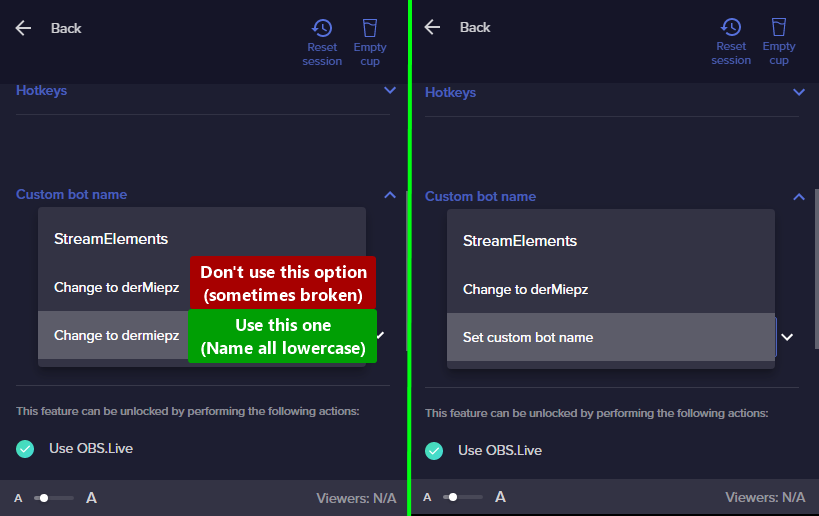 hardy stream
Perfect, I was looking for a way to re-authenticate the custom name as the chatbot and there it is! Thanks! Works fine now
nimble dune
You're welcome.
 night sleet
Seems like I can only have the option for viewers to tip with USD. Can't seem to add other options... Anyone know what to do?
scarlet tiger
Hi!
Users can select their currency.
But you can select default currency at https://streamelements.com/dashboard/tipping-settings > Page settings > currency
@night sleet
night sleet
scarlet tiger
But you can select default currency at <https://streamelements.com/dashboard/tip...
What about crypto?
My mod is saying "SE.Pay"
scarlet tiger
Oh, it's not possible i think, but some service that support crypto have integration with SE.
scarlet tiger
Thank you ^
night sleet
scarlet tiger
Oh, it's not possible i think, but some service that support crypto have integra...
Okay, I don't even see the option for me to add it
ionic kelp
You login to the website and there's an option to connect for alerts.
nimble dune

 fringe idol
Greetings! Does anyone know how to link to Twitch and Facebook in StreamElements? I wanted to do multistream but I can't because of the alerts, as everything is already configured on both platforms. Whenever I try it gives the error: "CHANNEL IS ALREADY CLAIMED"
ionic kelp
@fringe idol We don't support multistreaming.
crude pecanBOT
Account Merging - Please note:
- Merging accounts only allow faster ways to switch between accounts
- Merging accounts does not allow data sharing between accounts - different streaming platforms, different type of events
- Merging accounts allows duplicating/sharing overlays between the accounts
If you understand the limitations of merging and want to proceed, please find the JWT tokens (!jwt) from both accounts you want to merge and fill out the form here: https://streamelements.com/contact with each token correctly labelled
fringe idol
ionic kelp
<@!465310490927824906> We don't support multistreaming.
Ah understood. Thanks for the answer.
 tender comet
Hello. I'd like to close an account I've created by mistake. The problem is I am providing all the info I have been requested but keep getting this message: "An internal server error ocurred".
 spark wind
Hello beautiful people  I need your help once again. I want my chatstat page back cuz it says "404 - Page Not Found" after I renamed the chanel (agggain). Old twitch was slem_999, new one is slemnoname. Help me pls and have a nice day
ebon forum
spark wind
Hello beautiful people <:yogevW:465785261263945738> I need your help once again...
Fixed that
ebon forum
tender comet
Hello. I'd like to close an account I've created by mistake. The problem is I am...
Hi. Did you submit a ticket already? We got a ticket minutes ago with the same request.
tender comet
ebon forum
Hi. Did you submit a ticket already? We got a ticket minutes ago with the same r...
Yes, I did. I got an answer a while ago and could finally make it. Thank you!
ebon forum
tender comet
Yes, I did. I got an answer a while ago and could finally make it. Thank you!
Nice to hear that. Have a nice weekend!
 hushed radish
How do I add someone to be able to be my merch editor?
hushed radish
But I can for editing the overlays?
ionic kelp
Yes.
crude pecanBOT
Check out the StreamElements ideas board: https://strms.net/ideas. You'll be able to add ideas, upvote ideas you agree with and track their progress with email notifications. Adding and upvoting ideas also helps the staff know which ideas should be prioritized so please take some time to upvote.
ebon forum
hushed radish
interesteing 😛
That is most likely not happening, the merch editor is excluded from the access by other just like your tipping settings, only the account owner can edit that.
I doubt that this will change due to the security reasons and that would also expose your merch income etc.
 late reef
can someone help me
I'm in this streamers chat and my chats aren't going up on chat stats my chats is staying up at 17,679 my username is daddylegacyy I changed my name a couple weeks ago I did !rename and my chats went up but all of a sudden my chats stopped going up pls help me https://stats.streamelements.com/c/sixtothegreat
ebon forum
late reef
I'm in this streamers chat and my chats aren't going up on chat stats my chats i...
Fixed that for you
 fallow marsh
Hello, my Kappagen has been broken for a while and I cannot figure out how to fix it. Suddenly, my emotes do not show up under "select emotes" for the emotesplosion. The only emotes that show up are the BTTV emotes. There used to be a ton more including my own sub emotes.
 hidden python
Hello! Recently made the switch from streamlabsobs to obs studio and my host alerts are not showing at all. Not even in the activity feed, any ideas why?
ebon forum
fallow marsh
Hello, my Kappagen has been broken for a while and I cannot figure out how to fi...
Kappagen has currently a bug and does not work with channel emotes. This is being looked into, but no ETA on the bugfix
fallow marsh
ebon forum
Kappagen has currently a bug and does not work with channel emotes. This is bein...
Thank you. This has been very confusing. That helps.
late reef
ebon forum
Fixed that for you
Thank you so much I will check
crude pecanBOT
@hidden python ⤵️
Due to changes to Twitch API, we have filtered out hosts and will only show these ones on your activity feed:
- All hosts coming from an online channel with at least 1+ viewer
- Auto host events with at least 1 viewer - only from a channel that just went offline
Note: If you see X channel has hosted you with no viewers on the back, that is considered an offline host or a host with 0 viewers, we do not show these.
hushed radish
ebon forum
That is most likely not happening, the merch editor is excluded from the access ...
Thanks for the info
If I give full control, will that allow me to invite someone I trust to edit my merch?
 jade remnant
 ebon forum
hushed radish
If I give full control, will that allow me to invite someone I trust to edit my ...
ebon forum
hushed radish
If I give full control, will that allow me to invite someone I trust to edit my ...
No. Merch and Tipping settings are excluded from editing, only the account owner can edit that.
Just to confirm it again 🙂
void flare
hi x) im hoping this is the right chat for this. it's my birthday today so I'm trying to set up a donation goal widget, but it's counting donations from a few weeks ago on the counter/bar thing -- this may be a n00b question, but how do i clear it to start fresh at 0$ ?
crude pecanBOT
To reset goals:
- from the Overlay Editor > Session data on top right (monitor symbol) > Goals tab > reset progress of desired goal
- from the Dashboard > Activity feed on the left > Widget data on the right > Goals tab -> reset progress of desired goal
Note: Goal widgets (progress) only counts up and doesn't go down automatically, if you lose followers/subs.
void flare
AYY, thank you, it worked, you're the real MVP XD
 cobalt hamlet
Hey folks the default streamelements bot on my friend's channel is not working, would it be worth trying to disconnect and reconnect it? How might they do that?
nimble dune
cobalt hamlet
Hey folks the default streamelements bot on my friend's channel is not working, ...
channel name? no links
cobalt hamlet
nimble dune
channel name? no links
https://streamelements.com/lumilexy + https://streamelements.com/lumilexy/commands !commands for example is available to everyone and not working
lament blade
i have editor on stream elements for a channel. how do i acsses the dashboasrd for that channel
nimble dune
@cobalt hamlet seems to be working for me
 ionic kelp
@lament bladeYou either click your profile in the top left or top right then their channel.
The difference is whether or not you're on the new or old dashboard.
cobalt hamlet
nimble dune
<@!478703262007296010> seems to be working for me
!commands is present there in the list of commands if you ctrl + F it. So not sure why it isn't working
void flare
one more question -- is there a way to control how many lines of your live chat widgit show at once? like instead of like 10+ lines of chat, can i make it smaller like 5?
i just want it to take up like half this amount of space D; but if i make it smaller you can't read it.
 ionic kelp
You'd need to use one of the custom ones in #widget-share
 rocky elbow
Hello, if a user has an underscore in their twitch name, the $(1) and $(user) do not work properly. Is there a work around to this?
Here's an example. 32juanderful has the correct output but mozheart_ has the incorrect output.
 void flare
ionic kelp
You'd need to use one of the custom ones in <#457957557470887947>
void flare
ionic kelp
You'd need to use one of the custom ones in <#457957557470887947>
ohnoooo D; okay thank you<3
 feral narwhal
@rocky elbow but in this example mozheart is using a different name
actually calling a different user
rocky elbow
Mhmm but mozheart__ message should say "Triggerfish3, mozheart__ wants to know...."
But I think the underscore 'breaks' the bot and puts Triggerfish3 twice :/
feral narwhal
It shouldnt as it works fine for other commands
rocky elbow
That's what I thought but the only difference is the underscore in mozheart's name
So I assume that's the issue. The bot is misreading the underscore for something else
feral narwhal
I have never seen it not working despite underscores
rocky elbow
mhmm it's weird why the underscore messes it up. hopefully someone can help.
for reference, here's the start of the command
 ionic kelp
Try ${1:}
 drowsy linden
rocky elbow
Ah it didn't work
drowsy linden
rocky elbow
Ah it didn't work
try changing the ${user} variable to ${sender}
lament blade
hi can i connect streamelements accout twitch with trovo or other.?
foggy heart
lament blade
hi can i connect streamelements accout twitch with trovo or other.?
Yes, if you go here: https://streamelements.com/dashboard/account/channels you can add your other channels
 still kindle
10000% sure this has been asked but asking anyway... my alerts are not popping up on my live stream.. they show up in chat but not on screen. help?
rocky elbow
drowsy linden
try changing the ${user} variable to ${sender}
Yooo it worked!  thank you for the advice! I'll probably user sender for anything from now on lol
lament blade
foggy heart
Yes, if you go here: https://streamelements.com/dashboard/account/channels you c...
and can i make same tip page
neat lance
With overlays, do you have to use the 1920x1080 dimensions in the browser source configuration in OBS? The overlay doesn't show otherwise, but 1920x1080 makes what I am using too small
 unkempt gyro
hey so my watchtime doesnt works I reseted it and all the things but it still doesnt works :/
crude pecanBOT
@neat lance ⤵️
The default resolution for StreamElements overlays (theme and custom) is 1920x1080. Please add them in OBS at their full resolution and use CTRL+F to fit to screen if necessary. You can then downscale your stream in OBS settings > Video if you'd like https://i.imgur.com/6bWXxjR.png
@unkempt gyro ⤵️
The !watchtime command is directly tied to the Loyalty system. The Loyalty system must be enabled for viewers' watchtime to count up.
To enable Loyalty, please go to the Loyalty section of your account: https://streamelements.com/dashboard/loyalty
Watchtime counts up every 10 minutes alongside Loyalty points, and only while the stream is live. Reruns will not be counted.
Please note that watchtime is not tracked by Twitch and there is no way to retroactively apply past watchtime to viewers.
lament blade
and can i make same tip page
foggy heart
lament blade
and can i make same tip page
Each account added needs to have it's own tip page, which you can do form the online dashboard
 craggy portal
I was wondering if I could get some help - in the past few streams I've done, I've had to approve items as people redeem them from the loyalty store. Is there any way to have them automatically approved, and if so, how?
foggy heart
Was it previously set to where you didn't have to approve items? And is it for certain ones or every item?
craggy portal
they've so far been all where I have to approve them, and it's on every item I currently have in my loyalty point shop
 magic crystal
Hey im having a problem with my bot everytime someone does a command the bot streamelements timesout the user who does the command im getting verry annoyed by this
@foggy heart
 jaunty dragon
I tried top contact support to sort something out with SE Pay and got no response
It is about finances so can someone DM me
crude pecanBOT
@jaunty dragon ⤵️
Please contact us via email for support with SE.Pay. You can use our contact form here: https://streamelements.com/contact Thank you.
drowsy linden
magic crystal
Hey im having a problem with my bot everytime someone does a command the bot str...
It's probably a conflict between the command and the filters you've set up.
magic crystal
drowsy linden
It's probably a conflict between the command and the filters you've set up.
i have no filters

drowsy linden
magic crystal
i have no filters
show me the command's code
magic crystal
drowsy linden
show me the command's code
its every command
drowsy linden

magic crystal
go away
 vast cairn


 crude pecanBOT
@vast cairn ⤵️
Read and follow our server rules:
- We do not tolerate toxicity! Treat the community team, staff, and all members with respect.
- No advertisement or channel promotion, anywhere on the server.
- No NSFW/NSFL
- No unsolicited DMs or friend requests to server members
Make sure to read the #welcome in any server you join.
magic crystal
Hey im having a problem with my bot everytime someone does a command the bot streamelements timesout the user who does the command im getting verry annoyed by this
 wind canopy
does anyone know why streamelements doesnt update when someone unfollows on a widget, as well as my bits being shown an incorrect amount
 frail ember
hi. i changed my name on twitch and now i dont get alerts and the chatbot isnt working.
crude pecanBOT
@frail ember ⤵️
If you changed your name on Twitch, please follow these steps:
- Visit https://streamelements.com/logout and then log in again by connecting with Twitch.
- On the right side of the dashboard page that opens, select Join under bot settings. If it says Part select that and then select Join to send the bot to the chat. Don't forget to mod the bot by typing /mod streamelements in your channel if you have not already.
- Post your old and your new name here so that we can update your channel's chatstats tracking (must be done by staff).
 scarlet pumice
Hello, can't find an answer anywhere, but to avoid needing to update a single widget every overlay, is it possible to duplicate an element/widget (i.e. text) so that when I update it once in one overlay, every overlay where it appears it will update automatically?
lament blade
dont know if this is the right channel but i need help setting up my streamelements pay. i have money ready to withdraw but whenever i try to enter in my personal info i get "form submission failed"
crude pecanBOT
@lament blade ⤵️
Please contact us via email for support with SE.Pay. You can use our contact form here: https://streamelements.com/contact Thank you.
 chilly socket
Any idea why only FFZ emotes won't show up in the chat widget to show chat on stream? BTTV and Twitch emotes show up just fine but for some reason only FFZ emotes don't show up, just the text.
example. bottom is a bttv emote. top is an ffz emote but only shows the text.
 frail ember
crude pecan
<@570993267190005761> ⤵️
frail ember
crude pecan
<@570993267190005761> ⤵️
old username: dalepinquez
new username: dale_phukzalot
crude pecanBOT
@vocal sedge ⤵️
Please logout of StreamElements at https://streamelements.com/logout and then login again to your account (Twitch/YouTube/Facebook).
nimble dune
 vocal sedge
and its still a white screen :l
vocal sedge
and its still a white screen :l
What browser are you using?
vocal sedge
firefox