#helpdesk-twitch
1 messages · Page 904 of 1
 spring yoke
if you want under stand what i'm saying check this out!
https://www.youtube.com/watch?v=nrzTzsoKyIY
its just EXAMPLE
 placid raptor
you can edit your goals progression in your activity feed > widget data > goals
make sure to save settings and reload your overlays after
 pseudo jewel
Hi Fallen, if this is happening with just a few users, ask them to logout from Streamelements website (https://streamelements.com/logout) and login to it again.
In case everyone is having this issue, ask the streamer to do this process, logout and login. Test again and let us know.
 ionic kelp
@spring yokeThey manually edited that in. Nothing special.
 cyan breach
can you tell me how to get my controller to be shown on stream
like an image of what im doing
 dusky nimbus
placid raptor
you can edit your goals progression in your activity feed > widget data > goals
...
dusky nimbus
placid raptor
you can edit your goals progression in your activity feed > widget data > goals
...
tried that but im not using obs live im using obs studioo so reloading overlays didnt do anything
placid raptor
you can reload your overlays from your activity feed on the website too
but the widget data is where you edit your goal progression @dusky nimbus
dusky nimbus
placid raptor
you can reload your overlays from your activity feed on the website too
but the...
i reset the wrong data i fixed it now thanks
placid raptor
no worries! glad it helped
placid raptor
cyan breach
can you tell me how to get my controller to be shown on stream
you can google about 'gamepad viewer' and navigate to their discord from the page found on google
essentially as long as you have a controller connected to your pc, that website should show it, and you can add the link as a browser source
i actually found someone in their discord to make me a skin [if you want one I mean], so just be nice when you join there and make sure to follow their rules, I'm sure you'll find help
cyan breach
Ok, thanks!
 hazy merlin
hello, how can i delete/reset the revenue history on SE? thanks 🖖
spring yoke
ionic kelp
<@!742131877200134195>They manually edited that in. Nothing special.
oooooo
placid raptor
hazy merlin
hello, how can i delete/reset the revenue history on SE? thanks 🖖
you can delete tips by selecting multiple and deleting
but i don't know of an option to reset everything there [like cheers]
would you mind reaching out to us about that via https://streamelements.com/contact @thick silo ? 
 thick silo
OKEY ❤️
spring yoke
ionic kelp
<@!742131877200134195>They manually edited that in. Nothing special.
with what? but they edited it 2 hours!? streamers play 2 hours or more. i don't think its edit. if you know really easy way or app tell me (PC)
ionic kelp
 halcyon agate
Hi! Do you know if you can mute media request when an alert comes in? I've spent a large amount of time researching to no avail
placid raptor
don't think it's possible unless you manually pause it
 tribal lodge
Hello guys, how are you ... I need help with something, I want to make when people say hello in my chat the bot responds with a text and one of my emotes. But I do not know how to do it.
placid raptor
any chance you're using OBS.Live @tribal lodge ?
tribal lodge
placid raptor
any chance you're using OBS.Live <@!187934633042640897> ?
Nop im use the normal OBS
placid raptor
and the regular SE bot, yeah? not a custom bot via ground control?
tribal lodge
Supposedly $ {args.emote} calls an emote, but I don't know how to place it for example I use the command $ {args.emote} followed by my emote and the emonote does not come out
 lament blade
@tribal lodge are you putting a space between the $ and {args.emote} like in your message
If so remove it
tribal lodge
I do not put everything running, as is the original command
I can see that the emotes of the same Twitch if you put them without the need for any command, but those of my channel do not
lament blade
Is the bot a subscriber of your channel lol
placid raptor
tbh I never used variable to post my own emotes, didn't know it works  does it?? @lament blade you've done it before?
maybe best to ask in #dev-chat if that should work
@tribal lodge essentially I was asking about a custom bot name because setting the bot to be your own account allows you to use your own emotes in responses
otherwise you'll need to gift a sub to the bot, or if you're a partner, ask twitch to perma sub it
if you decided to use the custom bot feature head over to https://streamelements.elevio.help/en/articles/53-creating-a-custom-bot-name-with-obs-live to see how
as for the command, the response can be your welcoming emotes, and in the advanced command settings set the regex to be
^(\Ahi\z|\Ahey\z|\Ahello\z|\Ahallu\z|\Aoi\z|\Ahowdi\z|\Asup\z|\Awhatsup\z|\Agreetings\z|\Ahai\z)
that means that whatever is between A and \ will be the exact string that will trigger the response [case sensitive]
lament blade
The bot requires a twitch subscription
Lmao
Or else it can't use his channel emotes
placid raptor
that's what unlocks the usage of sub emotes on twitch
it's not something we decided on
tribal lodge
Perfect thanks for the clarification
placid raptor
no worries
 mental shale
Hi! I have a little problem. the bot is installed but not responding to commands
placid raptor
what do you mean by 'installed'? just to say it's been added to the channel via the dashboard?
mental shale
yes, sorry
placid raptor
did you grant it moderator privileges with typing /mod StreamElements in chat?
mental shale
Yes, I do
placid raptor
not responding to any command? or specific ones?
and are you using OBS.Live + custom bot name feature?
 marble galleon
Not sure if anyone has said this yet, but I'm live and I'm not having my TTS read anything on stream for me. The other alerts work fine though.
placid raptor
there's an issue with some voices, which one are you using?
marble galleon
Kate i think.
Any word on when it'll be fixed? I've got a few overlays and going through replacing that voice would be a big pain
 vast storm
marble galleon
Not sure if anyone has said this yet, but I'm live and I'm not having my TTS rea...
vast storm
marble galleon
Not sure if anyone has said this yet, but I'm live and I'm not having my TTS rea...
I have had this too for 2 streams now!
placid raptor
not at the moment, sorry 
the work around for that would be either changing the voice or creating a new overlay and setup the alerts
perhaps it's a chance, you can create a single overlay just for your alertbox, and then use that browser source in your scenes (if your setup allows that)
that way if you need to make changes you don't have to go over all overlays, just the alertbox one
vast storm
Is there a list on which voices do or do not work or how to test whether they will work again ?
placid raptor
the voices we know are affected are Allison, Michael, Lisa, Sofia or Enrique
vast storm
Hope it isn't too serious of a problem with some of the voices not working
vast storm
placid raptor
the voices we know are affected are Allison, Michael, Lisa, Sofia or Enrique
do you know what caused the issues! Hope it is fixable in the long term 
 clear tundra
Hello, im new in here, could somebody help me whit the tts bits alert, i have it enlabled but when i test it doesn sound, help
ty
placid raptor
vast storm
do you know what caused the issues! Hope it is fixable in the long term <:hug:66...
I do not, hopefully it is, but as explained the workaround is to create a new overlay and create the alerts again
it might take a little time but if that specific voice is that important to you it's a viable solution
make sure you go over your variations @clear tundra and check the TTS voice you're using is not one of the names I mentioned above #helpdesk-twitch message
 placid raptor
try to change a voice or create a new overlay for the alertbox,
this issue is being investigated and these are the currently available workarounds
clear tundra
okey
ionic kelp
no
 livid finch
Hello, How can I add a text animation for my chatbox? (streamelements overlay)
 thorn jacinth
Hi @crude pecan I currently have a Canon EOS M50.. & looking for a lens that will not only deliver a clear crisp image but most importantly a background blur when streaming.. Any suggestions? Please & thanks
 dry hare
thorn jacinth
Hi <@603953048129110031> I currently have a Canon EOS M50.. & looking for a lens...
dry hare
thorn jacinth
Hi <@603953048129110031> I currently have a Canon EOS M50.. & looking for a lens...
The 15-45 should give you a nice bokeh effect
 kind sonnet
hi hi, im trying to add an subage command, and its giving me an error when i enter the command?
this is what im trying to add !command edit !subage @$(sender), User $(user.name) has been subscribed to channel ${channel} for ${urlfetch https://decapi.me/twitch/subage/slinkyrages/${user}.
ionic kelp
Did you follow the instructions at the top? https://docs.decapi.me/twitch?endpoint=subage%2F%3Achannel%2F%3Auser
Documentation for the project DecAPI, a custom API provider intended for Twitch chatbots.
kind sonnet
im still getting this error Parsing error at position 87: Mismatched input list, missing end of inputs
thorn jacinth
dry hare
The 15-45 should give you a nice bokeh effect
🙏🏾🙏🏾Thank You
kind sonnet
@SlinkyRages, User slinkyrages has been subscribed to channel slinkyrages for RequestError: connect ECONNREFUSED 127.0.0.1:80
 minor lichen
Hi everyone! Is this where i should ask about making commands? Googling i just found the basic stuff.
 nimble dune
@wary halo
 crude pecanBOT
@minor lichen ⤵️
You can add, remove and make changes to custom commands in chat with !command/!cmd flags:
!command add (commandname) (commandresponse) - allows you **to add **a new custom command
!command remove (commandname) - allows you to delete a custom command
!command edit (commandname) (commandresponse) - allows you to edit an existing custom command
!command show (commandname) - allows you to see the raw response of a command before variables are used
!command options (commandname) -(flag) - allows you to change settings for an existing custom command
More information here: #helpdesk-twitch message
 wary halo
nimble dune
<@156048565058142208>
wary halo
nimble dune
<@156048565058142208>
what?
nimble dune
wary halo
what?
Sorry, someone posted a download link & scam
wary halo
ok
minor lichen
thanks thats nice, gonna use it. but it doesn't says the level numbers btw
but can you get an average view hours since follow command?
basically what i want to get is a number that says how many hours someone watched/day the stream since following
 median tusk
hi i have 2 question if someone can help:
- how can we do a emote combo with streamelement?
- how can we do a counter that go up every time that someone do a event with the "reward point"?
 high widget
Why cant i see my subs in leaderboard ?
crude pecanBOT
@tame river ⤵️
Read and follow our server rules:
- We do not tolerate toxicity! Treat the community team, staff, and all members with respect.
- No advertisement or channel promotion, anywhere on the server.
- No NSFW/NSFL
- No unsolicited DMs or friend requests to server members
Make sure to read the #welcome in any server you join.
 forest marsh
crude pecanBOT
forest marsh
crude pecanBOT
Welcome to the helpdesk! The regular helpdesk channels are in English but we do provide multi-language support in the following channels: #🇩🇪︱deutsch | #🇫🇷︱français | #🇪🇸︱español | #🇵🇹︱português | #🇳🇱︱nederlands | #🇮🇹︱italiano | #🇵🇱︱polski | #🇨🇳︱中文語言服務區-chinese | #🇯🇵︱日本語-japanese | #🇭🇺︱magyar | #🇰🇷︱한국어-korean | #🇹🇭︱ไทย-thai | #🇷🇺︱русский | #🇺🇦︱українська | #🇨🇿︱czech
crude pecanBOT
@lusty widget ⤵️
Please contact us via email for support with your campaign or sponsorship. You can use our contact form here: https://streamelements.com/contact Thank you.
 lusty widget
I already have don’t this stuff
It’s been a while I have filled out the form and am waiting on my money
 abstract hemlock
We won't discuss details of the campaign here 😅 but if you already use the contact form please DM your email address so i can look into it on our system
 vital sparrow
Will the bets found in the loyalty system be linked to the twitch channel points?
 ionic kelp
@vital sparrowNo.
abstract hemlock
nop, all that section is linked to the loyalty point system @vital sparrow
vital sparrow
So I have to implement the whole point system again to be able to use those bets. :l
In the case of being able to implement it, is there a command to start the bet without having to use the dashboard? Just as you can bet using the !Bet?
abstract hemlock
@vital sparrow you need to have loyalty points system enabled, Yes
There is a way to create the contest (bet) outside the dashboard, unfortunately no
crude pecanBOT
@buoyant lily ⤵️
Please provide a proper screenshot with the issue visible. If not sure how to take a screenshot, you can check here: https://www.take-a-screenshot.org

 foggy heart
do you know if that streamer has had any username changes?
 buoyant lily
when i opened stream elements it said status_error invalid refresh token
 foggy heart
buoyant lily
when i opened stream elements it said status_error invalid refresh token
foggy heart
buoyant lily
when i opened stream elements it said status_error invalid refresh token
I would take a look at settings > stream and disconnect/reconnect in that menu
buoyant lily
that worked thank you
 sly basin
old nick: beelievee
new nick: letmebee
 young patrol
foggy heart
do you know if that streamer has had any username changes?
young patrol
foggy heart
do you know if that streamer has had any username changes?
no streamer has the same nick, sorry for the delay
 ruby pewter
Hey everyone! I'm new to the channel but I was directed here with my questions concerning a campaign on Streamelements, am I at the wrong channel?
ionic kelp
I assume you mean one of the SE.Sponsorships?
ruby pewter
Yes! Sorry
crude pecanBOT
Please contact us via email for support with your campaign or sponsorship. You can use our contact form here: https://streamelements.com/contact Thank you.
ionic kelp
That's the correct place.
 lilac falcon
I'm having a problem where the redemption alert is meant to play a sound effect and show an image, but for some reason it only plays the sound effect and doesn't show any image or text.
Should I go to obslive instead?
ionic kelp
This would be the correct place.
ruby pewter
Thank you @ionic kelp
 hushed ferry
How do i integrate YouTube alerts into Twitch overlays?
ionic kelp
You don't.
Not possible as platforms and all that are with them are separate from another.
hushed ferry
Is it not just a coded widget? Not sure I see why not
lilac falcon
Does anyone know of any solutions for this issue?
I'm having a problem where the redemption alert is meant to play a sound effect and show an image, but for some reason it only plays the sound effect and doesn't show any image or text. The layer is on top and visible, and sized correctly. I have tried it in both normal OBS and Streamlabs OBS, and it doesn't work in either.
ionic kelp
It's how the system is designed.
@lilac falcon I'm not even seeing anything in your store from your channel panel, the stream store, or within the chat command.
lilac falcon
I'm actually troubleshooting for a friend, try Faint74 instead
foggy heart
young patrol
no streamer has the same nick, sorry for the delay
SHould be all set
ionic kelp
@lilac falcon Do you have access to their dashboard by chance?
lilac falcon
Yep I do
ionic kelp
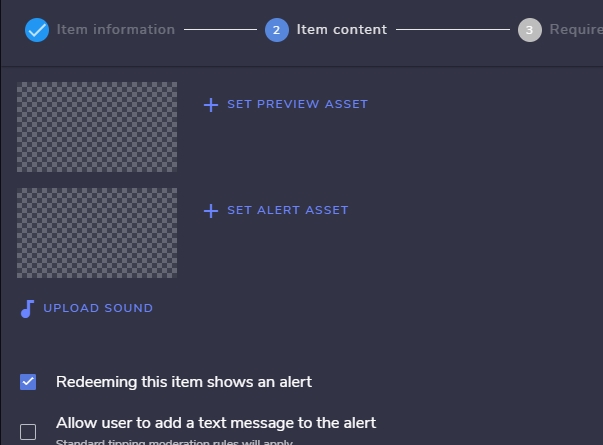
Could you go here and see if you have alert assets added to the item? https://streamelements.com/dashboard/store/items https://streamelements.is-serious.business/7Wn6ZtA.jpg
 lilac falcon
They do for both preview and alert asset
 minor drift
my overlays are broken. i want to have 2 diffrent types of overlays but when i change 1 of the overlays in obs the other one changes aswell.
young patrol
foggy heart
SHould be all set
Thanks
foggy heart
minor drift
my overlays are broken. i want to have 2 diffrent types of overlays but when i ...
Are the browser sources the same url?
minor drift
yupp
foggy heart
minor drift
yes
What changes on the 2nd one when you change the 1st?
crude pecanBOT
@minor drift, never post your StreamElements overlay links in public or show them on stream as they contain sensitive data. When you have a problem with your overlays and someone from Staff is asking which one specifically, they want the overlay's name.
minor drift
or i cant do that
foggy heart
Yeah, no links aha. And you don't want to post that url anywhere
minor drift
can i dm?
ionic kelp
Just give the name like it shows here https://streamelements.is-serious.business/GZbiUBL.jpg
 minor drift
SHITFACE - JOYRIDE ANIMATED IN GAME SCENE-TWITCH
OVERLAY - PINELYN TALK SCENE
srry for bad lanugish
foggy heart
And your account ID if you don't mind
minor drift
is it smart to send it here th0?
ionic kelp
Yes
crude pecanBOT
Please provide your account ID found at the top of this page: https://streamelements.com/dashboard/account/channels This ID is public info and safe to share here.
 timid shoal
I'm having technical issues with my alerts not showing. Is there a tutorial for how to install them with StreamElements? Every youtube video I find they are using Streamlabs.
crude pecanBOT
To add your overlays to OBS, add a new browser source in your scene. Paste your overlay URL in the browser source properties, set the dimensions to 1920x1080 (unless you changed them on the website) and check Shutdown source when not visible. https://youtu.be/KDvLynUqXI4
ionic kelp
That's how you add them. What exactly isn't wanting to work?
minor drift
ionic kelp
Yes
you dead?
foggy heart
minor drift
5c597275ab8b4319f34a1894
So what specifically changes between the browsers? When you change 1, does the same change happen to the other?
ionic kelp
I'll let Traffy handle from here as it requires access to stuff that I can't access.
minor drift
foggy heart
So what specifically changes between the browsers? When you change 1, does the s...
its hard to exsplain but i will try. i have to sence in obs. when i past the link in one of them the other overlay.
i can try to video record it and show you
its easyer that way
foggy heart
Yeah, try that and upload it here
 pseudo depot
hello
minor drift
2 sec
pseudo depot
?
crude pecanBOT
@pseudo depot ⤵️
Welcome to the helpdesk! Please let us know how we can assist you today and a support volunteer or staff member will assist you as soon as they are available. Thank you for your patience.
pseudo depot
ooo
minor drift
@foggy heart
minor drift
como estats?
pseudo depot
bien
minor drift
bien
pseudo depot
y ttu
minor drift
bien 🙂
ionic kelp
#🇪🇸︱español
minor drift
xd
ionic kelp
Or #🇵🇹︱português
pseudo depot
si hablan español
crude pecanBOT
Welcome to the helpdesk! The regular helpdesk channels are in English but we do provide multi-language support in the following channels: #🇩🇪︱deutsch | #🇫🇷︱français | #🇪🇸︱español | #🇵🇹︱português | #🇳🇱︱nederlands | #🇮🇹︱italiano | #🇵🇱︱polski | #🇨🇳︱中文語言服務區-chinese | #🇯🇵︱日本語-japanese | #🇭🇺︱magyar | #🇰🇷︱한국어-korean | #🇹🇭︱ไทย-thai | #🇷🇺︱русский | #🇺🇦︱українська | #🇨🇿︱czech
pseudo depot
ok
pseudo depot
some server that I recommend porfa xd
foggy heart
minor drift
<@!801850149260886118>
So if i'm seeing that correctly, you have 2 overlays and you're pasting the url of 1 over the other. Are you trying to create a new source in general? It seems like at the beginning the same url was being used in both scenes
minor drift
i can try to make a hole new one
foggy heart
Try that, and be sure not to use existing sources in OBS, just create a new browser source each time
minor drift
🤦♂️ it worked. i should have tryd that. thanks @foggy heart 10/10 service 🙂
foggy heart
minor drift
🤦♂️ it worked. i should have tryd that. thanks <@!801850149260886118> 10/10 se...
No problem 👍
 brittle falcon
hey um so i dont know if this is the right area to go to but for some reason no matter what i do i cant edit my bits alert
 drowsy egret
brittle falcon
hey um so i dont know if this is the right area to go to but for some reason no ...
drowsy egret
brittle falcon
hey um so i dont know if this is the right area to go to but for some reason no ...
make sure you're also editing the alert variations
brittle falcon
drowsy egret
make sure you're also editing the alert variations
what do you mean
foggy heart
brittle falcon
what do you mean
 foggy heart
@brittle falconf those aren't changed, they can override your custom settings aha. You can just turn them off if you don't want to change them
brittle falcon
tysm!
 mossy willow
Any idea why my mic cuts off after a few seconds of launching obs???
 plain hatch
Is there a way to have an animation for the chat box widget for messages that come in?
foggy heart
plain hatch
Is there a way to have an animation for the chat box widget for messages that co...
You can check the widget share for different types of chat boxes
foggy heart
mossy willow
Any idea why my mic cuts off after a few seconds of launching obs???
It may be a disconnection issue, might want to check your device settings on your computer
 floral tinsel
I GOT IT ITS JUST CONFUSING
 modern vale
Hey there,
I'm just setting up sound alerts with commands as detailed in a reddit comment here:
https://www.reddit.com/r/streamelements/comments/ah3zhq/making_a_sound_effect_with_chat_commands/eec0hmp/?utm_source=reddit&utm_medium=web2x&context=3
I was wondering if there was a way to also add a message response in chat as well?
Thanks in advance :)
ionic kelp
To my knowledge it's not possible.
 brisk monolith
There is no longer any tts activated for alerts? 😦
ionic kelp
Switch to another voice. Some are bugged atm.
brisk monolith
I've tried almost all of them, and none of them sound: c
modern vale
ionic kelp
To my knowledge it's not possible.
Thank you for your quick response. Is there any place I can request this?
crude pecanBOT
Check out the StreamElements ideas board: https://strms.net/ideas. You'll be able to add ideas, upvote ideas you agree with and track their progress with email notifications. Adding and upvoting ideas also helps the staff know which ideas should be prioritized so please take some time to upvote.
modern vale
Thank you!
ionic kelp
brisk monolith
I've tried almost all of them, and none of them sound: c
Unfortunately while I can't say what voices will work all I can say is try to find one that hopefully does. The devs are aware of the issue and trying to fix it.
 proud brook
modern vale
Hey there,
I'm just setting up sound alerts with commands as detailed in a reddi...
proud brook
modern vale
Hey there,
I'm just setting up sound alerts with commands as detailed in a reddi...
You can always use Lioranboard for that ;)
 tacit torrent
Hi, I recently tried to change follower alert sound, but when I did that, the alert sounded twice with the new and old sound instead of just the new sound added, i need help 😦
modern vale
proud brook
You can always use Lioranboard for that ;)
yes, i'll be looking at different solutions since it's not possible via stream elements. Thank you for the suggestion.
 cloud orchid
Hi I can't select fonts for the subscriber alert secondary text in overlay settings. Also maybe because of this, the rest of the options for the same are grayed out. Any ideas?
 crude pecanBOT
@cloud orchid ⤵️
Google Fonts
More than 900 google fonts are supported at this time. You can preview them here: https://fonts.google.com/
Custom Fonts
Steps:
- Install the font on the streaming PC or choose a pre-installed windows font.
- In the overlay widget settings, select Text Settings
- Click on Enable Custom Font
- Type the name of the font as it appears in the windows font directory (This is usually
C:\Windows\Fonts)
Note: After installing fonts, the browser and OBS must be restarted for the font to appear.
cloud orchid
crude pecan
<@162003464719695872> ⤵️
Nope, custom font was checked for.. science.
 grim smelt
hi, i desperately need help from someone. my stream elements bot wont reply to any of my commands and im pretty sure its linked
crude pecanBOT
@grim smelt ⤵️
Go to the Dashboard > Right side > Part channel > Join channel (https://streamelements.com/dashboard) https://i.imgur.com/uYVb8OK.png
nimble dune
grim smelt
hi, i desperately need help from someone. my stream elements bot wont reply to a...
Mod the bot
grim smelt
@crude pecan already did that and it no work
nimble dune
Type /mod streamelements in your chat
grim smelt
@nimble dune says its already a mod of the channel 🤔
crude pecanBOT
@grim smelt ⤵️
If your commands recently stopped working and you're using OBS.Live and a custom bot name do the following:
- In OBS.Live, click on the hamburger menu (three stripes) at the top left of your activity feed
- Click on Stream Settings > Custom bot name
- In the Custom bot name field select Set custom bot name, not your already existing username (with capital letters). Note: If you already connected an account that way, the third entry will show as the account name (see image https://i.imgur.com/re4theQ.png).
- Scroll a bit down and click on the purple Connect Custom Bot Account button
- Log in as usual and Authorize the custom bot name
- Back in the Activity feed, click on the Send Test Message button and check if your custom bot name starts working again
crude pecanBOT
Currently renaming the bot fully works with OBS.Live. You can follow this video guide to set it up: https://discordapp.com/channels/141203863863558144/494513233416421386/561516184718278676
grim smelt
so i make a separate twitch account for my custom bot name? 😮
nimble dune
You can
ionic kelp
Can yes but not needed.
nimble dune
You can also use your streamer name/account https://i.imgur.com/re4theQ.png
pseudo jewel
modern vale
Hey there,
I'm just setting up sound alerts with commands as detailed in a reddi...
Well, the only thing you can do is enabling the corresponding module for that, but the message will be always the same just to warn who activate the command (which I don't think that would be what you want)
 grim smelt
does anyone use GeForces game filter on obs? my obs wont capture mine and i already enabled the "capture third party overlays"
 modest pagoda
got an issue where i upload a webm animation for an alert box. if I set it to no intro animation in the settings at 0 seconds, it freezes the animation, but if I set it to 1.5 seconds on a fade in it works but still has the fade (which I don't want) thoughts?
crude pecanBOT
@grim smelt ⤵️
Obs.live is a plugin for OBS Studio for the best OBS support, please join their Official Discord @ https://discord.gg/obsproject
modest pagoda
modest pagoda
got an issue where i upload a webm animation for an alert box. if I set it to no...
if I need to load up into a screenshare to demonstrate i can
 tribal igloo
curl --request GET \
  --url https://api.streamelements.com/kappa/v2/points/breebreebran/breebreebran \
  --header 'Accept: application/json', 'Authorization: MyJWTToken'
{"statusCode":404,"error":"Not Found","message":"breebreebran was not found"}
Why?
 zenith widget
What is this about?
 vagrant badger
hi! the page to edit the overlays doesnt load, I already cleared the cache but it still doesnt work
tribal igloo
trying to get user breebreebran's points from channel breebreebran
via curl request
ionic kelp
@vagrant badger what browser you using?
vagrant badger
ionic kelp
<@513907845410848769> what browser you using?
google chrome
ionic kelp
Could you try in incognito?
vagrant badger
i'll download it and give it a try
ionic kelp
Just hit ctrl+shift+n
modest pagoda
modest pagoda
got an issue where i upload a webm animation for an alert box. if I set it to no...
should I post this in developers instead? no one seems to want to touch it
vagrant badger
ionic kelp
Just hit ctrl+shift+n
showed this message
 zenith widget
modest pagoda
should I post this in developers instead? no one seems to want to touch it
zenith widget
modest pagoda
should I post this in developers instead? no one seems to want to touch it
You are setting the animation to "fade in" and you don't want to the fade in? Set the animation to none then
Your issue is not API related to be posted in #dev-chat
modest pagoda
zenith widget
You are setting the animation to "fade in" and you don't want to the fade in? Se...
tried...when I do that I get animation freeze over the first second of the uploaded one
modest pagoda
ok well I'm here
again i know it's hard to explain but I've done everything I can with the settings but if I set to none then it freezes, if it's on fade-in with more than 1 second set for the fade it works
but I'd rather go without the fade
zenith widget
which alert?
modest pagoda
all alerts in my alert box setup
it shows fine on the website but in my own OBS it freezes and I don't have anything strenuous on OBS, even tried it in a brand new scene collection with only the alert box in the sources and it still did it. continued happening after browser source refreshes
zenith widget
Im not able to see any issue setting the animation to none and the duration of the animation to 0
modest pagoda
zenith widget
Im not able to see any issue setting the animation to none and the duration of t...
see the above message
zenith widget
Yea you wrote it while i was recording the above
modest pagoda
I figured
zenith widget
and its info that was missing initially :/
modest pagoda
sorry about that...it's late, sleep meds and such messing with me
zenith widget
modest pagoda
same time the setting was changed
crude pecanBOT
OBS > Settings > Advanced > Scroll down > Enable or disable Browser Source Hardware Acceleration, depending on its current state > Restart OBS
https://i.imgur.com/ggMe9ZE.png
modest pagoda
@zenith widget and now I'm a fool who couldn't figure out that I needed to tick a box...thank you
zenith widget
no worries, you never know what the solution might be 😄
i wasn't sure my self, as it may have been cache as well
or something else entirely
modest pagoda
I refreshed the cash and even installed and ran a "refresh all browser sources" plugin and tried all that, nope it was the simplest thing lol
we could have been here all day if we went after cache clearing
just tested on all alerts after ticking the box, we are good...thanks again buddy have a good night
zenith widget

 haughty dock
Hey everybody! I’m new here! I need a little help with my obs. I used stream elements and got the alerts etc on obs already set but how to I make what is on my obs show on me twitch?
Sorry if it takes awhile for me to response I’m at work 😭 but the help will mean a lot!
 keen wigeon
When you start streaming, whatever is set up in your current scene will show on screen. So if you added the overlay as a browser source, it'll show on screen in your Twitch channel.
Did you manage to stream to Twitch from your OBS?
haughty dock
I actually stream from my ps4 at the moment.
And I have it set up but when I started streaming yesterday nothing was there.
keen wigeon
Do you have a capture card in your PC?
You'd need that in order to use OBS to stream your console game.
haughty dock
No sir I don’t, I’m new to streaming so thank you for that! And the capture card for example is an Elgato right?
If so I think I know what I’ll be buying next Lol
 stone merlin
Good evening. Yesterday I copy/pasted all my commands from Streamlabs into Streamelements and the bot was working fine in my channel. Today the bot isn't responsive. I've parted/rejoined the channel, I've taken away moderator and added it again, I've muted and unmuted it. None of those things worked. It should still respond even if I'm offline, right?
crude pecanBOT
If your commands recently stopped working and you're using OBS.Live and a custom bot name do the following:
- In OBS.Live, click on the hamburger menu (three stripes) at the top left of your activity feed
- Click on Stream Settings > Custom bot name
- In the Custom bot name field select Set custom bot name, not your already existing username (with capital letters). Note: If you already connected an account that way, the third entry will show as the account name (see image https://i.imgur.com/re4theQ.png).
- Scroll a bit down and click on the purple Connect Custom Bot Account button
- Log in as usual and Authorize the custom bot name
- Back in the Activity feed, click on the Send Test Message button and check if your custom bot name starts working again
stone merlin
Thanks!
 flint gorge
Got this error in OBS
zenith widget
You are one of the lucky ones. Unfortunately, can't say the same for my self a lot of us :/
 jolly chasm
How do I add my twitch chat as a widget for a just chatting scene in OBS?
 worldly escarp
jolly chasm
How do I add my twitch chat as a widget for a just chatting scene in OBS?
worldly escarp
jolly chasm
How do I add my twitch chat as a widget for a just chatting scene in OBS?
 spring yoke
hello
anyone can tell me help me how to have a nice livestream on twitch and youtube? any tips ?
cuz my stream is bad i think
please JUST REPLY
 hard arrow
hello, i have problem w with alerts and dashboard. There is no alerts and no change on dashboard. it is look like there is no connection beetwen twitch and stream elements (problem from yesterday)
 frail ferry
can some one help me if the server is online again i want to setup some overlays and i dont understand obs so i need help to create some szene and with such things
crude pecanBOT
@frail ferry ⤵️
Check out our YouTube channel https://www.youtube.com/c/streamelements/videos with tutorial videos from setting up the basics, to in-depth details on how to use our product.
New to OBS? Here is a 4 step quick start guide https://obsproject.com/wiki/OBS-Studio-Quickstart
Want to learn even more? Here is an in-depth overview https://obsproject.com/wiki/OBS-Studio-Overview
frail ferry
thx
spring yoke
hmm why staff don't help me 😭
crude pecanBOT
@spring yoke ⤵️
There are no "best settings".
Please understand that every setup will be very different.
Any guides or videos that claim otherwise are misinforming. Your best option is to start with a base and adjust as necessary.
You can run the OBS auto-configuration tool. To use the auto-config, click on the Tools menu in OBS, select Auto-Configuration Wizard, and then just follow the on-screen directions.
You can use this tool to get baseline settings for your hardware and adjust as necessary from there.
Test, test, and test again. We are happy to offer suggestions for any issues you may be having afterward, but not a list of settings.
lament blade
Im so confused on wym by they aren't helping
We are all answering to the best of our abilities haha
 upbeat heron
#🇪🇸︱español hola! Alguien me puede echar una mano por favor ?
crude pecanBOT
@upbeat heron ⤵️
Welcome to the helpdesk! The regular helpdesk channels are in English but we do provide multi-language support in the following channels: #🇩🇪︱deutsch | #🇫🇷︱français | #🇪🇸︱español | #🇵🇹︱português | #🇳🇱︱nederlands | #🇮🇹︱italiano | #🇵🇱︱polski | #🇨🇳︱中文語言服務區-chinese | #🇯🇵︱日本語-japanese | #🇭🇺︱magyar | #🇰🇷︱한국어-korean | #🇹🇭︱ไทย-thai | #🇷🇺︱русский | #🇺🇦︱українська | #🇨🇿︱czech
hard arrow
can someone help with my problem?
crude pecanBOT
@hard arrow ⤵️
Please provide your account ID found at the top of this page: https://streamelements.com/dashboard/account/channels This ID is public info and safe to share here.
zenith widget
Should be better now for next follower alerts
anything missed won't show up retroactively
upbeat heron
Can someone help me please ?
hard arrow
ok thank you
crude pecanBOT
@upbeat heron ⤵️
Welcome to the helpdesk! Please let us know how we can assist you today and a support volunteer or staff member will assist you as soon as they are available. Thank you for your patience.
 onyx imp
spring yoke
hmm why staff don't help me 😭
onyx imp
spring yoke
hmm why staff don't help me 😭
hey @spring yoke thats not really a technical question, you have to understand that is also not an easy question to answer. If you feel like your stream is not good, watch your VODs and maybe take inspiration from streamers that you like and admire and try and see what the difference, or what you can bring about to your stream.
 tough bolt
Hey, is it possible to change the tipping currency for donations within StreamElements? Thank you in advance!
zenith widget
Yes in the tippings ettings page

StreamElements
The Ultimate All in One Platform for Streamers
tough bolt
Many thanks
zenith widget
 lament blade
@onyx imp can you possibly fill me in on his twitch issue. I'm very much above average with twitch tv
I'm a moderator for 19 twitch channels
upbeat heron
When I do streams , stream elements is not there
crude pecanBOT
@upbeat heron ⤵️
Go to the Dashboard > Right side > Part channel > Join channel (https://streamelements.com/dashboard) https://i.imgur.com/uYVb8OK.png
zenith widget
@lament blade If you are referring to Amir - check this: #helpdesk-twitch message
lament blade
Idk if non champions or staff can do commands
zenith widget
well you got to know the right command first
upbeat heron
Keizar I did it Already
crude pecanBOT
@upbeat heron ⤵️
Please provide your account ID found at the top of this page: https://streamelements.com/dashboard/account/channels This ID is public info and safe to share here.
lament blade
spring yoke
anyone can tell me help me how to have a nice livestream on twitch and youtube? ...
If you want any tips on twitch TV and streaming then just dm me :) I stream myself
upbeat heron
 crude pecanBOT
@upbeat heron ⤵️
Please provide your account ID found at the top of this page: https://streamelements.com/dashboard/account/channels This ID is public info and safe to share here.
upbeat heron
I did it
zenith widget
Did what? Wheres the account id?
lament blade
Heyo, whenever I try to use a command of the bot it doesnt work, can anyone help me fix it?
zenith widget
@upbeat heron type /unban streamelements in your chat
zenith widget
did you get a message in chat saying the bot is not banned?
upbeat heron
Yes
zenith widget
then type /mod streamelements
yopu have followers only mode on so that is preventing the unmodded bot from speaking
upbeat heron
Thanks a lot !!!
median tusk
hi i have 2 question if someone can help:
- how can we do a emote combo with streamelement?
- how can we do a counter that go up every time that someone do a event with the "reward point"?
zenith widget
https://streamelements.com/dashboard/bot-modules -> emote combos on the bottom
StreamElements
The Ultimate All in One Platform for Streamers
what event and what reward points are you referring to?
 edgy nova
the watchtime command allways says people have spent 0 secs watching the stream
crude pecanBOT
The !watchtime command is directly tied to the Loyalty system. The Loyalty system must be enabled for viewers' watchtime to count up.
To enable Loyalty, please go to the Loyalty section of your account: https://streamelements.com/dashboard/loyalty
Watchtime counts up every 10 minutes alongside Loyalty points, and only while the stream is live. Reruns will not be counted.
Please note that watchtime is not tracked by Twitch and there is no way to retroactively apply past watchtime to viewers.
 eternal heron
hi, my streamelements twitch panel doesn't show any of my chat stats, although I have enabled it. All of the other stats are working. How do I fix it?
lament blade
Can someone look at one of my custom commands, the variable keeps showing instead of what the command is meant to
ionic kelp
@lament bladeWhich command?
I'm not seeing anything that should show an issue that isn't a default command.
lament blade
This command keeps printing the ${to.user} variable instead of the person I have tagged

@ionic kelp
lament blade
Ahhh thanks
 slim mural
Is it possible to start an alert while another one is happening, for example, my sub alert is playing and someone follows, instead of waiting for the alert to finish... While typing this i realised jt can be solved by having multiple alert boxes. Now if someone subs while the sub alert is playing can i change a setting so that the alert restarts? And plays from the beginning if someone subs in the middle of a sub alert?
lament blade
It was the fact that the period is usually in every other variable like that haha @ionic kelp
Usually it's programmed for one alert to go once the other has finished @slim mural
They never usually overlap regardless
slim mural
Can i make it so that they overlap?
lament blade
For example when you test your alerts and send them to live overlay it will not play until the other finishes
I have one idea
ionic kelp
@slim mural Outside of multiple alertboxes no.
lament blade
Use 2 browser source overlays, put follower alerts on 1, and sub alerts on the 2nd, then apply 2 browser source overlays
@slim mural
 unborn thicket
Are there any issues with the streamelements tts alerts? A few streamers have mentioned it not working the past few days (myself included)
ionic kelp
It's a known issue.
unborn thicket
Thank you!
ionic kelp
Try switching to another one.
lament blade
@ionic kelp Would a double browser source with 2 separate overlays not work using 1 alert on either of them
Cos the one browser source won't fight for the alert
ionic kelp
You'd select the alerts you want to happen 1 widget and then select the others for the other one.
slim mural
What i want to do is ( if you have seen SypherPK's old design about 8 months ago
it'll be easier to understand ) have my logo black and white and it turns to red if someone subs and stays red for 5 minutes like a sub train and every time someone subs it resets the timer back to 5 minutes, so it is basically a 5 minute alert, if alerts were to overlap i would not have to code anything.
ionic kelp
The alerts queue in the order they arrive. If you have multiple alertbox widgets only then do they have a chance to overlap if you configure "appropriately".
slim mural
Can you put a delay on alerts? Oh wait, you can just have the alert animation be transparent and that would be like a delay
I'll figure something out 🙂
lament blade
There is a delay option with Player.me overlay creator, which you can input to OBS through a browser source
@slim mural
hazy merlin
placid raptor
you can delete tips by selecting multiple and deleting
but i don't know of an op...
it doesnt work. how do you delete cheer list?
i cant find a button or something about this.
eternal heron
Help with the streamelements twitch panel??
lament blade
@hazy merlinIs this the cheer list twitch extension or elsewhere
placid raptor
hazy merlin
it doesnt work. how do you delete cheer list?
i cant find a button or something...
I'm consulting on that but I don't believe there's a way to achieve that
I think the only way to go about it at the moment is to delete the account (and by that removing all of that data from it)
placid raptor
eternal heron
Help with the streamelements twitch panel??
would you mind elaborating please?
do you mean the leaderboards extension?
eternal heron
placid raptor
would you mind elaborating please?
do you mean the leaderboards extension?
Yes the leaderboards extension. My chatters leaderboard stats don't show up even though I have enabled them and all my other stats are fine. It says that there is no data.
placid raptor
by chatters you mean chatstats @eternal heron ?
eternal heron
placid raptor
by chatters you mean chatstats <@!543435494571376640> ?
yes
median tusk
@zenith widget i'm talking About chanel point that Can be gain everything Time you stay In a stream when the streamer is afiliated with Twitch
 fathom atlas
Hi! When choosing fonts for any widget, where do you get the custom font from? I've read online its google fonts, but the ones I've tried from there doesn't seem to be working. How does it work?
lament blade
Hello! excuse me , where can i find variables for commands (random user, sender for example etc ) Thanks 😄
placid raptor
eternal heron
yes
have you change twitch names recently?
eternal heron
placid raptor
have you change twitch names recently?
no only the capitalisation of my twitch name
placid raptor
@median tusk what do you mean? you want a command that will trigger a response from the bot that will reward them with loyalty points?
crude pecanBOT
@eternal heron ⤵️
Please provide your account ID found at the top of this page: https://streamelements.com/dashboard/account/channels This ID is public info and safe to share here.
@fathom atlas ⤵️
Google Fonts
More than 900 google fonts are supported at this time. You can preview them here: https://fonts.google.com/
Custom Fonts
Steps:
- Install the font on the streaming PC or choose a pre-installed windows font.
- In the overlay widget settings, select Text Settings
- Click on Enable Custom Font
- Type the name of the font as it appears in the windows font directory (This is usually
C:\Windows\Fonts)
Note: After installing fonts, the browser and OBS must be restarted for the font to appear.
placid raptor
lament blade
Hello! excuse me , where can i find variables for commands (random user, sender ...
eternal heron
6043fe4fd756c04941965165
lament blade
@placid raptor thanks ^^
placid raptor
eternal heron
6043fe4fd756c04941965165
I created a fresh chatstats page for you that should start tracking your chat statistics
it should show now in the extension too (maybe in a few minutes after things happens in chat)
no worries @lament blade 👍
eternal heron
placid raptor
I created a fresh chatstats page for you that should start tracking your chat st...
Thank you so much 😌
placid raptor
my pleasure!
lament blade
@placid raptor sorry for disturb again, but shouldnt be a link to the commands variables in the "bot chat commands " page? because if there is , i cant see it 😦
placid raptor
it's been repositioned, you should be able to see this

 placid raptor
using Chrome? 
placid raptor
could you test that on Chrome?
the website is optimized for it. other browsers (FF especially tbh ) show unexpected behavior
 oblique steeple
placid raptor
it's been repositioned, you should be able to see this
oblique steeple
placid raptor
it's been repositioned, you should be able to see this
Check #general-chat 
It's related to non-english languages
lament blade
Thanks both of you for trying to help me ❤️
nimble dune

 outer blade
hoi
lament blade
hello, i dont now how to put streamelements in my channel, i do mod and doesn't work, if someone can help me i appreciate a lot
please
crude pecanBOT
@lament blade ⤵️
Go to the Dashboard > Right side > Part channel > Join channel (https://streamelements.com/dashboard) https://i.imgur.com/uYVb8OK.png
lament blade
thanks for the help!
nimble dune
You're welcome!
 muted loom
Is there a way to set the start a tip / dono goal from 0? Not what you already have been tipped in the past?
placid raptor
you can edit your goal progression in your activity feed > widget data > goals @muted loom
muted loom
@placid raptor thanks!
placid raptor
make sure to save settings there and then reload your overlays from the activity feed
no worries https://streamelements.com/dashboard/session
(the goal tab in that link)
 pale kestrel
Hellos sorry to bother but for some reason my twitch activity on stream elements will not go through meaning i cant see how many donations i get views, and subs. Thank you reply when you can 🙂
placid raptor
are you on Chrome @pale kestrel ?
crude pecanBOT
@pale kestrel ⤵️
Please provide your account ID found at the top of this page: https://streamelements.com/dashboard/account/channels This ID is public info and safe to share here.
median tusk
@placid raptor no i want , when ever someone do a reward point event , it's Access to the Obs or the website that have the counter and had 1 in it
Reward point -> event (from the reward point menu) -> give +1 in the counter on the screen
pale kestrel
crude pecan
<@784497466182729788> ⤵️
60b8f820bb894849cbe476bc
 raw frigate
hey! please would a staff member be able to DM me and help with some enquirers please?
onyx imp
raw frigate
hey! please would a staff member be able to DM me and help with some enquirers p...
Hey @raw frigate just post your questions here, we don't deal with DM's 
 analog python
is sr not working for anyone else?
raw frigate
onyx imp
Hey <@!277841626720894987> just post your questions here, we don't deal with DM'...
Hey! My question is to do with an S.E Partnership, would be there a better way to contant?
crude pecanBOT
@raw frigate ⤵️
Please contact us via email for support with your campaign or sponsorship. You can use our contact form here: https://streamelements.com/contact Thank you.
 vapid sundial
Hey!
When someone gifts a sub, i get all 5 alerts or more.
Is there some way to turn that function of and make it just one alert?
pls DM or @ me 😄 ❤️
placid raptor
vapid sundial
Hey!
When someone gifts a sub, i get all 5 alerts or more.
Is there some way to...
community gift variation
median tusk
@placid raptor but ye , i hop you understand what i want to do
vapid sundial
placid raptor
community gift variation
what more?
Tried to do that
Found nothing
placid raptor
what does that mean 'found nothing'?
there's a gifting variation called 'community gift'
it will send out 1 alert saying 'x gifted xyz subs to the community'
you'll need to disable your current gift variations to test what you want
placid raptor
median tusk
<@360074950838714368> but ye , i hop you understand what i want to do
I can direct you to instructions on how to set up a counter command
but I am not sure what is "when ever someone do a reward point event"
you want a counter in chat that will also trigger an alert?
 placid raptor
have you tried refreshing it? 
 gleaming bramble
Yessir
placid raptor
that button on the top left didn't fix it for you?
gleaming bramble
No
placid raptor
try to close the dock and reopen it via streamelements > obs.live docks > mr
gleaming bramble
Nevermind, it just refreshed?
placid raptor
yeah the refresh usually helps with that
gleaming bramble
Odd, it has never really worked and now it does
I refreshed it like 30 times and it didnt work
placid raptor
sometimes you gotta make sure you're properly logged in, but for me refreshing one time helps
when you see this, check your activity feed dock too
and see if it tells you that you need to connect your account
that's what usually happens for me and a quick refresh or logging in resolves it
gleaming bramble
That is probably it, just connected the activity feed like a minute ago
Any clue why I cannot hear any audio outputing from the mediashare?
placid raptor
Media Request is a widget that needs to be added to an overlay, that needs to be added as a browser source
was that done? are you controlling volume via OBS?
 crude pecanBOT
If you are not hearing your alerts and/or Media Request, you are most likely using the Control Audio via OBS option in your browser source properties.
To make sure you hear the alerts and the stream also hears them, follow along the screenshot bellow.
https://cdn.discordapp.com/attachments/199460642975907840/685371800456134686/unknown.png
gleaming bramble
Dang dude you are awesome, thanks @placid raptor
placid raptor
I didn't do anything 😅 this latest bot response wasn't triggered by me
but if that means you got the issue solved then I'm happy to hear that @gleaming bramble 
gleaming bramble
placid raptor
I didn't do anything 😅 this latest bot response wasn't triggered by me <:LULW:2...
Either way you both helped 👼
nimble dune
placid raptor
I didn't do anything 😅 this latest bot response wasn't triggered by me <:LULW:2...
It was triggered by me Sorry Groove 😄
placid raptor
no need to apologize, I was busy doing something else and you provided the answer that was needed. GGs!
livid finch
I need some help with my chatbox fonts/animations. How can I make the new chat comments enter the chat from the right part of the screen?
placid raptor
you can search for a chat widget in #widget-share @livid finch
default widget won't allow that if I'm not mistaken
but some custom widgets do
go to that channel and press CTRL + F, search for 'chat'
pale kestrel
Hellos sorry to bother but for some reason my twitch activity on stream elements will not go through meaning i cant see how many donations i get views, and subs. Thank you reply when you can 🙂 60b8f820bb894849cbe476bc is my account id u asked for
still havent resolved my problem
 simple snow
How do I unfollow the announcements channel? I can't seem to figure it out... specifically since it doesn't seem to register that I AM following it and they announcements are showing up in my discord (there is the prompt to follow both on top and at the bottom of the announcement page). Any ideas?
 bronze steppe
hey,how exactly do i need to use the tipeeestream export to streamelements extension cuz i tried some different ways but nothing happend.
nimble dune
simple snow
How do I unfollow the announcements channel? I can't seem to figure it out... sp...
Edit channel > integrations > channels followed > view channels
 dry hare
simple snow
How do I unfollow the announcements channel? I can't seem to figure it out... sp...
dry hare
simple snow
How do I unfollow the announcements channel? I can't seem to figure it out... sp...
https://support.discord.com/hc/en-us/articles/360028384531-Channel-Following-FAQ here's the discord support article as well
nimble dune
@simple snow unfollow
 bronze steppe
and nothing happends,what i do wrong?
 simple snow
Thank you!
nimble dune
np!
 atomic eagle
is there a way i can record live streams from stream manager? i can record but i cant go live at the same time
 prisma geyser
yes, use obs
 final coral
Hi, I have a problem with the alerts on Twitch, they don't work, you only see the Follower while, the Raids don't, if I do the test they work but when I'm in Live they don't, how do I solve? I use OBS, thanks
P.S
streaming da PC
 ancient pollen
I stream on xbox and I made a overlay how do I put that into my stream
crude pecanBOT
@ancient pollen ⤵️
Consoles do not have native support for overlays. You would need a capture card, PS4 remote play or Xbox companion app and a PC with OBS in order to have overlays over your console gameplay.
We have a blog post about how to set up console streaming with our essential tools: https://blog.streamelements.com/how-to-stream-on-console-7b620b1c46c3
 umbral bison
hi i needed help with the follower goal not updating for unfollows and keeping it seem like i have way more followers than i actually do i think that it should update for unfollows as well as for follows
placid raptor
you'll need to edit those in your activity feed > widget data > goals
make sure to save settings and reload overlays. goal progression doesn't count down
umbral bison
in the websight or obs
placid raptor
it's accessible from both if you're using OBS.Live
umbral bison
yes .live
placid raptor
i have a custom dock in OBS for the widget data section
you can do it where you want. site or obs.live
placid raptor
umbral bison
there isnt a widget data tho
what do you mean by that
ah, you're trying in OBS.Live?
if you're OBS.Live is updated, go to the streamelements menu > stream setup > edit widgets data
lament blade
hi does anyone know how to disable the donate command from streamelements in chat
umbral bison
placid raptor
ah, you're trying in OBS.Live?
if you're OBS.Live is updated, go to the streamel...
yes
placid raptor
look up 
nimble dune
lament blade
hi does anyone know how to disable the donate command from streamelements in cha...
Disable the !tip command in the default commands as !donate is an alias.
https://streamelements.com/dashboard/bot-commands/default-commands
umbral bison
there isnt
placid raptor
then do it on the website @umbral bison
 regal frigate
i loged in my acc online to edite my overlays and i change the names but they dont change at all
 radiant lava
hello! im trying to use the awesome shout out widget. i set it up and tested it and it worked. however, it suddenly stopped working. it is no longer popping up when i test it.
median tusk
@placid raptor when i Say Channel point i talk about that

And every Time a Viewer activate that , that change the number in my Obs to 1 at 2
Etc , etc ...
vapid sundial
placid raptor
what does that mean 'found nothing'?
there's a gifting variation called 'communi...
I found nothing that turn it off! I've already disabled the current gift variations, but it still happens!
placid raptor
median tusk
<@360074950838714368> when i Say Channel point i talk about that
i'm sorry this is Twitch channel points, it's not related to us and we're not integrated with it
plus I'm still not sure what the use-case was, there are several non-english channels, perhaps you'd find it easier to communicate there?
median tusk
They Say that for help i have to go here
placid raptor
vapid sundial
I found nothing that turn it off! I've already disabled the current gift variati...
that sounds a bit weird
you disabled all of your subgift variations? and didn't find a way to create a community variation?
please check this 👇
crude pecanBOT
@vapid sundial ⤵️
Please provide your account ID found at the top of this page: https://streamelements.com/dashboard/account/channels This ID is public info and safe to share here.
placid raptor
median tusk
They Say that for help i have to go here
who is 'they'?
and at the moment our system doesn't work with twitch's channel points
so it makes it very illogical for twitch support to instruct you to come to here about this, assuming that's what you meant
 wicked meadow
Hey does anyone know why my initial message that says "_____ is now live..." is coming up red in my twitch chat and not showing up on my chat overlay? I parted my bot on the dashboard and joined it again but that initial message is still having trouble
 brisk temple
Hey guys, can anyone give me a simple Example how to code an IF/ELSE statement in a custom command?
For example, if no parameter is given write Text 1, if there is a Parameter write Text 2.
placid raptor
wicked meadow
Hey does anyone know why my initial message that says "_____ is now live..." is ...
it's red since you're tagged in that message
and check your chat widget and if it allows showing bot messages
brisk temple
placid raptor
<#259680142459142144> <@!263691675082293249>
Thank you, will have a look.
placid raptor
median tusk
And a youtuber that Say to Come here for help with streamelements
i'm sorry, the entire issue and use-case aren't clear, I suggest asking someone to translate for you since this could just be a language barrier
if someone told you specifically to come ask SE support about working with the Twitch channel points system, there was probably a misunderstanding since we're not integrated with it in any way
placid raptor
post it in #helpdesk-selive please
 random ravine
ok sorry
bronze steppe
does someone know how to use the tipeeestream export to streamelements google extension?
cuz for me is not working ...
 river palm
Hm Hallo gais
lament blade
im live on obs streamlabs but it is saying im offline on twitch tv
Refresh your stream key and re add it
Might be wrong @lament blade
ah thank ye
how can i block dono baits using streamelements?
for the phrases, i blocked /me donated $ and donated $100. but i tested it out and the 2nd one will timeout anyone saying donated $. how can i make sure that doesnt happen while the bot catching any baits without the /me action?
Hey Leute
drowsy egret
lament blade
for the phrases, i blocked /me donated $ and donated $100. but i tested it out a...
try this regex:
[^/me$] [has donated]
lament blade
drowsy egret
try this regex:
`[^/me$] [has donated]`
i mark this as a regular expression right?
drowsy egret
lament blade
i mark this as a regular expression right?
yup
lament blade
this is the first time im actively using the streamelements blocked words feature
drowsy egret
lament blade
this is the first time im actively using the streamelements blocked words featur...
I tested it myself and it seems to achieve what you want
lament blade
alright i'll put it in. thanks
oh this one blocks the one with /me. i was mainly looking for one without it.
without it having to time people out saying donated for talking about something else
drowsy egret
lament blade
without it having to time people out saying donated for talking about something ...
can you give me an example of a banned phrase and a phrase that should not be timed out?
bronze steppe
does someone know how to use the tipeeestream export to streamelements google extension?
lament blade
drowsy egret
can you give me an example of a banned phrase and a phrase that should not be ti...
timed out: /me donated $100 or donated $100. not be timed: yo i donated $100 to charity
drowsy egret
lament blade
timed out: /me donated $100 or donated $100. not be timed: yo i donated $100 to ...
I don't think it will be possible to distinguish between the two that don't use /me
drowsy egret
bronze steppe
does someone know how to use the tipeeestream export to streamelements google ex...
try the import tool while being logged in in both platforms
 drowsy egret
bronze steppe
i tried but it says 0 widget
drowsy egret
bronze steppe
i tried but it says 0 widget
I did some digging and it looks like the import tool is broken atm, we will need to wait until our devs fix it but there's no ETA on that
bronze steppe
oh ... ok then,atleast i know its broken xd thx
 azure estuary
so if i add a sound effect into my stream store and someone redeems it how does it play sounds ?
lament blade
oh
 shell shale
Sorry. Did I ping you?
lament blade
yea but all good. ur message got deleted
drowsy egret
azure estuary
so if i add a sound effect into my stream store and someone redeems it how does ...
it will play once you add the store redemption widget to your overlay
 shell shale
I deleted it, because I wasn't done writing, but hit enter by mistake. I can DM you later if it is OK?
 naive glade
Hi, could please anyone help me with a bot issue?
Today my alerts just stopped working and when I tried to reconnect my custom name bot account, nothing just works. I'm desperate, every guide I watched told me I should have Set custom name bot and connect custom bot accounts here but they just aren't and OBS discord people forwarded me to Streamelements, said it's an issue with it...
 ionic kelp
@naive glade If you choose option 3?
naive glade
Well that's not the bot name I used before and not the one I want to use
ionic kelp
Click it and choose the option to disconnect.
Save, switch to streamelements, save, switch back and when it brings up the twitch screen there should be a small option that indicates "Not Me". Choose that and login with the desired account.
naive glade
Oh, thank you, Jesus
It works now
You are my saviour
I didn't notice the button changes
 finite tide
What if I am in a country that PayPal account unavailable there?
ionic kelp
Where do you live?
wicked meadow
placid raptor
it's red since you're tagged in that message
and check your chat widget and if i...
thank you so much! I think somehow it got added to the ignored chatters list on stream elements chat widget but i have removed it now thank you so much
azure estuary
so when making a command- how do i make them into like a list, so for example 1 line for 1 word and another like for another word in the command so it doesnt look like a huge paragraph
ionic kelp
Not possible.
azure estuary
okay thanks
 uncut spade
If I have a custom command that plays a sound, how can I also send text to the chat in the same command. Response is currently $(redeem soundfx) but I'd like it to be something like this $(redeem soundfx) my custom message here sent to twitch chat. Is there a way to do this? Thanks
ionic kelp
From what I understand it's not possible atm.
 split linden
Hi!!! Guys when I try to put many browser sources in Obs and work at the same time, they got crazy!!! Does anyone know how to fix this?
I love stream elements because I can put a lot of staff in my template, but when I put many stuff it gets crazy and some frames don't show up others gets stuck, it's so weird I don't understand why this happens.
 bold swan
Hi Guys, I have the question Is it possible to change: "the game" and "the title" of the stream from the level of OBS or plug in "Stream Elements" or I have to go every time on official website of Twitch and change it?
split linden
bold swan
Hi Guys, I have the question Is it possible to change: "the game" and "the title...
Obs panels, and there you can do it.
 weak delta
split linden
Hi!!! Guys when I try to put many browser sources in Obs and work at the same ti...
weak delta
split linden
Hi!!! Guys when I try to put many browser sources in Obs and work at the same ti...
Crazy how? I've got an OBS set up with like 15 of them.
bold swan
split linden
Obs panels, and there you can do it.
Stream Elements plug in or Obs itself?
split linden
weak delta
Crazy how? I've got an OBS set up with like 15 of them.
15 browser sources at the same time?
weak delta
Yeah.
drowsy egret
bold swan
Hi Guys, I have the question Is it possible to change: "the game" and "the title...
go to view > docks and enable stream information
bold swan
Thank you
weak delta
Oh I reread, frames stuck. Hmm. How is your CPU usage in the stats?
split linden
bold swan
Stream Elements plug in or Obs itself?
LooL!!! How come?
I got 1 browse source "hardware acelation from. Obs inside and from source also"
With my frame cam works good, and if I activate from strea elements, last youtube video inside the template in elements, social stuff and few more layers in elements, IN obs gets crazy and dissappear half of the soeces or they get stuck or they don't show up...
split linden
weak delta
Oh I reread, frames stuck. Hmm. How is your CPU usage in the stats?
I use a laptop with a I7 8gen, CPU usage at 60% hole time
weak delta
split linden
LooL!!! How come?
I got 1 browse source "hardware acelation from. Obs inside an...
I have certain widgets I want to be able to control in chat so I have them separated out from the main one so I can assign commands to them (custom bot) Core functionality is within the main one but case by case basis.
split linden
Ssd and 1060 this is my laptop for streaming,
weak delta
split linden
I use a laptop with a I7 8gen, CPU usage at 60% hole time
In my experience and this might be specific but any time I've seen OBS get close to 70%, everything goes down.
You might be asking too much of your laptop.
Mine usually sits at below 10%
split linden
When I open elemest template for preview in chrome works perfect, but when it's on OBS it goes crazy!!!
split linden
weak delta
You might be asking too much of your laptop.
I would by a pc but there is no graphic cards...
For streaming I mean.
weak delta
Laptops are definitely feasible to be used these days for streaming but with them there are limitations. I'll let somebody else jump in if they have any other ideas but to me, it sounds like your laptop might be hitting its limit.
 coarse light
Hey, when I take my streamelements overlay url and I put it into my OBS Browser source, nothing appears. (I'm using the Media Request widget). Anyone know how to fix this?
weak delta
You won't see anything unless there is a media request happening.
And if you enabled those settings in the widget.
lament blade
overlay uses browser source @coarse light
coarse light
that's what i used yep
coarse light
weak delta
You won't see anything unless there is a media request happening.

i have this set up and everything
lament blade
you just said you are using media
weak delta
You ALSO
coarse light
lament blade
you just said you are using media
 weak delta
Need to enable "show on stream" and choose hide/show video wherever you're controlling media requests.
coarse light
yep
 weak delta
Whether it is via OBS.Live or on the website.
coarse light
ohh i forgot to download obs live
weak delta
You've checked all the boxes so far.
The website will work just fine as long as it is open.
 weak delta
A lot of people having trouble with v27 and OBS.Live right now.
coarse light
oh should i just leave it at v26?
weak delta
I'm one of the lucky ones but I'd stay on v26 for now if you're gonna install OBS.Live.
coarse light
what do i even need obs. live for?
weak delta
You don't.
Just makes things easier to control and see.
Especially with media request.
coarse light
could i still run the media request overlay without it?
weak delta
What's your hardware accel set to? You can try to enable/disable that as well.
coarse light
where's that?
weak delta
coarse light
could i still run the media request overlay without it?
As long as you have the media request page open.
weak delta
coarse light
where's that?
Settings > Advanced
coarse light
 weak delta
You need to have some instance open whether it is the website or OBS.Live so "show on stream" is maintained.
Disable it and try.
coarse light
alright 1s
weak delta
You'll have to reboot OBS.
coarse light
 weak delta
1920x1080
coarse light
changed it, still not working
weak delta
Is your overlay on the SE website always 1080?
Click the three dots and choose properties.
It is by default.
coarse light
where's that
 weak delta
Click that little twirly button on the top right.
Was something playing when you tested it after changing it to 1080?
 coarse light
when i click on it, it just copies the link for the source
doesn't actually pop up with anything
oh wait
weak delta
One second, been a minute.
 weak delta
There you go.
 weak delta

coarse light
just empty
weak delta
Is it ABOVE minecraft source?
 weak delta
Right click transform > fit to screen
weak delta
No problem.
coarse light
weak delta
No problem.
ooh also 1 more thing sorry
what do i actually use like, link wise that my viewers interact with so they can request songs on their own?
weak delta
They do it via chat commands
Make sure the song request default commands are enabled.
coarse light
where would i find that
weak delta
Commands > Default
coarse light
on twitch?
 coarse light
whats the command im looking for again
coarse light
yeah everything that has song in it is enabled
so if someone wanted to like do the media share thing, i have it set so they have to pay a certain amount
how would they request a video doing that?
weak delta
One sec.
coarse light
kk
weak delta
!sr or !songrequest followed by the youtube video.
!sr youtube dot com slash shahshahahahs657
coarse light
bet
preciate you
OH 1 LAST THING
i just gotta keep the streamelements . com / dashboard / mediarequest / general open while i stream for it to work right
coarse light
kk
coarse light
but?
weak delta
That's where OBS.Live comes in usually, is a bit easier.
coarse light
weak delta
!sr or !songrequest followed by the youtube video.
wait wait if theyre paying for it they still just do this command?
weak delta
It'll take their points.
If you mean donor only.
Then they just do it through the donation page
Once enabled, they'll have the option on the tip page
Go check out your tip page, you'll see it.
weak delta
coarse light
@weak delta sorry for ping, when my mods are looking through the requests for songs / videos to accept or deny them, where should they go
like is there a website link i give them beforehand
weak delta
Once they have access to your dashboard, they can also go to that media request page.
crude pecanBOT
Chat/Bot Levels
100 - Viewer
250 - Subscriber (Twitch subscribers automatically placed at this level)
300 - Regular
400 - VIP (Twitch VIP automatically placed at this level)
500 - Moderator (Twitch chat moderators automatically placed at this level)
1000 - Super Moderator__
1500 - Broadcaster
Dashboard Manager Levels
Bot Supervisor
Editor
Full Access
Owner
https://i.imgur.com/s61Liry.png
weak delta
You need to invite them as a bot supervisor.
And they can see that media request page.
 weak delta
One sec.
Different place.
Need to remind myself.
StreamElements
The Ultimate All in One Platform for Streamers

Click on settings
coarse light
i enabled bot supervisor
weak delta
 coarse light
right
weak delta
You need to send them an invite link.
Then they login to StreamElements with THEIR accounts
coarse light
right
weak delta
And they can see the things in the image from the command.
weak delta
They can also use !play !pause !skip and !volume to control it from chat.
So if something bad gets through, you can panic and say "MODS!!!" and they can just !pause or !skip and it's gone.
coarse light
for sure
weak delta
Song request is nothing without the occasional panic from a perhaps bad request.
Adds to the experience.
coarse light
:)
vapid sundial
Hey, is there a way were I can have timer countdown from 10 seconds eachtime someone donates some bits?
 limber cloud
Hello, may i ask how to activate the paypal micropayment option?
ionic kelp
Do you live in the US?
ionic kelp
I'm aware that it's supposedly available outside of the US but to my understanding with the way we have paypal stuff it's only for US atm.
You're the 2nd person who has asked about it but I'll see if I can poke someone with better knowledge about it.
limber cloud
Ok thanks
 eager magnet
anybody know how to add sound to a stinger?
 shut coral
Hi, one of my timers are not working in stream elemnts
 dense birch
Running into a strange issue with TTS not working in overlays, but strangely enough only for cheers. Works just fine for Tips etc, have tried it on two different overlays currently, tried duplicating the alert box to another overlay to no avail. Any ideas?
ionic kelp
@dense birch It's a known issue. Try switch around with other voices.
dense birch
Interesting, thanks for the info!
ionic kelp
@limber cloud Because it's still nice and early for the people that can answer that or look into it again I'll have to wait a couple or so hours before I disturb them.
drowsy egret
eager magnet
anybody know how to add sound to a stinger?
you need to make it part of the video file
eager magnet
how do I do that?
 mellow merlin
Hey guys! Easy question. A friend changed their twitch name and now the bot refuses to work. is there a special spot to update to reconnect that
crude pecanBOT
If you changed your name on Twitch, please follow these steps:
- Visit https://streamelements.com/logout and then log in again by connecting with Twitch.
- On the right side of the dashboard page that opens, select Join under bot settings. If it says Part select that and then select Join to send the bot to the chat. Don't forget to mod the bot by typing /mod streamelements in your channel if you have not already.
- Post your old and your new name here so that we can update your channel's chatstats tracking (must be done by staff).
drowsy egret
eager magnet
how do I do that?
you need to create a video file that includes the audio that you want and add it to your obs as a stinger transition
mellow merlin
OMG that's awesome.
shut coral
Hi my issue is that one of my timers dont work
cloud orchid
Hi, I can't select fonts for the subscriber alert's secondary text. Also maybe because of this, the rest of the options for the same are grayed out. Any ideas?
 drowsy egret
cloud orchid
Hi, I can't select fonts for the subscriber alert's secondary text. Also maybe b...
drowsy egret
cloud orchid
Hi, I can't select fonts for the subscriber alert's secondary text. Also maybe b...
Are you on chrome?
cloud orchid
drowsy egret
Are you on chrome?
Tried on both chrome and firefox also on another PC. Same Issues.
ionic kelp
Is the website language something other than english for you?
cloud orchid
ionic kelp
Is the website language something other than english for you?
Nope. All in english.
ionic kelp
Could you try in incognito?
cloud orchid
ionic kelp
Could you try in incognito?
Just tried. Same results. 
 ionic kelp
Press F12, switch to the console tab up top, and refresh the editor page. Look for chunks of red text and screenshot that.
cloud orchid
ionic kelp
Press F12, switch to the console tab up top, and refresh the editor page. Look f...
MB. Cut out the authenticated code stuff just in case.
 ionic kelp
What happens if you try to click the triangle by the font name?
cloud orchid
It shows the font lists but when clicked one, #helpdesk-twitch message this happens. Nothing changes.
ionic kelp
Is your system language english as well or another?
cloud orchid
Just all in english.
drowsy egret
cloud orchid
Just all in english.
I was looking at your overlay and everything loads fine on my end, do you have any other device that you could use to test?
 undone wing
is it possible to copy all of my SE config from one account to another?
shut coral
I think my issue got buried, but one of my timers in stream elements is not working
drowsy egret
undone wing
is it possible to copy all of my SE config from one account to another?
yup, you need to be added as an editor for the second account and then duplicate your overlay into the other account
ionic kelp
@shut coralMind screenshotting your timers?
undone wing
what about other things, like stream store, custom commands, etc
cloud orchid
drowsy egret
I was looking at your overlay and everything loads fine on my end, do you have a...
#helpdesk-twitch message Tried again just now. Same issues.
ionic kelp
Only overlays can be copied over. Everything else has to be manually done.
undone wing
boooo lol j/k, thx anyways
ionic kelp
Commands can be done in partially but to my knowledge it only would work with another twitch account.
drowsy egret
cloud orchid
https://discord.com/channels/141203863863558144/199460642975907840/8520185703712...
is this happening for all of your alerts/variations?
cloud orchid
drowsy egret
is this happening for all of your alerts/variations?
Just specifically for this first time subscribe alert. There are no replicating issues with the variation subscribe alerts.
ionic kelp
There is a way to get commands over but it still would require copy/pasting.
drowsy egret
cloud orchid
Just specifically for this first time subscribe alert. There are no replicating ...
I see now, I was testing on your variation and you're right. It does break
undone wing
do you have any details?
ionic kelp
Gimme a sec to look for a file.
cloud orchid
drowsy egret
I see now, I was testing on your variation and you're right. It does break
That means it can't be fixed on my end right?
drowsy egret
cloud orchid
That means it can't be fixed on my end right?
yeah, I will report this to the dev team to see if it's something on your account or a global issue
cloud orchid
drowsy egret
yeah, I will report this to the dev team to see if it's something on your accoun...
Alright. At least it's been clarified. Thanks!
ionic kelp
@undone wingFixing to DM ya.
 prisma relic
cloud orchid
Alright. At least it's been clarified. Thanks!
prisma relic
cloud orchid
Alright. At least it's been clarified. Thanks!
just a quick thing; in cause you had not tried. Delete the message from that variation the {name} just subscribed! part and leave it empty. then save a reload
undone wing
thx @ionic kelp !
cloud orchid
prisma relic
just a quick thing; in cause you had not tried. Delete the message from that var...
Just tried. No luck.
shut coral
Heres th scnshot of the one not working
 ionic kelp
And you have at least 5 chat lines every 30 minutes?
prisma relic
cloud orchid
Just tried. No luck.
ah; worth a shot. Something might be bugged. The dev tea will look into and figure out the cause and solution 🙂
cloud orchid
prisma relic
ah; worth a shot. Something might be bugged. The dev tea will look into and figu...
Thanks for trying though!
shut coral
Yeah Idk what chat lines mean but every 30 min
ionic kelp
at least 5 messages in chat.
shut coral
so one of my timers work but the other doesnt
One is 40 min and the other is 30 min'
both are basically same stttings
zenith widget
@shut coral theres a pinned message guide for timers. Check it out on how to balance out your timers better
 thick fiber
HELP! I recently changed my username on Twitch and now I dont have Stream Elements chat commands. I've signed out/in multiple times with the new login but it hasnt helped. Any suggestions?
crude pecanBOT
@thick fiber ⤵️
If you changed your name on Twitch, please follow these steps:
- Visit https://streamelements.com/logout and then log in again by connecting with Twitch.
- On the right side of the dashboard page that opens, select Join under bot settings. If it says Part select that and then select Join to send the bot to the chat. Don't forget to mod the bot by typing /mod streamelements in your channel if you have not already.
- Post your old and your new name here so that we can update your channel's chatstats tracking (must be done by staff).
 modern bison
How can I delete the option that people can choose the video from the donation notification?
 prisma relic
modern bison
How can I delete the option that people can choose the video from the donation n...
prisma relic
modern bison
How can I delete the option that people can choose the video from the donation n...

check the settings in the media share and make sure it's set to 'free'
modern bison
Thanks ❤
 prisma cloak
how to setting Text to speech for cheers?
I try testing many way but it's not speak
zenith widget
Check the cheer variations
prisma cloak
yes
final coral
Hi, I have a problem with the alerts on Twitch, they don't work, you only see the Follower while, the Raids don't, if I do the test they work but when I'm in Live they don't, how do I solve? I use OBS, thanks
P.S
streaming da PC
crude pecanBOT
@final coral ⤵️
Due to changes to Twitch API, we have filtered out hosts and will only show these ones on your activity feed:
- All hosts coming from an online channel with at least 1+ viewer
- Auto host events with at least 1 viewer - only from a channel that just went offline
Note: If you see X channel has hosted you with no viewers on the back, that is considered an offline host or a host with 0 viewers, we do not show these.
final coral
OK thanks
 dusty helm
Hello! I was wondering if I could integrate re/sub messages (e.g. The "do not fear" type stuff) into the HTML, JavaScript or CSS editors.
I'd like to customize the sub messages so they conform better to the layout/overlay I have in mind.
dusty helm
Hey, thank you, KeiZar!
 earnest solstice
Wasgud
 frank gate
I use OBS studio, I use stream store sound alerts on S.E. These sound alerts are set to subscriber only. Had a viewer who was subbed able to use the alerts, he changed his username and was no longer able to use the sub only sound alerts in my chat. He has since re-subbed under his new screen name but isn't able to use the sub only sound alerts in my chat. Any solutions?
zenith widget
tell them to login to our dashboard.
umbral bison
im trying to put the right widget data on but it dosnt want it i put the amount of followers that i have but it dosnt want to update on the obs
i can send screen shot
but im trying it to say that i have 26
which is how much i have
but it just sais 0
worldly escarp
umbral bison
im trying to put the right widget data on but it dosnt want it i put the amount ...
can you clarify what widget you are referring to?
umbral bison
worldly escarp
can you clarify what widget you are referring to?
follower goal
im trying to set the goal to 27 followers which is how much i have but it just sais on the widget 0
since i reset the goals
worldly escarp
umbral bison
im trying to set the goal to 27 followers which is how much i have but it just s...
the goal widget shows how many you've got in that session, you set a goal and it updates accordingly
umbral bison
wait
but cant it be like 26 followers
it saying i have 26 followers
out of 50
or 100
pr smth
@worldly escarp
worldly escarp
you want it to show how many followers you have or to set a goal to how many you got in the session?
umbral bison
worldly escarp
you want it to show how many followers you have or to set a goal to how many you...
how many followers i have
and a goal to lets say 100
so i have 27
i need to set a goal for 100
how do i do that with out it reseting
crude pecanBOT
@umbral bison ⤵️
To reset goals:
- from the Overlay Editor > Session data on top right (monitor symbol) > Goals tab > reset progress of desired goal
- from the Dashboard > Activity feed on the left > Widget data on the right > Goals tab -> reset progress of desired goal
Note: Goal widgets (progress) only counts up and doesn't go down automatically, if you lose followers/subs.
frank gate
@zenith widget So they need to log in/link there twitch account to a S.E account in order for the bot to recognize the screen name change as a sub?
umbral bison
but i dont want to reset them
zenith widget
frank gate
<@!120611700993949696> So they need to log in/link there twitch account to a S.E...
yes
umbral bison
i just want it to say ive got this many follows and you can its something precent till another number
idc about the secion
i dont want it to say anything about the secion
zenith widget
So you want it to say 10/10000000(0.01%)?
 zenith widget
Ok so if you follow the above steps
and please don't use caps
you can adjust the goal widget manually
and not reset it
frank gate
@zenith widget Thank you brother I'll have them try that out
 zenith widget
are you clicking save?
zenith widget
 umbral bison
i am doing that
zenith widget
i don't even see the widget you showed
zenith widget
|:
umbral bison
right one
 zenith widget
there fixed
 steel hedge
 oblique pumice
 crude pecanBOT
@oblique pumice ⤵️
If you changed your name on Twitch, please follow these steps:
- Visit https://streamelements.com/logout and then log in again by connecting with Twitch.
- On the right side of the dashboard page that opens, select Join under bot settings. If it says Part select that and then select Join to send the bot to the chat. Don't forget to mod the bot by typing /mod streamelements in your channel if you have not already.
- Post your old and your new name here so that we can update your channel's chatstats tracking (must be done by staff).


 crude pecanBOT
@oblique pumice ⤵️
Please logout of StreamElements at https://streamelements.com/logout and then login again to your account (Twitch/YouTube/Facebook).