#helpdesk-twitch
1 messages · Page 874 of 1
 viscid pebbleBOT
 zenith widget
Sent you a new invite link
 lofty prawn
Hi im struggling with one thing - i have my tips set in my national currency "zł", but when i try to add "donation goal" the bar is always in $. I can't find the option to change currency in bar to "zł".
 zenith widget
thats a known bug with the tip goal
lofty prawn
oh, so is there any way to fix it or remove $ sing?
zenith widget
No, its a bug and no eta on a fix or a workaround
lofty prawn
Ok, thx for your help
 peak crane
@zenith widget I've filled up everything and my paypal is set! Do I need to do anything else? Normally It should come through at the new date right?
 glad pawn
Any difference between StreamLabs and StreamElements
 brittle tapir
hello i have a problem with my chatstats leaderboard from streamelements. i did not rename myself
 dim aurora
I seem to have an issue with the set game command, it works fine on my stream, but on my boyfriends all I get is "something went wrong while trying to update the game."
 topaz delta
 hazy sierra
hey on the commands page at the bottom it says supper moderator and I've been trying to add one how do i do that??
 calm drift
hazy sierra
hey on the commands page at the bottom it says supper moderator and I've been tr...
calm drift
hazy sierra
hey on the commands page at the bottom it says supper moderator and I've been tr...
There are a few ways
One is using the !level command, with arguments <user> <permission level>.
Level 1000 is Super Moderator
The other possible way, is setting it through here https://streamelements.com/dashboard/bot-commands/user-management
hazy sierra
thanks so much
 jovial hill
Is there a way to unban someone who was banned from requesting media in a channel on StreamElements ?
 sullen zealot
how do I get the bot to thank the followers?
hazy sierra
when i tried typing !level <denzii_yt> <1000> it didnt work and when my friend did me and typed !level <cloakedrage> <1000> it just said "that doesn't look like a username"
 storm plover
Step 7 - my item doesn't save and it keeps saying there are no items. I couldn't find the 'widget button either. Help please. Thanks again
 ebon forum
sullen zealot
how do I get the bot to thank the followers?
ebon forum
sullen zealot
how do I get the bot to thank the followers?
Modules - Chat Alerts - Follower alert.
jovial hill
Holy....
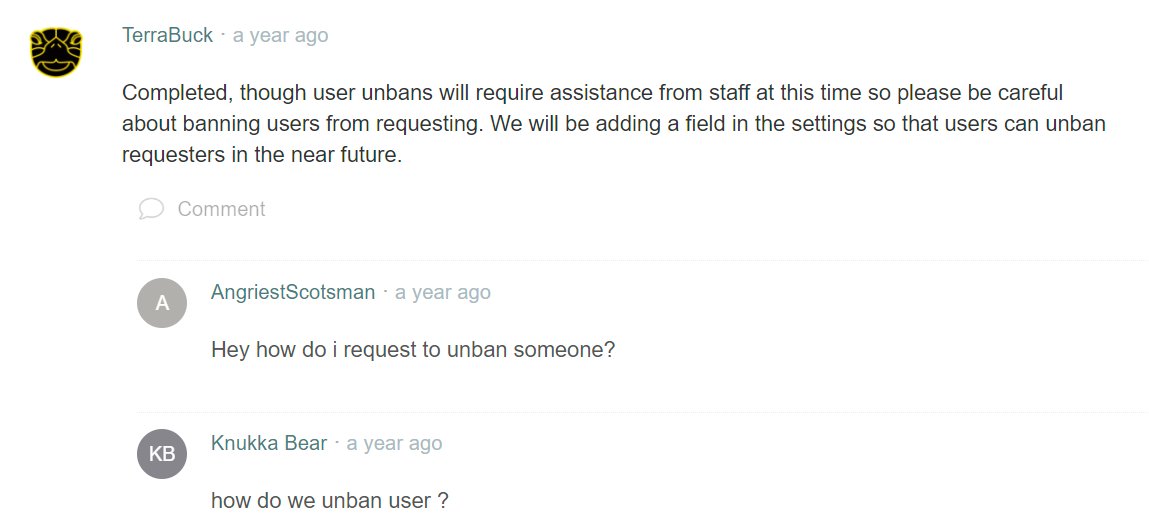
Wtf, we still need staff from StreamElements to unban?
I guess they just dont update the system so often =_=?
ebon forum
jovial hill
Holy....
https://i.imgur.com/YqciiSg.png
Yes. This has not been implemented yet on a frontend
We do update the system often, just can't do everything 🙂
 marble edge
Hi there, How can I add a video to stream elements?
 ebon forum
marble edge
Hi there, How can I add a video to stream elements?
ebon forum
marble edge
Hi there, How can I add a video to stream elements?
Just a video or as an alert etc?
ebon forum
marble edge
I'd like to add into my overlay
you can add the video to the overlay directly or use the asset rotator widget to have multiple banners rotating etc
marble edge
I cant seem to upload it its a .mov file and streamelements doesnt accept that
ebon forum
marble edge
I cant seem to upload it its a .mov file and streamelements doesnt accept that
convert that to webm or mp4 with max 30MB file size
hazy sierra
when i tried typing !level <denzii_yt> <1000> it didnt work and when my friend did me and typed !level <cloakedrage> <1000> it just said "that doesn't look like a username"
marble edge
ebon forum
convert that to webm or mp4 with max 30MB file size
i'll try that then thanks!
storm plover
@ebon forum you seem knowledgeable - maybe you could possibly help me with my question above? If you can't i understand. Thanks!
 ionic kelp
!levels add
hazy sierra
ionic kelp
`!levels add`
ok but how do i add them to other peopl
ionic kelp
Same way but with add
hazy sierra
ionic kelp
Same way but with add
so !level <user> <100> add
ebon forum
storm plover
<@149255081194160129> you seem knowledgeable - maybe you could possibly help me...
you are talking about the stream store not saving items? hard to catch all the conversation
ionic kelp
No. !levels add user amount
hazy sierra
ahhh ok thanks
calm drift
hazy sierra
when i tried typing !level <denzii_yt> <1000> it didnt work and when my friend d...
without < >, that was just for styling for better view
hazy sierra
ok
storm plover
I'm trying to add media files for chat commands, i got stuck at step 7. My item never saves and i couldn't see where widgets were in the step. Thanks a lot
ebon forum
storm plover
I'm trying to add media files for chat commands, i got stuck at step 7. My item ...
Please provide your account ID, i check your store. Account ID is here:
https://streamelements.com/dashboard/account/channels

StreamElements
The Ultimate All in One Platform for Streamers
storm plover
my account id is bon_bon_kitty
 pallid junco
HI
pallid junco
how can i export the themes from my gallery to my stream?
 lament blade
pallid junco
how can i export the themes from my gallery to my stream?
lament blade
pallid junco
how can i export the themes from my gallery to my stream?
Copy the link into a browser source
storm plover
ebon forum
Please provide your account ID, i check your store. Account ID is here:
https://...
Also thanks again for helping and looking into this. I really appreciate it
lament blade
😔
ebon forum
storm plover
Also thanks again for helping and looking into this. I really appreciate it
Need the account ID, not the name please.
 stray solstice
Question, I saw in someone's stream that when they shout-out somebody they're last clip popped up. Does anyone know how to do this? Please dm me if you do! Have a great day
storm plover
ebon forum
Please provide your account ID, i check your store. Account ID is here:
https://...
5fe0b09c1221519983205216
ebon forum
storm plover
5fe0b09c1221519983205216
Just logged in, i see a stream store item called popcornkitty.
Can you give me the exact steps that you do before you get that issue?
storm plover
I'm up to being in my overlay and looking where to access widgets described in step 7. Thank you!!
ebon forum
storm plover
I'm up to being in my overlay and looking where to access widgets described in s...
This widget is called "Store redemptions" - i added that to your main overlay, refresh and check please.
 dry warren
When I create a custom chat command is the user cooldown and the global cooldown in seconds or in minutes?
ebon forum
dry warren
When I create a custom chat command is the *user cooldown* and the *global coold...
those are in seconds
 slender prism
Bingo mod broken? Says "no emotes found."
lament blade
Hi, I m using Bingo module for my twitch chat about three weeks...everything works fine until yesterday... Command - !bingo twitch (points) not working with message: no emotes found. any ideas how to repair this?
 daring folio
Any word on when I'll be able to choose my channel emotes for Kappagen Explosion?
ionic kelp
None.
lament blade
Anyone know how to stream an unlisted youtube video?
ebon forum
lament blade
Anyone know how to stream an unlisted youtube video?
You can set the livestream to private BUT you will lose the chat functionality etc. in OBS etc.
lament blade
is that the only way?
someone know how to make green screen background without greensceen>?
ebon forum
lament blade
is that the only way?
That is the only way
lament blade
The stream needs to be live for the raid and the chat bots
ebon forum
lament blade
someone know how to make green screen background without greensceen>?
There are different tools depending on what software/hardware you use, but we do not recommend it - the results are bad compared to a proper green screen
ebon forum
lament blade
The stream needs to be live for the raid and the chat bots
The stream needs to be LIVE and PUBLIC
lament blade
Yes but can't get the trailer to play
ebon forum
lament blade
Yes but can't get the trailer to play
Mh, which trailer and where?
lament blade
Raid 2nd anniversary trailer and it's ok I think I found a work around
 pine kiln
Hello, I made a company payment to an account and wanted to get an invoice for tax purposes - how can I request one as I can't see it on the dashboard?
ionic kelp
Do what?
pine kiln
ionic kelp
Do what?
what do you mean?
ionic kelp
Not sure what youre talking about.
pine kiln
I made a 'tip' to an account via StreamElements website
and now we need an invoice to prove that it was paid ^^
otherwise our accountants will not be able to account it (for accounting and tax purposes)
 wary halo
There are no invoices, only thing you have is the withdrawal showing on your account.
ebon forum
pine kiln
hmmm
We have a tax document - but that shows a combined amount for a month
pine kiln
ok that would be perfect
ebon forum
what else do you need specifically?
pine kiln
that's all it would be
ebon forum
@pine kiln https://streamelements.com/dashboard/tipping/income-report
There you go.
StreamElements
The Ultimate All in One Platform for Streamers
Monthly combined tip history with fees etc.
In a nice PDF
pine kiln
amazing - only problem is the website keeps going top the 'home page' even when i click on the link
or the dashboard button
it just refreshes
 quasi oar
how do you setup that thing so when u follow it pops un on stream
pine kiln
Google chome/no adblocks etc so not sure
ebon forum
pine kiln
amazing - only problem is the website keeps going top the 'home page' even when ...
Can you log into to the dashboard? If not, try that link:
https://streamelements.com/logout
Then log in again
StreamElements
The Ultimate All in One Platform for Streamers
wary halo
quasi oar
how do you setup that thing so when u follow it pops un on stream
https://youtu.be/PsoxlbI-3ss like that
pine kiln
ebon forum
Can you log into to the dashboard? If not, try that link:
https://streamelements...
amazing ok nice i'm in now - i can currently only see money paid to me, is there a way to see money paid to others?
and then we can export as PDF
ionic kelp
No. Only the person who received the money.
ebon forum
pine kiln
amazing ok nice i'm in now - i can currently only see money paid to me, is there...
The income report is account specific, all tips that go to that account will be in the report.
So if you have multiple accounts from different people - need to collect those from the account owners.
pine kiln
sorry yeah i am the business owner making payment to a contractor
but if there is no way to actually prove it's paid then i don't know if we can use this anymore
 ebon crypt
Does anyone know if there's a way for users to convert Twitch Channel Points into Stream Elements Loyalty Points?
I know there's a !givepoints command, but I want it to be automated 🙂
Please @ me if you have a solution, thank you.
pine kiln
maybe it could be something added in future?
ebon forum
pine kiln
but if there is no way to actually prove it's paid then i don't know if we can u...
Well the system is designed to receive tips, not to pay people. Please use Paypal, wire transfer or what ever payment method fits the needs.
pine kiln
but in order to receive tips that = paying people no? ^^
like paypal
both ends are managed by Stream Elements i mean
ebon forum
Btw i believe i saw a single transaction that was done, it was a pretty big amount and it was an offline tip via SE.Pay - this is not good, we can't do this.
ebon forum
pine kiln
both ends are managed by Stream Elements i mean
Not exactly. There is a payment provider behind that system and there are specific rules. Those are TIPS, not payments. There are no invoices and there are rules - for example do not tip offline channels through SE.Pay.
pine kiln
ah i see
ebon forum
The whole system is designed to provide tips with alerts on livestreams while they are live. Please use something else to pay creators for services etc.
We have standard Paypal fees and pretty much average to low Credit Card fees, so there is no benefit of using that.
pine kiln
ok yeah, this creator was banned on paypal
but i'll let them know we can't use this system
maybe bank transfer is an option but again massive international charges make that a bad choice
does that mean the payment will bounce if they're offline?
ebon forum
pine kiln
ok yeah, this creator was banned on paypal
You could use it, but there are requirements such as it being done live with an alert. Not sure if you want your creators to show off the amounts that are being paid.
So far i saw one transaction, it might need to get refunded
pine kiln
yeah ok
that makes sense
i'll let them know that is potentially going to happen and then go from there
i assume if it does get refunded it would go back into our business bank account (which it was paid out from)
then we can pay through a different system (bank etc)
ebon forum
pine kiln
i'll let them know that is potentially going to happen and then go from there
Yes, if that will be refunded, it will go back to the account that it was sent from
ebon forum
pine kiln
ok thanks for explaining it all
Not sure about that. We have messaged the creator, it depends what we do with it. If that will be returned, the creator will be notified of course.
 untold atlas
Hey are you unable to make the alerts in stream elements any size?
ebon forum
pine kiln
appreciate the time and detail!
You too. Feel free to contact us down the road if something is not clear!
 rocky tapir
hello there I go often IRL and use the streamelemnt app, do you know how ACTIVATE the sound allert? where I shpuld copy or how should copy the URL?
ebon forum
untold atlas
Hey are you unable to make the alerts in stream elements any size?
You can of course make alerts of any size, even 1440p if you so desire
ebon forum
rocky tapir
hello there I go often IRL and use the streamelemnt app, do you know how ACTIVAT...
No need to mess with the URL whatever. The mobile app creates the Mobile overlay on our site (in the My overlays section) - this is what you need to edit. You can add TTS and all the normal widgets in there.
And the app will play TTS
rocky tapir
ebon forum
No need to mess with the URL whatever. The mobile app creates the Mobile overlay...
but i mean the twitch extation call soun dallert where my follower can play with bit and channel point
untold atlas
ebon forum
You can of course make alerts of any size, even 1440p if you so desire
im trying to make an alert that interacts with the overlay the video file i added is 1920*1080 but in the alert box is no where near that size
sorry if this is not the right chat not sure where to ask
ebon forum
rocky tapir
but i mean the twitch extation call soun dallert where my follower can play with...
Just add TTS to the alerts in that overlay
ebon forum
untold atlas
im trying to make an alert that interacts with the overlay the video file i adde...
You can adjust multiple things to achieve that. First: the original overlay should be 1920x1080 or greater in size.
Second- the alertbox dimensions should be 1920x1080 or greater
And this is when you can add the file and it will be in full resolution
But it will also scale
rocky tapir
ebon forum
Just add TTS to the alerts in that overlay
yeah TTS is add already whit bit and new sub but I mean the new twitch extation then you have the sound allert
ebon forum
rocky tapir
yeah TTS is add already whit bit and new sub but I mean the new twitch extation ...
Twich extensions are different, our overlays can only support things that are integrated into our service.
rocky tapir
so isnt possibile add a URL in streamelemnt app?
 halcyon jasper
Hey OBS live isn't working.
It prompts me to update it So I update it and it doesn't work
ebon forum
rocky tapir
so isnt possibile add a URL in streamelemnt app?
No it is not possible. Like i said, the app is using a specific overlay on our end, this is hardcoded and can't be exchanged for 3rd party browser sources.
ebon forum
halcyon jasper
Hey OBS live isn't working.
We would need more details here, error codes etc.
rocky tapir
ok I got it thansk anyway
ebon forum
halcyon jasper
It just doesn't work in obs
Well we need to know what is happening. "Does not work" can be anything
halcyon jasper
No OBS live Things on OBS Studio
like no sign in with streamlabs
Its just classic OBS no OBS live plugins
Basically all the obs live things but the updater still works
ebon forum
halcyon jasper
Its just classic OBS no OBS live plugins
Do you see "StreamElements" in the top menu in OBS?
This is where all the docks are etc.
halcyon jasper
no
ebon forum
Then OBS.Live is not installed or not installed properly
halcyon jasper
its installed properly
ebon forum
Please check your Programs in windows and see if you have OBS.Live there
this is where you can uninstall that and then reinstall it
halcyon jasper
in programs in features?
untold atlas
@ebon forum Sorry i know you are busy but am i able to show you my screen i am unable to work it out
ebon forum
untold atlas
<@!149255081194160129> Sorry i know you are busy but am i able to show you my sc...
We are not doing video sessions or voice calls for support. Please follow the guides how to work with our overlay editor
This might be helpful aswell
 silver citrus
i have problem with setting on SE.Sponsorships
#helpdesk-twitch i have problem with setting on SE.Sponsorships
ebon forum
silver citrus
<#199460642975907840> i have problem with setting on SE.Sponsorships
Hi. Would be good if you can describe the problem.
ebon forum
silver citrus
the third point does not unlock
Third point can be different for different campaigns
please write what exactly is not working
silver citrus
ebon forum
please write what exactly is not working

is accepted the first adn second setting
but i can do anything
there are 7 steps i need to complete but i am stuck here
ebon forum
silver citrus
We had a minor bug, we can fix that - but we need your account ID from that page please:
https://streamelements.com/dashboard/account/channels
StreamElements
The Ultimate All in One Platform for Streamers
silver citrus
ID PROFILE ?
ebon forum
Account ID from the page i linked
silver citrus
in private or here?^
ebon forum
here
silver citrus
600a70e8916b9289d96de2e4
ebon forum
Ok. Will forward that to developers, please be patient, might take some time to get fixed.
silver citrus
okok thanks
 pliant frost
qualcuno che parla ita
silver citrus
pliant frost
qualcuno che parla ita
credo nessuno
pliant frost
Come faccio a mettere gli sream elemets su twich
ionic kelp
#🇮🇹︱italiano
silver citrus
ebon forum
Ok. Will forward that to developers, please be patient, might take some time to ...
sorry but will it take a few hours or many days?
 tawny compass
Hello, I am using twitch studios, I am very new to streaming and a friend suggested I come here and I'm not sure if I'm in the right spot.
My question is, what are some useful overlays or extensions that I could use? I usually see people have a follower count, and some kind of point system where you put 100 points in to get them to sip water or something. Any ideas what those are so I can find them?
 main roost
hello, for some reason the streamelement bot spam filters for twitch are timing users out twice for the same message. the timeouts are right after each other but it clutters the mod actions box and timeout section on the user card. each word group has it's own message so it's not multiple filters being hit
ebon forum
silver citrus
sorry but will it take a few hours or many days?
Since this is related not only to us but also to the publisher - might take a couple of business days
silver citrus
ebon forum
Since this is related not only to us but also to the publisher - might take a co...
okok thansk
 hallow nest
Good day. I am having issues with Streamelements not displaying my sub count correctly on the dashboard.
brittle tapir
hello i need still help for my problems with the chat stats from the stream elements leaderboard. it does not work and i did not rename myself
 rustic juniper
How do I find out which account I will receive money from Se.Pay or rather how I change the account that I have a new one and I can't find it anywhere ?
viscid pebbleBOT
@rustic juniper Please contact us via email for support with SE.Pay. You can use our contact form here: https://streamelements.com/contact Thank you.
 slate sail
Hello I use kappagen and it worked. But now my own emotes aren't displayed when alerts like follow or sub should trigger an explosion. If I select the standard emotes it will work. Anyone have any suggestions?
 pulsar spire
so i changed my twitch name and my overlay are not working now on twitch
alerts work on the streamelements website but when i copy the link and put into obs they do now ork
ebon forum
slate sail
Hello I use kappagen and it worked. But now my own emotes aren't displayed when ...
There is a bug currently with Kappagen - it can't use channel emotes now. We are working on it
slate sail
OK thank you
 short nova
Hello, when I use the command !bingo twitch...I get a response that says No Emotes Found. I can't seem to find the problem.
pulsar spire
None of the commands work for me. Im not sure why
ebon forum
short nova
Hello, when I use the command !bingo twitch...I get a response that says No Emot...
We are looking into that, got another similar report today
ebon forum
pulsar spire
None of the commands work for me. Im not sure why
Are you using the custom bot name feature?
ebon forum
pulsar spire
in not sure what that is.
please provide your channel name, we check that
pulsar spire
it used to be called LameGotm1lk however i swapped it today to Think_Theory
ebon forum
pulsar spire
it used to be called LameGotm1lk however i swapped it today to Think_Theory
ah that makes sense
viscid pebbleBOT
@pulsar spire If you changed your name on Twitch, please follow these steps:
- Visit https://streamelements.com/logout and then log in again by connecting with Twitch.
- On the right side of the dashboard page that opens, select Join under bot settings. If it says Part select that and then select Join to send the bot to the chat. Don't forget to mod the bot by typing /mod streamelements in your channel if you have not already.
- Post your old and your new name here so that we can update your channel's chatstats tracking (must be done by staff).
ebon forum
Please follow that guide^
 wanton jetty
Do we know if there are plans to have the bits boss have customisation via CSS etc, I love the bits boss but its very bland, id love to add my own flare to it 🙂
ebon forum
pulsar spire
it used to be called LameGotm1lk however i swapped it today to Think_Theory
saw the message.
the flow is:
part > log out, log back in, join channel
pulsar spire
ok I did everything and it work. The new name is Think_Theory, will everything in terms of points and all convert?
ebon forum
pulsar spire
ok I did everything and it work. The new name is Think_Theory, will everything i...
yes. i will adjust the chatstats now
pulsar spire
awesome thank you very much
how will I know when everything is adjusted?
never mind
 crisp frost
So, who do I talk to about unlinking a twitch account?
ionic kelp
Is it a single account or one tied to another one?
 gaunt chasm
on the kappagen I do not find my emote there is something wrong

 fathom lava
how do I withdraw my tips ive recieved?
 nimble dune
gaunt chasm
on the kappagen I do not find my emote there is something wrong
nimble dune
gaunt chasm
on the kappagen I do not find my emote there is something wrong
Known issue
gaunt chasm
oki
nimble dune
fathom lava
how do I withdraw my tips ive recieved?
SE.Pay?
fathom lava
nimble dune
SE.Pay?
It doesnt pop up for me
brittle tapir
@ebon forum can yo uhelp me pls as well :)?
nimble dune
fathom lava
It doesnt pop up for me
You're using Streamlabs for tipping.

Ask streamlabs
fathom lava
nimble dune
You're using Streamlabs for tipping.
see this was earlier before I changed it to streamlabs
 crisp frost
ionic kelp
Is it a single account or one tied to another one?
crisp frost
ionic kelp
Is it a single account or one tied to another one?
it also has a test YT on that account as well but I wanted to unlink both of them so I could link them to my account with my Main YT.
nimble dune
fathom lava
see this was earlier before I changed it to streamlabs
Okay, the tip was via PayPal and not SE.Pay.
viscid pebbleBOT
@fathom lava If a viewer tipped through PayPal but no information appears in your StreamElements account, this generally means PayPal has held the tip for verification.
Until PayPal clears the tip and sends back a confirmation to your StreamElements account, no information will appear there and no alert will play, as that confirmation is the only way for us to be aware of a successful transaction.
There is a posibility that the tip may have been sent as an eCheque/eCheck - these tips can take from 7 up to 21+ days to show up on our side. Tippers can usually cancel these.
If you believe there may be an issue with the transaction, you'll need to contact PayPal support as StreamElements is only a passthrough service and never actually gets involved with the transaction or touches the money
fathom lava
ohh okay, so I jsut have to wait then
 torn fiber
Every time I download ground control when I try and open it it doesn’t open, any suggestions?
nimble dune
torn fiber
Every time I download ground control when I try and open it it doesn’t open, any...
 blazing geyser
Hello there, I use the Stream Elements Chatbot for a "Watchtime" Command in my chat but it says 0 secs no matter which user it uses
viscid pebbleBOT
@blazing geyser The !watchtime command is directly tied to the Loyalty system. The Loyalty system must be enabled for viewers' watchtime to count up.
To enable Loyalty, please go to the Loyalty section of your account: https://streamelements.com/dashboard/loyalty
Watchtime counts up every 10 minutes alongside Loyalty points, and only while the stream is live. Reruns will not be counted.
Please note that watchtime is not tracked by Twitch and there is no way to retroactively apply past watchtime to viewers.
StreamElements
The Ultimate All in One Platform for Streamers
blazing geyser
Nice Bot! thanks for the advice, I will then enable the loyalty system and see if it works correctly next time
nimble dune

 cobalt void
Hello, Can two streamelements accounts share the same paypal account?
torn fiber
nimble dune
https://discord.com/channels/141203863863558144/199460642975907840/7777883771518...
was greeted with this
 nimble dune
torn fiber
was greeted with this
nimble dune
torn fiber
was greeted with this
The installer doesn't open or ground control is installed but doesn't open?
torn fiber
ground control is installed but doesn't open
nimble dune
torn fiber
was greeted with this
restart pc and try again #helpdesk-twitch message
Or run the cmd as administrator
Type cmd to the windows search, then right click on it > run as administrator
torn fiber
hm, still gives say Could Not Find
nimble dune
 did you follow the steps?
torn fiber
i believe so, opened task manager and killed it, then opened cmd and typed it in and tried reopening GC
brittle tapir
@nimble dune can you help me as well :9?
viscid pebbleBOT
@brittle tapir Welcome to the helpdesk! Please let us know how we can assist you today and a support volunteer or staff member will assist you as soon as they are available. Thank you for your patience.
brittle tapir
my chat stats on the panels streamelements leaderboard does not work
@viscid pebble my chat stats on the panels streamelements leaderboard does not work
nimble dune
torn fiber
i believe so, opened task manager and killed it, then opened cmd and typed it in...
Hmm, if you try to open GC as administrator?
viscid pebbleBOT
@brittle tapir If you changed your name on Twitch, please follow these steps:
- Visit https://streamelements.com/logout and then log in again by connecting with Twitch.
- On the right side of the dashboard page that opens, select Join under bot settings. If it says Part select that and then select Join to send the bot to the chat. Don't forget to mod the bot by typing /mod streamelements in your channel if you have not already.
- Post your old and your new name here so that we can update your channel's chatstats tracking (must be done by staff).
torn fiber
nimble dune
Hmm, if you try to open GC as administrator?
this is about the closest it gets to opening
 nimble dune
torn fiber
this is about the closest it gets to opening
nimble dune
torn fiber
this is about the closest it gets to opening
Sorry but I don't know. Can you try this again? #helpdesk-twitch message If still doesn't work reinstall gc.
torn fiber
nimble dune
Sorry but I don't know. Can you try this again? https://discord.com/channels/141...
ah i figured out how to fix it, i manually went into the files and deleted 'window-state.json' and it opened as soon as i launched this time
 brittle tapir
@viscid pebble @nimble dune i did no renamy myself, which steps should i do then?
 native rock
gaunt chasm
on the kappagen I do not find my emote there is something wrong
native rock
gaunt chasm
on the kappagen I do not find my emote there is something wrong
Same issue here! The other issue I'm having is my emotes are not showing up on my stream. I hope the issue gets resolved sooner than later.
 hollow vessel
@viscid pebble Hi, i have Streamelements on my active on chat mods, but commands didnt work. I clicked "part channel" then join etc. Last 2 months - almost zero commands /custom commands from Streamelements :/. What should i do? He have super mod, and his "last active" is N/A
 lime dune
Hi there, not sure if this is the right channel, but I stream on twitch, so there's that.
I'm currently working on my alert box, have successfully changed my follower alert already and am now trying to change the cheer alert. I uploaded the new gif and sound, got all the settings right, saved, but when I emulated a cheer alert, it was still the old one. Do I just have to wait or is it a bug?
 foggy heart
lime dune
Hi there, not sure if this is the right channel, but I stream on twitch, so ther...
foggy heart
lime dune
Hi there, not sure if this is the right channel, but I stream on twitch, so ther...
You will likely need to check your variation settings for the alert, as if those are still default they will override your settings.
lime dune
foggy heart
You will likely need to check your variation settings for the alert, as if those...
worked instantly! Thank you 😄
 brittle salmon
Hi! chat bot not working
viscid pebbleBOT
@brittle salmon Go to the Dashboard > Right side > Part channel > Join channel(https://streamelements.com/dashboard)
 brittle salmon
Thank You!
 random stag
Is there a way to have a command give a random response?
 frosty jolt
Hello,
I got a Problem with my activity feed. The last Thing in the activity feed is 4 Days ago, but I streamed today got a Follow and it still do not show up there.
Does somebody know that problem and could help me?
Account ID: 60412c8b3fc33231c3fae815
foggy heart
random stag
Is there a way to have a command give a random response?
I believe you can make something using the ${random.pick} variable
viscid pebbleBOT
@frosty jolt Please provide your account ID found at the top of this page: https://streamelements.com/dashboard/account/channels This ID is public info and safe to share here.
 tall owl
trying to get my twitch created enough to start streaming later and it wants me to download so many things just to start
random stag
foggy heart
I believe you can make something using the ${random.pick} variable
Does Random pick only do 3 at a time?
Never mind, I got it. I had punctuation which was causing issues with the parser.
frosty jolt
viscid pebble
<@!396682439482933252> Please provide your account ID found at the top of this p...
Do you mean this? 60412c8b3fc33231c3fae815
foggy heart
frosty jolt
Do you mean this? 60412c8b3fc33231c3fae815
Passed this over to our devs to have a look
frosty jolt
foggy heart
Passed this over to our devs to have a look
Thank you, but you see my problem too, don't you?
wary halo
It's a known issue, so it needs dev attention
foggy heart
frosty jolt
Thank you, but you see my problem too, don't you?
Yupp, took a look at it and wasn't able to resolve it on my end so I let the team who can look into it further know.
 heavy plover
How i can do a bot in my chat who send links from my donation site and something like that
And timeout guys in my chat
frosty jolt
foggy heart
Yupp, took a look at it and wasn't able to resolve it on my end so I let the tea...
So there is nothing we can do at the moment, right?
If not, thank you for your help anyway ;D
Hope your Devs can help me ;D
wary halo
No, you have to wait
wary halo
heavy plover
How i can do a bot in my chat who send links from my donation site and something...
https://youtu.be/l6Xcq_kBBbw you need to setup commands, timers and chatbot
heavy plover
wary halo
<https://youtu.be/l6Xcq_kBBbw> you need to setup commands, timers and chatbot
Thx
 spring crest
Hey im trying to set up watch time in my channel and it's not working and I added streamelements as a moderator for my twitch and it still doesn't work
viscid pebbleBOT
@spring crest The !watchtime command is directly tied to the Loyalty system. The Loyalty system must be enabled for viewers' watchtime to count up.
To enable Loyalty, please go to the Loyalty section of your account: https://streamelements.com/dashboard/loyalty
Watchtime counts up every 10 minutes alongside Loyalty points, and only while the stream is live. Reruns will not be counted.
Please note that watchtime is not tracked by Twitch and there is no way to retroactively apply past watchtime to viewers.
StreamElements
The Ultimate All in One Platform for Streamers
 crystal shuttle
Im not sure how to reset a stream starting overlay
viscid pebbleBOT
@crystal shuttle Right click on the BrowserSource > Properties > Scroll down a bit > Refresh cache of current page
crystal shuttle
I did this and it didnt restart the timer
Im not sure how to reset a stream starting overlay timer
fixed it
 bright light
can someone help enable se pay
viscid pebbleBOT
@bright light SE.PAY is available for streamers who are at least 18 years old, with bank account under their name in one of the following countries and have at least 101 follower (Twitch) / 101 subscribers (YouTube):
Austria, Belgium, Czech Republic, Denmark, Finland, France, Germany, Ireland , Italy, Netherlands, Poland, Portugal, Slovakia, Spain, Sweden, Switzerland, United Kingdom, United States.
If you meet these criteria and don’t see SE.Pay, let us know.
For information on SE.Pay payment methods, their fees and settlement times see https://streamelements.com/dashboard/tipping/fees
 viral acorn
@viscid pebble Is there any way to share a counter command between YouTube and Twitch, or to mirror commands in general between a YouTube and Twitch chat bot?
 twilit charm
You know, I can’t explain why this would be but I disconnected from internet tunnel and changed my connection slightly, and then it worked. It had stopped working only for that one PC at my main stream office.
 cursive canopy
Hello,
Is there a way to add Extra-Life Donations to the Activity Feed or chat? I can't seem to find it if there is. Thanks!
foggy heart
cursive canopy
Hello,
Is there a way to add Extra-Life Donations to the Activity Feed or chat? ...
I believe you can find setup information for that here: https://blog.streamelements.com/tools-and-tips-for-hosting-a-charity-stream-11788c189a41
cursive canopy
foggy heart
I believe you can find setup information for that here: https://blog.streameleme...
Thanks! But unfortunately that looks like its only a 'how to' for the alerts (which I already have set up). I was hoping to get them to show up in chat or the activity feed so as to be easier to read while streaming. As of now the only way to read them is through the obs preview window, which with my setup is quite small and not really convenient. With the preview window, I also have to catch it as it pops up or I miss it entirely.
foggy heart
Ahh, I see. I'm not sure if there's something specifically for that, I'll have to look around
 native cosmos
Got a prime sub yesterday and it is not showing up in the event list or my "recent sub" browser source. The alert showed up since i am using Streamlabs for those, but its like it didn't get registered at all by Streamelements. (posted in #helpdesk-selive as well but i don't know where it belongs the "most")
lament blade
does anyone know how to get a text in obs showing the current song playing from the mediarequest?
 manic osprey
is anyone else having issues with overlays not showing up in obs ?
 polar perch
hello, the stats and emote count has stopped tracking in my channel. Could i get a fix please 
viscid pebbleBOT
@manic osprey OBS > Settings > Advanced > Scroll down > Enable or disable Browser Source Hardware Acceleration, depending on its current state > Restart OBS
https://i.imgur.com/ggMe9ZE.png
@polar perch Please provide your account ID found at the top of this page: https://streamelements.com/dashboard/account/channels This ID is public info and safe to share here.
polar perch
@viscid pebble account ID: 5d4bcd55afe25a6e7e3ca150
 dull haven
Anyone else facing the issue where dashboard is stating "offline" whilst your online/streaming? Is not private etc.
 coral leaf
Hi! Someone tip me, but I didn’t receive it 😦
 terse spindle
Hello
viscid pebbleBOT
@dull haven StreamElements menu, on top of OBS > Logout > Login
foggy heart
coral leaf
Hi! Someone tip me, but I didn’t receive it 😦
Were you able to verify the tip went through?
dull haven
Is that on browser or OBS itself?
terse spindle
Hello how do I redeem my twicht code?
foggy heart
dull haven
Is that on browser or OBS itself?
That'd be OBS itself
dull haven
ahhh i dont think i can do that as not using streamelements obs
foggy heart
What dashboard are you referring to?
foggy heart
terse spindle
Hello how do I redeem my twicht code?
Not sure what you mean by that, could you explain?
dull haven

So i have widgets that i have added as browser sources on OBS that i use etc
But it seems like its not seeing im online etc
so thats on streamelements.com dashboard
foggy heart
Are you're overlays not showing when you use them?
foggy heart
What are you using to stream?
dull haven
streamlabs OBS
Have been using same setup for a while with no issues, so wasnt sure if it was a issue with pulling info that im online
foggy heart
I'm not sure why it wouldn't be seeing you as online. When is the last time it was accurate?
dull haven
2 or 3 days ago i last used
foggy heart
Gotcha. Well, for the overlays at least, how do they work in the overlay editor? Do the emulations work in the browser?
dull haven
yes looks like widgets work on emulations
foggy heart
And are events populating in the activity feed of the dashboard?
dull haven
Yes my last event is listed. So seems its pulling events etc.
foggy heart
So it seems like things are working on this end. We can't really support the SLOBS part, so why the overlays aren't working there may be an issue you'd have to ask them about
dull haven
although something that is strange im not sure if a issue with widget/what
one of the widgets im using is to display followers etc.....

currently showing a random follow that doesnt exist
foggy heart
Did you test emulation?
 foggy heart
If you tested emulations, it will keep that data until you refresh. Then it'll go back to showing the normal names
foggy heart
Just save and exit. When you load it back up it should have cleared that emulation data out
dull haven
Ahhh sorted yeah
just hide to hide + reopen on obs for it to refresh the source
So for the dashboard issue showing me as offline? Is that not a major issue as widgets still seem to be pulling through etc?
 still thicket
Hey guys I stream to both facebook and twitch, but now everytime i enter my twitch stream key, and what have you when i click go live it only gives me the option to go live to facebook can someone help me?
foggy heart
dull haven
So for the dashboard issue showing me as offline? Is that not a major issue as w...
It doesn't seem to be messing up the widgets, if you go live again and it doesn't update we can look into it!
viscid pebbleBOT
@still thicket StreamElements menu, on top of OBS > Logout > Login
dull haven
thanks im live atm and obviously have tried restarting stream etc
Just strange, ill give it a few days and see if it resolves itself
foggy heart
Gotcha! If you share your account ID, I can take a look too
viscid pebbleBOT
@dull haven Please provide your account ID found at the top of this page: https://streamelements.com/dashboard/account/channels This ID is public info and safe to share here.
still thicket
thank you guys
foggy heart
dull haven
5e11cb593cac7b692c559a5e
I'll ask around about this, but let us know if anything else acts weird
dull haven
thanks again
 olive apex
Hi guys, can you help me solving my problem? I'm not earning points even watching the streams. This happens in some channels, not in all of them
foggy heart
olive apex
Hi guys, can you help me solving my problem? I'm not earning points even watchin...
We don't manage the points of individual streamers and their channels, so we usually point you towards them/their mods as they can adjust points as they see fit

 drowsy egret
 edgy marsh
hello i have a problem
edgy marsh
hello i have a problem
disable custom css
edgy marsh
ty
lament blade
Can anybody help me? I want to make a webcam boarder but Im having some problems.
drowsy egret
lament blade
Can anybody help me? I want to make a webcam boarder but Im having some problems...
what's the issue?
 jagged matrix
Hi everyone! I'm trying to add a death counter from chat as a mod. Do you know how to do it?
drowsy egret
jagged matrix
Hi everyone! I'm trying to add a death counter from chat as a mod. Do you know ...
you need to create a command with the following variable: ${count deaths}
jagged matrix
What is the syntax?
drowsy egret
!cmd add !death Death counter: ${count deaths}
jagged matrix
Tahnks a bunch!
 versed wharf
I'm hoping to get help with what I should do after I change my twitch username. Will I lose all of my stream elements overlays attached to my current twitch username?
drowsy egret
versed wharf
I'm hoping to get help with what I should do after I change my twitch username. ...
no, your account will keep everything as it is
 warm mauve
i keep getting a "response message" in my twitch chat do you guys know how to fix this?
lament blade
drowsy egret
what's the issue?
Im like really dumb whe it comes to this stuff and I cant seem to get the recent follower to work
drowsy egret
warm mauve
i keep getting a "response message" in my twitch chat do you guys know how to fi...
there's most likely a timer/command in your channel that has "response message" as an actual response
warm mauve
drowsy egret
there's most likely a timer/command in your channel that has "response message" ...
i have checked them quite a few times and have disabled all of them just for testing purposes and it still happens
ive google TF out of it too and cant find the answer
viscid pebbleBOT
@warm mauve Please provide your account ID found at the top of this page: https://streamelements.com/dashboard/account/channels This ID is public info and safe to share here.
warm mauve
viscid pebble
<@!709611567125364748> Please provide your account ID found at the top of this p...
5fa762836c4ecd84925d5fbf
storm plover
Hi! I managed to add media as widgets on my overlay as instructed (to be activated by chat commands) however the alert doesn't show on my OBS, only on SE overlay page....help please? The chat command comes up
warm mauve
storm plover
Hi! I managed to add media as widgets on my overlay as instructed (to be activat...
if you click "edit" on the overlay and then click this it will give you the browser source you need to put into streamlabs

 junior mesa
Hello - Can someone help me? My chat commands have stopped working for some reason. !followage and so forth
storm plover
warm mauve
if you click "edit" on the overlay and then click this it will give you the brow...
I tried that 😦
warm mauve
storm plover
I tried that 😦
nuts....sorry that worked for me
storm plover
is it coz I'm not streaming?
my regular alerts work, do I need to add the link once or twice as my alert box and this media are on the same overlay
drowsy egret
storm plover
my regular alerts work, do I need to add the link once or twice as my alert box ...
you can add the widget to the same overlay that has your alerts, that way you dont need to add a second overlay to your obs
storm plover
so just the one browser link yeah..? So I just update it
as my alert box has been working?
sorry I'm new to SE
drowsy egret
storm plover
so just the one browser link yeah..? So I just update it
yeah, you just use the browser source link that has your alerts
drowsy egret
also make sure your browser source is set to 1920x1080
 red verge
Is there a way to award points for talking in chat?
 old cosmos
Hello, my sub alerts currently have two lines for resub/gift sub..is there a way to increase the line spacing between the two to improve the cosmetics? https://prnt.sc/11hi8ci
 junior mesa
Is there a reason that all my bot chat commands would stop working? The modules and commands are enabled but nothing is working
viscid pebbleBOT
@junior mesa If your commands recently stopped working and you're using OBS.Live and a custom bot name do the following:
- In OBS.Live, click on the hamburger menu (three stripes) at the top left of your activity feed
- Click on Stream Settings > Custom bot name
- In the Custom bot name field select Set custom bot name, not your already existing username (with capital letters). Note: If you already connected an account that way, the third entry will show as the account name (see image https://i.imgur.com/sO7fWOX.png).
- Scroll a bit down and click on the purple Connect Custom Bot Account button
- Log in as usual and Authorize the custom bot name
- Back in the Activity feed, click on the Send Test Message button and check if your custom bot name starts working again

 upbeat rock
I have huge ping when using OBS NDI when trying to stream with 2 computers. Cant figure it out at all
junior mesa
Thank you!
 lament grove
Hey, how do I merge my twitch with my YouTube? I signed in separately before I realized there was an add account button.
 dusty prawn
I also have that question ^
viscid pebbleBOT
Account Merging - Please note:
- Merging accounts only allows faster ways to switch between accounts
- Merging accounts does not allow data sharing between accounts - different streaming platforms, different type of events
- Merging accounts allows duplicating/sharing overlays between the accounts
If you understand the limitations of merging and want to proceed, please find the JWT tokens (!jwt) from both accounts you want to merge and you will be directed to DM them to a staff member
 fossil thicket
is there a issue getting to your dashboard. all im getting is the main page and thats it
viscid pebbleBOT
@fossil thicket Please logout of StreamElements at https://streamelements.com/logout and then login again to your account (Twitch/YouTube/Facebook).
coral leaf
foggy heart
Were you able to verify the tip went through?
yes! my follower sent me the proof of payment :C
 upper sphinx
How can I get my chat stats to work? I hit 100 followers, and I've never changed my name, but it always appears when I click the link with "404 Page not Found"
 cloud portal
Hey question
How come I can't add this extension even though all the names are right
I used my ps4 name an my epicgames name and it wont work
 ionic kelp
@cloud portal you'd have to ask the extension dev. That's not ours.
cloud portal
Is there a extension channel here
ionic kelp
Not for that. We only provide support for streamelements services which that isn't.
old cosmos
Hello, my sub alerts currently have two lines for resub/gift sub..is there a way to increase the line spacing between the two to improve the cosmetics? https://prnt.sc/11hi8ci
Lightshot
cloud portal
Ok
 regal viper
Whenever I paste my overlay link, it shows the streamelements homepage itself on my stream instead. I've tried refreshing the page and using different overlays but each one does the same thing. How do I make it show the overlay instead of the website?
 tepid tulip
When I withdraw money from my Merch store, I understand it takes awhile. But what does a successful withdrawal look like in the dashboard?
 surreal plume
Can someone help me? Stream elements says I’m offline but I’m streaming
 pliant talon
Hi, I'm having trouble with StreamElements 😦 I'm using the emote explosion but it don't allow me to use my own emotes, I uploaded them to Twitch 2 or 3 weeks ago and my Twitch account is linked to my StreamElements account, but it still don't let me use my own emotes. Thanks on advance ♥
viscid pebbleBOT
@regal viper Please logout of StreamElements at https://streamelements.com/logout and then login again to your account (Twitch/YouTube/Facebook).
foggy heart
tepid tulip
When I withdraw money from my Merch store, I understand it takes awhile. But wha...
You should be able to see something in the Withdrawal History of the dashboard
ionic kelp
@pliant talon known issue being worked on.
pliant talon
ionic kelp
<@688851530065248323> known issue being worked on.
Ohhh I see 😦 Thx
tepid tulip
foggy heart
You should be able to see something in the Withdrawal History of the dashboard

There's no transaction ID and I have nothing in my PayPal to reflect it.
 sleek gust
I have a problem with the bot in my channel, is not working,
he is not respond to commands, I recently changed my nickname to twitch and now I noticed this problem
viscid pebbleBOT
@coral leaf Please provide your account ID found at the top of this page: https://streamelements.com/dashboard/account/channels This ID is public info and safe to share here.
@tepid tulip Please provide your account ID found at the top of this page: https://streamelements.com/dashboard/account/channels This ID is public info and safe to share here.
@sleek gust If you changed your name on Twitch, please follow these steps:
- Visit https://streamelements.com/logout and then log in again by connecting with Twitch.
- On the right side of the dashboard page that opens, select Join under bot settings. If it says Part select that and then select Join to send the bot to the chat. Don't forget to mod the bot by typing /mod streamelements in your channel if you have not already.
- Post your old and your new name here so that we can update your channel's chatstats tracking (must be done by staff).
sleek gust
Thanks !
"3) Post your old and your new name here so that we can update your channel's chatstats tracking (must be done by staff)."
i dont need that , thanks again ❤️ - old nickname - mrVikingCS
tepid tulip
viscid pebble
<@!362679535579430914> Please provide your account ID found at the top of this p...
Ignore this. I see that an email from you got sent to spam in my inbox.
My apologies
 gloomy marsh
Hi i want to know how to grow & boost my yt
 main summit
Looking into it further and the streamelements activity feed has still not picked up any new follows or activity. Any way y'all could look at it and see what's up with that? And if further research is required how should I expect further communication?
60768a6d59dff13f091a999f acct id
 restive flint
is there a way to set up a command to add a user as a regular with a chat command?
viscid pebbleBOT
Chat/Bot Levels
100 - Viewer
250 - Subscriber (Twitch subscribers automatically placed at this level)
300 - Regular
400 - VIP (Twitch VIP automatically placed at this level)
500 - Moderator (Twitch chat moderators automatically placed at this level)
1000 - Super Moderator__
1500 - Broadcaster
Dashboard Manager Levels
Bot Supervisor
Editor
Full Access
Owner
https://i.imgur.com/s61Liry.png
 ionic kelp
!levels add username #
restive flint
oh levels, thank you
another question, can the addquote command be adjusted to a lower user level than moderator? I don't see a way to do it
zenith widget
No, its moderator by default
 fading flare
Hey guys! I noticed that when setting up my !so command "!so blahblahblah ${touser}", when it's typed in as "!so MIXLMusic" it works fine, but if I type "!so @fading flareMusic", the @ sign appears, only after the first try. The first time I typed it, it responded as expected, and didn't include the @ sign, but now it does. This breaks my !so a little bit since I have StreamElements respond with a link to their stream, and "https://twitch.tv/@MyNameHere" isn't a valid link with the @ sign. Is there something I'm missing?

notice how in the top command with the @ sign, it works as expected, but in the bottom command, it shows the @ in the link?

 pallid hound
hi i need help i copied my stream setup to a friend to speed up their setup process now their chat box is linked to my channel how to i get it changed over to their channel
viscid pebbleBOT
@pallid hound StreamElements menu, on top of OBS > Logout > Login
 barren crag
hey quick question, am i able to use stream elements overlay if i stream from my ps4 because i can use the overlays that overlay expert give me im just not sure about this.
zenith widget
@fading flare either use the template we have when creating the command or switch to either ${1} or ${user}
viscid pebbleBOT
@barren crag Consoles do not have native support for overlays. You would need a capture card, PS4 remote play or Xbox companion app and a PC with OBS in order to have overlays over your console gameplay.
We have a blog post about how to set up console streaming with our essential tools: https://blog.streamelements.com/how-to-stream-on-console-7b620b1c46c3
fading flare
zenith widget
<@!136290693919408128> either use the template we have when creating the command...
Hm, ${user} just uses the command typer's name correct? The template exactly as it's programmed has the same output with the @ sign unfortunately
zenith widget
${sender} - the actual user of the command - should remove the [at] symbol
${user} - if no other username is provided, its going to use the user of the command - should remove the [at] symbol
${1} - uses the 1st word after the command invocation (example "!test this_word") - 1:1 copy of the word
${touser} - (i don't like using this) is either ${1} if there is something after the command, else if its empty its going to be ${sender} - actually not sure if it removes the [at] symbol.
And this is the default shoutout from the template
 fading flare
zenith widget
${sender} - the actual user of the command - should remove the [at] symbol
${use...
fading flare
zenith widget
${sender} - the actual user of the command - should remove the [at] symbol
${use...
Gotcha, that clears up how each variable is handled, thank you. ${touser} would be ideal if it'd remove the @ symbol, but it doesn't appear to be consistent, and from my screenshot above, I'm not sure what the difference between the top attempt and bottom attempt were.
zenith widget
Try out the template
fading flare
sure, trying now
ionic kelp
That's because you're using whatever autocomplete after it. Try typing and pressing tab without the @.
 lavish path
Does anyone else have OBS with a browser view on the overlay suddenly stop playing notif sounds through monitoring?
everyone on the stream could hear it but I could not and had to open it in its own browser tab just so I could hear the alerts
fading flare
ionic kelp
That's because you're using whatever autocomplete after it. Try typing and press...
Yep, unfortunately in the DJ community it's common place to use the @ autocomplete
viscid pebbleBOT
@lavish path If you are not hearing your alerts and/or Media Request, you are most likely using the Control Audio via OBS option in your browser source properties.
To make sure you hear the alerts and the stream also hears them, follow along the screenshot bellow.
https://cdn.discordapp.com/attachments/199460642975907840/685371800456134686/unknown.png
 fading flare
zenith widget
Try out the template
fading flare
zenith widget
Try out the template
and now the template is working exactly as expected. My bad! Sorry about that KeiZar!
zenith widget
no worries
surreal plume
I need help StreamElements says I’m offline but I’m streaming I don’t understand
lavish path
viscid pebble
<@!112179170993254400> If you are not hearing your alerts and/or Media Request, ...
already set up, monitoring just kinda broke
viscid pebbleBOT
@lavish path Obs.live is a plugin for OBS Studio for the best OBS support, please join their Official Discord @ discord.gg/obsproject
lavish path
hadn't been sure if it was something specific with OBS or SE
also didn't know OBS had a discord, thank you very much!
surreal plume
Can someone help please
fading flare
surreal plume
I need help StreamElements says I’m offline but I’m streaming I don’t understand
is the bot in the chat?
zenith widget
bot has nothing to do with that issue
surreal plume
Yes
viscid pebbleBOT
@surreal plume Please provide your account ID found at the top of this page: https://streamelements.com/dashboard/account/channels This ID is public info and safe to share here.
surreal plume
Ok
surreal plume
viscid pebble
<@!564164112741826644> Please provide your account ID found at the top of this p...
Want me to pm you the id
surreal plume
viscid pebble
<@!564164112741826644> Please provide your account ID found at the top of this p...
5d7766f007c67a7a07f43253
zenith widget
I've resubbed your webhooks. You will also have to logout of our dashboard and login again and the online status should be good again.
surreal plume
Ty
 cedar basin
hello can someone help me with dropped frames?
viscid pebbleBOT
@cedar basin Dropped Frames means that you have a bad connection between your device and the streaming platform and most likely something related to your ISP not handling the connection properly.
Speed tests usually cannot help solve this problem and its best to use this guide: https://obsproject.com/wiki/Dropped-Frames-and-General-Connection-Issues
If you stream to twitch, use the !twitchtest command and do a connection test to your regional servers.
 empty coral
hello I wanted to ask you something for example one does in chat ! telegram and bot writes in private chat on twit @viscid pebble
 tropic rampart
Hi! I have a question about the SE Payments portal, once we set it up do we receive an invitation to payment again? Or because we've already set it up we don't receive those emails again?
zenith widget
Once you setup an account for the payments portal, you don't need a new invite as we have everything synced up to your account, so next payout will be processed automatically(within a given period of cource)
@empty coral there is an option in the custom command to whisper the user of thecommand
tropic rampart
zenith widget
Once you setup an account for the payments portal, you don't need a new invite a...
Thank you so much!
empty coral
zenith widget
<@!787338710990454825> there is an option in the custom command to whisper the u...
How do you put it?
zenith widget
 empty coral
zenith widget
empty coral
zenith widget
thank you very much
 versed frigate
Good evening all. I had an idea I was trying to implement but I’m not sure exactly how to get started. My goal is to have a command trigger a custom gif that falls from the top of the screen. Attached to the gif is the username of the user who sent the command. A bump in the right direction would be appreciated
zenith widget
Steps to make a command trigger sound on stream:
- Go to Stream Store page here: https://streamelements.com/dashboard/store/items
- Add an item that has these settings on it:
- Stream Perk
- Loyalty settings to your desire
- (Next step) Add contents (image and/or sound you want to play)
- "Redeeming this item shows an alert
- Redemable via chat
- Skip Requirements
- Get the item name/command from the 2nd creation page
- Go to commands page here: https://streamelements.com/dashboard/bot-commands/custom-commands
- Add command with desired name and have response for command as:
${redeem item_name_here} - Go to your overlays and edit the overlay you use.
- Click on "widgets" and add "Store redemptions" widget. Click save and you should be golden.
- Test your own command in chat and have OBS or editor open to hear sound
This can also be used for your purpose as well
other then this, maybe there is something in #widget-share that fits 100% to what you want to achieve
lament blade
Hello, i have a problem with the Follower Message. I want that if i became a Follower that Streamelements write it in the chat. I don't even know how it goes or how i can make it on. Please help me.
zenith widget
Go to the dashboard -> modules on the left side menu -> Chat alerts
lime dune
I'm still editing my AlertBox and I'm using gifs. Is there a way to ensure that a gif starts from the beginning when the alert triggers?
zenith widget
Only time a gif starts from the beggining of the loop is when its initially loaded. Afterwards it gets cached and it continues to loop in the background (sort of).
lime dune
Aww, thanks for the answer though
zenith widget
or if its a non-loopable gif, then it should start from the beggining every time
or a .webm file
 indigo shale
I have a small issue with my labels - for some reason, the usernames appear in lowercase (even though there are capitalized letters in the name). didn't figure how to change it, any insights on this?

 oblique steeple
indigo shale
I have a small issue with my labels - for some reason, the usernames appear in l...
lime dune
zenith widget
or a .webm file
oblique steeple
indigo shale
I have a small issue with my labels - for some reason, the usernames appear in l...
lime dune
zenith widget
or a .webm file
Yess! WebM worked! Thank you for the tip 😄
 quasi crystal
Hi StreamElements team, question: is there a way to hide specific users from triggering alerts using the StreamElements alert overlay?
I want to prevent specific users - primarily bots - from triggering bit/sub/follow alerts.
ionic kelp
@quasi crystal follow this. Do note it has the chance to unfortunately catch others that aren't targeted #helpdesk-twitch message
indigo shale
oblique steeple
https://s.imparium.de/niho0/fuWoxEDa79.mp4
Thanks!!
It's better but it's still not the original capitalization
Isn't there a way to just make it show the original?
 proud blaze
I cant get alerts to work any tips and how do i set up goals?
zenith widget
indigo shale
Isn't there a way to just make it show the original?
you can either have the first letter or all caps
viscid pebbleBOT
@proud blaze New to StreamElements?
Check out our YouTube channel https://www.youtube.com/c/streamelements/videos
with tutorial videos from setting up the basics, to in-depth details on how to use our product.
New to OBS? Here is a 4 step quick start guide
https://obsproject.com/wiki/OBS-Studio-Quickstart
Want to learn even more? Here is an in-depth overview
https://obsproject.com/wiki/OBS-Studio-Overview
 orchid drift
Hey i have a Problem with my SE PAY. Invalid Bank Details...
Didn't changed anything, can u help me pls?
viscid pebbleBOT
@orchid drift Please contact us via email for support with SE.Pay. You can use our contact form here: https://streamelements.com/contact Thank you.
orchid drift
Thanks ;)
I have another question :D . How can i create a counter like LOST counter Death Counter etc. Found nothing 🙈
zenith widget
Check pinned messages for counter usage
orchid drift
Thanks
lament blade
hi guys , just got a new pc , how do i save my top overlay with alerts on it from SE and put it in my new fresh OBS please on my new pc , i dont know how to do it , thankyou guys
viscid pebbleBOT
@lament blade To add your overlays to OBS, add a new browser source in your scene. Paste your overlay URL in the browser source properties, set the dimensions to 1920x1080 (unless you changed them on the website) and check Shutdown source when not visible. https://youtu.be/KDvLynUqXI4
 long rover
why is it that my stream labels are not updating I just removed some bots and it's not updating
zenith widget
@long rover which labels?
long rover
zenith widget
<@!368400890647805952> which labels?
stream labels
if you want I'm stremaing right now
you can check it
cause I'm confused
zenith widget
Right, if you are referring to Stream labels from Streamlabs, we cannot help you with that
long rover
zenith widget
Right, if you are referring to Stream labels from Streamlabs, we cannot help you...
streamelements
zenith widget
The only labels we have are label widgets in the overlays.
When you say "Stream labels" thats an app from Streamlabs
long rover
zenith widget
The only labels we have are label widgets in the overlays.
When you say "Stream ...
yeah the widgets
I have one with the browser source
it's the follow goal thing
but it's text
viscid pebbleBOT
@long rover Please provide your account ID found at the top of this page: https://streamelements.com/dashboard/account/channels This ID is public info and safe to share here.
zenith widget
Ok, I saw the ID and im looking right now
no need to tag me
I reset your totals so it should be more accurate now.
other than that i don't see any issue
long rover
zenith widget
Ok, I saw the ID and im looking right now
thank you
indigo shale
thanks! last question - is there a way to retrieve deleted scenes OR undo?
i had a scene that i cannot seem to reproduce anymore? - i had a window aligned to the left (the game resizes sometimes) and i can't get it to the same results as before. i'd be happy to get some help because it got deleted by accident 😦 and i'm lost... hours on it...
viscid pebbleBOT
@indigo shale Obs.live is a plugin for OBS Studio for the best OBS support, please join their Official Discord @ discord.gg/obsproject
 bitter arch
Helloo 🙂 i have a question about a sponsorship deal
Who can i ask about it?
Thx 🙏🏻
zenith widget
What is the question?
bitter arch
It day i have to stream at least 2 Hours of gameplay but the stream with #ad have to be 4 hours. I dont understand it 100%
zenith widget
Gameplay stream- meaning showing actual gameplay needs to be 2 hours
while streaming with the panel + goal widget + #ad is the 4 hours total ones
bitter arch
Can i just start the stream or should tell someone about ir when im gonna start
zenith widget
you can do it in segments of 1 hour if you 'd like
just start the stream, everything is automatic
zenith widget
yes
bitter arch
Okay nice
Thank u a lot
🙏🏻💚
After the 2 hours of gameplay, i have to have the widgets goal for 2 Hours more. The question is, can i play something different? Can i change the game tittle? Some ideas? 🙏🏻
zenith widget
" can i play something different? " - yes
" Can i change the game tittle? " - as long as the goal widget is on stream, you need the #ad
gameplay hours and separete from the 4 hours asset streaming hours
bitter arch
Okay Thank u
quasi crystal
ionic kelp
<@157638259202064384> follow this. Do note it has the chance to unfortunately ca...
Thank you! Do the Tipping Settings and filters also apply to bits/subs alerts?
ionic kelp
That surprisingly applies to all alerts.
quasi crystal
Huh! Interesting. I'll give it a go. Thank you!
 viscid pebbleBOT
@lament blade Please provide your account ID found at the top of this page: https://streamelements.com/dashboard/account/channels This ID is public info and safe to share here.
lament blade
60567148e5bdb345df33ab5a
 charred quartz
did u changed your username recently ?
lament blade
also, i see some streamers award VIP tokens on subscriptions. Is this through Stream Elements?
Mateus - about a month ago?
charred quartz
i need your actual username and the last one before it
lament blade
def_metal is current, titan_def is last one
charred quartz
lament blade
def_metal is current, titan_def is last one
done
lament blade
thank you so much!
 wheat trout
my watchtime says 0 seconds
ebon forum
wheat trout
my watchtime says 0 seconds
Please enable Loyalty points, watchtime is linked to that.
ebon forum
wheat trout
still 0 seconds
You need to be live and wait 10+ minutes for watchtime to go up... it counts up once every 10 minutes
bitter arch
zenith widget
yes
And the Last question, how long can the People use my Download link ? Only the time im in stream or can i give them the link in Instagram too?
@zenith widget
 coarse panther
why if i start streaming there is only black screen?
 dry hare
coarse panther
why if i start streaming there is only black screen?
dry hare
coarse panther
why if i start streaming there is only black screen?
Have you added your sources to obs?
heavy plover
How can i activate my overlay
viscid pebbleBOT
@heavy plover To add your overlays to OBS, add a new browser source in your scene. Paste your overlay URL in the browser source properties, set the dimensions to 1920x1080 (unless you changed them on the website) and check Shutdown source when not visible. https://youtu.be/KDvLynUqXI4
heavy plover
And how can i activate my overlay on ps4 ?
ebon forum
heavy plover
And how can i activate my overlay on ps4 ?
You don't. PS4 does not support browser source overlays.
heavy plover
And how can i get a overlay on ps4
viscid pebbleBOT
@heavy plover Consoles do not have native support for overlays. You would need a capture card, PS4 remote play or Xbox companion app and a PC with OBS in order to have overlays over your console gameplay.
We have a blog post about how to set up console streaming with our essential tools: https://blog.streamelements.com/how-to-stream-on-console-7b620b1c46c3
heavy plover
Bruh
ebon forum
You need a PC or a Mac to have overlays
coarse panther
dry hare
Have you added your sources to obs?
im new to streaming.... wtf do u mean?
viscid pebbleBOT
@coarse panther New to StreamElements?
Check out our YouTube channel https://www.youtube.com/c/streamelements/videos
with tutorial videos from setting up the basics, to in-depth details on how to use our product.
New to OBS? Here is a 4 step quick start guide
https://obsproject.com/wiki/OBS-Studio-Quickstart
Want to learn even more? Here is an in-depth overview
https://obsproject.com/wiki/OBS-Studio-Overview
coarse panther
thx
 olive oyster
HI help desk, I need help with Changing my bank account details but idk how, help?
ebon forum
olive oyster
HI help desk, I need help with Changing my bank account details but idk how, he...
For SE.Pay? If yes, please post your account ID here, i reset the bank details for you.
Account ID is here:
https://streamelements.com/dashboard/account/channels
olive oyster
Perfect give me a sec ☺️ thank you btw
olive oyster
ebon forum
For SE.Pay? If yes, please post your account ID here, i reset the bank details f...
here: :)
5c3a228eac74d0d288730ee4
ebon forum
olive oyster
here: :)
5c3a228eac74d0d288730ee4
Done, please enter new bank details on the SE.Pay page.
olive oyster
ebon forum
Done, please enter new bank details on the SE.Pay page.
Thank You! Can I pm you something that im confused about and might be a bit private?
 hardy yacht
Hello
ebon forum
olive oyster
Thank You! Can I pm you something that im confused about and might be a bit priv...
Yeah send me a DM

ebon forum
hardy yacht
One user gave me yesterday Sub Prime, but dont apear on feed
Would need more details. So it was your channel, you were live and somebody used a prime sub?
Was that shared in the chat?
hardy yacht
 ebon forum
Without the shared alert in the chat there is nothing to show off
hardy yacht
should apear between "DecoJunior Followed" and GamerComunidadeBR text "test"
he didnt have 2 month icon, then suddenly he had
and sad: Prime Sub Done
but not alerted
4 days ago, worked normally

When GordinTWC has sub me with prime
hardy yacht
ebon forum
Without the shared alert in the chat there is nothing to show off
Chat alert you mean that could be Twitch error?
upper sphinx
viscid pebble
<@456226577798135808> Please provide your account ID found at the top of this pa...
5ffa6372a8c546f9c0878363 this is my account ID to fix chat stats?
hardy yacht
Twitch alert chat failed, then streamelments cant do anything, is that?
ebon forum
hardy yacht
Chat alert you mean that could be Twitch error?
It is not failed, users need to SHARE their subscription to get an alert
ebon forum
upper sphinx
5ffa6372a8c546f9c0878363 this is my account ID to fix chat stats?
Account ID is good, need the username aswell. If the channel was renamed, need old+new name
upper sphinx
ebon forum
Account ID is good, need the username aswell. If the channel was renamed, need o...
5ffa6372a8c546f9c0878363 , WaffleBauf , and I never renamed
olive oyster
Where can I find the link to link it to my tips bottom on twitch?
 raw basin
Does somebody know how to fix the problem SE is not sending out mails anymore @SE.Support my ID is MiWaMedia
ebon forum
upper sphinx
5ffa6372a8c546f9c0878363 , WaffleBauf , and I never renamed
Should be fixed
ebon forum
olive oyster
Where can I find the link to link it to my tips bottom on twitch?
Tipping settings - there is a tip link for the Twitch panels
 topaz laurel
Hi guys i need help, I don't have a second monitor so i use the stream elements' app to see the alerts and chat but i can't see the points that the people from chat redeem, there's something i can do to be able to see it on the app?
upper sphinx
ebon forum
Should be fixed
thank you so much! it works :)
 fervent acorn
Sorry but I have 1 question and it is how do I stream on twich
ebon forum
fervent acorn
Sorry but I have 1 question and it is how do I stream on twich
Would recommend watching a few guides, we can only help with the StreamElements side of things, not Twitch streaming in general
fervent acorn
Okay thanks...
ebon forum
topaz laurel
Hi guys i need help, I don't have a second monitor so i use the stream elements'...
I recommend grabbing a used second monitor - it will make your life way easier and you can get them really cheap, no need to spend much money on it
There is no good way to display everything via the app etc.
topaz laurel
ebon forum
I recommend grabbing a used second monitor - it will make your life way easier a...
Here in brazil is like R$700 a used monitor i will die hahaha but thanks
ebon forum
Check the docks in the top menu, you can enable and disable the docked windows there.
 sage basalt
how can i edit overlays?
 viscid pebbleBOT
@sage basalt StreamElements menu, on top of OBS > Logout > Login
nimble dune
Try this
sage basalt
k
nimble dune
You can also edit on the website 😄
nimble dune
 tacit flare
hi, when I start music and showing on stream it repeats 2 times, why?
i think isn't the wrong channel
 rigid shoal
i deleted my chat on obs, how do i add it back?
nimble dune
rigid shoal
i deleted my chat on obs, how do i add it back?
StreamElements menu, on top of OBS > OBS.Live Docks > Chat
rigid shoal
thank you  👉 ❤️
👉 ❤️
 grim minnow
hey, so i just got donations on my stream but the dono alert does not show up just in chat. all the other notifications work does anyone know how to fix it? 🙂
 fickle igloo
Hi.
I just changed my twitch name from YomikuArt to Auteru, and now my streamelements alerts (for subs/raids/follows etc) are not working anymore. I have tried departing my channel and rejoining, but that dosent help either.
On my StreamElements Dashboard it also says that I am "offline", even if I am streaming and currently online etc.
Please help me with this asap!
dry hare
fickle igloo
Hi.
I just changed my twitch name from YomikuArt to Auteru, and now my streame...
Can you log out of the website and log back in?
fickle igloo
im live atm but it says this
 fickle igloo
dry hare
Can you log out of the website and log back in?
fickle igloo
dry hare
Can you log out of the website and log back in?
i did ! no use
dry hare
fickle igloo
i did ! no use
In your obs, could you go into the settings > stream > disconnect from twitch and re-authenticate there, then click streamelements in the menu > log out > log in
fickle igloo
its ok to do while im live?
dry hare
No
fickle igloo
awh Q_Q ok ill do it when im offline!
dry hare
You can do the streamelements menu one while live
But not the obs settings one. That would break your stream
fickle igloo
aaah ok ok
ill try after stream and inform you ;w; thank you!
dry hare
The goal is to make sure you’re authenticated to everything using the new name
😉
In case something is borked because of being authenticated with the old name
fickle igloo
dry hare
The goal is to make sure you’re authenticated to everything using the new name
i actually did that before streaming
disconnected and reconnectedcx
dry hare
Ok, do the streamelements menu one
fickle igloo
ok!
dry hare
It may also take a little bit of time before twitch updates information on their back-end and it gets reflected in the dashboard, so be patient with that one. Making sure you’re signed in with your new username will ensure that if it continues to not work we can quickly identify where to look 🙂
fickle igloo
OK JUST DID THE MENU ONE ; ;
THANK YOU SO MUCH! sorry for caps and yea i name changed 5 hours ago ><
it still says im offline but ill wait ;w;
 sonic owl
Is anyone else having issues with kappagen? It only let's me use the BTTV emotes and SOMETIMES it shows another set randomly, but it has stopped showing all emotes entirely now
Also apologies if this isn't the correct place to ask this
 fallen agate
actually my streamelements didnt notice me in the chat when someone doante, sub, bit, host or raid....someone can help me?
 sleek fox
Hey streamelements support wizards... I noticed both today and yesterday StreamElements didnt do the usual " Nerdysingerkayt is live now :......" in my chat box when i went live and i also didnt recieve any summary emails after the stream. Any ideas whats going on?
 hexed igloo
uhmmm my streamlabs bot isnt working
i tried to "join channel" "part channel... but still doesent fix a thing
ebon forum
hexed igloo
uhmmm my streamlabs bot isnt working
Hi. Was your channel renamed recently? Or do you use the custom bot name function?
 elder owl
Hello,
I have a problem with tipping a certain streamer through his StreamElements donation page.
Last time I tipped him he got the money through PayPal just fine, but nothing showed up on StreamElements until hours later, and it came through as an anonymous tip then instead of under my name.
StreamElements was down for him for a bit that day so I thought that was the reason for it, but I tipped him again just now and once again, I got a confirmation of the payment from PayPal but nothing shows up for him through StreamElements.
I've tipped him many times before and it's never been a problem until now.
How do I get to the bottom of this to fix the issue?
Thanks in advance.
 lucid zenith
Hi team! I hope you're doing well.
How can I add the !song command to show the current spotify song in chat? I can't seem to find how to link spotify o streamelements/twitch. Any point in the right direction is appreciated!
Thanks!
lament blade
Hello, did my shard opening in my stream but didnt complete it
 elder owl
Hello,
I have a problem with tipping a certain streamer through his StreamElemen...
elder owl
elder owl
Hello,
I have a problem with tipping a certain streamer through his StreamElemen...
I also tested this with another channel.
It seems to work fine there.
frosty jolt
wary halo
No, you have to wait
How long could it take? Because all my allerts do not work now.. ;D
wary halo
frosty jolt
How long could it take? Because all my allerts do not work now.. ;D
probably until monday
frosty jolt
wary halo
probably until monday
Thats disappointing, but ok ;D
 hollow wing
I got a question
viscid pebbleBOT
@hollow wing Welcome to the helpdesk! Please let us know how we can assist you today and a support volunteer or staff member will assist you as soon as they are available. Thank you for your patience.
@lament blade Please contact us via email for support with your campaign or sponsorship. You can use our contact form here: https://streamelements.com/contact Thank you.
@elder owl If a viewer tipped through PayPal but no information appears in your StreamElements account, this generally means PayPal has held the tip for verification.
Until PayPal clears the tip and sends back a confirmation to your StreamElements account, no information will appear there and no alert will play, as that confirmation is the only way for us to be aware of a successful transaction.
There is a posibility that the tip may have been sent as an eCheque/eCheck - these tips can take from 7 up to 21+ days to show up on our side. Tippers can usually cancel these.
If you believe there may be an issue with the transaction, you'll need to contact PayPal support as StreamElements is only a passthrough service and never actually gets involved with the transaction or touches the money
dry hare
sonic owl
Is anyone else having issues with kappagen? It only let's me use the BTTV emotes...
I believe devs are working on this. It’s currently a known issue
sonic owl
dry hare
I believe devs are working on this. It’s currently a known issue
well thats good then! hopefully they can figure it out, till then i shall wait
 plush furnace
my obs doesnt show the chat althou when i start it it does show it for a part of a second. anyone had that and could help out a fella?
 frozen karma
why does my twitch live flicker whenevr i stream using obs
viscid pebbleBOT
@plush furnace StreamElements menu, on top of OBS > Logout > Login
dry hare
frozen karma
why does my twitch live flicker whenevr i stream using obs
Can you explain a little more about your issue?
plush furnace
@viscid pebble it logs in shows the chat in the right part of the screen for part of second then it dissapears instantly again
elder owl
viscid pebble
<@!457747471515385856> If a viewer tipped through PayPal but no information appe...
@viscid pebble Thank you for your swift reply.
I got a confirmation email from PayPal saying the transaction went through successfully. I see it in my transaction history on PayPal's website.
He got the money.
But no StreamElements notification, and when it did finally show up for him, it didn't have my name on it.
And today I also got the confirmation from PayPal but no notification or anything on his stream.
I tried doing the exact same thing with a different streamer, it worked there just fine.
Other people have tipped this streamer, it worked just fine.
It only happens when I tip him specifically, and it used to work fine for me there too.
Since he does get the money and only the StreamElements notifications and records are missing, I am inclined to believe that the problem is on StreamElement's side.
dry hare
plush furnace
<@!155149108183695360> it logs in shows the chat in the right part of the screen...
Click StreamElements > OBS.Live > Chat
plush furnace
@dry hare thans man you helped, but its OBS.Live versions>chat in this new version but your tip helped out alot man
❤️ thank you
sorry OBS.Live Docks
ebon crypt
Does anyone know if there's a way for users to convert Twitch Channel Points into Stream Elements Loyalty Points?
I know there's a !givepoints command, but I want it to be automated 🙂
Please @ me if you have a solution, thank you.
ionic kelp
@ebon crypt Nope and I'd say it's not worth it as I'm fairly certain it would break their TOS.
ebon forum
ebon crypt
Does anyone know if there's a way for users to convert Twitch Channel Points int...
Not possible, Twitch points and our Loyalty are not linked in any way.
ebon crypt
ionic kelp
<@!108987902557425664> Nope and I'd say it's not worth it as I'm fairly certain ...
Unless I monetize the channel points, I don't see how it would break ToS, but I'll make sure to check before I do anything. Thank you.
ebon forum
ebon crypt
Unless I monetize the channel points, I don't see how it would break ToS, but I'...
Giveaways are also regulated, if you use the channel points for those - check your local and Twitch regulations for those.
ebon crypt
ebon forum
Giveaways are also regulated, if you use the channel points for those - check yo...
I sometimes use loyalty points for giveaways, exactly because using channel points is not permitted, so figured allowing users to convert CP to SE Loyalty from time to time would be a good idea.
I know I would be able to setup my Channel Points Bot to write a text string in chat for example "!addpoints @ username 2000" when a user clicks that reward, but I was looking for something simpler.
I'll send an e-mail to Twitch support to get on writing that what I am doing does not break ToS,
ebon forum
ebon crypt
I sometimes use loyalty points for giveaways, exactly because using channel poin...
Just in general - we do not recommend it. But please doublecheck with Twitch if that is possible,
ebon crypt
Found the channel points ToS and read it again, what I'm trying to do is indeed prohibited... dang it 🙂
Thank you anyways guys 🙂
 halcyon moat
I need assistance with my Raid shadow legends campaign, i have questions about it and was curious if there was someone i could message about it.
 dark raptor
Hi. Can you help me with something? I want to set a TOTAL TIPS widget but with no end date, or a specific date i'm adding. let's say from now to 1 june. Can i do this? I only find 2 options: 1) setting a goal, but I don't have a goal in mind, and the design looks ugly because of this 2) set a total Sesion total tips, but I don't want neither last 30 days, nor current month only. Am I missing something here?
 bronze shore
hello there. when I login to Streamelemnts and add a follower goal it tells me I have 5 follower, but on Twitch I already have 12. Is this a known bug?
viscid pebbleBOT
@bronze shore To reset goals:
- from the Overlay Editor > Session data on top right (monitor symbol) > Goals tab > reset progress of desired goal
- from the Dashboard > Activity feed on the left > Widget data on the right > Goals tab -> reset progress of desired goal
Note: Goal widgets (progress) only counts up and doesn't go down automatically, if you lose followers/subs.
bronze shore
Thanks!
 warped verge
one question, the Dashboard shows me that im offline but im actually live, is there a known fix for the problem ?
 neat star
dark raptor
dark raptor
Hi. Can you help me with something? I want to set a TOTAL TIPS widget but with n...
neat star
dark raptor
dark raptor
Hi. Can you help me with something? I want to set a TOTAL TIPS widget but with n...
basically what i need is this but without the end number.

 abstract badger
Hi. Im having trouble with chat alerts they aren not working i am connected to my twitch and everything. Im on ps4 by the way, i followed the guide to get them working but it still isn't working.
 languid hazel
My whole audio is on one output... Which means, i cant make me louder whithout making everything louder.
 vague stone
Hi guys, I've had a strange problem on my last stream. Some followers became subs but I didn't receive any alerts and they don't appear on my activity feed. Can someone help me ?
lament blade
Hi how to open streamelements ground control
frozen karma
dry hare
Can you explain a little more about your issue?
when i am streaming on twitch using obs my audience view is always flickering
viscid pebbleBOT
@frozen karma Obs.live is a plugin for OBS Studio for the best OBS support, please join their Official Discord @ discord.gg/obsproject
lament blade
Do I have to enable anything, that stream elements can track my followers?
dry hare
lament blade
Do I have to enable anything, that stream elements can track my followers?
The bot just has to be in your channel and a moderator
 vapid sundial
is the activity feed broken today?
lament blade
dry hare
The bot just has to be in your channel and a moderator
it is already a moderator but it doesnt work
 loud summit
bom dia
 sly gorge
I need help :c
 viscid pebbleBOT
@lament blade Go to the Dashboard > Right side > Part channel > Join channel(https://streamelements.com/dashboard)
dry hare
If you’re asking about alerts, you need to have an overlay added to your obs scene to display the alerts
dry hare
sly gorge
I need help :c
Update your graphics drivers
lament blade
If i emulate the alert it works but if somebody actually follows me it doesnt
dry hare
So when someone follows you on twitch you don’t see an alert?
lament blade
yea thats the problem
viscid pebbleBOT
@lament blade OBS > Settings > Advanced > Scroll down > Enable or disable Browser Source Hardware Acceleration, depending on its current state > Restart OBS
https://i.imgur.com/ggMe9ZE.png
 dry hare
Try this ^^^
sly gorge
dry hare
Update your graphics drivers
I have the latest drivers xd
lament blade
still doesnt work 
 sinful spade
I have a question how to i import overlays ?
 umbral robin
Just figured it out. Needed to have it redeemable via website and extension, duh
 pseudo jewel
sinful spade
I have a question how to i import overlays ?
pseudo jewel
sinful spade
I have a question how to i import overlays ?
To import overlays, you have to have editor permissions on another person's Streamelements and roleplay him. But if you are referring to the overlays on #widget-share, you just need to click on the link and it will be imported on your account
old cosmos
Hello, my sub alerts currently have two lines for resub/gift sub..is there a way to increase the line spacing between the two to improve the cosmetics? https://prnt.sc/11hi8ci
Lightshot
lament blade
@dry hare https://i.imgur.com/rIaEDME.png
I think the problem is that streamelements cant track my new followers
 frail skiff
I cannot access my SePay portal because it said my bank account information was invalid and I needed to contact support. Can anyone help me with this ? It's not giving me an option to fix the bank account information .
bitter arch
hello, for the sponsorship, i have to change my banner??
 viscid pebbleBOT
@frail skiff Please contact us via email for support with SE.Pay. You can use our contact form here: https://streamelements.com/contact Thank you.
 mellow oak
wary halo
bitter arch
hello, for the sponsorship, i have to change my banner??
mellow oak
wary halo
bitter arch
hello, for the sponsorship, i have to change my banner??
No, you just add a panel
 solar sluice
hey guys I have a bar with a dollar goal amount and whenver I emulate a donation, it doesnt add that donation to the total but replaces it completely, for example, if I emulate a $10 tip event to the $50 total, I expect the bar to move to $60 but instead the bar gets replaced and says $10
 sand edge
how do you set up alerts for subs raids ect.
 gaunt raptor
Hey there, is it possible to connect other video devices to the app( go pro or so?)
pseudo jewel
solar sluice
hey guys I have a bar with a dollar goal amount and whenver I emulate a donation...
The emulate option on Streamelements doesn't add the value on real life. It will show the amount temporarily, but when you refresh the overlay, it will be back to the original value (without the simulations)
solar sluice
pseudo jewel
The emulate option on Streamelements doesn't add the value on real life. It will...
so with real donations it will add on like normal?
pseudo jewel
Yep!
solar sluice
alright thank you
pseudo jewel
old cosmos
Hello, my sub alerts currently have two lines for resub/gift sub..is there a way...
Open the overlay for subscription > Text Settings > line height (next to the font size)

 strong pawn
@pseudo jewel I know it is not youtube helpdesk but prehaps you can help me. I have reached the subs limits, but still I can't see the SE Pay page. Can you please enable it for me? My Stream Elements user id: 60737023d2233c58f9dd3d30
pseudo jewel
strong pawn
<@!282327953864523776> I know it is not youtube helpdesk but prehaps you can hel...
Sorry, but I'm not part of the Streamelements team. I'm just a normal user 🙂
strong pawn
Ahh haha okay 🙂
My mistake. Thanks anyway
Welp i guess i need to wait for someone from the staff
 patent quarry
Hey everyone - new to this Discord, so please be gentle. My emotesplosions stopped working. When I EDIT my overlay and go to "Select Emotes" I no longer see my emotes as an option. What should I do?
pseudo jewel
patent quarry
Hey everyone - new to this Discord, so please be gentle. My emotesplosions stopp...
I heard it's a bug and the devs are working on that. I used to have the sub emotes as explosion on a stream as well and now it only shows the BTTV emotes available
dry hare
patent quarry
Hey everyone - new to this Discord, so please be gentle. My emotesplosions stopp...
Known issue that is being worked on
patent quarry
OK - thanks so much @pseudo jewel and @dry hare - I thought I had done something wrong. Now I can stop worrying and beating my head against a wall. Much appreciated!
vague stone
Hi guys, I've had a strange problem on my last stream. Some followers became subs but I didn't receive any alerts and they don't appear on my activity feed. Can someone help me ?
 frosty niche
similar problem to @vague stone . not seeing my alerts on stream or activity feed. i'll take some of that help. 🙂
 gleaming nebula
Hello.I am looking for help setting up a donation goal for my stream elements bot
 fervent sequoia
when i try to access the dashboard it just goes back to https://streamelements.com
StreamElements
StreamElements is the leading platform for live streaming on Twitch,Youtube and Facebook gaming. StreamElements features include Overlays, Tipping, Chat Bot, Alerts, merchandise, stream integrated and cloud-based.
viscid pebbleBOT
@fervent sequoia Please logout of StreamElements at https://streamelements.com/logout and then login again to your account (Twitch/YouTube/Facebook).
fervent sequoia
ok
 magic eagle
How can i get the streamelements overlay to fit on my obs?
viscid pebbleBOT
@magic eagle The default resolution for StreamElements overlays (theme and custom) is 1920x1080. Please add them in OBS at their full resolution and use CTRL+F to fit to screen if necessary. You can then downscale your stream in OBS settings > Video if you'd like https://i.imgur.com/6bWXxjR.png
 fervent sequoia
so now my !subs command is showing 0... while the streamer has like 30
 gusty parrot
would my question be how can a stick be deleted from the obs live part of the obs?
 buoyant furnace
does anybody know how to put a custom alert picture cause i can only put a custom picture for followers but not sub or any alerts it wont pop up
gleaming nebula
How do I set up a donation goal command with stream elements bot?
foggy heart
gleaming nebula
How do I set up a donation goal command with stream elements bot?
You can make custom commands here: https://streamelements.com/dashboard/bot-commands/custom-commands
foggy heart
buoyant furnace
does anybody know how to put a custom alert picture cause i can only put a custo...
If you uploaded something and it still shows the default, check the variations as they will override what you set.
gleaming nebula
I know how to make custom commands. What is the command I need to reflect a donation goal that will stay current with it?
 serene fractal
Is there any reason that despite having accounts in the 'ignored users' section of the loyalty settings, some still end up collecting points?
foggy heart
serene fractal
Is there any reason that despite having accounts in the 'ignored users' section ...
Are they being given points by other means than just watching? People can give points from their account to others
serene fractal
I don't believe so
The accounts in question are bot accounts, by the way
The same goes for watchtime accumulation (which I assumed would be privy to ignored users in loyalty settings, but yeah)
Like I've cleared their watchtime numerous times--and they were some of the first bots I added to the ignored users list--but no dice

 charred mural
Emotesplosion is only showing BTTV eMotes
charred mural
charred mural
Emotesplosion is only showing BTTV eMotes
So usually at the bottom of emotesplosion settings there is “select emotes” and inside there is all available emotes. It is only showing basic BTTV emotes currently. This issue was pointed out to me by another user and I can confirm I am also affected
charred mural
charred mural
So usually at the bottom of emotesplosion settings there is “select emotes” and ...
It’s not showing both BTTV and BTTV global emotes only
Now*
foggy heart
serene fractal
Like I've cleared their watchtime numerous times--and they were some of the firs...
Let me see if there's anything specific with the bots
charred mural
charred mural
Now*
 foggy heart
charred mural
Emotesplosion is only showing BTTV eMotes
foggy heart
charred mural
Emotesplosion is only showing BTTV eMotes
This is a known issue, and our team is currently looking into it.
serene fractal
foggy heart
Let me see if there's anything specific with the bots
Awesome, thanks a ton Traffy 
 trim blaze
hi im being followotted really bad atm and i need help
ive been streaming years a i dont want to be banned
wary halo
You won't get banned
just report it to Twitch
And check out this tool after you're done streaming: https://twitter.com/CommanderRoot/status/1379436177036484614

Are you tired of @Twitch follow bots and the best you can do is to remove them after they already followed?
Fear no more and block the bots before they can follow you! My blocklist manager got an update to block a lot of known bots: https://t.co/QIQoSQB93f
Retweets
924
Likes
2774

 Twitter
·
trim blaze
Twitter
·
trim blaze
i cant report it there help page is closed



 serene fractal
^
 lilac zealot
does anyone have issues with subcount and follower count labels are showing the wrong numbers?
 unique schooner
Hey guys or girls,
A friend of mine her alerts are not working- they worked just fine yesterday but today non of them are showing up in obs. She refreshed everything but they still don’t show up.... does anyone know why this happens and how to resolve this issue?
foggy heart
lilac zealot
does anyone have issues with subcount and follower count labels are showing the ...
Haven't seen any issues in particular, but feel free to hop in the Dreamteam channel and we can look at it!
foggy heart
unique schooner
Hey guys or girls,
A friend of mine her alerts are not working- they worked jus...
Are they still seeing anything if they emulate?
unique schooner
@foggy heart She said she just fixed it  thx for trying to help I appreciate it
 ember cove
Hey yall. My bot isnt working. I tried to resign in, I get to the security code, input it, and the window closes but nothing is connected. Any idea why?
 spice shore
Hi all, my bots have not been working, I have restarted, logged out and re-authenticated on every platform (obs/twitch/streamelements) for weeks and no resolution, can you please advise?
ember cove
I got mine working with the remote debugging port method!
viscid pebbleBOT
@spice shore "1) Right click on your OBS desktop shortcut and open the Properties
2) In the Target field, add the following to the very end: --remote-debugging-port=40404 (don't forget to add a space before the current path)
3) Open OBS (or restart if it was open)
4) Open your web browser and type in: localhost:40404
5) Click on StreamElements - Activity feed
6) Navigate to the Console tab
7) Type the following into the console and hit enter: store.customBot.removeCustomBotIntegration()
8) Try setting the custom bot name
9) Remove the additional flag in step 2 from your shortcut properties."
 tranquil narwhal
Hi all, there has been some update on the issue of channel custom emotes and general Twitch emotes not showing up in emotesplosions?
foggy heart
tranquil narwhal
Hi all, there has been some update on the issue of channel custom emotes and gen...
No updates as of yet
 rare crescent
hi maybe i'm doing something wrong but I tried linking my overlay from streamelements as a browser source in OBS and it doesn't seem to be working. On windows 10, using OBS Studio. Not sure what to do. Even when I say preview in browser (didn't expect to work) it's just a blank screen
 sullen arch
Hi, my follower alerts are not working on my channel. It's showing 0 followers on StreamElements.
viscid pebbleBOT
@rare crescent To add your overlays to OBS, add a new browser source in your scene. Paste your overlay URL in the browser source properties, set the dimensions to 1920x1080 (unless you changed them on the website) and check Shutdown source when not visible. https://youtu.be/KDvLynUqXI4
@sullen arch Please provide your account ID found at the top of this page: https://streamelements.com/dashboard/account/channels This ID is public info and safe to share here.
rare crescent
thanks checked shutdown when not visible worked!
also having the same problem as Maylune , account ID is 6079f0077b7a07dc023f3baf
foggy heart
@rare crescent @sullen arch I think you should both be seeing the follows now
rare crescent
it updated with one follower, that I think was maybe you, but it still just says 1 and isn't accurate
foggy heart
rare crescent
it updated with one follower, that I think was maybe you, but it still just says...
So that home page is only showing current info, but your totals should be accurate here: https://streamelements.com/dashboard/session
 versed fable
Hi! I am a moderator for a friend. We have a Stream Perk in the store that plays TTS when purchased, but this is an avenue for abuse, and we had to deal with someone sending obscene content.
Is there a way to defer the alert when the purchase is approved on the activity feed instead of immediately on purchase? Or some other way to moderate that avenue?
rare crescent
ah yeah under total it's correct, I was on the dashboard and just clicking through each month and they all said 0 (which I know isn't accurate)
foggy heart
versed fable
Hi! I am a moderator for a friend. We have a Stream Perk in the store that plays...
Have you already enabled TTS moderation/filters? I believe if you set it for tips it should carry for all TTS
versed fable
Where can I find that? I don't think I have.
foggy heart
rare crescent
ah yeah under total it's correct, I was on the dashboard and just clicking throu...
Yupp, the dashboard won't have everything, just the current information like the follow I sent
rare crescent
only a bad words filter and no mods or anything else
foggy heart
versed fable
Where can I find that? I don't think I have.
Should be able to edit that here: https://streamelements.com/dashboard/tipping-settings
versed fable
foggy heart
Should be able to edit that here: https://streamelements.com/dashboard/tipping-s...
I don't have that page, I got redirected to the dashboard home
foggy heart
Might be because it's for another account. try to logout, clear your cookies, then login again
sullen arch
foggy heart
<@!302338395013906442> <@!149678157526466560> I think you should both be seeing ...
Thanks for your help!
versed fable
foggy heart
Might be because it's for another account. try to logout, clear your cookies, th...
Yeah still no dice, I'll check with my friend after his stream. Thanks for the help!
 potent crow
Hey everyone, I am having an issue where alerts will not display video but still play audio. I created a new alert box set to the correct resolution, and the sizing on stream is still wrong (when it does show up). In addition to this, the videos i set up for the alerts show in my settings panel, but do not play when I emulate the alert. I have saved the alert, refreshed the editor, and refreshed the cached page in OBS. I've never ever had a problem with Stream Elements before recently. I would count it as an OBS issue if I weren't running into alerts not displaying the correct things in the editor.
viscid pebbleBOT
@potent crow OBS > Settings > Advanced > Scroll down > Enable or disable Browser Source Hardware Acceleration, depending on its current state > Restart OBS
https://i.imgur.com/ggMe9ZE.png
potent crow
This fixed most of my problems so far, and I figured out my other ones... Thank you!
coral leaf
foggy heart
Were you able to verify the tip went through?
@foggy heart here is my account ID 604714be75ee56fd7f77ec70
 mild gulch
Hey all, can I use streamelements to run 2 separate, simultanous giveaways independent of eachother?
 tame birch
Any way to move overlays from Twitch to Youtube?
foggy heart
 tawny ferry
on streamelements
tawny ferry
on streamelements
Please don't ping Staff. There is no way to remove a channel from an account once it's been linked.
viscid pebbleBOT
@tame birch Account Merging - Please note:
- Merging accounts only allows faster ways to switch between accounts
- Merging accounts does not allow data sharing between accounts - different streaming platforms, different type of events
- Merging accounts allows duplicating/sharing overlays between the accounts
If you understand the limitations of merging and want to proceed, please find the JWT tokens (!jwt) from both accounts you want to merge and you will be directed to DM them to a staff member
tawny ferry
i wanna close the account and add the channel to my new account
foggy heart
tawny ferry
i wanna close the account and add the channel to my new account
Are there any other channels on the account with the YouTube account?
foggy heart
coral leaf
<@!801850149260886118> here is my account ID 604714be75ee56fd7f77ec70
To refresh the issue, you are looking to see a tip that does not look like it made it to you?
viscid pebbleBOT
You can find your JWT token on your account channels page (Show Secrets to reveal the token): https://streamelements.com/dashboard/account/channels
READ ME: This is a private security token. Do NOT share this token here or other public places, only with a StreamElements staff member in private.
 pearl zealot
how come my chat commands an my timers are not working
viscid pebbleBOT
@pearl zealot If your commands recently stopped working and you're using OBS.Live and a custom bot name do the following:
- In OBS.Live, click on the hamburger menu (three stripes) at the top left of your activity feed
- Click on Stream Settings > Custom bot name
- In the Custom bot name field select Set custom bot name, not your already existing username (with capital letters). Note: If you already connected an account that way, the third entry will show as the account name (see image https://i.imgur.com/sO7fWOX.png).
- Scroll a bit down and click on the purple Connect Custom Bot Account button
- Log in as usual and Authorize the custom bot name
- Back in the Activity feed, click on the Send Test Message button and check if your custom bot name starts working again
pearl zealot
thank you
coral leaf
foggy heart
To refresh the issue, you are looking to see a tip that does not look like it ma...
My follower sent me a tip but I don’t have any register of it, but he have the bank charge for it
viscid pebbleBOT
@coral leaf If a viewer tipped through PayPal but no information appears in your StreamElements account, this generally means PayPal has held the tip for verification.
Until PayPal clears the tip and sends back a confirmation to your StreamElements account, no information will appear there and no alert will play, as that confirmation is the only way for us to be aware of a successful transaction.
There is a posibility that the tip may have been sent as an eCheque/eCheck - these tips can take from 7 up to 21+ days to show up on our side. Tippers can usually cancel these.
If you believe there may be an issue with the transaction, you'll need to contact PayPal support as StreamElements is only a passthrough service and never actually gets involved with the transaction or touches the money
coral leaf
Thanks!!
foggy heart
tame birch
need to dm
If you are looking to merge accounts, I can assist with that
lament blade
i recently changed my name and ive had this issue since doing it. When i type a command on one of the streamers i watch, the message doesnt appear on my end, but it does on the streamers end, is there any way to fix this
viscid pebbleBOT
@lament blade If you changed your name on Twitch, please follow these steps:
- Visit https://streamelements.com/logout and then log in again by connecting with Twitch.
- On the right side of the dashboard page that opens, select Join under bot settings. If it says Part select that and then select Join to send the bot to the chat. Don't forget to mod the bot by typing /mod streamelements in your channel if you have not already.
- Post your old and your new name here so that we can update your channel's chatstats tracking (must be done by staff).
lament blade
nickwylde9000 ---> kelpo900
 hollow saddle
I used an overlay, however even after connecting all my socials these still show up as "Streamlabs" does someone know how to change them?
 foggy heart
hollow saddle
I used an overlay, however even after connecting all my socials these still show...
foggy heart
hollow saddle
I used an overlay, however even after connecting all my socials these still show...
You should be able to edit all those using the overlay editor (left-hand side layers)
 fluid flax
Hi, I am participating in the Raid sponsorship. I did not realize I had to "Start Campaign" in stream elements. I have everything set up, and so far have got 3/10 new accounts registered towards my goal. However, Since I clicked "Start Campaign" After the fact, they are not showing up. How can I get thos credited into my campaign? The proof is visible on my stream through the goals widgets.
hollow saddle
I tried however, I am quite new to this so I have no idea what I'm supposed to be looking for to change, whenever I try and change what is related to it it does not change.
 slate latch
Hello Guys! can someone help me with approving all redemptions/purchases made on my stream store?

 steel gyro
Is it possible to delete the redemption history from my dashboard?
steel gyro
Ya, :(
slate latch
maybe a button 'mark all as approved' and 'mark all refused' could get the job done
steel gyro
Good idea
foggy heart
hollow saddle
I tried however, I am quite new to this so I have no idea what I'm supposed to ...
So when you have the overlay editor open, on the left hand side you should see a pane that has all the layers of the overlay listed. In order to edit what they say, you need to go that specific part on the left and edit it.
foggy heart
steel gyro
Is it possible to delete the redemption history from my dashboard?
There is no "clear option", i believe it has to be done manually
 upper juniper
its possible setup a account for another person? Like login with my twitch/youtube, unlink and let the other person link the twitch account?
i know that its kinda weird
 daring forge
hello, my problem is that when the stream starts, frame skipping immediately starts, everything is fine with the Internet, with the hardware of the computer too, I streamed regularly, everything was fine, I did not change the settings, I did nothing, and this problem appeared after starting the stream , at the same second, the loss of frames begins, has anyone encountered this problem?
zenith widget
upper juniper
i know that its kinda weird
No, each account is specific to the twitch account you login with
viscid pebbleBOT
@daring forge Please provide a log from your last stream. To do this, in OBS go to Help > Log Files > Upload Last Log File and paste the link to the log file here.
upper juniper
@zenith widget Thank you
 sick arch
Is there any way to set up an notification for subs that a gifted sub is a different size from the normal sub?
zenith widget
wdym different size?
sick arch
So i want my sub notification to be on a small corner of the program but i want the gifted subs notification to be full screen
zenith widget
You can add 2 alert widgets to the same overlay
just make sure they mirror their settings
but for the smaller widget remove the image and sound asset for the gifted sub
and the bigger one has the main alert and other variations images and sounds removed
zenith widget
@daring forge Please use the upload feature as stated by the bot
Upload the log file and share the link. Do not post the file it self!
 zenith widget
https://obsproject.com/tools/analyzer?log_url=https%3A%2F%2Fobsproject.com%2Flogs%2FKle7GA2gjlujh-or
OBS (Open Broadcaster Software) is free and open source software for video recording and live streaming. Stream to Twitch, YouTube and many other providers or record your own videos with high quality H264 / AAC encoding.
viscid pebbleBOT
@daring forge Dropped Frames means that you have a bad connection between your device and the streaming platform and most likely something related to your ISP not handling the connection properly.
Speed tests usually cannot help solve this problem and its best to use this guide: https://obsproject.com/wiki/Dropped-Frames-and-General-Connection-Issues
If you stream to twitch, use the !twitchtest command and do a connection test to your regional servers.
Use the Twitch Bandwidth Test to find the best Twitch server to stream to. Set Duration to Medium. You can uncheck any regions you're not near.
After the test completes, click the Share Result button to upload a screenshot, which can then be copied and pasted here.
Get Twitch Test from https://r1ch.net/projects/twitchtest.
 bleak harness
Hello! I noticed tonight when I streamed that my streamelements was showing I was offline but I was streaming, so my streamelement bot didn't notify my chat of my live announcement of the game
I was playing
viscid pebbleBOT
@bleak harness Please provide your account ID found at the top of this page: https://streamelements.com/dashboard/account/channels This ID is public info and safe to share here.
bleak harness
5ad1324429aa17793076be6e
zenith widget
I've resubbed your webhooks. Logout and login to our dashboard and see if that helps the indicator
bleak harness
didn't do anything o:
zenith widget
Reported your account to the devs
daring forge
viscid pebble
<@!326304400991715331> Dropped Frames means that you have a bad connection betwe...
but the fact that I was perfectly streaming for two months without losses and any interference, and now, without any changes in the settings and my computer started losing, is this normal?
zenith widget
No its not and it can be caused by your router or ISP or anything
viscid pebbleBOT
@daring forge Dropped Frames means that you have a bad connection between your device and the streaming platform and most likely something related to your ISP not handling the connection properly.
Speed tests usually cannot help solve this problem and its best to use this guide: https://obsproject.com/wiki/Dropped-Frames-and-General-Connection-Issues
If you stream to twitch, use the !twitchtest command and do a connection test to your regional servers.
bleak harness
reported my account?
zenith widget
Yes, its an issue i cannot fix and the devs need to look into the issue
dry hare
KeiZar is a miracle man, but there are some things beyond miracles late at night
 main kayak
wait.... the sub emotes are removed from hype cup?
 versed wharf
So I changed my username on twitch and now stream elements isn't recognizing/showing twitch commands and alerts. How do I fix that?
viscid pebbleBOT
@versed wharf If you changed your name on Twitch, please follow these steps:
- Visit https://streamelements.com/logout and then log in again by connecting with Twitch.
- On the right side of the dashboard page that opens, select Join under bot settings. If it says Part select that and then select Join to send the bot to the chat. Don't forget to mod the bot by typing /mod streamelements in your channel if you have not already.
- Post your old and your new name here so that we can update your channel's chatstats tracking (must be done by staff).
 crisp pike
i just bought a new monitor and im having trouble getting my overlays to the correct aspect ratio does anyone know how to do this
my ratio is 3440x1440
viscid pebbleBOT
@crisp pike The default resolution for StreamElements overlays (theme and custom) is 1920x1080. Please add them in OBS at their full resolution and use CTRL+F to fit to screen if necessary. You can then downscale your stream in OBS settings > Video if you'd like https://i.imgur.com/6bWXxjR.png
versed wharf
viscid pebble
<@!732659821958135828> If you changed your name on Twitch, please follow these s...
my old twitch name: pixelmecleary
my new twitch name: geekycleary
zenith widget
chatstats fixed
 tawny pike
How can I make a command to respond without using the ! sign?
I tried to make something like a Hi command but it needs the ! and also tried using an Alias but the alias also needs the exclamation sign.
zenith widget
keywords
but this can make the command trigger regardless of where the keyowrd is used.
Example: "why hello there" and if the keyword is "hello" it will trigger the command
tawny pike
zenith widget
keywords
thanks
Can I add them from chat or only throught the Dashboard?
viscid pebbleBOT
You can add, remove and make changes to custom commands in chat with !command/!cmd flags:
!command add (commandname) (commandresponse) - allows you **to add **a new custom command
!command remove (commandname) - allows you to delete a custom command
!command edit (commandname) (commandresponse) - allows you to edit an existing custom command
!command show (commandname) - allows you to see the raw response of a command before variables are used
!command options (commandname) -(flag) - allows you to change settings for an existing custom command
!command alias basecommand - Shows the alias commands for !basecommand
!command alias add basecommand aliascommand1 aliascommand2 - Adds alias commands !aliascommand1 and !aliascommand2 for command !basecommand
!command alias remove basecommand aliascommand1 - Removes alias command !aliascommand1 from command !basecommand
Valid flags for !cmd options include: -enable -disable -cd (number in seconds) -usercd (number in seconds) -cost (number) -level (number) -type (say, whisper or reply) -count (number)
Syntax example: !cmd options twitter -usercd 60 -type reply -level 250
 dense forge
Question: why does my chatstats command not exist??
 wild dawn
Hello guys is it possible to make a command that shows time passed from certain timestamp <@&382267076632379392> ? So when your stream resets you can still count total subathon time
 olive stump
Hey since last week the streaming report doesn't come per mail. how can I fixed this issue?
zenith widget
wild dawn
Hello guys is it possible to make a command that shows time passed from certain ...
${time.until 2020-06-24T16:00:00Z} - this is the format you need to follow, but you need to update this everyone you go offline if that is what you are looking for.
zenith widget
olive stump
Hey since last week the streaming report doesn't come per mail. how can I fixed ...
I see a broadcast from 2 days ago and then nothing on your channel(and the one from 12 hours ago). Stream reports need past data in order to generate a proper report for comparison between streams,
olive stump
normaly i received a mail few minutes after my stream. I streamed yesterday und thursday i didnt receive an mail
zenith widget
From what I can tell its because of the long period between broadcasts the stream report has lost its comparison data.
But also I'm curious if the dashboard offline/online indicator is working when you stream.
as if we don't detect you as live, then the stream report won't be generated
wild dawn
@zenith widget thats a countdown right? Im looking for a way to get all the time from current time to the timestamp