#helpdesk-twitch
1 messages · Page 871 of 1
 untold rain
I was thinking maybe there was an automatic withdrawal that I didn't catch. What would explain the discrepency?
I've never made a manual withdrawal.
And transactions shows no Money Out.
 abstract hemlock
since this is a sensitive information, please send us an email at support@streamelements.com with your accountID so we can look into it
untold rain
Will do.
TY
Where do I find my account ID by the way. Is it just my twitch name?
NM found it.
 lean jetty
Im having trouble with streamlabs and streamelents updating/showing followers
 hybrid jasper
what happened to the stream elements emotesplosion widget? i used to be able to use my own sub emotes, now i can only choose from betterttv emotes.
 hexed zephyr
Is there anyway to just display the number of tier 2/3 subs on stream?
abstract hemlock
hybrid jasper
what happened to the stream elements emotesplosion widget? i used to be able to ...
There is an issue at the moment with the emotes our dev team is looking into it
 sullen pawn
Can anybody point me to how to send a streamelements overlay to a friends account?
 signal vessel
https://youtu.be/d5mrWAMrFwE?t=944 hello is there a similar function as this giveaway animation for SE? (its timestamped, please @ me in your reply or else I will probably miss it)
 hollow egret
I am having an issue with using StreamElements alerts and chat bot. SE doesn't seem to recognize every alert action or command in chat, and will sometimes alerts and commands work and sometimes they don't. Refreshing the overlay in OBS Live sometimes temporarily fixes it so that I can replay the alert, but this has been a huge pain and it has been an ongoing issue for more than a month. I need a permanent fix.
 viscid pebbleBOT
@hollow egret Go to the Dashboard > Right side > Part channel > Join channel(https://streamelements.com/dashboard)
 hollow egret
I'll give that a shot and see if that helps with chat commands, but even so I'll likely need a fix for the overlay/alerts.
Edit: Yes, after parting and rejoining channel and replaying alerts sometimes they work and other times they do not until I reload overlays.
 thick stag
Hi guys, i need a bit of advice, on stream elements all of my alerts work fine apart from raid, raid never pops up as an alert for some reason and i cant figure out why
 brave ferry
hi got anyone a api for "host" command? thanks
 foggy heart
hollow egret
I'll give that a shot and see if that helps with chat commands, but even so I'll...
foggy heart
hollow egret
I'll give that a shot and see if that helps with chat commands, but even so I'll...
Is there anything that may be blocking the connection to the overlay browser source? Firewalls or anything like that?
foggy heart
brave ferry
hi got anyone a api for "host" command? thanks
Might be worth checking the developers api channel
brave ferry
thanks and german channel send it too
hollow egret
foggy heart
Is there anything that may be blocking the connection to the overlay browser sou...
Thanks for the tip. I just checked and OBS Studio was not added as an exception to Windows Firewall. Will edit this response after some testing in OBS.
EDIT: Issue is still occurring. Not sure what else could possibly be blocking the connection.
 scarlet root
ChatStats needs fix
Old Username: activecollapse
New username: stopsigncam
*ChatStats Needs Fix
Old Username: VapeTyler
New Username: tylermauro
foggy heart
hollow egret
Thanks for the tip. I just checked and OBS Studio was not added as an exception ...
Does it act that way in the overlay editor?
hollow egret
foggy heart
Does it act that way in the overlay editor?
Just did a side-by-side test and no. Alert will play in the editor but will be skipped in OBS.
And again, it's entirely random. Sometimes alerts and commands/bot work, and sometimes they don't
foggy heart
hollow egret
And again, it's entirely random. Sometimes alerts and commands/bot work, and som...
I might have something else for you to try
viscid pebbleBOT
@hollow egret OBS > Settings > Advanced > Scroll down > Enable or disable Browser Source Hardware Acceleration, depending on its current state > Restart OBS
https://i.imgur.com/ggMe9ZE.png
 hollow egret
Right now it is disabled, not sure if that's intentional or not. I'll swap it and restart, then edit this message after testing.
EDIT: Enabled browser source hardware acceleration, no change.
There may definitely be a communication issue between OBS and SE. Sometimes when replaying an alert it plays in the SE Editor but not OBS, sometimes OBS but not the editor, and sometimes neither.
 keen trout
hi guys new to this amazing tool can someone help me setup my loyalty store?
hollow egret
Update, and this seems significant: The skipped alerts are not unique to OBS! If I open the overlay link in a browser it mirrors what I see in OBS exactly, so I don't think OBS is the problem.
EDIT: Taking off for the night, but will check back for an update tomorrow.
 quasi radish
hello all i was woundering if any one is having prob streaming outriders
viscid pebbleBOT
@quasi radish Obs.live is a plugin for OBS Studio for the best OBS support, please join their Official Discord @ discord.gg/obsproject
 glossy fossil
My Twitch page alert does not work
And always gives this message
Emulation sent, but alerts are paused in the activity feed
But the YouTube page works fine
I do not know how to solve the problem
 zenith widget
What exactly is the issue? If alerts are paused, then you can unpause them.
glossy fossil
how ????
 glossy fossil
thx god thx dude
yh work easy
kiss kiss
I was depressed about this for a week
You did me a great favor
Thank you
 primal fjord
Anyone having issues with chat commands? They were not working in the stream tonight. Additionally, on the browser page, I could not activate new chat commands. It would give me a save notification once the slider was moved...but reloading the page would change the slider to the off position.
viscid pebbleBOT
@primal fjord Go to the Dashboard > Right side > Part channel > Join channel(https://streamelements.com/dashboard)
 quick cypress
I have this problem i can not generate a Invite Link and I can not use them from another channel what can i do to fix this
 zenith widget
choose different role and then generate
 zenith widget
You are not suppose to use the link your self
as it won't work to make your self an editor of your self
quick cypress
No its a link of a different channel
zenith widget
Are you inviting to your account or someone is inviting you?
 quick cypress
The Name of Inviter is Bigdaddygambles Store Page:(Bigdaddygambles-2904)
My Name is Formeinchen Store Page:(formeinchen)
quick cypress
Thank you very much and Have a nice day 🙂
 barren nova
here it is: 6063698133b969e044dc82d0
zenith widget
What is this about?
zenith widget
I've removed all imported tips and reset your aggregates
as for the companion mode, its going to show events happening on the moment, but not past events, at least not all of them
barren nova
Damn thanks a lot you solved it instantly!
Oh so yesterday I had a Tip but nothing showed on companion


 zenith widget
honestly not sure why it might be missing. I know that after a restart it doesn't show all past events
 next shell
is [tier] not a thing in the alert message for subs?
 solar notch
Hi, im getting a 404 error when i check my chat stats. I did change my username does that cause issues?
viscid pebbleBOT
@solar notch If you changed your name on Twitch, please follow these steps:
- Visit https://streamelements.com/logout and then log in again by connecting with Twitch.
- On the right side of the dashboard page that opens, select Join under bot settings. If it says Part select that and then select Join to send the bot to the chat. Don't forget to mod the bot by typing /mod streamelements in your channel if you have not already.
- Post your old and your new name here so that we can update your channel's chatstats tracking (must be done by staff).
next shell
oh ok thanks
solar notch
viscid pebble
<@!186315698568429568> If you changed your name on Twitch, please follow these s...
hello_arii -> ariiready
barren nova
zenith widget
honestly not sure why it might be missing. I know that after a restart it doesn'...
Ok thank you so much for everything!
zenith widget
solar notch
hello_arii -> ariiready
done
solar notch
zenith widget
done
thank you so much!
 tulip osprey
I dont get it, Can't i use streamlabs OBS with your things?
 ionic kelp
Nor sure what you mean.
tulip osprey
All of your widgets and stuff.
Can't i use all of that on Streamlabs obs?
viscid pebbleBOT
@tulip osprey We're not able to troubleshoot issues with using our overlays in StreamLabs OBS (SLOBS) as we don't have the tools to support their software. We recommend using OBS Studio or OBS Studio with our plugin OBS.Live.
 wary halo
If you set up everything in the overlay editor you can add it as a browser source to slobs
but if it doesn't work there we can't troubleshoot it
 lament blade
how do i edit a !quote from the chatbox? i know i can do a " !command raid edit xxxx " .
zenith widget
quotes cannot be edited, unfortunately.
 radiant plover
how come that suddenly when i get follower in my alerts the emotes from chat starts to explode all over screen ? is that something new implemented in alerts ? and how do i turn it off ?
ionic kelp
@radiant plover that would be kappagen widget.
radiant plover
so its not made under alerts ?
ionic kelp
Nope
radiant plover
okay, where do i change it ? in the overlays ?
or where does it come from ? just noticed yesterday, havent been like that before
zenith widget
Yes, its a widget in your overlay
radiant plover
so means it can be in any of the different overlays i have ? for different scenes that is
think ive found it emotesplosion, thanks
lament blade
zenith widget
quotes cannot be edited, unfortunately.
thanks for letting me know, is there a way to add a quote in a specific slot let's say number 1 via the chatbox ? so that i can perform a "!quote 1"
zenith widget
No. We are working on an improved quote system, but no ETA on when its going to be released
lament blade
alright. thank you for letting me know
radiant plover
whats wierd is in my main screen i turned off everything in kappagen, but when i preview for example a follower eveent it still explodes
viscid pebbleBOT
@radiant plover Please provide your account ID found at the top of this page: https://streamelements.com/dashboard/account/channels This ID is public info and safe to share here.
radiant plover
?
zenith widget
provide your account id, so that i can take a look at this
radiant plover
all the long numbers
601aa86c3e5c876f8c1be12a
the kappagen that emotes are flying on window is cool but the explosions for everything is little anoying,
zenith widget
why are there 3 total kappagen widgets in overlay "PVM stor skärm utan alerts"?

the one with the line has the follower event turned on
radiant plover
ohh no idea, i tried to find them, i know ive deleted a few of them
so 18-19 and 20 is kappagen ?
zenith widget
anything in the layers tab of the overlays named [object Object] is the kappagen widet
radiant plover
deleted two of them now and turned of the 3rd one
radiant plover
zenith widget
anything in the layers tab of the overlays named [object Object] is the kappagen...
i did not know this, thank you so much
your amazing
then ill just put the cusom once on my alert page, now ive learned something new : ) so thanks again
 reef agate
hi everyone! im trying to use the shoutout avatar but whenever i shout out someone it only shows their picture and i cant see the text

StreamElements
The Ultimate All in One Platform for Streamers
viscid pebbleBOT
@reef agate The default resolution for StreamElements overlays (theme and custom) is 1920x1080. Please add them in OBS at their full resolution and use CTRL+F to fit to screen if necessary. You can then downscale your stream in OBS settings > Video if you'd like https://i.imgur.com/6bWXxjR.png

 wary mist
hi, why my chat stats like this?
 lament blade
Hii, idk where to post this but how do I get this style with the eventlist from StreamElements?


 zenith widget
lament blade
Hii, idk where to post this but how do I get this style with the eventlist from ...
zenith widget
lament blade
Hii, idk where to post this but how do I get this style with the eventlist from ...
Best place for that custom solution would be in #dev-chat
viscid pebbleBOT
@wary mist If you changed your name on Twitch, please follow these steps:
- Visit https://streamelements.com/logout and then log in again by connecting with Twitch.
- On the right side of the dashboard page that opens, select Join under bot settings. If it says Part select that and then select Join to send the bot to the chat. Don't forget to mod the bot by typing /mod streamelements in your channel if you have not already.
- Post your old and your new name here so that we can update your channel's chatstats tracking (must be done by staff).
reef agate
got it thanks!
lament blade
zenith widget
Best place for that custom solution would be in <#259680142459142144>
Thank you!
 warm acorn
I'm having an issue where my "chatstats" page returns a HTTP 404 - Any hints/tips as to why?
 viscid pebbleBOT
@warm acorn If you changed your name on Twitch, please follow these steps:
- Visit https://streamelements.com/logout and then log in again by connecting with Twitch.
- On the right side of the dashboard page that opens, select Join under bot settings. If it says Part select that and then select Join to send the bot to the chat. Don't forget to mod the bot by typing /mod streamelements in your channel if you have not already.
- Post your old and your new name here so that we can update your channel's chatstats tracking (must be done by staff).
warm acorn
My name was changed many months ago. I don't even remember what my old username was. I think it was either PeterBishop93 or BlindedBySilence93
The bot is in #PeteBishwhip and is modded accordingly.
zenith widget
i've added you a fresh page as i didn't find anything under the other 2 names
warm acorn
Thanks, @zenith widget - That's appreciated!
 viscid pebbleBOT
@lament blade Please contact us via email for support with SE.Pay. You can use our contact form here: https://streamelements.com/contact Thank you.
 floral steeple
Hi, does enabling the watch time command start the watchtime hours from when it is enabled or from the start of the channel? It keeps coming up as 0 hours watched. I have loyalty poins enbaled also! Thank you 🙂
 ebon forum
floral steeple
Hi, does enabling the watch time command start the watchtime hours from when it ...
ebon forum
floral steeple
Hi, does enabling the watch time command start the watchtime hours from when it ...
It starts with the time where you enable loyalty points.
viscid pebbleBOT
@floral steeple The !watchtime command is directly tied to the Loyalty system. The Loyalty system must be enabled for viewers' watchtime to count up.
To enable Loyalty, please go to the Loyalty section of your account: https://streamelements.com/dashboard/loyalty
Watchtime counts up every 10 minutes alongside Loyalty points, and only while the stream is live. Reruns will not be counted.
Please note that watchtime is not tracked by Twitch and there is no way to retroactively apply past watchtime to viewers.
StreamElements
The Ultimate All in One Platform for Streamers
 obsidian bronze
Is here any who can help me with the Host Command?
#helpdesk-twitch message
warm acorn
This API endpoint is returning Endpoint has been decommissioned - This means the maintainer of this custom API has removed it from service.
You'll need to find another that does the same thing, or remove the command.
obsidian bronze
yes i know and i hope someone have a new API
or maybe any tipps where i can find the actual API
warm acorn
I'm unaware of one. Sorry.
obsidian bronze
no problem 🙂
 dense knoll
Hi, my bot doesn't work, Twitch channel: anablanchu
ebon forum
dense knoll
Hi, my bot doesn't work, Twitch channel: anablanchu
Custom bot name in use? Please turn that off for testing.
dense knoll
yes, it's called Blanchu_
I can't
I turn off followers mode
The last time some staff used !sedebug and restart it, and It worked!
ebon forum
Follower mode has nothing to do with it
turn off the custom bot name and test it please.
dense knoll
ok, I'm gonna try it
 teal veldt
Hey does anyone know how to use the fuel, roulette and bingo commands, every time someone in my chat uses it it says that they don’t have enough points but they do, is it channel points or is it something else, got my partner to try it and she has 6k points but apparently doesn’t have enough to make a 500 point bet, any help would be appreciated thanks
dense knoll
dense knoll
ok, I'm gonna try it
It's working now, Thank you so much!
ebon forum
teal veldt
Hey does anyone know how to use the fuel, roulette and bingo commands, every tim...
We use our own loyalty points, those are not linked to twitch channel points. Check the loyalty section.
teal veldt
ebon forum
We use our own loyalty points, those are not linked to twitch channel points. Ch...
Ah thanks il set that up now
quick cypress
@zenith widget cubalibre8080 has the Same Problem with use the Invite link for the Manage of The Channel Bigdaddygambles Store Page: (Bigdaddygambles-2904) Can you add him manuel?
 ebon forum
quick cypress
<@!120611700993949696> cubalibre8080 has the Same Problem with use the Invite li...
ebon forum
quick cypress
<@!120611700993949696> cubalibre8080 has the Same Problem with use the Invite li...
I would ask him for a new invite
We have no other way to do it
quick cypress
Okay
 sacred narwhal
any idea when kappagen is fixed?
ebon forum
sacred narwhal
any idea when kappagen is fixed?
No ETA on that. We work on it
sacred narwhal
@ebon forum ok thx
 dire sapphire
Hi 😁 ! could someone help me ? i'm a french streameur and i've got some trouble with se pay which is asking for my id card or driving license, or passport and i can't upload it ! Before i had not any problems with se pay, and i could withdraw money easily..now i can't because of this problem, can someone help me ? This is very important ! :/
 white palm
I recently changed my name and now my SE Chat Stats dont work, any ideas on how to fix?
ebon forum
dire sapphire
Hi 😁 ! could someone help me ? i'm a french streameur and i've got some troubl...
What error do you get when you upload it? Feel free to DM me, i help you out
viscid pebbleBOT
@white palm If you changed your name on Twitch, please follow these steps:
- Visit https://streamelements.com/logout and then log in again by connecting with Twitch.
- On the right side of the dashboard page that opens, select Join under bot settings. If it says Part select that and then select Join to send the bot to the chat. Don't forget to mod the bot by typing /mod streamelements in your channel if you have not already.
- Post your old and your new name here so that we can update your channel's chatstats tracking (must be done by staff).
white palm
Oldname: HrJ2020_ Newname: Harry_RJ
ebon forum
white palm
Oldname: HrJ2020_ Newname: Harry_RJ
fixed
white palm
ebon forum
fixed
Thank you, Much appriciated! 👍
lament blade
Can I add a second twitch account to my StreamElements dashboard?
wary halo
lament blade
Can I add a second twitch account to my StreamElements dashboard?
StreamElements
The Ultimate All in One Platform for Streamers
 solar oak
Guys if i install now OBSLIVE should i uninstall OBS ,also can we use the plugins in LIVE""
obslive
lament blade
wary halo
https://streamelements.com/dashboard/account/channels
It keeps saying "Channel is already claimed" but I haven't been able to log into another twitch account.
 spare sequoia
Quick Question: Loyalty points adds x amounts of points per Sub.... what about gifted subs, do both the gifter and receiver get the points, or just one?
 compact obsidian
solar oak
Guys if i install now OBSLIVE should i uninstall OBS ,also can we use the plugin...
compact obsidian
solar oak
Guys if i install now OBSLIVE should i uninstall OBS ,also can we use the plugin...
😆
nah man
obs live is just a plugin
ebon forum
Yes, just install OBS.Live on top of normal OBS Studio
 sage zodiac
I really want to delete my account because I want to log in to streamelements with a different one and it is not letting me. What should I do
viscid pebbleBOT
Account Merging - Please note:
- Merging accounts only allows faster ways to switch between accounts
- Merging accounts does not allow data sharing between accounts - different streaming platforms, different type of events
- Merging accounts allows duplicating/sharing overlays between the accounts
If you understand the limitations of merging and want to proceed, please find the JWT tokens (!jwt) from both accounts you want to merge and you will be directed to DM them to a staff member
ebon forum
@sage zodiac we can merge the accounts for you^ Please DM me with the tokens, no need to delete the account.
solar oak
@ebon forum i also want to delete my other accounts and want to have only the twitch one
and how to make the OBSLive docks dark theme
viscid pebbleBOT
@solar oak There is no easy way to unlink 2 owner-type accounts from each other. The only way is to make a closure request from here: https://streamelements.com/dashboard/account/security
WARNING: In submitting a closure request, all linked channels within the account will be deleted and you will lose all associated data. This includes overlays, custom commands, timers and past data (tips, subs, etc). You can still reconnect with the deleted account, but you are essentially starting fresh.
ebon forum
The docks take the dark theme settings from the main OBS settings etc.
 agile depot
Since yesterday is my streamelements bot not working on my live stream i also tried to part the bot from the channel and let it join
viscid pebbleBOT
If your commands recently stopped working and you're using OBS.Live and a custom bot name do the following:
- In OBS.Live, click on the hamburger menu (three stripes) at the top left of your activity feed
- Click on Stream Settings > Custom bot name
- In the Custom bot name field select Set custom bot name, not your already existing username (with capital letters). Note: If you already connected an account that way, the third entry will show as the account name (see image https://i.imgur.com/sO7fWOX.png).
- Scroll a bit down and click on the purple Connect Custom Bot Account button
- Log in as usual and Authorize the custom bot name
- Back in the Activity feed, click on the Send Test Message button and check if your custom bot name starts working again
 agile depot
Thanks allot that was a fast response and helpfull !!!
 sonic crystal
how do you use your stream elements overlay on streamlabs obs so it shows up on stream?
viscid pebbleBOT
@sonic crystal To add your overlays to OBS, add a new browser source in your scene. Paste your overlay URL in the browser source properties, set the dimensions to 1920x1080 (unless you changed them on the website) and check Shutdown source when not visible. https://youtu.be/KDvLynUqXI4
@sonic crystal We're not able to troubleshoot issues with using our overlays in StreamLabs OBS (SLOBS) as we don't have the tools to support their software. We recommend using OBS Studio or OBS Studio with our plugin OBS.Live.
sonic crystal
thank you!
 nimble dune

 dusk quail
Can I change the name of streamelements bot even though I'm using obs studio?
ebon forum
dusk quail
Can I change the name of streamelements bot even though I'm using obs studio?
You would need OBS.Live for it. There is another way, old software called Ground Control - but we do not recommend it
 final nebula
Where is the best place to ask about commands?
ebon forum
final nebula
Where is the best place to ask about commands?
Here. You can also look in the #command-share channel
final nebula
@ebon forum oh ok thank you. I managed to get a death counter command working with SE but i cant figure out how to reset it? I tried deleting the commands and making them again but it didnt work
dusk quail
ebon forum
You would need OBS.Live for it. There is another way, old software called Ground...
ahh, but i dont want to change from streaming in obs studio to obs live so ill just leave my bot named streamelements
ebon forum
dusk quail
ahh, but i dont want to change from streaming in obs studio to obs live so ill j...
ok
final nebula
I couldnt find anything in command share
ebon forum
solar oak
does the OBSLive is more hard on cpu than normal OBS
By a few percent i would say, we never measured it. It has a few more docks and functions, but most of the load is the encoder and browser sources.
ebon forum
final nebula
I couldnt find anything in command share
There is a full description how to use the counter command and edit it.
final nebula
Thank you
 paper mica
Hi! I'm having problems with the host alerts... doesn't work.
viscid pebbleBOT
@paper mica "Due to changes to Twitch API, we have filtered out hosts and will only show these ones on your activity feed:
- All hosts coming from an online channel with at least 1+ viewer
- Auto host events with at least 1 viewer - only from a channel that just went offline
Note: If you see X channel has hosted you with no viewers on the back, that is considered an offline host or a host with 0 viewers, we do not show these."
 storm sedge
Hello, my chatters leaderboard doesn't work, does anyone know how to fix it ?
paper mica
Are there a variable that we can see our follower followers?
 gusty bear
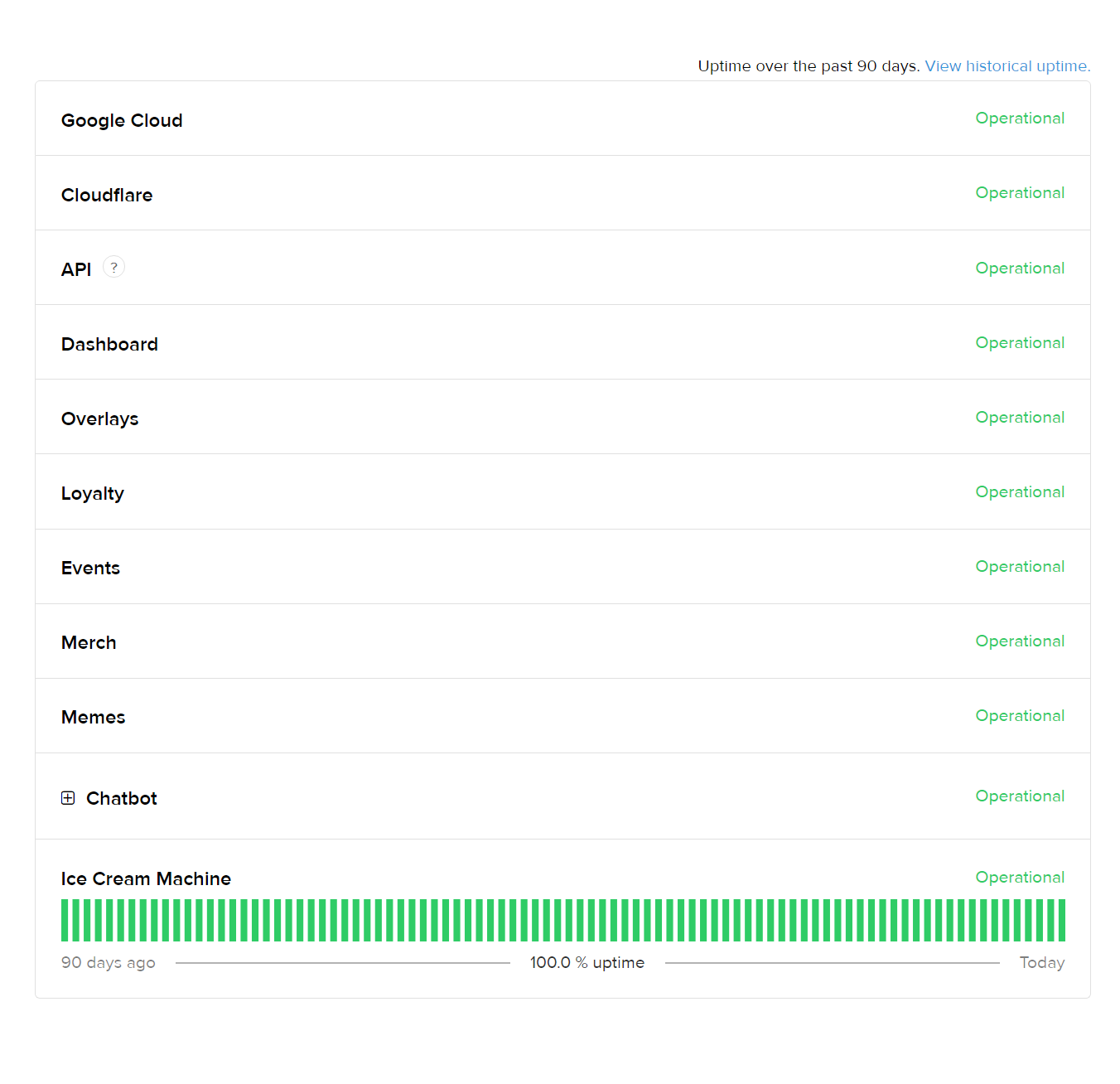
chatbot down?
wary halo
nope
wary halo
The bot isn't down, maybe it's not working in your channel but the bot is 100% up and running
viscid pebbleBOT
@gusty bear Go to the Dashboard > Right side > Part channel > Join channel(https://streamelements.com/dashboard)
gusty bear
im a mod for this channel and it's been with the channel for over 19 months
it's offline
 smoky current
I think is down, is not working with us either
viscid pebbleBOT
@gusty bear If your commands recently stopped working and you're using OBS.Live and a custom bot name do the following:
- In OBS.Live, click on the hamburger menu (three stripes) at the top left of your activity feed
- Click on Stream Settings > Custom bot name
- In the Custom bot name field select Set custom bot name, not your already existing username (with capital letters). Note: If you already connected an account that way, the third entry will show as the account name (see image https://i.imgur.com/sO7fWOX.png).
- Scroll a bit down and click on the purple Connect Custom Bot Account button
- Log in as usual and Authorize the custom bot name
- Back in the Activity feed, click on the Send Test Message button and check if your custom bot name starts working again
smoky current
neither us
gusty bear
it's 100% on your side
 gusty bear
chatbot is deffo down
smoky current
and then it isn't 😦
 wary halo
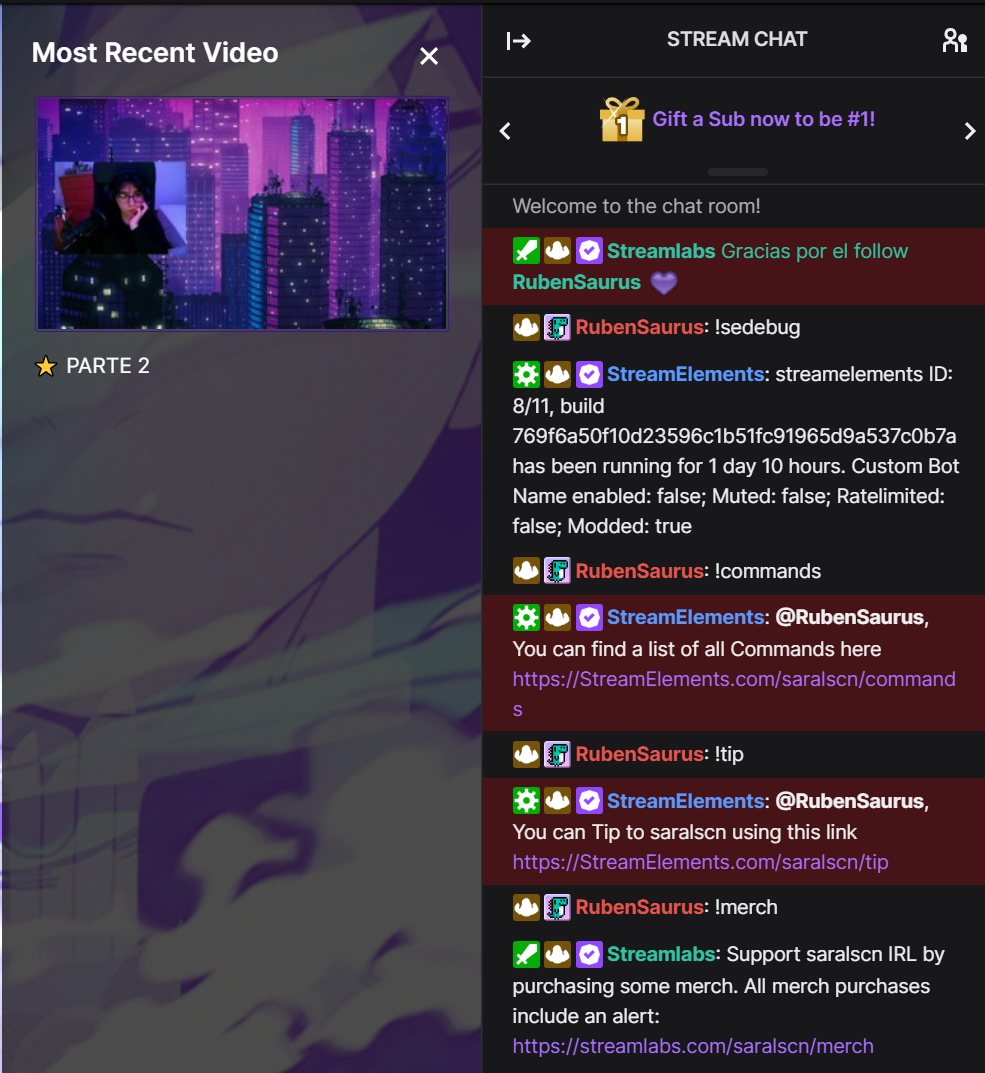
Calm down man, I am using the bot as we speak, so no, the whole bot is not down
 gusty bear
 smoky current
I'm editor there
wary halo
cool, sub only chat so no way for me to check 🙂
smoky current
I can turn it off
wary halo
bot seems to be running now
gusty bear
bot just went back up
gusty bear
thanks for not helping btw 🙄
wary halo
thanks for being very calm btw 🙂
 frosty lintel
does anyone know how to get these options in the goals widget?
i did before but cant seem to find them now

 thick bramble
Hello, I'm having an issue with streamelements, as it states I have 0 followers, as well as no other previous stream activity. Not sure what's going on
 zenith briar
Just a short question: What happens if my menu for DtreamElements in OBS unexpected just show check for updates, help and logout?
 hollow pelican
my giveaways stopped working, does not accept entries, any ideas?
ebon forum
hollow pelican
my giveaways stopped working, does not accept entries, any ideas?
Is the !enter command enabled?
hollow pelican
ebon forum
Is the !enter command enabled?
of course NOT, oops ty
 torpid vine
I just changed my twitch name and now kappagen emote wall doesn't show bttv and ffz emotes anymore. tips suggestions?
warm acorn
Real quick - Probably didn't read the manual right (lol) - Is there a way to invoke a command within a timer, to avoid having to keep some text maintained in two places?
 unborn tinsel
My stream element is not working in my stream ?
ebon forum
torpid vine
I just changed my twitch name and now kappagen emote wall doesn't show bttv and ...
Kappagen has a minor bug now that prevents it from using channel emotes
ebon forum
unborn tinsel
My stream element is not working in my stream ?
You are talking about the bot?
unborn tinsel
ebon forum
You are talking about the bot?
Yes 👍
ebon forum
unborn tinsel
Yes 👍
Custom bot name function enabled? If yes, please disable
unborn tinsel
Where do I find that
ebon forum
unborn tinsel
Where do I find that
let's make it simpler, can you give me your account ID, i check. It is located here:
https://streamelements.com/dashboard/account/channels
StreamElements
The Ultimate All in One Platform for Streamers
unborn tinsel
ebon forum
let's make it simpler, can you give me your account ID, i check. It is located h...
5fa2e5c8c7c0f58e0aeb51ab
unborn tinsel
Ok thanks you
torpid vine
ebon forum
Kappagen has a minor bug now that prevents it from using channel emotes
oh ok thank you so much for reply
 karmic agate
im a mod in my friends stream and i cant change the title even though i have full control
spare sequoia
karmic agate
im a mod in my friends stream and i cant change the title even though i have ful...
you need supermod permission
karmic agate
can i make myself super mod or my friend has to? @spare sequoia
spare sequoia
The owner of the bot, so assume your friend
karmic agate
okay thank you
 old cosmos
anybody know why my custom made emotes are not showing up in the kappagen settings? It worked fine the past 4 months then out of nowhere disappeared

 fiery sphinx
Hello, attempting to stream on twitch right now. I have audi output on the OBS Streamelements app, but nothing is coming out to twitch?
Tried streaming to a different platform and it worked
Just twitch that wont output my audio
ebon forum
old cosmos
anybody know why my custom made emotes are not showing up in the kappagen settin...
Kappagen has a minor bug right now that prevents it from using channel emotes. Only BTTV and FFZ.
We are aware and developers are on it.
ebon forum
fiery sphinx
Hello, attempting to stream on twitch right now. I have audi output on the OBS S...
Audio settings are not linked to the platform. OBS.Live has the same audio settings as regular OBS Studio and you need to make sure you are getting the signals to where they need to go when streaming. The platform has nothing to do with it.
fiery sphinx
My volume works perfectly fine on Glimesh, when I switch it back to twitch it doesn't. It shows as outputting on OBS.
ebon forum
fiery sphinx
My volume works perfectly fine on Glimesh, when I switch it back to twitch it do...
What encoder do you use?
Glimesch is using FTL.
Twitch is still using the olschool RTMP protocol. Please make sure you are not trying to stream via the FTL protocol to Twitch.
 dry iris
my media requests arent going through, it keeps stating that the link was deleted
i dont know how to stop that,any advice would be appreciated
 nimble elm
Hi. I've been having an issue with my game audio while streaming ps5. Using remote play, wireless controller as audio output source, the audio on Demon's Souls is choppy and echoes, yet it does not happen when I stream Bloodborne. I am stuck. It only seems to happen with ps5 games, not ps4 ones.
viscid pebbleBOT
@nimble elm Obs.live is a plugin for OBS Studio for the best OBS support, please join their Official Discord @ discord.gg/obsproject
 stone mortar
I have setup the media request module and widget onto my overlay, but I am not seeing the sliders to control time and/or volume. It's supposed to appear below the video after the video has played, but it's just showing me a message about "Make sure you have the MediaShare widget on your overlay" which I have verified many times. Is there a setting I'm missing to turn on the controls for media requests?
 twin sentinel
Afaik the controls are inside the video when hovering over it, same as a normal YT video.
 rapid spire
Ok when event happens in my stream now it doesn't use my emotes. It uses the franker and generic ones. How do I fix this to get my emotes working for emoteplosions
wary halo
rapid spire
Ok when event happens in my stream now it doesn't use my emotes. It uses the fra...
known bug, team is working on it
rapid spire
Ok great thought it was just me sucking lol
stone mortar
twin sentinel
Afaik the controls are inside the video when hovering over it, same as a normal ...
When I click Show on Stream, it mutes the embedded controls and then shows the video on stream, if I mess with the embedded controls, it starts playing double since the sound is now coming through my overlay/stream
 steep monolith
hi does anyone know how to get the watchtime for my viewers to work againmn
viscid pebbleBOT
@steep monolith The !watchtime command is directly tied to the Loyalty system. The Loyalty system must be enabled for viewers' watchtime to count up.
To enable Loyalty, please go to the Loyalty section of your account: https://streamelements.com/dashboard/loyalty
Watchtime counts up every 10 minutes alongside Loyalty points, and only while the stream is live. Reruns will not be counted.
Please note that watchtime is not tracked by Twitch and there is no way to retroactively apply past watchtime to viewers.
StreamElements
The Ultimate All in One Platform for Streamers
twin sentinel
@stone mortar I am not using the media request that often. Maybe another support has any idea on your issue.
steep monolith
oh ok thank you i hope this works now
 sterile monolith
I am just getting started and tried to add a custom command -- when I hit enter, the screen went blank. It has remained completely blank from that particular link even though I have restarted the browser. I think I broke the bot!
Edit: It doesn't matter whether I go in via Bot -> Chat Commands or Bot -> User Management, either way when I click on Custom Commands, it goes blank as if loading but nothing loads, just total blank screen forever.
dry iris
my media requests arent going through, it keeps stating that the link was deleted
i dont know how to stop that,any advice would be appreciated
viscid pebbleBOT
@sterile monolith Our Dashboard and Overlay Editor are Chromium Optimized. We strongly recommend using Chrome. Opera GX and the new Microsoft Edge Chromium might work closest to Chrome as its also Chromium built. Firefox also works, but some things might look a bit different or not work. We do not recommend using Internet Explorer with our Dashboard as it does not support functions.
If the website doesn’t work on chrome, be sure none of your plugins is blocking our website or clear your cookies. You can try if the website works in an incognito tab.
sterile monolith
Yeah, it was Firefox. Thanks, will switch to Chrome.
It was incognito in Firefox tho... on Macbook.
 signal locust
sterile monolith
Yeah, it was Firefox. Thanks, will switch to Chrome.
signal locust
sterile monolith
Yeah, it was Firefox. Thanks, will switch to Chrome.
I recommend you the new Edge. It's a better option than chrome
 outer kindle
hey helpers! i have a bunch of timer messages setup for some reason they never post when i go live... attached is a screenshot in case someone can spot what im doing wrong!!! or else i would love some help/guidance bc i really want to use SE 🙂

(if it helps, i am using chrome)
foggy heart
outer kindle
hey helpers! i have a bunch of timer messages setup for some reason they never p...
It looks like these are set to message after periods of time, so they won't post immediately
outer kindle
i always stream for about an hour and people chat, but so far SE has never posted a single timer message
foggy heart
Do you have the bot joined and modded?
outer kindle
i thought so but perhaps not! how could i check that?
foggy heart
You should be able to see it when you open your SE dashboard, on the right hand side.
viscid pebbleBOT
@outer kindle Go to the Dashboard > Right side > Part channel > Join channel(https://streamelements.com/dashboard)
outer kindle
awesome let me check that now!
i think i parted and then rejoined haha, im gonna test it now
wary halo

We're currently performing some updates on the server that handles our website.
During this time, the website and forums will be unavailable, as well as the ability to link Twitch accounts within OBS Studio
 Twitter
·
Twitter
·
 full flax
Is there a subathon feature through this?
foggy heart
full flax
Is there a subathon feature through this?
There is a widget they may work for you on this page: https://streamelements.com/dashboard/themes
 dapper juniper
gasp this is new, hello to anyone
im tryna set up a command for stream where i can take point from one user and give them to another one..... i know theres already a command for that but idk how it was set up
 sterile kindle
Hello, i need to repair my chatstats SE please 404 error. Ive changed my name 3 months ago from slidercze to domovnikofc . can you repair it please or what i need to do?
foggy heart
dapper juniper
im tryna set up a command for stream where i can take point from one user and gi...
you should be able to use the "!addpoints" and "!givepoints" to do something like that
viscid pebbleBOT
@sterile kindle Please provide your account ID found at the top of this page: https://streamelements.com/dashboard/account/channels This ID is public info and safe to share here.
 candid notch
I am a newbe, I am using OBS and have my other accounts yourtube and facebook linked to Twitch, my question is i want to stream to 3 platforms at Once, I am not sure if it will stream to all 3 at once?
wary halo
not with OBS.Live or StreamElements no
wary halo
Only one at the time, StreamElements does not have support for multistreaming
candid notch
got it. what do I do for 3 at one time?
wary halo

dapper juniper
foggy heart
you should be able to use the "!addpoints" and "!givepoints" to do something lik...
then how do i edit the message for those commands, because it wont show my them and i was tryna create a custom one????????
foggy heart
dapper juniper
then how do i edit the message for those commands, because it wont show my them ...
the default ones don't always have options to edit output
dapper juniper
oof
well thx anyway, it did help a little.... so it was worth it
i was tryna find the formula the command uses to take and give point when using that command
brave ferry
hi me again, got any one a api by the way for host command? (!host -> text: Thanks to host: Name, Name, Name, ...)? thanks by the way
ionic kelp
There is not. Twitch permanently removed that.
 mortal shale
so I'm trying to stream to twitch and when i click stream it says "Go Live on Facebook" but my settings have it set to twitch for streaming...then when I click back into stream settings they have an rtmp for facebook, so I have to change it back and it does the same thing after I press apply. Help lol
viscid pebbleBOT
StreamElements menu, on top of OBS > Logout > Login
 hoary crag
my audio keeps being really messed up. the settings worked fine in other stream apps. im wondering what im doing wrong now. i stream via capture card on pc.
viscid pebbleBOT
Obs.live is a plugin for OBS Studio for the best OBS support, please join their Official Discord @ discord.gg/obsproject
 violet ice
hi my commands are not working
sterile kindle
Hello, i need to repair my chatstats SE please 404 error. Ive changed my name 3 months ago from slidercze to domovnikofc . can you repair it please or what i need to do? my ID 5e5fa8704895e05cb975685e
 crimson coyote
is there any support staff here, not trying to be rude or needy just dont want to type out my issue for the 3rd time and not get an answer or help?
viscid pebbleBOT
@crimson coyote Welcome to the helpdesk! Please let us know how we can assist you today and a support volunteer or staff member will assist you as soon as they are available. Thank you for your patience.
crimson coyote
my alerts do not work in obs, when i use emulate within the overlay editor the emulations work fine however triggers from twitch are not
i have also reauthorized on twitch by removing the connection for stream elements and re adding however same result
 hasty scarab
i am interested because i have the same issue
foggy heart
sterile kindle
Hello, i need to repair my chatstats SE please 404 error. Ive changed my name 3 ...
Your page should now be up
@crimson coyote @hasty scarab Have you been through any troubleshooting so far? Just checking where to start
viscid pebbleBOT
@violet ice Go to the Dashboard > Right side > Part channel > Join channel(https://streamelements.com/dashboard)
crimson coyote
just basically what i typed above
 brazen token
I'm trying to help a streamer with their StreamElements bot and I can't figure out how to get this bot to work. They want a bot that will send a message in twitch along with a store redeem. However, only the text message only work if redeem is not in the command. EX: ${redeem diceroll} ${sender} just rolled the dice.
foggy heart
crimson coyote
just basically what i typed above
Are you seeing the activities on your activity feed, or in chat?
foggy heart
brazen token
I'm trying to help a streamer with their StreamElements bot and I can't figure o...
I don't believe you can call a command from within a command if that's what your looking to do
 woeful whale
Hey good evening SE staff, I have (what I hope will be) an easy question - I'm setting up media requests in my stream, and I've got everything working except for the subscriber discount. The !request command is set to the full channel points reward price, however the 50% sub discount doesn't apply. Is there anything special that needs to be done for the settings on my media request page to communicate with my chat commands settings? Thanks in advance for any help.
crimson coyote
foggy heart
Are you seeing the activities on your activity feed, or in chat?
parting and joining the bot did not make a difference
violet ice
same here
foggy heart
Not exactly what I meant, are the follows and such being recording in your activity feed on your dashboards?
foggy heart
What about SE?
crimson coyote
however not in SE
foggy heart
@violet ice Same for you? No feed in SE?
 amber cliff
Is there a easy way to copy settings from one alert settings page to another?
violet ice
foggy heart
<@!296091229744267265> Same for you? No feed in SE?
correct sir
none of the commands work
foggy heart
@crimson coyote @violet ice Let me get your account IDs
crimson coyote
foggy heart
<@!181218327283236864> <@!296091229744267265> Let me get your account IDs
5ffa18f587f4728118deecb2
violet ice
605a59e5a62a5dcb0ef5d080
 rich heath
I have kappagen explosions set up in my overlay, but I noticed that there's also !kappagen command in chat commands. What does this do? I didn't have it enabled, and still had explosions working.
violet ice
thank you
foggy heart
amber cliff
Is there a easy way to copy settings from one alert settings page to another?
You can duplicate the alert and then change it after, if that's what you're trying to do
quasi radish
hello my stream is not letting me stream outriders it keeps closing the game down it seems to be only that game so far
amber cliff
@foggy heart A better way to explain this.
I've changed all of the settings on my follower alert for example to use a custom font and font size, animation timing, colors, etc. Is there any way I can copy those settings to my sub alert?
crimson coyote
foggy heart
You can duplicate the alert and then change it after, if that's what you're tryi...
that seemed to work if that was you traffy
foggy heart
crimson coyote
that seemed to work if that was you traffy
Yupp, just reloaded you
looks like it went through
crimson coyote
foggy heart
Yupp, just reloaded you
thanks bro ;P
foggy heart
@violet ice if your commands aren't working, that may be a little different
Do you have a custom name bot?
foggy heart
amber cliff
<@!801850149260886118> A better way to explain this.
I've changed all of the se...
I don't believe there's a way to copy individual settings like that
viscid pebbleBOT
@quasi radish Obs.live is a plugin for OBS Studio for the best OBS support, please join their Official Discord @ discord.gg/obsproject
foggy heart
rich heath
I have kappagen explosions set up in my overlay, but I noticed that there's also...
It lets users choose how many of an emote they want to display on screen
viscid pebbleBOT
@violet ice If your commands recently stopped working and you're using OBS.Live and a custom bot name do the following:
- In OBS.Live, click on the hamburger menu (three stripes) at the top left of your activity feed
- Click on Stream Settings > Custom bot name
- In the Custom bot name field select Set custom bot name, not your already existing username (with capital letters). Note: If you already connected an account that way, the third entry will show as the account name (see image https://i.imgur.com/sO7fWOX.png).
- Scroll a bit down and click on the purple Connect Custom Bot Account button
- Log in as usual and Authorize the custom bot name
- Back in the Activity feed, click on the Send Test Message button and check if your custom bot name starts working again
violet ice
I changed it back to default stream elemnts name and still doesnt work
it says reporting for duty
but doesn't respond to commands
quasi radish
any one know why stream elements wont stream outriders
foggy heart
violet ice
I changed it back to default stream elemnts name and still doesnt work
Did you switch it back to the custom name?
viscid pebbleBOT
@quasi radish Obs.live is a plugin for OBS Studio for the best OBS support, please join their Official Discord @ discord.gg/obsproject
violet ice
its now working
I figured out bro
thank you so much1!!
come check my stream sometimes, I am always willing to support streamers
 late kelp
I'm all set to stream on Twitch, but when I click 'Start Streaming' it wants to stream on my YT channel. Help.
viscid pebbleBOT
@late kelp StreamElements menu, on top of OBS > Logout > Login
late kelp
Many thanks.
 halcyon hollow
My Bot changed back to streamelements and now for some reason I am not able to reconnect to my custom bot account. Even though I log into my account and authorize streamelements, it never connects to the account and I cannot send a test message. Any ideas?
viscid pebbleBOT
@halcyon hollow StreamElements menu, on top of OBS > Logout > Login
@halcyon hollow If your commands recently stopped working and you're using OBS.Live and a custom bot name do the following:
- In OBS.Live, click on the hamburger menu (three stripes) at the top left of your activity feed
- Click on Stream Settings > Custom bot name
- In the Custom bot name field select Set custom bot name, not your already existing username (with capital letters). Note: If you already connected an account that way, the third entry will show as the account name (see image https://i.imgur.com/sO7fWOX.png).
- Scroll a bit down and click on the purple Connect Custom Bot Account button
- Log in as usual and Authorize the custom bot name
- Back in the Activity feed, click on the Send Test Message button and check if your custom bot name starts working again
halcyon hollow
Thank you for the tips, I've tried that right now but sadly it still does not work. It does not connect to the account at all, even though I authorize streamelements
lament blade
Does anyone know how to download the socails overlay?
Is the bingo module not working? keep getting an error that there isn't any emotes for twitch?
foggy heart
halcyon hollow
Thank you for the tips, I've tried that right now but sadly it still does not wo...
And this is with OBS.Live, right? Have you copmpletely closed out and re-opened it?
foggy heart
lament blade
Is the bingo module not working? keep getting an error that there isn't any emot...
There may be an issue with using the twitch emotes and the command atm
lament blade
foggy heart
There may be an issue with using the twitch emotes and the command atm
ah bummer
halcyon hollow
foggy heart
And this is with OBS.Live, right? Have you copmpletely closed out and re-opened ...
@foggy heart Exactly, it‘s with OBS.Live. I‘ve closed the application a few times already. I‘ve also logged myself out and in again. Additionally I‘ve also removed the streamelements authorization and reauthorized the application. Nothing helped so far
 daring folio
I can not choose my channel emotes for emote explosion. Two days ago Kappagen explosion stopped showing my emotes so I changed for my stream. Now it does not offer my emotes or the standard ones, only BTTV and FFZ emotes are available. Is there a fix?
ionic kelp
None. Known bug with no eta on fix.
daring folio
Thank you
violet ice
Mb
foggy heart
halcyon hollow
<@801850149260886118> Exactly, it‘s with OBS.Live. I‘ve closed the application a...
Another suggestion I could make is to uninstall OBS.Live and do a clean re-install
 livid lintel
Need help setting up streaming with xbox using pc.
Can anyone help out in setting up a streaming pc capturing xbox?
viscid pebbleBOT
@livid lintel Consoles do not have native support for overlays. You would need a capture card, PS4 remote play or Xbox companion app and a PC with OBS in order to have overlays over your console gameplay.
We have a blog post about how to set up console streaming with our essential tools: https://blog.streamelements.com/how-to-stream-on-console-7b620b1c46c3
 smoky axle
i need help
viscid pebbleBOT
@smoky axle Welcome to the helpdesk! Please let us know how we can assist you today and a support volunteer or staff member will assist you as soon as they are available. Thank you for your patience.
smoky axle
i need to know how can i show up my title and game scene like when i'm going to put what game i'll be playing and what title i'm gonna put
cause it only shows the stream chat and the activity feed that's it
and that i can put the tags
lament blade
I need to now how you get a stream element
viscid pebbleBOT
New to StreamElements?
Check out our YouTube channel https://www.youtube.com/c/streamelements/videos
with tutorial videos from setting up the basics, to in-depth details on how to use our product.
New to OBS? Here is a 4 step quick start guide
https://obsproject.com/wiki/OBS-Studio-Quickstart
Want to learn even more? Here is an in-depth overview
https://obsproject.com/wiki/OBS-Studio-Overview
 jade hazel
so i have a premade overlay thing from the stream elements overlays library on obs, inserted a browser capture with 1280x720 canvas size, put in the link stream elements said to put in, but the alerts didn't show up visually, i could only hear them
 worldly escarp
jade hazel
so i have a premade overlay thing from the stream elements overlays library on o...
worldly escarp
jade hazel
so i have a premade overlay thing from the stream elements overlays library on o...
try using the obs as admin.
jade hazel
wdym?
worldly escarp
close the obs and then run it as Admin > click on the icon with the right mouse button and look for "Run as administrator"
jade hazel
that isn't an option, it just gives the option to "unpin from task bar" and the option to open it
worldly escarp
not the task bar icon, the desktop icon assuming you've added it there
jade hazel
ok, tried that, still not working
 wary tiger
100 / 5000
Resultados de tradução
Hello, can someone help me? I'm trying to use these commands in overlays and I'm not getting it.
 lament blade
jade hazel
ok, tried that, still not working
lament blade
jade hazel
ok, tried that, still not working
Try messing around with the hardware acceleration options you've got
quasi radish
any one having probs with there obs shutting the game your trying to stream off
worldly escarp
jade hazel
ok, tried that, still not working
try creating a new alert widget.and add it as 1080p
lament blade
quasi radish
any one having probs with there obs shutting the game your trying to stream off
that sounds like a very local issue, I'd try reaching out to OBS support for that
quasi radish
ok ty ill look again ive uninstalled and reinstalled bot game and the obs and its only the one game doing it
both*
 ornate gulch
anyone know why the kappagen extension isn't showing my emotes?
ionic kelp
@ornate gulch Known bug with no eta on fix.
ornate gulch
@ionic kelp ty 😦
 heavy plover
Hey im having a problem where when i start streaming it zooms in on the left corner of my screen. I have tried deleting my sources and re configuring them as well as settings in game with no luck. I also have the stream elements add on.
 south hearth
Is it possible to connect both ttv and yt at the same time to stream elements obs
wary halo
No, OBS.Live does not have support for multistreaming
 keen wigeon
heavy plover
Hey im having a problem where when i start streaming it zooms in on the left cor...
keen wigeon
heavy plover
Hey im having a problem where when i start streaming it zooms in on the left cor...
It happens specifically when you go live? If so, it sounds more like an OBS studio and should probably be taken with them.
Make sure that the source resolution is set properly, just in case.
viscid pebbleBOT
@heavy plover The default resolution for StreamElements overlays (theme and custom) is 1920x1080. Please add them in OBS at their full resolution and use CTRL+F to fit to screen if necessary. You can then downscale your stream in OBS settings > Video if you'd like https://i.imgur.com/6bWXxjR.png
 copper cairn
Hey, i was wondering, if there is a way, to create a Command, that when u write a Keyword, that you automatically get banned.
lament blade
copper cairn
Hey, i was wondering, if there is a way, to create a Command, that when u write ...
As in ban yourself?
copper cairn
I mean, if you write bad words that the Bot get you instant banned 🙂
south hearth
wary halo
No, OBS.Live does not have support for multistreaming
Oh ok👍🏻
 manic saffron
Hey guys, someone I mod for just added the bot into their channel, but the chat stats feature shows "404 Not found". What does he need to do to fix this? Thanks
 foggy gorge
So, i have sound effects in my StreamElements store but when i tested it, they didnt play on my stream. Do i have to have OBS running too?
lament blade
manic saffron
Hey guys, someone I mod for just added the bot into their channel, but the chat ...
did they change their name recently?
manic saffron
lament blade
did they change their name recently?
as far as i know, not in past year or so
lament blade
Alright, the streamer will need to reach out to us, this is fixable
manic saffron
should he do it through this discord? or where do you want me to redirect him
lament blade
Right here
manic saffron
@torn bramble @lament blade here he is ;)
lament blade
@torn bramble Hey, can you please provide me with your account ID on StreamElements?
worldly escarp
 torn bramble
how do i find that
torn bramble
how do i find that
StreamElements
The Ultimate All in One Platform for Streamers
 fervent olive
how do i log into the dashboard with another account? every time i click to login with twitch it logs me into MY account, but i want to login to my wifes dashboard
keen wigeon
fervent olive
how do i log into the dashboard with another account? every time i click to logi...
StreamElements
The Ultimate All in One Platform for Streamers
Then, before you log in, make sure you're logged in to Twitch with the right account.
fervent olive
keen wigeon
Then, before you log in, make sure you're logged in to Twitch with the right acc...
oh so i need to log out of twitch with that account that i dont want, i didnt know that, cheers
sterile kindle
Hello, i need to repair my chatstats SE please 404 error. Ive changed my name 3 months ago from slidercze to domovnikofc . can you repair it please or what i need to do? my ID 5e5fa8704895e05cb975685e
worldly escarp
sterile kindle
Hello, i need to repair my chatstats SE please 404 error. Ive changed my name 3 ...
one sec
worldly escarp
sterile kindle
Hello, i need to repair my chatstats SE please 404 error. Ive changed my name 3 ...
I managed to see your chatstats with domovnikofc ..
lament blade
Hi Folks, I am running into this No Data issue with the leaderboard:

I've tried to reinstall, log in and out of streamelements dashboard and not having any joy, does anybody have any tips on how to resolve this? Thank you
worldly escarp
lament blade
Hi Folks, I am running into this No Data issue with the leaderboard:
try login out and login
lament blade
Hi Maya-ish, have tried this x3 now.
 lethal tide
How do I do it every time someone donates X bits the BOT plays a random audio?
worldly escarp
lament blade
Hi Maya-ish, have tried this x3 now.
have you changed your name lately?
lament blade
not-pre installation but i did change my name roughly 3 weeks ago?
worldly escarp
ok what was the old name?
lament blade
titan_def
titan_def on twitch, but streamelements account has only ever been def_metal
brazen token
Is it possible to have a chat command send a message on twitch and play an audio clip?
 unkempt gale
my dashboard doesn't show my followers. Do anyone know how to fix that? I see the raids, but nothing else
worldly escarp
unkempt gale
my dashboard doesn't show my followers. Do anyone know how to fix that? I see th...
what is your account id please?
unkempt gale
worldly escarp
what is your account id please?
fraufluff
worldly escarp
lament blade
titan_def
what is your account id?
 quasi coral
Hello I didnt see in my Overlays the Emotes from Twitch what i must do ?
Sry for my bad Englisch I´m a German dude
wary halo
It's a bug and they are working on it
quasi coral
wary halo
It's a bug and they are working on it
ok thanks also its not a fail from me ?!
lament blade
hi @worldly escarp I DM'ed it to you
viscid pebbleBOT
@shy mist Read and follow our server rules:
- We do not tolerate toxicity! Treat the community team, staff and all members with respect.
- No advertisement or channel promotion, anywhere on the server.
- No NSFW/NSFL
- No unsolicited DMs or friend requests to server members
Make sure to read the #welcome in any server you join.
@shy mist Read and follow our server rules:
- We do not tolerate toxicity! Treat the community team, staff and all members with respect.
- No advertisement or channel promotion, anywhere on the server.
- No NSFW/NSFL
- No unsolicited DMs or friend requests to server members
Make sure to read the #welcome in any server you join.
wary halo
quasi coral
ok thanks also its not a fail from me ?!
no
 north night
I need help
lament blade
What's up
spare sequoia
Morning, another quick question: Can I import hours watched from ankhbot into streamelements?
north night
lament blade
What's up
I cant set up my Lunar Client screen on StreamElements
lament blade
the mod pack, you mean?
north night
Idk what the means, Im a bit of a beginner
ionic kelp
That's something for the obs server
viscid pebbleBOT
Obs.live is a plugin for OBS Studio for the best OBS support, please join their Official Discord @ discord.gg/obsproject
lament blade
spare sequoia
Morning, another quick question: Can I import hours watched from ankhbot into st...
you can import the users' loyalty point to StreamElements and with it the watchtime
north night
lament blade
the mod pack, you mean?
I mean like my gaming screen, so my stream shows my game
spare sequoia
I imported the points, the hours did not come over from what I can see
ionic kelp
See the invite from the bot diegoo
north night
Okay
spare sequoia
lament blade
you can import the users' loyalty point to StreamElements and with it the watcht...
Top one is SE, the other is ankhbot
 ionic kelp
What does !points do?
spare sequoia
ionic kelp
What does !points do?
I spent some yesterday when testing, but know it copied across

Got a mod to test, they earned some from watching but
 spare sequoia
ionic kelp
What does !points do?
spare sequoia
ionic kelp
What does !points do?
If I remove the points from the CSV file, it's "addative" right? so I could retry the import while not changing the points?
spare sequoia
lament blade
you can import the users' loyalty point to StreamElements and with it the watcht...
I think I worked out an issue with the import. Streamlabs chatbot/ankhbot records the time in hours, and imports it as minutes, i am going to try and multiply all the times by 60 and see if that sets it correctly
lament blade
This again? Right. Thank you!
ionic kelp
That is what is needed. Simply put #*60 where they are and it should properly import. Due note that you'll have to manually remove the hours for everyone already imported. Otherwise it'll just stack.
spare sequoia
ionic kelp
That is what is needed. Simply put `#*60` where they are and it should properly ...
I am not too worried about the extra at most 3 hours people would have gotten, I just don't want people to lose hundreds of hours
spare sequoia
ionic kelp
That is what is needed. Simply put `#*60` where they are and it should properly ...
I did a (*60)-original number that fixed the extra time added
 wooden pelican
Hey StreamElements, I stream on Twitch and until recently I was able to select my subscriber emotes on KappaGen for chat emotes and emotesplosions. Suddenly that option has disappeared and for the past few streams, my emotes haven't showed up on the screen at all! Does anyone know why this is? It was a big part of my stream experience so trying to sort it ASAP! Thanks.
lament blade
Is our bot running on your channel and is subbed as well?
wooden pelican
Yeah all my other SE overlays work fine. I don't know how to sub the bot to my channel so I assumed KappaGen didn't require that because it was working fine before
ionic kelp
It's a known issue being worked on.
wooden pelican
ionic kelp
It's a known issue being worked on.
I'm on someone's stream right now and their subscriber emotes are appearing on the screen as normal
ionic kelp
0.o
You sure they're using us?
From what I'm told it's still bugged so no idea how they'd be using it atm.
wooden pelican
Yeah it seems so
Okay so to confirm, my bot doesn't need to be subscribed to select my own emotes for KappaGen
And how long has it been bugged for?
wooden pelican
Okay I haven't had the option for over a week
Sorry just trying to get to the bottom of this because I'm about to stream and I was hoping to have it fixed
 nocturne heron
Hello, can I ask something about stream elements overlays here?
well, I have added an emote combo overlay but the emotes are too high and they are cut. I have another question. Once they pop up on screen they stay there forever?
lament blade
nocturne heron
well, I have added an emote combo overlay but the emotes are too high and they a...
they're supposed to go away after some time
as for the cutoff emotes, make sure that the widget that displays them is in frame
nocturne heron
I am changing the widget frame dimensions but they are cut anyways
wooden pelican
If it helps @lament blade @ionic kelp, the emote options are only showing BTTV and FFZ emotes. Not even Global Twitch emotes?
lament blade
nocturne heron
I am changing the widget frame dimensions but they are cut anyways
could it be that they're cut by the overlay dimension? are the coming up cut in the preview as well?
nocturne heron
yes, they also are cut in the preview.
I am watching a video but he doesn´t have this problem
wooden pelican
Is anyone else able to help me? 🙂
lament blade
wooden pelican
Is anyone else able to help me? 🙂
Once the bug is sorted it out it will be fixed, till then there's no much we can actually do here
lament blade
nocturne heron
I am watching a video but he doesn´t have this problem
Try moving the widget for the emotes to the center of the screen and let me know if it still happens
nocturne heron
Yes, it still happens. The frame is in the center but the emotes appear a bit higher
I have delete it and import a new one but I have the same problem
lament blade
can you send me a screenshot?
 lament blade
I think that's far too small for the widget, if you make it bigger, do the emotes still cutoff at the top?
 lament blade
try messing around with the settings, for example - changing the display for horizontal to vertical
if that doesn't work, changing the emote size should work
nocturne heron
Yes, I have change the emote size and now works well. I will resize it in obs and thats all. Thank you so much!
lament blade
my pleasure
nocturne heron
Well wait if you have time I still have the problem that they stay there forever. They only disapear when I change some settings or other emotes combo comes
 wheat torrent
is there a way to get all "recent sub, recent dono, top dono etc" in all caps?
 sudden perch
I'm newly affiliated and cannot seem to get my subscriber or cheer alerts to change on my stream or my emulations. Is there a specific reason for this?
keen wigeon
These two have default variations. Go into the variation settings and change them as well.
sudden perch
keen wigeon
These two have default variations. Go into the variation settings and change the...
Appreciate that, been driving me crazy past few days 😂
keen wigeon
Sure thing. 🙂
 timber veldt
how do i add alerts
viscid pebbleBOT
New to StreamElements?
Check out our YouTube channel https://www.youtube.com/c/streamelements/videos
with tutorial videos from setting up the basics, to in-depth details on how to use our product.
New to OBS? Here is a 4 step quick start guide
https://obsproject.com/wiki/OBS-Studio-Quickstart
Want to learn even more? Here is an in-depth overview
https://obsproject.com/wiki/OBS-Studio-Overview
viscid pebbleBOT
@spiral apex Read and follow our server rules:
- We do not tolerate toxicity! Treat the community team, staff and all members with respect.
- No advertisement or channel promotion, anywhere on the server.
- No NSFW/NSFL
- No unsolicited DMs or friend requests to server members
Make sure to read the #welcome in any server you join.
 mystic mantle
Hello there! I'm trying to do a follower goal with a Black and White theme. But I can't find an option to get the text to be inverted depending on the background. Is there a way to do that?
worldly escarp
mystic mantle
Hello there! I'm trying to do a follower goal with a Black and White theme. But ...
you can simply change the text and fill color
mystic mantle
If you change the text colour to be White, and the Fill colour to be white, and the background colour to Black part of the text won't be seen.
So I want to adjust that the text changes depending against what background it is.
worldly escarp
If im not mistaken currently the follower goal widget doesnt have that option
mystic mantle
Ah, alright! Will have to find some other way 😄
Make 2 goals, and split them in OBS 
 thick scroll
How do I get tts
mystic mantle
 thick scroll
On Xbox
viscid pebbleBOT
@thick scroll Consoles do not have native support for overlays. You would need a capture card, PS4 remote play or Xbox companion app and a PC with OBS in order to have overlays over your console gameplay.
We have a blog post about how to set up console streaming with our essential tools: https://blog.streamelements.com/how-to-stream-on-console-7b620b1c46c3
thick scroll
Ok thank you very much
mystic mantle
worldly escarp
If im not mistaken currently the follower goal widget doesnt have that option
You gotta give it to me that's pretty genius
Even if I do say so myself
 cold crater
Bot doesnt work unmodded and modded agian and dont work
viscid pebbleBOT
@cold crater Go to the Dashboard > Right side > Part channel > Join channel(https://streamelements.com/dashboard)
cold crater
Thanks
 tribal orbit
Hi there, I have an issue with Streamelements not pushing through to OBS. I've set an alerts overlay up and every time I attempt to preview it in OBS (I've set the source correctly) it fails every time to show up in OBS. Not sure what I'm doing wrong.
ionic kelp
Do you hear alert sounds?
tribal orbit
It's hard for me to tell if they're coming from OBS or the StreamElements website
 solemn cedar
Moin together, a short question and I have integrated the bot from StreamElements with my colleagues, it also has mod rights and runs even if you enter a CMD, but it does not give a response or you cannot play with it e.g. (roulette, game machine and so on ) (the points are also active) what else can I do so that he answers? (Sry Google Translator my english is not the best 😅 )
sacred narwhal
!host command not working anymore ? api removed by twitch ?
 lean reef
why do my overlays have a 5 second delay on obs when i change them over
ionic kelp
@sacred narwhal I assumw you're using ${customapi.https://decapi.me/twitch/hosts/${channel}?implode} or ${customapi.https://api.crunchprank.net/twitch/hosts/${channel}?implode}?
lean reef
can someone help
sacred narwhal
@ionic kelp Thanks to all the users currently hosting: $(customapi.https://api.crunchprank.net/twitch/hosts/${channel}?implode).
ionic kelp
Yeah. No longer possible due to twitch nuking it.
sacred narwhal
@ionic kelp any solving thing ? or code?
ionic kelp
Nope.
 dusty juniper
how do i get my stream chat back showing in my obs?
nimble dune
dusty juniper
how do i get my stream chat back showing in my obs?
View > Docks > Chat
wary halo
Top bar in OBS
dusty juniper
thanks ❤️
 stoic timber
wary halo
stoic timber
wary halo
StreamElements
The Ultimate All in One Platform for Streamers
chat alerts module there
dry iris
hey my media requests arent working, the links are being deleted but i dont know how
could anyone help me out, it would be very appreciated
 slender prism
Are they working on the emote bingo? When I try and activate it, it says "No emotes found."
 old snow
how do i add overlays to my obs stream? i have some overlays but idk how to add em. :(
viscid pebbleBOT
To add your overlays to OBS, add a new browser source in your scene. Paste your overlay URL in the browser source properties, set the dimensions to 1920x1080 (unless you changed them on the website) and check Shutdown source when not visible. https://youtu.be/KDvLynUqXI4
old snow
ty
radiant plover
have some problems on one scene, that i have double alerts, i have made an own browser with only that alerts i want to use but when i try to display a for example follower it seems both that one and my alerts from the theme is displayed
but in that browser window i cant find any alerts left that i should remove from that scene
never mind i was stupid 😄
i used wrong browser lol
lament blade
Hey, for some reason subcount does not work in chat, but it shows the right count on stream. In a command it says 0, how do i fix it?
 modest galleon
Hi I cant seem to get my activity feed to connect with my twitch. It doesnt show any recent follows or info. It also doesnt send the alerts to my alert box on my overlay. Any help would be appreciated I'm new to all this
 topaz needle
Hey guys, I had a problem yesterday, got my first donation live, but the alert didn't appear on live (twitch)
It's working fine for subs, follows, bits, raid, but didn't get the alert for donation received through the page streamelements...../tip
It seems to work when checking on the overlay and testing however.
Any idea is more than welcome 🙂
 proper tinsel
hello just a quick question for tip link, i already have one for youtube and wanted to use the same for twitch but it seems that streamelements makes a whole new tip link for my twitch. is there any way to use the same link so i don't have 2 separate donation pages?
compact obsidian
topaz needle
Hey guys, I had a problem yesterday, got my first donation live, but the alert d...
hmmm, did u set a minimum amount?
if thats even possible lol
viscid pebbleBOT
@topaz needle If a viewer tipped through PayPal but no information appears in your StreamElements account, this generally means PayPal has held the tip for verification.
Until PayPal clears the tip and sends back a confirmation to your StreamElements account, no information will appear there and no alert will play, as that confirmation is the only way for us to be aware of a successful transaction.
There is a posibility that the tip may have been sent as an eCheque/eCheck - these tips can take from 7 up to 21+ days to show up on our side. Tippers can usually cancel these.
If you believe there may be an issue with the transaction, you'll need to contact PayPal support as StreamElements is only a passthrough service and never actually gets involved with the transaction or touches the money
topaz needle
viscid pebble
<@!83493761870462976> If a viewer tipped through PayPal but no information appea...
Oh well, it answers to my question thanks. I've got an email from PayPal telling me that i'm a new vendor and so the tip is blocked at the moment. Thanks for your quick answer!
viscid pebbleBOT
@lament blade Consoles do not have native support for overlays. You would need a capture card, PS4 remote play or Xbox companion app and a PC with OBS in order to have overlays over your console gameplay.
We have a blog post about how to set up console streaming with our essential tools: https://blog.streamelements.com/how-to-stream-on-console-7b620b1c46c3
 wraith bloom
My friends account is showing error 404 - page not found for chat stats
The twitch name is 3pointpapi24
account ID: 603671d482114c3084dd1a59
 nova thunder
Hi guys need help to link my youtube channel in my streamelements app which i am already signed in to my twitch channel

i can log in the streamelements app separatly with my twitch and yt account but i would like to the 2 at the same place
halcyon hollow
foggy heart
Another suggestion I could make is to uninstall OBS.Live and do a clean re-insta...
I just tried that, sadly did not help either. I also tried using another account to make sure it's not an twitch account problem, but OBS.Live neither connects with the other account.
 frail hare
how do i make a twitch panel?
viscid pebbleBOT
@frail hare Twitch's official help guide for Panels: https://help.twitch.tv/customer/portal/articles/2416760-how-to-edit-info-panels
 slender scaffold
hey guys! i was just wondering if there is any way to change emote prefix while not being a twitch partner? 🤔
wary halo
nope
slender scaffold
okay, thank you for answering 🙂 it is possible to change it as a twitch partner though, am I right? 🙂
wary halo
yep
slender scaffold
great
 haughty shore
hey guys 🙂 im having trouble game capturing. It wont show on my overlay, can someone help me?
 placid orbit
Hello everyone how can i Sync my twitch follower with Streamelements it count only 6 but actually i have 87. I think it happened because i dont stream from the beginning with streamelements. Any solution to change Followers number to the correct one?
viscid pebbleBOT
@placid orbit To reset goals:
- from the Overlay Editor > Session data on top right (monitor symbol) > Goals tab > reset progress of desired goal
- from the Dashboard > Activity feed on the left > Widget data on the right > Goals tab -> reset progress of desired goal
Note: Goal widgets (progress) only counts up and doesn't go down automatically, if you lose followers/subs.
 rocky basin
haughty shore
hey guys 🙂 im having trouble game capturing. It wont show on my overlay, can so...
rocky basin
haughty shore
hey guys 🙂 im having trouble game capturing. It wont show on my overlay, can so...
having the same problem
 stark marten
Hey yall my alerts aint showing up help me
 ivory tapir
Hey Team, i have issues with my SE chat stats, i didn't change my name or smth. points are working well - twitch account: tezzoh
 fleet meteor
Hey evreyone how i change my bank card
viscid pebbleBOT
@fleet meteor Please contact us via email for support with SE.Pay. You can use our contact form here: https://streamelements.com/contact Thank you.
 gritty mountain
Hello, how do I update my avatar on streamelements? Something so simple should really be more clear
I changed it on Twitch and it's not showing up, do I have to wait?
wary halo
It should be automatically updated if you changed it on Twitch
viscid pebbleBOT
@gritty mountain Please logout of StreamElements at https://streamelements.com/logout and then login again to your account (Twitch/YouTube/Facebook).
 vale helm
Hey
I've got a problem with the stream elements bot on twitch, whenever i try to change game, or title it comes up with "Twitch's API returned an error. Try again later." Also the sub count shows as 0
 vital bane
Hello,
I'm having an issue with the streamelements activity feed which has never happened. For some reason, new follower events are not showing up on the SE activity feed and therefore the alerts are not popping up. All other alerts (subs, dono's, etc...) are working. It's just for the new follow events. Any idea on how to fix this problem?
These new follows are showing up on the Twitch activity feed btw, just not on SE activity feed.
 hardy pagoda
Hello. How do I add twitch emotes to KappaGen? I only see BTTV Global Emotes when I click on Select Emotes. Thanks.
 dusk falcon
Hi! I usually get emails after my stream letting me know my stats and revenue from my stream. Last night, we had a GREAT stream and I was excited to see the stats but I never got my email. Is there a way I can look at each stream's stats/revenue? I looked at my dashboard and revenue history but can't find it!
haughty shore
@viscid pebble hey guys im having trouble game capturing. It wont show on my overlay, can someone help me?
vital bane
@haughty shore do you have it set to capture a specific window?
 wicked shard
@viscid pebble hey can anyone help me with twitch soundtrack not being found by obs
haughty shore
vital bane
<@!696063122619891764> do you have it set to capture a specific window?
yea I have set it to capture game, CSGO window
vital bane
have you tried it with any other applications?
sometimes csgo doesn't work for me either
 hexed igloo
@viscid pebble Could i pls get some help with a question? I had a Item-shop request where someone redeemd a item where there where many requirements,like i needed the full name of the activisator and much more. He redeemd the item,but i cant find the requirements he typed in... Does someone know where they are (the requirements infos of the item activisator)
vital bane
the order in which you have the items in your scenes matters! for example, your alertbox should be at the top
with your game capture at the very bottom
nimble dune
@haughty shore Are you trying to capture csgo?
hexed igloo
vital bane
the order of your sources matters
indeed, one time i redid everything just cause i tought its broken... but in reallity i just needed to put the game capture on the top
vital bane
game capture goes on the bottom
but yes
followers not showing in my activity feed  but everything else does
anyone know of a fix?
and its not the filter
viscid pebbleBOT
@haughty shore Valve has implemented a trusted mode which does not allow OBS to hook CS:GO using Game Capture. Read more in their announcement post here https://blog.counter-strike.net/index.php/2020/07/30736/.
Additionally, they have no plans on allowing OBS in trusted mode.
https://support.steampowered.com/kb_article.php?ref=8835-KLXV-0292#whitelist
You will need to run the game in either windowed or borderless fullscreen and use Window Capture instead.
Alternately, you can launch the game with -allow_third_party_software.
nimble dune
^^^
vital bane
@viscid pebble Hello,
I'm having an issue with the streamelements activity feed which has never happened. For some reason, new follower events are not showing up on the SE activity feed and therefore the alerts are not popping up. All other alerts (subs, dono's, etc...) are working. It's just for the new follow events. Any idea on how to fix this problem?
These new follows are showing up on the Twitch activity feed btw, just not on SE activity feed.
 rustic karma
I'm also having alert lag, so I guess it's a wide problem
 simple forum
Hi, I ask for help regarding a problem, a few days ago I changed the name of my Twitch channel. today I realized that stream elements no longer spams the programmed messages and the chat commands no longer work. what can I do?
viscid pebbleBOT
@simple forum If you changed your name on Twitch, please follow these steps:
- Visit https://streamelements.com/logout and then log in again by connecting with Twitch.
- On the right side of the dashboard page that opens, select Join under bot settings. If it says Part select that and then select Join to send the bot to the chat. Don't forget to mod the bot by typing /mod streamelements in your channel if you have not already.
- Post your old and your new name here so that we can update your channel's chatstats tracking (must be done by staff).
nimble dune
Opps
viscid pebbleBOT
@vital bane Please provide your account ID found at the top of this page: https://streamelements.com/dashboard/account/channels This ID is public info and safe to share here.
 swift berry
Where I can find all the acceptable pay methods streamelements accepsts?
vital bane
@viscid pebble 5fad82656d35d50c0fc717ff
 ivory terrace
Hi @viscid pebble! My Twitch emotes aren't showing up or available to select for my kappagen explosion overlay anymore. Last night there was only the BTTV emotes available, and then there are a few more today, but for some reason, my own personal emotes or Twitch ones aren't available?
My old ones used to work just fine, but seem to have stopped and disappeared! They aren't showing up on the overlay either anymore for special events.

 eager forge
Hey, I added a sound effect via the stream store. But the Alert sends no sound
ionic kelp
@ivory terrace known issue being worked on.
eager forge
I see the animation in the stream but I hear no sound
Oh, I only see it if I emulate it
hardy pagoda
@ionic kelp i asked the same question above. thanks for answering. if there a ticket we can follow to know when it'll be fixed?
ionic kelp
I'd say check back in a couple days.
eager forge
ionic kelp
I'd say check back in a couple days.
Can you help me?
 minor ocean
The delete alias command is not working for me
ionic kelp
No. Wait patiently and someone will.
 gusty comet
Does someone know how to open chat after closing it?
eager forge
Oh, it was only muted in the stream
hardy pagoda
i have been meaning to add kappagen for like 6 months. the one day i allocate time to do it, bug. oh well.
ivory terrace
ionic kelp
<@557405705582280707> known issue being worked on.
Thanks!
viscid pebbleBOT
@neat urchin Read and follow our server rules:
- We do not tolerate toxicity! Treat the community team, staff and all members with respect.
- No advertisement or channel promotion, anywhere on the server.
- No NSFW/NSFL
- No unsolicited DMs or friend requests to server members
Make sure to read the #welcome in any server you join.
@quasi void Read and follow our server rules:
- We do not tolerate toxicity! Treat the community team, staff and all members with respect.
- No advertisement or channel promotion, anywhere on the server.
- No NSFW/NSFL
- No unsolicited DMs or friend requests to server members
Make sure to read the #welcome in any server you join.
 spare sky
i need help
any way of making the microphone pick up sound from closer than it already does?
cuz my mic picks up sound from the streets and every single sound
wary halo
turn down the gain
And make a noisegate
Not sure how to do all that? Go to youtube and search for your mic with those words
spare sky
aight
lament blade
hey @viscid pebble I have two separate youtube and twitch accounts and i'd like to combine them under my twitch account, i have the jwt tokens for both so how do i combine them?
spare sky
i made the noisegate ty @wary halo
ivory tapir
@viscid pebble My chatstats does not work at all, i didn't change my name, it didn't work from the start twitch account: tezzoh
it says page 404
 umbral vapor
hi guys need help rq
pyro twitch mod here
pyrocynical
mediashare button is missing and media request does not seem to work
ive added media request box to his overlay and reloaded the overlay, but it does not work

no mediashare button in the overlay editor, only media request
 drowsy egret
umbral vapor
no mediashare button in the overlay editor, only media request
drowsy egret
umbral vapor
no mediashare button in the overlay editor, only media request
he will see it on his end, he needs to click this button
 umbral vapor
drowsy egret
he will see it on his end, he needs to click this button
umbral vapor
drowsy egret
he will see it on his end, he needs to click this button
ah but he's playing a game, we cant do it for him? even with editor rights?
drowsy egret
umbral vapor
ah but he's playing a game, we cant do it for him? even with editor rights?
only account owners have this option
viscid pebbleBOT
@lament blade The !watchtime command is directly tied to the Loyalty system. The Loyalty system must be enabled for viewers' watchtime to count up.
To enable Loyalty, please go to the Loyalty section of your account: https://streamelements.com/dashboard/loyalty
Watchtime counts up every 10 minutes alongside Loyalty points, and only while the stream is live. Reruns will not be counted.
Please note that watchtime is not tracked by Twitch and there is no way to retroactively apply past watchtime to viewers.
StreamElements
The Ultimate All in One Platform for Streamers
umbral vapor
does the loyalty thing spam anything in chat
 young sinew
Is it possible to have streamelements do an automatic raffle every hour or something like that? I tried to look it up and I couldn't find anything on the subject
 quick python
Hi, I am trying to run song requests again, this time through stream elements, and I don't want it to be done through obs live, I'd like it handled through a separate application. 1st, is there a media player standalone for streamelements? and 2nd, if not, how do i make it play through the browser? Right now in the media request section of the dashboard, everytime i play a song and unmute it just remutes it for some reason
drowsy egret
quick python
Hi, I am trying to run song requests again, this time through stream elements, a...
there's also ground control but this app is outdated, we recommend using obs.live instead
quick python
My problem is I am routing audio through voicemeeter so i can separate audio tracks and compress/eq them separately, and if i capture OBS as a source for audio i'm fairly certain it'll grab everything obs is outputting 😦
I will give ground control a shot though, sounds like what I am looking for. Thank you @drowsy egret
solar oak
How can i stop firewall disconnecting my OBs?
 rare scroll
 sturdy cipher
Hi, i changed my Name a while ago and now my old Name appears in a few parts of streamlabs, kinda confussing i saw the Same question here already but cant find it anymore
drowsy egret
sturdy cipher
Hi, i changed my Name a while ago and now my old Name appears in a few parts of ...
logout/login and part/join should fix everything
 wide crane
Good Evening (for me at least) ! I'm having a problem trying to fix the subcount command that keeps showing 0 subscribers when i've got more. I've tried to remove and add the command again and also part and join the bot, but still appears as 0. Tried to google, but didn't find anything usefull. Any possible solutions? Thank you
sturdy cipher
Just changed my appeared Name for that because it sent me straight in again as i logged in, Hope its Fine now baut thanks for the fast help @drowsy egret
 drowsy egret
wide crane
Good Evening (for me at least) ! I'm having a problem trying to fix the subcount...
drowsy egret
wide crane
Good Evening (for me at least) ! I'm having a problem trying to fix the subcount...
you can re-fetch your total sub count from your activity feed > reset session
 wide crane
@drowsy egret oh right, i forgot that, i had once a problem helping someone and forgot to do that. thank you!!
drowsy egret
@gray glade that will show the songname being played on media request, yes
 gray glade
drowsy egret
<@!130827446542008320> that will show the songname being played on media request...
gray glade
drowsy egret
<@!130827446542008320> that will show the songname being played on media request...
Only in the case viewer requests are enabled, I assume?
If I don't have viewer requests enabled, I should just remove it?
Like if I'm just using my own playlist for music
drowsy egret
gray glade
Like if I'm just using my own playlist for music
yeah, this will only be connected to song request
gray glade
Mmkay, thank you.
c:
Huh, this is weird. I added the Media Request widget [the actual window one] to my overlay and saved but it won't appear in my OBS.Live. What am I doing wrong?

 drowsy egret
gray glade
Huh, this is weird. I added the Media Request widget [the actual window one] to ...
drowsy egret
gray glade
Huh, this is weird. I added the Media Request widget [the actual window one] to ...
you might need to test with a video, something needs to be playing
 atomic flicker
my alert box isnt working. I have asked people to follow me and it just doesnt work. I tried everything i can do on the website and obs. Any tips? it works when i emulate it but not an actual person
viscid pebbleBOT
@atomic flicker Please provide your account ID found at the top of this page: https://streamelements.com/dashboard/account/channels This ID is public info and safe to share here.
 fathom zodiac
Hello friends. I get a Request Fail with status code 429 on my OBS
 wanton jetty
Anyone elses dashboard just died ?
fathom zodiac
and it doesn't seem to want to connect onto OBS
 mossy bramble
its everyone at this point
fathom zodiac
or on the streamelements
 hollow bear
wanton jetty
Anyone elses dashboard just died ?
hollow bear
wanton jetty
Anyone elses dashboard just died ?
yeah i was just about to ask that
 torpid briar
yup all down
fathom zodiac
Oh okay, so it's not just me then haha
 mossy bramble
@wanton jetty i found out mine was down after doing the same thing
 unkempt rose
 final lotus
looks like the whole website dashboard is down?
mossy bramble
i had not a clue cause i run a 24h channel nothing looked wrong except the music
fathom zodiac
Yea, it's got to be their servers I think
torpid briar
can't pick a giveaway winnder
mossy bramble
i would have to agree
 karmic plank
yeah everything is down, oddly though their status page says it's fine lmao
drowsy egret
Our services are experiencing some issues, our devs were notified and are currently working on it
fathom zodiac
Mine too!
karmic plank
thanks Staff!
final lotus
fixed for me too! thanks y'all
 kindred valve
can someone help with a command
 rocky yarrow
Hey there, my alert box still works when I replay old events, but it seems like the activity feed in Streamelements is no longer picking up any new events. How do I fix this?
viscid pebbleBOT
@rocky yarrow Please provide your account ID found at the top of this page: https://streamelements.com/dashboard/account/channels This ID is public info and safe to share here.
rocky yarrow
5c745f02dd89d3ad10ffa725
drowsy egret
@rocky yarrow fixed 😄
rocky yarrow
Thank you!
 plain hatch
For some reason when I go in to figure out my TTS Stuff for Sub alerts, I tried changing voices but the voice is stuck with one guy even after changing and testing
 frank sluice
how do i set up my gift sub sound alert to where it tells me someone gift 5 subs instead of it reading their name one by one?
drowsy egret
frank sluice
how do i set up my gift sub sound alert to where it tells me someone gift 5 subs...
you need to setup an alert variation with community gift as a variation parameter
drowsy egret
plain hatch
For some reason when I go in to figure out my TTS Stuff for Sub alerts, I tried ...
make sure your also changing the voice of the alert variations
 glad vine
a friend of mine setup the streamelements bot and it can't give channel points after winning the bets or just editing them in general, any fix to this?
drowsy egret
glad vine
a friend of mine setup the streamelements bot and it can't give channel points a...
they need to make sure the command is enabled and that moderators can use it if they want to do it that way
frank sluice
drowsy egret
you need to setup an alert variation with community gift as a variation paramete...
This is how it set up right now but it keeps reading every gift subs name instead s gifter giving this many subs
 drowsy egret
frank sluice
This is how it set up right now but it keeps reading every gift subs name instea...
drowsy egret
frank sluice
This is how it set up right now but it keeps reading every gift subs name instea...
try with "at least" instead of "exact"
frank sluice
drowsy egret
try with "at least" instead of "exact"
Thank you!
plain hatch
drowsy egret
make sure your also changing the voice of the alert variations
Thank you!
 distant snow
i dont know how to show my streamelements store in live
i have my store completed but i dont now how to put into obs
i dont know how to access the link
 pliant plover
I’m having issues logging in, it keeps taking me back to the start screen. I hit my dashboard and it just refreshes the page
 fast relic
how do i add the donatation like to my twitch profile
 quasi rock
Hello! I use StreamElements and I have a question about alerts for host/raid. I've set up notifications for both host/raid, in hopes that when someone hosts the stream it'll notify me... The problem is, when people raid me now it's advertising it first as if it were a host instead. Is there a way that viewers can be recognized for hosting on their own channel and for a larger raid?
 quaint tusk
Only mods are able to use commands? Stream has been ongoing and no settings were changed. I’m assuming it’s from when stream elements was down earlier?
drowsy egret
quaint tusk
Only mods are able to use commands? Stream has been ongoing and no settings were...
which command is not working?
quaint tusk
@drowsy egret none. Mods & above can use any commands but regular viewers can’t use any at all.
viscid pebbleBOT
@quaint tusk Go to the Dashboard > Right side > Part channel > Join channel(https://streamelements.com/dashboard)
quaint tusk
@viscid pebble still not working 😦
viscid pebbleBOT
@quaint tusk Please provide your account ID found at the top of this page: https://streamelements.com/dashboard/account/channels This ID is public info and safe to share here.
quaint tusk
viscid pebble
<@!799402093063569438> Please provide your account ID found at the top of this p...
60409095f376dd271ad84919
It’s a streamer I’m helping. ChrisPirillo. Chat is trying to help him out.
plain hatch
Is there a way to delete stuff from activity feed manually?
 pastel marlin
My emotes aren't loading in the Kappagen portion of the overlay maker
ionic kelp
Known issue being worked on.
pastel marlin
Ok thanks for the response
 dull quail
Hi, I'm wondering if it's possible to set up emote fountain with emotes specific to a Bit donation amount
would i have to create a separate overlay just for that
 sleek magnet
Hi I am not sure if this is the right chat to type this in but I am trying to set up the Tip function finally however it still has my twitch name from 2+ years ago and didnt change when I changed mine so now the link and the button says the old name is there any way to change this?
viscid pebbleBOT
@sleek magnet Please logout of StreamElements at https://streamelements.com/logout and then login again to your account (Twitch/YouTube/Facebook).
 umbral maple
Hi, Im trying to setup store redemptions for sounds to be played. I have setup the store item, added the redeem widget to my overlay. Its still not working.
To clarify, I do not get the redemption notification.
 uncut sorrel
Hey there, currently having an issue where viewers are unable to use commands such as “!gamble” or “!slots”. The Mods and myself are able to use the commands, but no one else... I’ve double checked the site and verified that I have the user level set to everyone... any advice??
quaint tusk
uncut sorrel
Hey there, currently having an issue where viewers are unable to use commands su...
Having that issue as well
uncut sorrel
quaint tusk
Having that issue as well
Very interesting, I think it may be an issue with StreamElements somehow, my custom commands work, as well as the timer notifications in chat, but seemingly no other commands work
 tacit ridge
right
 formal rivet
All of my bots and commands are not working for anyone who is not moded how can i fix it
 kind shard
Best Regards; Can you help me over Chat commands -> User management ..? I have two users that no longer exit in Twitch platform ; they were my older user names and persist to appear when I load the page or press F5.
gray glade
Anyone know how to get the "currently playing" song from media request?
Both in the case of viewer requests being enabled and disabled?
drowsy egret
gray glade
Anyone know how to get the "currently playing" song from media request?
!song is the default command for displaying the current song in chat
gray glade
Nice, it works. Thank you. 🙂
 vital ledge
Hello, I am a mod for a cvhannel and I am having problems with viewers not being able to use commands like watchtime but mods can use it just fine. settings are for everyone but they still arent working
drowsy egret
vital ledge
Hello, I am a mod for a cvhannel and I am having problems with viewers not being...
what's the streamer's channel?
vital ledge
@drowsy egret squid0044
drowsy egret
vital ledge
<@!131420870244564992> squid0044
there seems to be an issue with certain commands, I've added the channel to the list of affected accounts
vital ledge
@drowsy egret ok cause I checked another stream I mod for and her stream elements is working for mods and viewers just fine...so it is just not working for viewers on squids stream
formal rivet
@drowsy egret my account is doing that too ID
6057bedfd8e8711a65820bce name LemurMilk
drowsy egret
formal rivet
<@!131420870244564992> my account is doing that too ID
6057bedfd8e8711a65820bc...
also added
 violet pecan
Hi I need someone please to tell me how to setup a subathon timer?
 umbral junco
Yes, I am also having this issue where the !gamble, !points, and !8ball commands don't work for viewers but work for mods (twitch account is mikmilla)
worldly escarp
umbral junco
Yes, I am also having this issue where the !gamble, !points, and !8ball commands...
This is an issue we are aware of and are working on it. Also ,Can you please provide your account id?
umbral junco
worldly escarp
This is an issue we are aware of and are working on it. Also ,Can you please pro...
ID is 603c262ee87d93e2337d31aa
 surreal ferry
Hi,
Everything seems to be enabled but I don't get notifications when people resub. I also read some where that resub needs to select an option to force the notification. Is that what could be the issue.?
viscid pebbleBOT
@surreal ferry Prime Gaming (new and resub) and paid subscriptions (resub only) must be shared in chat manually by the person subscribing in order for the subscription information to be sent to StreamElements. For Prime Gaming, the user needs to have sharing enabled on https://www.twitch.tv/settings/prime. For paid subs, if the share box doesn't show up immediately it will when they refresh the page. https://i.imgur.com/VNJN0Uv.gif https://i.imgur.com/2297EA7.png




 surreal ferry
I see. Thanks
 broken pivot
Hello
I activated streamelements on my twitch account and everything but streamelements still is not in my stream
worldly escarp
broken pivot
I activated streamelements on my twitch account and everything but streamelement...
and you've added the overlay to the obs?
broken pivot
I’m streaming on console I don’t have overlay @worldly escarp
viscid pebbleBOT
Consoles do not have native support for overlays. You would need a capture card, PS4 remote play or Xbox companion app and a PC with OBS in order to have overlays over your console gameplay.
We have a blog post about how to set up console streaming with our essential tools: https://blog.streamelements.com/how-to-stream-on-console-7b620b1c46c3
 fathom nymph
Hey so ive been having issues with users being able to use regular stream elements commands for example joining raffles and checking there points and other commands is there any was i can get some help
worldly escarp
fathom nymph
Hey so ive been having issues with users being able to use regular stream elemen...
what kind of issues?
fathom nymph
i started a raffle and the chatters typed !join and stream elements responded with no one entered the raffle
viscid pebbleBOT
Please provide your account ID found at the top of this page: https://streamelements.com/dashboard/account/channels This ID is public info and safe to share here.
broken pivot
XGIitchh
fathom nymph
so i mod for this channel and this is her ID and she has given me permission to trouble shoot this issue 5e95eb2465319b6f455f667f
worldly escarp
fathom nymph
so i mod for this channel and this is her ID and she has given me permission to ...
can you run the command again? i want to see it
fathom nymph
okay
worldly escarp
ok saw it
fathom nymph
i attempted to change the name but nothing happened and tried disabling it and re-enabling it and ya nothing
worldly escarp
fathom nymph
i attempted to change the name but nothing happened and tried disabling it and r...
im looking into it. also when she ran the command you've encountered the same result?
 crystal hollow
Sephiroth here, also helping debug things. It appears the in-built commands just don't respond to non-mods.
I couldn't run !points or !commands or !top points or !leaderboard or any of the other built-in commands, but I could run custom commands just fine.
worldly escarp
crystal hollow
Sephiroth here, also helping debug things. It appears the in-built commands just...
Can you please provide you account id?
crystal hollow
Same channel as above with @fathom nymph
fathom nymph
5e95eb2465319b6f455f667f
worldly escarp
you're both mods for mysticroses?
fathom nymph
yes we are
crystal hollow
I'm a friend, non-mod.
worldly escarp
fathom nymph
yes we are
you can run the commands !commands and !toppoints?
worldly escarp
i meant slash
worldly escarp
crystal hollow
I cannot.
custom commands work for you?
fathom nymph
yea
crystal hollow
Her !focus, !lurk and !unlurk commands responds to me just fine, but commands like !points, !commands, etc don't.
worldly escarp
got it thank you
 fluid galleon
Hi,
is there a documentation somewhere which parameters I can use in combination with the !roulette command?
e.g. !roulette red 100
Kind regards
Oliver
 ivory moat
im running into this really annoying issue. Using media request, whenever i try and unmute the audio from a video, it instantly mutes itself again. If i unclick the button that says show on stream, then it allows me to mute/unmute the audio
anyone have any ideas?
 sweet socket
Have you tried deleting the widget and adding it again? @ivory moat
 livid yarrow
Hello can someone help me.
When I want to open the Streamelements Overlay editor in Obs comes this every time Uh-oh...
Invalid authorization token
What can I do
viscid pebbleBOT
@livid yarrow StreamElements menu, on top of OBS > Logout > Login
lament blade
why is kappagen not letting me use my own emotes for the emote explosion
worldly escarp
lament blade
why is kappagen not letting me use my own emotes for the emote explosion
May I please have your account id?
worldly escarp
@lament blade Ive sent your ID to our devs
worldly escarp
lament blade
why is kappagen not letting me use my own emotes for the emote explosion
Also, its a known issue
lament blade
ok
 sage cipher
Hi team, loyalty points aren't working for me either only mods and myself can use the commands. My account id is 599faa8e137b017b835a221e. Cheers
 tropic rampart
Hi, I did a sponsorship about a month ago-ish and I still haven't received my invitation for payment. ID: 5aa5d831bae50d8186ea3296
keen wigeon
sage cipher
Hi team, loyalty points aren't working for me either only mods and myself can us...
Thank you, we will add your account ID to the list of affected accounts. Our devs are on it.
viscid pebbleBOT
@tropic rampart Please provide your account ID found at the top of this page: https://streamelements.com/dashboard/account/channels This ID is public info and safe to share here.
ivory moat
@worldly escarp thank you, deleted and reinstalled and it fixed it. However, now I have another issue. While the audio is routing through my headphones, it is not recorded by the stream or recording within obs studios.
is there a way to change the routing, or to make the audio track seperate to the desktop audio
viscid pebbleBOT
@ivory moat If you are not hearing your alerts and/or Media Request, you are most likely using the Control Audio via OBS option in your browser source properties.
To make sure you hear the alerts and the stream also hears them, follow along the screenshot bellow.
https://cdn.discordapp.com/attachments/199460642975907840/685371800456134686/unknown.png


 static delta
hello, i mod for a channel and stream elements is modded still, for some reason when i try to start a raffle or when viewers !gamble it doesnt work for them, but mods it does work for.. everything is enabled and looks good on the stream elements page.
lament blade
Hey, can the streamer you mod for provide us with their account ID?
Hey, sub count does not work in chat, but it works in overlays. Can´t find the reason why :/
 eternal carbon
Yeah. Raffles, and !points etc not working
lament blade
eternal carbon
Yeah. Raffles, and !points etc not working
going to need your account ID here
eternal carbon
lament blade
going to need your account ID here
5e5f6840a0e080f3518d2316 Ty
lament blade
lament blade
Hey, sub count does not work in chat, but it works in overlays. Can´t find the r...
what happens when you trigger the command?
lament blade
lament blade
what happens when you trigger the command?
it says 0
 urban pebble
resources dropped? Link filters doesnt works now
 round jasper
Hello, just reading through the post's above, My streamer is experiencing the same issue, redeems and some commands are only working for mods
lament blade
Gotcha, account ID, please?
 shut knoll
where can we find the account ID if we are just mods for the streamer?
round jasper
lament blade
Gotcha, account ID, please?
sorry she's an IRL streamer out and about right now, i don't have access to the ID I have the build ID though
ionic kelp
Are you just stream mods or do you have access to their dashboard for SE?
round jasper
I have bot access
lament blade
can I have her name?
round jasper
Awkwards_Travel
 sonic sequoia
Is there any known issue, why only mods r able to gamble/join a raffle ?
worldly escarp
sonic sequoia
Is there any known issue, why only mods r able to gamble/join a raffle ?
yes its a current issue we are workin gon
worldly escarp
sonic sequoia
Is there any known issue, why only mods r able to gamble/join a raffle ?
can you provide your account id please?
nocturne heron
Hello, good morning again. I have change my name on twitch so to see the chat stats I have to do something in the dashboard or how can I solve it?
viscid pebbleBOT
Obs.live is a plugin for OBS Studio for the best OBS support, please join their Official Discord @ discord.gg/obsproject
worldly escarp
you need to add the obs to the whitelist of the Firewall
solar oak
how to do that
viscid pebbleBOT
@nocturne heron If you changed your name on Twitch, please follow these steps:
- Visit https://streamelements.com/logout and then log in again by connecting with Twitch.
- On the right side of the dashboard page that opens, select Join under bot settings. If it says Part select that and then select Join to send the bot to the chat. Don't forget to mod the bot by typing /mod streamelements in your channel if you have not already.
- Post your old and your new name here so that we can update your channel's chatstats tracking (must be done by staff).
nocturne heron
All done. Old name: DonSkyBox // New name: xSkyBox
urban pebble
Can I ask for help? We have a bit of a problem with filters, where you SE automatically set a filter symbol that will automatically timeout people on your stream who just write "Hello LUL". The filter cannot be turned off. Even though I turned off the boot from the dashboard, I kept the timeout, so the only option was to cancel the mod.
Despite the fact that cmd are still triggering even if they shouldn't
ID acc: 5a5a0688be08450001655a16
lament blade
nocturne heron
All done. Old name: DonSkyBox // New name: xSkyBox
got it, one sec
done
nocturne heron
Thanks ❤️
urban pebble
thanks also to the person who solved my problem ❤️
tropic rampart
tropic rampart
Hi, I did a sponsorship about a month ago-ish and I still haven't received my in...
Am I able to get assistance about my issue from here or somewhere else?
sleek magnet
Hello I have tried a few times to try and find the solution however my tip page still shows my old Twitch user name despite having changed my twitch name over 2 years ago I have tried logging out and changing everything I could in the settings I am not sure what I am supposed to do anymore
lament blade
tropic rampart
Am I able to get assistance about my issue from here or somewhere else?
Hey, do you remember when you finished the sponsored stream?
lament blade
sleek magnet
Hello I have tried a few times to try and find the solution however my tip page ...
do you mean the URL or the name on the page?
sleek magnet
Both the URL and the name on Page say the old name
lament blade
excapeplan is your new username?
sleek magnet
and yes ExcapePlan is the new one
 lament blade
And after a logout and login to the site, nothing changed?
Are you also using OBS.Live?
sleek magnet
no I use OBS studios