#helpdesk-twitch
1 messages · Page 835 of 1
 left bronze
 viscid pebbleBOT
@left bronze To have StreamElements run ads for you, do the following:
- The bot StreamElements is added as an Editor to your Twitch channel here: https://dashboard.twitch.tv/community/roles
2.a) To create a Timer, go here: https://streamelements.com/dashboard/bot-timers - add a timer with a response /commercial <30|60|90|120|150|180> to indicate the ad duration and also select the time interval that the response will be sent while you are online. Example: /commercial 30 and timer every 10 minutes (online interval).
2.b) To create a Custom command, go here: https://streamelements.com/dashboard/bot-commands/custom-commands and add command with the response /commercial <30|60|90|120|150|180> to indicate the ad duration. Example: !ads command with response /commercial 30
left bronze
viscid pebble
<@!272748602835861506> To have StreamElements run ads for you, do the following:...
corrrect?
 fiery ember
I just started using StreamElements and for the overlay whenever I click text over image no text appears? Any help would be appreciated
 plucky harness
Hi, I'll start apologising as this has probably been asked and answered a lotta times before, but how do I add custom channel emotes to !commands? When I add a custom channel emote to a new command it only shows the emote name i.e. emoteNAME, not the emote itself. Do I need to activate or upload the channel emotes to OBS Live first?
viscid pebbleBOT
@fiery ember Text not showing up over your alerts? Go to the Advanced Text Settings and set the top margin to 50, you can work your way to the right position from there.
 ebon forum
plucky harness
Hi, I'll start apologising as this has probably been asked and answered *a lotta...
ebon forum
plucky harness
Hi, I'll start apologising as this has probably been asked and answered *a lotta...
Bot needs to be subbed to your channel to use channel emotes.
plucky harness
ebon forum
Bot needs to be subbed to your channel to use channel emotes.
Ah, that's a cheeky trick...thanks for clarifying though - Much appreciated 🙂
 crimson cairn
As I understand it, !quote add is reserved for users with Mod or higher permissions. A streamer I mod for was hoping to get around that somehow, and I thought I was clever with !command add addquote !quote add ${1}, but this just makes their bot repeat the text but not trigger the command. Does anyone have any experience working around this restriction? If I can't automate this, there are other options we could pursue.
 dire veldt
Hey, I have a quick question about giveaways. Is there a way to allot a user another ticket because they performed an action? Like if Viewer123 rts me I can be like here's another ticket, as an admin @foggy fox
 violet jasper
when i add my alert to my stream in obs, it doesn't show the whole thing. it's like the alert is half cut off. how can i fix this as it looks just fine on the se website
dire veldt
resizing it in OBS by using the transform button @violet jasper
 agile marsh
@drowsy egret I got really busy and forgot to reply with my account ID so here it is 5e1f6f1540c81e2896064bb7 This was to resolve the issue regarding the random alert that pops up and says "response message"
 cinder jungle
My StreamElements Bot is offline idk why
violet jasper
dire veldt
resizing it in OBS by using the transform button <@!766102503527284768>
maybe i'm dumb, but nothing i select changes how the alert appears :/
dire veldt
oh I see, ok no you're not dumb! Make sure you streamelements preferences for the overlay match the size of your obs screen. like 1280x720 or 1920x1080
 fierce panther
Is there any way to use OBS.Live with Streamlabs OBS?
cinder jungle
My StreamElements Bot is offline but idk why
 onyx bloom
is there someone to who I can talk about sharing custom widgets?
 olive dust
Is there any way to get past the alert box variation limit of 20? It just fails to save if I add more than that.
 candid laurel
Would someone be willing to help me set up my timers properly? I have re-set them so many times but they still keep ending up spammy during my streams 😅
 abstract hemlock
crimson cairn
As I understand it, `!quote add` is reserved for users with Mod or higher permis...
abstract hemlock
crimson cairn
As I understand it, `!quote add` is reserved for users with Mod or higher permis...
Unfortunately you can't add !quote as a response of the command, only mod and higher are allow to add quotes
 lament blade
hey guys, how do i add a basic black outline for the chatbox messages?
crimson cairn
abstract hemlock
Unfortunately you can't add !quote as a response of the command, only mod and hi...
I was hoping that because the bot is a mod it would work, but I suppose not. The planned alternative is to use the !addquote command to send viewer quotes to a spreadsheet, which we can manually add later.
abstract hemlock
You can totally create that integration i believe there is something already like that on #command-share
abstract hemlock
fierce panther
Is there any way to use OBS.Live with Streamlabs OBS?
obs.live is a plugin for OBS Studio
abstract hemlock
cinder jungle
My StreamElements Bot is offline but idk why
wdym by "offline"?
abstract hemlock
olive dust
Is there any way to get past the alert box variation limit of 20? It just fails ...
unfortunately if you have a lot of custom code on the alert variation it will failed 😦
cinder jungle
abstract hemlock
wdym by "offline"?
Online but dont responding to commands
abstract hemlock
@cinder jungle You need to make it join, here: https://streamelements.com/dashboard
 wanton jetty
Can someone get the bot to post how to remove a bot from the cashe doing that weird localhost thing
viscid pebbleBOT
Right click on the BrowserSource > Properties > Scroll down a bit > Refresh cache of current page
cinder jungle
abstract hemlock
<@!493912010346463245> You need to make it join, here: https://streamelements.c...
He is in my channel but he dont respond
abstract hemlock
ok if you channel is vMax1m, the bot isn't join, so please provide your accountId and i'll check it
@carmine birch you can change that here: https://streamelements.com/dashboard/loyalty
cinder jungle
abstract hemlock
ok if you channel is vMax1m, the bot isn't join, so please provide your accountI...
you mean the name of the account?
viscid pebbleBOT
@cinder jungle Please provide your account ID found at the top of this page: https://streamelements.com/dashboard/account/channels This ID is public info and safe to share here.
 carmine birch
where ?
abstract hemlock
@carmine birch logout and log back in so the system will update
olive dust
abstract hemlock
unfortunately if you have a lot of custom code on the alert variation it will fa...
I was afraid of that. Thank for you confirming!
viscid pebbleBOT
@carmine birch Please logout of StreamElements at https://streamelements.com/logout and then login again to your account (Twitch/YouTube/Facebook).
carmine birch
Work fine !! Thank you
cinder jungle
abstract hemlock
ok if you channel is vMax1m, the bot isn't join, so please provide your accountI...
Can you check it without the ID?
wanton jetty
I think theres more to the bot backend not working, I checked debug mode and theres alot of API calls failing
onyx bloom
is the share widget system used by VBI restricted to them only?
wanton jetty
The actual act of trying to get a bot to join freezes my OBS
Heres what i get from the debug mode
https://thecynicalkitty.com/s/20210519186.png

 wary halo
onyx bloom
is the share widget system used by VBI restricted to them only?
wary halo
onyx bloom
is the share widget system used by VBI restricted to them only?
no, more companies can use it
wanton jetty
onyx bloom
wary halo
no, more companies can use it
yeah, I was wondering why just some companies can use it and not normal users, do you have a clue?
wary halo
because it needs special screening and a background check so we know for sure that those users won't abuse the system @onyx bloom
If you want to share overlays with someone they need to make you an editor for their account and then you can copy them over
viscid pebbleBOT
@onyx bloom "Follow these steps to grant managers/moderators access to your dashboard:
- Click on your channel name at the top of the dashboard
- Create a new invite at one of three access levels (Bot Supervisor, Editor, Full Control)
- Send this invite to a mod/manager to give them access to your dashboard. The link is one-time-use and expires after 72 hours if not accepted
Video tutorial: https://youtu.be/zl_h-ttZDF0"
onyx bloom
wary halo
because it needs special screening and a background check so we know for sure th...
Is there a way to apply to get access to the /share endpoint? I'd love to deliver to clients works in a faster and efficient way..
wary halo
onyx bloom
Is there a way to apply to get access to the /share endpoint? I'd love to delive...
you can email aviv@streamelements.com explaining the situation and why you would want access to that feature.
onyx bloom
wary halo
you can email aviv@streamelements.com explaining the situation and why you would...
thank you, I'll give this a try.. I hope that my request gonna be listened and not wasting my time 🙂 thanks
cinder jungle
abstract hemlock
ok if you channel is vMax1m, the bot isn't join, so please provide your accountI...
I got the ID what now?
lament blade
hey guys, how do i add a basic black outline for the chatbox messages?
 cursive thistle
I have the streamelements bot reply if i type a command in chat. But it suddenly seems to stop doing automated things? Whenever someone posted a link recently it timed them out and deleted the message, but all of a sudden it isn't doing that anymore and it stopped posting my custom timer messages too?
 atomic flax
Is there a way to add a variation to the tip alert to have a different notification for a larger tip/donation size? For example a special notification if someone donates 50 or 100?
wary halo
yes, you need to set the amount to 'at least' or 'exact' and then the number you want
in the variation
viscid pebbleBOT
@cursive thistle Go to the Dashboard > Right side > Part channel > Join channel(https://streamelements.com/dashboard)
 cursive thistle
Cheers
 fleet summit
Is there any way to make stream elements say thanks for following then there name
wary halo
I send a reply in #general-chat to your question already 😉
 low ice
Streamelements Chat Box is not working for OBS Live
viscid pebbleBOT
@low ice Please provide a proper screenshot with the issue visible. If not sure how to take a screenshot, you can check here: https://www.take-a-screenshot.org
low ice
 nimble dune
Click on that refresh icon
low ice
Tried that doesent work
viscid pebbleBOT
@low ice StreamElements menu, on top of OBS > Logout > Login
nimble dune
Then try this
low ice
thx
 crisp orchid
Hey there, has anyone found/made a widget that just rotates Text? i have found ones that rotate events like follows and subs but none that just allow me to write text/info and have it rotate to another set of info. ive been searching for hours! please help! 
 tawdry hedge
Just moved my streamlabs over and I am not showing any of my data .. how do I reset or sync my data over? My Twitch account is connected but nothing is showing on my dashboard.
candid laurel
crisp orchid
Hey there, has anyone found/made a widget that just rotates Text? i have found o...
I have a social media flipper it's V nice
abstract hemlock
@crisp orchid You can always ask on #dev-chat 🙂
@tawdry hedge you can try to refetch it here: https://streamelements.com/dashboard/session > total > Reset Session
tawdry hedge
@abstract hemlock Thank you ! That's what I have been doing is resetting the data but its still all zero ... I got like 5 followers last night and its showing no data on my dashboard
 brazen bough
I'm using the OBS live plugin and the chat isn't working, it says Error loading data but it was working fine before and idk how to fix it
viscid pebbleBOT
@brazen bough StreamElements menu, on top of OBS > Logout > Login
@tawdry hedge Please provide your account ID found at the top of this page: https://streamelements.com/dashboard/account/channels This ID is public info and safe to share here.
abstract hemlock
Post here your account ID and i'll ressub your webhooks with the site ⤴️
cinder jungle
@abstract hemlock I sended you my Account trough DMs
abstract hemlock
@tawdry hedge done :), this fix with gather all future events (won't show past events)
abstract hemlock
cinder jungle
<@!487269278207311873> I sended you my Account trough DMs
please keep the convo here so i can keep track of the issue 😅
cinder jungle
abstract hemlock
please keep the convo here so i can keep track of the issue 😅
yes sorry
tawdry hedge
Thank you !
abstract hemlock
@cinder jungle the streamers need to relog on OBS
viscid pebbleBOT
StreamElements menu, on top of OBS > Logout > Login
 marble epoch
anyone know how i can move the text. ive been trying to figure it out but only 2 settings do anything for me
cinder jungle
abstract hemlock
<@!493912010346463245> the streamers need to relog on OBS
can he do it without stop streaming=
abstract hemlock
yes
cinder jungle
ok
lament blade
@ebon forum business paypal. Got it. How would you go about makung one? What category of business should I set it to?
How do i change my stream name
 lyric shore
@lament blade you have to do it in your creator dashboard on twitch
Can someone help me fix my streamelements bot?
viscid pebbleBOT
@lyric shore Welcome to the helpdesk! Please let us know how we can assist you today and a support volunteer or staff member will assist you as soon as they are available. Thank you for your patience.
lyric shore
Hello @viscid pebble my streamelememts bot stopped working and I was wondering how to fix that
viscid pebbleBOT
@lyric shore Go to the Dashboard > Right side > Part channel > Join channel(https://streamelements.com/dashboard)
lyric shore
Thank you!!!!!
cinder jungle
abstract hemlock
yes
It works,thank you for the support 
crisp orchid
candid laurel
I have a social media flipper it's V nice
tell me more 
 humble fulcrum
Is there any phone support for Streamelements?
abstract hemlock
humble fulcrum
Is there any phone support for Streamelements?
wdym?
humble fulcrum
abstract hemlock
wdym?
Like i can call A helpline number for the company?
abstract hemlock
Sorry we don't do phone calls, you can either explain the issue here or send us an email at support@streamelements.com
humble fulcrum
Ok email works too. Thanks
 woeful wasp
hi i downloaded stream elemends and it took me to obs but in obs not showing soiurce options wont let me see controller set up or camera i had even when making new scene
viscid pebbleBOT
@woeful wasp Obs.live is a plugin for OBS Studio for the best OBS support, please join their Official Discord @ discord.gg/obsproject
 wicked tusk
Hi there, I'd like to apply for the magic creator program, but stream elements is telling me "I don't reach the requirements for this program", I don't believe this is true, how do I resolve this?
 foggy heart
wicked tusk
Hi there, I'd like to apply for the magic creator program, but stream elements i...
foggy heart
wicked tusk
Hi there, I'd like to apply for the magic creator program, but stream elements i...
You can reach out to creators@wizards.com for more support.
wicked tusk
foggy heart
You can reach out to creators@wizards.com for more support.
Thanks @foggy heart , I have just emailed them. How long does Stream elements take to recognise achieving a requirement?
foggy heart
wicked tusk
Thanks <@!801850149260886118> , I have just emailed them. How long does Stream e...
There isn't really a timeframe on how fast that gets picked up by the system.
wicked tusk
foggy heart
There isn't really a timeframe on how fast that gets picked up by the system.
Hmm @foggy heart , do you mean that it is unknown or do you mean it is instant?
foggy heart
wicked tusk
Hmm <@!801850149260886118> , do you mean that it is unknown or do you mean it is...
Unknown
 quasi loom
Hello all, I am facing an issue with scenes containing video that are included in my streamelements overlay while I am trying to run them on a Mac, I tried 2 machines Imac and Macbookpro with exact same issue of lag but If played form a PC, there are no issue. I tried both Obs and Streamlabs with same result. Anyone would know about this issue? Thank you 🙂
 stray pivot
please can someone help me My twitch activity feed didnt show up on streamelements (even on the streamelements dashboard)
foggy heart
quasi loom
Hello all, I am facing an issue with scenes containing video that are included i...
I believe you might find better support for an issue like that in the OBS Discord
viscid pebbleBOT
@quasi loom Obs.live is a plugin for OBS Studio for the best OBS support, please join their Official Discord @ discord.gg/obsproject
 wary niche
I currently am having a hard time with the bot, I've gotten commands to work but very rarely. I've unmodded and remodded the bot, i've parted and had the bot rejoin and to no luck. Any suggestions?
foggy heart
stray pivot
please can someone help me My twitch activity feed didnt show up on streamelemen...
Have you joined StreamElements to your channel? If so, please go ahead an provide your account ID here
stray pivot
@foggy heart I understand but even on the steamelements web site it does not showup
5ff9f1b42b83e36ecb5f8bb2
foggy heart
wary niche
I currently am having a hard time with the bot, I've gotten commands to work but...
What is it that the bot isn't doing in particular?
 raven spruce
Hi! I'm unable to set up the custom chatbot in OBS.Live and was wondering if I could get help setting it up via Ground Control instead? I've seen in past messages that I can give you my account ID and you can hopefully help me out? The number is 5e8a8872ec8578980fa32a1d
wary niche
foggy heart
What is it that the bot isn't doing in particular?
nothing. No message will pop up. I've typed !commands and it worked 1 time, but doing it again 10 minutes later didn't work. Trying all of the other commands I have enable haven't work as well. I even tried to log out and log back in. Of the 15+ commands I've tried to type (and not spam) only the one has popped up. Should i try to disconnect my twitch from it somehow?
viscid pebbleBOT
@raven spruce Due to a recent change from Twitch API, these features are affected by the change:
- Ground Control does not have Custom Bot name
- Subscriber count will count the Channel and any other permanent sub you may have (+1 or +2 or +3 on top).
We are working on fixing both issues, but there is no ETA. OBS.Live still has Custom Bot name working fine in it.
@raven spruce Currently renaming the bot fully works with OBS.Live.
You can follow this video guide to set it up: https://discordapp.com/channels/141203863863558144/494513233416421386/561516184718278676
If you don't want to use OBS.Live and want to stick with Ground Control, please let us know your Twitch username.
foggy heart
wary niche
nothing. No message will pop up. I've typed !commands and it worked 1 time, but ...
Can you provide your account id?
wary niche
foggy heart
Can you provide your account id?
5be0eba4822dc02eabde9723
foggy heart
@stray pivot @wary niche give me one moment to check some things out
stray pivot
thank you
wary niche
Thank you!
 gray kernel
hello. I have been suspended from twitch, sadly. How can I still log into my streamelements acccount if my twitch seemingly doesnt exist anymore? please help.
foggy heart
gray kernel
hello. I have been suspended from twitch, sadly. How can I still log into my str...
Let me look into that for you
raven spruce
viscid pebble
<@!529489763669901322> Currently renaming the bot fully works with OBS.Live.
Yo...
I've tried this several times, but whenever I click "authorize" nothing happens. I can't select the custom bot name, only StreamElements or my username. I figured I'd give the Ground Control way a try, my username is ekaywhy
gray kernel
raven spruce
I've tried this several times, but whenever I click "authorize" nothing happens....
did you make an account for your bot on twitch so you could authorize obs.live?
raven spruce
gray kernel
did you make an account for your bot on twitch so you could authorize obs.live?
Yup.
gray kernel
foggy heart
Let me look into that for you
if it helps. I am planning to move onto youtube or facebook. maybe that may help with the log in problem?
foggy heart
@stray pivot you should be good to go now, give it a look
@wary niche, are you using a custom name bot?
stray pivot
its perfect ! Excellent work @foggy heart
foggy heart
stray pivot
its perfect ! Excellent work <@!801850149260886118>
No problem, sorry for the wait!
 craggy gulch
@foggy heart im having the same issue as AIGLESQUARE nothing shows up on my SE dashboard and ive been streaming for weeks
foggy heart
craggy gulch
<@!801850149260886118> im having the same issue as AIGLESQUARE nothing shows up...
can you post your account id?
craggy gulch
foggy heart
can you post your account id?
5ff6662646e215d6d92e631f
wary niche
foggy heart
<@496407364795105312>, are you using a custom name bot?
no i am not, just the regular bot
 charred ruin
Hello Guys, A guy donated to me via streamelements and paypal. He charged it back (ofc) and started a conflict on paypal. I now payed him the money back via paypal, and paid about 50 cent for that (the difference between what streamelement gets). Just for the next time: What am I supposed to do in such cases. I did not want any trouble with paypal and thats why I gave him the money back ofc.
 jovial hill
Not really...I'm still broadcasting
foggy heart
wary niche
no i am not, just the regular bot
It looks like custom name bot bot be enabled, can you try removing it?
foggy heart
gray kernel
hello. I have been suspended from twitch, sadly. How can I still log into my str...
Unfortunately, it looks like you want be able to login to that account until the suspension is over.
wary niche
this may be a stupid question, how do i go about doing that? I must've accidentally done something.
jovial hill
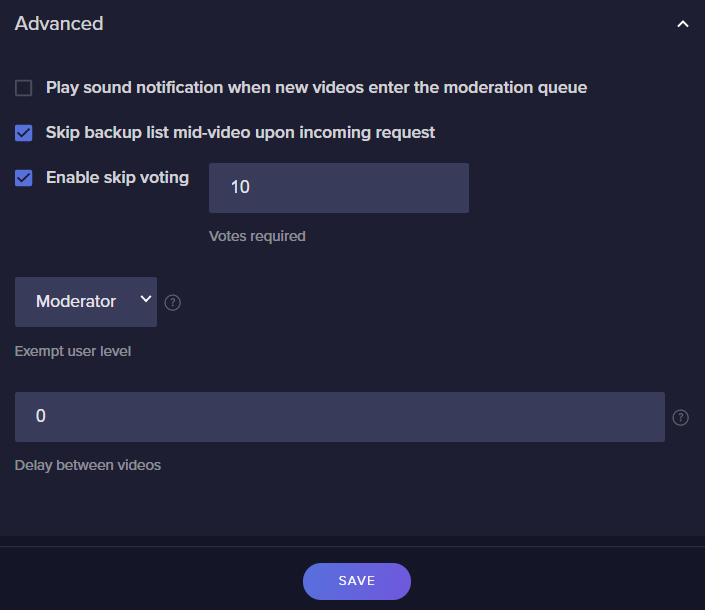
I've a bug report. I've already set exemption here: https://i.imgur.com/lPvnaUq.png
But my audience is still able to vote skip a media requested by broadcaster. I think this shouldn't suppose to happen?
 wary niche
nevermind, figured it out!
foggy heart
wary niche
this may be a stupid question, how do i go about doing that? I must've accidenta...
this page should show where it can be created. i'd check there and see if it's been enabled: https://support.streamelements.com/hc/en-us/articles/360017413239-Creating-a-Custom-Bot-name-with-OBS-Live-

StreamElements
Currently, renaming your StreamElements bot to display a custom name\the broadcaster's name,
Can be achieved either with Ground Control, or with OBS.Live.
If you are not currently using the Groun...
foggy heart
wary niche
nevermind, figured it out!
Oh, great aha
wary niche
Traffy you're a legend, I dont know how I did that but resetting it seems to have fixed it. Thank you so much!
foggy heart
wary niche
Traffy you're a legend, I dont know how I did that but resetting it seems to hav...
Np, glad it's fixed!
gray kernel
foggy heart
Unfortunately, it looks like you want be able to login to that account until the...
I wont be able to even if I have a youtube or facebook account ready to be linked?
craggy gulch
@foggy heart any luck?
foggy heart
craggy gulch
<@!801850149260886118> any luck?
Looking into that now, hopefully i'll have something here for you soon!
foggy heart
gray kernel
I wont be able to even if I have a youtube or facebook account ready to be linke...
Yeah, the account login goes directly through twitch, so there really isn't a work-around for getting in as far as I understand
craggy gulch
ok
gray kernel
foggy heart
Yeah, the account login goes directly through twitch, so there really isn't a wo...
this is incredibly painful. ok thanks
foggy heart
craggy gulch
ok
check it out now if you can
foggy heart
craggy gulch
thank you me n my wife are all excited lmao
Np, glad to hear!
 rocky pewter
Hi @stray pivot any luck on this issue? I have the same issue as well. My Activity feed does not load anything.
viscid pebbleBOT
@rocky pewter Please provide your account ID found at the top of this page: https://streamelements.com/dashboard/account/channels This ID is public info and safe to share here.
 ivory plover
So you can setup media requests that allow users to donate for each video they request for a set period of time right?
abstract hemlock
ivory plover
Do users put the video they want in a header in the donation link page or is it in the chat somehow
abstract hemlock
on your tipping page they will be asked to provide a youtube link if they want to
ivory plover
What if I configured the settings you sent but I don't see a tipping option for a youtube link on my donation page , how do i add it on there?
abstract hemlock
did you save it?
ivory plover
It popped up and said saved after every edit i made
It looked to me like it was autosaving
viscid pebbleBOT
@ivory plover Please provide your account ID found at the top of this page: https://streamelements.com/dashboard/account/channels This ID is public info and safe to share here.
ivory plover
601e0ab25ba10ed95d781f4c
 golden scaffold
This is probably a very common question but is anyone's SE bot spamming "Response Message"?
abstract hemlock
@golden scaffold check each of your timers, one of those has 2 replies
golden scaffold
👍 ill check thanks
abstract hemlock
ivory plover
601e0ab25ba10ed95d781f4c
ivory plover
Thats so weird it wasn't working when i looked at it
Did you do something to fix it or was it just like that ?
abstract hemlock
Refresh 
abstract hemlock

 upper steeple
is somethin going on with SE? my overlay is gone and won't come back when i reload them
okay i got my overlay back but no alerts will play if i try to set them off again
alerts from yesterday work, but my first cheer from today that just happen won't play again
abstract hemlock
@upper steeple alerts seems to be working just fine 🙂
upper steeple
yeah they work now, but the first alert that happen today didn't go off at all and I can't replay it like all others
 thin lily
Is there a specific channel for the Magic Creator program?
ivory plover
This is dumb but where in the settings do you find the actual link you would put into browser source for the alert box
foggy heart
thin lily
Is there a specific channel for the Magic Creator program?
Here, I don't believe so but you can reach out to creators@wizards.com for more support.
thin lily
cool, thanks!
 prisma relic
ivory plover
This is dumb but where in the settings do you find the actual link you would put...
prisma relic
ivory plover
This is dumb but where in the settings do you find the actual link you would put...
once you have it in the overlay editor, save and use the 'link' icon
 hot spade
Hi
prisma relic
👋 if you have a question; please ask 🙂
 cunning sun
Hi, alerts for my subs aren't activating
foggy heart
cunning sun
Hi, alerts for my subs aren't activating
Are any other alerts/events working?
 devout pumice
For loyal program it will be great, if new event will present. "Is new in chat" for example
With separate "welcome-bonus"
foggy heart
cunning sun
they were the last time I streamed
Can you provide you account ID?
prisma relic
 hazy junco
Someone know how to make custom chat with CSS/HTML?
hazy junco
Someone know how to make custom chat with CSS/HTML?
i'm playing with one right now; check in #widget-share for 'ultimate chat'
 sleek wadi
Hi im having problems with streamelemts bot it doesn't work at all but its in chat
viscid pebbleBOT
@sleek wadi Go to the Dashboard > Right side > Part channel > Join channel(https://streamelements.com/dashboard)
hazy junco
@prisma relic Thank you!!!!
viscid pebbleBOT
@sleek wadi If your commands recently stopped working and you're using OBS.Live and a custom bot name do the following:
- In OBS.Live, click on the hamburger menu (three stripes) at the top left of your activity feed
- Click on Stream Settings > Custom bot name
- In the Custom bot name field select Set custom bot name, not your already existing username (with capital letters). Note: If you already connected an account that way, the third entry will show as the account name (see image https://i.imgur.com/sO7fWOX.png).
- Scroll a bit down and click on the purple Connect Custom Bot Account button
- Log in as usual and Authorize the custom bot name
- Back in the Activity feed, click on the Send Test Message button and check if your custom bot name starts working again
 sleek wadi
got it working ! thank you but will have to try again when im streaming >< everything stops working when im streaming ><
but thanks!!
 jade shoal
Is there a way to make the follower/sub goals reflect the exact current amount instead of "progress towards"?
 ionic kelp
@jade shoal unfortunately no as goals don't decrease. Only increase.
You'd have to use an alternative method to display that.
jade shoal
@ionic kelp Okay thanks, I've added a "total" counter to create a take on it
 plain wolf
How can I add overlay?
 grave lark
I'm trying to change the font of text on the widgets in the overlay but it seems like some of them default to a different font even though I have custom fonts enabled. Some of the fonts change correctly though so is there something else I should check that could be the issue?
plain wolf
How to add overlay in stream ?
grave lark
@plain wolf if you log in to the website and go to your dashboard it's under "alerts & overlays" on the left side!
viscid pebbleBOT
@plain wolf To add your overlays to OBS, add a new browser source in your scene. Paste your overlay URL in the browser source properties, set the dimensions to 1920x1080 (unless you changed them on the website) and check Shutdown source when not visible. https://youtu.be/KDvLynUqXI4
@grave lark Google Fonts
More than 900 google fonts are supported at this time. You can preview them here: https://fonts.google.com/
Custom Fonts
Steps:
- Install the font on the streaming PC or choose a pre-installed windows font.
- In the overlay widget settings, select Text Settings
- Click on Enable Custom Font
- Type the name of the font as it appears in the windows font directory (This is usually
C:\Windows\Fonts)
Note: After installing fonts, the browser and OBS must be restarted for the font to appear.
grave lark
@viscid pebble Thanks a ton!
 rigid yew
Hello! How can I fix total tips earned? It's displaying incorrectly because of a mistake I made before but I don't understand how to fix it
 dry hare
rigid yew
Hello! How can I fix total tips earned? It's displaying incorrectly because of a...
dry hare
rigid yew
Hello! How can I fix total tips earned? It's displaying incorrectly because of a...
Where is it displaying incorrectly?
 slow peak
im working on using regular expressions to catch a word for a command. does it work like command keyword where you dont need to "!"?
slow peak
is that the same as RE2?
 zenith widget
I can't tell you, as I'm not familiar with what you are asking.
ionic kelp
There is an option for keyword triggers.
Go to the advanced tab when making said command.
slow peak
I'm trying to bypass combinations of keywords using regEx
slow peak
Okay thanks
 late sinew
Where do I go to find help about overlays?
prisma relic
There are some great links in the title of the channel.
unless you have a specific question about them.
late sinew
Specific question
zenith widget
Can you ask the specific question?
So that we can know where to direct you or simply help?
late sinew
I want to make a friend his overlays, but im not sure how I can send him the overlay without the overlay being attached to my account for alerts and follows and subs
viscid pebbleBOT
"Follow these steps to grant managers/moderators access to your dashboard:
- Click on your channel name at the top of the dashboard
- Create a new invite at one of three access levels (Bot Supervisor, Editor, Full Control)
- Send this invite to a mod/manager to give them access to your dashboard. The link is one-time-use and expires after 72 hours if not accepted
Video tutorial: https://youtu.be/zl_h-ttZDF0"
late sinew
So is there no actual way for me to make the overlay on my side and then send it to him?
late sinew
Oof, alright, thanks
 boreal finch
I can seem to get new follower pop ups, I’ve linked my twitch and the go live notification pop up but no new followers?
viscid pebbleBOT
@boreal finch Please provide your account ID found at the top of this page: https://streamelements.com/dashboard/account/channels This ID is public info and safe to share here.
 stable bloom
hello
 barren vault
Hi, my streamelements activity feed isnt seem to be showing my new follows like on my twitch's activity feed. I'm unsure what the issue is, could it be a permissions issue?
 proven copper
yo guys. why can't my viewers see how much they have watched my stream?
viscid pebbleBOT
@proven copper The !watchtime command is directly tied to the Loyalty system. The Loyalty system must be enabled for viewers' watchtime to count up.
To enable Loyalty, please go to the Loyalty section of your account: https://streamelements.com/dashboard/loyalty
Watchtime counts up every 10 minutes alongside Loyalty points, and only while the stream is live. Reruns will not be counted.
Please note that watchtime is not tracked by Twitch and there is no way to retroactively apply past watchtime to viewers.

StreamElements
The Ultimate All in One Platform for Streamers
 knotty folio
Hello, for some reason I cant leave your main page ( https://streamelements.com/ ). Everytime I try to go to my Dashboard, profile,... I always get loaded to main page.
StreamElements
StreamElements is the leading platform for live streaming on Twitch,Youtube and Facebook gaming. StreamElements features include Overlays, Tipping, Chat Bot, Alerts, merchandise, stream integrated and cloud-based.
viscid pebbleBOT
Please logout of StreamElements at https://streamelements.com/logout and then login again to your account (Twitch/YouTube/Facebook).
@lament blade Obs.live is a plugin for OBS Studio for the best OBS support, please join their Official Discord @ discord.gg/obsproject
 smoky frigate
does maybe any1 know how to add custom fonts to stream elements?
bcs it's not working for me
viscid pebbleBOT
Google Fonts
More than 900 google fonts are supported at this time. You can preview them here: https://fonts.google.com/
Custom Fonts
Steps:
- Install the font on the streaming PC or choose a pre-installed windows font.
- In the overlay widget settings, select Text Settings
- Click on Enable Custom Font
- Type the name of the font as it appears in the windows font directory (This is usually
C:\Windows\Fonts)
Note: After installing fonts, the browser and OBS must be restarted for the font to appear.
 silver pond
How do I remove the bot?
viscid pebbleBOT
Go to the Dashboard > Right side > Part channel > Join channel(https://streamelements.com/dashboard)
smoky frigate
viscid pebble
**Google Fonts**
More than 900 google fonts are supported at this time. You can ...
i followed the steps but it's still not working what do i do?
help?
 little oak
are you drag and dropping it or are you installing it?
little oak
re read what the bot has posted and it should work
also dm me the font file so i can test it?
smoky frigate
okay
little oak
alright going to test it, one sec
little oak
ok it seems was a lil trouble at first but yes it does work
smoky frigate
how did u get it to work
little oak
double install the font then in your overlay type the full name "Minecraftia Regular"
smoky frigate
do i need to restart too?
little oak
no only if you have obs open
smoky frigate
lets go it's working
little oak
YAY
smoky frigate
the only thing is
little oak
whoop whoop
smoky frigate
how do i fix that it's half visible
little oak
i had a lil trouble to i had to double install it
adjust your line height
cause the font is kinda of weird cause its a pixal art
so the line height should fix it 🙂
smoky frigate
ty so much
little oak
You're Welcome 
lament blade
Bello
viscid pebbleBOT
Welcome to the helpdesk! Please let us know how we can assist you today and a support volunteer or staff member will assist you as soon as they are available. Thank you for your patience.
 dapper scarab
Having issues with my dashboard and activity feed not picking up data from twitch.
little oak
which data are you referring to?
dapper scarab
like any new followers
little oak
alrighty, do one favor for me 🙂
grab this
viscid pebbleBOT
Please provide your account ID found at the top of this page: https://streamelements.com/dashboard/account/channels This ID is public info and safe to share here.
dapper scarab
5ff6e43202d065bab2dfcee8
little oak
Clipped and Shipped will tag you when fixed
 flat yacht
Daniel
i would like to know how i can add subscribe button on my twitch would you help me with that
mvg Daniel
zenith widget
little oak
@dapper scarab Fixed! You shall see all data moving forward
dapper scarab
thanks im seeing data now
little oak

 forest talon
Hello! I need help. I redeemed a mug for free from Roshteins store, but when I want to put the discount code at checkout it says ,,discount code isn’t valid for the items in your cart". But its the right item.
viscid pebbleBOT
@forest talon Please contact us via email with issues regarding merch print quality or delivery. You can use our contact form here: https://support.streamelements.com/hc/en-us/requests/new?ticket_form_id=360001353699. Thank you.
 olive sparrow
Hey guys, I was adding commands to my bot, and when I went live they suddenly stopped working, not even the default ones work. Is there an outage?
viscid pebbleBOT
@olive sparrow Go to the Dashboard > Right side > Part channel > Join channel(https://streamelements.com/dashboard)
olive sparrow
It still is not working
prisma relic
do you have OBS.Live open?
olive sparrow
Yep
prisma relic
are you live now?
olive sparrow
Whatever I do it's just not responding lol
olive sparrow
prisma relic
are you live now?
Yup
prisma relic
channel? .... just the name.
lament blade
Im getting the error that my bank details are invalid
prisma relic
i think you need to reset bot.
viscid pebbleBOT
If your commands recently stopped working and you're using OBS.Live and a custom bot name do the following:
- In OBS.Live, click on the hamburger menu (three stripes) at the top left of your activity feed
- Click on Stream Settings > Custom bot name
- In the Custom bot name field select Set custom bot name, not your already existing username (with capital letters). Note: If you already connected an account that way, the third entry will show as the account name (see image https://i.imgur.com/sO7fWOX.png).
- Scroll a bit down and click on the purple Connect Custom Bot Account button
- Log in as usual and Authorize the custom bot name
- Back in the Activity feed, click on the Send Test Message button and check if your custom bot name starts working again
prisma relic
lament blade
Im getting the error that my bank details are invalid
for SE.pay? ... that might be a staff thing
lament blade
Yea 😦
viscid pebbleBOT
Please contact us via email for support with SE.Pay. You can use our contact form here: https://streamelements.com/contact Thank you.
lament blade
Done. Thanks
 thorny flint
hola necesito ayuda con la configuracion de puntos de streamelemnts
viscid pebbleBOT
@thorny flint Welcome to the helpdesk! The regular helpdesk channels are in English but we do provide multi-language support in the following channels: #🇩🇪︱deutsch | #🇫🇷︱français | #🇪🇸︱español | #🇵🇹︱português | #🇳🇱︱nederlands | #🇮🇹︱italiano | #🇵🇱︱polski | #🇨🇳︱中文語言服務區-chinese | #🇯🇵︱日本語-japanese | #🇭🇺︱magyar | #🇰🇷︱한국어-korean | #🇹🇭︱ไทย-thai | #🇷🇺︱русский | #🇺🇦︱українська | #🇨🇿︱czech
little oak
The Bot must be a sub or yo uuse your account as a custom bot name
little oak
not necessarily, chat can gift it or you can use your account as the custom bot name 🙂
or when youre partnered, its free
 vapid sundial
Oki
If use my user it gonna be a bit confusin tho
Hmm, I changed it to my account name.. but now the bot ain't working at all
little oak
try this
viscid pebbleBOT
If your commands recently stopped working and you're using OBS.Live and a custom bot name do the following:
- In OBS.Live, click on the hamburger menu (three stripes) at the top left of your activity feed
- Click on Stream Settings > Custom bot name
- In the Custom bot name field select Set custom bot name, not your already existing username (with capital letters). Note: If you already connected an account that way, the third entry will show as the account name (see image https://i.imgur.com/sO7fWOX.png).
- Scroll a bit down and click on the purple Connect Custom Bot Account button
- Log in as usual and Authorize the custom bot name
- Back in the Activity feed, click on the Send Test Message button and check if your custom bot name starts working again
lament blade
Hello, whenever I close OBS, the custom bot name returns to StreamElements. So I cannot use StreamLabs OBS.
little oak
Custom bot name need OBS.Live to be active in order to use it. Once closed it will return to normal Streamelements
 marble edge
Hi can anyone explain to me how I can import a psd file into stream elements? Someone made it for me but stream elements doesnt seem to accept that type of file
 undone thunder
how find tip pannel for tips on streamelements???? not showing in dashboard
panel
ebon forum
undone thunder
how find tip pannel for tips on streamelements???? not showing in dashboard
Check your tipping settings:
https://streamelements.com/dashboard/tipping-settings
StreamElements
The Ultimate All in One Platform for Streamers
There is a link for the panel etc.
undone thunder
not showing anymore panel download option
 proven copper
Hi there... if i enter a chat command into twitch such as !slots it works , but as soon as i open obs streamelements my chat commands stop working ..i have parted the bot many times and no joy...
viscid pebbleBOT
If your commands recently stopped working and you're using OBS.Live and a custom bot name do the following:
- In OBS.Live, click on the hamburger menu (three stripes) at the top left of your activity feed
- Click on Stream Settings > Custom bot name
- In the Custom bot name field select Set custom bot name, not your already existing username (with capital letters). Note: If you already connected an account that way, the third entry will show as the account name (see image https://i.imgur.com/sO7fWOX.png).
- Scroll a bit down and click on the purple Connect Custom Bot Account button
- Log in as usual and Authorize the custom bot name
- Back in the Activity feed, click on the Send Test Message button and check if your custom bot name starts working again
little oak
You're Welcome
 fierce canopy
Hello, I have a problem in the watchtime section and in the twitch channel when I click! Watchtime drives scens0.
viscid pebbleBOT
The !watchtime command is directly tied to the Loyalty system. The Loyalty system must be enabled for viewers' watchtime to count up.
To enable Loyalty, please go to the Loyalty section of your account: https://streamelements.com/dashboard/loyalty
Watchtime counts up every 10 minutes alongside Loyalty points, and only while the stream is live. Reruns will not be counted.
Please note that watchtime is not tracked by Twitch and there is no way to retroactively apply past watchtime to viewers.
StreamElements
The Ultimate All in One Platform for Streamers
fierce canopy
little oak
Your Loyalty needs to be turned on for the watchtime to be accountable
ionic kelp
And there already is a watchtime command.
little oak
^^
 pallid lake
can i make my over lay appear when i stream on ps4 ?
lament blade
I had someone order from my merch store and I see 0 transactions how long does that take to show up?
little oak
go here for loyalty https://streamelements.com/dashboard/loyalty and here to turn on the cmd https://streamelements.com/dashboard/bot-commands/default-commands @fierce canopy
pallid lake
useually 25 but since there is covid it might take more
viscid pebbleBOT
@pallid lake Consoles do not have native support for overlays. You would need a capture card, PS4 remote play or Xbox companion app and a PC with OBS in order to have overlays over your console gameplay.
We have a blog post about how to set up console streaming with our essential tools: https://blog.streamelements.com/how-to-stream-on-console-7b620b1c46c3
wary halo
lament blade
I had someone order from my merch store and I see 0 transactions how long does t...
up to 24 hours
but you should see it in your activity feed
lament blade
Yeah its been 2 days, I see it in the feed but I see nothing in terms of profit made
wary halo
payments tab in the merch section
fierce canopy
wary halo
we also have #helpdesk-merch for the next time 😉
wary halo
fierce canopy
it only counts when you are live
little oak
watchtime is not retroactive you need to be live and after 10 mins it will count
fierce canopy
But still hit secs0
little oak
its not retroactive, you need to be live after activatioon
lament blade
 elfin perch
anyone can help to setup my stream? (overlays alerts etc)
viscid pebbleBOT
@elfin perch New to StreamElements?
Check out our YouTube channel https://www.youtube.com/c/streamelements/videos
with tutorial videos from setting up the basics, to in-depth details on how to use our product.
New to OBS? Here is a 4 step quick start guide
https://obsproject.com/wiki/OBS-Studio-Quickstart
Want to learn even more? Here is an in-depth overview
https://obsproject.com/wiki/OBS-Studio-Overview
lament blade
I'll take it to the merch section
 warm phoenix
Good morning! Does anyone have any tips or recommendations for fixing alerts & data is Stream Elements where it doesn't collect follower data?
 lean gorge
Hey i made an account with my youtube channel then i noticed that i can link my youtube channel to my account i created with twitch but now i cant do it because my youtube channel is already connected with streamelements can anybody help to link my youtube channel to the account where i have my twitch overlays etc?
viscid pebbleBOT
@warm phoenix Please provide your account ID found at the top of this page: https://streamelements.com/dashboard/account/channels This ID is public info and safe to share here.
@lean gorge Account Merging - Please note:
- Merging accounts only allows faster ways to switch between accounts
- Merging accounts does not allow data sharing between accounts - different streaming platforms, different type of events
- Merging accounts allows duplicating/sharing overlays between the accounts
If you understand the limitations of merging and want to proceed, please find the JWT tokens (!jwt) from both accounts you want to merge and you will be directed to DM them to a staff member
@lean gorge You can find your JWT token on your account channels page (Show Secrets to reveal the token): https://streamelements.com/dashboard/account/channels
READ ME: This is a private security token. Do NOT share this token here or other public places, only with a StreamElements staff member in private.
warm phoenix
Account ID: 5ff69af0ab474f1f3bbf2d01
wary halo
@lean gorge you can DM both tokens to @ebon forum when you get them
lean gorge
ok thank you
wary halo
warm phoenix
Account ID: 5ff69af0ab474f1f3bbf2d01
reported, will ping you when fixed
fierce canopy
Hello, I can say that you can take a bad photo of the watchtime section in the stream element, because my snake has done everything.
My problem was not solved
little oak
Watchtime is not Retroactive in order for it to work you need to active the loyalty and the you must be live.. Once youre live then it will start counting every 10 mins you are live.
go here for loyalty https://streamelements.com/dashboard/loyalty and here to turn on the cmd https://streamelements.com/dashboard/bot-commands/default-commands
 vernal moat
Hi. I can't acess Dashboard
viscid pebbleBOT
Please logout of StreamElements at https://streamelements.com/logout and then login again to your account (Twitch/YouTube/Facebook).
vernal moat
ty
 elder turtle
Thank you so much !
 wild aspen
why is media request muting itself
ebon forum
wild aspen
why is media request muting itself
Hi. That should not happen, unless the video is blocked from embedded players.
 celest gate
Hi, I am trying to stream for first time using stream elements on my laptop with my xbox one connected via xbox console companion. I have all my overlays and alerts set up but it wont allow me to stream. I keep getting an error message: Failed to Connect: Could not access the apecified channel or stream key, please double check your stream key. If it is correct, there may be a problem connecting to the server.... What am I doing wrong?
ionic kelp
@celest gate OBS settings > Stream > Disconnect and reconnect.
 still kraken
Can someone help me I'm currently trying to stream on twitch and when I do the video stutters if you have a solution to my problem PLEASE dm me and we could talk about how we could fix this 🙂
ivory plover
How do I enable text to speech in the overlay editor ? or do i have to enable it elsewhere for it to work
nimble dune
ivory plover
How do I enable text to speech in the overlay editor ? or do i have to enable it...
Example click on tip alert then tts settings
ebon forum
ivory plover
How do I enable text to speech in the overlay editor ? or do i have to enable it...
You need to enable that in the alertbox settings for each alert.
nimble dune
ebon forum
aka this^
 viscid pebbleBOT
@ivory plover You can test alerts via the Emulate bell on the lower left side of the Overlay Editor. Simply go to your Dashboard > My Overlays > pencil/edit button on the overlay. Make sure the Preview LIVE on stream option is on to see the alert in OBS/XSplit** https://streamable.com/vtulg9
 nimble dune
Yes you can emulate tts
ivory plover
I see now I have to use the custom option on the tip alert sweet
Okay I think im won over this is much better than streamlabs
 honest dawn
Hello - is there a way i can exclude Discord from my stream?
 torn arrow
What do you mean?
lament blade
Hey I have set up tts and enabled it and it works for all alerts other than for bits could someone help me? 🙂
honest dawn
When I stream i do not want my discord mates to be heard in it
torn arrow
Yes, that's possible!
Just change the audio output in Discord to something else (Gear icon / User Settings > Voice & Video > Output Device ) ... like only to be heard on your headphones. I attached screenshots so how it is by default and for me that I change it to my audio device where I want only Discord to be heard on. This will separate the audio of Discord and it won't be tied to the Desktop Audio in OBS.
fierce canopy
I say you can show your sting in the stream element in my watch section because my snake is confused
torn arrow
honest dawn
I tried that but then i do not hear them either
honest dawn
I cant see discord in audio mixer though and i can not add it in sources
 pallid plume
Hello, I have a little Problem. My stats on https://stats.streamelements.com/c/playonlinux2020 are resultet with an 404.
ebon forum
pallid plume
Hello, I have a little Problem. My stats on <https://stats.streamelements.com/c/...
What is your channel name?
We can fix that
pallid plume
thank you
wary halo
playonlinux2020 that is, removed the link because of the rules 😉
pallid plume
okay, sry 🙈
 dry notch
I've had a couple "bot" accounts follow. I've banned them but they still show in my event list, is there a way to remove them from the event list in my overlay?
 muted loom
is there a way for streamelements to say in chat if someones hosts for even just one ?
viscid pebbleBOT
@muted loom "Due to changes to Twitch API, we have filtered out hosts and will only show these ones on your activity feed:
- All hosts coming from an online channel with at least 1+ viewer
- Auto host events with at least 1 viewer - only from a channel that just went offline
Note: If you see X channel has hosted you with no viewers on the back, that is considered an offline host or a host with 0 viewers, we do not show these."
dry notch
dry notch
I've had a couple "bot" accounts follow. I've banned them but they still show in...
ah figured it out. Open streamelements dashboard, activity feed, on the right hand side widget data and then scroll down and x out the ones you don't want to show
ivory plover
Why do I have to have viewer requests enabled for Media requests to be available on the tipping page
wary halo
you don't have to do that
go to the media request settings and turn the fees option off
ivory plover
I have it set for Via tip there because I don't want people requesting songs in the chat I want it just to be for paid tipping from the donation page only
But when I disable viewer requests it just disappears off the tipping page
 plain condor
hello can someone help me move my alerts from streamelements to streamelements(other account)
ebon forum
ivory plover
I have it set for Via tip there because I don't want people requesting songs in ...
This is intended. You either have both (free and for tips) or tips only or you have that turned off and you use that just as a playlist for yourself.
 meager hinge
how do i fix !discord command on my chat as it shows *** everytime
 cinder olive
meager hinge
how do i fix !discord command on my chat as it shows *** everytime
cinder olive
meager hinge
how do i fix !discord command on my chat as it shows *** everytime
You probably have links blocked in twitch's automod, either mod your SE bot or disable it
You probably have a filter turned on to time someone out for X word, or X link, etc. Either modify the filter or disable it
cinder olive
lament blade
Why does my stream look 720p when i put it to 1080p
Youre either being capped by twitch to 720p (likely) or you are outputting 720p in OBS
lament blade
how do i go to 1080p
cinder olive
Becoming partner for garunteed encoder settings, or setting your OBS output to 1080p
lament blade
on twitch?
wary halo
no in OBS
lament blade
im not using obs
cinder olive
Then we cannot help you
wary halo

cinder olive
Send a screenshot of it timing someone out/what they said
If you cant view what they said then I would suggest using FFZ or BTTV.
 wicked zealot
im having an issue where my follower alert is not working. All my other alerts work fine, I think its because the follows are not popping up on the activity feed, is there a way to fix that
viscid pebbleBOT
@wicked zealot Please provide your account ID found at the top of this page: https://streamelements.com/dashboard/account/channels This ID is public info and safe to share here.
wary halo
how about showing a bit more respect to people trying to help you
wicked zealot
5ff927675415bb06c107978a
cinder olive
wicked zealot
5ff927675415bb06c107978a
Should be fixed shortly; previous alerts obviously wont show but from here on out it will
wary halo
It's what you are saying on stream about my fellow support hero overhere
wicked zealot
thank you so much
ivory plover
Can I add a delay for media request before each video plays instead of just in between videos
cinder olive
ivory plover
Can I add a delay for media request before each video plays instead of just in b...
Pardon? Like.. have a blank space between videos?
ivory plover
Like I have them donating their videos from the donation page and typing their message thats read out with text to speech, so i wanted to add a delay between when the video played so their message could pop up and be read with the text to speech for a bit before the video went on
cinder olive
ivory plover
Like I have them donating their videos from the donation page and typing their m...
To my knowledge, no, but let me twiddle my fingers on some things for a bit
ivory plover
Thank you I appreciate it
cinder olive
I dont see any way to do it based off of TTS
But if you go to the advancd settings theres this;
Can be found at the verry bottom (very last setting) here https://streamelements.com/dashboard/mediarequest/settings
 frigid flame
bot timer does not seem to work ???
cinder olive
How do you have it set up?
The bot timer requires X amount of chat lines to be sent in X time before being sent
The variables are based on what you set them to be
If the chat lines are not met then it does not send.
frigid flame
ivory plover
Yeah that setting might work I was seeing if I could add a delay before each video starts instead but ill tinker with it and see what i can do for now
cinder olive
frigid flame
So with this, you must have 5 lines of chat every 6 minutes, or it will not send.
If you want it to send every 6 minutes regardless of chat, remove the chat line requirement.
pallid plume
ebon forum
We can fix that
it is still a 404.
ivory plover
Ideally I want to line up the actual donation message people make with their text to speech being read for 5 seconds before their media request is played (i set max media request for 30 sec) and then there could be back to back donations like this with media requests right after each one and it all lines up, but it sounds like its gonna be difficult to do so ill have to try and mess with things
frigid flame
ok thanks for testing it
 cursive jackal
Anyone know how to disable !play? I have media share and song request turned off but it still comes up when users type !play
nevermind
barren vault
i think you can toggle off chat commands here https://streamelements.com/dashboard/bot-commands/default-commands
cursive jackal
I must be blind
 crude bear
Hi, for some reason the SE LeaderBoards arent updating with data. I had a stream last night and there were a lot of chatting, but the chatboard leaderboard doesn't show any data.
frigid flame
@cinder olive if you put it on more is it sent then?
barren vault
My streamelements activity feed isnt updating, could someone help me out? My account ID is 5ffaafdf52e7be0bca1fcc17
wary halo
barren vault
My streamelements activity feed isnt updating, could someone help me out? My acc...
reported it
wary halo
crude bear
Hi, for some reason the SE LeaderBoards arent updating with data. I had a stream...
the chatstats? for which channel? (name, no links)
crude bear
wary halo
the chatstats? for which channel? (name, no links)
yes, for AwakenedMemory
wary halo
thanks, i'll send it in 🙂
crude bear
my activity feed also seems to not be working i think, not sure
thanks; what should i expect from now?
crude bear
wary halo
your followers not showing up?
actually i just tested. it is working. just issues with the leaderboards. thanks!
when you say ping, you mean a ping on discord?
wary halo
yes
crude bear
Also quick question, how do i clear/delete a particular follow on my activity feed?
I used another account to test, and would like to remove it within the activity feed and dashboard so to show the true data.
I've since unfollowed with said account.
viscid pebbleBOT
@crude bear To reset goals:
- from the Overlay Editor > Session data on top right (monitor symbol) > Goals tab > reset progress of desired goal
- from the Dashboard > Activity feed on the left > Widget data on the right > Goals tab -> reset progress of desired goal
Note: Goal widgets (progress) only counts up and doesn't go down automatically, if you lose followers/subs.
ebon forum
pallid plume
it is still a 404.
Well i need your exact channel name. You only typed thank you etc since then 🙂
ebon forum
pallid plume
sry i posted it as a link. it was removed
Try it now
pallid plume
thanks, no 404. its empty now, but in future it will filled with live. thanks a lot
crude bear
viscid pebble
<@!771627443235717141> To reset goals:
- from the Overlay Editor > **Session dat...
eh its still showing up
in my activity feed
wary halo
yeah the event on the feed can't be removed
crude bear
oh i see
wary halo
only the totals number can be adjusted for goals
 wide skiff
okay so i am in needd of serious help#
viscid pebbleBOT
@wide skiff Welcome to the helpdesk! Please let us know how we can assist you today and a support volunteer or staff member will assist you as soon as they are available. Thank you for your patience.
wide skiff
well when i am sitting here trying to get my obs to record my game it appear as if it see's my game but doesn't show it on my stream or recording
viscid pebbleBOT
@wide skiff Obs.live is a plugin for OBS Studio for the best OBS support, please join their Official Discord @ discord.gg/obsproject
wide skiff
thats what i clicked and it led me here so idk what to tell u bot XD
 odd estuary
Hi @viscid pebble I can't get ideal to work with twitch, how do I get that to work?
wary halo
odd estuary
Hi <@!155149108183695360> I can't get ideal to work with twitch, how do I get th...
you need 101 followers before it becomes available
 velvet eagle
Hello, so I have a Problem. I have a Animated overlay and at the Webside and do on everything is animated. But In my Obs its not Animated... Can somebody help me?
(How can I fix this?)
 white gorge
I need some help. set up the shout out command in custom commands for the bot using the default template (not changing it at all) and instead of saying the link to the shout out, it just says ***. is there some quota you need to reach, like affiliate, to shout channels out?
wary halo
bot need to be a moderator
and check the hyperlink block settings in your twitch settings
velvet eagle
velvet eagle
Hello, so I have a Problem. I have a Animated overlay and at the Webside and do ...
@wary halo
wary halo
ah yeah:
viscid pebbleBOT
@velvet eagle OBS > Settings > Advanced > Scroll down > Enable or disable Browser Source Hardware Acceleration, depending on its current state > Restart OBS
https://i.imgur.com/ggMe9ZE.png
 wary halo
turn that off
white gorge
thank you @wary halo I didn't mod the bot, I'm a big idiot lol
wary halo
happens more than you think 😄
velvet eagle
@wary halo I turned in on and now its working... bruh
wary halo

velvet eagle
xD
cursive thistle
Trying to use the Sound Alerts Dashboard to trigger sounds for viewers on bits. But it doesn't seem to be working? Anyone have any ideas
wary halo
did you install their overlay in OBS?
 fossil pivot
Hello, im having issues connecting to the stream server. i've tried all fixes that were suggested over the internet. nothing has worked. please help
 thorn night
Any reason the chat bot would be working in my stream and no my friend's stream? Yes they have the bot added and modded. It has worked before but not now.
viscid pebbleBOT
@thorn night Go to the Dashboard > Right side > Part channel > Join channel(https://streamelements.com/dashboard)
thorn night
Have done that but will have them try it again
viscid pebbleBOT
@thorn night If your commands recently stopped working and you're using OBS.Live and a custom bot name do the following:
- In OBS.Live, click on the hamburger menu (three stripes) at the top left of your activity feed
- Click on Stream Settings > Custom bot name
- In the Custom bot name field select Set custom bot name, not your already existing username (with capital letters). Note: If you already connected an account that way, the third entry will show as the account name (see image https://i.imgur.com/sO7fWOX.png).
- Scroll a bit down and click on the purple Connect Custom Bot Account button
- Log in as usual and Authorize the custom bot name
- Back in the Activity feed, click on the Send Test Message button and check if your custom bot name starts working again
rigid yew
dry hare
Where is it displaying incorrectly?
hi sorry for the late reply, it's on the totals. so when i put like the all time top tipper, it wasn't accurate. even if i deleted the manual entry i tried to put in @_@
wary halo
crude bear
when you say ping, you mean a ping on discord?
should be fixed
wary halo
barren vault
My streamelements activity feed isnt updating, could someone help me out? My acc...
fixed, missed events won't show but new ones will
barren vault
Thanks!
crude bear
wary halo
should be fixed
Ok cool thanks. I checked the chat stats and nothing is there still, I'm guessing it'll just start data accumulation from now on?
wary halo
I guess that is the case yeah, I didn't get an explanation only a ping that it was done
 void solstice
can someone help me set up a hug command? fx "Falster hugs Casperfromsweeden"
cinder olive
void solstice
can someone help me set up a hug command? fx "Falster hugs Casperfromsweeden"
/me message: $(sender) hugs $(user) GivePLZ TakeNRG is my hug command (I think)
 keen wadi
Hellooo. I have a question in regards to sub alerts. It doesnt always read all the messages out loud. Is there any way to fix this bug? I figured sometimes its longer messages but even short ones dont always read. TTS is on.
void solstice
@cinder olive thanks, im gonna try it 🙂
lament blade
C'è qualche italiano che mi può dare una mano?
cinder olive
lament blade
C'è qualche italiano che mi può dare una mano?
#🇮🇹︱italiano
lament blade
#🇮🇹︱italiano
wary halo
click on it 😉
lament blade
cinder olive
<#545992881530339368>
Ciao mi puoi dare una mano su problemi di settaggio?
cinder olive
Questo è solo per l'inglese, vai al canale sopra per aiuto.
cinder olive
keen wadi
Hellooo. I have a question in regards to sub alerts. It doesnt always read all t...
Random guess is it is blacklisting a word/words
keen wadi
The message was "Something something, old"
Ive had long messages where they say my name over and over again and it doesnt say that, but i dont have spam or length filter on. So not really sure why it doesnt do that. And the black list word thing ususally just changes the word to something silly
cinder olive
keen wadi
The message was "Something something, old"
Ive had long messages where they say...
Do you have TTS setup for all variations then?
Could be some month-tier variation doesnt have it enabled
keen wadi
yes. Ive searched all the settings trying to find anything that would keep it. But ill double check right now. i dont think i have any variations at all set up as i just simplified all my alerts to try to fix it
cursive thistle
@wary halo I believe so yeah. It just said to drag and drop the source
It shows up when people redeem channel points for sounds too
Just not bits
keen wadi
@cinder olive Just checked, no variations. and all my spam filters besides links are disabled
wary halo
cursive thistle
Just not bits
might want to contact the creators of the extension
since this is not StreamElements related we can't help that much when it fails to work
cinder olive
keen wadi
<@!311873541542772736> Just checked, no variations. and all my spam filters bes...
Next time it happens clip it and hop on back over here, its hard to know without seeing it sometimes
keen wadi
@cinder olive oh thats you in chat right? I can repeat it. It just happened
 steel wind
Evening guys i have set up a bot timer on streamelements and trying to show my merch off but for some reason the bot keeps putting a full stop at the end of my link so can anyone advise me on how to get the bot not to post the link without the full stop please and thank you
cinder olive
steel wind
Evening guys i have set up a bot timer on streamelements and trying to show my m...
Send a screenshot

 jovial moth
Hey Guys, i'm having issues connecting Twitch to my stream elements. I login with the Twitch buitton and can see my image and email etc, but for some reason its not connecting to Twitch, follower info etc not being pulled through. I've tried clicking "add twitch channel" however i get the error "Channel is already claimed" any help would be appreciated.
viscid pebbleBOT
@jovial moth Please provide your account ID found at the top of this page: https://streamelements.com/dashboard/account/channels This ID is public info and safe to share here.
steel wind
cinder olive
jovial moth
5ff8b77e6c80f5188b595549
Should be fixed shortly, small issue with webhooks on certain accounts
jovial moth
Amazing, legend thank you so much
cinder olive
steel wind
URL is too long, remove the https:// and only use merch.streamelements.com/skinnyjeansscott might work
 lucid night
TÜRKÇE DESTEK ALABİLECEĞİM KİMSE VAR MI?
viscid pebbleBOT
@lucid night Welcome to the helpdesk! The regular helpdesk channels are in English but we do provide multi-language support in the following channels: #🇩🇪︱deutsch | #🇫🇷︱français | #🇪🇸︱español | #🇵🇹︱português | #🇳🇱︱nederlands | #🇮🇹︱italiano | #🇵🇱︱polski | #🇨🇳︱中文語言服務區-chinese | #🇯🇵︱日本語-japanese | #🇭🇺︱magyar | #🇰🇷︱한국어-korean | #🇹🇭︱ไทย-thai | #🇷🇺︱русский | #🇺🇦︱українська | #🇨🇿︱czech
lucid night
turkish language?
steel wind
I have tried that but it still comes up with http:// at the start, It is very simple im sure to fix but just don't understand why i cannot get rid of the full stop
wary halo
lucid night
turkish language?
wo do not have a turkish speaking support member at the moment
cinder olive
steel wind
I have tried that but it still comes up with http:// at the start, It is very si...
You can put links in timers without the http://, you simply need to delete it
steel wind
I have done that mitch but still comes back up with the http:// after saving the timer
cinder olive
steel wind
I have done that mitch but still comes back up with the http:// after saving the...
Then your URL is simply too long and use a URL shortener, like Bit.ly or TinyUrl.com
jovial moth
Looks like its connected now Mitch but the follower count is just the 1 that (i assume) you tested with
steel wind
Mitch thank you for your help, i must note it was me being an idiot! I was trying to change the timer instead of the !command so thank you for your help bro
 main compass
Hey friends. I just set up an account for stream elements, and I'm trying to make an Overlay with "Labels - Most Recent," but it seems like streamelements didn't pull any data other than donations (Shows 0 cheers, follows, subs for every month). Is there any way to update or import "Event Data?" Is my account too new for this feature?
wary halo
it will populate when new events occur, we can't track data from before joining
main compass
wary halo
it will populate when new events occur, we can't track data from before joining
Got it. Thank you!
 late badger
Hello, is there someone who could help me figure out some issues with the list of my received donations?
cinder olive
late badger
Hello, is there someone who could help me figure out some issues with the list o...
Pardon?
late badger
@cinder olive I have this issue, where if i go to my top-tippers list, the names dont really make sense. Some names are listed twice as a separate tip instead of merging, one nam is just wrong (taking over a name from some different tipper) and some weird things like that
But when using a rotator widget that shows my top 10 tippers, everything seems to be okay
here just for an example, the dark one is from my top tippers list on the website, the bright one is top 10 tippers shown using a label in overlay creator
and then i have a rotator that shows the top 10 tippers and that also shows different data
 grave minnow
Hey everyone! Quick Question, my Twitch displays are gone and I don't know how to get them back.
viscid pebbleBOT
@grave minnow StreamElements menu, on top of OBS > Logout > Login
grave minnow
Okay, that worked. But how do I get the twitch status and twitch stream name changer back?
 sinful quiver
So im trying to stream in 720p but it seems like no matter what i do it somehow ends up in 1080p and i dont know how to fix that
abstract hemlock
@sinful quiver check this ⤵️
sinful quiver
abstract hemlock
<@!544171363938598920> check this ⤵️
Thanks for the help
 open wren
Hello
I’m having a problem to understand what’s going on with the tip that I received.
I received a tip almost 1 week ago and until now I don’t have this tip PayPal account
viscid pebbleBOT
@open wren if a viewer tipped through PayPal but no information appears in your StreamElements account, this generally means PayPal has held the tip for verification. Until PayPal clears the tip and sends back a confirmation to your StreamElements account, no information will appear there and no alert will play, as that confirmation is the only way for us to be aware of a successful transaction. If you believe there may be an issue with the transaction, you'll need to contact PayPal support as StreamElements is only a passthrough service and never actually gets involved with the transaction or touches the money
open wren
They said to the person that tipped me that this tip is probably in my SE PAY
wary halo
not if he used paypal
open wren
If he used PayPal to tip there’s no way can con trough SE PAY ?
wary halo
it should go straight to your paypal afaik
but I will ask to make 100% sure, but afaik SEpay does NOT work with paypal
open wren
Ok
I’m kind confused, because o never had this type of problemas before
Always go straight to my PayPal account
I*
wary halo
yeah just got confirmation, paypal tips always go straight to your paypal account
might want to ask paypal again, or let the tipper provide a screenshot of the actual tip
to make sure they weren't trolling around
open wren
Ok, I’ll try to contact PayPal to understand what’s going on
wary halo
Good luck 😄 hope it get's resolved
open wren
Thank you!!!
 spark bay
Alright so I'm trying to stream
and streamelements just isnt there
the bot is long gone
viscid pebbleBOT
@spark bay Go to the Dashboard > Right side > Part channel > Join channel(https://streamelements.com/dashboard)
open wren
How do I have access to SE PAY account ?
viscid pebbleBOT
@open wren SE.PAY is available for streamers who are at least 18 years old, with bank account under their name in one of the following countries and have at least 101 follower (Twitch) / 101 subscribers (YouTube):
Austria, Belgium, Czech Republic, Denmark, Finland, France, Germany, Ireland , Italy, Netherlands, Poland, Portugal, Slovakia, Spain, Sweden, Switzerland, United Kingdom, United States.
If you meet these criteria and don’t see SE.Pay, let us know.
For information on SE.Pay payment methods, their fees and settlement times see https://streamelements.com/dashboard/tipping/fees
wary halo
 trim flare
hi i have a problem with streamelements, when i get bits donated the donation video gets stuck in my obs
until there he stays
@viscid pebble
 rancid atlas
my music wont come through when i'm streaming can someone help me please
trim flare
rancid atlas
my music wont come through when i'm streaming can someone help me please
Have you already tried checking the volume?
this is my id 5ff7d1e6ab474fff88c5244c
 heady jay
Can someone help me when someone follows it quickly opens up and then goes awake in like a second...
abstract hemlock
@trim flare i'm testing your overlays and everything is working just finr on my end
try disabling the hardward acceleration
viscid pebbleBOT
OBS > Settings > Advanced > Scroll down > Enable or disable Browser Source Hardware Acceleration, depending on its current state > Restart OBS
https://i.imgur.com/ggMe9ZE.png
@heady jay Please provide your account ID found at the top of this page: https://streamelements.com/dashboard/account/channels This ID is public info and safe to share here.
trim flare
abstract hemlock
try disabling the hardward acceleration
Ok
trim flare
abstract hemlock
<@!708820064685785159> i'm testing your overlays and everything is working just ...
thanks!!! already fixed!! @abstract hemlock
lament blade
hi i need help
 fierce snow
Hi there, i have a question about Profile page one streameleements.com i can't update my page there is always an error dunno why ?
viscid pebbleBOT
@lament blade Welcome to the helpdesk! Please let us know how we can assist you today and a support volunteer or staff member will assist you as soon as they are available. Thank you for your patience.
lament blade
i have this problem where my stream is laggy
abstract hemlock
@fierce snow are you trying to remove any of the social media? cause atm you can't once added you can only edit them 😅
viscid pebbleBOT
@lament blade Please provide a log from your last stream. To do this, in OBS go to Help > Log Files > Upload Last Log File and paste the link to the log file here.
fierce snow
abstract hemlock
<@!153472467988381697> are you trying to remove any of the social media? cause a...
hoo ok yes i removed discord link xD
 frozen palm
Hi there, this may be better for the developers-api room. But I'm trying to do a Custom CSS alert where I have the alert text on top of the GIF, but no matter what I do, I can't seem to get my text to lay on top of the GIF I selected to use. I can DM someone the code itself if that's easier, so I don't spam in here.
abstract hemlock
@stray edge you may need to check with paypal
@frozen palm yes the best place will be #dev-chat
 stray edge
Thank you!
 burnt loom
Got the Same problem
rancid atlas
trim flare
Have you already tried checking the volume?
yes i have and nothing it only detects my voice no music
 indigo hamlet
Hi all, please I need some help. We are doing here a beneficent event, and getting donates to a ONG. But, or tip page is given us the message - Restricted Account, and our viewers cannot give their tips. We already try to change our paypal account but isn't working. Can you help us?
trim flare
rancid atlas
yes i have and nothing it only detects my voice no music
The truth is I don't know much about what it could be, so you better ask someone else for help, good luck with your problem!
rancid atlas
@trim flare thanks for trying
 worn cradle
Someone cant donate to my stream elements link from paypal. They say theyre getting a restricted notfication. Any ideas?
They are using paypal
 woeful pond
I'm new to obs live and I started using it to stream on twitch. My question is, how do I setup my alert box if there is no option to add it in my scenes? like sub and follow alerts
abstract hemlock
@worn cradle @indigo hamlet @stray edge we are looking into this
viscid pebbleBOT
@woeful pond To add your overlays to OBS, add a new browser source in your scene. Paste your overlay URL in the browser source properties, set the dimensions to 1920x1080 (unless you changed them on the website) and check Shutdown source when not visible. https://youtu.be/KDvLynUqXI4
worn cradle
@abstract hemlock thanks, hopefully soon we get an update ping ❤️
indigo hamlet
@abstract hemlock thanks, we hope that you come with the solution as quick as you can, for we can get as much donate as we can! thank you so much! ❤️
rancid atlas
@trim flare i've sorted the issue now thanks
 novel veldt
Are there any issues with the tipping system at the moment? I wanted to tip a streamer and got "ERROR! RESTRICTED ACCOUNT"
 sturdy fossil
Hello! New to the discord. My streamelements dashboard reads 0 followers, 0 hosts, etc which is weird and simultaneously wont display my alerts unless I emulate them. Any help would be greatly appreciated:) Thank you!
foggy heart
novel veldt
Are there any issues with the tipping system at the moment? I wanted to tip a st...
We are currently looking into this issue
 sick swift
hi, i am trying to tip myself to see if the thing works, but when i click tip, it gives me an error saying "restricted account"
what gives?
i got my friend to try it too and he got the same error
abstract hemlock
We are aware about this behavior, our dev team is working on it
novel veldt
sick swift
hi, i am trying to tip myself to see if the thing works, but when i click tip, i...
see above, they are working on it
 queen tusk
hi! I'm having trouble to receive tips, to endorse the info above.
 delicate gull
hi! i'm having problems with sending tips
abstract hemlock
@queen tusk @delicate gull We are aware about this behavior, our dev team is working on it
delicate gull
oh okay
lament blade
Hello 🖖
I saw the following behavior in a twitch stream and was wondering if this is a bug 🤔
The streamer has sound alerts, which can be triggered by spending StreamElements points.
This works for all user just fine, except one.
He has enough points, but when he uses the corresponding command, he just gets a "@xyz, Sorry you don't have enough points" from the StreamElements bot.Here some additional informations in case that they are important:
- !points says that the user has 27990 points.
- The sound alert costs 100 points.
- The user is a subscriber.
- The user watches the stream on his smartphone via the twitch app.
- The user has the glitchcon2020 badge.
Has anyone experienced something similar?
Kind regards
abstract hemlock
@queen tusk @delicate gull @indigo hamlet @worn cradle We are good now 🙂
queen tusk
@abstract hemlock the tips already working! Thank you so much!
foggy heart
lament blade
Hello 🖖
I saw the following behavior in a twitch stream and was wondering if ...
Have that user long into the streamelements dashboard with their twitch account, then have them try again
 zealous perch
hey im trying to stream but i need to connect stream elements with youtube how do i do that
viscid pebbleBOT
@zealous perch New to StreamElements?
Check out our YouTube channel https://www.youtube.com/c/streamelements/videos
with tutorial videos from setting up the basics, to in-depth details on how to use our product.
New to OBS? Here is a 4 step quick start guide
https://obsproject.com/wiki/OBS-Studio-Quickstart
Want to learn even more? Here is an in-depth overview
https://obsproject.com/wiki/OBS-Studio-Overview
 misty orchid
ive been trying to start my stream but i click start streaming and it gets stuck on "starting stream"
viscid pebbleBOT
@misty orchid StreamElements menu, on top of OBS > Logout > Login
misty orchid
did that, same thing
 weak nebula
Can some donater chargeback a donation through SE.Pay credit card payment?
 rustic crown
Is it possible to make a command like "!command add hello !setgame hello"
abstract hemlock
@weak nebula if you need we can issue a refund for the tipper, please reach out to us via email support@streamelements.com
abstract hemlock
rustic crown
Is it possible to make a command like "!command add hello !setgame hello"
a command that sets a commands? not possible
weak nebula
No, i'm just asking if he can do it himself because he wanted to troll me or something @abstract hemlock
abstract hemlock
nop, se.Pay provides chargebacks protection
lament blade
the problem seems solved. thank you @foggy heart ! 👍
atomic flax
When I try to resize the widgets part of the graphic gets cut off instead of scaling with the size of the box
viscid pebbleBOT
@atomic flax The default resolution for StreamElements overlays (theme and custom) is 1920x1080. Please add them in OBS at their full resolution and use CTRL+F to fit to screen if necessary. You can then downscale your stream in OBS settings > Video if you'd like https://i.imgur.com/6bWXxjR.png

 patent wraith
rustic crown
Is it possible to make a command like "!command add hello !setgame hello"
patent wraith
rustic crown
Is it possible to make a command like "!command add hello !setgame hello"
Something like "${setgame" hello"}" would work
foggy heart
lament blade
the problem seems solved. thank you <@!801850149260886118> ! 👍
Glad to hear!
weak nebula
So if anyone donated to me through SE.Pay he cant chargeback it in any way?
 tawdry wigeon
Can someone help me?
viscid pebbleBOT
@tawdry wigeon Welcome to the helpdesk! Please let us know how we can assist you today and a support volunteer or staff member will assist you as soon as they are available. Thank you for your patience.
tawdry wigeon
I was trying to figure out how to get the bot to welcome new followers in the chat
foggy heart
tawdry wigeon
I was trying to figure out how to get the bot to welcome new followers in the ch...
You can enable the bot module to announce new activity like follows using this link: https://streamelements.com/dashboard/bot/modules
StreamElements
The Ultimate All in One Platform for Streamers
tawdry wigeon
So I just enable it and it automatically does it?
 full ridge
how can new followers be announced in chat when i get a new follower? for example my streamelements bot would say " thanks for following(user)"
abstract hemlock
@tawdry wigeon @full ridge This will do the trick:
#helpdesk-twitch message
tawdry wigeon
So I just enable it and it automatically does it?
foggy heart
tawdry wigeon
So I just enable it and it automatically does it?
Yes, but if you want to adjust certain settings you can do so before you enable it. And make sure you have joined the bot to the channel
tawdry wigeon
Making it a mod?
lament blade
Hi! I have a "latest follower" issue on my feed, my streamelements isn't updating my latest follower
foggy heart
tawdry wigeon
Making it a mod?
Yes, it will need to be a mod as well
viscid pebbleBOT
@lament blade Please provide your account ID found at the top of this page: https://streamelements.com/dashboard/account/channels This ID is public info and safe to share here.
lament blade
viscid pebble
<@456226577798135808> Please provide your account ID found at the top of this pa...
6014227aaaf7b8a8409acd26
 thin wing
Hello, is there anyway we can show the new twitch prediction thing on live screen?
Or the betting system
foggy heart
thin wing
Hello, is there anyway we can show the new twitch prediction thing on live scree...
StreamElements doesn't have any integration with that.
 calm wyvern
my timers arent working right ?
 prime forge
 small sinew
Media Request is showing a blank screen. Tried restarting Streamelements, clicking the little refresh, and reopening media request.
viscid pebbleBOT
@small sinew Please provide a proper screenshot with the issue visible. If not sure how to take a screenshot, you can check here: https://www.take-a-screenshot.org
small sinew
lament blade
Hi team, I currently have an issue where in the streamelements software the chat isn't connecting saying my 'account has been suspended' though its active
viscid pebbleBOT
@small sinew StreamElements menu, on top of OBS > Logout > Login
@lament blade StreamElements menu, on top of OBS > Logout > Login
small sinew
@viscid pebble Thank you very much for the expedited help
lament blade
@viscid pebble Amazing thank you 🙂
 swift aspen
having issues with the tipping donation page. it looks like the money is being sent but not making it to the other persons paypal
lament blade
I'm personally having issues with the media request, i'm trying to set it up before a stream I'm doing tonight. I can hear the video playing and I have enabled the option for video to be visible but it's not showing up. Help?
viscid pebbleBOT
@swift aspen if a viewer tipped through PayPal but no information appears in your StreamElements account, this generally means PayPal has held the tip for verification. Until PayPal clears the tip and sends back a confirmation to your StreamElements account, no information will appear there and no alert will play, as that confirmation is the only way for us to be aware of a successful transaction. If you believe there may be an issue with the transaction, you'll need to contact PayPal support as StreamElements is only a passthrough service and never actually gets involved with the transaction or touches the money
swift aspen
how long does that usually take?
foggy heart
lament blade
I'm personally having issues with the media request, i'm trying to set it up bef...
Where is it not showing up?
lament blade
on the stream elements software
like it shows up on the overlays and I have the URL pasted into a browser source but it's not showing up at all
viscid pebbleBOT
OBS > Settings > Advanced > Scroll down > Enable or disable Browser Source Hardware Acceleration, depending on its current state > Restart OBS
https://i.imgur.com/ggMe9ZE.png
lament blade
I currently have it enabled, does it need to be disabled?
prisma relic
Ya. try it with it disabled.
lament blade
Okay, trying it now one moment please
It didn't work 😔
Hi! I have a "latest follower" issue on my feed, my streamelements isn't updating my latest follower, i have to do it manually? is this normal?
foggy heart
lament blade
Hi! I have a "latest follower" issue on my feed, my streamelements isn't updatin...
I see you provided your account id earlier, i'll check in on that
lament blade
foggy heart
I see you provided your account id earlier, i'll check in on that
ok thanks
ivory plover
What is a good size resolution to use on a photo for donation alerts because I am using my own custom one and it is not showing my messages now
foggy heart
lament blade
It didn't work 😔
Try restarting, enabling again, restarting, and check
lament blade
It's still not showing up- hhh
I have to stream now- I'll ask again later, thank you for the help though!
prisma relic
lament blade
I have to stream now- I'll ask again later, thank you for the help though!
🤔 ... have a good stream. only other thing i can think of is to make sure that the source with media share overlay is above the others in the list (top layer)
 jade herald
how to get my subscribe button after affiliate
foggy heart
jade herald
how to get my subscribe button after affiliate
On your twitch account? Once you've completed the affiliate setup through twitch it should be added to your channel
foggy heart
lament blade
ok thanks
just reported this to the devs, they will look into it as soon as possible.
ivory plover
My donation messages aren't appearing on the alertbox anymore for some reaosn its just showing the person who donated and the picture 😦
lament blade
foggy heart
just reported this to the devs, they will look into it as soon as possible.
thank you very much! other thing! my SE chat bot modules aren't working
just noticed that
foggy heart
lament blade
just noticed that
Do you know if the bot has been properly added to the channel?
lament blade
foggy heart
Do you know if the bot has been properly added to the channel?
i'm working on my obs right now and i got a follower offline but no message on chat
commands are working tho
foggy heart
lament blade
i'm working on my obs right now and i got a follower offline but no message on c...
That's likely related to the other issue. Once the devs get that settled, things should be working as normal.
lament blade
foggy heart
That's likely related to the other issue. Once the devs get that settled, things...
ok thank you for your help
ivory plover
Do you know why my donation messages aren't popping up in the alertbox even when i reset to default settings in the overlay editor , it only shows this person has donated xx dollars and the tip picture @foggy heart
foggy heart
ivory plover
Do you know why my donation messages aren't popping up in the alertbox even when...
Can you post your account id?
viscid pebbleBOT
@ivory plover Please provide your account ID found at the top of this page: https://streamelements.com/dashboard/account/channels This ID is public info and safe to share here.
ivory plover
601e0ab25ba10ed95d781f4c
abstract hemlock
@ivory plover mind to send me a DM with your channel link?
viscid pebbleBOT
@graceful peak Read and follow our server rules:
- We do not tolerate toxicity! Treat the community team, staff and all members with respect.
- No advertisement or channel promotion, anywhere on the server.
- No NSFW/NSFL
- No unsolicited DMs or friend requests to server members
Make sure to read the #welcome in any server you join.
 sinful phoenix
Is there any way including using command code to make SE keep a list of something?
Similar to where some Twitch channels keep quotes (!quote <number) but I'll be using it for something else other than quotes
foggy heart
sinful phoenix
Similar to where some Twitch channels keep quotes (`!quote <number`) but I'll be...
SE has a !quote function as well that you can test with and see if it fits your needs. This page might be of help: https://support.streamelements.com/hc/en-us/articles/115000373852-Chat-Commands-
 crisp coral
maybe a dumb question, sorry in advance; I want to play a randomized playlist of my youtube clips on a brb scene for my stream... is there a way to do this?
foggy heart
crisp coral
maybe a dumb question, sorry in advance; I want to play a randomized playlist of...
I don't think there is a tool exactly for that, but you should be able to add video to an overlay and use it as a scene. Usually people make a video of all the clips they want combined into one video, and use that as a single source.
crisp coral
foggy heart
I don't think there is a tool exactly for that, but you should be able to add vi...
yeah, I was considering that... I just keep adding clips and wanted something that would update weekly. Thanks! ❤️
prisma relic
you could try using the media share widget for that? unless you are already using that for requests?
crisp coral
^ that, too, I am not going to do requests for now, so I was going to try that in the meanwhile.. thanks, gang!
 charred sparrow
Has anyone found any workarounds for streaming counterstrike?
because game capture doesnt work and display capture doesnt have acceptable input lag
 idle solar
viscid pebbleBOT
idle solar
viscid pebbleBOT
@charred sparrow Valve has implemented a trusted mode which does not allow OBS to hook CS:GO using Game Capture. Read more in their announcement post here https://blog.counter-strike.net/index.php/2020/07/30736/.
Additionally, they have no plans on allowing OBS in trusted mode.
https://support.steampowered.com/kb_article.php?ref=8835-KLXV-0292#whitelist
You will need to run the game in either windowed or borderless fullscreen and use Window Capture instead.
Alternately, you can launch the game with -allow_third_party_software.
 remote cloak
charred sparrow
because game capture doesnt work and display capture doesnt have acceptable inpu...
remote cloak
charred sparrow
because game capture doesnt work and display capture doesnt have acceptable inpu...
input lag?
I never saw input lag from the days I was using display capture..
You could try Window Capture
charred sparrow
remote cloak
input lag?
stuttering
but I found strangely that disabling uber shaders in the settings helped massively
remote cloak
whats your refresh rate, and what framerate are you trying to output from OBS
charred sparrow
75hz, and outputting at 30 fps
remote cloak
Ok so, 75hz doesn't divide cleanly with 30, it is 2.5
try lowering your refresh rate to 60, and see if that fixes your stutter (unless your monitor can do a higher multiple of 30, like 90)
that's mainly the cause of stuttering with display capture, your refresh rate has to be equal to or a multiple of the canvas FPS rate
 rapid arch
May I know why some tags is removable, some is not removable?
ionic kelp
That's something you'd have to ask twitch.
rapid arch
Alright, well noted and thank you
 fierce lodge
hey does anyone know how to display channel names on awesome shoutouts?
 torn island
It seems every time I try to start up my stream, one of my scenes doesn't want to load in everything. It's not always the same scene and I am new to all this. Any suggestions?
lament blade
Try to reload your overlays
 placid pendant
how can i make the follower goal widget customizable
 mint cloud
Hello, not sure if this is the correct channel, but..
I've been working on a custom event list widget, all on my own SE account. Finally got it to work the way I wanted and all.
Now I wantet to share it with a friend, but here's the problem.
The widget is just empty on any overlay on his account. We tried to create a new blank overlay, duplicating my overlay to his account, but it just stays empty. (If I dupe his overlay with the widget to my account, it works fine)
Anyone encountered this before?
lament blade
We'll look into it to investigate, what you can do in the meantime is copy the html/css/js blocks to your friend and guide them on how to paste it in a custom widget that they will create
placid pendant
When I Change My Username In Twitch, I Cant Really Update Profile Page Says Error
mint cloud
lament blade
We'll look into it to investigate, what you can do in the meantime is copy the h...
That was how we originally proceeded. Then I tried copying it and duplicating myself as channel editor
 sly tinsel
Hi, I have a problem with tts in regards to bits. is there a spam filter? or a character limit, as I've had people just spam letters which gets rather annoying. Also, is there a way for the quote command to be able to be used by VIPS as well as MODS and myself?
prisma relic
sly tinsel
Hi, I have a problem with tts in regards to bits. is there a spam filter? or a c...
you can try the 'TTS Anti Spam' option here: https://streamelements.com/dashboard/tipping-settings ... it might help.
for the quotes; I don't believe so but not 100% sure on that
sly tinsel
@prisma relic sweet thank you, although it's for cheering which you can apply through the overlay section, however there's nothing to avoid spam
prisma relic
sly tinsel
<@!229122038294380545> sweet thank you, although it's for cheering which you can...
ya; i believe that the overlay TTS's are sent through the Tip filter before posting.
sly tinsel
prisma relic
ya; i believe that the overlay TTS's are sent through the Tip filter before post...
ahhhh sweet perfect! thank you very much then 🙂
prisma relic
You'll have to test and let me know 😉 ... i don't stream so i can test half these things 🤣
sly tinsel
prisma relic
You'll have to test and let me know 😉 ... i don't stream so i can test half the...
hahha understandable, well im streaming shortly so if the problem still occurs I shall let you know xD
prisma relic
 vapid finch
how to do i give points to everybody in twitch chat?
vapid finch
how to do i give points to everybody in twitch chat?
!addpoints all # or !bonus all #
vapid finch
thank you
 shell helm
🤝
 keen shale
hi!! i was wondering how to get my donations to update on my stream? i linked streamelements to streamlabs but it didnt auto update the amount?
prisma relic
the overlays from StreamElements won't work with streamLabs and vica-versa.
 cloud portal
Hey so I'm just starting out on the stream elements and I'm trying to complete the set up but I'm stuck at the add tip option. I added the panel but it would let me do the check part
The other tip picture is from steam labs that I started useing when I started useing twitch
prisma relic
hah. thank you. was gonna ask for a screen shot. should be good to go
cloud portal
K
The green check marks are grey
PayPal one has 2 green mark but the other has 1 green 1 grey n then the check one is both grey and it won't let me click it. I'm using a phone btw
 inland pagoda
how would i port my custom overlay from stream elements to streamlabs obs?
prisma relic
being on phone might be an issue; but it's up and working
cloud portal
K
prisma relic
i checked your page and you got all the best amounts ... minus $80.08 🤣
prisma relic
inland pagoda
how would i port my custom overlay from stream elements to streamlabs obs?
there is different logic between the platforms; so you would need to manually update the event triggers if you move over to streamLabs
inland pagoda
?
cloud portal
So my donation button will work if I don't complete the check thing right
Cuz it still shows on my side like this
 tidal swallow
not sure if i should post this in here, but for the past week or so, my alerts aren't triggering. worked for a long time until recently. now, i get stuff sometimes when i retrigger the alert but also no
prisma relic
do the alerts work when you emulate them on the website? which alerts arn't working?
prisma relic
inland pagoda
?
we use different commands. you will need to translate the code between them in order for them to work when you switch
tidal swallow
@prisma relic the alerts breaking are completely random. i retrigger through the OBS extension, but that doesn't even work sometimes.
inland pagoda
oh
tidal swallow
a lot of resub and follows
sometimes follows work fine. subs have been totally screwed. both the retriggers through the OBS extension won't even work
i've been with SE since it started and i don't understand what my issue is
prisma relic
are you using the default Alert Box or custom alerts?
prisma relic
depends on the code you are using. Do they work when you emulate the events on the website?
tidal swallow
that's what is so confusing to me. sometimes they trigger live, sometimes i have to reemulate them, and sometimes that works and other times i get literally nothing
prisma relic
do they work 100% on the website when you emulate it?
tidal swallow
i'll check. sorry, set this all up so long ago 
is that going to tell, though?
like i said, sometimes they work and other times they don't, and sometimes they do work when i retrigger and other times i can't get them to show up at all
yes, all tests are working\
prisma relic
it's a process 🙂 ... like i gotta start with "is it plugged in?" ....
tidal swallow
lol i get that;
it's the whole hit or miss that really has baffled me
i don't understand why it works for some people and not others
viscid pebbleBOT
@tidal swallow Prime Gaming (new and resub) and paid subscriptions (resub only) must be shared in chat manually by the person subscribing in order for the subscription information to be sent to StreamElements. For Prime Gaming, the user needs to have sharing enabled on https://www.twitch.tv/settings/prime. For paid subs, if the share box doesn't show up immediately it will when they refresh the page. https://i.imgur.com/VNJN0Uv.gif https://i.imgur.com/2297EA7.png




 tidal swallow
sorry, that's not it
honestly don't know what that has to do with what i was saying lol
tidal swallow
it's not just resubs
it's people who follow as well
my alerts are so bugged lately
wary halo
but you mentioned them, just trying to rule every option out
tidal swallow
some trigger, others don't. sometimes i can get them to retrigger manually through the OBS companion, other times they don't.
prisma relic
^ that is a good point. only shared subs will show.
tidal swallow
i get that
like i said, been with SE since it founded lol
i'm just confused why some alerts are working and others aren't for me right now. regardless of retriggers, refreshes and bots leaving/coming back
i have some follow alerts working and some raid alerts working
prisma relic
like ... do some followers show up ... and then some dont?
tidal swallow
it's not about followers, it's about follower alerts
those are completely broken. raids and subs sometimes work, but only half the time
i have plenty of chatters and viewers, if that's the question
prisma relic
raids & hosts need more than 2 people to trigger.
tidal swallow
they do have them
prisma relic
but let's just nuke all of your connections?
tidal swallow
if you can do that, please do. like i said, it is so crazy what shows and doesn't anymore
like some follow alerts go off, others don't, and some of those i can trigger but others won't trigger for me at all. and all my SE software is up to date
i don't mean to be sassy but like i said, it is so baffling to me why this is working for some and not others lol
prisma relic
https://www.twitch.tv/settings/connections go to the bottom at remove SE
tidal swallow
how much will i have to redo if i do?
prisma relic
you will need to relog into the website and OBS.Live. that will remove all connections to Twitch.
tidal swallow
cool
prisma relic
the other thing is that the user is getting 'filtered' with a filter
tidal swallow
well that couldn't possibly be it
so disconnect SE then re add it? is there a best way to do that for the app or just whatever?
tidal swallow
okay, what's the next step then?
prisma relic
log into SE and check the alerts on the overlay editor
tidal swallow
and what am i checking for?
prisma relic
that it works 100% of the time.
and while you are there drop in a default "alert box"
you'll remove it and the end. but add it for testing. and save
tidal swallow
i don't think this is what i need. like i said, half of them work and the other half don't. i get where you're coming from, but these solutions sound like they're for someone who is having widespread issues, not a random mix.
then again, what do i know lol
prisma relic
that is what i'm trying to check. you are using custom coded alerts. therefore i donno the logic in that widget.
if it works 100% in the default and not the custom; we know it's a widget issue.
prisma relic
fire up OBS.Live and try to trigger the events.
you should have to relog and do the 2FA again (sorry)
tidal swallow
it's all good. whatever gets this fixed.
so embarrassing when someone raids and gets no alert, then someone follows and does, then someone after that follows and gets nothing lol
prisma relic
💯
tidal swallow
retriggered
1 host = nothing
1 raid = nothing
1 host = BING POT
prisma relic
but again with the raids/hosts needs to be more than 3 ... but let's fix this follow thing
tidal swallow
follow = nothing
follow = nothing
^ both those i tried to retrigger live multiple times
those raids and hosts were 7 - 8- 12
the hosts and raids i can usually get to retrigger on a clip in OBS but sometimes not. it is just SO random lately
prisma relic
but it works sometimes and not others?
... that is what tripping me up. the 50/50 part
tidal swallow
ME TOO! lol
i don't know if there is a way to maybe just refresh me or something? the randomness is what is throwing me off too
a little bit of everything works and a whole lot of everything doesn't lol
that's why i'm having such a hard time describing it
viscid pebbleBOT
Please provide your account ID found at the top of this page: https://streamelements.com/dashboard/account/channels This ID is public info and safe to share here.
prisma relic
I'll pass it onto the Devs to take a look.
tidal swallow
Yeah, I just assumed it was a glitch in a recent update but people are starting to get REALLY mad at me about it.
Thanks for the help @prisma relic
prisma relic
...but you are sure it is working sometimes and not others? .... normally it's either 100% working or 100% broke. your 50/50 opens too many questions
tidal swallow
Yes, I am sure about that. That is why I am so confused
Normally I wouldn't care and talk it up to a bug, but this has been for over a week now and so unpredictable
prisma relic
yup. i'm not sure; i'll pass it along. can you post your ID?
prisma relic
and you tested with the default 'alert widget' right? neither proc'd?
tidal swallow
I tested the default alert and it did work.
It's just super random selection, it seems
prisma relic
wait... is the default one working?
tidal swallow
Yeah, a lot of them work when I retrigger them too but don't auto trigger.
same*
some**
Sorry, glasses fogging from mask lol
prisma relic
hah no problem. ... ok; i'm trying to write a message to send to the devs with the issue.
...but is it working better with the default Alerts?
tidal swallow
I don't know if this helps, but everything exactly how I have it was working three weeks ago.
Now all of a sudden things aren't triggering at all
I have to manually retrigger all my alerts now, and sometimes that doesn't even work
which is SUPER embarrassing when i have two people follow in a row and one of their alerts triggers but not the other
prisma relic
but is the default alert box working?