#helpdesk-twitch
1 messages · Page 823 of 1
 regal inlet
 cinder olive
Go to the Overlay editor and add a goal, set your value and then add that overly to your OBS.
Wouldnt happen to have a screenshot/clip of this would you?
Hi new, im Mitch
cinder olive
regal inlet
can someone point me in the right direction of the animated gif stock files of t...
Are you talking the default ones that StreamElements provides?
By command, no. By widget, yes.
 viscid pebbleBOT
@plush lichen Go to the Dashboard > Right side > Part channel > Join channel(https://streamelements.com/dashboard)

 crude stratus
I don't @cinder olive !!! I'll work to get one!
 wet yacht
why is my watchtime command frozen? how can I fix it
cinder olive
wet yacht
why is my watchtime command frozen? how can I fix it
What do you mean frozen, not updating?
wet yacht
yup, hasnt updated for my viewers for ages, thought it was time to try and figure why this is happened but cant find answers anywhere
viscid pebbleBOT
@wet yacht 10 minutes of watch time is given to those in chat when the loyalty points are handed out (every 10 minutes). Therefore, loyalty must be enabled to watch time to work properly.
There is no direct link between watch time and all-time points.
It can’t be calculated from the number of all-time points a user has because subs may earn points at a faster rate and !bonus all command increases all-time points for users in the chat at that time.
Giving points to a single user do not affect all-time, only when giving to all in chat.
cinder olive
^
wet yacht
oh okay, right, thank you so much guys!
 warped bane
Can I use streamelements without OBS for overlays and other things? I dont have my PC yet and my mac wont work with OBS
cinder olive
Anything you can display overlays on (i.e. browser sources) you can use streamelements overlays with.
warped bane
How do I put the overlay into my stream? I tutorial video only shows how to do it with OBS
cinder olive
It depends on what software you use, but as I said you would have to add them as a browser source
 left quiver
I got a huuge issue that I don't know how to resolve- something isn't working quite right with the tracking of followers. Neither does the overlay show the right name of the last person who followed nor does the follower goal track at all. I gained several new followers since I started the goal and while updating the total number of followers after a few minutes, the progress bar doesn't fill.. Also overlay notifications on followers don't work. I hope somebody here can help me!
 grave minnow
Anyone know how to make alerts?
 plain mural
Can anyone give me a hand please? my alerts aren't working. It actually shows that I have NO feed in my activity feed AT ALL. I had to open up twitch activity feed to see my activity feed. But my alerts aren't working. =\
 lament blade
cinder olive
Hi new, im Mitch
lament blade
cinder olive
Hi new, im Mitch
hi mitch
 limpid leaf
Hello all. How do i disable a widget from Discord?
 astral fable
Hello
someone can help me pls?
i'm new using stream elements
i create my acount yesterday with twitch and when i try to use the bot in my chat don't work
viscid pebbleBOT
@astral fable Go to the Dashboard > Right side > Part channel > Join channel(https://streamelements.com/dashboard)
astral fable
thanks
 nimble dune
You're welcome! 😄
astral fable
😃
 eager solar
hey all...i need help...i wanna import my streamlabs chatbot with all commands and currency and the currency that all my users have in streamelements but can't find the data files currency.csv and Data.xlsx ?!? someone have an idea? and greets from germany 😉
 fallen void
Need help 😭 I play PS4 and want to stream with stream elements and have the overlay show on my streams. I have a MacBook Pro and I’m still confused since I don’t know how to make the overlay show.
 pastel elk
is anyone having trouble on the website accessing the dashboard? it keeps redirecting me back to the default streamelements.com and won't load my dashboard.
 hasty cliff
hi there my alerts for subscribers and alerts for tip are going thro but ..everytime i get a follower it is not using the follower alert .?
 ebon forum
pastel elk
is anyone having trouble on the website accessing the dashboard? it keeps redire...
ebon forum
pastel elk
is anyone having trouble on the website accessing the dashboard? it keeps redire...
Please sign out and back in with your twitch account. We need to refresh the access via Twitch login - and you have to be logged out for this.
ebon forum
pastel elk
do you need me to stay logged out, or just log right back in?
Just log back in, we pull fresh data from Twitch
 ember tendon
someone here that may help ? i would love to have an streamannouncment on my discord server, like in chat, is there a way to activate it? ore do i need new bots for it?
 swift acorn
Why I got a problem where my subscribers get the "sorry, that item is for subscribers only" I tried to read help from the past messages but didnt get to work. I took bot off and put it back to my channel but still not working. Sub redeems have worked before perfectly
 elder narwhal
Hello can someone help me? Im using a premade overlay that have a animeted background but when i put the URL of it on OBs there is no animation
 quartz atlas
Hello Support, I'm also having the same problem as Duathron and Aendom, my activity feed has been blank for multiple streams even though the chat box is working. I have tried every google search and method I could think of to fix it, but have come here as a last resort. Here's my ID, 5ffa40cedf2008604ef39068
<3
 hidden shale
Hey guys ❤️❤️❤️ no clue what I’m doing so if anyone can call me and talk me through it, I’d hella appreciate you
 manic mica
Hey all, quick question, I am trying to use a custom theme with StreamElements. But I am not seeing a way to import my overlay file. Do I have to use OBS or can I use the my themes section?
 pale matrix
Hello! I need some help.
ember tendon
@manic mica use-> add picture-> than upload -> picture/overlay- and submit it in this image- than change size
pale matrix
i change my name on Twitch, but the comand dosent work.
lament blade
can i reset my points leaderboard?
 native forum
hi all, how can i add my own command to the streamelements bot through OBS.Live?
viscid pebbleBOT
@uneven birch Read and follow our server rules:
- We do not tolerate toxicity! Treat the community team, staff and all members with respect.
- No advertisement or channel promotion, anywhere on the server.
- No NSFW/NSFL
- No unsolicited DMs or friend requests to server members
Make sure to read the #welcome in any server you join.
@pale matrix If you changed your name on Twitch, please follow these steps:
- Visit https://streamelements.com/logout and then log in again by connecting with Twitch.
- On the right side of the dashboard page that opens, select Join under bot settings. If it says Part select that and then select Join to send the bot to the chat. Don't forget to mod the bot by typing /mod streamelements in your channel if you have not already.
- Post your old and your new name here so that we can update your channel's chatstats tracking (must be done by staff).
 drowsy forum
Hi there, I just changed my username on twitch from bernardobgb to bernardobguitar, could someone from staff update my channel's chatstats tracking? thank you in advance! 🙂
 jovial topaz
Hello i need help how to get a music bot and have every song
viscid pebbleBOT
You can download our Desktop App Ground Control here: https://streamelements.com/groundcontrol
 lyric sapphire
Hi! Did you remove follower alert?
 wary halo
nope, small issue
viscid pebbleBOT
@lyric sapphire Please provide your account ID found at the top of this page: https://streamelements.com/dashboard/account/channels This ID is public info and safe to share here.
lyric sapphire
5f199accfc73b35a0cc374ee
wary halo
i've reported it internally, will be fixed soon
usually within 10-20 mins if someone has the time
 stoic grotto
Hello
viscid pebbleBOT
@stoic grotto Welcome to the helpdesk! Please let us know how we can assist you today and a support volunteer or staff member will assist you as soon as they are available. Thank you for your patience.
 wicked oasis
heylo everyone, Im new to all of this. anyone know where to put the overlay link from sreamelements into the dashboard to actually get the overlays? also alerts. and is there a way to connect streamelements to my PS4? i saw something somewhere about a capture card but i dont know what that is. i know its quite a few questions, im just struggling on where to/how to do all of this... any help is appreciated!
elder narwhal
Hello can someone help me? Im using a premade overlay that have a animeted background but when i put the URL of it on OBs there is no animation
 ocean path
wicked oasis
heylo everyone, Im new to all of this. anyone know where to put the overlay link...
ocean path
wicked oasis
heylo everyone, Im new to all of this. anyone know where to put the overlay link...
I don't have a lot of experience streaming, but maybe I can help a bit. At least as far as I know, in order to use overlays, you need to connect your PS4 to a computer using a capture card, instead of just streaming directly from the PS4. A capture card is a device that connects to your video output from your PS4 and inputs it into your computer - and in many cases [and you will want this] also passes the signal through to your TV/Monitor that you're playing on. You would then use software to combine the input from your capture card, with an overlay from StreamElements. Popular streaming software is stuff like OBS or XSplit.
astral fable
Hello when i put the overlay on my obs like a browse source it'is vut
cut*
the overlay is from stream elements
elder narwhal
the overlay is from streamelements and im using a pc and not a ps4
ebon forum
@astral fable make sure you change the resolution to 1920x1080 or what ever the resolution of the source is set to.
 small rune
Hi. I cannot access my streamelements.com Dashboard. I am an Editor to some Twitch stream channels, and I want to edit their commands but cannot access my Dashboard to set roleplaying to their accounts. :<
ebon forum
@elder narwhal in your case, can you send us a screenshot how that looks like in OBS?
 marsh bough
ebon forum
marsh bough
ebon forum
@small rune log out and log back in with your Twitch account.
small rune
ebon forum
<@!446351068033581066> log out and log back in with your Twitch account.
I already did. I even use different browsers, and cleared the caches too but still the same
ebon forum
@small rune can you give me your twitch channel name?
small rune
whenever I click the Dashboard it doesn't go through and goes back to the page that says Dashboard again
ebon forum
@small rune no errors found so far, can try that link and then log back in with Chrome? https://streamelements.com/logout

StreamElements
The Ultimate All in One Platform for Streamers
small rune
ebon forum
<@!446351068033581066> no errors found so far, can try that link and then log ba...
Still cant get pass thru the Dashboard. it is running in circles. i clicked the link you sent, i was logged out, clicked logged in, then Twitch, Dashboard, half-second loading then goes back to the page that says Dashboard again :<
ebon forum
@small rune we would need more data from the Network tab in Chrome, you know how to operate it?
small rune
ebon forum
<@!446351068033581066> we would need more data from the Network tab in Chrome, y...
no, how to do it? i also run it in Microsoft Edge and Opera GX and still cant get pass through the Dashboard page :<
ebon forum
@small rune in Chrome, press F12, select the "Network" tab from the top and check for errors.
small rune
ebon forum
<@!446351068033581066> in Chrome, press F12, select the "Network" tab from the t...
This one?
ebon forum
@small rune Yes. Once open, log back in and check for errors.
small rune
ebon forum
<@!446351068033581066> Yes. Once open, log back in and check for errors.
how do i check the errors? where should i look at?
i tried to run in different laptop and still cant get through
ebon forum
In the mentioned Network tab you will see a bunch of activity and we need the errors from that tab to diagnose the error.
small rune
ebon forum
In the mentioned Network tab you will see a bunch of activity and we need the er...
is it this one?
ebon forum
Yes one of those errors. Checking
 spark bay
ebon forum
spark bay
ebon forum
@small rune would need some time to figure that our, unknown error.
 waxen knot
I'm working with an individual that has created a chatbot for my channel. I'm a total noob when it comes to Twitch behind-the-scenes stuff, and have just become a Twitch Affiliate. How do I "whitelist" a bot so that it can function in my chat?
small rune
ebon forum
<@!446351068033581066> would need some time to figure that our, unknown error.
okay cool. where can i get an update? through DM?
 tall patio
Hello. A question about the loyalty program: I have paid subscribers, but the multiplier coefficient for them has not appeared. How to turn it on? At the moment, subscribers and followers have the same amount of points
 zenith tide
Hello i have a reaally big problem here, i was streaming for about a few months no problem, but then suddenly i got dropped frames
my speed test was
is it still the internet?
ebon forum
@small rune most likely yes, or we tag you here in the channel
waxen knot
zenith tide
my speed test was
At those speeds, no. I return 1/2 of those speeds and have no dropped frames during my streams. Most likely you have processes running in the background that are eating up all of your CPU resources which causes your streaming software to "hiccup" and drop frames.
zenith tide
thats clearly impossible, i have restarted my pc few times by now, and my specs arent in the sky
elder narwhal
@ebon forum
zenith tide
the only thing i have done yesterday (the day when everything was alright) was using booster driver to update graphic card and etc
elder narwhal
@ebon forum it was supposed to be with the videos on the background
ebon forum
@small rune we would need more information. i would also suggest - disable all addons, specifically adblockers/scriptblockers.
@small rune if you use a VPN, also disable it.
 strong ermine
Can anyone tell me how to get "New Players Joined" in the raid shadow legends campain?
Do my followers just have to download the game or what?
Some of my followers have already downloaded the game via my link, but the bar doesn't go up... 😦
small rune
ebon forum
<@!446351068033581066> we would need more information. i would also suggest - di...
ok noted. what more info do you need? i have no VPN. will check for addons
ebon forum
@small rune this is not the only error in the network tab, please provide more of them
small rune
ebon forum
<@!446351068033581066> this is not the only error in the network tab, please pro...
i run it again and got these:
ebon forum
@small rune checking with developers, this is something really weird
small rune
ebon forum
<@!446351068033581066> checking with developers, this is something really weird
okay, thank you so much.
lament blade
hello , is it ok to request SE.Pay and im not from the countries mentioned ?
wary halo
nope, it's just not possible
lament blade
i want to start a new a channel for streaming but i dont want to use paypal
oh okay
zenith tide
why am i being ignored 
ebon forum
@small rune can you try incognito mode for the login? this error is just telling us that the login failed.
viscid pebbleBOT
@zenith tide Obs.live is a plugin for OBS Studio for the best OBS support, please join their Official Discord @ discord.gg/obsproject
ebon forum
@small rune we need the actual error why the login failed and we need to test in incognito mode to bypass most of the problems.
small rune
ebon forum
<@!446351068033581066> we need the actual error why the login failed and we need...
Here:
ebon forum
@small rune is that from regular mode or incognito mode?
small rune
ebon forum
<@!446351068033581066> is that from regular mode or incognito mode?
incognito
ebon forum
@small rune sent to devs, we figure it out. for sure this is something rare and tricky.
small rune
ebon forum
<@!446351068033581066> sent to devs, we figure it out. for sure this is somethin...
okay, thank you so much. i noticed i cannot get pass through the Dashboard page around December. I only had the time now to exhaust all troubleshooting i know to fix it but to no avail. Hope we can figure this one out. Thank you and Happy New Year
ebon forum
@small rune thanks  i let you know when we have more data.
 vestal mason
pls help me
ebon forum
@vestal mason yes this is the right command, /mod streamelements
 kind topaz
i changed my name on twitch and lost my points, i have proof to prove that the old name was mine, is there any way to add my points in the new name?
wary halo
kind topaz
i changed my name on twitch and lost my points, i have proof to prove that the o...
in the chat of the channel you lost your points type this: !rename youroldname
kind topaz
thanks bro
 stiff nimbus
Hey there I'm having an issue finding the media player can someone help me out aha
 untold osprey
yo so i was trying to setup nightbot, but the streamlabs bot will timeout nightbot for sending links, how do i get this to stop?
nevermind i figured it out lmao
 young knot
Hi, I want to ask about the StreamElements donations, someone had donated to my channel and when i check through my Paypal I didn't receive the donations. Do I have to wait and for how long does it take to receive the donation money to my PayPaL. I'm From Malaysia and my country doesn't have S.E Pay
viscid pebbleBOT
@young knot if a viewer tipped through PayPal but no information appears in your StreamElements account, this generally means PayPal has held the tip for verification. Until PayPal clears the tip and sends back a confirmation to your StreamElements account, no information will appear there and no alert will play, as that confirmation is the only way for us to be aware of a successful transaction. If you believe there may be an issue with the transaction, you'll need to contact PayPal support as StreamElements is only a passthrough service and never actually gets involved with the transaction or touches the money
 merry field
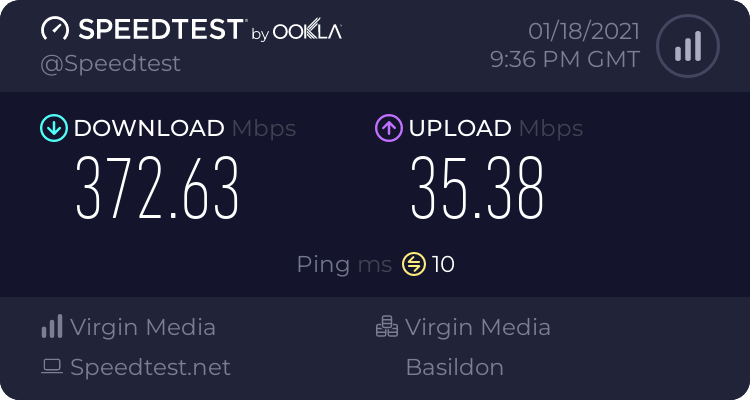
had to stop my stream tonight as it kept going unstable,it was saying to check my internet connection, but I had 374mb Down and 35mb Up when I did the speed test,
here's the log file
 young knot
viscid pebble
<@!779710387598917643> if a viewer tipped through PayPal but no information appe...
young knot
viscid pebble
<@!779710387598917643> if a viewer tipped through PayPal but no information appe...
Does that mean that PayPal is holding the donation money? How long will it takes for PayPal to sends back a confirmation to my streamElements account?
regal inlet
is there a specific reason when i try to upload a webm file it is greyed out?
 uneven temple
@zenith tide did you changed something like your screens?
i had the same issue when i changed from 24" 1080p to 32" 4k, my graphic card couldnt run it properly and i had lot of dropped frames
 final heath
could someone help me, I'm sure this is really stupid of me, but only half of my streamelements alert is showing up on my stream! could someone help? 😄
 slender mulch
How do you save quotes
uneven temple
final heath
could someone help me, I'm sure this is really stupid of me, but only half of my...
half like, you see half of the alert like "Jsjsjsj is now fol" instead of "Jsjsjsj is now following" or you see follow, sub, but not donation etc ?
final heath
the first option 'Jsjsjsj is now fol"
final heath
thank you so much!!!! @uneven temple
slender mulch
lindorei, you know anything about my problem?
uneven temple
no :/
i dont know what quotes are
@final heath no problem 😄
@slender mulch
!quote add .............
Adds a quote
!quote remove #
Removes a quote
!quote #
Shows a specific quote
!quote
Shows a random quote
 hushed sable
How do I turn off the timer command for Xmas merch I can’t find it to turn it off thanks
uneven temple
have you tried on the "Bot" section on the website, under "Timers" ? You need to unclick on the timer you don't want to be sent
 past schooner
hello, im needing help. I've setted up my obs studio with alert boxes configurated to show, when i emulate for test, it show, but when my friends try to interact with my stream it only plays the sound, but the text and the gif that i put don't show. Can someone help me?
 rocky dove
i need help I have my twitch linked to obs but everytime I press go live it says stream to youtube
viscid pebbleBOT
@rocky dove StreamElements menu, on top of OBS > Logout > Login
past schooner
you answering me?
viscid pebbleBOT
@past schooner OBS > Settings > Advanced > Scroll down > Enable or disable Browser Source Hardware Acceleration, depending on its current state > Restart OBS (This does not apply for OBS on Mac)
https://i.imgur.com/ggMe9ZE.png

 flat cargo
Hello Germany? 😄
uneven temple
#🇩🇪︱deutsch
flat cargo
thanks! @uneven temple
uneven temple
np 🙂
 craggy cypress
<@&382267076632379392> Hiya, just wondering if it's still possible to use Ground Control to set up a custom bot or does it only work using OBS now?
viscid pebbleBOT
@craggy cypress Currently renaming the bot fully works with OBS.Live.
You can follow this video guide to set it up: https://discordapp.com/channels/141203863863558144/494513233416421386/561516184718278676
If you don't want to use OBS.Live and want to stick with Ground Control, please let us know your Twitch username.
craggy cypress
viscid pebble
<@!151566536237252609> Currently renaming the bot fully works with OBS.Live.
Yo...
My twitch username is RudeBoii21 and my bots twitch account name is ThatAfroBot
 abstract hemlock
@craggy cypress restart Ground Control
 pulsar blade
anyone know why my game is started to stream really choopy? but obs says i its 60 fps
choppy*
 visual urchin
What's up folks. Just started on Twitch and SE, and I noticed that stream activities and followers aren't synched with Twitch. Nothing is showing up on SE. Any idea what the issue might be? Thanks! 😃
craggy cypress
abstract hemlock
<@!151566536237252609> restart Ground Control
Thank You, Much Appreciated 😊
uneven temple
visual urchin
What's up folks. Just started on Twitch and SE, and I noticed that stream activi...
Fellow events don't show you need to add them manually, only future will appear
viscid pebbleBOT
@pulsar blade Obs.live is a plugin for OBS Studio for the best OBS support, please join their Official Discord @ discord.gg/obsproject
@visual urchin Please provide your account ID found at the top of this page: https://streamelements.com/dashboard/account/channels This ID is public info and safe to share here.
visual urchin
Account ID is 5ffa39d2d27510e3caaa216a
past schooner
past schooner
only works when i emulate
can someone finish helping me?
abstract hemlock
@visual urchin everything should be good for now on
viscid pebbleBOT
@past schooner Please provide your account ID found at the top of this page: https://streamelements.com/dashboard/account/channels This ID is public info and safe to share here.
past schooner
5fc81b2f58f3616afac6ae76
 bold temple
Русские модераторы есть ?
viscid pebbleBOT
@bold temple Welcome to the helpdesk! The regular helpdesk channels are in English but we do provide multi-language support in the following channels: #🇩🇪︱deutsch | #🇫🇷︱français | #🇪🇸︱español | #🇵🇹︱português | #🇳🇱︱nederlands | #🇮🇹︱italiano | #🇵🇱︱polski | #🇨🇳︱中文語言服務區-chinese | #🇯🇵︱日本語-japanese | #🇭🇺︱magyar | #🇰🇷︱한국어-korean | #🇹🇭︱ไทย-thai | #🇷🇺︱русский | #🇺🇦︱українська | #🇨🇿︱czech
visual urchin
abstract hemlock
<@!431847430414270464> everything should be good for now on
Thank you for this! I still can't see any update, even logging out and in again. Should i just wait a bit more for changes to apply?
abstract hemlock
@visual urchin you don't see new events on your activity feed?
older events won't be added.
visual urchin
abstract hemlock
<@!431847430414270464> you don't see new events on your activity feed?
On SE, I don't see the same number of followers that I have on Twitch. But now that you said it will onyl work for new ones, it should be alright
Thanks again!
past schooner
@viscid pebble did you find something that could work on me?
abstract hemlock
@past schooner Do you see and hear the alert just fine on emulation, but only hear them on live events?
abstract hemlock
@past schooner i added on my OBS too and it freak me out 
so everything is working fine?
abstract hemlock
That's because the "custom css" option is enabled
past schooner
did you disable for all of my alerts?
i put it enable because on streamlabs i had it enabled
past schooner
abstract hemlock
That's because the "custom css" option is enabled
should i disable?
abstract hemlock
Yes
past schooner
i will try it and ill give feedback in some minutes
 crude aspen
Hey, I've recently changed my Twitch name and now none of my SE commands are working. I've tried signing out of both SE + Twitch but still no luck. Is there anything that anyone can suggest?
viscid pebbleBOT
@crude aspen If you changed your name on Twitch, please follow these steps:
- Visit https://streamelements.com/logout and then log in again by connecting with Twitch.
- On the right side of the dashboard page that opens, select Join under bot settings. If it says Part select that and then select Join to send the bot to the chat. Don't forget to mod the bot by typing /mod streamelements in your channel if you have not already.
- Post your old and your new name here so that we can update your channel's chatstats tracking (must be done by staff).
crude aspen
That worked, shall I reply with my old/new name here yeah?
 raw salmon
hello, is there a way to add a own widget source in the overlay editor? maybe twitch sticker?
 languid siren
Hey umm. I had an artist make me an overlay
But i dont know if she did it right
Or if I could have it put on an overlay
past schooner
@abstract hemlock i just found it, its only bugging on hosts
it can be because of the gif i have?
abstract hemlock
@raw salmon yes you can create your own widget on the web editor
docs and more info about this on the #dev-chat topic
raw salmon
i have add a iframe... but it doesnt work :<
abstract hemlock
If you already have them on a web you don't need to add them on the overlay you can add them directly on your OBs as a browser source
raw salmon
i know, but i have my reason to get one source in obs
 slate pagoda
How do i put my overlay in my stream?
I have already create one, but i do not know how to move it or put it in my stream
abstract hemlock
@slate pagoda To add your overlays to OBS, add a new browser source in your scene. Paste your overlay URL in the browser source properties, set the dimensions to 1920x1080 (unless you changed them on the website) and check Shutdown source when not visible. https://youtu.be/KDvLynUqXI4
slate pagoda
but if i do not have an OBS?
abstract hemlock
Why your streaming tool support browser source you should be good, but we recommend using OBS
 supple gazelle
Hi! I added my SE Overlay to OBS and it is showing (I see the image I embedded on it). But on stream or the live preview in the Overlay Editor the alerts do not work in OBS. I also tried to disable the hardware acceleration but it didnt work. is there anything else I could try? My twitch name is novi5
past schooner
@abstract hemlock can you do /host f0rbidaman just too see if it show now? My entire friends wasted the host option 😄
lament blade
does anyone know if there is a way to set up a donations menu? like if someone wants to tip a certain amount to trigger the streamer to do something, similar to a variation, but a one stop shop that shows all the options so a viewer can click on what they want
abstract hemlock
@past schooner that won't work
Due to changes to Twitch API, we have filtered out hosts and will only show these ones on your activity feed:
- All hosts coming from an online channel with at least 1+ viewer
- Auto host events with at least 1 viewer - only from a channel that just went offline
Note: If you see X channel has hosted you with no viewers on the back, that is considered an offline host or a host with 0 viewers, we do not show these
past schooner
abstract hemlock
Due to changes to Twitch API, we have filtered out hosts and will only show thes...
is that recent? i know a streamer that when i host him just with me watching it triggers an animation
and he uses SE
supple gazelle
supple gazelle
Hi! I added my SE Overlay to OBS and it is showing (I see the image I embedded o...
any quick ideas @abstract hemlock? 🙂
 brittle sable
Hi, I'm trying to upload an image for my alert box but the upload is failing, Any ideas, thanks a lot (Firefox)
 mellow current
Recently changed my name on twitch and now the bot isn’t working in my chat
 remote quarry
for how long does my se.pay balance last for? does it disappear after 1 month or something?
 solar heron
how do i adjust my capture for the screen it doesnt fit
drowsy forum
Hi there, I just changed my username on twitch from bernardobgb to bernardobguitar, could someone from staff update my channel's chatstats tracking? thank you in advance! 🙂
abstract hemlock
@brittle sable you were able to upload your image?
viscid pebbleBOT
@mellow current If you changed your name on Twitch, please follow these steps:
- Visit https://streamelements.com/logout and then log in again by connecting with Twitch.
- On the right side of the dashboard page that opens, select Join under bot settings. If it says Part select that and then select Join to send the bot to the chat. Don't forget to mod the bot by typing /mod streamelements in your channel if you have not already.
- Post your old and your new name here so that we can update your channel's chatstats tracking (must be done by staff).
viscid pebbleBOT
@drowsy forum If you changed your name on Twitch, please follow these steps:
- Visit https://streamelements.com/logout and then log in again by connecting with Twitch.
- On the right side of the dashboard page that opens, select Join under bot settings. If it says Part select that and then select Join to send the bot to the chat. Don't forget to mod the bot by typing /mod streamelements in your channel if you have not already.
- Post your old and your new name here so that we can update your channel's chatstats tracking (must be done by staff).
lament blade
!help
abstract hemlock
?
viscid pebbleBOT
@lament blade Welcome to the helpdesk! Please let us know how we can assist you today and a support volunteer or staff member will assist you as soon as they are available. Thank you for your patience.
lament blade
my over lays cut them self in half when i past them
viscid pebbleBOT
@lament blade The default resolution for StreamElements overlays (theme and custom) is 1920x1080. Please add them in OBS at their full resolution and use CTRL+F to fit to screen if necessary. You can then downscale your stream in OBS settings > Video if you'd like https://i.imgur.com/6bWXxjR.png
 lament blade
!website
lament blade
i got it thanks
 rare hemlock
Hey.. I haven't streamed for a while, tried the update .... idk how I fix this..👀 🧐
abstract hemlock
check you connection with twitch (settings> stream > connect account)
rare hemlock
@abstract hemlock settings on streamelements or Twitch?
abstract hemlock
obs
rare hemlock
Oh obs. Ok.. let me see
Shows "disconnect steam" button
It made me sign back in and is showing my activity feed but won't let me start stream.. just keeps giving me that area
 swift parcel
@rare hemlock do you have 2FA (Two Factor Authentication) on? It's a requirement now
rare hemlock
I don't think so 🤔 i didn't know that.
Well it text me the token for Twitch to login again.. and I did that
swift parcel
ah maybe grab a new streamkey then it might have refreshed
 winter ginkgo
hi i have a problem how can i add my debit card on stream elements the only option that gives me its paypal not other option
rare hemlock
@swift parcel grab the stream keep from Twitch and add it to the streamelements website?
swift parcel
no no new stream key for obs
rare hemlock
Ooh @swift parcel lol.. thank you. Idk how to get a new stream key..I see "reset my access token"
 midnight storm
Good evening.
Again I received a new follower and I was not notified and does not even appear in the activity feed, as they asked to warn if it happened again so it has not yet been resolved, if someone can investigate please ...
Thanks.
ID: 5fceb7b055298cbfbf46c264
abstract hemlock
@midnight storm i'll look into it
drowsy forum
viscid pebble
<@!390211646729093126> If you changed your name on Twitch, please follow these s...
Already did, just the staff stuff missing
Thanks 
midnight storm
abstract hemlock
<@!355842873520029698> i'll look into it
Thank you very much...
I don't know if it helps but I have this problem since 29/12
swift parcel
@rare hemlock you can also connect OBS to your twitch account so it pulls that. in OBS go to settings and stream
abstract hemlock
@midnight storm i'll report your account to our dev team
midnight storm
abstract hemlock
<@!355842873520029698> i'll report your account to our dev team
I got it, thanks...
rare hemlock
swift parcel
<@!580255225437224961> you can also connect OBS to your twitch account so it pul...
I give up on it today now.. I can't get it to work. I changed my Twitch password so it might be all bugged out..ill either be back in a few days asking the same thing or I'll get it lol
Thank you @swift parcel ❤️
 drowsy citrus
How do I add quotes to the StreamElements bot? I see it has a !quote command but no command to add any.
abstract hemlock
!quote add "Here is your quote"
drowsy citrus
Ahh ok thanks
 slow thistle
Hey guys, in using the SE OBS, I'm trying to log out of one account on the dashboard and login with another. When I click on the "Twitch" login, it automatically logs me into one account and there is no obvious way to stop that. Help!?
Wow, reading that back that was horrible to get through, lol. I logged out of Account 1 to try to log in with Account 2, but the dashboard keeps me logged in the second I press the Twitch button.
 gloomy root
if im using Browser source on SLOBS, Will it take the widgets from the browser?
abstract hemlock
SE doesn't have a SE OBS is has a plugin for OBS studio, so in order to change accounts you need to check both login, on OBS ( Settings > Stream) and in the plugin (StreamElemente, menu on the top, logout and log in)
@slow thistle ⤴️
@gloomy root what do you mean?
slow thistle
THAT WAS IT. Thank you so much @abstract hemlock
gloomy root
Im using stream elements on SLOBS, (Streamable OBS) I am using an animated super theme, Will the alerts that are built into the overlay, Still carry over?
abstract hemlock
Yes, if the streaming software support browser sources they should work just fine
hasty cliff
ok im still lost here all my other alerts show up but not my follower alert . nothing happens when someone follows , stream elements does not even announce it in chat via the bot ...FRUSTRATING!!!
gloomy root
Alright, Thank you
viscid pebbleBOT
@hasty cliff Please provide your account ID found at the top of this page: https://streamelements.com/dashboard/account/channels This ID is public info and safe to share here.
hasty cliff
5ff6ecc64835e4c04e2f6e76
abstract hemlock
@hasty cliff fixed
hasty cliff
brilliant thank you ..ive been going round in circles for hours.
abstract hemlock
😅
 normal pulsar
Using streamelements obs and my latest follower,cheer,sub, and tips aren't updating. please help thanks
 brisk owl
Just a note that this fixed the issue I was having with connecting a custom bot name so thanks for that!
 latent oasis
viscid pebbleBOT
latent oasis
viscid pebbleBOT
10 minutes of watch time is given to those in chat when the loyalty points are handed out (every 10 minutes). Therefore, loyalty must be enabled to watch time to work properly.
There is no direct link between watch time and all-time points.
It can’t be calculated from the number of all-time points a user has because subs may earn points at a faster rate and !bonus all command increases all-time points for users in the chat at that time.
Giving points to a single user do not affect all-time, only when giving to all in chat.
 silver mural
how can i add watchtime to my twitch stream
cinder olive
Read the message directly above yours, then go to --> https://streamelements.com/dashboard/loyalty
silver mural
ok but i am not able to add !watchtime to my stream to see my followers watchtime
 cosmic niche
Is there a withdrawl limit with SE Pay?
cinder olive
silver mural
ok but i am not able to add !watchtime to my stream to see my followers watchtim...
Watchtime is a default command. Go to --> https://streamelements.com/dashboard/bot-commands/default-commands --> and make sure it is enabled.
 verbal umbra
Can I change my overlay by my phone if so how?
cinder olive
verbal umbra
Can I change my overlay by my phone if so how?
Yenno never thought to try, give me a second to test it out real quickj
verbal umbra
Ok
verbal umbra
So is only does on tablet ?
cinder olive
^ Can confirm on large screened phone is very difficult to maneuver around on the editor.
On a tablet it would be easier but I would imagine being on a PC is still the best / easiest way.
verbal umbra
Ok ty for your time 😘
silver mural
cinder olive
Watchtime is a default command. Go to --> https://streamelements.com/dashboard/b...
so i check my stream elements and it is enabled plus i added stream elements as a mod in my chat. other commands are not working either but my commands are working with nightbot
viscid pebbleBOT
@silver mural Go to the Dashboard > Right side > Part channel > Join channel(https://streamelements.com/dashboard)
silver mural
it looks like it is working. thanks
 prime sun
Are we aloud to shout ourselves out? Or no
viscid pebbleBOT
Read and follow our server rules:
- We do not tolerate toxicity! Treat the community team, staff and all members with respect.
- No advertisement or channel promotion, anywhere on the server.
- No NSFW/NSFL
- No unsolicited DMs or friend requests to server members
Make sure to read the #welcome in any server you join.
prime sun
K
mellow current
viscid pebble
<@!308405729189167107> If you changed your name on Twitch, please follow these s...
Duster2011 Code_Man_75
 winged light
I have a problem with adding a followers pop up and I followed what youtube videos showed me but, when I create new sourse> browser and add the link, the followers pop up is not comming up. I did everything on obs but I'm thinking if I did something wrong while creating custom overlay? and yes I did save.
and when I press on preview buttom on overlay nothing comes up
mellow current
mellow current
Duster2011 Code_Man_75
Working now thank you
 sterile barn
@viscid pebble I have 1k subs on Twitch and my TTS settings are Broken for over a week. I have not gotten a response from the suppor team. Please help with this issue. Thank you!
 warm minnow
I can't get links to work in commands and timers
abstract hemlock
@sterile barn i don't think the number of subs are related with the TTS not working. Could you please provide your accountID so i can take a look into it?
@warm minnow bot is mod on your channel? if no type this: /mod StreamElements
viscid pebbleBOT
@winged light OBS > Settings > Advanced > Scroll down > Enable or disable Browser Source Hardware Acceleration, depending on its current state > Restart OBS (This does not apply for OBS on Mac)
https://i.imgur.com/ggMe9ZE.png
sterile barn
abstract hemlock
<@!232602298226966528> i don't think the number of subs are related with the TTS...
5fae2eb1c38dd0e378bb2245
abstract hemlock
@sterile barn could you please tell me the name of the overlay and the event (followers/subs/tips) that isn't working TTS ?
sterile barn
the overlay is OK
Tips & Cheers are not working as far as i know @abstract hemlock
@fast rapids when i try to select a language, it tells me none are found
 winged light
@viscid pebble countless of videos that I've watched, none helped me more than you did. Thank you, it worked.
 snow prairie
Since I downloaded StreamElements my OBS keeps trying to stream to facebook instead of Twtch.tv no matrter ho wmany times I make twitch my default or remove facebook from the list.
abstract hemlock
@sterile barn fixed
snow prairie
Any idea how to fix?
 gleaming plover
Why do my overlays all have the same URL? I can't import them via browser source this way. I have different overlays for different games.
abstract hemlock
sterile barn
https://gyazo.com/759f587562b4c5d67cc0b0aa64ff4f70
where is this?
viscid pebbleBOT
@snow prairie StreamElements menu, on top of OBS > Logout > Login
abstract hemlock
@gleaming plover every overlay has its own URL
sterile barn
@abstract hemlock its not working bro
viscid pebbleBOT
@sterile barn Right click on the BrowserSource > Properties > Scroll down a bit > Refresh cache of current page
abstract hemlock
sterile barn
@abstract hemlock what is browserSource on Google crome?
abstract hemlock
wdym?
sterile barn
@abstract hemlock idk how to click on browser source, im not sure what that is. im using google chrome
cinder olive
Browser Source goes on your OBS
You get the link that goes into the browser source from google chrome? in a sense? It comes from your overlays section
abstract hemlock
@sterile barn i see... Right click on your browser source
mine is called "test"
gleaming plover
is there a way to duplicate an overlay but have it generate a new url?
sterile barn
abstract hemlock
where is this?

where it says "select tts voice"
i refreshed cache on OBS, it didnt make a difference :/ @abstract hemlock
sterile barn
i dont see that on my end 😦
abstract hemlock
sterile barn
i refreshed cache on OBS, it didnt make a difference :/ <@!487269278207311873>
i think its something on your PC, maybe your network is timing out the connection
And about the sound, You are able to hear it if you open the overlay on another tab on your browser?
I think i read because that some headsets needs to disable the space sound or something like that
sterile barn
@abstract hemlock YES! it works on microsoft edge!
viscid pebbleBOT
@ripe seal Please provide your account ID found at the top of this page: https://streamelements.com/dashboard/account/channels This ID is public info and safe to share here.
 ripe seal
5ff7dbfc6c80f51fae55803c
 quartz robin
how do you set up a wheel spin?
lament blade
should be fixed now
lament blade
You'll start getting followers from now is my intention
 slender prairie
Hello, I blocked a user on donation history page unintentionally, and it says that I need to contact support to unblock him
lament blade
Hey, that's correct.
Please send us an email with your account ID, his username and his email address
slender prairie
ok thanks õ/
 native zephyr
hey guys
 jolly grail
my stream dosnt give me music to play anymore can u get it back?
 cloud pond
My alerts seems to work fine when in testing but when I’m live, they don’t seem to work
lament blade
Hey, please provide me with your account ID
cloud pond
lament blade
Hey, please provide me with your account ID
Are you referring to my twitch handle?
 ionic kelp
 noble vortex
Hello i was wondering how can i fix my sub goals because on streamelements it says i have 8 but on my twitch dashboard i have 2 is there any way to fix it ?
viscid pebbleBOT
To reset goals:
- from the Overlay Editor > Session data on top right (monitor symbol) > Goals tab > reset progress of desired goal
- from the Dashboard > Activity feed on the left > Widget data on the right > Goals tab -> reset progress of desired goal
Note: Goal widgets (progress) only counts up and doesn't go down automatically, if you lose followers/subs.
native zephyr
how do i activate my overlays?
viscid pebbleBOT
@native zephyr To add your overlays to OBS, add a new browser source in your scene. Paste your overlay URL in the browser source properties, set the dimensions to 1920x1080 (unless you changed them on the website) and check Shutdown source when not visible. https://youtu.be/KDvLynUqXI4
 steady anchor
In OBS Live I changed the StreamElements bot name to my Channel Name.This works fine for bot timers etc.
However it doesn't seem to work for chat commands (not for default and not for custom commands).
When I (or anyone else) uses a command the response is always from StreamElements instead my channelname.
Is this working as designed or am I doing something wrong?
native zephyr
I've now added the overlays now how do i make them show up on my game screen
 midnight marsh
have you tried turning it off and on again? @native ingot
 native ingot
its on chrome, i have restarted it @midnight marsh
 mellow maple
I can't find an option to set a backup playlist for my media share, is it hiding behind a dropdown menu somewhere?
 lone shard
How can i get rid of the section on my tipping page for request clip to share with your tip ?
As some streamers use stream elements and I dont see this on there tipping page.
viscid pebbleBOT
@lament blade Read and follow our server rules:
- We do not tolerate toxicity! Treat the community team, staff and all members with respect.
- No advertisement or channel promotion, anywhere on the server.
- No NSFW/NSFL
- No unsolicited DMs or friend requests to server members
Make sure to read the #welcome in any server you join.
lament blade
👍
 woeful sundial
Hi Im Despised1 and im new to streamelements. Im trying to add custom commands with my social like YT, facebook etc but the bot keeps blocking it. How do I turn in off?
viscid pebbleBOT
If links in chat are appearing as ***** either mod the bot or disable block hyperlinks in your twitch channel settings: https://dashboard.twitch.tv/settings/moderation
woeful sundial
Your the real MVP thank you
 restive edge
how do i set up commands in my stream? Like !discord and !youtube?
nimble dune
restive edge
how do i set up commands in my stream? Like !discord and !youtube?
Add a custom command https://streamelements.com/dashboard/bot-commands/custom-commands command name example !discord then add response and click save
restive edge
nimble dune
Add a custom command https://streamelements.com/dashboard/bot-commands/custom-co...
Thankyou! 😄
nimble dune
You're welcome! 😄
 hot belfry
stream elements isn't showing up in my chat at all any word on a outage?
viscid pebbleBOT
If your commands recently stopped working and you're using OBS.Live and a custom bot name do the following:
- In OBS.Live, click on the hamburger menu (three stripes) at the top left of your activity feed
- Click on Stream Settings > Custom bot name
- In the Custom bot name field select Set custom bot name, not your already existing username (with capital letters). Note: If you already connected an account that way, the third entry will show as the account name (see image https://i.imgur.com/sO7fWOX.png).
- Scroll a bit down and click on the purple Connect Custom Bot Account button
- Log in as usual and Authorize the custom bot name
- Back in the Activity feed, click on the Send Test Message button and check if your custom bot name starts working again
 lament blade
yo my friend changed his name and the commands arent working what should i do?
viscid pebbleBOT
@lament blade If you changed your name on Twitch, please follow these steps:
- Visit https://streamelements.com/logout and then log in again by connecting with Twitch.
- On the right side of the dashboard page that opens, select Join under bot settings. If it says Part select that and then select Join to send the bot to the chat. Don't forget to mod the bot by typing /mod streamelements in your channel if you have not already.
- Post your old and your new name here so that we can update your channel's chatstats tracking (must be done by staff).
restive edge
How do I get these onto my OBS to use them on my stream? It is from streamelements.com/dashboard/overlays
viscid pebbleBOT
@restive edge To add your overlays to OBS, add a new browser source in your scene. Paste your overlay URL in the browser source properties, set the dimensions to 1920x1080 (unless you changed them on the website) and check Shutdown source when not visible. https://youtu.be/KDvLynUqXI4
lament blade
i need help when someone or so subs or bits or follows me it doesnt come in chat why
 wispy jay
lament blade
i need help when someone or so subs or bits or follows me it doesnt come in chat...
wispy jay
lament blade
i need help when someone or so subs or bits or follows me it doesnt come in chat...
You need to ensure that you have gone into 'modules' on the left menu and then turned 'chat alerts' on and set the messages
lament blade
It’s on
wispy jay
do your commands work?
lament blade
But the thing is the stream element isn’t a mod on my channel
restive edge
is there a way to preview alerts?
lament blade
How to fix that
viscid pebbleBOT
@restive edge You can test alerts via the Emulate bell on the lower left side of the Overlay Editor. Simply go to your Dashboard > My Overlays > pencil/edit button on the overlay. Make sure the Preview LIVE on stream option is on to see the alert in OBS/XSplit** https://streamable.com/vtulg9


 wispy jay
lament blade
But the thing is the stream element isn’t a mod on my channel
wispy jay
lament blade
But the thing is the stream element isn’t a mod on my channel
then you need to /mod streamelements
lament blade
It’s mod
wispy jay
go into your stream chat on twitch and type /mod streamelements
wispy jay
i dont know the command for this chat to do it, but under your dashboard, just make sure that under bot settings you have joined channel too
viscid pebbleBOT
@lament blade Go to the Dashboard > Right side > Part channel > Join channel(https://streamelements.com/dashboard)
wispy jay
there it is
nimble dune
^
lament blade
Where’s that
nimble dune
lament blade
I’m on dashboard
nimble dune
See the screenshot
wispy jay
right hand side on your dashboard
lament blade
nimble dune
@lament blade Click do it later
lament blade
wispy jay
this is the screen you need to see
lament blade
Yes
wispy jay
do it later at the bottom right of what you can see
lament blade
Still nothing
wispy jay
you cant see the screen that iv screenshotted on your dashboard?
if so, potentially you need to finish setting up, are you new to streamelements?
restive edge
are micropayments still only in the united states?
wispy jay
lament blade
I part it and partnerd it back
replaying alerts wont show in chat, only when a new person follows/subs/etc
so if you are trying to replicate it with replaying alerts, that wont work
lament blade
I know
lament blade
But the thing is nothing is showing in chat
wispy jay
lament blade
Done that
how are you trying to replicate follows/subs, are you currently streaming and having people follow or?
lament blade
No
restive edge
wary halo
Yes
Ok thanks
viscid pebbleBOT
@lament blade If your commands recently stopped working and you're using OBS.Live and a custom bot name do the following:
- In OBS.Live, click on the hamburger menu (three stripes) at the top left of your activity feed
- Click on Stream Settings > Custom bot name
- In the Custom bot name field select Set custom bot name, not your already existing username (with capital letters). Note: If you already connected an account that way, the third entry will show as the account name (see image https://i.imgur.com/sO7fWOX.png).
- Scroll a bit down and click on the purple Connect Custom Bot Account button
- Log in as usual and Authorize the custom bot name
- Back in the Activity feed, click on the Send Test Message button and check if your custom bot name starts working again
wary halo
Did you turn on the 8-ball module?
nimble dune
Are you using custom bot name, try that ^@lament blade
lament blade
I am
Yes
Ruben
That’s that
So I can’t ask that
Also my dashboard is saying stuff that isn’t right
It’s works yay
The bot saying I’m chat
nimble dune

lament blade
So in that stream element dashboard
 candid forge
how does the bot timer for commands work?
lament blade
Why is it saying I got less then it saying on twitch
@candid forge it will send a message at a time u put it but only works if there’s chat in it
candid forge
oh so it will only work if people are chatting?
lament blade
Yea or some chat in the steam
candid forge
it wont work if no one is chatting am i right?
candid forge
oh ok
wary halo
Not right
candid forge
i thought it was bugged
lament blade
That’s how it works for me so it’s bugged for me
wary halo
If you set the chatlines to 0 it will post at the set times
wary halo
I made a tutorial about chat commands on my YouTube if you're interested 
candid forge
got it thanks for the help
lament blade
Ruben
wary halo
No problem :D
lament blade
Can I ask something
lament blade
U know the dashboard for stream elements why is it saying my stats wrong
wary halo
No idea, which stats
lament blade
Subs and followers
Mainly at min
Oh no I found it it’s by months
How many I got in a month
wary halo

wary halo
Only a standard fee for the transaction 50ct
lament blade
Huh
wary halo
Taxes that you need to pay over your streaming income is different per country
lament blade
I’m in uk
wary halo
We can't say anything about that because we don't know all the regulations. Might be better to check with other English streamers or check the website from the government on taxes
lament blade
So what’s the fee
wary halo
If someone donates 5, you get 4,50 because the actual transaction costs money. Nothing we can do about that.
wary halo
But if someone donates 200, it will still be 0.50
wary halo
lament blade
So it’s 50p
Correct
wary halo
But with PayPal it's a percentage
lament blade
Huh
 oblique steeple
 tough escarp
I'm having problems with the last subscriber's widget, it doesn't update and it doesn't skip the subscription message, everything else works fine for me, does it happen to anyone else?
 halcyon meteor
hey I'm having problems setting up my Tip Goal: it's showing the total amount I've ever been donated + the Goal
I want to just display $0 current and then the goal
viscid pebbleBOT
@halcyon meteor To reset goals:
- from the Overlay Editor > Session data on top right (monitor symbol) > Goals tab > reset progress of desired goal
- from the Dashboard > Activity feed on the left > Widget data on the right > Goals tab -> reset progress of desired goal
Note: Goal widgets (progress) only counts up and doesn't go down automatically, if you lose followers/subs.
tough escarp
tough escarp
I'm having problems with the last subscriber's widget, it doesn't update and it ...
if someone would help me I would be very grateful.
viscid pebbleBOT
@lament blade Welcome to the helpdesk! The regular helpdesk channels are in English but we do provide multi-language support in the following channels: #🇩🇪︱deutsch | #🇫🇷︱français | #🇪🇸︱español | #🇵🇹︱português | #🇳🇱︱nederlands | #🇮🇹︱italiano | #🇵🇱︱polski | #🇨🇳︱中文語言服務區-chinese | #🇯🇵︱日本語-japanese | #🇭🇺︱magyar | #🇰🇷︱한국어-korean | #🇹🇭︱ไทย-thai | #🇷🇺︱русский | #🇺🇦︱українська | #🇨🇿︱czech
 distant ledge
I have been getting follow botted the for the last week, however they only show up in ground control and within OBS.Live's activity feed.
The activity within the Twitch Stream Manager is normal.
Anyone else experience this issue?
lament blade
hello, i want to delete my account but i don't know what it's mean with jwt token? where can i find them?
how to add a alert for re sub??
viscid pebbleBOT
@lament blade You can find your JWT token on your account channels page (Show Secrets to reveal the token): https://streamelements.com/dashboard/account/channels
READ ME: This is a private security token. Do NOT share this token here or other public places, only with a StreamElements staff member in private.
 untold crest
@lament blade You need to go to alertbox => Subscriber => Variations and from there you can add multiple alerts
lament blade
thank you. know i have the problem "invalide username" but "danylicious" is my username?!
untold crest
@lament blade Try to use it capitalized.
lament blade
What
So what will show for resubs
i have tried DANYLICIOUS, danylicious and Danylicious. nothing work 😦
untold crest
@lament blade Whatever you provide there
@lament blade they could unfollow you right after they followed.
wary halo
 fossil minnow
i dont know how to do sub alerts or follow alerts a
fossil minnow
i dont know how to do sub alerts or follow alerts a
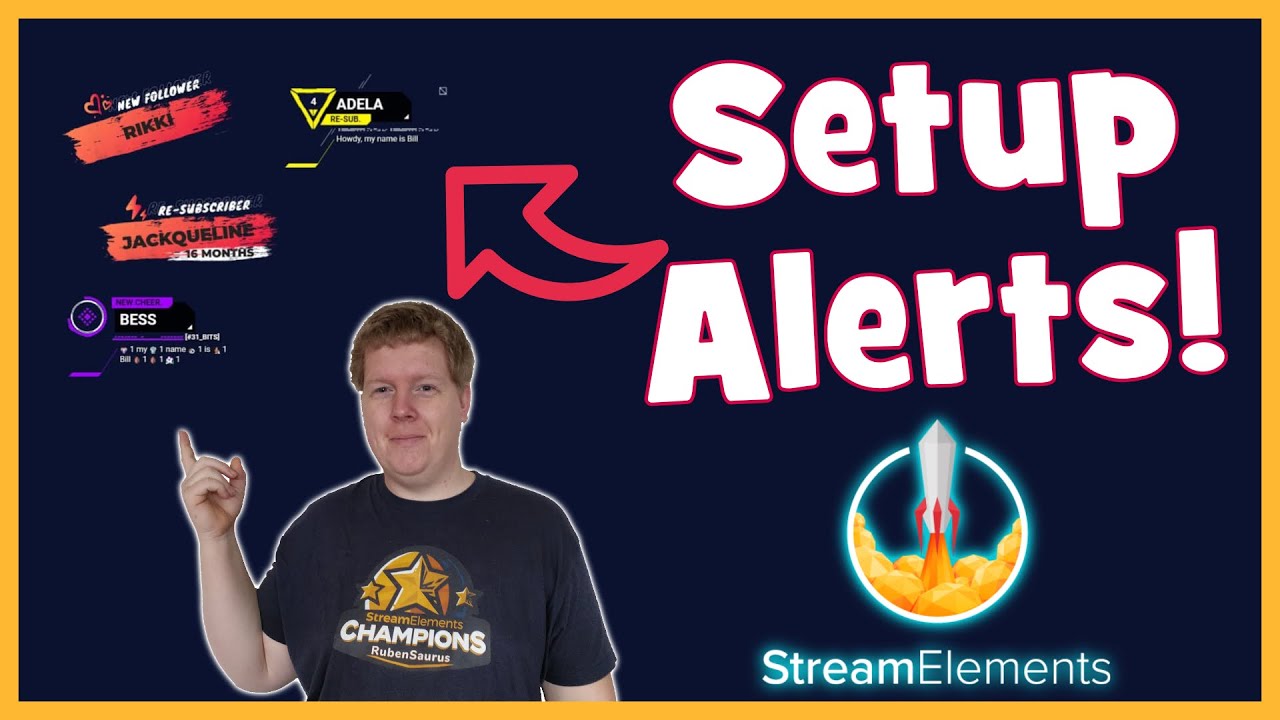
A tutorial on how to set up your streaming alerts with StreamElements!
StreamElements Discord: https://discord.gg/se
Timestamps:
00:00 Intro
00:11 Setup Alertbox Widget
01:54 Setup Alerts
08:41 Setup Variations
12:58 Adding Alerts To OBS
14:50 Outro
Twitch: https://twitch.tv/rubensaurus
Twitter: https://twitter.com/TheRubenSaurus
Merch: https:...
untold crest
@lament blade If you're absolutely sure about closing your account, you can click the Close my account button at https://streamelements.com/dashboard/account/security. Please note that the deletion process is not automatic, but instead submits a request to the developers to delete the account on your behalf. Therefore, it can take a few days before your account is deleted.
If you encounter any issue with the form, please send an email to support@streamelements.com with the following information:
Username:
Email:
Account ID:
JWT Token:
Reason for closure:
Error when using the closure form:
StreamElements
The Ultimate All in One Platform for Streamers
lament blade
Don’t work
I tryed to emulate it but nothing
@untold crest
What the 2 for
thank you! i wrote a mail 🙂
 fickle whale
hi my costums commands is not working, i need help
 cursive thistle
Hey! Can anyone tell me how i go about getting my chat to appear on stream?
nimble dune
cursive thistle
Hey! Can anyone tell me how i go about getting my chat to appear on stream?
Chatbox widget?
viscid pebbleBOT
@fickle whale Go to the Dashboard > Right side > Part channel > Join channel(https://streamelements.com/dashboard)
cursive thistle
@nimble dune I guess so yeah? Been struggling to find it XD
nimble dune
You're welcome! 🙂 
nimble dune
You're welcome! 😄
cursive thistle
@nimble dune I found it, but i'm actually struggling to get it to work :/
I've made a browser source and put the link in, i can see the chatbox working on the overlay editor
But on the actual OBS there is nothing
viscid pebbleBOT
@cursive thistle OBS > Settings > Advanced > Scroll down > Enable or disable Browser Source Hardware Acceleration, depending on its current state > Restart OBS (This does not apply for OBS on Mac)
https://i.imgur.com/ggMe9ZE.png
nimble dune
try this
Disable it and restart OBS
Dimensions is set to 1920x1080 for browser source?
 feral plaza
Hello, is anybody there? Need help with the streamelements contest section
cursive thistle
Ah it was set to 1440p for my monitor
nimble dune
cursive thistle
Ah it was set to 1440p for my monitor
Working now? 😄
 still shadow
hi guys
steady anchor
steady anchor
In OBS Live I changed the StreamElements bot name to my Channel Name.This works ...
Is there anyone that can help ?
I asked a question yesterday and reposted that question today (at 09:15) but nobody seems to have the answer ?
viscid pebbleBOT
@steady anchor If your commands recently stopped working and you're using OBS.Live and a custom bot name do the following:
- In OBS.Live, click on the hamburger menu (three stripes) at the top left of your activity feed
- Click on Stream Settings > Custom bot name
- In the Custom bot name field select Set custom bot name, not your already existing username (with capital letters). Note: If you already connected an account that way, the third entry will show as the account name (see image https://i.imgur.com/sO7fWOX.png).
- Scroll a bit down and click on the purple Connect Custom Bot Account button
- Log in as usual and Authorize the custom bot name
- Back in the Activity feed, click on the Send Test Message button and check if your custom bot name starts working again
cursive thistle
@nimble dune I knbow it's set to 1440 but i can't remember how to change XD
Can you remind me please? ❤️
Got it actually nvm XD
I'll see if it works
steady anchor
viscid pebble
<@!792369943281795102> If your commands recently stopped working and you're usin...
Dear SE.Support... you might have understood my question wrong.
My bot is correctly set up AND WORKING FINE for all other timers and bot modules.
It is only not working for chat commands (not for default and not for custom commands).
So the Chat alerts for new followers correctly show up under my name.
Live Announcements are also showing correctly under my name.
But a chat command like !points is replying under StreamElements instead of my channel name.
cursive thistle
For the chat box by the way. I have had to stretch the box to have it fit in the section for my overlay. It seems distorted and ugly though. Anyway to fix this?
nimble dune
steady anchor
Dear SE.Support... you might have understood my question wrong.
My bot is corre...
Are you using the 3rd option? Set custom bot name?
steady anchor
yes
nimble dune

cursive thistle
I have the chat appearing on overlay now. But when i type a message it only shows "Akairem:"
Not my message after?
nimble dune
@cursive thistle You need to change the text color
To white or another
Because default is black i think
In overlay editor and text settings
steady anchor
nimble dune
Are you using the 3rd option? Set custom bot name?
Yes... I am using the 3rd option (all in lowercases).
And to make sure I reset the bot (Part Channel/Rejoin Channel), logged out of Twitch and StreamElements and restarted all my browsers as well as OBS.
cursive thistle
@nimble dune I'm on that npw, i don't see a colour option though?
Ah nvm
I see it
nimble dune
Then click save
nimble dune
steady anchor
Yes... I am using the 3rd option (all in lowercases).
And to make sure I reset t...
So when you do example !points then streamelements responding and not the custom name?
viscid pebbleBOT
@lament blade Read and follow our server rules:
- We do not tolerate toxicity! Treat the community team, staff and all members with respect.
- No advertisement or channel promotion, anywhere on the server.
- No NSFW/NSFL
- No unsolicited DMs or friend requests to server members
Make sure to read the #welcome in any server you join.
steady anchor
nimble dune
So when you do example !points then streamelements responding and not the custom...
Oh... hold on... it is working now!!!
Although I haven't changed anything since yesterday.
And I know for sure it wasn't working until I wrote you this morning.
Anyway it is working now.
Thank you for your assistance.
nimble dune
Oh, nice 😄 You're welcome!
 flat forum
Very quit question related to twitch itself, if I ban someone from my channel, will there follow be removed as well
 honest magnet
Hey so i am trying to stream apex legends but obs doesn't want to capture the game sound. Can anyone help ?
viscid pebbleBOT
@honest magnet Obs.live is a plugin for OBS Studio for the best OBS support, please join their Official Discord @ discord.gg/obsproject
still shadow
hi were can i get a discord of warzone
nimble dune
🤷♂️
 clever whale
Hi there. I understand that mods can edit commands live in chat, but what is the format to add or edit commands specifically?
viscid pebbleBOT
You can add, remove and make changes to custom commands in chat with !command/!cmd flags:
!command add (commandname) (commandresponse) - allows you **to add **a new custom command
!command remove (commandname) - allows you to delete a custom command
!command edit (commandname) (commandresponse) - allows you to edit an existing custom command
!command show (commandname) - allows you to see the raw response of a command before variables are used
!command options (commandname) -(flag) - allows you to change settings for an existing custom command
!command alias basecommand - Shows the alias commands for !basecommand
!command alias add basecommand aliascommand1 aliascommand2 - Adds alias commands !aliascommand1 and !aliascommand2 for command !basecommand
!command alias remove basecommand aliascommand1 - Removes alias command !aliascommand1 from command !basecommand
Valid flags for !cmd options include: -enable -disable -cd (number in seconds) -usercd (number in seconds) -cost (number) -level (number) -type (say, whisper or reply) -count (number)
Syntax example: !cmd options twitter -usercd 60 -type reply -level 250
lament blade
Hello! Anyone knows how to fix "seller restriction" error on tipping page? I just cannot add any donation because of this error is appearing. I tried to find out the solution in earlier messages but I failed. How could I fix that? I looked on Paypal account but it looks fine there.
ionic kelp
@lament blade is your email verified with PayPal?
lament blade
@ionic kelp yes, it is verified
drowsy forum
Hi there, I changed my username on twitch yesterday and I did the steps needed for the bot to work but could someone from staff update my channel's chatstats tracking? thank you in advance! 🙂
Old name: bernardobgb
New name: bernardobguitar
 patent yacht
Hello! I just wanted to thank whoever helped me the other day with my stream elements installation. Thanks I appreciate it very much!
 trim canyon
How do I get StreamElements to add different messages to the chat when I’m live? At the minute all I have is to notify when someone follows and sends bits etc. But I’m doing a charity stream on Friday and would like to add the donation link to StreamElements so it keeps notifying the chat. And also add other commands such as you like what you see? Hit that follow button, add my discord link etc etc. I’m new to all this
left quiver
I got a huuge issue that I don't know how to resolve- something isn't working quite right with the tracking of followers. Neither does the overlay show the right name of the last person who followed nor does the follower goal track at all. I gained several new followers since I started the goal and while updating the total number of followers after a few minutes, the progress bar doesn't fill.. Also overlay notifications on followers don't work. I hope somebody here can help me!
,
viscid pebbleBOT
@left quiver Please provide your account ID found at the top of this page: https://streamelements.com/dashboard/account/channels This ID is public info and safe to share here.
left quiver
5ffa377904c2091fd144389d
wary halo
staff will reconnect your twitch webhooks and that should fix the followers not showing up
left quiver
That would be amazing
wary halo
missed events won't be shown though, only new ones
left quiver
Does that fix the issue of new follow events not showing?
wary halo
so you can adjust the totals/goal settings in the tab for it
left quiver
wary halo
so you can adjust the totals/goal settings in the tab for it
Yeah already did that
Thanks a lot!!
cursive thistle
I have an issue with my logitech c920 camera. Does anyone know how to fix this "black wave" pattern thing that's happening?
viscid pebbleBOT
@cursive thistle Obs.live is a plugin for OBS Studio for the best OBS support, please join their Official Discord @ discord.gg/obsproject
 odd tartan
Hey everyone hope your all ok and having a great day :). I have a question, I'm trying to found out how i can give points to my viewers eg say they win 1000 points how will i give it to them? Thanks 🙂
wary halo
if you have the loyalty system enabled, !addpoints username amount
 empty crag
Tried Stream elements last night live stream on twitch and the video never saved in me Channel Videos. What would cause this.
odd tartan
wary halo
if you have the loyalty system enabled, !addpoints username amount
saying @odd tartan was not found!
left quiver
@wary haloHow long is this approx. going to take? 🙂 Just wondering if it might work for my stream tonight
odd tartan
that is the right one?
 cursive swift
hello please support me for se.pay ?
odd tartan
wary halo
if you have the loyalty system enabled, !addpoints username amount
thanks i was adding > @ < with my user name you have to do it without
 fluid wren
Hi, my dashboard and stream activity is blank, despite having streamed a couple of days ago. Account ID is: 5fa8f814a9b4551208cf22c5
 cinder spindle
Hey, so i got a tip the other day, and withdrew it through SE pay and havent got it? what do i do? @ me if you reply please
 knotty siren
Happy tuesday. I have no idea where to put this, but I was editing a custom chat command, and the edit and delete icons have no labels for our screen readers to access. All we here is "graphic" hence we need to guess. Can someone take a look at this so we may be able to do more with our chats by ourselves, please?
wary halo
left quiver
<@!156048565058142208>How long is this approx. going to take? 🙂 Just wondering ...
usually within an hour, but I will check
 carmine wedge
You could use a mask filter or just a black to transparent gradient over the chat.
 wet hazel
hey, anyone know why when i try to change my panels image my files i wanna use just disappear?
carmine wedge
You create the mask or gradient in another program then import it into streamelements or OBS
nimble dune
What effect do you mean? Transparent chat?
carmine wedge
The mask should apply as a filter but I think you need to have StreamFX, the gradient, you just place over the chat as an image
carmine wedge
nimble dune
What effect do you mean? Transparent chat?
He gave an example, he wants the chat to fade out towards the top of the chat box
 thorny estuary
Hello! I was told I should come here... I changed my twitch name from scottlippincottmusic to ScottyMakesMusic
viscid pebbleBOT
@thorny estuary If you changed your name on Twitch, please follow these steps:
- Visit https://streamelements.com/logout and then log in again by connecting with Twitch.
- On the right side of the dashboard page that opens, select Join under bot settings. If it says Part select that and then select Join to send the bot to the chat. Don't forget to mod the bot by typing /mod streamelements in your channel if you have not already.
- Post your old and your new name here so that we can update your channel's chatstats tracking (must be done by staff).
wet hazel
wet hazel
hey, anyone know why when i try to change my panels image my files i wanna use j...
does anyone know?
thorny estuary
viscid pebble
<@!636307529910976513> If you changed your name on Twitch, please follow these s...
Yup, I’ve done those two steps.
wary halo
thorny estuary
Yup, I’ve done those two steps.
i'll send the names to staff for a chatstats transfer 😄
thorny estuary
wary halo
i'll send the names to staff for a chatstats transfer 😄
Thank you!!
 obsidian tapir
Hi, I need help w !settitle command, because every time i write this command it show up message "something went wrong while trying to update the title.". We enabled loyality, but still it isn't working. I'll appreciate every help, that I'll get.
 wide osprey
is there any way to unlink youtube from stream elements so i can stream on twitch?
 wooden ocean
hey I've recently setup my alertbox for StreamlabsOBS but for some reason my cheer alert is stuck on the default sound and gif despite me changing it multiple times, is there anyway to fix this?
 west valley
hey, i cant open merch store,it wont upload the page to the end....it has been this like months.
viscid pebbleBOT
@wide osprey StreamElements menu, on top of OBS > Logout > Login
@wooden ocean We're not able to troubleshoot issues with using our overlays in StreamLabs OBS (SLOBS) as we don't have the tools to support their software. We recommend using OBS Studio or OBS Studio with our plugin OBS.Live.
@west valley Please provide your account ID found at the top of this page: https://streamelements.com/dashboard/account/channels This ID is public info and safe to share here.
west valley
5f5880be47670fb03a8c5ca1
stiff nimbus
Hey I'm having issues using the loyalty channel points, the bots working and redeem goes through but no audio is played
wooden ocean
I'm going to switch to using obs live instead, but regardless the alert still doesn't work when I emulate on the streamelements website
 ivory hare
Hi. I have a problem with the "follower goal" widget. When I start to make it, I can see the box just fine. But as soon I click add, the box goes black. I cant see anything it anymore. Any one know what or why this is happening. I have the same issue with the Donation goal .. PLEASE HELP ME .. Thx alot in advance
wary halo
did you check all the variations? and did you save it when changed? @wooden ocean
wooden ocean
Yes, I've done it multiple times
wary halo
ivory hare
Hi. I have a problem with the "follower goal" widget. When I start to make it, I...
add where?
ivory hare
In sources in streamlabs obs
stiff nimbus
Just to clarify the stream store is working but no sound is played for me or the viewer
viscid pebbleBOT
@ivory hare The default resolution for StreamElements overlays (theme and custom) is 1920x1080. Please add them in OBS at their full resolution and use CTRL+F to fit to screen if necessary. You can then downscale your stream in OBS settings > Video if you'd like https://i.imgur.com/6bWXxjR.png
@ivory hare We're not able to troubleshoot issues with using our overlays in StreamLabs OBS (SLOBS) as we don't have the tools to support their software. We recommend using OBS Studio or OBS Studio with our plugin OBS.Live.
wooden ocean
There are no variations that should affect the issue, and all of my other alerts work bar this one when emulated
wary halo
stiff nimbus
Just to clarify the stream store is working but no sound is played for me or the...
did you add the store redemption widget to your overlays?
stiff nimbus
where would i find it?
obsidian tapir
does anyone know how to fix !settitle ? when i write it down in chat it shows "something went wrong while trying to update the title."
 keen basin
How can i put my overlays in my direct of twitch ?
wary halo
you can only add them to software like OBS.Live
viscid pebbleBOT
@keen basin To add your overlays to OBS, add a new browser source in your scene. Paste your overlay URL in the browser source properties, set the dimensions to 1920x1080 (unless you changed them on the website) and check Shutdown source when not visible. https://youtu.be/KDvLynUqXI4
stiff nimbus
@wary halo should I be doing an overlay for each individual item or one overall notification and then use the loyalty tab to make the other options?
 cosmic pebble
Hello, I'm having difficulties changing the streamelements chatbot name on ground control, is there a guide, video or wiki for reference?
wary halo
stiff nimbus
<@!156048565058142208> should I be doing an overlay for each individual item or ...
that widget will show ALL store items
stiff nimbus
Perfect thanks
viscid pebbleBOT
@cosmic pebble Currently renaming the bot fully works with OBS.Live.
You can follow this video guide to set it up: https://discordapp.com/channels/141203863863558144/494513233416421386/561516184718278676
If you don't want to use OBS.Live and want to stick with Ground Control, please let us know your Twitch username.
cosmic pebble
my username is braveicarus on twitch
wary halo
cosmic pebble
my username is braveicarus on twitch
i'll send it to staff, might take a moment because they are in a meeting right now
cosmic pebble
however I gto another twitch account for the bot, named bravedreamersbot
wary halo
Yeah that doesn't matter, it's for the channel you want to use it on 😉
cosmic pebble
ok
stiff nimbus
@wary halo sorry to bother I've selected and saved the image I want to use but when I emulate it's not displaying that and just the standard gift item for redemption
 hollow wraith
Hello! I just wanted to hear if anyone has the "default.ogg" sound for StreamElements?
wary halo
hollow wraith
Hello! I just wanted to hear if anyone has the "default.ogg" sound for StreamEle...
hollow wraith
wary halo
https://discord.com/channels/141203863863558144/199460642975907840/6585853282228...
Those are without sound though, I have the alerts, I just needed the sound :))
wary halo
stiff nimbus
<@!156048565058142208> sorry to bother I've selected and saved the image I want ...
other then a variation not set up properly or having double alertbox widgets I really have no idea at the moment. but you can give me the account ID and the name of the overlay and I can ask a staff member to take a look in a bit.
viscid pebbleBOT
@stiff nimbus Please provide your account ID found at the top of this page: https://streamelements.com/dashboard/account/channels This ID is public info and safe to share here.
 acoustic edge
Hello! anytime I use a command in my channel, my bot sends the message twice. Any Ideas on why this might be?
west valley
viscid pebble
<@!745545722723696650> Please provide your account ID found at the top of this p...
5f5880be47670fb03a8c5ca1 here it is
wary halo
west valley
5f5880be47670fb03a8c5ca1 here it is
I know, it's already send to staff 😉
west valley
wary halo
I know, it's already send to staff 😉
wasnt shure if it was noticed
 halcyon crystal
i do not see the donation on my stream nor on stream elements tip activity but i do see it when i get donated anyone know what the issue could be?
viscid pebbleBOT
@halcyon crystal if a viewer tipped through PayPal but no information appears in your StreamElements account, this generally means PayPal has held the tip for verification. Until PayPal clears the tip and sends back a confirmation to your StreamElements account, no information will appear there and no alert will play, as that confirmation is the only way for us to be aware of a successful transaction. If you believe there may be an issue with the transaction, you'll need to contact PayPal support as StreamElements is only a passthrough service and never actually gets involved with the transaction or touches the money
 slender notch
obs doesnt show my entire overlay just the top left
acoustic edge
slender notch
obs doesnt show my entire overlay just the top left
you need to adjust the size in the properties to 1920x1080
slender notch
thanks
acoustic edge
slender notch
thanks
hollow wraith
@wary halo I'll just record a sound bit of the ones off the website and use that - thank you!
 elder niche
I love my new LoL overlay. How do I edit the boxes for "Song: ___" "Instagram" etc to actually portray what I need them to be?
ionic kelp
Pinned messages.
wooden ocean
@wary halo I've setup OBS.Live and all of my other alerts work, but my cheer alert still isn't working. Its still stuck on the default gif and sound alert
elder niche
I'm new here. Where is that?
ionic kelp
📌 in top right. It's a video.
quartz atlas
Heya Support, I'm also having the same problem as others regarding follower alerts, I haven't been getting them for multiple streams even though chat box is working. I have tried every google search and method I could think of to fix it, but have come here as a last resort. Here's my ID, 5ffa40cedf2008604ef39068
stiff nimbus
wary halo
other then a variation not set up properly or having double alertbox widgets I r...
I got it to work now it's just not working in stream LOL
 untold venture
Hello everyone! Got a quick Q... Is there a way to filter and sort the stream store by cost? Or do we just have to upload them in the order we need them in?
 verbal horizon
My connection between Twitch and Streamelements seems to be broken. New followers are recognized, so overlays are not firing and counters are not updated.
sorry, events are NOT recognized
viscid pebbleBOT
@verbal horizon Please provide your account ID found at the top of this page: https://streamelements.com/dashboard/account/channels This ID is public info and safe to share here.
verbal horizon
5fbead304d0d464090ce9a72
 round comet
Hello! I'm trying to setup custom Alertboxs for my Twitch streams... I am currently trying to customize the colors of my text. I got it done perfectly for my Follower Alert and now that I am trying to setup my next one, the Subscriber Alert, any time I change the text colors they revert to the default even after saving.
wary halo
check the variations of the sub alerts
 agile ermine
hey guys, I'm trying to set up media request, but when I turn it on to show it on stream there is an echo
I'm not even live, was just testing it out, but it's echoing
the player in the browser is muted
wary halo
verbal horizon
5fbead304d0d464090ce9a72
fixed
verbal horizon
thanks
 sweet drum
the streamelements dashboard isnt working when i login my twitch account... but i can open my SE profile.... any idea on how to fix this?
verbal horizon
wary halo
fixed
Well, seems to be still broken. New follower didn't trigger anything on my overlays and the actvity feed didn't show any event
Do I need to refresh anything else?
 sly stratus
Hi
 slender forge
soo i have a problem, for some reason im streaming for 10 minutes or so and the stream randomly stops
can someone help?
😦
 golden steeple
I had very much frame drops can anyone help me?
 bitter olive
hi i have a overlay but when someone give me host i dont recive nothing
viscid pebbleBOT
@bitter olive "Due to changes to Twitch API, we have filtered out hosts and will only show these ones on your activity feed:
- All hosts coming from an online channel with at least 1+ viewer
- Auto host events with at least 1 viewer - only from a channel that just went offline
Note: If you see X channel has hosted you with no viewers on the back, that is considered an offline host or a host with 0 viewers, we do not show these."
@golden steeple Obs.live is a plugin for OBS Studio for the best OBS support, please join their Official Discord @ discord.gg/obsproject
 polar vault
anyone know what the shoutout command for streamelements is?
polar vault
oh shoo i meant to type stream elements by bad had a brain malfunction
nimble dune
polar vault
oh shoo i meant to type stream elements by bad had a brain malfunction
Choose shoutout from template https://streamelements.com/dashboard/bot-commands/custom-commands
Or this #command-share message 🙂
polar vault
@nimble dune alr thanks a lot!
nimble dune
You're welcome!
 full ridge
So i set up a few custom commands for my twitch, and up until today it was working fine until I tried typing in the command, and the streamelements bot didnt respomd. I tried the Part and Join thing for the bot already but that didn't help.
viscid pebbleBOT
@full ridge If your commands recently stopped working and you're using OBS.Live and a custom bot name do the following:
- In OBS.Live, click on the hamburger menu (three stripes) at the top left of your activity feed
- Click on Stream Settings > Custom bot name
- In the Custom bot name field select Set custom bot name, not your already existing username (with capital letters). Note: If you already connected an account that way, the third entry will show as the account name (see image https://i.imgur.com/sO7fWOX.png).
- Scroll a bit down and click on the purple Connect Custom Bot Account button
- Log in as usual and Authorize the custom bot name
- Back in the Activity feed, click on the Send Test Message button and check if your custom bot name starts working again
nimble dune
^Try this
full ridge
just tried it, and it works. thank you so much!!
 modest urchin
hey so i have streamed a couple times now on twitch and i cant seem to get the alerts to work it show donations but not followers am i missing some setting ?
and like on stream elements it shows not data on my followers as well
nimble dune
full ridge
just tried it, and it works. thank you so much!!
You're welcome!
viscid pebbleBOT
@modest urchin Please provide your account ID found at the top of this page: https://streamelements.com/dashboard/account/channels This ID is public info and safe to share here.
 sharp notch
When creating an overlay with stream elements is the location that you are setting up a fixed point on your stream? or is it a movable position that you can adjust using the browser in the scene section of obs?
it seems to be the former, but when I switch between the my different scenes, the location and size seems to change. I'm not sure if there is a simple setting I am missing...
modest urchin
5ffa572b87f472cd46e09d2f
sharp notch
600722c3cd6d611f9146a36a
viscid pebbleBOT
@sharp notch The default resolution for StreamElements overlays (theme and custom) is 1920x1080. Please add them in OBS at their full resolution and use CTRL+F to fit to screen if necessary. You can then downscale your stream in OBS settings > Video if you'd like https://i.imgur.com/6bWXxjR.png
sharp notch
then I add in the browser at fullscreen size, and manage the location of the output on the StreamElements overlay page?
nimble dune
modest urchin
5ffa572b87f472cd46e09d2f
A champion sent to the staff for fix it, but old events will not show up, but new events will from now.
cosmic pebble
wary halo
i'll send it to staff, might take a moment because they are in a meeting right n...
@viscid pebble Hello, as couple hours passed and still cannot see the button for the custom chatbot name on ground control. All steps ins streamelements website are already met.
modest urchin
so donations and followers will show up now ?
nimble dune
modest urchin
so donations and followers will show up now ?
should work now, new follower events also alertbox
modest urchin
sweet thank you and do i have to redo the overlay i had or should it just fix itself?
sharp notch
I just kept my overylay and moved the boxes a bit to make the size and location a bit easir to work with
I just made the browser box on obs the fullscreen size, then moved the box to fix the location. testing it out with the studio mode and some of the emulatioons is pretty useful.
nimble dune
modest urchin
sweet thank you and do i have to redo the overlay i had or should it just fix it...
You can try this: right click on the BrowserSource > Properties > Scroll down a bit > Refresh cache of current page, but should be work itself.
modest urchin
ok thank you
 weary crown
question. what do y’all have for your tipping page images?
wary halo
my own stuff
cosmic pebble
Hello @wary halo Got any news on that custom chatbot name on ground control?
wary halo
i asked again
sharp notch
this is mine 🙂
 flat maple
Hey, my widgets and information on streamelements aren't updating. It doesn't show any new followers or information since december anyone know why?
viscid pebbleBOT
@flat maple Please provide your account ID found at the top of this page: https://streamelements.com/dashboard/account/channels This ID is public info and safe to share here.
flat maple
Account ID 5fae6bbf730629c206b16567
wary halo
i've send it to staff, will let you know when fixed
wary halo
flat maple
Account ID 5fae6bbf730629c206b16567
fixed
wary halo
cosmic pebble
Hello <@!156048565058142208> Got any news on that custom chatbot name on ground ...
restart ground control now
 sacred hollow
Hi, does KappaGen still work with streamelements?
i want to have my emotes dance around my stream, lol
how do i install it?
sacred hollow
 strong kernel
https://www.youtube.com/watch?v=Mlz3pj_gkBM
strong kernel
https://www.youtube.com/watch?v=Mlz3pj_gkBM
I watched the vid but can't locate the widget on streamelements
cosmic pebble
wary halo
restart ground control now
OK, now I have the option, thanks!
sacred hollow
your the bestest, thank u. have a good one 🙂
 normal musk
is there a way to put a command alias on a timer like I can with nightbot? Trying to pivot to a primarily streamelements bot
strong kernel
normal musk
is there a way to put a command alias on a timer like I can with nightbot? Tryin...
On the site, in the Chat commands section of your account.
Wait, timer?
You don't mean command?
Why would a timer need an alias? You don't trigger a timer manually. 
normal musk
no, not command. Nightbot allows you to put a command on a timer rather than a message. So every 30 minutes for example it runs the alias !command, rather than the message "!command"
strong kernel
No, a timer cannot trigger a command.
normal musk
Is there any way in the streamelements ecosystem to have a command on a timer? or do I have to replicate the command inside the timer?
 ebon depot
hi
strong kernel
No.
You cannot trigger a command with a timer.
You can make a timer identical to a command's response, but you cannot trigger a command with a timer.
normal musk
thats incredibly redundant... but it is what it is I guess
ebon depot
hey guys i have problem i didnt get notification when some one tip me
viscid pebbleBOT
@ebon depot if a viewer tipped through PayPal but no information appears in your StreamElements account, this generally means PayPal has held the tip for verification. Until PayPal clears the tip and sends back a confirmation to your StreamElements account, no information will appear there and no alert will play, as that confirmation is the only way for us to be aware of a successful transaction. If you believe there may be an issue with the transaction, you'll need to contact PayPal support as StreamElements is only a passthrough service and never actually gets involved with the transaction or touches the money
flat maple
wary halo
fixed
Thanks, could you follow just for a quick test then unfollow?
ebon depot
i got the tip in my pp acc,but didnt pop on stream
viscid pebbleBOT
@ebon depot if a viewer tipped through PayPal but no information appears in your StreamElements account, this generally means PayPal has held the tip for verification. Until PayPal clears the tip and sends back a confirmation to your StreamElements account, no information will appear there and no alert will play, as that confirmation is the only way for us to be aware of a successful transaction. If you believe there may be an issue with the transaction, you'll need to contact PayPal support as StreamElements is only a passthrough service and never actually gets involved with the transaction or touches the money
plain mural
hey support. I'm still struggling with the same issue. I'm really hoping someone can get back to me. I'm not getting alerts on my streamelements for anything. The activity feed shows nothing at all!! I have to use the "twitch activity feed", which shows up instantly. However, alerts don't work for me! When I "emulate" on the streamelements website, the alert works perfectly. But not when someone follows me or subscribes to me. Please help!!
viscid pebbleBOT
@plain mural Please provide your account ID found at the top of this page: https://streamelements.com/dashboard/account/channels This ID is public info and safe to share here.
plain mural
5ff80ccbd2751048ab9e8539
wary halo
i've passed it on to staff, will be fixed soon
plain mural
you're the best! Should I do anything else?
wary halo
nope
 sick ether
Morning all just wondering if there is a command i can set on streamelements to tell me my current subscriber count
wary halo
you can make a sub command yes
one moment
${channel.subs} this will give you the number of subs in the response message
sick ether
wary halo
you can make a sub command yes
i tried that and nothing came up
wary halo
are you sure the command was saved? I don't see it in your commands list yet
SheepWillCry has ${channel.subs} subscribers
is what the response should look like for example
sick ether
got it thank you
plain mural
@wary halo maybe you can help me with one more issue. my friend explained my issue like this -
1:33effekted: not sure if its just me but stream is laggin pretty bad
1:34effekted: audio is smooth but picture has these long slow stutters, constantly
I'm pretty sure I have my settings correct.. I have a I9 10900k and a 3090. I don't doubt I should be having these issues.
Can you lead me in the right direction?
 knotty kestrel
How do I am variables to a cusome command?
lament blade
how can i add the competition tool to my overley?
 smoky finch
How do I add my webcam to my stream window?
viscid pebbleBOT
@smoky finch New to StreamElements?
Check out our YouTube channel https://www.youtube.com/c/streamelements/videos
with tutorial videos from setting up the basics, to in-depth details on how to use our product.
New to OBS? Here is a 4 step quick start guide
https://obsproject.com/wiki/OBS-Studio-Quickstart
Want to learn even more? Here is an in-depth overview
https://obsproject.com/wiki/OBS-Studio-Overview
 versed pewter
Disabling media share by tipping site. How can i do that?
strong kernel
versed pewter
Disabling media share by tipping site. How can i do that?
Set Media share settings to "Free" only, not "via Tip" or "Both."
versed pewter
Thanks man
 analog hawk
are streamelements alerts down?
strong kernel
analog hawk
are streamelements alerts down?
No.
strong kernel
analog hawk
why are my bit alerts not playing :S?
Looks like they are.
analog hawk
now its workign again ye, they havent working for a while, thx for the qucik respond ❤️
u guys are the best ❤️
also i was wondering if uh can open up a merch store on streamelements and have alerts playing on stream as well?
strong kernel
Sure? It'd be the SE.Merch section of your account.
 late dew
Anyone willing to help me out with something?
viscid pebbleBOT
@late dew Welcome to the helpdesk! Please let us know how we can assist you today and a support volunteer or staff member will assist you as soon as they are available. Thank you for your patience.
late dew
I just received a tip from someone but I’m not seeing it in my PayPal but it does show it was sent on stream elements.
viscid pebbleBOT
@late dew Please provide a proper screenshot with the issue visible. If not sure how to take a screenshot, you can check here: https://www.take-a-screenshot.org
late dew
I have my account information connected of course.
late dew
I don’t want it sent to the se pay account and it says 0 under se as well?
strong kernel
You enabled SE.Pay, and they tipped via SE.Pay, so it's going to SE.Pay, not PayPal.
There's no way to send it to PayPal. They're competing services.
strong kernel
Please be patient. Thank you.
late dew
Sorry didn’t know you were looking into it.
Thank you.
 bronze orchid
I have a question what is SE.pay
viscid pebbleBOT
@bronze orchid SE.PAY is available for streamers who are at least 18 years old, with bank account under their name in one of the following countries and have at least 101 follower (Twitch) / 101 subscribers (YouTube):
Austria, Belgium, Czech Republic, Denmark, Finland, France, Germany, Ireland , Italy, Netherlands, Poland, Portugal, Slovakia, Spain, Sweden, Switzerland, United Kingdom, United States.
If you meet these criteria and don’t see SE.Pay, let us know.
For information on SE.Pay payment methods, their fees and settlement times see https://streamelements.com/dashboard/tipping/fees
strong kernel
I don't know why I thought that was more descriptive.
It's our tipping platform, powered by Adyen, who also do payment processing for Uber, Netflix, and a bunch of other well known sites.
bronze orchid
ok, that make sense, I never heard of it
 stray perch
why are my followers not displayed in the alertsts
bronze orchid
I saw it on youtube tutorials about setting tipping on stream elements and said something about SE.pay. I was like why don't I have that option. Now I know why
viscid pebbleBOT
@stray perch Please provide your account ID found at the top of this page: https://streamelements.com/dashboard/account/channels This ID is public info and safe to share here.
 deep fjord
Hi, I recently switched to OBS and when I open OBS to become live streaming the "streamelements" bot doesn't work, but the moment I close OBS the bot will work.
strong kernel
late dew
Sorry didn’t know you were looking into it.
Thank you.
The tip was flagged for manual review as it was made while you were not live, and you do not have your tipping page linked in your panels. SE.Pay is intended for use for live tipping only.
late dew
Okay @strong kernel , can you send it back to the sender then?
strong kernel
I can put in a request for that, yes.
late dew
Thank you. How long is the eta for confirmation on the return?
strong kernel
Couldn't tell you.
 charred pivot
Any idea why StreamElements is stuck on the main screen and no matter what I click it redirects to that page?
 hard flicker
I am trying to import my Nightbot commands into my streamelements account..everytime I authorize the connection to nightbot and check off all the necessary boxes...the commands never show up on Streamelements.....I've tried doing it multiple times....any suggestions?
viscid pebbleBOT
@charred pivot Please logout of StreamElements at https://streamelements.com/logout and then login again to your account (Twitch/YouTube/Facebook).
 urban flame
I can't run a process, can you help me? ${user}, meşalesini yaktı zindanda geziniyor... ${count coin +${random.10-50}} Altın buldu!
viscid pebbleBOT
@urban flame Welcome to the helpdesk! Please let us know how we can assist you today and a support volunteer or staff member will assist you as soon as they are available. Thank you for your patience.
 deft steeple
Maybe I'm missing it, but is there a way to have StreamElements post random quotes or things like that during my stream? Something that pops up randomly throughout stream, but you don't need a command for it.
urban flame
deft steeple
Maybe I'm missing it, but is there a way to have StreamElements post random quot...
Bot > Timers?
deft steeple
urban flame
Bot > Timers?
Thank you!
brittle sable
abstract hemlock
<@395367975789789196> you were able to upload your image?
I do, thanks
lament blade
Question. Everytime I stream Warzone. The stream is really grey in color. No other game does that. I dont know hwo to fix
viscid pebbleBOT
@lament blade Obs.live is a plugin for OBS Studio for the best OBS support, please join their Official Discord @ discord.gg/obsproject
urban flame
urban flame
I can't run a process, can you help me? ```${user}, meşalesini yaktı zindanda ge...
pls help .
 hasty abyss
How do I make a welcome message every time a new follower follows?
strong kernel
hasty abyss
How do I make a welcome message every time a new follower follows?
Chat alerts module in the Modules section of your account.
 queen nacelle
perhaps somebody can help me
trying to setup alerts, and if i set the text to be over the image, no text actually shows up
the text is there if i choose text below image or beside image
viscid pebbleBOT
@queen nacelle Text not showing up over your alerts? Go to the Advanced Text Settings and set the top margin to 50, you can work your way to the right position from there.
 civic jolt
Is there a way to get alerts from youtube AND twitch to show up on the same stream? I'm logged into Streamelements but I can only seem to edit either youtube OR twitch alerts. Or would I need to basically add two alert boxes to the scene, one for Twitch and one for Youtube?
 spare loom
Hi for the watch time commands to take affect would it be the next stream I do if I make the change during the stream? Also is the only thing I need to do is turn on loyalty points?
 naive cedar
Can someone tell me how to disable the !buy command? I don't see it in the list of commands it provides a link to, yet I still get a message when I try to use it in my chat, and it's interfering with another integration. It's also not available in the list of commands I can disable on the different screen.
 sage owl
hi, does anybody know why im unable to withdraw a 2019 25€ tip?
strong kernel
civic jolt
Is there a way to get alerts from youtube AND twitch to show up on the same stre...
StreamElements does not have multistreaming support.
strong kernel
spare loom
Hi for the watch time commands to take affect would it be the next stream I do i...
It will begin counting immediately if you are online, but past watchtime will not suddenly appear. Everyone is starting at 0.
viscid pebbleBOT
@sage owl Please contact us via email for support with SE.Pay. You can use our contact form here: https://streamelements.com/contact Thank you.
civic jolt
strong kernel
StreamElements does not have multistreaming support.
Thanks.
 untold cobalt
how can i make sure it captures my gameplay? it hasn't been working so far.
viscid pebbleBOT
@untold cobalt Obs.live is a plugin for OBS Studio for the best OBS support, please join their Official Discord @ discord.gg/obsproject
 scenic dust
Seems like !addpoints only works if i just type the username, cant tag the username. Can i fix it?
strong kernel
scenic dust
Seems like !addpoints only works if i just type the username, cant tag the usern...
That's how it's intended.
scenic dust
Hmm cuz for !givepoints it does let me tag
 rain gazelle
how can you setup subs so people can sub to you?
strong kernel
rain gazelle
how can you setup subs so people can sub to you?
You need to be a Twitch affiliate to receive subscribers. Check Twitch for the requirements.
rain gazelle
Ive done that
 digital elbow
I received a donation yesterday and there was just a plain text [name] donated $[donation amount] without the chat tip alert I set up. Are donations different than tips?
strong kernel
digital elbow
I received a donation yesterday and there was just a plain text [name] donated $...
That sounds an awful lot like someone trolling you.
Chat alerts always come from the bot. Never from the tipper.
digital elbow
So my incredible anxiety and doubt was justified
Is there way to check donation validity immediately even if it doesn't clear to a bank account? Should it show up in Stream Elements or Twitch?
strong kernel
It would show up in your StreamElements activity feed.
digital elbow
Thanks
 peak storm
@strong kernel following up from last week... once again the emote combos are not triggering on this channel i mod for, even though they do work for my personal channel. They are definitely still enabled, and using your trick of "!emotes update" had no effect this time.
native zephyr
why cant i hear my alerts by the people watching my stream can
round comet
Hello! I'm not sure if this is the right spot to post this for help but I'm trying to setup custom Alertboxs for my Twitch streams... I am currently trying to customize the colors of my text. I got it done perfectly for my Follower Alert and now that I am trying to setup my next one, the Subscriber Alert, any time I change the text colors they revert to the default even after saving.
digital elbow
round comet
Hello! I'm not sure if this is the right spot to post this for help but I'm tryi...
Not one of the mods but in my experience you should try saving and refreshing the page. Hope it helps.
round comet
@digital elbow I've already tried that 😦
digital elbow
I defer to the staff then. Sorry.
round comet
No worries! Thanks for being willing to try and help
viscid pebbleBOT
@native zephyr If you are not hearing your alerts and/or Media Request, you are most likely using the Control Audio via OBS option in your browser source properties.
To make sure you hear the alerts and the stream also hears them, follow along the screenshot bellow.
https://cdn.discordapp.com/attachments/199460642975907840/685371800456134686/unknown.png


 zenith widget
@peak storm what emote counter?
@round comet have you checked the variations of the sub alert?
peak storm
@zenith widget combos, not counter
 gaunt flower
How do you get a bot to read out what people say when they donate
zenith widget
@peak storm sorry, yes, what emote combos?
@gaunt flower My Overlays -> edit on the overlay that holds your alert widget -> click on the alert widget -> settings tab on the left side -> tip alerts cogwheel -> TTS sub tab
gaunt flower
Thank you :)))
peak storm
@zenith widget u mean what emotes are not triggering and have i tried different ones?
zenith widget
I'm trying to understand what you are using
peak storm
@zenith widget cos peepoRiot isnt working even though it always has
zenith widget
is it an overlay widget? is it a chat module that counts the emote combos?
round comet
zenith widget
<@!316704462385446914> have you checked the variations of the sub alert?
I have checked the variations. It's doing it there as well.
peak storm
@zenith widget It has worked for many months, then suddenly stopped working. Any help is much appreciated 🙂
native zephyr
thank you 😄
 round osprey
is anyone willing to teamview with me and gget my setup finalized?
peak storm
@zenith widget ok well idk what happened, maybe SE was malfunctioning temporarily, cos there was definitely a period where it didn't work multiple times... but it's now working again. I guess it's good that it's up again, but still weird it's gone down a cpl times over the past 2 weeks. :/
zenith widget
@round osprey Its up to you to do your setup. Finalize it the way you want it to look.
@peak storm i'm confused, is it working or its not working?
there is no report of us "malfunctioning" right now or in the past 2 weeks to my best of knowledge
peak storm
@zenith widget it's working now. but yeh having it randomly not work isn't the best
round osprey
@zenith widget I got it all set up for some reason I can’t get it to stream but the overlay is built and everything
viscid pebbleBOT
@round osprey To add your overlays to OBS, add a new browser source in your scene. Paste your overlay URL in the browser source properties, set the dimensions to 1920x1080 (unless you changed them on the website) and check Shutdown source when not visible. https://youtu.be/KDvLynUqXI4