#helpdesk-twitch
1 messages · Page 717 of 1
 strong kernel
 round brambleBOT
@vernal quiver OBS -> settings -> advanced -> scroll down -> enable/disable hardware accel. (This does not apply for OBS on Mac)
https://i.imgur.com/ggMe9ZE.png

 vernal quiver
Alright probably made an error on the OBS side. I'll troubleshoot myself
 analog lotus
hi! does anyone know a good service fot text to speed with channel points?
strong kernel
Not something we can help with.
analog lotus
does streamelements not support this?
cause one streamer told me that he does it with streamelements
strong kernel
Channel points are not accessible by an API endpoint that is suitable for our service.
analog lotus
yeah but there a addons for channel points
strong kernel
Loyalty points, which are our system and not via Twitch, can have TTS.
We do not have anything that interacts with channel points.
strong kernel
@analog lotus https://www.youtube.com/watch?v=mBDY4RdoZ4A

StreamElements Loyalty System helps grow your community and turn your viewers into fans. Viewers are awarded points for viewing your stream that can be redeemed in various ways.
StreamElements loyalty includes:
- Stream store
- Contest
- Giveaways
- Media Request
- Modules ...
 frosty crest
how can i activate the command !points i dont see the command on the website
strong kernel
@frosty crest Enable Loyalty in the Loyalty settings section of your account.
 kindred mason
When does your money come in to your account when you withdraw it from you're se.pay
?
strong kernel
SE.Pay withdrawal is a bank transfer and takes as long as any other bank transfer.
kindred mason
So 7 days?
strong kernel
Vaguely, excluding weekends.
kindred mason
Ah, ok well ty
frosty crest
@frosty crest Enable Loyalty in the Loyalty settings section of your account.
@strong kernel thx but i enable it and its not work
strong kernel
The default command !points can be enabled in the Chat commands section of your account.
 cold oxide
How would I add a command to the stream elements web bot to show show mow many hours someone has watched?
strong kernel
!watchtime is a default command.
round brambleBOT
@cold oxide 10 minutes of watchtime are given to those in chat when the loyalty points are handed out (every 10 minutes). Therefore, loyalty must be enabled for watchtime to work properly.
There is no direct link between watchtime and all-time points.
It can’t be calculated from the amount of all-time points a user has because subs may earn points at a faster rate and !bonus all command increases all-time points for users in chat at that time.
Giving points to a single user does NOT affect all-time, only when giving to all in chat.
cold oxide
I need it down to days hours and mins though
frosty crest
How can i reset all Points on my Channel ?
 lament blade
Hello, how do I get the last follow? To show in my stream
round brambleBOT
@lament blade Please ask your question in one helpdesk channel only. A support volunteer or StreamElements staff member will assist you as soon as they are available. Asking in multiple places will only result in confusion, not faster answers. Thank you for your patience.
lament blade
Sorry
 marble rapids
Will Timers randomize the messages I have added or type both in chat?
strong kernel
If you add multiple responses to a single timer, those responses will cycle through at every interval.
round brambleBOT
@lament blade New to Stream Elements?
Check out our YouTube channel https://www.youtube.com/c/streamelements/videos
with tutorial videos from setting up the basics, to in depth details on how to use our product.
New to OBS? Here is a 4 step quickstart guide
https://obsproject.com/wiki/OBS-Studio-Quickstart
Want to learn even more? Here is an in-depth overview
https://obsproject.com/wiki/OBS-Studio-Overview
frosty crest
!faq
strong kernel
@wispy haven StreamElements menu at the top of OBS.
 wispy haven
found it, thanks!
 brave anvil
does anyone know if there's a way to reset alert sounds back to the default.ogg file?
 royal pewter
I am having issues with my Game Capture. No matter what game it is the Game Capture source is always a black screen. If i go to the sources properties I can see what is trying to be recorded but it is still black screening in the overview. Is there anyway to fix this without uninstalling obs?
round brambleBOT
@royal pewter For the best OBS support, please join their Official Discord @ discord.gg/obsproject
 unborn flume
I'm having an odd issue. Streamelements posted "Response Message" in my chat randomly. I'm not sure why or how to fix it.
strong kernel
@unborn flume You added an extra response to a timer without editing it.
unborn flume
thank you!
 worldly sandal
Heya! I'm having an issue with the animation at the end of an alert. Its selected as Slide out but never does.
marble rapids
How can i reset my Stream Elements Background?
strong kernel
What do you mean?
strong kernel
The profile background is set in the Profile page section of your account.
@worldly sandal Which alert?
 light bone
Hi! Fairly new to StreamElements. I noticed there is a "hypeboss"and it's possible to change the background color, which is great. Is there a way to modify the "health" color as well to line up with brand colors?
strong kernel
There is not; the health bar changes color as health is decreased, from green > yellow > orange > red
light bone
bummer. Good to know though. Thank you!
 lone wharf
i setup streamelelments and modded it in my chat but when i type commands there is no response. what can i do to fix this?
round brambleBOT
@lone wharf Please provide your account ID found at the top of this page: https://streamelements.com/dashboard/account/channels This ID is public info and safe to share here.
lone wharf
5f18c315933066df5a26b87d
strong kernel
@lone wharf
 soft otter
I need some help please. Someone got accidentally banned by my mod tues and we both tried unbanning him. It told me he is unbanned but still can’t chat so what can I do?
strong kernel
You will need to contact Twitch support.
soft otter
We have. Do you know how long that takes? All we are getting is auto responses
strong kernel
Unfortunately not.
soft otter
Ok Thank You
lone wharf
i need to contact twitch about it not connecting
strong kernel
@lone wharf No, you need to join the bot to your channel with the button I took a screenshot of for you.
lone wharf
i dont see where that option is
strong kernel

StreamElements
The Ultimate All in One Platform for Streamers
lone wharf
i got it, thank you
light bone
When switching between overlays in OBS scenes, does donation & bit information for each session stay synced between the two?
strong kernel
Of course, all overlays pull from your account.
 hidden orchid
I've noticed lately that changing the game through !setgame isn't completely updating on twitch. The stream shows the game correctly, but if you browse the category the stream isn't there. It's still under the previous category. Changing the game through the twitch dashboard does move the stream to the correct category.
 ionic kelp
@hidden orchid when's the last time you tried via chat?
hidden orchid
today, a few hours ago
ionic kelp
If you look here does it show anything around that time? https://dashboard.twitch.tv/community/activity
lament blade
Hey I’m having a issue where none of my Stream Store items are showing up for anyone on the Twitch app but when you put in the preset !command for them it works, any help is greatly appreciated
 queen prism
Am I able to add sounds to my alerts while streaming from my ps4 console?
round brambleBOT
@queen prism Consoles do not have native support for overlays. You would need a capture card, PS4 remote play or Xbox companion app and a PC with OBS in order to have Overlays over your console gameplay.
We have an blog post about how to setup console streaming with our essential tools: https://blog.streamelements.com/how-to-stream-on-console-7b620b1c46c3
 hidden orchid
@ionic kelp it's not my stream and I can't see that as an editor. but I'll ask the streamer what he sees
ionic kelp
Ah.
 burnt viper
Hi, sorry, how could I add an overlay to the streamelements page with a url?
round brambleBOT
@burnt viper To add your overlays to OBS, add a new browser source in your scene. Paste your overlay URL in the browser source properties, set the dimensions to 1920x1080 (unless you changed them on the website), and ☑ “Shutdown source when not visible” https://youtu.be/KDvLynUqXI4
burnt viper
but the overlay gave me making a friend and just passed me the url
hidden orchid
@ionic kelp it's not showing anything around that time
 tribal cedar
Hey shouldn't there be a setting for raids here? I'm actually getting rate limited by my events list widget now because I've been raided so many times and there's no way to remove old raids from being loaded
@tribal cedar

So does anyone have an answer to this? Would be very helpful to my stream working properly
 strong kernel
There is not, no.
tribal cedar
Okay thanks for answering, anything else I can do to clear them out from the widget?
strong kernel
Which widget?
tribal cedar
I'm using the custom version of the events list widget
the one where you can edit css/js/html
strong kernel
Custom coded widgets are up to you to maintain.
tribal cedar
I agree but I only added avatars to it so its essentially vanilla, havn't messed with anything relating to raids
strong kernel
The coding in the custom widget by default is for example purposes.
tribal cedar
Alright I'll have to talk to a coder then, thanks for the assistance!
 green ocean
hey guys this is weird but when i test my alert, on my browser i get the font that i chose but on obs i see the text in Arial, how do i fix it?
round brambleBOT
@green ocean Google Fonts
More than 900 google fonts are supported at this time. You can preview them here: https://fonts.google.com/
Custom Fonts
Steps:
- Install the font on the streaming PC or choose a pre-installed windows font.
- In the overlay widget settings, select Text Settings
- Enable Custom Font
- Type the name of the font as it appears in the windows font directory (This is usually
C:\Windows\Fonts)
Note: After installing fonts, the browser and OBS must be restarted for the font to appear.
 silver mica
Hello, I am trying to figure out how I can change the name of my bot
strong kernel
@silver mica See pinned messages in #helpdesk-selive
 thorny lintel
need help with alerts, they dont work and the data on the stream bar doesnt update with latest host etc etc
round brambleBOT
@thorny lintel OBS -> settings -> advanced -> scroll down -> enable/disable hardware accel. (This does not apply for OBS on Mac)
https://i.imgur.com/ggMe9ZE.png
thorny lintel
not using obs im using lightstream
green ocean
okay so according to the support AI i tried the google fonts thing and it did not work....
strong kernel
@green ocean The last line is the important one.
Note: After installing fonts, the browser and OBS must be restarted for the font to appear.
green ocean
@strong kernel i did restart them and then even refresh the page cache. did not work
 quick silo
hello I need help figuring out why my stream audio is not going through to twitch?
thorny lintel
is there noone here helping people
strong kernel
@thorny lintel If it looks fine in the browser but not Lightstream, you will need to reach out to Lightstream.
round brambleBOT
@quick silo For the best OBS support, please join their Official Discord @ discord.gg/obsproject
thorny lintel
no its not right on twitch
quick silo
Its on Stream elements live not Obs
thorny lintel
people hosted and it didnt ujpdate
strong kernel
@quick silo OBS.Live is a plugin for OBS Studio, not its own software. Audio is still handled by the base software.
thorny lintel
my tips are wrong
round brambleBOT
@thorny lintel Due to changes to Twitch API, we have filtered out hosts and will only show these ones on your activity feed:
- All hosts coming from an online channel with at least 1+ viewer
- Auto host events with at least 1 viewer - only from a channel that just went offline
Note: If you see "X channel has hosted you" with no viewers on the back, that is considered an offline host or a host with 0 viewers, we do not show these.
thorny lintel
its not just hosts, its tips and alerts
round brambleBOT
@thorny lintel Please provide your account ID found at the top of this page: https://streamelements.com/dashboard/account/channels This ID is public info and safe to share here.
strong kernel
@thorny lintel "Right on Twitch" is not what I'm asking. Please view your overlay in the overlay editor and see if it is accurate there.
If so, then you need to reach out to Lightstream for assistance.
round brambleBOT
@thorny lintel Please provide your account ID found at the top of this page: https://streamelements.com/dashboard/account/channels This ID is public info and safe to share here.
thorny lintel
5ef2a705ffe043f434851815
strong kernel
Everything looks accurate. What is the issue?
thorny lintel
no its not, the last host is wrong, the tips are wrong info, and the alerts dont pop up
strong kernel
What do you believe was your last host?
thorny lintel
last host was chefallen 1
strong kernel
For how many viewers?
thorny lintel
idk cause it didnt work
strong kernel
Note: If you see "X channel has hosted you" with no viewers on the back, that is considered an offline host or a host with 0 viewers, we do not show these.
If you do not see a number of viewers with the host message in the chat, there will be no alert for that host, nor will it appear in your activity feed, or in any of your widgets.
thorny lintel
ok what about the tips
strong kernel
Please see https://streamelements.com/dashboard/tipping/list for your tips.
StreamElements
The Ultimate All in One Platform for Streamers
Note that deleting tips from your revenue history will not clear your widget data.
thorny lintel
i cant even see my alerts in the editor, to change them or test them
round brambleBOT
@thorny lintel You can test Alerts via the Emulate bell on the lower left side of the Overlay Editor. Simply go to your Dashboard -> My Overlays -> Pencil/edit button on the overlay. Make sure the "Preview LIVE on stream" option is on to see the alert in OBS/Xsplit https://streamable.com/vtulg9

 coral elbow
I am trying to sign into twitch chat on obs.live but i cant
 coarse geode
Good morning folks got a slight issue with EMOTESPLOSIONS I've added the overly to slobs but when i test live on stream it doesnt come up on the overlay as it does on the website, any help would be awesome.
round brambleBOT
@coarse geode We're not able to troubleshoot issues with using our overlays in StreamLabs OBS (SLOBS) as we don't have the tools to support their software. We recommend using OBS Studio or OBS Studio with our plugin OBS.Live.
coarse geode
Ok not a problem will transfer everything over thanks for the quick responce 🙂
round brambleBOT
@coral elbow Streamelements on top of OBS -> Logout -> login
 dense cape
hey idunno if this is the place to ask, but the shout out command stopped working for me.. and it might be all links, because when i type !commands it doesn’t show that link either?
 zenith widget
What is your username?
dense cape
cbakesalot
zenith widget
You need to mod the bot
dense cape
thank you so much!!! it’s been driving me crazy! lol
 bleak galleon
I used StreamElements on Mixer and am now switching to Twitch. I have a nice Tipping URL on Mixer, but now on Twitch it has an ugly -5035 appended to my username. Since Mixer is about to be shutdown, can I get my vanity tipping URL brought over to my Twitch StreamElements account?
zenith widget
Email us here: support@streamelements.com with the current name of your twitch and mixer accounts and we will make a task with the devs to change the names.
bleak galleon
Okay, thx!
coral elbow
still not allowing me to sign in
zenith widget
Can you show a screenshot of where exactly?
 midnight shoal
Is there a way to add a custom command that lets me add a custom ammount to a counter based off an input in chat? For example I am running a tournament and I'm keeping a scoreboard at the bottom and want my mods to be able to add scores from chat, ideally they would be able to just do !game1 <score> and it would update the counter to that score. As far as I've seen I can only do pre set amounts, or plus or minus a certain amount.
 jade shoal
Is it possible to duplicate an alertbox setup between different "overlays"?
zenith widget
@jade shoal Click on the widget -> next to "layers" there is a duplicate button
that way you can duplicate to another overlay
jade shoal
Got it, thanks
zenith widget
@midnight shoal ${count countername ${1}} should work I believe
when its used like this: !countername +5
midnight shoal
sweet ill try that
zenith widget
was about to upload a screenshot
midnight shoal
that worked thank you @zenith widget
 hexed fern
I keep having issues of parts of my overlay not rendering in obs, when i refresh the source manually it does render the missing parts. (source is set to shutdown when not visible and refresh when becomes active)
tried different DNS servers , if i use another overlay service i dont have this issue
might be a cache problem on streamelements side?
 untold crest
If parts are not rendering after reading from cache on your side, there might be issue with OBS cache on your side (as you state if you refresh source manually it works properly). I am not sure what would be the best way to check if this is a reason. Maybe that can help: shutdown OBS, go to %appdata%\obs-studio\plugin_config\obs-browser\cache and remove everything there
As some cached files may be broken on your side
Also it is almost impossible to not render "parts" of a single overlay if they are not video/image assets. Overlay is a whole package, it is not delivered by parts. But when it comes to image/video - as I mentioned before, probably an issue with OBS cache
hexed fern
well its def happening lol 😄
ill delete the local cache and see, its a(webm video) bar x3, 2x it renders, 1 randomly doesnt until i manually refresh (also it doesnt happen ALL the time)
@untold crest that seems to have done the tricck
thnx!
untold crest
You're welcome.
 idle quartz
how do i put an overlay on my stream?
round brambleBOT
@idle quartz To add your overlays to OBS, add a new browser source in your scene. Paste your overlay URL in the browser source properties, set the dimensions to 1920x1080 (unless you changed them on the website), and ☑ “Shutdown source when not visible” https://youtu.be/KDvLynUqXI4
lament blade
i need some help
 violet scaffold
Hello everyone
lament blade
im using streamelements alert box and in any streaming program the alert shows not in the box but it cuts out of the edge of it
round brambleBOT
The default resolution for StreamElements overlays (theme and custom) is 1920x1080. Please add them in OBS at their full resolution and use CTRL+F to fit to screen if necessary. You can then downscale your stream in OBS settings > Video if you'd like https://i.imgur.com/6bWXxjR.png
 round brambleBOT
@lament blade New to Stream Elements?
Check out our YouTube channel https://www.youtube.com/c/streamelements/videos
with tutorial videos from setting up the basics, to in depth details on how to use our product.
New to OBS? Here is a 4 step quickstart guide
https://obsproject.com/wiki/OBS-Studio-Quickstart
Want to learn even more? Here is an in-depth overview
https://obsproject.com/wiki/OBS-Studio-Overview
 jolly flicker
my alerts wont show up in chat and no commands will work
round brambleBOT
@lament blade Please follow our community rules:
- No advertisement or stream promotion
- Respect ALL server members
- No NSFW/NSFL
Thank you
@jolly flicker Go to the dashboard -> right side -> part channel -> join channel (https://streamelements.com/dashboard)
 hexed fern
@untold crest i spoke too soon, its happening again
 prisma relic
are you using a custom widget by chance @hexed fern that is loading the DOM in the 'onWidgetLoad' ?
...err 'custom Overlay'
prisma relic
right; but in one of the default widgets or in custom code?
hexed fern
default static widget for video
prisma relic
alright; just checking for that. i've had issues with the DOM 'loading' before positioning in custom code.
hexed fern
it's really weird and i cant figure out why its happening, and whats triggering it, cause it doest happen 100% of the time
prisma relic
ya. that is why i was asking if it was custom coded.... cause sometimes the 'positioning' happens before the 'video' is loaded
like 1/50 times
 obsidian tulip
Why do I have to enable/disable my point command basically every stream ...... I was told part channel and rejoin this still don’t work getting really frustrated with it
Please tag me if you reply as I’ve put this question here 3 times now and never got to see an answer
prisma relic
you shouldn't have to do that @obsidian tulip
does it stop working midway in stream? .... it should work even if offline if you have that option on
obsidian tulip
Every stream command won’t won’t I have to disable it and reenable it again
prisma relic
are you using OBS.live with a custom name or the 'StreamElements' bot name?
obsidian tulip
It won’t cut off if i already reset the command I’m just using Streamlabs obs
And bot name is StreamElements
obsidian tulip
Yes of course 🙂
prisma relic
'StreamElements" a mod
kk; just checking; cause ok like slow mode and follow mode 🙂
obsidian tulip
???
What I don’t get what you mean I do t have follower only mode that’s toxic haha 😂
prisma relic
is !power a custom command?
obsidian tulip
No I edited the point command
prisma relic
🤣 .... some people ban "streamElements" then ask why the bot doesn't work
obsidian tulip
Hahaha 😂
prisma relic
gotta check off all the easy answers. 'is it plugged in?"
obsidian tulip
Legit haha 😂
prisma relic
what is your !power settings?
obsidian tulip
Not sure what you mean I have it 100 points for followers x10 for subs
prisma relic
obsidian tulip
I can’t get to pc to check but I’m positive it’s on both
As people gamble and stuff before I’m even streaming sometimes lol
And still wouldn’t explain it not working when I start streaming
prisma relic
i can't see the command and your response; which make it hard to help fix. the other commands are working
...do you maybe have a '!power' as an alias for a different command?
prisma relic
Not sure what you mean I have it 100 points for followers x10 for subs
@obsidian tulip this might be also why i can't test it... it requires 100 points for a follower?
you lost me on the `x10 for subs' part
 slate pasture
hey... just wanted to ask, if there is a way, how to make text in two colors... like {name}-color 1 and {amount}-color 2
prisma relic
for the build in overlays? **Built in alert widget. English 🤦
slate pasture
for alerts... when someone for example subs and it shows the message {name}.X{amount} in my case... i was just wondering if i can make the name and amount in seperate colors other way than through CSS
prisma relic
i don't believe so; the (variable}'s are tied together
...at least in my minimal testing of the default alert widget
idle quartz
when i click "open in StreamElements Overlay Editor" a error pops up, "Invalid authorization token"
round brambleBOT
@idle quartz Please logout of StreamElements at https://streamelements.com/logout and then login again to your account (Twitch/Youtube/Facebook/Mixer)
 sterile remnant
i have watched the streamelements videos but they dont seem to work my overlays and alerts dont work
prisma relic
on the website or in OBS?
sterile remnant
@prisma relic in obs
prisma relic
but it works on the website?
round brambleBOT
@sterile remnant The default resolution for StreamElements overlays (theme and custom) is 1920x1080. Please add them in OBS at their full resolution and use CTRL+F to fit to screen if necessary. You can then downscale your stream in OBS settings > Video if you'd like https://i.imgur.com/6bWXxjR.png
 sharp forge
Hey guys I’m using the Streamelements Ob’s and for the last week it hasn’t been letting me change my stream name through the interstates activity log
round brambleBOT
@sharp forge There is a bug with setting the stream title in OBS and the Dev team is investigating.
In the meantime you can set the title using the !settitle command in chat (if enabled in your bot command settings)
Or with the Twitch dashboard: https://dashboard.twitch.tv/stream-manager
sharp forge
Ah perfect thank you
obsidian tulip
@prisma relic sorry about late reply there was a custom command also named "!power" but it was turned off i deleted it now could this of been the problem?
prisma relic
that could be... but there is also a 'follower' and 'requires 100 points' wall then
all of the other commands were working fine and the timer was off. It could be the 'follower' or 'cost' setting
sterile remnant
It still doesn’t work
prisma relic
when you emulate an event in the website do you see it on the website but not in OBS?
 wanton shale
Sometimes the chats stats leaderboard isn´t working
wanton shale
wjhat you mena? @sterile remnant
prisma relic
if it works on the web fine
sterile remnant
The overlay doesn’t work on obs I looked at the vids on their channel
wanton shale
nah as well as on the web it doesn´t work for me
StreamElements
Description Chat Stats tracks emote usage on Twitch in real time. See which emotes are the most popular on every Twitch channel
here you can see it
normally everything is working
but now it dosn´t work at all
prisma relic
slow down @wanton shale ... will get to you in a minute
wanton shale
yes thanks 🙂 @prisma relic
round brambleBOT
@sterile remnant OBS -> settings -> advanced -> scroll down -> enable/disable hardware accel. (This does not apply for OBS on Mac)
https://i.imgur.com/ggMe9ZE.png
sterile remnant
Ok lemme try
prisma relic
? taking a guess there @sterile remnant ... but that might be a #helpdesk-selive thing if everything is good on the website
 last wind
Hey can i ask my question or should i wait🙂
prisma relic
ask away 🙂
last wind
cool
prisma relic
@wanton shale ... i don't get a 404 ... it's just loading wheels?
wanton shale
@prisma relic yess but how long are they loading
prisma relic
that might be an #helpdesk-selive thing too as well @last wind
last wind
oh ok. thank you very much
prisma relic
how long have you had points enabled and uptime with it @wanton shale ?
wanton shale
so like doesn´t matter how long i am waiting. I can´t get to the final website @prisma relic
@prisma relic a long time ago
prisma relic
you're not getting a 404; which is the normal error. so the next check is to make sure you have the points set up, turned on, and streamed live for at least 30 minutes
wanton shale
i am currently live for 14 hours.. so thats not a problem
 wary halo

prisma relic
actually... just checked... might be a server thing 😦 i have no points either
wanton shale
hmm so than i just have to wait.. 😦
prisma relic
yup 🙂 never had this one before; gonna ask the devs what happened
sterile remnant
Already have that ticked
prisma relic
try to untick it? ... again probably a #helpdesk-selive issue at this point
sharp forge
Is there anyway I can make labels like “recent follow” stay inside a set boundary without overflowing? I thought dynamic font did it, but it still overflows outside of the set space
prisma relic
which widget is having the issue? can you increase the boundary size?
sharp forge
It’s just the labels, and I’ll have a look
 swift mist
Found a bug in the overlay editor, where should i report it? should be quite easy to fix. If you look at the session follower count and the session sub count, the sub has a "No data" text field where the follower don't, altho it should. without data it just says "/5" instead of "0/5" (when you use it as a session goal counter)
wary halo
i'll pass it along 😄
zenith widget
@swift mist im not sure i follow. can you show me in my DMs some screenshots?
swift mist
sure
 grand kite
Hi, has there been any update on Ground Control and why it wont open at all?
I just wanna change the name of my bot lol
swift mist
@grand kite do you use OBS.Live?
grand kite
No
swift mist
hmm, you can do it through there
grand kite
i use slobs
swift mist
oh okay
prisma relic
how do you mean that it won't open? like it crashes on load? nothing happens when you open it? Are you using Windows?
grand kite
it doesnt open, when i click on it, it goes into background processes and never opens. mhm i use Windows.
Last i spoke to staff i troubled shooted my whole PC and it still wont open lol
prisma relic
hahaha; ok. ya. might not be able to help if you already went through the steps.
basically force close; right click run as admin.
grand kite
yeah i did that too still wont open lol
prisma relic
the if not; uninstall, restart, reinstall
swift mist
only thing i can think off is try reinstall if you already did TS
grand kite
ive had it before, and its opened before so i dunno whats happened
one of them things i guess
swift mist
have you checked that the app doesn't get blocked by AV?
grand kite
how do i check that? i wonder if it was on the steps i took with staff
swift mist
depends on what Anti Virus system you have
but try and open it up and look for Application Security or something along those lines
and then look for quarentine list
prisma relic
💯 solid advice with the AV/Firewall
swift mist
i know it's kinda vague but there is about as many ways to check it as there are antivirus systems
grand kite
from what i can see its not blocked
swift mist
and it's not just minimized to tray?
 swift mist
i wish there was some sort of public remote support way, because i've been doing TS for 20 years and i could prob fix it by having a look myself, but i know the issue of trusting a stranger
grand kite
yeah 😦 Its okay thank you tho everyone! ❤️
prisma relic
it's been going on for months?!
swift mist
btw to SE Support, is there some thing in GC that we don't get with live?
haven't used GC in a year or so
wary halo
not really
prisma relic
.... here is what i would do. uninstall Ground Control; download CCleaner, clear out the reg files like 5 times. restart. reinstall. 🤞
wary halo
GC = redundant 😛
zenith widget
@grand kite Have you tried opening a cmd prompt windw and typing in this? del %homepath%\.se-gc\config.json
and then running GC?
swift mist
that is what I've felt like RubenSaurus since I installed Live plugin
wary halo
I only have it for support reasons, but always use OBS.Live myself
swift mist
then i won't bother install it 😄
 gusty prism
hey so i am editing my alerts in streamelements i have change all of my alerts but the cheer alert is still showing as the default even though i have changed it and it says it's changed... anyone know how to fix this?
wary halo
check all the alert variations for the bit alerts
 jaunty dragon
Hey Im editing my scenes and the font is updating on streamelements but not in my OBS?
round brambleBOT
@jaunty dragon Google Fonts
More than 900 google fonts are supported at this time. You can preview them here: https://fonts.google.com/
Custom Fonts
Steps:
- Install the font on the streaming PC or choose a pre-installed windows font.
- In the overlay widget settings, select Text Settings
- Enable Custom Font
- Type the name of the font as it appears in the windows font directory (This is usually
C:\Windows\Fonts)
Note: After installing fonts, the browser and OBS must be restarted for the font to appear.
 visual hollow
how to get overlay?
round brambleBOT
@visual hollow New to Stream Elements?
Check out our YouTube channel https://www.youtube.com/c/streamelements/videos
with tutorial videos from setting up the basics, to in depth details on how to use our product.
New to OBS? Here is a 4 step quickstart guide
https://obsproject.com/wiki/OBS-Studio-Quickstart
Want to learn even more? Here is an in-depth overview
https://obsproject.com/wiki/OBS-Studio-Overview
slate pasture
okay i need a bit of help with html/css 😄 ... i can set up some basics, my alert for new follower is done, but i cant figure out how to get a command for [amount] of months someone is subbed so i can put it in the text for resub alert
prisma relic
for a chat command or in an overlay? ... i believe the amount is correct for the overlay... but with { }
slate pasture
overlay
prisma relic
ya. it should be {amount}
slate pasture
okay
 grave lance
I have an issue with the word filter. it is banning people fore word that are not in the filter.
prisma relic
do you have regEx enabled on that filter?
grave lance
it is your badwords filter
all I did was add some word in the feilds and save them
prisma relic
can you post a screen image of the words you added? can you give an example of a chat that was removed by the filter?
grave lance
I will get banned for posting the words
prisma relic
DM it to me
 robust gyro
Hey can someone confirm you shouldn't render a 1080p gif because the file size will be huge and you should instead use .webm
prisma relic
depends on the quality and file size.
i don't know about how you create the files; but lower file size better.
robust gyro
Yeah because of the processing power
prisma relic
really depends; i've used a full screen alert 1920x1080 with a PNG static image and it lagged; whereas an efficient webm is perfect
grave lance
ok I have tried print screen, and print to file both only show the drop drop down portion not the words. is there a staff member that can look at my account and view the filter.
prisma relic
windows key + shift + s .... brings up the screenshot menu in windows
but; ya. if you can not provide a screen capture then you will need to wait for a staff member to look at your account.
 vital zinc
hey, how do i set-up a message that pops up between intervals reminding viewers to follow?
grave lance
and there are over 100 different veriations of the words including the use of $$ signs it does not fit
prisma relic
that's what regEx is for 🙂
try the 'asset rotator' in the overlay editor @vital zinc
prisma relic
oh. hahah; you said 'pop up' and i thought you meant visual on screen. for the text into chat is the timer
vital zinc
Ah yeah, my bad.
Oh, can you help me set it up? @prisma relic
I just want something basic, lol.
grave lance
message removed as it may contain bad information.
prisma relic
^^
vital zinc
uhh hm
grave lance
message removed as it may contain bad information.
 prisma relic
sure. anything you want
vital zinc
okay
I need a basic follow message 
Should I change the settings or keep it as it is?
grave lance
message removed as it may contain bad information.
prisma relic
once you have like 10 of them.... you'll hate yourself if they are all timer1, timer2 .... so follow sounds good 🙂
well you gotta put in your 'response' message.
then it depends on your channel and how often you get chats.
vital zinc
prisma relic
ya. i would change the chat lines to 0 or 1; turn off the offline part.
vital zinc
thank you!
prisma relic
and online timer maybe 30 mintutes?
vital zinc
okay
prisma relic
it's a really stream specific setup
vital zinc
I stream for like 5 hours usually
I think 30 mins is fine
how do I reset colors for a widget?
prisma relic
it depends on the amount of 'chats' too. depends on the amount of chats/minute you get.
depends on the widget... which one?
vital zinc
it's okay i figured it out
prisma relic
@grave lance you can DM the filter you got; i can a least explain why some 'innocent chats' got targeted.
grave lance
I do not know why I need a regex for each word or phrase to remove it, when a person puts that kind of stuff in my chat I do not want any part of the comment left and the person timed out.
what is the purpose of this then https://streamelements.com/dashboard/bot-spam-filters
StreamElements
The Ultimate All in One Platform for Streamers
if I have to code all the words in
prisma relic
that is what is for.... but i don't know your filters.
so i cannot help you if i don't know your filters or your regEx
if you DM me a screenshot of you filters I can try to help
grave lance
I did not use any regex
prisma relic
What was an example of a message that was flagged by the SE bot and time-outed? that wasn't suppose to be?
 next rune
Hi, I don't know if this is the right channel but the StreamElements website is just showing pure white to me.
prisma relic
are you using Chrome @next rune ?
next rune
I believe Edge
round brambleBOT
@next rune Please logout of StreamElements at https://streamelements.com/logout and then login again to your account (Twitch/Youtube/Facebook/Mixer)
prisma relic
Try that; but the site works best with Chrome
next rune
That's the thing, I'm not even logged in, I only just heard of the site today as a streamer I watch will be doing a stream in a few days and there are rewards you can get from it.
 safe axle
I have a question about my twitch overlay. When I go in to alter the social media names they don't change. Is there something in the workflow I am missing?
next rune
Just installed Chrome and went onto Streamelements, it works completely fine on there. Weird that it doesn't work on Microsoft Edge though.
ionic kelp
@next rune Compatibility. It works on Chromium Edge though.
safe axle
I am quite sure that I am missing something simple but I am just not seeing it
prisma relic
they aren't changing on the website editor?
safe axle
may I put a pic up?
prisma relic
yes please 🙂
lament blade
my game capture dosent show up
safe axle
prisma relic
for game capture please ask in #helpdesk-selive @lament blade
safe axle
See where it says "edit here" I am literally editting it there as you can see and its not reflecting
lament blade
ok thx
prisma relic
crtl-click on the /Twitch part on the right side; then in the left it should show the 'edit' part
Then on the "SETTINGS" tab
prisma relic
 i've done it 3 times and it still irritates me. Damn graphic designers and their layers 🤣
safe axle
lol
prisma relic
only thing i have to hate on the overlay for is the 'follow me on Twitch' .... when it is a Twitch overlay. other than that; looks slick
safe axle
Seems to me, and I could be wrong, this could be useful if you are cross platform streaming, but then I am very very new and don't really know what I am talking about 😛
prisma relic
ya. my only social is Twitch and maybe Twitter 🤣 ... anyways. welcome and happy streaming!
safe axle
thanks, I have to figure out what I am going to do with facebook next... I dispise facebook but it seems that the marketing might be too important to ignore
 sharp dagger
need help on getting alerts and my watchtime to work
round brambleBOT
@sharp dagger 10 minutes of watchtime are given to those in chat when the loyalty points are handed out (every 10 minutes). Therefore, loyalty must be enabled for watchtime to work properly.
There is no direct link between watchtime and all-time points.
It can’t be calculated from the amount of all-time points a user has because subs may earn points at a faster rate and !bonus all command increases all-time points for users in chat at that time.
Giving points to a single user does NOT affect all-time, only when giving to all in chat.
sharp dagger
ahhh
 nimble dune
@sharp dagger Also alerts is working on website only in OBS not working?
 lime sail
hi guys does anyone know why game capture doent capture csgo?
round brambleBOT
@lime sail Valve has implemented a Trusted Mode which does not allow OBS to hook CS:GO using Game Capture. See: https://blog.counter-strike.net/index.php/2020/07/30736/
You will need to run the game in either windowed or borderless windowed and use Window Capture instead. Alternately, you can launch the game with -untrusted but this will lower your trust score with VAC and may affect the quality of your matches.
lime sail
ah ok thank you i was guessing it would be something to do with trusted does the same issue ariise with valorant?
ionic kelp
no idea
lime sail
also in window capture cs doesnt show up even though i have changed cs to window mode
ionic kelp
Laptop?
lime sail
no
 burnt terrace
hey is there someone who can help me? after a removed account link all my setups are gone and my setups did not belong to the account that has ben deleted. some one who know how to fix them? i really need some of the thing that are back that where on that account
sharp dagger
How do I get alerts
 clever crypt
Is there a way i can stop this from happening
nimble dune
@clever crypt You mean pause/mute alerts?
nimble dune
@clever crypt In text settings https://prnt.sc/tnc7ds
 gentle hinge
Is there no way to import streamlabs chatbot commands to StreamElements?
gentle hinge
I've imported all my scenes and alerts etc but it doesn't seem to be pulling..... oop no the website commands.
gentle hinge
Heck, thanks.
 kindred summit
Hi for some reason my streamelements store dosent give me the option to put subs points x2
 rugged tree
Goodmorning. I wanna stream in Twitch, but it always switches to Facebook?
round brambleBOT
@rugged tree Streamelements on top of OBS -> Logout -> login
 rose dock
Hello Im having a small issue with getting my alerts to show up properly in OBS. I added my overlay as I should via the browser source but the image belonging to my alert does not show up on OBS eventhough it does show up in the editor , just not in OBS
Things to note: Happens both with OBS and OBS.Live
Happens both with png's and gifs (and most likely other sources of media)
I used custom Java, css, and html code.
Only the image does not show up, all the text does.
round brambleBOT
@rose dock OBS -> settings -> advanced -> scroll down -> enable/disable hardware accel. (This does not apply for OBS on Mac)
https://i.imgur.com/ggMe9ZE.png
rose dock
This did not fix the issue
round brambleBOT
@rose dock Right click on the BrowserSource > Properties > Scroll down a bit > Refresh Cache of current page
rose dock
Hmm that didnt do the trick either
wary halo
did you add the overlay as 1920x1080?
rose dock
Yes
wary halo
remove the browser source and create it as new again in OBS
rose dock
Didnt work out, wait let me visualize the issue
This is what the editor shows
And this is what OBS shows (note the bg is black because I dont have anything else running
rose dock
Thank you
kindred summit
Hi for some reason my streamelements store dosent give me the option to put subs points x2
nimble dune
In loyalty settings? Are you affiliate?
You can add Subscriber multiplier (2x) here -> https://streamelements.com/dashboard/loyalty https://prnt.sc/tndbhd @kindred summit
StreamElements
The Ultimate All in One Platform for Streamers
round brambleBOT
@robust galleon Please follow our community rules:
- No advertisement or stream promotion
- Respect ALL server members
- No NSFW/NSFL
Thank you
 desert dome
how do i download a overlay file and import it to streamlabs?
wary halo
@rose dock can you try removing all those images from the library and adding them as new again?
it seems that that helped some people before
round brambleBOT
@desert dome To add your overlays to OBS, add a new browser source in your scene. Paste your overlay URL in the browser source properties, set the dimensions to 1920x1080 (unless you changed them on the website), and ☑ “Shutdown source when not visible” https://youtu.be/KDvLynUqXI4
rose dock
@wary halo I havent added the images via library. I added them to the css code via imgur. It seemed to work in the editor and allowed me to move the image due to it being in an image container. So I assumed it was fine. If I must add the image via the library how would I use it in the custom css then because I wasnt able to figure that out originally.
wary halo
i've send your question around internally so someone with the proper css knowledge can answer you 🙂
rose dock
Thank you for your help!
 frozen rampart
can help me pls?
I'm not understanding how to get this to work
https://prnt.sc/tndoho

 glad flume
hi, i can't get the chat bot to stay in my channel, i've tried part/join but nothing happens. Also, ground control doesn't open properly anymore even with a new install, it just opens as a background process but there's nothing to interact with
 smoky turtle
anyone use Xsplit? Trying to add my overlay to Xsplit and its not showing up at all. Works for my facebook stream but my twitch stream its just not showing up.
kindred summit
@nimble dune yes, iam affiliate, im tryng that link, but it still not showing the option
 modern moth
My TTS for bit donations has not been working for a long, long time. I have the box checked, change the minimum amount to zero, or anything, regardless it doesn't seem to work, not sure why.
 twin sentinel
@modern moth Check the alert variations.
nimble dune
@kindred summit Would try re-log in website.
 fading belfry
how do i find out if one of our channels got sponsored
wary halo
you probably got money for it 😛
fading belfry
not yet we havent
wary halo
best to ask Twitch about it then
fading belfry
someone said blonde_ambiti029 got sponsored how do i contact twitch about it i thought this was how i contact them
nimble dune
This is not StreamElements related.
@smoky turtle I not use but, by any chance you have added as 1920x1080?
smoky turtle
i figured it out. I just made a new presentation and rebuilt all my scenes
lament blade
Still having this issue , when a mod does a caster command for a shoutout nothing happens
ionic kelp
@lament blade Can you disable follower mode please?
lament blade
It’s on ?
ionic kelp
Yes
lament blade
I’m hosting someone does that matter ?
ionic kelp
Nope. I've got it setup to just deal with your chat.
lament blade
I think I took it off ?
ionic kelp
You did.
lament blade
I always thought I had it off 😔
ionic kelp
Could you try doing this?
round brambleBOT
Go to the dashboard -> right side -> part channel -> join channel (https://streamelements.com/dashboard)
lament blade
Alright did it
ionic kelp
Try using it in chat.
 jagged patrol
how do I add an overlay to my stream elements
round brambleBOT
@jagged patrol To add your overlays to OBS, add a new browser source in your scene. Paste your overlay URL in the browser source properties, set the dimensions to 1920x1080 (unless you changed them on the website), and ☑ “Shutdown source when not visible” https://youtu.be/KDvLynUqXI4
 sour spade
hey can someone teach/tell me how to change the amount of channel points given to most cheered bits and gifted subs in a week?
kindred summit
@nimble dune it worked. Thank you
lament blade
Eu não sei configurar nada
ionic kelp
#🇵🇹︱português @lament blade
 sinful moss
Any tips on how to attract people for twitch
sinful moss
Ok
sour spade
so i cant change the amount of points people get for weekly most bits?
wary halo
not as far as i know
sour spade
k. might go search yt
wary halo
or check the Twitch website? 😛
lament blade
Does anyone know how to make the auto mod be turned off without it switching back on lol
ionic kelp
It shouldn't do it. Might've just been a fluke.
lament blade
Okay cause one of my mods came in to test and still nothing then I looked and it switched back lol
 tacit shuttle
 normal sequoia
nimble dune
normal sequoia
nimble dune
@grim coyote Due to changes to Twitch API, we have filtered out hosts and will only show these ones on your activity feed:
- All hosts coming from an online channel with at least 1+ viewer
- Auto host events with at least 1 viewer - only from a channel that just went offline
Note: If you see "X channel has hosted you" with no viewers on the back, that is considered an offline host or a host with 0 viewers, we do not show these.
 grim coyote
ah ok i have a few friends host me whoa re not streamers so its more so to avoid spam i take it for say a Larger channel Dani?
 neon nexus
Hello! I would like to open a stream store. I have prepared a series of animations and sounds to create stream perks. They are in sync, so the item redemption triggers a full screen animation with sfx and music. The problem is, all my stream perks that have wideo AND sound cannot be previewed in the stream store. When I click play, it plays only a sound. These Items also look different, play button is in a different position. These perks work fine on stream, wideos are played with sounds, but I don't think anybody would buy these items if they cannot be previeved correctly in store. Is there any way to fix that? I would be very thankful for help, it took a lot of effort for me to prepare all these animations.
nimble dune
@normal sequoia First you need add as moderator. Type in your chat /mod streamelements Then go here -> https://streamelements.com/dashboard and click join channel https://prnt.sc/tnfb2n
StreamElements
The Ultimate All in One Platform for Streamers

 echo ginkgo
Howdy Howdy. I've just made a twitch train widget on streamelements however when I add the link into my OBS streamlabs as a "browser source" It no longer works. does anyone know or know how to help?\
 frosty kestrel
Hey guys, i need some help in SongRequest
nimble dune
@echo ginkgo Have you added as 1920x1080?
frosty kestrel
I reset the media request list and, the error continues
 restive musk
Hey how do you get recent donations and subs on a custom widget you made
echo ginkgo
@nimble dune Yes I have 😦
restive musk
like this
echo ginkgo
@restive musk If you're on OBS streamlabs, go to source, streamlabel and then you can get it to automatically update based on whatever you like such as most recent follower or top dono
kills, wins and all that Idk man
nimble dune
@restive musk You need add labels in overlay editor https://prnt.sc/tnfcrg
 round brambleBOT
@restive musk We've released our new Overlay Editor revamp. You can check out the changes and how to work with it here: https://youtu.be/X5VzXjqAsjk
Check out our blog post as well: https://blog.streamelements.com/streamelements-overlay-editor-just-got-even-better-c22cb5b4853e

We are thrilled to announce the launch of the remastered StreamElements Overlay editor!
https://p.strms.net/newoverlayyt
Why StreamElements Overlays are better?
😎 Simple: Load your entier setup using only 1 link
⚡ Fast: Cloud-powered Overlays arrive in real-time, say goodb...
 autumn tinsel
Anyone knows who to make StreamElements send a whisper to a specific user instead of myself?. I want to create a command that can be only use by mods but the reply should be something like /w (username that I want to send the message) + (message)
echo ginkgo
Still no luck on the train @nimble dune any ideas?
light bone
@nimble dune @tawny pivot I'd like to have label for the top cheerer and donator during a session/stream. When I add them to my overlay and attempt to emulate and action, the emulation doesn't effect those two labels. Is this something on my end or are these labels not effected until a "live" donation is made on stream?
wary halo
do not ping random staff members please
nimble dune

rose dock
@wary halo I would like to notify that I managed to fix the issue somehow (idk how permanent this is but for now it seems to work). The gif was originally only present in the css code, but I added it to the html code (which caused a double gif to appear), saved the layout, then removed it from the gif from the html code, saved, and now it works perfectly. I dont fully understand it but for now it works. I just wanted to share my progress on this odd issue so you dont have to worry about it anymore
nimble dune
@echo ginkgo If you use OBS?
lament blade
i cant stream becouse everything is stressed its fucked help me!!!!!!!'
wheres the reset buttun
light bone
@wary halo sorry, they are listed as staff. New to StreamElements and how this works. Been using Streamlabs the last three years and kicking the tires
echo ginkgo
Yeah, just simply doesnt "activate" in my obs when I emulate the correct event
lament blade
my screen its stressed
wary halo
I'd like to have label for the top cheerer and donator during a session/stream. When I add them to my overlay and attempt to emulate and action, the emulation doesn't effect those two labels. Is this something on my end or are these labels not effected until a "live" donation is made on stream?
@light bone does it work in the editor but not in OBS?
 pulsar gulch
Hello, I want to add a top donator label but I can only find top dono for session ..is it possible to add top of all time ?
round brambleBOT
@echo ginkgo OBS -> settings -> advanced -> scroll down -> enable/disable hardware accel. (This does not apply for OBS on Mac)
https://i.imgur.com/ggMe9ZE.png
 restive shadow
greetings, everyone! is there an issue with the Bot? it's not joining my channel at all lol
wary halo
Hello, I want to add a top donator label but I can only find top dono for session ..is it possible to add top of all time ?
@pulsar gulch should be in the settings of the top tipper widget yes
lament blade
How do I get a overlay on console
light bone
@wary halo no. It does not work in either.
nimble dune
@pulsar gulch https://prnt.sc/tnfnzy
 pulsar gulch
and from there ? if I select top tip it gives me on the session data
lament blade
Can some one walk me through to get an overlay on console for streaming
pulsar gulch
do I need to select the last one ?
round brambleBOT
@lament blade Consoles do not have native support for overlays. You would need a capture card, PS4 remote play or Xbox companion app and a PC with OBS in order to have Overlays over your console gameplay.
We have an blog post about how to setup console streaming with our essential tools: https://blog.streamelements.com/how-to-stream-on-console-7b620b1c46c3
nimble dune

restive shadow
greetings, everyone! is there an issue with the Bot? it's not joining my channel at all
lament blade
No like for followers overlay
pulsar gulch
I got it  Thank you
round brambleBOT
@restive shadow Go to the dashboard -> right side -> part channel -> join channel (https://streamelements.com/dashboard)
restive shadow
^ ya not the issue xD
lament blade
How do console get followers overlay
wary halo
No like for followers overlay
@lament blade read the bot response again, overlays don't work on console unless you stream it to your pc
echo ginkgo
After enabling restarting, then disabling and restarting, neither solved the issue 😦
light bone
@wary halo I believe I've added the label properly. Labels > Bits > Total & All Time > Top Cheerer. But when I emulate a cheering action, nothing shows up in that label to show an action has happened
frosty kestrel
Greetings people of discord, i'm moderator of GnerGamerTV. I have the issue of SR !volume
wary halo
@wary halo I believe I've added the label properly. Labels > Bits > Total & All Time > Top Cheerer. But when I emulate a cheering action, nothing shows up in that label to show an action has happened
@light bone that label will only change now if someone has managed to outcheer the top cheerer of course
if you want it for all cheers, set it to recent cheers
frosty kestrel
I have full permission in dashboard
light bone
@wary halo I absolutely understand. With that said, if I was to reset a session and then emulate a 100 bit cheer as the first cheer of the session, nothing would show up in that area/label
echo ginkgo
Thanks for trying to help Daniii, means a lot especially since I dont know you guys
still not working tho
round brambleBOT
@echo ginkgo Right click on the BrowserSource > Properties > Scroll down a bit > Refresh Cache of current page
restive shadow
ok so - the bot's in my chat now, but nothing is working. is there an issue with the bot service ATM?
nimble dune
Have you added as moderator?
echo ginkgo
Okay so refreshing the cache of the current page in the source does not change anything
However I've seen that when I emulate on the stream elements actual site and in my overlay editor, it pops up on my OBS
however my OBS emulated events do not trigger like the stream element events
wary halo
so you enabled and disabled the hardware acceleration earlier, is it now on or off?
restive shadow
SOLVED - trurns out I wasn't logged into SE on OBS, even though it said I was lol relog fixed it
echo ginkgo
It is currently enabled
wary halo
and you use OBS.Live or Studio?
echo ginkgo
streamlabs obs
round brambleBOT
@echo ginkgo We're not able to troubleshoot issues with using our overlays in StreamLabs OBS (SLOBS) as we don't have the tools to support their software. We recommend using OBS Studio or OBS Studio with our plugin OBS.Live.
wary halo
slobs sometimes blocks StreamElements stuff
echo ginkgo
alright well is there an easy way to transfer all scenes and things across the pair as my scenes on SLOBS are not all on streamelements
 whole nova
How do I make the watchtime give hours instead of days watched?
 left jetty
hey there! is there a download for the animated icons for the Force Field template? I see only a link for the static ones in the templates. THANK YOU!!
nimble dune
@left jetty Search for force field https://prnt.sc/tngppf

 devout field
can any one of u help me tomorrow i really need ur all help
if u can let me no please
round brambleBOT
@devout field Welcome to the helpdesk! Please let us know how we can assist you today and a support volunteer or staff member will assist you as soon as they are available. Thank you for your patience.
 junior sorrel
I need to know why I haven’t received my money on SEpay. I have my bank account linked but I’m not sure if it’s correct cause I made a manual withdraw and it says N/A manual with draw and the amount I with drawn I’m trying to see if I can confirm my bank info to see if I put in correctly but I’m using mobile and can’t figure it out I’ve check my bank account and it hasn’t hit my bank yet
round brambleBOT
@junior sorrel Please contact us via email for support with SE.Pay. You can use our contact form here: https://streamelements.com/contact Thank you
wary halo
we can't handle SEpay information here because of the sensitive nature of it
junior sorrel
Dude once I get this resolved I’m going back to stream labs this is wild
left jetty
No help. I know how to find the templates. Im using them. I need the Animated Icon Set from the Animated template. It only gives the static images @nimble dune
 dapper salmon
how does someone add streamelemants to there stream on twitch
nimble dune
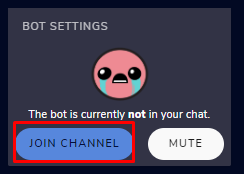
First you need as moderator type in your chat /mod streamelements then go here -> https://streamelements.com/dashboard click join channel https://prnt.sc/tngzst
StreamElements
The Ultimate All in One Platform for Streamers
 dapper salmon
thank you
nimble dune
 ornate delta
How do I play music through my stream when I stream on PlayStation and I am using my phone to edit my stream and other things
 lusty timber
my alertbox doesnt work when i get a donation or a follower. i tried to remove the alert box and installed it again but it didnt work. can someone help me?
wary halo
How do I play music through my stream when I stream on PlayStation and I am using my phone to edit my stream and other things
@ornate delta in that case, you don't or you use the spotify app on your ps4
wary halo

my alertbox doesnt work when i get a donation or a follower. i tried to remove the alert box and installed it again but it didnt work. can someone help me?
@lusty timber is the bot connected to your channel and are you logged in to Twitch on the StreamElements website?
ornate delta
😫
lusty timber
i used streamlabs alertbox
wary halo
well that doesn't work with StreamElements of course
ornate delta
Lmao 😂
lusty timber
ah that could be the problem xd
 bleak drum
Anyone else having issues with connection to twitch servers becoming unstable all of a sudden?
bleak drum
The losses went from bein ggreat over the past couple days to having massive issues all of a sudden where its not connecting at all
bleak drum
nope internet is great all things green only thing screwing up in se to twitch
wary halo
where? 😛
if you have connection issues there is not a lot we can do about that.
best to contact your ISP and or try another Twitch server that is close by
left jetty
hey there! is there a download for the animated icons for the Force Field template? I see only a link for the static ones in the templates. THANK YOU!!
left jetty
There are download links INSIDE the templates for extra icons
so, no, that's not true
wary halo
screenshot pls
left jetty
they are IN the templates can a Moderator HELP ME pleae
wary halo
do not ping random staff members please
left jetty
i am getting VERY UPSET about being called a liar
wary halo
and if you clicked on my name you can see i am also a moderator
left jetty
i do not feel i should have to proove to you that this exists
wary halo
no one has called you a liar anywhere
i am just asking for a screenshot of the download button
left jetty
its pretty sad that you are harassing me over a feature offered inside a template
i am definitely reporting you
 jade remnant
k
left jetty
as you can see the icons are static
jade remnant
where is the download button?
 jade remnant
its not an SE site, its a dropbox link.
so you cant download assets from SE.
you can download from the dropbox link
left jetty
this link is preloaded in the templates
jade remnant
right, please read what i said
left jetty
why are you arguing semantics?
all im asking for is the animated versions of the icons
jade remnant
everything you CAN download is in the dropbox link
downloading assets directly from SE is against TOS
left jetty
why couldn't you just tell me that to begin with?
jade remnant
both of us did
left jetty
you are mean people. i have never been treated this way in support.
 torn nimbus
this might be a dumb question, but for the loyalty settings tab for SE, are the points a separate point system or are they connecting to your channel points?
jade remnant
twitch channel points and SE loyalty points are separate
torn nimbus
i see, thanks so much!
jade remnant
np 👍
 limber basin
Hi, I'm very new to streaming and I was having trouble because I changed numbers and it's really tricky to get my new number synced up to my twitch
Can anyone help?
 patent knot
Is there a way to disable the tipping page while still having my paypal connected
 quartz rivet
hey i need help with the banned words filter with the stream elements bot. Can anyone help?
 hardy salmon
I actually am looking for further clarification on the Regular Expressions check box for banned words.
@quartz rivet I can possibly assist you if it doesn't involve that
quartz rivet
no it does
 wicked hound
round brambleBOT
wicked hound
round brambleBOT
@wicked hound 10 minutes of watchtime are given to those in chat when the loyalty points are handed out (every 10 minutes). Therefore, loyalty must be enabled for watchtime to work properly.
There is no direct link between watchtime and all-time points.
It can’t be calculated from the amount of all-time points a user has because subs may earn points at a faster rate and !bonus all command increases all-time points for users in chat at that time.
Giving points to a single user does NOT affect all-time, only when giving to all in chat.
quartz rivet
its just i have a bunch of words in a list of phrases. So one word for each phrase. But when someone uses one of those phrases in my chat then nothing happens. @hardy salmon
hardy salmon
I'm having the issue where if someone uses a larger word (that's completely harmless) that contains the banned word they get timed out. I thought unchecking the box made it so it had to be exactly the banned word to get caught, but I could be backwards. Have you tried using the "test filters" at the top of the SE banned words page?
quartz rivet
yea
hardy salmon
Do you have the timeout length specified as well as the scan section username and messages boxes checked?
 velvet glade
why my moderators cant use !quote add when they do this right am i do something wrong? if yes plz say what is wrong 🙂
velvet glade
where to find it? i mean !quote is enabled for everyone
quartz rivet
none of my banned words are working
 scarlet tiger
@velvet glade in default commands
 nova hollow
Is this the place where I ask for help regarding smt?
velvet glade
@scarlet tiger i will send u photo
quartz rivet
can someone help?
hardy salmon
@quartz rivet Just double checking all the basics. You have streamelements listed as a mod in your channel correct?
round brambleBOT
@nova hollow Welcome to the helpdesk! Please let us know how we can assist you today and a support volunteer or staff member will assist you as soon as they are available. Thank you for your patience.
quartz rivet
oh wait hold on
scarlet tiger
@quartz rivet what's exactly problem?
velvet glade
@scarlet tiger https://prnt.sc/tnhq3l
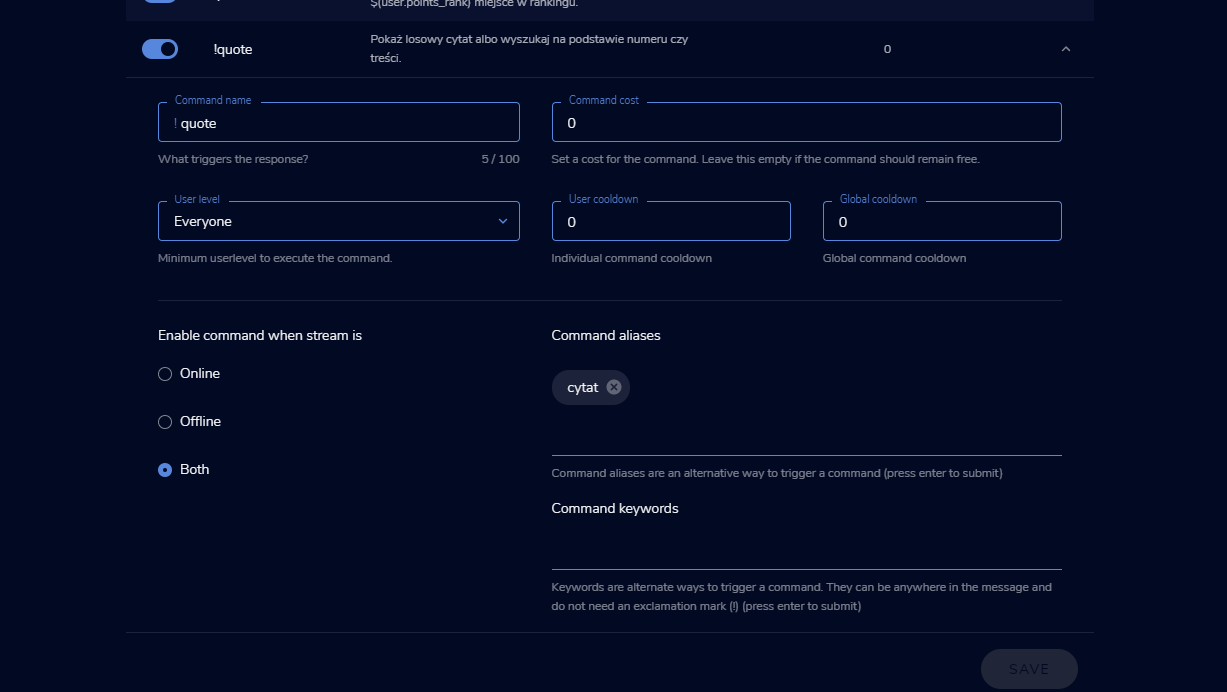
and not work , i mean they cant add any quote
velvet glade
on chat?
scarlet tiger
Yes
velvet glade
yea , come and write something like "test" etc
nova hollow
@round bramble Hey, recently I've been having issues with my bitrate connection in OBS. My upload is 14-15 mbps, but for some reason when I start my stream, my upload (in the bottom right corner of obs when I'm live) instantly drops down to 0-2000. I've set the desired bitrate, but for whatever reason I have 60-80% dropped frames when my upload is certainly good. I've called my ISP and they checked the internet a couple of times and everything seems good on their part. What should I do
hardy salmon
@nova hollow are you using H264 or Nvenc New (if you have nvidia gpu)
hardy salmon
@quartz rivet go to your twitch chat and type /mod (username)
wary halo
@round bramble Hey, recently I've been having issues with my bitrate connection in OBS. My upload is 14-15 mbps, but for some reason when I start my stream, my upload (in the bottom right corner of obs when I'm live) instantly drops down to 0-2000. I've set the desired bitrate, but for whatever reason I have 60-80% dropped frames when my upload is certainly good. I've called my ISP and they checked the internet a couple of times and everything seems good on their part. What should I do
@nova hollow this is 100% connection related, so it's either your ISP that needs to fix this, or you can try another Twitch server that is close by
nova hollow
@hardy salmon Nvenc
velvet glade
@scarlet tiger u can but my other moderators no i dont know why
quartz rivet
but if i were to mod the streamelements ot what would i say
hardy salmon
@nova hollow have you attempted to run a test through twitch itself? via https://inspector.twitch.tv/
nova hollow
@wary halo I've tried manually connecting, but every server is exactly the same (keeping my bitrate from 0-2000). I uploaded some things on youtube and there isn't even the slightest problem there with my upload speed
velvet glade
@scarlet tiger nwm my moderators are just stupid LUL , thx a lot , i can remove u from mods?
scarlet tiger
Yeh
nova hollow
@hardy salmon I have no idea what that is
hardy salmon
It's a live stream test without actually going live via twitch
wary halo
yeah that idea from tokiodreamy might give the best idea what is going on there @nova hollow
hardy salmon
so it'll monitor your frames, bitrate, etc and tell you more info about your stream
you just have to add a little code to the end of your streamkey for it to work
and you'll have it run for 5-10min and it'll show you all the data live
You'll see something like this graph over time. This is one of my past tests. If there's issues it'll highlight it in red and tell you more info
velvet glade
@scarlet tiger if i have more something to i will send here or just ping u ok? 🙂 but again thx a lot now i know i must lynch my moderators XD
scarlet tiger
Sure
nova hollow
I'm checking it and it's all red
hardy salmon
Are you able to post a screenshot ?
hardy salmon
yes or you'll actually go live. When you add it, it makes it a private test
 glossy lark
im using twitch studio in order to stream since its the only program that can capture my games. is there an in-depth guide on how to get my overlays and alerts an so on to get everything on there? whenever i try to past layout link it only shows bits of the layout
 spice siren
I have issue
neon nexus
Dear support, I'd appreciate an answer for my question from 20:06 - I am not sure if you've missed it
spice siren
On the 2nd screenshot - the currency in "Activity Tab" does not change
lament blade
hey anyone know how to change chatbot name, ive done all the pre-requisits
round brambleBOT
@lament blade Currently renaming the bot fully works with OBS.Live.
You can follow this video guide to set it up: https://discordapp.com/channels/141203863863558144/494513233416421386/561516184718278676
If you don't want to use OBS.Live and want to stick with Ground Control, please let us know your Twitch username.
lament blade
yeah that option is not available?
this is all i have
<@&382267076632379392> Can you support?
wary halo
so we can activate the option in Ground Control for you 😄
lament blade
lmao thank you
wary halo
you get it from your twitch account that you want to use for the botname
lament blade
sorry where can i find that lmao
scarlet tiger
In obs?
spice siren
@scarlet tiger yes
round brambleBOT
@spice siren Please send in an issue report so our team can investigate using the program's logs:
Report an Issue
▫️ Select "StreamElements" at the top of OBS
▫️ Select "Report an Issue"
▫️ Please write a detailed description of the issue you are facing:
What is happening/not happening? What happened that led to this issue appearing? When did you first notice this issue? Descriptions that help us to to reproduce the issue on our end very often result in quick fixes.
▫️ Select "Send to StreamElements"
spice siren
@scarlet tiger In the 2nd screenshot that I gave you, the currency does not change, which is why there are failures with donations!
scarlet tiger
It is not obs related
spice siren
@scarlet tiger Sorry, It's in the StreamElements site itself
 pale spruce
is there any special thing to do to make a "timer" work on twitch chat ? I did set up a timer but it never showed up in chat I don't get it . looking forward to hear from you guys !
scarlet tiger
How many messages in chat?
pale spruce
I tried the default one, I tried 1 line, 20 lines, 50, 100. still nothing and last night's stream had a bunch of chatters !
 sonic jetty
I know you can use a browser source for follower/sub/donation goals and it's just the default rectangle box that you design via the streamlabs website.
But can you get a different overaly other than the default?
I've seen 1 person have it with just text and no box and I've seen a different person have a ring of fire and inside the ring of fire it auto updates with new followers/subscribers.
neon nexus
Why is my request being ignored? Can you answer my question about stream store?
scarlet tiger
It should be work
I think depends on format
Can you public few items please? @neon nexus
neon nexus
yes, but the stream is online now and the store hasn't been announced yet so I would appreciate not bying items right now
I've just enabled a few
it is on drWHYsql channel
 blazing crow
Hello, !games isn't working in my streamers channel. Why? It shows creative for some reason... A fix?
neon nexus
you can see 2 item that look different
these have sound uploaded
items*
they cannot be previewed
preview is only playing sound
 proven violet
hello. can the viewers get to see their loyalty points?
lament blade
yes
proven violet
how?
 sacred lake
Yo Guys
wary halo
!points
wary halo
it's a command for twitch chat Nox, not for here
 rocky radish
When I input the browser URL into a browser source on obs, it doesn't show a full overlay, but instead it shows just a small portion of it on my screen, how do I fix this?
round brambleBOT
@rocky radish The default resolution for StreamElements overlays (theme and custom) is 1920x1080. Please add them in OBS at their full resolution and use CTRL+F to fit to screen if necessary. You can then downscale your stream in OBS settings > Video if you'd like https://i.imgur.com/6bWXxjR.png
neon nexus
@scarlet tiger have you found the store?
 lunar fractal
i need help on setting up the loyalty points for my channel any advise would help
round brambleBOT
@lunar fractal New to Stream Elements?
Check out our YouTube channel https://www.youtube.com/c/streamelements/videos
with tutorial videos from setting up the basics, to in depth details on how to use our product.
New to OBS? Here is a 4 step quickstart guide
https://obsproject.com/wiki/OBS-Studio-Quickstart
Want to learn even more? Here is an in-depth overview
https://obsproject.com/wiki/OBS-Studio-Overview
neon nexus
Anybody here? I really need help.
strong kernel
@neon nexus A video is meant to be added on its own, with its own audio as part of the video. When you add both a video and a sound, you end up with this:
neon nexus
but webm files cannot have sound
strong kernel
They absolutely can.
neon nexus
(I think)
ooooo
really?
if they can
I am going to check this out and let you know if it worked for me. Thanks a lot!
 queen tiger
i need help with my Stream elements, i accidently closed my chat box in the Stream Elements tab i dont know how to re-add it
strong kernel
StreamElements menu at the top.
queen tiger
ah, thank you
 fast epoch
I need help to fix my chatstats due to a change of my name
 chrome folio
@fast epoch please, say your old name and the new name.
@supple wigeon https://streamelements.com/dashboard/tipping-settings
 supple wigeon
nvm i figured it out sorry
 frozen trout
I accidentally signed into my Twitch Alt and when i sign out and go into my main account it sends me back to my alt why?
strong kernel
Log out of Twitch itself.
frozen trout
I don't have Twitch itself on my Pc i use browser version
 bitter belfry
Once I've set up my loyalty settings and Bot in stream elements, I've noticed you can activate the bot on the main dashboard. Although, I'm not sure about Loyalty settings, is that automatic or do I have to activate it somehow through OBS Studio?
 oblique thistle
I need help for my song request.. When i Play a song it pauses and says “Make sure you have Mediashare widget on your overlay” I don’t think I have an overlay and I sure don’t use streamlabs or OBS I use the elgato game capture app to stream.
 errant delta
how do I disconnect the streamelement bot?
round brambleBOT
@errant delta Go to the dashboard -> right side -> part channel -> join channel (https://streamelements.com/dashboard)
frozen trout
Alright everything even the StreamElements website is under my main account so why won't OBS switch to my main account?
 rich trellis
How to leave the bot with the modified nick
round brambleBOT
@frozen trout Streamelements on top of OBS -> Logout -> login
frozen trout
I fixed it the bot is wrong i had to go into control settings and disconnect the account in order to login to my main account
lament blade
Quick question since I found out what was causing my mods not to give shout outs . Is there a way to turn off the whole level settings ? I had to level them up to 500 just for them to give shoutouts and change games etc ?
strong kernel
@lament blade Levels cannot be disabled. You can manage user levels at https://streamelements.com/dashboard/bot-commands/user-management
StreamElements
The Ultimate All in One Platform for Streamers
rich trellis
HOW DO I CHANGE THE NAME OF MY STREAMELEMENTS BOT TO MY NICK?
round brambleBOT
@rich trellis If your commands recently stopped working and you're using OBS.Live and a custom bot name do the following:
1.) In OBS.Live, click on the hamburger menu (three stripes) at the top left of your activity feed
2.) Click on Stream Settings -> Custom bot name
3.) In the "Custom bot name" field select "Set custom bot name", not your already existing username (with capital letters)
Note: If you already connected an account that way, the third entry will show as the account name (see image https://i.imgur.com/sO7fWOX.png)
4.) Scroll a bit down and click on the purple "CONNECT CUSTOM BOT ACCOUNT" button
5.) Log in as usual and "Authorize" the custom bot name
6.) Back in the Activity feed, click on the "SEND TEST MESSAGE" button and check if your custom bot name starts working again
 grim coyote
Question how can i Reduce Vram usage of Browser source as atm its Using 761 Mb of Vram
round brambleBOT
@grim coyote OBS -> settings -> advanced -> scroll down -> enable/disable hardware accel. (This does not apply for OBS on Mac)
https://i.imgur.com/ggMe9ZE.png
grim coyote
Does disabling it make it run worse?
strong kernel
Depends on the system. You should try both and see which is better for you.
grim coyote
yea im on a ryzen 7 1700x and a AMd rx 590
strong kernel
Means nothing. Try both, see which is better for you.
 fallen stratus
Hello! I changed my Twitch handle and chatstats are not working for me. I read that i need to come here and reach out for help. Thanks!
round brambleBOT
@fallen stratus If you changed your name on Twitch please follow these steps:
🔹 Visit https://streamelements.com/logout and then log in again with by connecting with Twitch.
🔹 On the right side of the dashboard page that opens, select "Join" under bot settings. If it says "Part" select that and then select "Join" to send the bot to the chat. Don't forget to mod the bot by typing /mod streamelements in your channel if you have not already.
🔹 Post your old and your new name here so that we can update your channel's chatstats tracking (must be done by staff).
lament blade
Hi, i need help setting up on ps4, is there any specific things i need to know?
round brambleBOT
@lament blade Consoles do not have native support for overlays. You would need a capture card, PS4 remote play or Xbox companion app and a PC with OBS in order to have Overlays over your console gameplay.
We have an blog post about how to setup console streaming with our essential tools: https://blog.streamelements.com/how-to-stream-on-console-7b620b1c46c3
fallen stratus
Old Name: Dacoatuhh
New Name: DacoatuhhGaming
lament blade
@strong kernel much appreciated
 burnt turtle
just deleted an overlay by accident. anyway to recover it?
strong kernel
Per the warning it gives you before deleting, no, there is not.
 pure herald
Not sure if this is the right place to post this: Is there a way to record only your game while streaming with your webcam, overlays, etc.? I know there is a streamlabs setting for it I just didn’t know if there was something similar for obs studio
ionic kelp
@pure herald It is planned but nothing yet.
strong kernel
It's an option that OBS Studio is looking into implementing, but haven't provided an ETA for.
 inner grail
Hi I have the gl310 and for some reason the ps4 video & audio stopped coming through to the obs. It was working on sunday with no problems but now nothing. was streaming to twitch fyi
round brambleBOT
@inner grail For the best OBS support, please join their Official Discord @ discord.gg/obsproject
 terse fog
Hello, I was wondering if there was any suggestions for what I can try. I am having issues getting Call of Duty to run with my StreamElements OBS software, it causes extreme lag when both are running with the Livestream.
inner grail
would the obs community be for the streamelements obs program? (the one with the rocket ship as the icon)
ionic kelp
OBS.Live is merely an addon. Not a program. You're simply running obs with our extra docks.
inner grail
oh ok cool thanks for the clarification
 fallen folio
Stream Elements keeps blocking my links from my commands how do I stop it from doing this?
strong kernel
StreamElements doesn't block links from commands. If they're appearing as ***, then that's Twitch doing it. Make the bot a moderator.
 mossy comet
Hi there, I am wondering how to add scrolling text to my overlay and have it show my currently running game, and the same for my most recent sub. For some reason all the variuables i use do not work
fallen folio
It is a moderator it says please refrain from posting links and then deletes it
round brambleBOT
@fallen folio Please provide a proper screenshot with the issue visible. If not sure how to take a screenshot, you can check here: https://www.take-a-screenshot.org/
 craggy gust
am i able to ask for help with something to do with my twitch channel
ionic kelp
If it involves using streamelements yes.
mossy comet
how to add scrolling text to my overlay and have it show my currently running game, and the same for my most recent sub. For some reason all the variuables i use do not work
round brambleBOT
@mossy comet We've released our new Overlay Editor revamp. You can check out the changes and how to work with it here: https://youtu.be/X5VzXjqAsjk
Check out our blog post as well: https://blog.streamelements.com/streamelements-overlay-editor-just-got-even-better-c22cb5b4853e
We are thrilled to announce the launch of the remastered StreamElements Overlay editor!
https://p.strms.net/newoverlayyt
Why StreamElements Overlays are better?
😎 Simple: Load your entier setup using only 1 link
⚡ Fast: Cloud-powered Overlays arrive in real-time, say goodb...
@grim tangle Welcome to the helpdesk! Please let us know how we can assist you today and a support volunteer or staff member will assist you as soon as they are available. Thank you for your patience.
@grim tangle New to Stream Elements?
Check out our YouTube channel https://www.youtube.com/c/streamelements/videos
with tutorial videos from setting up the basics, to in depth details on how to use our product.
New to OBS? Here is a 4 step quickstart guide
https://obsproject.com/wiki/OBS-Studio-Quickstart
Want to learn even more? Here is an in-depth overview
https://obsproject.com/wiki/OBS-Studio-Overview
ornate delta
So I have the alert bot on but I stream from ps4 does the alert work when I’m on mobile looking at my chat?
 grim tangle
Idk
round brambleBOT
@ornate delta Consoles do not have native support for overlays. You would need a capture card, PS4 remote play or Xbox companion app and a PC with OBS in order to have Overlays over your console gameplay.
We have an blog post about how to setup console streaming with our essential tools: https://blog.streamelements.com/how-to-stream-on-console-7b620b1c46c3
 hexed jackal
So I'm having issue with the editor, the video didn't help. I'm trying to add my socials, twitter and youtube, but editing the textboxes doesn't change anything
ornate delta
Does alert bot work for chat when I’m looking at chat from my phone should the alerts pop up in chat?
strong kernel
@hexed jackal You're probably editing the layer name, not the actual text. Select the widget and open the settings.
hexed jackal
ah, I am a lil dumb. Thank you!
ornate delta
Can I get help?
Should alerts be popping up in chat
And can I see them when I’m on mobile
strong kernel
Please read the bot message and linked article.
ornate delta
That doesn’t help at all
strong kernel
Consoles do not have native support for overlays.
ornate delta
No shouldn’t be popping up in chat since I have the alert bought for chat on
Should
strong kernel
Can you rewrite that in English please?
ornate delta
Ok just a sec
ionic kelp
@fallen folio Streamlabs is blocking links.
strong kernel
That's the Streamlabs bot timing out the StreamElements bot.
fallen folio
yes
ionic kelp
Either mod streamelements or disable link protection for Streamlabs.
fallen folio
The link protection is not checked off
what would i need to do to mod it so the links will show
ionic kelp
/mod streamelements
strong kernel
@fallen folio You're getting Streamlabs and StreamElements mixed up. They're not the same thing.
@fallen folio The Streamlabs bot is timing out the StreamElements bot. Change the settings or disable the Streamlabs bot.
fallen folio
@ionic kelp that worked thank you
I'll will make sure thye are not timing each other out too thank you very much
 minor valley
why wont it let me log out of stream elements
 dry depot
The people in my stream cant see what the bot sends
 abstract hemlock
@minor valley if you want to change of twitch account, you need to log out of twitch.tv first
@dry depot wdym?
 sand walrus
Hello. Is there anyway to auto create a clip every time a command is used? Like I've a "!rage" commanda and I'd like to auto create a clip everytime it's used
abstract hemlock
@dry depot twitch username?
dry depot
is this the wrong chat, im streaming on yt
 pliant wharf
Need a mod
abstract hemlock
@sand walrus check this widget: https://discordapp.com/channels/141203863863558144/457957557470887947/555734806034382888
sand walrus
@dry depot yeah, here's #helpdesk-twitch. You should use #helpdesk-youtube
@abstract hemlock ty
dry depot
ok thank you
 fleet lark
is there any way to have kappagen only show 1 emote every few seconds and it picks a random one from chat
kind of like xqc's kappagen setup
@abstract hemlock
dry depot
the people on the youtube arent repsonding
 prime gale
I'm confused. The bot won't respond to any commands in chat and it's not muted. I have made it part the channel multiple times and make it join back but still no command responses. However if I do a command such as !sr is still adds the song to the song request but it doesn't pop up in chat. Anyone know the fix to this?
terse fog
Im having issues when streaming call of Duty: modern warfare to twitch. It is causing my obs and stream to lag severely and then drop connection. Are there any settings in obs i can tweak to try and resolve that?
round brambleBOT
@prime gale If your commands recently stopped working and you're using OBS.Live and a custom bot name do the following:
1.) In OBS.Live, click on the hamburger menu (three stripes) at the top left of your activity feed
2.) Click on Stream Settings -> Custom bot name
3.) In the "Custom bot name" field select "Set custom bot name", not your already existing username (with capital letters)
Note: If you already connected an account that way, the third entry will show as the account name (see image https://i.imgur.com/sO7fWOX.png)
4.) Scroll a bit down and click on the purple "CONNECT CUSTOM BOT ACCOUNT" button
5.) Log in as usual and "Authorize" the custom bot name
6.) Back in the Activity feed, click on the "SEND TEST MESSAGE" button and check if your custom bot name starts working again
@terse fog For the best OBS support, please join their Official Discord @ discord.gg/obsproject
lament blade
Am I able to remove all of my quotes to start them fresh again?
ionic kelp
It's a long and tedious process but yes.
lament blade
So in other words, I have to do it one by one?
ionic kelp
Yup
lament blade
sighhhh
ionic kelp
Do yoy have something like a streamdeck or similar by chance?
lament blade
Yep!


 lament blade
How so?
ionic kelp
You'll still have to create the message to send to chat to remove tthem but you only need to tap the button instead of typing it repeatedly.