#helpdesk-twitch
1 messages · Page 716 of 1
 paper mica
 strong kernel
@paper mica It won't.
 chrome folio
@lofty galleon are you using custom bot name (streamer name)?
Or other custom bot name?
 lofty galleon
@chrome folio yep, both streamElements and the custom name are mods
I already tried that, @round bramble, but thank you
 round brambleBOT
@lofty galleon 1) Right click on your OBS desktop shortcut and open the Properties 2) In the "Target" field, add the following to the very end: --remote-debugging-port=40404 3) Open OBS (or restart if it was open) 4) Open your web browser and type in: localhost:40404 5) Click on "StreamElements - Activity feed" 6) Navigate to the Console tab 7) Type the following into the console and hit enter: store.customBot.removeCustomBotIntegration() 8) Try setting the custom bot name 9) Remove the additional flag in step 2 from your shortcut properties.
lofty galleon
@chrome folio Cheers, that worked
 sleek jolt
Hi, I recently just recieved a dontation to my stream via the tip page but it didnt show up on my stream overlay or dashboard through stream elements and I'm not sure what ive done wrong, any help would be really appreciated thank you
chrome folio
@sleek jolt check your Paypal account if the transaction is there. If it isn't, then check with Paypal support.
sleek jolt
They currently say that they are pending
strong kernel
@sleek jolt If a viewer tipped through PayPal but no information appears in your StreamElements account, this generally means PayPal has held the tip for verification. Until PayPal clears the tip and sends back a confirmation to your StreamElements account, no information will appear there and no alert will play, as that confirmation is the only way for us to be aware of a successful transaction. If you believe there may be an issue with the transaction, you'll need to contact PayPal support as StreamElements is only a passthrough service and never actually gets involved with the transaction or touches the money.
sleek jolt
okay thanks for the help, its on paypals end then
 fluid stone
Hi, the bot is not responding in my chat. I already removed it from the chat and moved from the site, but it did not help. I'm sorry for some grammatical or syntax error, I'm using google translator. rs
round brambleBOT
@fluid stone If your commands recently stopped working and you're using OBS.Live and a custom bot name do the following:
1.) In OBS.Live, click on the hamburger menu (three stripes) at the top left of your activity feed
2.) Click on Stream Settings -> Custom bot name
3.) In the "Custom bot name" field select "Set custom bot name", not your already existing username (with capital letters)
Note: If you already connected an account that way, the third entry will show as the account name (see image https://i.imgur.com/sO7fWOX.png)
4.) Scroll a bit down and click on the purple "CONNECT CUSTOM BOT ACCOUNT" button
5.) Log in as usual and "Authorize" the custom bot name
6.) Back in the Activity feed, click on the "SEND TEST MESSAGE" button and check if your custom bot name starts working again

 lament blade
When people do !watchtime it always says 0 seconds
round brambleBOT
@lament blade 10 minutes of watchtime are given to those in chat when the loyalty points are handed out (every 10 minutes). Therefore, loyalty must be enabled for watchtime to work properly.
There is no direct link between watchtime and all-time points.
It can’t be calculated from the amount of all-time points a user has because subs may earn points at a faster rate and !bonus all command increases all-time points for users in chat at that time.
Giving points to a single user does NOT affect all-time, only when giving to all in chat.
lament blade
I really dont understand
loyalty is a twitch thing that I have to enable?
Quick question ? But is there a problem with the commands to put in chat ? When I ask my mods to do a shoutout for someone it won’t let them .
 ionic kelp
@lament blade No. It's something you enabled on our website.
chrome folio
@lament blade show us a screenshot of the details of your !so command.
 viral fractal
Huii
round brambleBOT
@viral fractal Welcome to the helpdesk! Please let us know how we can assist you today and a support volunteer or staff member will assist you as soon as they are available. Thank you for your patience.
 gritty shuttle
hello I would like a command for my chat that is !offline so users can see how long they have been there. my twitch name is chaskitty7
 austere remnant
@gritty shuttle you have to go through your “ Loyalty “ setting and work it out from there
gritty shuttle
ok
 full fable
Hello - I am trying to add a merch alert in my overlay, but when I hit "emulate" nothing happens
ionic kelp
@full fable Does it show in the editor?
full fable
no it doesn't, but the widget box is there
says it has the default sound set, but I tried changing it to something else in my library, no image, no text, no sound
lament blade
@ionic kelp how do I enable that?
 abstract hemlock
@full fable which alertbox have you on your overlay?
@half socket do what? 😅
@lament blade Loyalty point system?
 half socket
My steam isnt fit to screen anymore. there are two black lines on the sides of my stream. idk what i did or how to fix it
in my obs its fit to screen
abstract hemlock
@half socket try select the browser source then pressing ctrl+f
full fable
Merchandise Alert Box is what it says @abstract hemlock
I see now that there are two that are named exactly the same
abstract hemlock
try using this one
full fable
whats the purpose of the other one?
half socket
Now there is the black lines all around
abstract hemlock
Our dev team will remove the other one.
@half socket by default the dimensions should be 1920x1080
half socket
It is. Its a dub might just call it a night and work on it tomorrow
Thanks for trying boss
full fable
thank you @abstract hemlock !!
 odd fable
I changed my name and the chat leaderboard displays no data, any idea what's going on?
abstract hemlock
post here your old and new username
 rain jasper
Optimized settings for streaming Warzone/apex?
lament blade
@chrome folio
round brambleBOT
@desert briar Please logout of StreamElements at https://streamelements.com/logout and then login again to your account (Twitch/Youtube/Facebook/Mixer)
 desert briar
Didn't help
ionic kelp
@desert briar Do again but wait 30 minutes before logging back in.
desert briar
ty will try
 near wharf
Hi! currently wondering how to put twitch chat on my stream!
 violet wren
when I stream on twitch my channel points aren't in my stream and nobody can gamble while i stream please help me with this thank you
violet wren
sonnyboybilly
ionic kelp
Slots and roulette commands are disabled. Enable those and the modules.
violet wren
is that for twitch website? or stream elements?
 knotty crypt
Using the NerdOrDie synthwave overlay package. Using the quick link in the files to launch the alerts pack with included custom CSS into my StreamElements overlay collection. Cannot get TTS to work properly for donations and cannot get donations messages to appear when i submit a custom emulation, and I am wondering if I am missing something in the basics of StreamElements or if maybe something in NerdOrDie's CSS code is inhibiting TTS. Any help is appreciated.
 atomic tide
how to add queue for twitch?
 oak oak
i cant get the overlay on obs
violet wren
do I have to go to twitch to enable channel points?
round brambleBOT
@oak oak To add your overlays to OBS, add a new browser source in your scene. Paste your overlay URL in the browser source properties, set the dimensions to 1920x1080 (unless you changed them on the website), and ☑ “Shutdown source when not visible” https://youtu.be/KDvLynUqXI4
oak oak
ty b
violet wren
when I stream on twitch my channel points aren't in my stream and nobody can gamble while i stream please help me with this thank you
what do i have to do to get my channel points?
abstract hemlock
replace USERNAME with your twitch username ⤵️ https://dashboard.twitch.tv/u/USERNAME/community/channel-points
near wharf
hey, so just a question. Whenever i try to switch scenes, it keeps going back to my first one
 young parcel
Hello, I would like to know if someone can help me. Today I was donated for the first time on twitch. The issue is that I look at the paypal account and nothing came to me and on the streamelements page it does not appear as if someone gave me what could be the reason for this? . I hope someone can help me from now thank you very much
hola quisiera saber si alguien me puede ayudar. hoy me donaron por primera ves en twitch. el tema es que me fijo en la cuenta de paypal y no me llego nada y en la página de streamelements tampoco aparece como que alguien me dono cual puede ser el motivo de esto? . espero que alguien me pueda ayudar desde ya muchas gracias
abstract hemlock
@young parcel that's looks like the /me command, i suggest you to enable the chat alerts module here: https://streamelements.com/dashboard/bot-modules

StreamElements
The Ultimate All in One Platform for Streamers
violet wren
nothing was there
how do i replace my username with twitch username
to allow channel points for my chat
ionic kelp
You already have loyalty enabled. Enable bingo, slots, roulette from the link above. Then enable slots/roulette commands in the default commands a few tabs below on the left.
violet wren
thank you so much
 peak storm
Hi, what is the base command for !merch? 🤔
ionic kelp
There isn't one. Only creates a custom command from this
peak storm
@ionic kelp so can i disable or rework what !merch output is?
ionic kelp
You should have it in custom commands.
peak storm
it's not tho 🤔
@ionic kelp ok nvm. even tho it's not there, my issue is not with StreamElements. Apologies.
 fleet nexus
does the cheer alert not work with gifs? it's the only one that i can't seem to customize
 sour aurora
Tes
 rancid latch
Hi when I use Text over image (layout) in alerts the text does not show. Is there a way to fix it?
ionic kelp
@rancid latch Adjust text margin.
rancid latch
perfect thank you @ionic kelp
 stable lance
When someone donates me, streamelements does not send the money as a donation, but rather as a product sale, so paypal withholds my payment until the donor credits it
ionic kelp
@stable lance That's something you'd have to speak with PayPal about as we don't touch the money at all.
 elfin yacht
Hi, how can I deactivate the bot? Thanks
 nimble dune
Go to the dashboard -> right side -> part channel (https://streamelements.com/dashboard) @elfin yacht
elfin yacht
Sorry but I don’t see that. There’s only dashboard on the left
nimble dune
 elfin yacht
Ohhhh silly me! Thanks again @nimble dune
 true gazelle
Hello im having a problem while uploading an ogg file to the stream elements overlay website
 zenith widget
What is the problem?
true gazelle
The webpage says "Failed while uploading file"
zenith widget
How big is the file?
true gazelle
55 kb
 lament vapor
Anyone know how to get text files from label widget? I’m using streamlabs labels, but I’m trying to switch to Steamelements. Can’t figure out how to add it to OBS.
zenith widget
If you are referring to our label widgets - they stay on the overlay and you just add the overlay link to OBS
@true gazelle send me the file in DMs + your username
 solar hare
I have streamelements obs and i used to be able to update the title from this panel but now it isn't letting my type in it. I tried uninstalling and reinstalling with no luck
round brambleBOT
@solar hare There is a bug with setting the stream title in OBS and the Dev team is investigating.
In the meantime you can set the title using the !settitle command in chat (if enabled in your bot command settings)
Or with the Twitch dashboard: https://dashboard.twitch.tv/stream-manager
solar hare
Ah thx
lament vapor
If you are referring to our label widgets - they stay on the overlay and you just add the overlay link to OBS
@zenith widget I have a layout from nerd or die... it has some panels already pre-made.. from text files that I point to streamlabs labels... I don’t understand where I locate the stream element “overlay link” & apply it to my current nerdordie panel. Hmm
zenith widget
!add
round brambleBOT
To add your overlays to OBS, add a new browser source in your scene. Paste your overlay URL in the browser source properties, set the dimensions to 1920x1080 (unless you changed them on the website), and ☑ “Shutdown source when not visible” https://youtu.be/KDvLynUqXI4
lament vapor
Ok, how does it know to update the text files inside my nerd or die pre-made panels tho? I’m prob overthinking it...
zenith widget
If the package is added to our system, then our system is connected via an API point in Twitch with your account
once we receive an event, we update the label widgets
lament vapor
Ohh... I have to somehow upload the OBS theme into the stream elements website... ahhh... starting to make sense. I’ll check out the video above
zenith widget
the video above is how to add the overlay to OBS
Most NoD packages should come with an installation file for our system
If it doesn't have one, check in with NoD about it
 placid dagger
Why does a mediarequest repeat the last thing played when an editor opens an overlay to edit?
zenith widget
If you are using "Show on stream" and someone opens an overlay with the media request widget on, then Media Request needs to reestablish a connection with the widget and it may cause it to restart the current song
 azure geyser
Hey, where can i Add the Bot to my stream? I cant find yet.
nimble dune
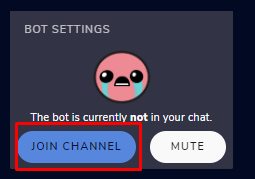
@azure geyser Go to the dashboard -> right side -> join channel (https://streamelements.com/dashboard)
 azure geyser
Thank you very much
 tropic burrow
@nimble dune hi danii trying to find the join channel option for the bot as well clicked on the link but theres nothing on the right side
placid dagger
Is there a way to curb the problem without disabling the request?
tropic burrow
Oo i was able to find it tyvm
zenith widget
@placid dagger yes - don't have your editors enter the overlay while you are using it
placid dagger
Okay, I guess we can put that in its own overlay xD
 blazing stirrup
ditching streamlabs for streamelements but is there a way to get ground control to issue an audible to a discrete headset channel on the gaming PC (not the streaming one) like I could with the old streamlabs chatbot client?
 dire shard
im trying to import my streamlabs bot info to the streamelements but when i import it none of it seems to import
zenith widget
@blazing stirrup Ground Control cannot produce sound, except for the Media Request in it.
@dire shard What exactly are you trying to import?
dire shard
my settings and commands
blazing stirrup
so is there a client that can provide discrete notification if ground control does not?
zenith widget
Im not sure what you discrete audio trigger you need here, but we don't have anything that can do that.
If you are looking for something to alert you, then you can use the alert widget.
 untold crest
You can create an overlay with discrete alerts and run it in chrome on your gaming PC
zenith widget
@dire shard And what importer are you using?
dire shard
good question
 unreal pewter
Hi, my chat stats gave a 404 error yesterday and someone got it fixed for me here, and it worked again, but its showing just a 404 again 😦 twitch name is tryonesluck_
blazing stirrup
basically you could use the other chatbot client to play SFX to headset in case of a cheer, sub, raid, etc without going through system audio
if you could do the same thing with a browser window that should work
untold crest
Yes. You can create another overlay on your gaming PC where you have no TTS. just default alert sound which you can route to your headset only (without routing to streaming PC)
blazing stirrup
the overlay on source pc I just don't understand though. do not need visual, just an audible ping so I know to peek at other monitor
untold crest
Of course. Just create a new overlay with alertbox inside and have it running on your Gaming PC in chrome
blazing stirrup
@round bramble I would like to have that functionality in ground control, same username
zenith widget
What functionality?
round brambleBOT
@unreal pewter If you changed your name on Twitch please follow these steps:
🔹 Visit https://streamelements.com/logout and then log in again with by connecting with Twitch.
🔹 On the right side of the dashboard page that opens, select "Join" under bot settings. If it says "Part" select that and then select "Join" to send the bot to the chat. Don't forget to mod the bot by typing /mod streamelements in your channel if you have not already.
🔹 Post your old and your new name here so that we can update your channel's chatstats tracking (must be done by staff).
zenith widget
@blazing stirrup restart ground control now and the custom bot option will be there
blazing stirrup
yes indeed, thanks!
 hexed juniper
hi there, i am using the Kappagen overlay, but nothing is happening 😦
untold crest
The easiest way to check it is to trigger it via !kappagen command in chat (if it is enabled)
hexed juniper
ok
untold crest
Or via event emulate (if that event is enabled in kappagen)
hexed juniper
yeah, the events emulate properly in streamelement's editor
but nothing is happening when I view it on EcammLive, obs etc
untold crest
Do you have that checkbox ticked?
hexed juniper
Yes
For some reason it seems like the Streamelements bot is not getting any messages (including, obviously, emotes)
untold crest
Have you saved that overlay after adding kappagen widget there? If there's alertbox on that overlay - does it display alerts you are emulating?
untold crest
And about bot - there might be error with custom name
round brambleBOT
@hexed juniper If your commands recently stopped working and you're using OBS.Live and a custom bot name do the following:
1.) In OBS.Live, click on the hamburger menu (three stripes) at the top left of your activity feed
2.) Click on Stream Settings -> Custom bot name
3.) In the "Custom bot name" field select "Set custom bot name", not your already existing username (with capital letters)
Note: If you already connected an account that way, the third entry will show as the account name (see image https://i.imgur.com/sO7fWOX.png)
4.) Scroll a bit down and click on the purple "CONNECT CUSTOM BOT ACCOUNT" button
5.) Log in as usual and "Authorize" the custom bot name
6.) Back in the Activity feed, click on the "SEND TEST MESSAGE" button and check if your custom bot name starts working again
untold crest
Add any alertbox to that overlay for test, to see if it will be displayed too
hexed juniper
ok alertbox works (except the image/video animation isn't showing... the text does though)
but the kappagen still isnt working
untold crest
It could be because hardware acceleration
round brambleBOT
@hexed juniper OBS -> settings -> advanced -> scroll down -> enable/disable hardware accel. (This does not apply for OBS on Mac)
https://i.imgur.com/ggMe9ZE.png
 untold crest
🤞
ionic kelp
Yeah. This doesnt work for Macs unfortunately.
hexed juniper
When you say "this", you mean..?
hexed juniper
Does any of this require Flash?
ionic kelp
Nope.
Basically video files/gifs from our overlays don't behave with Macs for this reason.
lament blade
Why don’t I get notifications when I play on my PS4 no 1 no I’m on now if I run the PS4 on the pc people get them
ionic kelp
What kind of notifications and where?
lament blade
Like when I go live on twitch
On the PS4 thay say that don’t get the notification when I go live
If I use ps4 on the pc on obs then all good if I want to just play on the PS4 without the pc then thay don’t get the notifications so thay no I’m online
ionic kelp
That's something to contact twitch about. We dont touch that stuff.
 turbid hinge
so i jus switched from labs and i set up my shoutout command using the template but it only works right if i don't @. Is there anyway to use @ and not have it show up in the link?
untold crest
@turbid hinge If you are using ${1} replace it with ${touser}
hexed juniper
hey guys, its still not working
i even tried deleting my account and starting over
 scarlet tiger
You getting any error?
hexed juniper
nope. i can see them being generated just fine in the editor
but in my stream/obs window... nada
 wild sinew
Hey guys, hoping you can help. I am trying to set a chat command to pull random quotes from a list. I have utilised one of the command shares for generating a random twitter and have removed the twitter element of it. It works but between each word of the quote is adds a +. is there a simple way of sorting this?
 ionic kelp
@hexed juniper Unfortunately static or no images are your only options from a Mac perspective.
Ans this applies to all your overlays.
wild sinew
@zenith widget thanks so much
hexed juniper
What is the technical limitation?
It seems silly that it doesn't work on a Mac
It is just CSS, right?
ionic kelp
It's the hardware acceleration or lack there of in your case.
hexed juniper
Ah
ionic kelp
Toggling this option on windows fixes it usually but as you're missing it you're stuck with these options.
OBS is trying to get it added but it requires stuff from the people that code the thing responsible for the browser source.
lament blade
Hi! i heard there was an alert box for channel points?
any idea where i can find that or if its been implemented yet?
ionic kelp
@lament blade Only for "rewards" that require text input and it's in #widget-share
untold crest
@lament blade most likely transaction provider, PayPal if it comes to them (as SE doesn't take any part in transaction, we receive just confirmation from PayPal that transaction went ok) or https://support.streamelements.com/hc/en-us/requests/new if it comes to SE.Pay
lament blade
Not sure I understand as it's for merch, SE takes some and I take a portion. So it doesn't go to you first?
untold crest
In that case - please follow the link above (I thought you are referring to tips)
untold crest
You should receive confirmation on your email address where all details hould be provided.
lament blade
Yes, I just wondered if there was a page for it. Ok so I'll wait for them to review and email me.
hi i have a question about the media share. I cant seem to find a show on stream button anywhere, where may i find this
untold crest
If you have "MediaRequest widget" added to overlay you can find show on stream either in OBS.Live/GroundControl or here: https://streamelements.com/dashboard/mediarequest/general
lament blade
so im on that page already, but the button doesnt seem to be there
I have a widget overlay set up on the overlay also already
i am on the StreamElements.com page btw
untold crest
lament blade
 marsh nimbus
how can i disable my account? everytime i try it says "invalid username"
untold crest
@lament blade That is really odd. I would like to suggest you using OBS.Live then.
This is the first time I see that button missing
untold crest
Ohh. I missed that green bar on top.
zenith widget
@marsh nimbus Please send the same details as the closure form requires to our CTO Reem here: reem@streamelements.com - he will close your account.
lament blade
I noticed 😉
ah i see thank you
Oh thanks for the email KeiZar that helps alot
also is there a way to only have it pop up when someone tips or requests a video
marsh nimbus
@zenith widget don't i need my username to be able to close my account or just all the other things?
lament blade
or have it disappear when paused basically
and are mods able to play/pause the video then?
lament blade
alright good to know
zenith widget
@marsh nimbus not necessarily - just send the same details as the form to that email
lament blade
thank you @zenith widget
Guys, you know I can buy my own merch at discount? Well can I do this more than once? Just wondering because I don't want to order one thing, then find out it was my 1 and only chance to get a discount.
marsh nimbus
@zenith widget fs thank you
lament blade
Cool, I was on that page but just wanted to check. Thank you. PS thanks for the email if you didn't see my pervious message thanking you.
 shut urchin
Hi, i can't add a keyword for 8ball, it always dissappears after reload the page. 🙄
untold crest
Have you pressed "Enter" after providing it?
shut urchin
right, tried many times
untold crest
And are we talking about keyword for !8ball command or possible response?
shut urchin
for !8ball command
untold crest
The reason behind that is that you may have this particular word already used for another command (that can be disabled)
shut urchin
the word i tried to set is my bot name.
i want the bot trigger 8ball everytime my viewers call him
ionic kelp
When you try to add the variable does it say saved in the corner?
ionic kelp
What browser?
ionic kelp
No need. Seems to be "reproducable".
shut urchin
what can i do? 😭
ionic kelp
Could you actually test it in chat?
shut urchin
still not working
ionic kelp
We're taking a look to see what's "wrong".
shut urchin
ok i'll wait. thanks
 odd tartan
on streamelements.com/overlay i have sound on on followers and everything is working fine even working on ops but not getting sound on stream? but pop up working fine? any help with this?
untold crest
@shut urchin We have that checked. It is visual bug as default commands don't accept keywords unfortunately.
round brambleBOT
@odd tartan If you are not hearing your Alerts and/or Media request, you are most likely using the "Control Audio via OBS" option in your browser source properties.
To make sure you hear the alerts and the stream also hears them, follow along the screenshot bellow.
https://cdn.discordapp.com/attachments/199460642975907840/685371800456134686/unknown.png
 shut urchin
@untold crest that explains all. thanks for the help. 👍
 formal smelt
Hi
new to elements dont know why this is becoming a learning curve for me! trying to get a chat browser link to work in obs
untold crest
You can add chat widget to your overlay and then add it to OBS as Browser Source.
 charred quartz
double click the web browser source and click refresh/reload cache @formal smelt
untold crest
And check if the dimensions you have in OBS are 1920x1080
As this box may be displayed out of canvas size
untold crest
Click CTRL+F when you are on that overlay in OBS so it is resized back to original size
 left canopy
Que pone
untold crest
@left canopy #🇪🇸︱español
@formal smelt after you do that CTRL+F, adjust size in overlay editor
round brambleBOT
@left canopy Welcome to the helpdesk! The regular helpdesk channels are in English but we do provide multi-language support in the following channels: #🇩🇪︱deutsch | #🇫🇷︱français | #🇪🇸︱español | #🇵🇹︱português | #🇳🇱︱nederlands | #🇮🇹︱italiano | #🇵🇱︱polski | #🇨🇳︱中文語言服務區-chinese | #🇯🇵︱日本語-japanese | #🇭🇺︱magyar | #🇰🇷︱한국어-korean | #🇹🇭︱ไทย-thai | #🇷🇺︱русский | #🇺🇦︱українська | #🇨🇿︱czech
ionic kelp
@left canopy Escribe ingles solomente aqui. Para espanol #🇪🇸︱español
formal smelt
lol are you sure i have to be in 1920 by 1080 in the properties cuz its making it harder to size up with the larger red box and i plan to give this a 3d effect with a whole box and webm playin
turbid hinge
Is there a patreon integration?
 white moon
Hello. How I can disconnect my twitch account from streamelements?
formal smelt
@white moon go to twitch settings first, under settings - connections
left canopy
Como se configura stremmelements
Lo estoy diciendo por el chat español i nadie se entera
untold crest
@formal smelt Put a widget on your top left corner, then in "My Overlays" click 3 dots and then properties:
formal smelt
oooooooooo lol i kept going to obs properties thank you fam
untold crest
@formal smelt Then you will be able to set your actual dimensions here:
left canopy
Bduss
Como se configura stremmelements
Como se configura stremmelements
Como se configura stremmelements
Como se configura stremmelements
Como se configura stremmelements
nimble dune
Stop
turbid hinge
That's not a good idea
left canopy
Esque nadie me ayuda
untold crest
There are no Spanish speaking supporters available. Please stop spamming. It won't bring them any faster.
untold crest
This is an English helpdesk channel. Please refrain from spamming and using foreign languages here. You can use google translate for your messages or wait for Spanish supporter on #🇪🇸︱español
left canopy
Pero nadie en el chat de españa me ace casooo
untold crest
There are currently no Spanish supporters available. Please hold or state your questions in English here.
formal smelt
DEBE IR AL LADO ESPAÑOL DEL DISCORDIO PARA OBTENER AYUDA EN ESPAÑOL
round brambleBOT
@left canopy Welcome to the helpdesk! The regular helpdesk channels are in English but we do provide multi-language support in the following channels: #🇩🇪︱deutsch | #🇫🇷︱français | #🇪🇸︱español | #🇵🇹︱português | #🇳🇱︱nederlands | #🇮🇹︱italiano | #🇵🇱︱polski | #🇨🇳︱中文語言服務區-chinese | #🇯🇵︱日本語-japanese | #🇭🇺︱magyar | #🇰🇷︱한국어-korean | #🇹🇭︱ไทย-thai | #🇷🇺︱русский | #🇺🇦︱українська | #🇨🇿︱czech
@formal smelt Welcome to the helpdesk! The regular helpdesk channels are in English but we do provide multi-language support in the following channels: #🇩🇪︱deutsch | #🇫🇷︱français | #🇪🇸︱español | #🇵🇹︱português | #🇳🇱︱nederlands | #🇮🇹︱italiano | #🇵🇱︱polski | #🇨🇳︱中文語言服務區-chinese | #🇯🇵︱日本語-japanese | #🇭🇺︱magyar | #🇰🇷︱한국어-korean | #🇹🇭︱ไทย-thai | #🇷🇺︱русский | #🇺🇦︱українська | #🇨🇿︱czech
formal smelt
ESE ES EL ENLACE
left canopy
Cual
left canopy
Enlace
formal smelt
im just trying to get the guy where he had to go
untold crest
I posted a manual there on #🇪🇸︱español . I hope this helps
formal smelt
ite @untold crest i did the properties on elements changed them to 1080 but to see the chat correctly my canvas in obs has to be 1080 as well, is there a work around that or do i just have to deal withthe big red square for now
untold crest
You can crop your browser source or use actual size you set in Properties in "My Overlays"
formal smelt
i can always group them and do what i have to do but im assuming thats how it is
 odd temple
guys, if my friend who streams share his twitch account through another stream key. Am I not able to see the follows and chats on OBS?
untold crest
You can also hold "Alt" key and crop it in OBS by dragging borders
formal smelt
yea but doing that crops the chat as well makes text smaller and everything
i can make this work
formal smelt
i know brother, its resizing the chat as well
untold crest
formal smelt
thats how its posed to work but its not, its resizing the the font and not changing the size of the red square.
untold crest
Are you holding "Alt" key down when dragging?
formal smelt
yes sir i am
untold crest
The first one on that video I did is without holding, second one when i kept alt down
untold crest
We can.
formal smelt
mind you i am using streamfx
odd temple
no one who knows?
ionic kelp
@odd temple Not with the key you mentioned. Only when connecting directly like you did.
unreal pewter
Hi, I asked this a few hours ago but had to go do something else, but my chat stats gave a 404 error yesterday and someone got it fixed for me here, and it worked again, but its showing just a 404 again 😦 twitch name is tryonesluck_, I haven't changed my channel name...
 sacred monolith
Does anyone know why I am no longer able to type in the Activity Feed -> Stream Settings page. I can't type in it at all to change Stream Title or Game Name. It used to work but now I can't remove what is in the boxes or add to them.
nimble dune
There is a bug with setting the stream title in OBS and the Dev team is investigating.
In the meantime you can set the title using the !settitle command in chat (if enabled in your bot command settings)
Or with the Twitch dashboard: https://dashboard.twitch.tv/stream-manager @sacred monolith
sacred monolith
Ahhh thanks
 quick goblet
How do I set a chat box at my live??
 languid dust
why doesn't my leaderboard for points have any data?
untold crest
@quick goblet
quick goblet
thanks
untold crest
@languid dust do you have loyalty enabled here? https://streamelements.com/dashboard/loyalty
StreamElements
The Ultimate All in One Platform for Streamers
quick goblet
wait
quick goblet
im my OBS, I have a overlay I edited, how do I put the chat in real-time at the OBS app
untold crest
Oh. In OBS app - I really recommend you using obs.live, so you have every SE perk there - chat, activity feed and media request controls
 narrow zinc
Hello, im having some problems with SE.Pay, it wont accept my bank detail form. Can someone help me with this? 🙂
 slate pasture
Hello, i have a bit of a problem 😄 ... when i try to upload webm file with alpha channel, it doesnt load the file correctly. Webm file without alpha channel works fine
 wispy jay
I hope this is the right place to ask, but just trying to figure out why my attempts at getting the rename bot to work aren't successful
 tender parrot
@wispy jay is this on twitch?
wispy jay
@tender parrot yes it is
nimble dune
@wispy jay You can't login or it is white?
tender parrot
@wispy jay then its right place
untold crest
@narrow zinc When it comes to SE.Pay the best way is to follow this URL and submit your request there: https://support.streamelements.com/hc/en-us/requests/new
 nimble silo
I'm having issues with my Streamelements notifications on Twitch. I'm running OBS on a Mac (Catalina), and this past week my stream store and follower notifications haven't been showing up on my overlay (sounds or visuals). Not even when I emulate them on SE. I tried adjusting the alert settings but nothing has helped. Any ideas?
wispy jay
I've watched -recent- videos on how to rename StreamElements' bot so in chat it comes up with a custom name
where you activate pay, install overlays and then run command something on your desktop and it will let you rename the bot
narrow zinc
@untold crest thx, there just popped a help button up and it linked to this discord.
untold crest
@nimble silo this has been reported by several users that Mac version of OBS is acting weird when it comes to alerts.
tender parrot
Btw im wondering is it possible to give yourself points? Im trying to give viewers points but I don't have enough. Can you tell me what you do to generate them?
wispy jay
@nimble dune i can log in, just it doesnt show any option to rename the bot anyhwhere
untold crest
@tender parrot You can use !addpoints user amount or via https://streamelements.com/dashboard/leaderboard/current
tender parrot
Thanks!
untold crest
@slate pasture Uploading webm files should work fine either if they have alpha channel or not. If you are trying to upload mov file - this extension is not valid.
slate pasture
i ve figured it out... for some reason it doesnt work with 4:4:4 color sampling... it needs to be 4:2:0 @untold crest
untold crest
@slate pasture I am using that for converting mov to webm: ffmpeg -i input.mov -c:v libvpx-vp9 -pix_fmt yuva420p output.webm
Great you figured it out 
nimble silo
@untold crest awesome, thanks for the reply! That's good to know. Do you know if there's a better solution in the meantime?
ionic kelp
Outside of using static/no images not really.
Beyond that jokes aside switching to Linux or windows are your better options.
wispy jay
I know theres otherways to be able to do this, but using Ground Control I am of the understanding it's suppose to be in here to rename it.... I have setup payments for donations, added overlays and the rest of what the instructions i've previously been given... is there something new or is it just something broken?
ionic kelp
@wispy jay For AussieGamerGuy92?
wispy jay
that'd be it sudo
slate pasture
just an idea... allow negative letter spacing 😄 some fonts are a bit too wide 😄
wispy jay
aye, thanks @ionic kelp
 safe lion
hello there fellas, i onced asked for help cuz SE didnt use my own emotes as response.
I got told the problem i had was, that SE is not subbed on my channel.
Now the bot is subbed, but i still only get the Text as response not the emote.
Any idea why?
Thx in advance
 sacred temple
My top tipper forgot to put his name with his tip so i corrected it afterwards by editing his tip in revenue history, but the top tip label still shows his wrong name, how can i fix this?
wispy jay
is the oauth key the primary stream key?
ionic kelp
No. Click the thing below that line.
wispy jay
awesome, it now shows the messages from me, is entering a name meant to have it use that name? ie. AussieBot rather than just my name?
ionic kelp
Believe you'd need to sign in with that account when doing it.
Just switch to incognito and login with the account.
wispy jay
as in, make an AussieBot account, sign into... Streamelements, produce the oauth key and then sign into my own account and use that?
using the oauth from "aussiebot" in my actual streamelements ground control?
 twin iris
How can i put the Webm. file into the OPEN CSS code when i changed the video in the alert (follow alert)?
untold crest
@twin iris https://github.com/StreamElements/widgets/blob/master/CustomCode.md#alert-widget check a row with {video}
wispy jay
how do you log out of ground control, so i can log in under the other account to get its 0auth?
ionic kelp
Delete token at the top.
wispy jay
thanks sudo
other than setup donation stuff, activate bot, import an overlay, what else is there to get it to work? if it's whatever you did before the new name is aussiebot92
twin iris
@untold crest ok thx
ionic kelp
@wispy jay That's not needed. Beyond that just stream.
wispy jay
need to go live under the aussiebot to get it to activate the bot so i can grab that 0auth?
safe lion
Streamelements not showing own emotes, despite he is subbed. Any idea?
ionic kelp
No. Click the link and login as that account.
@safe lion How long ago did it get subbed?
safe lion
like 1 week
 graceful estuary
Anyone know how to get darkmode Chat in the Obs Live plugin
wispy jay
I am logged into my aussiebot account in incognito mode, and my actual account in standard mode, with ground control logged in under the aussiebot account
ionic kelp
GC should be for your account while the one at the bottom is for the bot.
wispy jay
the only thing that leaves me without, is an 0auth for the aussiebot account is all
 burnt yoke
I cannot seem to get my commands to run properly from streamlabs
my id is: 5ea062c56ef0b9b3c3686200
ionic kelp
@safe lion Try this. Wait about 10 or so minutes before rejoining it.
round brambleBOT
Go to the dashboard -> right side -> part channel -> join channel (https://streamelements.com/dashboard)
 round brambleBOT
@lament blade Please follow our community rules:
- No advertisement or stream promotion
- Respect ALL server members
- No NSFW/NSFL
Thank you
safe lion
@ionic kelp all right mate, i'll do that.
ionic kelp
@wispy jay Authorization up top is for logging into GC. That would be your account. The option at the bottom would be logging in with the bot account.
wispy jay
I have logged in under my account, but where do I get AussieBot's 0auth to log in for that, or do I use the JWT token for that?
lament blade
Hi everyone, can somebody explane me how i can Skrill as tip-setting ? Streamelement show me only paypal ?
ionic kelp
No. There's the thing under line for the bot name/token.
round brambleBOT
@lament blade SE.PAY is available for streamers who are atleast 18 years old, with bank account under their name in one of the following countries and have at least 101 Follower (Twitch) / 101 Subscribers (Youtube):
Austria, Belgium, Czech Republic, Denmark, Finland, France, Germany, Ireland , Italy, Netherlands, Poland, Portugal, Slovakia, Spain, Sweden, Switzerland, United Kingdom, United States.
If you meet these criteria and don’t see SE.Pay, let us know.
For information on SE.Pay payment methods, their fees, and settlement times see https://streamelements.com/dashboard/tipping/fees.
lament blade
i dont see
ionic kelp
What's your channel name? No links.
lament blade
timurlenk1881
ionic kelp
You dont have enough followers.
ionic kelp
Read above.
lament blade
thx
ionic kelp

 celest plaza
Hello all, Any reason why alert sounds would come through one day and not the next? Thanks
round brambleBOT
@celest plaza OBS -> settings -> advanced -> scroll down -> enable/disable hardware accel. (This does not apply for OBS on Mac)
https://i.imgur.com/ggMe9ZE.png
ionic kelp
Try that.
celest plaza
Will do thanks @ionic kelp
ionic kelp
Do restart obs afterwards though.
ionic kelp
Try disabling it.
celest plaza
Disabled then enabled. Still nothing. Could it to be do with the audio output not playing through the speakers or something? @ionic kelp
celest plaza
Yeah I am just not hearing the alert sorry
lament blade
Hey, my friend tried to redeem something from my Stream Store but StreamElements says he has 0 Points when he has 510 on my loyalty leaderboard
Is there a bug I dont know of?
 worn condor
why doesnt the watchtime command works for me
like if someone types !watchtime then the bot shows always 0 seconds
round brambleBOT
@worn condor 10 minutes of watchtime are given to those in chat when the loyalty points are handed out (every 10 minutes). Therefore, loyalty must be enabled for watchtime to work properly.
There is no direct link between watchtime and all-time points.
It can’t be calculated from the amount of all-time points a user has because subs may earn points at a faster rate and !bonus all command increases all-time points for users in chat at that time.
Giving points to a single user does NOT affect all-time, only when giving to all in chat.
lament blade
Could I get help with my issue?
worn condor
How do I enable loyalty?
ionic kelp
@lament blade Have them login to the site if they hahaven't already.
@celest plaza screenshot the browser source properties hiding the link.
celest plaza
I fixed it @ionic kelp thank you. Seems I just needed to check the sound in the overlays hopefully it’ll work on stream tonight.
ionic kelp
Ah
celest plaza
It’s a bit weird as I always have that open
But I guess I always need to ensure the stream elements volume is up right?
ionic kelp
Does the browser source appear in the audio mixer?
lament blade
My friend sent me this to say he is logged in
And this is how many points my friend has
celest plaza
It appears in sources @ionic kelp
But not the audio mixer
I’ve added it now. I can see it. Thank you so much @ionic kelp
One last thing.
If it’s ok.
ionic kelp
Hold that thought
@lament blade Have them logout and back in. That's showing an old name.
unreal pewter
Hi, I asked this a few hours ago but, my chat stats gave a 404 error yesterday and someone got it fixed for me here, and it worked again, but its showing just a 404 again 😦 twitch name is tryonesluck_, I haven't changed my channel name... can someone help me please 🙂
lament blade
Fixed
 icy remnant
I prob asked a simular question months ago.
Is there a way people can buy (with stream elements points) a discord role for a perdiod (monthly) through a bot?
ionic kelp
@unreal pewter asked people to poke it.
@icy remnant not that I'm aware of and it would require some 3rd party stuff most likely.
celest plaza
Can I ask now? @ionic kelp let me know when you’re free please?
ionic kelp
Go ahead.
celest plaza
So, I recently changed my paypal email. But new donations are not showing up on the overlays when people donate on stream. Although I am getting emails to say that they’ve gone through but I can’t show appreciation on stream as much as they done show up.
ionic kelp
Have you adjusted the email in settings?
celest plaza
Yes
It’s working. Just something somewhere is preventing it from showing on stream.
 eternal crater
Hey all! So i just started streaming on twitch and decided to add a clear chat. After finding one I liked I send it over to the overlay editor via weblink and everything works perfectly fine on the overlay editor. But for some reason it refused to work on the actually stream when I put the link into the browser source. Any help would be great! Thanks for your time ! ❤️
 steel orchid
hello I'm having a problem with the song request command when a viewer is requesting a song it doesn't adds it to the queue it just skips the already played song IDK if i messed up the settings or its just a glitch
lament blade
Hi guys
I have issues with displaying the chat messages on my stream. I do appear in the overlay, but not in OBS.
eternal crater
Same here Brix
eternal crater
Not entirely sure, I got one chat display to work. Not particularly the one I wanted but itll do
lament blade
I tried everything I could think of (isolating the chat alert in an own overlay , tried recreating it added a new source on a brand new obs scene....)
it will never show up. The thing is is that in the overlay editor on the website, I can actually see the people chatting. But it never comes down to my obs...
ha, how did you manage to make it work donglular?
eternal crater
So for the custom chat that, say you buy or download, I couldnt get those to work, even though they were working on the overlay editor. But I just wanted a clear chat that looks half decent, so right now I'm using the built in chat that comes with the editor and customizing it to make it clear and what not. If I can figure out how to make the others work ill be sure to let you know!
lament blade
ha ok
See, I am just trying with that default chat editor actually
even that one doesn't show up.
eternal crater
Youre sure its not hidden/not visible in the overlay editor. I definitely did that like a week ago xD
unreal pewter
thanks @ionic kelp bit weird that ts happened twice now 😦 otherwise loving SE
eternal crater
Oh shoot what fixed it?
lament blade
the size of the overlay in the editor seem to be still the same as my screen - although it has only one element in it
icy remnant
how can i put an idea in ideas?
lament blade
I left the default 800 * 600 for the brwoser thing
but it must be the same as the one defined in the overlay editor apparently
round brambleBOT
@icy remnant Check out the StreamElements ideas board: https://strms.net/ideas. You'll be able to add ideas, upvote ideas you agree with, and track their progress with email notifications. Adding and upvoting ideas also helps the staff know which ideas should be prioritized so please take some time to upvote.
 oblique steeple
@lament blade Default size should always be 1920x1080
lament blade
yeah, I thought it didn't matter since you end up resizing it anyways on the screen
oblique steeple
Imagine it being a picture. When you resize it, it gets stretched
 night wren
Hello friends, I can't seem to duplicate my overlay on the streamelements website. Any thoughts?
lament blade
yep, that was it 🎉
ionic kelp
There are no plans atm unfortunately.
eternal crater
SO youre just setting the size in the browser source to 1920x1080?
 viscid pebbleBOT
Hi @floral plover, Please ask your question(s) or describe the problem you're looking to solve so staff or a support volunteer can assist you as soon as they are available.
round brambleBOT
@eternal crater To add your overlays to OBS, add a new browser source in your scene. Paste your overlay URL in the browser source properties, set the dimensions to 1920x1080 (unless you changed them on the website), and ☑ “Shutdown source when not visible” https://youtu.be/KDvLynUqXI4
icy remnant
i have a server with about 250+ ppl on it, they can buy ranks but me and my mods gotta add those ranks 24/7.
At the moment its managable, but if the growth keeps up its gonna be impossible to maintain this
viscid pebbleBOT
Hi @neon echo, Please ask your question(s) or describe the problem you're looking to solve so staff or a support volunteer can assist you as soon as they are available.
 floral plover
my obs live is broken 😦 when i start my stream, the stream suddenly it crashes
someone to help me?
lament blade
@eternal crater yes, The size of the overlay in the overlay editor must be identical to the browser source you set afterwards
icy remnant
is there a way for my mods to see what users have bought in the store while the mods were afk?
floral plover
i dont have store
ionic kelp
@icy remnant From the stream store?
floral plover
i start today
icy remnant
stream elements store
ionic kelp
ionic kelp
@icy remnant You'd have to give them editor access to your account. Downside is they'd have access to your overlays as well.
round brambleBOT
Chat/Bot Levels
100 - Viewer
250 - Subscriber (Twitch subscribers automatically placed at this level)
300 - Regular
400 - VIP (Twitch VIP automatically placed at this level)
500 - Moderator (Twitch chat moderators automatically placed at this level)
1000 - Super Moderator
1500 - Broadcaster
Dashboard Manager Levels
Bot Supervisor
Editor
Full Access
Owner
https://i.imgur.com/s61Liry.png
 icy remnant
do they get notifications what people bought?
ionic kelp
Only if they had the overlay open. Otherwise it SHOULD show in the activity feed.
celest plaza
Can someone help me with the tips issue please?
celest plaza
It’s ok.
night wren
Okay, so i've tried 3 different browsers and still can't duplicate an overlay. What's the deal?
celest plaza
Yeah not in the activity feed or the overlays
ionic kelp
Are they showing held or actual processed?
 frank jewel
hi i cant seem to use the activity to change my stream title and game im playing i have been able to in the past but now its not doing it
round brambleBOT
@frank jewel There is a bug with setting the stream title in OBS and the Dev team is investigating.
In the meantime you can set the title using the !settitle command in chat (if enabled in your bot command settings)
Or with the Twitch dashboard: https://dashboard.twitch.tv/stream-manager
frank jewel
ok thank you 🙂
icy remnant
@ionic kelp thx i will try it out
 neon echo
my problem its
when i try to put a overlay in the obs nothing shows
just a square
no more
even the alerts dont work
can someone pls help me?
ionic kelp
Select the source in the list then do Ctrl+R and Ctrl+F
neon echo
nothing happend
ionic kelp
Right click the source in the list and choose properties. Scroll down to hide the link and screenshot that.
neon echo
uhm
ionic kelp
Try logging out and back in. Then remove/add the email Hawk.
neon echo
wait
celest plaza
@ionic kelp to the viewer they are showing as successful, which is usually all I need for them to show up in the overlays etc, just find it odd how a change of email has thrown it out. but yeah ill do that log in and out,cheers
 full plinth
How do you play music in the back of your stream
neon echo
the resolution its 1912x1073 @ionic kelp
 neon echo
again nothing happend
celest plaza
ok ive done that is there a way i can test it for the overlays? @ionic kelp
full plinth
@ionic kelp could you tell mr how yo get music in the back of my stream
ionic kelp
@celest plaza Not without an actual donation. The alertbox can be tested to see if the settings work but not in the sense of actual confirmation.
@neon echo Screenshot the main OBS window with the overlay selected in the list.
full plinth
?
celest plaza
ok thanks @ionic kelp do techincally this should work right? If not, what can i do?
neon echo
ionic kelp
Try this
round brambleBOT
OBS -> settings -> advanced -> scroll down -> enable/disable hardware accel. (This does not apply for OBS on Mac)
https://i.imgur.com/ggMe9ZE.png
ionic kelp
@celest plaza You'd have to contact support for that honestly
And I mean ours by that.
celest plaza
ok thanks though
ionic kelp
@full plinth What do you mean by that?
full plinth
@ionic kelp like how do I play music in my streams l
ionic kelp
Try disabling it. Restart obs.
full plinth
Can you use stream elements on ps
neon echo
ok
ionic kelp
No.
full plinth
Oh
ionic kelp
Not overlays.
full plinth
No just like in general
ionic kelp
But using the chatbot and chat features yes.
full plinth
Oh okay
neon echo
again nothing happend @ionic kelp
full plinth
So you cant play music without pc
ionic kelp
Correct.
Well you can have music playing over actual speakers to get caught by your headset but beyond that no.
 olive delta
hello
full plinth
Ah okay
round brambleBOT
Please provide a log from your last stream. To do this, in OBS go to Help > Log Files > Upload Last Log File and paste the link to the log file here.
 timber harness
So, I'm very new to this. I'm trying to get the !addpoints command working. When I test it, StreamElements tells me that the user is not found.
ionic kelp
Screenshot the usage and response in chat.
timber harness
I removed myself from ignored users as well. the command has also been changed to !addwhips.
ionic kelp
@timber harness Did you add that as an alias the !addpoints command?
wait
Wouldn't give a response if you hadn't 
Try without the @.
timber harness
that worked! thanks! sorry, Im super new to streaming
 meager coral
Hi, I have an issue and its drivin me mad lol... I created a command in stream elements, then deleted it but now it won't disappear from my twitch chat 😦 can anyone help?
 wise creek
I added loyalty points but it is saying everyone has 0 points. Why is that?
I hope it didn't reset all my viewers' points?
ionic kelp
How did you "add" them?
wise creek
I enabled them on streamelements.
I thought it was strange as points are governed by twitch itself no?
wise creek
I do have loyalty points on my stream.
wise creek
Yes I have just enabled it.
But what about the loyalty points on my channel from twitch? is it synonymous?
ionic kelp
They're totally different and separate.
wise creek
oh!
 spice barn
hi... i need help... sorry if i talk bad english... im spañish...
wise creek
is there anyway I can enable slots (!slots) to work on the actualy twitch points?
Oh, I thought they were the same thing, I am very confused. Thanks for clarifying.
ionic kelp
@wise creek No.
wise creek
Got it!
ionic kelp
@spice barn #🇪🇸︱español
wise creek
i made the change to streamelements from streamlabs. this looks better.
spice barn
i can talk english... too... but no much well...
 noble saddle
Is there a way to refund tickets to only one person who entered a giveaway while the giveaway is running?
nimble dune
Unfortunately no. If that person win then you need draw another winner.
noble saddle
Thank you very much
lament blade
My !discord command still is not working even though I have disabled link spam protection on the website
same thing with !twitter and !commands
 elder sorrel
I don't see you made the bot a moderator?
Try typing in your Twitch Chat /Mod Streamelements
spice barn
@ionic kelp better here...
ionic kelp
Whatever's better for you. ¯_(ツ)_/¯
 mortal spear
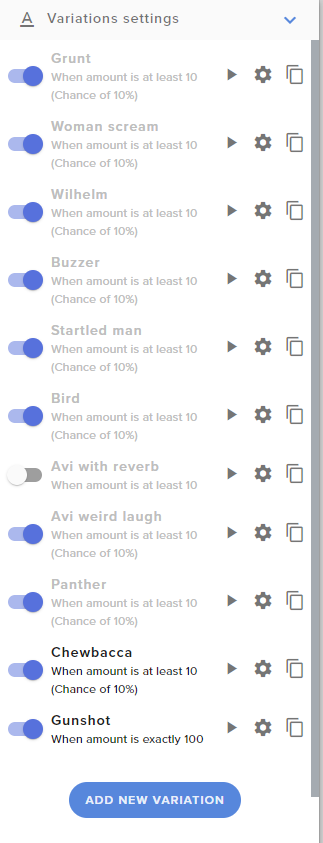
Hey hey! I'm working on adding some scare alerts, and want some to play with equal likelihood when under 100 bits, along with some that play at specific cheer amounts. When I set each of the random variations to 10% chance, they all get greyed out except for one unless I check the "pick an alert randomly when more than one matches" box.
But if I check that box, it also plays those randomly on the amounts where I want only specific alerts to play.
Is there a way to make this work?
round brambleBOT
@lament blade Currently renaming the bot fully works with OBS.Live.
You can follow this video guide to set it up: https://discordapp.com/channels/141203863863558144/494513233416421386/561516184718278676
If you don't want to use OBS.Live and want to stick with Ground Control, please let us know your Twitch username.
elder sorrel
 OBS.Live is the play for that
lament blade
thats what i use
elder sorrel
Sweet. You can click the link it'll take you directly to the video guide. Quick and easy

spice barn
ok... my problem is... that i use the streamelements only for the overlays... specifically the media request... but when i try it doesnt show anything... can you tellme step by step what i have to do to make it work??
To be more specific, I'm trying to use streamelements only for the Media Request interaction but I can't manage to make it work. I've followed a guide I got from a spanish streamer support's channel but it didn't work
round brambleBOT
@spice barn OBS -> settings -> advanced -> scroll down -> enable/disable hardware accel. (This does not apply for OBS on Mac)
https://i.imgur.com/ggMe9ZE.png
mortal spear
Can anyone explain why these are greyed out?https://i.imgur.com/0QmukCK.png
 lament blade
so id like to know how to add stream elements to my twitch if i use a phone and xbox 1
round brambleBOT
@lament blade Consoles do not have native support for overlays. You would need a capture card, PS4 remote play or Xbox companion app and a PC with OBS in order to have Overlays over your console gameplay.
We have an blog post about how to setup console streaming with our essential tools: https://blog.streamelements.com/how-to-stream-on-console-7b620b1c46c3
 lament blade
So for the custom bot name I can only make it thte name of a twitch user? In other words, If i wanted to name it Yewnee's Helper I would have to make a new twitch with that name?
ionic kelp
@lament blade Yes.
elder sorrel
@mortal spear I'm going to see if I can replicate that. Don't remember why it would be greyed out.

lament blade
ok
mortal spear
Appreciate it @elder sorrel
lament blade
ok i have the xbox app so thank you it very much helps
Hello is anybody german and can Help mee
ionic kelp
#🇩🇪︱deutsch
spice barn
re: support ai, didn't work.
again: How to enable Media Request on Streamlabs OBS? already tried turning off Browser source hardware acceleration
elder sorrel
@mortal spear Are you able to click the sliders at all for the ones that are greyed out? I only get the grey when I disable the alert
@spice barn https://streamelements.com/dashboard/mediarequest/general Are you using Ground Control?
If not: The link above would need to be open while you stream with Viewer Request enabled.
StreamElements
The Ultimate All in One Platform for Streamers
round brambleBOT
@spice barn We're not able to troubleshoot issues with using our overlays in StreamLabs OBS (SLOBS) as we don't have the tools to support their software. We recommend using OBS Studio or OBS Studio with our plugin OBS.Live.
mortal spear
@elder sorrel Yup, I can toggle them on and off as normal, but the ones that are greyed out never seem to happen when I test the bit alert
Actually they do seem to be playing at a pretty random chance now, after refreshing and testing some more. But another issue - Gunshot (the one for exactly 100 bits) keeps getting the random ones playing even though it's set to 100% and the others are at 10%
I want 100 bits to only ever play gunshot
 zinc umbra
So I can use the !roulette command for example but it says all my viewers have 0 points when they try to do it and when they do !watchtime it says 0 seconds for everyone when I'm using the streamelements bot??
round brambleBOT
@zinc umbra 10 minutes of watchtime are given to those in chat when the loyalty points are handed out (every 10 minutes). Therefore, loyalty must be enabled for watchtime to work properly.
There is no direct link between watchtime and all-time points.
It can’t be calculated from the amount of all-time points a user has because subs may earn points at a faster rate and !bonus all command increases all-time points for users in chat at that time.
Giving points to a single user does NOT affect all-time, only when giving to all in chat.
 weary prairie
not sure where to ask this, so I will ask here.
If I setup my tip page to use SE Pay, can viewers still donate via THEIR PayPal? Or, do they have to enter debit/credit info?
zinc umbra
Another question from me (sorry) what is the subscriber multiplier? I've currently put my sub points at 50 so what would the multiplier do and when?
weary prairie
subs get more points per minute of watch time. IE: set the multiplier at 2x and subs get double watch time points
elder sorrel
I was not able to replicate it @mortal spear. Did exactly 10 variations with at least 10 bits / 10% chance & the 100 exact one
ionic kelp
@weary prairie whatever is enables is what's available.
elder sorrel
All worked as intended for me Are you using Chrome?
mortal spear
I just found a mistake in how I set up the exact one, I think it's all working as intended now aside from the (apparently just graphical) bug with the greying out  Thanks a ton for the help, I really appreciate it
elder sorrel
Yeah that's a weird one cause all 10 of mine are all colored in.
Least it's working

weary prairie
@ionic kelp ok.... I guess that is why I was asking... Is it possible to enable PP as a dono option? It looks like it is mainly debit/credit cards.
ionic kelp
Some users can do it without logging in but if they login with their account they can use their balance/connected accounts as well.
But all you need to do is add your pp email in the tipping settings and you're good to go.
weary prairie
that is not what I am asking... I do not think...
I have tipping enabled with PP already.
My question is, if I change it to SE Pay, can viewers still donate from their paypal, or do they need to enter card info for the dono?
ionic kelp
Unless you remove the PP email you'll always have it.
weary prairie
oh, wait, I have both PP and SE both active at the same time?
Ok
I thought it was one or the other.
So, does the viewer have to decide which they use?
ionic kelp
Nope. Certain restrictions might not make SE.Pay available but nothing beyond that.
Whatever they choose to use.
 restive knoll
elder sorrel
restive knoll
elder sorrel
#helpdesk-youtube ? @restive knoll
 deft fable
hello, i test my bitrate on restream it seems very good, my internet speed is 15mp, am having almost 10000 kb bitrate on restream test, -I seet my bitrate on 4000, 720p(60) - I keep losing connection every almost 5min, my bitrate goes to ZERO 0, then back to normal and stable connection, any body can help me with this case?
 mossy rover
Hey, we are using streamelements on channel "Flothar" but some features doesn't work. f.e !volume shows weird error
And bot can't send ads. It says that channel is not partnered but it is
and i can use /commercials 180 by myself
i've tried parting the bot and joing again but it didn't help
 vast flax
Hello can someone give me the command to add subcount to twitch
I’m a mod and would love if I can get a little help
vast flax
Yes
scarlet tiger
One sec
vast flax
Ok
 sour ridge
How can i connect my merch store to twitch since i dont have a mixer account anymore or do i need to make a whole new store?
sour ridge
Yea was but now twitch.
scarlet tiger
And logged with mixer account?
sour ridge
Yeah
scarlet tiger
Okay
sour ridge
So what do i do ?
scarlet tiger
I will ask staffs, but propably you must create new store :(
sour ridge
Aww man what happens if people try to buy my merch can they still get it or is my store closed automatically
 robust token
hey how do i get it to where someone follows i get notified
scarlet tiger
@sour ridge confirmed by staff, you must create new merch store from the start :(
nimble dune
You need crate blank overlay and add alert box @robust token
scarlet tiger
@robust token you mean alert or message in chat?
scarlet tiger
lament blade
good day, can someone explain me how to remove all loyalty points?
lament blade
where
scarlet tiger
If you mean reset from your channel
nimble dune
If you mean message in chat. You need enable in bot modules chat alerts. @robust token
lament blade
i want all loyalty points at 0
lament blade
ah there thank you!
meager coral
Hi, I have an issue and its driving me mad lol... I created a command in stream elements, then deleted it but now it won't disappear from my twitch chat 😦 can anyone help?
round brambleBOT
Go to the dashboard -> right side -> part channel -> join channel (https://streamelements.com/dashboard)
scarlet tiger
@meager coral ^
meager coral
thank you 🙂
lament blade
Hi
meager coral
if I add SE back to my channel, will it come back or basically like a reset 🙂
lament blade
I have a problem with Twitch Giveaway
scarlet tiger
Not reset, only cache related problem, this one command should be gone @meager coral
@lament blade hm?
meager coral
@scarlet tiger OMG IT WORKED!!! Massive thanks lol because I have 10 mins before go live looool life saver
lament blade
Command !ticket 1 doesn't work in my chat
scarlet tiger
Try it
scarlet tiger
It is because !ticket is alias of !enter 🙂
 vale gate
Hello I recently changed my Twitch name and my chatstats now have a 404 error.
Old Username: Sneakyjose95
New Username: Sneakyj0se
Any help is greatly appreciated, thank you!
 supple wasp
Hello, the bot is not in my Chat? What can i do?
lament blade
It is because !ticket is alias of !enter 🙂
@scarlet tiger Now it works. Thank you very much
scarlet tiger
@vale gate will be fixed in a while
lament blade
😍
nimble dune
@supple wasp Can you part channel then join channel?
@supple wasp Also make sure you bot is added as moderator type in your chat /mod streamelements
vale gate
@scarlet tiger thank you & good luck with your busy day
 slender arch
hey i need help with streaming on twitch. i logged in a facebook at first then connected my twitch account to it and only facebook option is popping up to stream
round brambleBOT
@slender arch Streamelements on top of OBS -> Logout -> login
supple wasp
@nimble dune I did it before!
nimble dune
@supple wasp Are you use custom bot name?
supple wasp
Yes
nimble dune
@supple wasp If your commands recently stopped working and you're using OBS.Live and a custom bot name do the following:
1.) In OBS.Live, click on the hamburger menu (three stripes) at the top left of your activity feed
2.) Click on Stream Settings -> Custom bot name
3.) In the "Custom bot name" field select "Set custom bot name", not your already existing username (with capital letters)
Note: If you already connected an account that way, the third entry will show as the account name (see image https://i.imgur.com/sO7fWOX.png)
4.) Scroll a bit down and click on the purple "CONNECT CUSTOM BOT ACCOUNT" button
5.) Log in as usual and "Authorize" the custom bot name
6.) Back in the Activity feed, click on the "SEND TEST MESSAGE" button and check if your custom bot name starts working again
scarlet tiger
@vale gate Should be fixed.
vale gate
@scarlet tiger works perfectly thank you so much!
scarlet tiger
lament blade
help
 pale finch
Helppp
slender arch
hey i need help with streaming on twitch. i logged in a facebook at first then connected my twitch account to it and only facebook option is popping up to stream
pale finch
How do you put that voice message on StreamElements
nimble dune
@slender arch Streamelements on top of OBS -> Logout -> login with twitch
@pale finch For donation?
slender arch
@nimble dune thanks so much
nimble dune
pale finch
No, with those points we get by seeing the lives
nimble dune
@pale finch Stream store?
pale finch
yeah
near wharf
Hi all, have a question. I'm trying to make it to where my scenes automatically transition (league of legends) from lobby to in game. I drag the bar to swap screens but as soon as i alt tab back,it goes to the first screen rather than transitioning
nimble dune
@pale finch Have you added sound effect?
pale finch
no
nimble dune
You mean that? You need add sound effect then you need add store redemptions alert.
pale finch
they are but I don't know how to add the streamelements store
nimble dune
What?
If you go here -> https://streamelements.com/dashboard/store/items then you see open store click on that.
pale finch
to be able to use that voice on live, redeem a message, with the points you earn by watching live, when you want to know how to put it linked to the streamelements store
near wharf
hi there! definitely need help!
nimble dune
You need add sound effects then add store redemption alert in overlay editor. Add to OBS. And when a viewer redeem then it will be appear in your stream. @pale finch
 stable fjord
I created a !shoutout command, but if "!shoutout (at)username" the url it creates is wrong, is there any way to remove the "@" from the command?
 coarse coral
hi everyone! i'm having an issue connecting my Obs studio/stream elements to my twitch account. I've tried logging in and it just either comes up blank or stays on 'checking you're not a robot' forever. I've also tried using a stream key and that's not working either! very frustrated 😦 any help is appreciated! thank you! #helpdesk-twitch
 whole nova
Is there a way to run a que? Like a game que for who plays next?
 still trellis
Does anyone do custom twitch alerts using HTML/CSS? Willing to pay for an alert package to make my alerts become a reality
strong kernel
@still trellis Please see #art-marketplace
still trellis
Nothing's showing up
One moment
Okay, got it. Discord glitch. I can now see all the channels
languid dust
why isn't my overlay appearing?
 jade remnant
have you set it to the correct resolution?
languid dust
how?
round brambleBOT
@languid dust To add your overlays to OBS, add a new browser source in your scene. Paste your overlay URL in the browser source properties, set the dimensions to 1920x1080 (unless you changed them on the website), and ☑ “Shutdown source when not visible” https://youtu.be/KDvLynUqXI4
languid dust
ahh gotcha. thank you!
 left fossil
my point system isnt working, it says 0 for all viewers despite watchtime or anything
round brambleBOT
@left fossil 10 minutes of watchtime are given to those in chat when the loyalty points are handed out (every 10 minutes). Therefore, loyalty must be enabled for watchtime to work properly.
There is no direct link between watchtime and all-time points.
It can’t be calculated from the amount of all-time points a user has because subs may earn points at a faster rate and !bonus all command increases all-time points for users in chat at that time.
Giving points to a single user does NOT affect all-time, only when giving to all in chat.
 agile lance
Hello. My "Subscriber Count" in StreamElements is out of Sync with the Twitch Dashboard/Insights. Is there a way to sync this up?
round brambleBOT
@agile lance Please logout of StreamElements at https://streamelements.com/logout and then login again to your account (Twitch/Youtube/Facebook/Mixer)
agile lance
That did not seem to work. 😦
odd fable
hi, I was told to post my old and new username to fix the chat leaderboard, old= thecobras27 new=thecobras_
 zinc seal
Hello i get no points on watching a channel anymore can you help me ? channel name for the points (Roshtein) thx
 trail oxide
Hello, my alert box widget makes sounds but doesn't show up on screen in the overlay creator nor in my obs, Thanks!
 neat magnet
Can anyone help me to make the watchtime command work it always says 0 seconds for my viewers
round brambleBOT
@neat magnet 10 minutes of watchtime are given to those in chat when the loyalty points are handed out (every 10 minutes). Therefore, loyalty must be enabled for watchtime to work properly.
There is no direct link between watchtime and all-time points.
It can’t be calculated from the amount of all-time points a user has because subs may earn points at a faster rate and !bonus all command increases all-time points for users in chat at that time.
Giving points to a single user does NOT affect all-time, only when giving to all in chat.
 carmine knot
If there are any StreamElements staff/volunteers around here now
Did StreamElements (somehow) get bits data from before StreamElements was around?
Because my top bits donators list (all time) is actually correct, and I've been streaming since 2015. I don't think it was always... accurate
near wharf
How do i change my FPS on my stream? its currently 30 😦
round brambleBOT
@magic zinc Please follow our community rules:
- No advertisement or stream promotion
- Respect ALL server members
- No NSFW/NSFL
Thank you
jade remnant
@near wharf if you mean in obs, no, you need to do it when there is no output.
if you mean the transcoding for viewers then that will be down to twitch to give you that option
 loud salmon
why do i get *** when testing a new command ?
near wharf
@jade remnant sorry, im on OBS.Live. I need to change it when there is no output? sorry, just a little confused
jade remnant
does it contain a link?
loud salmon
yes but i have link protection turned off
jade remnant
@near wharf when there is no streaming/recording in progress
near wharf
@torn crescent yeah, i'm just trying to find where it says it. Im currently not streaming/recording

it shows me that its 30fps but i cant change it
loud salmon
faki3x
jade remnant
make the SE bot a mod and try the !command again
loud salmon
what sorry ?
near wharf
@jade remnant thanks for the tip on fps, secondly, how can i add chat to show on stream? (like on the side)
jade remnant
the stream elements bot
type /mod StreamElements in twitch chat
loud salmon
ah thanks
and one more thing can you create spaces in your commands
for eg
thios
then
this
jade remnant
a tip on your social command, add spaces between each link. that is 1 whole url
no, twitch doesnt allow line breaks for that
jade remnant
@near wharf you want the chat to be on stream (2) or just like a dock in obs (1)?
(sorry, had the number the wrong way around)
near wharf
@jade remnant yeah i think so. i just want to be sure it shows when in streaming ON the video
loud salmon
@jade remnant thanks for the help my dude!
jade remnant
np 👍
 jade remnant
if you have the correct account linked in settings > stream
and in streamelements menu
then the chat dock and the chat overlay will (should) work
you can always test off line, you dont need to stream for it to work
carmine knot
Did StreamElements recently somehow get all-time bits data from before StreamElements was around as a company? Because my bits data is 100% correct, and I'm pretty sure it wasn't before.
near wharf
thanks @jade remnant youre the best!
 vernal quiver
Hi All, wonder if someone can help. When switching to my scenes they can be black for a moment or two as OBS loads the browser source. Doesn't look great, so is there a way to fix this? I'm in the UK if that helps?
round brambleBOT
@vernal quiver Check out this tutorial for OBS’ studio mode which allows you to preload scenes before transitioning. https://www.youtube.com/watch?v=W8iWsD2Lq3U
vernal quiver
Yeah that doesn't fix it
It loads in studio mode then goes back to black in the transition
jade remnant
@vernal quiver
https://discordapp.com/channels/141203863863558144/199460642975907840/730787109232705638
this should help
 tribal cedar
Hey shouldn't there be a setting for raids here? I'm actually getting rate limited by my events list widget now because I've been raided so many times and there's no way to remove old raids from being loaded 
carmine knot
Dude either I'm blind or I forgot how to add scrolling to a text source in an overlay
tribal cedar
@carmine knot
near wharf
hey again @jade remnant, how can i improve the quality of the picture of my stream? Its kinda blurry. Im at 60fps
 torn cipher
Hey y'all I'm trying to figure out how to change the goal amount on a follower & goal counter. Trying to reset and change the goal amount. Figured out how to reset, but not sure how to change the counter number and the name of it
carmine knot
Is there a reason scrolling isn't shown as an option on this text source?
lol. refreshing my page fixed it.
It's there now, but wasn't earlier.
tribal cedar
oh cool, was gonna say that's wierd cause it was working when I added a new text layer
near wharf
how can i change the quality of my stream?
 eternal tide
a friend is trying to send me an invited on the web interface and when i click the link i get this error roleplay.missing scope invitations:manage
strong kernel
@eternal tide Don't try to redeem an invite when you're already roleplaying another streamer's account.
eternal tide
🤦♂️ thank you
jade remnant
@near wharf its between bitrate and resolution
as you stream to twitch, a good option is to set your output canvas to 720p
(settings > video > output canvas)
as for your bitrate, you want to use 75 - 85% of your total upload speed.
you could use higher if theres no other high usage.
(max 6k if youre not a twitch partner)
near wharf
alright, i just gotta find where to do that @jade remnant
jade remnant
settings > video > output canvas
for resolution
settings > output
for bitrate
near wharf
@jade remnant how high should i make bitrate?
carmine knot
Did StreamElements recently somehow get all-time bits data from before StreamElements was around as a company? Because my bits data is 100% correct, and I'm pretty sure it wasn't before.
@carmine knot
If/when you get an answer to this question @jade remnant do let me know I sure am curious
 halcyon owl
Are emote slots from sub points shared between t1 2 and 3?
I have 68 subs now but only have 5 slots in t1. 1 in t2 and 1 in t3
I read that 65 sub points unlocks 7 emote slots. It didn't clarify the tier allocation tho and I've always had 1 slot for t 2 and 3 for as long as I can remember :/
Note: I went from 58 to 68 today. Could it be the next slots will come tomorrow after some refresh time?
 wary halo
5 is the maximum for tier 1 for affiliates afaik, the rest will unlock when you hit partner.
 radiant birch
anyone's custom bot name broken?
I used to be able to use my own account as the bot's name
but it suddendly stopped
round brambleBOT
@radiant birch If your commands recently stopped working and you're using OBS.Live and a custom bot name do the following:
1.) In OBS.Live, click on the hamburger menu (three stripes) at the top left of your activity feed
2.) Click on Stream Settings -> Custom bot name
3.) In the "Custom bot name" field select "Set custom bot name", not your already existing username (with capital letters)
Note: If you already connected an account that way, the third entry will show as the account name (see image https://i.imgur.com/sO7fWOX.png)
4.) Scroll a bit down and click on the purple "CONNECT CUSTOM BOT ACCOUNT" button
5.) Log in as usual and "Authorize" the custom bot name
6.) Back in the Activity feed, click on the "SEND TEST MESSAGE" button and check if your custom bot name starts working again
 past shore
cant see my chat in stream elements ibs
radiant birch
damn that's a good bot
 wise fjord
how to add custom alerts
round brambleBOT
@wise fjord New to Stream Elements?
Check out our YouTube channel https://www.youtube.com/c/streamelements/videos
with tutorial videos from setting up the basics, to in depth details on how to use our product.
New to OBS? Here is a 4 step quickstart guide
https://obsproject.com/wiki/OBS-Studio-Quickstart
Want to learn even more? Here is an in-depth overview
https://obsproject.com/wiki/OBS-Studio-Overview
 fickle carbon
where do i put my stream key into on streamelements?
could not access the specified channel or stream key please double check ur stream key if it is correct herer maybe be a problem?
i cant fdind where to find it on elemenet
jade remnant
@carmine knot admin/staff that are on now arent sure of any changes (SE side) that would do this.
as long as it works i suppose 😁
 midnight shoal
Is there a way to add a custom command that lets me add a custom ammount based off an input in chat? For example I am running a tournament and I'm keeping a scoreboard at the bottom and want my mods to be able to add scores from chat, ideally they would be able to just do !game1 <score> and it would update the counter to that score. As far as I've seen I can only do pre set amounts, or plus or minus a certain amount.
 blissful crane
i am having some problems with sound right now
i have things set up to where my capture card has its own audio desk top has its own and then my mic has its own however my mic it echoing any and all desktop or other audios how do i fix that?
vernal quiver
Sorry got another issue. For some reason my alerts are now not emulating on OBS... I don't understand why, even tried to make a new browser source for them
round brambleBOT
@blissful crane For the best OBS support, please join their Official Discord @ discord.gg/obsproject
@vernal quiver You can test Alerts via the Emulate bell on the lower left side of the Overlay Editor. Simply go to your Dashboard -> My Overlays -> Pencil/edit button on the overlay. Make sure the "Preview LIVE on stream" option is on to see the alert in OBS/Xsplit https://streamable.com/vtulg9


 desert ibex
I have an issue getting my alerts for hosts and raids...but i am getting for cheers and tips
round brambleBOT
@desert ibex Due to changes to Twitch API, we have filtered out hosts and will only show these ones on your activity feed:
- All hosts coming from an online channel with at least 1+ viewer
- Auto host events with at least 1 viewer - only from a channel that just went offline
Note: If you see "X channel has hosted you" with no viewers on the back, that is considered an offline host or a host with 0 viewers, we do not show these.
vernal quiver
Sorry the bot hasn't understood me there. Any Mods on?
strong kernel
@vernal quiver Please read the bot message, particularly the bold text.
vernal quiver
@strong kernel I know HOW to emulate as I have been for a while, it's just stopped working, tried unticking and reticking and I have tried making a new browser source
strong kernel
@sonic jetty Not something we can help with in this server.