#helpdesk-twitch
1 messages · Page 690 of 1
 tribal steppe
tribal steppe
tribal steppe
yep
 ebon fossil
thank you so much!!
ebon fossil
i will!
 carmine knot
whats the default command for media request
 strong kernel
!songrequest or !sr
carmine knot
I can't find this button on ground control am I blind or dumb or both or none
carmine knot
I found it and enabled it.
 pallid osprey
@weak delta thanks boo
 weary moat
How do I enable emails after I end stream & see how much I made from the stream. Before I was getting summary’s and now I’m not to my email
 round brambleBOT
@weary moat Please provide your account ID found at the top of this page: https://streamelements.com/dashboard/account/channels This ID is public info and safe to share here.
 lament blade
people how to put the notification of who bought the things from the store on live? because my friend is in live comoramks in his shop but the voice of google speaking does not appear
 native pewter
Does anyone know if it's possible to link a raffle winner from chat to an overlay text box? Looking to have an overlay with the winner's name to give them more recognition
strong kernel
You mean the winner of a !raffle command usage?
native pewter
yes
strong kernel
Not possible.
native pewter
ah alright
 white gust
I am trying to add tipping panel on my twitch and i can not find it no where
 brisk otter
Есть Русская поддержка ?
 lilac bear
if I want to the filter to exclude subs and vips do I put on subs or vips?
 sweet socket
@brisk otter #🇷🇺︱русский
lament blade
does anone know how to customise the social media rotation widget?
 novel yew
My Twitch alert visuals are off center every time I test them. Can someone please help?
round brambleBOT
@novel yew Please provide a proper screenshot with the issue visible. If not sure how to take a screenshot, you can check here: https://www.take-a-screenshot.org/
 mystic wolf
tried again. giveaway on site still "couldn't create giveaway". is giveaways down or offline?
novel yew
round brambleBOT
@novel yew To add your overlays to OBS, add a new browser source in your scene. Paste your overlay URL in the browser source properties, set the dimensions to 1920x1080 (unless you changed them on the website), and ☑ “Shutdown source when not visible” https://youtu.be/KDvLynUqXI4
novel yew
Thanks for the help bot
 vapid rain
well guess i can't ask for help with lots of screen shots my bad
ok so i just built a new pc and when i look at the stream elements panel this screen shot will show u what i see and i can't even configure it
strong kernel
What browser?
vapid rain
all
strong kernel
Use Chrome and disable your browser extensions.
strong kernel
Take a screenshot of the entire window, don't crop it.
vapid rain
np
nvm now u ask for a new screen shot its working and i've spent 6hrs today trying to figure it out on my own
strong kernel
Isn't that how it always goes? Fixes itself once you ask for help.
vapid rain
that screen shot was from an hr ago thats cropped
lol yep
i even went as far as reinstalling windows
 median quail
feed
strong kernel

 potent ibex
I'm having an issue where alerts are working in the browser, but aren't working in obs  what should I do
round brambleBOT
@potent ibex OBS -> settings -> advanced -> scroll down -> enable/disable hardware accel.
https://i.imgur.com/ggMe9ZE.png

 minor ivy
Hello! Any ways of having a gifted sub alert and then all the subscriptions that comes with it? I have 2 animations, one for gifted and one for subs. Right now, it does not want to emulate both of them. When I emulate a gifted sub, it does not show the sub one after or at the same time.
strong kernel
There is no way.
If you have a community gift variation, it will consolidate and only play the community gift variation.
If you don't, then it will play individually.
minor ivy
okay thanks
@strong kernel Hey just figured it out! I created 2 overlays, one for all my alerts including regular subs, and one for gifties! when I emulate 10 gifts, it uses 1x gift animation then all the subs! 🙂
 pseudo rover
hello so i recently added the replay feature on my stream and it only works when i have it as a command for stream elements when i leave it for the command that is built in it plays the demo videos instead of replay of my stream and ideas?
strong kernel
@pseudo rover Community created widgets are provided as is and it's up to you to set them up.
 topaz zephyr
Hi! So I've been using Streamlabs OBS since I started streaming but it's driving me insane. I'm ready for a change. I already pulled over my scenes into StreamElements but my most recent follower, sub, and donation aren't showing up on my overlay. They're in my notifications though. What do I do?
Also, they're not marked as invisible. Checked that first
 gray mortar
Could I get some help? I try to stream on one live and it won't broadcast to twitch and Twitch say I am not live streaming.
Help would be great
 arctic cargo
Hi! having issues with the tipping system, help would be appreciated
round brambleBOT
@gray mortar Streamelements on top of OBS -> Logout -> login
 scarlet tiger
@arctic cargo what problem you mean?
gray mortar
How do I do that
arctic cargo
@scarlet tiger a tipper in my stream chose to tip, the payment on their end was endlessly pending.
round brambleBOT
@arctic cargo Please contact us via email for support with SE.Pay. You can use our contact form here: https://streamelements.com/contact Thank you
arctic cargo
Okay thank you.
 indigo shale
for the banned words in the Bot Spam Filter section does it timeout users or ban them from your channel when they say something on the list?
 cunning parrot
Is there a way to import overlays from a file into stream elements?
 charred quartz
Is there a way to import overlays from a file into stream elements?
@cunning parrot nope
charred quartz
yea, use the overlay editor 🙂 https://youtu.be/UuweQah3v00

We have an updated initial setup guide: https://www.youtube.com/watch?list=PLCDDKlFdScbH7j6W7OXQQScfFunxed1tP&v=EpA4eDLMW_I
Setting up StreamElements is easy, learn how to in this video, hosted by Twitch Partner GIRLvsDUMB
Got any questions, or just want to say "Hey"? Joi...
 wide bluff
Hi, i have an issue with the song request on my stream
 zenith widget
@indigo shale depending on the time set on the filter. 0 is deleting the msg and -1 is going to be a ban. 50 will be a timeout of 50 seconds
@wide bluff whats the issue?
wide bluff
Im not able to set up the bot on my stream
@zenith widget I try to set up the song request but this disclaimer appear "NO ACTIVE WIDGETS WERE DETECTED FOR MEDIA REQUEST"
 empty valve
How do i put stuff in my stream like my youtube and insta
wide bluff
And idk how to make it work :c
round brambleBOT
@empty valve New to Stream Elements?
Check out our YouTube channel https://www.youtube.com/c/streamelements/videos
with tutorial videos from setting up the basics, to in depth details on how to use our product.
New to OBS? Here is a 4 step quickstart guide
https://obsproject.com/wiki/OBS-Studio-Quickstart
Want to learn even more? Here is an in-depth overview
https://obsproject.com/wiki/OBS-Studio-Overview
zenith widget
@wide bluff when you click on "show video on stream" that msg will pop up because its trying to show video on an overlay. You need to add thr media request widget to one overlay and then have that overlay open in obs.
wide bluff
@zenith widget the same way in obs streamlabs?
zenith widget
What?
empty valve
I need help because i want to be able for something to pop up on screen that someone followed me
@zenith widget i need help
Do i need a laptop to do all this
Yea or nah
 pure brook
when i try to go live it says there are too many concurrent sessions. Try closing other recording softwares which might be using NVENC. However I don't have anything else open and i don't know how to find out what may be using this^
 lusty dragon
@empty valve you can do it on your phone if you really need to, though it's not recommended as the site isn't built for mobile and won't function properly
pure brook
@zenith widget thank you it worked when i restarted my pc
 golden saffron
how do i delete my streamelements account
zenith widget

StreamElements
The Ultimate All in One Platform for Streamers
zenith widget
 fallow elbow
ty
 blazing epoch
Ok so I just recently had issues with the streamelements bot. I changed my name on Twitch and it fucked with everyone. Can anyone help me fix it?
round brambleBOT
@blazing epoch Go to the dashboard -> right side -> part channel -> join channel (https://streamelements.com/dashboard)
 blazing epoch
Thank you!!
 autumn night
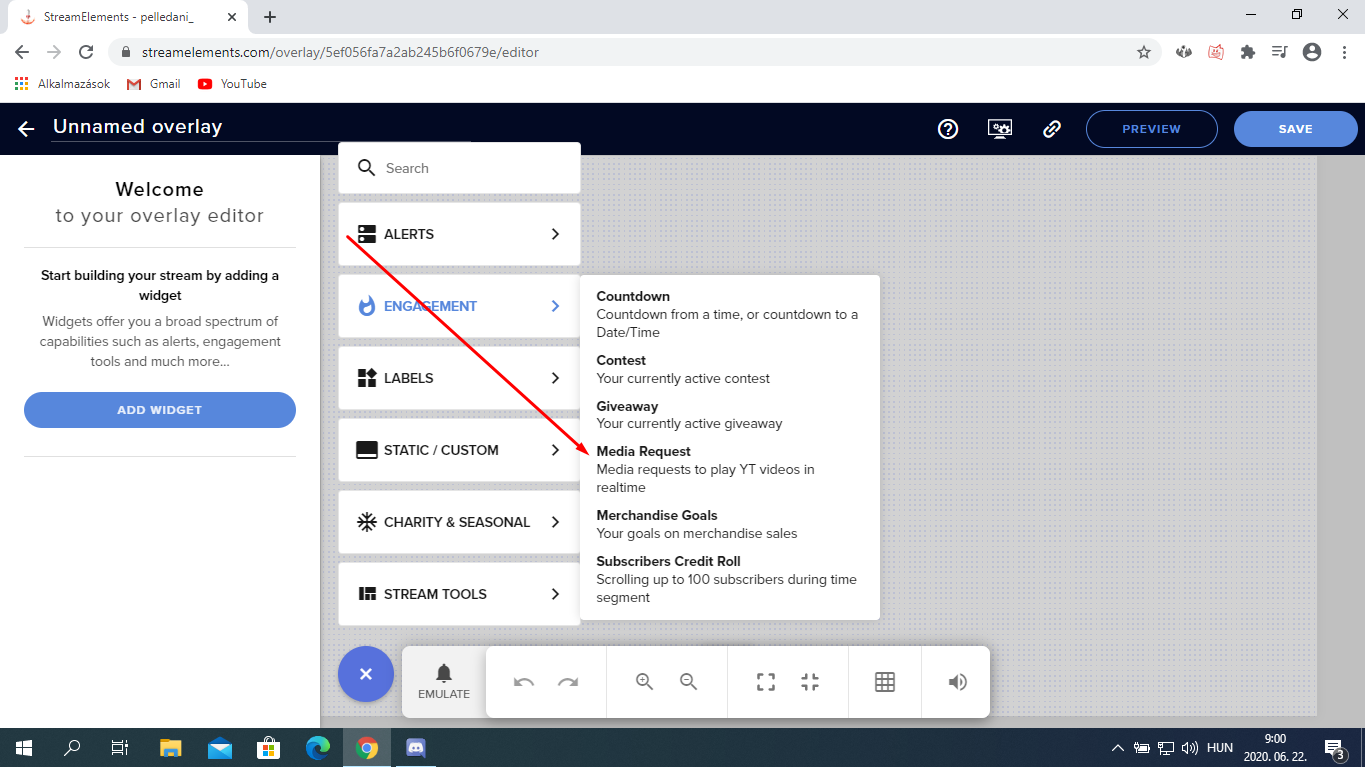
I wanted to use Songrequest so i activated it and went to "media request. I clicked "Show on stream", it said "no widget found" and then plays the video on the website. What widget do i have to use?
 nimble dune
@autumn night You create a blank overlay and this-> https://prnt.sc/t442i4
 autumn night
@nimble dune thanks!
nimble dune
No problem, welcome! 
 faint horizon
I can emulate everything, but when i get a follower while streaming, my alert box doesnt make any sound.
oh, i already got it to work by turning off the "control audio via OBS"
 light wren
@faint horizon I think that's a bug, although in OBS I experience the same with other sources
 gilded topaz
Good time to everyone, the question is, how to set up Twitch points? I just saw how streamers use them for various sounds and clippings from the video, can I somehow configure this in StreamElements? Thank you very much for your help (Translation using Google translator)
zenith widget
Twitch channel points are for affiliates only
We don't have an integration with those due to lack of API
 oak creek
@untold crest i tried using your "Ultimate Text Widget" on SE and for some reason the dynamic size does not work when i type my text in (i've disabled marquee), it doesn't resize according to the container size at all
gilded topaz
KeiZar i have affiliate and i have twitch points i mean how add custom voice to twitch point's and how show this reward to viewers looks like on stream channel quin69 he use bot or he integrate.. i dont know / sory for question
zenith widget
@gilded topaz As mentioned we don't have an integration with the twitch channel points. Im not sure what quin uses as well.
round brambleBOT
@hexed escarp 10 minutes of watchtime are given to those in chat when the loyalty points are handed out (every 10 minutes). Therefore, loyalty must be enabled for watchtime to work properly.
There is no direct link between watchtime and all-time points.
It can’t be calculated from the amount of all-time points a user has because subs may earn points at a faster rate and !bonus all command increases all-time points for users in chat at that time.
Giving points to a single user does NOT affect all-time, only when giving to all in chat.
zenith widget
@gilded topaz Although there is this widget: https://discordapp.com/channels/141203863863558144/457957557470887947/702819359743148072
 hexed escarp
Wait do you have to run stream elements on obs for watchtime to work>
I stream on streamlabs
zenith widget
You need to have our bot
hexed escarp
how do I download?
zenith widget
You go here: https://streamelements.com/dashboard and on the right side -> join channel
StreamElements
The Ultimate All in One Platform for Streamers
hexed escarp
Im join already but how do i like make the loyalty points show up in my twitch chat
is there an extension?
hexed escarp
oh it works
Watchtime still isnt working though
how do i make that one work i already enabled loyalty items
zenith widget
!watchtime
round brambleBOT
10 minutes of watchtime are given to those in chat when the loyalty points are handed out (every 10 minutes). Therefore, loyalty must be enabled for watchtime to work properly.
There is no direct link between watchtime and all-time points.
It can’t be calculated from the amount of all-time points a user has because subs may earn points at a faster rate and !bonus all command increases all-time points for users in chat at that time.
Giving points to a single user does NOT affect all-time, only when giving to all in chat.
 raven jackal
hey,
i got this command:
$(user) hugs $(1) GivePLZ TakeNRG
but when using it it worlks kinda weird i guess? what do i do wrong?
zenith widget
${sender} - actual user of the command
${user} the targeted person, but can be the user of the command if no user is specified after the command
you can use ${user|${1}} in case someone places a watermelon after the command
raven jackal
thanks! first part works, the watermelon part not
 raven jackal
this way around it takes @ user as first arg then and just writes it as @ someone
raven jackal
does streamelements have a "command cache" or something like that?
raven jackal
thanks! works with the ${1} now atleast
 calm reef
Hello Peeps, can anyone please help me and tell me where I can find the donation panel in Twitch as the video on your website doesn't look anything like my Twitch page and because I am new to all this I have no idea where this donation page is in Twitch.
 lusty wind
hello there, anyone knwos how to bring back after the update the amount of viweres and the broadcast options (like title, game, etc) after yesterdays update I couldn't find it. Plus my Botname is not working anymore for some reason -.-
round brambleBOT
Twitch's official help guide for Panels: https://help.twitch.tv/customer/portal/articles/2416760-how-to-edit-info-panels
zenith widget
there we go
zenith widget
@lusty wind make sure you have the activity feed open -> if not click on "streamelements" -> activity feed
afterwards click on the hamburger menu button
and all the things will be there
including the custom bot
lusty wind
yes I already did all that but still doesn't work
before I had 2 extra panels that they don't appear now
I even tried reinstalling the previous version, but it just vanished
round brambleBOT
@lusty wind If you are not seeing the OBS Twitch integrations and have OBS.Live installed, please follow these steps:
- Make sure you are on the latest and greatest version of OBS.Live
- exit OBS (make sure OBS is not running)
- delete %appdata%\obs-studio\plugin_config\obs-browser\obs_profile_cookies
- start OBS.Live
- Settings -> Stream -> disconnect -> connect
round brambleBOT
Streamelements on top of OBS -> Logout -> login
lusty wind
Deleting obs_profile_cookies worked out thanks
well actually I got the panels back, but the custom bot name still doesn't work, but ain't my priority anyway
zenith widget
Do this:
- Right click on your OBS desktop shortcut -> properties - in the "Target" field add this -> --remote-debugging-port=40404
- Open OBS(or restart if it was open)
- Open your browser and type in "localhost:40404"
- Click on "StreamElements - Activity feed"
- navigate to the Console tab
- type in the console this: store.customBot.removeCustomBotIntegration() and hit enter
- Try setting the custom bot name
 pure pilot
Guys how to add stream elements bot to YouTube...plz help
zenith widget
In order for the Bot to function, it needs moderator access. To add StreamElements as a moderator, visit youtube.com/comment_management and paste "https://www.youtube.com/streamelements" into the Moderators list.

YouTube
Official youtube channel for StreamElements tutorials https://StreamElements.com
 rare maple
Hey, I was wondering if this is the right place to ask for assistance. I wanted to enable chat stats to see emote usage but due to a name change some time ago it seems to not work. According to reddit a name merge is needed which is why I am here. Can that somehow be helped with? The chat stats page does not even show my current name "solem" :/
zenith widget
What is your old name?
pure pilot
Thank you kaiser....😁😁😁
rare maple
My original name I used when setting up streamelements was "solembum_hs" which then changed to "solem_hs" and finally to "solem" after getting partnered
zenith widget
Unfortunately, the chatstats page under solembum_hs is empty, so i'm adding a fresh one on "solem"
rare maple
that would be fantastic, I really just want to start tracking emotes 😄 with a fresh start its even better I guess 😄
zenith widget
its already up
rare maple
 it does work now. Thanks a lot! ❤️
zenith widget
lament blade
Hey there
I need some help
So there are people in my chat who I would like to ban
by using the banned words
however it only times them out
is there a way where I can make the timeout permanent?
zenith widget
0 for deleting msh
-1 for ban
lament blade
Awesome
thanks
Is there a way to make it
so it doesn't display follower alerts
for followers who use offensive names?
zenith widget
Tipping settings -> tipping moderation
zenith widget
the tipping moderation affects all alerts
lament blade
ohhhh
ok
how?
if someone follows with the name Ice_Swallow_Cum how does that ban the alert?
from following
zenith widget
If you set it to disable the alert, the moment it catches a bad word, for example ass in assassin it will just not show the alert via the widget
lament blade
Hey, i want to put a pop up on my stream every 10 minutes. I searched everywhere and i didn't find anything. Can i do that on Streamelements?
zenith widget
Asset rotator widget
lament blade
sry, i didn't understand
zenith widget
There is an asset rotator widget for the overlays
that can act as a pop up for every 10 minutes
to show a logo or something
zenith widget
@lament blade Thats up to you in light of the recent copyright news.
@lament blade Drag an drop where?
lament blade
@lament blade Thats up to you in light of the recent copyright news.
@zenith widget i mean is it allowed
zenith widget
Ask twitch
 wind wasp
Hello, some times ago i asked for put the command of the "!so" in my channel, but it doesn't working
how can i do?
In reality, I dont' know why all the commands doesn't work
round brambleBOT
@wind wasp Go to the dashboard -> right side -> part channel -> join channel (https://streamelements.com/dashboard)
 robust gyro
Hi, I can't choose my video for my sub alert although I have it for other alerts?
zenith widget
Can you elaborate?
robust gyro
it's called alert.webm in my account with the same name as this, but I can set it for all my other alerts except follow which I've chosen to have as a separate alert. I have the "alert.webm" file for my Tip alert, my Host alert, and my Raid alert, but it's not available to select for subs.
it's in the Overlay Rebrand - General overlay and I'm guessing in my other two overlays as well.
zenith widget
i managed to set the video on the sub alert
restart your browser
perhaps that will work
robust gyro
It shows up now, thanks for that. It only gave me the option to delete the file.
 light zealot
When I try to make a sub goal overlay it says I have already completed my sub goal but I havent yet
round brambleBOT
@light zealot To reset goals:
- from the overlay editor -> session data on top right (monitor symbol) -> goals tab -> reset progress of desired goal
- from the dashboard -> activity feed on the left -> widget data on the right -> goals tab -> reset progress of desired goal
Note: Goal widgets(progress) only counts up and doesn't go down automatically, if you loose followers/subs
 solid skiff
hi
i have a problem with one user, he renamed himself and used the !rename command, everything got transfered, channel point and watch time, he can use things like slots, but!
whenever he tries to redeem something from the store the bot says he doesnt have enough point
i did reset his point, gave him 99999 points, gave him super mod, but nothing helped, he still cant redeem anything from the store
is there anything else i can try to do or can you help me out with this one?
thx
 plucky summit
i was perma banned at twitch and wana access my overlays that i used..is that possible at all???
lament blade
my stream elements overlay for top donation says "TOP TIP: NO DATA" even though I submitted a tip and info etc.. for it. Way to refresh or something?
 halcyon yoke
Hi boys, If you don't meet all 4 of Twitch's goals in a month, to become an affiliate ... what can you do ?, because it took me a little longer and, it doesn't make me fill out the form
 weak delta
Just keep trying and grinding @halcyon yoke
halcyon yoke
@weak delta I made all the goals in about two months. Is there a chance to become an affiliate again?
weak delta
Once you meet the goals, you should be able to apply. As far as I know, it won't go back. If you were denied, you can apply again but you should wait a month or two before doing so.
robust gyro
You need really to do it in a month. It was automatic for me once I met the requirements.
weak delta
Just keep streaming and one day you'll see this in your notifications:

 glad gazelle
Anyone know how to make it so it alerts your server your live on Twitch I use obs
 jade remnant
you mean discord notification?
 cold verge
wouldn't that just be a webhook on your discord that connects to your twitch?
glad gazelle
Dude idk I am new with all this is started streaming and YouTube yesterday night 😂
cold verge
ahh ok. not worries. yea there are a couple of ways to do what your asking
glad gazelle
Ok, simplest way works for me 😂 thx
lament blade
my back hurts bruh
cold verge
first question is have you connected your discord to your twitch and youtube accounts?
cold verge
that sucks @lament blade hope it feels better soon
 sacred cairn
im new to streaming also, i applied for a program after a bit and 2 days later it acted like i had not applied at all. Is this because i was declined or was it for some other reason?
lament blade
thanks brother @cold verge 😅
jade remnant
what program @sacred cairn ?
sacred cairn
magic creator
cold verge
im not familiar with that one
glad gazelle
Yeah I use obs it’s simple as hell
jade remnant
you will need to contact magic
creators@wizards.com
lament blade
yeah it is pretty simple, ive just been having a strange issue with alerts
glad gazelle
Both youtube and twitch are connected, what do you do after that @cold verge ?
cold verge
like what? ive just spent the last day or so reviewing and audting my discord roles since i hit twitch affiliate last week and want to work out some bugs and workflows.
@glad gazelle you can set up a webhook or use a bot like mee6 to make a post every time you go live, post a tweet, post a vid on youtube
lament blade
bye tech
halcyon yoke
@weak delta
cold verge
later @glad gazelle
halcyon yoke
Yes, i dont Have this message in the notification
lament blade
ima go eat cereal or sumtin.
plucky summit
@rapid tapir i was perma banned at twitch and wana access my overlays that i used..is that possible at all??? so i can copy them over to youtube stream ?
 hollow dew
hi, someone knows how reset the tip goal to 0€?
round brambleBOT
@hollow dew To reset goals:
- from the overlay editor -> session data on top right (monitor symbol) -> goals tab -> reset progress of desired goal
- from the dashboard -> activity feed on the left -> widget data on the right -> goals tab -> reset progress of desired goal
Note: Goal widgets(progress) only counts up and doesn't go down automatically, if you loose followers/subs
 cyan inlet
hi i edited overlays on streamlabs website how do i get it into the sofware ??
plucky summit
is it allowed here to DM the staff?
hollow dew
thanks
weak delta
@plucky summit In very limited instances that something confidential needs to be shared, if you've a question just ask here and somebody will assist.
@cyan inlet This is StreamElements.
plucky summit
@cyan inlet i was perma banned at twitch and wana access my overlays that i used..is that possible at all??? so i can copy my overlays to yuotube
@weak delta
weak delta
I think you might be out of luck @plucky summit but I am double checking for you.
plucky summit
@weak delta thanks
i mean would it not be better if u had a account at streamelements thennopened up streamelements in browser...made ur overlays in general to use them anywhere..then had an option on where to login
 eager pilot
when i go to add points to a user in my chat i get this error : @drengl1sh was not found!
but they are in the chat talking
i try !addpoints @haughty juniperngl1sh 100
weak delta
@plucky summit What's your Twitch and Youtube, no links please.
Did you login to both when they were both still active?
Or did you use Twitch, get banned, then start with a YouTube account?
plucky summit
@weak delta i made a new twitch account not for stream but some of the overlays i can use at dlive.tv thats where i stream now, my banned account on twitch is buseofnorwat, the new account is jegerfaanikkebuse
like dono link etc
weak delta
And the Youtube? Did you login to both when they were both still active?
plucky summit
@weak delta i never logged into youtube with streamelements
weak delta
Ah, ok. Unfortunately, you won't be able to access the overlays on the banned account.
plucky summit
@weak delta take this to creators please, let people login to streamelements with a general account to make overlays , then have a connect to twitch /youtube inside ur account
then u wont loose anything never
ever*
cause i put hell of a lot work on my overlays
eager pilot
anyone able to help me out with my issue please 🙂
nimble dune
Have you enabled the command?
eager pilot
yes
eager pilot
yes or any user
thats how i though @ name here worked
but no matter who i do , says they was not found
nimble dune
if you not add @ only the name? from the website?
nimble dune
That don't know 
eager pilot
just makes no sense for it to include the @ to search for a name
as its hard typing there name out
how can i submit this to be looked at
nimble dune
You can if @ search that name and then delete the @ maybe
eager pilot
but thats a bullache XD
round brambleBOT
Check out the StreamElements ideas board: https://strms.net/ideas. You'll be able to add ideas, upvote ideas you agree with, and track their progress with email notifications. Adding and upvoting ideas also helps the staff know which ideas should be prioritized so please take some time to upvote.
nimble dune

eager pilot
❤️
nimble dune
 gleaming spindle
So I'm a mod and I'm trying to fix his shout out. I'm using the same shout out command as I'm using but the twitch link won't work it just shows ***
round brambleBOT
@gleaming spindle If links in chat are appearing as ***** either mod the bot or disable block hyperlinks in your twitch channel settings https://dashboard.twitch.tv/settings/moderation
gleaming spindle
Ahhhhhhhhh duhhh hahaha
 urban frigate
When somenone buys a soundeffect over my shop it wont start playing the sound, why?
 ionic kelp
@urban frigate redemption widget added to your overlay?
solid skiff
hi
i have a problem with one user, he renamed himself and used the !rename command, everything got transfered, channel point and watch time, he can use things like slots, but!
whenever he tries to redeem something from the store the bot says he doesnt have enough point
i did reset his point, gave him 99999 points, gave him super mod, but nothing helped, he still cant redeem anything from the store
is there anything else i can try to do or can you help me out with this one?
thx
@solid skiff anyone that can help out on this one?
ionic kelp
@urban frigate Appears to be correct 
urban frigate
But when someone buys the vip role nothing happens and it only shows that user x has purhcased the vip rank in the ground control feed nothing more
 wintry iris
actually i think id rather post in obslive channel 
gleaming spindle
Thank you guys. He had it off!
urban frigate
i fixed it myself, sorry for the interruptions xD
 echo finch
Hey, not sure if this is a twitch issue but since it's about a twitch channel... for some reason my Chat stats are not showing up anymore in the Extension Panel (in the About page), and when I go to the chat stats website on the streamelements page I get a 404... It was working fine this morning. I'm not sure if it's related but I was setting up the Extension panel to not show some users (mostly bots hanging around in the chat channel for whatever reason)
weak delta
Have you changed your name @echo finch
echo finch
no, only my biography
 safe hatch
Hey you awesome people...When I click on SE Merch, it loads about 15 percent and then just hangs..no matter how long I wait..the bar stays at 15 percent and never loads. Any suggestions. I tried it on different computers. same results.
weak delta
I'll check on you both @echo finch and @safe hatch will tag you with results.
echo finch
thanks 🙂
safe hatch
thnx..btw..Im not trying to do it for my channel, trying to do it for a channel im supermod on...it loads fine when I try to open it on my own channel.
weak delta
What about when the streamer does it?
safe hatch
Hmm Ill have to verify what it does for him.
weak delta
@safe hatch I have confirmed you will be unable to do it. The streamer has to manage their SE.Merch store.
And @echo finch I'll have to get back to you in a bit with info, it's being looked into though.
 idle inlet
!vac
round brambleBOT
How to exclude audio sources for a stream or recording: https://obsproject.com/forum/resources/8/
Voicemeeter Banana guide: https://obsproject.com/forum/resources/397/
echo finch
no worries, it's not critical 🙂 also in case it is related to me messing with the Extension panel... I excluded streamelements from the chat stats because... well, not a real user. same for the pretzelrocks bot, and after refreshing the stats were gone.
 agile oriole
hey guys, wanted to ask if i can somehow make my donations go through skrill instead of paypal
idle inlet
Ive been researching and I think I have found that currently there is no possible way to control Media Request volume separately from the streamelements overlay Alert volume (sub, follow, etc) ?? I just want to make sure this is correct before I explore other avenues. My alert volunes are all over the place, without changing settings at all, one stream they blow everyones ears out and the next they are barely audible. Would like to control alert volume separately. And no Im not changing it at all via stream elements dashboard, always at 100%
weak delta
I have an idea.
Create a seperate overlay only for media request widget, add it as a browser source in OBS, enable the setting "control audio via OBS" which will create another audio source in your mixer, modify that to what you want it to be.
@idle inlet ^
idle inlet
Thank you @weak delta I will try that!!! 🙏
echo finch
isn't there also the !volume command for that? Never used the media request tho especially in light of recent dmca issues
weak delta
Yeah but if in same overlay as alerts, it'll be as loud as you have the alerts volume set to.
So if you want media request to be louder then alerts or vice versa, you've got to seperate them in OBS.
echo finch
mh OK
ionic kelp
@echo finch The real reason is the volume control is uber buggy sometimes and ssometimes doesn't behave.
idle inlet
What are folks using to play music on stream otherwise? I mean with the DMCA stuff the ever-mystical “request” functionality is a big womp womp... I just like how its imbedded into obs and easy to use... but it sucks to not be able to separate out the volume easily
 normal nexus
Hey, im having an issue with my Hypecup, when the message for bits comes across any default bit doesnt show up or if it does it just a flat icon. So not the actual bit icon for 1, 100, 1000 etc.
all the information on the cup settings is default, so havent changed anything with the cheer section
echo finch
I use pretzel for music since they have licenses for specifically that usecase. I just created a separate browser source with just the pretzel website and it works great. You can also use their desktop client tho
And they also have a twitch extension panel for people to vote on songs and stuff, although I never tried or used it
idle inlet
Thank you @echo finch !! Yall have been uber helpful and I appreciate it!! Hopefully from here on, no more destroying my viewers ears 😂
 honest oyster
Streamelements won't accept my PayPal email
safe hatch
@weak delta I wrote earlier explaining that I cant open the SE MERCH area..you asked me to check if the streamer is able to access that area..he has confirmed is is able to access it. Im on a mac, could that be the issue? Ive tried with safari and chrome.
weak delta
Yes. Only the streamer can.
ionic kelp
@safe hatch Only streamer can access it period.
safe hatch
ohh ok thank you guys
 next rain
im trying to get alerts set up but every time i do and someone follows the thing on screen is chopped in half and you cant see it anyone help please
round brambleBOT
@next rain To add your overlays to OBS, add a new browser source in your scene. Paste your overlay URL in the browser source properties, set the dimensions to 1920x1080 (unless you changed them on the website), and ☑ “Shutdown source when not visible” https://youtu.be/KDvLynUqXI4
next rain
thanks
 cerulean fossil
ionic kelp
cerulean fossil
ionic kelp
#🇫🇷︱français @cerulean fossil
 reef edge
hello i keep trying to download stream elements obs and it keeps failing half way. Does anyone know why? i tried downloading obs by itself and it did it fine plus other sites. but for some reason its only the stream elements that keeps crashing
weak delta
Is OBS Studio opened when you're installing OBS.Live?
 chrome comet
hey guys how can i export my overlays from streamlabs to obs?
reef edge
no is it suppose to be open? i remember on my old laptop i just downloaded from stream elements the site no problem
 ashen sparrow
Anyone an idea why text in alerts is blurry?
weak delta
No, it isn't @reef edge that's what I was wanting to make sure of. What is the error and we can hop on down to #helpdesk-selive
lament blade
hi guys so I'm connected on twitch on obs.live but when I press start streaming it says "start streaming to facebook"
reef edge
okay @weak delta will let you know when it does again. Trying again now to download it
round brambleBOT
@lament blade Streamelements on top of OBS -> Logout -> login
lament blade
oh ok thankss
 wooden jetty
Hi guys, is there a way to block all bots from receiving loyalty points? So that they don’t show up in the leaderboard
wooden jetty
How can I discover all the names?
 wary halo
what do you mean exactly?
wooden jetty
There are many bots names or just one?
 iron rock
Hi guys, the last two days I can't start a giveaway on SE. It gives me the message: couldn't create giveaway. This feature has worked perfectly for me for the last 4 months. Any idea why it does not work for me anymore?
wary halo
There are many bots names or just one?
@wooden jetty there are a lot of bots on twitch yes
like: electricallongboard for example
anotherttvviewer
you will usually see those in every channel
wooden jetty
So it’s kind of impracticable to block all of them?
wary halo
Hi guys, the last two days I can't start a giveaway on SE. It gives me the message: couldn't create giveaway. This feature has worked perfectly for me for the last 4 months. Any idea why it does not work for me anymore?
@iron rock there were some updates to the giveaway system, i'll ask around for you
iron rock
Cheers Ruben!
wary halo
So it’s kind of impracticable to block all of them?
@wooden jetty yes
wooden jetty
I see.. ty very much Ruben
 sly eagle
The fastest way to get affiliated
weak delta
@sly eagle Stream consistently and on time, offer high quality, top-tier, can't be beat alerts and overlays via StreamElements as well as eye catching and exciting content but most importantly, have patience.
 crimson holly
how do i add twitch panels
wary halo
check the link the bot send in #general-chat
and next time, please don't ask questions in multiple channels as that will cause confusion and double answers
wary halo
lament blade
Hello, so in Streamlabs i was having absolutely no problem streaming in 1080p 60fps, but now when i finished settings up obs.live and finally starting stream in 1080p it says Coding overloaded and its super laggy and im forced to downscale it to 1280 a.k.a 720p , what's the reason for that?
round brambleBOT
@lament blade Please provide a log from your last stream. To do this, in OBS go to Help > Log Files > Upload Last Log File and paste the link to the log file here.
lament blade
weak delta
lament blade
so how do i fix the issue? I saw the analyzer, i did use WIFI as well for streamlabs and as i said.. no problem for 1080p 60fps whatsoever, i have strong internet 500mb/s
weak delta
Follow the advice for every single critical box.
lament blade
ok, i'll try now and see what changes and ill write again
weak delta
Keep in mind the blue ones as well.
If you're stuck with Wi-Fi, you should still be able to. It's just advisable to stick to ethernet if you can but the critical ones must be fixed with priority.
 left hare
do you have tips to reduce drop frames on obs guys?
round brambleBOT
@left hare Dropped Frames usually means that you have a bad connection with the streaming service(Twitch/Youtube/Mixer/Facebook) and most likely something related to your ISP not handling the connection properly.
Speed tests usually cannot help solve this problem and its best to use this guide: https://obsproject.com/wiki/Dropped-Frames-and-General-Connection-Issues
round brambleBOT
@left hare Please provide a log from your last stream. To do this, in OBS go to Help > Log Files > Upload Last Log File and paste the link to the log file here.
reef edge
okay so it gets to 70 percent and then says that it failed to download obs elements @weak delta
weak delta
When you say download, do you mean from the actual website or are you trying to install it?
reef edge
install after downloading from website
lament blade
@weak delta nothing fixes my issues. guess i'll just stream in 720p 🤷♂️ the only reason im using obs.live is cuz of streamelements nice free overlays.
left hare
@round bramble https://obsproject.com/logs/0IVYgLxJqykgTFsN
reef edge
i installed other stuff in seconds but installing stream elements is giving me issues
 vital osprey
Hey everyone! Someone mentioned to me you can get sponsorships directly through stream elements platform, but. I do not see it, is there something I am missing?
weak delta
Is there any sort of errors @reef edge
lament blade
1st. The color thingy wasnt even in that old format. I tried switching my Encoder settings cuz it was x264 and in streamlabs i was using Nvench (new), i tried the 3 of them , yet nothing changed, I tried increasing the bitrate cuz i thought the 2.5k is little and "limits" the quality and therefore it lags, but yeah no change..
weak delta
And @reef edge let's move down to #helpdesk-selive
left hare
thanks you for helping, i think ill try to fix it what its warning there
 dry wigeon
Hello, I need some help, When i go on Twitch to make a panel, it doesnt say anywhere, Edit Panels, Can someone help?
 civic lichen
anyone know some twitch's admin? PM ME thank you
 tranquil sierra
how enable chat count? do I have to give permission somewhere?
left hare
after test, its still have encoding lag https://obsproject.com/logs/0IVYgLxJqykgTFsN
weak delta
That is the same log you sent me earlier.
sweet socket
can you check your chat stats via the website and see if it works over there? @tranquil sierra
what is your Twitch username?
tranquil sierra
@sweet socket pah_pandinha ... still 0 chat / emote count
how enable page count?
sweet socket
ah alright so, follow the following steps @tranquil sierra
round brambleBOT
If you changed your name on Twitch please follow these steps:
🔹 Visit https://streamelements.com/logout and then log in again with by connecting with Twitch.
🔹 On the right side of the dashboard page that opens, select "Join" under bot settings. If it says "Part" select that and then select "Join" to send the bot to the chat. Don't forget to mod the bot by typing /mod streamelements in your channel if you have not already.
🔹 Post your old and your new name here so that we can update your channel's chatstats tracking (must be done by staff).
 median barn
hi there, im going to start live streaming for the first time tonight and i wanted to make sure i had everything up and running correctly if there is anyone who could help me. Thank you
tranquil sierra
@sweet socket I had already done step 1 & 2, I didn't know that I had to ask some staff member to activate this function, do I have to quote someone, or just post the name of the channel here?
sweet socket
You can just @ me with your old and new username @tranquil sierra
and I'll request it with the staff
tranquil sierra
never changed
tranquil sierra
thanks
@sweet socket thanks for fast & clean support, they are tacking my wife channel now =]
sweet socket
Alright, so all seems to be working? @tranquil sierra great 😄
tranquil sierra
@sweet socket yeas, everything seems to be working perfectly! 👍
 mystic matrix
how can i stream desmume? it doesnt work on mine
sweet socket
Alright, great to hear Alan
@mystic matrix what are you exactly encountering as problem?
median barn
can anyone help me with the initial setup for my stream to make sure i have everything in order please just so it all runs smoothly for my first stream
round brambleBOT
@median barn New to Stream Elements?
Check out our YouTube channel https://www.youtube.com/c/streamelements/videos
with tutorial videos from setting up the basics, to in depth details on how to use our product.
New to OBS? Here is a 4 step quickstart guide
https://obsproject.com/wiki/OBS-Studio-Quickstart
Want to learn even more? Here is an in-depth overview
https://obsproject.com/wiki/OBS-Studio-Overview
 edgy ermine
@lament blade did you try a TCP optimizer on your machine to help with the upload? i did it on my stream pc and it sorted out alot of my issues
weak delta
@echo finch You're good, I just checked your stats and they're loading.
 halcyon geode
How to add a command to check how long people have watched you
 dry sage
Anybody knows if there's a chat command that takes the name of all the first chatters on twitch?
echo finch
@weak delta jup nice, thank you 🙂
round brambleBOT
@halcyon geode 10 minutes of watchtime are given to those in chat when the loyalty points are handed out (every 10 minutes). Therefore, loyalty must be enabled for watchtime to work properly.
There is no direct link between watchtime and all-time points.
It can’t be calculated from the amount of all-time points a user has because subs may earn points at a faster rate and !bonus all command increases all-time points for users in chat at that time.
Giving points to a single user does NOT affect all-time, only when giving to all in chat.
halcyon geode
Thanks
solid skiff
hi
i have a problem with one user, he renamed himself and used the !rename command, everything got transfered, channel point and watch time, he can use things like slots, but!
whenever he tries to redeem something from the store the bot says he doesnt have enough point
i did reset his point, gave him 99999 points, gave him super mod, but nothing helped, he still cant redeem anything from the store
is there anything else i can try to do or can you help me out with this one?
thx
edgy ermine
Hi there, please can you help... i have not been receiving the host alerts on my stream recently.
I created a brand new overlay and the alert shows in the editor, but not while my stream is running
I revered to using a streamlabs overlay and a streamelements overlay...and during my stream it doesnt show the streamelements activity feed.
please could you check if this is working correctly? (obviously it works in the editor, and i have removed all variation settings...and changed it to greater than 0 viewers)
is anyone else having the same issue
round brambleBOT
@edgy ermine Due to changes to Twitch API, we have filtered out hosts and will only show these ones on your activity feed:
- All hosts coming from an online channel with at least 1+ viewer
- Auto host events with at least 1 viewer - only from a channel that just went offline
Note: If you see "X channel has hosted you" with no viewers on the back, that is considered an offline host or a host with 0 viewers, we do not show these.
Note for Mixer streamers: The above 2 filters currently apply for Mixer and we are aware its actually not how Mixer hosts work. We do plan on changing it, but no ETA on when.
sweet socket
^for hosts
 green jay
Hi there - I recently decided to move from Streamlabs to SE and tried to import all my tips so the recent tip shows up on the labels but it's not showing the last one. Any way I can fix this? Ty!
sweet socket
Are you meaning your latest donation isnt showing? @green jay
did they use the StreamElements tipping link to do so?
green jay
Yea it's showing a random donation, not the last one I got. And no, they used the SL links because I'm just changing everything now but I assumed that if I imported the tips from SL, it would show. Or should I wait for a future donation with the SE link for it to work?
sweet socket
If they change the SL link, it wont get counted with us
they will need to use the SE link, otherwise you will have to impot the other one
we cant read out the other service
green jay
ok so if someone donated with the new SE link now, it will show correct?
 agile ruin
Not sure if this is the right chat for this but I stream from PS4 to my Streaming laptop and I can’t seem to get the timers to work. The commands seem to work but I can’t get the times messages to work. Pretty sure I’ve given the SE not full access to do what it needs but idk I might be doing something wrong..
sweet socket
@green jay correct
@agile ruin dont ask in multiple channels
ive already answered you in #helpdesk-selive
 feral sierra
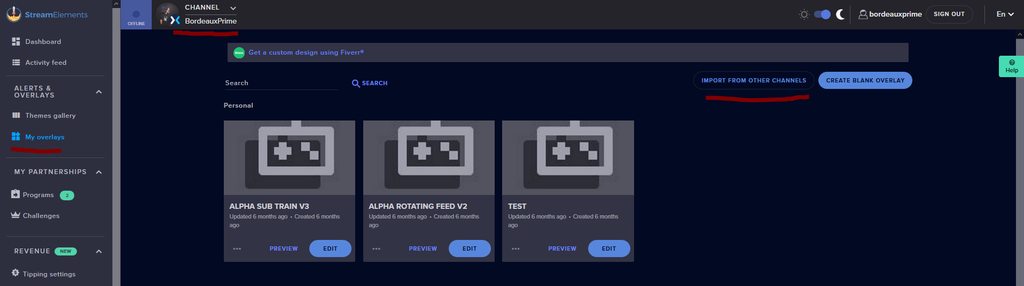
is there a way to import all my overlays and setting from my streamelements mixer account?
round brambleBOT
@feral sierra There is no current way on copying Commands and Timers, these have to be added on your other account again.
For your overlays, please link your other platform channel to StreamElements via the website and add them via the top left channel icon.
We can merge your accounts if you send in the JWT tokens of both to a Staff member, don't share these within the server, they are private.
When you go to My Overlays over at the website, click the import from other channels button to import your mixer overlays to the new platform.
Merch stores are not getting copied through accounts, you will have to set up your merch store from start on your new platform.
Do notice that some things are not compatible between platforms, these need to be manually edited (like total embers is total bits on Twitch)
 lament blade
i used mix it up for mixer but im now switching over to twitch any recommendations ??
how do I pull up the like chat and stuff on my obs
dry sage
Anybody knows if there's a chat command that takes the name of all the first chatters on twitch?
wary halo
StreamElements menu in the top bar > Chat / Activity Feed @lament blade
sweet socket
Anybody knows if there's a chat command that takes the name of all the first chatters on twitch?
@dry sage i dont know if there is any variables on that, best would to be to ask in #dev-chat
dry sage
@sweet socket thx mate
sweet socket
No worries
lament blade
huh im confused what the bot said
sweet socket
Rubot
feral sierra
I'm trying to link my mixer channel and twitch channel togther but it keeps telling me channel has already been claimed
round brambleBOT
@feral sierra Account Merging - Please note:
- Merging accounts only allows faster ways to switch between accounts
- Merging accounts does not allow data sharing between accounts - different streaming platforms, different type of events
- Merging accounts allows duplicating/sharing overlays between the accounts
If you understand the limitations of merging and want to proceed, please find the JWT tokens (!jwt) from both accounts you want to merge and you will be directed to DM them to a staff member.
feral sierra
!jwt
round brambleBOT
You can find your JWT token on your account channels page ("Show Secrets" to reveal the token): https://streamelements.com/dashboard/account/channels
READ ME:
This is a private security token. Do NOT share this token here or other public places, only with a StreamElements staff member in private.
feral sierra
is there a staff member available to help merge my accounts
 swift swan
can a Ryzen Threadripper stream 1080p 60 with no problems?
sweet socket
@feral sierra ill ask who is available
wary halo
can a Ryzen Threadripper stream 1080p 60 with no problems?
@swift swan yes, if your GPU can keep up with it
 shell flower
I want to have the standard Twitch bit alerts in Streamelements. They are default in Streamlabs, but I can't find them on Streamelements. Please help.
 abstract hemlock
swift swan
abstract hemlock
swift swan
@wary halo I have 1070
shell flower
@abstract hemlock where do I find the pinned messages I'm new here
sweet socket
top right, click on the little pin
wary halo
@wary halo I have 1070
@swift swan should be fine i think 😄
swift swan
Having issues
 chrome folio
@shell flower Discord PC
swift swan
Like CPU is overloaded
round brambleBOT
@swift swan 1) Restart OBS
2) Start your stream/recording for about 30 seconds. Make sure you replicate any issues as best you can, which means having any games/apps open and captured, etc.
3) Stop your stream/recording.
4) Select Help > Log Files > Upload Current Log File. Copy the URL and paste the link here.
(Note: If you do not see an obsproject.com URL, you will need to update OBS Studio to version 22+)
swift swan
I should be able to be on slow
 regal kestrel
The S.E Merch store tab on the dashboard won't load all the way up. Does anyone know how to fix that?
sweet socket
#helpdesk-merch @regal kestrel
round brambleBOT
@regal kestrel Please provide your account ID found at the top of this page: https://streamelements.com/dashboard/account/channels This ID is public info and safe to share here.
regal kestrel
5ec0a29ce65a7a2c2ea3467b
shell flower
@fast rapids is it the pinned message "Default Alerts without the default sounds"? To get those standard bits alerts? How do I use it?
swift swan
lament blade
Could someone help me
swift swan
@wary halo I do that right?
lament blade
Someone just followed me on Twitch
with my personal address
in their username
and it displayed an alert with my address which was leaked
wary halo
@wary halo I do that right?
@swift swan https://obsproject.com/analyzer/?url=https%3A%2F%2Fobsproject.com%2Flogs%2Fg10UVpRCGj_ZNT8u
swift swan
Done what now?
wary halo
@swift swan follow the instructions for the issues given there, also see the green links for more info
lament blade
Someone help me!
shell flower
I want to have the standard Twitch bit alerts. Me was said to check the pinned messages, is it "Default Alerts without the default sounds"? I'm looking for these:
swift swan
@wary halo Lost can I sharescreen?
wary halo
nope, i can't do that right now
sweet socket
Encoding video is a very CPU-intensive operation, and OBS is no exception. OBS uses the best open source video encoding library available, x264, to encode video. However, some…
you just have to follow the green links within the analyzed logs
lament blade
Some followed me on Twitch with my personal address as their username and I want alerts disabled for people who follow with my address
chrome folio
@lament blade you can use the tipping moderation to ignore alerts for an username, adding his username or part of username on the filtered words.
wary halo
@lament blade we can't do anything about it being leaked already ofcourse, but make sure to throw away the vod of the stream. you can also enter your address in the bad words filter so it can't be used
lament blade
i did
jade remnant
@lament blade you can remove the followers from your recent list in the sessions tab
swift swan
Is this threadripper worse than my 17 4790k?
jade remnant
@lament blade https://streamelements.com/dashboard/session
wary halo
no, it should be superior to your i7
jade remnant
click widget data (top right)
strong kernel
@lament blade You only entered exact matches. Use wildcards, you will have better results, i.e. *streetname*
swift swan
Why these issues with this?
shell flower
Does somebody have time to help me, it's not that difficult, my question wasn't answered
lament blade
how
sweet socket
@shell flower check the pinned messages
lament blade
i used mix it up for mixer but im now switching over to twitch any recommendations ??
 shell flower
@sweet socket am I missing it? I saw "Default Alerts without the default sounds" is that it, cause I don't know IF that's the answer and I don't know how to deal with it
 analog drum
@lament blade stream elements
lament blade
Someone help me
 viscid pebbleBOT
Hi @lament blade, Please ask your question(s) or describe the problem you're looking to solve so staff or a support volunteer can assist you as soon as they are available.
strong kernel
@lament blade Please keep all communication in the public channels. Thank you.
swift swan
@strong kernel can ya help me?
You've helped me so many times! SAVE ME!!! @strong kernel
wary halo
please stop tagging him in every sentence
swift swan
Sorry
strong kernel
Ruben has already provided you with information.
shell flower
@sweet socket please help cause I don't see it in the pinned messages I need some guidance
swift swan
I am trying to understand I'm kinda stupid
chrome folio
@lament blade use *word* ... for example, when added *ph* all words like raphael, pharaoh, philippines, ... will be blocked.
If you add only ph without * * then the username must be the same to be blocked.
swift swan
I'm mentally disabled so mot the smartest sorry
regal kestrel
Any ideas, about my Store issue? No rush 🙂
sweet socket
we have noted it down for staff to check on it @regal kestrel
regal kestrel
Thank you
sweet socket
@sweet socket please help cause I don't see it in the pinned messages I need some guidance
@shell flower im asking someone for you, please hang tight
shell flower
@sweet socket thank you
lament blade
i used mix it up for mixer but im now switching over to twitch any recommendations ??
what does * * do
jade remnant
exact match
sweet socket
@shell flower #helpdesk-twitch message
jade remnant
@lament blade probably best for #general-chat
swift swan
obs taking 60% CPU
strong kernel
In software, a wildcard character is a kind of placeholder represented by a single character, such as an asterisk (*), which can be interpreted as a number of literal characters or an empty string. It is often used in file searches so the full name need not be typed.
jade remnant
@lament blade it means exact match, as answered above
jade remnant
have you done as suggested?
lament blade
Yes
jade remnant
awesome
shell flower
 kind jacinth
Sorry guys, is there a widget that can pick randomly massages from the chat? A friend of mine needs it and I actually saw some other streamers using it!
lament blade
While broadcasting SE shows offline?
sweet socket
you mean at the StreamElements website?
that doesnt indicate anything, could be your browser or a addon stopping that from working
if you are online on twitch, you are online and SE will work
 jaunty kernel
Hi Guy's,
Is here somebody active who can help me with my donation-setup?
sweet socket
StreamElements works best on Chrome
round brambleBOT
@jaunty kernel New to Stream Elements?
Check out our YouTube channel https://www.youtube.com/c/streamelements/videos
with tutorial videos from setting up the basics, to in depth details on how to use our product.
New to OBS? Here is a 4 step quickstart guide
https://obsproject.com/wiki/OBS-Studio-Quickstart
Want to learn even more? Here is an in-depth overview
https://obsproject.com/wiki/OBS-Studio-Overview
 quasi kiln
Hi,
i have a question regarding the built in quotes system in Streamelements bot
are only moderators able to add and remove quotes? or can anyone in chat do this?
can't seem to find any information regarding that
chrome folio
@quasi kiln https://streamelements.com/dashboard/bot-commands/default-commands you can change the user level...
lament blade
SE still shows offline while streaming with Chrome?
 green sedge
trying to figure out how to get StreamElements to tweet when I got live on obs.live
quasi kiln
Yeah @chrome folio that i know, but i want everyone to be able to call quotes but i wanna mange who that has the ability to add and remove quotes
strong kernel
@green sedge Auto tweeting is handled by the website, not OBS.Live.
green sedge
so where in the website do I get it set up im a little confused I can't seem to find it? im pretty new to this
please and thank you
strong kernel
@green sedge
swift swan
I should not need to use Nvenc correct?
chrome folio
@quasi kiln the system only permits you select who will use Quote (add, remove).
green sedge
@strong kernel when I click on that all I get is a blank screen it doesn't offer any options
 untold galleon
Hi I have tried to open up the last 3 items in my merch store but it will not let me. I tried to use different artwork and sizes can you tell me how to do this?
strong kernel
@green sedge Disable adblocker.
quasi kiln
ah @chrome folio so that means that anyone in chat can remove any quote that anyone has added?
or is it just me that is tired?
swift swan
OBS can take up to 60%
chrome folio
@quasi kiln if you choose the user level as subscribers, only subscribers or other highest level (moderator, super moderator, streamer...) will be able to use the command.
round brambleBOT
Chat/Bot Levels
100 - Viewer
250 - Subscriber (Twitch subscribers automatically placed at this level)
300 - Regular
400 - VIP (Twitch VIP automatically placed at this level)
500 - Moderator (Twitch chat moderators automatically placed at this level)
1000 - Super Moderator
1500 - Broadcaster
Dashboard Manager Levels
Bot Supervisor
Editor
Full Access
Owner
https://i.imgur.com/s61Liry.png

 icy pine
is there a way to set it so the {time} is in 12 hour format instead of 24 hour format?
 viral stirrup
hi! Is there a way to display current track on media request as text file?
or is there a option to add song data as a text on stream?
sweet socket
this is the only way to do it right now @icy pine
#helpdesk-twitch message
@viral stirrup this is not currently a widget we have available, you could always ask a Code Guru in #dev-chat if they know of a widget like that!
chrome folio
@quasi kiln You can setup the users and the levels here https://streamelements.com/dashboard/bot-commands/user-management
untold galleon
Is there somebody I need to speak to about my question nobody has replied?
 willow kite
Hey question on StremElements when you get donations does it auto go to your paypal account or do you need a certain amount before cashing out?
lusty dragon
@untold galleon would be better to ask that in #helpdesk-merch
untold galleon
thank you
wary halo
if the donation is made on paypal it will go directly to your paypal @willow kite
willow kite
Alright appreciate it
lament blade
I have addons off, chrome installed, but SE is still showing offline while streaming?
sweet socket
@lament blade ive already told you, it doesnt indicate anything
lament blade
Thank you
sweet socket
it doesnt mean that StreamElements isnt working or that youre live
quasi kiln
Yeah, that iam aware of @chrome folio but i would like everyone to call !quote but only mods should be able to add or remove quotes
Is that possible?
or shall i see if i can find that quote APi, if i remember right that Api used multiple commands for adding/remove Quotes and a third one for showing a random or specified quote
tranquil sierra
Is there any way to create a chat / alert overlay? For those who do not have 2 monitors, and are playing in full screen, how do you not miss alerts? @sweet socket
strong kernel
You can use our app in companion mode to see your chat and activity feed.
(Android only)
Otherwise, you can open your own channel on the Twitch app.
tranquil sierra
@strong kernel
StreamElements: Twitch & YouTube IRL Live Stream?
strong kernel
That's the one.
tranquil sierra
Humm ty, there plan for add overlay in a near future?
sweet socket
Not planned at the moment afaik, but you can always submit the idea here
round brambleBOT
@tranquil sierra Check out the StreamElements ideas board: https://strms.net/ideas. You'll be able to add ideas, upvote ideas you agree with, and track their progress with email notifications. Adding and upvoting ideas also helps the staff know which ideas should be prioritized so please take some time to upvote.
chrome folio
@quasi kiln you can check if this idea already exist on #💭︱feedback-and-ideas or post a new one.
lusty dragon
I thought you could edit the mobile overlay to work 
tranquil sierra
cool, I will definitely add this idea! =]
quasi kiln
Right, will have a look @chrome folio
 turbid mountain
So I have custom commands setup to when I say !cheese1 it will pull a cheese fact from that list
I tried doing $(random.pick '!cheese1' '!cheese2' '!cheese3') to have the timer do a random pick
but its not working
Is it just not possible to use that?
swift swan
Still the same even on 720p 60 fps
turbid mountain
Update: I got it to do that but it wont pull from the random facts
chrome folio
@turbid mountain the system doesn't works with commands on the response.
tranquil sierra
I cant see alert box inside Stream APP, what i miss? Chat work very well
 west wing
Hey, I need to close an account because it somehow made a different account for my Twitch channel.
It says i need a token
swift swan
Can I get logs area
strong kernel
@quasi kiln That is already how the default !quote command works. Regardless of the permissions you set for the command, adding and removing quotes will always be mod or higher.
round brambleBOT
@west wing Account Merging - Please note:
- Merging accounts only allows faster ways to switch between accounts
- Merging accounts does not allow data sharing between accounts - different streaming platforms, different type of events
- Merging accounts allows duplicating/sharing overlays between the accounts
If you understand the limitations of merging and want to proceed, please find the JWT tokens (!jwt) from both accounts you want to merge and you will be directed to DM them to a staff member.
 green gyro
i got tipped through my streams but on my PayPal account it says pending pls help
weak delta
Nothing that can be done here, just have to wait for PayPal to finishing processing it.
swift swan
Do I need to use game mode?
 uncut junco
Hello i changed my name on twitch when i was online and i get some follows and some subs and this but no alert comes can i fix that some how? and i dont got it in activity feed just in twitch stats...
round brambleBOT
@uncut junco If you changed your name on Twitch please follow these steps:
🔹 Visit https://streamelements.com/logout and then log in again with by connecting with Twitch.
🔹 On the right side of the dashboard page that opens, select "Join" under bot settings. If it says "Part" select that and then select "Join" to send the bot to the chat. Don't forget to mod the bot by typing /mod streamelements in your channel if you have not already.
🔹 Post your old and your new name here so that we can update your channel's chatstats tracking (must be done by staff).
uncut junco
thanks ❤️
sweet socket
no worries, just be able to send your old and new username in here
and ill request a fix for you
lament blade
How do I know if I have a shadow ban?
uncut junco
yea
jade remnant
if YOU have a shadow ban or if you have shadow banned someone
lament blade
If I have one?
uncut junco
old: JKbtwcsgo new: pandoslapek @sweet socket
jade remnant
if you have been banned in a streamers chat using another account
lament blade
It does not work, a other account, still not visible and no notification
 sterile kettle
Someone help me with the command $ {time.TIMEZONE}. I put my zone "UTC-7", and the time does not go well
sweet socket
@sterile kettle #helpdesk-twitch message
lament blade
My stream probely was shadowbanned, but how do I know?
sterile kettle
@sweet socket Thank you
sweet socket
No worries
 hoary phoenix
Hello can someone help me please ? yesterday my donate system was working but now when i test it streamelements gets my "test donate" but not showing my alertbox overlay i checked overlay url aswell recreated my alertbox still same
round brambleBOT
@hoary phoenix You can test Alerts via the Emulate bell on the lower left side of the Overlay Editor. Simply go to your Dashboard -> My Overlays -> Pencil/edit button on the overlay. Make sure the "Preview LIVE on stream" option is on to see the alert in OBS/Xsplit https://streamable.com/vtulg9
 hoary phoenix
oh it says alerts are paused in activity feed where can i change that sorry if im being too lazy :d
 lofty topaz
So when running GTA on Stream Elements there was this warning setting about fixing my encoder settings, how do I do that?
 lilac cloud
Hello i need a viewer count overlay while in full screen that is only shown to me
round brambleBOT
@lofty topaz Please provide a proper screenshot with the issue visible. If not sure how to take a screenshot, you can check here: https://www.take-a-screenshot.org/
 tame badger
Türkçe destek yokmu
sweet socket
@tame badger english only please
round brambleBOT
@lilac cloud Please ask your question in one helpdesk channel only. A support volunteer or StreamElements staff member will assist you as soon as they are available. Asking in multiple places will only result in confusion, not faster answers. Thank you for your patience.
lament blade
hi, i was wondering if theres a video on how to import the package a bought to streamlabs obs.
hoary phoenix
let me translate Ahmet
Türkçe destek yokmu
@tame badger dayı sorun ney
he is offline i think nvm 😄
sweet socket
@hoary phoenix please keep this channel english only
round brambleBOT
@lament blade We're not able to troubleshoot issues with using our overlays in StreamLabs OBS (SLOBS) as we don't have the tools to support their software. We recommend using OBS Studio or OBS Studio with our plugin OBS.Live.
lament blade
Thank you.
 vapid mantle
Hey is it possible to merge the channels claimed on two different accounts? Looks like I logged in with Youtube and Twitch and now they're seperate
lilac cloud
Hello i need a viewer count overlay while in full screen that is only shown to me
do someone know how to do it
strong kernel
We do not provide that. The only viewer count display is within OBS.Live.
lament blade
Hey guys, kinda strange thing happened. I added my tipping information through streamelements and today one guy donated me some amount of money, but the donation alert didn't apear, as well as on twitch statistic doesn't apeared any information about the donation he did. Maybe i did something wrong activating it?
strong kernel
Twitch statistics will never display tips, they're not involved.
How were you notified of the tip?
lament blade
The guy that donated me told me he made a donation, but nothing aperead on stream
 maiden heath
streamelements bot not in chat
lament blade
So i checked out on streamelements web about it and i've seen his donation, but no alert happened.
strong kernel
So you see his tip in your activity feed?
lament blade
Yeah
streamelements bot not in chat
@maiden heath hm... Let me check this out
Hm... Strange, i don't see streamelements in my viewers list. How do i activate him?
round brambleBOT
@lament blade Go to the dashboard -> right side -> part channel -> join channel (https://streamelements.com/dashboard)
lament blade
Thank you guys!
maiden heath
ayyy thanks @lament blade
lament blade
I think now it should work
maiden heath
it does
sweet socket
👌
vapid mantle
(Just reposting as I think it was missed) Hey is it possible to merge the channels claimed on two different accounts? Looks like I logged in with Youtube and Twitch and now they're seperate and when I go to claim one it says it's already claimed
round brambleBOT
@vapid mantle Account Merging - Please note:
- Merging accounts only allows faster ways to switch between accounts
- Merging accounts does not allow data sharing between accounts - different streaming platforms, different type of events
- Merging accounts allows duplicating/sharing overlays between the accounts
If you understand the limitations of merging and want to proceed, please find the JWT tokens (!jwt) from both accounts you want to merge and you will be directed to DM them to a staff member.
vapid mantle
!jwt
round brambleBOT
You can find your JWT token on your account channels page ("Show Secrets" to reveal the token): https://streamelements.com/dashboard/account/channels
READ ME:
This is a private security token. Do NOT share this token here or other public places, only with a StreamElements staff member in private.
strong kernel
Please DM me the JWT tokens, clearly labeling which is which.
Your channels have been merged.
 broken ridge
I just logged into my twitch SE account to find all of my overlays are gone... Help?
strong kernel
Your channels are entirely separate. Seeing as this appears to be the first time you've logged in with Twitch on StreamElements, nothing is supposed to be there.
 honest flare
is there any way i can turn my chat to dark mode inside obs
strong kernel
See pinned messages in #helpdesk-selive
broken ridge
This isn't the first time I've logged into my twitch SE account. I had done a bunch of work and added several overlays, commands, etc. over the last couple months. It appears all of that work has been completely wiped out
 jagged crest
Is there any way that when the viewer types in the chat, he gets points?
strong kernel
@jagged crest There is not.
jagged crest
why ? And they could also add
honest flare
thank you @strong kernel been a long day lol
 misty roost
Good night, I need a way for my chat interaction to count points in the channel store, is there a way to do that?
round brambleBOT
@ebon fossil Welcome to the helpdesk! Please let us know how we can assist you today and a support volunteer or staff member will assist you as soon as they are available. Thank you for your patience.
 lusty forum
Hi there fellas, i just changed my username today btw my chatbot is not working at all.
round brambleBOT
@lusty forum If you changed your name on Twitch please follow these steps:
🔹 Visit https://streamelements.com/logout and then log in again with by connecting with Twitch.
🔹 On the right side of the dashboard page that opens, select "Join" under bot settings. If it says "Part" select that and then select "Join" to send the bot to the chat. Don't forget to mod the bot by typing /mod streamelements in your channel if you have not already.
🔹 Post your old and your new name here so that we can update your channel's chatstats tracking (must be done by staff).
ebon fossil
so my alerts arent working but when i run tests they are
it doesnt make sense
and im streaming right now and someone followed me
but the alerts didnt work
round brambleBOT
@ebon fossil To add your overlays to OBS, add a new browser source in your scene. Paste your overlay URL in the browser source properties, set the dimensions to 1920x1080 (unless you changed them on the website), and ☑ “Shutdown source when not visible” https://youtu.be/KDvLynUqXI4
 dim dawn
Hello! Streamer I moderate for regularly has issues with her SE bot no longer responding whenever her stream dies (which happens daily). However the "Part Channel" button seems to do nothing whenever this happens and I can't seem to get it working again till the stream ends.
Streamelements still shows in chat, however her bot with custom name does not.
round brambleBOT
@ebon fossil Please provide a proper screenshot with the issue visible. If not sure how to take a screenshot, you can check here: https://www.take-a-screenshot.org/
ebon fossil
im streaming i cant take a screenshot
strong kernel
@dim dawn A moderator cannot affect the custom bot name.
lusty forum
old stream name: ferraridazomo
new stream name:
manoferrari
strong kernel
@ebon fossil Please provide a screenshot of your browser source properties. Streaming does not prevent you from taking screenshots.
lusty forum
I have another issue with OBS Live, my cfg hasn't changed since I've ended my stream yesterday, but today, when I started the stream, there were no resolution options, only 1080p and it seemed like i've checked the enforce encoder options on the checkbox but I've double checked and it wasn't checked.
did something change on the last update that was released yesterday?
dim dawn
@strong kernel Not trying to change the name, the bot is not responding and the "part channel" button isn't doing anything.
 placid parcel
Does anyone know how I can see how many ads (and if they play) were seen on my stream?
I have configured the bot to send the command "/commercial xx" in the stream; But I do not see that I send it, nor after the stream can I verify if a commercial was sent or not ...
jagged crest
Good night, I need a way for my chat interaction to count points in the channel store, is there a way to do that?
round brambleBOT
@dim dawn Streamelements on top of OBS -> Logout -> login
strong kernel
@placid parcel Only Twitch would have that kind of data.
@jagged crest Please rephrase your question more clearly.
ebon fossil
i cant take a screenshot buddy
not to be rude but id have to wait for the precise instant someone follows me
jagged crest
When the viewer types in the chat he gets points
placid parcel
@placid parcel Only Twitch would have that kind of data.
@strong kernel I understand, but how can I know for example if the bot command is working? It is a timer with the command "/ commercial 60" every 12 minutes, how do I know if it sends that command or not?
ebon fossil
but idk
strong kernel
@ebon fossil You do not have to wait for someone to follow you to screenshot your browser source properties.
@lusty forum Only Twitch Partners get encoding options every stream. For affiliates and below, Twitch provides the options as resources allow.
lusty forum
When did it change?
strong kernel
It didn't. It's always been like that.
lusty forum
weird. I've always did with multiple resolutions. today was the 1st time
that it happened.
 karmic agate
it doesnt let me mod streamelements because apparently the account is banned from my channel, when i go to banned users no one is banned
 onyx egret
how do I get rid of stream elements do I ban it ?
round brambleBOT
@onyx egret Go to the dashboard -> right side -> part channel -> join channel (https://streamelements.com/dashboard)
karmic agate
@sweet socket i tried, doesnt work for some reason
ionic kelp

 placid violet
sweet socket
placid violet
sweet socket
 vast hedge
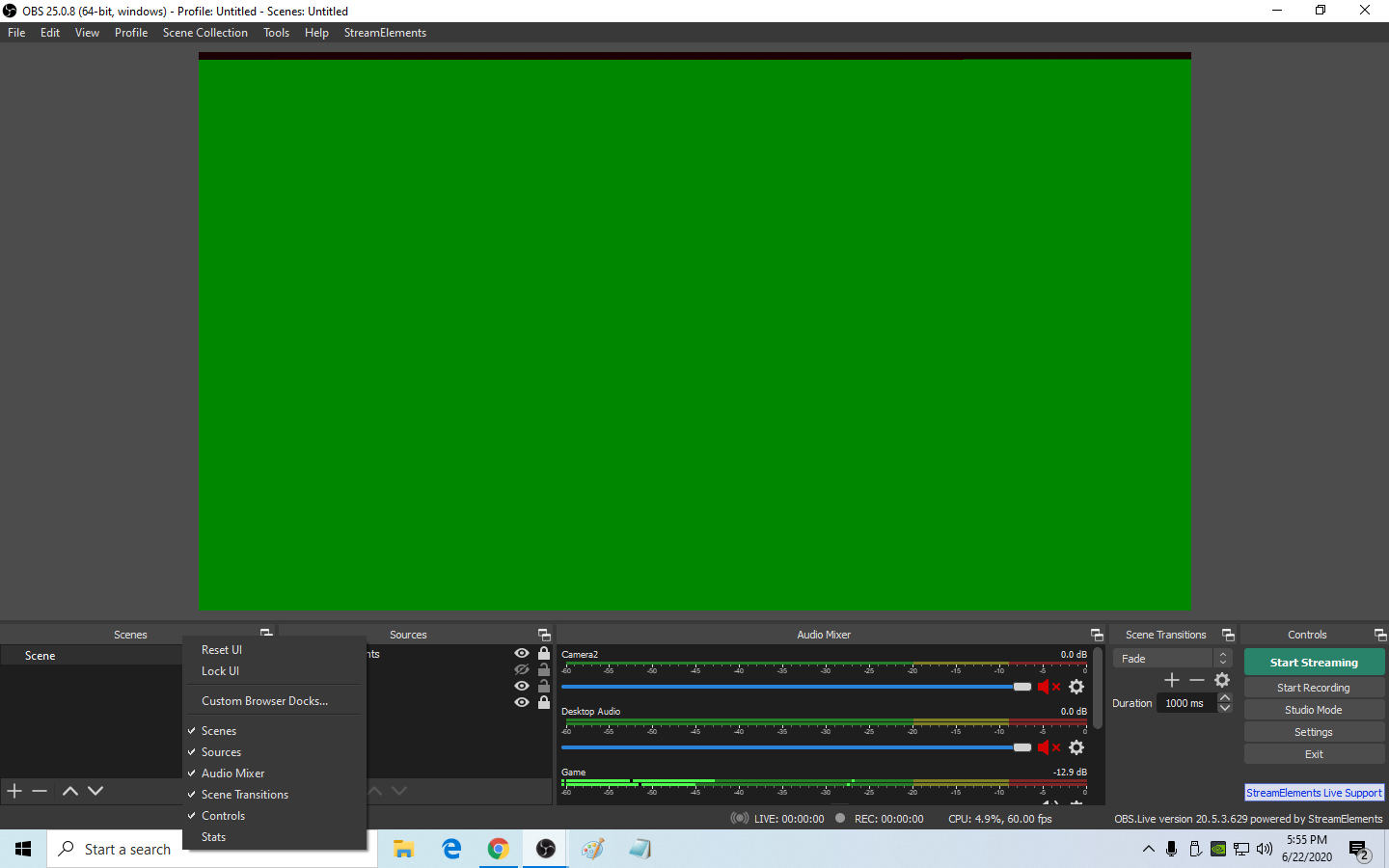 ebon fossil
so what if nobody follows me bc my channel is dead..
strong kernel
@vast hedge StreamElements menu at the top.
 brave marlin
I cant link my twitch account cuz it says that its already taken or something?
round brambleBOT
@brave marlin Account Merging - Please note:
- Merging accounts only allows faster ways to switch between accounts
- Merging accounts does not allow data sharing between accounts - different streaming platforms, different type of events
- Merging accounts allows duplicating/sharing overlays between the accounts
If you understand the limitations of merging and want to proceed, please find the JWT tokens (!jwt) from both accounts you want to merge and you will be directed to DM them to a staff member.
brave marlin
Im switching to twitch from mixer, but i cant link my twitch
 blissful crane
im trying to stream on twitch but it keeps trying to stream it on mixer how can i change that?
round brambleBOT
@blissful crane Streamelements on top of OBS -> Logout -> login
brave marlin
is there a way to get mixer and twitch alerts?
ionic kelp
Not combined.
 leaden kiln
why am i getting "couldn't create giveaway"?
round brambleBOT
@leaden kiln Please provide a proper screenshot with the issue visible. If not sure how to take a screenshot, you can check here: https://www.take-a-screenshot.org/
 iron fulcrum
So, what are the user levels for the chatbot using the !command options CMDNAME level (NUMBER) syntax? Which number(s) for which user levels?
ionic kelp
!cmd
round brambleBOT
You can make changes to custom commands in chat with !command add/remove/edit/options/show Valid flags for !cmd options are: -enable -disable -cd (number) -usercd (number) -cost (number) -level (number) -type (say, whisper or reply) -count (number). --- Example: !cmd options twitter -usercd 60 -type reply -level 250
iron fulcrum
OHHH without the brackets...derp
round brambleBOT
Chat/Bot Levels
100 - Viewer
250 - Subscriber (Twitch subscribers automatically placed at this level)
300 - Regular
400 - VIP (Twitch VIP automatically placed at this level)
500 - Moderator (Twitch chat moderators automatically placed at this level)
1000 - Super Moderator
1500 - Broadcaster
Dashboard Manager Levels
Bot Supervisor
Editor
Full Access
Owner
https://i.imgur.com/s61Liry.png
iron fulcrum
Thanks!!!
leaden kiln
So is there an issue with giveaways atm?
round brambleBOT
@leaden kiln Please provide a proper screenshot with the issue visible. If not sure how to take a screenshot, you can check here: https://www.take-a-screenshot.org/
iron fulcrum
Ummm level 1500?
leaden kiln
strong kernel
Please screenshot the entire window. Do not crop it.
leaden kiln
 obtuse parcel
Hello there and good evening. I'm trying to add my Twitch Channel on the My Channels section and it's telling me that It's already claimed.
round brambleBOT
@bronze loom Welcome to the helpdesk! Please let us know how we can assist you today and a support volunteer or staff member will assist you as soon as they are available. Thank you for your patience.
@obtuse parcel Account Merging - Please note:
- Merging accounts only allows faster ways to switch between accounts
- Merging accounts does not allow data sharing between accounts - different streaming platforms, different type of events
- Merging accounts allows duplicating/sharing overlays between the accounts
If you understand the limitations of merging and want to proceed, please find the JWT tokens (!jwt) from both accounts you want to merge and you will be directed to DM them to a staff member.
@bronze loom Please ask your question in one helpdesk channel only. A support volunteer or StreamElements staff member will assist you as soon as they are available. Asking in multiple places will only result in confusion, not faster answers. Thank you for your patience.
 bronze loom
Im streaming on twitch but i need help with stream labs OBS
strong kernel
We're not Streamlabs.
round brambleBOT
We're not able to troubleshoot issues with using our overlays in StreamLabs OBS (SLOBS) as we don't have the tools to support their software. We recommend using OBS Studio or OBS Studio with our plugin OBS.Live.
bronze loom
I figured that out after i sent it
bronze loom
This is twithc
twitch
I dont need help with twitch stuff
I need help with overlays on SLOBS
ionic kelp
Read the above message.
bronze loom
.... So this channel can't help with SLOBS
ionic kelp
No.
bronze loom
then why is there obslive
ionic kelp
Because that's our product
strong kernel
OBS.Live is our plugin for OBS Studio. Note how it's not called SLOBS.
And there is no #helpdesk-slobs
As we're not Streamlabs.
obtuse parcel
I have my JWT tokens for both of the accounts that I want to merge, who do i send them to?
 limpid canyon
is there a way to add stream elements bot to my discord server
strong kernel
@limpid canyon We do not have Discord integration.
@obtuse parcel If you understand the limitations of merging, you can send me your JWT tokens, clearly labeling which is which.
limpid canyon
oh ok
 wary jetty
How do you get things to pop up like so and so followed
round brambleBOT
@wary jetty New to Stream Elements?
Check out our YouTube channel https://www.youtube.com/c/streamelements/videos
with tutorial videos from setting up the basics, to in depth details on how to use our product.
New to OBS? Here is a 4 step quickstart guide
https://obsproject.com/wiki/OBS-Studio-Quickstart
Want to learn even more? Here is an in-depth overview
https://obsproject.com/wiki/OBS-Studio-Overview
round brambleBOT
@last barn You can find your JWT token on your account channels page ("Show Secrets" to reveal the token): https://streamelements.com/dashboard/account/channels
READ ME:
This is a private security token. Do NOT share this token here or other public places, only with a StreamElements staff member in private.
 last barn
I cant find the show secrets thing
 frail flax
Hey my screen isnt fitting the full screen what can i do
round brambleBOT
@frail flax The default resolution for StreamElements overlays (theme and custom) is 1920x1080. Please add them in OBS at their full resolution and use CTRL+F to fit to screen if necessary. You can then downscale your stream in OBS settings > Video if you'd like https://i.imgur.com/6bWXxjR.png
 last barn
found it all good
frail flax
Its like having black bars around it and fit to screen thats what wrong
 celest moth
How do I set up roulette for a twitch stream?
 twilit veldt
my donation link does not work when u try to donate it says error! seller restriction
round brambleBOT
@frail flax Please provide a proper screenshot with the issue visible. If not sure how to take a screenshot, you can check here: https://www.take-a-screenshot.org/
strong kernel
@twilit veldt You should log into your PayPal account and look for notices or errors.
twilit veldt
ok
 rough abyss
Hello, how can I get help with my account
round brambleBOT
@rough abyss Welcome to the helpdesk! Please let us know how we can assist you today and a support volunteer or staff member will assist you as soon as they are available. Thank you for your patience.
 loud cradle
Has there been any answer to the giveaway issue?
rough abyss
I somehow have an account through Mixer and a different account through twitch. I would like to link my twitch with the Mixer account because that's the one with my merch but I cannot cancel the account because I don't know what the "token" is.
strong kernel
SE.Merch setup is not shared between channels in the same account. Each channel has its own setup.
ebon fossil
so my alerts still dont work
 tired bloom
i have a problem with my follower and sub goal on my overlay. can anyone help me?
rough abyss
well, this was no help at all, thanx
ebon fossil
like 3 people followed me and no alerts popped up
 still marsh
I have an Issue where my text isnt showing on my overlay
round brambleBOT
@still marsh Please provide a proper screenshot with the issue visible. If not sure how to take a screenshot, you can check here: https://www.take-a-screenshot.org/
charred quartz
!mergeaccounts @rough abyss
round brambleBOT
Account Merging - Please note:
- Merging accounts only allows faster ways to switch between accounts
- Merging accounts does not allow data sharing between accounts - different streaming platforms, different type of events
- Merging accounts allows duplicating/sharing overlays between the accounts
If you understand the limitations of merging and want to proceed, please find the JWT tokens (!jwt) from both accounts you want to merge and you will be directed to DM them to a staff member.
still marsh
its not a screenshottable error it happens when I play the Follower event
charred quartz
unless the thing u asked didn't work, it would be recommended to merge them @rough abyss
round brambleBOT
@still marsh You can test Alerts via the Emulate bell on the lower left side of the Overlay Editor. Simply go to your Dashboard -> My Overlays -> Pencil/edit button on the overlay. Make sure the "Preview LIVE on stream" option is on to see the alert in OBS/Xsplit https://streamable.com/vtulg9


 still marsh
Yes bot I know but it doesnt play the text when I do that alongside the video and sound
round brambleBOT
@still marsh Please provide a proper screenshot with the issue visible. If not sure how to take a screenshot, you can check here: https://www.take-a-screenshot.org/
ebon fossil
so when i run a test its fine
but when im live and get an actual follow it doesnt work
lament blade
como faço para desabilitar o streamelements da minha twitch
strong kernel
@lament blade 🖱️ ➡️ #🇵🇹︱português
tired bloom
i have a problem with my follower and sub goal on my overlay. can anyone help me?
strong kernel
@ebon fossil Screenshot OBS please.
round brambleBOT
@tired bloom Welcome to the helpdesk! Please let us know how we can assist you today and a support volunteer or staff member will assist you as soon as they are available. Thank you for your patience.
still marsh
can I get help?
strong kernel
@still marsh You were told how to emulate an event, and how to take a screenshot. Please emulate an event and take a screenshot.
round brambleBOT
@still marsh To add your overlays to OBS, add a new browser source in your scene. Paste your overlay URL in the browser source properties, set the dimensions to 1920x1080 (unless you changed them on the website), and ☑ “Shutdown source when not visible” https://youtu.be/KDvLynUqXI4
still marsh
Ive done a;; of that
strong kernel
Screenshot your browser source properties.
still marsh
on streamelements or OBS
strong kernel
Browser source properties.
still marsh
you gotta explain this like im 5
if I dont get it the first time I wont get it the next time
strong kernel
You know what a browser source is, yes?
round brambleBOT
@still marsh To add your overlays to OBS, add a new browser source in your scene. Paste your overlay URL in the browser source properties, set the dimensions to 1920x1080 (unless you changed them on the website), and ☑ “Shutdown source when not visible” https://youtu.be/KDvLynUqXI4
strong kernel
Deleted the screenshot for your protection.
still marsh
thanks
round brambleBOT
@still marsh Please provide your account ID found at the top of this page: https://streamelements.com/dashboard/account/channels This ID is public info and safe to share here.
still marsh
5ef1260b296e96598db53cee
strong kernel
Save your overlay after editing it.
strong kernel
Format it again, how you want it to be, and then save the overlay.
still marsh
Yea still no text
strong kernel
Format it in the overlay editor. Make it look correct in the overlay editor, and then show me a screenshot of it.
still marsh
Like this?
still marsh
gotcha
strong kernel
Yes. Edit it. In the overlay editor. Make it look how you want there, before anything else.
strong kernel
Until it looks exactly how you want it to look, so that everything is there when you emulate an event.
still marsh
ah I see
so the only word showing is chief now
jk its gone now
I dont understand
strong kernel
What is it you don't understand?