#helpdesk-twitch
1 messages · Page 678 of 1
 quick moon
 blazing perch
website still down for me
 signal sand
is it down
 somber dust
logged out during stream, bot seems to be aswering, but sr is not playing
blazing perch
so are twitch docks in OBS
 vast burrow
Damn, my first day off in a while and I planned to stream for a while. Site is down
 ionic kelp
!website
 round brambleBOT
It appears we're having issues. Please patiently wait while we try to see what the issue is.
vast burrow
Unlucky
 rustic karma
Fudge
 brisk mountain
Ba care e român?
 wheat ocean
eu ba
 loud gazelle
Im the Moderator from Gommiiii and his chatstats are not working maybe you can fix it.
 glass lake
website down or why i cant sign in
round brambleBOT
@glass lake It appears we're having issues. Please patiently wait while we try to see what the issue is.
 slow fable
sad panda 😦
 sick flicker
hey i tried to login to my stream elements and its not letting me sign in
ionic kelp
@sick flicker See bot message above.
glass lake
site down
loud gazelle
I cant see my Chatstats is the Website down ?
sick flicker
how long
 shut stratus
Any ETA on fixing it?
glass lake
i where uploading my new overlays but then site is down
sick flicker
i gotta sstart in 2 hours 😦
glass lake
@loud gazelle it is
slow fable
just logged in yall
loud gazelle
okay thank you
 modern dome
it works!!
glass lake
ya!!!
 buoyant oar
Its back for me tho
 daring scarab
upstream connect error or disconnect/reset before headers. reset reason: connection termination
ionic kelp
Shift F5.
glass lake
its back!
buoyant oar
slow fable
back for me lol
glass lake
back for me xD
daring scarab
not even bitbot can connect
ufff
big ufff
and im streaming now
media request nothing
gg
loud gazelle
but for everyone works the chatstas where i tried it but the only website that doesnt work for the streamer where I am the Moderator
sick flicker
pog
daring scarab
I restarted OBS and not working wtf
buoyant oar
it works for me tho but my alerts dont
just wait a few more mins
they prob. are trying their best to fix all sort of stuff
 kind epoch
Is Streamelements down?
loud gazelle
i think so
kind epoch
Okay thanks
buoyant oar
For me everything works fine now
slow fable
just restarted my OBS. everything seems to be working now
buoyant oar

glass lake
me to
ionic kelp
Refresh and you should be fine.
rustic karma
Most things are ok but still no alerts here
kind epoch
No active widgets available for media request ... what gives?
 strong pike
lots of server issues recently... time to switch to Streamlabs I guess?
ionic kelp
That's up to you but this is nothing more than a hiccup which we generally don't have often.
rustic karma
This is a rare occurrence. I get way more issues with streamlabs
kind epoch
Should i reboot?
kind epoch
Still says no active widget in overlay :S
ionic kelp
@kind epoch You using OBS.Live or something else for it?
 shell bobcat
I'm unable to test anything. Anyone else having this issue?
My dashboard came back up and seems like the api gateway is no longer down.
shell bobcat
Perfect, thanks.
kind epoch
Using obs.live nothing has changed just that i was mid stream and media request decides to bork out
round brambleBOT
Streamelements on top of OBS -> Logout -> login
ionic kelp
Try that.
kind epoch
Tried that but i'll give it one more shot
 muted tusk
i got same too i did logged out and in
i think YT api flooded on your end, my api working fine i wrap my api to se media api
kind epoch
Is it Streamelements > Logout?
ionic kelp
yes
rustic karma
All alerts are back yay.
round brambleBOT
Right click on the BrowserSource > Properties > Scroll down a bit > Refresh Cache of current page
kind epoch
Where do i find this BrowserSource?
muted tusk
@ionic kelp will it be API issue on my side because my friend requested 2 songs and not listed Queue, and wraped round my back end API BOT for my custom bot. for me shows empty and slowly adding in as non-queue when been added in? and i tried log out and relogin and tried Ground Control same response bug.
ionic kelp
@muted tusk Try restarting GC.
muted tusk
did that too before. but not sure YT API on Se slow atm? if is then make sense not listed queue?
ionic kelp
Are they showing here by chance? https://streamelements.com/dashboard/mediarequest/general
daring scarab
why is my activity feed looking different ?
 wanton jetty
What do i change this to for accumulative (weekly)
tip-weekly-top-donation
kind epoch
Hey guys the problem is back , went to a diff. overlay and is fubared again 😦
ionic kelp
Try resfreshing all of them.
kind epoch
Media request playback that is
I did and forced the option to have it refresh the browser
muted tusk
oh now back normal, must be YT api slow
 quartz girder
what is a stream key for
 jade remnant
old and outdated
 lavish lantern
My alert are still down in the website and in my OBS client
jade remnant
connect your account in settings > stream
lavish lantern
Am I the only one ?
quartz girder
what is a stream key for
jade remnant
its to connect to the platform, again its better to just connect your account
 wary halo
You have a computer now with OBS.Live?
quartz girder
yes sir
wary halo
cool 😄
 snow trail
Do it get help for se alerts here?
quartz girder
yes you do
kind epoch
Guys , now what for media request not working?
snow trail
I can't reach secondary shadow...
kind epoch
Or we good now
ionic kelp
Scroll down root
 lament blade
Hello, i'm getting this error with my SE.Pay account, where should I go to get a live chat or something?
quartz girder
oh
round brambleBOT
@lament blade Please contact us via email for support with SE.Pay. You can use our contact form here: https://streamelements.com/contact Thank you
 rigid dock
@quartz sapphire Hey y'all. for some reason my custom commands won't update in chat whenever somebody uses them. I always make sure I click save,l but it still won't update. Any ideas?
jade remnant
@kind epoch seems ok my end, was a bit wonky at first but all good now. if it keeps happening please post again with details of whats wrong
snow trail
I can't even input somthing via html...
quartz girder
@wary halo can you help me
round brambleBOT
@quartz girder Welcome to the helpdesk! Please let us know how we can assist you today and a support volunteer or staff member will assist you as soon as they are available. Thank you for your patience.
wary halo
with the logging in?
quartz girder
no
wary halo
you can't do that until you get the pc back 😛
quartz girder
can you edit me name for me
ionic kelp
@snow trail What browser you doing this in?
snow trail
Firefox Dev Edition
wary halo
can you edit me name for me
@quartz girder to what?
ionic kelp
Could you try in chrome?
quartz girder
to plane
wary halo
done
snow trail
Ill try it in normal firefox first
quartz girder
thank you buddy
kind epoch
When I start showing media in stream it keeps on saying that there is no active widget in overlay for media request like i said i've not changed anything and m.r. just stops working.
hmm it's working now
:S
snow trail
@ionic kelp I installed chrome and it is working there perfectly, but not in firefox or dev... I don't want to use chrome for this everytime. Idk if it's a known bug
kind epoch
now it's working but not showing m.r. in the overlay :S
round brambleBOT
Our Dashboard and Overlay editor are Chromium Optimized. We strongly recommend using Chrome. Opera GX and the new Microsoft Edge Chromium might work closest to Chrome as its also Chromium built. FireFox also works, but some things might look a bit different or not work. We do not recommend using Internet Explorer with our Dashboard as it does not support functions.
If the website doesn’t work on chrome, be sure none of your plugins are blocking our website or clear your cookies. You can try if the website works in a incognito tab.
lament blade
<@&382267076632379392> how fast can I expect an answer through mail for se pay related issues please?
kind epoch
Now it's back to the way it was ; not working at all no active widget ... sigh
ionic kelp
We can't answer that as we don't handle that support. You will be answered I promise.
lament blade
Just concerned since I have a month to fix it apparently, but hopefully it goes faster than most support systems then 
lament blade
Thanks for the quick answers!
 slender sinew
Hey so for some reason one of my overlays on streamelements isnt exactly working. None of the actual Alert Boxes are showing when i try to emulate something. Any ideas on how to fix this?
jade remnant
we are looking into this, please bare with us
kind epoch
Does the above also consist of Media Request as being on the list of things to do 😄
ionic kelp
Yes. You're not the only one reporting the problem.
ionic kelp
It's up to you.
kind epoch
Does the same even with the backup playlist , feelsbadman deleting the requests 😦
I've relogged again and still no change in the situation
ionic kelp
It's just an issue with no widget being detected?
kind epoch
Yap
And there are widgets in all 3 scenes
so it basically does not shut down at all
 quasi kiln
on my overlay goal it says that I have 154 followers, but if I go to my twitch channel it says 131
lament blade
Hello, been trying to update my streamelements profile links for months but it always give me an error and stays the same as before. Even tried removing all of them multiple times. Help please?
ionic kelp
@quasi kiln Goals don't go down.
 abstract hemlock
@quasi kiln goals are counter, that means that always go up you can change the number on the goal tab here : https://streamelements.com/dashboard/session
ionic kelp
@lament blade You delete every single spot or just certain ones?
kind epoch
Ok it's working then it's not working , so i have opened obs twice and it works only with a few retries.
ionic kelp
We're taking a look at what might be causing overlays to act wonkey.
Both with widgets and alerts.
lament blade
@lament blade You delete every single spot or just certain ones?
@ionic kelp I have tried both things. I tried updating my links to the new ones. And also removing all of them. Same error
when I refresh, all old links are there again
ionic kelp
Press F12, switch to the console tab, and delete all of them. Try hitting save and see if any chunk of red text appears.
lament blade
Alright, I will
 modern agate
Is there anyway to change the ‘!top points’ to ‘!top treats’ for the top 5 leaderboard?
Or does anyone have the code to make a new one to make it possible
Any help would be greatly appreciated
lament blade
This one I meant
ionic kelp
Could you expand that and make it larger?
ionic kelp
And that's with everything removed?
lament blade
yes
also noticed this happening, dw if it can help
something about facebook being empty idk
ionic kelp
That helps perfectly.
 hidden rampart
Hello! Is a way to have Instant-Gaming alerts like Streamlabs?
ionic kelp
@hidden rampart What do you mean?
modern agate
Yeah I just want it to say !toptreats or !top treats and it trigger the command that shows the top 5 point holders @ionic kelp
Like the first command response
ionic kelp
To properly use a command it has to be 1 single word.
modern agate
ionic kelp
Otherwise it'll only recognize the 1st word.
hidden rampart
@ionic kelp When someone buy a game via our IG link, a alert pop in the stream (with streamlabs)
modern agate
I tried that it just comes up with the available thing it says in the second message
abstract hemlock
we don't have IG integration @hidden rampart
ionic kelp
And that's how it's intended to behave.
modern agate
Then how to get I get it changed from points to treats
To show up the top 5
Everything I’ve tried has been unsuccessful
One of my friends has it changed but can’t remember how to
 little meteor
how does it work with points in stream elements
abstract hemlock
@modern agate the command is !top and the parameter is points
@little meteor what do you mean?
abstract hemlock
@little meteor you can enable the !points command here: https://streamelements.com/dashboard/bot-commands/default-commands
modern agate
So I’m looking to change the parameter is there anyway to do that or no?
abstract hemlock
@modern agate there is no way to way to change the parameters on default commands
 frosty delta
How can i add my own type of overlay/gif for new followers??
little meteor
where do you think you could send me a picture about it
abstract hemlock
@frosty delta add the alertbox widget on your overlay and you can edit your alerts there
frosty delta
Where is that
little meteor
@abstract hemlock where do you think you could send me a picture about it
round brambleBOT
@frosty delta We've released our new Overlay Editor revamp. You can check out the changes and how to work with it here: https://youtu.be/X5VzXjqAsjk
Check out our blog post as well: https://blog.streamelements.com/streamelements-overlay-editor-just-got-even-better-c22cb5b4853e

We are thrilled to announce the launch of the remastered StreamElements Overlay editor!
https://p.strms.net/newoverlayyt
Why StreamElements Overlays are better?
😎 Simple: Load your entier setup using only 1 link
⚡ Fast: Cloud-powered Overlays arrive in real-time, say goodb...
little meteor
@abstract hemlock where do you think you could send me a picture about it
modern agate
What variables would I have to have to make the !top command in custom commands @abstract hemlock
abstract hemlock
@modern agate there is no variables for that, you will need to make a custom api rest
little meteor
I have to do that on the pc
modern agate
What would i have to put for it to be triggered how I want it to
abstract hemlock
@little meteor You can do it on the phone, but it will be more easy on a PC
@modern agate you will need to create a custom api rest, we don't have that kinda of customization
modern agate
Ok thanks
little meteor
@abstract hemlock can you explain that to me on the smartphone because with given commands there are no points for me
abstract hemlock
click on the link and look for the command and just enable it
 upper cove
Hi Stream Elements support! I have a question. is there anyway that I can use my overlays on PS4 and Xbox, but streaming directly from the consoles.
upper cove
ok thank you!
little meteor
@abstract hemlock there are no points for me to choose
abstract hemlock
give me your twitch username
 round jungle
@abstract hemlock Hello! Can talk?
abstract hemlock
@little meteor this channel is called #helpdesk-twitch , YT doesn't have loyalty points
little meteor
Okey
round jungle
:(
round brambleBOT
@round jungle Welcome to the helpdesk! Please let us know how we can assist you today and a support volunteer or staff member will assist you as soon as they are available. Thank you for your patience.
abstract hemlock
nope @nimble owl 😉
 nimble owl
thanks renzitto ❤️
 brisk tiger
Hello i just recently got streamelements, is there a way to sync my top tip, new tip and most recent follower data so that it shows up in my stream like it did before in streamlabs ?
 young canopy
Hey guys my stream lags whenever I play games like tarkov and MW and it even makes the game lag sometime but when I play games like valorant and crucible I’m good. What can I do to help? Lower bit rate? FPS??
round brambleBOT
@young canopy Please provide a log from your last stream. To do this, in OBS go to Help > Log Files > Upload Last Log File and paste the link to the log file here.
brisk tiger
Im just trying to sync the info from tipping and followers from streamlabs to OBS
 frosty ocean
round brambleBOT
frosty ocean
round brambleBOT
@frosty ocean 1) Restart OBS
2) Start your stream/recording for about 30 seconds. Make sure you replicate any issues as best you can, which means having any games/apps open and captured, etc.
3) Stop your stream/recording.
4) Select Help > Log Files > Upload Current Log File. Copy the URL and paste the link here.
(Note: If you do not see an obsproject.com URL, you will need to update OBS Studio to version 22+)
lament blade
Hello. Does anyone know how the all-time points leader board works?
 rapid robin
Reposting: Hey guys, running into an odd issue on SE. The parameters for the quote command don't seem to work, User level, global cooldown and user cooldown are basically non existent.
abstract hemlock
@rapid robin what do you exactly mean? im on your chat right now and its working as expected
rapid robin
Not my chat lol
The parameters I posted in the screenshot are not supposed to allow non subs to use the command but people can spam the command as much as they want and the bot wont use the settings posted ^^
I tested it multiple chats, same situation.
ex: parameter is set to 120 cooldown and nothing... I wont be testing w/ non subs but it's literally the same deal.
 unborn rampart
I have a question about Kappagen: I want to enable Subscriber Only use of on-screen chat emotes (via Kappagen). This appears to work fine for Tier 1 subs, but it does not work with my Tier 3. If I uncheck "Subscribers only", all emotes show up (including those selected by my T3), but I don't want everyone's emotes to show. I just want subs to have access to this feature, but I want all subs to access it not just T1. Does Kappagen not recognize T2-T3 subs? Or am I missing something? Help would be much appreciated. Thanks for your time! (I don't mean to spam this, but I can't find if anyone has responded to me and I don't think anyone has @ me yet - I hope this is okay to repost.) This is my 6th or 7th time asking this question. I would really love some assistance or an update if possible. My T3 sub(s) are feeling left out of the experience and since they are paying the most for their membership, I really do not want them to be excluded. Thanks for your time.
lament blade
Hello having issues with not being able to use the custom bot name with ground control but am able to use it just fine with OBS.live the reason I am wanting to get it working with Ground Control is I am on single pc and prefer to use Streamlabs OBS so any help to get this to work would be much apprexiated
ionic kelp
@lament blade streamer username?
lament blade
Zarkiller
 potent galleon
hello could anyone here please send me a link to a event list on streamelements?
 random shell
Can anyone help with alerts
ionic kelp
@lament blade If you have GC open close and reopen it.
lament blade
Have it's working now after I restarted it about 10-15mins
Thank you for your time in helping!
 placid raptor
help please! how to change the thank you text when somone is new following . i dont like the message what shows up in chat from Streamelements. please help
 lusty dragon
@placid raptor SE website > Bot Modules > Chat Alerts. You can edit it there
placid raptor
thank you very much
lusty dragon

 frail rune
how do i add a overlay to my stream i am on a iphone and all the videos are on keyboard and mouse
lusty dragon
@frail rune you'll need access to a PC to add overlays to your stream. The mobile app doesn't support custom overlays itself yet if that's what you mean
 plush glade
Hello can someone let me know if the Monstercat default on the media request is subject to copyright or if we are allowed to use that in our streams.
ionic kelp
@plush glade that's something you'd have to ask them. We simply have that as an option.
lament blade
Hello! I've just switched over from Streamlabs obs, Is there a way to prompt your stream title and game etc before actually going live?
 earnest scarab
How do people submit links for media share when it's set to free?
earnest scarab
That didn't work
ionic kelp
Neither of these uses work?
!songrequest https://www.youtube.com/watch?v=dQw4w9WgXcQ```
earnest scarab
So when someone donates would they just put the command in their tip message?
ionic kelp
If you have it enabled for donos there's a spot where the link would go.
earnest scarab
Thank you
 frigid grove
Is there anywhere I can get emotes for free? Im not artistic at all xD
 civic pasture
hi! i need some help setting up my overlays for my PS4 dtream
lusty dragon
@civic pasture unless you're using a capture card overlays will not work for console streams
lusty dragon
You'd be surprised how many people don't know ps4 is separate 
@civic pasture as far as setup, there are hundreds of setup videos on YouTube that'll be more helpful. Definitely start there for tutorials
Or.... Ya know
Leave
 sinful onyx
Hello, majority of my steam games many being 2+ years or older will not display at all utilizing OBS. I just have a constant black screen, I have Radeon Software on my computer (not sure if that's conflicting with things.) Some games I heard you have to use an older version of OBS like for "Paladins". Does any one have any good tips on fixing this black screen for many of my steam games.
 dark terrace
I have been streaming on obs very well however recently i have been getting a lot of dropped frames as well as a very low kbps and I do not know why. Maybe its my internet??
 midnight plaza
I recall there being a label for sub points, is that gone?
abstract hemlock
@midnight plaza due to changes on the twitch api we don't have sub points on our system
midnight plaza
darnit
abstract hemlock
even the sub.points variable now shows sub count
round brambleBOT
@sinful onyx For the best OBS support, please join their Official Discord @ discord.gg/obsproject
midnight plaza

abstract hemlock
@dark terrace probably it is internet related
dark terrace
rip dream thank you guy
slender sinew
What happened to the old animation for cheers? Is there a way i can get the old bits animation where it showed the actual logo or am i stuck with the new circle one?
abstract hemlock
@slender sinew check pinned messages
slender sinew
@abstract hemlock Thank you
 minor monolith
I've made an alert box but I only see the very right portion of it, like the rest it out of frame on OBS, is there a way to fix this?
 thin wyvern
minor monolith
thin wyvern
minor monolith
That worked. Thanks so much
 modest blade
@thin wyvern I'm not streamelements, but I had that problem with a discord setting actually
There's a place to disable hardware acceleration
Is it a black box for you right now?
Ah there it is. In discord settings, appearance and then down to hardware acceleration might help you
abstract hemlock
@thin wyvern check this :
modest blade
Listen to the staff before me though, lol
abstract hemlock
@modest blade but thats a good advice 😉
modest blade
Myself I'm having some trouble with mediarequest. The audio comes through, but the slider keeps going back to muted each time I try raising it? I checked the faq but couldn't find much
ionic kelp
Click the downwards arrow under the video
modest blade
Downwards arrow?
 prime parrot
Has anyone on here used Cardboard Live for Arena? I have everything enabled but am not running my Arena window as a full screen on OBS. it is in a box as a part of my overlay. Just wondering if Cardboard live only works with full screen Arena
ionic kelp
Looks like \/
 serene tide
Apologies in advance if I'm posting in the wrong discord channel... But has anyone else had their chat box disappear from OBS Live? Because it was suggested in a forum to answer someone with this problem, I have tried disconnecting and then reconnecting my account in settings, logging out and logging back in. Doing both and closing and reopening the program.... It didn't work for me. It hasn't come back.
 uneven elbow
Hey I could really use some help from someone who knows their way around loyalty points
modest blade
Lol if you mean this one, it just makes the video larger
ionic kelp
Yes. It also makes it easier to do that.
uneven elbow
When I click redeem my loyalty point reward, everything works right exept the alert not popping up
ionic kelp
Do you have a redemption widget added?
round brambleBOT
@serene tide Streamelements on top of OBS -> Logout -> login
uneven elbow
@ionic kelp in streamlabs?
serene tide
Tried that... didn't work
ionic kelp
No. From our overlay editor.
lusty dragon
@serene tide try doing through the bot and tip setup again
serene tide
Oh, no. It's OBS Studio.
lusty dragon
Oh
uneven elbow
@ionic kelp yo I'm on the widgets tab of the overlays, I don't quite see a redemption widget
ionic kelp
No. It's in the actual overlay editor itself.
lusty dragon
@serene tide is the chat dock completely gone in view > docks?
uneven elbow
@ionic kelp I'm sorry I don't know where that is on the website
ionic kelp
Have you created an overlay already?
uneven elbow
Nope not in the website
ionic kelp

StreamElements
The Ultimate All in One Platform for Streamers
serene tide
@lusty dragon yep, chat dock is gone. It's not in the drop down menu from right clicking either.
ionic kelp
Disconnect and reconnect your account in the stream tab of settings then.
lusty dragon
@serene tide my favorite way to fix that instead of reinstalling is creating a custom dock then linking the link from your popout chat on twitch 
serene tide
Any other ideas, guys?
ionic kelp
Screenshot the stream tab of settings.
uneven elbow
@ionic kelp I added a merchandise alert box, is that the right thing?
lusty dragon
Yes my method is bullshit but it works 
ionic kelp
@uneven elbow no. It's redemption.
serene tide
HA! Got it! Thanks guys!
uneven elbow
@ionic kelp once I have it ready, how do I import it to streamlabs?
ionic kelp
Um... what?
lusty dragon
uneven elbow
So I want the alert to pop up when somebody redeems something in the loyalty store, I use streamlabs to stream
round brambleBOT
We're not able to troubleshoot issues with using our overlays in StreamLabs OBS (SLOBS) as we don't have the tools to support their software. We recommend using OBS Studio or OBS Studio with our plugin OBS.Live.
lament blade
yeah so my alerts just, stopped working? the sounds that play whenever the alerts pop are there, but there isn't any onscreen notifications, and my recent activity for followers, subs, etc is just gone and so is my chat
any help on this would be greatly appreciated
and yeah i tried logging out and doing all of that, etc
abstract hemlock
@lament blade do you see the alerts on your webeditor?
round brambleBOT
@lament blade OBS -> settings -> advanced -> scroll down -> enable/disable hardware accel.
https://i.imgur.com/ggMe9ZE.png
lament blade
hey
that worked!
thanks ^^
im streaming tonight so i was literally scrambling to figure anything out @light wren thanks a lot seriously ^^
abstract hemlock
Yeah ty Rene 
lusty dragon
@lament blade wrong tag but he forgives you
abstract hemlock

lament blade
anyways! thanks again!!
 delicate wave
sooo i did an emulate in my alert box....and it keeps going....anyone else come across this?
lusty dragon
I've done it 
 light wren
Yourwelcome @lament blade 
 twin ferry
i cant figure out why i cant hear the other people on discord with me through the stream, anyone have an idea
 clear arrow
am I even in the right text thread lol
clear arrow
ok thx
light wren
@twin ferry check the OBS settings and ensure the monitoring device is set to the same device you use (headphones)
also, if there has been any re-routing of audio using virtual lines or using a device/software that does something like that, that can happen
 sinful prism
Is there any way to import other overlays onto one overlay, say if I have an overlay with a widget on and I want that imported on another overlay
abstract hemlock
@sinful prism you can duplicate the widget
just select the widget and then press that button
sinful prism
And can I duplicate it onto a different overlay? I know that just adds another layer but I want everything on one single overlay so I don’t have to add 7 or more
abstract hemlock
when you press that button this will prompt
sinful prism
Ah sweet Thankyou for the help 🙂
 tropic thicket
hello, hoping someone can help me with an issue regarding custom video alerts. i'm trying to upload my own video clips as sub alerts after i trim and edit them in adobe premiere. but when i upload them to my overlay, the video doesn't display, just the sound works. if i just upload the raw video file (before editing it in premiere) it works perfectly fine. it's only after i edit in premiere and export the new video file that i'm having issues. both the raw file and the edited file are in .mp4 format. any ideas?
 left haven
I'm trying to set up a command via the bot to play a video & audio visible on the stream. Redeems don't seem to have the capability, but I could be wrong. Does anyone know how?
lusty dragon
@left haven redemptions use loyalty points only. If you want a newer concept that does work, Google fyrewire and join the discord to become a beta user of it. It allows clip redemption using commands and even twitch points
 crystal arch
im trying to set up !discord command . but when i put my link in it i got this ***
round brambleBOT
@crystal arch If links in chat are appearing as ***** either mod the bot or disable block hyperlinks in your twitch channel settings https://dashboard.twitch.tv/settings/moderation
 inland needle
Does Streamelements have the ability to do auto-shout outs in Twitch Chat?
crystal arch
ok thanks
lusty dragon
@inland needle define "auto";
inland needle
when a person from a predifined list speaks in chat for the first time, the bot would fdo the !so command for that person. I see where StreamLabs does it but I don't want to go there....
ionic kelp
We don't have out of box "on speak" events.
Might be possible with a custom widget but beyond that don't think so.
 harsh wyvern
quick question, where does one go in the web portal to enable a mod to write commands in twitch chat?
lusty dragon
I'd love that though. I always forget to do it myself and I had to force my mods to do it and remember for me
inland needle
@lusty dragon yes, StreamLabs does it via their chatbot under the "Events" section, looks pretty easy but I really don't want Streamlabs in my channel.
lusty dragon
Same 
I'll live without it rather than add SL back to my stream
inland needle
ditto
harsh wyvern
Anyone know where i need to go in SE settings to enable my mods to write commands in chat?
light wren
@inland needle I have a widget for shoutouts and that is one of the features I'm planning on adding in the next version, look for the Awesome shoutout v1.4
you can find it on the widget gallery, on the theme gallery section of StreamElements, or from youtube: https://www.youtube.com/watch?v=HNnvIFTvnzo, the one click installer is there in the description
inland needle
@harsh wyvern go to your chat commands - default commands - scroll down to the moderator section, there should be a !command there that needs to be enabled
inland needle
@light wren thanks! Now that you post that I remember looking at that several months back...I'll give it another look!
light wren
@round lion logout your StreamElements account in OBS and login again
the new version is much more intuitive, no more messing with code for you
lusty dragon
@light wren I actually almost recommended that when he asked but wasn't positive on if that was a feature yet
lament blade
how would you make somebody a supermod?
inland needle
the code was what turned me of last look....I'll give it another look
lusty dragon
@lament blade SE website > bot module > user management
lament blade
ok
light wren
The only reason for not having it yet is a permissions thing I need to solve
inland needle
@light wren so it doesn't actually auto trigger then, the command still has to be entered manually each time, correct?
harsh wyvern
@lusty dragon is there there some setting int hat same area that i need to check to enable a mod to write commands in chat?
light wren
yes, what the widget does right now is show stuff on the screen when you do a shoutout, and it already has a list that you indicate specific names for it
it triggers along with the text command that you use normally on chat
the idea is that I will add a feature so you can check it and it wil do auto shoutout for that specific person
lusty dragon
@harsh wyvern honestly I can't recall if mods/supermods can write commands. They may need to be given permissions on your SE account itself
harsh wyvern
yeah its odd on my own channel all my mods can write commands but i just stood up a new channel and its not letting mods write commands
 chrome folio
Anyone know where i need to go in SE settings to enable my mods to write commands in chat?
@harsh wyvern https://streamelements.com/dashboard/bot-commands/user-management and set the user (your moderator) with roleModerator (500)
inland needle
Mods CAN write commands in chat if they use the proper format, just enable the !command command
light wren
@harsh wyvern your commands need to have the permission set for Mods, otherwise it won't work
harsh wyvern
kk ty
light wren
check the permission level on the custom command, on StreamElements page
lusty dragon
And now I know
chrome folio
@harsh wyvern check if the command !command is enable in https://streamelements.com/dashboard/bot-commands/default-commands
harsh wyvern
kk
lusty dragon
This is what I get for being a micromanager and doing all editing myself
light wren
I am also a one person show, it is great for learning, not so much for saving time
inland needle
@light wren so the feature has not been added yet but it is coming sometime soon?
light wren
correct @inland needle
if you prefer to wait, enable notifications/sub to my youtube channel, I always upload a tutorial for each new version
or add me on Twitter, I usually also post it there
 limber stump
can somebody help me with the counter commands? im trying to figure out how to get a seperate custom command to set the counter but i cant figure it out
ionic kelp
StreamElements
The Ultimate All in One Platform for Streamers
${count commandname ${1}}
1st one returns without adding.
2nd one is used as !commandname number and doing negative or positive numbers changes by that amount.
And I mean positive as +#
ionic kelp
What's the command you wanna use?
limber stump
so the first one is to just set it outright and the second one is to add to it?
 round lion
sorry i connected bot to new account but now it doesnt work ? i should verify twitch accounts email ?
limber stump
ok so atm i have !fail and that shows "Eagle has failed ${count <fail>} times"
ionic kelp
No
ionic kelp
remove the <>
ionic kelp
${count fail ${1}}```Doing !fail will return the number and !fail +1 will increase by 1.
Though you can do yours if you want it to automatically count up.
limber stump
ok, i still dont fully understand the reasoning it works, but, it works lol
thanks for your help
I assume the titling of the counter enables multiple counters to be created
ionic kelp
You can have infinite counters as they're bound to the command name.
limber stump
ok. thanks
another question, this time regarding user management
to remove a super mod can you not edit it? you have to delete them and add them back
limber stump
what about a normal mod?
ionic kelp
500
limber stump
ok
lament blade
lol
 feral ginkgo
trying to upload my id to streamelements to take tips and it doesnt load all the way ..easier way?
round brambleBOT
@feral ginkgo Please contact us via email for support with SE.Pay. You can use our contact form here: https://streamelements.com/contact Thank you
feral ginkgo
tyvm
 ruby kettle
Hello, I am having issues with the automated tweets. It seems to be showing the incorrect Profile icon directly in the auto tweet that it sends out. I updated my profile picture in streamelements and twitch to no avail. It's still showing my old one. Any idea what is going wrong?
ruby kettle
Also, the incorrect stream title..
 stone zenith
Heyy! Where can I find the command for !clip? I'd really appreciate the help, I'm lost
chrome folio
Heyy! Where can I find the command for !clip? I'd really appreciate the help, I'm lost
@stone zenith you can use this external service and add the api command to clip to StreamElements Bot custom command https://www.sowhoyou.com/clipcommand/ 🙂
lament blade
@chrome folio may you help me in #helpdesk-merch
lusty dragon
Just a bit of stream advice @ruby kettle
I'd recommend not using an auto-tweet. Yes, they're convenient, but people tend to skip over them after a few. They become repetitive and easy to mentally block out on a feed. Taking a few seconds to write one up yourself, maybe add a hashtag about what you're doing that day or something, is much more effective for growth and getting the attention of both current followers and new ones.
Short of that, I couldn't help you with the issue as I don't touch the auto-tweet
ruby kettle
Got it, thanks @lusty dragon. Don't use the service
stone zenith
Thank you @chrome folio !
lusty dragon
@ruby kettle I don't
It's not a terrible option, but I'm just biased against it on a growth reasoning. It doesn't really do much good. Definitely less than doing your own by hand does imo. I'm here to give fixes and give opinions, nobody pays me 
round brambleBOT
@lament blade Consoles do not have native support for overlays. You would need a capture card and a PC with OBS in order to have Overlays over your console gameplay.
We have an blog post about how to setup console streaming with our essential tools: https://blog.streamelements.com/how-to-stream-on-console-7b620b1c46c3
lament blade
My nightbot doesn't work as well whenever I add it
lusty dragon
This isn't the nightbot server @lament blade
lusty dragon
There's a server for everything these days, but yes, nightbot is a completely different service
In short @lament blade , overlays don't work on consoles
 keen ocean
im donw to play normals together and grow
at the same time 🙂
and im not a big streamer or anything
begginer here
😄
wary halo
yeah this is not the place for that
this is a helpdesk for StreamElements related issues with streaming
round brambleBOT
@reef marsh Please follow our community rules:
- No advertisement or stream promotion
- Respect ALL server members
- No NSFW/NSFL
Thank you
 vocal breach
it says ppl have 0 secs of watchtime
round brambleBOT
@vocal breach 10 minutes of watchtime are given to those in chat when the loyalty points are handed out (every 10 minutes). Therefore, loyalty must be enabled for watchtime to work properly.
There is no direct link between watchtime and all-time points.
It can’t be calculated from the amount of all-time points a user has because subs may earn points at a faster rate and !bonus all command increases all-time points for users in chat at that time.
Giving points to a single user does NOT affect all-time, only when giving to all in chat.
vocal breach
i turned on loyalty on it still is not working
wary halo
when did you turn it on?
vocal breach
does it have to be turned on for 10 minutes
vocal breach
if it work i will text this chat again
 sonic jetty
Under tip moderation, if the automatic tip message filtering is disabled, will alerts show when tips are received?
wary halo
yes
it will also show when enabled, except when it has bad words in it that are in the filter
@stone zenith what are you trying to find?
stone zenith
How do I setup !commands? Where it lists all commands in chat
sonic jetty
@wary halo Thanks
wary halo
StreamElements
The Ultimate All in One Platform for Streamers
stone zenith
Thank you! @wary halo
 vital fern
hello. my store redemption alert is the front most layer of my overlay and works fine on stream elements, but it only plays the sound alert on obs and doesn't show the image. can someone help?
round brambleBOT
@vital fern OBS -> settings -> advanced -> scroll down -> enable/disable hardware accel.
https://i.imgur.com/ggMe9ZE.png
wary halo
disable that
 dusk crane
yo anyone know how to run ads as a editor mod?
vital fern
@wary halo, still no image
 prisma relic
should just be /commercial in chat @dusk crane
round brambleBOT
@vital fern Right click on the BrowserSource > Properties > Scroll down a bit > Refresh Cache of current page
dusk crane
it wont let me /commercial
vital fern
@wary halo, still doesn't work unfornately
dusk crane
he says i have editor
wary halo
@wary halo, still doesn't work unfornately
@vital fern remove the browser source and add it again
prisma relic
go to https://dashboard.twitch.tv/u/STREAMNAME/stream-manager @dusk crane for the main dashboard
dusk crane
still doesnt work rip
prisma relic
then you might not be an editor 🤔 ? https://dashboard.twitch.tv/u/YOURNAME/settings/channel/managed-channels
wary halo
or the channel is not affiliate yet
dusk crane
idk he said he gave me it
vital fern
@wary halo, still nothing
 vital fern
thank you
prisma relic
go to https://dashboard.twitch.tv/u/YOURNAME/settings/channel/managed-channels ; with your Twitch name in there for YOURNAME; do you have manager access?
dusk crane
no i have editor mod he says
prisma relic
if you go to that link; it will show up. then click Dashboard.
dusk crane
its says access denied
 austere ermine
Hello. A little problem, maybe someone can help me.I want to use Song Requests, this works as well, but I don't have the possibility to show the requests in the chat, because I don't have the button for the notifications in the settings page. It should be in the upper right corner next to the settings button, but unfortunately it is not there.
prisma relic
you have to put in your Twitch name where YOURNAME is in that URL; should see something like this @dusk crane
dusk crane
is it gonna run the ad for the streamer?
prisma relic
no; you go to that dashboard then you can run the ads
dusk crane
this is what it shows
prisma relic
Then you do not have editor permission on that channel; ask the streamer to triple check. or try logging out and re-logging in?
@austere ermine do you mean like that song queue: https://streamelements.com/YOURNAME/mediarequest ?
the !songqueue command?
dusk crane
twitch is confusing to be a mod in
austere ermine
My problem is that the song request in the chat is not automatically shown when one occurs. So: User writes !songrequest YOUTUBE.URL and the bot writes in the chat, which song was requested. But this does not happen.
The Bot is in the chat as moderator.
prisma relic
do you have the "media request" widget in one of your layouts? and then click "show on stream" green button *wrong tag
dusk crane
lemme check
austere ermine
yeah i do
prisma relic
wrong tag @dusk crane .... that is a Twitch thing. Mods have the timeout/ban power, editors have the commercial/edit powers.
dusk crane
whym
prisma relic
if you are a MOD you cannot sure ads. you have to be an EDITOR to run ads. ... Based on that screen shot you posted above, you are not an editor in any channel. Try to log out and log back in. When you are an editor, you will see a "dashboard" button like the screen shot I posted above.
When you click the green 'show on stream' button does that show the video/sound @austere ermine ?
vital fern
@wary halo, now the emulated alert plays on both streamelements and obs, but my sound effects that i redeem in chat only play on stream elements
austere ermine
Yes, video and sound is shown.
But no notification in chat for the request
It's no big deal, it would just be nice if the bot would confirm the request.
prisma relic
oooo; sorry. i miss read what you said. the bot is NOT responding in chat to the !sr request
dusk crane
he sent me link as editor is that it
wary halo
no, that is only for StreamElements
he has to make you editor in his Twitch settings
Dashboard > Community > Roles
that doesn't give out links
dusk crane
do i tell him to d that?
prisma relic
it should be responding to each !sr request .... i don't have an answer for why it is not 🤔 ?? Ruben?? any reason bot wouldn't respond to !sr command if it is mod
austere ermine
Jeah, it schould.
prisma relic
try to have the bot leave then rejoin @austere ermine ... that's the last guess i have 🤔 https://streamelements.com/dashboard click part then re-join
round brambleBOT
@cold yarrow Welcome to the helpdesk! Please let us know how we can assist you today and a support volunteer or staff member will assist you as soon as they are available. Thank you for your patience.
 cold yarrow
Tips for streaming on a ps4 without a capture card.
round brambleBOT
@cold yarrow Consoles do not have native support for overlays. You would need a capture card and a PC with OBS in order to have Overlays over your console gameplay.
We have an blog post about how to setup console streaming with our essential tools: https://blog.streamelements.com/how-to-stream-on-console-7b620b1c46c3
austere ermine
Rejoin did not solve it 😦
cold yarrow
AI overlord er..Support the article does mention the ability to add chatbot or games for viewers which the streamer can view on a seperate laptop?
wary halo
yup
you can add those on your dashboard on the website
StreamElements
The Ultimate All in One Platform for Streamers
StreamElements
The Ultimate All in One Platform for Streamers
you can then see the alerts in the chat and in the activity feed
StreamElements
The Ultimate All in One Platform for Streamers
cold yarrow
Thanks, I saw alot of that and sort of got overwhelmed.
First of all, the tip option. I thought that was only an option for afiliates or partners.
Anyone can havea tip jar?
 glossy edge
Does anybody know how I can install a stinger into StreamElements. It tells me to click the drop-down menu under scene transition and select stinger. But mine only says Cut and Fade
wary halo
Anyone can havea tip jar?
@cold yarrow yup 😄
Only Bits and Subs are affiliate only
donations can be done at all times as they don't run through Twitch itself
Does anybody know how I can install a stinger into StreamElements. It tells me to click the drop-down menu under scene transition and select stinger. But mine only says Cut and Fade
@glossy edge click on the + icon to add a new one
glossy edge
Thanks, I see it
wary halo
we also have #🇳🇱︱nederlands btw 😉
glossy edge
Aaah, English works too. I got like a popup message for Twitch Help. So I figured. I ask it here
cold yarrow
@wary halo Well that's what confused me because it asks you to connect your paypal connect etc. then it says to copy the link and past it in the "Twitch tip panel"
round brambleBOT
@cold yarrow Twitch's official help guide for Panels: https://help.twitch.tv/customer/portal/articles/2416760-how-to-edit-info-panels
wary halo

cold yarrow
lol
cold yarrow
Of course I just figured they had a capture card and a nice pc.
cold yarrow
Is that yours?
wary halo
more the streaming software yes
wary halo
this is what i run
but that i3 really needs an upgrade
i can only play games from the ps4, because if i want to play a game and stream at the same time on my pc, it will die
wary halo
glossy edge
Ruben, I have one more question. I got my overlays and everything in the website from StreamElements. But I can't figure out how to get them into Streamelements OBS
cold yarrow
Fractal Design Define R5 sounds like a spaceship.
round brambleBOT
@glossy edge To add your overlays to OBS, add a new browser source in your scene. Paste your overlay URL in the browser source properties, set the dimensions to 1920x1080 (unless you changed them on the website), and ☑ “Shutdown source when not visible” https://youtu.be/KDvLynUqXI4
wary halo
like that ^
cold yarrow
What would be the mandatory minimum for someone not me but a friend who's broke and has a 10 year old computer with no caputre card and streams to twich on his ps4 pro.
I told him the !eightball
Everybody loves magic 8 balls.
wary halo
8ball is fun yes
maybe turn on the loyalty system and let people gamble a bit for points
StreamElements
The Ultimate All in One Platform for Streamers
cold yarrow
Yes, I saw those games. Casino Twitch. So the loyalty points from twtich when you watch a certain stream for a while or is this something different?
omg that made no sense.
I meant are the points just for viewer interactition and something to do in chat?
To be honest, if I could just see the name of whomever is viewing my stream at any given time soI could give them a shout out I'd be happy
IDK what I did but it just show viewers #
 coral flax
Hi there! I am attempting to enable KappaGen for my Streamlabs OBS overlay, but my chatters' emotes aren't showing up if they have been used previously in the chat. Any ideas on how to fix?
wary halo
that is for #general-chat please
cold yarrow
of course.
wary halo
@cold yarrow Twitch Channel Points and Loyalty Points from StreamElements are not the same
cold yarrow
Ok I didn't think they were but was just looking for clariciation.
wary halo
and you can see your viewers by clicking the icon in the top right of your twitch chat btw
cold yarrow
Right bur
wary halo
i wouldn't just shoutout anyone that is watching
some people just like to watch and not be called out
coral flax
Anyone here with Kappagen experience?
wary halo
SLOBS hates the Kappagen widget
it blocks it all the time
not much we can do about that
coral flax
Gotcha. Alternative?
wary halo
use OBS.Live 😛
 patent linden
The Media Request isn't adding anything to queue, even in chat it's saying it's been added and playing now but doesn't nor is it in the queue.
cold yarrow
I rhinkmoar of them are bots. It'll show my name as the broadcaster and then like 6 users in chat but only 2-3 viewing.
<shrug>
@wary halo Thanks for your help, appreciate it. I'll see what I put together and have u guys crituqe it later. peace
lament blade
can someone explain how to see the chat on stream on obs
 minor bobcat
guys the donation message doesnt show on stream how do i fix it
 normal igloo
@minor bobcat do you have a record of this donation on the se website and / or on paypal?
kind epoch
Hi , under Activity Feed , there used to be a viewer counter , but now it's gone. Is it just me or has this been removed?
normal igloo
@lament blade since you have obs.live click streamelements then you should have the option what says chat
minor bobcat
@normal igloo ye of course I see the message on the streamlabs tipping page but not on stream
streamelements*
normal igloo
@kind epoch If you click into menu " The three little lines on top of one another " you should see stream settings and the option to show viewer counter
@minor bobcat have you checked that it's not pending on paypal?
minor bobcat
yes the donation is there
normal igloo
and is it pending?
minor bobcat
no
kind epoch
@normal igloo The setting is already selected, its only been today that the obs.live has been acting up, media request is still wonky whereby sometimes it shows in the layout and othe times claiming that i don't have an active widget and now the viewer counter doesn't show.
wary halo
@normal igloo ye of course I see the message on the streamlabs tipping page but not on stream
@minor bobcat streamlabs tips will not trigger an alert on StreamElements services
normal igloo
I'm sorry to hear you're having issues @kind epoch just tested it myself I'm not and it's fine so sure why the viewer counter doesn't show for you maybe someone with better knowledge than me would be able to help you in #helpdesk-selive
@wary halo They did mention SE tho
wary halo
read better
kind epoch
ok ty @normal igloo
minor bobcat
@wary halo that was a typo
 wary halo
if someone donates using the SL system, it won't show up in the StreamElements system
 prisma seal
is anyone able to help
round brambleBOT
@prisma seal Welcome to the helpdesk! Please let us know how we can assist you today and a support volunteer or staff member will assist you as soon as they are available. Thank you for your patience.
minor bobcat
ok ruben, it was a typo, I meant to write streamelements -_-
normal igloo
ruben I know but they even just said that was a typo
prisma seal
relax...
wary halo
@normal igloo will help you out
prisma seal
the video change works for my follow alert but everything else stayed stock video in streameleemnts
elements*
got things to do just tag me whenever you wanna help
 spare mist
just a stupid question but i will ask it anyway i have been using streamlabs OBS and i am looking at StreamElements when it is all set up will my followers still be current as i could do without losing them
 solar obsidian
Hi guys! I’ve just joined streamelements and I really need some help setting up
 cinder gate
Hey guys, I started streaming a few weeks ago. Now I created my own channel and everything is working fine, but if someone send me a donation I cant see the Donation alert in my stream. I created the alert in tipeestream. I registered my paypal for tips on streamelements. Its working but I cant see the Donationalert... How can i make it work? Pls help me ^^
For streaming on Twitch I am using OBS Studio
 kind tundra
Hey everyone, I am new to Streamlabs. I go to the website, click on edit socials and type in my socials in place of the app names. But, the names are not changing.
 pine ginkgo
Hey everyone, I've been streaming for a few months now and have just decided on getting an animated overlay from the streamelements website. It's all working perfectly except the animations on the overlay is laggy. I looked up videos on what the issue could be and they all have said that it has to do with my pc and the load being too much for it but my cpu isn't getting above 15% usage and right now on desktop the overlay is still laggy yet my gpu is at no more than 10% usage. Also when I use custom fps, 60 fps is so laggy that it doesn't even look animated yet 1 fps is smooth but choppy occasionally? I don't think this is an issue with my pc not being strong enough to handle running the animated overlay so what could it be?
normal igloo
@kind tundra that's something you would have to ask streamlabs to help you with 
 smoky epoch
Hey guys, when I visit the website its completely blank. Any help?
normal igloo
@smoky epoch what browser are you using?
 untold crest
@smoky epoch Try to force logout: https://streamelements.com/logout and clear cache/cookies
StreamElements
The Ultimate All in One Platform for Streamers
normal igloo
^^
smoky epoch
I am on Microsoft edge
untold crest
@cinder gate Alerts won't be displayed for alerts that happen through another platform.
smoky epoch
Or Internet explorer
normal igloo
#1 try google chrome as se works better on it or #2 use the recommendation by lx @smoky epoch
smoky epoch
Ok will do ty
untold crest
@prisma seal You have to edit your alertbox and set a proper video for every alert. Setting one for followers doesn't affect tips and other events.
untold crest
@spare mist Your current followers are kept on Twitch servers. Changing additional service won't affect it.
solar obsidian
I’ve just started streaming and haven’t a clue what to do with the streaming set up
untold crest
@prisma seal Check "variations" tab
prisma seal
alright, didnt have to before
should be able to just switch the video
so doesnt work
untold crest
@solar obsidian check this playlist: https://www.youtube.com/watch?v=EpA4eDLMW_I&list=PLCDDKlFdScbH7j6W7OXQQScfFunxed1tP This should have a lot of information for start.

StreamElements Chat Bot for Twitch and YouTube Live moderates your chat and keeps it clean so that you can focus on what’s important, your stream.
StreamElements Chat bot includes commands, modules, timers and spam filters and is fully integrated with the StreamElements Loya...
@prisma seal Variations are for your alerts, so you can have different messages like WOW! New sub {name}, {name} is with us for {amount} months, and {name} got a sub from {sender}. You can remove all of them so use same settings for everything.
untold crest
Or... You can remove them and then readd them, so they autopopulate changes from default alert, then you just update message.
prisma seal
just had to switch the alert video and it works
nvm you dont get it ill figure it out
if switching the stock follow alert works, then switching every other alert video should work to like it did before
untold crest
You can just remove variations for that, so whatever you do for default alert will affect every type of specified event
prisma seal
but why didnt i need to do that a week ago? would just let me delete the stock alert animation and add like a gif or my own video
makes no sense
solar obsidian
I still don’t get it 😂
 normal mango
Hey, I don't know if I'm in the correct channel but I'm wondering if anyone can help me with this issue. I've got a giveaway running right now on my StreamElements and my viewers want to see how many tickets they have purchased, is there a command for this? Appreciate any help given!
lament blade
Can someone help me? My Streamelemts Chatbot is just not activating. I activatet it in the Dashboard and its not working
Hi, I don't remember how to import streamlabs overlays into streamelements if someone can help me, thanks 🙂
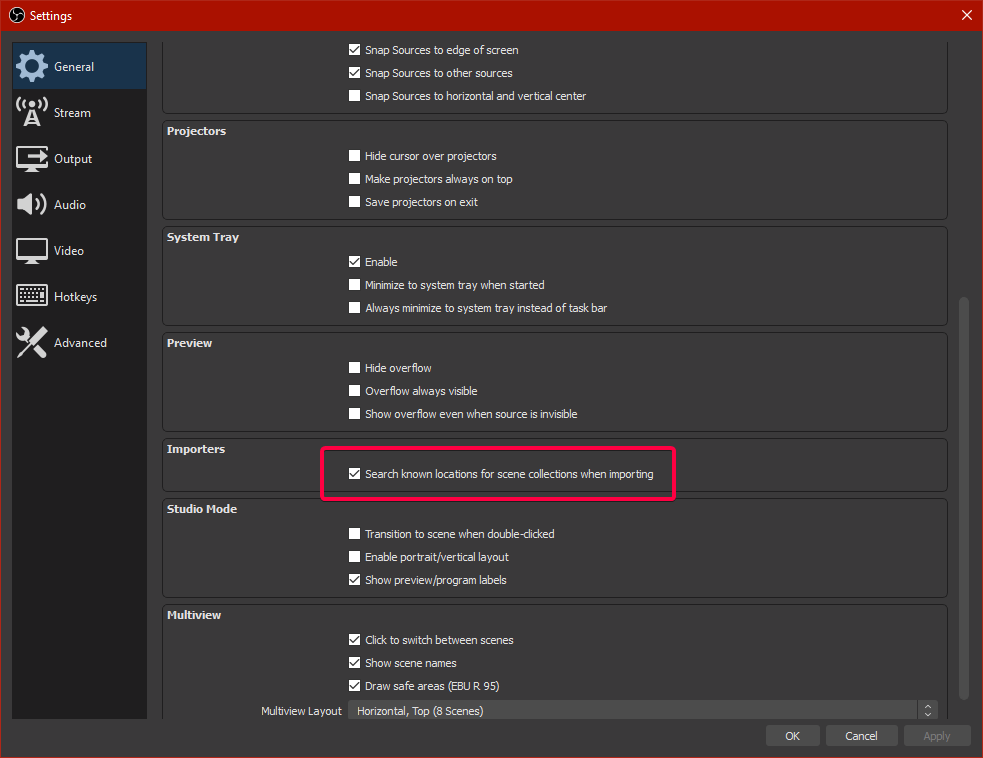
ionic kelp
@lament blade Do this then import it with OBS.Live https://twitter.com/tehbasshunter/status/1247188444310274048


 lament blade
thanks
ionic kelp
@lament blade Bot's not showing in your chat. Mind hitting the button on the dashboard again?
lament blade
Solved it already but thx
 torpid garnet
Trying to determine how to keep my animated webm files from flickering. I have tried setting it as a Asset/Rotation Slide Show and lowering transition time to .1 but when the 35sec animation ends it disappears for a few seconds before the loop restarts. What is the correct way I should add an animated webm file so that is displayed as a continuous loop with not drops.
 stoic lodge
where do i find my widget link?
ionic kelp
There is no widget links. Only overlays.
And simply click preview from the overlay dashboard.
stoic lodge
well the alert boxs on my stream never seem to pop up
 midnight adder
Hi
 inner oar
how do u turn off the bot from talking in your stream
 elder sorrel
@inner oar Are you referring to timers or chat alerts when someone follows / etc?
 coral shell
Hi,
I used to be able to stream 1600x900 with 6000 bitrate easily with no stutters but nowadays I cant have constant bandwidth and drop a lot of frames. I basically drop tons of frames every stream.
I havent changed any settings at all but I keep having these issues everytime I go live. Did anyone else stumble upon this before?
 dense widget
i changed my id FlyingTunaOsu to FlyingTuna. can you reactivate streamelements bot?
round brambleBOT
@coral shell Dropped frames / disconnecting? Follow the troubleshooting steps at: https://obsproject.com/wiki/Dropped-Frames-and-General-Connection-Issues
 spice olive
Hi
lament blade
@quartz sapphire Al, are there more streamers with streamelements offline while broadcasting?
 warm pendant
Hi, I hope someone can help. We have a Problem with the StreamElements Bot in our stream. We've been using SE Bot for a while for several things but now the mods can't change the game and the sub count command doesn't work anymore. The rest, our other custom commands, the deafault commands as well as the Blacklists, work perfectly fine. We've already tried diconnecting and reconnecting the Twitch - StreamElements connection but that didn't help.
elder sorrel
@mossy bramble Working fine with no issue for me.
@warm pendant Are your mods set to Super Moderator in the Streamelements dashboard? Cause you have !setgame & !settitle under Super Moderator
warm pendant
@elder sorrel Yes they are. It worked perfectly fine before.
warm pendant
I'll try that, thanks!
 devout fable
Can anybody help me with this. followed a link to streamelements but only a white page loads with a help tab at the bottom. nothing else. help says do a hard refresh but nothing works.
ionic kelp
@devout fable What browser you using?
devout fable
edge
ionic kelp
IE Edge or Chromium Edge?
devout fable
Microsoft edge
wary halo
try chrome
ionic kelp
Yeah.
round brambleBOT
Our Dashboard and Overlay editor are Chromium Optimized. We strongly recommend using Chrome. Opera GX and the new Microsoft Edge Chromium might work closest to Chrome as its also Chromium built. FireFox also works, but some things might look a bit different or not work. We do not recommend using Internet Explorer with our Dashboard as it does not support functions.
If the website doesn’t work on chrome, be sure none of your plugins are blocking our website or clear your cookies. You can try if the website works in a incognito tab.
devout fable
Okay, thanks
 mossy bramble
@ionic kelp Thanks for the help 🙂
ionic kelp

lament blade
@ionic kelp are there more streamers with streamelements offline while broadcasting?
ionic kelp
Can't answer that as we're mainly used while streaming.
lament blade
@ionic kelp how can I get SE online again?
ionic kelp
!part
round brambleBOT
Go to the dashboard -> right side -> part channel -> join channel (https://streamelements.com/dashboard)
 lament blade
@ionic kelp I did the part channel, but left upper conner shows offline?
torpid garnet
@warm pendant did that work for you?
warm pendant
@torpid garnet I can't try it right now. But I'll get back to you once I did. 🙂
 quaint goblet
Anybody know how to change your paypal email?
wary halo
relogging probably won't fix a command not being able to be used by a mod
torpid garnet
@warm pendant I had that problem a while back and it fixed it. I was setting up all my socials and somehow caused my login to expire. Hope it helps.
warm pendant
@torpid garnet Okay Thanks. 🙂 I hope so too
ionic kelp
@quaint goblet https://streamelements.com/dashboard/tipping-settings then tipping settings tab and disconnect. Enter new/correct one.
quaint goblet
Awesome, thank you!
devout fable
Thanks, works fine on chrome 🙂
 wanton dawn
Hello, i need help:
hi, i have activated a chat command at streamelements, there is a link. how can i show the link as 1 word?! So that only twitter is there but the url is behind it, is that possible at twitch?
elder sorrel
Not possible. Twitch don't support that in chat.
wanton dawn
ah, ok, thanks
 grim oracle
Hi I've set up a timer on stream elements to post a discord link but it dosent pop how come ?
ionic kelp
@grim oracle Screenshot the timer and the settings
 patent shuttle
hi guys
i need help with my streamelements bot
why command watchtime doesnt count time its still at the same value as before
round brambleBOT
@patent shuttle 10 minutes of watchtime are given to those in chat when the loyalty points are handed out (every 10 minutes). Therefore, loyalty must be enabled for watchtime to work properly.
There is no direct link between watchtime and all-time points.
It can’t be calculated from the amount of all-time points a user has because subs may earn points at a faster rate and !bonus all command increases all-time points for users in chat at that time.
Giving points to a single user does NOT affect all-time, only when giving to all in chat.
grim oracle
ionic kelp
How active is your chat?
grim oracle
Uhmm its pretty good, however I think I failed if I am not mistaken this is for discord only ?
ionic kelp
I'm fairly certain you're probably not meeting the chat messages requirement as that's 100 messages within the last 5 minutes.
grim oracle
so if I put it on 0 it will pop on twitch chat every 10 min ?
ionic kelp
Should at least.
grim oracle
Alright thank you 🙂
 dry mountain
Hi, I only see a paypal options on the tips settings page?
ionic kelp
@dry mountain I assume this is for your account with same name?
patent shuttle
Can someone help me with my watchtime problem please
ionic kelp
@patent shuttle Did you read the bot response above?
patent shuttle
Yes I did but idk if its the same
 umbral orbit
how can i change the name of my chatbot? I stream through my mobile using the streamlabs but but use streamelements for my chat and stuff. Any tips?
patent shuttle
My viewers have still same time as yesterday after they used !watchtime
ionic kelp
And you have loyalty enabled?
patent shuttle
You mean in streamelements?
round brambleBOT
@umbral orbit Currently renaming the bot fully works with OBS.Live.
You can follow this video guide to set it up: https://discordapp.com/channels/141203863863558144/494513233416421386/561516184718278676
If you don't want to use OBS.Live and want to stick with Ground Control, please let us know your Twitch username.
ionic kelp
@patent shuttle Yes
ionic kelp
@dry mountain Looking at your dono page it appears you have CC/Safecard option as well.
patent shuttle
@ionic kelp thank you and will that time add up or no
patent shuttle
Ah okay thanks a lot! Could I PM you?
ionic kelp
If it involves something related to our services keep it here.
patent shuttle
Well its about prefix emote
 lean night
hi question for streamelements chat, not exactly sure how it works because I usually multi cast my stream (Facebook and Twitch), what data it gathers when someone chat on my stream?
ionic kelp
@lean night As we don't have bot support for FB you can find that info here https://stats.streamelements.com/c/tag_theartofgaming
@patent shuttle As you're only affiliate your emote prefix will be faceca. No way around that until you get partner or they change their affiliate "rules".
 sweet socket
Well its about prefix emote
@patent shuttle if you want to set your prefix, this is in the twitch settings
lean night
I guess my question is wrong, What chat will appear on my live stream if I multi cast on those platform? @ionic kelp
sweet socket
@ionic kelp you can change it as affiliate
ionic kelp

jade remnant
@lean night whatever chat widget you use on your overlay
patent shuttle
Ah I rather take facect than faceca
sweet socket
patent shuttle
I was doing that but couldnt find options in my twitch to change it
ionic kelp
You can't.
ionic kelp
That's the only reason you can.
sweet socket
youre 100% right sudo
patent shuttle
So I need to stick to my faceca2 LMAO
ionic kelp
No.
lean night
@jade remnant I only see 1 chat widget on my overlay editor
ionic kelp
There's nobody with the faceca prefix so you'll be stuck with that.
jade remnant
@lean night because you only have the chat of the service you are logged in as, if you are logged in as your twitch account then you will only have that chat.
if you want to have both chats then you need 2 separate overlays
ionic kelp
Your username has to be 6 letters and unique enough to get it for affiliate. Otherwise it'll be 6 letters and 1 or 2 numbers.
patent shuttle
So why I have this then
ionic kelp
🤔 Someone must have the prefix already.
patent shuttle
Somebody has faceca already
lean night
@jade remnant so if I multi cast (twitch and facebook) using single overlay, I cant see both chats in there? Is there a way to unified the chats I'm receiving to those two platforms (twitch and facebook)?
patent shuttle
If I follow twitch guide to change it I cant as you can see
jade remnant
not with se, you will need something like restream and do a funky worky around for it
dry mountain
@ionic kelp Yea thats my for my Twitch account Kratt (Dutch) recently I made a English channel its called ENKratt
ionic kelp
Ah. 1 second.
dry mountain
Thx = )
ionic kelp
Yeah. Unfortunately you don't meet the requirements quite yet.
round brambleBOT
SE.PAY is available for streamers who are atleast 18 years old, with bank account under their name in one of the following countries and have at least 101 Follower (Twitch) / 101 Subscribers (Youtube):
Austria, Belgium, Czech Republic, Denmark, Finland, France, Germany, Ireland , Italy, Netherlands, Poland, Portugal, Slovakia, Spain, Sweden, Switzerland, United Kingdom, United States.
If you meet these criteria and don’t see SE.Pay, let us know.
For information on SE.Pay payment methods, their fees, and settlement times see https://streamelements.com/dashboard/tipping/fees.
dry mountain
Aah alright! Thanks for the information = )
 raw hearth
i need someone who is good whith twitch
ionic kelp
Why not use the link for your Dutch account in your overlay along with the link instead? It's already enabled there.
raw hearth
i need someone who is good whith twitch
dry mountain
Aah thats a good one @ionic kelp but the thing is the allerts and followers etc
Ill take a look at it = ) Thanks for your help
jade remnant
please just state your issue
raw hearth
@jade remnant its very hard and long to type
ionic kelp
@dry mountain Simply create an overlay with english alerts on the account and use it for that one.
lean night
@jade remnant so I have to use only the account on which I want the chat to show on my live stream?
jade remnant
then type it
raw hearth
k then
raw hearth
basicly i need help with setting up a cue on twitch and i find it tricky to do myself so can one of you helpme also i need someone to also help with sound alerts
jade remnant
@lean night if you want to only use se, then yes, however as i said it can be achieved with restream chat download
 dire prism
I've been streaming w the same settings for about a month and now this is happening (https://i.imgur.com/z8qhWgO.png). I've checked my internet connection, cpu usage, game, everything and It keeps happening for about 3-5 days.

Do you guys have any idea what it might be?
round brambleBOT
@dire prism Dropped frames / disconnecting? Follow the troubleshooting steps at: https://obsproject.com/wiki/Dropped-Frames-and-General-Connection-Issues
 dim jetty
I think it's because of your internet connection
jade remnant
frame drops is purely connection related
dim jetty
Look at the connection it's red it needs to be green
 lean night
@jade remnant last question, If that logic also applies to alerts? Like recent follow, if I'm using my facebook overlay, the alert will come from facebook? COrrect?
jade remnant
that is your speed, not connection
@lean night if you want alerts from both platforms then you will need overlays from each platform with alert box
raw hearth
tadpole can u help or what
jade remnant
you havent actually said your issue. what are you trying to do, what isnt working, do you get any errors?
please, state your issue
 indigo torrent
Can I please have confirmation that hitting "Reset" on current loyalty leaderboard will wipe away points but watchtime will be kept.
scared
raw hearth
@jade remnant sorry i have a question can i make a que on streamelements without obs
jade remnant
what do you mean que?
raw hearth
queue like queing for a sandwhich
jade remnant
lean night
my activity feed on OBS, is it always twitch or can I change this to facebook?
round brambleBOT
@lean night Streamelements on top of OBS -> Logout -> login
 mighty gull
Hii, does anyone know how to fix watchtime command? it doesnt work for me
round brambleBOT
@mighty gull 10 minutes of watchtime are given to those in chat when the loyalty points are handed out (every 10 minutes). Therefore, loyalty must be enabled for watchtime to work properly.
There is no direct link between watchtime and all-time points.
It can’t be calculated from the amount of all-time points a user has because subs may earn points at a faster rate and !bonus all command increases all-time points for users in chat at that time.
Giving points to a single user does NOT affect all-time, only when giving to all in chat.
 calm hearth
Hi my alerts are not working on my stream but on your website they are working and also i can hear the sound of a follow but it wont appear on my stream
round brambleBOT
@calm hearth The default resolution for StreamElements overlays (theme and custom) is 1920x1080. Please add them in OBS at their full resolution and use CTRL+F to fit to screen if necessary. You can then downscale your stream in OBS settings > Video if you'd like https://i.imgur.com/6bWXxjR.png
 calm hearth
Still wont work Mr Support AI 😦
round brambleBOT
@calm hearth OBS -> settings -> advanced -> scroll down -> enable/disable hardware accel.
https://i.imgur.com/ggMe9ZE.png



 raw hearth
@jade remnant ???
calm hearth
Thank you Mr Bot u helped me ❤️
lament blade
i cant set settings on obs
i dont know how to start but i really want to start streaming
normal mango
I've got a giveaway running right now on my StreamElements and my viewers want to see how many tickets they have purchased, is there a command for this?
round brambleBOT
@wooden walrus Consoles do not have native support for overlays. You would need a capture card and a PC with OBS in order to have Overlays over your console gameplay.
We have an blog post about how to setup console streaming with our essential tools: https://blog.streamelements.com/how-to-stream-on-console-7b620b1c46c3
 wooden walrus
oh alright thank you but I saw that the stream elements bot joined my channel and is in the live does he do commands automatically or do i have to set them up?
wary halo
why are you even asking here? this is the Twitch helpdesk channel 😛
lament blade
Hi
wary halo

wooden walrus
oh is it @wary halo sorry man i didnt realise
raw hearth
i have a question can i make a que on streamelements without obs
wary halo
there is a queue widget from MrBoost in #widget-share
normal mango
@wary halo Are you or anyone else able to help me?
raw hearth
@wary halo wdym
wary halo
@wary halo wdym
@raw hearth https://discordapp.com/channels/141203863863558144/457957557470887947/652108550293815296