#helpdesk-twitch
1 messages · Page 657 of 1
 strong kernel
 half skiff
Hello everyone, is there perhaps anyone who can help me add media request to my stream? OBS keeps telling me there are no active widgets detected for media requests. How can I fix it?
 worthy kraken
@strong kernel Well that was easy as pie, thank you kindly!
strong kernel
@half skiff https://www.youtube.com/watch?v=17eUkoZ6eIs

StreamElements Media request enables playing songs and videos in your stream. It's an upgrade of StreamElements Song request and Media share features.
Join our discord for live support: discord.gg/SE
Ground Control: https://strms.net/groundcontrolyt
Channel Management ...
half skiff
@strong kernel I have watched that video like ten times hahaha I think I might have skipped the part where you add it to the overlay. Is there a way to get back to it or add it again?
strong kernel
You can edit any of your overlays at any time.
half skiff
but it is not there
strong kernel
If you don't have any overlays yet, then you need to create one.
 proper comet
Any idea why the TTS isn't working on my stream when I believe it is set up correctly in the overlay.
strong kernel
TTS must be enabled for each variation, not just in the main alert.
proper comet
It is I used that one just as an example to shown it is enabled. (No it wasn't I am an ape. Thank you.)
 floral widget
Hello! For giveaways, can there be a command that viewers can type in to see how many tickets they have entered? Thanks!
floral widget
ok thanks. is there any possibility of it being added in the future?
 round brambleBOT
@floral widget Check out the StreamElements ideas board: https://strms.net/ideas. You'll be able to add ideas, upvote ideas you agree with, and track their progress with email notifications. Adding and upvoting ideas also helps the staff know which ideas should be prioritized so please take some time to upvote.
floral widget
fantastic! TYSM!
half skiff
@strong kernel sorry to bother you again, I got it to show the video of what is playing but I have no sound in stream
strong kernel
You need to be capturing the correct audio device. Check Settings>Audio.
half skiff
capture desktop audio?
strong kernel
Yes.
 hollow cedar
Can you disable gambling with the channel currency built into SE
strong kernel
Disable the module in the Modules section of your account.
hollow cedar
OK, so that will disable gamble, duel... Etc
Roulette is another one, or an alternative
I want to reset my currency, and allow people to buy tickets for a giveaway by saving up during that stream, but I don't want them gambling at all. I may do a raffle or two though
So tune in to earn nuggets, take part in raffles, spend nuggets to buy tickets, and winner pulled using giveaway module at the end of stream.
strong kernel
Roulette is the actual module, !gamble is an alias for !roulette.
hollow cedar
OK ty dude
 swift swan
Scene keeps breaking from SE
 abstract hemlock
@swift swan wdym?
abstract hemlock
@swift swan the time to load depends on the widgets /assets in the overlays.
swift swan
Like over 20 seconds?
It's still blank
Still
Dang streaming with new overlay and this happens >.<
round brambleBOT
@swift swan Right click on the BrowserSource > Properties > Scroll down a bit > Refresh Cache of current page
abstract hemlock
Try this ⤴️
 edgy sable
Is there a way to copy what I have in as follower alerts to the rest of the alerts?
 ionic kelp
@edgy sable click the layer from the list and there should be 2 squares on top of another from the top of that.
edgy sable
That duplicates the whole alert box though, I just want to copy the layout and settings and text from follower alerts to subscriber, host, tip, etc
ionic kelp
Ah. I'm not at my PC to double check for anything but I don't think it's possible. I'll ask around though.
 zealous gyro
Hi! I'm trying to use the Orbitron font for my Alert Box, it's playing on the desktop preview, but not in the OBS scene, Just wondering if I'm doing something wrong?
ionic kelp
You got the font installed on your PC?
@edgy sable From what I'm gathering you gotta manually copy the settings.
zealous gyro
Ahh, I'll give that a go dude.
edgy sable
Dang
ionic kelp
Any custom or weird fonts you use in the overlay have to be installed locally to work. Only exception is mobile as I've got no clue how that may work.
zealous gyro
@ionic kelp Yeah that's fixed it! Ty for the help mate!
 haughty panther
how do i make a emote command like if i do !boom it responds with emotes from my channel
abstract hemlock
@haughty panther The bot will need to be subscriber on your channel if you want to use channels emotes, if you want to use global emotes just type in the response the name of the emote
haughty panther
ahh i see ok thanks
 stray pilot
Hello, when people in chat try to redeem a sound effect the boy shows up "Internal server error". Is there a solution?
abstract hemlock
@stray pilot are you now live?
stray pilot
not now, i tried 5 mins ago. If u wish i can go live now
abstract hemlock
could you provide some screenshot of this please?
 proud junco
How do you change what to name your stream I forgot
swift swan
Can someone come see this?
abstract hemlock
@proud junco Your stream title?
 stiff elm
i get :"an error occurred, please try again later." when trying to send the !volume command
abstract hemlock
@swift swan have you try to delete the browser source and add it again?
 shy seal
trying to delete my streamelements account and keeps saying invalid username. i figured its my twitch name is it not?
abstract hemlock
@stiff elm The volume command sometimes doesn't work. That's the Youtube and their API, which over time proved to be limited.
@swift swan just delete the browser source and add the browser source again
round brambleBOT
@swift swan To add your overlays to OBS, add a new browser source in your scene. Paste your overlay URL in the browser source properties, set the dimensions to 1920x1080 (unless you changed them on the website), and ☑ “Shutdown source when not visible” https://youtu.be/KDvLynUqXI4
 warped garnet
is there some reason alerts/widgets force everyone's usernames to lowercase? the SE activity feed and bot show them with the correct casing as they appear on twitch, but alerts and widgets don't.
 hearty burrow
anyone having trouble accessing the streamelements dashboard? seems like its stuck on the homepage
 faint gorge
Hello. Anyone familiar with Last event Rotator widget by CO6 Studios?
abstract hemlock
@hearty burrow Visit https://streamelements.com/logout and then log in again

StreamElements
The Ultimate All in One Platform for Streamers
hearty burrow
@abstract hemlock thank u that worked!
strong kernel
@faint gorge Community created widgets are provided as is and it's up to you to set up and maintain them.
faint gorge
ah ok thank you
 rustic sand
hi how do I get the !gamble command to work in my chat? thank,s
 primal ocean
Hey
 jovial void
Hey any way to make a comand on streamelements that counts upward from the first time a user uses the command but it only counts up for them? for example if user1 did !count it would say 1 and then if user2 did !count it would say 1
abstract hemlock
@rustic sand enable the roulette module
@jovial void i don't never try anything like that, i don't know if you can use variable as a name on the counter
 untold estuary
 lament blade
I dont know why but when I try to edit the text it does not change, what can I do
Can someone please tell me what do I have to type under "Username" when I try to close my account, since typing my twitch account doesn't work?
try with ur mail
i dont know
ionic kelp
@lament blade click settings below
lament blade
You need to enter both a username, email and token
Yeah Sudo just noticed, thanks dude!
swift swan
@abstract hemlock Still now it's blank
Without the other transition @abstract hemlock
How do I reset obs cache and se cache and all? @abstract hemlock
round brambleBOT
@swift swan Right click on the BrowserSource > Properties > Scroll down a bit > Refresh Cache of current page
abstract hemlock
But it was working fine ...
swift swan
60-75
abstract hemlock
@swift swan so eveything's ok? 🙂
 fading sedge
hey all, having a weird chatbot issue. it just randomly says "response message" at times. any ideas?
abstract hemlock
@fading sedge check your timers 😉
 light zenith
Hey! For a while now even after checking alerts and making sure they are all ticked and working when emulated but while streaming Hosting doesn't show up on streams or in my activity feed which is on the side of my obslive. Is there a way to fix it show it shows up on stream and in activity feed?
round brambleBOT
@light zenith Due to changes to Twitch API, we have filtered out hosts and will only show these ones on your activity feed:
- All hosts coming from an online channel with at least 1+ viewer
- Auto host events with at least 1 viewer - only from a channel that just went offline
Note: If you see "X channel has hosted you" with no viewers on the back, that is considered an offline host or a host with 0 viewers, we do not show these.
Note for Mixer streamers: The above 2 filters currently apply for Mixer and we are aware its actually not how Mixer hosts work. We do plan on changing it, but no ETA on when.
light zenith
okay thanks 🙂
 young linden
are command keywords broken? when I add a keyword and save it disappears after I refresh the page. keywords for custom commands work but not for default commands.
abstract hemlock
@young linden I saw something about this a while ago, let me find it for you
 warped radish
Hey, I was wondering how to have a !coins for my stream
all my friends have it because they use stream labs
but im not sure if theres a way for stream elements?
warped radish
ah nice, ill look into that
does that also connect to other things like !top10 and !gamble?
lament blade
yes
warped radish
nice ty
 cloud ember
hello i am using the point commands and !givepoints isnt working anyone know a fix/
lament blade
enable it
if your trying to give other points to users
go to leaderboards
and add
the !givepoints command only gives points to other users so like (MonkeyMan) He has 200 points he types !givepoints catman32 100
therefore monkey man has 100 points and catman32 has 100
[transfers points between users current balence]
 quaint surge
Hey Guys, I want to be able to add a command so that when my chat does that command, it plays a specific video. How would I go about setting this up? I am struggling to figure this out.
warped radish
Hey, i watched a few videos and filled in the loyalty stuff but i dont see any way to check how many point i have and a leaderboard command?
 steep drift
Hey I am trying to see who subscribed in my channel when they its not popping up in my stream
round brambleBOT
@steep drift Twitch prime (new and resub) and paid subscriptions (resub only) must be shared in chat manually by the person subscribing in order for the subscription information to be sent to StreamElements. For twitch prime, the user needs to have sharing enabled on https://www.twitch.tv/settings/prime. For paid subs, if the share box doesn't show up immediately it will when they refresh the page. https://i.imgur.com/VNJN0Uv.gif https://i.imgur.com/2297EA7.png


 zenith widget
@warped radish right bellow the loyalty settings:
or !points command or !leaderboard
@quaint surge Try this:
Steps to make a command trigger sound on stream:
- Go to Stream Store page here: https://streamelements.com/dashboard/store/items
- Add an item that has these settings on it:
- Stream Perk
- Loyalty settings to your desire
- (Next step) Add contents (image and/or sound you want to play)
- "Redeeming this item shows an alert
- Redemable via chat
- Skip Requirements
- Get the item name/command from the 2nd creation page
- Go to commands page here: https://streamelements.com/dashboard/bot/commands/custom
- Add command with desired name and have response for command as:
${redeem item_name_here} - Go to your overlays and edit the overlay you use.
- Click on "widgets" and add "Store redemptions" widget. Click save and you should be golden.
- Test your own command in chat and have OBS or editor open to hear sound
warped radish
is there a way to change the !points command to what i call my coin?
warped radish
ah cool
i wanted a !top5 command that has the top 5 people in the chat but im guessing that doesnt work on this?
 desert gulch
hello. I'm still having an issue where my subscribers get the "this item is for subscribers" prompt when trying to redeem a sound effect. they're signed into streamelements and the sounds effects work for some people sometimes.
zenith widget
We are looking into the issue, but no ETA on a fix
 graceful sapphire
I need help with Ground Control, can anyone help?
zenith widget
What is the issue you are facing?
 sly tree
So when anyone (Including me) types in commands the streamelements bot doesn't respond saying anything, It isnt muted, banned or anything it just wont respond but it was working fine two days ago.
graceful sapphire
I am not able to log out, nor am I unable to complete setup or view chat stats or anything
sly tree
on?
zenith widget
@warped radish there isn't a variable to make a custom command of that.
@sly tree Since you are on #helpdesk-twitch I assume twitch?
zenith widget

your discord profile is outdated
There should be fine now
i assume you renamed recently
and needed to part and join the bot
sly tree
Oh okay I didnt realize i would have to do that
I renamed a few days ago which is why my discord profile was wrong
Thank you for helping me
graceful sapphire
okay so I logged out and logged back in, but I still cant see stats or complete setup?
the complete setup bar pops up for a split second and then disappears
quaint surge
Hey @zenith widget thanks for your response! Unfortunately, I am not getting that to work. I have the command added and the item added to my store. Yet still, nothing 😦
@zenith widget I do have the browser in OBS and turned on (ofc), I can get the emulate alert to show up but not the video when I do my command
 shrewd plover
How would I go about logging out of ground control from my mixer account so I can re login with my twitch account on my PC?
zenith widget
@graceful sapphire What stats are you referring to?
@shrewd plover Either check the pinned message or a long discord link above that i posted
quaint surge
@zenith widget nevermind, I got it 🙂
quaint surge
Thank you friend 🙂
shrewd plover
@zenith widget thank you!
graceful sapphire
@zenith widget I just get no options. I want to be able to change the name of the bot but I dont get any setting or anything
quaint surge
@zenith widget is there a way to edit when StreamElements responds, I would prefer it not to say anything in chat. I just want the video to play
 zenith lark
@graceful sapphire are you on OBS.Live
graceful sapphire
yes
quaint surge
@zenith widget it says "@quaint surge, you successfully redeemed "insert name here" for 0 points." << Can I turn this off somehow?
 wary halo
Nope
graceful sapphire
@zenith lark ground control or if I can change the bot name through obs.live that would be good too
zenith widget
@quaint surge Thats the side effect of using the stream store
@graceful sapphire So you are looking for the custom bot name?
graceful sapphire
yes
zenith widget
username please
quaint surge
@zenith widget ahhh, but this is the only way to get my video to play with a chat command, correct? If that is the price I have to pay, so be it
zenith widget
@quaint surge There should be a widget in #widget-share that allows to trigger a video via command
graceful sapphire
twitch username is Sazarulez, the account I want to use for the bot is Sazarulez_bot
zenith widget
restart ground control now
lament blade
can you do mine too Jannasharp :? @zenith widget
zenith lark
@graceful sapphire the way I do it through obs live is the 3 lines on the top left -> settings -> custom bot name
zenith widget
@lament blade done
lament blade
Thanks
Works flawlessly, ty.
May i also request you to enable this feature for 2 other streamers that fought with it for a while with me?
- agozaur
- janeczka
quaint surge
@zenith widget Video on command by Benno ❤️ thank you so much for your help!!!
graceful sapphire
@zenith lark I dont have 3 lines in the top left?
zenith widget
@lament blade done
lament blade
Thanks
graceful sapphire
@zenith widget I got that working, is there a way to now change the colour of the bot?
zenith widget
Login to the custom bot name account and change the color via the cogwheel
graceful sapphire
okay thanks
 fierce sun
Is there a command viewers can do that will return how long they have been subbed?
like !followage
zenith widget
When they resub or in their subscription list they can check how long they've been subbed to someone
fierce sun
Yeh its just that they have been wanting to check with a command in chat
ionic kelp
1 second. Do note prime subs won't be accurate with my idea.
 glossy ivy
@zenith widget Can you help me out also. Wanting to change my bot name like Saza ( Twitch username Furtive_TV Bot name Furtive_BOT)
 lucid spire
can some one help me im trying to use obs to go live on twitch and i go live but on my twitch its not live
lucid spire
there is not steamkey to put in
glossy ivy
Thanks Keizar
fierce sun
@lucid spire Thanks i'll try it out.
lucid spire
wym'
fierce sun
The link they provided before
lucid spire
what do i do with it
glossy ivy
uhmmmm..... https://i.imgur.com/PQ7oE2o.png
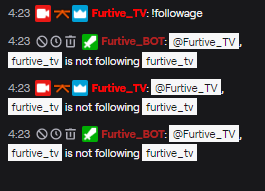
Whys it doing that?
The post posts 2 times and my account posts it once...
zenith widget
@lucid spire OBS -> Settings -> Stream -> Disconnect -> connect
 boreal garnet
Anyone is there a clean hyperlink command for the chat bot?
glossy ivy
Fixed it
zenith widget
@glossy ivy you are trying to check your self if you are following your own channel. Thats normal when trying to check your own username
glossy ivy
just had to close and reopen GC
zenith widget
@boreal garnet wdym?
lucid spire
@zenith widget thanks it work like that
boreal garnet
like id i want to link a text block but not include the hyperlink based on a command
zenith widget
I'm still not sure what you want to achieve here @boreal garnet
lucid spire
when im live when i talk it keep saying it over and over
how can i fix that
zenith widget
Saying what?
graceful sapphire
@zenith widget I think @boreal garnet wants to be able to send a url without it hyperlinking
glossy ivy
Is it your voice, Or a bot?
 sour oar
Sorry if this isn't the place but I saw a video that we had to ask se support to enable se.pay on our accounts if it's not listed?
round brambleBOT
@sour oar SE.PAY is available for streamers who are atleast 18 years old, with bank account under their name in one of the following countries and have at least 101 Follower (Twitch) / 101 Subscribers (Youtube):
Austria, Belgium, Czech Republic, Denmark, Finland, France, Germany, Ireland , Italy, Netherlands, Poland, Portugal, Slovakia, Spain, Sweden, Switzerland, United Kingdom, United States.
If you meet these criteria and don’t see SE.Pay, let us know.
For information on SE.Pay payment methods, their fees, and settlement times see https://streamelements.com/dashboard/tipping/fees.
 unreal mesa
i need help
 viscid pebbleBOT
Hi @unreal mesa, Please ask your question(s) or describe the problem you're looking to solve so staff or a support volunteer can assist you as soon as they are available.
 prisma relic
try to ask your question in #helpdesk-merch or send them an email
lucid spire
how can i go live with full screen
round brambleBOT
@lucid spire New to Stream Elements?
Check out our YouTube channel https://www.youtube.com/c/streamelements/videos
with tutorial videos from setting up the basics, to in depth details on how to use our product.
New to OBS? Here is a 4 step quickstart guide
https://obsproject.com/wiki/OBS-Studio-Quickstart
Want to learn even more? Here is an in-depth overview
https://obsproject.com/wiki/OBS-Studio-Overview
lucid spire
ty
 drifting plover
Hey there! I am trying to use the Alpha Rotating Feed Widget and it Isnt displaying my donations or total sub count. Is there anyway to fix this or is there anything I need to do? Thanks!
zenith widget
I would suggest to ask in the Alpha discord as its a custom widget and most likely it needs reconfiguring
 unborn rampart
I have a question about Kappagen: I'm using StreamElements overlays, and I want to enable Subscriber Only use of on-screen chat emotes (via Kappagen). This appears to work fine for Tier 1 subs, but it does not work with my Tier 3. If I uncheck "Subscribers only", my Tier 3 sub's emotes suddenly show up. Does Kappagen not recognize T2-T3 subs? Or am I missing something? Help would be much appreciated. Thanks for your time!
zenith widget
It might be possible and related to a bug we are investigating related to the founder's badges
fierce sun
Does anyone know of a way to make a command that would clip a part of the stream. (eg !clip) I know there is a thing on streamlabs.
so mods could just do that and then i can review it later.
zenith widget
You can use part of this widget: https://discordapp.com/channels/141203863863558144/457957557470887947/555734806034382888
 visual quartz
I just got the apex legends overlay set up but the video loop for the top bar isn't working in my streamlabs obs... seems like it just pauses and doesnt go through with the loop
zenith widget
I would recommend using OBS Studio with our overlays
round brambleBOT
We're not able to troubleshoot issues with using our overlays in StreamLabs OBS (SLOBS) as we don't have the tools to support their software. We recommend using OBS Studio or OBS Studio with our plugin OBS.Live.
zenith widget
as we can't guarantee our overlays working on 100% with SLOBS
visual quartz
oh geez okay.. do you guys at least know how to get the alerts that come with the overlay to replace my old alerts? i'm sure whatever it is in obs is the same as slobs
zenith widget
Its sorta the same between SLOBS and OBS Studio, but SLOBS is a fork and basically software completely supported by SL - we know they've made changes to SLOBS and how it handles browser sources differently then the OBS Studio guys
visual quartz
Do you know if any extensions and stuff i have in streamlabs will carry over to obs? or does that stuff only work in slobs
zenith widget
afaik thats SLOBS stuff
mostly
and depending which ones - i'm not familiar with any of them unfortunately
visual quartz
okay gotcha.. might try setting up some obs then.... last question, how do the subcriber count, latest follower, etc., update? is there a way I can force an update or something? It doesn't show my latest follower or top dono or top cheerer
 tacit oak
prisma relic
tacit oak
prisma relic
did you put the browser source overlay above the window capture in the list?
 weak delta
@visual quartz There are widgets for all of those. What is it showing for you right now? The same for you @tacit oak It is under stream tools. Add it to your overlay and size as needed then as said above, make sure it is above the window capture.
visual quartz
@weak delta right now it's only showing latest follower
weak delta
Do you have the widgets added for sub count? If so, what is it showing right now?
 untold crest
It should populate data automatically for all of those widgets.
untold crest
Have you been subbed since you joined StreamElements?
visual quartz
no
untold crest
Recents data is obtained on the fly. Import takes tips from SL and they are displayed properly since start
visual quartz
So i should just wait til my next follower or whatever to see if it works?
untold crest
Yes. Once SE gets data it should be displayed
visual quartz
Okay.. I asked this a bit earlier but didn't get a direct answer... is there a way to get the alerts that come with the overlay in SLOBS?
 sterile radish
Hey guys is there a way to turn off the bot's chat response to redeeming sound commands?
zenith widget
@sterile radish no - thats a default response
round brambleBOT
@visual quartz To add your overlays to OBS, add a new browser source in your scene. Paste your overlay URL in the browser source properties, set the dimensions to 1920x1080 (unless you changed them on the website), and ☑ “Shutdown source when not visible” https://youtu.be/KDvLynUqXI4
sterile radish
Thanks for the answer!
untold crest
@visual quartz They should work in any software if you have an alertbox running.
 topaz walrus
Hello 😉 How to add last sub avatar to overlay? I had last sub name but i want to add his avatar.
visual quartz
@untold crest I can't get it to work... am i supposed to add like custom code or something or is it supposed to work with the browser source?
and i have an alert box running but it's using my widgets from streamlabs.. i tried adding a new one as well but that didn't work either
untold crest
It should work out of the box with alertbox (just check emulation in your overlay editor)
visual quartz
yeah it works with the emulation but not when i test widgets in slobs
untold crest
Ohhh. That is the issue - test widgets in slobs tests SL widgets only.
You can go to overlay editor and check "Show Live on OBS" and then emulate an alert
To check if it is displayed in OBS/SLOBS
@topaz walrus It is possible to display avatar of latest user, but it needs bit coding (to grab avatar from external resource).
topaz walrus
@untold crest oh okay, that's what i think
visual quartz
OHH okay cool yeah that worked... so if i remove my alert box to get rid of my SL widgets, will it not work with the overlay anymore? I don't want to remove it and then have no alerts from either
untold crest
@topaz walrus If you are any into coding, you can use this widget as a base: https://github.com/StreamElements/widgets/tree/master/CustomLabels then send a request to https://decapi.me/twitch/avatar/:user. In response you will get image URL you need to use to create/update img tag

GitHub
Contribute to StreamElements/widgets development by creating an account on GitHub.
untold crest
If you need any further assistance, you may jump to #dev-chat where we have our cave for stuff like that 😉
@visual quartz if emulation works alerts should be working too. You can hide and mute current browser source instead of removing it just as failback.
But I see no reason for it not to work
visual quartz
Okay good idea... I also asked this earlier but you seem more experienced with slobs so I'll ask again.. is there a way that I can get the animated overlay to work in slobs? the loop isn't running in slobs and I was told it can only be guaranteed to work in obs
also just noticed the loop works fine while an alert is going off... other than that it's static
round brambleBOT
@visual quartz We're not able to troubleshoot issues with using our overlays in StreamLabs OBS (SLOBS) as we don't have the tools to support their software. We recommend using OBS Studio or OBS Studio with our plugin OBS.Live.
untold crest
@visual quartz whole overlays (like those from our themes gallery) use video files, alertboxes in most of cases are using gifs (if they are looping).
boreal garnet
SO i would like to hyperlink a textblock without displaying the URL in a chat message command from the bot
untold crest
I don't know what could be a reason of non looping videos when using SLOBS as it should be working everywhere.
visual quartz
@untold crest yeah that's weird. tried it in obs and it worked fine but i just hate obs so I'd prefer to use slobs.. but if its something that may be fixed or worked on in the future, im fine using the static overlays instead.... thanks for all the help!! you guys are awesome
untold crest
@boreal garnet it is not possible in Twitch to have a text "CLICK HERE" that is a link
boreal garnet
ok thanks
 severe torrent
Hey all 👋
I've run into an issue where my video and some image overlays have stopped showing up on SE suddenly after no changes to them. This persists even after removing and re-adding the overlays and seems to only be select ones (Though these select ones are pretty significant to the overall layout). Any chance of some support on this?
prisma relic
Are the overlays working in on the StreamElements website (https://streamelements.com/dashboard/overlays)
severe torrent
Nope, unfortunately not. Yet they were working just minutes beforehand.
 open forge
anyone else having issues with the dashboard? it's just loading for me
prisma relic
are you using Chrome @open forge ?
open forge
yes
severe torrent
@open forge Try wiping your browser cache and restarting Chrome. Happened to me before and that fixed it.
prisma relic
try to logout (https://streamelements.com/logout) then log-in again.
open forge
that worked pjonp 🙂 thanks
prisma relic
so if you emulate and event @severe torrent it's not showing for you?
severe torrent
@prisma relic Alerts work fine. It's more-so the video overlays, as attached. There should be a video displaying a HUD-like feature, but there isn't. The layer isn't Hidden and I've re-created it a good few times, but without any success.
prisma relic
if you toggle scale to fit does it resize?
severe torrent
Nope, no change.
The weirdest part is that it was working fine one minute, I removed the Event List (Because I have it on another Overlay and wanted to layer it on OBS), then when I saved and went back in the next time, it was no longer working. 0 changes made to any of the video/image overlays that now don't come up. It's very, very odd.
Short of scrapping the entire overlay and re-creating it, I feel like I've done everything.
prisma relic
ya. i'm not sure 🤔 .... did you remove that source and try to re-add it for the video?
severe torrent
Yep, still no dice.
prisma relic
i don't have a lot experience with overlays so i'm guessing you've tried most of what i'd suggest.... not sure what would cause that
and thanks for the screen shot. that looks exactly as i would have it set up
you did check the layer order, right?
severe torrent
No worries, thanks for your suggestions! Hopefully I can get this resolved, as I'd prefer not to have to recreate everything from scratch 😬
Yep, layers are exactly where they should be
prisma relic
i figured 👍 ... someone with more experience that has had or dealt with this before will know
zenith widget
Is that a predefined overlay that the assets went missing?
severe torrent
@zenith widget How do you mean predefined, sorry?
severe torrent
No, it's an external one. But even then, re-uploading the assets has no effect.
Interestingly enough, when I create a new overlay, add a new video layer, and select the newly-uploaded asset, it works as expected. Just seems to be on this overlay. Duplicating the overlay itself has the same issue.
severe torrent
Yeah, it's not one of the SE overlays - It's one that I've built myself using local assets, as well as assets offered from a 3rd-party theme (NerdOrDie).
zenith widget
I want to know which one so that I can rename it and make a report for the devs.
You will afterwards have to remake the overlay again from scratch
i guess most text based and alert widget you can duplicate over, but anything that can't load the asset will have to remade :/
severe torrent
Heck, alright.
Is that the name of the overlay on my Dashboard?
 crisp jackal
If you add a new video layer to this same overlay, does it work?
severe torrent
It's most of them 😅
The ones that aren't affected are Nova: Just Chatting, Nova: Alert, Badge Metric Widget and Nova: Widgets.
zenith widget
Oh exactly the dev i was gonna poke
crisp jackal
😦
zenith widget
@crisp jackal not the first time i see this reported where video/image asset widgets just dont show the video on the overlay, but its in the settings
severe torrent
@crisp jackal If it's an entirely different asset, yes.
zenith widget
you did it to your self 
 fallen prairie
Hi guys, I have a question, I am a moderator of a twitch channel and I don't want to be more... is there any way that I can remove my Moderator status?
severe torrent
@fallen prairie The owner of the Channel has to unmod you, so you'll have to get in touch with them.
severe torrent
@crisp jackal Yes, images as well. But again, only select ones.
zenith widget
this is a countdown timer in a video format - the other asset around it is also a video
fallen prairie
@severe torrent I was wondering to do it by myself... Ok I will ask him to unmod me... Lot of thanks
prisma relic
try https://dashboard.twitch.tv/u/pjonp/settings/channel/managed-channels ...replace your username where you see pjonp
 woven panther
HALP PLZ
prisma relic
... but that might be editors?
fallen prairie
@prisma relic when I go to this link it says that "Denied access... You don't have rights to see this page..."
thx btw
ionic kelp
Delete /u/pjonop
severe torrent
@zenith widget Oh, apologies, my mistake! I was looking in the Nova: In-Game layers with the bottom bar missing, but that's also a video.
prisma relic
https://dashboard.twitch.tv/settings/channel/managed-channels @fallen prairie ... make sure you are logged in (might be for editors only though looking at my options)
fallen prairie
@prisma relic ops sorry I didn't change the URL... now i used my id
zenith widget
yea thats a video @severe torrent
crisp jackal
It looks like autoplay somehow got turned off for those widgets. I'm not sure how...
severe torrent
Yep, my mistake 😅 @zenith widget
crisp jackal
Unless it somehow got saved while the tab was hidden or something weird like that.
severe torrent
Would having multiple tabs with different overlays on each with the same assets affect that?
Ie., Stream Starting, BRB and Stream Ending open at the same time, they all share the same missing assets
crisp jackal
It shouldn't. Also, are you sure that if you just add a new video widget and then assign it the same file it doesn't work?
Because I'm pretty sure the bug is the widget itself
severe torrent
I'll try there again now with the timer
prisma relic
@woven panther if you have a question please give as much info as possible and ask here if it is Twitch related
severe torrent
🤦♂️ That does work, yes. It didn't work when I tried previously because I'd accidentally hidden the layer @crisp jackal
fallen prairie
@prisma relic yes... it's only for editors... thx btw 🙂
severe torrent
Is there any way to turn the autoplay function back on for those old widgets, though?
crisp jackal
Yeah, that's what I thought. The widget's settings itself are screwy (I can see it in the network request)
I'm looking into it. It shouldn't ever be this way.
severe torrent
@crisp jackal Just a thought, with the multiple tabs open with the same assets on each overlay: Could making changes (Again, not to the widgets themselves, but on the separate overlays) and then saving all of them within a 5-second interval possibly have screwed with it?
crisp jackal
Nope.
The only thing I can think of to cause this is if you changed tabs while hte overlay was loading.
woven panther
so I am hecka new to streaming and twitch in general, I just switched over to stream elements, I am planning on doing a 24 hour stream so i wanted to add like a timer keeper on my screen but i have no idea where to even start with that
crisp jackal
So it prevents the initial autoplay because the browser doesn't want to allow it
And then it gets saved in that state
... Which is actually a bug caused by code that we've had to use for OBS (because you have to manually stop video playback and whatnot there instead of relying on the browser to handle it)
severe torrent
That could well be it. So to avoid this, don't switch tabs until the overlay is fully loaded?
crisp jackal
To avoid this, I'm going to fix the code
zenith widget
@woven panther Theres a countdown widget in the overlay editor
prisma relic
🤣 @severe torrent my next question was going to ask if the layer was hidden... but seems you found a bug for the staff to fix
severe torrent
Tryna find an emote for "Absolute Lad", but I guess that's not around yet, so  seemed appropriate.
zenith widget

 lone lichen
quick question: is there a specific help channel for the ground control app?
woven panther
How do I add widgets?
lone lichen
alright, get it. im on twitch, so i'll post it here 🙂
round brambleBOT
@woven panther New to Stream Elements?
Check out our YouTube channel https://www.youtube.com/c/streamelements/videos
with tutorial videos from setting up the basics, to in depth details on how to use our product.
New to OBS? Here is a 4 step quickstart guide
https://obsproject.com/wiki/OBS-Studio-Quickstart
Want to learn even more? Here is an in-depth overview
https://obsproject.com/wiki/OBS-Studio-Overview
lone lichen
so my problem is that the gound control app is not starting as it should. i get the icon in the taskbar, but no window will pop up and if i hover over the icon, it only shows me this (screenshot attached). i re-installed the app a few times now, but its always the same problem ..
lone lichen
do i have to restart or reinstall the app? 'cause i ran the command and nothing changed
lone lichen
still not working.
-deleted the file, restarted it
-reinstalled it
-turned it off, deleted the file, turned it back on
 cobalt flare
How do I add the Tipping Panel on Twitch its not giving me an option for it
prisma relic
lone lichen
nvm now its working. idk how and why, but i won't question it, i'll just take it 
crisp jackal
@severe torrent should be fixed now
 proud meadow
Hi guys
severe torrent
@crisp jackal Just checked there now, that's perfect, thanks so much! Stellar support from yourself and @zenith widget 
crisp jackal
zenith widget
I did not summon him here, he came on his own risk
 slender zephyr
Hi, can anyone share the syntax for commands like ${random.pick '...' } etc? If I hadn't seen another streamer using them I wouldn't have known they existed as I've never seen any info on them. Specfically for random.pick is there any way to get apostrophies turn up in the responses, e.g. to get " I'm here " as a response? And are there any other commands listed somewhere?
zenith widget
No - that will break the things the variable can pick from
In the commands page, there is a variables page
StreamElements
The Ultimate All in One Platform for Streamers
 shell stone
Hi. i just lunched obs live and found twitch chat white .. how to change it to dark mode and why did it change??
ionic kelp
@shell stone pinned in #helpdesk-selive
shell stone
perfect done ty
woven panther
For some reason I’m hearing myself in my headphones instead of just the game and music
lament blade
hello all..i would like to remove my twitch channel that i have for streamelements
im going to make a new channel and would like to use that one
can someone help me out?
prisma relic
someone with a Red name will need to help you with that @lament blade
 dark glen
hi all how do you alter the tip to be on £
prisma relic
https://streamelements.com/dashboard/tipping-settings -> currency ? (guessing)
dark glen
sorted found it just after i sent message lol
lucid spire
pls somebody help me plsssss
prisma relic
do you have scene in OBS set up for the fullscreen game capture?
lucid spire
i fix it thank good but thank for trying to help me
 hidden grove
Hey guys, I have recently changed my nickname on Twitch and I can't find how to get the bot to my new Twitch Link.
Can anyone help?
prisma relic
if you logout (https://streamelements.com/logout) then log back it will it work
any of the other account things needs to be managed by the staff (red names)
weak delta
@hidden grove What's your old and new name?
Log out, login, part and rejoin the bot to your channel. That should sync everything back up proper that you can do then I'll send something upwards to get your chat stats fixed.
hidden grove
@weak delta I am to blind to find the parting option for the bot in the streamelements settings
Do you know where I find it?
round brambleBOT
@hidden grove Go to the dashboard -> right side -> part channel -> join channel (https://streamelements.com/dashboard)
 hidden grove
Old twitch name gideondari new Twitch name only Gideon
ahhh one second
that worked perfectly thank you so much @weak delta
weak delta
No problem, I'll tag you when the chat stat is fixed and good to go.
 fair osprey
can somebody activate SE.pay on my account
ionic kelp
@fair osprey what's your username?
fair osprey
sswaino
ionic kelp
Unfortunately you are not eligible for it yet.
round brambleBOT
SE.PAY is available for streamers who are atleast 18 years old, with bank account under their name in one of the following countries and have at least 101 Follower (Twitch) / 101 Subscribers (Youtube):
Austria, Belgium, Czech Republic, Denmark, Finland, France, Germany, Ireland , Italy, Netherlands, Poland, Portugal, Slovakia, Spain, Sweden, Switzerland, United Kingdom, United States.
If you meet these criteria and don’t see SE.Pay, let us know.
For information on SE.Pay payment methods, their fees, and settlement times see https://streamelements.com/dashboard/tipping/fees.
fair osprey
ok thank you, should I ask again when I have 101 followers?
lament blade
My audio mixer is the same for all scenes and I really want to have different audio settings for all scenes, what to do?
lament blade
I had it yesterday, had to reinstall OBS and now it's gone
I mean there are scenes where you shouldn't hear my mic
fair osprey
@ionic kelp is that not possible for me or for Hakbal
ionic kelp
For them.
fair osprey
ok cheers
ionic kelp
You simply need the followers plus meet the other requirements.
fair osprey
Ok, I'm under 18 but my parents said they will make it for me, is that possible
ionic kelp
They'd have to fill out all their information for it but yes.
fair osprey
ok thank you
 fresh furnace
My stream had a problem. when I installed the chat bot, my stream froze
is it an update or?
 indigo mauve
Hey Team. I've recently been having issues with StreamElements Alerts (Follows, Subs etc) causing my game to drop frames badly when I'm streaming on Twitch. I use StreamElements for all of my overlays and alerts, and I stream and play on the same pc. Any ideas on how I can rectify this? Tia!!
 north pulsar
is anyone aware how can i make twitch panels be a 3 row instead of a 4 row?
 sweet socket
You can’t it’s how much you zoom in or out on your browser twitch that shows you 3 or 4 @north pulsar
north pulsar
the thing is others have 3 and only might be only me that i see 4?
 glass thicket
is there a countdown command?
north pulsar
@sweet socket found out why, is cause of the chat is gone... lul
prisma relic
use a counter command @glass thicket but give it a -- instead of ++
 nova crystal
setting up an overlay on obs via stream elements? my camera overlay is fine and matches with my display screen, but when I do other overlays (starting soon) they don't show up in the right size, I changed the transformation size, but only half of it shows up on the screen
nova crystal
nvm, I just resized it to match with the display capture
lament blade
Hi, can I change the bank account in the se.pay? 🙂 🙂
round brambleBOT
@lament blade Please contact us via email for support with SE.Pay. You can use our contact form here: https://streamelements.com/contact Thank you
lament blade
ok thanks 🙂
 dusty monolith
Can a store item and a custom command have the same string trigger?
edgy sable
Is there a way to get Stream Store redemptions to NOT show in chat?
That option seems to no longer exist as it shows in the FAQ
prisma relic
@vocal fable i don't think you can trigger both with !commands, it would require the keywords like you are using (... not sure how the SE bot is coded, but in general it only looks for the first !<command> so you can't chain them)
ionic kelp
@edgy sable ATM there isn't unfortunately.
fair osprey
how do I make my media request quieter as it is currently really loud?
edgy sable
Oof, okay thanks Sudo!
prisma relic
@fair osprey ignore this (it was for alert box not media request window)
untold crest
@fair osprey Use !volume -20 on chat
 vocal fable
Ok. I explained it badly. lets use this as an example. Nightbot spits out: !example 123. I want SE bot then to trigger 2 commands at once which have !example as a keyword in Default commands !setpoints and !addpoints. But My problem is that I can't seem to save any keywords in those 2 Default commands and AFAIK, I can't simply just make 2 custom commands which would do the same thing. @prisma relic
fair osprey
ok thank you
dusty monolith
I'll use one of my commands as an example. I have "!raven" added as a custom command, the response is "Caw! Caw! Caw! Caw! It's 4 good caws! $(redeem raven)". I have a store item which is a sound effect with the name "raven". When I enter the "!raven" command in the chat however, all SE says is "@dusty monolith, you successfully redeemed raven for 0 points. elementsOkay" and no sound is playing. Bot is modded and I tried parting and joining chat again. Anyone can help?
untold crest
@vocal fable Twitch doesn't like actions that are triggered between bots (as this could cause infinite loops between them)
vocal fable
It works great if you set it up right
I have no problem triggering multiple SE bot commands at once with Nightbot. It's just frustrating that I can't do that with Default commands as I can't save keywords to them and there isn't any way to replicate most of them with custom commands
I wish I could just do this all with SE alone. But no support for multiple actions from 1 command input.. So.. 
untold crest
I think that SE bot takes first command that matches a keyword/command and executes it, further commands are not searched
But I hope I can come up with something soon, to help with that.
prisma relic
you can try to disable the enabled in the default and then create a custom command
but i agree with lx, once the first (!command) is found the bot will look for the arguments
vocal fable
Well if you guys know how I could make a custom command to edit loyalty points. I'm all ears.
prisma relic
switch over to the #dev-chat and post a command you want and what you are expecting for a result
untold crest
Editing loyalty points is not possible via chat commands at the moment
untold crest
Yes, but not in custom command like ${editpoints user points}
round brambleBOT
@stable cave To add your overlays to OBS, add a new browser source in your scene. Paste your overlay URL in the browser source properties, set the dimensions to 1920x1080 (unless you changed them on the website), and ☑ “Shutdown source when not visible” https://youtu.be/KDvLynUqXI4
weak delta
If you're seeing it in overlay editor and everything is working, delete your current browser source, follow the bot and let me know.
prisma relic
@dusty monolith if you go to https://streamelements.com/dashboard/store/items do you see the item with a click button?
 stable cave
dusty monolith
stable cave
dusty monolith
The item is there, preview works
prisma relic
(in the sound affect tab)
dusty monolith
I've tried to import SE into StreamLabs as well, it says the the import has started, but when I refresh after a few minutes it reverts back to "Import" button, both on the native app and on the web app.
ionic kelp
We can't help if you're importing into streamlabs.
prisma relic
i think somehow you need to add the redemptions into the OBS
dusty monolith
Even so, the custom chat reply is not working, and it is all SE.
prisma relic
from the S.E. website i set the redemption to get a sound, but i donno how to get that into OBS
ionic kelp
You add a redemption widget.
dusty monolith
Where can I find the widget?
ionic kelp
In the overlay editor. I'm on mobile so that's about as far ad I can point it out.
dusty monolith
Alright, I will try it
dusty monolith
Will get back to you after I tried
 restive trail
Quick question: Are the chat settings (like font size) specific to the OBS.Live application or do they also affect the twitch channel itself?
prisma relic
just you and your settings. everyone can pick there own
ionic kelp
@restive trail Supposedly the font issue has been fixed.
restive trail
So in theory, if I’m old and blind and blow up the font in OBS, my viewers will all be business as usual?
ionic kelp
They only see what's in the preview window and nothing else.
prisma relic
https://www.twitch.tv/popout/<channel>/chat?popout if you want to browser source it
 brittle pier
need help! CHanged my name on twitch and streamelements bot does not work anymore
 elder sorrel
@brittle pier In the Streamelements Dashboard -> Part the bot-> sign out -> log back in & join bot again
brittle pier
Thank you! Will try right now i will let you know if it works
elder sorrel

elder sorrel
No problem.
brittle pier
Stay safe and thank you very much
elder sorrel

 violet fossil
 jade remnant
this isnt really helpdesk worthy,
but, dont ask people to check out your channel
brittle pier
@elder sorrel one more question, do you remember the cmd to add the !song command for lastfm?>
or does anyone else here know? It used to work for me,, but it stopped working
Where you can see what song is currently playing.
 brittle pier
ok no worries please let me know! It will safe my life not having to alt tab and check spotify xD
prisma relic
^ i think only youTube is supported but i could be wrong. ....also wondering if soundCloud is in there for the !songrequest
brittle pier
nope. i had it before ^
 stable dagger
It seems that my chat isn't going into dark mode despite my settings on Twitch.
I've also logged out and logged back in with no such luck
unborn rampart
It might be possible and related to a bug we are investigating related to the founder's badges
@zenith widget
okay, thank you for your response re: my Kappagen issue
 mystic iron
are bot commands down? can´t use anymore xd
jade remnant
dealing with in channel
weak delta
@brittle pier what is your old and new name?
weak delta
Thanks, you will be all good 100.
stable dagger
@weak delta OBS.Live dock
dusty monolith
@prisma relic found a workaround for now
 grizzled belfry
Hello! I just want to know if Streamelements supports OBS Remote control through commands, as in enabling/disabling sources (:
grizzled belfry
Thank you!
weak delta
The way that one works is it'll make it visible for a duration you set though.
grizzled belfry
That's fine (:
weak delta
Perfecto.
 tidal mason
hey, i have problems with animated widget. Its just not working. looks ike lagging :/
with 0.5 fps
im using valorant animated overlay
 lime crystal
is it/mod StreamElements to get streamelements into the chat on twich?
 twin sentinel
@lime crystal Join it via the StreamElements dashboard.
The command you posted is only to make it a moderator in twtich chat.
prisma relic
^^ very interested if the ES6 a=b ? t : f works
lime crystal
yea thhats what i meant thank you
 sweet bison
how to i do if statements in se chatbot ?
prisma relic
i'm not aware of the ability to do that. but an also interested, see up 2 messages from your post
 short bramble
Hi again and again
How can I remove accidentally blocked: D
was the last donation test message and I blocked my mistake
How can I unblock
Woww that test donation mysteriously disappeared I think someone heard my voice. Thank you so much 🙂
I refreshed the page and came again. LOL
lament blade
I withdrew two days ago, and still haven't recieved the money, is it supposed to take this long?
for media requests, anyone know how to change the command to trigger it?right now it's !songrequest, anyone know how to change it to !sr ??
ionic kelp
@lament blade SE.Pay?
lament blade
@ionic kelp yea
ionic kelp
Generally it should be pretty quick but there's a chance it could take up to a week.
prisma relic
@lament blade
 jagged merlin
Anyone know how to add the overlays?
round brambleBOT
@jagged merlin To add your overlays to OBS, add a new browser source in your scene. Paste your overlay URL in the browser source properties, set the dimensions to 1920x1080 (unless you changed them on the website), and ☑ “Shutdown source when not visible” https://youtu.be/KDvLynUqXI4
lament blade
@ionic kelp is there supposed to be like a status page or something so I know if it was supposed to go through?
jagged merlin
Idk what that means
ionic kelp
As long as you know you properly did the request you were added to a "queue" of people who requested it as well. Beyond that I can't really speak much as that's beyond what I can see.
 unkempt holly
@weak delta hey man, any news? hehe
 daring swallow
I got invited to manage another streamelements and I keep getting an error: roleplay.missing scope invitations:manage. Can anyone help me?
weak delta
@unkempt holly do me a favor, logout completely from SE, login back in, part and rejoin the bot.
 vagrant needle
Hello! I needed some assistance after changing my name. Old name was MissCarrot_ and my new name is MissCarrot I cannot access Chatstats at the moment because of this.
weak delta
@vagrant needle I have pushed it up, will let you know when good.
vagrant needle
Thank you sm @weak delta
 eternal atlas
I got a problem guys. I dont have any desktop audio and i have almost tried everything:D
 blissful scarab
Hey so i don't get any host notifications so wanted to check what to do
round brambleBOT
@blissful scarab Due to changes to Twitch API, we have filtered out hosts and will only show these ones on your activity feed:
- All hosts coming from an online channel with at least 1+ viewer
- Auto host events with at least 1 viewer - only from a channel that just went offline
Note: If you see "X channel has hosted you" with no viewers on the back, that is considered an offline host or a host with 0 viewers, we do not show these.
Note for Mixer streamers: The above 2 filters currently apply for Mixer and we are aware its actually not how Mixer hosts work. We do plan on changing it, but no ETA on when.
@eternal atlas For the best OBS support, please join their Official Discord @ discord.gg/obsproject
 scarlet tiger
Hm?
lament blade
i need help
viscid pebbleBOT
Hi @lament blade, Please ask your question(s) or describe the problem you're looking to solve so staff or a support volunteer can assist you as soon as they are available.
lament blade
please
the overlay is not working from stream elements is not loading
is there any way to make a source paste into a different scene when copying from the original source, currently it resizes it to the full resolution instead of keeping its rescaled scale, obs was not able to help me.
or rather, their support is bad
round brambleBOT
@lament blade To add your overlays to OBS, add a new browser source in your scene. Paste your overlay URL in the browser source properties, set the dimensions to 1920x1080 (unless you changed them on the website), and ☑ “Shutdown source when not visible” https://youtu.be/KDvLynUqXI4
scarlet tiger
Message above
scarlet tiger
Or
round brambleBOT
OBS -> settings -> advanced -> scroll down -> enable/disable hardware accel.
https://i.imgur.com/ggMe9ZE.png

 hazy trench
HELLO
scarlet tiger
?
hazy trench
i need help
viscid pebbleBOT
Hi @hazy trench, Please ask your question(s) or describe the problem you're looking to solve so staff or a support volunteer can assist you as soon as they are available.
hazy trench
overlay created in stream elemnts
after copying the URL not working not loading ion OBS
scarlet tiger
Please read messages by bot above
twin sentinel
@lament blade What source are you trying to copy from one scene to another?
 urban python
hello i have problem with my streamelements obs, cannot change stream key from yt to twitch...
round brambleBOT
@urban python Streamelements on top of OBS -> Logout -> login
urban python
love u ;* thx
unkempt holly
@weak delta done!
 deft onyx
hello
scarlet tiger
Hey
deft onyx
anyone here?
scarlet tiger
Only in one channel, please
deft onyx
roger
weak delta
@unkempt holly Any luck?
unkempt holly
nop =/
lament blade
@twin sentinel camera source
i have resized it perfectly in one scene, but when pasting it into another it resizes to the whole res
hazy trench
i just wanted to let you know that my overlay problem got resolver
by clicking the box that says enable source accelaration
 ornate sundial
Which bot do I need to add to my stream to enable the "!watchtime" command?
round brambleBOT
@ornate sundial 10 minutes of watchtime are given to those in chat when the loyalty points are handed out (every 10 minutes). Therefore, loyalty must be enabled for watchtime to work properly.
There is no direct link between watchtime and all-time points.
It can’t be calculated from the amount of all-time points a user has because subs may earn points at a faster rate and !bonus all command increases all-time points for users in chat at that time.
Giving points to a single user does NOT affect all-time, only when giving to all in chat.
ornate sundial
Yes, which bot do I need to enable? There are a few
NightBot, Ankhbot, deepbot, moobot, etc
wary halo
StreamElements bot ofcourse
and enable the loyalty system
StreamElements
The Ultimate All in One Platform for Streamers
 ionic current
Anyone around to help with a command?
ornate sundial
@wary halo I just enabled loyalty. I do not see a StreamElements bot here? - https://gyazo.com/1cdaabde24d0f162be5d12521ff5bd10
 wary halo
@wary halo I just enabled loyalty. I do not see a StreamElements bot here? - https://gyazo.com/1cdaabde24d0f162be5d12521ff5bd10
@ornate sundial that is only for importing 😛
ionic current
im trying to figure out the command to add a shoutout, but for moderators only? ive got this far but cant figure out the rest
!cmd add !SO Head on over and check out ${1}! Last seen playing ${game${1}} at https://twitch.tv/${1}
 ornate sundial
@wary halo Ahh so I am looking in the wrong spot?
wary halo
StreamElements
The Ultimate All in One Platform for Streamers
there, on the right side
should be a JOIN CHANNEL button
 stone cliff
Hi helpdesk. I'm sorry in advance for asking a question that is likely asked hundreds of times, but I'm trying to customize the SE Bot name. I am able to do it from a secondary machine running OBSLivej, but not able to do it from Ground Control despite being able to check all the boxes of what I see is required. Option not displaying in GroundControl.
wary halo
what is you twitch name? (no links)
stone cliff
Beachcasts
wary halo
one moment please 🙂
stone cliff
Thanks for looking into it.
wary halo
Thanks for looking into it.
@stone cliff restart Ground Control please 😉
stone cliff
Perfect. Thank you @wary halo
twin sentinel
@lament blade Then best to ask the OBS guys.
 hearty acorn
how do i setup alerts on obs.live
wary halo

Learn how to customize your alerts and setup different alerts variations with StreamElements Alertbox
Overlay Manager guide: https://youtu.be/X7XrDdRE7Fk
Add HypeCup to your Stream: https://www.youtube.com/watch?v=8LVRd2X4HvU
Got any questions, or just want to say "Hey"...
 jagged fjord
hey how do i fix encoder overload
round brambleBOT
@jagged fjord Please provide a log from your last stream. To do this, in OBS go to Help > Log Files > Upload Last Log File and paste the link to the log file here.
 lament bobcat
Media request is messed up for me on OBS again
round brambleBOT
@lament bobcat Streamelements on top of OBS -> Logout -> login
jagged fjord
twin sentinel
 lean vine
hello! where can i request a username change in chat stats? my page is broken
ionic kelp
@lean vine What was it before cisabel?
lean vine
@ionic kelp balebasic
ionic kelp
@lean vine Good to go
lean vine
@ionic kelp thank you! take care
 maiden agate
how would i be able to get the streamlabs import extension on chrome to work
abstract hemlock
@maiden agate You need to have open both sites and then try again, remember that only do it 1 time cause it will duplicate tips if you do it more than once
 peak sentinel
I'm noticing my Twitch streams are ending randomly and OBS Live say's I'm still Live
 plain gorge
My timers not working !!! Why ?
abstract hemlock
@peak sentinel This could be due to your internet connection
elder sorrel
@plain gorge Did you add any Chat lines or did you leave it at 0?
Also I don't see the bot in your channel
elder sorrel
StreamElements
The Ultimate All in One Platform for Streamers
Bot settings on the right -> Join bot
Once the bot is added. Make it a moderator in Twitch Chat by entering /mod streamelements
plain gorge
SE be mod on my chanel
This problem by 2 day ago
Im dont know why not working timers
 rugged dust
I accidentally moved the chat widget to the top of the monitor, and now I cannot close or move it. Anyone know how to fix?
 harsh hare
when trying to run a commercial (as editor for a channel) it says "Failed to start commercial" every time, when typing "/commercial 180" for example in the chatbox, is this related to streamelements or is it twitch's error? Thx ❤️
elder sorrel
@plain gorge Did you join the bot to your channel from the Dashboard link?
Should say 'Join bot'
 uneven furnace
I believe that the host alert on streamelements is not working properly. Is anyone else experiencing this issue?
round brambleBOT
@uneven furnace Due to changes to Twitch API, we have filtered out hosts and will only show these ones on your activity feed:
- All hosts coming from an online channel with at least 1+ viewer
- Auto host events with at least 1 viewer - only from a channel that just went offline
Note: If you see "X channel has hosted you" with no viewers on the back, that is considered an offline host or a host with 0 viewers, we do not show these.
Note for Mixer streamers: The above 2 filters currently apply for Mixer and we are aware its actually not how Mixer hosts work. We do plan on changing it, but no ETA on when.
elder sorrel
Commercials are from Twitch. 
harsh hare
thought so, thank u 🙂 By any chance do you know why it worked when we had it on a timer, but not when a mod with editor types it?
plain gorge
elder sorrel
I have no idea. I haven't tried running a commercial before .
harsh hare
alright no worries thx
abstract hemlock
@rugged dust try to use the arrow on the left corner
tidal mason
My animated is not working clean. Its lagging but only overlay. Stream by itself is wirking well. Any1 might know why?
rugged dust
@abstract hemlock thank you!!
abstract hemlock
@tidal mason Hardware accelerations pops in my head, maybe check that 😉
round brambleBOT
@tidal mason OBS -> settings -> advanced -> scroll down -> enable/disable hardware accel.
https://i.imgur.com/ggMe9ZE.png
 halcyon falcon
Does SE plan on giving users the ability to allow only specific users to use a command?
 plain gorge
@hallow forgeican no never
halcyon falcon
I use TriggerFyre but it bugs out like every other day
elder sorrel
 elder sorrel
Have you told Fyrewire about that?
halcyon falcon
Yeah. I frequently message in his discord about it
elder sorrel
@plain gorge Can you check for me if your chat lines are at 0 at the Bot timers?
lament blade
I need help
viscid pebbleBOT
Hi @lament blade, Please ask your question(s) or describe the problem you're looking to solve so staff or a support volunteer can assist you as soon as they are available.
plain gorge
One secend
lament blade
Ok
elder sorrel
No prob. As I have mine at 0 & are working fine
Well except for Gift Sub but ignore that 
lament blade
So my problem is is that i put my paypal email in but it keeps coming up as red how can i fix this?
unborn rampart
I have a question about Kappagen: I'm using StreamElements overlays, and I want to enable Subscriber Only use of on-screen chat emotes (via Kappagen). This appears to work fine for Tier 1 subs, but it does not work with my Tier 3. If I uncheck "Subscribers only", my Tier 3 sub's emotes suddenly show up. Does Kappagen not recognize T2-T3 subs? Or am I missing something? I believe someone last night mentioned it might be related to a badges bug, but I'm not totally sure if they were replying to me or not. I would love to have this function properly on stream! Help would be much appreciated. Thanks for your time!
 quartz girder
how do i get OBS on my laptop
 rugged monolith
@quartz girder as in downloading the desktop program? https://obsproject.com/download
OBS (Open Broadcaster Software) is free and open source software for video recording and live streaming. Stream to Twitch, YouTube and many other providers or record your own videos with high quality H264 / AAC encoding.
plain gorge
Thx american & Renziito
quartz girder
rugged monolith
ohhh, you're on a Chromebook I presume?
quartz girder
yes i am
wary halo
not possible
quartz girder
acer
wary halo
there is no way to run OBS on a chromebook
quartz girder
that suck
round brambleBOT
For the best OBS support, please join their Official Discord @ discord.gg/obsproject
wary halo
you can tell them there ^^
quartz girder
ok
rugged monolith
I have a question about Loyalty Store stream perks. I've uploaded a Webm (audio + video) that plays over my channel when the loyalty item is redeemed. When I test the perk on StreamElements, it plays perfect. But when I use chat to redeem, the audio echoes, almost as if it's playing the same audio twice on top of itself. Any ideas how to fix this?
round brambleBOT
@rugged monolith Make sure to ☑️ “Shutdown source when not visible” for all browser sources (all OBS scenes). If using studio mode, uncheck “Swap Preview/Output scenes After Transitioning.” Also keep in mind that sound can play from any overlay loaded in the browser (editor or launched). https://i.imgur.com/6bWXxjR.png https://i.imgur.com/yY0wcFl.png




 rugged monolith
thank you!
 solar terrace
hello i am having a problem with StreamElements OBS live. So i started useing it in the last couple of days and today for the first time its really slow like 2 frames per second and its always crashing does anyone have any idea why? thank you.
abstract hemlock
@solar terrace There is no "StreamElements OBS live" as a streaming software, The OBS.Live add-on was developed by StreamElements to integrate Twitch Chat and activity feed directly into OBS Studio.
that been said we can try to troubleshoot Obs Studio we need your last log and your crashlog
round brambleBOT
@solar terrace Please provide a log from your last stream. To do this, in OBS go to Help > Log Files > Upload Last Log File and paste the link to the log file here.
@solar terrace A crash log is required to investigate the cause of your issue. Please upload the last crash log.
- In OBS, click the Help menu
- Select Crash Reports, and then Upload Last Crash Report
- Copy the URL, and paste it to the chat here.
--
If you are not able to follow the above steps, open your file explorer and go here:%appdata%\obs-studio\crashesand provide the last listed file.
abstract hemlock
The bot says copy the text in the file or upload the file?
solar terrace
upload
abstract hemlock
OBs will provide a URL
solar terrace
i tried to do the first method but it didnt work because i just tried to minimize obs and it just "died" instantly.
i dont see one..
abstract hemlock
If you are not able to follow the above steps, open your file explorer and go here: %appdata%\obs-studio\crashes and provide the last listed file.
 full fable
Hello - I'm looking for a way to display a bar graph on stream. Wondering if anyone knows of a widget that is a live editable bar graph, or possibly one that links to google drive/excel?
solar terrace
with a bunch of things typed in there
weak delta
Is the notepad file more then 8mb? If not, drag it into Discord.
abstract hemlock
@solar terrace
- Uninstall OBS.Live and OBS Studio completely, but leave this UNchecked https://i.imgur.com/LBaHgM1.png
- Download and install OBS Studio from https://obsproject.com/
 solar terrace
ok
short bramble
[19:35] EGE oyun tuşu: How can I remove accidentally blocked: D
[19:36] EGE oyun tuşu: was the last donation test message and I blocked my mistake
[19:36] EGE oyun tuşu: How can I unblock
woven panther
Am I supposed to hear myself in my own headphones and not just the game that I am streaming?
weak delta
No.
weak delta
At first thought, I would check your audio settings. Are you using any specialized audio software or mixers?
woven panther
I don’t think so it should be the base desktop audio and mic/aux audio
weak delta
How many sources are in your audio mixer on OBS?
solar terrace
so i unninstalled obs and everything but still...
woven panther
Like 6 I think but only 3 of them are active and one of them is muted
weak delta
Define help, please. A problem with alerts?
woven panther
Idk I just added sources like my capture card my webcam a game capture my desktop capture and my mic
 dusty belfry
Bra yall dont help
woven panther
when I added those sources like it automatically made audio sources for them as well
abstract hemlock
@solar terrace but you didn't install obs.live right?
weak delta
Well we got to figure out where you're hearing your voice from.
 hot gulch
Hello! I have a fairly simple question, I think. I am using restream so that I can stream both YouTube and Twitch at the same time. However, through streamelements, I am only able to receive alerts from YouTube, which I had set up first. Is there a way to have an alert box for both YT and Twitch on the same layout?
weak delta
For example, when I configure OBS, there are only two. Output and input and stream hears all they need to hear. Everybody different but try to mute your sources one by one and see if the issue goes away so we can identify if the issue is there.
Not possible @hot gulch
 supple owl
how do i re-open the widget for media requests on obs live?
hot gulch
Not possible @hot gulch
@weak delta blah...ok
weak delta
Click StreamElements at the top @supple owl
You'll see media request, make sure it is checked.
supple owl
im blind lmao ty
woven panther
I muted all my sources and I’m still hearing my voice
 cedar veldt
Hello, I'm setting up media request and when I do a request through the the bot it goes straight into the queue but I have queue moderation enabled. Does it bypass pending approval if a mod makes the request?
weak delta
Aight let me check one thing. One moment @woven panther
abstract hemlock
@solar terrace Well... don't install obs.live just follow the steps as i tell you 😉
solar terrace
ok.
weak delta
@woven panther Check settings > audio for me.
woven panther
Ooo I think it’s fixed it! It was the audio of my webcam picking up my microphone audio as well for some reason
Thank you so much!
solar terrace
@abstract hemlock so i tried something i installed only obs studio and it was working perfectly but when i installed the live one my fps went down to 19 and it started crashing.
 median linden
not sure if i am in the right channel here but... i wanna set up the withdrawal of my tips on SE pay , but when i give my data i get a "form submission failed" error. Whats this about ? i checked my details twice, they are all correct.
round brambleBOT
@median linden Please contact us via email for support with SE.Pay. You can use our contact form here: https://streamelements.com/contact Thank you
 fathom gull
Hey, I have a question about the Timers. If I have different timers setup, I find that they seem to spam the chat when the interval and chat lines are met. How would I go about limiting this? Thanks in advance.
lament blade
Hey guys my chat is a browser window
round brambleBOT
@lament blade Streamelements on top of OBS -> Logout -> login
lament blade
I'm not sure what that means lol
weak delta
lament blade
lol thanks a mil
 sinful phoenix
is there a variable for commands and responses that can call out only moderators' names?
weak delta
Not that I am aware of and a quick look over the variable list, I'm not finding one unfortunately.
 spice ingot
alguém do Brasil ae?
 plucky gate
How can I remove channels from my Stream elements account?
round brambleBOT
@plucky gate There is no easy way to unlink 2 owner type accounts from each other. The only way is to make a closure request from here: https://streamelements.com/dashboard/account/security
WARNING: In submitting a closure request you will delete both linked accounts and loose all data from both accounts. This includes overlays, custom commands, timers and past data(tips, subs, etc). You can still relogin with the deleted account, but you are essentially starting fresh.
abstract hemlock
#🇵🇹︱português @spice ingot
plucky gate
so then my 2nd question is how do I figure out my username as both of my accounts seem to have the same username?
abstract hemlock
@plucky gate Please read carefully, that request will delete ALL linked accounts
plucky gate
and that's fine
so the question is how to determine my username
as it keeps saying wrong username
abstract hemlock
you could get your username on the tipping page under setting (the URL) usually is your username
lament blade
bob
plucky gate
so I copied the username that was in the URL but nope still invalid. This is probably one of the most frustrating things I have dealt with on this
 buoyant mortar
have a question, last 24hours or so steamelements isn't showing in viewer list but shows when I go online seems its doing it to other bots did something change on twitch side?
I mean even nightbot doesn't show in my channel yet I can do commands, steamelements posts when I go live in my channel and I can't see steamelements in my channel. Both bots are hidden now. no idea why just happend recently
 proven crescent
Hey Stuff, I have a question, how can I join your team, and have your widget under my stream? God bless you all ❤️
abstract hemlock
@plucky gate check your DMs
plucky gate
thanks
fathom gull
Hey, I have a question about the Timers. If I have different timers setup, I find that they seem to spam the chat when the interval and chat lines are met. How would I go about limiting this? Thanks in advance.
abstract hemlock
@buoyant mortar I just notice that on another streamer, could be something on the twitch side. (the bot still works as normal)
buoyant mortar
Yeah I mean its both nightbot and steamelements, I can do commands but thgey don't show up viewerlist
proven crescent
Yea, Twitch has the problems for now, thats not the SE bad's
buoyant mortar
I figured it's not any of the lowyal bots fault I know twitch changed over some things not sure what though
 spare rune
heyo. I was having trouble with my starting soon overlay, and all it was showing up as was the SE home website. any fixes?
fathom gull
@spare rune make sure you're website is pointing to your overlay.
proven crescent
@abstract hemlock so how can I join your team and have your widget under my stream? Or is it just free and I can add it being freely
spare rune
@fathom gull could I have some clarification? I'm not to well versed in this, so It's all a little new to me
fathom gull
Hold on @spare rune I'm getting screenshots.
spare rune
Thank you sm!
fathom gull
@spare rune In your Overlays, the overlay that you're using, you'll find these dots. Here, you'll find a button that says "Copy URL". Then, you go into OBS Studio, make a new Browser Source, and for the URL, paste what you copied in there.
spare rune
Yeah, once I did that, it just shows the SE homepage in OBS
fathom gull
Then, I'm not sure; sorry.
buoyant mortar
@abstract hemlock Yeah you're right, I went on RaizQT's channel and steamelements is posting things in his chat, he's got 3k viewers so it's active but not showing in his viewer list so yeah something on twitch side your right.
abstract hemlock
@fathom gull Log out and log back in, and grab that URL again
fathom gull
@abstract hemlock I'm not the one with the SE homepage issue; I have a question about the Timers.
abstract hemlock

@spare rune Log out and log back in, and grab that URL again
Sorry i misclicked 🙏
fathom gull
All good.
abstract hemlock
but since i already ping you, timers will trigger when the requeriments are meet
so try to set them with a minute or two between them
fathom gull
So, if all my timers are at 5 chat lines within five minutes, all my timers are going to go off.
 granite yew
Why is my withdraw button grey and unable to be pressed?..
abstract hemlock
In theory, yes @fathom gull
fathom gull
But, if I have different minutes, but different lines, it (hopefully) won't be as spammy?
Thank you; I'll have to experiment. XD
abstract hemlock
@granite yew You need to reach 20$ and please #helpdesk-merch 😉
granite yew
Oh okay thanks! Sorry
abstract hemlock
@fathom gull Exactly! Play with it 😉
 golden hatch
Hey, my sub goal was 2 subs off because 2 people's subs ran out, but i had to manually change it, is that just how i have to do everytime someone's sub runs out or can it do it automatically
round brambleBOT
@golden hatch Due to a recent change from Twitch API, these features are affected by the change:
- Ground Control does not have Custom Bot Name
- Subscriber count will count the Channel and any other permanent sub you may have (+1 or +2 or +3 on top).
We are working on fixing both issues, but there is no ETA.
OBS.Live still has Custom Bot name working fine in it.
 sand wigeon
hello, i'm trying to enter my streamelements account, but with all the button i'm pressing it shows me the main page of streamelements, i can't enter my account, my overlays or anything else
abstract hemlock
@sand wigeon could you share a screenshot?
sand wigeon
no matter what i do, it always shows me this page
abstract hemlock
@sand wigeon Visit https://streamelements.com/logout and then log in again
StreamElements
The Ultimate All in One Platform for Streamers
sand wigeon
thank u, itworked
 calm junco
hello (considering all the more difficult questions above I feel quite daft asking now) but I can't seem to get the timer I have on my overlay to activate or even show up...? I can get the title for it, but not the timer.
abstract hemlock
@calm junco countdown?
calm junco
Yes 🙂
round brambleBOT
@calm junco Right click on the BrowserSource > Properties > Scroll down a bit > Refresh Cache of current page
calm junco
It's still not there... would a screenshot help?
abstract hemlock
@calm junco Do you see the countdown on the web editor?
calm junco
no - but I do see the title I put. I kinda just figured it would show up/reset when I switched scenes but I was wrong haha
abstract hemlock
@calm junco you need to add the countdown widget on the overlay in order to appear on OBS
calm junco
Is that added from this selection, or elsewhere?
calm junco
Ah, yes. I found the same thing I dragged onto my overlay earlier, but it still doesn't show... I have all the options to edit it, but there's no timer still.
abstract hemlock
@calm junco did you save the overlay?
calm junco
yup
abstract hemlock
@calm junco save it and i will give it a look
calm junco
Okay! Thank you! Do I need to send you something?
calm junco
yes 🙂
abstract hemlock
👀 i think you just broke it
calm junco
I wouldn't put it past me to do that hahaha, me and this twitch thing have been having differences since I started last week
would it be better for me to put the countdown in OBS instead...?
abstract hemlock
@calm junco let me check it in another overlay rq
calm junco
okie dokie
 worn pollen
Hello, after I start and end a recording, where can I find my recording. Did it save somewhere?
 snow fractal
Hello! I am Cheyenne. I have a question regarding Subscribers Only redeeming items in the StreamElements store, for sound effects and stream perks.
I recently got Twitch Affiliate (the other night) and I was wondering. How long does my status of Twitch Affiliate take effect in order for stream perks and sound effects to have the "Subscribers Only" redemption option?
 crimson moat
Hello! How do I get the bot to say custom messages? Like welcoming people to the channel, announcing a contest, and how it responds to follows/subs/raids in the chat box?
abstract hemlock
@worn pollen
 wary grove
Hi there, my host & raid arent appearing in the dashboard (activity feed) but i can see on my stream chat that the person is hosting/raiding. What can I do? Thanks
abstract hemlock
@snow fractalLog out and log back in on SE site, it should refresh
maiden agate
whats the best way to get overlays from streamlabs to regular OBS
snow fractal
Okie doke! Thank you @abstract hemlock !
round brambleBOT
@wary grove Go to the dashboard -> right side -> part channel -> join channel (https://streamelements.com/dashboard)
@wary grove Due to changes to Twitch API, we have filtered out hosts and will only show these ones on your activity feed:
- All hosts coming from an online channel with at least 1+ viewer
- Auto host events with at least 1 viewer - only from a channel that just went offline
Note: If you see "X channel has hosted you" with no viewers on the back, that is considered an offline host or a host with 0 viewers, we do not show these.
Note for Mixer streamers: The above 2 filters currently apply for Mixer and we are aware its actually not how Mixer hosts work. We do plan on changing it, but no ETA on when.
spare rune
Hello, it's me again! With the new update to the editor, how would i go about changing the sound affect for a new follower
 woeful nimbus
how do I re put the audio mixer showing to the bottome of obs.live? I accidently deleted it
snow fractal
It worked @abstract hemlock ! Thank you for your help and time!
round brambleBOT
@spare rune We've released our new Overlay Editor revamp. You can check out the changes and how to work with it here: https://youtu.be/X5VzXjqAsjk
Check out our blog post as well: https://blog.streamelements.com/streamelements-overlay-editor-just-got-even-better-c22cb5b4853e

We are thrilled to announce the launch of the remastered StreamElements Overlay editor!
https://p.strms.net/newoverlayyt
Why StreamElements Overlays are better?
😎 Simple: Load your entier setup using only 1 link
⚡ Fast: Cloud-powered Overlays arrive in real-time, say goodb...
abstract hemlock
But you should be able to see the alertbox widget
wary grove
Yeah but there were people hosting and raiding me with 10+ people and it didnt work, it didnt even alert. Nor appeared on the activity feed.
 high ether
Is it possible to change the winnings of the bets?
wary grove
Yes I did
abstract hemlock
it should fix it
wary grove
Ok, let me try again, thanks
high ether
??
wary grove
It still didn't work, did a host with 3 friends on the stream and the host didnt alert nor appeared on the activity feed
abstract hemlock
twitch username please
wary grove
BaselliTv
abstract hemlock
You're not live 👀
abstract hemlock
👍
crimson moat
@abstract hemlock Didnt see the drop down! Thanks so much for helping and it is making you guys really stand out! Thanks for what you guys do 🙂
 dark terrace
I was streaming through streamlabs at a 720p resolution at 4500 kbps and there were absolutely no issues with my streaming content however now that i switched over to obs my stream looks extremely choppy and i have adjusted the settings to fit as the same exact ones that i had on the streamlabs and am still having issues please help lol
round brambleBOT
@dark terrace Please provide a log from your last stream. To do this, in OBS go to Help > Log Files > Upload Last Log File and paste the link to the log file here.
dark terrace
abstract hemlock
 lapis stone
hello there, is there any duration limit on video alert overlays?
quartz girder
i need help
viscid pebbleBOT
Hi @quartz girder, Please ask your question(s) or describe the problem you're looking to solve so staff or a support volunteer can assist you as soon as they are available.