#helpdesk-twitch
1 messages · Page 512 of 1
 lament blade
 tulip delta
I'm trying to find an alternative to Streamlabs Stream Boss, because I'd like for someone to be able to gift several subs and become a more powerful Boss, and Stream Boss doesn't allow for this. I found an article about StreamElements HypeBoss and I was wondering if anyone knows offhand: Do gift subs give credit to the person who gave them out? Or to the person who received the gift sub?
 dry hare
unsure
 potent ibex
I have a nod alerts package, but when I opened it; it made a new overlay. How do I go about putting that alert box on my existing overlays?
 limpid wind
hey, I transferred from Streamlabs to StreamElements and for some reason the command "subcount"
$(twitch $(channel) "{{displayName}} has {{subscriberCount}} subscribers.") does not work for me now on StreamElements does anyone know what the problem could be?
dry hare
Click the alert box layer in the editor and then click the little duplicate button above the layers list (double-square looking icon)
@limpid wind more than likely because the command syntax is not the same between streamlabs and streamelements. If you go to the commands section of your dashboard and look at the variables, it will show you the syntax. I also believe there may be a command template that might do what you’re trying to do
 thin fulcrum
Hey there, I cannot seem to find the se.pay option in revenue?
 round brambleBOT
@thin fulcrum For information on SE.Pay payment methods, their fees, and settlement times see https://streamelements.com/dashboard/tipping/fees
dry hare
^^^ also lists the countries SE.Pay is available in
and requirements for SE.Pay to be enabled
thin fulcrum
I'm listed as in available country. but not hit 100 follows as of yet, that will be why! Thank you!
dry hare

potent ibex
@dry hare thank you that worked 
dry hare
woot
limpid wind
Yeah that was the problem, the aliases for the variations change, thank you very much! @dry hare
dry hare
not a problem!
potent ibex
A streamer I mod for specifically has an issue where his events list is in times new roman, despite the default font being selected.
dry hare
I can’t help with that one
potent ibex
rip
round brambleBOT
@potent ibex Right click on the BrowserSource > Properties > Scroll down a bit > Refresh Cache of current page
potent ibex
Already done
 woven moth
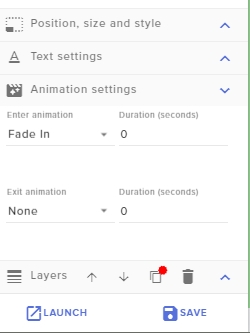
Hello. I'm having a small problem. I'm having trouble getting the text animations for the Stream chat overlay to work. I'm trying to get the text to fade in but its not working. Sorry if this isn't the correct place to share this. https://i.imgur.com/9B7vJ6O.jpg
 dry hare
Once you’ve saved the changes in the editor have you refreshed the overlay in obs?
If you launch the overlay in a new browser window does it work correctly?
woven moth
Ah no I didn't refresh in obs. I'll try it now
 worthy lagoon
My chat commands stopped working. How do I get them working again
woven moth
@dry hare Both options didn't work. Its also not working on the webpage either
For me at least
worthy lagoon
I had a death counter and a lurk notification.
 dry lynx
Anyway to make song request not spam the crap out of chat?
@elder sorrel didnt expect to see you

 Are you using Ground Control or OBS.Live?
dry lynx
Are you using Ground Control or OBS.Live?
dry lynx
Its the bot itself. Just when people request music its so much text it adds all the time
 elder sorrel
Oh you mean when someone does !sr [enter giant YouTube URL Link here] then bot does the same
dry lynx
Yep
It just floods chat and pushes everything so fast
Didnt know if there was a wisper method or just have them use the website method of adding them
elder sorrel
Whisper option should work I believe.  I'll have to check as I haven't used SR in awhile.
dry lynx
Ill have to try it.
elder sorrel
Ah. Not an option at the moment.
dry lynx
Dammit
dry lynx
Ugh
elder sorrel
Sorry dude 
dry lynx
Eh. Its fine. The real way I wanted was a bot room where things are spammed there. But rip bot support in other rooms
worthy lagoon
Can someone please help! I have a few commands that are not working
They suddenly stopped and I don’t know how to get them to work again
 tough acorn
invalid path or connection URL?
worthy lagoon
Not sure. I get nothing when I try to run them
worthy lagoon
I did
 modest pasture
One of our viewers can't redeem anything. (1) they have enough points and (2) they haven't changed their name. It's been a few days now
worthy lagoon
Do I need to recreate them?
 zenith widget
They need to login to our dashboard here: https://streamelements.com/dashboard
@worthy lagoon Go to the dashboard -> right side -> part channel -> join channel.
@tough acorn Check your stream key
dry hare
@modest pasture they need a space between the command and the points
modest pasture
@dry hare I don't understand? if they type !bid 300 that doesn't work. it's predefined command
zenith widget
@modest pasture They need to login to our dashboard here: https://streamelements.com/dashboard
dry hare
So “!bid300” is the command?
zenith widget

modest pasture
@dry hare yes everyone else can do it
dry hare
Have them do what keiZar says
modest pasture
kk thank you
dry hare
Let us know if it works
modest pasture
Okay
worthy lagoon
@zenith widget I was an idiot and deleted the commands thinking I needed to recreate them
So can I create a custom variable?
zenith widget
custom variable?
If you are referring to a variable like this: https://streamelements.com/dashboard/bot-commands/variables - then no.
worthy lagoon
I’m trying to create a death counter and I forgot how to do it. I set ${count deaths} but i think I’m missing something
zenith widget
Pinned message in this channel.
lament blade
Hello! I'm setting up OBS on my laptop and I was wondering what settings would be good for the stream output
CPU - i7 7600U
GPU - Intel HD Graphics 620
16GB of RAM (DDR4)
zenith widget
intel HD graphics 620? thats integrated graphics - not suited for streaming
 worthy lagoon
Stupid question how to get to pinned messages on mobile?
zenith widget
@worthy lagoon Let me help here then: https://discordapp.com/channels/141203863863558144/199460642975907840/572671650655502346
Tap the link
lament blade
It doesn't have to be crystal clear quality, I'm just streaming art to show my friends.
worthy lagoon
Thank you @zenith widget
zenith widget
@lament blade Ok then. First of all, untick the rescale option - that won't help you(at least thats what I think) and go into video settings and set your output resolution to 720p
If you are streaming art, then you would need good quality anyway to show details and stuff
I would take a look at this video: https://www.youtube.com/watch?v=Zt_HVScA3Js
lament blade
Thank you
 grave lance
is there a way to disable some of the default commands so users can not use them
zenith widget
Disabling the default commands in general, hides the commands from the command list.
zenith widget
Default commands don't have the "hide command from public pages" just like custom commands have.
grave lance
ok np
hey I found a bug, with the twitch api and discord, and I am not able to get the people to understand. I was hoping that some one at streamElements could get them to see the issue
I mean stream elements
grave lance
You people are many I am just one
and I thought if you people brought it up to them then they would check it out
zenith widget
We are not a collective group just poking Twitch and Discord at the same time. Everything takes time, even if we know people. Afaik, we don't have any direct contact to twitch or discord...especially Discord.
grave lance
I understand I just get back auto responses, this effects affiliates and partners
zenith widget
At least say what the issue is
grave lance
When you link and sync Discord to twitch your subs are given a role but Tier Prime subs are not given a role
when they sub
Yet they are a sub
zenith widget
Afaik, everyone that is a sub gets the same role on discord
regardless if they are a tier 3 or a prime or gifted
grave lance
for some reason they were not, I dont know what happened maybe just a hiccup
zenith widget
I'm not a tier 3 sub to this streamer but I can use his Tier 3 emote in discord: 
Discord just places everyone under the same role
if prime is not added
then just contact discord support about it
raise an issue or something
Discord issue board ⤴
grave lance
ok I will contact discord, maybe they will listen to me as I am a nirto sub with them
 quick solar
is there a guide that shows how to set up audio for a ps4->elgato hd60 pro->twitch?
zenith widget
Google, but in general OBS can capture the audio coming from the capture card.
 tawny ledge
Hi I’m having a lot of trouble with media requests using OBS Live
quick solar
i've been doing that and trying different suggestions but can't sort it out
tawny ledge
I’ve tried using the tutorials on YouTube but I keep having double audio. There are no other sources on other scenes
quick solar
my last stream only had my voice and no in-game audio or party chat
chat also can't hear me
round brambleBOT
@quick solar For the best OBS support, please join their Official Discord @ discord.gg/obsproject
@tawny ledge Make sure to ☑ “Shutdown source when not visible” for all browser sources (all OBS scenes). If using studio mode, uncheck “Swap Preview/Output scenes After Transitioning.” Also keep in mind that sound can play from any overlay loaded in the browser (editor or launched). https://i.imgur.com/FegZJQS.png https://i.imgur.com/yY0wcFl.png

 tawny ledge
I did a new overlay, added the widget, and then added a browser source in OBS and put the link for the new overlay.
zenith widget
Please don't confuse who is tagged with what 
 cedar lynx
do you have the editor up in the background?
zenith widget
Then there are couple of things:
- You have 2 overlays with the media request widget added to the same scene
- You have not ticked the option in all browser sources in all scenes
- you have the editor open as well
tawny ledge
Sorry, what is the editor ?
tawny ledge
Oh sorry , no I don’t have that open. I only have the browser source on one scene, and it has that option ticked on
Google chrome is not even open
zenith widget
Then there are couple of things:
- You have 2 overlays with the media request widget added to the same scene
- You have not ticked the option in all browser sources in all scenes
tawny ledge
I have never used media request before :/ I havent added that widget to any other scene, I just made a new overlay just for this ..
I will keep looking around, thank you
Like if I remove the source from this scene, and then press play in the media request window , it only plays once. But the second I activate the source in this scene, it plays twice.
If I had another source in another scene, wouldn’t it play twice regardless if I deactivated this source or not?
 hasty glacier
Morning, I have added the subscriber goal to my overlay but the data it shows in OBS is not correct. With a goal of 25 it currently shows as "22/25" but when I check Twitch I have 11/25 sub points. Any ideas why its different?
round brambleBOT
@hasty glacier To reset goals:
- from the overlay editor -> data on top -> goal tab -> reset progress of desired goal
- from the dashboard -> activity feed on the left -> widget data on the right -> goals tab -> reset progress of desired goal
Note: Goal widgets(progress) only counts up and doesn't go down automatically, if you loose followers/subs
zenith widget
@tawny ledge If you remove the source, and click "play" while the big button says "stop showing on stream" - this means the video is active in another scene and overlay.
and you hear sound
hasty glacier
That semi works, that resets it down to 0 which is progress. But I was hoping it could take my current sub points and use that as the current measure of the goal. Or is it based on "I would like to get X more"?
tawny ledge
Ok So I shouldn’t be able to hear it
zenith widget
If you click play after removing/deleting the overlay from the current scene and the media request DOESN'T switch the video on with a message "no active widget" then, you 100% have another overlay with the widget active.
 cedar lynx
you got this!
hasty glacier
Ah nevermind, I just set the "Subscription goal progress" manually and everything works perfectly. Thanks 🙂
 trail mist
so i just set up new overlay in SE and my alerts are not working, what am i doing wrong??
round brambleBOT
@trail mist To add your overlays to OBS, add a new browser source in your scene. Paste your overlay URL in the browser source properties, set the dimensions to 1920x1080 (unless you changed them on the website), and ☑ “Shutdown source when not visible” https://youtu.be/KDvLynUqXI4
zenith widget
Be more specific whats not working with the alerts
theres no sound?
theres sound, but they are not visible?
both of those don't work?
trail mist
both
round brambleBOT
@trail mist You can test Alerts via the bell on the lower right corner of the Overlay Editor. Simply go to your Dashboard -> My Overlays -> Pencil/edit button on the overlay. Make sure the "Show Emulated events on stream" option is on to see the alert in OBS/Xsplit https://streamable.com/h6qgy
 trail mist
does the alert do raids and hosts?
round brambleBOT
@trail mist Due to changes to Twitch API, we have filtered out hosts and will only show these ones on your activity feed:
- All hosts coming from an online channel with at least 1+ viewer
- Auto host events with at least 1 viewer - only from a channel that just went offline
Note: If you see "X channel has hosted you" with no viewers on the back, that is considered an offline host or a host with 0 viewers, we do not show these.
zenith widget
Did you switch accounts?
 vital yoke
its not letting me show anything on my stream
zenith widget
We need more information than that.
Black screen? white screen?
obs studio?
Xsplit?
vital yoke
black
zenith widget
Have you added sources then to Xsplit and/or OBS?
vital yoke
on obs live
lament blade
@vital yoke only black screen in your twitch livestream or also in your obs?
lament blade
@vital yoke have you added your overlay sources ( if you have one ) and a game / window capture?
vital yoke
how do i do that
round brambleBOT
@vital yoke To add your overlays to OBS, add a new browser source in your scene. Paste your overlay URL in the browser source properties, set the dimensions to 1920x1080 (unless you changed them on the website), and ☑ “Shutdown source when not visible” https://youtu.be/KDvLynUqXI4
zenith widget
UPDATED 2018 version of The Ultimate Guide to Streaming to Twitch with OBS Studio. In this video, we go through how to setup OBS Studio's server, bitrate, re...
lament blade
My chat gives an error so my chat no longer loads who can help me with this?+
round brambleBOT
@lament blade Streamelements on top of OBS -> Logout -> login
lament blade
thank you
 raven jackal
So not really SE related but where are the Subnames shown (the ones you set under Affiliate -> Subscribtioninformations)
zenith widget
what? in where?
raven jackal
hope its the same order in every language :D
zenith widget
this is mine. this is your custom naming of the tiers for the twitch sub button
and you will see the names
in teh different tiers
raven jackal
okay this was where i searched for it :D seems like it doesnt work for german then 🤔
 raven jackal
would both be strange 
 waxen dove
hey! i have a question regarding media request via tip.
Is it possible to delay the media request so it will play the requested video after a certain amount of time? I have the problem that the media request is already playing while my tip alert sound is still saying something and this cuts of like 2-3 seconds of the whole requested video at the start. :(
waxen dove
that helps with the problem? :o
zenith widget
skipping songs when a request comes in, usually affects only backup songs
waxen dove
well but it's not about backup songs. the problem is, that my alert sound for a tip still plays when the media request from the tip starts playing
zenith widget
well thats because you have the alert widget
oooh
you are talking about the actual alert playing
waxen dove
yes!
zenith widget
when a requested song comes in
waxen dove
yea!
zenith widget
theres no way to separate them
waxen dove
damn, thanks!
 slender ridge
How can i block to add the same song in one playlist?
zenith widget
Not possible.
But you can remove the song from the queue via the 3 dots @slender ridge
slender ridge
Yee, but some trolls gona use it too much for one song, and i cant delete it all the time
zenith widget
you can introduce pending queue
slender ridge
Yeah, but i wanna know is there any option like in nighbot i think, what blocks to add songs that are already in queue
zenith widget
No
lament blade
@slender ridge or if you use loyalty points, just set a price for it, the trolls probably dont have or dont wanna spend all their earnings just for trolling
 sly dawn
How do I find the parameters for the responses of default commands?
round brambleBOT
@sly dawn You can make changes to custom commands in chat with!command add/remove/edit/options/show Valid flags for !cmd options are: -cd (number) -usercd (number) -cost (number) -level (number) -type (say, whisper or reply) -count (number). --- Example: !cmd options twitter -usercd 60 -type reply -level 250
sly dawn
Not what I was looking for
 thorn finch
anyone able to help me, ive got some issues going on
lament blade
@thorn finch what issues are you facing?
thorn finch
im facing an issue with my stream, i wasnt having issues like this until after i went into stream labs/stream elements and messed with my alerts/and a follower goal widget. if ud like to see the issue, i can post the twitch link so u can look at it
its all green with layers around ect
lament blade
@thorn finch I have asked the staff about this problem, because i'm not sure if its caused by the incompatibility with obs 24.0.1 and obs.live
also several people are facing the same issue as you
thorn finch
should i just get rid of obs.live then?
lament blade
@thorn finch i don't know yet if this is the cause of the problems. please be patient
@thorn finch okay, got an answer. Its most likly caused by the incompatibility of obs.live with obs 24.0.1. If you want to use obs.live you have to downgrade back to 23.2.1
thorn finch
okay... well i dont wanna use obs.live if its gonna do this, and its not letting me uninstall it for some reason. got a fix to that? XD
lament blade
@thorn finch the uninstaller also doesnt support obs 24.0.1
thorn finch
so then what lmfao
lament blade
Get 23.2.1 from here: https://github.com/obsproject/obs-studio/releases
remove 24.0.1
install 23.2.1
then remove obs.live
then update to 24.0.1

GitHub
OBS Studio - Free and open source software for live streaming and screen recording - obsproject/obs-studio
these steps you have to follow to uninstall obs.live completly
or just deinstall obs to 23.2.1 and wait for the obs.live update 😄
 normal igloo
@lament blade 32.2.1? 
lament blade
@lament blade lives in the future @normal igloo
cedar lynx
coming at us from 2024
normal igloo
lament blade
y'all knew what i meant with that misstypo 
cedar lynx
IDK I was genuinely confused 
lament blade
@lament blade did you maybe escaped area 51 while the raid? Thats the only logical explanation how you know that a 32.2.1 version will exist 

normal igloo
😂
 tawny bay
So if streamelements can't make a command that uses another command, can I make a command that adds points to someone?
 real escarp
here are the variables you can use in custom commands https://streamelements.com/dashboard/bot-commands/variables

StreamElements
The Ultimate All in One Platform for Streamers
 jagged badge
does anyone know why my in game audio and music on media share is quiet? its barely hearable on my stream buti can hear it perfect in my headphones
 cinder lotus
How to setup a custom bot
I had it in the past, but needed to redownload ground control
round brambleBOT
@cinder lotus Custom bot name requirements
- StreamElements bot modded and in chat
- Active overlay with alerts
- StreamElements tipping page in the panels below the stream (!panels)
- OBS.Live or Ground Control open
- Create a twitch account for the name you want to use or run the bot under your own name
- Custom bot name doesn't work on Mac
tawny bay
sooooo no it can't then
lament blade
you can add points with streamelements
tawny bay
yes but via the use of a custom command
 jade remnant
givepoints is a standard command
tawny bay
Yes but I'm looking to make a custom one
 lagging on me
jade remnant
lagging on me
jade remnant
.....
 kindred isle
hey i never ask for help but now i do
a Dutch twitch streamer got a bug in the overlay with the redeem
It wont go off the screen, even if you do like a redeem alertfix
round brambleBOT
@kindred isle Right click on the BrowserSource > Properties > Scroll down a bit > Refresh Cache of current page
jagged badge
anyone know why my sound is so low on stream? i can hear it perfect in my headset but barely hear it on streamelements
ive turned everything up
still quiet
real escarp
in your stream @jagged badge look
real escarp
look at twitch chat
jagged badge
@real escarp sorted me out thanks for the help
 quick sage
so ive tried importing my overlays from Streamlabs into Stream elements
and they arent particularly working
how do i get overlays like alert boxes and chats onto OBS Live
lament blade
yo
do u guys have idea
how to disable
the !raffle
so mods can't do it? but just me
real escarp
the import tool can't import big video files or copywritten assets. @quick sage If you have the assets for your alert boxes downloaded you can upload them to our cloud overlay
quick sage
i was more meaning getting them onto the preview of OBS Live
real escarp
in your overlay manager it shows overlays?
StreamElements
The Ultimate All in One Platform for Streamers
if it does you can hit the Launch overlay button and get the url to add into OBS as a browser source
 silent tusk
real escarp
silent tusk
real escarp
in your twitch now lets see what you got
quick sage
trying to change my tipping page background picture but it wont let me click the save button
real escarp
are you using google chrome
real escarp
thank you
quick sage
thanks
round brambleBOT
@static hare Please follow our community rules:
- No advertisement or stream promotion
- Respect ALL server members
- No NSFW/NSFL
Thank you
 mild ridge
Did the file work for you FriendlyNGeeks.
real escarp
@mild ridge of course I was able to get it to import to an off account. would you like me to send it back so you can look at it and try it
 round otter
Hello there, I just import points(currency) from CSV file into streamelements, all looks like it was working but no points in leaderboard are displayed. Any ideas?
real escarp
@round otter I can send you an example csv you can copy your stuff over and upload
round otter
Ok sounds good 🙂
real escarp
@round otter this is how the rows go

@mild ridge did you want the working copy back?
round otter
@real escarp and what that columns mean? There are 3 columns with numbers, which one is which please ?
real escarp
username/twitchid/currentpoints/alltimepoints/watchtime
mild ridge
If the file correctly imported everything then yep send me a copy of the file.
real escarp
numbers must be whole numbers no . decimals / columns c/d/e can not be blank must have at least 0
round otter
Ah, ok, edited and now it shows me import successfull but still there are no data on leaderboards
round otter
exactly
real escarp
you need to go into chat to check watchtime
!watchtime d34thcz
/mod streamelements
round otter
So, when it is only watchtime, it will not show on leaderboard, am I get it right?
real escarp
leaderboard shows points not watchtime
round otter
aaah.. okay than 🙂 thanks!
mild ridge
So with the correct file I can have names and points from slobs with all time points from stream elements instead of hours watched from slobs.
real escarp
you can move the numbers around as you please just know which column means what and know you need to reset leaderboard before import
mild ridge
Yeah I already reset and I'll need to modify the numbers of old viewers and add new members to get the file up to date using google sheets.
real escarp
okay cool, so you have it from here?
mild ridge
Nope I need a copy of the working file you used FriendlyNGeeks in order to try importing again.
 brittle pewter
when setting up a new alert for subs why would it not change from the default shark dancing to the image i uploaded?
lament blade
@brittle pewter is your file format supported?
brittle pewter
@lament blade yes i assume so its a gif
lament blade
@brittle pewter you uploaded your gif, and then selected it and it doesnt change?
brittle pewter
on the editor it shows it in the lil box as the file i uploaded but when i test it, it still shows the dang shark lol
lament blade
@brittle pewter it doesnt show in the overlay editor or in your obs?
jade remnant
have you checked the variations?
lament blade
@brittle pewter if it doesnt show in your obs -> reload your overlay
brittle pewter
both looking at the editor and obs its still the shark
and @jade remnant no i havent
lament blade
@brittle pewter and you have saved your overlay after changing the gif?
jade remnant
you need to check them, the test plays random events
brittle pewter
yes i saved
ok ill check it
ahhhh thank you @jade remnant that was it. It was still set to default
 eternal sentinel
Hello, I accidentaly disconnected G2A Pay from tipping settings and I cant connect it back.. any tips how to repair it?
lament blade
@eternal sentinel does an error occurs?
real escarp
use a private browser in chrome @eternal sentinel
eternal sentinel
@lament blade it says Connection with G2A Pay failed
lament blade
@eternal sentinel have you tried @real escarp tip?
eternal sentinel
@lament blade nope same error
lament blade
@eternal sentinel try clearing your browser cache of the website in your browser
eternal sentinel
@lament blade It helped! Thank you!
lament blade
@eternal sentinel no problem 🙂
eternal sentinel
@lament blade I have another question? Why do I have only here 3 payment methods? I have Skrill WebMoney BitBay and I know there were Credit cards and PayPal? Do you know what to do?
lament blade
@eternal sentinel you have to setup paypal seperatly. And for credit cards i have to check something
eternal sentinel
@lament blade I will wait *
lament blade
@eternal sentinel I have asked the team about this because I'm not familiar with G2A Pay, please be patient 🙂
eternal sentinel
@lament blade ok
lament blade
@eternal sentinel but for now you can set up your paypal if not already done to kill some time.
@eternal sentinel okay, so Streamelements doesnt controll the payment methods allowed by g2a pay. For that you have to contact them
eternal sentinel
@lament blade Ok thank you
 peak surge
Heylo, I'm not sure if this is the right chat to ask in, but I'm trying to figure out how to get SFX triggered by chat? I believe that I have to setup the shop to do it, which I thought I had done, but it doesn't appear to be working?
lament blade
@peak surge i only know the kappagen command with the widget in the overlay editor. I dont think you can trigger sfx per steam store (only Stream perks, Sound effects and Access-code lists)
real escarp
also make sure you mod the stream elements bot
/mod streamelements
peak surge
He is definitely modded!
I've seen people use this functionality, and indeed the streamelements help here https://streamelements.helprace.com/i347-redeem-items-sfx-by-using-itemname
seems to have been adedd to let you skip the step of having to type !redeem (sfxname) and just use !(sfxname)
lament blade
@peak surge oh you mean with sfx also sounds? I'm sorry i thought u meant something like visual effects, sorry, my bad
@peak surge for that you have to set up a custom command
peak surge
yeah sorry I could have been clearer XD
lament blade
@peak surge i will sort it out for you, what you have to write in the custom command, please be patient
peak surge
I know I'll need to set up a custom command to avoid the !redeem bit, but I havent currently got the item functioning in the shop! So i think I've done something wrong there
lament blade
@peak surge as in the variables tab shown of the chat commands tab you just have to use this variable https://i.imgur.com/D0udbDc.png
 real escarp
have you added the store redemption widget to your overlay
peak surge
AHA
thank you @real escarp
I'd tried testing it in the browser but it didn't seem to be working
😄
lament blade
@outer basin what problem exacly?
lament blade
@outer basin have you enabled tts?
 outer basin
"sztu: text to speech is not working., also donate message is not vissible on screen."
yes
Minimum amount to trigger text to speech albo is very low
lament blade
@outer basin is your tts and donation alert working in your overlay editor?
outer basin
on stream/editor its working but without text to speach
lament blade
@outer basin so TTS isnt working in the editor.. hmm.. have you saved your changes in your overlay editor after activating tts?
outer basin
no no, TTS is not working anywhere :<
lament blade
@outer basin i said that "so TTS isnt working in the editor"
lament blade
@outer basin you saved your changed thats good, is the text to speech volume higher than 0%, is also a voice selected and a minimum amout to trigger text to speech?
outer basin
yes
lament blade
@outer basin dont put a value of 0,01 as your delay. If you dont want to use a delay just put the number 0 in there
outer basin
it was a 0 before but i was testing if it can change anything
you can join my stream if you want and watch everything how's its work
lament blade
@outer basin you can only put whole numbers in there if i*m not wrong
@outer basin have in mind that after every change done in your overlay editor (after each saving with changes) you have to reload your overlay in obs to update your changes in there
outer basin
yes, ofcourse
lament blade
@outer basin are different voices working or is it generally not working?
outer basin
i already tried mr Jacek and ms Ewa
:<
maybe they have sth like holiday in SE now?
lament blade
@outer basin and putting 0 in there doesnt affect anything?
@outer basin could you try using voices of a different language if they are working properly? (maybe the tts sounds then a bit werid but we have to make sure thats its not just a country specific issue)
outer basin
meh 😦
lament blade
@outer basin hm.. could you try adding another alert widget and just set up tts if its working there? maybe just your current alert box is bugging
 analog halo
i need help i accsedently closed my chat on the side how do i open it back up
lament blade
@analog halo do you see the Streamelements tab on top of your screen?
lament blade
No worries! There you can always enable and disable docks
Like chat, media request en Activity feed
analog halo
thank you you are a true professanal
outer basin
@lament blade ok, i made second alerts just to trigger only the message, but the first one is also on, so both of them need to work together, thanks for giving me an idea! 
 midnight ice
Help! Every time I peak into the microphone I hear my own voice after a slight time delay, its annoying especially during gaming when I have to hear myself in stream and it interferes with in game audio
 normal apex
@midnight ice What mic do you use? Do you also use headphones? Are there any sources which are open which you hear your stream audio from when you stream? I'd first recommend unchecking the 'Listen to device' in your mic/headset settings in volume mixer.
slender ridge
I have a simple question, why someone can add that long songs with that settings? xd
 rain crypt
Hey, so im considering doing a restream between twitch and mixer, for mixer, I currently have a mixplay board for a button for viewers to press that will make a greenscreen video show on stream via OBS overlay. Is there anyway I can do this with stream elements ?
 dense gyro
Im trying to add a music widget and whenever I play a sound its doubleld. Can you please help me with this issue?
This is kind of annoying one song is playin on streamlabs and the other on my layout and Idk how to fix this. :/
dry hare
@rain crypt your mix play button will activate a local video on your computer as a source in obs if you want it to
As long as you’re using firebot or MixItUp
rain crypt
yeah i know that, however, I want a way for twitch viewers to trigger the same effect if possible ?
I know it won't interact with MIU or firebot but I'm looking for a chat command or something to do the same thing
dry hare
You could use a chat command
 slim valve
same problem with zeldabunny. When I active media request video on stream, play sounds its doubled
dry hare
I believe a talented developer by the name of medivhus wrote a tool that plays sounds for bits
Make sure all your overlays are set to shut off source when inactive
@slim valve
slim valve
but when i stop showing on stream, I will be ok
dry hare
Double-click the overlay in the source list and then scroll down
slim valve
I set, but still double sound 😫
 somber solar
Hey I've got a quick question
dry hare
@slim valve on all scenes?
round brambleBOT
@somber solar Welcome to the helpdesk! Please let us know how we can assist you today and a support volunteer or staff member will assist you as soon as they are available. Thank you for your patience.
 knotty copper
Hi Guys,
Could someone please assist me. Since the twitch layout change the dock that showed my stream information. Stream Title etc.
is just black. How can I fix this?
round brambleBOT
@knotty copper If you are not seeing the OBS Twitch integrations and have OBS.Live installed, please follow these steps:
- Make sure you are on the latest and greatest version of OBS.Live
- exit OBS (make sure OBS is not running)
- delete %appdata%\obs-studio\plugin_config\obs-browser\obs_profile_cookies
- start OBS.Live
- Settings -> Stream -> disconnect -> connect
 jovial ocean
Hello. I use stream elements and my event list is not changing. Can someone help me
knotty copper
Fixed it @round bramble Thank you!
 steady oxide
my chat stats is broken lol
dry hare
@steady oxide scroll up about 3 messages
dry hare
Yes
jovial ocean
I need help getting an image to replace an event list. Can someone help me?
jovial ocean
Does anyone know how to allow a video for an event list background
 spiral furnace
Data question: SE never seems to grab the correct follower counts, and I always have to go into Goals Data and update it manually. Is there a trigger I'm missing or not understanding that keeps the numbers in-sync?
cedar lynx
Goals data is always about the new followers you got since you last reset your goal, not intended to be your total follower count
 crystal mortar
So if I want to set a goal at 500 followers and I'm at 470 already, do I need to reset and make it 0/30?
Or is there a way to "update" it until I properly reset my goals
Because actually it say 54/500 but I have 470 already
cedar lynx
I mean, yes the 0/30 is the way it's designed to be: a goals bar. the way you want to use it is as a milestones bar, which it isn't designed to be, which is why it doesn't offer that sync functionality.
example:
a goal is to get 50 new followers
a milestone is to try and reach 500 total followers.
crystal mortar
 yeah got it.
cedar lynx
there is a "total follower count" widget you could use instead and set that next to a plain text widget that says "/500"
it wouldn't be a bar but would reflect your current follower number 🙂
crystal mortar
Btw, I heard about RTX green screen, heard about streamlabs getting it, any plan for SE getting it too? Using SE Obs actually
lament blade
I will have to ask staff about that
cedar lynx
"NVIDIA will show off the feature at Twitchcon 2019, and it'll be available from OBS in a few months."
^ from Engadget
so yes it will be available on OBS
crystal mortar
Oh so from the native OBS then? Nice 
cedar lynx
OBS.Live is just the StreamElements plugin for OBS 🙂
lament blade
What Anne said 😜
crystal mortar
Yeah, thought it was more a fork like SL
cedar lynx
nope! 🙂 that doesn't align with the StreamElements way: enhance and enable (whereas the fork is more of a like... premiumify and reinvent)
crystal mortar
Eager to test that RTX feature, especially on my 2080Ti
cedar lynx

lament blade
Yes that feature is going to be amazing right! Also hyped for it
crystal mortar
Gonna help a shitload of streamer like who's lacking space to properly set up a green screen
Like me*
 zenith oxide
any help with obs crashes? happened 4 times yesterday trying to stream Dauntless, I have the logs but cant make sense of it
nvidia drivers up to date
round brambleBOT
@zenith oxide Please provide a log from your last stream. To do this, in OBS go to Help > Log Files > Upload Last Log File and paste the link to the log file here.
zenith oxide
kk ty
cedar lynx
that link is the safe way to share your logs with us and we can help better that way 🙂
zenith oxide
zenith oxide
interesting, ill try the one before that
i clicked on "upload last crash report"
for that
im not sure how to generate a link for an older log file though?
zenith oxide
because obs is open uploading last log file is just generating a link for the current session unfortunately
is it safe to just upload the text document for a log file i know was during a crash?
i guess ill try streaming and see what happens haha
 lost halo
I cant get alert box to work
 sturdy bough
Hey everyone, I am having trouble getting GroundControl to show me the option for a custom name. Can anyone help me? Many thanks in advance
round brambleBOT
@sturdy bough Custom bot name requirements
- StreamElements bot modded and in chat
- Active overlay with alerts
- StreamElements tipping page in the panels below the stream (!panels)
- OBS.Live or Ground Control open
- Create a twitch account for the name you want to use or run the bot under your own name
- Custom bot name doesn't work on Mac
lament blade
have you done all of above?
after that top left hamburger menu -> settings -> custom bot name
@lament blade are you hungry ^^?
@lament blade this is called a hamburger menu mate haha
@lament blade 😦 Then i am the one who is hungry
 limber zealot
Hello, my alert box works perfectly on OBS in one scene but not another. The second overlay alert box goes through but the text is default and not the text I've chosen. I'm confused because every setting is the same on both overlays.
round brambleBOT
@limber zealot Right click on the BrowserSource > Properties > Scroll down a bit > Refresh Cache of current page
limber zealot
Does the text settings transfer over when I duplicate an overlay? It's now shows default text even though I've chosen a font.
lament blade
@limber zealot it should
limber zealot
I have to manually reset the font for each alert but once I save and exit, it returns to default.
sturdy bough
@lament blade I believe I have - I have just migrated my alerts and added them as a browser source to OBS
lament blade
@limber zealot which font do you use, i believe 2 fonts are not working right now properly
sturdy bough
I have a temporary panel added while I test (need to do some graphics but the link is there)
lament blade
@sturdy bough try restarting ground control, do you see now your custom name bot in settings?
@sturdy bough so yhea, check in that menu where I pointed to if you can enable the custom bot name
limber zealot
Press Start 2P
The font works for my first overlay but not the duplicated overlay.
lament blade
@limber zealot stupid question, but have you saved your overlay after you duplicated the alert box in there?
lament blade
No worries! Have fun with the custom bot! 
limber zealot
When I duplicate it, save and refesh it shows default font even though it says "Press Start"
then I manually reset the font, save and exit and it still shows default font.
lament blade
@limber zealot but in your first overlay the font is working perfectly fine?
limber zealot
The first overlay works fine in the editor and OBS
lament blade
@limber zealot hm thats weird let me check something real quick
@limber zealot have you set up variations?
limber zealot
I disabled variations on all except Subscribers
lament blade
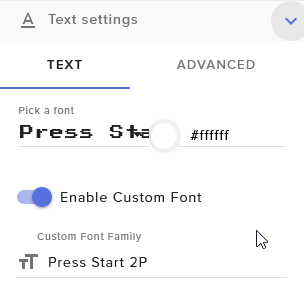
@limber zealot and you choose Pick a font and dont just write the font in Custom Font Family right? https://i.imgur.com/smFa3eR.png
 limber zealot
lament blade
limber zealot
lament blade
@limber zealot oh your font looks different than mine, thats weird
limber zealot
how the original looks
lament blade
@limber zealot try not setting the Pick a font in quotation marks
lament blade
@limber zealot but you have to set the Custom Font Family in quotation marks
limber zealot
It worked! But then once I save and exit it returns the quotation marks to "Pick a Font"
now it's back to default font.
lament blade
@limber zealot for after saving it once right the quoatation marks will appear again but isnt changing the font
@limber zealot have you done these steps?
round brambleBOT
@limber zealot Google Fonts
More than 900 google fonts are supported at this time. You can preview them here: https://fonts.google.com/
Custom Fonts
Steps:
- Install the font on the streaming PC or choose a pre-installed windows font.
- In the overlay widget settings, select Text Settings
- Enable Custom Font
- Type the name of the font as it appears in the windows font directory (This is usually
C:\Windows\Fonts)
Note: After installing fonts, the browser and OBS must be restarted for the font to appear.
limber zealot
Thank you so much, it works perfectly now!! I wonder why it worked for the first overlay but I'll make sure to download the fonts next time!
lament blade
@limber zealot perfect 😄
 royal spear
I'm having trouble connecting to my alt account for Twitch
lament blade
@royal spear what issue eaxcly?
royal spear
When I login with Twitch it always connects with itzDutch1 but I want to connect with my other account
lament blade
@royal spear do you use the same email adress for both accounts?
royal spear
No, I don't
lament blade
@royal spear try clearing the browser cache of twitch in your browser
lament blade
@royal spear no problem 🙂
 daring blaze
Hey! Its like when i change the scene the overlay needs some time to load... like 3-5 sec! Any options to improve this?
lament blade
@daring blaze probably your internet connection which takes time to reload the overlay
daring blaze
Ok any chance to preload this?
lament blade
@daring blaze yes but this could cause more problems than you have right now
daring blaze
Like connection should be fast enough like 100mbit
lament blade
@daring blaze have you custom transitions?
daring blaze
Yes
lament blade
@daring blaze or if you have the studio mode of obs, just click on "studio mode" and select on the preview tab the next scene you want to use, it will automatically load it and after its done loading you can switch scenes
daring blaze
Ah yeah studio should do the thing!
Havnt thought of this🤦🏼♂️
Thanks for your help m8
Will try it
lament blade
@daring blaze no problem 🙂
 grave python
bruh idk where to post this buuuuut
do you have any kind of god of war brand guideliness
cedar lynx
You might ask the support team for God of War 🙂 this is a Discord about StreamElements services
jovial ocean
Where is the files for streamelements in folder?
I have been working literally all morning to figure out how to get an eventlist from Nerd or Die to work....but can't figure it out. It says "Double click the streamelements quick setup link for the widget you want to import"
lament blade
Or twitch TOS maybe, guessing that sh is asking if they can stream God of war or anything?
grave python
@cedar lynx Bruh, some kind of god of war is a meme about something complex, I am looking for guidelines if possible
grave python
brand identity guidelines, like brand colors, logo distance from stuff etc
jade remnant
No, would be best to ask Google
grave python
implying that I havent google dorked it
nuuls seems afk and I dont wanna disturb styler since he is in the US
it's fine I will continue it on my own and send it to perry/styler if they want it
round brambleBOT
@drifting bay Please follow our community rules:
- No advertisement or stream promotion
- Respect ALL server members
- No NSFW/NSFL
Thank you
zenith oxide
anyone got any clue why obs keeps crashing streaming dauntless?
lament blade
@zenith oxide could you please send your log as url? (obs -> help -> log -> upload current log
zenith oxide
the current log isnt the one that crashed unfortunately
i have about 4 logs after the one that crashed
so im not sure how to generate URL for old log?
lament blade
@zenith oxide that doesn't matter, if it crashes once and the settings were not changed it will crash again
@zenith oxide so it doesn't matter if the old log was or the new one.
lament blade
@zenith oxide thanks
@zenith oxide the log doesnt have critical issues. This is good, but 1 warning and many tips -> https://h4ndy.eu/obslog?url=https%3A%2F%2Fobsproject.com%2Flogs%2FdgVhI3tFGAJvunTo -> please read yourself through that, repair the issues and test again. If it will crash again please contact me again
zenith oxide
ok no worries thanks
jade remnant
A crash log is required to investigate the cause of your issue. Please upload the last crash log.
- In OBS, click the Help menu
- Select Crash Reports, and then Upload Last Crash Report
- Copy the URL, and paste it to the chat here.
lament blade
@jade remnant but if the settings werent changed it doesnt matter? or does obs also put some information in there why it crashed?
jade remnant
a crash log is different to a normal log
as long as you get the "opps" message from obs then a crash log will be made
lament blade
@jade remnant oh, is the posted log of him a normal or crashlog? (the .txt file)
lament blade
"*Your log contains no recording or streaming session. Results of this log analysis are limited. Please post a link to a clean log file.
To make a clean log file, please follow these steps:
- Restart OBS.
- Start your stream/recording for about 30 seconds. Make sure you replicate any issues as best you can, which means having any games/apps open and captured, etc.
- Stop your stream/recording.
- Select Help > Log Files > Upload Current Log File. Send that link via this troubleshooting tool or whichever support chat you are using.*"
i dont think thats helpful ._.
or cant you analyze crash logs in therE?
jade remnant
its the x264 encoder
you can try using the nvenc encoder or would be best to go to the obs discord to see what they recommend
zenith oxide
okay ill have a google of that as im not too sure what you mean by that but i should be able to work it out
round brambleBOT
@zenith oxide For the best OBS support, please join their Official Discord @ discord.gg/obsproject
zenith oxide
thanks guys
lament blade
@jade remnant just to expand my knowledge, is it because kernelbase is in the crashlog?
modest pasture
Any update on the store redemption items not refunding? Taking a long time manually giving back points each day :/
 strange crow
no event list coustom
 ocean iron
Is there a way to rename the SE bot?
round brambleBOT
@ocean iron Custom bot name requirements
- StreamElements bot modded and in chat
- Active overlay with alerts
- StreamElements tipping page in the panels below the stream (!panels)
- OBS.Live or Ground Control open
- Create a twitch account for the name you want to use or run the bot under your own name
- Custom bot name doesn't work on Mac
lament blade
@ocean iron do you meet the requirements
ocean iron
Yes.
lament blade
@ocean iron do you prefer obs.live or ground control to set up your custom bot?
ocean iron
What's the difference between obs.live and groun control? I just downloaded obs.live
lament blade
@ocean iron obs.live is a plugin for your obs. Ground control a seperat application of streamelements
@ocean iron but in both you can set up your custom name bot
lament blade
@ocean iron no problem 🙂
 oblique steeple
Ayy Niklas! Trying some StreamElements Stuff for CodeOverflow? 
ocean iron
Currently moving my personal streambot setup from Streamlabs to Streamelements. 😄
elder sorrel

oblique steeple
Oh. Not that I have anything against StreamLabs (  ), but even better
 strange vessel
Hey guys, I am using OBS Live on a two PC setup for streaming on Twitch, I was wondering how I can hear my alert notifications through my gaming PC, is there a pop out alert box or something else I am missing? Any help would be appreciated cheers 🙂
crystal mortar
Ok so I had the "good idea" to raid someone, now the chat is broken, I had to reboot OBS.live to get back my tchat instead of the one being raided, but now my activity feed is gone... help?
Tried refresh my activity feed but no luck
strange vessel
@crystal mortar have you gone to the top of the OBS toolbar - StreamElements - Activity Feed, make sure that's checked, let me know if that fixes your issue 
crystal mortar
I did, and it get never checked
but it's shown on my window, but empty...
@strange vessel in fatc it's checked but...
lament blade
@crystal mortar try: obs top bar -> streamelements -> logout -> login
lament blade
@crystal mortar perfect 🙂
strange vessel
@lament blade would you by any chance have a solution to not being able to hear alerts using OBS Live with a two PC setup?
rain crypt
Question, I have the redemption chat alerts set to off, yet the bot keeps saying "<username> redeemed <item> for <points>"
Also I'm looking to setup a command to play a selection of sound clips, so I have setup !win as {redeem win} from the stream store, is there any way I can setup the command to play one of a possible 3 clips? for example {redeem win1} or {redeem win2} or {redeem win3} under the same command?
 simple spire
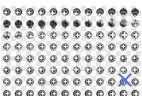
I dont know what I'm doing wrong, but I'm trying to get a gif for follows to be animated in the Hype Cup. As a gif it doesnt animate, and I tried to upload it as a sprite and still nothing. What am I doing wrong? 🤔
lament blade
@strange vessel sadly i have no idea, check maybe your volume mixer of your system
@rain crypt you cant turn off the redemption message if the user redeems it per chat, only if he redeems it in the store the message wont pop up
@rain crypt i dont think thats possible yet (3 different versions of 1 store item)
@simple spire let me check that real quick
rain crypt
argh, thats annoying, looks like im going to have to block the SE bot from chat >_<
lament blade
@simple spire you have to set it up like that -> https://i.imgur.com/8oDnzsx.png -> sadly i dont know how is it called
 simple spire
@lament blade yea, that's how I have set it up, still doesn't work :/ guess I'll try again. thing is it's anymated in the left side menu but not in the actual overlay when a follow happens.
lament blade
@simple spire it isnt animated in your overlay editor or obs source?
simple spire
overlay editor, have not yet tried it as a source in OBS as I'm still working on setting everything up.
lament blade
@simple spire stupid question, but you have saved your changes? because if its animated in the settings of the hype cup but not when you test it, is weird
lament blade
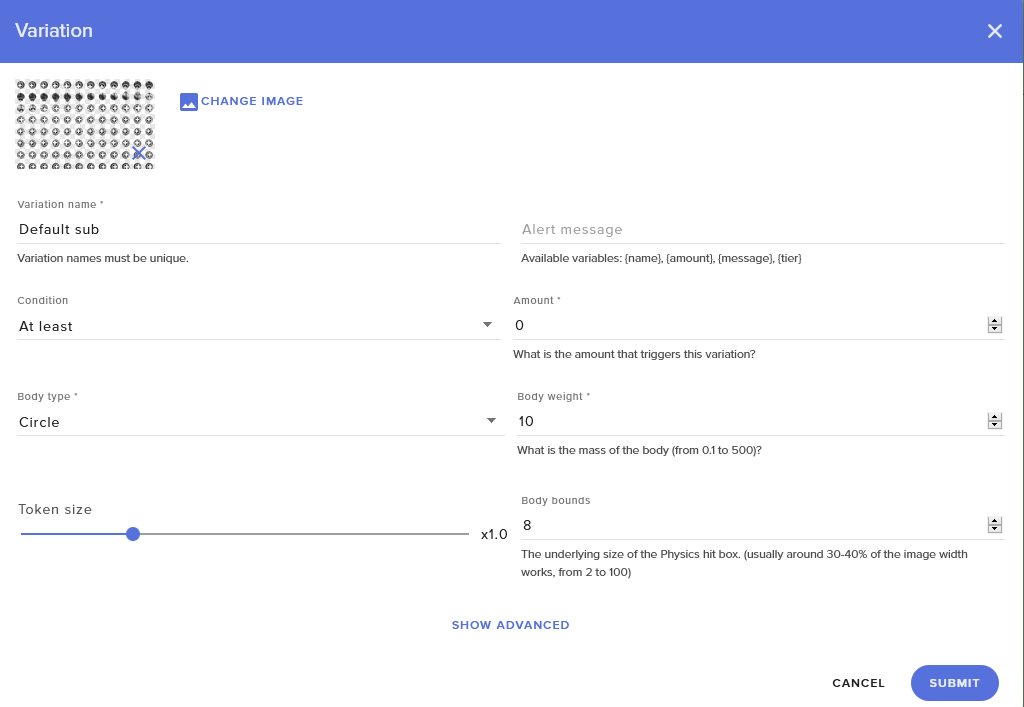
@simple spire you have also set up the rest ? https://i.imgur.com/KwyfBID.png
 simple spire
oh sorry, so when I use the GIF it's animated in the left menu. when I use a sprite it looks like this in the menu, but one flower pops up in the editor when testing, yet not animated
there's all of it.
lament blade
@simple spire you sure its not animated? because only 1 leaf turns red per image and the "follow" is falling down, so probably its animated but you dont see it right because of the height it fells? Is this possible?
simple spire
lol it's not. I'll try it in OBS but in the overlay editor its really not animated I promise 😄
lament blade
@simple spire hmm weird
simple spire
yea we are switching over to stream elements and this is really bugging us that we can't get our shit to work. like, it's reeeaally frustrating as I can't seem to find anything indicating that I'm doing anything wrong 😂
OMFG
it works in OBS 
@lament blade sorry for wasting your time
lament blade
@simple spire if it works in obs then you are fine, probably just an overlay editor bug 🙂
@simple spire you didnt waste any time, I'm here to help! 
simple spire
haha it's animated like super fast... anyway you know of to make it "slower"? I guess just adding more frames that look the same would have that effect 🤔
lament blade
@simple spire or you dublicate 1 sprite image to 3, this would slow it down
simple spire
yea I think that's what I mean. adding more sprites so each "frame" takes longer. yea... I'll give that a try. cheers
 reef mason
I tried posting this on the subreddit, but we didn’t find a solution.
Hello everyone!
I've been using the streamstore a lot the last few months, but I only recently started playing with just putting in videos (instead of gifs with seperate sound, which I have done earlier), and whenever a viewer redeems a store items which has a video as a source, the sound plays twice. When they redeem the gifs with sound, they only play once (as they should).
Is it bugged, or is there a setting that I'm missing out on?
I have tried turning the sound off inside the overlays panel (it plays from the source anyway), and it doesn't work.
Thanks in advance. And please ask if you don't understand my question :)
Link to the thread: https://reddit.com/r/streamelements/comments/daeug5/stream_store_plays_sounds_twice_when_the_source/

reddit
Hello everyone! I've been using the streamstore a lot the last few months, but I only recently started playing with just putting in videos...
lament blade
@reef mason have you tried handle videos like gifs? like mute the sound of the video, upload the ideo and add then the sound seperat, like you would do with gifs?
am i able to speak with a tech support person?
round brambleBOT
@lament blade If you would like help from the StreamElements support volunteers/staff please post your question in one of the helpdesk channels and someone will assist you as soon as they are available: #helpdesk-twitch | #helpdesk-youtube | #helpdesk-mobile | #helpdesk-selive Thank you for being patient.
reef mason
@lament blade I have not. The entire reason I started using videos was to make it easier as the audio is attached to the file, so I don’t have to split them up, like I do with the gifs already
It’s just a lot more work with the gifs, so I really hoped that videos would do the trick
lament blade
@reef mason that's the only solution I can think of right now, sorry. If you like I can easily divide your movie into video and audio if you like.
lost halo
I need help with alert Box
dry hare
@lost halo what seems to be the issue?
dry hare
Can you take a screenshot of what you’re seeing?
lost halo
lament blade
@lost halo have you tried moving around your alert box in your overlay editor?
dry hare
Is that in obs?
lost halo
Stream Elements
dry hare
That’s in the streamelements editor?
lost halo
Yeah
dry hare
Can you screenshot the whole screen?
lost halo
dry hare
So when you add your overlay as a browser source, it needs to be added as 1920x1080
That’s why you’re only seeing part of your alert box
hasty glacier
Is there a way to not count resubs in the sub goals? Currently have 7 subs, and a goal set up. When I got a resub it went up to 8, despite still having 7 subs
lost halo
@dry hare It wont let me uypload a custom sound tho
lament blade
@hasty glacier you use the widget "subscriber goal" ?
dry hare
Make sure your sounds are .mp3 format
lament blade
@hasty glacier Unfortunately there is no option to exclude resubs in the widget
lost halo
@dry hare
dry hare
What is the name of your sound file?
lost halo
the name of the video was noice.
dry hare
Extra periods in file names cause problems
lament blade
@lost halo rename and reupload it please and try again
lost halo
Noice
hasty glacier
@lament blade Is there an alternative for the widget? So something where I can just grab text for my current sub points, and then I create another text field of my goal?
lament blade
@hasty glacier uhm... try subscriber count, does this display also your resubs? (you have to check the number shown with your actual subscriber)
hasty glacier
Yeah that does the job perfectly. Thanks
Ill test it out a bit more, but looks promising
 hot storm
How to I show how many months someone subscribed for in the alerts?
Like {name} subscribed for { _____ } months!
 twin sentinel
Available variables: {name}, {amount}
reef mason
@lament blade no worries. I can do that, I just wanted to know if there was an easy fix 🙂 thanks though.
 hard locust
ok so i just bought a cam and i want to fit it to my overlay but the red fitting thing around the video capture isnt showing up what do i do?
lament blade
@hard locust have you accidentally locked your webcam source ?
hard locust
idk how do i check?
lament blade
@hard locust is the lock closed in your webcam source? (next to the eye)
hard locust
no its not
lament blade
@hard locust and if you click on the source the red lines doesnt pop up?
lament blade
@hard locust yes just checking what could cause your problem, please be patient
hard locust
ok thank you so much 🙂
lament blade
@hard locust on which obs version are you?
lament blade
@hard locust your obs version is on the top left of you obs window
hard locust
oh 23.2.1
lament blade
@hard locust you added a Video Capture Device and selected it?
hard locust
yea but now its just loading all my sources
might just need to reset
there so yea ive done that
lament blade
@hard locust thats weird. Try added a Videp Capture Device Source, select your Device, Resolution/FPS Type Custom ;; Resolution a Resolution where you fine with and your device supports ;; FPS same as Resolution ;; Color Space default ;; Color Range Partial ;; Buffering Auto-Detect
hard locust
can it be a settings problem?
lament blade
@hard locust maybe
hard locust
im not finding any settings that could fit the problem
lament blade
@hard locust maybe an obs bug, delete your source and readd it
hard locust
nah nothing
lament blade
@hard locust but you can move your other sources without any problems?
hard locust
well i just have a overlay and game source but yea i can move them just fine
lament blade
@hard locust that is pretty weird
hard locust
yea ill just try again 2morrow
lament blade
@hard locust have you maybe locked your preview?
dry hare
It’s not an obs bug. The issue is there is another application using the webcam so OBS can’t display the webcam. You need to go into the webcam properties and make sure you deactivate it when it isn’t shown checked
Inside obs
Also make sure there isn’t some other application using the webcam
@hard locust
 fathom zodiac
Hey everyone! I saw that on the Chat Alerts you can have random messages show up each time someone follows. Under tips, hosts, subs, etc you can also add extra messages as well. Are these also randomly selected?
Followers it even says that a message will be picked randomly. but the other ones dont
hot storm
@twin sentinel thank you!
hard locust
ty @dry hare
fathom zodiac
can anyone help me?
cedar lynx
You can set variations. If you set multiple variations for the same limitations (for example: three different versions of a five dollar donation alert), then it picks randomly between those
fathom zodiac
what happens if they donate an amount that you dont have set up?
does it default to one?
cedar lynx
I guess only if you didn't delete the default one
actually ignore that I just double checked. it just goes to the default settings.
the one that isn't under variations
This is the default setting for a tip. I don't think you can delete it.
Then you can add variations here.
which is under Variation Settings in that first screenshot
but you can change the "minimum amount"
@fathom zodiac ^
fathom zodiac
haha thanks! Im looking on it on the web haha
its a little different
like for tips it shows Amount and its default to 1
I assume thats like $1.00
and if I add another one it says Amount and you put whatever
cedar lynx
This is from the web, that is the only way to view it.
fathom zodiac
oh sorry im viewing it from the chat alert
cedar lynx
Can you share a screenshot?
fathom zodiac
haha have you seen this before? haha
cedar lynx
not for a long time, I set these up over a year ago and totally forgot they existed and I've never seen them brought up before so I could only imagine overlay alerts 😛
cedar lynx
I mean, I didn't make this feature, I just set my own chat alerts that long ago 
but yeah so, I don't think anything shows up if you don't set an alert with a minimum of 0
i.e. if your first amount is 5, and someone donated 3, I don't think anything would appear in chat
but I'd have to test that to be sure
fathom zodiac
yea haha thats what im wondering about
like if you have it so that you have 2 messages one for a donation of 25 and another for 75 but someone donates 50... what happens?
cedar lynx
I'm guessing the 25 version, but would have to test
emulating alerts from the overlay might work but I haven't tried that myself
twin sentinel
The chat alerts only work when a live event happens.
cedar lynx
ahh okay
fathom zodiac
oh really?
but i recall seeing the message appear when someones does donate money
i just never tried adding extra customize options
the chat alert messages for followers work no problem. and its random which is nice
just the tips, cheers and host im a little confused about what happens if it doesnt hit a specific number
 wary halo
i think it will just play the normal lower tier alert
fathom zodiac
Awesome! Thanks @wary halo 😄
wary halo
if you want an extra option for 50 you can just add that to your custom alerts ofcourse
fathom zodiac
I liked how followers it chooses a random line haha I was seeing if there is a way to do that, but i think you're right
 dire lion
Hi All, I have a strange issue removing a MOD from the Chat commands, user management screen. I select the trash can then delete user, the name goes away. However, when I refresh the screen the user returns. Am I doing something wrong?
twin sentinel
Your twitch channel moderators are automatically synced with this level.
cedar lynx
how long ago?
dire lion
Yesterday
cedar lynx
can you try logging out of StreamElements and logging back in again?
hasty glacier
I have added some people to the Ignore list for my loyalty settings, and reset their score. However they still seem to be gaining points and moving up the leaderboard. Is this expected?
cedar lynx
can you just double check for me that the user is not accidentally still a mod in the Twitch roles area in your roles management dashboard? @dire lion sometimes saves just don't go through and that would explain the sync issue
cedar lynx
got it, you'd be surprised what people don't check before asking for help so I just had to be sure 🙂
is your username also SpasmicOldMan on Twitch?
dire lion
Yes
cedar lynx
I'll ask about your issue internally but I believe HQ is on holiday tomorrow and it's already the weekend so I can't tell you when they'll be able to address it. I'm just volunteer support so I don't have access to go behind the scenes for this kind of thing.
dire lion
Ok, thanks for your assistance
 warm schooner
I duplicated a scene to have a starting soon and a stream ending scene. they both use the same overlay url. Is there a way I can change the url?
jade remnant
they shouldnt have the same url, try refreshing your browser and check both of them again
warm schooner
it worked. Thank you!
jade remnant
np 👍
fathom zodiac
is the desktop app better to install than the web?
Also can you add in custom emotes to my messages?
lament blade
@fathom zodiac the desktop app only offers some options, not the complete webinterface, you can skip songs / mute alerts / pause alerts / video on/off for media request, custom name bot and hotkeys
fathom zodiac
thanks^^ ill stick with web then haha
im currently porting all my stuff over to streamelements since its way more reliable and easier to user
lament blade
@fathom zodiac thats good 😄
fathom zodiac
@lament blade do you know if there is a way to take custom emotes and have them show up in custom messages?
using stream elements?
like the sub emotes and what not?
lament blade
@fathom zodiac you could set up custom commands
lament blade
it probably requires you to subscribe the bot to your channel, let me test it out one second
fathom zodiac
thanks! ❤
 digital cipher
after change name on twitch streamelments isnt in chat anymore how do i make it join stream again ?
lament blade
i figure it requires you to gift a sub to your bot @fathom zodiac
wary halo
you get it for free when you hit partner LUL
lament blade
no, you don't?
fathom zodiac
partner on twitch or partner on stream elements?
lament blade
no it's wrong what he is saying
fathom zodiac
oh okay
@lament blade thanks for telling me about that
I never would have known that it would work otherwise
so as long as stream elements has a sub it can display your custom emotes haha
wary halo
if you hit Partner of Twitch you get a free sub for your bot
lament blade
i have never ever heard that
digital cipher
anyone can help me ?
fathom zodiac
man getting to partner is so hard. XD Thats still my goal, and man the struggle is real when you're stuck at like 20 constantly haha
lament blade
@digital cipher can you log out and log back in over at the website?
fathom zodiac
but thats another challenge XD
digital cipher
twitch or streamelements ?
lament blade
I never knew that:
wary halo
Free Lifetime sub for chatbot
lament blade
@digital cipher streamelements website
digital cipher
@lament blade yes i did
lament blade
did you part the bot from channel and let it join back?
fathom zodiac
thats amazing!
lament blade
but yhea, partner is hard, so until that, it requires a subscription (which is ofc also tier based)
digital cipher
how do i do that @lament blade
lament blade
@digital cipher you can part the bot over here:
fathom zodiac
true true! thanks again guys! im sure ill bug you all with other questions! 😄 ❤
 fathom zodiac
^^
digital cipher
@lament blade isnt there a way do it on website ?
lament blade
@digital cipherive sent you a link to the website
StreamElements
The Ultimate All in One Platform for Streamers
 untold gull
I have a problem with making an alert for new subs. when I upload a gif the gif is saved but when someone subs it doesn't show the gif but the default gif... does someone know how to fix this?
untold gull
oooh... okay, now it works, thank you 😄
lament blade
no worries!
 chrome folio
been a while since i was on streamelement but every time i try to authorize my twitch it gives me a status 401
message "invalid csrf token"
round brambleBOT
@chrome folio If you are having issue with "Invalid csrf token", please follow these steps: https://pastebin.com/raw/h0B4xNtS
chrome folio
did not help support ai
dry hare
Empty your cache after you do those steps and delete your cookes etc then restart your browser
 ancient heart
Hi, I am new to all of this of streaming and just started to use OBS live, for my first stream it has been very useful and intuitive. After finishing my stream I am trying to see all the scenes and sources I used but they appear as a black screen
 swift mist
sooo i was trying to use animation on a widget like a webm background video. so the element slides down from the top when the page is loaded but nothing happens, do i misunderstand how this works? I've set it to "Slide In Down" and 5 sec. no exit animation because i want it to stay. Is this not possible?
ancient heart
yes
dry hare
Can you take a screenshot of what you’re seeing?
swift mist
yes. today when i change scene i use motion plugin in OBS. but i was thinking about cutting down on the number of browser sources i have and do the animation between scenes using the animation function
so it happens when i load the source
dry hare
So you want to add a video widget and have it slide down from the top and then persist while the scene is active?
swift mist
correct
swift mist
i thought that was what animation was suppose to do but i clearly misunderstand something 🙂
dry hare
The animations should apply when it loads in the overlay
swift mist
oh well have fun with the upgrade 😄
I have never had any luck getting any animation to work :/
dry hare
It was supposed to be updating to beta 9 but apparently I didn’t have enough free space and it borked the update
swift mist
only the alert ones
dry hare
Are you using chrome in the editor?
swift mist
yep as that is the only one that works properly
lament blade
@swift mist i'm on my pc right now, i could take a look but i can't promise anything ^^
@swift mist about which widget are we talking about?
you mean the logos of social?
dry hare
DM it to Carisus
twin sentinel
Please do not share your overlay url for security reason.
swift mist
oh alright 😮
dry hare
Posting it publicly is bad. I learned that the other day
swift mist
really, how can it be misused?
twin sentinel
Obviously we won't go into detail here, but you are sharing
sensitive info with posting your overlay url public.
 tiny moth
I don't know if this is the right channel but I've been having issues with Kappagen for over a week now I've tried making a new overlay and it's still broken. It has worked perfectly for the last 6+ months previously. Currently it sometimes doesn't show emotes after 2 or 3 lines then it shows the emotes but on the first line it just doesn't appear at all?
 tough zinc
i dont know why stream elements isnt saying who followed and isnt showing the alert
 glacial pebble
Hi all, I ran in to someone at the StreamElements booth at TwitchCon and they told me all the great things about SE. He did mention that you could customize the bot name. Not exactly sure how to do that and research tells me this feature is no longer available. Any assistance would be greatly appreciated!
 patent talon
Cant change my twitch title?
elder sorrel
@glacial pebble Still available.
round brambleBOT
@glacial pebble Custom bot name requirements
- StreamElements bot modded and in chat
- Active overlay with alerts
- StreamElements tipping page in the panels below the stream (!panels)
- OBS.Live or Ground Control open
- Create a twitch account for the name you want to use or run the bot under your own name
- Custom bot name doesn't work on Mac
elder sorrel
@patent talon You using OBS.Live?
glacial pebble
Oh umm yes I downloaded it from streamelemwnts site. But there were 2 updates. One to OBS and one to SE/live
elder sorrel
Would be OBS.Live for the Custom Bot Name. There's a pinned video in #helpdesk-selive that shows a quick tutorial how to set it up.
Will need to have the 2nd twitch account ready & the requirements completed.
 vagrant holly
I'm having the most trouble withdrawing my donations through SEPay. If I would've known how flawed this system was i would not have set up an account. Now I'm debating whether I should disconnect it or not. Will my money be lost if i disconnect from SEPay??????
 hushed folio
So I have a very noob question... I bought Focus Theme from NerdOrDie and got everything imported into StreamElements. But the alerts are separate from the Overlays, do I somehow merge them so there is only one browser source to save CPU, or have two browser sources?
 swift parcel
@hushed folio you can merge them by opening up the side bar and selecting the alerts and duplicating to the overlay you want to use
@vagrant holly what sort of trouble?
hushed folio
thanks @swift parcel working on that now.
vagrant holly
@swift parcel My withdrawals keep being denied because of incorrect information. However now i did not ecen get the option to input my bank information again.
even*
dry hare
@vagrant holly I would suggest submitting a ticket via the SE website as that will be the fastest way to provide you with a resolution.
vagrant holly
@dry hare I did, im just trying to get help as fast as possible since i need this money
round brambleBOT
@vagrant holly For information on SE.Pay payment methods, their fees, and settlement times see https://streamelements.com/dashboard/tipping/fees
dry hare
That’s all the information at anyone outside of the support team can provide you ^^
vagrant holly
@dry hare thank you
 polar pecan
hi hi im having trouble getting stream elements to work in my stream , im on ps4 and hadnt had the problem before now it just doesnt give me notifications when people follow or raid
fathom zodiac
question, when I do a custom command (!social) Its showing all the links but theres no proper spacing that I have in response. Is there a way to fix it?
anyone?
maybe to clarify can I have more than one link in a custom command?
 vestal ruin
Can anyone help me?
Im a mod in a twitch streamers channel how do i open her stream elements so i can manage her song requests
@worldly ingot
zenith widget
@fathom zodiac You can have as many links as you want, as long as you can keep your text under 500 characters.
@polar pecan Are you using a capture card as well?
fathom zodiac
@zenith widget problem is that its showing up all as one big link
Even if you have the proper spacing for them
zenith widget
@vestal ruin You need to be invited as an bot supervisor to the streamer's dashboard in order to see the media request settings and queue
vestal ruin
@zenith widget Do i need her to send me a link to access her stream elements or how does it owrk
ahh
ty
round brambleBOT
@vestal ruin Follow these steps to grant managers/moderators access to your dashboard:
- Click on your Channel Name at the top of the dashboard and select Settings
- Create a new invite at one of three access levels (Bot Supervisor, Editor, Full Control)
- Send this invite to a mod/manager to give them access to your dashboard. The link is one-time-use and expires after 72 hours if not accepted
Video tutorial: https://youtu.be/zl_h-ttZDF0
zenith widget
@fathom zodiac Show me a screenshot
zenith widget
Adding a new line in our dashboard(make it go on a new line), won't allow it to go on a new line in Twitch chat.
just add a space after the link in our dashboard
fathom zodiac
so just a long sentence basically?
is there a syntax I can use to place everything on a new line or no?
zenith widget
Twitch chat doesn't support new lines
fathom zodiac
does stream elements have something where it can post the lines by one by but say
StreamElements: line 1
StreamElements: line 2
StreamElements: line 3
... etc
zenith widget
Not at the current moment
fathom zodiac
no worries!
round brambleBOT
@kindred cedar You can test Alerts via the bell on the lower right corner of the Overlay Editor. Simply go to your Dashboard -> My Overlays -> Pencil/edit button on the overlay. Make sure the "Show Emulated events on stream" option is on to see the alert in OBS/Xsplit https://streamable.com/h6qgy

 kindred cedar
thanks so much
 rustic parrot


