#helpdesk-twitch
1 messages · Page 511 of 1
 lament blade
@placid tartan no problem, you have as much time as you want to set up everything 🙂
 placid tartan
ive been spending 4 days now trying to fix everything and still nothing works here
grrrrr
 sleek granite
hey @lament blade you mind helping me with this TTS issue after Marcelo? I didnt get a reply from the other person lol. I feel its something simple but I can't get it to work
lament blade
@placid tartan we will help you setting up everything, no problem 🙂
@sleek granite you mean the tts delay?
sleek granite
Yes but it does not follow what I input
 jaunty spoke
Yo guys, does anyone know how to adjust transparency for a Stinger transition?
sleek granite
I will input 3 second delay and if i restart the editor it will work fine for 1 or 2 tests but then it will be delayed by maybe 8-10 seconds and cheers as well
ok thank you @lament blade
lament blade
@jaunty spoke for that you have to ask in obs discord, we only support se problems 🙂
jaunty spoke
Oh right, thank you @lament blade
lament blade
@sleek granite you mean "Delay in seconds for text to speech" ?
sleek granite
Also I am using a downloaded alert system but I don't think that can be an issue no?
Yes its set to 3 seconds
lament blade
@sleek granite downloaded alert system? We only support SE Alert widget. If you are using your own one and combine them with se alerts could cause an issue
@placid tartan yes
placid tartan
its not there @lament blade
lament blade
@placid tartan its called "!songrequest"
sleek granite
@lament blade Yes. NerdOrDie alerts specifically. It isn't combined its only using SE TTS, everything else is from the pack
placid tartan
its enabled from there @lament blade
sleek granite
Would you like me to screen record it @lament blade ?
lament blade
@sleek granite I would suggest integrating your NerdOrDie pack as overlay in your overlay section. Also third party packs support is curtailed
@placid tartan alright, thats good, have you done all steps I sent you?
@sleek granite that would be nice, you can post the video in here
placid tartan
@lament blade i said before that all the overlays i have inside the application are manually added pictures.
sleek granite
Yes its in my overlay section for my SE Dashboard. I will take a video in a moment
lament blade
@placid tartan that isnt a problem but you have to add your overlay with your media request as browser in your obs
lament blade
@placid tartan it isnt hard, it would be just much easier if you create an overlay, add your overlay picture in there as background for better scaling your media request
placid tartan
in order to create an overlay it asks me to add a game tittle
placid tartan
it doesnt let me do it
lament blade
@placid tartan you just have to put a name in
 lament blade
@placid tartan great!
placid tartan
Thank you for your assistance
lament blade
@placid tartan no problem 🙂
placid tartan
and im terribly sorry for my behavior
lament blade
@placid tartan i understand that finding your way in is often not the easiest thing to do.
lament blade
@placid tartan no problem, if you still have problems or need help, please feel free to contact us
placid tartan
what i need now is a cup of coffee hehe
lament blade
@placid tartan haha a cup of coffe in the morning or afternoon is the best you could have 😄
placid tartan
well its 4 pm now a coffee is a must at this hour xD
 halcyon heart
Anybody know if "Raids" aren't alerting using StreamElements? I've had a couple of people raid me the last couple of streams and it's not popping up. Weird thing is, it's not showing in my activity feed in OBS.live or Twitch. Just the host, not the raid.
lament blade
@placid tartan You can't do anything wrong with a piece of cake or pie to your coffee 😄
placid tartan
hehe nop
lament blade
@halcyon heart for a Raid the minimum amout of people must be 1 if I'm not wrong, did every raid had more than 1 people raiding you?
sleek granite
@lament blade Hey just recorded it and I tried explaining it out my best
lament blade
@sleek granite you can post the video in here if you fine with that 😄
sleek granite
Sending it in a sec
Yeah np
@lament blade There it is
Ah you cant hear the TTS 🙂
 untold crest
OK. I think I know the issue behind that.
untold crest
I think that it is not TTS being too late but alertbox itself being too early.
So alertbox is started and TTS service is being asked "hey, there's a text, give me mp3 of that" and it takes some time to prepare and download that.
 strange crow
why cant add css to overlays ?
untold crest
I will report that to devs.
sleek granite
Ah okay so I need to delay the animation?
untold crest
To make alertbox wait for TTS to be ready.
sleek granite
Yes. How do I do that?
 dry hare
@strange crow what CSS are you trying to add to an overlay?
are you trying to add CSS to text?
sleek granite
I know plenty of streamers have it set perfectly for donos after donos coming in I just want to know how they set it up with SE
lament blade
@placid tartan haha, how can I help you this time 🙂
halcyon heart
@lament blade Both raids were large, one was 125 and the other was 600+, both triggered host alerts or at least in the notification tray in OBS.live but didn't give a RAID one. Is the "activity feed" in Twitch linked with the service you use? I checked there and didn't see the raid just host
placid tartan
why when i request a song is not added to the list but immediatly it starts to play?
lament blade
@placid tartan if the queue is empty it will play automatically
placid tartan
hjmmm in the queue there is only the back up music list
lament blade
@placid tartan backup music is only playing when queue is empty, you add a song to the queue -> it will play automatically because the queue is empty
untold crest
@sleek granite I forwarded that issue to our devs. I think this is the best way to make it happen. Sounds are preloaded, to lower that delay, but there can still be one if load takes longer time.
lament blade
@halcyon heart are you using obs.live? because in obs.live you also have an activity feed of streamelements
untold crest
@sleek granite I think that if you want a stable delay there - use an alert sound that will be cached and TTS will be able to load during its duration
sleek granite
@untold crest Thanks 🙂 and what exactly does that mean?
untold crest
Oh. There is an alert sound present.
sleek granite
I have the sound files for the alerts pack what do I need to do? Or how do I delay it
untold crest
Sorry. I had to take a second look at this as there was no audio so I falsely thought that there's no alert sound
sleek granite
Yes. The video just did not record my desktop audio.
halcyon heart
@lament blade I am and the RAID isn't showing there as well in the activity feed or setting an alert off. Everything is checked to show it though.
lament blade
@halcyon heart have you set up an Minimum amout of viewers to show the raid as alert in your overlay editor?
untold crest
@sleek granite can you DM me editor invitation to your account so I could investigate it?
sleek granite
Yes, how do I do that?
halcyon heart
Yes it's set to 0 @lament blade
sleek granite
I can re-record if needed I just need to change my audio tracks.
untold crest
@sleek granite https://streamelements.com/dashboard/account/channels - select editor role, click "generate link" and dm me it

StreamElements
The Ultimate All in One Platform for Streamers
sleek granite
Okay doing that now
lament blade
@halcyon heart do you use a custom css in your raid alert?
lament blade
@halcyon heart but when testing out the raid alert in your overlay editor it will show up?
sleek granite
@untold crest Sent it
untold crest
TY. OMW there
halcyon heart
Oh yeah sorry @lament blade shows up fine
lament blade
@halcyon heart does it also show up in your obs?
sleek granite
@untold crest its the Arcade pop Alerts one
halcyon heart
I can test that here shortly but I can confirm it shows up in the overlay. If it shows up in OBS then how would you proceed? @lament blade
 sweet saffron
Hello, i want to switch my tier 1 and tier 2 emotes, i need to ask twitch support for it?
 real escarp
which overlay do you use the most @halcyon heart
lament blade
@halcyon heart if it shows up in your obs I will dm a Staff about your problem because it could be a SE issue. If it doesnt show up in your obs try clearing your cache of your overlay.
halcyon heart
Bingo!! thanks so much @lament blade
lament blade
@halcyon heart it was the cache?
placid tartan
@lament blade all good with song requests too. songs are being added to the queue also ive disabled the moderation for it because it needed my approval everytime someone was requesting a song
real escarp
see a host with 110 viewers
lament blade
@placid tartan I'm happy to hear that your song requests now works perfectly fine 🙂
placid tartan
although i didnt receive any alerts from a recent follower
i dont know if this is supposed to be shown on the live scene or somewhere else
lament blade
@placid tartan have you set up an alert widget in your overlay editor?
placid tartan
hmm let me check
i think i have
nop i didnt xD
now this works too
ouf so much programming in order to just go live and have fun with your friends
 untold adder
i was wondering if anyone can sign me up for stream report emails i unsubscribed from the like 6 months ago but i would like to get it back but there is no option in streamelements website to turn in on again
 rigid shoal
is there a way that i can see if i am dropping frames in obs without having the preview open?
dry hare
the status indicator/information at the bottom of OBS will show if you're dropping frames
if you mean on-stream, you'd need to have your stream open on your phone or on another computer
rigid shoal
i am only asking because i have never seen in move even a .0%
dry hare
it's best practice to not watch your stream on the computer you're streaming from as it eats encoder resources
if it ain't moving, that's a good thing 😉
rigid shoal
no that moves
dry hare
if the preview isn't moving, i don't have an answer for that
rigid shoal
only the frames dropped
dry hare
if the info at the bottom stays at 0.0% then i wouldn't change a thing
rigid shoal
aight
 stark furnace
Hi there. Is there a way to create a command that can remove the last FOLLOWER from the latest followers list please ? The command would need to be able to edit the overlay data.
real escarp
@untold adder I'll put in a ticket for you to be added back to emails
rigid shoal
i normally dont hide the preview so should i leave it open? or try hid it?
dry hare
you can try it both ways and see which works best for you. I always have my preview on, but that's my personal preference
rigid shoal
ok thanks ❤
dry hare
I do not know of a way that you can edit that data directly @stark furnace
untold adder
@real escarp ok thanks
stark furnace
@dry hare It's just such a pain to have to go into overlay editor each time
dry hare
how are you doing it now?
stark furnace
@dry hare Overlay editor > Data > hit X on the follower > click save
dry hare
If that were possible to be a command, that is definitely above my knowledge/skill
stark furnace
@dry hare Are any of the staff around ? Perhaps they know
dry hare
I'm not sure if they are or not. I will ask and see if someone is able to answer definitively for you
stark furnace
Problem I have is so many troll followers like "zoe_sucks_dick" etc etc
but then that name goes into the latest events overlay and it stays on screen till I can edit the overlay data
dry hare
yeah...I don't have the answer for that one so I will ask if it's possible
stark furnace
ty 🙂
 wary panther
For the song request feature, do I have to have an audio source capture for it to be heard on stream?
 azure flower
Trying to figure out how to do a "Multi stream command" with bot.. anyone around that would be able to assist... my command i want !multi username1/username2/username3/username4 (and so on) up to maybe 6 or 8 ..... the output i want is kadgar.net/live/username1/username2/username3/username4 etc..
real escarp
@wary panther you can use either ground control (https://streamelements.com/groundcontrol) or obs.live (https://streamelements.com/obslive) to play it on your computer if you have added it to an overlay as a widget it should play in the browser source in obs
StreamElements
The Ultimate All in One Platform for Streamers
StreamElements
The Ultimate All in One Platform for Streamers
azure flower
wasnt sure for the $target variable and couldnt find it
real escarp
@azure flower we dont support it natively but you can look here https://api.thefyrewire.com/twitch/multi/generate and #command-share
azure flower
Thank you @real escarp
rigid shoal
i am streaming why does it say im not?
i have ended the stream and restarted it and still the same
i have closed the app as well
 tight harness
This doesn't say that you aren't streaming
This says that you haven't had any events such as follows, hosts etc
rigid shoal
it says you have not stream active
dry hare
That information is for followers/subs or things that would trigger the alert box
rigid shoal
but normally it shows all of my past followers
tight harness
Have you gone some time without any events?
tight harness
Yes
rigid shoal
i took a week off so i guess
dry hare
Have you been not streaming for a while? I took a month off and I only show the past 30 days events
Thank god for resubs
tight harness
If you don't have any events for a while it does show what you see, perfectly normal
rigid shoal
ah ok thanks
stark furnace
@tight harness Could you possibly have a look at my question a little earlier plz ?
tight harness
There is no command that i'm aware of that can do that, sorry
stark furnace
Awww ok - Thanks - Would be VERY useful if there was though (hint) 😄
tight harness
It would need to be submitted as a suggestion: https://strms.net/ideas
stark furnace
KK then 🙂
 native kraken
Can you rename this bot?
 round brambleBOT
@native kraken Custom bot name requirements
- StreamElements bot modded and in chat
- Active overlay with alerts
- StreamElements tipping page in the panels below the stream (!panels)
- OBS.Live or Ground Control open
- Create a twitch account for the name you want to use or run the bot under your own name
- Custom bot name doesn't work on Mac
native kraken
Ty
 vital cloak
possible that the obs plugin doesnt work right after redesign my chat wont load same for my dashboard
 shrewd latch
Hey guys! My streamelements won’t work at all! It’s the first time it’s done this, I didn’t stream for a week or so and when I came back it wasn’t working. No commands, no going live notification or anything. How do I fix this ?
lament blade
@shrewd latch For the commands: let the bot rejoin your chat
shrewd latch
How do I do that ? Sorry I’m not all too clued up on this.
lament blade
@shrewd latch go to your dashboard -> first page mid right -> there you find your bot express settings
shrewd latch
Thank you I got it 😎
lament blade
@shrewd latch no problem 🙂
 midnight hamlet
Curious so the chat lines are how many times someone needs to send something in the chat for the timer to go off and once someone types 5 lines of chat the timer will start at my set time?
lament blade
@midnight hamlet yes

 wanton mango
@midnight hamlet you should also note that there's a hidden 5 minute timer that those chat lines need to be met in, otherwise that 5 minute timer resets 
midnight hamlet
so if someone types 3 lines but I have it set to 5 if someone doesn't type 2 lines in 5 minutes the timer will reset again? @wanton mango ?
wanton mango
Right. So your specified 15 minute timer doesn't just trigger every 5 messages, it triggers when 5 messages are met in 5 minutes
midnight hamlet
Alright thanks for the heads up
 mossy forge
Hey, I'm trying to get the OAuth token for a custom chatbot name (I have the secondary account) and don't know how to get it from theauthorisor
lament blade
@mossy forge login with your bot account in twitch -> head over to this page https://twitchapps.com/tmi/ -> connect -> authorise -> you got your OAuth token
mossy forge
eyy, it works! thanks a ton!
lament blade
@mossy forge no problem 🙂
mossy forge
Do I need to have Ground Control open for this setting to work?
lament blade
@mossy forge yes, or you set it up in obs.live in your activity feed 😄 Because you have to open obs to stream at all and then you automatically activate the bot with the starting of obs
 junior knoll
hi all
lament blade
hey @junior knoll how can I help you 🙂 ?
mossy forge
perfect, thanks again!
junior knoll
dont need any help but thxs anyways
lament blade
@junior knoll then you are probably in the wrong channel 😄 this is the helpdesk channel for people who need help or want to help 😛
junior knoll
i just joined streamelements thought id join discord too
oh lol
that was funny
un expected
 jade remnant
junior knoll
jade remnant
junior knoll
later
round brambleBOT
@junior knoll Please follow our community rules:
- No advertisement or stream promotion
- Respect ALL server members
- No NSFW/NSFL
Thank you
 swift swan
Can I update OBS now?
 normal igloo
no
swift swan
Dang anyone know why the servers keep going down the stream servers?
 gilded agate
I've jist logged into streamelements fornthe forst time and trying to setup labels for recent follower ect but it isn't showing any past stats on the dashboard so doesn't have any data to pull. Am I missing something??
lament blade
@gilded agate it starts counting at the day you registered on streamelements
 strong kernel
Twitch doesn't send a history of your activity through their API, and the dashboard reflects recent activity anyway, not total activity.
gilded agate
Oh.. so to setup and labels I'll have to wait for new followers so s t9 oistion them properly?
strong kernel
You can emulate alerts to populate some widgets if you'd like, to help with positioning.
 versed dagger
Hi there, is there any way to remove me from sub gifters list? I use a roulette where I gift subs so, I'm almost always the top gifter! Thanks!
gilded agate
Ok thanks. It's labels I'm trying to get working particularly..
Does the data tab and under labels automatically full itself as you get new flowers etc
lament blade
@gilded agate it should 😄
gilded agate
Cool... and the only reason you can edit it yourself is for that very reason.. to edit it lol.. so could I manually add my most recent sub so it shows as a label and will a new sub override it automatically
strong kernel
Yep.
gilded agate
Thanks!!
 tight monolith
"could not add song: The queue is full"
Which is funny because it looks clear to me
lament blade
@tight monolith so your obs widgets say "Queue empty" but the bot says "queue full" if I understand that right?
tight monolith
I'm not in regular OBS or OBS Live
I'm using Streamlabs. Tried getting the bot to leave and it won't
Studio*
lament blade
@tight monolith so your express bot settings in your dashboard arent working?
round brambleBOT
We're not able to troubleshoot issues with using our overlays in StreamLabs OBS (SLOBS) as we don't have the tools to support their software. We recommend using OBS Studio or OBS Studio with our plugin OBS.Live.
tight monolith
Thanks Support AI, but I'm not done.
lament blade
you parted it from over the website?
tight monolith
I'm trying to get it to leave my chat so I don't get the alert
 supple gazelle
Hey, is there anyway to moderate my alerts before they pop up? Sorta like i press Accept before it pops up on stream? Reason currently having issues with people making fake accounts with n word, f word etc and i cant really have my alerts up at all atm.
tight monolith
I can check again
supple gazelle
or is this a OBSlive question?
tight monolith
Might just need a refresh
lament blade
@supple gazelle I will check for you but I'm not sure if its possible
@supple gazelle you should be in the right channel, let met check something real quick
lament blade
should look like this @tight monolith in your dashboard
tight monolith
Yes, I clicked it :3
lament blade
Then it should not be in your channel anymore
supple gazelle
I can only find the option for the video thing like the big streamers do it but doesnt seem to be an option for alerts. crossing fingers there are but its a long shot i think lol
lament blade
@supple gazelle hm at the drop of a hat i only find the option to skip alerts in your activity feed but not somehting for manual approvement
supple gazelle
@lament blade yeah i see that but i simply cannot make it before it pops up on stream.
but thanks
 delicate oxide
Herro !
I want to ask about the counter variable, can i mix this with one from youtube and twitch ?
real escarp
the counts are tied to the platform @delicate oxide
strong kernel
Different channels do not share information whatsoever.
There is no way to use data from both Twitch and YouTube with StreamElements.
 raven blade
I was wondering if I've just now enabled the points loyalty thing, does it auto apply the bonus points to existing followers? Or would I have to give those manually?
strong kernel
Nothing is retroactively applied.
raven blade
Gotcha, thank you :D
 lament pulsar
Is there a way for me to change font size/type for streamelements chat box?
lament blade
@lament pulsar do you use obs.live?
lament pulsar
yes sir
lament blade
@lament pulsar go to your chat widget in your obs -> settings (of the chat ) -> show as non moderator -> top of the settings should be "Font size"
lament pulsar
"Show timestamp"
"Readable Colors"
"Dark mode"
"View chat rules"
"Pause chat"
These are the options that I see
lament blade
@lament pulsar oh, have you bttv uninstalled? normally it comes with the obs.live installtion
lament pulsar
Oh I have frankerfacez control center, found it! Thanks!
lament blade
@lament pulsar no problem 🙂
 slender ice
hey, can someone help with overlay thing: when i edit it it seems with some fonts but when i open it with my browser or putting it in my obs the fonts are different (like default ones)
lament blade
@slender ice have you saved your overlay after editing it?
slender ice
yes @lament blade
lament blade
I think it's an ongoing thing, we had someone earlier, they changed it to the roboto font and it worked, what font are you using? @slender ice
Then i'll pass it through to staff
slender ice
it doesnt make any sense cuz i dont have all the fonts they have its a lot @lament blade
@lament blade with 2 diffrent ones: Nunito, Palanquin Dark
lament blade
Alright, thanks, i'll let them know and keep you updated on it
slender ice
will they fix it? i had an issue with youtube overlay and nobody helped me :((
thanks! @lament blade
lament blade
No worries, for now I'd recommend using the Roboto or other font
 open fog
lament blade
open fog
lament blade
hey @open fog welcome to streamelements
Hey @open fog be sure to keep the helpdesk for support questions, we have other channels like #general-chat for general chatting! 
round brambleBOT
@open fog New to Stream Elements?
Check out our YouTube channel https://www.youtube.com/c/streamelements/videos
with tutorial videos from setting up the basics, to in depth details on how to use our product.

 nova plume
Hello,
Is there a bug or something on streamelements activity feed? Because someone subscribed with twitch prime to my channel and I don't see it on feed
round brambleBOT
@nova plume Twitch prime (new and resub) and paid subscriptions (resub only) must be shared in chat manually by the person subscribing in order for the subscription information to be sent to StreamElements. For twitch prime, the user needs to have sharing enabled on https://www.twitch.tv/settings/prime. For paid subs, if the share box doesn't show up immediately it will when they refresh the page. https://i.imgur.com/VNJN0Uv.gif https://i.imgur.com/2297EA7.png


 tardy mulch
heyo, can i have a little bit of help, on my stream store there are some subscriber items but apparently non subscribers can redeem them
strong kernel
@tardy mulch This is a known issue we're working on. No ETA.
tardy mulch
👌
lament blade
Does anyone know anyone who can code custom overlays willing to pay 💰 already got the animation done @ me any replies please due tot team time
 shut wigeon
Question.. Is there a "anti spam" feature for TTS across the board? Mainly when used with donations & redemptions. If there is, where can this be located? It seems like some messages gets cut off from time to time or could that be the tts voice itself having issues reading it?
@lament blade Check out #art-marketplace.
midnight hamlet
Can viewers use the !quote command? I have it set to everyone but my friend couldn't add a quote
strong kernel
The !quote command on its own can be used, but the add and removal functions are always restricted to moderators or higher.
 cobalt tapir
Whenever I change title using !settitle in chat, it removes the game category. Is this a known bug or am I doing something wrong?
strong kernel
It shouldn't. I just tested it myself and the category was retained between titles.
 candid obsidian
How do you stop your webcam from having delay?
cobalt tapir
I'm not sure, I've tried it in two streams and it removes the game category.
shut wigeon
If you refer to audio desync you can use the advanced audio controller to change the offset. You can also attempt to change resolution of the source to see if it syncs up better. @candid obsidian
Also make sure your drivers are all up to date for the webcam, including but not exclusive to windows update itself.
 jade breach
Does anyone know if there is a command you can add to the bot response that will put a hard return between lines in the chatbots return message?
 ionic kelp
@jade breach
Like
This?
jade breach
Yes!
strong kernel
Twitch chat doesn't support line breaks.
jade breach
Ohhh got ya, so how do I make it send new mesages?
ionic kelp
On a sidenote you can use this method as a countdown within a message.
It automatically does it.
jade breach
Like one command but multiple responses
jade breach
So I have to make it a countdown?
 hidden tartan
how do i use emote for custom command?
ionic kelp
No. I was just saying that as something unrelated.
strong kernel
@jade breach Our bot does not support multi-message responses.
@hidden tartan The bot must be subscribed to your channel to use your channel's emotes.
jade breach
@strong kernel Ohhh ok, got ya. Thought I'd ask. Thank you so much for the reply!
ionic kelp
Assuming they mean sub emotes that is.
strong kernel
If you're not a Twitch Partner, yes, that's your only option for it to use your emotes.
strong kernel
You just type them as if you were using them yourself, case sensitive.
hidden tartan
😁 okok
ionic kelp
@strong kernel as emotes are required to be typed as :name: would it still properly parse the :'s?
strong kernel
They're not, actually. Starting with : allows you to search for them, but the emote itself isn't actually surrounded with ::
ionic kelp

 rustic meadow
So I'm using the custom chatbox widget. The one that blocks ! Commands. Works great. Just noticed something on my last stream though. The color of the username is set to match the color of the username in Twitch. Looks like for the most part it does it correctly. However, it does not look like it's doing turquoise (I think that's the color). It just leaves the username white. Known issue?
strong kernel
Sorry, what widget?
rustic meadow

GitHub
Contribute to StreamElements/widgets development by creating an account on GitHub.
strong kernel
Custom coded widgets, even those in our own Github repository, are ultimately your responsibility to get working, maintain, and edit as needed.
We cannot provide custom coding support.
 marble lark
I can't seem to get donation alerts on stream
the donations have gone through but nothing is being read
follow alerts work
round brambleBOT
@marble lark Please connect your streaming account (Twitch, YouTube, or Facebook) with Discord by going to ⚙ Settings and then Connections here in Discord. https://streamable.com/eg92w
 marble lark
it has been connected mr bot
strong kernel
!lazy
round brambleBOT
I'm a bot, only here to send helpful messages because the helpers are lazy.
strong kernel
I don't see any tips in your revenue history.
How were you notified about your tips?
strong kernel
Is it "pending" in PayPal?
strong kernel
Email?
marble lark
well his paypal emailed my paypal
strong kernel
Sounds like PayPal is holding the tip for verification, then, which means we don't get any data until they release it and send us a confirmation.
strong kernel
Basically.
 lilac geode
Wondering if there is a user level for commands for VIP or if it goes from regular to mod only still?
round brambleBOT
@lilac geode
Chat/Bot Levels
100 - Viewer
250 - Subscriber (Twitch subscribers automatically placed at this level)
300 - Regular
400 - VIP (Twitch VIP automatically placed at this level)
500 - Moderator (Twitch chat moderators automatically placed at this level)
1000 - Super Moderator
1500 - Broadcaster
Dashboard Manager Levels
Bot Supervisor
Editor
Full Access
Owner
https://i.imgur.com/s61Liry.png

 modern forum
hey everyone, i changed my twitch username recently and now my leaderboards are showing no data. can't seem to get it fixed
 wise grail
The animation for the cheers has changed and I was wondering how to revert it back to the default with the cheers grouped together etc
I prefer the one on the left vs to the one of the right, I'm confused as to why the animations have changed :/
gilded agate
Is it possible to change the streamelements chat bot name?
I thought I could do it with the ground control app but still cant find an option
ionic kelp
gilded agate
so I have to add a panel to my twitch page to get it to work as have all the other things happening?
once i've done that than how do I edit the bot??
as there are no options anywhere... do they just randomly appear out of the blue
!panels
round brambleBOT
Twitch's official help guide for Panels: https://help.twitch.tv/customer/portal/articles/2416760-how-to-edit-info-panels
gilded agate
where do i change the bot name once done all the random requirements??
wise grail
@gilded agate I'm no SE hero person, you need to have a secondary Twitch account and name that secondary account per what you want with your bot, will need to copy that OATH code from streamelements gound control to your bot account to make it work
 nimble dune
@gilded agate you can change in OBS.Live and in activity feed settings
wise grail
Is there anyone here able to help with regards to the change of cheer animations?
My post is above
gilded agate
thanks!! that is so hidden away with a bunch of random hurdles to jump through to just change the name. Already have a bot channel as transfering from streamlabs
wise grail
Was hoping you were around to help me with my question regarding the change of cheer animations, I don't know how to revert them back to the original, my post is above or I can just repeat it
nimble dune
@wise grail you can in editor back witch undo/ rendo
wise grail
@nimble dune Doesn't work, its default like that when I start a new alertbox
The whole animation has changed from a shark, to this circle thing. Its all changed in the last month, I don't want to have half and half, I like the original more than the new
nimble dune
@wise grail here is stock files you can download https://discordapp.com/channels/141203863863558144/199460642975907840/344061720974589962
wise grail
So these stock files are the origianls before they changed?
wise grail
Yeah, I can see them, I wonder why they changed 😦
They were so awesome before, the new one's dont do the justice imho
How do you apply these files though to streamelements? I'm confused sorry
nimble dune
You can add manualky add photo sound etc for cheer
wise grail
There are variations for each cheer, grey for under 99 bits, red for 2000 and so forth
lament blade
Is there a way to do a coin flip cmd? Any help would be great
wise grail
I may need a tutorial for that Dani
nimble dune
Or you create a new alertbox and it is alredy added default
wise grail
I'll expirement with this, just happy to have the originals back, thank you 🙂
nimble dune
Okay i can help or i am from mobile
wise grail
I'm going into streamelements now, just trying to figure it out via there, just such a shame I can't set it as default for ALL of streamelemtns rather than by overlay by overlay
nimble dune
If you add me premission for i can editor of your account i help or i am not home
wise grail
I'm just a bit iffy of people having access to streamelements, cause its connected to other accounts sorry
Although I appreciate your kindness
nimble dune
Oh okay
Thanks :D
Here is alertbox guide if you help @wise grail https://youtu.be/8LVRd2X4HvU

Learn how to customize your alerts and setup different alerts variations with StreamElements Alertbox ----- Overlay Manager guide: https://youtu.be/X7XrDdRE7...
 zenith widget
@lament blade ${random.pick 'heads' 'tails'}
lament blade
Thank you so much @zenith widget
dry hare
But @zenith widget I use a 2-headed coin
modern forum
still looking for a fix for my leaderboard not working after I changed my channel name. I uninstilled and reinstalled but still not updating. Any fix?
dry hare
@modern forum need your old name and new name
modern forum
old name was notcao and new name is boosack
dry hare
Give it a little bit. Someone will get to it shortly
 mild ridge
Question. So I used a file I created for importing points then had it edited by someone but the points menus are blank so no past viewers including me are on the lists? So it was suggested me and the others need to join a live stream for the points to show up so is this correct?
zenith widget
@modern forum fixed
modern forum
awesome thanks
zenith widget
@mild ridge When you join a stream that uses our loyalty points, within 5-10 minutes you show up in the leaderboard with points.
I'm not sure I understand if you are the streamer or not.
mild ridge
I am I wanna copy my stream labs points and I imported the points from stream labs so it seems I need to stream to get the imported points to show up.
zenith widget
No
You use this to import the points file.
But make sure first that the points are in this format: name,points,hours-in-minutes
mild ridge
I used a csv file.
zenith widget
this means, go into Google Docs, make a Sheets file, import the file there, remove the Rank column
and convert the watchtime hours from hours into minutes
export the file
import
mild ridge
My csv file had the info from slobs modifed but it doesn't wanna show up yet.
zenith widget
make sure first that the points are in this format: name,points,hours-in-minutes
this means, go into Google Docs, make a Sheets file, import the file there, remove the Rank column
and convert the watchtime hours from hours into minutes
export the file
import
mild ridge
That was done by orsuna and his change to my file made it say points imported.
wise grail
How do I apply the original stream element stock files to all of streamelements overlays and not just 1 by 1. Thank y ou
zenith widget
Click on the widget -> next to layers on the left side click on the 2 white papers with red dot to copy/duplicate the widget to the other overlays.
zenith widget
👍
 proper prawn
how do i make my stream more popular
zenith widget
This is a topic best researched via Google.
proper prawn
thanks
 simple nexus
I'm from brazil, please help me!!! I starting stream, but my kb/s dropping "0". Why??
my upload is 50Mega
zenith widget
If the connection indicator drops to 0kb/s
then you most likely have internet issues
unplug your router for 5 to 10 minutes from the power cord
then plug it in
make sure your bitrate is not above 6000 as well
Use this: https://tl.net/forum/tech-support/478845-twitchtest-twitch-bandwidth-tester to see if you are having issues with connecting to the twitch servers
if all servers are bellow 100 quality
call your Internet Provider and explain in detail what you do
simple nexus
I put in 1500bitrate to test and still drops to 0
zenith widget
Did you do everything i said thus far?
simple nexus
yes, I did, I'm doing this for three days
but nothing to improve
Support came here, but it didn't improve
zenith widget
Did you turn off your router for 5 to 10 minutes from the power cord?
and did you call your internet provider?
 eternal crane
can some one please help me set up my stream elements this is my first time using it
simple nexus
thanks for trying to help
round brambleBOT
@eternal crane New to Stream Elements?
Check out our YouTube channel https://www.youtube.com/c/streamelements/videos
with tutorial videos from setting up the basics, to in depth details on how to use our product.
zenith widget
Right, it would be nice, first of all, not to be rude and 2nd, to maybe explain what is the issue, so that maybe we can help fix it.
 wraith eagle
Obs browser source is now not showing up and I can not uninstall obs live it says error every time ...
I lost all my stream sources / scenes ....
Just kinda ridiculous I’m sorry for being rude
zenith widget
If you uninstalled obs studio before uninstalling obs.live
then you need the main program in order to remove a plugin.
zenith widget
are you using the installer and are both still installed in the same location?
wraith eagle
zenith widget
- Either OBS Studio and OBS.Live are NOT in the same installation folder
- Either OBS STudio is not installed any more
- Something is blocking the uninstaller.
wraith eagle
How would I go about beginning to check I’m sorry
Not a pc geek tbh I’m fairly new
By geek I mean expert !
zenith widget
Any anti-virus or anti-malware is possible to block the uninstaller
you don't need to be an expert or geek to understand what i'm explaining here
OBS (Open Broadcaster Software) is free and open source software for video recording and live streaming. Stream to Twitch, YouTube and many other providers or record your own videos with high quality H264 / AAC encoding.
simply download the installer
and install obs studio
then run our uninstaller
Also OBS.Live(our plugin) is not updated for OBS Studio 24.0.1
wraith eagle
How would I run the uninstalled I’m sorry
zenith widget
Windows start menu -> control panel -> Programs -> fine OBS.Live nad use the uninstaller
or the same file you 'recorded'
wraith eagle
I did that and that’s the message I get that video I sent
zenith widget
Did you make sure you installed obs studio?
lament blade
hey guys, streamelements mobile app shows zero viewvers, and twitch 20+, any idea what is that?
wraith eagle
It isn’t showing obs live on actual obs anymore
Just in apps / programs and I want it off my pc
zenith widget
Then there are 2 things you can try:
- Install OBS.Live plugin and then uninstall it again
- Something like AVAST or other similar anti-virus or anti-malware program is blocking the uninstaller from completing and the uninstaller is aborting.
@wraith eagle ⤴
wraith eagle
I tried that please help meee aghhh
zenith widget
Which one?
Uninstalling your anti-virus programs?
or installing the plugin again and uninstalling it?
@wraith eagle Please don't post in multiple channels!
wraith eagle
Plugin
How do I uninstall antivirus programs
Idk I just want my thing back to how it was before downloading this
My only antivirus thing is windows defender
wraith eagle
You are rude thanks for that
I have done everything I searched YouTube videos so don’t assume please and show some respect
zenith widget
If I was rude, I would not be providing you with with ways to sort this out, that has worked for previous people who had the same issue.
and if I was rude, I would have removed your initial comment before providing help and give you a warning, but I didn't.
So either you are NOT installing OBS Studio in its default location and the you are not trying to install the plugin AGAIN just to make sure everything is installed properly
before trying to uninstall the plguin
You are just telling 1 thing - the uninstaller is aborted.
That doesn't tell me more then these 2 things that are a posibility:
- OBS Studio is missing
- an anti-virus or anti-malware is blocking the uninstaller
so far I know that you have Windows defender - disable that thing and try the uninstaller, but you have NOT provided me with information if you hjave obs studio installed
wraith eagle
I have obs in my files do you want a pic like I’m not dumb
And I turned off windows anti virus and still nothing soooooo
zenith widget
"i have obs in my files" - that doesn't tell me much, besides that maybe you are seeing left over folder after removing just obs studio.
wraith eagle
No I am opening it up and able to use it ...
wraith eagle
I want the plugin gone and my browser source isn’t showing up now
No I don’t see that on top
I understand it’s not on obs anymore but the actual probgram set up won’t uninstall
wraith eagle
wraith eagle
zenith widget
Now, click on that uninstall
zenith widget
Ok, so something along the lines of you removing obs.live and obs studio, has been borked.
Also OBS Studio's uninstaller has an option of removing saved profile and scene data.
If you've used that option, there is no way to get your old scenes back.
wraith eagle
I don’t care about old scenes just want it off sir
zenith widget
And if now in OBS Studio you don't see the "streamelements" option on top, then you don't have our plugin.
zenith widget
Something along the process of removing both, it got borked.
Nothing that we can do, but if you don't see the option in obs studio
then you are fine
wraith eagle
Lol thanks a lot so I can’t get browser source back either ?
round brambleBOT
@wraith eagle For the best OBS support, please join their Official Discord @ discord.gg/obsproject
shut wigeon
If I may.. I also had an issue with obs.live once, getting borked upon uninstalling Studio. When re-installing it in the exact same directory the issue fixed itself and I was able to correctly remove obs.live
If i may recommend, try using CCleaner to uninstall/remove the problematic installation. It's a rather powerful and easy to use tool that is well known, which also works more effective than Windows native uninstaller. Might help you get it fixed and then be able to start over with what you are trying to do 🙂
wraith eagle
thanks for trying to help but still no broswer source
round brambleBOT
@wraith eagle For the best OBS support, please join their Official Discord @ discord.gg/obsproject
lament blade
do the timers overlap each other? if so, is there a way to make sure timers are set off after each other?
zenith widget
lament blade
@zenith widget thx, going to check it out!
I do not get a picture if I want to stream on twitch
zenith widget
@lament blade https://www.youtube.com/watch?v=Zt_HVScA3Js
 idle apex
Im having a problem with setting up a Dono goal widget, when I do it always fills it in from previous donations how do I reset it?
round brambleBOT
@idle apex To reset goals:
- from the overlay editor -> data on top -> goal tab -> reset progress of desired goal
- from the dashboard -> activity feed on the left -> widget data on the right -> goals tab -> reset progress of desired goal
Note: Goal widgets(progress) only counts up and doesn't go down automatically, if you loose followers/subs
 slender ridge
Hello guys i have a problem with Streamelements Tool to migrate from streamelements, and it doesnt work good
From Streamlabs to Streamelements *
lament blade
@slender ridge have in mind that the max. supported file size is 10mb and migrating assests (like big videos etc.) isnt also possible
 potent ibex
what would be the correct variable for the channel or the second parameter in the command?
lament blade
@potent ibex for a custom command?
round brambleBOT
@potent ibex You can make changes to custom commands in chat with!command add/remove/edit/options/show Valid flags for !cmd options are: -cd (number) -usercd (number) -cost (number) -level (number) -type (say, whisper or reply) -count (number). --- Example: !cmd options twitter -usercd 60 -type reply -level 250
potent ibex
That doesn't help
potent ibex
That also doesn't answer the question
zenith widget
If you want a subage command, then use that
potent ibex
That was not the question I asked
zenith widget
${customapi.https://decapi.me/twitch/subage/:channel/:user}```Be more specific then
potent ibex
Not sure how much more specific you want me to be
zenith widget
just going by what would be the correct variable for the channel or the second parameter in the command?
and then saying "subage command"
doesn't help us much to understand what you want to achieve here
potent ibex
I want a variable that looks at the second word in the command, or the channel. If the second word is not present, then use the channel
potent ibex
!command <touser> <argument|channel>; so third word, not second
lament blade
@potent ibex so turning off !ping in your chat commands in your dashboard isnt working?
lament blade
@potent ibex have you tried reconnecting your bot to your chat?
potent ibex
just did, still isn't working
lament blade
@potent ibex you are using a custom name bot. Try closing your ground control / obs and reopen it so that the custom bot is "rejoining"
potent ibex
Didn't work
lament blade
@potent ibex I'm asking a staff about that problem, please be patient 🙂
potent ibex

lament blade
@potent ibex the problem is you have still your !ping enabled in your dashboard 😄
 scarlet cove
hello! i have 100 viewers and would like to use se.pay but the option isnt available. can someone DM me and we can see how to set it up?
lament blade
@scarlet cove Viewers from any country can send a tip through SE.Pay. Streamers must be over 18 years old and have a bank account under their name in one of the following countries: Austria, Belgium, Czech Republic, Finland, France, Germany, Ireland , Italy, Netherlands, Poland, Portugal, Spain, Switzerland, United Kingdom, United States. do you fullfit the requirements?
scarlet cove
I'm 22, from US, and have 100 followers
i hit exactly 100, so that's why the issue exists i assume
tight harness
I just followed and tried giving you the flag manually, try refreshing
potent ibex
 ...
...
scarlet cove
@tight harness thanks a bunch. so when i get a tip though se pay that will be when i set up my bank transfer info?
and also, i have my paypal link on my twitch stream, is there a "se.pay" link i should replace it with?
scarlet cove
so the streamelements/ username/tip goes to my paypal, that actually goes through se.pay?
potent ibex
users will have an option to pay with paypal or se.pay
scarlet cove
and i'll have a reduced transaction fee and chargeback protection
potent ibex
scarlet cove
ok i think i understand, thank you all so much for your help! it's much appreciated
potent ibex
@lament blade Any news?
tight harness
We're asking the developers internally whether it is intended to be left on, as it is frequently used for diagnostic purposes
potent ibex
ok
If that is the case, then perhaps the toggle should be removed as to not mislead streamers?
tight harness
We'll see what they say and then go from there, will pass on the suggestion too
tight harness
It seems this is intended to be a staff command for diagnostic purposes and therefore is meant to be hidden, we aim to submit a patch for this in the coming days
 tight harness
Yeah I saw you did that, good idea for the time being
potent ibex
 jagged badge
anyone know how i can lower the volume of my songs and not my in game and mic sound? ive got it on the lowest but its stil a bit to loud
lament blade
@jagged badge is the sound just for yourself too loud or for your viewers also?
jagged badge
both
lament blade
@jagged badge and you have reached the minimum in here? https://i.imgur.com/dPW0DWL.png
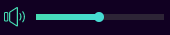 lament blade
@jagged badge have you also tried lowering the sound of the youtube video playing?
lament blade
@jagged badge has your overlay its own mixer part in your obs?
jagged badge
i just used a browser overlay for media share
lament blade
@jagged badge could you maybe increase your voice so the media request is still the same volume but because of your higher volume its perfect ^^?
lament blade
@jagged badge you can lower the sound just for you in the audio mixer
@jagged badge of you windows
lament blade
@jagged badge bottom right of you windows https://i.imgur.com/hboqF8A.png -> for me its "Lautstärkemixer öffnen"
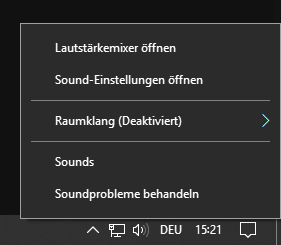 jagged badge
no idea how to turn down just the music on media share though 😛
any idea why my microhpone isnt working in game but is on stream?
jagged badge
oh ye got it thanks
anyone know why my mic isnt picking up my voice in games but does on the obs?
lament blade
@jagged badge have you selected your mic. in your games?
lament blade
@jagged badge game issue, try googling this issue for the game, we can't do much about it
 elder sorrel
Are you using Windows 10 @jagged badge ?
elder sorrel
Not sure if you tried already: But did you already go to your Playback devices & choose your output & Input audio for your game after the windows 10 update?
jagged badge
nope how do i do that
oh its already set to the mic i want to use
dont know how to set it for the game tho
elder sorrel
Is it set to default or does it show your actual mic in use for the audio input?
If it shows your actual Mic for the input: I would have no idea at that point. 
elder sorrel
What game?
 gentle imp
did u disable the mic you don't want to use?
most likely the game is picking up the wrong one
jagged badge
ive disabled everything apart from my mic
lament blade
@jagged badge if you disabled everything try restart the game so it doesnt use the current, disabled one. If that doesnt work its a game issue
lament blade
@jagged badge what game is it you have the issue with?
jagged badge
paladins
lament blade
crossplay/ placE ?
jagged badge
my mic works when im streaming, but its not working in game
i cant figure it out
obs picks up my mic
in game ovice doesnt
lament blade
@jagged badge https://steamcommunity.com/app/444090/discussions/2/1743355067080141161/ read that threat, it looks like its a general problem with paladins

As the title says. It works fine out of the game and in other games but not in this one. I hold the key to talk, I see the icon being light blue but no one hears me. Any way to fix it?
@jagged badge "The only other thing I can think of is if you're on Windows 10. Go to Settings, Privacy, Microphone, and make sure it is set to Allow apps to access your microphone on. If it's off, it can block some things like Paladins, but not other things, for whatever reason. I got nothing else to contribute if that doesn't work."
jagged badge
thats from 2018 they fixed it
lament blade
@jagged badge have you also enabled the permissions of your mic to paladins?
jagged badge
yes it used to work
only since istarted streaming its stopped working
its like my mic is ignoring paladins
and only goes to obs
lament blade
@jagged badge I would contact the developers of paladins, its a common game issue as it looks like
lament blade
@jagged badge I'm clueless I'm sorry 😦
jagged badge
np thanks for trying
gentle imp
disabled and enabled it ingame?
 spring lake
My stats page gives an error for quite a while now. Is there something I can do about this myself?
lament blade
@spring lake which error exacly?
spring lake
404
StreamElements
Description Chat Stats tracks emote usage on Twitch in real time. See which emotes are the most popular on every Twitch channel
lament blade
@spring lake have you changed your name in the past?
spring lake
Yes but like 2 years ago
real escarp
when was the last time you went to check your stats
spring lake
Ow yeah if I do https://stats.streamelements.com/c/trui22 I find my old stats from back in the day
StreamElements
Description Chat Stats tracks emote usage on Twitch in real time. See which emotes are the most popular on every Twitch channel
tight harness
I can fix this 😃
real escarp
I got it
spring lake
I checked it quite a lot but if you keep seeing an error you give up quite fast 😛
 oblique steeple
There will always be an error because it has to be changed by hand 
real escarp
refresh @spring lake
spring lake
Yeah thank you guys!
jagged badge
anyone know why my mic isnt working in game voice but my obs is picking it up perfectly fine
round brambleBOT
@jagged badge For the best OBS support, please join their Official Discord @ discord.gg/obsproject
gilded agate
Is there a way to have the bot respond to a command woth a listed format? I would like to be able to type the command for commands and then show a list of each command and a small description on seperate lines..
..The way StreamLabs achieves it is by send each line as a new message.
jade remnant
you have !commands and that will give you a link for all the available commands on your channel.
nothing that does it for chat as far as i know
gilded agate
Ahh ok thanks. So this is a double ended question...
I have my own custom not assigned, when I don't have obs live or ground control open the bot reverts back to streamelements, to have the bot be allowed to send links off stream do I have to male streamelements a moderator to get around my protection? And of so is the streamelements twitch profile also a bot and not a person working at StreamLabs?
 versed heart
Right, so I setup Streamlabs OBS after running some tests and it impacts my CPU a hell of a lot less than normal OBS, I add the streamelements overlay where I have my 100+ SFX already setup and... SLOBS doesn't play the sound. Normal OBS does but SLOBS doesn't... help plz?
lament blade
@versed heart SLOBS is blocking SE links as I know, that could be the issue.
real escarp
@gilded agate there is no way to have custom bot name without ground control or obs live
real escarp
aslo you want StreamElements bot to be mod in all cases
gilded agate
That s cool.. so do u .ale streamelements a channel mod for when I don't have them open?
real escarp
correct
gilded agate
Cool... and how do I so That? From the twitch dashboard or with streamelements?
real escarp
in chat /mod streamelements
gilded agate
Reprogramming my brain is hurting lol. Thanks for all the help!!!
Wow.. if course lol. Thank you!!!
And one last question..
When a non moderator clicks the link to see the list of commands, will they also see the moderator commands or is this because I'm logged in as myself and not a random follower?
jagged badge
anyone know why my in game voice isnt picking up my mic but its working in my livestream?
lament blade
@jagged badge you have asked this question multiple times in several channels. We aren't here to support game issues, you have to contact their discord or google the problem. Just writing again the same question where no one responses because he has also no idea is not helpful at all.
jagged badge
its not a game issue
real escarp
@gilded agate all commands are shown to all unless you hit the advance tab per command and check hide command from public pages
which is for custom commands
lament blade
@jagged badge but it isnt a SE issue
jagged badge
ok
gilded agate
Thanks again. So does that mean all the default mod commands info want them hidden I need to recreate them as custom ones.... maybe that would be a good feature to add to the default also
real escarp
you can show the mod commands they can not use them unless they are mod. functionality can not be replicated with custom commands such as !8ball
gilded agate
Ok cool cool!! Definitely need to add the hide from public list feature to the default commands
jagged badge
new problem
my ingame voice is working its just not getting picked up by obs
but its picking up my team mates
and obs only picks mine up if i use the obs keybind, not in the game bind
jade remnant
check that your mic is set in settings > audio
and its not muted or low in the mixer
are you using ptt in obs?
jade remnant
im not talking about in game
jagged badge
my mic is on full
jade remnant
and have you checked what i said above?
jagged badge
whats ptt
jade remnant
push to talk
jagged badge
yes im using it
i have different binds for it
in my stream/obs is picks up my voice ifi use it, but if i use it in game it doesnt use my voice
jade remnant
then you need to press it for obs to pick it up
you have already said the resolution to your issue
 halcyon meteor
Hey having some issues with my alerts at the moment, alert seems to be cut off on obs live
image wise, seems cut.
real escarp
did you just set up your alert
in obs make sure the resolution is set to 1920x1080 for the alerts | right click >properties>change it from 800 x 600
real escarp
in your overlay manager you can set the resolution
real escarp
yep change it in obs to 1400x900
then go to overlay manager and edit with "small pencil" this will let you change resolution of overlay green screen
real escarp
real escarp
you can change the resolution here
its set to 1080 in your screen shot so unless you have your base(cavas) set in obs to 1920x1080 you will need to change both to match
halcyon meteor
Quick question I'm I able to screen share?
real escarp
if you DM me you can
halcyon meteor
Okey will do
@real escarp thanks for the help! Awesome support, we're good to go now Cheers
tight harness
real escarp
Please keep topics to one channel @low saffron
 low saffron
i deleted the other one
real escarp
okay
low saffron
i thought it is not obs.live related
real escarp
which animation? is it a webm or gif
low saffron
webm
real escarp
I remember when you made that webm
low saffron
yeah, the same animation
real escarp
so are we talking follower alert or ?
low saffron
all the animations
it is basically the same one for the follow, i just changed the colors
I don't know what happened but before, the last frame of the video stayed on until another one follows and it triggers the animation again
real escarp
More than likely a bug on our end but you can manually add seconds to the Exit animation
real escarp
again more than likely it was a bug that has been fixed. the animations are suppose to animate out
real escarp
you can only control how it disappears fade/bounce/none(just hide)
low saffron
that I know,
shroud and lirik use the same method where the animation doesnt disappear.
I hope there will be an option to enable/disable the disappearance
thank you anyway
mild ridge
If I import points and the numbers are wrong afterwards do I need to re import them to fix the numbers?
tight harness
Are they a multiplied amount of the right number?
 devout jewel
Whenever I submit a image or gif for my follower notification it is randomly switched to left shark dancing
(No Variations are on)
tight harness
That is odd as we changed the default alert from the dancing shark to a new design some time ago. Do you know roughly when this alert box was created?
devout jewel
It is like a month old
And its only for the follower notification
(Randomly switched to it)
tight harness
Could you try making a new alert box, you don't need to delete the old one, just for testing purposes. And see what happens then when you try to change the alert
devout jewel
Yea it works when I make a new alert box
tight harness
Might be worth in that case to switch to the new alert box
devout jewel
Yea but I loose all my settings for every single notification on the alert box
And duplicating it also doesn't work either
tight harness
What are you wanting to change your follower notification to? I see the one already in place
devout jewel
The one that is already in place
tight harness
Am I alright to give it a test event?
devout jewel
Yep
tight harness
It must have been something inside the Custom CSS editor because I turned that off and it works just fine
devout jewel
Weird, but ill take it. Thanks!
tight harness
No problem
 proven compass
can i merge overlays together?
aka a widget from one overlay
into my current one
real escarp
you can copy a widget to another one of your overlays
select the widget then hit this button
proven compass
ty
halcyon meteor
Hey having haha one small issue I have a total subscriber count label which is 1208 however when someone subs it goes to 1 then 2 etc.. until the sub train is over then it goes back to the normal sub count
quick example^
tight harness
I've messaged you in #dreamteam 👍
mild ridge
In the imported document the names points hours in minutes are right.
dry hare
no decimals in the csv anymore?
mild ridge
I guess we can try that cause I'm not sure how else to fix the points.
 kindred hill
having an issue where i am using media request and when I click show on stream the music doubles up like there are two different sources
real escarp
if you have Media Request on multiple scenes you will need those browser sources disable when not visible
 broken knot
Hey guys i have changed my name on twitch and now my streamelement bot is not working any ideas in how i can fix this?
real escarp
Part the bot and JOIN the bot
real escarp
dashboard PART channel https://streamelements.com/dashboard
StreamElements
The Ultimate All in One Platform for Streamers
then JOIN channel
make sure you log out of stream elements when you part it
lament blade
real escarp
then log back in
broken knot
wow thanks man ive been struggling for days with that and tyou fixed fixed it in seconds
@real escarp you legend!#
kindred hill
is there a way to make all music the same volume? Im using media request and the volume seems to change with every song almost
real escarp
obs live or ground control?
kindred hill
obs live
 chilly epoch
hey, ive been having a problem the chat bot in twitch, it doesnt auto type in commands that i have put in timers for? any help is appreciated
real escarp
try parting the bot and have the bot join the channel from SE dashboard, double check the chatlines and time for command as well
@chilly epoch whats your username
lament blade
how can i change the bot name?
round brambleBOT
@lament blade Custom bot name requirements
- StreamElements bot modded and in chat
- Active overlay with alerts
- StreamElements tipping page in the panels below the stream (!panels)
- OBS.Live or Ground Control open
- Create a twitch account for the name you want to use or run the bot under your own name
- Custom bot name doesn't work on Mac
lament blade
Hi i have a question, so about media request window in obs is there like a way to launch it with keyboard symbol?
@lament blade you mean skipping a song? or let the window pop up with a keybind?
real escarp
mild ridge
If imported points don't show up then I need to re import or import a different csv file it seems.
mild ridge
but that format doesn't work in all apps
real escarp
your importing loyalty points?
mild ridge
trying to copy and paste my slobs points through csv
real escarp
the csv example i sent is how it needs to look with whole numbers
mild ridge
so then the format i sent you is wrong
real escarp
column 1 - username, column 2 - twitch ID(optional), column 3 - current points, column 4- all time points, column5-watchtime(optional)
even if its optional the column needs to be blank
 onyx igloo
hey i have problem is any admin here ?
mild ridge
name,currentpoints,hours in minutes is the format I'm using
real escarp
would you like for me to adjust it and send it back once i know it will import?
untold adder
how do you do a time command that shows the time in your time zone so other people around the world can know
elder sorrel
Check the pinned messages @untold adder
mild ridge
The weird thing is it said it was imported but looks like it wasn't and the file I sent you is what either works not perfectly or not at all.
elder sorrel
Very first one.
round brambleBOT
@fringe pond Please follow our community rules:
- No advertisement or stream promotion
- Respect ALL server members
- No NSFW/NSFL
Thank you
If you would like help from the StreamElements support volunteers/staff please post your question in one of the helpdesk channels and someone will assist you as soon as they are available: #helpdesk-twitch | #helpdesk-youtube | #helpdesk-mobile | #helpdesk-selive Thank you for being patient.
real escarp
so your okay with the version you sent me and dont want me to attempt
mild ridge
well it looks right minus the info being separated
 buoyant belfry
Hello! 
I am willing to move from Streamlabs to StreamElements and I notice that streamelements has this thing where you can do most of your scenes online. Would this bring a big advantage to my stream? Like, would it take away a very big load off of my processor or anything like that? (I don't have a weak processor so neither option should be a problem).
I'm asking because it would be a bit weird for me to do some part of the UI on the web and some parts in the actual obs, since i would need to keep track of two separate things when I want to move stuff around (like my webcam capture and it's border all at once for example).
potent ibex
It really does depend. Do you use a lot of animated overlays?
potent ibex
Keep in mind that when switching scenes, OBS will have to "rebuild" the browser source perse
real escarp
@mild ridge would you say column B needs to be empty and column c is current points and column d needs to be same as C and colum E would be hours???
potent ibex
Unless you use studio mode or leave the browser sources active over all your scenes
buoyant belfry
So what you are advising is to try and to everything in OBS if possible if my computer is beefy enough to handle it anyway, right?
potent ibex
Give it a try, they have an alerts importer. I don't suggest putting your webcam overlay in the cloud though.
buoyant belfry
I didn't even find a way to do it, but i see why you would raise concerns about that! 
buoyant belfry
Yeah, I was just curious if it would be a huge difference in between to two options before spending time to focus on either of the two.
potent ibex
On CPU usage?
If you have all your sources setup to shutdown when not active when using streamlabs, the cpu usage will be quite similar.
buoyant belfry
Yes, but it's an i9, it shouldn't have many issues unless I want 10 x 4k videos all at once and other animated stuff and bla bla
potent ibex
Either you have multiple sources in the scene, or a single browser source. Keep in mind that if you want to move things in your scene, using online overlays makes it difficult and/or very frustrating at times.
mild ridge
I'd say column 1 is names column 2 is currentpoints column 3 is minutes watched @real escarp
buoyant belfry
Right! Thanks a ton for your time to help! Hoping that the switch from Streamlabs will allow me to have a better streaming experience with less random bugs and glitches!
real escarp
the SE format wants 5 columns to import correctly
potent ibex
I must admit the website seems to actually work. Almost like streamelements is focused on fixing things rather than monetizing them
mild ridge
there's only 3 formats with slobs so i'm limited okay
yeah it will say success but not show anything so be careful
low saffron
@real escarp is there a page where I can find all StreamElements data injections, I am trying to do what I told you before using javascript :
logo > alert > vid (actual alert) > logo
real escarp
im going to now attempt with this format on mine
mild ridge
hmm id is same as name right but i don't know the all time points
 lucid night
hmm just a quick question, i cant stream since the new update for obs live, there is a "video error" when i use hardware "nvenc", i should install the newest video drivers, but they are installed and everything else is fine
lament blade
@lucid night which error does pop up? Failed to initialize video. Your GPU may not be supported, or your graphics drivers may need to be updated. ?
real escarp
GitHub
Contribute to StreamElements/widgets development by creating an account on GitHub.
lucid night
@lament blade yeah sir
lament blade
@lucid night please upload the latest log of your obs
@lucid night OBS -> Help -> Log -> UPload current log
lucid night
okay ty
 pulsar sinew
can anyone help
i started streaming a few days ago and i have this audio delay on my stream
the audio is 2 seconds or so behind the video
low saffron
@real escarp thank you, it was really difficult to control everything using js.
I hope you guys add an option to prevent disappearance.
shut wigeon
@pulsar sinew Could you be more specific? What kind of audio? Cam related, music or just the audio in general.
Make sure the box here in your audio output properties is unchecked.
https://i.imgur.com/IaNtrlJ.png
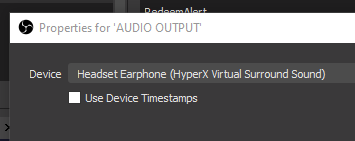
You can also play around with the advanced audio controller and change the offset value until it syncs up.
pulsar sinew
its the audio in general
imagine me shooting in game and you hear the shot 2 seconds later
shut wigeon
Gotcha, I've had that issue aswell. Check the solutions i posted.
 finite glacier
I want to play music at the start of my stream. But I don’t want to be muted due to copyright. I have Spotify which I want to use. But I don’t know what music I can play that is not copy righted.
shut wigeon
Also, make sure to use the same audio device in games as you have set up in OBS.
shut wigeon
@finite glacier Monstercat & NoCopyrightSound are two big ones you could look into.
Twitch also has their own music library of songs you can use freely on stream.
finite glacier
Is this on Spotify. The next question I have is some of the top name streamers that I watch have music play like Michael Jackson AC/DC etc how come they don’t get muted for copyright issues.
shut wigeon
You can find them both on Spotify, yes.
Music doesn't get muted while being live. It will however be muted in VOD's.
finite glacier
What is VOD’s
shut wigeon
Another way to say previous broadcast. Meaning past streams.
finite glacier
Will on vods I have seen a lot of stream video that I watch after they have gone off line and they have named artists playing in there steam and non of them have muted music
 narrow coyote
These helpdesk channels are for support with StreamElements services. This is not related to StreamElements so if you would like to continue this conversation, please do so in #general-chat
slender ridge
Hello, in media request is option to make something like... If someone drop song X, another can drop it before that X song plays?
lament blade
possible to get a donation goal displayed on the stream?
I've tried looking, can't seem to find it.
shut wigeon
@lament blade https://i.imgur.com/LsOYeDD.png
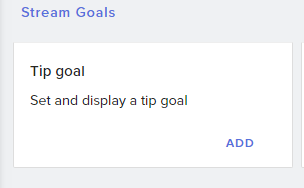


Inside your overlay editor, go to widgets and scroll down a bit.