#helpdesk-twitch
1 messages · Page 488 of 1
 nocturne pelicanBOT
 lone spire
anyone know if its possible to create store items and have it limited to only a specific user allowed to claim it? EG: i have a viewer i want to allow to play a sound. I know i can limit it to Subscribers... but what about a particular viewer name?
 swift parcel
No
 cyan burrow
Hi so, streamelements bot isn't in my chat, does anyone know how to get it there ?
one day to the next it was gone
 oblique marsh
Someone from Corsair came in and helped me get it fixed, Thanks guys, Im good now.

swift parcel
Apologies that I wasn't much help I haven't touched the tiltify stuff at all
oblique marsh
No! Dont apologize
I love you for taking the time to try and help me
For future reference if you get another with the same problem, what ended up helping was that we deleted the widget all together, and re added it
Simple uninstall reinstall
and then ALL of the alerts came flooding in
 lament blade
We love you too for reaching out! We appreciate your help and feedback!
swift parcel
@cyan burrow have you changed your twitch name at all
lament blade
Any way to make StreamElements better is really something we can all appreciate it, so thank you for the love and appreciation <3 @swift parcel
cyan burrow
@swift parcel i did yea
swift parcel
@cyan burrow you need to go to your dashboard part the bot , sign out and resign in and rejoin the bot. When you change your name we don't capture that change so we just have to regrab everything
 humble ether
Hey all!,, Is it possible to remove badges from the Chat widget ??
lament blade
Oh whoops my ping was supposed to be towards @oblique marsh!
Sorry @swift parcel btw
@humble ether Currently, it appears to have not been done yet, but it's most likely underr development! When it will arise however we're not sure since there's no ETA. Feel free to stay tuned!
oblique marsh
@lament blade 
 teal socket
Hi! I have a quick question. I use loyalty points on my stream, and every time I add points, I do <@username> to add, but in order for it to work, I always have to move the @ symbol. Is there a setting or workaround on this? Thank you!
lament blade
@fallen lava I don't think that would more so be a support question, but I think you would be able to get answers best in #general-chat.
On that note, please also don't repost your message in a multitude of channels. One channel like #general-chat is enough.
@teal socket Currently, it doesn't. However, you can also remove the @ altogether and use only their username!
For example, you could input the following command for it to work:
!addpoints kirbyrocket 123
 remote river
I keep having issues disconnecting and reconecting with streamelements from twitch. My friends obs also been having connection issues. Just reconnects to stream and reconnects. Just wondering if its twitch or us?
teal socket
Thank you @lament blade !
 wanton mango
@humble ether in the meantime, if you want, you could overwrite the css of the chatbox from inside OBS to remove the badges with dis
.chat-line .badges {
  display: none !important;
}
 sonic depot
Can you add screen livestreaming on the mobile app? If thats already a thing can you guys make a video for it?
 jade remnant
planned, no eta
 glad field
Where do I go to log StreamElements bot into my bot's Twitch account?
 elder sorrel
Streamelements.com -> Sign in with your Twitch Account-> Scroll down a bit & should see on the right side to click 'Join Bot'.
After that. Go to your Twitch Channel -> Type in Chat /mod streamelements
 copper notch
How do i reset my JWS token
im deserperate i accedenty shown in my stream @everyone
lament blade
Anyone know why when using a command in my char, the bot/myname spams the response like 20 times in chat?
 open sinew
where can you see all the added mods that got a invite link ? i can´t seem to find it
lament blade
@jade remnant I do have ground control installed yes.
any type of command in my chat gets spammed 17 times lol
jade remnant
@copper notch
- thank god the everyone ping is dissabled eh...
- i will ask internally about it
@lament blade close ground control and kill any form of bot.exe in the task manager, then open it back up and try again
lament blade
Seems to have fixed it. Thanks!
open sinew
@jade remnant thank you for the fast reply
jade remnant
@copper notch
for future reference you can reset it here https://streamelements.com/dashboard/account/security
please not that the overlay links will change too
copper notch
So this changes my JWT token?
jade remnant
yes
copper notch
Ok thank you your a life saver
 mental sorrel
Hi! I have a question about alerts and variations, is there a way to just set your sub alerts to the same as bit donation alerts, I have 152 variations and don't want to do them all twice
 strong kernel
There isn't. But I gotta ask, what do you need 152 variations for? Never heard of anyone needing that many.
glad field
@elder sorrel no, I have a Twitch account for my bot and I want StreamElements to use that account. Not the StreamElements account
strong kernel
@glad field Check pinned messages in #helpdesk-selive
mental sorrel
So I have 151 pokemon alerts that play "who's that pokemon" and come out randomly
adn then one that is "but it was me DIO"
it was a TON of hecking work LOL
 compact tulip
hi, i was wondering if theres any text animation presets here, for the Alerts, css/html. i'm looking for a text sub/follow animation that divides the text in 4 or 2 pieces. Kind of like a sword cutting the text in half.
jade remnant
@mental sorrel i have to admit, that sounds impressive 😁
@compact tulip there is a way to do it in the html feild, but i would say ask in #dev-chat as the big brain geeks live there and will be able to help you more with lines and placements
compact tulip
@jade remnant tyy
 distant umbra
I cant find a overlay that i like that doesnt have facebook, bc i dont use facebook
strong kernel
Themes aren't all or nothing. You can remove or edit specific elements.
 dawn fern
Is there a way to turn off the multiple running messages on the !raffle module ?
distant umbra
Well thats kinda hard
strong kernel
How so? Select it and press the delete button.
distant umbra
welll then it has open spaces
distant umbra
but the backgroud stuff
 dry hare
Are you using an overlay that hasn’t been broken down to individual elements?
That has a giant banner that embeds all the social media stuff?
distant umbra
idk its from your webstie
dry hare
Which overlay are you using?
jade remnant
why not just put half of the widget under the other?
distant umbra
well i just rmoved the background
jade remnant
k
dry hare
it's becaues the background image isn't independent for each social media.
nocturne pelicanBOT
@distant umbra To add your overlays to OBS, add a new browser source in your scene. Paste your overlay URL in the browser source properties, set the dimensions to 1920x1080 (unless you changed them on the website), and ☑ “Shutdown source when not visible” https://youtu.be/KDvLynUqXI4
 cobalt kindle
If SE is going to moderate somebody due to an infraction in the settings (say, they left a link when it isn’t approved to do so), can the bot PLEASE say something as to why that message was deleted? It’s getting silly having to tell somebody every single time why their message was deleted - because the bot doesn’t actually say anything to them.
Might have to go back to Nightbot if that’s not possible.
nocturne pelicanBOT
@cobalt kindle Check out the StreamElements ideas board: https://strms.net/ideas. You'll be able to add ideas, upvote ideas you agree with, and track their progress with email notifications. Adding and upvoting ideas also helps the staff know which ideas should be prioritized so please take some time to upvote.
cobalt kindle
Gonna go ahead and assume that response means it’s not currently possible to have automated moderation have a response to it. Thank ya much. Gonna revert until it does
My alerts in OBS still don’t play the proper volume either. Tried everything requested so far. Cannot have my alerts loud enough to hear them reliably.
I know whoever sees this now likely won’t know the history of this issue. I’m open to working with somebody to fix it still

 scarlet pumice
hello 😃 just activated the loyalty system, and was wondering if you need to activate the stream elements bot for chat to check their points (using a command similar to !points)?
strong kernel
The bot needs to be in your chat for it to respond to commands, yes.
scarlet pumice
is it possible to use Nightbot? or will it only work with the SE bot?
I would think it's just easier with SE
strong kernel
No, we're not Nightbot.
 pseudo ravine
Hello, is it possible to edit what this automatic response says?
strong kernel
Chat alerts module in the Modules section.
pseudo ravine
Cheers
 mild sand
hey, i have a quick question for the group
 celest temple
And it's still using sounds that I deleted.
mild sand
I wanted to set up a follower goal in streamelements and it won't display my correct number of followers
any ideas?
strong kernel
@celest temple Check your variations.
@mild sand Goals are counters. They do not reflect your actual totals, they just keep counting up and up. You can edit goal progress at https://streamelements.com/dashboard/session

StreamElements
The Ultimate All in One Platform for Streamers
strong kernel
@celest temple Set your TTS per variation.
celest temple
Looking at my variation settings...
I only see 2 alerts
And I clear all of the sounds.
There is no way to re-arrange this huh ?
http://prntscr.com/ooc1ha
 strong kernel
They're in the order that you create them.
lament blade
i have a question for the streamelements brows Im wondering how to reset my donation goal its stuck on 11.12 from the last one
strong kernel
@lament blade You can edit goal progress at https://streamelements.com/dashboard/session
StreamElements
The Ultimate All in One Platform for Streamers
mild sand
what about my question? would you happen to know as to why the follower amount is incorrect?\
strong kernel
@mild sand You were already responded to. Scroll up.
mild sand
was I, my bad
I see, I didn't notice it since it was in with the other messgae
thanks for the help
 spiral python
What's the deal with the possiblity of editing overlays in the app are they ever going to add that feature?
strong kernel
You can already edit the overlay used by the app. You just can't see the changes in the app itself; they'll only appear on stream.
 frozen vessel
hey it wont let me connect my twitch
like itll start and then say it cant connect to the software
strong kernel
Can you provide a screenshot of the error?
frozen vessel
this is the pop up i get
strong kernel
Where is that? Can you take a screenshot of the full screen and not just the error popup?
pseudo ravine
So I tried "{user} is raiding with {amount} viewers! Last time they were streaming ${game ${user}} at https://twitch.tv/{user}" while it shows the correct user in the twitch link it will show the game I am playing instead, what am I doing wrong?
 frozen vessel
this is the full screen i couldn’t get a ss so i took a pic
 delicate tinsel
How can i deactivate that donation thing? i dont want to g et donated via Streamelements i want to do it with my steamlabs
strong kernel
@delicate tinsel If you absolutely don't want to use your tipping page link, don't set it up and don't provide the link. But Streamlabs tips will not play alerts through StreamElements.
@lament blade The thing with the thing?
Can you be more specific? 😃
lament blade
the screen recorder
are you supposed to set it up before you use it
because i just downloaded it
strong kernel
Yes, OBS requires a lot of setup.
You can find some beginner tutorials at https://obs.live

OBS.Live | Open Broadcaster Software Streaming Knowledge Base
OBS (open broadcaster software) knowledge base for live streaming. Find articles and videos about streaming with OBS.
lament blade
alright so what do i do
strong kernel
Follow the tutorials.
lament blade
i cant find one though
strong kernel
OBS.Live | Open Broadcaster Software Streaming Knowledge Base
OBS (Open Broadcaster Software) knowledge base for live streaming. OBS.Live is optimized for live streaming, Integrating Twitch with OBS Studio, making your stream management flawless
delicate tinsel
if i type !donate in my chat there is coming the link of that streamelements page and i just dont know how to get rid of it
strong kernel
That's a default command you can disable in the chat commands section of your account.
delicate tinsel
there is no !donate command near my d area https://gyazo.com/9ad1172d961a452d55a8d7e931759d40

in the default command section
strong kernel
The default command is !tip. !donate is an alias.
delicate tinsel
Oh thank you 😄
 valid pagoda
having a problem using counter commands is there currently an issue
strong kernel
No reported issues.
valid pagoda
it's not working on the onix1962 twitch account
strong kernel
How was your command set up?
Also, the bot should be modded in the channel to prevent any issues.
valid pagoda
ok
 warm lagoon
I have a question as well, is there a way to put the streamelements music queve only through the stream and not my headphones? So viewers can watch it but i don't have to hear it?
strong kernel
That requires an audio mixer setup that's a bit more advanced than I'm personally capable of. 
 old tundra
my stream is lagging but its not my internet any fix ideas?
nocturne pelicanBOT
@old tundra Please provide a log from your last stream. To do this, in OBS go to Help > Log Files > Upload Last Log File and paste the link to the log file here.
old tundra
strong kernel
That log doesn't have an output session from a stream.
old tundra
how do i get that
strong kernel
@old tundra Follow the instructions here, but particularly what's under the "No Output Session" section to see how to generate a log with an output session.
https://h4ndy.eu/obslog?url=https%3A%2F%2Fobsproject.com%2Flogs%2FDjNk4MX3MjymzDqG
old tundra
alright ty be back in a min
old tundra
strong kernel
@old tundra https://h4ndy.eu/obslog?url=https%3A%2F%2Fobsproject.com%2Flogs%2Flon0E5si-qLXfEoJ
Looks like it's either your internet or networking hardware.
old tundra

Speedtest.net
Test your Internet connection bandwidth to locations around the world with this interactive broadband speed test from Ookla
do i need better wifi or router?
im not really good with this stuff
strong kernel
Click the link and go through the information.
old tundra
oh ok thanks
 burnt finch
Hello, I have the issue of my alert not being triggered in my stream. I have a full alertbox setup (should be all correct.) When I trigger with the widget tester it doesnt show up at all.
 zenith widget
It doesn't show up in the editor or just OBS?
burnt finch
just obs
nocturne pelicanBOT
@burnt finch You can test Alerts via the bell on the lower right corner of the Overlay Editor. Simply go to your Dashboard -> My Overlays -> Pencil/edit button on the overlay. Make sure the "Show Emulated events on stream" option is on to see the alert in OBS/Xsplit https://streamable.com/h6qgy
 zenith widget
😃 👍
 distant pike
when i stream on twitch half my screen is black
 young fiber
hello
nocturne pelicanBOT
@distant pike The default resolution for StreamElements overlays (theme and custom) is 1920x1080. Please add them in OBS at their full resolution and use CTRL+F to fit to screen if necessary. You can then downscale your stream in OBS settings > Video if you'd like https://i.imgur.com/6bWXxjR.png

 rotund aspen
Just downloaded OBS Live from stream elements. OBS makes me relog everytime i boot it up
nocturne pelicanBOT
@rotund aspen If you are not seeing the OBS Twitch integrations and have OBS.Live installed, please follow these steps:
- Make sure you are on the latest and greatest version of OBS.Live ( 19.7.14.421 )
- exit OBS (make sure OBS is not running)
- delete %appdata%\obs-studio\plugin_config\obs-browser\obs_profile_cookies
- start OBS.Live
- Settings -> Stream -> disconnect -> connect
rotund aspen
Im also trying to implement a $readrandline(C:\Desktop\Stream\StreamFiles\MLSummonList.txt) this line isn't being recognized
zenith widget
Where are you trying to use that?
rotund aspen
For a bot command
zenith widget
Out bot doesn't run locally from your PC.
Its cloud based.
So it can't read files from your PC
rotund aspen
hmmmm so where would i need to upload the file?
zenith widget
I don't know what the end goal with the file is to make a proper suggestion.
rotund aspen
so in the game i stream you pull for random units
i wanted viewers to be able to call a command
and the bot generates a output randomly from a set list
its like random number but instead its the name of a unit
zenith widget
so, random name?
zenith widget
You can setup a pastebin if you'd like using this trusted 3rd party API https://thefyrewire.com/docs/api/twitch/pastebin/

it can pull random lines from the pastbin as far as I know
rotund aspen
this is exactly what i was trying to replecate
rotund aspen
is it no longer possible or do i have to call from paste bin
Okay i got it working, thanks a bunch @zenith widget
zenith widget
👍
 spice yarrow
Does anyone know what fonts were used on the Violet momentum overlay?
zenith widget
If you've added the overlay to your account from the theme gallery, you can just enter the overlay, click on any of the widgets -> text settings -> font is listed there.
spice yarrow
Thank you so much
zenith widget
👍
 digital fiber
Hello guys. I have a questions about streamelements leaderboard on twitch
I made a new emote but leaderbord does not count about my new emote
zenith widget
try using !emotes update
if the bot doesn't respond, go into the command list and check in the default commands for the command and enable it
digital fiber
Thank you for responding. @zenith widget I could fix the problem.
 prime mural
can i change the name of the bot in my twitch chat?
nocturne pelicanBOT
@prime mural Custom bot name requirements
- StreamElements bot modded and in chat
- Active overlay with alerts
- StreamElements tipping page in the panels below the stream (!panels)
- OBS.Live or Ground Control open
- Create a twitch account for the name you want to use or run the bot under your own name
- Custom bot name doesn't work on Mac
prime mural
thank you
 old mirage
is there a way to manage a queue with the bot?
like the following commands:
!play (Enter the list of players that want to play.)
!exit (Removes the player from the list.)
!que (Lists everyone that wants to play in order.)
!clearque (Clears the list.)
zenith widget
Yes - wthi this trusted 3rd party API https://thefyrewire.com/docs/api/twitch/queue/
old mirage
TNX
prime mural
where do i go to change the name of the bot?
nocturne pelicanBOT
@prime mural Custom bot name requirements
- StreamElements bot modded and in chat
- Active overlay with alerts
- StreamElements tipping page in the panels below the stream (!panels)
- OBS.Live or Ground Control open
- Create a twitch account for the name you want to use or run the bot under your own name
- Custom bot name doesn't work on Mac
zenith widget
In the settings of Ground control if you meet the requirments
or in OBS.Live activity feed settings
 mild sparrow
I got a question about bot timers if anyone's there.
mild sparrow
I've read it.
"Having most timers with exact same settings, makes them trigger at once, so its best to have them with different chat lines and timers.
(External timer examples: interval of 5/7/9/12 minutes - yes some timers may trigger all at once but its less common if common divination number is different most of the time)"
Is this part still true? I watched a video that said the bot automatically creates intervals between timers with identical settings.
zenith widget
The written thats is still true
mild sparrow
Ok, thank you.
 onyx bane
Hey so how do I make the alert text appear behind my alert?
or not appear until later
do I have to use CSS? Because I am trying to KISS (keep it simple stupid) and not animate my CSS because if I start with CSS that's where I'll go
lament blade
having an issue with trying to capture feed from my elgato HD 60 S to streamelements. I have everything setup correctly, but when I add the Video Capture source the elgato say "wait a moment" and never shows the xbox. I have troubleshooted and when I use another OBS it works flawlessly. I want to you use SE and not other platforms.. someone help please @nocturne pelican
onyx bane
@lament blade none of this is a StreamElements issue
But typically it's the Elgato card being setup incorrectly
 twin sentinel
@onyx bane I think this requires custom coding.
onyx bane
I just setup a friends capture card with OBS Live and it worked flawlessly
It's literally just OBS with a plugin
the sources are unaffected
lament blade
so I open streamlabs and it works! open streamelements. get nothing..
this is obviously an issue
lament blade
yes and came up with nothing
nocturne pelicanBOT
@lament blade For the best OBS support, please join their Official Discord @ discord.gg/obsproject
onyx bane
Try that ^
if it doesn't work with OBS Live try regular OBS
if that works and OBS Live doesn't then come back here
lament blade
i have done all this already
running out of options this has been going on a week
so I came here thinking I would get a different result
onyx bane
You've given me no context whatsoever as to what exactly the issue is. Have you checked the log? Have you verified that the Elgato software pulls up the correct display?
lament blade
nevermind, i'll just use streamlabs
onyx bane

@twin sentinel I just need it to fade in after 5s, I haven't messed with CSS animation rules enough
twin sentinel
Then there is a text appearance delay in the animation settings.
onyx bane
Ah
Nice
ty
Do I have to animate alerts with CSS?
Trying to figure out the final phase of alerts which is the fact that the username changes
twin sentinel
Depending on what you are trying to do, you maybe need CSS.
onyx bane
What's the typical process to making an animated alert?
Can I have fancy text melting effects or something without CSS?
Idk who to tag but can we please please be able to copy variation settings
lol
I have to go through and set 20 variations for all the same alert
 true needle
how i active my streamelements bot in my chat on twitch?
onyx bane
@true needle https://streamelements.com/features/chatbot

StreamElements
StreamElements Chatbot for Twitch and YouTube Live streaming increases engagement and moderates your chat. Run commands, timers and keep your chat clean with spam filters.
As long as it's activated check the Bot Modules
jade remnant
go to the dashboard and join it to your channel, button on the right hand side
zenith widget
!hosts
nocturne pelicanBOT
Due to changes to Twitch API, we have filtered out hosts and will only show these ones on your activity feed:
- All manual host events (0 hosts included and if filter set to 0)
- All hosts coming from an online channel. If the hosting channel has been offline, we do not show it
- All auto host events with at least 1 viewer
Note: An offline host is when you see "X channel has just hosted you" - with no viewer numbers on the back
 pallid osprey
ugh. missed the S
 reef egret
Hi there. I just had a question about SE.Pay . I did a withdraw on my tips a few days ago and was wondering how long it usually takes until I see that in my bank account?
 gentle imp
I'm sure it's explained on the settings tab @reef egret but I'm trying to find it for you
did you provide all the info required on SE.Pay regarding bank?
check please if it's waiting on anything from you
but should be 1-3 days https://streamelements.com/dashboard/tipping/fees
nocturne pelicanBOT
@tulip plaza Please follow our community rules:
- No advertisement or stream promotion
- Respect ALL server members
- No NSFW/NSFL
Thank you
reef egret
@gentle imp Okay, thanks
 river delta
how do i change the chat and activity feed to show my facebook stats instead of twitch , i no longer stream from twitch
 river delta
i wasnt sure which thread to put it under thank you so much though haha
elder sorrel
No worries 
 slow epoch
Hello, so for some reason when there's an animation/alert it uses 30-50% of my CPU which lags my whole computer basically
But It only happens with Stream elements
For example streamlabs, muxy.io and so on work fine but I still want to keep using streamelements because you can do so much stuff with it
gentle imp
!add
nocturne pelicanBOT
To add your overlays to OBS, add a new browser source in your scene. Paste your overlay URL in the browser source properties, set the dimensions to 1920x1080 (unless you changed them on the website), and ☑ “Shutdown source when not visible” https://youtu.be/KDvLynUqXI4
gentle imp
did you tick that on all browser sources @slow epoch ?
slow epoch
Yes, I've read how to add all the overlays and stuff and the options you need to check
gentle imp
what animation are we talking about?
slow epoch
Follow Alert, it's just a simple animation I made
gentle imp
one of the differences between StreamElements and competion is that all is hosted in the cloud, so if it's a massive file it will hurt your pc aswell as the connection
slow epoch
It's not massive, (I don't think), it's a 10s webm file, 300kb
gentle imp
weird, that shouldn't cause issues
are you using vanilla obs studio or StreamElements plugin?
slow epoch
StreamElements plugin
Maybe that's causing the issues?
because when I once logged in OBS with twitch to get the chat and stuff, I had similar performance issues
gentle imp
I'm sure something can be done to prevent it, but I'm not too familiar with the plugin sadly, I do suggest asking that and mention it doesn't lag on vanilla in #helpdesk-selive
gentle imp
thank you and I'm sorry, best of luck mate
 brave spear
Is there a way to make it so timers can run commands?
elder sorrel
Not possible currently @brave spear
Timers cannot trigger commands.
brave spear
ok thank you
 austere lava
Hey, not sure if this is the right channel but I am having issues with my Twitch chat, I can edit it online and it works fine but its not working when live on stream? Any ideas? Thanks
elder sorrel
Is everything else showing up in the Overlay?
Is the Overlay Browser Source above your Game Capture / Display Capture Source?
Sorry I saw your question earlier. Just got really busy at work.
austere lava
Hey no worries, Yes it's at the top and the overlay is showing other assets fine
elder sorrel
@austere lava Can you try reloading the overlay? As it may just need a quick update & should be seen when entering stuff in chat.
austere lava
Hmm how do I do that @elder sorrel lol
elder sorrel
You're using OBS.Live I believe.
Will be on the Activity Feed
 still basin
Hey is it possible that i can get acces to the Streamelements Interface of my friend via Support because my friend has lost his phone number and he cant acces it because the Twitch support doesnt awnser?
jade remnant
you need to ask stream labs
still basin
LUL sry i am a Retard i ment StreamElements
jade remnant
im not sure i understand, you need to access his stream elements account?
2fa shouldnt be needed to log into the se site, just need the twitch log in
still basin
it is needed thats the Problem and in Stream Elements you can generate an link that some one else can acces his Stream Elements Interface and what i asked for is if it is possible that an Supporter can generate that link with the permision of the Streamer
jade remnant
we cant just generate a link and give to random people.
i will speak to the admin but i would imagine we need your friend in here for a start
 pale wave
Question: i am partnering up with st jude for a charity stream.
I have milestones that once reached will unlock an item to be given away.
How do i integrate that into the bot
<@&382267076632379392>
lament blade
I’m here! Hello!
Could you elaborate more on what you mean?
I'm not sure if I'm understanding
pale wave
@lament blade yes, the total donation reaches a certain limit it unlocks s giveaway
austere lava
Tried refreshing my overlays as per @elder sorrel advice but still not showing my chat 🤔
pale wave
So, once a total of 50.00 is donated a pin is unlocked and will be given away. 100.00 - another pin and so on
lament blade
Ah so a donation goal is what your looking for. Correct? I assume you'd want some sort of progress bar, right? @pale wave
pale wave
Yep
Yes and i also need to know once the first goal is reached how do I allow everyone to enter with a command that works once per user
lament blade
Okay! Give me one moment while I run back to PC to provide you a gif with full detailed instructions to help make this process as smooth as possible
pale wave
You got it
 tame glade
Hey is it possible that an Supporter generates a link that an Friend of mine can acces the Interface because i cant acces my Account because i dont have my Phone number anymore and the Twitch Support is not answering
lament blade
@pale wave Alright, I made it! Just to make sure, the goals are set at an exponential rate or is it for every $50?
@tame glade If you cannot sign into your account and can't bypass 2FA, there isn't much we can do to help. Sorry about that :/
I hope things work out for you!
pale wave
Nope
50, 100, 500, 1000
Also on another note, i will change it in the future
So, if i can edit it that would be great
Later on
lament blade
@pale wave Gotcha, so it's exponential. Well the best thing you can do is actually either duplicate your overlays in the overlay editor beforehand with each having a separate tip goal, or duplicate the tip goal widget itself https://i.imgur.com/iltuZL4.gifv
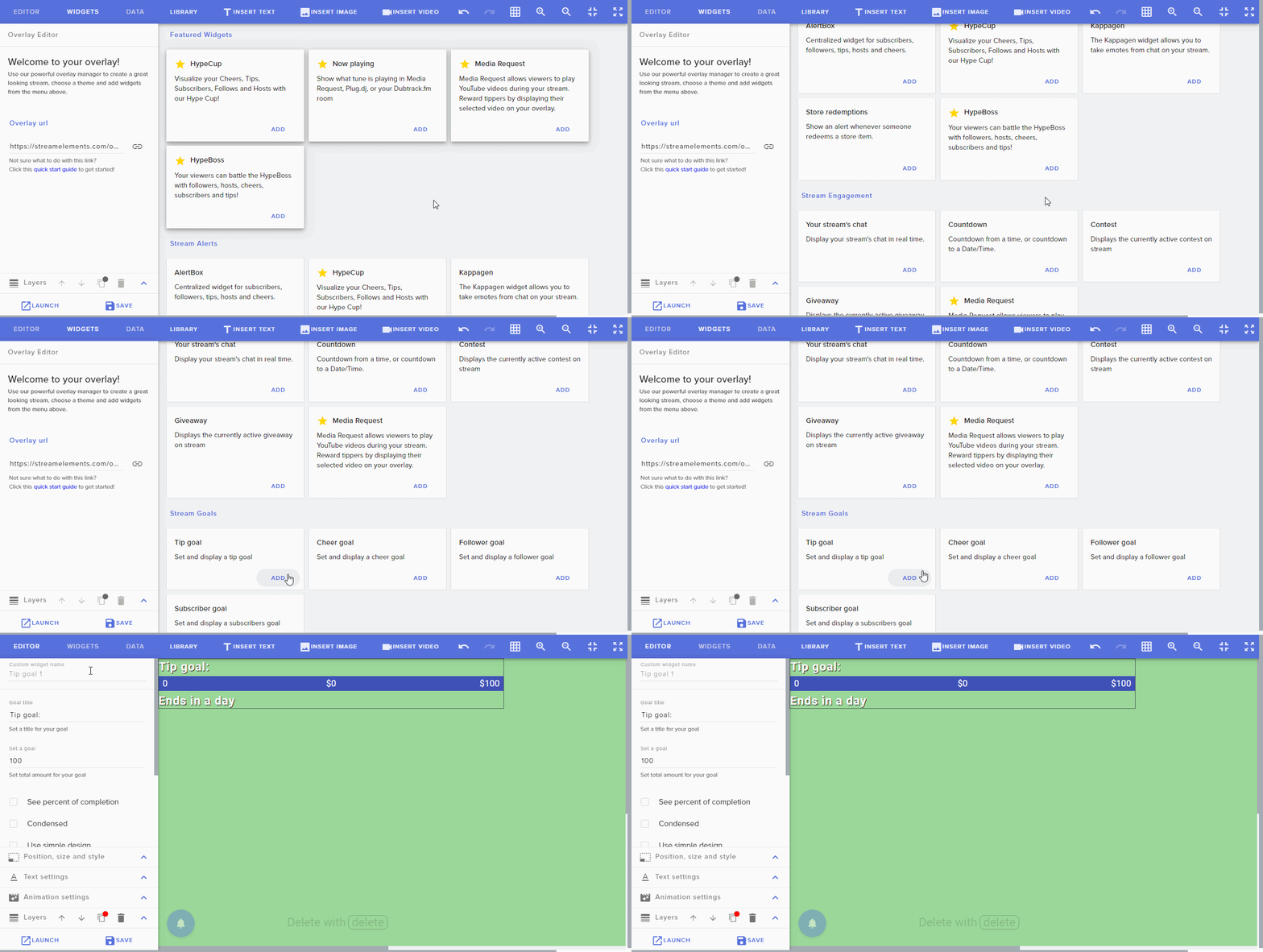
Forgot to attach teh gif whoops
pale wave
But what about once the goal is unlocked
I need the viewers to be able to enter into the giveaway
Once per user
For a certain amt of time
lament blade
@pale wave There is no way for the giveaway to be automatically be started as far as I know. However, you can add a staff member as a super moderator to help run your giveaways simultaneously 😃
pale wave
I can do that manually
 plush raptor
Correct me if i am wrong but streamelements wont show alerts for 0 viewer hosts? IE somebody comes into my channel and hosts while they are offline.
lament blade
@plush raptor You can modify the minimum required viewers for hosts
 zealous terrace
hi anyone from streamelements here who can help?
wrong channel, sorry I didnt see obslive one
lament blade
To enable the giveaway you mean?
plush raptor
@lament blade it's set at 0 to show alerts but still doesn't work
the number of viewers is set at 0
nocturne pelicanBOT
@plush raptor Due to changes to Twitch API, we have filtered out hosts and will only show these ones on your activity feed:
- All manual host events (0 hosts included and if filter set to 0)
- All hosts coming from an online channel. If the hosting channel has been offline, we do not show it
- All auto host events with at least 1 viewer
Note: An offline host is when you see "X channel has just hosted you" - with no viewer numbers on the back
plush raptor
So an offline 0 viewer host won't show?
That's what I thought was the case but wanted to double check
strong kernel
@plush raptor Correct.
@pale wave Goals are just counters. They can't automatically trigger giveaways. Something like that would take some significant custom coding.
And an external API, probably.
pale wave
What i mean is to manually begin the giveaway once i reach the first goal
And i need the viewers to be able to eneter via a chat command
And the limit is one
 leaden junco
Hey quick question is there a way to set up hot keys for steamelements ground control or the web dashboard. I want to be able to pause play and skip music with a key press.
 compact owl
^ make a button for twitch chat and put the text as !play , or !pause, !skip, !volume # etc etc @leaden junco
strong kernel
@pale wave Yes, in that case, you manually start the giveaway on the site.
@leaden junco
compact owl
@leaden junco and i was referring to like a stream deck
leaden junco
@strong kernel I only see one keybind available and thats to skip alerts. Is there a way to make new keybinds?
strong kernel
@leaden junco
pale wave
How do i do that
strong kernel
@pale wave The giveaways section of your account.
compact owl
sorry to stack on this but i have a question for u guys, does anyone get the issue where if people resub with twitch prime the alert doesn't come through?
nocturne pelicanBOT
@compact owl Twitch prime (new and resub) and paid subscriptions (resub only) must be shared in chat manually by the person subscribing in order for the subscription information to be sent to StreamElements. For twitch prime, the user needs to have sharing enabled on https://www.twitch.tv/settings/prime. For paid subs, if the share box doesn't show up immediately it will when they refresh the page. https://i.imgur.com/VNJN0Uv.gif https://i.imgur.com/2297EA7.png

 compact owl
that was amazing lol
strong kernel
?
 lime musk
Probably been asked before but, my host alerts don't show up, is there a setting I'm neglecting to enable all alerts regardless of size?
nocturne pelicanBOT
@lime musk Due to changes to Twitch API, we have filtered out hosts and will only show these ones on your activity feed:
- All manual host events (0 hosts included and if filter set to 0)
- All hosts coming from an online channel. If the hosting channel has been offline, we do not show it
- All auto host events with at least 1 viewer
Note: An offline host is when you see "X channel has just hosted you" - with no viewer numbers on the back
 swift mist
is there any news on the fix for the tiltify widgets where moderators, even with full control to a streamers SE, still cant access the settings of said widgets?
lament blade
if someone did this. do i only get the donation after i play the track ? https://gyazo.com/1d7268ed89409f6884c702541d4dad2a

I'm having issues with alerts being imported into StreamElements from StreamLabs. The custom css isn't working or showing alert. When i disable the custom css, the video works fine but the alert is obviously not the same from Streamlabs. How do I fix this?
strong kernel
Custom CSS should not be imported from Streamlabs, as their system works differently than ours. If you purchased alerts from a site such as Nerd or Die, many of their offerings come with StreamElements installation instructions.
lament blade
Nethyr any clarification on my song request info ?
strong kernel
@lament blade The donation is not contingent on the song.
 spring kiln
Just started using OBS.Live / StreamElements. Why would my Recent Sub not be populating by Recent Follow is? Am I missing a connection somewhere?
strong kernel
If you've just connected to StreamElements, we don't get a sub history from Twitch's API. So subs won't be accurate for about a month, when everyone's gone ahead and resubbed.
lament blade
Is there a tutorial or something about how StreamElements custom css is different from StreamLabs?
 wary ibex
how do i enter my stream key bcuz it doesnt show any streaming sites
strong kernel
You can find documentation in #dev-chat
@wary ibex Stream key is found in your Twitch account.
strong kernel
I don't understand.
wary ibex
can i like screen share
strong kernel
Screenshots will be fine.
wary ibex
i click settings then stream then service and there r no services to stream with
there r no services
strong kernel
Take a screenshot of your entire OBS window.
strong kernel
Update OBS.
23.2.1 is the most recent version.
21.1.0 has a broken autoupdater.
Get the new version from the site.
strong kernel
OBS (Open Broadcaster Software) is free and open source software for video recording and live streaming. Stream to Twitch, YouTube and many other providers or record your own videos with high quality H264 / AAC encoding.
lament blade
so to get partnered do i need to have one stream with atleast 75 viewers for the whole stream or have a 75 viewership for a few streams
@lament blade You have to average 75 viewers which means not in one stream. Must be concurrent. Your dashboard has achievements. You must complete the pathway to partner one to apply.
ok thx
do you know how long the concurrent has to be?
Until its checked off. I'd guess 5 streams? Not really sure.
ok thx
valid pagoda
count commands don't work in the onix1962 twitch account
is there an issue?
they worked a few days ago
strong kernel
What count commands? There's no reported issue.
strong kernel
Have the streamer set you as a moderator in the User management section of their account.
Setting you as a Regular actually lowers your bot access.
valid pagoda
ok either the user or something else demoted me, thanks
 undone shore
Hey my stream when anyone watches it just starts to buffer and all you see is a fram of my game and the loading symbol and then it will continue doing that
 cunning sparrow
OBS keeps crashing when I try to stream MTGA. I'm not sure what I'm doing wrong. I have a brand new XIDAX computer that should be able to handle this sort of thing, but I keep getting an encoder error. I've changed the output to go through the CPU (rather than GPU), many settings have been changed in OBS (OBS currently has "Highest" priority, we had our graphics card swapped out...any advice on troubleshooting is very, very welcome.
nocturne pelicanBOT
@cunning sparrow Please provide a log from your last stream. To do this, in OBS go to Help > Log Files > Upload Last Log File and paste the link to the log file here.
cunning sparrow
strong kernel
 hollow badger
Hey all. For whatever reason my image for sub alerts is still the dancing shark. I have changed it to many images and it even says there is another image selected, but the shark still shows. Any way to fix this?
wanton mango
@hollow badger click on Variations Settings and edit the default variation
elder sorrel

hollow badger
Thanks!
 peak sentinel
Could someone please help me with how I can setup automated messages for specific viewers like "Viewer1: <Hi!>" / "Bot: <Hey look It's (Username)!>" and those only trigger when the viewer 1st speaks in chat in that stream?
strong kernel
There is no greeting function in StreamElements as they've been found to be counterproductive and actually drive people away. The minimum required action for a bot response is a follow.
peak sentinel
Ah
 viscid lantern
Good evening, how do I get a viewer of mine to achieve live regular status only with the points he earns by watching? I tried to configure it through the stream store, but I approve the command the viewer gives, but still it doesn't go to the regular class. Does it have any way of setting levels the same way as other bots?
strong kernel
Regular is a manually set role. There is no way to have it automatically assigned. Regular level can be set with the bot using !level username 300
viscid lantern
A shame, because in other bots you can set up auto-level systems, they could implement this in streamelements as well. Just as they could integrate the software with the Mixer platform, because many streamers there have been asking for this for a long time, my own I am one that already sent several emails asking for this integration.
 ocean yacht
None of my commands are working on for twitch
strong kernel
I'm guessing you renamed your Twitch account?
ocean yacht
Oh yeah i did
strong kernel
Part the bot, log out of StreamElements on the site, log in, join the bot.
ocean yacht
Part?
strong kernel
The "Part Channel" button.
ocean yacht
I dont see that
strong kernel
StreamElements
The Ultimate All in One Platform for Streamers
 spring hamlet
@strong kernel @ocean yacht I literally had the same issue, and came in here to find a solution. Thank you for helping without knowing it lmao
 spring kiln
is there a particular browser to use with the Overlay Editor?
 cinder olive
Id reccommend using Chrome - but any should work
spring kiln
Thanks Mitch, also any way to expand the Layers bar any further?
Feel like it is somewhat squished at the bottom and can only view so many layers at a time
viscid lantern
@spring kiln I use any browser so far all have been supported.
cinder olive
I mean you could inspect the layer div
find this line
class="element-100pw layout-row layout-align-space-between-center"
and change height that way
strong kernel
Transitions can't be done with browser sources, so you won't find any in the themes gallery.
 gentle finch
Is there a known issue with shoutout commands right now? Command line is keeping the @ which is causing broken links to be returned
@grave lance stingers are done in scene transitions in OBS.
strong kernel
Either don't type the @ or replace the ${1} variables in the command with ${user|${1}}
oblique marsh
So everytime ive ever done it before ive managed to screw it up and break my alerts. Is there anyone that could take a look inside my overlay and make sure that I sets up my jumpscare alert properly?
lament blade
@oblique marsh Gladly! Feel free to send the overlay link through DMs 😃
 strange viper
Hello, how do i access a store of a streamer that i'm a super moderator? When i open the streamelements i cannot find where to switch between my personal account and the one i moderate.
nocturne pelicanBOT
@strange viper Follow these steps to grant managers/moderators access to your dashboard:
- Click on your Channel Name at the top of the dashboard and select Settings
- Create a new invite at one of three access levels (Bot Supervisor, Editor, Full Control)
- Send this invite to a mod/manager to give them access to your dashboard. The link is one-time-use and expires after 72 hours if not accepted
Video tutorial: https://youtu.be/zl_h-ttZDF0
strange viper
@nocturne pelican LOVE YOU 🍆
 woeful abyss
Do the super graphics not follow live streams from computer to console?
zenith widget
Consoles do not support overlays.
You need a capture card and OBS at minimum to have overlays over your console gameplay
 foggy crater
Hi I am having trouble activating chat stats
I dont know if its corralled with changing my name over the course of being on twitch
zenith widget
fixed
 pearl flint
is there a way for me, as a moderator to remove songs from queue in chat? like an !removesong or something? I want to remove like song 13, but I dont wanna open the website up
zenith widget
Specific songs - no. Currently playing one - yes with !skipsong
pearl flint
okay. Would be a cool feature to have in the future
 mint citrus
Hey there, i need help setting up my chatbot
 left timber
Anyone else getting "failed while uploading file" errors when trying to upload sound clips?
zenith widget
Are you using a browser different from Chrome?
left timber
Firefox 67.0.1
zenith widget
@mint citrus What do you need help with?
left timber
Whoops. 68.0.1 I mean
zenith widget
@left timber I suggest turning off any extensions you might have on Firefox and trying again. If that doesn't help, use Chrome or Opera
left timber
Okay. Uploading pictures is working. Just not .ogg sound files
zenith widget
I don't think we support .ogg files
mint citrus
Okay, so im super new here and will have all my gear to start streaming tomorrow... just finishing up widgets and stuff for overlay and I want to enable chatbot but i dont see it on the left side of the screen
zenith widget
@mint citrus https://streamelements.com/dashboard -> right side -> join channel
Make sure the .ogg file is no bigger then 10mb, else DM me the file
 dawn lily
Hello , how would i go about streaming with two PC's
left timber
They are definitely less than 10MB. None of them upload
mint citrus
this is literally where its supposed to be and it is not there. nothing on right side either of dashboard
zenith widget
You are asking for help in our Twitch related helpdesk
What you are showing is a Facebook account dashboard menu.
Facebook doesn't have chatbot support.
For facebook related issues, please use #helpdesk-facebook
mint citrus
told you im new here lol. ok thanks!
 weary sparrow
Hey im trying to do this variable:${time.until 87:00}. and it shows this:"2006-01-02T15:04:05Z07:00": cannot parse "0" as "2006"
zenith widget
Example usage: ${time.until 2019-06-20T09:40:56Z}
you need to place time in UTC timestamp/zone
zenith widget
year-month-day-Ttime-of-day
weary sparrow
No I know but nothing tells me to put 2019-06-20T09:40:56Z in there
you know what I mean
it says 19:00 so I think it's 19hours, so I put 87:00 thinking it will work
I just think SE could improve their documentations for noobs like us who don,t know everything about it 😛
 zenith widget
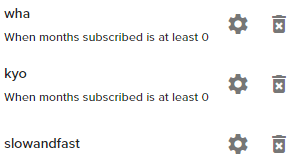
variations don't really work well with follower alerts
i don't see a condition on the 3rd one
 sterile cedar
I don't see where I can set one
since it is follow why there is need for any
also those "conditions" are leftovers from streamlabs import
they do work tho, freshly created is not
zenith widget
This shouldn't be like this
sterile cedar
what should I do
sterile cedar
okay remaking them seemed to fix
but that was weird; condition that come from nowhere (streamlabs import) blocks freshly created ones
zenith widget
condition takes priority over no condition
sterile cedar
How does tip amount "at least" condition works with different currencies?
 normal plank
do you know how i can get commands for my chat for example !epic
 ocean echo
Is it possible to remove loyalty points from all users at the same time from the leaderboard in the dashboard?
 golden shale
Is total subscriber count label not working for anybody else?
zenith widget
@golden shale Logout from our dashboard and login again
twin sentinel
@normal plank Invite the bot to your twitch channel via your dashboard https://streamelements.com/dashboard and create a custom command to use in your chat here: https://streamelements.com/dashboard/bot/commands/custom
golden shale
regardless. been a couple days @zenith widget with multiple login/out
normal plank
thanks
zenith widget
https://streamelements.com/dashboard/loyalty @ocean echo
nocturne pelicanBOT
@golden shale Please connect your streaming account (Twitch, YouTube, or Facebook) with Discord by going to ⚙ Settings and then Connections here in Discord. https://streamable.com/eg92w
 ocean echo
That's where I am currently KeiZar but I can't seem to find a setting to remove points from everyone.
ocean echo
But that will reset everything to 0 I assume?
zenith widget
Isn't that what you are asking about?
ocean echo
I just wanna decrease it by a specific amount, like 100.
Sorry for being unclear. :->
zenith widget
Then no - theres no option
ocean echo
Alright, thanks.
normal plank
sorry i am back when i am tyring to chnage the word it only has some words i can press i cant type any
sterile cedar
how do my viewers can open media request page for me?
golden shale
thanks for the help @zenith widget
sterile cedar
or viewers can only request via bot?
twin sentinel
@sterile cedar There is a default command !songqueue you can set to user level everyone.
sterile cedar
yeah, I see commands, but I'm interested if there page to request music
twin sentinel
Afaik they can only request via command.
sterile cedar
thanks
twin sentinel
You can give dashboard access to specific mods to see the songrequest page on bot side.
sterile cedar
for some reason song request doesn't autoplays when firs t song is added to playlist
nvm
nope, autoplay from YT still not working. Checkbox in settings enabled
sterile cedar
Yeah, basically what I would like to have that it would start once first song is added into playlist
zenith widget
What I notice is, you don't have a backup playlist
sterile cedar
I'm not looking for playing music from that page at all times
zenith widget
without a backup playlist to keep the function going, it won't start on its own
on a new requested song
gentle imp
you can suggest or upvote the idea if someone requested it already here https://strms.net/ideas
sterile cedar
just installed obs.live plugin but it removed stream information window
how do I enable it back
jade remnant
view > docks > information
or streamelements > information
sterile cedar
uhhhhh, there is no such menu option
nocturne pelicanBOT
@sterile cedar If you are not seeing the OBS Twitch integrations and have OBS.Live installed, please follow these steps:
- Make sure you are on the latest and greatest version of OBS.Live ( 19.7.14.421 )
- exit OBS (make sure OBS is not running)
- delete %appdata%\obs-studio\plugin_config\obs-browser\obs_profile_cookies
- start OBS.Live
- Settings -> Stream -> disconnect -> connect
jade remnant
are you logged into obs
settings > stream
sterile cedar
I see obs.live stuff
I want stream information window from original obs
So I can change game name, etc. inside obs
jade remnant
log out settings > stream
log back in
then go to view > docks > reset ui
sterile cedar
thanks, that helped
jade remnant
np 👍
sterile cedar
though it would be nice if activity feed had no minimal width restriction and had less wasted space in its UI
jade remnant
same, you can make a post on the ideas board if you like
nocturne pelicanBOT
@sterile cedar Check out the StreamElements ideas board: https://strms.net/ideas. You'll be able to add ideas, upvote ideas you agree with, and track their progress with email notifications. Adding and upvoting ideas also helps the staff know which ideas should be prioritized so please take some time to upvote.
sterile cedar
if no one thought about that before me, I doubt anyone cares
 signal pasture
jade remnant
signal pasture
jade remnant
yes, this is the helpdesk twitch channel
signal pasture
why does stream labs advertise other peoples channel on my chat and never reminds my viewers to follow
jade remnant
you need to ask stream labs
signal pasture
typo
thiss isnt the time neither viewers would tell me things like "thats shady or "bogus" but .... even when im offline?! comonnn
jade remnant
thats the twitter module
can be found here https://streamelements.com/dashboard/bot-modules
 north python
hello
 devout jackal
I'm using OBS.Live however after I start my stream it goes inactive after about 20 seconds. No dropped frames, steady FPS, very low CPU around 2%.
 real gate
Is there a way to create a line break in the commands for streamelements bot?
 tight harness
Sadly no, it isn't possible
Due to a limitation within Twitch chat which prevents this
real gate
Thank you, is there a way to put in symbols that arent emotes?
tight harness
What kind of symbols?
Best way to find that out would be to paste your chosen symbols into Twitch chat
tight harness
If you can paste them successfully into Twitch chat then our bot account can too 😃
real gate
Thanks :D
 dusky cipher
Does someone know how to change the redemption commands to specific commands
for a soundboard? I've seen it done, just haven't figured out how to do it
im trying to lose the "!redeem" part
tight harness
Not sure if this is what you mean, but you can make a sound item on the stream store and call it Sound for example, then you can make a command and have the response as: ${redeem sound}
This means that when you trigger the command, lets call it !sound to go with the theme, it will redeem the sound as if you'd done !redeem sound
If redeemed through the chat, you will still get the redemption response message from the bot, but you are cutting out the need for the "redeem" part of the command
dusky cipher
Ok so make a custom command Insert ${redeem sound} someone in the msg and it should work?
tight harness
Yeah, change out "sound" for whatever the item name is
dusky cipher
sweet lemme try this out
 nimble dune
Hi in obs i have added 2 alertbox same and when coming the alert i here it 2x why?
tight harness
!multi
nocturne pelicanBOT
Make sure to ☑ “Shutdown source when not visible” for all browser sources (all OBS scenes). If using studio mode, uncheck “Swap Preview/Output scenes After Transitioning.” Also keep in mind that sound can play from any overlay loaded in the browser (editor or launched). https://i.imgur.com/FegZJQS.png https://i.imgur.com/yY0wcFl.png

 nimble dune
thanks
 elder moat
I click on a giveaway link in a twitch chat and it takes me to streamelements where I’m signed in to the wrong twitch channel. I sign out but it keeps remembering the wrong channel and I can’t log in to the correct channel with points on it.
 hexed spoke
streamelements not leaving channel even though i clicked part channel
tight harness
@elder moat Copy the link, open an Incognito Mode page and paste the link into your URL bar, then log in with the account you want
@hexed spoke Check now
nocturne pelicanBOT
@terse oyster Please follow our community rules:
- No advertisement or stream promotion
- Respect ALL server members
- No NSFW/NSFL
Thank you
devout jackal
Can you point me where to troubleshoot my disconnection errors? I have tried it on 2 different networks. Using OBS.Live Beta. I start my stream and it stops streaming after about 20 seconds. No dropped frames or anything weird. Using the same Scene setup and widgets in Stream Elements works fine.
tight harness
Do you know how to produce an OBS log?
We find that this website: https://h4ndy.eu/obslog?url= is really good at identifying issues with your OBS using your OBS log
devout jackal
Thanks!
lament blade
When changing the images to the jar for things other than follower image, it doesn't work. It shows the examples before changing fine but won't work when changed image to my own. Is there something I'm doing wrong?
tight harness
@lament blade are you making sure to change the variations too?
lament blade
I left the settings the same; only changed the image thinking it'd work fine
Do I need to delete all the variations for it to work? Because even the preset variations don't show up once I changed one of the images to my own
tight harness
What I mean is, if you are changing the images of an event type with multiple variations like cheers for example you will need to change the image for each variation, or as you say, just have 1 variation for each event type
tight harness
Hmm, I loaded up your "Jar" overlay but there is no HypeCup widget in there
lament blade
I removed it since it wasn't working. I'll get it back in a second
I have it saved now with 1 sub variation and the follower image
tight harness
Alright, am I alright to test?
lament blade
Yes
tight harness
I see that you have the option ticked 'The provided image is a sprite-sheet', but this image isn't a sprite-sheet so that needs to be unticked
I've changed that
And I see it drop now into the cup
lament blade
Where is that?
tight harness
In the Advanced settings for the sub variation
lament blade
Ah, I never opened that. Thanks it works now
tight harness
No problem 😃
 autumn zealot
Any one having issues with the Stream Elements Extension not displaying Top Emotes or Chat Stats any more?
tight harness
This is actually because you renamed, should be fixed now 👍
 manic elk
Question, if I want to multistream but still wish to use SE, how would I go about getting all the widgets to work if I wanted to stream on Twitch, YouTube, and Mixer?
There doesn't seem to be a clear video explaining this that I can find
Does SE support this?
I'm only finding videos for StreamLabs
lament blade
can someone help me with the youtube
manic elk
#helpdesk-youtube @lament blade
lament blade
but no ones there
manic elk
You didn't see me get a response right away either, just be patient.
lament blade
sorry
dry hare
@manic elk mixer supper doesn’t exist. You would need to add an overlay for twitch and an overlay for YouTube. I would recommend creating overlays that don’t have follow/subscribe data as managing both would become a nightmare. Then you simply stream to restream.io which will broadcast to both YouTube and twitch.
dry hare
As long as you have a PC and a capture card
lament blade
but i mean with out
dry hare
The PS4 cannot natively stream with external overlays
You can stream direct from your PS4 yes
lament blade
i know
manic elk
Thank you @dry hare!
dry hare
No problem
dry hare
You want to rebroadcast your own stream to your own channel?
lament blade
i think so
dry hare
That can’t be done.
lament blade
but the other vanila stream is private
dry hare
So you’re talking about taking one twitch stream and streaming it to a different channel you own
lament blade
and then only u can watch it and record it and stream it with OBS streamelements
why doesnt YouTube let us edit the stream
or twich
dry hare
It can work, but you would be better off just buying a capture card. An HD60 isn’t that expensive
You can’t edit live video?
lament blade
ye s
dry hare
Because it’s live
lament blade
why do i need to pay 100 bucs to record a stream lol
dry hare
If you have the capture card....then you would plug the PS4 in one end, and PC into the other and you don’t have to capture another stream
lament blade
i found one on ali express
dry hare
I don’t support capture cards, so I can’t make any recommendations. I know the AverMedia, elgato, and razer capture devices all work really well


 dry hare
That’s your call
 oblique steeple
No please not. Those EZCAP cards are garbage.
lament blade
okay
oblique steeple
Get at least something like an Elgato HD60S or something from AverMedia
dry hare
There is a reason the good ones cost money
lament blade
im gonna buy the elgato one 2 hand
dry hare
 analog hawk
Hey ya'll! 😄 I got a quick question for Streamelements OBS-Studio, how do i make it if i switch scenes that it starts to play a musik?
music*
dry hare
You could do a stream deck multi-action that plays music when you push the button to switch the scene.
otherwise you'd need to have a music source that you could add to your scene that only becomes active when the scene is active....
 waxen skiff
Hi so i wasnt really sure where to type this, but just as a general purpose question, does SE have any plans to support Mixer at all?
wanton mango
I think it's planned, but no ETA. I'm sure moves are happening behind the scenes so hopefully won't be too long 
dry hare
No ETA
analog hawk
hmm, thanks for the help i'll look into it 😄
Also guys, do u know if u can make the Sub Goal bar thinner?
In the widgets i mean the overall Sub Goal Bar?
pallid osprey
the stock one?
analog hawk
i guess its the stock 1 yes
ik i can do a simple design
but can u change the bar size overall other than making it smaller in obs studio?
pallid osprey
if u click it, there is a little black square. u can adjust the size at that point
 random quail
I am writing a mini game using the customapi
is it possible to give points with that ?
analog hawk
@pallid osprey ik that but its still 2 big like that, cos the font size is getting smaller as well :/
if i make it smaller on the black square the font size
is also getting smaller and then u can barely read it on stream :/
 rare verge
guys, some of my viewers dm me telling me that in the twitch app, my stream was completely black. does anyone know how to fix it?
analog hawk
Can some1 tell me if u can make it that the Sub goal end time can be also be displayed to the right side of the Sub goal 😮
?
 worthy mulch
Is there any way to export a stream events session into a txt or CSV file, or alternatively speak to a dev form StreamElements who has access to the back end of things to do this?
My stream was attacked by a malicious follow bot and I need a rather large chunk of data exported.
tight harness
@random quail That question would be best asked in #dev-chat 😃
@rare verge If it only seems to be occurring in the Twitch app you'd be best asking Twitch support
@analog hawk Go to Text Settings and then where you see the Layout options choose the right layout
@worthy mulch Best to ask in #dev-chat if you need a developer's input
 winged vortex
Just making the transition from Streamlabs OBS to SE.Live. Is there any way to make the alerts loop? My .webm alerts only play once and then it's over. I would like it to loop until the end of the music.
 prime jewel
Hello! how do i reset a goal counter?
twin sentinel
https://streamelements.com/dashboard/session -> goals tab
prime jewel
Thanks!!
dry hare
I don’t know if there is a way to loop the image with the music.....you’d have to set the duration of the alert to the length of the song to start with, and then see what happens
 unique dust
I'm also trying to get my gifs to loop probably twice before disappearing for my alerts that are all played through streamelements, but there doesnt seem to be a setting for it that I can find?
dry hare
you might need to double them up in a video editor and set them as the appropriate length before they will display for the duration
unique dust
doing that I'd lose the "seethrough" background wouldn't I?
dry hare
the alpha channel?
unique dust
yes
dry hare
you shouldn't if you're doing it correctly. if there's already an alpha channel it should be fine if you edit with premier pro
unique dust
ok- thanks
 upper thunder
Changed login from Twitch and now chatstats shows error 404, how to fix it?
tight harness
@upper thunder Provide your username please 😃
upper thunder
Lucifera_game
tight harness
Now you have one 😃
tight harness
No problem 
autumn zealot
Thank you for the Fix =D, Where is the tip section for you guys hahah
 spring tundra
Question, don’t know if this is the right channel. I am trying to set up a cheer threshold to trigger specific alerts. Can I do that with the at least condition?
dry hare
You will set up alert variations for cheers
spring tundra
So if I wanted a specific cheer alert ranging from 100-350 would I use the at least condition or would I need to make separate alerts for the cheers?
tight harness
You could have one for at least 100 then another for at least 351, etc
dry hare
here is where you'd set that range
spring tundra
^^^^ super helpful! Thank you!!
tight harness
No problem 😃
dry hare
click on your alert box, then you should see the pop-up for text variations etc, along with variation settings
😄
 wispy grove
Hello just a quick question. I am using stream elements for my tips instead of streamlabs if I turn off streamlabs donations and let people donate to me through stream elements will I will get the alert in streamlabs OBS when I receive a donation ?
dry hare
No
dusky cipher
@tight harness I had some questions, so I set up soundboards the commands work but sounds dont play?
tight harness
@dusky cipher Check you've added the Store Redemption widget to your overlay
dusky cipher
@tight harness perfect 😄
 sonic rampart
Hi, I’m still pretty new when it comes to streaming, but I absolutely love doing it. I don’t have a pc or anything at the moment, but if there’s anything you guys recommend could you please let me know? Thank you guys in advance!
 fading sail
How do I change a module to be worded different? For instance instead of "roulette" I want it to be "invest". I already changed the actual chat command which works but the chatbot still has some of the default responses with roulette wording baked in. such as, "StreamElements: @fading sail, you dont have any OmniCoin to roulette FeelsBadMan"
lament blade
Hi, when i buy a shop item in my stream i cant see the alert. i dont know why. can some one help me? (sorry i dont speak eng... my eng its very bad xd)
dry hare
You need to add the store redemption alert to your overlay in the editor
lament blade
yeah i add
spring hamlet
Can anyone help with the issues that I'm having with my alerts, and chat commands in streamelements?
lament blade
Now are working!! thx @dry hare
dry hare
😃
 feral zephyr
Anyone have a command that selects a random sub that is also in your chat?
I got time ¯_(ツ)_/¯
 desert sapphire
Can anyone please help me with some stream setttings?
for some reason, when I try to run a game, i set the setting to the lowest possible settings yet my streamlabs OBS says "Encoder overload" i tried different versions of the encoder speed, set Frames down to 1500, and 3000 to test, and tried so many times to stream but it keeps saying encoder overload and to try to use a faster encoder even tho i am using Ultrafaast
anyone?
dry hare
you're asking about StreamLabs OBS. You need to go visit their discord
dry hare
are you using x264 or NVENC(new)?
dry hare
and what is your CPU?
desert sapphire
hmm?
it doesnt lag in my streamelements it only lags on stream
which is strange
desert sapphire
how do i check that?
dry hare
right click start button >> Click System >> Click About
desert sapphire
are you askin for the processor?
sorry im really noob with these things lol
its Intel (R) Core (TM) i5-4690k CPU @ 3.50GHz
dry hare
what graphics card do you have?
dry hare
yeah....
desert sapphire
but the game doesnt let me cap the fps myself
dry hare
what resolution are you trying to stream at?
desert sapphire
the game has different versions to pick from
i chose the 1028 one
1280*
x720
dry hare
what resolution is your monitor?
pallid osprey
upload a recent log
desert sapphire
dry hare
Your base canvas should be 1920x1080 in OBS, and your scaled output should be 960x540p
desert sapphire
960?
desert sapphire
bicubic?
dry hare
that will lower the resource use of OBS and give you good performance in your game, and prevent encoder overload
yeah
bitrate should be 2000
dry hare
yeah that should work
desert sapphire
hmm
alright let me give it a shot
what settings do i use in the game tho?
for graphhics setting?
right now i have it set to resolution at 1280x720 Quality on LOW
and the fps is movin from 100-120
desert sapphire
vsync on or off?
pallid osprey
there is no output on the log u uploaded. also, u will want to launch obs.live as admin
dry hare
vsync off
desert sapphire
ok let me try
dry hare
yes
desert sapphire
says my CPU is legit at 100% lol
does that mean i need a new graphics card @dry hare ?
pallid osprey
what cpu?
pallid osprey
correct
desert sapphire
AMD Radeon R9 200 series
oh wait
thats my graphics
my CPU is
Intel Core i5-4690k CPU 3.5GHz
pallid osprey
u shouldnt be at 100% cpu
desert sapphire
ikr
idk why
the game says its taking 60-70% when i run it
and obs taking 20%
would you like a log?
pallid osprey
do a min long test run and post the log
pallid osprey
desert sapphire
even with just the game on the menu it goes up to 70% CPU
desert sapphire
how do i fix that stuff?
desert sapphire
should i turn down the output scale then?
pallid osprey
u should be able to do 720p
desert sapphire
Yea i even tried dropping even lower then that and it still hit 100% CPU
@pallid osprey
pallid osprey
what cpu% are u seeing not streaming?
desert sapphire
100%
game is at 64% OBS is 20% discord is 10%
it has to be the game
because it doesnt let me cap it at 60 fps
30*
it goes up to 100 fps
pallid osprey
if you are seeing 100% cpu useage, not even streaming. then something is going on. unplug ur cam and see if it changes
desert sapphire
unplug my camera?
webcam?
its mainly the game tho
it goes up toward 70%
i unpluged the webcam and my Obs is still staying at 20%
pallid osprey
what are u playing?
desert sapphire
See @pallid osprey
im playing Pacify
this game makes it lag but i can somehow run destiny smoothly?
the game is taking 70% of my cpu somehow
pallid osprey
sounds like a unoptimized game
desert sapphire
but my friends can stream it no problem lol
dry hare
It depends
I’d look up compatible CPUs for your motherboard and see what one runs, then weigh that against buying/building a new computer. I don’t know your budget, the games you want to play. There are so many factors that determine the cost of a PC it’s like hitting a moving target on the teacup ride at a carnival
desert sapphire
ooooof so we lookin at a new pc..
but isnt it strange that Destiny 2 can run SMOOTH af with no lag and this game cant?
dry hare
again, too many factors
pallid osprey
one think i see u have a TON of browser sources. so make sure "shutdown when not visible" is on?
desert sapphire
they all are
dry hare
it's also a 4700-series i5
desert sapphire
I found a solution
so if i have the Vsync on in the game settings, it caps the fps at 60 and my cpu no longer hits 100%
 crisp mica
is this the appropriate question to ask for help? i'm setting up stuff and am struggling with some things, just found this discord
cinder olive
Ask away @crisp mica
crisp mica
i have all the basics fairly well covered i think. My game and mic audio is working and it looks decent enough on twitch. However, i'm looking for an option to capture my discord audio. I read online that this should be done with a desktop audio option through the sources button, but that option isn't there, or i'm missing it
cinder olive
Are you using OBS?
crisp mica
OBS and streamelements obslive
cinder olive
Unless you have a mixer that seperates your discord audio from the rest of your audio simply having your dekstop audio turned on should output discord audio seen here:
crisp mica
thing is that "desktop audio" bar you show isn't there for me, only the other audio's that i'm picking up
specifically from my game and from my mic
cinder olive
head over to #helpdesk-selive
spring kiln
Can you make the Event List fade away if no recent events?
spring kiln
@dry hare Last question I swear, do I add my Webcam to the StreamElements Overlay Editor or to OBS.Live? If StreamElements, how do I do that?
cinder olive
Webcam to OBS
dry hare
Webcam is added as video capture device in OBS
 gaunt inlet
Hey guys - new to streaming/stream elements
If I have a supertheme, does that basically come prepacked with all the alerts I'll need?
I saw it had subs, follow alerts, tips, and a few others. Anything else I'll need?
spring kiln
@gaunt inlet Yes, it comes with default alerts (everything you need). You can edit them by selecting the Alert layer in the bottom left and then clicking the Settings cogwheel on the desired Alert type
winged vortex
Do I need to create different Overlays for all of my Alerts if I want them to be different sizes. For Example my tip alert takes up the whole screen but my follower alert I only want to pop up in the left top corner nice and small.
dry hare
you could add different alert boxes to one overlay and disable any alerts you don't want to resize
winged vortex
and enable them on a different overlay? that's what i am getting at
i would have to have two different overlays then
dry hare
no
if you add a new alert box, you can disable cheer alerts on it, but leave follower alerts enabled. Then you disable follower alerts on the first alert box. You could add as many alert boxes as you want to one overlay. Once you have them set up on one, you can duplicate them to other overlays in the editor
dry hare
yup yup
winged vortex
i can do that. seems like a few more steps than it needs but we cant have it all in se haha
dry hare
Well if you were to create additional overlays for each alert, you'd end up with 5 or so browser sources ALL downloading data on your network and eating up bandwidth. By providing them all in one overlay, you reduce the bandwidth used
 storm kettle
Yo honestly all this info is helpful well done
winged vortex
correct. i am just saying vice me being able to just edit and resize all the different alerts in the ONE alert box widget
would be tits if that was possible
dry hare
can't have cake and eat it too 😄
 obsidian notch
Hello, how can I save that the chat is always white? Whenever I restart OBS, the chat goes black again. I have already changed the topic to "System", but the problem persists. Can it possibly have to do with BetterTTV, which is automatically active in OBS? There is also a dark mode there. If I turn this off, it will automatically turn on when you restart. If so, how do I turn it off? Or how else do I save the chat on white?
zenith widget
Click the cogwheel on the bottom left
Also I think the chat takes the dark mode settings from your twitch account.
so you might have to disable dark mode in your twitch account.
spring kiln
is there something funky when it comes to "Cheers" in StreamElement Alerts? I changed the Image (and saved), but it keeps showing the typical Bits/Cheers symbol. Any idea?
zenith widget
check the variations
spring kiln
that would do it, much appreciated
So we determined the best way to send changes made to alerts on one Overlay is to Duplicate across all? Any way to sync?
zenith widget
Make a blank overlay