
#community-helpdesk
1 messages · Page 14 of 1
 low glacier
 obsidian fog
email support@streamelements.com
low glacier
ty
 novel ledge
Is there a way to set our shop fronts to darkmode?
 solid garden
Hi, my viewer have problem with streamelements tip page and i dont know, how he can repair the problem... On another streamy he dont have same problem.. Here is screenshot from the page with problem..

 vital edge
Has anybody been able to fix watchtime constantly resetting every time the streamer goes live?
 civic wraith
I have a question. I become Twitch Affiliate on Sunday, and I got 3 Subscribers, but on my overlay, even with a NEW overlay page, it says 0 Subscribes. Can I have some help? Thanks!


 slow salmon
why i dont get sponsorships? I have made 200 - 500€ every sponsorship but now for 2 months i have not got any sponsorships!
 reef oxide
 limber grotto
I’m having trouble configuring settings for media share does anyone know how to get the settings to change or if it’s bugged or something
I’m trying to only allow people to store 2 requests at a time to reduce spam and make it less hands on
 novel laurel
anyone know why streamelements wont open on chrome? when i try to donate to a streamer and it brings up streamelements donation page it wont open. yet if i sign into internet explorer it load it up no issue.
 past bobcat
anyone from stream elements hear that can help me with SE.live ?
 shell nebula
i have alerts set up on obs for when i stream and they make a noise in my stream but i myself cant hear them, how to make them also make a noise for me??
pls someone help, obs is taking audio right from the overlay link so i cant actually hear it myself only viewers can
nvm figured it out. its set it to monitor and output under advanced audio settings
 jovial plank
Is anyone else having trouble with their custom bot name? I'm just trying to change it to my twitch account I stream from. It has stopped working for some reason.
It's always worked before

 severe wagon
my activity feed page is blank even though I have 2 pending tips. I can't approve donations. I have tried 2 different browsers
 celest orbit
jovial plank
Is anyone else having trouble with their custom bot name? I'm just trying to cha...
celest orbit
jovial plank
Is anyone else having trouble with their custom bot name? I'm just trying to cha...
Remove the bot name in SE.Live and change it on the website. The SE.Live way is depricated.
https://streamelements.com/dashboard/bot/settings
severe wagon
severe wagon
my activity feed page is blank even though I have 2 pending tips. I can't approv...
had to revert to previous version to fix it for now
 marsh light
anyone know how to give moderator access to media share so they can approve or deny pending requests
 dreamy pumice
You have to invite them as "managers" in your SE channel settings, then I think even the lowest "Bot Supervisor" should be able to approve/deny request.

 modest wharf
Anyone know why the activity feed in stream elements obs is not accessible nor is the activity feed or twitch chat? I see no status announcements about this, i was also experiencing the custom bot name not working earlier and likewise have seen no official mention of any of this
is stream elements aware of this and/or working on it?
I see all the marketing videos say 24/7 quick support so i shouldn't expect too long to hear back
Thanks
 mental nova
Hello! I am trying to customize the HypeCup to allow for RANDOM variations, however, it keeps forcing the same image. Is there any way to access the HTML code for default SE widgets?
 mellow ibex
Not sure how to resolve this issue

 hearty steppe
gm
 gloomy wigeon
Hi everyone, my CPU always reaches 100% when I have OBS on and a game, even though my game is at the lowest settings OBS and the game take the majority of my CPU for some reason.
My specs:
Intel Core i9-9900k
RTX 2080 Super
32 GB RAM G.SKILL TRIDENT Z
 heavy heath
It wants me to visit unacessable channel after kicking me from it

 thin daggerBOT
If you need to fill out a support ticket, please use the command !ticket in chat, following the subject of your issue! For example, please type "!ticket My chatbot isn't working", and then follow the prompts from our bot!
 naive eagle
Hi everyone - is there a way to make one command trigger different sounds each time it's used? For example: If I have several mp3s of Troy McClure from The Simpsons doing his normal intro "Hi, I'm Troy McClure. You might remember me from [etc]" and I want a command !hi to trigger a different one each time it's used - how do I go about that?
 strange pumice
@fluid wadi
 fluid wadi
strange pumice
<@414475208489959435>
fluid wadi
strange pumice
<@414475208489959435>
?
 stark spoke
Hey guys, are Custom bot name broken? Stoped work a couple days ago already try unlink and link the account again and nothing.
The bot account is on viewers list but streamelemens always answers
obsidian fog
https://support.streamelements.com/hc/en-us/articles/10474519540754-How-to-Setup-a-Custom-Bot-Name follow this @stark spoke

StreamElements
Want to improve the branding of your chat, possibly adding your channel name or something unique to name your chatbot? We tried to make it as simple as possible, so please continue reading this art...
stark spoke
obsidian fog
https://support.streamelements.com/hc/en-us/articles/10474519540754-How-to-Setup...
That fix it, thank you
 rich gyro
Hello, I'm streaming simultaneously on YouTube and Twitch, but I'm having trouble splitting the Activity Feed. If I open the activity feed in a new window and use it as a dock for OBS, I only see either YouTube or Twitch depending on which platform I currently have selected in StreamElements.
obsidian fog
@rich gyro not possible and that's how it unfortunately will behave. You'd need another feed popped out from browser.
rich gyro
obsidian fog
<@869216599410892801> not possible and that's how it unfortunately will behave. ...
Alright, thank you for the response. However, if I set up two separate sources in OBS, one for the YouTube feed and one for the Twitch feed, it always turns into just one source based on whichever platform is currently prioritized by StreamElements. From your response, it's not clear whether there's any way to achieve what I'm asking for.
obsidian fog
It is not possible and the latter part is the only "middle ground" solution.
 split pagoda
can I have some help with my issue as well? :)
obsidian fog
You'd need to make a ticket for that.
 plucky smelt
so since the last update i have ran into a ...issue? that stats window/widget says im dropping frames due to rendering, even though im not streaming....and when i do stream, it says im dropping frames Network.....but the main window says im not dropping frams at wll with the counter down below....and I have checked my stream, and had asked many of my viewers if they see anything like that , they say it looks fine...so ..might be something to look into.
 carmine gale
Hey all. I have Own3d Pro but I canceled it last year and only resubbed because I thought they had YouTube integration. But they don’t.
Of course I’m happy with the overlays and such but for live there’s no in house integration outside of Twitch.
Does SE have integration with YouTube live? Like chat, transparent chat, chat on screen and alerts?
 lime bolt
Does someone know how this streamer has managed to have all stats (giftsubs, bits, latest sub, donations and subcounterin blue) in his webcamfame and showing them in some sort of rotation with 2 each?

 fluid wadi
lime bolt
Does someone know how this streamer has managed to have all stats (giftsubs, bit...
fluid wadi
lime bolt
Does someone know how this streamer has managed to have all stats (giftsubs, bit...
editing the overlay css code
 lime coral
Hi, got a question, I am using OBS with streamelements to record my minecraft, and I have a decent PC. Somehow my game lags but if I turn my bitrate higher, it lags less. Can anyone help me to find the best bitrate as well as other optimizations?
 grim ledge
Is TTS down?
None of my TTS is working, I tried refreshing everything, maybe I'm doing something wrong? They were working earlier today and now it's just dead..
 hidden basin
is anyone available to help me with this campaign?
thin daggerBOT
@hidden basin ⤵️
Sponsorship questions can only be handled with the ticket system. Please type !ticket sponsor support in #community-helpdesk and follow the instructions from the bot.
Attempting to open multiple tickets will not quicken staff response as they are handled in the order they are received.
hidden basin
ok thanks
 summer raven
Why doesn’t the new subscriber element work? I have set everything up but when someone subscribes nothing happens
 mystic pelican
I need help with alerts. I have them set up and everything but while streaming, they dont pop up during the stream. i have done a ton of trouble shooting myself but doesnt seem to help
things pop up in the activity feed but no alert on stream. Also when i go to SE overlays online they work and pop up on that, but i also dont get the message in the activity feed
 coarse spade
Hello, is there a way to import the custom commands I have on my linked Twitch account to my linked YouTube account? I will be multistreaming and I want both chats to have the same stuff
coarse spade
mystic pelican
things pop up in the activity feed but no alert on stream. Also when i go to SE ...
Have you linked the overlay in a browser source on your OBS?
mystic pelican
coarse spade
Have you linked the overlay in a browser source on your OBS?
yes i have. multiple times. during my stream now, the alerts are working but theyre not showing up in the activity feed widget in OBS
thin daggerBOT
@mystic pelican ⤵️
StreamElements menu, on top of OBS > Logout > Login
novel ledge
How do I find and save the merch panels? I get the option to set their color scheme, but no actual panels to save and use on my twitch.

 lament steeple
I've been trying to get an overlay into Ob, but everytime I paste the link for said overlay, it won't appear/work
 limpid schooner
Thanks for the help, mods! 😎
 idle ferry
hi
I have a question: Is there a panel in Call of Dragons where I can see the names of those who downloaded the game with my reference? because I want to reward them to thank them <@&364840891023622144>
 rain fossil
Is there a way to have the video loop on a donation/bit alert until the alert duration specified is over?
 hollow horizon
i need some help with the item redemption alerts, whenever i try and emulate a redemption alert nothing happens
 toxic salmon
I'm having trouble with timers not popping up in my twitch chat
 stiff spire
Hi, noone knows why i got this message in elements? https://gyazo.com/1feb1ea4aa0119bef9add1a2cfbdc20d
 versed hawk
mystic pelican
I need help with alerts. I have them set up and everything but while streaming, ...
versed hawk
mystic pelican
I need help with alerts. I have them set up and everything but while streaming, ...
I am having a similar issue but things won't even pop up in my activity feed, any help?
 twilit wren
hey! im not able to see ad breaks on my end on OBS, is that a SE thing?
 limpid bluff
twilit wren
hey! im not able to see ad breaks on my end on OBS, is that a SE thing?
limpid bluff
twilit wren
hey! im not able to see ad breaks on my end on OBS, is that a SE thing?
Ads are only visible to the people viewing your stream on Twitch. As broadcaster I don't think you will ever see ads on your own channel.
twilit wren
I mean like the countdown to an Ad
 limber osprey
hello i want to know a thing, i wanna use the media share by tipping, i need to have always a tab on my browser with the page of the media share opened and then click on "show on stream" ? isn't a way to have always on stream?

i mean a way like streamlabs, totally indipendent
obsidian fog
limber osprey
hello i want to know a thing, i wanna use the media share by tipping, i need to ...
Either having the browser page open or the MR dock in SE.Live. There is no way around either of these requirements.
limber osprey
obsidian fog
Either having the browser page open or the MR dock in SE.Live. There is no way a...
needs that feature, a toggle to do always on stream 24/7
its pretty boring to click every stream
thin daggerBOT
Check out the StreamElements ideas board: https://support.streamelements.com/hc/en-us/community/topics. You'll be able to add ideas, upvote ideas you agree with and track their progress with email notifications. Adding and upvoting ideas also helps the staff know which ideas should be prioritized so please take some time to upvote.
limber osprey
and if i want to do IRL live stream, how it works the media request? @obsidian fog
its an overlay like on OBS... so i think i just need to press show on stream and im fine?
obsidian fog
Previous point still applies.
But it would still work no different than streaming on PC.
limber osprey

i dont have the dock
ok fine i didnt logged in lol

the volume slider seems pretty buggy, is this a know issue?
like, it shows high volume but in effect is at the lowest


and then if i click on the volume slider
steps to reproduce the bug: just click 2 times on "stop showing on screen" and then "show on screen" while a music is playing
another bug: if i reduce at icon OBS while playing media share, the song starts to change up the "pitch" with stutter and it's pretty scary 😆
 night raptor
hello , I have another issue with Media Request, yt backup playlist contain around 200 songs, and when I start playing music it run 1-5 songs and stops, everytime is random, sometimes when first song ends it will stop and than need to start to play again and use skip song to play next one
any ideas?
thin daggerBOT
If you need to fill out a support ticket, please use the command !ticket in chat, following the subject of your issue! For example, please type "!ticket My chatbot isn't working", and then follow the prompts from our bot!
 pseudo star
After some advice...
Gifs, stream store and overlays...
I want to set up some stream store gif redeems so people on twitch can do something like !lol in chat and it plays a gif, I've set my overlay etc up, it's all working great but...
All the gifs play though one overlay so if I want to edit ONE gif (resize, make louder, quieter, move it around) it does that edit to ALL the gifs in the stream store.
Is there a way to be a able to separate each gif? It's probably something simple I'm missing.
Thanking you all muchly!
obsidian fog
@pseudo star the stream store widgetis across all items and one change for sizing effects all items.
pseudo star
obsidian fog
<@223533720420745226> the stream store widgetis across all items and one change ...
Okay dokey, that's what I thought, Thank you
 zinc loom
guys, is there a way to choose when a timer starts? right now, we only have option to choose an interval, but if you want multiple timers with same interval to go around, it will start them at same time and then repeat at same time, so only way is to choose different intervals, but then you're sacrificing a timer to appear less often.
much better option would be if we could choose all timers to be, say, 20 min intervals, but one starts at 5 minutes in, another at 15, then 25 so on, so you would then have them repeat and 25 min in, 35 min in and 45 min in respectively
obsidian fog
@zinc loom why not group them up in one timer and have those one at a time interval down a list?
 zinc loom
obsidian fog
<@459337166971994123> why not group them up in one timer and have those one at a...
zinc loom
obsidian fog
<@459337166971994123> why not group them up in one timer and have those one at a...
hm, but wouldn't that just send all those messages at same time too?
obsidian fog
Nope
zinc loom
obsidian fog
Nope
ooo, so if it set to 15 and has 4 messages, it will display one, then other 15 min laters and first one again at 1 hour?
obsidian fog
Yup
zinc loom
obsidian fog
Yup
omg that is actually so useful, thanks!
but another quick question then
if it has a say 10 message requirement, will that only require for first message or will it reset for second message as well?
obsidian fog
For all
zinc loom
obsidian fog
For all
i can't believe noone ever told me this, and i have so many streamers in my circle, they are all puzzled how this works
thank you so much @obsidian fog you're the best
hugging you virtually
obsidian fog
Now if you have others that you want less/more frequently you can set those as their own timer.
zinc loom
obsidian fog
Now if you have others that you want less/more frequently you can set those as t...
yeah i can combine all my social media ones in one now
obsidian fog
There's a chance they still might clash with others but not as much of a big deal if its just 2.
thin daggerBOT
For any questions/concerns regarding about the recent decision to sunset Facebook integration with Streamelements please create a ticket by contacting our support email at support@streamelements.com.
obsidian fog
@upbeat sigil ^^^^
You can't use the ticket here as it requires info you can't access any more.
 pallid charm
why this now
 thin daggerBOT
Sponsorship questions can only be handled with the ticket system. Please type !ticket sponsor support in #community-helpdesk and follow the instructions from the bot.
Attempting to open multiple tickets will not quicken staff response as they are handled in the order they are received.
 sick dagger
When I switch SE to a channel I mod for, the activity feed is still of my own channel. Bot and other stuff works and switched, but not the feed.
dreamy pumice
I just noticed the same
thin daggerBOT
@sick dagger @dreamy pumice ⤵️
If you need to fill out a support ticket, please use the command !ticket in chat, following the subject of your issue! For example, please type "!ticket My chatbot isn't working", and then follow the prompts from our bot!
 dawn topaz
Hi guys! Elements alerts sends 5 separate alerts when someone gifts 5 subs. How can I fix that?
 round moat
^^^ same issue
obsidian fog
Are you using community gift or gifted?
And yes i specifically mean 2 different types.
 valid cove
have they removed custom bot chat name?
thin daggerBOT
You can choose a custom name for the streamelements bot using the following instructions. https://support.streamelements.com/hc/en-us/articles/10474519540754-How-to-Setup-a-Custom-Bot-Name
valid cove
yeah but in-app se.live it seems to be missing for me
obsidian fog
It was removed in favor of that. no longer need SE.Live for it.
All done via the website.
valid cove
ok, thx
dawn topaz
obsidian fog
Are you using community gift or gifted?
its the 5 gifted subs where 5 random viewers get them. Im not sure if that is community or just gifted
obsidian fog
I know what you're speaking of but the alert type will determine whether its a singular or multiple alert for it.
Not that I mean within the overlay editor
Well elements editor.
dawn topaz
Oh! Sorry I misunderstood. I have it setup in its default alerts. I have an alert for Community gift and Community Gifted sub
 obsidian fog
This might help you with what you want to fix #elements-editor-widgets20 message
dawn topaz
obsidian fog
This might help you with what you want to fix https://discord.com/channels/14120...
Thank you so much! So, I think to fix it I need to disable community gift and keep enabled the community gifted sub. Is that right?
obsidian fog
From what I read yes.
 opaque topaz
after disconnecting streamlabs from everything known to man and following all the instructions to do so it is still showing up in my chat, anyone know how I how can get rid of it!
obsidian fog
You'd have to ask them.
 small grotto
hey quick question guys i have an animated overlay and i want to add latest sub in the box for it but i CANNOT get it to line up in the box and the use of the feature to auto size the text size just makes the text invisabler
invisable
 left oasis
what's the 'Amount' part for?

 safe horizon
Can i have a sub counter without gifted subs?
thin daggerBOT
If you need to fill out a support ticket, please use the command !ticket in chat, following the subject of your issue! For example, please type "!ticket My chatbot isn't working", and then follow the prompts from our bot!
 torpid socket
Hello, Alessandro from Italy, i need to ask a question about SE.Live is possible to change a Channel to use? i have "Full Control" on streamelements friends i need to setup obs with Scenes an all thing but if i open OBS login with my Streamelements account i can only use my channell
 limber stratus
So I have a question, is there anyway to change Multi-chat on SE live out of read only mode?
obsidian fog
Fairly certain no.
limber stratus
well then.. there goes that chatbox

 raw crypt
left oasis
what's the 'Amount' part for?
raw crypt
left oasis
what's the 'Amount' part for?
That’s the amount of viewers that was sent in the raid.
raw crypt
safe horizon
Can i have a sub counter without gifted subs?
Not using the default ones. You would need to have a custom widget that tracked those for you. I don’t know any that has this option.
raw crypt
torpid socket
Hello, Alessandro from Italy, i need to ask a question about SE.Live is possible...
No, in order to setup their scenes you need to access the OBS in their machine.
Your “full control” allows you to use their dashboard and configure the Streamelements overlays, chat commands, loyalty, etc, via website.
 trail thunder
Hi i use obs and I am trying to get the streamlabs elements section down the bottom up but I dont know where to find it

 iron stone
limber stratus
well then.. there goes that chatbox
iron stone
limber stratus
well then.. there goes that chatbox
question... where did you enable this? From what I remember streamelements does not have anything like this... + I can't find this anywhere.
left oasis
raw crypt
That’s the amount of viewers that was sent in the raid.
What does changing the number on the left from 0 do?
raw crypt
left oasis
What does changing the number on the left from 0 do?
If you have up to that amount of users in a raid, the message will be sent on chat.
 remote onyx
Does anyone know how to get the Chatter wheel to not auto include everyone who types in chat?
 twin crag
can anyone help me understand the difference between Overlays and Elements? 🤔
raw crypt
twin crag
can anyone help me understand the difference between Overlays and Elements? 🤔
Both have the same idea, but Elements are the new way of creating widgets, you can create and define the size, as well as creating custom versions of them.
The Overlays aren't going to be updated with more resources, only Elements will. But Overlays will keep there for compatibility
twin crag
raw crypt
Both have the same idea, but Elements are the new way of creating widgets, you c...
Oh, i see! Thank you for the help 🫶
raw crypt
twin crag
Oh, i see! Thank you for the help 🫶
You case you want to know regarding developing on them, here: #dev-chat message
 unkempt sinew
Anyone know how long it takes for ChatStats to update Channel Emotes?
Like 7TV, Frankerz and BTTV
cause it says No Data even tho I have emotes added for 7TV
raw crypt
unkempt sinew
Anyone know how long it takes for ChatStats to update Channel Emotes?
Like 7TV, ...
Not sure if the page stats will update soon, but you can run !emotes reload on your chat to update the emote list. Probably after then, they will start counting on chatstats page
raw crypt
remote onyx
Does anyone know how to get the Chatter wheel to not auto include everyone who t...
In the Game Set Up field, there are some options, they are called "Who is added" and "Ignored chatters" for that.
unkempt sinew
raw crypt
Not sure if the page stats will update soon, but you can run `!emotes reload` on...
yea i just used it, for now it looks like its not counting but maybe it takes a lil bit
but the weird part is for other people its instantly counting
 old delta
Hi
Are we waiting on an update to streamelements for OBS 30.1.1?
after updating my streamelements appears to be broken
 flint spire
sorry probably stupid but everytime i type in my obs chat it dosent update my chat overlay on streamelements and it dosent appear on obs (used to work before)
limpid bluff
flint spire
sorry probably stupid but everytime i type in my obs chat it dosent update my ch...
Is your username in the list of users the chat overlay will ignore?
flint spire
limpid bluff
Is your username in the list of users the chat overlay will ignore?
i didnt change anything to it but how would i check?
 flint spire
limpid bluff
flint spire
limpid bluff
nop its empty
limpid bluff
hmm, that's the only thing I can really think of, submit a ticket and someone can take a look
thin daggerBOT
If you need to fill out a support ticket, please use the command !ticket in chat, following the subject of your issue! For example, please type "!ticket My chatbot isn't working", and then follow the prompts from our bot!
 narrow hornet
Hello, I am having trouble viewing my own tipping page on Microsoft Edge and Google Chrome. When I open it on my phone it shows, any idea what may be causing this?
 flint spire
limpid bluff
hmm, that's the only thing I can really think of, submit a ticket and someone ca...
flint spire
limpid bluff
hmm, that's the only thing I can really think of, submit a ticket and someone ca...
i changed my twitch username and i had to update it on streamelements by linking my account again
remote onyx
raw crypt
In the Game Set Up field, there are some options, they are called "Who is added"...
Yes, but it will still add everyone who types in my chat whether they use the command or not.
raw crypt
remote onyx
Yes, but it will still add everyone who types in my chat whether they use the co...
So it’s not possible, then.
hearty steppe
gm
 hybrid sedge
Hi, Just wondering is there a way to customize what data/info the weather command shows?
 shrewd spade
hi there, kind of a specific one. I'm looking for a way to set a text layer in an overlay with a chat command. so say I type "!x text" it would enable the text layer and show the text I entered.
any suggestions?
 mystic lotus
i saw some streamers have a discord vc overlay which showed the people in the vc and it lights up when they talk and wondering how i can get it on my streams? ping me pls
 gaunt wolf
so i figured out how to get my overlays but they dont fit at all any fixes?
limber stratus
iron stone
question... where did you enable this? From what I remember streamelements does ...
i just have both my accounts connected on streamelements, and i stream to both platforms at the same time, and i noticed the multichat dock in the {StreamElements} tab of my OBS
 dawn osprey
guys I know it’s a random question but I can’t get the “dadjokes” and the “time” commands to work. They used to work. Would appreciate any help thank you
 spare kraken
#announcements this is just for se.live?
The chat widget still only support one plattform right?
(and please allow message links that point to messages on this server 😅)
 tidal gust
Is anyone else struggling with SLOBS just crashing randomly? I got a new PC and everything is working as it should. IDK Not sure if it's a me issue or common for windows 11?
 honest portal
Needing some assistance if anyone is able. I am trying to SE.Live in OBS and use Media Requests but I cant figure out how to make the Media Quest player play as an Output in the mixer
 raw rivet
limber stratus
i just have both my accounts connected on streamelements, and i stream to both p...
raw rivet
limber stratus
i just have both my accounts connected on streamelements, and i stream to both p...
How do you stream to both at the same time?
I have both my YT and Twitch connected to stream elements, but they seem to be two separate things
I'm new to using SE so there might be something I missed
 idle steppe
Don't want to submit a ticket for this question unless I have to and can't post it in the merch section, so maybe someone knows.... for the SE Merch, is the printing technique screen print or direct-to-medium ?
 dusk arrow
I'm making an Element for my stream alerts but I can't seem to get my messages to stay horizontally centered. They appear centered in the editor, but in OBS and in a browser tab they're noticeably offset to the right.
 lost musk
My alerts wont make noise through OBS
 tulip merlin
Asking for a friend. Is there a way to change the url of a merch store?
obsidian fog
The link is tied to the account name. You'd have to change that to have it changed.
 glad ingot
Tell me how to enable SE.pay? writes that you need to contact support if there are more than 100 subscribers.
 turbid matrix
hey im doing the honkai star rail sponsorship and im wondering if i can use the pc version for the stream or do i have to use a mobile emulator?
thin daggerBOT
@turbid matrix ⤵️
Sponsorship questions can only be handled with the ticket system. Please type !ticket sponsor support in #community-helpdesk and follow the instructions from the bot.
Attempting to open multiple tickets will not quicken staff response as they are handled in the order they are received.
@glad ingot ⤵️
SE.PAY is available for streamers who are at least 18 years old, with bank account under their name in one of the following countries, and have at least 101 followers (Twitch/Trovo/Facebook) / 101 subscribers (YouTube):
Austria, Australia, Belgium, Canada, Czech Republic, Denmark, Finland, France, Germany, Ireland, Italy, Netherlands, Poland, Portugal, Romania, Slovakia, Spain, Sweden, Switzerland, United Kingdom, United States.
If you meet these criteria and don’t see SE.Pay, let us know.
For information on SE.Pay payment methods, their fees, and settlement times see https://streamelements.com/dashboard/tipping/fees
glad ingot
thin dagger
<@347640203697061908> ⤵️
Is access closed for Ukraine?
obsidian fog
Our processor does not have support for it yet.
glad ingot
thanks for the answer
 novel narwhal
So, in recent times I've noticed the website doesn't have a log in option for Facebook anymore. I haven't heard a thing about anything on this, no emails either, so I'm presuming I'm covering something that's already been addressed here
What is going on with that? Is it coming back?
thin daggerBOT
For any questions/concerns regarding about the recent decision to sunset Facebook integration with Streamelements please create a ticket by contacting our support email at support@streamelements.com.
novel narwhal
hrmm, well that kinda makes it awkward. It's where my Merch shop is hosted, plus any payouts....
hearty steppe
1
 formal abyss
i have a problem with authenticating se.live to youtube
limber stratus
raw rivet
How do you stream to both at the same time?
I have both my YT and Twitch connect...
I use a third party service to repeat my streams to multiple platforms. cant say the name of the servie here i think, i dotn want to break any rules. but bassically, i have my stream get sent to the unnamed service, and trhat service send my streams to multiple platforms i choose, in this case Youtube, Twitch, TikTok, and BilliBilli. At the same time, i have both my youtube channel and twitch channel logged in on my SE account so i can see stats and analytics for both channels from one main hub. when i started multiplatform streaming, i just noticed the dock active in the {StreamElements} section of my obs/SE.live. i would think you ALSO need to have all your accoutns connected there, and also make sure your on the latest version of SE.live
thin daggerBOT
If you need to fill out a support ticket, please use the command !ticket in chat, following the subject of your issue! For example, please type "!ticket My chatbot isn't working", and then follow the prompts from our bot!
 candid abyss
for some reason i cant get youtube to connect with bot even tho its added as a mod and connected to se live and it wont connect to multichat either?
Would love some help
 eager basalt
@turbid matrix
 halcyon yarrow
Hello, I use your widget to count subs and cheers with the stopwatch. Subs no longer add time. And I can't change the total cheers on a time segment. Can I have some help urgently please?
 balmy chasm
Hello everyone I just installed SE.live and had to login in the chat element. For that I had to pop it out and make it larger to access the buttons at the bottom of the page. Now I want to pop it "back in" - How can I do that?
 latent oyster
Hey all - is there a way to Duplicate Elements (NOT Overlays. The Elements in the Element beta editor) over from a Twitch to YouTube Streamelements account? I did this successfully for Overlays, but not for the new Elements editor. Doesn't seem to be an option to Duplicate or carry it over?
 violet solar
hi, ever since i got twitch affiliate i dont see twitch follows in my streamelements dashboard anymore, how can i fix it?
 fluid lodge
hey, I'm having issues with my twitch is there a way i can stream from my xbox series x to twitch with your bots/overlays? i have a pc but i cant find a way that works
 rugged grove
Hello I have some trouble with alerte since 2 month. Subgift and raid don't appear in my dashbord on stremelement and a have no alert. Please help
5be8564e79bbfe487e401c25
 ember mural
Some how, I've lost the add elements dock, and then eventually I lost the add elements button in my sources.
 bright oxide
hi there i updated my se.live but when to the old design but want to go back to the new one now how do i do that 
 versed venture
twitch login for se live using the browser handoff isn't working, the page is just blank
additionally, se live installer just hangs when it gets to right before the install portion and I have to force close it
 serene igloo
Hi, I have a problem I'm an irl streamer and I'm streaming through the prism live app on ios and I have a problem with the fact that the alerts in which there is a video so the video will show me on the phone but not on the stream and only the name of the user who triggered the alert. I have tried to convert the alert from mp4 to gif and it is rare but there are 2 problems gif doesn't support sound so you have to add sound manually and gif is short for my alerts. What other format should I use to make it work as well as gif ?


 rancid marsh
Hi, my overlay isn't displaying 7tv/bttv emotes anyone knows how i can fix this?
 weary field
Hello, is it normal if i can't see more than the 3 last days in my activity feed ? when hitting that date, it load again the newests ones
 karmic kiln
anyone elses overlays just not even showing? Can see them on the website perfectly fine but don't show in OBS.
 mortal veldt
My activity feed on streamelements is not updating. Is there an issue currently?
thin daggerBOT
Please provide your account ID found at the top of this page: https://streamelements.com/dashboard/account/channels This ID is public info and safe to share here.
mortal veldt
66095b57af8507884d9cc23d
obsidian fog
Any events prior to the last seen one and now won't show up but anything after this should hopefully work as intended.
rugged grove
Hello I have some trouble with alerte since 2 month. Subgift and raid don't appear in my dashbord on stremelement and a have no alert. Please help
5be8564e79bbfe487e401c25
thin daggerBOT
If you need to fill out a support ticket, please use the command !ticket in chat, following the subject of your issue! For example, please type "!ticket My chatbot isn't working", and then follow the prompts from our bot!
 shy stag
how do i get my followers to update on my stream. i use obs
 still girder
hi, I need to send a ticket for my sponsorship
 solemn rain
hi everyone i want to know which is better to stream for more stability and high resolution multistream on YT & twitch, is it Restream or OBS plugin for multistream like( Multiple RTMP outputs plugin) thanks
 craggy pecan
mortal veldt
My activity feed on streamelements is not updating. Is there an issue currently?
craggy pecan
mortal veldt
My activity feed on streamelements is not updating. Is there an issue currently?
was other things working for you? my friend has same issue
thin daggerBOT
@still girder ⤵️
If you need to fill out a support ticket, please use the command !ticket in chat, following the subject of your issue! For example, please type "!ticket My chatbot isn't working", and then follow the prompts from our bot!
 plush valley
How do I change the language of the stream information?

 gloomy lance
how can i execlude youtube streams from the last youtube video API ?
 vocal oak
obsidian fog
vocal oak
obsidian fog
@gloomy lance https://docs.decapi.me/youtube?endpoint=latest_video
Documentation for the project DecAPI, a custom API provider intended for Twitch chatbots.
 short orbit
Hey, I hit affiliate recently and my follower alerts have stopped working, as well as bit alerts not working at all, and my activity feed and dashboards on the website are no longer updating. Has anyone else had this issue, does anyone know what I need to do to fix it? Thank you in advance!
thin daggerBOT
Please logout of StreamElements at https://streamelements.com/logout and then login again to your account (Twitch/YouTube/Facebook).
obsidian fog
Ffs. Forgot about this one >.<
short orbit
Okay, I've done that already, as well as disconnected and re-connected my twitch account in OBS, I hope it works :>
Ill find out when I stream later haha! Thank you for your Help!
 lean timber

 delicate field
For the stream store, what's the recommended size for Preview Asset and Set Alert Asset please?
obsidian fog
Preview asset is 275x210 if my internal search is correct.
 gritty spade
Has anyone ever had OBS just refuse to close completely
It seems that regardless of whether the actual interface is open, the actual obs exe continues running without any way to stop it short of hard killing it with commands
 sick trout
hi all, so im trying setup this overlay.. i got the link from inside My Elements but on the stream where the streamer name is meant to be it just shows - [event.data.streamer] -
 burnt pewter
Ay guys
Got a question about chat
So, my webcam is on top, and I kinda wanted to have chat to go from top to bottom.
And I didn't really find an answer anywhere on how to do it.
Also. Can I make the chatbox completely opaque? Changing the opacity setting maxes out a 10%, and it also makes the text in chat itself only 10% visible.
 vocal elk
Is there a fix to the youtube "Total Subscriber:0" Issue yet?
Is there a code work around at all? I know I can enter this information in however I would like for this information to automatically update like the rest of the stats.
burnt pewter
Nvm. I just decided to stream without it. There's a chat in twitch itself anyways.
 elfin urchin
Ok, so first off: Hello everybody! I just joined this server because I was going crazy not finding the info I needed online LEL
Maybe I'm just dense af, but is there any info anywhere to help with setup the multi-stream chats? The new docks that was announces on the 29th of March?
obsidian fog
That's within SE.Live.
Hey yall 👋
If you aren’t seeing the multi-chat dock after installing SE Live, do this:
In the OBS toolbar, under StreamElements > SE Live Docks. You will see the ‘Multi-chat’ dock
If you don't see it, try logging out of SE Live and logging back in again 👍

 Twitter
·
elfin urchin
obsidian fog
https://twitter.com/StreamElementsS/status/1774100563837198693
Twitter
·
elfin urchin
obsidian fog
https://twitter.com/StreamElementsS/status/1774100563837198693
And I don't see that in my SE.Live Docks... I just updated it too
obsidian fog
Logout via the same place as the image but wait 30 seconds before logging back in.
elfin urchin
obsidian fog
Logout via the same place as the image but wait 30 seconds before logging back i...
Did this, twice
Will try again and wait a bit longer
Better yet, I'll logout, close OBS and then boot it back again
obsidian fog

elfin urchin
And now Twitch is angy with me requesting too many sms to authenticate... I'll give it a few minutes lol
elfin urchin
obsidian fog
<:blobthinksmart:530187250080940073>
Aight, after much headaches with Twitch, I was able to relog and... still no multi-CHat... DO I need to log my other accounts to SE in order to have acces to that?!
Like is it only for Youtube, Twitch, Facebook and X?
 crude orchid
Hey everybody, i like to install SE.LIVE to a "OBS portable" installation can you tell me how should i do this?
gloomy lance
obsidian fog
<@272880376878333954> https://docs.decapi.me/youtube?endpoint=latest_video
how can i add the parameter to the link if you may give me an example
thin daggerBOT
If you need to fill out a support ticket, please use the command !ticket in chat, following the subject of your issue! For example, please type "!ticket My chatbot isn't working", and then follow the prompts from our bot!
 opaque tree
I cleared loyalty points but there are still some stuck in "All Time" in the twitch widget that is highly inaccurate by 10's of 1000's of points. how can i either make it accurate or remoe "all time" altogether. Twitch user: avatarsradiorocks
 slow sandal
anyone was able to get this "multi activity feed" dock?
It appears to me some days ago, and last day it disappear again, it had twitch / youtube activity feed in the same panel in OBS, it was literally the best thing streamelements had about feed.
 hearty steppe
gm
short orbit
Hello! I have a strange Question! How Do I get the default twitch cheer animations to play while using stream elements? Do I have to find the assets individually and add them as variations?
These ones are the ones I mean

Is there a way or am I just being silly and missing something obvious? XD
 nimble sky
slow sandal
anyone was able to get this "multi activity feed" dock?
It appears to me some ...
nimble sky
slow sandal
anyone was able to get this "multi activity feed" dock?
It appears to me some ...
Oh that’s nice
slow sandal
nimble sky
Oh that’s nice
yea but, i didn't enabled that and didn't "disabled". I was enjoying it a lot, it literally the best scenario.
 light hinge
hi . how to upload most of 30 mg?
obsidian fog
Do what?
nimble sky
slow sandal
yea but, i didn't enabled that and didn't "disabled". I was enjoying it a lot, i...
I developed my own system to handle multistreaming but I’m glad SE seem to finally move towards it
balmy chasm
does anyone know how to display songnames from spotify on stream? or per bot command?
slow sandal
nimble sky
I developed my own system to handle multistreaming but I’m glad SE seem to final...
yep, I tried creating a ticket to SE support asking how to "enable" that again, but i can't understand them... Seems like they are not reading the ticket, saying stuffs like "try login/logout accounts in obs" ( but we can only connect 1 account per streaming )...
nimble sky
slow sandal
yep, I tried creating a ticket to SE support asking how to "enable" that again, ...
I think they are working on awesome multistream related stuff but that’s not ready for prime time yet
 fallen mesa
Hi, I created a simple widget on streamelements which is a sub-cheer-follower daily goal but somehow when someone does one of does action the widget doenst update till hours, and i need it to do it manually by updating the cache, can someone help me? ive seen another widgets that do it automatically
limpid bluff
fallen mesa
Hi, I created a simple widget on streamelements which is a sub-cheer-follower da...
 inner linden
for some reason streamelements isn't showing my subs or bits in the dashboard. It's only showing me followers. Twitch
limpid bluff
inner linden
for some reason streamelements isn't showing my subs or bits in the dashboard. ...
Channel name? No links.
inner linden
limpid bluff
Channel name? No links.
weeclo1997
thin daggerBOT
@inner linden ⤵️
Please logout of StreamElements at https://streamelements.com/logout and then login again to your account (Twitch/YouTube/Facebook).
inner linden
thin dagger
<@588524752616947712> ⤵️
exactly the same result.
limpid bluff
only new events will show up, missed events won't be shown
inner linden
limpid bluff
only new events will show up, missed events won't be shown
well its been setup for a week and never caught anything. I am trying to use labels that have been setup for a while as well and nothing is working but followers. I set my labels up for my page exactly the same and it worked fine.
limpid bluff
logging in and out should fix it, I poked a few things on the backend
inner linden
limpid bluff
logging in and out should fix it, I poked a few things on the backend
no problem
 fierce ridge
${1} ${leagueoflegends ${1}``` is not workingIs that exactly how it is in your command? You're missing one } at the end.
 wide frigate
My bot’s custom name isn’t working so it’s not using the emotes or anything
thin daggerBOT
You can choose a custom name for the streamelements bot using the following instructions. https://support.streamelements.com/hc/en-us/articles/10474519540754-How-to-Setup-a-Custom-Bot-Name
raw rivet
Does anyone have experience using the multi-chat with YouTube?
And if so, have you had problems connecting to it?
it connects to the chat initially, but then i get the lost connection message and it never comes back

plus the overlay I use for youtube chat doesn't work, but the twitch one does
Nevermind, the overlay does work since the emulated sub events still show up, but nothing for chat
raw rivet
the black background is how my stream appears in OBS: the top right corner is me emulating a sub event which DOES show up, yet the chat doesn't (don't mind the sideways chat, that's my twitch overlay)
the other screenshot is how it appears in SE on the website, and it can clearly see my own test chat go through as well as the bot activating
so why doesn't it show up in OBS


 ripe jasper
hi im having issues with my stream elements not updating anything.. So im a small streamer whos been using stream elements newly however after i set up my overlays the chat isn't showing in the chat box my follower goal is stuck at 6/100 despite me having 11/100 currently no alerts its not registering it in the alert section of stream elements isn't updating and it still says my latest follower is the same on it was at 6/100... pls help


 late mauve
Is Mercury for YouTube still working?
 fervent coral
is there away to use a gopro on the SE app?
 wicked thunder
light hinge
obsidian fog
Do what?
wicked thunder
light hinge
obsidian fog
Do what?
Bro, how can I add Donit gif above 30mb inside the stream element
obsidian fog
You will need to "redo" the file to make it smaller.
light hinge
obsidian fog
You will need to "redo" the file to make it smaller.
what is redo?
 edgy aurora
Anyone ever had their Twitch widget data showing as 0? If so, what did you do to fix?
 polar rover
Maybe an stupid question, but is it possible to show twitch chat and youtube chat in one element?
obsidian fog
No.
polar rover
thnc
 half trench
Hey I'm having an issue connecting a custom bot name to StreamElements. It worked for a few minutes but then reverted back to the StreamElements name. I can't find anything online to help aside from some people saying this was an issue 7 months ago or some people saying that I need to set it up in OBS.live which I don't have. Is this something I can fix or do I just need to wait for the issue to resolve itself?
thin daggerBOT
You can choose a custom name for the streamelements bot using the following instructions. https://support.streamelements.com/hc/en-us/articles/10474519540754-How-to-Setup-a-Custom-Bot-Name
half trench
thin dagger
I did everything in that article but it still reverted back to the original name.
obsidian fog
And you're doing this on the website?
half trench
obsidian fog
And you're doing this on the website?
Yes
It acts as if everything is working fine, but when I go to use commands, it doesn't use the bot name.
 obsidian fog
Disconnect the bot and set it back to SE.
Part from channel and wait 30 seconds before rejoining.
Login to connect custom name.
half trench
I tried doing that but it didn't change anything. What's weird is that the default commands work with the custom bot, but when I go to use custom commands they show up as StreamElements.
 floral hornet
Hey folks, question about stickers in merch shop; do they automatically come with an outline?
or do i need to add one to the design?
 vivid coyote
How do I open my "Elements" theme packages in the overlays editor? The theme I am using has room for a chat etc but I cant seem to figure out how to open it in the editor other than the separate "elements editor" (for lack of a better term) which only has alerts. Any ideas?
Or is that just a completely serparate thing i need to add?
 scenic leaf
Hi, i don't know if I can ask here, but how fast does the sponsership details update? and does it matter if i haven't gone live yet. i started a sponsorship for afk journey an hour ago and am curious.
 vital bay
How to connect my Fb account with streamelements with OBS studio ?
obsidian fog
You don't. #announcements message
dawn osprey
hi guys. anyway to change the wording for the Contests? Like this one for example?
 obsidian fog
The response for default commands/features cannot be modified.
dawn osprey
Ok thanks. Wish we were able to
half trench
It seems that my issue from before has been fixed, thank you.
 dusky sorrel
Hi! I've been trying to upload the Boxed chat by Cocahh into my obs, but the preview works in stream elements but won't show up in my obs. I've added it as a browser copying the url, not sure if anybody else has had this issue.
 cerulean python
Anyone know how i can make custom commands removing the ! using a regex or something? It's for if a user says hello it will reply
 urban garnet
guys i cant get the color of my text to change in my alertbox. io have tried saving it after every change, refreshing the cache in OBS, nearly everything.
urban garnet
dusky sorrel
Hi! I've been trying to upload the Boxed chat by Cocahh into my obs, but the pre...
make sure nothing is layered above in in OBS
 lament thicket
Hey! It's possible to make a command that send an audio and a chat message?
 vivid drum
I cannot get my Midi keyboard audio to play though Stream Elemets OBS. I am using BlackHole but still not working
 glad tartan
Does anyone know why I don't have any points on the SE store page? I have 109k channel points
 glad tartan
Ok, how do I gain points?
obsidian fog
By being in whoever's chat
glad tartan
I've been subbed for 2 years and I'm a mod now
should I open a support ticket or is it possible to just not earn points?
he's got a store and his other mods have been able to redeem some stuff
 high marten
quesiton. Any reason the alerts are working when i emulate them but they dont work when i actually get a sub or follow
limpid bluff
high marten
quesiton. Any reason the alerts are working when i emulate them but they dont wo...
Do the events show up in the Activity Log?
high marten
limpid bluff
Do the events show up in the Activity Log?
Nm. Oversight. All good
lime bolt
Is there a way to disable sponsorships? I don't want them and I autodelete the emails about them.
obsidian fog
@lime bolt I assume it's for your unlockthepicture twitch?
 velvet light
lime bolt
obsidian fog
<@195257386791862273> I assume it's for your `unlockthepicture` twitch?
velvet light
lime bolt
obsidian fog
<@195257386791862273> I assume it's for your `unlockthepicture` twitch?
Yes. Even though in the emails they call it unlockthepicture_4427 for some kind of weird reason.
obsidian fog
Do you have another account with the same name for another platform?
Actually disregard
unlockthepicture is tied to your YouTube account with us.
That would be why it's sending it as that.
lime bolt
Yeah I have also youtube connected to it. I noticed the same with my donation pages. As I stream on both youtube and twitch
obsidian fog
In the top right of the SE wwebsite do you have both your YouTube and twitch in the drop down menu?
lime bolt
Yes.
Even though I have another youtube-account connected to my twitch login because I stream on Twitch and Youtube, but youtube with another name than UnlockThePicture. Even though that with the donationpages is what I noticed when using the same channelname. Then it puts "-5253" after it.
obsidian fog
There we go.
lime bolt
But most likely due to having multiple accounts with same name I assume
obsidian fog
yup. How our backend is designed.
obsidian fog
@lime bolt do !ticket Sponsorship blacklist request in here and they'll take it from there.
lime bolt
Okay. I already managed to turn off the emails though
obsidian fog
For the sake of sanity I recommend doing this as the emails don't always play nice.
 distant glade
Hi there! So I've been looking back into SE after a few years of streaming and the newer tools seem great. The switching cost is obviously pretty high since I've been adding to and tweaking my SLOBS alerts/commands for so long.
First: is there a way to easily import commands?
Second: the biggest factor in switching otherwise is probably my remote SLOBS chatbot. I have it set up so that mods can control overlays, scene changes and so on from a Discord channel. It's kind of a godsend. Is there such a tool I could easily replace it with from SE?
Y'all seem to have been doing some great work behind the scenes over the years, so thanks for that! Excited to hopefully be able to jump onboard.
 turbid shoal
Hey!
Has anyone had an issue where a .webm video in an overly runs horribly in OBS, but just fine in overlay editor? All the other elements in the overlay work just fine, it's just that webm video specifically.
 tribal ledge
Bonjour j'ai une question j'ai actuellement accepter une op star trek des amis a moi on fait le level 12 mais je n'est toujours pas reçu la notif quelqu'un aurait une solution ou une idée de pourquoi je suis bloquer a 6 ?
Hello I have a question I have currently accepted a star trek op from friends of mine we are doing level 12 but I still have not received the notification does anyone have a solution or an idea of why I am stuck at 6 ?
 thin daggerBOT
@tribal ledge ⤵️
Sponsorship questions can only be handled with the ticket system. Please type !ticket sponsor support in #community-helpdesk and follow the instructions from the bot.
Attempting to open multiple tickets will not quicken staff response as they are handled in the order they are received.
 dreamy wind
When uploading a store header image, the page doesn't mention anywhere what size the image should be until I try to upload an image that's too big, at which point it shows me the required image dimensions.
 fringe girder
Hello support/community.
I want to stream on youtube for the first time. but the chat function is broken. also the recognition of the stream in Youtube Studio fails, but the stream itself is running
gtranslate
 charred yarrow
Hi! Quick questions about sponsorships- I saw now that they says “⭐️ $X guaranteed base” I just wanted to ask what that exactly means. I know the question mark gives the explanation of “The base fee is contingent on fulfilling the streaming requirements.” But does that truly mean JUST the streaming requirements? Thanks!
 pearl night
Hi everyone!
I'm wondering if there is a widget available on SE to keep track of subathon goal progress? I'm hoping to find one that takes into account subs, bits and donos into one. Ideally one that doesn't have a timer. Thank you!
 naive monolith
hi so when i use stream elements alert box on streamlabs when somebody like or send stars but the alert doesnt show
 gleaming talon
has anybody had issues streaming on KICK from selive?
raw rivet
Just making sure I'm not missing anything
Media request isn't available for YouTube streaming right? The option just isn't there on the SE website
 ornate laurel
Hi guys how would I get the sub counter to reset? And is there a way to have it reset at the beginning of each m onth?
naive monolith
hi so when i use stream elements alert box on streamlabs when somebody like or send stars but the alert doesnt show
thin daggerBOT
If you need to fill out a support ticket, please use the command !ticket in chat, following the subject of your issue! For example, please type "!ticket My chatbot isn't working", and then follow the prompts from our bot!
 jovial tide
.
 sudden lantern
Does anyone know about how long it takes to get a new sponsorship? I havent had one since I completed my latest one almost two weeks now.
 pearl canyon
Is there any way to quickly contact support?
obsidian fog
pearl canyon
Is there any way to quickly contact support?
You can either do !ticket with a brief description of the issue or email support@streamelements.com.
pearl canyon
when I go to "submit-support-ticket" it says "you do not have permission to send messages on this channel"
;/
obsidian fog
You don't write there.
pearl canyon
so how should I do it?
obsidian fog
Anywhere you can.
pearl canyon
so, for example, here I make !ticket and the content of the problem?
obsidian fog
A snippet and not a paragraph but yes.
 hollow wing
How can I get tts to play on the android streamelements live
In the app I can't see anything to select which alert is playing, and there's just a ding sound, no tts
 ruby talon
Is there a way to use the stream elements chatbot to do a giveaway on youtube. I want people to be able to type a command to enter and the bot randomly select.
Everything I see with stream elements is twitch based or loyalty based. I just want to do a random giveaway to those who enter.
 opal sparrow
Will Sub Gifts not being tracked ever be fixed or is time to start looking elsewhere ? They don't even appear in the dashboard of SE.
I enjoyed using SE for years now, but its becoming harder and harder to justify it when something that is crucial for me to be tracked hasn't been fixed for more than half a year now.
 jovial patio
anyone know why the pause/play button is out of sync on ground control, pause is play and play is pause

 gray vigil
My custom bot is connected, but wont show in chat, instead SE bot shows. Disconnected, reconnected closed programs etc. What am I doing wrong?

 dapper lintel
Hey, short question, anyone got issues with Moderating View on the Webpage?
Yesterday it was working fine, today its not loading any Data or the Menu on the left.
Tried following:
- 3 different Browsers
- Turned every other "safety feature" off
- different Internet connection
- different Devices like Mobile
- Cleared all Data from the Browser incl. Cookies
Any Ideas?
 obsidian fog
Does it work in chrome or edge? Does it work in private mode/incognito?
 keen bobcat
+1 @dapper lintel i just noticed the same thing, it seems for me at least that it is an issue where i only has "editor" on those where i have "full control" it seems like it wörks
@obsidian fog incognito seems to do the same thing
dapper lintel
obsidian fog
Does it work in chrome or edge? Does it work in private mode/incognito?
- tried 3 different Browsers (FF/Chrome/Edge)
- just also tested private Mode
-> all the same result
keen bobcat
at least for me
obsidian fog
For SnG can you try mobile data both regular and private/incognito?
 gusty nova
hi, I need StreamElements to change something on their platform. The Media Share only works when a browser tab is open. I need it to work 24/7 even when I'm offline. Ask me anything about it. The button "Show on Stream" is the problem. When I close my browser tab the video in media share goes away. This is a huge problem.

So basically I need Media Share to work like it does on Streamlabs. I shouldnt have to have my dashboard open for it to work.
dapper lintel
obsidian fog
For SnG can you try mobile data both regular and private/incognito?
already tried over 3 different isp's with pc, laptop, android phone
-> on mobile now also tested with incognito mode and both desktop/mobile version
- Also to be clear if i switch to my own Site its fine, only Moderating Mode seems not to load properly
gusty nova
Oh and dont be like Tangia.co. Their founders were talking to me and the one was being extremely rude and actually hated on my project. They shut down iframes because of me. Toxic. I want StreamElements to do it better.
keen bobcat
@obsidian fog for me it seems like it's acts diffrent depending on which permission level i have on another persons dashboard. iam only experiencing the issue where i have "Editor" permission where i have full control it works like it should
gusty nova
can I put the link to my project? I want to use Streamelements but cant because of this dashboard always has to be open thing.
dapper lintel
keen bobcat
<@66043140208857088> for me it seems like it's acts diffrent depending on which ...
Can confirm for me its "Editor" too
keen bobcat
@gusty nova i think u have to have the streamelements obs.live thing in obs to skip having the website up
gusty nova
keen bobcat
<@225406998232039424> i think u have to have the streamelements obs.live thing i...
No, Im not using it for a stream. Streamlabs doesnt allow iframes so I cant use it. Streamelements however does.
nevermind I tried to put a link to my project.
gusty nova
obsidian fog
They are attemtping to use our services for unintended purposes.
why are you being mean about it like Tangia was?
obsidian fog
I'm simply stating facts.
gusty nova
I need Streamelements to just enable Media Sharing even when the dashboard is closed.
its that easy.
Otherwise I will use another platform
and you wont make money from me.
Another platform will make that money
and so far, I'm not impressed with Streamelements handling of this. It needs fixed, its a huge problem.
obsidian fog
No. It is how it is intended to be used.
gusty nova
Okay then bye and I will give another platform all the money you could've had.
Why are all these people being a**holes to put it fairly.
Whats wrong with you people
This is a great idea
And you could expand Streamelements with it
I completely disagree but whatever.
obsidian fog
@keen bobcat @dapper lintel gonna pass it along.
gusty nova
obsidian fog
<@153207833070927872> <@177825488016900096> gonna pass it along.
It needs added.
Its bad I have to keep the dashboard open 24/7
even for streamers it sucks
OBS takes up a lot of RAM
Chrome open on top of it makes it a pain
This is a big problem in general with your product
Not taking user feedback is how businesses die
keen bobcat
@obsidian fog thanks, i were scratching my head a bit over here since it worked no some but not all xD
gusty nova
I know. I own a very large cmpany.
and it runs on Svelte 5 which is at the top of tech.
dapper lintel
obsidian fog
<@153207833070927872> <@177825488016900096> gonna pass it along.
Thanks a lot 👍
gusty nova
Dont be like Tangia. Those guys were being mean and disabled all their stuff. I told them I would make them money and they were just being mean. I dont get whats wrong with people.
obsidian fog
I'm going to stop it here Saucy.
You are wanting to use our services for something that is not its intended use at our expense.
gusty nova
obsidian fog
I'm going to stop it here Saucy.
You are wanting to use our services for someth...
Your expense??? you support streams doing 100K viewers!
why would a website be any different?!
obsidian fog
It's called bandwidth
obsidian fog
No and unless you have an actual service question I'm cutting this convo here.
gusty nova
obsidian fog
No and unless you have an actual service question I'm cutting this convo here.
You lost your biggest customer. Saucy has millions of paying subscribers.
You really fucked up, Im ngl.
have fun with that
and I will roast Streamelements on my website for this
You will pay for bad decisions
this is bullshit.
Streams take way more bandwidth than websites
and you fucking know it
So stop the bs
you're just being a hater man
Death to streamelements, ya'll suck
obsidian fog
Anywho.....
gaunt wolf
dapper lintel
Hey, short question, anyone got issues with Moderating View on the Webpage?
Yes...
This issue is happening for me as well when I toggle another channel I'm Editor for. Any word on why this is happening?
obsidian fog
@gaunt wolf @dapper lintel @keen bobcat had staff take a look and not shockingly it "seems" to be working.
Could ya'll 3 do me a favor and do !ticket dashboard failing to load for editor view?
gaunt wolf
here? or in another channel?
keen bobcat
sure thing @obsidian fog
obsidian fog
Here
gaunt wolf
done
keen bobcat
done
 floral oxide
done
 rich igloo
i also sent one with this issue
 civic sparrow
I know this is not the place to talk about that but I am not listened to on the ticket but I still do not agree with the answer to my ticket on the issues of the OP marvel strike force
there are people who got the same email, the same day for the violation of the terms of the contract, and two days ago they finally got an email to say that it was an error, a bug.. why me , I receive again the answer that we have violated the contract...
 sleek inlet
Hi, I'm having problem constantly with sr commands, they add the videos to my playlist but some won't reproduce on stream or get stuck in loading halfway, is there something wrong with it?
naive monolith
hi so when i use stream elements alert box on streamlabs when somebody like or send stars but the alert doesnt show
thin daggerBOT
@naive monolith ⤵️
We're not able to troubleshoot issues with using our overlays in Streamlabs Desktop as we don't have the tools to support their software. We recommend using OBS Studio or OBS Studio with our plugin SE.Live.
obsidian fog
We also do not support Facebook so can't help with that.
 real spade
anyone know how to fix this? The sidebar is fine when viewing my own channel, but when I switch to moderating someone elses channel, it just goes fully white and nothing can be clicked.
 obsidian fog
real spade
anyone know how to fix this? The sidebar is fine when viewing my own channel, bu...
real spade
obsidian fog
real spade
anyone know how to fix this? The sidebar is fine when viewing my own channel, bu...
real spade
this is the helpdesk channel :)
real spade
it just shows me the channel instead of jumping to a message, could u reply to the message ur referring to pls?
nvm got it, my discord was just bugging
tyvm
 maiden flint
real spade
anyone know how to fix this? The sidebar is fine when viewing my own channel, bu...
maiden flint
real spade
anyone know how to fix this? The sidebar is fine when viewing my own channel, bu...
Same here, came here to see if there was some maintenance going on lol
 barren stratus
I dont understand why things i just bought from stream elements is not working
 blazing verge
Does anyone knows where the youtube tools are now located? the one to have dynamic video description as well as generate shoutouts ?
hearty steppe
gm
blazing verge
gm
obsidian fog
@blazing verge they are no longer available and were removed.
blazing verge
obsidian fog
<@302547163982856194> they are no longer available and were removed.
So sad, those tools were amazing
 languid knot
real spade
anyone know how to fix this? The sidebar is fine when viewing my own channel, bu...
languid knot
real spade
anyone know how to fix this? The sidebar is fine when viewing my own channel, bu...
has this been fixed or are they looking into this because i have the same issue.
real spade
languid knot
has this been fixed or are they looking into this because i have the same issue.
Still broken for me 
obsidian fog
@real spade @languid knot Devs are aware but no ETA on fix yet.
 uneven wren
hi activity feed doesn't work for followers any1 know how to fix this?
 sharp lark
obsidian fog
<@302547163982856194> they are no longer available and were removed.
sharp lark
obsidian fog
<@302547163982856194> they are no longer available and were removed.
I cant believe that, they were hands down the most useful tools any third party site offered for YouTube, I heavily relied on those tools. Thanks for the info, the search begins..
 feral parcel
Oops
obsidian fog
@real spade @languid knot Been told we should be good to go now.
real spade
fixed for me :) thx
 hearty adder
HEY, I HAVE TWO PCS, HOW DO I LISTEN TO STREAM PC ALERTS ON THE GAMING PC?
 errant shadow
heyyy anyone know any way to fix this, or if there's an alternative i can set up ?
i know text scrolling exists but it's unsightly

 sour snow
someone here knows some information about the game Honkai? i have some doubts please help!!
errant shadow
the two boxes have zero differences in the overlay creator yet they do ... this genuinely at a loss

 wind wigeon
I changed my username and now my followage command isn’t working. Is there a refresh command or something I need to do?
thin daggerBOT
@wind wigeon ⤵️
Please logout of StreamElements at https://streamelements.com/logout and then login again to your account (Twitch/YouTube/Trovo/X).
 solar void

its counting by 10min and not seconds is that normal and its giving people time when there not in my chat
solar void
is there i bult in chat i can add so i can see my emotes or do i just need to get a second monitor
obsidian fog

solar void
and the adding 10min when people are not really in my chat i have like 5-6 rn but it says 15 people have 80min
obsidian fog
People can join your chat and not say anything.
thin daggerBOT
If you have one monitor and/or would like the chat overlay on the screen, please look at the link below.
Please note this is not a plugin for OBS and not maintained by SE.
https://github.com/baffler/Transparent-Twitch-Chat-Overlay
obsidian fog
That's the best bet if you only have a single monitor. Otherwise a second one would be best bet.
solar void
i got that one but it wont show 7tv emotes
obsidian fog
Unfortunately not sure about any that support many 3rd party emotes.
solar void
ok so why is there 20 people now with 100min but it says i have 6 viewers
only in stream
or is it becasue they have my stream muted
obsidian fog
you can have just the chat open or be connecte through a 3rd party chat client. You don't have to have the stream video showing.
 still crag
hey guys, does anyone know if its possible to get the gift sub TTS to just read out 'x gifted x subs' instead of the TTS reading out every single individual sub?
 mental mesa
hey my multichat dock isnt showing youtube. I this due to updates or is there something i need to change
 fresh peak
where's the best place to get help for when community members are reporting that they're hitting sponsor goals and they're not actually counting for me
thin daggerBOT
Sponsorship questions can only be handled with the ticket system. Please type !ticket sponsor support in #community-helpdesk and follow the instructions from the bot.
Attempting to open multiple tickets will not quicken staff response as they are handled in the order they are received.
 quiet coyote
has anyone had an issue where se.live docks no longer show up in obs
sour snow
has anyone had problems with the couting off new memebers in the sponsorship of Honkai: Stari Rail too? some new players count, others no... and they all doing the same thing
 drifting hill
I'm trying to stream for a sponsorship. It's a mobile game. I can't figure out how to use the branded overlay for mobile. I can stream either through stream labs or twitch. But neither I can add the overlay too?
 young merlin
any reason why a tipping page, when you tip would just show up with

I am trying to donate through paypal
young merlin
^ I need help on this asap
its for mediashare, just trying to test to make sure it works and the donation page was just setup so im not sure if there is a setting that is incorrect
young merlin
and now the tip page is white, incognito works but lots of people are having this exact issue on the same tip page
young merlin
young merlin
any reason why a tipping page, when you tip would just show up with
this is the only error i see in the xhr filter when i am on the error page

 solemn basalt
hello! is there a way to create a !first command-like so the user can get some points automatically?
 rare storm
For the AFK journey campain does anyone know if the viewers have to use the first character they made or they can use other? knowing that account is fully new
rare storm
scenic leaf
Hi, i don't know if I can ask here, but how fast does the sponsership details up...
almost instant, but for some reasons the levels doesnt update
nevermind i think it just take super long for the levels?
 pliant swan
Is there a way to have my youtube and twitch alerts shared/mutual?
If not, is there a way to export/copy my alerts from one to the other?
 loud ermine
Hi how do i log in my fb on streamelements i dont have an option for it
obsidian fog
We have nothing that works with FB. You'd need to use another service.
obsidian fog
pliant swan
Is there a way to have my youtube and twitch alerts shared/mutual?
It is not possible and yes you can "export" them between accounts but the method for linking them is unreversable.
Um 1 sec
The linking part is done here https://streamelements.com/dashboard/account/channels

StreamElements
The Ultimate All in One Platform for Streamers
And then you just do it in the overlays section.
 grand linden
Help!
I need more information about one of my sponsorship campaign, because it's not clear
thin daggerBOT
@grand linden ⤵️
Sponsorship questions can only be handled with the ticket system. Please type !ticket sponsor support in #community-helpdesk and follow the instructions from the bot.
Attempting to open multiple tickets will not quicken staff response as they are handled in the order they are received.
 signal panther
Is there any way to have a command have multiple responses? I would like a shoutout command to write something in chat AND give an actual Twitch shoutout at the same time. currently using another bot to this atm.
obsidian fog
Not possible.
 proud cloak
hey there
I just have problems recently with the Kappa-Wall.
A lot normal WIndows-Emojis are not being displayed anymore. (for example the different colored hearts, the baby chicks etc)
But which ones seems totally random to me.
Does anyone else have these problems too?
 fallen tendon
I recently changed pcs but the stream elements raffle bot isn’t working for me. I’ve checked and the bot is still associated to my account. So not sure why it’s not working. Any ideas?
 wraith crescent
Hello people, quick question here, YouTube Sub events aren't working properly, sometimes I get the new sub mail and no alert at all, sometimes it shows the next day. Is this some YouTube API issue? Anyone else having the same problem?. Recent events feed not updating as well. Already tried unlinking and renewing the access.
obsidian fog
FB was dropped #announcements
thin daggerBOT
Users can choose to make the channels that they subscribe to public or private. By default, all settings are set to private.
Private: When a user's subscriptions are set to private, no other user can see what channels they subscribe to. A user's account does not show in a channel's Subscribers List, even if they are subscribed.
Public: When users subscriptions are set to public, another user can see what channels they subscribe to. User subscriptions are listed on their channel page and their account is listed in the Subscribers List for any channel they subscribe to.
If a user has it set to Private they will not show up in the activity feed. More info: https://support.google.com/youtube/answer/7280190
wraith crescent
obsidian fog
FB was dropped <#313419268471521291>
oh that's true, that was definitely NOT a copypaste 🤭
obsidian fog
As far as events showing on later down the road after the fact: there is a delay outright outside of our control that prevents sub motifs from being accurately live.
Now there's a chance you might have a stroke of luck for something but 99% of then can/will be delayed.
wraith crescent
obsidian fog
As far as events showing on later down the road after the fact: there is a delay...
Im guessing API not liking a constant push for changes plus privacy settings for the users. Im not that worried yet since I dont have the channel monetized, I hope paid alerts are handled properly without privacy settings from YouTube in order to thank the viewers accordingly
obsidian fog
SE Tips and superchats are not effected by this. Only subs.
balmy chasm
hello streamelements is not using up to date information anymore. doesn't realise latest follower / subs
what can I do?
 hollow swallow
anyone know why follower thingy not working when people follow your stream?
https://i.imgur.com/DZJquf8.png doesnt pop up on twitch chat when someone follows you.
gaunt wolf
Hello there, I just got a new gpu which i have installed also installed the correct drivers etc but streamelements obs is not showing it in the encoder settings? not sure if anyone can help with this
thin daggerBOT
@gaunt wolf ⤵️
SE.live is a plugin for OBS Studio for the best OBS support, please join their Official Discord @ https://discord.gg/obsproject
 grim laurel
@balmy chasm@hollow swallow this is a known issue 
 knotty olive
I've been testing some new alerts and I'm having an odd issue, I'm not sure if its a bug with the event emulator or if I didn't set up my variations correctly. When I emulate a number of gifted subs I get my variation for gifted sub, then also the alert for a sub for each person who gifted a sub. This happens when I use the event emulator widget in OBS, but not when I use the event emulator on the website. Is there an issue with the event emulator on OBS, or did I fail to set up my alerts properly?
 thin daggerBOT
@lusty turret ⤵️
If you need to fill out a support ticket, please use the command !ticket in chat, following the subject of your issue! For example, please type "!ticket My chatbot isn't working", and then follow the prompts from our bot!
 lusty turret
no thanks
limpid bluff
lusty turret
no thanks
If you want to file a bug report and have the issue fixed, that is how you do it.
thin daggerBOT
If you need to fill out a support ticket, please use the command !ticket in chat, following the subject of your issue! For example, please type "!ticket My chatbot isn't working", and then follow the prompts from our bot!
lusty turret
limpid bluff
If you want to file a bug report and have the issue fixed, that is how you do it...
thanks
balmy chasm
grim laurel
<@228214981450137600><@90765958242635776> this is a known issue <:Sage:93855924...
when can it be fixed? looks weird and kinda makes me want to look for an alternative..
grim laurel
balmy chasm
when can it be fixed? looks weird and kinda makes me want to look for an alterna...
trust me i deal with the issue myself, so i know how frustrating it is i know as much as you do so sadly all i can say at this time is no eta unfortunately
 worn hinge
SHOUTOUT WIDGET PLS
thin daggerBOT
@worn hinge ⤵️
Check out the StreamElements ideas board: https://support.streamelements.com/hc/en-us/community/topics. You'll be able to add ideas, upvote ideas you agree with and track their progress with email notifications. Adding and upvoting ideas also helps the staff know which ideas should be prioritized so please take some time to upvote.
rich igloo
can i open a ticket with an issue on another streamer's channel i am streamelements editor for?
 ivory lynx
hello, can someone help me? I wanna a command to timer in real time in chat, like a clock, for example: !clock 10 - and will count 0 until 10, how I can do this? or already have some like this?
 unborn remnant
perhaps I did not phrase the problem correctly. The FAQ link you sent I have already read. So let me try this:
Is it possible to use a !command from chat to activate an alert which uses SOUND, GRAPHIC AND TEXT.
Meaning I must load a graphic, and load a sound , and enter a text FROM ME like "Welcome to the club {name}"
So far I have discovered that the !command controls a Graphic & Sound in the Store, but NO text in the alert.
This is what I have been trying to find..
ALSO when I make alerts with the blue "+" sign, the graphics act as coded, BUT the TEXT compounds , so if I have three
blue "+" type alerts, I single graphic appears BUT THREE layers of TEXT from the THREE blue "+" alert types ALSO appear.
I have researched this for 2 weeks and I can not find information on this.
thank you for your help
MM
limpid bluff
unborn remnant
perhaps I did not phrase the problem correctly. The FAQ link you sent I have alr...
No. A command can only do one thing.
 elder glacier
Hiyo, I had question since I've been struggling with this....is there a way to share an overlay I've made with someone else? I want it to be available on their stream elements account
 carmine furnace
Hey, how can I share a custom widget? I want someone else to be able to edit it and change stuff on their side
elder glacier
carmine furnace
Hey, how can I share a custom widget? I want someone else to be able to edit it ...
ayo
carmine furnace
elder glacier
ayo
ayo
gaunt wolf
i cant figure out how to switch from twitch to kick on streamelemets man
according to the internet its possible i guess but no clue how to go about it the site is super confusing
 hoary nimbus
Question, a friend of mine has Streamelements and has it so when a specific person types in their stream for the first time in the stream for that day, it's drops a specific command just for them in the chat. Does anybody know how that's done and how it works? Ex, Ninja types in the chat for the first time today and get's a special command dropped just for Ninja.
unborn remnant
gaunt wolf
i cant figure out how to switch from twitch to kick on streamelemets man
as far as I know, SE does not work on KICK... if you know how, let me know! KICK has to release the API. KICKBOT and BotRix work as of Feb 24,
 grim rune
Can someone from the staff hit me on DM, I need help with my alerts settings 😩
 bleak mesa
Hello, I’m currently developing a custom follower progress bar widget. It uses an event listener to update when I gain new followers. While it’s functioning well, it currently requires me to manually update the follower count before each stream. I’m wondering if there’s a method to automatically sync the follower count in my custom widget, similar to how the follower count widget in StreamElements operates. Would this require direct access to the Twitch API, or is there a way to achieve this within the StreamElements platform? Any guidance would be greatly appreciated.
limpid bluff
grim rune
Can someone from the staff hit me on DM, I need help with my alerts settings 😩
Stupport is not provided in DMs, you can ask here or submit a ticket.
limpid bluff
bleak mesa
Hello, I’m currently developing a custom follower progress bar widget. It uses a...
#dev-chat would be able to answer that question.
bleak mesa
limpid bluff
<#259680142459142144> would be able to answer that question.
ok thank you
 karmic vale
Does SE have an on-screen multi-stream chat yet?
obsidian fog
No as we do not support multistreaming atm.
thin daggerBOT
@little canyon ⤵️
Sponsorship questions can only be handled with the ticket system. Please type !ticket sponsor support in #community-helpdesk and follow the instructions from the bot.
Attempting to open multiple tickets will not quicken staff response as they are handled in the order they are received.
 little canyon
tbh im just gonna hit up the developers i dont even think it's something anyone here has any authority over. thanks anyway
obsidian fog
Anything sponsorship related is handled via tickets as it's a staff only thing and they do not assist outside of it.
I saw you created a ticket earlier so you would need to wait for a reply from them.
rich igloo
can someone here help with an issue with streamelements' points and watchtime on a twitch channel i am streamelements editor for, or should i open a ticket?
 little steppe
Guys, I'm genuinely curious about something regarding Sponsored campaigns
My friends with significantly less engagement than me got in this last AFKJourney campaign, right, it's ''random''
But then, I went to check my bot's account on StreamElements and for my surprise I got the sponsor in there. With a FIVE followers account I got a campaign to earn aprox. $700
I mean, what?
I've streamed ONCE in that account, and again, 5 followers. Hello?
There's something really strange going on internally with the algorithm or something.
Or is my account glitched? Is there anything I'm supposed to do?
 rough trail
Anyone else having issues with Sponsorships no longer appearing? I understand that its random that we recieve them. But id usually get emails about sponsors and then at least see that they were accepted by someone else. Now its just radio silence
 exotic dagger
I used mercury shoutout studio to download shoutouts for YouTube members and subscribers but now it’s like it doesn’t exist anymore, I can’t find the shoutout studio anywhere
 warm skiff
Is there a way to pull all saved quotes?
I want to display them for a event and dont want to copy paste 1k quotes
obsidian fog
Unfortunately there is not.
warm skiff

obsidian fog
It's something we have internally hawked for with no movement unfortunately.
warm skiff
understandable 
have a nice day anyway
 dreamy ocean
IS there a way to add Recent Sub / Follower / Donator to your OBS overlay with StreamElements?
 distant chasm
I'm having trouble setting up a Banned Words filter with the chat bot.
My goal is it to automatically remove every chat message written using characters from the Cyrillic, Chinese, Hangul and Arabic symbol sets to make moderation easier.
For this I tried to use regular expressions like
[\u0400-\u04FF] or [А-Яа-я] or [АБВГДЕЁЖЗИЙКЛМНОПРСТУФХЦЧШЩЪЫЬЭЮЯабвгдежзийклмнопрстуфхцчшщъыьэюя]
to filter out Cyrillic chars for example.
But no matter what I try it never worked in chat and the testing feature always returned
Invalid regex in group ''Foreign Languages''.
Any help to resolve this is appreciated.
 civic egret
hey did everyone else have an issue uploading a custom storefront banner on SE.Merch? My PNG has the exact dimensions and format but iuts still saying its wrong?
 azure osprey
Hello, I have a placement for a mobile phone game... I would have to run it via an emulator on the PC, but that's not counted, it says there. is there another option?
thin daggerBOT
@azure osprey ⤵️
Sponsorship questions can only be handled with the ticket system. Please type !ticket sponsor support in #community-helpdesk and follow the instructions from the bot.
Attempting to open multiple tickets will not quicken staff response as they are handled in the order they are received.
 past hornet
what happened to the dynamic video description template thing?
 analog vigil
I was trying to install the Chat Bubbles v2.13.0 by Zaytri widget, but it wont show up in OBS. It wont even show up when I click preview. The preview page is blank. Has there been an update to it or is this widget no longer usable?
 latent gazelle
Hello o/ For a few months now, when a user subscribes to my Twitch channel there are no notifications at all, no message in the chat, its not in the Activity and not even in the SE end of stream email. The only way I am aware it happens is the email sent by Twitch itself after the stream. Any ideas how to fix this, please?
 steep raven
My activity feed isnt updating, last acitivity feed was 5 months ago?
 hot rapids
I'm doing the Ant Legion campaign. It says we can be reimbused for up to $20 for purchases. Can we get reimbursed for multiple purchases up to a combined total of $20? Or is it just one purchase?
 uneven widget
Hi I’m new , I was wondering if anybody can help me with a problem I have in SE.live
One of my live docks is stuck in the top left corner of the screen and I can’t close it drag it or anything it always appears in the same spot
 native lily
Replying to this to maybe bump it. I lost my Youtube chat in my multichat 2 days ago when SE made me log back in again.
I'd like Youtube back in my multichat. (I also don't get prompted when I go live anymore about my youtube live side)
jovial plank
My ai commands are doing something weird tonight! It's typing stuff in all caps and saying FEELSDANKMAN
 languid minnow
i have made a alerts box on streamelements and one for my friend want to use it how do i share my widgets to him
can any one help me plz
civic sparrow
My ticket disappeared, that's normal ?
 gloomy parcel
Hey guys I need help we something?
 coral quarry
hi guys! i currently joined a sponsorship and was planning to use this as my bg music https://open.spotify.com/playlist/2ukDAUSYml690FpDUUMbkP?si=9e04142f7385496f is this ok? or should i just not use any music
thin daggerBOT
If you need to fill out a support ticket, please use the command !ticket in chat, following the subject of your issue! For example, please type "!ticket My chatbot isn't working", and then follow the prompts from our bot!
 indigo falcon
!ticket Sponsor goal isnt adding
hearty adder
Stream pixelating what can I do to improve the quality, I'm using 1 PC to stream and one to play and the quality is still not good
 dull panther
Hello, I have just accepted the OP from ANT but for a lot of people my download link returns an error, do you know where this is due to?
(Other people have no problem)
coral quarry
hearty adder
Stream pixelating what can I do to improve the quality, I'm using 1 PC to stream...
got this too when i started streaming! try adjusting the kbps (for 1080p use 3,500-6,000 kbps) u may search on the web about this
hearty adder
coral quarry
got this too when i started streaming! try adjusting the kbps (for 1080p use 3,5...
friend I'm using 10000kbps 1080p using one pc for stream and another just for gaming and it's still pretty bad
raw crypt
languid minnow
i have made a alerts box on streamelements and one for my friend want to use it...
coral quarry
hearty adder
friend I'm using 10000kbps 1080p using one pc for stream and another just for ga...
10,000 kbps? try lowering it a bit maybe your pc cannot keep up?
hearty adder
I'm going to try 6000
languid minnow
raw crypt
https://discord.com/channels/141203863863558144/259680142459142144/1168923248147...
Thanks sir for helping me 🙏
 tepid quest
jovial plank
My ai commands are doing something weird tonight! It's typing stuff in all caps ...
tepid quest
jovial plank
My ai commands are doing something weird tonight! It's typing stuff in all caps ...
I was wondering about that as well. Before, I believe it was powered by GPT-3, but it seems StreamElements has come up with something new.
Looks like someone had a typo tho. It keeps ending sentences with a comma, not a period.  (Unless that's on purpose to appear more human, because I definitely do that.
  )
)
 limpid bluff
hearty adder
friend I'm using 10000kbps 1080p using one pc for stream and another just for ga...
limpid bluff
hearty adder
friend I'm using 10000kbps 1080p using one pc for stream and another just for ga...
Twitch or YouTube?
latent gazelle
Hello o/ For a few months now, when a user subscribes to my Twitch channel there are no notifications at all, no message in the chat, its not in the Activity and not even in the SE end of stream email. The only way I am aware it happens is the email sent by Twitch itself after the stream. Any ideas how to fix this, please?
limpid bluff
latent gazelle
Hello o/ For a few months now, when a user subscribes to my Twitch channel there...
Channel name? No links.
latent gazelle
limpid bluff
Channel name? No links.
xYorYx
thin daggerBOT
@latent gazelle ⤵️
Please logout of StreamElements at https://streamelements.com/logout and then login again to your account (Twitch/YouTube/Trovo/X).
latent gazelle
I tried this before my last stream and it did not work
obsidian fog
do it again as we poked some things that should hopefully work now.
latent gazelle
obsidian fog
do it again as we poked some things that should hopefully work now.
Do I need to do it on the website only or in OBS too?
obsidian fog
If you're using SE.Live then yes with both.
latent gazelle
Done, will report back if it happens again. Thank you!
 granite schooner
Hi, so im trying to add a twitch chat to display on my twitch stream with obs studio, i want to add a chat to my normal gameplay scene and also another chat that is sized differently on my second scene. Should i create two different overlays, one for the first scene with it's own browser source link and another for the second scene?
im not sure if any of this is performant heavy on the stream and could make my stream lag at all, so im just curious what the best way to go about this would be
 mighty isle
Greetings all! I have a maybe stupid question 🙂 I am trying to add a command with 2 counters in it... basicaly it is working. I am just trying to extend the command a bit more dynamically ...
My questions is: Is it somehow possible to generate / use a counter not only like this ${count ${sender}} .... (which creates/uses a counter with the name of the sender) but also in a way like this ${count ${sender}_extended}... which would result in a countername like: "username_extended"?
 craggy dagger
Does anyone know why on SE Live the multi chat never seems to connect to YouTube?
limpid bluff
mighty isle
Greetings all! I have a maybe stupid question 🙂 I am trying to add a command wi...
I think ${count "${sender}_extended"}
mighty isle
limpid bluff
I **think** `${count "${sender}_extended"}`
haaa 😄 that made the trick xD tried several stuff but not that easy 😄 thanks ❤️
limpid bluff
I've been known to abuse counters and other things to do not quite what they were intended 🙂
mighty isle
limpid bluff
I've been known to *abuse* counters and other things to do not quite what they w...
You also know how to get rid of the @ before a username ... to make sure it uses always the same counter? (example: !com @user and !com user resulting in the same counter name?)
limpid bluff
${channel ${touser}}
mighty isle
i start loving you ^^
limpid bluff
That way you can do !so user or !so @user and it will work.
mighty isle
big thanks ❤️
 lucid charm
I had a question about getting a chance at another sponsorship for a game I already Sponsored before...
I know it tracks for new user progress, but does my existing user I had still count as a new user? I completed the Sponsorship March 12th, and I have a new one (that I'd like to participate in.
 patent helm
How can i preview my chat box overlay with a sample chat text? kinda like how they do the live sampling for subscriber events?
 dull quest
This may fall on deaf ears, and maybe I'm overthinking it... I really like that Wheel of Fortunte - Casino widget... however, it's ALWAYS on screen when added as a source vs only popping up when triggered by a command in the chat.
Do any @thin dagger members know if this thing is just ALWAYS on-screen. (I've done very combo of 'hiding' it in OBS to no avail)


although because this appears to be a custom widget.... may not have the visibility type of feature to allow it to be hidden unless triggered
 ripe lodge
Muss alles neu machen könnte Hilfe gebrauchen wer hat am WE Zeit über Teamviewer
 lost arrow
Hey guys, i haven't been able to get streamelements bot to work and i am not sure what the problem may be, i have already tried reauthorizing and other stuff, does this only work for twitch?

 umbral hamlet
So i use streamlabs and i cant figure out how to add the alerts to pop up
lucid charm
lost arrow
Hey guys, i haven't been able to get streamelements bot to work and i am not sur...
I also have this issue and have done the same steps... I'm not sure what's goin on 😭
 pure condor
Hello, all my publisher friends received sponsorship, but it did not come to me.
 plain cairn
Hey all. I use mercury with my yt Channel and it seems the template ui elements are gone and haven’t returned over the last few days. Something going on, something changing within mercury?
plain cairn
plain cairn
Hey all. I use mercury with my yt Channel and it seems the template ui elements ...
For instance /dashboard/templates seems to redirect to /dashboard/sponsorships
 red fox
I can't add a custom font. It doesn't change to the right one.
 worldly thicket
I'm trying to use this new platform widget, but whenever I get bits, for it to update the bar correctly I have to go to the options and click on "update current page cache", Is anyone going through something similar?

 sharp hawk
Can anyone help me out? I can't figure out how to get tts for item redemptions to work. I want the message to say something like, "[user] has redeemed [item]," but even with tts enabled, it doesn't work! what do i do?
 winter lintel
Hey Guys, how to set "-level" correctly in Chat Command ?
thin daggerBOT
Chat/Bot Levels
100 - Viewer
250 - Subscriber (Twitch subscribers automatically placed at this level)
300 - Regular
400 - VIP (Twitch VIP automatically placed at this level)
500 - Moderator (Twitch chat moderators automatically placed at this level)
1000 - Super Moderator__
1500 - Broadcaster
Dashboard Manager Levels
Bot Supervisor
Editor
Full Access
Owner
https://i.imgur.com/s61Liry.png
thin daggerBOT
You can add, remove and make changes to custom commands in chat with !command/!cmd flags:
!command add (commandname) (commandresponse) - allows you to add a new custom command
!command remove (commandname) - allows you to delete a custom command
!command edit (commandname) (commandresponse) - allows you to edit an existing custom command
!command show (commandname) - allows you to see the raw response of a command before variables are used
!command options (commandname) -(flag) - allows you to change settings for an existing custom command
More information here: #helpdesk-twitch message
winter lintel
i know the levels
obsidian fog
Couldn't remember the command for it.
Do note levels doesn't play nice when modifying the command response.
obsidian fog
Without
winter lintel
hmm
obsidian fog
There's an example at the bottom of the linked message
winter lintel
ya, ok, so first add command .. then set options .. right ?
obsidian fog
Yes
winter lintel
ok, thanks ❤️
obsidian fog
No.
winter lintel
but, how is it possible to add / edit commands in discord? 😄
obsidian fog
We don't have any discord integration so you can't.
 daring forge
1
 little mantle
Hi my YouTube chat on multichat dock does not work any ideas?
coral quarry
hi regarding the sponsorship call of dragons, will the earnings reflect real time? or no
limpid bluff
coral quarry
hi regarding the sponsorship call of dragons, will the earnings reflect real tim...
They can be or they can take a while to update. If it's been more than 24 hours, submit a ticket.
thin daggerBOT
Sponsorship questions can only be handled with the ticket system. Please type !ticket sponsor support in #community-helpdesk and follow the instructions from the bot.
Attempting to open multiple tickets will not quicken staff response as they are handled in the order they are received.
 thorn storm
My SLOBS program has been becoming fully nonresponsive after clicking only a few things. I have to close out of it and reopen it but it's been the same result the last like 15 times i've tried.
 torn lantern
Is there any way to use the "hype cup" (if that's the name) with subs/donations both on Twitch AND Yotube when multistreaming?
so getting tips/subs from both platforms in the same cup/bag whatever
sharp hawk
Can anyone help me out? I can't figure out how to get tts for item redemptions to work. I want the message to say something like, "[user] has redeemed [item]," but even with tts enabled, it doesn't work! what do i do?
obsidian fog
I think if "items" require text input that's what the TTS is for.
Not what you're looking to be done unfortunately.
torn lantern
How come I can't dock the activity feed both for twitch AND youtube through streamelements?

inside OBS
when I link the YT feed it just shows the twitch feed instead (I copied the right link)
need to be able to pause alerts from both twitch and youtube when multistreaming. Optimally if there was one button for this
but it doesn't even seem possible to dock seperate buttons for it in OBS
obsidian fog
We don't support multistreaming and because of how the cookies function in OBS it treats the last "signed in" account as the one that's shown.
 bold orbit
tepid quest
I was wondering about that as well. Before, I believe it was powered by GPT-3, b...
bold orbit
tepid quest
I was wondering about that as well. Before, I believe it was powered by GPT-3, b...
@tepid quest @jovial plank we just had this happen. The AI started responding with some spicy takes as well 😂 . We're you either of you able to fix it?
tepid quest
bold orbit
<@229268799940067328> <@466408470556573699> we just had this happen. The AI star...
This is not a matter of fixing it, because it's working as intended. 😅
It's a custom Twitch AI now, not just plain GPT-3.
little mantle
Guys is there Trovo for MultiChat?
Also how to fix YouTube chat not working on MultiChat? Only Twitch works
 thin daggerBOT
If you need to fill out a support ticket, please use the command !ticket in chat, following the subject of your issue! For example, please type "!ticket My chatbot isn't working", and then follow the prompts from our bot!
 manic pivot
!weather command doesnt work anymore 
 gray shell
starting my first sponsorship. where will I download AFK Journey. saw something that said I had to download it from a link. Would it be the link I have for the campaign??
 agile star
All docks disapeared from my OBS and it's impossible to turn them on. What could be the issue? After another OBS launch SE Live requested authorization and I did it but docks won't work.
sharp hawk
Can anyone help me out? I can't figure out how to get tts for item redemptions to work. I want the message to say something like, "[user] has redeemed [item]," but even with tts enabled, it doesn't work! what do i do? (I asked this yesterday, but I didn’t really get a clear answer, still kind of unsure about this)
(Also please @ me if you have an answer)
thin daggerBOT
If you need to fill out a support ticket, please use the command !ticket in chat, following the subject of your issue! For example, please type "!ticket My chatbot isn't working", and then follow the prompts from our bot!
 visual hare
Hey, folks. I have a stream today, and since I logged into obs, the auido inputs are not registering. I have tried restarts, etc, with no luck, and I would rather not have to redo all my audio. Any advice
torn lantern
obsidian fog
We don't support multistreaming and because of how the cookies function in OBS i...
is there no workaround for this?
I could have the 2nd account in the browser no?
twitch activity feed docked in OBS, YT activity feed in a chrome tab, should work?
sharp hawk
thin dagger
I TRIED AND IVE BEEN WAITING FOR AN ANSWER FOR 3 DAYS
obsidian fog
torn lantern
twitch activity feed docked in OBS, YT activity feed in a chrome tab, should wor...
This while probably not what you're wanting nor what most people ideally like to do is indeed the only "workaround".
obsidian fog
sharp hawk
I TRIED AND IVE BEEN WAITING FOR AN ANSWER FOR 3 DAYS
There is no way to do that.
sharp hawk
obsidian fog
There is no way to do that.
 sharp hawk
obsidian fog
There is no way to do that.
sharp hawk
obsidian fog
There is no way to do that.
Is there any workaround at all?
obsidian fog
The aforementioned dock in OBS and popout window in chrome is it.
sharp hawk
obsidian fog
The aforementioned dock in OBS and popout window in chrome is it.
How would I go about setting that up?
 languid silo
!command add slapped ${sender} just slapped ${1} in the ${random.pick eye nose taint groin ass thighs nuts face titties gut} with a ${random.pick spork golfclub tikitorch chair slynuts bat canofbeans eggplant fishingpole cane ladder rollingpin sledgehammer weedwacker squirrel gerbil furby monopolygame theyBigOldick amod spider squid octopus teapot deeznuts hotdog nerfgun mop salmon shrimp burrito diaper} this is probably my most liked command I have made. The slynuts is like my calling card
 solid hound
I have a widget that call an API to get a Twitch user pronouns when the message get posted. It works but it seems OBS is having issues with it. Any way I can fix those? Is this a Javascript or an OBS embed issue?

Scratch that, I'm looking throught logs, it seems to be any API calls
 tidal crest
Hey i was just curious, does anybody elses youtube membership updates in stream elements go really slow? like somebody became a member yesterday and my label hasnt updated nor is it showing up
 rose beacon
I'm seriously so confused as to why I have YET to get my payout ? I didn't change anything different and have been going through hoops to try and verify that what my payout is the way it is. "We will send you a payment of $980 by Sunday, March 31, 2024". I still have not received it. It's April 13th. 
thin daggerBOT
@rose beacon ⤵️
Sponsorship questions can only be handled with the ticket system. Please type !ticket sponsor support in #community-helpdesk and follow the instructions from the bot.
Attempting to open multiple tickets will not quicken staff response as they are handled in the order they are received.
 torpid hare
sponsorship
 tawny kelp
CAN,T USE MY GREEN FLARE SUPER THEME OVERLAYS ANYLONGER ????
sharp hawk
obsidian fog
The aforementioned dock in OBS and popout window in chrome is it.
Does anyone know how to set up what this guy is talking about?
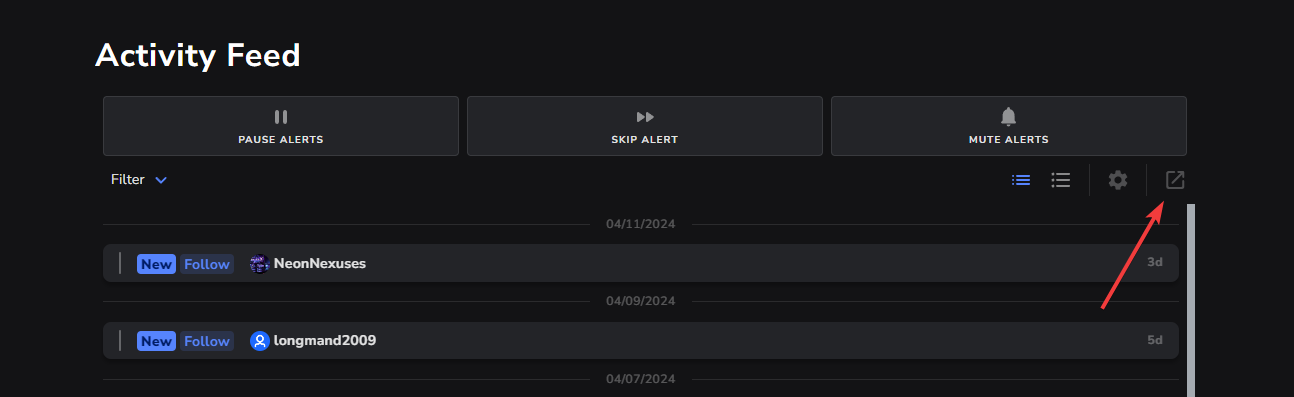
 visual dawn
hey, can anyone advise why the Multi-chat on SE Live on my OBS never seems to connect to Youtube? Twitch is fine
 thin daggerBOT
If you need to fill out a support ticket, please use the command !ticket in chat, following the subject of your issue! For example, please type "!ticket My chatbot isn't working", and then follow the prompts from our bot!
 thorny stream
for the life of me I can't figure out how to get to loyalty or stream store settings... doesn't show up on my dashboard. wanted to set up some redeems for youtube streams but i can't seem to get in
thorny stream
are loyalty and stream store not available for youtube streamers?
 slow fractal
is streamelements website dead rn
limpid bluff
slow fractal
is streamelements website dead rn
Working fine for me
slow fractal
odd, cant get on website but can get everywhere else
obsidian fog
thorny stream
are loyalty and stream store not available for youtube streamers?
correct.
thorny stream
blast, that sucks a LOT
 white frigate
G'day , SE chatbot keeps on announcing the ad reminders. I can't figure out if there's a way to turn that off . Can anyone help?
obsidian fog
StreamElements
The Ultimate All in One Platform for Streamers
white frigate
cheers ❤️
 quiet cedar
hey everyone i need help can any streamelement's admin can help me ?
gaunt wolf
quiet cedar
hey everyone i need help can any streamelement's admin can help me ?
what do you need
quiet cedar
gaunt wolf
what do you need
i finished a compagny with sea of conquest but lot of players doesnt counted in the targets
thin daggerBOT
Sponsorship questions can only be handled with the ticket system. Please type !ticket sponsor support in #community-helpdesk and follow the instructions from the bot.
Attempting to open multiple tickets will not quicken staff response as they are handled in the order they are received.
 golden agate
can someone helpme?
i want to add those dynamic descriptions i used to add in my videos like 1 year ago
but i cant remember or find how to do it
can someone help/
?
 surreal wraith
Dear SE team. Ever since 2-ish weeks I have been unable to run OBS while the SE.live plugin is active/installed. I am only able to boot the OBS studio software in 'safe mode' when I have SE.Live installed. When I remove SE.live from my PC, I am able to run OBS studio normally again. I haven't had this problem for the last 2 years. How will I be able to resolve this issue. Thank you
 supple osprey
how do i get tax documents sent? im not seeing it in the back office or im blind lol
obsidian fog
Need to make a ticket for that.
 cunning night
does anyone have insight on how the stream title/category matches are supposed to work for bot timers? (in patch notes in-server Nov 17, blogged in patch notes 1.6 January this year)
from the UI, I had assumed I could set either title conditions, category matches, or both. but I've set up a number of timers with only category matches, and they absolutely never go off. am wondering if there is a bug, if I'm missing something, or what
 copper tartan
limpid bluff
copper tartan
Will hyperlinks work in timers with this code? []()? Thanks
copper tartan
limpid bluff
copper tartan
Will hyperlinks work in timers with this code? []()? Thanks
Yes, but not the way you expect. Markdown isn't supported on Twitch.
 summer wyvern
Can the SE bot post a 'Go Live' message to my discord server?
limpid bluff
summer wyvern
Can the SE bot post a 'Go Live' message to my discord server?
There is no integration between StreamElements and Discord.
summer wyvern
Ah, ok. Saw a video that had 'how to', but options aren't there in SE
 zenith warren
i multistream, does the Activity feed work with multiplatform?
obsidian fog
No.
 topaz swift
is there a reason the AI message responses are putting FeelsDankMan into every message? Can it not do that?

 modest bear
hi y'all, does anyone know how to customize the total number of raffle winners in a multiraffle? i would like to have a max of 4, for example
 fiery scarab
hey
so I test my alerts on stuff on the overlay with emulate, I then begin to stream for real and get my two friends to test but no follower pop ups appear, I test it again and only the emulated ones do. sound works and image pops up but only for the fake emulated. how can I fix this
even on the dashboard they aren't showing
@carmine rivet yo, I tried using your ticket bot but its so bad 😭 can you help me out
obsidian fog
If the bot isn't working in a way you can properly interact with you can email support@streamelements.com
fiery scarab
id rather try and get the situation sorted asap then going thru emails and waiting a long time
obsidian fog
Then you would need to try again with the bot as those are the only easy ways to get support via staff.
thin daggerBOT
Please provide your account ID found at the top of this page: https://streamelements.com/dashboard/account/channels This ID is public info and safe to share here.
obsidian fog
It's right next to where your email is.
 obsidian fog
Run the command/message and I can get that for you
 obsidian fog
Try again and let me see if I can grab it. If not I'll get it from staff.
 bot pls
Off to staff it is.
fiery scarab
hopefully I get prority help for this evil bot
obsidian fog
While I found what is supposed to be your ticket it doesn't seem that it properly got "created".
They said you should go ahead and create it via email as the response time (atm) is the same with both methods.
fiery scarab
I mean the issue is with emails is going back and forward with eachother
do you have any expertise mr sudo
obsidian fog
Unfortunately what I can help with is limited and not with what you will need in this instance.
fiery scarab
thank yous anyway
could you try and close the ticket?
so I can try and make a new one
obsidian fog
That unfortunately is the reason why you're being sent to email as the one that I saw supposedly tied to you isn't showing for them apprently.
obsidian fog
Could you actually do a favor and see if you have something showing in DMs with @thin dagger?
fiery scarab
nope
obsidian fog
Figured as much. Thought I'd at least check.
 obsidian fog
fiery scarab
obsidian fog
fiery scarab
Last shits n giggles if you haven't sent that email yet: Does this link still return unknown for you? https://discord.com/channels/141203863863558144/1229776491966107699
fiery scarab
obsidian fog
Last shits n giggles if you haven't sent that email yet: Does this link still re...
yes unknown
fiery scarab
idk if i've done something wrong

like this is all empty and i've had four of my mates follow me to test
while I was live
obsidian fog
Unfortunately I can't help with that as it's something staff would need to look at.
fiery scarab
promote you
whats their email
found it

yea got the email for their following too
email sent
 marsh basalt
hi there! I was looking at my hellofresh campaign and noticed it is still not green? however i have done everything else even the optional stuff. so i am not sure what i am missing. if anyone can help, itd be much appreciated!

this is the completed stuff for reference

 thin daggerBOT
@marsh basalt ⤵️
Sponsorship questions can only be handled with the ticket system. Please type !ticket sponsor support in #community-helpdesk and follow the instructions from the bot.
Attempting to open multiple tickets will not quicken staff response as they are handled in the order they are received.
fiery scarab
got an email and it fixed
one last issue
when notfications happen on the stream I can't hear them
how Do I fix this?
obsidian fog
At the bottom of the browser source make sure "Control Via OBS" is checked.
Then this
thin daggerBOT
If you are not hearing your alerts and/or Media Request, you are most likely using the Control Audio via OBS option in your browser source properties.
To make sure you hear the alerts and the stream also hears them, follow along the screenshot bellow.
https://cdn.discordapp.com/attachments/199460642975907840/685371800456134686/unknown.png
 vapid sentinel
Do I need to have a alert box source per target source when multistreaming? How do I connect my accounts so I can do one alert box?
obsidian fog
Yes to first. Not possible to 2nd.
vapid sentinel
Ah, ok, OBS folks said you can connect the accounts and make one alert box. They sent me over here.
So that's simply not true, and I need an alert box overlay source per platform I stream to?
vapid sentinel
Thank you so much for clarifying! I'll make a alert box per platform, and add those are browser sources to OBS when I choose to multistream.
Would it be more productive to do Twitch alerts on Twitch's platform, and only do my YouTube alerts through Streamelements in this case?
obsidian fog
You'd still run into alerts clashing as there's 2 different "queues".
vapid sentinel
I see. Thank you!
fiery scarab
obsidian fog
At the bottom of the browser source make sure "Control Via OBS" is checked.
this didn't work btw
Its checked and is on monitor and output
 night latch
Is there any more documentation on the stream elements Websocket gateway besides https://docs.streamelements.com/websockets
 trail sky
is there any way to see previous giveaway winners?
 elder cloud
Why does my watchtime always say 0 seconds even if I watch for a while
It’s only on this one stream too
 stark thicket
I looked but couldn't find anything. Are there any chat bot commands that let me state subs/bits/dono per session
obsidian fog
There is not anything natively. You might be able to pull something off pulling something via overlay data but that's something to ask in #dev-chat (Not that I can answer)
stark thicket
Will do thanks!
thin daggerBOT
If you need to fill out a support ticket, please use the command !ticket in chat, following the subject of your issue! For example, please type "!ticket My chatbot isn't working", and then follow the prompts from our bot!
 coarse rover
hey mon lien pour mon op Star Trek Fleet Command
ne fonctionne plus vous savais pourquoi ? il me mais sa "Whoops! Seems like you are trying to participate in a campaign that you are not eligible for.
We are sorry for the inconvenience and hope you can participate in other campaigns to support your favorite creators!"
thin daggerBOT
@coarse rover ⤵️
Sponsorship questions can only be handled with the ticket system. Please type !ticket sponsor support in #community-helpdesk and follow the instructions from the bot.
Attempting to open multiple tickets will not quicken staff response as they are handled in the order they are received.
 proper spindle
Who do I speak to about getting discount codes for my community?
obsidian fog
For....?
proud cloak
Hey there
Is there any option for moderators to give access to the activity list including donations WITHOUT giving them access to THE WHOLE HISTORY of any donation ever made?
obsidian fog
It would be limited to whatever your activity feed has. They wouldn't be able to see what is here https://streamelements.com/dashboard/revenue/list
StreamElements
The Ultimate All in One Platform for Streamers
 heavy sage
Hi all I have an issue with my custom bot name
Instead to apper my list of bot name available this is what's happen:
thin daggerBOT
You can choose a custom name for the streamelements bot using the following instructions. https://support.streamelements.com/hc/en-us/articles/10474519540754-How-to-Setup-a-Custom-Bot-Name
heavy sage
 obsidian fog
You no longer do it in the activity feed.

 obsidian fog
Disconnect.
Logout from the top right corner of the website.
Wait 30 seconds then login (Make sure you're logged in with streamer account on twitch).
Login with desired bot account following said instructions.
heavy sage
Logout from Streamelements dashboard obviously. right?
heavy sage
Ok I logged in again and everything seems fine, do you suggest to disconnect and connect again the bot?
obsidian fog
Yes.


 obsidian fog
No. You'll need to open a ticket as I can't help beyond this.
heavy sage
where?
thin daggerBOT
If you need to fill out a support ticket, please use the command !ticket in chat, following the subject of your issue! For example, please type "!ticket My chatbot isn't working", and then follow the prompts from our bot!
 misty ivy
Hey, I have a question, and that is is it possible to set a bit goal that automatically resets to 0 as soon as the goal is reached? 🙂
elder cloud
Why is my watchtime glitched at 0 seconds?
I can’t find a fix and have tried everything
 clever oak
How often does the JWT token reset?
limpid bluff
clever oak
How often does the JWT token reset?
When you request it to be reset.
clever oak
what would cause it to reset without a request then?
clever oak
for api ninja with streamdeck
obsidian fog
Unfortunately my understanding is the previous state of "permanent" tokens has changed and that there's about a month or so before it's "changed" to a new one and ad nauseum.
clever oak
alright... so roughly monthly it will change... any chance of getting a permanent one again?
obsidian fog
Not really.
clever oak
alrighty... thanks!
obsidian fog
Have this as a button to open up your browser that way you can get it a bit more quickly. https://streamelements.com/dashboard/account/channels
clever oak
yeah ive got that already lol... just was hoping to not have to go in
 harsh yacht
!tickwt
 sharp glacier
is anyone else unable to submit tickets through the website right now? When I go to the contact page and fill out the form the submit button does nothing.
thin daggerBOT
If you need to fill out a support ticket, please use the command !ticket in chat, following the subject of your issue! For example, please type "!ticket My chatbot isn't working", and then follow the prompts from our bot!
 solid kettle
My custom chat commands are not longer working and my custom Chat bot name is not showing. What is going on with Stream Elements lately? What can I do? 🙂
 proud flax
Anyone know a way to have chat go top to bottom?
 faint silo
how long does it take to get an answer for my ticket? asking because i'd like to get my issue resolved before streaming this evening
proper spindle
obsidian fog
For....?
@obsidian fog the merch store
limpid bluff
faint silo
how long does it take to get an answer for my ticket? asking because i'd like to...
They answer tickets in the order they are received. I believe most are answered in a couple business days.
thin daggerBOT
@solid kettle ⤵️
Please logout of StreamElements at https://streamelements.com/logout and then login again to your account (Twitch/YouTube/Trovo/X).
You can choose a custom name for the streamelements bot using the following instructions. https://support.streamelements.com/hc/en-us/articles/10474519540754-How-to-Setup-a-Custom-Bot-Name
limpid bluff
You may need to disconnect/reconnect the custom bot
solid kettle
thin dagger
<@408771018362978326> ⤵️
Nope. I’ve done both of those things.
limpid bluff
solid kettle
Nope. I’ve done both of those things.
Some things on the backend were adjusted, please try logging out again.
 mystic saffron
Hi!! Do you know a way to detect emote combos but just One emote? Like, detect only "X" emote combos
obsidian fog
proper spindle
<@66043140208857088> the merch store
Outside of the discount for twitch subs if they're logged in we do not have any other kind of discounts.
solid kettle
limpid bluff
Some things on the backend were adjusted, please try logging out again.
Okay, So I
- disconnect my chat bot and reconnected,
- logged out of Stream elements on OBS and logged back in and still nothing.
Also, I was streaming to recently and nothing from even the base streamelements bot.
limpid bluff
solid kettle
Okay, So I
- disconnect my chat bot and reconnected,
- logged out of Stream ele...
Did you log out on the website as well? Since that's where the custom bot is connected.
 hollow hazel
If my campaign is done in 100% can i click "End campaign" to finish it quicker?
obsidian fog
Assuming everything on the progress page checks out properly then yes.
hollow hazel
obsidian fog
Assuming everything on the progress page checks out properly then yes.
thank you ❤️
 tranquil crest
Hii I got a question. If my community doesnt hit on HSR Sponsorship the goals. Like only 2 out of 50 created an acc or reached level 4. Do I still get paid for that 2 people?
or am I getting paid nothing bc it wasnt fully reached
 pine turtle
I wanted to integrate the death counter I had already created into the stream as a visual number, but whenever I create the overlay it always shows 0, despite me depositing {death}, no matter what number the counter is on, does anyone know where the error is or knows each other with that?
thin daggerBOT
@latent cargo ⤵️
Sponsorship questions can only be handled with the ticket system. Please type !ticket sponsor support in #community-helpdesk and follow the instructions from the bot.
Attempting to open multiple tickets will not quicken staff response as they are handled in the order they are received.
 latent cargo
...
ticket system takes ages
fìix your links instead

channel link doesnt even work gg
 keen axle
Will the YouTube chatbot ever work again?
 clear quest
Anyone happen to know how to have streamlabs update the channel emotes for the Emotesplosion? It's showing only my old ones and no updated ones. I updated them like a week ago.
 glossy scaffold
has anyone figured out how the one man spam filter actually works?

it seems so random I dont get it
 strange pawn
Me and a friend both tired to donate a dollar to my tipping page to test out se.pay. I just set it up but everything says it's approved and good to go but we both get processing errors no matter what card we tried. Does anyone know what's going on?
thin daggerBOT
If you need to fill out a support ticket, please use the command !ticket in chat, following the subject of your issue! For example, please type "!ticket My chatbot isn't working", and then follow the prompts from our bot!
 dull haven
Alerts not working
limpid bluff
dull haven
Alerts not working
Are the events showing up in your activity feed?
dull haven
yes
limpid bluff
Twitch channel name? No links.
dull haven
LTGonline
thin daggerBOT
@dull haven ⤵️
Please logout of StreamElements at https://streamelements.com/logout and then login again to your account (Twitch/YouTube/Trovo/X).
limpid bluff
I poked a couple things, logging out/in should fix it.
dull haven
ok I logged in
I wont really know until someone does something as the tests all worked
what did you poke?
limpid bluff
some backend things
dull haven
ok Ill let you guys know on the next stream. Thank you.
pine turtle
I wanted to integrate the death counter I had already created into the stream as a visual number, but whenever I create the overlay it always shows 0, despite me depositing {death}, no matter what number the counter is on, does anyone know where the error is or knows each other with that?
modest bear
is it possible to specific the total number of winners for !raffle? rather than having it be based on the number of entrants?
 edgy cove
Hello, I'm trying to add two chat custom commands for weather and time for my Twitch and I need to know what response code I need to enter for any weather and time location. Any help would be appreciated!
limpid bluff
edgy cove
Hello, I'm trying to add two chat custom commands for weather and time for my Tw...
US? City and state; worldwide I think city and country.
limpid bluff
pine turtle
I wanted to integrate the death counter I had already created into the stream as...
I believe on overlays you need to use [ ] not { }
 dim zephyr
I want to donate myself 1,- euro to test if it works. But I keep getting this error. Do I have to use mandatory alerts to make sure people can donate?
Sorry, there was a problem There was a problem processing your payment. You may want to try again or contact your provider.
 remote lodge
 oblique root
Hello i have problem with sepay accout, i cant create him, can u help me pls?
