#community-helpdesk
1 messages · Page 11 of 1
 limpid bluff
 thin daggerBOT
If you need to fill out a support ticket, please use the command !ticket in chat, following the subject of your issue! For example, please type "!ticket My chatbot isn't working", and then follow the prompts from our bot!
 digital wind
limpid bluff
Can you send your OBS log and OBS crash log? Or create a ticket and submit them ...
digital wind
limpid bluff
Can you send your OBS log and OBS crash log? Or create a ticket and submit them ...
Well, I've analyzed my log through the website and it hasn't said anything about the crashes, because I have to force close my OBS.
limpid bluff
OBS > Help > Crash Reports > Upload Previous Crash Report
 rancid whale
I've had no issues regarding streaming at 6mbps, which is good enough for 1080p/60fps. I recently tried to add my webcam and now my stream is dropping packets.
Worse case scenario, I have my stuff backed up like overlays, alerts etc
The problem is I constantly have a 2mb drop every couple of minutes.
 keen shore
A streamer I moderate for cannot get the bot to re-enter chat. He was hate raided and follow botted today and we had to timeout SE to stop the chat spam. There is no ban issued on the bot and after stream SE was re-added as a moderator due to the timeouts removing it.
In his dashboard the part and mute are gone and it is stating the bot is banned on his channel when it's definitely not. When the unban button is clicked, a small window flashes up but then immediately closes. Is this something fixable by just relogging into the dashboard? If not any assistance would be appreciated.
 gaunt wolf
hello, have a question regarding the overlays. my friend has a overlay that hes wanting to import over but the section he has for the webcam has a solid background with a frame. i was wanting to know if theres a way to make the section behind the frame transparent so he could have his webcam showing behind the frame but infront of the background. any help is appreciated.
gaunt wolf
I'm still waiting for my ticket...
 wooden blaze
Will there be more spots for the honkai Sponsorship?
 obsidian fog
That information is not available unfortunately.
 stuck hatch
wooden blaze
Will there be more spots for the honkai Sponsorship?
stuck hatch
wooden blaze
Will there be more spots for the honkai Sponsorship?
I just checked my sponsorships and they have more slots!
 celest widget
Having some issues with people doing challenges in my sponsorship and the tasks not coming through ? Any idea how to fix this
thin daggerBOT
If you need to fill out a support ticket, please use the command !ticket in chat, following the subject of your issue! For example, please type "!ticket My chatbot isn't working", and then follow the prompts from our bot!
 opal sparrow
Does anyone know why sub gifts no longer appear on Activity Feed ?
digital wind
celest widget
Having some issues with people doing challenges in my sponsorship and the tasks ...
It's been happening to me too. There's no "fix". What I've been told, you have to wait until your campaign has ended for them to even bother investigating.
digital wind
keen shore
A streamer I moderate for cannot get the bot to re-enter chat. He was hate raide...
I suggest to make a ticket, I think it has something to do with Stream Element themselves.
digital wind
gaunt wolf
hello, have a question regarding the overlays. my friend has a overlay that hes ...
I think it's the overlay itself, if you have the file, I can make it transparent for you!
 half prairie
Chat alerts don't work, when I enter a message it doesn't save. When I go to edit the message it's empty again.
 opaque mica
Hi, guys. Can I get StreamElements (bot) to say the reason to everyone on live when someone takes a timeout on live? Not only for moderators, return as if it were an answer
 carmine pumice
Hello ! I have a problem with some of my alerts on streamelement, those of sub Gifts and resub as well as raids do not work live while the others work very well (they are all in the same alert box..) someone Does anyone have a solution?
limpid bluff
opaque mica
Hi, guys. Can I get StreamElements (bot) to say the reason to everyone on live w...
Not possible.
limpid bluff
opal sparrow
Does anyone know why sub gifts no longer appear on Activity Feed ?
Channel name? No links.
limpid bluff
carmine pumice
Hello ! I have a problem with some of my alerts on streamelement, those of sub G...
Channel name? No links.
carmine pumice
limpid bluff
Channel name? No links.
Freyoux
thin daggerBOT
Please logout of StreamElements at https://streamelements.com/logout and then login again to your account (Twitch/YouTube/Facebook).
limpid bluff
^ do that
 orchid adder
Not sure what channel I need for this but I'm trying to stream on Youtube with Streamlabs but for some reason I can't see chats. I'm signed in on both Streamlabs and Streamelements and using the overlay as a browser source and the overlay appears but no chats appear
carmine pumice
limpid bluff
^ do that
Thank you, it's done and then we have to see what happens in the next live? but what I don't understand is that other alerts work very well
orchid adder
I also tried to use OBS to see if that was any different but I just got "uh oh invalid authorisation token"
 nocturne scroll
Hey there, Streamelements isn't updating the game, title and watchtime anymore. Someone have a clue why?
limpid bluff
carmine pumice
Thank you, it's done and then we have to see what happens in the next live? but ...
All new events should show up, not sure why but sometimes things get stuck.
limpid bluff
nocturne scroll
Hey there, Streamelements isn't updating the game, title and watchtime anymore. ...
Disable loyalty, part the bot, log out of the website.
Log in to the website, enable loyalty, join the bot.
Make sure the bot is a moderator.
nocturne scroll
Already done twice
limpid bluff
In that order?
limpid bluff
If it doesn't work, you'll need a ticket.
thin daggerBOT
If you need to fill out a support ticket, please use the command !ticket in chat, following the subject of your issue! For example, please type "!ticket My chatbot isn't working", and then follow the prompts from our bot!
nocturne scroll
Nvm, forgot about the loyalty. Thanks:)
 strong stump
limpid bluff
All new events should show up, not sure why but sometimes things get stuck.
strong stump
limpid bluff
All new events should show up, not sure why but sometimes things get stuck.
I was planning on hosting a Genshin Impact sponsored stream today but I was waiting until the day to start the campaign! But it was taken down today! I have a stream for Genshin in 30 minutes idk if there is a way I can still get the sponsor?
limpid bluff
strong stump
I was planning on hosting a Genshin Impact sponsored stream today but I was wait...
If it's not on the list anymore it is gone.
You will have to wait for another opportunity
 plain fox
Is there any way to track who did the streamelements sponsorships ? Because its impossible to know who use the link correctly or not
limpid bluff
plain fox
Is there any way to track who did the streamelements sponsorships ? Because its ...
I don't believe so
 lime pine
hey, i am setting up a subscriber alert, however when i add a variation for a gifted sub no text is shown. does anyone know why?
 modest raptor
how can i add streamelements as moderator to my yt channel when there are multiple fake channels with same name? fkn google dont allow me to use channel-id.

 pearl sphinx
Just back into streaming and my bot commands dont work anymore 🙂 IE !so Thequizmaster, ?
nocturne scroll
pearl sphinx
Just back into streaming and my bot commands dont work anymore 🙂 IE !so Thequ...
Remove the custom command and add it back, helped me.
 strange igloo
For the Honkai star rail sponsorship, it mentions Penacony as the focus and uses Black Swan for the panel art. If we already play the game is there any issue just playing through the Penacony update or do we have to make a completely new account?
 coral prism
hey why i can't log in to SE it's show my twitch avatar loading and never open the dashboard ?
 thin daggerBOT
Please logout of StreamElements at https://streamelements.com/logout and then login again to your account (Twitch/YouTube/Facebook).
 raw dew
All my sponsorships disappeared
thin daggerBOT
If you need to fill out a support ticket, please use the command !ticket in chat, following the subject of your issue! For example, please type "!ticket My chatbot isn't working", and then follow the prompts from our bot!
gaunt wolf
mine too, please someone answer
raw dew
Yeah and this bot said I had a ticket i clicked the ticket and .... it said can not access
Oh their back ^_^ thanks dev team, must have been a bug or server flash
 grizzled mortar
After the recent update a couple days ago my OBS crashes every 10-60 minutes
limpid bluff
grizzled mortar
After the recent update a couple days ago my OBS crashes every 10-60 minutes
Do you have SE.Live installed?
grizzled mortar
limpid bluff
Do you have SE.Live installed?
Yeppers
limpid bluff
grizzled mortar
Yeppers
Can you upload the crash log and link it?
As well as the regular OBS log
limpid bluff
Is there any reason you're on OBS 29 still?
limpid bluff
You'll probably need a ticket, I don't see anything that looks weird. Can you include the log file (OBS > Help > Log Files) and the crash log (OBS > Help > Crash Reports.
thin daggerBOT
If you need to fill out a support ticket, please use the command !ticket in chat, following the subject of your issue! For example, please type "!ticket My chatbot isn't working", and then follow the prompts from our bot!
grizzled mortar
I did do a ticket
1 sec, gonna get the 2nd crash log
And thanks for the help so far
grizzled mortar
limpid bluff
You'll probably need a ticket, I don't see anything that looks weird. Can you in...
Ticket 414427, I have added the OBS log there too 🙂
limpid bluff
Awesome, one of the staff will take a look and forward it to the devs.
grizzled mortar
Appreciate you
 flint isle
is there a reason why streamelements doesnt recognize facebook share and star sends ? only like is recognized by the alerts and events
digital wind
Has anyone done the sponsorship for Star Trek Fleet Command? I’m having trouble with the goals being recognized.
thin daggerBOT
@digital wind ⤵️
Please go to https://support.streamelements.com/, click the big blue question mark on the bottom left and select SE.Sponsorships Form. Fill that form to submit a Sponsorship related ticket and wait for our Support Team to get back to you. Please do not fill the form multiple times, as that will not speed up the response time.
limpid bluff
hm, try this instead
thin daggerBOT
If you need to fill out a support ticket, please use the command !ticket in chat, following the subject of your issue! For example, please type "!ticket My chatbot isn't working", and then follow the prompts from our bot!
digital wind
Support team won’t help until my campaign has ended, a few of my members have completed my goals, but none have updated
limpid bluff
There's nothing that anyone here can do. You'll have to wait.
digital wind
Alright, I thought maybe someone went through this and could give me some advice/help.
 terse coyote
I finished the campaign more than 2 weeks ago I still haven't received the payout what to do?
obsidian fog
Payout is 30 days following completion.
 thin remnant
why dont i have access to the submit a support ticket channel...
limpid bluff
thin remnant
why dont i have access to the submit a support ticket channel...
You're not supposed to
thin remnant
limpid bluff
You're not supposed to
in the tutorial the gul literally goes and types ticked in the "submit support ticket" channel to get help bro
what am i missing
limpid bluff
thin remnant
in the tutorial the gul literally goes and types ticked in the "submit support t...
Read the directions in the channel
orchid adder
orchid adder
Not sure what channel I need for this but I'm trying to stream on Youtube with S...
Did some reading and it seems like it can't unless the stream is public?
limpid bluff
orchid adder
Did some reading and it seems like it can't unless the stream is public?
Most YouTube things only work if your stream is live and public.
orchid adder
got it
 glacial remnant
has anyone dealt with the overlays being too small when you add them into OBS? trying to find a fix for it but im having trouble
limpid bluff
glacial remnant
has anyone dealt with the overlays being too small when you add them into OBS? t...
Click the overlay and press CTRL+F
glacial remnant
okay so its not showing the whole overlay. just the top left corner
limpid bluff
glacial remnant
okay so its not showing the whole overlay. just the top left corner
If you select the overlay and press "CTRL+F" it should make it full screen.
glacial remnant
This is what’s happening


And when I heut CTL+F it just makes the same image bigger
limpid bluff
Can you delete the overlay and re-add it?
thin daggerBOT
To add your overlays to OBS, add a new browser source in your scene. Paste your overlay URL in the browser source properties, set the dimensions to 1920x1080 (unless you changed them on the website) and check Shutdown source when not visible and Refresh browser when scene becomes active, as shown in this GIF: https://imgur.com/a/2JhJD0S
glacial remnant
limpid bluff
Can you delete the overlay and re-add it?
done that multiple times
limpid bluff
I can look more in a bit, in the middle of stuff with people from work.
glacial remnant
i got it figured out. i wasnt setting the sizes when i added the overlay
limpid bluff
Ah okay. This program eats my computer so I couldn't open OBS to look
glacial remnant
its all good. you tried lol
 dapper oxide
hi. Is it a way to edit quote? Ill want to show them randomly but when the random number generator get an old remoeved quote. It show an error message. Is there a way to get arround this?
 stiff lichen
not sure if im in the right place or not, i am having an issue with the gifted subs not showing up/going towards my goal
on my overlay..
 teal spear
hi there, I am having trouble connecting my downloaded font into my overlay. Anyone know how to solve this one?
thin daggerBOT
Google Fonts
More than 900 google fonts are supported at this time. You can preview them here: https://fonts.google.com/
Custom Fonts
Steps:
- Install the font on the streaming PC or choose a pre-installed windows font.
- In the overlay widget settings, select Text Settings
- Click on Enable Custom Font
- Type the name of the font as it appears in the windows font directory (This is usually
C:\Windows\Fonts)
Note: After installing fonts, the browser and OBS must be restarted for the font to appear.
teal spear
thin dagger
Yes this is what I have tried and it does not show
 stoic nacelle
Is there something I can write in the Animated timer box, to get this element to just count down from 5 minutes?
(Need it to count down from 5 minutes each time the "Going live" scene is launched.

 opaque wyvern
Hi! Is there any way to prevent the TTS from saying emotes? I love have the TTS but its so annoying having emotes read out
half prairie
stoic nacelle
Is there something I can write in the Animated timer box, to get this element to...
I think it would be easier to add a video with a timer to the scene.
On obs itself
opal sparrow
limpid bluff
Channel name? No links.
Glermz (Sub Gifts dont appear on my streamelements board neither track on the labels)
 burnt bay
I have a weird problem. I have a TTS comand in StreamElements which is configured so only subs can use it. It works for everyone except 1 person even though they now been subbed for several months.
The only think I can think is that they subbed initially with one name, and then during the sub changed their name to something else.
They've got all the sub-badges etc. in Twitch, my discord bot recognises them as a sub, but yet stream elements refuses to let them use the sub command.
I cannot find a list of people within a user level to add/confirm whether their in there.
Any ideas?
obsidian fog
Do any other sub only features work with said user?
burnt bay
obsidian fog
Do any other sub only features work with said user?
A different bot's sub features work for them, but this is the only sub command I have in StreamElements. They get the error in chat "this command is for subscribers only"
lime pine
does anyone know, where i can get this heart and star icon from?

 tired yoke
Hello, is there some community manager I can talk to about sponsorships? Need someone more competent than regular support
limpid bluff
tired yoke
Hello, is there some community manager I can talk to about sponsorships? Need so...
Regular support will know more than the community manager, but if you ask your question they might respond.
 verbal cloak
Hey all. Does anyone know the solution to the old alerts playing every time you go to a new scene in OBS?
 shell lagoon
bruh
 hybrid oracle
Question, a few days ago my streamelements stopped tracking my stream data, the last data is from 2/4. won't show any new followers and alerts and labels I've made will not update to track my data anymore. Is there a fix for this? It hurts to get a new follow and not know or thank them
limpid bluff
hybrid oracle
Question, a few days ago my streamelements stopped tracking my stream data, the ...
Channel name? No links.
hybrid oracle
LoopTTV
limpid bluff
Can you log out of SE and log back in?
thin daggerBOT
Please logout of StreamElements at https://streamelements.com/logout and then login again to your account (Twitch/YouTube/Facebook).
hybrid oracle
I did
limpid bluff
Should be all set for new events then.
hybrid oracle
my follower count is not updated to my most recent follower. When I try to emulate alerts, it will also not happen...
limpid bluff
It won't go back and grab events it missed, you will have to wait for a new one to happen
Can you refresh the activity feed and see if there's any new events?
celest widget
Activity feed completely not working can’t see anything in it any tips
limpid bluff
celest widget
Activity feed completely not working can’t see anything in it any tips
Channel name? No links.
celest widget
limpid bluff
Channel name? No links.
Finlaymoose

Tried refreshing for the past couple hours and resetting but nothing it came back once then left
limpid bluff
Can you log out of the website and log back in?
thin daggerBOT
Please logout of StreamElements at https://streamelements.com/logout and then login again to your account (Twitch/YouTube/Facebook).
celest widget
limpid bluff
Can you log out of the website and log back in?
Will try that phones about to die
limpid bluff
It should start capturing new events after you do that. Unfortunately missed events will be missed.
stoic nacelle
half prairie
I think it would be easier to add a video with a timer to the scene.
A 5 minute webm takes a long time to render though.
 wheat gyro
Hey all does anyone know a way to let your mods to change a overlay the way they wants but don't needing to save like everything they do instantly goes to your stream?
 faint vale
Hi All I am using the Streamelements 0verlay Phoenix Animated set. Everything seems to work OK but my latest cheer and recent subscriber does not show, what should i check?
limpid bluff
wheat gyro
Hey all does anyone know a way to let your mods to change a overlay the way they...
There is not.
gaunt wolf
i am currently getting a message on the streamelements dashboard saying that my email address needs to be verified but i am not getting any email to verify the email address and suggestions? thanks
limpid bluff
gaunt wolf
i am currently getting a message on the streamelements dashboard saying that my ...
See if you can verify it from https://account.streamelements.com/
gaunt wolf
limpid bluff
See if you can verify it from <https://account.streamelements.com/>
i am still not receiving any verification email
limpid bluff
gaunt wolf
i am still not receiving any verification email
Wait 15 minutes or so, check your junk/spam mail and if it's not there can you submit a ticket?
thin daggerBOT
If you need to fill out a support ticket, please use the command !ticket in chat, following the subject of your issue! For example, please type "!ticket My chatbot isn't working", and then follow the prompts from our bot!
 sudden storm
Hello friends -- had a weird issue where a couple folders in a complicated overlay randomly disappeared. The assets are still there and work, but I can no longer edit or even find the assets listed on the left layers bar. Any ideas how to reset it without starting over?
 acoustic lantern
Hi there,
I created a dynamic banner for a new channel and on the dashboard it says its "live" but its blank on the dashboard view. however, when I click edit I can see the completed banner. It is also not showing on the channel. I created another banner a few weeks ago and had no problem. Not sure how to fix this.
 blissful jewel
Hello! Since yesterday all of my different overlays (they are all separate) have shrunk in size and have shifted to the left. I did not change any settings, and when I try to emulate an event, the preview looks normal, but the browser source on OBS is displaying the alert shrunk down and shifted left. I tried creating new overlay URLs and pasted them into new OBS broswer sources and there was no change, the issue persisted. Just curious if anyone else is experiencing this and might know how to fix it? Thanks so much for your time!
 glossy wedge
This has been plaguing me for a while now. Streamer I mod for has a shoutout command for mods to use. All the other mods can use that command, but it doesn't work when I use it. And yes, I'm a mod, I am using it right. Upon googling this, others seem to have this issue as well, but no solution was ever given. Is there something I need to do? Something he does to fix this? I keep testing it every once in a while thinking its just a hitch. But months later, it's still happening (or not in this case)
limpid bluff
glossy wedge
This has been plaguing me for a while now. Streamer I mod for has a shoutout com...
Are you listed as a mod on this page? https://streamelements.com/dashboard/bot/user-management
limpid bluff
blissful jewel
Hello! Since yesterday all of my different overlays (they are all separate) have...
Select the overlay, make sure it's unlocked, and press CTRL+F
 stoic plover
Hi, does anyone know if there’s a way to randomise follow alert variants in elements? It’s just always using the catchall
limpid bluff
stoic plover
Hi, does anyone know if there’s a way to randomise follow alert variants in elem...
Not truly randomize, no; especially if you have a lot of them.
stoic plover
limpid bluff
Not truly randomize, no; especially if you have a lot of them.
I just have 4, but the only criteria i can see to base it on is ‘Name’ and it never triggers the others
limpid bluff
You would have to create variations with a probability of 50% or something to "randomize" them.
stoic plover
Yeah that’s what I’m looking for, How would I do that? I can’t see any probability setting
limpid bluff
 stoic plover
Oh I am using Elements sorry
limpid bluff
Ah, one second
limpid bluff
stoic plover
Oh I am using Elements sorry
Can you post in #elements-editor-widgets20 ? I can't seem to find a way, but I haven't used that editor much.
stoic plover
I was looking for an elements channel but I couldn’t find one, thanks I will post in there 🙂
blissful jewel
limpid bluff
Select the overlay, make sure it's unlocked, and press CTRL+F
Really appreciate the reply! I tried your suggestion, but did not seem to fix the issue. Here are some screenshots of what I'm seeing. Do you happen to have any other advice? Thanks so much!

 limpid bluff
blissful jewel
Really appreciate the reply! I tried your suggestion, but did not seem to fix th...
limpid bluff
blissful jewel
Really appreciate the reply! I tried your suggestion, but did not seem to fix th...
Delete the browser source from OBS, re-add it, and make sure you set the dimensions
thin daggerBOT
To add your overlays to OBS, add a new browser source in your scene. Paste your overlay URL in the browser source properties, set the dimensions to 1920x1080 (unless you changed them on the website) and check Shutdown source when not visible and Refresh browser when scene becomes active, as shown in this GIF: https://imgur.com/a/2JhJD0S
blissful jewel
limpid bluff
Delete the browser source from OBS, re-add it, and make sure you set the dimensi...
Thanks! I tried that and still having issues. Also grabbed an overlay URL from an old backup of the overlay, I haven't touched or edited since 2022, and still experiencing the same issue. I have like 5-10 different overlays and they all are doing the same thing. So weird. Have you ever heard of anyone else reporting this?
limpid bluff
It looks like it's an OBS thing, for some reason it's not maximizing it.
 restive arrow
.
limpid bluff
blissful jewel
Thanks! I tried that and still having issues. Also grabbed an overlay URL from a...
When you add the overlay, are you setting the browser source height and width?
 gaunt sequoia
Hello I want to remove the donate command on streamelements and add my own link, how do i go about that?
blissful jewel
limpid bluff
When you add the overlay, are you setting the browser source height and width?
Thanks for the reply! I am yea. The width and height in SE is 1920 x 617. I have the browser source also set to 1920 x 617. It worked normally for a long time. Just randomly started displaying incorrectly yesterday.
I've tried shrinking the browser source height and width, also increasing it to double (3840 x 1243) and the position of the alert is still shrunk down and off to the left. I also have completely separate goal widgets that have shrunk down and moved to the left.
The only way I can get the position right, is if I stretch the browser source, and move it to the right. But then the image looks blown out and blurry.
Such a disappointment because I spent a lot of time getting the sizing and position exactly how I wanted it.
I was hoping it just might be some SE issue that I could wait and they would fix, but I can't see anyone else reporting similar issues.
limpid bluff
gaunt sequoia
Hello I want to remove the donate command on streamelements and add my own link,...
https://streamelements.com/dashboard/bot/commands/default disable the !tip command and then create your own
limpid bluff
blissful jewel
Thanks for the reply! I am yea. The width and height in SE is 1920 x 617. I have...
Unless you change it, the default resolution for an overlay is 1920x1080
gaunt sequoia
limpid bluff
<https://streamelements.com/dashboard/bot/commands/default> disable the `!tip` c...
Thank you i see that but it doesnt let me add a new link
limpid bluff
gaunt sequoia
Thank you i see that but it doesnt let me add a new link
You can't edit it, you will need to go to the custom commands tab and add one there
blissful jewel
limpid bluff
Unless you change it, the default resolution for an overlay is 1920x1080
Thanks! I really appreciate your time! Yea I changed it to 1920 x 617 so it only took up half the page. It was never an issue before. I guess I'll have to rebuild all my alerts and widgets from scratch. Hopefully that works. Kinda nervous to do that though as the issue could just happen again. I really appreciate your help though! Maybe I'll take the time to learn how to just do alerts through a bot and OBS or something rather than use SE overlays. 
limpid bluff
blissful jewel
Thanks! I really appreciate your time! Yea I changed it to 1920 x 617 so it only...
Did you change it on the SE side or only the OBS side?
https://streamelements.com/dashboard/overlays Click the three dots > properties > resolution > custom
blissful jewel
limpid bluff
Did you change it on the SE side or only the OBS side?
Thanks! I had originally changed it in the SE overlay editor. It was working as I wanted it to, when I had it set to 1920x617 in the SE Editior. (The screenshot in a previous message showing the alert displaying within SE Editor is exactly how it should be displaying in OBS). On the SE Overlays page, the resolution in the Properties was set to 1080p, and the OBS browser source was set to 1920x1080 or 1920x617 (either size in the OBS browser source displayed the alert the same). I tried changing the resolution in the SE Editor to 1920x1080 and it does increase the size of the image, but it doesn't adjust the size of the Font, and it still displays skewed to the left. I just tried adjusting the Properties on the Overlays page to 1920x617 and it did not have any effect. Also tried adjusting the Browser Source in OBS to 1920x1080 and it still displays small and skewed to the left.
I honestly did not dig into any of these settings recently, so I am fairly confident that I didn't accidentally change something.
The only change I can think of, that I made recently, was accidentally adding a Media Request widget to that overlay. I deleted that widget from that overlay, and created a separate overlay for it. Do you think that may have cause the issue? (But I am having the same issue with other overlays as well as a backup of that same overlay, so I am not sure if that would be the cause)
I'm really at a loss.


 blissful jewel
limpid bluff
<https://streamelements.com/dashboard/overlays> Click the three dots > propertie...
blissful jewel
limpid bluff
<https://streamelements.com/dashboard/overlays> Click the three dots > propertie...
Update: I've even tried creating a completely new SE overlay from scratch and still experiencing the same issue no matter what I change the size to. Do you think I should try to reach out to SE support with a ticket or something?
Update 2: I actually tried setting up an alert using a different service and the other service has 0 issues, and displays the alerts as they should in my OBS. I really think this is some sort of error with either SE itself or my SE account.
limpid bluff
blissful jewel
Update: I've even tried creating a completely new SE overlay from scratch and st...
It is always recommended to make your overlay resolution match your canvas resolution in OBS and then move the assets on the overlay so that they are positioned correctly. You can always submit a ticket and the staff/devs will take a look.
thin daggerBOT
If you need to fill out a support ticket, please use the command !ticket in chat, following the subject of your issue! For example, please type "!ticket My chatbot isn't working", and then follow the prompts from our bot!
 merry hornet
hi! i recently started the Star Trek Fleet Command sponsorship and did my required tasks. I'm trying to find out if I'm going to get paid from just that, or do I have to have others join the game as well. I'm going to continue promoting for the other 12 or so days I have it, but if anyone could help me with like a visual that'd be great.
thin daggerBOT
@merry hornet ⤵️
If you need to fill out a support ticket, please use the command !ticket in chat, following the subject of your issue! For example, please type "!ticket My chatbot isn't working", and then follow the prompts from our bot!
merry hornet
thanks!
blissful jewel
limpid bluff
It is always recommended to make your overlay resolution match your canvas resol...
I really do appreciate your help and time! Thank you very much. I have been using StreamElements for a few years and spent maybe hundreds of hours tweaking my alerts to get them exactly how I wanted them. They worked perfectly for me for years. All of a sudden every single one of my overlays started showing this issue were the alerts are shrunk down and shifted to the left. I totally understand what you're saying but my alerts were working perfectly with the settings I have.
I've just tried creating a 3rd new overlay and made it 1080p in SE. I've also made the Browser Source 1920x1080. I've placed the alert in the center where I want it, in SE. But when I emulate the alert, it displays shrunk down and shifted to the left. Is this how you were recommending to do it? Or am I doing something wrong here?


Ive even tried having the Browser Source the same size as the widget and it still has an issue


Also adjusted the widget to 1920x1080, while having the Overlay at 1080, and the OBS Browser Source at 1920x1080 and its still shrunk down and shifted to the left in OBS.

 half prairie
My alerts have no sounds, I have my browser muted, on obs, because i listen to copyrightes music when playing. If the sound comes from the browser, can I use a different one where I just have it for alerts?
 wanton tendon
Hello, do I have the right to live the "Star Trek Fleet Command" campaign on twitch and tiktok at the same time?
 median osprey
Is this already available?
 fair pilot
i feel it.. when using OBS Live and switching scenes my obs freezes sometimes... when removing the obs live plugin it never happens .. i just wait for the next update.
digital wind
fair pilot
i feel it.. when using OBS Live and switching scenes my obs freezes sometimes......
I just launched OBS as admin.
fair pilot
digital wind
I just launched OBS as admin.
did it work for you?
digital wind
fair pilot
did it work for you?
Yeah I was able to stream and edit my sources without a problem. But I was VERY VERY hesitant to transform anything.
gaunt wolf
How do i change the name of the custom bot?
gaunt wolf
obsidian fog
1 ssec
yeah i do the connect with twitch but how do i change the name of the bot? do i have to make a bot account to use on streamelements?
obsidian fog
If it's any other account name than yours yes.
gaunt wolf
obsidian fog
If it's any other account name than yours yes.
so when i connect to the custom bot name it tells me i am connected as me
is that the bots name?
gaunt wolf
so if i created a bot account then signed into streamelements how would i get that bot to connect to my twitch channel?
obsidian fog
You stay signed in as yours for SE but when the login screen after you tap connect account there's an option under your picture to login with that account.
gaunt wolf
obsidian fog
You stay signed in as yours for SE but when the login screen after you tap conne...
on obs?
gaunt wolf
there is no login screen is just connects to my main twitch account
obsidian fog

 subtle otter
hello, why are the Images in my extention for my loyalitypoints white?
 obsidian fog
That takes you to the confirmation window.
gaunt wolf
obsidian fog
Yeah i do that but it connects to my twitch account there is no other opition to sign into another twitch account
obsidian fog
Under your picture there is a Not You option.
 obsidian fog
That's not the page I said to do it on.
gaunt wolf
obsidian fog
That's not the page I said to do it on.
Oh i get you now i got it thank you
 sullen flare
i have problems with my alerts dont show in my obs. i have the alerts shown in my obs, previews are working on the website, but not in obs. i wonder why?
thin daggerBOT
@sullen flare ⤵️
The default resolution for StreamElements overlays (theme and custom) is 1920x1080. Please add them in OBS at their full resolution and use CTRL+F to fit to screen if necessary. You can then downscale your stream in OBS settings > Video if you'd like https://i.imgur.com/6bWXxjR.png
sullen flare
done, but still nothing shows up in obs
thin daggerBOT
OBS > Settings > Advanced > Scroll down > Enable or disable Browser Source Hardware Acceleration, depending on its current state > Restart OBS
https://i.imgur.com/ggMe9ZE.png
sullen flare
its working in the alerts settings, but not in the stream. and i have the alerts above the game
 obsidian fog
Is the overlay on top of the game in the sources list?
sullen flare
yes
obsidian fog
Screenshot the sources list
sullen flare
 obsidian fog
Click the 👁️ for alerts folder.
sullen flare
ahh, thanks! im blind. sorry for my "dumb" and apparently pretty obvious reason 
 hazy hinge
I just updated to the latest version, and when I go to the SE tab, and go to SE.Live Docks, nothing is there. So now I don't have my chat or Stream info on my screen.
plain fox
Can someone help me with this form for Star Trek
What does it mean ?

 viral jetty
is anyone else sub goal/follower counter not working? even after session clear?
 sullen roost
why does my se live on mac crash when i open it
 signal jacinth
My merchstore at streamelements have been like this for 3 days now. help please anyone?

 boreal valley
Hello, does anyone know how I can share an overlay created by me with other people?
boreal valley
I love you, that script is the best solution, and the alternative with the full control moderating is awesome too. Thanks
 dreamy pumice
I have a question about the Loyalty leaderboard. Am I correct that the points on the "All time" board should never be lower than the points on the "current" board? According to the docs (https://support.streamelements.com/hc/en-us/articles/10474478470290-Loyalty-System-Overview) the "all time" board shows the highest accumulated amount of points a viewer ever had, so that would mean higher points in "current" shouldn't be possible.
 fading horizon
the bot is not appearing in my chat, nor responding to commands, can anyone help me add it to my YouTube live?
 half prairie
the live can't be private or unlisted
 wintry iris
For some reason, stream elements hasn't been pulling in my new followers, alerts aren't showing up. Any ideas?
It's been busted since the 7th, when i hit affiliate and enabled the twitch alerts box
limpid bluff
wintry iris
For some reason, stream elements hasn't been pulling in my new followers, alerts...
Channel name? No links.
 bright grail
when i emulate my alert theres 2 sounds that is doing one is like the ding sound and the other is my trimmed song how can i just make it just play my trimmed song for when an alert comes through? If that make sense
wintry iris
limpid bluff
Channel name? No links.
SpreadTheBirb
wintry iris
limpid bluff
Channel name? No links.
seems like no alerts are following through into streamelements. Just had some bits come through too, no dice
thin daggerBOT
@wintry iris ⤵️
Please logout of StreamElements at https://streamelements.com/logout and then login again to your account (Twitch/YouTube/Facebook).
limpid bluff
You should be good for all new events
wintry iris
thanks 🙂
dreamy pumice
dreamy pumice
I have a question about the Loyalty leaderboard. Am I correct that the points on...
Can anyone help me with this? Or should I open a ticket? Because I have a Loyalty board where the all time board shows lower numbers than the current one, so we're not sure if we can trust this data anymore.
obsidian fog
That would best idea yes.
dreamy pumice
Ok, I will do, thanks!
wintry iris
limpid bluff
You should be good for all new events
is there a way to pull the data that was missed or do I just need to wait for new events?
obsidian fog
Anything that got missed will not be captured unfortunately. You can still look back at your twitch feed on their side but nothing otherwise.
bright grail
when i emulate my alert theres 2 sounds that is doing one is like the ding sound and the other is my trimmed song how can i just make it just play my trimmed song for when an alert comes through? If that make sense. Can someone help me please
 quaint iris
!ticket So on the when I click on the SE. Merch tab, it will only load 3/4 of the way then just stop. I have tried everything
 thin daggerBOT
If you need to fill out a support ticket, please use the command !ticket in chat, following the subject of your issue! For example, please type "!ticket My chatbot isn't working", and then follow the prompts from our bot!
signal jacinth
@quaint iris if u find a fix for it. please let me know!
limpid bluff
quaint iris
!ticket So on the when I click on the SE. Merch tab, it will only load 3/4 of th...
You will need to resubmit your ticket, it doesn't work if you edit the messsage to put !ticket at the beginning.
limpid bluff
signal jacinth
<@442945965431717889> if u find a fix for it. please let me know!
Can you submit a ticket as well? It will require one.
signal jacinth
@limpid bluff yeah i did already
"Our dev team is aware of this issue and working towards a solution. Unfortunately, the complexity of the issue prevents us from providing a specific timeframe for resolution at this time. Thank you for your patience and understanding."
 latent solstice
quaint iris
!ticket So on the when I click on the SE. Merch tab, it will only load 3/4 of th...
latent solstice
quaint iris
!ticket So on the when I click on the SE. Merch tab, it will only load 3/4 of th...
I'm having this exact same issue.
 last gyro
Same for me, they deleted the store I "opened" last night because of this issue since they couldn't fix it. Told me I could retry and same thing happened. Guess we will have to wait till they find the issue and fix it ...
 mellow solstice
What's going on with the StreamElements SE.Live plugin? After the update, I can't move any of my elements around. Any help is greatly appreciated.
 desert imp
wooden blaze
Will there be more spots for the honkai Sponsorship?
desert imp
wooden blaze
Will there be more spots for the honkai Sponsorship?
im a bit late but does anyone know if they are opening up for more slots frequently? my email notification went directly to spam so i missed that sadly
 wispy kayak
so i was mid stream on tarkov and had a game capture going and it just went to a black screen i deleted the source and re added nothing i closed stream elements and reopened nothing any help please
 cerulean peak
where can I set this up?
 digital wind
cerulean peak
where can I set this up?
digital wind
cerulean peak
where can I set this up?
In your setup, there should be browser sources for you to use to connect to your OBS.
cerulean peak
digital wind
In your setup, there should be browser sources for you to use to connect to your...
is that for the campaign banner? IF YES, I used that but in my stream the size and height leave a white space below the banner so I change the size from 450x500 to 400x200 does it affect the branded overlay requirement?

how to fix that?
digital wind
cerulean peak
is that for the campaign banner? IF YES, I used that but in my stream the size a...
If there's a requirement, I believe you're stuck with what you get
I don't think you can mess with it, but you can contact support via !ticket
they can help you out
digital wind
cerulean peak
That white space could also be transparent, but I'm not entirely sure
lime pine
hey, does someone know, why none of the profile pictures on the SE leaderboard are showing?
 obsidian fog
That is intended to my understanding.
lime pine
so i cant change it?
obsidian fog
No.
lime pine
obsidian fog
No.
why do the pfps work on the sub tab, but not on gifters?
obsidian fog
0.o My understanding is they were removed entirely but I guess it was only partly true.
fair pilot
did you find a solution for the issue? currently i use the se live activity feed as own dock... because only the newest se live version crashed by obs, when switching scenes.. without se live plugin it works like a charm
wanton tendon
Hi, I don't know if it's me, but the brand overlay is bug
 thin daggerBOT
If you need to fill out a support ticket, please use the command !ticket in chat, following the subject of your issue! For example, please type "!ticket My chatbot isn't working", and then follow the prompts from our bot!

 craggy ravine
Why streamelements doesnt say anything into chat (alerts doesnt work too), when someone resubscribe using Prime? I think it is issue only when resubscribing with prime
even in dashboard it says 0 new subscribers, but in twitch I have some with Prime
 signal jacinth
pls ban the account @vernal creek. dming people trying to scam them
trying to scam me right now
impersonating another streamer saying he is going to help people grow etc
 upper sapphire
is there a solution for the delay between a YT superchat and the actual animation from SE? it's very long at the moment.
plain fox
wanton tendon
Hi, I don't know if it's me, but the brand overlay is bug
yes
same for me
plain fox
wanton tendon
Hi, I don't know if it's me, but the brand overlay is bug
juts end ur stream and it will update
but not during it
thin daggerBOT
If you need to fill out a support ticket, please use the command !ticket in chat, following the subject of your issue! For example, please type "!ticket My chatbot isn't working", and then follow the prompts from our bot!
 drowsy flicker
Hi there, my streamelements for youtube doesnt show any new subs / any alerts either and I cant seem to figure out why
the alert box works, however nothing happens in the activity feed nor does any alerts show up
 upbeat estuary
Hey, I changed my twitch username and now my alert boxes aren’t playing audio. I’ve tried logging out/in everything multiple times, re-linking etc. controlling alert audio through obs and setting monitoring to monitor and output and still nothing. I’m at a loss. Any help would be great, thanks!
I use OBS+Stream elements add on thing
 solemn rain
fair pilot
did you find a solution for the issue? currently i use the se live activity feed...
solemn rain
fair pilot
did you find a solution for the issue? currently i use the se live activity feed...
Not yet 🥲
 drifting dove
Hello! I have OBS Studio with StreamElements Live installed but the Stream Deck doesn't show up under Tools, even after placing the dll and pdb files manually. Help? (Elgato Community help pointed me this way)
 thorn eagle
drifting dove
Hello! I have OBS Studio with StreamElements Live installed but the Stream Deck...
thorn eagle
drifting dove
Hello! I have OBS Studio with StreamElements Live installed but the Stream Deck...
Are you saying the Stream Deck by Elgato is not showing up in OBS?
or are you saying SE.Live by StreamElements is not showing up in OBS?
drifting dove
the Stream Deck is not showing up in OBS
thorn eagle
Have you installed the Stream Deck Software by Elgato?
drifting dove
yes
drifting dove
I'd hate to lose all my buttons again, but no, haven't tried that yet
thorn eagle
You can backup your profiles on stream deck
Once you back it up do a clean install
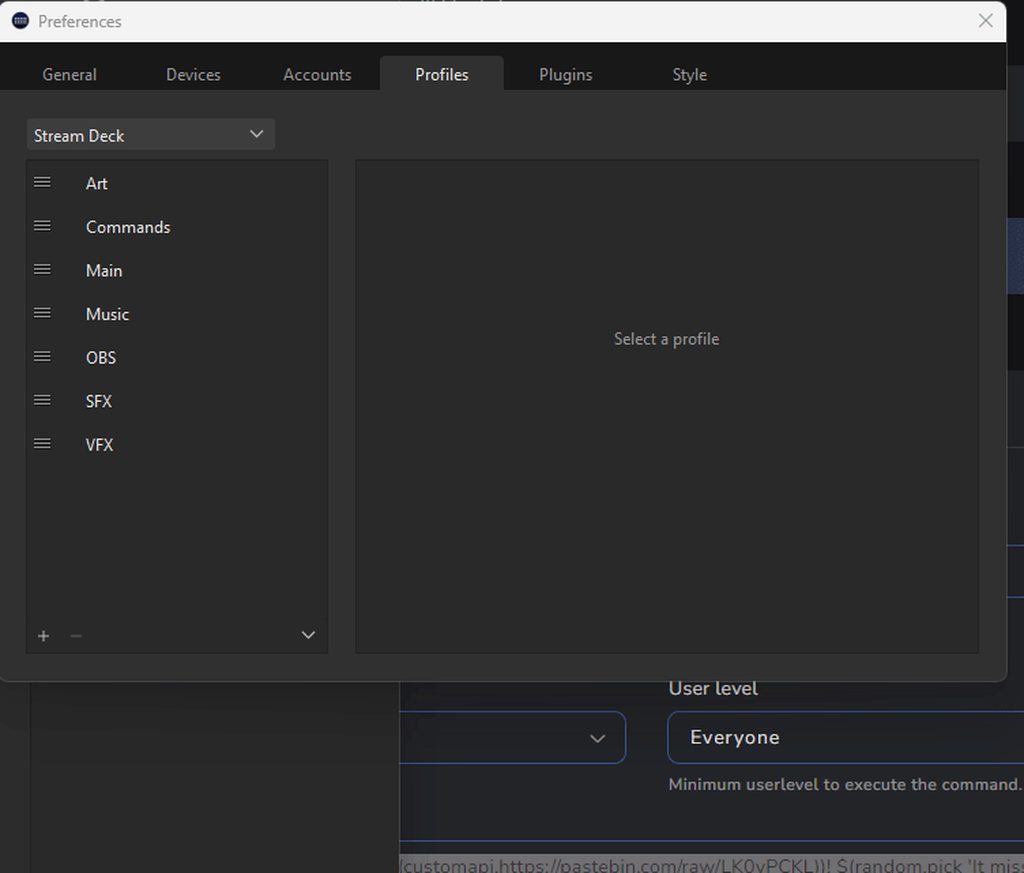
I am gonna make a comment is curious that the Elgato Community pointed you here for a Elgato issue. Yes SE.Live Plugin Modifies alot of things but they don't interface with other plugins...
Its not like your using SLOBS
But either way im happy to help as much as I can here
@drifting dove Lmk if this helps you out
drifting dove
thorn eagle
<@112475679001460736> Lmk if this helps you out
unfortunately it did not, no Stream Deck under the Tools section
thorn eagle
You may need to check if the StreamDeckPlugin.dll & StreamDeckPlugin.pdb are installed in OBS check C:\Program Files\obs-studio\obs-plugins\64bit)
see if you can find those two files
If not theirs a help guide on the Elgato Website on how you can manually install the Stream Deck Plugin
If it is their you can delete them and then do a re-install of stream deck
I think for mine its called decklink.dll / decklink.pbd but yea as I said before SE.Live shouldn't interact/prevent Elgato Stream Deck from showing up in OBS.
If anything if your still having trouble I would go to Elgato Support and open a ticket with them
drifting dove
for some reason the dll and pdb files are not in the supposed folder, looks like the entire OBS folder is set to read only
 uncut sigil
Hello I have question for the comunity. How do you have a donathon timer set up where time is added whenever someone sends a donate?
drifting dove
I see what I did wrong, I placed them in the wrong folder...reading is appearently not my strong suit today
Thanks anyway @thorn eagle
 daring meadow
anyone knows how to fix streamelement's labels not updating properly? my latest followers and subscribers labels are not showing my most recent one
 tropic bronze
anyway to fix StreamElements Leaderboard? it doesnt update anymore
 ashen kiln
i need help please
limpid bluff
ashen kiln
i need help please
With?
limpid bluff
ashen kiln
my overlays are not workeing
Does it show up in your activity feed?
ashen kiln
when i test it it shows
limpid bluff
Channel name? No links.
ashen kiln
what??
limpid bluff
What is the name of your twitch channel?
ashen kiln
TThe_Buster
thin daggerBOT
@ashen kiln ⤵️
Please logout of StreamElements at https://streamelements.com/logout and then login again to your account (Twitch/YouTube/Facebook).
limpid bluff
New events should start showing up now
ashen kiln
still no
limpid bluff
Did you get a follow or something in the last 5 minutes?
ashen kiln
if i test it it works in stream elements but when im live no
i have 2 account i re followed
limpid bluff
If you follow someone that won't show up in your activity feed.
limpid bluff
Do you have OBS open?
ashen kiln
yes
limpid bluff
Delete your alerts overlay from OBS and re-add it
 latent gazelle
Hello, anyone have an idea why new subscriptions don't show in the activity if they happen while stream is offline? I have now had it happen twice
drowsy flicker
Still havent had any luck regarding subscriptions from youtube to show up as alerts... Currently i've tried to rewoke the access and give it back to streamelements, however testing alerts works just fine, shows up on OBS and on streamelements, just no luck regarding subs... activity feed doesnt work either however I think I saw that when subs are privated they wouldnt show on the activity feed so that one is self-explanatory
gaunt wolf
Hey! When I run !settitle it returns the error of “ykkalol, something went wrong while trying to update the title.” Any known reason why?
 wispy cloak
i have renamed my twitch account, and want the old stats back on a channel, its that possibly? like watchtime, points etc
 errant saffron
How do I give full control to someone? I'd appreciate the help please 😊
 valid ember
I have a question about the Eight-ball module. Is there a way to make it stop self referencing itself? If it says the Eight-ball says every time is is useless to me
limpid bluff
errant saffron
How do I give full control to someone? I'd appreciate the help please 😊
limpid bluff
valid ember
I have a question about the Eight-ball module. Is there a way to make it stop se...
There is not
limpid bluff
wispy cloak
i have renamed my twitch account, and want the old stats back on a channel, its ...
It should be automatic, if it's not you'll need to #submit-support-ticket
You may need to logout
thin daggerBOT
Please logout of StreamElements at https://streamelements.com/logout and then login again to your account (Twitch/YouTube/Facebook).
StreamElements menu, on top of OBS > Logout > Login
limpid bluff
gaunt wolf
Hey! When I run !settitle it returns the error of “ykkalol, something went wrong...
Is StreamElements a moderator on your stream?
valid ember
limpid bluff
There is not
that is unfortunite and means i have to look for a better service then. thank you for the help
limpid bluff
latent gazelle
Hello, anyone have an idea why new subscriptions don't show in the activity if t...
For Twitch? It shouldn't matter if you're online or offline. Channel name? No links.
limpid bluff
valid ember
that is unfortunite and means i have to look for a better service then. thank yo...
You could probably write your own command to do it
Use $(random.pick 'yea', 'yes', 'no', ...) and copy the responses from https://streamelements.com/dashboard/bot/modules/eightball or make your own.
valid ember
limpid bluff
You could probably write your own command to do it
i dont have the first idea how to do that
errant saffron
limpid bluff
<https://streamelements.com/dashboard/account/channels>
Thank you 😊
 hardy knoll
anyone else having the problem with the word 'Baby' being replaced with a baby head when used by SE? due to an emote from hoarseborn channel?
gaunt wolf
limpid bluff
Is `StreamElements` a moderator on your stream?
Yes
limpid bluff
gaunt wolf
Yes
Twitch Creator Dashboard > Community > Roles Manager > add the "Editor" role to StreamElements.
valid ember
limpid bluff
Use `$(random.pick 'yea', 'yes', 'no', ...)` and copy the responses from <https:...
thank you for the help but i think there is a character limit that makes this not viable
limpid bluff
valid ember
thank you for the help but i think there is a character limit that makes this no...
Most bots will have a character limit of 500 or so for a message. You can ask in #dev-chat if there's an API that will work.
latent gazelle
limpid bluff
For Twitch? It shouldn't matter if you're online or offline. Channel name? No li...
xYorYx is the channel name and yes on Twitch
While online I get the alerts and everything is normal, but if the channel is offline there is no sign of the subscription anywhere
thin daggerBOT
@latent gazelle ⤵️
Please logout of StreamElements at https://streamelements.com/logout and then login again to your account (Twitch/YouTube/Facebook).
 muted moth
Is there an issue with the giveaway RNG? On my stream it keeps selecting the same people again and again. Admittedly I don't have a big audience but the last three streams alone the same person has won the giveaway all three times! I ended up doing a re-roll just to get someone else a chance.
 strong shadow
Hello for some reason I can’t log into my YouTube core stream elements as Google says app is blocked
 primal mango
Hola necesito ayuda con streamelements sin culpa le puse timeout en mi chat que estaba probando y me sale este mjs (StreamElements bot is currently Banned from your channel
In order to continue using StreamElements services consider unbanning the bot)
obsidian fog
#🇪🇸︱español
 bright fern
Is there a way to make the SE counter feature count silently in chat without DMing or send a message for every count?
the whisper thing was really annoying and I don't like that it sends a chat message after every time it counts
 raw crypt
bright fern
Is there a way to make the SE counter feature count silently in chat without DMi...
raw crypt
bright fern
Is there a way to make the SE counter feature count silently in chat without DMi...
Nope. It will always send a message (on chat/whisper) to confirm the change.
 late pecan
Hello i got a quick question i have a streamelements overlay from the gallery and i have a sound for a alert but the alert is to long so i downloaded the video and tried to make it longer but everytime i try to upload the new video its have a black background and its not transpartent how can i remove the background?
obsidian fog
You will not get support for that.
late pecan
obsidian fog
You will not get support for that.
Why?
obsidian fog
i have a streamelements overlay from the gallery and i have a sound for a alert but the alert is to long so i downloaded the video
This is not supported.
late pecan
obsidian fog
> i have a streamelements overlay from the gallery and i have a sound for a aler...
Why not? where can i find someone who can help me
raw crypt
You would need to edit the vídeo and make the background transparent. Not something we would be able to help here, unfortunately.
raw crypt
late pecan
Why not? where can i find someone who can help me
This is more related to video editing skills, maybe in #tech-talk
 robust haven
hi, I have a question about the !song command 🙂 instead of displaying the artist name where the big red box is, it's displaying my full name.. presumably because it's getting the songs from my youtube playlist which has my name on the account, i guess? but as you can imagine, I don't want all my viewers seeing my full name lol. Is this really what is supposed to happen/can I make it show the artist name instead?
 thorn eagle
robust haven
hi, I have a question about the !song command 🙂 instead of displaying the artis...
thorn eagle
robust haven
hi, I have a question about the !song command 🙂 instead of displaying the artis...
IRC this is not something that can be changed since this a default command baked into SE
 eager hawk
my activity feed is not loading can anyone help me
 obsidian fog
Any particular reason you're on an older version of OBS?
 shut aurora
hi i have a question after get affiliate streamelements stop recive data with follow but get subs information and people on stream dont get !points on stream. today we get few follow but last one i can see from 2 days ago any tips ?
 red sinew
im having the same issue as @shut aurora if anyone has any fixes they'd be much appreciated!
limpid bluff
@shut aurora @red sinew Channel name? No links.
shut aurora
limpid bluff
<@442783105879638026> <@433610103376183298> Channel name? No links.
milqqa_
thin daggerBOT
@shut aurora ⤵️
Please logout of StreamElements at https://streamelements.com/logout and then login again to your account (Twitch/YouTube/Facebook).
 blazing trench
hey guys, someone knows how can i enter to the widget share channel?
robust haven
blazing trench
tyvm
 solar ice
Anyone know if the youtube streams activity feed for not updating bug is fixed? Or where I can check ongoing bug progress?
obsidian fog
There's no reported bugs to my knowledge.
However due to restrictions outside of SE's control subscriber notifications do not reliable occur as desired.
solar ice
All I was told when I submitted a ticket about a week or two ago was that the dev team were aware of the issue
I don't mind if its not fixed soon but it would be nice to know if/when it is fixed
obsidian fog
Unfortunately that's not something that support provides information for.
 wide jetty
hi how can help me? i have one custom command per timeouting one of my chat today this comand don't work? why?
 languid meteor
hey can someone help me, i can simulate alerts onstream but the real follows/raids are not shown onstream? Why? 😄
limpid bluff
languid meteor
hey can someone help me, i can simulate alerts onstream but the real follows/rai...
Do they show up in the SE activity feed?
languid meteor
the simulated ones yes, the real ones not
limpid bluff
languid meteor
the simulated ones yes, the real ones not
Channel name? No links.
languid meteor
wrote u an dm
thin daggerBOT
@languid meteor ⤵️
Please logout of StreamElements at https://streamelements.com/logout and then login again to your account (Twitch/YouTube/Facebook).
languid meteor
and then?
limpid bluff
All new events should show up
limpid bluff
On your next stream if things don't work, let us know
languid meteor
so i need to restart the stream?
wait log out on streamelements in the browser, stop the stream and start again?
limpid bluff
If you are streaming, you do not
languid meteor
restarted
can u test it?
IT WORKED!
THANK YOU! ❤️
so if it doesnt work i just need to log out, stop the stream and relog & restart it?
limpid bluff
I refreshed some back end things, if it stops again we'll have to refresh them again but it shouldn't happen
 inner gull
hey i got a overlay from the streamelements and its coming to big i tried changing the size but its not working
 exotic hatch
I do not see "User management" under "Chatbot", is there something needs to be done specifically for it to appear?
obsidian fog
Don't think that applies for the youtube side of things.
exotic hatch
obsidian fog
Don't think that applies for the youtube side of things.
How do you add moderators? Send invite links?
obsidian fog
If you mean for users to manage the bot/overlays/features you'd do that here https://streamelements.com/dashboard/account/channels

StreamElements
The Ultimate All in One Platform for Streamers
The other is for bot permission levels.
Which I don't think is used for the youtube side.
exotic hatch
Right, users to manage the bot just like how you do with a Twitch account. Ok, I understand the difference now between different platforms. Thank you very much for your reply!
 lyric stag
inner gull
hey i got a overlay from the streamelements and its coming to big i tried changi...
lyric stag
inner gull
hey i got a overlay from the streamelements and its coming to big i tried changi...
If you are talking about the size issues in editing mode, then you'll need to click on the plus or minus icon in the simple menu in the bottom center, as seen in this screenshot. If you are talking about an overlay you created within SE, try using the keyboard shortcut Control + F within OBS. That should fit the source to the screen size.
 thorn eagle
Anythign relating to Sponsorship would need to go here #submit-support-ticket as stated here #community-helpdesk message
thin daggerBOT
If you need to fill out a support ticket, please use the command !ticket in chat, following the subject of your issue! For example, please type "!ticket My chatbot isn't working", and then follow the prompts from our bot!
 gentle marsh
Hello! How to make one command call another? I want the !play command to be executed immediately after the viewer uses !sr to start the music
limpid bluff
gentle marsh
Hello! How to make one command call another? I want the !play command to be exec...
Not possible. The bot won't reply to itself.
gentle marsh
limpid bluff
Not possible. The bot won't reply to itself.
Oh that's sad, would it be ok to use another chatbot to run !play?
limpid bluff
That should work.
gentle marsh
Cool, I'll try that
 old sleet
Hello all, i have a question about Star trek OP, for the extra bonus.i need to add "alliance activity timestamp" on Form, what is this ? where i can find this information ?
 visual mica
Is anyone having trouble redeeming on other peoples streams ? I always get “you don’t have enough points” or “you’re redeeming too fast” despite having enough points etc. it’s only happening to me on their stream 
 barren igloo
Hello. I'm curious if streamelements has a way to reply to a new follower on twitch/youtube? Example is if someone follows a channel that streamelements will tag them and say "welcome in (user) and thank you for joining us on this adventure"?
limpid bluff
barren igloo
Hello. I'm curious if streamelements has a way to reply to a new follower on twi...
I'm not sure if YouTube has a similar module, but that should work for Twitch.
barren igloo
I see. That would be helpful for a streamer. Though I'm just a moderator so I can't access the streamers SE log ins and edit that for them. Is there any way for a super moderator or editor to do so?
limpid bluff
You would need access to the dashboard
barren igloo
alright thank you so much for the helpful tip. I will wait for them to be online and give them this tip. Much appreciated 💖
 deep saffron
I wanted to have a closer look into a stream Elements sponsorship campaign so I started the campaign, then I realized I started a countdown with starting it so I cancelled the campaign, now its no longer avaidiable how can I restart it? I didnt really do anything
limpid bluff
deep saffron
I wanted to have a closer look into a stream Elements sponsorship campaign so I ...
If you cancelled it I do not believe there is a way to get it back. You can submit a ticket and try though.
thin daggerBOT
If you need to fill out a support ticket, please use the command !ticket in chat, following the subject of your issue! For example, please type "!ticket My chatbot isn't working", and then follow the prompts from our bot!
deep saffron
limpid bluff
If you cancelled it I do not believe there is a way to get it back. You can subm...
well I just clicked around I didnt mean to do anything
 grizzled field
Is there a way to add variations to the Hype Cup?
When I try to add "cheer500" or any other number, outside of the defaults, it doesn't work.

 quasi lantern
Latest crash report:
https://obsproject.com/logs/Se2os9Q7Ui70i5rN
It randomly crashes, but works fine without the SE plugin.
I already tried uninstalling SE.live, and also uninstalled OBS, then reinstalled OBS, then reinstalled SE.live.
Just tried signing out and signing back in. But the issues still occur. It will basically lock up after doing some action (changing scenes, toggling visibility of various sources, etc.)
I tried changing from Default to Stable, problem persists. Looks like I may have to downgrade to a previous version of OBS.
Rolling back to OBS 30.00 didn't fix it, trying 29.1.1
half prairie
Is it possible to set up different alerts for different tip amounts??
 rapid hound
hi! I can't seem to get my chat overlay to work on obs, does anybody have a fix for this?
thin daggerBOT
If you need to fill out a support ticket, please use the command !ticket in chat, following the subject of your issue! For example, please type "!ticket My chatbot isn't working", and then follow the prompts from our bot!
 fickle ginkgo
Hey! I have an overlay on my stream for newest follower. But it doesn’t updating automatically when someone is following. Can anybody help?
 tepid rivet
fickle ginkgo
Hey! I have an overlay on my stream for newest follower. But it doesn’t updating...
tepid rivet
fickle ginkgo
Hey! I have an overlay on my stream for newest follower. But it doesn’t updating...
can you make sure your account is connected to SE?
Top right => click your name => "Channel Settings"
Maybe login again
fickle ginkgo
tepid rivet
can you make sure your account is connected to SE?
Top right => click your name...
Log in again did the work tysm 🔥
 verbal oyster
quasi lantern
Latest crash report:
https://obsproject.com/logs/Se2os9Q7Ui70i5rN
It randomly...
verbal oyster
quasi lantern
Latest crash report:
https://obsproject.com/logs/Se2os9Q7Ui70i5rN
It randomly...
Had this experience as well when I updated to 30.0.2 and same results OBS works without SE Live
 deep bobcat
Hi, I have a concern over using PayPal as a donation provider as I heard some people say that it shares your address
obsidian fog
If you use a personal account it does provide information that most people wouldn't want made public.
Which if possible it is recommended to make a business account.
half prairie
deep bobcat
Hi, I have a concern over using PayPal as a donation provider as I heard some pe...
Make a new business account
First donators got my full name 
deep bobcat
half prairie
Make a new business account
oh okay! (im on call w paypal for another reason anyways)
WHAT THE FUCK
THEY HUNG UP ON ME
i was on hold for 14 min
and she come back and says
something inadudible
and hangs up
thin daggerBOT
If you need to fill out a support ticket, please use the command !ticket in chat, following the subject of your issue! For example, please type "!ticket My chatbot isn't working", and then follow the prompts from our bot!
 plush cliff
Is there anyone willing to help me set up overlays in OBS?
quasi lantern
verbal oyster
Had this experience as well when I updated to 30.0.2 and same results OBS works ...
My fix was to roll back to 29.1.1. So far no crashes
 odd crescent
Hi! Need to change nickname on chatstats page after changing nickname on Twitch
Old: Shmnka
New: shmonyaW
thin daggerBOT
If you need to fill out a support ticket, please use the command !ticket in chat, following the subject of your issue! For example, please type "!ticket My chatbot isn't working", and then follow the prompts from our bot!
 acoustic sail
!Help! SE.Live keeps crashing with latest OBS
thin daggerBOT
@acoustic sail ⤵️
Please provide a log from your last stream. To do this, in OBS go to Help > Log Files > Upload Current Log File and paste the link to the log file here.
A crash log is required to investigate the cause of your issue. Please upload the last crash log.
- In OBS, click the Help menu
- Select Crash Reports and then Upload Last Crash Report
- Copy the URL and paste it to the chat here.
Note: If you are not able to follow the above steps, open your file explorer and go here: %appdata%\obs-studio\crashes and provide the last listed file.
 ivory owl
WITH LiveSpace opening their API today will Stream Elements be picking it up as a platform?
 sick radish
are hellofresh subscriptions counted after the payment goes thru? buying a box w/ my own code so I can try it out on stream and havent seen it pop up in se yet
thin daggerBOT
If you need to fill out a support ticket, please use the command !ticket in chat, following the subject of your issue! For example, please type "!ticket My chatbot isn't working", and then follow the prompts from our bot!
limpid bluff
ivory owl
WITH LiveSpace opening their API today will Stream Elements be picking it up as ...
I don't know that anyone has requested it yet, but feel free to submit it here:
thin daggerBOT
Check out the StreamElements ideas board: https://support.streamelements.com/hc/en-us/community/topics. You'll be able to add ideas, upvote ideas you agree with and track their progress with email notifications. Adding and upvoting ideas also helps the staff know which ideas should be prioritized so please take some time to upvote.
acoustic sail
thin dagger
<@365188610414084096> ⤵️
I had to remove it because it would freeze my pc, I did a fresh install of windows and drivers. I just downloaded the latest version from the website and I get this error installing
 limpid bluff
Which OBS version do you have installed?
acoustic sail
OOBS version 30.0.2 (64 bit)
sick radish
sick radish
are hellofresh subscriptions counted after the payment goes thru? buying a box w...
?
limpid bluff
sick radish
?
You need to submit a ticket.
sick radish
I was hoping other streamers who've done it could share their experience
limpid bluff
acoustic sail
OOBS version 30.0.2 (64 bit)
If you could submit a ticket with any logs or screenshots you have it would be appreciated. That way the devs can investigate.
sick radish
Tbh
thin daggerBOT
If you need to fill out a support ticket, please use the command !ticket in chat, following the subject of your issue! For example, please type "!ticket My chatbot isn't working", and then follow the prompts from our bot!
sick radish
:/
limpid bluff
You can also try asking in #general-chat, this channel is more for support.
ivory owl
limpid bluff
I don't know that anyone has requested it yet, but feel free to submit it here:
ty for this
limpid bluff
Sponsorship issues for official answers can only be answered via tickets.
obsidian fog
And it is not something that can be answered in chat.
sick radish
cool sent one
hope you can respond soon then
acoustic sail
!help! I have 7 alerts. All but the gifted is working. My gifted works online but doesn't show in obs
I also submitted the information online about the bug I was having
limpid bluff
acoustic sail
!help! I have 7 alerts. All but the gifted is working. My gifted works online bu...
!ticket not !help!, editing the message won't trigger the bot.
 twilit wren
Can someone see if this link works for them? Tip integration https://streamelements.com/nessnostmusic/tip
its not working on my end, nothing shows up
obsidian fog
Looks fine for me
 twilit wren
obsidian fog
Looks fine for me
twilit wren
obsidian fog
Looks fine for me
ok great thanks!
 willow elk
hello, why ${channel.subs} showing 0 subs even when someone has a subscribers?
gaunt wolf
Is there a way to restart the activity feed? like reset it or something? so it shows nothing on the event list and start from fresh
 dawn hound
Hey Mods or maybe @carmine rivet might want to know, the person @ / kalimuscle0217 aka "MiaKhalifa" is randomly adding people from this discord
im assuming they're a bot or scammer something
limpid bluff
Did they send a message or just add you?
dawn hound
seems like they're going around mass adding folks, I have security so folks cant just randomly message me but also the name is linked to a twitch of a "famous person" that is not they're actual account
limpid bluff
dawn hound
seems like they're going around mass adding folks, I have security so folks cant...
 dawn hound
i just figured its a bot or a scam but whenever i get them i try to let mods know
limpid bluff
Probably was
 indigo steeple
So I'm trying to use SE for my mobile games, SL works for me but doesn't register well with overlays so I thought SE would be a solution for alerts. Comes to a conclusion that SE doesn't video capture ur screen and only uses the camera. help?
 teal pagoda
 thin daggerBOT
@teal pagoda ⤵️
Check out the StreamElements ideas board: https://support.streamelements.com/hc/en-us/community/topics. You'll be able to add ideas, upvote ideas you agree with and track their progress with email notifications. Adding and upvoting ideas also helps the staff know which ideas should be prioritized so please take some time to upvote.
deep bobcat
hiya, i have a question, how do I turn off on paypal that customers cant see my address and my number
limpid bluff
deep bobcat
hiya, i have a question, how do I turn off on paypal that customers cant see my ...
Use a business account with a business email and business name.
deep bobcat
limpid bluff
Use a business account with a business email and business name.
I am using a business account idk how to js set it up to avoid getting doxxed
limpid bluff
You should be fine then.
deep bobcat
limpid bluff
You should be fine then.
can I put my business address just as N/A
deep bobcat
 limpid bluff
I don't believe they give that information out when people donate.
It's just business name/email/support phone number.
deep bobcat
limpid bluff
It's just business name/email/support phone number.
so how do I change my business address bc I put my real address
limpid bluff
You have to put in a real address.
 marsh grove
Anyone know why this isn't working? Losing my mind
 latent gazelle
Hello, anyone have an idea why new Twitch subscriptions don't show in the Activity if they happen while stream is offline? I have now had it happen twice
deep bobcat
Just hit 50 followers! I just have to get 2 more days of stream time, can I just stream for 10 min then go offf and repeat?
raw crypt
marsh grove
Anyone know why this isn't working? Losing my mind
You have to go to your store, edit your item and set the "Item command" name as "steam_key", like below:
 gaunt wolf
does stream elements have a command variable for a command with multiple random responses?
obsidian fog
Yes however because of character limits in the response message it may be better to use this method https://thefyrewire.com/docs/api/twitch/pastebin/
 gaunt wolf
Could I get a quick walkthrough on how to use it?
obsidian fog
Create a post on pastebin.com with a single response per line.
The link will have a bunch of letters/numbers at the end of the link which you want.
Scroll down on that linked page to usages/example and copy the link they give for the SE chatbot replacing the ID they use with the one you made.
gaunt wolf
Thank you!
Also if I wanted the command to @ a person, would i just put $(user) in the paste bin too?
obsidian fog
I think that grabs the person who sent it.
Otherwise I believe targetname is the one you want. You'd just need to include the username following the command.
 crimson linden
Timeout command no longer works today. Was there an update to streamelements that would make it stop? No settings were changed. The command is: /timeout ${sender} ${random.5-30}
limpid bluff
crimson linden
Timeout command no longer works today. Was there an update to streamelements tha...
There shouldn't have been an update that would do that.
crimson linden
I was thinking so. I'm not sure why the command no longer works when nothing else was changed. It worked yesterday.
All other commands seem to be working fine.
limpid bluff
Try changing it to ${random.number 5-30} or ${random 5-30}
crimson linden
Neither of those make it work.
limpid bluff
Part the bot, wait 10 seconds, rejoin the bot
thin daggerBOT
Go to the Dashboard > Right side > Part channel > Join channel (https://streamelements.com/dashboard) https://i.imgur.com/uYVb8OK.png
limpid bluff
If that doesn't work I would submit a ticket
thin daggerBOT
If you need to fill out a support ticket, please use the command !ticket in chat, following the subject of your issue! For example, please type "!ticket My chatbot isn't working", and then follow the prompts from our bot!
crimson linden
Okay, thank you!
marsh grove
raw crypt
You have to go to your store, edit your item and set the "Item command" name as ...
Hey thanks for the reply! I'm using access codes so there actually is no option to do that :/
raw crypt
marsh grove
Hey thanks for the reply! I'm using access codes so there actually is no option ...
There's no option to redeem access code via chat. The code would be sent on chat if that existed (which is not expected, as they are private info) . The only option to redeem it is from store page.
marsh grove
raw crypt
There's no option to redeem access code via chat. The code would be sent on chat...
Yeah maybe they changed something, I saw videos of it being done posted like 3 years ago and streamlabs is able to do it so thought maybe the problem was on my end... damn
 wet palm
Hey. I don't really know how to add New scene transition to my streamElements. how can I make it work or add it?
 thin fractal
Does anyone know if the SE.live will work on Mac?
tepid rivet
thin fractal
Does anyone know if the SE.live will work on Mac?
in the article where they talk about obs.live with Youtube there's a link to a mac version but for some reason it's not on the main website.
You can always give that a shot and see if things explode or not
tepid rivet
wet palm
Hey. I don't really know how to add New scene transition to my streamElements. h...
do you mean scene transitions in OBS?
there's a ton of videos on Youtube that talk about that, really recommend checking them out first because it can be overwhelming.
(I can't link to those videos on here)
 halcyon minnow
Good morning, I'm about to receive money from a Calls of Dragon campaign and the money was supposed to arrive yesterday 13/02, what can I do to receive it?
 thin daggerBOT
@halcyon minnow ⤵️
If you need to fill out a support ticket, please use the command !ticket in chat, following the subject of your issue! For example, please type "!ticket My chatbot isn't working", and then follow the prompts from our bot!
obsidian fog
@thin fractal It does but in the current state it only works on an older version of OBS that comes with the "installer".
wet palm
tepid rivet
do you mean scene transitions in OBS?
there's a ton of videos on Youtube that ta...
Oh thanks a lot, I didn't know it's called stinger XD
But means soo much for the help!!
 winter latch
Heyy, i have a question for the Overlays. I have a bar with a Label that scrolls from the right to the left and is showing my last subs on youtube. But I want now, that if somebody Subscripes, that the Alert is playing in the same bar as the Label. So its needed that the Label is not active for the time in which the alert is playing. Is this possible?
 snow osprey
#1207347802116464782 my most recent campaign was puzzles and survival and it is saying "Unfortunately, this campaign ended before you were able to achieve its minimum goals." But I did everything I was capable of doing. The only thing that didn't get completed was the player goals there are even checkmarks next to everything. I don't understand.

 limpid bluff
snow osprey
<#1207347802116464782> my most recent campaign was puzzles and survival and it i...
limpid bluff
snow osprey
<#1207347802116464782> my most recent campaign was puzzles and survival and it i...
Only you and staff have access to that channel. They will answer your ticket when they get to it.
snow osprey
Okay
 small chasm
Does anyone know why text scrolling doesn't work when it's turned on?
thin fractal
Okay having all type of trouble with the SE.live for Mac. I’ve uninstalled and reinstalled and still having problems. When opening se.live it prompts to check for updates automatically or to do manually. Ive clicked on both but won’t close off the screen.
 obsidian fog
while I personally don't own a Mac I do not recommend using SE.Live for it currently as it is "locked" to the above version of OBS.
Is there any particular thing from it that you need?
 robust osprey
Good afternoon, can anyone tell me where I can send the video to participate in the competition to defeat Boss Cocolia?
thin daggerBOT
If you need to fill out a support ticket, please use the command !ticket in chat, following the subject of your issue! For example, please type "!ticket My chatbot isn't working", and then follow the prompts from our bot!
winter latch
Heyy, i have a question for the Overlays. I have a bar with a Label that scrolls from the right to the left and is showing my last subs on youtube. But I want now, that if somebody Subscripes, that the Alert is playing in the same bar as the Label. So its needed that the Label is not active for the time in which the alert is playing. Is this possible?
 frigid pulsar
The person on the help ticket said to ask here:
I have an overlay that uses SE_API.counters.get to get the value of a counter, however recently we have noticed it doesn't work and is returning undefined instead of the counter's value
console.log("counter.value = " + counter.value);```
 agile apex
Did you ever find a fix?
frigid pulsar
deep bobcat
Just hit 50 followers! I just have to get 2 more days of stream time, can I just...
if this is for twitch affiliate, doing that will only count for the "streaming on different days" achievement, the amount of stream time is cumulative, so doing that will only count for 20min of streaming
 nimble hazel
Hey, is there a way to unban someone from Media Request?
hybrid oracle
Hello, my stream alerts and most recent follower and such are not updating? Can I please have an assist?
 dawn crane
Hello, is there a way to transfer my saved overlays to elements?
raw crypt
dawn crane
Hello, is there a way to transfer my saved overlays to elements?
No, they are totally independent and not directly compatible, there is no way to transfer or convert it (at least for now)
raw crypt
hybrid oracle
Hello, my stream alerts and most recent follower and such are not updating? Can ...
Usually a logout and login from Streamelements can update it. Open this page and login again on your account:
https://streamelements.com/logout
After that, the new values should update correctly next time.
StreamElements
The Ultimate All in One Platform for Streamers
gaunt wolf
Hello, my streamelements doesn't have my subs up-to-date in its system. It's stuck to what I earned from like 2 years ago lol. How can I make it up to date?
The points, cheers, chatstats are all current - just not the subs.
 rich portal
Messages deleted/users timed out in chat don't have their messages deleted from the on screen chat box
limpid bluff
gaunt wolf
Hello, my streamelements doesn't have my subs up-to-date in its system. It's stu...
Channel name?
gaunt wolf
limpid bluff
Channel name?
Twitch: Strxnge_TV
 vague yew
Hey all!
I accepted a campaign and I saw that there was a code for people to get items (warpath)
Now that I accepted it I cant find the code anywhere 
Where can I find it? I think it will help a lot of players. Or does someone know the code?
thin daggerBOT
@vague yew ⤵️
If you need to fill out a support ticket, please use the command !ticket in chat, following the subject of your issue! For example, please type "!ticket My chatbot isn't working", and then follow the prompts from our bot!
 grizzled sonnet
agile apex
Did you ever find a fix?
grizzled sonnet
agile apex
Did you ever find a fix?
apparently it epends on youtube so can't really fix it per say
 limpid maple
Hi, is there a possibility to show quotes on StreamElements? Like maybe a list? And where I can edit these? Or is it just possible to add quotes via command. Thanks!
obsidian fog
It's entirely managed via chat commands unfortunately.
thin daggerBOT
@gaunt wolf ⤵️
Please logout of StreamElements at https://streamelements.com/logout and then login again to your account (Twitch/YouTube/Facebook).
 pearl pike
I want to add quotes to my channel but idk how to add so that I can pick a random quote, how to add multiple quotes under one command ñ, etc
 urban flare
Howdy!
Instead of calling upon my chat to type an !command in chat, I think it'd be cooler/more convenient if I could have a command pulled up, just by me vocally mentioning it. I know there's VoiceAttack and other voice recognition software, but I'm unsure if there's a newer solution I'm just not aware of.
I already have closed captions on my stream (through OBS), so is there a way to intergrade that with the ability to pull up commands?
limpid bluff
pearl pike
I want to add quotes to my channel but idk how to add so that I can pick a rand...
limpid bluff
urban flare
Howdy!
Instead of calling upon my chat to type an !command in chat, I think it'...
Through StreamElements there is not a way that I know of.
deep bobcat
Hiya,
I am doing the onboarding to be an affilate! I am stuck on the interviews for tax as I don't know who to put for the TIN (i am outside the us) I am U18 so idk who to put, thanks
 blissful obsidian
hello there!
i have a question about the goal widget.
i cant seem to have it auto resting after 30 days im a twitch streamer and every month i need to go to the overlay manger and reset it by hand is there a way to have it reset after 30 days automatically?
raw crypt
blissful obsidian
hello there!
i have a question about the goal widget.
i cant seem to have it au...
Unfortunately, no. You need to do that manually each 30 days (or 31, or 28, depending on the month)
blissful obsidian
thank you!
deep bobcat
deep bobcat
Hiya,
I am doing the onboarding to be an affilate! I am stuck on the interviews...
can any1 help
 rotund totem
Is the a way to undo my mistake I left a sponsorship early trying to fix the browser overlay
 tidal granite
hi, i'm streaming on facebook but my activity feed only shows the video likes, there is no follows and etc
 surreal delta
Hey all;
hey all; so when i try to emulate an event (i.e. new follower) it doesn't display the alert box action from my StreamElements overlay. but if i go to the overlay editor in the streamelements dashboard and simulate an event, it will show the alert box action in SE.Live. any ideas how to get SE.Live to simulate an event
rotund totem
um im still needing more help and cant tell if i need to open a new ticket
nvm got the help i needed
tidal granite
i cant submit a ticket, i dont have permission
gaunt wolf
thin dagger
<@456226577798135808> ⤵️
I logged out and logged in and it didn't fix the sub issue. Still reads from 2022
 pearl dawn
Hello, im having a new problem. I cant upload 3 audio files to StreamElements, i tried uploading as Wav, Ogg and Mp3 and this 3 files are not uploading, it says this message: "Failed while uploading file"
 surreal delta
hey all; so when i try to emulate an event (i.e. new follower) it doesn't displa...
surreal delta
surreal delta
hey all; so when i try to emulate an event (i.e. new follower) it doesn't displa...
fixed my own issue. just needed to refresh source
 crude pecan
is there documentation for what default streamelements commands do? for example when default command has been edited or deleted, how to get it back?
limpid bluff
crude pecan
is there documentation for what default streamelements commands do? for example ...
Default commands cannot be deleted or edited really. You can only edit the command name, aliases, user level, and cooldown.
https://docs.streamelements.com/chatbot/commands/default will have a list of the defaults.
crude pecan
limpid bluff
Default commands cannot be deleted or edited really. You can only edit the comma...
!nuke command got tampered with from twitch chat. and it doesnt work as supposed to anymore, while the same syntax works in my chat perfectly
limpid bluff
You'll need to submit a ticket, you shouldn't be able to edit it.
crude pecan
maybe you have some foolproof way/idea how to re-test it?
 pallid niche
So I'm having a problem with BTTV emotes in the chat widget. I have the "Show Message Emotes" turned on, but the emotes don't show up. Does anyone know how to fix that?

 desert surge
Having some trouble with the Top Monthly Tip label.
It's showing a tip from around 4 months ago for some reason?
I have some custom text it's supposed to show when a new month starts (calendar month).
And yes I have restarted session, (it's set to auto restart session anyway, but I still restarted it manually too just incase)
Anyone any ideas? 😅
 cold finch
Bug report: Using the "banned words" filter, SE is timing out a user who is not matching any rule. It has timed them out for a few messages in a stream - but not all of their messages. Shown is one example of a message that is being matched for some unknown reason. however whatever is going on, if either their name or message is replaced with random stuff, they no longer match the rule. Attached is images showing the problem. (Don't need support, disabling the rule fixed it for us and we've not seen any follow bots for many months so I'm thinking Twitch has sorted the issue of those bots thus making this rule redundant anyways - so reporting just so you know about the issue). Edited to note: there was a previous regular expression rule also which I wasn't 100% sure if it was matching or not, the first time the bot timed this viewer out I deleted the regexp rule on the presumption it was probably what was causing the problem. However SE then continued to time them out and, as you see, continues to say the rule is matching. This bug could be that a deleted regexp match is still matching. Either way there's a bug 😦 .


 dusky jacinth
Hello guys, i'm new here, maybe some veteran could assist me with a slight problem? ^^
 slim gazelle
dusky jacinth
Hello guys, i'm new here, maybe some veteran could assist me with a slight probl...
slim gazelle
dusky jacinth
Hello guys, i'm new here, maybe some veteran could assist me with a slight probl...
 vestal ivy
Hello, I want to ask. Why my stream element alert for supporter and stars not coming out? My like and follow alert working fine. Im streaming in facebook.
 lament summit
hello i want to ask about the star rail sponsership for the cocolia boss challenge does it have to be a specific difficultie
thin daggerBOT
@lament summit ⤵️
If you need to fill out a support ticket, please use the command !ticket in chat, following the subject of your issue! For example, please type "!ticket My chatbot isn't working", and then follow the prompts from our bot!
 haughty arrow
when was the heist command taken out?
tidal granite
vestal ivy
Hello, I want to ask. Why my stream element alert for supporter and stars not co...
im streaming on facebook too, but my follow, stars, etc. alerts are not working, only the like/video like
 heavy needle
What does it mean when it says creator name ?
is that my channel name or do I have to do my real name ?
 drifting sail
anyone knows whats going on with face book OBS app,? i can't login. it only shows "Error Accessing App
We're sorry, but the application you're trying to use doesn't exist or has been disabled."
 teal lark
I'm setting up my streamelements overlays. I'm gonna be multistreaming, but I don't see any option to have a combined twitch-youtube alert overlay. Is there any way to prevent the two overlay sources from playing on top of one another?
obsidian fog
@teal lark as we do not support multistreaming that is not possible.
 wheat sky
Hello i'm doing an #AD & i want to talk with someone can resolve my problem about DL from my viewer Thx !
thin daggerBOT
@wheat sky ⤵️
If you need to fill out a support ticket, please use the command !ticket in chat, following the subject of your issue! For example, please type "!ticket My chatbot isn't working", and then follow the prompts from our bot!
 gleaming talon
Is the activity feed inside se live obs for both youtube and twitch if you have both linked?
gleaming talon
how would i go around having both platforms ?:D
obsidian fog
Wait for us to impliment it.
gleaming talon
ahhh is it on the roadmap ?
obsidian fog
I do not know unfortunately.
gleaming talon
aahh cool thanks 😄 fingers crossed lol
 zealous ore
Anyone else having issues with sub gift alerts? (for support, my account is yeahunter on twitch)
thin daggerBOT
If you need to fill out a support ticket, please use the command !ticket in chat, following the subject of your issue! For example, please type "!ticket My chatbot isn't working", and then follow the prompts from our bot!
zealous ore
thanks <3
 dry mauve
Hi there,
I have an element (alter box) that I've customized with different sounds. Is there a way I can add that to one of my overlays? I see in the documentation how to separate an alert box from an overlay, but not any way to add something from the elements manager into an overlay.
 potent swift
Heii with my alert box the sub alert does not work what can be the reason ?
 pine prawn
Hello !
I'm just wondering myself about one of my sponsorships, I'm just getting cancelled cause of a mistake that I've made, it's completely my fault and I assume that, however, I just want to know if i'm "shadowbanned" of the streamelements sponsorships or just if I'm banned for a period or if it doesn't have any influence on it
(I apologize if my english isn't perfect, I'm still learning)
tidal granite
hi, i tried doing sponsorship with my twitch but the progress is not adding up.
 wide fossil
Hi, I have a question is there a way to test the chat modules alerts yet? Would like to see if they setup properly.
 vital wing
Setting up the profile page, it give me the warning that "That doesn't look like a twitter url" when I copied it from Twitter, and then won't show it on the profile page 
vital wing
wide fossil
Hi, I have a question is there a way to test the chat modules alerts yet? Would ...
If it's Twitch, just go to your channel and type in chat, even if you're offline. If it works, you should see it both in OBS or in the SE setup page.
wide fossil
vital wing
If it's Twitch, just go to your channel and type in chat, even if you're offline...
That with normal/custom commands. I mean the module sector that only posts once it recieves the input. Try like the Tip button but only promts to the overlay and doesnt send the text to the chat.
vital wing
That I don't know, sorry.
 soft prawn
1
 bleak void
any specific reason my SE dashboard isnt updating? says i have 0 followers in the last 30 days but it says i have +9 on my twitch dashboard
 whole parcel
So i switch from twitch to YouTube and my alerts and my activity feed are not updating
rich portal
Is there an option to ignore resubs on the native streamelements subgoal?
I can't find anything on it, I do know streamlabs has it as a checkbox though 
 left kernel
Anybody having issues with OBS causing their pcs to freeze and crash?
gaunt wolf
Can I withdraw the money stated in the total payment even if it is not 40/40 when I say finish the campaign?
obsidian fog
As long as you meet the required goals you will receive whatever the amount is stated for that.
gaunt wolf
obsidian fog
As long as you meet the required goals you will receive whatever the amount is s...
thx i understand
 unique willow
Anyone else having issues with alerts not working with Facebook?
obsidian fog
There's some issues in general with FB ATM to my knowledge.
hybrid oracle
Hello, my follower count will not update to my current followers and my alerts will not appear on stream. This is the 3rd time in two weeks this occurance has happened. Can anyone assist with this problem?
thin daggerBOT
If you need to fill out a support ticket, please use the command !ticket in chat, following the subject of your issue! For example, please type "!ticket My chatbot isn't working", and then follow the prompts from our bot!
fair pilot
left kernel
Anybody having issues with OBS causing their pcs to freeze and crash?
Only have the issue when switching scenes with se live ob's freezes than.. without se live No problems
 final panther
Payment Setup
If you wish to edit your details please contact support.
thin daggerBOT
If you need to fill out a support ticket, please use the command !ticket in chat, following the subject of your issue! For example, please type "!ticket My chatbot isn't working", and then follow the prompts from our bot!
 patent plinth
Did anyone got same issue with creating acc at sepay?
 thin daggerBOT
If you need to fill out a support ticket, please use the command !ticket in chat, following the subject of your issue! For example, please type "!ticket My chatbot isn't working", and then follow the prompts from our bot!
 plucky plover
#submit-support-ticket is there a way to create a chat box widget that will feed the chat from multiple platforms for use in my broadcast software?
obsidian fog
Not with SE.
 shrewd minnow
Anyone know why my tips haven't showed up yet in my Paypal? Had a bunch of tips from viewers on the 10th, but not a single one went through to Paypal despite it showing they should've on my Stream Elements
thin daggerBOT
If a viewer tipped through PayPal but no information appears in your StreamElements account, this generally means PayPal has held the tip for verification.
Until PayPal clears the tip and sends back a confirmation to your StreamElements account, no information will appear there and no alert will play, as that confirmation is the only way for us to be aware of a successful transaction.
There is a posibility that the tip may have been sent as an eCheque/eCheck - these tips can take from 7 up to 21+ days to show up on our side. Tippers can usually cancel these.
If you believe there may be an issue with the transaction, you'll need to contact PayPal support as StreamElements is only a passthrough service and never actually gets involved with the transaction or touches the money
 safe mesa
Anyone know how long it takes for ChatStats to update Channel Emotes?
Like 7TV, Frankerz and BTTV
New emotes don't show up there
 pastel onyx
Whats up ppl, gotta question. I have a user in my chat trying to redeem items & EVERY time they try, there is a reply from the bot telling them they’re redeeming too fast. Any clue what’s wrong here?
Also, hope everyone here is doing well today & thanks for your time & energy fam!
gaunt wolf
I can get paid after the period is over, right?

 raven imp
Anyone know why raids aren't showing up in the SE activity feed despite showing up in the twitch activity feed? (Tried logging out and logging in).
 ocean pollen
Does anyone know how to create a command for words on stream to define a word and also to bypass the lock in the game. For example !define and !word (then it will repeat the word)
gaunt wolf
Alert and drashboard didnt work somebody know how i do it showup on yutube?
 reef haven
Im having an issue with setting up the merch store. im in the marketing tab and scrolled down to merch panels. however there's just one box with a constant spinning wheel. ive tried reloading the browser. i've tried another browser. i cant figure out how to get it to load. has anyone else had this issue?
 sour turret
Hi everyone. I'm having issues with SE not using my Custom Bot name when I save it. It doesn't work. Is there a fix for this?
thin daggerBOT
You can choose a custom name for the streamelements bot using the following instructions. https://support.streamelements.com/hc/en-us/articles/10474519540754-How-to-Setup-a-Custom-Bot-Name
 little ermine
Hi everyone. Does anyone have a recommendation for me how i could add my current stream title to a SE overlay ?
rich portal
I've just set up SE.Pay for tips on my page, it all says verified/signed but I go to try donating to myself or ask someone to, this error keeps happening

 golden gulch
Having trouble trying to get BTTV and FFZ emotes to display in Chat Box overlay
 amber path
reef haven
Im having an issue with setting up the merch store. im in the marketing tab and ...
amber path
reef haven
Im having an issue with setting up the merch store. im in the marketing tab and ...
Same issue here
 plush aspen
Stream element alert doesn't alert not working what to do?? I am using OBS
 spark coral
!ticketI created alliance with my boys didnt revice 50$ SPONSORSHIP
 earnest zealot
Hey there! Could anyone lend me a hand with switching these bottom Twitch alerts to YouTube alerts? I'm looking to make the switch from Twitch to YouTube.

on elements Beta*
 wise widget
Hey! Having some problems with alerts. Made some simple alerts, wich works awesome, but they keep "not working" all the time. I can open OBS, emulate an alert, and it would work. But, when i try to do it some time later, for instance if i go live or change scene, the alerts do not appear on screen anymore. I then have to restart OBS.
 drowsy coral
I was trying to import my newly made overlays from StreamElements through SE.live on OBS studio but, when I get to the part where I want to import my 'overlay' only, it forces me to choose a scene collection. Help?
Nevermind.
 polar void
Hey guys, i want to set up a little "game" for my chat to play with the chatbot during my lifestream but i don't know variables enough to know if it would work... Can i change a counter by a random number? This is the command I am thinking of: During your fight Monday has gained/lost ${count HP ${random -10-5}} HP. She now has ${getcount HP} HP.
solar ice
whole parcel
So i switch from twitch to YouTube and my alerts and my activity feed are not up...
I was told its a known bug a few weeks ago and I still dont know if it will be fixed soon
 faint stag
Hey guys, I do games like quiz on my stream with viewers and I want to redeem them with points when they participate. Giving points manually is a bit complicated so i'm looking for a way that viewers can use a command just before the game begins saying that they want to enter the quiz and that would give them a certain amount of points automatically. I could activate this for a limited time before the game to avoid people using it when they want. Can i do that and how ? Thanks a lot ♥️ !
 pallid charm
There is no progress for the COD game, they are progressing, they send messages ?
 dense lodge
ok im still having issues with Raid Alerts. the bot here said log out and log back in. i Did that and Raid Alerts are just not a thing anymore for me. Suggestions

heres my most recent raid

but nothing here
Last time a raid alert worked was 12/4/23
limpid bluff
dense lodge
ok im still having issues with Raid Alerts. the bot here said log out and log ba...
Can you log out and log in again?
thin daggerBOT
Please logout of StreamElements at https://streamelements.com/logout and then login again to your account (Twitch/YouTube/Facebook).
dense lodge
limpid bluff
Can you log out and log in again?
like again? for the 7th time?
limpid bluff
Yes
limpid bluff
Can you unban the bot from your channel?
dense lodge
want me to just part and have it rejoin?
limpid bluff
That may work, but it thinks it’s banned
dense lodge
ok i "removed" ban. ill see if it works later
i still get every other alert
just not raids
ok removed bot and had it re joined and it game mod priv
limpid bluff
dense lodge
ok removed bot and had it re joined and it game mod priv
Should be working better now
 dense lodge
ok cool. thanks
 thorny osprey
with that little element control panel open in lower right of deck, i only get a few seconds before OBS goes unresponsive. With that panel closed, OBS stays responsive as I switch scenes or resize sources.
Anyone else seeing this issue? Wanted development to be aware in case the fix involves them
lime pine
i assigned an account as a bot account in streamelements, but sometimes still the streamelements acc shows up in my chat, does anyone know why?

 final schooner
Im playing this on stream rn, but my own achievements dont even show up. wtf?
ive done all 3

 hallow socket
is anybody having problems editing or adding new Merch? I click on the edit button or add new area and this is all I get.

 haughty quiver
Hi, good morning, I wanted to report a problem that I'm having, my program doesn't open a login with Facebook, it logs in anywhere but on Facebook and I only talk live on Facebook, I click on log in with Facebook when I open Facebook to enter email and my Facebook password doesn't even open the error I wanted to know if this problem is general please my channel is stopped for this reason my streelements is updated
obsidian fog
Facebook login is a known issue ATM.
 oblique mirage
Hello SE Community, I need help, how do I reset my stats? 😕
I changed the name of my channel and would like to start from the beginning. 🙂
 south pawn
Hello, how can I change the amount of points won in the chat dock?
 raven mica
 echo crater
Hello! Anybody is using StreamElements with Upstream?
thin daggerBOT
If you need to fill out a support ticket, please use the command !ticket in chat, following the subject of your issue! For example, please type "!ticket My chatbot isn't working", and then follow the prompts from our bot!
gaunt wolf
Hello ! is there an issue right now with Facebook alerts? mine havent worked in a few days and when i try to log in, It says App Does not exist
 rose coral
Is there anyway other then adding 3 seperate browser sources to do alerts for multiple platforms? maybe with the elements beta or some such?
rose coral
I think now that multi streaming is becoming more prevalent thats something you guys should look into
 ebon elm
Hey all! Question.. I'm trying to customize the subathon widget but i can't seem to find a way to change the color of the background of the timer? It stays green... is there a way to change the color?
 broken cave
Is there any way to have the Custom Widget pull from a MySQL database from like b3ck.com? I have tried to use the SE_API.store but I keep getting errors and then it just shows null or NAN or resets my counter to 0, I'm trying to use it for custom counters
raw crypt
broken cave
Is there any way to have the Custom Widget pull from a MySQL database from like ...
May be this is a conversation for #dev-chat channel. Fell free to post in there the error and what you are trying to do exactly. With more details, people in there would be able to help you better
raw crypt
ebon elm
Hey all! Question.. I'm trying to customize the subathon widget but i can't seem...
Which subathon? Where did you get that subathon widget?
 tired badger
anyone here can help with this? completed all but some player goals remained

but checkmark in everything so why did this come
ebon elm
raw crypt
Which subathon? Where did you get that subathon widget?
The subathon widget of streamelements.. its here; https://widgets.streamelements.com/element/subathon-widget
raw crypt
tired badger
anyone here can help with this? completed all but some player goals remained
Only the staff can help you with that, open a ticket
thin daggerBOT
@tired badger ⤵️
If you need to fill out a support ticket, please use the command !ticket in chat, following the subject of your issue! For example, please type "!ticket My chatbot isn't working", and then follow the prompts from our bot!
 tawdry lance
Hey there. Before I submit a ticket, is there an outage with new followers atm?
broken cave
raw crypt
May be this is a conversation for <#259680142459142144> channel. Fell free to po...
Ope, sorry I totally thought I was in that chat, thanks 😁👍
raw crypt
ebon elm
The subathon widget of streamelements.. its here; https://widgets.streamelements...
Unfortunately, the background color is not available in the selection menu, not sure whether it's a bug or not.
However, you can change the View from "Design" to "JSON Editor" (on top right) and then you are able to change the background color using the text. Here is how you can do that:
From the JSON view, Press CTRL + F and search for backgroundColor (there are 7 results)
Change the value of each one of the 7 results from #28E796 to the colour you want (using RGB code).
Click on Save after changing all of them.
Looking at the documentation, it is not a bug, but the set of styling is fixed for the text. The styling options not in there are just available using JSON Editor
 tired kindle
Is there a way to block a bot from earning points on the SE Twitch Extension panel leaderboard? my top 3 users on the points leaderboard are bots
same goes for the chatstats leaderboard. top 4 are bots
raw crypt
tired kindle
Is there a way to block a bot from earning points on the SE Twitch Extension pan...
Go to Loyalty > Loyalty Settings > Ignored users and add the bot usernames in there. Save it.
Go to the leaderboard and remove the points for each one of the bots.
tired kindle
raw crypt
Go to Loyalty > Loyalty Settings > Ignored users and add the bot usernames in th...
ok thank you :)
raw crypt
tired kindle
same goes for the chatstats leaderboard. top 4 are bots
As for chatstats, it is not possible
tired kindle
dang ok
 jagged sorrel
Two questions- 1) Is it possible to find out when you modded someone / were modded in a channel? 2) This may be a Twitch question, but in most (but not all) channels when I re-sub, it does not show up in chat or get credited during a hype train. Subs I give do, however.
 dapper tapir
On SE OBS Live, if I switch my scene with something like a custom stinger transition or even the default OBS transitions, SE OBS Live will Freeze and go into a not responding Indefinately.
The OBS Studio version is 30.0.2 (64 bit)
The SE.Live version is set to default,
However setting this to stable seems to fix the issue
 dim palm
yo, im just curious my username is taken that i use on twitch is there anyway to claim my username on here?
limpid bluff
dim palm
yo, im just curious my username is taken that i use on twitch is there anyway to...
Here being StreamElements? It goes based on your Twitch username.
dim palm
limpid bluff
Here being StreamElements? It goes based on your Twitch username.
oh, yeah i mean on streamelements but when i type streamelements/[myusername] its linked to a completely different person
limpid bluff
It will be the same as your twitch username
 thorny verge
Hey, how do I get Streamelements into my chat? Nothing I have set up is working.
dim palm
https://streamelements.com/kuga well this for sure isnt me o.o @limpid bluff
limpid bluff
You probably have a slightly different username since someone from [Insert other service here] can have the same username.
limpid bluff
Not that I am aware of
dim palm
thanks anyways i appreciate the response
ebon elm
raw crypt
Unfortunately, the background color is not available in the selection menu, not ...
Thank you!! I was looking into JSON but i couldnt figure out where to find it! Thank you!
 crystal needle
Oh no I think I posted this in the wrong chat so Ill post in here I really appreciate anyone who can help!!! Hi everyone! I need help with a tip goal. it is starting at my total amount ive earned since I began streaming but i want to make the goal starting at $0. Thank you to anyone that can help!
raw crypt
crystal needle
Oh no I think I posted this in the wrong chat so Ill post in here I really appre...
Go to https://streamelements.com/dashboard/session/goals and check the "Tip goal progress". Change it to 0 and hit Save
StreamElements
The Ultimate All in One Platform for Streamers
 stray token
Hello anyone know why my stream can hear my alerts but I can't?
 olive raft
Can someone help me out with my chat? The alerts part of it work, but whenever I hit test message/demo message or talk in personal chat, I don't see anything. it worked before but now it isn't


this will work though
 little haven
Hi, where can I found my link to download the game for a sponsor?
 zenith swallow
Hi, i hope you having and great day :), how do i change the photo/gif alerts for cheers/bits because everytime i try to add my the gif ive uploaded it onky gives me the option to delete and not select
 plush badger
hey all! i'm struggling tryn to figure out custom commands. i'm trying to make it so a user can throw a pokeball at another user in chat and have it "catch" or "miss" depending on a percentage roll. any ideas how i can accomplish this? thank you for your time ❤️
 rough solstice
hello, ive noticed an issue that i cant seem to find a solution for, and its one that has been occurring for a while.
But, when it comes to alerts such as follow or sub (when streaming on twitch) certain full screen games such as fortnite, new vegas, skyrim, or lethal company, there is no animation.
I have reloaded, made sure the alerts have screen priority, and redone many animations, but when it comes to certain full screen games, no animation (gif) will pop up.
Does anyone have a solution or similar issue?
 hoary gale
Hi there
I setup some items in the stream store of my girlfirends account. That items can redeemed via custom commands, but since start of the year or december 2023 it isn't working anymore. I got a confirmation within the chat but there is no sound played. Nether for the streamer or the viewers. We did not made changes to the overlay since this time and we can hear raid or follow alerts which are in the same overlay.
Thanks for your help
 swift dove
Hey I have a question for a variable. I want to create a counting command that resets itself after the end of the stream, how can I do that? Is that even possible?
obsidian fog
Automatically? Not possible natively.
Would definitely require you to do something manually.
 marble badger
hello to all streamers and non-streamers. The question is: Is there a design/ready-made Overlay chat like JChat so that when one user responds to another user, like in the Twitch chat itself there would be “↱ reply geekfreak: lollolo”?
Here's an example:
 celest widget
having issues editing merch on my laptop says i am on mobile any ideas how to fix this?
is desktop laptop not supported for editing merch
 exotic folio
Hey, i wanted to set up a new overlay but i cant Upload my Sound alerts " failed while uploading file".. can some one Help?
obsidian fog
If you're trying with .wav you need to convert it to another type. That is no longer supported.
exotic folio
Oh okay, how can i convert it into another type?
obsidian fog
Easiest way I can say https://cloudconvert.com/audio-converter
exotic folio
Tyvm!
crystal needle
raw crypt
Go to https://streamelements.com/dashboard/session/goals and check the "Tip goal...
Omg thank you so much I really appreciate it !!!🫶🏼🫶🏼
 silent basin
Is Facebook Events for Streamelements down right now?
 plucky leaf
Anyway of fixing the StreamElements Leaderboard Extension to Update for All Time Top Bits and Gifted Subs? It stopped working months ago and still not working 🤦♂️
thin daggerBOT
If you need to fill out a support ticket, please use the command !ticket in chat, following the subject of your issue! For example, please type "!ticket My chatbot isn't working", and then follow the prompts from our bot!
 jagged cliff
I have been having issues with my streamelents shout-out command...it takes a lil bit for the bot to go off and then it never says what have they played? How do I fix this
limpid bluff
You need to type it without editing your message to have !ticket. The bot isn't quite that smart.
crystal needle
It’s me again! lol my follower count is wrong on my stream elements overlay. I understand that it doesn’t track when someone unfollows. How do I fix it so it reflects the right amount?? Thanks !!!
gaunt wolf
hai! is there a reason that my bot wont talk into my youtube chat when im streaming? i use streamelements for both twitch and youtube and shows the alerts for both but when it comes to timed messages it only posts in my twitch chat. if someone could help me with this that would be great!
 merry solstice
Bot adding people
 solid wharf
I've been playing with the new Elements tool, but I'm finding that when I simulate Follow Alerts, it never uses any of the variations, it always simulates just one of the follower alerts. Feel like I'm doing something wrong. Any hints?
 patent shale
Hi, are there known issues with the $(game) variable when used with a username variable? In commands that use the $(game) directly, it works properly. However when I use the $(game $(user)) form the command is slow to respond and the variable is empty in the response.
I also checked the $(user) by itself and it worked.
 hazy spoke
Is there a way to file a ticket for on behalf of someone else's channel when you don't have their SE account ID or email?
 winter fog
Hi! I love the points system for raffles, and gambling and such and so does my community, but the points seem to cap out at a certain number. Is there a way to change the max value?
obsidian fog
@winter fog there is not unfortunately.
winter fog
obsidian fog
<@750943542180053074> there is not unfortunately.
ah dang, i swear in someone else's channel i have several quintillion points. I suppose it must be a different bot. Thanks so much!
obsidian fog
For context 2,147,483,647 is the max.
winter fog
obsidian fog
For context 2,147,483,647 is the max.
The chat wants more and I promised I would try! 🤣 😂
 coarse ocean
Hello, I have completed an Ant Legion campaign and the day after closing it they send me a message that it will be revoked for non-compliance with the terms and when I ask in a good manner they tell me that they are not going to give me an explanation for anything. I was just asking at what point we have broken the rules and they didn't want to tell me. StreamElements owes me $2,500 and if it's not resolved the easy way I'm going to go the hard way but you're not going to laugh at me.
obsidian fog
You need to make a ticket as you were instructed.
coarse ocean
They don't give me explanations or solutions and obviously it's not going to stay that way. StreamElements has charged Ant Legion and does not intend to pay me
obsidian fog
And we cannot assist outside of the ticket system.
All inquiries MUST be done via that.
coarse ocean
Ok, I understand
thin daggerBOT
If you need to fill out a support ticket, please use the command !ticket in chat, following the subject of your issue! For example, please type "!ticket My chatbot isn't working", and then follow the prompts from our bot!
 rustic tiger
stray token
Hello anyone know why my stream can hear my alerts but I can't?
rustic tiger
stray token
Hello anyone know why my stream can hear my alerts but I can't?
check in OBS advanced sound settings if you have monitoring and output on or not. That might be it. If you're not monitoring, you don't hear it.
 noble frigate
hey team, I am looking for some help running a giveaway. I have !ticket turned on but whenever I start a giveaway my chat is unable to buy tickets using the command - anyone know why this might be happening?
folks are only able to buy tickets if they go to the main giveaway website
 swift depot
noble frigate
hey team, I am looking for some help running a giveaway. I have !ticket turned o...
swift depot
noble frigate
hey team, I am looking for some help running a giveaway. I have !ticket turned o...
Hey, check your default commands if the command !enter is enabled https://streamelements.com/dashboard/bot/commands/default. !ticket is an alias for the command.
 twin spade
I used to get lots of sponsorships, but now they've suddenly stopped.
Any idea why this has happened?
I've almost always completed them
 acoustic wadi
Hey Everyone, I'm currently using the new subathon widget streamelements tweeted about a couple days ago, but running into some problems.
I've set Tier 1 subs to 10 minutes, but when someone does a community gift sub of multiple tier 1 subs, it only adds 10 minutes once. Not for every gift sub it did. How do I fix this?
thin daggerBOT
@gaunt wolf ⤵️
Read and follow our server rules:
- We do not tolerate toxicity! Treat the community team, staff, and all members with respect.
- No advertisement or channel promotion, anywhere on the server.
- No NSFW/NSFL
- No unsolicited DMs or friend requests to server members
Make sure to read the #welcome in any server you join.
noble frigate
swift depot
Hey, check your default commands if the command `!enter` is enabled https://stre...
Hi Dan thank you for responding to me - I'm at my list of commands (not my custom the default) and I'm not seeing !enter here... I looked into !ticket and added "enter" as an alias there.
Would that be enough?
 muted gorge
Hi, is it possible to customize the chat widget more? I'd like to add padding-left and I'd like to have a picture or video frame around it or any frame around it. Because currently withtout any frame it looks ugly
 obsidian fog
Unfortunately the default widget can't be modified beyond what you see.
You'd need to either make a custom widget or use one someone else made.
thorn eagle
muted gorge
Hi, is it possible to customize the chat widget more? I'd like to add padding-le...
^ Echoing my boy @obsidian fog but wanted to add that your welcome to find chat widgets that are made from other creators in #widget-share and see if theirs any you like there
 short surge
Is it possible to customize the countdown timer element so that I don't have to change the date every day?
https://i.imgur.com/0s5BNp0.png
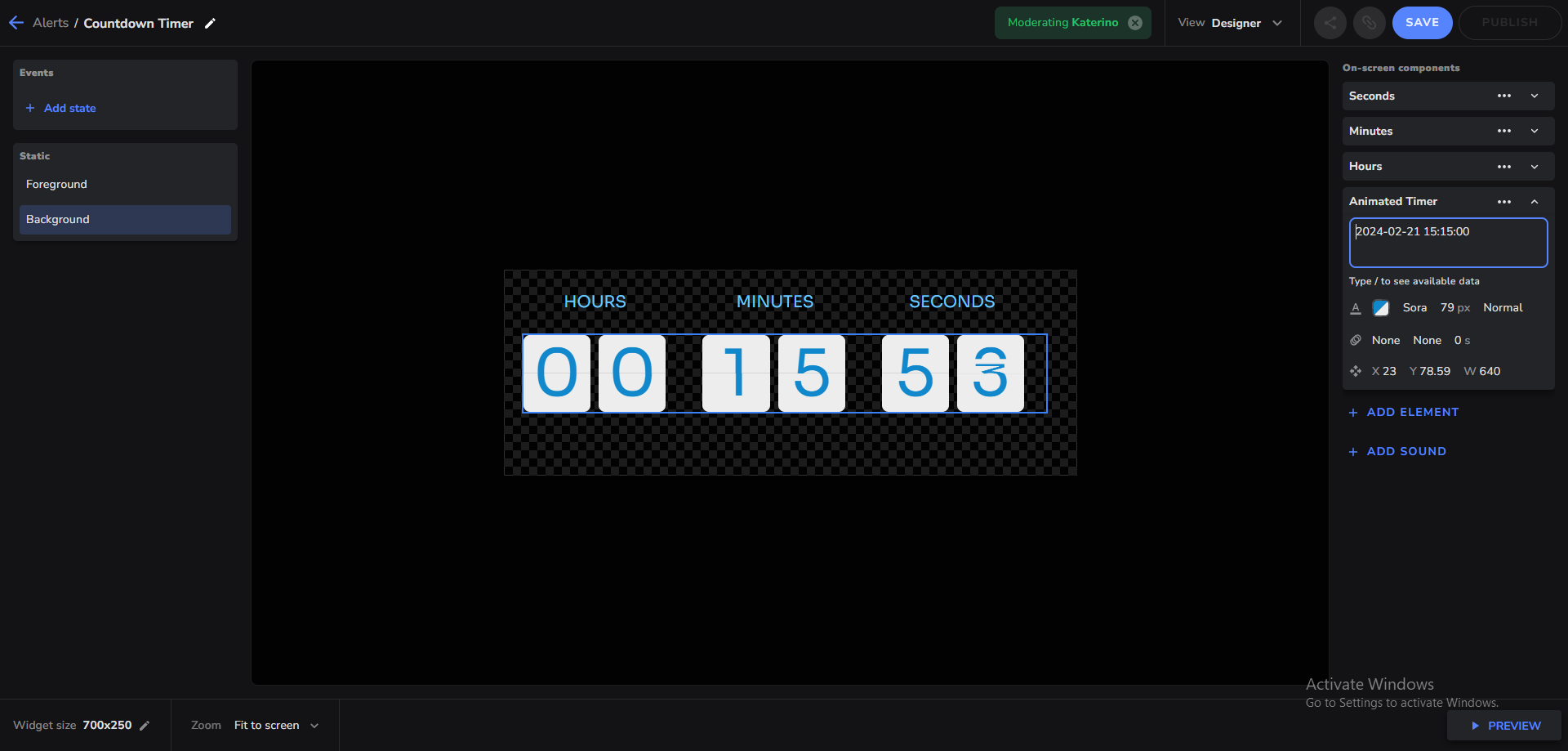 obsidian fog
Quick look says there's no easy way to do it without going into the editor.
You MIGHT be able to do it via API calls but that's a bit more that I can answer tbh.
 olive zealot
Hey guys, I'm at the "loyalty settings" screen, adding bots to the "ignored users" list so they are not shown on the leader board, and there are SO MANY, that now I'm trying to keep adding htem but they just not being added, when I copy a name and press enter, it just doesn't work anymore. I guess there's a limit amount of names I can add to that list? and if so, how do I deal with ALL of the other bots? D: Help please T_T
 gusty pine
My YouTube account was randomly disabled in the middle of the night and in order to re enable it I just had to log back in. I think however it might have disconnected my YouTube account and that’s how I log in to to stream elements. I figured I could just reconnect my channel but there’s no way to disconnect. Idk if it matters or not it’s just my sub alerts were no longer working earlier. Was stream elements having issues or is it my YouTube channel. Because nightbot and my other chat bot and truffle were still working fine.
gusty pine
Interestingly enough, I still got the stream element report so it must have been working at least somewhat. Problem must not be on my side.
limpid bluff
@daring charm This isn't the place for that.
 wise fractal
hi I changed my name on twitch, can we change here as well?
thin daggerBOT
If you need to fill out a support ticket, please use the command !ticket in chat, following the subject of your issue! For example, please type "!ticket My chatbot isn't working", and then follow the prompts from our bot!
 latent hinge
Hello! my apologies if this isn't the place for this question. I was trying to set up loyalty points for viewers. However, I do not have options to give them points for subs or cheers. There is also no option for a sub-multiplier. Any advice would be greatly appreciated. For reference, I became an affiliate with Twitch this week. Not sure if it is a matter of giving the system some time to update. Thank you.
limpid bluff
latent hinge
Hello! my apologies if this isn't the place for this question. I was trying to s...
Twitch channel name? No links.
latent hinge
limpid bluff
Twitch channel name? No links.
HumblyHumid
thin daggerBOT
@latent hinge ⤵️
Please logout of StreamElements at https://streamelements.com/logout and then login again to your account (Twitch/YouTube/Facebook).
latent hinge
Well, that was easy! Thank you so much!
half prairie
Chat alerts not working on YouTube??
Even if I enable the module, I can't edit the message. It's always blank
 real musk
anyone ever seen an "unhealthy upstream" error when loading obs? stream works fine but all overlays display that msg
 obsidian jasper
Good day folks, sorry if this has been asked before. I tried searching the KADB and on here but did not find an answer.
When a contest closes, can I see all participants that won anywhere?
I want to let viewers vote if I win my games. I want to create a leader board and crown the winner who got most predictions right at the end of every month
To that end I need to find a way to track all the right votes
 twilit kayak
real musk
anyone ever seen an "unhealthy upstream" error when loading obs? stream works fi...
twilit kayak
real musk
anyone ever seen an "unhealthy upstream" error when loading obs? stream works fi...
I'm having the same problem
...
real musk
i have a ticket open for it rn waiting on suppport
 brisk mica
real musk
anyone ever seen an "unhealthy upstream" error when loading obs? stream works fi...
brisk mica
real musk
anyone ever seen an "unhealthy upstream" error when loading obs? stream works fi...
I am having the same issue
brisk mica
twilit kayak
...
I've literally done so much troubleshooting only to find out it aint just me... I have already deleted by browser sources 😦
twilit kayak
brisk mica
I've literally done so much troubleshooting only to find out it aint just me... ...
Ye I also have a ticket open for it, altough I think it just fixed itself lol?
Or they really did fix it that fast for me.
brisk mica
twilit kayak
Ye I also have a ticket open for it, altough I think it just fixed itself lol?
Bro the moment you messaged... mine fixed
twilit kayak
👍
brisk mica
twilit kayak
Ye I also have a ticket open for it, altough I think it just fixed itself lol?
I am so mad lol
twilit kayak
Well, who knows when I'll pop in here again. Good luck on your streams or videos
brisk mica
twilit kayak
Well, who knows when I'll pop in here again. Good luck on your streams or videos
You too
 lime bolt
Three questions.
1- How do I change the name of the streamelements bot?
2- I stream on both youtube and Twitch. Is there a way to synchronise my settings from the one to te other or do I have to set them up both manually? Stuff like donation settings, alerts, overlays, commands etc.
3- As followup on 2, I don't seem to find the settings for loyalty points for youtube. Is it not posible of youtube or do I have some sort of a glitch? Or are I just being blind?
obsidian fog
lime bolt
Three questions.
1- How do I change the name of the streamelements bot?
2- I st...
- I'll use the command for that info in a sec.
- Everything is kept separate. Have to set it all up separate of another.
- Only available for twitch.
thin daggerBOT
You can choose a custom name for the streamelements bot using the following instructions. https://support.streamelements.com/hc/en-us/articles/10474519540754-How-to-Setup-a-Custom-Bot-Name
lime bolt
okay thanks!
(3) Will it also be posible for youtube soon? Or only for twitch? As some other bots also have it for youtube sor far as I know.
obsidian fog
Only for twitch. No plans for YouTube due to crappy restrictions on their end.
lime bolt
Ah okay
lime bolt
thin dagger
Can it also use an other name than your channel-name?
obsidian fog
Assuming you're able to login with said account as instructed towards the bottom yes.
lime bolt
Ah okay. So then I need an extra-twitch account for it as in the instructions.
obsidian fog
Yup
lime bolt
alright. thanks!
 hushed perch
Hey, is it possible to look into why Goal Numbers for Sponswored Stream aren't accurate during the campaign? I did stream with friends for it, and first couple showed up correctly and then they just stopped updating after that and are still not showing correctly few hours after Stream
thin daggerBOT
Sponsorship questions can only be handled with the ticket system. Please type !ticket sponsor support in #community-helpdesk and follow the instructions from the bot.
Attempting to open multiple tickets will not quicken staff response as they are handled in the order they are received.
thin daggerBOT
If you need to fill out a support ticket, please use the command !ticket in chat, following the subject of your issue! For example, please type "!ticket My chatbot isn't working", and then follow the prompts from our bot!
 prime phoenix
I have this issue with SE.Live plugin. Whenever I click "StreamElements" tab in OBS, then go to "Stream setup" and "setup bot & tipping", something is loading and then I get a black screen. OBS still captures fine, the only issue is that my preview is gone I have no idea how to get it back without restarting OBS. Any ideas?
I have found a workaround. I can click StreamElements > Import, then import page loads correctly, then I leave the import page and my preview loads again. The question that remains is: Why "setup bot & tipping" gets a black screen after loading?
gusty pine
yeahhh none of my stream lab data is updating right anymore *youtube
lol
sorry stream element
 golden wren
When switching from profiles and scene collections my docks completely disappear and I have to re-add them every time. Why is that happening?
 celest quiver
Hey! Trying to edit an adbreak event in the chat alerts module, and when trying to add a link leading to my twitch subscription page, it seems to say "something went wrong" no matter what, I isolated it to the link causing that issue, any particular reason we can't put links in the messages sent for events?
 dense venture
oi alguém pode me ajudar ? o stream elements se baniu da minha twitch , mais la ele n ta banido , ja limpei o cache do navegador e ainda ta assim .
com esse problema n consigo personalizar minha loja e nem minha live so da erro .
e o suporte so vive repetindo para que eu limpe o cache sendo que ja limpei .

Hi can anyone help me? Stream Elements was banned from my Twitch, but it's not banned there, I've already cleared the browser's cache and it's still like that.
With this problem, I can't customize my store nor my live stream, it only gives an error.
and support just keeps repeating for me to clear the cache even though I already cleared it.
I already did this step by step and still nothing.

 fluid wadi
dense venture
oi alguém pode me ajudar ? o stream elements se baniu da minha twitch , mais la...
fluid wadi
dense venture
oi alguém pode me ajudar ? o stream elements se baniu da minha twitch , mais la...
Tente sair e fazer login novamente em sua conta do Twitch, https://streamelements.com/logout
StreamElements
The Ultimate All in One Platform for Streamers
dense venture
fluid wadi
Tente sair e fazer login novamente em sua conta do Twitch, https://streamelement...
ja fiz isso tambem .
fluid wadi
dense venture
ja fiz isso tambem .
Você já tentou remover a conexão do Twitch do StreamElements e se reconectar?

 dense venture
sim , e na hora de reconectar agora da todas as permissoes negadas , vou manda aqui
fluid wadi
dense venture
sim , e na hora de reconectar agora da todas as permissoes negadas , vou manda a...
Imagino que na Twitch você já tenha tentado fazer um /unban streamelements , certo?
dense venture
sim
south pawn
Hello, How can I change the points won in the chat dock?
I would put a link to the widget that is found under the wideget share channel but it keeps blocking the link
fluid wadi
south pawn
Hello, How can I change the points won in the chat dock?
Bot points are different from Twitch points
south pawn
?
I just want to change the amount that is won when playing, thats all
I'm not talking about twitch points
limpid bluff
The points shows in the chat dock are Twitch Channel points, aren't they?
fluid wadi
south pawn
I'm not talking about twitch points
 fluid wadi
south pawn
yea
fluid wadi
south pawn
yea
 south pawn
I'm not sure where you see that at
fluid wadi
south pawn
I'm not sure where you see that at
Go to the Chatbot section, then to Loyalty and Points Settings
south pawn
 fluid wadi
south pawn
fluid wadi
south pawn
ok,Give me a moment to review the overlay you indicate
fluid wadi
south pawn
You can copy link from the message to pass it to go faster
south pawn
to pass it go faster? i don't understand
i tried putting the link in here but it would delete
no links allowed
so there are 3 games in there
if you guess the correct order of numbers you win like 120 points, but I want to change that to like 10000
@fluid wadi TY for looking into this, I have tried asking for days now. LOL
fluid wadi
south pawn
<@414475208489959435> TY for looking into this, I have tried asking for days now...
I do a lot of support for Twitch streamers on overlay issues and how to implement certain overlays in streams, so I'm used to handling the overlay section
@south pawn Have you entered the Jebaited page?
south pawn
Yes thats done, it all works fine and has for over a year. I just want to change the amount that the viewers win
fluid wadi
south pawn
Yes thats done, it all works fine and has for over a year. I just want to change...
How many points were they earning so far?
@south pawn
 fluid wadi
south pawn
I have those all the way up to 500 but i guess thats the most?
fluid wadi
south pawn
I have those all the way up to 500 but i guess thats the most?
Maybe it could be increased, but that would already imply, edit some things in the Open Editor, I don't know if the JS or Data or something else
south pawn
Damn me either, well TY for looking into for me 👊
 rugged anvil


