#Cyberpunk 2077
6618 messages · Page 7 of 7 (latest)
 chrome zephyr
 iron nymph
 primal sonnet
Yall need to try nrd and dlss preset L. Makes frame gen a whole lot less noticeable. Frame gen preset B
Realcolor 4 lut is super saturated
realcolor4 vs nova lut 4 with NRD + dlss L


When you're walking around slowly, RR is better, but when you're actually playing, preset L looks way better in motion.
 weak fiber

 fossil fractal
Hey, having an issue with the posters, they're overexposed. Checked the settings but couldn't find anything — anyone got any idea ?
edit : its fixed


 bleak torrent
fossil fractal
Hey, having an issue with the posters, they're overexposed. Checked the settings...
bleak torrent
fossil fractal
Hey, having an issue with the posters, they're overexposed. Checked the settings...
How did you fix this? Getting the same issue
 tame canopy
fossil fractal
Hey, having an issue with the posters, they're overexposed. Checked the settings...
tame canopy
fossil fractal
Hey, having an issue with the posters, they're overexposed. Checked the settings...
why are you using autohdr with an hdr mod?
 maiden oasis
tame canopy
why are you using autohdr with an hdr mod?
maiden oasis
tame canopy
why are you using autohdr with an hdr mod?
it's part of my preset, just uses the tone mapper to offset having to use SDR shaders with it
tame canopy
yeah, i definitely don't condone
maiden oasis
Soop's HDR converters don't work properly so I didn't have much choice
and I prefer Pumbo's tone mapper over Lilium's since it has more fine tuned control
maiden oasis
fossil fractal
Hey, having an issue with the posters, they're overexposed. Checked the settings...
how did you fix it?
fossil fractal
It’s simple, I just removed Re Lux bc Nova 4 LUT doesn’t work well with other LUT or the ENV - and for the poster I messed around with the highlights & exposure
Until it wasn’t too dark 🙂
@maiden oasis @tame canopy @bleak torrent
Im just stupid xD
maiden oasis
fossil fractal
It’s simple, I just removed Re Lux bc Nova 4 LUT doesn’t work well with other L...
what do you mean ReLUX doesn't work with Nova LUT 4?
ReLUX isn't a LUT nor is it an ENV
fossil fractal
Compatibility:
The LUT is not compatible with other LUTs. It is compatible with other mods.
The ENV is not compatible with other lighting and weather mods.

Nexus Mods :: Cyberpunk 2077
Crisp visuals with a natural palette, using AgX tonemapping to bring the lifelike luminance and color to Night City with a pop of contrast.
That’s what I understood, I may be wrong idk
maiden oasis
what values did you end up using for exposure and highlights?
fossil fractal
Mhh not on my pc rn but I tweaked both by like 0.40 🤔
maiden oasis
I'll probably have to retweak the preset again if you had to change RenoDX by that much. The goal was to make it as plug and play as possible but I'm not sure if that will ever be the case.
for me it worked fine as is so it's tough
especially when there's so many different mod combinations etc
fossil fractal
maiden oasis
what values did you end up using for exposure and highlights?
i just changed that
 maiden oasis
I wonder if the issue would go away if you changed the peak brightness both within RenoDX and the AdvancedAutoHDR shader to an even 1000
someone else had an issue where adjusting the peak brightness with the advancedautohdr shader, even from 1017 to 1015, had a large impact
fossil fractal
maiden oasis
I wonder if the issue would go away if you changed the peak brightness both with...
mhh im trying this out
meh, same problem, im missing some details about the light and poster
 maiden oasis
ok, I appreciate you trying
fossil fractal
maiden oasis
I wonder if the issue would go away if you changed the peak brightness both with...
yeah totally get it, every config is different so it's hard to make it work for everyone out of the box
that's why messing around with it yourself is honestly the best way to figure it out
but ur guild is still really good tho, explains everythings well x)
also random question - is it normal that my HDR screenshots (reshade or specialK) look way too dark when I share them on discord?
even tried converting HDR to SDR but still the same issue
maiden oasis
fossil fractal
also random question - is it normal that my HDR screenshots (reshade or specialK...
enable hardware acceleration within Discord
on mobile you'll have to fully open the screenshot to see them properly
fossil fractal
That's already done - when I look at my phone , it's very dark... :/
maiden oasis
iPhone?
fossil fractal
Yes, iPhone 15 pro 🙂
maiden oasis
does it happen even when opening them in a web browser?
I have Android so its hard for me to test this.
I have heard that resaving the screenshot with SKIV can also make them more viewable on iPhone
fossil fractal
example :
 fossil fractal
maiden oasis
does it happen even when opening them in a web browser?
fossil fractal
maiden oasis
does it happen even when opening them in a web browser?
yes
fossil fractal
maiden oasis
I have Android so its hard for me to test this.
I have heard that resaving the ...
also tried that too btw
might be a monitor calibration issue on my end tho 🤔
maiden oasis
wait
I know what it is
Discord is build on Chromium and thus has the same issue as it when it comes to viewing HDR content.
What is your SDR content slider set to within the Windows HDR settings?
You ideally want this set to around 31 to view HDR images accurately
(yes I know SDR content slider affecting HDR content???)
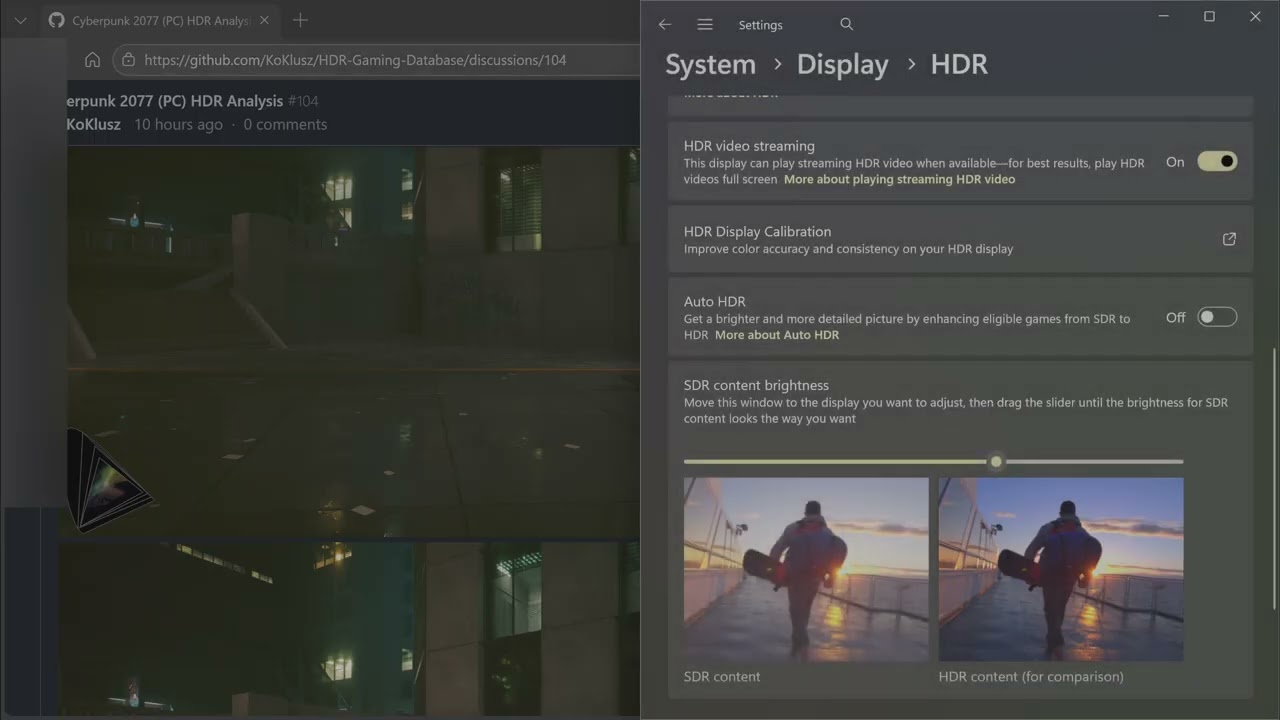
The SDR content slider affects how HDR screenshots are viewed in Chromium browsers.
Set SDR content slider to 31 to set paperwhite to 204 nits.
fossil fractal
maiden oasis
You ideally want this set to around 31 to view HDR images accurately
37 for me
like on my monitor with HDR on the image looks fine, but as soon as I open it on my iPhone 15 Pro it's extremely dark - shouldn't it switch to HDR automatically? and even in SDR on my monitor it's super dark too, even after converting the HDR image to SDR through SKIV
maiden oasis
@tranquil portal you're the only iPhone guy I know
fossil fractal
fossil fractal
like on my monitor with HDR on the image looks fine, but as soon as I open it on...
PNG SDR :
 chrome zephyr
fossil fractal
> Compatibility:
>
> The LUT is not compatible with other LUTs. It is compatibl...
chrome zephyr
fossil fractal
> Compatibility:
>
> The LUT is not compatible with other LUTs. It is compatibl...
Sorry about that. I'll update the description to make that clear. The ENV has been retired.
fossil fractal
chrome zephyr
Sorry about that. I'll update the description to make that clear. The ENV has be...
It’s okay :p
chrome zephyr
These were the files. Now archived. 😅
 fossil fractal
Oh 😅😅
 tranquil portal
maiden oasis
<@243632571202666497> you're the only iPhone guy I know
tranquil portal
maiden oasis
<@243632571202666497> you're the only iPhone guy I know
Loads fine for me?
 celest silo
That second photo doesn’t load like that for me either
Never mind it does now
discord bugging
 split lichen
@maiden oasis is it the way to go
ultrapunk mod pack with nova lut 4 + Creepy Ultra HDR + Renodx
maiden oasis
that's basically what I'm using, slightly tweaked of course 
-# 1000+ clothing mods later 😛
you'll want to tweak the preset to your liking
split lichen
maiden oasis
you'll want to tweak the preset to your liking
will try to make some youtube videos
fossil fractal
tranquil portal
Loads fine for me?
okay nice
 smoky minnow
this is too dark right? irl the interior would be more visible
 fossil fractal
smoky minnow
this is too dark right? irl the interior would be more visible
fossil fractal
smoky minnow
this is too dark right? irl the interior would be more visible
what did you capture it with?
smoky minnow
steam screenshot
fossil fractal
smoky minnow
this is too dark right? irl the interior would be more visible
mhh personnaly, i think its a little dark in some spots
smoky minnow
only way for me to get it brighter is to decrease the cone response from 70 all the way to like 55
adjusting exposure and game brightness does very little
but creepy's guide recommended 70 lol
primal sonnet
Anyone know what the v4 box on ultra plus does
maiden oasis
cone response 70 is equivalent to the artist intent for the game
fossil fractal
smoky minnow
but creepy's guide recommended 70 lol
it's just a recommendation to get as close to the game's look as possible, but feel free to tweak it however u want
maiden oasis
but of course that doesn't take into account other mods you may be using etc
but yeah that's why I went into so much detail with what each slider does, everyone has their own preference
and its possible you might want to make a few different RenoDX presets (not ReShade presets) for different situations
maybe you like cone response 70 in the badlands but prefer 55 in the city
or day vs night, sunny vs raining
Nova Optics (replaced ENV Tuner Lite) is also handy for fine tuning the lighting
 flat river
Should I remove RELUX and Reimagined for Relux when using Nova Lut 4 then? Also I noticed Nova 4 is a bit darker than 3, cone response = 70.
maiden oasis
flat river
Should I remove RELUX and Reimagined for Relux when using Nova Lut 4 then? Also ...
keep using ReLUX and Reimagined
especially if using path tracing
also if cone response 70 is too dark, turn it down a bit, maybe to 60-65
chrome zephyr
smoky minnow
this is too dark right? irl the interior would be more visible
Definitely a dark area but the exposure difference is quite drastic.

 stray steeple
@maiden oasis is it ok with You if I squeeze Your guideline link in collection description for HDR users ?
N C P R v2.0 N Ξ X U S T Ξ Λ S Ξ R
Ξ T Λ = < 24h
 maiden oasis
stray steeple
<@218522819540156416> is it ok with You if I squeeze Your guideline link in col...
maiden oasis
stray steeple
<@218522819540156416> is it ok with You if I squeeze Your guideline link in col...
go for it 
stray steeple
 split lichen
@maiden oasis is psycho v17 compatible with nova lut v4
 warm knot
My screenshots in Cyberpunk always look a little bit too saturated/bright since using renoDX with creepys reshade preset.
I installed everything with Creepys HDR guide. I have this problem with ingame screenshots (1st) and screenshots taken via reshade (2nd). What am i doing wrong? When playing everything is PERFECT.

 maiden oasis
split lichen
<@218522819540156416> is psycho v17 compatible with nova lut v4
maiden oasis
split lichen
<@218522819540156416> is psycho v17 compatible with nova lut v4
yeah
I tested the LUT both with and without RenoDX
 limber herald
warm knot
My screenshots in Cyberpunk always look a little bit too saturated/bright since ...
limber herald
warm knot
My screenshots in Cyberpunk always look a little bit too saturated/bright since ...
When you take a screenshot in-game, reshade post effects don't work (this doesn't apply to add-ons like RenoDX). This may be the reason for the different results. Try disabling post effects and compare the results.
maiden oasis
limber herald
When you take a screenshot in-game, reshade post effects don't work (this doesn'...
or just take screenshots using reshade...
but yeah don't use the in-game screenshot feature
photomode also disables ray reconstruction just as an FYI
limber herald
maiden oasis
or just take screenshots using reshade...
That’s kinda debatable tbh. Yeah, it doesn’t have stuff like ray reconstruction or post-process effects like film grain, sure. But on the other hand, the game takes a ton of samples/screenshots and accumulates them together, so the final image ends up being insanely clean and sharp. And when taking screenshots in-game, you can also render them at x2/x4 resolution scale, which gives you even more detail on top of that.
So yeah, I wouldn’t say there’s a clear winner here.
Oh, and one important thing. When you say people shouldn’t use in-game screenshots because Ray Reconstruction doesn’t work there, it’s worth clarifying that the real issue is the vanilla photo mode specifically. Entering vanilla photo mode is what actually forces RayRecon to get disabled.
 slender fulcrum
Does anyone mind sharing their settings for the RenoDRT preset not Psycho-17? I kinda prefer the duller colours on faces
 old oracle
is Psycho V-17 the new "meta" or is RenoDRT still more accurate?
warm knot
limber herald
That’s kinda debatable tbh. Yeah, it doesn’t have stuff like ray reconstruction ...
thanks for responding! what do you mean with vanilla photomode, as oposing to what?
tame canopy
old oracle
is Psycho V-17 the new "meta" or is RenoDRT still more accurate?
PsychoV is more accurate in reconstruction of the scene if a human were there seeing those things. RenoDRT is more a scaling of Vanilla colors and hues. Offering most Vanilla like is there. Doesn't mean Vanilla is good though
tame canopy
limber herald
old oracle
is Psycho V-17 the new "meta" or is RenoDRT still more accurate?
Appearance Menu Mod or Otis_Inf
 grim tree
does this mean it just chooses the HDR lut automatically or do I need the lut switcher tool to choose the correct one?
 maiden oasis
grim tree
does this mean it just chooses the HDR lut automatically or do I need the lut sw...
maiden oasis
grim tree
does this mean it just chooses the HDR lut automatically or do I need the lut sw...
just use the LUT switcher file instead, so you can fine tune the look to how you like it with the color temperature packs.
The one that contains the LUT only replaces the vanilla LUT (will automatically switch depending on if you're in SDR or HDR). If you were to use LUT switcher with that one it would just override it
maiden oasis
limber herald
That’s kinda debatable tbh. Yeah, it doesn’t have stuff like ray reconstruction ...
there is actually one more important reason why you shouldn't use the in-game photomode, that isn't up for debate...it can't take HDR shots 😛
I just tested it again to make sure
so even if you're using photomode to line up your shots, you still want to use ReShade to take them
a bit of an oversight on CDPR's part
Photomode vs ReShade while in photomode


should add that to the guide as well
limber herald
maiden oasis
there is actually one more important reason why you shouldn't use the in-game ph...
Ehhh, that’s not entirely true actually 😄
The game itself is already capable of outputting screenshots in EXR format, so HDR data can absolutely be preserved. For some reason though, vanilla photo mode just doesn’t expose or use that properly. This mod basically overrides the screenshot export settings and lets the game save shots as EXR instead.
maiden oasis
that mod doesn't work with HDR
I tested it 😛
I even asked the mod author about it and they said it was a limitation of the game
you used to be able to use Nvidia's Overlay to take EXR shots but that work around was a bit of a hack and it doesn't even work anymore
limber herald
What do you mean by “doesn’t work with HDR” exactly?
maiden oasis
it doesn't output HDR shots
it might be EXR, but that EXR image is not HDR itself
do you play the game in HDR?
limber herald
maiden oasis
it doesn't output HDR shots
In the context of EXR, “HDR” vs “SDR” isn’t really a strict distinction. EXR stores channel data as linear float values. So when you say the result “isn’t HDR”, do you mean the values are being clamped to SDR range during export or something along those lines?
I’m a bit skeptical that’s actually happening, especially since I haven’t noticed it visually myself. But I’ll double-check it just to be sure.
limber herald
maiden oasis
do you play the game in HDR?
yes, of course
maiden oasis
I'll have to try it again since I haven't bothered with it since December but I distinctly remember it having issues.
limber herald
maiden oasis
I'll have to try it again since I haven't bothered with it since December but I ...
I double-checked it. The EXR files are definitely preserving HDR data correctly - there are tons of values way above 1.0 in there. So maybe the issue was actually with the EXR viewer/reader being used?
Honestly, I’m not even sure what image format would survive Discord without breaking the HDR metadata 😅 I tried AVIF and UltraHDR as a test, but Discord converted both into WebP, which obviously ruined it. And JXL doesn’t even seem to be recognized as an image format there at all...
maiden oasis
so I tested it again. The EXR files do come out in HDR so that was just me misremembering the issue.
I did a test without any other ReShade shaders applied (as per the description these aren't supported by the mod) however it doesn't look like all the colorgrading from RenoDX transfers over to the EXR file
ReShade vs EXR Export to HDR PNG
hold up, let me fix the thumbnail lol


Affinity Photo 2 bug 😛
maiden oasis
limber herald
I double-checked it. The EXR files are definitely preserving HDR data correctly ...
HDR PNG is what I recommend
limber herald
maiden oasis
there is actually one more important reason why you shouldn't use the in-game ph...
I’m not really trying to argue that everyone should be using the native screenshot tool or anything. EXR workflows are definitely more of a hassle to deal with. But for some people it can still make sense — especially if you want an insanely sharp image at a ridiculously high resolution.
maiden oasis
oh for sure
for the average person this wouldn't be something I would recommend regardless
it possible I was using a buggy test version back in December
if IGPT supported HDR PNG it would be much better
limber herald
maiden oasis
hold up, let me fix the thumbnail lol
Could also just be a colorspace mismatch. Maybe some metadata got lost during the EXR → PNG conversion or something along those lines - like BT.709 vs BT.2020 handling getting messed up.
maiden oasis
it's possible. I don't really deal with EXR images much, mainly because of the hastle and lack of programs that properly support it
Affinity Photo 2 is alright
if you're going to further tweak it then it makes sense to use it, but if you want an easy solution for exporting an image how it looks in-game, probably not 😅
I just use Otis' tools and I can just hotsample that way
even though you have to brute force the resolution you want
limber herald
maiden oasis
it possible I was using a buggy test version back in December
Seems unlikely to me. All this mod really does is call the engine’s own screenshot function, just with slightly different parameters 😄
By the way, what exactly do you mean by “PNG HDR”? I know PNG recently got support for HDR-related metadata, and I actually experimented with it a while back. But at the time literally no image viewer seemed to support it properly. Does Discord actually support that now?
smoky minnow
maiden oasis
Photomode vs ReShade while in photomode
which is which? the left pic looks over exposed
maiden oasis
HDR PNGs, also known as PNG v3 I believe, supports HDR and will automatically tonemap to SDR.
The problem is what can view it. We typically recommend using SKIV, which is a program bundled in with Special K, to view HDR PNGs locally on your computer. Discord does support the format, however it requires desktop users to enable hardware acceleration. Mobile and web users will see a washed out image and need to fully open them in a web browser to see it properly in HDR.
Discord as a whole is also influenced by Window's SDR content slider, so keeping that around 31 is best for accurate viewing
You can also use Pictureflect photoviewer https://pictureflect.com/download
pictureflect is handy because it can export images into other formats, and do some limited HDR image editing which is cool. Can also export as an Ultra JPG (JPG with gainmap)
limber herald
maiden oasis
HDR PNGs, also known as PNG v3 I believe, supports HDR and will automatically to...
For my phone I actually had to make a converter into the UltraHDR format myself 😅
maiden oasis
HDR AVIF sort of works on Discord, but anything higher than 8-bit won't look right even on the desktop version
but if you fully open them in a browser it will look fine
so yeah it makes sharing HDR images a complete pain in the ass lmao
maiden oasis
smoky minnow
which is which? the left pic looks over exposed
left is photomode, it gets outputted in SDR and doesn't tonemap it properly which is why it looks like that
limber herald
smoky minnow
ah ok
Doesn’t really work for HDR though - it only exports screenshots in SDR format.
maiden oasis
Steam does support HDR AVIF now
though the thumbnails look horrible lmao
you can fix that by resaving the image with SKIV
personally I would just stick with ReShade for most use cases
 glad dune
there's also this viewer
https://apps.microsoft.com/detail/9pgn3nwpbwl9?hl=en-GB

Microsoft Store - Download apps, games & more for your Windows PC
View popular high dynamic range (HDR) image formats, including OpenEXR, Radiance (.HDR), DirectDraw Surface (.DDS), and JPEG XR (.JXR), in their full quality on a capable HDR10 display. Both Windows and Xbox HDR game bar screenshots (.JXR) are fully supported.
For best quality, you need the latest Windows 10 update and graphics driver, and a ...

 tranquil portal
glad dune
there's also this viewer
https://apps.microsoft.com/detail/9pgn3nwpbwl9?hl=en-GB
tranquil portal
glad dune
there's also this viewer
https://apps.microsoft.com/detail/9pgn3nwpbwl9?hl=en-GB
Heard this was broken.
maiden oasis
last time I tried Steam AVIFs all my thumbnails were red 😛
glad dune
it opened hdr pngs just fine last time i tried, didn't try other formats
maiden oasis
you can't?
maiden oasis
maybe not uploaded to the steam cloud
Conan Exiles HDR Avif (I have cyberpunk via GOG)


why is the thumbnail red 
the steam screenshots do capture reshade as well, which is nice
Cyberpunk JPG with GainMap

I wish ReShade outputted in that format
the file size savings is huge
tame canopy
just apple iirc
maiden oasis
AVIF
8 vs 12 bit per color


the 12 bit one won't look right on Discord, but I think Apple users will be fine
apparently 8bit is blacked out for iPhone 
fossil fractal
I approve
tame canopy
discord likes breaking previews, but fullscreen is usually untouched
maiden oasis
I just wish it was more consistent with mobile users
 unkempt cloud
maiden oasis
Photomode vs ReShade while in photomode
unkempt cloud
maiden oasis
Photomode vs ReShade while in photomode
Never knew reshade screenshot is this good
maiden oasis
yeah HDR screenshots were added in ReShade version 6.4 
unkempt cloud
maiden oasis
yeah HDR screenshots were added in ReShade version 6.4 <a:nod:134283611729611980...
How do I have it take hdr? mine doesn't seem to be
maiden oasis
If you're playing the game in HDR then you should have two options within ReShade: HDR PNG and JXL. Both will take HDR screenshots but only HDR PNG is supported on Discord. The Windows photoviewer cannot view HDR PNGs though so you'll need to use a third party viewer like SKIV or Pictureflect Photo Viewer
Links to both: https://www.hdrmods.com/HDR-Link-Library
List of useful websites and resources
unkempt cloud
maiden oasis
If you're playing the game in HDR then you should have two options within ReShad...
Ahh, I've been viewing the screenshot in windows photoviewer
split lichen
maiden oasis
If you're playing the game in HDR then you should have two options within ReShad...
Or chromium browser with 31 sdr brightness
warm knot
Is 31 SDR a good standard or does it require some calibration as well?
 worldly thistle
warm knot
Is 31 SDR a good standard or does it require some calibration as well?
worldly thistle
warm knot
Is 31 SDR a good standard or does it require some calibration as well?
It's preference, but 31 is required to view HDR screenshots in chromium apps at the correct brightness
maiden oasis
yeah generally I say don't put it at 0 or 100 and expect things to look right. 31 is the "magic number" because it equals 204 nits paper white, but if you're in the 30-40 range it should be close enough
 undone compass
what settings does everyone use for film grain?
maiden oasis
I like to keep my film grain pretty light. Perceptual within RenoDX at like 20-30.
celest silo
For the preset that we change in the nvidia app, there isn’t one for ray reconstruction so I assume the guide is talking about super resolution?
 minor compass
celest silo
For the preset that we change in the nvidia app, there isn’t one for ray reconst...
minor compass
celest silo
For the preset that we change in the nvidia app, there isn’t one for ray reconst...
i change my RR Preset either with Nvidia profile inspector or DLSS Swapper
maiden oasis
I thought the Nvidia app allowed you to do it but I just checked and it looks like it doesn't. But yeah I just use DLSS Swapper
undone compass
cone response 70 looks great but super dark in shadows, any other recommendations? also i know cy posted maplutbegone, but the map is still super washed is there any way this can be fixed?
maiden oasis
I use MapLUTBegone combined with HUD Painter's map color tweaks
but I also prefer the realistic map which gets affected less by the issue
as far as the cone response 70 being too dark, do you also have the EOTF Emulation set to On?
if so I would change it to UI/Menu only or off
if you're using Nova Optics / ENV Tuner then you'll also want to tweak things
ultimately it's user preference and what looks good can vary depending on mods used, display settings, and overall preference on how you like the game to look
undone compass
thanks, yeah i had sdr eotf on , do you have a preset for hudpainter map colors?
maiden oasis
I can check what I have mine set to when I get in-game later but overall I think I just adjusted the contrast a bit
 real cloak
Hi people!
so I love RenoDX and I'm currently using the installer and ReLimiter in various games, it is a great experience.
Today I tried updating the latest Cyberpunkl version of RenoDX from the message pinned in this thread and I find it extremely different from the previous versions... I'm trying to follow a guide to understand how to properly set it up but to me it looks like, following the guide, I'm getting both way higher visibility for extremely dark areas AND a somewhat washed out image? I guess I'm doing smth wrong. My monitor has no black crush issue
maiden oasis
if you're using my preset disable it if you're testing with it
just so you get a solid baseline
real cloak
I'm trying to fiddle with it a little bit and I'll keep you posted... I have a hunch it is not reading my monitor calibration correctly too... I'm in the HDR Game preset for F06 firmware of a gigabyte mo027q28g and I calibrated a profile to 1020nits in windows calibration app
real cloak
maiden oasis
if you're using my preset disable it if you're testing with it
thanks
maiden oasis
yeah I would rather you blame it than Reno 😛
real cloak
yes, I'm following this guide:
How to Setup RenoDX in Cyberpunk 2077
maiden oasis
ok nice, that won't have my preset in it so you're good
there's some troubleshooting tips in the end of the guide but feel free to post some screenshots of what you're seeing along with your renodx settings
I have to go run some errands but I'll check them later or maybe someone else will be able to help in the mean time 🙂
real cloak
I'll play with settings some and keep you posted; I've been a fan of visual hi-fidelity since always so I'm used to look at pretty much almost reference level calibrated images and I originally played 2077 on a perfectly calibrated IPS, then in HDR on the new monitor (which is honestly working great for me) and I resorted to RenoDX HDR because the original in-game HDR was too messy
real cloak
ok, I gave the wrong link, I was trying to follow your guide here: https://www.hdrmods.com/Cyberpunk-Creepy-Preset
How to Setup RenoDX and Install Creepy's Ultra HDR Preset
My bad, I need to follow a couple extra steps I didnt ._.
maiden oasis
all good, I got some thoughts on how to further improve the guide but it'll require me to take a lot of screenshots
and maybe do a video guide....
-# don't expect the video guide to happen unless I'm super bored
maiden oasis
that's not related to RenoDX, I would try asking in Ultra+ 🙃
 ebon oak
yah lol
 amber patio
Hey, do you guys get these disco light effect with Ultra Plus mod before the light settles? Happens mainly when you move the camera fast or stand next to a wall then reveal a room right behind it. The first vid is on a custom Vortex profile with just Ultra Plus and the required mods active. The quality setting doesn't make a difference, but I put it on Insane quality regardless for the video. If I then add reLux and whatnot the effect will appear more pronounced (2nd vid).
maiden oasis
amber patio
Hey, do you guys get these disco light effect with Ultra Plus mod before the lig...
what graphics card do you have?
I think I've seen other people mention it in the Ultra+ server
might be better off asking there
amber patio
maiden oasis
what graphics card do you have?
I got a 5070 ti, and I have seen this bug before randomly and I would just restart the game and it'd fix itself, but I updated the mod today and now its just permanently like this
maiden oasis
reason I asked is that I saw the denoiser was set to vanilla
typically with Nvidia cards you want to set that to one of the RR options
amber patio
Oh yea its usually set to one of the ray reconstructions, I was tinkering with every setting to see if this lighting bug was related to one of the options
I still have the game open and changing to them did nothing
maiden oasis
Sammi is active in the Cyberpunk channel over there
that's where you'd want to get Ultra+ support
a lot has changed with the recent versions so I'm not sure
amber patio
Ok I joined
 wispy falcon
@maiden oasis I really appreciate the work you put into the guide. I'm having a bit of an issue when it comes to the reshade effects and was hoping you had a sec. In 1-6 after selecting your preset in the ReShade update/effects, you say it will automatically pick deband, zenteon's local contrast, zenteon's sharpen, pumbo's advancedautoHDR, and lilium's HDR analysis shaders, but the only boxes that get selected are Standard effects, ReShade HDR shaders by Lilium (lilium_rcashdr.fx), and ZenteonFX Shaders (ZenteonLocalContrast.fx, ZenteonSharpen.fx).
Deband isn't an option anywhere here, though I can check it in the ReShade menu in game, and Pumbo's Advanced AutoHDR is there in the update list, but not checked by default, and even if I manually check it, it doesn't show up in the in-game reshade menu. I'm not quite sure what I'm missing here. Any idea?
maiden oasis
wispy falcon
<@218522819540156416> I really appreciate the work you put into the guide. I'm h...
Deband is actually one of the default shaders that are automatically picked if you download any other shader. It's part of the standard effects
I should have added a screenshot for that step
GitHub link: https://github.com/crosire/reshade-shaders/tree/slim
wispy falcon
The part that's really tripping me up is the Advanced AutoHDR that just doesn't seem to show up. If I download it directly (I think https://github.com/Filoppi/PumboAutoHDR is the right one?) and drop it into right bin like the Azen PreCorrect and Film grain ones, would that work?
GitHub
Advanced ReShade AutoHDR. Contribute to Filoppi/PumboAutoHDR development by creating an account on GitHub.
maiden oasis
yeah that's right
wispy falcon
It seems like the problem was that the ReShade updater was dropping AutoHDR into a subfolder within the shaders folder. I pulled the files out into shaders and it's showing up now. Thanks
maiden oasis
wispy falcon
It seems like the problem was that the ReShade updater was dropping AutoHDR into...
it's partially my fault because I hid this in a dropdown

I didn't realize I never actually stated you should do this
the ** at the end tells reshade to look in all subfolders
stray steeple
@chrome zephyr Hey, would You mind uploading this [FIX](#1434377434022809610 message) on Nexus ? Would like to add it to collection.
chrome zephyr
Sure, if you can remind me tomorrow. 😄
stray steeple
chrome zephyr
Sure, if you can remind me tomorrow. 😄
Ofc, no probs. EU time zone here 🙂
chrome zephyr
!remindme 12 hours
 shell blazeBOT
Missing argument after the time.
shell blazeBOT
New Reminder | ID:91362278
Alright thecyanidex, I'll remind you in 12 hours about:
Upload MapLUTBegone to Nexus.
primal sonnet
amber patio
Hey, do you guys get these disco light effect with Ultra Plus mod before the lig...
Use disable sharc blending, rr clean, edit the denoiser.ini file for Rr clean to be 24 previous frames (was 32) , use high streaming.
find this line under rr clean: Editor/Denoising/ReLAX/Indirect/Diffuse/MaxAccumulatedFrameNum = 32
Editor/Denoising/ReLAX/Indirect/Specular/MaxAccumulatedFrameNum = 32
and change it to 24
\Cyberpunk 2077\bin\x64\plugins\cyber_engine_tweaks\mods\UltraPlus\config
denoiser.ini
Also, go to nvidia control panel, go to manage 3d settings, program settings, cyberpunk 2077
Then change anisotropic filtering to 8x or 16x.
Go in game and make it 1x in game
chrome zephyr
stray steeple
<@130831719858176000> Hey, would You mind uploading this [FIX](https://discord.c...
Nexus uploads seem to be broken right now. I'll try again later.
chrome zephyr
Done. 😉

 novel hinge

Video sponsored by Io Interactive. As we draw closer to release date of the highly anticipated 007 First Light, developer Io Interactive brought together key members of the game's tech team to answer a wide range of questions from Alex Battaglia. Topics covered include 007 First Light's 60fps target, the new lighting systems added to the game, n...
A rare DF great video with the devs deep diving into their engine
amber patio
primal sonnet
Use disable sharc blending, rr clean, edit the denoiser.ini file for Rr clean to...
Ty for your help, I tried your fixes and it seemed to be the same, I think Ill just use PT21 setting instead of NextV4, this issue seems to be purely exclusive to NextV4 for some reason, and after doing A/B comparisons PT21 seems marginally identical while being a lot more playable in movement (1st image: Vanilla setting in mod; 2nd image: NextV4; 3rd image: PT21


 primal sonnet
Use pt20 its faster
No reason to use 21 when its just as slow as next and is worse visually. Pt20 medium is the sweet spot for fps and quality imo
amber patio
Oh yea it does
Whats the purpose of NextV4 then? All of my issues with the disco lights came down to it
primal sonnet
Also update the nvidia sdk
Nextv4 is for 5090 people
For screenshots and stuff
You are having those issues because your fps is too low and nextv4 adds more bounces
So its calculating the extra bounces
When you do that
And that takes time to update
Its also more accurate to the material
So light bouncing off rougher surfaces is more accurate to real life
amber patio
Yea I figure even with a 5070 TI it shouldn't be doing those issues, but seeing it in screenshots with barely any quality difference.... I dont see how the hassle is worth
primal sonnet
Well a 5090 has double the horsepower of a 5070ti
So you go from 30 to 40fps base to 60-70fps base and those issues arent noticeable
Are you on 4k or 1440p
amber patio
Ohh so the disco lights are related to FPS, so the higher the fps the faster it updates and less noticeable it is?
maiden oasis
primal sonnet
Nextv4 is for 5090 people
no it's not. V4 itself doesn't cause much more overhead. Going from Fast to Insane uses more FPS
amber patio
primal sonnet
Are you on 4k or 1440p
I'm on 4k Dlss perf
maiden oasis
maybe
primal sonnet
Same quality level
maiden oasis
almost
PT20 is faster than PTNext sure, but if you're on a higher quality setting try lowering that first
sometimes PT20 is pretty close in performance to PTNext
primal sonnet
No im saying using the same level of quality (med) and only switching from pt20 to next
You get an insane boost in fps
maiden oasis
you mean PTNext to PT20 right? And it varies
primal sonnet
I go from 35-40 base with 4xfg to 55-60
Yeah pt20 with v4 check to ptnext with v4 checked
maiden oasis
that's not the same thing
primal sonnet
Pt21 is same performance as ptnext roughly
maiden oasis
when you say you're going to something, that means you're switching to whatever comes after the to
so unless you're saying changing it to PTNext lowers your FPS
primal sonnet
Yeah I go to 55 to 60 when switching to pt20 from ptnext
maiden oasis
so PTNext is faster than PT20 for you?
maiden oasis
is English your first language?
primal sonnet
Ptnext medium quality gives 35 to 40 fps
And pt20 medium
Gives 55 to 60 fps
When I have 4xframegen on but only looking at base fps
Using dlss performance at 4k
On 5070 ti
@amber patio
Im also on 5070ti dlss performance, but i have LOD mods
maiden oasis
gonna be honest, I would take this guy's advice with a grain of salt
I've literally switched from PTNext to PT20 sometimes and it barely changed the FPS. It really depends on the situation
and what version of Ultra+
amber patio
Well I've tried everything and I can't make NextV4 stable with movement, I keep getting the disco lights effect, and that's not present with pt21 or 20, so I'll use one of those 2. It's not really a fps issue for me because I'm on a C5 OLED so I can frame gen to 137 fps really easily
maiden oasis
when I tried V4 it had some weird lighting issues
but I also haven't upgraded to the more recent discord builds
so that makes sense
primal sonnet
Check base fps on pt20 vs pt21. Not worth it imo. You also need nulled lights mods and relux
maiden oasis
that I do agree with. Typically you'll want to use PT20 or PTNext
amber patio
maiden oasis
but I also haven't upgraded to the more recent discord builds
I tried their v9.0.0 build and the light issues are still there, but I like one of their new settings, the increase mesh LOD
primal sonnet
amber patio
I tried their v9.0.0 build and the light issues are still there, but I like one...
Do you have all of the nulled fake lights mods
maiden oasis
Sammi is definitely cooking
amber patio
primal sonnet
Do you have all of the nulled fake lights mods
Yea
maiden oasis
btw, Sammi is in the Cyberpunk channel right now in the Ultra+ server
 gaunt kelp
primal sonnet
Nextv4 is for 5090 people
gaunt kelp
primal sonnet
Nextv4 is for 5090 people
No it isn’t. lol I’ve used Next Insane on a 4080 for ages, including v4. It’s still the most accurate mode, though not as performant. PT21 is darn close in fidelity with a bit better performance. PT20 is a bit behind both these days.
 primal sonnet
gaunt kelp
No it isn’t. lol I’ve used Next Insane on a 4080 for ages, including v4. It’s st...
primal sonnet
gaunt kelp
No it isn’t. lol I’ve used Next Insane on a 4080 for ages, including v4. It’s st...
I know, but im talking about for a consistent experience
You are agreeing with me. Its not as performant
gaunt kelp
primal sonnet
I know, but im talking about for a consistent experience
So am I. I play on Next Insane all the time. I have for two years.
primal sonnet
If im using fg I rather have as close to 60fps base for lower input delay
Pt20 lets you have that with medium
On 4080 level hardware at 4k
Using 2x fg i get closer to 45-50 fps with nextv4 but 4x lowers it even more.
To 39 avg sometimes dipping to 30s
gaunt kelp
primal sonnet
You are agreeing with me. Its not as performant
No, I fixed your incomplete assertions: PT21 and 20 are fore performant because they’re less accurate/lower fidelity.
Just because you like one to suit your particular needs doesn’t make it better.
You plainly said Next v4 is only for 5090s and screenshots. That’s completely untrue, which is the point I was making.
All you’re doing is spouting nonsense.
primal sonnet
gaunt kelp
No, I fixed your incomplete assertions: PT21 and 20 are fore performant because ...
Well, I for one, have standards to how my game should feel and look. Not just look.
gaunt kelp
primal sonnet
Well, I for one, have standards to how my game should feel and look. Not just lo...
So do I. I still get plenty of FPS too.
primal sonnet
Just because its playable doesnt mean its enjoyable. You can get the best of both worlds with pt20
Because with 4x fg you can get the smoothness of 200fps, but the overhead makes it feel terrible, so using pt20 brings that little bit back.
And 2x fg isnt as good when you compare it to 4x because the input latency is similar but 4x is much smoother.
Or 3x
3x is sweet spot
gaunt kelp
primal sonnet
Just because its playable doesnt mean its enjoyable. You can get the best of bot...
You might try 21 at the same quality level you use for 20. It oughta look at bit better and perform around the same. Worth a try I’d say. If not you could always swap back.
primal sonnet
I have
That's what im saying. I've tried every combo and pt20 medium gave me the best fps to quality balance
Fast makes dark areas not gather light and next/21 shaves off a ton of fps compared to 20 for a noticeable, but small increase in accuracy
gaunt kelp
Well, that’s the nice thing about options: you can tailor it to your specific needs.  I used PT20 High and Insane for quite a while until I swapped to Next a couple years back.
primal sonnet
Its easy to see the quality difference, but the difference between RT and PT is higher, so getting pt to look good and run good was my goal
maiden oasis
yeah if you can run PT that makes a huge different regardless of modes
anywho, this has been fun
gaunt kelp
maiden oasis
yeah if you can run PT that makes a huge different regardless of modes
No doubt. It was rough going back to RT or raster whenever I’d be doing testing. 
 maiden oasis
I think its better if people stick with using the Ultra+ server for support. That is why I sent SilentStriker there
both servers share a lot of members but this channel should mainly stick with RenoDX
gaunt kelp
Indeed. Here is for Reno!
primal sonnet
Yeah any of you guys use the dlss adon for renodx. I just downloaded the modded reshade hdr app and it seems that the addon doesnt work
Is it just a general addon, not made for cyberpunk
maiden oasis
I don't use it but you can ask about it here https://discord.com/channels/1408098019194310818/1410855640112566375/threads/1413548071987576862/1413548071987576862
I don't use FG because I'm on a 3090 that is stuck with FSR FG which sucks
primal sonnet
Ok its for UE games nvm
amber patio
maiden oasis
I think its better if people stick with using the Ultra+ server for support. Th...
Yea apologies, just glad I was able to solve my issue
maiden oasis
amber patio
Yea apologies, just glad I was able to solve my issue
all good man, that wasn't really directed at you. I'm just glad your shit is working lol
primal sonnet
amber patio
Yea apologies, just glad I was able to solve my issue
What was the fix? Was it installing the newer ultra plus version
amber patio
Nah, switching from NextV4 to anything else
NextV4 to me creates the disco lights artifacts in a lot of places
primal sonnet
That effect is actually how its supposed to work. Did some digging, and because next uses reGIR instead of reSTIR, those artifacts are from the gpu taking time calculating those rays in a 3d space.
@amber patio
maiden oasis

primal sonnet
Tom Clabault's website
maiden oasis
primal sonnet
https://tomclabault.github.io/blog/2025/regir/
can we please take this to the ultra+ server
I'm sure Sammi would be happy to explain
 surreal folio
Do you guys recommend HDR Peak 1000 or True Black 400 mode for Cyberpunk
I was considering making hotkeys to switch between them for when the game is in daytime vs night
But if I could only pick one what would you say
maiden oasis
surreal folio
I was considering making hotkeys to switch between them for when the game is in ...
it won't be as easy as making hotkeys since you'd need to change the RenoDX setup for each mode
so at the very least you'd want to make two different RenoDX presets
I think which mode you'll like depends on the monitor. You're going to experience more aggressive backlight dimming with the peak 1000 mode vs the True Black 400
True Black will be less bright overall, but more consistent. Peak 1000 mode will have brighter highlights but if a scene is bright as a whole then the screen will dim a bit
personally I would try both and see what you like better
 wild narwhal
Hey! So, I'm fairly new to modifying Cyberpunk in general. I've installed RenoDX and tweaked it and everything works great, except that when I opened the map I noticed it being too bright/washed out. I found in the pinned msgs something called MapLUTBegone, and I thought that might fix it, but I don't know where to drop the file for it to work.
maiden oasis
wild narwhal
Hey! So, I'm fairly new to modifying Cyberpunk in general. I've installed RenoDX...
it actually just got added to the nexus

Nexus Mods :: Cyberpunk 2077
Fix the map in HDR by removing the vanilla LUT from the map environment files, allowing HDR users to see clearly again.
so you can just install that with a mod manager
alternatively extract the pinned mod to your cyberpunk installation folder. Cyberpunk 2077>archive>pc>mod>#####MapLUTBegone
maiden oasis
it's the same mod
celest silo
o
maiden oasis
just uploaded to the nexus
wild narwhal
I see. I thought that might be it seeing that the structrure inside the zip is the same as in the archive folder, but for me the mod folder doesn't exist. Am I supposed to create it?
Also, thanks for the help! ^^
maiden oasis
if you're just installing it to the vanilla game then you can just paste the archive folder into it and you should be fine. That's why its organized like it is already 🙂
for example with my GoG loadout
 wild narwhal
But inside the archive folder inside my game are also 2 other folders, will it be fine if those are deleted?
Please excuse my ignorance
 maiden oasis
yeah that's normal
content = vanilla game files
ep1 = Phantom Liberty files
then mod = modded archives 🙂
wild narwhal
So those can be deleted np
 wild narwhal
maiden oasis
if you don't want your game to work lol
wild narwhal
maiden oasis
if you don't want your game to work lol
fair enough xD
wild narwhal
maiden oasis
Gotcha, ty ^^
surreal folio
maiden oasis
so at the very least you'd want to make two different RenoDX presets
Yeah I know that but Im pretty sure I can hotkey that too, I'll have to see
anyway I know how the different modes work but I was just wondering what people thought in their experience with the two modes
 vital night
Hey chooms, I've been wanting to play the legacy 1.63 version of the game, but naturally renodx doesn't work with it. Is there a version that might work on 1.63?
tame canopy
vital night
Hey chooms, I've been wanting to play the legacy 1.63 version of the game, but n...
i only modded 2.x shaders
vital night
tame canopy
i only modded 2.x shaders
Ah, I see. Thank you
 hybrid pawn
just got a desktop notification when I launched the game that said cp2077 might not work properly due to renodx having an unknown publisher or something
and then it said this in game

and it crashes when i try to load a save
nvm i got it to load but renodx is def not working
maiden oasis
hybrid pawn
and then it said this in game
can you post your reshade.log for me?
you'll find it in the /bin/x64 folder or if you're using MO2 you'll find it in the overwrite folder within MO2 itself
hybrid pawn
maiden oasis
can you post your reshade.log for me?
like post the file itself here?
maiden oasis
yeah
hybrid pawn
I unblocked renodx in file properties but it didn't fix
ok I just restarted my pc after unblocking renodx and it worked lol sorry
hybrid pawn
cursed github one, I tried the new psycho one and it looked too washed out for me
hybrid pawn
yeah lol
maiden oasis
did you follow my guide at all for things you need to adjust in-game?
maiden oasis
all good, if you're happy 🙂
hybrid pawn
👍
 tepid galleon


 tame canopy
Oof. Was going to rewrite eye adaptation, but the LUTs are so ass
Everything is blown out white
Street lights are inconsistently purple or orange but their LUTs are so bad they blow out white
 formal orbit
 unkempt cloud
tame canopy
Oof. Was going to rewrite eye adaptation, but the LUTs are so ass
unkempt cloud
tame canopy
Oof. Was going to rewrite eye adaptation, but the LUTs are so ass
If you were to rewrite eye adaptation, then that would conflict with Cyanide's, yeah? Iirc he integrated and changed eye adaptation
tame canopy
unkempt cloud
If you were to rewrite eye adaptation, then that would conflict with Cyanide's, ...
probably not. would nuke whatever vanilla does
 gilded stirrup
maiden oasis
did you follow my guide at all for things you need to adjust in-game?
gilded stirrup
maiden oasis
did you follow my guide at all for things you need to adjust in-game?
I've been using the new PsychoV addon since today, where is this guide?
maiden oasis
How to Setup RenoDX in Cyberpunk 2077
gilded stirrup
maiden oasis
https://www.hdrmods.com/Cyberpunk
thank you ❤️ it honestly looks really good already with the default settings (i'm playing on the highest settings with path tracing and ray reconstruction)
gilded stirrup
i have followed the guide and adjusted everything in accordance with PsychoV-17
it's crazy how much better it looks now i can't believe it lmao
maiden oasis
glad it helped 🙂
 bleak granite

bleak granite
Does anyone got a .ini for shadertoggler to disable the hud ? Thx in advance
maiden oasis
bleak granite
Does anyone got a .ini for shadertoggler to disable the hud ? Thx in advance
the Limited HUD mod has an optional version that just adds a toggle to remove the HUD

Nexus Mods :: Cyberpunk 2077
Hides main HUD widgets by default and shows them only on certain events (configurable). Adds in-game widget toggle hotkeys and a bunch of optional files to tweak different HUD elements.
If you pay for Otis tools that will also do the trick
bleak granite
maiden oasis
the Limited HUD mod has an optional version that just adds a toggle to remove th...

maiden oasis

gilded stirrup
hey guys, is there a way to take high quality HDR screenshots? the screenshots that i take look like shit
 fiery spire
gilded stirrup
hey guys, is there a way to take high quality HDR screenshots? the screenshots t...
fiery spire
gilded stirrup
hey guys, is there a way to take high quality HDR screenshots? the screenshots t...
If youre using renodx, you should use Reshade for HDR PNG screenshots
 placid pebble
What RR preset everyone using? D or E? Which one the best?
fiery spire
placid pebble
What RR preset everyone using? D or E? Which one the best?
preset D (default), E has some banding issues, especially in the sky
fossil fractal
placid pebble
What RR preset everyone using? D or E? Which one the best?
If you are using DLSS Ray Reconstruction (aka Nvidia users) then I highly recommend using Preset D. This will have much less banding issues, especially in the sky, compared to the newer Preset E. Preset D is what the game uses by default. You can set this via the Nvidia App DLSS Override feature (Graphics > Program Settings > Cyberpunk 2077 > Driver Settings) or a third party program such as DLSS Swapper.
Ray Reconstruction is highly recommended to be used in Cyberpunk when path tracing is enabled, otherwise you’ll notice quite a bit of specular artifacts known as noise. AMD / Intel users can make use of the NRD mode found within the Ultra Plus mod as another denoiser option.
Ray Reconstruction gets disabled when using the game’s photomode. This is a bug in the vanilla game and is not mod related. If you like to use the game’s photomode, then set the DLSS SR preset to M for better quality.
https://www.hdrmods.com/Cyberpunk
gilded stirrup
fiery spire
If youre using renodx, you should use Reshade for HDR PNG screenshots
i'll check that out thanks
placid pebble
fossil fractal
> If you are using DLSS Ray Reconstruction (aka Nvidia users) then I highly reco...
What about motion clarity? Isn’t E supposed to have a better clarity and ghosting is reduced compared to D?
gilded stirrup
placid pebble
What about motion clarity? Isn’t E supposed to have a better clarity and ghostin...
i'm using PsychoV-17 (renodx) and i followed the guide, there's no noticeable ghosting at all
placid pebble
gilded stirrup
i'm using PsychoV-17 (renodx) and i followed the guide, there's no noticeable gh...
Really wonder why the Ultra+ community say it’s recommended to use E
maiden oasis
because a lot of them use SDR
though we do have quite a few people using HDR over there as well
ultimately it comes down to user preference. Some people prefer using E along with the Deband shader, but D just tends to be better for HDR most of the time
its possible that if you're using frame generation that decision might be different
but I'm not able to utilize it so I can't really test it
placid pebble
What are the differences really between the 2 presets tho?
maiden oasis
probably just how the models are trained. I'm not sure of the technical details though
placid pebble
I only seen some people saying E is better in terms of ghosting and clarity but no idea if it’s actually true or not
maiden oasis
can always try both 
I'm more into taking screenshots so motion clarity isn't something I care about much anyways
but what I've said about each preset seems to be true based on the number of people that have switched from E to D
I have a feeling that if you have a really high refresh rate monitor, combined with the super high frame gen, then maybe E could be better but that's just me theorizing
placid pebble
I did, but honestly i can’t tell much difference other than E has some weird corona effect on white ads and bellboards. I also use a flash light mod and i did notice less ghosting when moving the flashlight from side to side with E, but that’s all i noticed
maiden oasis
interesting
placid pebble
I think i’ll go back to D and see if it makes a difference. It’s true D overall is more stable but just going by what people are saying
worldly thistle
Motion clarity between D and E is the same I think, no significant difference there. E has less boiling, but has issues in games where it isn't officially implemented (checkered pattern in sky in Cyberpunk) as well as some oversharpening at times that I've noticed
 supple pewter
@zealous viper Bro which one is lastest?
maiden oasis
supple pewter
<@290990192523739136> Bro which one is lastest?
How to Setup RenoDX in Cyberpunk 2077
maiden oasis
supple pewter
<@290990192523739136> Bro which one is lastest?
btw, why did you ping him of all people?
just check the pins in any of the mod threads in this server and that'll get you the answer 99% of the time
 zealous viper
I was randomly summoned for jury duty lol
bleak granite
placid pebble
I think i’ll go back to D and see if it makes a difference. It’s true D overall ...
personal preference in the end. i tried both and stick with preset e , using hdr
placid pebble
bleak granite
personal preference in the end. i tried both and stick with preset e , using hdr
I see, care to elaborate why exactly you stuck with E?
gilded stirrup
maiden oasis
https://www.hdrmods.com/Cyberpunk
this looks so good that it made me start over my current 80+ hour playthrough lol
amber patio
maiden oasis
the Limited HUD mod has an optional version that just adds a toggle to remove th...
not me installing the main mod then wondering why the global hotkey wasnt working....
 old cliff
Is RTX hdr to be used or no?
split lichen
old cliff
Is RTX hdr to be used or no?
No
 mossy dome
Anyone else using ultra+? pt21/next absolutely get rid of details that vanilla path tracing shows
and by my judgement there should some light
smoky minnow
mossy dome
Anyone else using ultra+? pt21/next absolutely get rid of details that vanilla p...
do you have before/after?
mossy dome


in a game with no flashlight i think next/pt21 feels a little cringe at times in a game with no flashlight
there's no direct light source here but there should be enough light pollution so it would be closer to vanilla
its not everywhere. practically dont see a difference from them often, but in some places pt21 can be insanely dark where it shouldnt be so dark, practically making it pitch black
maiden oasis
mossy dome
Anyone else using ultra+? pt21/next absolutely get rid of details that vanilla p...
just a reminder that you're better off taking Ultra+ issues to the Ultra+ server
however those two settings appear to be the ones that might cause some issues in certain locations
so try disabling those. V4 seems to be ok for the most part but you can also try disabling that. You'll also want to load a save after changing settings if it prompts you to
primal sonnet
mossy dome
its not everywhere. practically dont see a difference from them often, but in so...
Use the more bounce light option
 warm ember
@maiden oasis you mention in your guide that you think no lut is needed with the psycho preset. Is that still the case with Nova lut 4 being around ?
maiden oasis
warm ember
<@218522819540156416> you mention in your guide that you think no lut is needed ...
I definitely recommend Nova LUT 4. I tested the HDR LUT for Cyanide and its really nice. I thought I updated the guide to mention it but I must have forgot
warm ember
maiden oasis
I definitely recommend Nova LUT 4. I tested the HDR LUT for Cyanide and its rea...
Ah nice. Good to know. So nova lut plus renodx mod psycho tonrmapper
primal sonnet
Nova lut 4 has been the most realistic lut for me tbh. Every other lut is a bit oversaturated, and looks like you're looking through a camera.
Nova lut 4 looks more like a window
I like using the other luts from time to time like realcolor 4 if im going for a cinematic shot
warm ember
As I am already pretty far in the game I might have missed some nice visuals
primal sonnet
But i use nova lut during gameplay
warm ember
I only can use RT, hope that's sufficient
primal sonnet
Just use lut switcher then you can use whichever one you like
Luts dont change performance
primal sonnet
warm ember
I only can use RT, hope that's sufficient
What gpu
primal sonnet
Oh
I went with 5070ti instead because it was 40$ more at the time
Yeah pt is a huge hit
It just transforms the image vs pt and raster though imo.
warm ember
In am gaming on Linux , so for me the 9070xt was the better choice and got it at start day for MSRP
Pretty nice perf/price card
primal sonnet
Yeah nice that you got it for msrp at leasy
warm ember
Now it is a no-brainer, price diff to the 5070ti is huge
primal sonnet
I got pretty lucky my 5070ti was 640$
warm ember
Dann, nice orice
primal sonnet
Would have been 590 but I went for the gaming trio model for 50$ more
Better temps and ocs pretty well
You should try a little uv/oc see if you can squeeze a couple more frames
Black Friday sale
warm ember
The good old times..
My card is running with UV and 255w pt, same performance as with stock
OC on that card is useless here, doesn't improve things
Let's see what the next AMD generation can do pt perf wise 🙂
 supple maple
Where can I find the latest HDR version?
The one from github has a bug it seems. My peak brightness nits are not changing.
Is this the latest version?
Thanks 
supple maple
Peak brightness in nits are showing incorrectly and it's showing differently in the HDR analysis tool.
Ex: I set 450 in peak brightness (that's my max monitor display) but in the HDR analysis tool it's showing 700-900 nits
What could possibly went wrong?
🫠
I didn't face this issue with pragmata HDR mod
worldly thistle
supple maple
Peak brightness in nits are showing incorrectly and it's showing differently in ...
Set tone-mapping midpoint to 1 in the in-game HDR settings maybe
supple maple
Unfortunately there's no customize settings in game other than hdr, auto or HDR10 PQ or SC RGB. Anyway I need to check once again to confirm
worldly thistle
It's on the left side of the screen in the Video tab. But I just checked and yeah when looking at the sun the minimum nits reported is around 700 nits no matter what I have peak brightness set to.
tame canopy
or just something else missing
worldly thistle

I don't think it actually matters though, I can see the sun becoming blown out around 450 nits which is my peak brightness
 worldly thistle
No, If I look away from the sun it's no longer 700 nits


 tame canopy
it's 450
 worldly thistle
Oh it is the UI
tame canopy
UI has it's own game slider, which i could overrride just out of convenience
worldly thistle
Didn't realize the UI hits 700 nits with that set to 100
It just spikes when you look at the sun, but otherwise it's pretty static
supple maple
worldly thistle
It's on the left side of the screen in the Video tab. But I just checked and yea...
Yeah found the settings. Thanks
supple maple
worldly thistle
Set tone-mapping midpoint to 1 in the in-game HDR settings maybe
This fixed 😍
 cunning flame
how come film grain is recommended? is it just bcs of banding?
supple maple
worldly thistle
I don't think it actually matters though, I can see the sun becoming blown out a...
Same issue for me as well. If i look at the sun then the peak brightness is around 600-700 nits
worldly thistle
It's the UI, gets bright depending on what's behind it
 cunning flame
supple maple
But for me it looks washed out
cunning flame
supple maple
But for me it looks washed out
have u set ur color precision to high in settings
supple maple
Yeah and all my settings are set to max
bleak granite
placid pebble
I see, care to elaborate why exactly you stuck with E?
sure, less ghosting primarily
 olive trench
nova lut 4 both, vanilla vs RenoDX | settings used


 placid pebble
bleak granite
sure, less ghosting primarily
placid pebble
bleak granite
sure, less ghosting primarily
I did 5 minutes testing with both again and i can finally say, D absolutely looked smudgy and less sharper, where E definitely looked a little bit better overall image clarity, sharper, not as smudgy.
However, E did suffer from the sky grid artifacts and i did notice minor “light particles artifacts” specifically on V’s body but not all the time tho, i didn’t notice those issues with D.
All in all I’m finally staying with E since it looked better all around to me. For now…
More excited for RR update coming out August!
 patent summit

 steady lichen
warm ember
I only can use RT, hope that's sufficient
steady lichen
warm ember
I only can use RT, hope that's sufficient
try RT+PT in ultra+