#archived-modded-support
1 messages · Page 591 of 1
 grim totem
 native dragonBOT
Can you upload your SMAPI log to https://smapi.io/log (see instructions on that page) and share the link here?
 dire fractal
it shows that the schedule is loaded and everything
Android always sorta throws a curveball
grim totem
Yeh always having issues because of it being android
 grand relic
Hey hey peeps- I'm a player with 500+ hours on the game and have played over 5x and I was wondering if there are any maps that just totally revamp the game dialogue wise and map wise?
mods for *
native dragonBOT
Can you do these steps to provide more info?
- Load your save and view the content that should be patched.
- Type
patch summarydirectly into the SMAPI window and press enter. - Upload your SMAPI log to https://smapi.io/log (see instructions on that page).
- Post the log link here.
 royal arrow
@grand relic There's a ton! Take a look at my modlist for ideas https://docs.google.com/document/d/1_qmtiO74ENg99aDL97xhLjVawV5pQLQtmHCidLTnbRc/edit?usp=drivesdk

Google Docs
LenneDalben’s Stardew Valley Modlist These are all the mods I use, so you can take a look for recommendations! I tried to use a Dropbox paper like Gender Dragon’s Mod List but it kept logging me out and I had no patience for it. Note that I recommend you bookmark https://smap...
grand relic
Thanks! I'll take a look
dire fractal
there's also Pathos' list but I imagine Lenne's list is more up to date
grand relic
Also I do have smapi, but how do I know if it's up to date as well?
 stray star
smapi will let you know in console if it needs updated
stray star
no, but it will tell you when it needs to be
grand relic
Thanks wing and thanks lenne- this'll help keep the game fresh for me
stray star
Can someone tell me why ChestEX isn't changing my chests to 6x12, I can't see anything in error log but I'm working on getting it loaded
royal arrow
Did you set up your config file?
royal arrow
Lol it happens
grand relic
also lenne- is it required for me to get ALL of the frameworks?
royal arrow
Nope, that's why I mentioned checking the mod descriptions. So if you have a CP mod you want to install, you'll only need CP (and that mod should mention that in their description). Same with the other mods (BFAV, JA, etc.)
grand relic
and is it possible for me to organize the mods within the mod folder so I know which file holds which folder
Nope, that's why I mentioned checking the mod descriptions. So if you have a CP mod you want to install, you'll only need CP (and that mod should mention that in their description). Same with the other mods (BFAV, JA, etc.)
@royal arrow got it
Or does it mess things up
royal arrow
You can organize the mod folder a lot more than I have o.o for example, many modders add a note at the beginning of the folder name to tell you which framework it requires, ex. [CP] Ali's Flower Farm
grand relic
Oh so I can adjust the mod folders name and it doesnt breakanything?
royal arrow
but you could even have sub folders, like a folder that says "Gameplay" and then inside that put all your gameplay mods, etc.
stray star
It canchange things a lil bit
royal arrow
The only thing is load order is dependent on alphabetical order, so if you have conflicting mods, like dialogue, then it might affect (or as Wing said, textures)
grand relic
but you could even have sub folders, like a folder that says "Gameplay" and then inside that put all your gameplay mods, etc.
@royal arrow
what i was looking for so I can put all the frameworks in one folder so I don't have to look for it in a folder full of mods
stray star
for example, I was having issues with a specific retexture so I renamed the mod I wanted the texture of to "z" and then it's name so it loaded last
royal arrow
oh, ya you can do that
grand relic
@royal arrow
what i was looking for so I can put all the frameworks in one folder so I don't have to look for it in a folder full of mods
@grand relic
As long as it has to be in the mods folder right?
Great! so I can follow the suggestion list you gave and organize them accordingly
stray star
I have to redownload chestex just to fix the config folder lol
 fair vessel
Yeat if mods are well set-up, you should be able to toss any mod folders you want into subfolders and still have everything work! So you can organize with folders like "Sprite Replacers" "Frameworks" "New NPCs" "Game Mechanics" "UI" if it's helpful to you!
(Occasionally you get do mods with code that looks for the exact file locations of other mods, but that's kinda hacky for mod-makers to do and it's discouraged.)
grand relic
Excellent! This does bring a smile to my face
fair vessel
I'd suggest don't over-organize though. If it's too easy to accidentally put the same mod in two places when updating it or something, that adds extra hassle.
grand relic
Oh what happens? I just recently updated a mod and their both in the same folder
well- both inside the mods folder i mean
royal arrow
Yea we've had several people have a mod into 2 different subfolders, the mod won't load. THERE CAN BE ONLY 1
fair vessel
If you have two copies of a mod (two different versions or two the same) anywhere in your Mods folder it won't load, yeah
stray star
smapi will tell you that tho lol
fair vessel
It will, yes.
grand relic
I haven't loaded the game- but I'll go delete the older version asap
stray star
"HEY HEY YOU HAVE 2 VERSIONS OF ACES PET BEDDING BECAUSE THE STARBLUE RECOLOR IS NAMED DIFFERENT, NOW YOUR PETBED LOOKS AWFUL
grand relic
And what happens if I update smapi and delete the older version?
royal arrow
I mean. you'll have the latest version O: I recommend using the SMAPI installer / uninstaller though, don't manually delete
stray star
I'm not self inserting into the question I promise
royal arrow
(#truestory) it's allowed o:
grand relic
oof- where do i find the unninstaller
royal arrow
So when you download the newest version, the bat file you use to install has an uninstall option
grand relic
there isn't one in my folder
stray star
AHA I FIGURED IT OUT, chestex has a comma after the row number that I accidentally deleted
royal arrow
Apparently you can just install the new version and it'll automatically remove everything it needs to first, but I don't trust, so I run it twice >_> once to uninstall, then again to install
grand relic
So i don't screw this up- I have the ZIP file of smapi- where do I extract it?
royal arrow
you can extract it anywhere, I do in my Downloads folder. You just need to run the bat file. It'll know where to go
royal arrow
(that's how I do it, but like I said, you can apparently just install and it'll do the thing correctly)
grand relic
Well your paranoia infected me so might as well
royal arrow
lol sorry xD I've just been burned with other software
grand relic
Hey man if a modder says they can't trust it- me who knows nothing about sdv mods should heed the warnings
stray star
introduction is glitched at 47/48 met 
royal arrow
Ah, I've got to remember I have a certain standing in the community now lol (my paranoia can infect others)
grand relic
Ah, I've got to remember I have a certain standing in the community now lol (my paranoia can infect others)
@royal arrow must.. social.. distance..
also
I ran it and then clicked unninstall- it said it didnt have access
So I ran as admin
and it says
"windows cannot find internal/windows installer ....."
stray star
I somehow got 2 robins lost axes, any tips on a mod that allows me to trash it or sell it or something? will ship anything work?
royal arrow
wut o: did you extract before running?
royal arrow
Wing, ship anything might work, I thought they fixed that bug (I also got that with the shorts, and the basket)
Can you take a screenshot of the folder so we can see?
stray star
uh I returned one of them already
grand relic
I somehow got 2 robins lost axes, any tips on a mod that allows me to trash it or sell it or something? will ship anything work?
@stray star What I do with items that can't be trashed is put it in a chest in the middle of nowhere and forget about it
stray star
My chests cost 100 wood, I don't wanna do that 😛
royal arrow
That's also a good tactic, an NPC might run over it and demolish it
stray star
Not if you have non destructive npcs XD
royal arrow
Do you have Stardew Valley in the default location?
grand relic
Nah the items still drop
If npcs destroy the chest
I put my trash chest in calico dessert
royal arrow
(true, I don't use non destructive NPCs, I just don't put anything outside my farm >_>)
grand relic
or the forest
royal arrow
(BUT THEN THE GAME REMEMBERS IT FOREVER D: )
grand relic
I just hate it when the npcs break the slime incubator because I like it when slimes interact with the npcs
stray star
I have it just incase, I was always scared to set up automate crab pots because I can never remember everywhere everyone is standing
now I don't have to do it
grand relic
Also about the things- should I delete the folder and extract again
stray star
I need to get rid of a bush on the SVE map and then my game is perfect
royal arrow
@grand relic but ya do you have Steam in the usual location? You can always try redownloading / re-extracting the SMAPI install stuff
grand relic
I'll go do that- also isn't the usual steam location in c right?
I do have a c folder but my sdv is on G
royal arrow
ya C program files etc. some people move their steam to another folder
hmmm
let me pull up the smapi install wiki
!smapi
native dragonBOT
SMAPI (https://smapi.io/) is the mod loader for Stardew Valley. It loads mods into the game, provides APIs for mods to use, intercepts errors, and backs up your save files automatically.
grand relic
this is so weird
so if I don't run it on admin it goes like this
but it goes like this if I choose 1 or 2
royal arrow
Oh! that's the right thing, then do the thing (sorry I usually don't elevate permissions for it) well it's nice it gives you the option of manually deleting it at least?
royal arrow
that is so strange. Ok, try deleting the file it can't delete, and then run it without elevating permissions again
grand relic
Ahhhh yes the satisfaction of fixing the problem
I did it found the reason why it wasn't working
and why there wasn't permissions]
scratch that I meant the smapi console was open
Thanks for the help!
royal arrow
You're welcome! 
grand relic
So I have to put the launch code again in steam right
royal arrow
nope, you shouldn't have to
royal arrow
Yea you need the whole path with quotes and the %command% part
grand relic
Oh I see, thanks!
And the %command%
@fair vessel
Also one more thing, is there a mod to reposition the energy bar? I have resolution problem and I can't see the energy bar
royal arrow
I'm not aware of one o.o but Jonqora is a-typin (Jonqora is the 2nd/3rd level IT support, I'm the first line help desk person in this scenario lol)
fair vessel
Hmm. Try changing your game resolution in settings, see if that can fix?
grand relic
I can see it in windowed mode but the zoom is extremely small vs the big screen im using
fair vessel
If no you could try Zoom Level Keybinding mod to get a wider range of possible zoom levels and maybe get it to show up
grand relic
I can send a screenshot and tell you what I see ingame
If no you could try Zoom Level Keybinding mod to get a wider range of possible zoom levels and maybe get it to show up
@fair vessel sounds interesting
Ill try that after the ss
fair vessel
Yeah it's unfortunate that the game's zoom level for the UI is tied to the zoom level for the map
royal arrow
we can see it in your screenshot, so it's likely a resolution thing?
grand relic
And the border to the right is at the "m" of am
royal arrow
what do you have your resolution set to? vs what your screen size is
grand relic
So maybe zoom mods will fix this problem and I can just play on windowed
royal arrow
I personally play on windowed borderless, and I have a 15" monitor with the resolution pretty high (I'll get it in a sec)
grand relic
1920x1080, the next one is 1680x1050
fair vessel
Weird. So the fullscreen mode is stretching the game window to beyond the borders of your screen?
grand relic
Yeah I wouldn't mind playing it in windowed borderless if it had the same zoom
Yeah
Exactly
I don't get why
fair vessel
Yeah try Zoom Level Keybinding then
grand relic
"Zoom Level Keybinding" is this the name of the mod?
fair vessel
yep
royal arrow
This is what my settings look like
stray star
woooo lvl 120 in mines on day 18
grand relic
Thats pretty, howd you change the color?
stray star
now I can focus on fishing for the rest of spring and hopefully catch legend year one
royal arrow
Garden Variety UI
stray star
I've had nothing but issues with ui mods :/
royal arrow
oh no o: Garden Variety UI is the simplest I've found, it basically doesn't change anything except the color, so it's the closest to vanilla
stray star
yeah, I just need to find one that changes to the right color lol
royal arrow
Garden Variety UI has a TON of color options
grand relic
So I read in your suggestion list lenne that you discourage xnb mods- so is it a bad idea for me to dl sdv reimagined?
royal arrow
Can you send me a link? I can see if it's a true XNB mod or not (also in the list I include a link to where you can search for CP alternatives, there might be one!)
stray star
"Woah I really love this, how did you know" You see sebastian... have you ever heard of a mod called look up anything? XD
grand relic
https://www.nexusmods.com/stardewvalley/mods/5261
its an overhaul for the entire map

Nexus Mods :: Stardew Valley
a fresh new overhaul of every outdoor map — this time without moving any buildings or altering npc schedules/events! fully compatible with stardew valley 1.4
royal arrow
I say "true XNB" because there are CP mods that still contain XNB files as part of the package, but they go in your Mods folder and not in the Content folder
stray star
SVR2 has seemed pretty safe to me and my friends
royal arrow
Yea that's a CP mod, you can use it! It's not an XNB mod
stray star
LOLOL I love better trashcans so much
grand relic
Phew- thank God- btw can you tell me what's your favourite mod of all time? since you didn't share it on your list
royal arrow
2 things: there's a tag for requiring Content Patcher, but also the folder name is [CP] Stardew Valley Reimagined 2, so it has the [CP] acronym in the front
grand relic
SVE is my favorite of all time
@stray star what does it have?
royal arrow
favorite mod O: omg. There's so many that I couldn't play the game without, hence the super long list! For gameplay mechanics, definitely Automate
!sve
native dragonBOT
Stardew Valley Expanded (https://www.nexusmods.com/stardewvalley/mods/3753) is a mod which adds a lot of new content and areas to the game. It has many dependencies, so be sure to follow the install guide which is on the github wiki along with FAQs and troubleshooting steps for common issues: https://github.com/FlashShifter/StardewValleyExpanded/wiki
royal arrow
it's basically Stardew Valley+
stray star
it's basically a full expansion
grand relic
Automate makes my life- so- so much more easier
grand relic
Man- I'm excited
stray star
adds a couple new npcs, a lot more cutscenes, some better forage new areas to explore
grand relic
Can't wait to pour another 200 hours learning these mods
stray star
the list goes on
grand relic
Is it compatible with most mods?
stray star
oh there is wayyy more than 200 hours in modded ;P
grand relic
or are there rules
royal arrow
I'm glad you've got some exciting stuff to look forward to! SVE is NOT compatible with most mods lol there's definitely rules
grand relic
Oof
royal arrow
Lots of stuff will compete with SVE's changes, so you gotta be careful
grand relic
And does it corrupt files- whats the worst consequence do I have to look forward to
If in case I screw up stuff
stray star
My rule of thumb for SVE is basically it's the only map mod that I'll download
unless the map mod says it's sve compatible
royal arrow
I mean. Corrupting might only happen if you remove a mod that directly edits your save file. Most mods are safe to remove from your save with no issues, but there are exceptions
stray star
I've got about 480 running right now no problem
royal arrow
This is where you have to read the mod descriptions carefully, and check out the mod comments
Yea Wing, that's impressive, you definitely have Stardew Valley+, I have only 290 lol
grand relic
I've got about 480 running right now no problem
@stray star If it was my computer it'd probably be dead already
or the loading time would be comparable to my GTA V loading time
stray star
I also have mad experience with tweaking mods to work together, from 1000s of skyrim and modded minecraft before launcher hours
royal arrow
It really depends on the type of mods you have. Like if you have a lot that switch out assets often (like Seasonal Villager Outfits), your game will slow down a bit at times, but otherwise it's fine
grand relic
Ah- I am reminded of my skyrim modded days
royal arrow
Yea same Wing! Skyrim was my initial jump into the heavy duty modding (because Sims modding is so light it doesn't really count as heavy duty lol)
grand relic
Damn maybe I should take a crash course in programming to make my gaming more funner
hahahaha
royal arrow
Depends on what you want to do! From tweaking mods to work together, and "modding the mods" to get some but not all of their aspects, I've learned more about the framework mods. So you could create mods using the existing frameworks. If what you're trying to do isn't covered by the existing frameworks, then you'll need to pick up some C# and make a SMAPI mod
grand relic
Makes me wish how my old school didn't just stop at teaching me "Hello World"
royal arrow
lol that's how far I've gotten into my C# tutorial, and I was going to get back to it, but people were posting here and I wanted to help 😄
grand relic
Man- I can just imagine the fun and frustration it must be to go back and forth- I'll slowly aspire to be able to one day tweak mods to work
for now though
I'm grateful for the help
royal arrow
You're welcome! And yea I definitely spend more time these days getting the mods to work together but I find that fun too xD
grand relic
TFW spending more time tweaking mods than actually playing the game itself
But yeah I'll get back at ya if I have anymore questions, once again. Thank you and maraming salamat!
oh btw @royal arrow would you mind if I added you?
royal arrow
Added me o: ? On the what?
grand relic
here on discord
royal arrow
I hang out here on the server, so you can reach me here o: thanks for asking, though~
grand relic
cool cool- see you around then
 true stratus
So like, random question...are there a set amount of hair slots or something? Why do these hairstyle mods replace some vanilla ones?
 torn mason
you can extend the tilesheet downwards to fit more hair, but there's an in-built limitation on how large that tilesheet can be
true stratus
Ah alright. So the reason that hairs have that limitation but shirts don't seem to...I assume is just the fact that hairs are probably just a larger sprite altogether but they're otherwise working off the same limitations?
 fast river
Doesn't Get Glam use SpaceCore's tilesheet limit breaker?
(If you have SpaceCore installed)
true stratus
Oh that could be relevant to my interests. I hadn't heard of that.
We'd been using contentpatcher versions but at least one of them has a GetGlam version
stray star
Adding ship everything fixed my dupe robin axe issue woo
true stratus
I mean I knew a lot of people shipped robin but I didn't know it was required for her molecular stability :o
Oh wait, completely misread that. Sorry I just woke up xD
I thought it was robin being duplicated
And yeah I just looked into Get Glam and it has that option. But without it it still goes up to 336 hairs which is plenty for me atm
Speaking of Get Glam though, how does it work with the Tailoring system?
My memory is that clothes in stardew were originally just hardbaked so short of the wizard you couldn't change anything, then after that tailoring was added and they became objects, but I can't see any mention of how Get Glam handles clothes as objects since it seems to use a character creation interface instead.
...ah nevermind, that discussion was hidden away in the "posts" section. And the answer is..."Very buggily and probably the arrows shouldn't be used."
 balmy oak
on nexus mods I am trying to download a mod but nothing is happening
royal arrow
Bubbles, do you have an account and are you logged in? Is there an error message?
balmy oak
it does the thing where it counts down until the download starts but when it stops counting nothing happens
I am logged in and there is no error message
royal arrow
Ok. Did you select the download speed too?
royal arrow
Assuming you don't have a Premium membership on Nexus, after you click to download, you have to pick between Slow download (free) and Fast download (Premium membership required)
royal arrow
Ok, so you did that and it's still not popping up a window to select Download location? Do you have your browser set to automatically put downloaded files in a specific folder?
balmy oak
I don't think so
royal arrow
Mouse was typing a lot, I thought they were about to provide a solution xD
 restive zodiac
@true stratus Also just in case it wasn't clear (I couldn't tell from your comments, sorry!), Get Glam doesn't handle adding new clothes - since they're just objects you'd do them with JA :)
royal arrow
Bubbles, is it one mod in particular, or any mod?
restive zodiac
(You're clicking manual download, right?)
royal arrow
Ohhhh
restive zodiac
If you aren't using a mod manager, you need to click manual
balmy oak
I didn't know which one to do since the video I watched cut out the few seconds where he clicked one of them and didn't say which one to click
royal arrow
Ah ok, yea you need manual download then, like mouse said
balmy oak
okay, thanks
royal arrow
You're not using Vortex, right?
balmy oak
I don't know what that is
royal arrow
So no, good lol you'll be set with manual download
restive zodiac
(a mod manager - same previous statement applies :P If you were using a mod manager you'd probably know 😄 )
true stratus
Ah yeah, I figured that one out. Though I'm not sure what JA is, but I figured I'd just handle them with the plain old vanilla dresser
royal arrow
!ja
native dragonBOT
Json Assets (https://www.nexusmods.com/stardewvalley/mods/1720) is a mod which loads content packs to add custom content including crops, trees, weapons, etc. See the readme for help creating content packs: https://github.com/spacechase0/JsonAssets#readme.
true stratus
Ah, you were talking about adding custom clothes then. Gotcha!
restive zodiac
("etc costs extra")
balmy oak
I am trying to download two mods right now and the second one says it requires stardew valley modding API, what is that?
royal arrow
!smapi
native dragonBOT
SMAPI (https://smapi.io/) is the mod loader for Stardew Valley. It loads mods into the game, provides APIs for mods to use, intercepts errors, and backs up your save files automatically.
balmy oak
when I open the link it isnt another nexus mod
royal arrow
You can download SMAPI from its website, or from nexus
restive zodiac
Yep, you need to install SMAPI before you can use mods. See https://stardewvalleywiki.com/Modding:Installing_SMAPI_on_Windows#Option_A:_use_SMAPI.27s_installer for doing that on Windows if you haven't already. Otherwise you're good!
balmy oak
why do other mods say they need smapi but that says stardew valley modding api
restive zodiac
SMAPI stands for Stardew Modding API, yeah.
true stratus
There is a version posted on nexus but I can never remember if it's kept up to date
restive zodiac
It's the same thing.
balmy oak
confusing that they say it both ways
restive zodiac
Yes, you can get SMAPI from its website or from the Nexus, either way.
balmy oak
I already downloaded smapi earlier
restive zodiac
Then don't worry about it :)
balmy oak
yay
royal arrow
Yea the community is into using the acronyms, so I get it can be odd when someone actually spells it out 😄 (or vice versa)
restive zodiac
(stardew modding application programming interface)
true stratus
Or the ever-popular combination of the two, Stardew Modding API
balmy oak
I can't launch stardew valley
I set steam to automatically open the modded version
and first I made a mistake typing it, I didn't put a space between Program and Files but when I did it still doesnt work, it says it can't find a file named Program so it thinks program and files are different files I want and I don't know how to fix it
royal arrow
Can you copy-paste what you put for the launch options here?
balmy oak
yeah
'C:\Program Files (x86)\Steam\steamapps\common\Stardew Valley\StardewModdingAPI.exe" %command%
royal arrow
Your first apostrophe there is single ' rather than the double " (at the beginning)
balmy oak
oh
again, this tutorial video is at fault, it tells me what to put in but it was cropped badly
thank you
royal arrow
you're welcome!
 pastel igloo
Mmm guys anyone can help me I install stardew valley expanded but when I sleep i appear in front of the door (inside of the house)
Some people say that is because I install longivity but... I uninstall the mod and don't work

native dragonBOT
@pastel igloo Can you upload your SMAPI log to https://smapi.io/log (see instructions on that page) and share the link here?
pastel igloo
royal arrow
To clarify, is that log from after loading your save, or just from getting to the title menu?
pastel igloo
After loading my save
royal arrow
ok. Would you be able to test going to sleep and get your log from after you appear in front of the door? You can backup your save first so you don't lose any progress
pastel igloo
Ok I gonna prove
restive zodiac
(Could you also take a screenshot of where you end up?)
 royal arrow
Wait, did your issue go away o.o? I'm not sure I understand lol
pastel igloo
The reason is that I'm using a old save so I appear is in front of the door
But when I sleep the character appear now in the bed
royal arrow
Oh o: Cool!
Other things I noticed in your SMAPI log though:
you have 4 mods that didn't get added because they're likely XNB mods (it's the first block of red text, Skipped mods). I recommend removing those folders from you Mods folders, and you can check if there's Content Patcher alternatives for those mods in https://stardewvalleywiki.com/Modding:Using_XNB_mods#Alternatives_using_Content_Patcher
←Index
restive zodiac
(I think they're from Longevity, or at least most of them.)
royal arrow
Yea I think at least one of them seemed to be, so Ryuheal, you may not have completely uninstalled Longevity then
pastel igloo
Mmm I extract longivity and paste the files and I press "supr"
So I don't know how that files still there
Or maybe is because I have coii's hair set
But I download the file for put it in the mod files

Because they have 2 vers the CP and xnb
royal arrow
I was specifically referring to these folders in your Mods folder (I copied this from your log):
Credits because it contains files, but none of them are manifest.json.
DNPCC because it's not a SMAPI mod (see https://smapi.io/xnb for info).
MCM\Content because it's not a SMAPI mod (see https://smapi.io/xnb for info).
Menu because it's not a SMAPI mod (see https://smapi.io/xnb for info).
←Index
pastel igloo
Ohhhh but that the log of some hours ago
royal arrow
If you have a new log, and you'd like me to see it, you can link it
 pine ledge
Where would I find the documentation on how many of each item type can be added with Json assets? I'm trying to determine which JA Content Packs I can toss in to the modlist I'm building for my friends for more content. I'm looking at the JA Readme on GitHub rn, but not seeing anything.
royal arrow
I'm not aware of a limit, but hopefully someone else in the chat will know (I've definitely seen people with tons and tons of JA packs). The game may load a little bit slower if you have a ton though
pastel igloo
This is the new log https://smapi.io/log/45b1660bcd26486bacecb55ab678272f @royal arrow
royal arrow
Oh, then it looks like you deleted the XNB mods, you seem to be set! 
restive zodiac
pine ledge
Yeah, I just remember there being a hard limit on the number of fruit trees before, which caused issues with me trying to use JA FtF alongside some other mods. If that's gone, there isn't a problem, if not... well. I don't remember what the limit was, or how many of the ones I'm planning to run... Oh. Okay. It's been listed as having been removed. I was already looking at this, don't know how I missed it.
restive zodiac
There was, because of the 4096x4096 texture size limit, but one of the reasons spacecore is required now is because it is sailing past that
pine ledge
Wasn't Spacecore a requirement to JA from the start though?
restive zodiac
Only for winter crops.
true stratus
Wait, so which limitations does SpaceCore address, really? Does it get rid of the lag in large custom farms?
pine ledge
Ah. So basically it now also allows for unlocking the texture size limits on top of that.
restive zodiac
No?
true stratus
...no that'd be too magical.
Sorry, sometimes I have to remind myself code is not magic. x3
restive zodiac
JA extends the tilesheets down as it adds custom items, but it couldn't go past a certain death-size at the time, which was particularly noticeable with fruit trees because they are so big they take up more space, and the size is reached faster!
pine ledge
I'd argue Pathos comes close to being a god
 robust bison
He's greater than a god
pine ledge
I see. Then there should be no problem with me using FtF in the multiplayer game I'm planning with my friends. Good!
royal arrow
Is FtF Farmer to Florist?
pine ledge
Yes
royal arrow
Huh. I hadn't seen that acronym yet. Cool, learn something new every day
pine ledge
Yeah. 😂 My specialty is making shitty Content Patcher conversions of old mods. Stuff like Json Assets is still beyond me.
royal arrow
That's great! I've modified some CP mods to be a little more organized (esp. to add config options) but I keep those to myself lol
pine ledge
mood
true stratus
Ooh I wouldn't mind if I could get to a point with adding config stuff. I dinked around lightly with starbound jsons so I assume it's not...so bad, but I'm just not comfortable with it yet.
...now then, for today, time to combine the hair mods together with get glam in such a way that I can just plop it over to my friend and they can replace it without me having to give them a page of instructions. And to sprite edit seasonal outfits to remove the bow leggies. @ .@
royal arrow
Omg the bow leg removal is gonna be a really long project for you  trust me, I was merging a mod to remove Sam's RIDICULOUS mullet, and that was a multi day project, because I had to cut out his previous head, copy paste the new one, and then remove any former traces of the mullet @.@ granted, I had to edit both the portraits and the sprites, and you only have to do sprites, but, yobaspeed because you have so many to do.
Plus you gotta be careful any time there's an update to SVO
 main oracle
Is there a mod that, somewhat like extended reach allows you to place items far away from you?
Specifically I'm trying to place flooring in an area I can see, but can't reach
restive zodiac
You could use a mod that lets you pass through whatever. NoClip Mode is probably simplest https://www.nexusmods.com/stardewvalley/mods/3900
(Although if one of the reasons you can't reach it is because it has building tiles on it or something that doesn't allow placement, it won't solve that problem for you.)
true stratus
Well, I'm not really looking to like...release or maintain it so it's not that bad. Portrait mods give me the willies thinking about doing anything with those, but I'm incredibly comfortable working with sprites at this point. And it'd mostly be stylistically doing fixes for mods that are otherwise already mostly fixed. The only one I can see that I'd even need to do it on is uh....Seasonal Villager Outfits, so it's not too much work. I'll just take stylistic notes from the Slightly Cuter Villagers mod since that one seemed to do it well
I assume I'll be able to knock it out in couple hours at most....er, once I can figure out exactly how to apply the changes when I'm done. Looking into the xcl xnb format but I'm guessing since we'll want content patcher anyway I probably don't even need to fuss with it
...but I'd still like to figure out the tool for unpacking anyway just to double check if the mods I'm modding did anything particularly weird (and maybe do some conversions)
main oracle
jumpover didn't work, trying noclip out now (already had jumpover on my system)
restive zodiac
@true stratus What kind of unpacking do you mean? Most modern mods you download won't have any files needing to be unpacked, just pngs or jsons you can open with any image or text editor. If you mean SMAPI (C#) mods, those would need to be decompiled if their source was not publicly available.
!source
native dragonBOT
Visit https://smapi.io/mods and check the show advanced info box to see source code links for every open-sourced SMAPI mod. You can also check out https://stardewvalleywiki.com/Modding:Open_source for information on making your own mod open-source and why you should :)
restive zodiac
(And of course https://stardewvalleywiki.com/Modding:Editing_XNB_files#Unpack_game_files for unpacking the game files in general)
main oracle
Ah, well that worked but it looks like that section isn't buildable. I think I'll have to edit the map to make it work. (or ask flashshifter to change it, but that's a tall order to satisfy my aesthetics lol)
royal arrow
Goodnight, I thought you were saying you were directly editing the SVO sprites to have the "no bowlegs" version, which is what I did with Sam's hair. I just meant if there's updates for SVO, you have to remember not to directly replace the files you edited. Like I made a note for myself so I don't replace any Sam files (sprites or portraits), so that if there's an update to SVO, I leave Sam's stuff alone.
If you're using a CP mod to do it, that's a different story. Idk how you'd do that o:
true stratus
Well since I"m modding a mod I was going to unpack the packed xcls xnbs to get into the sprites sheets themselves to edit them
Since not all of them are in a nice little ContentPatcher format and some are still setup to replace the game files completely
So it'd also let me do things like combine two hair mods into one single hair mod sheet and presumably use Get Glam to make sure it's not gonna explode when I do that.
oh sorry been calling then the wrong extension. xnb, not xcl
@restive zodiac
And also, Lenne, I getcha! Yeah I'm working on figuring it out now so I guess we'll see how it plays out. Still getting the hang of how it's assembled
 naive drum
Get glam doesnt work with xnbs and does not require hair mods to br merged
It is specifically a framework for allowing multiple hair/skin/etc mods to be loaded at once
Speaking of get glam wasnt there a project to convert all pld kisekae stuff to get glam? Hows that working out?
royal arrow
I thought get glam gets most done, and Kisekae skirts gets the skirts, but idk about what else is missing o:
restive zodiac
My understanding was that the ppja people had contacted the authors of all the existing clothes mods they converted, but few took them up on the offer (or were just inactive etc)
(sorry, misread 😅 was thinking of the bottoms aspect of GD which applied!)
royal arrow
Oh ya there was like Ran’s fancy farmer stuff, and some flower dance stuff, but idk if that was ever converted to JA or GG
 keen moss
Some responded and wanted us to maintain. Some wanted them uploaded to their own pages but this was all to JA not GG.
We did Ran's! We managed to track them down and they uploaded the files.
naive drum
I remember there was that anthro farmet mod which was a now broken mess of kisekae and xnbs
Was anyone converting that to a format that didnt turn the farmer into a morass pf broken pixels?
royal arrow
Someone earlier today said they were trying to o.o
★Umbrilla★#1176 was the one who was looking into it
 plain spruce
is there any recolor mods like starblue that work with flower valley?
i've just come to accept that starblue just isn't working with much, as much as i wish otherwise
dire fractal
aren't there config settings in Starblue to not recolor the trees and stuff?
 ancient gorge
I just downloaded Elle's skin mods and they are all having the same problems. Could someone take a look?
https://smapi.io/log/d27946d5042f4203aef7d4f9f4853a49
plain spruce
it's the houses that i'm having issues with
starblue keeps overlaying the recolored buildings over the top of the flower valley ones
dire fractal
ah thats right they both recolor the houses...so i dont think they would be compatible unless you can disable that for one of them
eemie's recolor works fine with flower valley though
i think daisyniko's recolor should work too
dire fractal
yeah all the recolors have nice things about them, its hard to choose sometimes lol
fair vessel
My favorite one is Stardew Foliage Redone
It has a full recolor version and a foliage-only version (in case you want to use it with other recolours)
plain spruce
:0
royal arrow
@ancient gorge I'll take a look at this now
ancient gorge
Ty
royal arrow
can you send me the link for the file you downloaded? clarifying if you're using the replacement or adopt n skin, I assume replacement
ancient gorge
https://www.nexusmods.com/stardewvalley/mods/3167
This is one of them

Nexus Mods :: Stardew Valley
New and improved (I hope!) barn animal replacements for Content Patcher. Also includes skins for Adopt n' Skin.
Yeah I'm only using the replacement
royal arrow
Ok cool, I'm gonna set up a test save and see if I get the error too
ancient gorge
Ok, thank you
plain spruce
is more grass compatible with winter grass? because i wanna use more grass to put in some new grasses, but sve says it needs winter grass
ancient gorge
@royal arrow I think I found the reason for the error
royal arrow
Oooh good! I didn't have the error on loading (and the animals had the new textures), but my test kinda crapped out before I made it to Marnie's store lol do you get the error when you go to Marnie's shop?
naive drum
SVE needs either More Grass with the Winter Grass option turned on, or Winter Grass
ancient gorge
I'm running on Linux and everytime I download a mod with skins, there is always another error that's not in red. It's super repetitive and annoying
libpng warning: iCCP: known incorrect sRGB profile
I asked about this earlier, and someone offered a temporary solution, and it worked fine on all the other mods except this one. I think it altered the necessary images for the skins and screwed them up somehow. I guess I'll have to deal with the spammy error rather than have the game crash.
naive drum
it doesn't care which you have, it just needs the grass to not all die in winter
royal arrow
Ah ok, gotcha
ancient gorge
Thanks for the help though
plain spruce
thank you!
dire fractal
i tried editing my own hairstyles sheet combining various ones from different mods and everything ended up being like..2 pixels off to the right so i ragequit and deleted the whole thing
royal arrow
oh no! there's an alignment sheet you can use. let me get you the link
dire fractal
pretty sure theres a correct way to actually do this but that was not what i did most likely
omg?? that would be so helpful
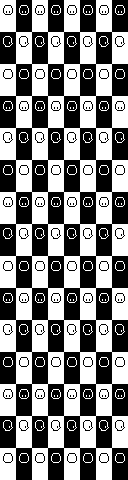
 dire fractal
thank you so much!!!!
royal arrow
you're welcome! and I've been there too, when I merged my hair mods. I was also like "HOW do people do this???" and then I came across those hair alignment thingies
dire fractal
yeah i find all these hair pngs on naver and i was so confused as to how all these ppl were able to apply them perfectly lmao
balmy oak
I wanted to install 3 fishing mods and wanted to check all the required mods for them, they were all fine but then some of the mods that they required also required mods, and it kept going with them requiring more mods until there was a total of 22 mods required for those 3 fishing mods
I'd be fine installing them if they didn't do much but some of them add tons of content that I dont want
royal arrow
which fishing mods were they? we can try to see if there's alternatives. and yea, dependency hecks like that do happen o.o
fair vessel
22 Yikes lol
royal arrow
yea idk how that happened lol like I know they explained, but wow
fair vessel
Unless the 3 mods were Animated Fish, Animated More New Fish, and Animated Fish SVE lol
royal arrow
ohhh. ya see that's why I asked which mods first xD I was picturing QoL mods related to fishing
fair vessel
Ooh. Yeah mermaid island adds a lot of new content
And More New fish adds a LOT of new fish
balmy oak
I see
royal arrow
then it looks like you have some tough decisions to make o: do the requirements have config files? maybe you can disable some of the stuff you don't want?
I've been there before and I usually was like "nvm then" and didn't install the mod in question
balmy oak
I did not check for config files
I really like fishing though
I'll probably just go ahead and install them, I'll be fishing too much to be bothered with the other new content
 tight tusk
ah yeah, the mermaid island one. i messed with some of their manifests so i don't have to install all their dependencies because i just really wanted fishies and that's it
balmy oak
How do you mess with it?
royal arrow
@tight tusk, does it load properly though, if you just edit the manifest? I've never done it but I'd be concerned about potential crashes if you don't remove all the references content.json and other files? assuming they are there
 crystal thunder
get glam does allow you to changes clothes o no?
royal arrow
based on the mod description, it doesn't look like it? (I don't use it) what do you mean by change clothes though, into vanilla or custom items?
crystal thunder
I used Kisekae to change the appearence of the character,
but I can't seem to find a way to change clothes with get glam
royal arrow
I'm reading the sticky post for get glam and yea it looks like changing clothes is not happening with it
naive drum
use customize anywhere
royal arrow
however, there are ways to do it! so if you're only changing clothes for vanilla, you'd need to have the shirt / pants, since you can now craft clothes. You can store them in a vanilla dresser and they're categorized by item type
Yea I was going to say, Customize Anywhere also allows for it, but if you're crafting your own clothes, idk how well that works
crystal thunder
so the crafting of clothes is a new thing in the game?
royal arrow
yea it's new in 1.4
you can tailor stuff at Emily's house (there's an event) and some items are dyeable. There is a mod to add the sewing machine and dying station as craftable items, called Home Sewing Kit
tight tusk
yup lenne I had to edit the content.json too because I don't really have a use for the other added content. the shops are mostly empty though
dire fractal
customize anywhere has a dresser thing that you can buy/craft/spawn which adds all the clothes from the game plus any JA packs you have
royal arrow
Customize Anywhere lets you change your hair and clothes, but I thought it only works for vanilla stuff o:
dire fractal
i thought so too but the clothing catalog has...everything
royal arrow
If you're adding JA clothes, you might be able to buy them using the Tailor Mouse mod (you can check if it's included in it)
keen moss
there's always Tailor Mouse
dire fractal
it just takes forever to scroll through
keen moss
op beat me to it
dire fractal
i might get tailor mouse again so its not so overwhelming though!
royal arrow
Garden Village also does some of that and more, as far as trying to make the shops not be so overwhelming
dire fractal
yeah i was looking into that one too
my laptop isnt the best though so sometimes id rather just have overwhelming menu than lag from loading too many new areas
royal arrow
true, I've hesitated with mods that add new areas because I already run with 290 mods xD
dire fractal
lol my laptop starts to become pretty unhappy around 220 or so...so i try to keep it under that
but most of mine are JA packs and aesthetic things
and SVE
tight tusk
200+ here so far and trying not to add more bc my mac might go brr one day
royal arrow
oh, my game stutters a bit, esp. if it's raining in game, but I live with it. I have a mix of all kinds of mods though, aesthetics, JA packs, gameplay mechanic changes, etc.
tight tusk
which is hard every time i refresh the mods page and go ooh new cool mod
dire fractal
im curious to see how many mods will be affected by 1.5....since it seems like it’ll be a pretty big content update again
royal arrow
yea I'll probably wait to play for 2 months after the update lol which is what I did for the 1.4 update
restive zodiac
(On the bright side, SMAPI and all of Pathos's mods are always updated on the same day as the game update comes out. Pathos also prepares migration documentation for modders to help prepare for upcoming changes that will impact them, as much as he has permission to and can manage without spoiling content.)
dire fractal
oohh thats super cool
i didnt really play around with mods yet during the last update, i just heard about stuff breaking lol
but i like how supportive this modding community is
with helping each other out and stuff
royal arrow
Yea I'm glad this channel and the making mods channel has so many people that are willing to help, and share what they've learned 
grand relic
I wanna ask if the "more personality for Jas" mod overwrites the dialogue from "canon friendly dialogue expansion" ?
royal arrow
In the canon friendly dialog expansion mod description, there's an explanation for how multiple dialog mods work together (I point you to it because it explains it better than I can lol). That tidbit applies to any 2 or more dialog mods
grand relic
I'll go read up then
That was actually rather easy to understand
Also has anyone else noticed the mod developer who hid his work for the sake of gender neutrality?
royal arrow
Which mod author is that? I haven't been browsing mods lately
grand relic
the one who made "Emily's dialogue expansion"
farmerjack
A shame- I wanted that mod but it's cool
royal arrow
Huh, yea that seems relatively recent, but it looks like they're hiding their mods to update them, at least
Several of the dialog mods on my modlist were farmerjack's though, so if you're going by those, several will be hidden then
grand relic
It's cool- I guess I just gotta wait for the sequel for this but atleast I'll have something to look forward to
royal arrow
There is another Emily dialog mod on nexus, Emily Dialogue Reworked (I haven't used it). While it's an XNB mod, there is a CP version
Original https://www.nexusmods.com/stardewvalley/mods/1885
CP conversion https://community.playstarbound.com/threads/migrating-xnb-mods-to-content-patcher-packs.141577/page-5#post-3272993

Nexus Mods :: Stardew Valley
Makes Emily a little less bohemian and more focused on her passion for fashion. Rewrote almost every line and added new lines every day of the week
Chucklefish Forums
grand relic
Oh thanks lenne- I'll check it out
 narrow egret
Hey if I place a chest by a crop using the automate mod with it auto harvest the crops?
robust bison
no
narrow egret
Thanks
tight tusk
hey question about modded saves. i want to transfer one save file that i have from android to mac. it's a modded one, so i have all the mods from that save file copied to my mac mod's folder. should be doable right?
robust bison
yeah
fair vessel
Hey if I place a chest by a crop using the automate mod with it auto harvest the crops?
However, automate does work for harvesting from fruit trees, and I think from tea bushes too (not sure on that one)
pastel igloo
Guys how I install the mod of even more expanded wood with stardew valley expanded?
robust bison
You mean deep woods?
pastel igloo
Yeah
dire fractal
or even more secret woods??
dire fractal
just link it
tight tusk
yeehaw transferred my save succesfully! i did fail to remove one of those ja crops and i couldn't just simply use a pickaxe so i used a bomb instead
pastel igloo

Nexus Mods :: Stardew Valley
Adds an explorable forest to the secret woods. How deep does it go?
is beacuse i need replace a specific file
tight tusk
i don't think you need to replace something with this even if you're using sve
pastel igloo
beacuse the path is bloked
restive zodiac
SVE does not edit the Secret Woods, so if it isn't working you need to post your log.
See https://smapi.io/log for how to find and share it!
dire fractal
you can use Reset Terrain Features if there’s a bush blocking the way or something
pastel igloo
ok i gonna try that
fair vessel
Yeah SVE and DeepWoods are automatically compatible, even if you use SVE's Immersive Farm 2 Remastered.
You might have seen a guide saying they need a patch - they don't, that guide is for a different version of Immersive Farm (not the one that comes with SVE)
pastel igloo
i think that i download a bad file
restive zodiac
(Even that is outdated - Jesse's version of IF2 fix should just work now, too.)
fair vessel
nope
restive zodiac
It's already compatible with Deep Woods, there is no need for a file
If you are having problems, can you post your log so we can see what all you have installed?
pastel igloo
fair vessel
This is where you go to get in
pastel igloo
yeah but i can't exit
restive zodiac
You don't even have Deep Woods installed in that log.
So either it's an old log and we need a new one, or you need to install it.
fair vessel
You can't exit? DeepWoods isn't designed to exit. It always makes you get lost once you go in a couple levels. It never saves the path you took
pastel igloo
oh sorry i going update the log xD
fair vessel
You have to use a warp totem or pass out
restive zodiac
(This is a good example of why it's really really helpful to include a full description of the specific problem you are having as well as the log, so the people trying to respond have the full context of the situation  )
)
pastel igloo
restive zodiac
So is the problem that you cannot enter the Deep Woods, or that you cannot exit the Deep Woods?
pastel igloo
exit
restive zodiac
As Jonqora said, there is no exit.
pastel igloo
i can't enter but when i exit i can't pass
wtf no is the firts time that i use that mod
fair vessel
If you only barely go in, you might be able to get back out
restive zodiac
You get lost after just a few levels so you get turned around and can't find your way back
fair vessel
But after going a couple levels in it scrambles the exits so you can't, they don't lead back anymore
pastel igloo
mmm wait i goona explain that with a image
restive zodiac
(The 2nd log has EvenMoreExpandedWoods in it)
pastel igloo
The circle is the exit
I can enter in the woods
But I can't exit when i back
Yeah I have 2 mods deep woods and expanded woods
restive zodiac
Did you download https://www.nexusmods.com/Core/Libs/Common/Widgets/DownloadPopUp?id=12255&game_id=1303 and replace the Woods.xnb inside of [CP] EvenMoreExpandedWoods/ ? Or is that the part you were stuck on?
pastel igloo
Yeah I just downloaded the patch of the mod
I gonna try with that
Ty for the help guys I download the file patch and that works
balmy oak
Something I am always concerned about when installing a mod is deleting the files, can i delete the files you get after extracting and can I delete the zip files?
keen moss
The files inside the zip are the ones you need - that's the mod itself. But you can delete the zipped folder once its been extracted.
fair vessel
Yeah all you need is a copy of the extracted files, put into your mod folder. If you have an extra copy somewhere else from when you first extracted them, you can safely delete those.
dire fractal
okay the SVE portraits are working, but not the portraits for the vanilla ones
 fickle haven
how do i fix this [PyTK] PyTK|Item|CustomFarmingRedux.CustomMachine, CustomFarmingRedux|id=[CFR] QualityMachines.QualityMachines.json.2|stack=47|completionTime=161640|tileLocation=0,0
 silk plinth
native dragonBOT
silk plinth
native dragonBOT
Can you upload your SMAPI log to https://smapi.io/log (see instructions on that page) and share the link here?
fickle haven
i need lot of Help https://smapi.io/log/1527392c7594455f83fdf705e569581c
like a lot
fickle haven
do i need all the unofficial update BFAV Animals
tight tusk
not really good at parsing logs, but based on what you provided, you already have the unofficial update installed
fickle haven
k cool
tight tusk
also did you change the name of the tractor.png or deleted it in the asset folder of the tractor mod?
also use the unofficial update to kawaii valley which doesn't use cfr anymore
 urban pawn
guys when I used sprinklers and turn off the auto water crops cheat on CJB, why does my sprinklers dont work?
these are my logs, would appreciateit if you can help https://smapi.io/log/1184db78728d432eb05f489655b37365
narrow egret
Not directly related to stardew valley but when someone says something is "Hard coded" into a game what does that mean?
naive drum
there is code for specifically that thing
like, code saying that rightclicking a specific tile position on a specific map at a specific time results in a thing, and in the vanilla game there's a bush there and you're shaking the bush, but it's not a type of bush item with a tile action, the game just...has code for rightclicking certain coords
 trim crow
hiya peeps
so i used smapi with the cjb cheats menu perfectly fine before
when it stopped working i went back to the page and found that both mods have been updated, so i installed the new version but smapi still doesnt run when i launch the game through steam or the shortcut like i used to
why is that ?? can i change it back or do i have to manually start smapi everytime i go in game
native dragonBOT
@scarlet void Can you upload your SMAPI log to https://smapi.io/log (see instructions on that page) and share the link here?
trim crow
oh yea i totally forgot that part !! thank you 
 orchid locust
I think automate is causing a bit of lag as I have large shed which I turned into a factory. Is there a recommended automate interval?
Once or twice a day would be optimal.
fair vessel
guys when I used sprinklers and turn off the auto water crops cheat on CJB, why does my sprinklers dont work?
@urban pawn
Just an idea, maybe you can try picking up the sprinklers and putting them back down again?
orchid locust
This is the log with performance enabled, the game seems to lag out every 10-15 seconds
urban pawn
@fair vessel ill try that soon. will let you know if the problem still exists
orchid locust
Does anyone know how many automate intervals are in one day of gameplay?
 tired brook
The automation interval is the number of ticks between each automation update. There are 60 ticks/second. For example, setting an automation interval of 600 will run automation every 10 seconds.
orchid locust
Awesome that is very helpful. Thank you
tired brook
Which machines are you automating currently? I can see if I can add any optimisations in the next update.
orchid locust
I am using quite a few different machines mainly kegs and preserves jars, but not limited to stills and other Artisan Valley machines.
I pretty much made all of my artisan machines piled into a large shed.
If my math is correct, one day consists of 51,600 intervals, right?
tired brook
Yep, if you play from 6am to 2am.
orchid locust
Nice. I’ll divide that number by 4 and then It’ll pull items from my machines 4 times a day which will hopefully make the game lag quite a bit less.
Darn, something else must be causing this lag. Its still happening every 15-45 seconds real time
 frail steppe
good nsfw mods out there?
royal arrow
Can't talk about those in the server, #old-rules
restive zodiac
Yep, I'd just search the Nexus. We don't allow NSFW conversations or linking to NSFW mods here :)
 dense knot
Any ideas why my save files have had corruption issues over the last couple of days?
https://smapi.io/log/10428e3592164f9fa3bf2a98c9a88e8f
royal arrow
Off the top of my head, did you add / remove / tweak anything? (checking log now)
dense knot
Sure, so, that would be the obvious issue, in general
Looks like errors in SMAPI, itself. SVE updated a few times recently
royal arrow
(side note: both my phone and my computer are taking forevers to load your log, not sure why, my internet might be the issue blurgh)
dense knot
No, it is because the file is "huge" for that website
I have verbose on and it always does it with that on. I am sure on your end it is fine.
royal arrow
welp, while that's going on lol The only thing that you've changed is updates to SVE?
 brittle ferry
Anyone know why I can't use my virtual keyboard?
dense knot
The mods i added seem fine, but i cannot see the entire log yet
@brittle ferry ummm, send a !log
royal arrow
!log @brittle ferry
native dragonBOT
@brittle ferry Can you upload your SMAPI log to https://smapi.io/log (see instructions on that page) and share the link here?
royal arrow
it only works if it's the only line in the message, I think
dense knot
I can see your keyboard, lol... That is a start
royal arrow
anyway to your log, it finally loaded, you have errors for Increase Animal House Max
royal arrow
This mod failed in the Input.ButtonPressed event. Technical details:
System.NullReferenceException: Object reference not set to an instance of an object
at IncreaseAnimalHouseMaxPopulation.ModEntry.ButtonPressed (System.Object sender, StardewModdingAPI.Events.ButtonPressedEventArgs e) [0x0010f] in <a31573388c0d43f88008854435c06c1c>:0
at StardewModdingAPI.Framework.Events.ManagedEvent1+<>c__DisplayClass19_1[TEventArgs].<Raise>b__1 () [0x00000] in <7bc4470ef6a2444b8495f20ec70b47e8>:0 at StardewModdingAPI.Framework.PerformanceMonitoring.PerformanceMonitor.Track (System.String collectionName, System.String sourceName, System.Action action) [0x00008] in <7bc4470ef6a2444b8495f20ec70b47e8>:0 at StardewModdingAPI.Framework.Events.ManagedEvent1+<>c__DisplayClass19_0[TEventArgs].<Raise>b__0 () [0x0004d] in <7bc4470ef6a2444b8495f20ec70b47e8>:0
restive zodiac
The only outright errors I see in the log are related to IncreaseAnimalHouseMaxPopulation, can you elaborate on what "corruption issues" means?
dense knot
@restive zodiac i start the game through SMAPI, and when i go to my save, i get a black and white pop up... Next time, i will screenshoot for you
@royal arrow i never touch that mod, except in-game function
restive zodiac
Oh, you're on Android too.
dense knot
Yeah
Ok, maybe i will forward that to the developer@royal arrow
And, i could try reinstalling it, again, yeah?
royal arrow
Yea I don't use that mod, but maybe check the mod comments and see if other people had that issue as well? And yea reinstalling sometimes helps, but idk
royal arrow
You're welcome!
dense knot
Seeya
brittle ferry
Here is my log https://smapi.io/log/bd4b4bc27a0f42ba97045b4a606d650e
I'm really really new to mod and this is my first using mod. So I'm sorry if I'm a little bit slow
dense knot
Looks like a common issue now, @royal arrow
Ohhh, well.
I wonder if i could buy a bunch of animals, remove the mod, would they all be there still...
Thanks, again, though... I will think of a workaround
fair vessel
@brittle ferry You'e running smapi 3.2, you should update to the latest version 3.5 :)
Download the smapi installer by ZaneYork in the Play store to get the latest one
royal arrow
Yea that's some  stuff there networkdood, idk lol definitely back up your save first. But it's bittersweet right, because at least it's not only you who has the problem, but also it sucks because it likely means it can't be easily fixed
fair vessel
I don't think so, I think they will still be there.
Just run the new smapi installer and it should replace the old smapi but leave your mod files alone
royal arrow
Yea I've definitely updated SMAPI and all my mods were still there o.o I'm on PC though, dunno if that makes a difference
fair vessel
Anyway I think that will fix your keyboard problem. Because it looks like the keyboard is working fine, it's just that the CJB cheats isn't loading because it needs smapi 3.5
royal arrow
Although, Jonqora, if they can't see the keyboard even though we can in the screenshot, is that similar to the zoom problem that person had yesterday, with the large monitor?
Unless I misunderstood the original issue o.o
fair vessel
I have no idea why the keyboard would show up in a screenshot and not in-game :/
dense knot
@royal arrow hey, i think i am S. O. L. here... Look these save files, they seem too small.
I am not even getting the message about swapping, either.
royal arrow
What you do o:
 tall vale
I love how the save is named Bruh
royal arrow
Also I think that depends on how long you've had the save. I have files that big for a save that's in summer year 1
dense knot
Well, nothing yet, i left the original screen when that error previously mentioned occurred. So, a mod could screw up my save file like this?
Which file should i swap to?
royal arrow
Idk this is outside my wheelhouse, tbh. Technically a mod could break your save, but I think only if you removed it without following the specific uninstall instructions, and even then, I think that's rare.
dense knot
Think i make my own backup from now on... Lol
royal arrow
Also if you have SMAPI (which, you do) it backs up your saves too
dense knot
Hmmm!! In a different folder, yeah?
royal arrow
Ya but idr where, I know I've seen them. Maybe check the SMAPI documentation... Lemme see
dense knot
SaveBackup
royal arrow
That's the mod yea
 lethal bramble
Hey did anyone else have problems with lag after downloading the stardew valley expanded mod? It looks really great, and I'm probably gonna play it either way, but its sort of just enough to be annoying. I only really notice it when moving, it feels like as the screen shifts around me there's a slight shuttering. I've only played one day, and I have other mods installed, if that matters. I think it might have got a little better after I disabled a couple of them I didn't carry so much about, but its just baffling because I can't imagine this a CPU thing.
Oh this might matter too, the little black box that preceeds launch give me this error, even though I'm launching through steam. I don't really care about achievements so I didn't pay it any mind, I think it might be because I started running as an admin to speed up bannerlords some time ago?
[game] Oops! Steam achievements won't work because Steam isn't loaded. You can launch the game through Steam to fix that (see 'Part 2: Configure Steam' in the install guide for more info: https://smapi.io/install).
royal arrow
@dense knot I found the SMAPI-created save backups in the Stardew Valley folder, there's a folder called save-backups, they're lil zip files
dense knot
Thank you
royal arrow
@lethal bramble hi there! did you set up the steam launch options, for your 2nd question? as far as SVE causing lag, it edits a lot of stuff, including maps, so if you have a less powerful machine ( 🥔 ) you may see some lag, especially if you also have a ton of other mods
lethal bramble
Alright, its probably just that I have too many installed, it just seemed unlikely since the base game ran perfectly. I'll take your word for it though as I know nothing about computers, lol.
Any tips on how to speed it up?
native dragonBOT
@lethal bramble Can you upload your SMAPI log to https://smapi.io/log (see instructions on that page) and share the link here?
royal arrow
that way we can see what mods you have
fair vessel
@lethal bramble there's a config option in Farm Type Manager mod
Change "Monster Limit Per Location" to 200 or so, see if that fixes your lag.
lethal bramble
I mean I haven't even entered anyplace with monsters yet, would it still have an effect?
fair vessel
Yes it would
SVE adds a new map with a heckton of monsters and the game is always calculating their movements even if you're not there
If it's still lagging you can try setting it even lower like 50 or so, but 200 is low enough for most computers to manage ok.
lethal bramble
Cool, so to be clear I click farmtypemanager-configeditor, and then there's an option somewhere? I'm opening it with comodo but all I see is a monster tab with a box inside that I have an option of checking or leaving unchecked.
fair vessel
Uh I'm confused
Inside the Farm Type Manager folder there should be a config.json file. Open that file with a text editor
lethal bramble
I see a json file but its named manifest, is that it?
fair vessel
No, Hmm.
lethal bramble
there's also one called configeditor
royal arrow
Can you take a screenshot of your Farm Type Manager folder and share it here?
fair vessel
You might need to run the game to have it generate the config.json file, I'm confused why it's not there already tho :/
royal arrow
Right, because they said they're experiencing lag, which would seem like they've run the game with the mods o.o
dense knot
@royal arrow i got it to let me swap save files, and when it does that it goes to SaveBackup and gets its info from there. Nothing doing, though.
royal arrow
the SaveBackup folder in your Mods folder doesn't have the saves though, I mentioned earlier they're in Stardew Valley > save-backups, and at least mine are zip files
fair vessel
@lethal bramble posting your log like Lenne suggested would also be helpful
dense knot
Wait... I found something different , save-backup, ok, and that file looks legit... Yeah... Thanks @royal arrow
lethal bramble
I'm working on it, that link Governor gave me didn't work, I followed the instructions and it said they couldn't find the link I pasted in. I'm trying to work out how to take a screenshot now.
royal arrow
which OS are you on, zazaq123?
lethal bramble
Windows? 10 I think
I'm hitting print screen to take the picture but I can't find it anywhere to attach it here.
royal arrow
you can paste (Ctrl + V) into the chat box in here
that'll directly paste the screenshot you took (it's secretly in your "Clipboard")
dense knot
Omg, you told a secret?
royal arrow
Ok so the instructions for uploading your log for windows are
- Press the Windows and R buttons at the same time.
- In the 'run' box that appears, enter this exact text:
%appdata%\StardewValley\ErrorLogs - The log file is SMAPI-crash.txt if it exists, otherwise SMAPI-latest.txt.
then - Drag the file onto this textbox (or choose a file)
which part are you having trouble with, zazaq123?
lethal bramble
Yeah, I'm pasing that $appdata link, and it just says I don't have a program or whatever of that name.
'windows cannot find'.... make sure you have the correct name'
royal arrow
you copy-pasted it exactly like that, and it said you don't have an Error Logs folder? Have you run the game with SMAPI and all your mods?
lethal bramble
Yes I've run the game several times, never advanced beyond a day though.
royal arrow
that is so strange...you can navigate to the folder manually, but if it's not finding it, then it doesn't exist o.O
fair vessel
At this point might wanna try re-installing smapi just to cover all bases :/
royal arrow
!smapi
native dragonBOT
SMAPI (https://smapi.io/) is the mod loader for Stardew Valley. It loads mods into the game, provides APIs for mods to use, intercepts errors, and backs up your save files automatically.
royal arrow
if you go to that link, zazaq123, it has a Player Guide button, that has the instructions on how to install it
tired brook
(Unrelated to current discussion:)
SMAPI 3.6 is now available!
For players, this mainly reduces startup time, improves crossplatform compatibility, simplifies some log messages, and improves the online JSON validator. For modders, it mainly adds event priorities and update subkeys, improves Harmony troubleshooting, and adds a Multiplayer.PeerConnected event.
For more info:
- download: https://smapi.io/
- release notes: https://github.com/Pathoschild/SMAPI/blob/develop/docs/release-notes.md#release-notes
- Reddit thread + release highlights: https://www.reddit.com/r/SMAPI/comments/hcr6js/smapi_36_released/
tired brook
tired brook
**SMAPI 3.6 is now available!**
For players, this mainly reduces startup time, ...
royal arrow
I mean it's like sort of related xD
lethal bramble
Pretty sure I downloaded correctly the first time but okay. I think I'm just gonna try to delete secret woods first, I bet that one uses a lot of power.
Thanks for all the free help all.
royal arrow
I hear you zazaq123, but if you don't have an Error Logs folder, SMAPI may not have installed properly for some reason, so if you're having issues in the future, you won't be able to see your error log, which has a ton of useful info
lethal bramble
Would I have to reinstall everything connected to it or just SNAPI itself?
royal arrow
just SMAPI. your mods will still be there
you'd also mentioned earlier you were getting a message related to the Steam achievements; part of the install process includes setting the Steam launch options
lethal bramble
Yeah I recall that but I got to the part where it said, unless you want to a continue a saved game you were done. I'll reinstall it real quick.
Okay Nexus said I didn't have SMAPI installed, I wonder if maybe it didn't extract properly or something, or if its because I installed not from Nexus last time?
So I'm loading that and reinstalling the mods I trimmed now.
restive zodiac
(Nexus doesn't know what mods you have installed, it just always lets you know what requirements any given mod has when you try to download it)
royal arrow
Yea if you didn't download SMAPI from Nexus, then it wouldn't be listed in your Downloads History (assuming that's what you're talking about)
restive zodiac
Remember that even if you install SMAPI correctly, the game will not start modded (and thus not have an error log) unless you either launch StardewModdingAPI.exe directly from the game folder, or adjust your Steam launch options to point to that file. (Part 2: configure Steam on this page https://stardewvalleywiki.com/Modding:Installing_SMAPI_on_Windows#Option_A:_use_SMAPI.27s_installer)
royal arrow
yea they mentioned they were getting the message that the Steam launch options weren't set up
lethal bramble
Okay just launched and I got this error message.
[SMAPI] Skipped mods
[SMAPI] --------------------------------------------------
[SMAPI] These mods could not be added to your game.
[SMAPI] - SMAPI 3.6.0 installer because it contains files, but none of them are manifest.json.
restive zodiac
Yeah, the installer isn't a mod so it doesn't go there. You can just remove it.
royal arrow
To properly install it, you need to follow the install instructions
restive zodiac
Lenne will want to see your actual log file though, not just snippets from it 😄
It's installed if they are getting that message, though.
royal arrow
(that's step 2, step 1 is reinstalling SMAPI xD and yea they may be launching the older version)
restive zodiac
(Either it was already installed or they did just install it though, otherwise they wouldn't see that message.)
royal arrow
Yea they're attempting to reinstall, so they had installed it in some form before (based on what they said, without the Steam launch options, and the Error Logs folder hadn't been created)
dense knot
That new SMAPI update is not compatible with Android, yeah? I better wait.
royal arrow
yea I don't think it's been ported yet, but Pathos said one of the peeps ZaneYork was working on it
restive zodiac
The error logs folder doesn't get a log in it until the game is run with SMAPI yeah, that's what I was saying . That message just meant it was finally run with SMAPI, so there will be a log.
lethal bramble
You know it seems like the issue is fixed or close enough too it now, so I'm just gonna stop messing with it. Thanks again all.
dense knot
@royal arrow no doubt... They both do great work... They should be paid in Starfruit for their efforts.
royal arrow
well the main issue you had was lag, this all began because I'd asked if you could post your log so we could take a look at your full log, and see if there were things you could optimize / remove to improve your performance issues. If you're good with it the way it is that's fine, but that's what started this xD
restive zodiac
(There wouldn't have been anything to optimize if they never ran it with SMAPI, because it was never actually using any mods.)
royal arrow
they said they were, but that they were getting a message about the Steam launch options not being set. And also that windows couldn't find the error log folder to post their log in the first place o.o
restive zodiac
If they reinstalled from the brand new version, maybe 3.6 in addition to having an option to attempt reducing startup time, also has magic lag fixing :P
royal arrow
lol maybe xD
ancient gorge
Hi, I ran into a problem with the game itself where a cutscene crashed.
https://smapi.io/log/32073cbe38054b53bdcc7b2ac9b5260a
I am using mods, so that might be the cause. Should I ask #vanilla-tech-support instead?
royal arrow
game support is for no mods (vanilla) saves, so you're in the right place!
restive zodiac
Thaaat's funny
royal arrow
did you at one point use any XNB mods?
ancient gorge
What are XNB mods?
restive zodiac
Linux is case sensitive - Content/Characters/Shane would exist, but not Content/Characters/shane
royal arrow
!xnb
native dragonBOT
XNB mods often break the game and are not recommended. See https://stardewvalleywiki.com/Modding:Using_XNB_mods for more info (and a list of Content Patcher alternatives), and https://stardewvalleywiki.com/Modding:Player_Guide/Troubleshooting#Reset_your_content_files to fix problems caused by XNB mods. For mod creators, see https://stardewvalleywiki.com/Modding:Editing_XNB_files for help unpacking & editing them (including for use with Content Patcher).
royal arrow
ya but then, how did it get to be lowercase, mouse o:
restive zodiac
What was the cutscene?
ancient gorge
let me manually check the file
I think it was Shane's ||drunk at the bridge cutscene||, but it was just a black page for me
dire fractal
lol why does my antivirus keep wanting to attack the new smapi update 😦
restive zodiac
Yep
3910975/f Shane 1500/e 3910674/t 900 2000/w rainy": "echos/-2000 -2000/farmer 83 92 2 shane
dire fractal
norton needs an “ok for pathos to hijack my computer” option
ancient gorge
I don't think I ever used any XNB files, I'll keep looking at the list
restive zodiac
It's not you, it's a bug
native dragonBOT
If you've checked that it's not a mod bug, you can report bugs to the Stardew Valley developers here: https://forums.stardewvalley.net/index.php?forums/help-bug-reports.12/ (do a quick search first so you don't report something they're already looking into). Alternatively, you can email support@stardewvalley.net
restive zodiac
I'm trying to even get my game to launch to test
ancient gorge
I exited the game, I'll try playing it through again, and see if it still crashes
I caught an Octopus that day too T_T
restive zodiac
You can force play the event by typing debug ebi 3910975 in the SMAPI console. It should crash shortly after.
ancient gorge
Ok, I'll try it out
restive zodiac
turns purple waiting with bated breath 
ancient gorge
it works this time
restive zodiac
Maybe it didn't crash and they were enjoying the movie and going to try to catch another octopus
ancient gorge
lmao
restive zodiac
:P
Why crash and error first time? I was thinking that even as small a share as Linux is in game that it would go unreported, and surely even I must have seen that event at least once.
Did it have any errors, or log is clean?
restive zodiac
So the error was that it wasn't handled the first time and not that it is never handled ... what did you do :P
(Just teasing.)
ancient gorge
I just finished the Shane cutscene, and now there's an Andy cutscene from SVE
royal arrow
did you rename the file or somethin? or did it just do the thing all by itself o:
restive zodiac
Events play back to back if you qualify for more than one, is there a problem happening with the new one?
restive zodiac
I don't think that would be why since the log specifically noted a problem with not being able to find shane, but something else may have failed somewhere that caused it to hiccup over that in the first place. I'm not really familiar with how it handled all that though, so I'm not sure where that would be (I'm having drive problems and it's such a pain to get it running to test or search files 😅 )
broods
royal arrow
mystery for the ages (~'o')~ (until mouse figures something out lol)
restive zodiac
Don't really see anything weird happening before that error either, just warping to the forest, pytk entry script checking to see if warps need fixing, presumably event triggered and crash borrows computer
ancient gorge
Hmmm I have no idea what that means but it sounds pretty normal until the crash part
I have to catch an octopus again...
restive zodiac
@tired brook Someone on Linux crashed once on an event that used shane instead of Shane, and got an error about Content/Characters/shane not being found. That seemed like something that would have been reported by like all 10 Linux users the game has, so they tried again and force played the event using debug ebi 3910975. Is there some weird case handling thing that normally works and just blinked? I wasn't sure if the working or the not working was the weird part. https://smapi.io/log/32073cbe38054b53bdcc7b2ac9b5260a
(I am not very familiar with behind the scenes eventing in the first place, and can't access most of the files on my external drive at the moment, including the game 😓 )
(Edit: Now that I think of it, I realize I had just thought that the event commands were case sensitive in general, including the actors )
tired brook
The filesystem on Linux is case-sensitive but the content managers aren't. That means if you load Content/Characters/shane first, it will fail; but if Content/Characters/Shane was previously loaded and then you try to access Content/Characters/Shane, that will work fine.
Basically you should use the exact capitalisation to avoid issues.
 onyx light
Using the latest Automate mod...when putting a chest next to a fruit tree, the fruit tree does not seem to create any more fruits/grow...
fair vessel
They go in the chest 🙂
restive zodiac
So since it's a vanilla event, it's technically possible for that to happen without any mods, right?
onyx light
@fair vessel They aren't going in the chest
fair vessel
Is the chest connected to any other chests? Press U to see an overlay of which machines and chests are connected
fair vessel
Also I'm assuming it's the right season for the tree?
onyx light
Yes Spring
fair vessel
🤔
onyx light
It was generating fruits the day before I put a chest next to it
tired brook
Hmm. In theory the file should have already been loaded, since Shane presumably exists in the world? 🤔
fair vessel
Do you use something like Chests Anywhere that could connect chests across distances?
tired brook
(Chests Anywhere doesn't affect automation.)
fair vessel
(ooh ok)
onyx light
I don't have Chests Anywhere mod installed either
restive zodiac
I also wonder why it worked immediately after loading game and not when they got that event naturally
fair vessel
!log
native dragonBOT
Can you upload your SMAPI log to https://smapi.io/log (see instructions on that page) and share the link here?
tired brook
@restive zodiac No idea, but might be worth reporting it as a game bug to avoid issues either way.
restive zodiac
Hmm. Thanks for input! 
 icy idol
Does someone know how to edit "better sprinkles" in order to not increase its value?
grim totem
Hi I see SMAPI has been updated. Will it be updated on play store?
restive zodiac
ZaneYork will have to port the update to Android.
grim totem
Ahhh ok. Thank you
lethal bramble
Okay a real bug this time, game's crashed twice. First time was right in the morning as I stepped outside on my second day, so I didn't really care, second time I walked into my bed and wouldn't sleep, so I tried to step outside and back in to fix this and the game crashed at like midnight. Anyone else have this bug? Before anyone asks I can't use the (https://smapi.io/) link, I tried to and it says it can't find the folder.
stray star
I need to figure out who it is that I'm missing on my introduction quest 
it says 47/48 but I don't recognized the final one at all
restive zodiac
@lethal bramble Does it find %appdata%\StardewValley ? (No errorlogs)
lethal bramble
Yeah, that pulled something up
restive zodiac
Can you show a screenshot of that folder?
lethal bramble
restive zodiac
ponders You haven't reinstalled SMAPI again since last time, have you?
stray star
https://i.imgur.com/WZiOjwV.png can anyone help me with who this is?
 lethal bramble
Not since earlier today
I think I installed it manually once and then again through Nexus at the advice of people here.
 daring plover
Could I please get some help making my four corners map mod work? Something isn't loading correctly and its defaulting to the basic map.
stray star
when I click lookup anything on him it gives me an error I guess
restive zodiac
!log Kage#1241
native dragonBOT
@daring plover Can you upload your SMAPI log to https://smapi.io/log (see instructions on that page) and share the link here?
restive zodiac
It looks like you're missing Daisy's tilesheets https://www.nexusmods.com/stardewvalley/mods/4736
Probably an oversight that it's not listed as required in the manifest (although that + many other mods have updates available)
@lethal bramble Can you try pasting from the console into the log site for now?
robust bison
Wing that's a sve npc I believe
lethal bramble
Ah, thanks a bunch, I thought I downloaded all the mods listed as required.
robust bison
But I'm not sure
restive zodiac
(Daisy's tilesheet comment was directed at Kage, sorry for confusion!)
stray star
Hmm, even if it is, I don't feel as though it should be showing up on my intro quest? I've played quite a bit of SVE and have never had this issue before
daring plover
I have all the most recent ones I could find on Nexus. It does say a few could be updated but that's the latest from there.
stray star
I'll just auto complete the quest with CJB and pretend it's working as intended 😛
lethal bramble
Crap, well I still can't use that link I mentioned, it says errorlogs folder not found
robust bison
Yeah, I always thought that npc was an antisocial one
lethal bramble
https://smapi.io/log this one
restive zodiac
Yeah, can you run the game and copy paste from the SMAPI console into the log site for now so we can see what all you have installed and where the Mods folder lives and such at least? We will have to figure out what is happening with the log
lethal bramble
alright
restive zodiac
@daring plover The farm map has a new version at least, I double checked the manifest version on the Nexus :) (but that's not the reason for your error, just noting there's a real update)
stray star
Yeah if I'm correct that npc should be ||apples|| but that character shouldn't show up til after ||Aurora Vineyard||
restive zodiac
Can you share your log, Wing?
stray star
yeah lemme finish this day
lethal bramble
Here it is, I can't paste this on the log site either, gives me a different error message.
restive zodiac
(You can grab logs midday too if you'd rather, no need to close game @ wing)
daring plover
Ah right I think I switched it for the older version I knew worked last time in case that was the problem. I'll switch it back.
It is working now though, thank you 🙂
restive zodiac
Maybe it's because you don't have AntiSocial NPCs installed? It keeps various NPCs off the social menu https://www.nexusmods.com/stardewvalley/mods/5371
stray star
I'll throw that on, reason I didn't was cuz sve has the dialogue saying it wasn't an issue but I'll report back once I've tried that ty
daring plover
Any tips for the chicken mod or is it too much of a mess? I'm wondering if its interacting with another mod somewhere.
Lavapulse chickens.
lethal bramble
Mouse that wasn't directed at me was it?
restive zodiac
That was for Wing, they are missing an optional mod for SVE that keeps certain NPCs from being on the social menu
lethal bramble
Alright, does the way I uploaded that information work? Like I said it wouldn't go on the link
restive zodiac
@lethal bramble This shouldn't really be related at all, but for now can you download the new version of SMAPI https://smapi.io/ (yours is 3.5, update is 3.6) and install that? Then launch the game via SMAPI with the new one installed, and see if the logging is working ?
If I remember you had downloaded the 3.6 installer and had it in your Mods folder, so it doesn't look like the installer ran/was run
lethal bramble
Yeah I just reinstalled it, do I need to delete the installer from the mod folder? Could that be causing problems?
I reinstalled, relaunched, and it still won't find my error/log.
restive zodiac
It just gets skipped, so it shouldn't be causing that. Sooo, to recap, you were originally reporting a crash but now we we have jouked down a side street hunting down why you don't seem to have an ErrorLogs folder in SMAPI 3.5 or 3.6 even though it looks like you did start the game with SMAPI (https://cdn.discordapp.com/attachments/678284714829807636/724003279104639006/message.txt + https://cdn.discordapp.com/attachments/678284714829807636/724001075169853471/unknown.png )
!halp
native dragonBOT
@tired brook ^
tired brook
Try this:
- Go to https://smapi.io/, scroll to the bottom, and install the SMAPI 3.6.0 for developers version.
- Launch the game again.
- The SMAPI console should be much more detailed, and show (almost) everything that would appear in the log file.
- Upload the console text to https://smapi.io/log/ and post the link here.
restive zodiac
I should have gotten trace console and then just reported phantom log separate 😔
daring plover
Ty for your help ❤️
icy idol
Is Better Panning and Better Garden Pots incompatible?
[18:24:37 INFO SMAPI] Found 2 mods with warnings:
[18:24:37 INFO SMAPI] Patched game code
[18:24:37 INFO SMAPI] --------------------------------------------------
[18:24:37 INFO SMAPI] These mods directly change the game code. They're more likely to cause errors or bugs in-game; if
[18:24:37 INFO SMAPI] your game has issues, try removing these first. Otherwise you can ignore this warning.
[18:24:37 INFO SMAPI] - Better Panning
[18:24:37 INFO SMAPI] - Better Garden Pots
tired brook
Both should be okay based on the compatibility list. Can you upload your SMAPI log to https://smapi.io/log (see instructions on that page) and post a link here?
tired brook
Yep, both loaded fine. SMAPI is just letting you know they rewrite game code, which is more likely to cause bugs; if they're working fine for you, you can ignore that.
icy idol
Oh, ok.
I thought there were some bugs with it.
I used to have "Exhaustion Tweaks" and It didnt work at all, even though it was just appearing that msg
balmy oak
welp I am about to install 18 mods because I just wanted one mod
it only required a few mods, but then those mods required other mods and those ones required others
tired brook
The Stardew Valley Expanded mod?
keen moss
or PPJA
restive zodiac
(Or Mermaid Island...)
 coral hare
Im new here if you start stardew with the mods will you still get steam achievements and gametime you played the game (ex: 60hours played)
tired brook
Yep. If you play on Windows, you just need to add SMAPI to the Steam launch options (there are instructions in the install guide).
 ionic trout
hello, i'm using mac, and when i logged back into stardew valley on my gf's farm, my speed suddenly dropped to walking speed even though the running animation is showing
I use CJB cheats and I have the speed setting to 2, but the speed suddenly dropped.
I can offset this by changing the speed higher to like 7 or 8 but this is obviously not normal
fair vessel
@ionic trout can you post a log? We can see what other mods you have installed that might be causing it
fair vessel
!log
native dragonBOT
Can you upload your SMAPI log to https://smapi.io/log (see instructions on that page) and share the link here?
fair vessel
Instructions here at the link
 errant bridge


 fair vessel
Yes you can delete all the zip files after u extracted the contents inside Mods folder
ionic trout
@fair vessel there's one error but I've been playing with that error for a while and it hasn't affected anything
fair vessel
@ionic trout Very strange. I don't see anything that should affect it and the only error is unrelated, like you said.
Probably best to post a comment (with your log) on the CJB cheats page to report it
ionic trout
eh i'm just going reinstall everything
if i uninstalled the game i don't have to do anything with smapi right
 compact forum
If you mean uninstall SMAPI first or something, no
But you will have to reinstall it if you reinstall the game
ionic trout
oh ok i uninstalled it anyways now i'm reinstalling it
so i reinstalled everything but i haven't put the mods back in yet
my speed is still wonky: my running speed is the same as my walking speed even though the animations are different
has this happened to anyone before?
final update, sorry for the spam, I went in the steam folder and deleted the stardew valley folder entirely before reinstalling, the issue is fixed now.
naive drum
You had a messed up xnb probably then
ionic trout
would replacing a furniture.xnb change anything?
that's the only one i recall replacing
naive drum
Steam has a built in reaquire broken/missing files button, rightclick pn the game name then go to properties and then to local files and click validate
Almost all xnb mods are broken and will not be fixed and will break your game in unpredictable ways
ionic trout
i see, thanks for the info, i'll try that next time if anything pops up
naive drum
If the xnb is older than November 26 2019 assume it is no longer compatible
 tribal cypress
Hey guys, I have a question. We are currently using one of Ace's expanded farms MTN version for multiplayer, but we want to switch to the non-MTN version. Is it possible to do it?
lethal bramble
Hey I already asked but kind of got sidetracked by a more serious issue, does anyone have tips for reducing lag while playing Stardew Valley expanded? I don't have the file under farmtypemanager folder to limit the number mobs, if someone else knows another way to do it, or any other advice, I'd really appreciate it.
fair vessel
Hmm. You could... try creating the missing file 🤔
Try putting this inside your FarmTypeManager folder
(Although if SMAPI is screwing up to the point of not creating config files, I dunno if there's any guarantee it is properly reading config files either)
lethal bramble
Okay, I C/P that into the folder, just relaunch the game and then see if I can go into it?
Actually I dragged it because I could C/P, that might be important.
Did that, nothing happens when I click on the new folder still. Any other general tips on how to reduce lag?
fair vessel
Click on the new folder?
If adding that file worked, you shouldn't have to do anything - the lag should already be fixed.
But I'm not certain if it's reading the config.
 proper quest
Hey, my SMAPI 3.4.1 is telling me a few of my mods can be updated. How do I update them? Go to the original SMAPI mod page and update? Or do I need to do something else?
fair vessel
Ooh if you have Smapi 3.4.1 you should probably update smapi, too. Haha.
proper quest
oh dudE i haven't played in so long T-T
fair vessel
And yeah you would go to the page where you got each mod and download the newest version
If you parse your log using https://smapi.io/log it will create nice little hyperlinks for each mod that needs updating
proper quest
hm, i tried doing that, and I followed the instructions and entered the first and second lines of text into the 'run' pop-up but neither can be found 😦
I'm certain I typed them right lol
OH WAIT NEVERMIND
ONE SEC I HAVE 0 INTELLIGENCE
oh thank you so much this is very helpful!
 neat condor
Hi, I think I have some mods that are in conflict or something, specifically that I can't get the Artisan Goods butter churn from Marnie and my extruder won't turn honey into beeswax anymore. Looks like there's a few more but I haven't actively run into them (also I'm not worried about the shaved ice mod and had this issue before adding it last week)
https://smapi.io/log/c111c5fdea39493faec0667774f77918
mention me if you have any ideas, otherwise the game functions just fine!
 split patrol
Hello, quick question, does anyone know of a mod that reverts the price hike in year 2 of Robin's and Clint's resources? I could've sworn I saw one but I can't find it ;-;
fair vessel
@split patrol I bet it's this one you're thinking of! https://www.nexusmods.com/stardewvalley/mods/2631

Nexus Mods :: Stardew Valley
This mod offers options for adjusting or disabling the price increases at the Carpenter and Blacksmith after the first year.
split patrol
omg yes thank you so much!!
lethal bramble
SVE crash for people when they go outside? Maybe like, 1 and 4 times leaving my home, and more importantly once when I walked out of the saloon.
fair vessel
No that's not normal :c
restive zodiac
@lethal bramble Did you ever see this? <#archived-modded-support message>
balmy oak
Can anyone tell me where to find any of the PPJA content in the game? I installed a bunch of them but can't find anything the mods add
I installed them since a fishing mod I wanted required them and I had planned on ignoring the other mods content but I want to check the stuff out
royal arrow
The seeds for stuff are sold at Pierre's, based on the season and year
Which PPJA stuff did you install?
 finite dagger
Does anyone know where the extra assets in Minerva's Bigger Farmhouses are pulled from (aside from the bathroom)? It has some incompatibility with my interior recolor and I'm trying to make it match.
balmy oak
Mizus flowers
Fruits and veggies
More trees
Artisan valley
even more recipes
More recipes
Mega pack
I dont remember if all those are ppja but those are some of the mods I installed
royal arrow
Ok, yea seeds are sold at Pierre's, some recipes you can buy at the Saloon, others you get through the mail. But like I said, there's seasonal / year requirements for most of that stuff. If you go to the mod page for any of those mods on nexus, they'll have a link to the mouseypounds database, so you can get details on how to unlock / purchase the stuff