#archived-modded-support
1 messages · Page 331 of 1
 naive drum
 open stirrup
It’s still same.. just in weird way
 native dragonBOT
Can you upload your SMAPI log to https://smapi.io/log (see instructions on that page) and share the link here? Even if your game doesn't show any errors, logs are useful, and often necessary, for troubleshooting.
naive drum
also, you closed the game before verifying it and only have one copy, right?

 naive drum
That looks fine and not glitched?
Furry Farmer is applying its edits, the clothing looks fine
open stirrup
Because, he’s not exactly furry
Look at those face on the side, it look like human, isnt it?
 naive leaf
It does not
naive drum
The ears and tails are now in the Fashion Sense pack, so you pick them after you make the save
open stirrup
Hmm.. where do i find tail and ear…?
naive leaf
They said it was in the fashion sense mod. Get the mirror
it's like 500g in the shop i think
500-1k i forget.
open stirrup
Which shop? I forgot
naive drum
Pierre's
open stirrup
I’ll check
naive leaf
It'll be at the very bottom iirc
then you left or right click (i can never get my directions right) in order to use the mirror.
make sure it's selected in your inventory though
and if you see yourself casting a line of bugged items in the process, that's normal
naive drum
There's also a console command to spawn in the hand mirror! Though you're somehow missing that SMAPI component too
naive leaf
You can spawn an item in your inventory then sell it
open stirrup
Ok, i got hand mirrior, but i don’t think it’d let me have tail?
naive drum
It does let you have a tail - you can pick ears and tail and i think they're both in...accessories, or something?? so they take up 2 of the 3 Fashion Sense slots
open stirrup
What mod called you said?
naive drum
Fashion Sense. You have it.
open stirrup
I’m looking there now
naive drum
You also have the content pack for it that adds the ears and tails.
 timber jungle
Seeking help: When you installed a certain mod (ex. a diffrent weapon/tools) , the dev stopped working on it. Now the game does not show that item anymore. How do you remove that item permanently?

 robust bison
were they implemented via JA or DGA or through other means?
timber jungle
I am unsure. I don't remembered 😦 My guess its Jason file?
 verbal slate
whats the one mod where you can control times, lucks, npc heart levels n all that?
nvm i found it
 nova yew
Can anyone help me with this mod? I found one that shows number values for Energy and HP.
It's called Numerical Health by Enriath.
I want to experiment with the configurations but I don't know where to access that, or what I can actually do with it. I couldn't find it on the mod page. I don't know if I'm overlooking it, or if I'm overall just not knowledgeable of some basics.
Is it just within the file itself? Not the game?
 sharp moat
There's a mod that usually let's you configure other mods
Generic mod config menu?
Or generic mod config options
I think it's one of those
 fallow tendon
hai

i shoulda tested the game everytime to see which mod crashes my game

visible fish is an old mod that def works
wallahi
is every mod thats required in expanded really required?
 compact verge
Yes. Those are framework mods that allow other mods to work.
How did the crash happen?
compact verge
I mean, did it just suddenly crash to desktop while you're waiting? Or did it freeze?
naive drum
fallow tendon
You put your SMAPI into Select Mode by highlighting stuff. This completely halts game code execution until you exit out of Select Mode by pressing Enter. Did you intend to do this for the screenshot?
naive drum
Says Select Mode at the top of your screenshot.

 naive drum
Windows can't tell the difference between Select Mode and something actually being wrong
compact verge
That usually happen if you click at the screen when it's loading.
naive drum
(It can also falsely think that Stardew has frozen if you click on it while it's loading. Let it load without clicking on the game or SMAPI windows)
fallow tendon
for how long should i let it load
compact verge
10 to 15 minutes is normal. Expanded is a big mod.
If you want the loading time to be shorter, try installing "SpriteMaster" or "FastLoads."
But not both at the same time.
fallow tendon
alr
naive drum
Well first make sure you take it out of select mode :p tab to the SMAPI window and then press Enter until it no longer says Select Mode
then it depends on your total mod list, whether you have SpriteMaster or Fastloads, and computer specs but generally at least several minutes
fallow tendon
problem resolved
i downloaded fastloads then it worked again
thanks for the advice
much appreciated
fallow tendon
seems that the mod made my normal quarts into refined quartz...
now i cant give mommy abby my daily gift
 green wadi
timber jungle
Seeking help: When you installed a certain mod (ex. a diffrent weapon/tools) , t...
green wadi
timber jungle
Seeking help: When you installed a certain mod (ex. a diffrent weapon/tools) , t...
can you click it? that invisible item? if you can, open the item spawner (cheat) and dispose that invisible item in the trash can. i found out some time ago that while the game won't allow you to trash some items (like tools) item spawner trash can doesn't care and you can delete anything you want from your backpack there.
 bleak dome
hey i am looking for a mod where you can look up everything but i cant find it
compact verge
It's called "Lookup Anything."
bleak dome
compact verge
It's called "Lookup Anything."
i cant find it on curse forge
compact verge
Nexusmods would be where the majority of Stardew Valley mods are.
bleak dome
...i fucking mixed up nexus with curse forge
 civic ibex
the menu doesn't show up whenever i press ''P'' and ''I", help me
https://smapi.io/log/313e088c192442f7a52b1c5bee891a62
native dragonBOT
Log Info: SMAPI 3.18.6 with SDV 1.5.6 (build 22018) on Microsoft Windows 10 Pro, with 7 C# mods and 0 content packs.
 modern python
civic ibex
the menu doesn't show up whenever i press ''P'' and ''I", help me
https://smapi...
modern python
civic ibex
the menu doesn't show up whenever i press ''P'' and ''I", help me
https://smapi...
i would remove Gift Taste Helper (old mod) and try again
 mental hazel
Would someone be able to look at my logs? I added some mods to a dedicated server and now my character doesnt load in the list.
civic ibex
modern python
i would remove Gift Taste Helper (old mod) and try again
I tried but it still doesn't work...
native dragonBOT
See https://stardewvalleywiki.com/Modding:Player_Guide/Troubleshooting#Reset_your_content_files for instructions on resetting your game files! (This doesn't affect your save files.) You may also want to check this list of XNB > Content Patcher conversions (https://stardewvalleywiki.com/Modding:Using_XNB_mods#Alternatives_using_Content_Patcher) to see if there are already replacements for any XNB mods you may have been using :)
modern python
otherwise im not sure what the issue is, very bizarre
mental hazel
If someone has a moment I would greatly appreciate it https://smapi.io/log/bbcdbdd7b52a4081b7f7e03904792cb3
native dragonBOT
Log Info: SMAPI 3.18.6 with SDV 1.5.6 (build 22018) on Microsoft Windows 11 Pro, with 60 C# mods and 145 content packs.
Suggested fixes: One or more mods are out of date, consider updating them
mental hazel
^ this made me realize something, the mods with the server might not line up. checking that
civic ibex
https://smapi.io/log/4256a3115eec408095832b04b70f4215
as it still could not be activate
 native dragonBOT
Log Info: SMAPI 3.18.6 with SDV 1.5.6 (build 22018) on Microsoft Windows 10 Pro, with 6 C# mods and 0 content packs.
 scarlet quail
civic ibex
https://smapi.io/log/4256a3115eec408095832b04b70f4215
as it still could not be a...
scarlet quail
civic ibex
https://smapi.io/log/4256a3115eec408095832b04b70f4215
as it still could not be a...
Verify your files
None of your mods should cause NPC Map locations to try and find a tiger slime
Most likely you put in a XNB mod
civic ibex
how to verify it
scarlet quail
!reset
native dragonBOT
See https://stardewvalleywiki.com/Modding:Player_Guide/Troubleshooting#Reset_your_content_files for instructions on resetting your game files! (This doesn't affect your save files.) You may also want to check this list of XNB > Content Patcher conversions (https://stardewvalleywiki.com/Modding:Using_XNB_mods#Alternatives_using_Content_Patcher) to see if there are already replacements for any XNB mods you may have been using :)
modern python
click the first link
civic ibex
It worked. Thank you so much!
scarlet quail
civic ibex
It worked. Thank you so much!
!xnbzola Excellent! Please heed this then
native dragonBOT
XNB mods often break the game and are not recommended. See https://stardewvalleywiki.com/Modding:Using_XNB_mods for more info (and a list of Content Patcher alternatives), and https://stardewvalleywiki.com/Modding:Player_Guide/Troubleshooting#Reset_your_content_files to fix problems caused by XNB mods. For mod creators, see https://stardewvalleywiki.com/Modding:Editing_XNB_files for help unpacking & editing them (including for use with Content Patcher). https://media.discordapp.net/attachments/156109690059751424/575085766426886145/ZolasFury.png

 mental hazel
do you have a bookcase mod?
 tight quest
oka oka thanks for the help
 night scroll
for lookup anything is there anyway to update lookup key/labels so i can update sve added areas like blue_moonvineyards_house or whatever to human readable language?
 gaunt gust
Not really iirc now
Unless you know c#
But this is one of the things that should be better in 1.6
night scroll
gaunt gust
Unless you know c#
i do lol
night scroll
gaunt gust
But this is one of the things that should be better in 1.6
how so?
 neat plaza
!1.6
native dragonBOT
Stardew Valley 1.6 is the next big game update, which makes it more moddable for mod authors. See...
• new content: https://twitter.com/ConcernedApe;
• other changes for players: https://stardewvalleywiki.com/Modding:Migrate_to_Stardew_Valley_1.6#Vanilla_release_notes;
• changes for mod authors: https://stardewvalleywiki.com/Modding:Migrate_to_Stardew_Valley_1.6.
The release date for PC is March 19; console and mobile will follow sometime after. Alpha builds are releasing nightly. Check the pins of #making-mods if you want to help test it or get one last chance to update your mods!
 ashen token
Any help? Trying to install smapi and it shows that error
 gaunt gust
night scroll
how so?
gaunt gust
night scroll
how so?
Maps don't have a display name until 1.6
So in 1.6 it's as easy as making LA use the display name
But before then you have to store the info somewhere probably a json file
sharp moat
ashen token
Any help? Trying to install smapi and it shows that error
!androidsmapi
native dragonBOT
Android SMAPI does not currently work for versions of SDV past 1.5.6.39. We do not know if or when it will be made compatible. It is not possible to downgrade to .39 through legal means so do not ask how to do this.
Mod support for 1.5 on Android is still experimental, so many mods are broken or buggy. That's often something SMAPI needs to fix, and we may not be able to provide a solution.
ashen token
sharp moat
!androidsmapi
Yes, I have that version .39
night scroll
gaunt gust
Maps don't have a display name until 1.6
ohh cool
night scroll
gaunt gust
But before then you have to store the info somewhere probably a json file
ya this is what i was wondering. if lookupanything author had a way of putting in custom lookups or if its hardcoded in
 quartz swift
I know this may be a silly question, but when we say 1.6 is coming out for "PC" on the 19th, is that Windows only or also Mac?
 worthy moth
Should be Mac too. Basically updated on Steam, GOG, and wherever else
Microsoft Store probably
scarlet quail
Anywhere with Steam/GOG/probably windows store access, Sascha. (With probable exception of that Steam for Chrome OS thingy)
quartz swift
Thanks!
nova yew
sharp moat
There's a mod that usually let's you configure other mods
It was just the config file that came in the mod files. I figured it out after a bit.
 mild sleet
soooo i instald sesonald cute characters. And the portraits changed but the sprites dont. i tried reinstalling it but that didnt do anything. Someone an idea? https://smapi.io/log/2052c104a4f24afaa6d8829fc8c5e7d2
native dragonBOT
Log Info: SMAPI 3.18.6 with SDV 1.5.6 (build 22018) on Microsoft Windows 11 Pro, with 81 C# mods and 367 content packs.
Suggested fixes: One or more mods are out of date, consider updating them
mild sleet
 scarlet quail
mild sleet
soooo i instald sesonald cute characters. And the portraits changed but the spr...
scarlet quail
mild sleet
soooo i instald sesonald cute characters. And the portraits changed but the spr...
20:08:21 TRACE SMAPI Content Patcher edited Characters/Lewis (for the 'Ana's Toned Down Sprites' content pack).
mild sleet
scarlet quail
`20:08:21 TRACE SMAPI Content Patcher edited Characters/Lewis (for the ...
so toned down sprites is blocking it?
scarlet quail
yes
mild sleet
scarlet quail
yes
ooohh thank u!
 brazen meteor
how do you remove mods again? just move them out of the folder?
modern python
yes
brazen meteor
ight just making sure, thanks
modern python
though if you have any modded items you should get rid of them first
then remove the mods
brazen meteor
okay that i didn’t know
 vocal lava
Uhm so I have a problem and I'm guessing it's bc of one of the mods I'm using? Basically why is he upside down and why are we just...not in any room?? Does anyone know how I cud fix this-?:'>


 vocal condor
vocal lava
Uhm so I have a problem and I'm guessing it's bc of one of the mods I'm using? B...
vocal condor
vocal lava
Uhm so I have a problem and I'm guessing it's bc of one of the mods I'm using? B...
Have you tried restarting the day
vocal lava
Uh the sleeping upside down has happened a few times already so-
vocal condor
Also it's a common problem with the Sebastian expansion mod
vocal lava
Ah icic fair enough
vocal condor
Idk. I'd try reinstalling the mod ot just turning it off
If it's really bothering you
vocal lava
Okay i will try reinstalling it then thank you^^
 analog forge
can someone help me install the zenith farm?


 native dragonBOT
Log Info: SMAPI 3.18.6 with SDV 1.5.6 (build 1.3.37.0) on macOS Unix 14.0.0, with 43 C# mods and 70 content packs.
Suggested fixes: One or more mods are out of date, consider updating them
native dragonBOT
Log Info: SMAPI 3.18.6 with SDV 1.5.6 (build 1.3.37.0) on macOS Unix 14.0.0, with 43 C# mods and 70 content packs.
Suggested fixes: One or more mods are out of date, consider updating them
 lament vortex
!reset can you try this?
native dragonBOT
See https://stardewvalleywiki.com/Modding:Player_Guide/Troubleshooting#Reset_your_content_files for instructions on resetting your game files! (This doesn't affect your save files.) You may also want to check this list of XNB > Content Patcher conversions (https://stardewvalleywiki.com/Modding:Using_XNB_mods#Alternatives_using_Content_Patcher) to see if there are already replacements for any XNB mods you may have been using :)
 safe peak
i just reinstalled smapi let’s see if it works !
safe peak
still the same
 winged vessel
Did you try resetting your game files (not SMAPI)?
safe peak
how do i do that? 💗
modern python
native dragon
See <https://stardewvalleywiki.com/Modding:Player_Guide/Troubleshooting#Reset_yo...
.
click the first link
safe peak
is that for mac too?
modern python
should be the same yes
 lament prairie
Note that you’ll have to reinstall SMAPI after verifying files on Mac
modern python
ty for info elizabeth
safe peak
ITS BACK!!! thank you idk what fixed it i think it was uninstalling and reinstalling SMAPI :3 thank u all so much for ur support its such a lovely community here<3
 wet rune
Its been so long since I installed smapi and ported my game to new PC, I forget the steps to start the game/smapi. x.x Where can I find the instructions, assuming I've already installed and did all the steps to set it up?
modern python
!launchoptions probably this?
native dragonBOT
If you're using Steam or GOG on Windows, you will need to set your launch options in order for Steam/GOG to automatically launch with SMAPI. The SMAPI installer will tell you what to set as the launch options when it completes (green text). You can find instructions (with screenshots) on how to do that here: https://stardewvalleywiki.com/Modding:Installing_SMAPI_on_Windows#Configure_your_game_client
wet rune
Maybe. Lmemme see
wait. Do I still have Steam installed?
I think I need to restart. eek. I hope the game is still okay. Oh no. Would it have deleted the game too when I uninstalled Steam?
 desert steeple
@modern python could you help me when ur free
modern python
wet rune
I think I need to restart. eek. I hope the game is still okay. Oh no. Would it h...
the game (and mods and smapi) yes, saves no
wet rune
phew. So it SHOULD be all there... I need to probably move to a temp folder though to reinstall the game or it may overwrite
native dragonBOT
Can you upload your SMAPI log to https://smapi.io/log (see instructions on that page) and share the link here? Even if your game doesn't show any errors, logs are useful, and often necessary, for troubleshooting.
scarlet quail
without it in the parser we're a little lost
wet rune
(once I remember where its saved). OR I could restart and enjoy it all from the beginning
naive drum
wet rune
phew. So it SHOULD be all there... I need to probably move to a temp folder thou...
It wont overwrite your saves or anything as far as i know
wet rune
ok. I just have to... ugh. set up all the mods again.
I dont even remember if I still have the mods downloaded. Time to find out
TYSM btw
desert steeple
with child expanison
scarlet quail
safe peak
https://smapi.io/log/482b4db08a824dacb40e5802f448348a
if we don't get a link like this, it's not a SMAPI log
modern python
follow the instructions on smapi.io/log
scarlet quail
Also, please don't copy paste the console
wet rune
Where should I find the mods folder on my PC btw?
scarlet quail
that also won't be helpful
wet rune
Sorry
modern python
!findmodsfolder
native dragonBOT
Your Mods folder should be in your game folder after you install SMAPI. See here for more information on finding it: https://stardewvalleywiki.com/Modding:Player_Guide/Getting_Started#Find_your_game_folder
If you use Steam, you can also right click on the game name > Manage > Browse Local Files.
scarlet quail
Not you AVR
wet rune
oh thanks
scarlet quail
Vin's got you covered
wet rune
Hrm. If I uninstall the game though, where would they be?
cause I think the game was uninstalled when I uninstalled Steam
Meh I'll just start from scratch. Probably easiest.
modern python
yeah mods will go poof if you uninstall the game
desert steeple
scarlet quail
put your SMAPI log in the parser
then??
wet rune
ok. Time to remember where I got them and which I had
modern python
nexus has a download history!
wet rune
Ahah. nexus is what I used. Albeit it also shows ones I may havent wanted, or ones from when I had it on the phone. I'll figure it out ty

 tired palm
Okays
scarlet quail
desert steeple
then??
then parse the log and share the link here
scarlet quail
safe peak
https://smapi.io/log/482b4db08a824dacb40e5802f448348a
If we don't see something that looks like this, you did it wrong
wet rune
Please remind me of the rules of mods? I remember there being something about a date.
desert steeple
wet rune
Yes that's what I mean. Sorry x.x
modern python
!oldmods
native dragonBOT
In general, you can figure out whether a mod is (most likely) to work with the current version of Stardew Valley based on its update date. This is not a guarantee things will work or not work, but is accurate for most mods.
- 2016: Do not install (meant for incredibly early versions of Stardew)
- 2017: Do not install (meant for pre-multiplayer Stardew)
- 2018: Unlikely to work. If a Content Patcher mod, it might work, but in general it is not likely the mod will work.
- 2019: Content Patcher mods can be tried from here fairly easily. C# mods should still be mostly avoided.
- 2020: Content Patcher mods should work, but may be buggy. C# mods may work, but due to the 1.5 update there may be conflicts.
- 2021+: Should be usable.
native dragonBOT
If you go to https://github.com/Annosz/UIInfoSuite2/releases, you can find UI Info Suite 2, which works with Stardew 1.5.5+. Download the first zip, not the source code.
scarlet quail
Since I see it in the log
tired palm
@modern python thanks for the help something so simple I didn’t think of you’ve earned the appreciation of an Irishmen today
wet rune
oh huh... it didnt uninstall Stardew or SMAPI
modern python
tired palm
<@818003725435273285> thanks for the help something so simple I didn’t think of...
glad i could help!
wet rune
yay its all there.
desert steeple
scarlet quail
What child mod are you trying to use, Gabe?
 scarlet quail
I got it the first time gabe
That's in the log
What are you expecting to have happen that isn't?
desert steeple
No it said James festival dialogue isn’t there should I worry about that or not just wondering
scarlet quail
It's a known issue on the bugs page
so you shouldn't worry about it, but he won't have festival dialogues
desert steeple
Ok
 wary coyote
Anyone run into an issue where you played for a while, turned the game off, came back, and now your progress didn't save? 🥲 I was halfway through fall when i stopped and its saying I'm on summer 7 rn
 pallid summit
i've heard of it before. i would guess some snafu with cloud saves is responsible
wary coyote
Any ideas how to fix it? 😭
pallid summit
you probably have the Save Backup mod installed (it comes with SMAPI), so check your backups and cross your fingers
wary coyote
Yeah I looked in there, the most recent save is dated for 3/4 🥲
How I lost 3 days of progress, I would love to know 😭
pallid summit
in that case, i would check any other place you may have put a backup, and if there aren't any, i would try to move on
sorry to bear bad news
wary coyote
damn. I don't have any back ups besides the one the game makes. That's highly unfortunate but thanks for your help anyway 😭😭 time to grind the hell out of summer again haha
wet rune
To install new mod I just unzip the mod files into a folder in /mods/?
modern python
yes
wary coyote
wet rune
To install new mod I just unzip the mod files into a folder in /mods/?
Unless you have a mod manager that's the way to go
 dreamy belfry
Hiya, I've got Automate, but it seems that only 2 casks at a time are working out of the many I have. I'm pretty sure I have too many, but idk what the max amount needed is. Pretty sure I have 100 casks... and only 2 doing the job.
robust bison
send a screenshot of your setup
wet rune
Hrm. This mod says 'replaces all cats' but hopefully that doesnt show up at the creation screen.
dreamy belfry
Wasn't sure if it was needed, here.

With the bubbles, it should be over all of them if they are doing the job.
My ingredients chest is pretty full, for reference, so i'm not sure what is happening rn
 robust bison
casks only process artisan goods and you only have 2 kegs rn
also I'm not sure if automate works diagonally so you might want to try putting a connector in the corner
modern python
it does work diagonally
robust bison
ok
well in your keg chest you don't have any surplus wine anyways so zi assume the kegs have only made those 2 so far
dreamy belfry
That's a different chest. I have a chest for ingredients and a chest for the product
The 2nd pic is the chest above the kegs that you can't see, I have a mod to configure the chest so, fruits in one and wine in the one you can see in the pic. same with the cheese press on the other side. 1 chest is for ingredients, in the case of cheese, milk and the other is for the cheese.
Since juice from veggies doesn't ferment apparently, those are done by kegs upstairs.
else i'm not really sure what to do with my stacks of fruit.
wet rune
froze during startup. Ugh...
modern python
wet rune
froze during startup. Ugh...
thats normal. youre not supposed to touch anything while the game loads or else it gets stuck
wet rune
Sorry not startup. During opening scene. After you leave Joja....
Just in case flipping between them caused it, I'll try to touch nothing
naive drum
dreamy belfry
Wasn't sure if it was needed, here.
Is there space for the kegs to output to the chests?
 modest grail
I seem to be having an issue with a corrupted save, so I'm just wondering: is there any way to recover corrupted saves, such as through the save backups?
naive drum
Your backup saves are probably not corrupted yeah
pallid summit
if you have a backup, you should be able to use it to replace the corrupted one, yes
modest grail
So just replace the folder with the extracted one from the save backup?
naive drum
yeah
modest grail
yay, the save loads up now. Thanks!
 forest jolt
[SMAPI] Skipped mods
[SMAPI] --------------------------------------------------
[SMAPI] These mods could not be added to your game.
[SMAPI] - Stardrop because it contains files, but none of them are manifest.json.
anyone knows why this happens
modest grail
If you are using Stardrop as in the mod manager, then I don't believe it belongs in the Mods folder? Disregard, I stand corrected.
 inland oyster
modest grail
inland oyster
modest grail
Ok then, I was just going by the install instructions linked from the Nexus page, I've not used Stardrop myself.
I'll let someone familiar with Stardrop chime in to help out here. 🙂
timber jungle
green wadi
can you click it? that invisible item? if you can, open the item spawner (cheat)...
I cannot click on it. Everytime i hover over, the screen moves.
It a custom weapon mods, then the new SVE update broke the code, then I can't select the item anymore. All I want is to delete it but its impossble 😦
This is the smapi log: https://smapi.io/log/b59bb525e4f64104b1e7f2a2e6644ac7
Would any of you kind soul help me with my issue? Sincerely thank you
Edit: Figured it out
native dragonBOT
Log Info: SMAPI 3.18.4 with SDV 1.5.6 (build 22018) on Microsoft Windows 10 Home, with 50 C# mods and 28 content packs.
Suggested fixes: One or more mods are out of date, consider updating them
 torpid moon
How do you even mod? I’ve been really curious about it
scarlet quail
!gettingstarted
native dragonBOT
If you would like a guide to setting up mods for Stardew Valley, check out the getting started guide! https://stardewvalleywiki.com/Modding:Player_Guide
green wadi
timber jungle
This is the smapi log: https://smapi.io/log/b59bb525e4f64104b1e7f2a2e6644ac7
Wo...
ok, since you figured it out, what did you need to do?
 rotund cliff
hi
is this the last step? can i close and launch SDV now?

installing mods for the first time
naive drum
yes
(you will then have to install mods but "launch stardew and then close it to ensure Stardew and SMAPI are fully set up" is generally done before putting the mods into the Mods folder)
 flint marsh
How do I change the breed type the retextured version is suppose to replace?
Iirc it was in the content.json? But do correct me if I'm wrong.
I was also expecting a config.json to appear upon launching the game with the mod installed, but no.
 glass totem
I really need help. I can't play SDV on my Windows 10 computer because it is so extremly slow. Loading time alone for the mods is extremly long, and only Spritemaster mod made it load quickly. But the slow issue still remains. I do have a good comp, so I don't know what the trouble is?
Here's the log:
https://smapi.io/log/1c54d65053ff4c40a9cf4cc2345a76f0
native dragonBOT
Log Info: SMAPI 3.18.6 with SDV 1.5.6 (build 22018) on Microsoft Windows 10 Home, with 97 C# mods and 63 content packs.
Suggested fixes: One or more mods are out of date, consider updating them
 frosty hedge
Hi, I'm having some issues with the portraiture mod... I can't get it to display all the different portrait mods I've placed within.
https://smapi.io/log/ffefa8d587524555889dfc05957ec733

 native dragonBOT
Log Info: SMAPI 3.18.6 with SDV 1.5.6 (build 22018) on Microsoft Windows 11 Home, with 69 C# mods and 14 content packs.
frosty hedge
This is how my Files are structured.


 pure patio
Chat i just tried to use the ladder Locator on android smapi but it not loaded and says "1 mod with warning"
robust bison
!log
native dragonBOT
Can you upload your SMAPI log to https://smapi.io/log (see instructions on that page) and share the link here? Even if your game doesn't show any errors, logs are useful, and often necessary, for troubleshooting.
 west sparrow
wheres her chest its in other videos but I can't find it where it should be

I think its a glitch
 dusk marsh
how to fix?
 sharp moat
dusk marsh
how to fix?
sharp moat
dusk marsh
how to fix?
!log
native dragonBOT
Can you upload your SMAPI log to https://smapi.io/log (see instructions on that page) and share the link here? Even if your game doesn't show any errors, logs are useful, and often necessary, for troubleshooting.
sharp moat
Helps more than just an image
sharp moat
west sparrow
wheres her chest its in other videos but I can't find it where it should be
What chest are you looking for? If you're in SVE and it's for grandpa's shed, the chest is in the shed
 limpid cedar
Apologies for the ping, but I'm up for a challenge: if you have an idea of what the issue is, mind sharing? I might've mentioned already, but I won't be updating to the 1.6 SDV version possibly ever as it'll break many of my already deprecated mods (I've got over 250 mods total now) 😅
native dragonBOT
Log Info: SMAPI 3.18.6 with SDV 1.5.6 (build 22018) on Microsoft Windows 10 Pro, with 60 C# mods and 54 content packs.
dusk marsh
sharp moat
Helps more than just an image
whats next?
scarlet quail
Log wasn't needed for that error - that's a known MARGO thing
MARGO creator said to ignore it
sharp moat
Ah, thanks agent 
 vivid veldt
Anyone know why this isnt working? I have a modded game but this has never happened before
 scarlet quail
that's more a steam error, but probably you're trying to hit play while you don't "own" the game on your account
 sleek belfry
so, i added a mod partway through a save game and missed dialogue options for changing some settings with the mod, im trying to use debug commands to redo those dialogues, but i cant seem to get it to work, as the last time i tried it gave me a error message
scarlet quail
... you missed dialogue options for changing settings?
Who on earth is putting dialogues for settings?
sleek belfry
it was settings per npc i believe
scarlet quail
... is that the name of the mod?
sleek belfry
no
 sleek belfry
i mean like, the settings where for how some npcs interact, changed through dialogue with that npc
sleek belfry
id rather not say, its nsfw
scarlet quail
Smart plan, server rules state you can't
scarlet quail
But simultaneously that makes it difficult to help because no mod should be setting those via dialogue
... there is a way we can technically get around it though Crimson
!log
native dragonBOT
Can you upload your SMAPI log to https://smapi.io/log (see instructions on that page) and share the link here? Even if your game doesn't show any errors, logs are useful, and often necessary, for troubleshooting.
scarlet quail
Please give the log
I say technically because getting a log is a common troubleshooting step anyway, and we'd probably need it regardless.
We just... ahem tend to ignore and not talk about things against server rules in them, for obvious reasons.
sleek belfry
native dragonBOT
Log Info: SMAPI 3.18.6 with SDV 1.5.6 (build 22018) on Microsoft Windows 11 Home, with 50 C# mods and 28 content packs.
Suggested fixes: Pytk isn't compatible with newer SMAPI performance optimizations, consider removing it, One or more mods are out of date, consider updating them
sleek belfry
yes, im aware btw that pytk isnt great when content patcher exists, but the mod is rarely updated to begin with
scarlet quail
!pytk
native dragonBOT
The PyTK mod is now obsolete. You can delete it from your mods folder, and all your mods should be safe.
If you get an error saying you're missing PyTK, open the mod(s) manifest.json and change the PyTK dependency from true to false
scarlet quail
it's not just not great, it's obsolete
Anyway
Please tell me you aren't saying Furry Farmer is NSFW
sleek belfry
im not
scarlet quail
Then unless "Regression Dialogue" is something very bad, you don't have any NSFW mods installed
sleek belfry
<.< that is the one
scarlet quail
and I can see adult content on Nexus, so that's not on there
sleek belfry
its a github only mod cuz its uh, too risque and niche
and id rather not discuss it further
scarlet quail
..... well, then this probably isn't the place to troubleshoot it, aside from the fact that stuff like that should still have configs in GMCM rather than determined via dialogues
Also it's going to break in SMAPI 4.0 for 1.6
!deprecated
native dragonBOT
SMAPI 3.18.0 raised deprecation levels to the final stage, meaning SMAPI will now show yellow warning dialogues for mods with deprecated code. For the user, this means that the mod will break in the upcoming SMAPI 4.0 if it is not updated. If you are concerned about losing certain mods, it is recommended to create a backup of Stardew Valley 1.5.6 now (see !backup), but at present most modders are updating their code so that their mods can be released when 1.6 releases. Most major mods are not expected to be broken for a long period of time after 1.6 releases.
scarlet quail
Sorry we can't really help, but since A) it's against server rules and B ) like you said it's way too niche and using systems that normal modding wouldn't, we're not going to be of much help
sleek belfry
i appreciate the help regardless
ill probably just edit my save with the response ID i need
sleek belfry
native dragon
The PyTK mod is now obsolete. You can delete it from your mods folder, and all y...
though on this, i can actually just remove pytk and it wont cause issues?
scarlet quail
correct
If it somehow does, at worst you'd want to modify a manifest to turn a true to false
 elder yoke

has anyone ran into this red shoe bug before?
this is the second time this has happened
i fixed it once before but i dont remember what i did really
 proven pewter
we have a command for it actually
don't remember what it is though
gimme a sec
!redboots
native dragonBOT
If you are having issues with all of your shoes turning your Stardew character's boots red, your boots internal data has corrupted. Thankfully, this is mostly a benign problem, and can be fixed by spawning new boots and throwing away the old ones. To spawn new boots, type debug fin <boots> in your console, replacing <boots> with the exact name of your boots without spaces (e.g. Space Boots become spaceboots).
elder yoke
proven pewter
we have a command for it actually
i figured it was a common bug! thank you!
 proven wren
hello, my game just crashed after i entered a mine level, i have my crash log here (https://smapi.io/log/45c6ccd5c4134fd5a6f1804ef7cb1450?Page=3&PerPage=1000 sorry if i did it wrong, first time) but i dont have a clue what caused it
native dragonBOT
Log Info: SMAPI 3.18.6 with SDV 1.5.6 (build 22018) on Microsoft Windows 11 Home, with 118 C# mods and 414 content packs.
Suggested fixes: One or more mods are out of date, consider updating them
proven wren
thank you govener but i know that and none of them affect the mines, currently its crashed twice specifically only when entering a mine level
neat plaza
it's a bot
proven wren
ik im just adding info
proven pewter
Subterranian Overhaul mod is the problem
I've never heard of it, is it something made for 1.5?
Terrarium also seems to be having problems unrelated to the crash
according to smapi.io/mods/

always make sure C# mods are compatible with the current version of the game before installing
also
!oldmods
native dragonBOT
In general, you can figure out whether a mod is (most likely) to work with the current version of Stardew Valley based on its update date. This is not a guarantee things will work or not work, but is accurate for most mods.
- 2016: Do not install (meant for incredibly early versions of Stardew)
- 2017: Do not install (meant for pre-multiplayer Stardew)
- 2018: Unlikely to work. If a Content Patcher mod, it might work, but in general it is not likely the mod will work.
- 2019: Content Patcher mods can be tried from here fairly easily. C# mods should still be mostly avoided.
- 2020: Content Patcher mods should work, but may be buggy. C# mods may work, but due to the 1.5 update there may be conflicts.
- 2021+: Should be usable.
proven pewter
Dwarvish is from 2019 and seems to be made for either 1.4 or 1.3
dusk marsh
scarlet quail
MARGO creator said to ignore it
aigt
proven wren
ohh dwarvish, thank you. it wasn't showing up as subterrainian overhaul in my mod folder so i was confused
its a shame its a game breaker, it was a good mod
proven pewter
@honest glade where did you install stardew
 honest glade
off of xbox gamepass on my pc
honest glade
or js called xbox
proven pewter
I know we have a command for this
modern python
!gamepasssmapi
native dragonBOT
Installing SMAPI for Gamepass requires extra steps. Please see the guide here https://stardewvalleywiki.com/Modding:Installing_SMAPI_on_Windows#Xbox_app
honest glade
woah.
modern python
it was mine 
honest glade
thank you🫶🏻
 misty ice
will i have to undownload stardew expanded to play the new update? will it do something to my saves if i dont?
scarlet quail
so, yes and no
You can "use it", but it will break so nothing SVE will load in
SDV's 1.6 will load your save without any SVE things if you load it in the new update, and you'll be waiting on SVE's update to bring that back
gaunt gust
SVE plans on being updated as soon as 1.6 drops
 dense ocean
im testing local co-op and i got a fire wall thingy

should i b concerned or can i go through with it
modern python
!issmapisafe
native dragonBOT
If your antivirus is giving you warnings for SMAPI or SMAPI files disappear, please refer to this section of the troubleshooting guide https://stardewvalleywiki.com/Modding:Player_Guide/Troubleshooting#SMAPI_files_disappear_or_antivirus_complains
dense ocean
ty
 uneven dome
This is a ridiculous question but I have the Catalogue from the Alternative Textures mod open and I don't know how to close it. Is there a keyboard shortcut I can use to close it?
 gaunt gust
try the escape button
uneven dome
I am an idiot. Thank you I love you for helping me
 ancient cloak
I need help. I uninstalled some mods from my game and now every time I try to sleep and start a new day the game will turn to a black screen with SMAPI sending constant errors. The log is here: https://smapi.io/log/836d145217034be38d5f6f1b4359898b
native dragonBOT
Log Info: SMAPI 3.18.6 with SDV 1.5.6 (build 22018) on Microsoft Windows 11 Home, with 41 C# mods and 36 content packs.
Suggested fixes: One or more mods are out of date, consider updating them
pallid summit
were you engaged to one of the NPCs you removed?
gaunt gust
That's a rude way to get a divorce
 strange agate
yall, i know there's a lot of errors but i dont understnads https://smapi.io/log/aac705986af346b982f775f0abac2778
native dragonBOT
Log Info: SMAPI 3.18.6 with SDV 1.5.6 (build 22018) on Microsoft Windows 11 Home, with 113 C# mods and 422 content packs.
Suggested fixes: One or more mods are out of date, consider updating them
strange agate
I literally just downloaded whatever and called it a day, but I do know SVE is clashing with some stuff
ancient cloak
pallid summit
were you engaged to one of the NPCs you removed?
Yes
ancient cloak
gaunt gust
That's a rude way to get a divorce
true but she ain't paying bills
ancient cloak
strange agate
I literally just downloaded whatever and called it a day, but I do know SVE is c...
422 content packs is crazy
pallid summit
ancient cloak
Yes
i imagine you'll have to reinstall that one and get past the wedding before you can re-remove it. what's happening is it's trying to set up your wedding for the next day and your spouse is missing (and there's no safety check for that)
ancient cloak
pallid summit
i imagine you'll have to reinstall that one and get past the wedding before you ...
🙏 I'll try that
strange agate
ancient cloak
422 content packs is crazy
I had 500 before, but i deleted them all, salvaged what i could
ancient cloak
strange agate
I had 500 before, but i deleted them all, salvaged what i could
would actually blow up my laptop
proven pewter
I have ~800 mods rn not sure how many are content packs
wait I can just post my log and find out
oh wait damn it my most recent log is from my 1.6 dev instance
 vivid igloo
I've just found out that to get perfecting with the mod lunna astray you either need to marry and divorce npcs or use debug. I'm not getting rid of my room rate krobus, so could someone give me a simple talk through of how to unlock recipes through debug? I can't find much elsewhere and I'm really close to perfection
 stark horizon
vivid igloo
I've just found out that to get perfecting with the mod lunna astray you either ...
stark horizon
vivid igloo
I've just found out that to get perfecting with the mod lunna astray you either ...
debug cooking will teach you all the cooking recipes; debug craftingwill teach you all the crafting recipes
pallid summit
you can also use debug cookingrecipe <name of recipe> for a specific one (and likewise craftingrecipe)
stark horizon
(there is also that, if you know the specific ones)
 delicate finch
hello i have a question. i want to start a SVE run but because 1.6 is coming soon i dont know if i should wait for mods uptading or something like that.
vivid igloo
It saying "concern ape:nice try..."
pallid summit
(and of course you can bypass the specifics and simply set the perfection flag, but that is not the same spirit unless you are fed up with it and just want the cutscene)
proven pewter
delicate finch
hello i have a question. i want to start a SVE run but because 1.6 is coming soo...
wait
a lot of mods are likely to be broken on release day even with the work people have been putting in
pallid summit
vivid igloo
It saying "concern ape:nice try..."
type it in your SMAPI console, not the chat box
 vivid igloo
Ah sorry I'm an idiot sometimes, thank you guys!
 opaque kestrel
my smapi wont work at all and I think I broke my game, can anyone help me...
proven pewter
opaque kestrel
my smapi wont work at all and I think I broke my game, can anyone help me...
sure! what have you tried so far and what's not working?
opaque kestrel
proven pewter
sure! what have you tried so far and what's not working?
well at first smapi was working, but some mods needed Smapi 4.0 or higher and when I tried to update it, it doesnt even open anymore.
proven pewter
smapi 4.0 is for stardew 1.6
opaque kestrel
proven pewter
smapi 4.0 is for stardew 1.6
idk what to do now...
for some reason my stardew valley expanded wasnt working
proven pewter
go back to 3.x, and make sure if you're downloading mods that you're not downloading the stardew alpha versions
opaque kestrel
proven pewter
go back to 3.x, and make sure if you're downloading mods that you're not downloa...
how do I know if its alpha???
proven pewter
if it asks for smapi 4.0 it is meant for 1.6 and will not run on 1.5
use an older version
opaque kestrel
oh okay :)))
proven pewter
though most mods with alpha releases will note that in the filenames
opaque kestrel
smapi wont load...
proven pewter
you've installed 3.x?
proven pewter
what does it say in console
scarlet quail
What does it say
opaque kestrel
NOTHING
scarlet quail
when you try to load SMAPI
scarlet quail
Okay, then describe what happens
opaque kestrel
Thats what im trying to say!
scarlet quail
I know it's nothing, but describe what happens from when you hit play or double click on SMAPI in full
proven pewter
okay hold on. it sounds like you are struggling with the installer and not smapi itself
scarlet quail
Go with what Wren says for now then
opaque kestrel
proven pewter
okay hold on. it sounds like you are struggling with the installer and not smapi...
No I am clicking the CHICKEN application
scarlet quail
If the SMAPI console is only opening and closing, I'd defer to them
that's bad
never click the chicken application
You should be clicking the pufferchick
opaque kestrel
Puffer??
winged vessel

proven pewter
opaque kestrel
No I am clicking the CHICKEN application
okay. do me a favor and open your game folder in file explorer if you don't already have it open
opaque kestrel
its open
proven pewter
in the top bar type cmd and then hit enter
opaque kestrel
proven pewter
in the top bar type `cmd` and then hit enter
is something supposed to pop up?
proven pewter
opaque kestrel
is something supposed to pop up?
yes, that should open a console window
opaque kestrel
in the file explorer search engine???
proven pewter
are you on windows?
opaque kestrel
yes
proven pewter
not the search
the big bar in the center that shows the file path
clear the search first if you still have text in it
winged vessel
opaque kestrel
proven pewter
clear the search first if you still have text in it
got it
now what?
cmd console popped up, what do you want me to type?
opaque kestrel
where ?
Error:
An assembly specified in the application dependencies manifest (StardewModdingAPI.deps.json) was not found:
package: 'runtimepack.Microsoft.NETCore.App.Runtime.win-x64', version: '5.0.7'
path: 'System.Numerics.dll'
opaque kestrel
proven pewter
well okay in this case "StardewModdingAPI.exe"
^
winged vessel
Can you screenshot this tab on Steam?
 proven pewter
opaque kestrel
Error:
An assembly specified in the application dependencies manifest (Stardew...
proven pewter
opaque kestrel
Error:
An assembly specified in the application dependencies manifest (Stardew...
there should be a StardewModdingAPI.deps.json file in that same folder. delete it and try again.
opaque kestrel
idk where that file is?
proven pewter
should be in the same folder as your game
opaque kestrel
"C:\Program Files (x86)\Steam\steamapps\common\Stardew Valley\StardewModdingAPI.deps.json"
proven pewter
then try running stardew from console again
opaque kestrel
nothing.
proven pewter
same error?
opaque kestrel
the console you told me to open?
opaque kestrel
host-options:
--additionalprobingpath <path> Path containing probing policy and assemblies to probe for.
--depsfile <path> Path to <application>.deps.json file.
--runtimeconfig <path> Path to <application>.runtimeconfig.json file.
--fx-version <version> Version of the installed Shared Framework to use to run the application.
--roll-forward <value> Roll forward to framework version (LatestPatch, Minor, LatestMinor, Major, LatestMajor, Disable)
--additional-deps <path> Path to additional deps.json file.
--list-runtimes Display the installed runtimes
--list-sdks Display the installed SDKs
proven pewter
hm
okay, change of plans. delete smapi-internals and any smapi-related files in the game folder, and then reinstall SMAPI 3.x
proven pewter
just anything that has smapi in the name
winged vessel
Yes you can
proven pewter
yeah if you dont mind losing your mods
opaque kestrel
yes thats fine
opaque kestrel
so delete all the folder?
winged vessel
Yeah delete everything in the folder and then uninstall
proven pewter
(your saves will be fine they're stored elsewhere)
yes delete the entire game folder and everything in it
proven pewter
anything starting with a 3
opaque kestrel
3.9?
proven pewter
sure that works
before you do that though you'll need to reinstall stardew itself through steam
verify the game cache and it should detect the empty folder and redownload stardew
opaque kestrel
already did.
proven pewter
okay
opaque kestrel
so um......
opaque kestrel
proven pewter
verify the game cache and it should detect the empty folder and redownload stard...
umm whats that?
winged vessel
!reset
native dragonBOT
See https://stardewvalleywiki.com/Modding:Player_Guide/Troubleshooting#Reset_your_content_files for instructions on resetting your game files! (This doesn't affect your save files.) You may also want to check this list of XNB > Content Patcher conversions (https://stardewvalleywiki.com/Modding:Using_XNB_mods#Alternatives_using_Content_Patcher) to see if there are already replacements for any XNB mods you may have been using :)
proven pewter
ignore the part about xnbs
proven pewter
yes
opaque kestrel
okay smapi is back!
proven pewter
extract the zip completely and then run "install on windows.bat", and if it prompts you for a game folder, select your stardew steam folder from the list
opaque kestrel
but now a new problem is faced.
proven pewter
hm?
opaque kestrel
I need help with the mods I added.
Because it wasgiving errors including Stardew Valley expanded??? /
native dragonBOT
Can you upload your SMAPI log to https://smapi.io/log (see instructions on that page) and share the link here? Even if your game doesn't show any errors, logs are useful, and often necessary, for troubleshooting.
opaque kestrel
hold on
opaque kestrel
proven pewter
can you post a log?
its saying all my mods are empty folders??
that cant be possible...
proven pewter
can you post a log?
opaque kestrel
how do I copy the whole thing tho>??? /
stark horizon
Did you follow the instructions on the site linked above?
If so, can you share the link in the green text box?
opaque kestrel
YES i got it working, and started playing, sorry about that < 3
native dragonBOT
Log found, uploaded to: https://smapi.io/log/42539ff44dd64e6988060275a978aedc

 shadow jetty
scarlet quail
You're not using vortex are you
shadow jetty
scarlet quail
You're not using vortex are you
nope
scarlet quail
strange agate
How do I fix this?
!log
native dragonBOT
Can you upload your SMAPI log to https://smapi.io/log (see instructions on that page) and share the link here? Even if your game doesn't show any errors, logs are useful, and often necessary, for troubleshooting.
strange agate
native dragonBOT
Log Info: SMAPI 3.18.6 with SDV 1.5.6 (build 22018) on Microsoft Windows 11 Home, with 138 C# mods and 561 content packs.
Suggested fixes: One or more mods are out of date, consider updating them
scarlet quail
shadow jetty
nope
Okay, well, in order: Reinstall cat gifts. Verify your files. Reinstall Ridgeside. Reinstall Walk to the Desert Redux. Reinstall SVE. Reinstall ARV. Reinstall Seaside Interior. Reinstall Lurking in the Dark. Reinstall Tailor Mouse Clothing Stand. Yeet either Bingmiao's homemade hair style or Streak Hairstyles. breathes Reinstall Starblue Valley. Reinstall Platonic Partners and Friendships. Reinstall More Fish. REMOVE Stardew Valley Reimagined 2 (you can't use it and SVE together, and 2 is deprecated - if you're not using SVE, you should use 3). Reinstall Downtown Zuzu.
As I said, your files are a mess
shadow jetty
yes yes I thank you oh wise wizard TwT
scarlet quail
strange agate
https://smapi.io/log/755f320e3ba644b9bd9f633e7f9a47cc
Verify your files, and if that doesn't work, remove - and Junimods let me know if I need to delete this - whatever (CP) 아르헨 베이지우드톤 주방 is
strange agate
What do you mean by verify, i’m sorry i don’t rlly understand all those modding terms 😭
scarlet quail
!reset
native dragonBOT
See https://stardewvalleywiki.com/Modding:Player_Guide/Troubleshooting#Reset_your_content_files for instructions on resetting your game files! (This doesn't affect your save files.) You may also want to check this list of XNB > Content Patcher conversions (https://stardewvalleywiki.com/Modding:Using_XNB_mods#Alternatives_using_Content_Patcher) to see if there are already replacements for any XNB mods you may have been using :)
strange agate
Alright thanks, i’ll see if that works
strange agate
scarlet quail
Verify your files, and if that doesn't work, remove - and Junimods let me know i...
Yep verifying didn’t work, so i delete junimos or is there anything else
scarlet quail
is that what that says in english? Huh
strange agate
Oh no, I was talking about the previous part
scarlet quail
Junimods are the mods of this server
scarlet quail
This server is english only
I don't know what that mod says so it's essentially "hey, if this says something bad, yeet my message"
strange agate
Ohh it’s nothing bad, let me check the mod
It’s a kitchen mod
I’ll try removing it
scarlet quail
it's editing farmhouse tiles which is likely why
It could also be your Farmhouse mod itself tbh
shadow jetty
scarlet quail
Okay, well, in order: Reinstall cat gifts. Verify your files. Reinstall Ridgesid...
also do you have any idea why all tools act like warp totems to ridgeside? on my SMAPI(after right clicking on fishing rod) all it says is
[Ridgeside Village (SMAPI component)] RSV: using warp totem
scarlet quail
Reinstall RSV
that will fix it
source: Someone already had this issue
seriously, just reinstall everything I said above and then check into errors
strange agate
scarlet quail
It could also be your Farmhouse mod itself tbh
Didn’t seem to work, i’ll try removing the farmhouse if I can manage to find it.
Yep it was the farm
 royal star
hey im trying to add some mods but when i install them from nexus into mod drop they dont show up, anybody know why?
scarlet quail
!modmanagerbugs
native dragonBOT
Vortex (Nexus) and ModDrop both are mod managers that can help you keep your mods up to date, but they are difficult to troubleshoot. If you're looking for a mod manager that was written specifically for SDV and has troubleshooting logs built in, you can try Stardrop (!stardrop).
If you're using a non-Stardrop mod manager and ask for help troubleshooting, you can ask the Nexus Discord https://www.nexusmods.com/discord or the Moddrop Discord https://www.moddrop.com/app/about (scroll down). If you're using Stardrop, please remember to provide a Stardrop log.
 old estuary
Hii I just downloaded stardew valley and wanted to play with mods I had followed multiple tutorials on how to get everything going but when I try to lunch the game it just says launching and 100% and never opens and this errors pops up I NEED HELP PLS I HAVE BEEN TRYING FOR HOURS

if you can help me in any way plsss dm me
scarlet quail
Well, I won't be DMing, but two things
One, in case that Curseforge is meant for SDV modding, please don't use Curseforge
And second
!troubleshoot
native dragonBOT
hey! Can I get you to run through this troubleshooting guide https://stardewvalleywiki.com/Modding:Player_Guide/Troubleshooting#Game_doesn.27t_launch? If none of the options there work, can you post the error message you get if you open SMAPI using the command line?
scarlet quail
Your error is in there - your specific error, mind, the "could not load file or assembly"
scarlet quail
It... it is?
gaunt gust
They installed the 1.6 version of smapi
scarlet quail
Ah.
scarlet quail
so if it's Version 6.0.0.0, it means they installed wrong SMAPI?
since that's net 6
gaunt gust
Yesh
scarlet quail
okay, then in the future I'll remember that and properly troubleshoot. Thank you!!
gaunt gust
If System.Runtime is trying to be version 6.0.0 yesh
scarlet quail
Well, per atra (and I'll remember for future stuff), Raccoon, you need 3.18.6 for now
Downloading 4.0 SMAPI is only for 1.6, so you're 11 days too early
old estuary
The mods worked TYSM for all the help guys !
vivid igloo
Hi all, sorry to be annoying again. I've tried entering debug commands for unlocking all recipes which should just be cooking and addallcrafting but it just spits back that it's not a recognised command, I've tried specific recipe names using the format on the wiki but still it spits back that it's not allowed. The only debug command I've successfully used is help 😅😞
 violet kelp
Did you write debug infront of them
vivid igloo
Yeah
I'll show ss in a moment just reopening save
There's a high chance I'm just being an idiot

I downloaded chat commands as well but it just comes up with nice try... When I try and input through the game
violet kelp
The specific save is open right
vivid igloo
Yeah
violet kelp
You are not trying to enter it after just the game opens
Do you have console commands in your mod folder
vivid igloo
Just checking
Okay I think I didn't have the console command in the right folder
Thank you!
It seems to have worked now, I did need to use specific recipe names but I'm just glad it's worked
 wanton nymph
Could someone please try out this AT mod in your game? https://www.nexusmods.com/stardewvalley/mods/13373
When I use the paint bucket on the cabins, all I get are lines (see image below) 😦 The other buildings work fine.
https://imgur.com/KUVxejG

Nexus Mods :: Stardew Valley
This is an Alternative Textures conversion of the Hudson Valley Buildings mod by magimatica/oomps62/endohare.
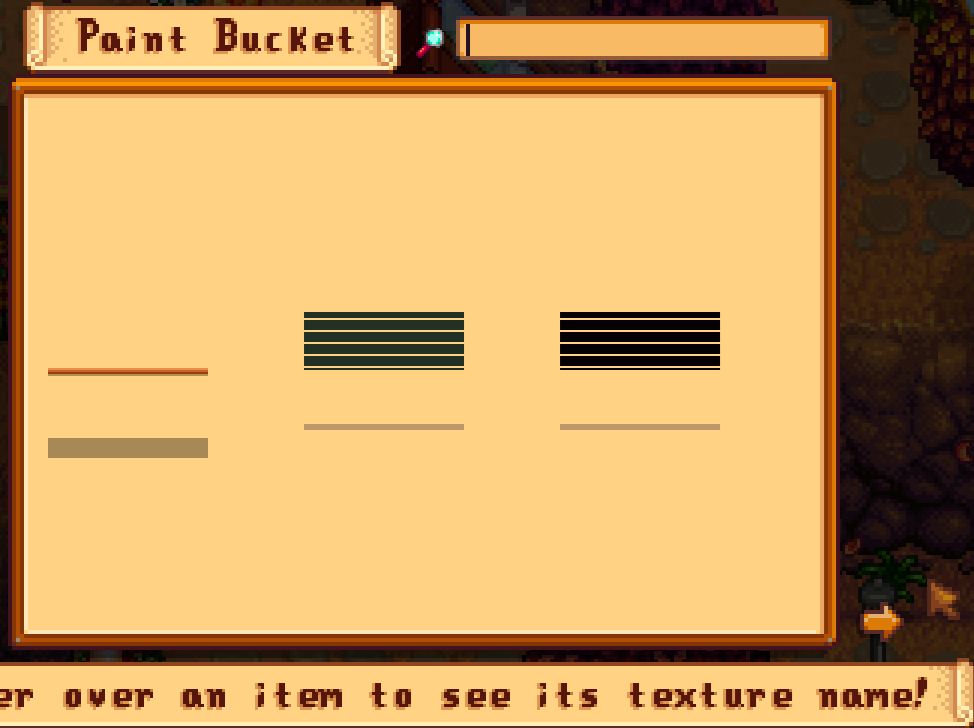
Someone else has the same problem and wrote that in the comments to the mod, but that was a year ago, and no one has replied to them 😦
The single brown line next to the green one is an AT mod that I made myself, using the same json format as the Hudson AT mod.
I didn't get any error messages in SMAPI
 leaden orchid
So, I'm having an issue, but I don't have a SMAPI log for it since the game (for some reason) isn't counting it as an error, but, a lot of my machines from Industrialization aren't working anymore with chests, and after checking the PFM Automate overlay, it isn't registering them as machines? Has anyone else encountered this kinda issue before? Is there a fix?
sharp moat
Even if it's not showing an error, sharing your log can still be helpful in identifying the problem
leaden orchid
wanton nymph
Could someone please try out this AT mod in your game? https://www.nexusmods.com...
also this! If I remember right this error is caused by an outdated sprite sheet not matching the new ones...? I remember reading it somewhere but I'm not 100%
leaden orchid
sharp moat
Even if it's not showing an error, sharing your log can still be helpful in iden...
I can dig through and get it. There's a lot of errors because of my modding situation, but I'll get back to you in a bit!
native dragonBOT
Can you upload your SMAPI log to https://smapi.io/log (see instructions on that page) and share the link here? Even if your game doesn't show any errors, logs are useful, and often necessary, for troubleshooting.
leaden orchid
I know that //wheeeze but I still gotta actually go and grab the file to upload it
and it's probably gonna take it a bit, due to the nature of my log, like I said
Here we go!
native dragonBOT
Log Info: SMAPI 3.18.6 with SDV 1.5.6 (build 22018) on Microsoft Windows 10 Pro, with 291 C# mods and 1559 content packs.
Suggested fixes: One or more mods are out of date, consider updating them
leaden orchid
fun fact about those "out of date" mods! They're not. I double-checked. The dusty one is 2.5.3. and all the other ones are also up to date. Pretty sure that's a manifest issue with those mods.
sharp moat
Yeah I dont really understand the technical stuff, just knew a log could help the poeple that understand this stuff 
leaden orchid
honestly I might go in and fix the manifest issue on my own so it'll stop nagging me about it
modern python
youre using vortex?
leaden orchid
modern python
youre using vortex?
Stardrop.
Why, is it saying I'm still using vortex? /genq
 lament vortex
honestly i think you should start by reinstalling your mods
modern python
yeah
leaden orchid
lament vortex
honestly i think you should start by reinstalling your mods
Start over from scratch and reinstall them, you mean?
lament vortex
considering the amount of errors u have, yes
leaden orchid
i think the amount of errors is just from the frankly insane amount of mods i have actually,, /lh
modern python
not really, a lot of these look like theyre not installed properly
at least in this leading section of errors
leaden orchid
ngl i know what most of those "vortex" mods are about. Most of them are actually empty so I just need to go in and clean them
Oh you know what. I wonder if the two "Industrialization" mods I just realized might be installed might be conflicting
 dry epoch
How do I solve this problem in smapi?
 lament vortex
!androidsmapi
native dragonBOT
Android SMAPI does not currently work for versions of SDV past 1.5.6.39. We do not know if or when it will be made compatible. It is not possible to downgrade to .39 through legal means so do not ask how to do this.
Mod support for 1.5 on Android is still experimental, so many mods are broken or buggy. That's often something SMAPI needs to fix, and we may not be able to provide a solution.
wanton nymph
leaden orchid
also this! If I remember right this error is caused by an outdated sprite sheet ...
do you know how I can find the new sprite sheet for the cabins? I tried google, but the sprite sheets that turned up are the exact ones the AT mods use.
 boreal fjord
Hopefully this is the right place to ask for help (I’m new here). I just got a PC and I’m trying to download mods to computer but I can’t find a gaming folder anywhere. I’ve tried redownloading, restarting, using the help guide. I played and saved the game first too.
lament vortex
where did you get the game from?
boreal fjord
Blue stacks
boreal fjord
Oh…
neat plaza
also why are you running the android version voluntarily on a pc?
boreal fjord
It let me play it
Cause that’s what google told me to use
So what do I play it on?
modern python
id strongly recommend going to steam, GOG, or game pass instead.
 high cairn
What type of PC do you have? Is it windows?
neat plaza
boreal fjord
So what do I play it on?
you should really use the pc version for pc
high cairn
Then either Steam, GoG or Gamepass
modern python
the ones i listed
neat plaza
leaden orchid
wanton nymph
do you know how I can find the new sprite sheet for the cabins? I tried google, ...
I think they should be in the game folder..? You have to unpack it, I think. I'm really not sure, sorry! I haven't tried to mod buildings yet!
wanton nymph
leaden orchid
I think they should be in the game folder..? You have to unpack it, I think. I'm...
if I understand the tutorial for unpacking the game files correctly, I can't re-pack them afterwards, and I don't want to risk destroying my game ;_;
leaden orchid
I don't think you have to worry about that! I unpacked mine and didn't experience any issues with that!
It creates, as far as I'm aware, a copy of the OG files
wanton nymph
leaden orchid
I don't think you have to worry about that! I unpacked mine and didn't experienc...
if you already unpacked yours, could you maybe send me the cabin files?
leaden orchid
I can try? do you want them through DMs?
native dragonBOT
See https://stardewvalleywiki.com/Modding:Editing_XNB_files#Unpack_game_files for instructions on how to unpack XNB files in order to edit the assets inside!
wanton nymph
leaden orchid
I can try? do you want them through DMs?
yes, that would be great, thank you! 🙂
leaden orchid
Do you want the cabin files or the house files? /genq
wanton nymph
leaden orchid
Do you want the cabin files or the house files? /genq
just the 3 cabin, the farmhouse AT works fine
wanton nymph
okay, so, the pngs you send me are the exact dimensions of the AT pngs
leaden orchid
Hmm
wanton nymph
which means that those lines at the AT cabins can't be because of the sprite sheets
leaden orchid
This might be something better asked in #making-mods-general tbf with you
wanton nymph
oh, but I'm not making mods, those aren't mine
 wind veldt
!androidcompat
native dragonBOT
An incomplete list of android compatible mods can be found at https://android.stardew.rocks. If you find a mod that isn't on there, submit it by following the instructions here.

A list of mods that are compatible with Android SMAPI.
leaden orchid
wanton nymph
oh, but I'm not making mods, those aren't mine
oh. Okay, gotcha
wanton nymph
and someone had the same problem as me over a year ago, with the Hudson AT mod
leaden orchid
but you're trying to fix the error yourself? /genq
wanton nymph
leaden orchid
but you're trying to fix the error yourself? /genq
yeah, because as I said, no one, including the creator, has answered that person over a year ago
what does genq mean?
leaden orchid
wanton nymph
yeah, because as I said, no one, including the creator, has answered that person...
Then yeah. Making mods will be more of a help for you than this channel
leaden orchid
wanton nymph
what does genq mean?
genuine question
This channel is usually for things like "Help I have a bug what do I do to patch it until it's patched out by the mod maker" not "Help I'm trying to fix the bug myself how do I do that"
neat plaza
wind veldt
!androidcompat
 crimson crag
hiii trying to figurer out why my grass isnt clover grass, i thinki another mod might be interfering cause it doesnt look like vanilla grass
native dragonBOT
Log Info: SMAPI 3.18.6 with SDV 1.5.6 (build 22018) on Microsoft Windows 10 Pro, with 15 C# mods and 25 content packs.
Suggested fixes: One or more mods are out of date, consider updating them
crimson crag
i have a screenshot of how it looks but i cant send here
gaunt gust
Content Patcher edited TerrainFeatures/grass (for the 'Yri's Retro Recolor' content pack
native dragonBOT
When two mods both edit dialogue or images, whichever mod loads last "wins" and is the one you see in the game. In order to change the load order of mods, you can add false dependencies, see here for details: https://stardewmodding.wiki.gg/wiki/Tutorial:_How_to_Add_a_False_Dependency_for_Load_Orders
scarlet quail
That or remove Yri's Retro Recolor
 lean star
they should really rename that command, no one ever thinks of loadorder
scarlet quail
That'll be the least of our problems soon Semisu
lean star
XD
scarlet quail
That release day being 10 days away is essentially the warning lights of "get off the ride now or suffer the consequences, whatever they may be"
lean star
I can already smell them coming "how do I make steam not update?"
scarlet quail
Or, in this respect, "are people going to think about false dependencies quickly post-modpocalypse?"
Oh those should already be here
What I'm not looking forward to is the revert back to 1.5.6 people
!revert is a thing but like
native dragonBOT
If you are looking to downgrade to 1.5.6 for the last working mods while people are updating their mods, please follow the following instructions:
- Install .NET 6 or later.
- Download the latest DepotDownloader release.
- Open a command prompt in the DepotDownloader folder.
- Run one of the following commands (replace
<username>/<password>with your Steam login, being prepared to enter a 2FA code if you have it enabled):
- On Windows:
dotnet DepotDownloader.dll -app 413150 -depot 413151 -manifest 5609262347030774375 -username <username> -password <password>
- On Linux:
dotnet DepotDownloader.dll -app 413150 -depot 413153 -manifest 5898757968212855302 -username <username> -password <password>
- On MacOS:
dotnet DepotDownloader.dll -app 413150 -depot 413152 -manifest 7794216274031597899 -username <username> -password <password>
- Launch Stardew Valley.exe in the downloaded folder.
scarlet quail
I ain't walking people through that
lean star
I love my GOG offline installers
lament prairie
I feel like the contents of the revert command would be better off as a section in the wiki
crimson crag
eurm where should i open the manifest.json file
modern python
like what program?
lean star
or which one?
crimson crag
yeah
modern python
notepad
modern python
}
crimson crag
i know but im more confused about the "third from the bottom" part
lean star
is that the one paragraph where they copied third although it's the second?
crimson crag
not sure
modern python
so go to the bottom of the file. theres a curly bracket on the bottom. then there will be one above it, thats "second from bottom". then the one above that will be "third from bottom"
lean star
the confusion with the instructions is that they mean third from the top in 2A, not bottom, and second from the bottom in 2B
crimson crag
WOIOOOO I GOT IT TO WORK
lean star
crimson crag
https://smapi.io/log/98e3d60fcd9742aeb96424bbbbff1167
as for your errors:
- remove SMAPI installer from the mods folder, it's not supposed to be there
- get this starry sky version instead of your xnb one https://www.nexusmods.com/stardewvalley/mods/15124
- ignore the cute valley error, messy code is messy, it will show for all seasons but winter
- Yomi's mod is a mystery to me
(didn't know - gets converted to bullet points)
I just noticed you have this very version of starry sky and it's throwing an error at the bottom let's see...
lean star
you know what, similar to cute valley, ignore it
the operation asks to copy a segment that starts at 960x/0y but the file itself is only 960 pixels wide...
 hushed cradle
Are there any stardew valley launch fixes that work with the smapi version?? I cant launch the game. Its not the mods fault bc I cant normally launch the base game either for some reason
 harsh ore
Does Stardew Valley Expanded work on Android now?🙏
scarlet quail
No and no
Well, the latter yes with the mobile patch from the Discord
But if you don't have success with that, no change
scarlet quail
hushed cradle
Are there any stardew valley launch fixes that work with the smapi version?? I c...
If you can't launch vanilla normally, then you're not gonna have a fix to play with mods either
I would try to solve the vanilla launch portion
!legacymodding in case you end up swapping to the compatibility branch
native dragonBOT
In some rare cases, you may need to use the compatibility branch in order to play Stardew Valley, but SMAPI does not run with the compatibility branch. See here for more information on why it happens and how to solve it: https://stardewvalleywiki.com/Modding:Player_Guide/Troubleshooting#SMAPI_doesn.27t_work_with_the_compatibility_branch
For help or more information, ask in #archived-modded-support
west sparrow
its the wedding day with SVE and im still waiting for it to load
 scarlet quail
west sparrow
its the wedding day with SVE and im still waiting for it to load
scarlet quail
west sparrow
its the wedding day with SVE and im still waiting for it to load
!log
native dragonBOT
Can you upload your SMAPI log to https://smapi.io/log (see instructions on that page) and share the link here? Even if your game doesn't show any errors, logs are useful, and often necessary, for troubleshooting.
scarlet quail
SVE doesn't affect the wedding like that
west sparrow
scarlet quail
SVE doesn't affect the wedding like that
idk just maried clair from SVE
lean star
bride got cold feet
scarlet quail
I also married Claire from SVE
She's one of my seven partners
I can tell you this is not SVE's fault
west sparrow
I can still hear the raim but I sold tons of stuff tday
scarlet quail
Log please
west sparrow
wdym
scarlet quail
... it shouldn't be raining
west sparrow
IK its not sdv
native dragonBOT
Can you upload your SMAPI log to https://smapi.io/log (see instructions on that page) and share the link here? Even if your game doesn't show any errors, logs are useful, and often necessary, for troubleshooting.
scarlet quail
SVE wouldn't change that fact
west sparrow
scarlet quail
wedding day is always clear
nope it hasn't shown the selling screen and it isn't the wedding day yet
west sparrow
scarlet quail
*Give the log*
how
west sparrow
oh
scarlet quail
Are you unable to see Governor's message?
If you are, then you should probably say something now
west sparrow
HOLY S**T u were right
 scarlet quail
yeah, that tracks
Now would you mind actually getting the log in the parser, and I don't want you copying and pasting anything
if you're copy and pasting anything you're doing it wrong
(I specify that because people constantly seem to copy paste instead of dragging the file into the parser)
(And I'm honestly worried that the delay allowed the log to become too large)
(But with only 22 mods it may still be fine)
west sparrow
scarlet quail
(But with only 22 mods it may still be fine)
yeah its SVE cjb cheets mod and the items mod
just bc I wana see everything there is to the game w/out having to spend hours unlocking it
scarlet quail
Understandable. Regardless, need the log to help here.
(And the longer we delay, unless you closed out of the game, the longer the log gets)
west sparrow
scarlet quail
(And the longer we delay, unless you closed out of the game, the longer the log ...
alr ima jut close it
Steam\steamapps\common\Stardew Valley\Mods
wrong spot
scarlet quail
Yep wrong spot
The error log is in appdata
if you're anywhere near your mods, you're in the wrong area for the log
Please follow the instructions on the log page
 long lynx
https://smapi.io/log/59e475d0be2441e0b938976a7b316d5b
So I am having a weird issue with my modded co-op save. When I try to craft multiples at a time, like shift clicking, it is using more of the materials than it should be. For example, trying to craft stepping stones which is 1 stone a piece, trying to craft 5 it is taking 9 stone instead of 5 stone.
I have no clue how to fix this and it is a bit frustrating.
native dragonBOT
Log Info: SMAPI 3.18.6 with SDV 1.5.6 (build 22018) on Microsoft Windows 10 Home, with 44 C# mods and 61 content packs.
Suggested fixes: One or more mods are out of date, consider updating them
scarlet quail
it's probably Balanced Valley, setra
Given that would be the most likely with balance changes, and
14:38:03    TRACE    SMAPI    Content Patcher loaded asset 'Data/CraftingRecipes' (for the 'Boogies Tidy Crafting' content pack).
14:38:03    TRACE    SMAPI    Json Assets edited Data/CraftingRecipes.
14:38:03    TRACE    SMAPI    Content Patcher edited Data/CraftingRecipes (for the 'Balanced Valley' content pack).
Did you answer my question? Also which mobile patch from Discord? 😲
neat plaza
!androidcompat
native dragonBOT
An incomplete list of android compatible mods can be found at https://android.stardew.rocks. If you find a mod that isn't on there, submit it by following the instructions here.
A list of mods that are compatible with Android SMAPI.
scarlet quail
Android SVE works with the mobile patch from SVE's Discord in most cases
But that's the only place that is at present. If the patch from there doesn't work, you're SOL
harsh ore
scarlet quail
But that's the only place that is at present. If the patch from there doesn't wo...
Well shit, the download link is down😫
scarlet quail
pretty certain it isn't
We're talking from Stardew Valley Expanded's discord
Not here.
 dawn ivy
hewwo, im trying to use the mobile phone mod to rewatch a heart event, how do so? its a heart event from another mod
neat plaza
harsh ore
Well shit, the download link is down😫
paste it in discord, somewhere and then download it from there
neat plaza
scarlet quail
pretty certain it isn't
(to be fair - it is, discord make links expire after 24h and links from before that don't work)
harsh ore
neat plaza
paste it in discord, somewhere and then download it from there
Can you download it, it still doesn't work me
🤔
harsh ore
neat plaza
are you sure if you click the link in here it doesn't work?
Yeah, all I get is this
 harsh ore
neat plaza
https://cdn.discordapp.com/attachments/1131892653148082196/1132722140689477685/S...
harsh ore
neat plaza
https://cdn.discordapp.com/attachments/1131892653148082196/1132722140689477685/S...
Thank you, that worked 🙏🙏
lean star
a mobile patch you can't download on your mobile? now that's some next level trickery 
misty ice
gaunt gust
SVE plans on being updated as soon as 1.6 drops
sorry for late response but will i have to download a new vers for 1.6 or will it be okay with what i already have
 quiet rover
#vanilla-tech-support message @neat plaza (to continue the conversation in the right channel)
what is this, https://github.com/anotherPillow/iridium, what can it do and how can i use it?

 quiet rover
neat plaza
https://pillow-just.uploaded-files.zip/d1OJZoGpXM
quiet rover
neat plaza
https://pillow-just.uploaded-files.zip/d1OJZoGpXM
ok so i can use the mod that i found online on my modded switch?
like nexus mods
neat plaza
what mod
quiet rover
neat plaza
what mod
well, my dream is to have a modded stardew valley gameplay with Stardew Valley Expanded
neat plaza
yeah that is not happening with the switch version lol
get the pc version, then either play on pc or run it on linux on the switch
quiet rover
neat plaza
yeah that is not happening with the switch version lol
sad, what can i do with the switch?
neat plaza
xnb mods
quiet rover
neat plaza
xnb mods
what are xnb mods? graphic only ones?
neat plaza
[[Modding:Using_XNB_mods]]
 jagged willowBOT
neat plaza
[[Modding:Using_XNB_mods]]
quiet rover
neat plaza
[[Modding:Using_XNB_mods]]
jagged willowBOT
neat plaza
[[Modding:Using_XNB_mods]]
quiet rover
neat plaza
[[Modding:Using_XNB_mods]]
to play good mods i need to buy the pc version, does linux goes well on switch?
neat plaza
eh
1.5.5/6 doesn't work, and some mods don't work
also annoying to get some mods to work bc arm
long lynx
scarlet quail
it's probably Balanced Valley, setra
I disabled the mod in my mod options to test that, but it wasn't the case. I was still experiencing the issue.
(edit: I could try removing the mod from my mods list and trying again)
It is indeed Balanced Valley, but I am unsure how to change the setting that affects it.
quiet rover
neat plaza
also annoying to get some mods to work bc arm
Sad, guess I will never play Stardew valley expanded
native dragonBOT
Log Info: SMAPI 3.18.6 with SDV 1.5.6 (build 22018) on Microsoft Windows 11 Home, with 227 C# mods and 1075 content packs.
Suggested fixes: One or more mods are out of date, consider updating them
 limber orchid
Hii, hoping I can get some help, I’m having problems with Artisan valley. It was working completely fine before, but when I was playing my save file today i noticed some of the items the machines produced were marked “???” when I took them out. I also can't put anything in any of the machines anymore. They’re still visible but it’s only giving me the option to eat whatever im holding. I’ve updated and deleted + redownload the mod and still, none of the machines are working. They’re also not showing any input recipes when I use lookupanything.

 night pawn
#images-and-memes message anyone know how to quit this mode?
modern python
press the U key
night pawn
modern python
press the U key
thankksssss ❤️
 native lotus
neat plaza
but without custom music and the 1.5.4 version
native lotus
neat plaza
but without custom music and the 1.5.4 version
Game runs fine on Linux I have a tutorial vid easy mode
native lotus
Idk is that a Nintendo switch thing?
neat plaza
yeah
native lotus
Looks like it's possible but which os are they using
neat plaza
..linux?
or do you mean what distro
 keen fjord
Hi everyone! I've been trying to fix my game for about a week but of course when I fix one issue, two more occur. I have almost 100 game errors on my SMAPI log and I'm having a really hard time fixing the issues. I'm running the game on Steamdeck (native Linux) and have been dealing with a lot of errors trying to get AT mods into my game - a lot of them fail when I paste them in. (Mill-ificent Collab, Aster's mods, etc.), The forageables in Boarding House also seem broken. Anyway, here's my SMAPI log. If anyone could take a look, I would greatly appreciate it! https://smapi.io/log/70d646af9d044855b53cd38f59948d87?Mods=game~MillerTime
native lotus
neat plaza
..linux?
or do you mean what distro
Yeah too bad I don't own a switch
 ruby cedar
Quick question: can your game bug out if you plant a lot of crops on your farm at once
naive drum
keen fjord
Hi everyone! I've been trying to fix my game for about a week but of course when...
It's likely that at least some of these are due to capitalization oddness
linux is real fussy about capitalization
the store ones, though, i have no idea...is that happening when you're in pierre's??
or - WAIT its market day/market town related
 keen ingot
I wanted to ask if anyone knows how to add the rich presence mod on stardew I kinda forogt
naive drum
so try reinstalling that mod, and if it's still broken afterwards send in a bug report
naive drum
keen ingot
I wanted to ask if anyone knows how to add the rich presence mod on stardew I ki...
https://www.nexusmods.com/stardewvalley/mods/2156 This one? Same as any other SMAPI mod - unzip, put in the Mods folder SMAPI made

Nexus Mods :: Stardew Valley
Shows your in-game state on your Discord profile.
keen ingot
yeah is that one I just forgot how to do all that process step by step 😭
Im getting back into stardew after I took a break from it
naive drum
Download SMAPI, unzip to anywhere that's on your PC (and not offsite storage like onedrive), run the Install on Windows.bat, follow the instructions, go to your Stardew Valley folder, download mod, unzip mod, put unzipped mod in the Mods folder
 onyx holly
does anyone have a min to mabye help me, my modded stardew (running SMAPI) worked fine until like an hour ago, when i loaded and it said sommat abt my mods and i was stuck in a cave, now i have no option to try to create a new game or load one, ive uninstalled and reinstalled smapi, reinstalled every mod, reinstalled SDV on steam
naive drum
!log
native dragonBOT
Can you upload your SMAPI log to https://smapi.io/log (see instructions on that page) and share the link here? Even if your game doesn't show any errors, logs are useful, and often necessary, for troubleshooting.
onyx holly
should i send u link direct or on the server?
robust bison
here
native dragonBOT
Log Info: SMAPI 3.18.6 with SDV 1.5.6 (build 22018) on Microsoft Windows 11 Home, with 38 C# mods and 19 content packs.
onyx holly
hope thats it lol