#archived-modded-support
1 messages · Page 143 of 1
 mild talon
 mellow fjord
i did
mild talon
And SMAPI goes where it needs to
mellow fjord
where do i put smapi
yes idk where it needs to be
like mods folder
or just game folder
or what
mild talon
@rich badger - says you need a Seasonal Cute thing for your SVE portrait
 rich badger
mild talon
<@438074547707838464> - says you need a Seasonal Cute thing for your SVE portrai...
rich badger
mild talon
<@438074547707838464> - says you need a Seasonal Cute thing for your SVE portrai...
eh?
I have it tho
weird
Maybe I missed it
mild talon
mellow fjord
where do i put smapi
I am confused. You ran the installer?
You did the steps for Windows or whatever OS you have (there's only 2 steps)
mild talon
rich badger
weird

 mellow fjord
can i go to a voice and screenshare so its easier?
mild talon
mellow fjord
can i go to a voice and screenshare so its easier?
Take a ss
mellow fjord
i have
mild talon
Share the ss here please
mellow fjord
 mild talon
1
mild talon
What happens when you hit 1?
mellow fjord
it says installed
then i launch stardew
then nothing happens
its vanilla stardew
mild talon
Where is your Stardew game.. is it not in C:Program Files... ?
 gaunt gust
!launchoptions
 native dragonBOT
If you're using Steam or GOG on Windows, you will need to set your launch options in order for Steam/GOG to automatically launch with SMAPI. The SMAPI installer will tell you what to set as the launch options when it completes (green text). You can find instructions (with screenshots) on how to do that here: https://stardewvalleywiki.com/Modding:Installing_SMAPI_on_Windows#Configure_your_game_client
 calm heron
atra faster than me
mild talon
Oh... I see. Yeah, do that ^
mellow fjord

nvm
i entered it wrong
a lot of my mods arent working though
some of my mods need different smapi do i need to download that as well or will having multiple break it
mellow fjord
native dragonBOT
Log Info: SMAPI 3.18.2 with SDV 1.5.6 (build 22018) on Microsoft Windows 10 Home, with 21 C# mods and 17 content packs.
mild talon
So you need SVE and the unofficial UI infosuite
The Get Dressed one is just done I'm pretty sure -86'd.
Nothing needs a different SMAPI.
!uiinfosuite
native dragonBOT
If you go to https://github.com/Annosz/UIInfoSuite2/releases, you can find UI Info Suite 2, which works with Stardew 1.5.5+. Download the first zip, not the source code.
 native dragonBOT
Log found, uploaded to: https://smapi.io/log/2ed4432c7f464b06adb5b8ec1a6701de
 trail pelican
Hello I have an issue. My game crashed at the end of the when it tried to save https://smapi.io/log/8cae324ae8b1465bb34be71afb0af27a
native dragonBOT
Log Info: SMAPI 3.18.2 with SDV 1.5.6 (build 22018) on Microsoft Windows 10 Pro, with 114 C# mods and 297 content packs.
Suggested fixes: Pytk isn't compatible with newer SMAPI performance optimizations, consider removing it, One or more mods are out of date, consider updating them
 queen nebula
native dragonBOT
queen nebula
native dragonBOT
Log found, uploaded to: https://smapi.io/log/cd1e05286e474b1cb645394b6dbe8f6d
mild talon
queen nebula
Help
Uh.. idk what the Admin thing is..
I'd reinstall SMAPI b/c you're missing the bundled mods (Error Handler most importantly
queen nebula
mild talon
Uh.. idk what the Admin thing is..
I'd reinstall SMAPI b/c you're missing the b...
I just reinstalled it
mild talon
What's the reason for Admin? I've heard that term tossed around but idk what it entails
queen nebula
I might have an idea, I just reset permissions to the hard drive by accident, it did it during a scan and repair.
But idk why Error Handler isn't isntalled
mild talon
Is it now w new SMAPI ?
and the 2nd log you posted called out Alternative Textures but in that log there are no mods installed
native dragonBOT
Log found, uploaded to: https://smapi.io/log/8fc49c14c6d64d599f337ec2ec177bdf
queen nebula
This is weird
It keeps moving on to another mod after I reinstall the one it has an rttot in
mild talon
I think we need more expert help here. Something must've.. happened when you did whatever you did to your hard drive
Like atra or someone. Idk who's around: t
mild talon
🙃
Can you get it to not be in admin mode?
Like, I don't know what that means tbh but I think it causes issues 🤔 😕
You have your reg Mods folder I'm assuming..?
It isn't loading w your SMAPI
and neither is Error Handler or the other 2 SMAPI mods
!Needanadult
mild talon
Do you use Steam? Maybe redo the path..
Folder: C:\Users\Admin\AppData\Roaming\Stardrop\Data
This one looks all weird to me.
Oh Stardrop.. maybe that's normal. IDK.
 scarlet quail
yeah let's start with where you got the game from. I'm assuming it's a mis-installed Stardrop thingy, but I don't know Stardrop
queen nebula
Yeah that's stardrop
mild talon
Where'd you buy your game from?
Just repeating the question. Idk the follow-up (unless you say pirate source lol
queen nebula
Steam
gaunt gust
Does it work without stardrop
queen nebula
gaunt gust
Does it work without stardrop
No it does not
gaunt gust
native dragon
Log found, uploaded to: https://smapi.io/log/cd1e05286e474b1cb645394b6dbe8f6d
@tired brook apologies for the ping, but for some reason for Jolly random mods will fail to load
queen nebula
The error for the specific mod fixes itself when I reinstall it but then it moves on to another
gaunt gust
Okay, try reinstalling everything
queen nebula
SMART?
gaunt gust
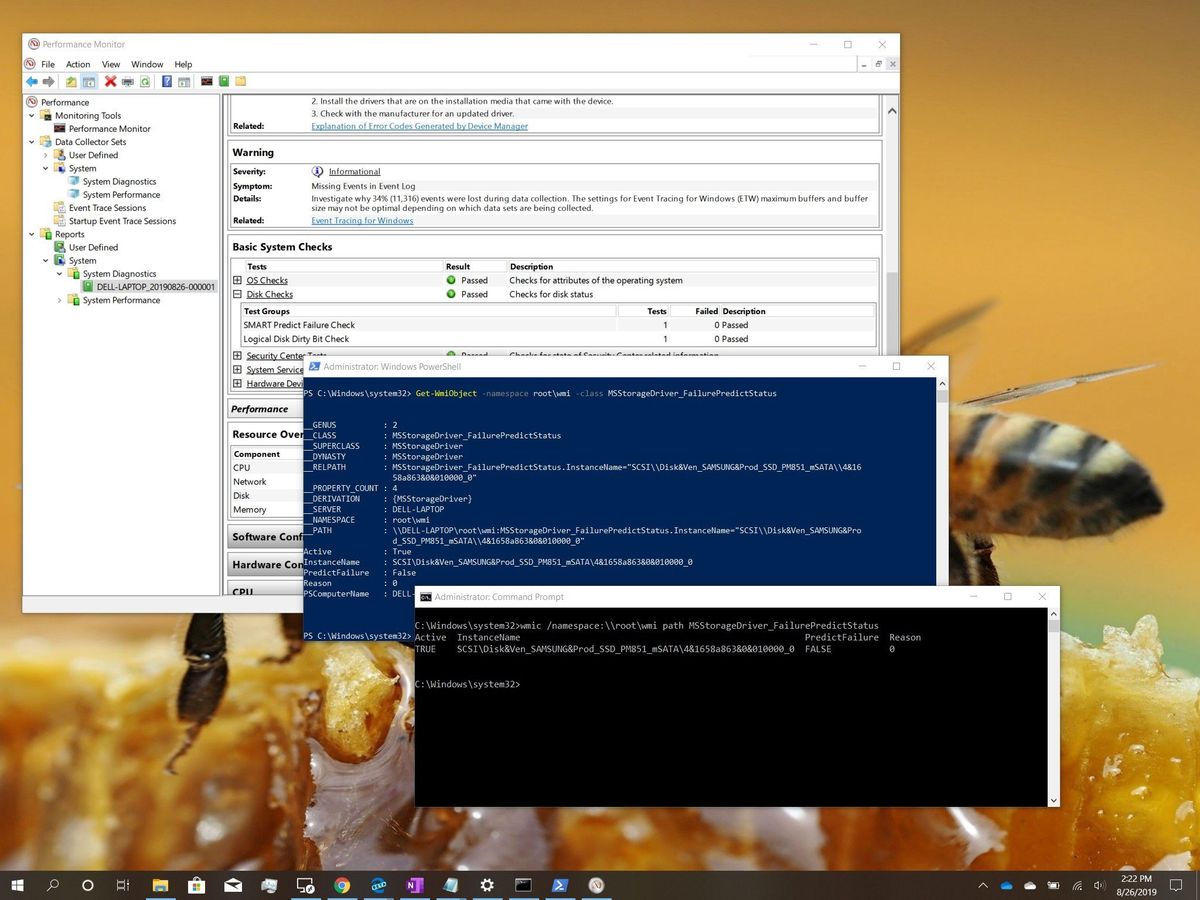
Windows Central
If your PC's hard drive is acting up, use these tools on Windows 10 to check the SMART data to find out if the drive is failing.
queen nebula
Huh
mild talon
It's not as crazy as it looks. I even did it!
queen nebula
Drive status says ok
And predictive failure is false
I just lost permission for a bit
mild talon
(What's up with these permissions. Is that for shared computers?)
queen nebula
mild talon
(What's up with these permissions. Is that for shared computers?)
The permissions for the external hard drive reset after I scan/repaired it
gaunt gust
Oh this is an external drive?
queen nebula
Yep
I checked the other apps and stuff and they work
Even the emulators
Damn it, I just wanted to farm again after working the whole week
mild talon
Adopt n Skin still hates me 
I don't know what this error means. but I think it might be from the MP debacle somehow...

my next idea to fix it is to sell off all my animals and pets... but I'd rather not unless it might actually help. Any clues from the knowledge-holders?
mild talon
it mentions stuff from the GitHub code of the mod itself. as if something is wrong inside of it. but i'm pretty sure the error started after I did the bad thing by loading it into a modded MP game with myself
 lament prairie
it tried to read something as a number but the thing wasn't a number
no idea what it's reading
mild talon
you mean "input string" ?
I also tried uninstalling and reinstalling, but it seems that unless it's a different version my computer/game will just give me the same mod back
queen nebula
So even the smaller mods like Bugnet are affected
native dragonBOT
Log found, uploaded to: https://smapi.io/log/4d50364f0ce64541bd6fd7a8b1d57207
mild talon
i think it's happening with All your mods, Jolly. none of them are loading.
IDK what this means, but it says BadImageFormatException (some of the others didn't say that.. the first log you posted said something about pintails)
mild talon
it definitely is... i think that's why they pinged pathos
 tired brook
It sounds like something modified or corrupted all the DLL files, if reinstalling them fixes it. Normally that error happens when loading a 64-bit DLL in 32-bit, but that shouldn't be an issue since SMAPI and the game are 64-bit.
 glass copper
its me again, im adding the same mods to my mom's pc so we can play but she hit some roadblocks too
native dragonBOT
Log Info: SMAPI 3.18.2 with SDV 1.5.6 (build 22018) on Microsoft Windows 10 Home, with 45 C# mods and 53 content packs.
queen nebula
All of them? This is gonna be hilarious
How come Error Handler isn't being detected?
I reinstalled Smapi
mild talon
glass copper
its me again, im adding the same mods to my mom's pc so we can play but she hit ...
You have two copies of NPC Fixes; delete one
lament prairie
the error handler thing is probably a side effect
the game is just super not happy
tired brook
@queen nebula SMAPI installs the default mods to <game folder>/Mods, but since you're using Stardrop it's loading mods from a separate custom folder using --mods-path "C:\Users\Admin\AppData\Roaming\Stardrop\Data\Selected Mods".
glass copper
oh hecc
lament prairie
it doesn't even get to the point of loading error handler
this is for jolly btw
no panic for squid
mild talon
glass copper
lolol im good
The last 3 things [in the red errors section] can go bye-bye too BTW
Maybe not Stardrop - idk what that's for here
glass copper
when i boot it up the smapi says walk the desert redux 1.3.1-alpha cant start bc (CP) and (JA) walk to the desert redux couldnt be loaded
queen nebula
tired brook
<@179000078369816576> SMAPI installs the default mods to `<game folder>/Mods`, b...
Got it. It's weird that the DLLs are fucked. So just reinstalling everything huh?
tired brook
Yeah, it sounds like you'll need to. Not sure how it happened though, so not sure if whatever caused it will happen again in the future.
lament prairie
glass copper
when i boot it up the smapi says walk the desert redux 1.3.1-alpha cant start bc...
did you remove the duplicate mod and boot up again? if so send new log
mild talon
(Aw Elizabeth is very tired too now)
tired brook
queen nebula
Got it. It's weird that the DLLs are fucked. So just reinstalling everything huh...
Might be good to do a full antivirus scan too, in case something malicious is modifying DLLs.
queen nebula
Will do
glass copper
idk if there's anything wrong with game bc i havent fully booted it up and started a file yet just wondering if anything is of alarm i guess https://smapi.io/log/1925061d16474e99aed28333e42a9f8c
native dragonBOT
Log Info: SMAPI 3.18.2 with SDV 1.5.6 (build 22018) on Microsoft Windows 10 Home, with 46 C# mods and 57 content packs.
glass copper
hush governor i know im murdering sv with mods
glass copper
yup yup
lament prairie
the three errors you get are like, shrug, you could clean up and make them go away
glass copper
i may or may not be back in the future because there's one more person we're tagging with us he just doesnt have internet yet so he can't download anything yet
the errors wont effect anything though?
lament prairie
nah they're just telling you about random clutter in your mods folder as far as I can see
glass copper
kay thank you again ❤️
queen nebula
OH WOW
native dragonBOT
Log found, uploaded to: https://smapi.io/log/b0193f49ff1340ff8b1d89c2091fbc76
 latent ibex
Hello yall - Im playing w BFAV (w the BetterFarmAnimalVariety 3.2.4-unofficial.kelvinrosa-mouseypounds-elbe unofficial update). My other BFAV mods work fine but Im having trouble w Regular Goose https://www.nexusmods.com/stardewvalley/mods/5888
Heres my SMAPI log: https://smapi.io/log/14659208f0804c58aef49e62fa2a6dce
Ive tried solutions from the posts w no luck (one says they asked discord and their smapi log link is outdated so I cant see their solution). I dont use the Animal Husbandry mod and get the same error when I delete the Animal Husbandry stuff

Nexus Mods :: Stardew Valley
Adds a regular white goose to Marnies shop via BVAF.
native dragonBOT
Log Info: SMAPI 3.18.2 with SDV 1.5.6 (build 22018) on Microsoft Windows 10 Home, with 97 C# mods and 277 content packs.
Suggested fixes: Pytk isn't compatible with newer SMAPI performance optimizations, consider removing it, One or more mods are out of date, consider updating them
queen nebula
Is there a way to get a mod list from STARDROP?
 mild talon
latent ibex
Hello yall - Im playing w BFAV (w the BetterFarmAnimalVariety 3.2.4-unofficial.k...
mild talon
latent ibex
Hello yall - Im playing w BFAV (w the BetterFarmAnimalVariety 3.2.4-unofficial.k...
What's the problem?
It's skipping the AHM part b/c you don't have AHM. The rest of it seems to load fine
Why do you have PyTK btw?
latent ibex
Some of my mods required it is there an alternative?? Ive been out of sdv for a bit coming back for a new playthrough
mild talon
Pytk is basically officially dead now. The mods requiring it should not anymore..
TMXL doesn't need it anymore
(It uses SpaceCore now I think)
Welcome back ! ;>
queen nebula
It's weird how it seems like only the Stardew Valley related stuff got corrupted
Even some of the mod folders are not useable now
lament prairie
 neon stump
try right clicking and opening? ive never used xnbcli tho
i always use stardew xnbhack
latent ibex
mild talon
What's the problem?
It's skipping the AHM part b/c you don't have AHM. The rest ...
In the window and that red error appears when I attempt to buy it, it happens even after deleting the AHM folder
 latent ibex
mild talon
Pytk is basically officially dead now. The mods requiring it should not anymore....
latent ibex
mild talon
Pytk is basically officially dead now. The mods requiring it should not anymore....
Oh so its safe to delete and the mods are okay omg Ill give it a try
 proven oasis
not sure if this is the right channel but i have a really basic qeustion. How would one go about looking at the code on pc? I'm not sure if I want to mod yet but Ii'd like to look a round at what makes the gaame tick.
mild talon
proven oasis
not sure if this is the right channel but i have a really basic qeustion. Ho...
For Stardew game itself? Maybe #vanilla-tech-support 🤔
gaunt gust
proven oasis
not sure if this is the right channel but i have a really basic qeustion. Ho...
!decompile
native dragonBOT
If you want to make SMAPI mods with C#, one important resource is decompiling the game to read the game code. Here's how to do it: https://stardewvalleywiki.com/Modding:Modder_Guide/Get_Started#How_do_I_decompile_the_game_code.3F
gaunt gust
(And if you have more questions, #making-mods-general is probably a better spot)
mild talon
Oh I misunderstood your question Captain
mild talon
latent ibex
In the window and that red error appears when I attempt to buy it, it happens ev...
Oh.. idk why all the text is ***. Is it a different language?
latent ibex
mild talon
Oh.. idk why all the text is ***. Is it a different language?
the mod does have a korean translation but its just one file to download so I think I got the right one
proven oasis
gaunt gust
(And if you have more questions, <#156109690059751424> is probably a better spo...
Thanks a bunch! sorry for being in the wrong spot-
latent ibex
mild talon
Pytk is basically officially dead now. The mods requiring it should not anymore....
Gonna try messing w goose again but damn looks like I have to get rid of these 2 !
 mild talon
latent ibex
Gonna try messing w goose again but damn looks like I have to get rid of these 2...
mild talon
latent ibex
Gonna try messing w goose again but damn looks like I have to get rid of these 2...
You could try asking Plato on the PyTK page about support for those. He might be able to help
 latent ibex
 dusky canyon
Fishing Trawler is being converted by PeacefulEnd
dusky canyon
Fishing Trawler is being converted by PeacefulEnd
This is good news!!!
latent ibex
mild talon
You could try asking Plato on the PyTK page about support for those. He might be...
Is this the correct page https://www.nexusmods.com/stardewvalley/mods/1726
latent ibex
mild talon
What's the problem?
It's skipping the AHM part b/c you don't have AHM. The rest ...
This is the log now that Ive deleted AHM folder issue still persists https://smapi.io/log/9740d77374d7482996a56c293733f0a4
native dragonBOT
Log Info: SMAPI 3.18.2 with SDV 1.5.6 (build 22018) on Microsoft Windows 10 Home, with 94 C# mods and 277 content packs.
Suggested fixes: One or more mods are out of date, consider updating them
trail pelican
Hello! I got an error where my game crashed at the end of the day. Not sure what exactly went wrong...
native dragonBOT
Log Info: SMAPI 3.18.2 with SDV 1.5.6 (build 22018) on Microsoft Windows 10 Pro, with 114 C# mods and 297 content packs.
Suggested fixes: Pytk isn't compatible with newer SMAPI performance optimizations, consider removing it, One or more mods are out of date, consider updating them
mild talon
latent ibex
This is the log now that Ive deleted AHM folder<a:potatothink:585759507725156364...
I think it may be b/c the Korean name is in the place where the English name would go (see ss) 🤔
Not 100%. But try changing that part to White Goose and see what happens
 latent ibex
Which file do I do that in
mild talon
Oh wait.. why's it say the animal name twice. Did you change something? Pretty sure there should be just one animal name. Maybe delete that Korean part then..
The content.json for the bfav animal pack
latent ibex
Ahh okay I see it
mild talon
I'm playing rn lol but here's a crappy ss example of a bfav pack I have that was translated from Portuguese
 latent ibex
Ohhh gotcha okay one sec!!
mild talon
latent ibex
Ohhh gotcha okay one sec!!
Oh.. I think that was wrong. This one's Goose has it twice too. So maybe just make them both English
They stand in for specific fields... it's listed in the animal/data on the stardew modding wiki page

Can't remember what's what now! One field is for translation names iirc. My geese do work in the shop tho
latent ibex
Ah dang I think I edited it wrong somewhere Ill try again
mild talon
Yeah, sorry. Bad example w rhe Ox. Forgot I had a Goose too
latent ibex
I think Im editing it wrong 😭
mild talon
Can you upload to the json validator on smapi.io and share the link?
Much easier to read. Can't read jsons on phone anyway I don't think
latent ibex
https://smapi.io/json/none/caad3d6e14d64838b7262908c3679a3b I hope this worked!!
 forest dragon
!androidsmapi
native dragonBOT
There is no working android SMAPI right now, after the mobile 1.5 release. No Android SMAPI means no mods on Android right now. ZaneYork, the developer of Android SMAPI, has said he will work on it when he has time. You can follow this Github issue for details, but please do not harass him or spam the Github. https://github.com/ZaneYork/SMAPI-Android-Installer/issues/246
When there is one, the instructions here will be updated: https://stardewvalleywiki.com/Modding:Installing_SMAPI_on_Android
forest dragon
😔
 toxic timber
i'm hoping someone can help... I have Ring overhaul and MARGO (prev. walk of life) and completely forgot about the bug with the slingshot having both mods because i never use the slingshot. I did the slingshot game at the fair and now none of my weapons do any damage at all on the one save file. Smapi log shows nothing about it, no errors. Is there any way to restore weapon damage or is that save just lost? (I've tried taking both mods out, sleeping to save game, error still exists. Guessing it changed something in the save file but i don't have any clue where/how to adjust to fix.) thanks sorry it's long.
lament prairie
have you tried trashing and respawning things with cjb?
toxic timber
yes. still no damage, just knockbacks.
native dragonBOT
See https://stardewvalleywiki.com/Modding:Player_Guide/Troubleshooting#Reset_your_content_files for instructions on resetting your game files! (This doesn't affect your save files.) You may also want to check this list of XNB > Content Patcher conversions (https://stardewvalleywiki.com/Modding:Using_XNB_mods#Alternatives_using_Content_Patcher) to see if there are already replacements for any XNB mods you may have been using :)
lament prairie
then spawn new ones
and you're 100% sure those two mods are gone?
you can check by sending a log
!log
native dragonBOT
Can you upload your SMAPI log to https://smapi.io/log (see instructions on that page) and share the link here?
mild talon
alright @latent ibex - itried editing it but i keep getting an error at the end and i'm stuck
can someone help end this json the right way please 
(oh yeah, BTW i cut off the last paragraph about force override stuff.. it wasnt in the example i was looking at. can put it back)
but the issue is now a punctuation thing.. one of the braces or curly bracket things.
calm heron
{} are called braces
curly brackets are more common though
toxic timber
here's the log. revalidating files and deleting/replacing items with spawner still didn't work. no damage. with any weapon
native dragonBOT
Log Info: SMAPI 3.18.2 with SDV 1.5.6 (build 22018) on Microsoft Windows 11 Home, with 109 C# mods and 315 content packs.
Suggested fixes: Pytk isn't compatible with newer SMAPI performance optimizations, consider removing it, One or more mods are out of date, consider updating them
toxic timber
the mods it says to update either have the wrong version key and are updated, or stopped working after the update (farmer to florist)
i'm pretty sure the issue is having RIng Overhaul and Margo, i can't find the specific post but they're incompatable due to changes to the slingshot, and because i never actually use the slingshot it didn't previously effect me. I was just dumb and tried the slingshot game at the fair because i forgot and now i suffer the consequences.
lament prairie
If you temporarily remove all@mods except error handler does it still happen?
 terse dirge
okay im coming back to this because i fell asleep half way through fixing it last time. I want to add portraits to my game but I only have the .png files for the portaits how do I make them a .xnb file instead so they work, I'l willing to replace the portaits and Ive tried just replacing them but ig it doesnt work that way because of how the files are? I'm really electronically dumb so please help
lament prairie
!xnb
native dragonBOT
XNB mods often break the game and are not recommended. See https://stardewvalleywiki.com/Modding:Using_XNB_mods for more info (and a list of Content Patcher alternatives), and https://stardewvalleywiki.com/Modding:Player_Guide/Troubleshooting#Reset_your_content_files to fix problems caused by XNB mods. For mod creators, see https://stardewvalleywiki.com/Modding:Editing_XNB_files for help unpacking & editing them (including for use with Content Patcher).
terse dirge
I understand that xnb isnt recommended and all that but I dont know where to start in terms of replacing the portrait files that I already have there without the game crashing
mild talon
You could reset your files and then Use CP
lament prairie
Me neither cause I don’t use xnb 
Might be easiest to pick a working CP mod and replace the portraits there
toxic timber
lament prairie
If you temporarily remove all@mods except error handler does it still happen?
still happens with everything gone but errorhandler
terse dirge
how would I do that
^ I mean I have a content patcher mod but it doesnt replace the xnb files so should I get a different content patcher?
 shy orbit
if it's a simple portrait replacer i could make the content patcher content pack if i can have the files
lament prairie
toxic timber
still happens with everything gone but errorhandler
I really don’t know what’s wrong at this point, and I also couldn’t find any posts about this issue when I looked at the mod pages
It’s probably in your save file at this point
But I don’t know how
toxic timber
i also can't find the post anymore that has the description of the problem, but it was something about the new WOL combat ability bushwhacker i think, and the ring overhaul iridium band, and something that the changed slingshot did, so if you have both, everytime you use the slingshot it reduces the damage on the weapons each time you shoot. So playing the slingshot game on the fairday nixed my damage to nothing. It's baked into my save file but i also don't know how to find/and or fix it.
I'll just have to start over and chalk that 70+ hours up for nothing
lament prairie
keep the save file around and if i have time later i'll see if i can figure out which value needs editing
toxic timber
thank you for all your help ❤️
terse dirge
what content patcher do I use to replace the xnb files?
 robust bison
huh
 heady stirrup
Can someone please take a look and tell me what I need to fix? https://smapi.io/log/70022c3343334413b3b60621f013722e#:~:text=https%3A//smapi.io/log/70022c3343334413b3b60621f013722e
native dragonBOT
Log Info: SMAPI 3.18.2 with SDV 1.5.6 (build 22018) on Microsoft Windows 10 Home, with 144 C# mods and 236 content packs.
Suggested fixes: Pytk isn't compatible with newer SMAPI performance optimizations, consider removing it, One or more mods are out of date, consider updating them
mild talon
heady stirrup
Can someone please take a look and tell me what I need to fix? https://smapi.io/...
Update your mods. Ditch pytk. Install Kelly's flower dance attire to use the flower dance fix mod
 dire fractal
hey i need help im trying to use the UI Info Suite mod but everytime i launch with smapi its says this "Found 1 mod with warnings:
[SMAPI] Skipped mods
[SMAPI] --------------------------------------------------
[SMAPI] These mods could not be added to your game.
[SMAPI] - UI Info Suite 2.0.0 because it's no longer compatible. Please check for a newer version at https://www.nexusmods.com/stardewvalley/mods/1150 or https://smapi.io/mods " and i have the most recent versions of both of them

Nexus Mods :: Stardew Valley
Provides helpful information about things around you designed to help you be aware of what's going on without feeling like you're cheating.
calm heron
!uiinfosuite
native dragonBOT
If you go to https://github.com/Annosz/UIInfoSuite2/releases, you can find UI Info Suite 2, which works with Stardew 1.5.5+. Download the first zip, not the source code.
dire fractal
native dragon
If you go to <https://github.com/Annosz/UIInfoSuite2/releases>, you can find UI ...
thx qt
mild talon
oh nos, Jorts' strings got all knotted up :<

I think i can try to fix it if I knew where it was.. the game day is 27 winter IIRC
and i got this mail error too. Does it need a space before the % or something ?

 edgy parrot
So I'm having this issue with my game UI changing place when I zoom in, and I'm not sure how to fix it or what's causing it
 latent ibex
mild talon
alright <@78985054134468608> - itried editing it but i keep getting an error at ...
latent ibex
mild talon
alright <@78985054134468608> - itried editing it but i keep getting an error at ...
Thank u for helping me I kept poking at it and was able to fix the string issue at the menu by deleting the Korean translation entirely but I still cannot purchase the Goose, heres my SMAPI https://smapi.io/log/d6aa10f31b8c4552b3dd42b9ed9b715b?Mods=game
native dragonBOT
Log Info: SMAPI 3.18.2 with SDV 1.5.6 (build 22018) on Microsoft Windows 10 Home, with 110 C# mods and 329 content packs.
Suggested fixes: One or more mods are out of date, consider updating them
latent ibex
Tmmr Ill try to figure it out and also name my first goose after u if I do get it hahaha
 near tree
Having trouble with figuring out if smapi is actually downloaded on my mac


seems like I have everything but I'm thinking it's because my mods folder or my start up isn't correct


 neat plaza
does smapi open
near tree
how do I check
neat plaza
!gettingstarted
native dragonBOT
If you would like a guide to setting up mods for Stardew Valley, check out the getting started guide! https://stardewvalleywiki.com/Modding:Player_Guide
near tree
the folder locations is confusing

the mods are in the MacOS folder
should I move them all to the content folder?
shy orbit
!log if the log shows that the mods are loaded then it's already in the correct location
native dragonBOT
Can you upload your SMAPI log to https://smapi.io/log (see instructions on that page) and share the link here?
shy orbit
(the log also shows where the Mods folder should be if it isn't there already)
 shy orbit
you need to launch smapi once for it to generate
on mac it should launch if you start the game the usual way as long as you have installed smapi
near tree
yeah thats the message I got for it
I have launched the game several times since downloading it
but hasn't shown up
shy orbit
try reinstalling smapi first i guess, steam could overwrite it
near tree
 shy orbit
so 1 to reinstall

 near tree
gaunt gust
This is the Ventura bug
near tree
gaunt gust
This is the Ventura bug
should i uninstall it
and try reinstalling it on iterm2?
gaunt gust
Dunno. I don't use mac
near tree
yeah cant open the game now cuz of the message
shy orbit
apparently setting .command files to open in iterm (or other alternative terminal emulators) can fix it https://stackoverflow.com/questions/74187734/launchpackager-command-can-t-be-opened/74244642#74244642

Stack Overflow
Just updated my Mac to the official release of Ventura, and I cannot launch my application via react-native run-ios.
Expected behavior:
running react-native run-ios will launch an Xcode simulator a...
near tree

still getting the message
maybe becausing the installing process makes me use the original terminal
even after setting it to the new one

im just double clicking on this
i ran the command in the second terminal and it installed fine
 twin pasture
having glitching issues with farmhouse (redesigned farmhouse), (left to right) idk what that stuff is near the stairs and the frame above doors glitches out with the farmhouse, also whenever i load in i need to go into MGCM to reload the doors otherwise i cant go through
 native dragonBOT
Log Info: SMAPI 3.18.2 with SDV 1.5.6 (build 22018) on Microsoft Windows 11 Pro, with 149 C# mods and 337 content packs.
Suggested fixes: One or more mods are out of date, consider updating them

 royal yacht
Hi, im currently experiencing some issues with my game
As of late (2-3 days) my modded game seems to crash the moment i press the Co-op button.
I've checked the log to see if there are any errors causing the crashes but apart from 3 out dated mods there is nothing out of the ordinary in the log.
I tried a clean install of the game but that didnt help either so im not really sure what should be the next cause of action
 glad quail
Hello! Smapi stopped working after steam update, is this just me or a common issue?:) help appreciated ❤️
it crashes before I even get to have the crash problem visible
neat plaza
what does it say
glad quail
i can try to find crash log, hold on, im not sure where to find it, it crashed before i get to read the smapi text in the beginning
shy orbit
!log (it should be where the logs usually are)
native dragonBOT
Can you upload your SMAPI log to https://smapi.io/log (see instructions on that page) and share the link here?
glad quail
willdo! (im bad at this stuff but i try)
where the logs usually are?
aha found it, wid some help
 trim basin
royal yacht
Hi, im currently experiencing some issues with my game
As of late (2-3 days) my ...
trim basin
royal yacht
Hi, im currently experiencing some issues with my game
As of late (2-3 days) my ...
can someone help?
glad quail
here is what it says
native dragonBOT
Log found, uploaded to: https://smapi.io/log/031aff6ca63848ddb12a73f6f05054cd
glad quail
man this sucks, i worked 3hours to make this work last week and I succeeded and now it crashes again after steam update argh
shy orbit
looks like a variation of this problem https://stardewvalleywiki.com/Modding:Player_Guide/Troubleshooting#NoAudioHardwareException:_Audio_has_failed_to_initialize
royal yacht
royal yacht
Hi, im currently experiencing some issues with my game
As of late (2-3 days) my ...
regarding my issue, i have a log just in case someone finds something that can help me
native dragonBOT
Log Info: SMAPI 3.18.2 with SDV 1.5.6 (build 22018) on Microsoft Windows 10 Home, with 33 C# mods and 55 content packs.
Suggested fixes: Pytk isn't compatible with newer SMAPI performance optimizations, consider removing it, One or more mods are out of date, consider updating them
 daring acorn
hellooo, i downloaded https://www.nexusmods.com/stardewvalley/mods/11491?tab=description but its not working. ive tried putting the unzipped file in the portrait file, then in the content folder, and then in the mods folder but it still wont work. help pls

Nexus Mods :: Stardew Valley
Dong's Harvest Moon-Inspired Portraits (Content Patcher)-Inspired Portraits.Cover SVE Ver! RSV Ver2.3! ES Ver!
 hoary bane
native dragonBOT
hoary bane
native dragonBOT
Can you upload your SMAPI log to https://smapi.io/log (see instructions on that page) and share the link here?
native dragonBOT
Log Info: SMAPI 3.18.2 with SDV 1.5.6 (build 22018) on Microsoft Windows 10 Pro, with 78 C# mods and 124 content packs.
Suggested fixes: Pytk isn't compatible with newer SMAPI performance optimizations, consider removing it, One or more mods are out of date, consider updating them
neat plaza
daring acorn
like even the folders in the content folder?
in the content folder
yes
!xnbzola
native dragonBOT
XNB mods often break the game and are not recommended. See https://stardewvalleywiki.com/Modding:Using_XNB_mods for more info (and a list of Content Patcher alternatives), and https://stardewvalleywiki.com/Modding:Player_Guide/Troubleshooting#Reset_your_content_files to fix problems caused by XNB mods. For mod creators, see https://stardewvalleywiki.com/Modding:Editing_XNB_files for help unpacking & editing them (including for use with Content Patcher). https://media.discordapp.net/attachments/156109690059751424/575085766426886145/ZolasFury.png
 daring acorn
Oh wait so should i j not use the mod
neat plaza
i was just using xnbzola bc xnb modding bad
it's not an xnb mod, why were you putting it in content
 neat plaza
what did it say
neat plaza
daring acorn
The desc said to
the first file is a CP mod
neat plaza
daring acorn
what abt the ones that arent
what ones
 neat plaza
they do in the corresponding mod's folder
daring acorn
sry wdym
mild talon
Nyapu's need to overwrite the pngs for the mods' original portraits
At least that's how it was for the ES portrait replacements
 radiant valve
Same for Mr Ginger
When checking the files for SVE and RSV it appears that they are the same
 thorny dawn
(hey anyone know why pierres shop suddenly is an endless loop of the same products and i dont have bean starters in it anymore?)
 elfin crystal
My stardew valley is currently failing to save and sleep to the next day, because (looking at terminal) there are null reference exceptions for StardewValley.ShipObjective.OnItemShipped. I really don't want to have to close the game, so is there any command I could copy paste right now to somehow clear shipped items?
see this
but repeated several thousand times
but not crashing, just perennially erroring
I've managed to reproduce this, on vanilla it just crashes
lament prairie
There’s no command right now to paste I’m pretty sure
You can go back a day and not ship anything but I’m not sure that that will help
Send an actual log link
!log
native dragonBOT
Can you upload your SMAPI log to https://smapi.io/log (see instructions on that page) and share the link here?
elfin crystal
oh I know exactly why this is happening
what happens is that when you have a full inventory and open a shipping bin and drop items out of the shipping bin, that crashes the game on sleep
or at least, I've managed to reproduce this by doing it like 5 times
(just now)
The real issue is that I have like 50 different items on the ground because I'm doing a no chests 6 slots challenge, and so I would lose a lot (of which I will probably use cheats to spawn back in but I can never know exactly what I've got on the floor)
lament prairie
O.on what do you mean by dropping items out of the shipping bin?
elfin crystal
mini-shipping bin
sorry
you can pick up the items in a mini-shipping bin, and then drop them out of the inventory by clicking high on the screen
which will apparently crash your game
lament prairie
Ah okay
Hmm
This is a problem I would have to read the game code to start taking guesses at
elfin crystal
i mean now that I know it exists it's fine
I just really want to not have to close the game right now to fix it
but if there's no console command to clear shipping or smth
 past sedge
hi im having trouble getting smapi to launch, i have it installed but it doesnt launch with my game could anyone help?
elfin crystal
lament prairie
This is a problem I would have to read the game code to start taking guesses at
oh I was just going to be like "dropping items out of the mini-shipping bin like this removes the item from it but doesn't clear the reference that says "you should ship an item at this location" and so then the game tries to ship a non-existant item and goes oh no"
 zinc flame
what does this error mean

 haughty token
not sure how to fix this
native dragonBOT
Log found, uploaded to: https://smapi.io/log/6c49e73d51164ad18cd08047a41b62c2
heady stirrup
mild talon
Update your mods. Ditch pytk. Install Kelly's flower dance attire to use the flo...
I really appreciate you looking - but I've had them for several playthroughs, with no crashes, so I don't understand why they'd be the culprit.
and I can't ditch pytk - i've got several mods that depend on it
twin pasture
twin pasture
having glitching issues with farmhouse (redesigned farmhouse), (left to right) i...
 somber loom
almost every mod that depended on pytk has removed that dependency, might be worth double checking some mod pages for updates
mild talon
Ya big changes. Planned obsolescence is basically here
 frozen sleet
im brand new to modding, ive never modded before, is there any mod that just overall changes the game while still allowing multiplayer?
somber loom
changes the game how?
literally every mod changes something and almost all of them are multiplayer compat
 worthy prawn
are most mods multiplayer compatible? i heard or rather thought that only a few mods worked with multiplayer?
multiple expansion mods alongside adding more animals, crops, etc would work multiplayer?
mild talon
!mpmods
native dragonBOT
See https://stardewvalleywiki.com/Modding:Player_Guide#Do_mods_work_in_multiplayer.3F for details on how mods work in multiplayer. :)
mild talon
^ this is the general guide
I knownfor a fact that NPC Adventures and Adopt n Skin are NOT mp compatible lol
And c# mods need to be the same for the most part. That's about all I know for mp.
 merry gale
could anyone help me with this error?0: i've never had this error before, i was playing a few days ago and everything was working fine.
 mild talon
merry gale
could anyone help me with this error?0: i've never had this error before, i was ...
mild talon
merry gale
could anyone help me with this error?0: i've never had this error before, i was ...
!log
native dragonBOT
@merry gale Can you upload your SMAPI log to https://smapi.io/log (see instructions on that page) and share the link here?
haughty token
could someone explain what i need to do to fix this?
native dragonBOT
Log found, uploaded to: https://smapi.io/log/d13b1c9bd3ba4a27904681cdc4f9c0a6
mild talon
native dragon
Log found, uploaded to: https://smapi.io/log/d13b1c9bd3ba4a27904681cdc4f9c0a6
Hmm.. something with CF possibly.
PyTK just had big updates to essentially end its life. CF shouldn't need it anymore. As well as other mods that depended on it, tho not all have been converted to a different <thing> yet
So IDK what 'key 32' is, but below that is a bunch of murmuring about furniture
merry gale
oh my bad, i think this is it now(?)
https://smapi.io/log/1d5a6ea2987142b2a0d13b0d54706e2c
native dragonBOT
Log Info: SMAPI 3.18.2 with SDV 1.5.6 (build 22018) on Microsoft Windows 10 Pro, with 0 C# mods and 0 content packs.
Suggested fixes: You don't have the Error Handler mod installed, reinstall SMAPI to get it
merry gale
i did just try re-installing smapi but it's still coming up with the same error
worthy prawn
mild talon
And c# mods need to be the same for the most part. That's about all I know for m...
alright much appreciated
mild talon
merry gale
i did just try re-installing smapi but it's still coming up with the same error
Your SMAPI install doesn't look like it went well. You're missing Error Handler and the other bundled mods.
I don't know what that error means 😕
---> PlatformNotSupportedException: MonoGame requires either ARB_framebuffer_object or EXT_framebuffer_object.Try updating your graphics drivers.```Did you.. try updating your graphics drivers ?
0.○ don't ask me how. May need a tech support person here to help
 low saddle
Hello! I was wondering if there is any possible way to safely mod Stardew valley on PS5. I started on switch and then started modding on my Mac but I’d like to play with mods on my newest console.
merry gale
i've not tried that and i have no idea how to ahrkjelms i'll try google around
 long brook
No modding for console
long brook
merry gale
i've not tried that and i have no idea how to ahrkjelms i'll try google around
!troubleshoot try search in this link
native dragonBOT
hey! Can I get you to run through this troubleshooting guide https://stardewvalleywiki.com/Modding:Player_Guide/Troubleshooting#Game_doesn.27t_launch? If none of the options there work, can you post the error message you get if you open SMAPI using the command line?
 lament vortex
merry gale
oh my bad, i think this is it now(?)
https://smapi.io/log/1d5a6ea2987142b2a0d13...
lament vortex
merry gale
oh my bad, i think this is it now(?)
https://smapi.io/log/1d5a6ea2987142b2a0d13...
!troubleshoot
native dragonBOT
hey! Can I get you to run through this troubleshooting guide https://stardewvalleywiki.com/Modding:Player_Guide/Troubleshooting#Game_doesn.27t_launch? If none of the options there work, can you post the error message you get if you open SMAPI using the command line?
lament vortex
oh
long brook
Also try reinstall smapi correctly
merry gale
long brook
!troubleshoot try search in this link
thank you both ! and i think i'm reinstalling it correctly. i remove the previous smapi file, then open it and reinstall it using the installer(?)
 silver sierra
Hey, has anyone expierienced a glitch that doesn't show certain chests from npcs and events? Like the boxes in the Volcano (including the one at the top), the SVE crate in the abandoned shed to fix it and the like?
long brook
merry gale
thank you both ! and i think i'm reinstalling it correctly. i remove the previou...
That's correct way. Make sure you type the game path correctly as this
C:\Program Files (x86)\Steam\steamapps\common\Stardew Valley
mild talon
silver sierra
Hey, has anyone expierienced a glitch that doesn't show certain chests from npcs...
It sounds like possibly a conflicting retexture mods thing. But we need more info. Log plz
zinc flame
how do i fix this?
 mild talon
zinc flame
how do i fix this?
mild talon
zinc flame
how do i fix this?
Idk that it needs fixing
Post full log.
What's happening in game re error
zinc flame
where do i find that
mild talon
!log
native dragonBOT
Can you upload your SMAPI log to https://smapi.io/log (see instructions on that page) and share the link here?
mild talon
Usually errors to fix are red, yellow, purple
Gray is just 🤖 stuff
Usually
But I have no context for that ss. R u still at the installing SMAPI part, lemon?
zinc flame
it says windows cant find the error log
mild talon
Have you installed SMAPI?
zinc flame
yes
mild talon
And run your game w mods. WY@
mild talon
zinc flame
it says windows cant find the error log
Show a Ss, plessd ?
zinc flame
 mild talon
Hmm.. that file path looks weird. That's the right one for your game?
Typically is Program Files 86 ....
zinc flame
thats what the website says
mild talon
Hm. Try to load the game again to get a new log 🤔
 rustic nexus
how do i fix this
 mild talon
rustic nexus
how do i fix this
mild talon
rustic nexus
how do i fix this
Mac?
zinc flame
still doesnt work
rustic nexus
yea
zinc flame
wlil uninstalling and resinalling the game keep my saves?
zinc flame
i have a folder for them anyways
rustic nexus
if youre connected to the steam cloud it will save them
rustic nexus
idk either, im new to this
yeah its a permission thing but i dont know where to find this stuff
mild talon
Try googling the error text ?
People post common problems often and sometimes can find solutions in forums
long brook
zinc flame
how do i fix this?
!troubleshoot under could not load file
native dragonBOT
hey! Can I get you to run through this troubleshooting guide https://stardewvalleywiki.com/Modding:Player_Guide/Troubleshooting#Game_doesn.27t_launch? If none of the options there work, can you post the error message you get if you open SMAPI using the command line?
lament prairie
.q 5906
 devout pumiceBOT
[#5906] "So, I realized where I messed up, I have restarted a few times and it is working consistently now. Following the steps on the wiki, I made a copy of the API file and renamed that and tht was when it wasnt working. All I actually changed was that the actually API file i renamed to Stardew Valley before making a copy to use as a shortcut. There was also 2 seperate files labeled just Stardew Valley both of which I changed to Stardew Valley - Vanilla . When these 2 things were done in tandem it began to function properly. Just wanted to put out there what actually worked in case someone else comes across it." - @celest lagoon (26 Mar 2022 @ 04:52:53 AM UTC)
devout pumiceBOT
[#6004] "Summary of the issue:
Other bash-script dependent software discussing the same issue:
https://community.localwp.com/t/macos-13-ventura-and-open-site-shell/33870/13
https://community.scripture.software.sil.org/t/macos-ventura-cant-launch-build-terminal/3353/2
According to them, it’s a bug in MacOS Ventura not setting the quarantine flag properly for actions originating in bash scripts. The relevant part of the OS being triggered is the 'System Integrity Protection', which is documented here:
https://support.apple.com/en-us/HT204899
Potential fixes:
-
Right click on
StardewModdingAPIorStardewValleyUnix executable files in your game folder to open the game. -
Click the info icon, then click the file path displayed in the alert. This will take you to the folder with the SMAPI launcher, and you should be able to launch the game from there. This may not enable Steam connection, and it make make the game much more unstable.
-
Install iTerm and set it to be your default Terminal. This is not optimal if you like using Terminal, but otherwise seems like a perfectly workable solution.
https://iterm2.com/ -
Temporarily disable System Integrity Protection. This is not a great solution, because it leaves your computer vulnerable, and you should absolutely not leave your computer in this state." - @lament prairie (10 Jan 2023 @ 06:27:58 PM UTC)
mild talon
^ There ya go. Thought it was one of those things
I still scroll past them but I know they exist
mild talon
A different fix than the one Liz posted?
rustic nexus
just need to open the smapi file manually everytime
i didnt read that yet
i think the second fix
mild talon
The first one was a typo quote command/irrelevant
(What is diff btwn Program Files and Program Files (86)? Where does 86 come from ? Wondering)
86 means 💀 to me
long brook
32 bit program installed in program files (86) by default
mild talon
I thought we were at 64 now 😕 what's that mean, Box?
And I have no sense for how those numbers go together lol. 32 and 86.. wha
long brook
Idk exactly how to interpret that but what I know is our OS aechitect is in 64bit and most app still build in 32bit i guess
 fluid granite
I've been trying to open my game but it says something about process exited. What does that mean?
native dragonBOT
Can you upload your SMAPI log to https://smapi.io/log (see instructions on that page) and share the link here?
mild talon
(Wow you're brand new! No color or icon yet. Welcome)
mild talon
long brook
Idk exactly how to interpret that but what I know is our OS aechitect is in 64bi...
Hmm.. OK. I'll try to mull it over
silver sierra
mild talon
It sounds like possibly a conflicting retexture mods thing. But we need more inf...
Thank you, I was able to figure it out, knowing it was a conflict. (Didn't have any conflict messages but it made sense in the end <333)
 tiny scaffold
Can anyone help me with modding? Im trying to download smapi and it doesnt work when i click install on windows in the extracted file. pls help me😭
worthy prawn
!gettingstarted
native dragonBOT
If you would like a guide to setting up mods for Stardew Valley, check out the getting started guide! https://stardewvalleywiki.com/Modding:Player_Guide
worthy prawn
maybe this helps:)
mild talon
tiny scaffold
Can anyone help me with modding? Im trying to download smapi and it doesnt work ...
Wdym by 'doesn't work'?
Try the guide. Or show us a SS/provide more details/context please
 worthy prawn
that isnt an error, i suggest you watch a youtube video or just go through the guide
follow what the console is asking and you'll be fine
mild talon
The guide is good. Step by step.
The SMAPI installer itself is 2 steps
long brook
Find the game folder. If you're on steam, right click sdv in steam library, click browse local file. Then try copy the game folder path
tiny scaffold
long brook
Find the game folder. If you're on steam, right click sdv in steam library, clic...
i bought it on xbox gamepass
long brook
!gamepasssmapi
native dragonBOT
Installing SMAPI for Gamepass requires extra steps. Please see the guide here https://stardewvalleywiki.com/Modding:Installing_SMAPI_on_Windows#Xbox_app
long brook
Try follow steps above
fluid granite
I've been trying for a while now but it says the file can't be found
tiny scaffold
fluid granite
I've been trying for a while now but it says the file can't be found
same
fluid granite
tiny scaffold
same
I can't find my errorlogs dawg
My game litterally will not open
literally*
tiny scaffold
im kinda stupid at computer stuff and everyones just saying look at the guide and i dont know what half of it means😭
fluid granite
tiny scaffold
im kinda stupid at computer stuff and everyones just saying look at the guide an...
I feel you
I've been looking up youtube guides but I'm still so lost
tiny scaffold
same bro
long brook
You guys might need someone with some computer knowledge to physically guides you through modding
 rare apex
hello do anybody help me with this:
"lost connection to the host server"
when i open a chest or i go to the mine, it take time or i crash
i got random crash too and when i want to come back to the coop game, i can't join it
 long brook
!log from all players
native dragonBOT
Can you upload your SMAPI log to https://smapi.io/log (see instructions on that page) and share the link here?
rare apex
native dragon
Can you upload your SMAPI log to <https://smapi.io/log> (see instructions on tha...
native dragonBOT
Log Info: SMAPI 3.18.1 with SDV 1.5.6 (build 22018) on Microsoft Windows 11 Professionnel, with 18 C# mods and 16 content packs.
Suggested fixes: One or more mods are out of date, consider updating them
 frosty hedge
How do I update the errorHandler mod which comes with SMAPI?
https://smapi.io/log/4cb332e27ab049ebb42460333a7696c4
Updating SMAPI doesn't lead to auto updating the ErrorHandler.
native dragonBOT
Log Info: SMAPI 3.18.2 with SDV 1.5.6 (build 22018) on Microsoft Windows 11 Home, with 43 C# mods and 1 content packs.
long brook
Uptaing smapi should add errorhandler again
frosty hedge
long brook
Uptaing smapi should add errorhandler again
I've tried doing that.
I don't understand where I'm messing up such that the ErrorHandler isn't updating.
long brook
The game path when install smapi is here?
D:\Program Files (x86)\Steam\steamapps\common\Stardew Valley
frosty hedge
Yes
long brook
Check again as your log says your game path contain Mods at the end of the path
 gusty sphinx
anyway to clear object data from a tile? a big craftable broke and won't let us interact with it anymore. can't remove, harvest, ect.
long brook
!rtf try use this?
native dragonBOT
Reset Terrain Features (https://smapi.io/mods/#Reset_Terrain_Features) is a mod that lets you reset, clear, or generate everything that spawns on a map using an in-game menu. That's especially useful when changing maps mid-save, as the debris will otherwise use the old layout (causing things like trees in the water or bushes blocking exits).
gaunt gust
gusty sphinx
anyway to clear object data from a tile? a big craftable broke and won't let us ...
bomb is pretty reliable
long brook
Oh i forgot about bombing craftable
mild talon
Smart Building helped me (@ voidslime)
When I dropped a thing w the early AeroCore and couldn't pick it up again
frosty hedge
long brook
Check again as your log says your game path contain Mods at the end of the path
Okay I copied SMAPI Mods (Console cmds, Errorhandler and save backups) into my \mod\FirstPlaythrough folder.
Solved according to log parser.
Ty
past sedge
hi im having trouble getting smapi to launch, i have it installed but it doesnt launch with my game could anyone help?
long brook
What OS and game store you use?
past sedge
windows and steam
long brook
!launchoptions
native dragonBOT
If you're using Steam or GOG on Windows, you will need to set your launch options in order for Steam/GOG to automatically launch with SMAPI. The SMAPI installer will tell you what to set as the launch options when it completes (green text). You can find instructions (with screenshots) on how to do that here: https://stardewvalleywiki.com/Modding:Installing_SMAPI_on_Windows#Configure_your_game_client
long brook
Already did that?
long brook
Can you screenshot what happen when you try launching game?
past sedge
it just launches as if smapi isnt installed
but it is
either that or its not installing properly
long brook
Can you share the launch option you type
I'm guessing you missed " and %command for the launch option
past sedge
 past sedge
long brook
I'm guessing you missed `"` and `%command` for the launch option
past sedge
long brook
I'm guessing you missed `"` and `%command` for the launch option
probably
long brook
Yup exactly
past sedge
okay ill add that
long brook
You need to do "..." %command
 elfin glade
ok i have a (possibly dumb) question. Is it possible to have one save that's modded and another that's not at the same time?
neat plaza
yes
elfin glade
oh that's a relief! i wanted to try multiplayer with friends but i have like 400 mods, so i didn't wanna be too hasty ^^;
thanks!
 high current
Hi! I downloaded this new mod but it looks a little different than the mods that i've been using/downloading. For example i cant extract it at all

its the most recent one
lament prairie
!unzip
native dragonBOT
Files with the extension .zip, .rar, or .7z are archive files, which you can extract to get the actual files inside. For a .zip file, just right-click (or long-press on Android) it and choose the option like extract or uncompress. For .rar and .7z, you need to install third-party software first, like 7-zip https://7-zip.org/ on Windows (get the x64 version), Keka https://keka.io/ on macOS, PeaZip https://peazip.github.io/ on Linux, or ZArchiver https://play.google.com/store/apps/details?id=ru.zdevs.zarchiver on Android.
zinc flame
long brook
!troubleshoot under could not load file
i tried every method and nothing works
ima try downloading smapi again idk
i found the problem!
stardew valley was on my d disk, not my c disk
 exotic raptor
Hello! I need help with my stardew, I'm not exactly sure whats wrong, it was working fine several days ago and suddenly broke? everything was updated and fine, but now I cant load into saves or make new ones, I even tried by taking all my mods out and still kicked me onto home screen (sorry if this is the wrong chatroom)
robust bison
exotic raptor
Hello! I need help with my stardew, I'm not exactly sure whats wrong, it was wor...
!log
native dragonBOT
@exotic raptor Can you upload your SMAPI log to https://smapi.io/log (see instructions on that page) and share the link here?
 nimble shell
Can i get achievments with mods on steam ?
nimble shell
How ?
exotic raptor
https://smapi.io/log/65354a5f40b64d148fc0f5dd84dd87b8 heres the log
native dragonBOT
Log Info: SMAPI 3.18.2 with SDV 1.5.6 (build 22018) on Microsoft Windows 10 Home, with 12 C# mods and 12 content packs.
Suggested fixes: One or more mods are out of date, consider updating them
native dragonBOT
If you're using Steam or GOG on Windows, you will need to set your launch options in order for Steam/GOG to automatically launch with SMAPI. The SMAPI installer will tell you what to set as the launch options when it completes (green text). You can find instructions (with screenshots) on how to do that here: https://stardewvalleywiki.com/Modding:Installing_SMAPI_on_Windows#Configure_your_game_client
exotic raptor
i dont think the update will fix it.. as i uninstalled the mod and it still wouldnt load the game
nimble shell
ty
gaunt gust
exotic raptor
https://smapi.io/log/65354a5f40b64d148fc0f5dd84dd87b8 heres the log
!reset
native dragonBOT
See https://stardewvalleywiki.com/Modding:Player_Guide/Troubleshooting#Reset_your_content_files for instructions on resetting your game files! (This doesn't affect your save files.) You may also want to check this list of XNB > Content Patcher conversions (https://stardewvalleywiki.com/Modding:Using_XNB_mods#Alternatives_using_Content_Patcher) to see if there are already replacements for any XNB mods you may have been using :)
exotic raptor
gaunt gust
!reset
thank you so much! It works again :)
latent ibex
RE: Regular Goose
I tried doing what previous posts on the nexusmods page said and searched posts in this discord about Regular Goose but I still couldnt get it working
If anyone can help figure this out Id be so grateful 😭
#archived-modded-support message
 velvet pilot
!androidsmapi
native dragonBOT
There is no working android SMAPI right now, after the mobile 1.5 release. No Android SMAPI means no mods on Android right now. ZaneYork, the developer of Android SMAPI, has said he will work on it when he has time. You can follow this Github issue for details, but please do not harass him or spam the Github. https://github.com/ZaneYork/SMAPI-Android-Installer/issues/246
When there is one, the instructions here will be updated: https://stardewvalleywiki.com/Modding:Installing_SMAPI_on_Android
robust bison
velvet pilot
!androidsmapi
 jagged vale
i think some of the custom furniture i downloaded is making my game crash, even though on previous days i was able to place it down and play perfectly fine im not really pressed about removing them from the mod folder but will it negatively affect my save file if i do
dire fractal
Hi is anyone using way back pelican town museum expansion and vibrant pastoral recolor because as the author said I downloaded the WBPT compatibility pack but it still show the museum weirdly separated
nimble shell
Can i still get game cards on steam ? cuz i didnt get any ? in modded ofc
mild talon
dire fractal
Hi is anyone using way back pelican town museum expansion and vibrant pastoral r...
didn't Museum Expansion jsut get a few updates? that could change stuff potentially
if thre WBPT compat was made a while ago
dire fractal
I’m not sure that why I wanted to know if someone else got it because for some people it does work
long brook
nimble shell
Can i still get game cards on steam ? cuz i didnt get any ? in modded ofc
If you mean steam card
https://www.reddit.com/r/StardewValley/comments/5r3gwn/how_to_get_the_trading_cards/
thorny dawn
lewis has asked me what my birthday is every day this week in stardew
mild talon
he forgets a lot
thorny dawn
and green beans and kale are missing from pierres shop (although it has stopped infinite scrolling)
im squinting at my mods trying to figure out which ones broken
hmmmm happy birthday mod can update so maybe thatll fix it but the missing items is still weird
“okay spring 11! i’ll remember that!” i have a feeling you wont lewis
 vast sonnet
Anyone ever hadd issues with smapi console telling you there is an existent crash log, but you can't find it?
 native dragonBOT
Can you upload your SMAPI log to https://smapi.io/log (see instructions on that page) and share the link here?
calm heron
?
vast sonnet
I looked in the appdata folder and there is a SMAPI latest, but no error log
So I'm not sure why I get that prompt EVERYtime I boot the game 😦
robust bison
that is the log
mild talon
it's just taunting you
 dapper gazelle
(FTR usually when the game crashes, there is a separate crash log)
lament prairie
For the record
 regal hatch
So I’ve been off stardew for a while (back on a sims hype) I’ve come back recently and updated everything I could. The problem is rn Everything’s telling me lots of things are using deprecated code along with telling me PYTk is going to cause issues. Can anyone help please?
I’m not sure if it’s going to be game breaking
native dragonBOT
SMAPI 3.18.0 raised deprecation levels to the final stage, meaning SMAPI will now show yellow warning dialogues for mods with deprecated code. For the user, this just means that the mods have old code and will break in SMAPI 4.0 if they are not updated - it is not anything to worry about at this time. (For mod authors, it's a not-nice warning to update your code already! )
regal hatch
Ahhh thank you so much! I’ve been worried that something will break!
I don’t know how modders do it honestly!
vast sonnet
robust bison
that is the log
Even if I delete that log, and make sure ErrorLogs is completely empty, I still get the warning about a existing crash log.
Weirdest thing I've ever run into, I blame MO2 somehow, but I haven't figured out what it is doing.
lament prairie
@toxic timber If you use lookup anything on the weapons in your broken save, similar to the attached screenshot, does it show the same stats (this is galaxy sword, I can check any other sword if you need)

The other question i have is if you open up the save (ideally in notepad or the simplest text editor you have, it's fucking massive) and search for attackincreasemodifier, you should have 4 instances, in pairs. what are the numbers between those?
I'm using TextEdit and it's just barely handling a search fwiw, so you might need some patience with your text editor
It might only be in there twice, i forgot i think i set up this save for mp
weaponPrecisionModifier might also be good to check
toxic timber
just got home from work let me check
 dreamy quiver
Hello, excuse me, but I'm having some troubles with my game crashing every time I try to move furniture, can someone help me?
lament prairie
Probably uninstall CF, the latest version is wonky
 golden pecan
I'm playing on my mac and I just downloaded fashion sense with rural outfiter but there are a lot of things missing. I tried downloaded the mods again but it came out the same. Is there a way I can fix it?
golden pecan
no things like hair and accessories such as hats
lament prairie
what do you mean by hair?
like you expect to see a specific hair?
and it's not there?
golden pecan
I can pick hairstyle with the mod right?
lament prairie
which hair?
golden pecan
I don't have any available at all
lament prairie
you can pick fashion sense hairs with the mod
did you install any FS packs that add hairs?
if you want to be able to pick from the vanilla options, you need a mod for that
toxic timber
the level and stuff is a little different, may be because of SVE or something. Gonna dig into the save files now
 lament prairie
huh, so the weapon itself is normal
pretty sure that's reflecting minDamage and maxDamage
so that rules out one possible cause of lack of damage
golden pecan
lament prairie
did you install any FS packs that add hairs?
i downloaded the first one that popped up on nexus mod
native dragonBOT
Can you upload your SMAPI log to https://smapi.io/log (see instructions on that page) and share the link here?
toxic timber
oh. this seems... probably not great number <attackIncreaseModifier>-3.4999988</attackIncreaseModifier>
toxic timber
the other one is zero
lament prairie
start by making a copy of your save
just in case
and then edit that number to 0
I think 0 is the default
I saw 0 and 0.1 in my save for the host and a farmhand
not sure offhand why
gaunt gust
toxic timber
oh. this seems... probably not great number <attackIncreaseModifier>-3.4999988</...
Use lookup anything on your farmer
native dragonBOT
Log Info: SMAPI 3.18.2 with SDV 1.5.6 (build 1.3.37.0) on macOS Unix 13.0.0, with 6 C# mods and 4 content packs.
gaunt gust
See if anything is up
lament prairie
I tried LA on farmer
did not get that stat
Idk if I didn't toggle the right things
gaunt gust
Really, not even in data dump?
gaunt gust
golden pecan
https://smapi.io/log/7f2ce4f7559041828740534997e6575e
Just to confirm: you are using the hand mirror yes?
lament prairie
golden pecan
https://smapi.io/log/7f2ce4f7559041828740534997e6575e
you have no hairs installed in FS
none of your 3 packs adds hairs
golden pecan
how do I install that?
lament prairie
what hair do you want?
Here's some I like: https://www.nexusmods.com/stardewvalley/mods/10294
https://www.nexusmods.com/stardewvalley/mods/14970 but there's all kinds of FS packs out there
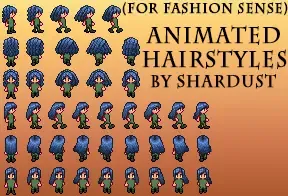
Nexus Mods :: Stardew Valley
Animated Hairstyles for Fashion Sense. Some are new, some edited from the game files, some taken from my other hair mod.They are colorable like vanilla hair (through FS).Requires the

Nexus Mods :: Stardew Valley
This mod adds several hairstyles using the Fashion Sense framework
golden pecan
thank you so much!!
 graceful yacht
Would anyone know how to get the moonlight jellies event to play? Does it have an event id?
lament prairie
it's a festival
graceful yacht
The main event I mean, sorry
lament prairie
you can use the debug festival command to make it start but it might cause wonkiness
oh, i don't think you can trigger it outside of the festival
i don't know of a way offhand
gaunt gust
Easier to just hop to the night before and sleep in, then flip the time to 10pm
Then warp
lament prairie
when i tested my festival event, which was based on that event, i just slept into the day, debug festival summer20, and then it worked
graceful yacht
My friend was testing my mod and somehow shut off Lewis’s dialogue to start the actual event part
graceful yacht
My friend was and I accidentally broke it for her ☹️
graceful yacht
Alright, I’ll let her know. Thank you!
lament prairie
okay, i was using LA wrong xD
I do get all that with data dump mode on
But Vesheth's problem is that they installed an incompatible set of mods and it broke the farmer stat
the way sometimes magnetism gets borked
so I think save editing is the only fix for that
Looks like it should be 0 unless you're currently wearing a ring that boosts attack?
from a quick trawl of the code
 left garnet
Hey, so I;m trying to install SMAPI, but the window for the bat file closes right after opening, and if i run as admin i get the error "The system cannot find the path specified."
toxic timber
@lament prairie I'm loading in to see if it fixed
THAT WAS IT!!!! you're a rockstar and my fave save is fixed!!!
thank you so much for helping ❤️

left garnet
Never mind, figured it out
calm heron
hit the color waffle icon on the right
 median mural
hello! im trying to download stardew valley expanded and it wont load even though i have everything i need downloaded, any tips for how i could get it working?
long brook
Does smapi launch before the game?
median mural
yes
long brook
!log
native dragonBOT
Can you upload your SMAPI log to https://smapi.io/log (see instructions on that page) and share the link here?
median mural
native dragonBOT
Log Info: SMAPI 3.18.2 with SDV 1.5.6 (build 22018) on Microsoft Windows 11 Home, with 5 C# mods and 0 content packs.
 wooden thorn
hello i'm currently soft locked in my game.
the 14 heart event with elliott is finishing and I have tried rebooting my game but I keep waking up at the door (which has happened on some occasions but has never been a problem until now) and Elliott will say "I'm home!" and then I'll start walking endlessly into the wall of the doorway
 wooden thorn
will it work during cutscenes
lament prairie
yeah
gaunt gust
wooden thorn
hello i'm currently soft locked in my game.
the 14 heart event with elliott is...
if you haven't closed the game yet type debug warp farm into the black smapi console
gaunt gust
oh, noclip works better in general, the debug command is just for if you
wanted to get immediately unstuck
wooden thorn
ohh okay
gaunt gust
(among other things, your inventory is missing if you do that; it doesn't reappear until you get into another event)
wooden thorn
noclip worked, thank you
native dragonBOT
Log Info: SMAPI 3.18.2 with SDV 1.5.6 (build 22018) on Microsoft Windows 11 Home, with 43 C# mods and 24 content packs.
Suggested fixes: Pytk isn't compatible with newer SMAPI performance optimizations, consider removing it
 wraith shuttle
Also whats paradigmnomad.morefood?
robust bison
more food
wraith shuttle
These mods could not be added to your game.
18:44:18 ERROR SMAPI - Artisan Valley Machine Goods 3.0.21 because it requires mods which aren't installed (mizu.flowers, paradigmnomad.morefood, ppja.moretrees).
18:44:18 ERROR SMAPI - (PFM) Artisan Valley 3.0.21 because it needs the 'Artisan Valley Machine Goods' mod, which couldn't be loaded.
18:44:18 ERROR SMAPI - (CP) Artisan Valley 3.0.21 because it needs the 'Artisan Valley Machine Goods' mod, which couldn't be loaded.
18:44:18 ERROR SMAPI - (MFM) Artisan Valley Letters 3.0.21 because it needs the 'Artisan Valley Machine Goods' mod, which couldn't be loaded.
18:44:18 ERROR SMAPI - (PFM) Cannabis Kit - Artisan Valley Add-on 2.0.3 because it needs the '(PFM) Artisan Valley' mod, which couldn't be loaded.
18:44:18 ERROR SMAPI - SMAPI-3.18.2-installer\SMAPI 3.18.2 installer because the SMAPI installer isn't a mod (you can delete this folder after running the installer file).
18:44:18 WARN SMAPI Changed save serializer
robust bison
that's already in the log
wraith shuttle
OK looks like my lack of greenhouse and shad, were just a weird fluke with something going on with that particular, save for whatever reason
 stark moat
sorry to bother, i kinda got the game recently and im planning to play modded in the future. If i dowload the SMAPI and the game updates, i need to also update the mod loader?
 solar quail
hi guys my friends game closes the connection when going the bottom part of the map. it works fine when she hosts. we made sure we had all the same mods and that they were installed correctly. smapi is not giving and error sos
 brazen mortar
Pretty sure this is specifically ARV but the event I need to have seen is blank, but it also won't trigger...

 crude temple
okay so this problem arose the other day but i wasn't able to post a log because of work and life stuff so i would really appreciate any help i can get on this. i have never experienced crashing like this with smapi but it only happens around 9pm in the day has not let me progress past the day at all. pls help. here is the link the log parser is asking me to send.
native dragonBOT
Log Info: SMAPI 3.18.2 with SDV 1.5.6 (build 22018) on Microsoft Windows 10 Home, with 47 C# mods and 45 content packs.
Suggested fixes: Pytk isn't compatible with newer SMAPI performance optimizations, consider removing it
 topaz matrix
crude temple
okay so this problem arose the other day but i wasn't able to post a log because...
topaz matrix
crude temple
okay so this problem arose the other day but i wasn't able to post a log because...
Child to npc is causing the issue delete it.
crude temple
so theres no way to fix the issue and keep the mod? :( i'm fine with deleting it too tho
topaz matrix
crude temple
so theres no way to fix the issue and keep the mod? :( i'm fine with deleting it...
Is the mod that uses child to npc have a new version for the mod little npcs
The mod little npc is a better version of child to npc
crude temple
thank you sm!!! ❤️
 latent haven
hi guys i have seasonal outfits installed, sve included and i want to install the talkohooeys seasonal portraits, i added them into my folder but it does nothing so maybe someone can help me? ;-;
sorry i havent installed any portrait mods before
 celest plover
is there a way to play the steam version of sdv on the phone and use PC version of smapi
 swift holly
Game won't save at the end of day and crashes. Error looks like it has something to do with preparing the spouse for wedding: https://smapi.io/log/112c4d54d8a34283b3e9b09206022092
Additional info: Playing on multiplayer, not host. Asked Apples to move in a few days ago. Attended Luau, went to sleep and game crashed. Host slept past Luau day and still crashed at next attempt to save.
native dragonBOT
Log Info: SMAPI 3.18.2 with SDV 1.5.6 (build 22018) on Microsoft Windows 10 Home, with 14 C# mods and 7 content packs.
lament prairie
celest plover
is there a way to play the steam version of sdv on the phone and use PC version ...
no
lament prairie
latent haven
hi guys i have seasonal outfits installed, sve included and i want to install th...
send log
!log
native dragonBOT
Can you upload your SMAPI log to https://smapi.io/log (see instructions on that page) and share the link here?
 sharp hazel
[UI Info Suite 2] ShowRobinBuildingStatusIcon: Could not find Robin spritesheet.
any ideas on how I could fix this?
and what it means?
lament prairie
swift holly
Game won't save at the end of day and crashes. Error looks like it has something...
did you do something funny when getting married
wait is apples a roommate or a spouse?
public static void prepareSpouseForWedding(Farmer farmer)
{
    NPC characterFromName = Game1.getCharacterFromName(farmer.spouse);
    characterFromName.Schedule = null;
    characterFromName.DefaultMap = farmer.homeLocation.Value;
    characterFromName.DefaultPosition = Utility.PointToVector2((Game1.getLocationFromName(farmer.homeLocation.Value) as FarmHouse).getSpouseBedSpot(farmer.spouse)) * 64f;
    characterFromName.DefaultFacingDirection = 2;
}``` one of these things is borkedi can't tell offhand which
lament prairie
sharp hazel
```ini
[UI Info Suite 2] ShowRobinBuildingStatusIcon: Could not find Robin sprit...
no idea, send full log
sharp hazel
lament prairie
no idea, send full log
Uh...
How do I do that? That popped up while the game was active and as I tried to toggle it on again
sharp hazel
it's supposed to be on by default and no errors showed up when launching it
native dragonBOT
Can you upload your SMAPI log to https://smapi.io/log (see instructions on that page) and share the link here?
lament prairie
was it in the game or was it in the black window
 lament prairie
send full log then, see website instructions
native dragonBOT
Log Info: SMAPI 3.18.2 with SDV 1.5.6 (build 22018) on Microsoft Windows 11 Home, with 9 C# mods and 3 content packs.
sharp hazel
I was annoyed waiting for shane lol
lament prairie
idk it might be getting hung up on portrait mods, but likely this is a harmless warning
sharp hazel
Wanted those cute blue chickens
sharp hazel
lament prairie
idk it might be getting hung up on portrait mods, but likely this is a harmless ...
But the little icon at the top right doesn't show up anymore when it's supposed to
lament prairie
which icon?
this might be something to report to ui info suite author on github then
sharp hazel
Apparently
lament prairie
with the log and description of what's actually wrong in the game
sharp hazel
it already has been
GitHub
All of the other icons are working fine except when Robin is building something for me. UI Info Suite 2 ShowRobinBuildingStatusIcon: Could not find Robin spritesheet https://smapi.io/log/5f5f19b3e9...
lament prairie
ah, then probably it will be fixed eventually
author is active on github last i saw
sharp hazel
Says they added a bug label or something last month
I mean I could get rid of the portrait mod but it was working before while the portrait mod was also present
It just seemingly randomly stopped
lament prairie
🤷♀️ i have no idea, i don't use this mod and it definitely seems like an issue with this specific mod
sharp hazel
the only mods I've added since then were visible fish and the animal crossing dig spots one
and okay
thanks for your help
:P
It's UI Info Suite 2 btw
oh also @lament prairie if you'd like to know something even weirder
the icon acts as if it's still present
even though it isn't displayed
 lament prairie
I assume it’s just using a fallback texture
sharp hazel
this shows up if you hover over the empty spot
lament prairie
And the button is still “there”
sharp hazel
yeah it's just transparent
lament prairie
But the only fix here is going to be from the author most likely
lament prairie
Unless someone feels inspired to pull request them
 trim verge
Hello ! I'm not sure if this is a mod problem or a game itself problem but I tried uninstalling and reinstalling the game and the "ERROR game" still shows up and causes the game to crash 😦
SMAPI log: https://smapi.io/log/c9665ea50f404814980dabf229fbd31f
Update: I removed Pytk and it's still the same error, the game just crashed faster hahaha
native dragonBOT
Log Info: SMAPI 3.18.2 with SDV 1.5.6 (build 22018) on Microsoft Windows 10 Home, with 51 C# mods and 127 content packs.
Suggested fixes: Pytk isn't compatible with newer SMAPI performance optimizations, consider removing it
swift holly
lament prairie
did you do something funny when getting married
The only weird thing that happens is that the game crashes on my end occasionally and I have to rejoin. Could this have messed up anything if it crashed after asking Apples to move in? I don't think it crashed that day, but it crashed earlier in the game when I asked someone to divorce and I had to resubmit the divorce request after joining again.
lament prairie
It’s sleep time for me but you could install console code and type each line in to see which one gets upset (don’t save after doing that, idk what that would do)
daring acorn
mild talon
Nyapu's need to overwrite the pngs for the mods' original portraits
how do i do that @mild talon
swift holly
lament prairie
It’s sleep time for me but you could install console code and type each line in ...
We tried it again. I left after the game crashed. Host stayed in the game, then it triggered the wedding cutscene and Apples wasn't visible. I rejoined and somehow everything was fixed. Apples was at the house and we were able to save the game. No idea what fixed it..
daring acorn
daring acorn
how do i do that <@1010365675983867905>
nvm i got it ty!
robust bison
!log
native dragonBOT
Can you upload your SMAPI log to https://smapi.io/log (see instructions on that page) and share the link here?
Log Info: SMAPI 3.18.2 with SDV 1.5.6 (build 22018) on Microsoft Windows 10 Home, with 6 C# mods and 0 content packs.
robust bison
are you pressing the right hotkeys
calm heron
me trying to figure out that other word for keybind
yeah that
try hitting... what was it.. j? i? in game
robust bison
I and P
 brisk egret
hi i need some help, a couple of my mods haven't given me config files after opening the game (Rabbit Mount & Gwen's Paths),, should i uninstall and reinstall them or?
 dusty spruce
not all mods are configurable
brisk egret
^^ i know that, but these two mods should have config files
native dragonBOT
Can you upload your SMAPI log to https://smapi.io/log (see instructions on that page) and share the link here?
brisk egret
oh jeez, they haven't,, what do i do in this case then, i never realized since it always says im running x amount of mods
native dragonBOT
Log Info: SMAPI 3.18.2 with SDV 1.5.6 (build 22018) on Microsoft Windows 10 Pro, with 42 C# mods and 61 content packs.
Suggested fixes: Pytk isn't compatible with newer SMAPI performance optimizations, consider removing it, One or more mods are out of date, consider updating them
native dragonBOT
Log Info: SMAPI 3.18.2 with SDV 1.5.6 (build 22018) on Microsoft Windows 11 Pro, with 82 C# mods and 180 content packs.
Suggested fixes: One or more mods are out of date, consider updating them
dusty spruce
brisk egret
oh jeez, they haven't,, what do i do in this case then, i never realized since i...
i mean, if they're not showing up in the log at all, then you must have misplaced them or never extracted
native dragonBOT
SMAPI (https://smapi.io/) is the mod loader for Stardew Valley. It loads mods into the game, provides APIs for mods to use, intercepts errors, and backs up your save files automatically.
dusty spruce
!androidsmapi
native dragonBOT
There is no working android SMAPI right now, after the mobile 1.5 release. No Android SMAPI means no mods on Android right now. ZaneYork, the developer of Android SMAPI, has said he will work on it when he has time. You can follow this Github issue for details, but please do not harass him or spam the Github. https://github.com/ZaneYork/SMAPI-Android-Installer/issues/246
When there is one, the instructions here will be updated: https://stardewvalleywiki.com/Modding:Installing_SMAPI_on_Android
gaunt gust
!sm although with that many expansion mods, I would expect a long load time on basically anything
native dragonBOT
SpriteMaster (https://www.nexusmods.com/stardewvalley/mods/4922) is a mod that resamples the game's graphics to be smoother and improves performance.

Nexus Mods :: Stardew Valley
SpriteMaster resamples all of the game's artwork to make it look smoother - a so-called 'HD' effect, and also implements game optimizations and load-time improvements to make the game run faster.
 crimson sonnet
I just need this item to complete my collection on my moddrd stardew save
Anyone knows how to get it?

 native dragonBOT
Log Info: SMAPI 3.18.2 with SDV 1.5.6 (build 22018) on Microsoft Windows 10 Pro, with 78 C# mods and 136 content packs.
Suggested fixes: Pytk isn't compatible with newer SMAPI performance optimizations, consider removing it, One or more mods are out of date, consider updating them
merry gale
hi ! i was here last night with a problem, i reinstalled/uninstalled smapi, updated my graphics card, followed the troubleshooting guide and have tried everything, (but when i tried the compatibility option for steam my game simply wouldn't run at all, smapi wouldn't even show up with an error or anything) but i'm still having the same problem and the same errors. i'm not sure if anyone is able to help with this but i thought i'd try one more time ahrjkesm
https://smapi.io/log/f1c3a5a0ff614b109a3596cb16606943
native dragonBOT
Log Info: SMAPI 3.18.2 with SDV 1.5.6 (build 22018) on Microsoft Windows 10 Pro, with 0 C# mods and 0 content packs.
Suggested fixes: You don't have the Error Handler mod installed, reinstall SMAPI to get it
worthy prawn
hi, your smapi doesn't appear to be reinstalled correctly
the error handler mod is missing
scarlet quail
No in that case it's just not initializing past the graphics device portion
Honestly I don't know.that error indicates It's not even recognizing your graphics card or your graphics card is so old that can't create stuff.
If you ran through the trouble shooting command on making it run on your dedicated graphics card, I don't think there's much we can do
worthy prawn
ah
but i was able to play the game nicely without any gpu
on a core 2 duo and 3 gb ram i could run it with 300 mods or something, provided long wait times
so it could be something else
 mystic spear
im trying to download stardew valley expanded
I got all the files
I got smapi
my game is not pirated
but why my mods dont work?
worthy prawn
piracy has not anything to do with mods
you must have gone wrong in a step
what does smapi say? log?

 worthy prawn
what error does it give when it stops working? did you wait for the game to run?
worthy prawn
stopped meaning? closed down?
because in the image it just says, "waiting for the game to launch"
mystic spear
"waiting for the game to launch" is the last line it said
before closed down
it just stopped the game
worthy prawn
!log
native dragonBOT
Can you upload your SMAPI log to https://smapi.io/log (see instructions on that page) and share the link here?
worthy prawn
could you follow these instructions? i dont know if it will help to diagnose the problem
but much better than not doing anything

 worthy prawn
yeah good idea
gaunt gust
!troubleshoot see step 2
native dragonBOT
hey! Can I get you to run through this troubleshooting guide https://stardewvalleywiki.com/Modding:Player_Guide/Troubleshooting#Game_doesn.27t_launch? If none of the options there work, can you post the error message you get if you open SMAPI using the command line?
native dragonBOT
Log Info: SMAPI 3.18.2 with SDV 1.5.6 (build 22018) on Microsoft Windows 11 Home, with 43 C# mods and 35 content packs.
Suggested fixes: Pytk isn't compatible with newer SMAPI performance optimizations, consider removing it
mystic spear
gaunt gust
!troubleshoot see step 2
doesnt work
mystic spear
mystic spear
i have the error handler mod right here
but why smapi told me I dont have it
gaunt gust
Heads, up, I don't actually have time to help you right now other than via the documentation
if step 2 doesn't work, try step 3. If not, the best times for this channel are like after 5PM eastern, since most of us are American
worthy prawn
gaunt gust
if step 2 doesn't work, try step 3. If not, the best times for this channel are ...
could you tell in how many hours as per your guess?
like after 4-5 hours?
i am not good with time zones and would like to consult for help later on
worthy prawn
thats convenient, thanks
gaunt gust
this is also something Google handles fine:
 mystic spear
i did step 3
long brook
mystic spear
i have the error handler mod right here
Can you screenshot your mods folder
mystic spear
long brook
Can you screenshot your mods folder
 long brook
After you tried step 3, what did you get?
mystic spear
same thing
 shadow wigeon
smapi is stuck on [Json Assets] New Objects for Stardew Valley Expanded 1.14.18 by FlashShifter - Adds new fish, objects, weapons, crops, and decorations. I already tried reinstalling but still stuck
long brook
shadow wigeon
smapi is stuck on `[Json Assets] New Objects for Stardew Valley Expanded 1.14....
How long did you wait for it?
long brook
mystic spear
same thing
Any error shown?
shadow wigeon
long brook
How long did you wait for it?
like 7 minutes, it used to be faster but now it gets stuck there
here´s the log https://smapi.io/log/715f1a7585e24b28aecce1a687c82856
native dragonBOT
Log Info: SMAPI 3.18.2 with SDV 1.5.6 (build 21362) on Microsoft Windows 10 Home Single Language, with 24 C# mods and 6 content packs.
long brook
You type something while smapi is loading. Press enter a couple time and try to wait again
long brook
mystic spear
but I already have error handler
After you reinstall smapi and tried step 3, did you make new log in smapi.io?
long brook
Try from step 1 under "game doesn't launch" and make new log to see if smapi is loading. Make sure to send the link after parsing the log (not screenshot)
shadow wigeon
i tried reinstalling smapi again but still stuck
long brook
!smapislow
native dragonBOT
For some players, SMAPI can take a while to launch the game. See this section of the troubleshooting guide for some common causes and possible fixes: https://stardewvalleywiki.com/Modding:Player_Guide/Troubleshooting#Game_lags_or_stutters_in-game
shadow wigeon
I removed all the mods and it still doesn´t load
calm heron
should be in the first tab somewhere
if you scroll down a bit
just need to scroll around a bit. should be like, "instant build buildings" or something of the sort
don't remember off the top of my head, sorry
yee
instead of waiting 3 days
but note it doesn't work on farmhouse upgrades
only barn, coop and the sort
yes
good luck and have fun
 hidden echo
Hey guys, I'm having an issue with items such as a 2nd bed and fireplace that are unbreakable/unmovable on a fresh modded load. It happens after upgrading the farmhouse a second time. I've tried all I can on my end but I need help before I uninstall/reinstall again. Pulling my hair out here, send help 😛 https://smapi.io/log/cc81c68e6eea415b801043159779f030

 native dragonBOT
Log Info: SMAPI 3.18.2 with SDV 1.5.6 (build 22018) on Microsoft Windows 10 Home, with 28 C# mods and 20 content packs.
Suggested fixes: You don't have the Error Handler mod installed, reinstall SMAPI to get it
 narrow pecan
does anyone know how to do mods with co-op?
hidden echo
also I've tried to reinstall smapi for error handler and it still says that
forest dragon
!androidsmapi
native dragonBOT
There is no working android SMAPI right now, after the mobile 1.5 release. No Android SMAPI means no mods on Android right now. ZaneYork, the developer of Android SMAPI, has said he will work on it when he has time. You can follow this Github issue for details, but please do not harass him or spam the Github. https://github.com/ZaneYork/SMAPI-Android-Installer/issues/246
When there is one, the instructions here will be updated: https://stardewvalleywiki.com/Modding:Installing_SMAPI_on_Android
scarlet quail
narrow pecan
does anyone know how to do mods with co-op?
!mpmods