#archived-modded-support
1 messages · Page 128 of 1
 hoary bane
 quasi sparrow
👍
 spark bridge
 native dragonBOT
Log Info: SMAPI 3.18.2 with SDV 1.5.6 (build 22018) on Microsoft Windows 10 Home, with 44 C# mods and 61 content packs.
Suggested fixes: One or more mods are out of date, consider updating them
 scarlet quail
oh, we're dumb. Or at least I am
go to your Stardew Local Files
then go into the "patch export folder"
drop the file in there in here, Cyborg
spark bridge
scarlet quail
....alright atra requested that so we'll have to wait for them or aubrianna to decipher that
spark bridge
im seeing sve fish now. just no ridgeside or scarp
 gaunt gust
I see modded fish in the locations fine
spark bridge
well i would see them everywhere, river ocean and lake, and i never downloaded any other fish mods. im so confused
scarlet quail
blinks
Are you seeing them or not seeing them, Cyborg?
your statements are at odds
gaunt gust
You wouldn't see RSV fish outside of RSV
spark bridge
well now i cant see them, i could see them yesterday when i was playing
im genuinely confused. looking through my old mods to see if i had anything fish related
 topaz matrix
Visible fish mod
scarlet quail
I mean. Cyborg. The RSV fish are not supposed to be outside of RSV, same for ES Fish
So if you were seeing them outside of RSV, that would have been a bug
quasi sparrow
wait nvm It some how worked and all I did was load a new file previously
my life is a lie
scarlet quail
Well, in that case I'm sorry for the three hours you lost D:
quasi sparrow
don't worry college alreadyy does that for me
spark bridge
I saw a few of them. but just found out i did have ,more new fish downloaded, but my files werent organized and I thought it was part of scarp or ridgeside. sorry for wasting your time but thanks for being so helpful
 livid magnet
Anyone know why I am getting an error for my Grapes of Ferngil/ Forage of Ferngil?https://smapi.io/log/312badcf21ed454d84d15f5a4dfffcfb
native dragonBOT
Log Info: SMAPI 3.18.2 with SDV 1.5.6 (build 22018) on Microsoft Windows 10 Home, with 72 C# mods and 170 content packs.
Suggested fixes: Pytk isn't compatible with newer SMAPI performance optimizations, consider removing it, One or more mods are out of date, consider updating them
scarlet quail
livid magnet
Anyone know why I am getting an error for my Grapes of Ferngil/ Forage of Ferngi...
"The specified path doesn't exist" essentially means the file for this isn't found. It can't find the "JojaLetterBackground" PNG file
I would check prior versions to see if that file exists if it doesn't exist in your current Ferngillian mods
livid magnet
It's also weird it says 3.3.0->3.4.1 but the actual mod itself doesn't have a 3.4.1 but apparently Forage does?
scarlet quail
means they probs have the same update key but not the same versions
 remote bone
WAIT HOW DO YOU ADD MODS TO THE GAME
livid magnet
You download and unzip them and put them in your mods folder ( checkout the Getting started. It's quite good.
gaunt gust
!gettingstarted
native dragonBOT
If you would like a guide to setting up mods for Stardew Valley, check out the getting started guide! https://stardewvalleywiki.com/Modding:Player_Guide
livid magnet
scarlet quail
I would check prior versions to see if that file exists if it doesn't exist in y...
I don't even see them
scarlet quail
So in that case they might be referring to something that DNE and you'll need an older version to fix that error. Hm.
native dragonBOT
Can you upload your SMAPI log to https://smapi.io/log (see instructions on that page) and share the link here?
gaunt gust
Did you install a bundle mod?
native dragonBOT
Log Info: SMAPI 3.18.2 with SDV 1.5.6 (build 22018) on Microsoft Windows 11 Home, with 179 C# mods and 369 content packs.
Suggested fixes: Pytk isn't compatible with newer SMAPI performance optimizations, consider removing it, One or more mods are out of date, consider updating them
scarlet quail
low whistle oh dear
There is a lot to unpack in this one
Alright. First up, please reinstall Lumisteria's Indoor Tilesheets
it's missing some tilesheets which then crashes East Scarp entirely
quasi sparrow
done
scarlet quail
.q 5983
 devout pumiceBOT
[#5983] "SpaceCore 1.10.0 has a change to a function in it that breaks PlatoTK. The only way to fix it is on PlatoTK's end. There's already been a pull request submitted to the author to fix this issue. For now, the two won't work together, so use an older version of SpaceCore." - @lament prairie (03 Nov 2022 @ 03:24:14 AM UTC)
scarlet quail
sorry, still parsing a lot of your log. There's... a lot broken. I need to verify where the "portrait package" for RSV comes from
Oh, that's the outdated one isn't it
can probably delete that at present. After that, reinstall Walk to the Desert Redux, then give a new log
(Mainly because right now it's super crowded with errors)
quasi sparrow
ok
scarlet quail
Elizabeth, atra, if either of you are around, do you guys know what the Entoarox error is?
quasi sparrow
honestly not sure how i made it this far without help until now
gaunt gust
scarlet quail
Elizabeth, atra, if either of you are around, do you guys know what the Entoarox...
"Bad?"
scarlet quail
Oh trust me I know it's a log that's p bad but I was hoping there was something in there useful - but I probably shouldn't have expected much with all the object references not set XD
I'm hoping PlatoTK's removal will stop it
scarlet quail
Here's hoping the new log does fix some of it. If not, we'll work from there
gaunt gust
(I would remove entoarox. It's an old framework at this point)
livid magnet
scarlet quail
Oh trust me I know it's a log that's p bad but I was hoping there was something ...
Yeah I just removed that and TMXL Loader
quasi sparrow
i'm so sorry 
scarlet quail
No worries, we'll untangle it and then work from there
yours is not the worst log I've seen by a long shot
(I remember the worst log I've seen so far. I'm sorry, person who had it, but that log still gives me modded support nightmares, I run screaming from that log)
quasi sparrow

scarlet quail
Trust me, yours isn't that bad
It's definitely bad but not "nightmares of horror" bad XD
quasi sparrow
no just thinking that there is worse than mine scares me
i guess am living fine with my 737 downloaded mods in good shape
 lament prairie
i managed to duplicate an NPC, and also Leo has mysteriously vanished on one of my saves
this is not a call for help
I'm just trying to make you feel better
scarlet quail
NPC duplication is a super easy fix thing, but the Leo error... 
Be glad you don't have NPCs disappearing, Alice
scarlet quail
Well, except any ES ones, but the reinstallation of Lumi's should have them return
quasi sparrow
native dragonBOT
Log Info: SMAPI 3.18.2 with SDV 1.5.6 (build 22018) on Microsoft Windows 11 Home, with 177 C# mods and 368 content packs.
Suggested fixes: Pytk isn't compatible with newer SMAPI performance optimizations, consider removing it, One or more mods are out of date, consider updating them
lament prairie
There's a ton of missing pngs
scarlet quail
Yup, I see them. One sec, I want to check something
lament prairie
I almost wonder if you're hitting the filepath limit?
scarlet quail
Your RSV should have the PNGs by default
No they had that on the last log too Elizabeth
for some reason it's referring to the Portrait Package
But that package is old
lament prairie
---> FileNotFoundException: Could not find file 'C:\Program Files (x86)\Steam\steamapps\common\Stardew Valley\Content\Characters\Haurchefant.xnb'.
scarlet quail
so I want to look into Missing Gifts
lament prairie
Is Haurchefant someone whose name is familiar?
DGA error is a broken content pack
unfortunately DGA does not blame the content pack
livid magnet
lament prairie
Is Haurchefant someone whose name is familiar?
Oh.. no Haurchefant....
lament prairie
it is a harmless error, most likely
scarlet quail
Yeah that's an NPC in their log
lament prairie
(the DGA one)
scarlet quail
I don't know who it is, but it's an NPC
lament prairie
Sometimes it's a child, or a pet, or a horse
scarlet quail
Alright, so looks like most of the remaining errors are reinstallation things so far
so let me just list them out real fast...
 glacial tangle
Haurchefant is a xnb mod, could probably yeet it. it's a ffxiv npc moved to stardew npc
something i wanted to use at one point but opted not too
scarlet quail
The log indicates it's CP not XNB
lament prairie
What it means is that it failed to load sprites
lament prairie
there's probably a failed patch I missed earlier
scarlet quail
quasi sparrow
all I can see is
Reinstall the following:
*Missing Gifts
*Realistic Random Names
*Ridgeside Village Seasonal Outfits Unofficial Alissa
*Elle's Cat Replacements
*Tailor Mouse Clothing Stand
*Khadija's Recipe Shop
*Seasonal Hats
*Customize Anywhere
*More Furniture
*Modern Glass OLED TV
*Furniture Redone
*Adorable Cottage Bathroom Furniture
*Asters Bathroom Walls and Floors
All of those are missing files in order to run well and are patching
quasi sparrow

scarlet quail
I'd also reinstall Entoarox and if the next log you give is red again, we can yeet it
 wind summit
The error is back... help
 native dragonBOT
Can you upload your SMAPI log to https://smapi.io/log (see instructions on that page) and share the link here?
scarlet quail
THE RETURN OF SEQUENCE CONTAINS NO ELEMENTS
RUN SCREAMING
(I'd ping Pathos about it but like... he just did a nightly build, Pathos is probs asleep)
native dragonBOT
Log Info: SMAPI 3.18.2 with SDV 1.5.6 (build 22018) on Microsoft Windows 10 Home, with 0 C# mods and 0 content packs.
Suggested fixes: You don't have the Error Handler mod installed, reinstall SMAPI to get it
wind summit
For reference, Error Handler IS installed.
At least it was 3 hours ago when I last launched XD
scarlet quail
That is an exaggeration, for the record - I just stated I would only run screaming from really bad logs, of which that is not XD
scarlet quail
oh man do you want me to hunt down the worst one I've ever seen
wind summit
This seems to be the SDV equivalent of Java.lang.nullpointerexpection
scarlet quail
Because I can try
wind summit
Sure
lament prairie
oh no is this the graphics card thing
like yes it's the equivalent of java.lang.nullpointerexception, the problem is why is this thing null aaa it should never be null
scarlet quail
aw damn it expired
wind summit
I KNEW IT
scarlet quail
well, that's fine
wind summit
Dives screaming out of the window
scarlet quail
means I don't get nightmares seeing it
lament prairie
I don't know much about graphics cards but I think that this is a bit like asking for the computer OS and getting back a null pointer
wind summit
That should be impossible
lament prairie
I recall atra asking something along the lines of "does your graphics card" exist/aaaa that should not be null last time this popped up
wind summit
My GPU driver claims it is fine.

The SDV queries what GPU I got and is getting null, and promptly dies of panic.
Wonderful.
lament prairie
I don't know for sure that's what's going on
but it seems like roughly the right idea
wind summit
Sooo
What now.
I know the solution to a java.lang.nullpointerexception is to rewrite your code word for word, and watch it suddenly work.
I do not think I can do that here XD
lament prairie
....that shuldn't be the solution... xD
but last time, what fixed it was mysterious ??? after restarting, right?
wind summit
lament prairie
....that shuldn't be the solution... xD
That is how I solved it during a final exam. My code just wouldn't work. Even my professor didn't know why. So I copy pasted it in a new project. Then it worked. No one knows why.
wind summit
lament prairie
but last time, what fixed it was mysterious ??? after restarting, right?
After restarting it worked, but I already tried that...
Steam file integrity came back clean
lament prairie
wind summit
That is how I solved it during a final exam. My code just wouldn't work. Even my...
o.O that is not how code should work; for this issue, I have no idea. I don't know why it started or stopped working, and I have never seen this error before.
wind summit
Java is black magic. It honestly shouldn't be used, but it somehow, sometimes works.
XD
wind summit
Sure
scarlet quail
!halp
native dragonBOT
@tired brook ^
wind summit
I love how the help command just calls them XD
scarlet quail
We have a very... strange error here about sequence containing no elements
native dragonBOT
Log Info: SMAPI 3.18.2 with SDV 1.5.6 (build 22018) on Microsoft Windows 10 Home, with 0 C# mods and 0 content packs.
Suggested fixes: You don't have the Error Handler mod installed, reinstall SMAPI to get it
wind summit
Black magic I tell you... I started a different game, and then SDV, and now it works???
 tired brook
It's crashing in a Last() call, and the only such calls in Options.setToDefaults are here:
preferredResolutionX = Game1.graphics.GraphicsDevice.Adapter.SupportedDisplayModes.Last().Width;
preferredResolutionY = Game1.graphics.GraphicsDevice.Adapter.SupportedDisplayModes.Last().Height;
So seems like you (sometimes?) don't have any supported graphics devices. If it happens again, you could try "2. (Windows only) Run the game on your dedicated graphics card" under https://stardewvalleywiki.com/Modding:Player_Guide/Troubleshooting#Game_doesn.27t_launch.
scarlet quail
so Delta's GPU is sometimes not being recognized. Restarting fixed it once, and then he started a game time #2, which probs used his GPU, which then made SMAPI recognize it
tired brook
(Made the game recognize it; SMAPI itself doesn't do anything with the GPU.)
scarlet quail
Curiouser and curiouser
wind summit
My 6900XT is like a spoiled child. Sometimes it just doesn't work.
scarlet quail
I guess when you do that next Delta you might want to check what steam is seeing as your GPU
wind summit
I tried returning it bc of that to be honest, but the manufacturer couldn't reproduce the errors.
scarlet quail
Is there a way you can update its drivers or something?
wind summit
scarlet quail
Is there a way you can update its drivers or something?
I am on the most current driver.
tired brook
Maybe it's an AMD thing; my 5700XT just randomly misbehaves when it feels like it too.
wind summit

AMD drivers can be moody.
Better than NVidias drivers still imo
My laptop is a nightmare.
Well, thank you all for trying
scarlet quail
No problem, sorry your GPU hates you for some reason
Hopefully it stops being temperamental
scarlet quail
Also for ease of search (I don't need to quote this, but this will help for search purposes)
Sequence contains no elements, per Pathos, occurs when the game doesn't recognize a supported graphics device if it's within Options.SetToDefaults. If this is temporary, restart or start a different game to force Steam/Stardew to recognize your GPU. If permanent, you will need to figure out a way for your Graphics Device to be recognized (or potentially swap to the legacy branch as a last resort). [If it is not within Options.SetToDefaults, it is likely a separate issue.]
there, now I can search up the error in the future
tired brook
(A 'sequence contains no elements' in Options.SetToDefaults specifically. Anywhere else is likely a different issue.)
scarlet quail
got it, editing that in
wind summit
Oh, and thank you Pathos, for allowing me to turn SDV into an Abomination that would make Concerned Ape cry.
 tulip dove
Hi, I kind of need some help with an issue in a multiplayer game
scarlet quail
Modded multiplayer, I assume?
tulip dove
Yes, I black screen as soon as I leave the farm
native dragonBOT
Can you upload your SMAPI log to https://smapi.io/log (see instructions on that page) and share the link here?
scarlet quail
we need that from you and the host
spark bridge
https://smapi.io/log/5b29b639cbbf4f5ba2cb80e31aca40e1 im with @tulip dove
native dragonBOT
Log Info: SMAPI 3.18.2 with SDV 1.5.6 (build 22018) on Microsoft Windows 10 Home, with 47 C# mods and 65 content packs.
Suggested fixes: One or more mods are out of date, consider updating them
scarlet quail
are you the host, Cyborg?
spark bridge
yes
scarlet quail
Alright, good. Just need their log then
 dire fractal
My diverse mod for marlon, gunther, and the wizard doesn't work for some reason. Even though the rest of them work. Any ideas? https://smapi.io/log/052cf66ba7e94380942ae51b06ac03b8
native dragonBOT
Log Info: SMAPI 3.18.2 with SDV 1.5.6 (build 22018) on Microsoft Windows 10 Pro, with 29 C# mods and 46 content packs.
spark bridge
i had her stream it to me
glacial tangle
dire fractal
My diverse mod for marlon, gunther, and the wizard doesn't work for some reason....
DSV for those three don't work when you have SVE.
scarlet quail
!mpmods
native dragonBOT
See https://stardewvalleywiki.com/Modding:Player_Guide#Do_mods_work_in_multiplayer.3F for details on how mods work in multiplayer. :)
scarlet quail
Oh, that's kkdoodles
dire fractal
hi
quasi sparrow
native dragonBOT
Log Info: SMAPI 3.18.2 with SDV 1.5.6 (build 22018) on Microsoft Windows 11 Home, with 177 C# mods and 367 content packs.
Suggested fixes: Pytk isn't compatible with newer SMAPI performance optimizations, consider removing it, One or more mods are out of date, consider updating them
scarlet quail
that's... the new log, alice?
quasi sparrow
sadly yes
scarlet quail
....this is weird. It's like parts of the files are getting eaten somewhere
Well, you'll need to get rid of MissingGifts and probs the Haurchefant mods
quasi sparrow
done
scarlet quail
That should have taken care of most of the red at least
The rest... I'm not sure what's happening. You reinstalled and they still aren't fully there
quasi sparrow
apparently
glacial tangle
https://smapi.io/log/cb831d30307b43728a7338d31618dd2d
https://cdn.discordapp.com/attachments/1079278722743549982/1079280547962048592/Screen_Shot_2023-02-25_at_11.55.19_PM.png
they have the shop tile but it's not working.
 native dragonBOT
Log Info: SMAPI 3.18.2 with SDV 1.5.6 (build 1.3.37.0) on macOS Unix 12.3.1, with 25 C# mods and 10 content packs.
Suggested fixes: Pytk isn't compatible with newer SMAPI performance optimizations, consider removing it
tulip dove
https://smapi.io/log/4d9da8adccbb4c94a24dbd5b43aed3f7 finally got it, sorry for the wait
native dragonBOT
Log Info: SMAPI 3.18.2 with SDV 1.5.6 (build 22018) on Microsoft Windows 11 Home, with 51 C# mods and 55 content packs.
Suggested fixes: One or more mods are out of date, consider updating them
scarlet quail
Multiple copies, Hecate
one's in the DCBurger stuff for SVE
I don't know why but it is
scarlet quail
spark bridge
https://smapi.io/log/5b29b639cbbf4f5ba2cb80e31aca40e1 im with <@4464123718382387...
Yeah, mod mismatch with you two
!mpmods
native dragonBOT
See https://stardewvalleywiki.com/Modding:Player_Guide#Do_mods_work_in_multiplayer.3F for details on how mods work in multiplayer. :)
scarlet quail
No prob. Figured I'd at least get rid of the errors if I couldn't get rid of the warn text D:
 thin snow
can someone help me with finding apples, (sve) i got community center done and im way past year 2
 solid sinew
Decided to post this again because I was asleep at the time when I posted it and I still get the same error so a little help pls?
 native dragonBOT
Log Info: SMAPI 3.15.1 with SDV 1.5.6 (build 21362) on Microsoft Windows 10 Home, with 22 C# mods and 14 content packs.
Suggested fixes: Pytk isn't compatible with newer SMAPI performance optimizations, consider removing it, One or more mods are out of date, consider updating them
thin snow
thin snow
can someone help me with finding apples, (sve) i got community center done and i...
nevermind..! the cutscene activated once i entered my house after leaving it
 grim cliff
question rq
is there a way to disable specific mods?
I wanna someday do co-op but my mods are gonna break it
and i just lowkey dont wanna take out mods in the folder and put them back 😭
 near terrace
Put a period in front of the folder name that should do the trick
 sacred scaffold
hi i play with compatibility version ı wanna play with mods but ı cant play someone can help me
solid sinew
https://smapi.io/log/8f9e0252e8ca41678809e5a344d6177f
Here u go!^^ sorry I replied late-
native dragonBOT
Log Info: SMAPI 3.15.1 with SDV 1.5.6 (build 21362) on Microsoft Windows 10 Home, with 22 C# mods and 14 content packs.
Suggested fixes: Pytk isn't compatible with newer SMAPI performance optimizations, consider removing it, One or more mods are out of date, consider updating them
spark bridge
we got all the same mods now and still not working. As soon as she goes to the bus stop its all black
native dragonBOT
Log Info: SMAPI 3.18.2 with SDV 1.5.6 (build 22018) on Microsoft Windows 10 Home, with 54 C# mods and 65 content packs.
Suggested fixes: One or more mods are out of date, consider updating them
spark bridge
heres my log @scarlet quail
tulip dove
https://smapi.io/log/67a09fd639584de6bd8b5dddc258b5d8 And here is mine @scarlet quail
native dragonBOT
Log Info: SMAPI 3.18.2 with SDV 1.5.6 (build 22018) on Microsoft Windows 11 Home, with 54 C# mods and 64 content packs.
Suggested fixes: One or more mods are out of date, consider updating them
grim cliff
near terrace
Put a period in front of the folder name that should do the trick
ahhh alright thanks!
sacred scaffold
hi i play with compatibility version ı wanna play with mods but ı cant play someone can help me
 dusty spruce
!legacymodding
native dragonBOT
In some rare cases, you may need to use the compatibility branch in order to play Stardew Valley, but SMAPI does not run with the compatibility branch. See here for more information on why it happens and how to solve it: https://stardewvalleywiki.com/Modding:Player_Guide/Troubleshooting#SMAPI_doesn.27t_work_with_the_compatibility_branch
For help or more information, ask in #archived-modded-support
sacred scaffold
dusty spruce
!legacymodding
its for me?
spark bridge
we need help desperately @neon frigate
dusty spruce
sacred scaffold
its for me?
Yes
dusty spruce
spark bridge
we need help desperately <@426537100423462914>
Moderators are NOT tech support
thin snow
im having a problem with apples again! (sve) i cant seem to find apples anywhere. not in the vineyard or around it. this is after apples said they were going to go tell the other junimos about me or something like that. someone please help!! i wanna befriend apples
dusty spruce
thin snow
im having a problem with apples again! (sve) i cant seem to find apples anywhere...
ask in the SVE Discord?
 shy orbit
spark bridge
desperately need help. we have been troubleshooting for hours
shy orbit
spark bridge
desperately need help. we have been troubleshooting for hours
you're getting errors from the random npcs mod at least, might be multiplayer incompatible
dusty spruce
you're still running different mods too
at the very least, their versions
one of you is using Elle's Town Animals while the other one isn't, too, but that's unlikely to cause problems
the version mismatch i mentioned is in Custom Companions
spark bridge
shy orbit
you're getting errors from the random npcs mod at least, might be multiplayer in...
hmm random npcs?
dusty spruce
Theressa
spark bridge
dusty spruce
at the very least, their versions
okay working on it. We deleted market day and it let her got to the bus stop but then her screen went black when i got a cut scene
dusty spruce
honestly, the best way to make modded playthroughs work is to just ZIP up your Mods folder and send it to the other players
that gets you a 1:1 list of mods
in the same folders too, meaning same load order
shy orbit
spark bridge
hmm random npcs?
---> FileNotFoundException: Could not find file 'C:\Program Files (x86)\Steam\steamapps\common\Stardew Valley\Content\Characters\RNPC10_Theressa.xnb'.``` these are from the Random NPCs mod i'm fairly sureeven if you get the same mods and extract, you may end up with different folder structures, which may influence the load order
so ZIPping up is your best bet
 odd helm
alr hi does anyone know how to download the portait mod im taking anything rn i have smapi but it wont run any of it
dusty spruce
"the portrait mod"?
spark bridge
dusty spruce
even if you get the same mods and extract, you may end up with different folder ...
How do we do that?
dusty spruce
google "how to create zip file"
spark bridge
okay
dusty spruce
i don't really feel like i'm the person that should be explaining it
spark bridge
dusty spruce
google "how to create zip file"
should i zip all my files and send them to her?
dusty spruce
and the internet probably has some guides for newbies about it
the whole Mods folder
spark bridge
okay
dusty spruce
considering you have mods like SVE and ES, you'll probably have to upload it to some site, as it will be too big for Discord directly
https://litterbox.catbox.moe/ works okay for that
Unlimited temporary file hosting.
(just choose a longer expiration date than "in 1 hour")
spark bridge
okay thank you very much!
dusty spruce
I can’t answer that question, because it depends on the portrait mod
solid sinew
solid sinew
Decided to post this again because I was asleep at the time when I posted it and...
Can anybody help with this-? Please?
solid sinew
hoary bane
<#980331531425959996> 9
I'm not discussing about piracy though..I need help-
hoary bane
Check pins in the this channel, and also, bad wording on my part. I can help you. But I won't.
Your copy could cause issues to your game in ways that we can't really help with. Now if you're asking me if it's directly causing your current problem, I can't tell you either.
All I know is, that's a corrupt save.
solid sinew
I see, thank you though
dusty spruce
solid sinew
Decided to post this again because I was asleep at the time when I posted it and...
All I can tell you is that your save file is corrupted
Try to use a backup
Otherwise yeah, I also choose not to help with pirated copies
 plain briar
does anybody know a full tutorial on how to download mods on stardew valley steam mac edition. I tryed following a tutorial and i just got a pop up of basically saying it cant read it and even when i was able to open it the mods were not there
dusty spruce
What’s your Mac?
plain briar
m1 macbook air
plain briar
dusty spruce
What’s your Mac?
updated to to ventura. But not to the newest software update tho.
dusty spruce
It says it can’t read what?
plain briar
It says it cant open this automaticall or that terminal isnt given access to it. And i have to click the little I to open. but even when i do that and open stardew. the mods are not there.
plain briar
dusty spruce
It says it can’t read what?
it will say this. This isnt my personal photo I got it from reddit, since Ive basically scapped smapi and all the mods and stuff and uninstalled SV to start anew.
 dusty spruce
There was some way around it, but I don’t know what it is
Hopefully someone else will come in and help you
 fair knot
Probably a dumb question, but if I gave a modlist, would anyone be able to help me pinpoint why I'm having a particular problem? I've tried to use Marlon's recovery service twice, and both times the letter has been blank. I assume it's a mod I'm using but I don't know which one.
Or would it be better to check SMAPI logs to see if there's an error?
Otherwise, I might just use an item spawner cause I think it ate like 89 blackberries and 33 coal.
Well, here's the list just in case.

 long brook
fair knot
Well, here's the list just in case.
long brook
fair knot
Well, here's the list just in case.
Try remove FeTK and ToolUpgrade mod, then install mail framework and mail service mod
shy orbit
plain briar
it will say this. This isnt my personal photo I got it from reddit, since Ive ba...
i don't think there is a smapi specific instructions to fix it, but if you google the latter part of the error message you probably find the fix
fair knot
long brook
Try remove FeTK and ToolUpgrade mod, then install mail framework and mail servic...
Just figured that out, actually! Was just about to post an update and do that! Thanks for posting, btw!
 native grail
is there any mod that helps me find all the golden walnuts because this is madness
long brook
plain briar
it will say this. This isnt my personal photo I got it from reddit, since Ive ba...
.q6004
.q 6004
devout pumiceBOT
[#6004] "Summary of the issue:
Other bash-script dependent software discussing the same issue:
https://community.localwp.com/t/macos-13-ventura-and-open-site-shell/33870/13
https://community.scripture.software.sil.org/t/macos-ventura-cant-launch-build-terminal/3353/2
According to them, it’s a bug in MacOS Ventura not setting the quarantine flag properly for actions originating in bash scripts. The relevant part of the OS being triggered is the "System Integrity Protection", which is documented here:
https://support.apple.com/en-us/HT204899
Potential fixes:
Click the info icon, then click the file path displayed in the alert. This will take you to the folder with the SMAPI launcher, and you should be able to launch the game from there. This may not enable Steam connection, and it make make the game much more unstable.
Install iTerm and set it to be your default Terminal. This is not optimal if you like using Terminal, but otherwise seems like a perfectly workable solution.
https://iterm2.com/
Temporarily disable System Integrity Protection. This is not a great solution, because it leaves your computer vulnerable, and you should absolutely not leave your computer in this state." - @lament prairie (10 Jan 2023 @ 06:27:58 PM UTC)
plain briar
long brook
.q 6004
Will me following the directions and downloading iterm also make the mods work? Since I did do what the potential fix was which is to open the shell manually. But when I created a new game the mods didn’t show up.
gaunt gust
spark bridge
we got all the same mods now and still not working. As soon as she goes to the ...
Go into the Market Day, remove the Random NPCs folder
 wispy pier
could someone help me install stardew valley expanded and grandpas farm
 dense summit
yoo
where do i download that?
 dense summit
oh i didnt realize that both change the farm look hah i just wanted to download extra mods for sdv expanded
dense summit
 neat plaza
nexus/moddrop
neat plaza
nexus/moddrop
huh?
neat plaza
the same site you got the farms
dense summit
i searched for the mod didnt find it
also Flashshifter is not in the required mod list
neat plaza
dense summit
also Flashshifter is not in the required mod list
that's the mod id
is the name

 pearl stream
What's the current version of shop tile framework? There's a save loop happening when I go to sleep and I had to force close the game
And when I open it again, that save is gone ingame
shy orbit
should be the version on nexus and moddrop. do you have the log where the save loop is happening?
 pallid fiber
Good day, this is a coding help request so I hope I'm posting this in the right channel. I don't know much coding so apologies for that in advance.
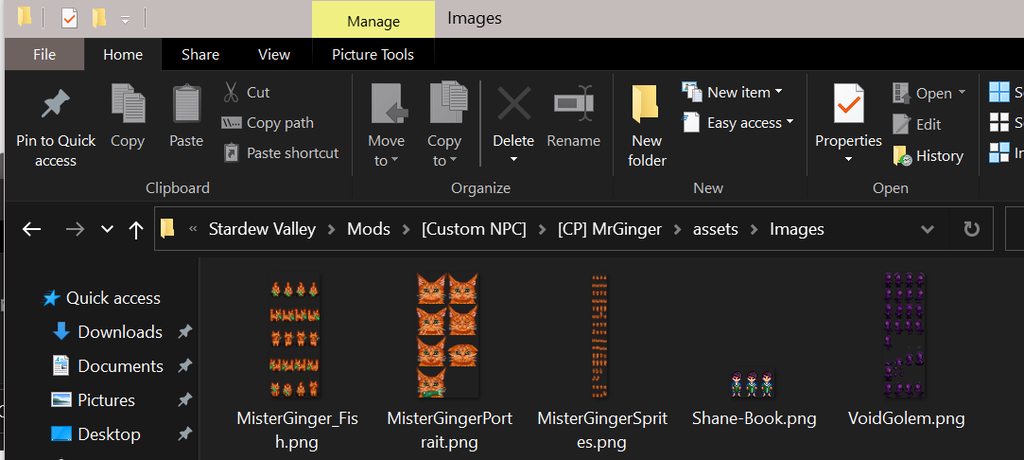
So I download HDPortraits mod alongside the HDPortraits Template mod to incorporate high res portraits for my game. What I'm trying is to add custom high res portraits for the Mr. Ginger custom NPC mod and followed a guide the HDPortraits mod author put in their github wiki, but it isn't loading--which definitely means I'm doing something wrong - and SMAPI isn't showing any particular errors with it.
I originally thought the loading code of sorts for vanilla portraits and mod portraits were different, but the HDPortraits Template accomodates many other mods (SVE, RSV, Custom NPC June, etc.) so I'm wondering what makes Mr. Ginger custom NPC mod any different. Is there's a difference loading from base game vanilla NPCs and custom mod NPCs, and do I have to add a special string for that?
This is the minor edit I've made to HDPortraits Template content.json to accommodate only Wizard and Mister Ginger. Wizard works fine with no problem. Other targets for other custom NPCs like June (who follows similar folder arrangements and all with Mr. Ginger) seems to follow the same format as well with vanilla portraits (Mods/HDPortraits/June_portrait, Mods/HDPortraits/June_Beach_potrait,), but I can't seem to make it work.
Note: the HDPortraits Template mod requires 512px width for the portraits
 shy orbit
can you upload the content.json to smapi.io/json and link it here? to see what you have in it
 coarse peak
Will smapi work on modded switch ?
neat plaza
on ubuntu
shy orbit
pallid fiber
https://smapi.io/json/content-patcher/df2b1efb0eed477db7304dec39f2e136
in "Target": "Mods/HDPortraits/Wizard, Mods/HDPortraits/MisterGingerPortrait" shouldn't it be just Mods/HDPortraits/MisterGinger?
coarse peak
neat plaza
on ubuntu
What´s that
dusty spruce
Linux
coarse peak
I’m too lazy to install linux on my switch
neat plaza
then no
pallid fiber
shy orbit
in `"Target": "Mods/HDPortraits/Wizard, Mods/HDPortraits/MisterGingerPortrait"` ...
Which load string? or is it the editdata?
coarse peak
How do i know if a mod replaces games files or not
neat plaza
if there's xnb files?
shy orbit
pallid fiber
Which load string? or is it the editdata?
both data patches i guess
neat plaza
and no manifest
and if it tells you to
shy orbit
pallid fiber
Which load string? or is it the editdata?
eh to avoid confusion i mean these { "Action": "Load", "Target": "Mods/HDPortraits/Wizard, Mods/HDPortraits/MisterGingerPortrait", "FromFile": "assets/base.json" }, { "Action": "EditData", "Target": "Mods/HDPortraits/Wizard, Mods/HDPortraits/MisterGingerPortrait", "Entries": { "Portrait": "Mods/portraittemplate/{{TargetWithoutPath}}" } } ] }
coarse peak
neat plaza
and no manifest
and if it *tells you to*
What do you mean by manifest
neat plaza
coarse peak
What do you mean by manifest
manifest.json
coarse peak
So if there is it won’t work
neat plaza
the file all smapi mods have to have
 shy orbit
yeah (it's still just a guess though)
pallid fiber
I'll give it a try!
shy orbit
wait actually...
maybe just the first one after all
i don't know, so either wait for someone who knows or just try it hehe
pallid fiber
Alright, so I tried both edits and unfortunately it's not working
I appreciate the help though!
shy orbit
might try asking about it in #making-mods-general
pallid fiber
Sounds good, thanks again 😄
pearl stream
shy orbit
should be the version on nexus and moddrop. do you have the log where the save l...
Log? Was there supposed to be a log whenever an error occurs?
shy orbit
!log
native dragonBOT
Can you upload your SMAPI log to https://smapi.io/log (see instructions on that page) and share the link here?
pearl stream
How do I recover last save file after an error with SMAPI?
neat plaza
!saves
native dragonBOT
Use this guide to find your save files: https://stardewvalleywiki.com/Saves.
 devout terrace
how do I update SMAPI
HELP, how do i fix this
Oops The SMAPI installer seems to have failed. The error details may be shown above.

Press any key to continue . . .```probably the game path you gave it is wrong or in format that the installer doesn't understand
devout terrace
where do you change the game path?
because I have it on the E: Drive, and my downloads on the Z: Drive
and i think it's trying to acess the C: drive
shy orbit
i don't think it's a problem, but the installer needs the correct path. i suppose it doesn't find it automatically?
devout terrace
yeah
shy orbit
are you using steam?
devout terrace
yeah
shy orbit
https://stardewvalleywiki.com/Modding:Player_Guide/Getting_Started#Find_your_game_folder sorry that took a bit of time, under more options -> Option 3: find it through Steam
shy orbit
what path did you gave to the installer? from the error message it's a problem with it
devout terrace
where do you give the installer a path?
shy orbit
it should have an option to give one when you run it and it can't find the game install automatically
devout terrace
it doesn't
shy orbit
so what happens when you run the installer
devout terrace
it gives that error message
Oops The SMAPI installer seems to have failed. The error details may be shown above.

Press any key to continue . . .```ah sorry, i thought that came after you gave it the path. unfortunately i don't know what to do about that
 minor kernel
wrong channel, sorry hahaha
 quasi meadow
We need help we changed our mods and updated smapi but everynight we still crash and see red error codes how can we fix this?
topaz matrix
quasi meadow
We need help we changed our mods and updated smapi but everynight we still crash...
!log
native dragonBOT
@quasi meadow Can you upload your SMAPI log to https://smapi.io/log (see instructions on that page) and share the link here?
quasi meadow
native dragonBOT
Log Info: SMAPI 3.18.2 with SDV 1.5.6 (build 21362) on Microsoft Windows 10 Pro, with 30 C# mods and 32 content packs.
Suggested fixes: Pytk isn't compatible with newer SMAPI performance optimizations, consider removing it
quasi meadow
native dragonBOT
Log Info: SMAPI 3.18.2 with SDV 1.5.6 (build 21362) on Microsoft Windows 10 Pro, with 31 C# mods and 32 content packs.
Suggested fixes: Pytk isn't compatible with newer SMAPI performance optimizations, consider removing it
quasi meadow
both of our logs
topaz matrix
I will take a look at both of them I n a bit
quasi meadow
okk
odd helm
dusty spruce
I can’t answer that question, because it depends on the portrait mod
anime portait mod the popular one
dusty spruce
can't you just link it?
 pearl stream
Yes! My file is now recovered!
Is it okay to re-enable cloud save while the game is active?
 dawn patio
Hello, my modded game launcher keeps crashing/being stuck on black screen until it crashes. I have no errors in my SMAPI console, and i've just been updating some mods. Anyone knows how to fix that?
neat plaza
!log
native dragonBOT
Can you upload your SMAPI log to https://smapi.io/log (see instructions on that page) and share the link here?
native dragonBOT
Log Info: SMAPI 3.18.2 with SDV 1.5.6 (build 22018) on Microsoft Windows 11 Home, with 28 C# mods and 20 content packs.
Suggested fixes: Pytk isn't compatible with newer SMAPI performance optimizations, consider removing it
dawn patio
Have tried removing pytk, however it didn't work.
long brook
No error shown on log. Did the crash happen while loading a save?
dawn patio
I can't even get into the load save, nor create a new save :/
If I press the button to load a save, it crashes or just freezes on a black screen
long brook
Was it crash as soon as you click create or you did something such as clicking while the game loading ?
gaunt gust
dawn patio
If I press the button to load a save, it crashes or just freezes on a black scre...
!smapislow
native dragonBOT
For some players, SMAPI can take a while to launch the game. See this section of the troubleshooting guide for some common causes and possible fixes: https://stardewvalleywiki.com/Modding:Player_Guide/Troubleshooting#Game_lags_or_stutters_in-game
gaunt gust
can you check to make sure smapi is running with your graphics card if you have one
otherwise, try removing pytk, nothing you use uses that
!sm also depending on specs installing spritemaster might help
native dragonBOT
SpriteMaster (https://www.nexusmods.com/stardewvalley/mods/4922) is a mod that resamples the game's graphics to be smoother and improves performance.

Nexus Mods :: Stardew Valley
SpriteMaster resamples all of the game's artwork to make it look smoother - a so-called 'HD' effect, and also implements game optimizations and load-time improvements to make the game run faster.
dawn patio
gaunt gust
can you check to make sure smapi is running with your graphics card if you have ...
How do I do that?
dawn patio
Oh! I didnt see that, sorry!
gaunt gust
this is why we have these commands 🙂
dawn patio
Very smart!
 red ice
hi i need help with installing sve please
dawn patio
gaunt gust
can you check to make sure smapi is running with your graphics card if you have ...
Changed it to my graphic card and it worked. Thank you!
topaz matrix
quasi meadow
https://smapi.io/log/1ca07e83119949c2851dd5f26b9a15a7
@gaunt gust
 rustic pelican
 red ice
rustic pelican
red ice
rustic pelican
thats what im getting pretty much
rustic pelican
Yeah
red ice
 rustic pelican
It’s a bug
topaz matrix
U are missing some mods
devout terrace
I'm playing expand and it's been saving for 10 minutes
gaunt gust
topaz matrix
<@853078462498340864>
why ping me
lol, this ain't my job and I walked off
topaz matrix
Well I have no idea what is causing the error
gaunt gust
(Also: I do not help people who have pirated the game, lol)
red ice
 topaz matrix
gaunt gust
(Also: I do not help people who have pirated the game, lol)
topaz matrix
gaunt gust
(Also: I do not help people who have pirated the game, lol)
oh i didn't know that
neat plaza
most don't
red ice
neat plaza
you need EML and unzip CP
all is good i got it to work
gaunt gust
(also, unless it's actually one of my mods that is throwing an error, I do not appreciate getting pings here. I'm not responsible for "someone somewhere is having an error", lol)
rustic pelican
topaz matrix
U are missing some mods
Where you saying that to me
neat plaza
rustic pelican
Where you saying that to me
no, to the person missing mods
 red ice
gaunt gust
(also, unless it's actually one of my mods that is throwing an error, I do not a...
red ice
gaunt gust
(also, unless it's actually one of my mods that is throwing an error, I do not a...
you spent 3 messages complaining, im sure they got it after the first one
scarlet quail
I see I walked into a fresh hell this morning
red ice
 dusky canyon
She*
dusky canyon
She*
not sure if you was correcting me and saying "she"
scarlet quail
Cronos You are missing that mod it's not a bug per your images
dusky canyon
Look at aubrianna's pronoun roles
gaunt gust
I'm going ask y'all to cut all this off
red ice
idc about pronouns i say they to everyone
dusky canyon
Figures
gaunt gust
Block button's handy 🙂
dusky canyon
It is indeed
rustic pelican
scarlet quail
Cronos You are missing that mod it's not a bug per your images
No I have it
scarlet quail
That isn't what your log is saying
So you may want to give the actual log or show an image of your mod folder as well
rustic pelican
This is what nexus says also getting the log’s confusing
 neat plaza
they're entirely unrelated things
how is getting the log confusing
devout terrace
Expanded just won't savs
rustic pelican
Finding the file
dusty spruce
The log site tells you the exact place to look at
rustic pelican
In the most obscure way possible
scarlet quail
Guys guys
rustic pelican
Oh I might get that
scarlet quail
We have a solution for this
neat plaza
an external program
ilovelucy made a mod
scarlet quail
!autolog
native dragonBOT
If finding a log is too confusing and you're able to load your save, you can install the In-Game SMAPI Log Uploader to get the log without having to search through the files. Simply hold Left Alt in game and then click the Pufferfish symbol and the log will automatically be uploaded to smapi.io! https://www.nexusmods.com/stardewvalley/mods/13979

Nexus Mods :: Stardew Valley
Provides a means of uploading a SMAPI log to SMAPI.io from within the game, using a custom hotkey, a hidden UI button, and on a critical game error.
dusty spruce
neat plaza
an external program
ilovelucy made a mod
Ah, right
scarlet quail
This is why I made that command XD
neat plaza
!autologupload is my one
native dragonBOT
If you want to have your log automatically upload for you whenever your game closes, without needing to search through files. Simply change your steam launch options to point to the AutoLogUpload .exe and run the game as normal! https://www.nexusmods.com/stardewvalley/mods/13959

Nexus Mods :: Stardew Valley
A tool to automatically upload SMAPI logs. (Rewritten)
scarlet quail
Sorry for delay,was back reading modded farmers
devout terrace
Stardew expanded won't save
scarlet quail
devout terrace
Stardew expanded won't save
!log
native dragonBOT
@devout terrace Can you upload your SMAPI log to https://smapi.io/log (see instructions on that page) and share the link here?
devout terrace
native dragonBOT
Log Info: SMAPI 3.18.2 with SDV 1.5.6 (build 22018) on Microsoft Windows 10 Pro, with 19 C# mods and 8 content packs.
Suggested fixes: You don't have the Error Handler mod installed, reinstall SMAPI to get it, One or more mods are out of date, consider updating them
devout terrace
I can't re-install smapi
neat plaza
why not
devout terrace
Scroll up a bit
It just flat out doesn't work
i had to do a manual install to update
scarlet quail
But even the manual install should have installed error handler
devout terrace
it didn't
scarlet quail
Then you didn't install it correctly manually
devout terrace
i followed the steps on the website
Stardew Valley Forums
Some users are reporting issues with SMAPI's built-in installer.
NOTE: This guide should only be used if you are unable to install SMAPI with the standard installer.
Of course SMAPI has a readme.txt for manual installation.
This guide is meant to expand on those instructions and I will try to...
scarlet quail
You do know this is 3.18.2. Yeah?
devout terrace
yeah
scarlet quail
That is super outdated
devout terrace
shouldn't have changed much tho?
it still worked
and i couldn't find anything else on manual install
neat plaza
there's a readme file
scarlet quail
3.13 Was a version for the legacy version If I recall
scarlet quail
Also,this is not something I can do right now but if you're still having issues then we can train figure out why the regular install isn't working
 devout terrace
i know
gaunt gust
Tater, go into internal/windows of the installer, double clikc on "SMAPI.Installer.exe"
would you happen to be using Windows 11?
 idle folio
I'm getting these errors when loading the game. Initially i was getting only the second block, but i tried removing the files i didnt want, which didnt work. I'm using Vortex if that matters
 gaunt gust
idle folio
I'm getting these errors when loading the game. Initially i was getting only the...
gaunt gust
idle folio
I'm getting these errors when loading the game. Initially i was getting only the...
un-deply and re-deploy all of your mods
devout terrace
k
scarlet quail
idle folio
I'm getting these errors when loading the game. Initially i was getting only the...
Star blue and starry sky are not compatible apparently because they are both loading the same thing
So neither are going to be applied in game
devout terrace
Is there a way to change a character's name? because one of them is my sister's name and I want to romance that character
scarlet quail
You'd have to change every reference to them in the files
devout terrace
i'll live with it
scarlet quail
Exactly which character are we talking about though
idle folio
scarlet quail
Star blue and starry sky are not compatible apparently because they are both loa...
ive tried that already, ill try reinstalling them 😐
scarlet quail
Yeah then theoretically you could do a find and replace in the files, But you'd have to do it in all the files
lament prairie
devout terrace
Is there a way to change a character's name? because one of them is my sister's ...
There’s a mod to rename all the vanilla characters
scarlet quail
Or there's that as well that I didn't know existed
But that's just the vanilla characters they're talking about sophia
lament prairie

Nexus Mods :: Stardew Valley
Change villager name, possessive form, gender, and birthdays with ease!
pearl stream
After recovering my save, now the game freezes
idle folio
ye ive used this one in the past, dont know for SVE or if it still works tho it seems maintained https://www.nexusmods.com/stardewvalley/mods/12703

Nexus Mods :: Stardew Valley
Allows you to change the name displayed for any vanilla NPC desired
pearl stream
Anyone experiencing this? I don't wanna start a new save
scarlet quail
pearl stream
After recovering my save, now the game freezes
When does it freeze and how does it freeze
pearl stream
scarlet quail
When does it freeze and how does it freeze
Never mind. I just had to wait
devout terrace
hopefully this works
idle folio
reinstalling just brings me back to square one as i expected
 scarlet quail
They are not compatible poutri
That means you cannot use them both
The error specifically means you cannot use both of them or it will break
You must choose one
idle folio
aw :/ thats a bummer
cause it seems like an easy enough fix
ill look into modding one of the mods maybe
that sounds like a fun challenge
scarlet quail
Well if you're willing to go through the files and try and make it edit data then be my guest but you are not able to use them in their present state together
idle folio
yeah thats fair enough, thanks for the info 😄
 round prawn
Any mods available for android version 1.5?
dusky canyon
no
round prawn
I miss the mods😭
dusky canyon
!androidsmapi
native dragonBOT
There is no working android SMAPI right now, after the mobile 1.5 release. No Android SMAPI means no mods on Android right now. ZaneYork, the developer of Android SMAPI, has said he will work on it when he has time. You can follow this Github issue for details, but please do not harass him or spam the Github. https://github.com/ZaneYork/SMAPI-Android-Installer/issues/246
When there is one, the instructions here will be updated: https://stardewvalleywiki.com/Modding:Installing_SMAPI_on_Android
idle folio
scarlet quail
Well if you're willing to go through the files and try and make it edit data the...
huh well nvm i figured it out already, theres a config option for that in the starblue files
 iron plank
Do the trashcans in ridgeside village work for other people?
scarlet quail
Yes
iron plank
Interesting.
 proud lodge
Hi, I don't know why, but the PPJA mods give me error, I copy literally what you tell me:
Fruits and Veggies for JsonAssets because you have multiple copies of this mod installed. To fix this, delete these folders and reinstall the mod: Mods/[PPJA] Fruits and Veggies/[JA] Fruits and Veggies, Mods/PPJA Mega Pack-1935-NA-1608588583/[PPJA] Fruits and Veggies/[JA] Fruits and Veggies.
its my first time using this mods
iron plank
You have multiple copies of the mods installed.
Go into your mod folder and delete one of them.
scarlet quail
You might as well delete the stand alone if You have the megapack
proud lodge
thats the problem, i dont have multiple copies
iron plank
It looks like you installed ppja fruits and veggies as well as the mega pack and it's included in both. So yeah, what Lyoko said
iron plank
No problem.
Is it okay to update a mod for private use without permission of the mod author? From an author who doesn't have permissions on their mods but is unreachable?
scarlet quail
As long as it stays a personal mod yes
I have done that with at least denver and cecilia
And shiko
It just can never leave your modlist To any front facing site
iron plank
Okay cool, thank you.
native dragonBOT
Log Info: SMAPI 3.18.2 with SDV 1.5.6 (build 22018) on Microsoft Windows 10 Pro, with 21 C# mods and 9 content packs.
devout terrace
will someone help??
scarlet quail
That was something I meant to mention to you Tater - patience. We aren't paid to help here so some of us can't get to you when you're available because we aren't
Also, your error requires someone with coding knowledge to translate
iron plank
devout terrace
will someone help??
Try deleting your bookcase mod
scarlet quail
Because I don't know how the game is failing to generate the XML document when you sleep. That's the error on the second page.
I doubt it's the bookcase thing but hey, why not. Might as well get rid of the other errors in the meantime
iron plank
Yeah lol it's all I know to try. Besides like, deleting and reinstalling.
Did you install using a mod manager Tater?
iron plank
Even I didn't really think that would work. Cool
devout terrace
bug could aslo be more specific
iron plank
You're still having problems saving?
lament prairie
If someone was expecting the bug to happen, presumably they would have fixed it, so most bugs by their nature are not specific
The XML error appears to have something to do with FTM, fwiw
If it works this time, that's potentially because FTM regenerates the spawns every time the save is loaded
So you may have lucked out and not gotten whatever it is that dislikes FTM
On the other hand, JA is also quite sad about the path to the file where it saves IDs, so there might be some bigger issue
Constants.CurrentSavePath is somehow null
pearl stream
Is SMAPI doing alright? I have 77 mods and when I boot up, it suddenly went to 80 mods. Where did the 2 mods come from?
lament prairie
Sometimes one mod is secretely like 7 mods
Most of the big expansions are this way
It might have like, a CP component, a JA component, and an FTM component, for example
scarlet quail
Every expansion mod is a lot of little mods in a trenchcoat
In order to act like the adult (mod most think of it as) all of them have to work together
dense summit
my game aint playing music after downloading mods why
scarlet quail
!log
native dragonBOT
Can you upload your SMAPI log to https://smapi.io/log (see instructions on that page) and share the link here?
scarlet quail
(I'm going to guess if the game is booting your SAAT isn't installed correctly or it's muted, but log will give a better answer)
dense summit
i closed and opened the game, the music on the main menu thing plays music but inside of the game no
dense summit
native dragon
Can you upload your SMAPI log to <https://smapi.io/log> (see instructions on tha...
w8
native dragonBOT
Log Info: SMAPI 3.18.2 with SDV 1.5.6 (build 22018) on Microsoft Windows 11 Home, with 35 C# mods and 12 content packs.
 frail crater
Hey im tryna install SMAPI for the first time and im struggling to understand it all, could someone help me out pls ;-;
iron plank
frail crater
Hey im tryna install SMAPI for the first time and im struggling to understand it...
Did you download the smapi file?
!gettingstarted
native dragonBOT
If you would like a guide to setting up mods for Stardew Valley, check out the getting started guide! https://stardewvalleywiki.com/Modding:Player_Guide
frail crater
iron plank
Did you download the smapi file?
yeaah i downloaded it and unzipped it
but something is saying that theres a missing file and im not sure if thats important??
lament prairie
Probably important
Do you have an antivirus?
It may be deleting some of the files
frail crater
not that im aware of
lament prairie
Are you on Windows?
frail crater
yess
lament prairie
I mean, it's probably helpful sometimes
What's the exact thing it's saying about missing files?
scarlet quail
That's... not a file missing error. What exactly does it say?
Might as well screenshot the installer
frail crater
scarlet quail
That's... not a file missing error. What exactly does it say?
it did say i had a missing file earlier but now i cant find that page ;-;
this is where im at rn
 lament prairie
Try reinstalling then—you can install SMAPI over and over again without problem
That looks fine
That looks like success
Note the thing the green text says
frail crater
yess
scarlet quail
then right click stardew, then click properties
then write what it told you in quotes in the "Launch Options" field
!launchoptions
native dragonBOT
If you're using Steam or GOG on Windows, you will need to set your launch options in order for Steam/GOG to automatically launch with SMAPI. The SMAPI installer will tell you what to set as the launch options when it completes (green text). You can find instructions (with screenshots) on how to do that here: https://stardewvalleywiki.com/Modding:Installing_SMAPI_on_Windows#Configure_your_game_client
scarlet quail
More info there
scarlet quail
yep
you can add it as a non-steam game instead if you want to launch vanilla without having to erase launch options, but otherwise, you're good to go on mods, have fun
frail crater
thanku for ur timeee :D
 rare birch
Hello guys, I have downloaded 1 furniture mod and it seems whenever i place it and go to bed, it locks me on the saving screen. I would really love some help
Ive got smapi and custom furniture, aswell as pytek
long brook
!log
native dragonBOT
Can you upload your SMAPI log to https://smapi.io/log (see instructions on that page) and share the link here?
neat plaza
rare birch
Ive got smapi and custom furniture, aswell as pytek
pytk is not advised, use DGA if possible
scarlet quail
I have a feeling it's custom furniture and they don't have the unofficial update
But we'll see when the log is posted
neat plaza
possibly
native dragonBOT
Log Info: SMAPI 3.18.2 with SDV 1.5.6 (build 22018) on Microsoft Windows 10 Pro, with 10 C# mods and 10 content packs.
Suggested fixes: Pytk isn't compatible with newer SMAPI performance optimizations, consider removing it
rare birch
OK, will my furniture mod still work 
neat plaza
yes but I'm asking is the a dga version of the mod
rare birch
I dont think so, the mod has something called alternative textures
neat plaza
use that then
neat plaza
it does
rare birch
So delete: CF, pytek
neat plaza
was hoping I'd get a chance to promote elizabeth's furniture converter
rare birch
How do i do it fr!!
native dragonBOT
If you want to convert your furniture from Custom Furniture to a more usable alternative, you can use the Furniture Converter! Simply follow the instructions to convert it to Dynamic Game Assets (1.5) or, if you're on a version of Stardew 1.6, to Content Patcher, and your favorite furniture items will be ready for use without having to use Custom Furniture. https://github.com/elizabethcd/FurnitureConverter
rare birch
I want a cute house for when i marry elliott
neat plaza
if you don't like the CLI, there is a gui for it if you prefer https://github.com/anotherPillow/sdvconvertergui (runs the same program, but in a gui)
native dragonBOT
Log Info: SMAPI 3.18.1 with SDV 1.5.6 (build 22018) on Microsoft Windows 10 Home, with 33 C# mods and 39 content packs.
Suggested fixes: Pytk isn't compatible with newer SMAPI performance optimizations, consider removing it, One or more mods are out of date, consider updating them
 shell umbra
Wait I need to update like 6 mods nvm
iron plank
shell umbra
Wait I need to update like 6 mods nvm
It also looks like you're missing the manifest for several mods. Are you using vortex or something similar to install/update mods?
neat plaza
they mean mod manager
glacial tangle
Are you using a mod manager or manually installing?
iron plank
neat plaza
they mean mod manager
Thank you I don't know why I can never remember "mod manager"
scarlet quail
shell umbra
My game keeps crashing before I even get into a world and idk what the problem i...
When, precisely, does it crash? Once Stardew launches, what exactly do you do?
shell umbra
When I try to create a world
scarlet quail
So you go to new game and then hit start?
And that's it?
And when you say crashing... you're saying you get not responding or the game closes?
shell umbra
not responding
lament prairie
probs just taking a while
scarlet quail
When you hit start game, do not touch the game
lament prairie
give it time
shell umbra
So just dont click anything
 severe flicker
at this point i think i've tried everything i can think of to fix this! my pet bowl has a black box around it?
i'm using vibrant pastoral recolour and daisyniko's tilesheets - i've deleted/reinstalled both
i actually installed a mod to change the shape of the pet bowl (seen in the pic) thinking that might help?? LOL
i've also tried daisyniko's earthy recolour in hopes it was just the recolour i chose, but it still had the black box
it's only doing this on this specific farm: https://www.nexusmods.com/stardewvalley/mods/15618
https://smapi.io/log/448c34282d6e4a9488a615e9c31ed3eb
here's my smapi log
idk if anyone has any ideas what it might be, i feel like i'm losing my mind 


Nexus Mods :: Stardew Valley
a farm map high atop the mountains with a beautiful view of the valley below
scarlet quail
go get a drink of water, wait it out, and it will load. Clicking will crash it
native dragonBOT
Log Info: SMAPI 3.18.2 with SDV 1.5.6 (build 22018) on Microsoft Windows 11 Home, with 61 C# mods and 134 content packs.
Suggested fixes: Pytk isn't compatible with newer SMAPI performance optimizations, consider removing it
scarlet quail
shell umbra
So just dont click anything
Correct
shell umbra
ohh ok
severe flicker
i feel like i'm interrupting a conversation LMAO sorry y'all
scarlet quail
Nah you're good we just finished
iron plank
Just looking at it, the first thing it looks like to me is an issue with map layers?
severe flicker
i was reading over the nexus page, hoping to see if anyone else was having a similar issue and it just seems to be me?
lament prairie
someone patched petbowl
it's on Back but there's nothing behind it
that's the black
scarlet quail
Pet Water Bowls probably
disable pet water bowls and tell us what happens, mushlune
severe flicker
i added that myself after the black box appeared, thinking it might've been an issue with tilesheets (i was literally trying anything i could think of LOL)
it still has the black box around it without the mod
lament prairie
The normal game pet bowl has a specific background to it, but some people don't like how it looks, so they patch it to have no background
if they don't properly account for the fact that a transparent part on Back turns black, you get the thing you see
severe flicker
oh, okay! so is this something to do with the farm map itself? or something in another mod i'm using? (the pet water bowls one changed nothing)
i don't have the issue with other farm maps, so i guess that means it's this farm? i just don't see anyone else with the same problem so i'm really confused
severe flicker
i'm gonna just start removing mods and see what it is LOL i feel like that's the only way i'll be able to figure it out
scarlet quail
no no no
scarlet quail
severe flicker
i'm gonna just start removing mods and see what it is LOL i feel like that's the...
type patch summary full in the SMAPI console, then give us another log
We can do it quicker that way
lament prairie
spring_outdoorsTilesheet right at the very very bottom
13:37:41    TRACE    SMAPI    Content Patcher edited Maps/spring_outdoorsTileSheet (for the '(CP) Better Lilypads' content pack).
13:37:41    TRACE    SMAPI    Content Patcher edited Maps/spring_outdoorsTileSheet (for the 'Elle's Seasonal Buildings' content pack).
13:37:41    TRACE    SMAPI    Content Patcher edited Maps/spring_outdoorsTileSheet (for the 'Elle's Town Buildings' content pack).
13:37:41    TRACE    SMAPI    Content Patcher edited Maps/spring_outdoorsTileSheet (for the 'Overgrown Mailbox' content pack).
13:37:41    TRACE    SMAPI    Content Patcher edited Maps/spring_outdoorsTileSheet (for the 'Pet Water Bowls' content pack).
13:37:41    TRACE    SMAPI    Content Patcher edited Maps/spring_outdoorsTileSheet (for the 'Seasonal Outdoor Fences' content pack).
13:37:41 TRACE SMAPI Content Patcher edited Maps/spring_outdoorsTileSheet (for the 'Simple Foliage' content pack).```one of these mods
scarlet quail
Oh, whew, simpler than patch summary even
severe flicker
ooh, okay! thank you!
scarlet quail
(I thought you meant petbowl had an entire tilesheet, sorry, Elizabeth XD )
lament prairie
well, the patch summary may tell you specifically which are editing the pet bowl
since people often add LogName
severe flicker
okay, well, i have an update LOL
i removed vpr and loaded into the game without a recolour
the black box was gone
so i just added vpr back in and loaded it up and it's still gone
i really have no idea what happened or how it's even fixed???
thank you so much for your help! i truly have no idea what changed LOL
rare birch
I tried AT now and it says "No availiable textures for this season." NO error just ughh
 swift fiber
Hey all.. I’ve had this issue for a while and it hasn’t been resolved
Basically I updated Smapi and a majority of my mods stopped working. Do I have to update all of them, or can I just return to the previous version of Smapi or something?
lament prairie
what was your previous version?
swift fiber
I think it was like 1.13?
lament prairie
....1.13???
You definitely need to update if it starts with a 1
Maybe double-check
lament prairie
Two months ago is probably fine
Keep in mind you might have some issues that were fixed since then
In particular, there's some kind of MP graphics issue on the community center that was fixed in like, SMAPI 3.18.2 or somthing
swift fiber
I’ll try and get on my computer in a sec to check everything but a majority of my mods were just game add-one
Ons*
Ok, here’s a summary of what happened. I had all my mods working and fine, but I wanted to add another without knowing what I was doing, long story short the whole game stopped opening so I had to repair the game on steam and someone suggested I reinstall Smapi, once I did that, it was a newer version of Smapi, and when I tried running the game it opened fine but half of my mods just turned up red in the terminal (I’m on mac)
I’m going to check my Smapi version now
lament prairie
Have you tried just updating the mods that turned up red?
swift fiber
No I haven’t, but I’m very new at this so I don’t even know how to go about that without screwing everything up
lament prairie
How to update mod:
- copy config elsewhere if there is one and you want to keep it
- delete mod
- install new copy of mod
swift fiber
Okay, I have one more question
I’ve made a crap ton of backup folders and I mixed them all up so it’s like really confusing, should I just delete all of them and start over? I don’t really care about my save data.
I litterally kind of just want to delete the whole game and all my data to start from scratch
lament prairie
You certainly can do that, if you want
swift fiber
Okay then. So I’m at Smapi 3.18.1
Do all of the mod owners have to update their mods accordingly to the Smapi updates?
lament prairie
What do you mean by the mod owners?
scarlet quail
I'm guessing they think that every time SMAPI updates every mod must update
And...no. They do not. That would be a horrible mod system XD
swift fiber
Yes ^^ please assume I’m a fetus
LMFAO ok
Then time to manually reinstall my 30 mods yippie
How do I delete my game data just throw all the folders into the trash bin?
scarlet quail
Just toss the old mod folders in the recycling bin, yes
lament prairie
yeah, deleting is just dumping things into trash
remember you will need to reinstall SMAPI
swift fiber
uhh, no but like the entire game data, im on mac so the mods are like inside the game folders
neat plaza
that's the same for all platforms
swift fiber
okay, then I just want to delete like everything and reinstall completely
So like my backups and whatnot
Will throwing all of that away break anything
swift fiber
I pretty much have screwed up so much that I made like two back up folders and I got them all mixed up and my computer is not very strong so I don’t want to take up more space, so I think deleting everything will help to start blank so I don’t get confused
scarlet quail
Uh
swift fiber
I guess it doesn’t have to delete the game data but I figured it would
scarlet quail
I mean your saves backing up is one thing
lament prairie
This is not the approach I would take personally, but if it helps you to think about then it shouldn't break anything
swift fiber
I can send a picture of what I mean
scarlet quail
Go ahead
swift fiber
So the two folders here are backups. My friend made me copy the entire game file in case I messed something up while modding and I ruined my data or some thing. But I messed with the files inside each of those folders and some have either gotten thrown away or corrupted so idek what the point of keeping them is. Those folders contain all of my previous mods as well.
 lament prairie
you can probably just delete the backups then, and leave the normal game folder alone?
 halcyon igloo
the entire game ig LOL
scarlet quail
Give an image of that
swift fiber
Basically each time I reinstall stardew it makes a new folder
Okay, let me see
If I go to steam and go into game contents
scarlet quail
.....okay, your friend is misinformed
they told you to back up the entire game somewhere
and that's ridiculous
Toss all of those out and never do that again
if you were told to go into your AppData or Mac's equivalent for saves, then it'd be fine
But they're telling you to basically back up the game, which is ridiculous since like you said space is a concern
Stardew is small but still
!saves
native dragonBOT
Use this guide to find your save files: https://stardewvalleywiki.com/Saves.
scarlet quail
See the mac section. That is the only place you should ever back up
swift fiber
Okay, thank you. I threw them out. So to fix the mods should I just update Smapi and then reinstall them all like I did before?
lament prairie
If you have space concerns, also remember to empty trash
scarlet quail
Yes
lament prairie
Since Macs will keep your trash can stuff around for a while usually
swift fiber
Okay, I see. Thanks for the help, this issue has really plagued me for a while and my knowledge on this topic is very small
Oh also! To update Smapi, I have a folder here that says Smapi 3.18.1 installer, I delete that and reinstall from the website correct?
neat plaza
ye
swift fiber
Okay coolio
 past osprey
Hey back again, so there's nothing wrong with my event expansions but the reason why they're not triggering might be because I did instant build for that second house expansion
So do yall know how I can remove that requirement from the mod and/or "force" my second expansion?
scarlet quail
I mean your entire set up is confusing
What do you mean "event expansions"
And what mod?
How would a house upgrade mess up the events unless it's Happy Birthday code?
(And that only happens because of a different event system!)
Hell probs Atra's system might cause issues there depending on how event preconditions are implemented where so I'm like ???
(Short version: Need many more deets)
past osprey
So I used cbj for the instant build and I'm working with a sebastion event expansion mod and an Ian Ridgeside event mod
 scarlet quail
Okay, two things
First it isn't raining so it won't activate
Second do you have the crib now?
(or at least did when you upgraded the house?)
Did you sleep after acquiring it, if you did?
past osprey
Oh yeah I know about the rain, I've been fighting it for like 3 days in-game and yes I did have the crib
gaunt gust
past osprey
normal, known issue with event lookup: the L event condition isn't checked correctly unless you are standing IN your house
so go into your house and check again
scarlet quail
Then there's that too
If it isn't raining it won't really matter - your game will save overnight, then you just need rain to activate
There won't be any necessary deletions
past osprey
gaunt gust
so go into your house and check again
Yeah I tried it again but I've gotten remarried, removed the crib for renovations, got divorced and put it back, rise and repeat
scarlet quail
No Rosie atra means enter the house
Then check the Event Lookup
then screenshot and send to us if it's still red
but go inside the house before checking it
gaunt gust
wait, is that event supposed to happen on RSV's village map?
yeah that's borked then and will never fire
past osprey
 past osprey
Excellent question, I added it on last week so I'm using 2.2.5
scarlet quail
Okay, good, you're not using other versions
Well, report it as a bug in RSV's server
past osprey
gaunt gust
wait, is that event supposed to happen on RSV's village map?
I tried that farm too but it still won't trigger
scarlet quail
Atra's looking into it on RSV's server
gaunt gust
(I reported it to sheku already)
gaunt gust
past osprey
Sheku says it's probably this mod and no that event will never fire https://www.nexusmods.com/stardewvalley/mods/13731
 worn zodiac
hello! does anyone know if alternative textures/fashion sense play okay in multiplayer?
 robust bison
if everyone has it then yeah
 brittle venture
Hello, it looks like I'm having a bug where Pam won't go to the bus stop. Unless I'm missing something, but I am unable to go to the desert
scarlet quail
!log
native dragonBOT
Can you upload your SMAPI log to https://smapi.io/log (see instructions on that page) and share the link here?
brittle venture
Is my log the thing that pops up before the game loads? Sorry it's been a min since I played and I just updated my mods today, but for some reason it says they aren't even though I have the latest ones installed
robust bison
the log is the txt file with all of the stuff the console spews out, yeah
upload the file though, don't copy paste from console
scarlet quail
follow instructions on the site to upload it
brittle venture
So I'm seeing this
 scarlet quail
yeah that's normal
brittle venture
Odd things is the mods it suggests to update are mods I already updated
scarlet quail
Just give the log, we'll see what's happening to Pam's schedule
it's not an update thing
brittle venture
Oh okay
scarlet quail
Just... paste the log link in here
dusty spruce
PyTK is just nearing the end of its lifetime


 brittle venture
oh okay sorry
dusty spruce
SMAPI 3.16.2? that's old
scarlet quail
Eh, it's okay though, unless they have MFM
brittle venture
native dragonBOT
Log Info: SMAPI 3.16.2 with SDV 1.5.6 (build 22018) on Microsoft Windows 10 Pro, with 20 C# mods and 8 content packs.
Suggested fixes: Pytk isn't compatible with newer SMAPI performance optimizations, consider removing it, One or more mods are out of date, consider updating them
scarlet quail
there we go
brittle venture
It's weird because I did just update Smapi
scarlet quail
Hmmmmmm. The only thing editing Pam's schedule is SVE
When did you complete the Vault?
brittle venture
Awhile back
scarlet quail
And did you open the Island Resort anytime recently?
robust bison
in game*
brittle venture
I had been progressing for awhile
scarlet quail
Okay. Did you check to make sure Pam wasn't taking an Island day?
brittle venture
She's actually just chilling right outside her house complaining about her head
She comes out and then just stands in front of her house
scarlet quail
Last question before I have you type stuff in your SMAPI console: what time is it in-game?
brittle venture
It's a Monday in the game if that helps and it's fall
scarlet quail
time e.g. AM PM stuff
brittle venture
It's 1130am
scarlet quail
alright
brittle venture
I left to check the bus and nothing and now she's not outside her house
scarlet quail
write in your SMAPI console patch export Characters/Schedules/Pam
scarlet quail
it's the command prompt looking thingy that opens up when you boot the game with mods
brittle venture
ahh okay
scarlet quail
then browse your steam local files, open the "Patch export" folder, and drop the resulting file in here
(I should also let you know you don't need Custom Music, PyTK or TMXL - all are outdated and SVE does not use them)
brittle venture
Hmmm maybe I could just try disabling them and see if it changes anything then?
Because I never had this issue prior to updating
scarlet quail
Once you've got the patch export stuff in here, do so
Also it looks like you're using Vortex?
brittle venture
Okay so I see that patch export file, but it's not letting me drop it in chat
brittle venture
