
#archived-modded-support
1 messages · Page 80 of 1
 harsh lagoon
 finite dust
yup
 hoary bane
finite dust
hoary bane
finite dust
Can you do a patch summary so we can see if anything else is affecting your character?
By the way, do you pick "Extract To.." instead of "Extract Here"? 
 near terrace
hoary bane
By the way, do you pick "Extract To.." instead of "Extract Here"? <:SDVpufferthi...
near terrace
hoary bane
By the way, do you pick "Extract To.." instead of "Extract Here"? <:SDVpufferthi...
It appears that they're doing extract to, because the mod folder names are like how the zip files from nexus are named
hoary bane
Hmmm.. while I wouldn't say that causes issues (since I can probably count on one hand the amount of people who DID have issues doing that), it's good practice to do "Extract Here" instead!
near terrace
Yeah it's a pretty rare thing for subfolders to cause issues. I've got a pretty decent folder system set up myself with mods nested two-three levels deep and I've never had issues.
hoary bane
Oh no yeah, I myself organize my stuff with subfolders. It's the extracting part that goes wrong, albeit very very rarely.
near terrace
Yeah, pretty much.
 brazen mortar
Suddenly getting an error from raffadax in SMAPI saying it can't parse a JSON file for Saffron because an unexpected character was found? never got it before.
 waxen crypt
I think I've got it figured out, thanks! I'm gonna hold onto that suggestion about Alecto to try if I still have issues. 🙂
near terrace
brazen mortar
Suddenly getting an error from raffadax in SMAPI saying it can't parse a JSON fi...
Could you share your log with us please?
!log
 native dragonBOT
Can you upload your SMAPI log to https://smapi.io/log (see instructions on that page) and share the link here?
brazen mortar
I can but it'll take a sec.
near terrace
Sure, take your time
 north light
Hello, I am having the same issues as this post here: https://forums.stardewvalley.net/threads/error-when-entering-chicken-coop-in-multiplayer.11245/
And can't for the life of me figure out which mod is giving me grief 😦 I don't have any of the mods mentioned in this post so I'm at a loss for the moment
https://smapi.io/log/81e40d63a6f447e9a5d2e580700bca7d
Stardew Valley Forums
I have the problem that I cannot enter the chicken coop in multiplayer, there is a sound but I cannot enter it
After a few tests I found out that the error only occurs in multiplayer, in single player everything works normally
native dragonBOT
Log Info: SMAPI 3.18.1 with SDV 1.5.6 (build 22018) on Microsoft Windows 10 Home, with 111 C# mods and 112 content packs.
Suggested fixes: Pytk isn't compatible with newer SMAPI performance optimizations, consider removing it, One or more mods are out of date, consider updating them
brazen mortar
native dragonBOT
Log Info: SMAPI 3.18.1 with SDV 1.5.6 (build 22018) on Microsoft Windows 10 Home, with 124 C# mods and 288 content packs.
Suggested fixes: One or more mods are out of date, consider updating them
 gaunt gust
north light
Hello, I am having the same issues as this post here: https://forums.stardewvall...
gaunt gust
north light
Hello, I am having the same issues as this post here: https://forums.stardewvall...
Make sure you and your multiplayer buddy have exactly the same mods
There is an issue with the buildings list
near terrace
brazen mortar
https://smapi.io/log/3ff95beeb60d44ef9727f0c841417ae4
here it is.
There's a mistake in that object.json file at the line the error mentions, it's probably a missing comma or double quote, you can actually fix that yourself by opening the file in a json and taking a look
brazen mortar
alright, i'll look. weird that it's happening now though. I haven't touched the mod and it hasn't needed an update and this never appeared before afaik
gaunt gust
brazen mortar
Suddenly getting an error from raffadax in SMAPI saying it can't parse a JSON fi...
A chance the file got corrupted
Download it again?
north light
gaunt gust
Make sure you and your multiplayer buddy have exactly the same mods
We do indeed have all the same mods, I copied over my mods folder exactly from my install folder and verified smapi is seeing all the same mods
gaunt gust
north light
We do indeed have all the same mods, I copied over my mods folder exactly from m...
Okay
It'll likely be a building mod
So I would remove every mod even remotely associated with buildings
north light
gaunt gust
It'll likely be a building mod
On it, will report back
gaunt gust
(A long standing gripe of mine is that SMAPI doesn't warn for mods that add netfields, when this is something that can often cause issues)
brazen mortar
I just looked at the Saffron object file and it's all in- maybe Chinese? I have no clue about that.
Looking at another file in the same folder and it's just fine.
gaunt gust
brazen mortar
I just looked at the Saffron object file and it's all in- maybe Chinese? I have ...
That's a corrupted file
Delete and reinstall
brazen mortar
Damn. Well atleast it's seemingly only that one crop file I guess?
gaunt gust
Yeah. Check your disk while your at it
brazen mortar
Nope, I looked at a few others and it happened to them too. It seems like most crop files from Saffron and down got corrupted
The only thing I could guess that'd make this happen is closing SMAPI while it was loading stuff in
near terrace
It's likely that the files got corrupted when you downloaded them or extracted them. It happens, just redownload and try again
brazen mortar
Alright, just seems weird because everything was fine. I haven't touched the mod recently.
near terrace
Definitely do what atra suggested and check your disk, too
brazen mortar
I'm running check disk now.
north light
gaunt gust
It'll likely be a building mod
Bingo! It was "MoreBuildings" mod. Thank you so much for the help!
 tranquil ingot
I’m using the automate mod and my auto-grabber and cheese press aren’t compatible or something? It’s red on the UI for both of them even though they’re right beside eachother :(
brazen mortar
After running check disk pretty sure everything is fine, it just seems that somehow Raffadax got messed up.
tranquil ingot
Alright thank you!
gaunt gust
tranquil ingot
I’m using the automate mod and my auto-grabber and cheese press aren’t compatibl...
Place a chest down next to them
 drowsy turret
Heya.
Was going to play Stardew Valley with my wife over the holiday, but the outdated mod I thought I fixed crashed. Been trying to fix it myself, but I am at a point where I can't get it to work on my own. Is it okay to ask for help with it here, or should I ask in #making-mods-general ?
 lament vortex
if it's not your own mod, definitely here
drowsy turret
Gotcha!
I found a mod that adds Wooloo to Stardew Valley through BFAV.
BFAV however was outdated. I was however able to find a "3.2.4-unofficial.kelvinrosa-mouseypounds-elbe" version of the mod that worked (at least until my game crashed today).
The Wooloo mod was outdated as well though. So I found a BFAV mod that did work. The BFAV Crows mod, and with my complete lack of programming or coding language, just tried different things until I found something that seemed to work.
I opened the content.json file of the BFAV Crows mod, which looked like this https://cdn.discordapp.com/attachments/246628995024551946/1055907947466727514/image.png
And replaced it with the stuff I found in the Wooloo mod.
https://cdn.discordapp.com/attachments/246628995024551946/1055908330406678728/image.png


As well as adding in the png files associated with the Wooloo mod.
It seemed to work, and we were able to buy a Wooloo from Marnie.
It appeared in the barn as it should.
The next in-game day however. It turned into a cow. Restarting the game fixed that problem, and it never occurred again.
Until today when we went to bed in-game and the screen turned dark, but then never loaded.
Alt-tabbing out of the game and I could see in the SMAPI window that I kept getting errors. I copied some of it before the window just closed.
https://cdn.discordapp.com/attachments/246628995024551946/1055909984166236160/image.png
The "ShearedWooloo.xnb" part on line 9 maked me think that it must be because content.json lacks a line for the Sheared Wooloo. Just Adult and Baby.

So I added a line so there is now an entry for Sheared (If I did it right). https://cdn.discordapp.com/attachments/246628995024551946/1055908520597401730/image.png
But I have no idea if I am doing it right, because now in the game the Wooloo does not show up at all, and is just showing as a cow.

Did I enter the wrong text, or is it still outdated?
 lament prairie
drowsy turret
Did I enter the wrong text, or is it still outdated?
lament prairie
drowsy turret
Did I enter the wrong text, or is it still outdated?
Are you on Mac?
drowsy turret
lament prairie
Are you on Mac?
Nope. Windows 10
lament prairie
Huh
lament prairie
You’re the 2nd person to report this bug spreading
drowsy turret
My first assumption is my own incompetence though.
lament prairie
On Mac “X turns into a cow” is true for all X that’s a BFAV barn animal
And all coop animals turn into chickens
It’s very sad
But BFAV is quite old and kind of on its last legs
I would not be terribly surprised if it’s broken now
I’ve never looked into why this happens, because the mod has pretty unclear permissions
drowsy turret
Hmm, would it be safe to remove the mod mid-playthrough?
 robust bison
remove any custom animal and custom animal items first
drowsy turret
Alright, it is just that one Wooloo I will sell then.
Thanks for the quick answers.
lament prairie
There’s some hope that in the future, with the next game update, being able to add modded animals will be much easier
drowsy turret
I will just use the Content Patcher version of the Wooloo mod that just replaces the sprite. I assume that works even if it is a bit old.
drowsy turret
lament prairie
There’s some hope that in the future, with the next game update, being able to a...
Oh, the game is still getting updates? :O
lament prairie
The next planned one is mostly behind the scenes and will make modding easier
drowsy turret
that is great, i love that.
 neon stump
hiii im new to this game and i am confused about what to do after downloaded the furniture mods
like how do u get it
 neat plaza
!gettingstarted
native dragonBOT
If you would like a guide to setting up mods for Stardew Valley, check out the getting started guide! https://stardewvalleywiki.com/Modding:Player_Guide
neon stump
i know how to put the mods in but i just dont understand where in the game to go get it
im trying to change the interior of the house
the outside is nice tho

 versed badge
Hello. I have an issue with Teh's Fishing Overhaul:
- I cannot fish any algae or seaweed anymore. They are not part of the trash list. Did someone find a way to solve that problem before? I've tried to look at the files but it seems the mod fuses all trash into one array. Are algae and Seaweed trash for the game?
 surreal basalt
Hey, so im a little confused over this, I downloaded steam and stardew on another linux machine then copied the stardew files over to my switch and I have the folder however its a mix of files and I have no idea how to launch it no does that folder exist?
drowsy turret
neon stump
like how do u get it
Have you checked the store selling house upgrades? They sell furniture as well.
If I am not mistaken, some mods do not have any way of obtaining the custom furniture other than item spawning.
neat plaza
surreal basalt
Hey, so im a little confused over this, I downloaded steam and stardew on anothe...
can you run the command mono in a terminal, does it work?
surreal basalt
alright
 mild talon
If they're DGA they'll be in the Furniture Catalogue, or at Robin's or any other specified shops (check the mods)
It depends on which type of furni mods you have.. CP, CF, AT you use tools in game to change appearances of objects
neon stump
drowsy turret
Have you checked the store selling house upgrades? They sell furniture as well.
...
oo ok ty
neon stump
mild talon
If they're DGA they'll be in the Furniture Catalogue, or at Robin's or any other...
ty
mild talon
All the way at the end JSYK
surreal basalt
neat plaza
can you run the command `mono` in a terminal, does it work?
"command not found"
mild talon
versed badge
Hello. I have an issue with Teh's Fishing Overhaul:
- I cannot fish any algae or...
I have the More than Forage mod that changes how things are classified in the game. My seaweed/algae are listed as vegetables now but I do still fish them. Not using TFO tho
 strange urchin
whenever i go into the wizards tower, it spawns me out of bounds and i cant get over to the wizard
 native dragonBOT
Log Info: SMAPI 3.18.1 with SDV 1.5.6 (build 22018) on Microsoft Windows 10 Home, with 57 C# mods and 35 content packs.
Suggested fixes: Pytk isn't compatible with newer SMAPI performance optimizations, consider removing it, One or more mods are out of date, consider updating them
versed badge
mild talon
I have the More than Forage mod that changes how things are classified in the ga...
Yeah TFO somehow put algae and Seaweed at 0.02% or 0% on not super lucky day so I want to know how to fix that as Teh... Disappeared
strange urchin
native dragon
**Log Info:** SMAPI 3.18.1 with SDV 1.5.6 (build 22018) on Microsoft Windows 10 ...
didnt fix anything
neat plaza
strange urchin
didnt fix anything
the bot just sends info on a log
strange urchin
any ideas on what i should do then?
robust bison
you need the SVe compatable version of romanceable rasmodius
surreal basalt
neat plaza
can't remember how I solved that
I’ll try to figure out the mono command thing and then come back 😭
Yeah I found a guide for installing it
 fair frigate
Hey guys, I just started a game and I have a bit of a problem…
Getting this weird thing where
 neat plaza
what weird thing
fair frigate
neat plaza
what weird thing
Sorry, I meant that the blocks and textures to things aren’t matching up
lament prairie
I’m also losing at “spot the weird thing”
neat plaza
fair frigate
Sorry, I meant that the blocks and textures to things aren’t matching up
probably just 2 incompatible mods
lament prairie
Someone did a boo-boo in their visual or map patching I guess
Or two mods combining
You can use lookup anything to see what tiles they are with the advanced tiles mode
fair frigate
Hmm… I’ll have to look into that. I do have a mod that recolors stuff
lament prairie
And then use patch summaries to figure out which mods do things to this area
fair frigate
lament prairie
You can use lookup anything to see what tiles they are with the advanced tiles m...
I haven’t thought of that lol. Thanks for the tip
surreal basalt
neat plaza
this could help <https://community.monogame.net/t/installing-monogame-3-6-on-lin...
So Mono game installed but the mono command still won’t work?
neat plaza
hmm
lament vortex
fair frigate
Getting this weird thing where
if you mean that the path isn't 'finishing' correctly, thats a known issue with rsv and svr3
fair frigate
lament vortex
if you mean that the path isn't 'finishing' correctly, thats a known issue with ...
I just caught that. Had a feeling that’s what it was, although it should’ve been obvious 🥲
surreal basalt
neat plaza
hmm
When running sudo apt update a tonnn of stuff is unupgraded, could that be a problem?
neat plaza
possibly
surreal basalt
Is there anyway to just bulk upgrade it all??
neat plaza
sudo apt update updates it all
fair frigate
Also, I have one more issue, although this isn’t as big of a deal, but I’ve installed fashion sense and a couple of packs, but they’re not showing up in the game
surreal basalt
neat plaza
sudo apt update updates it all
but it didn’t 😭
neat plaza
oh
lament vortex
fair frigate
Also, I have one more issue, although this isn’t as big of a deal, but I’ve inst...
do you have the mirror? you should be able to buy it from pierre iirc
 gaunt gust
sudo apt-get dist-upgrade
surreal basalt
Thanks! It looks like it’s working should I try reinstalling mono once it’s done?
gaunt gust
I dunno what you're doing honestly
Just popped in and "oh Linux issue, I know how updates on Linux work"
surreal basalt
gaunt gust
I dunno what you're doing honestly
so far just trying to get monogame to work so I can play Stardew 😭
fair frigate
lament vortex
do you have the mirror? you should be able to buy it from pierre iirc
I have it, there was an option to have it in the beginning of the game. And I have it, but there’s no outfits or anything at all
gaunt gust
surreal basalt
so far just trying to get monogame to work so I can play Stardew 😭
Haven't the clue honestly
(I don't play games on Linux)
 halcyon igloo
i would probably consider wiping my 20-year-old laptop and putting linux on it but the battery is shot to hell is the problem lol
surreal basalt
gaunt gust
(I don't play games on Linux)
The struggle for portable modded Stardew ✊
lament vortex
fair frigate
I have it, there was an option to have it in the beginning of the game. And I ha...
!log
native dragonBOT
@fair frigate Can you upload your SMAPI log to https://smapi.io/log (see instructions on that page) and share the link here?
gaunt gust
Linux is great! But game support isn't always there. (But given how rarely I actually...play games, it works for me.)
I enjoy coding XD
neat plaza
(btw they're running linux on a switch so it's arm based, and running via mono is how I got it to work)
surreal basalt
Net??? Sorry km new to all this
surreal basalt
does 6.0 have a release date, this seems like way too much work for Stardew valley but I’m still working so 💀✊
neat plaza
net6 is out, sdv 1.6 is not
i managed to get it to run on sdv 1.5.4 so you might be able to use depotdownloader to get that
fair frigate
native dragonBOT
Log Info: SMAPI 3.18.1 with SDV 1.5.6 (build 22018) on Microsoft Windows 10 Home, with 54 C# mods and 102 content packs.
Suggested fixes: Pytk isn't compatible with newer SMAPI performance optimizations, consider removing it
surreal basalt
neat plaza
net6 is out, sdv 1.6 is not
does sdv 1.6 have a release date so I know when I need to do all this again ?
fair frigate
I don't know how my log will help this problem, but here it is
neat plaza
surreal basalt
does sdv 1.6 have a release date so I know when I need to do all this again ?
not yet
surreal basalt
neat plaza
not yet
Yeah this is what it’s showing when running “sudo apt-get install monodevelop” dunno if it’s supposed to do that but it doesn’t look good
 lament vortex
fair frigate
I don't know how my log will help this problem, but here it is
lament vortex
fair frigate
I don't know how my log will help this problem, but here it is
the log was just to see if the packs were loading, which i see they are
neat plaza
surreal basalt
Yeah this is what it’s showing when running “sudo apt-get install monodevelop” d...
ah
not sure what to do there
surreal basalt
Should I try continuing with installation?
lament vortex
the packs you have add things to accesories, pants, and hats. if there's nothing there, i'm really not sure how to help
surreal basalt
neat plaza
not sure what to do there
nope still can’t find the mono command
Is there any other way to run the game?? It is a Linux install of the game files
gaunt gust
surreal basalt
Yeah this is what it’s showing when running “sudo apt-get install monodevelop” d...
If you scroll all the way up it should have given you be few possibilities
fair frigate
lament vortex
the packs you have add things to accesories, pants, and hats. if there's nothing...
Idk, then… they refuse to come up 😞
surreal basalt
gaunt gust
If you scroll all the way up it should have given you be few possibilities
It does show this at the top? It looks like the start of the error
 gaunt gust
Fun fact! I need the whole text, not just half of it
gaunt gust
Honestly....unless you're willing to spend a bunch of learning Linux....Just go buy a steam deck or something
I haven't a clue since I don't game on Linux at all
But like it took me ages to learn how to use Linux
 dire fractal
@surreal basalt Did you try opening the stardew valley executable
surreal basalt
Stardew valley.DLL?
dire fractal
this file
 surreal basalt
Yeah it just opens archive manager and I can’t find anything else to open it in
As I’m in aarch Linux
 surreal basalt
not sure if it’s bc of me having a older version of Ubuntu but it’s the same file but it’s a .dll not a executable there isn’t a executable in the folder
 dire fractal
lookup stardew in the folder and send what it shows
surreal basalt
 neat plaza
surreal basalt
nope only .dll
neat plaza
surreal basalt
nope only .dll
 dire fractal
drag and drog "stardew valley" to terminal and press enter?
surreal basalt
Permission denied
surreal basalt
Alright did it
dire fractal
drag and drog to terminal again
surreal basalt
The Stardew folder is on my desktop would that be a problem??
dire fractal
it should not be
surreal basalt
dire fractal
try the other stardewvalley file 🤷♂️
Where else could I get it from
Should I get it from steam again?
?
How would I do that?
gaunt gust
chmod +x
surreal basalt
Mkay so I went back to steam and the folder on my Ubuntu machine has a executable file?
gaunt gust
You can also run dll files with the dotnet the.dll
dire fractal
you could install smapi then try running modded stardew
since you wanted a modded game anyway
surreal basalt
Yeah I could try those but I found TEH executable file
In the steam folder the executable is 138.7kb and the second Stardew valley document type thing is also 138.7kb
surreal basalt
If you try to open it it just says could not display Stardew valley
It already is
dire fractal
oh
surreal basalt
It’s just in this form@for some reason and won’t launch

I checked off execute too
When putting it in terminal it says “cannot execute binary file:Exec format error”
Could it be because my machine is on the latest Linux while my switch is 18?
My machine also can’t launch it without Linux
 restive grove
sounds like wrong architecture
oh.. you're trying to get it running on the switch.. yes that is what the error is, you're trying to directly run an X86_64 binary on ARM architecture. Guess you'll have to wait for pillow to get back.
mild talon
versed badge
Yeah TFO somehow put algae and Seaweed at 0.02% or 0% on not super lucky day so ...
oh, in that case I think you can adjust the spawn rates in the fish data
versed badge
mild talon
oh, in that case I think you can adjust the spawn rates in the fish data
Do you know in which file ?
mild talon
Fish.json i think ?
versed badge
Nothing much in this file
{ "ShowFishInMinigame": false, "GlobalDartFrequencyFactor": 1, "CatchSpeed": 1, "DrainSpeed": 1, "StreakForIncreasedQuality": 3, "MaxFishQuality": 3, "MaxNormalFishQuality": null, "FishChances": { "BaseChance": 0.5, "StreakFactor": 0.004999999888241291, "FishingLevelFactor": 0.02500000037252903, "DailyLuckFactor": 1, "LuckLevelFactor": 0.009999999776482582, "MinChance": 0.10000000149011612, "MaxChance": 0.8999999761581421, "LocationFactors": { } } }
lament vortex
if you go the mod page, under requirements there's a part that says 'mods that require this file'. there's a mod there that raises their chances
it's jibb's content pack
versed badge
ah thanks I will look at that one 🙂
 little phoenix
I removed ridgeside village, and the music for it, and ensured I had no quests for it or items for it or anything, but now my save won't work.
native dragonBOT
Log Info: SMAPI 3.17.2 with SDV 1.5.6 (build 22018) on Microsoft Windows 11 Home, with 74 C# mods and 60 content packs.
Suggested fixes: You don't have the Error Handler mod installed, reinstall SMAPI to get it, One or more mods are out of date, consider updating them
little phoenix
ok so question - after i save the next time will all this go away?

I assume this is because it was still in the save file?
lament vortex
yes, that's just error handler doing its job
it won't appear again after you sleep in game
little phoenix
thanks! is this a new thing for smapi?
lament vortex
erm im honestly not sure since i started playing this year heh
little phoenix
haha ok because I swear I don't remember that, I wonder how old my smapi was ....
or was like error handler not installed for some reason
lament vortex
but i think it's rather that you accidentally deleted it, because your smapi version wasn't that old im pretty sure
lament vortex
you had 3.17.2 and the latest is 3.18.1
the version you had was released in oct this year, and it was definitely included in that release
so just make sure not to delete any of the core smapi mods (error handler, save backup and console commands) next time you're deleting mods
 dapper gazelle
SMAPI has been able to clean your save file of NPCs for around at least 2 years I think. I remember trying to remove Shiko in my very first playthrough and not knowing what the warning meant heh. But yeah if you're missing error handler, then things will go wrong xD
 nimble widget
if i have mods installed can i still do splitscreen
surreal basalt
dire fractal
oh
Mkay so this definitely isn’t the right place but I’ve been asking here so
Does anyone know how to install box64 on Linux??
I could get steam to work if I could figure out how to install box 64
aarch64 btw
neat plaza
i tried box64, no luck
surreal basalt
restive grove
oh.. you're trying to get it running on the switch.. yes that is what the error ...
Dragon said something about this any idea pillow?
surreal basalt
neat plaza
i tried box64, no luck
it’s like road block after road block
surreal basalt
neat plaza
i tried box64, no luck
What about using wine/box64 to launch the Stardew valley executable instead of steam?
neat plaza
could work
surreal basalt
do you have any idea on how to install box64 I can’t find any guide on it 🌚
neat plaza
uhhh i think it's in the l4t megascript
surreal basalt
Alright thanks let me check
 fringe tangle
Is there a way to update a farmer body type on an existing save file? I downloaded a cute base(CP) and it only shows up in new games
and the preview of my save files but not the actual game
surreal basalt
neat plaza
uhhh i think it's in the l4t megascript
so like…. It didn’t work

Just like everything else 😍
restive grove
./binaryname to run a binary\executable inside the folder you are in, it's trying to run a binary installed on your system.
restive grove
example of the difference

1st one I am running the version of the software that is installed on my system and is with my system binaries, the 2nd time I am running the version of the software inside that folder
restive grove
oh wait I didn't read your terminal output properly, was just paying attention to you trying to run "box64". Wasn't really paying attention to the failed compile, but it's getting a tad off-scope for this channel
surreal basalt
Where can I go to get support ig for this
restive grove
So you're trying to get the x64 Linux version of Stardew running on a modded Switch that's running Linux?
surreal basalt
Yeah
restive grove
It's a bit esoteric...
but you'll probably have more luck in a hacked/modded/homebrew switch forum/discord
surreal basalt
to give a full recap, I dumped the Stardew valley save files to my aarch64 linux on my switch but the executable in the folder becomes a basic file that won’t open
surreal basalt
restive grove
It's a bit esoteric...
but you'll probably have more luck in a hacked/modded/h...
Alright tysm!
 broken grail
im not sure why but ginger doesn't show up on the ground for me
its just normal dirt where ginger is
fair frigate
Hey y’all. I know what mod this, but I’m wondering why I’m not getting the gift that it’s telling me it’s giving me

I’ve never used it before, so I don’t know how it’s gonna go
 scarlet quail
Ain't that the letter you get from the DGA version of Farmer to Florist?
 glacial tangle
I've been getting the same issue, is it because of the DGA version of it?
lament prairie
!ppjadga
native dragonBOT
The latest released version of PPJA (Project Populate Json Assets, a popular mod) is a conversion from JA to DGA, but it has some bugs in it, and the mod author has retired. Sticking with the older JA version is probably your best option.
You can download the JA version from the Old Files section on Nexus, or by downloading the latest versions of the standalone components instead of the megapack (except for Farmer to Florist, where you would need to look under Old Files in the standalone version).
fair frigate
scarlet quail
Ain't that the letter you get from the DGA version of Farmer to Florist?
Yes
I already saved it, will I ever get it 
scarlet quail
Nope. Gonna have to yeet the DGA version and get JA version
fair frigate
scarlet quail
Nope. Gonna have to yeet the DGA version and get JA version
So, I’ll never get that letter again?
scarlet quail
No, but on the other hand, it'll never give you a gift
so in reality, you're not losing anything, you're getting rid of an annoying bug
lament prairie
You can try using MFM commands to forget the mail
fair frigate
scarlet quail
so in reality, you're not losing anything, you're getting rid of an annoying bug
So the rest of the mod will work?
scarlet quail
I mean, yes, when you replace the dga with a JA version, it'll work properly.
glacial tangle
What's MFM? Or well the commands?
lament prairie
!mfm
native dragonBOT
Mail Framework Mod is a mod that handles adding mail via content packs https://www.nexusmods.com/stardewvalley/mods/1536.
lament prairie
The commands can be found by typing help into the SMAPI console or reading the MFM mod page I think
glacial tangle
Thank you! ❤️
fair frigate
Ok I gotta ask, what do you get as the gift? Just gotta know if it’s actually important or not.
Ok nvm, I got the letter again. It was a recipe lol
 native dragonBOT
Log Info: SMAPI 3.7.6.1 with SDV 1.4.5 on Android Unix 4.14.199.24844875, with 39 C# mods and 71 content packs.
Suggested fixes: One or more mods are out of date, consider updating them
mild talon
Not sure who this is from.. might be Juliet?
 mild talon
1.0.2
I usually don't use the bags of companions so I didn't notice her missing signature before
So I'm experiencing a random JSON shuffle... much rarer these days...
Tried to use the "ja_fix" command and it said something about an object already having a certain value
Not sure what to do here
 mild talon
Not beta
scarlet quail
bugfix uploaded for Juliet's pack
 native dragonBOT
Log Info: SMAPI 3.18.1 with SDV 1.5.6 (build 22018) on Microsoft Windows 11 Home, with 205 C# mods and 731 content packs.
Suggested fixes: Pytk isn't compatible with newer SMAPI performance optimizations, consider removing it
mild talon
can anybody help me unfunk my game please?
native dragonBOT
Ask your question or describe your issue here, and someone will help if they can!
robust bison
!howtoask
native dragonBOT
When asking for help with modding issues, please:
- Ask in #archived-modded-support
- Try to explain what the issue or problem is. Please be specific!
- If it's SMAPI installation related, please state whether you're using Windows/Mac/Linux and Steam/GOG/Gamepass.
- Provide a log if you have one (see https://smapi.io/log for instructions). Please provide a log even if there's no errors or warnings! If you are playing multiplayer, we will need a log from every player.
- Please remember no one's getting paid to answer your questions! It may take some time for someone to answer! If no one has answered in a few hours, feel free to ask again
robust bison
sorry didn't see that
robust bison
sorry, I have no idea what's going on
 fiery berry
Hello I got this :"PyTK 1.23.* or earlier isn't compatible with newer SMAPI performance optimizations. This may increase loading times or in-game lag"
What should I do, I have downloaded lastest from Nexux
mild talon
!Pytkwarning
native dragonBOT
This warning means that CP and SMAPI have had to disable certain optimizations for pytk. Pytk will work fine for now, but you may see increased lag
fiery berry
Maybe some OrangePie and Lunnakatt portrait.
mild talon
Ah.. they can be converted to use HD portraits. Some have already been and can dl on HD Portraits Patch mod page in files
Which would get rid of pytk req
fiery berry
They are on DL site? or I have to use other mods?
mild talon
Nexus

Nexus Mods :: Stardew Valley
Patches for PyTK-based HD Portrait Mods into a Content Pack usable by HD Portraits by tlitookilakin, as well as a patcher to do it yourself.
fiery berry
Thanks, so I can delete PyTK now.
 marsh tree
What happened to the grumpy farmer in Stardew Expanded?
lament prairie
The one who lives in the forest? I hadn’t heard anything had happened to him, you can try asking in the SVE discord?
marsh tree
He’s not showing up in my game while I’m pretty sure other parts of SVE are working
halcyon igloo
https://smapi.io/log/432fc50c060d40fc9dac9c15183b2b61 game is not crashing but is incredibly upset about uhh key 65
native dragonBOT
Log Info: SMAPI 3.18.1 with SDV 1.5.6 (build 22018) on Microsoft Windows 10 Home, with 166 C# mods and 324 content packs.
Suggested fixes: One or more mods are out of date, consider updating them
halcyon igloo
i think it's me updating overhaul
yeah it's me updating overhaul lol i got it, it was an arsenal item somewhere
that still really really hates this slingshot
 storm matrix
I need private help with Content patcher and a few Client side mods not actually applying.
 thick lantern
What’s wrong?
storm matrix
so i have some character changing mods and they arent applying in game yet Spami says they are
would it be alright if i moved this to dms? the mods are on the lesser well recieved side
storm matrix
well would you know what would be wrong with one if looked at? they arent all the way there but they're ones to make all the characters look better animated
which have side effects
restive grove
people have discussed the ruder mods on here before, but the content of the patch isn't really what's needed to be discussed,
you can do "patch summary (mod.id)" in the smapi window to see what patches from the mod is being applied
storm matrix
where would i get the mod id?
restive grove
the manifest file in each mod folder will have the id
storm matrix
and how does one view the manifest file?
restive grove
in a text editor, if you're on Windows notepad will do
restive grove
one will be the mod's ID and will be a little obvious judging by the name, the other will be for telling it what the mod is for such as content patcher or json assets, etc
storm matrix
would it have .Contentpatcher on it?
ok i got it
so what would i have to put an X on so that it would be applied at all times?
restive grove
the command is to see, what is happening, and is is being applied,
it's giving you a summary of what has happened
if it's been applied, and you're not seeing it, a nother mod is probably ovewriting it
storm matrix
almost all of the boxes are unticked
native dragonBOT
Can you upload your SMAPI log to https://smapi.io/log (see instructions on that page) and share the link here?
storm matrix
native dragonBOT
Log Info: SMAPI 3.18.1 with SDV 1.5.6 (build 22018) on Microsoft Windows 10 Pro, with 8 C# mods and 4 content packs.
storm matrix
does anything look out of place? none of the mods are loading except for the menu, smapi itself and the content patcher, oh and the item spawner
restive grove
can you do the log again but after you have run patch summary
storm matrix
native dragonBOT
Log Info: SMAPI 3.18.1 with SDV 1.5.6 (build 22018) on Microsoft Windows 10 Pro, with 8 C# mods and 4 content packs.
restive grove
storm matrix
https://smapi.io/log/cd490fc16c0b4fc1895e2ab2ea1c4f16
no you want the id of the mod you want a summary of.
I am assuming it's the beach ones... it will be something like mistysprings.beachportraitssomethingsomething
storm matrix
i have 3 unique ids in the manifest
ill just do all of them and give it back to you
gaunt gust
Are you sure these are Beach outfits they would use outside of Ginger Island
Just do patch summary, that will give you everything
storm matrix
im not entirely sure though the mod doesent specify anything about where they're used
Huh i see a problem here

not applied
gaunt gust
You have to be in a save
Run the command after you load a save
And yes, those are the outfits they use for the Ginger Island resort
They won't wear them on the mainland
storm matrix
ok so this guy made a mod about the outfits, then doesnt specify when or where its actually applied
storm matrix
thats the name of the mod
gaunt gust
Yeah, which is why I guessed that they would only wear swimsuits on the Island
storm matrix
 gaunt gust
Cuz that is what "beach outfits" usually means here
storm matrix
ok so i did patch summary twice
one out of a save
and one in
ignore the entire first one
restive grove
yes but atra is saving the patches are for ginger island, and will only apply when they are on ginger island
thick lantern
I went and checked out the page
It does seem like it’s only for beach wear
And if you used the optional file version, it also depends on the daily luck
storm matrix
so let me get this straight
this mod, will Only work
on gingerisland once ive made it past year 1?
restive grove
The game by default has specific sprites\portraits for the beach on ginger island. From what I can see this mod only changes the ginger island sprites/images. It's not adding any beach-wear for the main island. I know some mods do add beach-wear for that location.
storm matrix
so would there be a way for me to have them apply at all locations at all times by tweaking the mod a little bit?
restive grove
you can do all kinds of things by editing the mod files, and if it's only for personal use, feel free to tamper away.
gaunt gust
!cp
native dragonBOT
Content Patcher (https://www.nexusmods.com/stardewvalley/mods/1915) is a mod which loads content packs to change the game's images and data without replacing XNB files. If you want to make mods using Content Patcher, start at https://stardewvalleywiki.com/Modding:Content_Patcher.
storm matrix
though how would i do such things?
restive grove
and mod-making questions is for the making-mods channel.
storm matrix
Well then, this was a huge waste of my time, thankyou for your support and i'll likely see you again in the far future
restive grove
storm matrix
Well then, this was a huge waste of my time, thankyou for your support and i'll ...
changing the sprites is the easy part of making the mod, making the sprites is the hard part, but if it's just for personal use and your using existing ones it's a bit moot. Altough the beach sprites don't all have equivalents of the normal sprites. Abigail for example has 10 normal portraits but only 3 beach portraits.
finite dust
hoary bane
Can you do a patch summary so we can see if anything else is affecting your char...
sorry, how to do this?  tried googling but nothing comes up, and also ye I don't use extract here, will make sure to do that from now thanks
neat plaza
!patchsummary
native dragonBOT
Can you do these steps to provide more info?
- Load your save and view the content that should be patched.
- Type
patch summarydirectly into the SMAPI window and press enter. - Upload your SMAPI log to https://smapi.io/log (see instructions on that page).
- Post the log link here.
 brittle obsidian
Is there a way I can reinstall my mods without just going back to deleting all my my mod folders and then going back to nexus and downloading them one by one
 long brook
Just move Mods folder to different location and put it back later
 hollow abyss
can someone help me out with a smapi log? I've been trying to mod this for the past day
 fallow basalt
this message is scaring me, what can i do to prevent this
 hollow abyss
native dragonBOT
hollow abyss
native dragonBOT
Log Info: SMAPI 3.18.1 with SDV 1.5.6 (build 22018) on Microsoft Windows 10 Home, with 103 C# mods and 265 content packs.
Suggested fixes: Pytk isn't compatible with newer SMAPI performance optimizations, consider removing it, One or more mods are out of date, consider updating them
 swift zephyr
a question, I saw on YouTube about child age up working on android, does it really work?
hollow abyss
Should I trust the bot? Im trying to get ppja fruits and veggies to show up but it keeps not showing half my crop mods
I'm almost there with starting a new game beside most of my custom crops aren't showing up 😦 Most of the 300 mods are working besides that
lament vortex
fallow basalt
this message is scaring me, what can i do to prevent this
!deprecated
native dragonBOT
SMAPI 3.18.0 raised deprecation levels to the final stage, meaning SMAPI will now show yellow warning dialogues for mods with deprecated code. For the user, this just means that the mods have old code and will break in SMAPI 4.0 if they are not updated - it is not anything to worry about at this time. (For mod authors, it's a not-nice warning to update your code already!  )
)
fallow basalt
oh, so just to clarify, the mod authors will update it when the time comes and i myself have nothing to worry about right?
lament vortex
yes, you won't have to do anything except update, or remove whichever mods don't receive updates (most will)
fallow basalt
alright, tysm!
 north swan
hollow abyss
Should I trust the bot? Im trying to get ppja fruits and veggies to show up but ...
north swan
hollow abyss
Should I trust the bot? Im trying to get ppja fruits and veggies to show up but ...
The error message says
Dynamic Game Assets No such "assets/objects/Champagne Grape_seeds.png" in (DGA) Fruits and Veggies for Dynamic Game Assets(DGA version) (ppja.fruitsandveggies.DGA)!
So try to reinstall that content pack.
lament vortex
!ppjadga
native dragonBOT
The latest released version of PPJA (Project Populate Json Assets, a popular mod) is a conversion from JA to DGA, but it has some bugs in it, and the mod author has retired. Sticking with the older JA version is probably your best option.
You can download the JA version from the Old Files section on Nexus, or by downloading the latest versions of the standalone components instead of the megapack (except for Farmer to Florist, where you would need to look under Old Files in the standalone version).
hollow abyss
so download JsonAssets 1.6.2.zip Date uploaded
01 Mar 2020, 11:27PM ?
and reinstall that content pack?
near terrace
Yeah download the latest Json Assets version of the PPJA mods and use those
lament vortex
hollow abyss
so download JsonAssets 1.6.2.zip Date uploaded
01 Mar 2020, 11:27PM ?
i think you're getting confused. you don't need to download an old version of json assets. you just need the ja version of fruits and veggies
which, from what i understood in the message, is simply the standalone version of the mod
that is, you have to download the one that's only fruits and veggies, and doesn't include anything else
near terrace
DGA PPJA in particular is broken
You can use most DGA furniture you find, though, those work.
hollow abyss
What's the main root of "No idea what" is? How would I fix that?
I wish I could send some one my mod pack and they could fix it for me 😦
gaunt gust
Effectively a recipe wants to use an ingredient that can't be found
hollow abyss
It's driving me crazy, I just want to play the game lol
gaunt gust
It won't break anything anymore, that ingredient will be just skipped
Honestly I would recommend raf's mod over ppja these days
Raf's is a complete package with an active modder.
halcyon igloo
ok fine atra i’ll break my game u got me
i actually have no idea if removing PPJA will break my game but i have seen it said that it’s fine?
lament vortex
i dont have ppja, but if anything error handler would probably take care of that
gaunt gust
Hopefully XD
Make sure to have the latest version of JA
Lots of deshuffle fixes in there
mild talon
When does the deshuffle fix not work? Or why
I had a bunch of things get shuffled and trying to do the ja_fix seemed to make it worse or just not better 🙃
 livid talon
I’m having trouble getting into my saved file. Every time I click on it. It takes me to the main screen
lament vortex
!log
native dragonBOT
Can you upload your SMAPI log to https://smapi.io/log (see instructions on that page) and share the link here?
 dusty spruce
mild talon
I had a bunch of things get shuffled and trying to do the ja_fix seemed to make ...
dusty spruce
mild talon
I had a bunch of things get shuffled and trying to do the ja_fix seemed to make ...
@gaunt gust
(Also merry Christmas, sorry for the ping today, out of all days!)
restive grove
I'm just home at Christmas.. like most days
gaunt gust
dusty spruce
<@853078462498340864>
It actually just calls the entire deshuffle routine once
It "fixes things" only when the remembered ids aren't changing, leaving only the deshuffle-by-name code remaining
mild talon
I'm trying to understand what you just said...
When I did the ja_fix it came back to say that xItem already had xValue
This is my log from ln: https://smapi.io/log/93dc0f7517ab46bd820c54292fc78da9
native dragonBOT
Log Info: SMAPI 3.18.1 with SDV 1.5.6 (build 22018) on Microsoft Windows 11 Home, with 205 C# mods and 731 content packs.
Suggested fixes: Pytk isn't compatible with newer SMAPI performance optimizations, consider removing it
mild talon
(So frustrated bc I made it to the end of the day.. had gotten rid of some items so I can pare down my mods.. and instead of going to bed I hit exit to desktop 😮💨)
But my fences were also Broken. SMAPI said the sprites could simply not be loaded. They appeared as yellow boxes. Couldn't be axed either. Not sure ifnthats part of the shuffle 🤔 😕
Happy Xmas Eve
gaunt gust
That is shuffle yeah
If they do that you have to bomb them
I'm not sure what is going on some of your metadata seems odd
lament prairie
Can you smart building them instead of bombing?
mild talon
Does it? I wanna know about my odd metadata
near terrace
lament prairie
Can you smart building them instead of bombing?
Making things go kaboom is a fun way to deal with them tho
mild talon
Oh.. oof. That sucks. Extreme demo
gaunt gust
That said that shouldn't have broken anything else
Nah, I just know how the deshuffle code tries to work
Basically: running ja_fix runs the code forward once
which might not be wanted, depends on a lot of factors
You can try it but if it doesn't help don't save
mild talon
I did write that twice.. is that a no-no? Then I wrote ja_unfix just cuz
gaunt gust
Yeah, that's likely not gonna help things XD
mild talon
Each time for the fix I got two items back w error value dictionary msg
I know.. at least I guess it didn't save this time 🙃
gaunt gust
Yes, because something in your player metadata is odd and I don't have time to look into it over Christmas
mild talon
I thought it would ctl-z it maybe
gaunt gust
Nope! It tries but it's imperfect
 sterile sigil
Can someone help me out with an issue I'm having with the Automation mod?
This is a simplified version of what I'm trying to do:
Chest receives 90 pieces of trash, recycling machine takes one, and the 89 other trash items go directly to the mini shipping bin. How do I make it, so that the mini shipping bin only takes whatever the recycling machine outputs, and not everything else that is in the chest?

these are my config settings, both priorities for shipping bins are set to 0
 mild talon
Did you read this.. https://github.com/Pathoschild/StardewMods/tree/develop/Automate#configure ?

GitHub
Mods for Stardew Valley using SMAPI. Contribute to Pathoschild/StardewMods development by creating an account on GitHub.
There's a lot of info. And option to add Super Hopper to really make it machine-y factory
sterile sigil
Yeah I did, I played around with some settings but I kind of suck with the whole config coding stuff, Im not sure what exactly to change
mild talon
I think use the SH might help you make the break/block in the chain it seems you're after
gaunt gust
sterile sigil
Yeah I did, I played around with some settings but I kind of suck with the whole...
I don't think there is a way to do what you want without a super hopper
Or Better Chests or something
mild talon
Or Chests Anywhere
sterile sigil
Super hopper wouldve been my alternatice resort, so I think Ill go with that, seems simple enough
near terrace
Chests anywhere is a godsend
 hollow abyss
Last question but what would be the easiest way to fix this
Somebody please help me
 near terrace
!log
native dragonBOT
Can you upload your SMAPI log to https://smapi.io/log (see instructions on that page) and share the link here?
near terrace
Please don't send screenshots of your smapi screen, it's really hard to read the text from those.
That being said
!ppjadga
native dragonBOT
The latest released version of PPJA (Project Populate Json Assets, a popular mod) is a conversion from JA to DGA, but it has some bugs in it, and the mod author has retired. Sticking with the older JA version is probably your best option.
You can download the JA version from the Old Files section on Nexus, or by downloading the latest versions of the standalone components instead of the megapack (except for Farmer to Florist, where you would need to look under Old Files in the standalone version).
hollow abyss
Sorry, just trying to show right where my problems are in smapi
 simple stump
anyone know why i'd be having serious performance issues with low gpu/cpu usage? i have a ton of mods so i assume that's why but if there are any particular mods that tank fps that i can get rid of it'd be good to know
near terrace
simple stump
anyone know why i'd be having serious performance issues with low gpu/cpu usage?...
Do you have pytk? If you can live without mods that depend on it, I'd suggest removing it and any mods that need it.
simple stump
i do! i'll see what i can do about removing it
gaunt gust
simple stump
anyone know why i'd be having serious performance issues with low gpu/cpu usage?...
The game is single threaded
Also it's not a hard game to render it just passes data between the gpu and cpu a lot more often than it should
!profiler
native dragonBOT
Profiler https://www.nexusmods.com/stardewvalley/mods/12135 is a mod that can help you narrow down what's causing lag
hollow abyss
Is there a program like Loot but for sdv?
gaunt gust
I have zero clue what you are talking about
near terrace
Same here
sterile sigil
so uh, the super hopper also doesnt work because it connects things?

isnt the super hopper supposed to split both the shipping bin and the rest into two parts?
mild talon
You need to have an In box and an Out box
sterile sigil
so, Chest > recycler > chest > super hopper > chest > mini bin ?
still connects https://i.imgur.com/nrm3Pyo.png
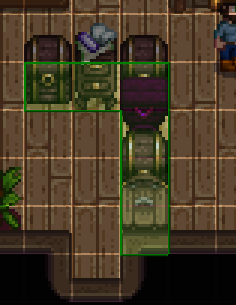 mild talon
hmm.. so...

 livid ore
I'm getting this error when trying to install SMAPI for gamepass:
The installer failed with an unexpected exception.
If you need help fixing this error, see https://smapi.io/help
System.IO.IOException: The file cannot be accessed by the system. : 'C:\XboxGames\Stardew Valley\Stardew Valley.deps.json'

I followed the gamepass instructions, to no avail.
mild talon
for the Input / Output chests yuo have to config them so they work as such otherwise they just be normal chests
sterile sigil
mild talon
hmm.. so...
but if I change the first input chest as such, it wont let anything take out of it, no?
mild talon
yeah maybe not the first one
sterile sigil
Ill try the one/s connected to the hopper to see
mild talon
(tbh i have installed this mod but havent tried to set it up yet bc the scheme confuses me. but maybe thinking it out here will help both of us haha)
sterile sigil
It would make so much more sense if the automate mod would ignore the hopper as part of it, as described in the mod description
but somehow it turns green too which doesnt make sense
restive grove
livid ore
The installer failed with an unexpected exception.
If you need help fixing this ...
I'm not familiar with the GamePass/Xbox setup procress, but the error is saying it does not have file system permssions to access/read/edit that file
sterile sigil
according to this screenshot the hoppers are not green https://i.imgur.com/VmYIwdv.png
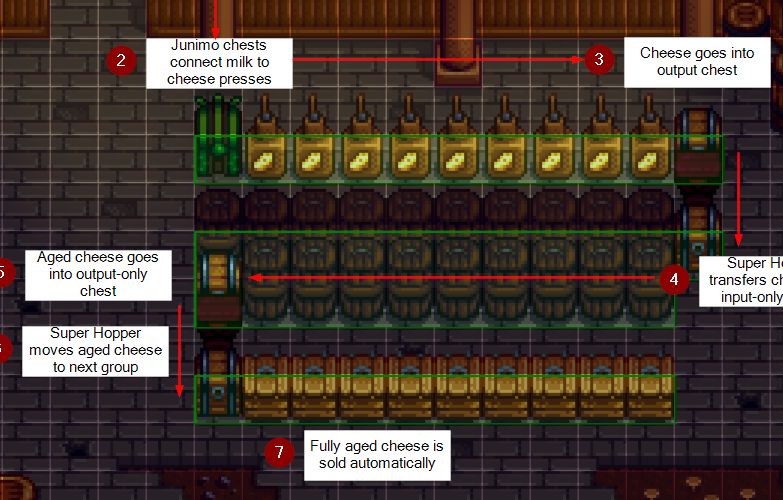
then why does it in my game 
mild talon
actually, i think you do config the Input chests to Never take items bc it's the setting for Automate not for you the farmer
and the Output to Never put items
sterile sigil
Ill try that
restive grove
livid ore
I'm getting this error when trying to install SMAPI for gamepass:
https://stardewvalleywiki.com/Modding:Installing_SMAPI_on_Windows#Xbox_app
what step of these instructions did you get up to
halcyon igloo
i'm loving this circuit talk lol
livid ore
restive grove
https://stardewvalleywiki.com/Modding:Installing_SMAPI_on_Windows#Xbox_app
what...
"When it asks where to install, enter the path you copied from the previous step."
I got to this step
entered in the path
and then said I wanted to install SMAPI
and thats when I got t hat error
sterile sigil
moment of truth
mild talon
also make sure you have the hopper set to Super Hopper.. think you have to right click on it while holding an iridium bar
JIC
sterile sigil
jesus christ it works
mild talon
idk if there's any in=game indication for when SH is toggled on/off.. is there?
sterile sigil
it takes an awkward amount of time for the stone to get from chest 2 to 3, but it works
 mild talon
yay! good to know. so you do need to configure the In/Out boxes like the guide says?
the guide is correct in other words
sterile sigil
changing chest 2 to "never take out items from this chest" turns the super hopper into neutral, so not green
sterile sigil
yeah, I gotta play with the settings in the main menu but I think for now that works
simple stump
are there any hd portrait mods that don't require pytk?
sterile sigil
never again gonna have to make 50 recyclers just to ensure that trash wont flow directly to the mini bin
mild talon
ones that have been converted to HD Portraits (mod)
simple stump
thanks!
restive grove
others you'd have to manually convert yourself, if you feel like it (but can only be used privately)
mild talon
thank you too Devil
sterile sigil
mild talon
idk if there's any in=game indication for when SH is toggled on/off.. is there?
and yeah there is, the hopper turns purple once you right click with an iridium
mild talon
good to know! once i can fix the latest issues with my game maybe i'll try it out for my soda factory
restive grove
livid ore
and thats when I got t hat error
I'm not really sure, but I would check the folder permissions to make sure you have the right permissions on the stardew folder, as the error is saying it doesn't have permission to read it.
mild talon
sterile sigil
changing chest 2 to "never take out items from this chest" turns the super hoppe...
( yeahh.. i think i had it backwards. the Output chest gets Never take items and the Input gets Never put items. ... right? ... opposites like these really confuse me )
sterile sigil
mild talon
( yeahh.. i think i had it backwards. the Output chest gets Never take items and...
Here's how I did it https://i.imgur.com/1efe2F5.png
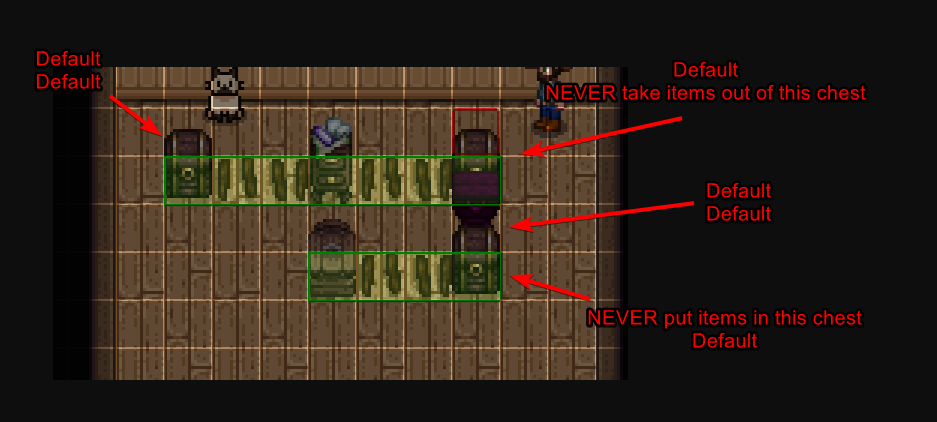
Default/Default means both in and out settings
mild talon
ok, yes, so Output is Never Take
and Input is Never Put
for the SH/automate scheme to work
thanks for the visual labeled!
sterile sigil
yep, exactly that! Youre welcome
livid ore
restive grove
I'm not really sure, but I would check the folder permissions to make sure you h...
You can’t change the folder permissuonec
restive grove
blame Gamepass DRM
 distant zodiac
does bfav work for mobile and if so could someone explain how to install mods using bfav since I tried back when i used a computer and had no clue
livid ore
restive grove
blame Gamepass DRM
So I’m just screwed?
restive grove
well might be ways round it but I don't have game pass or Windows, can try searching the history on here for "gamepass" "permissions" or similar.. but as mentioned that is the issue, it can't access/read a file(s).
Steam version is on sale right now tho (40% off).
lament prairie
livid ore
So I’m just screwed?
If the Gamepass install isn’t working, try starting over from scratch
livid ore
I have like three times
lament prairie
If it really isn’t working, try uninstalling and reinstalling Gamepass itself
livid ore
This is frustrating
lament prairie
If Gamepass has changed it’s interface again, then we may not know what’s up
Yeah, it sucks, but unfortunately this is 100% on Gamepass and we have no control
(Especially not me, I’m just an internet rando, but also i don’t think the developer has a ton of options unfortunately)
Gamepass has been “stable” for a while, but when Stardew first launched on it, there was a while when they kept changing up the options
mild talon
Is gamepass like an alt steam?
Ohh Xbox. Forgot about Google for a second
I didn't know you could mod on that 😲
lament vortex
the company is xbox, but gamepass is on pc as well
or well, the company is microsoft* it just has games for xbox and pc
livid ore
lament prairie
Gamepass has been “stable” for a while, but when Stardew first launched on it, t...
I appreciate you trying to help, you’re a good person. Merry Christmas
livid ore
Got it working, had to copy all the files to a folder outside of the Xbox app and then launch it by clicking the exe twice
simple stump
anyone have experience doing pytk -> hd portraits conversions using the script? the script works but the portraits don't show up in game
native dragonBOT
Can you upload your SMAPI log to https://smapi.io/log (see instructions on that page) and share the link here?
simple stump
native dragonBOT
Log Info: SMAPI 3.18.1 with SDV 1.5.6 (build 22018) on Microsoft Windows 11 Home, with 116 C# mods and 272 content packs.
Suggested fixes: One or more mods are out of date, consider updating them
lament prairie
Which portraits are you trying to get working?
simple stump
orangepie's rsv portraits and lunakatt's east scarp portraits
lament prairie
Nexus Mods :: Stardew Valley
Patches for PyTK-based HD Portrait Mods into a Content Pack usable by HD Portraits by tlitookilakin, as well as a patcher to do it yourself.
Try using this for lunakatt’s
simple stump
thanks! i'd really like to get the actual script working though, i care more about the rsv portraits edit: nvm just vortex weirdness it works now!
halcyon igloo
ruh roh lol time to investigate
 lament prairie
simple stump
thanks! i'd really like to get the actual script working though, i care more abo...
lament prairie
simple stump
thanks! i'd really like to get the actual script working though, i care more abo...
Glad you solved it! That was going to be my next question (vortex stuff)
mild talon
BTW Lunakatt's ES have already been converted. You can dl on that page
Plus a few more
mild talon
halcyon igloo
ruh roh lol time to investigate
Where's that artisan mead keg from? 👀
halcyon igloo
mild talon
Where's that artisan mead keg from? 👀
wildflour's specialty meads and ales i think?
neon stump
Hi so I downloaded hat mods but where can I find them in game?
halcyon igloo
does it not say on the mod page?
dapper gazelle
I think hats automatically end up at the Hat Mouse shop
fair frigate
Heya guys, back again. I have a mod where I can adopt multiple cats or pets in general, and I got a letter from marnie that she’ll adopt them out to me during her regular business hours. However, when I do get here, I see no option to adopt a pet, just the usual livestock and shop things. Any idea what’s wrong with that?
lament prairie
Is this adopt n skin?
If so, Marnie only sometimes has a cat available
It’s random
dapper gazelle
(and when one's available, the pet will be found on a little bed off to the right, not her regular livestock menu)
fair frigate
lament prairie
Is this adopt n skin?
Yes
fair frigate
dapper gazelle
(and when one's available, the pet will be found on a little bed off to the righ...
Ooooh ok. Thanks for letting me know, it’s my first time using this one
So can you only adopt cats or are there options to adopt dogs, too, as well?
And also, how many can you have?
surreal basalt
@neat plaza sorry for the ping but I thought you might wanna know that l4t is just broken rn 💀💀
dapper gazelle
fair frigate
And also, how many can you have?
you can adopt either/both, depending on what sprites you have added--be sure to name them as described on the mod's description page otherwise A&S won't recognize the sprites. I don't know if there's a limit to how many you can adopt... but I feel like the most I've seen someone mention is around 7? iirc they do cause a slight lag the more you have, so just be mindful of that 
fair frigate
dapper gazelle
you can adopt either/both, depending on what sprites you have added--be sure to ...
So they have to be dog_1, dog_2 and so on? Not the names they’re given when I download them?
Sorry for so many questions 🥲
dapper gazelle
right. you just have to rename the ones you want to dog_1, dog_2 etc
I think there are some sample ones included in the folder
dapper gazelle
I don't know much about the horse mechanics b/c I didn't use that part but p sure the naming convention is the same yeah
fair frigate
The horse files I downloaded look different
Ok
What about if they come with collars?
dapper gazelle
if the pet sprite has the collar already, then your pet will just have a collar when you adopt it. if the pet sprite uses collars separately as an overlay (e.g. Elle's dogs) then if you want a collared pet, you will need to merge the collar with the dog (with an image editor) and save that with the appropriate AnS name
fair frigate
dapper gazelle
if the pet sprite has the collar already, then your pet will just have a collar ...
Ooooh ok. Thanks a lot for answering my questions I appreciate it
lament prairie
Mostly I find it annoying to navigate my house when I have too many pets xD
 mental eagle
native dragonBOT
mental eagle
native dragonBOT
Log Info: SMAPI 3.18.1 with SDV 1.5.6 (build 22018) on Microsoft Windows 10 Pro, with 80 C# mods and 230 content packs.
Suggested fixes: Pytk isn't compatible with newer SMAPI performance optimizations, consider removing it, One or more mods are out of date, consider updating them
mental eagle
robust bison
?
?
 long brook
That's steam (or connection) problem, not mod
 eternal yew
oh ok i just restarted my pc it worked

any idea on how to fix this?
or what other mod i should get that does the same thing
lament vortex
!uiinfosuite
native dragonBOT
If you go to https://github.com/Annosz/UIInfoSuite2/releases, you can find UI Info Suite 2, which works with Stardew 1.5.5+. Download the first zip, not the source code.
neon stump
lament vortex
!uiinfosuite
Hi, after downloading and putting it in the folder, how do we activate it in the game
near terrace
You install it the same way as any other mod, when you load up your save, you'll find a new tab in the game menu, next to the settings.
neon stump
okay thank u ill look for that
 hollow sinew
Hey guys i was wondering if mods affect connection for co-op
lament vortex
!mphelp
native dragonBOT
For connection issues in multiplayer see the pinned post in #vanilla-tech-support (<#vanilla-tech-support message>) and also the wiki troubleshooting page (https://stardewvalleywiki.com/Modding:Player_Guide/Troubleshooting#Can.27t_connect_to_another_player_in_multiplayer).
 tawdry spruce
Anyone know how I can get a gender neutral pronouns mod on mobile?
hollow sinew
ic
tawdry spruce
ic?
lament vortex
tawdry spruce
ic?
they were answering to me
long brook
tawdry spruce
ic?
Maybe teekay means to reply what nonu said aroha. For your problem, check on mod page if there is a version older than Dec 2020. I know there is mod for that but idk if there is old version of that mod that for mobile
tawdry spruce
Mod page?
long brook
The mod web page
lament prairie
!androidmods
native dragonBOT
If you're using SMAPI on Android, you'll need specific older versions of most mods. For a list of many of the most popular mods compatible with android SMAPI, see here https://forums.stardewvalley.net/threads/stardew-valley-mobile-mods-list.13322/. For mods not listed here, they may or may not be compatible with android, but see https://stardewvalleywiki.com/Modding:Android for more info, including how to find a compatible version of a mod not listed in the first link.
lament prairie
You'll have to follow the 2nd link here, I think
And try to find a version of the gender neutrality mod that works on mobile

It looks like the author is working on getting an older version clearly up and marked for android
I think this version might work? https://www.nexusmods.com/stardewvalley/mods/722?tab=files&file_id=23669 but you'd have to try to be sure
brittle obsidian
https://www.nexusmods.com/stardewvalley/mods/12662?tab=files anyway make this work without using txml
 near terrace
brittle obsidian
https://www.nexusmods.com/stardewvalley/mods/12662?tab=files anyway make this wo...
near terrace
brittle obsidian
https://www.nexusmods.com/stardewvalley/mods/12662?tab=files anyway make this wo...
Only if you know how to convert it to content patcher for personal use or if the author converts it, I'm afraid.
brittle obsidian
near terrace
Only if you know how to convert it to content patcher for personal use or if the...
Oh yea I want it for personal use I just want to know the method because I don't much about Modding
near terrace
brittle obsidian
Oh yea I want it for personal use I just want to know the method because I don't...
There's a guide on converting TMXL to CP, I think you might find the link in #making-mods-general somewhere
near terrace
near terrace
There's a guide on converting TMXL to CP, I think you might find the link in <#1...
Also there's a python script in there called tmxl2cp so just run a search in that channel and you'll find it
 neat plaza
!tmxl2cp someone made a command for it, i think it was lyoko
native dragonBOT
Want to use or update a mod, but it's using TMXL for its maps and you don't know how to manually convert (or don't want to)? You can use the TMXL2CP converter to automatically convert the maps into Content Patcher format. Follow the instructions (and remember to change map references in the normal jsons afterwards if necessary, like in schedule data!) and your mod will be ready to use in the current version of Content Patcher! https://github.com/AnotherPillow/TMXL2CP
 latent dune
is there a guide on how to make mod that adds custom furniture?
near terrace
latent dune
is there a guide on how to make mod that adds custom furniture?
The documentation for Dynamic Game Assets on github is probably what you need
brittle obsidian
If someone has a way to convert could you help me do it because I can't get my python running
neat plaza
brittle obsidian
If someone has a way to convert could you help me do it because I can't get my p...
using tmxl2cp?
brittle obsidian
Yea
neat plaza
what's your issue
brittle obsidian
brittle obsidian
https://www.nexusmods.com/stardewvalley/mods/12662?tab=files anyway make this wo...
Wanna me make ifrm2 file not use tmxl
neat plaza
neat plaza
what's your issue
.
brittle obsidian
Please Ignore my mistake
 foggy crest
Hey guys, my flower dance event seems to be broken and I have no idea what mod would be causing this. I don't have any mods that alter the flower dance or NPC dialogue, as far as I'm aware.
The dialogue with Lewis to start the flower dance is broken, no matter if I click "yes, start" or "not yet" nothing happens, the same dialogue box just keeps popping up and I have to force quit the game. Has anyone else ever experienced this?
near terrace
!log
native dragonBOT
Can you upload your SMAPI log to https://smapi.io/log (see instructions on that page) and share the link here?
native dragonBOT
Log Info: SMAPI 3.18.1 with SDV 1.5.6 (build 22018) on Microsoft Windows 10 Home, with 55 C# mods and 59 content packs.
Suggested fixes: Pytk isn't compatible with newer SMAPI performance optimizations, consider removing it, One or more mods are out of date, consider updating them
 noble bison
I can't load any mods on the configure can you help me

I'm on mobile
Btw
Anyone?
near terrace
Sometimes people aren't online to help, so please be patient! Having said that, do you have mods that can be configured in gmcm?
noble bison
What's that?
dusty spruce
The exact menu you’re seeing
Mods will only appear there if they have GMCM integration
Not all mods do
dusty spruce
Read that mod’s description
noble bison
It's version 2
Where do I read the description of the mod because I went to where I downloaded it and it said nothing about the gmcm integration
near terrace
Did you not get it from Nexus mods? The page where you downloaded it from should have some information about the mod there
noble bison
near terrace
Did you not get it from Nexus mods? The page where you downloaded it from should...
I did
dusty spruce
If it mentions Generic Mod Config Menu or has it listed as a dependency/requirement, then it has the integration
 lean flower
a doubt , i bought pigs in the game more than twenty days ago, the barn is always open and with pastures next to it, but they do not come out or produce truffles
what could be going on?? 
near terrace
lean flower
a doubt , i bought pigs in the game more than twenty days ago, the barn is alway...
Do you use mods, if not this is a #vanilla-tech-support question
lean flower
right
 old frost
!log
native dragonBOT
Can you upload your SMAPI log to https://smapi.io/log (see instructions on that page) and share the link here?
neat plaza
old frost
!log
use #governors-mansion if not responding to someone
old frost
neat plaza
use <#257895149517013002> if not responding to someone
Hey
You can help me?
neat plaza
hey what
old frost
hoary bane
!howtoask
native dragonBOT
When asking for help with modding issues, please:
- Ask in #archived-modded-support
- Try to explain what the issue or problem is. Please be specific!
- If it's SMAPI installation related, please state whether you're using Windows/Mac/Linux and Steam/GOG/Gamepass.
- Provide a log if you have one (see https://smapi.io/log for instructions). Please provide a log even if there's no errors or warnings! If you are playing multiplayer, we will need a log from every player.
- Please remember no one's getting paid to answer your questions! It may take some time for someone to answer! If no one has answered in a few hours, feel free to ask again
old frost
is there something wrong with my CP?
https://smapi.io/log/26830267730e4ac98b088487601ea72d
(ANDROID)
native dragonBOT
Log Info: SMAPI 3.7.6 with SDV 1.4.5 on Android Unix 4.9.227.23848788, with 7 C# mods and 0 content packs.
Suggested fixes: One or more mods are out of date, consider updating them
near terrace
You have no errors, but you also don't have any CP content packs by the looks of it
 pseudo basin
Hey, hows everyone doing? I have a serious issue thats driving me bonkers lol. I just had to do a fresh windows install on my machine and first things first, get my SV back up and running with all of its mods, I just finished and get it stable enough to play, and in the process of trying to figure this out finished all of my configurations too, but...
has anyone seen a red lock show up on their toolbar overtop of what they have selected and do they know what mod that is, i cant find it anywere
Ok weird, and now I just moved my starting farms table and it turned into a piece of furniture ive never seen lol
robust bison
pseudo basin
has anyone seen a red lock show up on their toolbar overtop of what they have se...
I think that might be auto tool select?
pseudo basin
YESSS
I was about to type I had just figured it out
The big tip off was being able to get it to work right in doors but the moment i went outside its behavior was really funny and I could remember what I installed but not exactly remember its name so I had to google it lol. THANK YOU for trying for me. btw f5 disables it lol
 ornate oxide
I just downloaded stardew valley on steam (I’ve played on console up until now) and I want to download the stardew valley expanded mod
I got no clue what’s the first step
lament prairie
!gettingstarted
native dragonBOT
If you would like a guide to setting up mods for Stardew Valley, check out the getting started guide! https://stardewvalleywiki.com/Modding:Player_Guide
lament prairie
!sve
native dragonBOT
Stardew Valley Expanded (https://www.nexusmods.com/stardewvalley/mods/3753) is a mod which adds a lot of new content and areas to the game. It has many dependencies, so be sure to follow the install guide which is on the github wiki along with FAQs and troubleshooting steps for common issues: https://github.com/FlashShifter/StardewValleyExpanded/wiki
ornate oxide
Thanks
Yeah I got super lost right around after I installed smapi
Still ain’t got a clue what I’m doing
lament vortex
cabbae, you have to redownload mr ginger and tristan
native dragonBOT
Log Info: SMAPI 3.18.1 with SDV 1.5.6 (build 22018) on Microsoft Windows 10 Pro, with 60 C# mods and 96 content packs.
Suggested fixes: Pytk isn't compatible with newer SMAPI performance optimizations, consider removing it
 daring acorn
lament vortex
cabbae, you have to redownload mr ginger and tristan
daring acorn
lament vortex
cabbae, you have to redownload mr ginger and tristan
i have
everytime i unzip the file into the mods folder it j says the same thing when i start sdv
lament vortex
are you trying to add portrait mods to mr ginger and tristan?
daring acorn
yesyes
lament vortex
you have to place the portraits insde the folders for mr ginger and tristan
lament vortex
can you screenshot your mods folder?
daring acorn
the whole thing?
lament vortex
yes, just to know how you're unzipping and give you instructions
i have a feeling you're leaving the folders named like mr. ginger and a bunch of numbers and thats why they're not overwriting. because otherwise, judging from the path in your log, they should be overwriting already
daring acorn
waikt the mod lists long can i j send the mister ginger related files-
lament vortex
sure, send the screenshots related to the mr. ginger mods
 lament vortex
remove that mr.ginger portrait pytk.json too, that's not part of mr. ginger
daring acorn
when i extract the zip into the mod folder it gives me this

then i press yes to all
daring acorn
lament vortex
remove that mr.ginger portrait pytk.json too, that's not part of mr. ginger
oh kokoko
so j this?
 daring acorn
kkoko
lament vortex
and show me that folder


 lament vortex
grab that [cp] mrginger folder and move it inside the [npc] mrginger folder in your mods. say yes to replacing all the files
and do the same with tristan
daring acorn
o wait but for the tristan one
do i pick or do i drag them all in-
j drag the whole thing right
lament vortex
for Tristan, drag them all inside your [npc] tristan folder too
daring acorn
wait so for CP drag into mod and [npc] folder?
lament vortex
so npc tristan > cp tristan and npc mrginger > cp mrginger
you have to drag them inside the [npc] folders
daring acorn
only the [npc] folder?
lament vortex
yes
native dragonBOT
Log Info: SMAPI 3.18.1 with SDV 1.5.6 (build 22018) on Microsoft Windows 10 Pro, with 60 C# mods and 96 content packs.
Suggested fixes: Pytk isn't compatible with newer SMAPI performance optimizations, consider removing it
lament vortex
lament vortex
so npc tristan > cp tristan and npc mrginger > cp mrginger
here
 carmine imp
I've got a 13 player farm, is this likely the cause for my input lag because it was fine before
lament vortex
if you have 13 people playing + mods, yes, that can surely cause lag
daring acorn
lament vortex
so npc tristan > cp tristan and npc mrginger > cp mrginger
im sososo sorry but i dont get that msg
lament vortex
tristan is a separate npc
ornate oxide
I just installed stardew valley via steam, and am currently trying to put the expansion mod on it
lament vortex
with his own folder
ornate oxide
I just downloaded the mod through nexus with all the needed extra files
But I’m lost on what’s next
lament vortex
!gettingstarted
native dragonBOT
If you would like a guide to setting up mods for Stardew Valley, check out the getting started guide! https://stardewvalleywiki.com/Modding:Player_Guide
lament vortex
lament vortex
with his own folder
the folder is named [npc] tristan
so you have to put tristan's portraits in tristan's folder
daring acorn
oh
lament vortex
i realised you don't have tristan installed, that's why you can't find his folder
ornate oxide
native dragon
If you would like a guide to setting up mods for Stardew Valley, check out the g...
I’m at the configuring step
I don’t know what’s next
I moved the expanded mod file to the mods folder
I don’t see a configure json file
lament vortex
if you've moved sve and all its dependencies to the mods folder, you just have to start the game to get the config.json file
also recommeng getting gmcm to configure the mod in game
!gmcm
native dragonBOT
Generic Mod Config Menu (or GMCM https://www.nexusmods.com/stardewvalley/mods/5098) adds the option to edit some, but not all, mod configs from either the title screen or the options page in a save. It also has a special screen to edit keybinds for all mods with GMCM integration.
The presence of the gear it adds to the title screen is not a method for checking whether mods are installed, only whether GMCM is installed.
ornate oxide
I launched it, but still no configure file
I’ll try installing the configuration menu
I think I may see the problem
I had downloaded the dependencies, but hadn’t moved them to the folder
But now there’s another issue, it won’t let me move them to the mods folder at all when I try to set a path
lament vortex
what do you mean? what does it tell you?
 sharp fiber
dont know why theres another hand to the left
 sharp fiber
dont know why theres another hand to the left
sharp fiber
sharp fiber
dont know why theres another hand to the left
it stays there when im in my house but when i leave its gone
lament vortex
!log
native dragonBOT
Can you upload your SMAPI log to https://smapi.io/log (see instructions on that page) and share the link here?
ornate oxide
lament vortex
what do you mean? what does it tell you?
It tells me the path is invalid whenever I try to set it to the mods folder
lament vortex
can you show a screenshot?
 elder copper
Hello 👋 I need some help with dialogue mods. I am trying to setup a sentence but it is skipping past through some segments.
Pls reply to this message so that I can explain in detail
lament vortex
if you're making a mod, please go to #making-mods-general. And don't wait for someone to reply to explain, just specify your issue immediately
elder copper
lament vortex
if you're making a mod, please go to <#156109690059751424>. And don't wait for s...
I am not making any. Just changing a mod to fit a personal preference
lament vortex
I would still go to #making-mods-general
elder copper
Aight. Can you help me tho
lament vortex
No, I cannot. Go to #making-mods-general and explain what you've done in detail, and what you need help with
elder copper
 calm heron
ouch. nonu saying it 3 times
fair frigate
Hey y’all. I think I got a problem…
neat plaza
what is it
fair frigate
I adopted a dog, but after I did so, I don’t see any more dogs at Marnie’s any more. Even though I still get the message that I can adopt the dog


Also, she never has cats
lament prairie
I think there’s something wrong with the skins installed, that means you have an invisible dog
 night crystal
what to do if mods are installed not by a zip file but by a document? I open the document, and there are not even codes, but some kind of crap with incomprehensible characters. I downloaded that mod from nexus, it's checked, I don’t understand what I’m doing wrong...
lament vortex
what mod is it?
it's possible that it downloaded as a rar and you just don't have a program to open it
night crystal
childe age up
native dragonBOT
Files with the extension .zip, .rar, or .7z are archive files, which you can extract to get the actual files inside. For a .zip file, just right-click (or long-press on Android) it and choose the option like extract or uncompress. For .rar and .7z, you need to install third-party software first, like 7-zip https://7-zip.org on Windows, Keka https://keka.io on macOS, PeaZip https://peazip.github.io on Linux, or ZArchiver https://play.google.com/store/apps/details?id=ru.zdevs.zarchiver on Android.
night crystal
Ty! I'll try
fair frigate
lament prairie
I think there’s something wrong with the skins installed, that means you have an...
I did them all correctly… maybe there’s too many skins?
I named them all accordingly
 native sentinel
hi! is it okay if i ask for help and send my smapi log if so?
mild talon
I think you can check your skins in the console..? Or maybe that's just _creatures
Like if you adopted the invisible dog and checked AnS in the SMAPI console it should show you the ID & skin ID so you can see what's up
mild talon
native sentinel
hi! is it okay if i ask for help and send my smapi log if so?
Yup, do it. Try to explain the issue you're having too
!howtoask
native dragonBOT
When asking for help with modding issues, please:
- Ask in #archived-modded-support
- Try to explain what the issue or problem is. Please be specific!
- If it's SMAPI installation related, please state whether you're using Windows/Mac/Linux and Steam/GOG/Gamepass.
- Provide a log if you have one (see https://smapi.io/log for instructions). Please provide a log even if there's no errors or warnings! If you are playing multiplayer, we will need a log from every player.
- Please remember no one's getting paid to answer your questions! It may take some time for someone to answer! If no one has answered in a few hours, feel free to ask again
native sentinel
native dragonBOT
Log Info: SMAPI 3.18.1 with SDV 1.5.6 (build 22018) on Microsoft Windows 11 Home, with 52 C# mods and 74 content packs.
Suggested fixes: Pytk isn't compatible with newer SMAPI performance optimizations, consider removing it, One or more mods are out of date, consider updating them
native sentinel
when i go to start a new day after the ice festival i get a giant wall of red text and a black screen in game
mild talon
Ah, yeah I can see that... seems like it might be a Child to NPC problem
Idk anything about that, sorry! Some people here do tho. It is Xmas after all so idk when they'll be around
native sentinel
thats fine, tysm for answering me though!
fair frigate
I’m still trying to fix my invisible dogs 😞
mild talon
#archived-modded-support message
That was my idea : t
fair frigate
These are all correct, right?
 dapper gazelle
I can't see the rest of the file path but I assume these are in the skins folder?
fair frigate
dapper gazelle
I can't see the rest of the file path but I assume these are in the skins folder...
Yes
They’re all like this
Just going up in number
 mellow scaffold
send help i got a new computer and i downloaded steam and added all my mods back in bcuz the computer i had before had modded sdv and i tried to open it to see if the mods work and it said "windows cannot find 'c:\program' . make sure you typed the name correctly and then try again." does anyone know what this means or how i can fix it?
 worldly ocean
Check to see if that has directory has changed
A different computer could mean a different disk letter
Danget i can not explain to save my life...
The program your using to launch Modded SDV cannot find the path it was originally assigned, so you need to see if the drive letter or any part of the path has changed cause it has to be exact
 obtuse surge
Hey team! Doesna nyone know what might've caused the issues popping up here? https://smapi.io/log/8cea41c57d0e4d03aeadf0bc6c3ea0fa
native dragonBOT
Log Info: SMAPI 3.18.0 with SDV 1.5.6 (build 1.3.37.0) on macOS Unix 13.0.0, with 61 C# mods and 159 content packs.
Suggested fixes: Pytk isn't compatible with newer SMAPI performance optimizations, consider removing it, One or more mods are out of date, consider updating them
obtuse surge
I noticed a couple of items in my inventory had turned into invisible items that were unclickable — champagne grapes from the Champagne Wishes mod and Dewdrop Berries (?) from SVE
mellow scaffold
worldly ocean
The program your using to launch Modded SDV cannot find the path it was original...
on both laptops i used steam to play, on both i used smapi to add my mods, i did the exact same steps for each one. i dont understand what you mean by the path changing, could you tell me how to see if it changed?
worldly ocean
Was it smapi saying that couldn't find the path (by path i mean where the files are located like "c:/program/steam/appdata/stardew valley/mods" this might not be the correct path but where ever stardew valley mods are located that could be diffierent on your computer if you just copy and pasted smapi and to the new folder
obtuse surge
obtuse surge
Hey team! Doesna nyone know what might've caused the issues popping up here? htt...
Bizarrely every item in my inventory has become a mountain warp totem???
mellow scaffold
worldly ocean
Was it smapi saying that couldn't find the path (by path i mean where the files ...
i put all my mods into the mods folder once i added smapi to the steam properties 'launch options' this is exactly where i put everything on my last computer
worldly ocean
Then i have no idea i'm sorry...
mellow scaffold
its alright, thanks for your help! i appreciate it. i can go online and try and find out its no big deal
i think i may have found out what i did wrong, was i supposed to add the quotes when adding the code from smapi installer?
i fixed it and put a " at the beginning of the code and it worked!
dire fractal
are these supposed to be here ? i just downloaded smapi and no other mods
 dire fractal
ok thanks
so now i just f ind my mods and add them to this folder then? like modding sims4?
calm heron
unzip and add
dire fractal
yes ty
calm heron
some mod descriptions have installation directions so make sure to read
please
dire fractal
❤️
this one came as a folder with different files?


i checked the description and didnt see anything
lament prairie
Take the whole folder from 1st image, place into mods folder
dire fractal
ok ty
lament prairie
If you spill the guts (2nd image) out of the folder the mod will not work
The mod has a bunch of files that help make it work
lament prairie
Don’t worry too much, most likely you’d just have to delete some stuff and try again if you mess up
dire fractal
do you run into mods that conflict with each other over?
lament vortex
it's possible, but when you open the game, it opens a black windows (the terminal) that will tell you if you get an error
in most cases, it's not game breaking or anything
but you might run into some things that behave weirdly or something like that
most mods are very explicit about incompatibilities though
lament prairie
It’s far more likely to look weird than to break things
Even if things break, you can generally remove mods to fix the issue
dire fractal
im having trouble understanding what exactly im supposed to download for this mod
 lament vortex
It depends on what version you downloaded
iirc there's two options. one for content patcher (it replaces everything in the game) and one for custom furni (it adds more furniture)
i would generally recommend not downloading anything for CF because it requires PYTK, quite the old mod that will slow your load time
dire fractal
ok i deleted those 2 then
lament vortex
if you really want to add them as new furniture and you're willing to download a few more things, there's a converter that will make them work for dga (dynamic game assets)
dire fractal
im ok but ty
lament vortex
np! if you download the cp version, make sure to get content patcher. otherwise it won't work without it
 tribal trout
if you get dialogue mods, do people in ur co op have to havw them too?
lament prairie
No, unless there’s more to it than just dialogue
dire fractal
just downloaded some mods, isnt something else suppose to open as well when opening the game?


 hoary bane
dire fractal
just downloaded some mods, isnt something else suppose to open as well when open...
hoary bane
dire fractal
just downloaded some mods, isnt something else suppose to open as well when open...
Steam?
lament vortex
dire fractal
are these supposed to be here ? i just downloaded smapi and no other mods
GOG according to this
hoary bane
!launchoptions then
native dragonBOT
If you're using Steam or GOG on Windows, you will need to set your launch options in order for Steam/GOG to automatically launch with SMAPI. The SMAPI installer will tell you what to set as the launch options when it completes (green text). You can find instructions (with screenshots) on how to do that here: https://stardewvalleywiki.com/Modding:Installing_SMAPI_on_Windows#Configure_your_game_client
dire fractal
lament vortex
did you get a black windows listing all your mods?
no
dire fractal
lament vortex
GOG according to this
correct
 craggy ember
Hello everyone, I opened my vanilla world by accident through the modded stardew version, and did it without backing up the original save files. I want to be able to enter my vanilla save without mods activated, but now that its been overwritten with a modded save, it crashes every time I try to open it without mods. Is there any way I can recover it?
dire fractal
i see where i messed up, i got it
native dragonBOT
@dire fractal You leveled up to Cowpoke. You can now speak in our voice channels and share images in all channels!
robust bison
craggy ember
Hello everyone, I opened my vanilla world by accident through the modded stardew...
if it was only one in game day, you can use the backup
brazen mortar
I don't have any errors but I have this 'ore node ' in the mines that's giving me houseplants??
lament vortex
its custom ore nodes
its an example pack coming with that mod, which has house plants come from them
brazen mortar
that's odd. I've never seen it until now.
craggy ember
robust bison
if it was only one in game day, you can use the backup
it was more than one day :(
robust bison
check save backup in your mods folder
 halcyon scroll
I recently encountered an error that made the game jam at the end of the day, with the only option being force close the game, i started the game again and that day went fine but a couple days later the same thing happened again. Im not sure why this started happening 50 days into the game

this error appears in the log several times per second
lament vortex
!log
native dragonBOT
Can you upload your SMAPI log to https://smapi.io/log (see instructions on that page) and share the link here?
noble bison
Remember this yah the babies take after spouse mod did have it in the codes I watched but it doesn't appear when I look for it
