#archived-modded-support
1 messages · Page 61 of 1
 high sun
 native dragonBOT
Log Info: SMAPI 3.17.2 with SDV 1.5.6 (build 22018) on Microsoft Windows 11 Home, with 101 C# mods and 200 content packs.
Suggested fixes: Pytk isn't compatible with newer SMAPI performance optimizations, consider removing it, One or more mods are out of date, consider updating them
high sun
I'm at a loss tbh. I can't figure out why this is happening
 calm heron
what exactly is happening
high sun
Oh, that's probably helpful. Mostly in the mountains - it won't load and SMAPI will go mad with that error toward the end. I try to skip the event or stop it w/ commands and it doesn't stop. That time, It actually got further in to the Sterling event on the tracks, but cut out halfway through. it was also morning time. but I allready checked and it's not an ES or ARV thing.
 sharp plaza
i see theres a an issue with the content json. 3 being a number instead of string. could try to change that and test it again?
calm heron
high sun
Oh, that's probably helpful. Mostly in the mountains - it won't load and SMAPI w...
not entirely sure how to help here, imma be honest. you can wait a while, but if it's a sterling issue, maybe you can try the es server?
sharp plaza
high sun
I'm at a loss tbh. I can't figure out why this is happening
not sure at all. but the warnings before the errors say "could not find a Cue with the name "cm:musicTrain". See logs for details." Since the error below looks like its related to loading a music file your issue is probably related to the game not being able to find sounds
high sun
I tried out there too but it happened once with a Sam CS so it through me through a loop there. As for the music files, I'm not even sure how to restore them
sharp plaza
high sun
I tried out there too but it happened once with a Sam CS so it through me throug...
Try validating the files through steam (or whatever you use) and see if it fixes it
high sun
I wish I could say I didn't. I'll try a clean install and try again, maybe?
 wet basin
sharp plaza
i see theres a an issue with the content json. 3 being a number instead of strin...
wet basin
sharp plaza
i see theres a an issue with the content json. 3 being a number instead of strin...
Oh! Thanks!
 limber sand
Does anyone know of a greenhouse mod that allows you to upgrade the greenhouse over time? I love the oasis mod but you just get all of that stuff for free and it makes me feel hella cheaty
Are there any mods that allow you to pay robin with gold and materials for greenhouse upgrades
calm heron
this is for modding help, like when a mod crashes
try asking in #modded-stardew
limber sand
Thank you!
wet basin
sharp plaza
i see theres a an issue with the content json. 3 being a number instead of strin...
Wow. It works again - thank you!!!!!
limber sand
Im having difficulty with this greenhouse mod, I parsed it and it told me there is an update for the mod and linked me right back to the file I already have downloaded
native dragonBOT
Log found, uploaded to: https://smapi.io/log/4f25919932f74e518294c036268ad604
calm heron
might be a manifest error. sometimes the authors forget to update the version number. you can do that manually with like, notepad+
limber sand
How exactly do I update it manually? I'll just do that
just right here?

Change it to 1.0.1?
 long brook
yes
limber sand
Okay! Thank you
long brook
it's okay actually to ignore it. it's just the mod author maybe forgot to change it's mod version
limber sand
Yeah! I just like clean parses because OCD
 umbral anchor
did a fresh install of stardew and my mods/smapi but i keep getting this error and nothing online has helped
"led exception. System.TypeLoadException: Could not load type 'System.BadImageFormatException' from assembly 'System.Runtime, Version=5.0.0.0, Culture=neutral, "
anyone know anything?
done fresh installs and everything
 lament vortex
!log
native dragonBOT
Can you upload your SMAPI log to https://smapi.io/log (see instructions on that page) and share the link here?
 lament prairie
You may need to uninstall/reinstall the game
Usually that indicates the game files didn't all update properly
Sometimes it means you're on the legacy branch
 tiny forge
I'm copy-pasting what I wrote in #vanilla-tech-support as recommended by a moderator.
SOLVED~~Is this a bug? The Summer Crops Bundle is locked even though I still have to bring stuff.
https://cdn.discordapp.com/attachments/337774601696313347/1041520275482746961/Capture_decran_2022-11-13_194854.png
https://cdn.discordapp.com/attachments/337774601696313347/1041520275180748810/Capture_decran_2022-11-13_194923.png
Here's my list of mods:
https://cdn.discordapp.com/attachments/337774601696313347/1041520814203338752/image.png~~


oh... What's happening here?
 robust bison
are you accessing from the community center
tiny forge
Yep.
robust bison
are you saying locked as in you can't put items or as locked as in it shows as completed
tiny forge
robust bison
are you saying locked as in you can't put items or as locked as in it shows as c...
Well, the icon is pink and displays a "flower" thingy as showed in picture #1, so I cannot open the menu and add items. 😦
robust bison
I see
tiny forge
I'll double-check something...
Uh oh... I just noticed that the right icon is bugged too... It's for the animals and I don't even own animals. 😦

... need to double check something again. 😆
I think it's a "user problem"
 gaunt gust
Flower means completed
tiny forge
Sorry everyone...
I was the problem.
gaunt gust
Can you check with the save checker
tiny forge
I was in the wrong room. 🤡
I was in the Crafts Room instead of the Pantry...
I obviously need to take a break. 😆
gaunt gust
Happens
 forest flicker
I just downloaded Seasonal Garden Farmhouse V2 it it won’t work anyone know how to fix it?
robust bison
!log
native dragonBOT
Can you upload your SMAPI log to https://smapi.io/log (see instructions on that page) and share the link here?
forest flicker
How do I upload my SMAPI
robust bison
instructions of the website
 sweet sandal
Hello, does anyone know how I can make a mod to modify the time work?
 dark tide
native dragonBOT
dark tide
native dragonBOT
Log found, uploaded to: https://smapi.io/log/c0e6b140e0ec444b92839b8d02b64aa5
 desert totem
any idea on why daisyniko's earthy interface isn't working in some spots anymore? https://smapi.io/log/28bfa29bc7d64a61a010cecf8120c7aa I just installed DGA and thats it minus a few content packs but it doesn't make sense to me that it would be the issue
 native dragonBOT
Log Info: SMAPI 3.17.2 with SDV 1.5.6 (build 22018) on Microsoft Windows 10 Home, with 53 C# mods and 75 content packs.
Suggested fixes: One or more mods are out of date, consider updating them
desert totem
smh
 jolly parcel
when I install SMAPI 3.17.2 with Stardew Valley on Steam (Build 8043676) and windows 11, no other mods installed yet, Just SMAPI, if I try to donate something to the museum, the mouse stops moving the cursor and I get frozen on this screen.

 naive drum
jolly parcel
when I install SMAPI 3.17.2 with Stardew Valley on Steam (Build 8043676) and win...
naive drum
jolly parcel
when I install SMAPI 3.17.2 with Stardew Valley on Steam (Build 8043676) and win...
Go to the options menu and turn gamepad mode to either force off (if you're using a keyboard and mouse) or force on (if you are using controller)
gaunt gust
dark tide
Looks to me like you have both ridgeside and the mobile version of ridgeside installed?
!smapislow
native dragonBOT
For some players, SMAPI can take a while to launch the game. See this section of the troubleshooting guide for some common causes and possible fixes: https://stardewvalleywiki.com/Modding:Player_Guide/Troubleshooting#Game_lags_or_stutters_in-game
dark tide
gaunt gust
Looks to me like you have both ridgeside and the mobile version of ridgeside ins...
I’m confused about that too. I only downloaded the one time
jolly parcel
naive drum
Go to the options menu and turn gamepad mode to either force off (if you're usin...
Thank you! that did it
dark tide
gaunt gust
Looks to me like you have both ridgeside and the mobile version of ridgeside ins...
I’ll poke around and see if I can figure that out
dark tide
dark tide
I accidentally deleted where I asked if anything might explain why SMAPI stops responding on startup or load. I just used the tool on the website to follow its instructions and disabled the mobile Ridgeside. Fingers crossed
desert totem
desert totem
any idea on why daisyniko's earthy interface isn't working in some spots anymore...
So uhhh turns out it was my mod (oops) and I am a buffoon
Imma have to figure out a way to change Shane's sprites on the cursors sheets without changing anything else, not looking forward to that
forest flicker
!log
native dragonBOT
Can you upload your SMAPI log to https://smapi.io/log (see instructions on that page) and share the link here?
forest flicker
native dragonBOT
Log Info: SMAPI 3.18.0 with SDV 1.5.6 (build 22018) on Microsoft Windows 11 Home, with 17 C# mods and 18 content packs.
Suggested fixes: Pytk isn't compatible with newer SMAPI performance optimizations, consider removing it
forest flicker
I need that mod for another one to work should I do
sweet sandal
Hello, does anyone know how I can make a mod that modifies time work? I have the mobile version of the mod
 slender pike
is there a mod that can find everything tagged with a certain tag in my game?
for example, if i wanted to find a bunch of stuff tagged with "color_red" including items added by mods
calm heron
sweet sandal
Hello, does anyone know how I can make a mod that modifies time work? I have the...
 mossy fossil
Hey guys can someone help me with this problem
 native dragonBOT
Log Info: SMAPI 3.17.2 with SDV 1.5.6 (build 21362) on Microsoft Windows 10 Home, with 91 C# mods and 100 content packs.
Suggested fixes: Pytk isn't compatible with newer SMAPI performance optimizations, consider removing it, One or more mods are out of date, consider updating them
 hoary bane
mossy fossil
Hey guys can someone help me with this problem
Log:https://smapi.io/log/047cd5f...
hoary bane
mossy fossil
Hey guys can someone help me with this problem
Log:https://smapi.io/log/047cd5f...
What platform are you on?
mossy fossil
Windows
hoary bane
I'll change my question, did you buy the game?
mossy fossil
No but that shouldn't be a problem
hoary bane
Sorry, but we can't exactly rule that out. Plus, #rules 9.
Come back anytime once you've bought the game though. ^^
mossy fossil
I know rule 9 😑
calm heron
sorry but uh, pirated copies are bound to have bugs. can't do anything about those
mossy fossil
hoary bane
Sorry, but we can't exactly rule that out. Plus, <#980331531425959996> 9.
I am sure it's not the game it's one of the mods
 hexed warren
Hi, am having a ridiculously long loading time (2 hours already) - game loaded fine yesterday and I've completely rebooted x2 today. Any thoughts? Here is my log: https://smapi.io/log/251452d2567c49628915fd9a7915da15
native dragonBOT
Log Info: SMAPI 3.17.2 with SDV 1.5.6 (build 22018) on Microsoft Windows 10 Pro, with 98 C# mods and 250 content packs.
Suggested fixes: One or more mods are out of date, consider updating them
calm heron
mossy fossil
I am sure it's not the game it's one of the mods
then does it happen in your uh... vanilla version too
mossy fossil
Can't you just help me you won't be breaking any rules since we are talking about the game not about any pirated content
mossy fossil
calm heron
then does it happen in your uh... vanilla version too
No
hoary bane
hexed warren
Hi, am having a ridiculously long loading time (2 hours already) - game loaded f...
Did you click the game whilst it was loading and
mossy fossil
Only when i use smapi
hoary bane
*and "Not responding"?
calm heron
pumpkins is typing faster than me :(
mossy fossil
Wdym by "not responding"?
hoary bane

calm heron
(do you mind me calling you that  )
)
hoary bane
/Did you click the smapi console?
mossy fossil
So is anyone going to help me?
hexed warren
hoary bane
*and "Not responding"?
Yes - I've been trying to load that game all day, hence the multiple reboots
hoary bane
mossy fossil
So is anyone going to help me?
I'm afraid not right now, no. Sorry about that.
mossy fossil
Can someone help me in my dms then 😑
hoary bane
hexed warren
Yes - I've been trying to load that game all day, hence the multiple reboots
Did you click the smapi console at anytime while it was loading? You could be in select mode. 
You can try whatever you haven't tried here yet;
!smapisslow
calm heron
most people won't help those with pirated games and will just suggest buying it. since it's just a graphical error too, I assume some may even tell you to justs live with it
calm heron
bot is down?
hoary bane
Oh I'm misspelling it lol.
calm heron
!smapislow
native dragonBOT
For some players, SMAPI can take a while to launch the game. See this section of the troubleshooting guide for some common causes and possible fixes: https://stardewvalleywiki.com/Modding:Player_Guide/Troubleshooting#Game_lags_or_stutters_in-game
calm heron
got it
hoary bane
Nice I wasn't about to retype it the 3rd time. 
hexed warren
hoary bane
Did you click the smapi console at anytime while it was loading? You could be in...
Thank you, I'll take a look at that
calm heron
because i see it as "smapi is slow", not "smapi slow"
 twilit rune
Please don't be rude to people.
calm heron
penny! 
hoary bane
hexed warren
Thank you, I'll take a look at that
No no that's what you shouldn't do! If it's loading then you shouldn't click anything.
twilit rune
Hiya!
hoary bane
Oh it's Penny 
mossy fossil
Ok i am sorry pumpkin but you refused to help me
hexed warren
hoary bane
No no that's what you *shouldn't* do! If it's loading then you shouldn't click a...
I meant the link, lol
calm heron
penny the beloved 
mossy fossil
Who is penny?
hoary bane
I do not owe anyone help, you are not entitled for help.
calm heron
penny is one of the mods, aka a junimo
mossy fossil
I know that but it's the reason you don't want to help me that angers me
twilit rune
mossy fossil
I know that but it's the reason you don't want to help me that angers me
You don't get to take your anger out on other people in this server.
calm heron
because your game is pirated and we can't do anything about that?
hoary bane
You can't really blame me for not helping. Pirated copies are often finicky and buggy, and though it may or may not be the cause of your problem, I can certainly choose who to help.
mossy fossil
twilit rune
You don't get to take your anger out on other people in this server.
Ok i said sorry to him can you please forgive me mrs.almighty penny
calm heron
squint is penny no longer dreadful? that was the name... right? 
twilit rune
calm heron
*squint* is penny no longer dreadful? that was the name... right? <:SDVpuffereye...
Yes, just for today 
hoary bane
I think Penny is getting ready for the holidays.
mossy fossil
Btw i ment almighty penny as a complement not as sarcasm
calm heron
cake 😋
twilit rune
Then it'll be pennypieful 🥧
mossy fossil
twilit rune
Then it'll be pennypieful 🥧
 calm heron
i think i'll always just be lurker
hoary bane
Staying true I see.
 calm heron
what's say we move channels now?
mossy fossil
seriously is anyone going to help me or not
calm heron
i would suggest patience and being able to take a no if someone else refuses
anyway, i lurk 
 bold geyser
mossy fossil
seriously is anyone going to help me or not
bold geyser
mossy fossil
seriously is anyone going to help me or not
We do have a piracy rule here and people have the right to not help those with a pirated copy of the game, since the issue arising may be caused by the copy being a pirated one. Unfortunately, the best advice I can give is probably get the game legitimately and ask again if the problem persists.
mossy fossil
Ok i just bought the game legitimately can someone help now 🙃
 trim berry
sweet sandal
Hello, does anyone know how I can make a mod that modifies time work? I have the...
trim berry
sweet sandal
Hello, does anyone know how I can make a mod that modifies time work? I have the...
I don't know how to fix the mod but have had better luck using cjb's cheat menu https://www.nexusmods.com/stardewvalley/mods/4

 ornate forge
Save Anywhere mod might be broken
calm heron
if you just bought the game legitimately i severely doubt the same graphical issue will be there
mossy fossil
Seriously it's the mod not the game
sweet sandal
trim berry
I don't know how to fix the mod but have had better luck using cjb's cheat menu ...
Hm ok
mossy fossil
ornate forge
Save Anywhere mod might be broken
Broken how?
trim berry
cjb's cheat menu doesn't have all the same options but does have some time editing
long brook
save anywhere mod no longer work as per august

and most likely to cause corrupted save
ornate forge
Deleted my post then
 radiant valve
i'm attempting to install this mod and wondering what the root of the game means? is it just the folder where the game launcher is stored?

nvm found it in the desc now, why does my brain not wanna find info h
 winged niche
Hello everyone, I hope you can help me.
I have a problem with Content Patcher Animations; I updated my mods a few months ago, and since then, the icons are all frozen, no more animation.
My mods are up to date, whether it's CP, CP-A or the animation mods, same for Smapi; the icons are fixed, but the first animation image is displayed. (For example, you can see the drops on the Soggy Newspaper.)
SMAPI does not display any error.
Does anyone have an idea, please?
 hallow patio
this is probably a dumb question, but i need to remove mods to figure out which mod is stopping the dark talisman quest from triggering. will removing mods and then putting them back ruin any data?
 scarlet quail
winged niche
Hello everyone, I hope you can help me.
I have a problem with Content Patcher An...
scarlet quail
winged niche
Hello everyone, I hope you can help me.
I have a problem with Content Patcher An...
!log is necessary here regardless, so we can see what's editing it
native dragonBOT
Can you upload your SMAPI log to https://smapi.io/log (see instructions on that page) and share the link here?
scarlet quail
hallow patio
this is probably a dumb question, but i need to remove mods to figure out which ...
As long as you don't save and have error handler, it shouldn't ruin any data. You might want to send a log too, in case we can help figure that one out
winged niche
native dragonBOT
Log Info: SMAPI 3.17.2 with SDV 1.5.6 (build 22018) on Microsoft Windows 10 Professionnel, with 122 C# mods and 159 content packs.
Suggested fixes: One or more mods are out of date, consider updating them
scarlet quail
Hmmmmm. My prevailing theory here is it's to do with your PlatoTK error since SpaceCore's update broke it and Platonymous would have to update PlatoTK to fix that error
Casey (spacechase) authors SpaceCore and Content Patcher Animations
so my guess is if you disable PlatoTK, it might work correctly.
winged niche
Nop. I removed PlatoTK from my mods folder, ran the game, and no animation alas.
scarlet quail
Hmmmmmmmm. Are you playing any type of multiplayer with this?
winged niche
No. Just singleplayer.
scarlet quail
I doubt it but have to ask
gotcha. At this point I'm gonna have to leave this to someone who knows the log better than I do here - probably atra or even kittycatcasey (spacechase's user on this discord) to figure it out. Someone has the same issue as you with splitscreen multiplayer on Nexus's posts
So it's not just you and so it'd probably be of interest to casey to either figure out the conflicting mod or, if no conflicts and it's just a bug, reproducing the bug and figuring out the solution so a patch can be put out
winged niche
Ok. Thanks for your time !
 sonic tree
Is there an option to have SMAPI save all its logs instead of just the latest?
sharp plaza
wet basin
Wow. It works again - thank you!!!!!
didnt press enter before i went to sleep XD you're welcome! 🙂
 sharp abyss
Hey Everyone, I just started playing ridgeside along with SDE and my game started crashing randomly. Can anyone figure out what's wrong? https://smapi.io/log/bee8c35314104ab2824a1f7122053893
native dragonBOT
Log Info: SMAPI 3.18.0 with SDV 1.5.6 (build 22018) on Microsoft Windows 10 Pro, with 19 C# mods and 14 content packs.
hallow patio
hey def not random crash lol but im trying to get the dark talisman quest to start and cant figure out which mod is stopping it from triggering so i tried debug quest [id] and game crashed... looking at the crash i cannot tell why its just words that dont make any sense
https://smapi.io/log/6f29566b3e764b9ba370962df4ecd8e1
could this crash possibly tell which mod is causing the issue?
native dragonBOT
Log Info: SMAPI 3.17.2 with SDV 1.5.6 (build 22018) on Microsoft Windows 11 Pro, with 124 C# mods and 198 content packs.
Suggested fixes: Pytk isn't compatible with newer SMAPI performance optimizations, consider removing it, One or more mods are out of date, consider updating them
long brook
sharp abyss
Hey Everyone, I just started playing ridgeside along with SDE and my game starte...
try reinstall ridgeside?
sharp abyss
long brook
try reinstall ridgeside?
I did this and I was able to play two days before it crashed again 😦
gaunt gust
winged niche
https://smapi.io/log/dece5b2d7dbf46238b1f7eee2840428a
Hmmm
CPA may have issues in other languages
(Languages not English)
 verbal yoke
Regarding the Goddess Harvest mod, has there been any workaround in order to make it work with the SVE or it still remains incompatible?
 shy orbit
it's still incompatible (and modifying them to be truly compatible would be a lot of work probably)
 little phoenix
Question: if you have UI Info Suite 2 is it necessary to have the CJB Item Sell Price mod? What about the see label mod (can’t remember the name)
mossy fossil
long brook
save anywhere mod no longer work as per august
That is strange The mod is working for me
gaunt gust
sharp abyss
I did this and I was able to play two days before it crashed again 😦
Just as a quick check: does it work for singleplayer?
lament vortex
little phoenix
Question: if you have UI Info Suite 2 is it necessary to have the CJB Item Sell ...
from what i remember, ui info suite doesn't have the item sell price label, so you can absolutely have both
as for crop labels, that one you probably don't need since ui info does have its own labels
little phoenix
cool thanks. Another question - since these are in another folder which is inside the mods folder, do they also load, I don't think the instructions ever said they need to be placed directly into the folder
 lament vortex
they will still load ^^
little phoenix
thanks!
 mental wharf
i've tried what i can but i just can't seem to get smapi to install or even respond/work..is there anywhere else but here that i can get help with it? i can't even get an error message to pop up when i use the files, and i'm starting to think a manual install is needed
(On linux/steam deck)
 kindred axle
turned off vibrant pastoral recolor fences, yet the fences still look the same (despite having another fence mod)
I don't know what information could possibly help with this problem
 dense walrus
I finished the Community Center so Morris is no longer in the town
I use SVE and NPC Adventure for SVE, now after Morris left it SMAPI throws errors saying that his NPC Adventure file does not match any NPC in the game.
Anyone know if that is normal and can be ignored safely?
kindred axle
probably normal, someone recently asked that question regarding another npc in the ES discord and the mod maker responded "this is normal when the mod tries to find an npc that doesn't exist"
the only reason i hesitate to say 100% is because I'm not a modder
but as long as you have errorhandler you should be fine
dense walrus
so basically bc he was sent out of town my save just thinks he does no longer exist at all?/gq
kindred axle
kindred axle
the only reason i hesitate to say 100% is because I'm not a modder
i'm not a mod maker, i mean.
kindred axle
dense walrus
so basically bc he was sent out of town my save just thinks he does no longer ex...
essentially, yes
to be specific, in Arky's Lucikiel mod, ||he doesn't exist for the first few days, which causes an error that sounds a lot like the one you're having||
thankfully smapi logs are easy to read and not a bunch of technical jargon (usually)
dense walrus
ty! :)
scarlet quail
Yes, that is a normal error and can be ignored, souls
If it bugged you like it did me, you can just delete the references in the files
lament vortex
does anyone know what this is? this is in ridgeside, next to faye's but i noticed there's also one next to d&d's cafe in ES

here's my log https://smapi.io/log/effc8ad849f34721929ad5241a62dd41
native dragonBOT
Log Info: SMAPI 3.18.0 with SDV 1.5.6 (build 22018) on Microsoft Windows 11 Home Single Language, with 123 C# mods and 284 content packs.
gaunt gust
fwiw, this isn't uncommon. The winter spritesheet is a little off from the other ones, so you sometimes get fun looking little graphical glitches
you sort of just have to roll with it
kindred axle
i removed the code that puts in the texture and it's still!! there!!!!!!!!!!!!
I'm going to commit a crime
brb gonna remove every png file titled fence in my mods folder
hoary bane
kindred axle
i *removed the code that puts in the texture* and it's still!! there!!!!!!!!!!!!
!patchsummary
native dragonBOT
@kindred axle Can you do these steps to provide more info?
- Load your save and view the content that should be patched.
- Type
patch summarydirectly into the SMAPI window and press enter. - Upload your SMAPI log to https://smapi.io/log (see instructions on that page).
- Post the log link here.
hoary bane
You can check what's editing your craftables there.
Fences as in the craftables ones or the ones in town?
 abstract tusk
Would anyone have any idea of why I can't change my eyecolor? I haven't made a new character in ages so I have changed many things since that so wouldn't know what it could be (i can change the slider but it doesn't change anything)
sharp abyss
gaunt gust
Just as a quick check: does it work for singleplayer?
I haven’t tried singleplayer yet. how many days would i have to play in singleplayer mode to see if it “works” and won’t crash?
native dragonBOT
Log Info: SMAPI with SDV on , with 0 C# mods and 0 content packs.
verbal yoke
i read the log files and it always shows the file carmen.xnb
 dusty spruce
that's not a full log
shy orbit
that doesn't look like the full log, but reinstalling smapi might let you load the save
or get you a better log
gaunt gust
sharp abyss
I haven’t tried singleplayer yet. how many days would i have to play in singlepl...
honestly I wanted to know if it crashed in like the first thirty seconds
 mental quail
hey, my game crashed when trying to load a save... I haven't played in a while, though I kept mods updated when I saw alerts on Nexus. I'd really appreciate if someone could take a look, thanks https://smapi.io/log/a2e125f14ad84bc4ae929b08156b5055?Mods=game
native dragonBOT
Log Info: SMAPI 3.18.0 with SDV 1.5.6 (build 22018) on Microsoft Windows 10 Pro, with 148 C# mods and 250 content packs.
calm heron
mm... looks like eugene is an empty folder, a lot of things have deprecated code and hd portraits isn't loading due to... something
i'm on mobile rn sorry
calm heron
i think empty folders can usually just be fixed by a redownload. kind of tired, not braining. not sure what you had, nix (is that an okay nickname?), but if it is similar you can definitely help them :)
 dapper gazelle
(I don't think that's jade's primary issue here, as it appears she tried to filter the error by selecting game--this likely doesn't filter on mobile)
mental quail
Eugene works fine, I've been using it for a while.
^what nicole said
thanks though
HD portraits template isn't loading because I don't have all those mods and I'm too lazy to delete these lines from the content.json
dapper gazelle
it looks like there might be a More Giant Crops / Giant Crops Tweak issue. but I'm not familiar with this error unfortunately 
calm heron
my bad then. brain isn't braining
gaunt gust
I forgot exactly what causes that error but I think it's something that has to do with a tilesheet of zero width being loaded
(MGC/GiantCropTweaks work together for me)
mental quail
i tried disabling Giant Crop Tweaks and it took longer to crash to load screen this time... still have the same error, but a little shorter, the GCT bit is missing https://smapi.io/log/e9ba43f70ecd4212a40e7da4f811f217?Mods=game
native dragonBOT
Log Info: SMAPI 3.18.0 with SDV 1.5.6 (build 22018) on Microsoft Windows 10 Pro, with 147 C# mods and 250 content packs.
radiant valve
so uh questions about the Natural Reshade mod. when i download it and install the game says there's a new version available on Reshade.me? https://www.nexusmods.com/stardewvalley/mods/1213?tab=posts

Nexus Mods :: Stardew Valley
Changes the colors of the game to make them more natural.
do i need to download the one from the website or just keep using this one?
sharp abyss
gaunt gust
honestly I wanted to know if it crashed in like the first thirty seconds
so, the update with this, the single player works. I played a day with no crashes. But the last time I played, it went two days before crashing even after reinstalling the ridgeside mod (the crashes started the day after I installed this mod). I usually play local multiplayer as well. The game start up is also taking a bit longer than before I installed the mod. here is the most recent log info: https://smapi.io/log/7fcd46d832ee43ba98dfb8dcee4e4d52
native dragonBOT
Log Info: SMAPI 3.18.0 with SDV 1.5.6 (build 22018) on Microsoft Windows 10 Pro, with 21 C# mods and 15 content packs.
 dire fractal
I'm new to the games and I wanted to try mods (maybe a bit too much) but I have a problem when I start a new save (after the intro) the game don't work anymore... And I don't understand how logs work...
https://smapi.io/log/f6fc77a327a440dd92f1238671ea6fb3
If someone someone can help me that would be amazing ! (Sorry for mistakes I don't speak English very well)
native dragonBOT
Log Info: SMAPI 3.18.0 with SDV 1.5.6 (build 22018) on Microsoft Windows 10 Professionnel, with 84 C# mods and 380 content packs.
Suggested fixes: Pytk isn't compatible with newer SMAPI performance optimizations, consider removing it, One or more mods are out of date, consider updating them
gaunt gust
sharp abyss
so, the update with this, the single player works. I played a day with no crashe...
!saves can you back up your save and try a few things then
native dragonBOT
Use this guide to find your save files: https://stardewvalleywiki.com/Saves.
gaunt gust
I'm trying to figure out if it's a split screen specific issue
dapper gazelle
dire fractal
I'm new to the games and I wanted to try mods (maybe a bit too much) but I have ...
so I think you maybe need to start from scratch since there's sooooo many errors here unfortunately xD It's a combination of having multiple copies of mods installed, dependencies being missing, some mods seem to have been tossed into the Mods folder but don't have a folder of their own so they're being ignored, and you have a lot of xnb mods in the folder which 1) you should avoid, and 2) SMAPI won't read them anyway
(also Natural Color Reshade isn't a mod in the way the other mods are and has very unique instructions on the mod page)
I would say add your mods back in little by little so you can focus on the errors you're getting one at a time. In most cases, the error is explained pretty clearly but there's just sooo many of them, I imagine it's pretty overwhelming
dire fractal
😭😭 oh okayyy I see tyy
sharp abyss
gaunt gust
!saves can you back up your save and try a few things then
Backed up my saves! What next?
gaunt gust
Try a few days, see if it crashes
lament vortex
radiant valve
so uh questions about the Natural Reshade mod. when i download it and install th...
does it tell you which reshade version you're using? if it uses anything from 3.x, i wouldnt recommend updating because a lot of things have changed
sharp abyss
gaunt gust
Try a few days, see if it crashes
in single player? or multiplayer?
gaunt gust
Single player
slender pike
i asked this last night, but i didnt see an answer so sorry if someone did answer, i didnt see it lol
is there a mod that can find everything tagged with a certain tag in my game?
for example, if i wanted to find a bunch of stuff tagged with "color_red" including items added by mods
 quiet rover
did someone know what is the name of mod that add this item? its a tend that lets you sleep outside of your farm

 mental eagle
native dragonBOT
mental eagle
native dragonBOT
Log Info: SMAPI 3.17.2 with SDV 1.5.6 (build 22018) on Microsoft Windows 10 Pro, with 71 C# mods and 201 content packs.
Suggested fixes: Pytk isn't compatible with newer SMAPI performance optimizations, consider removing it, One or more mods are out of date, consider updating them
mossy fossil
Can someone help me please
 native dragonBOT
Log Info: SMAPI 3.17.2 with SDV 1.5.6 (build 21362) on Microsoft Windows 10 Home, with 91 C# mods and 100 content packs.
Suggested fixes: Pytk isn't compatible with newer SMAPI performance optimizations, consider removing it, One or more mods are out of date, consider updating them
calm heron
is that screenshot taken from the version you supposedly bought, or the pirated one
mossy fossil
The one i bought
calm heron
mental eagle
https://smapi.io/log/fd211f364c4a4ec39495eef72a3f575b
what am i looking for exactly?
mossy fossil
Please let me know right now are you gonna help after i "bought the game" or not?
calm heron

well unless you're strangely precise in drawing circles and standing in the exact same place, this just looks like the exact same, last 2-3 screenshots of your pirated copy
so no, i cannot help you
mossy fossil
They are the same picture i just didn't feel like taking another picture if i already have one
Please anyone help
calm heron
i'm sorry. but unless you can prove to me the exact same graphical glitch is happening and you're not just resending a screenshot of your pirated copy, i'm not willing to help you
mossy fossil
Fine one sec
calm heron
i'm not inclined to believe you won't just go back to your pirated copy and just take a different screenshot either. i'm sorry, again, but i've just been given no reason to believe otherwise given our past conversations here
 cerulean yacht
how do i fix this lmfao

which mod do i delete
because idk what i downloaded to make it like this 😭 i went mod shopping
calm heron
what happened exactly? you're stuck in your wall?
mossy fossil
Here
 cerulean yacht
calm heron
what happened exactly? you're stuck in your wall?
cerulean yacht
calm heron
what happened exactly? you're stuck in your wall?
yeah KNSKDJN i messed up something 😭
long brook
cerulean yacht
yeah KNSKDJN i messed up something 😭
!log would be a bit helpful
native dragonBOT
@cerulean yacht Can you upload your SMAPI log to https://smapi.io/log (see instructions on that page) and share the link here?
mossy fossil
Hello i need help to
long brook
please wait. if nobody help you rn means either we don't know how to solve it or people who knows how to solve it isn't online rn
calm heron
box please help me here. i dont know what to tell them anymore
mossy fossil
long brook
please wait. if nobody help you rn means either we don't know how to solve it or...
It's not that they don't know how to solve it it's that they don't want to help me
calm heron
as i said before, i have been given no incentive to believe you actually bought the game and didn't just return to your pirated copy
long brook
it's their choice not to help you because of the past convo. let them, and wait for other people to help you
long brook
well idk how to help on your problem
calm heron
sorry to have roped you into this, box (is that an okay nickname?)
long brook
yeah sure you can call me box
calm heron
going off of usernames, y'know how it is
long brook
sure, feel free to call me by my username
calm heron
just let me know of other preferences
mossy fossil
Well if no one is gonna help me with my proplem can someone tell me if there is a mod that can change the orange wall into dark brown?
 sharp abyss
gaunt gust
Single player
sharp abyss
gaunt gust
Single player
so I think your suspicions of it being the split screen is right. I've played a few days and no crashes. Is there any way to make split screen work? It really was fine up until I installed ridgeside
mental eagle
I ask if there is a delay binge mode because of the play.
gaunt gust
sharp abyss
so I think your suspicions of it being the split screen is right. I've played a ...
I have no clue, honestly
Not quite sure what is going on and would have to dig into the code
mossy fossil
gaunt gust
Not quite sure what is going on and would have to dig into the code
You seem smart can you help me with my problem?

Why does everyone ignore me like if you don't want to help me just say no but don't ghost me
long brook
Stop assuming nobody's gonna help you. Like i said before, if people ignore your problem, they might not know how to help you
mossy fossil
mossy fossil
Well if no one is gonna help me with my proplem can someone tell me if there is ...
Ok can you help me with this problem then?
long brook
I told you before, i don't know
mossy fossil
That is another thing
gaunt gust
am_gamer, I don't like being pestered
mossy fossil
No the first one
gaunt gust
I'm not always around.
mossy fossil
gaunt gust
I'm not always around.
This is the first time i ask how did i pestered you?
gaunt gust
If two minutes is too long for you to wait, it means I probably don't have enough patience and grace to work with you
My apologies
long brook
mossy fossil
No the first one
For your second question, i don't know either
mossy fossil
long brook
For your second question, i don't know either
Ok thanks for your time
mossy fossil
gaunt gust
If two minutes is too long for you to wait, it means I probably don't have enoug...
Ok
sweet sandal
trim berry
I don't know how to fix the mod but have had better luck using cjb's cheat menu ...
Hi umm I already installed the mod and put it in the folder but I don't see any signs that the mod is working
 hushed barn
based just on what you said. i have a question. did you unzip the downloaded folder?
 dusky canyon
mossy fossil
You seem smart can you help me with my problem?
dusky canyon
mossy fossil
You seem smart can you help me with my problem?
log
sweet sandal
hushed barn
based just on what you said. i have a question. did you unzip the downloaded fol...
Umm no?
 undone sapphire
I've been trying to install Hippo's cliffside falls farm, but I can't seem to use the map for a new farm (or old ones, for that matter). any ideas what might be happening and how to solve it?
I've used Grandpa's farm mod before just fine
hushed barn
yeah that would be it 🙂 diego
well unless you are using a mod manager and you clicked download to mod manager or whatever it is called on nexus.
for clarity sake. delete the CJB mod folder you dropped into the mods folder.
native dragonBOT
Log Info: SMAPI 3.17.2 with SDV 1.5.6 (build 21362) on Microsoft Windows 10 Home, with 91 C# mods and 100 content packs.
Suggested fixes: Pytk isn't compatible with newer SMAPI performance optimizations, consider removing it, One or more mods are out of date, consider updating them
hushed barn
download a fresh copy from the nexus page. then rightclick the folder and click extract all.
that should make a seperate one that isn't compressed or whatever it is called.
drop that into your mods folder and you should be good.
hushed barn
sweet sandal
Umm no?
read above please 🙂
sweet sandal
But if I already extracted everything qwq
trim berry
sweet sandal
Hi umm I already installed the mod and put it in the folder but I don't see any ...
Also once it's running you have to press P to open the menu
sweet sandal
trim berry
Also once it's running you have to press P to open the menu
I'm from mobile
trim berry
sweet sandal
I'm from mobile

Stardew Valley Wiki
Some mods let you edit key bindings, which are controller/keyboard/mouse buttons which do something in-game. This page explains how to configure them. (This works for any mod using SMAPI's standard APIs.)
lament prairie
!androidmods
native dragonBOT
If you're using SMAPI on Android, you'll need specific older versions of most mods. For a list of many of the most popular mods compatible with android SMAPI, see here https://stardewmodding.miraheze.org/wiki/Mobile_Modding_Compatibility. For mods not listed here, they may or may not be compatible with android, but see https://stardewvalleywiki.com/Modding:Android for more info, including how to find a compatible version of a mod not listed in the first link.
naive drum
thanks
 rose vessel
ja somehow shuffled all my tree produce despite not adding anything but a ja clothing mod so that was weird
like my ppja trees were now producing alcoholic drinks
i destroyed them and grew them instantly back again with cjb but that's the first time it has happened
winged niche
winged niche
Hello everyone, I hope you can help me.
I have a problem with Content Patcher An...
It seems to be because I play in French. Is there a solution to this?
 weary hill
We implemented some changes over the weekend that should have fixed the download issues. Let me know if you are still seeing problems.
@placid kraken We implemented some server changes over the weekend that should have fixed the dl issues. Please let me know if you still seeing issues.
 astral quartz
Anyone know why i cant get Ui info Suie to work?
long brook
!uiinfosuite
native dragonBOT
If you go to https://github.com/Annosz/UIInfoSuite2/releases, you can find UI Info Suite 2, which works with Stardew 1.5.5+. Download the first zip, not the source code.
astral quartz
!uiinfosuite
native dragonBOT
If you go to https://github.com/Annosz/UIInfoSuite2/releases, you can find UI Info Suite 2, which works with Stardew 1.5.5+. Download the first zip, not the source code.
 split lance
Good evening! Would anyone have any advice on how to resolve my enroroax issue here? https://smapi.io/log/7160ad23046d4d61b84ebc2893ebd8c8
native dragonBOT
Log Info: SMAPI 3.17.2 with SDV 1.5.6 (build 22018) on Microsoft Windows 11 Home, with 72 C# mods and 78 content packs.
Suggested fixes: Pytk isn't compatible with newer SMAPI performance optimizations, consider removing it, One or more mods are out of date, consider updating them
naive drum
split lance
Good evening! Would anyone have any advice on how to resolve my enroroax issue h...
I don't see anything in your log that needs Entoarox Modding Utilities, so you can just get rid of it.
split lance
Huh, I guess it’s a leftover of mods past. Thank you
shy orbit
undone sapphire
I've been trying to install Hippo's cliffside falls farm, but I can't seem to us...
!log first
native dragonBOT
@undone sapphire Can you upload your SMAPI log to https://smapi.io/log (see instructions on that page) and share the link here?
radiant valve
lament vortex
does it tell you which reshade version you're using? if it uses anything from 3....
it says version 4.5 to 5.4.2 iirc
 knotty lion
Is it hard to install sve in to existing save?
dense walrus
Is there a way to turn off the flashing colors from the wizards magic from I think SVE? I went into its settings and turned off the extra effect thing, but I still get flashes
 thin vessel
Will 1.6 not work with mods made pre 1.6 when it releases(aka only work with updated mods)?
shy orbit
not all necessarily, but This will break many existing mods until they're updated for the changes. https://stardewvalleywiki.com/Modding:Migrate_to_Stardew_Valley_1.6#Is_this_the_modapocalypse.3F
naive drum
A lot of mods have pull requests waiting for the release (aka, the update is written, it's just waiting for compile + release)
or in some cases for upload + release
not much point publicly releasing the updates for 1.6 on nexus or moddrop when 1.6 isn't out yet
hallow patio
anyone know how to get deluxe grabber redux to harvest tea trees
shy orbit
do you mean the native tea bushes, or are those a different thing?
well, anyway, it harvest the native tea bushes for me. might need to enable some option in the config
hallow patio
bushes in pots sorry
where ive crafted the sapling
i thought i had all the right settings enabled but maybe not...
lament vortex
radiant valve
it says version 4.5 to 5.4.2 iirc
i think that should be okay
radiant valve
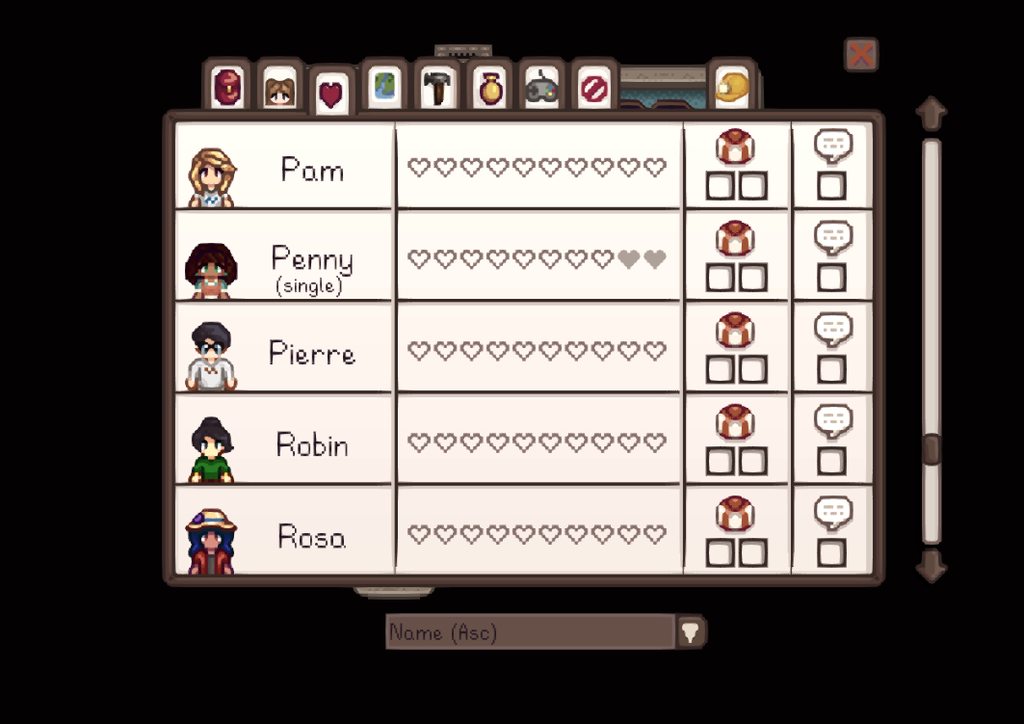
So I am a bit lost- I started a new save file, and tried to attempt the intro quest, but i'm stuck at it said i've met 39/40 villagers. i don't know who else i could possibly meet, and if there is a way to check who i need to?
the log:
https://smapi.io/log/2e8d010f862946d28bd1e0113b9f93c1
some pictures:
https://imgur.com/a/IzAbHKz

 native dragonBOT
Log Info: SMAPI 3.18.0 with SDV 1.5.6 (build 22018) on Microsoft Windows 11 Home, with 108 C# mods and 170 content packs.
hallow patio
@radiant valve https://mouseypounds.github.io/stardew-checkup/ try that
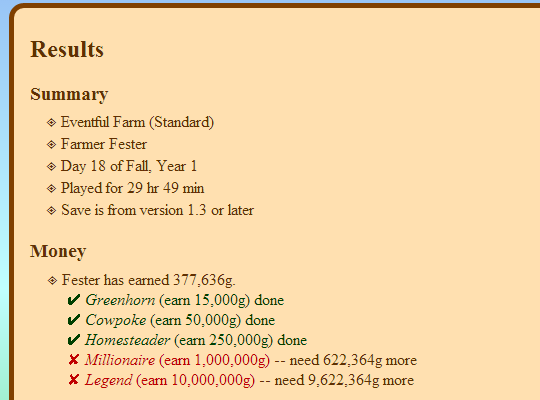
An app to read a Stardew Valley save file, check the progress of various achievements and milestones, and list what's missing.
if you have any mods that add characters there may be some you dont have access to yet?
radiant valve
i haven't added anymore mods that add NPC's and in my older savefile i didn't encounter this issue. also NPC's that you can meet later on (such as wizard or lexi for example) don't count for this quest. I'll check that
hallow patio
ah, i only said that as i had same issue and it turned out to be a character that was in a hidden area or something, i cant remember what it was though
 chilly zenith
my smapi log says that pytk has a problem
something like an version issue
that will no longer be supported in smapi 4.00.0
and it impacts performance
calm heron
yep
lament vortex
no, there's not
verbal yoke
One question : Regarding this for PyTK, how much will this impact my peformance and should i rollback to the "unofficial update"?
 dusty spruce
rolling back will do nothing
gaunt gust
Performance....it depends
It will take longer for asset edits to happen, but the specifics depend on your system
 magic shoal
Is there an alternative to the harp of yoba?
dusty spruce
i had one planned, but i didn't even start implementing it
 subtle phoenix
I just downloaded the seasonal fences mod, but I only want to replace the hardwood fences and not the normal ones. How do I do that? That is the content file if you need it
 neat plaza
what
dusty spruce
!playerlimit
native dragonBOT
You can play with more than 4 players without any mods. See this tweet by ConcernedApe:
https://twitter.com/concernedape/status/1395243158460530689

@ArcaneDescent @JessYoMama You can do it without a mod. Go to %appdata%/StardewValley and open the file called startup_preferences. ctrl + f for "playerLimit" and you'll find something like this: <playerLimit>-1</playerLimit>.
Change the -1 to any number you like...
Likes
934
 Twitter
·
native dragonBOT
Twitter
·
native dragonBOT
To add more than 3 extra players to a multiplayer game, follow the instructions here: https://twitter.com/concernedape/status/1395243158460530689
@ArcaneDescent @JessYoMama You can do it without a mod. Go to %appdata%/StardewValley and open the file called startup_preferences. ctrl + f for "playerLimit" and you'll find something like this: <playerLimit>-1</playerLimit>.
Change the -1 to any number you like...
Likes
934
Twitter
·
long brook
Those two command basically telling the same tweet 😂
subtle phoenix
subtle phoenix
I just downloaded the seasonal fences mod, but I only want to replace the hardwo...
Anyone know how to do that?
 sacred night
native dragon
You can play with more than 4 players without any mods. See this tweet by Concer...
sacred night
native dragon
You can play with more than 4 players without any mods. See this tweet by Concer...
i did this
but didn't go
could anyone help me?
mossy fossil
Can someone help me with this

 exotic plover
Ik dont think u can edit ur spouse room
Only if a mod does
Someone correct me if im wrong
mossy fossil
I did find a mod that can change the place of the spouse room but i don't understand how to use it i can send the link but can someone look and explain to me
Here is the link can someone look in the description and tell me how to use this mod please

Nexus Mods :: Stardew Valley
Lets you move and customize your farmhouse's spouse room, and enables multiple spouse rooms for Free Love mod.
 odd hazel
mossy fossil
I did find a mod that can change the place of the spouse room but i don't unders...
odd hazel
mossy fossil
I did find a mod that can change the place of the spouse room but i don't unders...
this mod is a framework
it doesnt adds custom rooms by itself
lets say that you find a mod that adds a customized room
so for that mod to work, you need this or another framework that modifies the game in some way that adding new custom rooms is possible
or thats what i acknwoledge
mossy fossil
That mod doesn't let me customise my spouse room it let's me change it's place
The creator of the mod wrote in the description how to do that i just don't understand how so i wanted someone to help me
Or tell me another way that solves my problem
odd hazel
im sorry i dont really know a lot about mods
mossy fossil
That is ok thanks for trying to help me though
dire fractal
mossy fossil
I did find a mod that can change the place of the spouse room but i don't unders...
If you want to change the position of the spouse room you need to change the X and Y of startpos in the Config, it corresponces with the upper left corner of the room. However if you use a Mod like FreeLove the Rooms will simply appear next to each other. It's not really needed to move the rooms yourself.
mossy fossil
dire fractal
If you want to change the position of the spouse room you need to change the X a...
I understand the part about changing the x and y but i don't understand what number to write to change the room to the position i want
dire fractal
@mossy fossil
You need to test it out. The higher the number the farther it's away from the original position so start with low numbers like 1, 2, 3 until you figure it out
 near terrace
subtle phoenix
I just downloaded the seasonal fences mod, but I only want to replace the hardwo...
near terrace
subtle phoenix
I just downloaded the seasonal fences mod, but I only want to replace the hardwo...
you could just delete the entries for the fences you don't want to change.
subtle phoenix
near terrace
you could just delete the entries for the fences you don't want to change.
Yes, already figured it out, thanks
near terrace
subtle phoenix
Yes, already figured it out, thanks
glad you figured it out!
 strong fractal
This error pops up and closes immediately, the game won't open through vortex or smapi.exe

this happens even with no mods enabled
long brook
Maybe it's vortex messing your smapi. Can you try launch StardewModdingAPI.exe straight from inside the game folder?
strong fractal
That got it to work
long brook
Then vortex is the issue. I'd recommend using stardrop mod manager for sdv or just manually install mods
strong fractal
alright
long brook
!stardrop if you're interested
native dragonBOT
Stardrop (https://www.nexusmods.com/stardewvalley/mods/10455) is the only mod manager written specifically for Stardew Valley. For information about how to install and use it, please see the Stardrop wiki: https://floogen.gitbook.io/stardrop/
If you're having an issue, here's the guidelines on reporting issues: https://floogen.gitbook.io/stardrop/resources/reporting-issues

Nexus Mods :: Stardew Valley
An open-source, cross-platform mod manager for Stardew Valley. Includes mod profiles, update checking, SMAPI integration and Nexus Mods API support!Currently in open beta.
strong fractal
Thank you
knotty lion
Is there any issue if i'm adding sve into existing save?
long brook
You might need to use reset terrain feature mod cause SVE change the farm a bit iirc
So it's recommended to start a new save
 dull rain
So I joined the server cause I’m facing an issue with Willy and Ginger island. I am on year two playing a modded SMAPI gameplay and up until now I’ve not had any issues, however I completed the community center a week ago in game and still haven’t received his letter inviting me to fix the boat. I’m updated on both SMAPI and all my mods so I have no idea why I can’t seem to get the letter, I’m thinking maybe it’s because of the mods but I’m not sure- any advice?
lament prairie
Just to check, you’re on Pc not mobile?
dull rain
Mhm, windows laptop specifically, and I’ve gotten to ginger island with mods in other saves before so I’m not sure what’s up with this one
lament prairie
You can probably manually trigger the event
I don’t have the event ID off the top of my head
 formal nacelle
Does anyone know why this has happened when I try to use the SVE mod? (Android)
 long brook
You need to download version 1.11.6 of SVE from Moddrop cause it's tbe last supported for mobile atm
formal nacelle
Oh ok
long brook
Iirc the required mod to run SVE in mobile is also a bit different
formal nacelle
Alr thx
long brook
!androidsve
native dragonBOT
See this guide on how to install Stardew Valley Expanded on mobile: https://tinyurl.com/SVEMobileGuide
formal nacelle
Much appreciated 🙏
long brook
Hope it works and happy modding
formal nacelle
Ty
dull rain
lament prairie
You can probably manually trigger the event
Oh alright, is there any tutorials or stuff to manually triggering events ?
dire fractal
Are there any mods that let you modify the amount of items required for community center bundles? I used to use the difficult option bundle, but I don't think that one works anymore.
I can't remember which discord I ask for mod help.
 bright sluice
Hi I have some problems playing with mods
Right now these are installed

The game doesn't start when I create my character
robust bison
!log
native dragonBOT
Can you upload your SMAPI log to https://smapi.io/log (see instructions on that page) and share the link here?
bright sluice
native dragonBOT
Log Info: SMAPI 3.18.0 with SDV 1.5.6 (build 22018) on Microsoft Windows 10 Pro, with 42 C# mods and 81 content packs.
Suggested fixes: Pytk isn't compatible with newer SMAPI performance optimizations, consider removing it
gaunt gust
bright sluice
Hi I have some problems playing with mods
wait up to fifteen minutes
it takes the game nextto forever to do setup if you have more than one expansion mod
 mild moss
hi guys for the elle's cat replacements mod, how do I use it? I'm unsure how to change the cats
bright sluice
gaunt gust
it takes the game nextto forever to do setup if you have more than one expansion...
do you recommend me delete someone?
I delete "pytk" and got another error
gaunt gust
It's really only save creation
where you have to wait, so just let the game think or something
 inner monolith
so when i play stardew and i maximize the tab it keeps glitching and the screen keeps moving weirdly and i asked for help on this before and they told me to go to settings and change the compatibility so i did and it worked for a little but then i tried running it the next day and it just wouldnt start the game...so i changed it back and it launches but the screen is now still like glitchy and weird and i tried to switch the compatibility while in the game but it didnt work. also whenever i try going in full screen its fine when im in the loading screen but when i try to load a world in full screen it never works it gives me this prompt
 bright sluice
oh just the first time I let the game thinking a long time
and the next times it gets faster?
gaunt gust
it's just new save creation yes
gaunt gust
inner monolith
so when i play stardew and i maximize the tab it keeps glitching and the screen ...
does it work outside of full screen mode?
bright sluice
gaunt gust
it's just new save creation yes
Thanks
hoary bane
inner monolith
so when i play stardew and i maximize the tab it keeps glitching and the screen ...
Smapi doesn't work with the compatibility version.
Right?
gaunt gust
it doesn't, no
mild moss
hi guys, with the Elle's cat replacements mod how do I change my cat? I wish to do that and have absolutely no idea how
inner monolith
gaunt gust
does it work outside of full screen mode?
yes but the screen is still glitchy
when i go full screen it stops but then i cant load my world
hoary bane
mild moss
hi guys, with the Elle's cat replacements mod how do I change my cat? I wish to ...
!gmcm
native dragonBOT
Generic Mod Config Menu (or GMCM https://www.nexusmods.com/stardewvalley/mods/5098) adds the option to edit some, but not all, mod configs from either the title screen or the options page in a save. It also has a special screen to edit keybinds for all mods with GMCM integration.
The presence of the gear it adds to the title screen is not a method for checking whether mods are installed, only whether GMCM is installed.
mild moss
oh thanks
 wheat peak
Is there a mod or any tips on how to fix time desync for a guest on a multiplayer server
formal nacelle
long brook
Hope it works and happy modding
Took me an hour and a half, but it worked!
 tight umbra
hey i tried to download SleepWorker and it messed up my automate mod. can someone help me?
i deleted sleepworker but i just want my automate to work like it was
calm heron
!log
native dragonBOT
Can you upload your SMAPI log to https://smapi.io/log (see instructions on that page) and share the link here?
native dragonBOT
Log Info: SMAPI 3.15.0 with SDV 1.5.6 (build 22018) on Microsoft Windows 11 Home, with 39 C# mods and 7 content packs.
Suggested fixes: Pytk isn't compatible with newer SMAPI performance optimizations, consider removing it, One or more mods are out of date, consider updating them
calm heron
i dont see errors but your smapi could be updated
lament prairie
dull rain
Oh alright, is there any tutorials or stuff to manually triggering events ?
debug ebi EVENTID in the console will do it
I don’t know the event ID off the top of my head
You’d need to look that up
dull rain
Ah thank you!! I actually ended up just finding a mod that would trigger the cutscene but I appreciate it 
 hard tusk
quick question, im using vortex and it asks which mod i want to load first. which mod provides the files, the one that loads before or after?
 naive mist
i think it's the before one
hard tusk
ok tysm
naive mist
Does anyone know if Warm Cozy Fireplace works anymore on the latest version? I get the vanilla one instead 😔
saw some peeps on the site / bug section saying it doesn't work for them so i just wanna know if its a lost cause to keep trying to troubleshoot it


 tribal moth
do i just write the name of the folder that stardew valley.dll is in?
robust bison
you need the full path
ex. "C:\Program Files (x86)\Steam\steamapps\common\Stardew Valley"
hexed warren
I'm back again for slow loading - updated to Smapi 3.18.0 - HAVE NOT touched the smapi window (so not in select mode) - been loading for over 30 minutes without opening the game menu/window. Log attached: https://smapi.io/log/a2dd5bab261944f7a68bd94a573e9271 Thanks all! Also, this is the 3rd or 4th time trying to load the game since 2pm my time, and each time have generally let it run about an hour before calling it quits, done full shut down and wait before restart, as well as general reboots on the computer as well. Followed the steps to change affinity and priority each time I've attempted to load the game as well
native dragonBOT
Log Info: SMAPI 3.18.0 with SDV 1.5.6 (build 22018) on Microsoft Windows 10 Pro, with 72 C# mods and 207 content packs.
 calm cloak
Hi All...as i adopt horses, how do i vary their coats?
i mean...what mod should i use?
naive drum
Add more Horse skins to Adopt n Skin!
@fast river I found a really weird thing with JA and Stardew Realty - it seems like JA shuffle protection doesn't apply to anything in Stardew Realty's additional farm maps
 rustic cove
Heya, using automate on the Immersive Farm 2 with SVE. For some reason automate doesn't work inside the mushroom cave properly. harvests mushrooms about 1/4 times I go in there and my preserve jars sometimes won't pull materials from chest or pull completed product out of jars. I got lots of other mods I can get a whole list of, but Walk of Life is probably the only other one impacting them. Anybody got a common solution for this? Tried moving automate to last in load order by putting a space at the start. This is on the steam deck.
naive drum
Depending on what you're trying to produce and how SVE does things you might need PFMAutomate?
 agile hatch
Hey! I'm on a mac and I'm attempting to set up mod group shortcuts on my desktop, so I can click them and they'll open up Stardew with a particular grouping of mods. I looked on the Stardew wiki, but the instructions were a bit confusing to me. Any help would be greatly appreciated! (Please ping me so I see your messages. Thanks!)
rustic cove
@naive drum none of the products were sve specific, but i'll look into getting that, thanks
gaunt gust
naive drum
<@140231789217054721> I found a really weird thing with JA and Stardew Realty - ...
Odd
Realistically, up to Stardew Realty to either use the JA api, or manipulate load order
(Honestly, hunting down every mod that stores items and deshuffling is impossible)
gaunt gust
hexed warren
I'm back again for slow loading - updated to Smapi 3.18.0 - HAVE NOT touched the...
Remove every mod. Does it load then?
Loading a save is safe as long as you do not save
dusty spruce
gaunt gust
(Honestly, hunting down every mod that stores items and deshuffling is impossibl...
unless the deshuffling were to happen in constructors
(and in generated deserializers i guess?)
gaunt gust
You prototype that
dusty spruce
i'd rather wait for 1.6
gaunt gust
I threw my hands up when I realized how Mushroom Propagaror worked
Although I guess by a quick reading of the code Moon Misadventures locations will also be skipped
Just because M is later than J in the alphabet
hexed warren
gaunt gust
Remove every mod. Does it load then?
I did that yesterday, loaded fine with only Smapi and it's bundled mods now finally getting into JA loading after almost 3 hours of letting it run in the background
gaunt gust
!smapislow <- check your antivirus?
native dragonBOT
For some players, SMAPI can take a while to launch the game. See this section of the troubleshooting guide for some common causes and possible fixes: https://stardewvalleywiki.com/Modding:Player_Guide/Troubleshooting#Game_lags_or_stutters_in-game
 jolly bobcat
hexed warren
gaunt gust
!smapislow <- check your antivirus?
jolly bobcat
hexed warren
gaunt gust
!smapislow <- check your antivirus?
Did all that as well (same advice was given yesterday and I followed it all) I've just completely removed mods, uninstalled SMAPI and SDV and rebooted computer, now letting Steam reinstall because this happens pretty much any time I have to update a mod (or sometimes with no changes at all)
gaunt gust
I would check to make sure smapi isn't quarantined by your antivirus
That will slow things to a crawl
If it's intermittent, I'd suspect it's not inherent to SMAPI
hexed warren
Thanks, will check that after I reinstall - I can literally play one day and then when I open it the next day it is slower than molasses in snow
And I always reboot my computer if I'm going to play so that I don't have memory tied up in other things
naive drum
gaunt gust
(Honestly, hunting down every mod that stores items and deshuffling is impossibl...
I planted Raffadax shamrocks there and deleted Swim and the shamrocks started producing cloth
Items in chests there also got shuffled
 echo seal
I installed some new mods, and a bunch of my previous mods failed? any one wanna take a look
native dragonBOT
Log Info: SMAPI 3.17.2 with SDV 1.5.6 (build 22018) on Microsoft Windows 11 Home, with 39 C# mods and 28 content packs.
Suggested fixes: One or more mods are out of date, consider updating them
echo seal
Ridgeside was working perfectly before
 sullen kettle
reinstall ridgeside and SDV expanded
echo seal
will do
echo seal
Worked, thank you
 obtuse surge
Kia ora! I'm having a few odd issues with DGA popping up with an absolute tonne of errors, and my multiplayer friend not being able to join in properly 50% of the time. Was running pretty smoothly with 122 mods last night, added 10 furniture mods today and now it's just a little broke. Is anyone able to provide any insight? Thank you so much :) https://smapi.io/log/774102b3b3c94db1994b951904090074
native dragonBOT
Log Info: SMAPI 3.17.2 with SDV 1.5.6 (build 1.3.37.0) on macOS Unix 13.0.0, with 44 C# mods and 80 content packs.
Suggested fixes: Pytk isn't compatible with newer SMAPI performance optimizations, consider removing it, One or more mods are out of date, consider updating them
shy orbit
try updating spacecore at least i guess
hexed warren
gaunt gust
I would check to make sure smapi isn't quarantined by your antivirus
Everything is running perfectly after a clean install, I have reduced my mods to around 100 for the time being as I play with some I've not really explored before. Thanks for your help! I also set both the SMAPI process and the Stardew Valley folder as exceptions for my antivirus
gaunt gust
obtuse surge
Kia ora! I'm having a few odd issues with DGA popping up with an absolute tonne ...
Update spacecore to latest
(In general: Type Load Exception = mismatched version numbers)
obtuse surge
gaunt gust
(In general: Type Load Exception = mismatched version numbers)
it worked, thank you so much!
obtuse surge
gaunt gust
Update spacecore to latest
Nevermind I tried this and no more errors now but instead a bunch of SVE items' icons are broken, any wisdom/insight?
gaunt gust
Update JA to latest
obtuse surge
Ah right gotcha, thank you!
gaunt gust
In general, if you're updating mods from an author that has a -Core mod, update all or update none
obtuse surge
gaunt gust
In general, if you're updating mods from an author that has a -Core mod, update ...
ohhh right
i don't know the first thing about who authors what
 analog verge
ok i know this seems like a dumb question but i forgot the name of the mod im looking for
whats the name of the PFM version of Automate??
lament prairie
PFMAutomate
analog verge
lol so simple... thank you
 fast river
gaunt gust
Although I guess by a quick reading of the code Moon Misadventures locations wil...
fast river
gaunt gust
Although I guess by a quick reading of the code Moon Misadventures locations wil...
JA fixes things in SaveLoadedLocations, Moon Misadventures adds things in SaveAddedLocations. So shouldn't be an issue there
Looking at Stardew Realty now
Yeah, Stardew Realty adds locations too late in the process (SaveLoaded event) for JA to catch them.
It'd need to add them at LoadStageChanged -> SaveAddedLocations/CreatedInitialLocations like CP/MoonMisadventures/etc. do
Or use the API to call the fixing process
gaunt gust
No matter how the cake is sliced, the cake is not my problem 😛
fast river
😛
 hollow atlas
I'm still trying to figure out an issue and I haven't made much success yet. I'm using a custom farm and I have 3 different mods that add things to the farmhouse.
A cellar mod with a greenhouse. A bathroom mod in the upper east corner. And a mod that adds mini greenhouse to the southern room.
I cannot seem to change the wallpaper or flooring in the southern room. When I use wallpapers and flooring, they are absorbed but do not change. I tried changing it through Alternative Textures too. The changes are absorbed as well.
I tried using the Lookup Anything mod to peer at the tile information, but I'm not versed in mod-creation, so I'm not quite sure what I'm looking at. I've tried renaming the folder to load it in different positions in the Mods folder, but there appears to be no change.
Anyone have any ideas? 🤔
lament prairie
Probably mini greenhouse southern room didn’t set the properties right for allowing flooring or wallpaper, unless it works by itself for that
If it works by itself then probably the properties are overwriting each other
hollow atlas
The author says they had no problem changing it in their game and there must be a mod that's conflicting with it.. Not sure if the tile info would be helpful.


Me and others have been trying to figure out a solution. LOL
https://www.nexusmods.com/stardewvalley/mods/13619?tab=posts
It seems I'm not the only one having the issue. I will say if I put in a default replacer, that room is effected, so there's something that's not working right. 🤔

Nexus Mods :: Stardew Valley
Expands and adds a mini greenhouse to the southern room (the renovation after the second upgrade).
lament prairie
https://stardewvalleywiki.com/Modding:Migrate_to_Stardew_Valley_1.5.5 custom floors and walls section here
hollow atlas
Thanks for that. I'm not sure what to do with that as just a player. I'll have to try investigating it when I get back. 😩
native dragonBOT
Log Info: SMAPI 3.18.0 with SDV 1.5.6 (build 22018) on Microsoft Windows 11 Home, with 33 C# mods and 7 content packs.
tight umbra
my automate mod isnt working. could someone help
tight umbra
i fixed the automate problem but now i cant leave my farm.. i can walk outside the view of my farm but im not getting a cutscene that takes me to the next area
this is the new log https://smapi.io/log/35429d05037840418387276c47fc1489
native dragonBOT
Log Info: SMAPI 3.18.0 with SDV 1.5.6 (build 22018) on Microsoft Windows 11 Home, with 37 C# mods and 7 content packs.
dire fractal
Hello, I don't understand what's wrong with my content patcher ?
https://smapi.io/log/7f4cca3c94f1487dbcb76e6edfaf280d
native dragonBOT
Log Info: SMAPI 3.18.0 with SDV 1.5.6 (build 22018) on Microsoft Windows 10 Professionnel, with 90 C# mods and 295 content packs.
Suggested fixes: Pytk isn't compatible with newer SMAPI performance optimizations, consider removing it, One or more mods are out of date, consider updating them
 hollow bobcat
Hello, a friend of mine installed SMAPI with 2 mods (LookUpAnything and Info Suite 2) and her game restarted to spring 1st but she kept her inventory and her money, is there any way to fix this?
 true junco
hello, i downloaded ridgeside village and i see it has more folders in it that are also ridgeside village but they have [CP] [CC] and stuff like that in it. do i only take one?
dapper gazelle
you need all of them for the mod to work
true junco
oh ok ty
 sudden drift
Hi all! So.....I stupidly deleted a file for my game and now it's coming up as a patch error...is there a way to fix it?https://smapi.io/log/677b4e97ac934eda941a647d830a081c
 native dragonBOT
Log Info: SMAPI 3.17.2 with SDV 1.5.6 (build 22018) on Microsoft Windows 11 Home, with 71 C# mods and 125 content packs.
Suggested fixes: Pytk isn't compatible with newer SMAPI performance optimizations, consider removing it, One or more mods are out of date, consider updating them
robust bison
reinstall sve
robust bison
dire fractal
Hello, I don't understand what's wrong with my content patcher ?
https://smapi.i...
reinstall sve as well
sudden drift
robust bison
reinstall sve
Thank you! I'll try it out now!
true junco
i downloaded ridgeside and i think it mightve made my screen small
could it be bc i just updated smapi?
i dont think ive updated all of my mods
dapper gazelle
it's b/c of the SMAPI update probably
hollow bobcat
hollow bobcat
Hello, a friend of mine installed SMAPI with 2 mods (LookUpAnything and Info Sui...
if anybody knows anything about this, feel free to DM or @ me just in case im not active in this chat
true junco
dapper gazelle
it's b/c of the SMAPI update probably
do you know how i can fix that?
dapper gazelle
@true junco a few versions back SMAPI underwent a change in its DPI awareness settings so that the modded game would match vanilla and wouldn't be overly zoomed in for some people. Unfortunately for some of us, this had the opposite effect b/c of our computer settings. There's no real fix for it but you can zoom in both your game and UI
(sorry for the ping, wasn't sure you were still in here xD)
I ended up having to zoom both to ~150% but it varies depending on your computer settings.
true junco
where can i zoom?
dapper gazelle
it's under the settings tab
sorry I think it's called options actually--with the little controller icon
true junco
in the game?
sudden drift
true junco
in the game?
Yes ^w^
true junco
alright ty
sudden drift
@true junco Good luck! I can try to help too if you need it!
true junco
wait is it in the starting screen?
dapper gazelle
no, it's once you start the game
true junco
ah
dapper gazelle
the same menu with the relationships tab, your farmer's levels, etc
true junco
ohhh ok
sudden drift
true junco
ohhh ok
I know it can be a little confusing lol
true junco
ty for ur help guys <3
btw its still like zoomed out in the starting screen but thats fine right?
sudden drift
true junco
btw its still like zoomed out in the starting screen but thats fine right?
Oh! That's easy! In the starting screen with the "new game" "continue" buttons, if you look to the upper right you'll see an orange square. Click on it and you can zoom in and zoom out your screen if that makes sense.
true junco
ooh alright ty again 💗
sudden drift
true junco
ooh alright ty again 💗
Of course! ^w^
dapper gazelle
lol the orange square just maximizes your window or makes it not maximized which will give the vague appearance of being more zoomed in
sudden drift
robust bison
reinstall sve
It worked! Thanks!
dapper gazelle
but it's not actually fixed on the home screen, jsyk. b/c I used to have it maximized and everything looked normal and now it no longer does b/c of the DPI settings thing
sudden drift
dapper gazelle
lol the orange square just maximizes your window or makes it not maximized which...
Hey, I tried lol 😂
🙂
naive drum
It's in the Options menu after loading a save
 toxic ridge
hi! anybody using Sleeves mod with Fashion Sense without problems?
 mild ore
Hi I was just wondering whether it is possible to automate tea bush collection with the automate mod
 sleek thunder
Hello. I have a...very newbie question. I think I need to learn a lot yet, and I'm trying, but...well, is a bit difficult...^^'
I'm using Shop Tile Framework and trying to tweak a shop mod to set up an item to be sold at Joja Mart in just one day of the week (Friday). Just one in stock each week, and in other days of the week there should be another items being sold (again, just one in just one day of the week).
I managed to make the items to be sold at the Joja Mart. Just one in stock of each, as I wanted (however, dunno if the store restocks this single item if bought, if restocks for the next week). Tested this with vanilla items and custom itens, apparently is working.
But no matter what I do, the items appear being sold every day or not appearing at all. Can't make them being sold in just one day of the week.
So...what instruction should I write on the mod to make this work? (tried put on shops.json "d mon/d tue/..." etc and "!d fri" and didn't worked: the first seems to be ignored by the game and the items appear being sold everyday. The second makes the items disappear from the store).
Thanks in advance (and sorry for the noob question....)
lament prairie
It might have to be Friday instead of fri, check the event preconditions wiki page
Or it might need capitalization?
The wiki lists them capitalized
dire fractal
hey there new to SDV mods and i have come across an error in multiplayer it was fine until recently after we had a mod over haul this is the error message


any help would be amazing thank you
native dragonBOT
See https://stardewvalleywiki.com/Modding:Player_Guide#Do_mods_work_in_multiplayer.3F for details on how mods work in multiplayer. :)
dire fractal
lament prairie
Mod mismatch is likely for any net code stack traces
i have 230 mods this is from my partner when she joins my MP map
lament prairie
She probably needs all those mods then
Maybe not literally every last one but safest to match exactly
Same versions too
dire fractal
it was a mod i had installed my end for her end to not want to run how do i pin point the issue or is it a case off disabling them all and seeing which one breaks the game ?
 native sable
Hi! so a friend of mine and I are trying to do a co-op modded game play. Do one of us only need the mod or do we both need it?
dire fractal
native sable
Hi! so a friend of mine and I are trying to do a co-op modded game play. Do one ...
Depends
Can’t run vanilla and modded from my experience had to have at least smapi downloaded
native sable
dire fractal
Can’t run vanilla and modded from my experience had to have at least smapi downl...
Okay we both have SMAPI
dire fractal
native sable
Okay we both have SMAPI
Then you should be able to play keep to the same mods. Makes life easier as I have found out today
 obsidian maple
mods that are purely cosmetic can be 1 sided, if they change gameplay and big stuff like ridgeside / sdve etc you will both need them
dire fractal
obsidian maple
mods that are purely cosmetic can be 1 sided, if they change gameplay and big st...
Would you know a way to narrow down to a mod that causes a crash in MP ?
obsidian maple
split ur mods in half, run the game. if it crashes the mod is in that half. if it doesnt, its in the other half
from there just keep splitting it
u will eventually narrow down to the problem mod
dire fractal
obsidian maple
split ur mods in half, run the game. if it crashes the mod is in that half. if i...
Well I better start on the espresso 230 to go through 🤣🤣🤣
dire fractal
lament prairie
The wiki page linked should provide some details
Not much sadly
lament prairie
I’d say everything except CP packs for textures and dialogue for a start
Anything C# more likely than not both would need
dire fractal
lament prairie
I’d say everything except CP packs for textures and dialogue for a start
Just had a better read I think it’s the TMXL buildable greenhouses.
gaunt gust
dire fractal
Just had a better read I think it’s the TMXL buildable greenhouses.
frankly: zip up your mods and send them over
There are a few, rather rare cases, where mismatched mods can work
(hopefully the mod author listed that on the page?) but usually - don't mismatch mods
dire fractal
gaunt gust
(hopefully the mod author listed that on the page?) but usually - don't mismatch...
I try not to mismatch but some arent on AT or CP but if it’s ok I’ll send them over later or tomorrow gota get ready for work
gaunt gust
Yeah, unless you (a) know exactly what that mod does and (B) am absolutely sure it touches nothing multiplayer, do not mismatch mods
Like just flat don't it never ends well
dire fractal
gaunt gust
Yeah, unless you (a) know exactly what that mod does and (B) am absolutely sure ...
I think it was the TMXL as it’s a global mod. Right ? Where as things in Cp AT (based on cosmetics) are local I didn’t have a problem until I wanted to build more green houses for various wines and stuff. If my partner added TMXL would it play through properly.
Sorry for the Dumas questions I’m new to stardew modding. It’s completely different from Bethesda modding
gaunt gust
So, you might be fine with AT, but since CP mods can edit any data asset, yeah, those should be matched UNLESS you are absolutely sure it's a local only asset
which, uh, hopefully the mod page says.
Which is why my advice is: just don't bother trying to mismatch mods, it's a lot of work and you might still end up with angry red errors
 abstract nimbus
i installed the snappi thing to run mods but forgot to copy the link to put into launch options to actually make it work, where can i find the destination link thing?
gaunt gust
run the installer again
(there are other ways, but the easiest is "run the installer again")
abstract nimbus
abstract nimbus
"windows cannot find C:\Program" pops up
oof wait i might've selected something outside the link
nope it still didnt work
gaunt gust
you need to quote paths when they have spaces in them
abstract nimbus
this is the link btw C:\Program Files (x86)\Steam\steamapps\common\Stardew Valley\StardewModdingAPI.exe" %command%
gaunt gust
Copy and paste the text exactly, with the quotes, with the %command%
missing double quote at the front
"C:\Program Files (x86)\Steam\steamapps\common\Stardew Valley\StardewModdingAPI.exe" %command%
abstract nimbus
OOOOO IT WORKED
thx so much
btw is your profile pic the queen of england (R.I.P) welding a circuit board?
robust bison
soldering certainly is scary
 fringe tangle
does anyone know what may cause inventory clicking to stop working?
https://smapi.io/log/a3423ea10806488bb67542eeea37d2c5
Sometimes when i load up i can left click but not right click in chests or my inventory. it puts a red ring highlight around the item i clicked and nothing else. i restart a few times and it eventually stops. But the only similar thing i could find was a better chests or expanded storage issue from several years ago and mines all up to date
native dragonBOT
Log Info: SMAPI 3.17.2 with SDV 1.5.6 (build 22018) on Microsoft Windows 10 Enterprise, with 114 C# mods and 215 content packs.
Suggested fixes: Pytk isn't compatible with newer SMAPI performance optimizations, consider removing it, One or more mods are out of date, consider updating them
naive drum
fringe tangle
does anyone know what may cause inventory clicking to stop working?
https://smap...
The red ring highlight means the game thinks you're holding alt! So probably you alt tabbed, and then let go of alt when the game was no longer focused and so no longer reciebing input
Press alt again to make it stop thinking you're holding alt
robust bison
I couldn't remember if that was part of better chests or its own mod
fringe tangle
naive drum
The red ring highlight means the game thinks you're holding alt! So probably you...
ahah! I'll try this when it does it again! 😄
 stoic pagoda
when i use smapi with xbox and i try to play multiplayer it says i need to be logged in how do i fix it
lament prairie
.q 5906
 devout pumiceBOT
[#5906] "So, I realized where I messed up, I have restarted a few times and it is working consistently now. Following the steps on the wiki, I made a copy of the API file and renamed that and tht was when it wasnt working. All I actually changed was that the actually API file i renamed to Stardew Valley before making a copy to use as a shortcut. There was also 2 seperate files labeled just Stardew Valley both of which I changed to Stardew Valley - Vanilla . When these 2 things were done in tandem it began to function properly. Just wanted to put out there what actually worked in case someone else comes across it." - @celest lagoon (26 Mar 2022 @ 04:52:53 AM UTC)
lament prairie
nice, got the number on the first try
this person had the same problem, and this is their explanation after the fact of how they fixed it
due to my complete lack of microsoft, I have no idea what any of it means
you can look back to the original convo for a bit more context
stoic pagoda
ok thank you
 digital sail
hi. computer was acting up, managed to save game before restarting. waited for the game to tell me it saved and start the next day. tried to boot up just now. save is straight up not listed. thankfully the folder for it is still in the appdata section so i assume it's not GONE gone. but here's the log. https://smapi.io/log/7d13d29a81874d2dad665f4b9bd81b9f (assuming this goes here instead)
native dragonBOT
Log Info: SMAPI with SDV on , with 0 C# mods and 0 content packs.
naive drum
!saves
native dragonBOT
Use this guide to find your save files: https://stardewvalleywiki.com/Saves.
naive drum
You're going to have to roll back a day, something went wrong with the save.
Stardew keeps a one-day-behind backup by default, that wiki link tells you how to access it
Also for future reference we generally prefer an entire log and not a snippet
digital sail
lifesaver tysm ✌️
 kind inlet
having an issue where my friend cant see the updated map for stardew valley expanded. is there any known fix for this. any help is appreciated
robust bison
kind inlet
having an issue where my friend cant see the updated map for stardew valley expa...
do you both have the exact same mods installed?
kind inlet
robust bison
do you both have the exact same mods installed?
yeah i went through both our mods and everything is the same
robust bison
!log from both of you
native dragonBOT
Can you upload your SMAPI log to https://smapi.io/log (see instructions on that page) and share the link here?
native dragonBOT
Log Info: SMAPI 3.18.0 with SDV 1.5.6 (build 22018) on Microsoft Windows 10 Home, with 16 C# mods and 6 content packs.
native dragonBOT
Log Info: SMAPI 3.18.0 with SDV 1.5.6 (build 22018) on Microsoft Windows 10 Home, with 16 C# mods and 6 content packs.
robust bison
looks like a conflict between sve and farm extended
have whoever has the second link reinstall both
kind inlet
ok thanks ill try that
kind inlet
robust bison
have whoever has the second link reinstall both
I had them redowload the mods and run the game. The log was fine and they had the map in their solo farm. then i had them join my farm and the map was default. had them run the log again and 2 errors appear this time https://smapi.io/log/be9b2b6f50f4402f99ec0a7bfec37f2f
native dragonBOT
Log Info: SMAPI 3.18.0 with SDV 1.5.6 (build 22018) on Microsoft Windows 10 Home, with 16 C# mods and 6 content packs.
robust bison
check your configs for both mods and make sure they have the same as yours
radiant valve
So I download this farmhouse mod (\https://www.nexusmods.com/stardewvalley/mods/11420) and-
i'm in the void™️
log: \https://smapi.io/log/583dd7b195444cceb0379c1a7fd3897f
 native dragonBOT
Log Info: SMAPI 3.18.0 with SDV 1.5.6 (build 22018) on Microsoft Windows 11 Home, with 111 C# mods and 168 content packs.
radiant valve
ah alr nvm guys, this mod hasn't been updated in a while. please ignore this. have a lovely day ~
 full bane
I'm trying to install and play SVE, everything in the folders lines up with the guide but none of the mods are loading
i dont have the folder for stardew error logs either :(
heres what my mod folder looks like and where the error folder should be, i dont know why it isnt there


as well as the vortex mod list
 near terrace
full bane
I'm trying to install and play SVE, everything in the folders lines up with the ...
near terrace
full bane
I'm trying to install and play SVE, everything in the folders lines up with the ...
your log is in AppData\Roaming\Stardew Valley
huh that's odd that you don't have the logs there though.
full bane
yes that is why im confused
i ran the game, created a new save and went through a few days, they were all vanilla with no mods even though i have them installed
near terrace
do you get any red wall of text of death moments in smapi itself when you open the game?
full bane
i wanted to make sure running it would create missing folders/ files if need be, but nothing changed
full bane
near terrace
do you get any red wall of text of death moments in smapi itself when you open t...
is it supposed to open another exe or console? if so i havent seen any of that, and no red walls of text either
near terrace
I see that you're using the steam version
Have you set the launch options for the game to smapi?
full bane
no, how do i do that?
near terrace
!gettingstarted
native dragonBOT
If you would like a guide to setting up mods for Stardew Valley, check out the getting started guide! https://stardewvalleywiki.com/Modding:Player_Guide
near terrace
Check this wiki link, it has the instructions for how to do it.
full bane
so sorry for the inconvenience i feel dumb if its that simple
near terrace
Also just a suggestion, don't use Vortex, it often causes problems
near terrace
full bane
so sorry for the inconvenience i feel dumb if its that simple
don't worry about it xD
full bane
near terrace
don't worry about it xD
that was it lol, thanks for the help
near terrace
No problem, have fun with your newly-modded game!
abstract tusk
Would anyone happen to know what the green "bush" thing is? I can't attack it with sword, can't sickle it, can't axe it or pickaxe. Whenevery I left click nothing happens but when I right click on it I take damage. No idea if it's a mod, the farm map or a bug. Pwease help, I have two of these on my farm. (one is on my farming land which is very in the way)
 naive drum
!log
native dragonBOT
Can you upload your SMAPI log to https://smapi.io/log (see instructions on that page) and share the link here?
abstract tusk
abstract tusk
Would anyone happen to know what the green "bush" thing is? I can't attack it wi...
Oh oooops I could axe it but only if I axed in the exact right spot, it gave me nettles
near terrace
abstract tusk
Oh oooops I could axe it but only if I axed in the exact right spot, it gave me ...
probably added by Love of Cooking if you have it installed then, iirc it adds nettles that way.
abstract tusk
near terrace
probably added by Love of Cooking if you have it installed then, iirc it adds ne...
Oh okay thanks! do they respawn and in the same spot?
near terrace
I'm not sure, actually.
I don't use Love of Cooking myself, so...
Maybe someone else who uses it will have the answer
abstract tusk
Oh it's fine!
So this is the first time this happened, idk why things like these keeps happening to me but I had some mail and I tried to open it but it just disappeared right away and my game froze for a second. Does it say anything in the logs about what mail that was? https://smapi.io/log/4d8e82f63e35451d9b5880502a9da3d6
native dragonBOT
Log Info: SMAPI 3.17.2 with SDV 1.5.6 (build 22018) on Microsoft Windows 10 Home, with 133 C# mods and 472 content packs.
Suggested fixes: Pytk isn't compatible with newer SMAPI performance optimizations, consider removing it, One or more mods are out of date, consider updating them
 atomic forge
Hey, I’m new to discord so no idea if im doing this right, or if its even in the correct place but I’m having some problems with Adopt N Skin if anyone can help 🥲
near terrace
atomic forge
Hey, I’m new to discord so no idea if im doing this right, or if its even in the...
What's the problem you're having? Also, please provide your log
!log
native dragonBOT
Can you upload your SMAPI log to https://smapi.io/log (see instructions on that page) and share the link here?
near terrace
Also, welcome to the server! Hope you'll stick around, we're generally a friendly bunch around here
atomic forge
thank you! I’ll just set up the log one second;
sorry I took so long haha https://smapi.io/log/158b897865bb4d28b515e9514c11fd85
native dragonBOT
Log Info: SMAPI 3.16.2 with SDV 1.5.6 (build 22018) on Microsoft Windows 10 Home, with 8 C# mods and 10 content packs.
Suggested fixes: One or more mods are out of date, consider updating them
atomic forge
My problem is that the mod works fine on new freshly made runs when it comes to adopting, but on my year 4 main save, marnies pet bed and strays do not appear, but everything else is in working order
dire fractal
I couldn't find anything on Adopt N Skin about having to start a new save. Unless I missed it @atomic forge
Plus you don't have that many mods, and I don't see what the problem could be. Maybe update smapi? See if that helps?
If not, it just might not be available to old saves.
near terrace
I can't find any issues in the log, and combing the Adopt N Skin page doesn't yield anything either. How odd.
dire fractal
Maybe backup your old save. Sleep a day and try that @atomic forge
atomic forge
I'll attempt at updating smapi, as I have been putting it off for awhile pfft thanks for the help and suggestions!
atomic forge
tried backing up my save, and have updated Smapi, but no luck. Guess this is my excuse to start a new save haha thank you all for your help ❤️
abstract tusk
nvm i just made a new save
native dragonBOT
Log Info: SMAPI 3.17.2 with SDV 1.5.6 (build 22018) on Microsoft Windows 10 Home, with 134 C# mods and 472 content packs.
Suggested fixes: Pytk isn't compatible with newer SMAPI performance optimizations, consider removing it, One or more mods are out of date, consider updating them
formal nacelle
Can someone help me out, im trying to get SVE and RSV onto the same save but it requires the same mods but with different versions. Btw I'm mobile
dusty spruce
different versions? how so?
formal nacelle
So for example I have the content patcher mod in 1.19 for SVE on mobile, but the steps for RSV ask for a different version of the same content patcher mod
 dusty spruce

formal nacelle
Let me just delete all the mods I downloaded and start with this
For some reason I can't get sve and rsv together though
dusty spruce
(honestly it probably won't be a nice experience anyway)
i'm having trouble finding the SVE Android requirements
gaunt gust
!androidsve
native dragonBOT
See this guide on how to install Stardew Valley Expanded on mobile: https://tinyurl.com/SVEMobileGuide
gaunt gust
(you're having trouble finding it because it.s a gd google doc)
dusty spruce
seems like they use a newer FTM than Ridgeside does; but otherwise it's the same dependencies
the newer FTM shouldn't cause any problems
still, your poor Android phone will probably have a very hard time running both anyway
that, or you'll burn your hands
 little hawk
Hello! I am trying to install the CJB cheats menu and whenever i open stardew valley, it says there are multiple of the file but i only downloaded it once.
shy orbit
!log still there probably are multiple copies of the same mod if smapi says so. you can see where the mods are installed in the log
native dragonBOT
Can you upload your SMAPI log to https://smapi.io/log (see instructions on that page) and share the link here?
native dragonBOT
Log Info: SMAPI 3.17.2 with SDV 1.5.6 (build 22018) on Microsoft Windows 10 Home, with 9 C# mods and 6 content packs.
Suggested fixes: One or more mods are out of date, consider updating them
shy orbit
yeah, that's correct. there are indeed multiple copies of the mods installed, for example All Chests Menu is installed in Mods\All Chests Menu-14494-0-1-0-1668552691\AllChestsMenu, Mods\CJB Cheats Menu 1.32.1-4-1-32-1-1665449022\AllChestsMenu, and Mods\Govner-mod-6610-1-0-0-1597126286\AllChestsMenu.. so the extra copies should be removed
you're also missing dependencies for SVE so it isn't loading either
little hawk
I'm more focused on trying to get the CJB cheat menu
I don't know what I'm doing wrong with it
I uninstalled and reinstalled it
shy orbit
it's installed similarly in multiple folders Mods\All Chests Menu-14494-0-1-0-1668552691\CJBCheatsMenu, Mods\CJB Cheats Menu 1.32.1-4-1-32-1-1665449022\CJBCheatsMenu, Mods\CJBCheatsMenu, Mods\Govner-mod-6610-1-0-0-1597126286\CJBCheatsMenu, so all of those need to be removed
 gritty steeple


 shy orbit
!ask
native dragonBOT
Ask your question or describe your issue here, and someone will help if they can!
formal nacelle
dusty spruce
(honestly it probably won't be a nice experience anyway)
I've gotten ridgeside working now I just need to know how to get SVE on aswell
Without interfering with ridgeside
Do I just readd the correct versions
For sve
 summer swan
@little hawk From the paths it looks like you're unpacking into or inside your mod folder. Maybe do it somewhere else and only put the necessary folders into your mod folder. Most mods have clear names for their actual folder which makes it easier to keep an overview instead trying to do it with the zip names (i.e. "CJBCheatsMenu instead of All Chest Menu - some number...).
formal nacelle
See this is one of the issues Spacecore for SVE needs 1.4.0 but the one for RSV needs 1.4.5

Should I get both versions, will they clash or be fine?
 hollow mason
E
gaunt gust
formal nacelle
See this is one of the issues Spacecore for SVE needs 1.4.0 but the one for RSV ...
use 1.4.5
will warn you - I wouldn't try to put sve and rsv on the same phone unless you have, like, at least 4gb and preferably closer to 6gb of RAM
formal nacelle
I use Samsung so I doubt I do but hey whats the worst that could happen
gaunt gust
powerpoint levels of framerate 😛
formal nacelle

summer swan
Maybe leave one of the two for a different playthrough?
What they describe doesn't sound very healthy for your phone. 
dusty spruce
gaming on a phone was never healthy lol
summer swan
I never used mine for something like that. But for me the first issue is "display too tiny to see". 
dusty spruce
it probably won't cause any lasting issues
it's just not worth the time trying to for the slim chance of it being "playable"
gaunt gust
dusty spruce
gaming on a phone was never healthy lol
(me, wincing every time that "120hz" gaming chromebook comes up as a Google Ad)
summer swan
dusty spruce
it's just not worth the time trying to for the slim chance of it being "playable...
I would guess that if they play one after the other they might be faster?
gaunt gust
(120hz is meaningless if your hardware can't handle it)
dusty spruce
summer swan
I would guess that if they play one after the other they might be faster? <:SDVp...
RSV is probably fine; SVE "okay" on its own
the two together is too much for the phone
dusty spruce
gaunt gust
(me, wincing every time that "120hz" gaming chromebook comes up as a Google Ad)
you just reminded me that my work MacBook has a 120 Hz screen, but i forced it to 60 Hz, because they coded the animations wrong and they're SLOWER on 120
like 2x slower
and you can't interact with the apps during transition
gaunt gust
can you not disable animations?
gaunt gust
pretty sure linux let me disable transition animations or speed/slow them down
gaunt gust
ah, I don't have swipe stuff, just keyboard shortcuts and moving the mouse to each of the four corners
formal nacelle
summer swan
What they describe doesn't sound very healthy for your phone. <:SDVpuffersweats:...
I need a new one anyways
And it's better than what I used to use
...An Amazon Kindle tablet..
I even had mods on there
Anyway it's time I put my phone to the test
summer swan
At least it didn't take long for getting the answer to "Will it work?"
Maybe try only RS and delay SVE till you have a new phone or maybe consider PC (if that's an option for you)?
formal nacelle
Yeah I think I'm gonna do that, except I'll try SVE instead because I just like it more lol
Other mods might work with it I just think having multiple big expansions was the issue
!sveandroid
What's the command again
lament prairie
!androidsve
native dragonBOT
See this guide on how to install Stardew Valley Expanded on mobile: https://tinyurl.com/SVEMobileGuide
formal nacelle
Ty
atomic forge
https://smapi.io/log/904ca7626b6442118262987912e5e8dc I loaded into my game to my cat being back to its vanilla form, and when I tried to change it with AT scissors, it said "Character_Cat does not have any skins for this season!" Unsure why as this was working a few hours ago, before I switched to playing a different modded game (By renaming the mod folder which I want to use 'Mods') Can anyone help? its rather annoying
native dragonBOT
Log Info: SMAPI 3.17.2 with SDV 1.5.6 (build 22018) on Microsoft Windows 10 Home, with 8 C# mods and 8 content packs.
Suggested fixes: One or more mods are out of date, consider updating them
shy orbit
doesn't look like you have any AT mods for the cat?
dapper gazelle
Yeah at a glance it looks like you've used AT naming conventions for Adopt N Skin, which is a different mod entirely
you have to use the SMAPI console for Adopt N Skin, and you have to have the skins named properly. I believe AnS uses cat_1, cat_2, etc. but the instructions are on the AnS page. Alternative Textures (with the scissors) is a different mod and requires AT content packs to function.
atomic forge
Right okay, I accidentally uninstalled a AT for farm animals, but noticed it when I went into the game they still had their custom skins from being put into the AnS folder, - so I just removed my pet AT from the same creator, my apologies, should I just redownload the AT packs then?
I presumed it would be the same scenario with my cat as it was with the farm animals, my mistake!
dapper gazelle
tbh I've never tried using AT (for animals) and AnS at the same time, but yes, I think you either need to reinstall the AT pack for your cat or if you want to just have AnS, you could take the cat you want and pop it in there, but with the correct name.
 sacred patio
diffirence in these 2?
 lament prairie
Is this related to Rule 9?
sacred patio
lament prairie
Is this related to Rule 9?
asking me?
calm heron
(are you pirating the game)
sacred patio
no?
the official version didnt work for me
i can show proof
cool?

now can i get my answer pls?
thanks in advance
dusty spruce
there is no "H3" version
sacred patio
ah ic
bravo going dark
🌝
btw any mods that allow active sync between pc and android?
dusty spruce
Android is on an older version of Stardew, these cannot be made compatible
sacred patio
hmm but i read the changelogs
it's only bug fixes not actual update to features
i think
dusty spruce
Android is on 1.4.x, PC is on 1.5.6
a whole new location (Ginger Island) is in the game
and tons of stuff
while loading an Android save on PC (migrating it to 1.5.6) might be possible, it won't work the other way around
sacred patio
ah ic
btw i think i am not playing the game right
do i need to move player with wasd to perform an action or just mouse click
lol ik too many questions 🥺
but what can i say
i am an airhead
dire fractal
sacred patio
do i need to move player with wasd to perform an action or just mouse click
wasd is for moving you either left or right click to interact
dapper gazelle
some of these questions are basic gameplay questions so you might want to check out new-farmers (tbh I wouldn't suggest modding the game until you get a handle on the basics and figure out what you do or don't like about the base game)
sacred patio
i been playing on android for a while so i am not used to moving and performing actionf
i just right click on a spot and expect the character to move to that place itself
😭
dire fractal
the characters have their daily schedules they wont move on command
dusty spruce
there is probably a mod for that... somewhere out there...
dire fractal
dusty spruce
there is probably a mod for that... somewhere out there...
you are probably right
sacred patio
i hope so that makes the gameplay lot more easier and fun
dusty spruce
something something Stardew accessibility
sacred patio
it's just torture this way 😭
dapper gazelle
somewheeeeere ooouuuut theeeeeere 🎶
dire fractal
sacred patio
it's just torture this way 😭
sorry you feel this way, but once you get the hang of it (which you will) it gets really really fun
sudden drift
sacred patio
i been playing on android for a while so i am not used to moving and performing ...
I was the same way when I played Stardew Valley through my Xbox and then when I got it for PC I was like, "ah I do not like the keyboard controls!" I was excited when I could use my xbox controller on my laptop.
dusty spruce
i think this is it? not sure why it's not on Nexus, but eh https://a4a-mods.com/mods/details?uid=2#/downloads
you'd probably need to disable like 90% of its features though
sacred patio
btw if i use this version of the game on pc can i play on both ?
 dusty spruce
i don't know if the saves are compatible out of the box
dire fractal
sacred patio
btw if i use this version of the game on pc can i play on both ?
I'm not sure
dusty spruce
i've been saying it would be possible to convert, probably
sacred patio
ufff
dusty spruce
moving the saves around would still be a giant pain in the ass
dusty spruce
honestly if you want to play on the go, get a Switch or a Deck instead
with Deck having the benefit of actual cloud saving and sync between PC
sacred patio
haha i am not that kind of rich 🤣
anyways thanks for all your help peeps
goodnight
btw i already knew answers to most of the styff i was just bored hope you guys werent doing anything important
🤣
👋
dusty spruce
guess i'll do this then /shrug
 sudden drift
dusty spruce
guess i'll do this then /shrug
sudden drift
dusty spruce
guess i'll do this then /shrug
Oooof