#mod_development
1 messages · Page 347 of 1
 haughty bridge
There is a few differences
Yeah but I personally like the way luau flows more no offense
Everyone has there preferences
I’ve tested candle and I really wasn’t a fan-
I like how I can annotate luau
 red tiger
haughty bridge
I’ve tested candle and I really wasn’t a fan-
red tiger
haughty bridge
I’ve tested candle and I really wasn’t a fan-
You mean this candle? https://github.com/asledgehammer/Candle-Compiler
GitHub
Contribute to asledgehammer/Candle-Compiler development by creating an account on GitHub.
haughty bridge
Yeah I’m pretty sure it’s not compatible with luau
I didn’t use it a ton though
function getmetatable(obj: any): table?
Btw this is how its syntax looks
red tiger
haughty bridge
I didn’t use it a ton though
Candle exports to four different typings languages / formats.
You could write one for Luau specifically.
 bronze yoke
candle compiles lua type annotations automatically from data from the game, we're saying you can just change that last step to compile to whatever format luau likes
bronze yoke
in the pz community we usually use lua with type annotations like this:```lua
---@param obj any
---@return table | nil
function getmetatable(obj)
that's what candle generates
haughty bridge
type A = {x: number, y: number, z: number?}
It will be annoying to have to setup a type stripper, lune does that automatically.
red tiger
haughty bridge
```lua
type A = {x: number, y: number, z: number?}
```
It will be annoying to ...
Yeah and there's a typescript typings generator in there too.
You can borrow from that.
Even better if you want I can put luau typings on my todo list.
haughty bridge
type A = {x: number, y: number, z: number?}
type B = {x: number, y: number, z: number}

local a1: A = {x = 1, y = 2}        -- ok
local b1: B = {x = 1, y = 2, z = 3} -- ok

local a2: A = b1 -- ok
local b2: B = a1 -- not ok
Luau borrows from Typescript and Python typings concepts heavily.
haughty bridge
Oh yeah 100%
It’s much faster though as it’s backend uses c++
It’s much much much faster then luau in execution
red tiger
I'm telling you that you're not entirely lost here. Candle's typings yeah don't bother. Candle's compiler is what I'm pointing you to.
Write a Luau renderer for it.
haughty bridge
My idea is I’ll do something like dalbit to just strip the types and update the requires converting them to lua
For context dalbit is a already existing luau to lua transpiler but it’s very not custom and removes laus built in libraries (I don’t like it)
red tiger
Yes however for type-discovery of existing PZ API you'll need to compile that.
haughty bridge
I’m likely just gonna write a large type file and just strip it away on compile
red tiger
Unless you're okay with manually typing ~300K lines of type definitions, Candle-Compiler is helpful. =)
haughty bridge
red tiger
Unless you're okay with manually typing ~300K lines of type definitions, Candle-...
I am actually, since a lot of times you can combine types
red tiger
haughty bridge
I am actually, since a lot of times you can combine types
Hahaha ok
haughty bridge
Using exclusions and &
 haughty bridge
With & I can just define a class once and inherit some of its properties
So like
type class = {
Drop:(self:class) -> nil
}

type zombie = class & {
Id:number
}
Will drop the number of types I need to write since I can use inheritance
And I can just reuse types later
Mind you I typed this on my phone so syntax may be slightly off
Hard part will be seeing all the classes zomboid has to offer
 haughty bridge
I’ve been developing discord api wrappers for a long time so this is new territory 
red tiger
Thought of you back in COVID days. That's why that compiler exists.
haughty bridge
I am happy though that my main language has been booming a lot more recently
Luau used to be exclusively Roblox but for whatever reason exploded in popularity outside Roblox with stuff like lune, electros, rokit, pesde
For awhile I had to compile straight form src to execute my code
bronze yoke
the current version of umbrella (zomboid type definitions for regular lua) has 238,665 code lines
are you *sure* you want to write this by hand
every time the game updates?
haughty bridge
I wrote 20,000 lines of types for love and 2000 for discords api I got this
I have some cheeky ways to lighten the load to
Dynamic type file generation
I’ve written tons and tons of dynamic type file generators that either generate types based on data or will build them from pre existing other language types
Typeof helps alot
I should mention I am insanely stubborn and refuse to use any other language. I know many languages but I adore luau
bronze yoke
what we're trying to tell you is that candle is already a type file generator specialised for pz
 willow tulip
bronze yoke
the current version of umbrella (zomboid type definitions for regular lua) has 2...
willow tulip
bronze yoke
the current version of umbrella (zomboid type definitions for regular lua) has 2...
Woahhh. Thats bigger then my entire 3d engine/multiplayer voxel game I wrote -_-;
Actually, I don't think I did a line count for a long time
But whatever, still huge.
bronze yoke
well it covers a decade old codebase
(though only the parts exposed to lua 😨)
there's also a lot of java standard library in there
 bronze yoke
the limit would depend entirely on the item and possibly even the game language
 vast pier
While I will be using mod data to hold the actual item info, I think I will still maybe display the first 5 rounds in the gun
bronze yoke
the width of a tooltip is dynamically based on the longest element
those aren't rendered as a traditional element so it doesn't count
willow tulip
bronze yoke
the width of a tooltip is dynamically based on the longest element
.... yayy I forgot about that.
bronze yoke
i remember getting a couple bug reports because a mod that removes the debug text causes some tooltips to become ridiculously small
willow tulip
also, Im half tempted to make a damn java patch that just makes all item tooltips a STANDARD $#@*%(@HGASIU WIDTH MY GOD
bronze yoke
i'm sure when tis removes the debug text they'll put in a minimum width
willow tulip
it pisses me off so much that even something as simple as a gun its like 150 pixels, 150 pixels, 170 pixels, 150 pixels... WHYYYYY
WHY IS ONE WIDER THEN THE REST
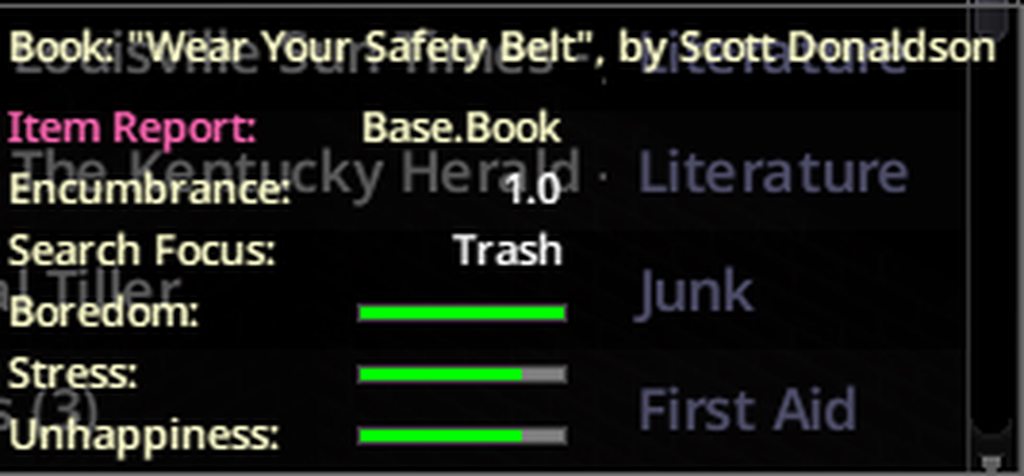 willow tulip
then I can't even compare the bar width anymore because the bars are different widths!!
bronze yoke
i imagine if a tooltip only had bars in it the values would not even appear
willow tulip
Tooltip resizing be like:

Like literally even the SAME ITEM in a row will have different tooltip widths
willow tulip
bronze yoke
https://imgur.com/a/KvzNs3H
Also yes, the non standard bar width AND not using the entire area both piss me off ever so much.
I know its just a tiny UI detail but DAMN thats annoying.,
vast pier
vast pier
Funny enough the actual issue I'm actually gonna have from this is that I want the alternative bullet types to use the sprite system instead of creating new items for each one
Which isn't compatible with the display
since it isn't real items
bronze yoke
it's pretty entertaining that nearly every bug with my tooltip code just ends up 'no, that's just how tooltips work'
willow tulip
bronze yoke
it's pretty entertaining that nearly every bug with my tooltip code just ends up...
Maybe you should just start over from an ISPanel
bronze yoke
no interest, the purpose is just to modify existing tooltips, if someone wants to do that they don't need me to make a framework for it
willow tulip
No I mean, intercept the tooltip rendering entirely 😛
bronze yoke
vast pier
Funny enough the actual issue I'm actually gonna have from this is that I want t...
you may just want to use your own system with mod data then
vast pier
oh I'm just talking about the display
I'm gonna be using mod data for the actual tracking
bronze yoke
willow tulip
No I mean, intercept the tooltip rendering entirely 😛
yeah, but again, my framework is just to allow modifying them as they are, i don't intend to change how they actually work
willow tulip
Ah.
vast pier
It just means I make some placeholder items, since the icons between rounds are gonna be similar anyway
I'll just make some dev items for each metal type of a pistol/rifle round
the actual items the player use will use the sprite system (if I can get it working the way I intend)
I might see if I can use the toolhead system to give each bullet a handle/head and have that distinguish what the bullet is made of
the tool/handle system works on non melee weapons but idk if there would be any unforseen bugs from it
It's really buggy if you try using it on a gun, which is why I wrote my own disassembly code for it
probably should go through again and polish some of my code but ughhhh
 left osprey
Anybody able to help me with my mod? I can't get it to pop up on my mod list, it appears on the workshop page to upload it. But it won't show up on the mod list to actually activate it. It used to, until I added more items and models, all of the scripts look legit and there's no discrepancies' with image names or mesh names in the script as far as I've seen which lead me to look at other areas, I can't find anything that would cause this issue. Maybe some more seasoned eyes could catch the problem or know more than I do, I'll DM the zip if anyone could help, thanks!
 unreal pewter
anyone have any idea whats going on here
willow tulip
Start with an existing recipe and alter it one line at a time. Your missing a lot of tags in that recipe and I have no idea what zomboid requires
unreal pewter
as far as the documentation says, only inputs outputs and at least one tag is required
willow tulip
ie: start with any other recipe that requires fluid, just rename it and shove it into your own mod, make sure it exists and still outputs the thing.
unreal pewter
yeah this is a copy paste of a vanilla recipe
willow tulip
Then try altering a few things. It could be something as simple as you missed a , or got a parameter with the wrong case
(PZ is randomly case sensitive)
unreal pewter
lemme try launching again and seeing if the console gets mad at me
unreal pewter
RefillHurricaneLantern
the one on the craftRecipe wiki page
https://pzwiki.net/wiki/CraftRecipe
willow tulip
Ok so you removed time, timedaction, oncreate, changed the tags and category...
Might I recommend again, you start with that recipe, but this time only change one thing at a time and verify it still works?
unreal pewter
uhh yeah ill try that
bronze yoke
is that the entire file?
unreal pewter
its not but i didnt wanna flood the chat with the full file theres like 5 recipes and all of them have the same issue
willow tulip
Also note that any error anywhere in your file can cause PZ to completely die and ignore the rest of the file.
So its best to start with just getting 1 recipe working
You also might want to just post the entire file because there is things like.. the module Base {} that needs to wrap around the file..
If you upload the file itself to discord, it won't spam the chat with all the text, just a few line preview.
unreal pewter
heres the current state of the file
module ProjectGurashi
{

    craftRecipe injectSyringe
    {
        inputs
        {
            item 1 [Base.AlcoholedCottonBalls],
            item 1 [ProjectGurashi.CureVaccine],
        }
        outputs {
            item 0 ProjectGurashi.CureVaccine,
        }
        category = Health,
        Tags = CanAlwaysBeResearched;RightClickOnly;CanBeDoneFromFloor,
        Time = 100,
        OnCreate = "Recipe.OnCreate.InjectSyringe",
    }

craftRecipe boilRamen
{
    timedAction = Making,
    Time = 50,
    OnCreate = Recipe.OnCreate.RefillHurricaneLantern,
    /* OnTest = Recipe.OnTest.RefillHurricaneLantern, */
    Tags = InHandCraft;CanBeDoneInDark,
    category = Miscellaneous, /*category = Survival,*/
        inputs
        {
            item 1 [ProjectGurashi.CupNoodles],
            item 1 [*],
            -fluid 1 [Water;TaintedWater],
        }
        outputs
        {
            item 1 ProjectGurashi.CupNoodles,
        }
}


    craftRecipe unpackageBentou
    {
        inputs
        {
            item 1 [ProjectGurashi.PackagedBentou],
        }
        outputs
        {
            item 1 ProjectGurashi.Bentou,
        }
        Tags = CanAlwaysBeResearched;RightClickOnly;CanBeDoneFromFloor,
        timedAction = UnPackSack,
        Time = 60,
        category = Cooking,
    }

    craftRecipe dismantleElectronics
    {
        inputs
        {
            item 1 [ProjectGurashi.BrokenMobilePhone;ProjectGurashi.QSP] flags[Prop2],
            item 1 [Base.Screwdriver] mode:keep flags[Prop1],
        }
        outputs
        {
            item 1 Base.ElectronicsScrap,
        }
        timedAction = DismantleElectrical,
        Tags = CanAlwaysBeResearched;AnySurfaceCraft,
        Time = 180,
        category = Electrical,
        SkillRequired = Electrical:1,
        xpAward = Electrical:6,
    }
}
again next time just.. drag and drop the file into discord.
willow tulip
shrugs
unreal pewter
im porting this from b41 by the way so i just dont know whats changed from b41
willow tulip
Looks fine to me, other then 'item 0 ProjectGurashi.CureVaccine,' is a little weird (0?)
(though I guess the oncreate does something)
@bronze yoke You seeing anything in his file? im stumped.
bronze yoke
i don't really do recipes but i didn't notice anything that looked wrong
OnCreate in injectSyringe should not be quoted but i don't think that causes a parse error
oh this might lol
 willow tulip
Yea, that makes me sus too
bronze yoke
i'm pretty sure that fails an assert and if it doesn't it'll definitely crash later on
willow tulip
PZ is incredibly fragile and the slightest error in these files can cause it to bail -_-
bronze yoke
@unreal pewter assuming this is a conversion from b41, you don't need to have a fake result anymore -- you can just not have outputs
having an output with quantity 0 will only confuse the game and likely cause significant issues
unreal pewter
bronze yoke
<@596381472131121165> assuming this is a conversion from b41, you don't need to ...
so i can just have an empty outputs list now?
bronze yoke
don't put an outputs list at all
unreal pewter
oh wow alright
 jagged wren
you can to my knowledge, you know the skyscraper challenge on the stream workshop?
i’m mostly asking how to develop that
bronze yoke
they're defined in lua, i don't really know the full details but you should be able to find the vanilla ones and work from there
unreal pewter
so it shows the recipe in the debugger but it still has the same issue


ry odd
my category is wrong though and i dont have a timedaction but i dont think i need a timedaction
bronze yoke
i don't think so but you might need one
unreal pewter
looking through the recipe debugger, i think the wiki documentation might just be incorrect. oncreate is wrong, at least
willow tulip
unreal pewter
my category is wrong though and i dont have a timedaction but i dont think i nee...
I recommend not changing category, removing timed action, etc until you get it working. Also I don't understand why 'CanAlwaysBeResearched'
Your making wrecking ball changes to something that iv seen a single incorrect case of a character destroy.
unreal pewter
im trying chanigng the tags and stuff now and changing some things based on what i saw in the debugger. if that doesnt work ill copy paste and change one line at a time
willow tulip
Like, 'CanAlwaysBeResearched' might imply to the game that its a researchable recipe and hence it would auto-disable it at the start until you learn it by finding the correct item to research it
And being right click only, you won't be seeing any requirements in the craft menu that might help you debug why its not showing up
unreal pewter
i WOULD like it to be right click only but it seems a lot of the tags on the wiki just make the recipes not work
 queen oasis
unreal pewter
i WOULD like it to be right click only but it seems a lot of the tags on the wik...
queen oasis
unreal pewter
i WOULD like it to be right click only but it seems a lot of the tags on the wik...
I believe you have to add the InHandCraft tag for it to be right click accessible. Show recipes used in doesn't show my handcraft recipes either.
but it will show my "workbench" recipes when I have them loaded for testing
willow tulip
unreal pewter
i WOULD like it to be right click only but it seems a lot of the tags on the wik...
Yes, but start with 'working' recipe, then add tags to experiment once you can narrow it down to 'The thing I just did is why it doesn't work'
And then the best way to fix said things that don't work, is search for those tags in the vanilla source and see how those recipes differe from yours. Like jimbeamdiablo's suggestion that it needs another tag.
(oh, and don't forget to check that the vanilla recipe works as expected.. Because sometimes... it doesn't)
unreal pewter
yeahhh the tags were the issue, thank you all
 bright fog
unreal pewter
looking through the recipe debugger, i think the wiki documentation might just b...
bright fog
unreal pewter
looking through the recipe debugger, i think the wiki documentation might just b...
Wdym oncreate is wrong ?
You're missing outputs
unreal pewter
on the wiki OnCreate says to use quotes for some reason
bright fog
Also it's not in a module either
unreal pewter
it is i just didnt include the whole script in the whole message, sorry
i got it figured out
bright fog
unreal pewter
on the wiki OnCreate says to use quotes for some reason
Can you link it please ?
unreal pewter
the tags were messed up
bright fog
unreal pewter
it is i just didnt include the whole script in the whole message, sorry
The screenshot literally doesn't show that
unreal pewter
unreal pewter
so it shows the recipe in the debugger but it still has the same issue
the recipe debugger doesnt show the whole script
bronze yoke
 bright fog
Like here missing module + outputs
 unreal pewter
yeah its not supposed to have outputs its just supposed to trigger the oncreate
bright fog
unreal pewter
the recipe debugger doesnt show the whole script
Uh...
unreal pewter
recipe debugger just shows that single recipe and doesnt show the module but it is in fact in a module in my script
bronze yoke
that's how the debugger works yeah, it's not supposed to show the module that'd be redundant
bright fog
Why does it show the file comments ?
unreal pewter
you can see its in a module here
 unreal pewter
bright fog
Why does it show the file comments ?
unreal pewter
bright fog
Why does it show the file comments ?
those comments arent even mine, it just put them there
bronze yoke
it doesn't
bright fog
bronze yoke
it doesn't
Why tf would they manually add that comment at the top, that's fucked up ?
Why would they not show the whole script either wtf
bronze yoke
it indicates what mod the script comes from
bright fog
But can they literally not fucking do it in the code block ?????
bronze yoke
bright fog
Why would they not show the whole script either wtf
- it's not kept in memory, it'd be a huge waste most of the time
- why would it need to? you only care about that one script object anyway
bright fog
bronze yoke
1) it's not kept in memory, it'd be a huge waste most of the time
2) why would i...
I meant the script block of the recipe
Not the file here
bronze yoke
the module isn't inside the recipe
it'd be weird to show it
if it's showing up in the debugger the module was correct, otherwise it wouldn't've known what it was and failed to load it anyway
bright fog
bronze yoke
the module isn't inside the recipe
Yes yes yes ok whatever but that's literally not my point here anymore
Why not show the full craftRecipe script
bronze yoke
it does, that recipe doesn't have an output
unreal pewter
because the point of the debugger is to see specific recipes
bright fog
But the outputs section ina recipe is mandatory
unreal pewter
i thought it was too
but apparently not
because it only works correctly for my intended purpose when theres no output
bright fog
It is, I'm fairly sure of that, I've tested it
unreal pewter
i just tested it too and it worked
bronze yoke
i don't think it's mandatory
unreal pewter
the world of TIS coding is a vast and mysterious enigma
bright fog
I tested that I'm fairly sure of that
unreal pewter
i think how it works is that it looks at your script and decides if it wants it to work or not and if it feels like it that day itll make it work
because almost all of my scripts are just a copy paste of each other and half of them work and half of them dont
recipe scripts i mean*
bright fog
I literally noted it as mandatory in the wiki page, I tested it back when I wrote that page, that I'm extremely sure of that part
unreal pewter
well i got rid of outputs and it works so i dont know what to tell you
bright fog
unreal pewter
i think how it works is that it looks at your script and decides if it wants it ...
That's literally not how kt workd you just fucked up somewhere but bcs of how scripts work, it can either nuke your game, other scripts etc
bronze yoke
i just checked the source and an empty outputs block will do literally nothing
so it should not be possible for it to matter whether you have one or not
bright fog
My game broke if I removed outputs blocks from vanilla recipes
bright fog
bronze yoke
i just checked the source and an empty outputs block will do literally nothing
An EMPTY block, a block that is present !
That's literally what I'm telling you
bronze yoke
yes, if it is empty nothing happens, it is the same as if you didn't have one at all
there is nothing that goes 'ok you had an empty one your recipe is okay 👍' it literally does nothing
bright fog
But the outputs block IS mandatory thats literally what I've been saying
Not having an OUTPUT is fine but not having an OUTPUTS wasn't fine when I wrote that wiki page
bronze yoke
give me five minutes to load in to be sure, but from my reading there is literally no extra code executed compared to not having one at all
 upbeat turtle

unreal pewter


it worked and called the oncreate function
i only got an error in the oncreate function itself because something i used in b41 no longer works in b42 but the recipe and the function call works just fine
the debug ShowRecipesUsedIn dropdown still refuses to work but i dont need that to work if the recipe works
bronze yoke
yeah, recipes without outputs blocks work for me too
unreal pewter
maybe it was an error in a past build that was fixed or something
bronze yoke
i think i observed the same thing in a very early b42 build so i think doggy just did something wrong 😅
unreal pewter
o
bronze yoke
not needing outputs was one of the big improvements with the new crafting recipes that people were happy about
unreal pewter
i can continue to hijack the recipe system for functions that i dont wanna add a context menu option for
unreal pewter
hey also where can i download umbrella (specifically unstable)
bronze yoke
there's install instructions on this page https://github.com/asledgehammer/Umbrella
 broken briar
unreal pewter
broken briar
unreal pewter
ooh? what kind of mod r u making
a mod where it allows you to use syringes and fill them up with some antibiotics?
unreal pewter
broken briar
a mod where it allows you to use syringes and fill them up with some antibiotics...
its a mod based on a zombie series i really like
one of the plot points is the characters find a "cure" that turns out to not be a real cure and it leaves one of them in like a half-infected state
trying to make that "cure" syringe
 solar rover
If I want to set and outfit/clothing item to have a set color, is there a hue entry for that in the XML?
I see the allow random but I cant find a reference for something like <m_Hue>1,0.06,0.9</m_Hue> ?
guess I might be stuck with just a set texture choice but I was hoping to use existing options.
 true nova
solar rover
If I want to set and outfit/clothing item to have a set color, is there a hue en...
true nova
solar rover
If I want to set and outfit/clothing item to have a set color, is there a hue en...
I think it might be a thing. I know color can be set in lua for clothing with tint
 rustic condor
Mod idea: canned items are short blunt weapons and when they break the can opens
bright fog
<@&671452400221159444> an absurd amount of money, newly joined, no pfp, 3 days old account, and we had some cases similar in the modding Discord that have yet to prove themselves as non-scammers
 left plank
bright fog
<@&671452400221159444> an absurd amount of money, newly joined, no pfp, 3 days o...
left plank
bright fog
<@&671452400221159444> an absurd amount of money, newly joined, no pfp, 3 days o...
Thank ya
bright fog
A new type of scam I suppose
That's not a good news tho, because there's legit people making offers and seriously looking to commission, and I hope Discord's flagging system doesn't end up flagging legit users as scammers that way ...
@sour island letting you know, there was a scam like of a new account providing an absurd amount of money for a job, without proper explanation of what they need
Since we just had such a case on the modding Discord
This might become a common scam in the near future
upbeat turtle
I can confirm in another pretty big artist server — this scam has been around for a lil while
bright fog
Thanks
 dreamy birch
left plank
Thank ya
dreamy birch
left plank
Thank ya
where are you
left plank
dreamy birch
where are you
I’m a bruv now mate
bronze yoke
<@&671452400221159444>
 fleet bridge
Anyone ever have steam upload error 15 before
willow tulip
fleet bridge
Anyone ever have steam upload error 15 before
Most steam upload errors mean try again later.
 buoyant violet
If I manage to get better. we may continue this mod idea of BF2 weapons into zomboid
 buoyant violet
visible mag changes


 teal fulcrum
Hello, I'm looking for support getting started with making a mod. I have pretty much zero experience in any programming and just want to do some simple things like snacks and drinks
bright fog
teal fulcrum
Hello, I'm looking for support getting started with making a mod. I have pretty ...
Pinned messages
teal fulcrum
Thank you
 main pasture
Is it possible to get the item player is trying to install to a vehicle? It doesn't seem to be given to the install test function and the vehicle part also doesn't have it as it's being installed. NVM. for reference: local actionQueue= ISTimedActionQueue.getTimedActionQueue(player) local currentAction = actionQueue.queue[1] local item = currentAction.item
true nova
main pasture
Is it possible to get the item player is trying to install to a vehicle? It does...
if that is ran when the player is doing ISInstallVehiclePart then .item should be the item.
 forest herald
Anyone know why this is returning an empty list?
getScriptManager():getAllRecipes()
Is there a way to get all recipes?
main pasture
true nova
if that is ran when the player is doing ISInstallVehiclePart then .item should b...
Yeah. That seems to work once the timed action is started. The install test is called constantly during it
true nova
.item isnt really established until start()
true nova
forest herald
Anyone know why this is returning an empty list?
`getScriptManager():getAllReci...
youre running through the array and its giving nothing? if you're doing something like isempty() that often returns true for me regardless
bronze yoke
forest herald
Anyone know why this is returning an empty list?
`getScriptManager():getAllReci...
are you in build 42? recipes are deprecated, use methods that refer to craftRecipes instead
main pasture
Any ideas what could cause the game to stop calling the custom install test function? No errors in the console and it just started refusing to use it. It is just ignored even when I changed it to always block the install
forest herald
bronze yoke
are you in build 42? recipes are deprecated, use methods that refer to craftReci...
Yes Build 42. When you say methods that refer to craftRecipes, is there a known way to get all recipes or get all recipes for a specific skill?
bronze yoke
getScriptManager():getAllCraftRecipes()
forest herald
bronze yoke
`getScriptManager():getAllCraftRecipes()`
Oooo, thank you lets see 😄
forest herald
One step closer at least
Do craftrecipes have an autolearn level field?
https://pzwiki.net/wiki/CraftRecipe Guessing what I need is here 😄
forest herald
Do we have any docs on getCraftRecipe("") and the variables/accessors within?
bronze yoke
teal fulcrum
I’m having difficulty getting an item to use an image as it’s icon. I’ve made it so that the item should be using an image but I’m not sure where to put it as everywhere I have so far seems to not work
 fierce pond
I'm honestly just here so I can figure out and eventually publish that translates every Redlettermedia BestoftheWorst tapes into ingame VHS tapes
bright fog
teal fulcrum
I’m having difficulty getting an item to use an image as it’s icon. I’ve made it...
bright fog
fierce pond
I'm honestly just here so I can figure out and eventually publish that translate...
willow tulip
bright fog
https://pzwiki.net/wiki/Icon
Someone should add the subfolder details to that page...
main pasture
<@&671452400221159444>
bright fog
willow tulip
Someone should add the subfolder details to that page...
I think I wrote about it somewhere in the wiki but I never remember where haha
willow tulip
bright fog
I think I wrote about it somewhere in the wiki but I never remember where haha
Yea I think the item_ folder solution is better then the item prefix for all icons lol
"dunno if bug, but going to keep using it and not report it due to fear of breaking mod"
Im FINE with it working that way, just so long as it never stops working that way.
(and ideally gets well documented so more people start using it because proper folder structure just makes all my OCD very happy.)
bright fog
willow tulip
Yea I think the item_ folder solution is better then the item prefix for all ico...
I don't agree
It adds complexicity to something already confusing for new modders
It's more of an advanced tech
willow tulip
Like im not saying paragraphs about it.. just some kinda sentence stating thats what happens if you try and use a folder.
bright fog
willow tulip
Like im not saying paragraphs about it.. just some kinda sentence stating thats ...
Yea yea I'll write about it but that's what I'm saying, I'm pretty sure I wrote about it somewhere but somehow I never remember where
willow tulip
lol.
I mean, for noobs it could be 'Don't put it into a folder or this happens' but for everyone experienced thats like "oh reallyyy, I hated item_ prefixes for all my files anyway!"
someone literally told me it as a warning and I was like oh really...

 vivid vessel
So like. What's a good resource to learn how to start modding pz?
Beyond wiki what are some books/coding tutorials I should look at before starting I mean
bright fog
vivid vessel
Beyond wiki what are some books/coding tutorials I should look at before startin...
Not much, there's some rare videos, 2 or 3 Steam guides to specific modding fields, but that's it
Most of these are linked on the wiki
vivid vessel
Got it thank you. I've never programmed before so have no idea what I'm doing lol.
 near dust
Is there a mod in works for farm animals not beeing dead at game start in an * x Months later* run?
if not i am begging for one 😄
 rare mango
im trying to make a mod that gives items upon spawning with a specific profession, and want to also make my own professions. can anyone help or guide me (dm preferably)?
 fickle tangle
I accidentally clipped through my RV's walls, I use the RV interior mod, and now I see everything outside of these walls, I've ruined the fog, and now the ambience is ruined.
Is there any way to refog an area you've already discovered?
I tried with ChatGPT but he sucks at making mods, can't even get the mod to load.
bronze yoke
<@&671452400221159444>
buoyant violet
some goodies coming soon ™
 bright fog
fickle tangle
I accidentally clipped through my RV's walls, I use the RV interior mod, and now...
bright fog
fickle tangle
I accidentally clipped through my RV's walls, I use the RV interior mod, and now...
Pretty sure that exiting the save then reopening it does that no ?
 vale garden
buoyant violet
some goodies coming soon ™
vale garden
buoyant violet
some goodies coming soon ™
Anything special apart from existing weapon mod?
Please share more detail to us.
buoyant violet
vale garden
Anything special apart from existing weapon mod?
Please share more detail to us.
you dont kiss and tell
buoyant violet
the most I will provide for now, is that I will take parts from guns and play around with them. example this is the famas sight on the m16a2 from the game. so yeah
 teal fulcrum
I have a model with a pieslice as part of it and a plate as another. Even after joining the models together in Blender, the pie slice still appears by itself with no plate under it
teal fulcrum
How do I achieve that?
Sorry, I am new to Blender
I think I figured it out
That doesn't seem to be the issue, the plate still will not appear even after merging the plate and pie into one material
Assigned to one material and deleted the other


 vast pier
would you believe me if I said the biggest struggle I've had so far with adding a bayonet option to my modular guns is having it detect if the gun has a bayonet lug installed so that the bayonet can't be attached to the air in front of the gun ?
vast pier
Can't attach the lug without a screwdriver, can't attach the bayonet without a lug.
Can attach and detach the bayonet with no tools as long as the lug is installed.
Can't detach the lug if the bayonet is installed.
 icy night
rare mango
im trying to make a mod that gives items upon spawning with a specific professio...
icy night
rare mango
im trying to make a mod that gives items upon spawning with a specific professio...
There's already lots of mods for that
Both for b41 and 42
If you want to use one that's easily customizable, you can use https://steamcommunity.com/sharedfiles/filedetails/?id=3558835419
 rare mango
icy night
There's already lots of mods for that
rare mango
icy night
There's already lots of mods for that
Thank you
 empty gate
Doesn’t it seem strange to you that a character without clothing can carry quite a lot of items? What if we made the clothing system more advanced and added pockets for inventory depending on the type and amount of equipped clothing?
 trim quartz
Apologies if this is a daft question, but is there a way to breakpoint and step through server side LUA code?
I've only done client side stuff before, and when I open the debugger the server lua just opens as blank pages
I'm building B41 incase that make any difference
bronze yoke
in singleplayer yes (if your server code runs in singleplayer too), in multiplayer no
trim quartz
whats the best way to test / debug server code in that case?
bright fog
trim quartz
whats the best way to test / debug server code in that case?
In a hosted server you can technically reload files
It's a bit weird ... but if I remember right it can be done the same way as singleplayer
trim quartz
Thanks
vale garden
buoyant violet
you dont kiss and tell
But I fuck around and find out.
 past radish
I feel like im in the second grade asking this..  but does any mod creators for PZ wanna be friends? I'm looking to get into modding and would love to make friends in the community or find a mentor.. What I lack in knowledge of the space, I make up for in cheerleading new ideas or helping mod test.. plus Im a quick learner and im cool asf (at least my mom thinks so). 😬
If your bored send me a DM! I'd love to hear what your working on or shoot the sht and theorycraft 
 naive crest
Hello everyone, I must be doing something really stupid but I cannot get my map to appear in build 42
the mod shows up, i can activate it but the spawn point/map option just doesnt exist
Managed to get it working but map shows up corrupt in game


should look like that
bright fog
naive crest
Hello everyone, I must be doing something really stupid but I cannot get my map ...
 bronze cedar
Hi everyone. I'm making my first mod. I am having difficulty finding the functions I need. I tried:
- referring to other mods on Steam
- https://demiurgequantified.github.io/ProjectZomboidLuaDocs/ (but it seems to be incomplete)
What other resources for function usage do you use?
true nova
bronze cedar
Hi everyone. I'm making my first mod. I am having difficulty finding the functio...
i personally use candle with vscode
i think the lua docs have more stuff than candle but candle is just the classes and their functions
vast pier
bronze cedar
Hi everyone. I'm making my first mod. I am having difficulty finding the functio...
what are you tryna do ?
vast pier
So an issue I am currently dealing with, melee weapons do not display weapon attachments.
This is a problem because my gun models are made from their attachments.


I do not know how to go about this
teal fulcrum
I need assistance, my mod now crashes the save but I have no idea why
vast pier
teal fulcrum
I need assistance, my mod now crashes the save but I have no idea why
what's your mod
does it crash on new saves or just your old save ?
teal fulcrum
Both, I tested it on the save I had originally and all that would happen is a black screen instead of loading, I had to ALT+F4 out and when loaded in a new save it crashes shortly after walking around a bit
My mod hasn't been published to the workshop yet, it's just on my computer
teal fulcrum
vast pier
what's your mod
Forgot to reply instead of message
vast pier
teal fulcrum
Both, I tested it on the save I had originally and all that would happen is a bl...
does it do the same for loading a new save ?
what did you change since last time it was working
teal fulcrum
I changed a model, I think. I'm not sure how I changed it though
teal fulcrum
vast pier
does it do the same for loading a new save ?
It creates a black-screen save and a duplicate save with _crash
vast pier
B41 or 42 ?
teal fulcrum
41
vast pier
what exactly does the mod do ?
teal fulcrum
It's a misc mod meant for just me and my girlfriend mostly. I have two food items and a weapon right now
But the models for one of the food items and the weapon are missing for some reason
vast pier
could you send over your console.txt ?
teal fulcrum
Where would I find that?
teal fulcrum
vast pier
you should try loading a save with only your mod enabled, and if it crashes then send the console.txt again
teal fulcrum
It didn't crash, but it made a weird sound at spawn that isn't going away and seems to be having trouble with sound in game
teal fulcrum
vast pier
you should try loading a save with only your mod enabled, and if it crashes then...
Forgot to @ again
Here's the console
vast pier
teal fulcrum
It didn't crash, but it made a weird sound at spawn that isn't going away and se...
that's odd, I would ask to look at the mod myself but it is 3am for me and I am tired
teal fulcrum
Same here
 thin swan
vast pier
So an issue I am currently dealing with, melee weapons do not display weapon att...
thin swan
vast pier
So an issue I am currently dealing with, melee weapons do not display weapon att...
Melee weapons can show attachments, I've done it for my bicycle.
What is that wrapping that shows? Is that the base weapon model?
bronze cedar
vast pier
what are you tryna do ?
I am making a mod that consumes double-clicked item until 0% hunger/thirst. Here's what I have so far. I harvested some functions from other mods. Other functions are placeholders that I made up for now. That's why I wrote my original message, I need a definitive resource to help me find all the functions I need.
bronze cedar
true nova
i personally use candle with vscode
Can you link it? I see no relevant results for "candle" in VSCode extension marketplace
 true nova
bronze cedar
Can you link it? I see no relevant results for "candle" in VSCode extension mark...
true nova
bronze cedar
Can you link it? I see no relevant results for "candle" in VSCode extension mark...
I dont think it's in extensions. It's a github repo set up as a workspace. Ill have to get it to you when I get home
bright fog
bronze cedar
Hi everyone. I'm making my first mod. I am having difficulty finding the functio...
Umbrella and the JavaDocs

@true nova same guns
Don't use candle
Umbrella is the most up to date
I believe it includes Candle too ? @bronze yoke can correct me on that
 drifting ore
Hello all. I have a problem.
TLDR: How do I spawn custom items in B42?
People asked me to make a screenshot of my mod's new tools. I've never spawned them. I usually just run around until I find them.
But I need to show all the things I added.
I read that you could spawn items via the text chat, but it doesn't work on SP.
I read that you could add "-debug" on your steam launch options and it crashes to desktop on opening.
vast pier
thin swan
Melee weapons can show attachments, I've done it for my bicycle.
What is that wr...
Yes that’s the base weapon model.
This is for B42 so maybe specifically custom attachments don’t render ?
true nova
bright fog
Umbrella is the most up to date
Ah ok, a bit behind on things. I think i have umbrella as well, probably not using it right
thin swan
vast pier
Yes that’s the base weapon model.
This is for B42 so maybe specifically custom a...
No it works for sure, my bicycle is for B42 and has custom attachments that render.
If you place the attachments just out in the world, do they show up properly? Just so you can confirm the model loads correctly at the right scale
vast pier
thin swan
No it works for sure, my bicycle is for B42 and has custom attachments that rend...
The attachments work on the normal gun, just the melee versions.
Same models for both
thin swan
vast pier
The attachments work on the normal gun, just the melee versions.
Hmm... Gotta be something with how either the attachment/weapon item scripts or the attachments on the weapon model script is set up
bronze yoke
<@&671452400221159444>
vast pier
thin swan
Hmm... Gotta be something with how either the attachment/weapon item scripts or ...
Oh my god you’re right i completely forgot to add the tedious as fuck attachment params on the weapon that determine what model renders for the attachment
I feel so dumb now
vast pier
thin swan
Hmm... Gotta be something with how either the attachment/weapon item scripts or ...
I forgot to add these to the melee weapon lmaoooooooo, it will probably work properly, thnk u lmao
 bright fog
true nova
Ah ok, a bit behind on things. I think i have umbrella as well, probably not usi...
bright fog
true nova
Ah ok, a bit behind on things. I think i have umbrella as well, probably not usi...
The wiki page details it
bright fog
drifting ore
Hello all. I have a problem.
TLDR: How do I spawn custom items in B42?
Peopl...
In debug mode, you can open a item spawning menu
From the debug icon on the left, in the first category (general if I remember right)
 shy mantle
Why does permanentlyRemove() leave behind a completely invisible, invalid vehicle that has no id to remove or get a key for in game with debug, but when I press v for the vehicle menu, I can see this for a fraction of a second? The weird thing is is that I can DRIVE through it, but I can't WALK through it...
All I'm doing is, if vehicle:isGoodCar() then vehicle:permanentlyRemove() end lol

It doesn't even leave a shadow
thin swan
vast pier
I forgot to add these to the melee weapon lmaoooooooo, it will probably work pro...
Haha yeah those are annoying as hell 😅 Hope it all works now!
willow tulip
shy mantle
Why does permanentlyRemove() leave behind a completely invisible, invalid vehicl...
See thats on you, you used permanentlyRemove(), not properlyRemove() /s
But seriously, consider trying removeFromWorld?
Also, matters if your removing it in server\ code or client\ code.
Interesting, so I looked into how the vanilla does it.
permanentlyRemove() is used exclusively on vehicles
while removeFromWorld is used on.. everything else.
shy mantle
Using it in server, client, shared, it didn't seem to matter
willow tulip
On client side, the cheat to remove vehicles does this:
function ISVehicleMechanics.onCheatRemoveAux(dummy, button, playerObj, vehicle)
    if button.internal == "NO" then return end
    if isClient() then
        sendClientCommand(playerObj, "vehicle", "remove", { vehicle = vehicle:getId() })
    else
        vehicle:permanentlyRemove()
    end
end
Are you accidently keeping a reference to the vehicle?
(Like by accidently assigning it to a global?)
bronze yoke
shouldn't matter, if anything else can see it then whatever's seeing it has a reference too
so the UI or whatever the UI draws from is holding a reference
shy mantle
willow tulip
Are you accidently keeping a reference to the vehicle?
I'm pretty sure I'm not
willow tulip
shy mantle
I'm pretty sure I'm not
Does the remove vehicle cheat have the same behavior your seeing?
shy mantle
willow tulip
Does the remove vehicle cheat have the same behavior your seeing?
Nope
This is such a strange stump
willow tulip
shy mantle
Nope
How long is your code? can you post it?
shy mantle
ok discord is not playing nice
I'm trying to send it right here in this channel, not through a DM, not my day
 shy mantle
willow tulip
How long is your code? can you post it?
shy mantle
willow tulip
How long is your code? can you post it?
sending a screenshot instead because discord won't let me send code blocks
 willow tulip
shy mantle
sending a screenshot instead because discord won't let me send code blocks
willow tulip
shy mantle
sending a screenshot instead because discord won't let me send code blocks
I recommend returning after removing the vehicle.
Also note, removing a vehicle in spawn is.. a bad idea, because 'story' vehicles are edited 1 frame after spawn
shy mantle
I tried that as well, didn't make a difference either
willow tulip
Btw, 'junkyard' zone isn't really used (AFAIK? maybe for crashed vehicles?), junkyard vehicles actually spawn under traffic jam
shy mantle
willow tulip
Btw, 'junkyard' zone isn't really used (AFAIK? maybe for crashed vehicles?), jun...
I converted all the junkyards back into proper junkyard definitions
willow tulip
shy mantle
I converted all the junkyards back into proper junkyard definitions
Neat. I looked into that and decided it was wayyy too much work lol
shy mantle
It was for something so simple lol
willow tulip
Anyway, Id recommend you consider registering the vehicles you want to remove, and try delaying the removal by a couple ticks
shy mantle
Alright, I'll try that
willow tulip
since story vehicles get edited 1 tick(?) after spawn
(the vehicles that end up with like 10% condition due to being in a car crash, for example)
shy mantle
Wait
willow tulip
they spawn as higher condition and then get edited sometime after onspawnvehicleend
willow tulip
Lemme guess, your phantom vehicles are all 10% condition? 😛
willow tulip
shy mantle
But, what if it's for a normal vehicle zone?
shrugs
Oh wait I guess they don't have a condition anymore judging from the screenshot
shy mantle
Yeah, it deletes nearly everything
It does do something, but I need to reload the chunk
willow tulip
Mmm.
shy mantle
And I'm only targeting good vehicles, if that changes anything
willow tulip
Yea, id try delaying it by a few ticks
shy mantle
Hardcoded ass good vehicles
willow tulip
aka survivor vehicles.
shy mantle
Not even
Burnt and wrecked vehicles qualify for that
It pisses me off seeing a wrecked vehicle is good condition lol
willow tulip
lol yeaaaa
I just added an option to project summer car to disable all wrecks lol
(spawns regular cars instead)
shy mantle
I'm pretty sure they already removed them from the spawn tables, except for stories
willow tulip
    if sv.RemoveWreckedCars == true then
        SmashedCarDefinitions.cars = {}
    end
I extra murdered them.
shy mantle
I use them for my insane traffic jams because.... there're too many cars lol
willow tulip
shy mantle
I use them for my insane traffic jams because.... there're too many cars lol
Yea I fixed that in other ways:

(traffic jams now look similar)
shy mantle
willow tulip
Yea I fixed that in other ways:
I did the same thing with junkyards, but since I separated the zone types, I left out traffic jams because I know some people wouldn't want that
willow tulip
how did you change the zones anyway?
shy mantle
Also, thanks, the delay worked for properly removing the good vehicles
willow tulip
awesome!
shy mantle
I'll pull up the file and share it (if discord lets me, if not, another screenshot)
NewVZones = NewVZones or {}

function NewVZones.changeVZone(ZoneX, ZoneY, NewName, NewWidht, NewHeight, NewX, NewY)
    local vz = getVehicleZoneAt(ZoneX, ZoneY, 0)
    if vz ~= nil then
        if NewName ~= nil then
            vz:setName(NewName)
        end
        if NewWidht ~= nil then
            vz:setW(NewWidht)
        end
        if NewHeight ~= nil then
            vz:setH(NewHeight)
        end
        if NewX ~= nil then
            vz:setX(NewX)
        end
        if NewX ~= nil and NewY ~= nil then
            local nvz = getVehicleZoneAt(NewX, ZoneY, 0)
            nvz:setY(NewY)
        elseif NewY ~= nil then
            vz:setY(NewY)
        end
    end
end
and to make the new zones...
NewVZones = NewVZones or {}

function NewVZones.registerVZones(zoneObjs)
    for _, vz in ipairs(zoneObjs) do
        if vz.type == "ParkingStall" then
            local vzone = getWorld():registerVehiclesZone(vz.name, vz.type, vz.x, vz.y, vz.z, vz.width, vz.height, vz.properties)
            if vzone == nil then
                getWorld():registerZone(vz.name, vz.type, vz.x, vz.y, vz.z, vz.width, vz.height)
            end
        end
    end
end
So you found all the junkyard zones and called this on all of them??
shy mantle
And then in another file, you get overwhelmed by thousands of lines
willow tulip
Yeash thats a lot of work
How many junkyards are in the game? the wiki has like 10 or something.
https://pzwiki.net/wiki/Wrecking_yard Ah 7 listed here
shy mantle
Quite a few, yeah. Some work properly, the rest as you know... But there were a total of 124 renames, meaning 124 different noted coordinates
willow tulip
Neat.
shy mantle
I have a grand total of 412 vehicle zone changes and 1312 vehicle zone additions
willow tulip
Woah -_-;
shy mantle
Yeeeeeeeeeeeeeah
willow tulip
whats the overall goal of your mod?
shy mantle
Pretty much to complete everything that hasn't been done for the game with vehicles.
Same mod that adds climbable vehicles btw
Tell me this isn't intimidating lol
 willow tulip
Neat.
yea literally why I didn't do it.. my plan was to just put a marker down on junkyards and every vehicle in a traffic jam within 50 tiles of marker was going to be classifed as junkyard lol
then decided to work on other stuff instead.
shy mantle
Yeah, the main bit of your mod is way more important than that to focus on lol
willow tulip
yep
bright fog
shy mantle
Tell me this isn't intimidating lol
Jeez are these tables ?
willow tulip
almost got the part repair stuff done...
shy mantle
bright fog
Jeez are these tables ?
Yeah, and there's more to that list, it doesn't fit lol
There's not that much of a performance impact as you might think
willow tulip
the fact every junkyard is like 6~12 zones -_-;
bright fog
shy mantle
There's not that much of a performance impact as you might think
No of coursd there isn't
I'd be surprised if it did.....
shy mantle
bright fog
No of coursd there isn't
Well, the loading time is slow, that's for sure
 distant inlet
hope b42 stable comes out soon so I can finish my game-breaking mods
stopping by to say hi 🙂
thin swan
distant inlet
hope b42 stable comes out soon so I can finish my ~~game-breaking~~ mods
Well you might be waiting a while 😅 What mods are you making that needs stable? Multiplayer stuff?
teal fulcrum
I'm having issues with my mod messing with the audio for the game despite it not having anything to do with sound. The only thing I've changed recently is the models I'm using
teal fulcrum
I fixed the sound issue, but now equipping a weapon I made crashes the game
Now I'm invisible 🦊

 teal fulcrum
If anyone could help me with fixing a weapon, I would really appreciate it
 nova whale
Hey everyone, I hope this is the right place to ask? I've been getting into mod making recently and have now been approached by a few people who'd like to commission my work, but I have no idea what kind of pricing structure I should be using. Any help would be appreciated.
vast pier

 uneven harbor
Hello guys anyone knows how to do it? I have tried this
local function setCarryWeight(player)
if not player.carryWeightSet then
local inv = player:getInventory()
if inv then -- asegurarse de que el inventario ya exista
inv:setMaxWeight(40.0) -- Capacidad máxima en kg
player.carryWeightSet = true
end
end
end
but doesnt work 🙁
 merry fjord
uneven harbor
Hello guys anyone knows how to do it? I have tried this
local function setCarr...
merry fjord
uneven harbor
Hello guys anyone knows how to do it? I have tried this
local function setCarr...
did you add it on an event like OnGameStart or EveryTenMinutes?
 limber gorge
Do weapon models have to be defined in the Base module? When I tried to putting the model definitions in a separate mod module, the game gives this error

On the other hand, if I define them in the Base module instead, the mod would break the attachment editor after loading any player model (not a problem in gameplay but it does make debugging quite annoying)
i.e: This doesn't work
module ModABC
{
    imports
    {
        Base
    }

    model WeaponA
    {
        mesh = weapons/2handed/WeaponA,
        texture = weapons/2handed/WeaponA,

        attachment world
        {
            offset = 0.0000 0.0010 -0.0010,
            rotate = 0.0000 0.0000 0.0000,
        }

        attachment Bip01_Prop2
        {
            offset = 0.0000 0.0000 0.0000,
            rotate = 0.0000 0.0000 0.0000,
        }
    }
but this does
{
    model WeaponA
    {
        mesh = weapons/2handed/WeaponA,
        texture = weapons/2handed/WeaponA,

        attachment world
        {
            offset = 0.0000 0.0010 -0.0010,
            rotate = 0.0000 0.0000 0.0000,
        }

        attachment Bip01_Prop2
        {
            offset = 0.0000 0.0000 0.0000,
            rotate = 0.0000 0.0000 0.0000,
        }
    }
}```The item scripts are also defined in ModABC module instead of Base
merry fjord
Hi does anyone know how do i extract from a variable when it outputs like this? Basically output from getFreeRecipes()
[Make Cake Batter, Make Pie Dough]
but when I'm trying to use
for _, v in ipairs(freeRecipeList) do
print(v)
end
Nothing is printing
Solved
 small topaz
Does anyone knows why TIS changed the body location definitions in 42.12:
group:getOrCreateLocation(ItemBodyLocation.HAT)
and also how this new way of defining them works?
bronze yoke
you don't need to change how you define them
all they have changed is they are using constants in place of literals
nothing about body locations has actually changed, just a style improvement
they are now using constants for nearly everything like this since it makes far more sense to do it that way, and now that they are generating their scripts they have to define these things somewhere anyway
small topaz
group:getOrCreateLocation("RasSkin")
this custom definition throws an error for me
bronze yoke
what error?
small topaz
this gave some call frame error
seems that you now have to use smth like group:getOrCreateLocation(ItemBodyLocation.RasSkin)
so prefixing ItemBodyLocation for some reason
but now I have the following problem: how do I recreate this chunk of code in their new definition system:
         group:getOrCreateLocation(backUpLocations[i])
end```
????sorry, i was looking at the wrong version -- you do need to do things differently now, i'll see if i can work it out
this is a breaking change to nearly every clothing mod 😧
bronze yoke
yeah there is no lua api for this anymore 😅 😅 😅 you can still do it though
local bodyLocation = BodyLocation.new(group, "RasSkin")
group:getAllLocations():add(bodyLocation)
Ok thanks! I'll try that. Using
group:getOrCreateLocation(ItemBodyLocation.RasSkin)
also seems to work but cannot be used if the location is stored in a variable ofc.
EDIT: This is wrong. Cannot be used!
bronze yoke
that should be the same as passing nil, so it won't work as you want it to
thin swan
Gotta hurry tf up and patch my bike before the flood of messages come in lol
small topaz
ok. thanks for the info. I'll then go with your chunk of code
the recent update completely smashed my mod 😅
bronze yoke
it caused some horrible game breaking issues with starlit too 😅 the rest seem okay thankfully
small topaz
         local bodyLocation = BodyLocation.new(group, backUpLocations[i])
         group:getAllLocations():add(bodyLocation)
end```
works like a charm!!!hey, anyone know how / if its possible to reload a lua file server side, without a full restart?
I've tried reloadServerLuaFile() from the console but it doesnt seem to a do a thing
I'd hope there is a way or building out server side code will be ball breaking
 maiden comet
Yall know where the script for calculating calories burned is stored
 mellow frigate
I think WeaponCategory enum type was not set as exposed to lua. I hope this will be available soon
uneven harbor
merry fjord
did you add it on an event like OnGameStart or EveryTenMinutes?
Honestly i only did some research, idk how to program pz mods
merry fjord
uneven harbor
Honestly i only did some research, idk how to program pz mods
You can check around this

 dense rivet
I think it'd be fun to redraw or refine like 2D objects or tiles? if that's the right term. Like the Trash tiles or rugs, etc, but how do I go about finding these files? idk anything x.x
 cold wyvern
Hi I want to do a mod, but I don't know how to start from here, I mean: do I need some software or something?
How can I create a mod, that simple. I have the idea, but not how to do
 peak nymph
cold wyvern
Hi I want to do a mod, but I don't know how to start from here, I mean: do I nee...
peak nymph
cold wyvern
Hi I want to do a mod, but I don't know how to start from here, I mean: do I nee...
not done any modding in a long time but getting back into it, last time just watching YouTube tutorials got me going, found this more recent one

My Discord can be joined with: T4FhKzxUJj
My Steam Workshop Mods: steamcommunity.com/id/RAlNMAKER/myworkshopfiles/
If you'd like to support me or commission a mod from me, head on to: ko-fi.com/rainmakerpz
A quick and simple tutorial for making a new mod for Build 42!
I might make more in-depth tutorials or showcases of how some of my B42 mod...
bright fog
cold wyvern
Hi I want to do a mod, but I don't know how to start from here, I mean: do I nee...
Check the pinned messages
bright fog
maiden comet
Yall know where the script for calculating calories burned is stored
It'd be in the Java
Most likely, or maybe in the Lua
But I'd bet they are in the Java
maiden comet
Thanks
maiden comet
Found em but i'm generally more familiar with lua and python and the likes so idk if i'm actually going to be able to use this but i'll try
 sonic needle
<@&671452400221159444>
maiden comet
?
sonic needle
Don't stress. There was a scam post.
thin swan
Time to drop a patch for the bike mod that makes big changes and has barely been tested 😎 I'm sure everything will be just fine
 muted garnet
Am I right in understanding that something was changed with the getOrCreateLocation method in update 42.12.0? Because now, with the same code, I get an error:
ERROR: General      f:0, t:1758847629664> ExceptionLogger.logException> Exception thrown
    java.lang.RuntimeException:  at MethodArguments.assertValid(MethodArguments.java:133).
    Stack trace:
        se.krka.kahlua.integration.expose.MethodArguments.assertValid(MethodArguments.java:133)
        se.krka.kahlua.integration.expose.LuaJavaInvoker.call(LuaJavaInvoker.java:198)
yes
bronze yoke
bronze yoke
```lua
local bodyLocation = BodyLocation.new(group, "RasSkin")
group:getAllLocat...
muted garnet
thanks
 cedar hazel
Would map mods still work?
 shy mantle
Just a little question.
Is there a way to get the data of MULTIPLE vehicles on a single tile instead of the game just... randomly picking one if there are 2 or more?

It's not a big deal for single player, but for multiplayer with individual players interacting with individual vehicles things get messy
true nova
shy mantle
Just a little question.
Is there a way to get the data of MULTIPLE vehicles on ...
tried iterating IsoGridSquare:getLuaMovingObjectList()?
vast pier
https://www.youtube.com/shorts/bcP_7sHsbQY
Really wanna try making this armour (or have someone else model it for me) for use in zomboid
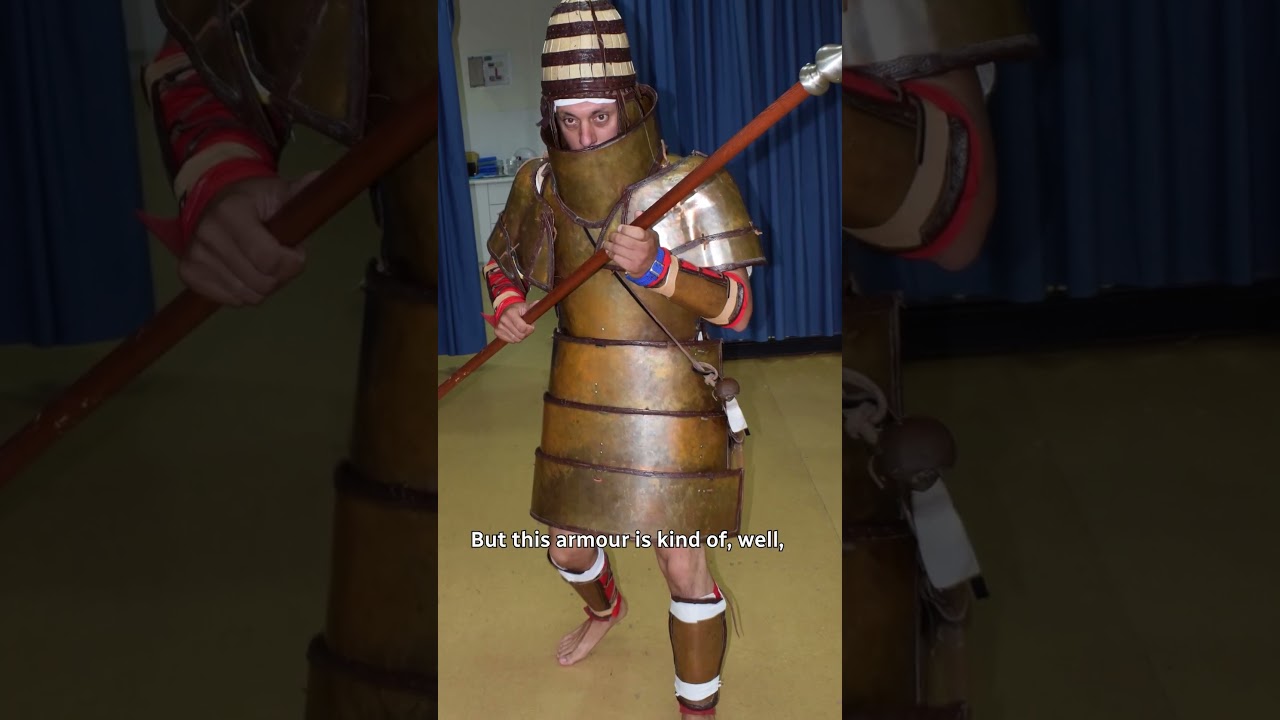
Scientists tested replica Bronze Age armour on more than a dozen elite Greek marines.
The soldiers roleplayed as warriors from Greece's late Bronze Age, known as the Mycenaean civilization, to test the combat suitability of a 3,500-year-old suit of armour.
#Greek #BronzeAge #Armour #CBCRadio #AsItHappens
»»» Subscribe to CBC News to watch ...
Ughhhhh from scratch modeling is so scary
I might try anyway
 vast pier
vast pier
vast pier
this is technically an smg, as it's a machine gun chambered in 38 special
Yes it's left handed, but I do plan on making it so there's a right handed version too ofc
when I first designed the pistol, I designed it with myself in mind (I am left handed)
 vale garden
I really hope someone make a high quality medieval armor
vast pier
vale garden
I really hope someone make a high quality medieval armor
https://steamcommunity.com/sharedfiles/filedetails/?id=2730784492
it's only for B41 but I always thought scrap smith's armour was neat

 vale garden
vast pier
https://steamcommunity.com/sharedfiles/filedetails/?id=2730784492
it's only for ...
vale garden
vast pier
https://steamcommunity.com/sharedfiles/filedetails/?id=2730784492
it's only for ...
Oh nice, last I saw it only has one kind of armor and it is very low poly
vast pier
vale garden
Oh nice, last I saw it only has one kind of armor and it is very low poly
the 2.0 update was released in march, which added in armours
 vale garden
vast pier
the 2.0 update was released in march, which added in armours
vale garden
vast pier
the 2.0 update was released in march, which added in armours
Yeah, I noticed that but I probably didn't go back and see if it got updated.
until now
 vale garden
Already got that, as it is pretty complete and armor detail is good.
Now if Flintlock firearm got updated with firing sound, it would be cool
https://steamcommunity.com/workshop/filedetails/?id=3267938638
 vast pier
vale garden
Now if Flintlock firearm got updated with firing sound, it would be cool
https:/...
vast pier
vale garden
Now if Flintlock firearm got updated with firing sound, it would be cool
https:/...
I could ask him about it, I'm a contributor to ramshackle weapons
 vale garden
I see, then why not merge together lol
vast pier
He's been doing irl stuff and working on other projects I'm pretty sure, so I don't think it would be high on his priority list tho
vast pier
vale garden
I see, then why not merge together lol
I mean one mod is black powder weaponry, and the other is improvised but modern guns
vast pier
vast pier
I could ask him about it, I'm a contributor to ramshackle weapons
I am the porter and maintainer for the B42 version
vale garden
vast pier
I could ask him about it, I'm a contributor to ramshackle weapons
By the way, @ me if Flintlock ever gets updated with a firing sound. I’m also not sure if this is intended for pistols, since you have to ‘equip secondary’ first before you can ‘equip primary.’
vast pier
I haven't used the flintlock mod myself, so I wouldn't know anything about that
vale garden
No problem, I just thought that since you could ask him, might as well as him whether if equip secondary is a bug or not, then fix all of them at the same time.
vast pier
what exactly is the bug ?
vale garden
When you try to use Flintlock pistol, only the 'equip secondary' appear in context menu.
But once the Flintlock pistol is in your secondary hand, you click again then the 'equip primary' will appear.
shy mantle
true nova
tried iterating IsoGridSquare:getLuaMovingObjectList()?
I can't get this to work either, unfortunately. I tried a couple methods, but there's a chance I still used this wrong
empty gate
Hello!👋
New survivor names were added in build 42.12.
I’m trying to figure out where they’re stored in the game files.
So far, I’ve only found them in a translation mod, but that’s now outdated. Since I’m working on a mod that displays all existing surnames as signatures on ID cards, I’d like to include the newly added names as well.
 bright fog
empty gate
Hello!👋
New survivor names were added in build 42.12.
I’m trying to figure out...
bright fog
empty gate
Hello!👋
New survivor names were added in build 42.12.
I’m trying to figure out...
Oh you want to make signatures for every single names out there ?
That's ... going to be kind of impossible dude 😅
Or I mean it's feasable, but you're going to have hundreds of images and I dear pray you store first names and last names separatly in images or you're going to need a billion images for the combinations
vast pier
I’m not gonna lie that’s a bigger task than all of my projects combined, and I have insanely bad feature creep
bright fog
You extremely easily could automate it tbf that's not a problem
vast pier
Though I presume they specifically mean the vanilla default names
bright fog
empty gate
Hello!👋
New survivor names were added in build 42.12.
I’m trying to figure out...
As for where the names are stored, they should be in a Lua file iirc
empty gate
bright fog
That's ... going to be kind of impossible dude 😅
Or I mean it's feasable, but y...
Dude, its already done😁
Currently it displays only surnames as the signature
And yes, it has been automated (including some optimisations for smaller .png size)
 empty gate
bright fog
That's ... going to be kind of impossible dude 😅
Or I mean it's feasable, but y...
empty gate
bright fog
That's ... going to be kind of impossible dude 😅
Or I mean it's feasable, but y...
yep, its ~8,4mln unique combinations for existing names (excluding new ones)
empty gate
bright fog
As for where the names are stored, they should be in a Lua file iirc
It seems there’s no such file.
bright fog
empty gate
Dude, its already done😁
Currently it displays only surnames as the signature
An...
Oh it's not that bad ok !
bright fog
empty gate
It seems there’s no such file.<:map_facesad:1296955840099647529>
iirc is not a file 😭
It means if I remember correctly
bright fog
empty gate
It seems there’s no such file.<:map_facesad:1296955840099647529>
I will point to a good resource to find what you're looking for wait
empty gate
bright fog
I will point to a good resource to find what you're looking for wait
I've found them:
C:\Program Files (x86)\Steam\steamapps\common\ProjectZomboid\media\lua\shared\Translate\EN\SurvivorNames_EN.txt
Here's only 16 new surnames

 cold skiff
I need help, with the new patch 42.12.0 my mods are failing because of the changes in the body, would someone be so kind as to document these changes or help me modify my mods, I'm a bit lost with the new changes
empty gate
They just duplicated the names for some reason...🤔

 thin swan
cold skiff
I need help, with the new patch 42.12.0 my mods are failing because of the chang...
thin swan
cold skiff
I need help, with the new patch 42.12.0 my mods are failing because of the chang...
You can do this:
local locationNames = {
  "Location_One",
  "Location_Two",
  ...
}

local group = BodyLocations.getGroup("Human")
for _, location in ipairs(locationNames) do
    local bodyLocation = BodyLocation.new(group, location)
    group:getAllLocations():add(bodyLocation)
end
Just add all the old location names to that list and it'll be sorted out
thin swan
empty gate
Dude, its already done😁
Currently it displays only surnames as the signature
An...
A fellow OneCommander user 😄 Best explorer for windows for sure
cold skiff
Alex, thanks for your help. If I don't understand correctly, I'll create a LK_BodyLocations.lua file in 42.0\media\lua\shared with this content:
local LKLocations = {
"KatanaSheath",
"KatanaSheathHip",
...
}
local group = BodyLocations.getGroup("Human")
for _, location in ipairs(LKLocations) do
local bodyLocation = BodyLocation.new(group, location)
group:getAllLocations():add(bodyLocation)
end
Should this work, or do I need more modifications?
thin swan
cold skiff
Alex, thanks for your help. If I don't understand correctly, I'll create a LK_Bo...
That'll do it! You should just remove the ... in the LKLocations though, so it should be like this:
local LKLocations = {
  "KatanaSheath",
  "KatanaSheathHip",
}

local group = BodyLocations.getGroup("Human")
for _, location in ipairs(LKLocations) do
    local bodyLocation = BodyLocation.new(group, location)
    group:getAllLocations():add(bodyLocation)
end
Those were just there for me to demonstrate that you can add as many locations as you want to the list
cold skiff
Ha ha ha I left out the... ellipses, thank you very much, I just tried the mod and it works correctly now, thank you very much Alex 😉
true nova
shy mantle
I can't get this to work either, unfortunately. I tried a couple methods, but th...
How'd u do it?
bright fog
thin swan
You can do this:
```
local locationNames = {
"Location_One",
"Location_Two",...
cedar hazel
cold skiff
Ha ha ha I left out the... ellipses, thank you very much, I just tried the mod a...
Oh it’s you!! Hi! Love your mods. Thank you for your work 🙂
cold skiff
cedar hazel
Oh it’s you!! Hi! Love your mods. Thank you for your work 🙂
Hi Zara,
I hope you're referring to the Legendary Series mods. If so, I'm the author. Your comment flatters me; this chat has been very helpful in getting started creating these mods. I still have a lot to learn, though.
cedar hazel
cold skiff
Hi Zara,
I hope you're referring to the Legendary Series mods. If so, I'm the au...
Yes! I was just on one of the mod pages asking a question. Then I saw your name on here and put two and two together.
You updated very quickly though and the mods you put out work well and look good in game, so I’d say you’re a good modder 🤗 🤘
cold skiff
cedar hazel
Yes! I was just on one of the mod pages asking a question. Then I saw your name ...
☺️
 last hornet
Does anyone know where the contents of "media\lua\server\recipecode.lua" went? Most of the recipecode.lua recipes have went away somewhere else (into some sort of java class file) after B42.12... not finding much online yet. Alternatively if anyone still has 42.11 installed please message me, or if somehow found all of the lua scripts on 42.12 please let me know where. Thanks.
bronze yoke
moved into the RecipeCode classes in zombie.scripting.logic
last hornet
Thank you.
 late hound
So what changed with BodyLocations? 🤔
bronze yoke
getOrCreateLocation no longer takes a string argument
bronze yoke
bronze yoke
```lua
local bodyLocation = BodyLocation.new(group, "RasSkin")
group:getAllLocat...
you can replace calls to it with this
here "RasSkin" is the body location id
 plain oak
 lament oak
Is there anyone that would be willing to reskin the hockymask for me?
just need an image skinned over the mask, not sure how to code it and all, though
shy mantle
true nova
How'd u do it?
I was getting the wrong type of object and comparing it incorrectly (even though they look the same in console), I fixed it up now! Thanks, every day I find out about a new getter
red tiger
If the Java devs in TheIndieStone places this line in generated.ScriptGenerator.write(), all scripts will be alphanumerically sorted:
this.elements.sort(Comparator.comparing(Named::getName));
Placing this here in the hopes that someone picks this up.
All of my generated scripts are now alphanumerically sorted and that helps me read these files.
bright fog
bronze yoke
```lua
local bodyLocation = BodyLocation.new(group, "RasSkin")
group:getAllLocat...
drifting ore
empty gate
Hello!👋
New survivor names were added in build 42.12.
I’m trying to figure out...
i think instead u should just use the map drawing feature and repurpose it for the id cards to let people add signatures to the cards themselves
bright fog
drifting ore
i think instead u should just use the map drawing feature and repurpose it for t...
That's true, but he wouldn't be able to use a custom a font like he does
shy mantle
Does anyone know what could possibly cause duplicate vehicles to spawn in a small pile...
This is so random lol
I don't even think I could do that on purpose
vast pier
bronze yoke
How would I use it in this instance ?
local group = BodyLocations.getGroup("Human")
group:getOrCreateLocation("SaltyMask")
group:setHideModel("SaltyMask", "Hat")```replace the call to getOrCreateLocation with that code, leave the rest as is
replace "RasSkin" with "SaltyMask"
 chilly lintel
any of you here knows how i can change the values of a moded clothing piece?
vast pier
bronze yoke
replace the call to `getOrCreateLocation` with that code, leave the rest as is
thanks 💋
chilly lintel
chilly lintel
any of you here knows how i can change the values of a moded clothing piece?
like i can touch the values but cant make them actually modify ingame
empty gate
drifting ore
i think instead u should just use the map drawing feature and repurpose it for t...
Sounds good, but actually, the idea - to add readable id cards (and other stuff like credit cards). So, every zombie's card can be inspected. It could enhance lore aspect of the game.
 silent zealot
thin swan
You can do this:
```
local locationNames = {
"Location_One",
"Location_Two",...
silent zealot
thin swan
You can do this:
```
local locationNames = {
"Location_One",
"Location_Two",...
Thanks! I was checking in hoping someone had solved this so I didn't have to, and Discord opened exactly on your comment with the solution. 😛
I still need to screw around to remake Wear Anything With Anything since that relied on accessing un-exposed fields and it's not surprising that broke when they redid the java side of things
silent zealot
chilly lintel
like i can touch the values but cant make them actually modify ingame
Which values are you wanting to modify? Some values are stored with each item (so you need to spawn a new one to see changes), some values always fall back to the item script. And just for fun, some things you can change but they don't have any effect because a java process has already made up it's mind about which items match it's criteria and it does not re-assess this.
 mild granite
local square = getPlayer():getCurrentSquare()
self.emitter = getWorld():getFreeEmitter(square:getX(), square:getY(), square:getZ())
self.sound = self.emitter:playSound(swingVoice) -- try something like this @oak bison
sound should be played on client side
other players will hear it
that's how i do it
bright fog
mild granite
local square = getPlayer():getCurrentSquare()
self.emitter = getWorld():getFreeE...
You want to attach the sound to the player actually
player:getEmitter
buoyant violet
so, aside from files being in X, what else causes this?

custom animations?
I deleted all custom anims
so I guess there is something bork with the model 🙁
 sacred matrix
The latest update broke our mod (Furry mod, 100K subscribers or so). We use:
local humanGroup = BodyLocations.getGroup("Human");
local furLocation = humanGroup:getOrCreateLocation("Fur");
To create new body location for the fur skin. This has worked all through b41 and b42 so far.
As of the latest b42 update, this is throwing the following exception:
        java.lang.RuntimeException:  at MethodArguments.assertValid(MethodArguments.java:133).
        Stack trace:
                se.krka.kahlua.integration.expose.MethodArguments.assertValid(MethodArguments.java:133)
                se.krka.kahlua.integration.expose.LuaJavaInvoker.call(LuaJavaInvoker.java:198)
What is the correct way now to do this?
bronze yoke
bronze yoke
```lua
local bodyLocation = BodyLocation.new(group, "RasSkin")
group:getAllLocat...
 plush wraith
Spent awhile trying to figure out why my mod wasn't hooking into the new 'Smoke' from cigarette pack function, they made that specific function call ISTakePillAction instead of ISEatFoodAction like the other smokable items 
New Cigarette Packs also don't hold each cigarette anymore as a container, they spawn in a new cigarette everytime when taking from the pack so now I gotta create some modData system on the pack to track it I think
sacred matrix
bronze yoke
Thanks!
 silver lintel
sacred matrix
Thanks!
silver lintel
sacred matrix
Thanks!
😍
 hardy dirge
Hey guys, how do I make mods? I’m thinking about learning how to mod, make some animations as a proof of concept
bright fog
hardy dirge
Hey guys, how do I make mods? I’m thinking about learning how to mod, make some ...
Pinned messages
 tranquil reef
does the community seem to prefer the old mod load order, or the new manual one?
bright fog
tranquil reef
does the community seem to prefer the old mod load order, or the new manual one?
Old is actually better bcs we sometimes need to make sure to have our stuff be the first or last to load
tranquil reef
bright fog
Old is actually better bcs we sometimes need to make sure to have our stuff be t...
Did they ever give a reason they changed it
bright fog
tranquil reef
Did they ever give a reason they changed it
Nop
bronze yoke
the new load order came with features for modders to control load order but they don't work so we're just far worse off 😭
vast pier
Hey any idea why my modded guns are crashing to desktop in the latest update?
I feel like they were fine not that long ago
I spawn in, spawn my gun, and shoot it a few times and then it crashes to desktop
my guns now need whatever the hell this is MuzzleFlashModelKey = muzzle_flash_assault_rifle,
bright fog
bronze yoke
the new load order came with features for modders to control load order but they...
Even then, you can't say "load my mod before everything else"
bright fog
vast pier
my guns now need whatever the hell this is```
MuzzleFlashModelKey = muzz...
@tranquil kindle might want to add that to the gun making guide ?
bronze yoke
that's been my biggest complaint too, stuff that needs to load early has literally no way to express this, whereas when it was alphabetic this was extremely easy
thin swan
@bronze yoke Was working on some controller stuff and found access to the building editor lol
Strange that it's accessible with controller but not keyboard and mouse, unless I just missed where it is
 bronze yoke
let me check that it's still actually commented out
i remember the place i saw it in was really strange as well
like 'why would this button ever be here' strange
yeah the keyboard access to it is disabled 😅
is the editor usable with controller? i didn't think any of the debug uis were
bronze yoke
i wonder if it's actually meant to be used by players in the future or something??
as i've said i don't really get what this ui is meant to debug
and it seems to be associated with the zone editor in the kbm code too
i see in your screenshot it's next to that on controller too
thin swan
Yeah it's some odd stuff
bronze yoke
yeah actually, digging at some code i didn't see before, this is definitely meant to be edited by players
the phrase 'PlayerRooms' appears and they're meant to save to a file called player_buildings.bin (but it's not hooked up yet, so they aren't persistent currently)
thin swan
This got me hyped up
bronze yoke
i thought i was just hacking a debug ui 😅
thin swan
Is this new or something I missed before? It shows only when right clicking a square that belongs to a building (I used the editor to make a new building in the parking lot)

Doesn't do anything though
 quasi kernel
I imagine it would change the loot distributions, but that's just my first guess.
thin swan
That makes sense actually yeah, I think you're right
thin swan
I forgot to record, but it works pretty much same as animal zones, except with room zones nested in building zones. You draw a rectangle to make a building, and then in that building you can draw rectangles to make rooms
This means shareable player made structures that are made in-game should be possible to use for like a blueprint mod right?
but I'm not gonna touch anything regarding player building until next patch I think, seems there's some new fun bugs introduced in 42.12
 fiery pecan
sacred matrix
Thanks!
fiery pecan
sacred matrix
Thanks!
HATE to ping you, but I noticed a little issue with the latest update to your mod. Thing keeps blowing errors.
So I'm sharing a more proper fix.

there's also this. It kinda got a bit buried.
 silent zealot
vast pier
my guns now need whatever the hell this is```
MuzzleFlashModelKey = muzz...
silent zealot
vast pier
my guns now need whatever the hell this is```
MuzzleFlashModelKey = muzz...
That might be why I have reports of my survival rifle crashing the game.
This has not been a good update for mods (though from the changelogs I think some of the changes are long overdue and will better long-term)
bright fog
silent zealot
This has not been a good update for mods (though from the changelogs I think som...
Yea the ECS system being pushed further is great
silent zealot
I'll finally be able to make Store Stuff In Your Underpants without deleting every pair of undies in the world. 😛
bronze yoke
well, as far as ECS goes they didn't really do anything this update 😅 they just said they'll keep doing it that way
it's definitely appreciated to know for sure that that's the direction of the game though
silent zealot
It feels like they hried a new dev for the fluid system who said "why don't we make things more modular?" and everyone else was "OMG that is so cool!"
bright fog
bronze yoke
well, as far as ECS goes they didn't really do anything this update 😅 they just...
Yea but them communicating on gheir plans on the technical aspect of the game is great still !
bright fog
silent zealot
It feels like they hried a new dev for the fluid system who said "why don't we m...
Yea but changing everything now is kind of insanely annoying lol
silent zealot
On one hand, this is unstable which is when they are meant to be doing mod-breaking stuff. On the other hand, the development cycle for Zomboid makes "unstable" 50% of the playtime
 hot void
its mod breaking time >_>
peak nymph
does anyone know where I can find the existing blacksmithing recipes, don't know if I'm just blind but cant see the file in scripts, expected a file called blacksmithin or forging or metalworking or something but can't see any
 knotty stone
ProjectZomboid\media\scripts\generated\entities\blacksmith\craftRecipes\recipes_blacksmith_armor.txt
there is like 10 blacksmith files
peak nymph
didn’t think it’d be in entities, me being dumb, thanks
small topaz
In one of recent vanilla B42 updates, did they change anything about the event Events.OnGameStart so that it is not triggered anymore when players choose "Continue with new character" after character death? Or has this always been the case?
 bitter hedge
@fiery pecan @sacred matrix
-
No other mods active with a new install of the current workshop files on a new save game
-
Running on Win 11 Home. Zomboid build 42.12.0 with -debug
-
Some zombies appear as a fully black 2D silhouette. When they're rendered on screen the error count continuously goes up at a steady pace until the enemy is no longer on screen.
Disabling the mod mid game and loading back in the enemy appears correctly, and there's no additional error count. Re-enabling the mod allows for player model change as intended, but the same enemy returns to being a silhouette with errors popping up.
The ones that appear as a 2D silhouette reappear on the ground after you remove either a back item or a weapon that they've been impaled with such as a screwdriver or knife. -
Equipping items to your character's belt or wearing bags on your back causes a crash every time.
This is what came up in the console.txt file for what I believe is the silhouette issue. I'm not sure where to find any info caused by the belt/bag issue crash.
Thanks to everyone working on fixes so quickly! I work with game engines/modeling software daily, but I don't have any experience with Java so I wanted to share what I found in hopes that it could help out. I'll keep looking around to see if there's anything else of note.
Gif of the silhouette error: https://gyazo.com/97a76583b5ca86b15931c63e5352b338

 fiery pecan
bitter hedge
<@460982108794388504> <@778313422885355580>
- No other mods active with a new i...
fiery pecan
bitter hedge
<@460982108794388504> <@778313422885355580>
- No other mods active with a new i...
Guess I might be uploading one of those "overwrite files to fix a bug" temporary patch mods that depend on the OG soon...
no promises.
bitter hedge
fiery pecan
no promises.
Feel free to ping if you put something together! I'm happy that there's progress being made, and I appreciate the time being put into all these updates going on everywhere.
sacred matrix
bitter hedge
<@460982108794388504> <@778313422885355580>
- No other mods active with a new i...
Alright. The method we use is to create the Fur layer and re-order it to below the Wound layer. If the game itself now expects a certain order, I'm not sure what we could really do but I'll take a look. I am on vacation, so I'm a bit slow.
fiery pecan
fiery pecan
HATE to ping you, but I noticed a little issue with the latest update to your mo...
@sacred matrix
I'm also working on making a sort of "auto-hider" for fur, for you guys.
sacred matrix
fiery pecan
<@778313422885355580>
I'm also working on making a sort of "auto-hider" for fur...
Sounds like you know what is going on?
bitter hedge
sacred matrix
Alright. The method we use is to create the Fur layer and re-order it to below ...
No rush at all, and enjoy your vacation! This is my favorite mod for the game, and I'm happy to wait however long it will take. It's great you were able to get to it so quick after the update.
sacred matrix
I've only had 30 minutes a day to look at this.
fiery pecan
wild
fiery pecan
sacred matrix
Sounds like you know what is going on?
yeah. In a nutshell the bodyLocations code stuff was changed. AND ALL of the furry script files will need to use a new field. "hidden = true".
so I'm essentially cooking up code to auto apply the new field to any and all clothes with the "fur" tag.
sacred matrix
fiery pecan
so I'm essentially cooking up code to auto apply the new field to any and all cl...
Oh jeez, yeah, the mod builder won't handle that. I could likely cook up something to do that too if you want to offload the effort. What does the field do?
fiery pecan
it hides the clothing item from the inventory.
and implementing the auto-applier isn't too too bad.
literally just got it to stop yelling at me about typos in my code and such. I have fat fingers... LOL.
sacred matrix
I did ask in feature requests for them to not short-circuit player body model to always be one model so we didn't need clothing but got no response. I pondered a Java patch to do that, but then things require an installer. I then pondered a Java exploit via Lua to patch it, but figured that was a bad idea..
fiery pecan
about to go into a save and test things.
sacred matrix
I'll add you to the credits prominently and incorporate it.
fiery pecan
sacred matrix
I did ask in feature requests for them to not short-circuit player body model to...
apparently that "Knox Event Expanded NPCs" mod found out a sort of "Easier install" method. Make a jar file with your modified Java files. Have people add it to their "PZ-64.json" file.
sacred matrix
Ooh. I could expose a detection mechanism via Java
fiery pecan
sacred matrix
I'll add you to the credits prominently and incorporate it.
heh. Thnx. Lemme verify the fixed code works first. :3
ok, so.
To fix the error in the character creator, while also incorporating the fix from "Anthro Show Me Those Bandages" so worn bandages appear over fur:
function FurManager.onGameBoot()
    local group = BodyLocations.getGroup("Human");
    local locations = group:getAllLocations();
    local bodyLocation = BodyLocation.new(group, "Fur");
    local index = group:indexOf("Bandage");
    locations:add(index, bodyLocation);
end;
-# still working on the auto-applier...
sacred matrix
That doesn't seem to be the latest version? I uploaded a new one yesterday using a compat layer call?
fiery pecan
it's an edit.
sacred matrix
Oh - below Bandage instead of Wound?
 sacred matrix
Yes. My approach was to have b41 use exactly original code to avoid any issues.
fiery pecan
I see.
 fiery pecan
ok, so.
To fix the error in the character creator, while also incorporating the ...
fiery pecan
fiery pecan
ok, so.
To fix the error in the character creator, while also incorporating the ...
unfortunately, from my limited experience.. This works on my end no issue.
also just got the auto-applier working.
See if this hides all fur clothing items?
function FurManager.setFurHidden()
    local maleSpecies = FurManager.getAllFurClothingNames(false)
    local femaleSpecies = FurManager.getAllFurClothingNames(true)
    for k,v in pairs(maleSpecies) do
        if getItem(v):hasTag("Fur") then
            item = getItem(v);
            if item ~= nil then
                item:DoParam("hidden = true");
            end
        end
    end
    for k,v in pairs(femaleSpecies) do
        if getItem(v):hasTag("Fur") then
            item = getItem(v);
            if item ~= nil then
                item:DoParam("hidden = true");
            end
        end
    end
end
Events.OnGameBoot.Add(FurManager.setFurHidden)
it MIGHT not work for the hooman_placeholder as-is...
-# last minute realizations go brrr
ok, it does. Just checked.
sacred matrix
I can apply these when back at my computer. What attribution name do you want?
fiery pecan
just a simple credit is fine.
"Jack Rossman"
make sure to do thorough testing before crediting me. Last thing I need is to be in the credits for code that might not work. Lmao
sacred matrix
I'll also look at a Java mod to remove all of the clothing hacks when I get some time.. I work as a Java engineer for a silicon valley firm, so tend to have no time as of late.
small topaz
Since the new 42.12 update, has anyonle else noticed loading time and performance issues when you start a new game or continue with a new character in an old game after player death?
What happens for me here is that the game sometimes is very laggy during the first 30sec or so. Sometimes, the interior of the starting house is also completely blacked out during those first seconds.
cold skiff
Hi, I need help again. It turns out that two of my mods are now unable to run simultaneously. If both are running, the katana mod loses the ability to sheath it. I suspect it's due to my ExtraHotbarAttachDefinition.lua files.
require "Hotbar/ISHotbarAttachDefinition"
if not ISHotbarAttachDefinition then
return
end
local KatanaSheath = {
type = "KatanaSheath",
name = "KatanaSheath",
animset = "back",
attachments = {
Katana = "Katana in Sheath (Back)",
},
}
table.insert(ISHotbarAttachDefinition, KatanaSheath);
local KatanaSheathHip = {
type = "KatanaSheathHip",
name = "KatanaSheathHip",
animset = "belt left",
attachments = {
Katana = "Katana in Sheath (Hip)",
},
}
table.insert(ISHotbarAttachDefinition, KatanaSheathHip);
and this for knife
require "Hotbar/ISHotbarAttachDefinition"
if not ISHotbarAttachDefinition then
return
end
local KnifeSheathBack = {
type = "KnifeSheathBack",
name = "KnifeSheathBack",
animset = "belt right",
attachments = {
Knife = "Knife in Sheath (Back)",
},
}
table.insert(ISHotbarAttachDefinition, KnifeSheathBack);
local KnifeSheathLeg = {
type = "KnifeSheathLeg",
name = "KnifeSheathLeg",
animset = "belt right",
attachments = {
Knife = "Knife in Sheath (Leg)",
},
}
table.insert(ISHotbarAttachDefinition, KnifeSheathLeg);
 storm adder
Hi, sorry to bury the above post! I can't get my local mod to show up in the ingame mod menu (b42). Attached is the file structure and mod.info. I'd appreciate any help. Thanks!


 bright fog
storm adder
Hi, sorry to bury the above post! I can't get my local mod to show up in the ing...
bright fog
storm adder
Hi, sorry to bury the above post! I can't get my local mod to show up in the ing...
File structure is wrong
Check pinned messages for the wiki page on the subject
storm adder
does Contents go under /Zomboid/mods, or under /zomboid/mods/[mod name] ?
bright fog
storm adder
does Contents go under /Zomboid/mods, or under /zomboid/mods/[mod name] ?
Did you read the Mod structure wiki page ?
storm adder
I did, yes. I ended up getting it to work- sorry for the trouble.
drifting ore
Can one of u make a 3d shoe mod that actually looks good
Like theres 0 competition in the realm of shoe mods cuz none really exist
The one from b41 is incompatible with so many mods
I require 3d shows
Sheos
Shoes!
bright fog
drifting ore
Like theres 0 competition in the realm of shoe mods cuz none really exist
Do it then
vast pier
Do changes to an item's params mid game save onto said gun ?
Like if I use oncreate code to increase the fire rate of a held gun, will it keep that fire rate when reloading, or will it default back to the default stat?
And can I use lua to change the reload animation of a held gun mid game and have it only apply to that copy of the gun?
Or would I need to make placeholder items that the gun transforms into when these changes are made ?
small topaz
@bright fog sorry for the ping but since you are a linux user too, do you also have some performance problems when the gameplay starts since the update to 42.12?
bright fog
small topaz
<@293815892805025793> sorry for the ping but since you are a linux user too, do ...
I don't think so, but my game doesn't run good at all on Linux on my end too, so that's doesn't help lol
I realized running imgui the game runs better, no idea why
small topaz
Has it always been the case that when your inventory is open, you scroll via mouse and hold the shift button at the same time, it switches the inventory category (for example from main inventory to keyring)? So that you can not scroll through your main inventory when running?
true nova
small topaz
Has it always been the case that when your inventory is open, you scroll via mou...
i believe that is an intentional hotkey
 next marlin
This is very silly, but I just spent like 40 mins backreading through things here to figure out how to properly make a mod that changes the stats of a vanilla item (without using itemtweaker or a copy paste of it) and I finally figured it out
So thanks Jvla and Albion lol
I also closed and reopened the game about 8 times for testing before noticing the "reload LUA" button
 winter bolt
next marlin
I also closed and reopened the game about 8 times for testing before noticing th...
winter bolt
next marlin
I also closed and reopened the game about 8 times for testing before noticing th...
reload lua never actually works for me lol
its safer to restart i think
bronze yoke
there are some very specific things that lua reloads don't work for, but generally there is no need to restart the game
next marlin
winter bolt
reload lua never actually works for me lol
It's actually worked for me so far every time, it could be because it's a super lightweight mod
bronze yoke
also, you automatically reload lua when leaving a game, as well as entering a game with a different mod list -- so if you don't keep mods enabled on the main menu, you don't even have to hit the button to reload
winter bolt
oh my god
next marlin
next marlin
It's actually worked for me so far every time, it could be because it's a super ...
This is all that it is so far
 willow tulip
next marlin
This is all that it is so far
willow tulip
next marlin
This is all that it is so far
Yep thats how I started on beefcake!
Sometimes, just changing a couple numbers is the mod people really want.
willow tulip
next marlin
This is all that it is so far
Btw, a couple ways you can make it more readable for yourself: Put a commented out version of the function declaration above where you call it (Because its such a long and multi-variable function), just makes your eyes not have to move so far to figure out what variable goes where
or you can pass a structure, ie gunfixer("base.AssultRifle",{baseAim = 10, BaseCrit = 5, CritMult = 4})
this makes your code a little more 'self documenting' so you can remember exactly what variable is what.
bronze yoke
if vague parameters are a concern you can turn on inlay hints
commented out copy of the declaration is crazy 😅
willow tulip
bronze yoke
commented out copy of the declaration is crazy 😅
Eh, iv seen it done plenty.
Not when calling a single function mind you
next marlin
bronze yoke
commented out copy of the declaration is crazy 😅
that was the initial test to see if it worked and I just didn't delete it yet lol
willow tulip
but when your calling like, gun fixer 10 times over, that 1 line above it to remind you what vars go where, can be nice
next marlin
wanted to be able to return to it if my attempt at a function didn't work, since I've literally never used Lua before
willow tulip
(Moreso later in the project when the space between the function usage and declaration would be further, but yea)
bronze yoke
willow tulip
but when your calling like, gun fixer 10 times over, that 1 line above it to rem...
inlay hints seem like a far better solution and they're less likely to fall behind in maintenance
bronze yoke
next marlin
that was the initial test to see if it worked and I just didn't delete it yet lo...
oh no that's fine, i was just responding to what black moons was suggesting
willow tulip
next marlin
wanted to be able to return to it if my attempt at a function didn't work, since...
Yea I do the same when trying out stuff. Also making backup copies, or if your really serious, getting a github or other source control for ultimate ability to restore to any previous version of your code.
next marlin
I do have a github actually, I just haven't used it in a while since I ended up having to take a job as a delivery driver to pay the bills
LUA is new to me, but I'm familiar with JS and C#
Did a bit of game dev in C# as well. Nothing professional, just projects with friends.
 ionic linden
Asking this here cause yall probably have better resources:
Does anyone have an MP4 file for the sounds the zombies make when beating on doors? I’m trying to make some audio recordings for my friend group and I think it’d be a neat addition.
true nova
ionic linden
Asking this here cause yall probably have better resources:
Does anyone have an...
look for thump in media/sounds
ionic linden
true nova
look for thump in media/sounds
Danke
teal fulcrum
I'm having an issue with a mod I'm making not allowing me to add it to a save's mods, even when making a new save
teal fulcrum
How do I properly ensure an empty bottle can be used to hold water? I have the "fill" option available but can't actually fill them
 umbral osprey
Created a simple application to assist server owners, hope ya'll enjoy! 
https://github.com/DuskFall9764/pz_mod_tool
GitHub
Contribute to DuskFall9764/pz_mod_tool development by creating an account on GitHub.
cold skiff
Hi, I'd need help with a problem I'm having with two of my mods. They're overlapping each other, and I don't see the option to attach it to the sheath on the katana mod, but they work correctly separately. I suspect I'm doing something wrong in ExtraHotbarAttachDefinition.lua. I'll send you the code for both, so I can see if anyone would be so kind as to help me.


 warm gate
i have a question is anyone currently working on the asura chi mod for b42 or is that a thing that would never happen
bright fog
umbral osprey
Created a simple application to assist server owners, hope ya'll enjoy! <a:peepo...
bright fog
umbral osprey
Created a simple application to assist server owners, hope ya'll enjoy! <a:peepo...
I'll make a modding project wiki page for it later
quasi kernel
cold skiff
Hi, I'd need help with a problem I'm having with two of my mods. They're overlap...
Out of curiosity, are the files named the same?
If I'm not mistaken, overwrites like to happen when two files are named exactly the same.
The code you presented doesn't look like it would obviously conflict, so my assumption is one simply got overwritten by the other.
bronze yoke
umbral osprey
Created a simple application to assist server owners, hope ya'll enjoy! <a:peepo...
you uploaded a python script to github as a zip file? i skipped over it earlier assuming it was going to be some dodgy exe without source code 😅 there is another server mod tool out there that actually does that
quasi kernel
quasi kernel
Out of curiosity, are the files named the same?
(Typically this only happens if they're exactly under the same directory iirc, but I could be wrong)
Directory as in general structure, not exact directory.
cold skiff
quasi kernel
Out of curiosity, are the files named the same?
Yes, initially they were both called ExtraHotbarAttachDefinition.lua but now I renamed them to LTK_HotbarAttachDefinition.lua and LK_HotbarAttachDefinition.lua and it still gives problems. The first one doesn't work well when loaded. Now the equip options appear but when I try to equip it, it gives me errors.
quasi kernel
A step in the right direction at the very least, I imagine the nature of the errors will probably be more telling.
If you have other files, make sure they aren't encountering the same issue.
cold skiff
quasi kernel
Out of curiosity, are the files named the same?
`Callframe at: setAttachedItem
function: animEvent -- file: ISAttachItemHotbar.lua line # 90 | Vanilla
`java.lang.reflect.InvocationTargetException
at java.base/jdk.internal.reflect.NativeMethodAccessorImpl.invoke0(Native Method)
at java.base/jdk.internal.reflect.NativeMethodAccessorImpl.invoke(Unknown Source)
at java.base/jdk.internal.reflect.DelegatingMethodAccessorImpl.invoke(Unknown Source)
at java.base/java.lang.reflect.Method.invoke(Unknown Source)
at se.krka.kahlua.integration.expose.caller.MethodCaller.call(MethodCaller.java:62)..................
This ERRORS and some other more...
`
quasi kernel
Whatever line 90 is seems to be causing some issues.
Whether that's default files or not, would be worth investigating
cold skiff
but this files is vanilla file
cold skiff
I already solved it, it was a very silly mistake because I also had the attachedlocalizations file with the same name 😭
 crisp carbon
Hey guys! I’m working on my first ever mod and want to add a frog hat. I thought it was going pretty good until I tested it and this happened.. does anyone have some advice on how to fix this?🐸🥲
 true nova
crisp carbon
Hey guys! I’m working on my first ever mod and want to add a frog hat. I thought...
true nova
crisp carbon
Hey guys! I’m working on my first ever mod and want to add a frog hat. I thought...
thats a funny way to wear a hat. Is the right one when you place on the floor?
im not sure for the model, i only know some of the xmls and idk if thats the issue. you should ask in #modeling
crisp carbon
true nova
thats a funny way to wear a hat. Is the right one when you place on the floor?
yes exactly!
when I place it, it becomes this huge png haha
true nova
the icon being the world model can be various issues
can you send your item and model script?
crisp carbon
yess definitely
module FrogMod
{
item Hat_FrogHat
{
Type = Clothing,
DisplayName = FrogHat,
ClothingItem = Hat_FrogHat,
DisplayCategory = Clothing,
BodyLocation = Hat,
BloodLocation = Head,
IconsForTexture = FrogHatGreen,
BiteDefense = 5,
ScratchDefense = 25,
Insulation = 0.35,
WindResistance = 0.2,
FabricType = cotton,
WaterResistance = 0.4,
Weight = 0.5,
ChanceToFall = 30,
WorldRender = true,
WorldStaticModel = Froghat_Ground,
}
}
module Frogmod
{
model testFrog_Ground
{
mesh = WorldItems/Clothing/testFrog_Ground,
scale = 1,
}
}
is this what you mean?
true nova
crisp carbon
is this what you mean?
yes. the first thing i would try is WorldStaticModel = Frogmod.Froghat_Ground, in your item script
crisp carbon
perfect, I'll try that!
true nova
crisp carbon
module Frogmod
{
model testFrog_Ground
{
mesh = WorldItems/Cloth...
wait i didnt read the name. do you have a Froghat_Ground model script?
crisp carbon
true nova
wait i didnt read the name. do you have a Froghat_Ground model script?
I have Frogmod_modelsitems & I have one called FrogHat inside the clothing folder
true nova
crisp carbon
I have Frogmod_modelsitems & I have one called FrogHat inside the clothing folde...
what i am meaning is if model testFrog_Ground is your hat floor model then it should be WorldStaticModel = Frogmod.testFrog_Ground
crisp carbon
true nova
what i am meaning is if model testFrog_Ground is your hat floor model then it s...
ooh I get it! I just changed the name from testFrog_Ground to Frogmod.Froghat_Ground and changed it in the scripts aswell
so now I have FrogHat_Ground.fbx and in the script it says Frogmod.FrogHat_Ground
 tranquil kindle
crisp carbon
Hey guys! I’m working on my first ever mod and want to add a frog hat. I thought...
tranquil kindle
crisp carbon
Hey guys! I’m working on my first ever mod and want to add a frog hat. I thought...

A guide on how to create Basic Clothing mod. If i missed anything, or something requires further explanation, do let me know. Basic Game and Blender Knowledge is Required....

You might wanna read "Creating 3D Hoodie" as it has some info that could be usefull in making hat too.
I myself made a frog balaclava and many more, it just waits for me to update my clothing mod, but there is still more items i want to add before update

 crisp carbon
omg!! that's adorable!!!
I think the problem is I just sculpted a frog in blender and put it in my files hoping it would sit on top of my head ingame
is it possible to size the hat really big so you don't see the character underneath anymore?
 shell holly
Hello, I'm just starting to develop a mod and I have two noob questions to get started 😊
When I use "print" I don't see anything in the console.txt file.
When I use "local lang = getCore():getOptionLanguageName() or nil" I don't get the language.
tranquil kindle
crisp carbon
is it possible to size the hat really big so you don't see the character underne...
It is, but it'd be better if you used armature for it to properly size it
Overall that guide will let you do that
You might wanna also add "NoHairNoBeard" Hair category to your hat, so if someone has big hair/beard it does not clip through.
quasi kernel
cold skiff
I already solved it, it was a very silly mistake because I also had the attached...
Oop, did that manage to address everything?
cold skiff
quasi kernel
Oop, did that manage to address everything?
Yes ☺️
quasi kernel
Good good!
umbral osprey
bronze yoke
you uploaded a python script to github as a zip file? i skipped over it earlier ...
Essentially my first time making something with the purpose of it being public, so I’m pretty new to GitHub. I’ll be sure to change that though, thanks.
And I was looking for a tool that did the same thing but couldn’t find one for the life of me. I know you can run a power shell command but that misses out on some QoL feature.
bronze yoke
i think the other one is some whole Environment for server hosts or something, i haven't looked too much into it since the distribution model is so dodgy
umbral osprey
bronze yoke
i think the other one is some whole Environment for server hosts or something, i...
Seems extra for a simple task
silent zealot
shell holly
Hello, I'm just starting to develop a mod and I have two noob questions to get s...
Where are you using print It has to be somewhere that gets executed. Placing a print statement in the main body of you script (i.e.: not inside a function) will run it when the file is loaded. Also, search console.txt for the name of your lua script and make sure it didn't fail to load due to a syntax error, escpecially if you're not using an IDE like VSCode or similar that will alert you to syntax issues. (tip: use an IDE like VSCode to save hours of frustration!)
When I use "local lang = getCore():getOptionLanguageName() or nil" I don't get the language.
I don't know any specifics of those methods, but in debug mode use the lua console to make sure the commands work as you expect:
x = getCore()
print(x)
y = x:getOptionLanguageName()
print(y)
silent zealot
umbral osprey
Seems extra for a simple task
Sometimes it's amazing how much work a simple task requires. It's like a mechanic going to replace a headlight bulb and then it turns out he has to remove both front wheels, build a custom rig to support the engine block so it can be raised an extra inch and then make another custom tool to access the headlight only to find out that it doesn't use standard bulbs so he has to get some tungsten wire glassblowing equipment to make the bulb. Also none of that is documented in the owners manual, it just says "replace hedlight bulbs as needed".
...sometimes I get really annoyed at the complicated mess of IT crap and work and think "I should have been a mechanic" 😛
umbral osprey
silent zealot
Sometimes it's amazing how much work a simple task requires. It's like a mechan...
Haha ain’t that the truth, but sometimes there’s no need to over engineer. I’ve learnt that the hard way many times 🙃
 exotic junco
question with practical example: in 42.12 the CDDA challenge is bugged, in which the fire that is supposed to occur never does. I located the problematic bit of lua code and figured I'd try to patch. i do know basic scripting syntax and have worked with lua before, but don't have experience with it as a java embedded language.
the problem is: method IsoGridSquare:explode() has been moved to (presumably, the java docs are not updated) IsoGenerator:explode(), but /media/lua/client/LastStand/AReallyCDDAy.lua was not updated to reflect this and still attempts to call the old method, giving a Object tried to call nil in OnGameStart
my question is: how would you go about instantiating an IsoGenerator class to call explode() on, along with positioning it to match the original chosen tile (or any random tile in a similar fashion to the original function)?

 bronze yoke
there's actually already a mod fixing this
it doesn't seem like either of those classes have explode methods anymore, i host up to date javadocs here https://demiurgequantified.github.io/ProjectZomboidJavaDocs
exotic junco
ah icic, while confusing given what what was mentioned in the patch notes it makes more sense to have it there
and thank you so much for the updated docs
bronze yoke
ah, the IsoGenerator one is private, that's why
looking at an older decompile, it looks like all explode() did was IsoFireManager.explode(this.getCell(), this, 100000)
so you can call that method instead
exotic junco
ahhh alr, thank you, that is also what the mod did too, pretty nifty
teal fulcrum
Would anyone mind helping out with a weapon being invisible?
tranquil kindle
teal fulcrum
Would anyone mind helping out with a weapon being invisible?
Just post everything you have in modeling. Your model view in blender, all scripts
teal fulcrum
@tranquil kindle Did such
peak nymph
Is there anyway to get the nearest entity of a type, specifically the nearest deer in this case, either that on the nearest deer animal migration path
trying to add a deer “whistle” that alerts the user to the nearest deer direction but makes a loud noise
bright fog
peak nymph
Is there anyway to get the nearest entity of a type, specifically the nearest de...
Check the JavaDocs of IsoGridSquare
fleet bridge
<@&671452400221159444>
 sharp sage
is it possible to change the standard missing texture (red and white checkerboard) to something else
bright fog
sharp sage
is it possible to change the standard missing texture (red and white checkerboar...
Why ? Just set a texture for your model ?
 oblique quiver
Hello everyone! I'd like to write a mod to modify the foraging loot table, i.e. remove existing items and adding new ones. The latter is of course possible, but can the former be done as well? Thank you very much!
bright fog
oblique quiver
Hello everyone! I'd like to write a mod to modify the foraging loot table, i.e. ...
yes
oblique quiver
bright fog
yes
Awesome, thank you! Do you happen to know where I can find more information about that or a mod I could use as a guideline? Apologies, these are probably very basic questions.
vale garden
Do you think it is possible for a mod to remove the right-click hold-to-aim function and instead make left click = primary item use and right click = secondary item use?
Something like an advanced version of Brutal/Fancy Handwork, where you can literally hold two pistols to shoot or hold two weapons to attack simultaneously, instead of using the primary followed by the secondary.
thin swan
vale garden
Do you think it is possible for a mod to remove the right-click hold-to-aim func...
Yes it's theoretically possible, but how would you aim the two pistols if you remove the aim from right click? Hold CTRL instead?
vale garden
thin swan
Yes it's theoretically possible, but how would you aim the two pistols if you re...
Yeah, maybe something like that. I just thought that it would be cool.
Or maybe you simply don't need any button to aim, you simply stop doing any primary/secondary action, and the aiming animation automatically start.
Using semi/full auto or consecutive shooting, aiming is pretty much obsolete anyway.
I just wonder that why have no one thought of this, maybe it is not doable or something.
But since it is theoretically possible, I think a mod like this would be a game changer for the future Project Zomboid to come.
thin swan
The firearms are very tied in with the aiming system which can't really be manipulated with Lua mods, so it's a tricky thing to make and have it work well with consistency
vale garden
Oh I thought you were talking about the aiming where you hold right click to 'hold the breath' for more accurate shoot.
I mean what if you can toggle firearm/aiming mode or like I mentioned above, you simply don't need any button to aim, it automatically go in to aiming as soon as you equip 'firearm' weapon.
Guess one can only dream of dual-wielding pistols and firing them at the same time lol
small topaz
true nova
i believe that is an intentional hotkey
agree. also guess it is intentional but I am just wondering whether it is a recent addition or whether it was already in B41 that way...
true nova
small topaz
agree. also guess it is intentional but I am just wondering whether it is a rece...
Been there as long as I can remember I use it often
If it's lua side im sure it can be disabled
thin swan
I kinda remember it being that it only changed container if you held shift and hovered the mouse on the side panel where it shows the available containers, but not if you had the mouse hovering in the main inventory pane that has the items.
But I could absolutely be misremembering too
bronze yoke
i remember just needing to hover the mouse, don't remember shift doing anything
warm gate
i was wondering is there anyway to pull codes from a specific mod
and copy and modify it into your own for b42
peak nymph
warm gate
i was wondering is there anyway to pull codes from a specific mod
I mean if you subscribe to a mod on steam those files are downloaded onto your computer
warm gate
oh alr
 finite radish
warm gate
and copy and modify it into your own for b42
finite radish
warm gate
and copy and modify it into your own for b42
as long as you don't reupload it without permission, yes.
warm gate
finite radish
as long as you don't reupload it without permission, yes.
yeah if they dont respond ill just credit them
finite radish
warm gate
yeah if they dont respond ill just credit them
it's more complicated than that, make sure you follow this (specifically section 8, at the bottom)
https://projectzomboid.com/blog/modding-policy/
otherwise, it's likely to be removed
warm gate
k
bright fog
@woeful elk #1318920979581501502 message
This isn't the place for game suggestions
Nor is it for players to suggest stuff to modders
 woeful elk
bright fog
Nor is it for players to suggest stuff to modders
woeful elk
bright fog
Nor is it for players to suggest stuff to modders
ops! I thought I clicked on the right one, sorry
 noble fossil
Is there still no way to edit vanilla blacksmith recipes? Overriding the vanilla script doesn't work like it does for regular recipes.
Changing the recipe tags only adds them on the end of the current tags. Specifically I wanted to make the jewelry scrapping recipes "InHandCraft".
bronze yoke
you can override entire files but this is not recommended for reasons you may already be aware of
you might be able to do it through lua using some reflection, but recipe stuff is heavily cached so that won't necessarily work
noble fossil
Hmmm, okay. Gotcha. Is there any way to obsolete the recipe in the script so I can just make my own recipe? I noticed obsolete = true also doesn't seem to work.
bronze yoke
nothing like that, to be honest mod support for craftrecipes is really bad
noble fossil
I'm still a noob to modding so doing it with LUA might be tricky but I'll see if I can figure out a way. Thanks for your time
next marlin
lmao
 willow tulip
bronze yoke
nothing like that, to be honest mod support for craftrecipes is really bad
willow tulip
bronze yoke
nothing like that, to be honest mod support for craftrecipes is really bad
@noble fossil Check out this post about editing recipes in LUA: https://theindiestone.com/forums/index.php?/topic/86011-allow-lua-to-edit-recipes-in-b42/#comment-441055
The Indie Stone Forums
So I have been trying and trying, and can't find much to edit recipes (aside from adding/removing possible ingredients to an existing ingredient slot) There is no 'setAmount' on the InputScript or OutputScript and I can't seem to add/remove InputScript's or OutputScript's It would also be nice if...
the last couple posts have a few methods of recipe editing in B42
silent zealot
next marlin
lmao
I wonder if you could design a game from the ground up to be moddable via AI... training an AI modding model along with the code development.
Sounds like a terrible idea, or a fun thesis for a grad student.
Or a good kickstarter/early access scam 😂
finite radish
AI already knows how to program pretty well, so it can already "mod" technically. it's just most people who throw something like that into it won't know the right questions to ask or how to spot errors
silent zealot
I'm still trying to decide if it's helpful or not for complicated sysadmin tasks. Stuff like this is not encouraging:

On the plus side, I still have job security since I'm not getting replaced by AI anytime soon 😛
peak nymph
probably a really dumb question but how would I go about adding tags to vanilla items in the lua
ah damn is it no longer possible in b42?
#mod_development message
bronze yoke
for recipe purposes, it is impossible now
if you need the tag for anything else it'll probably still work fine
peak nymph
yeah its for recipes unfortunately
is there a way to have a recipe be a defined item (list of defined items) or a tag,or do I need two separate recipes
vast pier
peak nymph
yeah its for recipes unfortunately
On the bright side, adding tags is super easy since tags don't overwrite previous tags when added in item scripts
just make sure youaren't accidentally overwriting theoriginal item file.txt
vast pier
 peak nymph
vast pier
On the bright side, adding tags is super easy since tags don't overwrite previou...
peak nymph
vast pier
On the bright side, adding tags is super easy since tags don't overwrite previou...
just manually added the items for now, thanks tho
https://steamcommunity.com/sharedfiles/filedetails/?id=3578085127


 mellow oyster
So im trying to make a custom mod for myself, i tried putting my mod in every possible folder for it, even in the workshop folder for downloaded mods, but it doesnt show up in my mod list. Neither does the base game example mod....
limber gorge
mellow oyster
So im trying to make a custom mod for myself, i tried putting my mod in every po...
Have you tried in [C:\Users%USERNAME%\Zomboid\mods]? That worked for me
if not, then maybe the mod config is incorrect, you might need to check the console log to see if the game can find your mod
peak nymph
i'm creating a mod to allow for "dredging" in bodies of water
basically works like build 41 fishing but uses the foraging skill
you can use a sack or a crafted "hand dredger", if you use a sack it has a chance of filling up with dirt/sand etc so they are renewable
but the main part if to make stones and junk items renewable/findable
and i've got it working but now need to decide the loot pool so just wanted to ask if people had ideas of items I should add to the loot pool (and how rare they should be)
currently got
- stone
- large stone
- clay
- mussels
- crushed ore
- tin can
- gold coin
- empty beer bottle
- empty water bottle
- empty pop can
finite radish
peak nymph
i'm creating a mod to allow for "dredging" in bodies of water
basically works li...
if there isn't anything like a "driftwood" item (and the sticks/branches would probably be too big to be something you sift out) then you could maybe throw wood scraps into the list
additionally probably a lot of the smaller metal crafting bits that have been added, various bits of steel/copper/tin/gold/etc.
jewelry would also make a lot of sense
splitting between freshwater/saltwater zones might be nice, or maybe even using something like zombie density to figure out whether you're near a populated area so you can have more trash vs. more natural stuff
peak nymph
finite radish
additionally probably a lot of the smaller metal crafting bits that have been ad...
added gold coin, silver rings, crushed iron ore, crushed copper ore and tin cans
So they can be smelted to the relevant metals