#mod_development
1 messages · Page 307 of 1
 tacit pebble
 silent zealot
yeah, you'll want to change the unload/rack gun code too
 ancient grail
what are you trying to do
silent zealot
this is the basic way to attach extra code to a function without replacing the function - so it's more compatible with other mods and updates.
require "TimedActions/ISReloadWeaponAction"

-- store a copy of the original function:
ISReloadWeaponAction.NepOGloadAmmo =  ISReloadWeaponAction.loadAmmo

--Replace the original function, but in a way that still calls the original:
function ISReloadWeaponAction:loadAmmo()
    -- Add my prefix code here
    self:NepOGloadAmmo()

    --add my postfix code here
end
(no promised I've got that 100% correct - the exact syntax is fiddly when dealing with lua lets-pretend-to-be-an-OO language)
ancient grail
@random finch if its a container
try getSourceGrid()
silent zealot
Then in the prefix part, you can put something like
if not self.bullets:isEmpty() and self.gun:getCurrentAmmoCount() < self.gun:getMaxAmmo() and self.gun:getType()=="MyCoolGun" then
  self.gun:setCurrentAmmoCount(self.gun:getCurrentAmmoCount() + 9);
end
So what that does is adds in 9 bullets before the main reloading code is called. (and you really want this to also go up to a max of 19 so you don't reload a gun with 18 shots and end up with 28)
tacit pebble
problem is, whenever I try to code it so that it focuses on the ammotype, instead of the max capacity, the gun doesn't consume 2 cells, and instead just adds the amount of ammo I want if I have at least 1 cell in my inventory
is this something you wanted..? I'm guessing
-- really basic example
if self.gun:getType() == "Ray Gun" then
  local rayGun = self.gun
  local modData = rayGun:getModData()

  if not modData.InsertedCell then modData.InsertedCell = 0 end

  if modData.InsertedCell >= 2 then return end -- do not insert more than 2 cells
                                              -- so if your gun has 11+ bullet count, you can't insert one more cell.

  modData.InsertedCell = modData.InsertedCell + 1
  self.gun:setCurrentAmmoCount(self.gun:getCurrentAmmoCount() + 10);
end
you will also need modData.InsertedCell - 1 somewhere.
silent zealot
@random finch the B42 getSquare looks like exactly what you're doing, just... not in B41.

Is getOutermostContainer() in B41? Still leaves you needing the location, but at keast it gets the "top level" container for you.
tacit pebble
silent zealot
Is getOutermostContainer() in B41? Still leaves you needing the location, but a...
it's not in B41 too 😢
silent zealot
So the good news is devs have realized what you want is a good idea...
tacit pebble
🤣
 random finch
silent zealot
random finch
silent zealot
I did try that:
---Gets the square associated with the item container.
---@return IsoGridSquare|nil --The square associated with the item container.
function Utility.getSquare(innerContainer)
    local square = nil
    local container = Utility.getOutermostContainer(innerContainer)
    local containerType = container:getType()

    if container:getVehiclePart() ~= nil and container:getVehiclePart():getVehicle() ~= nil then
        square = container:getVehiclePart():getVehicle():getSquare()
    end

    local containerSourceGrid = container:getSourceGrid()

    local containerParent = container:getParent()
    local containerParentSquare
    if containerParent then
        containerParentSquare = container:getParent():getSquare()
    end

    local containerContainingItem = container:getContainingItem()
    local containerContainingWorldItem
    local containerContainingWorldItemSquare
    if containerContainingItem then
        containerContainingWorldItem = containerContainingItem:getWorldItem()
        containerContainingWorldItemSquare = containerContainingWorldItem:getSquare()
    end

    if not square then
        if containerSourceGrid then
            square = containerSourceGrid
        elseif containerParentSquare then
            square = containerParentSquare
        elseif containerContainingWorldItemSquare then
            square = containerContainingWorldItemSquare
        end
    end

    return square
end
I have it all broken up like that for all my debug print lines
 copper abyss
silent zealot
Then in the prefix part, you can put something like
```lua
if not self.bullets:i...
copper abyss
silent zealot
Then in the prefix part, you can put something like
```lua
if not self.bullets:i...
writing the code with these changes in mind
I also kinda realized I should probably have this script in the client side, rather then the shared
copper abyss
 silent zealot
client and shared are treated exactly teh sam,e they just help you organize code.
Server is treated almost the same, but loads after the first two.
If you actually want a lua to only run on the server you need to code a check into the lua like if isServer() then return end
(And isServer() does not work the way you think it does)
but back on topic, what you're doing shoudl all be fine in client (other than any translation files)
copper abyss
testing it now with my frankenstein spaghetti code
errors, errors, and more errors
you'd assume I'd be able to do something so hypothetically simple
😭
silent zealot
If you were coding this normally instead of glueing on to existing code as a mod it would be simple.
But modding is both easier and far harder than normal coding.
 ancient grail
copper abyss
ancient grail
copper abyss
use
self.gun:getModData().isRayGun
ancient grail
this function is already on the code
function RayGunMod.isValid()
    local pl = getPlayer()
    if tostring(WeaponType.getWeaponType(pl)) == "barehand" then return false end
    local wpn = pl:getPrimaryHandItem()
    if not wpn then return false end
    if wpn:isAimedFirearm() and wpn:getScriptItem():isRanged() and not pl:isDoShove() then
        local modData = wpn:getModData()
        return modData and modData.isRayGun
    end
    return false
end
you just need to call it
local isRayGun = RayGunMod.isValid()

--you still need to define self.ammo
if isRayGun and self.ammo then
    -- code here

end
theres a chance that you need this too
local int = 10 --change here
self.gun:setAmmoPerShoot(int)
That's for burst-fire weapons.
...I also suspect it does not work...
silent zealot
Do any vanilla weapons have burst mode?
ancient grail
silent zealot
Do any vanilla weapons have burst mode?
not sure
maybe its unused lua code
irc
silent zealot
It's all through the java code... except for the bit where the gun actually shoots AmmoPerShoot
ancient grail
    if isHandWeapon and instanceof(isHandWeapon, "HandWeapon") and isHandWeapon:getFireModePossibilities() and isHandWeapon:getFireModePossibilities():size() > 1 then
        ISInventoryPaneContextMenu.doChangeFireModeMenu(playerObj, isHandWeapon, context);
    end
Lots of set and get functions, but I can't see it actually used.
ancient grail
isHandWeapon:getFireModePossibilities()
 ancient grail
yep saw it too just now
silent zealot
it doesn't get set back to 1 anywhere in lua. A few reloading related functions check getAmmoPerShoot, but that's about how many bullets you need to rack the gun etc.
unless setFireMode also sets it to 1 every time, might be the case..
nope.
 random finch
I did try that:
```lua
---Gets the square associated with the item container.
--...
random finch
random finch
I did try that:
```lua
---Gets the square associated with the item container.
--...
Alright, so that code did help with containers within containers. However, if the Outermost Container is a floor, then the custom getSquare for ItemContainer does not work - which probably means that it does not work in B42 since it has a native getSquare function now.
How can I get the Square of an ItemContainer that is a floor?
 umbral raptor

 round kiln
thats a lot of mods
 vague marsh
umbral raptor
https://steamcommunity.com/sharedfiles/filedetails/?id=3434464110
vague marsh
umbral raptor
https://steamcommunity.com/sharedfiles/filedetails/?id=3434464110
is that like modpack or something?
umbral raptor
vague marsh
is that like modpack or something?
no its a huge mod
round kiln
in theory it would be easy to port almost all the mods in b41 (that are not weapons or related to those mechanics that had been reworked so much) by just doing a little bit of folder directory changes
umbral raptor
its not a mod pack haha
round kiln
oh shi
vague marsh
umbral raptor
no its a huge mod
interesting
round kiln
have u guys been working on it since b41
umbral raptor
nah just a month ago haha
vague marsh
i saw on desc it has heater?🤔
time to start cryogenic winter
umbral raptor
round kiln
have u guys been working on it since b41
it began with the support corps mod
which pretty much only had this
 round kiln
in theory it would be easy to port almost all the mods in b41 (that are not weap...
round kiln
round kiln
in theory it would be easy to port almost all the mods in b41 (that are not weap...
speaking of, it would be nice to like, hide or filter out certain mods on the workshop so it would be easy to find those unsupported or no longer updated mods that would be great to port
umbral raptor
vague marsh
i saw on desc it has heater?🤔
time to start cryogenic winter
yes it does, its not the best thing yet tho haha
it heats u while its in ur hand till i can write/figure out code to make it a heat source
however
there is a portable TV 3D model that lights up
this bad boi
 umbral raptor
yeah, gives out light like a lamp when its on
round kiln
gonna go hold this like a lantern when i cant find any flashlights
silent zealot
round kiln
in theory it would be easy to port almost all the mods in b41 (that are not weap...
Dont forget you need to rewtite every recipe and if you you want tthe mod items to actually fit in to B42 update everything with the new fetaures as appropriate (discomfort, fluid system, armor, tags, etc)
vague marsh
umbral raptor
it heats u while its in ur hand till i can write/figure out code to make it a he...
i have heater in hand and on the floor im freezin to death haha
 silent zealot
Then fix up all the little things that broke in scripts and hope there are no big things to fix.
silent zealot
vague marsh
i have heater in hand and on the floor im freezin to death haha
mod heater?
vague marsh
silent zealot
mod heater?
yea unfortunately i think it isn't functional yet, device option context menu don't work
silent zealot
Updated Sapphire's heaters?
umbral raptor
vague marsh
i have heater in hand and on the floor im freezin to death haha
is it turned on?
thro the radio
vague marsh
silent zealot
Updated Sapphire's heaters?
sapph heater aint updated yet
umbral raptor
vague marsh
i have heater in hand and on the floor im freezin to death haha
use device options
silent zealot
I mean the B41 update because the original B41 sapphire's heater stopped working
vague marsh
umbral raptor
thro the radio
wait i think it aint compat with tv radio reinvented. i forgot its enabled, ill try again
vague marsh
silent zealot
I mean the B41 update because the original B41 sapphire's heater stopped working
oh i dont know
silent zealot
I should make a B42 electric heater mod, now that's winter in my main B42 game.
umbral raptor
vague marsh
wait i think it aint compat with tv radio reinvented. i forgot its enabled, ill ...
yeah that might be affecting it
vague marsh
silent zealot
I should make a B42 electric heater mod, now that's winter in my main B42 game.
yess, i tried making it unfortunately i cant make it work lol
umbral raptor
im trying to make a heater too
silent zealot
Core game has isofireplace and isostove, devs never heard of electric heat... so need to do all the work yourself and spawn/despawn IsoHeatSources as appropriate.
also heaters are strictly line-of-sight so I need to move my antique stove and that annoys me.
I like the spot it's in.
vague marsh
so im thinking we have now a hot water bottle, when filled up with hot water does it keep the heat? will it help warming up the character?

oh nvm its just a normal bottle...
 bright fog
vague marsh
so im thinking we have now a hot water bottle, when filled up with hot water doe...
bright fog
vague marsh
so im thinking we have now a hot water bottle, when filled up with hot water doe...
Does it keep the heat ? That's a great question actually
silent zealot
What heat? It's just a bottle with water in in.
A crucible of molten glass doesn't have any heat either.
vague marsh
it doesnt work, pz dont have proper cold and hot water system
silent zealot
...I still put a hot water bottle in my bed though.
vague marsh
silent zealot
...I still put a hot water bottle in my bed though.
you huggin it in winter
silent zealot
vague marsh
it doesnt work, pz dont have proper cold and hot water system
We could make a "HotWater" fluid, except it would never cool, wouldn't heat anything up and would probably break autodrink.
vague marsh
silent zealot
We could make a "HotWater" fluid, except it would never cool, wouldn't heat anyt...
too much work to do
maybe theyll introduce it in the future
silent zealot
If it would actually heat things I'd do it, but shrugs
https://steamcommunity.com/sharedfiles/filedetails/?id=3431960478&searchtext= <-- I've got these on my bed too.

Brilliant idea, it's just a item with a really big world-placed model you put on top of a bed.
vague marsh
silent zealot
Brilliant idea, it's just a item with a really big world-placed model you put on...
an electric blanket would be cool, that is if winter can make the character cold inside the house
silent zealot
I think 0 is the lowest it is possible to go inside a house. Which is still petty darned cold.
 hollow radish
Hello everyone!
I'm new to modding this game and am still learning the functionality.
Please tell me where to dig. The model in the game is not displayed, although the game realizes that it is there. In other words, it's just transparent.
Perhaps there are some specific points about the texture that I haven't considered?
vague marsh
hollow radish
Hello everyone!
I'm new to modding this game and am still learning the functiona...
i'm not into modeling but have u tried flipping normals? also i think you can get better answers at #modeling
hollow radish
vague marsh
i'm not into modeling but have u tried flipping normals? also i think you can ge...
The normals look to be in the right direction. I modeled in 3ds max and checked there. I also checked in Blender, the direction is also correct.
There is one more thing to consider. I probably accidentally managed to reference the original plunger texture and the model displayed. For this reason, there are suspicions about the texture.
I originally posted in this thread, but it seems to be a bit of a different topic.
bright fog
hollow radish
Hello everyone!
I'm new to modding this game and am still learning the functiona...
Souds like a model too small
hollow radish
bright fog
Souds like a model too small
I've already tried different sizes, from 0.01 to 100. Unfortunately, it didn't give any result.
I also compared to a model from another mod and adjusted mine to fit. Still no.
bright fog
hollow radish
I've already tried different sizes, from 0.01 to 100. Unfortunately, it didn't g...
Then sounds like a texture issue
hollow radish
bright fog
Then sounds like a texture issue
I think so, too.
What do I need to consider when creating a texture?
bright fog
hollow radish
I think so, too.
What do I need to consider when creating a texture?
Nothing, it's probably just a problem with linking the texture to the model
Send your item and model scripts
hollow radish
bright fog
Nothing, it's probably just a problem with linking the texture to the model
At the moment model and texture is in the textures and models_X directories, no subfolders.
vague marsh
hollow radish
At the moment model and texture is in the textures and models_X directories, no...
you dont have StaticModel and WorldStaticModel in the items
hollow radish
vague marsh
you dont have `StaticModel `and `WorldStaticModel` in the items
👀
I'll check it out after work, thanks.
vague marsh
hollow radish
👀
I'll check it out after work, thanks.
you also dont need comma in Base
hollow radish
vague marsh
you also dont need comma in Base
I was focused on another mod and it's done like this there. Also, if I'm not mistaken, it didn't work without a comma. But I will check that as well.
 hexed timber
Morning guys, do know a way to make a zombie speak?
zombie:SayShout("AAAAAAAH!") isnt working
nor is zombie:Say("AAAAAAAH!")
bright fog
hexed timber
Morning guys, do know a way to make a zombie speak?
`zombie:SayShout("AAAAAAAH!...
addLineChatElement
hexed timber
so im spawning a zombie, but it sometimes does it and sometimes doesnt, it gets removed by this

how can i make it not being removed?
bright fog
hexed timber
so im spawning a zombie, but it sometimes does it and sometimes doesnt, it gets ...
That's a server problem
How and when do you qpawn your zombie, but more important what do you do on your zombie ?
vague marsh
bright fog
addLineChatElement
i didnt know this exist... now i can add colors easily thanks! this is why i should read documentation😆
hexed timber
bright fog
How and when do you qpawn your zombie, but more important what do you do on your...
Basically adding a boss zombie, increasing its hp and making it a sprinter, it will also spawn more zeds but its despawning before that
bright fog
hexed timber
Basically adding a boss zombie, increasing its hp and making it a sprinter, it w...
Increasing its HP is the problem here
You need to set its HP server side too
And uh ... I had issues trying to do that personally for my Bloater
You need to find the same zombie server side
hexed timber
Do you know of an approach i can take to this, I have a workaround for another bug and I make it look for the zombie in the square the player is, and modifies according to that found zombie, that wouldnt be server side, right?
Sorry im new to modding and pz aint easy to
bright fog
hexed timber
Do you know of an approach i can take to this, I have a workaround for another b...
Use onlineID
I suggest checking other zombie boss mods
 vast pier
Hey is there a way to get the unspent ammo count from a gun? I wanna return the ammo to the player's inventory when this gun breaks cuz I'm creating a custom onbreak script for it
function OnBreak.ScrapRevolverSkeleton(item, player)
    local inv = player:getInventory()
    inv:DoRemoveItem(item)
    inv:AddItem("RamshackleWeapons.ScrapRevolverSkeleton")
    local skeleton = inv:getItemFromType("RamshackleWeapons.ScrapRevolverSkeleton")
    skeleton:setCondition(0)
    inv:AddItem("Base.SmallHandle")
    local handle = inv:getItemFromType("Base.SmallHandle")
    handle:setCondition(0)
end```The normal head/handle method crashes the game when using it on guns, so I'm having to make it myself
Everything is working so far, the gun gets deleted and the broken items are added to the inventory. Just wanting to make it so unspent rounds in the gun don't disintegrate when it breaks
I think getCurrentAmmoCount ?
 queen oasis
vast pier
I think getCurrentAmmoCount ?
queen oasis
vast pier
I think getCurrentAmmoCount ?
and isRoundChambered()
iirc getCurrentAmmoCount() doesn't count a chambered round
 queen oasis
1 year and 2 days since I did any gun modding. brain still ok
 small topaz
Hi! Does anyone knows what the "<m_UnderlayMasksFolder>" folder in a clothing item's xml file does?
 winter bolt
it hides parts of the body and clothing underneath the clothing item
small topaz
winter bolt
it hides parts of the body and clothing underneath the clothing item
This is a little weird in my case. I have two exact the same clothing items. Only difference is that one has the vanilla <m_UnderlayMasksFolder> paramter in its xml file while I deleted this for the other one. The result is this:


The 2nd picture is the version without the underlay. The model/texture now looks different. (There is an additional part above the chest.) No clothes worn under the yellow vest.
small topaz
you mean the second version makes the player's chest invisible?
winter bolt
yeah
small topaz
Thanks for the help! I can fix the second vest by simply deleting
<m_Masks>12</m_Masks>
vast pier
is there an easy way to force an item out of the player's inventory and on to the ground?
bright fog
vast pier
is there an easy way to force an item out of the player's inventory and on to th...
Check the timed action of dropping an item
vast pier
bright fog
Check the timed action of dropping an item
I can't seem to find that one specifically
umbral raptor
Can someone tell me how to module my mod?
I want to separate it into multiple mods that can be enabled or disabled
vast pier
What parts are you wanting to module? If it's lua stuff then you can put it behind sandbox options instead
 bronze yoke
umbral raptor
I want to separate it into multiple mods that can be enabled or disabled
bronze yoke
umbral raptor
I want to separate it into multiple mods that can be enabled or disabled
you just make more than one mod
put them all in the same workshop item (in the Contents/mods/ folder) and they'll be uploaded together
as oreos says this isn't really a recommended practice though, most users are stupid and get confused by this, so if you can avoid it you should
 nova dome
hey does anyone know how to use the console while in character creation? the cc window is on top blocking the console window :s
bright fog
nova dome
hey does anyone know how to use the console while in character creation? the cc ...
Why do you want to use it ?
nova dome
to poke shit
different things are loaded while in that screen than in game with a character
I dunno, how do u figure out what lies inside some tables previously unknown to you
It's awfully cumbersome to reload for a new printline you figured to try in your code especially when the condition might require you to first die and then freshly load the charactercreation screen
small topaz
vast pier
is there an easy way to force an item out of the player's inventory and on to th...
You could just try smth like
container:addItem(item)```

where "container" contains the ground Some relevant vanilla code may be found in shared/TimedAction/ISTransferaction.lua.wdym die to freshly load the character creation menu ?
Simply reload lua
nova dome
bright fog
Simply reload lua
can i do this live or do i have to go to the menu
bright fog
Debug mode
It will make a small blue button appear on the bottom right of the main menu to reload lua
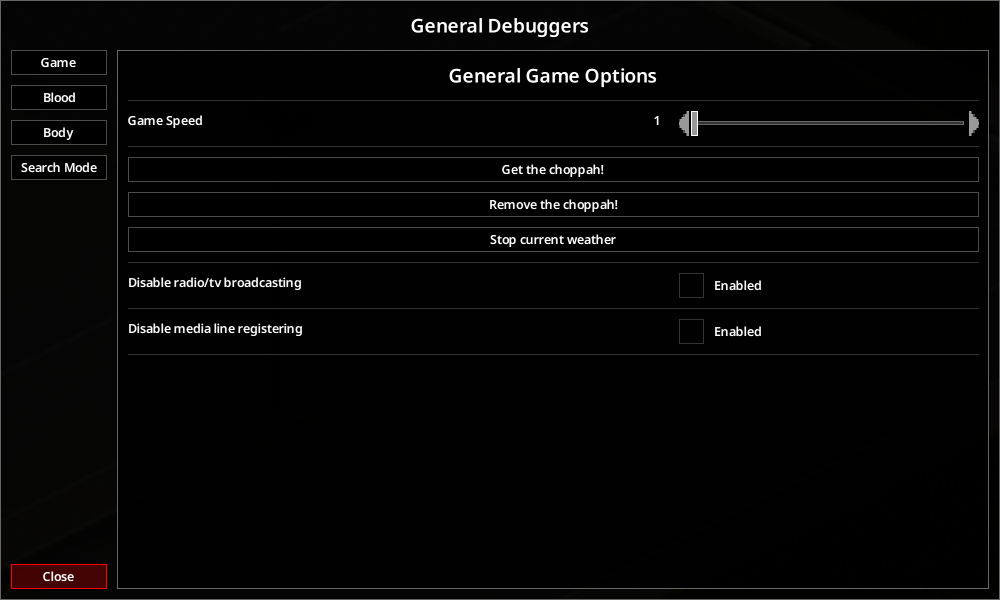 nova dome
menu then ig
bright fog
nova dome
menu then ig
No
In the main menu
So yes in-game
Idk what you're asking
What character creation menu are you asking for exactly I'm confused
There's ways to reload specific lua files directly in-game
 nova dome
You know, the one where you choose your profession and traits. It's pinned on top and that's my problem really
bright fog
Are you talking about the one in the main menu or the one when you're in a save
That's what confuses me here
Because if it's the main menu, then you can directly just reload the entire lua in the main menu
nova dome
the one you got when you have a world loaded and you died with a character and you create a new one
bright fog
If it's the one while in a save, then you can reload specific lua files with the community debug tools
nova dome
is this community debug tools different than just debug mode?
bright fog
Yes
It expands it
Notably adds a menu to reload multiple lua files while in-game
This is already a feature with the F11 menu
But the F11 menu is dogshit
nova dome
is it called imgui?
bright fog
No ?
nova dome
debug menu modding project? I'm having a hard time finding what you describe :D
bright fog
bright fog
https://pzwiki.net/wiki/Community_Modding_Projects_(Modding_project)
This
....
Check the wiki page, download the Steam mod
nova dome
oh sry missed it while responding lol
bright fog
Activate it
nova dome
thanks I'll f around and find out
small topaz
Is there a simple way to give a modded item the same display name as a vanilla item and so that this is also respected by translations in all languages? (Without manually defining the display names in the shared/translate folder ofc.)
umbral raptor
small topaz
Is there a simple way to give a modded item the same display name as a vanilla i...
There shouldnt arise any problem with display names. You can literally have it as anything
Its the item name that should never conflict or be similar to any other item
If you are working with fluids, wild guess, then you actually need to translate the fluid container/fluid.
small topaz
umbral raptor
There shouldnt arise any problem with display names. You can literally have it a...
I want certain items which have exactly the same display names as certain vanilla items in all languages. question is whether there is an easy way to do this (for example, a specific lua command, a specific parameter in the item's script.txt entry...). ideally without just manually defining the names in all languages in the shared/translate folder (which would work but will be very time consuming)
Btw there is the "getText()" command. Is this defined in lua or is it a java?
bronze yoke
java
local item = ScriptManager.instance:getItem("Module.MyItem")
item:setDisplayName(getItemNameFromFullType("Base.VanillaItem"))
i think this will only work if you don't have a translation for this item defined
small topaz
Thanks! I'll try this!
Many thanks @bronze yoke . Your suggestion works perfectly for my problem (as always 😄 )!
 storm trench
Why does porting this mod link the original mod ahead of its scripts? Is this why the mod is having issues?
 bright fog
storm trench
Why does porting this mod link the original mod ahead of its scripts? Is this wh...
bright fog
storm trench
Why does porting this mod link the original mod ahead of its scripts? Is this wh...
The link is commented
Also I highly advise you pass on Visual Studio Code and use the addons to format the text files
storm trench
bright fog
The link is commented
That was just what I saw in-game looking through some stuff. Found it weird the link is there but nowhere in my WIP workshop port.
storm trench
Also, turns out I was correct. Part of the problems I had with the port was it, somehow, constantly referencing the original mod. I removed all instances of it and the game no longer recognizes the mod in the debug modlist I had saved for this. So I enabled the new one and here we go... time to find out if this was the problem all along.
bright fog
Finished listing every tags, only inputs and outputs are left to explain
https://pzwiki.net/wiki/CraftRecipe_(scripts)
silent zealot
Nice!
To make you do extra work - any chance or also listing which bits can be programatically changed and how?
I converted a mod gasmask to a functional-in-B42-gasmask and most of it was super easy, including the "remove filter" recipe which was all tag based... but putting the filter back on required replacing the recipe because it doesn't use tags, it lists every possible gasmask separately then has an item mapper for each one.
Would it be possible to add the bits underlined in red via lua? For personal use just making a copy of the recipe is fine, but if I wanted this to be a released mod I'd want to not clobber the existing recipe (and break any other mods that also replace it )
 bronze yoke
i'm probably gonna try work this stuff out soon
i think i discovered a lot of the tricks for doing stuff like this in b41 but i haven't really been super actively modding in the b42 days so i still don't really know what is possible now
when i first looked at it it seemed like it was probably going to be more defensive than b41 (a lot of copying objects instead of returning them) but field access can generally defeat anything like that
silent zealot
If we can get and set a field then a bit of lua magic will turn that into "get field/add my bit in/set field"
bronze yoke
we can't set a field but if it's an object we can mess with the boject
silent zealot
I wish we could make pull requests for the java code.
storm trench
Holy heck Copilot editor in VS is poopy. Might as well not even have it.
It's so hard to not give up. 
bright fog
Started work on inputs for craftRecipe
https://pzwiki.net/wiki/CraftRecipe_(scripts)#inputs
 lucid oyster
can anyone tell me why this mod does not load, i analized other mods and i just dont get it
like , it just wont show up on the mods tab, to enable
its a modification of ForcedSync mod, to force sync every 30 seconds cus we have a interesting ammount of desync and we are only two playing, this mod helps but its annoying to press a key every some bit of time, and i rather have it automated
vast pier
silent zealot
I converted a mod gasmask to a functional-in-B42-gasmask and most of it was supe...
why not just... make a duplicate of the recipe specifically for your new gas mask?
It's not pretty, but it should work
tacit pebble
lucid oyster
can anyone tell me why this mod does not load, i analized other mods and i just ...
where did you place your custommod\ folder?
lucid oyster
tacit pebble
where did you place your ``custommod\`` folder?
mods forlder on the game folder
 tacit pebble
do you mean ProjectZomboid\ ? then try %username%\Zomboid\mods or %username%\Zomboid\workshop
copper abyss
silent zealot
I wish we could make pull requests for the java code.
I'm still working on my raygun mod
 lucid oyster
tacit pebble
do you mean ``ProjectZomboid\`` ? then try ``%username%\Zomboid\mods`` or ``%use...
lucid oyster
tacit pebble
do you mean ``ProjectZomboid\`` ? then try ``%username%\Zomboid\mods`` or ``%use...
i can try that really quick
copper abyss
silent zealot
I wish we could make pull requests for the java code.

Ray Gun for the [B42]Ray Gun mod - ZOMBOID RayGun - 3D model by xiazia
lucid oyster
tacit pebble
do you mean ``ProjectZomboid\`` ? then try ``%username%\Zomboid\mods`` or ``%use...
oh well wow, if i do it on username/Zomboid/mods it works, game folders mods dont tho, funny
silent zealot
vast pier
why not just... make a duplicate of the recipe specifically for your new gas mas...
That's probably what I'd do if I was doing to make a proper mod, instead of just adjusting someone elses for personal use (their gasmask look better, but lacks the tags/drain to actually function as a B42 gasmask)
It's just annoying that the new recipe system is so close to making this easy to do just with the item definitions!
silent zealot
copper abyss
https://sketchfab.com/3d-models/zomboid-raygun-8a4da671307b422992b2726ddf9bf9c8
Very nice!
I'll check that out a bit later, currently working on...um... adding nipples to spongies cahracter customiser.
silent zealot

 warped pebble
craziest thing ive seen today LMAO well done
vast pier
Interesting!
You can use item mappers to specify more than one ingredient changing the outcome. It may show the item as correct in the crafting menu, but it keeps the craft button blacked out.


 vast pier

 vague marsh
unplayable without nipples
vast pier
vast pier
Interesting!
You can use item mappers to specify more than one ingredient changi...
Funny because this means that you could theoretically compress the basic melee assembly recipes into smaller categories with the same amount of functionality
Actually I don't think they even give xp, you could compress all of them if you wanted to. At least the ones that use both a hammer and knife
And even if they do give xp, you could insert lua into the xp call to check what weapon was crafted and apply appropriate xp
Kinda weird that they intentionally set up this sort of functionality for ingredients, and they decide to use it for... seed packets?
umbral raptor
Support Goods - My Photo is here! Add your own pictures to the game easily today!
https://steamcommunity.com/sharedfiles/filedetails/?id=3434920270

Simple mod I made 🙂
That's Sadam from Zomboid Newspaper in the picture btw haha
vast pier
lol nice, how's the mod work?
umbral raptor
pretty much u just put ur photo on a white square in the texture
vast pier
I like how I've been working on gun break logic and gun assembly, and during that you made a Sadam desk photo for zomboid
umbral raptor
thats it, the rest is in the mod. u acquire a camera, insert a film, and take pictures using recipes (which does nothing other than change camera state). then u extract the film and develop it and u get the photo. u get 7 photo items to put ur textures on (so 7 diff photos without needing to add anymore)
there is a photo developing system included haha
but i plan on adding polaroids too
vast pier
Too bad the mod requires editing the mod itself, don't think it will get much usage outside of roleplay videos
umbral raptor
well its super easy and u cant really do it any other way without complicated stuff beyond my capbailities
u know if its even possible
umbral raptor
vast pier
Too bad the mod requires editing the mod itself, don't think it will get much us...
but i did put full instructions on how to do it, so that should help
vast pier
Not saying there's anything wrong with the mod. I don't think there's a reasonable way to actually take photos in game
vast pier
vast pier
I like how I've been working on gun break logic and gun assembly, and during tha...
 vast pier
I saw a cool mod, and asked the mod creator if I could port it to 42 or possibly help with development at all
bro said sure, I started working and he liked the ideas I had. So I've kinda just been hyper fixated
I've done all of this in like a day
well I think today is the second day actually
so two
I fully ported the mod to 42, got the models and guns working properly.
Then ported the recipes.
Then got side tracked with changing the recipes, which led into me making blacksmithing recipes for the pistols since they were more complicated.
Which then led into me making individual gun parts.
Which led to me making gun break lua logic.
Which led to me making gun assembly recipes.
And now I'm here

I had to make my own OnBreak logic because the vanilla head/handle system doesn't work on guns, and will crash.
It did originally have its own logic built in to randomize the conditions of the gun parts based on a random number roll and your maintenance skill
but I scrapped that idea after I realized you could craft a gun with almost broken parts, break it immediately, and possibly get better quality parts due to rng
so I'm opting for all parts break, but are cheaper to repair than they are to replace
except for the handle, handle will probably stay cheaper to replace
vast pier
umbral raptor
werent u working on alloys?
I'm still working on that, and having that mod will actually be a great framework for any future smithing mods I make.
Having access to a brass ballpeen hammer would actually justify being able to craft more complex gun components!
So while this mod I'm working on doesn't directly benefit the smithing mod, it indirectly benefits it due to the framework I'm setting up for gun breaking and gun assembly!
 brave bone
silent zealot
https://steamcommunity.com/sharedfiles/filedetails/?id=3434933388
brave bone
silent zealot
https://steamcommunity.com/sharedfiles/filedetails/?id=3434933388
LOOOOL.. I think I'll live long in pz if i have this lol
 brave bone
quick question: do i need to put the original mod on workshop folder when creating an addon?
brave bone
brave bone
quick question: do i need to put the original mod on workshop folder when creati...
i just need the main lua lol 😄
vast pier
brave bone
quick question: do i need to put the original mod on workshop folder when creati...
why would you need it in the workshop folder for the addon?
what difference does it make?
brave bone
vast pier
why would you need it in the workshop folder for the addon?
not really sure how to test an addon. but looking at other addon mods, it has the "require:" part in mod.txt also at the addon's lua aswell, so i figure i dont need to have a copy just the main mod is fine 😄
vast pier
brave bone
not really sure how to test an addon. but looking at other addon mods, it has th...
well what is the addon doing?
brave bone
nothing yet loool.. still trying to figure it out..
vast pier
lol
 merry patio
Hello! I'm trying to create a mod for a drink called "mate", which is similar to coffee but is consumed from a specific container (calabaza) with a straw (bombilla) and yerba. I've created all the textures and managed to make them visible when I run the game, but I'm having trouble getting the recipe scripts to work. I'm trying to understand how it's done in B42, could you give me a hand in the right direction?
For now, I have this!
craftRecipe PonerBombillaEnMateCuero
{
timedAction = Making,
Time = 10,
Tags = InHandCraft,
category = Cooking,
inputs
{
item 1 [ArgDrinks_M.bombillaMate]
item 1 [ArgDrinks_M.mateCuero]
}
outputs
{
item 1 [ArgDrinks_M.mateCuero_Bomb]
}
}
tacit pebble
craftRecipe PonerBombillaEnMateCuero
    {
        timedAction = Making,
        Time = 10,
        Tags = InHandCraft,
        category = Cooking,
        inputs
        {
            item 1 [ArgDrinks_M.bombillaMate],
            item 1 [ArgDrinks_M.mateCuero],
        }
        outputs
        {
            item 1 ArgDrinks_M.mateCuero_Bomb,
        }
    }
try this. you will need , last of each line.
Also i'm not sure about the reason but TIS didn't use [ ] for outputs.
bronze yoke
they wouldn't serve any purpose
[] denotes a list of acceptable items, but the output item isn't going to vary like that
tacit pebble
bronze yoke
``[]`` denotes a list of acceptable items, but the output item isn't going to va...
oh now i understand there's no really big reason then 👍
 plucky summit
I've read the modding wiki basics at least, but I haven't found the answer to my question. I read about the media folder section and it says media/lua is where scripts go. How does tha behave? They get loaded when the mod is loaded?
bronze yoke
yeah
plucky summit
Alright. I'll try. I just need to modify a definition from animals. So I just need to do a
AnimalDefinitions.animals["cowcalf"].stressAboveGround = false;
I think? Or do I need to declare AnimalDefinitions first?
bronze yoke
you might encounter load order issues if your file isn't in the same folder (only the shared/ client/ server/ part matters) as the vanilla file that defines these but otherwise yeah that's all you need to do
plucky summit
Alright. Oof. I'll read about that, then.
plucky summit
Do I need the filename to be the same? Or do I need to differentiate the file names?
Just making sure to rule out the problem I'm encountering.
bronze yoke
the file name should be different, and ideally unique to your mod
if you have the same file name as a vanilla file (or another mod) your file will replace the original one
plucky summit
Alright. Thanks for the heads up. That's what I did wrong then as a first.
plucky summit
Hello again.

I am getting this message.
However...

There's also no .DS_Store found, so I'm quite lost
bright fog
plucky summit
However...
Hidden files ?
bright fog
plucky summit
tried `ls` and it's showing nothing.
Can you show your full mod structure ?
plucky summit

It might honestly be an iCloud issue.
I'll try uploading it on a Windows machine later.
plucky summit
MacOS
bright fog
Did you activate the ability to see hidden files ?
plucky summit
Tried it now. Really nothing inside Contents/
bright fog
plucky summit
Tried it now. Really nothing inside `Contents/`
I'm sorry I don't see anything obvious
My suggestion is the wiki page and compare, maybe something will stand out
https://pzwiki.net/wiki/File_structure
plucky summit
@bright fog I used the same structure and files in Windows. No errors came up. May be a Mac-only bug?
silent zealot
Can you open a command line, go to the Contents folder and run ls -la to see if there is anything there being hidden by the GUI?
Assuming Macs still provide a linux-style command shell.
plucky summit
silent zealot
Can you open a command line, go to the Contents folder and run `ls -la` to see i...
I'll have to get back to you tomorrow. I left my mac at my other place.
 bleak bone
femboy mod when
merry patio
tacit pebble
```
craftRecipe PonerBombillaEnMateCuero
{
timedAction = Making,
...
TY! your help is greatly appreciated! I wanted to mention that my "mate" has 2 separate processes. One is preparation. Grabbing the container (mate) and adding yerba would be one recipe. Grabbing the mate with yerba and adding a bombilla (straw) would be another. And vice versa. I should also be able to remove the yerba and bombilla to clean it, also as a recipe.
On the other hand, once I have the mate with yerba and bombilla(straw) prepared, I should be able to use a teapot to serve myself (in my mod, I've created a thermo, which is like a container that keeps the water hot). That should be another recipe, which I think would be similar to making coffee. The mate could be consumed at least 4 times each time you add water, if that's possible, and only then would the container be empty
craftRecipe PrepararMateAmargoConPava
{
    timedAction = Cooking,
    Time = 90,
    Tags = InHandCraft,
    category = Cooking,
    inputs
    {
        item 1 [ArgDrinks_M.mateCuero_Bomb_yerba],
        item 1 [Base.KettleFull],
    }
    outputs
    {
        item 1 ArgDrinks_M.mateAmargo,
    }
}
?
 drifting ore
merry patio
TY! your help is greatly appreciated! I wanted to mention that my "mate" has 2 s...
drifting ore
merry patio
TY! your help is greatly appreciated! I wanted to mention that my "mate" has 2 s...
If you want a food item to have a specific number of uses, I achieve this by having multiple of the same item, like
item ArgDrinks_M.mateAmargo_0
item ArgDrinks_M.mateAmargo_1
item ArgDrinks_M.mateAmargo_2
etc.
defined in the items, and then you can have
item ArgDrinks_M.mateAmargo_2
{
ReplaceOnUse = ArgDrinks_M.mateAmargo_1,
....
If they all have the same display name, they will all stack like they are the same item
merry patio
drifting ore
If you want a food item to have a specific number of uses, I achieve this by hav...
Ah ok so...
craftRecipe PrepararMateAmargoConPava
{
    timedAction = Cooking,
    Time = 90,
    Tags = InHandCraft,
    category = Cooking,
    inputs
    {
        item 1 [ArgDrinks_M.mateCuero_Bomb_yerba],
        item 1 [Base.KettleFull],
    }
    outputs
    {
        item 1 ArgDrinks_M.mateAmargo_4,
    }
}
I can make sure that the result (output) can be consumed 4 times, right?
or...
....
item ArgDrinks_M.mateAmargo_4
{
ReplaceOnUse = ArgDrinks_M.mateAmargo_3,
...
}
item ArgDrinks_M.mateAmargo_3
{
ReplaceOnUse = ArgDrinks_M.mateAmargo_2,
...
}
etc
Another thing... for the thermo, should I use the same item configuration as the kettle, right? And how should I remove the bombilla (straw)?
merry patio
I attach the LUA
 lucid oyster
merry patio
Hello! I'm trying to create a mod for a drink called "mate", which is similar to...
lucid oyster
merry patio
Hello! I'm trying to create a mod for a drink called "mate", which is similar to...
 merry patio
lucid oyster
https://tenor.com/view/for-luna-scream-if-you-love-scream-if-you-love-argentina-...
merry patio
lucid oyster
https://tenor.com/view/for-luna-scream-if-you-love-scream-if-you-love-argentina-...
hahaha ty for support
 warm vector
Does anyone here know how modded maps handle zombie spawn/count in the tiles/chunks?
drifting ore
merry patio
Ah ok so...
craftRecipe PrepararMateAmargoConPava
{
timedAction...
I could help you better if I could see your items .txt file, where you have mateCuero_Bomb_yerba and other items defined
lucid oyster
warm vector
Does anyone here know how modded maps handle zombie spawn/count in the tiles/chu...
the game checks for valid tiles that meet the conditions ( not out of bouds, no objects on them, not blocked, wast visited for time set) thats how it worked for what i know, i dont think it differs on custom maps but i coud be wrong
warm vector
lucid oyster
the game checks for valid tiles that meet the conditions ( not out of bouds, no ...
I was kinda curious how some maps handle the zombie count, because I find some very good maps lackluster in the total zombie spawn even with high pop settings, but other maps like Malls / Ravencreek etc is flooded with zombies and I can't really figure out how and why.
lucid oyster
it might have to do with the map being to crowded on decorations and lacking sufficient space for a valid spawn to be found, i think also the game wont spawn zombies were there is one already
warm vector
You know how I can go into like Taylorsville map files and just increase the zombie count?
lucid oyster
just increase the pop on the sandbox settings
warm vector
I did and still the zombiecount is no where near what some other maps are - which is my point.
From my understanding modded maps handle zombie population ontop of the sandbox settings
lucid oyster
not much else that you can do i think, i think the rest of the issiue is simply map geography
also if anyone wants to correct any wrong information on my side, please do so, im not reallly on technical project zomboid
merry patio
drifting ore
I could help you better if I could see your items .txt file, where you have mate...
I think I'm on the right track. I got it working partially, I can create the bitter mate item and also some combinations, strangely it disappears when I try to put only the straw on it but it must be my mistake. I attach my item.txt!
merry patio
drifting ore
I could help you better if I could see your items .txt file, where you have mate...
So far, everything seems to be working fine except for a few things. When I add only the bombilla to the leather mate, it disappears. This is the only combination that does this, the rest seems to be working well.
Another issue I'm finding is that for the mate amargo, the water should be hot, and I still don't know how to do that. But I think I'll mimic the teapot, although this is a problem for a bit later, I think
storm trench
plucky summit
It might honestly be an iCloud issue.
Yes, your structure is perfect assuming mod.info is in that last folder.
vast pier
You can call existing oncreates inside of an oncreate function? neat
function Recipe.OnCreate.MinorCarving(craftRecipeData, character)
    local carving = character:getPerkLevel(Perks.Carving)
    Recipe.OnCreate.MinorCondition(craftRecipeData, carving)
end```I'll keep that in mind
drifting ore
merry patio
So far, everything seems to be working fine except for a few things. When I add ...
As for adding the bombilla to the leather mate, it is most likely disappearing due to an error in the code. Double check your output for that recipe or feel free to share it here
Unless you mean it is outputting correctly but destroying an input item it shouldn't
mode:keep add this to your item definition in that case
Example:
inputs { item 1 [ReeferMadness.cigShell] mode:keep, }
vast pier
merry patio
So far, everything seems to be working fine except for a few things. When I add ...
show the recipe for the item that is disappearing
merry patio
drifting ore
`mode:keep` add this to your item definition in that case
Can I also put mode:keep in the output?
merry patio
vast pier
show the recipe for the item that is disappearing
craftRecipe PonerBombillaEnMateCuero
{
timedAction = Making,
Time = 10,
Tags = InHandCraft,
category = Cooking,
inputs
{
item 1 [ArgDrinks_M.bombillaMate],
item 1 [ArgDrinks_M.mateCuero],
}
outputs
{
item 1 ArgDrinks_M.mateCuero_Bomb,
}
}
yeah it consumes both ingredients because there's no mode:keep on the bombilla
vast pier
merry patio
Can I also put mode:keep in the output?
why would you need it on the output?
merry patio
drifting ore
As for adding the bombilla to the leather mate, it is most likely disappearing d...
The console code tells me that everything worked fine! The problem is with the bombilla specifically, inside the game it says 'no category', could this be causing some issue?
merry patio
vast pier
why would you need it on the output?
To keep it! But I understand my mistake now, I should put it in the bombilla ingredient for it to work
merry patio
vast pier
yeah it consumes both ingredients because there's no mode:keep on the bombilla
It's working now, I added mode:keep and it's all set! Thanks again for your help! And I have a question, to make the player require hot water, do I need to add something? I couldn't find the name in the coffee recipe
vast pier
merry patio
It's working now, I added mode:keep and it's all set! Thanks again for your help...
the coffee recipe doesn't check for hot water, it just checks for water
craftRecipe MakeCoffeeMug
    {
        timedAction = MakeCoffee,
        Time = 20,
        category = Cooking,
        Tags = CoffeeMachine;Cooking,
        inputs
        {
            item 1 [Base.Coffee2],
            item 1 [*], --1 item, * means any fluid container
            -fluid 0.2 [Water;TaintedWater], --removes 200ml of water/tainted water
            item 1 tags[CoffeeMaker], --checks for cup that can hold coffee
            +fluid 0.2 Coffee, --directly adds 200ml of coffee to the container
        }
        outputs
        {
        }
}```This is my go-to choice then
-fluid 0.2 [Water;TaintedWater],
I currently have Base.Kettle which allows you to brew without water even. Is there a way to configure it to be hot water?
vast pier
I would try to find out how the game converts tainted water into clean water through boiling
merry patio
vast pier
I would try to find out how the game converts tainted water into clean water thr...
Okay, excellent! I'll keep investigating! TY
storm trench
I really, really hate to have to ask for help like this... but can someone tell me if they see anything wrong with this? I made the mistake of using the VS Studio assistant for my original code that didn't work, and now the AI assistant in VS has taken the code a little too far and I am just confused about it. I don't even know where to start on what's wrong with this.
(It's a dynamic spawning system, and yes I accidentally didn't save a backup of my original code [RIP]).
merry patio
vast pier
I would try to find out how the game converts tainted water into clean water thr...
And how do I choose between 2 options? Like this?
item 1 [ArgDrinks_M.yerbaPlayaditoSP/ArgDrinks_M.yerbaRosamonte;1]
merry patio
vast pier
[Module.ItemName;Module.ItemName]
I checked it after asking and it didn't work. I'll check again to make sure I didn't forget anything. The kettle issue is now fixed, I'll adapt the "thermos" code to do the same.
item 1 [ArgDrinks_M.yerbaPlayaditoSP;ArgDrinks_M.yerbaRosamonte]
vast pier
Is there a comma at the end of it?
silent zealot
warm vector
I was kinda curious how some maps handle the zombie count, because I find some v...
There's some sort of "zombie density" included in maps, that gives the game a rough ide of how to spawn zombies, at least in outdoor areas. If you click the "zombies" button on the left on https://b42map.com/ you'll see an overlay, and I'm sure I've seen similar things with more detail for B41.
The problem is not every map maker uses it properly or has the same idea as you about what makes for a good zombie distribution; I found a lot of B41 maps were either crammed full of zombies everywhere or nearly deserted.
Someone with more map-modding experience can likely correct me/elaborate on this.
 agile socket
I have no experience with making mods. If I wanted to make a mod which would let me put cheese into omelettes where would I begin learning on how to do that?
silent zealot
There's an existing omlette recipe, right? Is it "evolved" i.e.: you make an omlette, then can add toppings/seasonings to it?
agile socket
silent zealot
There's an existing omlette recipe, right? Is it "evolved" i.e.: you make an om...
Yes, you make the omelette as a receipe, and then you add toppings/seasonings, and then cook it.
silent zealot
If so, have a look at the recipe and see how it lists what can be added.
agile socket
silent zealot
If so, have a look at the recipe and see how it lists what can be added.
In game, or is there a file to look at?
silent zealot
Check under \media\scripts\recipes to start
bright fog
silent zealot
also scripts/evolvedrecipes.txt
Assuming you're on B42, I think the way to so it is ass the omelette tag to the cheese item in the EvolvedRecipe list
agile socket
silent zealot
Assuming you're on B42, I think the way to so it is ass the omelette tag to the ...
Thank you, I'll take a crack at it
silent zealot
items_food_dairy.txt:
 agile socket
silent zealot
items_food_dairy.txt:
agile socket
silent zealot
items_food_dairy.txt:
So I'd just have to add "Omelette" to that list with maybe a 5?
silent zealot
I think so. No promises though, and no idea what the numbers means.
Note that DoParam() or other programatic ways of editing the Cheese script may not work; I know changing tags doesn't affect recipes because the recipe parser asses tags when the recipe loads and never considers they might have changed.
 distant inlet
anyone know how to store client-side data for use between sessions of the same save?
bronze yoke
use mod data
ModData.getOrCreate("MyModID or some other unique string") returns a table that will be saved and loaded with the save file
the easiest way to use it is something like this:```lua
local modData
Events.OnInitGlobalModData.Add(function()
modData = ModData.getOrCreate("unique id")
end)
once it's initialised, just treat it as a regular table
though keep in mind it can only save/load POD (numbers, strings, booleans, other tables)
agile socket
silent zealot
I think so. No promises though, and no idea what the numbers means.
Pretty sure the number is the quantity of the cheese that is used when added to the recipe.
bright fog
Maaan that's old asf 😭
distant inlet
bronze yoke
``ModData.getOrCreate("MyModID or some other unique string")`` returns a table t...
ty
 simple helm
Hey is there any vehicle devs here for PZ ?
silent zealot
Vehicle modders yes, actual PZ developers no.
merry patio
vast pier
Is there a comma at the end of it?
yes! i had it but i solved it by creating a second recipe. The only thing I still haven't been able to solve is how to make the thermos behave like a kettle. In build 41, I had the three versions: empty, with water, and with hot water. Now, it should at least have empty and with water, but I'm not being able to get it working... I'll have to investigate a bit more about this
silent zealot
vast pier
I would try to find out how the game converts tainted water into clean water thr...
Pretty sure that is this bit of java code: in Food:update()

or this in the same function.
 simple helm
silent zealot
Vehicle modders yes, actual PZ developers no.
simple helm
silent zealot
Vehicle modders yes, actual PZ developers no.
I’m used to calling it vehicle dev as it sorta the same concept as what I do for gtav.
I was hoping one was online today
silent zealot
No worries, just making sure we're talking about the same thing before I say some will check in occasionly.
simple helm
All good man! I’m just used to just saying it specially when your used to a certain term.
silent zealot
If your question relates the lua code and vehicles I may be able to help, if it's about the model and stuff probably not. Either way, worth asking so if someone logs in later and scrolls back a bit to see what they missed they might see your question.
silent zealot
merry patio
yes! i had it but i solved it by creating a second recipe. The only thing I stil...
I don't think you have seperate empty objects for empty fluid containers in B42; just a item that holds fluid and the name gets changed based on if it is empty or has a liquid in it.
    {
        DisplayName = Empty Kettle,
        DisplayCategory = Cooking,
        Type = Normal,
        PourType = Kettle,
        Weight = 1,
        Icon = Kettle,
        MetalValue = 30,
        StaticModel = Kettle,
        WorldStaticModel = KettleGround,
        FillFromDispenserSound = GetWaterFromDispenserMetalMedium,
        FillFromLakeSound = GetWaterFromLakeSmall,
        FillFromTapSound = GetWaterFromTapMetalMedium,
        FillFromToiletSound = GetWaterFromToilet,
        IsCookable = true,
        Tags = Cookable;CoffeeMaker;HasMetal;SmeltableIronSmall,
        ResearchableRecipes = MakeKettleMaul,

        component FluidContainer
        {
            ContainerName   = Kettle,
            capacity        = 1.5,
        }

}```That DisplayName is replaced with the translate string ItemName_Base.Kettle = "Kettle", so it's just there to confuse us.
bright fog
@tacit pebble Are you sure all the recipes which involve these tags are even usable ? Some of these seem to be very obscure recipes

Actually I cannot find a single instance where these are used for output
silent zealot
Maybe they added the feature, then decided onCreate scripts were better?
bronze yoke
the fluid stuff is usually half finished
silent zealot
Or added teh feature after everything used onCreate and have not yet updated existing recipies.
silent zealot
bronze yoke
the fluid stuff is usually half finished
"half" is being generous 😂
bronze yoke
i'd be wary of guessing based on vanilla recipes, check the code if you want to know what something does
silent zealot
I've ended up with one VSCode instance set up with the media folder as a base directory, one VSCode instance set up with decompiled java as a base directory. Makes searching easy.
bright fog
bronze yoke
the fluid stuff is usually half finished
The fluid system doesn't involve any of these flags however
So finished or not is not the problem
The problem is listing informations which aren't even used in the game, which don't have a single example and making sure these even have a point being listed if nothing can be achieved with them
bronze yoke
i can find the code where it does this though 😭
bright fog
Then perhaps @tacit pebble tested those
silent zealot
CraftRecipeManager.java
bright fog
But it'd be appreciated getting informations/examples
bronze yoke
which is why i say you should check the code, vanilla usages aren't going to tell you the full story
bright fog
I'm aware of that .........
But every flags that I listed in inputs have examples in the base code
Flags are just not a thing for outputs, I haven't found a single example which involves flags
silent zealot
Just tag them on the wiki with "not used in any vanilla recipe as of 42.3"
bright fog
That's why I'm doubting flags being used in outputs
bright fog
bronze yoke
i can find the code where it does this though 😭
Also some of these flags are present for inputs
bronze yoke
well i can confirm they exist because i'm looking at the code right now
bright fog
Confirmed for outputs ?
silent zealot
Instead of having to solve this before you move on to edit the next thing, you just let the reader know there is reduced confidence in them working.
bronze yoke
yes
i cannot confirm 100% that they work because i haven't used them but the code does appear to do what the wiki says
silent zealot
They do look implemetd in java, though that doesn't mean they have been tested and work correctly.
I'm just repeating Albion now 😂
 bronze yoke
idk how good vscode's java support is but in idea you can check stuff like this in 20 seconds (ctrl-n, OutputFlag, click usages, read them)
tacit pebble
bright fog
<@351756998544588802> Are you sure all the recipes which involve these tags are ...
uhm... sorry if I did wrong, Looks like i'm middle of the subject but I need some time to read all English words,
btw I say this first: sorry but you can revert anything I wrote if you think it's wrong (I haven't edited wiki in my life before so there should be something mistake)
bright fog
tacit pebble
uhm... sorry if I did wrong, Looks like i'm middle of the subject but I need som...
Yea np man, your work on the wiki is welcome
silent zealot
bronze yoke
idk how good vscode's java support is but in idea you can check stuff like this ...
I just use it like a fancy text search
bronze yoke
yeah, in this case text search is very likely to find the results too, in other cases searching by usages rounds things down much faster
bright fog
The issue is mostly just that you listed something which is unused in the game so it made me very confused. Code seems to exist however for these
silent zealot
tacit pebble
uhm... sorry if I did wrong, Looks like i'm middle of the subject but I need som...
You did good work, the confusion is because devs havn't finisdhed working on stuff yet.
bright fog
Finished writing the craftRecipe guide
https://pzwiki.net/wiki/CraftRecipe_(scripts)
 whole parcel
I managed to do it using several workarounds, but the best one was patching the SandboxVars.lua every start to load custom lua code (so this is not even a mod!), but rather I realised that the exposed lua api for server-side is really basic, so I ended up using Frida to hook game functions and call back a Node.js application using sockets. It's hacky but I managed to get it working!
plucky summit
silent zealot
Can you open a command line, go to the Contents folder and run `ls -la` to see i...
Confirmed. ls -la displayed .DS_Store even when finder can't find it as a hidden file. Hence why Project Zomboid complains about Contents having something else.
distant inlet
bronze yoke
though keep in mind it can only save/load POD (numbers, strings, booleans, other...
is there any way to save objects that have functions or java objs as props?
tacit pebble
bright fog
Flags are just not a thing for outputs, I haven't found a single example which i...
Yep I just read all messages 😆
Only thing that I doubt is: [AutomationOnly]; However you are correct, i haven't enough test yet. I do simple test before me alone, but it could be outdated already.
I wrote that thing yesterday from my memory at my work, and i was planning to test when I'm back to home but I fell asleep
I thought it would be okay for a day because wiki said "This section is under construction" 😭 😬
bronze yoke
distant inlet
is there any way to save objects that have functions or java objs as props?
no
if you really have to you can store all the information you need to reconstruct that object but it can be complex and not always even possible
storm trench
Eureka! It's totally wrong and spawned a giant amount, but I finally got PZ to spawn an object based on the room the game detects with minimal overhead (utilizes loadGridsquare but also only runs it very so often). I have been trying for days to get this to work and I have finally gotten somewhere.
Now just to figure out why it spammed a billion of them on one spot hahaa.
 distant inlet
bronze yoke
if you really have to you can store all the information you need to reconstruct ...
distant inlet
bronze yoke
if you really have to you can store all the information you need to reconstruct ...
is there a way to "look up" game objects (tiles, items, containers, vehicles, ..) based on a unique ID in something like a global dictionary?
merry patio
silent zealot
That DisplayName is replaced with the translate string `ItemName_Base.Kettle = "...
It makes sense, I tried just putting Recipe.OnTest.HotFluidContainer to test but it didn't even open haha. That's how my thermos recipes were in build 41. I wanted to adapt what you just passed on from the kettler but it didn't work, I don't know what I'm doing wrong with respect to this, the rest already works without problems, all the recipes are ok.

 quiet rain
Is there any specific way to see if a zombie is wearing a specific piece of clothing, or alternatively remove it from being worn by the generic01-05 outfits?
silent zealot
merry patio
It makes sense, I tried just putting Recipe.OnTest.HotFluidContainer to test but...
If I understand B42 correctly: 1) you just make one Thermos object and 2) forget about water temperature, because fluids do not have temperatures (and never expire, that's why cows milk lasts forever)
Maybe add a yerba mate fluid, then a recipe that takes thermos of water + other ingredients, leave the output empty and use OnCreate to replace the water with Yerba mate.
Would having a specific worksation make sense? Like the way you need a coffee machine to make coffee.
merry patio
silent zealot
If I understand B42 correctly: 1) you just make one Thermos object and 2) forget...
TY! that is what finally worked for me
    item termoEmpty
    {
    DisplayName = Termo,
    DisplayCategory = WaterContainer,
    Type = Normal,
    Weight = 0.2,
    Icon = termo,
    MetalValue = 10,
    StaticModel = termo,
    WorldStaticModel = termoWorld,
    FillFromDispenserSound = GetWaterFromDispenserMetalMedium,
    FillFromLakeSound = GetWaterFromLakeSmall,
    FillFromTapSound = GetWaterFromTapMetalMedium,
    FillFromToiletSound = GetWaterFromToilet,
    Tags = HasMetal;LightWhenAttached,

    component FluidContainer
    {
        ContainerName = Termo,
        capacity = 1.1,
    }
    }
I'm trying to translate the line that now appears in the Fluid_Container_Termo but I can't find the right one. It would be the final step to be able to launch it completely
umbral raptor
merry patio
I'm trying to translate the line that now appears in the Fluid_Container_Termo b...
its the Fluids_EN file
fluids and fluid containers are translated there
merry patio
umbral raptor
its the Fluids_EN file
Oh! I didn't know that! TY! I'll try it right now
merry patio
umbral raptor
its the Fluids_EN file
Fluids_EN= {
Fluids_ArgDrinks_M.termoEmpty = "Thermos",
Fluids_Fluid_Container_Termo = "Thermos",
}
not working
umbral raptor
thats because u did it wrong
Fluid_Container_AlcoholBottle = "Bottle",
See the difference?
It's not Fluids_Fluid
it's Fluid_Container_ItemNAME/ContainerName
@merry patio
merry patio
umbral raptor
It's not Fluids_Fluid
it's Fluid_Container_ItemNAME/ContainerName
Thanks for your patience! It works perfectly now.
ancient grail
quiet rain
Is there any specific way to see if a zombie is wearing a specific piece of clot...
only person i know whos been able to do this is @bright fog
i tried and failed to do this
silent zealot
merry patio
I'm trying to translate the line that now appears in the Fluid_Container_Termo b...
try Fluids_EN.txt
yeah, that's it - I just checked my proof of concept - can of tequila item and that's where the translation is for a fluid container.
Fluids_EN = {
    Fluid_Container_NepCanOfFun = "Can of Fun",
}
Is there a way to target a specific item that was just added to the player inventory? and not a preexisting one?
 grizzled fulcrum
bronze yoke
idk how good vscode's java support is but in idea you can check stuff like this ...
grizzled fulcrum
bronze yoke
idk how good vscode's java support is but in idea you can check stuff like this ...
It's decent with extension like there's a red hat java extension I believe. It will definitely do the job, but I would recommend either IDEA Community or Eclipse over vscode any day of the week hands down
vscode is just not built for java, so you will get things like random errors that aren't actually errors, or having trouble running gradle tasks
If you're just searching through a codebase and not actually writing heavy code though, vscode will do just fine
bright fog
tacit pebble
Yep I just read all messages 😆
Only thing that I doubt is: ``[AutomationOnly]...
Like I said that's fine
bright fog
quiet rain
Is there any specific way to see if a zombie is wearing a specific piece of clot...
quiet rain
bright fog
https://pzwiki.net/wiki/ItemVisuals
Thank you! ❤️
random finch
(B41) So we dont have access to any of the advanced pathfinding stuff, but we have pathToLocation. However, if the zed encounters obstacles it does not handle them. Are there any libraries or other mods that have pathfinding for zeds?
bright fog
random finch
(B41) So we dont have access to any of the advanced pathfinding stuff, but we ha...
pathToLocation should work
random finch
bright fog
pathToLocation should work
It does, it just sucks lol
Its doesnt calculate doors/windows
bright fog
random finch
Its doesnt calculate doors/windows
Wdym by that ?
random finch
Say if you are in a building with doors/windows. You pathfind to the door way or the window and stop of they are closed.
bright fog
They won't thump them ?
random finch
nope 😦
bright fog
Tbf you should check how Bandits manages his AIs on that part as it's the only mod I know which fucks with zombie behavior in depth
I haven't done anything that fancy with zombies
brave bone
just got my sub mod to show up in game, just want to confirm, can I require two main mods for a sub mod?
bright fog
brave bone
just got my sub mod to show up in game, just want to confirm, can I require two...
Yea
storm trench
brave bone
just got my sub mod to show up in game, just want to confirm, can I require two...
Require as many as are needed for the mod to run appropriately.
vast pier
Is there a way to check an item's params? I want to retrieve the breaksound of an item.
I want to retrieve the param in lua
so that I can retrieve the sound from the item, and play it during lua events
    if item:getFullType() == "RamshackleWeapons.ScrapPistol" then
    player:playSoundLocal("M1911Break");
    inv:AddItem("RamshackleWeapons.ScrapPistolSkeleton"):setCondition(0)
    inv:AddItem("RamshackleWeapons.ScrapPistolReceiver"):setCondition(0)
    inv:AddItem("RamshackleWeapons.PistolGrip"):setCondition(0)
    elseif item:getFullType() == "RamshackleWeapons.ScrapRevolver" then
    player:playSoundLocal("MagnumBreak");
    inv:AddItem("RamshackleWeapons.ScrapRevolverSkeleton"):setCondition(0)
    inv:AddItem("RamshackleWeapons.ScrapRevolverCylinder"):setCondition(0)
    inv:AddItem("RamshackleWeapons.PistolGrip"):setCondition(0)
    end```I already know where the sounds are located, I want to in real time retrieve the break sound value to stick into
```player:playSoundLocal()```I want to take steps toward turning this into more of a framework for future use.
And having the break sounds not be hard coded and instead taken from the gun itself would be a step toward thatin B42, have you tried "item:getBreakSound()", https://demiurgequantified.github.io/ProjectZomboidJavaDocs/zombie/inventory/InventoryItem.html#getBreakSound() ??
vast pier
small topaz
in B42, have you tried "item:getBreakSound()", https://demiurgequantified.github...
no but that probably is what I'm looking for!
agile socket
So I'm working on uploading a Cheese in Omelettes mod, but Zomboid is telling me my mod is missign a mod.info file. I've followed the template provided by the game, and placed an updated mod.info file into the same folder that the template has, but it is still saying it's missing the file. What am I doing wrong?
small topaz
vast pier
no but that probably is what I'm looking for!
btw the same command is also present in B41
vast pier
I pretty much only mod B42
no way am I gonna attempt to make a gun assembly framework with B41's crafting system
small topaz
vast pier
I pretty much only mod B42
As a general tip, just searching PZ java doc for commands is always a good idea in case you are looking for a specific command (see here: https://demiurgequantified.github.io/ProjectZomboidJavaDocs/ ).
In most cases the java doc does not contain any explanation of what the commands exactly do but it can often be inferred from their naming, arguments, return values and from the objects to which they are applied. Checking the vanilla code for how those commands are used can also help to understand them better.
package index
agile socket
silent zealot
I think so. No promises though, and no idea what the numbers means.
Thank you for the help yesterday! Just uploaded my Cheese Omelettes mod.
vast pier
Is there a way to check item tags for a partial match?
bright fog
vast pier
Is there a way to check item tags for a partial match?
It will involve functions from the Lua string lib
I believe there's one for regex
So yea
 frank elbow
string.find uses Lua's pattern format rather than regex, but it can be used for that yeah
If you wanted something that matches prefix_ plus 1 or more alphanumeric characters, for example, you can use the pattern ^prefix_%w+
There are also character sets & more character classes and quantifiers to work with. See https://www.lua.org/pil/20.2.html
small topaz
Irrc correctly, I think the game even has it's own command which searches for specific items whose script ID contains a certain string
drifting ore
agile socket
So I'm working on uploading a Cheese in Omelettes mod, but Zomboid is telling me...
In B42, mod.info should be in the 42 folder
In B41 it needs to be in the main mod folder next to media
This is my mod.info for B42
name=Reefer Madness
id=ReeferMadness
author=Bjørn
description=Made by stoners, for stoners. Seamlessly integrated into B42.
poster=preview.png
icon=previewmini.png```@plush wraith why is True smoking in two separate mods instead of just one?
drifting ore
Maybe because B41 not using common is stupid
vast pier
okay but I'm still confused on why two mods instead of one
cuz you can have them both be in the same mod still for two versions

I'm hoping I can set this up dynamically enough to work as a future framework for vanilla gun breakage, repair, and reassembly
So far it's working as intended 👍
I'm designing it to be mod compatible.
Meaning if you make a mod and want it to slot into the framework, you would just need to
-
create the components.
They must have the same module and name as the gun but with their component type added onto the end.
So a gun with the ID of "ManicMods.PissingPistol" would need to two items called "ManicMods.PissingPistolSkeleton" and "ManicMods.PissingPistolReceiver" -
Add the appropriate tags.
All guns will need the tag "SaltyGunAssembly" and then an additional tag specifying what type of gun it is, like "SaltyPistol" in this instance.
All components will need "GunPart" to be able to be repaired in the repair recipes -
Add the onbreak lua to the guns they want to slot into the framework.
-
Add in an Assembly recipe.
I will try to find a way to make this part mod compatible, I may have to do some stuff with an oncreate lua, but currently this part will need to be done by the addon creator.
 dull bear
Hi everyone. I am porting my mod from B41 to B42 and am facing some issue with my models. More specifically it looks like the surface normals are incorrect as the models look like they are "transparent" from certain angles. In Blender all the normals are as expected and this has also worked previously in B41 with no issues. Has anyone experiences something similar or have there been any changes to the way models work. How can i correct this?
 tranquil kindle
dull bear
Hi everyone. I am porting my mod from B41 to B42 and am facing some issue with m...
tranquil kindle
dull bear
Hi everyone. I am porting my mod from B41 to B42 and am facing some issue with m...
I noticed that most N gons and some quads don't render. Try triangulating one of your models (though it's mostly clothing items that have that issue and my guns that have quads do work)
dull bear
tranquil kindle
I noticed that most N gons and some quads don't render. Try triangulating one of...
Looks like this was indeed the issue. Resolved it by applying the "Triangulate" modifier to the model and exporting it. Thank you 🙂
small topaz
Hi! Does anyone know what the java command "copyVisualFrom(ItemVisual itemVisual1)" does? Can be found here: https://demiurgequantified.github.io/ProjectZomboidJavaDocs/zombie/core/skinnedmodel/visual/ItemVisual.html#copyVisualFrom(zombie.core.skinnedmodel.visual.ItemVisual)
declaration: package: zombie.core.skinnedmodel.visual, class: ItemVisual
bright fog
small topaz
Hi! Does anyone know what the java command "copyVisualFrom(ItemVisual itemVisual...
What do you think it's doing ?
small topaz
don't know what ItemVisual exactly is. therefore I ask here
bright fog
bright fog
small topaz
don't know what ItemVisual exactly is. therefore I ask here
Check these
small topaz
can this also assign a new xml file to a clothing item?
bright fog
small topaz
can this also assign a new xml file to a clothing item?
Absolutely not
This has nothing to do with creating clothing
These are used to store what zombies and players wear visually
What the visuals look like in a way
 feral parcel
someone make a nomad mod in b42
storm trench
feral parcel
someone make a nomad mod in b42
Nomad mod..?
feral parcel
storm trench
Nomad mod..?
start scenario
feral parcel
storm trench
Nomad mod..?
and rv interior
feral parcel
storm trench
Nomad mod..?
these are still not updated for b42

 storm trench
RV Interior likely needs a lot of work done as there were changes to the systems it used in B41.
feral parcel
storm trench
RV Interior likely needs a lot of work done as there were changes to the systems...
i know its just i enjoy these mods very much and i wish they come in b42
storm trench
feral parcel
i know its just i enjoy these mods very much and i wish they come in b42
Yeah... chances are a lot of these ports aren't easy if not already done, though. For example I've been porting ZuperCarts and it's been hell since Monday. Finally almost done with it.
But even that is a lot easier than RV Interiors, most likely. Not sure if we can port it without B42 map editing abilities.
vast pier

 craggy nacelle
Hiho, i hope someone can help me out. I wrote a small mod and tryed it locally, it worked. Then i tryed to upload it, but i fail to even see it.
I even went as far to just make a copy of the ModTemplate, named ModTemplateCopy and simply modified the mod.info with the new id, but still dont get to even see it. Its probably a simple oversight on my site, but i cant see what im doing wrong. 😦
I should mention, its still a .41 mod
drifting ore
craggy nacelle
Hiho, i hope someone can help me out. I wrote a small mod and tryed it locally, ...
Needs to be in your workshop folder
Users/(name)/Zomboid/Workshop/MainModFolder/Contents/mods/ModFolder/
bronze yoke
you might have fallen for the fake mod folders in the game directory
 willow mountain
does anyone know why players who have downloaded my mod don't see it in the list? that's already the second comment I've received, I also saw it under other mods, what is it?
 plush wraith
vast pier
<@141776402541314048> why is True smoking in two separate mods instead of just o...
plush wraith
vast pier
<@141776402541314048> why is True smoking in two separate mods instead of just o...
That was my plan originally. When I rewrote the mod for b42 I stripped it of any mod support it had for b41 so I wanted to leave that version as is.
The b42 version has way more features at this point now, I was debating trying to backport it to b41
drifting ore
willow mountain
does anyone know why players who have downloaded my mod don't see it in the list...
Have you tried uninstalling it locally and subscribing to it on the worshop to test?
willow mountain
drifting ore
Have you tried uninstalling it locally and subscribing to it on the worshop to t...
it's working for me perfectly
bronze yoke
if it's a b42 only mod people just don't read that and expect it to show up in 41
willow mountain
 craggy nacelle
drifting ore
Needs to be in your workshop folder
Users/(name)/Zomboid/Workshop/MainModFolder...
craggy nacelle
drifting ore
Needs to be in your workshop folder
Users/(name)/Zomboid/Workshop/MainModFolder...
I did use the folder structure. Heck i tryed to imitated even the one on the wiki. I kinda am on my witts end since i tryed literally for the last 3 hours to get it done on my own. 😦
craggy nacelle
bronze yoke
you might have fallen for the fake mod folders in the game directory
that could be? which one are you reffereing to? im using the one in the workshop folder
vast pier
plush wraith
That was my plan originally. When I rewrote the mod for b42 I stripped it of any...
I mean you still could have had them in the same mod upload tho?
The B42 version just wouldn't have mod compatibility
drifting ore
craggy nacelle
that could be? which one are you reffereing to? im using the one in the workshop...
there is a mods and workshop folder in both the game files and the Zomboid folder located in Users... the folders in the game files do not work
bronze yoke
the folders %UserProfile%/Zomboid/mods and %UserProfile%/Zomboid/Workshop are the only ones the game actually loads mods from
plush wraith
vast pier
I mean you still could have had them in the same mod upload tho?
The B42 version...
True but then I have to deal with twice as many comments on problems and compatibility 
bronze yoke
the folders ProjectZomboid/mods and ProjectZomboid/Workshop (in the main game install directory) are fake and exist for no reason
drifting ore
plush wraith
True but then I have to deal with twice as many comments on problems and compati...
I also think it's much easier to work on them seperately... I can click on things faster without worrying I'm in the wrong folder
craggy nacelle
Thank you @drifting ore and @bronze yoke that was the answer. Never even thought of looking there. I was already ready to give up. Honestly writing the mod didnt take as long as me trying to figure out what i did wrong. 🥹
storm trench
drifting ore
I also think it's much easier to work on them seperately... I can click on thing...
If I had a nickel for every time I edited the wrong media folder in the last week... I'd have at least 5 nickels. Fortunately someone turned me onto VS Code and now I don't have to worry about removing the old media files or anything.
drifting ore
storm trench
If I had a nickel for every time I edited the wrong media folder in the last wee...
I should just switch over too... I already have mine setup to where I can play the chrome dinosaur game instead of actually working
bronze yoke
most of the people not using vscode do use notepad++ 😭
plush wraith
IDE and version control like GIT, two big things that help developing a mod bigger than a file or two
ancient grail
bronze yoke
you might have fallen for the fake mod folders in the game directory
i wonder what that folder is for anyways
 cinder nebula
Hi all. Is there a "Reset Lua" button while in-game when debug mode is activated? Just like there is on the main menu screen.
plush wraith
cinder nebula
Hi all. Is there a "Reset Lua" button while in-game when debug mode is activated...
you can F11 and search for files and reload them in game through that debug menu
If something is cached you need to go back to the main menu usually tho
bronze yoke
ancient grail
i wonder what that folder is for anyways
i have no idea, if you delete it the game remakes it 😨
it might have been used before they had a cache directory or something but i don't really know
cinder nebula
plush wraith
you can F11 and search for files and reload them in game through that debug menu
Oh, I found it. THank you
cinder nebula
plush wraith
you can F11 and search for files and reload them in game through that debug menu
How do I know if something is cached?
umbral raptor
Reference the Support Goods mod's code for modding whatever you want. I pretty much modded most stuff possible except vehicles and maps.
Modding Items:- (Pretty much everything except weapons and clothes)
Requirements:-
Item script (Determines all the properties of the item)
Model Script (Determines the model's representation; mesh, texture, scale, attachment to world or hands)
Model (Model_X/WorldItems)
Texture (Textures/WorldItems)
Icon (32x32)
LUA Item Name Translation
LUA Tooltip Translation (If applicable)
LUA Fluids (IF IT IS A FLUID CONTAINER)
Item scripts:- https://pzwiki.net/wiki/Item_scripts
How to make any item:-
The best way to make an item is to copy the item scripts of the closest Vanilla thing.
Modding Clothing:-
Requirements:-
Clothing Item script (Determines all the properties of the item)
ClothingModel Script (Determines the model's representation; mesh, texture, scale, attachment to world or hands)
ClothingItem
Icon (32x32)
fileGUIDTable
Model (Models_X/WorldItems+Models_X/Skinned or Static)
Texture (Textures/Clothes)
LUA Item Name Translation
Clothing scripts:- https://pzwiki.net/wiki/Item_scripts
Modding Weapons:-
Item script (Determines all the properties of the item)
Model Script (Determines the model's representation; mesh, texture, scale, attachment to world or hands)
Model (Model_X/Weapon)
Texture (Textures/Weapon)
Icon (32x32)
LUA Item Name Translation
Modding Recipes:-
Recipe script (Determines all the properties of the item)
Items (Reference Modding Items)
LUA Recipe Name Translation
Modding Radio/TV:-
Radio Code (.xml in Radio) - WordZed does it for you
LUA radio translation (Radio_EN) - Use AI for that, trust me, they can do it and if you try to do it yourself you'll cry.
Modding Fluids:-
Fluid Script
Fluid Translation
Made a small guide, might help somebody 🙂
It doesn't include stuff that's lua-intensive.
I tried to cover as much of what needs to be done to successfully implement something
hehe forgot icons as usual
ancient grail
umbral raptor
Reference the Support Goods mod's code for modding whatever you want. I pretty m...
#1070852229654917180 message
shared it here
idk what to title it
umbral raptor
ancient grail
idk what to title it
can u rename it to "Athens' Guide to Modding" ❤️
cinder nebula
How do I disable the "Sit On Ground" within the right-click context menu after I have already added an option in the ModOptions tab and is enabled? Do I need to add a dependency?
ancient grail
cinder nebula
How do I disable the "Sit On Ground" within the right-click context menu after I...
you dint need anything.
just be able to learn the context menu
then trigger an action or a function
im not pc rn i cant check the syntax.. let me get back to this
cinder nebula
ancient grail
you dint need anything.
just be able to learn the context menu
then trigger an a...
Thank you.
simple helm
are there any vehicle modders on
ancient grail
cinder nebula
Thank you.
https://steamcommunity.com/sharedfiles/filedetails/?id=3435613327
Adds AutoMode and sit button on the exercise panel
When AutoMode is checked the character will automatically sitdown
and automatically stand up
i have there a commented out version which is the entire context menu
since i removed it from previous versions
cuz i couldnt at first figure out what to do to be able to sorta replace the exercise button, but now it does that so iremoved the context menu. so thatcommented out part might be something you need
 cinder nebula
ancient grail
https://steamcommunity.com/sharedfiles/filedetails/?id=3435613327
Adds AutoMode ...
cinder nebula
ancient grail
https://steamcommunity.com/sharedfiles/filedetails/?id=3435613327
Adds AutoMode ...
That's actually a really helpful mod! I am going to use that lolz.
I think you may have forgotten to remove these.

Also, the auto button is positioned strangely for me.
 ancient grail
cinder nebula
Also, the auto button is positioned strangely for me.
ancient grail
cinder nebula
Also, the auto button is positioned strangely for me.
i guess
where do you want it?
ancient grail
cinder nebula
That's actually a really helpful mod! I am going to use that lolz.
i have b41 version there on the media and file is no longer there for b42 since i didnt need it . so both version works,.
cinder nebula
ancient grail
where do you want it?
To the right of the - button, just like it shows in your B42 preview picture.
Also, what am I looking at exactly in your code to help me know how to disable the "Sit On Ground" feature in the right-click context menu?
ancient grail
b41
using xml
function ISAutoFitnessUI:isResting()
    return (self.player:getVariableBoolean("sitonground") or self.player:isSitOnGround())
end

function ISAutoFitnessUI:sit(sitDown)
    if sitDown then
        self.player:reportEvent("EventSitOnGround")
    else
        self.player:setVariable("forceGetUp", true)
        self.player:reportEvent("EventSitOnGround")
    end
end
b42
using timedactions
function ISAutoFitnessUI.setStand(pl, bool)
    if bool and pl:isCurrentState(PlayerSitOnGroundState.instance()) or pl:isSitOnGround() or pl:isSittingOnFurniture() then
        ISTimedActionQueue.clear(pl);
        ISTimedActionQueue.add(ISWaitWhileGettingUp:new(pl))
    elseif pl:isCurrentState(IdleState.instance()) and not bool then
        pl:setVariable("sitonground", true)
        pl:reportEvent("EventSitOnGround")
        ISTimedActionQueue.add(ISSitOnGround:new(pl))
    end
end
ISTimedActionQueue.add(ISWaitWhileGettingUp:new(getPlayer()))
ISTimedActionQueue.add(ISSitOnGround:new(getPlayer()))
ISTimedActionQueue.clear(pl)
pl:isCurrentState(PlayerSitOnGroundState.instance()) or pl:isSitOnGround() or pl:isSittingOnFurniture()
ISTimedActionQueue.add(ISWaitWhileGettingUp:new(pl))
pl:isCurrentState(IdleState.instance())
pl:setVariable("sitonground", true)
pl:reportEvent("EventSitOnGround")
ISTimedActionQueue.add(ISSitOnGround:new(pl))
pl:setVariable("forceGetUp", true)
pl:setVariable("sitonground", false)
pl:isSitOnGround()
pl:isCantSit()
pl:setSitOnGround(false)
ISWaitWhileGettingUp and ISSitOnGround / ISSitOnChairAction
is vanilla b42 action
we cant use that b41 yet
shared\TimedActions\ISSitOnGround.lua
shared\TimedActions\ISSitOnChairAction.lua
shared\TimedActions\ISWaitWhileGettingUp.lua
ancient grail
cinder nebula
To the right of the - button, just like it shows in your B42 preview picture.
also it might be because of the reslution thing idk . cuz preview is from a screen shot lol
cinder nebula
So add in somewhere in my lua file:
function ISAutoFitnessUI.setStand(pl, bool)
if bool and pl:isCurrentState(PlayerSitOnGroundState.instance()) or pl:isSitOnGround() or pl:isSittingOnFurniture() then
ISTimedActionQueue.clear(pl);
ISTimedActionQueue.add(ISWaitWhileGettingUp:new(pl))
elseif pl:isCurrentState(IdleState.instance()) and not bool then
pl:setVariable("sitonground", true)
pl:reportEvent("EventSitOnGround")
ISTimedActionQueue.add(ISSitOnGround:new(pl))
end
end
ISTimedActionQueue.add(ISWaitWhileGettingUp:new(getPlayer()))
ISTimedActionQueue.add(ISSitOnGround:new(getPlayer()))
ISTimedActionQueue.clear(pl)
pl:isCurrentState(PlayerSitOnGroundState.instance()) or pl:isSitOnGround() or pl:isSittingOnFurniture()
ISTimedActionQueue.add(ISWaitWhileGettingUp:new(pl))
pl:isCurrentState(IdleState.instance())
pl:setVariable("sitonground", true)
pl:reportEvent("EventSitOnGround")
ISTimedActionQueue.add(ISSitOnGround:new(pl))
pl:setVariable("forceGetUp", true)
pl:setVariable("sitonground", false)
pl:isSitOnGround()
pl:isCantSit()
pl:setSitOnGround(false)
random finch
In B42, we have OnZombieCreate. However, in B41, we use OnZombieUpdate. Say I want to determine if the Zed has freshly spawned. Use use zombie:getAge()?
random finch
zombie:getAge() always 25. zombie:getHoursSurvived() is not unique to each zed - It seems to be the the hours the server has been up or how long its owner has survived for.
ancient grail
cinder nebula
So add in somewhere in my lua file:
function ISAutoFitnessUI.setStand(pl, bool)...
no

cinder nebula
ancient grail
no
Lolz. I do not understand then.
Can you add a sandbox option so that for the autoexercise when the character goes to sit it won't put the game speed to normal, but will continue at x6 speed.
random finch
Bro, is anyone aware of a way to get how long a zed has been alive since spawned?
tacit pebble
Random Question:
Can I add my custom parameter in item script and read them in lua?
{
/*Vanilla Params*/
myCustomParam = Hello;World,
}
Currently I don't have any ideas with this but want to know possibility. 👍
bronze yoke
yesss but it's usually not the best way to do it
when you do this, whatever value you put in gets added to the item's default mod data
but generally you don't want script poperties to be copied for every item separately, it just bloats the save files
it's only really useful if it's a default value for something you were going to store in mod data anyway
if it's static then```lua
local myCustomParams = {}
myCustomParams["Base.Apple"] = "Hello;World"
--read with:
local myCustomParam = myCustomParams[item:getFullType()]
oh wow that's what exactly I wanted to know! many thanks for details ❤️
yeah I may want to add custom modData for every InventoryItem which i added in the future. without setting one by one.
cinder nebula
random finch
Bro, is anyone aware of a way to get how long a zed has been alive since spawned...
Try Grok3, Claude 3.7, etcetera. I have been using those LLMs, mainly grok3, and have made two succesful mods now. I had to do some manual code, but Grok3 did most of the coding. It's incredible.
random finch
Dude, nah. Using AI to code zomboid code will end in epic trash. You should understand what you are doing and why things are happening otherwise you will end up with an unsustainable shit show.
cinder nebula
Like I said, I have two succesful mods because of them. To each their own.
random finch
Im not saying you cant make a mod. But, anything complex, an issue arises, the AI or you have no idea what is going on.
cinder nebula
Prompt engineer should be a new occupation. 🙂
random finch
It could be but, as of now, you must be a developer and understand the code to write decent prompts to do anything complex. Simple junior level programming stuff is fine.
cinder nebula
Yeah, it can definitely help to know technical programming words.
silent zealot
The problem is when things don't work people post AI generated code here and want us to fix it.
And instead of the usual "here's the thing you need to look at/the sort of changes you need to make" then want all the work done for them, because they can't make use of advice.
So AI code is helpful for simple things that it manages to get correct, but annoying for a lot of people when it does not work.
ancient grail
cinder nebula
Lolz. I do not understand then.
Can you add a sandbox option so that for the au...
thats already what the mod does
not a sandbox option tho
cinder nebula
It doesn't work like that for me. When the cahracter sits it goes to x1 speed.
umbral raptor
Can someone tell me where I can find the scripts for the unique fliers?
Flier has an oncreate that creates a random flier
item Flier
{
DisplayCategory = Junk,
Weight = 0.1,
Type = Literature,
DisplayName = Flier,
Icon = Flier,
ReadType = photo,
StaticModel = Flier1,
WorldStaticModel = Flier1,
Tags = FastRead,
OnCreate = SpecialLootSpawns.OnCreateFlier,
}
SpecialLootSpawns.OnCreateFlier = function(item)
if not item then return; end;
local text
local bookList = PrintMediaDefinitions.Fliers
local book = bookList[ZombRand(#bookList)+1]
local text = getText(item:getDisplayName()) .. ": " .. getText("PrintMedia" .. book .. "_title" )
item:setName(text)
item:getModData().printMedia = book
end
I want to use the unique ones in recipe. Is there a unqiue item script for each one or are they randomly generated or what exactly?
bronze yoke
they share an item script
brave bone
is rip all temporary disabled in b42?
umbral raptor
is there a limit to the amount of different models that can use the same mesh?
it seems that when i use alot of models with the same mesh but diff textures the model breaks in-game
bright fog
umbral raptor
is there a limit to the amount of different models that can use the same mesh?
No
bright fog
brave bone
is rip all temporary disabled in b42?
What are you talking about ?
random finch
Anyone ever notice zeds using the walk animation moving at sprint speeds when using pathToLocation?
drifting ore
I think he means rip all clothing when right clicking a clothing item
Maybe a common sense feature?
 sinful ether
brave bone
bright fog
What are you talking about ?
sinful ether
brave bone
bright fog
What are you talking about ?
maybe i'm just crazy, was it there a rip all clothing in b41? or was it a mod. I cannot remember ;_;
 flint forge
Does anyone know how one would create a mod that can auto equip certain items or start a player off with said items?
I.E
My players spawn with a pip boy and vault suit, I was hoping to get it to where they can spawn with it equiped instead of in inventory
cinder nebula
drifting ore
I think he means rip all clothing when right clicking a clothing item
It was definitely a mod on B41. It may have been common sense.
silent zealot
brave bone
maybe i'm just crazy, was it there a rip all clothing in b41? or was it a mod. I...
It's hard to remember when you haven't played without mods for years.
My mod has infected Google AI:
 plush wraith
You will be spared in the AI takeover 
silent zealot
flint forge
Does anyone know how one would create a mod that can auto equip certain items or...
Vanilla B42 commented out starting with a holster because they couldn't work out how to put the free pistol into it, but thry the commented out lines around spawning and equipping the holster:

     local holster = playerObj:getInventory():AddItem("Base.HolsterSimple")
     playerObj:setWornItem(holster:getBodyLocation(), holster)
I'd be happy for non-human-controlled AI to take over, It's not like humans are doing a great job of leadership.
flint forge
silent zealot
Vanilla B42 commented out starting with a holster because they couldn't work out...
But would this work for b41?
Since the code from b42 and b41 are so different
silent zealot
Does setwornitem exist in B41?
flint forge
Im not sure, I'll have to see
I know its possible because Days End had this. If only I could find the mod they had
silent zealot
Javadoc Project Zomboid Modding API declaration: package: zombie.characters, class: IsoGameCharacter
yup, it's in B41
ancient grail
cinder nebula
It doesn't work like that for me. When the cahracter sits it goes to x1 speed.
if the tickbox is checked it will do autoexerciseaction instead of vanilla
which doesnt have the setspeed
 granite ginkgo
Guys, any idea why I can't use textures greater than 516x516 on my model? (it breaks the UVs in game)
granite ginkgo
granite ginkgo
Guys, any idea why I can't use textures greater than 516x516 on my model? (it br...
fixed it
brave bone
how do i make my placed item use the 3d model. lool
WorldStaticModel = CollapsibleLadder,
`module Base
{
model CollapsibleLadder_model
{
    mesh = WorldItems/Items/CollapsibleLadder,
    texture = CollapsibleLadder_background,

}
}`

if i really squint really hard.. it is already in 3d,,, lmao.
bright fog
brave bone
how do i make my placed item use the 3d model. lool
WorldStaticModel = Collapsi...
Send your item script too
brave bone
bright fog
Send your item script too
module Base
{
item CollapsibleLadder
{

    DisplayName = Telescopic Ladder,
    DisplayCategory = Furniture,
    Type = Normal,
    Weight = 5.0,
    Icon = CollapsibleLadder,
    IsTelevision = FALSE,
    IsMoveAble = ,
    Tooltip = Make_ladders_lighter_for_packing,
    WorldStaticModel = CollapsibleLadder,


}
}
bright fog
brave bone
module Base
{
item CollapsibleLadder
{
DisplayName = Telescopi...
Model is wro g here
It's the wrong ID
Your model ID ends with _model
brave bone
.......... god im blind LOL
 heavy phoenix
hey, anyone have any tutorial for making custom maps in pz ?
 crystal sigil
Hey guys, need some help to reflect the state of the engine when the player is sitting in a car.
Something like:
local vehicle = player:getVehicle()
local engineState = vehicle.engineStateTypes()
I found the Enum Class BaseVehicle.engineStateTypes but im not really sure how to use it...
vast pier
Any idea how I would detect what gun attachments are present on an item?
silent zealot
crystal sigil
Hey guys, need some help to reflect the state of the engine when the player is s...
There is vehicle:isEngineRunning(), vehicle:isKeysInIgnition(), vehicel:ishotwired, and a few related to battery charge which matter for the state of dashboard/engine icon/etc
crystal sigil
silent zealot
There is vehicle:isEngineRunning(), vehicle:isKeysInIgnition(), vehicel:ishotwir...
Nice! Thanks buddy! ❤️
silent zealot
I don't think engineState is explosed to lua at all, but BaseVehicle.engineState is public so you can try accessing is via Starlit API's magic.
If you can get the value it's an enum:

The vehicledashboard lua also includes it's own code to tell when the vehicle has been in a crash by constantly comparing the health of all parts to see when they decrease; getAlphaFlick and a few other functions related to the flickering dashbaord on impact will refer back to that.
crystal sigil
gotcha, vehicle:isEngineRunning() is already enough and worked well. But, will still look into Starlit API's magic. Looks more promising on future functions. Thanks for the tip!
silent zealot
vast pier
Any idea how I would detect what gun attachments are present on an item?
Try getDetachableWeaponParts
Or something else under HandWeapon that repaltes to weapon parts
context menu code for "remove upgrade" :

 crystal sigil
silent zealot
I don't think engineState is explosed to lua at all, but BaseVehicle.engineState...
crystal sigil
silent zealot
I don't think engineState is explosed to lua at all, but BaseVehicle.engineState...
@silent zealot This is the Starlit API? https://steamcommunity.com/sharedfiles/filedetails/?id=3378285185&searchtext=Starlit
 bright fog
crystal sigil
<@199880931803267072> This is the Starlit API? https://steamcommunity.com/shared...
bright fog
crystal sigil
<@199880931803267072> This is the Starlit API? https://steamcommunity.com/shared...
yea

Alternatively you can use the native method which is
crystal sigil
Now my mind is blowing. So much things are possible ;D
vast pier
silent zealot
Try getDetachableWeaponParts
Calls an error when trying to use it
function: SaltyFirearmDisassemblyFramework -- file: SaltyFirearmDisassemblyFramework.lua line # 28 | MOD: Salty's Firearm Disassembly Framework
Callframe at: se.krka.kahlua.integration.expose.MultiLuaJavaInvoker@7f219fa1
function: saveAll -- file: ISItemEditPanel.lua line # 457 | Vanilla
function: onOptionMouseDown -- file: ISItemEditorUI.lua line # 100 | Vanilla
function: onMouseUp -- file: ISButton.lua line # 56 | Vanilla
Line # 28 is just local GunAttachments = item:getDetachableWeaponParts()
silent zealot
Try feeding the function an player object as the parameter
...don't ask me why because there shoudl be no need for this because if a gun has bits attached then it has bits attached and what the heck is the player object for? But... it needs one.
...apparently they are only detachable if that character can detach them.

 quasi geode
vast pier
Calls an error when trying to use it
```Callframe at: getDetachableWeaponParts
f...
quasi geode
vast pier
Calls an error when trying to use it
```Callframe at: getDetachableWeaponParts
f...
use item:getAllWeaponParts()
vast pier
Yeah! I figured that much out, but I'm not sure how to extract the actual items from the arraylist
silent zealot
that looks like a table or array
quasi geode
silent zealot
...don't ask me why because there shoudl be no need for this because if a gun ha...
in this case the player is used in a WeaponParts's canDetach callback, generally to check required inventory for the correct tool, or possible skill levels, traits etc. the player can be nil in most cases (assuming the callback supports nil, vanilla ones do)
silent zealot
It's an array, or the mutatad junk that pretends to be an array when lau and java get cozy. public ArrayList<WeaponPart> getAllWeaponParts()
quasi geode
its an ArrayList of WeaponParts, loop through it and check :getFullType() on each
silent zealot
local myArray = item:getAllWeaponParts
    for i=1,x:size() do
        local oneArrayPiece = myArray:get(i-1)
    end
Note that the array is indexed starting from 0, not from 1.
vast pier
Why from 0?
        local GunAttachments = item:getAllWeaponParts()

        if GunAttachments then
            print(GunAttachments)
            for i=1,x:size() do
                local Attachments = GunAttachments:get(i-1)
                local item = Attachments:getFullType()
                print(item)
            end
        end```
yay or nayDon't bully me I'm new to lua ;w;
the answer is nay, idk how to use loops
silent zealot
vast pier
Why from 0?
How much programming history do you want?
Short answer: some langauage start from 0, some from 1, just know when to use which.
silent zealot
Back in ye olde days languages didn't do stuff for you like "arrays" and and "lists" and "strings". You had to make your own.
vast pier
vast pier
the answer is nay, idk how to use loops
function: SaltyFirearmDisassemblyFramework -- file: SaltyFirearmDisassemblyFramework.lua line # 32
So you want an array? Forst work out the size of each thing you will store in in, multiply by the max size, allocate that memoery and get a pointer to the start of it.
vast pier
#32 being for i=1,x:size() do
silent zealot
Want to get Array element X? its at <array adress> + <datasize> * X
quasi geode
vast pier
#32 being ```for i=1,x:size() do```
for i=1, GunAttachments:size() do
vast pier
Ah, thanks
silent zealot
Want to forget how big your array is, write to element 123 in an array that only has space for 100 elements and randomly overwrite something elsE? Sure! You can do that!
But starting at zero is how you made <array adress> + <datasize> * X start at the begnning of the reserved memory
 humble sluice
Hello! I have a question, is there any guide to make a vehicle mod support indoor RV, I'm trying to do it but I can't.
 silent zealot
humble sluice
Hello! I have a question, is there any guide to make a vehicle mod support indoo...
silent zealot
humble sluice
Hello! I have a question, is there any guide to make a vehicle mod support indoo...
B41: use RV Interiors mod
B42: wait for RV Interiors to be updated.
you can link your vehicle to an existing interior design, if you want to make your own custom interior hopefully the rv interiors mod includes some instructions; you'll have to make a map of interiors with some special considerations.
humble sluice
silent zealot
you can link your vehicle to an existing interior design, if you want to make yo...
Okay I'm trying to make support but when I go inside it gives error and I don't know what I do wrong
silent zealot
How did you link the interior
and what is the error
Also, I asusme you are on B41?
humble sluice
silent zealot
and what is the error
I'll see here
humble sluice
silent zealot
Also, I asusme you are on B41?
yes
silent zealot
function GabAddRVInteriors()
    if getActivatedMods():contains("RV_Interior_MP") then
        Print("Mod RV_Interior_MP is enabled")
    else
        Print("ERROR! Mod RV_Interior_MP is not enabled! Enable the RV Interior mod to prevent the LUA error that is about to occcur..." )
    end
    RVInterior.shareInterior("Base.86bounder","Base.GabVehicle")


Events.OnGameStart.Add(GabAddRVInteriors)```I think that's all the code you need
humble sluice
silent zealot
I think that's all the code you need
Thank you! I'll try here
silent zealot
(replace "Base.GabVehicle" with whataver yourvehicle name is)
(and you can use a different interior, but I thin 86 bounder is the nice RV interior)
humble sluice
Got it, thanks!
storm trench
I just want to be done porting and working on this stupid freaking mod T_T
distant inlet
I have an interesting problem - check4 and check5 in the code below are nil
local check1 = nonFloorContainerSq ~= playerSq
local check2 = playerSq ~= nil
local check3 = playerSq:canReachTo(nonFloorContainerSq) == false
local check4 = nonFloorContainerSq ~= playerSq and playerSq ~= nil and
        playerSq:canReachTo(nonFloorContainerSq) == false
local check5 = check1 and check2 and check3
but check1, check2, check3 are each true
bright fog
distant inlet
I have an interesting problem - check4 and check5 in the code below are nil
```...
If playerSq:canReachTo(nonFloorContainerSq) == false doesn't pass, then it becomes nil
That's fine, because nil is falsy
So if you simply do a check for falsy that's okay
For check5 I'm not sure
It should be true if all the three checks are true
What are you trying to achieve exactly here ? Because that's quite an unusual way of doing checks
distant inlet
this is testing/debug code for an if-statement that isn't evaluating to true so its body never executes. The statement is basically expressed in check4 or by check5
I'm trying to check if the player is near enough (and not blocked by obstacles like walls) to a container to access its inventory
the actual code is
if nonFloorContainerSq ~= playerSq and playerSq ~= nil and
        playerSq:canReachTo(nonFloorContainerSq) == false then
...
end
but the check1...5 message above expresses the head scratcher
distant inlet
bright fog
If `playerSq:canReachTo(nonFloorContainerSq) == false` doesn't pass, then it bec...
thanks, that's true but I wanted bools for testing. i'm coming from the java world
 vapid shore
Hey everyone. I have what I think is a simple question but I must not be phrasing it right to find a definitive answer online.
There's a mod I like playing with that adds new items to the game. I'm familiar with making crafting recipes for base items in the game, but I'm not positive how to make a recipe for a modded item. Do I need to like add the mod to my imports section of my recipe or can I still just reference it by name like usual?
bright fog
distant inlet
thanks, that's true but I wanted bools for testing. i'm coming from the java wor...
Why specifically bools, nil is falsy
If you REALLY need a false, you can do local check1 = nonFloorContainerSq ~= playerSq or false
distant inlet
bright fog
Why specifically bools, nil is falsy
I think nil vars are harder to see in the game's built-in debugger
I guess you know they're nil if they don't appear under "LOCALS"
bright fog
The in-game debugger is terrible anyway lol
distant inlet
wait is there a better debugger??
bright fog
Eh no
But the debugger's interface is terrible anyway
I don't even know how to properly use it, never used it because the interface makes me want to die everytime I look at it, it's terrible to move around it
distant inlet
I don't disagree
crystal sigil
quick question: how can i get the type of a item? like weapon, container, cloth?
bright fog
crystal sigil
quick question: how can i get the type of a item? like weapon, container, cloth?
getType
or getFullType
crystal sigil
that outputs me for ex. Base.Pistol
bright fog
that's getFullType
If you use getType I believe it's the one that doesn't have the module
crystal sigil
so its has to beitem:getFullType() and how to get the category?
bright fog
crystal sigil
so its has to beitem:getFullType() and how to get the category?
Wait
I'm sorry I read that wrong because you said type but type is the item ID <module>.<type> like Base.Pistol
Check the java doc of InventoryItem
crystal sigil
can you help me with an example?
distant inlet
crystal sigil
so its has to beitem:getFullType() and how to get the category?
I think :getCat() for category
bright fog
crystal sigil
can you help me with an example?
declaration: package: zombie.inventory, class: InventoryItem
crystal sigil
thats it! thanks boooooys
 slim swan
Does Project Zomboid support 9-patch?
bright fog
slim swan
Does Project Zomboid support 9-patch?
What's that
slim swan
9-patch png texture
vapid shore
When making a recipe, what does the Recipe.GetItemTypes.* match in terms of an item?
Like if I wanted to make a recipe allowing for any soda(using the item below), not just a specific one, would I do Recipe.GetItemTypes.SoftDrink? Would it be Recipe.GetItemTypes.Food.SoftDrink?
item CherryCoke { DisplayName = Cherry Coke, DisplayCategory = Food, Type = Food, Weight = 0.3, Icon = CherryCoke, EvolvedRecipe = Beverage:4;Beverage2:4, FoodType = SoftDrink, CantBeFrozen = TRUE, EatType = popcan, Packaged = TRUE, ReplaceOnUse = EmptyCherryCokeCan, HungerChange = -8, ThirstChange = -60, UnhappyChange = -10, Calories = 150, Carbohydrates = 42, Lipids = 0, Proteins = 0, CustomContextMenu = Drink, CustomEatSound = DrinkingFromCan, StaticModel = CherryCokeCan, WorldStaticModel = CherryCokeCan, Tags = HasMetal, }
 oblique estuary
vapid shore
When making a recipe, what does the Recipe.GetItemTypes.* match in terms of an i...
oblique estuary
vapid shore
When making a recipe, what does the Recipe.GetItemTypes.* match in terms of an i...
It will pull items with the tag you put there
So in this case that you said, it will use the "Food.SoftDrink" types
vapid shore
Ok, so I would but the Type.subtype to get more specific.
oblique estuary
If you as example have a recipe say
[Recipe.GetItemTypes.Sharpknife]
It will find all items using the tag "Sharpknife" as a possible option
I'm not exactly sure about the subtype, I haven't dvelved down into specifics like that my self yet, however I know I've been using the tags a lot for my own recipes
vapid shore
Like specifically the Tags property, or any tag applied?
oblique estuary
I'm not quite sure what you mean with that, but as example with the sharp knife, it will be able to add either hunting knife or kitchen knife to the recipe, but it will not find butterknife since that is a bluntknife, on the item script you need to specify the tag you want to use, or pull the tag from a different item to use that.
It's basically an easier way to put options instead of saying "Huntingknife/kitchenknife,"
I believe the Food.Softdrink means it will pull the foodtype instead
item Pop
{
DisplayName = Pop,
DisplayCategory = Food,
Type = Food,
Weight = 0.3,
Icon = Pop,
EvolvedRecipe = Beverage:4;Beverage2:4,
    _*FoodType = SoftDrink,*_

    CantBeFrozen = TRUE,
    EatType = popcan,
    Packaged = TRUE,
    ReplaceOnUse = PopEmpty,
    HungerChange = -8,
    ThirstChange = -60,
    UnhappyChange = -10,
    Calories = 140,
    Carbohydrates = 39,
    Lipids = 0,
    Proteins = 0,
    CustomContextMenu = Drink,
    CustomEatSound = DrinkingFromCan,
    StaticModel = PopCanDiet,
    WorldStaticModel = PopCanDiet,
    Tags = HasMetal,
}
I mean that there is a property on the item called Tags(green). Are all the blue properties accessible when doing Recipe.GetItemTypes.* ? If so, do you have to anything different to target them?
 oblique estuary
Hmm.. Good question. I actually do not know about that, hopefully someone else knows a little more, but it makes me wonder, are you trying to make an evolved recipe or a standard recipe?
vapid shore
I'm trying to make a standard recipe. I would like to say that you use any 3 SoftDrinks without individually naming them
recipe Mix Redbull
{
Butter/OilVegetable/OilOlive=1,
Water=3,
Soap=1,
   SkillRequired:Cooking=3,
   Result:Redbull,
   Sound:Hammering,
   Time:300.0,
   Category:SGRecipes,
   NeedToBeLearn:false,
}
So that's what I have now, and I wanted to add a Recipe.GetItemTypes.?? for the sodas and then = 3
oblique estuary
Let me get back to you, I'll try and see if I can figure it out otherwise I hope someone else with a bit more knowledge can help out here
tacit pebble
I really almost forgot everything about B41 however I remember there's a recipe related saw which allows multiple type of saws in vanilla recipe. (Heck Saw, Hand Saw, etc.) you can reference that.
oblique estuary
tacit pebble
I really almost forgot everything about B41 however I remember there's a recipe ...
Yeah, that's the [Recipe.GetItemTypes.Saw]
tacit pebble
Oh thats what you were talking about. I'm gonna turn on my laptop lol I stored B41 somewhere
vast pier
oblique estuary
I haven't dwelved into B42 as of yet
vast pier
vast pier
I'm gonna be adding a few more default gun part items, but the framework majority is done I think
tacit pebble
lua/server/recipecode.lua
oblique estuary
vapid shore
I'm trying to make a standard recipe. I would like to say that you use any 3 Sof...
From what I can see it only works with the specific tags, as example oil
item OilOlive
{
    DisplayName = Olive Oil,
    DisplayCategory = Food,
    Type = Food,
    Weight = 0.2,
    Icon = OilOlive,
    CantBeFrozen = TRUE,
    EvolvedRecipe = Pizza:5;Sandwich:2;Sandwich Baguette:2;Burger:2;RicePot:2;RicePan:2;PastaPot:2;PastaPan:2;Stir fry Griddle Pan:2;Stir fry:2;Salad:2;Roasted Vegetables:2;Taco:2;Burrito:2;Soup:2;Stew:2,
    Packaged = TRUE,
    Spice = true,
    HungerChange = -30,
    UnhappyChange = 50,
    Calories = 2480,
    Carbohydrates = 0,
    Lipids = 150,
    Proteins = 0,
    WorldStaticModel = OilOlive_Ground,
    Tags = BakingFat;Oil,
    FoodType = Oil,
}
Even if the FoodType = Oil, it only counts the Tags
I can't seem to find a way around it easily, my best suggestion would be to add a tag to the softdrinks you want to be able to add or add them manualy
vapid shore
tacit pebble
lua/server/recipecode.lua
So that has specific functions in it like:
function Recipe.GetItemTypes.Rice(scriptItems)
scriptItems:addAll(getScriptManager():getItemsTag("RiceRecipe"))
end
And that makes me wonder if there would need to be a function created to do a Recipe.GetItemTypes.Food.SoftDrink
oblique estuary
vapid shore
So that has specific functions in it like:
function Recipe.GetItemTypes.Rice(sc...
You could probably do that as well, at least I don't see why that wouldn't work 🤔
vapid shore
oblique estuary
From what I can see it only works with the specific tags, as example oil
it...
So with that said, you mean specifically the Tags= part of the item.
oblique estuary
vapid shore
So with that said, you mean specifically the Tags= part of the item.
Yeah, it specifically takes the tags and counts on it from there, on the softdrinks we had it says "HasMetal" but that's more for microwaves, I believe if you made your own function that would be the best way around it, the alternative is to add tags to the softdrinks you want to be able to add, or specifically write them with a "/" between each type of softdrink you want to be able to add
You could also make an evolved recipe, however I'm not sure how that would mount out in the end with the rebulls stats as the evolved recipes mix their stats.. And you'd have to add the evolved recipe to the individual items anyway
vapid shore
oblique estuary
Yeah, it specifically takes the tags and counts on it from there, on the softdri...
And at that point, I might as well just write them out since I'd have to individually modify the item.
This was really good info! Thanks Foxy and fish
oblique estuary
Yeah, but it also depends if you plan to use the same thing later, because if you want to use it later the function is deffinately the way around it
oblique estuary
vapid shore
This was really good info! Thanks Foxy and fish
Anytime, we're here to help each other after all 😉
vapid shore
oblique estuary
Yeah, but it also depends if you plan to use the same thing later, because if yo...
Yea, but if I write it out once I can copy paste the line for the other recipes too.
It does look like there's a cool example with the digitalwatch
function Recipe.GetItemTypes.DismantleDigitalWatch(scriptItems) local allScriptItems = getScriptManager():getAllItems(); for i=1,allScriptItems:size() do local scriptItem = allScriptItems:get(i-1); if (scriptItem:getType() == Type.AlarmClockClothing) and string.contains(scriptItem:getName(), "Digital") then scriptItems:add(scriptItem); end end end
Granted, that's using string for the second part.
tacit pebble
vapid shore
I mean that there is a property on the item called Tags(green). Are all the blue...
I'm sleepy so i might be wrong tho
function Recipe.GetItemTypes.SoftDrink_SpaceGhost(scriptItems)
-- I assumed scriptItems is arrayList of Item instance

  local items = getScriptManager():getItemsTag("SpaceGhost") -- get ALl items have "SpaceGhost" tag. if you dont wanna use tag then need something else
  for i = 0, items:size() - 1 do -- we find specific eat type from all items we just called
    local item = items:get(i)
    if item:getEatType() == "popcan" then -- if an item has popcan eat type then
      scriptItems:add(item)    -- add the item in the list
    end
  end
end
tbh, i don't really make mods related recipe so.. everything has written from guessing.
storm trench
I'm so tired of trying to fix this freaking mod to port it. Literally, this is in the console.txt - the original mods freaking mesh's don't even exist:
WARN : Script       f:0, t:1740855125194> ModelScript.checkMesh               > no such mesh "weapons/2handed/trolley|cartWithBaggage" for Base.TrolleyModelFull
WARN : Script       f:0, t:1740855125194> ModelScript.checkMesh               > no such mesh "weapons/2handed/trolley|cart" for Base.TrolleyModel
WARN : Script       f:0, t:1740855125194> ModelScript.checkMesh               > no such mesh "weapons/2handed/trolley|cart" for Base.TrolleyModel
WARN : Script       f:0, t:1740855125194> ModelScript.checkMesh               > no such mesh "weapons/2handed/trolley|cart02WithBaggage" for Base.CartModelFull
WARN : Script       f:0, t:1740855125194> ModelScript.checkMesh               > no such mesh "weapons/2handed/trolley|cart02WithBaggage" for Base.CartModelFull
WARN : Script       f:0, t:1740855125195> ModelScript.checkMesh               > no such mesh "weapons/2handed/trolley|cart02" for Base.CartModel
WARN : Script f:0, t:1740855125195> ModelScript.checkMesh > no such mesh "weapons/2handed/trolley|cart02" for Base.CartModel```OK, yea, I was using the digital watch above to reference. That makes a lot of sense. Thank you!
vast pier
Is there a way to return a boolean on if an itemtype exists?
like lua if "Module.Item" then
 eternal tiger
Could you use OnItemFound?
storm trench
I love having to delete out 800mb in debug saves a day.
vast pier
Anything ever come of this?
random finch
When is it worth writing getters rather than pulling from the table directly? I can understand why the API does it, but more so wondering why a mod would do this.
bronze yoke
this is something people have strong opinions about
performance wise, it is horrifically more expensive to have a getter
in most cases, i do not like getters for style reasons too
the reason you might want to write a getter is if either for some reason you do need to do something more complex than 'return the value' or you expect the functionality could change in the future
in java it's conventional to have a setter and getter for literally everything (and the cost of calling them is nowhere near as bad as it is in lua either) so the vanilla lua written by java devs is very often going to do that
in languages with visibility models getters can also make a lot of sense to implement a 'read only' value but we don't have that in lua anyway
in my view, most changes on that level are going to break compatibility anyway, so i don't bother with them in all but very specific circumstances
i suspect some mods just use them because it makes them feel professional 😅 or because they mostly copy the style of vanilla anyway
random finch
Interesting, did not know it was conventional in Java. In Zomboid thought it was more so to control visibly to lua.
storm trench
Alrighty. If anyone wants to take over the ZuperCarts port to B42, be my guest. The stable B42 port with minor issues is listed on the workshop. I tried implementing a dynamic spawning system; it works flawlessly, but it breaks the pretty shoddily put-together animation codes, item definitions, and equipping animations. I have tried everything to fix it, but to no avail. The original files and code aren't that great to begin with (iBrRus somehow has code linking to stuff that doesn't exist and it works). So, I don't have a solution, and I've wasted every non-working waking moment on this for the last 6 days (and I've worked on this while working my job too). I've even put in 40 hours on PZ just debugging for 10-15 minutes at a time. I miss having fun. If anyone has any questions about it I'd be happy to answer, but nothing about this mod makes a modicum of sense to me because the foundation is just too much of a mess for me.
random finch
Did you manage to fix the duping that happened in B41 version?
nvm
MP not out yet for B42 lol
storm trench
...I thought I read he took care of that. Or at least thought he did.
Unless this means something else.
2023-03-17

Мамкины хакеры не спят. Мамкины хакеры знали еще один способ дюпа. Этот способ заблокирован.

Mother'hackers don't sleep. Mother'hackers knew another way to dup. This way is blocked.```In theory, though, my new dynamic spawn system should've. It changed the way trollies/carts were dropped by players. I even added a whole new .lua for dropping carts specifically.
But since implementing the new system, I've been stuck with the equipped carts being like this. And not using the original animations at all. No matter what. I tried everything.
 random finch
In that case it may have had something todo with players grabbing it at the same time.
I was duping more recently on servers by accident. I would leave the cart on the ground after loading it with items - pick it up, unload and throw the trolley in a container. Then would get a disconnect due to my ISP being bad, then come back to the trolly being on the ground full of the items - at the same time the items would be in the container I unloaded to before the disconnect.
bronze yoke
i'm not sure how you were doing it before, but people were having a lot of trouble overriding animations in b42 and i recently found the solution
adding <m_ConditionPriority>10</m_ConditionPriority> to the animation's xml file allows it to take priority over vanilla animations (instead of the vanilla animation taking priority even when your custom one is triggered)
but if it was working previously it may not be the issue
storm trench
bronze yoke
adding `<m_ConditionPriority>10</m_ConditionPriority>` to the animation's xml fi...
Omg. Okay. You're joking. Let me try that in like 10 min after I eat.
storm trench
bronze yoke
but if it was working previously it may not be the issue
That's the thing, tho. It wasn't working right. The cart/trolley would go into a weird "flip" animation every time the character changed action state.
bronze yoke
not having this may have caused that
 vocal vector
confused about trying to teleport player in b42
i have this:
                    player:setX(tx)
                    player:setY(ty)
                    player:setZ(0)
                    player:setLastX(tx)
                    player:setLastY(ty)
                    player:setLastZ(0)```
and the print shows the variables are properly defined, but nothing happensany help appreciated 🙂
bright fog
I think there's something to do with anti cheats
Like you can't tp without debug mode or some shit like that
And yes, even in SP bcs of how they wrote the code 
vocal vector
you are shitting on my face
hang on, i am in debug mode
and it still doesn't work 🙃
storm trench
bronze yoke
not having this may have caused that
Well, now I'm very underwhelmed. For the most part, it didn't fix anything. I even used the copilot AI in VS Code to manually check every XML file (and there's a lot) that I didn't mess it up or miss any... and I didn't... and I still have the animation issue. Sighhh. (And this is using the published semi-stable workshop version only; none of my dynamic spawn code or any other edits. Such a bummer).
queen oasis
vocal vector
and it still doesn't work 🙃
does teleportTo(x,y,z) not work outside debug? I've never tried
queen oasis
storm trench
But since implementing the new system, I've been stuck with the equipped carts b...
is it just the equipped animations that are broken?
storm trench
queen oasis
is it just the equipped animations that are broken?
There's other relatively minor issues, but it's a pretty jarring animation issue. Every time the player switches from idle to moving, except when crouched, the trolley/cart animation flips the cart like the player is trying to put a weapon at their side, and then the mod animation kicks in moments after and works correctly. It also happens on equipping the trolley. But the more I fix other issues, the less likely the animations are to work. It's insanity sometimes. Every time I make progress on one thing, the animations break. If I didn't know better I'd say iBrRus somehow designed this mod with something only they know how to fix so that someone else can't port the mod correctly.
vocal vector
ok i figured it out
                    player:setY(ty)
                    player:setZ(0)
                    player:setLastX(tx)
                    player:setLastY(ty)
                    player:setLastZ(0)
getWorld():update()```works in debug mode at least
bronze yoke
that's weird, that's the exact kind of thing conditionpriority was fixing for many people
queen oasis
storm trench
There's other relatively minor issues, but it's a pretty jarring animation issue...
maybe it's missing a transition? I haven't messed with animations in 42 yet. You might try mucking with the model attachment offset and/or rotate to get it sitting right side up when it's equipped
storm trench
queen oasis
maybe it's missing a transition? I haven't messed with animations in 42 yet. You...
Yeah, maybe... I dunno. Either way I'm pretty sure I give up now. At least there's a usable (albeit finicky) item to more efficiently loot / haul heavy things around with. There's still other crazy freaking weird issues, like setting the capacity of the container to 49 but it's glitched at 27 or 37 (it changes on its own all the time). Another is if you have a primary attached you have to put it away, otherwise the cart will equip in your inventory for 3 encumbrance (but free weight because of the 100% reduction) until you go into your main character inventory and click-drag it to the ground.
I just feel it's getting to be more trouble than it's worth. Maybe I'll go trying to do my own thing. It's such a shame, I am pretty freaking proud of my dynamic spawn system lolll.
vocal vector
tested out of debug mode too and working
queen oasis
storm trench
Yeah, maybe... I dunno. Either way I'm pretty sure I give up now. At least there...
that's a lot of xml's...
 fleet bridge
vocal vector
and it still doesn't work 🙃
fleet bridge
vocal vector
and it still doesn't work 🙃
Nvm
brave bone
this 3D model almost broke me.. the issue was this.. a missing "S"

now i have a gigantic collapsible ladder out there..
queen oasis
brave bone
this 3D model almost broke me.. the issue was this.. a missing "S"
ish like that is why I keep a bottle of whisky on my desk
brave bone
 queen oasis
brave bone
😄
queen oasis
brave bone
😄

 queen oasis
storm trench
Yeah, maybe... I dunno. Either way I'm pretty sure I give up now. At least there...
queen oasis
storm trench
Yeah, maybe... I dunno. Either way I'm pretty sure I give up now. At least there...
you might be "deadite" but more of a saint getting through that code
queen oasis
drifting ore
Right next to the bottle of lotion
uhhh
it's cannabolish because reasons
storm trench
queen oasis
you might be "deadite" but more of a saint getting through that code
I appreciate the compliment. I feel like I wasted a week of my life hahaa.
queen oasis
storm trench
I appreciate the compliment. I feel like I wasted a week of my life hahaa.
is that your port in the comments on the main mod page?
storm trench
queen oasis
is that your port in the comments on the main mod page?
Yep. I'm @Viruana on Steam.
queen oasis
I'll have a look. I'm kinda tired messing with what I've been messing with.
storm trench
Fresh eyes will probably help. Like I said earlier, feel free. I had it ported in an afternoon and have been through countless hours since trying to fix it and also improve it. But alas I failed, ha.
I was so sure when I nailed the dynamic spawning without causing much overhead that it would be downhill from there, but as soon as I tried equipping that first cart/trolley it was all downhill from there hahaa.
queen oasis
did it do this in 41?
brave bone
queen oasis
did it do this in 41?
We used it some time ago, irc, it doesn't slide.
storm trench
queen oasis
did it do this in 41?
Nope, that's new.
plush wraith
queen oasis
did it do this in 41?
kinda looks cool like hes trying to do tricks with the shopping cart 🤣
queen oasis
storm trench
Nope, that's new.
in ISTakeTrolley, comment out ln 35 and change it to:
createItemTransaction(self.character, self.item:getItem(), self.item:getItem():getContainer(), self.destContainer)
comment ln 69 and change to
if isItemTransactionConsistent(self.item:getItem(), self.item:getItem():getContainer(), self.destContainer, nil) then
  removeItemTransaction(self.transactionID, true)
and then in new, add
o.transactionID = 0
that will fix a bunch of errors
storm trench
queen oasis
in ISTakeTrolley, comment out ln 35 and change it to:
```lua
createItemTransact...
Thank you oh so so much. 💚 I'll fix that and patch in a minor thing I've been meaning to and update the mod. I really appreciate it and I'm sure a lot of folks will too. (I'm currently trying something different with my dynamic spawning that I had for the cart mod...) 💚
 maiden thistle
Is the og mod weird
yes
Was I bored
also yes
Do I regret it
Still yes
 queen oasis
storm trench
Thank you oh so so much. 💚 I'll fix that and patch in a minor thing I've been ...
queen oasis
storm trench
Thank you oh so so much. 💚 I'll fix that and patch in a minor thing I've been ...
there's some big issues in onEquipTrolley
storm trench
Sooo I made those changes you suggested and now the animation is broken for me I need to step away from this port before I take a bat to my computer hahaa...
cinder nebula
ancient grail
if the tickbox is checked it will do autoexerciseaction instead of vanilla
which...
Yes, that works, but like I said if I am exercising and hit F6 for fastest in-game speed, when the character stops exercising it will go back to normal game speed when he sits down. It would be nice if the game speed stayed at max speed rather than resetting.
queen oasis
storm trench
Thank you oh so so much. 💚 I'll fix that and patch in a minor thing I've been ...
line 33 in OnEquipTrolley, comment it and change it to
local dropX, dropY, dropZ = ISTransferAction.GetDropItemOffset(playerObj, playerObj:getCurrentSquare(), trolForDrop)
not sure if anyone figured out a capacity workaround yet. might see if the trolleys can be a vehicle trunk instead 🙂
the sweet cart flip is because of the way it's attached to the hand. might need to detach it before "grabbing" it
I'd still like to check on the momentum when you come to a stop, maybe change the anim to bend the hip a little so the feet are digging in to the ground
simple helm
any vehicle modders willing to help me out ?
ancient grail
cinder nebula
Yes, that works, but like I said if I am exercising and hit F6 for fastest in-ga...
check box saying auto
queen oasis
storm trench
Sooo I made those changes you suggested and now the animation is broken for me <...
I missed this earlier. I'll have a look after food.
storm trench
queen oasis
I missed this earlier. I'll have a look after food.
It's okie. I'm having fun poking around with a spontaneous dumb project hahaa.
silent zealot
queen oasis
not sure if anyone figured out a capacity workaround yet. might see if the troll...
I've got a mod in progress that's grown from "bypass the hard limit on player inventory" to "bypass every storage limit in a configurable way"... the capacity limits are set in Java but enforced by lua in dozens of places.
silent zealot
simple helm
any vehicle modders willing to help me out ?
What's the question?
simple helm
if i go off of someone elses trailer mod can I basically just copy what they have if im adding a car carrier just change the names ?
silent zealot
queen oasis
not sure if anyone figured out a capacity workaround yet. might see if the troll...
The 1000 max size on vehicel trunks is based on the container's parent being a BaseVehicle
simple helm
I believe i did most things right but bascially need a second pair of eyes to tell me what i am doing wrong
silent zealot
Using code from an existing mod as the base for your mod is the traditional way to get started, especially for stuff like vehicle templates (and there are also the vanilla trailers to look at) - just give credit to them somewhere if their code is helpful, even if it's only as a comment in your code for minor things.
Is this for the "put other vehicle on trailer" part or the gneral "make a trailer" part?
simple helm
yea, but right now im just trying to get it in game, but im also going off of the mod that lets you add cars on trailers,
also i just tried putting it in game and the mod is red
silent zealot
On the mod selections screen?
simple helm
yes
silent zealot
Is there a dependency you don't have?
simple helm
 silent zealot
If it's not that, give us a screenshot of the mod selection screen and teh text of your mod.info.
Also, B41 or B42?
 silent zealot
simple helm
is it bc i have require=
silent zealot
simple helm
is it bc i have require=
Maybe, I woudln;t be suprised if that confuses the mod parser.
simple helm
also i went through multiple mods, not sure where someone would put it for a certain version
 brave bone
can we move the position of an items attached to a belt? if yes, where can I find those values?
simple helm
nope, me deleting require= actually took it out of the mods
silent zealot
simple helm
also i went through multiple mods, not sure where someone would put it for a cer...
try author instead of authors
simple helm
so if i did a require= Autotsar Trailers - Hauler
is that how i would insert it ^
silent zealot
You use the mod id, not the mod name
simple helm
ahh okay thanks for that
silent zealot
poster=poster.png
id=NepUniversalRVInteriors
description=This mod allows you to add any RV interior to any vehicle without one.
require=RV_Interior_MP,
Hooray! The parser in this game is often janky, especially the mod.info parser.
Things that should trigger error messages just... break stuff.
queen oasis
storm trench
It's okie. I'm having fun poking around with a spontaneous dumb project hahaa.
no worries. there's the files we changed when you're ready for em. 🙂