#wowhead-feedback-support
1 messages · Page 40 of 1
 teal dragon
 tired rose
Slow news day?
teal dragon
I assume you're hiding beta/classic categories if you're not seeing anything as those are the 10 most recent.
 lavish bolt
 placid shuttle
if another site has some interrsting shadowlands interviews is there some to whom to dm the links to?
 crystal olive
@placid shuttle you can send them to me
 cobalt pond
Having some issues with importing character profiles, Idk if that's an ongoing bug or not
 supple epoch
Are tooltips broken atm? https://media.discordapp.net/attachments/405268157440458753/730907275597971526/unknown.png
 crystal olive
@supple epoch should be fixed
supple epoch
Ty!
 devout vessel
For achievements that say it has been earned by a % of profiles. Is that people that have logged into WoWhead or obtained through raw armory scrapping?
teal dragon
It's % of people who have an account on Wowhead and have added a character(s) to their profiles, it is not representative of all in-game characters.
devout vessel
Cool. Thank you!
 tidal dagger
can you guys swap out the default classic rogue guide already, particularly for raid dps? when it comes to endgame content, spec, itemization, encounter advice, etc. it's chock full of inaccurate information dating from 2006. every day people come into the rogue discord asking questions that stem from the inaccurate information in that guide because it's the default
there's probably several it could be replaced with, but i'd suggest this one: https://classic.wowhead.com/guide=9825/simonizes-rogue-guide-for-kids-who-cant-raid-good-and-want-to-learn-to-do-other-
 dusky nimbus
Hey Yam! Almost all of the rogue guides are being updated for phase 5 and will have much more current info! I’m also in the rogue discord and see what the rogue community is saying 👍
 proven scaffold
Looking up flying and all the entries are out of date
 hardy bloom
from the newest article
"They've talking about adding passive stats on them, possibly stamina too offset throughput benefits."
should be
They're
and to
not too
 silent forge
hello, on the page https://classic.wowhead.com/guides/classic-wow-mage-class-overview under the conjure food and drink tab, you have conjure food linked in the text but the wrong thing for conjure water, there is a cape there instead
Wowhead
Learn about the essentials of the Mage Class in Classic WoW, including weapons and armor they can equip, unique flavor abilities, trainer locations, tier sets, and links to our class guides.
 twilit ice
Trying to get to the page for this item in retail but it keeps auto-redirecting to classic https://classic.wowhead.com/item=8491/cat-carrier-black-tabby#comments:id=3028515

Wowhead
A battle pet collection item. It is looted from . In the Companion Items category. Added in Classic World of Warcraft. Always up to date with the latest patch.
 twilit ledge
@twilit ice Worked for me https://www.wowhead.com/item=8491/cat-carrier-black-tabby

Wowhead
A battle pet collection item. It is looted and sold on the Black Market. In the Companion Items category. Added in Classic World of Warcraft.
twilit ice
Still redirects when i click the link
weird, it works on desktop, but not on my phone
 eager nest
 vapid loom
I keep getting this error when trying to lookup my character... Try to use the BFA Attunements checker
 crude urchin
@vapid loom 1) Make sure you logged into the character recently. Due to privacy laws the information about characters that have been inactive for more than 30 days can't be loaded from Blizzard's API.
- Open https://account.blizzard.com/privacy, and check if you have enabled game data sharing with community developers in your Blizzard account privacy settings.
vapid loom
1: likely this, 2: done. Thanks
 keen lantern
found this bug with mustache. It appears when you have a hood
And you can't change it
 tidal brook
apologies if this doesnt go here but is there a way to filter wowhead when browsing transmogs to only show sets or pieces yo havent already collected ?
also how do i use dressing room with my own toons rather than a cookie cutter copy?
teal dragon
No, there's no way to filter out sets/pieces you own when searching the transmog database.
You can load up your toons by clicking 'Import' in the Dressing Room as long as you have importable characters added and current from the profiler.
tidal brook
oh okay cause i wanted to see what mine would look like with the new customizations rather than a random copy
 scarlet pike
Any way to fix this?, its been 2 days since i got that error
 twilit helm
try a different DNS
scarlet pike
yeah, i don't know what that is
 stoic acorn
There are several options out there for better DNS than your ISP is providing you, here are a few:
https://1.1.1.1/dns/
https://developers.google.com/speed/public-dns/docs/using

Google Developers
 rapid spear
I seem to only have the issue on firefox I have flushed dns, cleared cache, changed dns, but on firefox i still get the Static CDN error but i dont get it on chrome.
 unique obsidian
try a different DNS
@twilit helm i changed it , but still getting that error?
twilit helm
That's odd. Since it works with Chrome it must be something with Firefox. Try disabling some addins.
rapid spear
yeah at this point im thinking noscript is interfering with it never has be fore though
 glass dove
2
 tepid crag
teal dragon
tepid crag
teal dragon
@tight osprey https://discordapp.com/channels/107362567793422336/173241171064127489/712895903740067841 -- this is all we can suggest if you're seeing that page.
 long swift
any one wanna tell me wat this game is about i kinda want to buy any tips pls?
stoic acorn
You should probably head over to #wow-help, this channel is for talking about the Wowhead site itself, not the game.
 hasty sun
I have a question about the discord community listings on WoWhead, is there a list of requirements and then a place I can inquire about it?
teal dragon
@hasty sun you need to have at least 500 members to be added and it'll have to be reviewed. You can submit a request to be added via feedback@wowhead.com. It's not guaranteed though. Thanks!
 next pond
 regal hollow
July 3rd, 11:50 AM - Sas148: Correct. We don't knowingly permit these kinds of ads. Please click the feedback envelope and select advertising issue to report them. Thank you!
this is what was said about a similar add someone else posted about
 green axle
My profile page won't sync with battle.net its in que till this morning....
hardy bloom
maybe because of maintenance?
green axle
could be... any est when it is done?
 rancid copper
It's over now for NA at least
 wet orchid
Comments in this news post need some pruning. How does something so meaningless bring out the inner child of WoW players
https://www.wowhead.com/news=316996/wow-patch-8-3-7-download-available-for-na-servers-extended-maintenance

Wowhead
Patch 8.3.7 is now available for download on the launcher for NA while extended maintenance is currently taking place for live WoW servers.
crude urchin
Thanks for the report. Edit: handled.
 drifting flame
how to use magic staff or whatever when toon changes to illiad in ravencrest legacy
rancid copper
If this is an in-game mechanics question, try #retail-wow
 frosty niche
Hello. I'm trying to compare BfA Mind Blast to ShadowLands Mind Blast. I start on https://www.wowhead.com/search?q=mind+blast and when I hover over the spell it shows me the BfA information and shows that it will take me to https://www.wowhead.com/spell=8092/mind-blast, but when I click on it, it takes me to the classic page for the classic version of the spell (https://classic.wowhead.com/spell=8092/mind-blast). This is not helpful. Any ideas how to fix this/get the information I'm looking for?
 viscid heart
top right, click on bfa
frosty niche
got it. However, that is something your web team should look into. When I hover over the spell the hyperlink tooltip reads that it's taking me to the live version not the classic version. That needs to be fixed. That should not be happening.
crystal olive
That's intended
frosty niche
From a cyber security standpoint that is the worst implementation that could occur. When I hover over a link and see a hyperlink displayed, that's the page I expect to end up at. Being redirected to another page without my choice is higly suspect. It's one of the ways a man-in-the-middle attack is conducted. Not saying that wowhead is attempting that, but it makes me very uncomfortable using your website in the future.
crystal olive
In short, the grand majority of people visiting the site and browsing for spells available in Classic are looking for the Classic version of that page, if they get served the retail version of that page they will consider the site wrong and leave. That system is just a way to to help people find the spells they are likely looking for. This is all changed when you change the toggle to BFA on the top of the page.
frosty niche
I understand that, and if I was searching for and starting from, the classic section I could understand that. But I was in the BfA section of your site, and the spell told me it was taking me to one hyperlink (BfA version) and it took me there, but then within 1/2 a second redirected me to the classic page. I never wanted to go to the classic page. I never selected a link to take me to the classic page. I never searched for anything in classic.
crystal olive
Yea it is not a perfect system
frosty niche
You're right. No system is perfect. And apologies for beating a dead horse, and I'll leave it here after this. If a hyperlink says it's taking me to a specific page I should never end up at a different page than what is linked. That is web design 101. thanks for your time and hopefully what I said makes sense. I'm not trying to cause hate and discontent. Just voicing my concerns. thank you for your time.
 visual kestrel
Hello, how do i stop the discord bot from sending non stop announcements in my general?
teal dragon
Remove the webhook in the channel settings.
visual kestrel
how?
teal dragon
It's in the channel settings, under Webhooks, in Discord.
visual kestrel
❤️
 lyric raptor
👍
 quartz citrus
I'm trying to look at an item on the live site but it keeps redirecting me to the classic site... I know the item is in the game, I just want to read the comments that are on the live site. How can I prevent this from redirecting me?
teal dragon
@quartz citrus Once you're redirected, you should have a notice on the top right about the redirect with a button to 'Return to BFA' (or similar). If you already closed that it may not be appearing, in which case you can just click the BFA toggle next to the search box: doing so will force the page to return to BFA and it will store a cookie in your browser to remember your preference not to be redirected in the future.
quartz citrus
@teal dragon Oh cool, thanks for the help.
 eternal loom
Is there a way to export a Character model from the wowhead Dressing room into a .chr file?
crude urchin
@eternal loom no.
eternal loom
is there anyway to export the character model period?
I'm trying to create a 3d model of my classic char to print out and your sites dressing room is the closest I've found to it ;-;
teal dragon
No, there's no exporting like that, sorry. We don't offer that sort of service.
 rich reef
Hello. How can i message a wowhead user, if that's at all possible?
I didn't find a way to do that. :(
teal dragon
It's not possible @rich reef. We don't offer a message system and don't reveal user emails.
rich reef
Such a shame. I think it's possible to reach someone by replying to their comment.
Thank you for replying.
 terse wren
Not sure if this is the correct place, but the Female Draenei have no eyes on the Dressing Room (Beta) and it looks scary 👀
 plush forum
Hm...
I wonder if they're giving more eye options to Draenei and other races that usually only have one color for their glowing eyes?
 cloud jacinth
Anybody wanna go pvp 2x2?
 broken wadi
this is nowhere near the right channel for that
 rustic whale
RMT adds on the latest post.
regal hollow
July 3rd, 11:50 AM - Sas148: Correct. We don't knowingly permit these kinds of ads. Please click the feedback envelope and select advertising issue to report them. Thank you!
alternatively this should take you directly to the actual message from Sas
https://discordapp.com/channels/107362567793422336/173241171064127489/728548117431189535
cobalt pond
Ketsuki or whomever, slight typo on the Bread article - says 'himself' instead of 'herself'
We spoke with Bread and asked her to tell us a little about himself.
crude urchin
@cobalt pond fixed, thanks!
cobalt pond
💙
 tardy copper
anyone know how to get the wowhead twitch extension working mine just spins forever trying to add a character
teal dragon
@tardy copper are you running any adblockers? If so, disable them and try again.
tardy copper
@teal dragon ty fixed it
 high wyvern
Is it possible to not have the silly auto playing video that ignores the no-auto play flag in chrome to cover a 5th of the screen the moment you scroll down?
Also I can't actually click that notice away. The x does not work
(Neither the big X or small circled x in the top right)
teal dragon
It can be removed with a premium subscription for as little as 75 cents per month here: https://www.wowhead.com/premium
high wyvern
So it's broken
teal dragon
It works on our end, the video and the closing mechanism. But I'm referring to your request for it not to be displayed at all. It's an ad unit, and ads can be removed with a Premium membership.
high wyvern
It wasn't there a few days ago, however. And everything was working fine. If the "ad unit" can't fetch the video for whatever reason and therefore cannot close the pop-up then I consider that broken. If it wasn't for the auto playing video nonsens I would white list wowhead.com
 lost drift
Ummm....
Also seeing stuff like this
Seeing the same thing across multiple browsers and OSs
Here is the dev console
 tawny blade
Both issues should now be fixed. thank you for the report!
lost drift
Thanks
 stray shore
whats up w all the "nude" outfits 🤔
cobalt pond
Might be character customization 'outfits' since anything we save goes public
Which I hate ngl
I don't wanna display things for others I wanna save things for myself
So I generally just don't save things
stray shore
I just wish the xmog part of the site was a bit more well known? id love to go there and see amazing xmogs but you generally see like superman/thor mogs. but maybe im just picky
 magic geyser
hey there im having trouble getting to the fiendish hellfire core page
it keeps sending me to the classic wow version
even though its a legion mount
and when i check the bfa version box at the top right
it just loads me back to the classic version

Wowhead
Fiendish Hellfire Core is a guaranteed drop from Gul'dan on Mythic Difficulty in the Legion raid The Nighthold. This mount summons a red Infernal.
sends me here

Wowhead
Fiendish Hellfire Core is a guaranteed drop from Gul'dan on Mythic Difficulty in the Legion raid The Nighthold. This mount summons a red Infernal.
rancid copper
Do you have cookies enabled
rancid copper
what browser are you using
magic geyser
chrome
rancid copper
On your computer, open Chrome.
At the top right, click More. Settings.
Under "Privacy and security," click Site settings.
Click Cookies.
From here, you can: Turn on cookies: Next to "Blocked," turn on the switch. Turn off cookies: Turn off Allow sites to save and read cookie data.
also make sure there's not an adblock conflict
magic geyser
i have cookies enabled
and i turned off ublock and refreshed the page
and it still sends me to the classic version
crystal olive
@magic geyser our devs have found the issue and it should be fixed. Might take a few minutes to be pushed site-wide. Thanks for the report!
magic geyser
np thanks for the fast fix!
 radiant yarrow
kyrian kleias soulbind calculator seems to be bugged, it wont let me click past the finesse conduit slot while all of the rest work fine https://gyazo.com/f1fc1544243d6e094fc96fceb9b10ec5

same problem with all of the classes
it lets me go all the way down the other side https://gyazo.com/42f3d248d0fe39d2677da57974685f7d

currently the only plugin i have is adblock, but i have wowhead whitelisted
crystal olive
Devs are looking into it, thanks!
 somber tide
these pages refuses to go to BFA after I hit the button.. it loads in the new page, then immediately redirects to Classic mode https://classic.wowhead.com/item=4038/nightsky-robe

Wowhead
This green cloth armor of item level 37 goes in the "Chest" slot. It is looted from Bloodscalp Scout. Added in Classic World of Warcraft. Always up to date.

Wowhead
This green cloth armor of item level 32 goes in the "Chest" slot. It is looted from Splinter Fist Warrior. Added in Classic World of Warcraft.
teal dragon
@somber tide use these links. They should get you where you need. If your browser retains cookies it'll remember your preference for next time.
https://www.wowhead.com/item=4038/nightsky-robe?fromClassic
https://www.wowhead.com/item=6610/sages-robe?fromClassic
somber tide
thanks!
 inner hill
https://pastebin.com/pu9qTdix
i get an error from wowheadlooter in the beta right now if i click on the complete quest button and can' t hand it in with the addon active
does not matter if war mode is on or off
hope this can help u fix it 😉
Pastebin
Pastebin.com is the number one paste tool since 2002. Pastebin is a website where you can store text online for a set period of time.
teal dragon
@small ore ^^^
 small ore
thanks, that fix will be pushed soon
 haughty halo
When I try to link my bnet account it's using the wrong one. I've made sure the only client open is my main bnet and on the same browser im logged into my main one on battle.net. Any suggestions? Would like to pin toons but can't get my bnet to link so it doesn't show that toon
 whole gull
Why is https://classic.wowhead.com/item=11474/sprite-darter-egg always reverting to classic? I cannot view this site in it's BFA version at all it always redirects to classic with no recourse, it's maddening
Wowhead
A battle pet collection item. It is a quest reward from Becoming a Parent. In the Companion Items category. Added in Classic World of Warcraft.
cobalt pond
Cuz I don't think the quest exists after Cata

Wowhead
A battle pet collection item. It is looted from Gordunni Tamer. In the Companion Items category. Added in Classic World of Warcraft. Always up to date.
whole gull
it may not but that should in no case lock into classic
your link turns into https://classic.wowhead.com/item=11474/sprite-darter-egg without a chance to stop it
Wowhead
A battle pet collection item. It is a quest reward from Becoming a Parent. In the Companion Items category. Added in Classic World of Warcraft.
whole gull
I do, it loads and redirects again
cobalt pond
Odd, might be something with your browser? Mine swaps and stays just fine
whole gull
tried chrome and edge and chrome incognito
whole gull
I would appreciate that, thank you for your help and effort!
it stays on the shadowlands beta version without reverting though
teal dragon
@whole gull it should stay after you click the BFA button knce redirected. Unless you're blocking cookies, as that's what is created after switching back to remember your preference. This link should have the same effect: https://www.wowhead.com/item=11474/sprite-darter-egg?fromClassic.
When I try to link my bnet account it's using the wrong one. I've made sure the only client open is my main bnet and on the same browser im logged into my main one on battle.net. Any suggestions? Would like to pin toons but can't get my bnet to link so it doesn't show that toon
@haughty halo remove any existing connection in your Wowhead settings. Remove any authorizations from Blizzard's side as well (for any accounts). Clear the browser cookies/cache. Then log in to the Wowhead account again, visit settings, link Battle.net, it should redirect you to log in on Battle.net at which point you can make sure it's the right account.
haughty halo
@teal dragon I've removed all the connected bnet accounts, is clearing those enough? Or another way to remove connections on wow head?
teal dragon
There's a connection on both ends, Blizzard's and Wowhead. Did you remove both? You'll also want to make sure you do this for all involved Blizzard accounts.
https://www.wowhead.com/account#battlenet
https://account.blizzard.com/connections
When reconnecting at the end, make sure you're granting permissions to share data, and you may want to make sure your privacy settings on Blizzard's end are also set to allow third party data sharing.
haughty halo
Thanks
@teal dragon im not sure what connections have to be removed. Under my profile I removed the bnet accounts, not sure what else there is to remove or how to do it
crude urchin
@haughty halo please remove bnet account here https://www.wowhead.com/account#battlenet by clicking a 'Remove' button. Open https://account.blizzard.com/connections#authorized-applications and look for 'Wowhead OAuth' at 'Authorized Applications' section and remove it. After that open https://www.wowhead.com/account#battlenet and attach your bnet account.
haughty halo
Thank you!!
crude urchin
You're welcome!
whole gull
@teal dragon it now works on Chrome, I honestly could not tell you what I changed. But in Edge the behavior stays the same edge is without extensions and not logged in. Cookies are all accepted
 olive venture
Is the wowhead twitch extension working? I added it to my channel and when i go to configure it wont add characters it just sits and spins
 fleet scaffold
Is it possible to retrieve 'phase available' value from wowhead's XML e.g. https://classic.wowhead.com/item=22329&xml
I thought it might be the scstart4 field, but doesn't appear to be the case.
I know it's not really supported anymore, but can't find an alternative to it outside of scraping the HTML
teal dragon
@olive venture Make sure you're not running adblockers, they block the connection between Twitch and Blizzard's API.
teal dragon
@fleet scaffold It's not available in the XML and I need to respectfully remind you (and anyone) that scraping our site is not permitted. If you really need this information, for some reason, please email feedback@wowhead.com with your request and an explanation as to what you'll be using that data for and we'll consider providing it. Thank you.
cobalt pond
Be super cool if we could get a notification when a specific WQ is up
Idk if that's possible, but t'would be neato
rancid copper
There's an addon for that. Not really something for wowhead. I'll move to #retail-wow
 obsidian walrus
 cobalt geyser

Wowhead
Covenants in Shadowlands play a key role in player end-game experience. Learn more about the four Covenants and the realms they control.
is a little bit overflowing
image in the article
 thick lark
I've noticed a trend on the Classic version of the website, whenever you included a reddit thread in the article, this shows up
crude urchin
@thick lark thanks for the report. I can't replicate the issue in Firefox or Chrome. Could you please try to disable any extensions and see if that resolves the issue? Sometimes addons causing malformed requests.
thick lark
It works fine on Firefox mobile so I think it's one my add-ons, I'll have to check
 clear raptor
mine was ok uploading 2 hours ago, i'll try to test
clear raptor
hmm, strange no error but no upload too
 dusky ruin
On the New Post about The Shadowlands Roundtable Theres a Spam Comment with a Sex Site Link in It 😮
https://www.wowhead.com/news=317209/preach-shadowlands-dungeon-roundtable-with-naowh-fem-jdotb-and-anda?webhook

Wowhead
Preach is hosting a Shadowlands dungeon roundtable on his Twitch stream with Naowh, Fem, Jdotb and Anda.
crude urchin
@dusky ruin Thanks for the report!
dusky ruin
No problem 🙂
 teal nebula
is there a way to only get classic news as a discord webhook?
crude urchin
@teal nebula yes. Open https://www.wowhead.com/webhook and there you'll find Classic WoW news webhook.
teal nebula
awesome
 lone adder
I see that you should not submit screenshots from private servers, however, I would like to fill in some gaps with removed and unobtainable items that currently has 0 screenshots on wowhead. Is it ok to upload screenshots and/or videos taken in private servers in this case?
hardy bloom
no
thats still breaking the rules
any discussion or info obtained from private servers is not allowed
eventually items will appear from classic
thick lark
a tiny grammar mistake in: https://www.wowhead.com/mythic-keystones-and-dungeons-guide#completing-a-mythic-dungeon

Wowhead
Everything about Mythic+ dungeons, including acquiring and upgrading Keystones, mob affixes and how to handle each threat, as well as loot rewards. Now updated for BFA.
If you are do not complete the dungeon, you will have a Keystone that is one level lower for the same dungeon and receive no loot.
 forest vapor
I sent in a message to the site about becoming a writer/contributor to one of the classic wow pages. Figured I’d drop a /wave here and see what my next steps would be
 golden parrot
hey folks - in the https://www.wowhead.com/shadowlands-monk-class-changes page, under analysis of monk class changes in shadowlands, the links to both buttons are wrong :S if you click on mistweavers it takes you to winwalker, and there's nothing linked in the windwalker one
Wowhead
Overview of Monk class changes coming in Shadowlands. Talent trees, Covenant abilities, legendaries, unpruning and more.
crystal olive
@golden parrot Fixed! Thanks for the report!
 summer ether
the Wowhead profiler javascript for the quest lists is funky, I click on the section headings "Cataclysm, Pandaria etc" and the view does not change. I cleared Safari's cache and tried Firefox and Edge which had never been to Wowhead before today same results which is it lists all quests. Tried my Arathor -Taelarth and Hydraxis - Hrurruin profiles same results.
on a Mac FYI
 summer flume
giveaway is bugged, doesn't let some people sign up
 main lion
Maybe its alt checked
summer flume
i sent the link to our guilds discord but a few of them cant click idk
main lion
Did they just joined?
teal dragon
They need to wait 10 minutes if they just joined the server.
summer flume
ohh ok
main lion
 wary narwhal
Not sure this is the right channel but, site says comp stomp up for pvp brawl, i just got temple of hotmogu ?
 nocturne ether
They swapped it out with hotmogu, i assume it was bugged or something
It should be back later I would hope
 proven roost
Can I report a misplaced screenshot for an item here?
If so: https://www.wowhead.com/item=140911/mantle-of-prestidigitation?bonus=3518:1484
(The screenshot shows the LFR version of the shoulders on the page for the Mythic version)

Wowhead
This epic cloth armor of item level 178 goes in the "Shoulder" slot. It is looted from Elisande. Added in World of Warcraft: Legion. Always up to date.
viscid heart
 bright snow
I don't know what changed today, but after I confirm the new Marketing Preferences prompt for cookie choices (allowing functional and storing on device, but not personalised ads) I can no longer interact with the web page. Everything is slightly greyed out and the links don't work. I tried closing extra tabs to wowhead and closing the browser (Chrome) completely.
teal dragon
@bright snow try clearing your cache and checking again, if that doesn't work, clear cookies as well. One of those should resolve the problem.
bright snow
Seems like it's the facebook cross-site cookie that's the issue?
 thin badge
Hey, got the same problem as Teq. Cleared everything, tried different browser. The problem seems to come when I log into the homepage. Then I have to agree to the marketing settings again and when that is done all is as Teq explain.
 modest willow
^ i have same issue too, cleared cache and cookies, it wont even let me re-log in now, it just appeared greyed out, there's this little shield icon in the bottom left corner that has a check mark in it. behind that, is just grey overlay, and cannot interact with site. nvm im dumb, i didnt object to the choices.. anyway sorry for wasting time.
 azure narwhal
the whole preference panel is pretty obnoxious as well, since the right hand-side scrolls down in sync with the left hand side, so you have to keep scrolling down to click a new section then back up to the top to turn it on/off
I too then had the transparency overlay "sticking" to the site
bright snow
Thanks @teal dragon I followed the advice here to clear cookies just from the wowhead site, set preferences and reloaded. Overlay now gone. Many thanks! https://www.lifewire.com/clear-cookies-for-one-site-4587347

Lifewire
To keep websites from tracking your activity, clear the cache. If you don’t want to clear the browsing history, find out how to clear cookies for a site.
 ionic furnace
So after clearing cache/cookies and confirming my choices, on the login page I get this second cookie banner at the bottom
as soon as I click opt out there, I get the overlay issue mentioned above
mh, blocking the elements with ublock works though, so I guess all good
bright snow
I get the same. Currently just putting up with it, as clicking on "opt out" brings back the issue & having to reclear & reset cookies again.
viscid heart
does the console show any error?
bright snow
5 of them:
www.google-analytics.com/analytics.js:1 Failed to load resource: net::ERR_BLOCKED_BY_CLIENT
sb.scorecardresearch.com/beacon.js:1 Failed to load resource: net::ERR_BLOCKED_BY_CLIENT
secure.quantserve.com/aquant.js?a=p-80xBzMhbKolFI:1 Failed to load resource: net::ERR_BLOCKED_BY_CLIENT
connect.facebook.net/en_US/fbevents.js:1 Failed to load resource: net::ERR_BLOCKED_BY_CLIENT
index.js:7 Uncaught (in promise) Object
Also under User messages "[Violation] Forced reflow while executing JavaScript took 43ms"
modest willow
it popped up again today, cleared my cache, and cookies again. did the same choices as yesterday and still got the overlay.
bright snow
Going back to the settings > privacy > cookies page I did a search for "wowhead" and noticed that I also had the Spanish and French wowhead cookies etc. I cleared ALL of them and it now seems to settle down
 long cypress
Looks like the WowClassic p5 Mage BIS has [Bands of Arcane Accuracy] listed twice. Was it meant to be [Shackles of the Unscarred]?
 fallen zincBOT
Shackles of the Unscarred - https://www.wowhead.com/item=21464/shackles-of-the-unscarred - Live 8.3.7
 long cypress
Doesnt look like the right stats. 21 SP and -10 resist to targets in Classic
 regal crest
Where can I report bugs with the Wowhead Looter for beta?
twilit helm
I think this is a good place for it.
regal crest
you sure, there are alot of errors (unless I have the wrong version for beta)
twilit helm
somebody of staff will soon read this and reply
teal dragon
Make sure you've updated the looter via the client to verify you're at the latest version. If there's errors after that, please compile them and send to feedback@wowhead.com.
regal crest
Done
 static tinsel
Question about latest giveaway with Limit / Pieces: No where(not website, nor twitter) is said where or how the winners will be announced / contacted. Any ideas? Thanks in advance!
teal dragon
It's Gleam. The winners will be announced there: https://gleam.io/ohHUd/nyalotha-allseer-giveaway-na-eu.
We're not actually running this thing though so I don't know how long they'll need to make that announcement, if they'll email the winners, etc. I'd say allow at least 2-3 days to see if they've made their announcement.
 plucky fractal
2
 severe nebula
 uneven coral
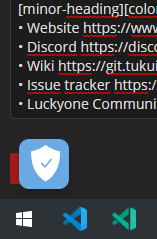
The "Manage Preferences" button overlaps with the save button if you edit your guides.
Chrome v 84.0.4147.105
teal dragon
I'll pass that along, if you can't click the bit of red there, try resizing the window or using tab to reach the button and press enter.
uneven coral
Yup I can manage it with some scrolling, just wanted to let u guys know, ty! 🙂
 nimble crag
@clear raptor Thanks for the feedback. Maybe it's my system. I'll delete and download it again.
nimble crag
Re-downloaded the client, still having the same issue. What's up with this Wowhead?
viscid heart
Context?
nimble crag
teal dragon
@nimble crag Try deleting this file in the respective folder and trying again: Interface\AddOns\+Wowhead_Looter\Wowhead_Looter.lua
 mild ermine
Hey friends I'm trying to change the billing I use for my Premium account but I can't find that option anywhere.
teal dragon
@mild ermine You cannot change your billing information in the middle of a subscription. We no longer house that information to change, it's all managed by the payment processor. If you used PayPal, you may be able to change your billing there. If not, you'll have to wait for the Premium to expire and then sign up again with the correct information; just make sure auto-renewal is disabled if it isn't already. Auto-renewal should be able to be disabled here: https://www.wowhead.com/account=premium -- if not, you can reach out to me via feedback@wowhead.com or here (direct message) for assistance.
mild ermine
Thanks I’ll look at my paypal stuff
nimble crag
@teal dragon When you say try again, you mean to re-download the client or just execute the client? I tried to execute the client after deleting the file. Still getting the same error.
Should I probably delete the whole folder?
 twilit walrus
I can't access the site. I need to enter a captcha and after that i end up here: https://classic.wowhead.com/error-static-cdn
I saw that CloudFlare was having issues in my city yesterday but now it says the server is "Operational" again. Still having these issues tho... Any idea if there is something I can do or how long until it sorts itself out?
teal dragon
Try clearing cache/cookies please.
You may also want to try changing your DNS to 8.8.8.8 or 1.1.1.1 to see if that helps.
 slender sapphire
If you're running a vpn maybe turn it of
twilit walrus
No vpn
 woeful umbra
The news webhook had a case of hyperactivity, methinks.
teal dragon
Was my error, apologies. Feel free to delete the first ones.
 wanton breach
Classic WoW Gear Planner - Conqueror's (Warrior T2.5) saying cannot be equipped by Human Race on my previously saved gear set. It is also not showing as an equipable item for any other race when using Gear Planner
wanton breach
wanton breach
So it is Conq Legs, Chest and Shoulders, but Helm/Feet appear equipable
 remote verge
Hello, I am trying to redo our wowhead webhook because we were having issues with stuff double posting (Not just the Squirt thing today, its been happening for a long time). Our webhook was added in 2017, so i figured i would delete it and readd it.
I clicked the Normal Screenshot All News one but it fails saying that it cant add it because the webhook already exists on that channel ... But it doesnt. I deleted it and removed the wowhead news integration but it keeps saying it already exists.
I can add the individual ones (Classic, Retail, Other Games, Development), but cant add the all news one. Im pretty sure if i add all of the 4 other ones then ill have quadruple posts for any wowhead articles (or whatever falls into the "Wowhead" category). So is there a way to get it to figure out that the webhook doesnt exist?
or maybe someone can give me the info so i can manually add it instead of using the auto add thing?
crude urchin
@remote verge you may try to create a new channel.
remote verge
there is no other way to fix it?? I dont really want to get rid of everything that is already there
crude urchin
I don't know, this is merely a suggestion. You can try to create a new channel and leave the original one intact just to test how it would end,
remote verge
i was able to add it to a test server
also tried the jeeves wowhead-webhook command, but it did nothing
crude urchin
@remote verge iirc double posting is Discord's issue and Wowhead doesn't have control over it. See https://discordapp.com/channels/107362567793422336/173241171064127489/698690079186616420
remote verge
well regardless, the webhook was deleted and now i cant add it back.
crude urchin
@remote verge could you please open #latest-news and click 'Follow' to add thr webhook to your channel?
We're pushing manually every single article posted there so you won't see any double posts.
teal dragon
@remote verge please send over a server invite, and the channel ID # that you're having issues with. Also your Wowhead username. Can DM it to me.
twilit ledge
Bot linked to the wrong item
 small bronze
Hello, quick question. The chars in red belong to another account which is also part of my Battle.net. However I cannot import them in the profiler. Any idea why?
 high igloo
Okay. However videos on discord version of wowhad are somehow restarting itself without clicking after some seconds. Very. Annoying. 😅
teal dragon
@twilit ledge the bot priorities results based on the most popularly visited page. If you want a specific item, you can override with [item=#].
twilit ledge
Ok, I get it. It just feels weird that popularity > exact match.
teal dragon
@small bronze you can't import characters that don't exist in Bizzard's API. If they haven't been logged into in >30 days they won't show up. That list is generated by Blizzard and may also include old/deleted characters.
small bronze
they exist actually... And the one I am looking to import I have been leveling the past days 😕 Thx, will try to see with Blizz then 🙂
rancid copper
Ok, I get it. It just feels weird that popularity > exact match.
Is it possible that the bot would ever be changed? We will literally link exact ability names when discussing classes, talents, etc, and the bot will pull up random quests or achievements instead that contain the word. It seems that exact match should come first, then popularity.
Does the ID work for everything - spells, achievements, items, NPCs, etc?
 tired flicker
I was taking a look at the State of the Class articles and I wanted to see if Shadow Priest was done. Will you guys be potentially redo'ing that one now with the massive overhaul they got?
nimble crag
@teal dragon https://discordapp.com/channels/107362567793422336/173241171064127489/741870211908501534
Didn't work. Any other solution?
viscid heart
https://shadowlands.wowhead.com/spell=190493/fulmination something went wrong here, i didnt check other pages. no console errors
Wowhead
Lightning Bolt and Lightning Bolt Overload have a 100% chance to generate a stack of Fulmination, up to 8 stacks. Earth Shock Elemental Blastand Elemental Blastwill discharge all stacks of Fulmination on the target, causing an extra (10% of Spell power) Nature damage per stack...
crystal olive
@viscid heart devs are looking into that, thanks!
 opal vale
How can I get the profile of my classic toon to update. Last update was in April.
teal dragon
@small bronze if you've accessed them and they exist, try loading them directly through the tool: wowhead.com/list -- also make sure your privavy settings at Blizzard allow third party access: https://account.blizzard.com/privacy
@rancid copper I'll pass your feedback along regarding bot "exact matches". Yes, ID should work for most everything iirc.
regal hollow
Hey, Sas, sorry to ask here but I just see you typing..
mrpeach pinged Thulm a little while ago asking if it was possible to re-open #beta-ptr-spoilers since PTR is, well, available for testing.
and then I see Thulm ping you in #beta-shadowlands about the same thing, damnit
teal dragon
@nimble crag I don't have other suggestions. I'd normally ask PigeonD at this point but he's very busy with PTR/Beta stuff today. Perhaps we can poke him later this week.
@opal vale you just have to keep uploading your character data via the Wowhead Client each time you close the game.
opal vale
@teal dragon Upload character data is selected in the client. Wowhead OAuth is authorized in Blizzard Privacy. My retail toons update, but not my classic
teal dragon
Retail updates from the API. Classic had no API so relies on client data. Have you accessed those characters recently?
opal vale
About a week ago I was on my retail main
I logged into my retail main, did a transmog, and did a refresh on wowhead. It logged the change in appearance
teal dragon
I thought you were having issues with Classic, not retail.
opal vale
I am. I was checking to see if retail changes updated. they did. So it is just classic
teal dragon
Right, entirely separate systems. Have you access the Classic characters recently?
opal vale
yes. been playing daily for the past 2 weeks
and when I close the game, I see the client pop up for the upload then minimize
opal vale
yes, that is selected
and there are no exceptions in the manage character data uploads
teal dragon
Have you ensured you have the Looter enabled still in-game? Under Addons?
Did it perhaps get disabled via in-game addons or marked as out of date?
opal vale
out of date. I use the curse client to keep my add-ons updated. Is the another source or does it need to be done manually
twitch I mean
teal dragon
The looter is updated automatically by the Wowhead Client. When you open the Wowhead Client it'll apply any updates. We're not affiliated with Curse.
Try running the Wowhead Client, see if applies any updates (though I assume you already have while troubleshooting today).
Make the looter addon run even if out of date. Load up your Classic character, wait a couple minutes. Close WoW. Upload via Client.
Let's see if that updates the character.
opal vale
closed and reopened the client. Loaded WoW classic, went into addons. It did not show out of date this time. Loaded toon. went into interface config and wowhead looter it present. Closed game. Toon on wowhead classic updated 37 seconds ago. Wierd that it has not updated before. I have it start automatically when Windows starts
does a manual load of the client load differently that when starting when Windows loads?
teal dragon
Honestly I'm not certain on that point. I thought it would update the Looter from the auto-load upon startup. Perhaps it doesn't or can't (it's old, Windows has changed a lot since it was created). I would recommend periodically checking addons to see if it's marked OOD (should be rare on Classic) or just occasionally starting the client manually to check for updates. Still, I'm thrilled we figured it out together. 🙂
 little knot
https://www.wowhead.com/news=317405/shadowlands-database-updated-for-build-35522-new-items-enchant-abominable-stitch pets have 2 animated plagues listed

Wowhead
Our Shadowlands database is now updated with new items and more from build 35522, with new illusions, pets, and abomination stitching.
opal vale
When Windows is loading, it might try to check home before a network connection is established. Anyway, thx for the assistance
 thin quiver
How do I favorite a guide?
 bitter arch
Not sure if this is the right place, but the classic item API appears to be broken as of today(? possibly longer, i cache the data)
for example giantstalker's boots work just as expected
https://classic.wowhead.com/item=Giantstalker's Boots&xml
but giantstalker's bracers don't
https://classic.wowhead.com/item=Giantstalker's Bracers&xml
querying by id works fine
https://classic.wowhead.com/item=16850&xml
crude urchin
@RoseBloom#0240 there's a star icon next to guide's name. Click the icon to add guides to your Favorites list.
 thick fox
hey, why does the mount collection tracker tool not contain every mount? for example, the black qiraji battle tank doesn't show up, even if you have "unattainable" selected
makes it seem like it doesn't really contain all mounts that were obtainable at one point
doesn't contain any of the gladiator mounts either, i'm sure theres much more missing :(
thick fox
kind of defeats the purpose if it's the same as the mount journal by not showing certain mounts, i think hivemind didn't show either but i could be wrong since i got it recently
small bronze
@teal dragon The access from the list worked! thank you 🙂
 late meadow
Anyone else get a 500 error code everytime they log out of the game and wowhead client uploads data?
twilit helm
works here
late meadow
If I delete my save file in ACCOUNT\SavedVariables it'll work
but as soon as I login/logout
500 again
twilit helm
try looting something in game to generate some records
twilit helm
no idea then - let's wait for staff
late meadow
I'll just be patient and maybe it'll go away again
 nimble loom
<@&299347348847329281> This isn't clear to me but why can some people post discord and other links in #retail-guild-recruitment-us and others can not. I thought I was doing something wrong and through a bunch of edits/posts got myself muted (whoops).
crude urchin
@nimble loom posting Discord invites have been restricted as a result of spam attacks. Posts with links were posted before the restriction was applied. You can attach your Discord tag to the message to invite potential applicants write you back and get an invite to your Discord server. Sorry for the inconvenience 😦
crude urchin
It probably happened when Dyno (Watcher) was offline.
crude urchin
You're welcome:)
teal dragon
@nimble loom I removed the automod with respect to Discord links for now. I don't intend on blocking them all the time, was a unique sort of spam raid we had to counter recently. You should be good now.
nimble loom
ok thank you!
rancid copper
@teal dragon thank you for passing it along. I popped back to re-iterate today that it should really go for exact matches before popularity.
I really find it frustrating when you have something like this happen. I reference an NPC I don't recognize, and get...this? Budd isn't even in the name of the achievement, it's part of a word in the description. The bot shouldn't be doing this.
teal dragon
@rancid copper we'll look into improving the bots behavior in our next development cycle (resources permitting). Thank you for the suggestion!
nimble crag
@teal dragon Thanks for your help though. I'll just wait for further updates on this from your end. My client can't be out-of-date right? If so, how do we update them?
It shows as out of date here.
stoic acorn
"Out of date" simply means that the addon doesn't explicitly claim to be compatible with that version of WoW. If they recently updated the version number for Classic you might see this until they can push out an update... but almost all the time that just involves updating that "compatible version" number. It should be safe to enable "Load out of date AddOns", especially since it looks like you don't have any other addons.
twilit ledge
It seems like the website does not properly track quests rewards if it includes Azerite armor. For example, this should say it is a reward from "The King's Gambit", but the info is missing both on this item's page and on the quest's page https://www.wowhead.com/item=155239/rastari-breastplate?bonus=0:1452
Wowhead
This blue plate armor of item level 300 goes in the "Chest" slot. Added in World of Warcraft: Battle for Azeroth. Always up to date with the latest patch.
 feral light
the breadcrumb quest "To the Mor'shan Rampart" (Quest-ID: 8876) was removed from the game a long time ago, you can mark it as obsolete
viscid heart
It's not done by hand, it's a flag from blizzard
teal dragon
It can be done by hand, but when we did that in the past Blizzard would ninja remove/re-add and it became tedious to keep up with it and difficult to verify.
 pseudo bobcat
Is this the right place to ask for help with the WowHead client?
I see several else have asked here as well, so Ill have a go:
I installed the Wowhead client on my desktop last night and tried to install it on my laptop today. Worked splendidly on my desktop and when I tried to do it on my laptop, my user was already logged in and it cant find the WoW launcher. Also it did not install the WowHead looter addon.
bitter arch
Not sure if this is the right place, but the classic item API appears to be broken as of today(? possibly longer, i cache the data)
for example giantstalker's boots work just as expected
https://classic.wowhead.com/item=Giantstalker's Boots&xml
but giantstalker's bracers don't
https://classic.wowhead.com/item=Giantstalker's Bracers&xml
querying by id works fine
https://classic.wowhead.com/item=16850&xml
@bitter arch
any update on this? I kinda rely on this feature
viscid heart
looks fine for me, i am more surprised it works by name at all, what is broken on the bracers for you?
bitter arch
viscid heart
bitter arch
Huh odd, it appears to work now. I even had other people verify it was broken
I have a script with a list of item names to fetch and it broke on GS bracers and Firemaw's Clutch randomly, but I guess it works again now 🤷♂️
thanks for looking into it
viscid heart
i just clicked the link
bitter arch
the uriEncode'd version still breaks for me though (ie https://classic.wowhead.com/item=Giantstalker's Bracers&xml) while the boots work https://classic.wowhead.com/item=Giantstalker's Boots&xml
oddly enough if I encode in another space it doesn't https://classic.wowhead.com/item=Giantstalker's Bracers&xml
plucky fractal
Yeah there is this guy who continues to follow me from room to room, and despite putting him on mute its creepy and bit scary
can someone do something about this
The guys Name Karolson
he wont leave me alone
stoic acorn
<@&299347348847329281> ☝️ (Karolson#8413 / 717818198850011176)
plucky fractal
Yes
 placid bone
The "Did You Mean" site searches when you typo something don't seem to be working right now
e.g. I'd expect this to give some suggestions for maraudon: https://classic.wowhead.com/search?q=maradon
But I get no results.
Wowhead
The largest World of Warcraft (WoW) information site, featuring guides, news, and information on classes, professions, azerite, raids, transmog, and more.
pseudo bobcat
I installed the Wowhead client on my desktop last night and tried to install it on my laptop today. Worked splendidly on my desktop and when I tried to do it on my laptop, my user was already logged in and it cant find the WoW launcher. Also it did not install the WowHead looter addon.
@pseudo bobcat Anyone know how to fix this?
teal dragon
@pseudo bobcat I'm not sure. It's normal that it can't find the launcher. We recommend opening Blizzard's launcher on its own. The button doesn't always work.
I would recommend pointing the client to the right directory for retail, classic, etc. Close it. Open it back up, it should load the looter addon. Check your in-game addons to double check.
@placid bone I've passed that along. Thanks!
 shell cipher
How does the loot tracker work for the wowhead client? I have been killing Vile scarabs and uploading the data but on the website the count for the 2 drops they have hasn't increased even though I have uploaded data that should have added to the numbers there
stoic acorn
Uploaded data is processed in batches, it's not an immediate thing.
shell cipher
sorry for more questions, is it like a weekly batch or hours? just curious to make sure I didn't mess something up
teal dragon
There's no specific time table. When @small ore is around he can elaborate.
tidal brook
how come when i go in my user page an look at the tab that shows things such as 'comment was upvoted' then when i go click on it rather than it take me to the correct version, wowheads site auto converts for classic instead?
https://www.wowhead.com/go-to-comment&id=3128579 if i go to this, the page loads the bfa version of steelcrushfish then halfway into loading it the webpage converts to classic even tho i never clicked the classic checkbox at top of wowhead

Wowhead
This green one-handed mace has an item level of 25. In the One-Handed Maces category. Added in Classic World of Warcraft. Always up to date with the latest patch.
teal dragon
After being redirected, just click the BFA button next to the search box to force the page to return to BFA and your browser will remember this preference so you're not redirected again.
 rigid mason
Hey um in dressing room the void edge enchant from horrific vision Valera doesn’t look anything like the screenshots on this website but rather the xavius enchant (forgot the name). Could you guys please look into this?
twilit ledge
Don't you think this server could use more moderators? To be clear, I don't want to become one, but I feel their response time is rather long for a server this size.
crystal olive
Any examples on issues with moderation @twilit ledge ?
broken wadi
well currently there's none online; issues get dealt with "eventually"
there's also only 2-3 that are seemingly active at any given time that seem to deal with every issue that pops up
twilit ledge
I cannot really link to the situation I mentioned. Basically, a random troll appeared out of the blue and started posting porn for a good couple minutes. I could understand it on a smaller server, but here we have a massive userbase.
teal dragon
It was handled within a few minutes. I'd say that's more than acceptable. I acknowledge and appreciate your feedback on the matter but very little moderation is required in this server, we don't need dozens of people with ban hammers here. We've been around quite awhile now and have a pretty good grasp of our needs. I have a modest sized moderation team based on server size, you're correct, but that's not how I decide how many moderators are required (I base that on experience). People are pretty well behaved here.
inner hill
is there a reason for no thumbnails from the discord bot anymore, or just a bug for me?
The follow that is active on my own discord seems to still work and put thumbnails up
stoic acorn
I'm seeing the same, so it's not just your server.
teal dragon
We're aware but not certain on a reason yet. We enabled some logging to see if we can find a cause and pursue a fix.
rigid mason
Day 2 of voids edge not working properly in dressing room
teal dragon
I passed your concern along. We'll look into it when we can. Thx
 junior moon
@rigid mason we are aware of that, we also did 80% of enchants to works as intended. Some of them use Spell Effects.(like Voids edge) and we are working hard to implement it, not just for enchants but also for some other cool features we plan to add on the dressing room / site.
 dry vessel
Are you able to rename the wowhead webhook? I see the option to do this in server integrations as well as change the avatar, but posts to my server still come in with the wowhead avatar and “Wowhead Retail News” name
teal dragon
No, I don't believe you can rename webhooks.
stoic acorn
You can change the default name for a webhook, however the content of the webhook can specify any name it wants to override that (which the Wowhead webhook uses to differentiate the different channels).
teal dragon
I hadn't seen the new Integrations area, if that's not working then yeah I'd assume Arcane is correct.
fleet scaffold
@viscid heart item lookup by name is one of the best and worst features of the old xml api. it's really great until you realize item names aren't unique and you have change all your stuff. 😩
i really wish there was a modern equivalent of the XML api. it would saved me a massive amount of time.
that reminds me, suggestion: when displaying random enchant items for classic wow, if it could somehow display the corresponding suffixId for each set of bonus values, that would be awesome.
 digital dagger
Just a minor complaint. I know you want people to watch the fanbyte video.. but could you make it so it won't auto play on every page I pull up?
 spare plover
I have my Discord linked to my Wowhead Premium account, but it doesn't flag me as premium here.
 glass totem
Hello there! I've a problem with site, it does not show me completition in "Currency for" tab of currency:
My bnet account linked, profiles created and I even tried uploading by Wowhead client - nothing worked.
https://www.wowhead.com/currency=1166/timewarped-badge#items:0+19+14-13+1-17;q=mount
Wowhead
Earned in Timewalking dungeons. Exchanged for goods from Timewalking Vendors in capital cities. In the Dungeon and Raid Currencies category.
profiler itself works good and showing all the mounts
teal dragon
I have my Discord linked to my Wowhead Premium account, but it doesn't flag me as premium here.
@spare plover try disconnecting and reconnecting it in your Wowhead Premium settings.
profiler itself works good and showing all the mounts
@glass totem I'm assuming you don't have any of your profiles "pinned". Load a character in the profiler, click the pin at the top to have completion info displayed around the site and tooltips.
glass totem
@teal dragon thanks, it worked 👌
 raven nebula
Might want to dig deeper on the classicwow subreddit next time https://classic.wowhead.com/news=317564/classic-player-levels-all-eight-alliance-classes-to-60-without-mage-boosts
As it was already achived 6 months ago on a pvp server with 11 days shorter played
https://www.reddit.com/r/classicwow/comments/f1spku/finally_my_journey_is_over_all_classes_at_lvl_60/?utm_medium=android_app&utm_source=share

Wowhead
A player from Pyrewood Village PVE EU has leveled all eight Alliance classes to 60 without using boosts.

reddit
557 votes and 691 comments so far on Reddit
tawny blade
It's something we'd consider, but the article from this week still does seem worthy as they avoided the grinding method completely
if you encounter anything noteworthy you think the team should highlight, it can always be sent to feedback email
rigid mason
Another bug report from dressing room. The offhand item Bileslinger's Censer (found the bug on the mythic version but I'd assume that's the case with all of them) isn't displayed correctly and kind of folds back in on itself, which isn't how it looks ingame
Obviously
junior moon
@rigid mason thx for report, we found two more bugs related to that item
devs are working on fix
 narrow kettle
Hi there - wondering if anyone knows what up here - I linked my Battlenet account to the site, made sure "Share my game data with community developers" is enabled but none of my characters are showing up.
teal dragon
Have you accessed the characters in-game that you're trying to look up within the past 30 days @narrow kettle ?
narrow kettle
@teal dragon Yes, but the site won't show any of my characters at all
teal dragon
What is one of the character's name, region and realm?
narrow kettle
Zellaeth, US, Hakkar
teal dragon
https://www.wowhead.com/list/us-hakkar-zellaeth worked for me.
Use https://www.wowhead.com/list to load/save your characters to your Wowhead profile.
narrow kettle
Oh!
I was looking in the wrong place then
I was looking here https://www.wowhead.com/account#battlenet
Thanks!
teal dragon
If you're not seeing anything in the Battle.net tab in your account settings, sadly there's nothing we can do about that, it shows whatever Blizzard sent over, if anything.
narrow kettle
Ah I see, it was my understanding that is where you see your characters
teal dragon
You could try disconnecting and reconnecting to see if that helps, might even try disconnecting, removing the connection in your Blizzard settings, and trying again as well: https://account.blizzard.com/connections#authorized-applications
narrow kettle
Great I will, thanks again
teal dragon
Nothing shows for me either honestly. 😐
Blizzard changed a lot of their privacy settings to comply with GDPR/CCPA and other such regulations, it may be that they stopped sending that info.
Oh, a couple refreshes and it worked for me.
rigid mason
@junior moon just curious what were they?
junior moon
Well item mirroring, some missing flags from model itself and odd transparency when u rotate the model in few angles.
should push new model updates in Monday for shadowlands / ptr, since i don't do Friday / Weekly deploys
except if something is burning ;D
proven scaffold
Any chance the state of shadow priests in shadowlands guide will be updated as it's now well out of date?
crystal olive
There will other ones at some point, but that one won't be updated, no
proven scaffold
Strange, cause it's completely out of date and pointless now.
tawny blade
It's not a guide, it was an opinion piece. We maintain https://www.wowhead.com/shadowlands-priest-class-changes along with legendary/conduit/covenant/anima guides which are updated each build
Wowhead
Overview of Priest class changes coming in Shadowlands. Talent trees, Covenant abilities, legendaries, unpruning and more.
Like Anshlun said, there will likely be another opinion news piece reacting to shadow changes in the future. Old editorials/news are generally not updated though, they're reactions to news not guides
 rocky thistle
Did something on the site just change, like in the last day or two?
This is right after installing some windows updates and rebooting after a video card driver update
clicking the blue button gives me this:
teal dragon
No, nothing has changed in the past couple of days.
rocky thistle
looks like it was connected to my vpn, not the browser, turning that off and on again worked.
rocky thistle
Thank you though, your response did help.
proven scaffold
Oh ok. Thanks Perculia.
rancid copper
In the latest article, "What Content is Coming in the Shadowlands Pre-Patch?", there is the bullet point: "Horse mounts can fly." I assume it refers to the coursers / unicorns, and not just "horses"
rigid mason
if you open your character in profiler, the unmovable image displays my current mog but the one wheee you can actually rotate your character and look at the individual gear pieces shows an out of date mog I don’t use anymore
Any idea what I could do to fix this? Reloading doesn’t work
lost drift
[classic] Looking to search for items that disenchant into a Large Radiant Shard, however when I go to the Database -> Items, I can select a filter for "Disenchants into...". But Large Radiant Shard isn't an option, actually it doesn't have many of the available options.
Actually, I'm realizing that maybe the database is incomplete here. When I got to Large Radiant Shard's item page, it doesn't even list "Disenchant From" like Strange Dust and others do
 covert flame
guys how can i fix character creation fail
 uneven crow
Now that all the castle Nathria leather armor tints are complete are they able to go into the dressing room?
hardy bloom
Wowhead
The location of this NPC is unknown. In the NPCs category. Added in World of Warcraft: Shadowlands. Always up to date with the latest patch (9.0.1).
the render on these guys in the model viewer is VERY broken
 floral snow
Help i cant see the giveaways channel
teal dragon
There's nothing on our end that would prevent you from seeing #sweepstakes -- I'd check your notification/mute settings.
 sinful sky
Is there any plan to add the alternate colours of the maw sets to the dressing room?
The 4 items are there, but when you select them they are all 1 colour
@neon raptor you can mute everyone pings
I mean if you dont wanna be included in everyone pings, you have something you can do.
But yeah is there any plan for the maw armor sets to work in the dressing room? currenlty only 1 of the colours works, all 4 colours are there, but selecting them they all just choose the default colour
teal dragon
@neon raptor Please use your Discord settings to your discretion, if you don't want the pings but wish to remain, mute them. If you don't want to mute them, and don't want the pings, then please leave the server. We're not going to apologize for engaging with the community and it's not going to change.
sinful sky
Can also mute SPECIFIC channels within the discord, so you can mute everything but giveaways for example if you want everyone pings for giveaways
teal dragon
@sinful sky Stiven and the team add everything they can to the dressing room as soon as it's possible to do so. It's always an ongoing effort. We don't intentionally skip or leave things out. Sometimes it's not possible to have yet from the available data, sometimes tweaks need to be made to the file(s) or the dressing room itself, but we're always actively working to include everything.
sinful sky
alrighty ty, was just wondering cause they were datamined long ago, and work on the specific models when they were first shown off, but they still dont work in the dressing room.
teal dragon
Stiven will see this when he's around again and if he has anything to add I'm sure he will do so. 🙂 Maybe there's a bug he's unaware of, it's entirely possible.
sinful sky
Thx  hope it works like the cov gear.
teal dragon
S/he says as they leave. 👋🏼
broken wadi
..like it's right. First thing I do in -any- server is mute @ everyone, i don't know why you wouldnt
prevents the exact thing they complained about lmao
 scarlet marsh
@floral snow check if the symbol to the left of Important Stuff is a >, if so click it to show all channels
proven scaffold
The uhh, tooltip on the latest hunter bluepost is cobra shot rank 2, not the spell tself
teal dragon
@proven scaffold That better?

 sullen sapphire
hi @teal dragon , i spotted an issue for spell mod (screen show smite spellid 585)
 drifting horizon
do you need to have earned a certain score or be premium in order to submit edits to certain things on the site?
crystal olive
No, you can submit a report on most pages or news articles
drifting horizon
i thought about doing that but i wasn't sure if that would be abusing the report feature
crystal olive
Nope, that's one of its intentions :)
drifting horizon
ok i put it in
teal dragon
@sinful sky Update: we can't add the maw colors to the dressing room right now (possibly ever) because no armor items exist for them. We have one tint in the dressing room since those are the colors for the crafted legendary items.
sinful sky
Thx was, that's a shame
 amber garden
Classic: Lifegiving Gem description says it drops off Vaelastrasz the Corrupt when in fact Broodlord Lashlayer drops it.
crystal olive
@amber garden fixed
proven scaffold
Are covenants at the bottom of talent trees just a wowhead ui thing?
Ketsuki confirmed it's just a wowhead ui
 oblique wind
Question all. My Tauren got exhaulted with all of Legion. I did the entire quest line with high mountain and the scenario got a whole outfit amongst other things. Emailed Blizzard many times after they have me delete add ones and stuff to finally say I can’t switch my Tauren to high mountain until all my alts do the feast quest which don’t the quest at high mountain or Org embassy. So it’s weird like I thought I could change to a high mountain Tauren since I done the entire quest and have all Horde alliances unlock.
teal dragon
We can't help with this sort of thing. Maybe the community will have suggestions. Use #wow-help please.
proven scaffold
Uhhh, this doesn't seem right
this is on the shaman covenant abilities page
the last line should probably be flame shock?
rigid mason
Pages sometimes stop being interactive on mobile
I doubt you’ll fix that but you know
Yep your website doesn’t remotely work on mobile
broken wadi
Working fine on my end
rigid mason
Also, voids edge still hasn’t been fixed and wraithchill isn’t even an option in dressing room
Oh and also illusions don’t even work on the weapon demise
Like they actually don’t show up
Same for titansteel destroyer
viscid heart
@proven scaffold wrong as it is, thats the data from the tooltip, its so funny
proven scaffold
wait like... the in-game tooltip?
twilit ledge
Friendly fire?
rigid mason
There is also no way to preview the different tints of the artifact which I mean just come the fuck on
viscid heart
yes. the ingame tooltip, its quite funny, mouseover it and you will see how its build
https://www.wowhead.com/artifact-calc/shaman/enhancement/A7fCMpAA
do you mean this? if you have feedback dont let it sound the way you do.
Wowhead
Netherlight Crucible and Artifact Weapon Calculator with artifact weapon appearance previews for the Battle for Azeroth expansion of World of Warcraft.
tawny blade
@rigid mason fixes take time, we appreciate your reports but they are not instant
Artifact tints can be selected, they have been so for several years
There is also a tool dedicated just to appearances: https://www.wowhead.com/artifact-calc
Wowhead
Netherlight Crucible and Artifact Weapon Calculator with artifact weapon appearance previews for the Battle for Azeroth expansion of World of Warcraft.
Please remain respectful of the staff working on the model viewer, thank you!
plucky fractal
rancid copper
Can someone delete the advertisement in #sl-transmog ? Pretty sure that's not allowed but I could be wrong...
viscid heart
a good reason to ping the mods, did it there
rancid copper
Ok, wasn't sure if it was ping worthy or not
So I figured I'd post here and someone would get to it
viscid heart
its a moderator action
rancid copper
Ty 🙂
Yeah I just hate to ping mods for something that isn't like a hot issue / needs immediate resolution I guess
But ty! I will do so if it happens again 👌
 crystal path
Does anyone know if it's possible to change your user/display name on the main site? I made my account back in 2007 and really want to change it 😭
crude urchin
@crystal path please send an email to feedback@wowhead.com from email address associated with your account. Include preferred username and one alternative. Thank you!:)
crystal path
@crystal path please send an email to feedback@wowhead.com from email address associated with your account. Include preferred username and one alternative. Thank you!:)
@crude urchin Ohhh Awesome! ❤️ Thanks!
 tawdry python
Hi, i just invited the Wow-Head discord bot to my server, unfortunately i have tried and failed to get it working, I have changed permissions for "Server Manage" and "Channel Manage". I am still not able to summon !wowhead-setup in any of my channels. Any help would be appreciated
 smoky mountain
This has been bothering me for quite some time now, well before I was in this Discord, and finally thought about reporting this. Comment links don't link to comments, just the comment section. For example, the following link https://www.wowhead.com/achievement=13764/puzzle-performer#comments:id=3189205 is supposed to scroll down just a few comments on both new and high sorts, but it only scrolls to the same spot as a generic comment section link https://www.wowhead.com/achievement=13764/puzzle-performer#comments. This happens on desktop Chrome and mobile Safari.
 modest jasper
So I refreshed dressing room and now it wont load DH model for either race a complete close of the website and reopening it wouldn"t fix it it doesn't even give the load bar like its trying to load it it just stays blank
teal dragon
@modest jasper I'm not personally having any trouble loading DH': https://www.wowhead.com/dressing-room#aa0b0zJ89cIkcVcm0y08sds808sdh87csdb87VsEP808sdm808sEe808sdr808sEQ87s -- try clearing your cache/cookies and trying again, and disable browser extensions, perhaps they're interfering.
@tawdry python Are you still having trouble with the Bot? If it has all the correct permissions, both in the server and the channel you're attempting to send commands in, it should work properly.
@smoky mountain I'll pass that feedback along. I sympathize, it doesn't always work for me either, though it often does work... I've never been able to find a particular reason for the inconsistent behavior. Your link on mobile, for example, worked... went right to your comment. On desktop, just the comments section. I'll see if one of our developers can investigate, but as you can imagine it's not going to be a high priority when it comes to wider issues or features that need work. Thank you!
 low torrent
I am having an issue with the website. I am trying to reset my password as I forgot what it was. and it keeps giving me an oops message.
teal dragon
@low torrent please reach out via feedback@wowhead.com for password issues.
scarlet marsh
https://www.wowhead.com/user=Wowhead Wowhead doesn't log into Wowhead daily? and still has no public description! 😛
Wowhead
The largest World of Warcraft (WoW) information site, featuring guides, news, and information on classes, professions, azerite, raids, transmog, and more.
teal dragon
It's not a used account. Just a placeholder really. We might list it as the author of official guides and some news and forum threads, that don't belong under a single person, for example.
tidal brook
apologies if this doesnt go here bt todays my 6th anniversary with wowhead as a user :3 going by sign up date
crude urchin
congratulations! 
tidal brook
when does the site update so the achievement goes off? its still showing 5
crude urchin
must be differencies between time zones, I'd wait until tomorrow.
tidal brook
alright thanks not a big deal to me i just figured id mention it
crude urchin
@tidal brook it's 10:40 AM on the server side. Wait until 12 AM
tidal brook
midnight? k
 bold umbra
A more technical question, but I was wondering if you guys could provide some motivation as to why the site still supports TLS 1.0 and 1.1. Both of these security protocols have been deprecated in favor of TLS 1.2 and the upcoming TLS 1.3. Do you have a lot of users using devices that don't support TLS 1.2 or something? https://www.ssllabs.com/ssltest/analyze.html?d=wowhead.com&s=104.18.31.49
plucky fractal
getting a server error when trying to look at mission abilities, i.e.: https://www.wowhead.com/mission-ability=256/extreme-scavenger
been happening for well over an hour, closer to 2
proven scaffold
Why is The Hunt change listed 5 times? https://www.wowhead.com/news=317781/shadowlands-covenant-ability-adjustments

Wowhead
Today's Shadowlands Beta build contains several class and spell changes, but also a number of Covenant ability adjustments. For convenience we've highlighted them below!
also Faeline stomp
viscid heart
they are actually different ids/spells
at the moment they just push the things out, they will probably clean it up later
proven scaffold
Understandable
 last glacier
Question about the wowhead discord bot/webhook. Is there a way to only pull the [Wowhead In-Development] news? Currently I am getting both the [Wowhead In-Development] and [Wowhead] bot responses which are just duplicates.
teal dragon
Yep, see https://wowhead.com/webhook
Wowhead
Get the latest World of Warcraft news to your Discord channel with the Wowhead Webhook. Use this page to set up a Discord webhook for Wowhead news.
You can just remove the webhook for all news and keep the other one.
teal dragon
Perhaps someone else added it? Try removing it on Discord's side.
last glacier
I only had the one webhook, but I can try removing and re-adding it
teal dragon
Have you confirmed on the Discord side that you only have one webhook?
last glacier
yes
teal dragon
Invite me to the server please.
 gray hazel
I don’t know where to ask this but hopefully it’s okay. With regards to the contest am I allowed to make additions to the Rocket logo or would it disqualify me if I altered the shape in any way?
teal dragon
Take a look at the existing submissions in the gallery. Anything displayed I've allowed. Generally speaking, yes, you can make additions. :)
 trail yew
Hi I would like to enter #sweepstakes message giverway however I’m from UK therefore, can I still enter ??
viscid heart
trail yew
Thanks
wet orchid
Literally unreadable. 0/10 uninstalling /s
 sterile grove
Hey there, when are you guys planning to remove the TONS of dupes for so many pieces of equipment in the Dressing Room, I don' want to cycle through 20 helmets which have the same name AND model. Also, I would love a box you can tick to only show items from the class you chose
 dense moth
Moving this over from #wow-help
I'm making groups in the application "TSM" and am moving items from a spreadsheet:
over into groups:
using the TSM group maker:
that functions by copy pasting from wowhead
was just curious if there was a way I could just pull up multiple specific items at once on the wowhead site
I'm unfamiliar with the search formatting
I can get by without it one by one, was just curiuos if there was a way I could do it faster in the future
modest willow
im trying to update my profiler, but for the bfa content part, it will not load, if i click ptr, it does show. i've cleared my cache and cookies for wowhead too, and it still will not show. https://gfycat.com/merryimpossibleamericanredsquirrel (to show what i mean, bad at explaining sorry)

 elfin oasis
I recently bought a code for BFA World of Warcraft. I checked that it still said starter edition so i look up on forums and it says delete the account. So i deleted wow1 account and bought a subscription for the next account. And not realising that the expansion has disappeared. Is there anyway you can put the expansion on the new account please. I spent the rest of my money to play the game and then i find out that the code i redeemed is stuck on the account i deleted.
broken wadi
You'd need to contact blizzard for that I'm afraid, this isn't Blizzard support
elfin oasis
how do i contact them to an actual member of staff?
broken wadi
elfin oasis
thanks 😦
 brazen wolf
 fluid epoch
how often is information about a character updated in the wowhead? I passed a bunch of quests yesterday, but they still appear unfulfilled in WoW Quest Completion Tracker
 sleek scroll
How do i Share a world First Horde 3man Onyxia on wowhead?
wet orchid
@fluid epoch You have to update your character in the profiler after you've logged out to see newly completed quests/collections
fluid epoch
@wet orchid I did it, but it was the quest tracker that was not updated. updated stages of achievements "loremaster-of-eastern-kingdoms" (I got checkbox "Eastern Plaguelands Quests"). but the section "quest-completion-tracker" Eastern Kindoms Burning Steppes still empty
 molten bramble
Hi I was wondering if there is any idea of creating a guilded wowhead server?
viscid heart
what is a guilded wowhead server?
molten bramble
Guilded is like discord but offers other features for gaming communities discord does not
its what my guild and gaming community use for everything
and was wondering if there was a way to get wowhead to support a server in there
crystal olive
likely not
tawny blade
@sleek scroll you can email feedback details
 ember summit
I have an odd suggestion or feedback, what if putting the old 3D models of the Warlock cloaked summoning portal and Soul well models into classic and the bfa versions onto the current ones?

Icy Veins
Ritual of Summoning and Create Soulwell recently received new models on Battle for Azeroth Beta as part of the ongoing Warlock spell update process. Create Soulwell Ritual of Summoning Blizzard continues to update Warlock animations in BfA that they werent able to implement in...
ember summit
Sorry idk if I'm doing this right at all...
viscid heart
i dont understand what you mean, but this is the wowhead discord server, there is no direct connection to blizzard
ember summit
I mean doesn't the discord have connection to the website?
Wowhead? I thought then those new BfA 3D models for the Warlock portal and Soul well could be added to wowhead
viscid heart
added where?
teal dragon
You can look them up on the site, if we have the model it'll have a View in 3D button.
ember summit
I have been on the site and that's why I mentioned this for them to be added to the site
teal dragon
Link to the specific items you're referring to please.
ember summit
You mean in Wowhead? or in general?
https://www.wowhead.com/object=185871/summoning-portal
The 3D model of this doesn't quite match, I know the classic horned robed portal is here on the website but not this model

Wowhead
Summoning Portal is a World of Warcraft object. In the Interactive Objects category. Added in World of Warcraft: The Burning Crusade. Always up to date.
Maybe add them into a models tab at the bottom the page?
Similar to how Soul Well does it like it has a models tab and add the bfa version too. https://www.wowhead.com/npc=76558/soul-well
Wowhead
The location of this NPC is unknown. In the NPCs category. Added in World of Warcraft: Warlords of Draenor. Always up to date with the latest patch.
I'm sorry I'm probably a pain in the neck I'm sorry 😔
viscid heart
you linked this object
ember summit
Yeah but that technically shouldn't be the portal.... It can stay on that page but you see how in Soul Well there's a models tab, what if the classic robed Summoning portal and the updated one in BfA get added to a tab like that?
viscid heart
the spells dont summon npcs they summon game object (that arent actually in the database.)
the soul well npc is unrelated to that and from somewhere else
ember summit
Oh.... So I guess what I'm requesting is impossible... I feel like an idiot
viscid heart
wowhead display the information the client provides, the two things you posted just dont have a connection to the warlock spells. thats why it displays the "old" stuff
ember summit
I see... Im sorry if I wasted your time btw
viscid heart
i am just another used, and wanted to explain why it is how it is
i dont know the technical reason why the objects (303148, 194108) are not on wowhead
ember summit
Neither do I... I dunno how this stuff works
 blazing pine
@ember summit The difference icon screenshots/icons used would be based on associating with the correct spell/object ID.
The summoning portal with horns wasn't added until 2.1. Classic is on 1.12/13. That and the summoning portal are 2 different database items.
 dry fractal
Hi Wowhead team. I noticed that the talent builds in guides related to Classic have gone missing lately. It seems to be the case across multiple guides to leveling (here's an example: https://classic.wowhead.com/guides/wow-classic-arms-warrior-leveling-talent-build-1-60)
viscid heart
mean this?
dry fractal
Could be. I'll troubleshoot on my side.
Thanks.
Totally works in Chrome. So I'll purge Edge and see if that fixes. Thanks for your help!
crystal olive
@viscid heart @ember summit if the objects are not in the database, it means Blizzard has deleted them from the game's database
viscid heart
interesting, because the summon soulwell spell sattes it creates that object
ember summit
Sorry if I caused confusion btw... Also I'm enjoying the Shadowlands Dressing Room and is the Forms supposed to be shown in the Druid?
And is it me or are the eyes a bit glitchy?
 scenic oriole
Is there any reason the Wowhead client should delete itself after loading? This has been an ongoing problem since Windows 10, but I just found the Discord link, so didn't know how to ask about it before.
teal dragon
Sounds like a antivirus program or something is deleting it. It wouldn't delete itself. Run it as an administrator and make sure you've whitelisted the program in Windows Defender or other software you're using.
scenic oriole
I'll give it a try. The weird thing is that I'm using the same AV I did in Windows 8, and the deletions are random, usually after a reboot.
 oblique charm
Hi, any idea why is the discord bot offline? It was working just fine but now it is not available.
teal dragon
It's online on ours @oblique charm is it still down on yours?
oblique charm
@teal dragon yep its still off. I will try reconnecting it
no luck, It still appears offline
teal dragon
One of the shards is probably down. I can't fix that but I alerted someone when they're online next. Edit: should be back now.
teal dragon
Do you have filters active in the 'Types' dropdown?
That's because the most recent articles are all beta. If you hide beta then you won't see anything without going to differet pages. The filters just hide the articles with those tags, the page doesn't move up the next 10 unfiltered posts.
 compact radish
I've been asking for that feature since they added the filter lol
Would be a huge quality of life upgrade for the news feed.
oblique charm
One of the shards is probably down. I can't fix that but I alerted someone when they're online next. Edit: should be back now.
@teal dragon yes it is already working, thanks 🙂
 vale pivot
 celest creek
Feedback on Wowhead > Tools > Dressing Room:
Demon Hunter attribute "Tattoo Color" that is available on in-game character creation screen is missing from Wowhead > Tools > Dressing Room attributes for Demon Hunter.
Noticed this when referring to one of my existing Demon Hunters while creating another one.
 languid jasper
Was looking at the "Legion Attunement Tool" link to go back and catch up some Balance of Power stuff...but the link instead only display's BFA. Was the link miss well...Linked? or is the Legion stuff just no longer availible?
viscid heart
works fine for me
languid jasper
hmm...the Legion Attunement tool on page "www.wowhead.com/news=270120.2 " still goes to a BFA attunements page. So it works. i just had to type in /Legion manually after the word attunement. Thanks
viscid heart
Try not goin over a news post but with the navigation bar on the page
The tools dropdown has the legion attunement one
languid jasper
wow..that was so right there im glad it didn't reach out and type the keys its self.
viscid heart
I don't understand this statement
languid jasper
Had i looked through those tool bars more it would have Really jumped out at me.
i was just being pretty blind to the format
 sullen sparrow
Hi, discord bot offline again.
blazing pine
Cloudflare dramas.
https://twitter.com/Gatt_AU/status/1305518602548731904

To all my midnight owl friends in Australia, Cloudflare is having major routing issues. Expect the internet to be a bit slow. (ie; Discord, Facebook, YouTube, etc.)
Likes
217

 Twitter
Well, that'd have likely been the cause. Kinda a past event now.
 split flax
idk where to really ask about it but here I go, I tried to sign up for WoWhead premium for a year last night and it said that it declined so I checked the info I entered and tried again a couple more times. I assumed it might just be an issue with the processor so I decided I would wait until today to try again. Well apparently the charges did process on my end all three times. I still don't have access to Premium either. Any help would be sick.
viscid heart
try sending a mail at feedback@wowhead.com is probably the fastest help
 small lintel
I don't really know who to talk to about it, but I ordered the pins back in April/May and they were expected to be shipped in August. We're now mid September and still no communication or information
teal dragon
@small lintel send me a private message.
ember summit
How does druids form work on the Shadowlands Dressing Room and there's a bug with the eyes, well left eyes on races like Gnomes and humans n stuff?
teal dragon
We don't offer druid forms in the dressing room.
 digital stirrup
@ember summit there are some guides available that show the different forms available for each race if that helps https://www.wowhead.com/troll-druid-forms

Wowhead
Overview of all the Troll Druid color variations for Bear Form, Cat Form, Moonkin Form, Tree of Life, and Travel Forms.
ember summit
How come in the Shadowlands Dressing Room it has selection tabs on druid forms
sinful sky
IDk where to send this, but a private server is using the wowhead logo?
thick fox
would be really cool if you guys could embed a poll in posts like this, it'd be pretty interesting to see (although on this one obviously people would vote that it shouldn't be possible)
teal dragon
@ember summit those were added in preparation for our intention to add shapeshift forms, though it's not done yet. Hopefully soon. At the moment they don't change anything.
@sinful sky I doubt we can do anything about that but send me a message with details.
ember summit
Oh.... Now I feel foolish 😅 I think it'll be a good feature to the tool tho
 ruby latch
Is it possible to change the way SL dressing room void elves are shown? The skin colour is tied to the faces right now. You pick face 1-9 or so for the original six velf skin colours, and when you select face 10-20 or something, you can pick the skin tones imported from blood elves.
As someone who really enjoys playing around with the dressing room it's a little inconvenient that the skin tone switches over when I toggle between some faces. Could the two features be unpaired or is that not how it works?
 wintry blade
oblique wind
wintry blade
oblique wind
I wish Blizzard could add pet battles on its addon so when we don’t have time to play on wow we could do that on our phones five mins here and there
 viscid torrent
did the emote givewaway for naga mouse just reset? was over 10k reactions yesterday..just checked it had 5k and it shows as if i hadnt reacted
teal dragon
Please check the very top message in that channel.
viscid torrent
Please check the very top message in that channel.
@teal dragon thanks 🙂
 misty python
can i have some help with my wow head account plz
viscid heart
if its something private, send a mail at feedback@wowhead.com
misty python
i did
viscid heart
then wait
misty python
ok
 hybrid stream
 potent fog
Hi sorry, does that mean my premium expired?
stoic acorn
It looks like it shows Role: Premium there if it's active. You can always check here: https://www.wowhead.com/account=premium
potent fog
yup, status inactive
Mayhaps I got the role here pre-automatization and that massed things. I'll renew my premium now that I'm going back to wow anyways. Cheers!
Huh. I had my discord linked nonetheless
 final pilot
Dunno if this it the place to ask, but... I uploaded a couple of Outfits and even sent screenshots of the sets myself on WowHead but they keep disappearing. Why?
teal dragon
@final pilot send me a private message here with your Wowhead username and I'll take a look.
 amber prairie
just wanted to mention that the prot paladin guide uses the shadowlands talent calculator (as prepatch coming out soon probably not that big of a deal)
viscid heart
on what site are you exactly, send the link
 iron bloom
I am not sure if it's the right place but i'll go ahead anyway
In this https://www.wowhead.com/guides/mage-covenant-abilities-shadowlands page, there is a typo in Radiant Spark section, it says "40 yd range, 30 sec range."
Wowhead
A quick overview covering Covenant Signature and Covenant Class Abilities for Mages in World of Warcraft: Shadowlands.
teal dragon
@iron bloom Fixed 🙂
 undone glade
anyone else getting error 502 when trying to go to Wowhead?
 vale axle
Is anyone else getting a back-end error on the site right now? I was finding items not loading in the dressing room and when I went to log in it threw this.
 sly vortex
The website is not loading no worries, it's not only you
crystal olive
too many people thirsty for dem beta changes
teal dragon
It's being investigated. Please remain patient, it probably won't be long.
vale axle
👍
 oak bobcat
@crystal olive you mispelled dem(o)
vale axle
Would you like me to delete that post then?
crystal olive
nah
thick lark

 full mango
is the site still down?
 fallow canopy
ye
 turbid tartan
I cri. Was half way thru a search and it went kaput. 😦
digital stirrup
Should give us premiums priority 😏
viscid heart
sure, just sent it together with the request "hi me premium, me enter"
turbid tartan
only when wowhead is down do you realise how much you actually rely on it
undone glade
So very true.
 woven gyro
Website is back up for me, but super slow
teal dragon
Site is recovering, but please give it time to get back up to speed. It has some catching up to do.
turbid tartan
I love you guys ♥
digital stirrup
Thanks guys! Will check it out in 15mins or so 😛
proven scaffold

Wowhead
This Shadowlands Beta build includes more Castle Nathria trinkets, as well as revealing where these trinkets will drop. This tells us which trinkets will have an increased Item Level as they drop off the final two bosses!
The trinket descriptions cut off on the right
lemme know if that's just me
stoic acorn
Looks like resolutions between 768px and ~1300 px wide will cut off the table. Any wider and it is at the maximum size for the table, any smaller and it wraps the text properly.
tawny blade
thanks we're looking into it!
 cyan void
Hey guy not 100% sure if this is the place but is there a way to collate and export all of the shadowlands quest ids from my search. Trying to just avoid the time of manually opening each quest and copying each quest ID one at a time. Thanks in advance. https://shadowlands.wowhead.com/quests?filter=35:29;9:2;0:0#0+1+12
Wowhead
A complete searchable and filterable list of Quests in World of Warcraft: Shadowlands. Always up to date with the latest patch (9.0.2).
 steel prawn
Hey I got a problem with my wowhead account
teal dragon
@cyan void we don't offer export options.
cyan void
rats
teal dragon
@steel prawn reach out via feedback@wowhead.com.
cyan void
thanks for getting back to me so quickly
 serene compass
Hello...I had 2 different people invite me today by name#i.d. ....1 was a friend request, and 1 was a invite to guild chat rm...I can not for the life of me find either one ...they found me ...help plz?
teal dragon
I'm not sure how we'd help you with such a scenario.
 paper cradle
not the site, but isn't it "access" and not "keys" blizzard would not be proud of you
crystal olive
nope, it is keys

World of Warcraft Forums
It is now possible for you to obtain access to the Shadowlands Beta via limited-use “keys”. We are providing some WoW community content creators with the ability to reward access to the Shadowlands Beta. These Beta access rewards are not for sale or resale. Offers of Shadowl...
steel prawn
@teal dragon Can't I DM someone in discord instead of email? I rather just do it here, seeing as it's more direct and immediate. It's a simple matter.
crystal olive
@steel prawn We only offer support for accounts via e-mail for validation that it is actually your account.
steel prawn
Even for unbanning?
crystal olive
especially for unbanning
steel prawn
Alright, thanks
 lilac stratus
Hey, I won one of the twitter giveaways and I've yet to receive any sort of DM, is something wrong? Other winners have stated they got theirs.
viscid heart
best is probabbly a twitter DM if such a thing exists
lilac stratus
Yeah I haven't gotten a Twitter DM from wowhead, I've been watching.
viscid heart
meant you to them, as that shows at the same time that you are that person
lilac stratus
I don't think their DMs are open, I cannot message them.
I don't see the option to message them at least.
viscid heart
and there ends my usefulness
lilac stratus
So, anything from anyone else?
teal dragon
I sent everyone a message, except one that wasn't following us. What's your Twitter handle? @lilac stratus
lilac stratus
It's "AbsoluteJustic3", I even double checked to make sure I was following @teal dragon
teal dragon
Yep, that's the one. You weren't following when I attempted to send the message.
Give me a minute.
lilac stratus
Thank you, I thought I'd been following you guys for a while now so that's a bit weird, but I'm glad that's sorted.
teal dragon
Sure thing, you should have the message/key now. Have a good one!
lilac stratus
I input the key, worked just fine. Have a good day yourself!
twilit helm
I would have taken it if you would not have gotten to the state where you can accept it @lilac stratus
😄
 rustic atlas
Is the site not working for anyone else?
teal dragon
Looking into it.
 crisp prism
yea server error
 azure solar
I broke it when I tried to buy premium for one year
 storm monolith
yea server error
@crisp prism me too
 stoic warren
who send the Goblins so the website isnt working lol
 acoustic zenith
Server Error
Something is wrong with the Wowhead rocket!
We'll get our finest goblin engineers on it right away.
(Hopefully they won't blow it up again.)
Try reloading the page again shortly.
If the problem persists, contact Wowhead Feedback
or check the #wowhead-feedback-support channel in
Wowhead's Discord for updates.
 wanton escarp
Same for me
stoic warren
same here
 rotund tundra
i couldn't see anywhere else to look for help with this - sorry if i'm in the wrong place. wowhead bot is offline in only my server and removing/readding it didn't fix it. am i missing something silly?
 limpid ember
Wowhead is down at the moment
 keen swallow
It's back up for me
rustic atlas
Back up for me.
rotund tundra
(i should have said: it has been offline in my server for ~24h)
teal dragon
Literally, Pirate Day broke some of the site.
It should be resolved now. Clear cache if you're still having trouble.
The site was temporarily keelhauled by a bunch of scalawags. 🏴☠️
smoky mountain
Sorry for bothering about this, but I submitted a screenshot last Sunday and it still is pending. Large backlog of screenshots?
crystal olive
It should be reviewed soon-ish, it is not lost
plucky fractal
@smoky mountain All should be good now 🙂
smoky mountain
Oh wow, lots of Jenafur screenshots. Thank you for your hard work.
 left haven
Does it have to be any pepe or only the clear default one?
teal dragon
Any Pepe is fine.
viscid heart
there are several with fancy pepes approved
if you want make sure, look later again for your screenshot, you will find a 👍 or a 👎 with a comment like  ❓
❓
and its incredible that sas goes trough there and actually "writes" those comments
regal hollow
I reckon eventually it gets easier because the emotes he uses ends up in the "frequently used" list
left haven
I made quite an effort with Narcissus addon and then remembered I forgot there must be name included lol
 delicate pagoda
hardy bloom
delicate pagoda
hardy bloom
the view original link in the shadowlands prepatch bluepost article is wrong
should go here: https://worldofwarcraft.com/en-us/news/23523206/explore-the-updates-arriving-with-the-shadowlands-pre-expansion-patch

World of Warcraft
To help you prepare for the upcoming Shadowlands pre-expansion patch, we’ve compiled a variety of helpful information.
 timber kernel
Hello guys! I have a question regarding the wowhead script for tooltips (https://it.wowhead.com/tooltips)
Is there a way to prevent it from applying white color to certain items? Cause my website has a white background
And makes the item's names unreadable
timber kernel
Wowhead
Your new tooltip system is AWESOME ! But my background of my blog is white, and therefore all commons items are totally unreadable. Any solution ? Thanks !
 opaque panther
Is there nywhere where i can find the weekly rotation for violet hold bosses?
viscid heart
that was collected by people going in and killing those bosses
nowadays not so many do it
opaque panther
oh there was someone who went there every day? thank you whoever that was 🙇♂️
 gloomy idol
 sleek flint
Hey, guys. PTR dressing room does not load in Chrome for me.
DressingRoom.js?3df93e2:1 Uncaught TypeError: Cannot read property 'version' of null at Object.getHistory (DressingRoom.js?3df93e2:1) at Object.getLast (DressingRoom.js?3df93e2:1) at DressingRoom.js?3df93e2:1 getHistory @ DressingRoom.js?3df93e2:1 getLast @ DressingRoom.js?3df93e2:1 (anonymous) @ DressingRoom.js?3df93e2:1 setTimeout (async) initDisplay @ DressingRoom.js?3df93e2:1 flexibleExecuteRequired @ Calc.js?3df93e2:1 init @ Calc.js?3df93e2:1 init @ DressingRoom.js?3df93e2:1 (anonymous) @ dressing-room:127
 maiden terrace
I gotta ask, why do you guys only push some & not all of the announcements in #sweepstakes to go out to the Discord servers that “follow” the channel? It’s odd sometimes seeing an update to a giveaway that was never announced in my Discord in the first place :/
teal dragon
@maiden terrace I push all initial posts/announcements in there. I don't have any reason not to. Not sure why you didn't get one.
 unreal kraken
How does the twitter giveaways work, is it keys or do you tag the accounts somehow? Not sure where to put this, just curious on the process 🙂
teal dragon
It's keys.
hardy bloom
This is a quote from the intro to the newest article
“but also a whole lot of covenant changes for Death Knights, Demon Hunters, Hunters, Mages, Monks, Priests, Rogues, Shaman, and Warlocks; many of which we heard about in Blizzard's upcoming class changes posts earlier today.”
Monk is missing
But is listed above
 gleaming yacht
Hey, I dont know if heres the place, but the night fae armor articles has links for all armors in dressing room excpet for mail. Couldnt find the name for the set so I dont know how to test it
 left stump
Just tried to login to my WoWHead account but it now tells me it doesn't recognize my Email address ??
teal dragon
@left stump Please reach out via feedback@wowhead.com.
 dusk wing
Hi, i dont know if here is the right place to post this, i finally beat the world record 1-60 in wow classic and would like to let wowhead know about it // 19 hours and 10 minutes, i have the screenshot, but i ask before before to break any rule here, thanks
teal dragon
You can submit news suggestions via feedback@wowhead.com. There's no guarantees, but it'll be considered.
dusk wing
@teal dragon i will try it later, thanks, 🙂
 bright leaf
Why don't you do these key giveaways on WoWhead forum itself? with ads and links on twitter and disc instead? I'm sure there's a logical reason. I just can't figure out what it is.
teal dragon
We're looking to broaden our reach on Twitter, so that's what we're primarily using. Nothing very complicated really.
 fickle pecan
When uploading beta screenshots, there are at times cases where models are updated, as was the case with https://shadowlands.wowhead.com/npc=157728/lighthoof-roamer. Is there a general stance you have to old model shots? Should I tag them as out of date? When working on Wowpedia, we keep both, but I don't know if you prefer to only have the current ones here? 🤔
teal dragon
We're okay with both, we just prefer the sticky be the current one and that old ones, preferably, are labeled as such.
fickle pecan
Yeah ofc! Well I guess I'll just upload the new ones, and let the moderators sort it out 🙂
fleet scaffold
Is there a way to search for spells with "Apply Aura: Modifies Global Cooldown"? This is an effect I found on the following, but I don't see a way to filter for it on the spell search page:
https://classic.wowhead.com/spell=23047/immolate-cast-time-reduction
Wowhead
Reduces the casting time of your Immolate spell by 0.2 sec. This is an Uncategorized Spell. Requires Warlock. Added in Classic World of Warcraft.
maiden terrace
Am still not getting published posts in #sweepstakes to my Discord even though following the channel
😦
teal dragon
I did not publish that. It's not a giveaway, it's an update to an existing giveaway.
Perhaps that's been your previous misconception. I publish new giveaway announcements, for those who follow to see and then come here to participate. I do not publish updates to giveaways or the winners, that information can be obtained here and doesn't make sense to make announcements for to other servers... especially servers who only started following after the giveaway started who would have no context in their entire Discord server to suddenly find a list of winners to a potentially unknown, already concluded, giveaway.
Think of the published giveaway notices as the "hey guys! we're doing this thing over here... come on over."
And everything else will go unpublished and can be checked here, at the location. Don't want to yell to the whole city about an event they weren't even interested in.
maiden terrace
I gotta ask, why do you guys only push some & not all of the announcements in #sweepstakes to go out to the Discord servers that “follow” the channel? It’s odd sometimes seeing an update to a giveaway that was never announced in my Discord in the first place :/
That’s a complete answer to this question now
Thank you
❤️
 stoic oriole
Please add a contact us form/page on your website so we can contact you for issues.
teal dragon
There is one, the red envelope. I believe you figured that out though since I received a message already.
stoic oriole
I did, and thanks for helping me with the name change earlier 🙂
thick lark
Highlighted the mistake in the the text below the headline:
Scarab Lord Hycran has already earned rare and impressive achievements in Classic WoW, [....], but now adds another to their list upon eawrning exalted with the Brood of Nozdormu to reach a total of 21 exalted reputations!
viscid heart
but earwing makes no sense
teal dragon
Fixed 
 granite prism
The WoWHead client has been failing to upload data with error 500 for a week or two now, I have tried redownloading it from the site, is there anything else I can do to get it working again?
 vivid shadow
is there a way to turn off the @everyone tag so I don't get notification or alerts or pings or whatever?
viscid heart
 livid hearth
Not sure if this is the place for this. But I just wanted to point out that it appears that some people submitted more than one entry for the Discord giveaway.
teal dragon
That's fine, I removed duplicates from my spreadsheet before randomly selecting the winners. Posting more than once did not improve their chances.
@granite prism please send the latest logs, say 2-3 of them, from the client so we can take a look, to feedback@wowhead.com. You can find those in the client menus.
granite prism
Sent.
teal dragon
@dusk wing Your article suggestion has already been sent to the content team for consideration. If they decide to cover it, they will. There's no need to keep sharing it. Thank you.
 summer hatch
I can't seem to change my email address, I just get "Internal error." after submitting.
 versed egret
5 times incorrect password... ok, made a decision to change password, change it and... banned lul.
Where can I ask about unban? Gazprom69
viscid heart
stuff like that are usually temp ip bans, if not the feedback mail
versed egret
ah ok just w8, thx
 thin sentinel
Does someone know why the Discord Tooltip Bot ist offline?
 oblique river
The Discord bot is really really bad. Someone needs to spend a week or two fixing it. It's offline constantly and still isn't registered as a bot 2.0 (checkmark) to comply with the new Discord rules.
WHAT IF I'M ALREADY IN 100 SERVERS?
If your bot is already in 100 servers, you have until October 7, 2020 to go through our verification process. After that date, if you have not been verified, your bot will not be able to join any new servers.
 fathom vapor
Is there anyway to check history of coverpage? I want to know when the IE "Skittering Hollow with Nerubians" was last up?
thin sentinel
oh thats sad 😦 but thanks for the reply 🙂
 sleek ore
Repeating the complaint about the Wowhead bot - we've been having problems for a couple weeks, but now it's been offline >24 hours. Someone please fix 😦 we miss your bot.
thick fox
https://www.wowhead.com/faction=809/shendralar it's mentioned that you can still gain rep from several books as one time quests, but if you go on some of them they state that since mop was released the quests have been removed
teal dragon
@summer hatch send a message to feedback@wowhead.com.
@versed egret your account was banned in June for a sexist comment that was made. You can reach out via feedback@wowhead.com if you want it reviewed.
@thin sentinel @oblique river @sleek ore the bot verification process in pending. We're also investigating the issues mentioned. Sorry for the inconvenience.
@thick fox I removed the books from the article to prevent future confusion, thank you!
versed egret
@teal dragon ok will try to write, thx. Yesterday I was active. I make a conclusion - yesterday was June.
teal dragon
Even if banned, successful attempts to login count as a visit.
versed egret
U r not right, I try now and it didn’t count. W8 for answer on mail...
nimble crag
Hello. I have a concern regarding the quest completion tracker data. My profile data was synced, but it doesn't show the updates on the tracker. Anybody experiencing this?
 slender storm
Hi I received an error whilst trying to look on https://classic.wowhead.com/blasted-lands

Wowhead
A level 46-63 horde zone. In the Eastern Kingdoms Zones category. Added in Classic World of Warcraft. Always up to date with the latest patch.
 shell geyser
I misstyped my email while registering for a account on wowhead, is there any way to change this?
crude urchin
@shell geyser send an email to feedback@wowhead.com. Include your username.
rancid copper
Can something be done about the user who has reacted "shit" "who cares" etc on several of the last articles on the latest news channel. 🙄
ruby latch
Over the past week or so there has been a persistent bug with the dressing room: the search function doesn't display any tints other than default (Normal coloration). So items with identical names but other colourations, like Heroic versions, are no longer selectable.
This is occurring in BFA, PTR and Beta versions of the dressing room. Any idea what's causing it and how to squash the bug?
teal dragon
@ruby latch we'll be looking into that, thanks!
ruby latch
Cheers!
 north grail
Heyas ! I believe the wowhead tooltip is broken ? :/


 tawny blade
We're working on a fix, this inadvertently broke after we deployed tooltip improvements for mobile
 river hound
the fix is now deploying
the fix is live. you might need to do a hard refresh in your browser (Ctrl + F5) to get the updated script if you loaded the version with the bug.
 atomic jewel
Thanks!
fleet scaffold
Rockfury Bracers should be phase 5, but it's still listed as phase 6.

Wowhead
This epic cloth armor of item level 62 goes in the "Wrist" slot. It is a quest reward from Stalwart's Battlegear. Added in Classic World of Warcraft.
 fleet otter
i need support
im trying to subscribe and i think its stuck
its been on oone screen for over 20 mins
help please
teal dragon
@fleet otter subscribe to Premium or something else?
fleet otter
i subscribed to the 15$ a month
teal dragon
We don't have a $15/month subscription.
I think you're talking about a WoW subscription, for Blizzard, not our website. Is that correct?
fleet otter
for wow
teal dragon
Okay, if you're having trouble subscribing to World of Warcraft you'll have to reach out to Blizzard. We're a fan site, not affiliated with Blizzard.
teal dragon
Try hitting refresh, once, on that page.
fleet otter
i dont see a refresh button
teal dragon
CTRL+R
teal dragon
I would close the window at this point, check your purchase history to see if it went through, if it didn't I would try again. https://account.blizzard.com/transactions
I think they might be having issues though, took awhile for my transaction history to appear on that link and then suddenly was given an error. Might be best to try again at a later time.
fleet otter
RECENT PURCHASES
TRANSACTION HISTORY
You haven't placed any orders yet.
teal dragon
If I were in your situation I would wait at least an hour, then come back and try again.
fleet otter
k ty sas
fleet otter
hi @teal dragon u here
 undone flax
IDK where to complain about this but can we just have a Twitter giveaway role or something. I don't have social media anymore and I don't really like being pinged so many times for giveaways I can't even participate in. @me with discord giveaways I obviously actually have that.
Like, if I wanted Twitter giveaways I'd just join twitter again and follow this there instead. I follow this on discord for a specific reason and it's so I can check at my convince without being bugged....
teal dragon
We post all our giveaways, regardless of the location, here in Discord so everyone is aware. It's entirely voluntary to participate and surely not everyone will or is interested, just ignore the few pings a week you're not interested in.
undone flax
Ehh I'll just leave then. I don't like being woken up at 1 am for something I can't even particular in.
teal dragon
As you wish. You could also just disable notifications for the channel/server, or disable Discord notifications on your device when you're not interested in being disturbed by them. There are many choices available.
versed egret
@teal dragon Thx for reply but I wrote the letter again. I cant be banned in June. More info I give you on mail
 tough lark
just wondering if it's a known issue that the mount tracker tool isn't working, is that related to wow changing things in the run-up to 9.0 / shadowlands?
teal dragon
In what way is it not working for you? What's the character's name, region and realm?
tough lark
I've tried multiple of my characters, e.g. Choandri on Turalyon EU, Victalia on Argent Dawn EU
They all give cannot find character, Simple Armory same issue, but if I go to wow armory itself, it works
teal dragon
Blizzard's API returns no results for those characters. Check your privacy settings to ensure you've enabled third party developer access to your character data: https://account.blizzard.com/privacy.
tough lark
disabled ... sorry, didn't even know that setting existed, did they add that and had it disabled by default?
teal dragon
It's relatively new, part of their GDPR compliance efforts. I'm not certain what their defaults are.
tough lark
thank you very much for your help!
teal dragon
No problem :)