#enfusion_physics
1 messages · Page 3 of 1
 crystal berry
 woven salmon
crystal berry
Whats the prefix for capsule colliders
woven salmon
crystal berry
Whats the prefix for capsule colliders

 terse crag
Does ApplyForce work on vehicles? On my end ApplyImpulse per frame works fine, but ApplyForce does not seem to work
 lyric marlin
terse crag
Does ApplyForce work on vehicles? On my end ApplyImpulse per frame works fine, b...
lyric marlin
terse crag
Does ApplyForce work on vehicles? On my end ApplyImpulse per frame works fine, b...
force is impulse over time, and the vehicle simulation seems to override force
 stone parcel
terse crag
Does ApplyForce work on vehicles? On my end ApplyImpulse per frame works fine, b...
stone parcel
terse crag
Does ApplyForce work on vehicles? On my end ApplyImpulse per frame works fine, b...
Physics devs on Enf recommend sticking with impulses usually
 civic coral
Might be the wrong place, but how would one go about making a version of the ApproachRadar_TPN19_01.et that's destructible? Not necessarily with any effects, just that if you put something near it that goes bang it is destroyed

 clear frost
Alright super niche question here.
I have a tunnel system under the map. The issue im having is when player collide with another entity, like another player, or a tunnel wall, a certain way they are snapped to the terrain above the tunnel.
Does anyone know what might handle that process or have a good idea for an alternative method? Basically I have a teleportation system where you interact with an "entrance" and it ports you into a bethesda style tunnel network
They function perfectly above the terrain, but when above the map the AI can no longer walk. if I have the tunnel system low enough in the sky to be within simulation range, then people would see it in the world.
crystal berry
clear frost
Alright super niche question here.
I have a tunnel system under the map. The i...
Just something random to try. But you could try putting the underground tunnel on the terrain layer
clear frost
crystal berry
Just something random to try. But you could try putting the underground tunnel o...
I'll give it a shot
clear frost
crystal berry
Just something random to try. But you could try putting the underground tunnel o...
no dice :(
theres some sort of behavior that I think is meant to prevent players from falling under the map
clear frost
alright I found a work around. I can increase the simulation range in the sky, by creating a tiny spire of land in the corner of the map.
But I have concerns abouut the performance changes that increasing the worlds volume would have.
 lavish lion
clear frost
Alright super niche question here.
I have a tunnel system under the map. The i...
lavish lion
clear frost
Alright super niche question here.
I have a tunnel system under the map. The i...
This is also why actual terrain hole is not there yet
crystal berry
Yet..nice
 south umbra
lavish lion
This is also why actual terrain hole is not there yet
south umbra
lavish lion
This is also why actual terrain hole is not there yet
So far it works well with what you guys did to have object meshes being able to have the same shader materials like terrain has so you dont notice it visual that you got covered your prepared hole for your subterran mesh but having the option to sculpt holes directly into the terrain would be nice..
Is this even possible by using heightmaps or will there be a second heightmap in use which is connected to the first like layers?
crystal berry
south umbra
So far it works well with what you guys did to have object meshes being able to ...
In unity I used a tool that did it by voxelizing the parts of the terrain that we were deformed with digging.
 timber flame
crystal berry
In unity I used a tool that did it by voxelizing the parts of the terrain that w...
timber flame
crystal berry
In unity I used a tool that did it by voxelizing the parts of the terrain that w...
I like the way Unigine does it. You have terrain heightmaps in layers with blend modes like photoshop. You can add layers at runtime to modify the terrain however you want. For holes you just put some special layer with hole shape.
crystal berry
That is interesting. So it has to support multiple terrains then yes? That would be useful for other things also if we could get multiterrain support.
timber flame
crystal berry
That is interesting. So it has to support multiple terrains then yes? That woul...
Yea it supports multiple terrains also, you can load/unload them from memory to have world of any size.
crystal berry
timber flame
Yea it supports multiple terrains also, you can load/unload them from memory to ...
Nice yeah streaming is mandatory. But I was wanting multi terrain support for terrain expansions. So that would be really cool for both things
 normal heron
Anyone know why my structures/constructions have no collision after I close the world editor and come back?
 upbeat quest
normal heron
Anyone know why my structures/constructions have no collision after I close the ...
upbeat quest
normal heron
Anyone know why my structures/constructions have no collision after I close the ...
if creating a terrain, might be more relevant in the #enfusion_terrain channel.
But be careful, you've already cross-posted to multiple channels. May wanna delete the other messages first so an admin doesn't smite you for cross-posting
normal heron
thanks
crystal berry
Can add a thrust point gizmo to visualize it's transform on VehicleBuoyancyComponent ?
 wide egret
How do I correctly enable collision on a wreck? After a vehicle is destroyed, the wreck falls through the terrain. The colliders are set up
 hidden tide
I figured it out. You need to set the direction of the prefab to be that of the same launch direction otherwise physics some times doesn't update it right
~~
Can any one explain why launching a shell with same exact position/velocity/direction, ect the shells land. Randomly like 5% of the shells are go somewhere else?
~~
No wind
Left = 95% where all shells land
Right = 5%


 topaz iris
I’m creating a Merlin helicopter and need some help.
When I start the helicopter it does this huge spin on the spot to the right presumably because of the Rotor Torque but I can’t seam to find a fix for it no matter what I do in HeliSimComponent
I’ve made a lot of helicopters in the past and it only seams to affect larger sized models.
Any help is appreciated please!
topaz iris
topaz iris
I’m creating a Merlin helicopter and need some help.
When I start the helicopte...
Nvm fixed it, anyone looking for this in the future: Try increasing inertia on the Y axis
 mortal verge
2nd derivative PID FC
crystal berry
Can anybody help me out why my wheel colliders aren't registering / importing?

 crystal berry
 willow crane
wheel colliders are separate from body
willow crane
wheel colliders are separate from body
Yeah you mean use the slot system? Yeah was planning on it but didn't think that would prevent it from showing the colliders on the import settings. I'll check it thanks.
 median field
crystal berry
Can anybody help me out why my wheel colliders aren't registering / importing?
median field
crystal berry
Can anybody help me out why my wheel colliders aren't registering / importing?
Change to UCL
I also see you're using one of my plugins for blender. This is not 100% done but leagues better than the old one now.
delete the old one and add this. Dont unzip it, just add the whole zip in addons
You also dont need to set a collision for the wheel like that anymore i believe. The physical collision will be on the wheel itself, but add that collision you have as a minetrigger layer. You can also do that on the wheel itself too. But here using my tool, just select the mesh you want and click on the collision it will auto adjust to the wheel


 crystal berry
median field
You also dont need to set a collision for the wheel like that anymore i believe....
crystal berry
median field
You also dont need to set a collision for the wheel like that anymore i believe....
Awesome thank you very much!
crystal berry
median field
You also dont need to set a collision for the wheel like that anymore i believe....
I think there is a bug lol. It worked for FR and RL wheels but did this for the other 2.

I can send you the .blend if you want it to debug your tool.
median field
crystal berry
I can send you the .blend if you want it to debug your tool.
dm me it
but you might have a mesh thats not seperated fully. Its not a set Front,rear preset it uses the mesh you have selected. So fully seperate the wheel first
crystal berry
median field
dm me it
but you might have a mesh thats not seperated fully. Its not a set Fron...
Ok yeah they are all separated fully. I sent it.
median field
crystal berry
Ok yeah they are all separated fully. I sent it.
its not i redid it on this wheel and now its works fine

 crystal berry
Ok my bad ty
crystal berry
median field
its not i redid it on this wheel and now its works fine
This is how it is on mine I dont understand what I need to change?

And it's doing it for all wheels now lol. I think maybe its a blender cache issue or something.
median field
crystal berry
This is how it is on mine I dont understand what I need to change?
just clicked on the wheel went to edit mode and selected all faces i could find on the wheel ctrl +
and then sepearte again
 low helm
What is required to get objects to react to projectiles? I can get them to react dynamically to just about everything except projectiles and explosions. Feel like I've tried every layer preset/ collider type possible but still nothing. Is it tied to specific ent classes? Thanks
south umbra
low helm
What is required to get objects to react to projectiles? I can get them to react...
Dont know what you exactly mean maybe try out BuildingFireView if you mean these settings
low helm
south umbra
Dont know what you exactly mean maybe try out `BuildingFireView` if you mean the...
the balls dont react to explosions or projectiles. Basically want them to move when hit with a bullet or explosive. If I use my character to run into them, they react to character, just not projectiles.
south umbra
Try to use BuildingFireView if it works (should be CollisionHitCantLookTrough)
low helm
I'll try but BuildingFireView is for static ents
south umbra
Also do you have UCX or UTM? Ive noticed for my HeadGear when ive accidently used(didnt know) UTM i wasnt able to make it working to shoot it down of head
low helm
tried it with each individually and both at same time
I setup colliders the same as vehicles are setup since those react to explosions and still nothing. Assuming its the ent class and maybe an additional component
they will roll down a hill and destroy tress in their path but dont care about any projectiles or explosives
south umbra
Weird.. i dont have enough experience in the new Enfusion Engine yet so i cant help more.. im sure someone could help out here.. is there no other vanilla object acting like you need to get a insight of its added components?
I know this sounds weird now.. but this poop has physics when you hit it with bullet it moves/rolls away.. 😅 also it gets deleted after.. probably this poop has what you need

 low helm
south umbra
I know this sounds weird now.. but this poop has physics when you hit it with bu...
low helm
south umbra
I know this sounds weird now.. but this poop has physics when you hit it with bu...
omg thats exactly what i need🤣 whats that building called?
nvm found it
south umbra
low helm
omg thats exactly what i need🤣 whats that building called?
 dont know if it helps, would be funny 🤣
low helm
hilarious either way, especially since i just went hunting for a turd prefab haha. Seems like the movement after shooting it is just part of the destruction multi phase so not like what im looking for. I do wonder if collider needs to be a capsule since thats what characters use and the turd haha
south umbra
Try it, maybe its the solution 
 deep slate
Hey, idk if i have to ask it here, but i placed a wall but i can go through it, how add physic to it please ?
crystal berry
deep slate
Hey, idk if i have to ask it here, but i placed a wall but i can go through it, ...
You probably placed a mesh instead of a prefab.
 quick jetty
When applying physics to a tracked vehicle how do I use bones
 chilly marsh
low helm
hilarious either way, especially since i just went hunting for a turd prefab hah...
chilly marsh
low helm
hilarious either way, especially since i just went hunting for a turd prefab hah...

here ya go
change sim state to simulation and response index to one of the momentums and it should work
and make sure you have your layer preset as one that interacts with the environment
chilly marsh
chilly marsh
and make sure you have your layer preset as one that interacts with the environm...
so also make sure your collider is set up properly
low helm
chilly marsh
yeah already had sim state, and response index setup properly according to wiki and have tried every combo possible, object will react to player/vehicles pushing against it, roll around on sloped terrain etc but nothing from explosives projectiles. Only thing I can think of is its missing a required component but not sure what it would be
collider is parented to armature too
 pearl elbow
Hi everyone, I need some help with the simulation settings for a helicopter. As soon as I activate AutoHover, the helicopter starts constantly rocking forward and backward.
What settings could be causing this? Thanks.
lyric marlin
pearl elbow
Hi everyone, I need some help with the simulation settings for a helicopter. As ...
Helicopter is too maneuverable or not maneuverable enough, coupled with speed force (angular), so basically if you pull on the cyclic and the forces compound and releasing it causes the helicopter to continue swinging that direction, auto hover will be bad, because essentially auto hover doesn’t know its input is going to blast the helicopter past what is desired (or it can’t react quick enough to settle it when it’s close)
A dirty fix is messing with speed forces and trying to use the one from the UH-1 as a test
 indigo pivot
can there something be done about the MI-8 spinning upon starting or shutting down the engine? it keeps causing so many unnecessary conflicts and death in PVP
 scenic trench
It’s called torque
lyric marlin
indigo pivot
can there something be done about the MI-8 spinning upon starting or shutting do...
What the other guy said. Inertia on it could be recomputed in world editor and landing gear made more grippy, but besides that not a whole lot can be done
indigo pivot
It‘s highly doubt its torque! Maybe just disable the wheels, until they work properly? I mean… the brake hardly works anyway. Once you’re rolling with it, there’s no steering or stopping
scenic trench
That happens because the tail rotor upon starting up or shutting down the engine is not providing enough force to counter the main rotor, so it spins
 hybrid ember
what layer preset do i need in order to drive vehicles on an object? i currently have UTM_VC but tires just spin.
 blissful pasture
hybrid ember
what layer preset do i need in order to drive vehicles on an object? i currently...
blissful pasture
hybrid ember
what layer preset do i need in order to drive vehicles on an object? i currently...
terrain, asphalt, concrete
 pine vine
south umbra
I know this sounds weird now.. but this poop has physics when you hit it with bu...
pine vine
south umbra
I know this sounds weird now.. but this poop has physics when you hit it with bu...
That's a soft body ain't it?
 shadow aspen
How do I give 3d models a collision? I always fall through the mountain.
 hidden tide
How can i apply physics impulse to a player while they are standing still? It seems like applying an impulse only works while the player's velocity is greater then zero?
Physics physics = player.GetPhysics();
physics.ApplyImpulse("0 500 0");
Nothing happens when player is still. However if i walk forward and call this, it does work.
 elfin belfry
shadow aspen
How do I give 3d models a collision? I always fall through the mountain.
elfin belfry
shadow aspen
How do I give 3d models a collision? I always fall through the mountain.
You need to add colliders to it. You can definitely find info on them in the modding channels, or the wiki.
https://community.bistudio.com/wiki/Arma_Reforger:FBX_Import#Collider_shape
shadow aspen
elfin belfry
You need to add colliders to it. You can definitely find info on them in the mod...
Now its getting very laggy when Im flying towards the mountain with a helicopter
 rapid kestrel
Anyone have any insight on the potential for a trailer hitch type mechanic. But not for a trailer. For a person pulling something. Have a picture for clarity if anyone is interested.
 ruby shadow
Why do shell projectiles have gravity when their mass is 0
 frosty lintel
ruby shadow
Why do shell projectiles have gravity when their mass is 0
frosty lintel
ruby shadow
Why do shell projectiles have gravity when their mass is 0
Because Enfusion simulates relativistic spacetime curvature which affects even the course of massless objects like photons
Or because all mass of game objects is negligible when compared to the mass of planets and can be ignored in gravitational calculations
I'll let you decide which one to believe
ruby shadow
Just a bug
 hidden sluice
hidden tide
How can i apply physics impulse to a player while they are standing still? It se...
hidden sluice
hidden tide
How can i apply physics impulse to a player while they are standing still? It se...
That’s a known quirk with how Enfusion handles player physics impulses won’t register properly when the character controller is in an idle grounded state
hidden tide
hidden sluice
That’s a known quirk with how Enfusion handles player physics impulses won’t reg...
😭
Okay. I want to ragdoll the player and apply an impulse. but same issue happens where in an idle state no impulse is applied. Anyway around this? Perhaps i'm not getting the ragdoll rigidbody properly? Is there a special way to get that ragdoll rigidbody?
ruby shadow
Seems like projectile mass still doesnt do anything?
 haughty stag
Hey guys, I have a problem—the collider for my vest has shifted, and I don't know why. Any ideas?
 real hearth
haughty stag
Hey guys, I have a problem—the collider for my vest has shifted, and I don't kno...
real hearth
haughty stag
Hey guys, I have a problem—the collider for my vest has shifted, and I don't kno...
did you apply transforms before export? the collider can only be parented to 1 bone too (spine 5 for vest)
pine vine
Anybody good with collisions or colliders
 tranquil rapids
pine vine
Anybody good with collisions or colliders
tranquil rapids
pine vine
Anybody good with collisions or colliders
Use blender
There is a tools for colliders
https://youtu.be/-h9_eOCZh7U?si=Rz0uDTR7MiOq3djU
this video is good

How to create simple colliders in Blender and import them to Enfusion Tools ( Arma Reforger Tools ) to enable collisions for the assets.
Chech the fist video to learn how to sync blender with enfusion tools, to create a project, to import assets, to open a map, to import textures, etc...
https://youtu.be/a5s6pM1dGHM?feature=shared
Chapters:...
ruby shadow
how can I prevent hierarchy entities from affecting physics of parent? if I put a turret on something and apply impulse it moves the center of mass
ruby shadow
also why is it that once the entity crosses certain velocity, applying the same torque as before makes the torque apply as if it was multiplied by 100?
ruby shadow
some of my issues got resolved after checking "merge physics" in hierarchy component but now workbench crashes without crash report when exiting play mode, jesus christ
 ember iris
can someone help me start somewhere with my mod?
i am trying to add cloth physics to clothing items that changes based on wind
lyric marlin
ember iris
i am trying to add cloth physics to clothing items that changes based on wind
potentially impractical starter project, but there are some ideas off the top of my head:
Give the clothing a component, and that clothing would need a preset "lattice" of bones, perform calculations based on wind/movement to manipulate bones manually with script (if it's already animated by the player armature no dice here).
You could have the clothing be pieces which are jointed together. Bullet physics will hate this and it will probably not look great (think more like minecraft cape), but this is a possibility.
Animation graph (most "in house" solution, yet probably the hardest, but some pros here, or hacks to accomplish)
ember iris
thank you for the help i will take note of this
south umbra
You could also work with morphs and script that
 grand tangle
Hey all, I think this is the right place to ask, I’m trying to make a FDC/AFATDS style mortar calculator that lets you input grid coordinates rather than it being reliant on knowing what map you are on. It’s pretty accurate as it bases the calculation off of the range tables per round/charge per mortar system. The one thing I want to add to it is wind adjustment. Having wind direction and speed be the input would be the goal but I am not sure that would be enough as it doesn’t calculate the actual ballistic trajectory, it just interpolates between the two brackets for that range table. Anyone have any tips on this?

 wheat verge
Hi everyone, I’m currently making a static 3D object that I’d like to transfer to the Arma Workbench. I’m having a small issue... everything seems fine during the transfer and my colliders are all set up. However, when I test it (using the .et or .xob), the character collides with the object correctly, but bullet impacts don't register at all.
Even after adding a RigidBody component, nothing changes. Does anyone have an idea what might be causing this?
I’ve already set the collider layers to concrete and metal and assigned them to 'building', but it's still not working...
 wise girder
wheat verge
Hi everyone, I’m currently making a static 3D object that I’d like to transfer t...
wise girder
wheat verge
Hi everyone, I’m currently making a static 3D object that I’d like to transfer t...
you need a firegeo
there is a lot of colliders type
i think it's firegeo i'm not sure
wheat verge
wise girder
you need a firegeo
Firegeo ? What’s that ? Where can I find it ?
wheat verge
wise girder
use this tool
Okay thank you maaaan !!!!!
wise girder
wheat verge
Okay thank you maaaan !!!!!
no problem man
 ruby heron
A while ago I saw a video in here of a guy who made a weapon charm with working physics, does anyone know who this is?
south umbra
wheat verge
Okay thank you maaaan !!!!!
BuildingFireView
(Collision, FireGeo, ViewGeo)
(Cant walk trough, cant shoot trough, cant view trough)
wheat verge
south umbra
BuildingFireView
(Collision, FireGeo, ViewGeo)
(Cant walk trough, cant shoot tro...
okay thaaaaanks !
 wicked summit
ruby heron
A while ago I saw a video in here of a guy who made a weapon charm with working ...
wicked summit
ruby heron
A while ago I saw a video in here of a guy who made a weapon charm with working ...
that would be @shadow vigil
 dusk eagle
Hi, I'm very new to Arma Reforger modding. I'm trying to create an structure using existing walls, but when I put them on my server they move around and appear jumbled.
 upper wing
dusk eagle
Hi, I'm very new to Arma Reforger modding. I'm trying to create an structure usi...
upper wing
dusk eagle
Hi, I'm very new to Arma Reforger modding. I'm trying to create an structure usi...
Watch this:
https://youtu.be/OV0e7yPJa4c?is=VaZ7F4rNLH3vYtV2
Also this is not the right channel for this

A tutorial video showing how to create your own custom compositions.
Game Master: Composition Configuration Tutorial Wiki: https://community.bistudio.com/wiki/Arma_Reforger:Game_Master:_Composition_Configuration_Tutorial
Music from #Uppbeat
https://uppbeat.io/t/prigida/snow-fi
License code: D7ZMNIXZD3LEVXKW
Music from #Uppbeat
https://uppbeat...
 wanton haven
Hi everyone,
I was tweaking an engine when i noticed that IdleRPM on vehicles isn't sustaining when in water ?
shouldn't it stand at idle value ? am i missing something here ?
 vague turret
HI , I try to put those tripod weapons in bunkers, but my caracter can't get "inside the vehicule" in game, with GM i can drop my caracter directly inside the weapons. Does someone know how to diseable this options, and the usage of tripod weapons inside building and low roof, --> whenever i use the tripod weapons over the floor it works, if I lift up a bit the weapons to close to the roof , no more !
thx for the help

 zinc drift
Does anyone know of a way to increase the ragdoll time of a character prefab? I can't even find what dictates ragdoll in the first place
 untold pike
lets no crosspost same question on multiple channels. find the most relevant one and use that #rules
 random jungle
Anyone know why the Wheels/collider goes through the map? Im using UBX for the wheels collider and the wheel layer preset but it keeps going through the floor when dropped from higher alltitudes as well as increasing the mass of the plane
Im not sure if im using the wrong layer preset or if the colliders need to be bigger
wicked summit
random jungle
Anyone know why the Wheels/collider goes through the map? Im using UBX for the w...
the wheels collision is determined by the radius that can be found in the sim component
not by the collider
ruby shadow
In Enfusion, collision of wheels is not handled by colliders of wheels
random jungle
wicked summit
the wheels collision is determined by the radius that can be found in the sim c...
Well Ive managed to somewhat make it better but its still clipping
Sometimes When I drop it its somewhat fine other times the colliders go through the floor for a sec just to come back upp
lyric marlin
random jungle
Well Ive managed to somewhat make it better but its still clipping
If suspension does not allow the "wheel" to travel high enough before another real collider stops the aircraft from hitting the ground, they will phase through the ground, the game fixes this by adding box colliders surrounding the landing gear assy to ensure that the wheel never travels high enough to surpass the suspension
you also want to right click the heli sim component in world editor and hit "compute local inertia"
which will stop that jittering. You don't want terrain colliders on wheels, only the mine trigger compex types so that the wheels run into mines
random jungle
lyric marlin
which will stop that jittering. You don't want terrain colliders on wheels, only...
Why not terrain colliders? I mean this video is a bit older but I changed the wheels UCX collider to a UBX collider instead which stopped from ever going through/clipping the ground
Should I keep it or just remove it completely?
lyric marlin
random jungle
Why not terrain colliders? I mean this video is a bit older but I changed the wh...
that's only for ground vehicles, heli sim is very unbaked and incomplete
so your wheel collider is not the same as the heli sim wheel
they don't talk to eachother
random jungle
Right so I should focus on the wheel sim more
lyric marlin
i would get rid of it, or make it MTC type, then add a small box collider above the wheels surrounding the strut
and make the suspension stronger of course, etc. it will take a lot of trial and error, but the box colliders will stop the wheel from phasing through the ground, instead it will just bottom out
random jungle
Its just that for a 7 wheeled plane ive been pulling my hair around the suspension. I can make the suspension stronger/bigger but it will jitter/slide like crazy
Im actually not sure if this thing should have 7 wheels or just 3 in that case
lyric marlin
random jungle
Its just that for a 7 wheeled plane ive been pulling my hair around the suspensi...
anywhere where the wheels are right next to eachother, I'd just use one wheel there, because they have one suspension if that makes sense
but try hitting compute local inertia,
that can get rid of the jitters
then after computing, you can flatten the values but leave them in the same ratio
example if you click it and it gives you:
X: 293200.432
Y: 129023.123
Z: 230223.321
And that will obviously make the aircraft really hard to fly, do:
X: 200000
Y: 85000
Z: 150000
Keep them in the same ratio as the computation gives you
Now the only downside to vanilla wheel heli sim is that wheels are infinitely thin, so they have a radius but not a depth, so a wide set of wheels may not appear to collide correctly
random jungle
Ah right I havent used the local inertia stuff so Ill try that out
random jungle
lyric marlin
anywhere where the wheels are right next to eachother, I'd just use one wheel th...
When you say one wheel, like do you mean actually only using one wheel for the sim config?
 lyric marlin

then the only colliders here
are things that are shot

with exception of these boxes, for the suspension/phase through terrain issue

7 wheels should be fine if you hit compute local inertia, if you do it and you still have issues there are other levels to pull
random jungle
Thank you though, Im gonna try and work it out and see if I can solve it. Ive been at it for 3 days straight now💀
But seriously thank you for explaing it all
lyric marlin
I spent weeks just to figure out it was compute local inertia
random jungle
lyric marlin
I spent weeks just to figure out it was compute local inertia
Cant imagine the pain you had to go through

 minor mulch
Do you know why my clothing isnt staying attched to my character after i import from blender? It just stays floating in the air next to my character?
untold pike
you maybe did not use the right import options in the workbench
#enfusion_model is the place for those questions in the future
 ember current
Hi everyone! I'm trying to implement a wind deflection correction script/calculator for mortar shells.
Does anyone know the formula, script, or the name of the script/component that handles how wind forces act on projectile objects like artillery shells in the Enfusion engine?
Any references or insights would be greatly appreciated. Thanks!
 oblique wind
random jungle
Cant imagine the pain you had to go through
oblique wind
random jungle
Cant imagine the pain you had to go through
oh i can
random jungle
oblique wind
oh i can

 glass cliff
Hey guys, been stuck on this for a while now and its got me stumped,
I have made a cargo Humvee part, which works identically to how the US supply trucks are setup with their cargo attachment.
the side benches are setup to take supply, and block seats when supply is put in.
My issue is, without supply in the seats it is invisible on the car but i can still sit on the seats.
The physics don't seem to register on the vehicle, but with the seats alone i can stand on top however i can shoot both.
and when i load supply, it doesnt matter if its 1% or 100%, all the crates spawn, rather than gradually as i load more.
Any ideas?


 glass cliff
Hey guys, been stuck on this for a while now and its got me stumped,
I have made...
glass cliff
glass cliff
Hey guys, been stuck on this for a while now and its got me stumped,
I have made...
Found it, turns out the humvee has SCR_ResourceComponent, once that was disabled, i changed the Encapsulators changeonemptybehavior to HIDE, underSCR_ResourceComponent on the bench seats.
Just in case anyone has a similar issue 👍
wide egret
Hello everyone.Can you tell me, please, who has encountered a strange (at least for me) anomaly?. There is a UTM with 15mm armor, even 855 or 7n10 bullets won't fit it into the SP. As soon as I launch MP, a strange thing happens on the server in some way that I have never seen before, I can pierce 15 mm of armor with these bullets in the middle of the collider.I've been freaking out about this for months.

wide egret
LayerPreset FG
 cedar wave
Is this where we test if driving a tank into a small shrub launches it across the map?
 vocal lintel
This is where you make your own tank, and are confused as to why it launches across the map 😄
 dim stag
cedar wave
Is this where we test if driving a tank into a small shrub launches it across th...
dim stag
cedar wave
Is this where we test if driving a tank into a small shrub launches it across th...
Dont forget, tapping another vehicle with your own, and launching yourself into low orbit
 blissful maple
What physics?
 dull cradle
Pfft. Screw gravity.
 thorny osprey
dim stag
Dont forget, tapping another vehicle with your own, and launching yourself into ...
thorny osprey
dim stag
Dont forget, tapping another vehicle with your own, and launching yourself into ...
and hitting a person, will launch you into high orbit.
 stable tiger
Trees are still godlike.
 ancient field
Is PhysX still the library being used?
 copper coral
 pseudo spoke
You can adjust gravity in the terrain editor
pseudo spoke
You can adjust gravity in the terrain editor
Just imagine someone creates a Mars map and then a scenario of Elon wars is just a question of time!!! Whoooo
 azure garnet
stable tiger
Trees are still godlike.
azure garnet
stable tiger
Trees are still godlike.
hit a tree irl while driving and tell me how it goes
 native phoenix
Hope we get some kind of physics support for standing on moving vehicles... I.E. Destroyers, Air Carriers, Cargo Planes etc
Was one of the main reasons I was looking forward to moddable physics in enfusion
 vernal yoke
azure garnet
hit a tree irl while driving and tell me how it goes
vernal yoke
azure garnet
hit a tree irl while driving and tell me how it goes
Yeah but here a bush can totally stop a BTR! They are obviously going to revamp the destruction, because some entities have improved destruction compared to Arma 3 and some have none at all.
vernal yoke
native phoenix
Was one of the main reasons I was looking forward to moddable physics in enfusio...
Also lets hope you are finally able to walk on moving boats/ships etc
native phoenix
vernal yoke
Also lets hope you are finally able to walk on moving boats/ships etc
true, I meant walking and standing 😂
vernal yoke
So far we have no tank assets, no air assets and no water assets at all in the game
vernal yoke
Modders work faster that is for sure
native phoenix
We'll have to see what rate of dev Reforger will have I guess, we've never seen BI work on a non-clunky engine before
vernal yoke
But since moders don't have access to engine changes, then they could never do a better implementation than the dev team
vernal yoke
native phoenix
We'll have to see what rate of dev Reforger will have I guess, we've never seen ...
It certainly feels like they have spent most of their time on the internal workshop and game master mode implementation because compared to DayZ little seem changed in terms of features.
native phoenix
yeah lots of backend
ancient field
Id like to see more access to joints. Spherical, hinge, stuff like that would be super nice
 rain raft
ancient field
Id like to see more access to joints. Spherical, hinge, stuff like that would be...
rain raft
ancient field
Id like to see more access to joints. Spherical, hinge, stuff like that would be...
Did you check out the PhysicsJoint class? I remember doing some funky stuff with joints few years ago; for example check out the:
Physics6DOFSpringJoint Create6DOFSpring
ancient field
I did not yet
ancient field
rain raft
Did you check out the `PhysicsJoint` class? I remember doing some funky stuff wi...
Let me check, I didnt know it was available
So many possibilities with joints
Found them, thanks!
rain raft
Definitely share if you're able to get something cool going on! 😉
ancient field
Definitely
 dim pebble
rain raft
Did you check out the `PhysicsJoint` class? I remember doing some funky stuff wi...
dim pebble
rain raft
Did you check out the `PhysicsJoint` class? I remember doing some funky stuff wi...
Did some experimenting earlier and it works great! Don’t have a video to show though as I didn’t record one. Here are the scripts for anyone interested
Ignore the if statements and prints in SpawnCar 😞
Pastebin
Pastebin.com is the number one paste tool since 2002. Pastebin is a website where you can store text online for a set period of time.
 brisk scarab
oh my goodness my jeep hit a literal twig sticking out from a fallen tree and stopped dead
will there be a way to make like the log stuck in the ground firm and strong but permit the twigs to break away?
ancient field
dim pebble
Did some experimenting earlier and it works great! Don’t have a video to show th...
Thats awesome, ill give it a shot later
 remote flame
@dim pebble How would I got about testing this script, would love to see it work
ancient field
Any hope of adding manual transmission support? 😄
I see we can modify alot of the automatic shifting parameters but I cant seem to find anything that would allow for a manual transmission
Nevermind I am corrected
 light carbon
Would love to here more once you dog through it.
ancient field
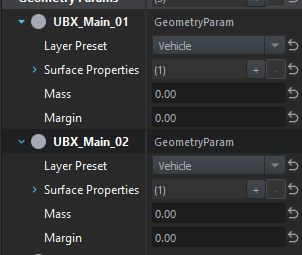
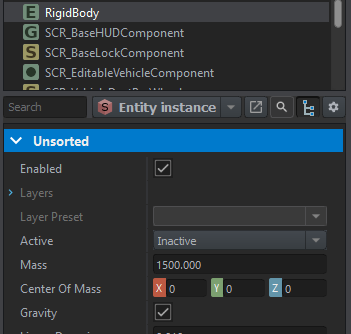
Whats the difference/how do the geometry piece masses work with the rigidbody component mass
do they sum?
should they be equal?
 unreal phoenix
Mass in RigidBody the one to use
 stuck matrix
I have a question. What about clothing simulation? Can we add cloak on player or flags and have a physics for him?
ancient field
unreal phoenix
Mass in RigidBody the one to use
Does the mass in geometry have a purpose anymore?
Also is it possible to define the inertia tensor/matrix of a rigidbody manually or is that calculated from geometry?
rain raft
ancient field
Also is it possible to define the inertia tensor/matrix of a rigidbody manually ...
Check physics API in scripts.
 honest kernel
Has anyone managed to put a geometry on an object?
ancient field
honest kernel
Has anyone managed to put a geometry on an object?
You do it in blender as a separate collection with a specific naming convention in #enfusion_model. Then add a rigidbody to your entity and check apply model geometry
thorny osprey
are destructable buildings possible currently in enfusion?
ancient field
What are the two transforms that PhysicsJoint.Create6DOF is expecting? Offsets? Does one describe the joint position and the second is a offset from that?
ancient field
Also im a bit confused on the transform format. The comment on GetTransform is the following:
<0.989879,-0,0.141916>,<0,1,0>,<-0.141916,0,0.989879>,<2545.08,15.6754,2867.49>```
What do each of these represent? Im pretty confident the last one is the position, are the first 3 a DCM? (direction cosine matrix?)Its almost an identity matrix which makes me think that it is
 noble prism
ancient field
Also im a bit confused on the transform format. The comment on GetTransform is t...
noble prism
ancient field
Also im a bit confused on the transform format. The comment on GetTransform is t...
You are right, they are all components of Transformation matrix
ancient field
Ah okay, i've never used a single transformation matrix. always have had attitude mechanics separate. Thanks!
noble prism
ancient field
Ah okay, i've never used a single transformation matrix. always have had attitud...
There are many great explanatory videos on YouTube about this, I can also recommend book 3D Math Primer for Graphics and Game Development
ancient field
noble prism
You are right, they are all components of Transformation matrix
Would you happen to know an answer to the joint question? Or have access to something that explains the two input transforms a little better for that function?
I'll definitely check out that book
noble prism
ancient field
Would you happen to know an answer to the joint question? Or have access to some...
Sorry, but I do not understand the questions 😦 What you mean by joint question? Or two input transforms?
ancient field
Ah sorry
PhysicsJoint.Create6DOF takes two entities, a parent and a child, and then it asks for two transforms as well.
static proto Physics6DOFJoint Create6DOF(notnull IEntity ent1, notnull IEntity ent2, vector matrix1[4], vector matrix2[4], bool block, float breakThreshold);``` This is all I have access to so I have no idea what matrix1 and matrix2 are relative toI would really recommend to study vector math first. Otherwise these topics will be really hard to understand and you will end up in trial and error type of programming which will most probably not work in such complex area like physics simulation. With 6DOF you can begin here 😉 https://en.wikipedia.org/wiki/Six_degrees_of_freedom

Six degrees of freedom (6DOF) refers to the freedom of movement of a rigid body in three-dimensional space. Specifically, the body is free to change position as forward/backward (surge), up/down (heave), left/right (sway) translation in three perpendicular axes, combined with changes in orientation through rotation about three perpendicular ax...
ancient field
noble prism
I would really recommend to study vector math first. Otherwise these topics will...
I've taken quite a few classes on it already in university. I dont understand what matrix1 and matrix2 are controlling because there is no comment for what they do; which leaves me with no choice but to use trial and error (which I agree is not going well)
noble prism
ancient field
I've taken quite a few classes on it already in university. I dont understand wh...
They are controlling position and rotation two entities ent1 and ent2 should maintain to each other, they define the constraint of this physical joint. I will make sure that documentation of these methods are added.
 willow tangle
I find vehicle wheels weightless. As soon as wheel with even extreme high RPM touches the surface of any kind, it immidiately stops spinning.
The same goes for suspension. That's especially notable when driving fast over rocks. suspension instantly stretches, like there was no mass attached to it, neither depreciation.
dim pebble
ancient field
PhysicsJoint.Create6DOF takes two entities, a parent and a child, and then it as...
The transforms are in local space in respect to the corresponding entity, check the example I posted earlier for vehicle towing: https://pastebin.com/N8fx6scx
ancient field
dim pebble
The transforms are in local space in respect to the corresponding entity, check ...
Yeah thats what I was thinking initially but I was getting weird behavior with offsets I didnt expect. I defined the position in local space and used CoordToWorld() to draw it in the editor but wasnt getting the positions I expected. Ill have to run through it some more when I get back to my computer
rain raft
ancient field
Yeah thats what I was thinking initially but I was getting weird behavior with o...
@noble prism : I know that Dram had some wrapper API over the physics joints some time ago; do you think it would be salvageable? 🤔 Or do you prefer just adding the documentation eventually?
 blazing pawn
Difference between Rigidbody Sim State: Simulation and Collision ?
 daring rapids
blazing pawn
Difference between Rigidbody Sim State: Simulation and Collision ?
daring rapids
blazing pawn
Difference between Rigidbody Sim State: Simulation and Collision ?
I'm not 100% sure on this, but I think Collision is a reduced state where EOnSimulate doesn't get called, but the collision bounding boxes are still calculated. Probably useful for objects which are meant to never move in any way but still "exist"..
noble prism
rain raft
<@777901318228279317> : I know that Dram had some wrapper API over the physics j...
I am not sure about the wrapper. It is possible. 6DOFs were heavily used in Take On Mars and the API hasn't changed that much. We will add the documentation.
blazing pawn
Is there a way to change the tree trunk collider (pink one) to collide with terrain / Can we change which layers collide with each other?
See #enf_showroom message
 honest kernel
ancient field
You do it in blender as a separate collection with a specific naming convention ...
honest kernel
ancient field
You do it in blender as a separate collection with a specific naming convention ...
You add how on rigidbody?
ancient field
Need to be in world editor in either a world or prefab edit mode
If in world editor just drag your model in and in the top right you have a list of component
honest kernel
 ancient field
honest kernel
https://gyazo.com/0656420137af1287ce2d8940ea540e1e
ancient field
honest kernel
https://gyazo.com/0656420137af1287ce2d8940ea540e1e
add component rigidbody, button is at bottom of screen

 craggy tendon
Spin Tires: Reforger incoming
craggy tendon
stress testing >:]
In all fairness, despite becoming subterranean, they will eventually pop up again (5m in the air, at different places)
 ancient field
craggy tendon
stress testing >:]
In all fairness, despite becoming subterranean, they will ev...
ancient field
craggy tendon
stress testing >:]
In all fairness, despite becoming subterranean, they will ev...
How did they end up under the ground lol
craggy tendon
i rammed them... and eventually i managed to break reality ^^ its a modded vehicle though (the reinforced one? from the vehicle test scenario on the workshop). I think it might have a little bit more mass and engine power. Didnt manage the same feat using vanilla stuff (just a tiny bit of sinking into the ground from pushing)
daring rapids
Been stumped on this since yesterday now. I rigged up a vehicle identically to the example new vehicle mod and the suspension seems to be "backwards." has anyone run into this problem before?
Basically there are 3 things wrong - 1. The wheels are extending up from the suspension origin instead of down
2. Accelerating loads the front axle instead of the back, and braking loads the back axle
3. When turning left the car also loads to the left instead of loading to the right, and vice versa
 rotund atlas
daring rapids
Basically there are 3 things wrong - 1. The wheels are extending up from the sus...
rotund atlas
daring rapids
Basically there are 3 things wrong - 1. The wheels are extending up from the sus...
Sounds like your rig is completely backwards
Is your model oriented in the correct axis?
dim pebble
rotund atlas
Is your model oriented in the correct axis?
It was probably that. I just gave him like 50 (maybe 3) things to do in voice call. The issue now appears to be resolved but they were all completed at once so not 100% sure what actually resolved it
honest kernel
ancient field
add component rigidbody, button is at bottom of screen
Do you have to reset the geometry each time you spawn the building?
 solid jasper
Does anybody here know how ApplyTorque works? ApplyImpulse works as predicted, I can apply any impulse I want, but no matter how insane the vector I pass in to the ApplyTorque function nothing happens
dim pebble
solid jasper
Does anybody here know how ApplyTorque works? ApplyImpulse works as predicted, I...
It is a rotational force in world space. It should be working with any value. Make sure it is multiplied by the mass of the object you are trying to move
 lofty ibex
Don't know if this is the right spot but: The CollisionTriggerComponent seems to only trigger for Rigidbody <-> RidgidBody and Rigidbody <-> Terrain collisons. Not RidgidBodies <-> Ragdolls. Is this intentional, am I missing a setting or a bug? Working on landmines and if this is intentional it would be an easy way to make the difference between AP and AT Mines XD
ancient field
honest kernel
Do you have to reset the geometry each time you spawn the building?
No, you need to make a prefab. You can make a prefab by dragging the entity you want to save the configuration of into the resource browser
 lethal idol
Is it possible to make ragdolls behave similarly to GTA 5's rage body physics when shot? Also would it be possible to enable bullet holes/wounds and for the ragdoll to remain active on bodies even after death?
 tight remnant
lofty ibex
Don't know if this is the right spot but: The CollisionTriggerComponent seems to...
tight remnant
lofty ibex
Don't know if this is the right spot but: The CollisionTriggerComponent seems to...
check Layer PReset in RigidBody of projectile (mine in your case)
Projectile layer preset might simply not collider with ragdolls
I'm not sure if its on purpose of if its some mistake though
 candid dome
ic someone figured this out https://vxtwitter.com/HamsterCuter/status/1527889199638233089
 ocean hedge
not sure this is the right channel, but what's missing from the truck to keep it on top of the ground when not RigidBody->static is set? I copied the Arma Reforger truck's prefab and merely changed the Mesh model: https://youtu.be/LvAttKBMJis

While converting the Unsung M35 truck by RamaMarines as a static prop into Reforger was very easy, seems we have a speed bump on our way to make it a driveable vehicle.
lofty ibex
ocean hedge
not sure this is the right channel, but what's missing from the truck to keep it...
Your colliders in the model not being setup properly?
ocean hedge
when it's static I cannot walk through it. It's a p3d from a3 imported via Enfusion Tools and has UTM_FireGeometry, UTM_Geometry, UTM_GeometryPhysX and UTM_ViewGeometry as Colliders currently
do I need to set something like land contact points?
 topaz geode
One thing I'm struggling with understanding is this note in the docs. If my visual geometry is identical to my collision model in Blender do I really have to duplicate it for a collision layer? Seems a bit inefficient for simple shapes.
As a secondary question to this, I know there is a naming convention for LODs in Blender. Would it be possible to just call my visual LOD "UTM_trimesh_ObjName" and use a single model for everything?
 lofty ibex
ocean hedge
when it's static I cannot walk through it. It's a p3d from a3 imported via Enfus...
lofty ibex
ocean hedge
when it's static I cannot walk through it. It's a p3d from a3 imported via Enfus...
If you can walk through it the colliders are not working. What are the layers set to?
ocean hedge
lofty ibex
If you can walk through it the colliders are not working. What are the layers se...
I cannot walk through it when set to RigidBody->static. The Geo layers are cubes and simple meshes
lofty ibex
ocean hedge
I cannot walk through it when set to RigidBody->static. The Geo layers are cubes...
Ah, in the xob properties, do your colliders register? The naming convention fo you colliders also is wrong. It should SHAPE_OBJECT not what it is.
ocean hedge
lofty ibex
Ah, in the xob properties, do your colliders register? The naming convention fo ...
Only UTM_FireGeometry is registered it seems. I'll try to change that, thanks
hmm, no change when using UTM_Geometry now.
lofty ibex
Your collider should be named UTM_OBJECT name.
Like your lods are called OBJECT_LOD0
ocean hedge
thanks, I have it floating now by changing RigidBody->Center of Mass to 0,0,0
not sure how to get it back to ground now?
ocean hedge
lofty ibex
Your collider should be named UTM_OBJECT name.
Like your lods are called OBJECT_...
This is the current setup: https://tetet.de/arma/reforger/reforger-uns_m35-geometry.png
 lofty ibex
And in LOD0 there is?
ocean hedge
lofty ibex
And in LOD0 there is?
Object_LOD0
lofty ibex
then the collider should be UTM_Object
ocean hedge
oh, ok, will change, thanks
thanks, Colliders seem to setup correctly now, but no change. Any ideas how to determine the Center of Mass?
when I change z to negative or positive one, it either front flips or back flips now 😄
lofty ibex
ocean hedge
thanks, Colliders seem to setup correctly now, but no change. Any ideas how to d...
You can set center of mass in ridgidBody or with a COM_Object memory point
honest kernel
Do you know how to get the movement points there?
https://gyazo.com/f5f4a3a0c4d4507f4a997ce2a103fa27

Because on my door they are here: https://gyazo.com/4952475932eeab4a6f883469c8b0e6c5

So the animation plays in the middle and not on one side
honest kernel
I understood that it was necessary to move the scene root but how to do?
 sharp herald
Anyone know which layer preset you use to get things to stop falling through the world?
 lofty ibex
Any one that has a navmesh. PropFireView and make sure your colliders are regestering porperly
 sterile tulip
has anyone tried making a boat yet? I've messed about with making the mutt swim badly
lofty ibex
sterile tulip
has anyone tried making a boat yet? I've messed about with making the mutt swim ...
ex0 hinted at the BTR basicaly being a boat
sterile tulip
lofty ibex
ex0 hinted at the BTR basicaly being a boat
I had considered half way through messing about that the real BTR can swim and that feature might be simulated
i'll have a look tomorrow to see how that goes. Don't expect much from me, I've no idea what I'm doing :p
I can probably steal some sane values from there though
lofty ibex
I personally think boats with the new physics could be awsome floating basis you can walk on. But I am busy myself with landmines right now
 runic kraken
Now someone just needs to figure out how to give boats water particles lmao cause the btr has none
 elfin compass
Is there a reason that this mesh would not fall and float when alone, but if a BTR is nearby it does?
 runic kraken
elfin compass
Is there a reason that this mesh would not fall and float when alone, but if a B...
runic kraken
elfin compass
Is there a reason that this mesh would not fall and float when alone, but if a B...
.
lofty ibex
Does nearby mean, In the world or close to it?
BTR might be Initializing code you are not?
elfin compass
close to it, the second clip is short but you can see the BTR sky diving in the background, to the left
lofty ibex
Does it still float if the btr is on the other side of the world?
elfin compass
It does not
lofty ibex
Well the BTR doesn't get loaded when its there. Geuss it has some componet or a reference to a config somewhere that you lack?
elfin compass
BTR is always loaded, the only difference is location
runic kraken
Are you inheriting from the BTR? Or new vehicle
lofty ibex
elfin compass
BTR is always loaded, the only difference is location
not true, if you are far away the objects components aren't all loaded. else the game's performance would be dogshit
elfin compass
lofty ibex
not true, if you are far away the objects components aren't all loaded. else the...
Oooh, I I figured that it just being rendered meant it was the same as being close vs being far.
@runic kraken the original components were dragged from the BTR so it probably is, I'll rebuild the components anew and see what happens, given what Walthzer just said it, it makes more sense.
runic kraken
Yeah you should check if any of it is linked to the BTR
Its definitely linked to the BTR physics somehow
lofty ibex
SCR_VehicleWaterPhysicsComponent Seems to be what we want
damn ok. Geuss I know why ex0 wanted us to look at the BTR. Its all scripted? Wack
lofty ibex
elfin compass
Oooh, I I figured that it just being rendered meant it was the same as being clo...
The Water physics depend on the BTR's wheeled simulation aswell
So...Uhm, you have to add wheeled simulation to your boat in the most reduced way possible XD
lofty ibex
elfin compass
Oooh, I I figured that it just being rendered meant it was the same as being clo...
Of interest to water physics is:
-Engine
-Steering
-Gearbox
you should be able to ignore the "wheeled" part of the wheeled simulation component.
daring rapids
So, here's an FYI (and also open question) for anyone doing vehicles currently. I have managed to get vehicles I'm working on into a messed up, "floaty" state where the forces aren't balanced and there's no weight on some of the wheels, but it only seems to happen to me on the MP Test terrain. It may have to do with the material the terrain is assigned. Has anyone else encountered this?
elfin compass
lofty ibex
Of interest to water physics is:
-Engine
-Steering
-Gearbox
you should be able...
Thank you, this is going to take a while to wrap my head around
lofty ibex
elfin compass
Thank you, this is going to take a while to wrap my head around
If you need an help feel free to DM. Its a nice boat!
 tepid heron
I'd like to know if there is any inquiry into the ability to edit the actual ragdolls within Reforger; specifically human ragdoll interaction and collision/bend weights. At the moment I love Reforger but those ragdolls/death anims could be improved
 craggy moat
I haven't been corrected thus far, but any question of "can" regarding the SDK is "Yes"
topaz geode
I'm wondering guys if it's possible to use a single LOD for visuals, physics etc by simply signing it in blender or is the minimum requirement two?
ocean hedge
I wonder what I missed - the prefab for the Unsung M35 is a straight copy of the Reforger M923A1. I changed the mass to 20200 kg and now it stopped levitating and sits on the ground. But when I enter as driver and start the engine it falls through the ground and enters the water below. The Colliders work in that I can stand and run against the truck.
 sterile brook
 daring rapids
ocean hedge
I wonder what I missed - the prefab for the Unsung M35 is a straight copy of the...
daring rapids
ocean hedge
I wonder what I missed - the prefab for the Unsung M35 is a straight copy of the...
You have UTM colliders on each wheel right? Also, if you turn on the debug visuals, do you see the wheel raycast in the correct place before you fall through the ground?
sterile tulip
The mutt and uaz have different types of suspension, the mutt has independent while uaz has beam/live axle
Is the difference actually simulated (from bones/anims??? Idk anything about this stuff) or is the game actually simulating independent for each wheel with the visual animation being just visual?
daring rapids
I'm pretty sure simulation happens independent of the bones and anims, then the position and rotation values from the simulation are applied applied to the anim graph and bones instead of the other way around.
ocean hedge
daring rapids
You have UTM colliders on each wheel right? Also, if you turn on the debug visua...
Thanks Ralian, the wheels were not setup correctly. I used offsets now to approximate them. The wheels don't turn when driving now graphically, so I guess more work is needed for this
daring rapids
ocean hedge
Thanks Ralian, the wheels were not setup correctly. I used offsets now to approx...
If you want to show me how your CarProcAnimComponent and bones are set up I might be able to help.
This is how the current (mostly correct) one I'm working on looks
 ocean hedge
I have no bones defined it seems:

it's a plain converted a3 model, so I guess I need to do some blender foo on it?
daring rapids
Ah yes, you do need to add bones to it. I can answer questions about that if you want but the best way to learn is to look at the sample mod's new car. Feel free to DM me (or ask in the modeling channel) if you get stuck.
ocean hedge
thanks. I've the samples d/l. Looking now
daring rapids
Once you add all the necessary bones you just fill out the parameters in that module to tell the anim graph what bones it is manipulating when the wheels turn & suspension moves. It might be tricky the first time but you'll get it. Good luck!
ocean hedge
daring rapids
Once you add all the necessary bones you just fill out the parameters in that mo...
a related question: When I exit the truck I fall through the ground. Is there some offset/Pivot ID I need to define as well?
daring rapids
Yes and no. You can actually define it with a pivot (defaults to scene_root I believe) and an offset, so while it's recommended to create an empty in the blender model where you want the exit point to be, you can just manually set it for prototyping.

You can ignore the pivot point option (where I put the X) and just set the x y z manually. Eventually once you get the correct position you might want to go back and add it to the model
Same for the Passenger Position Info which you have to do for each seat
tight remnant
ocean hedge
a related question: When I exit the truck I fall through the ground. Is there so...
most likely you need to adjust get in/out points in doors (part of compartments component)
ocean hedge
tight remnant
most likely you need to adjust get in/out points in doors (part of compartments ...
Thanks, that worked 🙂
daring rapids
Are there any plans in the future to use collision for contact patch detection instead of just a raycast straight down in model space? My vehicle has a lot of trouble getting over curbs that it probably would be able to in reality.

(of course, if anyone knows any tricks to mitigate this in a different way, I'm all ears. Maybe I need to play with the suspension more.)
light carbon
daring rapids
Are there any plans in the future to use collision for contact patch detection i...
Does the engine not use a collision cdt?
daring rapids
I didn't think it uses that to determine where the wheels are contacting and applying torque, but I would love to be wrong about that
 austere abyss
the wheel objects I don't think are a big driver
light carbon
daring rapids
I didn't think it uses that to determine where the wheels are contacting and app...
The wheels will have they're own cdt, but if your cars collision box is too large you could easily expect what your photo shows happening. It may not so much be the tires torque but the game thinking the cars body is touching it.
austere abyss
look at the wheel and tire settings under the wheeledvehicalsimulation config
yeah that too it may be getting hung up on the body
daring rapids
light carbon
The wheels will have they're own cdt, but if your cars collision box is too larg...
In the case of the photo above, the car's collider is already over the curb without touching it.
austere abyss
try making the simulation wheels bigger
daring rapids
I can give that a shot, but I do want it to match the actual size for realistic driving behavior
light carbon
That's said, I was pretty disappointed with how the mutt reacted to me trying to drive over rocks, seemed to get stuck/hung up on nothing way too easily.
Yeah I'm not sure then in that case
austere abyss
might just be a lateral traction/torque thing
I made a long travel mutt that had a ton more clearance and much softer suspension an it helped alot, but I think a lot of the default tire values have not really be tweeked for really accurate simulation yet
light carbon
I'd assume then there's no debug visualisation of the simulation wheels
daring rapids
Doubling the size of the wheel as a test did help. But I think that just shows that it was an issue of the wheel in the first place.
austere abyss
yeah IDK that's a big curb
light carbon
Oh there is some sort of visualisation, nice
daring rapids
light carbon
I'd assume then there's no debug visualisation of the simulation wheels
You can render them in the vehicle debug menu
Do Ctrl-Win-Alt and go through the menu like this
austere abyss
I'd really like to see wheels and tires setup as slot components so stuff like flat tires and wheel swaping/ removing can be better
daring rapids
I don't think there is anything stopping us from doing that with a modded vehicle. Need to make custom animations for it first though.
 tired flax
I'm honestly confused at how strange they configured the default .ragdoll

but I kinda love it
 past belfry
@elfin compass is that sailboat walkable and collision-able? I would like to tackle a DDH model I have been developing for the last year...
thorny osprey
Cant wait to see your guys creations here, hope that we can benefit the game
 solid vector
Hmm if I understand right you can set lat/lon frictions, roughness and drag based on what material you're on it seems if you do some scripts. Likely can even make wet surface (or weather) affect those also🤔
topaz geode
thorny osprey
Cant wait to see your guys creations here, hope that we can benefit the game
I think modding will be the game, and modders will be the reason communities get built
Very excited
runic kraken
Pretty much always has been and luckily with the support modders are getting always will be
ancient field
Getting weird behavior when I have two vehicles on top of each other. I have a trailer setup as a vehiclewheeledsimulation and then I drop a humvee on top, the humvee will then slowly slide off of the trailer. Ive tried setting a physics material with 100% friction and drag but no luck
daring rapids
ancient field
Getting weird behavior when I have two vehicles on top of each other. I have a t...
I wouldn't recommend making the trailer so that the bounding boxes touch - I would use a 6DOF like what jacob mango did for towing. Couldn't tell you what's actually happening in your case.
ancient field
daring rapids
I wouldn't recommend making the trailer so that the bounding boxes touch - I wou...
Yeah ill take a video when I get the chance, the issue will be more clear
 swift violet
Strange question but can models in Enfusion be walked on while it moves?
daring rapids
swift violet
Strange question but can models in Enfusion be walked on while it moves?
I think there might be a hacky way to do it via script but I have not been able to get that working myself. I don't know of any engine feature to enable relative movement on physics objects though.
swift violet
daring rapids
I think there might be a hacky way to do it via script but I have not been able ...
Really? Not even UR4? pretty sure.. I mean it can be quite buggy when your lagging.. but don't they have that type of cling on physics.. I'm sure it has a technical name.. cling physics I'll call it.
daring rapids
I've only tested it with static AI that I told to stand on a vehicle though. I don't know if it's any different in multiplayer where the person on the vehicle is under player control
sterile tulip
Can anyone show me how to get this visualisation? The tutorial tells you that you can but I haven't been able to find the button
""Below you can see in action transform gizmos (activated via Toggle context(s) transform gizmo visualization ) and radius visualization (activated via Toggle context(s) radius visualization option).""
 tight remnant
sterile tulip
Can anyone show me how to get this visualisation? The tutorial tells you that yo...
tight remnant
sterile tulip
Can anyone show me how to get this visualisation? The tutorial tells you that yo...
ahh, sorry
sterile tulip
That's what I've quoted above lol
tight remnant
not that chapter though
in any case, this debug is part of this context menu https://community.bistudio.com/wikidata/images/e/ea/armareforger-new-car-action-context.gif
 sterile tulip
tight remnant
in any case, this debug is part of this context menu https://community.bistudio....
sterile tulip
tight remnant
in any case, this debug is part of this context menu https://community.bistudio....
Cheers
Am I right in thinking that it isn't possible to add an action context without already adding bones in the fbx?
I'm an absolute beginner in blender, I've got a lot of experience in CAD software for production but it's a whole different kettle of fish.
tight remnant
it is possible, you will just have to position it manually
https://community.bistudio.com/wiki/Arma_Reforger:Action_Context_Setup here is separate page describing more general use
daring rapids
tight remnant
https://community.bistudio.com/wiki/Arma_Reforger:Vehicle_Creation#Debugging
Oh wow, you added a lot to that page. Thanks reyhard. By the way, do you have any thoughts on making vehicles 'get over' things like curbs more easily, like the issue I was having here? #enfusion_physics message
sterile tulip
tight remnant
it is possible, you will just have to position it manually
That shouldn't matter for met yet, keeping it very simple atm
Thanks for links!
elfin compass
past belfry
<@235994393901793282> is that sailboat walkable and collision-able? I would lik...
from what tests I've done ingame yes I was able to walk on it and collide with it
elfin compass
big thanks to @lofty ibex for resolving my ships floating issue, I was imagining the ship needing to have a rope tied around a btr and dragging it behind in order to work.
 last snow

physic and geo from sample
i just change body lod and wheel lod and interior lod
have any idea ?
daring rapids
impossible to tell from that screenshot. mess around with the vehicle debugger and get some data
 winter burrow
Has anyone managed to get the TestDragUserAction to work on an object/prefab? I can get the TestPushUserAction, TestParticleAction, TestCampfireAction scripts to work, but not the Push. I have played around with the RigidBody parameters and the action changes for Drag to Let go but the entity does not move.
daring rapids
winter burrow
Has anyone managed to get the TestDragUserAction to work on an object/prefab? ...
what is your response index set to in rigidbody?
winter burrow
@daring rapids smallMomentum
daring rapids
Hmm... that should be right, but did you also try smallDestructible to see what happens?
rain raft
winter burrow
Has anyone managed to get the TestDragUserAction to work on an object/prefab? ...
I added that thing long time ago for testing and it was never used in production (duh, hence the name) - there might be a component required or something, but writing it yourself would be easier imo 😋
winter burrow
@tough minnow I presumed it was a test but though it may have worked, thx for the answer.
winter burrow
Managed to make it work, changed it to RigidBody->AlwaysActive.
rain raft
winter burrow
Managed to make it work, changed it to RigidBody->AlwaysActive.
Awake your rigidbody yourself and then let it sleep when you're done with the action for better performance
 worthy jacinth
I'm having issues setting up wheels for my vehicle. I've followed the "NewVehicle" sample tutorial, and (to my knowledge) done everything as it tells. Everything else seems to work, except for the axles / wheels for the vehicle. When I add it, it just drops onto its base collider, and the wheels don't seem to exist.
I've tried comparing my setup to what's done in the sample mod, and the only difference I've found is the "tyre" class. When I try to add one myself, enfusion always crashes
 whole pulsar
Hi all, I have a question about ragdoll. I'd like to include a better ragdoll in my mod "Effect" on workshop. Do you have an idea where I can find the file in Enfusion? I found one but not sure if good or not.
 next canopy
whole pulsar
Hi all, I have a question about ragdoll. I'd like to include a better ragdoll in...
next canopy
whole pulsar
Hi all, I have a question about ragdoll. I'd like to include a better ragdoll in...
there is a person in the showroom that has been developing better ragdolls
whole pulsar
Nice. I'd like to try it also. The mod I found on workshop is just no gravitish after bullet hit.
past belfry
elfin compass
big thanks to <@127769106135908352> for resolving my ships floating issue, I was...
One question...
Does the 70 m long limit in the GEO/Road LOD still applies in Reforger???
Your ship certainly looks bigger than 60 meters...
Just out of curiosity
elfin compass
That ship is just shy of 50 meters. I scoured my hard drive for something I could use to test your question, and keep in mind it was a very rough, quick slap together without much planning approach.
This ship measures around 423 meters long and was imported as a single mesh.
Character standing still was a bit jittery but in moving seemed fine, and I was able to walk from end to end however placing a vehicle did cause the suspension to fall through the deck... this may however be the collider having the wrong setting.

 past belfry
elfin compass
That ship is just shy of 50 meters. I scoured my hard drive for something I cou...
past belfry
elfin compass
That ship is just shy of 50 meters. I scoured my hard drive for something I cou...
OMFG
I'm refining a 235 m DDH I have been developing in Object editor but I still haven't ported it to blender...
Looks very good!!!
EDIT: I suppose that the pink thinguie is the collider. Is it composed of primitives or a convex trimesh. I have heard it may be not convex in Reforger.
I will take a look at blender tomorrow
 radiant dove
elfin compass
That ship is just shy of 50 meters. I scoured my hard drive for something I cou...
radiant dove
elfin compass
That ship is just shy of 50 meters. I scoured my hard drive for something I cou...
Damn, Now I got massive itch for having battleship new jersey ingame.
😅
radiant dove
elfin compass
That ship is just shy of 50 meters. I scoured my hard drive for something I cou...
Have you tried different physics materials on the deck? Something extra sticky. That could help.
Or you can create custom script that parents player as a child of the ship to prevent jittery.
 languid stream
Does Enfusion support player movement on moving objects? I.E walking around on the deck of a moving ship?
 jade ice
How do i adjust the steering ratio / speed at which the vehicle steers?
not the max angle of the steering
but the speed of it
 loud sonnet
languid stream
Does Enfusion support player movement on moving objects? I.E walking around on t...
loud sonnet
languid stream
Does Enfusion support player movement on moving objects? I.E walking around on t...
I hope it does
dim pebble
languid stream
Does Enfusion support player movement on moving objects? I.E walking around on t...
I will test tomorrow or the day after to see if it can be modded in through AddChild or if we need LinkToLocalSpaceOf/UnlinkFromLocalSpace exposed again.
There's some functions that were exposed later in DayZ's lifetime that aren't exposed in Reforger that allowed this to be possible there
tight remnant
jade ice
How do i adjust the steering ratio / speed at which the vehicle steers?
steering curves are defined in SCR_CarControllerComponent
languid stream
dim pebble
I will test tomorrow or the day after to see if it can be modded in through `Add...
Rog. Let me know how that testing goes. If it cant be done, it cant be done.
dim pebble
languid stream
Rog. Let me know how that testing goes. If it cant be done, it cant be done.
As expected AddChild unfortunately doesn't work. We will just have to wait for a function similar to LinkToLocalSpaceOf to make its way back if it exists
Edit: Made a feedback tracker ticket https://feedback.bistudio.com/T165518
languid stream
dim pebble
As expected `AddChild` unfortunately doesn't work. We will just have to wait for...
Thanks for checking! I hope it becomes a thing for ARMA 4
daring rapids
tight remnant
steering curves are defined in SCR_CarControllerComponent
Is there any in engine way to adjust this for controller? I've noticed that driving with controller does not respect these curves, and it can lead to some funny driving behavior.
I thought about reporting it to the tracker but also realized it's kind of intended behavior... it would just be nice if we had curves and filtering we could adjust
 near needle
Sprinters
sterile tulip
I've done something funky at some point and this thing refuses to turn (it used to at some point), it also appears that the unload/no contact wheel is casting upwards?
Anyone know what I could've done, I've found putting certain values in places does seem to break wheel simulation in places.
I might end up scrapping this at this point, I'm slowly learning as I go and it probably wouldn't be too much work to remake it working...
 daring rapids
sterile tulip
I've done something funky at some point and this thing refuses to turn (it used ...
daring rapids
sterile tulip
I've done something funky at some point and this thing refuses to turn (it used ...
Can you show the colliders and force diagram on this as well?
I fixed something similar with mine and I can probably help you later today. I'm in US so off work for the day.
 whole apex
Hello I am looking for a tutorial how to create a physic as well as how to operate my car get into it etc.
#enfusion_gui message
daring rapids
whole apex
Hello I am looking for a tutorial how to create a physic as well as how to opera...
Most of the basics are here https://community.bistudio.com/wiki/Arma_Reforger:Vehicle_Creation
whole apex
daring rapids
Most of the basics are here https://community.bistudio.com/wiki/Arma_Reforger:Ve...
thanks
sterile tulip
daring rapids
Can you show the colliders and force diagram on this as well?
I did something and broke it even further 😎
No longer getting the prompt to enter 😅
I'm very much feeling my way around blender, so I'm probably missing some vital steps there
Thanks for the offer, but I should probably get more used to working in blender
daring rapids
sterile tulip
I did something and broke it even further 😎
No longer getting the prompt to en...
That could also be that you messed up your materials. Does your kart have fire geometry, and is it set to firegeo?
It's actually probably a configuration problem if won't turn. Do the tires rotate?
*wheels, as in when you turn the steering wheel
sterile tulip
daring rapids
It's actually probably a configuration problem if won't turn. Do the tires rotat...
Nah, nothing is properly rigged lol
I was expecting to be busy today, but have some time so I'll probably spend some time in blender and actually learn about vertex groups and bones and stuff
ocean hedge
did the debugging change? I used to see a blue circle where the wheels are supposed to be with the debug option wheels and so forth on, but now after a week long break I get no info
ocean hedge
ocean hedge
did the debugging change? I used to see a blue circle where the wheels are suppo...
self answer: unset player vehicle, needs to be false to see debug output for vehicles you're not in
sterile tulip
I've got a weird thing where the vehicle I'm working on is very sluggish going forward, but seems to have limitless power when going backwards
I can even put reverse gear ratio at 1 and it will go
I've probably done something weird in the config, and I concede that this is a vehicle on the fringes of what reforger was made for 😅

 whole dock
Probably you did something wrong when making the kart
 winged wolf
sterile tulip
I've got a weird thing where the vehicle I'm working on is very sluggish going f...
winged wolf
sterile tulip
I've got a weird thing where the vehicle I'm working on is very sluggish going f...
Gear ratios. Looking at your forward acceleraion you have very long gears.
@thick parcel
sterile tulip
winged wolf
Gear ratios. Looking at your forward acceleraion you have very long gears.
<@133...
the opposite, in this example I've put reverse at 1
Forward gear tops out at say 120 kmh. If I have the gears matching they both top out at the same but reverse gets there very quickly
 thick parcel
I think you got it backwards. Ratio divides the RPM. High gears have lower ratios in general. Also I think engine RPM is currently clamped at idle RPM, so you are probably getting the instant acceleration effect this way.
sterile tulip
thick parcel
I think you got it backwards. Ratio divides the RPM. High gears have lower ratio...
Yeah so ratio of 1 means the drivetrain is moving at the same speed as the engine (before diff reduction)
Higher ratio number at the gearbox gives a lower speed but faster acceleration
The vehicle hits 120 at the redline in first, but hits 320+ in reverse and does it in a fraction of the time. It moves like an electric car lol
It doesn't feel like intended behaviour
the debug screen says the wheels in reverse at peaking > -2000 torque, while they only peak at 600 for forward, same ratios
sterile tulip
Setting the friction to a very low value gives forward speed a similar result, maybe reverse is ignoring the friction value?
Either way my very sluggish forward performance is fixed, warp speed reverse can just be a bonus
thick parcel
This is very interesting, I'll check if that could be the case. Thank you!
sterile tulip
thick parcel
This is very interesting, I'll check if that could be the case. Thank you!
Easily observed if you put put the friction to say 2-4x max engine torque
If you put negative values in the gears (both forward and reverse, it works!) you get about the same result but with reverse controls
 knotty moss
sterile tulip
I've got a weird thing where the vehicle I'm working on is very sluggish going f...
knotty moss
sterile tulip
I've got a weird thing where the vehicle I'm working on is very sluggish going f...

 heady atlas
sterile tulip
https://youtu.be/hdzKSXWsekE
heady atlas
sterile tulip
https://youtu.be/hdzKSXWsekE
Hi, idk if its the good channel for this but i have a problem

Can you help me very quick to fix it please?
sterile tulip
heady atlas
Can you help me very quick to fix it please?
Possibly...
Guessing blender? Have you got the correct bones/hierarchy?
heady atlas
Yep

I took the sample of the basic car and adapted it correctly
In the game, the wheels move and turn well, it's just their positions that are not good
sterile tulip
I think you can use the anim graphs for the uaz and wheels mostly behave correctly, but the character anim was messed up for me
I made a quick animation for the steering wheel, exported it as TXA, and replaced a couple of anims in the ASI
sterile tulip
heady atlas
I'm a beginner i don't understand everything 🥲
I only started this stuff a week or so ago


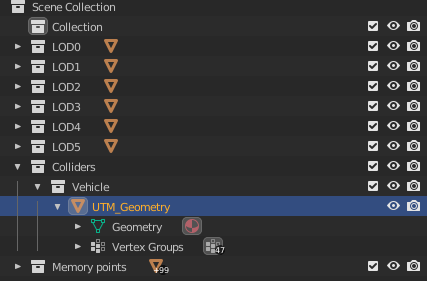
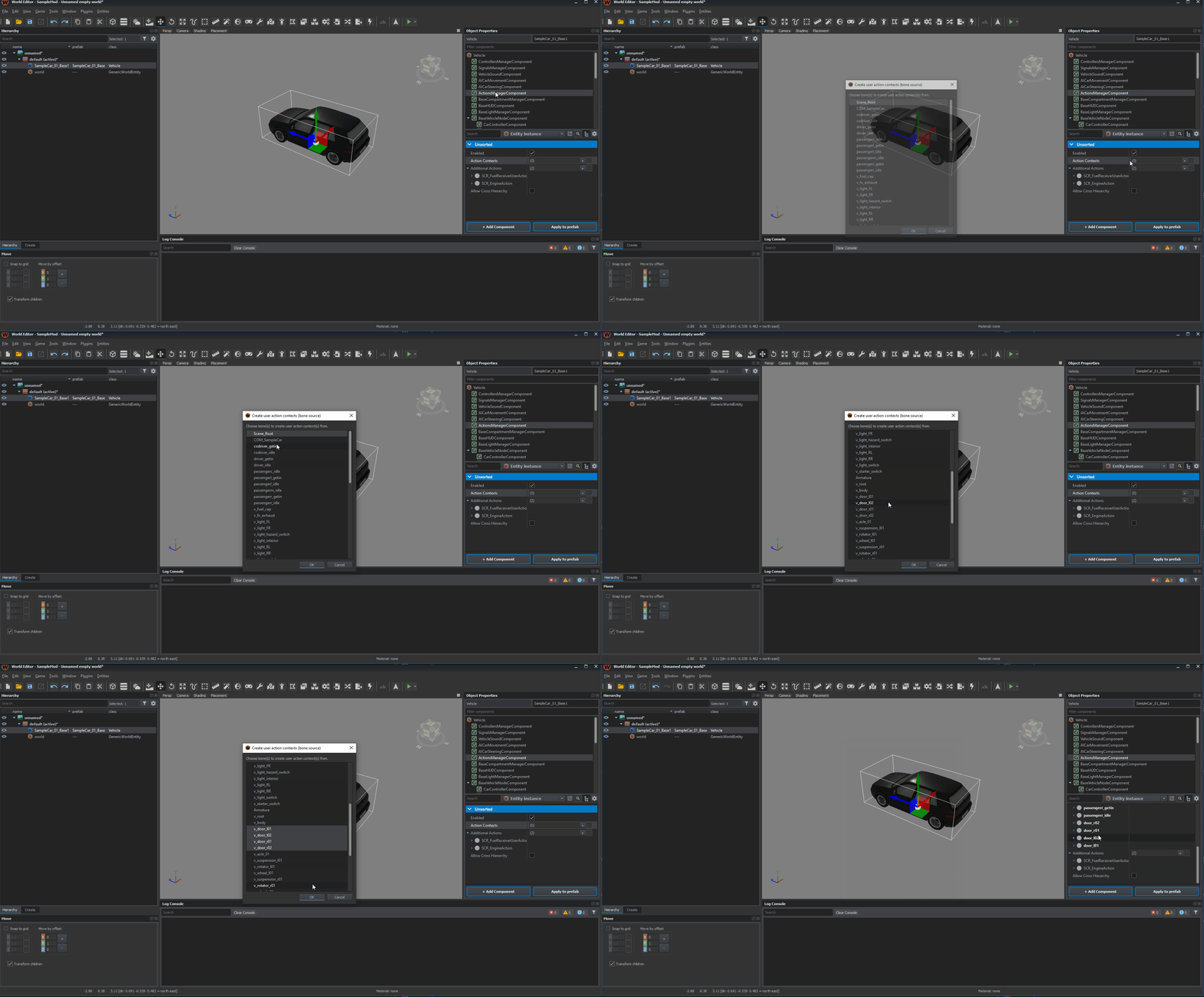 sterile tulip
yeah I replaced one of those ones
heady atlas
okay i will try
sterile tulip
I exported TXA with the enfusion blender tools
heady atlas
Thanks for your help
remote flame
I have come across a strange problem. My Driver in my modded car slow drifts out of position. Even when the car is idol. I tested using the UAZ animations but that did not fix it. I have downloaded other modded cars and they are also doing it apart from the Evo. My drive idle is parented to my body bone which is leaving me out of idea's to what is causing it
sterile tulip
remote flame
I have come across a strange problem. My Driver in my modded car slow drifts out...
Mine does this too, seems to happen if you get in the car and do nothing for a moment or two
Don't seem to drift while driving
daring rapids
remote flame
I have come across a strange problem. My Driver in my modded car slow drifts out...
Make sure you parent the compartment to the body bone of your vehicle... at least I think that's what I did
If you do it without a parent it gets screwy after a lot of collisions, even if it looks right initially
remote flame
My driver idle position is parented to the body of the vehicle although after 5 hours of testing I think I found the issue or bug. I altered the driver idle position in the prefab to align up properly. I just removed that as a last resort and seems like thats fixed it
Yeah I just crashed a bunch that that was the reason
daring rapids
remote flame
Yeah I just crashed a bunch that that was the reason
here's how I have mine parented in blender

v_root is the name of my armature, not of a bone
I think I was misspeaking last night because I didn't remember exactly what I did
 spring quarry
hello I have just finished my vehicle but when I start there is indeed the action to start but after nothing happens the vehicle does not start and does not move forward would you have any idea where it could come from please?
ocean hedge
spring quarry
hello I have just finished my vehicle but when I start there is indeed the actio...
do you have animation graph defined for starting the vehicle? When I removed the animation graph from the Unsung M35 it would not start either
ancient field
Is it possible to get the current solar flux at a position on the map? How much power is being radiated at a point. (Is that even modeled?)
Mainly want to account for clouds and time of day
 round sandal
Hey Guys, does anyone know how can i enable collision and firegeo of items my character is wearing? i want to remake my armor system with physical armor from Arma 3
daring rapids
round sandal
Hey Guys, does anyone know how can i enable collision and firegeo of items my ch...
a lot of the existing vests and stuff have collision. You could just modify the type of the colliders to firegeo or similar I bet. Stuff like this ALICE kit

should be able to hack something together with the layers preset in rigid body

but you'll want to make a new model with hand made colliders I bet.
round sandal
@daring rapids can you help me with basic setup? i cannot get it to work
daring rapids
round sandal
<@102171754071334912> can you help me with basic setup? i cannot get it to work
What have you tried? Have you changed the collider type and it's still not absorbing rounds?
round sandal
If i set it to active object it dissapears
 daring rapids
Leave it as inactive, I never said to touch that. But were you able to try ballistics with that set to firegeo?
If you don't know how to turn on the ballistics rendering btw, it should be the first entry in the ctrl-win-alt menu
round sandal
if you could point where is balistic rendering inside this menu @daring rapids
daring rapids
@round sandal You'll also want to change rendering mode to see colliders, so hit Alt+Num6 several times until you see them in transparent mode
round sandal
Cool! Great hanks Ralian, but i did an opsie by mistake, is there reset button for like all the setting?
daring rapids
Settings in the debug menu? Just relaunch workbench I think
or if you're talking about settings in the prefab you can hit the back arrow if it's not saved
gonna have to be more specific
 wraith fox
daring rapids
Settings in the debug menu? Just relaunch workbench I think
wraith fox
daring rapids
Settings in the debug menu? Just relaunch workbench I think
Do you know how to add collisions to objects imported from blender? i already tried adding a rigid body to them but it wont work
daring rapids
wraith fox
Do you know how to add collisions to objects imported from blender? i already tr...
wraith fox
daring rapids
read this https://community.bistudio.com/wiki/Arma_Reforger:FBX_Import
love you no homo
 austere spoke
anyone know how to get a simple bounding box of a MeshObject/RigidBody
lavish lion
Physics::GetGeomWorldBounds or IEntity::GetWorldBounds depends on your need
 restive shore
How do I apply force to a RigidBody that is a child of another RigidBody? I have a scripted weapon attached to a truck and I want to apply "recoil" from script when firing. Tried something like GetParent().GetPhysics().ApplyForceAt(..., ...) but that didn't seem to have any effect
 astral basin
anybody in here know how advanced the driving/traction system is/can be? i was thinking about putting an "off road park" in my map and wonder if things like off road driving/rock crawling will be possible with mods in the future , or if it will require new materials ect on the map itself.
daring rapids
astral basin
anybody in here know how advanced the driving/traction system is/can be? i was t...
It seems pretty advanced out of the box. Per wheel traction, forces, pacejka forces, different types of differentials, etc.
astral basin
so you think rock crawling type stuff could work?
daring rapids
So yeah I would absolutely love to see a cool vehicle trail on your map!!!
Uh, typically rock crawling just works with a really high gear ratio and a 4wd differential that completely locks
which we have the power to do
So yeah. Although I will say that I don't think the simulation handles getting over rocks completely correctly... It only cares about the contact patch between the tire and what is directly below it determined by a raycast
daring rapids
restive shore
How do I apply force to a RigidBody that is a child of another RigidBody? I have...
You're almost correct but I think you have to use ApplyImpulse instead of ApplyForceAt... that could be unimplemented at the moment
dim pebble
daring rapids
You're almost correct but I think you have to use ApplyImpulse instead of ApplyF...
No it should be implemented.
The child may not be a dynamic body or simulation is disabled on children
restive shore
ApplyImpulseAt doesn't seem to do what I want to - when applied to the top of the vehicle (where the turret is placed) it just pushes the whole vehicle (as if it was applied to its center of mass) and does not try to "flip" it
It also seems to work fine when I apply the impulse to the turret prefab itself, but not when it's attached to Ural-4320 via SlotManager
I thought the problem might be related to missing Hierarchy component on my turret prefab, but that doesn't seem the case
dim pebble
restive shore
ApplyImpulseAt doesn't seem to do what I want to - when applied to the top of th...
If you're wanting to flip the vehicle then move the position to the opposite side you want the vehicle to flip. Set the force direction to push upwards
restive shore
Well, by "flip" I meant the vehicle slightly tipping over on some side due to recoil (think of some tank firing with it turret sidewards). So I'm trying to apply impulse that's exactly on the barrel of the turret and the vector's impulse directed the opposite side of the barrel
Here's some test code that kinda does the job, but doesn't seem to be applied to the point I want it to
pOwnerEntity.GetParent().GetPhysics().ApplyImpulseAt("0 2 0", "-10000 0 0");
(I'm using -X axis as the vehicle is ideally aligned with axes for testing)
dim pebble
IIRC the position is in world coordinates
dim pebble
Also, try using ApplyForceAt instead
restive shore
ApplyForceAt still doesn't work no matter how big the value I pick. So I guess I'll have to stick with ApplyImpulseAt for the time being as it does the job fine
It may be because the Ural-4320's RigidBody is set to Inactive
dim pebble
Do you get an output in the console mentioning something like "Function is unlinked"
restive shore
No, I get no output
dim pebble
And yeah only use these functions on the actual vehicles, not on their attachments
daring rapids
Ah I was mixing up ApplyForceAt and ApplyImpulse at... I had tried the former as well and that doesn't really work.
daring rapids
restive shore
ApplyImpulseAt doesn't seem to do what I want to - when applied to the top of th...
Have you verified this by watching the force vectors by using the debug menu?
restive shore
Not sure, will try that
ancient field
What is the difference between applying a force and an impulse? Would an impulse instantaneously change the velocity of a rigidbody; and the force causes an instantaneous change in acceleration of the body, acting only for a single frame?
daring rapids
ancient field
What is the difference between applying a force and an impulse? Would an impulse...
Impulse instantly changes the body's momentum by the amount you provide (in newton seconds). ApplyForce (in newtons) creates a force which acts continuously on an object, changing its momentum over time. Once you add a force with ApplyForce, I believe it persists forever until Physics::ClearForces is called. However, I'm not sure if those parts of the physics api are finished. I know applytorque and some others don't do anything currently.
But calling something like physics.ApplyForce(forceVector) once will usually give you the same result as doing physics.ApplyForce(forceVector * timeSlice) in your EOnSimulate loop
ancient field
Interesting, good to know
daring rapids
Yup. Let us know if you play around with applyforce and it works, I honestly can't remember
daring rapids
daring rapids
But calling something like `physics.ApplyForce(forceVector)` once will usually g...
Jacob pointed out to me that depending on how bullet is implemented here forces might actually get cleared post-frame - however, I tested with ApplyForce, and I couldn't get it to work at all in place of ApplyImpulse. So I would stick with the latter
Oh and that second one should be physics.ApplyImpulse(forceVector * timeSlice) lmao
dim pebble
daring rapids
Oh and that second one should be `physics.ApplyImpulse(forceVector * timeSlice)`...
Oh if that is the case then yeah what you are saying is correct
ApplyForce updates the velocity in each substep, multiplying the time by a factor of timeSlice you recieved in the EOnSimulate method.
ApplyImpulse is similiar to velocity += impulse, so you need to scale the impulse to the time yourself by multipyling by timeSlice
I'll write a better example in an hour. Busy right now.
(edited the above message)
daring rapids
dim pebble
ApplyForce updates the velocity in each substep, multiplying the time by a facto...
Except if this is right (the part about clearing) then what I was saying wasn't correct
Because I was saying that running ApplyForce once is equivalent to doing ApplyImpulse each frame (~60 times a second) effectively with a 1/60 normalization in the parameters
But yes even though they effectively doing the same thing it's not the exact same, for the velocity += impulse reason you say
Doing ApplyImpulse will probably ignore static friction on a stationary object unlike ApplyForce
 sonic shoal
can anyone help me with writing a script for shrapnel? I want to make a semblance of what was in ACE mod for Arma 3
timber flame
Did anyone successfully turn on destruction? One of the first things you notice with this game is that almost every building is destructible, just the feature is turned off.
restive shore
How do I make my missile align properly with its prograde trajectory? I'm using MissileMoveComponent and trying to experiment with various options, but the missile still seems to fly without any rotation
restive shore
I would also like some info on MissileMoveComponent parameters as well. I've built a ballistic simulation that approximately matches the thing I'm modelling, now I am trying to take the values I got to Enfusion and can't really tell the meaning of "Forward Air Friction" value, how may it be related to values of air density/drag coefficient/missile velocity
tight remnant
restive shore
How do I make my missile align properly with its prograde trajectory? I'm using ...
by the rotation do you mean ballistic drop?
restive shore
tight remnant
by the rotation do you mean ballistic drop?
Yeah, like the nose of the missile trying to align with its flight trajectory
ruby shadow
which checkbox do I click to have an object affected by gravity when it spawns?
I feel like the sleeping thresholds are freezing it, but I would like a gentle fall
or maybe I'm better off using a movement component for this
restive shore
ruby shadow
which checkbox do I click to have an object affected by gravity when it spawns?
I think you only need to make a collider for it and make the RigidBody active
ruby shadow
restive shore
I think you only need to make a collider for it and make the RigidBody active
I'll try that, thanks
ancient field
restive shore
Yeah, like the nose of the missile trying to align with its flight trajectory
You could use the normalized velocity vector as the longitudinal axis of the missile
restive shore
ancient field
You could use the normalized velocity vector as the longitudinal axis of the mis...
I'm using MissileMoveComponent for all the handling and I think it's all engine-implemented, so I guess I'll have to write my own missile flight script for that
restive shore
Also I wanted to know if anyone tried using CollisionTriggerComponent, I'm still having issues with my projectile not getting triggered when colliding with terrain. I tried switching to ProximityTriggerComponent, it seems to work fine only when some vehicle or character is nearby
The projectile just collides with terrain, and bounces until its nose is pointing at the ground, only exploding after 10-20 seconds
 rustic harbor
@restive shore what does it inherit from?
restive shore
GenericEntity
I just used the same component set that's present in the PG-7VM prefab
restive shore
rustic harbor
<@394764165392105472> what does it inherit from?
Can this problem be caused by the missile prefab being based on GenericEntity and not Projectile class? Can I somehow change a class on an already existing prefab then or should I just redo the prefab by duplicating some other prefab of that class?
Tried replacing my prefab by inheriting Projectile, the problem still seems to persist, but to a much lower degree. Projectiles now explode almost consistently, but sometimes take half a second to trigger when hitting the ground
restive shore
I use MissileMoveComponent + CollisionTriggerComponent (as inherited from PG-7VM)
daring rapids
I did some messing around with that component to try and help you, but I couldn't do anything conclusive. I wish you could set what collision layers ProximityTriggerComponent interacted with.
winged wolf
restive shore
I use MissileMoveComponent + CollisionTriggerComponent (as inherited from PG-7VM...
Collision trigger hooks up on missile move component. In case speed is too high and physics oncontact wouldn't work, it's supposed to react to raycast done in move component.
This raycast layer needs to be Projectile afaik.
restive shore
I also tried ProximityTriggerComponent, but it seems to trigger on its own no matter what "DISTANCE" parameter value I set, has anyone tried using it yet?
Set "Arming time" to 1s but it seems to just detonate after that arming delay elapses
ruby shadow
Maybe it triggers on itself or something
Collision trigger should work, just like the one on the missile
You sure your colliders are all setup correctly?
restive shore
Yeah, I tested that with CollisionTriggerComponent and that seems to work fine now. After trying CollisionTriggerComponent I wanted to also try making a cluster munition by using ProximityTriggerComponent to detonate it N meters above the ground, but I'm not sure if it's supposed to be used like that
I may need to write my own trigger script instead, which will use altitude at sea level (if that's a thing in Reforger, I'm thinking Arma 3 stuff) to set off
 terse portal
Is there a way to put one entity in another entity's intertial frame of reference? I have a ship, I want characters to walk around on the deck, but they just fall over when the ship moves.
rustic harbor
@terse portal That's called linking and it's currently broken right now.
You use AddChild to do it.
But it isn't worth messing with until it's fixed.
Currently the further the parent is away from world (0,0,0) the bigger the offset the child is set to in it's local space.
Also if the player is moving while they link then they'll keep the current movement animation regardless of input.
I.E. if you're running and link then you'll keep the running animation even when your idle.
Players also lose collision.
At least for vehicles.
And when you die instead of a ragdoll you get balled into a potato.
past belfry
terse portal
Is there a way to put one entity in another entity's intertial frame of referenc...
I'm also modelling a big carrier type ship and I would like to know how to set her...
I'm still at the modelling phase
Could anyone give some advice or prepare a tutorial about this???
terse portal
You should follow advice on wiki about colliders for vehicles & dynamic objects. I use the Vector tool to draw splines and then interpolate the ship along, but I saw also there is a class for AI to follow splines, so an AI captain might work too.
rustic harbor
past belfry
I'm also modelling a big carrier type ship and I would like to know how to set h...
I literally just gave the best advice about it.
It's not viable at the moment.
Linking needs to be fixed by B.I. first.
daring rapids
Does anyone know how to get rid of this inconsequential error message from the particle emitter on vehicles that fly? It doesn't happen with any other component, and it spams the logs seemingly at random which is really not ideal.
 daring rapids
There's also this issue, which seems to happen when the camera is in certain states while flying? Has anyone else encountered this?

Neither of these directly cause any issues, but it's massive logspam
 stray flint
for me it looks like LOD used for detection of collisions is too complex (collider) but idk, just guessing
daring rapids
That could possibly be the second issue. But that won't fix the first issue.... I think that's engine side and there's not much I can do about it
daring rapids
Also, has anyone been able to get the rotationmakes to update colliders attached to the bones being rotated? I checked this option but it doesn't seem to do anything.
 ocean hedge
past belfry
I'm also modelling a big carrier type ship and I would like to know how to set h...
ocean hedge
past belfry
I'm also modelling a big carrier type ship and I would like to know how to set h...
I've did some tests with SetOrigin/GetOrigin of a cube platform and a vehicle (UAZ). It's quite a hackish way and doesn't really work and is certainly no physics using. However, the UAZ could move on the cube platform. But it's too brittle to be published right now, sorry
elevators moving vertically seem to be working though
terse portal
Anyone have luck with BallSocket or 6DOF joints to tow vehicles? The lead vehicle moves for me but the child vehicle doesn't. The wheels spin and turn, debug shows it should be moving on the physics vectors, but something is freezing it in place.
past belfry
ocean hedge
I've did some tests with SetOrigin/GetOrigin of a cube platform and a vehicle (U...
Do you plan to move the Nimitz to Reforger???
😍 😍 😉
ocean hedge
past belfry
Do you plan to move the Nimitz to Reforger???
😍 😍 😉
Depends if the textures and model get a much needed update
so far I'm testing stuff like catapults, elevator, moving in general
past belfry
Theoretically Reforger colliders allow bigger than 60 meters entities... don't they?
ocean hedge
past belfry
Theoretically Reforger colliders allow bigger than 60 meters entities... don't t...
yes, collider is not the problem
so a static big carrier is perfectly doable. But one that moves and everything aboard moves with it, that's a bit problematic. Especially if the aboard assets want to move on their own as well
daring rapids
Yeah once linking gets fixed / documented we'll be golden
ancient field
terse portal
Anyone have luck with BallSocket or 6DOF joints to tow vehicles? The lead vehicl...
Disable handbrake on child vehicle
 white atlas
Is anyone planning on making trailers for trucks possible
For cool logistics or something
ancient field
white atlas
Is anyone planning on making trailers for trucks possible
Still working on it but here is my WIP : https://i.imgur.com/LoAX83h.mp4
white atlas
Nice man
thorny osprey
incredible plato, you do released you released pandora's box right? do you have any idea how many tanks, trailers and trucks will be sleeping on the side of the road?
 autumn void
ancient field
Still working on it but here is my WIP : https://i.imgur.com/LoAX83h.mp4
autumn void
ancient field
Still working on it but here is my WIP : https://i.imgur.com/LoAX83h.mp4
I shared your creation on the Everon Life discord, I think your system should really interest them ! Good job 👏
ancient field
daring rapids
Also, has anyone been able to get the rotationmakes to update colliders attached...
I've got the same issue. Did you find a solution?
daring rapids
ancient field
I've got the same issue. Did you find a solution?
No but I found a workaround that works for my case. What exactly are you trying to do?
I do think it's more of an issue of how I was parenting the colliders, because it seems the colliders weren't parented to the bone properly, whereas the vanilla XOBs you can move the colliders with the bones
I've done everything I know how to (it's parented correctly in Blender) so I think there might be a bug with blender export since most of the devs don't use blender from my understanding
ancient field
daring rapids
No but I found a workaround that works for my case. What exactly are you trying ...
I've got the jackstands/dolly on a trailer I need to translate the geometry of to lower the trailer onto a fifth wheel.
I weight painted the geometry box to the bone 100% and did an armature modifier, not sure if that was necessary
Works for the mesh but not the collider
daring rapids
Yeah, I think that's an issue with both of us not knowing how to parent the collider correctly
I could show you how to make it an EntitySlot so that the colliders move with it, but then it won't offer any collision
only the ability to check if a collision happened via script
Don't think that works for your use case
ancient field
Nah that wouldn't work for my case sadly 😦
 gentle island
hey there, does anyone here know sth about recoil settings?
gentle island
ruby shadow
no but maybe I can find out
thanks man. i was trying to play around with the recoil settings in workbench but no matter what i change i still got offset spraying in ADS when shooting. if i disable the whole recoil option i got not a single shake shile in ADS
ruby shadow
gentle island
thanks man. i was trying to play around with the recoil settings in workbench bu...
all the curves are in there in the aim modifier
gentle island
ruby shadow
all the curves are in there in the aim modifier
yes i already tried around with all those kurves but nth changed
which curves do influence the offset of the sight when shooting? my sight for example is constantly dragged to the right when shooting
ruby shadow
mine seems to go up and a tiny tiny bit to the right, but it might depend on weapon
which gun is it?
maybe turn offset data is what you want to modify?
you can test them each out by setting their individual base recoil scale to something like 0.01
then u can see what each of the three(?) recoil params does
gentle island
ruby shadow
which gun is it?
Hey there thanks for the suggestions, will try this again today. I got the basic parameters of the M60 with a hihger firerate. problem til now is no matter which curve i flatten or which parameter i change till it should do nothing, nothing changes on behaviour
ruby shadow
I tried these settings out they seemed to work
gentle island
ruby shadow
I tried these settings out they seemed to work
what exactly did you do?
did you change the curves or did you change the coordinates (magnitues, mins, maxs)
ruby shadow
all params basically
gentle island
which axis is which? is x the horizontal and + is right while - is left?
so basically i set x and y curves now to a straight zeroline and all coordinates to zero, still the sight is shaking constantly to the right
ruby shadow
I thought they were like with the move tool
just set base scale to 0.001
or something
just to test
if you are editing the right parameter
theres 3
gentle island
so you mean the Turn Offset Data?
that is the only group i am editing right now
i just wanna set the recoil lower and change its direction from right to ground
gentle island
within turn offset data i set them all to zero, the x and y curves have a straight zero line now, base recoil and move recoil are on zero and still it shakes to the right
gentle island
the problem is that i thought about wether i am changing bulletdrop and not the sight shaking itself
yes i use the M60
i set the M60 firerate quiet high cause i made an MG42
with that high firerate it shakes to the right like hell, so the rearsight does basically
ruby shadow
I picked up the M60 and it does not go to the right for me at all so I am not sure how to reproduce
gentle island
if i uncheck enable for all aim modifier groups it has zero shake so it is not a kind of sway problem i think
ruby shadow
what RPM should I set it to?
gentle island
1200
gentle island
do i need a tool for recording? long time ago i recorded sth 😄
ruby shadow
heres how it looks for me
ruby shadow
creativity maybe idk, whatever
sonic shoal
is there any ways to make multi-barrel weapon works properly?
 ruby shadow
what does properly mean?
sonic shoal
ruby shadow
what does properly mean?
so that each projectile flew out of its barrel and the model disappeared in the barrel
ruby shadow
probably if you store the projectiles within it similarly to how the rpg rocket is stored in the tube
in a slot
im 90% positive you can have multiple slots and each can be occupied by something
sonic shoal
ruby shadow
in a slot
if you have time, could you help me with this in conversation, please?
ruby shadow
I haven't actually played with slots yet, I just know they exist
maybe the guy making GRAD knows more about this
@restive shore
sonic shoal
ruby shadow
maybe the guy making GRAD knows more about this
Thank you!
ruby shadow

winged wolf
Multibarrel feature is there on muzzle.
Basically you define barrels, each having a point on model. When shooting, system should cycle through barrels.
Check muzzle component for barrels property
sonic shoal
winged wolf
Multibarrel feature is there on muzzle.
Basically you define barrels, each havi...
I've been doing this, but it doesn't add new projectiles to the launcher chamber
sonic shoal
All I need is that when firing from a rocket launcher, when fired, the projectile disappears from the barrel and flies away to the target
 restive shore
@sonic shoal you can try MuzzleInMagComponent, that sounds like what you want. You might want to try multiple of those, though, as this component can only handle one projectile per chamber, I think
sonic shoal
restive shore
<@364386930919473153> you can try MuzzleInMagComponent, that sounds like what yo...
unfortunately, I tried all the options with different components of weapon barrels and nothing worked