#enfusion_model
1 messages · Page 16 of 1
 last hill
 worthy hinge
I'm at work, buddy
 surreal ore
Whenever you have time shoot me a message, I'm off the next couple of days.
worthy hinge
surreal ore
Whenever you have time shoot me a message, I'm off the next couple of days.
Okay, thank you! I will write you later
worthy hinge
it works!!!!  🔥 Thank you!
worthy hinge
surreal ore
Whenever you have time shoot me a message, I'm off the next couple of days.
Zelik, thank you so much, but I don't need help for now. Desmonds file works perfect
 wraith sundial
Can anyone give me a brief rundown of how to start model making, I modded for a3 but never did any modeling work
 karmic adder
wraith sundial
Can anyone give me a brief rundown of how to start model making, I modded for a3...
karmic adder
wraith sundial
Can anyone give me a brief rundown of how to start model making, I modded for a3...
This tutorial covers most of what you need to know about model importing.
https://community.bistudio.com/wiki/Arma_Reforger:FBX_Import
For general modelling, you won't find any Reforger specific documentation, I'd recommend to just look for tutorials on Blender (or your program of choice) in general.
You'll also need this plugin https://community.bistudio.com/wiki/Arma_Reforger:Enfusion_Blender_Tools
wraith sundial
Ok thanks, I don't think it'll take much cuz I'm just trying to to model a breach stick of c4 but I also have to figure out animations which is gonna suck cuz I have zero idea there. I've done some cad and stuff so at least I have kinda a head start on the modeling part but animations are complete new to me
surreal ore
wraith sundial
Can anyone give me a brief rundown of how to start model making, I modded for a3...
Firstly, I would suggest learning the basics of Blender if you plan on making models yourself. Familiarize yourself with the relationships of models, materials, textures and UV maps. Once you understand that, then you can concern yourself with the modding portion.
wraith sundial
Ok
surreal ore
I know it's a learning curve and no one really wants to learn the basics. But it's hard to help someone with a UV issue when they don't even know what a UV map is.
 meager pendant
hy @surreal ore can i come discuss a bit with you un vc as well ? i have a couple question regarding the end of importing a model ? if youre okay with it of course
 honest pine
worthy hinge
it works!!!! <:POG:584061352163934220> 🔥 Thank you!
honest pine
worthy hinge
it works!!!! <:POG:584061352163934220> 🔥 Thank you!
You're welcome !
worthy hinge
honest pine
You're welcome !
You are my hero, buddy
honest pine
worthy hinge
You are my hero, buddy
Btw saw your afghan map work , seems very good !
worthy hinge
honest pine
Btw saw your afghan map work , seems very good !
Thank you! I'm trying to make a map what I really want to play too 😉
honest pine
can't wait to see it !
surreal ore
meager pendant
hy <@164872154154795008> can i come discuss a bit with you un vc as well ? i ha...
I don't mind. When I have time.
 neat nexus
Anyone know why when i import something into enfusion from blender i only get access to 1 material instance, i got 2 before idk how. but now it just blends all the mesh together, instead of seperate meshes.
karmic adder
neat nexus
Anyone know why when i import something into enfusion from blender i only get ac...
What's your goal in terms of "separate meshes"?
neat nexus
okay, so i have a sign, with 4 meshes. 2 text 1 plane/cube 1 circle. simple sign
ileshow a pic in a sec. but when i first added it to enfusion
i had 2 material instances so i could make 1 red 1 white for example
well i need 3 colors, but when i add the meshes, it blends them so i only get 1 material instance in enfusion. thus only allowing me to place 1 color.

before i had 2
karmic adder
Can you show your Blender setup?
karmic adder
I don't have time for streaming rn
neat nexus
like my export setup?
karmic adder
scene collection
neat nexus
 karmic adder
Let me see the materials
neat nexus
was like this before so idk what changed
karmic adder
Also, this isn't following the proper import format
You'll want multiple LODn collections and one for colliders
 karmic adder
If you don't need collisions, you don't need collider. But you should at least follow the format.
If you think so, go ahead. Doesn't matter if the sign hasn't many polys and is only used once or so.
neat nexus
im really new to it.. and blender.
it wont need a collision
noones going neer it nor anything
nor is destructable
just static mesh
floating if need be
karmic adder
Yeah then just an LOD0 collection is fine.
You might also want to merge the different meshes if they're finished
If their materials are different, they will stay different
neat nexus

how does this work? ive never had my materials in my collections.

only ever used this
karmic adder
Merging objects? Just select both and hit Join. But I'm not sure if that's the reason for your problem.
neat nexus
nvm im blind
honest pine
neat nexus
nvm im blind
Try adding a second material in a slot for your selected meshe ?
neat nexus
yh idk, ive fixed my previous problem, but now onto a new one.
would need to stream it just so i can explain. but cba right now. will try to find some time tomorrow if there is a channel in here and someone to help. but yeah.
Current issue is ive made a sign, made it into a .et and sent it to someone. only when they imported and opened it was just nothing..
but headache for tomorrow
karmic adder
neat nexus
would need to stream it just so i can explain. but cba right now. will try to fi...
.et will contain a reference to the .xob, it doesn't have the actual model
honest pine
neat nexus
but headache for tomorrow
Transfer .fbx files
 torpid flame
is blender 4.1 to high for enfusion blender tools?
torpid flame
i now have a porblem i never had before, when i try to export a txa file i get this error message:
  File "C:\Users\..............\Blender Foundation\Blender\3.4\scripts\addons\EnfusionBlenderTools\operators.py", line 1385, in invoke
    EBT_OP_ExportTXA.on_profiles_folder_updated(self, context)
  File "C:\Users\...............\Blender Foundation\Blender\3.4\scripts\addons\EnfusionBlenderTools\operators.py", line 1332, in on_profiles_folder_updated
    EBT_OP_ExportTXA.__profileNamesCache = eval(resultProfiles['ProfileNames'])
TypeError: eval() arg 1 must be a string, bytes or code object```

how could i solve thisYes and 3.4 is too low. Use 3.6 LTS
torpid flame
yeah thx, i found out the main problem is i had to reinstall the tools not it works

 hoary nest
Is it possible to edit game assets, such as .xob mesh objects, to add a hole in a concrete wall?
surreal ore
hoary nest
Is it possible to edit game assets, such as .xob mesh objects, to add a hole in ...
No, but haven't you asked that before?
hoary nest
surreal ore
No, but haven't you asked that before?
Thank you first time asking
 fading mesa
Hey gents, anyone working on 1980s NVGs or saw anyone working on them?
I only saw modern NVGs so far
 fathom bolt
fading mesa
I only saw modern NVGs so far
fathom bolt
fading mesa
I only saw modern NVGs so far
You can already make your own HDR shader with my mod to have the same looks inside. For the model itself idk
fading mesa
fathom bolt
You can already make your own HDR shader with my mod to have the same looks insi...
Yep, I'm looking for the model)
honest pine
fading mesa
Yep, I'm looking for the model)
what type, like PVS-7?
fading mesa
@honest pine PVS-5 or PVS-7 for US, PNV-57 for Soviets
honest pine
fading mesa
<@778416206125465632> PVS-5 or PVS-7 for US, PNV-57 for Soviets
searching for 3D model only ?
fading mesa
honest pine
searching for 3D model only ?
More likely a mod ready to apply to a server, we don't have modders to assemble it unfortunately
 sly bridge
fading mesa
More likely a mod ready to apply to a server, we don't have modders to assemble...
sly bridge
fading mesa
More likely a mod ready to apply to a server, we don't have modders to assemble...
this channel is called #enfusion_model with an emphasis on makers. If you want to enquire about the existance of certain mods, use #enf_mods_feedback
honest pine
As i'm here, can a solidworks 3D model be used for creating a mod ?
Maybe through an stl export ?
 deft owl
honest pine
As i'm here, can a solidworks 3D model be used for creating a mod ?
deft owl
honest pine
As i'm here, can a solidworks 3D model be used for creating a mod ?
It COULD, but there is so much extra work you'll need to do after you might as well model it in blender or 3dsmax. CAD files when exported won't be UV mapped and when the vertices are generated will have bad topology or be way too detailed. Some artists use CAD for reference to sculpt a game ready version
fading mesa
sly bridge
this channel is called <#976159912679850004> with an emphasis on *makers*. If yo...
Well if there is a model, but no mod, I could refer to it if someone volunteers to make it. No such plan for RHS?
honest pine
deft owl
It COULD, but there is so much extra work you'll need to do after you might as w...
Ok thank you buddy, guess I have work to put in blender then
sly bridge
fading mesa
Well if there is a model, but no mod, I could refer to it if someone volunteers ...
#creators_recruiting is that place
 tulip nymph
If I want to mod in a civilian aircraft, lets say Cessna 172 skyhawk, how would I go about making that work?
lets say I have the model, and I want to make it so it can fly and such, how would one go about doing that?
honest pine
tulip nymph
If I want to mod in a civilian aircraft, lets say Cessna 172 skyhawk, how would ...
I only saw one mod of a plane ATM, try to search in that A10 direction
fathom bolt
tulip nymph
lets say I have the model, and I want to make it so it can fly and such, how wou...
Create your project with the desired mod as dependencies
worthy hinge
Is possible somehow hide the parts of headgear in yours view?
fathom bolt
worthy hinge
Is possible somehow hide the parts of headgear in yours view?
You mean something attached by slot ?
worthy hinge
fathom bolt
You mean something attached by slot ?
Nope, when I'm in character and I have a hat on my head, I can see a part of it in my camera view
fathom bolt
worthy hinge
Nope, when I'm in character and I have a hat on my head, I can see a part of it ...
Parametric component
worthy hinge
Ah, okay. I'll try it
fathom bolt
You need in your material in oppacity the map named « Headclip_A » or something similar and you need to tick some box as well user… something
And the parametric component will work
surreal ore
To make it easier, just duplicate one of the vanilla helmets materials, rename it and add your own BCR and NMO textures.
worthy hinge
surreal ore
To make it easier, just duplicate one of the vanilla helmets materials, rename i...
Okay, thanks
surreal ore
worthy hinge
Okay, thanks
LMK if you end up needing help
worthy hinge
surreal ore
LMK if you end up needing help
Will do, thanks!
honest pine
worthy hinge
Will do, thanks!
Ah shit I forgot to tell you about that "headclip"
btw I'm telling that, but I used it on mine but still can see part of my hat sometimes when head move
surreal ore
honest pine
btw I'm telling that, but I used it on mine but still can see part of my hat som...
Then you don't have it setup right.
Add a ParametricMaterialInstanceComponet
honest pine
surreal ore
Then you don't have it setup right.
I'll throw an eye on that thank you Zelik !
surreal ore
Allow user alpha bias and hide alpha shadow are both required in your material iirc
The ParametricMaterialInstanceComponet should have user alpha ticked or whatever it's called
Just take a look at a vanilla helmets material and ParametricMaterialInstanceComponet
Or just inherited from the base helmet prefab. Then all you have to do is change out the models...
There may not be a base helmet prefab I don't recall though actually
worthy hinge
honest pine
Ah shit I forgot to tell you about that "headclip"
It's okay, I've got it 😉
 gloomy fable
open the .xob files in the tools, there you can see the materials that underlay fire geometry, ergo ballistics. The model makers neither set one common material standard, neither do they use their own per vehicle. Some don't even have steel where steel should be. To the solution: find the simplest vehicle (the s105), adjust your ballistics to this and then work your way up, constantly checking values and every result it may have on other vehicles. Is it 2024 or is it still 2013?
 tidal ice
Hey peeps any chance anyone here has experience with making a new grenade?
Currently playing around with making a throwable satchel grenade and I've got it that far that I can pick it and throw it, however when I throw it it just disappears?
Process:
Make model -> add colliders -> duplicate rgd5 -> import model -> replace rgd5 model with my own model
tidal ice
Hm still trying to figure out why my grenade replacement just disappears (^), see following video
If anyone has any ideas I'd appreciate them 
surreal ore
Does it have lods?
tidal ice
surreal ore
Does it have lods?
currently just a lod0, gonna try to figure out how to make more
tidal ice
fyi added some simple 'dummy' lods (as in just duplicated the lod0 model and renamed to be lod 1/2 for testing) however that no worky either

i figured it out
I did lods 0, 1, 2 and 3
but you need a lod 4 for it to work ( i think )
this is literally me

 lunar mulch
Can a throwable item be picked up after being thrown?

 elfin narwhal
im trying to make attachments for the m9 but how do i do this i know how to use blender but i just dont think the m9 model is here to add it to
sly bridge
elfin narwhal
im trying to make attachments for the m9 but how do i do this i know how to use ...
the m9 should be real 99.9% the same size as the real counterpart. Attachments are separate models altogether, so you basically don't need the main model either way
elfin narwhal
sly bridge
the m9 should be real 99.9% the same size as the real counterpart. Attachments a...
Yes i know that but i dont know how to make an extended m9 mag without the original model itself i myself dont make mods just models and someone else imports them
which is also hard
like how do i make a modded version without the base game model
sly bridge
elfin narwhal
Yes i know that but i dont know how to make an extended m9 mag without the origi...
i understand that, i for one would create a new m9 model from scratch rather than deal with the trial and error associated with the trying to fit something to a vanilla mesh
i assumed you wanted to create attachments like flashlight/ lasersight / muzzle devices
elfin narwhal
Yep but i was very focused on the mag and i really dont want to spend so much time texturing/making a whole new m9 just for a mag
i already made a mag for a glock with him but it took so long to get it in there and stuff
i was already planning on making a extended pm mag then i realised its very complicated to make the pm mag
sly bridge
then the only option available is to measure the existing one and go from there
or make a FBX blockout and keep adjusting until it fits
in theory if you make an extended mag 1:1 with the real counterpart it should fit
 vestal quarry
tidal ice
https://cdn.discordapp.com/attachments/468879945293234177/1233333612217106452/20...
vestal quarry
tidal ice
https://cdn.discordapp.com/attachments/468879945293234177/1233333612217106452/20...
Found a sound effect for the throw https://www.youtube.com/watch?v=M0JY7X_a82E
I was chuckling at the LOD4 image, glad you got it figured out though!
tidal ice
vestal quarry
Found a sound effect for the throw <https://www.youtube.com/watch?v=M0JY7X_a82E>...
😄 perfect!
 stray bridge
Anyone know´s how this happens? Seems random to me idk

 delicate condor
maybe something messed up in the material
 proven bridge
stray bridge
Anyone know´s how this happens? Seems random to me idk
proven bridge
stray bridge
Anyone know´s how this happens? Seems random to me idk
Maybe your green channel in normal map is flipped
stray bridge
Was a problem with the export of the rig from blender, for some reason it was fliped / buggy af. Which resulted in this issue
got it fixed tho. Appreciate ur help bois
 turbid tendon
Any suggestions for a tutorial for making a building?
 nocturne quartz
depends on what exactly your looking to do
turbid tendon
I bought a 3rd party Model and am looking to bring it into the game as an asset. Specifically a building, now I have modded in some pistol and an M4 so I am familiar with the practice. I was wondering if there was anything for buildings specifically.
stray bridge
turbid tendon
I bought a 3rd party Model and am looking to bring it into the game as an asset....
colliders, interior sound, glass, custom doors
 last crest
What all do I need to make a functional rocket launcher? I know I need a model, but what else?
 leaden trench
last crest
What all do I need to make a functional rocket launcher? I know I need a model, ...
turbid tendon
stray bridge
colliders, interior sound, glass, custom doors
leaden trench
last crest
What all do I need to make a functional rocket launcher? I know I need a model, ...
turbid tendon
stray bridge
colliders, interior sound, glass, custom doors
Ok, so any tutorial that would be useful for those parts, specific to how to do buildings or are they all the same?
stray bridge
turbid tendon
Ok, so any tutorial that would be useful for those parts, specific to how to do ...
not sure what you wanna know at this point. You want to make a tutorial or whats the matter?
turbid tendon
I mean I want to learn how to do them, howefver the wiki is kidna mid at some points
stray bridge
turbid tendon
I mean I want to learn how to do them, howefver the wiki is kidna mid at some p...
it is, if you got any specific question you can always ask here or dm me
turbid tendon
Ahh ok, thank you!
stray bridge
maybe this helps, but since you started I dont think it will xd
 cobalt oracle
Hello! I am currently making a map and was wondering how to add custom assets such as buildings and vegitation
Or how I would make custom assets
stray bridge
cobalt oracle
Or how I would make custom assets
thats not explained in just a quick message. Basically read through wiki, try and error and ask for specific stuff in here
alos this might help for the beginning
cobalt oracle
thank you @limber notch its appriciated. Just need to know where to start
last crest
question the smaller the polygons the better the texture or is it fine if theres less polygons adn theyre slightyl larger?
stray bridge
last crest
question the smaller the polygons the better the texture or is it fine if theres...
depends on what you wanna achieve, the uv maps etc.
last crest
Ohhhhh that makes sense
 tardy cargo
I can't wrap my head around this LOD override system It seems like it doesn't work

 light eagle
tardy cargo
I can't wrap my head around this LOD override system It seems like it doesn't wo...
light eagle
tardy cargo
I can't wrap my head around this LOD override system It seems like it doesn't wo...
Are the values not just screenspace percentages?
tardy cargo
light eagle
Are the values not just screenspace percentages?
For some reason the values don't work past 1.0
I figured something out? But it didn't make much sense to me.
light eagle
so wouldn't 20 percent of screenspace just be 0.2?
 shell hedge
I dont know what those numbers are and there are no docs that explain them, so I had to eyeball it every time
for some of them I have an array that goes like 200 175 150 125 100 or whatever, and it works the way I want it to
"complexity scaler"
I feel like its some "multiplier of default lod behavior" of some sort
 wicked jasper
shell hedge
wicked jasper
shell hedge
yeah so its a multiplier for the default behavior of when the lod should be displayed
thats why its so random and annoying
because the same values wont work for all your meshes
wicked jasper
Yep
shell hedge
imo it should be replaced with something that would compute it based on screen size
wicked jasper
And then I think the inheritance of the parent lod behaviour breaks it a bit more even
shell hedge
or at least provide us with some kind of formula to calculate it based on number of faces
wicked jasper
When I tried it out a couple of times my manual overrides were basically just completely ignored in the child entity
shell hedge
I am not sure about this but I vaguely remember child prefabs never being LOD1 when parent was LOD2, so maybe its just about this
but if parent was LOD1 the child could be LOD3 etc
might be wrong tho
wicked jasper
🤷♂️
shell hedge
smaller number tells the engine the mesh is less complex and should be kept higher quality for longer, larger number tells the engine the mesh is more complex and should be swapped earlier
so I imagine if lod factor 1 swaps it when its 5 pixels tall, lod factor 0.5 would swap it when its 2.5 pixels tall
or something like that
 mint hollow
Should be higher number means switching of lod faster, and the other way around. There is a debug which affects every entity in the world even
Scene -> LOD multiplier
shell hedge
yes that seems to be the case, but I would appreciate if something was setup so that we could plug in the same values for multiple meshes and get the same behavior
it's no biggie though just a little annoying
how does the game determine when to switch? if its using screen size then we could adjust the screen size requirement instead of eyeballing those factors
wait no, that would still not give me the ability to use the same values in all meshes 
mint hollow
There is already a pixel size scale
shell hedge
pixel size scale only controls culling, not LODs
 torpid sorrel
Hi my friend, did you solve it? Same issue here
Hi guys, somebody knows how to hide the model in 1st person perspective?

 stray bridge
torpid sorrel
Hi guys, somebody knows how to hide the model in 1st person perspective?
stray bridge
torpid sorrel
Hi guys, somebody knows how to hide the model in 1st person perspective?
alpha bias inside the .emat
check the mark
 slim knoll
torpid sorrel
Hi my friend, did you solve it? Same issue here
slim knoll
torpid sorrel
Hi my friend, did you solve it? Same issue here
Find the HeadClipping_A.edds opacity.
And put it there.
torpid sorrel
any article or video tutorial?
stray bridge
torpid sorrel
any article or video tutorial?
for what?
slim knoll
torpid sorrel
any article or video tutorial?
Cant get any better than that.
Its literraly.. putting the edds to the Opacity.
torpid sorrel
slim knoll
Its literraly.. putting the edds to the Opacity.
ty my friend, i will try to fix it
stray bridge
why go the hard way when its so easy xd
torpid sorrel
sorry guys, its hard for me, i don´t understand english very well
slim knoll
torpid sorrel
ty my friend, i will try to fix it
Cheers lad.
torpid sorrel
stray bridge
alpha bias inside the .emat
finally understand this, ty my friend i made it
stray bridge
torpid sorrel
finally understand this, ty my friend i made it
np
stray bridge
Anyone know where or how to create your custom Protection? I would assume a cfg. but I cannot find it lol

mod this?
 surreal ore
shell hedge
I dont know what those numbers are and there are no docs that explain them, so I...
surreal ore
shell hedge
I dont know what those numbers are and there are no docs that explain them, so I...
 lod 0
  lodFactor 0.5
 lod 1
  lodFactor 0.15
 lod 2
  lodFactor 0.02
 lod 3
  lodFactor 0.005
 lod 4
  lodFactor 0.001
 lod 5
  lodFactor 0.0002
 lod 6
  lodFactor 0.0001
"default lod behavior"
Not sure if that info will help you understand anything any better.
 tacit eagle
stray bridge
Anyone know where or how to create your custom Protection? I would assume a cfg....
tacit eagle
stray bridge
Anyone know where or how to create your custom Protection? I would assume a cfg....
 stray bridge
tacit eagle
https://community.bistudio.com/wiki/Arma_Reforger:Character_Gear_Creation/Vest/A...
stray bridge
tacit eagle
https://community.bistudio.com/wiki/Arma_Reforger:Character_Gear_Creation/Vest/A...
thank you, it also says to mod the enum
tacit eagle
stray bridge
thank you, it also says to mod the enum
Yes material inherite and then play around with values it then appears in blender under materials
stray bridge
tacit eagle
Yes material inherite and then play around with values it then appears in blende...
uhm thats not what it or I said xd
still appreciate ya
 gentle hinge
Has anyone in here ever used the zeroing generator? Trying to figure out if it's possible to use this to make the zeroing variables for a scope change depending on what rifle it's on, but the scope zeroing tilts seem to always dominate
 pliant apex
When people have been modeling guns in the game what have you been using as a reference?
For the dimensions
The sample model?
pliant apex
Well I mean for modeling a gun into the game
Do the models in the game accurate dimensions to IRL ones?
 grand notch
Hey I was wondering if someone could help me, I made a model in blender and imported it into Arma Reforger. My question is how could I bring my textures from blender into arma?


 lusty nebula
pliant apex
When people have been modeling guns in the game what have you been using as a re...
lusty nebula
pliant apex
When people have been modeling guns in the game what have you been using as a re...
when available, scans and schematics. when very niche stuff that its almost impossible to get accurate dimensions, it's nice to start with at least basic information that never changes, like barrel length, rail dimensions, cartridge, etc
pliant apex
lusty nebula
when available, scans and schematics. when very niche stuff that its almost impo...
yeah just got a reference image of the gun im making atm in blender then set the width to the same width of the example they give you cant go wrong I think
stray bridge
grand notch
Hey I was wondering if someone could help me, I made a model in blender and impo...
drag and drop, add the texture to the .emat, also it seems like your face orientation of the mesh is flipped
meager pendant
Hello dear model maker quick question does anyone know why the colider is fuck up like that ?
and in my xob he have a good place
and in blender he have a good place to


 tidal latch
meager pendant
Hello dear model maker quick question does anyone know why the colider is fuck u...
tidal latch
meager pendant
Hello dear model maker quick question does anyone know why the colider is fuck u...
one of the wheels seems to be at 0,0,0 which suggest bone for right front wheel is incorrectly named
you can check it in vehicle wheeled simulation component
meager pendant
i use the bone from the sample car fbx
 tidal latch
check this in prefab
 meager pendant
tidal latch
one of the wheels seems to be at 0,0,0 which suggest bone for right front wheel ...
meager pendant
tidal latch
one of the wheels seems to be at 0,0,0 which suggest bone for right front wheel ...
yup

fuking christ
i put suspension
thanks for the help
meager pendant
tidal latch
check this in prefab
Sorry to bother you again but i have kind of hard understaning how the auto transform in slots manager is working. When its tick my wheel are attach to the vehicule and are animated.
When i desactivate it my wheel arent attach anymore to the prefab (but they take the place of my bone model


 tidal latch
meager pendant
Sorry to bother you again but i have kind of hard understaning how the auto tran...
tidal latch
meager pendant
Sorry to bother you again but i have kind of hard understaning how the auto tran...
 dusky ermine
Any clue why this is happening?
Vanilla Conflict gamemode, i am unable to spawn a chopper directly on the pad - problem is that i inherited from a vanilla heli. My modded heli has issues spawning on the pad no matter what i do.

The pylons are not clipping anything I checked via debug with Win+Alt
Nothing is lower than landing gear
dusky ermine
dusky ermine
https://imgur.com/a/8lqDePQ
Found it - on the helipad there is a component called SCR_CampaingBuildingObstructionComponent. In there you need to whitelist the vehicles in order for them to spawn properly
grand notch
stray bridge
drag and drop, add the texture to the .emat, also it seems like your face orient...
Where would I find .emat? I’m not too familiar with everything fully yet
stray bridge
grand notch
Where would I find .emat? I’m not too familiar with everything fully yet
.emat are the materials which get automatically created when you import a mesh with materials
sly bridge
stray bridge
.emat are the materials which get automatically created when you import a mesh w...
or without....
stray bridge
sly bridge
or without....
true
stray bridge
Does anyone know how to setup wheels so they are actually spinning and turning when steering?
I have it working as an example, but when I got it, it was a year ago. Now I dont know anymore
everything seems the same (in blender) but wont work
meager pendant
stray bridge
everything seems the same (in blender) but wont work
you need to setp up the wheel simulation component

 meager pendant
you should have something like that in carproc anim:


 stray bridge
meager pendant
you should have something like that in carproc anim:
stray bridge
meager pendant
you should have something like that in carproc anim:
found the issue
forgot to assign the vertex group xd
proven bridge
Hey, could someone give me pointers on why my UCLs are not oriented correctly on import? Thanks for the help

 stray bridge
proven bridge
Hey, could someone give me pointers on why my UCLs are not oriented correctly on...
stray bridge
proven bridge
Hey, could someone give me pointers on why my UCLs are not oriented correctly on...

happens to me too, if you cant find a solution try rotate it "wrong" in blender so its the correct way ingame again
its probably smth with the amature
 wicked dirge
in Blender maybe try Object>Apply>All Transforms
then you should in theory see the blender object same as you do when importing, then put it back to the position you want
 wary inlet
Australian Defense Force helmet WIP, sample assets worked like a charm

 silk glen
when i switch from edit mode to object mode i get this ghost Face. any idea what this is?

 nocturne quartz
its some mod, but your topo is really bad
 covert dune
I think faces hidden in edit mode appear visible in object mode, maybe try pressing Alt+H in edit mode.
silk glen
kk
covert dune
Otherwise I dunno. 😅
covert dune
Sweet!
grand notch

Is my model supposed to look like this?
Ik that the textures don’t export with blender but is the model itself supposed to look like this?

This how it looks in blender
 neat canopy
grand notch
Ik that the textures don’t export with blender but is the model itself supposed ...
neat canopy
grand notch
Ik that the textures don’t export with blender but is the model itself supposed ...
Looks like the normals (face oriantation) are flipped.
Try Press Shift + N or go to Mesh > Normals > Recalculate Outside
stray bridge
face orientation is wrong sided also textures are not assigned to the material
stray bridge
neat canopy
Looks like the normals (face oriantation) are flipped.
Try Press Shift + N or g...
^
proven bridge
wicked dirge
in Blender maybe try Object>Apply>All Transforms
Yup its all reset, you can also see it on one of the screenshots
Also judging by the documentation, the pivot has to be in the center of the colider.
also its specifically just the UCL colliders, all the rest is fine
ive tried remaking it a a few times, and exporting a default cylinder with rotation/rotation transfrom reset
no luck
Now that i think about it 🤔
I could try exporting them manually, not through the addon, see if theres any differences
Thanks for the help tho 😄
grand notch
neat canopy
Looks like the normals (face oriantation) are flipped.
Try Press Shift + N or g...
When I did that it got rid of some parts of the grenade, I’ll send a picture when I can
neat canopy
grand notch
When I did that it got rid of some parts of the grenade, I’ll send a picture whe...
Hmm... strange, do so 🙂
stray bridge
grand notch
When I did that it got rid of some parts of the grenade, I’ll send a picture whe...
im confident that we can solve this together if its not working out for you
if its still strange until the weekend I could have a look at it (dc stream) if you want to, often thats easier and less time consuming than chatting here
grand notch
stray bridge
if its still strange until the weekend I could have a look at it (dc stream) if ...
That would be amazing man honestly, I didn’t think getting into Arma modding was going to give me this much of a problem but any help I will gladly take
grand notch
neat canopy
Hmm... strange, do so 🙂
I’m currently at work but once I’m home I’ll send you the ss
 spice cliff
How do you access the coordinates for the holsters for the worn models placement
surreal ore
Does anyone else have problems when blender not exporting animated colliders correctly?

The collider doesn't animate. I've had this problem since release. I've never been able to get this to work.
tidal latch
surreal ore
Does anyone else have problems when blender not exporting animated colliders cor...
 plush sequoia
Is it true that to create a vehicle you need to make every bone that was on the prefab in the game?
tidal latch
plush sequoia
Is it true that to create a vehicle you need to make every bone that was on the ...
no. It is only necessary if you would like to reuse vanilla vehicle (not character) animations but in such case you would also have to put those bones in exactly same location as vanilla vehicle which in practice is pointless
plush sequoia
tidal latch
no. It is only necessary if you would like to reuse vanilla vehicle (not charact...
phew, thank god
just one modder told me that for a car you need to make every bone, maintaining the hierarchy....
last hill
plush sequoia
just one modder told me that for a car you need to make every bone, maintaining ...
So that is only accurate if all of your bone positions match and orient the same as the vanilla vehicle. Your vehicle skeleton can be completely different, provided you make your own animation workspace and prefab configuration with the changes to point at your bones etc.
plush sequoia
last hill
So that is only accurate if all of your bone positions match and orient the same...
Understood👍
Is it possible to remove components from prefabs?
surreal ore
tidal latch
https://community.bistudio.com/wiki/Arma_Reforger:Character_Gear_Creation/Vest/A...
The problem isn't with clothing.
tidal latch
surreal ore
The problem isn't with clothing.
Describe your problem then
surreal ore
I've just never had it work correctly with static meshes. For instance with my bear trap. The visual lods animate with a proc animation but the colliders do not.
tidal latch
Are you sure you have update collider option checked in proč anim?
surreal ore
Not sure actually, but I'll look when I get home from work. I figured it was something simple that I missed. That would probably be it.
spice cliff
Does anyone know How to access the coordinates for the holsters for the worn models placement
stray bridge
Anyone know´s why my wheels are not "steering" when im steering? 

 deft owl
stray bridge
Anyone know´s why my wheels are not "steering" when im steering? <a:pepevroom:92...
deft owl
stray bridge
Anyone know´s why my wheels are not "steering" when im steering? <a:pepevroom:92...
You'll want to look at the procedural animation file itself
I usually make my own version of it, when I tried using wheel_suspension.pap I never got it working
grand notch
neat canopy
Hmm... strange, do so 🙂

You meant this right?
Because I’ve tried exporting it 5 times in different ways with it resulting in looking the exact same
I’ve tried the normal export route, I’ve tried the blender enfusion Addon, I’ve tried exporting it with and without textures

It always comes back as transparent
neat canopy
Go to edit Mode. Select all faces by pressing A. Then press ALT+N >> RecalculateOutside
 neat canopy
grand notch
Now I’m missing some things lol
neat canopy
grand notch
Now I’m missing some things lol
It’s just inverted to befor i think. You have to do it manuell then.
grand notch
neat canopy
It’s just inverted to befor i think. You have to do it manuell then.
Could you clarify what you mean?
grand notch
stray bridge
im confident that we can solve this together if its not working out for you
Not sure if you know the problem?
neat canopy
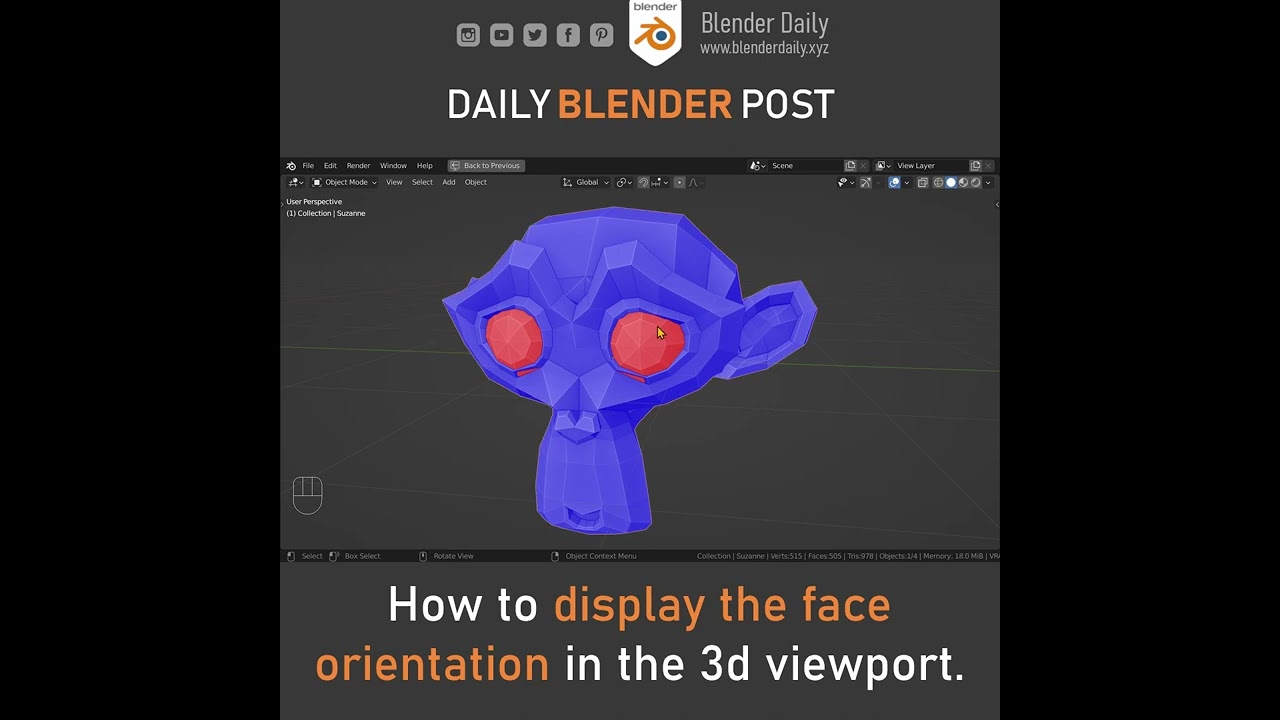
How to display face orientation in the 3d viewport in Blender.
Long format Blender tutorials on our main channel: https://www.youtube.com/c/BlenderDaily
497 Essential Tips for Blender: https://gumroad.com/l/lDLmX
Blender VFX course: https://gum.co/vfx-course
Blender Daily Gumroad: https://gumroad.com/blenderdaily
Free Resources: https://blende...
Turn this on and send a Screenshot. 🙂
Everything should be blue/purple from the outside and red facing to the inside
If red is facing out, select the faces in editmode and flip them by Mesh > Normals > Flip Normals
stray bridge
grand notch
Not sure if you know the problem?
if you want, send me the blender or fbx file and ill look at it. Im in a call rn
grand notch
neat canopy
Everything should be blue/purple from the outside and red facing to the inside
I’m currently fixing it up rn, I totally forgot about face orientation and it was all reversed. I’ll fix it, export it and see how it looks
neat canopy
👍🏻
 grand notch
grand notch
grand notch
@stray bridge
I don’t even care about the textures in blender working I just want the model to work / look properly in the enfusion engine
stray bridge
grand notch
<@393508675047784448>
 stray bridge
reverse the face orientation, that it looks "wrong". Sometimes this happens idk why but doing it "wrong" does the job

 stray bridge
you want it to be red, which should be wrong sided, but thats how it works when its buged or whatever
grand notch
stray bridge
reverse the face orientation, that it looks "wrong". Sometimes this happens idk ...
What’s the logic behind this I must know 😂
Thank you so much tho man I hella appreciated that
Like actually so fucking much
@neat canopy Thank you too dawg didn’t forget about ya 🤝
stray bridge
grand notch
What’s the logic behind this I must know 😂
idk
stray bridge
grand notch
Thank you so much tho man I hella appreciated that
no problem, really
last hill
Mine used to do that if my scale was -1 from mirroring something wrong but yeah, interesting that the normals had to be flipped to the wrong side to fix it.
stray bridge
last hill
Mine used to do that if my scale was -1 from mirroring something wrong but yeah,...
true, mirroring often / every time „flips“ it
 brisk flame
Hey Jose i know this is 2 years later but how did you fix this ?
iv full filled out my SCR_BaseCompartment and ActionManager
 rough hearth
Hey guys, im struggling to create a interior for my new vehicle addon im creating. Its is invisible in the enfusion engine. A costum material for inside is existing


on the left the blender viewport and on the right enfusion
stray bridge
flipped normals?
 uneven vessel
To expand further on Ben's answer - faces of models can only face one way - usually just facing outside is fine. In this case your model's faces (the 'normals') are facing outside. So, if you already have modelled the interior you need to flip the normals
You can see this in blender by enabling face orientation or turning on backface culling
stray bridge
^
rough hearth
ah alr, thx guys
plush sequoia
Why does the sit down button appear (but not work) only as a square and only if I hold down alt?


 stray bridge
maybe because of the visibility angle, set it to omnidirectional and try again
plush sequoia
Hmm, I'll take a look now
Upd : Nothing 😢
last hill
plush sequoia
Hmm, I'll take a look now
Upd : Nothing 😢
Is that screenshot of the actionmanagercomponent? You set vehicle entry stuff in the basecompartmentmanager component - the action manager only positions context positions. Basecompartmentmanager allows you to then say what those contexts do - ie: get in driver etc etc.
plush sequoia
last hill
Is that screenshot of the actionmanagercomponent? You set vehicle entry stuff in...
Well, I dropped a Point in the ActionManager and then I selected the same point in the CompartmentManager
I don't know, apparently I missed something
last hill
plush sequoia
Well, I dropped a Point in the ActionManager and then I selected the same point ...
Does the compartment manager component have ui info text?
plush sequoia
Yeah
 last hill
plush sequoia
Yeah
last hill
plush sequoia
Yeah
Being a ground vehicle, is it meant to say PilotCompartment etc? I am not sure as I don't do ground vehicles myself.
plush sequoia
Yeah, I also noticed this strange for the first time, but yes, the pilot means the driver) the wiki says that it should be so
tidal latch
have you checked compartment debugs? Perhaps get in/out is obstructed?
covert dune
To me this seems like it's unreachable, as if you're too far away. Maybe increase the radius, or tick omnidirectional as well for test ?
plush sequoia
covert dune
To me this seems like it's unreachable, as if you're too far away. Maybe increas...
Tried omnidirectional, didn't help
plush sequoia
tidal latch
have you checked compartment debugs? Perhaps get in/out is obstructed?
Should this be written below where all the errors are, or should it be included separately somehow?
tidal latch
it will be visible in viewport as

 tidal latch
yes, so it seems your bone is rotated by 90 degrees
I think it is using get it empty object - check in Compartment Component to be sure
plush sequoia
I change the bone rotation in ActionManager, but nothing changes 🤷♂️
tidal latch
its not action manager thing
plush sequoia
😳
tidal latch
its compartment component thing - you would need to probably rotate empty object in model itself
plush sequoia
Oh, I think I found it.
I twisted it, but now there is some kind of second dot

Is there any way I can completely remove the Compartment component?
tidal latch
you can also turn on action manager debug
plush sequoia
tidal latch
you can also turn on action manager debug
Good idea, I'll try it now
tidal latch
Game Code -> User Actions
plush sequoia
YAY
 tidal latch
Enable handler diag & enable adv handler will be more useful


 plush sequoia

last crest
ok i wanna test my model in game how do i go about doing that?
surreal ore
Drag and drop it into a world....
last crest
surreal ore
Drag and drop it into a world....
i didnt know how to do that im super new
surreal ore
If you don't know how to do something that simple you should probably go over everything on the wiki.
plush sequoia
tidal latch
https://community.bistudio.com/wiki/Arma_Reforger:Collision_Layer#InteractionMat...
I solved the problem!!! As I understand it, either I did something wrong, or there were some problems with the engine. I recreated the project and everything worked, including hitboxes
@tidal latch @last hill thank you very much for deciding to help me 🙏
 low leaf
Do light portals work with vehicles? I'm having an issue getting the lighting right inside tanks. It's supposed to be dark inside even when it's light outside. I've tried messing with AO but then the characters AO doesn't match
leaden trench
low leaf
Do light portals work with vehicles? I'm having an issue getting the lighting ri...
No, light portals only work with "Building" entities. But you can make it dark in the vehicle with an EnvProbe. K-17 in RHS does this.
 fluid solstice
All get in and out actions for passengers appear and function on this PBR my friend and I are working on. The driver however does not. We can see the little square/cube where it’s supposed to be but still no get in or out action. If we get in the passenger seats we can switch to driver seat and operate the boat just fine. We have moved the location of where the driver get in/out action would be and we still don’t get the in/out prompt. We move the cube. It moves. Just no get in/out 😦
low leaf
leaden trench
No, light portals only work with "Building" entities. But you can make it dark i...
Thank you, I'll give it a shot
wicked dirge
leaden trench
No, light portals only work with "Building" entities. But you can make it dark i...
I think we scrapped this as it had a visible impact on performance
fluid solstice
fluid solstice
All get in and out actions for passengers appear and function on this PBR my fri...
deleting the rigid body component and replacing it fixed this issue 
 quaint nacelle
Hello dear model maker, does anyone know why my car falls forward? I have the impression that the front wheels don't have a collision and therefore that what is “front wheels” is the bumper.


Yet the wheels are well configured...

Can you help me please ?
stray bridge
multiple things could cause this, hard to tell by the screenshots.
ill list some for you to check
- center of mass (rigid body, y axis) where is it? How much?
- radius of the wheels?
- settings of the pumpers?
quaint nacelle
stray bridge
multiple things could cause this, hard to tell by the screenshots.
ill list so...
Center of mass:

Radius of wheels: 0.415m for the 2 axles
But i don't understand the "settings of the pumpers", where is it ?
stray bridge
sorry "damper"


 stray bridge
quaint nacelle
Center of mass:
stray bridge
quaint nacelle
Center of mass:
-0.1x doesnt seem right to me, try smth above 0. Like 0.55
stray bridge
quaint nacelle
looks ok

 plush sequoia
quaint nacelle
Update:
plush sequoia
quaint nacelle
Update:
WheeledSimComponent ->Axles -> WheelPos

 quaint nacelle
Re, i solved the problem, i moved the center of gravity, copied the suspension and weight values on a prefab and then readjusted them to match my 3D. thank you all 🙂
fading mesa
@sly bridge Is RHS working only on modern gear now or we should expect some Cold War/Afghanistan models as well? Uniforms, NPO1/PVS-7, Vintorez, something else maybe?
sly bridge
fading mesa
<@105574759248437248> Is RHS working only on modern gear now or we should expect...
- there is a public roadmap
- how is this relevant to this particular channel?
fading mesa
sly bridge
1. there is a public roadmap
2. how is this relevant to this particular channel?
Uniforms, NVGs, weapons require models, don't they?
sly bridge
fading mesa
Uniforms, NVGs, weapons require models, don't they?
yes, and?
this channel’s purpose is for people to get help and/or feedback in regards to the models they make (less and less though) or legally acquire to get in game, not to inquire mod makers if they work on one model or another…
fading mesa
sly bridge
this channel’s purpose is for people to get help and/or feedback in regards to t...
You are right, I'm terribly sorry
quaint nacelle
hello does anyone have a contact with “Tannerjackjoe3” please?
 quick cove
why is my orgin not correct in the workbench? how can i fix this? i thought i had to change the world origin in blender but that did not fix it.


i duplicated the m9 base and changed the mesh for this model but the origin is not right.
 surreal ore
quick cove
why is my orgin not correct in the workbench? how can i fix this? i thought i ha...
surreal ore
quick cove
why is my orgin not correct in the workbench? how can i fix this? i thought i ha...
Do you know how to use Blender properly?
quick cove
also not sure how to change the size? is that done in blender or workbench?
quick cove
ahh i was clicking reimport resource thinking it was using the updated file but it wasent. i had to reimport it and the changes appeared
pliant apex
quick cove
i duplicated the m9 base and changed the mesh for this model but the origin is n...
how do you do this? like duplicate the bases? I want to make a G22 🙂
 indigo halo
Hello all, any tip on how to texture a realistic military cloth in Painter? I’m doing several attempts using RHS stuff as a visual benchmark to try and achieve good results on my models. So far I’m doing progress but it still misses something in terms of detail both for, as an example, material feeling and pockets depth
sly bridge
indigo halo
Hello all, any tip on how to texture a realistic military cloth in Painter? I’m ...
you want to texture your own model? The details you mentioned are generally baked down from a HP model
indigo halo
Which means manually sculpting them on a HP version and then bake the normal map to reapply it to a lower poly model right?
Besides that I’m also experiencing issues with the quality of the “cloth effects” as well. Getting better but they still look a bit fake compared with yours (which I’m using as quality benchmark)
indigo halo
quick cove
why is my orgin not correct in the workbench? how can i fix this? i thought i ha...
Open your blender model, in object mode (iirc) with your object select and highlighted right click -> set origin -> set origin to geometry, then just to be sure before exporting go in Object, Apply, All transforms
 calm rune
indigo halo
Besides that I’m also experiencing issues with the quality of the “cloth effects...
calm rune
indigo halo
Besides that I’m also experiencing issues with the quality of the “cloth effects...
feel free to show us an image and maybe would could help.
indigo halo
That is inside the workbench
 calm rune
indigo halo
That is inside the workbench
calm rune
indigo halo
That is inside the workbench
Can we see it inside of the application that you are using to texture?
indigo halo
Sure i’ll make the screen later tonight and i will post more detailed pictures
indigo halo
that is a sample screen from the pants. The side-back pocket looks okish, the front one appears a little bit too flat even after painting some extra height to it. Guess I can fix this by sculpting better details. However the texture of the cloth looks okish in painter but when imported in workbench appears a tiny bit too plastic and undetailed. I also modified materials to increase roughness, reduce specular, zero metalness and darkened through the color palette. Better but not satisfactory
 tacit eagle
indigo halo
that is a sample screen from the pants. The side-back pocket looks okish, the fr...
tacit eagle
indigo halo
that is a sample screen from the pants. The side-back pocket looks okish, the fr...
under which template do you export the textures ?
indigo halo
Using Arma Reforger BCR+NMO presets available on Bohemias github
I guess it's worth mentioning that up until 5 months ago I had no clue painter even existed so i'm learning by doing. There might be something obvious for many which is absolutely unknown to me
wicked dirge
indigo halo
that is a sample screen from the pants. The side-back pocket looks okish, the fr...
its looking plasticky and undetailed because you did not include any actual fold detail past macro scale on it

break up the uniformity and color with realistic folds and you will get there
indigo halo
I did use some mask with height effect Cloth Folds medium or large but i'm struggling a bit with that
indigo halo
so it'd be better to actually sculpt the folds in blender?
wicked dirge
yes a 1000x better
indigo halo
consider that my drawing skills are limited to representing a human with 4 lines, a rectangle and a circle for the head 😄
wicked dirge
even better to use Marvelous Designer and zbrush to help you out
indigo halo
eh i'm on a budget though, already bought painter which hit hard 🙂
baking it down means going directly in blender to sculp, generate my normals and only after move to the texturing. Am I gettin this right?
wicked dirge
indigo halo
consider that my drawing skills are limited to representing a human with 4 lines...
mine too, but this is why smart software like MD gives me hope to make uniforms
*this is just a test
 indigo halo
Ok I need to find a way to do this very same thing in blender then
wicked dirge
if you are like me, challenged in sculpting then MD is the only *decent way
esp if you are looking at RHS as example, we use MD
if you are a student its $99 a year
Marvelous Designer Official Site
The industry standard for realistic 3D cloth modeling and simulation. Unleash creativity with our Academy Award-winning 3D clothing design software!
indigo halo
Sadly i'm not a student 😄
wicked dirge
i feel ya haha
nocturne quartz
im not a fan of the sewing method of creating clothes
quick cove
Ive come to a problem while making this model. I had the model appearing correctly before the steps of making the bones and vertex groups. i tried making all the bones like the m9 base has but i did something wrong and my model wasent appearing at all. so i reverted and just did the slide because thats all i really want for now. at first the mag was not in the right spot but now it is, and the slide was completly gone unitl i shot the first bullet, then it would apear on in the -x axis floating and the animation was tilting instead of sliding. Now Its on zero X and the animation is correct but its appearing in the Y +


All i did was group the slide to the sights and then made the root bone and w_slide bone and did the vertex group for them. its working but the slide is just not in the right spot even though in blender and the .xob file it is
surreal ore
If you are using the base M9 animations for your pistol then your bones have to be in the exact same position as the base m9s bones.
quick cove
so the slide postion is because of the bone? Ill try to change it and see if it moves it. the animation looks right, the slide is just too far forward
calm rune
indigo halo
that is a sample screen from the pants. The side-back pocket looks okish, the fr...
Your issues stem from there being no high poly to bake from. Having a HP with all these details would save you.
quick cove
ah you are correct
surreal ore
Yes I know. I did what you're trying to do over a year ago. Manually created a rig for the m16.
indigo halo
nocturne quartz
im not a fan of the sewing method of creating clothes
I’ve tried other methods but that’s the only one that enabled me to do something. Any advice?
nocturne quartz
@indigo halo its called cloth sim in blender
and my comment wasnt really aimed towards you, more towards marvelous designer
indigo halo
Gotta go and find more info about that 😊 and no worries mine was a genuine request about alternative methods no offense taken at all 😊
 upper nebula
Im searching some infos about the enfusion colliders Layers pressets / materials properties : ( ex : BuildingFireView, FireGeo, etc) , didnt found all the specs in the bohemia wiki, does somebody have infos ?
stray bridge
weightpaint
tacit eagle
Guys how can imake simple collison for this its an static obj
 stray bridge
tacit eagle
Guys how can imake simple collison for this its an static obj
stray bridge
tacit eagle
Guys how can imake simple collison for this its an static obj
setup a collider in eg blender for it. Activate model geometry and eg static in the rigid body component
how to setup a collider is described in the wiki. Dont have the link ready rn
surreal ore
For the love of God stop trying to do things before you take the time to learn how to do them. Read the wiki pages. There's 0 reason we should be answering the same questions 2 years later.
 midnight verge
The guy was asking a question tbf no need to be rude abt it
midnight verge
It just comes off as aggressive I suppose but I think that’s because it’s text
surreal ore
midnight verge
The guy was asking a question tbf no need to be rude abt it
I wasn't being rude. I just think that when you do something you've never done before you should read the documentation.
Yeah, I know i sound like I'm being mean sometimes but that's usually not the case.
midnight verge
Yea that makes sense tbf
surreal ore
If another person has to explain everything to you then you'll never actually learn anything.
Eventually you'll ask a question that no one has the answer for, then you'll more than likely just give up instead of taking the time to figure it out for yourself.
I don't want people to give up, I want them to learn and make cool mods.
proven bridge
Sure, the question/answer might had been simple, but keep in mind that not everyone that wants to mod is a dev and knows the channels where to find this info. And creating colliders in DCC is not inherently logical.
In my eyes this issue hints at the issue of not having an FAQ on this topic.
I agree with aaron on this, it does come off aggressive. I do also get that its annoying answering the same fundamental questions. But this is just detering people from reaching out again.
sly bridge
proven bridge
Sure, the question/answer might had been simple, but keep in mind that not every...
In my eyes this issue hints at the issue of not having an FAQ on this topic.
The biki contains most information required, and afaik some pages are directly linked to this channel. And while i agree that the biki can be hard to navigate at times, the docs for reforger are a lot more comprehensive than they are/used to be for A3 for instance
proven bridge
sly bridge
`In my eyes this issue hints at the issue of not having an FAQ on this topic.`
T...
oh yeah, totally agree with you there. 😄
My point is that it might be more productive to ask why the people are flocking here and keep asking the same questions over.
delicate condor
indigo halo
Ok I need to find a way to do this very same thing in blender then
look up blender cloth addons there are things that might be useful. probably not quite marvelous designer level but might work as reference or base mesh
indigo halo
delicate condor
look up blender cloth addons there are things that might be useful. probably not...
I’ve been trying with Simply Cloths but base assets are limited, so I went with a home made sewing thing but I admit managing LODs is a nightmare even though I bought the quad remesher addon. There’s clearly a gap in my knowledge and skill which tutorials are not completely filling up. I’m trying a lot I’ll find a way sooner or later. Any suggestion also on the “pipeline” to follow is very welcome (e.g. start from low and build up the LOD0 with subdivision, or do exactly the opposite)
sly bridge
indigo halo
I’ve been trying with Simply Cloths but base assets are limited, so I went with ...
Always start with the high poly. That is not even game asset material, it’s only purpose is to bake down into the LP (or game asset)
indigo halo
sly bridge
Always start with the high poly. That is not even game asset material, it’s only...
But then what would the best way be to go down in poly count? Decimate deforms the topology by alot and I need to bound it to vertex groups to avoid seams being misplaced. Remeshing works partially but you lose details of parts such as pockets and stuff. Is there any other way I’m missing out? Sorry I don’t want to monopolize the discussion but I feel my experience might be beneficial for others too
sly bridge
indigo halo
But then what would the best way be to go down in poly count? Decimate deforms t...
It’s part of the purpose of this channel, so don’t worry about it
indigo halo
P.s. managed to bake HP onto LP. Astonishing.
sly bridge
depends on how you go up basically
You can subdivide(catmul or osd) you can also sculpt or CAD the HP
generally the best (cleanest) way would be to fully retopo on top of the aHp
indigo halo
Ah! Here retopoflow might come in handy, little time consuming but doable. Point might be how to follow heightened parts like pockets etc, also arms are a bit of a struggle.
However I believe the first thing I need to sort out, since MD is at the moment not doable for me, is finding a reliable way to generate a model which I can use as base for the subdivision. That’s my main issue as of now
sly bridge
should be parts / retopo on top of the sample character
MD is not the only way. You can always sculpt it (i know blender has some pretty nais sculpting tools)
before MD the workflow was main 3d software (max maya blender modo etc) to zbrush for sculpting the back to main 3d software
indigo halo
I will try the retool approach on main character. Which could end up giving me the lowest lod, clean and simple. I will the subdivide it to go all the way up to the HP and I will bake back the normals.
Let’s see how it goes! Thank you for all the suggestions you all gave me a lot to process and digest. Now it’s a matter of training 😊
 stuck kraken
Hi, Plantfactory and VUE is now free:
https://www.bentley.com/software/e-on-software-free-downloads/
Bentley Systems | Infrastructure Engineering Software Company
Unlock the legacy of e-on software! Enjoy free downloads of VUE, PlantFactory, and PlantCatalog.
wary inlet
stuck kraken
Hi, Plantfactory and VUE is now free:
https://www.bentley.com/software/e-on-soft...
crazy that i havent heard of this software before, thanks for posting!
 surreal surge
@shell hedge is there any tutorial on configuring new attachments to show up in the Bacon Loadout GUI so they can be switched in and out. I can only get them in the arsenal.
shell hedge
surreal surge
<@267285803720245258> is there any tutorial on configuring new attachments to sh...
No. If they dont show up it usually means they are not labeled correctly in the arsenal.
surreal surge
shell hedge
No. If they dont show up it usually means they are not labeled correctly in the ...
ok thanks. Ill check out the mods that show up and see how they work
shell hedge
surreal surge
ok thanks. Ill check out the mods that show up and see how they work
My best guess is you might need to set the arsenal item type and mode to WEAPON_ATTACHMENT and ATTACHMENT, or the other way around
surreal surge
shell hedge
My best guess is you might need to set the arsenal item type and mode to WEAPON_...
ok. ill test it out. I realize now the mags showed up but the suppressors didnt
meager pendant
hy everybody can anyone explain how i can moove a bit up the launcher when he his on my back ? did you know wich bone is used to make this ?
thanks in advance


so far i have tried:
- w_slide
- w_root
surreal surge
the pbr seems to be making more sense but I do want to check on the correct setup for these ?s about setting up the model. I use the sort objects and collider setup from the enfusion tools so ive got that set up but im unclear on a couple of these points. Im also using fireview Geo for it right now as I want it to be visible to AI and able to be struck by a projectile. That seemed logical but sometimes its not for the engine

the highlighted mesh is one of the example colliders i resized that BI provided
the suppressor is inside that but the collider fully covers the mesh by a small amount on either side
 empty sapphire
Hello! Is there anyone with experience here whom I can contact regarding model making in the Enfusion Workbench? I am quite new myself.
stray bridge
for specific questions here is the right place to ask them, for general stuff the wiki is your best friend
surreal ore
empty sapphire
Hello! Is there anyone with experience here whom I can contact regarding model m...
Model making isn't done in workbench, it's done in 3rd party software usually Blender for ease of importation as their is a plugin for Reforger specific things.
gentle hinge
Would anyone know why the PiP functionality for a scope I'm building is not working? I followed the documentation for optic creation and configured it similarly to the existing optics. When I use 2D mode it works just fine, but when I try it in PiP mode it looks like this for some reason. I assume it has to do with the PiP material and mesh set up, but I've tried messing around with both a lot and haven't been able to fix it. Tried scraping the documentation and overall web and can't seem to find any solutions, so would greatly appreciate any ideas that might help
 surreal ore
Maybe the normals are wrong on the "lens"
brisk flame
surreal ore
Maybe the normals are wrong on the "lens"
@gentle hinge this ^ take a look at the sample lens and how they are made
gentle hinge
brisk flame
<@698996590387396638> this ^ take a look at the sample lens and how they are mad...
This is what I'm doing right now because I've got the normals looking better now it looks like, and overall I'm pretty much right on with the sample lens at this point, but I'm still not getting any PiP
Update: I have PiP working but it needs to be tuned, some interaction between the glass mesh (I think?) and the PiP layer was the underlying cause. For anyone who wants/needs to troubleshoot their PiP functionality, move the PiP mesh back way back between the eye and rear sight memory points and see if you can see something, that ended up giving me a lot of clues on other things going on
surreal surge
As a quick query what are the general guidelines around total tri and vert count for a full sized AR or Sniper rifle in reforger?
wicked dirge
surreal surge
As a quick query what are the general guidelines around total tri and vert count...
Open any of the AR rifles in workbench
surreal surge
wicked dirge
Open any of the AR rifles in workbench
copy
 south gust
Hi, i have a problem with my collider_ it sets up as a object part while not beeing added to the colliders section, even though i have in in the colliders collection in Blender. Also prefix UTM
 last hill
south gust
Hi, i have a problem with my collider_ it sets up as a object part while not be...
last hill
south gust
Hi, i have a problem with my collider_ it sets up as a object part while not be...
Being on the collider collection is not what you need. You need to hit colliders setup and give your collider a layer type and material
south gust
last hill
Being on the collider collection is not what you need. You need to hit colliders...
ive got that already
I got : Stone, Building
last hill
south gust
I got : Stone, Building
Import settings on Workbench set to import hierarchy and settings for export correct in Blender?
south gust
last hill
Import settings on Workbench set to import hierarchy and settings for export cor...
ill check but i think so yeah
quaint nacelle
Hello dear model makers, I have a problem, my vehicle has a collision problem, do you have a solution?
 surreal ore
quaint nacelle
Hello dear model makers, I have a problem, my vehicle has a collision problem, d...
quaint nacelle
surreal ore
quaint nacelle
Hello dear model makers, I have a problem, my vehicle has a collision problem, d...
quaint nacelle
i followed this tutorial lol
surreal ore
If you did. Your car would work correctly.
quaint nacelle
yes but if I come here it's because I need help and I don't understand why it's doing this
So if you know why, can you answer me otherwise your “help” has been of very little use to me ^^
surreal ore
Because you missed something during the tutorial you "followed"
If you followed the tutorial you wouldn't have issues. The issue in the video could be from any number of things that you missed.
I highly doubt anyone can watch your clip and immediately know what YOU missed
Go back through the tutorial and double check.
quaint nacelle
surreal ore
I highly doubt anyone can watch your clip and immediately know what YOU missed
Yes, of course, but this very kind person can ask me for more information or for certain things that can help us solve this problem.
surreal ore
There isn't much more information you can give. You followed the tutorial. If you didn't miss a step it would work. Go over the tutorial again and find out what you missed .
It's way easier for you to look through the tutorial and double check for mistakes. You have the model directly in front of you. As opposed to someone else having to ask you 50 questions, just for you to have to check for those mistakes either way.
If you followed a tutorial and have a completely different outcome it's obvious that you missed a step. Probably something pretty simple as well. Troubleshoot your work. Troubleshooting is easier for you to do as you're the one who made the vehicle.
calm rune
Zelik is right. Much easier for you to double, triple check the documentation slowly because if someone here is going to help you they will only ask the same questions that you would get anwseres from the documentation and you doing it yourself is still quicker.
surreal ore
calm rune
Zelik is right. Much easier for you to double, triple check the documentation sl...
I'm sure people assume that I'm being mean a lot because of some of my replies to things. In reality I'm just being logical.
"Tough Love" in that regard.
stray bridge
quaint nacelle
smth is set up incorrectly (value too high) cant remember what it was exactly but smth in your "_SA" comps
quaint nacelle
may be the simulation
anyway, I'm rereading everything I've modified in the configs and comps
quaint nacelle
Do you know why my wheel has a red square on it? I couldn't find anything on the BI wiki.
 calm rune
quaint nacelle
Do you know why my wheel has a red square on it? I couldn't find anything on the...
calm rune
quaint nacelle
Do you know why my wheel has a red square on it? I couldn't find anything on the...
Its right inside of the importing documentation for colliders. You are not using the proper name suffix so here ---> https://community.bistudio.com/wiki/Arma_Reforger:FBX_Import
Everything you need is in the documentation. Do not expect to find it all on just one page.
 pure kayak
WIP PAVN uniform, currently just the field shirt
 tacit eagle
I just tried to make an custom turret Xd

 faint scarab
Hy guys, i'm triyng to fit some patches to my model, i used the RHS as reference because is the prefab that i used to replace the xob with mine! In this particular case i need to move the patches a little behind. There is a way to do it without going crazy with the coords??
wicked dirge
faint scarab
Hy guys, i'm triyng to fit some patches to my model, i used the RHS as reference...
if you are making new patches maes them have exactly same origin wrt velcro as rhs patches. If you are making equipment that can accept patches just manipulate the slot attachment point and angle. Easiest is to do it while a patch is assigned in the slot while in workbench
gentle hinge
Would anyone know what might be causing my blender object to import into Enfusion with colors, despite having a blank base material and no colors applied in Blender? These colors are bleeding through to the textures and I cannot figure out where the hell they are coming from


 uneven vessel
Check custom vertex properties (can't remember the exact name, it's a drop-down in blender) for a vertex colour field
gentle hinge
uneven vessel
Check custom vertex properties (can't remember the exact name, it's a drop-down ...
Assuming this is the correct menu, not seeing any color fields in here unfortunately

 rough lynx
Nah, it should be under the green Object Data Properties tab that's in the right console
 uneven vessel
Yeah sorry wasn't near my pc when I saw this, da12th is right on
Generally I've found custom properties there outside of the normal ones like UVs and sharpness cause issues in enfusion
UV packmaster was storing pinning group data in there that would make my whole model black on import
gentle hinge
rough lynx
Nah, it should be under the green Object Data Properties tab that's in the right...
This was it, thank you for the help. Scope looks great now
pure kayak
any advice people can give on making optimized trees/branches? trying to make some bamboo
 nocturne quartz
you just have to make it like how the trees are done in game. nothing complicated
 leaden fractal
pure kayak
any advice people can give on making optimized trees/branches? trying to make so...
leaden fractal
pure kayak
any advice people can give on making optimized trees/branches? trying to make so...
you could try and use Plant Factory which is freeware, im not sure of their EULA and how that works, but i know its very easy to use and gives pretty good results
 chilly dragon
pure kayak
any advice people can give on making optimized trees/branches? trying to make so...
chilly dragon
pure kayak
any advice people can give on making optimized trees/branches? trying to make so...
Can’t quite tell from the picture if your doing this or not but I’d make all the branches a part of the polyplane.
Rather than a 3d mesh
faint scarab
wicked dirge
if you are making new patches maes them have exactly same origin wrt velcro as r...
The slot on your model is not compatible with the velcro on mine, so I'm trying to move the point but it seems like a never-ending job because I can't figure out the origin point of the slot. So I tried to recreate the slot on another model from scratch, but it still doesn't seem to work because the patch doesn't appear. Now I'm trying to set the point from the workbench as you advised me (by the way, thanks) but in any case I don't think I'm doing it correctly...
wicked dirge
faint scarab
The slot on your model is not compatible with the velcro on mine, so I'm trying ...
Still don't know what u wanna make. Did you read out patch docs?
faint scarab
wicked dirge
Still don't know what u wanna make. Did you read out patch docs?
Now I've done it! 🤯 THANK YOU! Now I think I have all the information I need. Thanks again!
pure kayak
so with the prefabs for webbing, how tf do you align stuff using only numbers with no visual feedback? mine is all messed up and i cant seem to get it right

is there a method to manually rotate and move with like arrows or is it only the input numbers
 haughty knoll
pure kayak
is there a method to manually rotate and move with like arrows or is it only the...
haughty knoll
pure kayak
is there a method to manually rotate and move with like arrows or is it only the...
If you click into one of the location or rotation axis boxes, the XYZ arrows/circles can be moved around to place stuff like that
It usually moves the entire main prefab if you try it right away, but clicking into the input boxes once does the job. Kind of confusing. 🥴
pure kayak
haughty knoll
If you click into one of the location or rotation axis boxes, the XYZ arrows/cir...
i see, is there a way to debug the other parts? i can debug my belt but not the additional pouches
makes it even harder
south gust
what is the maximal capacity for a model (triangles or smth) ?
surreal ore
Use preexisting models by B.I. as example and keep it similar.
south gust
Antoher question : my import of the vehicle base model gets stuck at 58% importing resource. while the Turret imports just fine in seconds
surreal ore
Could be a hardware issue.
surreal surge
im having a problem with the skinning on this button. Ive done a couple successfully but this one keeps telling me that its missing some weights when I import it. Ive tried redoing it about 10 different times but i just cant seem to get it. any tips on what i might be doing wrong

i dunno. i changed the weight and it seems to have accepted the baboon heart
pure kayak
okay i genuinely cant work out how to do prefab slots for models, they just float above and its way too trial and error to move the arrows

any ideas?
 coarse peak
You have 163 bones?
pure kayak
its rigged correctly, it uses teh same model as a standalone one
its just the "slots" version of it is hovering and i cant position it properly
surreal ore
Doesn't look correct to me lol
leaden trench
Check out this site; https://marketplace.vigilante.us/ After reading thier FAQ and Epic's EULA/FAQ, I think all these models can be used for ARMA modding. Their are countless military vehicles with accurate interior models.

Dramatically decrease the cost and time invested in your next software project by leveraging our quality Unreal Engine assets & 3D models.
All free
tidal latch
leaden trench
Check out this site; https://marketplace.vigilante.us/ After reading thier FAQ a...
Afair it was discussed here before and conclusion was you cannot use it
Or actually sorry - it was discussed on our company slack
leaden trench
tidal latch
Or actually sorry - it was discussed on our company slack
The same conclusion would apply to any content purchased from Epic Marketplace? As it all shares the same license https://www.unrealengine.com/en-US/eula/content
karmic adder
leaden trench
The same conclusion would apply to *any* content purchased from Epic Marketplace...
I looked into them at some point and as far as I know, their own license said they can only be used for UE
I'm not sure how that interacts with the UE Marketplace license though
leaden trench
karmic adder
I looked into them at some point and as far as I know, their own license said th...
https://marketplace.vigilante.us/frequently-asked-questions/ here it states that the content is "bound by the standard terms of the Epic Marketplace" , and even it is free to use commercially in Unity

Most frequently asked questions to utilize Vigilante's 3D vehicle assets.
Maybe they had a license beofre and dropped it?
karmic adder
In that case it seems they have conflicting info on it
Their product specific documentation, even for new assets, says:
License
Licensed for Use Only with Unreal Engine-based Products.
But given their comment about Unity, referring to the Marketplace terms, I'd say it's probably fine.
leaden trench
karmic adder
Their product specific documentation, even for new assets, says:
> License
> Li...
Where do I see that?
karmic adder
It's a PDF linked on the individual product pages
But as I said, I don't think that actually applies.
While the marketplace terms do have an "UE only content" clause, it's explicitly worded as "as designated by Epic", so not something random sellers would do.
tidal latch
indeed, there are few contradictory statements here and there but content itself has UE only text too
leaden trench
Another license here with no mention of UE only: https://marketplace.vigilante.us/terms-conditions/ However this one would be incompatible with free mods, as it only allows commerical use; "the license is granted to use the Asset in 1 (One) commercial application, commercial software library, or a commercial software project."
Your agreement to comply with and be bound by these terms and conditions is deemed to occur upon your first use of our marketplace.
pure kayak
surreal ore
Doesn't look correct to me lol
well the same mesh works just fine on its own so 🤷♂️
its only using the slots system this happens
 paper mantle
When purchasing a model from CG Trader, what should I be looking for in relation to features to make the easiest importing into blender/Reforger?
leaden trench
paper mantle
When purchasing a model from CG Trader, what should I be looking for in relation...
You might look for models that are marketed for Unreal/Unity. In that case they may come with LODs and colliders.
leaden trench
karmic adder
But as I said, I don't think that actually applies.
While the marketplace terms ...
I contacted them to ask about the contradiction and recieved a positive reply.

 leaden trench
wicked dirge
hahaha
leaden trench
wicked dirge
hahaha
I laughed myself. Thought it sounded like something ChatGPT might write.
surreal ore
leaden trench
I contacted them to ask about the contradiction and recieved a positive reply.
So their stuff can only be used in Unreal, correct? It was my understanding (by reading the marketplace TOS) that anything uploaded can be used in any game as long as it wasn't specifically stated that is was unreal only.
leaden trench
surreal ore
So their stuff can only be used in Unreal, correct? It was my understanding (by ...
Can be used anywhere
surreal ore
The Vigilante stuff specifically says Unreal only though.
leaden trench
surreal ore
The Vigilante stuff specifically says Unreal only though.
the email I sent to Vigliante pointed this out asking about it; you can see the reply.
I linked above in this chat the FAQ linked in the email
Still a piece of the story is missing, idk why the contradiction there in the first place
surreal ore
I tired to argue the point of the marketplace TOS before. Because it specifically states that things can be used elsewhere unless Epic Games states otherwise. Which all of the things created by Epic Games say "Unreal Only"
If Vigilante stuff was a part of a grant then Epic probably says otherwise about it. I.E. it's Unreal Only
That's the reason SpaceStrider and I didn't use one of there tanks for the first tank implementation.
leaden trench
surreal ore
If Vigilante stuff was a part of a grant then Epic probably says otherwise about...
But it's not "UE-Only Content"; everything that is, is marked as such on it's marketplace page. I think maybe it was in the past, but it is no longer.
or maybe they were confused about it.The email and FAQ on their page make it quite clear you can use in other game engines.
surreal ore
leaden trench
But it's not "UE-Only Content"; everything that is, is marked as such on it's ma...
Since it was from a grant maybe the UE-Only clause was implemented for x period of time.
sly bridge
best way to approach this would be to contact the seller / author / owner directly instead of trying to figure out two separate licenses
 fossil crater
@leaden trench Check their individually provided licenses for the product, and see if there is any UE only clause
For example
https://marketplace.vigilante.us/product/orlan-10-east/
https://vigilante-space.nyc3.digitaloceanspaces.com/wp-content/uploads/20240522093834/East_UAV_Orlan10.pdf

The Orlan-10 is a Russian-made unmanned aerial vehicle (UAV), or drone, developed by the Russian company Special Technology Center LLC.

Always check on a per asset basis
Not on some (Hopefully) umbrella license
leaden trench
fossil crater
Always check on a per asset basis
I did, I checked them all, and they all have that in the pdf. I sent a 2nd email asking if the phrase "Licensed for Use Only with Unreal Engine-based Products" from their documentation is null and void, because that's the only place I can find it and their previous email and FAQ suggest so.
fossil crater
tbf I did not get a definitive answer to that from the email you showed
Only that the FAQ is correct, but no actual answer to the question that matters here
fossil crater
leaden trench
I did, I checked them all, and they all have that in the pdf. I sent a 2nd email...
It could be useful to tell them that you want to use them as a non commercial mod in Arma Reforger for example and get a direct answer to that
leaden trench
My question was "In the product documentation PDF linked on each model's page, it states "Licensed for use only with Unreal Engine-based products.", however, the FAQ on your website states that assets can be used in Unity. So which is it?", but maybe person is trying not to answer question because they are not a lawyer
leaden trench
I think maybe their FAQ has confused me; the relentlessly positive tone disguises "no" as "yes"
fossil crater
leaden trench
I think maybe their FAQ has confused me; the relentlessly positive tone disguise...
Just be specifc and ask them this
#enfusion_model message
stray bridge
Anyone had this weird render bug?
also looks different outside of the inv render
(blender)
 surreal ore
That looks like a bad photoshop
stray bridge
surreal ore
That looks like a bad photoshop
I managed to fix it, but without a real "fix"
It´s not photpshop, I promise 
 light vault
Has "Create / Update Selected Editable Prefabs" plug-in been fixed in the Experimental release?
uneven vessel
stray bridge
Anyone had this weird render bug?
also looks different outside of the inv render...
inverted normals?
stray bridge
uneven vessel
inverted normals?
nope
thats only occuring after I transfered weights
uneven vessel
very strange
only other things that comes to mind are something weird stored in your color attributes or having more than 1 UV Map
 stray bridge
uneven vessel
only other things that comes to mind are something weird stored in your color at...
stray bridge
uneven vessel
only other things that comes to mind are something weird stored in your color at...
its whatever now, once I run in this problem again ill get back to this topic
appreciate it
indigo halo
uneven vessel
inverted normals?
I would have said the same BUT Ambient Occlusion map might be the culprit too. It was doing the same trick on me a while ago. Or some color attribute carried over from Blender too (like vertex colors, or stuff like that)
 cold gazelle
Hey guys. working on importing a vehicle model through blender. Any ideas on which collision layers are necessary to make and which ones are not? Looking at the list here "https://community.bistudio.com/wiki/Arma_Reforger:Collision_Layer" and can't figure out which ones are a waste of my time!
nocturne quartz
go into the sdk and look at how the vehicles are made. it will tell you a lot
cold gazelle
nocturne quartz
go into the sdk and look at how the vehicles are made. it will tell you a lot
Smart. Thanks for the tip. Definitely wish the collision meshes were a bit more straight forward.
 inland sentinel
Is it possible to create a new prefab using two different vanilla models?
surreal ore
inland sentinel
Is it possible to create a new prefab using two different vanilla models?
A prefab can only have one meshobject
inland sentinel
Aye but to merge two models into one mesh object is how I mean
Guess you would need a new .xob
surreal ore
You can't merge xob files
inland sentinel
Which is likely not possible, I could do this in DayZ OB with vanilla assets as proxies
Surely must be a way in Reforger
surreal ore
Yeah slots or child prefabs.
inland sentinel
Hmm never thought of trying slots, idk if a child prefab would work.. I'll have to look into that anyway, haven't messed with the slots component yet
surreal ore
A child prefab will work. Not sure why you think it wouldn't.
inland sentinel
Because I'm likely misunderstanding how they are
surreal ore
Then do some more learning. You'll figure it out over time.
inland sentinel
Yep, asking is how ya learn my friend
surreal ore
Who do you think we asked the day the game launched? Asking isn't how you learn, doing is how you learn. Lol
quaint nacelle
hello, does anyone have a tutorial on how to make emmissives Surface Slot on a vehicle please?
inland sentinel
surreal ore
Who do you think we asked the day the game launched? Asking isn't how you learn,...
Asking and doing. Asking is more efficient and helps a community grow. These channels are literally set up for questions. I have still learnt most of what I know through experimenting and referencing the documents, I rarely ask questions in here. Regardless I shouldn't be feeling bad about asking questions. If you're starting a new job, you never put the new guy down for asking questions. Trying to put people down for asking questions is not a good look. That EM mentality is not healthy. Luckily it's mostly not like that here.
Anyways, thank you for the help, I appreciate it
surreal ore
inland sentinel
Asking and doing. Asking is more efficient and helps a community grow. These cha...
I'm not putting anyone down for asking questions. It isn't about asking questions. It's about people wanting to learn vs just wanting someone else to do the work for them. Fortunately this isn't a job though, otherwise most would be fired for not meeting the required prerequisites for being hired in the first place. Point being, some(not all) new modders don't bother putting forth any effort to learn anything before they hop on here asking for someone else to tell them what to do. I do want the community to expand, what I don't want is the community to be a bunch of "modders" that don't really know what they're doing because instead of putting in the effort to learn they just get on discord and ask someone else to do it for them (That's not healthy for anyone and definitely not healthy for the community). I also don't know what "EM" mentality even means.
inland sentinel
surreal ore
I'm not putting anyone down for asking questions. It isn't about asking question...
I understand what you are saying and do agree for the most part. Questions should be to get you pointed in the correct direction when you are stuck but not for the one answering to do it all for you. It is how we learn from each other. That isn't the case with me, I was just asking about the possibility. Truth is I did already try a child prefab for this but wasn't sure how to put essentially two models into one prefab.. I just wasn't sure if it was possible as I used to do it on DayZ and was sure it was on Reforger too. I am new to modding in Reforger obviously though I've done a bunch of stuff myself, I just do this for fun on weekends and create stuff for my friends on our private servers when I have time after my full-time job and school. There is just a lot of needless ego and generally rude behaviour that most new modders get faced with when asking questions and I just try to discourage it.(Not saying that you displayed that at all) I just see it happen all the time and don't like it however a lot less in the Arma discord as the devs are incredibly helpful here.
surreal ore
inland sentinel
I understand what you are saying and do agree for the most part. Questions shoul...
I wasn't pointing anything I said directly at you or anyone for that matter, just so you know. I would just like people to invest some time learning for themselves before getting on here and asking the same questions that have been answered numerous times. The lack of effort shows and if these people want to actually learn to mod they'd put forth honest effort. Sorry for the off-topic rant.
cold gazelle
Can anyone provide me with the location of a good example vehicle model so that I can cross reference mine in blender for meshes, naming, etc? I sort of feel like I'm going in blind and it would be nice to have a proper model to reference. The github didnt seem to have anything of use that I noticed. Thanks.
surreal ore
cold gazelle
Can anyone provide me with the location of a good example vehicle model so that ...
cold gazelle
surreal ore
https://community.bistudio.com/wiki/Arma_Reforger:Car_Creation
Thanks, I've already read through this multiple times. I was really asking for an example model to help me learn so that I could cross reference 🙂
surreal ore
cold gazelle
Thanks, I've already read through this multiple times. I was really asking for a...
The link to the sample used for the tutorial is on that page....
You can also just look at any one of the vanilla vehicles.
cold gazelle
surreal ore
The link to the sample used for the tutorial is on that page....
YIKES. Ill look through it again. Thanks for your answers.
My mistake
surreal ore
cold gazelle
My mistake
No worries. I hope it helps
The sample it lacking a bit.
It's better to use a vanilla vehicle as an example.
 surreal oracle
hello all notsure if this the right channel im assuming it is cos its a model but i was wondering if someone would be kind enough to help out with a mod idea ?
 iron frost
Hey chaps, I been playing around with the modelling tools for a little while now, still completely A level crap, making all sorts of nonsense not suitable for the light of day.
But going to try to work on something real with Arma reforger, while I doubt I can model from scratch I would love some advice on how to get a good Vehicle Model for a Shilka so I can attempt to try to get it working into Arma reforger.
 grim bronze
Hello everyone, I would like to know if there is any way to use weapon models from other modders, so that I can make some changes, such as adding a suppressor, changing the weapon sound and changing the skin and making my own arsenal? without needing to use it as a dependency
uneven vessel
grim bronze
Hello everyone, I would like to know if there is any way to use weapon models fr...
you can ask them for permission and to share, otherwise this is precisely what the dependency system is made for
uneven vessel
iron frost
Hey chaps, I been playing around with the modelling tools for a little while now...
find someone who already wants to model a shilka and ask to work with them, buy an appropriately licensed (and not stolen) model from a stock 3d platform or pay a freelance 3d modeller a lot of money
grim bronze
I understand, in this case the creator would have to send me his project so that I can use it in my own arsenal with my modifications?
One more question, can I make changes so that RHS weapons use a suppressor?
tidal latch
grim bronze
I understand, in this case the creator would have to send me his project so that...
https://community.bistudio.com/wiki/Arma_Reforger:Weapon_Modding it will be exactly same process as for modding vanilla content
just make sure to add mod, which you want to modify, as dependency of your project
keep also in mind licenses of respective modders
grim bronze
I noticed that a server uses a mod weapon in its arsenal, which only exists in a separate specific mod, and he wasn't using it as a dependency but he had this weapon in his arsenal
I'm sorry for so many questions I'm still learning how to modify, I'm on my first weapons tutorial
tidal latch
but you seen that weapon in this mod?
in Workbench I mean
you can also load mods from other mods without making explicit permissions but then it might not work if its not loaded
maybe server was loading that mod separately
or maybe it was ripped
grim bronze
tidal latch
but you seen that weapon in this mod?
Yes, I found the weapon mod, it comes separately, but the server guy had it in his arsenal, but didn't use it as a dependency
grim bronze
I will send you the mod link
tidal latch
are you sure server didn't loaded that weapon?
grim bronze
tidal latch
are you sure server didn't loaded that weapon?

Arma Reforger
Russian weapon pack, contains RPG-18, AKM, AKMN, PP-19, AK-12
he has these weapons in his Arsenal, but does not have this mod as a dependency
tidal latch
but you can still load it on server without dependency
grim bronze
tidal latch
but you can still load it on server without dependency
how can I do this?
I noticed he didn't have this mod on his server, but he had the weapons
tidal latch
just load your mod with that other mod. Keep in mind it will not work if someone will download it and launch it without that 2nd mod
maybe then he ripped the mod? What mods were on the server?
grim bronze
tidal latch
maybe then he ripped the mod? What mods were on the server?
his arsenal contained the 4 weapons I sent you
tidal latch
I don't know about which server are you talking about. In any case, this is not model making related topic so if you want to discuss legality of it and you think he ripped those models, you can continue in #ip_rights_violations
grim bronze
tidal latch
I don't know about which server are you talking about. In any case, this is not ...
In fact I would like to know just how he managed to do it, because I'm learning how to make modifications
tidal latch
if he ripped it then there is nothing to learn from that
can you provide name of the server?
tidal latch
ok, he is author of both WCS pack and Jamsheeds Russian Weapons so thats why you have seen it in two places
so that is not an option for you
just make dependency
grim bronze
tidal latch
ok, he is author of both WCS pack and Jamsheeds Russian Weapons so thats why yo...
I understand, I thought there was some way to modify it without being a dependency
Another question, can I make modifications to some RHS weapons and make them use a suppressor, using them as a dependency?
grim bronze
tidal latch
just make dependency
.
tidal latch
check RHS license and ask for permissions in i.e. RHS thread https://discord.com/channels/105462288051380224/1050079312977596426
RHS is APL-ND which restricts dependencies but you can ask for permission just to be sure
grim bronze
Ok, friend, thank you
iron frost
DO people when they mod in cars/vehicles goto a library website with free models to add into the game? If So could you share some links?
 unique current
newbie question here: is there a default character model i can use in blender to model clothes/uniforms on top of? i'm kind of a neophyte to 3d modelling and haven't done much other than hard body objects i want to try clothing
covert dune
unique current
newbie question here: is there a default character model i can use in blender to...

GitHub
Modding Samples. Contribute to BohemiaInteractive/Arma-Reforger-Samples development by creating an account on GitHub.
south gust
hey guys, what could be the cause of this ?
 honest pine
Hello guys, we are encountering some problem in implementing a new truck, it seems that the only thing we missing is the guizmo to get inside

if you TP in you got acces to start engine, lights, passenger seat and Get out guizmo but if you want to enter the vehicle as a player, it's impossible because no interaction is shown any ideas ?
 trim needle
south gust
hey guys, what could be the cause of this ?
trim needle
south gust
hey guys, what could be the cause of this ?
If the helmet is aligned with the example rig correctly in Blender and parented/weight painted etc.
The first thing I'd try is to apply the meshes location in Blender. Should be Ctrl + A apply (location rotation and scale.) That might help.
uneven vessel
south gust
hey guys, what could be the cause of this ?
As per above next thing id check is that you have ticked the 'export skinning' checkbox on the FBX import settings in enfusion tools (beneath 'merge meshes')
leaden trench
Vigilante got back to me; they said they are going to update the FAQ because it is inaccurate/ potentially misleading. Not the result I was hoping for, but positive nonetheless; it won't confuse people like me in the future.
honest pine
honest pine
if you TP in you got acces to start engine, lights, passenger seat and Get out g...
Ok problem solved, the issue was from a missing firegeo layer on colllider
 grizzled mauve
Hey, has anyone been able to make a helmet with a hose like the ones jet pilots use?
 spiral hedge
Hey, if i place this Object, the Grass on this position will be removed. "{A9C84183EA1C4E97}Assets/Structures/Military/Camps/TentUSSR_01/TentUSSR_01_floor.xob" but i can't figure it out how this works. Is this done with colliders / layers?
 vague walrus

Heyo, i have trouble connecting my backpack to bones
Should i use the enfusion plugin to export or just export by Blender itself?
uneven vessel
export it as an .fbx with custom properties selected on export
what's your actual problem?
vague walrus
Its ingame but it floats in front of the player. Its always the same height when crouching for example
uneven vessel
and you have your import settings set up properly in enfusion tools?
ie. ticked 'Export Skinning', and then when you import do you see something like 162+1 (I can't remember the specifics) bones listed in the right hand panel?
vague walrus
Its shows 0 + 165 actually
uneven vessel
in Blender have you set up vertex groups for your weighting?
vague walrus
I havent done any weighting yet
uneven vessel
Well there's your problem
go into edit mode, select all the verts, create a new vertex group called 'Spine3', assign all vertexes at strength 1 to that group, then try exporting it again
vague walrus
Alright I'll try that, thank you!
 inland pawn
uneven vessel
and you have your import settings set up properly in enfusion tools?
inland pawn
uneven vessel
and you have your import settings set up properly in enfusion tools?
Is this the correct way to import the fbx file -->first import the fbx then open the xob -->import settings select export skinning and export morphs and then reimport resources?
uneven vessel
I can't speak for the 'most right' way but that's how I do it
inland pawn
Okay just making sure im not messing up on import part! Apreciate the help!
uneven vessel
I also haven't used morphs so I can't speak to that part of the process
vague walrus
uneven vessel
Well there's your problem
By strength, do you mean weight 1.0?
uneven vessel
yes
vague walrus
okay got it
uneven vessel
like just attach it to 1 bone and bring it in and make sure it works
(tbh if you don't have arm straps that's all you need)
 surreal ore
vague walrus
surreal ore
vague walrus
You should watch tutorials for Blender if you don't know how to use it. Then read https://community.bistudio.com/wiki/Arma_Reforger:FBX_Import.
vague walrus
Yes, im one step away from making it now
before exporting to workbench
and then work in the workbench which im familliar with
surreal ore
Well you need to be familiar with Blender if you're gonna import models.
vague walrus
Yes, hes telling me how to do exactly that
Correct me if im wrong but I think the point of these channels is to exchange information and learn from others
surreal ore
This shouldn't be your primary source for learning a 3rd party application though. It should be your source for learning Reforger/Enfusion modeling related things.
uneven vessel
vague walrus
Should i bind the vertex group to spine3 like that?
no literally just make a vertex group called Spine3 with all the vertices set to weight 1 and that's enough, don't need to add any other properties to the armature modifier apart from the object field
uneven vessel
surreal ore
Well you need to be familiar with Blender if you're gonna import models.
to be fair pal there are some aspects of this process that are not obvious (especially when it's not working the way you anticipate), if this is enough of the basics to get the fella started and get some momentum what's a few minutes out of my day 🤷♂️
vague walrus
uneven vessel
to be fair pal there are some aspects of this process that are not obvious (espe...
So we got it to work. Got some licenses for 4K backpacks that are going into our mod
One thing is saw is that the top of the backpack shakes around a bit while moving since it only attached to spine 3
uneven vessel
Congratulations!
uneven vessel
vague walrus
One thing is saw is that the top of the backpack shakes around a bit while movin...
yeah that is where things get more complex heh, look up blender weight painting and you'll discover a world of fun and iteration
vague walrus
I connected the straps to each of the shoulders via vertex groups
uneven vessel
👍
vague walrus
Does that work?
uneven vessel
how so? not sure I understand your question
vague walrus
I dunno I'm asking if it's okay to have 3 vertex groups 😂
Like the main backpack to spine 3 and the straps to each of the shoulders
uneven vessel
oh yes you can have as many as you want
I remember in Arma 3 there was a limit on how many bones a single vertex could be assigned to (4 iirc) but I don't know if that still applies in Reforger
but that shouldn't be a problem
Realistically you'll probably have to weight the backpack itself between spine 3 and 4, then the straps will be a mix of the spine bone where they come out of the backpack, then the shoulders, then the chest, then the spine bone where they connect back to the backpack
uneven vessel
enjoy!
 steep marsh
Hey, i added some armor to the HMMWV Gunner but the body doesn´t have a collision. Does anybody know how i can add that for player and bullets?
stray bridge
steep marsh
Hey, i added some armor to the HMMWV Gunner but the body doesn´t have a collisio...
you need to create a collision eg in blender. Fbx import will help you in the wiki. Basically create a shape thats like the one you want to have a collision. Name it right depending on the shape -> read wiki. Best is to use enfusion tools addon for blender. With that set the collisiom materials and layer (propfireview or buildingfireview here) export import it
you wont understand everything I wrote. You will get there 😉
steep marsh
Ok, thanks! gonna read that
stray bridge
Anyone know´s how to fix this by any Chance?
ENTITY       : Create entity @"ENTITY:2305843009213693954" ('GenericEntity','Assets/Plywood_Door.xob') at <29.545000 1.002000 219.052002>
 DEFAULT   (E): HitZoneContainers require a default HitZone. Prefab: @"ENTITY:2305843009213693954" ('GenericEntity','Assets/Plywood_Door.xob') at <29.545000 1.002000 219.052002>
 inland sentinel
What are you trying to fix
stray bridge
inland sentinel
What are you trying to fix
the error I sent in
DEFAULT (E): HitZoneContainers require a default HitZone. Prefab: @"ENTITY:2305843009213693954" ('GenericEntity','Assets/Plywood_Door.xob') at <29.545000 1.002000 219.052002>
it works but I dont want this error message to pop up you know
 dark night
Which version of Blender is recommended for making models for Enfusion?
 kindred thistle
dark night
Which version of Blender is recommended for making models for Enfusion?
kindred thistle
dark night
Which version of Blender is recommended for making models for Enfusion?
3.6
dark night
Thanks!
 crisp summit
I'm working on some eyewear and have noticed that there are a number of different head meshes with different proportions. Is there a recommended way to adjust to fit the head proportions so that the model doesn't clip?
stray bridge
eyewear usually fits okish for the different models. Smth like balaclava is a bit more pain.
I dont think there is an „easy“ way. Personally I modeled stuff. Imported, tested on the different heads and modified the model so it fits. Do it again until it fits all
make sure you got a debug world so you load in faster into the world 😉
tidal latch
crisp summit
I'm working on some eyewear and have noticed that there are a number of differen...
stray bridge
there is a head template as it seems. Would have been handy lol
crisp summit
tidal latch
https://community.bistudio.com/wiki/Arma_Reforger:Character_Gear_Creation/Headge...
Works great, cheers 🙂
 crisp summit
Am I right in thinking there is no way to export .xob files? I'd like to be able to rig and animate this paddleboat.
 shell hedge
you are correct
crisp summit
Thanks for confirming
surreal surge
i tried following the optics setup guide but my PIP reticle is black even though ive set it up as closely to the guide as i can. Ive obviously done something wrong and just wondering if anyone had that and what fixed it.
last hill
surreal surge
i tried following the optics setup guide but my PIP reticle is black even though...
Is the reticle material itself set up properly? Does the texture preview properly?
surreal surge
last hill
Is the reticle material itself set up properly? Does the texture preview properl...
ive screwed something up. lol. i can see through it but the view is 90 degrees to how i stand and it gets dark and fades out as i move
its likely something ive done in the settings and possibly the mesh as well for the PIP
at least i can see through it a bit so i now know its not totally the export or something
surreal surge
Cheers. I got it. Now to see if its actually zerod
vague walrus
Heyo, Im working on a Weapon rn thats part of my Modpack. When making colliders i end up with these errors when importing even if i make the collider to just be a rectangle I get the same errors. Could it also be the Firegeo Collider or does the Error mean what is says? The Main Body Collider


Do I need to rename them ?
stray bridge
vague walrus
Heyo, Im working on a Weapon rn thats part of my Modpack. When making colliders ...
cube collider shape = UBX
 vague walrus
Thank you. I figured it out already
Only thing I need to figure out now is how I rotate the ironsights when I put a scope on. I saw the option to turn it on in the workbench but I don't know which bone to use to make them flip automatically
Everything else is basically done. Just gotta make new optics and grips
 ornate sage
anyone got a breakdown of whats needed in blender to make a tank ready for reforger?
silk glen
Any idea why my colliders would cause my character to walk well above the surface of the mesh theyre colliding with?
I'm using UTM for my floors
Tried UBX but got the same result
stray bridge
probably set up wrong, how does it look like in blender?
you can also display the different colliders ingame with the debug menu (i think it was windows + alt?, muscle memory..)
 plush garden
stray bridge
Anyone know´s how to fix this by any Chance?
```
ENTITY : Create entity ...
plush garden
stray bridge
Anyone know´s how to fix this by any Chance?
```
ENTITY : Create entity ...
The name of the hitzone is default, but there should be a checkbox for "default hitzone" and you should have it marked.
stray bridge
plush garden
The name of the hitzone is default, but there should be a checkbox for "default ...
that fixed it, appreciate it 🙂
plush garden
No worries, sorry for the late reply
stray bridge
plush garden
No worries, sorry for the late reply
All good, I even forgot about it as it was just a small thing. It worked anyway, was just an error in the log that was avoidable
 ember obsidian
Anyone knows why it looks so shiny/the lighting is weird, just happens in Reforger in substance painter it looks fine, also happens without textures applied

 vague walrus
Have you tried the settings in the workbench when opening the material. Metalness etc
Also
My rifle is almost finished. One of the last things to do is making the muzzle devices work. I can put suppressors on it but it won't work. Sound stays the same and the muzzleflash and it's location stays

Bones are hidden in this pic. I have a slot and muzzleflash on the right location. Slot is set to the barrel
Muzzleflash bone isnt attached to anything
 elfin leaf
Hey guys
Big help last time i asked for advise... maybe this time it'll be the same
How do i get an imported car to move " IN-GAME"????
tidal latch
vague walrus
My rifle is almost finished. One of the last things to do is making the muzzle d...
there is no such functionality in vanilla game
tidal latch
elfin leaf
Hey guys
Big help last time i asked for advise... maybe this time it'll be the s...
vague walrus
tidal latch
there is no such functionality in vanilla game
Ah alright then. I suppose I make muzzle devices as attachments then. Compare what bones the vanilla muzzles have and see what the settings on them are to make my owns
Thank you!
tidal latch
no worries, it is planned to bring suppressor to game though so perhaps in future you will be able to have this feature working
vague walrus
It might be easier to make different flashhiders as visual attachments and leave the muzzle to always be where it is so the update doesn't break the mod😄
I'll leave the suppressor component in but deactivate it till then i guess
ember obsidian
vague walrus
Have you tried the settings in the workbench when opening the material. Metalnes...
Yeah, everything at 1, I changed nothing there
vague walrus
You could try to turn down everything that creates gloss and have it open in the world editor to see how it changes in light
Maybe 1 is too much
Especially for cloth material
shell hedge
are you using proper texture suffixes and your texture maps have all the necessary channels?
ember obsidian
Yeah, but it seems like thats a Model issue and not a Texture issue
in substance painter and blender everything looks fine, just in Enfusion it looks weird
shell hedge
I mean it will never look 1 to 1 between the two but it shouldnt look extremely different
vague walrus
shell hedge
I mean it will never look 1 to 1 between the two but it shouldnt look extremely ...
Well since Jesus of modular weapon mod is here.. would you mind if I ask what exactly the step was to get the parallax for the reddot working? I have it working in blender but appears as flat imagine in reforger 😄
shell hedge
vague walrus
Ah damn, I was looking for that but couldn't find it 😂
And I don't even have to setup the parallax using blender 🥲
vague walrus
Update to the canted Reddot. I cant get it to work. The problem is that its not its own optic. My ironsights are my canted reddot basically.

If i replace the SightsComponent with the SCR_Colli it crashes the workbench
If i Activate it, it basically thinks its look through ironsights and the parallax of the reddot doesnt work since it doesnt know when to blend in or not
Is it even possible to have a Rifle that has a reddot instead of ironsights and its base sights?
vague walrus
Okay the plan is to use them as backup with any optic. I guess i can put it to a snap point that doesnt interfere with slot_optic?
shell hedge
"interfere with slot_optic"?
vague walrus
Will adding the reddot as an attachment allow me to use other scopes too is the question
like 2 scopes at once
shell hedge
why not?
vague walrus
I dont know, Im wondering if the game would let me do that. That makes stuff much easier
shell hedge
like....try it?
vague walrus
Yeah before making a new attachment to find out it crashes everything i figured i might ask
😄
shell hedge
just put a vanilla scope in a slot omg
vague walrus
true
shell hedge
should work
vague walrus
yeah it works
shell hedge
yay!!
elfin leaf
whats up guys
PROBLEM : I EXPORTED THIS CAR MODEL ... I PU ALL THE TEXTURES ... I CAN LOOK OUT FROM INSIDE THE MODEL ... BUT I CANNOT LOOK INTO THE CAR FROM OUTSIDE ( THE WINDOWS ARE STILL PLAIN)
sly bridge
elfin leaf
PROBLEM : I EXPORTED THIS CAR MODEL ... I PU ALL THE TEXTURES ... I CAN LOOK OUT...
never write in all caps please. Your face normals are inverted
elfin leaf
face normals?
sly bridge
elfin leaf
face normals?
yes
elfin leaf
where can i find this option
sly bridge
elfin leaf
where can i find this option
post a picture. You either have a single sided face for the windows, or you have inverted faces, or you don't have a proper material selection on the entire window


 sly bridge
elfin leaf
sly bridge
elfin leaf
that is the alpha map, not the BCR
sly bridge
elfin leaf
what do i switch it to
you plug the map in the proper channel = Opacity Map below BCR map
elfin leaf
omg omg
duuuuuudeeee
YOU ARE GOAATEEDDDDDDD?!?!?1
So when thetexture is red ... does this mean its put in the wrong place??
sly bridge
no
calm rune
elfin leaf
So when thetexture is red ... does this mean its put in the wrong place??
Looks like the vanilla blood mask. The red texture that is.
covert dune
Happens when you put an Opacity map into a BCR slot
vague walrus
Well you're in for a hell of a ride 😂
Check the reforger wiki pages
And YouTube
Is that imported model without colliders, memory points etc?
elfin leaf
vague walrus
Is that imported model without colliders, memory points etc?
As of this moment .. I added colliders and bones .. it looks like i rigged it ... just gotta see how im gonna bring to my world and make it move🙏
steep marsh
Does anybody know why the bones from my gun doesn´t show up in the Reforger Tools? Added bones in Blender but these dont show up
tidal latch
steep marsh
Does anybody know why the bones from my gun doesn´t show up in the Reforger Tool...
steep marsh
Ok wow... Thanks!
ember obsidian
Someone got a weight paint template for belts?
vague walrus
ember obsidian
Someone got a weight paint template for belts?
Like belt in gear ?
ember obsidian
Yeah
vague walrus
Just paint it red
All the weight
See how it behaves
What I usually do is to paint the part of the model that's closest to selected bone red
So the weight is where the attached bone is
And do that for every bone that's attached to the model
And then test and fine tune
surreal ore
Transfer the weights from the sample pants
ember obsidian
oh wait thats smart
elfin leaf
hey guys ... so i got a model imported onto blender .. everytime i load it .. the model gets really small .. whats can be the issue?