#enfusion_model
1 messages · Page 10 of 1
 surreal ore
 woven swallow
surreal ore
No need for an addon, pretty sure that could be done with geometry nodes
woven swallow
surreal ore
No need for an addon, pretty sure that could be done with geometry nodes
I don't know how to use those. I'll have to check them out.
I wanted to create a library of every part
surreal ore
No need for an addon to make a library. You just use a blend file that has all of your models split into collections. Then use geo nodes to mix and match based on a seed or whatever.
woven swallow
okay. I'll look into it. thanks


 sly bridge
@woven swallow considering these suicide windows, do you plan doing some particular type of of buildings?
 daring condor
well the main draw to blender would be procedural textures, and then copying those node setups into unreal or unity like i said
having textures not constrained by texture maps can be a great boon
 quartz crypt
woven swallow
sly bridge
<@410945585017913354> considering these suicide windows, do you plan doing some ...
quartz crypt
woven swallow
sly bridge
<@410945585017913354> considering these suicide windows, do you plan doing some ...
Yeah, I was working on country style houses but i needed windows and doors.. so now I'm making a whole pack of windows, doors, knobs, and some other miscellaneous stuff.
 covert dune
I wonder if doorknobs could be attached to the door via SlotManagerComponent. Tried yesterday but it didn't work. Was pretty sleepy at the time though. 😛
Then frame, door and knob could be switched and swapped
 sand compass
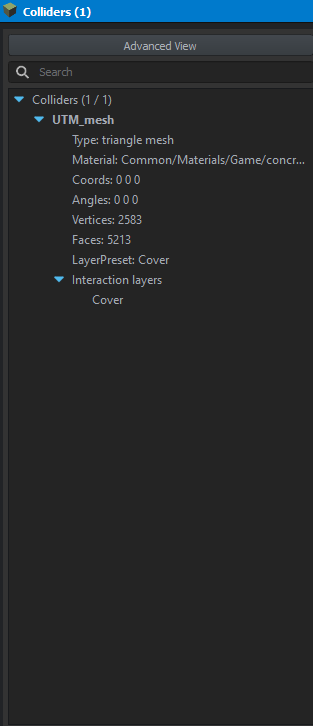
can somebody explain to me like im 5 how to create collisions? i've used the blender addons in an attempt to generate the colliders but i can still walk through the walls in my building
 calm rune
sand compass
can somebody explain to me like im 5 how to create collisions? i've used the ble...
calm rune
sand compass
can somebody explain to me like im 5 how to create collisions? i've used the ble...
Make sure model geo has a check in the box.
 sand compass
calm rune
Make sure model geo has a check in the box.
sand compass
calm rune
Make sure model geo has a check in the box.
I think I have done this before but I will try again just to be sure
yeah i dont know i feel like im missing a huge step here
 astral hull
sand compass
yeah i dont know i feel like im missing a huge step here
astral hull
sand compass
yeah i dont know i feel like im missing a huge step here
Do you have the enfusion plugin setup in blender?
sand compass
astral hull
Do you have the enfusion plugin setup in blender?
yes
 tidal latch
Do you have correct layer presets assigned to geo?
 astral hull
Yes
Generally fireview and firegeo are used for collisions
Set the layer to one of those
Also make sure you make a prefab, the xob by itself will have no colliders
tidal latch
Fire view is for fire geometry (bullets) and view (ai), not for character collision
sand compass
so it should have 2 collision models for both?
astral hull
What can also help is looking into the .xob of the vanilla files to see what they are using for colliders
It says vehicle cast for wheels but all the vehicles use firegeo
🤨
sand compass
this all worked, thank you for the help fellas @tidal latch @astral hull ❤️
 lavish vigil


 shell hedge
finally my favorite call of duty weapon
 tacit eagle
what woods floating head in black ops2
tacit eagle
oh boy commission warrant officer how about rank of I dont care dot fullstop
 spare burrow
tacit eagle
oh boy commission warrant officer how about rank of I dont care dot fullstop
spare burrow
tacit eagle
oh boy commission warrant officer how about rank of I dont care dot fullstop
Sorry you feel this way wasn’t trying to offend anyone
tacit eagle
not the place for advertising units plus most of us have our own groups or are not interested
spare burrow
tacit eagle
not the place for advertising units plus most of us have our own groups or are n...
My bad I honestly didn’t know. I will take it down
 glossy lynx
If you never figured this out I think the square colliders you have on the wheels might be the problem
 slim knoll
So should I get rid of them then?
 cursive lava
Is anyone working on anything like this for vanilla m16

 shell hedge
creating trimesh colliders using voxel fields to meshes is underrated

probably doesnt work well for all shapes though
tacit eagle
why dont they use it for weapons?
 shell hedge
just wanted firegeo to be more accurate, the vehicle layer collider is actually just a cylinder
 deft owl
 sand pagoda
Intersecting geo is bad for performance i believe
shell hedge
there's some automatic merge going on with trimesh if you have that on
sand pagoda
deft owl
Intersecting geo is bad for performance i believe
yes, exactly
sand pagoda
shell hedge
there's some automatic merge going on with trimesh if you have that on
it merges meshes
not verticles on meshes
shell hedge
oh interesting I didn't know that, yeah so I also didn't want intersecting geo in my firegeo
does the intersecting thing only matter for multiple colliders? not relevant to multiple meshes?
sand pagoda
shell hedge
oh interesting I didn't know that, yeah so I also didn't want intersecting geo i...
absolutely nothing bad
especially in context of small 10 x 10 cm drone that will be oneshoted at hit
you dont even need those blade holders
just cube
more then enough
shell hedge
yes I don't need them, but I want them
sand pagoda
well, go ahead then
shell hedge
I will measure performance with it later to see what the performance difference is
sand pagoda
perfomance will change only when there will be a swarm of those drones
and based on my own experience, bad(overdetailed) colliders not affecting any perfomance (at least on client side), but they make ballistic calculations wrong
shell hedge
if the collider shape is closer to the actual shape then the ballistics should be more accurate
 sand pagoda
sand pagoda
sand pagoda
more details -> more chance that something like this will happen ^
and this is not a feature
this is a bug
shell hedge
yes it's a bug so I don't need to worry about it
sand pagoda
well, this aint a bug if you using colliders wrong
im not stopping you, but just saying
shell hedge
my collider having more polygons than you like does not automatically make my collider "wrong"
shell hedge
from my testing so far the collider works correctly therefore it's fine
it could have a few less triangles though
sand pagoda
it could have 12
a nothing will change
but yea, im not trying to be a teacher or something
just saying things based on my experience
i could be wrong
shell hedge
I posted it to highlight potential use of voxel fields for colliders
I thought it's interesting
sand pagoda
it is!
shell hedge

the only problem with going low poly with something like this is it might not preserve the flat shape on top for example
my tiny drone like you said could just use a few boxes you'd make in 30 seconds, so I wonder about bigger things
I think I will need to use boxes anyway for the arms if I want them to move? I think UTM can't be weighted (but you can use colliders as children of joints)
sand pagoda
i dont think any of colliders can be weighted
you can attach any type of collider to bone, but not weight them
shell hedge
right, thank you
surreal ore
shell hedge
I think I will need to use boxes anyway for the arms if I want them to move? I t...
Funnily enough, the wiki used to say that the only collider that could be weighted was the Trimesh
 last hill
surreal ore
Funnily enough, the wiki used to say that the only collider that could be weight...
last hill
surreal ore
Funnily enough, the wiki used to say that the only collider that could be weight...
Isn't that the one for doors etc? Hence being able to be weighted? Been a while since I read the wiki.
 fluid fern
Has anyone tested this addon for blender?
https://topguides.gumroad.com/l/gpt-blender

Gumroad
Introducing the GPT-4 Add-on for Blender, the powerful extension that lets you control Blender with natural language commands. Simply watch the video demonstration:With this add-on, you can easily create stunning 3D models and animations using your text input. Say goodbye to tedious and time-consuming workflows, and welcome a new era of intuitiv...
woven swallow
fluid fern
Has anyone tested this addon for blender?
https://topguides.gumroad.com/l/gpt-bl...
I've been messing around with AI but never seen this addon. I'll check it out.
 covert dune
Not too fond of AI, but that's actually not a bad idea ngl
tacit eagle
Which ai you use?
 stoic torrent
I think its Midjourney


 calm rune
woven swallow
calm rune
woven swallow
Finally some NA style homes. No offense to my Euro friends but I am so sick of seeing maps centered around Europe and its housing style lol
tacit eagle
because europe, asia and africa are most common places for war zones
US is just fictional red dawn schiet
or life servers
also most houses and even some commercial buildings are made out of stick frame wood construction. so you get no cover from boolits. and in the future when destruction is a thing it will be easier to do stone / concrete destruction than plywood/ sheetrock and 2x4s.
calm rune
I know why. It's just boring.
covert dune
US stuff is really rare in general. Even in DayZ people are filling their US based maps with european housing. 🥴
So it's good to finally have someone working on some
slim knoll
Is someone here willing to help me out with a car creation project. Help me grasp stuff that dont really work.. the wiki is nice but I dont get everything thats said there.. if yes.. please DM me. I feel like modding in circles.m
 burnt thunder
Tbh US towns would be hell to fight in considering zoning
woven swallow
tacit eagle
Which ai you use?
midjourney
tacit eagle
you pay for it?
I saw the cheapest option does not have a relaxed mode which is unlimited in the higher options
woven swallow
thing is I don't care about military stuff or conflicts. there's plenty of people doing military stuff. So why would i make weapons, helicopters or planes when there's a ton of people already doing that? I'm looking at a DayZ 2.0 in America, walking dead type of theme.. even last of us. or what about modern civil war in america? like vergy was saying. I'm tired of seeing european assets. so let's take the game to another environment or theme.
woven swallow
tacit eagle
you pay for it?
yes and $10 bucks a month
I don't really need to pay for unlimited because i don't really use it that much and you can cancel any time.
tacit eagle
so how many images you get a month its like .4 of hour and you get like 10 hours right?
woven swallow
I think it was 200
 unborn wagon
reference image I took on a hike vs final game asset products. cant wait til I have the full terrain done!

 unborn wagon
woven swallow
unborn wagon
woven swallow
Really great stuff. Going to look epic in game. Might ask you some questions (specifically on making complex interior lighting probes) when I get back on creating the structures for my terrain.
woven swallow
unborn wagon
Really great stuff. Going to look epic in game. Might ask you some questions (sp...
thank you. yeah sure why not.
 leaden trench
Stuck gold searching for an M242 model; it's free with higher quality than most of what you could find for sale https://sketchfab.com/3d-models/model522-m242-bushmaster-b377b22480de49cd8d8680383de7ad04

Model522 (M242 Bushmaster) - Download Free 3D model by cgmekamono
slim knoll
Where is the Camera position inside a car? Its too high and I need it to be lower. Where can I set it?
leaden trench
slim knoll
Where is the Camera position inside a car? Its too high and I need it to be lowe...
You could change the driver animation or seat position, such that the eyes are physically lower in the car.
slim knoll
Could you say what components are those?
shell hedge
leaden trench
Stuck gold searching for an M242 model; it's free with higher quality than most ...
suspiciously high quality
there's also a RIM-116 by the same guy, also looks good
leaden trench
shell hedge
there's also a RIM-116 by the same guy, also looks good
yea, I just ignored the RIM-116 for now because I'm not a rocket scientist; I don't know know how to code a damn homing missle.
shell hedge
I think the targeting part would be harder especially from a vehicle
it doesn't look like the thing has a seat with a monitor
slim knoll
Can I find the character to download somewhere? I need to scale it a bit but dont want to trial and error it.
tidal latch
slim knoll
Thanks.
 stark jolt
What bone should I have belts on?
surreal ore
@stark jolt Hips? Lol
stark jolt
surreal ore
<@244649871619915777> Hips? Lol
Didn’t have to do me like that Zelik 😫
 frigid wedge
Is there any way to export the base game models to blender if we wanted to modify them? I.e. a rifle for example
shell hedge
No, not allowed
sand compass
do big objects usually take a long time to import into reforger?
tidal latch
if by big objects do you mean over 500k verts then yes. There are some improvements prepared though
tacit eagle
my handgun is only 499k
stark jolt
tacit eagle
my handgun is only 499k
wtf
tacit eagle
its made out of nanobot a new enfusion feature 😂
covert dune
Had the idea of adding a rubber eyepiece to the PSO scope. Very basic model for now, but I may persue this further. 

Looks proper like this. Vertice count is through the roof though.. 
tacit eagle
what you mean? how much did you add
the law rocket has like 8k...
post pics of it in fpv
covert dune
1.4k vertices for that eyepiece. I used the same 30 vertices for a loop just like the scope. And with blockier shape you're looking at 1.2k
Has to be pretty detaield though with how close it is to the player's eye
tacit eagle
not much...
I dont know why they didnt go with eye cups
probably be a good weapon to force 2d view on to
covert dune
I think they went with the DayZ-like PSO. In older DayZ it had the eyecup, then new 1.0 update had bare scope. Reforger followed this trend likely
tacit eagle
it looks wrong 😦 ArmA plz fix
covert dune
tacit eagle
post pics of it in fpv
Yeah might aswell just force 2d view with how this looks
 tacit eagle
hmmm what if you turn up the roughness on the inside and darken it
covert dune
It's a very basic model. Auto smooth turned up really high and T62 rubber material applied. If I were to do this properly I'd probably do that and add the missing detail aswell
tacit eagle
but you bake than down onto uv maps right?
covert dune
Ofc, this was just quick and dirty to see if I'd like it
And well, could be worth it
tacit eagle
it might still be possible in with a 3d scope
try to color the inside part white for the roughness so its less reflective, and darken the co and maybe the AO a little
I also dont remember the pso also showed the front sight. maybe its the camera is too far forwards
covert dune
With correct shading, it'd probably look right. Maybe also with some FOV tweaks. But I'm not sure if that can be done per scope.
I'll keep this on my list. 
tacit eagle

😦
nope
the front sight is still there
maybe in the future they will have away to disable seeing it. I imagine it would be when they add in vehicle viewports
covert dune
Huh, true. In pictures of PSO scope view you cannot actually see the front sight.
tacit eagle

irl you still see perfectly fine with this
its only during low light where it become hard to see with
covert dune
Ya, due to the zoom
 young shard
I keep coming back to this image because it just looks so clean in Marmoset.
 zenith quartz

 eager zephyr
Would anyone be able to help me with creating slot and snap points on a weapon model in blender?
shell hedge
covert dune
Yeah might aswell just force 2d view with how this looks
I like it, its basically 2d scopes but useful, since the 2d scopes dont allow for precise adjustments
shell hedge
zenith quartz
<:meow_heart:921785160523997194>
Its mostly just normals or a bake right?
the stuff on your artstation is really good
it's missing a lot of stuff you've made I think but the stuff that's in there is amazing
zenith quartz
Thank you! And yes that one is a bake.
slim knoll
How do I assign a car to a faction?
shell hedge
FactionAffiliationComponent, however that faction changes when a character gets inside
if you're talking about the game master entity list then there's another one under Editable Vehicle Component (or editable entity component depending on entity)
slim knoll
Thanks, I'll try it.
slim knoll
Doesnt work.
tidal latch
frigid wedge
Can someone explain to me why when I import my textures they look so washed out like this? I have matched every other setting to other textures in the game and fiddled with the sliders but I can't get rid of this weird washed out appearance

 delicate condor
texture colorspace thingy
frigid wedge
delicate condor
texture colorspace thingy
Sorry can you elaborate on that?
Even if I darken the texture it has this weird glossy finish on it like its covered in a glaze and the metalness scale / dialectic reflectance doesn't change it
 delicate condor
frigid wedge
Even if I darken the texture it has this weird glossy finish on it like its cove...
delicate condor
frigid wedge
Even if I darken the texture it has this weird glossy finish on it like its cove...
there is a import color space setting somewhere in there
not related to hwo the texture actually is colored but it changes how its handled
frigid wedge
delicate condor
there is a import color space setting somewhere in there
In the .emat? I'm not seeing any options that say color space
delicate condor
oor something like that anyway. dont remeber what it was exactly
tidal latch
Are you sure your texture is correct? How is your roughness set?
frigid wedge
tidal latch
Are you sure your texture is correct? How is your roughness set?
Everything is set to default, adjusting the sliders doesn't help. Roughness is at 1.0, if I bring it down to Zero it looks like this: (left) and to maximum this: (right)

 frigid wedge
tidal latch
Are you using bcr suffix?
frigid wedge
tidal latch
Are you using bcr suffix?
You mean in Blender itself?
tidal latch
No, in tiff
frigid wedge
I'm importing the .png image to the mission itself then placing it on the .emat - Not sure what tiff is
tidal latch
Tiff is texture format
Is your PNG texture with suffix?
I assume no and I guess you don't have roughness set in texture itself (PNG)
https://community.bistudio.com/wiki/Arma_Reforger:Weapon_Modding#Retexturing_asset you can read about textures here
last hill
frigid wedge
Everything is set to default, adjusting the sliders doesn't help. Roughness is a...
As Reyhard said, make sure you give your texture a Roughness map on the Alpha channel of the texture and when you name it, add _BCR at the end so for instance merc_example_BCR.tif or in your case .png
The game will automatically know your texture is a Base Color Roughness texture and look for the Roughness in your alpha channel.
What program are you texturing in? There is an Enfusion profile on the wiki for Substance Painter.
The profile can export your BCR and NMO (Base Color Roughness and Normal Metallic AmbientOcclusion) (including your Roughness on Alpha and AO on Alpha).
frigid wedge
tidal latch
Is your PNG texture with suffix?
It does not have a suffix on the texture name no, Does it need to be Name_BCR.png ?
calm rune
Some commission work for a Reforger community. Modelling work is about 85% completed.


 tidal latch
frigid wedge
It does not have a suffix on the texture name no, Does it need to be Name_BCR.pn...
tidal latch
frigid wedge
It does not have a suffix on the texture name no, Does it need to be Name_BCR.pn...
yes, it need. As was mentioned above, make sure that you put Roughness in Alpha channel. Open it in photoshop/gimp and modify it properly. https://community.bistudio.com/wiki/Arma_Reforger:Textures
tacit eagle
Bump? Color? Roughness?
last hill
tacit eagle
Bump? Color? Roughness?
Base color on RGB, Roughness in Alpha.
frigid wedge
tidal latch
yes, it need. As was mentioned above, make sure that you put Roughness in Alpha ...
Output from GIMP in the suggested .Tiff file and compression set to LZW with the _BCR suffix set in the name. Keep getting this error when importing, do textures need to be perfectly square?
 tidal latch
frigid wedge
Output from GIMP in the suggested .Tiff file and compression set to LZW with the...
tidal latch
frigid wedge
Output from GIMP in the suggested .Tiff file and compression set to LZW with the...
They indeed need to be power of 2 https://gamedev.stackexchange.com/questions/26187/why-are-textures-always-square-powers-of-two-what-if-they-arent

Game Development Stack Exchange
Why are the resolution of textures in games always a power of two (128x128, 256x256, 512x512, 1024x1024, etc.)? Wouldn't it be smart to save on the game's file size and make the texture exactly fit...
so 128x512, 256x64,512x512 etc
frigid wedge
Hm. It's still failing to register into the mission, I have it going into an "images" folder. 1024x1024, .tiff format. Seems to upload just fine under .png
tidal latch
Is your tiff 8bit?
fluid fern
A2 object with retexturing
 sand pagoda
still looks like a2 object
fluid fern
ik, It was useless to start from 0 for supporting walls, create a building from 0 ok but for that it is not worth it
last hill
~~Hi guys, I bit the bullet and am learning to do all my mods via Blender, however am running into an issue doing a basic armature on a pair of NVG. I have followed along with a few different tutorials, however once created and applied as a modifier and weighted to the bones in my armature, on rotation, the mesh inside the specific bone armature is being scaled down and up as well as rotating? Is there something I am doing wrong? I tried to search armature rotation scaling etc on search here on Discord and couldn't find my issue so apologies if covered.
This is inside Blender AND workbench once skinning is imported~~
Sorted - When I weighted to my bones, I didn't realise that unlike 3ds Max, Blender doesn't automatically paint out the root bone as you move across the vertex groups painting them in. So it was still painted 1.0 on root, as well as the rest.
surreal ore
@last hill For simple hard surface things, it's easier in blender to just select the faces/verts and add them to a vertex group with the name of the bone you want to paint them to.
Hope that makes sense.
woven swallow
Anyone here knows how many textures a house in arma reforger has? just to get an idea of how many textures I need lol
calm rune
woven swallow
Anyone here knows how many textures a house in arma reforger has? just to get an...
Looks like it ranges between 4-9
woven swallow
calm rune
Looks like it ranges between 4-9
Would you mind taking a screenshot of how the UV looks like? if you can if not. that's fine. thank you anyways.
calm rune
woven swallow
Would you mind taking a screenshot of how the UV looks like? if you can if not. ...
 woven swallow
First Window. testing textures and UVs.


 glossy lynx
The textures look low quality because it’s using pbrmulti
Those textures are just large color changes like sunspots or water damage
 tacit eagle
does the github samples have stuff like pic rails or more importantly rails for the AK/ RPG
 woven swallow
Another test. UV's and textures.
Bake from High Poly to Low Poly: Not yet.
 woven swallow
More worn lol
 tacit eagle
there is no ak rail dimensions
 fathom bolt
tacit eagle
there is no ak rail dimensions
fathom bolt
tacit eagle
there is no ak rail dimensions
Cause it’s the same, they made it for compatibility with accessory it’s like Russian version and NATO version
The only difference is the hole accros the middle
 daring condor
fathom bolt
Cause it’s the same, they made it for compatibility with accessory it’s like Rus...
daring condor
fathom bolt
Cause it’s the same, they made it for compatibility with accessory it’s like Rus...
ak-74n dovetail mount
daring condor
tacit eagle

 nocturne sparrow
AK rails are changing by years and even weapon model. It might be hard to dig up the correct bar.
This is the version you want (prod. 1978-1989) for AK74N in Reforger era.

 woven swallow
Aight. don't mean to spam but here are my first two window variables. I'll be making more with different colors and shapes.
 delicate condor
woven swallow
Aight. don't mean to spam but here are my first two window variables. I'll be ma...
delicate condor
woven swallow
Aight. don't mean to spam but here are my first two window variables. I'll be ma...
looks great! really like the subtle wear. not too much to be like totally run down, but looks like it has seen a few years in the rain
woven swallow
delicate condor
looks great! really like the subtle wear. not too much to be like totally run do...
Thank you. there's always room for tweaking.
 dire estuary
Ahh thats a friggin great idea!


 tacit eagle
why is the sigu so popular all the sudden
sly bridge
tacit eagle
why is the sigu so popular all the sudden
guess because it is the fielded us army sidearm?
tacit eagle
in the 90s and 2000 it was the 92fs, later it was glock, now its this
sly bridge
tacit eagle
in the 90s and 2000 it was the 92fs, later it was glock, now its this
glock was never issued, some special branches use glock 19 because reasons, but nope the m9 was the sidearm of choice until 2 years ago or so
covert dune
sly bridge
Blows me away everytime you post. If I didn't know any better, this'd be a real picture from some wiki article. 🥴
tacit eagle
are you gonna add in wear?
sly bridge
tacit eagle
are you gonna add in wear?
i already did :)) not gonna add more for now no
sly bridge
covert dune
Blows me away everytime you post. If I didn't know any better, this'd be a real ...
much appreciated
tacit eagle
im used to wear like dis
 sly bridge
tacit eagle
im used to wear like dis
sly bridge
tacit eagle
im used to wear like dis
¯_(ツ)_/¯
here is a sig that had 25.000 rounds through it...not really fallout wear levels
https://soldiersystems.net/wp-content/uploads/2019/12/m17-s-left.jpg
 unborn wagon
woven swallow
Aight. don't mean to spam but here are my first two window variables. I'll be ma...
unborn wagon
woven swallow
Aight. don't mean to spam but here are my first two window variables. I'll be ma...
dont ever feel bad about spamming dude your shit is dope
 fathom elbow
sly bridge
here is a sig that had 25.000 rounds through it...not really fallout wear levels...
fathom elbow
sly bridge
here is a sig that had 25.000 rounds through it...not really fallout wear levels...
25k rounds on the range vs 25k rounds in some african bush war are different kind of levels of wear though 😉
nocturne sparrow
Many modelers overdo their wear and grime... especially edge wear.
sly bridge
fathom elbow
25k rounds on the range vs 25k rounds in some african bush war are different kin...
while true, military doesn’t really treat their weapons with a lot of care - the above is fielded weapon that has seen (trials that is true) deployment outside US according to article. also 25k is bound to come from range fire drills, no one actually fires that many shots with a sidearm in the military :))
sly bridge
nocturne sparrow
Many modelers overdo their wear and grime... especially edge wear.
mainly because smartmasks, but that tends to be sooo overused (fingerprints included btw)
tacit eagle
no like finger prints 😦
woven swallow
unborn wagon
dont ever feel bad about spamming dude your shit is dope
Haha thanks dude, I'm glad you like what I'm doing
woven swallow
nocturne sparrow
Many modelers overdo their wear and grime... especially edge wear.
😂 agree. People be like. crank that shit up! Haha
leaden trench
It takes seconds to put down some plausible looking wear-and-tear in Substance Painter, but to actually match reference photos you need to put in hours of manual painting. So understandable.
fathom elbow
leaden trench
It takes seconds to put down some plausible looking wear-and-tear in Substance P...
"real reference photos" ... of which half of them are artificially aged with sandpaper or whatever other polishing method, because people think it just looks cool.
Actual wear is really uneaven. If there is rubbing somewhere, that area will be completely blank, but nothing else is.
 last parcel
Large Red Barn from Arma 2, still gotta make doors, staircase and ladders and railing on the catwalk above

 fathom bolt
You take the old one model from A2 and you re-do some parts ?
last parcel
redid it from the ground up just messured it and started from there
fathom bolt
Why you don’t take it from A2 to « remaster it » ?
last parcel
kinda wanted to challenge myself, + found it to be more fun to recreate it from the ground up.
zenith quartz
Test renders.


 shell hedge
quality, btw there are contacts on the rail for like, powering an attachment?
I know nothing about guns
zenith quartz
Yeah, they're powered rails.
Inspired by BF2042 and Tworx's real life I-rail system.
shell hedge
that is super cool
zenith quartz
thanks! :D
tacit eagle
need MP7 think with micro grenade launcher
last parcel
finished up the railings inside today.
 tacit eagle
I don't remember could we go on top of it?
covert dune
You're able to use the catwalks normally, but not on the roof
tacit eagle
would be nice to see a version of it not neglected
covert dune
I thought previously it would be neat if you could blow off the scrap metal plates with explosives, but that's totally unnecessary. 😛
tacit eagle
throws single hand grenade all the panels fall off
sand pagoda
it is possible
shell hedge
possible but it wouldn't look seamless
shell hedge
shell hedge
possible but it wouldn't look seamless
nvm looks fine
we crysis physics now
sorry for not posting this in physics channel
so yea let's just voronoi fracture everything into debris
 stray bridge
metal barn with theses physics, 1 bomb or 2 grenades = fps 📉
shell hedge
ill stress test and let you know
I have no fps loss when I damage like 100 of those at a time, so xbox series s might lose like 1 or 2 fps
 stuck notch
You're getting me excited for squishy houses update
tacit eagle
BFBC2 reloaded
 shell hedge
it is a warning that you do not have a specific layer preset selected for your collider
 blazing agate
Oh how can I solve it? It is inside of blender?
stray bridge
blazing agate
Oh how can I solve it? It is inside of blender?
you got the blender addon?
this one?

if not, install it. Here you can find the colliders setup. You set the layers + the game material

if you dont wanna do it in blender which is the best way do it in tool with the rigidbody" component -> check the boxes needed for your prop
 waxen mango
shell hedge
waxen mango
shell hedge
probably should have it do this with small arms though, not very realistic.
 calm karma
Having an issue getting collision to animate properly for some armor. I've tried linking to the bone and using vertex groups but the collider is stuck to the root when it gets in game
Is there some other way to link them to the correct bone that I'm missing or is there something I have to do in enfusion?
I took a copy of the visual geometry that animates properly and just slapped the UTM tag on it hoping it would translate to animated collision
slim knoll
Karosa C734 Bus
 near bear
I guess this is the best place to ask has anyone tried ai generated 3d models for this shit I signed up on a wait list to try something out was curious if it would work for mod making
shell hedge
There's probably no AI model capable of making quality game ready assets YET
lavish vigil
time for A new Vehicle the Kubelwagen


 calm rune
lavish vigil
time for A new Vehicle the Kubelwagen
calm rune
lavish vigil
time for A new Vehicle the Kubelwagen
Are all these assets in Post Scriptum?
lavish vigil
calm rune
Are all these assets in Post Scriptum?
nop
calm karma
calm karma
Having an issue getting collision to animate properly for some armor. I've tried...
can anybody help with this? Still can't get collision to animate
leaden trench
shell hedge
There's probably no AI model capable of making quality game ready assets YET
Will be interesting to see what Nvidia Picasso can do. From videos looks good for organic scenery stuf, if not hard-surface.
 shut bloom
leaden trench
Will be interesting to see what Nvidia Picasso can do. From videos looks good f...
shut bloom
leaden trench
Will be interesting to see what Nvidia Picasso can do. From videos looks good f...
all the 3D ones are trained on scanned data. I doubt that any of these models will reach the quality of professional 3D artists since there is just not enough data to train on.
near bear
I signed up for the waiting list on 3DFY so I'm curious to see how it works I will see if they have any pics
near bear
Honestly they don't look that bad although idk how effective it will be at making actual real life shit cause from experience with ai art it always looks abit off

 shut bloom
near bear
I signed up for the waiting list on 3DFY so I'm curious to see how it works I wi...
shut bloom
near bear
I signed up for the waiting list on 3DFY so I'm curious to see how it works I wi...
iam 99% sure that that website is pure fake if you look at what big Developers are working on they are years away from what these dudes say they achived
near bear
Definitely possible that its fake but only time will tell I guess I haven't given any money so no harm in seeing
shut bloom
nah not possible it is fake most of the stuff there makes 0 sense esp because all of what they show are a Bad uvs b bad Subdiv models and super weird Geometry in general
near bear
Yeah
shut bloom
also with the sword you can see that its just the model but decimated and then undecimated the topology or in general everything about that model makes 0 sense
near bear
Yeah you right I will let ya know if i ever get the email tho
shut bloom
you prob wont but if so youll prob get a virus or something kekw
near bear
Probably lol
sly bridge
the topic is model makers with an emphasis in makers
feel free to discuss AI things in offtopic channels
near bear
Ok
shell hedge
leaden trench
Will be interesting to see what Nvidia Picasso can do. From videos looks good f...
let's see how good the topology is when something does get made
 analog zenith
lavish vigil
time for A new Vehicle the Kubelwagen
analog zenith
lavish vigil
time for A new Vehicle the Kubelwagen
what's your mod even called or is it upcoming ? curious
lavish vigil
There will be a video when and were you can play it
analog zenith
ahh yes
 shell hedge
anyone know of any kitbash mesh pack intended for assembling firearms?
sly bridge
shell hedge
anyone know of any kitbash mesh pack intended for assembling firearms?
considering not two guns are the same, the ones i am aware of are for sci fi stuff (modular type)
shell hedge
sly bridge
considering not two guns are the same, the ones i am aware of are for sci fi stu...
perfect, scifi is actually what I'm after
sly bridge
shell hedge
perfect, scifi is actually what I'm after

FlippedNormals
A lot of various quality products for 3D artists
pick you poison
shell hedge
yea I'll get some of his stuff I'm sure, you think he built all the kitbash guns out of the same pieces he has in the packs?
sly bridge
no idea but you can ask the bloke, I remember seeing another dude doing similar stuff on artstation but can't find him right now (this lad sells stuff via cgtrader/artstation and flipped)
shell hedge
closest thing to what I want is something like this https://cubebrush.co/tunagulsen/products/pb59eq/mega-compact-kitbash-library-sci-fi-weapon-arsenal
but this is not easily usable in games because the topology is all over the place, some pieces are like 300k polys as well
but I like those designs
sly bridge
shell hedge
closest thing to what I want is something like this https://cubebrush.co/tunagul...
ahh, zbrush kitbash....oh well, you can always decimated these down (zbrush or another software)
shell hedge
some of them I can yeah, I'll use whatever I can out of that one
sly bridge
shell hedge
some of them I can yeah, I'll use whatever I can out of that one
to be honest, i never got a proper use out of a kitbash (i do own a couple building ones, but i always end up using my own stuff)
shell hedge
I use it a lot to speed things up
for a scifi gun it will make it take less time than modeling the whole thing myself (since it doesnt have to be realistic)
sly bridge
i always found it to be more work somehow
shell hedge
I think if you are experienced with hard surface then you can create way faster than me, but for me it doesn't really make sense
 patent flower
lavish vigil
time for A new Vehicle the Kubelwagen
patent flower
lavish vigil
time for A new Vehicle the Kubelwagen
very pretty, nice one
tacit eagle
probably better to just asset lib a few primitive shapes and just use Booleans to make something
not a fan of kit bashing
these are a bunch of tank concepts im working on

you can do general concepting like that until you find a few that you like


and ive ended up with something like this.
last parcel
another building i am working on,


 misty solstice
tacit eagle
misty solstice
tacit eagle
Working on actual jets or just kinda more for Cosmetic place around type of thing?
tacit eagle
those are space planes on a project I am working on, its some early concepts I cant show anything more than that
misty solstice
Understandable it’s lookin good
zenith quartz
last parcel
another building i am working on,
Familiar. 👀
I like the idea of taking these old buildings and up-resing for Enfusion.
 summer sierra
last parcel
another building i am working on,
summer sierra
last parcel
another building i am working on,
Looks like the Dayz mili barracks
fathom bolt
summer sierra
Looks like the Dayz mili barracks
That it
last parcel
now ingame just need to fix stuff, optimize it and of course texture it 😄
 deft owl
Is it possible to make a material translucent without any textures? I just have a debug shape that I want to see through
shell hedge
deft owl
Is it possible to make a material translucent without any textures? I just have ...
I think so with alpha blend and the sliders next to it
last hill
deft owl
Is it possible to make a material translucent without any textures? I just have ...
Yup, set your material to translucent and then alpha blend and sliders.
Alternatively, change your material type to basic glass up the top.
 agile crater

 last parcel
very nice model 😄
covert dune
smoof 
 lucid crystal
Would a high-poly asset be viable for a clothing mod on arma? how would the game handle that on the lowest denominator such as an Xbox?
tacit eagle
what you mean by high poly
shell hedge
lucid crystal
Would a high-poly asset be viable for a clothing mod on arma? how would the game...
not very good, as seen by high poly assets modded into the game currently
agile crater
 lucid crystal
shell hedge
not very good, as seen by high poly assets modded into the game currently
lucid crystal
shell hedge
not very good, as seen by high poly assets modded into the game currently
Ah, so lowpoly would be the way to go for clothing mods? Reasoning being that i have a highpoly shirt i wanted to use for a mod, evertything else would be pretty-much low-poly.
Then again, multiple users wearing the asset might cause some performance issues.
shell hedge
lucid crystal
Ah, so lowpoly would be the way to go for clothing mods? Reasoning being that i ...
try to aim for similar poly count as vanilla assets would be my best guess
sly bridge
lucid crystal
Ah, so lowpoly would be the way to go for clothing mods? Reasoning being that i ...
what is everything else? what is the polycount?
how many individual textures, on how many uv sets
otherwise what bacon suggested - open workbench -> look over vanilla content and aim for a similar polycount
 wicked dirge
agile crater
https://cdn.discordapp.com/attachments/507943761322442755/1100172661553905744/im...
wicked dirge
agile crater
https://cdn.discordapp.com/attachments/507943761322442755/1100172661553905744/im...
very cool
fathom elbow
agile crater
https://cdn.discordapp.com/attachments/507943761322442755/1100172661553905744/im...
it's the turret of babel
 quiet fog
Hi, im not sure if anyone has done this but i havent seen it so far.
I made a chart for most of the vanilla doors dimensions. The measurements are meant not for the doors themselfs but rather for the cutout they will be placed in (if made with those numbers, there will be a couple of cm overlap between the building walls and the doorframe so that you wont have a to align both 100% perfect).
Let me know if you are missing some Prefabs and I will add them when i have time.
https://docs.google.com/spreadsheets/d/e/2PACX-1vTEmJm7IP9mUCblz-nsNV2WXErk9cMQcc_pdFzD6bQEXqANkij9jC6CsbAep8E5mqK21e6og3ORetpU/pubhtml
leaden trench
measurements
last parcel
Next Wip Building
 lucid crystal
shell hedge
try to aim for similar poly count as vanilla assets would be my best guess
lucid crystal
shell hedge
try to aim for similar poly count as vanilla assets would be my best guess
Where would i find that information? Was able to reduce the amount of polygons on the model.
shell hedge
lucid crystal
Where would i find that information? Was able to reduce the amount of polygons o...
open a model in workbench and it should have number of faces somewhere
last parcel
it's underneath the materials of each model
 arctic hatch
agile crater
https://cdn.discordapp.com/attachments/507943761322442755/1100172661553905744/im...
arctic hatch
agile crater
https://cdn.discordapp.com/attachments/507943761322442755/1100172661553905744/im...
It has a two-floor turret, I believe it needs a four-floor 😄
shut bloom
last parcel
Next Wip Building
this smells like someone is remaking Chernarus 0.o
lavish vigil
i finished some models for the weapons pack


 delicate condor
cool set! 👍 well done
tacit eagle
what size textures are you using?
agile crater
tacit eagle
what size textures are you using?
8k i think
last parcel
couple of props i made for my building
 tacit eagle
@agile crater I think thats gonna melt those fancy dvd players
last parcel
finally getting around testing out mask texturing on the school entrance and i must say its mighty useful
 lucid crystal
So question since i'm new to Arma workbench. So is there a system/option that is used to render different variations of items at different distances? (Example; Let's say i create a helmet, i want it to look as intended from up-close, but from afar i want it to be an extremely lowpoly item on the character; blocky almost.) Is there something to designate the spawning of both variations of this item?
last parcel
yes there is a system for Level of details
lucid crystal
last parcel
yes there is a system for Level of details
Excellent, are there any guides out there in-order to designate that?
lucid crystal
Thanks babe.
lucid crystal
last parcel
there is the bohemia wiki for it
So I'm guessing i'll have to create each variation of the LOD in blender then huh?
shut bloom
last parcel
finally getting around testing out mask texturing on the school entrance and i m...
have you been trying out the VFX Textures aswell ?
last parcel
not yet
shut bloom
last parcel
not yet
try them same principle but you can break them up with other alphas ingame and they are super usefull for Dirt grime etc.
last parcel
ok
last parcel
lucid crystal
So I'm guessing i'll have to create each variation of the LOD in blender then hu...
Yea you would need todo that
lucid crystal
last parcel
Yea you would need todo that
ez
 iron galleon
hey yall , i got a question , i got my base model made in blender , and want to make it into a full working car in reforger what is all the parts i need aswel moddeld for that ? currently have my body/doors/wheels
sly bridge
iron galleon
hey yall , i got a question , i got my base model made in blender , and want to ...
there is a template for vehicles afaik. best thing to do is check the existing vehicles in workbench
iron galleon
i have my model indeed in the workbench but im sure i need a mesh and such right to get it anything on it ?
i tryd to follow the wiki but its hard to follow it ngl
sly bridge
iron galleon
i have my model indeed in the workbench but im sure i need a mesh and such right...
no idea what the question is
iron galleon
i cant seem to get a working model in to attach actions to / make it a useable object
sly bridge
need a mesh for what - general answer for anything that you model - model it like the real life counterpart works\
glossy lynx
iron galleon
i cant seem to get a working model in to attach actions to / make it a useable o...
Make sure you have geometry
https://community.bistudio.com/wiki/Arma_Reforger:FBX_Import
iron galleon
i will give that a good read
 covert eagle
does anyone know where to get the old arma 2 arrow head assets ? working on an middle east map
sly bridge

Bohemia Interactive
Bohemia Interactive is an independent game development studio, known for the Arma series, DayZ, Take On Mars, Ylands, and more.
sly bridge
covert eagle
does anyone know where to get the old arma 2 arrow head assets ? working on an m...
different shapes + rig / skinning, just saying

 fringe horizon
zenith quartz
fringe horizon
zenith quartz
Beautiful!
zenith quartz
Thankya!
fringe horizon
How many hours?:p
zenith quartz
Yeah between being distracted with other things lol.
shell hedge
still, I admire your patience
zenith quartz
Cheers!
Model itself maybe took...
4 days total including HP / LP stuff.
Oh gosh my consistency is awful.
I spent one of those days just doing the cord and aluminum cage around the housing.
And then another day I'll spend like doing half the rest of the model in one go.
I also made a PK-120, but I haven't unwrapped it yet.
 lavish vigil
tacit eagle
what size textures are you using?
lavish vigil
tacit eagle
what size textures are you using?
4k
covert eagle
If I wanted to take some stuff form these released files and put it in to the Enfusion workbench whats the easiest way to do so https://www.bohemia.net/community/licenses/licensed-data-packages
Bohemia Interactive
Bohemia Interactive is an independent game development studio, known for the Arma series, DayZ, Take On Mars, Ylands, and more.
or a video that might help
covert eagle
nvm figured it out with a bit more digging found the blender tool for it
fathom bolt
Open p3d with object builder from Arma 3 tools then export un fbx
If p3d isn’t binarized
 lost bloom
hey can i ask, can i paint on imported models, like custom buildings in the enfusion using texture paint. (i know you can paint on the terrain)
sly bridge
lost bloom
hey can i ask, can i paint on imported models, like custom buildings in the enfu...
nope
covert eagle
@fathom bolt yeah I got it figured out im more stuck now on how to get the RVMATs textures in to Workbench it doesnt seem to take RVMATs so gotta figure out how to get them to Emat ? or edds?
or maybe im confused and need the something else for the texture for this house lol
 fathom bolt
RVMATS are the old material system and texture used has non-PBR so you need to convert them for RE
 turbid moss
covert eagle
turbid moss
covert eagle
thank you

 covert eagle
@zenith quartz that looks amazing
zenith quartz
Thanks!
covert eagle
@turbid moss looking through that now does it have a place explaining how to convert them ?
sorry pretty new to this so just trying to figure out how to convert it to a usable file lol
turbid moss
You need to make new textures, test programs what suit to you.
https://www.slant.co/options/12609/alternatives/~substance-bitmap2material-alternatives
covert eagle
ah so the RVMAT files wont help me at all? I have adobe substance 3d painter
but Ill download this as well since its free
delicate condor
covert eagle
ah so the RVMAT files wont help me at all? I have adobe substance 3d painter
no very little of older data is really usable without rework
covert eagle
@delicate condor okay seems I have some learning to do haha im GFX freelancer but mainly work with Photoshop and aftereffects so this is a whole other playing field lol
sly bridge
RVMAT stands for Real Virtually Material & ATributes - and is the material file, that links towards the existing texture
what @delicate condor is trying to say is that the available textures are completely different from what you would need for the enfusion's PBR workflow
covert eagle
ah so pretty much the only thing that is helpful in the released files is the model for the house and for the textures I would have to start from scratch
guess they went through a lot to get the arma 2 arrow head buildings and stuff in to the Kunar Region map mod
was just trying to get some of the other buildings in to the map

it just looked like all the old textures
 delicate condor
old textures need rework to and be set up with the new enfusion materials
so yes it is a lot of work to do
sly bridge
you could be using the base diffuse maps as base, but even that one is not albedo as required by PBR workflow
dire estuary
zenith quartz
https://cdn.discordapp.com/attachments/800569931359060039/1101522070673821818/im...
Amazing work
tacit eagle

Learn how Embark uses their internally built Asset Processor in order to quickly build and iterate on game assets. The Asset Processor provides an easy-to-use UI inside of Blender where users set up their process input. It then runs complex Houdini processes in the background, allowing users to ignore most of what it normally takes to build game...
its pretty interesting video, maybe we can do the something similar
 leaden trench
 lethal frigate
Remind's me of Tomi's mansion from Vice City.

 surreal ore
@lethal frigate Have you got buildings in working correctly before?
lethal frigate
they had collision and stuff just have to learn to define material to the collision
and that multitextures i still have to learn
lethal frigate
I will
surreal ore
Required stuff for proper lighting and sounds
last parcel
has anyone tried to import a model i with Portals ?, I have tried it several times now, and it just keeps crashing
delicate condor
last parcel
has anyone tried to import a model i with Portals ?, I have tried it several tim...
what is portals?
last parcel
Portals are this according to the Wiki
"Define openings in the geometry through which light and sound can be propagated from the outside of the model to the inside and even between inside rooms in the model"
last parcel
ah ok
delicate condor
openings will not affect importing. your model has some other type of issue that prevents it from importing
is it super high poly for example?
last parcel
well it imports fine without the portals, it just when i go and press on the Generate BSP that makes it crash
delicate condor
how do you make the portals?
what do you model with?
is it something big?
is it triangulated?
last parcel
Blender, so i just make a plane place it in the middle of the widows,
according to the wiki it should be without triangulated
delicate condor
is it big?
last parcel
if i read the sentence right that is "They are specified as plane primitive with 4 vertices w/o triangulation"
delicate condor
is it high poly?
last parcel
nop, its just 14k building with normal size windows that Reforger use
delicate condor
so you mean you have the holes for the windows
and you create the glass for them and that crashes?
last parcel
oh wait, is the Portals not for the main model is it just for windows/ glass that i create on my own ?
delicate condor
I have a bit hard time understanding what exactly you are doing
last parcel
i have my house model, with holes in it for the windows, i created the sockets so I can use the arma reforger window models, and if i read the wiki correctly i still need light portals. even with the arma reforger windows
fathom elbow
unreal engine market place will fuse with sketchfab, quixel bridge and artstation market place ... more monopolisation, just what the world needs
covert dune
Oh god
surreal ore
delicate condor
I have a bit hard time understanding what exactly you are doing
He's making portals for light and sound to propagate correctly for his building.
@last parcel You need a probe volume


 last parcel
Ah. Will try that when I get home is it just a simple box with all the same holes or is it multiple boxes ?
 last parcel
Will do
tacit eagle
8k kinda low
tacit eagle
I think a3 had more
 plush shard
delicate condor
Why have more if you don't need any
plush shard
delicate condor
Why have more if you don't need any

 cold rune
once my model of lets say a stone is imported to the reforger tools how do i go about being able to pick it up in the world editor?
covert dune
cold rune
once my model of lets say a stone is imported to the reforger tools how do i go ...
I would look at how vanilla items do it. For example a handheld radio, and then removing the radio functionality later on. 
Here's a flower for you. Simple mesh change. 😛
 surreal ore
@covert dune iirc there is a base prefab for inventory items
covert dune
Even better!
Ah yes, you can find that in Prefabs>Items>Core>Item_Base.et
That seems to be it atleast. If you duplicate it, add a mesh component and tweak the weight you can already pick it up.
surreal ore
covert dune
That seems to be it atleast. If you duplicate it, add a mesh component and tweak...
Inherit from it
cold rune
Thanks i was messing around with that, but if i was to place a canteen and change only the mesh the prompt to pick it up goes away
i can still drag it in inv tho
surreal ore
What were you doing exactly?
nvm
it needs a mesh object and rigid body

Make it small enough to pick up


Rigid body has to have Model Geo checked
@cold rune
cold rune
im able to pick it up but only by dragging how would i go about picking it up like this

by looking at it
 iron brook
cold rune
im able to pick it up but only by dragging how would i go about picking it up li...
iron brook
cold rune
im able to pick it up but only by dragging how would i go about picking it up li...
you need to add an ActionManager, set up you context, meaning where the action is going to show up, and then set up the action.

generic actions like this can be found here

 tribal onyx
Is there a proccess / method of porting an existing Arma 3 Vehicle over to Reforger?
sly bridge
tribal onyx
Is there a proccess / method of porting an existing Arma 3 Vehicle over to Refor...
if you are the owner of said a3 vehicle, then there is a blender plugin that can sort of kind of do that, but it is advisable to redo the model + textures specifically for reforger
it is a different workflow
tribal onyx
sly bridge
if you are the owner of said a3 vehicle, then there is a blender plugin that can...
I am yeah, I have seen Reforger doesn't use RVMats now does it?
Where can I find the plugin as well plz
sly bridge
#enfusion_blender_tools seem it on the biki, you’ll need to do a search but don’t expect proper results with it
cold rune
iron brook
you need to add an ActionManager, set up you context, meaning where the action i...
Iv seem to of run into another problem XD, The pickup action is showing but its saying its too heavy even tho iv turned the weight down
oops nvm just found out why

was on scaler and not manual
tacit eagle
Anyone know how I can change the origin of my tac-vest model so it actually sits on the character and not just floating above?
covert eagle
is there a write up or something on how to add collision to your model? sorry for ignorance still learning
I have the model in to the world im making but walk right through walls lol
 tacit eagle
delicate condor
blender has a set origin tool
tacit eagle
delicate condor
blender has a set origin tool
The origin looks correct in blender, but as soon as I add it into the game world it's a mile away when I equip. Very strange
delicate condor
tacit eagle
The origin looks correct in blender, but as soon as I add it into the game world...
is the scale and rotation also applied
 lyric hedge
Palm Trees 🙂
 astral hull
covert eagle
is there a write up or something on how to add collision to your model? sorry fo...
astral hull
covert eagle
is there a write up or something on how to add collision to your model? sorry fo...
I can help you later tonight when I get home
tacit eagle
delicate condor
is the scale and rotation also applied
It all looks correct to me, everything has been applied so I think maybe it's an export issue. I made progress at least, now it's on my feet 😂
 delicate condor
lyric hedge
Palm Trees 🙂
delicate condor
lyric hedge
Palm Trees 🙂
you may need to check your uv mapping though. the leaves seem broken
tacit eagle
thats me irl
covert eagle
astral hull
I can help you later tonight when I get home
oh awesome okay just let me know
lyric hedge
yea the textures are not correct will fix
 lyric hedge
also still need to add colliders
 feral oar
looking for someone to make my unit a personal body Armour and belt with pouches
will pay good money for it
DM me for more info if you're interested
 dusty plume
feral oar
looking for someone to make my unit a personal body Armour and belt with pouches
last parcel
dusty plume
feral oar
looking for someone to make my unit a personal body Armour and belt with pouches
last parcel
closing in on that good texturing on the building


 last parcel
still missing the portal to make light pass through more natural so hopefully after that is done it works better, but thanks 🙂
zenith quartz
👍makes sense!
covert eagle
astral hull
I can help you later tonight when I get home
ready when you are I feel like im 90% there just the part of making it where enfusion recognizes it
tacit eagle
surreal ore
Apologies for the silly questions but where do I find those options? I appreciate the help

 tacit eagle
Awesome, thanks!
surreal ore
No worries
astral hull
covert eagle
ready when you are I feel like im 90% there just the part of making it where enf...
Look at your dms
slim knoll
Is there a way to export embeded textures from blender into Enfusion?
sand pagoda
last parcel
closing in on that good texturing on the building <:meowsweats:70762603061313539...
try to add some dirt/leaks to outside walls using VFX mask
sly bridge
slim knoll
Is there a way to export embeded textures from blender into Enfusion?
unlikely - also i thought that is an fbx feature
tacit eagle
slim knoll
Is there a way to export embeded textures from blender into Enfusion?
There's an option to embed textures when you export the fbx, though I'm not sure on the best path mode to use. I'm pretty new so I haven't figure it out, but maybe that'll help
 tacit eagle
slim knoll
Tried
tacit eagle
slim knoll
Tried
It's tricky, I use substance painter as I couldn't get it to work straight from blender. Have you tried this?: https://www.youtube.com/watch?v=H0BfD3Ri8L0
 slim knoll
The model I have is missing the seperate texture PNGs. They are just in the Blender. I do not know how to get the PNGS
calm karma
slim knoll
The model I have is missing the seperate texture PNGs. They are just in the Blen...
Go to the material in blender and expand the texture option that has the file in it. Should be an option to unpack the file which essentially exports it to an external file
delicate condor
slim knoll
The model I have is missing the seperate texture PNGs. They are just in the Blen...
Where is the model from?
slim knoll
delicate condor
Where is the model from?

low-poly model of the M16A4, with rail-mounted carryhandle-sight, the KAC M5 RAS handguard, and rail covers. - low-poly M16A4 [remade from scratch] - Download Free 3D model by notcplkerry
 shell hedge
cold rune
Anyone know a way to rotate a item image/icon in the inventory?
shell hedge
cold rune
Anyone know a way to rotate a item image/icon in the inventory?
in the inventory component there should be a preview render attribute that has settings for it
cold rune
shell hedge
in the inventory component there should be a preview render attribute that has s...
Thanks, messing around with it now. is there a way to mess with the setting live? or is it tweek load, tweak load repeat?
shell hedge
cold rune
Thanks, messing around with it now. is there a way to mess with the setting live...
actually for me it's tweak and restart world editor because I forgot how to clear the cache
cold rune
shell hedge
actually for me it's tweak and restart world editor because I forgot how to clea...
Thanks another thing i was trying to understand hopfully you know, was stacking items on top of each other, say i have 1 gold bar but want it to stack to 10 in my inventory and not 15 how would i go about changing that
shell hedge
cold rune
Thanks another thing i was trying to understand hopfully you know, was stacking ...
write a script that won't allow the player to pick up more than 10 gold bars at a time

 shell hedge
those are product photos you can't fool me
cold rune
shell hedge
write a script that won't allow the player to pick up more than 10 gold bars at ...
Would scripting be the only way to do something like that im not that savy with writing scripts?
shell hedge
cold rune
Would scripting be the only way to do something like that im not that savy with ...
I don't know of a built-in functionality to limit amount of particular item in inventory (outside of just fiddling with weight but that's not as reliable) so I would try script
cold rune
shell hedge
I don't know of a built-in functionality to limit amount of particular item in i...
ok thanks will have to look at it, cant be to hard
quiet fog
sly bridge
good lord how are you guys so good with this? 😄
delicate condor
Practise practise practise and then ||practise||
stray bridge
shell hedge
I don't know of a built-in functionality to limit amount of particular item in i...
+1
last parcel
Added an VFX dirt map, looks slightly better, and still got issues with portals making the workbench crash :S


 shell hedge
sly bridge
shell hedge
sly bridge
you've done a great job on this
are the details on the dials/knobs/whatever baked from hp or painted later?
sly bridge
if geo then baked if planar then textured :))
covert dune
Btw I've been meaning to ask, did you follow any guides or bought tutorials to get a workflow down for such results ? Or is it all self taught ? I respect the stuff you post here and as someone who's struggling I'd love to know. 🥴
sand pagoda
sly bridge
why front part have 4 times more polys then rear

 sly bridge
sand pagoda
why front part have 4 times more polys then rear
sly bridge
sand pagoda
why front part have 4 times more polys then rear
it's pretty much the same, i have just removed some of these chamfers. i'll see if i can reduce some things further, while keeping the ADS picture jagged free
sly bridge
covert dune
Btw I've been meaning to ask, did you follow any guides or bought tutorials to g...
not in a long while, nope. Just a lot of real steal refs, and just try not to overdo it when texturing. For modelling things are pretty straight forwards anyways, but i have been doing this for a long while now.
covert dune
sly bridge
not in a long while, nope. Just a lot of real steal refs, and just try not to ov...
Do you think it'd be wise to get some payed courses though ? I never did so and always taught things to myself, while also feeling like I'm severely lacking compared to others. As if I'm missing out and buying courses is conventional.
delicate condor
a course can have 50/50 chance to be useful or not.
there probably are useful ones out there too
but there is also a lot of information about this stuff out there in free tutorials and guides and articles
daring condor
covert dune
Do you think it'd be wise to get some payed courses though ? I never did so and ...
this is not a tutorial
but i think its a decent guide
tacit eagle
sly bridge
what is la texture size?
sly bridge
tacit eagle
what is la texture size?
2k
covert dune
daring condor
https://vinylobscura.notion.site/Fundamentals-of-Texturing-89adcc7e19174342b6fbc...
Oh I meant for modelling actually, should've specified sorry. 😅
I'll bookmark this for the inevitable though, thanks.
I often find that I do things vastly different and often less efficient than most people. They all work with these industry standard workflows where everything is neat and shiny, whereas with me it all feels clunky and totally wrong. So I keep searching for a workflow to grasp and go by, I just can't really find it. I'm sort of getting by and making okay-ish models, but in the end I realize it could've been much easier, more optimized etc. if I would've simply known how.
I have a lot of ideas for models I'd love to realize, especially for Reforger, but it often fails due to lack of know-how, aside from the very basics of 3D Art.
sly bridge
covert dune
Do you think it'd be wise to get some payed courses though ? I never did so and ...
nope, or the vast generic courses you can buy have some sort of similar alternative on youtube, with very few exceptions
i think everyone needs to go through some fundamentals first.
Any sort of small prop thing (boxes, scopes, suppressors etc) are a great thing to try and improve your skills
daring condor
or stuff you have lying around irl
sly bridge
covert dune
I often find that I do things vastly different and often less efficient than mos...
when it comes to modeling, although i am aware these days you can easily make game ready models in more ways than back in 2003/4 when i got properly into 3ds max, everyone would ideally know how to work with subd, opensub etc - things that are software agnostic anyways. If you don’t know how things can be quickly subdivided in quads, then that’s one thing to work on for instance
anyhow, i could give you some very generic feedback and pointers, but i would rather post it here, maybe someone else can use that info too
the purpose of this channel is to provide your models for feedback as well, so make use of it
covert dune
I currently don't have anything to receive feedback for, but the coffee cup on my desk could be something to thing to try I suppose. I think I get it though. Before I mess around with trying to understand things from a reference picture, being secure with my skills by simply modelling things I can easily measure sounds like a plan.
Nonetheless, if there's any helpful links, I'd appreciate those of course. 🙏
 thin radish
im trying to make a tree, but when i import it i can walk though it. im new to this
how do i make it solid?
trying add collision to my tree
 tacit eagle
Spud gun
slim knoll
thin radish
im trying to make a tree, but when i import it i can walk though it. im new to t...
Are you modelllng in blender?
thin radish
slim knoll
Are you modelllng in blender?
Yeab
slim knoll
Do you have the Blender addon "Enfusion" installed?
slim knoll
thin radish
Yeab
Download it and then Ping me.
Or message me in PMs, your discretion
sly bridge
 fathom bolt
sly bridge
fathom bolt
sly bridge
Fusion 360 ?
sly bridge
fathom bolt
Fusion 360 ?
3ds max OpenSubDiv
fathom bolt
Nice
agile crater
amazing Scar H 🙂
 shut bloom
So I got a weird problem with the Blender tools if I try to setup the collider the Surface works fine but as soon as I want tho choose a layer the Mesh vanishes.
sly bridge
shut bloom
So I got a weird problem with the Blender tools if I try to setup the collider t...
zenith quartz

Some ironsights, finally.
Not the ones I wanted to do but the 2020 AK-12 ones won't work with this rail, and I'd like more reference to come out for the newest AK-12M1 ones.
 prisma delta
covert dune
I currently don't have anything to receive feedback for, but the coffee cup on m...
prisma delta
covert dune
I currently don't have anything to receive feedback for, but the coffee cup on m...
Is it alright if I add you and send a message regarding modeling? I tried posting it here but it was so long it pushed Avery's post off the page lol.
covert dune
prisma delta
Is it alright if I add you and send a message regarding modeling? I tried postin...
Sure, no problem. 👍
tacit eagle


 sly bridge
tacit eagle
sly bridge
tacit eagle
considering the amount of tubes you have produces already (is any sort of RPG missing?) i am waiting to see some of these tubes baked and textured :))
sly bridge
tacit eagle
i still need to make 😭
what are the models already done if you don't minds me asking
or what is the full list of what you are trying to achieve
tacit eagle

 sly bridge
tacit eagle
sly bridge
tacit eagle
so besides the obvious why (answered with why not) don't you feel like actually texturing and injecting any of these would do you some good? Honestly i think i would blow my own knee cap if i had to model cylinder after cylinder after cylinder of similar looking RPGs
shell hedge
hmm something about pressuring people / requests
don't remember how the usual message goes
sly bridge
shell hedge
hmm something about pressuring people / requests
Not sure if you are trolling or actually serious. does it look like i was pressuring anyone or requesting anything, but i honestly don't find it funny
Unlike most gamepad jockeys requesting stuff, i can surely make my own tubes if i want to.
glossy lynx
It seemed to me like you were pushing him to release stuff
shut bloom
sly bridge
Not sure if you are trolling or actually serious. does it look like i was pressu...
well still gives you a taste of your own medicin funny how you are now pissed that someone called you out kekw
sly bridge
shut bloom
well still gives you a taste of your own medicin funny how you are now pissed th...
surely not pissed, is fine, point taken. enjoy. btw, injection <> releasing
leaden trench
If I understood Nyu correctly, his plan is to sell all the launchers for $5 a pop on some hypothetical Arma 4 DLC store that may never exist. But I may have misinterpreted. Is this it Nyu?
fathom elbow
not putting 1 model to completion means, you wont learn for the next modell... for example detail being so shallow, that it would be near invisible on normal, and therefore "smart texturing" will not produce good results either
woven swallow
Back to my country style church. any inputs ?
No window cut outs yet.
 burnt thunder
Looks really good, reminds me of the church by my home
delicate condor
moody. it has seen things.
tacit eagle
paint your church <:^)
woven swallow
I have plans on making houses and many more structures but American country style.
one of my reference.

testing textures for the floor
 tacit eagle
you should make it when you enter you have to pay a "donation"
you use real images for the floor?
woven swallow
tacit eagle
you use real images for the floor?
I use Quixel mixer or I buy textures from poligon
Still gotta do the cut outs and position the windows in place.
cold rune
Does anyone know why my head Gear is not following the player around and seems to be floating and faced the wrong way?

i think my bones are not set up right but they should be
cold rune
 surreal ore
Yeah, nothing is weighted to any bone
cold rune
ahh ok thanks i was following this video https://youtu.be/8o3WnGLIQ_4?t=323 but he never included the arma3 sample head gear.
 surreal ore
@cold rune Download the samples from github
cold rune
surreal ore
<@226430743855759360> Download the samples from github
Thank you
 surreal ore
@cold rune If you look into my character mod you could separate that into separate pieces
tacit eagle
I'm struggling to get my vest attachments to stay in place, is there a particular way to rig them? I tried to follow the Bohemia example file and use the weight paints etc. but it all flies away still
tacit eagle
I assume it's something really simple I'm missing, I had it working at one point


 surreal ore
It's not weighted correctly
 harsh oriole
Maybe anyone can help me out why my collider is not working ingame (player can walk through):
..beeing a little bit stucked
 iron brook
harsh oriole
Maybe anyone can help me out why my collider is not working ingame (player can w...
iron brook
harsh oriole
Maybe anyone can help me out why my collider is not working ingame (player can w...
do the colliders import? How does it look in enfusion?
 glossy lake
I'm trying to setup some scale reference meshes in Blender. What units should I be using? For example a vehicle wheel has a radius of "0.4" in workbench. I'm assuming it's in metres but I want to be sure before I start putting too much time in.
delicate condor
1 unit in blender is 1 meter in game
glossy lake
Thanks that's perfect.
delicate condor
easiest if you set the scene to use metrics
 delicate condor
all edits need to be done in edit mode or scale/roation applied in blender prior to export
iron brook
harsh oriole
Looks good i think, how does the entity look when you place it in the world. You got RigidBody on it right?
harsh oriole
iron brook
Looks good i think, how does the entity look when you place it in the world. You...
...wait will check entity

 last parcel
you are missing a rigidbody
press + add componet and add a rigid body
then scroll down and check on model geometry and static
harsh oriole
last parcel
then scroll down and check on model geometry and static
ahh thx

working ^^
tacit eagle
Hello everyone, I have a question. I am looking to animate my trees, to give them the wind effect. But I am unsure of how to go about it in blender, to export it to enfusion.
 delicate condor
tacit eagle
Hello everyone, I have a question. I am looking to animate my trees, to give the...
delicate condor
tacit eagle
Hello everyone, I have a question. I am looking to animate my trees, to give the...
you could check how its set up in the vanilla trees in the workbench
tacit eagle
delicate condor
you could check how its set up in the vanilla trees in the workbench
Okay ill check it out again. But do you add animation from blender, or is it done in enfusion anim?
 tacit eagle
I'm so stupid.. It was under tree crown in materials..
tacit eagle
Yes, i have it as class tree, and rigid body, and meshobject. I added the simple colliders in blender. I just been bashing my head on my desk trying to figure it out the past few days. lol
tacit eagle
Went back through and weighted it properly. Is there a way to stop the arms clipping? I'm happy with it if not, or I could drop some of the pouches
 shell hedge
not really, its just 3d meshes moving around
tacit eagle
Ah ok, I'll just mess with the size to make it less noticeable
tacit eagle
Managed to finish it, though the textures are really washed out for some reason
 spice topaz
tacit eagle
Hello everyone, I have a question. I am looking to animate my trees, to give the...
spice topaz
tacit eagle
Hello everyone, I have a question. I am looking to animate my trees, to give the...
Jungle map?
👀
tacit eagle
glossy lynx
Maybe change your textures from linear to rgb
That was exactly the issue, thanks
iron galleon
did they remove the arsenal spawn files ?
stray bridge
hey bois, do any of you know a way Items dont collide with e.g trees or bushes?
Is it depending on just the size of the item?
surreal ore
It has to do with the layers the rigidbody interacts with
 slender yew
More than question of possibility than a question on how to do something
Would you think it’s possible to see the implantation of Star Wars, halo, war hammer, etc etc models
and equipment
misty solstice
Some can’t due to IP reasoning others you can but need to be done in certain ways like everything from pure Scratch
delicate condor
slender yew
Would you think it’s possible to see the implantation of Star Wars, halo, war ha...
All someone elses IP use start from what kind of licenses that IP has and even if a permission to use some IP is obtained or publicly announced all models and textures and whatnot has to be self made. Nothing can be taken from other games.
Out of your examples StarWars is owned by Disney and there is very strict licensing on that which prevents its use on other than Disney platforms. One would have to obtain a persmission to use it separately.
Halo on the other hand enjoys a very lenient licensing and fan work is allowed to be made and even encouraged (as long as again work is self made all the way)
For Warhammer GW is generally been ok with self made material but mods with ripped assets get usually hammered down on hard and often can bring down fire on legit mods too. In GWs case I would ask what kind of "this is unofficial stuff" clause they like you to add to your fan work
astral hull
stray bridge
hey bois, do any of you know a way Items dont collide with e.g trees or bushes? ...
 glacial helm
Any advice on how to create patches?
tacit eagle
glacial helm
Any advice on how to create patches?
Do you use Substance software? It's very easy if so
glacial helm
tacit eagle
Do you use Substance software? It's very easy if so
Not really. We've recently started using the tools, we've managed to retexture a uniform and we can also retexture already existing patches, but we have a rounded one we would like to create, i don't know if it's possible through the editor.
tacit eagle
Ah ok, sorry I can't help in that case. Hope you find your answer
tacit eagle
spice topaz
Jungle map?
👀
Yes, I am working on a jungle map.
spice topaz
tacit eagle
Yes, I am working on a jungle map.
 tacit eagle
I had to go back and redo my colliders. I just now got 4 done. On to the 60 other trees. lol
spice topaz
tacit eagle
I had to go back and redo my colliders. I just now got 4 done. On to the 60 othe...
You doing a veitnam them or something different
tacit eagle
Something different
sly bridge
spice topaz
You doing a veitnam them or something different
wrong channel - read description
stray bridge
astral hull
https://community.bistudio.com/wiki/Arma_Reforger:Collision_Layer
Not new to me
 thorny hollow
Messing around with procedural
 lethal frigate
Holy smoke man if you work on this this can be crazy good
Imagine procedural maps
tacit eagle
we already have procedural maps.
blender, gaea, world creator and few other exist
I also dont think geonode buildings are practical. example those walls would be done in the terrain editor
and you could make a number of buildings doing them by hand.
woven swallow
everyone is making cool shit and here I am making structures 
 thorny hollow
this IS cool
delicate condor
woven swallow
everyone is making cool shit and here I am making structures <:monkaHmm:67966681...
👆 what SoLo said
woven swallow
delicate condor
👆 what SoLo said
haha thank you guys! Still working on that old Church. learning the proper pipeline. after this I hope to make more structures faster and better. plus I got distracted for a couple of weeks with something else.
delicate condor
spicy! 👍
thorny hollow
lethal frigate
Holy smoke man if you work on this this can be crazy good
I worked on the framework, there are 4 other bp like that one, all modular, for structure, stairs, road layout (not tought for arma), and yes the "pretty" stuff have to come, but first my next inferno is internal distribution
woven swallow
Inputs?
 delicate condor
woven swallow
Inputs?
delicate condor
woven swallow
Inputs?
will there be any beams on the corners?
the wall frames only slightly touch right now at the corners

 delicate condor
aa right 👍
woven swallow
I wasn't gonna let players to get up there but that makes it a boring church lol
delicate condor
accessibility is always great
woven swallow
yeah
delicate condor
also you could make the bell ringable
 tacit eagle

 long fossil
any ideas on why my mesh looks like this when imported into the workbench?
 sly bridge
long fossil
any ideas on why my mesh looks like this when imported into the workbench?
sly bridge
long fossil
any ideas on why my mesh looks like this when imported into the workbench?
did you make that? if answer is yes, what did you export it with/from
woven swallow
long fossil
any ideas on why my mesh looks like this when imported into the workbench?
Flipped normals 🙃
glossy lynx
long fossil
any ideas on why my mesh looks like this when imported into the workbench?
Try to clear any custom split normal data
It's done in the mesh tab in blender
delicate condor
oh could be vertex colors too
sly bridge
it isn’t, but it is not model makers related with an emphasis on makers either.
wrong #channel, please read description/ pinned
tacit eagle
debating on using my textures at 8k. is that above the limit of what the xbox can handle?
delicate condor
usually that is just waste of resources
people gaming in 4K might get something out of it or it would just eat their framerate too
it would most likely also mipmap very aggressively
leaden trench
tacit eagle
debating on using my textures at 8k. is that above the limit of what the xbox ca...
Add up the file sizes of all the .edds files in a model's data folder; this is how much VRAM the model's textures will consume. The weapons in the game are looking pretty nice with less than 30MB. 8k textures will use 100s of Megabytes. Don't worry about Xbox; Series S has 10GB VRAM while most PC users are on 8GB. If you need more detail, use masks with Multi shader and decals
sly bridge
tacit eagle
debating on using my textures at 8k. is that above the limit of what the xbox ca...
have you even tested 8k ingame?
sly bridge
leaden trench
Add up the file sizes of all the .edds files in a model's data folder; this is h...
that is shared vram afaik, not dedicated
woven swallow
tacit eagle
debating on using my textures at 8k. is that above the limit of what the xbox ca...
4096X4096 for a gun should be good enough.
woven swallow
lol
shell hedge
tacit eagle
because xboxs cant handle such demanding content
sure it can
tacit eagle
pain 😦
shell hedge
especially since at least series s (the weaker one) will default to the second mip level, which cuts resolution in half
I think my m4 has four 2k textures and it runs fine
tacit eagle
all the MGs have 3
frigid wedge
Is paper no longer a working collider? Had an object that would allow bullet holes with a paper collider now after the patch there are no holes
frigid wedge
tacit eagle
debating on using my textures at 8k. is that above the limit of what the xbox ca...
Probably wouldn't anyway as anyone using the gun is likely to spend more time looking down the optic than at the gun itself and people passing with it likely wouldn't be close enough for it to matter.
tacit eagle
@shell hedge FYI.... When I run RIS laser attachments, Suppressor System, and M4A1 Block II and URG-1 on my server I get this error. Remove them from the json, and no issues.
09:09:33.717 rpl::Pip::ProcessNetToGame
09:09:33.717  RPL       (E): IReplication::JIPError: Inconsistent item table on Slave connection. Item is missing or different item was loaded in its place. (con=0x0)
09:09:33.751 rpl::Pip::ProcessNetToGame
09:09:33.751  RPL       (E): IReplication::JIPError: Terminating connection. (identity=0x00000000)
09:09:33.751  DEFAULT      : BattlEye Server: Disconnect player identity=0x00000000
09:09:33.751  DEFAULT      : BattlEye Server: 'Player #0 Blackheart_Six disconnected'
09:09:33.752 BACKEND   (W): REMOVE PLAYER - was not authenticated !!! [-1]
09:09:33.759 NETWORK      : Player disconnected: connectionID=0
09:09:33.759 NETWORK      : Total number of players: 0
thanks but the log doesn't say anything about the mod, also why is this in the model makers channel?
tacit eagle
@soft pawn ok....well of the hundred channels on this discord, this seem the best. Thanks.
sly bridge
tacit eagle
<@451099591958331404> ok....well of the hundred channels on this discord, this s...
it isn't, please use the appropriate channels (either author's post in #1049297536617291827 if available or #enf_mods_feedback )
frigid wedge
Does anyone know how to fix this error when importing from blender?
MATERIAL (E): Object @"Prefabs/TestItems/item.xob" - cannot create material @"Prefabs/TestItems/data/Material.emat" for creation flags 0xA00, using default (class MatPBRBasic)```Getting the following error on importing my vehicle model and adjusting the actionmanager slots Any ideas?
 astral hull
frigid wedge
Getting the following error on importing my vehicle model and adjusting the acti...
astral hull
frigid wedge
Getting the following error on importing my vehicle model and adjusting the acti...
Rename materials on blender
And make sure they are actually assigned to the mesh
frigid wedge
astral hull
Rename materials on blender
Thanks I'll do that. Unrelated follow up question, can FBX files be deleted from the mission set once xob's are created?
astral hull
frigid wedge
Thanks I'll do that. Unrelated follow up question, can FBX files be deleted from...
Yes
astral hull
frigid wedge
Getting the following error on importing my vehicle model and adjusting the acti...
Does it have rigid body component
frigid wedge
astral hull
Does it have rigid body component
Yeah, I was building it off of the deuce and a half model
 fossil veldt
thank you, this random file from 3 months ago saved my project
 bleak depot
i have this issue when i load my 3d model into reforger. This come from my BOXVOL_01 (is a building)
 tacit eagle
hmm try resetting the location, rotation and scale in object mode
bleak depot
i work with maya. but the BOXVOL_01 is in all value 0
 versed escarp
woven swallow
everyone is making cool shit and here I am making structures <:monkaHmm:67966681...
versed escarp
woven swallow
everyone is making cool shit and here I am making structures <:monkaHmm:67966681...
Structures are just as needed as the rest. And not many people put the time in on them.
sly bridge
woven swallow
everyone is making cool shit and here I am making structures <:monkaHmm:67966681...
:)) why isn’t this cool shit
woven swallow
I was just saying 🙃
plush shard


 tacit eagle
what is this? barnacle man?
 proven finch
?
 autumn ledge
plush shard
autumn ledge
plush shard
The flesh that hates SCP?!
stray bridge
plush shard
how my parents describe their way to school
woven swallow

 chrome steeple
plush shard
chrome steeple
plush shard

A musical version of 'The Shadow Over Innsmouth' by H.P Lovecraft.
Set to a song composed by the HPLHS http://www.cthulhulives.org/Solstice/fish-menplayer.html
If you don't get whats going on and want to read the original story, its a good read and online at:
http://en.wikisource.org/wiki/The_Shadow_Over_Innsmouth
 vague wind
plush shard
vague wind
plush shard
thats either gotta be a flood model or a new corpse type
plush shard
vague wind
thats either gotta be a flood model or a new corpse type
corpse


 shell hedge
looks real nice, yeah
bleak depot
anyone has the same issue after import the model? Warning - "Cannot load preset settings file "$profile:ResourceViewerPresets/"

 fringe cradle
Anyone had this problems after re-importing model in enfusion? Its first time actually happening, cannot find the problem

 stray bridge
fringe cradle
Anyone had this problems after re-importing model in enfusion? Its first time ac...
stray bridge
fringe cradle
Anyone had this problems after re-importing model in enfusion? Its first time ac...
fliped normals?
how does the 3d model look like, not in the game?

 fringe cradle
totally normal, they are even normal when imported, they get that problematic after reimport for bones and rest
let me check normals, i guess they are totally okay
nothing mirrored all done by hand
All normals are okay
just checked
here it is just imported, without reimport option

all normal, model looks totally fine
after reimporting again, same problems, I am kinda lost soo if anyone knows whats the problem, I would be more than glad to accept help. Topology is done allright, all fine, and it just simply starts to go crazy, will try with my other models too

I see that after reimport , engine just created some engons , hmm maybe any lead to problem
 tacit eagle
did you tri the faces?
fringe cradle
myself in modelling program yes
tacit eagle
maybe you have some hidden geometry inside
fringe cradle
hmm cant be, i have checked that 3 times already, will see to check again
testing right now different modle
model

now model is just imported into enfusion and all looks fine
lets see with reimport
these are settings in enfusion

same thing

deormations and merging my traiangulation into engons
the thing is, I have been making models and importing them without problem till now haha, my helmets just doesnt wanna work
tacit eagle
what does merge meshes do?
fringe cradle
tacit eagle
what does merge meshes do?
tried with and without, no changes 😦
calm rune
After you figure it out I'd recommend lowering the polycount on that strap. Pretty dense.
fringe cradle
calm rune
After you figure it out I'd recommend lowering the polycount on that strap. Pret...
yeah yeah, this is just a test phase
covert dune
Wasn't there an issue if you import small things that the engine merges some vertices together ? I remember some people imported an upscaled version and downscaled it in the engine.
I could be wrong, but I remember something like that faintly.
fringe cradle
huh didnt think about that


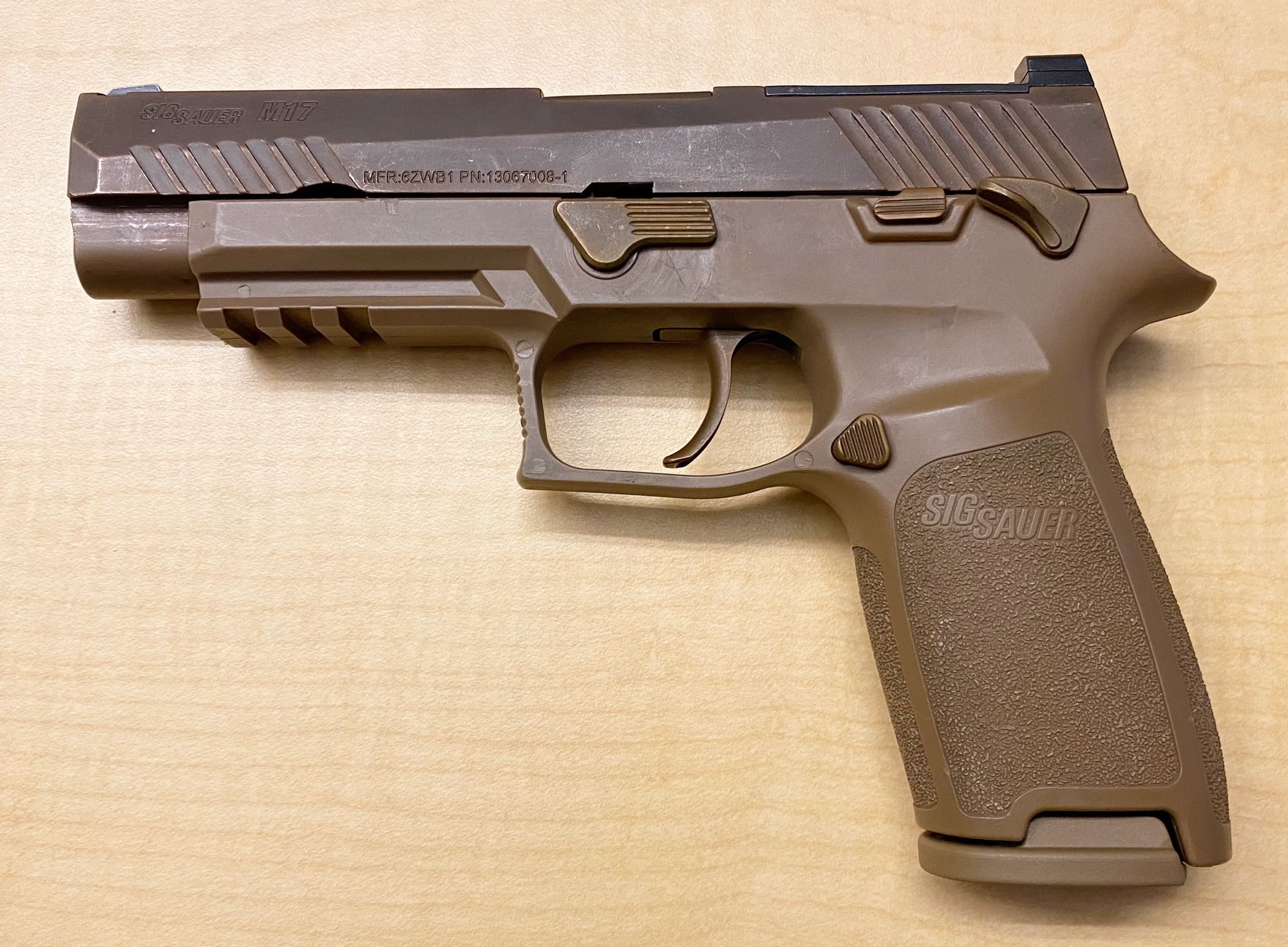


 fringe cradle
when enabling this, thats what makes problem, but without that, bones are not applied to model
 fringe cradle
tacit eagle
tubers almost ready for texturing 😦
fringe cradle
tacit eagle
tubers almost ready for texturing 😦
looks good
fringe cradle

still fighting with this... At the end, it didnt touch my trinagl's
it only got some of the vertexes higher than others
and at the end, I dont know why
 rancid silo

 tacit eagle
when real cz pistolí like cz 99?
rancid silo
tacit eagle
when real cz pistolí like cz 99?
Did you mean Zastava CZ99?
CZ - "Crvena Zastava" no "Česka Zbrojovka"
tacit eagle
what if Česka Zastava?
rancid silo


 autumn ledge
rancid silo
autumn ledge
rancid silo
What in Gods holy name is that?!
rancid silo
autumn ledge
What in Gods holy name is that?!
https://cs.wikipedia.org/wiki/Pancéřovka_27 I wrote on wiki

Pancéřovka 27 (P 27) byla československá protitanková zbraň používaná v 50. až 60. letech, kdy ji vystřídala sovětská RPG-7 (zavedena 1963) a československá RPG-75 (zavedena od roku 1975).
Again "i wrote"
 autumn ledge
rancid silo
https://cs.wikipedia.org/wiki/Panc%C3%A9%C5%99ovka_27 I wrote on wiki
autumn ledge
rancid silo
https://cs.wikipedia.org/wiki/Panc%C3%A9%C5%99ovka_27 I wrote on wiki
Thank you for the information and good read
rancid silo
autumn ledge
Thank you for the information and good read
But only in czech .
autumn ledge
Good thing Google can translate (somewhat)
tacit eagle
I can read it
surreal ore
rancid silo
Proper bolt cycle animation?
leaden trench
rancid silo
The projection on the wood grain pattern is a bit funky. Check at the rear of the stock; the pattern on the side has vertical lines perpendicular to the lines on the top.
rancid silo
leaden trench
The projection on the wood grain pattern is a bit funky. Check at the rear of th...
And normal language.
rancid silo
leaden trench
The projection on the wood grain pattern is a bit funky. Check at the rear of th...
And lines is ok, this not airsoft rifle 😉 From year 1940 is used plywood and no wood

Sorry wood is too dark on foto (60 years service in Ethiopia 😄 ).
leaden trench
This part confuses me. The lines don't match your photo. But if you are happy with it, then whatever.
 calm rune
rancid silo
And lines is ok, this not airsoft rifle 😉 From year 1940 is used plywood and ...
calm rune
rancid silo
And lines is ok, this not airsoft rifle 😉 From year 1940 is used plywood and ...
I use to fall victim to not being able to accept good constructive criticism. I slowly overcame it and because of it my work became that much better. It’s the small things like Steve pointed out that will separate you from 90% of other modders. I still do this as a hobby but because I try to make my work as accurate as possible I’ve even had studios like Void Interactive(Ready Or Not game)reach out to me for freelance work.
leaden trench
I'm probably not always the best critic. I can be somewhat harsh and abrasive; not intentionally just bad at writing and lazy to find kinder words.
tacit eagle
nothing wrong. I hate all the sugar. like when I see sci fi boxes with about a billion features and cut operations it just looks dumb, I call it out when I see it.
 magic mirage
Is there an easy way to re-scale a collider box inside Workbench without going back into blender and re-exporting the whole FBX?
delicate condor
Im gonna guess no, such things usually are done in the source material
rancid silo
calm rune
I use to fall victim to not being able to accept good constructive criticism. I ...
And? 😄 this model is me and old 10 years 😄 . This same model use IFA3, RHS and more 😆 , i use this model for test now . I work with ArmA 20 years.
calm rune
rancid silo
And? 😄 this model is me and old 10 years 😄 . This same model use IFA3, RHS and...
The model 😆 is fine 😄 the textures 😧 are lacking realism 😫
rancid silo
calm rune
The model 😆 is fine 😄 the textures 😧 are lacking realism 😫
How many this weapons do you have?
calm rune
rancid silo
How many this weapons do you have?
Models? None. Real life, 2 shotguns and 3 rifles.
rancid silo
calm rune
Models? None. Real life, 2 shotguns and 3 rifles.
Again how many THIS weapons do you have
calm rune
not sure how that is relevant though.
Nobody needs to own a rifle to know how wood grain works.
rancid silo
calm rune
not sure how that is relevant though.
it is . Last year i repair and clean 100 Kar98k from last WW2 production and czechoslovak 1945 production