#arma3_launcher
1 messages · Page 5 of 1
 meager talon
Have you tried verifying game files?
 trim needle
hey everyone, I hope someone is able to help me
the arma launcher no longer saves settings, or modsets. it always resets back to a previous 'save' from about a month ago. I can change which mods are loaded, and i can change the background and all that, but when I restart the launcher, it goes back to before I changed anything
I've reinstalled, verified, deleted certain launcher files, and a few other things, but nothing has worked so far
 drowsy junco
- check the logs at C:\Users\XXX\AppData\Local\Arma 3 Launcher
- rename the folder and launch it again
trim needle
rename the logs or the launcher folder?
 hollow urchin
so i want my mods to be on my 2nd HDD, and i move it, and it copies to position i want and mods stay in same place their default position in game files? any fix to that?
hollow urchin
whats that
drowsy junco

Windows Developer Blog
Overview Symlinks, or symbolic links, are “virtual” files or folders which reference a physical file or folder located elsewhere, and are an important feature built in to many operating systems, including Linux and Windows. The Windows’ NTFS file system has supported symlinks ...
 idle breach
Hey, I'm trying to launch arma 3, but BattlEye keeps blocking 'E:\SteamLibrary\steamapps\common\Arma 3\Dll\x64\PhysXCommon_64.dll', with and without mods. Anyone know a fix?
 frail mica
this file might be corrupted and does not meet BE's expectations. verify game installation and retry
@idle breach
idle breach
Will do, thanks!
 woven tendon
Hey guys i am stuck with a problem for a long time i tried a lot of solutions and its not work my pc is 64 bit and i am trying to open the game on 64 and its crashing with code
"STATUS_ACCESS_VIOLATION" if someone know how to solve this problem i will be glad 😉
just saying in 32 bit its working clear
but my pc is 64 bit
drowsy junco
@woven tendon you need to upload and link the rpt log file for the whole error context
or better upload all the crash logs via Arma 3 launcher option to Arma 3 feedback tracker
 wraith monolith
Question: Has anyone made a suggestion/feature request for the Arma 3 Launcher to allow the downloading/syncronising of community hosted mods as well as local/steam workshop mods?
This would mean people wouldn't have to download all these 3rd party launchers, and bring the whole modded experience more inline with the base game's user experience.
Steam Workshop is great! But it doesn't offer version selection like npm does (discord.js@11.5.1), plus there's the licensing issue that isn't an issue otherwise when uploaded to private servers. As far as I understand it, a launcher that downloads from a private repo wouldn't have a licensing issue for merely downloading the mods.
 lyric elm
Haven't read one. And won't happen
wraith monolith
You seem awfully certain about that, mind elaborating as to why not?
frail mica
plus there's the licensing issue
what issue...?
wraith monolith
Re-upload of a mod isn't allowed on Steam Workshop even if the mod's licence does allow it, or am I understanding that wrong?
frail mica
that's no issue
that's well in the rights of steam to have a legal ground on their end
because the original creator must grant valve certain rights that only the original creator can grant
wraith monolith
I'm not having a jab at Steam Workshop
 zinc depot
as if people care about EULA's and licenses if they just want to rip your stuff
lyric elm
You seem awfully certain about that, mind elaborating as to why not?
Because I would probably have to implement that, and I won't.
There are more important things to do, and for your thing its kinda late
wraith monolith
Eh. Wait, you got the job? Last I heard you had merely applied
frail mica
look at his role color 😉
lyric elm
My name is green
wraith monolith
Haha oh shit! Nice one! Congrats (late)
frail mica
My name is green
no, your name is dedmen
zinc depot
Although, Steam Workshop has a new feature "Visibility: Unlisted" which allows you to create a community HTML linking to a mod on the workshop which isn't publicly visible (unless you know the URL)
frail mica
but can't be synced with the launcher iirc
wraith monolith
That... I had not seen
zinc depot
I have a mod on the workshop which is unlisted and works perfectly fine in the Launcher (including updates)
frail mica
oh, that's nice
zinc depot
even stuff like dependencies work; the only difference with 'public' is that you can't find it when searching the Workshop
frail mica
totally passed me unnoticed
wraith monolith
Huh.. I didn't see that there a few weeks ago. When was it implemented?
zinc depot
only noticed it last week, and is actually a brand new feature
I believe 1-2 weeks ago 😉
even the Workshop SDK hasn't been updated yet
wraith monolith
Well, that definitely is a cool feature, and saves on the "friend this account and I can give you access to our framework mod issue"
 turbid brook
You're talking about private/unlisted mods and what I'm sorely missing is One. Single. Thing: automatically installing the TFAR plugin for TeamSpeak after you download the Arma mod.
You'll be surprised how complicated that is for randoms, on open servers 🤦♂️
 vast pewter
Help me pls! 12/09/2020 20:07:46 - Bloccato caricamento del file: 'C:\Windows\System32\SortWindows61.dll' Blocked Load of the file
It launch the game but veeeeery slowly
wait, is this the right chat?
drowsy junco
run anti malware check
turbid brook
Not sure if that will actually help, but I had the same issue once and what solved it was... rebooting my computer. Yup! Just that.
 broken shard
Btw I've had a question about the launcher for a while, why are there 2 different ways to export a preset and why do they do different things  ?
?
I mean you either export a list which you have to import through the import button or you export a preset which you can just export by dragging it into the launcher
Wouldnt it make sense to unify both export buttons to be preset exports? Or is there some hidden functionality of lists that I dont know?
zinc depot
There are 2 export buttons? I only know the HTML export one, which you can either import or drag&drop
broken shard
yeah @zinc depot you can either go to
More -> Export modlist to file
or
Presets -> button with round icons next to preset
In the mods page of the launcher
zinc depot
which both output the same HTML file; only difference is that the name isn't stored
broken shard
which both output the same HTML file; only difference is that the name isn't stored
Nope, I just tested it again and the html file you get when you go through More doesnt auto import the preset when you drag it into the launcher
zinc depot
for me both didn't 🤷♂️ but that could be the preset I exported
broken shard
Also the header for the two is different
the first one exported through More is defined as a list
<head>
    <meta name="arma:Type" content="list" />
    <meta name="generator" content="Arma 3 Launcher - https://arma3.com" />
    <title>Arma 3</title>
    <link href="https://fonts.googleapis.com/css?family=Roboto" rel="stylesheet" type="text/css" />
    <style>
and the one exported through the icon is identified as a preset
<head>
    <meta name="arma:Type" content="preset" />
    <meta name="arma:PresetName" content="Bebop Fallout" />
    <meta name="generator" content="Arma 3 Launcher - https://arma3.com" />
    <title>Arma 3</title>
    <link href="https://fonts.googleapis.com/css?family=Roboto" rel="stylesheet" type="text/css" />
    <style>
Also the preset has the name in the list which is used during the auto import
zinc depot
ahh, I see... exporting from the Preset dropdown (with proper name) will export the preset, saves it and subscribes to mods not existing yet.
Exporting from "more" will only export the mod list and only subscribe to mods not existing; not making a preset.
makes sense in a way
zinc depot
one word: Arma
broken shard

maybe
But ye I'd personally be for making both a preset so my unit finally stops exporting them as a list 
zinc depot
or teach them how to export properly 🤣
or like my unit; have a website where you can download different presets per mission, automatically generated depending on mission settings 😉
broken shard
jeez look at mister fancy over here
I might throw up a feedback tracker ticket later with the list vs preset thing
zinc depot
I don't think it's a bug though...
broken shard
 there's feature request tickets on the feedback tracker too
broken shard
Btw I looked around the launcher a bit more and I havent found a reason for the list vs preset distinction yet
zinc depot
- share preset for specific missions
- share list for general mods
I can see the use for both.
zinc depot
Ask him to join the same server
And he should be able to quickly join through your Steam account


 feral raven
Just idea for the launcher, it would be great if it also could generate dedicated server configurations. There is a number of community-made tools, all with something broken. 🤪
While the launcher looks like a good starting point to have this implemented. Since it already has more than half of that, and has good UI.
Although unfortunately it will impact maybe only 10% of people who have had to do anything with dedicated server, since all those other hosting services have their own control panel.
zinc depot
Well, that 10% actually know what they're doing (or should be). So could technically do everything without any tools...
And yes, IT people are lazy people, but for those the current tools do their jobs.
feral raven
No, there are people which are not very IT people, they want to start a DS server on their own, and they have to navigate through some problems with community tools. I'd say it would be very nice if launcher could also launch dedicated server.
 solar sentinel
I work in IT and recently set up my own dedicated server for bunch of mates to play on. And I think majority of community is so well versed on all aspects of how things work that they dont fully appreciate how much Black magic there is involved for the new folk.
It has been an absolutely painful process drudging through poor and outdated documentation.
While scouring the forums for obscure information and possible tips on where to find the mods, logs, profiles etc.
lyric elm
If you have improvements for the dedicated server guide on wiki, drop it in #community_wiki and it will be added
Yeah the wiki is outdated and poor in places, but somehow most people seem to think that they have no say in the COMMUNITY wiki, and no hope to fix it and just keep complaining about it instead of helping to fix it
drowsy junco
i'd say a get started page with a simplified, most important parts only overview. there is loads of info on the BIKI but its very extensive, several pages, without a simple how-to
solar sentinel
@lyric elm I usually tend to write things up when I feel like I have expertise on the subject matter. Banging my head on the wall while trying to troubleshoot myriad issues for hours on end does not really make me feel like writing up some articles on how others could follow suit 👀
lyric elm
well better something than nothing
"I managed to solve it this way" is better than ¯_(ツ)_/¯
feral raven
Yeah the wiki is outdated and poor in places, but somehow most people seem to think that they have no say in the COMMUNITY wiki, and no hope to fix it and just keep complaining about it instead of helping to fix it
Registering there should be allowed then, doing it yourself is better than searching for some guy who has an account there so he takes your changes in, if he has time and will and doesn't forget.
somehow most people seem to think that they have no say in the COMMUNITY wiki
Unfortunately that's the first impression if you see that you can't register there
Sorry for off topic
lyric elm
Registering there should be allowed then
you can register via Dwarden.
Look at the spambots on BI Forums and Feedback tracker, do you want that times 10 on wiki? no.... no no no.
broken shard
 But what if I want 20 articles that just copy pasted the first line of the wikipedia description of what a car is?
hollow urchin
just a quick question long time ago i switched to Linux Pop!_OS, and i decided to try it out and when i downloaded arma 3 i did not have global mobilization nor contact dlc, nor launcher itself what seems to be problem with steam and everything hating linux or porting games to linux takes time
frail mica
arma 3 linux port is outdated and not longer supported. it also does not support the latest DLCs iirc
you can use an emulator / vm on linux to run windows steam / arma i think
hollow urchin
hm
turbid brook
The performance od going to be abyssal probably ;)
I've heard that Arma works quite well with Proton
hollow urchin
linux is better than windows so ye ig
turbid brook
Without BattlEye, obviously
frail mica
I've heard that Arma works quite well with Proton
this is what i had in mind
just forgot what it was 😄
turbid brook
linux is better than windows so ye ig
Windows, on the other hand, is better at running Windows executables ;P
frail mica
#fakenews
😄
hollow urchin
perfectly balanced as all things should be
lyric elm
@hollow urchin you can run it in proton, performance is fine, most mods are compatible (you need some tricks for TFAR/ACRE, but they work fine) and you get all DLC's. Only thing that's missing is battleye.
For more info you can visit the ArmaOnUnix discord in #channel_invites_list
turbid brook
@lyric elm I'm curious what needs to be done for TFAR. Is there a way to sum it up in one sentence? (run TS in wine, alongside, maybe?)
lyric elm
run TS inside same proton environment as Arma
 fresh hazel
not sure if this is the right area but I've been trying to link a bohemia account to my steam account so I can access units in the launcher and it's not letting me link the two
when I'm in the bistudio.com account site I go to the "login" square and go to "connected accounts" at the bottom and click the steam button
I'm already successfully logged into steam in the browser
when it redirects me to the steam verification page, I hit sign in, and it kicks me back to the bistudio.com account page
 simple surge
recently i have had players reporting that one of my required mods is not showing as a required mod in the mod list when trying to load into my server. This is causing a lof of players to not be able to join if they do not maunally know to select the mod that is not loading. Is there a solution for this?
Here is my start.bat
https://pastebin.com/Pbs3tFSb
zinc depot
which mod is causing issues, and does that mod have server keys?
simple surge
it is Project Legacy - Server Edition (which is mine) and yes it has a server key. i will get a screenshot of what the launcher is showing
turbid brook
Could you post the ip and port? (you can PM it to me if you don't want to send it publicly)
simple surge
192.187.120.122:2302
turbid brook
Hmm... 🤔
In [5]: s.mods_names
Out[5]:
['Project Legacy - Server Edition',
 'CUP Vehicles 1.16.2',
 'CUP Weapons 1.16.3',
 'CUP Units 1.16.2',
 "Ryan's Zombies & Demons",
 'NIArsenal',
 'Enhanced Movement',
 'Community Base Addons v3.15.1',
 'Chernarus Redux',
 'CUP Terrains - Core 1.16.1',
 'Exile Mod']
So it actually is in there
simple surge
yes it is but as you will see from this screenshot, it show suggested
https://imgur.com/a/R6PriAX
i have a preset saved so i never knew this issue was happening until new players started joining
blue highlighted is supposed to be required and yellow is optional
turbid brook
That's interesting. The mod steam_id seems to also be reported correctly (1166020646)
simple surge
i have just been telling players that are apart of my discord to load the preset i gave them and save it and then load that way but new players not in the discord will not know this
zinc depot
https://www.battlemetrics.com/servers/arma3/8580246 also shows is correct (it's required and keys are available)
turbid brook
I dunno, the signatures at this point should not have any impact on this, but these are the ones you're broadcasting:
In [8]: s.signatures
Out[8]:
['a3',
 'badbenson',
 'cba_3.15.1.200418-5fde716b',
 'ChernarusRedux0.97',
 'cup_terrains_core-1.16.1',
 'cup_units-1.16.2',
 'cup_vehicles-1.16.2',
 'cup_weapons-1.16.3',
 'exile',
 'jsrs_cup_compat_2020',
 'jsrs_soundmod_2020_v2',
 'ProLeg_v0.1.5',
 'RyanD',
 'Toadie']
So everything looks okay, tbh 🤷♂️
simple surge
i know. it just started happening yesterday.
turbid brook
I'm afraid i can't help you further. If you find out why this was happening, ping me, please - this is relevant to my interests 🙂
simple surge
ok cool. i will keep looking into it. thanks for trying though
been runing servers for years now and have never had this issue
btw, are you able to look the server up in your launcher and see if it show that mod as suggested or required
turbid brook
On your workshop page, I can see that you issued an update on the 9th of October. This seems to roughly match your "started happening yesterday". Double-check that you've not messed up anything while doing the update 🤷♂️
simple surge
roger, i will chekc that too
turbid brook
(yes, I know that the 9th wasn't yesterday :P)
simple surge
it just may have been when someone finally reported it
turbid brook
btw, are you able to look the server up in your launcher
Sorry but i can't and it would be too complicated and off-topic to explain why. TL;DR: My router makes my launcher not function properly. Maybe someone else reading this may try doing that.
Wish you luck in finding the solution
simple surge
ty
zinc depot
I'm trying to find it, but takes some time (from the EU)
simple surge
ok thank you @zinc depot
zinc depot
ok, I found it; and it doesn't show Project Legacy at all
I'll check the mod for issues 😉
found one major issue... repacked content from MGP...
simple surge
ok so since you dont even have the mod downloaded, you dont even get the option
i will have to re-upload the mod i guess and see after i repack and sign
zinc depot
and remove milgp_vests.pbo, and include Military Gear Pack in your modlist
simple surge
??
zinc depot
milgp_vests.pbo is ripped from Military Gear Pack, another mod
simple surge
its not ripped, we have premission from the original owner
zinc depot
🤔 🤷♂️
simple surge
i guess i never put that in the workshop description. i have added it
 stuck minnow
We Are Having Crash with last uptade
https://hizliresim.com/jg2OLG
drowsy junco
whats the reason A3 launcher takes a long time to scan all the mods - does it do a hash on each file each time?
zinc depot
checking if there are changes from Workshop (subscribed/unsubscribed/removed/updated/etc.), checking if local mods still exist, and I'm sure a couple of things more... which IMHO is done pretty fast
simple surge
So I am still not getting a mod (Project Legacy -Server Edition) to show as "required" in the server launcher. Players are having to manually load this mod to be able to join. Some of you tried helping a few days ago but I still need help with this issue. I am seeing a lot of players trying to join and are not able to since they do not know to manually load this mod.
Server IP: 192.187.120.122:2302
Server RPT:
https://pastebin.com/HfvW4hnW
Server Start.bat:
https://pastebin.com/5j7Eudis
frail mica
@simple surge
put the key files from that mod to your server key folder. then add
verifySignatures = 2;
to your server config
https://community.bistudio.com/wiki/server.cfg#Arma_server_only
simple surge
I have done that. I have even resigned with new key and re-uploaded to steam to see if maybe the key was bad but still no luck
simple surge
Ok so did some more troubleshooting. I added a new mod to the server and it shows up correctly as required. So I then decided to upload the mod as a new mod and then tried adding it again to the server with new key. I am still getting the same issue I was getting with the old version. I am wondering if I am uploading the mod wrong or am doing something else wrong with the mod. I have been using this mod for years now with no issues. Wasnt until the last update I did a few weeks ago that I have had an issue
drowsy junco
@simple surge which mod?
turbid brook
Project Legacy -Server Edition
I have already checked that it correctly shows up in the mods list in the network packets (a2s_info) and the signatures seem to be correct (unless I messed up sth 😄 ) @drowsy junco
simple surge
i didnt think it was something that i did when i updated it. it is just so weird that it does not show as "required"
turbid brook
Plot twist: you ended up on some secret BI blacklist so the A3 launcher ignores the mod 😉
simple surge
just my luck
This is a server side mod and my server depends on it so it can not be taken out
i am having a buddy publish it and see if its maybe my arma 3 tools
drowsy junco
if you use old pbopackers, they can cause signatures not to work
simple surge
I am using the arma addon builder
lyric elm
mod has mod.cpp/meta.cpp, and is loaded as -mod= on server yeah?
simple surge
Yes
lyric elm

simple surge
Yea I know. I will come back to this in a bit. I need to run errands. Thank to all that are trying to help
simple surge
So even with my friend publishing the mod under his account, it still shows up as suggested. This causing so many new players from being able to join. I have been running servers for over 3 years and this is the first I have seen of a mod that is listed as required to show up as suggeated
drowsy junco
@simple surge is the unit/asset placed in Eden or only created via script?
simple surge
@lyric elm I didnt even think about that, will have to try
 vivid lava
Would it be possible to add an option or default the the launcher so that on the server join menu the Suggested and additional mods are above the Content required by the server
It's more likely people will adjust the optional than what is required and new people seem to be unaware it exists having never scrolled to the bottom.
Apologies if this is the wrong channel for a bit of feedback/suggestion i did a quick check over all the channels and couldn't find one that matched.
 spice zodiac
Is the Arma 3 Units not working for anyone else in the launcher?
frail mica
known
 ashen heath
any plans for a "repair all" button to repair all mods
rather than clicking through 60 plus things hahaha
might be a good little button to have to make sure no mods are broken for big units with big modpacks
lyric elm
no plans as this is the first time I read that :D
Not sure if that really makes sense. I think if you verify game files via steam, itll also verify all mods?
frail mica
I think if you verify game files via steam, itll also verify all mods?
as far as i can tell, no
only game data in the game installation folder
the workshop folder seems unaffected by that operation
lyric elm
I made a ticket for it.
I would probably do all active mods, not ALL downloaded mods
frail mica
sounds good.
drowsy junco
yup would help a great deal
also if its exposed more prominently than current repair action via submenu
ashen heath
Oooo yeah selected mods only sounds good
 primal hound
What is the best launcher to be as user friendly ? (Actually i using A3 Sync) but A3 sync is too hard for casual players.. i need some thing where i setup full config for addonpack and user only install aplication and update his local addons..
lyric elm
Swifty is pretty simple. Afaik it's a one-button solution.
Maybe JustSync. Afaik also one-button
frail mica
Vanilla launcher and mod collections
primal hound
Vanilla launcher It does not support custom addon storage
 sterile moth
It does
ashen heath
Yes it does lol
primal hound
i thing with automatic updates by me.. (without workshop udpates..)
zinc depot
I use the launcher all the time, including on my own projects which only exist locally. And those are "updated" manually on my local machine.
It's even possible to add local mods which are updated though A3Sync or other tools, so I don't see a real problem there.
ashen heath
^ Good spot
You can tell the launcher what folder to watch per say and that could be a a3sync one or anything
 last ibex
My arma is stuck in offline mode is their anyway to fix this i have already uninstalled and reinstalled arma
 river niche
Was your steam client in offline mode?
 earnest wing
when i try opening arma 3 i get a missing file or corrupted file error
it just auto crashes then gives me a note on my desktop
sterile moth
What is your error?
sterile moth
No. imgur
earnest wing
ive reinstalled and verified
and i still get the same error
i emailed them 5 hours ago and i havent got a responce
sterile moth
Because they're living in Czech so midnight...
earnest wing
alright but do you know any solutions
and when i run it through the file
when i load into a game
it says battle eye and restart game
when i do that
i still get the same error
sterile moth
Okay your explanation kinda doesn't make sense. Write all of your steps and error logs, precisely
earnest wing
So i try running trough steam
it gives that error
i verify the files
then i retry launching same error
then i reinstall
and verify same error
sterile moth
Try to run what through Steam? Just click Play of Arma 3 in your library?
Or can you launch Arma 3 Launcher?
drowsy junco
probably manual deleting the corrupted files works. check the said log file on what it says exactly
earnest wing
the corrupted thing is the launcher
i will delete it after this maych
@drowsy junco can i dm u the log?
i deleted the corrupted file
and now i get this
Errors
Message: The configuration section 'appSettings' has an unexpected declaration.
thats the only error
drowsy junco
upload the log to pastebin and post the link
try the steam verification for Arma 3 next
earnest wing
can you link a vid if there is one it’s easier for me to follow
turbid brook
The above is a link to a form. You paste your log there. There is literally nothing more to it
turbid brook
Yes, most probably.
If I were you, I'd check for a section named appSettings in the configuration files (don't ask me where they are) and look what is in there and search for strange values or corruptions
earnest wing
for my first issue
the problem was the launcher
i deleted the file
that issue was resolved
earnest wing
anyone help?
turbid brook
I understood that the issue described on pastebin was fixed?
turbid brook
If I were you, I'd check for a section named appSettings in the configuration files (don't ask me where they are) and look what is in there and search for strange values or corruptions
Have you done this?
earnest wing
ive been trying to find the location for a while but i just cant find it anywhere in the arma 3 files
@turbid brook where do you think they would be located?
turbid brook
Check maybe %appdata% or MyDocuments
earnest wing
its not there
turbid brook
Check in C:\Users\XXXXX\AppData\Local\Arma 3 Launcher
earnest wing
not in there
earnest wing
do i delte the config.json?
turbid brook
Open and see what's inside first
turbid brook
I know 😏
Does it look "okayish"?
earnest wing
smart boy
u shall have my present of happieness with a bowl of rice
cause u very smart
must be asian
turbid brook
totally
earnest wing
xD
Errors
Message: The configuration section 'appSettings' has an unexpected declaration.
this again
do i delete all the configs?
earnest wing
how xD
turbid brook
same thing
Cool story, bro!
"I did something. I'm not going to tell you what I saw in the file, nor what I did. I'm just gonna tell you that it still doesn't work and expect you to help me" 🤦♂️
turbid brook
what second file?
earnest wing
other config
turbid brook
[02:26] Stack (Overflo): (...)
Does it look "okayish"?
Still haven't got an answer for this question 🙄
earnest wing
wdym okayish
turbid brook
I don't know. Use your best judgement. I know as much as you do now
earnest wing
3 Files failed to validate and will be recqired.
thats what it said when i verified
Errors
Message: Configuration system failed to initialize
Message: Unrecognized configuration section startup.
File name: D:\Steam\steamapps\common\Arma 3\arma3launcher.exe.Config
Line: 11
there is no error
-_-
Errors
Message: The configuration section 'appSettings' has an unexpected declaration.
Trace
System.Configuration.ConfigurationErrorsException: The configuration section 'appSettings' has an unexpected declaration.
i fucking give up
literally wasted 40 bucks
turbid brook
Message: Unrecognized configuration section startup.
File name: D:\Steam\steamapps\common\Arma 3\arma3launcher.exe.Config
Line: 11
Since on my computer, line 11 shows: (you could have checked it and posted it yourself, you know? You're really making it hard to help you 🙄 )
<startup>
<supportedRuntime version="v4.0" sku=".NETFramework,Version=v4.5.1" />
</startup>
I'm guessing that maybe your .net installation is messed up? It's that or something is wrong with the launcher itself. But if it's the second part, then someone else should step in and help you with this.
Otherwise, I suggest googling the error message (the one with "Startup" in the contents)
earnest wing
now the error is corrupted configuration
turbid brook
"I did something. I'm not going to tell you what I saw in the file, nor what I did. I'm just gonna tell you that it still doesn't work and expect you to help me" 🤦♂️
Have fun, goodnight!
earnest wing
ive never had these issues so i have no clue what to say and talk about
but thanks for the little amount of help
i knew i shouldve got something else god fucking dman it
worked for nothing
frail mica
@earnest wing
- rename your
config.jsontoconfig.json_old - paste this
config.jsonto..\Steam\steamapps\common\Arma 3\launcher - reinstall .NET 4.5.1 (https://www.microsoft.com/en-us/download/details.aspx?id=40779)
- reinstall Visual C++ 2013 Redistributable Package (https://support.microsoft.com/en-us/help/4032938/update-for-visual-c-2013-redistributable-package)
frail mica
¯_(ツ)_/¯
turbid brook
@earnest wing i've seen that you've already refunded, but just so you know:
Otherwise, I suggest googling the error message (the one with "Startup" in the contents)
For the record, I googled it myself (I'm too curious, I guess... ¯_(ツ)_/¯) and almost all the reasonable answers to that issue, that I saw, mentioned a possible issue with the installed .NET Framework. Looks like there is even a ".NET Framework Repair tool" - you could use that.
Anyway, the bottom line is: if you had corrupted Launcher configuration files AND a possibly corrupted .NET installation, I'd suggest checking if your hard drive isn't starting to fail (and you're about to lose those sweet photos from a year ago 😉 ) so consider checking it and maybe replacing your disk, in the near future
earnest wing
it didn’t give me a file error
no answers online
everytime i fixed a issue more appear
turbid brook
I was talking about googling "Unrecognized configuration section startup."
Literally the error message
everytime i fixed a issue more appear
Better backup those photos 😉
it didn’t give me a file error
Νate: 3 Files failed to validate and will be recqired.
The above plus a suspicious issue with .NET suggest an imminent drive failure, to me, but you're gonna do what you want. It's your data
frail mica
download CrystalDiskInfo and check your drive health status
lyric elm
A different user contacted support with a similar issue, we also don't know. Seems like some windows/system weirdness/brokedness. Or Steam messing up some files maybe
drowsy junco
check C:\Users\WINDOWSACCNAME\AppData\Local\Arma 3 Launcher\Logs
broken shard
Btw I have a question about the 'Force Update' button in the Mod section of the launcher, does that actually tell Steam to start the download or?
lyric elm
I think so yea
broken shard
Oki thank you 
 heavy rock
Hey does anyone know why my Arma wants to "update" all my mods I have downloaded
even tho none of them have got updated and I cant download any new mods before everything is "updated"
zinc depot
Ask Valve, since Arma doesn't care about that.
It's a Steam issue which invalidates mods and triggers a redownload.
 obtuse helm
can someone help me out? I am having a problem with ACE client server mismatch (server: 3.13.4.55 Client: 3.13.5.57) and have a sreenshot, I could dm you the screenshot if you can help
turbid brook
Update the ACE mod on the server, if it's yours. Ask the server admin to do it, otherwise
 lean gulch
Is there an option or mod to be able to sort the mod list in the launcher?
frail mica
sort it like what?
lean gulch
Alphabetically, for example
frail mica
the launcher is already sorted alphanumerical
lean gulch
frail mica
the launcher is already sorted alphanumerical
Unfortunately, I can't post pictures in here, else I would prove you wrong
frail mica
you could have mentioned that you are talking about the "loaded mods"
they are not sorted, indeed
they are sorted by loading order iirc
frail mica
you can drag and drop the mods in that list to sort them in what order they are loaded
lean gulch
Problem is, with mod dependencies. Like when I load ace, it immediately wants me to load CBA too. I can ignore and load by hand later, but this is not too user friendly.
Anyway, thanks for your help 🙂
frail mica
I can ignore and load by hand later
why would you do that?
lean gulch
To have the loaded mods sorted. It is not that important. Just thought, there was a possibility to sort the loaded list somehow.
frail mica
as is said, the loaded mods list resembles the order in which the mods are loaded by the game. this was and might still be crucial to this date for some mods
lyric elm
yes, if thats the case I cannot make it sorted. Because yeah that can still matter
 final ice
my arma 3 launcher is doing something weird where i can't import mods from a file. i click more, import mods from a file, and then try importing the mods from the file. once i import it, it just says "no new mods found to subscribe to."
it doesnt even import the mods themself
so now i have to manually pick each one out...
anybody know what might be causing this, or even how to fix it?
 stuck pewter
How about adding sorting for unloaded mods in a number of other ways, besides A-Z
https://feedback.bistudio.com/T155265

lyric elm
would be neat, but I'd call that very low priority 🙂
 grizzled hedge
hey, I'd like to see a feature that allows you to unload and completely remove mods from your system for disk-cleaning purposes, thanks ❤️
broken shard
cant you right click and deinstall or something like thta?
grizzled hedge
@broken shard yes but either you have to do it manually or it doesn't directly remove the mod files from your system
 amber hornet
hello i just bought the game and i could not get in any servers https://imgur.com/LNL0qYt
frail mica
@amber hornet
(re)install vcredist for 2013 (64-bit)
https://support.microsoft.com/en-us/help/4032938/update-for-visual-c-2013-redistributable-package
restart PC then
and retry
frail mica
mods?
amber hornet
nope
frail mica
verify installation via steam
amber hornet
how do i do that
frail mica
Article "Verify Integrity of Game Files"
amber hornet
@frail mica ty so much dawg
frail mica
👍
 gritty elm
thanks
 ebon oracle
When my game loads in, it gives me a message saying: "Addon sg_cw_sm requires addon gm_characters_gc_characters". I can still play the game but this particular problem won't let me load a saved spot in the campaign. plz help
broken shard
one of the mods you have loaded props required globmob @ebon oracle
ebon oracle
oh okay thanks
 celest verge
My friend just installed Arma, when clicking play in the launcher he gets a crash, error 0x00000035. He can launch the game exe from the steam folder, and this is a fresh install
Does this look familiar to someone? We already tried simple things like reboot and Steam file integrity
drowsy junco
try checking the logs in C:\Users\USERNAME\AppData\Local\Arma 3 Launcher\Logs
celest verge
He reinstalled the whole game, now he can’t launch A3 exe directly anymore but logs are being generated now
frail mica
shot in the dark:
reinstall vcredist 2013
https://support.microsoft.com/en-us/help/4032938/update-for-visual-c-2013-redistributable-package
celest verge
Again it generates the 0x00000035 error the logs indicate [ INFO] 16: GameExecutor: Game exited (with exit code: 53)
“also done: cache validation, reboot steam in every step, force admin rights to everything involved A3, try winsock clear again, disable any firewall or shit related to that altogether (this one stopped generating browser seizure in logs but 0x00000035 once again), close anything related to GPU, have nothing else but Steam running”
frail mica
@strudel_97#2315
Did you read my message above?
celest verge
Yea sorry, also already done
Deleted them and let Steam first time setup reinstall
But well try a manual reinstall
drowsy junco

Quando vou abrir meu arma 3 da um crash e diz que ele encerrou de forma incomum, alguem sabe solucionar esse problema? http://prntscr.com/epqsgr
and https://www.reddit.com/r/arma/comments/3w9s5a/please_help_me/
https://forums.bohemia.net/forums/topic/201694-solved-arma-3-wont-start/

Bohemia Interactive Forums
Hey there... So there I sat in front of my computer, happy that work has ended and I can play some Arma. But Arma was not convinced of this idea and just wont start... When I try to start the game in Steam the ARMA 3 Launcher opens and I can set the mods, etc. Of course I restored all the default...
celest verge
We tried pretty much everything from the list above, but it didn’t work
Also reinstalled VC Redist and tried another drive
Tried every Admin combination, eg Steam as admin game without, other way around, both not, etc
Since the reinstall the game claims Steam is not running while it is when tried to launch by exe
Via launcher it always gives the 0x00000035 error + GameExecutor: Game exited (with exit code: 53) in logs
It also logs the below message, sometimes a lot of the same
kohteessa System.Net.HttpWebRequest.EndGetResponse(IAsyncResult asyncResult)
kohteessa System.Net.WebClient.GetWebResponse(WebRequest request, IAsyncResult result)
kohteessa System.Net.WebClient.DownloadBitsResponseCallback(IAsyncResult result)
--- Pinon jäljityksen loppu aiemmasta sijainnista, jossa palautettiin poikkeus ---
kohteessa System.Runtime.CompilerServices.TaskAwaiter.ThrowForNonSuccess(Task task)
kohteessa System.Runtime.CompilerServices.TaskAwaiter.HandleNonSuccessAndDebuggerNotification(Task task)
kohteessa Launcher.Steam.Servers.BiServersList.<GetBiServersFromWebAsync>d__21`1.MoveNext()
--- Pinon jäljityksen loppu aiemmasta sijainnista, jossa palautettiin poikkeus ---
kohteessa System.Runtime.CompilerServices.TaskAwaiter.ThrowForNonSuccess(Task task)
kohteessa System.Runtime.CompilerServices.TaskAwaiter.HandleNonSuccessAndDebuggerNotification(Task task)
kohteessa Launcher.Steam.Servers.BiServersList.<LoadAsync>d__b.MoveNext()
 dreamy scarab
https://i.imgur.com/wV4LPAY.png is this ok settings for me? r7 5800x 32gb game on hdd
broken shard
#hardware_vs_arma @dreamy scarab
dreamy scarab
broken shard
<#107058606205067264> <@!180387213844938753>
how is that suppose to help me?
frail mica
questions like yours are best asked in the channel Pi pointed you to.
wraith monolith
http://prntscr.com/we1hw4 I'm confused. If the dependencies aren't taken from the Steam Workshop... where are they taken from? I removed Achilles as a dependency a month or two ago, and realised just now that the launcher doesn't see it that way....
zinc depot
perhaps a dependency of a dependency?
and after doing a short search I found out that 2BNB-Extras has a dependency for [FOX] Suicide Bomber, which has Achilles as a dependency; which causes issues on your end now
frail mica
dependencies are primarily defined in the requiredAddons[] array of the mods CfgPatches class inside the config.cpp
@wraith monolith
so even if the dependency is removed from the workshop, the mod itself that builds the requirement must be edited also
wraith monolith
zinc depot
and after doing a short search I found out that 2BNB-Extras has a dependency for...
You're right, but I wasn't aware the launcher does that? I thought it just grabs the immediate dependencies and basta
zinc depot
the launcher only checks Steam Workshop, while the game itself only checks the configs
wraith monolith
^^^^
That's what I understood also
Which is why you can have no dependencies listed in workshop, but then when loading the game it'll have the popup saying that an addon is required but not found
If it's listed in requiredAddons[]
zinc depot
usually it breaks the game though 😉
But again; the problem is [FOX] Suicide Bomber which is a dependency (both on the workshop and configs) for 2BNB Extras, which has Achilles as a dependency.
So the launcher will see Achilles as a dependency as well
btw... I saw the github repo's and noticed the music addon... be VERY careful with that, because you don't own that music (breaking copyright laws and Steam Workshop EULA)
wraith monolith
zinc depot
usually it breaks the game though 😉
Well yes, true, but point still stands
Also, you were right about the deep dependency crawling that the launcher does. I removed Suicide Bomber and Achilles also disappeared. Fascinating, I didn't think the devs would go this in depth with it, since it's fair to assume that whenever the immediate dependency is loaded, but missing IT'S dependency... then surely the launcher could just leave it up to the check relating to that second dependency set.
Instead, the launcher compiles the whole dependency tree. Pretty cool stuff really. Thanks for the insight
 short dust
 placid lichen
@dreamy ice its Armed Assault 3
And @short dust ArmA 3 is a very hard game that you cant just explain, read the guide on steam
placid lichen
broken shard
Actually, its not afaik 👀
Only in north america its a european game so north america doesnt matter
broken shard
placid lichen
Only in north america its a european game so north america doesnt matter
Where does it say that?
 dreamy ice
placid lichen
<@116546142694539266> its Armed Assault 3
dreamy ice
placid lichen
<@116546142694539266> its Armed Assault 3
It's just Arma 3
broken shard
^
dreamy ice
ArmA: Armed Assault (or ArmA: Combat Operations in US) was the first one after Operation Flashpoint (or now Arma: Cold War Assault). After than it was just Arma 2 and now Arma 3.
broken shard

lyric elm
placid lichen
<@116546142694539266> its Armed Assault 3
Its not.
broken shard
You know, a !namedebate command would be nice 
placid lichen
Popular belief is that ArmA is simply an acronym of Armed Assault. It's in fact true as that is how the name really started with the release of Arma : Armed Assault in Europe. However, it picked up its own independent life already with the release of Arma: Combat Operations in North America.
 vapid haloBOT
The correct name is Arma 3. See: https://www.bohemia.net/blog/arma-2-the-name-tale
Bohemia Interactive
As we're quickly approaching the release of ARMA 2 , the third installment in Bohemia Interactive's award winning series of military PC simulations, it's a good time to clarify some things about the name and also explain why using Armed Assault 2 is wrong or why Arma is not a cheesy weird name as some English-centric souls may believe!
 We finally have a bot?
lyric elm
We finally have a bot?
lyric elm
you can try
 azure stone
Hi gents! one of my friends is getting the following pop up when he loads into his game: https://gyazo.com/72af985a1d84ea5cd860180bb0008058
anyone got any explanations?
lyric elm
read the error message that you got before that message
 halcyon sorrel
Hi everyone, I have a issue, everytime I try to log into this one specific server, it always starts the loading screen, and then right as it should be transitioning to the actual game launcher, with the server loading in full screen, it ends up stopping entirely. I've tried redownloading the mod pack used by the server several times, I've tried direct connecting, I've double checked with the server host several times, and asked him to help me several times (but the dick says "did you refer to google before asking me")
I just need help connecting to this damn server basically, and its making me stressed everytime i try and it doesnt work.
i can get into other servers just fine.
oh I've also tried fixing every single mod making sure they arent corrupted
zinc depot
got any errors, entries in your log files, just a messed up server which requires registration?
halcyon sorrel
nope, no error messages, and no logs of it crashing in my crash file, I don't understand it
its honestly baffled me
I can hop in vc for someone to help me in about a hour from now
if anyone can please ping me
halcyon sorrel
anyone? 😦
drowsy junco
@halcyon sorrel upload the rpt log of such session
 pastel plank
Having multiple errors trying to start up the Launcher, got some error reports if I can put them here
drowsy junco
upload the log file
halcyon sorrel
yea um how would one do that..
drowsy junco
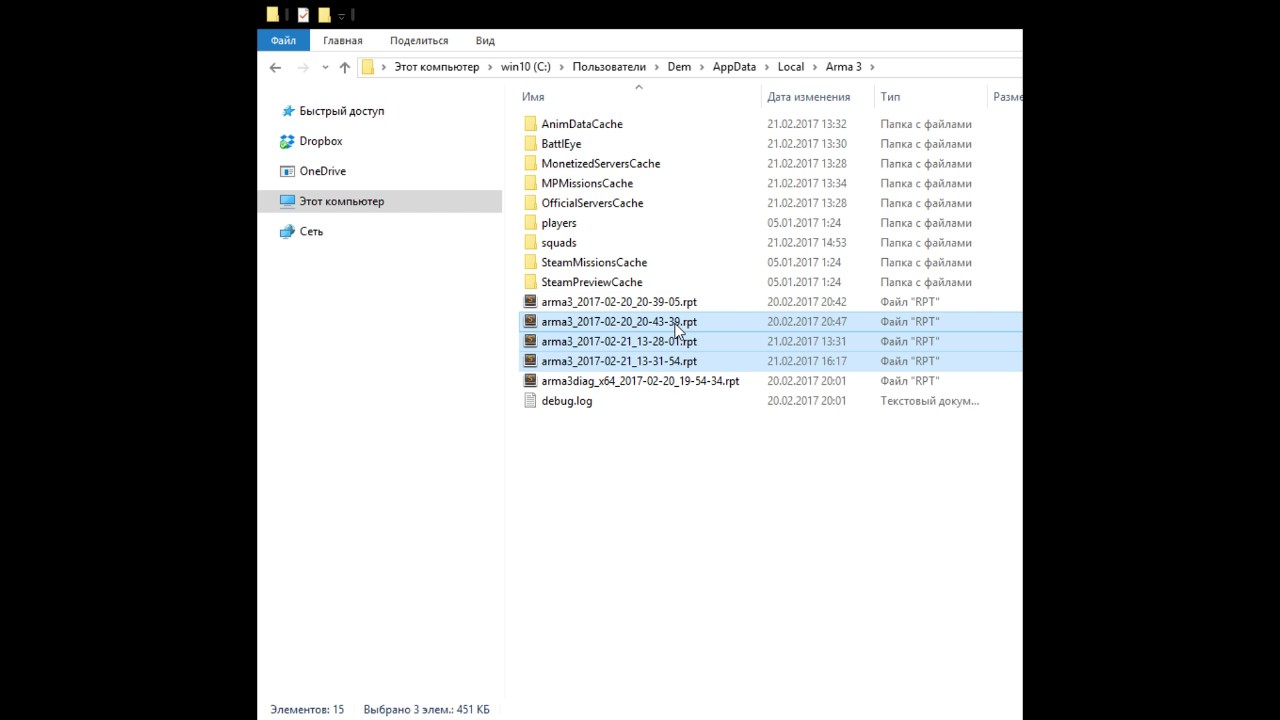
type %appdata%
navigate to "local"
then "arma3"
sort files by the time of creation
zip last 2 files.
give it to us in our discord
or via fileshare
IFA3LITE mod team channel.
Updates. New Features. Highlights.
Steam - http://steamcommunity.com/sharedfiles/filedetails/?id=660460283
Discord - https://steamcommunity.com/linkfilter/?url...
hollow urchin
It's my first time playing ArmA 3, and I can't use the "PLAY" button on the launcher. It says something like "it launched in an unusual manner", and I can't play it for said reason. Any fix?
turbid brook
!namedebate
vapid haloBOT
The correct name is Arma 3. See: https://www.bohemia.net/blog/arma-2-the-name-tale
Bohemia Interactive
As we're quickly approaching the release of ARMA 2 , the third installment in Bohemia Interactive's award winning series of military PC simulations, it's a good time to clarify some things about the name and also explain why using Armed Assault 2 is wrong or why Arma is not a cheesy weird name as some English-centric souls may believe!
turbid brook
As for your question, you need to provide more info. See the video that Kju posted above
drowsy junco
@coarse plover you can try to launch the arma3.exe directly from the game direction in steam folders
.\Steam\steamapps\common\Arma 3
 lilac crag
So Erm I’m gonna be real dumb for a sec. all the expansions are currently showing up as mods in the launcher (even the ones I don’t own) and I’m in no mood to break the game (again) so is there a way to solve that or better yet does it even matter?
broken shard
Hm is there a way to get the parameters that the launcher uses when you click play?
 cursive tulip
broken shard
Hm is there a way to get the parameters that the launcher uses when you click pl...
cursive tulip
broken shard
Hm is there a way to get the parameters that the launcher uses when you click pl...
The whole command line should be in the RPT.
broken shard
Ooh yeah thanks
 inland parcel
Is there any way to force a mod loader in the launcher? It constantly throws CUP mods to the back of the line which pushes forward some old maps which in turn brakes things
It's funny since it's not even consistent from what I can tell. If I put CUP first, then launch the game it, sometimes, moves them. Do it the same thing again and it leaves them alone where I put them.
hollow urchin
Does it matter for mod positioning?
sterile moth
Sometimes. If they had same order to load (not launcher order but defined in MOD's config) it does
zinc depot
Back in the Arma 2 days it did matter in which mods were loaded; now it's mostly handled through proper dependency handling (if the mods were build correctly).
The Workshop has a dependency list which gets used by the launcher (aka; which mods must also be loaded), and if this isn't setup correctly stuff will break.
And mods themselves have dependencies which will ensure that other mods (or actually addons) are loaded before them, so ensure that stuff doesn't break.
 azure mango
But back in arma cwa we used to Launch mods by shortcutd
Like -nomap -nosplash -mod=@ReforgerW
For example
zinc depot
it's still the same now, just hidden and handled by the launcher
lyric elm

broken shard

I think the launcher just doesnt check if there's already a window open when you import a preset and it tells you to download another mod
should be an easy fix, I assume
drowsy junco

is this a known issue? or is there something that can be done about (from server or client side)?
drowsy junco
like it appears to be a different one to the usually "too many mods/signatures" which looks like:
https://i.imgur.com/n3UMbAk.png
 lyric elm
have you tried the same steam limit increase in server config
drowsy junco
well its not our server, but 3rd party - but it turns out that one has a huge mod list..
turbid brook
Too bad there is no way automatically contact the server owner. Maybe logging sth to the .rpt would be a good start?
Like if Arma truncates the mod list/signatures list it logs a message to the rpt informing the owner that the list has been truncated and some people may not be able to join, and they should change <insertVariableName here> to remedy the situation.
Maybe this could be a step in the right direction?
drowsy junco
for arma/the ingame server browser it logs the warning to rpt, but not the server name/ip (also the message is quite cryptic to the average guy)
turbid brook
But I'm talking about the server side i.e. the only place where someone reading the message can do something about the situation
drowsy junco
fair point. that said at times only user/players complaining to admins help 😛
drowsy junco
there are these in the client rpt:
19:02:27 Skipping mods and signatures due to overflow flag being set.
19:02:27 Skipping signatures due to overflow flag being set.
but without context these are kinda useless (and it gets logged multiple times - probably per server encountered)
lyric elm
thats different
afaik
OH
its not
thats what that is 
I probably knew and already forgot again
I thought I added serverside logging for it, maybe I didn't. I'll try to recheck tomorrow.
Might need to remind me
drowsy junco
reminder at Dedmen
lyric elm
yes there was no logging. I'll add
"Steam Mod/Signature data overflow, data doesn't fit and Mods/Signatures will not be correctly read by Clients"
you have better idea for text?
drowsy junco
for the server?
lyric elm
ye
broken shard
lyric elm
`"Steam Mod/Signature data overflow, data doesn't fit and Mods/Signatures will n...
You could include something about the variable to edit
lyric elm
Not sure, it can cause issues editing that, so hestitating to officially "recommend" it
broken shard
Ah, hm
turbid brook
I also would suggest adding the variable name or at least any resource that will point a clueless owner in the right direction
I'm guessing a biki URL is even worse, right? 🤔
turbid brook
Or maybe, since you stated the problem (data overflow), continue with a proposed solution: "Remove unused mods or change your server configuration to allow for more data to be sent"?
It's vague enough that you can change or add further config options and the admin will at least know that it's something that's configurable so they may start googling the problem
drowsy junco
Too much Mod/Signature data - Steam cannot transfer the full list and thus client mod sync won't work. Tweak steamProtocolMaxDataSize parameter in server.cfg.
on the client rpt, it should say which server is affected (name + ip:port)
turbid brook
thus client mod sync won't work
Is this the original message or your suggested one?
"client mod sync" may not be obvious what it is
I prefer Dedmen's part that uses plain english :). Also, I still think that the suggestion to simply use fewer mods is very valid
drowsy junco
an average guy understands what "(mod/signature) overflow" means?
or "correctly read by the client"?
to me these are technical terms and explanation of the cause/situation, but not the effect
lyric elm
drowsy junco
> Too much Mod/Signature data - Steam cannot transfer the full list and thus cli...
Yeah as I said I don't want to officially mention/recommend a experimental potentially issue causing option
"Remove unused mods or change your server configuration to allow for more data to be sent" sounds better
broken shard
Ye that sounds good
drowsy junco
well you can still have a big warning on the BIKI page
if server admins dont became aware of it, you wont get much testing/feedback, right?
lyric elm
wiki page already has the warning yeah
turbid brook
or "correctly read by the client"?
Actually this part will be understood 😉
My point is it's better to have something in plain English, even if it's not fully understood by the user (yes!) than a message that sounds too technical and will simply be ignored
"Arma clients won't be able to join your server because potatoes not planted" will make the admin investigate and google about these potatoes.
Things like "Error: DX11NetworkPacketOverflow: 40 bytes over ValveProtocolSizeLimit" will probably be ignored
turbid brook
OMG Arma 3 source code leak! 😱
lyric elm

turbid brook
I'm wondering how long and descriptive can we go before that becomes counter-productive. Thinking about something like "received by clients, preventing them from connecting" but maybe that's superfluous? 🤔
Anyway, even that is much better than what is currently present (nothing)
lyric elm
doesn't prevent people from connecting if they load the correct mods
turbid brook
"which may prevent them from connecting"? 😏
I don't know; maybe I'm putting too much emphasis on scaring admins, prompting them to do something about it, but you know why I'm doing this...
ashen heath
What does the question mark Inside the green circle mean?
It says partial additional data but is that meaning the servers required files are slightly different to my client mods?
zinc depot
it means that you only have a part of the required mods (so still need a download) + there are additional mods you may use
zinc depot
do you use WPF (Borderless Window)? Because I don't think this has anything to do with Arma 🤔
broken shard
Think so
 quasi frigate
Checkmate libs 🧐
 tame chasm
just asking are you guys working on a ARMA3 launcher for linux?Cause I cant find any multiplayer servers on my mint 20.4
turbid brook
tame chasm
just asking are you guys working on a ARMA3 launcher for linux?Cause I cant find...
Based on https://dev.arma3.com/ports, the native linux version is 1.82.
Out of all the servers running right now (5517) there are only four (4) servers running that version. FYI: You can only play on servers that have the same version as your client.
Two of these are passworded. One is in the 'Selecting mission' state (so you can't play either). This leaves you with literally one Exile server your linux non-proton client can connect to.
And no, I didn't make these numbers up
lyric elm
We should just remove the native linux port, so that steam defaults to proton 🙃
turbid brook
But no BattlEye then 😢
lyric elm
yes. In theory we'll remove the ability for people to play on linux, with battleye, on the single old version server thats available.
Do we even offer a steam branch so you can download the old 1.82 server files?
broken shard
nope
broken shard
be sure to create a feedback tracker ticket with the relevant information
lyric elm
nothing I can do. Its steam messing up
tame chasm
turbid brook
Based on <https://dev.arma3.com/ports>, the native linux version is 1.82.
Out o...
oh thx thats why i cant find old man
k ill redownload with proton experimental
tame chasm
wait i have a question will anticheat be on every server? cause i think it will think linux is osme sort of cheat or soemthing
turbid brook
tame chasm
oh thx thats why i cant find old man
Old Man is not a multiplayer mission. It's in scenarios AFAIR
turbid brook
tame chasm
wait i have a question will anticheat be on every server? cause i think it will ...
If you use proton you will have to turn BE off and connect to servers with BE off as well. Otherwise, you'll be kicked out of multiplayer games after around 15 minutes
 coarse spade
If I install a mod that I already had would It get replaced or would I just have a copy of them?
frail mica
if you use the steam workshop, it will update if needed. no need to redownload
if you manually install mods from other places, no... it won't magially replace the old installation
tame chasm
turbid brook
Old Man is not a multiplayer mission. It's in scenarios AFAIR
@turbid brook ik i searched there but the ver is still too old i didnt search for it in multiplayer
how do i turn battleeye off?
 hearty valve


 hollow urchin
anyone else having issues connecting to the A3 units page? i tried connecting my launcher to the bohemia site and it just times out. whenever i go to units directly through my web browser it just times out.
Check the Internet Connection maybe?
i did. it times out across the board. the launcher, the browser, and i even just tried to go to the units.arma3.com or whatever site through my virtual box. it too timed out
turbid brook
http://units.arma3.com/ works for me although after a very long time (over 60 seconds)
So I'm guessing that whatever tries to open the page or access the API (if there is one) times out at 60 seconds, just before the page renders itself
Actually, it awfully looks like the units page is trying to fetch something and it stalls for exactly 60 seconds, times out on that thing, gives up and continues rendering the page without it and does that in one second, totaling 61 seconds.
It seems to be doing that consistently, each time I refresh the page, because it always takes just a tiny bit over one minute.
No idea where to report that. @lyric elm ?
Because the feedback tracker is probably for another bug category?
broken shard
turbid brook
Actually, it awfully looks like the units page is trying to fetch something and ...
Uh I'd try going through nillers, dedmen doesnt have anything to do with that afaik
turbid brook
I know that he doesn't have anything to do with that. He may know who to poke by DM, though.
Or maybe they have that one guy who watches over the websites and he knows who that person is 🤷♂️
broken shard
I'd go through nillers
turbid brook
It looks like units.arma3.com is pointlessly stalling over something for 60 seconds and may need restarting a service it depends upon or something. See the messages above
@lime phoenix
It's more of a technical issue than a community issue though 😛
broken shard
Ye but he's likely to know the right people to forward it to
lyric elm
turbid brook
Actually, it awfully looks like the units page is trying to fetch something and ...
nowhere probably
turbid brook
Oh, so it's going to fix itself? Cool! 😉 (yes, I got what you mean 😦 )
 lime phoenix
turbid brook
It looks like units.arma3.com is pointlessly stalling over something for 60 seco...
lime phoenix
turbid brook
It looks like units.arma3.com is pointlessly stalling over something for 60 seco...
Sorry for the delay, but I'll message the team tomorrow morning.
frail mica
This happens every weekend.....
broken shard
frail mica
This happens every weekend.....
Maybe the cleaners turn off the power bar that the server is connected to, that serves that request, every weekend
 crisp valve
Please exit the game to manage your mods/DLC
despite the game not running
it has been like this since yesterday
so i wanted to ask if anyone knows how to fix this problem
sterile moth
Make sure there's no Arma 3 in your Task Manager
crisp valve
there isnt, not even background processes
broken shard
tried restarting your pc?
crisp valve
as i said its been like that since yesterday
 spark beacon
when i try downloading arma 3 launcher and click download now nothing happens someone help?
Ive tried downloading it in a new tab and nothing happens
 echo hawk
Anyone know any good memalloc
lyric elm
The default one 👀
 mild spoke
I need help with my units not showing up in the launcher, I've changed my email address so Bohemia account and Steam account use the same email, and it still won't work.
(ping if you're answering)
lyric elm
@mild spoke its probably down right now. Try again tomorrow or monday
mild spoke
i joined the unit two days ago
i joined another unit the day before and it didn't show
and now it says it can't collect unit data
frail mica
@mild spoke
#arma3_launcher message
mild spoke
sigh
broken shard
 scarlet raven
An friend of mine doesnt have any DLC
scarlet raven
An friend of mine doesnt have any DLC
Ok?
scarlet raven
Sorry
My connection died
A friend doesnt have DLC
None
But either launcher
How one can get it
How one can get it
 unkempt badge
Buy it
broken shard
Do you mean how to get the dlcs or? You can buy them on steam @scarlet raven
broken shard
Do you mean the standard arma launcher?
scarlet raven
Yes
broken shard
You can just open that by starting arma on steam
scarlet raven
broken shard
You can just open that by starting arma on steam
Ok thx
 trail mantle
hey is there anything i can do to improve my fps in the Parameters section in arma 3 or should i just let it stay default my specs are
Intel Core i7 9700K
ram 32.0GB (xmp activated) 3000mhz
NVIDIA GeForce GTX 1060 6GB
SSD
broken shard
trail mantle
hey is there anything i can do to improve my fps in the Parameters section in ar...
trail mantle
ohh thanks bro
hollow urchin
Does anyone know why my Arma 3 Launcher always says "Battleye Service Startup Failed"?
Or does anyone know how to fix it?
 sacred veldt
so when i click play on the launcher everything starts loading then it gets to "Loading Addons" then just stops and the "Arma 3 is not responding" messages pops up any fixes?
 jade ether
which parameters actually affect performance and which do i need to set myself? For instance do i need to manually set the system memory limit or is that automatically set?
 cunning flower
sacred veldt
so when i click play on the launcher everything starts loading then it gets to "...
cunning flower
sacred veldt
so when i click play on the launcher everything starts loading then it gets to "...
i had the same issue once, verifying game files found a badly downloaded file and redownloaded it
cunning flower
hollow urchin
Does anyone know why my Arma 3 Launcher always says "Battleye Service Startup Fa...
i had issues with BattleEye in Insurgency (the game) , uninstalling FaceIt and the anticheat fixed it. Could me something similar
sacred veldt
cunning flower
i had the same issue once, verifying game files found a badly downloaded file an...
i did that and nothing changed but i found out i just gotta wait like 5 minutes to load
cunning flower
sacred veldt
i did that and nothing changed but i found out i just gotta wait like 5 minutes ...
cool
 golden ember
what does exit code 0xC0000005-STATUS_ACCESS_VIOLATION mean?
For context, I was using NMD sandbox and remote controlled to test some of my mods.
I can provide a modlist if need be
frail mica
how often does it happen?
 verbal frigate
golden ember
what does exit code 0xC0000005-STATUS_ACCESS_VIOLATION mean?
verbal frigate
golden ember
what does exit code 0xC0000005-STATUS_ACCESS_VIOLATION mean?
0xC5 is when a program tries to access an address that was not assigned to be accessed, hence it crashes
if you look into your Eventviewer you can probably even see what program module that was (what might help you identify the issue)
drowsy junco
seems if you start the A3 launcher two times in quick succession/"at the same time", it deletes the launcher profile/settings..
is this known? does it keep some kind of backup?
drowsy junco
[Arma 3 Launcher] Add link to compatibility mod to simplify user experience
https://feedback.bistudio.com/T157714

hope you can appreciate my paint.net skills 😛
(PS: I own GM, so had to modify things a bit 🙄 )
zinc depot
Q: lately we've been noticing a lot of issues with the Launcher/Workshop not updating mods automatically anymore, causing downtime and unneeded support before we can start our missions.
Is this something only caused by the terrible Workshop API, or is there something that can be done in the launcher?
Do note that it has nothing to do with not being able to retrieve the modlist from a server, since we always use presets within our community.
At the moment the only workaround is by manually repairing each mod in the list before a mission to ensure everything works 🤦♂️
broken shard
yeah we've had a that happen a few times in our unit too iirc
drowsy junco
is there something that can be done in the launcher?
an explicit button for the "repair" action (called "sync mod")
 lone grove
So is there some way of putting mods into different categories so they're in different lists?
frail mica
not on the arma 3 vanilla launcher
 mortal bluff
For some reason it says “game failed” when I try to load the game
lone grove
frail mica
not on the arma 3 vanilla launcher
Sad day. It'd be nice to be able to sort them into categories like terrains, weapons, real militaries, fictional factions, civilian vehicles & police... I've got more mods than I can keep track of.
frail mica
the mod list in the launcher also represents the loading order, which was important in the past for quite some mods to work properly. not sure if that's still the case
broken shard
Being able to categorise the unloaded mods would be nice though, but eh
frail mica
if it was possible to split the list between "subscribed" mods and "loaded" mods, sure
only sort / categorise subscribed mods, but loaded mods still represent loading order
broken shard
Yeah
lone grove
frail mica
only sort / categorise subscribed mods, but loaded mods still represent loading ...
Yep. Kinda like how the DLC list has three categories, sorta.
broken shard
basically just let players gve mods a category and when they're unloaded they're sorted in that category and when they're loaded they still show up in the load order
zinc depot
Loading order isn't a problem anymore, as long as the mod has been developed by someone who can count to 3...
lyric elm
It can be a problem with optional mods sometimes. But it basically always can be worked around by the dev
 fast stream
ok everytime i load into a server i get You were kicked off the game. (Battleye Restart Game required like what do i do to stop that
broken shard
fast stream
ok everytime i load into a server i get You were kicked off the game. (Battleye ...
make sure BE is turned on in the launcher
fast stream
fixed it
 tame jasper
evening, been having the strangest launcher issue, no mod ever update on there own, but if i repair a mod that has an update pending, the rest of the mods at least then show they have updates pending
unkempt badge
May be that you don't have enough space. You may also need to manually download them through steam
tame jasper
4tb free so its not a space issue
 vital robin
i'm having an issue with the mod list, when ever i download a mod list it automatically makes a list for the mods, mine is not doing that.
unkempt badge
- This is ment to be
- How is this an issue?
broken shard
vital robin
i'm having an issue with the mod list, when ever i download a mod list it automa...
you exported the list incorrectly, there's 2 ways to do it
- top of the mod tab
- clicking the icon to the right of the saved preset
cant remember which one is the right one
vital robin
alright thx man
 lapis narwhal
small question, i just noticed in the launcher that the S.O.G DLC is available however when i checked the Steam Store I noticed that it is still unavailable. I just wanted to verify that is hasn't come out yet right?
tame jasper
available to buy, not available to play
sterile moth
Nope, not available to buy. Blame someone in Bohemia, they used available now banner but it's not happening yet at all
unkempt badge
Blame dedmen
lyric elm
Soon
lapis narwhal
Soon as in the upcoming week maybe?
 unborn vessel
Why does the launcher show a different file size for a mod versus what's on the workshop page?
For example I'm downloading Community Factions Project and it says on the workshop page that it's around 1gb but the launcher shows that it's almost 3.5gb while it's downloading
frail mica
not quite sure if the workshop shows the compressed download size (before installation), or the size of the last edited files
unkempt badge
May be download 2 mods at once, I know my arma sometimes does that
broken shard
unkempt badge
May be download 2 mods at once, I know my arma sometimes does that
the launcher only downloads multiple mods at once if the game is closed afaik, if the launcher/game is open it should only download them piece by piece
 hidden lake
It is annoying if I subscribe some mod then I change my mind then I just wanna stop the download but I can't. Everytime i unsubs mod the launcher crashed and after I close it I cant reopen it bcs steam stuck at validating
broken shard
hidden lake
It is annoying if I subscribe some mod then I change my mind then I just wanna s...
thats not normal behaviour, make a ticket on the feedback tracker please
hidden lake
I searched google for it tho. I solved by deleting steam download cache, login steam again and the validating thing is gone. But still it's annoying
broken shard
wat
broken shard
 got a crash I havent had before (I think)
System.AggregateException: Ausnahmen einer Aufgabe wurden nicht überwacht (entweder wegen Wartens auf die Aufgabe oder wegen des Zugriffs auf die Ausnahmeeigenschaft. Daher wurde die nicht überwachte Ausnahme vom Finalizer-Thread erneut ausgelöst. ---> System.InvalidOperationException: Die Sammlung wurde geändert. Der Enumerationsvorgang kann möglicherweise nicht ausgeführt werden.
I'll throw up a ticket if I can reproduce it somehow
frail mica
dafuq is that? i've never seen such an error
broken shard
Good question, me neither
Or well I've seen System.InvalidOperationException before I think, but not that specific error
tame jasper
we have a few folks (including myself) that after an arma crash steam wants to reinstall every thing, including mods
 languid siren
tame jasper
we have a few folks (including myself) that after an arma crash steam wants to r...
languid siren
tame jasper
we have a few folks (including myself) that after an arma crash steam wants to r...
Its doin a self verify; There was a way to force steam from reinstall all mods. But I cannot remember the search term I used. But it involved tricking steam into thinking that all the mods were already downloaded.
languid siren
tame jasper
we have a few folks (including myself) that after an arma crash steam wants to r...
Found it for you!!
https://steamcommunity.com/app/107410/discussions/1/135510194254064583/
tame jasper
ty
turbid brook
Hmm... interesting 🤔
So basically overwrite the contents of WorkshopItemsInstalled with the contents of WorkshopItemDetails?
languid siren
turbid brook
Hmm... interesting 🤔
So basically overwrite the contents of `WorkshopItemsInst...
If thats what the above says, then yes. I've done it a few times the same way (Not for atleast a year though)
turbid brook
I'll bookmark that url for when Steam acts strange again and I'll check if it works, then 🙂
hollow urchin
hallo
 left bridge
@hollow urchin this is the correct channel BTW.
And to clarify, you hit subscribe on workshop on some mod, then what happens? Do you see steam downloading workshop content in the steam download list?
hollow urchin
left bridge
<@456226577798135808> this is the correct channel BTW.
And to clarify, you hit ...
I see the steam download but i cant see it in the launcher
hollow urchin
Im sad for this
 shell pasture
Ik strange question but are you using the standard arma launcher or are you using one someone has made for the game
hollow urchin
shell pasture
Ik strange question but are you using the standard arma launcher or are you usin...
The standart
shell pasture
Hmmm did you go into the steam workshop from the arma launcher mod section or did you doing it straight through steam
broken shard
hm are the CDLC compat mods ebo'd?
broken shard
Ah oki
because I thought the same thing as you first, but then thought of those
whats that modpack you're talking of?
do you have a link to it?
lyric elm
EBO's are a bohemia exclusive thing, you cannot make them for mods
broken shard
btw if they repackaged individual mods into one mod, then yes thats not allowed
lyric elm
Very much illegal yes
 prime fossil
wtf, A3 updated today apparently. now I cannot launch it.
----------------------
Process exit
----------------------
Exit code:           0x00000001 - UNABLE_TO_INIT_DXGI
Running time:        00:00:13.3153623
nope. verified, still crashing.
I was just in another game, the card/graphics are fine. literally it is the A3 updates this morning that have broken things.
lyric elm
You can try switching to profiling branch
lyric elm
TECHREP can't be, thats tools only
prime fossil
what's the profiling branch?
roll the #99 back; it was working the other day. #99 needs to be corrected before it gets deployed.
broken shard
prime fossil
roll the #99 back; it was working the other day. #99 needs to be corrected befor...
so you want them to roll back the update because of one report?
broken shard
arma 3 feedback tracker
prime fossil
I logged in there, I do not see an option to create a ticket
lyric elm
prime fossil
roll the #99 back; it was working the other day. #99 needs to be corrected befor...
Atleast a couple hundred people are playing just fine without issues.
We won't roll back an update because a single person has problems that seem to be caused by their graphics driver..
Profiling branch:
special profiling Steam branch for Arma 3 following this wiki page :
https://community.bistudio.com/wiki/Arma_3_Steam_Branches.
In short :
- Right click on Arma 3 in your Steam Library, then Properties
- Select the tab BETAS
- Enter the code CautionSpecialProfilingAndTestingBranchArma3 then click CHECK CODE
- Finally, still in this BETAS tab, use the dropdown list to select the branch profiling - Performance Profiling Build
prime fossil
prime fossil
lyric elm
Atleast a couple hundred people are playing just fine without issues.
We won't r...
again, to be clear, it is NOT my card/graphics. it MAY be a mod I have loaded, not sure. which MAY need to be updated concerning something that changed with the latest SPOTREP.
broken shard
prime fossil
again, to be clear, it is NOT my card/graphics. it MAY be a mod I have loaded, n...
can you replicate it without mods?
prime fossil
best guess, something Arma Script Profiler broke with the latest SPOTREP.
lyric elm
nope, not aware of any changes there
prime fossil
or at least it does not crash
lyric elm
Wouldn't cause graphics errors though
broken shard

lyric elm
prime fossil
it's not crashing for a graphics error
Exit code: 0x00000001 - UNABLE_TO_INIT_DXGI
DXGI (Microsoft DirectX Graphics Infrastructure) is graphics
The RPT's from your ticket say nothing about any crash
prime fossil
this is as far as it gets, loads fine when I take ASP out.
11:20:57 Intercept initialization part 1/3: 1
11:20:57 Intercept initialization part 2/3: true
11:20:57 Intercept Loading Plugin: SQF-Assembly
11:20:57 "Intercept: Load completed [SQF-Assembly]"
11:20:57 Intercept Loading Plugin: ArmaScriptProfiler
So there's nothing wrong with the update then? problem solved
prime fossil
@lyric elm well, the jury's still out on that. I was running with ASP yesterday before the update and it was just fine. now the update deployed, and apparently with ASP in the mix, I get a crash.
I can open an issue on the ASP github if you prefer @lyric elm
lyric elm
yep can repro, crashing with ASP
Probably won't fix until I have my computer back in a month or so
prime fossil
yes, consistently. when I take it out, loads to the start screen just fine.
fair enough, as long as it gets on the radar screen.
lyric elm
its a bug in sqf-assembly
https://github.com/dedmen/SQF-Assembly/blob/master/src/BytecodeLoader.cpp#L419 That line is the crash
Hotfix would be to run your arma with -sqfasm-no-sqfc start parameter
prime fossil
okay I can try that, thank you...
next stupid question, where do I set custom command line options? I'm not seeing it, in the launcher, or through Steam...
lyric elm
I think launcher doesn't let you.
Steam right-click Arma 3 -> properties.
Then at the bottom you have launch options
prime fossil
added parameters. still crashing tho.
alright putting it on the shelf for now. let me know how I can help, https://github.com/dedmen/ArmaScriptProfiler/issues/25
sterile moth
How come it relates to here?
 cobalt jewel
sterile moth
How come it relates to here?
cobalt jewel
sterile moth
How come it relates to here?
this says the arma 3 launcher that is how i connect to the server im having a problem with
sterile moth
I thought you're trying to play DayZ?
cobalt jewel
i am
frail mica
dayz is not arma 3
cobalt jewel
im confused im trying to play Arma 3 dayz mod which is why im here
i wasint sure what server i could join for help
frail mica
see, that's important information...
sterile moth
I thought there's no such thing? Write what exactly you're doing
cobalt jewel
you want me to tell you what i am doing like when i try to enter the server
sterile moth
Yes and no. What Mod, what server, what error anything
cobalt jewel
the server is Finders Keepers 8.0 PVP|survival|DayZ and i have all the mods installed now when i go to play on this server it pops up with message saying my steam files to not have an accepted key im not sure what a key is
sterile moth
Server, okay. Mods? Errors?
cobalt jewel
wym mods and errors
sorry im like pretty new to arma 3 and the a3 launcher iv only played arma 2 dayz before
sterile moth
Unclear? Write every Mods and what error says
cobalt jewel
ngl i cant write out all the mods theres like 100
can i stream to you like in vc or do you not want to if you dont feel like helping thats fine too i can look online again
cobalt jewel
sterile moth
Post error then
?
sterile moth
Error message
cobalt jewel
alright give me a sec
sterile moth
cobalt jewel
alright give me a sec
https://cdn.discordapp.com/attachments/852759684942659624/852761509113102336/video0.mov
Quite confused video, which only thing you need is a frame which means a picture is preferred.
Anyways, this seems you're kicked because you're using unauthorized Mods
sterile moth
Launcher should tell you
Or, corrupted Mods. It seems bad CBA is causing it which is real common Mod
Wait, how do you install CBA and load it?
cobalt jewel
idk what a CBA is
but the only mods i downloaded is the ones needed to enter the server at lease i believe that
sterile moth
Then how did you do that
cobalt jewel
im confused on what your asking
sterile moth
How did you install the Mod
cobalt jewel
where you click to play on a server if you dont have the right mods installed you click a download button
sterile moth
That's "load" not "install". Rephrase it, how did you download the Mod?
Disregard
Did you loaded ANY optional Mods?
sterile moth
You got what
ashen heath
http://i.prntscr.com/G5Y4-NEaSHOyT3nGbgA61g.png

is there anyway that the launcher can provide a bit more info in the listings to tell you which map its on instead of clicking every single one to find a specific one?
its very vague lol
maybe Warlords - Altis
Warlords - Stratis yada yada
or would you rather I put it on the feedback tracker as a feature request?
 atomic marsh
what does it mean when a dedicated server has a question mark by it's listing and says "partial data + additional data"?
atomic marsh
any help would be appreciated
it's a green circle with a question mark in it so im not sure if there is something wrong or not
 dense saffron
Can we get a "delete mod files" option for the launcher ? Since steam causes so many problems when not updating the mod properly and people struggle to delete the files manually because they always delete the mod folder link instead of the files. Same thing if you use repair, doesn't update properly. So we have many users that ask us for help 
That would make things a bit easier.
dense saffron
It doesn't properly sadly 😅
drowsy junco
unsub often does not help when ppl end up with stale files
quite a big headache to sort it out as usually its to weird mod behavior
turbid brook
dense saffron
Can we get a "delete mod files" option for the launcher ? Since steam causes so ...
inb4 bad Bohemia! Their launcher used my symlink that I have manually modified (even thought I should not have had) and deleted my whole drive! Reeeeeeeeee!
Been there, done that (I've created my own launcher) 🤷♂️
I've even included a patronizing message in case someone would do something reeeeeeeeally stupid, resulting in them deleting their whole Arma installation because of not reading the instructions correctly. (the message was displayed instead of deleting the directory, obviously)
It's sad how many times people came back to me with "I got this message that says <<(...) Seriously, think twice, next time!>>, what should I do?" 🤦♂️
dense saffron
turbid brook
Been there, done that (I've created my own launcher) 🤷♂️
I've even included ...
You could only delete the .pbo and .bisign linked to that mod in the launcher. Worst case it deletes all your mods 🤔
dense saffron
Yea but most of the problems are due not deleted/updated .pbo's
turbid brook
And, as I said, I was able to make a check to ensure they don't shoot themselves in the foot
drowsy junco
some overview/notification of sale pbos/files in a modfolder would be a good start
 mellow timber
So when i first installed i got the message about 'files too long' i read up and people said to reinstall so i did, however it says the same thing but for a different file. It seems to be a problem with the addons. How does one go about fixing this?
broken shard
mellow timber
So when i first installed i got the message about 'files too long' i read up and...
can you post the full error please?
mellow timber
broken shard
can you post the full error please?
the trouble shooting report?
or just the error code?
broken shard
the error that you're getting
mellow timber
0x0000DEAD
'Data file too short 'D:\Steamlibrary\steamapps\common\Arma3\aow\addons\dubbing_f_aow.ebo' . Expected 1782133051 B, got 7342208 B'
@broken shard
broken shard
try verifying game files
mellow timber
Did that after install the first time then the second also
broken shard
Hm odd
mellow timber
I bought the Apex edition if that makes any difference, like do i require extra dlc or something?
sterile moth
Still worth a try. It's the vanilla file so something's wrong on it
No. Every official DLCs (except a bit of exceptions) are already built-in for everyone
mellow timber
Oh ok
I shall verify files again then
Fingers crossed it works this time
Thanks for the assistance fellas
drowsy junco
the message means the file got corrupted
so yes verifying game files should do the trick
 grim dust
Hello, guys! I have strange problem, after my ssd died and i reinstalled everything. I cant even start Arma 3 Launcher if i have dedicated server instance on my pc.
Steam simply gives me an error like "Arma 3 is already started"
 ruby glade
grim dust
Steam simply gives me an error like "Arma 3 is already started"
ruby glade
grim dust
Steam simply gives me an error like "Arma 3 is already started"
make a shortcut of the launcher (not from Steam; go to the installation folder and make a shortcut using Windows) and start the game from the shortcut
grim dust
Thanks
hollow urchin
If i change my character my game is crashing
frail mica
more details needed
hollow urchin
If i change my character and click to apply then my game is crashing
frail mica
which character?
where do you "apply"?
hollow urchin
come to general_voice
sterile moth
Nope
hollow urchin
im streaming my game
frail mica
sterile moth
Wat? Is this a troubleshooting?
Not really sure why it's listed in Troubleshooting tab but as it's suggested in the topic title and description it's for Launcher not the game itself. Also write more info
ruby glade
make sure the aspect ratio is 16:9
ruby glade
what is the maximum you see?
also move this to #arma3_troubleshooting
show me a screenshot in #arma3_troubleshooting
 rugged yew
how do i join the game
sterile moth
Wat?
 willow coral
anyone else having trouble downloading the a3 launcher im trying to download it but it just wont install?
broken shard
willow coral
anyone else having trouble downloading the a3 launcher im trying to download it ...
do you mean the standard launcher or a different one?
willow coral
idk its just called a3 launcher
broken shard

the normal launcher should be the one that starts when you launch the game via steam
not sure why you'd need another launcher, but also been a while since I used any
willow coral
obviously i know u wont click on links from strangers but its this one im trying to install its the one ive always used ive not played arma in over a year https://a3launcher.com/
ill launch the game and see what happens
willow coral
i dont know its the one i used when ever i played arma
broken shard
Dont think there's much of a reason to use it anymore
willow coral
yh ive not played arma in over a year i didnt know the stardard launcher existed thx for ur help anyway
broken shard

 oak frost
Can anyone help me? When I open my launcher and press play it takes me to the Arma 3 loading screen but instead it shows me a black screen what do I do? PLEASE DM ME ASAP IF YOU KNOW HOW TO FIX THIS ISSUE
languid siren
oak frost
Just been trying to fix this for so long.
- Check you arent trying to load into a server
- Have you tried letting it load (I mean, dont alt-tab etc) {Depending on how many mods you have being loaded, this increases that black screen time}
oak frost
I didn't add mods
I let it load for 24 hours
I checked and I was loading into the game not a server.
hollow urchin
I have this issue to where I can open the launcher, but when I go and click play to actually start playing, if gives me the issue of saying "The code execution cannot proceed because was not found. Reinstalling the program may fix this problem." However, I have tried reinstalling, I have tried checking the files integrity through steam (which was all good) but I still get that issue. Does anyone know how to fix it?
ruby glade
hollow urchin
I have this issue to where I can open the launcher, but when I go and click play...
install VC++ Redist 2013
hollow urchin
ruby glade
install VC++ Redist 2013
Can I dm you?
ruby glade
why?
hollow urchin
To not flood this chat, if not its fine.
ruby glade
it's fine
hollow urchin
@ruby glade I downloaded x86 and x64 and im still getting the same issue.
ruby glade
hollow urchin
<@!360154905148653568> I downloaded x86 and x64 and im still getting the same is...
did you restart?
hollow urchin
ruby glade
did you restart?
Yes.
ruby glade
hollow urchin
<@!360154905148653568> I downloaded x86 and x64 and im still getting the same is...
did those install successfully? or did it show some other message?
ruby glade
hollow urchin
I have this issue to where I can open the launcher, but when I go and click play...
also post a screenshot of the error in #arma3_troubleshooting
hollow urchin
Yeah, they did install successfully.
 rugged cobalt
I have a problem with ARMA or I think it is the launcher. It seems there is a limit to the number of mods the launcher can show or profile? I have over 8000 directories in my !workshop folder. Example. I had subscribed to CBA a long time ago. but it does not show up anymore. If I add it manually, it shows up. But IF I unsubscribe it, it seems to let me d/l a more recently subscribed mod. Like there is a mod limit and new subscriptions sit waiting to be downloaded and listed inside the launcher.. The main problem is that when I launch a game, the Steam client is trying to download and process all these mods, but the !workshop folder never creates the new links. But the folders or mods are physically being downloaded into the HD at the 107410 workshop folder, HD space allowing.
The worst thing is during an active game, the steam client is "updating" with the greenline, not downloading anything, like its trying to write something but never completing it. Or is this a Windows 7 file system issue with a limit on directories or symbolic links in the !workshop folder? One fix is for me unsub EVERYTHING, but then I have to redownload all the mods or missions again which I do not want to do.
It creates a hitching interupt in game, if online, this is extremely annoying and takes about 10-15 mins to stop. After that, the game runs smooth but I have no idea what the launcher is actually trying to do.
I know it is workshop related. Like a mod limit inside the launcher app itself. If i run Steam OFFLINE, the launcher will not create the hitching or drive writing. But the oldest subscribed mods disappears from the launcher itself same, as before.
If I close the launcher, it still goes through the workshop mod "update" or "write" process until it stops. If I PAUSE steamworkshop downloads , then it stops. Appears to be an updating loop that never ends due to too many subscribed mods?
lyric elm
There might be a limit, but no deliberate one.
pretty sure noone in QA tested running 8000 mods
neither Bohemia QA nor Valve QA 😄
rugged cobalt
What should I do? I really don't want to lose or re-download all those mods! I tried to see if I can manually show all the mods and the launcher shows a cut off at 30xx listings if I point the launcher manually into the 107410 workshop folder.
It would be nice to have a filter in the launcher to separate mods from missions / campaigns or sort only those mods that are updating or has errors or missing another mod for example.
 long abyss
hollow urchin
I have this issue to where I can open the launcher, but when I go and click play...
long abyss
hollow urchin
I have this issue to where I can open the launcher, but when I go and click play...
Same issue and I took similar steps
Pls help
hollow urchin
long abyss
Same issue and I took similar steps
download everything under the Microsoft C++
the x86 and x64
or google Microsoft Visual C++
and download x86 and x64
long abyss
I did
 wild shoal
long abyss
I did
wild shoal
long abyss
I did
did it work?
 rugged wolf
Well, downloading to your download folder isn't enough. You have to execute it to install it.
wild shoal
long abyss
I had to restart my pc
well i didnt have to do that
i got a blue screen after trying to start arma for 7 times lol
😂
left bridge
Anything to do when the Launcher often crashes on first server join?
rugged cobalt
lyric elm
neither Bohemia QA nor Valve QA 😄
Hello Dedmen and BIS, just checking if anyone will be looking into issue? I see Steam is downloading a TON of workshop updates. It is sitting on my HD in the workshop downloads folder, but not moved into the !Workshop folder yet. But, If I RUN the launcher, Steam DELETES all of the mods, and starts to download the updates again, but never really updates the list within the launcher or the !workshop folder. So I am stuck for now unable to play ARMA or fall into the forever workshop mod update loop and wearing out my SSD. Please advise if there is a possible timeline for a fix! Thanks!
languid siren
rugged cobalt
Hello Dedmen and BIS, just checking if anyone will be looking into issue? I see ...
Quick question, Is steam bugging out and attempting to re-download existing mods?