#arma3_troubleshooting
1 messages · Page 48 of 1
 vast verge
 covert tide
I have uploaded my first workshop item. lol
https://steamcommunity.com/sharedfiles/filedetails/?id=3403755636

 marble kindle
hey so im trying to launch arma 3 with mods however arma 3 then stops responding however when i launch arma 3 withoud mods it works completely fine
 uncut trellis
Add one mod at a time to see which one breaks
 waxen sail
So a mod issue
Some mods are huge and take a while to load so be patient, sometimes it can appear non-responsive while it's still initialising mods
If it continues to crash, check your RPT for any errors and then add mods one by one to figure out which one is breaking
marble kindle
what should i do after finding the mod that breaks it
waxen sail
Don't load it? Submit a bug report to the author
marble kindle
so should i just wait for it to start responding or should i check which one breaks it if it does
uncut trellis
marble kindle
so should i just wait for it to start responding or should i check which one bre...
some mods or mod combinations may just be broken
and you cant use those
 austere flax
those are my forwarded ports.
 umbral narwhal
looks plausible.
 umbral narwhal
Dude, no-one can do anything with your internal IP :P
austere flax
yeah :p idk just never sure, still a noob
so this being said
I should be able to just launch arma 3, hit host, and boom it's good right?
umbral narwhal
Probably not?
austere flax
I'm not wanting to make it dedicated, just temp when I launch it with my buddies
umbral narwhal
I don't even know whether that's a port forwarding page from the screenshot.
austere flax
yeah it 100% is
umbral narwhal
I also don't know whether your local IP is correct.
austere flax
checked through CMD, IPCONFIG 100% correct.
umbral narwhal
And whether you allowed A3 through your firewall.
 umbral narwhal
Even if you set up everything correctly, I don't know whether your ISP supports port forwarding, or whether your router is a buggy piece of shit.
austere flax
i'd hope not my routers are like 300 a pop
umbral narwhal
The IP's different though?
austere flax
yes, that's a server PC i have dedicated to running other games
the PC im on (Trying to host a temp arma 3 coop session) is the 172.
umbral narwhal
Maybe it has an extra firewall.
umbral narwhal
DayZ's even using the same port range :P
austere flax
currently not hosting that server ^
but yeah they do lol
damn dog
no firewall either
tbh fuck it whatever I give up
been at this for like 3 hours can't figure it out
it isn't that complicated, I did everything I could
Never have issues hosting shit, always with arma 3.
umbral narwhal
It's on a different PC :/
austere flax
I mean why tf isn't it working then :l
umbral narwhal
What's your test anyway?
austere flax
everything is checked off, allowed through, forwarded, correct IP.
and my buddy can't see me on friends or the internet
umbral narwhal
Those port checker pages never work for me. ISPs block them or something.
austere flax
yeah they're somewhat unreliable
umbral narwhal
well, first things first. Check in netstat -a -n that UDP 2302+ aren't being used already. Then start the server and check again.
 umbral narwhal
Not really. Arma does usually manage to bind ports :P
You don't have a second router, do you? Ran into a lot of people with two layers of NAT internally.
austere flax
I have two, but they're both uther the same pramaters
umbral narwhal
uh
umbral narwhal
yeah not dealing with that shit.
austere flax
haha
No worries man, thank you for your time.
I just don't understand why arma 3 won't work, I've had every other server I'm hosting work flawless.
austere flax
I got them connected to the same router
i got a MINI pc on my desk next to my main desktop
fuck it, I'll host it on that mini pc then.
do the Tanoa missions come up on a dedicated server? I've never played with arma 3 dedicated server stuff @umbral narwhal
or do you like select a map?
umbral narwhal
If you don't put a class Missions in the server.cfg then it just gives you the mission selector when you connect.
And that should have the tanoa coop missions in it.
Otherwise you can get the same screen by logging in as admin and using #missions

 pine kite
austere flax
pine kite
austere flax
Have you noticed you are specifying the same ports for that DayZ server and Arma 3? Yet those are on different IPs. How is that router/firewall supposed to know which way to go?
pine kite
austere flax
currently not hosting that server ^
Doesn't matter. The router send the packets to whatever IP that has the highest priority. My guess is by top of the list. So any Arma 3 traffic goes to DayZ-computer instead. Even if it is turned off.
 glad star
feel like I'm missing something stupid..
Using the RHS Apache
Drone is up lasing a target
Can't seem to lock target at all? LOBL or LOAL, mashing t, r, ctrl t, ctrl r, nothing does anything, no pips or markers or tones
Trying on Altis salt flats, definitely have line of sight, tried a few different ranges
 silent vapor
can anyone help me with an issue I've been having with arma for a few week now?
every time I press play on steam, the launcher doesn't open, and I get an error log. When i type the log into google it says that I need to install Microsoft redistributable, but when I do (which I did several times for couple of weeks) it still doesn't fix the issue. I already tried uninstalling the game and reinstalling, verified integrity and nothing seems to work. Not sure what else to do from here.
 steady hawk
What error you got
silent vapor
System.TypeInitializationException: The type initializer for 'System.Windows.Interop.BrowserInteropHelper' threw an exception. ---> System.MethodAccessException: Attempt by security transparent method 'System.Windows.Interop.BrowserInteropHelper.set_IsInitialViewerNavigation(Boolean)' to access security critical method 'MS.Internal.SecurityCriticalDataForSet`1<System.Boolean>.set_Value(Boolean)' failed.
at System.Windows.Interop.BrowserInteropHelper..cctor()
--- End of inner exception stack trace ---
at MS.Internal.AppModel.ResourceContainer.GetPartCore(Uri uri)
at System.IO.Packaging.Package.GetPartHelper(Uri partUri)
at System.IO.Packaging.Package.GetPart(Uri partUri)
at System.Windows.Application.GetResourceOrContentPart(Uri uri)
at System.Windows.Application.LoadComponent(Object component, Uri resourceLocator)
at Launcher.App.InitializeComponent()
at Launcher.Program.StartGui(InitArgs param)
at Launcher.Program.HandleCommandLine()
at Launcher.Program.RunLauncher()
at Launcher.Program.Main(String[] args)
 idle burrow
Hey guys i need help with this weird thing , For the longest time i always had this bug where for the first 20-25 minutes of gameplay some mods wouldn’t work and other glitches would happen What happens is;
_ACE doesn’t work / menu wont show up when i press ctrl + windows key
_Zeus has this weird overlay and doesn’t function (check picture)
_My options are not all available, no audio, video, controls, addon options, only ACE headbug fix (also picture attached)
_DCONs vehicle spawner doesnt appear in scroll wheel menu
_Recoil Coefficient changer mod doesn’t work
_DUI Squad Radar doesn’t show up
These are the ones that i directly know about because interactions with them are common and noticeable when they are missing (for example DCONs is always there when i scroll for example, Recoil coefficient changer is noticeable when its not there...etc) so there could be a bunch of other things that don't work and i don't notice them
After 20-25 minutes everything would clear and work again Some mods do work, i can access SSPCM and toggle invincibility and virtual arsenal and virtual garage and they’ll open and i can edit my arsenal and everything
Does anyone know how i can fix this? In the past i had a makeshift fix for it where i would just access virtual arsenal through sspcm at the beginning of my mission and it would take 5-6 minutes to load in and after it would load everything would be fine This fix doesnt work anymore and all i can do now is just wait until this spell-like bug can fade away which sometimes takes 2-3 minutes and other times takes 10-15 minutes


Oh and another thing i remember is that when i used to use Automatic view distance it wouldn't function until this weird bug passed after 10-15 minutes
 novel bay
Hey everyone! I'm having a REALLY weird issue regarding a mission hosted in Multiplayer. On initial load-in, all compositions placed on the map are functioning. But if someone joins after the initial load/ready up, map compositions completely break and I have zero idea as to what could be causing it. What I've figured out is that it IS a mission issue and NOT a server issue, as we've tested both on a dedicated server and locally. I'm not sure what information would be helpful, so feel free to poke me with questions as well.

 icy arch
Anyone knows why i cant press left mouse button to throw in server? It works perfectly outside of server but wont work in server
 pine kite
icy arch
Anyone knows why i cant press left mouse button to throw in server? It works per...
pine kite
icy arch
Anyone knows why i cant press left mouse button to throw in server? It works per...
You are using a mod that the server is not using? I suspect ACE 3.
pine kite
Maybe you want the server to use ACE 3 (or whatever mod that allows that) but it failed to actually load it. Check the server RPT logfile for details in the second table. Maybe it couldn't find the mod. Or it was not completely downloaded/corrupt.
 naive arrow
idk if this is the right channel to say this but, is anyone else having issues with posting recruitment in #community_units
"/community" just doesn't show up as a command
pine kite
You need to be member of some group I think. Read the pinned messages in that channel.
naive arrow
pine kite
You need to be member of some group I think. Read the pinned messages in that ch...
I am, I've been posting in there, the command doesn't want to work
I'll restart pc and see if that works
pine kite
Could be the bot is out of order.
steady hawk
Restart Discord maybe. Sometimes Discord itself does an iffy
uncut trellis
naive arrow
idk if this is the right channel to say this but, is anyone else having issues w...
#discord_server would be the place to ask about this servers functions in the future
naive arrow
ok, got it to work. One of my hard drives had a loose cable and somehow was preventing the discord commands to work
steady hawk
Unrelated
 patent vapor
My Arma forgets settings changes I make
I'll make a set of addon settings, I restart the game, and the set is gone
This goes for graphics settings, audio, etc.
Like it's reverting to a previous state my profile was in
uncut trellis
patent vapor
Like it's reverting to a previous state my profile was in
disable one drive
it messes up saving the profile
patent vapor
Alright, I'll see if that works
pine kite
Or something causes Arma to crash and corrupt your profile files. But you should get a message about that when Arma crashes.
patent vapor
I mean it's not crashing
It just forgets
Maybe some kind of mismatch between profile folders or something, no clue
Disabling one drive did not fix it
pine kite
If it wasn't Onedrive, and the game didn't crash causing corrupted files, then it could be dodgy drives. Windows Event viewer would be able to show indications of that.
Computers don't just "forgets" unless the power goes out.
patent vapor
The computer itself is not forgetting, I'm thinking it's the launcher and its parameters
I'll set those to default and see if it helps
That or windows automatically sets the Arma profile folders (Located in Documents) to read only
Seems to be the latter
patent vapor
patent vapor
That or windows automatically sets the Arma profile folders (Located in Document...
It was this. Windows had set the Arma profiles to Read Only, so any changes made to these folders (Changing settings ingame) were not saved.
pine kite
If you mean the checkmark on the properties of that folder, every folder has that. Windows uses different file permissions to prevent you able to modify files.
patent vapor
I know that. I also know the documents folder sets itself to Read Only on its own
Not me who set the profile folders there though, I'm pretty sure they're located in documents by default
For the time being, the settings seem to work well, probably until I restart the pc and they set themselves to Read Only again lol.
pine kite
Yes, Arma or Steam does that.
patent vapor
Is it possible to move the Arma profile folders elsewhere?
pine kite
no
patent vapor
Dang
pine kite
you can tell Arma Launcher to use different folders for a profile. But the primary profile will always be in your Documents/Arma 3 folder.
patent vapor
So I could just make a new profile elsewhere and set the path to it in parameters
pine kite
yes that can work
patent vapor
Nice
How do I make the profile, making one ingame just makes a new one in documents
pine kite
Make a folder for profiles in a desired location. Set the parameter (in launcher) for profile locations with that path. And use name parameter if you want a certain profile name. Then it should create the profile when you start Arma with those parameters.
patent vapor
Like this?

 pine kite
Yes, that is the base folder of where profiles will be created in.
patent vapor
Booted up the game, it loaded up with default settings
But under the name of a profile I already have
patent vapor
It has these two profiles I already had
 patent vapor
pine kite
name comes from Windows user account.
patent vapor
pine kite
name comes from Windows user account.
My windows user acc is not named ElPedroChico though
pine kite
Then I don't know where that names comes from. Arma 3 can't make that up. So you specified it somewhere.
patent vapor
Its the name of a profile I have in Arma

Oh well, I'll figure it out at another time
 pseudo swallow
Does anyone know why when starting and loading a scenario initially, compositions and props load correctly in their right sizes and rotation, but when disconnecting and reconnecting they no longer appear in their proper positions, while extremely slowly, slowly restore said positions/rotation?
 cerulean cliff
Hallo! Juste having a bit of trouble with uploading a mission to a dedicated server. The error is this:
20:59:59 Warning Message: Preprocessor failed on file 'mpmissions__cur_mp.malden\mission.sqm' - error 7 (source 'mpmissions__cur_mp.malden\mission.sqm', line 204).
Not entirely sure what is wrong. I have not changed anything in the SQM that could have caused it. I can open and play the mission in the editor, not tried regular singleplayer
cerulean cliff
Also, i should note, the error changes line every time we load the mission the server
umbral narwhal
Are you uploading with FTP?
cerulean cliff
umbral narwhal
Are you uploading with FTP?
FTP? Its uploaded via a website to the server hosted by GTX
vast verge
this only used to happen to a friend but now it happened to me, vehicle turret movement is broken
uncut trellis
vast verge
this only used to happen to a friend but now it happened to me, vehicle turret m...
got any controllers/joystics plugged in?
pine kite
Or can you confirm this in other Arma 3 vanila vehicles? Looks modded to me.
steady hawk
Well Panther is a vanilla vehicle
pine kite
Ok, my bad. Looked through tracked Arma 3 vehicles in fandom wiki but didn't see what looked the same. Must have looked incorrectly.
vast verge
uncut trellis
got any controllers/joystics plugged in?
no
vast verge
pine kite
Or can you confirm this in other Arma 3 vanila vehicles? Looks modded to me.
yes it happens in other vehicles
fixed itself by now
 delicate topaz
What would be causing my server to not allow text chat until you hit the map screen? Didn't used to be an issue and I'm not sure what I changed...
 rapid tusk
Is there a reason/fix for mods showing they’re subscribed on the Steam Workshop but not appearing in the Arma 3 launcher nor in-game?
rapid tusk
rapid tusk
Is there a reason/fix for mods showing they’re subscribed on the Steam Workshop ...
Also I’ve had a repeating Arma 3 workshop content download that doesn’t show a file size and repeats itself after the file validation — is this a related thing to the above problem? Lmk if more info is needed
steady hawk
You sure you subbed to a Mod?
rapid tusk
several hundred lmao
this is a recent problem so it’s probably something I subbed to recently. could it be an issue with mods that are hidden on the workshop?
steady hawk
So do you mean hundreds of items are not shown?
rapid tusk
No, the majority of my subbed mods appear in the launcher but some occasionally disappear from there, e.g. Enhanced Movement appeared in the launcher/game as expected but Enhanced Movement Rework was not even though I hadn’t unsubbed and the steam workshop showed I was still subbed
Another example is the RHS suite — I suddenly had a bunch of missing dependencies because the core 4 RHS mods didn’t appear in the launcher and fixing missing dependencies forced a download of all four. updates typically download automatically so I don’t think it’s an out-of-date thing
steady hawk
How many you subbed in Workshop?
rapid tusk
879 tagged “Mod” in the workshop but a bunch more compositions and scenarios
778 listed in the launcher
also should have mentioned the update doesn't show a specific workshop item
 steady hawk
It actually look like an Steam issue. Have you restarted Steam itself?
 modern echo
rapid tusk
Also I’ve had a repeating Arma 3 workshop content download that doesn’t show a f...
modern echo
rapid tusk
Also I’ve had a repeating Arma 3 workshop content download that doesn’t show a f...
you can try exiting steam and deleting the workshop content for arma 3 and its associated vdf, only delete the arma 3 appid folder!!
then validate steam.
modern echo
rapid tusk
879 tagged “Mod” in the workshop but a bunch more compositions and scenarios
yeah thats normal, launcher isnt going to show compositions and scenarios
modern echo
rapid tusk
No, the majority of my subbed mods appear in the launcher but some occasionally ...
weird, steam client issue definitely
modern echo
rapid tusk
also should have mentioned the update doesn't show a specific workshop item
thats expected unfortunately
 rancid edge
session lost verifying pbo failed message in single player editor appeared
it worked fin before the new year ... any idea ?
steady hawk
Post your exact error message
rancid edge
session lost verifying pbo failed arma 3
uncut trellis
rancid edge
session lost verifying pbo failed arma 3
is that the whole error?
verify your game files on steam would probably be first step
!steamverify
 rustic eagleBOT
Steam file verification process:
Right Click on game -> Properties -> Installed Files -> Verify Integrity of game files
Arma 3
Steam Workshop Mod repair process:
Open Launcher -> Right Click on mod -> Repair
The first process will automatically verify Steam Workshop items as well.
 swift sundial
So I have a friend and he trys to connect to my mp server I host so basically he connects and then goes back to main menu. Its like instant
Ive tried all the basics and nothing so idk mostly
rapid tusk
modern echo
you can try exiting steam and deleting the workshop content for arma 3 and its a...
is the appid folder %SteamLibrary%\steamapps\common\Arma 3!Workshop in the Arma 3 files or %SteamLibrary%\SteamApps\workshop\content\107410 ??
modern echo
rapid tusk
is the appid folder %SteamLibrary%\steamapps\common\Arma 3\!Workshop in the Arma...
the latter, the former is a junction which you might want to delete it too just in case, the launcher will regenerate everything
 sullen bolt
Hey guys I've noticed that sometimes when removing bodies from a vehicle it cannot be entered, like the body is still stuck in the vehicle
Has anyone else seen this bug before?
 fair kestrel
How do you remove bodies?
sullen bolt
using the ace interaction menu
fair kestrel
Sorry, I'm not familiar with ACE.
uncut trellis
Could be vehicle is locked
modern echo
sullen bolt
Hey guys I've noticed that sometimes when removing bodies from a vehicle it cann...
enter the other seat and see if you can get rid of the body from inside?
sullen bolt
Nah it's when you remove the body, once it's removed other seats can be entered just fine. But the seats where the body was is not able to be entered
We had a machine gun truck that the enemy ai Gunner died in. Once his body was reminded there was no open to take the seat
sullen bolt
I suspect it's a mod issue, just wondering if anyone had seen or heard of issues like this before?
umbral narwhal
With ACE, yeah. I think it was supposed to be fixed though.
Although I think ACE used to eject bodies by moving the player into the seat, so maybe it's an issue with the new method versus Arma.
swift sundial
hey so im having a server hosting issue and basically my friend that lives far away cannot connect
everyone that lives close to me though are able to connect though
umbral narwhal
Close as in same house?
swift sundial
like block or so away
umbral narwhal
Same internet service provider?
swift sundial
have no idea
but basically he taps connects he goes to loading screen then back to main menu saying nothing
its odd
tried the basics too
umbral narwhal
Don't really know whose end the problem is at given that evidence. I can try connecting if you give me the IP & port in DMs.
swift sundial
alright im in a match of csgo rn but ill boot up server after
 rough zodiac
I hope it's not CGNAT
 jagged mirage
probably not the right place to ask. However, I need help. I just loaded into arma 3 and it has reset my character face AND all my ace loadouts have been deleted. I have no idea why it did this and im confused. Could someone help me out?
 high salmon
Your profile got reset or it loaded the wrong profile
jagged mirage
so I have all my profiles, but it just reset my face for some reason
and all my loadouts have been deleted
high salmon
Have any of your settings changed?
jagged mirage
as far as I saw no, all settings and such have stayed the same its just my face reset and my loadouts are gone. Also of note I cant apply a name change to my profiles either. When I try to apply changes it just gets stuck on the menu and doesnt actually apply the changes
high salmon
That sounds like it somehow got set to the default profile, which is always the same as the name of your computer
jagged mirage
anyway to work around this?
uncut trellis
jagged mirage
anyway to work around this?
if your profile is gone, then its gone
jagged mirage
so my profiles are all there
everyone of them
its literally just my Face has reset and all my arsenal loadouts are gone
uncut trellis
it usually means it cant read the files right
or the files themselves got reset for some reason
if you got onedrive thats known to mess up profiles
jagged mirage
I think I deleted onedrive. Might be a long shot but would windows updates affect it at all?
uncut trellis
well its possible it could enable one drive again for example
jagged mirage
ah
jagged mirage
thats fair. Ill have a look into it
uncut trellis
cant say I can recall anyone saying win update had mess up their profile but cant say its impossible either
jagged mirage
I know my previous problem was windows was blocking arma access to its files and I excluded it and it had fixed my problems before
but this is just an issue I have never seen
uncut trellis
if you happened to upgrade to win11 from 10 that could dfefinitely do stuff
uncut trellis
jagged mirage
I know my previous problem was windows was blocking arma access to its files and...
might be good to check that didnt get enabled again
jagged mirage
will do definitely
 brisk flower
hey would here be for general Arma troubleshooting or can I ask about some Eden issues here?
uncut trellis
brisk flower
hey would here be for general Arma troubleshooting or can I ask about some Eden ...
this channel can work if its for bug or something like that but for general how to use editor we do have #arma3_editor
brisk flower
alright bet
Issue im having is I added a custom image into a Mp scenario and it worked being put onto a leaflet.
after shutting down the game and my pc properly one day, coming back to it the next day every time i now open the mission in the editor or when Im testing it in MP, it says the custom image is not found
even though its still in the directory with no change
I've deleted the leaflet objects that any module that calls for the image and it still says the image cant be found
uncut trellis
if it stills calls it to get the errot you have to be using it somewhere
brisk flower
you actually just saved me a few days of head ache
it was the biggest overlook of the century thanks for being a second brain on this lmao
jagged mirage
Just to update I figured out my issue. I had changed my name of my profile however the launcher still had the parameters set to the previous name so it was just fucking with the game
 cobalt kayak
Not too sure if this is the best place to ask this, but I'm having some trouble joining the server of an arma unit all of a sudden.
Today I tried to join our Arma unit's server which is currently on the map Sahrani
I was able to join last week on the map, however this week anytime I try to join I am put on a loading screen that lists the map Wild Mountains, and it never loads.
All other people that joined the server were able to successfully load onto the server and play without issue.
Nothing has changed (that I'm aware of) since I was last able to successfully join.
I disabled Wild Mountains and tried again, but a different incorrect map took its place.
I repaired the CUP Terrains - Core and CUP Terrains - Maps mods from which Sahrani comes from and tried again, but I was getting the same issue.
I uninstalled both CUP Terrains mods, reinstalled them, and tried again, still getting the same issue.
I then uninstalled all steam workshop mods and verified my Arma 3 files. 2 Files failed to validate and were reacquired. I reinstalled our mods and tried again, yet still got the same issue.
I then tried verifying my files, of which they verified without issue, and the problem persisted.
I attempted switching between the main Arma branch and the profiling branch, but this didn't help either.
I attempted to and was able to successfully load Sahrani, Southern Sahrani, and Wild Mountains in Eden Editor. I then attempted to join the server but got the same issue.
During this I also cleared my Steam download cache and restarted steam and I also restarted my computer during my attempts.
I'm not sure what else to try or what the issue could be. I was talking to the guy running the server and he said the server logs weren't throwing any errors whenever I tried to join.
uncut trellis
cobalt kayak
Not too sure if this is the best place to ask this, but I'm having some trouble ...
does the server force list of mods to use?
cobalt kayak
No, it does not.
uncut trellis
everyone joining a server should use absolutely same mods
in these cases typically there is some mismatch
cobalt kayak
As far as I'm aware, that is the case - we are using the same mods.
I can speak for myself and a couple buddies at least that we are only using the mods given to us in a preset.
uncut trellis
it might be useful if the server did not run any extra terrains except the one you intend to play on
 unborn nebula
uh i just loaded in at the menu screen
and it wont let me press anything
Only for 64 bits tho
I tried the 32 but i didnt like it
steady hawk
More info like pinned posts are welcomed
unborn nebula
What exactly you've tried, expected result and what you got
No messages but i cant click anything, i can only use arrow keys
Singleplayer
N/A
Menu Screen
No mods
PC specs (OS, CPU, GPU, RAM etc) Device name
Processor AMD Ryzen 5 4600G with Radeon Graphics 3.70 GHz
Installed RAM 16.0 GB (15.8 GB usable)
GPU NVIDIA Geforce GTX 1650
RPT files?
idk if this is correct
rustic eagleBOT
Steam file verification process:
Right Click on game -> Properties -> Installed Files -> Verify Integrity of game files
Arma 3
Steam Workshop Mod repair process:
Open Launcher -> Right Click on mod -> Repair
The first process will automatically verify Steam Workshop items as well.
cerulean cliff
Anyone know what causes the following error?
(function BIS_fnc_respawnTickets) Attempting to use the function on Al unit, can be used only on players.
pine kite
Doesn't that say enough? Attempting to respawn something that is an AI instead of a human player.
cerulean cliff
Ah, I must have accidentally set a player unit as unplayable maybe. I shall investigate. I didn't quite understand what the error was saying so that's why I came here
 mint heart
Hi, I am having trouble adding the Zeus DLC to my steam library even though I purchased the ultimate edition. I believe someone else previously noted this issue and had to get into contact with steam. Was just wondering if there was any update on this issue?
Oops, think I've verified myself on the server now
rough zodiac
It's a free platform update, you should not have to do anything to have access to it. It's actually absent from your DLC library?
mint heart


I managed to get the Malden DLC registered to my steam library via steam DB but no such luck with Zeus
mint heart
rough zodiac
It's a free platform update, you should not have to do anything to have access t...
I think its bundled with the base game so theres no options just to reinstall it via steam
rough zodiac
That is very weird and does sound like a steam customer support case
mint heart
Yeah I'm gonna enjoy the game in the meantime but have raised it with them
Luckily the rest of the core DLC is installed
modern echo
@mint heart have you checked ownership in steam store and ownership in game?
pine kite
It might help to log off from Steam, shutdown and restart it. While the game and launcher is not active.
 snow sierra
anyone know how to put a server on the dev branch?
theres 4 options and idk which one:
Stable
profiling
performance
RC
modern echo
snow sierra
anyone know how to put a server on the dev branch?
there's a dev branch somewhere
modern echo
snow sierra
theres 4 options and idk which one:
Stable
profiling
performance
RC
profiling and performance are in the same branch
you might want to read up about the arma 3 branches in biki
 molten mason
is it normal for tripwires to sometimes not explode when stepped on?
 fathom canopy
id say so yes. buggy...
 bronze river
snow sierra
anyone know how to put a server on the dev branch?
bronze river
snow sierra
anyone know how to put a server on the dev branch?
bear in mind other people also need to be in Dev_build before they can enter your Dev_build server.
check #dev_rc_branch the beta code should be there
if not then it's the RC, since it's for 'release candidate'
pine kite
snow sierra
anyone know how to put a server on the dev branch?
Why do you want to play the dev branch in the first place? If it is for the supposed 'multithreading support' then that is also available in Performance branch. (which is crossplay compatible with people on main branch, dev branch is not) And the change is only minor compared to the multithreading it does since ages already. Don't expect miracles of it.
umbral narwhal
Maybe he wants to get some early QA in.
 narrow kernel
i have a problem
i cant change game settings (for the server)
i dont have any mods
i have a new profile
and game is freashly installed
umbral narwhal
What game settings are you talking about?
narrow kernel
umbral narwhal
What game settings are you talking about?
the server game settinfs
crosshair
umbral narwhal
How are you running the server?
narrow kernel
umbral narwhal
How are you running the server?
host new server
lan
select mission
and play
umbral narwhal
oh, localhost.
narrow kernel
yeah
umbral narwhal
At what point are you trying to change the settings? The mission selection screen?
narrow kernel
I tried both ways
Mission selection screen
And main game screen
Neither of them worked
umbral narwhal
I wonder if that happens if Arma can't write to the profile. Surprised it doesn't just black-hole the changes like everything else.
narrow kernel
Then what i can do
umbral narwhal
It's just a theory.
Try saving a loadout in the arsenal and see if it's still there after you restart Arma.
narrow kernel
I mean can i do something that might solve the problem
Like troubleshooting?
narrow kernel
umbral narwhal
Try saving a loadout in the arsenal and see if it's still there after you restar...
Ok
 sharp skiff
does anyone know how you can eject from a jet whilst remote controlling it in zeus? (eject works fine if its like a player in a vehicle but it doesn't give me the option if im remote controlling an AI in zeus)
pine kite
narrow kernel
I tried both ways
Mission selection screen
And main game screen
Make sure you change your difficulty settings before you start the server and it's scenario. Can't change it when the scenario started.
narrow kernel
How could i even change the settings when iam in a scenario
Do you mean if i played a scenario once i cant change its game settings forever?
pine kite
No, once it has started you cannot change the difficulty settings.
Change the settings, then start a server with a scenario on it. Or singleplayer for that matter.
 warm bronze
hey guys, arma is being arma and is throwing access violation at me again and idk how to fix it, my milsim server has a troubleshoot section and it didnt work, i restarted my pc and updated my drivers and still doesn't work
i kinda need this fixed ASAP due to having a OP on rn
was working last time i played which was yesterday
24 hours ago on the dot
 wise jewel
Im assuming you're running with mods?
wise jewel
warm bronze
hey guys, arma is being arma and is throwing access violation at me again and id...
I would suggest trying to verify game cache through steam first, if it was working then suddenly isnt
Sudden failure like that is due to corrupted game/mod files, or temporary memory failure.
If you haven't, try restarting your computer as well
warm bronze
wise jewel
Im assuming you're running with mods?
ywas
warm bronze
wise jewel
Sudden failure like that is due to corrupted game/mod files, or temporary memory...
i have
verifyed game files through steam
updated drivers
followed my milsim units troubleshoot guide
restarted 4 times
ran SFC
wise jewel
warm bronze
i have
verifyed game files through steam
updated drivers
followed my milsim unit...
Recommend trying to use the profiling Arma build;
Just a steam beta code
warm bronze
is there a way to check for update/repair all mods at once?
warm bronze
wise jewel
Recommend trying to use the profiling Arma build;
Just a steam beta code
0 idea what that is?
wise jewel
Only way I know of that is verifying game files or reinstalling the mods itself
One sec
warm bronze
ok
wise jewel
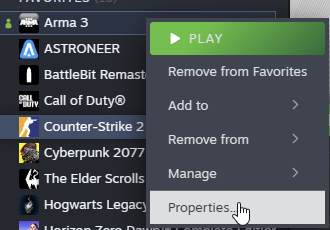
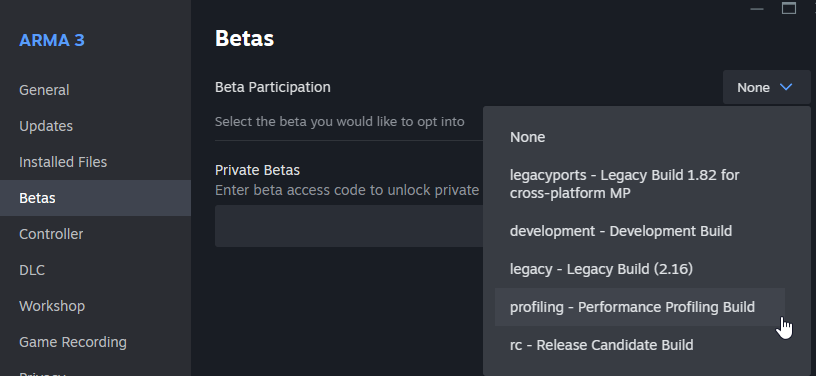
Right click Arma 3 in steam -> Betas -> Profiling
May atleast aleviate the immediate issue
warm bronze
then just run arma once i do that?
wise jewel
Yeah
 warm bronze
wise jewel
Yeah
warm bronze
wise jewel
Yeah
arma is just not armaing rn
wise jewel
Have you tried using a different arma profile?
warm bronze
i cant switch profiles
wise jewel
I've noticed some times a profile can get corrupt and then cause the error under certain circumstances
Why?
warm bronze
i cant load in
wise jewel
Oh into the game at all?
warm bronze
no
so we have a mod that lets us choose the server we wanna load into from arma, we use the "play with mods" button
and we have a custom loading screen but i cant get past it
wise jewel
Maybe able to use the profile parameter in the launcher?
https://i.imgur.com/TN6o3hq.png
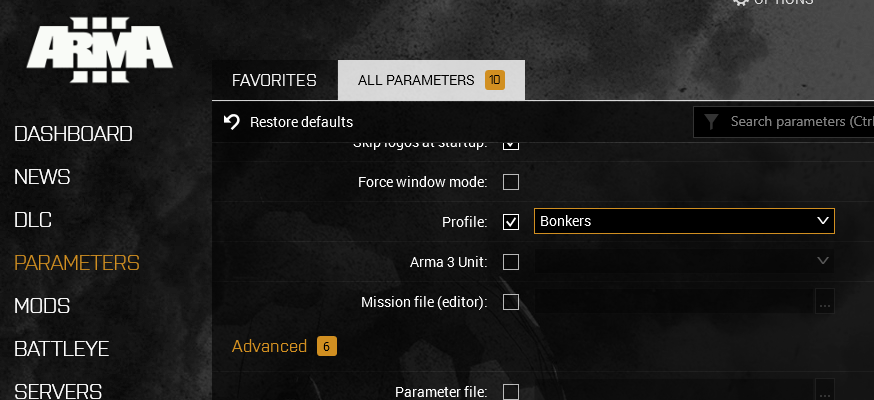
 wise jewel
So you're able to get to that screen fine, but crash when trying to join server?
warm bronze
the no entry thing is normal
no so i gotta wait like 30 seconds then i cant close the popup, but now when the 30 seconds is up it CTD
wise jewel
So with this specific mod set, is it only you that has this issue?
That doesn't seem like a profile-related crash, but a more mod-related one.
wise jewel
So other people that are joining the OP are running the same mods?
warm bronze
everyone has the same mods
wise jewel
Do you know if it happens without any mods?
warm bronze
if you dont, you can load into the server but then ACE kicks you
warm bronze
wise jewel
Do you know if it happens without any mods?
u cant join
wise jewel
Im aware, but trying to narrow down the cause of the crash
Are you able to join other servers is kinda what I mean
warm bronze
let me try
wise jewel
If its a mod related crash, I'm not well versed in them, other than just disabling them
 wise jewel
Hm. Could try uninstalling all of your mods and reinstalling them, but thats more of a last resort.
warm bronze
the red 3 mean anything?
 wise jewel
Just means its not 1:1 with server mods - Hence the red 3 next to Mods: (if I recall correctly)
warm bronze
Could that cause it?
wise jewel
Shouldn't cause a crash
At that point, the only thing I could suggest is an uninstall/reinstall of the mods, but for some people that's not really ideal. Unfortunately I can't think of anything else to help

 heavy terrace
i need help pls i cant start arma 3 get this error i have chech verify integrity pls i need help
 steady hawk
Delete Arma 3\addons\anims_f_data.pbo and verify again
pine kite
wise jewel
Recommend trying to use the profiling Arma build;
Just a steam beta code
I would not recommend this unless this issue can be narrowed down to a bug the Profiling or performance branch actually fixes. Perf/Prof branch can still be consired somewhat unstable. It has not gone through all testing loops.
pine kite
warm bronze
nope
Unfortunately that is a quite generic error code. Consider doing the steps mentioned in this list for that code. https://community.bistudio.com/wiki/Arma_3:_Unusual_Process_Exit
It lists to reinstall the Microsoft Visual C++ 2013 Redistributable package. But that is old news I think. Since 2.18 the launcher requires the latest version for 2022 https://learn.microsoft.com/en-us/cpp/windows/latest-supported-vc-redist?view=msvc-170

This article lists the download links for the latest versions of Visual C++ Redistributable packages.
warm bronze
pine kite
It lists to reinstall the Microsoft Visual C++ 2013 Redistributable package. But...
i did install a new version of C++ think it was Visual Studio 2015, 2017, 2019, and 2022
steady hawk
No. 2013
warm bronze
so install 2013
wise jewel
pine kite
I would not recommend this unless this issue can be narrowed down to a bug the ...
Wasn't recommending it as a permanent fix, was more or less just trying to narrow down the cause. My apologies.
pine kite
steady hawk
No. 2013
I thought Dedmen wrote that they required 2022 now.
steady hawk
Indeed I forgot, but maybe it was about Launcher?
pine kite
I do remember it was related to the launcher functioning correctly. But anyway, upload the crashdump to the feedback tracker site @warm bronze and the devs can probably tell you why it crashes after monday morning EU time.
sharp skiff
does anyone know how you can eject from a jet whilst remote controlling it in zeus? (eject works fine if its like a player in a vehicle but it doesn't give me the option if im remote controlling an AI in zeus)
high salmon
Try double tapping "v", or whatever you have binded to eject
It should either eject your remote controlled unit, or stop remote controlling (I haven't tested and don't remember the default behaviour)
If it stops remote controlling, you might need to write a script or make a script mod to give an eject option
sharp skiff
high salmon
Try double tapping "v", or whatever you have binded to eject
It should either ej...
yeah, i've tried that but it still won't let me eject for some reason - if the plane gets hit it just automatically ejects when im remote controlling it
it does the same with the navigation lights
high salmon
Might be the weird controlling AI vs playing as player
A bunch of stuff works differently because of the difference between "player" and currently controlled unit
rapid tusk
modern echo
you can try exiting steam and deleting the workshop content for arma 3 and its a...
So I deleted the appid folder and junction and redownloaded my subscribed workshop content and not much has changed -- from time to time in the launcher I'll still have several mods that show they're loaded but need to download when they should already be downloaded/disappear unexpectedly (just happened with Better Inventory).
I'm also still getting a non-stop update for Arma 3 that only validates for a bit (on occasion it will show a file size) but every time it completes another download shows up in the queue. This happens with both the standard and profiling builds selected.
This started happening a bit after I downloaded this mission and I see that other users are reporting the same thing. Any idea what it could be?
https://steamcommunity.com/sharedfiles/filedetails/?id=1849873199

 supple perch
what does this mean DX11 error : buffer Map failed : DXGl_ERROR_DEVICE_REMOVED


that is why It crashed I think
umbral narwhal
supple perch
what does this mean DX11 error : buffer Map failed : DXGl_ERROR_DEVICE_REMOVED
Graphics card went missing.
 quaint jewel
warm bronze
nope
quaint jewel
warm bronze
nope
Send me the crash report
quaint jewel
steady hawk
No. 2013
No. 2022 only.
quaint jewel
steady hawk
Indeed I forgot, but maybe it was about Launcher?
No
steady hawk
Noted
quaint jewel
Only some A3 tools tools are not updated
warm bronze
quaint jewel
Send me the crash report
ok
 inland oyster
Anyone know how to keep the AI from going through the entire list of facewear? Feels like it wasnt an issue a few months ago, now half the AI that spawn have HALO masks or something else
uncut trellis
inland oyster
Anyone know how to keep the AI from going through the entire list of facewear? F...
depends entirely on whatever script you got to randomize that
could be some mod you have breaks it too if you are using some list that some mod overrides
 sick pier
hoi, tried to repackage some mods for private use, used to tool to sign them, yet when i upload the package + key just created it says signature mismatch.
as said i just created that key, any idea?
i ofc also use the signature check feature of the tool
 undone notch
Hey, is it any way to check the .rpt file in-game? Maybe using advanced developer tools?
I don't mean the onscreen prompts given by debug mode, but an in-game way to look into what's been written in .rpt file.
uncut trellis
undone notch
I don't mean the onscreen prompts given by debug mode, but an in-game way to loo...
no dont think so
RPT file is not in an accessible place
 normal jacinth
I've recently set up a server on ScalaCube and added some mods to it. Prior to adding them it worked, but now whenever i am in the loading screen for a mission it just closes my game with the ACCESS_VIOLATION error code. Everything works fine with arma apart from when i join the server. Why does this happen and how do i fix it?
uncut trellis
normal jacinth
I've recently set up a server on ScalaCube and added some mods to it. Prior to a...
have you read the rpt at all?
normal jacinth
I dont see any errors
uncut trellis
add one mod at a time to see which one(s) errors
uncut trellis
that is the bane of using so many mods
pine kite
normal jacinth
I dont see any errors
For one thing, XYI_DataBase_Addon mod wasn't found. See the second table. Probably partial download of corrupted file.
Don't know if that was the cause of the crash though. But it certainly isn't flawless.
normal jacinth
pine kite
For one thing, XYI_DataBase_Addon mod wasn't found. See the second table. Proba...
Apparently the crashing was mission-related. Now whenever i enter one of the default missions it just throws me back into the mission select screen
Still no clue why
 opal gulch
I seem to be having this weird issue where none of my difficulty settings are actually saving, does anyone know what is up with this?
umbral narwhal
Arma can't write to the profile, most likely.
opal gulch
what's the recommended fix here?
for some reason the profile is on my one drive
I imagine that would be why
 ocean nacelle
does anyone know anything about ACE
high salmon
opal gulch
for some reason the profile is on my one drive
Disable onedrive, either for everything or just the profile folder
Or move your profile folder using the parameter in the launcher
 somber zodiac
How can you give yourself multiple lives in a single player scenerio in the eden editor? I would die and then just respawn where I died.
steady hawk
If player got a dead-worthy damage, disable that damage and restore health, then setPos
 quaint apex
Can someone please explain this to me why is this log pop out from my desktop?
steady hawk
It will generate such upon a crash of Launcher. Harmless to delete
quaint jewel
normal jacinth
I've recently set up a server on ScalaCube and added some mods to it. Prior to a...
send me the crash report (the mdmp file)
And remove your useless cpuCount/exThreads parameters. Also I suspect you don't want to use that malloc that you have there either.
pine kite
normal jacinth
Apparently the crashing was mission-related. Now whenever i enter one of the def...
Ask for help from whoever created the mission then.
 visual swift
what its is mod name???

 pine kite
Ask the server admin that was played on? Or whoever made the video. (Also, not really a troubleshooting topic)
visual swift
pine kite
Ask the server admin that was played on? Or whoever made the video. (Also, not r...
yes ask admin, what mod name help thanks 🙂
modern echo
visual swift
yes ask admin, what mod name help thanks 🙂
here is wrong place
look/ask in the youtube comments or join their discord
we cant guess from your images
pine kite
I can't even tell what is supposed to be a mod in those images.
modern echo
yeah, it also looks like some bits are broken
normal jacinth
quaint jewel
send me the crash report (the mdmp file)
And remove your useless cpuCount/exThre...
hey, removed the parameters. The game no longer crashes, so no mdmp. It just kicks me out to the mission select screen after readying up in the role picker screen. I still have no clue why this is happening
umbral narwhal
@normal jacinth Usually means a critical mod isn't loaded somewhere.
Check the mod tables in the RPTs.
 scarlet talon
Hia, played thousands of hours of ArmA in the past, 6 months since I've last played I've reinstalled the game and my voice chat no longer works, I've done all the things people tend to say are fixes, even tried routing my mic through VAC, I'm at a loss, shouting at my screen when I see people infront of me 🫠
Can anyone think of any reasons my mic no longer works? I've had no hardware changes in my hiatus either.
pine kite
Set your microphone as the default input device in Windows?
And make sure you are not on a push-to-talk mode/keybind. Or are pressing that.
wise jewel
scarlet talon
Hia, played thousands of hours of ArmA in the past, 6 months since I've last pla...
Check what Valen stated before this -
I've heard this issue quite often, and I generally suggest people go into audio settings and hit "Auto Adjust" under their microphone. Not entirely sure what it does, however it's fixed the issue for 90% of the people I've talked to as well as myself.
https://i.imgur.com/3yYfzfk.png
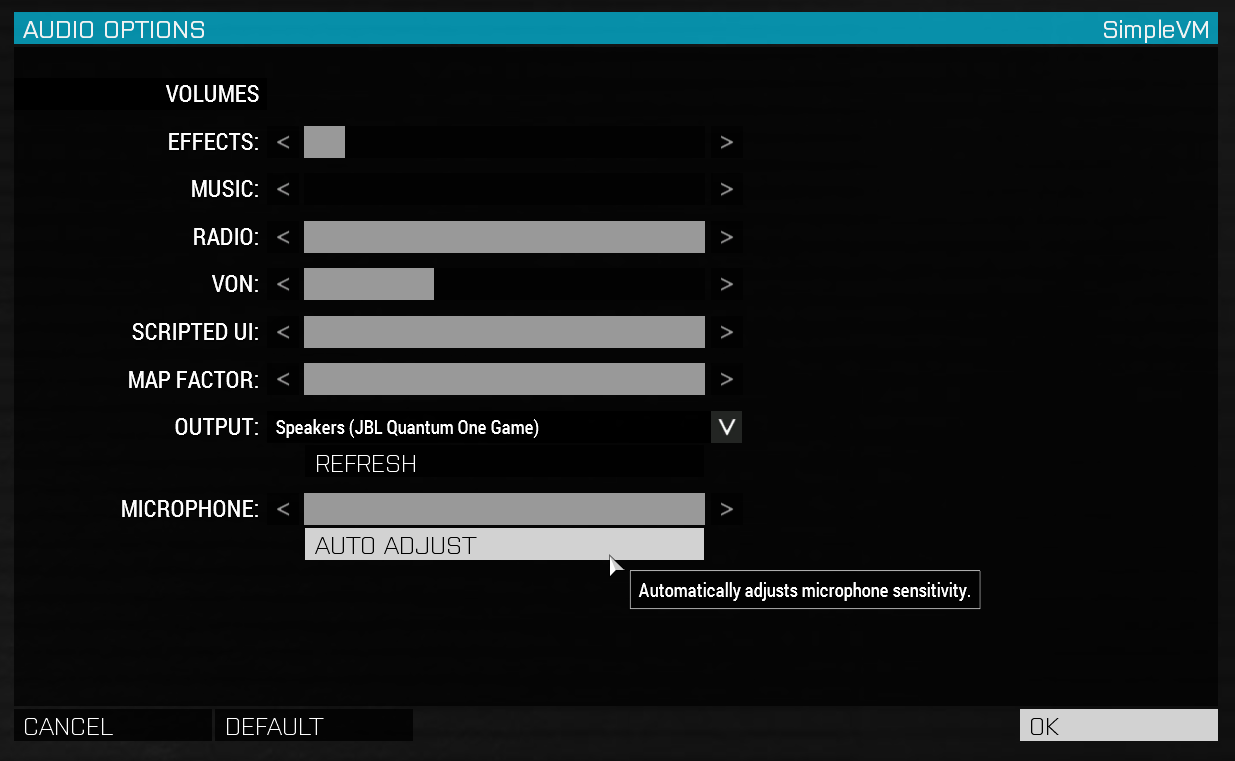 scarlet talon
wise jewel
Check what Valen stated before this -
I've heard this issue quite often, and I g...
scarlet talon
wise jewel
Check what Valen stated before this -
I've heard this issue quite often, and I g...
Anytime I hit that button it flickers up the menu and immediately closes, have tried this with no luck too
wise jewel
scarlet talon
Anytime I hit that button it flickers up the menu and immediately closes, have ...
Have you tried it while in the main menu of Arma, or while on a server? I know a few servers have disabled displays like that
scarlet talon
wise jewel
Have you tried it while in the main menu of Arma, or while on a server? I know a...
Yeah, will give it another go when I'm back at my PC in a bit, really hoping that'll fix my issues. I cannot play KOTH or coop without VOIP
 pallid ridge
I dont know if im in the right channel but i wanted to ask for advise on HostHavoc hosting if this is not the right channel could you please point me in the right direction ?
pine kite
If you have issues with your HostHavoc server, then the first place to ask for help is at HostHavoc. You are paying them for their services. They should explain how it works.
Which game are you trying to host on your server?
Oh, I see you already found the Arma 3 #server_admins channel
normal jacinth
umbral narwhal
Check the mod tables in the RPTs.
Can i somehow check it serverside? I believe one of the mods mightve broke while I was uploading them
scarlet talon
Have you tried it while in the main menu
umbral narwhal
normal jacinth
Can i somehow check it serverside? I believe one of the mods mightve broke while...
You'd need to find the server RPT. Or whatever they're writing stdout and stderr to if it's a Linux server.
scarlet talon
wise jewel
Have you tried it while in the main menu of Arma, or while on a server? I know a...
If anyone else is able to assist with this i'd appreciate it big time
normal jacinth
umbral narwhal
You'd need to find the server RPT. Or whatever they're writing stdout and stderr...
They seemingly aren't generated by the server. I see console.log files in my profiles folder but most are usually empty or have like 10 lines
pine kite
Do you have the -noLogs startup parameter enabled (in whatever management console) for the commandline?
normal jacinth
Dont think so. Then again the hosting service doesnt provide a full commandline manager so Im not sure. All I can do is change the profile and mods
pine kite
Then ask the hosting service where the RPT files are. You need that information to troubleshoot correctly. Can't manage it while being blind.
normal jacinth
Ill be back once i get in contact, cheers
normal jacinth
pine kite
Then ask the hosting service where the RPT files are. You need that information ...
While im waiting for a response from support, whats the differnece between servermods and mods?
pine kite
servermods only run on the server. The other -mods= have to run on both the server and the game client. Often things like mods to interface with databases or other technical stuff only need to run on the server. The mod creator should say if it is a proper server-mod. When it doubt, load it as a normal mod with -mod= on the server.
normal jacinth
That clears up a lot of things. I got a reply from support saying all the "necessary" settings are in the control panel. I did also find gameserver logs in the control panel, which are split into 14 pages. yikes
pine kite
They can become long. The more mods you use, the mod lines are added.
normal jacinth
Looked through the pages and see no errors unfortunately. I'll try and upload to pastebin in a second so you may have a look
console log alongside local RPT
https://pastebin.com/1tPJGTYp
Pastebin
Pastebin.com is the number one paste tool since 2002. Pastebin is a website where you can store text online for a set period of time.
pine kite
Check the table of mods in the pastebin about 4/5th down. A couple of the mod folders on the server appear to be empty for the server. GAME DIR (Empty) So somehow a corrupted or partial download of them.
normal jacinth
Good eye man. I'll try and redownload them since all the file sizes seem the same
umbral narwhal
Oh, it might be addons/Addons
GAME DIR (Empty) means that the folder exists but there's nothing in the addons folder. But some mods mis-case it so Linux servers don't load it.
@normal jacinth
But if your provider doesn't have a "lower case everything" button and just makes you use FTP, you'll need to lower-case all the PBOs locally.
normal jacinth
Yeah I just checked, all the empty mods have the addons folder capitalised
So by lowercasing them it'll be fixed, right?\
umbral narwhal
I think dedmen might have fixed the PBO case issue though and it's just addons/Addons now?
Probably not, but you definitely need to lowercase them.
Linux providers usually do have a "lower case everything" button, so do check for that.
normal jacinth
Unforunately mine didn't have one. I managed to do 50 mods manually lol
It's the addons folders that are the issue
umbral narwhal
You have possibly found the worst server provider in existence.
Although there are many challengers.
umbral narwhal
I'm kinda sick of providing free support so that these companies can carry on providing shit service :P
umbral narwhal
Doesn't help that none of them are good enough to recommend.
normal jacinth
I think the best way of hosting arma is locally through FASTER :P
nothing can beat it
Thank you for the help, I'll be back once i rename everything
 bold schooner
when im playing arma 3 my screen goes black for about 2 seconds then it goes to normal from time to time. i run it at 120 fps so ik my pc can run it
steady hawk
You sure it is Arma 3 issue
pine kite
normal jacinth
I couldnt turn down the specs what can I say
What good does that to you if the server doesn't run, or prevents you from joining?
 lilac canyon
When I tried launching arma
it goes black screen then this
any help?


i bought this game yesterday
i can only run it on 32 bit
quaint jewel
lilac canyon
When I tried launching arma
it goes black screen then this
any help?
Google for your actual error "Cannot create shader Unknown, error 887a0005" shows me a few results.
All of them forums of people who couldn't solve their issue.
It seems to be a graphics driver issue
https://answers.ea.com/t5/Technical-Issues/Failed-to-create-pixel-shader-3-error-code-887a0005/td-p/10702209/page/2 maybe that last one there
https://www.reddit.com/r/blackopscoldwar/comments/lvk55m/error_887a0005_perhaps_i_fix_it/ or that
https://feedback.bistudio.com/T151121 here is one guy who solved it after updating drivers. But you are already on the latest drivers
lilac canyon
kk
modern echo
ouch, maybe get 64 bits hardware
you could try reinstalling the gpu drivers
or rolling to a earlier version perhaps
 heady knoll
I got a question for when making something in the editor
How do I make Opfor people to not have their secondary drawn
I'm trying to disguise enemies as civilians and give them only a pistol but they have them drawn which kinda blows their disguise
Anything I can do?
molten mason
any idea what could cause this, i'm running a Hearts & minds scenario in a dedicated server (heavily modded), never had this in my previous scenarios, happens after i shoot at enemies, the sound is fine, but when i get a weapon (in this case i got a lmg) and shot for a while at enemies sounds of all kinds start looping/bugging like this, and sometimes the vehicles teleport back with the rythm of the sound bug,
i have acess to the server log in case anyone can help me figure this out
there is a bunch of
Ref to nonnetwork object af2ba18b40# 4199715: i_c_soldier_para_3_f.p3d I_C_Soldier_Para_3_ for what appears to be all units the Hearts & minds game mode created, not saying it's their fault, most likely is something i did or a mod we have, just want some help narrowing where the problem could lie at
molten mason
i think i found it, it was a mod that had a loop with fadeSound
molten mason
in the server's .rpt mentioned above there's hundreds if not thousands of Server: Object 4:47 not found (message Type_#) and Server: Network message 70ba9 is pending T_# every second, where the #'s are a number/id mentioned.
how can i figure out what these are?
umbral narwhal
Trial and error. Arma devs won't tell you for security reasons.
Generally object not found is "normal" and network message is pending means that the server is trying to send too much.
 green frost
Guys I created my own Warlords scenario for only a few capture points in Prairie Fire, but when I try to but assets I just have vanilla assets not Vietnam assets ? What needs to be changed please ?
 fringe salmon
Load in to a mission is prevented as it says Picture 0; not found
I havent put any pictures in the op lol
Any ideas?
 gaunt pendant
IHey guys, I have my issue with my home server/pc.I still cant get it to show up online.And also i now know of 3 other ppl in the last 3 months that have same issues.A couple of those guys manage servers for groups in the past.Any tips? Arma in the past was always great and very usefull which has been a big part of the success of the game.Wtih Arma 3 its all gone to hell.
The only way i can get a server to show on LAN is to do install of full game and then install dedi server ....Its a real mess and is costing the company money.Needs to be sorted ASAP.Or at least easy to follow steps/guide on a sure fire way of doing it.Not being able to join a friend on a LAN is really really really poor engineering...
 ember elm
gaunt pendant
IHey guys, I have my issue with my home server/pc.I still cant get it to show up...
ember elm
gaunt pendant
IHey guys, I have my issue with my home server/pc.I still cant get it to show up...
You mention both "show up online" and "show on LAN" how exactly are you trying to host it? and how are others trying to join?( and are they on the same network? )
modern echo
what are you talking about? the networking system has stayed the same as the previous versions, probably just code rot :v
rapid tusk
Mods disappear from launcher/non-stop game update
 lime sphinx
i mean, didn't GameSpy provide some NAT traversal setup?
gaunt pendant
ember elm
You mention both "show up online" and "show on LAN" how exactly are you trying t...
To get my home server to show on a LAN with all clients on same LAN is to install full agme and then install dedi server. I havent yet once been able to get my server or my own game to show online.I cannot host a game myself (not server) and have ppl join via internet.Extremely dissappointed.The game is advertised as being able to do so... I shouldnt need to hire a pro to come to my house to setup the network seetings and router settings to get it to run the way it used to and almost all other games run.This is virtually misrepresentation of a product.It should be staed that the game only runs in MP if we join a profesionally setup host.The game industry doesnt survive because all gamers are PC/network techs.BI NEED to do something..... I have forgotten how many tims someone has invited me to join there game and they/we spent hours trying unsuccessfully to get a simple MP game going.Just his pc join my pc or vice versa.Doesnt work even for ppl with PC/skills and network experience.We all stumped...Broken or inaccessible for users,No where does it mention that netwoking qualifications are required for basic MP use.It used to be that there were more ppl joining each other than hosted servers.Aint like that anymore.Thats what is costing BI money....
umbral narwhal
If you're on the same LAN then join with the LAN IP. Modern routers tend to lack loopback support.
 stark flower
oh just pat ur head and rub your belly 👍
 elfin falcon
hey guys sorry for a random message but i got a question for u lads i hit a break wall with arma 3 I get the following error message: “Windows cannot access the specified device, path, or file. You may not have the appropriate permission to access the item.” i tried everything to fix this but nothing seems to work , would you lad possibly have any solutions to this problem iv been at it ALL DAY!
ember elm
gaunt pendant
To get my home server to show on a LAN with all clients on same LAN is to instal...
Bro chill I aint reading 80% rant with 20% info. have you tried having them connect with your lan ip like John suggested?
elfin falcon
i have been playing
1/2/3 for hours but never hit problem like that before , any information on that error would be amazing cheers lads in advance
ember elm
elfin falcon
hey guys sorry for a random message but i got a question for u lads i hit a bre...
try verifying your files on steam, looks like a file went missing/corrupted
elfin falcon
i tried that a few times but still the same error , even deleted the game and downloaded again , but ill give it another red hot crack
ran game as admin too
ember elm
and what file does the error message say?
 gaunt pendant
ember elm
Bro chill I aint reading 80% rant with 20% info. have you tried having them conn...
gaunt pendant
ember elm
Bro chill I aint reading 80% rant with 20% info. have you tried having them conn...
I can connect clients that are on LAN.I had to install the full game then install dedi server.The big issue is Online play.If i host myself or setup the server its the same deal.No one has ever =been able to see my game hosted.And neither has anyone else i know of been able to do it...I thought BI wouldve fixed this problem by now.Maybe it has to do with Steam or something.
fair kestrel
What should BI fix? Read articles about game hosting and do it for you? Or configure your router? Or call your ISP and ask them to let you host game?
ember elm
gaunt pendant
I can connect clients that are on LAN.I had to install the full game then instal...
So this is not about LAN but online? did you port forward? this is not a BI issue, this is a you issue
gaunt pendant
fair kestrel
What should BI fix? Read articles about game hosting and do it for you? Or confi...
It always worked in A1.A2,Ofp. but not now in A3.Dunno if it worked pre-Steam.
fair kestrel
Now all works the same as it worked before and everything works fine for me.
gaunt pendant
ember elm
So this is not about LAN but online? did you port forward? this is not a BI issu...
Its about all of it.Shouldnt need to install full game to get dedi server to run.Never had to b4.I havnt port forwarded my router but others have and still no luck.Never had any of these issues in prior games.Thats the main issue.
fair kestrel
I just forwarded ports on my router.
gaunt pendant
Did u port forward?
uncut trellis
!localhost
rustic eagleBOT
Arma 3
To host a server or a game session locally, you need to make sure first that your WAN address / external IP uses the IPv4 protocol!
Check your router’s status page in the settings to confirm. (If in doubt, ask your ISP, Websites like “whatismyip.com” give you a false positive!)
Local servers and games can not be hosted on an IPv6 network, or IPv4 via DSlite tunnel!
https://www.avg.com/en/signal/ipv4-vs-ipv6
Once you have confirmed that your connection uses the IPv4 protocol, you need to manually open / forward the ports 2302-2306 UDP (https://community.bistudio.com/wiki/Arma_3:_Dedicated_Server#Port_Forwarding)
See your router’s manual on how to do that, or ask google: “<your router model> + port forwarding”
gaunt pendant
Never had to do that for previous titles.
uncut trellis
Your internet connection might have changed in the past 10 years
gaunt pendant
I did check the IPv4 stuff.seemed correct.
fair kestrel
gaunt pendant
Never had to do that for previous titles.
For previous titles ports should also be forwarded. So nothing changed.
gaunt pendant
Wasnt needed by anyone
gaunt pendant
yep
uncut trellis
Computer change, modem change, how your isp gives you Internet change.
Worked before is obsolete statement I'm afraid.
gaunt pendant
At least once a week someone invites me to there game but it doesnt work.
Big iuuse for BI.MP is almost broken'
an Engineer needs to look into it.
uncut trellis
It works for most people.
gaunt pendant
*issue
none i know of
*no one
If u host a game i bet ppl wont be able to either see your game or join
I'ad bet money on it.
fair kestrel
Dude, stop whining and blaming your problems on others.
gaunt pendant
....
uncut trellis
gaunt pendant
If u host a game i bet ppl wont be able to either see your game or join
I do need to set up portforward to host yeah
gaunt pendant
Its for the devs who read stuff m8
uncut trellis
And allow the traffic through firewall
uncut trellis
Most problems I've had has been my interactive firewall sometimes bugging and not showing the prompt to allow the traffic.
gaunt pendant
I usually turn all that off for best chance or working...
uncut trellis
But that's very specific to my setup
gaunt pendant
i jsut use windows default configuration
Most gamers would back out of anything they that they had to portforward/ modify there routers
Thats a game killer.Needs to be fixed ASAP.No point in having a game only pc techs can setup.
I hope A4 is properly sorted.
ember elm
gaunt pendant
Thats a game killer.Needs to be fixed ASAP.No point in having a game only pc tec...
Notice how nobody else is crying?
Minecraft, ARK, Rust etc etc etc all require you to port forward if you want to have other people join your server
Your options:
- Figure out how to port forward or use tools like Hamachi or Tailscale
- Join an already running server instead
- Rent a server from one of the many server providers
fair kestrel
- Use UPnP.
elfin falcon
any recommendation on how to fix this error i have -

ran as admin , deleted battleye redownloaded it, deleted game and dowloaded back
ember elm
Are you on windows insider by any chance?
elfin falcon
windows 11
turned off all virus protection off
prioritized arma 3 , i pretty much did everything i could but if anyone has any other opinions throw them this way haha
same thing now poping up with dayz which never used to happen only after downloading arma3
ember elm
Do you have any other BattlEye games besides A3 and DayZ?
And can you check if you have windows insider turned off? Settings > Update & Security > Windows Insider Program, It can cause issues with battleye
You can also try running Arma3BattlEye.exe as admin
elfin falcon
i just checked if i have windows insider on but dont think i do it says get started above it
and it wont give me the option to run BA as admin how would i do that
pine kite
gaunt pendant
i jsut use windows default configuration
If you don't allow Arma 3 to receive from public networks in the Windows firewall then a server is not going to get any internet-players. You could get away with joining yourself to the LAN address.
gaunt pendant
ember elm
Notice how nobody else is crying?
Minecraft, ARK, Rust etc etc etc all require y...
You keep baiting...
pine kite
ember elm
You can also try running Arma3BattlEye.exe as admin
@elfin falcon It could be that you need to start Steam as admin so it can install or update this Battleye service.
 swift harness
hey me and my friend are trying to play arma together and whenever either one of us hosts the other cant find the game to join it
also
my upnp doesnt work
if that might be part of the problem
because i cant host it with upnp
does anyone have any suggestions
i saw a youtoube video saying somethin about zero tier but wasnt quite sure if it was safe and all
uncut trellis
!localhost
rustic eagleBOT
Arma 3
To host a server or a game session locally, you need to make sure first that your WAN address / external IP uses the IPv4 protocol!
Check your router’s status page in the settings to confirm. (If in doubt, ask your ISP, Websites like “whatismyip.com” give you a false positive!)
Local servers and games can not be hosted on an IPv6 network, or IPv4 via DSlite tunnel!
https://www.avg.com/en/signal/ipv4-vs-ipv6
Once you have confirmed that your connection uses the IPv4 protocol, you need to manually open / forward the ports 2302-2306 UDP (https://community.bistudio.com/wiki/Arma_3:_Dedicated_Server#Port_Forwarding)
See your router’s manual on how to do that, or ask google: “<your router model> + port forwarding”
uncut trellis
swift harness
hey me and my friend are trying to play arma together and whenever either one of...
the requirements for local hosting 👆
swift harness
thanks
swift harness
but
what if my computer uses
ipv6
or my internet i mean
because when i go to settings
it says i have an ipv4
and an ipv6
waxen sail
well if you have the ipv4 address then just bind to that
Usually you can't see your public IP from settings though, are you looking at your internal IP?
swift harness
uhh i have no clue what i did was settings > network and internet > properties then it was there
swift harness
waxen sail
well if you have the ipv4 address then just bind to that
what do you mean bind it?
swift harness
rustic eagle
im kinda confused on what this is telling me to do
jagged mirage
so im having an issue where I cant save my p3d in object builder. It keeps saying "This file doesnt exist" or "error during save operation"
uncut trellis
jagged mirage
so im having an issue where I cant save my p3d in object builder. It keeps sayin...
save different name
you managed to lock the file in the windows fily system somehow
jagged mirage
any way to undo that? I tried saving other projects and it keeps bringing up the same error
pine kite
Network and internet properties does not have your internet IP. They only show your LAN IP (which can be a IPv4 and IPv6). You can get your internet side IPv4 (if your ISP provides one) when you look into your router and it shows something like internet or WAN address. Arma doesn't care about IPv6 addresses. You need to have a unique IPv4 address for hosting. You can compare it with the result of whatsmyip.org
 wanton fern
I have encountered a problem like this. Can someone help me?
 waxen sail
Is it actually causing problems? Usually this message is harmless and just means you might not be running some optional client-side mods
wanton fern
waxen sail
Is it actually causing problems? Usually this message is harmless and just means...
I can't play any mode, they all give this error and after 1 minute I get a notification that I've been kicked out of the game.
waxen sail
kicked with what reason?
wanton fern
I don't know, I don't agree at all, but I get a notification after waiting.
uncut trellis
-either you dont have correct mods loaded or
-your game data is corrupted -> run steam install verification
-or the server is running old version of the game and you cant join.
start by testing one of the official Bohemia Interactive servers
and join games from the launchers server browser
wanton fern
uncut trellis
-either you dont have correct mods loaded or
-your game data is corrupted -> ru...
Ok thank you
 fallen field
can someone help me with my arma 3?
ıts crashes when ı open up
ıt gives black screen
rustic eagleBOT
Steam file verification process:
Right Click on game -> Properties -> Installed Files -> Verify Integrity of game files
Arma 3
Steam Workshop Mod repair process:
Open Launcher -> Right Click on mod -> Repair
The first process will automatically verify Steam Workshop items as well.
 pine kite
fallen field
ı did but still crashes
pine kite
fallen field
ı did but still crashes
If it crashes then you get a window to report some file to the Bohemia Interactive feedback tracker. Only the devs can figure those out.
FOr Reforger: #reforger_troubleshooting
 worn spruce
my b
fallen field
no when ı say ıt crashed, ı try to say that ıt gives black screen
my english is not that good
pine kite
What is your operating system?
fallen field
what do you mean by that?
pine kite
Windows 10, 11? Mac OS? Linux?
fallen field
window 11
pine kite
Did you see the launcher application come up when you press play in Steam?
fallen field
yes
pine kite
Did you do anything with the parameters tab in it?
pine kite
Don't. Undo those.
fallen field
ı undo the commends but its ganna give black screen again
rustic eagleBOT
Arma RPT
Arma generates a .rpt log file each time it's run, which contains a lot of information like the loaded mods, or any errors that appear, this log file can be very useful for troubleshooting problems.
To get to your RPT files press Windows+R and enter %localappdata%/Arma 3
Additionally see the wiki page for more info: https://community.bistudio.com/wiki/Crash_Files
To share an rpt log here, please use a website like https://pastebin.com/ (Set expiry time to 1 week or less) to upload the full log, that way the people helping you can take a look at it and try to figure out the problem you're having together with you.
Note: RPT logs can hold personal information relevant to your system, the game or others.
pine kite
Get the file with the time and date in the name that reflects your last time trying to play it getthign the black screen.
pine kite
Upload it here.
fallen field
how?
pine kite
Do you not see the plus icon before the text entry line in this channel?
You probably have not acknowledged the rules or did the !verify command.
fallen field
Pastebin
Pastebin.com is the number one paste tool since 2002. Pastebin is a website where you can store text online for a set period of time.
ı guess this is
umbral narwhal
Disk is probably fucked.
pine kite
Sounds like you have corrupted files, or your disk you have Arma 3 installed on is dying.:
 0:12:25   File read recovery from error 17 has failed with error 17: Veri hatas  (d ng sel art kl k denetimi).

 0:12:25 Error 17 reading file 'D:\programlar\Steam\steamapps\common\Arma 3\heli\addons\cargoposes_f_heli.pbo'
 0:12:25 ErrorMessage: (0x00000017) Veri hatası (döngüsel artıklık denetimi).
 0:12:25 Application terminated intentionally
ErrorMessage: (0x00000017) Veri hatası (döngüsel artıklık denetimi).```

I don't know what that language is. Turkish?yes
umbral narwhal
You can try deleting that file (heli/addons/cargoposes_f_heli.pbo) and re-verifying, but it's not a good sign for the hardware.
pine kite
John beat me to it answering.
fallen field
umbral narwhal
You can try deleting that file (heli/addons/cargoposes_f_heli.pbo) and re-verify...
file (heli/addons/cargoposes_f_heli.pbo) where is it?
umbral narwhal
Steam, right-click on arma 3, manage, browse local files.
fallen field
and is my hardware dying?
pine kite
Also, the error message above shows where it is.
 umbral narwhal
wrong one :P
pine kite
It can happen that Steam makes errors saving files. But it can be that you have a magnetic disk with surface errors. Or you have an SSD which has had too many write cycles to the section where that file is.
Well, ok. But is the place where it should be.
And I think _heli means it is a folder or something inside that PBO.
fallen field
pine kite
It can happen that Steam makes errors saving files. But it can be that you have ...
ı didint understand any of that😅
pine kite
Well, then bring your computer to a repair shop and let them test it for disk read errors.
umbral narwhal
Or just make sure you backed up anything critical and wait until it dies properly :P
pine kite
Yes, these kind of error mean that sooner or later you are going to loose data on it.
fallen field
ı will try one last time
fallen field
pine kite
Yes, these kind of error mean that sooner or later you are going to loose data o...
ı gonna buy a new computer in a short time so
pine kite
Copy important files on that disk to USB-stick!
umbral narwhal
pine kite
Well, ok. But is the place where it should be.
Nah, it's in heli\addons rather than addons.
 swift harness
my arma is really choppy
any fixes?
ive turned the graphics down from
ulta
to high
but still runin 15 fps on average
waxen sail
turn it down more
pine kite
Reduce rendering distances (to something sane and realistic as in what you can actually see), that helps a lot.
This video where he explains what ingame graphics settings to use worked alot for me. Not the rest outside of the game: https://www.youtube.com/watch?v=GktBSZcglFk&t=351s

We all have gotten stuck to 15 or 30 frames per second in Arma 3 despite your beefy rig. It is NOT optimized to any level. The game does NOT even use all of your CPU and GPU. See each step to increase your performance
Get FPS boosting mods for Arma 3: https://youtu.be/aqn8vraVaZw
| Downloads
Intelligent Standby List Cleaner | https://www.wagna...
swift harness
thanks
swift harness
pine kite
This video where he explains what ingame graphics settings to use worked alot fo...
hey the uhh view distance fps mod
i cant join any servers because of it
warlord servers
waxen sail
It would need to be whitelisted for you to use it, just adjust your view distance down manually unless it is
uncut trellis
swift harness
hey the uhh view distance fps mod
correct you cant use just any mods on most servers
only ones the server allows
swift harness
i see
 keen python
Hello Guys I want to play with my friend but i have trouble hosting a server?
is there any solution to this or maybe a server where we can play in peace?
uncut trellis
!localhost
rustic eagleBOT
Arma 3
To host a server or a game session locally, you need to make sure first that your WAN address / external IP uses the IPv4 protocol!
Check your router’s status page in the settings to confirm. (If in doubt, ask your ISP, Websites like “whatismyip.com” give you a false positive!)
Local servers and games can not be hosted on an IPv6 network, or IPv4 via DSlite tunnel!
https://www.avg.com/en/signal/ipv4-vs-ipv6
Once you have confirmed that your connection uses the IPv4 protocol, you need to manually open / forward the ports 2302-2306 UDP (https://community.bistudio.com/wiki/Arma_3:_Dedicated_Server#Port_Forwarding)
See your router’s manual on how to do that, or ask google: “<your router model> + port forwarding”
uncut trellis
requirements for local hosting 👆 @keen python
you can also try virtual local network programs like Hamachi
keen python
uncut trellis
you can also try virtual local network programs like Hamachi
thank you very much ur the best goat
waxen sail
not without more information
uncut trellis
 fluid ether
I need help with my subbed mods not loading
fluid ether
I need help with my subbed mods not loading
did you add them to the launchers mod list
fluid ether
waxen sail
not without more information
The Info I can give is that before they are loaded and is working well, one day some of them disappeared and the files are still there but not the data of the mod itself on the launcher.
And I am still subbed on the workshop
It doesn't wanna automatically installed subbed mods
pine kite
Then those mods either got removed by the mod-creator, or forced deleted by Steam or by Bohemia Interactive instruction. It probably wasn't a legit mod most likely.
Check if you can still find the mod page on Steam Workshop.
And try an unsubscribe/re-subscribe to get them back.
rustic eagleBOT
Steam file verification process:
Right Click on game -> Properties -> Installed Files -> Verify Integrity of game files
Arma 3
Steam Workshop Mod repair process:
Open Launcher -> Right Click on mod -> Repair
The first process will automatically verify Steam Workshop items as well.
uncut trellis
@fluid ether
modern echo
maybe don't use illegal modpacks
also try resetting your steam workshop cache
fluid ether
modern echo
maybe don't use illegal modpacks
also try resetting your steam workshop cache
I am not, I am using the normal steam workshops
But I haven't tried the workshop cache yet
modern echo
fluid ether
I am not, I am using the normal steam workshops
that's not what i meant
exit steam completely and delete the arma 3 appid related files and folders from steamapps\workshop and delete the !workshop folder
if it's too much trouble to understand any of what i said then don't attempt anything
fluid ether
modern echo
that's not what i meant
exit steam completely and delete the arma 3 appid relate...
so you mean deleting the whole workshop folder?
modern echo
fluid ether
so you mean deleting the whole workshop folder?
no, only the workshop data corresponding to arma 3 appid
fluid ether
modern echo
no, only the workshop data corresponding to arma 3 appid
Didn't fix it but I just fixed it myself
Thanks for the help still though
modern echo
fluid ether
Didn't fix it but I just fixed it myself
cool, what solved it?
 scenic gate
 stone lava
anyone know why in achilles mode not all my assets show in the spawn menu
high salmon
Not certain what achilles mode is
Achilles is a old zeus extension from what I know
Assets not showing up in zeus is often from the zeus module in the scenario not being set to include all addons
 stray geyser
Hello uhm i am having a problem with the game whenever i try to start it up it shows "The Application was unable to start correctly (0x000009a)
 amber night
Hey folks, I am trying to get Acre2 to run on linux. So far I got Acre 2 to install the plugin alone (meaning that arma does detect teamspeak) but teamspeak does not detect arma (see picture). I am running teamspeak with the same proton prefix as arma (through flatpak). Any idea of what could fix this issue?
 high salmon
amber night
Hey folks, I am trying to get Acre2 to run on linux. So far I got Acre 2 to inst...
high salmon
amber night
Hey folks, I am trying to get Acre2 to run on linux. So far I got Acre 2 to inst...
As far as I know, it's a known unfixable issue that can be worked around
This is the guide for the workaround: https://9lo.re/project/armaonlinux/
I know it works, since a friend has had it working for around 1y now
amber night
high salmon
As far as I know, it's a known unfixable issue that can be worked around
This is...
Oh I tried following that guide
but the provided script did not work
as it was not made to work with flatpak it seems
high salmon
Umm
Try the other version of steam I guess?
The ArmaOnUnix discord might be able to give more help
amber night
high salmon
Umm
Try the other version of steam I guess?
The ArmaOnUnix discord might be able...
Well, I could do that. I'll try
but even then, it wouldn't be a great solution
have you got the invite link for that discord server?
high salmon
Not certain how active it is
amber night
thanks
 restive mantle
got this after the new ace update that came out yesterday in my timezone, does anyone else have this issue?
 uncut trellis
Id recommend trying to repairt the ace mod install in the launchers mod list
repair tool is in the [. . . ] menu
quaint jewel
restive mantle
got this after the new ace update that came out yesterday in my timezone, does a...
BattlEye is having issues, turn off BattlEye if you can. If you can't then you can't play for a few hours
restive mantle
looks like it
 pine kite
What Dedmen wrote!
restive mantle
just as shocked as you are xd
quaint jewel
Note that if you're playing in a closed community with your own server, you probably don't need BattlEye
only need it if you don't trust your players to not cheat
amber night
restive mantle
got this after the new ace update that came out yesterday in my timezone, does a...
Seems strange, my ace seems to work
Oh, and is the units service still down?
amber night
I fixed the acre issue by the way
for any future endeavourers, you "simply" have to ditch flatpak and use the armaonlinux script
ie install steam with your package manager
then run the script
and run arma through the pm steam
then run the script to run teamspeak
and it works
 rotund shore
hello all. i got myself a new laptop and im having trouble connecting to my arma 3 server. I can connect fine on my gaming PC and so can my players in my group, its just this new laptop that's refusing to connect. i can connect to other stuff such as teamspeak and all which are all hosted on the same server machine.
im guessing its something to do with my ports but i have no idea how to troubleshoot this. arma only shows me connection failed when i try to connect to the server. i can see the server on the public list but i cant join it and i cant direct connect to it too.
amber night
rotund shore
hello all. i got myself a new laptop and im having trouble connecting to my arma...
You are trying to connect to a game that you are hosting on your PC?
rotund shore
amber night
You are trying to connect to a game that you are hosting on your PC?
nope. on a different machine. I have 3 machine, server, PC and laptop.
server hosts everything, arma 3 server, teamspeak server and other games.
PC connects fine to everything.
new laptop has no issue connecting to TS but cant seem to connect to Arma 3
high salmon
Check the windows firewall settings
If it somehow didn't get configured correctly for arma, you can have issues with it
(Haven't encountered in arma, but in some other games)
rotund shore
i thought so too.
this new laptop comes with this norton360 AV thing. turned everything off, whatever live protection, smartwall firewall off. went to windows and just turned off firewall too but somehow still not able to connect
tempted to just uninstall this norton tbh 🤣
I mean PC works fine with just windows protecting it
high salmon
Leave windows firewall on
Open windows defender, go to the firewall tab, and allow Arma 3 through firewall
That should fix any issues with windows firewall
 uncut trellis
rotund shore
would providing my rpt file help?
uncut trellis
rotund shore
would providing my rpt file help?
you can post it but its most likely your network issue
rotund shore
aight. brb. uninstalling this bloatware
rotund shore
ok uninstalled norton. allowed arma through firewall. still cant connect.

rpt file for reference if anyone can help
also turned off firewalls and tried to connect but no success yet
umbral narwhal
As it's a new laptop, I'd just reinstall the thing with a clean copy of Windows.
There will be something on there blocking UDP or similar, but good luck finding out what.
uncut trellis
rotund shore
also turned off firewalls and tried to connect but no success yet
turn off all mods on server and run some vanilla mission and see if that makes any difference
lime sphinx
Arma3_x64.exe" -noSplash -ip= "-mod=... audible confusion noises
umbral narwhal
Oh, do try connecting to another server first.
rotund shore
tried connecting to official servers and wasnt able too as well
uncut trellis
rotund shore
tried connecting to official servers and wasnt able too as well
did you try from the launchers server browser?
rotund shore
uncut trellis
did you try from the launchers server browser?
giving this a go now.
nope nada.
gonna try run a vanilla server without battleeye
rotund shore
rotund shore
gonna try run a vanilla server without battleeye
yup this didnt work as well
uncut trellis
then it got to be some sort of issue in your network
rotund shore
uncut trellis
then it got to be some sort of issue in your network
change from my home network to my mobile hotspot did not solve the issue. so no idea what is anymore.
im concluding theres an app somewhere in this new laptop that's blocking my port for arma 3. proabably gonna have to do a fresh install just to remove whatever bloatware is hidden inside.
lime sphinx
rotund shore
change from my home network to my mobile hotspot did not solve the issue. so no ...
Arma3_x64.exe" -noSplash -ip= "-mod=... 
running the game on my PC with the same empty -ip= argument does lead to the same Error: createPeer failed errors i see in your RPT
rotund shore
lime sphinx
`Arma3_x64.exe" -noSplash -ip= "-mod=...` <:blobdoggoshruggoogly:748124048025714...
whats suppose to be in there then?
uncut trellis
nothing
lime sphinx
no -ip= argument at all
uncut trellis
perhaps you have set hard launch parameters somewhere in the launcher
or in steams commandline
lime sphinx
if we assume the launcher does that - it should be this option. Or "Command line"
 rotund shore
lime sphinx
if we assume the launcher does that - it should be this option. Or "Command line...
rotund shore
lime sphinx
if we assume the launcher does that - it should be this option. Or "Command line...
omg... i think it was this
that param was somehow ticked
was on the profiling branch and using the multicore and enabling the params and stuff. i already had it on PC and was like i should do this on the new laptop as well. did not realize i ticked an extra params...
bruh
tq guys for all the help 🙏
 icy silo
 bitter flint
found it 😄
bitter flint
Heya Folks
probally a stupid question ...
how is it possible the i cant adjust my keybindings
like throw is standart on "G" i know on my old pc i had it on Left shift Left mouse button
and now on my new pc i cant put it back in
so i tried another combo lft ctrl + left mouse button this also doent work
cNt do it by hand and cant do it by the little menu on the right
anyone has an good idea what i can try
uncut trellis
bitter flint
Heya Folks
probally a stupid question ...
how is it possible the i cant adjus...
When you say can't do it, what does tha mean? You can't go into settings and change keybinds?
 heavy kettle
Yo, don't know if this is the place to ask but im currently having problems with my arma 3, it just happend randomly a week ago and its bothering me because the graphics are all blurred even when im like 10 m away and it would often gets more worse and worse this happends on both singleplayer and multiplayer game, anyone know the fix to it?
and my graphic option is just pointless, even on high graphics after a few seconds it will downgrade so much you can pretty much call that a slime texture..
this happends on both modded and vanilla.
uncut trellis
heavy kettle
Yo, don't know if this is the place to ask but im currently having problems with...
could indicate problem with your gpu. Might be good to try reinstall the drivers
pine kite
Or clogged fans
heavy kettle
uncut trellis
could indicate problem with your gpu. Might be good to try reinstall the drivers
alright will try that
heavy kettle
pine kite
Or clogged fans
shouldn't be an issue since i have a habit of cleaning my device every day
pine kite
It is more important with laptops than cased PCs. But many people never look at that, and then dust builds up into a thick felt layer.
heavy kettle
pine kite
It is more important with laptops than cased PCs. But many people never look at ...
yeah thats the thing im using laptop which is why i built that habit due to my careless mistake in the pass of not cleaning the fan on my last laptop
pine kite
Which laptop do you have that it is so easily accessible on a daily basis?
heavy kettle
it's definetly easy because i have a friend that does it for me lol, the laptop is HP 14-em0xxx
heavy kettle
uncut trellis
could indicate problem with your gpu. Might be good to try reinstall the drivers
dang, still didnt work, graphics still turned into a mush within 30 seconds
umbral narwhal
Is this a laptop with both a discrete GPU and an IGP?
 near ridge
I can NOT give commands to the UAV, I can tell it to follow/destroy units but I can't give it move commands.
Can someone help me? Isn't it just right-click?
I can tell it what to do if I right-click on where it is going currently but that doesn't really help as that means I can only use units that are visible to the UAV's cams as waypoints..
bitter flint
uncut trellis
When you say can't do it, what does tha mean? You can't go into settings and cha...
i can go into settings and i know how to change binds
but the problem is that the system doesnt execpt this
the keyboard and mouse are working because i can play whit the standard settings
uncut trellis
bitter flint
i can go into settings and i know how to change binds
but the problem is that t...
I dont understand what you mean by that
if you change keys they dont work?
bitter flint
to be honest ... i just found out you must drag them from right menu to wrds the left
modern echo
bitter flint
to be honest ... i just found out you must drag them from right menu to wrds the...
thats only for like binds that you cant bind by pressing them
so confusing and whatever
@uncut trellis think they're referring to issues with assigning them and whatever
probably some problem with your keyboard or conflciting software
modifier keys
maybe ace is interfering?
uncut trellis
more details needed I suppose 😅
heavy kettle
umbral narwhal
Is this a laptop with both a discrete GPU and an IGP?
no, it is fully Integrated
 slow frigate
Would this be the place to go for modding issues as well or just vanilla Arma 3 issues?
uncut trellis
slow frigate
Would this be the place to go for modding issues as well or just vanilla Arma 3 ...
what kind of modding issues?
slow frigate
specifically, upon adding a singular mod it makes everyone have the "Connecting Connected Disconnected" Issue.
uncut trellis
slow frigate
specifically, upon adding a singular mod it makes everyone have the "Connecting ...
could be broken mod
or the combination of mods you got does not work
(you also should only use mods that server runs)
slow frigate
Specifically Antistasi Plus just doesnt like workin.
slow frigate
even with just one mod it causes the Connect thing
uncut trellis
just antistasi?
slow frigate
yeah
uncut trellis
is it latest version?
slow frigate
yes.
uncut trellis
are the people joining having all same correct mods?
slow frigate
yes, we've all reinstalled the game, reinstalled the mods, manually purged the mod files and redownloaded them.
uncut trellis
are you hosting it locally or on external server?
slow frigate
Locally.
uncut trellis
if you host any vanilla mission does that work?
slow frigate
no mods on a vanilla mission it works
its as soon as a SINGULAR mod exists it just dies.
uncut trellis
any mod or just antistasi?
slow frigate
any of them.
uncut trellis
then no idea. maybe someone else has ideas
slow frigate
thats what i'm hoping, i've been at this for 4 hours.
what confuses me the most is it worked a month ago.
umbral narwhal
@slow frigate What's your server setup?
slow frigate
umbral narwhal
<@345385946331611138> What's your server setup?
its hosted from my PC, with properly forwarded ports.
but we just solved it 😭
apparently my PC just despises arma 3, and it fixed itself upon restarting my PC.
near ridge
So I think this has to be one of the weirdest & rarest bugs (not suprised with my luck), as I have seen very few posts and none have fixed my issue, maybe someone else has had this here and solved it themselves, which is why I am asking.
I was playing Antistasi but it felt just too outdated so I switched to Antistasi+. I did not knew at the time but it was actually supposed to have its own mission, which after asking on Reddit why I couldn't save, looking for help, I was told to switch to Ultimate and when switching, I did not see any custom missions and just the default Antistasi mission. I chose and loaded in, it gave me a warning, saying that I should get the correct mission and that this is the wrong mission. I looked up a YouTube tutorial or two, and saw that people had a mission for Ultimate specificly. The issue is that even though Antistasi is disabled on my mod list, it is still showing with ANY mods, even with zero mods. I could not find any solutions and like I stated above, no previous posts was helpful. Can anyone help me, please?
 strong apex
Anyone experiencing problems with saving only certain difficulty settings in the latest regular build (no DLC, no Mods), such as "multiple saves"?
Steps to reproduce: go to options, difficulty settings. Select "Veteran" preset. Scroll to bottom, enable "multiple saves" (at this point the settings DO NOT INDICATE "CUSTOM", it stays on "Veteran"). Switching another option may trigger the preset to switch to "Custom". Anyway, when you close and open the settings again, the "multiple saves" is OFF, despite it just being enabled. This may happen with other diff. switches. Things I tried that didn't work:
- run as Admin
- move profile folder
- create new profile entirely
- switch to dev or prof builds
What worked as a workaround:
- enabling the option "multiple saves" directly in the .Arma3Profile file outside the game.
Looks like a bug to me. Can anyone test this?
near ridge
strong apex
Anyone experiencing problems with saving *only certain difficulty* settings in t...
What mission? I'll try.
After I fuck up some CP'ers in Ready or Not
strong apex
Any mission, just try it in from the main menu. It's very weird, I didn't change anything with my setup.
 golden nova
strong apex
Anyone experiencing problems with saving *only certain difficulty* settings in t...
golden nova
strong apex
Anyone experiencing problems with saving *only certain difficulty* settings in t...
create a new profile and see if this happens on it too.
strong apex
Already tried, check op.
near ridge
Aight imma try
I tried different missions, and yes. It does not let me save more than once.
strong apex
Looks like a bug, if you switch to another preset (recruit or regular), the opposite happens, you cannot toggle it off.
 stiff peak
@golden nova Hello
golden nova
stiff peak
<@269887075698868235> Hello
Huh
stiff peak
i wanna film a soldier in arma 3 spectator mode and make it fire its missile, how can i do this?
for arma 3 cinematic purposes
uncut trellis
stiff peak
i wanna film a soldier in arma 3 spectator mode and make it fire its missile, ho...
this is not exactly a troubleshooting issue. and also please dont ping people to ask general questions.
#arma3_questions is the general questions channel and we have various creative channels under Arma 3 Creative Editing channel group
What you want to do will require scripting
you can check out various available commands here 👆
stiff peak
hmm i dont know how to use this
lets say im on spectator mode , i type in player fire it dont work
uncut trellis
youll probably need to experiment with how scripting works more.
stiff peak
is tghere a way to have free camera mode whilst still controlling your unit though?
uncut trellis
stiff peak
is tghere a way to have free camera mode whilst still controlling your unit thou...
probably not. you cant control both same time
cinematic things usually are scripted AI doing things in sequence
and not always in same sequence but more pieced together from multiple takes
stiff peak
but can u give me example script for example to just make a specific unit "fire"?
i need to give the unit a variable name first?
uncut trellis
no dont have any at hand
stiff peak
_soldier fire "M16";
Example 2:
_soldier fire "SmokeShellMuzzle";
Example 3:
_soldier fire ["SmokeShellMuzzle", "SmokeShellMuzzle", "SmokeShellRed"];
Example 4:
player playActionNow "PutDown";
player selectWeapon "DemoChargeMuzzle";
player fire ["DemoChargeMuzzle", "DemoChargeMuzzle", "DemoCharge_Remote_Mag"];
player setWeaponReloadingTime [player, "DemoChargeMuzzle", 0];````for scripting advice best to post at #arma3_scripting
umbral narwhal
near ridge
So I think this has to be one of the weirdest & rarest bugs (not suprised with m...
Very old versions of Antistasi are missions, not mods. So they'll show in the mission list regardless of which mods you load.
 crystal mantle
hey so im trying to host an antistasi playthru with a couple buddies and whenever i host trying to use upnp it straight up fails every single time. ive gone into my router to turn on upnp and ipv4 aswell as set the ports to my pc for tcp and udp with every possible arma 3 port and to no avail it fails over and over
 tawdry nymph
Isn't this a glitch in BI building ?
 pine kite
What glitch? Looks normal to me. Other than that you are hurt somehow.
tawdry nymph
 uncut trellis
tawdry nymph
uncut trellis
tawdry nymph
seam of damage model maybe
tawdry nymph
uncut trellis
seam of damage model maybe
probably, i haven't try to destroy it with a tank. I was surprised to be able to see throught the building
 low flax


 low flax
since the ACE update in January 2025 I can no longer play Arma, when I launch my scenario it freezes and shows me an error message telling me there is an update problem. when I check all the files in steam it tells me that everything is ok.... I don't understand and when I check my arma mods tells me that ACE3 is up to date yet I can launch none of my scenarios
 umbral narwhal
Repair the ACE mod using the Launcher, and make sure you're not loading any mods that include an older copy of ACE.
 delicate elm
Answered already on ACE discord 👍
near ridge
tawdry nymph
I am pretty suer that those lines are where the debris is going to break if it was to blow up, like HorribleGoat said. You don't need a tank by the way, you can use a few C2s too.
near ridge
umbral narwhal
Very old versions of Antistasi are missions, not mods. So they'll show in the mi...
Still doesn't fix my issue and I don't think you get it, these are added by the mod and used to not show up if the mod was removed. For some reason, it does show up now.
near ridge
near ridge
So I think this has to be one of the weirdest & rarest bugs (not suprised with m...
Can anyone help me, if anyone knows a fix? Otherwise, i'll escelate it to a bug report because seems like a bug and if nobody knows a fix, probably is.
bronze river
near ridge
Can anyone help me, if anyone knows a fix? Otherwise, i'll escelate it to a bug ...
to start antistasi The Mod you need to start it to host a server (local host via LAN also works), it should show the mission there after you pick which map you want to play.
can you provide the screenshot of this 'rare' bug you mention?
say just in case do you have Cloud drive enabled such as ONEDrive etc? try disabling it for Arma 3 save folder (check pinned)
near ridge
...can you read the whole message first? there is no screenshots required, it is all clear?
near ridge
bronze river
say just in case do you have Cloud drive enabled such as ONEDrive etc? try disab...
negative, i littereally got onedrive deleted and I have no other desktop drives
it was causing issues before on Arma3 and more, so I deleted it
i hate it anyway, its so annoying
also, i know how to create an antistasi save?
bronze river
check your subscribed content on steam and see if you subscribed to antistasi scenario, since scenario doesnt show up in Launcher mod list.
near ridge
okay it started working for some reason??
bronze river

near ridge
i swear it wasn't yesterday, now it shows up on list? i did not change anything, i littereally loaded the exact same mod preset?
i hate when this happens, there is a saying in my country for this because it is SUPER common, its like a curse, you have the weirdest problem, that most people won't even believe, and you go to prove it, and its fixed
at least i get to play modded now :/
bronze river
oh yeah when you asked mother to find your stuff and it suddenly appears
near ridge
yea, fr exactly like that
 signal heart
Anyone else getting this Error after the ACE Update the 28th?
 high salmon
Didn't have any issues last night, other than a bug with signature mismatch that didn't do anything
umbral narwhal
It seems like an extremely detailed and likely accurate error.
high salmon
It has the first steps you should take right there
umbral narwhal
Great job from ACE there, tbh :P
signal heart
It works if I delete the APL pbo then it works again but seems to be creating further errors, but at least I am able to play the game.
I've reinstalled the mod & repaired it & neither fixed it.
umbral narwhal
Make sure you restart steam.
signal heart
I did
bronze river
when in doubt, restart pc
signal heart
I've done that as well
high salmon
Last change to ace_apl was 3 years ago, so the keys might not have been updated properly on the server with the ace 3.19 update
Either that or you have a duplicate ace_apl.pbo someplace
It's the APL licensed assets that ACE uses, needed for a bunch of the models
somber zodiac
Hey does anyone know how to fix the ArmaFXP mod overwriting the improved craters mod? The craters stopped working when I installed the ArmaFXP mod. If there is a solution to this instead of just disabling one mod, please let me know.
signal heart
high salmon
Last change to ace_apl was 3 years ago, so the keys might not have been updated ...
Its not in server, its just in editor both in SP & MP it seems to be a problem, & I've looked in all my arma directories for a duplicate pbo.
high salmon
somber zodiac
Hey does anyone know how to fix the ArmaFXP mod overwriting the improved craters...
Probably no fix, try Blastcore Murr or one of the others
high salmon
signal heart
Its not in server, its just in editor both in SP & MP it seems to be a problem, ...
You could try a clean ace version from the github: https://github.com/acemod/ACE3/releases/tag/v3.19.0
somber zodiac
high salmon
Probably no fix, try Blastcore Murr or one of the others
is blastcore like the crater mod?
umbral narwhal
(install as local mod, load that instead of the steam workshop version)
signal heart
👍 I'll try that, thank you.
umbral narwhal
If there's a duplicate PBO for ace_apl then it'll show up in the RPT easily enough.
signal heart
Yeah the RPT said nothing about a duplicate.
high salmon
somber zodiac
is blastcore like the crater mod?
No?
Blastcore is group of VFX mods
This is the Murr Edition https://steamcommunity.com/workshop/filedetails/?id=2257686620
You could also try Photon VFX as a different alternative https://steamcommunity.com/sharedfiles/filedetails/?id=2953412769
elfin falcon
hi guys having trouble running arma3 , have been playing dayz for a bit and sense downloading arma3 this issue keeps poping up tried everything pretty much any clue what it could be


disabled all firewall setting , ran as admin both battle eye and launcher , no error popping up in firewall history ,verified game , reinstalled game, reinstalled steam had no issue playing DayZ but ever sense downloading arma3 this happened
deleted Battleye and reinstalled it too
modern echo
elfin falcon
hi guys having trouble running arma3 , have been playing dayz for a bit and sens...
weird, check for conflicting software such as antivirus?
elfin falcon
How would U do that
umbral narwhal
It's important to know what software is running on your computer :/
modern echo
elfin falcon
How would U do that
sorry we can't guess your software inventory so it really depends
ask your technician
 marble sand


