#arma3_editor
1 messages · Page 63 of 1
 mental zodiac
 plain gale
It can never be a unit
The attribute is only available for objects without simulation.
plain gale
mental zodiac
Oh no
Oh yes.
There is no reliable way to make it work, there is always something that's going to break it
mental zodiac
plain gale
Oh yes.
But why, there is a workaround that @keen jolt written for DS
This one
plain gale
Yes
But I am not going to replace objects placed in the editor with simple objects
Because the next reports I get is: "Why are actions not working"
Why is that not working.
and why the heck is this not working
mental zodiac
plain gale
Because the next reports I get is: "Why are actions not working"
Got it :(
Sorry to hear that
plain gale
I'd put it into the tooltip, but people refuse to read them ¯_(ツ)_/¯
 plain gale
I did that before, didn't work
 keen jolt
yeah but hopefully that workaround I posted works 😅
right now even that doesn't work 
scale had to be applied using a var
plain gale
It probably does, but not for ENH
mental zodiac
plain gale
It probably does, but not for ENH
May i ask you when you'll remove object scaling for MP? 
plain gale
Any minute
mental zodiac
plain gale
Any minute
hell yeah, much appreciated
mental zodiac
plain gale
Any minute
Hell yeah, thanks for quick update
if (!isMultiplayer) then {_this setObjectScale _value}";
 mighty island
Hello, is there any way to make a video with pictures doing smth like slideshow while music is playing in the background for the players when spawning? I know for the way with the text typing on the screen a little after they spawn, but can there be a black screen and then a few photos switching with the music on?
 wintry wadi
will try that, appreciate it!
 prisma oyster
mighty island
Hello, is there any way to make a video with pictures doing smth like slideshow ...
prisma oyster
mighty island
Hello, is there any way to make a video with pictures doing smth like slideshow ...
yes, it requires scripting though
(or awful triggers)
 acoustic yew
Does anyone happen to know where ace intel pick-up (notepad, document, etc.) custom text strings are stored? I ran an old mission and all the intel documents were blank. I only ask because it didn't seem to be transferred with file > save as in eden. I can absolutely dig up the old file or make a test file to figure this out later but can anyone confirm off the top of their head if it's stored as a property in mission.sqm or why this may have happened? Original file was binarized and a de-binarized copy was created and ran.
keen jolt
my guess is that an ACE/Arma update broke it
if it's stored as a property in mission.sqm
I doubt it
 dim kindle
how would i set a vehicle to start with a certain door open?
specifically I'd like the huron to start the mission with its rear door lowered but cant figure out what i need to do
keen jolt
dim kindle
specifically I'd like the huron to start the mission with its rear door lowered ...
place the huron in Editor
right click on it and select find in config viewer
on the left list find UserActions and expand it
then find the user action for opening the cargo door (look at the list to the right for an action name that matches "Open Cargo Door" or something like that)
the action code (statement) most likely has something like animate or animateSource
so just get the animation/source name and use it the way the action did
 grim grove
How do i activate a trigger using a different trigger, e.g trigger1 fires it then fires trigger2?
acoustic yew
grim grove
How do i activate a trigger using a different trigger, e.g trigger1 fires it the...
a redundant trigger is usually unnecessary and creates clutter but you can use the triggerActivated command in the second trigger's condition i.e. triggerActivated trigger1
grim grove
acoustic yew
a redundant trigger is usually unnecessary and creates clutter but you can use t...
Thank you and it was because the show/hide module wouldn't work when paired with a skip waypoint trigger and a "HOLD" waypoint, however i realised i didn't need the hold waypoint because they dont move whilst hidden
 unique drift
Hey guys quick question, how does one give a vehicle a moving map marker? Hard to explain, I've seen groups have it set in their operations that helicopters for example have a marker attached to their vehicle which updates each second or so on the map, I'd like to replicate this function for my own milsim group, thanks!
acoustic yew
unique drift
Hey guys quick question, how does one give a vehicle a moving map marker? Hard t...
pretty simple script. Create a global marker and have it update position every couple seconds.
private _marker = createMarker ["vehicleMarker_0",[0,0,0]];
_marker setMarkerType "b_air";
_marker setMarkerText "Hotel 1-1";
_marker setMarkerColor "colorBLUFOR";
[_vehicle, _marker] spawn {
    params ["_vehicle","_marker"];
    while {alive _vehicle} do {
        _marker setMarkerPos (getPosASL _vehicle);
        sleep 2;
    };
    deleteMarker _marker;
};
something like this
run only on server
you can define _vehicle as your asset and change the marker type to whatever CfgMarkers classname you want
added color and text
you can customize markers however you want
if this is something you're doing consistently I would suggest adding it to your functions library so you can easily run a function to do this automatically
unique drift
thank you for the response! trying to figure out how to use this, i'm assuming this goes into the players (the pilot) init, correct?
acoustic yew
no
_vehicle is a placeholder for vehicle variable
if !isServer exitWith {};
private _vehicle = this;
private _marker = createMarker [format ["vehicleMarker_%1", _vehicle],[0,0,0]];
_marker setMarkerType "b_air";
_marker setMarkerText "Hotel 1-1";
_marker setMarkerColor "colorBLUFOR";
[_vehicle, _marker] spawn {
    params ["_vehicle","_marker"];
    while {alive _vehicle} do {
        _marker setMarkerPos (getPosASL _vehicle);
        sleep 2;
    };
    deleteMarker _marker;
};
try putting this in vehicle init
BIS_fnc_netId was just a quick and dirty way to generate a unique marker id, there's less resource-intensive ways to go about it but if this works then I don't think it'll make a real difference
actually I take that back I'll just use the stringified object
edited ^
works for me does it work for you?
unique drift
It works perfectly, thank you very much! (My discord just froze and crashed lol)
I've been looking for this for a week now, very much appreciated!
acoustic yew
yw
feel free to take it on over to #arma3_scripting if you want to make it more dynamic
unique drift
I think what you gave me is perfect actually, All we needed was a way to give air/ground vics a marker lol, the ability to change the callsign is an added bonus!
 stone sphinx
having an issue where backpacks are deleting items, or fully disappearing in my mission file. I'm using a modpack that has IFA3, CSA, and FOW. SOLVED FOW had a module that screwed with storage.
 sterile torrent
Hey, I have a question regarding Zeus, When I use a prebuilt mission using zeus like altis master zeus the players have a circle on them that allows me to give them AI to command, however when I try to make a mission in EDEN with zeus, the players just do not have this circle that allows me to add AI for them to command,
sterile torrent
No, when i launch the mission I make in eden as ZEUS I want to give them AI to command, but i cant
stone sphinx
oh, it's probably because you can't see their icon. hop into a vc
sterile torrent
Yes thats what I mean
grim grove
How do i put a break inbetween lines of code e.g for my trigger i have ```sqf
Command sideChat "Example";
sleep 5;
Command sideChat "Second Example";
However i get an error message and both lines appear at once. small patrol
https://community.bistudio.com/wiki/Scheduler
You need to spawn it
grim grove
small patrol
https://community.bistudio.com/wiki/Scheduler
You need to `spawn` it
Hmm, this has confused me a little bit, so would I create a (e.g.) script.sqf file and then put the same code in and then ExecVM in a trigger?
small patrol
As I said spawn is enough
prisma oyster
grim grove
Hmm, this has confused me a little bit, so would I create a (e.g.) script.sqf fi...
code run in triggers is unscheduled - aka it will run and will not accept any interruption.
you can then create a thread with spawn and put your code in it - spawned code is scheduled and accepts pausing
keen jolt
grim grove
How do i put a break inbetween lines of code e.g for my trigger i have ```sqf
...
what they mean is:
[] spawn {
  Command sideChat "Example";
  sleep 5;
  Command sideChat "Second Example";
};
Ahh okay, after a little research I also found this ```sqf
call {[
["Command","Example",0],
["Player","Example 2",5]
] spawn BIS_fnc_EXP_camp_playSubtitles;}
no need for the call wrap even 🙂
grim grove
prisma oyster
no need for the `call` wrap even 🙂
So just ```sqf
{[
["Command","Example",0],
["Player","Example 2",5]
] spawn BIS_fnc_EXP_camp_playSubtitles;}
no, just
[
  ["Command", "Example", 0],
  ["Player", "Example 2", 5]
] spawn BIS_fnc_EXP_camp_playSubtitles;
Ahh, i see. Thank you.
 topaz glen
is there a way to see all the textures that are available for use in something like a computer screens like the Rugged Large Screen ?
grim grove
topaz glen
is there a way to see all the textures that are available for use in something l...
I think you can use any image on the screens
grim grove
topaz glen
is there a way to see all the textures that are available for use in something l...
This video provides an excellent example of what I think your trying to do
topaz glen
thankyou
topaz glen
why does the respawn module kill every player at start of the mission?
prisma oyster
it depends on its settings
one mode is to allow everyone to pick their loadout on startup (ApexProtocol-like)
 limber coral
Hey Yo
I uploaded a new server with a mission I created using the same mods on a previous working server I was using - I am able to troubleshoot most of the problem but now i'm stuck on a loop(That can be seen by the system logs) when trying to enter a slot in the server. help ?
 simple patrol
Hey everyone, is their a way to make spawns or triggers random, so say you 3 trigger zones and you want the enemy group to go to one of them but random how can you do that
 plucky briar
I have no idea how to use or add scripts at all. Trying to make a trigger zone so if the player is within the zone and activates a radio, all of their ai squad will respawn back in that zone UNDER the players command as they were before, dead or not with full original load out. Is there a way to do this or is scripting needed?
Does anyone have suggestions or may be able to help me learn where to use the scripts and how to check them?
acoustic yew
plucky briar
I have no idea how to use or add scripts at all. Trying to make a trigger zone s...
you will need to write a script for this but it doesn't sound too complicated
Trying to make a trigger zone so if the player is within the zone and activates a radio
what part of this requires a trigger?
plucky briar
So the player can decide to go solo or use the radio alpha feature if they decide to bring a squad with them
Trigger would allow that radio alpha to be repeatable and used as the player desires, but not outside the safe zone
acoustic yew
this is only at mission start?
plucky briar
Any time the player dies or even returns to the safe zone and just wants to set back up
I just like the radio alpha feature for its simplicity and repeatable without issues
acoustic yew
can it be a scroll menu action instead
plucky briar
That's exactly what I'm looking for
Radio alpha comes up on scroll menu when it's set up on the trigger
acoustic yew
are you referring to the custom radio menu or the scroll action menu
the one in the middle of the screen or the corner
acoustic yew
can it be a scroll wheel action in the middle of the screen instead
plucky briar
Yeah that'd be fine
acoustic yew
does the ai squad have custom loadouts or just the ones that come with the unit classes
plucky briar
I'm also using eden so it's making a lot of things easier but still can't find a way to do this
Custom
acoustic yew
so I'm thinking the approach here is to introduce two scripts in your mission folder
plucky briar
Okay, that's the part I have no clue on how to do. Can this be done in the editor or does it have to be added through a note process and inserted through the files?
acoustic yew
one called onPlayerRespawn.sqf which the game will automatically run when the player respawns, and one called respawnTeam.sqf which will be referenced by the other script
plucky briar
Ok
acoustic yew
there is a command called addAction you can put in onPlayerRespawn to give the player the scroll menu option
with that the game can check a condition (i.e. if player is in a given area) and execute a script (the other file)
plucky briar
Okay. So how does it know the area that it should be looking in? I mean, I have no idea how to do anything script related at all. I need full barney style 😂
acoustic yew
you input arguments to tell it what to do
I'll show you an example in a second
that link gives you the description of what the command does, the syntax (how you write the command for the game to understand what you want), and examples of implementations underneath
plucky briar
Okay. Thank you for all the help btw
acoustic yew
yw
params ["_newUnit", "_oldUnit", "_respawn", "_respawnDelay"];
if !(isNull _oldUnit) then {
    removeAllActions _oldUnit;
};

private _condition = toString {
    player inAreaArray myTrigger;
};
private _actionID = _newUnit addAction ["Respawn Team","respawnTeam.sqf", nil, 1.5, true, true, _condition];
bear_actionID = _actionID;
``` @plucky briar this will show the "Respawn Team" action in the scroll menu if the player is in the area of `myTrigger`with this method the trigger only serves as an area reference, it has no other purpose
when the action is used it will execute the code in the file called respawnTeam.sqf
The variable set at the bottom is only for later reference if you want the action removed after it's used, it doesnt have to be there otherwise
//respawnTeam.sqf

// supply array in format [
//     [unit classname, unit loadout]
// ]
private _group = group player;
{ deleteVehicle _x } forEach units _group; //delete all existing team


// supply array in format [
//     [unit classname, unit loadout from getUnitLoadout]
// ]
if (isNil "bear_groupArray") then {
  bear_groupArray = parseSimpleArray loadfile "groupArray.txt";
};
{
    _x params ["_classname","_loadout"];
    private _unit = _group createUnit [_classname, getPosATL player, [], 5, "NONE"];
    _unit setUnitLoadout _loadout;
} forEach bear_groupArray;

//player removeAction bear_actionID;
this would be your other script file, or some variation of it
assuming I got this right on the first go-around
actually make a third file and call it groupArray.txt
optimization can come after if you stick with me here. loadFile should only be used once so that can go elsewhere
the next step would be to put ```sqf
private _groupArray = [];
{
private _unit = _x;
private _unitArr = [typeOf _unit, getUnitLoadout _unit];
_groupArray pushBack _unitArr;
} forEach (units player - [player]);
copyToClipboard _groupArray;
i swear there's a method to my madness
plucky briar
lmao okay. im still editing now and going crazy as i fix one issue, and 3 more arrise
now this is an mpmission, will this all work for both players?
plucky briar
also, how do i save all these files? does sqf go into the mission file?
acoustic yew
yes, so long as both groups have the same team loadouts
plucky briar
okay
acoustic yew
yeah next to the mission.sqm
acoustic yew
the first one you make a file called onPlayerRespawn.sqf
plucky briar
okay
acoustic yew
all the code inside it will automatically execute when a player spawns/respawns in MP (unless configured otherwise)
and that script references respawnTeam.sqf which is the second code block
plucky briar
got that one, thank you
acoustic yew
the third code block is what you put into the debug console to get your unit loadout data to go in the txt
so 3 files in total
plucky briar
what text does it go in
or will it create it
if it creates it, what do i name it?
acoustic yew
the debug script copies data to your clipboard
plucky briar
ok
plucky briar
aweomse. Thank you so much
plucky briar
the debug, thats just once im out of editor and testing it in sp i can use that extended debug? or do i use the debug after clicking on the group marker once they are placed while still in editor?
acoustic yew
the script that goes into debug just copies your current group's classnames and loadouts
so you only do that again if you change something
otherwise just save it in the txt file and the script will do the rest
plucky briar
awesome, thank you
acoustic yew
if I wrote it correctly you should get a big chunk of text in your clipboard
it's only going in a separate txt file because it would make the other script hard to read if you pasted it directly into the script
plucky briar
ok
acoustic yew
if (isNil "bear_groupArray") then {
  bear_groupArray = parseSimpleArray loadfile "groupArray.txt";
};
``` basically this checks if you already have that data stored in memory for the mission and if not to load it out of the txt file and store it{
_x params ["_classname","_loadout"];
private _unit = _group createUnit [_classname, getPosATL player, [], 5, "NONE"];
_unit setUnitLoadout _loadout;
} forEach bear_groupArray;
``` and this takes that data and uses it to spawn your groupdo make sure you don't have file extensions hidden when you're naming these files so there isn't a hidden .txt at the end of every file
it's a windows explorer setting
plucky briar
always have that on to make sure. also, its not copying. keep getting an error
acoustic yew
put str before _groupArray
copyToClipboard str _groupArray;
I forgot to make it a string before copying it
@plucky briar
acoustic yew
continued in dm ^
grim grove
When using ```sqf
this flyInHeight 30;
so the flight is alot smoother as the ai pilot jolts back and fourth.
 vague mica
is there any known solution for that Hide Terrain Objects Module not always working? some players have objects removed, some not
ok nvmd, "Operate Locally" was not ticked and it deletes only 10 objects, I'll try this first
 lean shadow
Question: Why do compositions spawned through config (ex. ZECUP) not keep their x and y rotation data or their z height data, but compositions spawned through custom comps off the workshop like this (https://steamcommunity.com/sharedfiles/filedetails/?id=2808699910&searchtext=) will
 deep sail
Is there anything that will block shots but is invisible?
keen jolt
deep sail
Is there anything that will block shots but is invisible?
Protection Zone (invisible)
keen jolt
lean shadow
Question: Why do compositions spawned through config (ex. ZECUP) not keep their ...
ZECUP?
and what do you mean by compositions spawned through config?
lean shadow
keen jolt
ZECUP?
https://steamcommunity.com/sharedfiles/filedetails/?l=latam&id=750186990
ZECCUP*
Both of these mods allow me to spawn compositions. ZECCUP is an actual mod with pbos that I have to load in to launcher for its comps to show. They show up in the Group(F2)->empty tab rather then the custom comp tab
grim grove
how do I go about checking if a players group has entered a vehicle, this will be used to complete a task?
keen jolt
grim grove
how do I go about checking if a players group has entered a vehicle, this will b...
there are many ways.
this addEventHandler ["GetIn", {
    params ["_veh", "", "_unit"];
    if (group _unit == group player && {units _unit findIf {!(_x in _veh)} < 0}) then {
      ["myTask", "SUCCEEDED"] call BIS_fnc_taskSetState;
      _veh removeEventHandler ["GetIn", _thisEventHandler];
    };
}];
that's one way (and the fastest way)
 robust tundra
would anyone know if kat is required for adding airway managment or if its doable with just ace
grim grove
I have created an array which is supposed to delete the vehicle and crew but only the vehicle is deleted and the crew just fly through the air to there death am i missing something here? ```sqf
{deleteVehicle _x} ForEach [ambientJet1,ambientJet2];
airway management is not bundled with ace, you would have to make your own if you don't like kat
acoustic yew
grim grove
I have created an array which is supposed to delete the vehicle and crew but onl...
you're not telling it to do anything with the crew
Assuming ambientjet is an object
grim grove
acoustic yew
Assuming ambientjet is an object
ahh i see, and yes that is correct.
I have got it working but it requires copy and pasting the same line multiple times.
{deleteVehicle _x} foreach (crew ambientjet1); deleteVehicle ambientjet1;
you can add
deleteVehicle driver _x;
at the start of the forEach loop
and keep it cleaner
grim grove
I don't fully understand what you mean? Do you mean like this?
{deleteVehicle _x} ForEach {deleteVehicle driver_x [ambientJet1,ambientJet2]};
no
a foreach loop can contain multiple commands separated by a semicolon ;
{
  deleteVehicle driver _x;
  deleteVehicle _x;
} forEach [ambientJet1,ambientJet2];
forgive the formatting I don't know how to make code blocks on ios
grim grove
{
deleteVehicle driver _x;
deleteVehicle _x;
} forEach [ambientJet1,ambientJet2];
Yeah
grim grove
If i was to use this for any other object can i put anything in between the {} and it will apply to them all?
acoustic yew
a forEach loop basically goes down the list in your array and runs the code while replacing _x with whatever element it's working on
when it's done executing the code it will move to the next element on the list
 umbral wind
Hello, I have a problem and I´m not sure where to ask. I placed some AI units on the map and want to let them respawn at their placed position after they die. Not only once, but as long as the scenario goes
grim grove
acoustic yew
a forEach loop basically goes down the list in your array and runs the code whil...
I understand now thank you!
grim grove
acoustic yew
{
deleteVehicle driver _x;
deleteVehicle _x;
} forEach [ambientJet1,ambientJ...
Actually quick question regarding ```sqf
driver
driver just returns the pilot
you can either nest a forEach loop inside the other one or append crews to the end of the array of vehicles
grim grove
acoustic yew
you can either nest a forEach loop inside the other one or append crews to the e...
Did some testing and couldn't find a working solution. I'm not sure I fully understand what you mean?
acoustic yew
grim grove
Did some testing and couldn't find a working solution. I'm not sure I fully unde...
{
  private _aircraft = _x;
  { deleteVehicle _x } forEach crew _aircraft;
  deleteVehicle _aircraft;
} forEach [ambientJet1,ambientJet2];
alternatively
{ deleteVehicle _x } forEach ([ambientJet1,ambientJet2] + crew ambientJet1 + crew ambientJet2);
I like the first one better, easier to adjust it
grim grove
In the first one what does "private" mean/stand for?
acoustic yew
that's just habit for defining variables locally
not strictly necessary in this case
prisma oyster
see also https://community.bistudio.com/wiki/Variables#Local_Variables_Scope for a detailed explanation 🙂
grim grove
acoustic yew
that's just habit for defining variables locally
Thank you for the help, much appreciated!
grim grove
prisma oyster
see also https://community.bistudio.com/wiki/Variables#Local_Variables_Scope for...
I will take a look now, thank you also.
 spice ridge
how do you make AI aircraft fly in formation (player on ground)
dim kindle
How do I make INDFOR (Greenfor - in this case the AAF) hostile to BLUFOR on a trigger?
acoustic yew
dim kindle
How do I make INDFOR (Greenfor - in this case the AAF) hostile to BLUFOR on a tr...
independent setFriend [west, 0];
tick the server-only box and put that in the on-activation field
you might have to do it both ways for it to work like the editor setting, unsure
independent setFriend [west, 0];
west setFriend [independent, 0];
yeah do this one ^ https://community.bistudio.com/wiki/setFriend
dim kindle
acoustic yew
you might have to do it both ways for it to work like the editor setting, unsure...
That's perfect! Thanks, man
dim kindle
acoustic yew
you might have to do it both ways for it to work like the editor setting, unsure...
I'm having an issue with this - BLUEFOR do not appear to be fighting back. Indfor are, however
acoustic yew
acoustic yew
you might have to do it both ways for it to work like the editor setting, unsure...
@dim kindle did you use the second code block
dim kindle
Yes
dim kindle
acoustic yew
<@456226577798135808> did you use the second code block
Freshly placed units ARE shooting at indfor, existing units are not. Existing infor units are shooting at blufor, as are freshly placed
acoustic yew
I don't know why that would be the case, the same thing is being applied to both sides
dim kindle
I'll try applying the second line of code on a separate trigger that triggers at the same time
acoustic yew
are you sure blufor aren't just failing to spot their targets
depending on their location
dim kindle
acoustic yew
are you sure blufor aren't just failing to spot their targets
No, they're seeing them, they just aren't reacting. AAF are actively firing at them
acoustic yew
is the group's behavior set to careless or do not engage
dim kindle
Nope
Can confirm, the second trigger has fixed the issue
The AI are being a little dumb about it but they're now opening fire
 kind tusk
So i wanted to make a nice little outpost but idk how to make soilders just have a pose or something like when i see ai
Hands on hips
Or just sitting around
dim kindle
kind tusk
So i wanted to make a nice little outpost but idk how to make soilders just have...
Use a mod called 3den Enhanced and then use the Animations tab in the editor when you open an entity's properties.
 glossy ledge
Ayo, idk if yall do Operation Trebuchet here but I'm having an issue with the spartans. Issue is that for some reason I can't set them to invincible, tried everything I could think of. Any help appreciated.
acoustic yew
glossy ledge
Ayo, idk if yall do Operation Trebuchet here but I'm having an issue with the sp...
have you tried enableDamage or a handleDamage handler?
If those don't work then a mod is overriding with its own damage handling
glossy ledge
acoustic yew
have you tried enableDamage or a handleDamage handler?
The enable damage isn’t working and I’m not certain if I’m doing the handler right
 vestal perch
dim kindle
vestal perch
dim kindle
Heyo, got a question again
Looking to detonate explosives using a trigger.
I assume this would have something to do with setDamage, but idk how to use it or code it in. Could someone give me an example of setting the damage of an object to 0 on a trigger?
 fading goblet
in short: give the object a name (eg. blowmeup) and in the trigger you run blowmeup setDamage 1
There are some tutorials on YT explaining it more in depth
dim kindle
I'd think it would be something likesatchelCharge setDamage 0; to reduce the satchels health to 0 and make it explode? Or would it be satchelCharge setDamage 1;
dim kindle
fading goblet
in short: give the object a name (eg. `blowmeup`) and in the trigger you run `bl...
Ah thanks! I can just add more of them to blow up multiple things - Thanks!
grim grove
Is there a way to hide a aircraft from hostile radars?
prisma oyster
setDamage
How does setDamage affect radars?
prisma oyster
*boom*
a dead aircraft is not radar-spotted 😄
joke aside, it would be a config thing
maaaybe something with camouflage trait but I wouldn't bet on it
yeah no, I take that setUnitTrait "camouflageCoef" only applies to units, not vehicles.
grim grove
ahh okay, thanks anyway.
 safe swift
grim grove
Is there a way to hide a aircraft from hostile radars?
safe swift
grim grove
Is there a way to hide a aircraft from hostile radars?
disable the sensors on radars if it's for AI 😄
grim grove
safe swift
disable the sensors on radars if it's for AI 😄
Is there a script to turn it back on using triggers?
grim grove
safe swift
https://community.bistudio.com/wiki/enableVehicleSensor
Thank you!
dim kindle
grim grove
Is there a way to hide a aircraft from hostile radars?
Uh..... Hmmm.
Disable the simulation on the radars. Re-enable them when the aircraft is gone.
I know that's already been suggested via vehicle sensor - I mean disable simulation on the whole object
grim grove
dim kindle
I know that's already been suggested via vehicle sensor - I mean disable simulat...
Thank you I will give this a test now.
dim kindle
Because that will just straight up turn the entire object off.
There's probably a way to do it on a trigger but idk
grim grove
dim kindle
There's probably a way to do it on a trigger but idk
I've decided to just scrap it, a lot of effort for a small part of my mission.
Another thing, how do i make ai wait until i have completed my waypoint before moving?
wintry wadi
grim grove
Another thing, how do i make ai wait until i have completed my waypoint before m...
Script-wise you could probably sync up your waypoint to a MOVE waypoint of the enemy, and then give them a waypoint after. That way they go to the first MOVE waypoint, wait for you to finish yours, and then go after
grim grove
wintry wadi
Script-wise you could probably sync up your waypoint to a MOVE waypoint of the e...
I just wanted the ai helo to wait until I was in before moving however I couldn't get it to work using sync waypoints and still haven't found a solution.
wintry wadi
grim grove
I just wanted the ai helo to wait until I was in before moving however I couldn'...
you could try using a trigger that only activates when you're in the helicopter, and then have that trigger activate a move wp
grim grove
wintry wadi
you could try using a trigger that only activates when you're in the helicopter,...
I have put it to a side for the minute and carried on with the rest of the mission, I will give it a try soon and see how this goes, Thank you.
dim kindle
Can I design and publish an entire mission in 3den without needing to mess with the filesystem?
small patrol
filesystem?
dim kindle
small patrol
filesystem?
Opening files in explorer, etc..
I’m a little confused about the stuff that can be set up in 3DEN and the stuff I need to open in text editors, for example
small patrol
You can of course
dim kindle
small patrol
You can of course
So I don’t need to use any external editor for missions, just the tools in 3DEN?
how would I write scripts?
small patrol
In Init directly?
dim kindle
small patrol
In Init directly?
I thought scripts were written in separate SQF files?
small patrol
Not sure what separate means here but SQF files are preferred because easy to write, easy to debug
dim kindle
small patrol
Not sure what separate means here but SQF files are preferred because easy to wr...
What do you mean “init” then? The only init I know of is for the units when they initialize
small patrol
That's it
dim kindle
Ah ok
dim kindle
small patrol
Not sure what separate means here but SQF files are preferred because easy to wr...
What is the difference between SQF/SQS? Im new
small patrol
SQF: newer syntax, always preferred in Arma 3
SQS: legacy syntax
grim grove
I was wondering is there a way to show the units name instead of a number when using groupChat? ```sqf
unit1 groupChat "Example";
Usually it uses their identity I think? Not sure.
safe swift
grim grove
I was wondering is there a way to show the units name instead of a number when u...
but you will have to make your own channel for that, via https://community.bistudio.com/wiki/radioChannelCreate
 vagrant garnet
Hi can I have some basic help with editor
keen jolt
vagrant garnet
Hi can I have some basic help with editor
what do you need help with?
acoustic yew
vagrant garnet
I can’t post pictures so it’s going to be hard to explain
Can you try to explain it? What is your goal?
 pseudo flare
anyone able to assist me in taking a mission file and putting it onto host havoc? im having a ton of issues.
@keen jolt
@acoustic yew
acoustic yew
Please do not tag me
vagrant garnet
Basically I want my enemy ai to enter a building and try kill me but I heard that is quite impossible
 neon rock
Not sure if this is editor related, anyone know about any SAS-Looking gas masks that fit on the CBRN Suit?
small patrol
vagrant garnet
Basically I want my enemy ai to enter a building and try kill me but I heard tha...
It is possible to order an AI get into a house, but they only follow the predefined pathway. So quite hard I think
small patrol
Place a waypoint inside a building?
vagrant garnet
I tried that but it kept going outside the building maybe I need to zoom it in more, I I way point the squad in the building will they all enter and seek and destroy?
small patrol
It is possible. Note where the WP is
 vagrant garnet
Oh I see so basically anywhere that’s attached to the building
Is they a way I can make ally heli hover around and just lay down fire
dim kindle
Anyone know to how make an operation / mission? I'm very new
small patrol
Use Editor
small patrol
Whatever you want. If you place an unit and play, it already is a mission
small patrol
AKA your question is too vague
dim kindle
I have a buddy who plays arma daily, he said it takes hours to make a mission
dim kindle
small patrol
AKA your question is too vague
Sorry
small patrol
Depends. It could take minutes to make a mission, or years
small patrol
Chill. It could
acoustic yew
You can plop down playable units and enemies and call it a mission, but uh some people are obsessive about details and those people can spend weeks on a single mission
couldn't be me
and then the players just walk past the scripted event you spent hours making just in case they ran into it
pain
 snow bear
Hi, does anybody know why if I disable loop on the keyframe animation, it won't start? This is my current setup
https://i.imgur.com/7KlJWeB.png
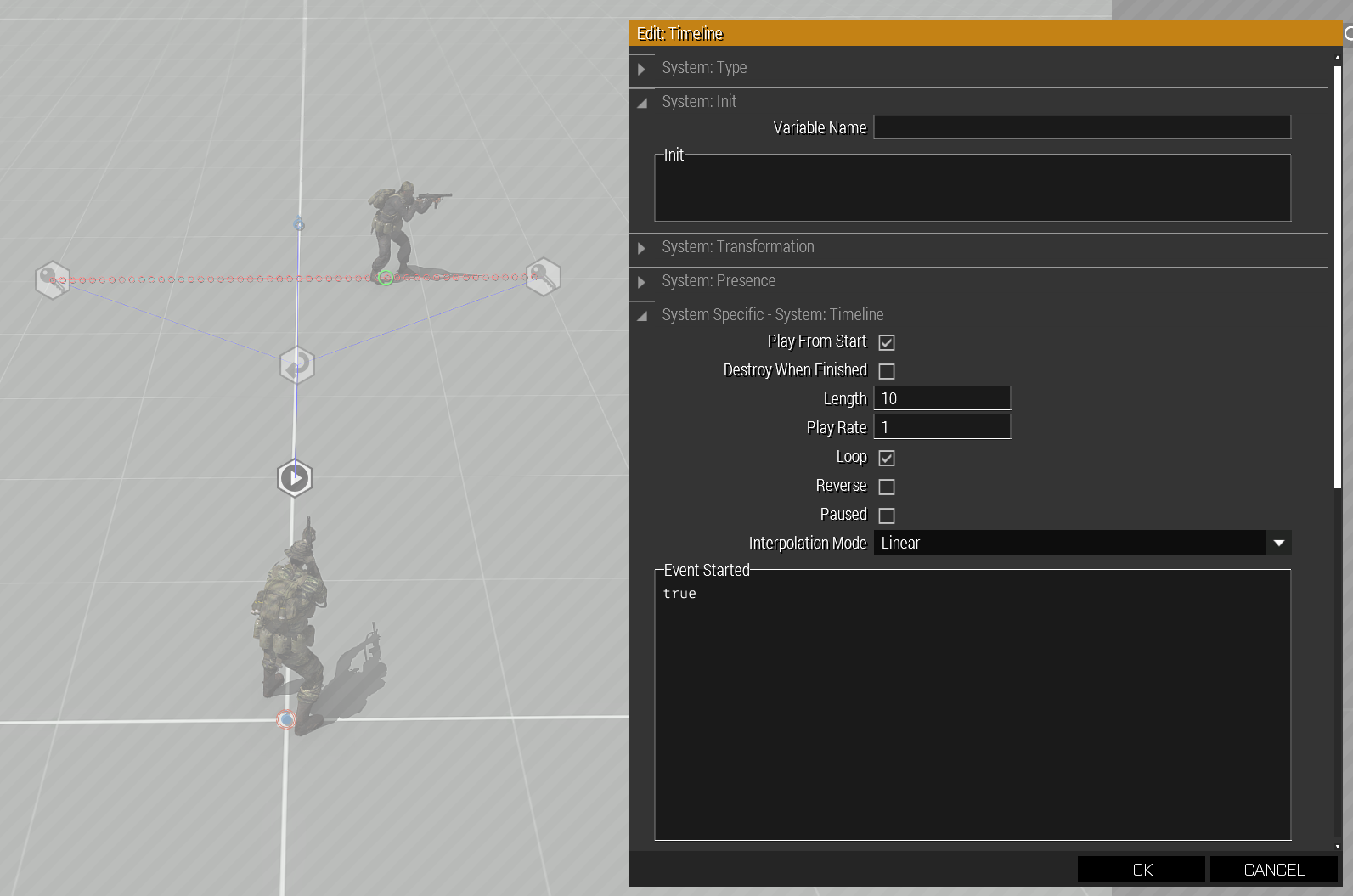
If I disable the Loop, i can see the preview correctly, but when I get it game, nothing will happen
 distant merlin
Please tell me how to remove a building or other object on the Stratis map?
 fallow thunder
distant merlin
Please tell me how to remove a building or other object on the Stratis map?
fallow thunder
distant merlin
Please tell me how to remove a building or other object on the Stratis map?
There is a module called “Hide Terrain Objects”
Place it down over an object and it hides it
distant merlin
fallow thunder
Place it down over an object and it hides it
Where is it or how can I find it?
fallow thunder
distant merlin
Where is it or how can I find it?
It is in the modules section of the right panel in the editor
 mental crow
hello
i forgot how to make a task for HVT
i say !alive HVT and i sycned it with the tasks but it won't complete after i kill him
small patrol
Make sure you named him HVT
mental crow
i did
small patrol
Check every steps once again
small patrol
Verify yourself in #offtopic_bot_cmds should do IIRC
mental crow
verfiy stil cant post imega
 mental crow
i can't use google while arma is open...
small patrol
You can Alt+Tab anytime
small patrol
This image tells nothing actually. You need to elaborate more
mental crow
........................
what am i missing i said !alive HVT in the trigger next to task complete
yet it doesn't show
small patrol
Are you sure that your player character has the task?
mental crow
what?
small patrol
It shouldn't show the task's completation notification you don't see
mental crow
create task is on all players
small patrol
Did you checked the trigger itself worked fine?
Using hint or systemChat or some command to do debug

This tells why. You should to put it into Condition not On Activation
mental crow
oh..
uh how do you put captives on there kneels?
they always up right when captive
small patrol
I don't think Arma 3 has such animation
dim kindle
mental crow
uh how do you put captives on there kneels?
There might be a mod that adds the animatikn
vagrant garnet
Guys is they anyway I can get my friendly helicopter to attack a certain position then get and enemy helicopter to come in and destroy my friendly helicopter and then proceed to attack my friendly ai on the ground
 uneven marsh
how do i make a ai pilot land a helicopter without getting out of it
grim grove
Land waypoint
grim grove
uneven marsh
how do i make a ai pilot land a helicopter without getting out of it
If you want them to land and turn engines off use this engineOn false; in the activation part of the waypoint
uneven marsh
alr, thanks
acoustic yew
Have you tried grouping the drivers and setting them to form column
you can also force a speed limit now
I think the command is setcruisecontrol or something
grim grove
if you have eden enhanced then it is one of the attributes
special states > speed limit
prisma oyster
acoustic yew
I think the command is setcruisecontrol or something
limitSpeed perhaps (setCruiseControl would be for player-controlled vehicles only)
dim kindle
My real problem is the AI will go ham when set to anything but careless
Is there a way to force the drivers to not enter combat mode but let gunners react to targets
(for convoyS)
keen jolt
dim kindle
Is there a way to force the drivers to not enter combat mode but let gunners rea...
disable autocombat
grim grove
or that ^
dim kindle
keen jolt
disable autocombat
Wouldn't this disable the AI gunners ability to be aggrod though
I just want the drivers to ignore enemies
keen jolt
so disable the driver's autocombat
and set him as the group leader and effective commander
grim grove
Hello guys, currently using the eden enhanced establishing shot tool however I want a task to appear when the player skips past this, how do i check when it is over or the player skipped?
acoustic yew
grim grove
Hello guys, currently using the eden enhanced establishing shot tool however I w...
https://community.bistudio.com/wiki/BIS_fnc_establishingShot this is the function I presume you're referring to. you can look for it in the functions viewer or write BIS_fnc_establishingShot in the console and it'll return the code. From there you can see if there is a variable you can reference; wiki says it returns true, not sure what that means in the context of spawn
I think BIS_missionStarted is an affected variable?
grim grove
acoustic yew
https://community.bistudio.com/wiki/BIS_fnc_establishingShot this is the functio...
Thank you i will give it a read through and see what i can find
grim grove
acoustic yew
https://community.bistudio.com/wiki/BIS_fnc_establishingShot this is the functio...
I tried to find BIS_missionStarted on the wiki but I couldn't find anything for it? Do you have a link to where i can find the page?
grim grove
Okay bare with me
grim grove
acoustic yew
no, i mean I believe it's a variable that changes in the function
Completely missed that, thank you 
acoustic yew
let me know if it works, I'm thinking of using that function for my mission
 autumn shale
Does anybody have problems using Arrow Keys in the editor fields?
For example, in the Variable or INIT field on the Attributes window of any object...
Up and Down arrow keys work just fine, but Left and Right do not.
The weird thing is, when i start the mission and pres Esc to go into the little "console" field - all arrow keys work in there just fine.
I have no idea why is this happening. I do not use any special equipment, i have a very standard old school keyboard, that always worked reliably since the day i was born and some old sage placed it in my crib.
grim grove
acoustic yew
let me know if it works, I'm thinking of using that function for my mission
Honestly I can't figure out a way to get it to work, I used my skills as a professional googler to try and get more information but it just keeps coming blank.
acoustic yew
I can't look at it right now but I'll tag you if i find it later
grim grove
acoustic yew
I can't look at it right now but I'll tag you if i find it later
No Problemo, i am going to keep looking to see if i can find a solution
keen jolt
autumn shale
Does anybody have problems using Arrow Keys in the editor fields?
For example, ...
they work fine for me. you might have a mod that's interfering
autumn shale
keen jolt
they work fine for me. you might have a mod that's interfering
nope, i am not using any mods at the moment.
dim kindle
how would i lock a vehicle to a specific side?
acoustic yew
you can add a getIn handler to check the side of the unit
I don't think you can lock a vehicle for a specific unit
dim kindle
How do I get the animations of a unit to play in the editor? ive seen videos of builders having the anims play in the editor itself
keen jolt
they typically do it using a mod, POLPOX's Artwork Supporter
dim kindle
acoustic yew
you can add a getIn handler to check the side of the unit
thanks
dim kindle
dim kindle
How do I get the animations of a unit to play **in the editor?** ive seen videos...
yeah POLPOXs artwork supporter is probably what they're using
dim kindle
How do I make it so the AI respawn?
Like in the Vanilla "Escape from Altis" scenario, for example
keen jolt
 vague moat
How do I make artillery attack a certain area when the reds hit the trigger?
vague moat
How do I make artillery attack a certain area when the reds hit the trigger?
you can use the doArtilleryFire command
distant merlin
How to see what this mod uses? https://ibb.co/YNFmrG7
 acoustic yew
wdym
you can check the mission sqm for the author's tag if you mean how it's used in the mission
distant merlin
acoustic yew
you can check the mission sqm for the author's tag if you mean how it's used in ...
how to check it?
acoustic yew
go to save the mission and uncheck it to generate a plaintext mission.sqm
then you can see the dependencies and the classnames present in the mission
acoustic yew
I believe if you save over the mission without the mod it'll remove the assets but don't quote me on that
distant merlin
acoustic yew
go to save the mission and uncheck it to generate a plaintext mission.sqm
I didn't understand, what to do with mission.sqm?
acoustic yew
when you save the mission in the editor what it's doing is generating a mission.sqm file which tells the game what's in the mission
when you save the file it will save as plaintext if you uncheck the binarize box. You can then open and edit it. The checkbox says "binarize the scenario file" or something like that
sorry got distracted writing that
vague moat
How do I know the name of the ammunition that the artillery shoots to record in the script?
acoustic yew
vague moat
How do I know the name of the ammunition that the artillery shoots to record in ...
get in the arty you're trying to script and run ```sqf
vehicle player addEventHandler ["Fired", {
params ["_unit", "_weapon", "_muzzle", "_mode", "_ammo", "_magazine", "_projectile", "_gunner"];
_class = typeOf _projectile;
copyToClipboard _class;
systemChat _class;
}];
that will give you the classname of the projectile if that's what you're looking for, if you mean the magazine or ammo swap _projectile with _ammo or _magazine
it copies the classname to your clipboard when you fire the arty, taking out any guesswork
oh nevermind that was a crosspost 🤦
the nerve
only post in one channel it's rude (and against the rules) to post the same question in multiple channels
distant merlin
acoustic yew
when you save the mission in the editor what it's doing is generating a mission....
DynaSound_DS_w_Alamut not found in this file https://ibb.co/5Krs94h
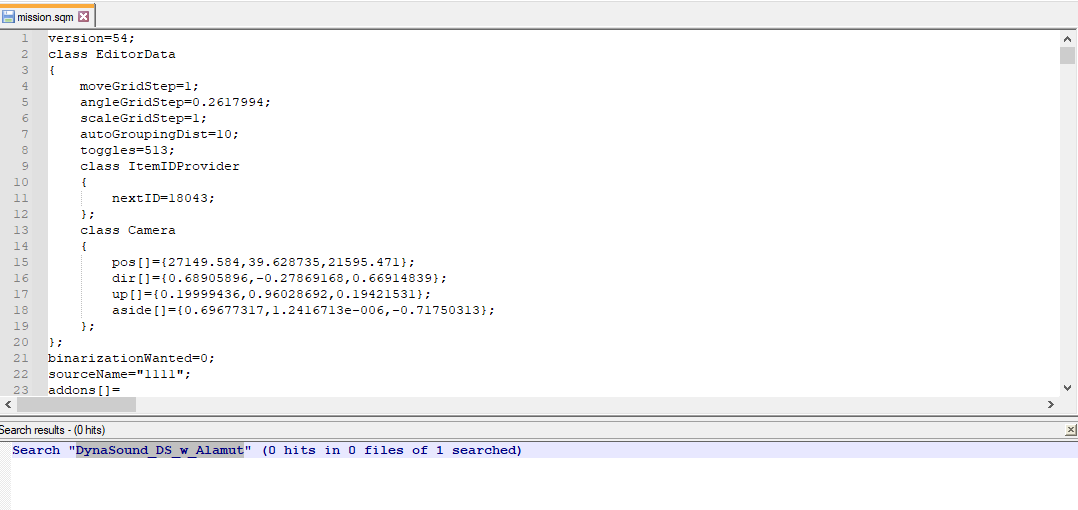


 acoustic yew
scroll down to addons[]
distant merlin
acoustic yew
scroll down to addons[]
DynaSound_DS_w_Alamut is not there, even nothing like that.
acoustic yew
then ignore it and load the mission i guess
it wont pop up on that list unless it's a named dependency in the sqm though
that doesnt mean assets are actually used
distant merlin
acoustic yew
that doesnt mean assets are actually used
DynaSound sound mod and creating a mission with it enabled, I don't understand why the dependency on Alamut was created.
acoustic yew
If it's not in there I suspect you already removed the dependency in the process of saving into a non-binarized sqm
 dawn topaz
i made a mission, published on steam, stuck it on my server, but its showing player count as 0, all are playable ?
prisma oyster
dawn topaz
i made a mission, published on steam, stuck it on my server, but its showing pla...
the server might be lacking the required mods?
dawn topaz
Ahhh. I`ll take a lok 🙂
That worked, Thank you
dim kindle
how would i make a radio prop locally play some music that can be heard within a certain distance?
the distance doesnt have to be specific. i just mean when people go near it
keen jolt
dim kindle
how would i make a radio prop locally play some music that can be heard within a...
say3D
 tough crane
So, I want to place down a helmet, right. It's from a mod by 556Moe. The pilot suite one.. I'm trying to get the "JHMCS / MBU-23/P" helmet. Though I can't seem to get it in the editor. Only in the loadout section. How can I, if I do have permission, get the helmet as a separate entity to place down.
Just let me know when anyone has an answer, go ahead and ping me..
small patrol
tough crane
So, I want to place down a helmet, right. It's from a mod by 556Moe. The pilot s...
- Get the classname of it
- Place a weaponHolder entity
- addItemCargoGlobal it
oversimplified summary, feel free to ask further
tough crane
WeaponHolder... I was using SimpleObjectPlacer. Wow I'm an idiot.
small patrol
Ey what?
tough crane
I was using the simple object placer, putting in the classname.
small patrol
What is your intention after all?
tough crane
Just to make a scene more detailed. I do not intend on using it without giving credit.
small patrol
Credit doesn't matter, is it for a mission or just a screenshot thing?
tough crane
Screenshots. I'm trying to make it look as if the pilot took off his helmet and placed it on a desk.
small patrol
Hm
Simple Object Placer is not perfect to place things than vehicles. weaponHolder is a better choice
tough crane
Alright.. I'll see if I can find that, and try that-
As you can tell I'm not that good in the realm of like- Coding and whatever... Anything related to that, and whatever... So, sorry if I'm being a bother.
tough crane
Well. I improvised. Lol..
grim grove
When using setTaskState in a .sqf file I keep getting an error and I'm not sure why
The variable is intelTask
In the .sqf I have intelTask setTaskState "Succeeded"; However this doesn't work...?
keen jolt
grim grove
When using setTaskState in a .sqf file I keep getting an error and I'm not sure ...
use the BIS functions for tasks
grim grove
BIS_fnc_taskSetState?
keen jolt
grim grove
BIS_fnc_taskSetState?
yes
grim grove
keen jolt
https://community.bistudio.com/wiki/Arma_3:_Task_Framework
Edit: 1st task activates as normal, it waits 5 seconds and fires the hint but not the task assigned am I doing something wrong?
[] spawn {
    ["briefTask_1","SUCCEEDED"] call BIS_fnc_taskSetState;
sleep 5;
    hint "task2 active";
    ["intelTask_2","ASSIGNED"] call BIS_fnc_taskSetState;
}
However the hint fires in the corner?
keen jolt
grim grove
Edit: 1st task activates as normal, it waits 5 seconds and fires the hint but no...
read that page

the function you used doesn't assign the task
grim grove
keen jolt
I assumed the setTaskState would apply to all of them, I will give it a read now thank you.#
keen jolt
maybe it does 
what did you expect to see there?
I don't think assigning a task shows a notification
grim grove
keen jolt
I don't think assigning a task shows a notification <:thonk:700311400152825906>
I just wanted the task to appear assigned in the middle of the screen as usual.
keen jolt
so did that function work?
 sacred briar
Is there a way to disable collisions in static objects? I'm using Flat rocks to create a cave system, they all have simulation disabled and can't be made into simple objects. The setup in game is fine, but when I load in, they all explode out and become frozen in new positions, closing off the caves and base.
In editor: https://cdn.discordapp.com/attachments/783324536656363541/999815977623625738/20220722001052_1.jpg
In game: https://cdn.discordapp.com/attachments/783324536656363541/999815977162248262/20220722000916_1.jpg

 keen jolt
rocks don't collide with each other
grim grove
keen jolt
so did that function work?
Testing now.
keen jolt
or in general all static objects just don't collide with each other
sacred briar
I'm not too sure what would be causing this then?
keen jolt
are you testing in MP?
sacred briar
SP
keen jolt
have you resized the rocks or something?
sacred briar
Nope, all default
grim grove
keen jolt
so did that function work?
The first and second method worked I thought I had changed who the task applies to but I hadn't, sorry for wasting you time. They also both posted with notifications. Thank you
keen jolt
sacred briar
I'm not too sure what would be causing this then?
idk it could an 3den enhanced bug
sacred briar
I'll try loading it without it 🙂
keen jolt
it might give you dependency errors
sacred briar
I might have to force load it, but 3den doesn't create a dependency, it just shows a warning that any features that you change without it will undo the things that 3den has done (because its not loaded)
Its the same case sadly :/
I might try asking on bi.studio, someone may have had a similar issue or something. I'm going to try loading it vanilla quickly though, too
keen jolt
sacred briar
I might try asking on bi.studio, someone may have had a similar issue or somethi...
if you mean the forums, it's pretty much dead compared to here
sacred briar
Oh really? Damn
keen jolt
anyway, it looks like one (or more) of your rocks has rotated?
or has it just changed position entirely?
sacred briar
Thats the case for pretty much all of them aha
keen jolt
there's no script or something messing with them right?
sacred briar
Nope, but something interesting just happened
I saved it as a composition before I quit my game, loaded it, and now in the editor it looks the same way, glitched
sacred briar
Sorry 😅
keen jolt
well compositions need vertical alignment stuff disabled
but it looks like you've already done that
but either way what you see in editor should be the same as what you see in the game
if it's ok in the editor -> ok in game, and vice versa
sacred briar
Its weird isnt it lol, I'm going to try going through it vanilla, reopening a cave system, then loading that in my modded game and see if it works
If so, i gotta go back over everything 😄
grim grove
Could someone* help me to understand how the intel works when you pick up a document and how to change what is displayed... or a wiki page that explains it, haven't found one so far.
prisma oyster
grim grove
Could someone* help me to understand how the intel works when you pick up a docu...
Hi, have you seen https://community.bistudio.com/wiki/BIS_fnc_initIntelObject ? 🙂
 timid lake
Please can someone help me out? I've been pulling my hair out trying to figure this out and it's probably extremely obvious. For some reason when a player is a passenger in an AI controlled vehicle, the player automatically has control of the vehicle as a commander and the AI won't follow the waypoint it's been given.
How do I turn this off?
I tried to give the AI gunner, driver and commander higher ranks but that doesn't work
prisma oyster
For some reason when a player is a passenger in an AI controlled vehicle, the player automatically has control of the vehicle as a commander
that's not vanilla feature - if you are a passenger, you are just a passenger
you may have mods or something
or you are the driver's leader
timid lake
I am using Eden Enhanced, maybe that's why then. I'll have to figure out how to disable that then. Thank you, at least you helped me get one step closer to disabling that option 😅
keen jolt
prisma oyster
> For some reason when a player is a passenger in an AI controlled vehicle, the ...
a passenger can also be the effective commander
prisma oyster
keen jolt
a passenger can also be the effective commander
how?
prisma oyster
…yes, but not natively/vanilla
timid lake
I wonder if there's a way then to use disableEffectiveCommander on the player init field, or something like that
keen jolt
timid lake
I wonder if there's a way then to use disableEffectiveCommander on the player in...
just change the effectiveCommander
does the vehicle have AI in it at the start?
also is it a SP or MP scenario?
timid lake
Yes. The mission starts with the player team in the boat, and the AI is supposed to bring them to the waypoint to unload. But it doesn't do that because the player is in control of the boat even though he's a passenger.
SP scenario
The AI and the player team are separate teams
keen jolt
put this in the boat's init:
this spawn {
  _this setEffectiveCommander driver _this
}