It also depends upon if you have to use your hosts' built in config GUI through their website, or if you edit the json directly. Some host providers don't allow direct editing of the json file. Usually, it's a typo such as a missing , or : or " or a misplaced capitalized letter. For example, "custom" is not the same as "Custom"
#server-support
1 messages · Page 83 of 1
 junior tangle
 gritty minnow
More digging and testing for the Steam Data Relay
There seems to be no way to disable it in any way. I've been told it's not hard coded, but it really seems to be
If I block it from sending traffic to the steam data relay the server just fails to even function
So, for now, dedicated servers are stuck with this relay getting extra latency routing all traffic through steam's proxy
I also tried changing the query port to see if that would force some sort of network logic, but no, doesn't matter
 tropic arrow
So... 3 of us were playing on our server and one of us went to go fight The Fell Wispwyvern while the rest of us were organizing inventory at camp to get some head trophies. Turns out the heat seeking fireballs traveled aaaaall the way over to us and hit us, disintegrating 6 of our large magic chests and everything in them, even though we were no where near that fight. Idk if this is the place to report bugs but, thought I should let someone know 😅
 livid flame
Anyone else getting the server overloaded error?
 cold zenith
Looking for help transferring Private save game data to a Dedicated Server. The dedicated server shows a new game with no bases, no level progression, no alters, no spires, no quests, no npcs, etc but my character still has its gear, weapons, learned lore and inventory items. The private game is still at max level and all on the map and bases are intact. I've been at it for hours trying to replace the server with steam cloud game save files to no avail. I've tried adjusting the files as if reverting back to a previous game save file ( learned that trick when I swung my sword by accident and trashed my filled chests on a protected base). I've watched too many videos and read countless articles today and I'm at a loss right now of what to try next or what step I'm missing. Any magicians out there able to help? 🫤
 acoustic grove
Resolved. To future people having similar issues make sure that your Info/Index files state the proper number under "latest"
A latest of 5 while loading a save of 1 will not load!
cold zenith
cold zenith
Looking for help transferring Private save game data to a Dedicated Server. The ...
Problem solved. A huge thank you to Garrett at InfectedGameHosting.com. This man has spent the entire day assisting me with server issues that weren't server related. And then this evening helping me upload saved file data that wasn't server related either. Between the Enshrouded game issues and Steam save file issues - He didn't' have to invest all this time with me. But he did. If you aren't hosting your dedicated server with Infected Game Hosting, you should be. The level of customer support is over the top and like no other I've experienced in the IT and gaming world for several decades. I am truly grateful and will be sharing this company's existence and my experience with other gamers/developers moving forward. Thank you Garrett! 🤟
acoustic grove
cold zenith
Problem solved. A huge thank you to Garrett at InfectedGameHosting.com. This man...
Yooo thanks for the shoutout and recognition! Honored to help!
 glass hare

 glass zephyr
My server did an restart, after I placed a flower pot. Now I can't connect. It isn't shown in my list, also direct IP doesn't work. Is there an issue with one of the pots?
junior tangle
glass zephyr
My server did an restart, after I placed a flower pot. Now I can't connect. It i...
Check your server logs, located in the /logs subdirectory of your server files. It may show how/why your server crashed. A handy little tool will query your server to see if it's running https://esquery.suhosting.net/
 grim swan
I'm trying to set up a server on my HyperV with Windows Server 2025
I have the server installed and running.
I set up port forwarding with my router.
But it doesn't look the server application is listening on ports 15636 or 15637.
I turned my Windows Firewall off for testing.
I can see the UDP port 15637 is open. But nothing listening for TCP.
When I do a Test-NetConnection localhost -port 15636 or 15637 I'm getting failures.
When the TCP connection is failing locally I feel like I have something misconfigured. Any advice?
 fleet sedge
grim swan
I'm trying to set up a server on my HyperV with Windows Server 2025
I have the ...
fleet sedge
grim swan
I'm trying to set up a server on my HyperV with Windows Server 2025
I have the ...
15637 UDP is the only port that needs to be configured. The game does not use TCP
 tidal prairie
This fixed it, thank you for pointing me toward this resource!
 uncut plaza
Heyy all,
We kept getting server hiccup/overload messages lately. And the people from Gportal already helped us out a lot with finding the issue. Now it seems that once we unequipped the gear/items from my friends character and re-equipped them the messages stayed away. They said that possible an item he has is bugged or causes errors. Is this something known or is there something we can do to help look into this? Any help is greatly appreciated!
 warm lantern
Can I ask a question? Will the developers ever intend to put shared servers like Ark, Conan, Soul Mask?
 modest pumice
Occasionally, an issue on our server causes characters to move in extremely slow motion. I think the server is becoming unstable. When attempting to reconnect to the server to resolve the issue, we receive a "Game creation failed" error. Restarting the server resolves the issue, but causes a short rollback. According to reports from players the server does recover after a while. (This could be caused by an automatic restart of an unresponsive server, though)
 coral quartz
modest pumice
Occasionally, an issue on our server causes characters to move in extremely slow...
coral quartz
modest pumice
Occasionally, an issue on our server causes characters to move in extremely slow...
It's a server crash. The server crashes, the clients takes some time to register before disconnecting. When that happens and the server restarts, it reloads its last save.
modest pumice
coral quartz
It's a server crash. The server crashes, the clients takes some time to register...
Thanks, this is obviously why there is a rollback. Is there any way to determine what caused the crash?
coral quartz
modest pumice
Thanks, this is obviously why there is a rollback. Is there any way to determine...
I would love to 🙂
I have this happening from time to time. Rarely though.
modest pumice
#server-support message
How can I create a ticket for this where I can upload the log file and gather any findings?
junior tangle
This channel would be the place. However, this channel is player driven. We're all players, helping players, and personally, I don't recall an error such as this. You can drag and drop your server logs here
MAKE SURE TO REMOVE the IPV4 line!!!!!! While it's not against the rules, we don't want your public IP of your server floating around, unless you really want it floating around 🙂
junior tangle
uncut plaza
Heyy all,
We kept getting server hiccup/overload messages lately. And the people...
I don't think so. the "overload" message is due to something set within the game and it triggers the message. While we have no confirmation, what causes it or how sensitive it is set, I think it is set sensitive for internal testing and since the game is still early access, they may adjust it when officially released. We'll have to wait and see 🙂
uncut plaza
Does it help if I show someone our server logs when they occur? They are gibberish to me but maybe someone sees something useful there?
junior tangle
It's possible. Just like with the client, each time a server is started, it starts a new log, located in your /logs folder of your server and named enshrouded_server.log and in the backup folder are older log files. It would be best to post "fresh" logs and make sure to look for IPv4 and remove your public IP before posting here 🙂
uncut plaza
Alright :)
modest pumice
junior tangle
This channel would be the place. However, this channel is player driven. We're...
Thanks. I've examined the log file myself, but did not identify the problem. My conclusion is that the server has a very low tick speed due to the issue, and because of this, the user is logged in and then immediately logged out again because a socket was not created in time. I thought this might be the client, but I exited the Emshrouded process and reattempted the login, with the same result. A server restart resolves the issue, so it's definitely server-related.
 meager flickerBOT
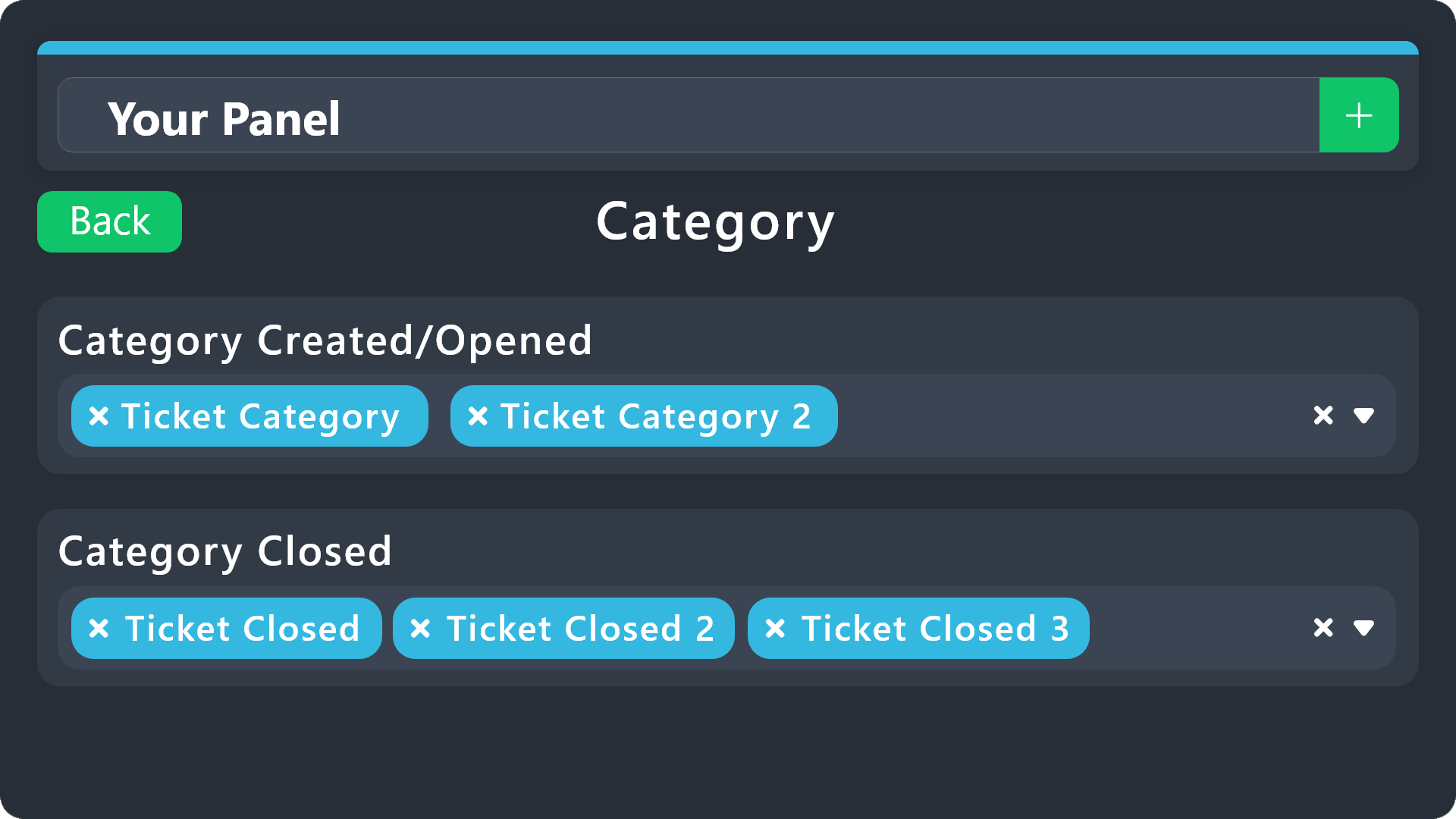
1. Open your Panel Configs tab in the server's dashboard
2. Select the panel you want to grant access to
3. Open the Category options menu
4. Select the categories of your preference
5. Save changes
 junior tangle
Yours is a message I haven't seen before. However, Enshrouded uses UDP. Since UDP is a "push" protocol (Server sends a packet to the user with no "ACK" packet from the receiving end/the user sends a packet to the server with no "ACK" packet from the receiving end) and doesn't have error correction, my theory is that a packet(s) in one direction or another, is getting dropped or received out of order
Just a theory, mind you. heh
modest pumice
junior tangle
Just a theory, mind you. heh
I appreciate it!
junior tangle
TCP/IP protocol would be better for error correction and all that, but it is a more chattier protocol since so many packets are sent/resent and would probably increase latency. Downside with UDP, there is no error correction and packets aren't resent
modest pumice
junior tangle
TCP/IP protocol would be better for error correction and all that, but it is a m...
We have one player from Australia on the server with a 300ms ping. The use of UDP helps explain some of what they see. 🤣
junior tangle
LOL

 toxic turtle

 finite peak
Hi All, I hope that this is the right spot for this:
We faced the following issue on a dedicated server; Last week while playing someone cleared an elixir well, but some of us missed out on the skill points. Now we did a server reset and it turns out that the chests are still empty and the shroud root inside the well has not respawned (the shroud environment however did). Now we build a base about 169 meters away, so that might explain the chest still being empty, but as far as we know this should not mess with the shroud root respawning. Does anybody know this kind of behaviour and know rather this is intended or not? and what we can do to respawn the shroud root.
edit: It seems like that our server host turns off the server when no one is online, could this also mess with this timer (in other words, does it pause)?
Thank you in advance,
Sincerely,
ElderTotoro
junior tangle
finite peak
Hi All, I hope that this is the right spot for this:
We faced the following iss...
They have adjusted the timer. Even reloading the server does not reset the timer. I forget the exact distance, but I believe the respawn timer is 30 minutes. All players will need to stay away from the chest(s) a bit of ways for at least 30 minutes
finite peak
Alright, and do you know if this also affects shroud root respawn timers?
junior tangle
if any player encroaches within that distance within the timer, the timer resets and you have to wait out the timer again
That I'm not 100% sure on. I would think that maybe it does?
finite peak
Ah, well thanks for your quick response anyway! if anyone else has any info on that please let me know. 🙂
uncut plaza
Heyy,
This is my server log. We kept getting server overload and hiccup in a row now and it seems something it messing it up. Could someone have a look maybe? greatly appreciated :3
 slim bramble
finite peak
Ah, well thanks for your quick response anyway! if anyone else has any info on t...
slim bramble
finite peak
Ah, well thanks for your quick response anyway! if anyone else has any info on t...
The radius distance for respawn is ~562m.
fleet sedge
finite peak
Hi All, I hope that this is the right spot for this:
We faced the following iss...
That base is well within the range to restart the respawn timer if anyone is at the base. Need to have no one around for a full 30 minutes uninterrupted. Also, anything within the borders of the flame altar will never respawn, so make sure the shroud root is not within the bounds of the base.
 inland geode
Hey, hey. Question. Maybe someone has encountered this, knows about it, or has struggled with it.
I am looking for information on how to run EML on Proton-GE 10-28.
I can run EML on wine-staging without any problems, but not on Proton.
I welcome any advice. After uploading dbghelp.dll, I get an error in Proton.
00d0:err:module:import_dll Loading library dbghelp.dll (which is needed by L"X:\\enshrouded\\enshrouded_server.exe") failed (error c000007b).
00d0:err:module:loader_init Importing dlls for L"X:\\enshrouded\\enshrouded_server.exe" failed, status c0000135
And here's where the trouble starts. I installed vcruntime2022 using winetricks and specified the folder with the “Windows” partition.
steam@011a23ac4a5b:~$ ls -l "$STEAM_COMPAT_DATA_PATH/pfx/drive_c/windows/system32/" | egrep -i "vcruntime140_1|msvcp140|concrt140|ucrtbase"
-rw-r--r--. 1 steam steam   318466 Jan 13 18:46 concrt140.dll
-rw-r--r--. 1 steam steam  1843949 Jan 13 18:46 msvcp140.dll
-rw-r--r--. 1 steam steam    69555 Jan 13 18:46 msvcp140_1.dll
-rw-r--r--. 1 steam steam    52999 Jan 13 18:46 msvcp140_2.dll
-rw-r--r--. 1 steam steam    79185 Jan 13 18:46 msvcp140_atomic_wait.dll
-rw-r--r--. 1 steam steam    40618 Jan 13 18:46 msvcp140_codecvt_ids.dll
-rw-r--r--. 1 steam steam  1444562 Jan 13 18:46 ucrtbase.dll
-rw-r--r--. 1 steam steam    85967 Jan 13 18:46 vcruntime140_1.dll
But there's a problem, and I don't really have any ideas. Maybe someone else has managed to do it, and I'd love to find out how.
OS: Debian 13 and Almalinux 9 (VM and barebone server)
finite peak
fleet sedge
That base is well within the range to restart the respawn timer if anyone is at ...
Ah okey, thank you for confirming this. 🙂
 daring vault
should I host a server of the previous version? Seems like water update is bugged to hell and back. People keep having to reload the game after getting stuck on sit/chairs and beds. Spells not visible too.
cold zenith
junior tangle
LOL
😆 This the best explanation I've seen! Thanks for this. I needed the laugh today.
 shy chasm
Hello, I have a general question. I'm asking if your game closes randomly.?
inland geode
The game may not... but it can cause a blue screen (it happened twice and only during Enshrouded) 😅
 wise moss
i play multi with my friend who hosts the server, he went out for the weekend, am i screwed ? can i join server anyway ?
junior tangle
wise moss
i play multi with my friend who hosts the server, he went out for the weekend, a...
If he "hosts" the game which generally involves the client running, sort of. You can always play in your own world temporarily (it will be a new world, not the one you both play in) to kill time until your friend comes back after the weekend. If he runs a dedicated server, you should still be able to play, provided he hasn't shut the server down.
wise moss
junior tangle
If he "hosts" the game which generally involves the client running, sort of. Yo...
dedicated server is the one you pay on GPORTAL ?
acoustic grove
Or others ;P
junior tangle
wise moss
dedicated server is the one you pay on GPORTAL ?
You can run a dedicated server on a machine in your household as well. The only different between dedicated and host is that the host game it run through a client. Dedicated server is different software but runs all the time and you could join it at any time
wise moss
okay thanks, and all these videos on yt who tells you you can copy some files and paste it on someone else's folder is bs ?
 kind coral
wise moss
okay thanks, and all these videos on yt who tells you you can copy some files an...
kind coral
wise moss
okay thanks, and all these videos on yt who tells you you can copy some files an...
Can't speak for the videos; but you can share or move save files around. see Sara's Guide: https://saraserenity.net/enshrouded/manage_saves.php
wise moss
kind coral
Can't speak for the videos; but you can share or move save files around. see Sar...
okay and i will be able to play on my friend's server even when he's not there ?
 formal gull
Hey everyone! Sorry to bother you, I'm having some trouble with my game. Could someone who knows about these things give me some advice? 🙂 Please!
 placid summit
Hey Guys, I set up a dedicated server at home with steamCMD.
My issue now is that I can't find the server when I put in my externalIP:15637 in game to add the server or in the steam server browser.
When I add it with my internal IP:15637 it is no problem at all, it shows up and I can connect. So logically it is a port forwarding issue I thought.
I saw someone mentioning this website to check the server availability: https://esquery.suhosting.net/ (see attached image)
This seems to be working.
I also set up port forwarding for both ports UDP and TCP with separate rules (see second attached image)
Also the game version matches the server version which is shown by esquery (see 3rd image attached)
Someone has an idea what could be wrong?


 kind coral
placid summit
Hey Guys, I set up a dedicated server at home with steamCMD.
My issue now is tha...
kind coral
placid summit
Hey Guys, I set up a dedicated server at home with steamCMD.
My issue now is tha...
Most home router setups aren't configured for LAN > WAN > LAN traffic. So, anyone outside your network instruct them to use your External_IP:15637 -- then, when you connect inside the network, stick with using the LAN_IP:15637
 river ivy
Can I pass my server to my friend? I want him to own it because he plays more, and needs me to be online to do so....
 keen kayak
MY enshoruded server crashed 2 times at random plases


 frozen jasper
We keep getting server overload while using hostinger,
We actually have the game plan 4 which has 16gb ram and 4 cpu core setup so we really have no idea what is causing it, can anyone help?
keen kayak
shuold i seend the hwole server
 tired notch
Hey, i'm gonna host a public server for me and my friends. How do i change role permissions for the friend role?

 zealous aurora
Hello,
is it possible to get some help? I can no longer access my server.
I've been playing Enshrouded on PC via Steam for a while now, and on January 14th, 2026, I lost access to the server I host. I launch the game, that's fine, then I start a game (I created and host a server to play with friends), and then, halfway through the loading screen, everything freezes and my entire PC is locked. I can't return to Windows or use Ctrl+Alt+Delete; I have to shut down and restart my PC.
I uninstalled the game from Steam and reinstalled it, but I have the same problem. I ran a bug check using Steam's troubleshooter, but there was no change; the game still blocks me from accessing any type of game, whether solo or on the server in question.
coral quartz
Anybody running a server on Linux through the new Wine 11?
zealous aurora
Wine 11
junior tangle
coral quartz
Anybody running a server on Linux through the new Wine 11?
Still on winehq-stable 10 here
 ancient vapor
tired notch
Hey, i'm gonna host a public server for me and my friends. How do i change role ...
ancient vapor
tired notch
Hey, i'm gonna host a public server for me and my friends. How do i change role ...
you need to edit permissions in the enshrouded_server.json
 long tiger
ok so i finally got my server setup and running, but i cannot connect to it externally, usine ip:15637 or domain:15637 neither works. i also tried setting it up as a fav in steam
junior tangle
long tiger
ok so i finally got my server setup and running, but i cannot connect to it exte...
Are you hosting it yourself or are you using a 3rd party vendor?
long tiger
myself
junior tangle
Are you trying to connect to your LAN_IP:PORT? Most consumer grade routers do not allow LAN>WAN>LAN connections so if you are on the same network, you would use the LAN_IP of your server
long tiger
it is a fortinet, but let me have a friend try and i get back to you
junior tangle
You can use https://esquery.suhosting.net/ to query your server from outside your network
If you are on the same network as your server, then you would use the LAN_IP:PORT of your server. Those that are outside your local network would use WAN_IP:PORT
long tiger
got this from the check
Error: Request to server timed out. Please check the server address and port.
If the server is behind a firewall, please ensure the query port is open.
If you are using a domain name, please ensure the domain name is correct and resolves to the correct IP address.
If you are using GPortal use your Gameport +15
junior tangle
Is your server running on Linux or Windows? Can you favorite/connect to it using the LAN_IP:PORT of your server?
long tiger
yes, windows. i connected with the lan port but cant from an external pc to the wan port
junior tangle
Right, that's because as mentioned, most routers do not allow LAN through WAN to LAN connections. When you first ran enshrouded_server.exe it it should have asked (if running on a non-server edition) if you wanted to allow enshrouded_server.exe in the firewall? But you can connect LAN to LAN so it's probably not that. I would lean towards either port forwarding, you only need 15637 UDP port forwarded. If you have a "range" of 15636 and 15637, go ahead and delete that rule and re-add just the 1 port, 15637 UDP
While logged in to your router, you may have an "Internet" interface or a WAN interface. Check the IP address and see if it's 100.64.x.x - 100.127.x.x
long tiger
changing the router now
junior tangle
if your router shows 100.64.x.x - 100.127.x.x for the WAN IP (do not use curl, ipchicken.com, whatismyip.com, etc) then your ISP is running CGNAT and no amount of port forwarding will work. CGNAT = carrier grade NAT. Basically, you are double NATting. Your ISP is NAT to your router, your router is NAT to your network. You would need to request a static IPV4 from your ISP for usually a nominal monthly fee added to your existing bill
long tiger
i get a 66.x number
junior tangle
ok. so you aren't CGNAT. Probably something to do with port forwarding
gritty minnow
Bruh I love 400ms to a LAN server for no reason

 long tiger
set the port forwarding up just like my valhiem server on the same machine, no problem with the val server
junior tangle
I would delete the port forwarding, anything to do with enshrouded port, make sure you apply/save, then re-add just the 1 port needed, 15637 UDP
long tiger
ok lemme try that
junior tangle
crap, work. on a friday, 15min before quitting time... brb
long tiger
all good
junior tangle
I'm back, for now. heh
I like those calls where "Oops, we should have called Texas, not Louisiana"
long tiger
lol
i am not sure why i cannot connect externally, like i said my val server runs fine, so i am discounting router issues, but i dont know
 languid hill
Not sure if this is a private server issue or what.
Playing the latest version of the game with a buddy on his private personal server.
I have noticed that at various places in the game there seems to be an over population of mobs.
One area had 22 of those wolf dogs that the 2 axed guys have as pets. I killed them then a little later on in that area there were 18, then 12 then 10.. it was crazy..
Game mode is set default, nothing is modded.
Is this a server glitch from having a server running too long with out a restart?
Thank you in advance
 white robin
I have a short question.
I am planning to rent a server. If I rent it for only 30 days at first, can I extend it afterwards, or do I have to take out a subscription for that?
And my second question would be: can only one person upload their save game to the rented server, or can all players do that?
acoustic grove
white robin
I have a short question.
I am planning to rent a server. If I rent it for only ...
Hi @white robin each provider would actually have their own set of policies in place. Some have prepaid options aswell as subscription options. Some only have subscrption options but let you cancel anytime. Prepaid accounts usually let you extend afterwards aswell.
For the save game upload, the account owner would typically have access to the file manager, unless the GSP offers sub users. But for single user accounts the owner would be responsible for uploading the save game.
I could be wrong, but it also sounds like your trying to merge several save games in one? Im scratching my head wondering if that can even be done? I do know you can absolutely transfer the save file from another world to a new host. And if those players sent you their save files you could always upload theirs aswell, but I believe only 1 world can be loaded at a given time per instance rented
white robin
acoustic grove
Hi <@637976846410973194> each provider would actually have their own set of poli...
Thank you for the quick help. Yes, I had pretty much expected that.
Then I’ll just give it a try.
Thanks a lot.
placid summit
kind coral
Most home router setups aren't configured for LAN > WAN > LAN traffic. So, anyon...
just wanted to let you know everything is working. my friends were able to connect! Thanks for pointing out NAT loopback. I forgot about that.
Thanks for your help!
 shadow tundra
Hello, may you please help me? Setting up the dedicated server is driving me nuts 🫣
I've never had problems with my other servers (ARK, 7 Days to Die, Valheim, etc.)
I've set up ports (15636, 15637) in my windows firewall & forwarded the ports through my router
The server is installed & validated via SteamCMD
I've also tried to install via Steam on my gaming pc
And I switched between fibre internet & cable
The server console always looks like this:
[Server][Water] Added Water Dispenser: id: [ 3005218817 ] pos: [ 9405, 1501, 10628 ]
[Server][Water] Added Water Dispenser: id: [ 3005218818 ] pos: [ 9670, 1458, 10749 ]
[Server][Water] Added Water Drain: id: [ 2503999616 ] pos: [ 10478, 1548, 4116 ]
[Server][Water] Added Water Dispenser: id: [ 2503999623 ] pos: [ 10499, 1623, 4146 ]
[ecs] Nobuild zones changed
[ecs] Build zones changed
[ecs] Build zones changed
[ecs] PlayableArea zones changed
-------------- Session ----------------
Machines:
m#0(128): up 0 (0), down 0 (0), remote 0 (0), limit 256, lost 0, ping 0 ms, EstablishingBaseline
-------------- Session ----------------
Machines:
m#0(128): up 0 (0), down 0 (0), remote 0 (0), limit 256, lost 0, ping 0 ms, EstablishingBaseline
-------------- Session ----------------
Machines:
m#0(128): up 0 (0), down 0 (0), remote 0 (0), limit 256, lost 0, ping 0 ms, EstablishingBaseline
-------------- Session ----------------
Machines:
m#0(128): up 0 (0), down 0 (0), remote 0 (0), limit 256, lost 0, ping 0 ms, EstablishingBaseline
kind coral
shadow tundra
Hello, may you please help me? Setting up the dedicated server is driving me nut...
What issue are you experiencing? Also, only port 15637 is used now
shadow tundra
The Server is Not visible in steam - Even Not on LAN
I can’t find the server ingame also
kind coral
shadow tundra
I can’t find the server ingame also
Gotcha. Just to make sure, don't use any ranges, just forward port 15637 -- When connecting to the Server from inside your network, use it's LAN IP. When others are connecting from the internet,, use the WAN IP. Test external connection using our Query Tool: https://esquery.suhosting.net/
junior tangle
shadow tundra
The Server is Not visible in steam - Even Not on LAN
Try favoriting your server through Steam. Steam>View>Game Servers>Favorites> click the + sign and type in the LAN_IP:PORT of your server. Make sure to include the : and PORT 😁
If you are running on a Windows machine (non-server edition) the first time you run enshrouded_server.exe it will ask you to allow it through Windows firewall. Windows server edition, you will have to add manually. If you are running Linux and a firewall (such as UFW) on your Linux server, you will have to allow it manually as well
junior tangle
shadow tundra
I can’t find the server ingame also
Searching for the "name" of the server is slow because Steam has to query all the servers and build a list and this takes time. Try searching for IP:PORT. And as Gilmesh said, if you are inside the same network as your server, use LAN_IP:PORT of your server. Most consumer routers disallow LAN to WAN to LAN connections so if you are inside your LAN, you won't be able to connect through your WAN IP.
shadow tundra
junior tangle
Try favoriting your server through Steam. Steam>View>Game Servers>Favorites> cl...
Hey, thanks for the tip about the favorites, that worked! 🙂
@kind coral Thanks for your help too!
frozen jasper
need help, my hostinger hosting is reading the .kfc file for enshrouded instead of the .json file so any changes to the sliders doesn't apply. any help?
 modest hare
Hi guys! One question: This is problem of the server or my PC? It's a rented server and I'm alone
frozen jasper
frozen jasper
need help, my hostinger hosting is reading the .kfc file for enshrouded instead ...
anyone?
cold zenith
modest hare
Hi guys! One question: This is problem of the server or my PC? It's a rented ser...
I cannot answer your question with specific server related tech knowledge as this isn't in my wheelhouse of knowledge, although I am slowly learning. However, I have encountered this issue while using my own dedicated server. Not certain what caused it but I did restart the entire game (including Steam). I also verified the files in Steam before restarting the game. The issue went away. I haven't seen it again so I'm inclined to rule out PC. I know its instinct to blame the game for most when issues arise. But there are other variables to consider - Steam (or Epic, other platforms, etc.) issues, internet issues, overloaded base builds (too many materials) and other possible causes. Try a complete reset and verify the integrity of your Enshrouded files. Close the game, restart Steam. Find Enshrouded (or any game) in your library. Click on the gear icon to the right of the library game page before launching (Play). The gear icon shows Manage when mouse hovers over it. Go to Properties then Installed Files. At the bottom of the list is "Verify integrity of game files" button. Click it and let it run to 100%. I do this routinely with games in Early Access as these games are always being worked on behind the scenes. Hope you get it worked out. 🙂
long tiger
cold zenith
I cannot answer your question with specific server related tech knowledge as thi...
I have run into a similar issue on a valhiem server i play on. and restarting the game fixed it also.
was a really odd issue, i had like 2k instances and a friend standing beside my had like 15k instances.
cold zenith
long tiger
was a really odd issue, i had like 2k instances and a friend standing beside my ...
As I mentioned above, Verifying files is a routine thing in EA games. Other games I've tested including one I'm testing now, its the go to solution from the devs when we have these types of glitches. They will even come into Discord and mention they've been working on things and to verify the files before launching the game. Most of the time it resolves. But I cant say for certain it fixes everything without having additional information. But while waiting for support answer from others, its worth a try. 🙂
 slate vapor
I got a server host dedicated thingy that i started using instead of the steam free dedicated server and honestly i and my friends seem to be having more audio desync and lag like enemies teleporting and running on the spot on the paid one than the free one. Any ideas on fixes... if im doing something wrong? Is it a bad host?
 narrow tide
Is there anything we can do to stop the "server overload" error? We are just using the steam non-dedicated servers. Is it just too many people playing right now?
 open kiln
what's the best and cheapest enshrouded dedicated server we can consider getting, playing with 8 friends(not all online at the same time)
 coarse tangle
dont think anyones around anymore
where is the help section for the game in general ?
slim bramble
coarse tangle
where is the help section for the game in general ?
#troubleshooting is for client/general issues.
 limber tangle
is there published steps somewhere to transfer a dedicated server save to a personal?
 rough epoch
limber tangle
is there published steps somewhere to transfer a dedicated server save to a pers...
rough epoch
limber tangle
is there published steps somewhere to transfer a dedicated server save to a pers...
check pinned messages
limber tangle
rough epoch
check pinned messages
Thanks
slim bramble
narrow tide
Is there anything we can do to stop the "server overload" error? We are just us...
Honestly, you can ignore the 'overload' warning. Lag is the concern. If no lag, keep rocking.
slim bramble
slate vapor
I got a server host dedicated thingy that i started using instead of the steam f...
Most likely who ever was hosting the server within their client has better hardware than the hosting service 😋
slim bramble
I'm curious. Has Keen ever adjusted Recommended Server Specifications since launch 2 years ago to compensate all the new content added?
 gaunt jackal
Howdy! I'm trying to get a server set up and I'm having the seemingly classic Server Not Visible Unless Host Joins issue. The server query is able to find the server in stem's register, but says "Info query failed. Failed to receive: Connection refused"
slim bramble
gaunt jackal
Howdy! I'm trying to get a server set up and I'm having the seemingly classic Se...
dedicated server, not hosted within client?
also check pinned messages 🙂
gaunt jackal
slim bramble
dedicated server, not hosted within client?
Correct, self hosted dedicated
slim bramble
gaunt jackal
Correct, self hosted dedicated
did you check it with the query tool?
gaunt jackal
That query tool is timing out for me, Sara's can find the steam server but not connect
slim bramble
gaunt jackal
That query tool is timing out for me, Sara's can find the steam server but not c...
sounds like a port forward or/and firewall misconfiguration.
you did run the server once, shut it down, and adjust json file for group perms?
gaunt jackal
I ran a test with firewalls completely disabled, making me think it's a port forwarding issue. I am using an ethernet thru power connecter to connect the pc running the server. Seems the most likely culprit
gaunt jackal
slim bramble
you did run the server once, shut it down, and adjust json file for group perms?
my external ip is 73.243.xxx.xxx
slim bramble
gaunt jackal
my external ip is 73.243.xxx.xxx
ok, then cgnat shouldn't be an issue. What port are you forwarding?
gaunt jackal
I have run and reset the server, and made adjustments to the .json, but haven't done anything specific to group perms
Ports are the defaults 15637 and 15636
gaunt jackal
Will do
junior tangle
gaunt jackal
Will do
Try favoriting your server. Steam>View>Game Servers>Favorites>click the + sign and type your IP:PORT of your server. If your server is local, you will use the LAN_IP:PORT (Don't forget to include the : and PORT 😁 ) of the server. If the server is off network, such as 3rd party hosted or remote players, they would use your WAN_IP:PORT
Most routers do NOT allow LAN to WAN to LAN connections so more than likely you are unable to "test" your WAN port, that's where the query website that cool_gramps mentioned comes into play 😁
Also, when you get your public IP, do NOT use curl, ipchicken, google, whatismyip, etc. Log into your router and look for its WAN or INTERNET address. As cool_gramps said, if that IP is 100.64.0.0 to 100.127.255.255, your ISP is using CGNAT and you would need to request a static IPV4 from your ISP, usually for a nominal fee added to your monthly bill.
Searching for your server through the ingame menu is slow, and not always accurate (unless you search by IPV4). Steam has to query all the servers to build the list. When you favorite a server through the Steam App, these are queried first thing, and therefore show up in the in-game list first and in blue lettering
gaunt jackal
Thanks for the feedback. They attempted to favorite the server thru steam yesterday. When I'm in it shows as normal. When I'm not, it shows as not responding. I do also run a foundry server on a different pc in the same network, which having just checked it seems isn't connecting while the Enshrouded server is up. Here is a report from Sara's query page (couldn't get Coolgramps' working)
 slim bramble
can anybody else verify if https://esquery.suhosting.net/ is actually working?
It's not connecting thru for me to servers I know are working/connectable.
The connection has timed out
The server at 69.169.98.149 is taking too long to respond.
that's not "my" wan ip I'm testing
slim bramble
gaunt jackal
Thanks for the feedback. They attempted to favorite the server thru steam yester...
What you should be getting when everything correct
Are you certain you haven't overlooked a setting somewhere in port forwarding/firewall?
Maybe need to reboot router?

I have 2 dedicated machines running multiple servers, using port ranges forwarded in my router based on device names.
glass hare
yeah shoot sorry the query tool is down, I forgot completely Should work again
junior tangle
Confirmed working again. Thanks NoPantsMcDance!
junior tangle
gaunt jackal
try using https://esquery.suhosting.net/ again, it should be working
 mortal ledge
hey all! what would you suggest for dedicated server rentals? we're 8 players and in SEA. the best one. we used bisecthosting before, but when everyone was in, it had terrible lag spikes.
gaunt jackal
Thanks everyone! I was able to get it working by pulling my ethernet line and running it over wifi. It seems the ZyXEL brand ethernet thru power adapters don't play well with port forwarding
 noble night
hey guys im hosting my own server and new to this scene, i have an issue where im trying to load my world on the server through g portal and its populating everything but my bases and sending me back to the start of the game. its like its not recognizing the world saves imported. plz help 
noble night
nvm got it
noble night
back again, some chests are now glitching a little bit in my game and some of characters are stuck in a certain pose. any info on how to fix this? should i restart server? edit: the charactor fixed himself but the chest is still glitched, when i picklock the chest it opens but immediatley closes.
 open bison
CAn I suggest getting Cubecoders and hosting your own on a seperate box?
I do it for me and my friends
noble night
open bison
CAn I suggest getting Cubecoders and hosting your own on a seperate box?
i host through gportal rn ill look into cubecoders. im not too versed in that tech space so ill need to do some research 🙂
open bison
Cubecoders allows you to host your own locally on your network.
 violet prism
I'm using empowerservers to play in total for 5 players and we tend to get this issue even with 2 player with server overload and consistent lag. We either wait it out for 10 to sometimes and hour for it to come back. Restarting the server help but for like 5-10 minutes and then the overload happens. We tried getting the world data and host locally and if we reach 4-5 players it gets the bad performance thing. I'm curious if there are proper servers that can handle this game. It is possible the world file is corrupted or discovered very heavily that it doesn't work properly. Any suggestions, maybe there's a rebuild the database(World) to cleanup corrupted data?
Edit:
- I did try to use gportal and still got the issue
 floral vector
hola buenas llevo tiempo jugando a este juego y tengo un problema a la hora de editar la casa , el juego se pone en cámara lenta y no deja disfrutar. Esto solo sucede en una zona concreta de la casa , hemos probado varias soluciones y no funciona nada . La única solución que vemos es no acercarnos ni hacer ninguna gestión en esa zona en concreto ya que persiste le problema comentado con anterioridad , ya que no deja disfrutar de la jugabilidad y pedimos solución al problema. Gracias y espero respuesta .
open bison
violet prism
I'm using empowerservers to play in total for 5 players and we tend to get this ...
how many cores on the server?
and threads?
amount of ram and windows or linux?
violet prism
open bison
how many cores on the server?
AMD Ryzen Threadripper 2950X 16-Core Processor
8GB RAM
Windows
open bison
violet prism
AMD Ryzen Threadripper 2950X 16-Core Processor
8GB RAM
Windows
this your server or a data center server?
violet prism
The one I mentioned is the data center one
These guys specifically: https://empowerservers.com/
open bison
I ask because most paid for servers in data centers are shared so you are not the only one on it unless your leasing the bare metal.
which plan?
violet prism
I know we got a cheaper 6 month deal. I believe it's called semi annual plan with no player limit
open bison
yeah it is shared hosting, so no telling what else is running on the box your in. I iknow dedicated on a personal box with 1GB fiber and 32GB of ram on use about 40% of the cpu and so far we have maxed 3GB of ram we limit to 16 players
when server is idle we are at 4-5% cpu and 1.98 GB of ram
violet prism
We did try host it locally and I have a 32GB ram, AMD ryzen 9 7900X 12 cores and 1GB speed and as soon as we reach 4-5 players, a bit of lag happens.
Would you maybe recommend a service?
open bison
I host all my own
I use linux not windows though
is your internet 1gb both directions?
are you using voicechat?
or using discord?
violet prism
open bison
I use linux not windows though
That would make sense
We use discord and not all of us have the same internet speed :((
open bison
internet speed locally for you should not be an issue
so if your having latency issues for other players and not you then it would be their connection
do all players experience the issue?
violet prism
Yeah, we all get the issue at the same time. The logs in the server say BAD PERFORMANCE thing
open bison
then I would be looking at the server and see what else is running on it in the background
windows I can only imagine may be doing something that is affecting performance.
open bison
violet prism
Yeah, we all get the issue at the same time. The logs in the server say BAD PERF...
I forgot to give you the full specs of the box I use a CPU
16x AMD Ryzen 7 1700 Eight-Core Processor
OS: Garuda Linux x86_64
CPU: AMD Ryzen 7 1700 (16) @ 3.00z
Memory: 6.24 GiB / 62.73 GiB (10%)
this box actually has 64GB of ram
junior tangle
3GHz is probably on the low end for a few players. Memory isn't an issue since the server uses ~2-3Gb of RAM. Number of cores isn't a factor. Currently, Enshrouded is highly dependent upon a main thread and relies more heavily on clock speed. That being said, you can try core affinity. 4-6 cores seems to be the sweet spot. The game is still in development and they are working on optimization all the time but the more content they release, the more taxing the game will be, until they break out the hammers and duct tape. Hammers and duct tape can fix anything! /tease 😆
slim bramble
junior tangle
3GHz is probably on the low end for a few players. Memory isn't an issue since ...
Actually, it's WD-40 and duct tape, lol
 flint galleon
time for me to find out if this docker auto updates on restart. it did i think. woo
 fair wind
hello everyone, I'm new here, and I'll get to the point, I need help on my dedicated server, how can I make it visible to my wife's steam game overseas? Thank you for your help
floral vector
Hello good I've been playing this game for a while and I have a problem when editing the house, the game is put in slow motion and does not let you enjoy. This only happens in a specific area of the house, we have tried several solutions and nothing works. The only solution we see is not to approach or make any management in that particular area since the problem mentioned above persists, since it does not allow us to enjoy the gameplay and we ask for a solution to the problem. Thank you and I look forward to a response.
flint galleon
fair wind
hello everyone, I'm new here, and I'll get to the point, I need help on my dedic...
i would start with the simple stuff like making sure you opened port in firewall. If you are hosting local from home connection and "cg nat" connection i dont think it will ever work. More information about your setup might not hurt for troubleshooting.
fair wind
flint galleon
i would start with the simple stuff like making sure you opened port in firewall...
I see, I heard about cgnat and I think my isp is on cgnat. Thank you for your reply.
open bison
junior tangle
3GHz is probably on the low end for a few players. Memory isn't an issue since ...
it runs fine on a 3ghz cpu with multi players. it is a dedicated box running just the server.
flint galleon
open bison
when server is idle we are at 4-5% cpu and 1.98 GB of ram
that sounds pretty good, mine uses ~30% cpu when no players are connected and 50-70% when players are connected.
open bison
flint galleon
that sounds pretty good, mine uses ~30% cpu when no players are connected and 50...
is it windows OS on the machine?
flint galleon
open bison
is it windows OS on the machine?
no its ubuntu wine docker
open bison
yeah docker is your higher cpu use, I use cubecoders and run it on the OS
I run Garuda Linux for this
this is well worht it for running servers...... https://cubecoders.com/account
 past perch
I found during my homelab testing that docker was not as reliable as a VM with windows
open bison
past perch
I found during my homelab testing that docker was not as reliable as a VM with w...
can do even better running it bare metal on the OS the server has and not in a VM.
I only use a VM when I have no other option to run the server,
flint galleon
sometimes i run windows in a docker
flint galleon
open bison
this is well worht it for running servers...... https://cubecoders.com/account
ill check it out, i like docker alot because im familiar with it on a headless system.. I dont really have any complaints. thanks
open bison
cubecoders amp is a web app so you can run it headless to run all your game servers
 pure dagger
im not sure if this is the right place for this but is anyone able to answer some questions about the twitch drops?
past perch
open bison
can do even better running it bare metal on the OS the server has and not in a V...
This wasn't an option for me, as I run everything in proxmox. using containers seems to use the docker image that wraps around wine or proton and seems to peg to 1 cpu regardless of how many you hand it. The windows VM seems to improve with the amount of cores given to it, but you will still see the server messages. By improve i mean 50% cpu with more than one person, @ 10 cores it now hovers around 30% with folks on it, but like i said you still see the messages.
part of me wonders if the messages are noise, I only experienced real problems when i had 6 people online 2 of which were off doing thier own thing while 4 of us were all together (i've noticed messages pop alot when folks are seperated). And I was running the disk via NFS (flog me sure, everything else works fine ;p). But once i put the server on local storage i still see the messages but everyones experience is fine.
slim bramble
Haven't gotten to computer yet, does new update apply to servers also, or just client?
open bison
Always assume updates apply to both
 carmine canyon
Hello folks. Trying to run a dedi server using steamcmd - it never lists and can't join it. when i install directly from steam, it lists and works but constantly run into my steam account being logged out on the computer i actually play from. My ports are absolutely set up right. Any ideas?
 silk lintel
quick question, its my first update since buying the game and setting up a server how would i update the server to the current version?
past perch
carmine canyon
Hello folks. Trying to run a dedi server using steamcmd - it never lists and can...
port forward, and or config. make sure to try to connect to your server using your public IP. - good docs - https://enshrouded.zendesk.com/hc/en-us/articles/16056312924957-Dedicated-Server-FAQ
past perch
silk lintel
quick question, its my first update since buying the game and setting up a serve...
check the docs but, but you can manually update the server using commands - https://developer.valvesoftware.com/wiki/SteamCMD
carmine canyon
@past perch I am using the same config in both cases. and the ports are forwarded. i treid connecting via public ip. it works when i host through steam app, not through steamcmd
past perch
are you trying to connect to a dedicated server you are running on the same computer you are playing from?
past perch
2 seperate nodes - kk
you can ping one node to the other in your network 192.x.x.x or whatever fancy stuff you got going?! 🙂
silk lintel
past perch
check the docs but, but you can manually update the server using commands - http...
didint think to check there thanks
carmine canyon
@past perch yes i can
past perch
if they can talk, can you direct connect to the server using that ip? @carmine canyon
open bison
carmine canyon
Hello folks. Trying to run a dedi server using steamcmd - it never lists and can...
sounds like your running it from your account and it thinks your running 2 versions of the game at the same time
carmine canyon
@past perch the server isn't found if i add in steam favorites
@open bison i figured that's what was going on when running from steam
it works when running from steam... not when running from steamcmd installation
when running from steamcmd installation... nothing is found
past perch
read through the startup log to see what its saying
kind coral
carmine canyon
Hello folks. Trying to run a dedi server using steamcmd - it never lists and can...
I would use only the "headless" SteamCMD version of Enshrouded Server. -- To test if you're able to connect from outside of your LAN, use our query tool > https://esquery.suhosting.net
open bison
carmine canyon
when running from steamcmd installation... nothing is found
I recommend Cubecoders Amp to run servers. it is a small cost but does an awesome job out the box. It is web based so you have a web page to access server control of every instance you spin up.
carmine canyon
great i will look into this. $15 seems very reasonable and i've already spent well over that in time trying to figure this out. thanks @open bison and @past perch !
flint galleon
Anyone know if server name is located somewhere other than the config with custom game settings? I changed the name in my config and it still has old name
open bison
did you edit the json while it was still running?
flint galleon
open bison
did you edit the json while it was still running?
if i did I restarted, cant remember
open bison
then go back into it and I will bet it reverted back. Always make changes to the json while the server is not running
flint galleon
Yea it was the docker but when i run cat to view config i see the problem. Going to try to nano it or something. edit: I guess I cant.
 viscid cedar
Is the dedicated server update available yet? I don't see it listed in https:/steamdb.info/app/2278520/patchnotes or rather the BuildID 21566622 is not compatible with my client.
I've been running the steamcmd.exe for the update, but no luck on the client side. Still getting "version mismatch". Any ideas?
kind coral
viscid cedar
Is the dedicated server update available yet? I don't see it listed in https:/s...
It's live, and I see it on the steamdb site: https://steamdb.info/app/2278520/patchnotes/
kind coral
flint galleon
Yea it was the docker but when i run cat to view config i see the problem. Going...
So what ended up happening here? also, what is your exact setup for running the Server?
viscid cedar
kind coral
It's live, and I see it on the steamdb site: https://steamdb.info/app/2278520/pa...
Any ideas why I am still getting version mismatch when I try logging into the game on my server? steamcmd returned update successful. Not sure what else to do at this point.
flint galleon
kind coral
So what ended up happening here? also, what is your exact setup for running the ...
for some reason when i run this command to copy the config i want to the docker container I restart and the old name sticks, I dont know how to fix, container does not have any text editor. I can only see it with cat.
docker cp enshrouded_server.json enshrouded-server:/home/steam/enshrouded/enshrouded_server.json
if i change custom game settings those seem to stick. I think worst case I rebuild the container if it bugs me enough.. just odd. I was hoping it was something simpler like cache on my computer or something.
kind coral
@viscid cedar did you confirm the server actually updated? On a test instance, I had to run my update script 3 times in order for it to work
if you didnt catch the CMD echo, you can look in the enshrouded_server.log for Game Version (SVN): 890625
viscid cedar
kind coral
if you didnt catch the CMD echo, you can look in the `enshrouded_server.log` for...
My SVN 874630, but I receive this message: " Success! App '2278520' fully installed." What else may I do to get the SVN 890625 version, if CMD is not updating? Please explain CMD echo, I have not heard that term before. Also, I have run CMD at least five times since this morning US Eastern time with with the same results, " Success! App '2278520' fully installed."
viscid cedar
LOL - echo, I was not thinking stdout...no explanation needed. Just need help getting CMD to work correctly if " Success! App '2278520' fully installed." is wrong.
kind coral
viscid cedar
LOL - echo, I was not thinking stdout...no explanation needed. Just need help g...
you can try and clear local cache by deleting: steamapps/appmanifest_<ID>.acf -- otherwise I would just move out your server files and start a fresh download -- or change to a new directory.
viscid cedar
kind coral
you can try and clear local cache by deleting: `steamapps/appmanifest_<ID>.acf` ...
I cleared the appmanifest and reinstalled via SteamCMD, but the server log CMD echo still reports Game Version (SVN): 874630, while the client requires 890625, so it appears the updated dedicated server binary hasn’t been published yet.
slim bramble
viscid cedar
I cleared the appmanifest and reinstalled via SteamCMD, but the server log CMD e...
I've updated 4 servers today, all working fine.
viscid cedar
I was afraid that...I will have to reinstall or something. 🤔 Thanks for the confirmation.
slim bramble
viscid cedar
I was afraid that...I will have to reinstall or something. 🤔 Thanks for the co...
yeah, something just isn't doing right for you 🙁
slim bramble
viscid cedar
I was afraid that...I will have to reinstall or something. 🤔 Thanks for the co...
are you 100% certain no typo in your steamcmd download command ?
viscid cedar
no typos...I run scripts...reinstalling...stand by....
slim bramble
on both my machines, the updated server has two *.acf files,
appmanifest_228980
appmanifest_2278520
viscid cedar
That did it, thanks all! Restoring my data.
slim bramble
awesome 🙂
Saturday morning news, "Snow/ice storm shuts down 500 dedicated Enshrouded servers across Eastern USA", lol
flint galleon
slim bramble
Saturday morning news, "Snow/ice storm shuts down 500 dedicated Enshrouded serve...
Im not looking forward to it. I've already got my backpacking cooking stuff out because im going to have no power for days probably. Goodluck east coast.
flint galleon
flint galleon
for some reason when i run this command to copy the config i want to the docker ...
backing up save, remove container, resetup with docker compose up -d, then restore save fixed my problem and applied new env file settings correctly. @kind coral tagged because you asked what ended up happning
slim bramble
so, not a game breaking thing, just a misrepresentation thing.
On my main questing/xp server, I have player stats maxed, and mobspawn = extreme. But when you check 'difficulty' in client menu, it doesn't show true settings for server?
here's what 'difficulty' shows in client

and here's 'attributes

clearly not matching info
 frozen glen
Private Server, unable to damage enemies and can't be damaged by enemies. Unable to fix this, unable to progress in game
frozen glen
Was happening when several people were in different areas and playing but now happens when only one person is online

Wolf attacking me, nothing happening. I'm attacking wolf and no damage
slim bramble
frozen glen
Was happening when several people were in different areas and playing but now ha...
did you restart server?
frozen glen
slim bramble
did you restart server?
Yes restarting doesn't fix this issue.
My glider is stuck to my feet also
 slim bramble
client/server both using ssd?
frozen glen
Yes
slim bramble
is shader precaching on client(s) disabled in steam?
frozen glen
I don't think so, is that a steam startup command?
slim bramble
steam>settings>downloads. look at bottom of page.
frozen glen
Ok trying that, ty
slim bramble
you might need to recompile. but steam is natorious for storing faulty shaders 🙁
slim bramble
close client out, restart
actually, probably best to close steam completely, restart all
i don't have issues with game, forget trouble shooting steps sometimes 🙂
frozen glen
Damage system has 100% stopped working still
Me sleeping with a glitched glider and wolf attacking me lol
 slim bramble
does this happen in a solo world?
slim bramble
cpu specs of server?
frozen glen
 frozen glen
slim bramble
cpu specs of server?
frozen glen
slim bramble
cpu specs of server?
I can answer that in a couple hours when friend wakes up
slim bramble
i can offer a test server to see if it happens on my server?
frozen glen
Sure.
slim bramble
it's a public open server, will dm info
frozen glen
Working as intended
slim bramble
did you try unequipping, reequipping glider?
 royal gulch
How do I host a headless server?
junior tangle
carmine canyon
Hello folks. Trying to run a dedi server using steamcmd - it never lists and can...
Ports? You only need 1 port. 15637 UDP is the only port needed 🙂
 sharp pond
Good morning (wherever in the world you are.)
I am the server owner @Shmulk talks about. I appreciate you taking the time to review our case, I can try to provide as much information as possible to help determine the cause of our performance issues.
Firstly, the server is running on Proton atop an i7-6700 with 32G of system RAM. My processor has 8 cores and usually runs around 3.7Ghz.
The enshrouded_server.exe spins up 40 threads on the machine while running. Proton has been given infinite RAM and CPU usage resources yet, I have yet to see the process consume more than 2.5GB of RAM. This is the first thing that alarms me.
I do not have reason to suspect server performance is the issue here, but I am interested in hearing any others' opinions.
We have tried the following:
- Frequent server reboots.
- Set process affinity to maximum (nice).
- Manually enforce 800% CPU and a reasonable amount of RAM, instead of infinite.
- Validate Steam installation.
Initially, (early game, less than 1 week of playtime) our symptoms were exhibited by notifications of server overload or server performance issues in game. Usually, when we got the yellow errors, no one really noticed any issues. It was rare to experience actual hiccups like it mentioned. This was while running with anywhere from 3-6 players. During this time, we really had no concern as the server seemed to be keeping up.
Next, we began noticing the issue earlier this week. Particularly, players would be (usually in different parts of the map simultaneously) and unable to damage enemies and vice-versa. Environment was also unable to take damage during a surge. I was able to trace this down to the Impact system, specifically, with sparse error logs in the console. So what we know at this point is occasionally, while there are at least 3-4 players in different chunks on the map, the impact system degrades and players will frequently find themselves unable to do damage or receive XP. We also learned that putting all the players together resolved the issues entirely. We could run a dungeon together totally fine, no issues.
Now we come to the last two nights and today: I restored a backup from 22 hours prior on Wednesday night. This seemed to really help us.
We were able to play again with the old save, so we used our character inventories to move items from the new save back to the 22 hour old one. That way we wouldn't lose our flame upgrade progress. This worked for a few hours. We could play the game and progress. But not for long. This fix lasted for about a day before we began experiencing the same performance issues again.
Last night, the game was unplayable for any more than one player. Today, the game was unplayable for a single player.
It would seem whatever is happening, is getting worse, and growing rapidly.
I asked Claude to write a python script which would analyze the game save files to see if there are any red-flag issues. The script has no idea what data lives where, but it seems to have the capability to determine areas of excessive bloat. I have attached the summary report it wrote to this message. I think the information it found is striking. If my server is refusing to use more than 2.2GB of ram, how is it supposed to expand a chunk that decompresses to 3.7Gb?
So it would seem we have something in our world that's expanding out of control. I wonder if it is something similar to that reddit post with the guy who had beehives respawning and dropping honey each time.
Any ideas are welcome, folks. Especially if anyone knows how to analyze the game data further and determine a possible location for the offending data.
This was meant to be a reply to @slim bramble
sharp pond
Update: We removed all of our flame altars besides our home base, and saw a minor improvement.
flint galleon
royal gulch
How do I host a headless server?
Do you have a headless server? if so you can use docker to host a game server on your headless server. I use github /jsknnr/enshrouded-server
 balmy kite
sharp pond
Good morning (wherever in the world you are.)
I am the server owner @Shmulk tal...
balmy kite
sharp pond
Good morning (wherever in the world you are.)
I am the server owner @Shmulk tal...
Unfortunately these are the same server issues we encountered. Almost exactly as you described. Everything was great until about 100 hrs in and then the desync thing. Can't really do anything, and glider get stuck under feet not putting it away. We have tried 3 different server boxes. All of them were more than adequate as was the network. Also same as so many others, we have tried everything possible. Everytime it seems to be allieveated, it ends up returning again. We have tested it quite a bit. Server blade is in my residence. Hosts many a games and is capable of host multiple at same time. I play from adjacent local room and all other players (3 more) are over the net. If any one person from any location, including me, is playing on the server it is always perfect. When the second(sometimes 3rd or 4th) person gets in the issue starts immediately. Then as long as one person, local or over the net, disconnects.. the game instantly goes back to being good again. It has its days. Sometime the desync happens with just 2 of us, other times not until the 3rd or 4th person gets in. Due to all the testing done, these machines were 100% dedicated to this process and they would all still end up exhibiting the same symptoms. Still hoping this gets looked into sooner than later as from web articles referring to this specific issue have been around for a while with no clear solution. Again, all 3 machines everything great until around 100hr mark. Don't know if some item or structure may have some buggy code that has gone unnoticed. We're still open to greater recommendations but it's been exhausting.
 gilded flint
balmy kite
Unfortunately these are the same server issues we encountered. Almost exactly as...
gilded flint
balmy kite
Unfortunately these are the same server issues we encountered. Almost exactly as...
So, I noticed after reverting to older backups there might be a quest that triggers it for us, "Alchemic Wisdom". When we would rollback we wouldn't have a single issue until completing this quest specifically.
We don't really have all the same issues, if someone leaves things don't always settle out. We also don't have true low latency connection while on the network, something like 40-60ms over the network?? That's not local and we don't know why. Currently, @sharp pond is putting in some different hardware into our server so fingers crossed but I don't have high hopes for this solving our overall server issues.
It's shocking how little help there actually is with this issue so it's nice to find other people who understand how frustrating this is
 uneven plaza
balmy kite
Unfortunately these are the same server issues we encountered. Almost exactly as...
uneven plaza
balmy kite
Unfortunately these are the same server issues we encountered. Almost exactly as...
Man I really wish you all the best of luck with getting a resolution. I come back here bi-weekly after giving up a year ago almost to this date with not being able to play with stability for 2-4 people hoping to see some dedicated server performance increases. Probably the most fun I've had in this genre but we tried twice to finish a single playthrough without any luck.
gilded flint
uneven plaza
Man I really wish you all the best of luck with getting a resolution. I come bac...
I really hope that this isnt the future for us. It would be nice to have actual support. There literally arent even commands in the server interface... like WHAT??
sharp pond
uneven plaza
Man I really wish you all the best of luck with getting a resolution. I come bac...
Well i appreciate the sentiment from everyone. At least it seems this is not an entirely isolated issue.
Would certainly be nice to get some acknowledgement from the team though.
kind coral
sharp pond
Good morning (wherever in the world you are.)
I am the server owner @Shmulk tal...
Sorry to hear - I cant really speak to alternate methods of running the Server. I'll say that Enshrouded prefers strong single core performance with Windows bare metal. If you search back in this chat there's some specifics to the Core Affinity that help.
Have you tried using other containerized methods? 》https://github.com/PR3SIDENT/enshrouded-community
sharp pond
kind coral
Sorry to hear - I cant really speak to alternate methods of running the Server. ...
Well at this point it certainly seems to be directly correlated to our save game. We have run our save file now on 3 separate machines with very similar symptoms from each one.
Two of which were both using Pterodactyl (Pelican) like mentioned in your github repo. One was windows.
Instead of just throwing things at the wall until something sticks, I would be much more comfortable trying another framework if I could get some community input on which option works best for them. At this time, Pelican works fine performance wise, it just seems that once the hours reach a certain point (or as we suspect, a certain quest is completed) the save game gets bloated and can't be supported.
All of that considered, if I am told one of the options in that repo gives me the ability to increase the amount of RAM the server consumes (as I mentioned in my initial post, I can't get it to use more than 2.5G) I will go that route first
open bison
if your self hosting I can not stress using Cubecoders AMP for this more than I have. it runs on windows and Linux and even lets you run it in a docker container if you want. I run it on linux and it runs just fine no issues.
sharp pond
open bison
if your self hosting I can not stress using Cubecoders AMP for this more than I ...
Pelican runs the server in Docker as well. It is ghcr.io/parkervcp/steamcmd:proton
Does AMP do this differently?
open bison
it can be on a headless system and interacted with thru web on machine. I would say it does it differently.
kind coral
sharp pond
Well at this point it certainly seems to be directly correlated to our save game...
Always been a point of contention. Enshrouded server uses very little RAM, and no one has discovered any way to "make it use more" --
sharp pond
kind coral
Always been a point of contention. Enshrouded server uses very little RAM, and n...
Whether or not it "needs" more is up for debate.
However I am inclined to believe it wouldn't hurt. I am even more inclined to believe it would benefit when I can see some compressed chunks in my save game will be inflated to over 3GB upon decompression.
kind coral
Right, thats what im saying.
sharp pond
open bison
it can be on a headless system and interacted with thru web on machine. I would ...
Pelican also does that. And is open source.
open bison
sharp pond
Pelican also does that. And is open source.
yes it is but for the average user it is not as easy to use
Also limited on OS installs
 barren oasis
After the last update, I'm having trouble growing Kelp in the Burning Wastes and Nomad Highlands biomes.
frozen glen
So we had to redo our world save because of the unknown corruption 🙄
 upbeat tendon
Yo Guys can Someone Help me I got a Server on Nitrado but now Switched to Hot-Unlimited i put the World Data in the Unlimited Server and now the Server dont Start anymore pls can someone Help me?
 gray flicker
is there a way to have single progression with flame alters on a dedicated server?
 echo meadow
no on servers the progression is always for all, except the flameborn quests
sharp pond
upbeat tendon
Yo Guys can Someone Help me I got a Server on Nitrado but now Switched to Hot-Un...
Can you post any logs from your server console?
In my case, I have had to delete the folder within /.steam/steam/steamapps/compatdata/2278520
This contains a wine prefix specific to the server instance. If youre moving savegame data around, it can cause failures. Deleting it will cause the server to regenerate it on startup. This will only work if your machine is running on a Linux distribution. So please post logs if you're unsure
kind coral
upbeat tendon
Yo Guys can Someone Help me I got a Server on Nitrado but now Switched to Hot-Un...
For managing game/server saves see Sara's Guide: https://saraserenity.net/enshrouded/manage_saves.php
frozen glen
Is there a dev that could look at our corrupted save and find out what happened so we can possibly avoid it?
gritty minnow
Has anyone figured out a surefire way to directly connect to a LAN server, yet?
Rather than having all traffic routed over steam relay
open bison
yeah use the ip and port to direct connect on lan
gritty minnow
That still just pulls all traffic through steam data relay
I verified with a LAN, and even localhost server
Querying the IP in the server browser onlyqueries the listing, not the actual traffic
Tried:
- Server on wine, game on proton - still through steam relay
- Server on Windows Server, game on proton - still through steam relay
- Server on same machine through proton, game through proton - still through steam relay
- Server on same machine windows 11, game on windows 11 - still through steam relay
Steam server browser shows my server at 1ms latency, in game always 45-50ms
Server has been run on a threadripper 3990x and 9950x3d, same behavior and definitely not a bottleneck there
Server config tried binding the IP to 0.0.0.0, 127.0.0.1, and the LAN IP, same thing
Tried opening ports for the query port, then the steam ports, then even ALL steam possible ports, always the same thing.
Confirmed all traffic is routed through steam by performing packet captures and all server traffic is only communicated through Valve owned IPs
slim bramble
balmy kite
Unfortunately these are the same server issues we encountered. Almost exactly as...
Not really sure there's any correlation with the "100 hour" thing.
My public Questing/XP server is a copy of an original server I started in June 2025. It has way more than 100 hours of playtime, and at least 50 different players over the last 4 months.
slim bramble
sharp pond
Good morning (wherever in the world you are.)
I am the server owner @Shmulk tal...
That is definitely some interesting data.
I've only had a server pushed to "unable to allocate memory" (server crash) once.
On a server with mobspawn/mobaggro set to 'extreme', and 8 players spread out, it held for couple hours (with load warnings, no lag), and when 9th player came on, it crashed within about 15 mins with the memory error, yet, system memory was nowhere near used up.
Your findings may point to it being more of an issue of server not utilizing proper amount of ram, which, imo, would be easily fixed by devs by forcing server to actually use more ram.
And also, if server has files needing decompressed, up to 3.7G, and server not utilizing proper amount of ram, that could also be what causes load warnings without lag, as more stress on cpu having to do more disk read/writes?
sharp pond
slim bramble
Not really sure there's any correlation with the "100 hour" thing.
My public Que...
On our end, we are less inclined to believe it is a time period that causes it. Some of our folks believe there was a specific quest we completed that caused the bloat.
balmy kite
I dont believe it is a cetain time period. I just mentioned it as such. It can happen much earlier than 100 hrs
I just know that we have zero issues for 100 hrs, not even once did we get the server overload message during that time.
We have 10 alters but only one base and its not very big. The issue usually pops up more often when we are away from each other, but being together does not always correct the issue. Sometime we can all be at the base, and if one person experinces it then everyone experiences it.
sharp pond
balmy kite
We have 10 alters but only one base and its not very big. The issue usually pops...
Can agree with this! Players being away from one another is when issues definitely arise with the server complaining about performance. We can have 6-8 players do a dungeon with absolutely zero issues
slim bramble
@sharp pond@balmy kite are yall running server on 'default'?
sharp pond
slim bramble
<@266056875550703617><@252534173150085142> are yall running server on 'default'?
Basically.
Weather Rare and enemyagro limit is few.
slim bramble
sharp pond
Basically.
Weather Rare and enemyagro limit is few.
what happens if you set mobspawn to 'many' or 'extreme' ?
I've ran servers on 3 different cpu's, with different speeds.
Imho, the spec requirements need to be raise to 6-8 cores at a minimum of 4.4Ghz, for a 'default' server, and at least 4.8-5.4Ghz if you do 'custome' with increased mobspawn.
balmy kite
    "name": "Tools Server",
    "saveDirectory": "./savegame",
    "logDirectory": "./logs",
    "ip": "0.0.0.0",
    "queryPort": 15637,
    "slotCount": 8,
    "tags": [
    ],
    "voiceChatMode": "Proximity",
    "enableVoiceChat": false,
    "enableTextChat": false,
    "gameSettingsPreset": "Relaxed",
    "gameSettings": {
        "playerHealthFactor": 2.000000,
        "playerManaFactor": 1,
        "playerStaminaFactor": 4.000000,
        "playerBodyHeatFactor": 1,
        "playerDivingTimeFactor": 1,
        "enableDurability": false,
        "enableStarvingDebuff": false,
        "foodBuffDurationFactor": 1,
        "fromHungerToStarving": 600000000000,
        "shroudTimeFactor": 1,
        "tombstoneMode": "AddBackpackMaterials",
        "enableGliderTurbulences": false,
        "weatherFrequency": "Normal",
        "fishingDifficulty": "Easy",
        "miningDamageFactor": 2.000000,
        "plantGrowthSpeedFactor": 2.000000,
        "resourceDropStackAmountFactor": 2.000000,
        "factoryProductionSpeedFactor": 2.000000,
        "perkUpgradeRecyclingFactor": 1,
        "perkCostFactor": 1,
        "experienceCombatFactor": 2.000000,
        "experienceMiningFactor": 2.000000,
        "experienceExplorationQuestsFactor": 2.000000,
        "randomSpawnerAmount": "Normal",
        "aggroPoolAmount": "Normal",
        "enemyDamageFactor": 1,
        "enemyHealthFactor": 1,
        "enemyStaminaFactor": 1,
        "enemyPerceptionRangeFactor": 1,
        "bossDamageFactor": 1,
        "bossHealthFactor": 1,
        "threatBonus": 1,
        "pacifyAllEnemies": false,
        "tamingStartleRepercussion": "LoseSomeProgress",
        "dayTimeDuration": 2700000000000,
        "nightTimeDuration": 600000000000,
        "curseModifier": "Easy"
cpu info? cores/speed?
sharp pond
slim bramble
I've ran servers on 3 different cpu's, with different speeds.
Imho, the spec req...
12 core @ 4.4
slim bramble
sharp pond
12 core @ 4.4
windows or linux?
sharp pond
Linux Docker container with Proton
balmy kite
Currently running on this i7-8700K CPU @ 3.20GHz 8 core, but have tried 4.20GHz machine also.
Server 2019
slim bramble
sharp pond
Linux Docker container with Proton
have you tried the "cpu -c" command to set only 6-8 cores?
slim bramble
balmy kite
Currently running on this i7-8700K CPU @ 3.20GHz 8 core, but have tried 4.20GHz ...
that's minimum required speeds, but with mobspawn set so low, it should handle few players not spread out.
sharp pond
slim bramble
have you tried the "cpu -c" command to set only 6-8 cores?
That's an interesting suggestion. I'm curious what your reasoning is for suggesting limiting the core count?
To be clear, I had it on an 8 core machine before, and it's on the 12 core machine now out of desperation to have it run stable.
slim bramble
sharp pond
That's an interesting suggestion. I'm curious what your reasoning is for suggest...
i've seen better performance limiting cores. Seems to force spu to run at higher speed on fewer cores.
instead of sreading the load
sharp pond
 slim bramble
enshrouded server is about single core speed, not number of cores.@sharp pond
my current machine (5.4Ghz) will run server better with 5 cores than a 4.8Ghz with 8 cores.
sharp pond
I'll try it
slim bramble
i'm also testing running servers in ramdrives 😋
slim bramble
sharp pond
I'll try it
"taskset -c" command
when i tested, using exact same savegame world, on my 4.8Ghz (using 6 cores) rig, cpu idles at ~20-24%, and jumps to 50% with 1 player.
Same savegame on 5.4Ghz (using 5 cores), cpu idles at ~12%, jumps to ~30% with 1 player.
and the server setting is custom with mobspawn=extreme.
and on the 4.8 rig, increasing to 8 cores did not improve cpu load. 6 cores, 8 cores, same load.
 wraith sky
High guys I recently transferred my world from my gaming pc to a AMP server I'm running locally and i am wondering if anyone has advice on saving progress and lowering latency?
sharp pond
wraith sky
High guys I recently transferred my world from my gaming pc to a AMP server I'm ...
Progress is saved automatically by the server.
Latency is primarily governed by your internet connection. However I have found, when hosting on dedicated hardware (even locally) the client likes to bounce out to the WAN, then come back. So you get a latency somewhere in the 40-70ms range baseline.
Perfectly reasonable for a non-pvp game like this imo.
slim bramble
sharp pond
Progress is saved automatically by the server.
Latency is primarily governed by...
@wraith sky my local host ping is 13ms
slim bramble
wraith sky
High guys I recently transferred my world from my gaming pc to a AMP server I'm ...
server saves are auto as rjdipcord said, and they are every 5 mins 🙂
if you want to keep 'safety' backups, just write a script copying the /savegame of your server. It can do it with server running. Since I run servers in ram, i have script backing up every hour, with script cleaning old backups (over 7 days old)
sharp pond
slim bramble
<@661011873390657568> my local host ping is 13ms
Sounds better than my situation.
My homelab is on another subnet. I think it's a routing thing where the game sees it's on a different subnet, and just defaults to going to a proxy.
Likely very particular to my situation. So if Justin space can give us more details, maybe we can determine if that's the case
slim bramble
sharp pond
Sounds better than my situation.
My homelab is on another subnet. I think it's ...
yeah, the whole 'steam relay' thing has been an issue for some dedicated servers.
 tribal aspen
I keep getting crashes on my dedicated server every 12-24 hours or so:
[X 32:58:32,993] [tlsf] alloc: 'EcsS_ColliderGrid' is out of memory! - Could not allocate 3,840 bytes for ''! AllocSize:162,040,816
[X 10:48:10,771] [tlsf] alloc: 'EcsS_ColliderGrid' is out of memory! - Could not allocate 1,024 bytes for ''! AllocSize:162,241,688
[X 17:08:53,406] [tlsf] alloc: 'EcsS_ColliderGrid' is out of memory! - Could not allocate 960 bytes for ''! AllocSize:162,175,352
Server specs:
Windows Server 2022 Standard
RTX 4080 Super
9800X3D
128GB DDR5
slim bramble
tribal aspen
I keep getting crashes on my dedicated server every 12-24 hours or so:
[X 32:58...
player count?
tribal aspen
2 on the lowest when the crash occurred, 6 on the highest, but sometimes we'll run 8.
slim bramble
server settings? ie - default, custom?
tribal aspen
Custom. Default except for "enableTextChat"
slim bramble
so no increase of mobspawn, mobaggro?
tribal aspen
Correct.
slim bramble
you shouldn't be getting out of memory with default setting, even with 8 players, with your hardware. It took 9 players to crash mine with mobspawn/mobaggro set to extreme.
Only thing i can suggest is whenever you have 6+ players on for a few hours, do a restart of server, see if it will stay stable.
tribal aspen
This is correct. But this is not a solution.
slim bramble
what is cpu load when 8 players?
tribal aspen
13.8-17%
slim bramble
with 8 players on server?
slim bramble
that is very low cpu% load for 8 players.
slim bramble
i run a 9900x, so not much diff between our cpu's.
mine idles at ~13%, hits ~33% with 1 player.
and my 9900x is oc to 5.4Ghz
tribal aspen
That's interesting. Highest I've seen in the last 10 minutes is 18.5. But these metrics aren't conditional to the error, which is specifying out of memory. It's not a system issue. It's most likely an engine allocation issue.
slim bramble
it is known the server has memory issues. but even so, you shouldn't be having issues on default settings with 8 players. that is odd.
tribal aspen
The main point to review is AllocSize: 162,040,816+
This is the heap size
Once it seems to have a request to exceed this threshold, the server crashes.
I would assume this is a fixed pool.
I'll reduce restarts to 12 hours.
slim bramble
i agree. another player, rjdipcord, provided some info that the server tries to decompress files (3.7G) that require more memory than the server keeps in use.
is server on windows or linux?
tribal aspen
Windows Server 2022 Standard
slim bramble
are you sure cpu isn't throttled with power options?
tribal aspen
Not entirely relevant. No server performance issues. It's a memory pool allocation issue in the RAM table that overflows and crashes.
After reviewing the power options, no throttling is occurring.
slim bramble
I'm at a loss, sorry. Most out of memory issues i've seen is due to serveroverload, cpu not able to keep up. I have a server that runs for days, no problem. if too many players hop on, enough to lag, it eventually crashes with memory fault.
tribal aspen
Most likely a memory leak. Do you use water?
slim bramble
not running, just a fishing pond.
tribal aspen
I'll shut the water generators off and see if it affects the issue.
slim bramble
check this msg, i agree with this finding
#server-support message
tribal aspen
Is there a debug mode to see the allocation tables
That would help a lot in isolating the issue
slim bramble
not that we know about
tribal aspen
Maybe someday. If I could see the pool allocation sizes I could at least understand what's going on a bit better.
 last jungle
would getting a gportal server solve a lot of these issues with processing in MP games?
slim bramble
since i've been hosting, i've used 3 diff cpu's, and have seen single core speed is extremely important. But I am also seeing that lack of proper memory usage by the code is also a major issue. Imho, if devs would increase how much, and how well, the server can use memory, the server would see an extreme improvement.
last jungle
i found that once we got to like 6/7 alters the game started being clunky
tribal aspen
Probably not. If it’s the game’s internal allocator (EcsS_ColliderGrid TLSF OOM), moving to G-Portal won’t magically fix that... it would likely still crash once the same pool hits its cap/fragmentation. Hosting can help with convenience (watchdog, auto-restart, simpler updates), but it won’t cure an engine-level memory issue.
last jungle
are they gonna fix that any time soon?
slim bramble
@last jungle@tribal aspen as we all know, the game is still in early release. we can only hope/expect devs to polish off these issues by the time actual 1.0 release comes out 🙂
slim bramble
last jungle
have said about optimization of MP
i haven't checked any announcements, but given thier record, i'm sure it's on thier 'to do' list 😜
slim bramble
personally, my wishlist is
- fix memory issue
- native linux version of server
🥳 🥳 🥳
last jungle
trying to avoid making it too easy
slim bramble
last jungle
we're playing 3-5 people
lowering mobspawn/mobaggro will help server load.
i run mine on 'extreme', and see a diff, lol
last jungle
i did the max count cause even solo i was just breezing through stuff
and it felt tedius
i hear theres a combat overhaul coming out
but still, the AI feels a bit lackluster for me, so i gotta dynasty warriors this game lol
especially with a whole party
slim bramble
well, there's 'mobspawn', how many can spawn at once, and 'mobaggro', how many can attack at once, and another setting that controls how close they see you, to affect the first 2 settings.
slim bramble
sounds like you just need to set preset to 'Survival'
 remote dock
Guys, can anyone tell me whats going on:
I just gave all my "remote" folder to my friend, he can see my character, but there is no any worlds. Empty.
Steam Cloud.
I tried "3ad85aea" (1st slot?) - no results, so i just decided to give my whole saves. As i said - emply list
sharp pond
remote dock
Guys, can anyone tell me whats going on:
I just gave all my "remote" folder to m...
How is your friend applying the save files? Sounds like their setup isn't agreeing with the way yours is.
For example, when you apply the save game file, the one it's replacing has to be past the "place a flame altar" quest. Otherwise it will wipe the save on startup.
kind coral
remote dock
Guys, can anyone tell me whats going on:
I just gave all my "remote" folder to m...
Use Sara's guide for help with moving save files. https://saraserenity.net/enshrouded/manage_saves.php
Let us know which step you get hung up on
 inland sun
I followed that guide and it didn't work for me after the patch - I had to put the file in local files first (from the ded server), boot up the save, then copy over to cloud
wraith sky
sharp pond
Sounds better than my situation.
My homelab is on another subnet. I think it's ...
Yes I get around 50-55 ms of latency with the occasional 70+ spike . I installed a 2.5 gb NIC on an hp elitedesk 800g4 running Debian(headless) . So far this projects been fun but lots of hang ups! 🤣
 dreamy lily
I am having trouble accessing a dedicated server running through SteamCMD.
So my friend has set up the server, managed to log in from the same computer/network running the server and it's running the correct world, but the server is not accessible otherwise. As in, it cannot be found via steam, the game search, or server query websites (searching via IPV4 and port)
Things that have already been done/tried:
- port forwarding is set correctly on router
- inbound port rules are set via firewall
- public IP is static
- host internal IP is static
What could we be missing?
sharp pond
dreamy lily
I am having trouble accessing a dedicated server running through SteamCMD.
So ...
If it's accessible on the same LAN but not accessible from outside, this really sounds like a port forwarding issue. Are both ports forwarded, the query port and the game port?
dreamy lily
Yes. Both ports are forwarded via firewall and also router.
sharp pond
What are the first 9 lines of the file, "enshrouded_server.json"?
I am not sure what it is set to now, but make sure "ip" is set to "0.0.0.0"
dreamy lily
yes, it's currently 0.0.0.0
kind coral
dreamy lily
I am having trouble accessing a dedicated server running through SteamCMD.
So ...
Do you get a response from our Query Tool > https://esquery.suhosting.net/
dreamy lily
No dice, that's what I meant by "server query website".
kind coral
sharp pond
If it's accessible on the same LAN but not accessible from outside, this really ...
"Game port" is no longer used, just 15637
dreamy lily
that's the port I was querying. I assume it's not an issue if there's also an additional open game port in the firewall or router though correct?
kind coral
No, but we've seen where a Range in port forwarding causes issues
dreamy lily
That may be the case on the router, I will inquire later. It's not the case with the firewall. The rule was set up with ports separated by commas, so it should just be an additional open port.
kind coral
Yeah, as Dipcord said, really sounds like Port Forwarding issue --
dreamy lily
sharp pond
What are the first 9 lines of the file, "enshrouded_server.json"?
I am not sure ...
"name": "Kevin Server",
"saveDirectory": "./savegame",
"logDirectory": "./logs",
"ip": "0.0.0.0",
"queryPort": 15637,
"slotCount": 8,
"tags": [
],
"voiceChatMode": "Proximity",
"enableVoiceChat": false,
"enableTextChat": false,
"gameSettingsPreset": "Default",
"gameSettings": {
dreamy lily
kind coral
Yeah, as Dipcord said, really sounds like Port Forwarding issue --
Alright, I will maybe get him to delete his rules and revert router port forwarding and we'll start over
but you're saying ONLY the query port needs to be forwarded now?
kind coral
Correct
sharp pond
My only suggestion at this point would be to yeah, verify the port forward like @kind coral mentioned. Otherwise, try a completely different port. Possible your router or ISP is giving you trouble on 15637. You can totally us a different one if you wish, just need to specify it when searching by IP on the server browser.
dreamy lily
And presumably change it in the json file
kind coral
Query Port can be changed in the .json aye
slim bramble
@kind coral has anyone verified if @dreamy lily issue is cgnat?
kind coral
It was listed the public IP is static, but I suppose you cant assume
 sturdy palm
Good afternoon yall, My friends and I just set up a G-portal, and we're doing very customization, just want to play with us 5. But we dont even see it online or in the Server list ?
any suggestions would be appreciated!
dreamy lily
slim bramble
<@210820091711979520> has anyone verified if <@364587224014127106> issue is cg...
Just to conclude this thread, the issue was that Steam was also running. Everything else was fine, Steam for whatever reason was preventing the server from being seen publicly. Once my friend turned off Steam and launched the server, everything worked. No idea why this is.
dreamy lily
sturdy palm
any suggestions would be appreciated!
Did you try finding it via IPV4 search? Or through the steam server search by IP?
sturdy palm
@dreamy lily thank you for the replay, the issue was on g-portals end, thank you! 😊
 severe harness
slim bramble
personally, my wishlist is
1) fix memory issue
2) native linux version of server...
severe harness
slim bramble
personally, my wishlist is
1) fix memory issue
2) native linux version of server...
memory issue? Doesn't use all the much memory
slim bramble
severe harness
memory issue? Doesn't use all the much memory
push a server until it crashes, then check final entry in log 🤨
severe harness
I run two servers on a single server, both are full a lot and don't crash. think that may be a you problem
slim bramble
severe harness
I run two servers on a single server, both are full a lot and don't crash. think...
probably. i run my server(s) non-default though, mobspawn/mobaggro = extreme.
severe harness
who knows
 craggy panther
Let's say I stored ABC as a favorite. Now ABC change the IP. Is there any way to see ABC somewhere? I found the favorite list in steam, but this list contain only the IPs, if the server is offline.
slim bramble
craggy panther
Let's say I stored ABC as a favorite. Now ABC change the IP. Is there any way to...
in client, did you search for ABC by name?
craggy panther
I don't know the exact name, that's the problem. I stored it as a favorite, and now it's not in favorites any longer.
slim bramble
craggy panther
I don't know the exact name, that's the problem. I stored it as a favorite, and ...
are you sure server is still up/running?
craggy panther
no. My thought was, that the IP changed and because of this, it's not longer in favorite. The both servers are not in the favorite list since 3 days.
slim bramble
craggy panther
no. My thought was, that the IP changed and because of this, it's not longer in ...
well, that's kinda like a stranger giving you their phone number, and you lose phone number. Not really any way to contact them 🙁
do you remeber at least a part of the server name?
craggy panther
I had the hope, that the name are stored somewhere. Okay, I must scroll throught the full server list, maybe I regnoize them. 😐
slim bramble
craggy panther
I had the hope, that the name are stored somewhere. Okay, I must scroll through...
yeah, it'd be nice if there was a 'recently played' server list in client 😎
slim bramble
craggy panther
I had the hope, that the name are stored somewhere. Okay, I must scroll through...
and another thing, i've seen steam/client completely go bonkers with favorite list. there's been times i'll be logging in on my servers, local network, and client completely lose favorites. when that happens, i have to restart client, then they show up.
craggy panther
Thanks. In the meantime I found at least one of them in the serverlist. 🙂
slim bramble
craggy panther
Thanks. In the meantime I found at least one of them in the serverlist. 🙂
screenshots 👍
 raw isle
Greetings. I have a quick question, I have a NAS with i5-14600K and 32Gb ram. I am running the server in mornedhels docker container with a RAM limit of 16Gb (CPU is unlimited, which means 20 cores basically). The empty server is running at 75%(ish) CPU usage (which seems very abnormal) and even with one player I have huge rubberbanding. I don't remember having this kind of problem 15 months ago when I last played with a dedicated server on a weaker machine. Is there some kind of issue with proton/wine based dedicated servers nowadays?
open bison
it could be possibly be a docker issue.
 tiny prawn
Hello! When I logged in today i am missing like 4-6 of my chests
I have all my loot in those chests and now they are gone?
 uncut drum
Hello, my group cannot play, as the server is outdated, if I try to update it I got error message:
Steam>app_update 2278520 validate
Update state (0x0) unknown, progress: 0.00 (0 / 0)
Error! App '2278520' state is 0x6 after update job.
Tried to delete appmanifest_2278520.acf and run update again - file is created again but the error stays
kind coral
uncut drum
Hello, my group cannot play, as the server is outdated, if I try to update it I ...
Specify a new Directory so you get a "clean" install and see if that still pops the error
 oblique hedge
can you lock chests and doors if on a big server or is there like a mod maybe something like when they join the altar reach?
 austere oracle
Hey guys, sorry if this has been answered a billion times, i just want to set up a local dedicated server for my partner and i to play but it doesn't show up in the list. I moved our save from my game to the server, changed some settings like the name and other small things and opened the server but it's not showing
And searching it with the IP and port doesn't work
 river tundra
austere oracle
Hey guys, sorry if this has been answered a billion times, i just want to set up...
river tundra
austere oracle
Hey guys, sorry if this has been answered a billion times, i just want to set up...
I know nothing with servers but the helpers that do, will likely ask you to check if you get a response from https://esquery.suhosting.net/ - So you have the answer when someone gets to you ^^
austere oracle
It says the request timed out 🙁
 viscid glade
oblique hedge
can you lock chests and doors if on a big server or is there like a mod maybe so...
viscid glade
oblique hedge
can you lock chests and doors if on a big server or is there like a mod maybe so...
You can set permissions at the main menu.
oblique hedge
viscid glade
You can set permissions at the main menu.
could you explain?
viscid glade
oblique hedge
could you explain?
There are different "rolls" that can be applied to the game so that someone, for example can't build or delete base items and such.
They are set at the main menu and are password protected.
oblique hedge
viscid glade
There are different "rolls" that can be applied to the game so that someone, for...
i just want the player to do whatever he like just not open my chests/doors
viscid glade
oblique hedge
i just want the player to do whatever he like just not open my chests/doors
I'm not 100% on the permissions available (not in game at the moment) but I'd suggest having a look there.
oblique hedge
viscid glade
I'm not 100% on the permissions available (not in game at the moment) but I'd su...
even if i am the server host
viscid glade
oblique hedge
even if i am the server host
Especially if you're the server host.
You're the "owner" there after all.
oblique hedge
viscid glade
Especially if you're the server host.
tbh i havent even played a minute of enshrouded but i played a bit of valheim and i liked the ward system and trying to find something simillar
junior tangle
uncut drum
Tried to delete appmanifest_2278520.acf and run update again - file is created a...
delete both of the appmanifest_228980.acf and appmanifest_2278520.acf under steamapps folder and rerun steamcmd
junior tangle
oblique hedge
i just want the player to do whatever he like just not open my chests/doors
there is a file within the server install directory named enshrouded_server_readme.txt. You can set up different levels of users and examples are provided towards the bottom. At this time, there is no option to "lock" doors. You can prevent user groups from building and destroying and/or deny access to chests, but these settings are server wide and cannot be individually set. Meaning, if you deny access to chests, then it's all chests and not "well, I don't want to give them access to this chest, and this chest, but that chest they can have access to."
coarse tangle
anyone else getting the outdoor lights or lamps turn off in the rain or even if its not raining ?
 fluid jay
What is the most up to date server version? I have 890625 and don't see an update available
Figured it was 893400 but it doesn't seem available for the server
 warped creek
mines at 893400 after updatong earlier
fluid jay
nvm, all of a sudden it decided that it would pull it! Thank you!
coarse tangle
hey anyone know if i make my own water lake i can still fish n get fish from it ?
warped creek
afaik you can, just need to make sure its big enough for the fish when it does its left right thing
 unborn scarab
anyone else getting "Version mismatch" dispite updating the dedicated server sdince the hotfix?
i updated steam and the dedicated server but it didn't update?
junior tangle
unborn scarab
i updated steam and the dedicated server but it didn't update?
Is yours self hosted or 3rd party. A restart of the server may be necessary. Check your server logs for
[I 00:00:02,170] Game Version (SVN): 893400
 gilded condor
Hello, i have tried literally everything. I cannot find my brothers server in the friends tab when it was working just a few hours ago. It isn't a dedicated server. its local
severe harness
Is your brother still playi ng? If its not dedicated, he has to be playing for it to show up
viscid glade
gilded condor
Hello, i have tried literally everything. I cannot find my brothers server in th...
Get him to send you an invite to play via Steam.
 willow plaza
Anyone know a programmatic way to stop the server software? I noticed when clicking ❌ it sends a terminate command to the software so it can shutdown gently. Is there a way to issue that from outside the software? Something like RCON, which I believe this doesn't currently support.
kind coral
willow plaza
Anyone know a programmatic way to stop the server software? I noticed when click...
Ctrl + C sends an interrupt in the Console - so for Windows you could use taskkill -- just dont use Force
 charred kettle
I am experiencing a severe "world-state" issue in Enshrouded. While my characters work perfectly in other worlds and online servers, my main world "Mordor" has become unplayable. As soon as I load in, I experience infinite rubberbanding and like 9999999+ ms lag, making movement or any action impossible.
The Problem: The issue started after a major base expansion. My friend also experiences the same lag when joining this specific world. I have attempted a clean reinstall, cleared shader caches, and tried rolling back to previous .bak files, but the 26th of January save seems trapped in a "physics/voxel calculation loop." According to my game logs, there are constant [Voxel] Update high detail spikes and [Net] Late packet errors. but trust me it was a little ground fix. not abusing to physics..
System Specifications:
CPU: [Ryzen 7800x3d]
GPU: [Radeon 9070 XT]
RAM: [32GB 6000 mhz]
Storage: [1TB samsung Evo]
Internet Speed: [1000 download 1000 upload]
OS: Windows 11
I have invested dozens of hours into this world and I don't want to lose it. It seems the voxel data in a specific chunk is overloading the local host's CPU. Is there any way to "reset" a specific world chunk or repair this save file to stop the calculation deadlock?
@helpers
 rustic fulcrum
Is there a recent guide anywhere on how to use Steam Dedicated server and not SteamCMD? every tutorial from YT is like 2 years old and the comments say it no longer works.
I tried following the steps but my friends cant see the server
 sterile prism
Hello gamers !
My team and I have a problem ... We have launch a new serv few days ago, and today we have buy a online serv, but impossible to transfer the map on the new serv ....
We used Gportal, and we have follow the tutorial but nothing happens.... still a new serv...
Someone can help ?
kind coral
sterile prism
Hello gamers !
My team and I have a problem ... We have launch a new serv few da...
Check out Sara's Guide on moving game saves - https://saraserenity.net/enshrouded/manage_saves.php
A quick hitter, make sure the FTP transfer is Binary and not ASCII
kind coral
rustic fulcrum
Is there a recent guide anywhere on how to use Steam Dedicated server and not St...
There's been issues when trying to run Dedicated Server from Steam. We really dont support it much around here, because going to the SteamCMD/Run from .exe is the easier method
rustic fulcrum
kind coral
There's been issues when trying to run Dedicated Server from Steam. We really d...
Ah okay, is there a latest guide for the SteamCMD thing then? Ill be running the server from the same pc I play on
open bison
@rustic fulcrum what are your system specs and how many people are you hosting besides yourself?
rustic fulcrum
open bison
<@266181905978884096> what are your system specs and how many people are you hos...
I5 13600kf, 5070ti and 32gb of ddr4
2-3 people
open bison
Running server and client on same machine is a bad idea
rustic fulcrum
sorry, just 2 people
open bison
if you host with your client it will work ok
rustic fulcrum
hmm, was hoping for it to be dedicated like I do with valheim so that my friends can play when Im not on
open bison
A good way to host it is using Cubecoders AMP Cpanel it does most of the heavy lifting and doea a great job running the server
You can try it
dedicated
I run a deciated server tyhat can host up to 16 players
rustic fulcrum
I see, the set up isnt too complicated I hope? Im not too tech savvy, but I managed to set up valheim server on my pc
kind coral
rustic fulcrum
Ah okay, is there a latest guide for the SteamCMD thing then? Ill be running th...
Troublechute's guide is pretty good; https://hub.tcno.co/games/enshrouded/dedicated_server/
The only call out, is The only port you need is "Query Port" 15637
Its pretty much the same as setting up Valheim, just different port and App ID
open bison
that is my server at idle using AMP
 rustic fulcrum
nice, will check it out then
 snow hollow
okay i am having horrible issues with minidump errors i have tried the suggestions in the minidump error command i have uninstalled and reinstalled the game i have tried dozens of fixes from google i have updated my bios and ran hardware checks still having these issues. i will also add i have more crash issues inside hallow halls then anywhere else in the game.
 inner edge
Has there been any information about server optimization in future patches? Really want to get back into Enshrouded but the constant Server overloaded messages make it pretty much unplayable. .
open bison
snow hollow
okay i am having horrible issues with minidump errors i have tried the suggestio...
What OS?
open bison
inner edge
Has there been any information about server optimization in future patches? Real...
What OS and Hardware Specs?
snow hollow
windows 11
open bison
IS this this a seperate box or your desktop that you run your client from also?
inner edge
open bison
What OS and Hardware Specs?
It's an enterprise server. Dual socket Xeon 8170s, 128gb DDR4 ECC running unraid. I host around 15 servers for varying games right now but enshrouded is the only one that continually grinds to a half when people in my group begin splitting up. I was hosting an entire Ark survival ascended cluster without issue for about a week as a test when I first upgraded to my new/current server. I'm aware that the general response is to run the server on something with higher single core performance but it's a hard sell that it's hardware related when I'm able to run much more demanding games without issue lol. Not here to debate it, was just popping in to see if maybe it had been mentioned here but not in one of the game update changelogs
open bison
yes but I know ark use mul;tiple cores and threads so that does make a difference
I was told the same thing, I run my server on a AMD 1700X with 64GB of ram and NVME and it host 16 bplayers and most of the time we are all over and have no issues
inner edge
Just doing some quick googling, and it actually seems like our processors are pretty close in terms of single core performance. Funny enough, I hosted an enshrouded server back in Q4 2024 and it ran without issue on notably older enterprise hardware. 🤷 is what it is.
open bison
The difference is I run mine on Linux
inner edge
Unraid is also linux based, I host all of my games through Pelican.
open bison
Yeah I use Cubecoders Amp
Pelican I have tried and cant remeber why I did not stick with it
inner edge
I used AMP for quite some time but eventually their webgui just started rubbing me the wrong way for what ever reason lol
open bison
The only time I ever got the server overloaded message was when there was a roge Dayz server in the background once I killed it, it ran fine
inner edge
I guess I'm just a fan of the muted/flat interface of pelican.
 open bison
Does it have installs that are preconfigured for users?
inner edge
Pelican and it's older brother Pterodactyl are a pain in the ass to install and I'll fight anyone who says they're easy to get running. Once they're up and running though, spinning up a new server for a game takes <5 minutes with all of the "eggs" the people have made.
open bison
yeah that was why the older brother I tried it and it was awful.....
inner edge
Try Pelican if you get bored, it's about half as hard to get running as Ptero, but I found it much easier.
open bison
inner edge
Try Pelican if you get bored, it's about half as hard to get running as Ptero, b...
It does not install on Arch Linux according to there page
inner edge
Ah, when people say they're running linux my brain defaults to ubuntu lol.
open bison
I found a way to possibly install it, will see how it goes
 lunar cloak
I chose update server and its just sitting on verifying
How do i know when its done
Also, can someone tell me how do i know what ip to give to my friends so they can join
lunar cloak

 limber junco
Are any of the performance updates coming up going to add multi core support to the servers?
Because I’m running on huge server CPUs that seem to barely run the game but the turbo to 3.7ghz. But it’s got 56 cores,
 gritty wedge
Any ideas on how to deal with very odd Latency issues? I host a server for 3-5 folks; typical load is 3 folks. 2 on the same physical network. He and other folks will see very bad latency spikes; but not always at the same times.
I'll see 12 to 14ms of latency where my husband will see spikes over 400ms; other folks not on the same physical network will see ~90-150ms. We don't see the sever overloaded messages anymore so it's not that.
I moved the server over to a new computer; a 9960X amd threadripper with literally nothing else on this server while we play. Server is hardwired into my 10gb server network at home; with a 1/1gb isp connection.
I genuinely cannot figure out where these issues are coming from; there is no repeatable pattern that I can hunt down.
 sacred current
Hey I'm new to starting a self-hosted dedicated server for enshrouded. I'm having trouble just launching it. I click "Enshrouded server.exe" to do all of the installation files. I edited the json file to what I wanted it to be and I don't know which file launches the server. "Enshrouder server.exe" just launches a black command window for half a second then force quits
sacred current
I figured out what the problem was. When you change the IP from "0.0.0.0" to your router's public IPV4, the server won't launch. Why is that?
kind coral
sacred current
I figured out what the problem was. When you change the IP from "0.0.0.0" to you...
That ip: value is only to change internal adapter address listening. For 99% of setups, its best left to "any" or 0.0.0.0
sacred current
I see thanks
rustic fulcrum
I have an older router, is this where I do port forwarding?

or should it be here?

Does this look correct?

I changed the password and name on the .json file but when I run the server, the cmd opens and closes in an instant
Okay, I think its bec I gave all the users groups the same passwords. I gave them different ones now and the server starts. Need to find out if others can join now..
open bison
you need port 15637 you have 36
junior tangle
rustic fulcrum
I5 13600kf, 5070ti and 32gb of ddr4
You should be able to host a dedicated server and client on this same machine. While yes, you really want client and server to be on separate machines, hosting a small amount of players and client shouldn't be too bad.
rustic fulcrum
Thanks its working as is right now and the other person playing with me apparently has no noticable lag. Hopefully that doesnt change once we start building a ton of stuff
junior tangle
rustic fulcrum
I changed the password and name on the .json file but when I run the server, the...
more than likely, it's a typo in the json, such as a missing , or " or a misplaced capitalized letter. For example, "Custom", is not the same as "custom,"
One thing to remember, any changes within the json requires a server restart, just press ctrl+c in the server windows to stop it gracefully, make your json changes, and re-execute enshrouded_server.exe. There is a file within the server directory named enshrouded_server_readme.txt for settings and proper formatting of a json as well as user group examples
kind coral
junior tangle
more than likely, it's a typo in the json, such as a missing , or " or a misplac...
It was from assigning the same password to all User Groups - this will not allow the server to start
kind coral
💯
 lilac oar
So I transferred my local game's save files to a dedicated server which was pretty easy and straightforward. The only thing missing is our bases. Is it possible to recover those?
kind coral
lilac oar
So I transferred my local game's save files to a dedicated server which was pret...
The only save files that a Dedicated Server uses are "World Saves" -- which would include buildings/bases -- You may not have grabbed the correct files, etc -- check Sara's Guide for a quick walk down: https://saraserenity.net/enshrouded/manage_saves.php
lilac oar
kind coral
The only save files that a Dedicated Server uses are "World Saves" -- which woul...
I followed this guide and there's an extra step I had to do that I misunderstood. I had to load up the server, close it and rename my original files to "3ad85aea" and delete the ones it generated.
Doing this made everything load for me
I can only really assume it was because my original files were on a different save slot and when I opened my dedicated server, it made a save slot of its own. Either way I'm glad it worked lmao
kind coral
Servers only use one "Slot" save name and it's 3ad85aea -- So yeah, the Step 3 It should only be a single file named exactly 3ad85aea has to be followed verbatim
lilac oar
Yeah I think I may have misread it as telling me to remove the numbers
 untold otter
My friend is hosting a dedicated server for us, but I have the problem that I can't see the server unless he's in the world. I've tried adding the server on steam and I can find the server, but I get an error "app ID specified by the server is invalid" when I try to connect. I've also tried to search for the IP address with the port in game, but the server is not there for me. I can keep playing once he logs out, so we know the server is still running fine. I saw this was a common problem a few years ago, I just can't find what people have done to fix it! So any help much appreciated
open bison
untold otter
My friend is hosting a dedicated server for us, but I have the problem that I ca...
sounds like he may have forwarded the wrong port, it should be 15637. Some people have forwarded 15636 and also it needs to be TCP/UDP not just TCP
untold otter
Thanks. I will check with him and see if that works.
 muted sapphire
SithKat's friend here - I'm forwarding both 15636 and 15637 - should I throttle back and ONLY forward 15637?

Note that I also have set up rules for forwarding of ports recommended by this site:
https://portforward.com/enshrouded/
(have them off, as I don't think they are helping or hindering in any way)
I am suspicious that it has to do with incoming Firewall blocking - when the Firewall is forced to allow 15636-15637 (Inbound), I see this:

Without forcing the Firewall to be open, I only see:

(on a computer different from the server host)
And when nobody else is in the server, it cannot be found.
kind coral
muted sapphire
I am suspicious that it has to do with incoming Firewall blocking - when the Fir...
You want Query Port: 15637 UDP only.
open bison
Odd 15637 is listed as TCP/UDP to forward
 median sphinx
Anyone having issues being kicked off or lagged out of the server? Currently have a server hosted via Dathost. Wife is in Europe, server is hosted in NYC. Generally this allows us to each have acceptable latency, but lately she’s been having issues with getting kicked out. Additionally, she loses items she may have picked up during the issue and is unable to pick them back up which has caused a lot of frustration. Even more so since there is no creative to easily get her stuff back if needed do to this.
Anyone have ideas or have encountered this issue please help!!
muted sapphire
kind coral
You want Query Port: **15637** UDP only.
Thank you - is there a reason for this? It is currently working with both forwarded.
muted sapphire
kind coral
You want Query Port: **15637** UDP only.
Also, it is fully working now after the firewall force (settings said it had permission, but I pushed it with PowerShell and that mattered)
 dull owl
hello i have a problem can you help me i shine even at night.....

 formal minnow
which channel for suggestions?
 main kettleBOT
What is Feature Upvote?
- It is a site where players can make suggestions for the game and upvote other suggestions for a chance to get them implemented.
- Please search for your suggestion before submitting to avoid duplicates.
Suggestions may be open/closed at any time to review backlogs.
- Upvote suggestions you like to increase their chances of being implemented.
Enshrouded Feature Upvote: Click Here
Please keep suggestions to one per ticket, we will delete any tickets containing general feedback, multiple suggestions or duplicates (as that defeats the purpose of the site.)
 pure river
There is a complete site to add and upvote suggestions for Enshrouded. Just have a look, if your suggestion already exist or if not, open one~
dull owl

 hasty flume
dull owl
hasty flume
dull owl
I see a skill that gives off light. Do you have a miners helmet , ring of thundersnow or ring of burning light equipped?
 serene flax
Hi, Me and my friend are trying to set up a dedicated enshrouded server on his 2nd PC, We want to use tailscale to connect to the server. we think we got the server running but we cant seem tro find it in the serverlist
 hardy hearth
serene flax
Hi, Me and my friend are trying to set up a dedicated enshrouded server on his 2...
hardy hearth
serene flax
Hi, Me and my friend are trying to set up a dedicated enshrouded server on his 2...
You allowed the 15637 port through the firewall? You may also need to allow the steam listing port I think its 27015 then it should show up in the list. I found this page really helpful: https://help.steampowered.com/en/faqs/view/2EA8-4D75-DA21-31EB
 random idol
Editing the settings in the json file doesn't seem to be working- have tried to turn enemy amount up but after restarting the server it is set back to few (as an example, other settings are doing this too but not all of them)
glass hare
random idol
Editing the settings in the json file doesn't seem to be working- have tried to ...
Try doing it while the server is stopped
 haughty osprey
I feel like implementing server side characters would be such a huge boost for multiplayer player counts. I would love to open my new server to the public but my players want a fresh wipe and have all created new characters. I just don’t trust randoms joining as I have no control over what they bring in to the server.
I feel like players would play more if server admins could give a fresh wipe experience. It’s what’s made so many games wildly popular and breaths new air into them over and over.
PS, I did create a feature upvote 😊
 astral saffron
Hi all i am renting a server but often getting server overloaded messages, is anyone else gettting these messages on their servers?
glass hare
astral saffron
Hi all i am renting a server but often getting server overloaded messages, is an...
How often?
Original answer was incorrect and has been edited to this.
astral saffron
ok thank you, it is every so often people are teleporting etc and like you mentioned probably the auto save
does this sit as an "enshrouded" issue or the server supplier?
glass hare
astral saffron
does this sit as an "enshrouded" issue or the server supplier?
I apparently tabbed into the wrong discord when I answered that question so I apologize as it's incorrect and is for a different game.
Enshrouded is mainly CPU bound and notoriously has issues. If you're getting overload messages I'd suggest contacting the provider to see if they have a different node they can place you on. But it's pretty common
white robin
Does anyone know how to transfer a save game from a rented Nitrado server to my local server? I haven't been able to find any specific information or guides on this.
river tundra
white robin
Does anyone know how to transfer a save game from a rented Nitrado server to my ...
https://saraserenity.net/enshrouded/manage_saves.php - Should be able to help.
white robin
Aight merci
junior tangle
random idol
Editing the settings in the json file doesn't seem to be working- have tried to ...
Did you set
"gameSettingsPreset": "Default", to
"gameSettingsPreset": "Custom",
random idol
junior tangle
Did you set
` "gameSettingsPreset": "Default",` to
` "gameSettingsPreset...
That actually was the issue, thanks!
 exotic cosmos
Hi! I’m hosting an Enshrouded dedicated server on my own machine with proper port forwarding. I have a very weird issue.
If I host the server (whether that be from the steam dedicated server launcher, or as a service via win SW with a custom .xml file), then if I launch Enshrouded from the same machine hosting the server, it appears in my dedicated server list and I can join no problem.
Other players can't see the server on the list and cant join manually with the IPv4 IP:Port link.
The weird part is that other players CAN join and CAN see it in their list, but only if im logged into the dedicated server (from the machine hosting the server).
he moment I log out, the server disappears from the list, and no one can connect, but players that are currently connected will stay connected for about half an hour ish before it kicks them out.
I can't fathom why it's doing this. Is there a way to keep the server visible and joinable at all times? Has anyone else had this issue?
junior tangle
exotic cosmos
Hi! I’m hosting an Enshrouded dedicated server on my own machine with proper por...
Usually, this is due to a port forwarding or firewall issue. You only need ONE port forwarded in your router. The default is 15637 UDP. If you have set up a range of ports, such as 15636 and 15637, delete that and set up just 15637 UDP. You can verify if your server accepts direct queries by using https://esquery.suhosting.net/
junior tangle
exotic cosmos
Hi! I’m hosting an Enshrouded dedicated server on my own machine with proper por...
Also, as a test, try manually executing the server. Browse to where the server files are installed and double click enshrouded_server.exe
hardy hearth
You may also need to allow the steam listing port I think its 27015 then it should show up in the list. I found this page really helpful: https://help.steampowered.com/en/faqs/view/2EA8-4D75-DA21-31EB
I could not get mine to show up reliably until I did this. You can limit any exposure by allowing this port only from the steam IP list linked at the bottom of the page.
This is also mentioned in the enshrouded faq https://enshrouded.zendesk.com/hc/en-us/articles/16056312924957-Dedicated-Server-FAQ
junior tangle
hardy hearth
You may also need to allow the steam listing port I think its 27015 then it shou...
While, this may be true, I run 3 servers and have helped set up multiple other's servers and have never had to port forward any other port, other than what the server runs on
hardy hearth
junior tangle
While, this may be true, I run 3 servers and have helped set up multiple other's...
Oh absolutely it may not be needed. Depends completely on the existing network setup. I run mine server in isolated network segment with very strict rules and had very similar behavior until I allowed the steam ports. Could be a windows fw issue too if the server is on windows.
exotic cosmos
The IP and ports are configured correctly, 15637 UDP only, both in my router and as a windows firewall rule. when I use the appropriate IP:Port from the same machine as the server is running, it joins just fine. the server also appears on the list. From any other device, either on my network or off it, on my account or another account, it does not appear.
https://esquery.suhosting.net/ provides the following:
Error: Request to server timed out. Please check the server address and port.
If the server is behind a firewall, please ensure the query port is open.
If you are using a domain name, please ensure the domain name is correct and resolves to the correct IP address.
If you are using GPortal use your Gameport +15
It does not matter in which manner the server is launched:
- Booting in steam
- booting from the .exe in local files
- using the WinSW service to call a .xml file that boots the executible directly without needing to use steam
None of these booting methods change anything.
whats weird is now it's changed. Now it wont show in the dedicated servers list no matter what, and you cant join via ipv4 no matter what, but if I join from my machine and click "invite to game" in steam overlay it works which still doesnt solve the issue of wanting people to be able to join when im not actively playing.
Port forwarding these steam services
TCP local port 27015 (default): SRCDS Rcon port
UDP local port 27015 (default): gameplay traffic
did nothing, nor did making an exception for them in my windows firewall.
like, is it not bizarre that it all works fine when a player from the local machine is logged in?
this is the only server with an issue
i run several others and they all work fine
bah I think im stuck behind CGNAT
hardy hearth
exotic cosmos
The IP and ports are configured correctly, 15637 UDP only, both in my router and...
Having an external port scanner fail is completely normal. You may also need to allow 27014. My rule is set up to allow 27014-27030 (both udp / tcp) the steam P2P ports, only from the IPv4 list linked at the bottom of the page I linked. You can try with just udp and that may work.
hardy hearth
exotic cosmos
bah I think im stuck behind CGNAT
Oh man if thats the case then it could be more difficult.
exotic cosmos
my other servers run on IPv6 but my ipconfig IPv4 is different from the one shown on my router
hardy hearth
The steam server list for Enshrouded seems to be somewhat based on steams p2p service, hence why others can see the server when you log into it.
exotic cosmos
yeah i think steams GSLT fails and falls back on a UPnP client hosted relay
shoot well this is going to suck to fix
exotic cosmos
alright for anyone having this issue, just make a tunnel using something like playit.gg
worked for me
free solution
i set it up as a windows service in cmd so now i never need to think about it again
hardy hearth
exotic cosmos
alright for anyone having this issue, just make a tunnel using something like pl...
Did you allow just the 15637 udp port?
junior tangle
exotic cosmos
The IP and ports are configured correctly, 15637 UDP only, both in my router and...
Next, log into your router and in most cases, you will have a WAN IP (do not use curl, google, ipchicken, etc) or Internet. Check the IP that your router is getting from your ISP. Does it fall within 100.64.0.0 to 100.127.255.255?
Yeah, if the IP your router is getting falls within 100.64.0.0 to 100.127.255.255, your ISP uses CGNAT 😦 You can request, usually for a nominal monthly fee, a static IP from your ISP or you can use something like Tailscale. Problem with that is, that all your users will have to install Tailscale, and it could be more trouble than it's worth
 wraith niche
Howdy folks - I've been running a few dedicated servers using the mbround enshrouded docker image for several months. It seems that recently there is now a Version Mismatch showing in the server browser. It looks like the server is updating when the container starts. Is there a way to force an update of the Enshrouded files on the server?
Hrm, maybe there's a new environment variable: UPDATE_ON_START going to try that next.
No change, still shows it's "updating":
```
enshrouded-1 | 2026-01-30 12:31:28,998 - INFO - Loading template from /home/steam/scripts/templates/config.json.j2
enshrouded-1 | 2026-01-30 12:31:29,006 - INFO - Rendering template with provided arguments
enshrouded-1 | 2026-01-30 12:31:29,007 - INFO - Existing configuration found at /home/steam/enshrouded/enshrouded_server.json
enshrouded-1 | 2026-01-30 12:31:29,007 - INFO - Merging existing and new configurations
enshrouded-1 | 2026-01-30 12:31:29,007 - INFO - Merging existing and new configurations
enshrouded-1 | 2026-01-30 12:31:29,007 - INFO - Merging existing and new configurations
enshrouded-1 | launching enshrouded
enshrouded-1 | installing enshrouded
enshrouded-1 | Redirecting stderr to '/home/steam/Steam/logs/stderr.txt'
enshrouded-1 | Logging directory: '/home/steam/Steam/logs'
enshrouded-1 | [ 0%] Checking for available updates...
enshrouded-1 | [----] Downloading update (26 of 36,112 KB)...
enshrouded-1 | [ 0%] Downloading update (1,142 of 36,112 KB)...
enshrouded-1 | [ 3%] Downloading update (2,870 of 36,112 KB)...
enshrouded-1 | [ 7%] Downloading update (3,010 of 36,112 KB)...
enshrouded-1 | [ 8%] Downloading update (3,010 of 36,112 KB)...
...
enshrouded-1 | [ 90%] Downloading update (34,256 of 36,112 KB)...
enshrouded-1 | [ 94%] Downloading update (36,032 of 36,112 KB)...
enshrouded-1 | [ 99%] Downloading update (36,112 of 36,112 KB)...
enshrouded-1 | [100%] Download complete.
enshrouded-1 | [----] Installing update...
enshrouded-1 | [----] Extracting package...
enshrouded-1 | [----] Extracting package...
...
enshrouded-1 | [----] Installing update...
enshrouded-1 | [----] Installing update...
enshrouded-1 | [----] Cleaning up...
enshrouded-1 | [----] Update complete, launching Steamcmd...
But I still see the Version Mismatch message and no Join button 🙁
junior tangle
That looks like steamcmd is updating, not Enshrouded. Steam command launches first, checks for steamcmd updates, then Enshrouded. I don't think there are any Enshrouded "chunks" that are 36KB in size. heh
wraith niche
Ah, that makes a little more sense, at least why I'm not seeing an updated Enshrouded version.
junior tangle
and I don't know anything about Enshrouded docker images, let alone mbround. hehe
wraith niche
They are basically an Ubuntu Linux image with Wine and Enshrouded runs in the emulator. Works well enough for 4 players with fairly conservative/older hardware.
junior tangle
Oh, I know what they are, I just don't use Enshrouded docker images 🙂
That's just a personal preference. hehe
wraith niche
Do you know what command I could run that would force an update?
junior tangle
That's one reason why I don't use premade docker images. You may have to wait for the author of the image to update the image. Are you able to ssh to the docker container or access the docker terminal? The basic command to run is
"!steamcmdPath!" +@sSteamCmdForcePlatformType windows +force_install_dir "!installDIR!" +login anonymous +app_update 2278520 +quit Of course, change !steamcmdPath~ and !installDIR! to match the way your image is set up
wraith niche
Yup, I can access the shell in the container easy enough. I'll try that thank you!
junior tangle
first thing I'd do, make a backup of your /savegame directory! 😉
wraith niche
Ya I've run into issues with Enshrouded in a container in the past, was over a year ago now though.
Been quite awhile that it's been stable.
junior tangle
I rarely use docker containers and rarely still, prebuilt. This way, if it doesn't update it's my own fault 🤣
open bison
What I find so far is the ones having the most issues so far are running the server in docker.
wraith niche
I would expect that. If you aren't familiar with Docker then you are introducing another layer of abstraction that can compound issues.
I think my issue is outside of Docker, and something to do with Enshrouded not updating. I might just pull out the savegame directory and see if it'll run on my Windows computer. The savegame is quite old, we started this current game 2 years ago
For instance, in a newer game, Kindlewastes is completely revamped. Could there be an issue with my savegame itself, being too old?
open bison
I chose to run the server on bare metal on linux no docker and so far zero issues
wraith niche
Using Wine right? There isn't a native Linux version of the Enshrouded server that I'm aware of.
open bison
yea I use Cubcoders Amp cpanel which is like Pelican but a lot easier and it does a lot of the configuration for me, I do IT stuff all day I don't want to have to do it when I play games
It gives the option to run it in docker but I chose not too
wraith niche
You and me both eh
That's kinda why I ran it in Docker because the image was immediately available, and it's worked well for almost 2 years 🙂
I didn't have to do much, it was up and running in 15 minutes
open bison
I think cubecoders was installed in 5 minutes and the game in 5 minutes but then again I have a 1gb up/down fiber connection
wraith niche
I might take a look at CubeCoders/AMP. I have just slighter quicker fiber so I suspect it would be just as fast
hardy hearth
wraith niche
I might take a look at CubeCoders/AMP. I have just slighter quicker fiber so I s...
I second the vote for AMP. I run it on a windows machine rather than Linux. Its fantastic and worth every penny.
wraith niche
Very inexpensive, I'm going to give it a shot.
wraith niche
Anyone aware of an easy way to restore my old savegame to the new AMP Enshrouded server?
junior tangle
wraith niche
For instance, in a newer game, Kindlewastes is completely revamped. Could there ...
I can't say "never", but the devs have stated that they will do their damnedest to not affect current world/game saves. That being said, I haven't seen any updates that have broken existing game saves. Saves are just "overlays" of the existing world. Meaning when a server starts up, it loads a default world then overlays your saves atop it. That's why saves are so "small". The only things that goes into a savegame are your altars and any changes within the build area of the altars
Now, I have seen instances of corrupted saves. Usually something happens when the server saves, such as a brown out (when your lights suddenly dim for a moment or two, but power isn't lost), loss of power during a server save, a flipped bit during a save, etc. But it's not common
junior tangle
open bison
I chose to run the server on bare metal on linux no docker and so far zero issue...
Kinda sorta the same. My servers run in Proxmox LXC and haven't had any issues, that weren't of my own makings 🤣
open bison
junior tangle
Kinda sorta the same. My servers run in Proxmox LXC and haven't had any issues,...
have done the vm thing and all the servers take a hit for some reason
junior tangle
Well, LXC is Proxmox's version of a container and I've configured core affinity so that the cores aren't "shared" with any other container. But yes, a bare metal machine is always better than a VM or container. And with Enshrouded, 100 cores isn't always better. I run my servers on 4-6 cores (most visited server using 6, other using 4) but they are 5.2-5.4GHz
wraith niche
junior tangle
I can't say "never", but the devs have stated that they will do their damnedest ...
Ya I didn't think this would be the case. Our world has been reliable since day 1, through all the updates. I just haven't run this server for about 2 months now and bringing it back online is becoming a chore
junior tangle
wraith niche
Ya I didn't think this would be the case. Our world has been reliable since day ...
I would definitely make a backup of your server's /savegame directory and try another docker image, if that's what you use. I can't speak from experience but I hear mhrodels or something like that is what most people use
wraith niche
wraith niche
Anyone aware of an easy way to restore my old savegame to the new AMP Enshrouded...
I figured this out. When doing the Docker cp command it (obviously) copies the files over with the same permissions as the source files. I just had to update the ownership to the amp user and the savegame is loading in the AMP server now 🙂
Thanks for all your help here! I truly appreciate it.
 obsidian crater
I have about 6-8 people wanting to play together. We were considering the "hard" preset, then scaling back the aggro pool. Does hard also increase the HP of the monsters/bosses? if not, what would be a reasonable amount of increase for 6-8 people, but also not overwhelming if a smaller group wants to go out and adventure while the rest of the group stays back?
Am also curious if there was any other settings we might want to consider toggling for a large group (both for performance, and enjoyment)?
Ty!
coral quartz
For those of you who run public servers that anyone can join, how do you manage base sabotaging?
I mean imagine players hop in and start building a base. How could one prevent some idiot from showing in and destroying the base?
warped creek
there are three levels of users you can have in the config, each has a diferent password, so you can assign a blank password and they have no rights for example, then another pw might have some to build, thens ome sort of admin
junior tangle
coral quartz
For those of you who run public servers that anyone can join, how do you manage ...
In your server directory there is a file named enshrouded_server_readme.txt and at the very bottom is an example of a default json. There are examples of usergroups there.
{ "name": "Visitor", "password": "VisitorXXXXXXXX", "canKickBan": false, "canAccessInventories": false, "canEditWorld": false, "canEditBase": false, "canExtendBase": false, "reservedSlots": 0 }
You can set permissions true or false of whether or not a group can kick/ban players, access inventories (chests), edit world (mine, tunnel, etc), edit base (build/destroy in your altar build area), can extend base (place a new altar, build/detroy)
coral quartz
Ty, so if the can build, they can break.
 short raft
Hi All, I run a dedicated enshrouded server and keep crashing with "gpu driver minidump crash" I'm confused on the JSON file name change. what am i supposed to change the name of the file to?
 ivory rivet
how does enshrouded server hosting work exactly? my friend, who lives in the same country as me, logs into my locally hosted server with a ping of 130 to 150+, but he can play on official game servers (league, and other games) at 60ms - which makes absolutely no sense, 150ms is like the ping we'd have playing on americans servers from EU
and yes, my PC is more than enough: 5070 ti, 32gb ddr5 RAM, ryzen 7 7800X3D
junior tangle
short raft
Hi All, I run a dedicated enshrouded server and keep crashing with "gpu driver m...
If you are running a dedicated server, you wouldn't get a "gpu driver minidump crash" as a dedicated server doesn't use a GPU
 remote belfry
Cant seem to get any Dedicated servers to load right now - anyone else having this problem?
 real imp
can you help with this it makes crash my game everytime after 5min.
 junior tangle
real imp
can you help with this it makes crash my game everytime after 5min.
junior tangle
real imp
can you help with this it makes crash my game everytime after 5min.
Your best option would be #troubleshooting as this channel is for dedicated servers
hardy hearth
ivory rivet
how does enshrouded server hosting work exactly? my friend, who lives in the sam...
Are you running a dedicated server or hosting a game session that you friend is joining? I would recommend checking your external IP and having someone do a ping test / traceroute to your IP to see what kind of latency you have. Also what is your internet speed up/down. That can have an impact.
hardy hearth
remote belfry
Cant seem to get any Dedicated servers to load right now - anyone else having th...
Need a little more info on what issue you are seeing. Do you get an error message? Are you running the server from the cli / using an app to help run it? What are you running the server on, local machine, spare machine, hosting service?
ivory rivet
hardy hearth
Are you running a dedicated server or hosting a game session that you friend is ...
i've tried both of them, dedicated server (local PC) actually gives me around 100ms ping, which is even weirder because how do i exactly have ping on a server that is started from a console from my own PC? while hosting directly from ingame does leave me at 0ms, but the problem is that in both cases my friend has too high ping for someone that is in the same country as i am

i'm usually the one hosting within my friend group for most of the games we play together, and i've never seen such an issue on minecraft, terraria, lethal company, valheim or any other game really
 tropic star
Hey friends; is there an issue with downloading the dedicated server on Linux? It doesn't seem to actually download anything at all :/
junior tangle
tropic star
Hey friends; is there an issue with downloading the dedicated server on Linux? I...
No issue to my knowledge. How are you downloading it?
tropic star
junior tangle
No issue to my knowledge. How are you downloading it?
Through steam. My partner tried it on Windows and was getting a 2gb download. Mine was like 2mb
obsidian crater
We have been playing on "hard" but I tweaked some of the settings below. From reading some things in Discord, it sounds like for any of the tweaked settings to be registered; I need to have it on custom.
What are the default settings for "hard" (like enemy HP/Damage/etc) so I can adjust for that in Custom?
junior tangle
are you talking about the client or the dedicated server? they are 2 different things
tropic star
Yeah. It's 102mb for me and when I try to run it, says that I don't have the enshrouded_server.exe. Nothing really downloads.
 junior tangle
obsidian crater
We have been playing on "hard" but I tweaked some of the settings below. From re...
junior tangle
obsidian crater
We have been playing on "hard" but I tweaked some of the settings below. From re...
Make sure it's Custom and not custom... case sensitive 🙂
In your server install directory there is a file called enshrouded_server_readme.txt with more explanation of the settings
tropic star
OH I think someone flipped a switch. I got an update and it's actually downloading lol.
hardy hearth
ivory rivet
i'm usually the one hosting within my friend group for most of the games we play...
So I believe for enshrouded that your connection actually goes out to the steam server process then back to your hosted server. Even connected to my server I am seeing a 55ms response time. Aaaaand it just jumped to 80+ms. Even searching using my internal IP through enshrouded it ends up about the same. Without running a capture I am not fully sure the path of the traffic and would hope that is something they will work on as the game gets closer to a release. I will say I dont have any issues with lag or anything with a 80ms response time. 150ms might start to cause an issue though.
junior tangle
We have seen some people when running a server, their server is forced out through Steam relays. Why? We don't know. The ones I run are not going out through Steam relays
tropic star

obsidian crater
junior tangle
Make sure it's Custom and not custom... case sensitive 🙂
In your server instal...
I think that wasnt exactly what I was asking. I found a website that has all teh explanations for them.
We've been playing with the setting set to "Hard", I assume this increases things like the aggroPoolAmount, EnemyDamageFactor, EnemyHealthFactor/etc,
If I change it to "Custom" though, that now puts everything at the default settings. What are the "default" settings for when "Hard" is toggled; so I can replicate some of them under "Custom"?
hardy hearth
junior tangle
We have seen some people when running a server, their server is forced out throu...
Are you doing anything special to not use a steam relay? Or just lucky?
ivory rivet
hardy hearth
So I believe for enshrouded that your connection actually goes out to the steam ...
damn, that is quite problematic then, you would think we'd be given the option to choose
junior tangle
obsidian crater
I think that wasnt exactly what I was asking. I found a website that has all teh...
Adjust the settings as you want. There is no "definition" of the "Hard" settings as that is a system preset
ivory rivet
if i trust my internet and my PC to be able to host a server all by itself, then by all means it should let me do so
junior tangle
hardy hearth
Are you doing anything special to not use a steam relay? Or just lucky?
I don't think that I am lucky, I think that those that are forced out through a Steam relay, is unlucky. There are no toggles to turn it on or off, at least not within the game itself. They tried Steam relays a few updates ago but they rolled it back because even if we played locally to our server, 30+ms was added to our latency. They have since removed that.
Now, is it something Steam is doing? Or maybe a setting within Steam? Don't know. All I know is from my PC to the server in the same room, ~10ms, which is normal
obsidian crater
junior tangle
Adjust the settings as you want. There is no "definition" of the "Hard" setting...
Surely there has to be some value for enemy health and damage that is set when "Hard" mode is set, or is Hard mode not changing the hp/damage of mobs at all?
I like how hard the mobs hit, but I also don't want to reset the server 2310457927903509723 increasing enemyDamageFactor by .01 to find roughly where the value is set to in Hard from the default of Custom's "1"?
One of the things that "Hard" says it does it "makes enemies more aggressive", I assume that's something with "aggroPoolAmount". If I go from "Hard" to "Custom" what # is reflective of what we're currently experiencing in Hard mode?
hardy hearth
junior tangle
Now, is it something Steam is doing? Or maybe a setting within Steam? Don't kno...
Copy thanks. I was not seeing any way to adjust it either. ~10ms is what I would expect to see locally. Anything under 50ms would be great.
junior tangle
That is something you will have to figure out. That's why it is "Custom". For you to play around with and adjust things to your likings and not a preset.
For example,
Modifier for simultaneous Enemy Attacks "gameSettings": { "aggroPoolAmount": "Normal" } This setting controls how many enemies are allowed to attack at the same time. Ingame, the factor is represented by a percentage. Options: Few / Normal / Many / Extreme
There's only 4 settings for this one
Enemy Damage "gameSettings": { "enemyDamageFactor": 1, } Scales all enemy damage by this value - except for bosses. Ingame, the factor is represented by a percentage. Min value: 0.25 Max value: 5
Minimum is .25 and max is 5. Instead of increasing by .01, try increasing it by .25 or even .50
"Hard" is probably set to the higher end of these settings, if not max
well, Hard is probably in the middle/upper
obsidian crater
I see, yeah - that's unfortunate. lol.
I like most of the settings on hard, but I wanted to change the day and night cycle, which has nothing to do witht he difficulty.
To sit there and go through every setting, restarting the server dozens of times trying to recreate every setting from hard seems like way too much. We're talking tons of time just to toggle a single setting and not be exactly sure it feels right or not (not to mention logging on and off and finding something to fight).. I was hoping there would be some default settings for each preset; so people could tweak to their preferences instead of just goin in totally blind.
Thank you though for the explanation!
short raft
junior tangle
If you are running a dedicated server, you wouldn't get a "gpu driver minidump c...
well i did
i renamed my local json file and im still getting crashes
short raft
i renamed the json on my local files not the dedicated server files
i started it from the desktop app
i just ran liandrys tools
copiling shaders again
noone else on my dedicated server is getting crashes
junior tangle
short raft
i renamed the json on my local files not the dedicated server files
Then that is client issues, not server issues. I would try #troubleshooting as they know more about the client side of things
 river dune
Hi, I have the same problem. My friend created a dedicated server, however I cant search it up in dedicated server page, and can only see the server if he is playing. How can I fix it/ find it? Thank you
hardy hearth
river dune
Hi, I have the same problem. My friend created a dedicated server, however I can...
You probably should send your friend here asking these questions. If they are hosting the server on their computer and shut off the computer you will not see it. Could be a port issue as well. You can try adding it to your favorites for steam. Outside of the game in steam go to view->game servers. You will have to do it when your friend is online to get it to show initially. You should also favorite it in game.
 pallid spear
anyone know why Im unable to kill anything on my Nitrado server all of a sudden. Tried a restart and nothing happens. This is also happening on a friends private server
 nova chasm
Are there any known issues with very consistent server desync? Like, every 2 seconds micro rubberbanding
 noble zealot
Hello
we started off the game with wife during the weekend, see that we love it and want to conitnue playing we need to have dedicated server up and running. What is the best and easiest way to do it?
I right now started to set up windowsgsm
https://github.com/ohmcodes/WindowsGSM.Enshrouded?tab=readme-ov-file
After adding pluggin in and server I started to see where i can get hold of my local hosted world to upload into the GSM but compared to all info i have SO MUCh files in my directory. Is this correct or i am at the wrong place?

What exactly needs to be picked up and moved(and where) for the serve to run?
noble zealot
All up and running 🙂
i understand that these most are just backups
if i created server will it use regular diffictulty settings like when starting from the game?
junior tangle
noble zealot
if i created server will it use regular diffictulty settings like when starting ...
https://saraserenity.net/enshrouded/manage_saves.php Will help you with moving a file to a server. The settings of your server can be found where your server files are installed, enshrouded_server.json. There is also a file called enshrouded_server_readme.txt that explains the settings and a default json example.
oblique hedge
i have no experience whatsoever in enshrouded and we got a dedicated server what changes shouuld i make in the json to make the game difficult
so i can enforce like cooperation
we are good players but i want the game to be kinda fair
but not one guy go and play alone and kill everything with ease
also what values are acceptable on json file
i see like 1 are the default
so can i put like 1,25?or like 0.60?
hardy hearth
oblique hedge
we are good players but i want the game to be kinda fair
Here is a really good breakdown pf the different settings. If you want to use your own values you have to set the game difficulty to ‘custom’
https://enshrouded.zendesk.com/hc/en-us/articles/20453241249821-Server-Gameplay-Settings
oblique hedge
hardy hearth
Here is a really good breakdown pf the different settings. If you want to use yo...
yeah i googled and found it and now i my server is ready
oblique hedge
hardy hearth
Here is a really good breakdown pf the different settings. If you want to use yo...
"playerHealthFactor": 1,
"playerManaFactor": 1,
"playerStaminaFactor": 1,
"playerBodyHeatFactor": 0.75,
"playerDivingTimeFactor": 1,
"enableDurability": true,
"enableStarvingDebuff": true,
"foodBuffDurationFactor": 0.8,
"fromHungerToStarving": 540000000000,
"shroudTimeFactor": 1,
"tombstoneMode": "Everything ",
"enableGliderTurbulences": true,
"weatherFrequency": "Often",
"fishingDifficulty": "Hard",
"miningDamageFactor": 0.85,
"plantGrowthSpeedFactor": 1.25,
"resourceDropStackAmountFactor": 1,
"factoryProductionSpeedFactor": 1.25,
"perkUpgradeRecyclingFactor": 0.300000,
"perkCostFactor": 1,
"experienceCombatFactor": 1,
"experienceMiningFactor": 1,
"experienceExplorationQuestsFactor": 1,
"randomSpawnerAmount": "Extreme",
"aggroPoolAmount": "Extreme",
"enemyDamageFactor": 1.7,
"enemyHealthFactor": 1.3,
"enemyStaminaFactor": 1,
"enemyPerceptionRangeFactor": 1.3,
"bossDamageFactor": 1.2,
"bossHealthFactor": 1.6,
"threatBonus": 2,
"pacifyAllEnemies": false,
"tamingStartleRepercussion": "LoseAllProgress",
"dayTimeDuration": 1800000000000,
"nightTimeDuration": 1200000000000,
"curseModifier": "Hard "
what do you think,about 6 people coop that know how to fight(kinda lol)
hardy hearth
oblique hedge
"playerHealthFactor": 1,
"playerManaFactor": 1,
"playerStaminaFa...
Looks good! Try it out. If you dont like a setting you can always shut down the server for a few and adjust. Lol you will probably want to set the weather back to normal. It triggers fairly often as it is.
oblique hedge
hardy hearth
Looks good! Try it out. If you dont like a setting you can always shut down the ...
ok gonna change havent played the game more than 10 minutes so i trust you anything else?
hardy hearth
oblique hedge
ok gonna change havent played the game more than 10 minutes so i trust you anyth...
It will be a challenge for sure. I have not adjusted these settings much so not sure how crazy ‘extreme’ gets.
oblique hedge
hardy hearth
It will be a challenge for sure. I have not adjusted these settings much so not ...
copy,server wont start but ill find the problem
hardy hearth
oblique hedge
copy,server wont start but ill find the problem
If the allowed payers total does not match the admin+friend+guest it can cause it to not start. That was a quick gotcha when I first set up my server. Good luck and have fun!
oblique hedge
hardy hearth
If the allowed payers total does not match the admin+friend+guest it can cause i...
i set it to 16
i think
oblique hedge
ok did some testing now how do i reset the server so it start from the beginning which files to delete?
also can i prevent people from taking items from other servers?
 torn sail
oblique hedge
ok did some testing now how do i reset the server so it start from the beginning...
torn sail
oblique hedge
ok did some testing now how do i reset the server so it start from the beginning...
Delete (or move if you want to save the old word) all the world save files. It will start over again with the base world.
torn sail
oblique hedge
also can i prevent people from taking items from other servers?
You can't, you just have to ask them to behave and only play with people you trust
oblique hedge
torn sail
You can't, you just have to ask them to behave and only play with people you tru...
copy
i also saw that almost no mods exist for enshrouded
hardy hearth
oblique hedge
also can i prevent people from taking items from other servers?
No. You cannot prevent people from taking items from other server. The player save and world save are separate. It depends on what you want to reset. You can remove the enshrouded_server.json and the world save files and then re-verify the files. I used GSM for a while... moved to AMP more recently. If you are just hosting enshrouded take a look at this one. Has a nice UI to expose all the settings.
torn sail
oblique hedge
i also saw that almost no mods exist for enshrouded
They haven't added mod support yet, any mods are use at your own risk. There's talk of later but not now
junior tangle
oblique hedge
ok did some testing now how do i reset the server so it start from the beginning...
If you are talking about resetting settings, copy your enshrouded_server.json to something like enshrouded_server1.json and then delete your original enshrouded_server.json and restart the server. The server will then create a new, default enshrouded_server.json. If you are just wanting to start the world fresh, stop your server, delete all files within the /savegame directory (MAKE A COPY OF THIS DIRECTORY IF YOU WANT TO KEEP A COPY OF YOUR OLD WORLD) and start your server. This will cause the server to start a new world
*** ALWAYS MAKE A COPY OF SOMETHING BEFORE YOU DELETE *** otherwise, you will be 😭 .
oblique hedge
junior tangle
If you are talking about resetting settings, copy your enshrouded_server.json to...
nah i mean just like the progress not the settings,like i opened a chest or like not even the spawn point 2 doors
start completelly over
with the same settings tho
junior tangle
start completely new world: stop your server, delete the files within /savegame directory. Start the server back up. This directory contains your world files and should look something like this:
-rw-rw-r-- 1 enshroud enshroud 1.5M Feb 2 13:10 3ad85aea -rw-rw-r-- 1 enshroud enshroud 56 Feb 2 13:10 3ad85aea-index
You may also have 3ad85aea-1, -2, etc. These are 10 minute snapshots of your world so you will automatically have up to 90 minutes of rollback capabilities.
3ad85aea through 3ad85aea-9
 somber citrus
Good afternoon Flameborns...
Could you tell me if the dev team has commented on adjusting single-core to multi-core server hosting?
Because it's completely unfeasible to play on a hosted server... I have a high-powered 8vCore, 32GB of RAM, and a 7000MHz NVMe drive, and even so, it's extremely difficult to play with 4 people and only a tiny base to avoid any kind of problem...
Could anyone help me improve this or have any information from the dev team? Thank you! ❤️
open bison
A huge problem is water, moving water especially
 wraith lion
Hi! Has anyone got EML working with Docker server?
Namely this:
mornedhels/enshrouded-server
With this:
Enshrouded Mod Loader
--
I can't seem to make it work
open bison
I will put that as an EML issue not an Enshrouded
junior tangle
wraith lion
Hi! Has anyone got EML working with Docker server?
Namely this:
[mornedhels/ens...
Currently, Enshrouded doesn't officially support mods. Any such mod or mod loader you use, you do so at your own risk. Personally, I haven't used it so I'm unable to provide you any insight.
 uneven pecan
I have been told that the game has multiple saves that rotate. How do i deleted the most recent save and essientily restore my server?
junior tangle
uneven pecan
I have been told that the game has multiple saves that rotate. How do i deleted ...
In your server install folder, there is a folder named /savegame. As long as your server hasn't been running longer than 90 minutes (each file rotates but NOT in order). You can open up 3ad85aea-index file in your favorite text editor and you will see something like this:
{ "latest": 5, "time": 1769469214, "deleted": false }
The number after "latest", in this example, 5, is the ACTIVE file, 3ad85aea-5. You can change this number, and only the number, to reference the file you want to load. For example, you can change it to1 and it will load 3ad85aea-1 file. Each file should be time stamped, every 10 minutes. If "Latest" is 0 then 3ad85aea with no -# is the referenced file. Save it, start your server
Be sure to make a copy of the entire /savegame directory first, just in case 😁
 delicate panther
Any ideas? Nitrado says server is up. I rebooted, just to be sure. I tried connecting from two different locations (IP) and both return the same result. Asked in troubleshooting but no answers.
 kind coral
delicate panther
Any ideas? Nitrado says server is up. I rebooted, just to be sure. I tried co...
kind coral
delicate panther
Any ideas? Nitrado says server is up. I rebooted, just to be sure. I tried co...
I would continue the Nitrado ticket/support route. They need to fix the issue so you can get connected. Not really much you can do on a rented Server
 sour gulch
Hey fellas, I have a friend who can't log into any servers. I run my own dedicated and he times out every time he tries to connect (myself and other friends are able to connect just fine). He tried a couple other servers and still isn't able. Any tips?
inland sun
sour gulch
Hey fellas, I have a friend who can't log into any servers. I run my own dedicat...
Has he checked that Windows Firewall hasn't done anything 'helpful' and blocked Enshrouded? And restarted his router/modem?
sour gulch
I'll check, thanks!
 late canopy
Hi, I've created a local dedicated server running the enshrouded_server.exe from the folder, from steam. My friends can access the server by the ingame "Friends & Favorites" screen but only when I myself am playing in the server. Whenever I logoff there's no way for any of them to join. They've tried adding my ip:port to steam favorites (view>game servers) but that didn't work. Any ideas?
I THINK I've opened the necessary ports on my modem (15636, 15637 and 27015)


These are the firewall configs ^
kind coral
late canopy
Hi, I've created a local dedicated server running the enshrouded_server.exe from...
You only need 15637 UDP. Maybe drop the External port number: but that might not be neccesary. By the screenshot, looks like Port Mapping 15637 is only TCP
hardy hearth
late canopy
I THINK I've opened the necessary ports on my modem (15636, 15637 and 27015)
Like Gilmesh said you need 15637 UDP. Change it from TCP in your FW. You do not need 15636. You might need 27015 for steam to see the server and list it if you do not have UPnP enabled.
junior tangle
late canopy
I THINK I've opened the necessary ports on my modem (15636, 15637 and 27015)
You can verify if your port forwarding and/or firewall rules are working properly using this handy little website https://esquery.suhosting.net/
hardy hearth
late canopy
Hi, I've created a local dedicated server running the enshrouded_server.exe from...
As an alternative you can try having them add the server to their fav in steam under 'view - game servers' once they join a game that should help. They can they join the game from steam directly, rather than having to depend on the server listing. The FAQ mentions this near the bottom: https://enshrouded.zendesk.com/hc/en-us/articles/16056312924957-Dedicated-Server-FAQ
This also maybe useful, it is the page that talks about required steam ports that the Dedicated server FAQ links:
https://help.steampowered.com/en/faqs/view/2EA8-4D75-DA21-31EB
late canopy
Thanks for the answers! Checking the "WAN Information" page on my router configs shows me a different IP than ipconfig on cmd, apparently my ISP uses NAT and I've seen people saying that means I'm unable to open ports, is that the case? I also tried checking https://esquery.suhosting.net/ and it shows the following:
 hardy hearth
late canopy
Thanks for the answers! Checking the "WAN Information" page on my router configs...
hardy hearth
late canopy
Thanks for the answers! Checking the "WAN Information" page on my router configs...
If you are behind a CGNAT you will have to use something like playit.gg or tailscale or a similar product. Others on here might be able to recommend other products. Otherwise you will have to contact your internet provider and see if they will assign you a port or IP, there may be a cost to that though.
late canopy
Got it. Thanks a lot, I'll check out those options!
kind coral
late canopy
Thanks for the answers! Checking the "WAN Information" page on my router configs...
Yeah, your WAN IP is different than your LAN IPs. ipconfig isn't going to return you the needed (WAN) public IP to give to your friends. Also, if you are behind CGNAT, your Public IP will be 100.x.x.x
late canopy
My friend has been able to favorite the server through steam and join! I created a tunnel using playit.gg's free plan. Thank you all very much for your help, now to play some Enshrouded ❤️
 slow notch
sour gulch
Hey fellas, I have a friend who can't log into any servers. I run my own dedicat...
slow notch
sour gulch
Hey fellas, I have a friend who can't log into any servers. I run my own dedicat...
I am having the same issue
Hello, I am unable to search my friends Dedicated server which all my other friends are able to search and join, I also tried to favorite the server but it unfavorites itself after I relog. Any help will be appreciated
 main geode
late canopy
My friend has been able to favorite the server through steam and join! I created...
main geode
late canopy
My friend has been able to favorite the server through steam and join! I created...
Would you mind sharing the steps you took to get the tunnel working? I'm testing it out and am having some trouble, thanks
late canopy
I'm going from memory so this might not be exact but:
Created an account on playit.gg
Downloaded and installed playit for windows from playit.gg
Ran the program and synced it with playit.gg
Created an agent
Created a tunnel using UDP port 15637
With the playit app running I opened the server
Asked my friend to open Steam, go to View > Game Servers > Favorites > + button and add the crazy playit link (you can find it as "Allocation (Shared IP)" on the tunnel info panel)
Next time they entered Enshrouded they were able to find the server under the "Favorites and Friends" tab
main geode
Thanks, ill try that. I think i got it working but dont have a friend on to test it at the moment haha
hardy hearth
late canopy
I'm going from memory so this might not be exact but:
>Created an account on pla...
Nice work! Glad you got it up and running!
main geode
Success!
 blazing badge
Is there anyways to stop users from spawning items on a server? Using G-portal and I dont see any prefrences for command lists
hardy hearth
blazing badge
Is there anyways to stop users from spawning items on a server? Using G-portal a...
Is everyone joining with the same rights to your server? This is all I am aware of for setting permissions https://enshrouded.zendesk.com/hc/en-us/articles/19191581489309-Server-Roles-Configuration. This does not stop someone from bringing items from another server to yours.
 rose field
Hello running enshrouded via AMP on second computer on my network and noticing i keep getting routed outside my house as my latency is high and i keep getting disconnected ive tried connecting via the internal ip and ingame it still reports 100+ ms server is on linux as well
 robust oracle
Having an issue with a friends server.
Everyone else can join, except for myself when its empty. (I have show empty servers ticked)
I've joined and played on it before, but can never join when its empty. Any ideas? Ive also tried using the steam view server, and cant find it there either
 hardy hearth
rose field
Hello running enshrouded via AMP on second computer on my network and noticing i...
hardy hearth
rose field
Hello running enshrouded via AMP on second computer on my network and noticing i...
Known issue. The game uses Steam Datagram Relay (SDR). You can try opening UDP 27015–27050 & UDP 4380 to your server, as a test to see if it helps you get a more optimal path. Hopefully the devs will add LAN / Direct connections in the future.
Required ports for steam:
https://help.steampowered.com/en/faqs/view/2EA8-4D75-DA21-31EB
Note: I am also using AMP and see the same issue. Have not found a good workaround with a fair amount of testing.
hardy hearth
robust oracle
Having an issue with a friends server.
Everyone else can join, except for mysel...
Try adding it to your favorites when you are able to join the server. In steam go to 'view -> Game servers'. It should be addable there when someone else is in the server or when you are on the server. That should help you join when it is empty. You may have to check if the server is behind a GCNAT or if you are.
rose field
hardy hearth
Known issue. The game uses Steam Datagram Relay (SDR). You can try opening UDP 2...
wow that sucks theres no lan connections thanks ill give that a go
robust oracle
hardy hearth
Try adding it to your favorites when you are able to join the server. In steam g...
Pressing F, or clicking on the Dedicated server star does nothing 90% of the time.
It worked once or twice before, but when re-logging in the game its unticked, and cannot be found.
hardy hearth
robust oracle
Pressing F, or clicking on the Dedicated server star does nothing 90% of the tim...
Try adding it here the next time you are in game. This window can be found in steam under 'view -> game servers'. This is done outside the game so you will have to alt-tab if you are in the game. Then when you want to play on that server you will want to click on it in this steam list and join through here rather than from in the game. You can also click on the history tab and it should show up there. Right click on the server and select 'add to server favorite'.
 robust oracle
hardy hearth
Try adding it here the next time you are in game. This window can be found in st...
robust oracle
hardy hearth
Try adding it here the next time you are in game. This window can be found in st...
Yup. Tried this as well. It doesn't show up via History, even when in the server

Hopped in the depot for a test, it shows up in history no problem, buddys server no go. Screen shot is while in buddys server
hardy hearth
robust oracle
Yup. Tried this as well. It doesn't show up via History, even when in the server
Copy. Thats about all I have for suggestions without knowing more about how the server is setup and where it is hosted. Turning off the machine / internet turns off at night / gcnat / other odd or wierd things. You can ask if they can use something like playit.gg to try and fix it.
Hmm they might need to allow 27015. That might be why its not visible when its emptly but can be seen once your friend is on. https://help.steampowered.com/en/faqs/view/2EA8-4D75-DA21-31EB
robust oracle
hardy hearth
Copy. Thats about all I have for suggestions without knowing more about how the ...
Hmm okay thanks for the shot.
To clarify its only myself who cant see it when empty. Our group of 6 has no problem.
Its not end of the world i've aleady beat the game on my own, and really just helping them along but I wouldnt mind hoping on once and a while to build when time frames dont match
hardy hearth
robust oracle
Hmm okay thanks for the shot.
To clarify its only myself who cant see it when e...
That is a strange one that others do not have the same issue. 🤷♀️
robust oracle
hardy hearth
That is a strange one that others do not have the same issue. 🤷♀️
Exactly. I'll submit a ticket and try that.
slim bramble
rose field
Hello running enshrouded via AMP on second computer on my network and noticing i...
I also have dedicated servers inside my local network, 2 diff machines, using linux + wine, and connect to both with 11ms ping.
No special ports opened other than server ports.
rose field
slim bramble
I also have dedicated servers inside my local network, 2 diff machines, using li...
interesting i know amp uses proton instead of wine for enshrouded specifically for its template perhaps that could be a factor
slim bramble
rose field
interesting i know amp uses proton instead of wine for enshrouded specifically f...
from what i've seen in this chat, it may very well be, or something to do with specific isp's.
i also use port ranges (8 ports for each machine) for servers, as i am always starting/stopping test servers 😜
Something that may make a diif, my ISP allows LAN>WAN>LAN connection.
I can manually input my WAN IP:port in search and coonect to server with same 11ms connection.
I run machines headless, and can also connect over ssh with either LAN or WAN IP.
 silk latch
Enshrouded Dedicated Server routes connection through steam relay?
Getting 75ms when the server is hosted on my ubuntu laptop on local ip 192.168.1.194
Steam server browser shows latency 5ms on this server. (Means discovery is local)
But when connecting to the game, the connection gets the route through the steam relay server and ping jumps.
I am trying to setup wireguard across 3 AWS regions to reduce the latency for my friends (as AWS to AWS is connected with cables under the ocean) ... It's like using our own Hamachi / ZeroTier.
Works flawlessly for other games like Quake 3 arena / CS2 / CS1.6 / Minecraft
I understand that The enshrouded server needs connection to steam, and auths the user with steam too.
But then why is it relaying the connection through steam when in-game? it shows 75ms in game.
Pinging 192.168.1.194 Laptop from my 192.168.1.190 Desktop PC gives <1ms ping. (Same from laptop when pinging the PC). Steam shows 5ms (can consider game server handshake/encryption process causes 4ms ping)
Any way I can turn off the steam networking relay and enjoy the concept of a dedicated server?
And to answer why am I sure it's steam relay?
on doing
tasklist | findstr "enshrouded"
and then using the PID in netstat -ano | findstr "PID_NUMBER"
My output is
TCP 192.168.1.190:51939 49.13.209.218:443 ESTABLISHED 8988
TCP 192.168.1.190:53457 128.140.56.8:443 ESTABLISHED 8988
UDP 0.0.0.0:58510 *:* 8988
UDP 0.0.0.0:58829 *:* 8988
UDP 0.0.0.0:58830 *:* 8988
UDP 0.0.0.0:58831 *:* 8988
UDP 0.0.0.0:58832 *:* 8988
UDP 0.0.0.0:58833 *:* 8988
UDP 0.0.0.0:58834 *:* 8988
UDP 0.0.0.0:58835 *:* 8988
UDP 0.0.0.0:58837 *:* 8988
UDP 0.0.0.0:58838 *:* 8988
UDP 0.0.0.0:58839 *:* 8988
UDP 0.0.0.0:58840 *:* 8988
UDP 0.0.0.0:58841 *:* 8988
UDP 0.0.0.0:58842 *:* 8988
UDP 0.0.0.0:58843 *:* 8988
UDP 0.0.0.0:58844 *:* 8988
UDP 0.0.0.0:58845 *:* 8988
UDP 0.0.0.0:58846 *:* 8988
UDP 0.0.0.0:58847 *:* 8988
UDP 0.0.0.0:58848 *:* 8988
UDP 0.0.0.0:58849 *:* 8988
UDP 0.0.0.0:58850 *:* 8988
UDP 0.0.0.0:58851 *:* 8988
UDP 0.0.0.0:58853 *:* 8988
UDP 0.0.0.0:58854 *:* 8988
UDP 0.0.0.0:59274 *:* 8988
UDP 0.0.0.0:59275 *:* 8988
UDP 0.0.0.0:59276 *:* 8988
UDP 10.100.0.13:56683 *:* 8988
UDP 192.168.1.190:56684 *:* 8988```
Where 49.13.209.218:443 and 128.140.56.8:443 are steam relay servers.
192.168.1.190 is my own Gaming Desktop PC
and 192.168.1.194 should be my server which is not visible (Attaching screenshot for reference) silk latch
**Enshrouded Dedicated Server routes connection through steam relay?**
Getting ...
silk latch
silk latch
**Enshrouded Dedicated Server routes connection through steam relay?**
Getting ...
And here's the in-game ping
at 76ms ... when connecting to 192.168.1.194:15637
 silk latch
Can't we have a 2nd tool without the relay with different app id on steamcmd too?
Would make things easier for public setup vs lan setup
Because as far I can smell, the team is not able to add a config to enable or disable steam api for the relay.
In one update they enable it, in next update they disable it, and currently after some updates it's enabled.
or can we edit the server files to disable it?
Can you elaborate? What you did?
on linux, even on wine?
open bison
rose field
Hello running enshrouded via AMP on second computer on my network and noticing i...
sounds like you have a router issue in your network.
kind coral
robust oracle
Hmm okay thanks for the shot.
To clarify its only myself who cant see it when e...
See if the Server replies to our Query Tool: https://esquery.suhosting.net/
This will aid the troubleshooting quite a bit
silk latch
silk latch
**Enshrouded Dedicated Server routes connection through steam relay?**
Getting ...
Okay so here's what fixed it
I moved the server to my Desktop (Gaming PC instead of my Ubuntu Laptop) and launched the server from steam. The IP in config says 0.0.0.0
And .. it worked. Because I scrolled the chat and found that Wine Server and Windows Game causes the relay to act. (Most probably, if I install windows on my laptop and host the server similarly, it would be connected without the relay)
I know most home labs have linux, and that's what causes the problem. The environment created by wine is probably causing the server to not interact with some networks, causing it to switch to Steam relay instead.
Currently : 2ms on my own pc (both game and server here), and 180ms to my friend in Sydney.
(Server is in North East India on my PC, Router through AWS Mumbai (West India), to AWS Sydney, to my friend, through Wireguard.)
Earlier my friend was getting 300+ ms and rubberbanding because of Steam Relay.
I have 3 AWS t3 instances. One in AWS Mumbai, One in AWS Frankfurt and One in AWS Sydney.
AWS Mumbai is the Hub. I am a Peer in AWS Mumbai. And others are Peers in their own regions (Sydney guy in AWS Sydney), and wireguard is configured to accept incoming/outgoing traffic from AWS Frankfurt and AWS Sydney to AWS Mumbai.
So we are all on a virtual lan using AWS Backbone.
Dropped the ping back to 180ms from 300ms and stable af.
Finally not relaying through steam.
Conclusion from my side after hrs of searching (also from similar games):
If either the game, or the server, is running inside an environment like Wine or Proton, it CAN cause the server to work through the Steam Relay because the environment is preventing some kind of networking that usually happens out side of wine and proton. And I don't think the enshrouded team can fix that until they launch the Linux equivalent of the dedicated server. So it's not on them until then.
Next I'll try - using a windows server instead of Desktop OS.
hardy hearth
silk latch
Conclusion from my side after hrs of searching (also from similar games):
If ei...
Hey this is great info. There is certainly something being blocked somewhere. I am running 2 windows boxes in separate subnets with fairly strict rules. Like you I am seeing steam showing sub 10ms while in game is 50-80ms. I think I will run some captures this weekend to try and narrow down the cause.
silk latch
hardy hearth
Hey this is great info. There is certainly something being blocked somewhere. I ...
never played with windows boxes etc. If you mean like Virtual box, I think virtualization is the culprit here.
kind coral
Yeeeeup.
open bison
More than likely a NAT issue
 humble zephyr
In game hyphens or dashes (----) cant get it to work.
junior tangle
silk latch
Okay so here's what fixed it
I moved the server to my Desktop (Gaming PC instea...
Linux doesn't cause the issue. I can spin up a Windows server on my desktop or sping one on my Proxmox (which I have 2 actively running) and I'm not forced out to Steam relays. Not everyone is experiencing this issue, however, some are
Virtialization isn't. Both my active servers are in Debian LXC containers on my proxmox
hardy hearth
silk latch
never played with windows boxes etc. If you mean like Virtual box, I think virtu...
So I had a few free minutes and moved my dedicated server to my local machine (both windows) and can confirm that I now get a 10ms latency in game. Once I have a little more time I'll dig in and run some captures to see whats getting blocked for those of us that are running a more strict dedicated server isolation. Wish my FW gave better visibilty into traffic.
junior tangle
Is your router an over the counter router?
hardy hearth
junior tangle
Is your router an over the counter router?
Nah running a UDR. Just too lazy to spin up my own syslog as I usually dont need it.
junior tangle
UDR? Ubiquity?
ahh. gotcha. No experience with those. I run opnsense on a mini PC
We've had someone here Wireshark their traffic and it makes the initial connection to the LAN server, then gets yoinked out into Steam relay land. No clue why that is happening
hardy hearth
junior tangle
ahh. gotcha. No experience with those. I run opnsense on a mini PC
They are good little machines, just the logging leaves a lot to be desired.
open bison
can always use syslog and send it to another box in your network, I use pfsense
slim bramble
silk latch
Okay so here's what fixed it
I moved the server to my Desktop (Gaming PC instea...
As @junior tangle says, it's not specifically a Linux issue. Both my LAN dedicated server machines are Linux Server OS w/WINE, and I connect to both with Windows 11 game client machine with ~11ms ping.
kind coral
The problem is, I haven't seen an example where running from a "Windows platform" causes the connection to use Steam Relay
If we can find examples of "Windows" using the Steam Relay, I'd like to know the network topology/over all setup
hardy hearth
kind coral
If we can find examples of "Windows" using the Steam Relay, I'd like to know the...
So my setup is using my local machine with windows 11 and a separate machine for the dedicated server using windows 11. It certainly seems like I am going through the Steam Relay. My dedicated server machine is in a separate vlan / subnet with very strict rule set on both my route/fw and windows fw. It seems like there is some check that is failing with the SDR to allow it to see the direct connection path forcing the traffic through the SDR.
kind coral
what does it "seems like its going thru Steam Relay" mean? youre just not getting super low ping?
hardy hearth
kind coral
what does it "seems like its going thru Steam Relay" mean? youre just not gettin...
When connecting to my dedicated server running locally on my gaming desktop in game latency is sub 10ms. When connecting to my isolated dedicated server machine in game latency is 50-80ms.
I have a 3rd machine I am re-pasting currently and can test that as a dedicated server on my main LAN probably tomorrow, to ensure running the dedicated server on the same machine as the game is not causing some false results.
 lyric owl
Hey all. While playing with friends on their dedicated server, I ran into unusual disconnects. These server drops ended up causing items to disappear or duplicated depending on the direction of transfer from character to storage box. Hm., that's the skinny, of the oh, that sucks, to oh that's more than I had on reconnect.
 frozen latch
junior tangle
Virtialization isn't. Both my active servers are in Debian LXC containers on my...
frozen latch
junior tangle
Virtialization isn't. Both my active servers are in Debian LXC containers on my...
Oh man, do I have questions for you because it sounds like you have it successfully not using steam relay while inside a LXC.
In your Debian LXC, how are you running the server? Wine 11 via service/cli or are you running Desktop with Steam Client and Proton?
I'm trying to figure this out in my environment which is Proxmox + Ubuntu LXC + Wine 11 (wine-staging) but I am definitely going through Steam Relay instead of direct (Same subnet)
Do you know which specific Debian LXC you are running? (Example debian-13-standard_13.1-2_amd64.tar.zst )
Tonight I went down the rabbit-hole where Wine doesn't always have permissions to use raw packets (IE, Wine can't use ping because ICMP is technically privileged). Although I have Wine working with ping finally and it can ping my gaming rig successfully, this was not enough to disable Steam Relay
If we can replicate your setup, maybe we can all figure out what the trigger to fail over to Steam Relay is so we can design for it or at least create some notes on the issue
Also, if the Enshrouded Devs are watching, a lot of us would really love a Linux Dedicated Server for Valentines day 😉
astral saffron
anyone know a solution to "server full or unavailable"
junior tangle
frozen latch
Oh man, do I have questions for you because it sounds like you have it successfu...
Wine 11 (just updated the other day from v10) via headless Debian LXC, no X. Administer it via SSH. Have a custom script to start it up in a tmux session. Debian 13 LXC, updated to 13.3. I made an install script that installs wine, tmux, adds a user/pass that you input, /etc. though I do need to update it since the Wine install still looks bookworm packages and not trixie, and a few other things... heh. Work gets in the way... it's only Thursday and already 40 hours
silk latch
astral saffron
anyone know a solution to "server full or unavailable"
Most probably the server is not able to connect to the steam for user authentication.
inland sun
lyric owl
Hey all. While playing with friends on their dedicated server, I ran into unusu...
I have this too on all MP worlds. It's that the game or server doesn't save your char before you disconnect (gets saved every X minutes, can't remember). It could be your own network that is the problem. Try checking your ports on router, firewall ports. Try cabled connection. Check network drivers. I've not found a solution though myself.
 scarlet ermine
Hello Enshrouded Community! Before i come to my problem i have to mention that i've read the pinned comments and i am aware that the type of my problem is hard to work with since it belongs to setting up and running a server on linux.
First of all my Specs of my dedicated server and the software i am using to manage my servers:
I host my server on hetzner.com
Specs:
Intel Xeon E5-1650V3
2x HDD SATA 4,0 TB Enterprise
8x RAM 16384 MB DDR4 ECC reg.
The software to manage my server is the AMP CubeCoders Gamepanel.
I've hosted an enshrouded server in the earliest days and i was able to get a server running on Linux with wine. Wine didn't work well and soon enough there was a fix using Proton. I was able to host a server with maximum player slots on a linux system without any problems.
After that it was a bit quiet around enshrouded for myself. And now after a long time my friend and i wanted to play again and i remembered how i got a server running. So i did the same thing.
The Problem:
I've now come to a point where i don't have any solutions anymore to fix the lag or the high server load. At the start i was using docker containers to run my server. Someone on the discord of the AMP mentioned that not using a docker container might help which it did a bit. Now we're playing with 3 players without lag or high server load but already with 4 people there are lags/rubberbanding from time to time. With the docking container we experience lag already with 2 to 3 players.
I know that the enshrouded server are not ready for linux yet and work best on windows machines but i wanted to give it a try to publish my problem in hope someone has an idea to optimize what i already tried.
In addition i wanted to say that the server is not limited in RAM or CPU Usage. It can use what it can get.
With love and hope to the Enshrouded Community and to the game itself
Hadrev
//Edit: If someone recommend that we should rent a server somewhere on a windows machine to be able to play without problems until the server are ready for linux i am open to that. But i wanted to give it a try
open bison
scarlet ermine
Hello Enshrouded Community! Before i come to my problem i have to mention that i...
I think it is the docker container, I run Enshrouded using Cubecoders AMP cpanel which is like Pelican and not in a Docker container on Linux and it runs just fine. The only user I have that has Rubber Banding is one that is using a wireless celluar connection due to that is all he has. I also some of this is due to no optimization between enshrouded and Steam. If we did not go through Steam for authentication we probably would be having lower pings.
My average ping with the server sitting right next to me on a 1gb network is 46-47ms
it should be much lower
scarlet ermine
open bison
I think it is the docker container, I run Enshrouded using Cubecoders AMP cpanel...
I do not have cpanel. I am working with Plesk and in addition with AMP as i mentioned. And i am already running the server without docker. With 3 players it does work fine. With 4 we're getting even messages in the due to high server load from time to time. Not all the time but like every 10 minutes with a few lags. Sadly we're a group of 5. So it can be worse.
open bison
Cubecoders AMP is a Cpanel
scarlet ermine
open bison
My average ping with the server sitting right next to me on a 1gb network is 46-...
My server does have 1 gb network too and i have somewhat the same ping.
scarlet ermine
open bison
Cubecoders AMP is a Cpanel
Oh sorry, i mixed it up in my head.
open bison
when it says High Server load message what is your CPU at on the box, I monitor mine and I see that message when the cpu is even at 39% and only 2 of us but his ping goes to a whopping 900ms due to him being on Celluar internet
if one user goes over 300ms it is going to throw that message
is everyone experiencing runner banding or only certain players?
this is kind of liike the weakest link theory, the slowest ping player is more than likely your culprit
this si the first server I have seen that does not have a config setting for ping rate to tell you what player is over 300ms
scarlet ermine
open bison
when it says High Server load message what is your CPU at on the box, I monitor ...
The CPU usage is on ~60%
All of us are experiencing lags or rubberbanding
The usage is kind of the same during lag and without lag. Ping goes up to 600+ on every player
And the Server indicator below the ping goes to red
open bison
That tells me you have a player with a questionable internet connection
scarlet ermine
I already checked that after your message and we're all with 200k + network
open bison
I would say that is good but a player from australia to one of my servers is gonna hit around 260ms to 300+ms and they may have a 1gb fiber connection at their end. it is the distance if you have 20 players and 10 are in one location and the other 10 are in different locations one fo them can affect the ping for everyone even though 10 of you are in one location on 1GB fiber. the ticks to return to each player will now be the same as the one who is slowest even though they are all faster.
scarlet ermine
Understandable. All i can say is that we're all from germany which isn't known for the best internet (speed) but yeah. Anything else i could check/try?
Or do you simple recommend that we rent a server somewhere?
open bison
I would monitor the server when everyone is on and see who has the worst ping and see if it is their connection or if it is where they are in the game map. try isolating what is happening when it happens.
also whatever box your hosting the server on, make sure that there is nothing else running on that box.
scarlet ermine
#Alright, thank you for your help. i aprriciate that and i wish you a good night. C ya
open bison
also are you running this in docker?
check out that discussion about the difference between using wine and proton to run the server
 flint seal
hi. I'm trying to start up a personally hosted server on a separate steam account and have run into an issue. does anyone know how to enable the Software Library filter option?

 hardy hearth
flint seal
hi. I'm trying to start up a personally hosted server on a separate steam accou...
hardy hearth
flint seal
hi. I'm trying to start up a personally hosted server on a separate steam accou...
Add a check mark to the 'tools' section. The dedicated server software is listed under there.
flint seal
hardy hearth
Add a check mark to the 'tools' section. The dedicated server software is listed...
it doesn't show that for me. if I check Tools, it's missing, but when I have Software checked on my other account, it shows
I tried force installing via CMD and it ran into problems

 hardy hearth
flint seal
I tried force installing via CMD and it ran into problems
hardy hearth
flint seal
I tried force installing via CMD and it ran into problems
Just use this to set it up. When I was running just 1 server this made it super easy to get started. No steam needed.
https://github.com/Crazyloon/Enshrouded-Server-Manager
 shrewd knot
Hey guys, just joined the server trying to get some help, my partner seems to have an issue with his game, he can play a solo game no issues but everytime he goes to join a server/multilayer game he crashes, sometimes it may be 5min in or straight away, the most hes been able to play before crashing was about 20min.
He's tried verifying the files on steam, uninstalling and reinstalling the game.
But so far no luck.
Any ideas?
 rancid sundial
Hey guys, anyone have some good advice when it comes to server hosting for Enshrouded? Done a few before, but not for a long time. Wondered if anyone has a good idea of what kinda memory/performance is suggested for an ultra smooth performing server for around 5-6 players? Would love to hear suggestions on providers too!!
flint seal
hardy hearth
Just use this to set it up. When I was running just 1 server this made it super ...
where would I find the .exe to start up the ESM software?
hardy hearth
flint seal
where would I find the .exe to start up the ESM software?
Download the zip file. extract it to your location of choice. double click on 'enshrouded server manager.exe' There are some buttons on the bottom to install steam cmd, and then the server.
I am assuming you are runing on windows.
flint seal
hardy hearth
Download the zip file. extract it to your location of choice. double click on 'e...
there wasn't a .exe when I checked so I'll just delete and restart
hardy hearth
flint seal
there wasn't a .exe when I checked so I'll just delete and restart
It may make you install dot net or something when you run it. Hopefully av is not isolating the exe. It shouldn’t. The screenshots from the site are fairly useful for getting going.
flint seal
hardy hearth
It may make you install dot net or something when you run it. Hopefully av is no...
yeah the screenshots are intuitive for after starting the .exe but if I can't find/get a .exe it's kinda useless. I'll figure it out tho thx
scarlet ermine
open bison
also are you running this in docker?
Good Morning. No as i mentioned i don't use docker anymore for this instance. I tried it before but did not work well (even more lags) and so i went for not using docker
As i said in my first post i did run wine in the earliest days but that did not work. After that i switched to proton. But like i said it was with the very first open versions of enshrouded
//Edit: I read the post you gave me refering using proton. And the thread tells me exactly what i've experienced in 2024. Since then i am only using Proton running my Enshrouded Server.
junior tangle
scarlet ermine
I do not have cpanel. I am working with Plesk and in addition with AMP as i ment...
Enshrouded doesn't like Xeon CPUs all that well, at least not the older ones. 3.8GHz, is good for about 3-4 players. Any players more than that and you will start to get "server orverloaded". Enshrouded is a single core clock speed hungry beast. Throwing cores and more memory doesn't matter. You want the higher clock speed. The server overloaded message starts out as annoying, but the more players you have, the more often you'll see that, the more often it may affect gameplay
scarlet ermine
junior tangle
Enshrouded doesn't like Xeon CPUs all that well, at least not the older ones. 3...
So i should consider an Upgrade if i still want to selfhost?
junior tangle
flint seal
I tried force installing via CMD and it ran into problems
The proper order of single line for using steamcmd is "!steamcmdPath!" +@sSteamCmdForcePlatformType windows +force_install_dir "!installDIR!" +login anonymous +app_update 2278520 +quit Of course, you'll need to change !steamcmdPath! to the FULL path of where you have steamcmd installed, and !installDIR! to where you have, or would like to have, Enshrouded server installed
 pliant anchor
Hello community, I accidentally deleted the save games on the Gportal website in the settings. I actually just wanted the old save games to be loaded. Before I deleted everything, I quickly created a backup. However, according to support, the backup file is corrupted. Is there any way to recover the old save games?
junior tangle
scarlet ermine
So i should consider an Upgrade if i still want to selfhost?
My personal opinion, yes. I run my servers on a 5.4GHz CPU and start getting the message around 7-9 players. 6 cores for a primary server and 4 cores for secondary. Each at 6GB of mem
scarlet ermine
I could upgrade to an Ryzen 9 5950x quite fast.
junior tangle
pliant anchor
Hello community, I accidentally deleted the save games on the Gportal website in...
Try one of your others. You should have 11 files. One, the -index file, is a text file that points to the "latest" -# file.. You can change that "latest": # to be a 0, representing the 3ad85aea file, a 1 to represent the 3ad85aea-1 file, etc. and it will load that version of the file first
junior tangle
scarlet ermine
I could upgrade to an Ryzen 9 5950x quite fast.
That boosts to 4.9GHz. That should help you but you will may still get the message on occasion. Like i said, mine is a i9-13900H using 6 cores and I start getting that message around 7-9 players but have seen 16 players with the message appearing often, but no real impact to gameplay. It also depends upon how spread out the players are. The more they are spread out, the more of the world the CPU has to keep up with
total used free Mem: 7.0Gi 2.0Gi 3.2Gi
scarlet ermine
Thank you for the heads up. A better CPU would sadly be out of my budget
pliant anchor
I downloaded the File 3ad85aea but not the index file. Which File do you mean to rename it? And what for name i need to give them
I deleted the File 3ad85aea -1,-2,-3... up to -9 and that was my fault. Because every Flamealtar or Chest anything disappeared
And i restartet the game and now i have the File 3ad85aea-1
junior tangle
open up index in your favorite text editor. the "latest" number represents the last file that was saved and accessed, and what the server will load first.. You can try taking one of the files, 3ad85aea through 3ad85aea-9. Renaming ONE of those to just 3ad85aea (no -#) and starting up your server. It would need to be the only file within your /savegame directory
yes. 3ad85aea through 3ad85aea-9 are snapshots of your world, taken 10 minutes apart. 3ad85aea-1 is a snaphot, a backup of your saved world. In 10 minutes, you will have another one, 3ad85aea-2. 10 more minutes, 3ad85aea-3 and so on.
 pliant anchor
What is if i delete all of them in the Gportal settings and upload the 3ad85ae File that i saved before the accident?
junior tangle
{ "latest": 5, "time": 1769469214, "deleted": false }
So, this index file says "latest": 5, . That means the next time the server starts, it will load 3ad85aea-5
the the only thing you would want in your server's /savegame would be just the 3ad85aea file. no -index file. The server will create it's own when it starts up and takes its first snapshot in 10 minutes
pliant anchor
Yeah i understand what do you mean but i delete all the files with the -1,-2.. up to -9 files iam just saved the normal 8ad85aaea file and after that i startet the server and i tryed the method with the backup but the support says to me that the file is broken.
junior tangle
if you wanted to upload one of your other files, say 3ad85aea-6 for example, you would only upload 3ad85aea-6 and then rename it to 3ad85aea and start your server
Then it's possible that it is. How are you uploading the file? Are you using FileZilla? If you are, make sure you tell FileZilla to use BINARY transfer method
junior tangle
Since there is no file extension, such as .txt or .bin, etc., FileZilla assumes it's an ASCII file when you uploaded. Have to tell FileZilla to upload the file in binary format 🙂
 last frost
Hello guys, I had a bug, I'd like to go back to a past save, is it possible ?
I have already downloaded a save on steam cloud (that happened before the bug)
junior tangle
last frost
Hello guys, I had a bug, I'd like to go back to a past save, is it possible ?
If you are talking about the client side of things, #troubleshooting will be able to help you more than #server-support 😁
last frost
Thanks