#🖥-vesktop-development
1 messages · Page 30 of 1
 vernal lintel
there have been some people complaining about artifacts / discoloring in screenshare and I think it's because vesktop enables video hardware encoding
there's a reason these things are all opt in via command line flags
if they were fully stable and had no downsides chromium would just enable them natively
we can create a wiki somewhere and document these things for users but we shouldn't add them natively I think
 austere wolf
banana
 next sundial
vernal lintel
there have been some people complaining about artifacts / discoloring in screens...
next sundial
vernal lintel
there have been some people complaining about artifacts / discoloring in screens...
that's probably NVIDIA users
next sundial
vernal lintel
we can create a wiki somewhere and document these things for users but we should...
I believe that not having H.265 OOTB is an annoyance bigger than possibly causing artifact issues on some drivers/GPUs
like I said earlier, we can make this only for AMD on Linux, so we would be in the safe side
vernal lintel
no
next sundial
from my PoV, AMD is the "correct" base for things to be stable on Linux
tomorrow I'll see if there is an upstream issue for either Chromium or Electron
regarding h.265
austere wolf
thought of an epic hack so i don't have to integrate windows stuff into venmic: develop an "unrelated" package that's just for capturing application audio

 humble mortar
@next sundial youre running in circles with known info. full vaapi needs vulkan on amd. Vaapi isnt supported on Nvidia linux.
all of this is on the chromium wiki and archwiki
next sundial
humble mortar
<@678334090704846858> youre running in circles with known info. full vaapi needs...
yeah but
what I'm saying is to enable what is needed by default for GPUs/drivers that are stable (currently only AMD it seems)
humble mortar
theres no proper way to only enable vulkan on amd
- additional environment vars are needed on dual gpu systems
its not hard for users to use google
next sundial
yes but it's inconvenient for users to manually troubleshoot this problem
imagine if the user doesn't even know about h.265 codecs
next sundial
humble mortar
theres no proper way to only enable vulkan on amd
not sure if there's a way to detect it
maybe by checking if specific devices exist in /dev
humble mortar
next sundial
not sure if there's a way to detect it
yes thats what I just said
humble mortar
next sundial
maybe by checking if specific devices exist in `/dev`
that is not a proper way to do that
like vee said a vesktop specific wiki page is the only sane choice to centralize the info
 simple groveBOT

Yeah, I have the same issue on my machine.
vernal lintel
why is this the average vesktop issue / support request #🖥-vesktop-support-🖥 message
@humble mortar
humble mortar
vernal lintel
why is this the average vesktop issue / support request https://discord.com/chan...
people just dont install the portal backend
its not required so if youre not using a distro that installs it explod
humble mortar
that should REALLY be an electron feature
you will open feature request
it'd have to be a dynamic system so u can check for specific portals and not just the entire backend
simple groveBOT

The notification counter was working until recently on Arch with libunity installed (from the AUR). But on some recent update (not sure what) it stopped working.
simple groveBOT

After some long trial and error (while also discovering the Patch Helper thing in setting kinda late .-.) I did the patch thingy! It was fun to do, however I really couldn't think of a better way to apply it other than saving it in the Settings.store object when it is toggled and then check the value on the src/main/index.ts like before. If you can think of one you can tell me and I'll check it out. :P
simple groveBOT

for my only sucess after run:
sudo chmod 7777 '/opt/Vesktop/chrome-sandbox'

I know this is a workaround, but a user shouldn't go through this
austere wolf
brother switched to the OS of workarounds and says the user shouldn't have to workaround
 woeful current
ubuntu is cancer
 hot juniper
simple grove
hot juniper
simple grove
this is  advice
simple groveBOT

Discord Account
sixbreaker
Motivation
hello, I am attempting to use PREMID extension with vesktop but it's not working. PREMID allows other users to see what youtube, twitch, soundcloud, vimeo content that I am watching on my profile.
Solution
add PREMID support
Alternatives
add PREMID support in vencord/vesktop application.
Additional context
No response
Request Agreement
- [x] I have searched the existing issues and found no similar issue
- [x] This i...

 oblique egret
simple grove
oblique egret
simple grove
man ven, how are you so nice
i'd flat out go "we dont support incompetence, premid already works, its user error"
humble mortar
maybe make a github bot that auto replies with basic info when we put a specific tag
 humble mortar
less effort to just tag than write a reply 
 spiral prairie
make a bot that replies basic info when you close without a message
simple groveBOT

Discord Account
No response
Operating System
Fedora Asahi Remix
Linux Only ~ Desktop Environment
Gnome on Wayland
Package Type
Flatpak
What happens when the bug or crash occurs?
Vesktop will start normally, then after 5-10 seconds I get a crash notification and the Vesktop window goes completely blank.
What is the expected behaviour?
This was not an issue before the most recent update. It would stay running in the background or foreground just fine without...
simple groveBOT
try to remove wayland permission from the vesktop flatpak using flatseal
your stacktrace has 0 relevant information. use our support channel if this doesn't resolve it for you
simple groveBOT

Discord Account
intracellulardark10
Operating System
Endevaour OS , Linux 6.13.5-arch1-1
Linux Only ~ Desktop Environment
Hyprland/KDE plasma
Package Type
AUR
What happens when the bug or crash occurs?
Crash happens when i am trying to click on screenshare button(not even getting to menu to choose what to share).
What is the expected behaviour?
Click on screenshare button when on call, vesktop crashes.
How do you recreate this bug or crash?
- Open Ves...

make sure you have the propper portal backends installed. xdg-desktop-portal-gtk & xdg-desktop-portal-hyprland
In near past even on hyprland it were working.
Now vesktop crashes on hyprland and KDE plasma.
P.S
If needed i can check for crash on i3 WM
make sure you have the propper portal backends installed. xdg-desktop-portal-gtk & xdg-desktop-portal-hyprland
I checked, xdg-desktop-portal-gtk wasn't installed. I installed it, didn't help, same issue. xdg-desktop-portal-hyprland aren't installing at all(xdg-desktop-portal-hyprland: /usr/share/xdg-desktop-portal/hyprland-portals.conf exists in filesystem (owned by hyprland-git).
P.S
On i3 WM screensharing works as intendent.
simple groveBOT

fwiw, ive found that the kde setting does not work most of the time. id say a plugin would help a ton not only to fix the inconsistent pasting but also enabling autoscroll would be huge since the --enable-blink-features=MiddleClickAutoscroll thing doesnt work too consistently for me either.
simple groveBOT

Discord Account
vimproved
Operating System
Gentoo Linux
Linux Only ~ Desktop Environment
river (wayland)
Package Type
Flatpak
What happens when the bug or crash occurs?
Hello! This is half a bug and half a request. On systems with 16k page table sizes (like Asahi linux), sometimes electron will crash due to a hardcoded page table size (this is a known issue, see https://github.com/AsahiLinux/docs/wiki/Broken-Software). This was fixed in Chromium 133, and the fix w...
humble mortar
so fast
simple groveBOT
My bad, apparently I can't read :/
simple groveBOT

both installed doesnt work
both installed doesnt work
Yep, and this bug is mainly only on Wayland,on X11(eg. i3) it doesn't appear.
And logs after xdg-desktop-portal-gtk is installed is basically the same.
~ > vesktop 21:26:49
APPIMAGE env is not defined, current application is not an AppImage
Vesktop v1.5.5
checkForUpdatesAndNotify called, downloadPromise is null
MESA-INTEL: warning: Haswell Vulkan support is incomplete
libva error: /u...
your logs explicitly show that you have installed/setup your portals wrong. This is not a Vesktop issue.
your logs explicitly show that you have installed/setup your portals wrong. This is not a Vesktop issue.
Well, i have the same issue with Vesktop what i installed via flatpak.
simple groveBOT
Flatpak cannot fix a system issue as deep as portals. Go to hyprland support forums. we cannot help you.
humble mortar
@vernal lintel veeeee lock it pleasee
simple groveBOT
Discord Account
intracellulardark10
Operating System
Endeavour OS , Linux 6.13.5-arch1-1
Linux Only ~ Desktop Environment
Hyprland/KDE Plasma
Package Type
AUR/Flatpak
What happens when the bug or crash occurs?
When trying to screenshare in call(server or DM),vesktop crashes.
What is the expected behaviour?
Expected behavior is to pop-up an menu to choose what to screenshare.
How do you recreate this bug or crash?
- Open Vesktop
- Join call(server or ...
PPPS
I tried AppImage version of Vesktop. Same bug.
Kinda same bug on my Thinkpad t420 with Arch, Linux 6.13.5-arch1-1 and with KDE Plasma DE
[echromum@arthur-t420 ~]$ vesktop
APPIMAGE env is not defined, current application is not an AppImage
Vesktop v1.5.5
checkForUpdatesAndNotify called, downloadPromise is null
libva error: /usr/lib/dri/iHD_drv_video.so init failed
[arRPC > ipc] listening at /run/user/1000/discord-ipc-0
[arRPC > websocket] listening on 6463
[arRPC > process] started
[2106:0305/222554.983585:ERROR:gl_surface_presentation_he...
humble mortar
what the fuck
humble mortar
vernal lintel
I'm so tempted to comment "dm cookie on discord for Portal support"
I'll chop you up into little bits and feed you to the dogs
simple groveBOT

Discord Account
No response
Operating System
Fedora 41 Workstation Edition
Linux Only ~ Desktop Environment
Gnome on Wayland
Package Type
Native (rpm)
What happens when the bug or crash occurs?
I was trying to install discord-flatpak-rpc-bridge to see if I can get rich presence on flatpak applications working with the native version on Vesktop, and not only didn't work, but also broke almost all the rich presence integrations on native and AppImage apps.
I've t...
austere wolf
wake up, screenshare crash, invalid, sleep
humble mortar
simple grove
oh did the customrpc breakage also explod vesktop
nope
theyre just insane
simple groveBOT
what are the logs from the terminal
humble mortar
im gonna explode if the script left an ipc file causing arrpc to fallback to -1
 vernal lintel
alphabetically
austere wolf
woeful current
vernal lintel
alphabetically
! Vencord Support Server
spiral prairie
You should rename it to "Vesktop Developer Issue Template" and remove the empty issue
vernal lintel
truee
humble mortar
simple grove
@vernal lintel the arrpc plugin does indeed explode on the asset lookup
im reproing it rn
vernal lintel
no them being insane
humble mortar
different kinds of insane
vernal lintel
vernal lintel
it's a vencord issue not a vesktop issue
humble mortar
die
simple groveBOT
what are the logs from the terminal
estaniel@192:~$ vesktop
Checking for beta autoupdate feature for deb/rpm distributions
Found package-type: rpm
Checking for update
Vesktop v1.5.5
[arRPC > ipc] listening at /run/user/1000/discord-ipc-0
[arRPC > websocket] listening on 6463
[arRPC > process] started
Update for version 1.5.5 is not available (latest version: 1.5.5, downgrade is disallowed).
checkForUpdatesAndNotify called, downloadPromise is null
[arRPC > ipc] new connection!
[arRPC > ...
Found this thread on a websearch, super appreciate the fix!! Thank you!
sidenote= the plugin's description mentions that the thing it disables also prevents discord from hiding your 'token', which prevents random logouts.
simple groveBOT

Content
Vesktop function and features work fine, but it takes around 1-2 GB of memory. If users are using less powerful laptops (like me), ram is going to run out very soon, especially when I'm trying to run large games and talk on discord at the same time. I have a total of 8 GB of memory and it constantly peaks over 6 GB. This issue should be solved, as the normal discord app doesn't have this issue. Thank you! I appreciate having Vesktop.
This should be kept as a feature, it is useful in many occasions and I appreciate the presence of this feature.
woeful current
simple grove
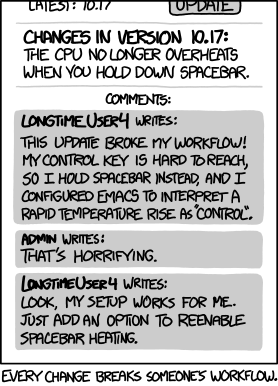
lc.xkcd workflow
 vocal fernBOT
woeful current
lc.xkcd workflow
vocal fernBOT
woeful current
lc.xkcd workflow
There are probably children out there holding down spacebar to stay warm in the winter! YOUR UPDATE MURDERS CHILDREN.
 grizzled hemlock
simple grove
grizzled hemlock
simple grove
insane
humble mortar
grizzled hemlock
insane
oops I open dupe intentionally
simple groveBOT

Can we at least get a
--weeb=noargument for initializing the use of icons for those of us over the age of 14?
Absolutely agreed...
simple groveBOT

 stark falcon
 tidal quarry
the world is healing
simple groveBOT
followed a guide on stack overflow and it looked like that, didnt think much of it until now. (could be shortened)
stark falcon
made it shorter, idk how to do it without hardcoding the shortcut
 stark falcon
doesnt work
#🏥-vencord-support-🏥 thers been a couple of ppl saying it here including myself
stark falcon
i promise you that im not 😭
vernal lintel
idk what that means
vernal lintel
⌥⌘I
Command+Option+I
also you should make a minimal electron reproduction example and report it to electron
vernal lintel
vernal lintel
⌥⌘I
Command+Option+I
did this keybind work
vernal lintel
then why would u close it
stark falcon
bcs its an electron issue and if it gets fixed itll either way get yeated
but its temporary
i yap too much
simple groveBOT
weirdly enough, with this cmd sift i keybind you need to press shift control i for it to work in the actual app
simple groveBOT

I looked a bit more into this and the reason why it's not working is because of an Electron bug, at least for KDE/Gnome.
electron.powerMonitor.getSystemIdleTime() should just work. There's no need for Vesktop to do anything here if things worked as intended, however there's 2 issues here:
- Chromium supports the KDE specific org_kde_kwin_idle and the Gnome specific D-bus API for detecting user idle time. So this won't work on any other compositors that don't support these methods, but it...
vernal lintel
it has nothing to do with that 😭
simple groveBOT
The reason it's not working is because it's simply not implemented in Vesktop. It would have to be ported over from Discord just like I described above
The reason it's not working is because it's simply not implemented in Vesktop. It would have to be ported over from Discord just like I described above
For non-Wayland platforms sure, the issue still exists that Electron can't detect user idle on Wayland. I found the issue tracking this on Electron's side https://github.com/electron/electron/issues/27912
I can't see how you intend to actually poll how long the user has been idle for.
stark falcon
simple grove
It's not an Electron bug. I don't understand what Vesktop is doing to the keybind, though, since Cmd option I only works to close dev tools afteryou've opened them.
 simple groveBOT

@Covkie @Vendicated It's a brand new bug in Vesktop/Vencord. It used to work until very recently.
I've narrowed it down to being cause by Rich Presence status messages that contain images.
When those are used, Vesktop/Vencord bugs out with some function reflection messages and failures to find functions.
An easy way to replicate it:
- Install Heroic Launcher and enable its "General: Use Discord Rich Presence" option.
When it tries to send messages, you end up with this error in Vesktop's...
simple groveBOT
this issue was closed as invalid for a reason. update your Vencord...
simple groveBOT

maybe apple should consider selling computers with more than 2 bytes of ram
simple groveBOT
Use our support channel if you need support. Issues are only for developers
vernal lintel
how do github wikis work for letting people contribute
do you just send a PR
we should make vesktop wiki
😭
 simple groveBOT

@TheRealFame you can "fix" it by building with an older electron version:
- clone the repo
- modify package.json as follows:
{ //... "devDependencies": { // ... "electron": "^28.3.3" // <-- your electron version here // ... } //... } - run
pnpm package - install the package in the
distfolder. E.g. on arch linux:
sudo pacman -U dist/vesktop-x.x.x.tar.gz
If you are using arch you can modify the PKGBUILD for ...
Don't use old electron versions like 28. they are no longer supported (by the electron maintainers) and thus won't receive security fixes. You should only use versions that are still supported. You can see the list of supported versions here https://www.electronjs.org/docs/latest/tutorial/electron-timelines
simple groveBOT

We have a Flatpak. If your distros ships too old packages, use the Flatpak.
Yeah, no. I'm using the Flatpak version and I have the same issue
Distro is LMDE (Linux Mint Debian Edition) 6, built on Debian 12
humble mortar
simple grove
why did bro delete this as soon as he sent it
Nin0dev solutions

@vernal lintel fire him
simple groveBOT

I'm experiencing this too on Fedora 41 KDE. I suspect it's a permission issue or something...
 humble mortar
vernal lintel
can't reproduce <a:cope:1333489733191467059>
humble mortar
vernal lintel
can't reproduce <a:cope:1333489733191467059>
so you can click on notifs from vesktop flatpak and it brings u to the message?
on gnome right?
vernal lintel
yes
humble mortar
guess it's a plasma issue then
vernal lintel
it's probably electron on wayland moment lol
im just gonna change the flatpak to not use wayland 😭
humble mortar
i can click notifs just fine on wayland with system package
oh thats right
its a libnotify issue
 humble mortar
vernal lintel
works on my machine doe??
humble mortar
vernal lintel
works on my machine doe??
wayland in the flatpak or x11
vernal lintel
flatpakker
humble mortar
vernal lintel
flatpakker
wayland or x11
vernal lintel
WAYLAND
humble mortar
ok so just to clarify
On GNOME Wayland, Vesktop in a flatpak running on ozone wayland, you click a notification and it brings you to the message
vernal lintel
yes
humble mortar
vernal lintel
yes
either Gnome has a STUPID hacky workaround in libnotify or youre not running on ozone wayland
vernal lintel
i am
humble mortar
the issue is XDG desktop notification portal doesnt have callback support (so STUPID)
vernal lintel
ur so mad
humble mortar
yop


 sour muralBOT
humble mortar
https://gitlab.gnome.org/GNOME/libnotify/-/blob/master/libnotify/notify.c#L551
sour muralBOT
humble mortar
https://gitlab.gnome.org/GNOME/libnotify/-/blob/master/libnotify/notify.c#L551
notify.c: Line 551
g_debug ("Running in confined mode, using Portal notifications. "
anyway works on my machine so system issue + mald + ratio
humble mortar
yopppp
 humble mortar
did you see the latest Justin trudeau image I sent
humble mortar
vernal lintel
no and I don't think I want to
 vernal lintel
 humble mortar
vernal lintel
plasma should simply suck less if it's really a plasma issue
humble mortar
vernal lintel
plasma should simply suck less if it's really a plasma issue
yeah I wonder where its failing if it works on gnome
do you get the confined mode log
from the flatpak
humble mortar
vernal lintel
is he an umpa loompa


 simple groveBOT
@Vendicated I know that very well, but a solution is better than no solution.
solution is to not dismiss the portal request and cancel the screenshare from within vesktop
vernal lintel
just don't cancel the screenshare portal prompt 😭
people are so weird
why do you ever have to cancel it
if you don't want to start a screenshare just don't click the screenshare button

humble mortar
i put you in a little box of hell with all the insane support issues whizzing around your head like bees
simple groveBOT
No. It's a system issue, just like I said. It works flawlessly on GNOME, it is likely just an issue with Plasma. There is nothing we can do, just like I said.
You can verify this by opening DevTools (CTRL + Shift + I) and running the following script to create a Notification:
new Notification("hi").onclick = () => console.log("clicked")
Clicking this Notification should print clicked to the console. If it doesn't, your System's Notification implementation is broken.
vernal lintel
vernal lintel
we should make vesktop wiki
@humble mortar should we put Vesktop wiki on shithub or make it a proper website
shithub wikis are so cursed
cause to accept "PRs" to them we have to manually copy over edits of people
vernal lintel
oh wait


but this seems like a bad idea lmao
you love trolls
can you edit this https://github.com/Vencord/Vesktop/wiki
GitHub
Vesktop is a custom Discord App aiming to give you better performance and improve linux support - Vencord/Vesktop
i wanna see how it looks from my side
just make some random change like adding  emoji
emoji
humble mortar
yop i edited
humble mortar
did
vernal lintel
I'm reporting you to github for griefing my wiki
humble mortar
kys
vernal lintel
gollum

oh my god
discord doesnt support wiki edit webhook events
so bad
why did they name it gollum 😭

GitHub
A simple, Git-powered wiki with a local frontend and support for many kinds of markup and content. - gollum/gollum
humble mortar
youre gollum
humble mortar
youre insane
vernal lintel
why
I already made https://ghwp.vendicated.dev
A proxy to filter star spam from GitHub Webhooks
I might as well make it also add support for more events
vernal lintel
imagine zapier webhooks but actually good
humble mortar
@vernal lintel can you send me dbus-monitor snippets of you sending the notification and clicking it both from system wayland vesktop and flatpak wayland vesktop
both on gnome ofc
when its in the flatpak on wayland kde the notification isnt created with an action param
simple groveBOT
I dislike the tension that's starting to appear here.
Please don't get me wrong, I don't think this is an issue on your part, we already concluded that. @Vendicated I'll admit my previous response was somewhat belittling, sorry for that. I appreciate you pointing out the security risks involved with the solution I provided.
vernal lintel
?? 😭
vernal lintel
humble mortar
<@343383572805058560> can you send me dbus-monitor snippets of you sending the n...
idk what that means
humble mortar
run dbus-monitor in terminal
run the snippet
click the notif
stop dbus-monitor
send me the log
vernal lintel
method call time=1741476192.920600 sender=:1.65 -> destination=:1.103 serial=1979 path=/org/freedesktop/portal/desktop; interface=org.freedesktop.impl.portal.Notification; member=AddNotification
   string "dev.vencord.Vesktop"
   string "libnotify-flatpak.dev.vencord.Vesktop-vesktop-4"
   array [
      dict entry(
         string "title"
         variant             string "hi"
      )
      dict entry(
         string "body"
         variant             string ""
      )
      dict entry(
         string "default-action"
         variant             string "default"
      )
      dict entry(
         string "priority"
         variant             string "normal"
      )
   ]
method call time=1741476192.920861 sender=:1.103 -> destination=:1.24 serial=1143 path=/org/gtk/Notifications; interface=org.gtk.Notifications; member=AddNotification
   string "dev.vencord.Vesktop"
   string "libnotify-flatpak.dev.vencord.Vesktop-vesktop-4"
   array [
      dict entry(
         string "title"
         variant             string "hi"
      )
      dict entry(
         string "body"
         variant             string ""
      )
      dict entry(
         string "default-action"
         variant             string "default"
      )
      dict entry(
         string "priority"
         variant             string "normal"
      )
   ]
method return time=1741476192.920916 sender=:1.103 -> destination=:1.65 serial=1144 reply_serial=1979
method return time=1741476192.927754 sender=:1.24 -> destination=:1.103 serial=11354 reply_serial=1143
signal time=1741476194.760515 sender=:1.24 -> destination=(null destination) serial=11355 path=/org/gtk/Notifications; interface=org.gtk.Notifications; member=ActionInvoked
   string "dev.vencord.Vesktop"
   string "libnotify-flatpak.dev.vencord.Vesktop-vesktop-4"
   string "default"
   array [
   ]
   array [
      dict entry(
         string "activation-token"
         variant             string "gnome-shell/Vesktop/5001-24-vendingmachine_TIME16072779"
      )
   ]
method call time=1741476194.760752 sender=:1.103 -> destination=dev.vencord.Vesktop serial=1145 path=/dev/vencord/Vesktop; interface=org.freedesktop.Application; member=Activate
   array [
      dict entry(
         string "desktop-startup-id"
         variant             string "gnome-shell/Vesktop/5001-24-vendingmachine_TIME16072779"
      )
      dict entry(
         string "activation-token"
         variant             string "gnome-shell/Vesktop/5001-24-vendingmachine_TIME16072779"
      )
   ]
signal time=1741476194.760779 sender=:1.103 -> destination=(null destination) serial=1146 path=/org/freedesktop/portal/desktop; interface=org.freedesktop.impl.portal.Notification; member=ActionInvoked
   string "dev.vencord.Vesktop"
   string "libnotify-flatpak.dev.vencord.Vesktop-vesktop-4"
   string "default"
   array [
   ]
signal time=1741476194.760948 sender=:1.65 -> destination=:1.645 serial=1980 path=/org/freedesktop/portal/desktop; interface=org.freedesktop.portal.Notification; member=ActionInvoked
   string "libnotify-flatpak.dev.vencord.Vesktop-vesktop-4"
   string "default"
   array [
   ]
AddNotification call is identical
kde just never emits the Action invoked event on the portal
but it DOES on the raw dbus which is why it works out of portal
humble mortar
Libnotify uses when sandboxed -> https://flatpak.github.io/xdg-desktop-portal/docs/doc-org.freedesktop.portal.Notification.html#org-freedesktop-portal-notification-addnotification
Libnotify uses when not sandboxxed -> https://specifications.freedesktop.org/notification-spec/1.2/protocol.html
The following messages must be supported by all implementations. 9.1 Message commands #9.1.1 org.freedesktop.Notifications.GetCapabilities #as org.freedesktop.Notifications.GetCapabilities (void); This message takes no parameters. It returns an array of strings. Each string describes an optional c…

XDG Desktop Portal
Description: Portal for sending notifications This simple interface lets sandboxed applications send and withdraw notifications. It is not possible for the application to learn if the notification ...
ActionInvoked is never emitted on portal
vernal lintel
you will go complain in kde issue tracker
vernal lintel
probably already reported fwiw
humble mortar
its not afaik
vernal lintel
but is it plasma's fault or Flatpak KDE Runtime's fault
 sudden trout
nop appimage is more scuffed but for different reasons
humble mortar
appimage is flatpak but worse
bundle all deps like flatpak but no sandboxxing
no permissions
vernal lintel
humble mortar
bundle all deps like flatpak but no sandboxxing
flatpak isn't even that
flatpak just needs a second copy (one copy for all apps)
appimage needs one copy for each app
humble mortar
yeah
humble mortar
@vernal lintel let me yap on locked issues
im gonna link https://bugs.kde.org/show_bug.cgi?id=501244 in the notification one
simple groveBOT
next sundial
which one?
btw, out of context: is there a way to pass --enable-features to Vesktop without editing desktop files?
humble mortar
@vernal lintel mainWin.show() minimizes then shows when the window is maximized
..,,
what insane logic are they doing
vernal lintel
humble mortar
<@343383572805058560> mainWin.show() minimizes then shows when the window is max...
you love
simple groveBOT
 simple groveBOT

@LumpyArbuckle @tkpmonke @LilyKensa Just to be absolutely 100% sure, check your power profile if you are all on laptops. Mine was settled by automation on power save for who knows why. Slid into "Performance" and all the latency off the client was finally gone and back to normal.
simple groveBOT

@LumpyArbuckle @tkpmonke @LilyKensa Just to be absolutely 100% sure, check your power profile if you are all on laptops. Mine was settled by automation on power save for who knows why. Slid into "Performance" and all the latency off the client was finally gone and back to normal.
This issue occurs on both my desktop and laptop, regardless of the power plan. I'm going to try manually removing ...
simple groveBOT

@Tecnio how was the issue resolved? I have the same issue.
Fedora/XFCE
Issue: During a group call on the Study Together channel, I can't focus on some cameras, sometimes. It is very random. It seems to be when the groups are large (15+ people). When there is only 4 people streaming their cameras, I have no issues focusing on someone.
 rotund pantherBOT

[[ is a bashism and $!/bin/sh is specified at the top of each script
humble mortar
rotund panther
?remindme 8h
 small lionBOT
Alright @humble mortar, in 8 hours: …
vernal lintel
you are insane @humble mortar
install shellcheck immediately
and never do an abomination like this ever again
the scripts also have quoting issues
sour muralBOT
vernal lintel
https://github.com/Vencord/PKGBUILDs/blob/main/vesktop-electron-git/vesktop.sh#L...
vesktop.sh: Line 7
VESKTOP_USER_FLAGS="$(grep -v '^#' $XDG_CONFIG_HOME/vesktop-flags.conf)"
this will explode if XDG_CONFIG_HOME includes whitespace or other funny characters
it should be quoted
https://www.shellcheck.net will tell you all these things
ShellCheck finds bugs in your shell scripts
humble mortar
vernal lintel
you are insane <@721853658941227088>
i didnt write those scripts 😭
vernal lintel
who wrote them
humble mortar
way before me
vernal lintel
@worn harness youuuu
humble mortar
dont care smile
vernal lintel
you should just change the shebang to bash anyway
vernal lintel
humble mortar
dont care smile
you are such a bad maintainer smh
you're getting fired
humble mortar
if u have white space in your home dir you deserve to die
(ive been aware of the POSIX and shell expansion stuff but nobody's complained so I havent cared 😀)
I'll fix cause that guy wants me to
yippe
@vernal lintel why specificy exact pnpm version on package.json it makes my life so annoying
i hate corepack
i hate software
I'm deleting my computer
@vernal lintel grabbed
 vernal lintel
humble mortar
<@343383572805058560> why specificy exact pnpm version on package.json it makes ...
vernal lintel
humble mortar
<@343383572805058560> why specificy exact pnpm version on package.json it makes ...
STOP CRYING
pnpm install --frozen-lockfile --config.package-manager-strict=false
or to do it for everything:
echo "package-manager-strict=false" >> .npmrc
STUPID STUPID
obscure args that fix my problems
(if I test and it doesnt fix I'll kill you btw)
see you in like 7 hours..
OUCH
i dropped my phone on my face
its all crumbling down
humble mortar
i need someone to yell at and youre right here
I'm abusive
you made me full of hate
vernal lintel
waittt
pnpm removed the strict check in 9.2.0

GitHub
close #8087
I considered printing a warning or info message instead. However, this would get printed on all commands and probably break some tools that parse the output of pnpm. So, safer just to n...
humble mortar
humble mortar
ive been getting version errors on v10
oh its for minor and patch not major
sigh...
guh the code comment says exact match
idk what to believe
i will test
?remindme 7h
small lionBOT
Alright @humble mortar, in 7 hours: …
simple groveBOT

It was fixed in a Vesktop update and I haven't had this issue ever since. However there still seems to be a related issue where some screenshares get stuck on the loading and randomly not load but I have no information, nor know the cause so I can't exactly open a bug report about it.
small lionBOT
@humble mortar, <t:1741838389:R>: …
 worn harness
cookie so silly
small lionBOT
@humble mortar, <t:1741846018:R>: …
worn harness
vernal lintel
okay doesn't matter who wrote them but
old aur maintainer is so insane he won't transfer ownership over still
humble mortar
guhhhhhhhhhh
humble mortar
?remindme 48h remember to do the pkgbuild stuff
small lionBOT
Alright @humble mortar, in 2 days: remember to do the pkgbuild stuff
woeful current
whats this woke thing
simple groveBOT

Strangely, on my last Arch Linux installation last week (this installation lasted for a year until I messed with the directories permission), when I click on the notification, Vesktop will minimize and maximize (and before that it'll just work).
But on this fresh installation of GNU/Linux Arch Linux, it'll just minimize and wait for me to click on the taskbar.
simple groveBOT

I think I have the same problem, on Gentoo using GNOME DE, flatpak version of the app. If I click on the notification, vesktop minimizes and a new notification "Vesktop is waiting" pops up. Clicking on it brings the window back.
Also, when starting the window is shifted left and up slightly, about half of a title bar. I have multiple monitors, so it creeps onto them. Goes away if I switch focus to another window.
Also, sometimes the whole UI becomes scaled up and it seems to be attempting t...
simple groveBOT

The lack of a system tray notification dot in Vencord/Vesktop is the #1 thing keeping me from switching to it from the stock Discord client. It's an extremely important feature for my workflow.
Hopefully the conflicts preventing it from being merged can be sorted out. 🙂
simple groveBOT
This is an electron issue. For some reason when maximized the mainWin.show() call minimizes then shows the window, Some check is returning wrongly.
When under x11/xwayland the vesktop window can show itself (the minimize then maximize right after behaviour) but under Wayland it can't show itself when minimized. Due to Wayland's security model, it can only demand attention when minimized, giving you the only hide behaviour.
I haven't gotten around to reporting this to upstream. so if some...
simple groveBOT
 rotund pantherBOT
Ran these scripts through shellcheck and fixed the var quoting warnings. I manually disable the var quote check when applying $VESKTOP_USER_FLAGS, since quoting this variable when multiple flags are given separated by a space will result in vesktop failing to apply any of the flags
thank you, looks good now!
Although it would be nice to add a short explanation to the shellcheck disable comments, e.g.
# shellcheck disable=SC2086 We do want to split VESKTOP_USER_FLAGS
@humble mortar, <t:1741906417:R>: remember to do the pkgbuild stuff
worn harness
@humble mortar
vernal lintel
@humble mortar
humble mortar
gonna lock you up in prison
vernal lintel
cooki so lazy wont do pkgbuild stuff
worn harness
humble mortar
<@343383572805058560> teleport my laptop to me
can I teleport to you
humble mortar
only if you bring my laptop
Fuckkk
my aur key is on my laptop
sutupud
i can't even do it from termux if I wanted
humble mortar
i can do tmrw morning
i think I won't bump the pkgrel since existing builds won't need to rebuild
only new users
woeful current
humble mortar
my aur key is on my laptop
i have it


 humble mortar
vee..
vernal lintel
WRONG CHAT
humble mortar
woeful current
guhhlf of America
simple groveBOT

Matches stock client behavior. If people want this back, they should add a keybind to their WM instead, which makes it configurable.
Fixes #934
this is a really bad way to implement this because globalShortcut is actually global
 hasty pewter
wait seriously
uh oh
hm
well we could disable the app menu
i dont think its even used
Menu.setApplicationMenu(null)
vernal lintel
fym its not even used
it's responsible for all keybinds
and there's an option to show it
hasty pewter
guh i hate electron
vernal lintel
hasty pewter
guh i hate electron
doesnt really have anything to do with electron
standard application stuff
vernal lintel
vernal lintel
you can add an invisible accelerator
anyway just this
hasty pewter
yeah im looking
hasty pewter
vernal lintel
you can add an invisible accelerator
it seems like it doesn't override the windowMenu's accelerator
removing the windowMenu altogether works though


id remove it altogether
seems pretty useless
hasty pewter
hasty pewter
id remove it altogether
seems pretty useless
@vernal lintel veeeeee
hasty pewter
is there a shortcut
cause the button doesnt do anything
hasty pewter
oki ill remove then
simple groveBOT
simple groveBOT
Content
This seems to be caused by a regression in electron-builder v25.x.x, and fixed in v26.0.0-alpha.3.
Making this as a tracking issue to update to electron-builder v26 once it reaches a stable release.
"Vesktop is a custom Discord desktop app" lol
humble mortar
https://discord.com/developers/social-sdk @vernal lintel finnalllllyyy dropping the gamesdk
Power player connections and enhance multiplayer experiences by integrating Discord directly in your game - No Discord account required.
vernal lintel
horror
why did they name it social sdk
bros really think it's gonna be the same as xeeting from your ps3
humble mortar
5 billion years of deprecated gamesdk just to rename it
GUH THEY WANT VOICE STUFF IN THEBGAME ITSELD

overlay is so dead
arrpc will never support...,,
vernal lintel
lmao
doesn't steam have something for that too
why would they use discord over steam
humble mortar
fortnite refusing to be on steam:
vernal lintel
I doubt people want to link their discord to random games lol
unless it's seamless ig
humble mortar
humble mortar
arrpc will never support...,,
inject me with motivation to finish the module replacement likee..
humble mortar
steam overlay is actually good gurgg
vernal lintel
its goal was never to 1:1 reimplement Desktop app
humble mortar
humble mortar
steam overlay is actually good gurgg
discord moving to an electron pinned window is so ass
humble mortar
vernal lintel
its goal was never to 1:1 reimplement Desktop app
yeah but RPC is a major feature and doesnt rly make it 1:1
scanning should always be a specific reimplementation so discord doesnt have a complete list of processes on the computer
but IPC and Web sockets should be direct so discords code can do its shit
I'll probably never finish it anyway
 humble mortar
@vernal lintel should I add a .install file so the packages can tell the user about the args config after they install or maybe add a log to the startup script that says "checking for args at ..x"
also could .pacman generation be enabled in electron builder so a sane -bin package can be brought in
humble mortar
actually horror

why does github not use the primary email when doing stuff through the gui
simple groveBOT

This is the main thing preventing me from switching from flatpak's com.discordapp.Discord to pretty much any other solution, so it would be really nice to have this done and not have to think about libunity ever again. What's holding it up at the moment?
@Covkie
Yeah electron fixed (removed) their desktop env checking for the libunity dep. I still think this PR is relevant tho as libunity is old and many distros don't package it anymore. It should be dropped in favour of dbus communica...
What's holding it up at the moment?
A giant dep thats used for a realistically tiny feature, Electron should really replace the dep itself. I've been slowly familiarizing myself with the Electron codebase so i hope to PR it myself :p
This is interesting, and doesn't match my experience, but would definitely be convenient if true.
idk if Discord has updated to the electron version with the needed DE agnostic patch https://github.com/electron/electron/pull/41211
 vernal lintel
rotund panther
vernal lintel
rotund panther
technically they do
humble mortar
vernal lintel
technically they do
nop if it works for them rn its fine
humble mortar
yeah but
humble mortar
they will see it exploded and go check the package and see its been updated but not tagged
they will then rebuild
the two users who switch to dash vs the 20 morbillion who are just fine
if youre changing your shell you can do 2 seconds of googling to confirm the problem and fix it
also you shouldnt change your root shell anyway
kinda insane
vernal lintel
humble mortar
also you shouldnt change your root shell anyway
why not
dash is a lot faster than bash
vernal lintel
yes
#!/bin/sh = i want any posix compliant shell
dash is posix compliant
changing to dash is not a bad idea
some distros use dash
ubuntu uses dash for example
humble mortar
vernal lintel
`#!/bin/sh` = i want any posix compliant shell
oh guh real?
i thought it was like a standard sh impl
guh ive never looked
i have got to stop saying guh
@worn harness brain infection
hasty pewter
btw if launching vesktop in --start-minimized with tray icon off there's no indication that vesktop is even running at all
i wanna make it show tray icon until first showing the window, regardless of the tray setting when launching in --start-minimized
sound good?
worn harness
humble mortar
<@289556910426816513> brain infection
nop
humble mortar
hasty pewter
btw if launching vesktop in --start-minimized with tray icon off there's no indi...
guhhh insane behaviour lmao
yeah should def do that
does having the tray disabled also prevent the close to tray functionality
hasty pewter
yes
worn harness
yes
humble mortar
zop
worn harness
cookii
simple groveBOT
If launching Vesktop with the --start-minimized option, there is no indication that Vesktop is running when the tray icon option is disabled. This forces the tray icon until the window is first shown, at which point it is hidden again if the tray icon option is off.
humble mortar
i love passing around state
hasty pewter
yop
simple groveBOT
Could you elaborate on what sort of resizing issues there are?
humble mortar
simple grove
@hasty pewter client side window controls seem to be missing proper resize tags on the edges or something
meaning you can't resize from the edges which is expected
humble mortar
humble mortar
<@295190422244950017> client side window controls seem to be missing proper resi...
likely vesktop needs to patch a desktop check to enable the correct frame
hasty pewter
huh
i love how like 80% of the issues are because of linux
@rancid geyser could you please fix https://github.com/Dziurwa14/discord-scraping

 rancid geyser
how will this affect vesktop development
and no i cant ❤️
i dont use it really so its dead
hasty pewter
rancid geyser
how will this affect vesktop development
i use dumped modules to look at src
bleh
hasty pewter
gu
rancid geyser
wtf even is that error... absolute
hasty pewter
lol yeah it looks so cursed
rancid geyser
they dont pay me enough to care
hasty pewter
i cant seem to figure out how the stock client handles zooming
there's a flux event handler for ACCESSIBILITY_RESET_TO_DEFAULT that supposedly handled ctrl+0 for zooming out but literally no emitters
okay this seems to be partially responsible??
idk why it uses mod+plus, it should work as mod+equals

guhhh this is so bad
hasty pewter
@vernal lintel i integrated zooming into client like on stock but i had to get rid of this menu cause it was interfering with the new accelerators
what do i do

i could reimplement the menu manually
hasty pewter
vernal lintel
wdym?

custom accelerators should override the ones from the template viewMenu
hasty pewter
GitHub
Discord Account No response Motivation I like everything in an app's UI to be just so, especially if I use the app for hours every day. Discord's official zoom levels are satisfying to me i...
this calls into discord to also set internal state
because the stock app also has a scale slider in settings thats disabled on web
vernal lintel
hasty pewter
<@343383572805058560> i integrated zooming into client like on stock but i had t...
these should be easy to reimplement anyway
if u wanna go that route
nini
simple groveBOT
Connects electron keybinds to Discord's internal zoom handling, and re-enables the zoom slider in appearance settings
FIXME:
- figure out what to do with incompatible default electron
viewMenu
Fixes #1018
hasty pewter
there look @vernal lintel
simple groveBOT
The code triggering this seems to have changed a bit since this issue was created, but it seems to partially be caused by arrpc outliving the main browser window:
(it uses mainWin to send an IPC event after it's been destroyed)
hasty pewter
simple grove
veeee does this make sense
simple groveBOT
Seems like potentially a sandboxing issue because of AppImage/AppArmor idk
Error caused by making a new arrpc ipc server:
https://github.com/OpenAsar/arrpc/blob/2234e9c9111f4c42ebcc3aa6a2215bfd979eef77/src/transports/ipc.js#L157-L175
simple groveBOT
 simple groveBOT

I guessed it might be a graphics card issue, I opened stable diffusion and the lag started to appear pretty quickly
vernal lintel
😭
 iron cedar
Horror
simple groveBOT
Fixes #808
The code triggering this seems to have changed a bit since this issue was created, but it seems to partially be caused by arrpc outliving the main browser window?
https://github.com/Vencord/Vesktop/commit/c9be6181644a329ce6556c49186e56e2b7d5e8e2#diff-53486cd162d85eb4faf85f2b936105851979cd772b7be0b7bc48ae85efbbb9e9L22-R22
(arrpc server tries to usemainWinto send an IPC event after it's already been destroyed?)
simple groveBOT

Is this still needed? Can it be closed?
grizzled hemlock
is there any reason this doesn't also set location.href so you dont have to restart vesktop to change branches
 vernal lintel
it's easier and more consistent to just require a restart
simple groveBOT

I'm not sure why, but in Plasma on wayland it opens instantly for me, but if I am in hyprland using waybar, it is extremely delayed to the point that it's faster to entirely restart vesktop.
It's weird, I replicated the issue in a virtual machine too on a different distro. Not sure what's going on but I think I will stick to the older version for as long as it works and then hopefully by the time I switch on over everything is fixed.
I'm using KDE Plasma 6.3.3 on X11 with version 1....
simple groveBOT

Content
Discord user: theofficialpigeon
Operating System: MacOS
Description:
Sometimes when I do specific things such as changing accounts or load up the discord app. Since Vesktop acts like a browser, it thinks it was the one who opened the discord app.
If you need more information I would be happy to provide it.
simple groveBOT
- Enable the Experiments plugin
- Go to the Experiments tab
- Search for "Deep Links"
- Set it to Not Eligible
And use our support channel in the future.
vernal lintel
humble mortar
<@343383572805058560> what does that experiment actually change
makes the web app unusable because discord doesn't test their shit on web
just like visual refresh titlebar
 hybrid fjord
Btw do you guys aware of a bug when you start screen share -> close portal's picker and vesktop crashes?
simple groveBOT

"Guys, please don't be annoyed about a core feature not working and fix it yourself"
- Guy with nearly 500 people paying him
simple groveBOT
Hiii!! If you want to deal with winapi 💔 , you're more than welcome to send patches !!!
vernal lintel
do u have windows @humble mortar
vernal lintel
simple grove
bro thinking im rich off of vencord is so funny
humble mortar
vernal lintel
do u have windows <@721853658941227088>
vm
vernal lintel
vernal lintel
bro thinking im rich off of vencord is so funny
if you calculate the $ i get / hours i worked on vencord over the years you will find that it is way below minimum wage
humble mortar
ok send me money
vernal lintel
WDYM SEND YOU MONEY
humble mortar

im so stupid i just spent like 10 mins wondering why my ssh key wasnt working but i forgort to add a host override for the key
simple groveBOT
"Guys, please don't be annoyed about a core feature not working and fix it yourself" - Collaborator with nearly 500 people paying them
Please refrain from leaving toxic replies or you will be blocked. Being annoyed is okay, spamming our issue tracker with useless replies isn't.
These projects are only a hobby for me, I am not even close to making a living from sponsorships. You are welcome to pay me a competitive wage if you would like me to work on it full time! :)
Electron's screensh...
vernal lintel
why do some people feel so entitled lmao
uses software completely free of charge
"nooooo you have to fix my issue NOW.... lazy dev smh!!"
guh easyeffects has audio stuttering when a new source starts playing @humble mortar
pr fixes
humble mortar
whats easyeffects
vernal lintel
pulseffects but easy
humble mortar
whjats pulseeffects
 sour muralBOT
vernal lintel
https://github.com/Vencord/Vesktop/blob/main/src/main/screenShare.ts#L80
sour muralBOT
vernal lintel
https://github.com/Vencord/Vesktop/blob/main/src/main/screenShare.ts#L80
screenShare.ts: Line 80
if (choice.audio && process.platform === "win32") streams.audio = "loopback";
- if (choice.audio && process.platform === "win32") streams.audio = "loopback";
+ if (choice.audio && process.platform === "win32") streams.audio = "loopbackWithMute";
oh yeahhh
chromium implemented loopback on linux
did anyone ever test if it works in electron
simple groveBOT
156ba6a ScreenShare(Windows): loopback -> loopbackWithMute - Vendicated
Anyway might be fixed via https://github.com/Vencord/Vesktop/commit/156ba6ab7b1b6271d15d2e0f61a0a6767e9e2ae9
Feel free to test it (by building the main branch from source as described in the README) and report your results
vernal lintel
love how the difference between loopback and loopbackWithMute isn't documented anywhere whatsoever
so idk if loopbackWithMute is the fix
when you Google it you find chromium source code lmao
simple groveBOT
Sorry for the negative response, but it felt like this issue has been ignored for so long, even while people kept bumping it. I just got a bit too annoyed since I still can't stream music to people, but that obviously doesn't excuse the outrage.
I will test it in a second. Just wondering though, is there any progress on CI builds? Could make testing such features much easier
we already have CI builds but it's only used for releases right now
we could also add it for every commit but honestly I'm not sure if GitHub would like us uploading 2GB of artifacts every commit 😅
building from source is quite simple and fast (it's just 3 commands to copy paste), but you do have to install nodejs, git and pnpm for it
vernal lintel
actually i wonder if there's an artifact quota
oh yeah there is for private repos but I think it's unlimited for public repos
simple groveBOT
Artifacts do expire eventually, and from personal experience, even if github won't like it, they will only send you an email asking you to stop.
Either way, I did manage to compile Vencord, though I'm currently unable to test it. I will test it tomorrow and let you know whether it changed anything
 humble mortar
@vernal lintel one line kde oversight preventing default-action ActionInvoked signals
you loveeee
it wanted default-action-target even thought its optional
oopsies :p
simple groveBOT

Could a vencord plugin be made to fix this to avoid rebuilding it?
vernal lintel
what 😭
simple groveBOT

Possibly related to https://github.com/electron/electron/issues/44543 (just closed a few days ago by https://github.com/electron/electron/pull/46155)
hopefully this will be fixed in a future electron release.
simple groveBOT

Content
It appears that if a config file such as ~/.config/vesktop/settings/settings.json is a symlink (or a containing folder), vesktop refuses to load it (it loads a blank/default config instead)
To reproduce, just change a setting, move ~/.config/vesktop/settings/settings/settings.json somewhere else, symlink it back into the right place, then restart vesktop. It doesn't load.
hybrid fjord
simple grove
Electron moment?
humble mortar
I'm fairly certain readFileSync can handle symlinks
vernal lintel
yeah it should
this guy is probably using flatpak and symlinked a file it can't access
humble mortar
is anyone gonna comment asking for bro to fill out the issue template
 and if he isn't I'm gonna close it
humble mortar
and if he isn't I'm gonna close it
humble mortar
https://github.com/electron/electron/pull/46112 @vernal lintel looks like the screenshare dismiss crash will be fixed in electron 35
simple groveBOT

This will likely not be fixed until this redesign gets fully rolled out and becomes stable. right now it's only an in development experiment Discord is doing, so it is still subject to frequent change
Seems like it's rolling out widely starting today
simple groveBOT

Title bar def needs being fixed since it broke after the update

Content
With the new Discord UI that has been rolling out today, when you click on "Shop" or "Nitro" we get "Discord App Launched. We've opened the link in your Discord app. You can close this browser tab now"
Experiencing this on Linux, but I assume this would be the same case on all platforms.

 cyan flame

simple groveBOT
simple groveBOT

Just got the update myself and I have the same issue. It's too big...
Let us (the users) customize if you're going to TOS-force us to one client.
simple groveBOT

Content
Discord Account
Operating System
Arch Linux
Linux Only ~ Desktop Environment
Hyprland on Wayland
Package Type
yay/pacman (AUR)
What happens when the bug or crash occurs?
vesktop used to launch without issues, recently it crashes immediately.
vesktops ozone platform is trying to use an X server (via X11) but isn’t finding one that meets its requirements, even though Xwayland is running and $DISPLAY is set
When I run vesktop with the f...
use our support channel if you need help
simple groveBOT

Same issue here on Vesktop 1.5.5 with and without hardware acceleration on any combination of stream settings. Curiously the stream goes up to 30fps if I alt-tab out of the game I am trying to stream
humble mortar
@vernal lintel im going insane people yapping about vesktop CSD window buttons missing on visual refresh...,
vernal lintel
yes need to fix
humble mortar
REVIEW THE PR THAT FIXES IT!!11!
!
inject you with juice that makes your review prs
you will give me repo perms
simple groveBOT
mmh I'm not really a fan of this. Having to null check everywhere is annoying and in at least half of these places, the main window being destroyed would indicate a logic error so they shouldn't fail silently
It would be better if only the locations with listeners that can outlive the window check for status, so in this case arRPC
I still don't understand this PR. The DevTools shortcut is Command+Option+I, not Command+Shift+I
do we still want these?
I disagree
If the user explicitly disables the tray, we should respect that. You don't need the tray, you can just launch Vesktop via shortcut. If it's already open in the background, it will show that instead of opening a second instance
do not remove the old patches. not everyone is using Visual Refresh
	return key
		? PopoutWindows.get(key)
		: BrowserWindow.fromWebContents(e.sender) ?? mainWin;
function getWindow(e: IpcMainInvokeEvent, key?: string) {
@vernal lintel those patch changes are for the generic window control stuff, CSD still works on non visual refresh
vernal lintel
yes?
humble mortar
so the old patches are fine to remove..,.
vernal lintel
no
 vernal lintel
okay now try clicking the window buttons
humble mortar
yop they work
AH
they close button killed vestkop
instead of going to tray,,,zz
other than that it works
vernal lintel
how
humble mortar
ur insane about the patches
vernal lintel
literally not possible lmao

 humble mortar
well it is [JOEyep](https://cdn.discordapp.com/emojis/764008049723179038.webp?si...
humble mortar
humble mortar
well it is [JOEyep](https://cdn.discordapp.com/emojis/764008049723179038.webp?si...
False alarm.,!! the close to tray setting was off somehow..,,
ok anyway
the PR's patches changes work
youre insane
humble mortar
ypoo
vernal lintel
so it covers both
humble mortar
@vernal lintel hiiiii
 simple groveBOT
No clue what I was on when I wrote this crap
                {
                    match: /\i\.window\.(close|minimize|maximize)/,
                    replace: `VesktopNative.win.$1`
                },
GUH WRONG CHANNEL
vernal lintel
vernal lintel
he changed where it's patching
basically Discord has like:
export const NativeCrap = {
  window: {
    close() {
      DiscordNative.window.close();
    }
  }
}

// elsewhere, in the titlebar component
NativeCrap.window.close();
the old patch patched the NativeCrap.window.close() call in the component so it only applied to the component
His PR instead patches the DiscordNative.window.close() so it applies everywhere
that's where the confusion comes from
vernal lintel
humble mortar
veeb doesnt read PR descriptions
i like never do
simple groveBOT
we should hide this discord titlebar if you have discord titlebar disabled
you won't be able to access your inbox but welp blame discord for being braindead and not testing their web app
I think they're useless, removing would be fine
8f94196 fix: disable Browser Tab shortcuts like Ctrl+W ... - rushiiMachine
 surreal agate
simple grove
surreal agate
simple grove
i saw ctrl + w and i instantly pressed it without reading anything else
😭
simple groveBOT

I have a similar issue, except gifs show up as white. It also affects other files as another commenter said; for example I was unable to view a screenshare as the window was just white.
Running Fedora KDE with Wayland and NVIDIA graphics.
[Vencord/Vesktop] New review comment on pull request #1093: fix: handle loadURL() failures correctly
    onUpdateMessage(callback: (message: string) => void) {
    	ipcRenderer.on("update-splash-message", (_event, message: string) => callback(message))
    }
[Vencord/Vesktop] New review comment on pull request #1093: fix: handle loadURL() failures correctly
outfile: "dist/js/splashPreload.js"
[Vencord/Vesktop] New review comment on pull request #1093: fix: handle loadURL() failures correctly
contextBridge.exposeInMainWorld("VesktopSplashNative", {
[Vencord/Vesktop] New review comment on pull request #1093: fix: handle loadURL() failures correctly
don't name it that and the import should be at the top
gpu / system issue like I said. Disable hardware acceleration to fix it
simple groveBOT
we should hide this discord titlebar if you have discord titlebar disabled
IMO no, the Linux desktop client has it like that too. People always have UserCSS if they want to change it,,
looks like shit and expecting people to fix shit with css is bad UX
humble mortar
simple grove
trolley I named it that cause you yapped about it
 simple groveBOT
Should be a vencord plugin to unify the two bars then, since its not Vesktop specific
vernal lintel
no 😭
they're gonna remove it on linux and web soon enough once enough people complain
this is just them not testing at all on those clients
humble mortar
well if theyre gonna remove/fix it thats even more of a reason to have it as a vencord plugin 😭
vesktop updates arent fast like that
humble mortar
simple grove
also the whole visual refresh insane spacing and bad contrast looks like shit
vernal lintel
humble mortar
vesktop updates arent fast like that
n it doesnt matter
wow our code that removes the titlebar doesnt work anymore because discord removed it
whatever will we do
humble mortar
no dingus if it breaks or changes
also exploding the inbox would be an insane choice
moving it would make more sense
but then that wraps around to it should be a vencor plugin so desktop users can not suffer too
vernal lintel
nop
humble mortar
i think you have brainworms
youll be getting people asking where the inbox is on vesktop
simple groveBOT

redesign is rolling and and broke the title bar
yes we know. this will be fixed soon, just have patience
simple groveBOT

I am also having this issue. When I start it freshly it behaves normal, but when it's already started and I try to open the window it takes up to 30 seconds to open. Doesn't matter if I try to open the window from waybar or rofi. I've tried both the flatpak and the AUR bin version and they both behave the same, I am also using running electron in wayland mode. I am using arch linux, Hyprland and am on a Nvidia gpu.
simple groveBOT
simple groveBOT
Locking because this is not a Vesktop issue and there's nothing we can do
humble mortar
vee will give me issue lock perms
humble mortar
@vernal lintel gorp still no stable electron builder tag with the Ubuntu apparmour fix
simple groveBOT
vernal lintel
this is how easy it is to introduce a severe vulnerability btw @humble mortar

you're sending the entire ipcRenderer object back

in the old code
vernal lintel
cause arrow functions implicitly return the value and ipcRenderer.on returns ipcRenderer for chaining, so you can do like
ipcRenderer
  .on("Event1", handler1)
  .on("Event2", handler2);
that's why I asked you to change it to a normal function
humble mortar
i'm pretty sure w hat i had before was straight from the main->renderer preload docs
vernal lintel
yes 😭

wtf electron
well the severity of it depends on your own code
the problem with that is that you can send arbitrary events
which might or might not be bad
but even Electron docs warn you against exposing ipcRenderer


 simple groveBOT

To anyone implementing this, please remember to also ensure the buttons are shown in the settings (as the primary UI's main titlebar isn't shown there), there seems to be some free space above the scrollbars:
On Discord mockups it'd show them like this:

simple groveBOT
Even when trying to press Cmd option I, it doesn’t work; it does manage to close dev tools if you alrdy opened it via View -> Toggle Dev Tools. I chose Cmd Shift I because I came from Windows, and it’s muscle memory atp, doesn’t really matter since it’ll probably fix itself in the next update, but https://github.com/electron/electron/issues/45925 says it’s not necessarily an Electron issue and something that Vesktop does to interfere. Either way, when you’ll bump the Electron version for Vesk...
The issue you linked doesn't say anything and is a bad issue anyway. Use the electron template to reproduce this issue on a minimal app, then report it to electron with that and share all relevant information
humble mortar
real shit can we fork arrpc for our patches so next vesktop tag has auto db updating @vernal lintel
not a full fork just for patches so we aren't reliant on duckos schedule
simple groveBOT

With the new discord UI changes, it seems that the window controls are missing on Windows (11) when using discord's titlebar instead of the native one.
 scenic hollow
ok so i'm trying to solve this
should i just call the preregister function on every start up on hyprland
as in i'd have to check to see if vesktop is being ran on hyprland then run preregister
my main concern is that this is kinda ugly and annoying but i also doubt if i ask any of the hyprland people to fix it they actually will do anything
or i make an issue on kde's side about making the shortcuts page not show up every time bindshortcuts is called
humble mortar
you should be doing that anyway
check if all shortcuts exist and if not register them all
if you try to register an id again intelligent impls will just ignore it
scenic hollow
pretty sure kde doesn't
humble mortar
humble mortar
check if all shortcuts exist and if not register them all
ListShortcuts exists for this reason
humble mortar
scenic hollow
pretty sure kde doesn't
it does
& theres PR in the works that overhauls the UX of registering shortcuts
Every startup check if all ids are registered with ListShortcuts, if even one is missing you call BindShortcuts with every shortcut
ok igtg
scenic hollow
kde ignores in the sense that it doesn't make a new one but my main point (and the reason i've made it call bindshortcuts when the keybinds settings page is opened) is that it still opens the keybinds settings page anyways
scenic hollow
humble mortar
Every startup check if all ids are registered with ListShortcuts, if even one is...
ok well yeah if i do that that would be alr
simple groveBOT

@allmeta you can try with it on hyprland with this latest commit. it worked fine as far as i could tell
it would be nice if anyone could test this on latest gnome too. i think we'd basically be ready to merge after that
humble mortar
@scenic hollow no shortcut action womp
also BindShortcut ids being simply numerical is bad..
impls use that to distinguish binds
if u remove 5 6 becomes 5 then everything explodes (descriptions dont match and kaboom)
Splash hangs on BindShortcuts and waits for it to return
TOGGLE_CAMERA is missing its readable description/included
this should be a whitelist i think
 scenic hollow
humble mortar
also BindShortcut ids being simply numerical is bad..
scenic hollow
humble mortar
also BindShortcut ids being simply numerical is bad..
i agree i just couldn't be bothered to change all that guhh
scenic hollow
yeah
scenic hollow
humble mortar
<@339669513912057857> no shortcut action womp
is that the log for that?
scenic hollow
everything works on kde for me
could it be it doesn't have an app_id??
scenic hollow
hmm
humble mortar
the spec is still the same
systemd-run --user -u app-vesktop@a8sf148gfhg pnpm --prefix /mnt/Bucket/Git/Vesktop/ start --ozone-platform=wayland launched like this
so its in its unit for portal identification
just like how plasma launcher does it
the events are firing
how do i look at what venbind is doing
is there a debug env var
scenic hollow
there is a bit about the bindshortcuts and listshortcuts in this log you sent i'd assume it's doing what it's supposed to??
humble mortar
yep
scenic hollow
humble mortar
how do i look at what venbind is doing
you can also run the rust test
humble mortar
scenic hollow
there is a bit about the bindshortcuts and listshortcuts in this log you sent i'...
hangs the splash on BindShortcuts until it returns
i assume it also hangs on ListShortcuts but its too small to notice
it ssomething between the Activated and Deactivated signals and action in the client
humble mortar
scenic hollow
you can also run the rust test
howg
scenic hollow
humble mortar
hangs the splash on BindShortcuts until it returns
what splash are u talking about exactly?
scenic hollow
humble mortar
howg
cargo test -- --nocapture
humble mortar
vesktop splash
scenic hollow
it shouldn't be getting called when splash is happening pretty sure???
humble mortar
scenic hollow
it shouldn't be getting called when splash is happening pretty sure???
happens right after splash destruction but the splash hanags cause the thread is hung
yop works

that has been running for 60 seconds is cause i left the new kde dialog open
scenic hollow
humble mortar
`systemd-run --user -u app-vesktop@a8sf148gfhg pnpm --prefix /mnt/Bucket/Git/Ves...
ok this is completely random but can you try using uwsm instead of systemd-run cause that's what i do
humble mortar
scenic hollow
ok this is completely random but can you try using uwsm instead of systemd-run c...
whats the command
scenic hollow
uwsm app -a vesktop -- pnpm start:dev
humble mortar
yeah no
i tried launching straight through plasma launcher
its not an appid issue
venbind?.startKeybinds((id, keyup) => {
mainWin.webContents.executeJavaScript(Vesktop.triggerKeybind(${id}, ${keyup}));
});
this callback isnt happening
im using the latest commit on ur PR branch
ok i just reverted the test kde portal branch i was on
it works now
ur not doing something in spec
only venbind is breaking on that branch
ashpd and my python demo work just fine
scenic hollow
humble mortar
only venbind is breaking on that branch
only venbind THROUGH VESKTOP apparently the tests work fine
humble mortar
yeop
ListShortcuts and BindShortcuts THROUGH VESKTOP work (hangs the thread tho which should be changed) work
Activated and Deactivated signals break through vesktop
ok igtg sorry i cant debug more
scenic hollow
humble mortar
ok i just reverted the test kde portal branch i was on
what version are you testing btw i'm on the 6.3.3 release are you on a newer commit or older
humble mortar
GitLab
Instead of always opening system settings on bind a dialog is shown with new shortcuts that lets the user customize them. If the application just wants to rebind...
scenic hollow
ohh
simple groveBOT
 simple groveBOT

Testing with Gnome on Fedora 42, I did not get the popup to register the shortcut handler. I did test with GPU Screen Recorder and did get the popup and Door Knocker reports the portal as functional.
simple groveBOT
@A1029384756 its likely you launched the devbuild outside of the needed systemd unit for appid identification.
There are currently issues with this PR that tuxinal and I talked about in the vesktop dev channel, so expect problems
humble mortar
@scenic hollow it might be worth it to implement the xdg host app registry api
to stop the reliance on systemd units
simple groveBOT
@Covkie ah, mb. tested with uwsm and now i get the dialog on application launch if the key doesn't already exist in dconf
 floral ledge
humble mortar
<@339669513912057857> it might be worth it to implement the xdg host app registr...
floral ledge
humble mortar
<@339669513912057857> it might be worth it to implement the xdg host app registr...
^
was coming in here to say this
since its officially in xdg no point in not implementing it
and its in ashpd
scenic hollow
ok so trying to use registry and i get Could not register app ID: Connection already associated with an application ID except when the shortcuts page shows up it's named token_ashpd_blabla which means there is definitely no app id???
scenic hollow
apparently that registry function has to be called before anything else including create_session
also the app id you choose is actually supposed to be the name of a .desktop file you've got. i didn't know that
humble mortar
yea
youll have to check if the env is flatpak or not
flatpak .desktop is dev.vencord.Vesktop
non is just vesktop
i think the container env var is set if its in a flatpak
scenic hollow
humble mortar
youll have to check if the env is flatpak or not
i think ashpd already checks that???? https://github.com/bilelmoussaoui/ashpd/blob/ebe5aabe5bd1afb2ed1631c30809a08e7f3c3a0f/src/registry.rs#L42-L44
sour muralBOT
scenic hollow
i _think_ ashpd already checks that???? https://github.com/bilelmoussaoui/ashpd/...
registry.rs: Lines 42-44
if crate::is_sandboxed().await {
    return Ok(());
}
i mean yeah apparently that's what is_sandboxed is https://github.com/bilelmoussaoui/ashpd/blob/ebe5aabe5bd1afb2ed1631c30809a08e7f3c3a0f/src/lib.rs#L58-L64
sour muralBOT
scenic hollow
i mean yeah apparently that's what is_sandboxed is https://github.com/bilelmouss...
lib.rs: Lines 58-64
/// Check whether the application is running inside a sandbox.
///
/// The function checks whether the file `/.flatpak-info` exists, or if the app
/// is running as a snap, or if the environment variable `GTK_USE_PORTAL` is set
/// to `1`. As the return value of this function will not change during the
/// runtime of a program; it is cached for future calls.
pub async fn is_sandboxed() -> bool {

I've tested building from source, when I share screen I can't listen anyone voice. They can still listen they're voices on screen
austere wolf
i feel like i could get a binary working that could improve windows screenshare but my bandwidth is taken up by other things
you could probably make it obs-like with enough effort but then i’d have to maintain it
simple groveBOT
 simple groveBOT

Not sure if it's the same issue, but on mine I have a similar issue. It seems to be very laggy from the start, and only gets worse over time.
For now, I've just been using Vencord in Firefox (via the addon, not the script) with the exact same settings, and that works perfectly.
tidal quarry
@vernal lintel would you want vesktop on brew? since its notorized and signing isn't an issue, I think it would be nice for it to be on there
I already made something for brew for it (this is my fork)

hopefully it should require little maintenance considering brew also supports livechecking from the latest yml
theres also taps, if you rather not have it be on the main homebrew cask repository
simple groveBOT

Content
I've been using Discord as a service in Ferdium for a long time, but I'm now trying to switch to Vesktop because of its many great extra features. However, one thing that's been bothering me is the lack of a notification system in the tray.
In Ferdium, when I receive a private message or a ping in an unmuted channel, the tray icon changes to indicate a notification. Vesktop, on the other hand, doesn't have this feature, and I really miss it.
Another issue with the tray icon is ...
humble mortar
what the hell is ferdium
simple groveBOT

I'm on Vesktop 1.5.3 and Windows 11, and experiencing same issue, at least symptomatically Streaming through official client has no issues
same for me on 1.5.5 vesktop
i'm trying to stream 1080@60 or even 720@30, the result is same, fps is staying at 15-20 but when i'm going to run/walk/whatever, it's gonna drop to 4fps.
windows 11, build 22631.3737
hw acceleration is enabled in vesktop
game is not matter. for example, Kingdom Come: Deliverance II
cpu: r7 2700
gpu: rtx 3070
and ...
Spotify doesn't ship a tintable monochrome icon, you're using a theme for that 😄. Anyway, this is a dupe.
Spotify doesn't ship a tintable monochrome icon, you're using a theme for that 😄. Anyway, this is a dupe.
I'm using the default COSMIC Theme. I don't think they ship a Spotify icon with it, but maybe they do.
Btw, I don't think this is a duplicate of #667. That issue is about user customizable assets. I'm not asking for user customizable assets. I'm asking for changes to the default icon, or a toggle to turn the icon monochrome (like in Telegram). I don't want the user to input a custom icon. I'm also asking for a notification state icon. The other issue is about customizing the icon and startup splash with user provided assets. I have no interest in that.
woeful current
simple grove
@humble mortar using emojis... so rare
humble mortar
woeful current
<@721853658941227088> using emojis... so rare
i was in a silly mood
simple groveBOT
That issue covers what youre asking for. As for providing a monochrome(symbolic) icon that conforms to DE colours, It's practically impossible for us to do due to Electron abstractions. We can''t request an icon that the system then draws, we can only send a pixmap unfortunately. Best we can do is allow customization.
simple groveBOT

The added patch prevents the Discord web app from stopping propagation of the DevTools keybind keyboard event to Vesktop.
Closes #963.
simple groveBOT

this works for me:
vesktop --enable-features=CanvasOopRasterization,VaapiVideoDecoder,UseChromeOSDirectVideoDecoder,VaapiIgnoreDriverChecks,PlatformHEVCDecoderSupport,Vulkan,DefaultANGLEVulkan,VulkanFromANGLE
This doesn't work for me. Whenever I try to play a video (or just load an animated gif) the entire application flashes blank for a while and I get this in my journal:
[185280:0330/161815.249653:ERROR:gpu_service_impl.cc(1162)] Exiting GPU process because some dri...
This seems to also occur whenever you open a link to a discord server in your browser.
simple groveBOT

Currently, if you don't have the Discord title bar enabled, you can't resize the window—at least on Fedora workstation.
simple groveBOT

@nfp0 Same issue happening with me!
simple groveBOT

I would like to note that this issue, specifically for the Store and Nitro pages, also started with the new UI for me.
This was not an issue before then, so there seems to be some correlation there.
simple groveBOT
woeful current
simple grove
scenic hollow
@humble mortar didn't you suggest changing the cli design at some point
it does already do this one on XDP i thought you mentioned another thing too???
that's the one nvm
simple groveBOT


Is there any way to disable this? disabling desktop_deeplink experiment doesn't work.
simple groveBOT
use our support channel instead of necroing closed prs.
simple groveBOT
Content
https://github.com/Vencord/Vesktop/pull/813
According to the guys at the support channel this is not possible.
Disabling experiment Desktop_Deeplinks doesn't work.
and I want to be able to change behaviour of the app.
My use case:
I have different account and on browser and different my main account on Vesktop app. I don't want Vesktop app to ask me joining as my main account.
Just in case anyone wants this
Remove registry key at Computer\HKEY_CLASSES_ROOT\discord
humble mortar
scenic hollow
that's the one nvm
state switching by command is bad
it should be internally tracked
by default anyway
like --trigger=id (optional --type=up/down)
scenic hollow
i'm writing it so it's keyup by default unless specified
scenic hollow
humble mortar
like --trigger=id (optional --type=up/down)
currently it's --keybind=id or --keybind-[up/down]=id
and here --keybind=id means up by default
humble mortar
so I think --keybind should internally track state
otherwise users would need a script to do that
scenic hollow
on the other hand i think if someone used it they wouldn't expect to also have to call it again for keyup
humble mortar
well if its up by default running it wouldn't do anything
scenic hollow
i think most things work on up actually
humble mortar
hm idk
there is no up/down when dealing with commands
its only a state switch
if the bind is a single event it'll simply trigger that
but if its toggle mute or something
or push to speak
oh @scenic hollow did u figure out what was happening with events on the kde portal pr
scenic hollow
if it was so that a state is toggled on keybind it would have to be called twice so it's actually triggered (for example in someones wm config it would have to be vesktop -- --keybind=id && vesktop -- --keybind) cause most things only trigger when upped
unless we make the cli figure that out itself which is harder i think
scenic hollow
humble mortar
oh <@339669513912057857> did u figure out what was happening with events on the ...
nop not yet
humble mortar
scenic hollow
if it was so that a state is toggled on keybind it would have to be called twice...
I'm gonna think about this for a bit
scenic hollow
scenic hollow
if it was so that a state is toggled on keybind it would have to be called twice...
my point is if it were designed like that it would be expected for all WMs/DEs to call the cli upon keydown and keyup which is probably not gonna be what happens
scenic hollow
scenic hollow
i think most things work on up actually
for reference
 scenic hollow
humble mortar
this should be a whitelist i think
scenic hollow
humble mortar
this should be a whitelist i think
also i did this these are all the whitelisted ones
humble mortar
having it do up is fine for all the toggle ones but push is a different story
scenic hollow
maybe we could check that and then decide if we should state switch or not
still i think that would still be useless i don't know if we can even make any wm/de trigger the cli on keyup AND keydown
simple groveBOT
heads up in the latest commit the cli is now (vesktop) --keybind=(id) or (vesktop) --keybind-[up/down]=(id).
the ids are also different (they're now strings). check the keybinds page in settings for all the new ids
humble mortar
scenic hollow
still i think that would still be useless i don't know if we can even make any w...
it would mostly function as a toggle atp
no wms I know of have up down events on command binds
but the state still needs to be swapped internally so only one key is needed
scenic hollow
humble mortar
it would mostly function as a toggle atp
honestly at that point write your own shell script
like i don't think there is any reason to implement that if it's not even gonna be normal
it's probably not that hard to write a shell script for this if that's what someone really wants
scenic hollow
ok trying the new xdp-kde pr and i think the reason why it gets stuck on the splash is because when preregister is triggered (which you'd think happens when the full page is open but apparently not??) BindShortcuts isn't actually completed immediately (which it currently does) because the cancel button there has to work properly
i'm yet to find out why the actual keybinds don't work tho
humble mortar
scenic hollow
ok trying the new xdp-kde pr and i _think_ the reason why it gets stuck on the s...
youre synchronously blocking on async dbus calls
humble mortar
scenic hollow
i'm yet to find out why the actual keybinds don't work tho
The signals are emitted something is just going wrong with the callbacks
scenic hollow
uhh @humble mortar which keybind were you testing exactly??