#🎨-theme-development
1 messages · Page 40 of 1
 pure cairn
You have to add a more general selector for checking if the memberlist is showing or not
Or, since there's always a button and aria-labels are a thing (I wouldn't use them though, as they change between languages) check for the collapse memberlist button aria-label
Or its fill
 supple tartan
pure cairn
Or, since there's always a button and aria-labels are a thing (I wouldn't use th...
supple tartan
pure cairn
Or, since there's always a button and aria-labels are a thing (I wouldn't use th...
mmm... I don't get it, why I need the aria-label of the button? from what I have seen, the member list has no aria-label nor the classes use the same name 🤔
anyways, thanks for the help. I will continue tomorrow (2 am. here)
 echo frost
cool spotify easter egg/fun challenge
This might be cool to make for spotify controls or something
In spotify, it shows for ||star wars songs (not sure exactly how those are determined)|| or you can show it yourself by ||typing THX1138 (case sensitive) anywhere (doesn't even need to be in search box like some places say) (pasting doesn't work)||

 hazy tinsel

can someone help me remove this gap?
😭
i have to delete the diw to remove it but the thing is idk how to call it
only works through inspect element
echo frost
hazy tinsel
can someone help me remove this gap?
Which gap?
hazy tinsel
echo frost
Which gap?

here
right where soundboard was originally
the div creates a huge gap
echo frost
oh on the bottom?
wait no that's not what you're talking about, but there is something wrong here
 hazy tinsel
yes on the right
hazy tinsel
because when i remove the
 hazy tinsel
yeah pretty much
hazy tinsel
sure
hazy tinsel
echo frost
sending the html isn't very helpful
go to dms
echo frost
why not send here
hazy tinsel
echo frost
why not send here
what are you asking for specifically
my full theme or just
echo frost
the part of your theme that's relevant to here
so if that's your full theme yeah ig
can you not just display: none; the buttons?

that's working for me i think
hazy tinsel
echo frost
that's working for me i think
this is relevant
echo frost
?
hazy tinsel
LOL
dont question
but yeah this disables a bunch of buttons
unnecessary buttons on ur screen
echo frost
use div:has(>[aria-label="Open Soundboard"])
echo frost
also using aria labels does work, but is generally discouraged because they'll (in most cases) break when changing language
hazy tinsel
oouu okay well its just for me
echo frost
the display: none needs to target the div because the soundboard button is wrapped there for some reason
 echo frost
> is a child selector, so div>[aria-label="Open Soundboard"] will only select that aria-label if it's a child of a div
and :has() is kind of self explanatory, but when using a child selector in it, it'll select a div that has the aria-label is a direct child to
mdn docs is your friend
echo frost
echo frost
`>` is a child selector, so `div>[aria-label="Open Soundboard"]` will only selec...
oh it's child combinator apparently 🤷
also why do you have display: none and visibility: hidden @hazy tinsel
echo frost
display: none makes it like the html isn't even there
hazy tinsel
i thought different properties might have a different affect
echo frost
visibility: hidden just makes it invisible
hazy tinsel
yeah i realized that shortly after i think
echo frost
display: none can be used on all elements, so no need for visibility:hidden in this case
hazy tinsel
thank you
hazy tinsel
echo frost
`>` is a child selector, so `div>[aria-label="Open Soundboard"]` will only selec...
ill raed the documentation your explanation will help alot lol
ill save that
hazy tinsel
 fossil adder
Oh yea I forgot that you can hide member list.
fossil adder
Oh yea I forgot that you can hide member list.
ya
echo frost
what does this even do?
fossil adder
@echo frost
echo frost
oh
idk how i missed that lmao
and also that seems like there's probably a much better way to do that lmao
fossil adder
It is not.

But honestly idk how else with CSS since Discord doesn't make any distinction between suggested channel elements and normal ones.
It should be a plugin.
Plus there's this problem if you go the CSS route.
hazy tinsel
fossil adder
<@683171006717755446>
bruh thank you good work
needed that for a while
well that lags my discord
fossil adder
Have fun using that. I deleted it from my snippet collection because I got too scared of its power. 
hazy tinsel
💀
fossil adder
It works on my end though.
Now I actually wonder how my other snippets affect performance.
This works:
div[class^="chat"]:has(aside[class^="membersWrap"])
    div[class^="subtitleContainer"] {
        width: calc(100% - 240px);
}

div[class^="content"]:has(aside[class^="membersWrap"])::before{
    right: 240px;
}

aside[class^="membersWrap"] {
    top: -48px;
    max-height: calc(100% + 48px);
}
Also not relying on aria-labels this time.
Except it leaves a 48px gap on the bottom of the list, how did I miss that.
Not anymore.
I will actually use this myself this is nice man.
Goes well with the other snippet that aligns the message text box.

 modest violet
need some reccos on lightweight themes.
I tried a few cool looking ones, but they were all quite resource intensive. while others such as Midnight were too dim to be optimally used in daylight.
are there any cool dusky themes that look pleasing and are easy on computer.
 plain kelp
fossil adder
Goes well with the other snippet that aligns the message text box.
plain kelp
fossil adder
Goes well with the other snippet that aligns the message text box.
That's actually pretty cool
But where do typing indicators end up?
fossil adder
Above the right end of the message box.
The scroll down is above the left.
It's not actually mine, I found it in #🎨-css-snippets.
supple tartan
fossil adder
This works:
```css
div[class^="chat"]:has(aside[class^="membersWrap"])
div[c...

it's perfect
thanks!!
supple tartan
fossil adder
Except it leaves a 48px gap on the bottom of the list, how did I miss that. <:hu...
jsjs yeah, saw this yesterday, fixed it before going to bed
this one was easy
 valid rover
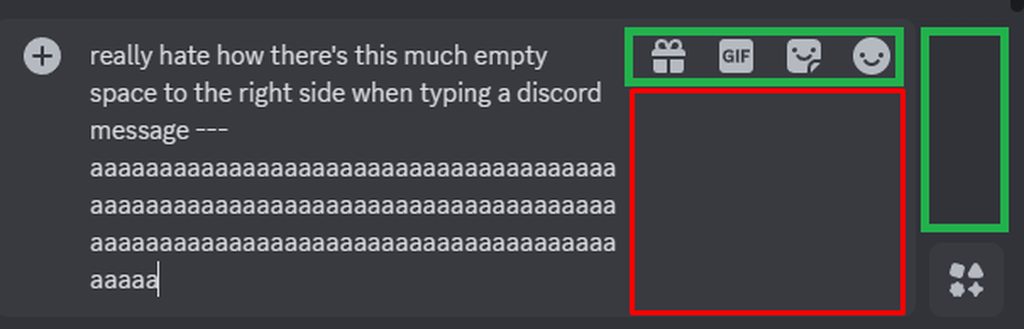
https://imgur.com/a/t73OicC (taken from https://www.reddit.com/r/discordapp/comments/1fgrmsv/comment/ln48ey7/?utm_name=web3xcss ) can we have a css snippet that moves the chatbar buttons to that green space?
Reddit
Explore this conversation and more from the discordapp community
plain kelp
Isn't that literally what float: right is meant to solve
 wooden stag
how to style child element based on his parent or the child element sibling
pure cairn
wooden stag
how to style child element based on his parent or the child element sibling
I got lost after the "or"
wooden stag
fossil adder
Based on its parent... what?
same as :has but instead of checking the children, it checks the parent
fossil adder
Like style a child if it has a certain parent?
wooden stag
fossil adder
Like style a child if it has a certain parent?
yup that
pure cairn
can't you just... use the parent selector?
fossil adder
Just do parent child.
 pure cairn
if you want to select child1 from parent1 but not parent2
use parent1 child1 and it will not select parent2 child1
fossil adder
p div will style all divs that have a p somewhere in their parent chain.
wooden stag
thank you guys, that what I needed
pure cairn

 solid ore
wooden stag
how to style child element based on his parent or the child element sibling
solid ore
wooden stag
how to style child element based on his parent or the child element sibling
to check child element sibling u can do :has(+ sibling) or :has(~ sibling)
wooden stag
solid ore
to check child element sibling u can do :has(+ sibling) or :has(~ sibling)
is there differences between the two?
solid ore
wooden stag
is there differences between the two?
- is specifically the next following sibling, ~ is any following sibling
wooden stag
ty
 lyric hawk
Is there a way to hide this code
.cozy_f5c119 .headerText_f47574 > .username_d30d99::before {
  content: '';
  width: calc(100% + 10px);
  height: 100%;
  border-radius: 5px;
  background-color: currentColor;
  opacity: 0.2;
  position: absolute;
  top: 0;
  z-index: -1;
  left: -5px;
}
.cozy_f5c119 .headerText_f47574 > .username_d30d99 {
  margin-left: 5px;
}
from like dm's, but work everywhere else?
pure cairn
lyric hawk
Is there a way to hide this code
```
.cozy_f5c119 .headerText_f47574 > .username...
add
.content_a4d4d9:not(:has([d^="M23 12.38c-.02.38-.45.58-.78.4a6.97"]))```
at the beginningit checks for the "show user profile" icon, which is only available for DMs
 supple tartan
I saw this screenshot in a css snippet. Is this button-ification made officially by discord or is it from a theme?

ah, so it will come eventually, right?
btw what is this "refresh experiment"? I saw this refresh thing mentioned a lot but idk what it is
it's so ugly

and if it goes live, it will kill my precious theme

well this looks cool, and that feature should have been added years ago
THANKS GOD
 iron smelt
supple tartan
and if it goes live, it will kill my precious theme
iron smelt
supple tartan
and if it goes live, it will kill my precious theme
that’s why i pray to god that it’s an optional thing
hazy tinsel
pure cairn
it checks for the "show user profile" icon, which is only available for DMs
1 question what’s the zzz thing
is that just as a decoration or something
hazy tinsel
iron smelt
that’s why i pray to god that it’s an optional thing
man i remember when we could revert the profile changes and then they disabled that experiment and forced it upon everyone
iron smelt
rate this snippet, it does it exact opposite of what my last [snippet](#🎨-css-snippets message) does
 echo frost
looks kinda weird all green
iron smelt
okau imma drop it, since you like it so much
pure cairn
hazy tinsel
1 question what’s the zzz thing
Vp vencordtoolbox
 cloud joltBOT
pure cairn
Vp vencordtoolbox
cloud joltBOT
pure cairn
Vp vencordtoolbox
Adds a button next to the inbox button in the channel header that houses Vencord quick actions
Authors
Vee, AutumnVN
pure cairn
np
hazy tinsel
iron smelt
rate this snippet, it does it exact opposite of what my last [snippet](https://c...
it’s uh way too green
😭
i like the older version more the add friend button is unique to green making it easier to navigate to it
you should make the blocked button a reddish color
 supple lodge
(with midnight Catpuccin theme) How do I make the emoji picker on hover use the same shaking effect as gif picker hover and sticker picker hover, instead of the 360 spin that the emoji picker hover does?
(Tell me if this isn't clear lol)
pure cairn
supple lodge
(with midnight Catpuccin theme) How do I make the `emoji picker on hover` use th...
I believe you would have to find the emoji picker hover and gif/sticker picker hover classes and transform: in your current theme, then open the quickcss editor and apply the same transform: to the emoji one
Maybe adding an !important to override the base theme, in case it doesn't work
 grand surge
i'm trying to make the background of the settings transparent (i.e scrolling settings menu & menu content intact, but overlay bg removed) but i can't figure out how to only remove the coloured part and not everything in the settings :c
echo frost
grand surge
i'm trying to make the background of the settings transparent (i.e scrolling set...
background-color: transparent;
supple lodge
pure cairn
I believe you would have to find the `emoji picker hover` and `gif/sticker picke...
Yeah I tried that before and it makes the emoji picker go bigger for some reason
supple lodge
pure cairn
Could you send the theme link?
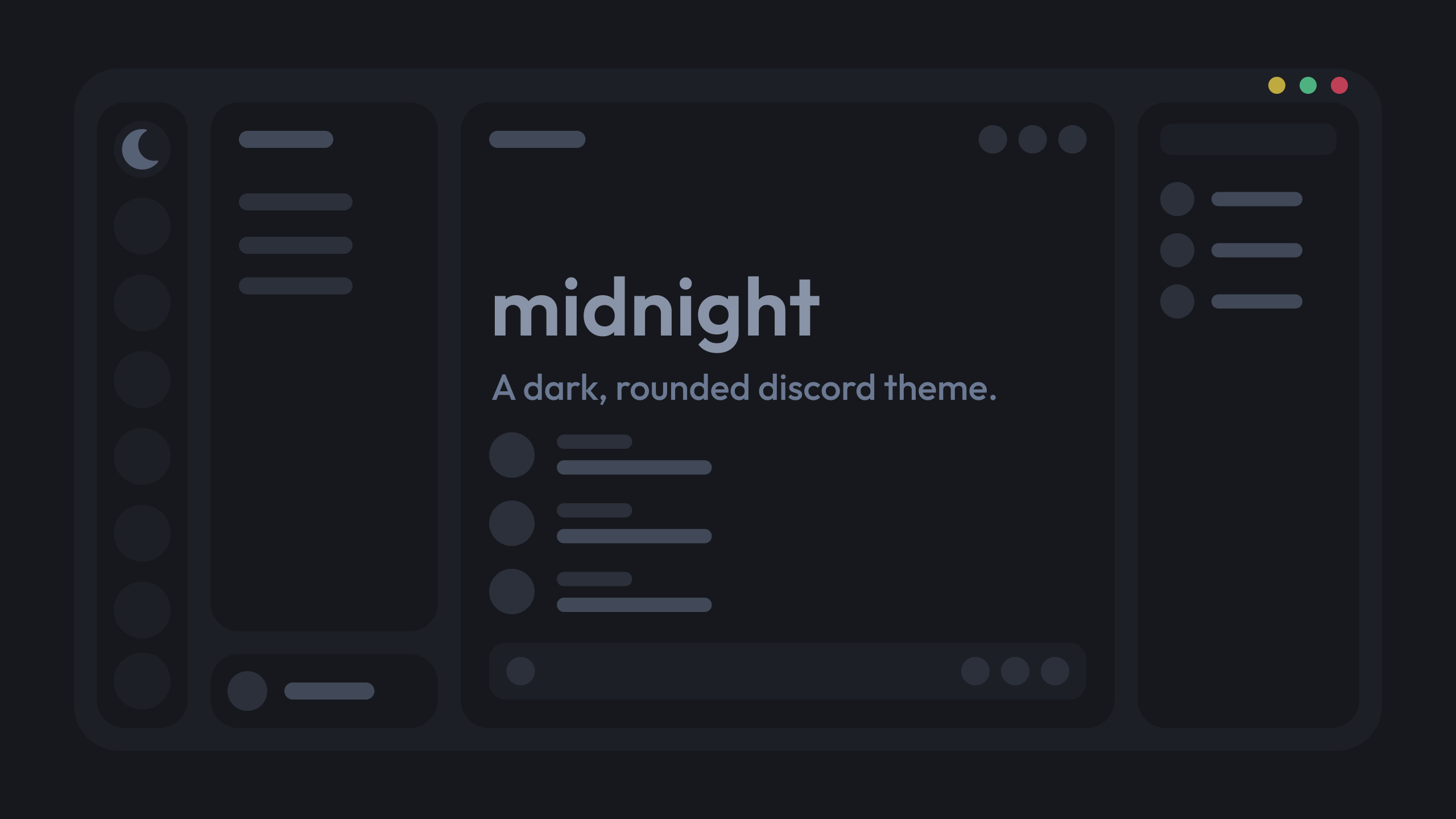
https://github.com/refact0r/midnight-discord/blob/master/flavors/midnight-catppuccin-mocha.theme.css
GitHub
A dark, rounded discord theme. Contribute to refact0r/midnight-discord development by creating an account on GitHub.
supple lodge
Yeah I was confused, the catpuccin is just the color scheme, my bad
pure cairn
No problem
Do you have any other css snippets in your quickcss that could interfere with the theme behaviour?
because I cannot find any animations related to the sticker and gif picker button
.emojiButton_d0696b .contents_dd4f85 {
  transition: whatever the other css does;
}```no, the theme midnight by default makes the emoji picker do a 360
pure cairn
pure cairn
because I cannot find any animations related to the sticker and gif picker butto...
^
And there were no shaking animations when I tried it on my device
 oak plover
the lottie icons animate with js and don't have a name to go with them
you'd need to remake the animation with css keyframes if that's what you're trying to get
supple lodge
idk how to re create the shaking animation from gif picker to put it on emoji picker tho X)
supple lodge
no, when you hover the gif button in the chat box, it shakes
sorry for the confusion
pure cairn
it doesn't on stock midnight catppuccin mocha
supple lodge
oak plover
you'd need to remake the animation with css keyframes if that's what you're tryi...
idk how that works sadly :/
pure cairn
I can guarantee you that
supple lodge
pure cairn
it doesn't on stock midnight catppuccin mocha
no the shaking effect is in core discord
 supple lodge
I have no idea, I just have it
 oak plover
oh revert icons doesn't have animated icons
they were introduced with the latest icon pack
oak plover
.spriteContainer_d91a75 {
  transform: scale(1) !important;
}
.sprite_d91a75 {
  transition: opacity .3s ease;
}
.emojiButton_d91a75:hover .sprite_d91a75 {
  animation: gifLottieRemake 1s ease;
}

@keyframes gifLottieRemake {
  33% {
    transform: rotate(10deg);
  }
  66% {
    transform: rotate(-10deg);
  }
  80% {
    transform: none;
  }
}
pretty quickly animated and not perfect but this somewhat does it
pure cairn
it's very similar
supple lodge
oak plover
```css
.spriteContainer_d91a75 {
transform: scale(1) !important;
}
.sprite_d91...
oooh nice! thanks a lot :)
oak plover
np
supple lodge
oak plover
```css
.spriteContainer_d91a75 {
transform: scale(1) !important;
}
.sprite_d91...
oh well.. it doesn't work with Midnight x)
oak plover
raaaaGHH let me check midnight give me a minute
supple lodge
pure cairn
add an !important
I added !important on every line, but didn't work XD
pure cairn
.emojiButton_d91a75:hover .sprite_d91a75 {
  animation: gifLottieRemake 1s ease infinite !important;
}```that's odd
supple lodge
this is what it does
 oak plover
ah i gotta remove the "infinite" too
forgot to do that
let me see what does the spin
.spriteContainer_d91a75 {
  transform: scale(1) !important;
}
.emojiButton_d0696b .contents_dd4f85 {
  transition: unset !important;
}
.sprite_d91a75 {
  transition: opacity .3s ease;
}
.emojiButton_d91a75:hover .sprite_d91a75 {
  animation: gifLottieRemake 1s ease;
}

@keyframes gifLottieRemake {
  33% {
    transform: rotate(10deg);
  }
  66% {
    transform: rotate(-10deg);
  }
  80% {
    transform: none;
  }
}
okay try this instead
supple lodge
oak plover
```css
.spriteContainer_d91a75 {
transform: scale(1) !important;
}
.emojiButto...
yeaah works now! Thanks a lot ^^
iron smelt
okai unlesss its just me somthinghere broke and i cant figure out what
/*---DM Icon Grid---*/
:root {
  --dm-columns: 4;
}

[class^=privateChannels_] [class^=content_] {
  display: grid;
  height: unset !important;
  grid-template-columns: repeat(var(--dm-columns), 1fr);

  &> * {
      overflow: hidden;
      grid-column: 1 / calc(var(--dm-columns) + 1);
  }
}

[class^=channel_]:has(
  [href="/channels/@me"],
  [href="/library"],
  [href="/shop"],
  [href="/store"],
  [href="/family-center"],
  [href="/message-requests"]
) {
  grid-column: auto;

  [class*="linkButton"] {
      padding-right: 0;
  }

  [class*="link_"] {
      justify-content: center;
      gap: 0;
  }

  [class*="avatar_"] {
      margin: 0;
      width: unset;
  }

  [class*="avatarWithText_"] {
      flex-grow: unset;
  }

  [class*="content_"] {
      display: none;
  }
}
 echo frost
i don't have message requests so it works for me
 iron smelt
this^
iron smelt
I don’t know and I’m getting frustrated with something else so I’ll do this in the morning
 tardy flower
I'm a complete CSS beginner and everything
I was wondering how I should go about removing a div, specifically container_da1432
It's not a major annoyance, just bulky and in the way ig
 pure cairn
tardy flower
I'm a complete CSS beginner and everything
I was wondering how I should go about...
pure cairn
tardy flower
I'm a complete CSS beginner and everything
I was wondering how I should go about...
.container_da1432 {
  display: none;
}```oh
fair enough lmfao I did that earlier and for some reason it didn't wanna work
but yeah
ty!
pure cairn
You could use a more robust selector as well, but you would have to explore the element html tree a bit to find unique classes
iron smelt
yeah [class^=container_] is too broad of a selector
pure cairn
tardy flower
I'm a complete CSS beginner and everything
I was wondering how I should go about...
If the image on the right has /assets/whatever in its URL, you could use
[class^=container_]:has([src$="/assets/whatever"]) {
  display: none;
}```I despise writing css on mobile
It's so clunky
yeah, it does have /assets/whatever
[class^=container_]:has([src$="/assets/7453a66082def5df30a6.png"]) {
  display: none;
}```do the asset names not change?
 worldly moss
rarely
echo frost
more or less often than class changes
pure cairn
Less
oak plover
iron smelt
okai unlesss its just me somthinghere broke and i cant figure out what
```css
/*...
Might be wrong but it could have to do with the friend container class that the friends button got placed in yesterday
 stone garden
Hello, is there a way to hide this black circle when hovering the mouse over the avatar? Thanks.
 pure cairn
stone garden
Hello, is there a way to hide this black circle when hovering the mouse over the...
stone garden
pure cairn
https://discord.com/channels/1015060230222131221/1134844326933954622/12820007700...
pure cairn
stone garden
Hello, is there a way to hide this black circle when hovering the mouse over the...
stone garden
pure cairn
https://discord.com/channels/1015060230222131221/1134844326933954622/12820007700...
thanks
pure cairn

iron smelt
iron smelt
okai unlesss its just me somthinghere broke and i cant figure out what
```css
/*...
this is a different kinda of fix ig

yeah that fixxed it


thanks
iron smelt
hazy tinsel
you should make the blocked button a reddish color
I was thinking about this idea
Dm me
I wanna shoot more ideas by you and I don’t wanna clog up this channel
 sharp nova
in css-snippets they fixed it by adding this
div:has(li) {
  grid-column: auto;
}
under the &> * {...}
which might be more update-proof
iron smelt
sharp nova
in css-snippets they fixed it by adding this
```css
div:has(li) {
grid-colum...
ohh i didn’t know this existed
#1230657631543234560 message
be honest I don’t even remember where I got it, that’s why I came here trying to fix it
 warm monolith
Hey, so I want to change these indicators


The issue I'm having is that I can't seem to distinguish them from eachother
Also hovering creates the middle one which is annoying
I can separate the selected server indicator
But not hovering and unread messages
The reason I want to target this is because I wanted to change the unread message indicator but remove all the other pills, since I have different indicators for those anyway
If anyone has any idea to only target the unread message indicator, separated from the server hovered indicator that'd be God tier (I think there's JS animating the unread indicators though when unhovered, making them appear for a second when they shouldn't)
 clear siren
I've played with them before, but because their height is set by a js animation that has multiple decimals of precision it can cause lags when you write a selector targeting them by their height..
warm monolith
Yeah, see the height is the only way I could think to differentiate them but I dunno
Can you target things based on their height? I noticed [style=] isn't a thing
I only need to target unread indicators, anything else can be removed since I have alternates already implemented
clear siren
[style=] is definitely a thing
warm monolith
Hmm
plain kelp
But that matches the style attribute, not the computed style values
warm monolith
Oh shit that does work
Nice, cheers dude
Since I only need unread indicators to be visible I should be able to just make the others display: none
clear siren
yeah
warm monolith
Stupid Discord JS animations confusing me
clear siren
yeah they're the worst and there is no other attribute to select unread servers
and using the style*=height attribute causes a lot of waste and can easily make your discord lag
however, when there is no pill, the .item is not there
so you can select the servers having the .item and do :not(:hover) or something
and the selected server has a .selected class on the servericon
do with that what you will :D
warm monolith
Annoyingly there still has to be a compromise doing it this way since the unread messages still change on hover, thanks Discord :^)
clear siren
yeah
warm monolith
Well its either don't have the custom message indicator or have it vanish on hover
Hmmmmmm
Otherwise though this does let me select it atleast if I do want to make it
I think I'll figure out a way to make them opt in/out in the settings I'll provide in the import css
Since there are some issues with how Discord animates them
But they are fine when left alone
tardy flower
bwah what do I do with this lmfao, I'm trying to remove the Close DM/Leave Group button
I've tried aria and div class but I'm guessing I did it wrong

 stable compass
tardy flower
bwah what do I do with this lmfao, I'm trying to remove the Close DM/Leave Group...
stable compass
tardy flower
bwah what do I do with this lmfao, I'm trying to remove the Close DM/Leave Group...
.closeButton_c91bad {
display: none;
}```yeh already tried that and it didn't wanna work lol =w=
hazy tinsel
[class*=channel] [class*=closeButton][aria-label="Close DM"],[aria-label="Leave Group"] {
    display: none !important;
}
hides dm close button + gc close button
@tardy flowerhere u go
pure cairn
so many wildcard selectors + aria label
[class^=privateChannels_] > [class^=scroller_] [class^=content_] > [class^=channel_] [class^=interactive_] > div:has([d^="M17.3 18.7a1 1 0 0 0 1.4-1.4L13.42 "]) {
  display: none;
}```svg selectors my beloved
pure cairn
pure cairn
hazy tinsel
```css
[class*=channel] [class*=closeButton][aria-label="Close DM"],[aria-label=...
Also I'm pretty sure this works but not as you think
Because if you put a comma after the first aria label without nesting, the 2nd selector is just going to be [aria-label="Leave Group"]
[class*=channel] [class*=closeButton] {
  [aria-label="Close DM"],
  [aria-label="Leave Group"] {
    display: none !important;
  }
}```well you know more in that field either way it still works

for both dms, and gcs
pure cairn
Not languageproof
hazy tinsel
pure cairn
Not languageproof
ehhh it’s not meant for all users
pure cairn
How would you know they were using discord with English language?

You don't
We've seen people using Japanese here already, so I wouldn't rely too much on aria-labels
hazy tinsel
pure cairn
How would you know they were using discord with English language?
thats not my problem
hazy tinsel
this is only if you’re releasing it publicly to which it becomes a concern
well it’s not really a snippet more of a solution to one persons problem not a global
if you plan on posting it though that’s a different story
hazy tinsel
but as of rn this is resolving ones issues
made the assumption that they spoke English from their bio, the way their message was it’s quite obvious
might not be their first but they have an understanding of it
it’s unnecessary to do all those other things and it’s a time waster too to optimize it for all languages yes it’s better but still
most people you encounter on Discord know the english language there’s only a small percentage that are unfamiliar with it so really it’s not something to have concern of to begin with
pure cairn
And I agree with you on that one
But do all of them use English as their discord language? Nope
I'm just saying, if there's a way to make something more universal, I'd go for it
hazy tinsel
then they shouldn’t be interacting with this channel to begin with
pure cairn
You're free to do what you prefer
hazy tinsel
if they don’t know english because how else are we supposed to resolve their issue
pure cairn
hazy tinsel
then they shouldn’t be interacting with this channel to begin with
??? Why
pure cairn
That's an entirely different thing
hazy tinsel
they’re gonna be using google translate which is inaccurate
pure cairn
With "English as discord language" I mean the software language
hazy tinsel
ehhhh really man that’s such a small percentage
pure cairn
Fair, likewise
echo frost
pure cairn
```css
[class*=channel] [class*=closeButton] {
[aria-label="Close DM"],
[ar...
you should use :is() for things like that btw
echo frost
pure cairn
```css
[class^=privateChannels_] > [class^=scroller_] [class^=content_] > [class...
shouldn't you use something like this
[data-list-item-id^=private-channels-uid_]+[class^=closeButton_] {
  display: none !important;
}```^ I think this one is a bit better
you need !important
 real night
How can I fix spoilered messages from being invisible?
I cant see them ||like this||
Its not that the spoiler color is not there, the actual message isnt there visually, I cant click it, etc. (I also cant tell when someone puts spoiler in there message unless ||test spoiler|| its in the middle of their message)
 pure cairn
echo frost
you should use :is() for things like that btw
pure cairn
echo frost
you should use :is() for things like that btw
I simply rewrote their snippet fixing the 2nd selector
echo frost
real night
How can I fix spoilered messages from being invisible?
I cant see them ||like th...
open devtools (ctrl+shift+i), ctrl+shift+c then click the spoiler and look at the styles for all the elements for it
 real night
echo frost
open devtools (ctrl+shift+i), ctrl+shift+c then click the spoiler and look at th...
real night
echo frost
open devtools (ctrl+shift+i), ctrl+shift+c then click the spoiler and look at th...
What should I be looking for in the styles?
theres this

Local theme & QuickCSS
echo frost
unless you're changing the color of the current spoiler background, it's not that
it could be that though
-# oops meant to reply to #🎨-theme-development message
if you disable quickcss does it work?
if it doesn't, send local theme
otherwise send both
or just send both without testing
@real night ^
pure cairn
echo frost
shouldn't you use something like this
```css
[data-list-item-id^=private-channel...
didn't realize the closeButton was directly after the channel selector
huh
echo frost
it is
but you could also use ~
pure cairn
it doesn't really matter tbh, as there's nothing inbetween, right?
echo frost
no i dont think there can be
pure cairn
also for some reason I thought the [data-list-item-id^=private-channels-uid_] was provided by the ThemeAttributes plugin, so I avoided using it. I should've probably tested without tbh

real night
echo frost
<@549313262538194946> ^
 echo frost
test ||test|| test
real night
I feel like it may not be a theme issue?
Sometimes I can click them and sometimes I cant
like I cant click the one you just sent.
echo frost
why is there a curly bracket here?
and the lines are indented

did you copy it from somewhere?
@real night ^
also unrelated, but use
this link for the image instead of the duckduckgo one https://cdn.donmai.us/original/e5/f0/__sprigatito_and_liko_pokemon_and_2_more_drawn_by_shi_mohaji__e5f0d23bb6e5ba68fd98c1448d526be3.png
ok found out why
real night
Hmm?
real night
echo frost
did you copy it from somewhere?
Probably not, Someone was helping me with this before, But I also didnt make the theme.
Its just a modified version of it.
Though I did change the background colors there.
echo frost
echo frost
why is there a curly bracket here?
and the lines are indented
idk how you got that extra curly bracket, but delete that and then add commas betwen 20% and 0.4 and 16% and 0.6 on bg1 and bg2
real night
This theme is also broken on vesktop for some reason.. 2 reply buttons..
 real night
echo frost
idk how you got that extra curly bracket, but delete that and then add commas be...
real night
echo frost
idk how you got that extra curly bracket, but delete that and then add commas be...
alr
echo frost
real night
This theme is also broken on vesktop for some reason.. 2 reply buttons..
that's a bug with a plugin
searchreply
real night
echo frost
that's a bug with a plugin
Also, Is this only on vesktop?
echo frost
I combined them so you can put them both in the theme
 real night
echo frost
I combined them so you can put them both in the theme
real night
echo frost
I combined them so you can put them both in the theme
The quick css and the theme itself?
echo frost
yeah
real night
oh thanks
real night
echo frost
yeah
background dosent show with it.
echo frost
the image?
real night
yea
echo frost
that's weird
does visiting this link work for you?
https://cdn.donmai.us/original/e5/f0/__sprigatito_and_liko_pokemon_and_2_more_drawn_by_shi_mohaji__e5f0d23bb6e5ba68fd98c1448d526be3.png
 real night
yea
echo frost
that's even weirder huh
what if you replace line 91 with this
--nvbgimg: url("https://external-content.duckduckgo.com/iu/?u=https%3A%2F%2Fcdn.donmai.us%2Foriginal%2Fe5%2Ff0%2F__sprigatito_and_liko_pokemon_and_2_more_drawn_by_shi_mohaji__e5f0d23bb6e5ba68fd98c1448d526be3.png%22);
real night
nope
echo frost
sorry discord messed that up
--nvbgimg: url("https://external-content.duckduckgo.com/iu/?u=https%3A%2F%2Fcdn.donmai.us%2Foriginal%2Fe5%2Ff0%2F__sprigatito_and_liko_pokemon_and_2_more_drawn_by_shi_mohaji__e5f0d23bb6e5ba68fd98c1448d526be3.png");
this?
you should be able to delete quickcss now
real night
mhm
echo frost
does anyone know why the unread button is different in only one server (not vencord)?
(first is weird and only in one server that ik of, 2nd is normal)

 pure cairn
No idea tbh
echo frost
oh i worded that weirdly
it's not weird in vencord
it's weird in another one
 toxic yew
non-community server vs community server
 proper ivy
:root {
  --folder-icon-1: url("");
}

[aria-label="Servers"] {
  & > * {
    --folder-icon: var(--folder-icon-1);
    --position-left: 4px;
    --fill: currentColor;
  }
  [aria-owns^="folder-items-"] > [class^="folderIconWrapper_"] {
    position: relative;
    [class^="closedFolderIconWrapper_"],
    [class^="expandedFolderIconWrapper_"] {
      display: none;
    }
    &::after {
      background-image: var(--folder-icon);
      background-size: cover;
      background-repeat: no-repeat;
      content: "";
      position: absolute;
      top: 12px;
      left: var(--position-left);
      width: 24px;
      height: 24px;

    }
  }
}
is there no way to extract color from folder background as a filter?

 bleak gust
toxic yew
non-community server vs community server
bleak gust
toxic yew
non-community server vs community server
why does that distinction exist
 fathom hedge
bleak gust
why does that distinction exist <:husk:1026532993923293184>
fathom hedge
bleak gust
why does that distinction exist <:husk:1026532993923293184>
non community servers tend to be private servers so where youd probably read every message so I guess it's more obvious there?
other than that no clue
oak plover
The smaller one appears if you have onboarding enabled which there really should only be one variant of those bars
tardy flower
i have
yet another thing
I modified amoled-cord to secondary and tertiary are all black, and not a weird off grey
However, I'd like to have custom border colors for profiles, so that way the user profile doesn't blend into the background if they don't have profile colors


thing is I don't know what to do exactly
grand surge
A while ago someone showed me how to remove the shop tab from the DMs section, I also want to remove the nitro tab now.
I was given this quickCSS:
[class^="channel"] > div > [href="/shop"] {
  display: none !important;
}```
How can I add the element for the nitro tab to it?I already gave you a resource for this
https://codeberg.org/AllPurposeMat/Disblock-Origin
Just go there and search for whatever nitro-related element you'd like hidden
 grand surge
I mean, you did tell me to come here but thanks.
tardy flower
grand surge
I mean, you did tell me to come here but thanks.
I also gave you that already though .w.
supple tartan
hi, i'm trying to make the user popout header a gradient with js, but every time I click on a user profile, I get this error message in the console. I'm not an expert on js, does anyone know how I can fix this?

 tardy flower
atp we just need a snippet help/request channel
toxic yew
supple tartan
hi, i'm trying to make the user popout header a gradient with js, but every time...
just ignore it
u are caring about something not even related or caused by your code
grand surge
tardy flower
I also gave you that already though .w.
Either way it works. Thank you.
supple tartan
toxic yew
just ignore it
u are caring about something not even related or caused by your c...
ah lol, thanks. anyways, the code just works one time, if I open another user profile, it doesn't change. If the warning message has nothing to do, then how can I make it work every time I open a user profile?
 lost plume
throw it in a setInterval probably, or make it execute when you open a profile
 delicate adder
I need 2022 client theme please.... 🙏
 native topaz
does theme attributes have anything for the server icons on the server bar on the left of the client to determine if the server is public or private? cause then you can add cool stuff like locks to private servers and globes to public ones
pure cairn
I think you can just select their svg path?
 soft fjord
supple tartan
hi, i'm trying to make the user popout header a gradient with js, but every time...
soft fjord
supple tartan
hi, i'm trying to make the user popout header a gradient with js, but every time...
can you send that user pop out css?
Looks clean asf
supple tartan
soft fjord
Looks clean asf
jsjs thanks, it's part of a theme I'm working on, but yeah, it can be used separately.
notice that only changes non-nitro profiles, and the gradient on the header is something I'm still working on
/* generic profile popout */
div[class*="userProfileOuterUnthemed_"] {
    background: rgba(0, 0, 0, 0);
}
div[class*="SizeInnerThemed_"] {
    background: #00000050;
    backdrop-filter: blur(80px);
}
div[class*="banner_"]::before {
    content: none !important;
}
damn
how would i get it on every profile?
 soft fjord
😔
supple tartan
bc this pop out theme is dark (like all non-nitro users) and nitro profiles can be light mode, meaning that those change the font and role colors
so it requires more work, it's possible, but personally I like to see the themed nitro profiles
 hazy tinsel
how would i change the color of the screenshare button?

im trying to change the color
 hazy tinsel
thanks
yeah most definitely im learning as time goes on its definitely different than most languages i know i don't really use it ever besides disabling certain elements
and moving certain things but i noticed i don't even call classes properly
 half crystal
hazy tinsel
how would i change the color of the screenshare button?
half crystal
hazy tinsel
how would i change the color of the screenshare button?
Bro how and why the hell do you have so many buttons
plain kelp
It is because they do not feel fear
hazy tinsel
half crystal
Bro how and why the hell do you have so many buttons
most of the buttons are tied to a panel which is not available publicly it’s privately owned and privately developed i can’t really disclose
here’s an idea:
that each button has its own functionality and it’s based off of the icon it has
half crystal
hazy tinsel
most of the buttons are tied to a panel which is not available publicly it’s pri...
how ominous
hazy tinsel
half crystal
how ominous
not necessarily no the first button literally rotates me in calls
it’s nothing harmful
hazy tinsel
No rotation meaning it goes through the selected server list, selected queries and finds me a call that matches the criteria that i set
and then joins that call automatically rather than me looking for another call
and i have options to automatically mute, start a stream etc
half crystal
hazy tinsel
No rotation meaning it goes through the selected server list, selected queries a...
So you can just VC gamble?
hazy tinsel
half crystal
So you can just VC gamble?
yeah pretty much i suppose
there’s other buttons, too but i can’t go in to detail about their functionality because that violates their terms here
half crystal
hazy tinsel
there’s other buttons, too but i can’t go in to detail about their functionality...
Their terms!? Who the hell privates what I'm expecting is a Vencord Plugin?
hazy tinsel
half crystal
Their terms!? Who the hell privates what I'm expecting is a Vencord Plugin?
idk really you’d have to the owner they don’t allow certain plugins because of weird people. as for the buttons, it’s not detailed mainly because that violates the terms here i’m not trying to get banned
tardy flower
tardy flower
i have
yet another thing
I modified amoled-cord to secondary and tertiary are al...
^
hazy tinsel
tardy flower
^
oh you want a border color for the
profile so it doesn’t mix in with background
tardy flower
hazy tinsel
oh you want a border color for the
profile so it doesn’t mix in with background
Yeah
lol I just suck at stuff
Trying to learn things more
pure cairn
You could select the outermost element and apply a border to it
Dunno how you would go about the color
 azure galleon
Heya, sorry I hate asking for help but… I'm trying to create a CSS snippet and I just can't find what I'm looking to change despite going at it for more than a few hours now (even making use of advice I sought in the general support channel).
I want to remove specifically the section for commonly used reactions that are shown when you mouse over a message. But I can't find where/how to achieve this.
Here's an example:

Don't suppose anyone would be able to point me in the right direction?
It's just an experiment...
Oh gosh I thought it was but couldn't find it when I looked. So many hours on this...
Thank you!
 tardy sage
is there a way to give all profiles an themed thing to a color variant/ gradient of their pfp, modview has exactly this but idk how to transfer that to the profiles


 echo frost
🤪
iron smelt
how would I go about getting an old Discord icon?
I wanna change the thread icon back to the old one
 glad urchin
clear siren
channellist now resizable and top bars changed
glad urchin
clear siren
channellist now resizable and top bars changed
wasnt channelist resizeable for a few weeks or was i lucky
clear siren
I dunno I never noticed it being resizable
glad urchin
HUSK

broke my 1000~ lines of patches
i need to figure out some new location instead of another topbar
its collapsible...rip to all those snippets
 glad urchin
fixed serverlist with grid stuff, made the buttons to match serverlist and the other 2 right buttons to fit toolbar
 echo frost
visual refresh isn't too terrible now
mostly
this cursor margin is messed up
avatars are huge in the chat for some reason?
they forgot to add hover effects to these buttons
the user panel is still pretty fucked up
also i don't really like the big bar at the top, but it is kinda coolish


oh darker is a bit better

oh also folders are kinda fucked up
 plain kelp
Yeah those avatars are way too big, and there's too much blank space in channel list
And yeah that top bar is just a waste of space
echo frost
plain kelp
Yeah those avatars are way too big, and there's too much blank space in channel ...
channel list?
plain kelp
Left sidebar
Looks like there's about twice as much space between channel names as there are in current
 plain kelp
I thought you were saying this person who is typing is kinda weird, but I guess both are true
echo frost
 echo frost
plain kelp
I thought you were saying this person *who* is typing is kinda weird, but I gues...
echo frost
plain kelp
I thought you were saying this person *who* is typing is kinda weird, but I gues...
😂
(i can't react, because then smiley dealer doesn't traumatize us)
echo frost
wtf these colors are hardcoded

fix for buttons
[data-sidebar-collapsed]>[role=button] {
  cursor: pointer;
  color: var(--interactive-normal);
  path {
    fill: currentColor;
  }
  &:hover {
    color: var(--interactive-hover);
  }
}```but discord will fix it eventually
I kinda wish rhis button showed when it's not collapsed to easily collapse it

wtf why is darker so light here

lmao wtf is light mode
 plain kelp
Light mode has always been eye-hurt mode, but yeah, lol
echo frost
but it's grey now
plain kelp
Pink debug mode is better
echo frost
huh
 mint kiln
is there a way to kill the border on the right side

this ss might be better

you see how the server list can infact go until the edge
but the member list got cut off
mint kiln
i just updated
an₫christ
visual refresh got fucked hard
my horizontal server list is broken .
 mint kiln
    display:none;
}```kill the new bar
it also kills inbox and help button but who the hell uses those
i guess i wont be having horizontal server list anymore

https://discordstyles.github.io/HorizontalServerList/dist/HorizontalServerList.css
this shit is too complex for me
either that or disable visual refresh
oh hey normal discord looks like old visual refresh now
hazy tinsel
echo frost
also this person is typing is kinda weird
when you’re a full time discord user, and ignore flaws it’s like apple fanboys saying the latest iphone is good
the visual refresh is awful there’s been good ui refreshes and stuff but this is just awful in comparison to everything else they’ve made
discord lowered their budget they’re trying to make as much as possible they’re planning on going public in the stock market cause they’re greedy for money that’s why they keep creating decorations, and adding new stuff for nitro users it’s all just greed
pure greed and shit ui design.
plain kelp
When have their ui refreshes ever been good?
 spare mural
always.
clear siren
I like the refresh for the most part
 simple kiln

 tardy hemlock
echo frost
you can resize it though
tardy hemlock
echo frost
you can resize it though
I changed that for myself a long time ago.
 coarse belfry
echo frost
this cursor margin is messed up
avatars are huge in the chat for some reason?
th...
coarse belfry
echo frost
this cursor margin is messed up
avatars are huge in the chat for some reason?
th...
is this a recreation of the visual refresh in css?
or is this the real thing
clear siren
coarse belfry
is this a recreation of the visual refresh in css?
or is this the real thing
real thing
tardy hemlock
should i be lucky or unlucky that i haven't gotten the change
maybe i only got partial
half crystal
i hate the pins button with all of my heart
had to write twice the amount of code i did for all the others just to get this stupid button to not have a panic attack if there is a new pin
everything in red is what i had to add JUST FOR THE PINS BUTTON

 tardy hemlock
what is the experiment for the redesign
half crystal
tardy hemlock
what is the experiment for the redesign
its like uhh desktop_refresh or some shit
tardy hemlock
oh yeah that definitely broke things on my theme
but it worked
it breaks the folders plugin
great
half crystal
tardy hemlock
oh yeah that definitely broke things on my theme
same here
 tardy hemlock
this will break so many themes
half crystal
tardy hemlock
this will break so many themes
i cant wait
tardy hemlock
might as well start making one with this redesign active before they invetabily force this
tardy hemlock
i will fight this redesign
 half crystal
trying to amek the sidebar go over this thinger at the top and of course, setting overflow to visible fucks it all

 tardy hemlock
half crystal
trying to amek the sidebar go over this thinger at the top and of course, settin...
tardy hemlock
half crystal
trying to amek the sidebar go over this thinger at the top and of course, settin...
try this:
.visual-refresh .bar_b66418 {
    width: calc(var(--custom-guild-sidebar-width) + 1px);
    background-color: var(--bg-overlay-2,var(--background-secondary));
    z-index: 1;
}
.visual-refresh .sidebar_b66418 {
    margin: 0px
}
.visual-refresh .center_b66418 {
    display: none;
}
.visual-refresh .sidebar_a4d4d9 {
    padding-top: 40px;
}
.visual-refresh .content_a4d4d9 {
    border-top-left-radius: 0px;
}
.container_a4d4d9 {
    margin-top: -40px;
}
still need to make it work on collapse but so far it's workin
i can live with this
 echo frost
hazy tinsel
the visual refresh is awful there’s been good ui refreshes and stuff but this is...
echo frost
hazy tinsel
the visual refresh is awful there’s been good ui refreshes and stuff but this is...
that seems harsh
in it's current state, I'd be extremely annoyed if it rolled out now
but I think it has a few nice things, and might have a bit of potential
 vestal field
it has some nice functionality but visually its straight up worse
vestal field
mainly i have issues with the top bar and the floating user profile
 glacial citrus
!remind saturday fix better folders visual refresh
 sturdy trenchBOT
Alright @glacial citrus, in 4 days: fix better folders visual refresh
 tender hedge
the floating user doesnt make sense because nothing goes behind it
tender hedge
glacial citrus
!remind saturday fix better folders visual refresh
also ive already done this myself
vestal field
yeah it should just be flat like the rest of the ui
glacial citrus
tender hedge
also ive already done this myself
css or changing the plugin
glacial citrus
send
tender hedge
its with the weird extending background right?
glacial citrus
curious how
the folder side bar should be on the right side, not the left

didnt think that would be possible with css
glacial citrus
oh, i use this css snippet for that
tender hedge
but im sure i can somehow figure out a way to move it
tender hedge
well not really broken
tardy hemlock
well things that were prefectly fine now are visually annoying
glacial citrus
tender hedge
i thought you meant the backrounds of expanded folders
.expandedFolderIconWrapper_bc7085 > svg:has(>path[d="M2 5a3 3 0 0 1 3-3h3.93a2 2 0 0 1 1.66.9L12 5h7a3 3 0 0 1 3 3v11a3 3 0 0 1-3 3H5a3 3 0 0 1-3-3V5Z"]) {
    scale: 10;
}
.expandedFolderIconWrapper_bc7085:not(:has([class^="pendingIcon"]))::after,
.closedFolderIconWrapper_bc7085::after {
    content: "";
    background-color: #fff;
    width: 24px;
    height: 24px;
    position: absolute;
    clip-path: path("M20 7H12L10.553 5.106C10.214 4.428 9.521 4 8.764 4H3C2.447 4 2 4.447 2 5V19C2 20.104 2.895 21 4 21H20C21.104 21 22 20.104 22 19V9C22 7.896 21.104 7 20 7Z");
}
.closedFolderIconWrapper_bc7085 > .guildIcon_bc7085 {
    opacity: .5;
    filter: blur(2px);
}
.theme-dark .folder_bc7085[aria-expanded="false"] {
    background-color: #474747;
}
not sure how good this is
had it in my quickcss for a long time
tender hedge
and its an experiment so yeah its gonna be buggy in some way
tender hedge
glacial citrus
```css
.expandedFolderIconWrapper_bc7085 > svg:has(>path[d="M2 5a3 3 0 0 1 3-3h3...
jesus thats long
im pretty sure i fixed that with just 1 line of css
tardy hemlock
also i feel like the refresh messed with the fonts in a way that made them more annoying
i just went back to the theme i was already using
glacial citrus
tender hedge
im pretty sure i fixed that with just 1 line of css
idk what yours does, but this just does this to the folders

 tender hedge
disable the experiment then
tardy hemlock
i did
tender hedge
glacial citrus
idk what yours does, but this just does this to the folders
oh mine fixes the expanded folder background being long and weird
like the line that goes behind the servers in the expanded folder
glacial citrus
do i see it?
 tender hedge
yeah the bottom of the backround isnt supposed to extend that far
[id*=folder-items] {
height: auto!important;
padding-bottom: 5px;
}
that line should fix it
it should also be alot more noticable with folders with more servers
unless they've already fixed this issue
 paper vine
I need help with my theme please
So i have my background all blacked out but certain parts of my theme still have grey as the background (behinf the discover icon on the bottom left and also the activity icon in chat)
I did not make the theme myself i took a online theme but changed the colors myself. I still have that problem tho
My spotify player also shows grey when i want it to use my custom colour
echo frost
how scuffed is this
I can't figure out a way to change the text and make the width fit to the new text


test <@&1026504932959977532>
grand surge
is this the most efficient way to do this? i know like next to nothing about css
 grand surge
oh ok yeah thank you that is the whole snippet
tardy hemlock
echo frost
how scuffed is this
I can't figure out a way to change the text and make the wid...
If you’re on the redesign just add .visual-refresh to the start of the path you’re trying to change
bleak gust
tardy hemlock
If you’re on the redesign just add ``.visual-refresh`` to the start of the path ...
it's not _ it's -
tardy flower
looking to remove searchBar_f0963d
uhh

nvm forgot i toggled quickCSS off hkgjhfdkgjdfgkj
pure cairn
Lol
tardy flower
a few thingies
how in the world do I make the flex extend all the way, and also, is there a way to move the refresh inbox back to the toolbar instead of the refresh bar
I only need one bar lol

 slim lantern
When I have a quest pop up there's something that seems to hide the items on the left side of Discord, what should I look for to fix it?
 pure cairn
probably a selector in your theme that is targeting an nth-child() of the channel list
glad urchin
did they just remove the topbar again....
wait this is so different
header is smaller, scrollbar on textinput
 glacial citrus
glad urchin
header is smaller, scrollbar on textinput
glacial citrus
glad urchin
header is smaller, scrollbar on textinput
What are you using to make things private
I'm curious
plain kelp
72470 pings? How
glad urchin
glacial citrus
What are you using to make things private
demonstration, equicor
also found where it went, it got merged with discord titlebar
 onyx mesa
anyone know what theme this is, or css?

 smoky fog
onyx mesa
anyone know what theme this is, or css?
smoky fog
onyx mesa
anyone know what theme this is, or css?
#1275515434786885675 message this one ig
tardy flower
was going through some CSS (dev'd by discord) and found this
lol what teh fock of a value is this

must be using click and drag for editors or something idk
which would explain why discord is so janky, if they do
also, a new development
favorites got its own button now ig
 plain kelp
tardy flower
was going through some CSS (dev'd by discord) and found this
lol what teh fock o...
plain kelp
tardy flower
was going through some CSS (dev'd by discord) and found this
lol what teh fock o...
That's 21/22
Probably they use scss or some other preprocessor
They clearly use some preprocessor for css modules anyway
tardy flower
fair
onyx mesa
smoky fog
https://discord.com/channels/1015060230222131221/1275515434786885675/12807225857...
yes, yes, thank you
 torn zinc
slim lantern
When I have a quest pop up there's something that seems to hide the items on the...
torn zinc
slim lantern
When I have a quest pop up there's something that seems to hide the items on the...

slim lantern
torn zinc
<:puppy_wave:1259889981489545216>
Hihi
pure cairn
slim lantern
Hihi
Did you manage to find a solution to your issue btw?
 quasi marten
Cross posting from #🧩-plugin-development message
Are there any accessibility plugins i can look at to see how they are structured? If not, i can deal with seeing standard vc plugins. my idea is a font switcher plugin
pure cairn
Kinda pointless to make a plugin for something as easy as a font switcher tbh
css works just fine
smoky fog
is there anyway to hide this emote
 iron smelt
change this experiment to Not Eligible
or use the CSS snippet - #🎨-css-snippets message
 smoky fog
ah tyvm!
spare mural
plain kelp
Probably they use scss or some other preprocessor
i really do wonder if they use like tailwind, scss or sass or something
echo frost
how would they use tailwind for this
spare mural
echo frost
how would they use tailwind for this
installing tailwind and then just using normal css 
 brave inlet
Hi
can you help me?
I also want to disable suggested channels
hazy tinsel
brave inlet
Hi
can you help me?
I also want to disable suggested channels
this works pretty sure for me it lagged my client badly maybe cause of my transparent theme i’m not entirely sure
tardy flower
Looking for a way to always show the server banner (like the old snippet used to do) in the refresh UI... although with minimal casualties
#🎨-theme-development message
For starters I don't know how to fix or remove the stupid gradient

yes, I removed the scrollbar
 tardy flower
also apparently I have a scrollbar in profile DM box so thats something I'll do rq ig

so aparently it's scrollableContainer_d0696b
orr not
two things I need help with dangit

atp i should make a todo list
looking specifically to change the SVG path because I have a plugin that shows typing and swaps the svg out, so conventional methods don't just work

GitHub
The other cutest Discord client mod. Contribute to Equicord/Equicord development by creating an account on GitHub.
eg swaphomeicon by nvhhr won't work
anyway I think thats enough of my
rants
tender hedge
tardy flower
[class*=bannerImage]:before{
   display: none
}``` this worksAlright so the todo (for refresh) is..
- Always visible server banner
- hide profile DM textbox scrollbar
- custom image compatible with homeTyping
andddd - find out how to get the stupid primary color from non-nitro profiles so I can use it as a border color with this code..
.biteSizeOuter_c69a7b.userProfileOuterUnthemed_c69a7b {
  border: 2px solid;
  border-color: #ffffff;
}
.fullSizeOuter_c69a7b.userProfileOuterUnthemed_c69a7b {
  border: 2px solid;
  border-color: #ffffff;
}
fun fact, nitro profiles are background and not border
it appears like border simply due to margin/padding
tardy flower
well yeah
Just im trying to make a border cuz I have a silly amoled theme
for not i just have it as grey
tardy flower
and does anyone know why in refresh the aria labels just don't work
eg
div[aria-label="Start Voice Call"] { display: none; }
div[aria-label="Start Video Call"] { display: none; }
div[aria-label="Add Friends to DM"] { display: none; }
does nothing
 clear siren
tardy flower
and does anyone know why in refresh the aria labels just don't work
eg
```
div[a...
clear siren
tardy flower
and does anyone know why in refresh the aria labels just don't work
eg
```
div[a...
add !important or add something to the selector to increase the specificity
visual refresh uses .visual-refresh .iconWrapper_fc4f04 as the selector on those which is more specific than yours and wins
same with a lot of other things in visual refresh, the selectors are prepended with .visual-refresh and 'broke' a bunch of css simply by having higher specificity
coarse belfry
glad urchin
fun fact, nitro profiles are background and not border
yeah i don't think you can set a border as a gradient
clear siren
coarse belfry
yeah i don't think you can set a border as a gradient
you can, using border-image (gradients are images and plug straight into it)
slim lantern
I personally can't wait for Discords UI update where everything breaks and people start spamming every channel in here.
half crystal
tardy hemlock
try this:
```css
.visual-refresh .bar_b66418 {
width: calc(var(--custom-guil...
this is the most cursed shit ive ever seen

 copper flame
tardy hemlock
i can live with this
copper flame
tardy hemlock
i can live with this
youre writing a useless snippet buh
switch to canary
they merged those bars
half crystal
i need to merge more
 plain kelp
Said no one ever who's responsible for the vencord repo
half crystal
this is possibly the most, dumbest, broken, stupid piece of official discord css i have ever seen
 tardy hemlock
ah yes, do nothing
plain kelp
I have similar things in my theme
native topaz
it actually does do stuff
plain kelp
To make scroll things visible through their header bars
tardy hemlock
oh yeah
half crystal
half crystal
this is possibly the most, dumbest, broken, stupid piece of official discord css...
wat this actually could help me here
tardy hemlock
copper flame
they merged those bars
wdym the bars are merged in canary?
must have changed they layout again i guess
clear siren
copper flame
switch to canary
worst advice
iron smelt
clear siren
worst advice
 half crystal
yall's automod is fucked up
just got timed out in #🎨-css-snippets for a minute trying to post this shit
.visual-refresh [class^="typeWindows_"] {
  height: 48px;
  pointer-events: none;
}
[class^="bar_"] > [class^="sidebar_"],[class^="bar_"] > [class^="right_"] {
    pointer-events: auto;
    max-width: min-content;
    margin-left: calc(var(--custom-guild-sidebar-width) - 250px);
}
.visual-refresh [class^="center_"] {
    display: none;
}
.visual-refresh [class^="sidebar_"]:not([class^="bar_"] > [class^="sidebar_"]) {
    padding-top: 48px;
}
.visual-refresh [class^="content_"] {
    border-top-left-radius: 0px;
}
[class^="layer_"] > [class^="container_"] {
    margin-top: -48px;
}

[class^="layer_"] > [class^="container_"] {
    height: calc(100% + 48px)!important;
}
[class^="appAsidePanelWrapper_bd26cc"], [class^="layer_"] > [class^="container_"], [class^="subtitleContainer_"], [class^="layers_"]  {
    overflow: visible!important;
}

.platform-win [class^="layer_"] {
    /* NOW LISTEN TO ME ON THIS ONE */
    top: -100px;
    padding-top: 100px;
}
[class^="title_"] {
    padding-right: 110px;
    /* good fuckign luck trying to make this work when the sidebar is collapsed */
}
ohh markdown headers
half crystal
iron smelt
ohh markdown headers
ah
iron smelt
half crystal
ah
I hate that they blocked those
copper flame
clear siren
worst advice
so they can see it 😭
clear siren
🤔
sturdy trenchBOT
@glacial citrus, <t:1727225187:R>: fix better folders visual refresh
 coarse whale
is there a css script to disable this from the right click menu
 native topaz
:nth-child()
hazy tinsel
coarse whale
is there a css script to disable this from the right click menu
[id="user-context-invite-to-server"] {
  display: none !important;
}
#user-context-invite-to-server {
  display: none !important;
}
whoopsies
glad urchin
half crystal
this is the most cursed shit ive ever seen
i will do
glad urchin
cant figure out merging titlebar
half crystal
glad urchin
cant figure out merging titlebar
i did it

 smoky fog
glad urchin
smoky fog
glad urchin
is this css snippets?
 smoky fog
ohh i thought its copy id.
half crystal
ready for something that will piss you off in visual-refresh?
there is a cut off gradient for every single banner


 glad urchin
psueod element
 frail nebula
sadly still don't have access to #🎨-css-snippets
but I made profile bios not cut off by changing the overflow
div[class^=descriptionClamp] {
    overflow: unset;
    max-height: unset;
}
and of course hopefully to future proof it
clear siren
you also need to undo -webkit-line-clamp: 3; no?
clear siren
half crystal
ready for something that will piss you off in visual-refresh?
there is a cut off...
never noticed because I already yeeted that gradient before :3
iron smelt
id just show the whole thing at that point
/* Unclamps the About Me within User Popouts and Panels */
[class^=biteSizeInner] [class^=descriptionClamp] {
  -webkit-line-clamp: unset;
  max-height: unset;
}
[class^=userPanelInner_] [class*=lineClamp2Plus_] {
  -webkit-line-clamp: unset!important;
  max-height: unset!important;
}
[class^=viewFullBio_]{
    display: none;
}
I will steal that
used to have a snippet that does the same but got broken by new profiles and never bothered to fix
iron smelt
clear siren
used to have a snippet that does the same but got broken by new profiles and nev...
it works nice. You just have a few problems like when it comes to people with big bios such as aagaming’s boi
clear siren
I also used to have a maxheight for profile poputs and scrollbar so no problem
half crystal
discord is cooking some deep fried from-the-depths-of-css-mishaps type shit

one of these is a button and one is a div
 iron smelt
ghost ping
glad urchin
half crystal
one of these is a button and one is a div
container display grid
grid template repeat auto fill something
glad urchin
half crystal
discord is cooking some deep fried from-the-depths-of-css-mishaps type shit
NOT AGAIN
 amber haven
half crystal
discord is cooking some deep fried from-the-depths-of-css-mishaps type shit
amber haven
half crystal
discord is cooking some deep fried from-the-depths-of-css-mishaps type shit
Insanity
 mortal mantle

 atomic plank
anyone got a CSS snippet for removing this from my server list?
 clear siren
atomic plank
anyone got a CSS snippet for removing this from my server list?
clear siren
atomic plank
anyone got a CSS snippet for removing this from my server list?
[class^=listItem_]:has([data-list-item-id="guildsnav___guild-discover-button"]) {display: none;}
atomic plank
Thanks
 neat forge
clear siren
`[class^=listItem_]:has([data-list-item-id="guildsnav___guild-discover-button"])...
neat forge
clear siren
`[class^=listItem_]:has([data-list-item-id="guildsnav___guild-discover-button"])...
adding onto this, if ya want to get rid of the gradient and footer at the bottom as well
    display: none;
}
[class*="footer_aa1bff"] {
    display: none;
}```you should also read, too
half crystal
wait
did discord just remove every single change they did to the sidebar in visual-refresh
 pure cairn
neat forge
adding onto this, if ya want to get rid of the gradient and footer at the bottom...
pure cairn
neat forge
adding onto this, if ya want to get rid of the gradient and footer at the bottom...
if you're using plain class names, no need to add [class*= etc, just .
This means that
.gradient_aa1bff, .footer_aa1bff {
  display: none;
}```
is enoughokay
quick q
does anyone know that what banner color var is?
for unthemed profiles I mean
am doing something weird
pure cairn
I don't think there's a fixed var for that (?)
tardy flower
yeah :/
I wanna pull the banner color but if theres no var, I'd have to find a way to do like string matching fuckery and thats beyond me
pure cairn
what do you want to do with the banner color anyway?
tardy flower
using it for a color border, and also for the nonsense I did here lol
 pure cairn
hmmm
I guess you could set its z-index to a smaller number so it goes below the profile body, and then expand it somehow
tardy flower
no clue
I mean its stored as RGB on the element so it makes it kinda hard to do much with

grah still need to debug this too...

banner wont ever close no matter what
glad urchin
half crystal
wait
did discord just remove every single change they did to the sidebar in visu...
maybe
they modified the default input element and some things in settings
 native topaz
i think you can just disable the button with the global discovery experiment? but they may have changed stuff
 steel hill
has anyone made a snippet to prevent symbols from looking like this [usually their much larger]
 neat forge
pure cairn
if you're using plain class names, no need to add `[class*=` etc, just `.`
neat forge
pure cairn
if you're using plain class names, no need to add `[class*=` etc, just `.`
good to know, i'm not adept in this at all LOL
 fringe venture
Half of my theme is ded 😔 damn those online computer programs getting updated
bleak gust
 steep silo
ping button is flying above after I hid the new discovery button, any fixes?
steep silo
ping button is flying above after I hid the new discovery button, any fixes?
set clans pilot experiments to not eligible and hide the regular icon instead
iron smelt
bleak gust
set clans pilot experiments to not eligible and hide the regular icon instead
or just set this to not eligible instead of doing all that
 iron smelt
Unless discord did something yeah, that’s the experiment for it
 huh
iron smelt
bleak gust
you're right
huh
iron smelt
bleak gust
you're right
I do have this though that I’m wondering if it’s a good time to release
[class*=unreadMentionsFixedFooter_]{bottom: 0px !important;}
[class^=footer_]
{display: none; }
iron smelt
idk i already had it committed and ready to post. I just hadn’t actually synced to GitHub. All I did was press two buttons, the one to sync it and the one to post a message.
glad urchin
half crystal
wait
did discord just remove every single change they did to the sidebar in visu...
just realized, in this they reverted the banner stuff
 eager pagoda
does anyone know how to revert the old Discover button behavior without actually removing it?
(i.e. only appears at the bottom of the server list)
 outer spire
i only love to do it too please help
how would one remove it even
the linked messages in other channels just take to another script different from the discover button
outer spire
is there a shortcut to missions afterwards?
and thanks
i did this and it did nothing. button still there


oh it's cause i'm on night theme thing
to access missions i can just go to settings - gift inventory
echo frost
eager pagoda
does anyone know how to revert the old Discover button behavior without actually...
I don't believe it's possible to do with pure css, but you can disable the experiment
it's called Global Discovery
iron smelt
echo frost
I don't believe it's possible to do with pure css, but you can disable the exper...

 autumn swallow
i mean, not much i guess. my guess would be finding it through inspect element right?
autumn swallow
amazing, thank you so much you've been a great help
echo frost
Visual refresh is almost usable now
iron smelt
echo frost
Visual refresh is almost usable now

 faint brook
How can i get rid of the Voice Channel / Server tag without getting rid of the "Connected for..." is it even possible?
 glad urchin
yes
echo frost
best i can come up with
display: none doesn't work because the timer is inside the server text's element
[class^=rtcConnectionStatus_]+a>[class*=channel_] {
visibility: hidden;
line-height: 0;
p {
visibility: visible;
line-height: 13px;
}
}``` glad urchin
nvm
echo frost
echo frost
best i can come up with
`display: none` doesn't work because the timer is inside...
@faint brook


 uncut fulcrum
Does anyone know why there's like spacing here?
 faint brook
echo frost
what i sent does work, it's just slightly scuffed
faint brook
echo frost
what i sent does work, it's just slightly scuffed
Know the saying "if it works it ain't stupid." Thanks man. Have a nice day
 fading escarp
https://www.youtube.com/watch?v=gmmPmnKFsTQ yo I was wondering if someone can make sum like this (if its even possible)
💫 Try Brilliant for free for a full 30 days: https://brilliant.org/Juxtopposed/
I tried to redesign Discord to add cozier and comfier options to it and help users not get overwhelmed.
Hope you enjoy!
// Helpful links:
touch grass: https://touchgrasss.com
// Let’s connect:
X / Twitter: https://x.com/juxtopposed
Music (support the art...
glacial citrus
fading escarp
https://www.youtube.com/watch?v=gmmPmnKFsTQ yo I was wondering if someone can ma...
Yea and no
A lot of it would need plugins
But you could do some with just css
modest violet
Hey Krammeth, hope you're doing well pal. Wanted to ask you if there's a way to hide your friend list or just the friends who are online. In case you've developed a quickcss.
I dropped the query in the support channel but haven't received a response yet. Plus you're a CSS expert so. @pure cairn
iron smelt
modest violet
Hey Krammeth, hope you're doing well pal. Wanted to ask you if there's a way to ...
[data-tab-id=ONLINE]{
    display: none !important;
}
This what you want?
grand surge
[role^="treeitem"]:not(:hover) {
    filter: blur(1.5px);
}
``` any ideas how can i make this better?
 crude mesa
echo frost
I don't believe it's possible to do with pure css, but you can disable the exper...
crude mesa
echo frost
I don't believe it's possible to do with pure css, but you can disable the exper...
ty for telling me this
pure cairn
modest violet
Hey Krammeth, hope you're doing well pal. Wanted to ask you if there's a way to ...
oh hi
I believe you can only hide the "online" tab button from the main screen, which is what Indi replied you with
Otherwise, you would have an empty screen that flickers whenever you scroll on it because not all elements are actively rendered all the time
Also, I'm no css expert so please don't call me that xD
Actually, there's something you could do that's similar to what you asked
iron smelt
pure cairn
oh hi
I believe you can only hide the "online" tab button from the main screen, ...
I just realized what I replied with needs you to have Theme Attributes enabled
pure cairn
iron smelt
```css
[data-tab-id=ONLINE]{
display: none !important;
}
```
if you keep the default friends list page on the "all" category and hide the "online" with this snippet, you could add
[class^=peopleListItem_]:has(
    [fill="#23a55a"], /* online */
    [fill="#f0b232"], /* idle */
    [fill="#f23f43"], /* dnd */
    [fill="#593695"] /* streaming */
  ) {
  display: none;
}```
to hide all your friends that are currently online/idle/dnd/streaming and leave the ones that are offlinethat's true, although I personally think it should be enabled by default
there are no disadvantages to having it enabled
iron smelt
pure cairn
that's true, although I personally think it should be enabled by default
agreed
 midnight cloud
interesting new thing
 pure cairn
funny part about using the old icons theme
 sharp nova
is there someway I can see all availible css variables like the var(--background-primary)?
tnx
echo frost
glacial citrus
A lot of it would need plugins
iirc some of the stuff described in it are in visual refresh
 quick mulch
hi, could someone possibly make a snippet where the soundboard panel has adjustable size? someone had made something similar for the emoji picker before
modest violet
pure cairn
oh hi
I believe you can only hide the "online" tab button from the main screen, ...
I believe you can only hide the "online" tab button from the main screen
What do you mean by that?
cc: Thank you! :) Where exactly is it removed from? @iron smelt
autumn swallow
decided to try this today, and it worked wonderfully. thank you for the great and very easy to follow explanation 
supple tartan
midnight cloud
interesting new thing
yup, but the emojis part i think it's broken with the plugin ShowAllMessageButtons 😔

btw, discord devtools are utterly broken, or it's only me?
 tardy flower
supple tartan
btw, discord devtools are utterly broken, or it's only me? <:husk:10265329939232...
tardy flower
supple tartan
btw, discord devtools are utterly broken, or it's only me? <:husk:10265329939232...
same here
though I'm on ArmCord, so its different
it should work if you set it to something else and re set it to dark though
<@&1073655264923881602> ** **
oh
discord is weird
 wanton dock
whats up
tardy flower
wanton dock
whats up
did that ping you lol?
OhH
theres a silent role
im stupid
I was just trying to break up my words
ANYWAY
i came here to ask if anyone had an existing and working snippet to fix this monstrosity
It hasn't been much of a headache until now, since the GC has decided to start calling a lot
 pure cairn
modest violet
> I believe you can only hide the "online" tab button from the main screen
What ...
pure cairn
modest violet
> I believe you can only hide the "online" tab button from the main screen
What ...
In the 2nd GIF I sent [here](#🎨-css-snippets message), at the top of the page
autumn swallow
the issue is there are some things i cant find for the life of me like this ping icon here

yeah
i see
now im trying to find the blue part specifically
so i can change its color
i assume it'd be this

got it
 hazy tinsel
pure cairn
In the 2nd GIF I sent [here](https://discord.com/channels/1015060230222131221/10...
hazy tinsel
pure cairn
In the 2nd GIF I sent [here](https://discord.com/channels/1015060230222131221/10...
i feel like this would be better if implemented within a plugin, rather than css
😭
every time i look at that code i feel bad for whoever wrote it
 midnight cloud
does anyone know how to change where the servers get cut off? im very stumped
 pure cairn
Check the server list height
 manic lagoon
Does anyone by chance have a snippet to fix the soundboard last row being cut off
it's really bothering me lol
 plain kelp
Love that reply and forward buttons are identical
 modest violet
pure cairn
In the 2nd GIF I sent [here](https://discord.com/channels/1015060230222131221/10...
modest violet
pure cairn
In the 2nd GIF I sent [here](https://discord.com/channels/1015060230222131221/10...
That's exactly where I would like to remove it from. Do we also need to add user IDs? Because even with the code inserted, I can still see my friends online.
supple tartan
tardy flower
it should work if you set it to something else and re set it to dark though
nope, it resets
fossil adder
Discord update broke my CSS again.
tardy flower
supple tartan
nope, it resets
yeah
I'm running the --no-sandbox flag so maybe if its running in a sandbox it can store the variable? idek
electron is weird
tardy flower
fossil adder
Discord update broke my CSS again. <:SKULL_SKELETON:1133504974777757726>
I'm curious, what did it break?
fossil adder
It might've been broken before tbh.
Since uuh it's in the profile edit section and I rarely go there.
Yea it was my bad, I retract my previous statement.
supple tartan
tardy flower
yeah
I'm running the `--no-sandbox` flag so maybe if its running in a sandbox i...
what does this flag?
hazy tinsel
pure cairn
Thanks
it’s good css though
tardy flower
supple tartan
what does this flag?
chromium electron is basically in a special environment since its just a website wrapped in an application
so --no-sandbox for electron apps just basically disables safeguards
you can read more about it here
basically,
Electron docs say..
You can also disable Chromium's sandbox entirely with the
--no-sandboxCLI flag, which will disable the sandbox for all processes (including utility processes). We highly recommend that you only use this flag for testing purposes, and never in production.
iirc its used for r/w and RAM protection
but I have a feeling that the environment isn't set right so the actual chromium bits can't save their last state
so thats why I'm wondering if the dev panel can't be set right
 true galleon
fossil adder
It might've been broken before tbh.
true galleon
fossil adder
It might've been broken before tbh.
LORELEI SIGHTING 🔥
 placid raven
pure cairn
This means that
```css
.gradient_aa1bff, .footer_aa1bff {
display: none;
}```
...
placid raven
pure cairn
This means that
```css
.gradient_aa1bff, .footer_aa1bff {
display: none;
}```
...
i am so glad i scrolled up to see this
supple tartan
tardy flower
chromium electron is basically in a special environment since its just a website...
to advanced for my knowledge
but I understand it 
tardy flower
:3
copper flame
[class^="tree_"] { /* Static home button  */
        --space: 10px;
        margin-top: 60px;

        >[class^=scroller_] {
            >div[class^=tutorialContainer_]:first-of-type{
                position: fixed;
                top: var(--space);
            }
            >div[style="margin-bottom: 4px;"] > span[id="vc-friendcount"] {
                position: fixed;
                top: calc(56px + var(--space) + 0px);
                width: var(--custom-guild-list-width) !important;
            }
            >button.vc-ranb-button {
                position: fixed;
                top: calc(56px + var(--space) + 20px);
                width: var(--custom-guild-list-width);
            }
            >[class^="listItem_"]:has([class^="guildSeparator_"]) {
                position: fixed;
                top: calc(56px + var(--space) + 40px);
            }
        }
    }
Is there a better way to do this so the top values arent hardcoded & leave spaces if the readall or online count plugins are disabled
fossil adder
true galleon
LORELEI SIGHTING 🔥
Lmfao.
Hello hello.
Surely I will be more active here. 
echo frost
manic lagoon
it's really bothering me lol
wdym?
echo frost
supple tartan
btw, discord devtools are utterly broken, or it's only me? <:husk:10265329939232...
try switching back and forth
that fixed it for me
echo frost
iron smelt
wtf was this removed?
iron smelt
echo frost
wtf was this removed?
Indeed
Ig its time for someone to make a plugin thats places it back that the bottom of the list where it belongs
echo frost
Oh i have an idea to make it slightly useable
only show when hovering over itself or add server button
wait then you wouldnt be able to use add server
manic lagoon
echo frost
wdym?
My sound board, the last row the pill gets cut off slightly, from what I gather discord is using element style to add negative margin, but when I tried to override it with !important and just copying the class id but that didn't seem to work, I'll have another look later
echo frost
you mean you want these last sounds to not get cut off?
how would that work

or do you mean you want some padding
manic lagoon
echo frost
<@335677038830682112> ^
Sort of, I literally mean the very last ones though, under "discord sounds" if you scroll all the way down, mine are cut off for some reason, but the other CV dev said his aren't so idk wtf is going on. As for the negative margin, yesterday when I inspected it I saw this
element.style {
    position: absolute;
    bottom: -130px;
    left: 238px;
}```It's padding yee, sorry I misspoke my b 
echo frost
no it's not padding either
manic lagoon
What
echo frost
no
that would be padding-bottom

MDN Web Docs
The bottom CSS property participates in setting the vertical position of a positioned element. This inset property has no effect on non-positioned elements.
manic lagoon
Oh interesting
Thank you
Is discord just straight up bullying me if I don't have any custom css targeting that area and the other dev can't reproduce?
echo frost
has anyone else with nitro tested
manic lagoon
Uhh besides the other dev I don't think so. It hasn't been reported in our support server though, so unlikely it's a theme issue, seems to just be me
echo frost
try testing in an unmodified browser discord maybe
and which element had that negative bottom
manic lagoon
Fs a good idea. I think it was .picker something or another, I'll have to check when I get home from work
supple tartan
echo frost
try switching back and forth
that fixed it for me
thanks, but is not workin for me
 supple tartan
neither
neither the dark mode nor the language
btw, in terms of optimization... is it better to have all css in one file or separated files? idk if this has any impact
 manic lagoon
supple tartan
btw, in terms of optimization... is it better to have all css in one file or sep...
manic lagoon
supple tartan
btw, in terms of optimization... is it better to have all css in one file or sep...
depends if they're making https calls, ideally you want to minimize the amount of calls you're making
also

it happens on the browser version too but yet I can't get anyone else to replicate the issue
I geniunly feel like discord is picking on me bro
manic lagoon
yee cuz nitro
<div id="popout_3436" class="theme-dark images-dark layer_cd0de5" style="position: absolute; bottom: 102px; left: 238px;"> I've found the styling again but now it's not negative and I'm so lost bro
echo frost
oh that's just positioning the whole popout
manic lagoon
.listHeight_d53d65 {
    height: 3040px !important;
}```
future reference if anyone else runs into this issue, I had to go down a rabbit hole. thanks for being my rubber ducky method lol


 oak plover
!important overrides style no matter what so yeah
manic lagoon
oh interesting, I don't even need to use important if I use fit content
bleak gust
manic lagoon
depends if they're making https calls, ideally you want to minimize the amount o...
in this case, no
all of that would be local
manic lagoon
manic lagoon
oh interesting, I don't even need to use important if I use fit content
spoke to soon height: fit-content breaks it lol
manic lagoon
well you're right about hard coding a height because like if I leave a server with sounds it dramtically decreases, so like it would be different for each user, so I can't do that but like object-fit: cover, no work, height: auto just disables scrolling? maybe flex-end?
echo frost
maybe try height: 100%?
manic lagoon
bruh how does that disable scrolling
this element is already set to 100% but if I set css .listHeight_d53d65 { height: 100% !important; } scrolling just stops working?

is using margin-top: 1rem safe for everyone or would that break if they have less sounds than me?
pure cairn
hazy tinsel
it’s good css though

real night
Could using QuickCSS to import an entire theme cause client lag?
Such as
@import url(https://example.com/website/assets/css/example.theme.css);
as one single line in the QuickCSS
clear siren
doesn't matter how css is applied
but if theme is heavy or badly written like mine you will have lag
glad urchin
im rewriting over 2000 lines of css with another 1000 more from an import as one to make it faster
its slowly working
supple tartan
manic lagoon
depends if they're making https calls, ideally you want to minimize the amount o...
okay, these are just simple css, so they shouldn't be the problem. thanks
 ember sky
anyone here got any improvements for this css for hiding the quest CTAs in the friend activity list? this one hides the quest, but not the separator considering i think the separator before should be removed and not the one after, and also doesnt deal with the fact that it leaves a gap if its the only card in a specific friend activity ```css
/* Hide quests in friend activity (unfinished) /
[class^="nowPlayingColumn_"] [class^="itemCard_"] [class^="wrapper_"]:has([class="promotedTag_"]) {
display: none;
}
@pure cairn
fossil adder
ember sky
anyone here got any improvements for this css for hiding the quest CTAs in the f...
What exactly is the Quest CTA?