#🎨-theme-development
1 messages · Page 34 of 1
 analog sage
 bleak mica
ye
analog sage
im not sure then, seems a bit hard unless you somehow use some complex css to find out which messages are part of a group
bleak mica
i tried messageListItem:has(groupStart) ~ messageListItem but it only seemed to ever select the first message and that's it
 teal cave
Not a css change, the old style is still present if you switch the experiment off

 echo frost
the experiment is gone for me
teal cave
o shid
analog sage
teal cave
Not a css change, the old style is still present if you switch the experiment of...
its set for me without the experiment
echo frost
 teal cave
anyway the css still there in discord files right now, grab them while you can I guess
analog sage
analog sage
its set for me without the experiment
it happened right after i enabled the theme attributes plugin
echo frost
yeah
i did a little bit yesterday? when the experiment turned off, but then i realized it was still there
echo frost
teal cave
anyway the css still there in discord files right now, grab them while you can I...
how?
teal cave
Different selectors
echo frost
idk how to search for that
and i kinda need the html
since you still have it, could you copy it?
echo frost
can I have the css for it/how can i get it?
teal cave
devtools, "Sources" tab, in the folder top > Electron IsolatedContext > assets there's 2 css files
echo frost
bit more than 2
 echo frost

 teal cave
Discord is doing something odd, these are the css files I'm seeing on canary
 analog sage
guys?
 iron smelt
analog sage
guys?
iron smelt
analog sage
guys?
As long as it’s from GitHub, I think it’s fine
analog sage
iron smelt
As long as it’s from GitHub, I think it’s fine
yay
teal cave
Anything posted here's going to be buried, open a ticket with #📩-modmail to request permission to post in #🎨-css-snippets
analog sage
CustomizeClyde (AKA Clyde to Viggy | #🎨-css-snippets message)
I did this because for some reason the original snippet didnt work
@import url("https://doctoon.github.io/css-snippets/CustomizeClyde/import.css"); /* Customize Clyde */

/* Options (Default is viggy) */
:root {
  --customClydePic: url(https://media.discordapp.net/stickers/1217112512374505613.png);
  --customClydeName: "Viggy";
  --customClydeBanner: url(https://media.discordapp.net/stickers/1217112512374505613.png);
  --clydeBadgeWidth: 30px;
  --clydeBadgeHeight: 30px;
  --clydeBadgePadding: 0px;
  --clydeBadgeContent: url(https://media.discordapp.net/stickers/1217112512374505613.png);
  --clydeBadgeBGColor: transparent;
}
credits to the original author puhbu (fake one) i did not create the original snippet i just modified it to be easier to customize/potentially futureproofed too
analog sage
teal cave
Anything posted here's going to be buried, open a ticket with <#1161412933050437...
oki :3
 dark dragon
Review the discord account? I don't think that's true
analog sage
analog sage
oki :3
i suck at talking so idk how to not seem like "i wan send snippets in #🎨-css-snippets !1"
 clear siren
what do you want to do exactly?
bleak mica
I'm trying to color an entire message group to a user's role color
analog sage
bleak mica
I'm trying to color an entire message group to a user's role color
sounds beautiful
clear siren
I can try to cook later today, leaving for work in a minute
analog sage
clear siren
I can try to cook later today, leaving for work in a minute
have fun!
echo frost
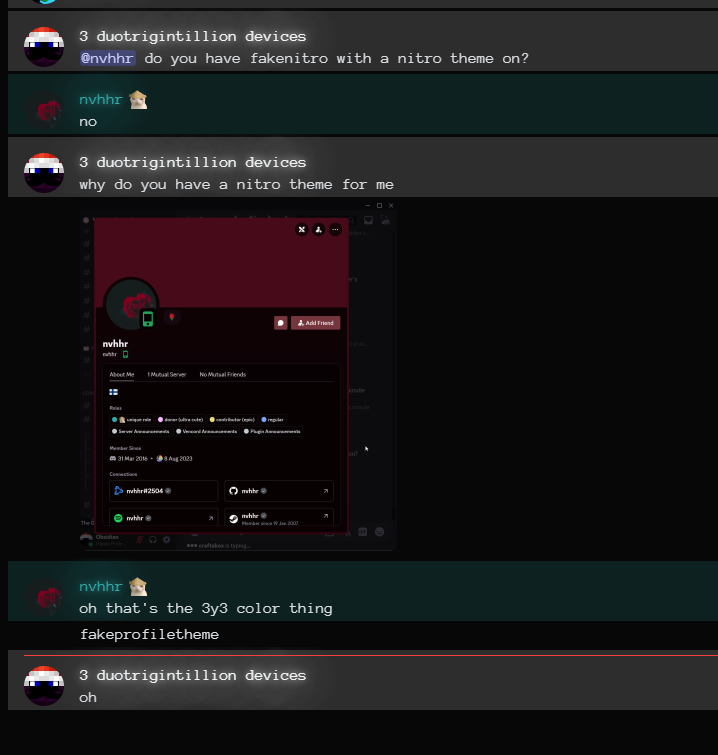
@clear siren do you have fakenitro with a nitro theme on?
clear siren
no
 echo frost
oh
bleak mica
so far i have something that looks like this: https://transfur.science/fcqionvc
it used to be possible back in 2019, but i remember in 2020 it stopped working and I had believed it to be impossible to fix at the time:
 analog sage
bleak mica
it used to be possible back in 2019, but i remember in 2020 it stopped working a...
analog sage
bleak mica
it used to be possible back in 2019, but i remember in 2020 it stopped working a...
do you still have the css for it?
analog sage
analog sage
**CustomizeClyde** (AKA Clyde to Viggy | https://discord.com/channels/1015060230...
note that this could update at any time to include stuff like hiding the ai tag or changing the nickname globally, its currently in the same state as the source it came from
bleak mica
analog sage
do you still have the css for it?
Probably not; though i do know it stopped working exactly on febuary 3rd 2020
analog sage
maybe discord stopped grouping messages for some reason at that time
bleak mica
i commented the entire block out and didn't touch it, so, likely this is what the original working block was:
[class*='cozyMessage-'] [class*='username-']{
    text-shadow: 0px 0px 8px currentColor, 0px 0px 36px currentColor, 0px 0px 48px currentColor;
    filter:saturate(100%) brightness(100%) contrast(100%);
}
[class*="cozyMessage_"] {
    overflow:hidden;
}
[class*="cozyMessage_"] [class*='header-'] {
    overflow:visible !important;
}

[class*='cozyMessage-'] [class*='username-']::before,[class*='cozyMessage-'] ~{
    color:inherit;
    visibility: visible;
    overflow:visible;
    position:absolute;
    width:2000px;
    height:1000px;
    opacity:0.16;
    content:"";
    z-index:-1 !important;
    left:-100px;
    top:-20px;
    background-color:currentColor
}```It still does look very pretty as long as there are no extra messages in a group, lol
echo frost
oh wait this doesn't work for multiple classes
eg
<div class="totallyRealClass_123 secondClassWow_321">abc</div>
[class^=secondClassWow_] {display: none;}
won't work
[class*=secondClassWow_] {display: none;}
but this will
analog sage
bleak mica
i commented the entire block out and didn't touch it, so, likely this is what th...
tried using this but it doesnt seem to work anymore and also hides the top half of the buttons that appear when hovering over a message
bleak mica
yep
this was before the bundler changes that made classes from - to _
so change those first and it should somewhat work
aswell, the ,[class*='cozyMessage-'] ~ needs to be removed
I'm not entirely sure what it was doing back then or how it worked, or if that was a remnant of me trying to fix it
bleak mica
hm.
analog sage
can you send the css for the fix you tried
bleak mica
[class*="cozyMessage_"] [class*="headerText_"] [class*="username_"] {
  text-shadow: 0px 0px 8px currentColor, 0px 0px 36px currentColor,
    0px 0px 48px currentColor;
  filter: saturate(100%) brightness(100%) contrast(100%);
}

[class*="cozyMessage_"][class*="groupStart_"] {
  margin-top: 0px;
  padding-top: 1.0625rem;
}

[class*="cozyMessage_"] {
  overflow: hidden;
}
[class*="cozyMessage_"] [class*="header_"] {
  overflow: visible !important;
}

[class*="cozyMessage_"] [class*="headerText_"] [class*="username_"]::before {
  color: inherit;
  visibility: visible;
  overflow: visible;
  position: absolute;
  width: 2000px;
  height: 2000px;
  opacity: 0.16;
  content: "";
  z-index: -9999 !important;
  left: -100px;
  top: -1.2625rem;
  background-color: currentColor;
}
looks good :D
bleak mica
it's been four years and i still miss it xD
analog sage
its a bit broken but i think its probably possible to fix it

btw how can i make it so the message text is colored but not the background
bleak mica
Probably can't
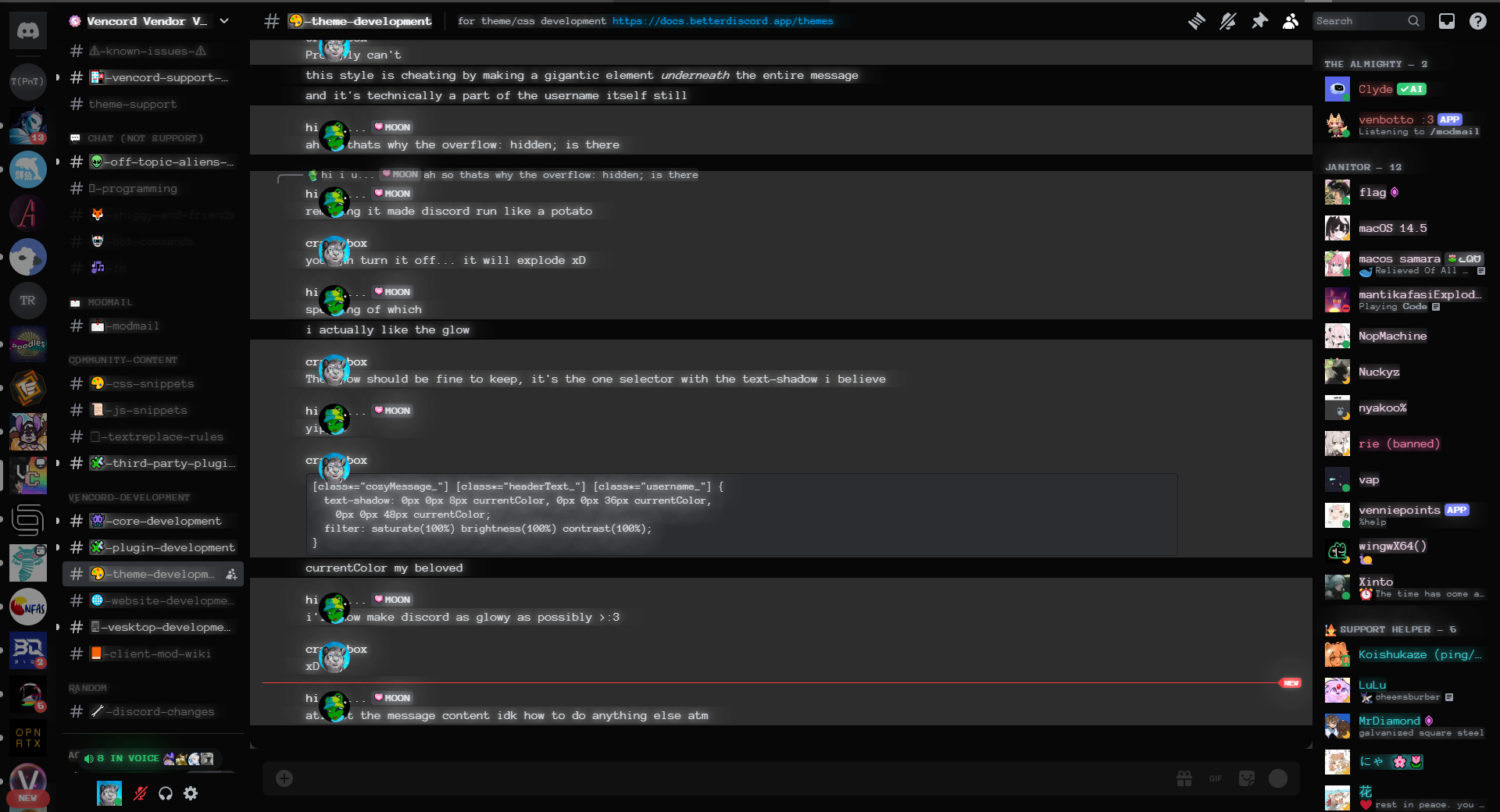
this style is cheating by making a gigantic element underneath the entire message
analog sage
ah so thats why the overflow: hidden; is there
bleak mica
and it's technically a part of the username itself still
analog sage
analog sage
ah so thats why the overflow: hidden; is there
removing it made discord run like a potato
bleak mica
you can turn it off... it will explode xD
bleak mica
The glow should be fine to keep, it's the one selector with the text-shadow i believe
analog sage
yippee
bleak mica
  text-shadow: 0px 0px 8px currentColor, 0px 0px 36px currentColor,
    0px 0px 48px currentColor;
  filter: saturate(100%) brightness(100%) contrast(100%);
}```currentColor my beloved
analog sage
i'll now make discord as glowy as possibly >:3
bleak mica
xD
analog sage
atleast the message content idk how to do anything else atm
 analog sage
its clipping through the text 😨
my discord almost crashed safe to say i probably shouldnt have done that for EVERYTHING
analog sage
analog sage
i'll now make discord as glowy as possibly >:3
my attempt made discord lag again
 bleak mica
heh
 shy torrent
I want to group compact messages like normal ones are (first one shows timestamp and user, others don't). Do you know how I might achieve that?
clear siren
shy torrent
I want to group compact messages like normal ones are (first one shows timestamp...
[class^=message_]:not([class*=groupStart_]) [class^=header] > :is([class^=avatar_], [id^=message-username-])
 { display: none; }
might want to also make timestamps always visible or add some padding/margin to the messages or something idk
looks weird but not used to compact mode at all
I guess you wanted timestamps gone too
that actually makes it simpler
maybe something like this
[class^=message_]:not([class*=groupStart_]) [class^=header] { display: none; }
[class^=message_]:not([class*=groupStart_]) [id^=message-content-] { margin-left: 30px; }
 golden fox
Hello everyone! how do i change the dm icon with CSS?
analog sage
is there a better way to add a fade to the messagebar that doesnt break everything?
[class^="channelTextAreaContainer_"] {
  max-height: 50%;
  height: 7vh;
}

 strong knot
how can i remove the popup when u spam too fast and the messages arent loading quick enough
"enter the chill zone"
strong knot
strong knot
how can i remove the popup when u spam too fast and the messages arent loading q...
pls reply to this message with a ping
analog sage
strong knot
how can i remove the popup when u spam too fast and the messages arent loading q...
gonna do this tmr if someone wont do it by then
 pure cairn
strong knot
how can i remove the popup when u spam too fast and the messages arent loading q...
pure cairn
strong knot
how can i remove the popup when u spam too fast and the messages arent loading q...
Don't spam

 warm bough
write a client side plugin to bypass the server-side rate limits
jk it's probably just a simple display: none on the modal
although the use case is literally not there. if the popup didn't exist, the server would rate limit you and you cannot bypass that
 lost plume
the server rate limits you anyway, the popup is just there to be annoying and/or to be informative
 lunar granite
 grand surge
hey, not sure if this is the right place to ask but does a theme like this exist? (discord's new concept #2)
 analog sage
strong knot
how can i remove the popup when u spam too fast and the messages arent loading q...
analog sage
strong knot
how can i remove the popup when u spam too fast and the messages arent loading q...
/* Hide the "Enter the chill zone" popup. */
/* Hide the entire container with the "Enter the chill zone" button */
[class^="layerContainer_"] [class^="container_"] button {
    display: none;
}

/* Additional rule to ensure hiding the parent container */
[class^="layerContainer_"] [class^="container_"] {
    display: none;
}
/* Hide The backdrop [to ensure typing is possible] */
[class^="layerContainer_"] > [class^="backdrop_"] {
        display: none;
}
 opaque sail
grand surge
hey, not sure if this is the right place to ask but does a theme like this exist...
opaque sail
grand surge
hey, not sure if this is the right place to ask but does a theme like this exist...
Acrylic Harmony + Smooth harmony is what you're probably looking for https://github.com/s-k-y-l-i/discord-themes

GitHub
Discord themes with transparent acrylic mica effect, less clutter and responsive redesign. More aesthetic and simple Discord experience. - s-k-y-l-i/discord-themes
analog sage
analog sage
```css
/* Hide the "Enter the chill zone" popup. */
/* Hide the entire container...
i had to spam to make sure it works so yeah i hope it works for you :D
ok it seems there is a side effect
i was not specific enough and now it also hides all blurry backdrops behind popups
there is another side effect
you cant close popups
i am going to try to fix this
clear siren
how dare discord tell us to chill 
analog sage
 solid ore
its rly buggy
solid ore
its rly buggy
yea
i just gave up because no matter what i try it still doesnt work
 gusty rose
You might be able to workaround that by using multiple specifity, and with :has … at a guess
solid ore
even if u have the exact selector u shouldnt hide popups, it messes up the functionality bc ure basically using discord with the popup still there, u j cant see it
 eager pagoda
does anyone know how to stop the GIF button from swinging on mouse-hover?

same for Sticker button
 bleak gust
2024-02_desktop_animated_icons experiment
analog sage
solid ore
even if u have the exact selector u shouldnt hide popups, it messes up the funct...
yeah it lags discord i think if you start spamming and you bypass the popup
cuz its still there multiple times
shy torrent
clear siren
```CSS
[class^=message_]:not([class*=groupStart_]) [class^=header] > :is([class^...
[class^=message_]:not([class*=groupStart_]) [class^=header] > :is([class^=avatar_], [id^=message-username-]){
  display: none;
  }
[class^=message_]:not([class*=groupStart_]) [id^=message-content-] {
  margin-left: 30px;
   }
Thank you! Went with this combo. Compact mode already deals with the timestamps so all I needed is that little margin. Cheers
echo frost
oh wait, this just depends on zoom level 💀
echo frost
this fixes it
[class*=userPopoutInner_] > [class*=body_] {
  overflow-y: auto;

  &::-webkit-scrollbar {
    width: 8px;
    height: 8px;
  }

  &::-webkit-scrollbar-track {
    border: 2px solid var(--scrollbar-thin-track);
    background-color: var(--scrollbar-thin-track);
    border-color: var(--scrollbar-thin-track);
  }

  &::-webkit-scrollbar-thumb {
    background: var(--profile-body-divider-color);
    background-clip: padding-box;
    border: 2px solid transparent;
    border-radius: 4px;
    min-height: 40px;
  }
}```yum
echo frost
also wtf the big profile has no line clamp
how scuffed is this selector
[class*=userProfileModalInner_] [class*=body_] [class*=markup_] [class*=text-sm\/normal_] {
  display: -webkit-box;
  -webkit-box-orient: vertical;
  -webkit-line-clamp: 6;
  overflow: hidden;
}```it seems way bigger than it should be
 exotic lance
(Sorry for going over you but yeah) So been doing these right aligned messages and while it does seem to work as intended, the avatars have different padding which doesnt make sense to me and the only difference is that the messages are bigger/longer... Any ideas how to fix this?
here is the codes im using:
padding-right: 2% !important;
max-width: 60%;
padding: 2px;
margin-right: 37px;
text-align: right;
}
.messageListItem_d5deea[data-author-id="657078261494448150"] .avatar_ec86aa, .messageListItem_d5deea[data-author-id="657078261494448150"] .avatar_b211c6 {
position: absolute;
left: 98% !important;
}
.messageListItem_d5deea[data-author-id="657078261494448150"] .avatarDecoration_ec86aa {
position: absolute;
left: 97% !important;
}``` echo frost
exotic lance
(Sorry for going over you but yeah) So been doing these right aligned messages a...
echo frost
exotic lance
(Sorry for going over you but yeah) So been doing these right aligned messages a...
Someone did make something like this before, but it seems to be broken
#🎨-theme-development message
wait do you only need 1 & for nested selectors?
i accidentally used only 1 & and it works?
bleak gust
 vestal field
can discord stop updating 😭
vestal field
can discord stop updating 😭
i wish
 exotic lance
echo frost
Someone did make something like this before, but it seems to be broken
https://d...
exotic lance
echo frost
Someone did make something like this before, but it seems to be broken
https://d...
yeah its broken so i made it myself 
teal cave
I am le giving up
echo frost
ah
teal cave
Ping me when discord stops changing everything
exotic lance
but no ideas why the avatar is being annoying?
 tranquil forge
/* change (edited) text */
[id^="message-content-"] [class^="edited_"], [class="messagelogger-edited"] [class^="timestamp_"] { visibility: hidden; }
[id^="message-content-"] [class^="edited_"]:after {
  content: "(meow :3)";
  visibility: visible; position: absolute;
  white-space: nowrap; margin: .43rem 0rem 0rem -2.11rem;
}
test
echo frost
Is there a better way to make the clickable area of these higher than this?
[class*=tabBarItem_] {
  height: 41px;
  align-content: end;

  && > * {
    margin-bottom: 6px;
  }
}
[class*=tabBar_] {
  margin: 0 16px 0;
}```
 west ledge
    font-family: "Builder";
    font-code: "Builder Mono";
      --font-family: 'Builder ;

  src: url('https://files.catbox.moe/8u8dak.woff2') format('truetype');
}

body
{
    font-family: 'Builder Sans' !important;
    --font-display: "Builder Sans";
    --font-headline: "Builder Sans";
    --font-code: "Builder Mono Regular";
    src: url("https://raw.githubusercontent.com/ardishco-the-great/catpuccin-with-emojis/main/Terminess%20(TTF)%20Nerd%20Font%20Complete.ttf");
}

[data-list-item-id^=channels___] {
    font-family: "Builder Sans", var(--font-primary);
}

@import url('https://raw.githubusercontent.com/ardishco-the-great/catpuccin-with-emojis/main/Terminess%20(TTF)%20Nerd%20Font%20Complete.ttf');

:root {
    --font-primary: "Builder Sans";```
try itour font changer
 valid rover
i have an idea, a css snippet that makes inline codeblocks look like normal codeblocks (but inline obviously)
like have the rounding and stuff
and possibly the coloring
clear siren
valid rover
i have an idea, a css snippet that makes `inline codeblocks` look like normal c...
I use this to make inline code roughly match shiki with rose pine moon theme

as well as a few extra tweaks
west ledge
clear siren
<https://github.com/nvhhr/discordcss/blob/main/snippets/fontreplace.theme.css> :...
Is yours working?
clear siren
yeah
valid rover
clear siren
I use this to make inline code roughly match shiki with rose pine moon theme
can you post it so that we can copy it please
clear siren
well I'm afk now but it's part of my theme that's on my github
 mystic cove
anyone figured out hiding unavailable emoji?
[id^=emoji-picker-grid-]:has([class^=emojiLockIconContainer_]){
   display: none;
}```
is where I stuck and never understood how to fix gap teal cave
Kind of not fixable by css since the position is determined by js
solid ore
mystic cove
anyone figured out hiding unavailable emoji?
```css
[id^=emoji-picker-grid-]:has...
this was my best attempt
https://github.com/tom22k/discord-css/blob/main/Snippets/BetterLockedEmojis.css
mystic cove
@balmy torrent ^ idk whom to ping but $50 scam thanks
mystic cove
solid ore
this was my best attempt
<https://github.com/tom22k/discord-css/blob/main/Snippe...
let's see
well you didn't hide them but it sure look less annoying
solid ore
yeah u cant actually hide them without having the gap
iron smelt
So I need someone opinion on something which one is better:
/*---Lock Icon Channel List Recolor---*/
.icon_d8bfb3:has(path[d^="M16 4h.5v"]) path[d^="M16 4h.5v"] {
    fill: var(--yellow-160) !important;
    border: 1px solid rebeccapurple !important; }

/*---Stages Lock Icon Channel List Recolor (since they use a differnt lock for some reason)----*/
.icon_d8bfb3:has(path[d^="M16.5 18H16a1"]) path[d^="M16.5 18H16a1"] {
    fill : var(--yellow-160) !important;
    border: 1px solid rebeccapurple !important;
}

/*--- Chat Lock Icon Recolor ---*/
.icon_e44302 path[d^="M16 4h.5v"] {
    fill: var(--yellow-160) !important;
}
or
/*---Lock Icon Channel List Recolor---*/
.icon_d8bfb3:has(path[d^="M16 4h.5v"]) path[d^="M16 4h.5v"] {
    fill: #fffaa0 !important;
    border: 1px solid rebeccapurple !important; }

/*---Stages Lock Icon Channel List Recolor (since they use a differnt lock for some reason)----*/
.icon_d8bfb3:has(path[d^="M16.5 18H16a1"]) path[d^="M16.5 18H16a1"] {
    fill : #fffaa0 !important;
    border: 1px solid rebeccapurple !important;
}

/*--- Chat Lock Icon Recolor ---*/
.icon_e44302 path[d^="M16 4h.5v"] {
    fill: #fffaa0 !important;
}
You mean what looks better or what works better?
iron smelt
looks better, not code wise but looks wise
teal cave
Extremely based, using rebeccapurple
iron smelt
teal cave
Extremely based, using rebeccapurple
ong
pure cairn
Could you send screenshots for comparison please, I'm on mobile rn 

 pure cairn
Thank you 
iron smelt
this is hard code yellow

 pure cairn
2nd one is more noticeable
iron smelt
teal cave
Maybe my monitor calibrated weird
no they really aren't that different
teal cave
I would say that it'd be nice to have a dimmer version for muted channels, whichever one is picked
 pure cairn
At first I couldn't see the difference in first one, but I have low brightness on my screen lol
pure cairn
iron smelt
this is var
But I like this one more
iron smelt
teal cave
I would say that it'd be nice to have a dimmer version for muted channels, which...
i can look into that later
pure cairn
Yellow is too yellow for a lock
iron smelt
pure cairn
Yellow is too yellow for a lock
?
teal cave
If you got a whole coordinate hardcoded colour scheme in mind already, use your colours, otherwise discord's palette is the safer bet
pure cairn
pure cairn
Yellow is too yellow for a lock
Irl locks are usually more golden-ish, meanwhile the 2nd one you provided is too yellow
If that makes sense
Idk, it's 3:39am for me, I should sleep

teal cave
gn
iron smelt
teal cave
If you got a whole coordinate hardcoded colour scheme in mind already, use your ...
no all of other one use var, that is the only one that is hard coded color thats why i wanna switch to var
pure cairn
Ty
teal cave
iron smelt
no all of other one use var, that is the only one that is hard coded color thats...
ye then switching makes sense
iron smelt
teal cave
ye then switching makes sense
true, ok in your opinion is the var im use a good yellow or should i keep testing them?
bleak gust
use var(--text-warning)
teal cave
iron smelt
true, ok in your opinion is the var im use a good yellow or should i keep testin...
is nice, similar to the previous hardcoded in perceived brightness, would check if it's a similar brightness to the other colours picked as well
iron smelt
bleak gust
use var(--text-warning)
thats too orange, i want it to be a gold/yellow
 bleak gust
hm
iron smelt
teal cave
is nice, similar to the previous hardcoded in perceived brightness, would check ...
ok, imma keep cooking
bleak gust
idk where you can find such a color within discord so good luck trol
iron smelt
honesty I'm just testing with var I find in other css and from
https://docs.betterdiscord.app/discord/variables/

BetterDiscord Docs
User and developer documentation for using and creating addons for BetterDiscord.
tranquil forge
/* change list dots to dashes */
div [id^="message-content-"] ul {
  list-style: none;
  margin-left: 0;
  padding-left: 1em;
  & li:before {
    display: inline-block;
    content: "-";
    width: 1em;
    margin-left: -1em;
  }
}
breaking news show full bio css snippet does NOT work anymor
mystic cove
solid ore
this was my best attempt
<https://github.com/tom22k/discord-css/blob/main/Snippe...
okay just noticed that hidden guilds are broken. a bit. I have three servers shown, one, last one have twitch sub emotes but the middle one does not.

and I have another server with twitch sub emotes
wait a minute.
Why there is one available emoji I can't still use
Discord want us to pay money to cover up messed up code
I am confused so much
solid ore
mystic cove
okay just noticed that hidden guilds are broken. a bit. I have three servers sho...
it should only hide servers that have a lock icon
mystic cove
so it's not really your fault
for some reason THIS emote

I see it unavailable
but it's not appearing when I am in the server it comes from
what the fuck discord
solid ore
mystic cove
and I have another server with twitch sub emotes
i dont have any servers with twitch sub emotes so i couldnt test them
im also not subbed to anyone on twitch anyway
solid ore
no its not
mystic cove
solid ore
im also not subbed to anyone on twitch anyway
yeah understandable
it's not your fault at most
solid ore
bleak gust
why not enable FakeNitro
personally i j dont like sending little gifs
bleak gust
reasonable
mystic cove
and they don't work with no embed perms
and most of the times people have hyperlink automod to prevent scam
mystic cove
solid ore
i dont have any servers with twitch sub emotes so i couldnt test them
okay, update

this server doesn't have lock
but it is hidden regardless
discord is a piece of trash truly
mystic cove
well anyway, I think I will stick to your code but will disable icon lock hidden thingie
I want to hide upsell tho
solid ore
mystic cove
I want to hide upsell tho
i have a bigger theme for all upsell
mystic cove
that covers annoying emoji picker one? please 🙏
solid ore
it does the same as this one iirc plus much more
mystic cove
I will change it a bit if it's broken like here but it's still good
 thank you!
solid ore
thank you!
solid ore
nice
mystic cove
one thing I disable and it seems great
 solid ore
yeah thats the same thing that wasnt working in the betterlockedemojis
mystic cove
well, devs make it harder to not sell you nitro so
it's still better than seeing all this stuff that I cannot even purchase
 bleak gust
mystic cove
it's still better than seeing all this stuff that I cannot even purchase
bleak gust
mystic cove
it's still better than seeing all this stuff that I cannot even purchase
is this real or a bug
mystic cove
bleak gust
is this real or a bug
It's called Russian goverment fuck-ups. Yep, that's a real bug
grand surge
mystic cove
for some reason THIS emote
im on my pc now, can you send me a screenshot of devtools when u select that emote pls?
oh btw this is tom, this is my alt for testing
cus i have nitro on main
grand surge
mystic cove
okay, update
screenshot of devtools when selecting this too pls
mystic cove
it seems it's locked as per server boosting level is low
so it's not available anyway
 mystic cove
yeah, it's just lock icon in guilds shortcuts were broken
grand surge
mystic cove
yeah, it's just lock icon in guilds shortcuts were broken
when u say were, does that mean its fine now? if not can u send devtools screenshot of the ones incorrectly hidden/not hidden
mystic cove
grand surge
when u say were, does that mean its fine now? if not can u send devtools screens...
Sorry I went outside to buy an external ssd but if you check your guild shortcuts in emoji picker, you probably will find servers with no lock icon despite having nothing avail from there
grand surge
mystic cove
Sorry I went outside to buy an external ssd but if you check your guild shortcut...
nope, im in 100 servers on this account
 mystic cove
no twitch subs?
grand surge
solid ore
im also not subbed to anyone on twitch anyway
^
grand surge
is it only those servers where u have a twitch sub connection
mystic cove
it reports shortcut valid with this locked emote
grand surge
if it doesnt have one then it shouldnt be hidden
mystic cove
I have zero available emotes from that server though
mystic cove
but I also have twitch sub emojis from another server and that server have been hidden
it just randomly decide where to put them
grand surge
mystic cove
but I also have twitch sub emojis from another server and that server have been ...
and that server has a lock icon?
mystic cove
lemme try to see it from website
mystic cove
grand surge
and that server has a lock icon?
nope
it doesn't have one but hidden regardless
grand surge
can u send a devtools screenshot of it pls
mystic cove
as I said I'm outside
 supple lodge
sorry i'm pretty new, but how is the green outline called? to change the color, please
(when dragging someone in a vc)

 worldly moss
enable break thingy plugin, press f8 to pause, inspect it
supple lodge
worldly moss
enable break thingy plugin, press f8 to pause, inspect it
Thank you, worked
 muted knoll
I have this snippet, for chat bubbles, but how do I make so images are n the dark area too?
supple lodge
muted knoll
I have this snippet, for chat bubbles, but how do I make so images are n the dar...
Like this? (idk why but but it push the picture towards the right)
 muted knoll
yeah so t hat the image is in the darkeer area too
 supple lodge
muted knoll
yeah so t hat the image is in the darkeer area too
supple lodge
muted knoll
yeah so t hat the image is in the darkeer area too
oh you mean when sending a text with an image?
 supple lodge
I see yes, I have no idea x)
muted knoll
hmm.. thought so x)
 prime yoke
body::before {
  content:'';
  background: center/cover url('https://github.com/maIwina/stuff/blob/main/GGZKK7HbQAIAPin.png?raw=true');
  width: 100vw;
  height: 100vw;
  left: 72px;
  position:fixed;
  opacity: 0.7;
}
what do i need to do so it always stretches to fill it?
 vestal field
prime yoke
vestal field
prime yoke
why is your discord squished in the first place
the snippet works fine for me
 tranquil forge
propably useless to anyone who isnt me
/* hide markdown */
div [id^="message-content"] {
  &[class^="repliedText"] * { font-weight: 100; font-style: normal; text-decoration: none; };
  &:not([class^="repliedText"]) :is(h1, h2, h3, em, strong, s, u, small > span) {
    color: var(--primary-230);
    font-size: 1rem; font-weight: 100;
    font-style: normal; text-decoration: none;
    margin-top: 0 !important; margin-bottom: 0 !important; }
  & [class^="blockquoteDivider"] { display: none; }
  & blockquote { padding: inherit; };
}
you can turn that off btw
also i did make an issue for toggling this per server a while back
don't think it's been implemented yet though
prime yoke
vestal field
why is your discord squished in the first place
bc i dont have second monitor
pure cairn
Wondering if I should actually finish my old link previews overhaul snippet
analog sage
pure cairn
Wondering if I should actually finish my old link previews overhaul snippet <:ve...
if you want :3
analog sage
how do i hide a server and highlight anyone who's in it/is friends with the owner of the server
this is very specific i know
bleak gust
the latter is not possible with CSS
analog sage
aw
bleak gust
if you despise a server, why are you in it
analog sage
bleak gust
if you despise a server, why are you in it
im not in it anymore :D
analog sage
analog sage
how do i hide a server and highlight anyone who's in it/is friends with the owne...
maybe it could be a plugin instead but it would be the most useless plugin ever
bleak gust
You'd need to be friends with the owner or friends with the people who you want to know are friends with the owner anyway
analog sage
bleak gust
You'd need to be friends with the owner or friends with the people who you want ...
i am friends with the owner and have 30 mutuals
by friends i mean i can dm them when we're not in any mutual servers
not irl friend
bleak gust
yeah thats obvious
supple lodge
Hi, is there a way to invert the colors when selected (like white on purple in this case)?
Edit: Figured it out
::selection { color: white; }
 clear siren
you are now immune to this emoji 
 dim copper
So I have been working on a slightly edited version of the fallout terminal theme, and I was wondering if there's an option I could add to enable active channels to light up a certain color compared to read channels, what would I need to write to do that
clear siren
by active you mean the selected one or ones people are typing in or what
dim copper
the ones with unread messages
clear siren
oh yeah
dim copper
for example, the top one
 clear siren
.unread_d8bfb3 is the class
dim copper
hmmm
I'm unfamiliar with how I'd write that in tbh since idk a lot abt coding and this is kinda my first time making a theme lol
got pretty far but idk
could you maybe provide an example?
clear siren
.unread_d8bfb3 { color: pink; }
clear siren
wait that doesn't work
dim copper
here it is btw :3
dim copper
clear siren
wait that doesn't work
ohhh alr
clear siren
.modeUnreadImportant_d8bfb3 .name_d8bfb3 { color: pink !important; }
dim copper
clear siren
``.modeUnreadImportant_d8bfb3 .name_d8bfb3 { color: pink !important; }``
ok I'll try it!
:3
YES
thank youuu 🙏
it workssss :3
colon three
clear siren
there's also .modeUnreadLessImportant_d8bfb3 if you use the discord "grey active channels" thing
dim copper
wut's that ;w;
clear siren
this thing https://www.youtube.com/watch?v=y25sLgZtEv0

Discord (for the first time this year) has made an actually GOOD feature. Their new notifications system.
Instead of having to deal with hundreds and hundreds of pings from large Discord servers that you joined during a deep down bad state, you can now easily pick and choose what notifications you want. Want to only be pinged when you get menti...
not sure if it's available without the experiment
dim copper
would there also happen to be an option to have a color border or something on the channel currently being used by the user?
 glad urchin
dim copper
would there also happen to be an option to have a color border or something on t...
glad urchin
dim copper
would there also happen to be an option to have a color border or something on t...
.containerDefault_f6f816.selected_f6f816 { border: 1px solid red; }
supple lodge
Why is it that my changes on .theme-dark .previewContainer_adbea6 Only applies with the DevTools, and doesn't apply with VSCode?
glad urchin
how exactly are you editing the css file
are you editing the css that vencord loads? if so, save it
are you editing the properities on devtools? it wont save
 deft niche
How would i go about reassigning the status colors? from what i can tell it doesn't use any variables
Either that or i'm blind
 fathom hedge
deft niche
How would i go about reassigning the status colors? from what i can tell it does...
fathom hedge
deft niche
How would i go about reassigning the status colors? from what i can tell it does...
.avatar_cc54d6 > .wrapper_c51b4e > svg > rect {
    fill: red;
}
wait nvm you probably mean reassigning based on their value
deft niche
fathom hedge
wait nvm you probably mean reassigning based on their value
Yop
I mean there's gotta be a variable for it somewhere
I just can't find it for the life of me
fathom hedge
could probably just rect[fill="whatever color"]
pure cairn
original snippet by callmeh
/* Avatar Status Glow */
[class^="avatar_"]:has([fill="#23a55a"])
  { color:#23a55a;
    filter: drop-shadow(0 0 5px currentColor) }
[class^="avatar_"]:has([fill="#f0b232"])
  { color:#f0b232;
    filter: drop-shadow(0 0 5px currentColor) }
[class^="avatar_"]:has([fill="#f23f43"])
  { color:#f23f43;
    filter: drop-shadow(0 0 5px currentColor) }
[class^="avatar_"]:has([fill="#593695"])
  { color:#593695;
    filter: drop-shadow(0 0 5px currentColor) }
[class^="avatar_"] .wrapper_c51b4e rect,
[class^="avatarWrapper_"] .avatar_b2ca13 rect
  { display: none; }
[class^="avatar_"] foreignObject
{ mask: none; } /* remove annoying border */```Idk if there's variables for them tho
supple lodge
glad urchin
how exactly are you editing the css file
My css file is saved in my vencord themes files so that when I save it, it applies directly.
And when I edit this specific line in my css file it won't apply.
But when I do it in the DevTools it works
supple lodge
deft niche
How would i go about reassigning the status colors? from what i can tell it does...
rect[fill='#23a55a'], svg[fill='#23a55a'] {
    fill: var(--online-indicator) !important;
}
rect[fill='#f0b232'], svg[fill='#f0b232'] {
    fill: var(--idle-indicator) !important;
}
rect[fill='#f23f43'], svg[fill='#f23f43'] {
    fill: var(--dnd-indicator) !important;
}
rect[fill='#80848e'], svg[fill='#80848e'] {
    fill: var(--offline-indicator) !important;
}
rect[fill='#593695'], svg[fill='#593695'] {
    fill: var(--streaming-indicator) !important;
}```
I think?Yop that works great, thanks
solid ore
is this a me issue or a discord issue where the tooltip screenshare preview overflows like that
 deft niche
That definitely seems like a you issue
teal cave
Wishing for Vesktop be bumped a chromium version or two so that we can use align-content to vertically center items without also needing display: flex
(supported in 123, Vesktop currently on 122) https://caniuse.com/mdn-css_properties_align-content_block_context
@edgy sentinel would this be easily doable or more complicated than I expect?
 edgy sentinel
it already is
just no release yet because i've been sick
if you build from source you get chromium 127 or smth
teal cave
Ah gotcha, get well soon
edgy sentinel
probably won't too soon
have to see more doctors
anyway it's fine, just means i've had low energy to work on stuff
teal cave
I know that feel, take care of yourself first
 viscid tiger
made a css snippet which will basically blur all connections within the full size profile, once hovered, the connection box will lift, be more clearer with a black glow around the connection box, making the full size profile more bearable and easier to read and less of a distraction.
[class^="fullSizeOuter_"] [class^="connectedAccounts_"] [class^="connectedAccountsColumn_"] [class^="connectedAccountContainer_"] {
  transition: transform 0.3s ease, filter 0.3s ease;
  filter: blur(2px);
}

[class^="fullSizeOuter_"] [class^="connectedAccounts_"] [class^="connectedAccountsColumn_"] [class^="connectedAccountContainer_"]:hover {
  transform: translateY(-3px);
  filter: blur(0px);
  box-shadow: 0 0 5px 5px rgba(0, 0, 0, 0.3);
}```

 copper locust
this theme of mine stopped working
copper locust
this also makes image/video previews smaller like they were before they added mosaic
which the plugin does not do
so yeah this one just stopped working for like the sixth time
 exotic nexus
well cause all the classnames are hardcoded, put it in this #theme-support message
 solid ore
:smugattributeselectoruser:
 fresh plank
copper locust
so yeah this one just stopped working for like the sixth time
fresh plank
copper locust
so yeah this one just stopped working for like the sixth time
Can you check if everything is working?

 solid ore
yeah i've used them since i started
pure cairn
I tried using them, but I'm not good enough to find strong selectors so stuff would often fuck up

quick question about devtools, is there a way to find a string without selecting a parent first?
because I'm trying to see what .base_d7ebeb .text_d7ebeb strong used to affect, but I can't find the first one anywhere and the filter isn't helping much
copper locust
fresh plank
Can you check if everything is working?
👍
echo frost
How can I make this not move while scrolling and just stay here at the bottom?
I don't understand how it's following the scroll position since it isn't position: sticky;

 gilded cloak
echo frost
How can I make this not move while scrolling and just stay here at the bottom?
I...
gilded cloak
echo frost
How can I make this not move while scrolling and just stay here at the bottom?
I...
Sticky is very picky, look at some examples of css that makes it work
https://css-tricks.com/creating-sliding-effects-using-sticky-positioning/

Sticky elements are predominantly used for keeping something shown on the screen throughout scrolling. As cool as that is, we can also hide elements in the
echo frost
gilded cloak
Sticky is very picky, look at some examples of css that makes it work
https://c...
That doesn't use sticky
and i want to remove the sliding effect
 echo frost
What i sent doesnt use stickyt
gilded cloak
Oh I misread, You want to remove sticky
echo frost
yeah, but the wrapper doesn't use sticky positioning so i'm confused
gilded cloak
It's probably outside of the scrollable container
gilded cloak
echo frost
oh yeah it is
Set overflow to unset in scrollable container
Add overflow scroll to the thing that has the button
echo frost
uh
not quite sure what you mean
 swift pewter
how would i make a sliding bar where it shows the people - like on dark+ it slides away so u can only see the pfps unless i hover, how would i implement that into my current one (softX)
anyone know
exotic nexus
screenshots/videos might be helpful

 deft niche
Is it possible to increase the forum grid size with just css?
It's really annoying having only a 2x2 list when zoomed in
clear siren
deft niche
Is it possible to increase the forum grid size with just css?
I cooked
:root { --forumcolumns: 3; }
div[role=grid]
{ display:grid;
  grid-template-columns: repeat(var(--forumcolumns), 1fr);
  grid-auto-rows: 420px }
div[role=grid] > [class^=container_]
{ width: auto !important;
  position: static !important; }
maybe not universally usable and I have no idea if div[role=grid] is used elsewhere
but to answer your question yes it's possible
you can also make it so that it automatically changes the column count depending on window size etc if you so desire
also note that discord lazy loads these too so you'll see them appear/disappear when you scroll
and if you have a small enough grid you can't scroll and they will probably not load at all
echo frost
clear siren
```CSS
:root { --forumcolumns: 3; }
div[role=grid]
{ display:grid;
grid-templa...
why do you format your css so weirdly
clear siren
habit
I learned css very long ago on my own and decided to format it that way and it stuck with me
echo frost
also why not use nesting for css div[role=grid] > [class^=container_] { width: auto !important; position: static !important; }
clear siren
because that's just a prototype
deft niche
clear siren
also note that discord lazy loads these too so you'll see them appear/disappear ...
It would probably be better to do it as a plugin then
clear siren
didn't care to nest it
clear siren
deft niche
It would probably be better to do it as a plugin then
pls make plugin that stops lazy loading other stuff too like channellist
deft niche
Perchance
pure cairn
swift pewter
I have a snippet for this, I'll send it later but you'll have to tweak some values since it's tailored to my current theme
echo frost
Makes pinned dm categories have the default hover color when they're the default color
.vc-pindms-section-container[style="color: rgb(148, 155, 164);"]:hover {
  color: var(--interactive-hover) !important;
}```
Is the hover effect over channels done with javascript or something?
I can't find how the background changes there (and create invite and stuff)
 clear siren
just css, here are the rulesets

 clear siren
I got them with f8break
echo frost
oh yeah i'd have to be hovering over them to see them
clear siren
yeah and adding :hover via the contextmenu didn't exactly work for some reason
echo frost
also this is working
 clear siren
I might have just added it on the wrong elements
echo frost
oh you did solve it here lmao
fix to my original question about not hiding pings on hover a very long time ago
[class*=iconVisibility_]:hover [class*=channelInfo_]:has(>[class*=mentionsBadge_]) {
  display: block;
}```
well it doesn't even need the hover part actually. just this works
```css
[class*=channelInfo_]:has(>[class*=mentionsBadge_]) {
  display: block !important;
}```weird. this works for me now (with updating new class names)
ig i was doing something wrong then
echo frost
is there a way to stop this yellow problem
in quickcss and/or vscode (it makes the file name yellow in vscode and it's annoying 😭)
 vestal field
echo frost
is there a way to stop this yellow problem
in quickcss and/or vscode (it makes ...
vestal field
echo frost
is there a way to stop this yellow problem
in quickcss and/or vscode (it makes ...
not really, just pray for an update
echo frost
sad
is
.foo {
  >.bar {
    display: none:
  }
}
the same as
.foo {
  &>.bar {
    display: none:
  }
}```

it seems like it from the tiny bit of testing i did(also did i use foo bar right lmao? idrk understand the foo bar thing)
clear siren
the & is not needed in this case but it has uses

MDN Web Docs
The CSS & nesting selector explicitly states the relationship between parent and child rules when using CSS nesting. It makes the nested child rule selectors relative to the parent element. Without the & nesting selector, the child rule selector selects child elements. The child rule selectors have the same specificity weight as if they were wit...
echo frost
clear siren
the & is not needed in this case but it has uses
yeah
usually i just always use it even when it's not needed
is there a better way than this to match .lockedEmoji_ with a sibling emojiLockIconContainer_?
:has(>[class*=emojiLockIconContainer_])>[class*=lockedEmoji_] {
filter: grayscale(1) brightness(0.75);
}``` toxic yew
echo frost
is there a better way than this to match `.lockedEmoji_` with a sibling `emojiLo...
toxic yew
echo frost
is there a better way than this to match `.lockedEmoji_` with a sibling `emojiLo...
[class*=lockedEmoji_]:has(+[class*=emojiLockIconContainer_])
oh yeah that would work
teal cave
echo frost
is there a way to stop this yellow problem
in quickcss and/or vscode (it makes ...
for vscode, in settings:
 echo frost
pog
teal cave
probably exists for monaco but may have to build yourself
bc can't find any mention of user config files for monaco
echo frost
that's fine
the main problem was in vscode
bc i try to keep quickcss fairly empty
(usually don't succeed)
echo frost
echo frost
ig i was doing something wrong then
oh found my old thing
i was just missing some curly brackets :(
or just having the .channelInfo_...

yay finished remaking my 500+ line misc improvements css snippet
I shortened it by like 100 lines (nvm i extracted a big one and made it it's own theme. i forgot) and made it future proof lmfao
pure cairn
swift pewter
:root
  { --hover-animation-speed: 0.25s; }

.container_cbd271,
[class^="membersWrap_"]
  { justify-content: unset;
    min-width: unset; width: 60px;
    right: 0; }
[class^="membersWrap_"] [class^="members_"]
  { transition: transform var(--hover-animation-speed); }
[class^="membersWrap_"]:hover [class^="members_"],
.container_cbd271:hover [class^="members_"]
  { transform: translateX(-179px); }
[class^="membersWrap_"] [class^="membersGroup_"]::after
  { content:"";
    width: 32px; height: 3px;
    border-radius: var(--avatar-radius);
    background-color: var(--text-normal);
    position: absolute;
    left: -38px; top: 29px;
    margin-left: 8px; }
[class^="membersWrap_"]:hover [class^="membersGroup_"],
.container_cbd271:hover [class^="membersGroup_"]
  { transform: translateX(-3px); }
[class^="membersWrap_"] [class^="membersGroup_"]
  { cursor: default;
    transform: translateX(45px);
    transition: transform var(--hover-animation-speed);
    overflow: visible; }
[class^="membersWrap_"] [class^="members_"] [class^="member_"]
  { left: -6px; } /* fix pfps being misaligned */

/* Membercount Tweaks */
.vc-membercount-widget
  { display: flex; } /* removes counters */
.vc-membercount-online,
.vc-membercount-total
  { display: none; }
[class^="membersWrap_"]:hover .vc-membercount-online,
.container_cbd271:hover .vc-membercount-online,
[class^="membersWrap_"]:hover .vc-membercount-total,
.container_cbd271:hover .vc-membercount-total
{ display: initial; }```as I said, you might have to change a few settings/positions to have it adapt to your theme
 west tartan
is there some css to get rid of these tabs?
 pure cairn
west tartan
is there some css to get rid of these tabs?
pure cairn
west tartan
is there some css to get rid of these tabs?
try with this
li:has([class^=containerDefault_] [class*=basicChannelRowLink_])
  { &, + & { display: none; } }```
hope it works as intended, as it was my first time working with this type of selectors lolworked thx
pure cairn
Np
 leaden folio
anyone know the id for this little separator under the channel/dm header?

sorry for the contrast being so bad
echo frost
leaden folio
anyone know the id for this little separator under the channel/dm header?
where?
can you send a bigger image of where it is?
leaden folio
switched to light mode as well for the contrast
 teal cave
leaden folio
anyone know the id for this little separator under the channel/dm header?
teal cave
leaden folio
anyone know the id for this little separator under the channel/dm header?
.content_a7d72e::before
echo frost
.content_a7d72e::before {
  display: none;
}```
works for mewhat are you trying to do to it
leaden folio
oh nvm I typed 4 instead of 7 lmao
echo frost
teal cave
.content_a7d72e::before
Is there a difference between ::before and :before?
teal cave
no, but ::before is the correct modern syntax
echo frost
why?
echo frost
echo frost
Is there a difference between ::before and :before?
also same with like using && in nesting
leaden folio
thanks for the help, that little line has been bothering me for months XD
teal cave
echo frost
why?
single : is used for different states of a real element, double :: is used for pseudo elements
teal cave
echo frost
also same with like using && in nesting
idk never seen it
just tested, seems like && is simply just the parent selector twice

I guess if you wanted to crank up specificity?
swift pewter
pure cairn
```css
:root
{ --hover-animation-speed: 0.25s; }
.container_cbd271,
[class^...
you got one that does the same for the channells?
pure cairn
swift pewter
you got one that does the same for the channells?
there are multiple iterations of it on #🎨-css-snippets
just look them up
clear siren
so vesktop is now on chromium 126, what's regular discord stable at
anchor positioning is now available which is kinda interesting
this is relevant to my interests
 bleak gust
clear siren
so vesktop is now on chromium 126, what's regular discord stable at
bleak gust
clear siren
so vesktop is now on chromium 126, what's regular discord stable at
idk
i havent updated my discord canary client for ages
i opened it yesterday
it was version 109
clear siren
still can't use currentColor in relative color source
clear siren
I did find a better way to do my https://github.com/nvhhr/discordcss/blob/main/snippets/namebrightener.theme.css though
I can just .username_f9f2ca { -webkit-text-fill-color: color-mix(in srgb, currentColor 90%, white); }
dunno if it's better but maybe a combination of that and filter would be the best at keeping the desired color (and not brightening text-shadows which I have)
echo frost
Do the >*>'s cause lag?
/* Hide New effects in Shop Button */
[data-list-item-id*="_shop"][href="/shop"] {
  /* Hide NEW Badge */
  & [class*="newBadge_"] {
    display: none;
  }
  /* Hide Glow thing*/
  [class*="tideButton_"]:has(>*>&) {
    background: none;
  }
}
/* Hide New Hover Tooltip */
[class*="marketingBadgeTooltip_"]:has(>*>[class*="shopMarketingTooltipContent_"]) {
  display: none;
}``` echo frost
 rose geode
Anyone know the selector for the super reaction selector popup?
rose geode
Anyone know the selector for the super reaction selector popup?
the whole popup?
 echo frost
i don't have nitro so i can't get that
clear siren
echo frost
Do the `>*>`'s cause lag?
```css
/* Hide New effects in Shop Button */
[data-lis...
I'm sure you can write a selector that doesn't use *
echo frost
so * is bad?
clear siren
generally yes
I mean you could just drop the >*> entirely, no?
oh but glow thing has it too
echo frost
ok well i think just removing that does work
i don't really like doing :has() without a > bc then it can do something so high up sometimes
but i think with the tideButton_ and marketingBadgeTooltip_ it's fine
solid ore
echo frost
i don't have nitro so i can't get that
i think they mean this

i would get the selector but im on mobile rn
solid ore
idt they know how
echo frost
 solid ore
rose geode
Anyone know the selector for the super reaction selector popup?
solid ore
rose geode
Anyone know the selector for the super reaction selector popup?
[class^=burstToggle_]
rose geode
No, sorry for my bad presentation. I mean the whole pop up
echo frost
Yeah, i can't get that because no nitro
but i think the way to get that would be to use that id i sent to you at first with a :has() with something specific to the super react thing in it
the toggle button probably gets a different class when it's on
solid ore
rose geode
No, sorry for my bad presentation. I mean the whole pop up
just dont press the toggle then? u shouldnt hide popups in general but this is the selector:
#emoji-picker-tab-panel[class*=isBurstReactionPicker_]
rose geode
Nah I am a theme dev. I need to change the style of it but I don’t have nitro so I seek for help
rose geode
solid ore
just dont press the toggle then? u shouldnt hide popups in general but this is t...
Thank you very much
solid ore
rose geode
Nah I am a theme dev. I need to change the style of it but I don’t have nitro so...
ah okay, j usually ppl ask to hide things
 deft oar
why did my custom css stop working?
.avatar_ec86aa, .avatarDecoration_ec86aa{
transform:scale(1.5);
}
pure cairn
Update classes
.avatar_f9f2ca, .avatarDecoration_f9f2ca {
  transform: scale(1.5);
}```you can also use attribute selectors
[class^="avatar_"], [class^="avatarDecoration_"] {
  transform: scale(1.5);
}
yep
 pure cairn
huh, how do you check that?
fathom hedge
document.querySelectorAll
pure cairn
in the console?
fathom hedge
yes
pure cairn
interesting
pure cairn
pure cairn
because I'm trying to see what `.base_d7ebeb .text_d7ebeb strong` used to affect...
any idea about this instead?
pure cairn
/* Username */
.cozy_f9f2ca .header_f9f2ca
  { margin-bottom: 4px; }
.headerText_f9f2ca .username_f9f2ca, /* chat */
.name_e9f61e, /* memberlist */
.repliedMessage_f9f2ca > .username_f9f2ca /* replies */
  { background: color-mix(in srgb, currentColor 25%, rgba(0, 0, 0, 0.25));
    text-shadow: 0 0 5px color-mix(in srgb, currentColor 25%, #000);
    margin-right: 4px;
    padding: 0 4px;
    border-radius: var(--avatar-radius); }
working fine, except for memberlist names, but the classes are correct

cuz names should have colored backgrounds as well
clear siren
working fine, except for memberlist names, but the classes are correct
but the class is not correct
it's name_a31c43 that has the color
pure cairn
me when
[class^=name_]:has([class^=name_] [class^=username_]) (idek if that's correct lol)
 solid ore
pure cairn
me when
`[class^=name_]:has([class^=name_] [class^=username_])` (idek if that's...
solid ore
pure cairn
me when
`[class^=name_]:has([class^=name_] [class^=username_])` (idek if that's...
wouldnt it be
[class^=name_]:has([class^=username_] [class^=name_])? bc the 2nd name_ is a child of username_
pure cairn
true
echo frost
Is there any way to select only certain hover tooltip things?
these things

they seem to all have the same class
ig maybe you could use this style=?
i don't really want to do that though

Does anyone know why the hover isnt working?
.vc-settings-quick-actions-card button {
width: 100px;
color: var(--white-500);
background-color: var(--brand-500);
&::hover {
background-color: var(--brand-560) !important;
}
}``` solid ore
echo frost
Does anyone know why the hover isnt working?
```css
.vc-settings-quick-actions-c...
solid ore
echo frost
Does anyone know why the hover isnt working?
```css
.vc-settings-quick-actions-c...
iirc its :hover not ::hover, not 100% sure tho
echo frost
solid ore
iirc its :hover not ::hover, not 100% sure tho
oh
well that's just cosmetic, so doesn't matter
solid ore
idk then, am on mobile rn so cant test
pure cairn
solid ore
iirc its :hover not ::hover, not 100% sure tho
Yeah
echo frost
teal cave
single : is used for different states of a real element, double :: is used for p...
::after and ::before are supposed to be double ::
but mistakenly thought it should be ::hover because it doesn't have parentheses
pure cairn
::after and ::before are pseudoelements tho
echo frost
yeah
echo frost
 pure cairn
echo frost
salternator explained it well i think
pure cairn
Mhm
echo frost
pure cairn
Meanwhile :hover is a real element
well it's a different state of a real element (like salternator said)
pure cairn
My favourite is when I have to add a :hover to a pseudoelement without affecting the original element

echo frost
how can I recreate something like this with css?
Problems i'm running into:
- opacity (the element has a low opacity which the pseudoelement uses and i can't figure out how to override)
although this actually shouldn't be a problem now that i think about it since when open in browser is hovered the opacity is set to 1well it messes with the transition a little bit
- getting the correct position (can't figure out how to get it in the bottom left of the screen, with position: fixed, bottom: 0, and left: 0, it aligns with the image)
 echo frost
and i'd also kind of like to have it on other things, and it's doing this
z-index doesn't fix it (i still don't fully understand z-index. i should probably look at the mdn doc oh wait i have)
 echo frost
yeah but sometimes it's weird
echo frost
echo frost
yeah but sometimes it's weird
like here
rose geode
how can I post theme in #🎨-css-snippets ?
gusty rose
You need to have snippet dev role
 shut dragon
i'm trying to change the default emoji for the emoji picker, and idk how to change variables that are passed to a div via the "style=..." tag.
i've tried https://imgur.com/a/I49BaQg these two but really i don't know what i'm doing, i'm trying to change the emoji from the class in the second image.


context: the emoji changes every time on hover, and I want it to always stay the same
clear siren
try adding !important
clear siren
also you should be able to send images here afaik
iron smelt
rose geode
how can I post theme in <#1028106818368589824> ?
make a #📩-modmail
teal cave
echo frost
Is there any way to select only certain hover tooltip things?
these things
not possible unfortunately
teal cave
pure cairn
My favourite is when I have to add a :hover to a pseudoelement without affecting...
pseudo elements don't have states of their own, i cri
teal cave
shut dragon
where?
to override anything inside a style="...", you have to use !important on your declarations
pure cairn
teal cave
pseudo elements don't have states of their own, i cri

Truly a devastating news
teal cave
echo frost
how can I recreate something like this with css?
Problems i'm running into:
* ...
On positioning, the modal wrapper uses transform to make that fade-in expanding animation when the modal appears.
This creates a new containing block, which means the wrapper will be used as the root of any positioning you do for its child elements.
To fix, you can do
.modal_aee8c6[style*="transform: scale(1)"] {
    transform: none !important
}
With this, once the modal is fully open it removes the transform so that the whole window is used as the positioning root as usual
mdn explains more: https://developer.mozilla.org/en-US/docs/Web/CSS/Containing_block
teal cave
This probably does what you want
/* Hoists chat above user panel (z-index 2)
   and new mention bubble (z-index 10)
   so that chat children appear above */
.chat_a7d72e {
  z-index: 10;
}

/* chat links, open in browser links*/
.chat_a7d72e [href],
.layerContainer_cd0de5 [href] {
  &:hover::before {
    content: attr(href);
    position: fixed;
    bottom: 0;
    left: 0;
    z-index: 999999999;
    pointer-events: none;

    /* nonessential styling */
    background: var(--background-secondary-alt);
    color: var(--text-normal);
    font-size: 1rem;
    line-height: 1rem;
    font-weight: 400;
    text-decoration: none;
    padding: 4px;
    border-top-right-radius: 4px;
    max-width: calc(100vw - 240px);
    box-sizing: border-box;
    overflow: hidden;
    white-space: nowrap;
    text-overflow: ellipsis;
    opacity: 0.8;
  }
}

/* remove as containing block */
[style*="transform: scale(1)"] {
  transform: none !important
}
.embedMedia_ad0b71 {
  contain: none;
}
.spoilerContainer_a3d0f7 {
  filter: none;
}
.full-motion .translate_f88ae3.didRender_f88ae3 {
  transform: none;
}
nice, I've been planning on making something similar
worldly moss
teal cave
This probably does what you want
```css
/* Hoists chat above user panel (z-index...
i love this but it breaks for embed images
 teal cave
le epic fix above
teal cave
give feedback on theme pls
 clear siren
make chat content and memberlist taller to align with channellist
make chat input lower so it aligns with panels and memberlist
then you're getting close to something good
also reduce margin on chat content so the gaps are similar with the channellist gaps
teal cave
 echo frost
teal cave
This probably does what you want
```css
/* Hoists chat above user panel (z-index...
echo frost
teal cave
This probably does what you want
```css
/* Hoists chat above user panel (z-index...
yeah that's pretty much what i was going for
ty!
 glossy aurora
teal cave
give feedback on theme pls
glossy aurora
teal cave
give feedback on theme pls
misalicore
teal cave
glossy aurora
misalicore
qhar
 glossy aurora
i was referring to the youtuber jan misali
he has a style in his videos where he only uses white or cyan text on a black background
 echo frost
teal cave
yeah accurate
echo frost
teal cave
yeah accurate
number system videos best
echo frost
teal cave
This probably does what you want
```css
/* Hoists chat above user panel (z-index...
what's this part for?
it breaks right clicking on roles thing


 sand oriole
font-family: 'Gontserrat';
src: url('https://files.catbox.moe/fcrr8r.ttf') format('truetype');
}
body
{
font-family: 'Gontserrat' !important;
text-transform:
}``` simple kiln
sand oriole
```@font-face {
font-family: 'Gontserrat';
src: url('https://files.catbox.mo...
simple kiln
sand oriole
```@font-face {
font-family: 'Gontserrat';
src: url('https://files.catbox.mo...
remove text-transform if not used.
 sand oriole
simple kiln
remove text-transform if not used.
sand oriole
simple kiln
remove text-transform if not used.
Ok
  font-family: 'Gontserrat';
  src: url('https://files.catbox.moe/fcrr8r.ttf') format('truetype');
}

body
{
    font-family: 'Gontserrat' !important;
}```oh yeah
pretty simple prob shouldve figured that out myself

 tiny wing
how could i change this or remove it altogether it's so annoying when hovering over channels or pics - tia
 lost plume
it's controlled by your browser, I don't think you can remove it with css
tiny wing
i wanna cry lol
echo frost
tiny wing
how could i change this or remove it altogether it's so annoying when hovering o...
lmfao
i'm trying to add that with css
echo frost
tiny wing
how could i change this or remove it altogether it's so annoying when hovering o...
and you can get rid of that by using the discord app
lost plume
(or vesktop)
tiny wing
well since the new 1.5.3 i got a malware since then app is dead so i have no choice but to use the web unfortunately or else i would be in the app...
tiny wing
same thing happened mate so i gave up and deleted the apps for now
echo frost
you got malware from the official discord app???
tiny wing
no i was on vesktop 1.5.2 when 1.5.3 come out i hit update it did it's thing then the laptop drastically slowed down so i scaned it and found a malware so i deleted it took me a day to get to it anyways so i reinstalled again from scratch same thing i though fk this and deleted everything the main app also
echo frost
where are you downloading vesktop from?
tiny wing
the second time i did it it was from the official webpage
the first was done by the app it self
first one was when i received the malware
echo frost
I think either you didn't download the official discord, or you're getting the malware from something else
tiny wing
am not pointing fingers nor looking to cause any issues it could be from my end but all i know is that day all i downloaded or uploaded or updated was vesktop to 1.5.3 soon after i got the malware so it either it was the app or the update triggered something in my system either way i have been here reading and i don't see noone with the same issue so it could be from my end....
echo frost
did you try downloading the official discord app?
grand surge
W or L?

 fast cipher
grand surge
W or L?
fast cipher
grand surge
W or L?
looks nice, would you mind sending me the theme?
grand surge
fast cipher
looks nice, would you mind sending me the theme?
Sure
grand surge
fast cipher
looks nice, would you mind sending me the theme?

GitHub
A fork of the Translucence theme for BetterDiscord and Vencord. - WarFiN123/TranslucenceV2
fast cipher
thx
grand surge
The installation steps are in the repo
grand surge
fast cipher
thx
Np
grand surge
fast cipher
thx
Thnx for starring, appreciate it
If u want to change the accent colour u can tell me and I'll make it suite ur wallpaper
fast cipher
grand surge
If u want to change the accent colour u can tell me and I'll make it suite ur wa...
I can write CSS myself, but thanks
grand surge
fast cipher
I can write CSS myself, but thanks
Np, btw that blender spacetheme looks great, ima use it myself lol
 elder galleon
anyone have scrollbar css for server bar navigation?
 glacial citrus
grand surge
W or L?
glacial citrus
grand surge
W or L?
random, but whats the wallpaper
fathom hedge
glacial citrus
random, but whats the wallpaper

GitHub
A fork of the Translucence theme for BetterDiscord and Vencord. - WarFiN123/TranslucenceV2
glacial citrus
fathom hedge
https://github.com/WarFiN123/TranslucenceV2?tab=readme-ov-file#wallpaper-complet...
Tysm
sand oriole
  font-family: 'Gontserrat';
  src: url('https://files.catbox.moe/fcrr8r.ttf') format('truetype');
}

body
{
    font-family: 'Gontserrat' !important;
}```you've posted this before, do you need help or something
sand oriole
clear siren
you've posted this before, do you need help or something
I need Help for my font changer
clear siren
GitHub
Discord css stuff. Contribute to nvhhr/discordcss development by creating an account on GitHub.
this is what I made and use
echo frost
elder galleon
anyone have scrollbar css for server bar navigation?
wdym?
this server navigation sidebar?
 elder galleon
echo frost
wdym?
this server navigation sidebar?
elder galleon
echo frost
wdym?
this server navigation sidebar?
yes, I want to add scrollbar.
echo frost
wtf these don't line up 💀
 lost plume
welcome to discord
echo frost
[class*=emptyIconFriends_] {
  background-image: url('https://raw.githubusercontent.com/Obsidianninja11/DiscordThemes/main/assets/no_mutual_friends.svg') !important;
}```i tried doing it with data: but it didn't work
teal cave
the confirm phone number thing still uses a png from 2017, might not even be the worst inconsistency in discord
teal cave
echo frost

Stack Overflow
My svgs are specified in css like this:
background-image: url('data:image/svg+xml;utf8,<svg xmlns="http://www.w3.org/2000/svg" width="18" height="15" viewBox="0 0 18 15"><g fill="none" fill-
if you want to inline it, just convert with https://svgencode.com/
SVG URI-Encoder and Base64 Converter Tool.
echo frost
i dont really like having it in base64
teal cave
doesn't need to be base64, url encoded is fine
in fact better since it's fewer chars than base64
echo frost
oh only read the base64 part
echo frost
teal cave
This probably does what you want
```css
/* Hoists chat above user panel (z-index...
how can i fix this?
putting a negative z-index on the typing class makes it dissapear completely
 echo frost
discord broke scrollbar in role selection in id:customize 💀
.scrollerContainer_c6b11b {
  overflow-y: auto;
  &::-webkit-scrollbar {
    width: 16px;
    height: 16px;
  }
  &::-webkit-scrollbar-corner {
    background-color: transparent;
  }
  &::-webkit-scrollbar-thumb {
    background-clip: padding-box;
    border: 4px solid transparent;
    border-radius: 8px;
    background-color: var(--scrollbar-auto-thumb);
    min-height: 40px;
  }
  &::-webkit-scrollbar-track {
    border: 4px solid transparent;
    background-clip: padding-box;
    border-radius: 8px;
    background-color: var(--scrollbar-auto-track);
  }
}```oh they fixed the background being a set color instead of a variable at least
 mortal mantle
inshallah finally a sane color scheme for Modular
 clear siren
@mortal mantle <3
mortal mantle
Hi nvhhr
clear siren
hii :3
mortal mantle

 brittle juniper
mortal mantle
inshallah finally a sane color scheme for Modular
brittle juniper
mortal mantle
inshallah finally a sane color scheme for Modular
ooo
brittle juniper
haii
mortal mantle
bleak gust
echo frost
wtf these don't line up 💀
what the fuck
echo frost
echo frost
discord broke scrollbar in role selection in <id:customize> 💀
```css
.scroller...
discord uses overflow: hidden scroll; here
I've seen that in other places, and I thought it worked, but mdn docs doesnt show having two arguments as being allowed
pure cairn
platformindicators are tied to people's names, right?
vestal field
is it just me or did discord break status selection
like the menu disappears before you can reach it
pure cairn
works for me atm, I'll reload and check
vestal field
this thing
 pure cairn
works fine for me even after the reload
 echo frost
works for me, but it keeps getting cleared (although that might be from a userplugin that's supposed to set default to don't clear, and it's not working for some reason?)
 safe python
pure cairn
works fine for me even after the reload
safe python
pure cairn
works fine for me even after the reload
maybe because of the 3 million lines of css?
safe python
i have like none and its busted for me
 safe python

 torn zinc
vestal field
like the menu disappears before you can reach it
torn zinc
vestal field
like the menu disappears before you can reach it
ppl have been complaining about that in the clientmodding stupidity archive
discord moment
echo frost
safe python
https://media.discordapp.net/attachments/1186522476474277958/1259203093996900352...
does it work if you turn off themes?
vestal field
its still broken without themes for me
echo frost
oh
safe python
echo frost
does it work if you turn off themes?
i only have ClientTheme there no css
vestal field
why is everything so round
pure cairn
 vestal field
maybe profile theme changes things?
pure cairn
pure cairn
platformindicators are tied to people's names, right?
bump
I tried moving them around but they won't go outside the user's name box
 edgy jungle
graahhhh
echo frost
vestal field
like the menu disappears before you can reach it
works for me too
I'm using discord not vesktop
vestal field
pure cairn
are you guys on canary or stable?
vesktop stable
oh they fixed it
yeah it works fine now after reload
mustve been just yesterday
pure cairn
discord trying not to mess up their own code challenge (impossible) [gone wrong]
exotic lance
any ideas if you can make it so that this is always on top without having to scroll down via css (not as in its on top of the whole thing, its still on the bottom but still shown)? idk if its possible because ive been trying for a while but i could also be missing something
 vestal field
exotic lance
any ideas if you can make it so that this is always on top without having to scr...
vestal field
exotic lance
any ideas if you can make it so that this is always on top without having to scr...
.pageControlContainer_b48941 {
  width: 418px;
  position: fixed;
  bottom: 0;
  right: 0;
  background-color: var(--background-secondary);
  z-index: 1;
}```a bit of a hack
you'd probably have to adjust a bit to fit your theme
 cosmic vault
i need to fix the background around the spotify modal here and im failing to do so because im stupid and cant get it to change colors with css for some reason, any help please lol?
i'll probably figure it out before someone responds but ig i'll post this here

i notice its tied to secondary but i want to change it directly
solid ore
cosmic vault
i need to fix the background around the spotify modal here and im failing to do ...
i think this works but im on mobile rn so cant make sure
#vc-spotify-controls {
    background-color: red !important;
}
unfortunately doesnt seem to
solid ore
in that case i can help tomorrow if u dont figure it out by then
cosmic vault
alright thanks
exotic lance
vestal field
```css
.pageControlContainer_b48941 {
width: 418px;
position: fixed;
botto...
tysm! ^^
exotic lance
cosmic vault
i need to fix the background around the spotify modal here and im failing to do ...
  background-color: red;
}```

This should work for ya ^^hm

thats what must have been happening previously
exotic lance
oh that worked for me Dx
 exotic lance
cosmic vault
hm
exotic lance
cosmic vault
hm
  background-color: red;
}```

Perhaps this?oh there you go LOL
exotic lance
yeah some themes use !important everywhere xD
 exotic lance
good luck ^^!
 exotic lance
oh lord LOL
exotic lance
opinions on this? ^^ Its a sort of popout search results rn just trying to see if i can make it so that it doesn't close the members list but i think i remember how -- i just really hate that it takes up space whenever its opened smh
 echo frost
exotic lance
opinions on this? ^^ Its a sort of popout search results rn just trying to see i...
echo frost
exotic lance
opinions on this? ^^ Its a sort of popout search results rn just trying to see i...
how did you get the blur on the page thing?
exotic lance
echo frost
how did you get the blur on the page thing?
  backdrop-filter: blur(var(--blur-popup));}```

Then used :root to change the blur background ^^word wrap turned in on quickcss, and i can't figure out how to turn it off
oh wait reopening it fixed it
weird
echo frost
exotic lance
```[class^=searchResultsWrap]{background: var(--pop-up-color, var(--bg-overlay-3...
what's the --blur-popup var?
doing blur(20px) doesnt work for me
[class^=searchResultsWrap] {
  background: var(--pop-up-color, var(--bg-overlay-3, var(--background-secondary)));
  backdrop-filter: blur(20px);
}```Bc you use root
    --blur-popup: 10px;
}```this doesn't blur it either
[class^=searchResultsWrap] {
  background: var(--pop-up-color, var(--bg-overlay-3, var(--background-secondary)));
  backdrop-filter: blur(var(--blur-popup));
}
:root{
  --blur-popup: 10px;
}```odd bc it works just fine for me and i have no imports that make it work with it
you could try to do !important, might be a theme issue?
echo frost
oh wait you didn't send me the right css
I was just talking about this part
 exotic lance
OHHH i see what you mean, sorry
echo frost
the css you sent me was for the whole search modal
exotic lance
sorry about that, im heavily sick Dx
  width: 380px;
  position: fixed;
  bottom: 0;
  right: 0;
  background: var(--pop-up-color, var(--bg-overlay-3, var(--background-secondary)));
  backdrop-filter: blur(var(--blur-popup));
  box-shadow: 0 2px 10px 0 rgba(var(--transparencycolor_v), .3);
  z-index: 1;
  border-radius: 8px;
}```

But it works about the samefyi the width is customized to my own so you might need to change it ofc
echo frost
oh backdrop filter wasn't working right for me bc of opacity
exotic lance
ohhh oops xD
exotic lance
one last question, i made a popout version of the search results bc i hated the way it took up the screen, but is there any way i could make it so that when it opens up, it doesnt hide the members list?
echo frost
wdym you made a popout version?
and no, you wouldn't be able to preserve the members list with just css
when there's a search, the html for members list gets removed
 solid ore
cosmic vault
i need to fix the background around the spotify modal here and im failing to do ...
solid ore
cosmic vault
i need to fix the background around the spotify modal here and im failing to do ...
r u still stuck with this
mortal mantle
pure cairn
nesting is actually fun
less typing is always welcome
pure cairn
indeed
cosmic vault
solid ore
r u still stuck with this
nope
exotic lance
echo frost
and no, you wouldn't be able to preserve the members list with just css
aw sad, but its more of a 'popout window' than taking up half the screen like it usual does which is annoying to me xD
echo frost
exotic lance
aw sad, but its more of a 'popout window' than taking up half the screen like it...
do you mean you made it like a modal?
can you send an ss
that sounds kinda interesting
exotic lance
echo frost
do you mean you made it like a modal?
can you send an ss
that sounds kinda inter...
it just looks like this, so its easier for me to copy and paste stuff from it when it usually makes the chat smaller when opened without the css ^^ honestly so far lots of people/friends liked the idea LOL I thought most people would've thought of it already but i suppose not -- ive had the idea for a while but ive only been into css for a month or so i didnt know where to really start until now ✨
echo frost
it looks like it's still moving chat though
exotic lance
yeah thats only bc i cant change it to not close the members list when opening Dx which really sucks
echo frost
oh
you could probably make something the same width as members list
exotic lance
also true but it would still not exactly be a popout by that point just wish the damn members list wouldnt close and discord would add keyboard shortcuts to the search like simply using the arrows to go back and forth between pages Dx
everything about the search results design just ircks me
oh god okay i tried that and its way too small imo and i can already tell that long messages are going to look odd with it
 echo frost
exotic lance
also true but it would still not exactly be a popout by that point just wish the...
echo frost
exotic lance
also true but it would still not exactly be a popout by that point just wish the...
ctrl+f opens search
iron smelt
ok i need someone to think of 6 random color
and tell them to me
not including
gold
blue
yellow
green
pink
black
red
 unreal charm
iron smelt
ok i need someone to think of 6 random color
unreal charm
iron smelt
ok i need someone to think of 6 random color
violet
cyan
orange
white
indigo
lime
teal cave
iron smelt
ok i need someone to think of 6 random color
rebeccapurple
grey
gray
#BADA55
rgba(230 24 94 / 0.6)
tan
 rain cradle
hello everyone, i'm not sure i should ask my question in this channel exactly but i think it's the most fitting one.
basically i'm looking for modifying that 'LIVE' icon that appears when screensharing in a voice chat on a server. I want it to be white instead of red. Can anyone help me?
not sure if it's important but i'm using 'Midnight' theme with 'Nord' flavor by refact0r.
thanks in advance
rain cradle
thank you very much!
I’ve tried using devtools to find the element like you said and also have tried coding by myself but it didn’t work out. thanks again!
 umbral knot
guys new canary update themes broken???
pure cairn
Yeah, but it sure is long to type all the letters and characters to make resilient but precise selectors

iron smelt
umbral knot
guys new canary update themes broken???
horror you weren't lying
such a good thing to wake up too
bleak gust
iron smelt
such a good thing to wake up too
not as bad as that time i was sitting there developing a plugin at 6am and i reload to see quite literally all of vencord broke
iron smelt
bleak gust
not as bad as that time i was sitting there developing a plugin at 6am and i rel...
that actually cursed
iron smelt
Also Vscode committed the code correctly for the first time so I don't have to go back through and fix anything
just having to go back through and fix the formatting because my code looks very sloppy rn
iron smelt
actually my brain to cooked for this rn
?remindme 17h Fix the formatting of your snippets
 sturdy trenchBOT
Alright @iron smelt, in 17 hours: Fix the formatting of your snippets
💡 Did you know you can set your timezone with "?timezone set"?
viscid tiger
i asked this in the BD css support but have had no response, im sure this is easy for some of yall but i want to have the hover only affect quests that have not been collapsed, this snippet is a minimal quests which show the full quest on hover.
.questsListContainer_f1791d .questsCard_c366aa {
  max-height: 115px!important;
  transition: max-height 1s;
}
.questsListContainer_f1791d .questsCard_c366aa:hover {
  max-height: 323px!important;
}```
https://imgur.com/a/kmWZPbx
this is the gap im talking about when you hover over a collapsed quest (the down arrow on the right corner is how you collapse it)

i found the [aria-hidden] within the headerCollapsedContent_af8856 class which changes based on the card collapsed state somewhere inside the quest element if that helps you.
 maiden gyro
@viscid tiger I think this should work
.questsListContainer_f1791d .questsCard_c366aa:has(.outerContainer_d7df05[aria-hidden=false]) {
  max-height: 115px!important;
  transition: max-height 1s;
}
.questsListContainer_f1791d .questsCard_c366aa:has(.outerContainer_d7df05[aria-hidden=false]):hover {
  max-height: 323px!important;
}
worked, thanks!
prime yoke
how can i make the red background for just this soundboard button?
so far i tried
:has(:scope > *:contains("CookieEve.EXE")) {
  background-color: red !important;
}
and
element:contains("CookieEve.EXE") {
  background-color: red;
}
 exotic nexus
i dont think :contains exists
Stack Overflow
I am looking for a CSS selector for the following <table>:
Name
Identity
Age
Peter
male
34
Susanne
female
12
Is there any selector to match all <td>s containing the specific content...
maiden gyro
prime yoke
how can i make the red background for just this soundboard button?
so far i trie...
try this
[role=button][aria-label*="CookieEve.EXE"] + div {
  background-color: red;
}
can probably be made more specific but seems to work
prime yoke
maiden gyro
try this
```css
[role=button][aria-label*="CookieEve.EXE"] + div {
background-...
yup it works, thanks
umbral knot
clear siren
me when attribute selectors <:blobcatcozy:1026533070955872337>
Me when discord changes the layout and not just the class names:
clear siren
umbral knot
Me when discord changes the layout and not just the class names:
that's rare though and if you're not doing super specific selectors with + or something it most likely won't break much
new profiles and stuff like that is something that can break stuff though
umbral knot
(one time while writing a theme, I was trying to select some div called wrapper or something, and then saw the green download button, clicked it, and the entire div I was trying to select is gone)
clear siren
lol
umbral knot
Not gone but all the class names are gone for some reason. It was <div class=""></div> with nothing inside
How am I supposed to select that gg
umbral knot
clear siren
new profiles and stuff like that is something that can break stuff though
new profiles and stuff
https://github.com/puckzxz/NotAnotherAnimeTheme/issues/221#issuecomment-2199915667
GitHub
I've set --small-user-popout-background-image: url('https://i.imgur.com/v1ODdsv.gif'); --small-user-popout-background-transparency: #00000099; --small-user-popout-background-image-posit...
I love (hate) so much
maiden gyro
umbral knot
Not gone but all the class names are gone for some reason. It was `<div class=""...
div:empty probably
umbral knot
Perhaps
mortal mantle
this surely is a discord skill issue right
 worldly moss
looks like a theme issue
sturdy trenchBOT
@iron smelt, <t:1720812172:R>: Fix the formatting of your snippets
analog sage
how do i hide all the nitro locked options from the appearance menu?
solid ore
analog sage
how do i hide all the nitro locked options from the appearance menu?
/* customize icon section in appearance tab */
#appearance-tab [class^=selectionGroup_]:has([class^=shinyButton_]),
/* customize colour background section in appearance tab */
#appearance-tab [class^=premiumFeatureBorder_] {
  display: none !important;
}
this theme i made hides all nitro upsell if u want
https://raw.githubusercontent.com/tom22k/discord-css/main/Themes/HideNitroUpsellV2.css
analog sage
solid ore
```css
/* customize icon section in appearance tab */
#appearance-tab [class^=se...
works with the themes but what about the icons
 solid ore
it should work unless they changed it, lemme turn on my pc rq
 clear siren
replace shinyButton_ with tryItOutButtons_
solid ore
/* nitro themes */
[class^=presets_][class*=basicThemeSelectors_] + section:has([class^=nitroWheel_]),
/* custom app icons */
[class^=selectionGroup_]:has([class^=nitroWheel_]) {
    display: none;
}
i need to clean this up
analog sage
solid ore
```css
/* nitro themes */
[class^=presets_][class*=basicThemeSelectors_] + secti...
great! now i dont have to worry about the icons anymore
they're not there :D
how do i hide the dark-sidebar option?
<div class="container_ed1d57 marginTop20_f7730b disabled_ed1d57"><div class="labelRow_ed1d57"><label for=":raa:" class="title_ed1d57">Dark Sidebar</label><div class="control_ed1d57"><div class="container_cebd1c disabled_cebd1c" style="opacity: 0.3; background-color: rgb(128, 132, 142);"><svg class="slider_cebd1c" viewBox="0 0 28 20" preserveAspectRatio="xMinYMid meet" aria-hidden="true" style="left: -3px;"><rect fill="white" x="4" y="0" height="20" width="20" rx="10"></rect><svg viewBox="0 0 20 20" fill="none"><path fill="rgba(128, 132, 142, 1)" d="M5.13231 6.72963L6.7233 5.13864L14.855 13.2704L13.264 14.8614L5.13231 6.72963Z"></path><path fill="rgba(128, 132, 142, 1)" d="M13.2704 5.13864L14.8614 6.72963L6.72963 14.8614L5.13864 13.2704L13.2704 5.13864Z"></path></svg></svg><input id=":raa:" type="checkbox" class="input_cebd1c" tabindex="-1" disabled=""></div></div></div><div class="divider_b03b7f dividerDefault_ed1d57"></div></div>
#appearance-tab [class^=container_][class*=disabled_] {
    display: none;
}
sending the html doesnt rly help btw bc im gonna test it anyway, so it just clogs the chat
analog sage
solid ore
sending the html doesnt rly help btw bc im gonna test it anyway, so it just clog...
i sent it so you can find the classes easier but ig inspect element's always there anyway
clear siren
analog sage
i sent it so you can find the classes easier but ig inspect element's always the...
nobody wants to read unformatted html
more useful if someone can't reproduce or something is to take a screenshot of devtools
analog sage
clear siren
nobody wants to read unformatted html
i agree
not sure what i thought back when i sent the html
mortal mantle
mortal mantle
wip still need more consistency


and maybe remove this option because people keep saying it looks hella ugly (it enables thick border colors on every element)
 clear siren
1 more week of work, then I have 3 weeks free and I can finish the refactoring of my base theme and make presets and addons
mortal mantle
Real
mystic cove
just gonna drop it here if anyone needed, I am thinking of a small Steam like hyperlink note.
[id*="message-content"] [class*="anchor"][title*="(http"]::after{
  content: "["attr(href)"]";
  margin-left: 5px;
  opacity: 0.5;
  font-size: 13.5px;
}
[id*="message-content"] [class*="anchor"][title*="(http"]:hover::after{
  opacity: 1;
}```

*I didn't know you could put like attributes in css rule.*
 vestal field
thats pretty cool
mystic cove
and here is icon style (using chain emoji but probably can put icon or something else)
[id*="message-content"] [class*="anchor"][title*="(http"]::after{
  content: " 🔗";
  color: transparent;
  text-shadow: 0 0 0 var(--text-link);
}```
reason behind this is to instantly spot a hyperlink, for me as a mod I gotta spot fake url
 swift grove
not sure if this has been posted already but if you want to hide your server list when in streamer mode add this to your custom css
:has([class*="colorStreamerMode"]) div[aria-label="Servers"] {
    filter: blur(20px);
}
 bleak gust
swift grove
not sure if this has been posted already but if you want to hide your server lis...
bleak gust
swift grove
not sure if this has been posted already but if you want to hide your server lis...
depends on that top warning bar
swift grove
bleak gust
depends on that top warning bar
sadly yes I coud't think of any other way to do it
bleak gust
swift grove
sadly yes I coud't think of any other way to do it
I hate to admit that you are right and I know it from experience
There is ThemeAttributes but that doesn't support adding streamer mode class to html where other metadata is added
simple kiln
 pure cairn
swift grove
sadly yes I coud't think of any other way to do it
pure cairn
swift grove
sadly yes I coud't think of any other way to do it
Usually, when you are into streamer mode, usernames are cut off
Are there no specific classes for that?
Because it would be more reliable
clear siren
no classes for that
echo frost
vestal field
```css
.pageControlContainer_b48941 {
width: 418px;
position: fixed;
botto...
slightly improved that fixes the scrollbar clipping into the pagenav
[class*=searchResultsWrap_] {
  &:has([class*=pageControlContainer_]) {
    height: calc(100% - 54px);
  }
  [class*=pageControlContainer_] {
    width: 418px;
    position: fixed;
    bottom: 0;
    right: 0;
    background-color: var(--background-secondary);
    z-index: 1;
  }
}```Is there a less scuffed way of making the clickable area of these tabs higher?
/* Make the profile tabs clickable area bigger */
/* Aria label check is to prevent it working on old profiles (on bots) */
[class*=userProfileOuter_] [class*=tabBar_]:has(>[class*=tabBarItem_][aria-label]) {
margin: 0 16px 0;
>[class*=tabBarItem_] {
height: 41px;
align-content: end;
>[class*=defaultColor_] {
margin-bottom: 6.5px;
}
}
}``` pure cairn
clear siren
no classes for that
pure cairn
clear siren
no classes for that
Bummer
Would it be hard to implement new classes for that as part of the streaming mode plugin and use them?

clear siren
wouldn't probably be too hard to make themeattributes add a class to html
although I am completely lost when it comes to the patching/find/replace stuff
actually not sure if a patch is even needed for that
probably is
mortal mantle
won't be able to return to the old layout (second pic) but it looks not bad either

 simple kiln
I dislike centered design because it becomes less appealing as the space expands
pure cairn
clear siren
wouldn't probably be too hard to make themeattributes add a class to html
Mhm, it would be nice
For theming purposes
umbral knot
this was working before. what happened?
 simple kiln
umbral knot
this was working before. what happened?
simple kiln
umbral knot
this was working before. what happened?
:root {
    --channel-width: 240px; //example
}
Did discord change smth
 mortal mantle
simple kiln
I dislike centered design because it becomes less appealing as the space expands
mortal mantle
simple kiln
I dislike centered design because it becomes less appealing as the space expands
does this look a bit better?

 silver mural
just a quick question:
is there a better "theme browser"/theme site other than https://betterdiscord.app/themes or github?
safe python
atm no
analog sage
mortal mantle
does this look a bit better?
how can i enable this it looks so cool :o
supple lodge
mortal mantle
does this look a bit better?
Oh nice!
Also I made that one for the bigger modal (centered because why not lol)
 supple lodge
echo frost
Is there a less scuffed way of making the clickable area of these tabs higher?
`...
supple lodge
echo frost
Is there a less scuffed way of making the clickable area of these tabs higher?
`...
I use this for my theme, and works fine. (breaks the bots but I don't really check the bots so it doesn't matter (for me) Also I'm no expert in css, I just started some times ago)
.item_a0 {
    padding: 8px 18px;
    border-radius: var(--roundness-xs);
    height: auto;
    border-bottom-style: none !important;
}```


 supple lodge
Oh my bad, you want it clickable on the top part
echo frost
yeah