#🎨-theme-development
1 messages · Page 22 of 1

 summer adder
if you're that desperate to see the lines of my 'qcss' just go check purple theme on my github
 bleak gust
thats a lot of css files
summer adder
yeah :3
bleak gust
idk it would be nice if there was a way to target those things based on the raw translation underneath maybe
that could be a plugin
bleak gust
summer adder
if you're that desperate to see the lines of my 'qcss' just go check purple them...
i like your theme btw
summer adder
changes the fonts too, even code font
bleak gust
summer adder
changes the fonts too, even code font
those do not load due to CSP btw
summer adder
csp?
bleak gust
content security policy
 summer adder
try removing the starting comments
it could be thinking the imports arent at the top if you're pasting it into qcss
works fine for me cause i have it in my themes folder, so those comments are sent for the title etc and register the imports as if they're at the top
bleak gust
do the imports have to be at the top?
summer adder
yeah imports always have to be at the top
summer adder
just how it works
bleak gust
the quick css implementation needs to be fixed in many other ways imo
summer adder
realistically its only reading the imports when its in the themes folder as it thinks they're at the top, due to the comments being required to name the theme etc
bleak gust
unfortunately i am not willing to take on the task of breaking a popular open source project 
summer adder
oh that ones easy
bleak gust
summer adder
oh that ones easy
git push --force
summer adder
* {
transition: linear 5s infinite;
}
*:hover {
transform: rotateZ(50deg);
}```there
broken
bleak gust
where the fuck is the textbox
summer adder
broken
if you want discord to be unusable
either turn off transparency and use this css :root { --background-primary: transparent; --background-secondary: transparent; --background-tertiary: transparent; }
or just
* {
display: none;
}```why would you post flashbang css
it is 3am for me 
summer adder
bleak gust
why would you post flashbang css
* {
color:#fff;
background-color:#fff;
background:#fff;
}```nice and dark
 summer adder
its not really that bad
bleak gust
it hurt me
just tell me if there is existing CSS to flow the buttons properly when the text box gets bigger
summer adder
nope
bleak gust
 deep bane
bleak gust
just tell me if there is existing CSS to flow the buttons properly when the text...
deep bane
bleak gust
just tell me if there is existing CSS to flow the buttons properly when the text...
.buttons_ce5b56 div[style="display: flex;"] {
  width:32px !important;
  height:32px !important;
}```do something with this
 dull plover
deep bane
```css
.buttons_ce5b56 div[style="display: flex;"] {
width:32px !important;
...
dull plover
deep bane
```css
.buttons_ce5b56 div[style="display: flex;"] {
width:32px !important;
...
W
 deep bane
.buttons_ce5b56 div[style="display: flex;"] .button_afdfd9 {
width:32px !important;
height:32px !important;
top:6px !important;
}``` deft niche
She cascade on my sheet til i style
bleak gust
deft niche
She cascade on my sheet til i style

 coarse abyss
#🎨-css-snippets message tried this with quicksand and poppins, any idea why it wont work?
this is the font it shows when i change it into these fonts
 coarse abyss
@import url('https://fonts.googleapis.com/css2?family=Quicksand&display=swap');

:root {
    --font-primary: "Quicksand";
}```thats how i did it
deft niche
Works for me
deft niche
You put the import at the top right?
coarse abyss
the ( at the start is a mistake
coarse abyss
deft niche
You put the import at the top right?
wym
 coarse abyss
```css
@import url('https://fonts.googleapis.com/css2?family=Quicksand&display=s...
coarse abyss
coarse abyss
```css
@import url('https://fonts.googleapis.com/css2?family=Quicksand&display=s...
i pasted it like this
with the import at the top yeah
coarse abyss
deft niche
Works for me
is there any reason for it not to work for me
it works with roboto but its the only font that seems to work
 solid ore
coarse abyss
with the import at the top yeah
solid ore
coarse abyss
with the import at the top yeah
do u have anything else in ur quick css
summer adder
yeah i tried helping this guy earlier and he keeps saying it doesn’t work
works fine for me
deep bane
coarse abyss
is there any reason for it not to work for me
do you have poppins installed?
or quicksand
do you have a theme applied?
coarse abyss
solid ore
do u have anything else in ur quick css
yeah
coarse abyss
deep bane
do you have a theme applied?
i tried it without a theme
coarse abyss
deep bane
do you have poppins installed?
oh shit
i have to install them on my pc?
lmaoo
deep bane
if you do you dont have to have to import the fonts
coarse abyss
i dont have them installed
wym import them
like this
@import url('https://fonts.googleapis.com/css2?family=Quicksand&display=swap');
deep bane
yes
coarse abyss
i dont have them installed but i did import them
coarse abyss
coarse abyss
```css
@import url('https://fonts.googleapis.com/css2?family=Quicksand&display=s...
thats what i tried using and it kept showing me the default font
coarse abyss
ill try
 obsidian plank
i'm trying to figure out how to change a specific user's profile banner locally (so like USRBG, but only for myself). is there a way to do with with css?
deep bane
obsidian plank
i'm trying to figure out how to change a specific user's profile banner locally ...
why would you want that
that's just like fake badges
obsidian plank
for the same reason i use this #🎨-css-snippets message
deep bane
and why are you using this
coarse abyss
deep bane
can you install them then
what code do i use if i have them installed
obsidian plank
i'd like to edit banners locally without using a central database like USRBG
deep bane
coarse abyss
what code do i use if i have them installed
:root {
    --font-primary: "Quicksand";
}```why
coarse abyss
deep bane
```css
:root {
--font-primary: "Quicksand";
}```
ill try thanks
nope
still the default font
deep bane
do you have quickcss turned on
obsidian plank
i'd just like to be able to customize avatars and banners, is it relevant to ask why
deep bane
obsidian plank
i'd just like to be able to customize avatars and banners, is it relevant to ask...
yes
cause its literally useless
 devout elm
i mean if they enjoy it it doesnt rly matter why
solid ore
coarse abyss
yeah
send ss of where ur @import is in ur quick css file
coarse abyss
solid ore
send ss of where ur @import is in ur quick css file
i just fixed it
solid ore
obsidian plank
i'm trying to figure out how to change a specific user's profile banner locally ...
i think u can but im on mobile rn + idrk how
coarse abyss
when you told me to an ss of where it is i understood what you meant by imports have to be at the top of the file
lmao
it works now, thanks
deep bane
...
solid ore
i thought it was that
obsidian plank
solid ore
i think u can but im on mobile rn + idrk how
ahh i just posted in here: https://discord.com/channels/1015060230222131221/1093746417694146560
appreciate your response
coarse abyss
yeah mb
i downloaded vc today
btw since im assuming this involves css too https://github.com/OskarQwert/Context-Iconsax how do i import this
i tried pasting that line in the css file too but it wont work
 coarse abyss
```css
@import url('https://fonts.googleapis.com/css2?family=Quicksand&display=s...
coarse abyss
coarse abyss
```css
@import url('https://fonts.googleapis.com/css2?family=Quicksand&display=s...
also is there a way to make it so when you change the font it wont mess with fonts of other languages?
like maybe make it only change the font of english in discord
 clear siren
coarse abyss
btw since im assuming this involves css too https://github.com/OskarQwert/Contex...
clear siren
coarse abyss
btw since im assuming this involves css too https://github.com/OskarQwert/Contex...
broken
coarse abyss
ah
clear siren
all the imports in the css are 404
deep bane
@obsidian plank ill post the css for $50k
 obsidian plank
i'm really not sure what the snarkiness is for, i guess i'll just stop responding
deep bane
because it's useless
do you really stare at your own banner that much
[style*="https://cdn.discordapp.com/banners/90232975194624000/a_9f92bf2e7e68b3d74798bd71004aa29f"] {
  background-image:url(https://c.tenor.com/xRxy8q3p4nEAAAAd/tenor.gif) !important;
}```fricking
obsidian plank
thank you for the help
deep bane
(Scuffed) Full Phone Number Hider Snippet/Import
@import url('https://raw.githubusercontent.com/im-h/css-snippets/main/Full-Phone-Number-Hider');
:root {
  --reveal-margin:-82px;
}
.constrainedRow_b9e8cf .text-md-normal__4afad:has([aria-label="Reveal phone number"]) {
  visibility:hidden;
}
[aria-label="Reveal phone number"] {
  visibility:visible;
}
.text-md-normal__4afad:has([aria-label="Reveal phone number"])::before {
  content:'Hidden';
  font-size:14px;
  visibility:visible;
  margin-right:var(--reveal-margin);
}
.contentColumn_dc7d36:has([aria-label="Reveal phone number"]) .size14_b2af01.marginBottom8_f4aae3 {
  visibility:hidden;
}```
 deft niche
.vc-rdb-review  > [src="https://cdn.discordapp.com/attachments/1045394533384462377/1084900598035513447/646808599204593683.png?size=128"] {
  display: none !important;
}
im trying to make a snippet that hides the "Spamming and writing offensive reviews will result with a ban. Please be respectful to other users." text on a users reviews, i tried this but it only hides the image, not the parent .vc-rdb-review element
deep bane
i think i have some bad/good news for you
 glass flint
deft niche
```css
.vc-rdb-review > [src="https://cdn.discordapp.com/attachments/1045394533...
glass flint
deft niche
```css
.vc-rdb-review > [src="https://cdn.discordapp.com/attachments/1045394533...
:has()?
 deft niche
deep bane
also would there be a way to hide emojis in channel names?
deft niche
deep bane
also would there be a way to hide emojis in channel names?
#🎨-css-snippets message maybe something like this?
deep bane
deft niche
https://discord.com/channels/1015060230222131221/1028106818368589824/11998492928...
?
glass flint
deep bane
?
a font that removes emojis, similar to how this font removes dashes
clear siren
apply the dashless font for unicode range of all emojis
deep bane
clear siren
apply the dashless font for unicode range of all emojis
@font-face {
  font-family: "emojiless";
  size-adjust: 100%;
  src: url("https://vendicated.github.io/random-files/Dashless.woff2") format("woff2");
  unicode-range: U+0080-02AF, U+0300-03FF, U+0600-06FF, U+0C00-0C7F, U+1DC0-1DFF, U+1E00-1EFF, U+2000-209F, U+20D0-214F, U+2190-23FF, U+2460-25FF, U+2600-27EF, U+2900-29FF, U+2B00-2BFF, U+2C60-2C7F, U+2E00-2E7F, U+3000-303F, U+A490-A4CF, U+E000-F8FF, U+FE00-FE0F, U+FE30-FE4F, U+1F000-1F02F, U+1F0A0-1F0FF, U+1F100-1F64F, U+1F680-1F6FF, U+1F910-1F96B, U+1F980-1F9E0;
}```doesnt work
and also if i try to apply it for some reason it makes the message links text invisible
 clear siren
ok yeah the dashless font only seems to remove dashes, guess you would need a font that has blank glyphs for emojis
deep bane
yea that what i was talking about
clear siren
yeah applying it without unicode range it still only removes dashes and then fallbacks to another font for all other glyphs even when no fallback is not specified
or actually..
ah I figured it out
apply twemoji mozilla for all the emoji unicode ranges and set its size-adjust: 0%;

it does leave small gaps dunno if that can be fixed in any way
deep bane
clear siren
yeah applying it without unicode range it still only removes dashes and then fal...
also can't you just do #channels * in your dashless css snippet to target every text inside of the channel list
clear siren
deep bane
also can't you just do `#channels *` in your dashless css snippet to target ever...
yeah probably, I didn't change that selector from the original
but also, I don't want to use a * and I don't want it to apply to voice channels
because voice channels are not using dashes for spaces, and might be using them intentionally
although many other selectors might apply to voice channels like in their topics or searches or whatever but not in the channellist at least which I think is good enough
deep bane
clear siren
although many other selectors might apply to voice channels like in their topics...
we do not care 🔥 🔥
 hallow void

coarse abyss
#🎨-css-snippets message is it possible with this snippet to change the font of a specific language or add another font for another language as a secondary font?
solid ore
coarse abyss
https://discord.com/channels/1015060230222131221/1028106818368589824/10480366260...
 coarse abyss
i want to change the primary font of another language
coarse abyss
ah
deep bane
@clear siren do you know why this happens
 glass flint
coarse abyss
i want to change the primary font of another language
glass flint
coarse abyss
i want to change the primary font of another language
what language
coarse abyss
glass flint
what language
hebrew
 safe python
coarse abyss
i want to change the primary font of another language
safe python
coarse abyss
i want to change the primary font of another language
its possible but i forgot how, sec
nvm im dumb
glass flint
might be possible with a fallback font then. the idea would be to have a primary font that doesn’t have hebrew and a different fallback font that has it.
idk how to do it in practice tho
coarse abyss
glass flint
might be possible with a fallback font then. the idea would be to have a primary...
yeah i had the same idea
i tried something like this but it doesnt seem to work
@import url('https://fonts.googleapis.com/css2?family=Quicksand&display=swap');
@import url('https://fonts.googleapis.com/css2?family=Noto+Sans+Hebrew&display=swap');
:root {
    --font-primary: "Quicksand","Noto+Sans+Hebrew";
}```yeah that's the only way
solid ore
yea that method wouldnt work for diff latin languages
glass flint
mmh, technically it’s not depending on the language that we change the font but on the character
solid ore
yea, the only reason it works for hebrew is cus it has completely different characters
whereas latin ones use the same
glass flint
coarse abyss
i tried something like this but it doesnt seem to work
```css
@import url('https...
since this ^ doesn’t seem to work
deep bane
when i hover over a channel the name slightly shifts, any way to fix it
clear siren
you can force hebrew font for one unicode range an another font for the rest
deep bane
(I'm trying to make centered channels)
#channels *{
  padding-left:0;
  text-align:center;
  justify-content:center;
}
.name__8d1ec.overflow__87fe8 {
  margin-left:-8px !important;
}
.iconContainer__3f9b0 {
  padding-left:8px !important;
}
.containerDefault__23a29 .mainContent_a0b319 .overflow__87fe8 {
  padding-left:32px !important;
}
[style="margin-left: 6px; height: 16px; display: flex; align-items: center; z-index: 0; cursor: pointer;"] {
  margin-left:-22px !important;
}```how
deft niche
coarse abyss
i tried something like this but it doesnt seem to work
```css
@import url('https...
Noto+Sans+Hebrew 🔥
clear siren
coarse abyss
how
like in this example #🎨-theme-development message
but find the unicode range(s) for hebrew and put that in your font-face declaration
clear siren
yeah if you and others here can't get it working I can try cooking later today
deep bane
deep bane
when i hover over a channel the name slightly shifts, any way to fix it
anyone help?
 west tartan
.customStatus_f55604,
.hovered__243e5,
.title__10613 {
    background-image: linear-gradient(to left,rgb(51, 255, 0), rgb(255, 230, 0), red, rgb(234, 0, 255), rgb(0, 140, 255), rgb(51, 255, 0));
    animation: gradient-border 4s linear infinite;
    animation-direction: alternate;
    background-size: 400% 100%;
    color: transparent !important;
    -webkit-background-clip: text;
    z-index: 1;
}
@keyframes gradient-border {
from {
  background-position: 0 0;
}
to {
  background-position: 100% 0;
  }
}
I just want my name and status to be rainbow but not my game activity the problem is that they use the same name thingy .title__10613 I hope someone can help me

 glossy aurora
try adding some selector before the .title__10613 so that it narrows it down to only the usernames
clear siren
coarse abyss
idk how to do that lmao
so you want to set a font for hebrew and not the others
so if you have the font locally installed you would do something like this, where 'Some Hebrew Font' is the name of the font installed
@font-face {
  font-family: "hebrew";
  src: local("Some Hebrew Font"),
  unicode-range: U+0590-U+05FF, U+FB1D-U+FB4F }
* { font-family: "hebrew", var(--font-primary) !important; }
that would set everything to use the hebrew font for characters that are hebrew, and --font-primary (discord default) for everything else
 stable compass
west tartan
```css
.customStatus_f55604,
.hovered__243e5,
.title__10613 {
background-ima...
stable compass
west tartan
```css
.customStatus_f55604,
.hovered__243e5,
.title__10613 {
background-ima...
.panels__58331:has(.avatarWrapper_ba5175) [class^="panel"] *```didnt test
clear siren
of course using * means it applies to code and everything which is not ideal but if you can get that working it can be fixed to either not apply to a certain element or do another rule to override certain elements
stable compass
yea just the easiest route
clear siren
oh I didn't mean that to you lol
clear siren
:3
stable compass
dont put before replace
west tartan
k i will try

the logo just got removed ```css
.customStatus_f55604,
.hovered__243e5,
.panels__58331:has(.avatarWrapper_ba5175) [class^="panel"] * {
background-image: linear-gradient(to left,rgb(51, 255, 0), rgb(255, 230, 0), red, rgb(234, 0, 255), rgb(0, 140, 255), rgb(51, 255, 0));
animation: gradient-border 4s linear infinite;
animation-direction: alternate;
background-size: 400% 100%;
color: transparent !important;
-webkit-background-clip: text;
z-index: 1;
}
@keyframes gradient-border {
from {
background-position: 0 0;
}
to {
background-position: 100% 0;
}
}
add .nameTag__0e320 you donkey
stable compass
west tartan
the logo just got removed ```css
.customStatus_f55604,
.hovered__243e5,
.panels_...
[aria-label="Benutzerbereich"] :is([class^="panel"]) div {
    background-image: linear-gradient(to left,rgb(51, 255, 0), rgb(255, 230, 0), red, rgb(234, 0, 255), rgb(0, 140, 255), rgb(51, 255, 0));
    animation: gradient-border 4s linear infinite;
    animation-direction: alternate;
    background-size: 400% 100%;
    color: transparent !important;
    -webkit-background-clip: text;
    z-index: 1;
}
@keyframes gradient-border {
from {
  background-position: 0 0;
}
to {
  background-position: 100% 0;
  }
}```:is is useless but ya
deep bane
.customStatus_f55604,
.hovered__243e5,
.nameTag__0e320 .title__10613 {
    background-image: linear-gradient(to left,rgb(51, 255, 0), rgb(255, 230, 0), red, rgb(234, 0, 255), rgb(0, 140, 255), rgb(51, 255, 0));
    animation: gradient-border 4s linear infinite;
    animation-direction: alternate;
    background-size: 400% 100%;
    color: transparent !important;
    -webkit-background-clip: text;
    z-index: 1;
}
@keyframes gradient-border {
from {
  background-position: 0 0;
}
to {
  background-position: 100% 0;
  }
}```this worked thx
stable compass
prob not
deep bane
stable compass
prob not
 stable compass
ay mine works too 
deep bane
class will always be better than aria-label
deep bane
it's not in my language
stable compass
u did not ask
 stable compass
deep bane
anyone help?
stable compass
deep bane
anyone help?
- {display: none}
 deep bane
coarse abyss
i want to change the primary font of another language
deep bane
coarse abyss
i want to change the primary font of another language
do you want it to be when ur using the display language or when someone sends a text containing a languages symbols/characters?
 stuck plinth
 indigo mica
what is a pointer cover
and why is it existing and making this annoying
ok this works for me ```css
[class*="textContainer__"] {
height: 150px;
transition: 1s cubic-bezier(0.51, 0.59, 0.25, 1.13) all;
}
[class*="textContainer__"]:hover {
height: 5000px;
}
[class*="pointerCover-"] {
display: none;
}
 lyric hawk
anyone know css code to replace discord home [dm icon] icon (top-left)?
with custom image?
clear siren
/*Hide original home icon*/
[data-list-item-id=guildsnav___home]>[class^=childWrapper_] {
    display: none;
}
/*Add oneko*/
[data-list-item-id=guildsnav___home]::before {
    content: "";
    width: 32px;
    height: 32px;
    background-image: url();
}
that's a slice from the oneko css
I made it a shiggy
 lyric hawk
idk how , but putting in that snippet of css you sent me, makes the custom radius I have go back to normal
 keen bison
anyone know how to remove images in text bar?
 deep bane
keen bison
anyone know how to remove images in text bar?
deep bane
keen bison
anyone know how to remove images in text bar?
what images?
keen bison
yes
 sweet lark
[aria-label="Send a gift"] {
display: none;
}
deep bane
...
keen bison
k
sweet lark
add this to quickcss
deep bane
clear siren
```CSS
/*Hide original home icon*/
[data-list-item-id=guildsnav___home]>[class^=...
Wouldn't this be better
[data-list-item-id="guildsnav___home"] svg{
  display:none;
}
[data-list-item-id="guildsnav___home"] .childWrapper__01b9c{
  background: url('') !important;
  background-size: 60px !important;
}```also is there a better way to center the channel names than what i'm doing here
#channels *{
  padding-left:0;
  text-align:center;
  justify-content:center;
}
.name__8d1ec.overflow__87fe8 {
  margin-left:-8px !important;
 }
.iconContainer__3f9b0 {
  padding-left:8px !important;
}
.containerDefault__23a29 .mainContent_a0b319 .overflow__87fe8 {
  padding-left:32px !important;
}
.linkTop_eaa673:has([style="margin-left: 6px; height: 16px; display: flex; align-items: center; z-index: 0; cursor: pointer;"]) .name__8d1ec.overflow__87fe8 {
  margin-right:-26px !important;
}
.linkTop_eaa673:has([style="color: var(--text-brand);"]) .name__8d1ec.overflow__87fe8 {
  margin-right:-32px;
}
.containerDefault__3187b:hover .name__8d1ec.overflow__87fe8 {
  margin-right:-4px;
}
.channelInfo_b7ab2e {
  margin-left:0px;
}```I dunno maybe? I just took the lines from the oneko css that I've been using and that has worked fine for me
lyric hawk
the code that nvhr sent me - i trid adding it to custom css - but it just gave me a block of color?
deep bane
lyric hawk
the code that nvhr sent me - i trid adding it to custom css - but it just gave m...
put an image url you dummy
lyric hawk
i did lol
deep bane
screenshot
lyric hawk
when i do a colorful gif - it just flashes colors lol
deep bane
screenshot.
lyric hawk
deep bane
screenshot
im on a device which i can't screenshot lol
deep bane
what device
deep bane
i know
lyric hawk
the shortcut for screenshot doesnt work in kiosk mode lol
clear siren
so it's probably only showing part of the image, it should scale though with the width and height set but maybe not?
lyric hawk
clear siren
so it's probably only showing part of the image, it should scale though with the...
alr lemme try
deep bane
 deep bane
why
lyric hawk
no chrome shortcuts work here lol
clear siren
horror
lyric hawk
deep bane
why
school chromebook 💀
deep bane
...
deep bane
deep bane
also is there a better way to center the channel names than what i'm doing here
...
still would like to know this
lyric hawk
scroll up
deep bane
did you try using my snippet
deep bane
and why did it not work
sweet lark
😹
deep bane
because it works for me
lyric hawk
idk man - i'm on web
clear siren
post the css that you have and I can try it
clear siren
the part that has the code that changes icon
lyric hawk
lyric hawk
/*Hide original home icon*/
[data-list-item-id=guildsnav___home]>[class^=childWrapper_] {
    display: none;
}
/*Add oneko*/
[data-list-item-id=guildsnav___home]::before {
    content: "";
    width: 60px;
    height: 60px;
    background-image: url(https://media3.giphy.com/media/v1.Y2lkPTc5MGI3NjExOG95bmU4aW9leHhsbGtsdzdma3RheHdjeTVtNHVqYzZoNzgyYnN5ciZlcD12MV9pbnRlcm5hbF9naWZfYnlfaWQmY3Q9Zw/IOfMu6BapZcVsmHKZU/giphy.gif);
}

``` (random gif I found on giphy to test)add background-size: contain;
deep bane
i changed width and height to background-size and it works perfectly
clear siren
also background-position: center
lyric hawk
ok
clear siren
makes it better
lyric hawk
yeah
yup it's working
thx!
what i did -
/*Hide original home icon*/
[data-list-item-id=guildsnav___home]>[class^=childWrapper_] {
    display: none;
}
/*Add oneko*/
[data-list-item-id=guildsnav___home]::before {
    content: "";
    width: 60px;
    height: 60px;
    background-size: contain;
    background-position: center;
    background-image: url(https://raw.githubusercontent.com/T3M1N4L/DiscordLogos/main/controller_foreground.webp);
}
(free nitro d64 logo which I ripped form discord android apk)
I created a github repo with all the ripped assets at https://github.com/T3M1N4L/DiscordLogos
discord will probably take that post down for copyright 💀
clear siren
probably not but still copyright infringement I think
deep bane
lyric hawk
what i did -
```CSS
/*Hide original home icon*/
[data-list-item-id=guildsnav___...
Can you try this and tell me if it workscss [data-list-item-id=guildsnav___home]>[class^=childWrapper_] { display: none; } [data-list-item-id=guildsnav___home] { background-size: 40px; background-position: center; background-image: url(https://raw.githubusercontent.com/T3M1N4L/DiscordLogos/main/controller_foreground.webp); }
lyric hawk
deep bane
Can you try this and tell me if it works```css
[data-list-item-id=guildsnav___ho...
blud i already got it working but ok sure
 pure cairn
lyric hawk
what i did -
```CSS
/*Hide original home icon*/
[data-list-item-id=guildsnav___...
pure cairn
lyric hawk
what i did -
```CSS
/*Hide original home icon*/
[data-list-item-id=guildsnav___...
this might sound dumb but
you could've used the appearance panel instead
 lyric hawk
pure cairn
this might sound dumb but
you could've used the appearance panel instead
lyric hawk
pure cairn
this might sound dumb but
you could've used the appearance panel instead
First of all - you need nitro for that
Second of all - those images are not even full quality lol
deep bane
pure cairn
this might sound dumb but
you could've used the appearance panel instead
oh yeah
deep bane
lyric hawk
First of all - you need nitro for that
Second of all - those images are not even...
First of all - You have vencord
Second of all - They are
pure cairn
lyric hawk
First of all - you need nitro for that
Second of all - those images are not even...
I mean
you are using Vencord that has the fake Nitro plugin
it is your choice to use what you want, but if it was just to have the custom icon like that, this was the fastest way
lyric hawk
deep bane
First of all - You have vencord
Second of all - They are
theyre not full quality blud
pure cairn
had it been another custom image, then the CSS would've probably been the only way
but since it's a ripped custom logo....
lyric hawk
actually im not even joking
if it was full quality i would not have ripped it
theyre not full quality - but the images form the source code files are (of the apk)
trust
deep bane
lyric hawk
theyre not full quality - but the images form the source code files are (of the...
what?
that doesn't even make sense
if the source code files are full quality the ones on discord are too
lyric hawk
deep bane
what?
if you rip the images from discord web - theyre not full quality
lyric hawk
deep bane
if the source code files are full quality the ones on discord are too
theyre not for some reason
deep bane
what do you mean by they aren't full quality?
lyric hawk
?
what I'm trying to say is that, if you try to rip images of discord logos (themed ones ofc) from discord web - it will be not full quality since discord compresses it.
But if you rip it from the app, it is full quality
deep bane
Comparison of both
Top is your image
Bottom is from the discord appearance tab

And here is the image straight from the css code
 lyric hawk
its low quality see?
lyric hawk
deep bane
And here is the image straight from the css code
blud i told u
deep bane
both are low quality
lyric hawk
no
deep bane
yes
lyric hawk
the one i ripped is high quality lool
lyric hawk
 deep bane
and why would you want a high quality image for something as small as the home button
lyric hawk
low quality huh?
lyric hawk
deep bane
and why would you want a high quality image for something as small as the home b...
idk
¯_(ツ)_/¯
deep bane
lyric hawk
if you want a high quality image then tell me where you got this from
lyric hawk
from apk
its in xxhdip folders
but all the logos are in the repo
so no need to rip your self
lyric hawk
deep bane
if you want a high quality image then tell me where you got this from
i dont want high quality image becuase I already have them all lol
lyric hawk
deep bane
it's background is literally blue
Grammar error: it's its btw, because it's is not possesive. And why r u trying to prove that the ripped images are not high quality? lol
pure cairn
but if the image is going to be that small anyway, will you even see the difference between your ripped HD assets and the regular discord ones?
pure cairn
I don't think that's big enough for you to notice it, ngl
 lyric hawk
pure cairn
I don't think that's big enough for you to notice it, ngl
lyric hawk
pure cairn
I don't think that's big enough for you to notice it, ngl
well i have a keen eye for pixel perfection, so I notice it ig ¯_(ツ)_/¯
pure cairn
sucks to be you ig
devout elm
is that even possible 😭
lyric hawk
pure cairn
sucks to be you ig
lol idk man, but if I zoom in, the quality shows up
pure cairn
I don't think I've ever used the zoom on discord, so I can't relate
but you've got your snippet so it's all fine ig
lyric hawk
yeah ig | in the first place, I extracted all the logos becuase I used it for a project that had the logos be really big
and when I tried to rip from discord web - it was not high quality lol
when I zoom in


when I zoom in
 deep bane
lyric hawk
when I zoom in
deep bane
lyric hawk
when I zoom in
if you're so stubborn on using your image then here's better css code
[data-list-item-id=guildsnav___home]>[class^=childWrapper_] {
  display: none;
}
[data-list-item-id=guildsnav___home] {
  background:url(https://raw.githubusercontent.com/T3M1N4L/DiscordLogos/main/controller_foreground.webp) center / 40px no-repeat;
}```tell me if it works for you
lyric hawk
blud
lyric hawk
deep bane
if you're so stubborn on using your image then here's better css code
```css
[da...
why the 40px no-repeat
just use the code that nvhr sent
its universal and works with all images
deep bane
lyric hawk
its universal and works with all images
mine too?
 lyric hawk
its too small thats why
you tried to specifically make it for one image
nvhr's code is universal
and better
deep bane
you can replace 40px with contain
lyric hawk
true but nvhrs is better - all you need to do is replace lol
deep bane
what do you mean replace
lyric hawk
like just replace link - and i guess he did it first
and you just skided it
¯_(ツ)_/¯
deep bane
i didn't "skid"
lyric hawk
uhhh ok
lyric hawk
yeah
all he did is take code from oneko
and you skidded a skid?
anyway is works
so thankyou?
lyric hawk
deep bane
but i guess you dont read that much
at least I can tell which image is more high quality? so i have better eyesgiht ig.
pure cairn
by the way, I think it broke with one of the latest updates
it's not showing the button at all now
deep bane
can you remind me what's the code for
pure cairn
to hide the "stream application" button/panel until hover
pure cairn
the one that pops out when you have an application open but you're not in a vc
pure cairn
deep bane
did you change your language?
uhhh nope
deep bane
can you send me your quickcss
pure cairn
the whole thing or just that part?
deep bane
first try this
.panels__58331 button[aria-label^="Stream"] {
  opacity:0;
  transition: 0.3s ease;
}
.panels__58331:hover button[aria-label^="Stream"] {
  opacity:1;
}```if it doesnt work send me your whole qcss
pure cairn
nope, not working
unless, wait a sec
surely I can't be that dumb
ok no, activity detection is enabled
deep bane
do you have your qcss enabled
deep bane
yes
pure cairn
it's a bit long and messy
but I also have some other themes enabled at the same time
you want those as well?
deep bane
not right now
pure cairn
alright
I'll be afk for 30-40m now though, so if you wanna do something else in the meantime
deep bane
pure cairn
I'll be afk for 30-40m now though, so if you wanna do something else in the mean...
Can you try this
.panels__58331 button[aria-label^="Stream"] {
  opacity:0;
  transition: 0.3s ease;
}
.panels__58331:hover button[aria-label^="Stream"] {
  opacity:1 !important;
}```i will rewrite you mom in kotlin.
 forest lance
pure cairn
deep bane
Can you try this
```css
.panels__58331 button[aria-label^="Stream"] {
opacity:...
forest lance
pure cairn
deep bane
Can you try this
```css
.panels__58331 button[aria-label^="Stream"] {
opacity:...
nothing, it still doesn't show up
sorry, I got a bit late
deep bane
pure cairn
nothing, it still doesn't show up
send a screenshot
pure cairn
 deep bane
?
pure cairn
but when I turn my main theme off, it does work
pure cairn
deep bane
?
I'm using Couve, so the "Stream" button shows up next to the mic icon
pure cairn
yeah, not working
deep bane
give me your theme
pure cairn
if I remove the theme, it works perfectly

so it's Couve that's messing that one up
but it's weird, because it was working fine back then
deep bane
the button itself seems to not be appearing
pure cairn
yeah, there's no button at all
pure cairn
oh
deep bane
ah
its under toggle game activity
[aria-label="User area"] .panel_bd8c76.activityPanel__22355:has([aria-label^="Stream"]) {
  z-index:1;
  margin-right:32px
}```ok, it has appeared
deep bane
👍
pure cairn
I don't have it
deep bane
then yes
 deep bane
Now if someone could help me with centering the channel names, this is the current css i have, it has a lot of issues, would be thankful if anyone had a better way of centering them
#channels *{
  padding-left:0;
  text-align:center;
  justify-content:center;
}
.name__8d1ec.overflow__87fe8 {
  margin-left:-8px !important;
 }
.iconContainer__3f9b0 {
  padding-left:8px !important;
}
.containerDefault__23a29 .mainContent_a0b319 .overflow__87fe8 {
  padding-left:32px !important;
}
.linkTop_eaa673:has([style="margin-left: 6px; height: 16px; display: flex; align-items: center; z-index: 0; cursor: pointer;"]) .name__8d1ec.overflow__87fe8 {
  margin-right:-26px !important;
}
.linkTop_eaa673:has([style="color: var(--text-brand);"]) .name__8d1ec.overflow__87fe8 {
  margin-right:-32px;
}
.containerDefault__3187b:hover .name__8d1ec.overflow__87fe8 {
  margin-right:-4px;
}
.channelInfo_b7ab2e {
  margin-left:0px;
}```this also has a hidden feature for me
when I'm reading chat in a server I can't stream on, the button doesn't straight up show lol
deep bane
?
pure cairn
even if I hover the button, it doesn't show up
but it's fine this way
 lyric hawk
anuone know how to hide these buttons with css?
 deep bane
lyric hawk
anuone know how to hide these buttons with css?
deep bane
lyric hawk
anuone know how to hide these buttons with css?
use the console and find their classes
deep bane
chrome://inspect#apps
 clear siren
[aria-label="Servers"] ~ div
selects all divs after main server section on english discord
deep bane
lyric hawk

Stack Overflow
A Chrome Kiosk application that I wrote has a problem only when running in Kiosk mode on a Chromebox. When staring the application manually after I log into the Chromebox it runs well. Also when te...
clear siren
a better selector could be written but that should work
lyric hawk
deep bane
https://stackoverflow.com/questions/27444971/how-to-debug-a-kiosk-chrome-applica...
about kiosk mode - i got out of that now im in normal mode lol
kiosk mode supports inspect
deep bane
then use it
lyric hawk
W
i found the class
and did display none on it
but the posiition is still there
it's acting as if i did visibility: hidden on it
deep bane
lyric hawk
it's acting as if i did visibility: hidden on it
then go up the classes
 deep bane
Now if someone could help me with centering the channel names, this is the curre...
deep bane
deep bane
Now if someone could help me with centering the channel names, this is the curre...
I think i did it
.linkTop_eaa673 {
  height: 20px !important;
}
.linkTop_eaa673 .name__8d1ec{
  position:absolute;
  left:0;
  right:0;
  text-align:center;
}
.linkTop_eaa673 .iconContainer__3f9b0{
  position:absolute;
  left:0;
}
.linkTop_eaa673 .children_a486f8{
  position:absolute;
  right:0;
}```i dont do css but wouldnt it be better to use something other than px
so it looks the same/similar regardless of resolution
deep bane
sweet lark
i dont do css but wouldnt it be better to use something other than px
i just set the height to what it was originally
sweet lark
what
something of 20 pixel height will look different on different resolutions
on the same monitor


 plain kelp
Discord itself uses px units all over the place
deep bane
i have only done the css for the channel icons and settings and etc.
no typing indicator or whatever
i could use some help with that
sweet lark
sweet lark
actually idk
actually it kinda would on like for example 1080p 100% scaling vs 4k 200% scaling
oh well thats off topic ig
although i dont see what that height even does lol
deep bane
I think this should work
.linkTop_eaa673 .name__8d1ec.overflow__87fe8 ~ *:not(.iconContainer__3f9b0){
  position:absolute;
  right:0;
}```it literally makes the channels the same height they were before
if its not there they are squezed together
 sweet lark
it does nothing for me
deep bane
 sweet lark
yeah it does absolutely nothing for me its the same
deep bane
deep bane
I think this should work
```css
.linkTop_eaa673 .name__8d1ec.overflow__87fe8 ~ *...
would this work to set any sibling (icons other than the channel one) to the right
@import url('https://raw.githubusercontent.com/im-h/css-snippets/main/Centered-Member&Channel-List.css');
also i made an import for all of my snippets @import url('https://raw.githubusercontent.com/im-h/css-snippets/main/h-css-snippets.css');
deep bane
what icons
deep bane
in what way
stable compass
in every way
deep bane
you mean they arent centered?
stable compass
id rather just remove them
stable compass
stable compass
id rather just remove them
this is what im thinking
deep bane
stable compass
id rather just remove them
you can do that i guess
stable compass
it just looks funny
deep bane
looks fine to mee
deep bane
why does this not work
.linkTop_eaa673 .children_a486f8 *{
  display:none !important;
}```wait
nvm
stable compass
deep bane
This does not work
.linkTop_eaa673 .name__8d1ec.overflow__87fe8 ~ *{
  display:none !important;
}```why does it not work
well i guess until you can figure out how to make them invisible you won't have what you wanted
stable compass
deep bane
This does not work
```css
.linkTop_eaa673 .name__8d1ec.overflow__87fe8 ~ *{
di...
[href^="/channels/"] [role="img"] {display:none}```doesnt hide vc icon
summer adder
deep bane
why does this not work
```css
.linkTop_eaa673 .children_a486f8 *{
display:none...
.linkTop_eaa673 .icon_eff5d4 {
    display: none;
}```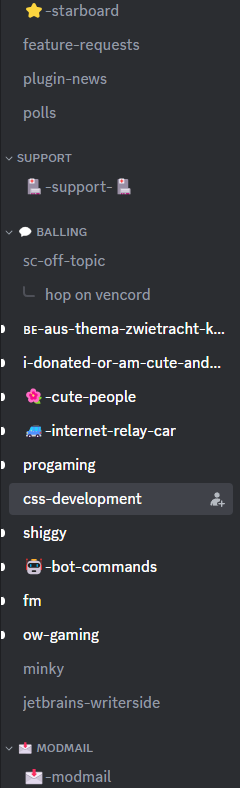
thats what i gather you're trying to do from a quick skim of chat
summer adder
i really dont know why you didnt do it like that but oh well
deep bane
summer adder
i really dont know why you didnt do it like that but oh well
because in trying to hide the other buttons not the channel icon
just every sibling of the channel name
every sibling of .name__8d1ec.overflow__87fe8
stable compass
deep bane
every sibling of `.name__8d1ec.overflow__87fe8`
[href^="/channels/"] .children_a486f8 > * {display:none !important}```not good if you run a server though
deep bane
stable compass
not good if you run a server though
you can just right click, but it's you who wanted this
deep bane
deep bane
This does not work
```css
.linkTop_eaa673 .name__8d1ec.overflow__87fe8 ~ *{
di...
nevermind it works im just dumb 🗿
.linkTop_eaa673 :is(.name__8d1ec.overflow__87fe8 ~ *,.iconContainer__3f9b0){
display:none !important;
}``` sick cloud
alright so i made my own theme but why is it that when theres a popup (for example when i click on a persons profile or random image) the backround gets pretty dark (darker than the default discord theme), how do i make it brighter coz i cant seem to find an option for that in bdeditor (or there is and im just blind)
 valid rover
can this be made in chat too? like you hover over the pfp (not the message) and it hides the decor
if so please make one
deep bane
valid rover
https://discord.com/channels/1015060230222131221/1028106818368589824/11837807225...
it already works for chat?
valid rover
it doesnt
pure cairn
works for me, even in chats
deep bane
Could someone help me center users in voice channels? So far i've got this shitty code
#channels .list__02208.list__54b1e.listDefault__205d0 .content_b60865 {
  padding:0;
  margin:auto;
  display:grid;
}
#channels .list__02208.list__54b1e.listDefault__205d0 .content_b60865 :is(.userAvatar_c4f005,.username__73ce9,.icons__10dd7>*) {
  margin:auto;
}
#channels .list__02208.list__54b1e.listDefault__205d0 {
  display:flex;
  flex-wrap:wrap;
  text-align:center;
  justify-content: center;
}
#channels .list__02208.list__54b1e.listDefault__205d0 {
  flex-direction:unset !important;
}```it should
valid rover
clear siren
it should
idk tbh but it doesnt
deep bane
valid rover
idk tbh but it doesnt
then its something on your end
deep bane
Try```css
[class*=avatar]:hover + [class*=avatarDecoration],
[class*=avatar]:hover [class*=avatarDecoration] {
opacity: 0 !important;
}
[class^=avatarDecoration_] {
transition: .3s opacity;
}
@clear siren would you help me with this
 deep bane
valid rover
deep bane
valid rover
there's so much wrong with this
valid rover
why
safe python
technically it works
deep bane
are you using the actual quickcss or just a file called quickcss that u use as a theme
valid rover
actual
deep bane
and are you sure you didnt paste it into the file instead of the quickcss and then u pasted it into quickcss after asking why doesnt it work
deep bane
@valid rover
summer adder
valid rover
i use them now
should've always used them.
valid rover
bro i use them now
deep bane
blud does NOT code
summer adder
even i knew to use comments when i first started code
valid rover
started
summer adder
my first day i used comments.
valid rover
okay i didnt know why y'all so angry
summer adder
not angry just telling you
valid rover
deep bane
EVEN BEFORE YOU HAD QUICKCSS
.
deep bane
my first second i used comments
summer adder
valid rover
.
not angry just passively aggresively telling you
deep bane
anyways
deep bane
deep bane
Could someone help me center users in voice channels? So far i've got this shitt...
i am in need of assistance
summer adder
position absolute with the left tag maybe?
deep bane
i dont want to use position absolute
deep bane
i want to center it similiar to the way i made mutual servers in my centered user popouts css
summer adder
maybe set its display to block and its right/left margins to auto
i know that centers images most times, see if that'll work just for the hell of it
.whateveritsclassis {
  display:block;
  margin-left:auto;
  margin-right:auto;
}```oh yeah i forgor, thanks for telling me about it
deep bane
summer adder
```css
.whateveritsclassis {
display:block;
margin-left:auto;
margin-right...
it looks the exact same the way i have it right now
deep bane
teleport
clear siren
deep bane
<@165098921071345666> would you help me with this
yeah sorry not today :D
bit ill I do not want to fight with positions and alignments and flexboxes etc
I just don't have the capacity rn
deep bane
when will you
clear siren
I dunno maybe tomorrow I can take a shot at it
deep bane
 deep bane
its gonna come out as gay
clear siren
yeah I'd make the channel icons be attached to the text myself
pure cairn
wasn't there an old css snippet that would change the way categories were shown?
because that looks pretty similar, although the one I'm talking about has broken classes rn
deep bane
 clear siren
pure cairn
wasn't there an old css snippet that would change the way categories were shown?
clear siren
pure cairn
wasn't there an old css snippet that would change the way categories were shown?
like make a box for each category and stuff
think I've seen that done
deep bane
clear siren
yeah I'd make the channel icons be attached to the text myself
that would be pretty hard
clear siren
no it wouldn't I made that yesterday when playing around with the idea (I don't have that code anymore)
clear siren
everything should work on vesktop
if it works on discord app or web it works on vesktop unless it's doing something very specific
valid rover
the person says it doesnt
clear siren
yeah I dunno why it wouldn't, probably because they use the d selector to select an svg with a specific shape
and when the icons were getting the redesign you might have had different icons and the selector would miss
valid rover
the person says it doesnt but it does
summer adder
pure cairn
how do you call these?
 deep bane
call what
pure cairn
the groups of channels
deep bane
categories
they are called categories
go on a discord you have perms
right click on the channel list
and you will be able to make a category
deep bane
🤨
pure cairn
 deep bane
also which class to i gotta target to make the member list sidebar "dynamic"
plain kelp
Dynamic in what way
deep bane
width
deep bane
scrollbar? no
my discord is so laggy
wait a second
Mega laggy discord css snippet
[aria-label="Members"],.members__9f47b,.membersWrap__90226 {
  max-width:inherit !important;
  width:inherit !important;
}
.container_b2ce9c {
  display:inline-block !important;
  width:fit-content !important;
  max-width:min-content !important;
}
.membersWrap__90226 {
  display:inline-block !important;
  width:fit-content !important;
  justify-content:unset;
}
wtf what did you do
deep bane
no idea
👍
i need the width to be "dynamic", match the width of the member elments inside
 clear siren
I see, I think you're on the right track but making that work might not be so trivial
so any elements and children that need to be modified to make their widths scale
deep bane
Example of what i want it to do (based on role names, names whatever)

 deep bane
So i got it working, but it changes the width based on the currently visible members so it changes a lot and i would like to know if there is a way to make it one width size per server or something like that, honestly anything so it changes widths was less
@import url('https://raw.githubusercontent.com/im-h/css-snippets/main/Centered-Member&Channel-List.css');

.container_b2ce9c:has(.membersWrap__90226)>*,.membersWrap__90226>* {
  width:min-content !important;
}
.membersWrap__90226 {
  min-width:unset !important;
}```only with aria-label im pretty sure
.content__4bf10:has([aria-label="Vendor (server)"]) :is(.container_b2ce9c, .membersWrap__9022) {width: unset}
not literally one width for a server
stable compass
that works
deep bane
every time someone joins or leaves it too
deep bane
stable compass
everytime someone leaves? no
yes
stable compass
but im pretty sure thats the only way to do it "per server"
deep bane
every time someone joins, leaves or changes their name
stable compass
deep bane
every time someone joins, leaves or changes their name
that css is for servers not users
what are you referencing
stable compass
deep bane
So i got it working, but it changes the width based on the currently visible mem...
well ur explanation isnt very well here
on what you want lmao
not once does it mention users
 deep bane
wow really
stable compass
"per user" wouldve been better
deep bane
who would've thought that
deep bane
that is what i am referencing
stable compass
still confused asl
solid ore
fr
deep bane
Me already knowing that
https://tenor.com/view/dog-nose-butterfly-dog-puppy-peaceful-gif-14700589898488542320
 devout elm
forreal 😭
summer adder
yall just aint used to them
 minor geyser
 minor geyser
clear siren
these are what are causing the overlay
minor geyser
clear siren
these are what are causing the overlay
oh ok i,ll fix that from the css itself
clear siren
yeah
for some reason the variables are doubled
so you have the correct dark ones but also the light ones that then override the previous ones
coarse abyss
clear siren
so if you have the font locally installed you would do something like this, wher...
hey didnt log on discord since then, ill try it out in a bit, thanks
 errant hatch
How can I add a background image using CSS in Vesktop? I tried as below but it didn't work.

 rugged echo
It probably doesn't show up because you have to make the app transparent
errant hatch
I disabled but not worked
clear siren
yeah there's a bunch of elements with backgrounds in the way of body
errant hatch
clear siren
yeah there's a bunch of elements with backgrounds in the way of body
How can I do it?
clear siren
uhh there's too many elements to change, I just set discord's color variables used for backgrounds to transparent but that is not very ideal either tbh
:root {
   --background-primary: transparent !important;
   --channeltextarea-background: transparent !important;
   --background-secondary: transparent !important;
   --background-secondary-alt: transparent !important;
   --background-tertiary: transparent !important;
   --__header-bar-background: transparent !important; }
breaks a bunch of dialogs and stuff too
because they also become transparent :\
errant hatch
Then we should strive for a healthier method
deep bane
This is dogshit but im too lazy to do anything about it
.app_de4237 {
  background: url('https://clearvision.github.io/images/sapphire.jpg') center / cover no-repeat;
}
.app_de4237>*,.app_de4237>*>*>*>*,.app_de4237>*>*>*>*>*>*,.app_de4237>*>*>*>*>*>*>*,.app_de4237>*>*>*>*>*>*>*>*,.app_de4237>*>*>*>*>*>*>*>*>*>*/*this one is for the input field and member list*/,.app_de4237>*>*>*>*>*>*>*>*>*>*>*/*this one is for the input field*/,.app_de4237>*>*>*>*>*>*>*>*>*>*>*>*/*this one is for the inside of the member list*/ {
  background-color:rgb(0 0 0 / 0.1) !important;
}```*>*>*>*>*>*>*>*>*>*>*>*>*>*>*>*>*>*>*>*
summer adder
errant hatch
How can I add a background image using CSS in Vesktop? I tried as below but it d...
this hurts so much
rugged echo
deep bane
This is dogshit but im too lazy to do anything about it
```css
.app_de4237 {
b...
what the fuck
I mean it works but why
deep bane
why does it work or why did i do it that way
rugged echo
why did you do it that way, looks pretty weird idk
deep bane
because im lazy
deft niche
deep bane
This is dogshit but im too lazy to do anything about it
```css
.app_de4237 {
b...
Whgat the actual fuck
rugged echo
I think it doesn't lag discord too much
deep bane
no
you know what does
[aria-label="Members"],.members__9f47b,.membersWrap__90226 {
  max-width:inherit !important;
  width:inherit !important;
}
.container_b2ce9c {
  display:inline-block !important;
  width:fit-content !important;
  max-width:min-content !important;
}
.membersWrap__90226 {
  display:inline-block !important;
  width:fit-content !important;
  justify-content:unset;
}```yep, that just makes it frozen for a couple of seconds
pure cairn
can anyone please confirm me that icon_ef4486 corresponds to the small arrows next to the categories names?
deep bane
no
its an ::after pseudo element
from one of these iconVisibility__78804 wrapper__9c483 wrapperCommon_d71dee collapsed__8fe3c clickable_dbdd2a
pure cairn
yeah sorry, I meant channel categories
I was trying to move it a bit on the right to match my "add channel" button, but I wasn't sure it was the right element
pure cairn
hmmm, how do I unhide an element if it's hidden by a theme?
which should be the inverse of display: none
clear siren
if it sets display: none on the element, best way is to check in devtools what the display:value was before
depends on element
deep bane
display:initial?
clear siren
some are box, some inline, some flex etc
pure cairn
display: initial worked
 deep bane
the centering of the icons looks weird
the arrow is centered based on looks or whatever, and the plus is centered based on it position
here is a technically perfectly centered icons

(i just edited the image)
pure cairn
I tried scaling the arrow up and changing its position with a margin
 deep bane
pure cairn
I tried scaling the arrow up and changing its position with a margin
deep bane
pure cairn
I tried scaling the arrow up and changing its position with a margin
in the image both the arrow and plus are shifted 1 pixel to the left
pure cairn
something like this?
 deep bane
eh, probably
 deep bane
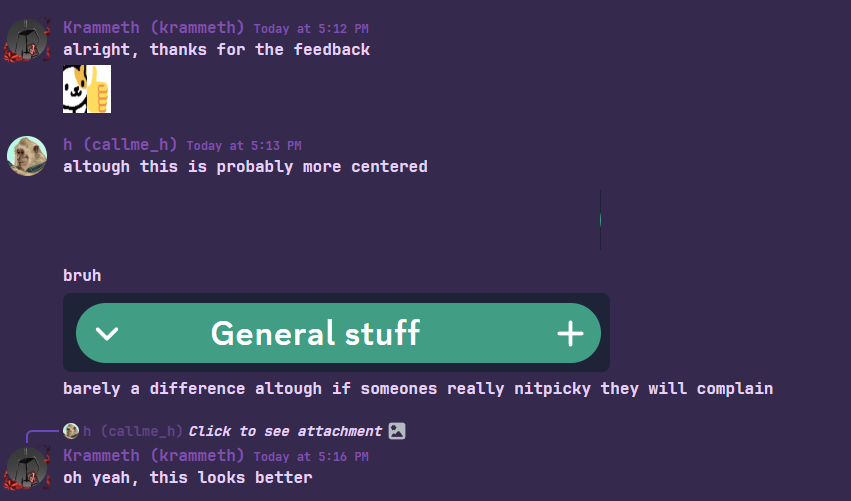
altough this is probably more centered

bruh

barely a difference altough if someones really nitpicky they will complain

 vestal field
quite bold
deep bane
U+23,U+2A,U+A9,U+AE,U+203C,U+2049,U+2122,U+2139,U+2194-2199,U+21A9-21AA,U+231A-231B,U+2328,U+23CF,U+23E9-23F3,U+23F8-23FA,U+24C2,U+25AA-25AB,U+25B6,U+25C0,U+25FB-25FE,U+2600-2604,U+260E,U+2611,U+2614-2615,U+2618,U+261D,U+2620,U+2622-2623,U+2626,U+262A,U+262E-262F,U+2638-263A,U+2640,U+2642,U+2648-2653,U+265F-2660,U+2663,U+2665-2666,U+2668,U+267B,U+267E-267F,U+2692-2697,U+2699,U+269B-269C,U+26A0-26A1,U+26A7,U+26AA-26AB,U+26B0-26B1,U+26BD-26BE,U+26C4-26C5,U+26C8,U+26CE-26CF,U+26D1,U+26D3-26D4,U+26E9-26EA,U+26F0-26F5,U+26F7-26FA,U+26FD,U+2702,U+2705,U+2708-270D,U+270F,U+2712,U+2714,U+2716,U+271D,U+2721,U+2728,U+2733-2734,U+2744,U+2747,U+274C,U+274E,U+2753-2755,U+2757,U+2763-2764,U+2795-2797,U+27A1,U+27B0,U+27BF,U+2934-2935,U+2B05-2B07,U+2B1B-2B1C,U+2B50,U+2B55,U+3030,U+303D,U+3297,U+3299,U+1F004,U+1F0CF,U+1F170-1F171,U+1F17E-1F17F,U+1F18E,U+1F191-1F19A,U+1F1E6-1F1FF,U+1F201-1F202,U+1F21A,U+1F22F,U+1F232-1F23A,U+1F250-1F251,U+1F300-1F321,U+1F324-1F393,U+1F396-1F397,U+1F399-1F39B,U+1F39E-1F3F0,U+1F3F3-1F3F5,U+1F3F7-1F4FD,U+1F4FF-1F53D,U+1F549-1F54E,U+1F550-1F567,U+1F56F-1F570,U+1F573-1F57A,U+1F587,U+1F58A-1F58D,U+1F590,U+1F595-1F596,U+1F5A4-1F5A5,U+1F5A8,U+1F5B1-1F5B2,U+1F5BC,U+1F5C2-1F5C4,U+1F5D1-1F5D3,U+1F5DC-1F5DE,U+1F5E1,U+1F5E3,U+1F5E8,U+1F5EF,U+1F5F3,U+1F5FA-1F64F,U+1F680-1F6C5,U+1F6CB-1F6D2,U+1F6D5-1F6D7,U+1F6DC-1F6E5,U+1F6E9,U+1F6EB-1F6EC,U+1F6F0,U+1F6F3-1F6FC,U+1F7E0-1F7EB,U+1F7F0,U+1F90C-1F93A,U+1F93C-1F945,U+1F947-1F9FF,U+1FA70-1FA7C,U+1FA80-1FA88,U+1FA90-1FABD,U+1FABF-1FAC5,U+1FACE-1FADB,U+1FAE0-1FAE8,U+1FAF0-1FAF8
deep bane
deep bane
`U+23,U+2A,U+A9,U+AE,U+203C,U+2049,U+2122,U+2139,U+2194-2199,U+21A9-21AA,U+231A-...
list of all the emoji unicode's in the unicode-range css format
 echo frost
Could a css snippet revert this change? (It used to be a slightly darker yellow when hovering, but now it's gray)
 deep bane
echo frost
Could a css snippet revert this change? (It used to be a slightly darker yellow ...
deep bane
echo frost
Could a css snippet revert this change? (It used to be a slightly darker yellow ...
.message__80c10:hover {
    background-color: var(--background-message-hover) !important;
}

.mentioned__58017:hover {
    background-color: var(--background-mentioned-hover) !important;
}

.replying_d7b6ad:hover {
    background-color: var(--background-message-highlight-hover) !important;
}

.ephemeral_c26b64:hover {
    background-color: hsl(var(--brand-500-hsl)/0.03) !important;
}```ty
solid ore
does anyone know how i can replace a single svg path with 2 paths? or is there a way to combine the 2 svg paths? (in css)
 dark dragon
Just combine them in illustrator or inkscape
solid ore
i didnt know u could do that, thanks j did it
 bright gust
Ay, im wanting to switch from vendetta to vencords "apk" and the only issue that I can see that can be fixed is the UI
Can anyone point me in directions of how I can scale the ui down with css
deft niche
Vencords "apk"?
bright gust
GitHub
Vencord Android app. Contribute to Vencord/Vendroid development by creating an account on GitHub.
Web view essentially
I know with css you can resize things and with a few simple tweaks I can probably fix all of its issues
deft niche

If you really want to use vendroid for some weird reason though, you can use quickcss
bright gust
Ok ty
deft niche

MDN Web Docs
Cascading Style Sheets (CSS) is a stylesheet language used to describe the presentation of a document written in HTML or XML (including XML dialects such as SVG, MathML or XHTML). CSS describes how elements should be rendered on screen, on paper, in speech, or on other media.
bright gust
deft niche
If you really want to use vendroid for some weird reason though, you can use qui...
Main reason I wanna use vendroid is cuz I like having the functionality of desktop, being able to access subscriptions etc plus better discord themes look better and have more power than a simple json file lol
clear siren
there was another user here too that wanted to try to make vendroid good with css
@white coral
 white coral
hi
clear siren
I've also been thinking of messing with it to see if it can be made better (only actually installed vendroid yesterday)
white coral
What's the convo
clear siren
you were toying with the idea of improving vendroid with css
white coral
That I was
clear siren
have you made any progress yet
white coral
I didn't do a whole lot with it
white coral
clear siren
you were toying with the idea of improving vendroid with css
As you said, just toying with it
bright gust
Damn this is gonna be fun I gotta use my friend for inspect element cuz my laptop committed unalive
clear siren
lol hf
 gilded cloak
Vendroids weakest link is discord web's mobile support
white coral
gilded cloak
Vendroids weakest link is discord web's mobile support
no frickin' duh
gilded cloak
If someone spent a couple of days fixing discords shitcss, it would be better than vendetta
 lime walrus
gilded cloak
If someone spent a couple of days fixing discords shitcss, it would be better th...
lime walrus
gilded cloak
If someone spent a couple of days fixing discords shitcss, it would be better th...
Hi there, I'm maisy. I would appreciate it if you read this website.
white coral
Mobile web is annoying as hell, I knew that before but it only became glaringly obvious when I tried to do CSS with it
 alpine cove
discord web runs horribly on mobile
gilded cloak
white coral
Mobile web is annoying as hell, I knew that before but it only became glaringly ...
As a full-time web developer.
Mobile web isn't annoying, modifying an existing code base to support mobile is annoying
white coral
bright gust
Damn this is gonna be fun I gotta use my friend for inspect element cuz my lapto...
The best way to tinker with it is to do it on Vesktop, run inspect element and set the client to mobile
Then you need to reset it to access the mobile web version
bright gust
Ty
gilded cloak
gilded cloak
As a full-time web developer.
Mobile web isn't annoying, modifying an existing c...
It's much easier when you include mobile support when you first make a component/page than hacking it in later on
TLDR: rewrite discord frontend from scratch

white coral
bright gust
Ty
Trying to open QuickCSS on Android will be a huge mistake, for it will essentially softlock you into the QuickCSS window with no way to return unless you restart the application
clear siren
alpine cove
discord web runs horribly on mobile
performance wasn't too bad on my phone(1) but the ui is a bit jank and trying to upload an image crashed it lol
white coral
clear siren
performance wasn't too bad on my phone(1) but the ui is a bit jank and trying to...
There's a lot that it chooses not to load, due to optimization issues
gilded cloak
alpine cove
discord web runs horribly on mobile
discord web runs horribly on mobile
white coral
gilded cloak
discord ~~web~~ runs horribly ~~on mobile~~
you get rid of that strikethrough this instant young sir
alpine cove
we will make a mobile client in rust
gilded cloak
white coral
you get rid of that strikethrough this instant young sir
Oh sorry
discord runs horribly
white coral
gilded cloak
Oh sorry
> discord runs horribly
Discord runs horribly ||for you||
deep bane
discord is horrible
gilded cloak
alpine cove
we will make a mobile client in rust
Rust looks hot but I never have time to tinker with it
white coral
alpine cove
we will make a mobile client in rust
I can't tell if you're joking or not
alpine cove
im joking we should use haskell gloss
deep bane
make discord in roblox
white coral
alpine cove
im joking we should use haskell gloss
Let's use Temple OS
deep bane
make discord on sticks
solid ore
tweaked version of @slim pond's SpotifyActivityRedesign
@import url("https://raw.githubusercontent.com/tom22k/css-snippets/main/SpotifyRedesign/import.css");
 pastel gale
Anyone got a css for the user popout? Iv tried this but it don't work right.
    zoom: 125%;
}```Reason behind it is iv got the zoom at 75% but on the popouts i cant read the roles names xd
The reason it dont work right is if someone has loads of roles discord shifts upwards.
I fixed it 🙂
    zoom: 125%;
}
.scroller__83262{
    max-height: 500px!important;
}```You mean this?
#🎨-css-snippets message
pastel gale
pure cairn
You mean this?
https://discord.com/channels/1015060230222131221/102810681836858...
Nope that does look cool but it dont make the popout bigger xd
deep bane
pastel gale
Nope that does look cool but it dont make the popout bigger xd
[id^="popout_"]:has(.userPopoutOuter_d739b2) {
  zoom:125%;
}```That made it worst lol
 deep bane
you just wanted it bigger
pastel gale
deep bane
you just wanted it bigger
Yeah but not break the bottom off it
deep bane
looked fine for me
[id^="popout_"]:has(.userPopoutOuter_d739b2)>*>*>* {
  zoom:125%;
}```Still does the same
deep bane
and it does the same for me too, makes the popout bigger and doesnt alter the the window
pastel gale
deep bane
and it does the same for me too, makes the popout bigger and doesnt alter the th...
Kind of got it working now.
 clear siren
zoom? I think you mean transform:scale()?
pastel gale
How do i make it so the toast is working right?
deep bane
clear siren
zoom? I think you mean transform:scale()?
i was thinking the same thing but let him do what he wants ig
pastel gale
clear siren
zoom? I think you mean transform:scale()?
Nope you are right transform:scale() works better for it as it makes the toast messages bigger too.
bright gust
I don't have a pc rn and I wanna test something, can someone tell me what this pages element is called?
 deep bane
did they do something to the buttons in the input bar
clear siren
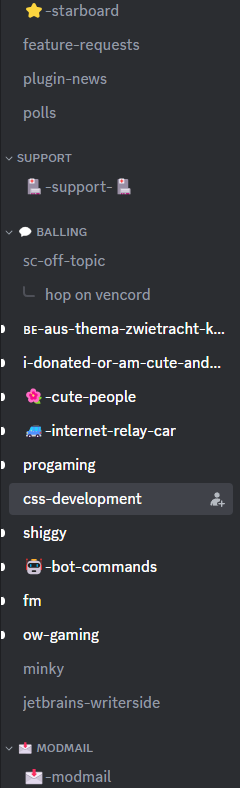
yeah latest vencord update changed a lot about them



 clear siren
???
deep bane
broke my theme
now i can spend 5 hours fixing it
yippie
atleast they added classes to them
clear siren
yeah it's so much better now than it used to be
deep bane
before you had to do div[style="display: flex;"] to target them lol
clear siren
they also all had weird margins and paddings
deep bane
ye
they standardised them
i could delete half of the css code i had for them before
New
.buttons_ce5b56 .vc-chatbar-button .button_afdfd9 {
    border: 1px solid transparent;
    top: 1px !important;
    font-family: "Segoe Fluent Icons";
    font-size: 18px;
}

.buttons_ce5b56 .vc-chatbar-button .button_afdfd9:hover {
    background-color: rgba(255, 255, 255, 0.0419);
    border-color: rgba(255, 255, 255, 0.0698) !important;
}

.buttons_ce5b56 .vc-chatbar-button .button_afdfd9:not([aria-label="Open Translate Modal"]) svg {
    display: none;
}```
Old
```css
.buttons_ce5b56 div[style="display: flex;"] .button_afdfd9 {
    width: 32px !important;
    height: 32px !important;
    margin: 8px 4px 0 0 !important;
}

.buttons_ce5b56 div[style="display: flex;"] [aria-label="Encrypt Message"] {
    scale: 1 !important;
}

.buttons_ce5b56 div[style="display: flex;"] [aria-label="Encrypt Message"] svg {
    scale: 1 !important;
    width: 24px !important;
    height: 24px !important;
}

.buttons_ce5b56 div[style="display: flex;"] .button_afdfd9 {
    border: 1px solid transparent;
}

.buttons_ce5b56 div[style="display: flex;"] .button_afdfd9:hover {
    background-color: rgba(255, 255, 255, 0.0419);
    border-color: rgba(255, 255, 255, 0.0698) !important;
}

.buttons_ce5b56 div:not(.expression-picker-chat-input-button) .button_afdfd9 {
    top: -1px !important;
    font-family: "Segoe Fluent Icons";
    font-size: 18px;
}```Nevermind i only need this lol
.buttons_ce5b56 .vc-chatbar-button .button_afdfd9 {
    top: 1px !important;
    font-family: "Segoe Fluent Icons";
    font-size: 18px;
}

.buttons_ce5b56 .vc-chatbar-button .button_afdfd9:not([aria-label="Open Translate Modal"]) svg {
    display: none;
}```altough the preview button has slightly different styling
or whatever