#🧩-plugin-development
1 messages · Page 25 of 1
 woven lion
 woven lion
yeah
 dull magnet
other than that you could check the magic
 green vessel
dont put yourself down you're amazing v!!
woven lion
okay i think i fixed it
forgot to build
que
wha
both url and proxy_url are undefined???
OH ITS A FUCKING ID
WHAT
ok i give up
its not giving me the attachment data
ffs
I GOT IT TO WORK
HOLY SHIT
@dull magnet there u go
my insanity paid off
dull magnet
lmao
woven lion
so its a bit of a rube goldberg machine
slash create has a collection of attachments
indexed by id
so you have to go to the option to get the id
then read the attachment from the collection
ctx.attachments.get(ctx.options.image)
 safe quiver
dull magnet
lmao
safe quiver
dull magnet
lmao
Will there ever be vencord iOS? 
green vessel
never! (ios sux)
safe quiver
safe quiver
dull magnet
no
Awe any reason?
Is there any reason there coduldnt be someone else who makes an ipa port?
dull magnet
ios sucks
react native sucks
ios development sucks
i dont have 1000€ to buy a macbook
the entire way vencord works is inherently incompatible with react native
many reasons
safe quiver
aw i see ppl donmt like ios here ig
dull magnet
same reason there isn't™️ a mobile app either
safe quiver
it does suck you need maac os for most ios deving
but you can use a vm and build apps for free with xcode
i see tho no worries
i just love sm
safe quiver
dull magnet
same reason there isn't™️ a mobile app either
issnt there an android one?
safe quiver
I use emnity yeah
 ionic breach
So there's really no need for another mobile modded client
safe quiver
imagine oneko on ios tho
safe quiver
ionic breach
So there's really no need for another mobile modded client
def not needed jw & vencord is nice
ionic breach
safe quiver
imagine oneko on ios tho <:pleading_kitty:1013417769192132618>
There are apps for that
 safe quiver
ionic breach
There are apps for that
safe quiver
ionic breach
There are apps for that
like?
im on ios 15.4 jailbroken
i <3 ios
i can install anyuthing if it exists
ionic breach
There's that one app the Apollo dev was working on
Just literally any app that draws pets on your screen
I know it exists for iphones cuz i remember his post
 ancient plaza
ionic breach
There's that one app the Apollo dev was working on
ancient plaza
ionic breach
There's that one app the Apollo dev was working on
pixel pals i think
ionic breach
Ah tyy
 median sleet
is there some plugin or snippet of code that stops the add friends to chat menu popping up every time you enter a group chat with only 1 user

 hollow flame
median sleet
is there some plugin or snippet of code that stops the add friends to chat menu ...
hollow flame
median sleet
is there some plugin or snippet of code that stops the add friends to chat menu ...
A group chat with only one member... You mean a DM?
 chrome elbow
group dm but you kick everyone
safe quiver
median sleet
is there some plugin or snippet of code that stops the add friends to chat menu ...
you can maybe do something in tampermonkey
safe quiver
dull magnet
this is vencord why would they use a userscript
wdym? i love vencord
i use undiscord thats one
safe quiver
dull magnet
but no there isnt
and even with css stuff?
sry if those pinged btw
you should be able to turn on NoReplyMention on some server IDs
or that yeah
its annoying to click every time
but alot of times i lioke the ping ig
Now it is with 30s search delay
idk what changed on the api
workss tho so yay
dull magnet
per user id already exists
 safe quiver
dull magnet
per user id already exists
safe quiver
dull magnet
per user id already exists
hiii
sorry
are these pings tho
Maybe did wrong oopsd
 drowsy chasm
replies that have pings on have the @ before the name

 drowsy chasm
yes
 dreamy raven
Is there any way of making peoples avatars in messages smaller with css?
 flint oxide
[class*=contents-] [class*=avatar-][class*=clickable-] { margin-top: calc(-4px - 0.125rem); scale: 0.85; }
[class*=contents-] [class*=avatarDecoration-] { margin-top: calc(-8px - 0.125rem); scale: 0.85;}
I don't know how small you want the avatars to be, so you will have to play with the values yourself
 languid bay
is there any way to make the chat input turn into an estrogen pill
 flint oxide
what is estrogen pill
languid bay
 flint oxide
 languid bay
im scared now
flint oxide
you did this to yourself
 dreamy raven
flint oxide
```css
[class*=contents-] [class*=avatar-][class*=clickable-] { margin-top: calc...
dreamy raven
flint oxide
```css
[class*=contents-] [class*=avatar-][class*=clickable-] { margin-top: calc...
That's a good size, thanks!
flint oxide
no problem!
dull magnet
languid bay
<@343383572805058560> <@343383572805058560> come here you will love this
terrifying
flint oxide
i'm sorry for having scared you vee
 hybrid dune
languid bay
is there any way to make the chat input turn into an estrogen pill
hybrid dune
languid bay
is there any way to make the chat input turn into an estrogen pill
makes more sense on vc user counter
.wrapper-2fEmwW {
border-radius: 50%;
border: 3px outset #8debde;
color: #47837b;
font-weight: bold;
}
.users-2JoyGL, .total-1c5KCN {
background: #56b8ac;
width: 50%;
}
.users-2JoyGL {
border-right: 3px solid #5a978f;
}
.total-1c5KCN {
border-left: 3px solid #8debde;
}
.total-1c5KCN::after {
display: none;
}``` flint oxide
I don't know how to react to this
 austere mauve
horror
 wide parrot
mrr
green vessel
hi
/* Allign Chat Box */
.channelTextArea-1VQBuV {
    margin-left: -8px;
    margin-block: 6px;
}

/* Nuke da buttons */
.buttons-uaqb-5 {
  display: none;
}
Now I know i probably have made this more complicated than it needs to be but is there a way i could move the user typing and avatars above the chat box in css?
 hollow flame
green vessel
hi
```css
/* Allign Chat Box */
.channelTextArea-1VQBuV {
margin-left: -8px...
hollow flame
green vessel
hi
```css
/* Allign Chat Box */
.channelTextArea-1VQBuV {
margin-left: -8px...
Idk if you care about nitpicks but it should be align, not allign
green vessel
hollow flame
Idk if you care about nitpicks but it should be align, not allign
mb, I typed that up at 4am
 amber mantle
languid bay
<@343383572805058560> <@343383572805058560> come here you will love this
amber mantle
languid bay
<@343383572805058560> <@343383572805058560> come here you will love this
you
flint oxide
green vessel
hi
```css
/* Allign Chat Box */
.channelTextArea-1VQBuV {
margin-left: -8px...
green vessel
flint oxide
https://discord.com/channels/1015060230222131221/1028106818368589824/10966069167...
what are you trying to show me?
 languid bay
yeah im CODING

 wide parrot
on an iphone?
hybrid dune
pain.jpg can't npx in vscode's terminal

obvious workaround is to just use bash normally not in vscode, but does anyone know how to fix this just in case it's a simple answer
dull magnet
?
hybrid dune
<-- clueless
 next bramble
~ ♦ cat `which npx` | head -n1
#!/usr/bin/env node
that certainly doesn't look how I would compute that …
 grim hare
why are you using floats and multiplication for the fino sequence
it's an interesting way to do it but it doesn't follow the definition of what the Fibonacci sequence is
well the Fibonacci sequence is defined as a sequence where each number is the sum of the previous two numbers in the sequence, with the first two numbers in the sequence being 0 and 1
austere mauve
have you considered looking up how the sequence is defined as ..
 flint oxide
reallll
dull magnet
calculate them at compile time
flint oxide
this is what i did a few weeks prior
 dull magnet

flint oxide
i was told to do the fib sequence with a for loop
austere mauve
I have the fastest implementation 💪 only 30 minutes to calculate the 49th number
 green vessel
kns
 wanton matrix
you can fit 93 fibonacci numbers into an uint64, that's 93*8 bytes, or less than 1KB to pre-calculate them all and have O(1) lookups
flint oxide
im gonna save this for later use
 pure temple
concern
 dapper dragon
Related to my latest question in #🏥-vencord-support-🏥, I made this code snippet to replace the TextReplace plugin's regex
Is anything here bad practice when working with indexedDB or in general? This is the first time I've touched it, so I want to make sure I'm not breaking anything unintentionally
var textReplaceRules =
[
    {
        "find": "Sample",
        "replace": "Text",
        "onlyIfIncludes": "Apples"
    },
    {
        "find": "",
        "replace": "",
        "onlyIfIncludes": ""
    }
]

var request = indexedDB.open("VencordData");

request.onsuccess = function(event){
    var db = event.target.result;
    var transaction = db.transaction(["VencordStore"], "readwrite");
    var objectStore = transaction.objectStore("VencordStore");

    var putRequest = objectStore.put(textReplaceRules, "TextReplace_rulesRegex");

    putRequest.onsuccess = function(event) {
        var getRequest = objectStore.get("TextReplace_rulesRegex");

        getRequest.onsuccess = function(event) {
            var value = event.target.result;
            console.log(value);
        };
    };
};
I've tested it and it seems to work, but I don't even know what to look for if something is broken with my way of replacing the old rules
dull magnet
you don't have to use indexeddb manually
Vencord.Api.DataStore is a wrapper around it (idb-keyval library, see docs here https://github.com/jakearchibald/idb-keyval#usage)
GitHub
A super-simple-small promise-based keyval store implemented with IndexedDB - GitHub - jakearchibald/idb-keyval: A super-simple-small promise-based keyval store implemented with IndexedDB
dapper dragon
 safe quiver

dapper dragon
Alright, I figured it out after implementing it wrong for a bunch of minutes
It's simple now, very cool!
var textReplaceRules =
[
    {
        "find": "Foo",
        "replace": "Bar",
        "onlyIfIncludes": ""
    },
    {
        "find": "",
        "replace": "",
        "onlyIfIncludes": ""
    }
]

Vencord.Api.DataStore.set("TextReplace_rulesRegex", textReplaceRules);

Vencord.Api.DataStore.get("TextReplace_rulesRegex")
  .then(function(result) {
    console.log(result);
  });
how to get rid of this
 flint oxide
I love Clyde though ;(
 oblique lark
 green vessel
it appears in the server list
flint oxide
you can try hiding it with css
green vessel
yes thats what im asking but i dont code
flint oxide
use inspect element to find the selector then write {display: none};

 sly flower
real


 severe dust
i got a theme from bd website called 'not another anime theme', in the theme's css there is a line that has the following:
  /*
    Change the unread server animation.
    Replace it with "none" in order to remove any animations and use the main color instead
  */
  --unread-server-animation: rainbow;
this makes it so servers with unread messages in them have a 'rainbow colored circle' around them. I find this kind of hard to see so i wanted to revert it back to the original little dot next to the server instead, but im not sure how to do it. (ive tried deleting/commenting out the line and it just makes the circle my default theme color). would anyone know how to potentially revert it back to dot that original discord has?
oblique lark
that bit just defines a variable for the colour; some other part of the css code is responsible for the actual circle itself
severe dust
oblique lark
that bit just defines a variable for the colour; some other part of the css code...
yeah i couldnt find anything else in this file, but there is something at the top that has
@import url(https://puckzxz.github.io/NotAnotherAnimeTheme/build/v3/naat.v3.css);
just opened that and it seems like it has a bunch of definitions/variables
so might have to make my own one of those and find out what makes the circle
ok i changed that import line to my own version, and deleted a line that said:
item-2LIpTv{animation:var(--unread-server-animation)3s linear infinite;border:2px solid var(--main-theme-color);background:0 0;border-radius:100%;display:block;margin-left:0;margin-top:0;position:absolute;top:-2px;right:3px!important;width:48px;height:48px!important;transform:none!important}
which im pretty sure is the only thing in there that could relate to the unread server animation, but it doesnt seem to have removed it
dull magnet
why is it minified
severe dust
dull magnet
why is it minified
wdym
severe dust
oh ok
it is ineed working now
just that the dot is like in the side of the server image
and its white

 dire fern
severe dust
wdym
dire fern
severe dust
wdym
as far as my incredibly extended knowledge about css goes, minified css code means that the code isn't made easily readable like
#app-mount .offline-22aM7E img {
-webkit-clip-path: none !important;
clip-path: none !important;
}
#app-mount .avatarWrapperNonUserBot-3fzpUZ .wrapper-3Un6-K img {
-webkit-clip-path: none !important;
clip-path: none !important;
}
#app-mount .userInfo-2WpsYG .wrapper-3Un6-K {
margin-top: 1px;
margin-left: 1px;
}
but has instead removed all the "unnecessary" parts like spaces or breakpoints (like when the line
changes
mid
sentence or similarly
there is generally no reason to do this, unless you have like 2 billion lines of code and all the extra characters that you'd download with the code actually make a difference in your 2MB/s internet (welcome to germany)
severe dust
dire fern
as far as my incredibly extended knowledge about css goes, minified css code mea...
oh fair
well i didnt write it sooooo
🤷♂️
 stone vortex
is there a code that hides the status in profiles?

 errant gale
seems to work
[class^="avatar-"]>div>svg>rect{
    display: none;
}

[class^="avatar-"]>div>svg>foreignObject {
    mask: none;
    border-radius: 50%;
}
its working! yikes thank you so much!
safe quiver
errant gale
seems to work
```css
[class^="avatar-"]>div>svg>rect{
display: none;
}
[cla...
Nice css skills
errant gale
css is cool
oblique lark
ctrl+shift+i is your friend
errant gale
yea i'm just inspecting stuff and trying out random things until it works
(or i give up lol)
safe quiver
oblique lark
ctrl+shift+i is your friend
Yeah I’m glad for it
Discord is rough tho with its class names and stuff
I had no clue abt ^= and *= operators tho in css
Very neat
oblique lark
you can ignore the random stuff at the end if you use those
safe quiver
errant gale
(or i give up lol)
I get it
oblique lark
basically ^= looks for something that starts with that string
safe quiver
oblique lark
you can ignore the random stuff at the end if you use those
So it’s always different?
oblique lark
and *= looks for it anywhere
safe quiver
Why would they go thru the lengths to do that 😭
oblique lark
safe quiver
So it’s always different?
no discord just changes them from time to time
oblique lark
thats why 90% of the snippets have ^= things everywhere
safe quiver

errant gale
safe quiver
I had no clue abt ^= and *= operators tho in css
i always forget what does what so this site is a good friend https://www.w3schools.com/cssref/css_selectors.php

W3Schools offers free online tutorials, references and exercises in all the major languages of the web. Covering popular subjects like HTML, CSS, JavaScript, Python, SQL, Java, and many, many more.
safe quiver
oblique lark
thats why 90% of the snippets have ^= things everywhere
Yeah lmao I never knew until a few days ago
oblique lark
🙏 we love w3schools
safe quiver
errant gale
i always forget what does what so this site is a good friend https://www.w3schoo...

Woah
So many things
errant gale
:has() not documented gives negative points tho
safe quiver
::nth-child and type-of-n or whatever make 0 sense to me
They constantly select multiple elements or elements out of order
Prob just discord code weirdness tho
I should try on lots of sites
errant gale
the child ones are kind of weird to me
safe quiver
errant gale
:has() not documented gives negative points tho
Wdym negative points
errant gale
i thought they worked how :has now works but they don't
safe quiver
errant gale
the child ones are kind of weird to me
I finally figured out tho kinda ig
errant gale
true
safe quiver
[class*="attachButton-"]:nth-child(2), [class*="buttons-"]>button[aria-haspopup="dialog"] { display: none; }
errant gale
i like the examples tho
safe quiver
finally can hgide the gift btn 😭
without :nth-child(2) it owuld remove the attatchment button too
ngl tho i still dw why its at the beginning not the end
at the end didnt work
safe quiver
errant gale
i like the examples tho
same
errant gale
safe quiver
`[class*="attachButton-"]:nth-child(2), [class*="buttons-"]>button[aria-haspopup...
i just did it like this
[aria-label="Send a gift"] {
    display: none;
}```probably not compatible with different languages tho lole
dull magnet
yes
safe quiver
errant gale
i just did it like this
```css
[aria-label="Send a gift"] {
display: none;
}...
Bruh 😭
 quiet agate
how do i......hide the title bar during discord startup.? https://cdn.discordapp.com/emojis/1024751291504791654.gif?size=48&name=shiggy&quality=lossless
 safe quiver
Css god
dull magnet
quiet agate
how do i......hide the title bar during discord startup.? https://cdn.discordapp...
vns
 shrewd tundraBOT
quiet agate
how do i......hide the title bar during discord startup.? https://cdn.discordapp...
shrewd tundraBOT
quiet agate
how do i......hide the title bar during discord startup.? https://cdn.discordapp...
 quiet agate
shrewd tundra
👉 <#1026515880080842772>
quiet agate
shrewd tundra
👉 <#1026515880080842772>
umm thanks.
safe quiver
Aw its shy maybe
errant gale
quiet agate
how do i......hide the title bar during discord startup.? https://cdn.discordapp...
what is it with you and the title bar 💀
quiet agate
errant gale
what is it with you and the title bar 💀
i have beef with title bar
safe quiver
errant gale
i figured as much
safe quiver
Use browser
oblique lark
rust is the best language ever

there's a closing bracket i just moved the console up too high
dull magnet
ayo i converted donovan @cedar olive https://github.com/OceanicJS/Bot/commit/fe67f4d98ded332fe131dd9ed0640a0be7316ae5

GitHub
 cedar marsh
This is hilarious to me

 cedar olive
dull magnet
ayo i converted donovan <@235834946571337729> https://github.com/OceanicJS/Bot/c...
cedar olive
dull magnet
ayo i converted donovan <@235834946571337729> https://github.com/OceanicJS/Bot/c...
haha nice
dire fern
i just realized that i have no clue how to do anything else than edit things in css, can someone please tell me how for example i'd make a square in the center of the screen?
dull magnet
dire fern
i just realized that i have no clue how to do anything else than edit things in ...
you want to add content with css?
css generally isn't the right method for adding content, usually you should do that with html instead
however, you can add content with the ::before and ::after pseudo elements
dull magnet
dire fern
i just realized that i have no clue how to do anything else than edit things in ...
body::after {
    content: "";
    position: absolute;
    display: block;
    height: 2em;
    width: 2em;
    background: red;
}

figure the rest out yourself
dull magnet
dull magnet
holy shit discord crosshair??? 
 dire fern
dull magnet
```css
body::after {
content: "";
position: absolute;
display: block...
dire fern
dull magnet
```css
body::after {
content: "";
position: absolute;
display: block...
exactly what i wanted though, thank you!
wait what does the 2 em mean?
errant gale
I never used them before, always wondered what they were actually for
dull magnet
dire fern
wait what does the 2 em mean?
css unit
dire fern
css unit? made up from thin air like imperial ones?
dull magnet
errant gale
I never used them before, always wondered what they were actually for
they're for adding content before and after other elements :)
oblique lark
dire fern
css unit? made up from thin air like imperial ones?
an em is basically just the font size
so 2em would be the space two characters take up
dull magnet
it's a responsive unit that corresponds to the font size yeah
em = font size of current element
rem = root em = font size of root element
it's a really nice unit because if you use em for everything, then your site scales up / down perfectly if users zoom in or out
or if someone has their device set to a bigger font size, your entire size will be bigger for them
oblique lark
mozilla once again with amazing documentation
https://developer.mozilla.org/en-US/docs/Learn/CSS/Building_blocks/Values_and_units
dull magnet
you should always use em/rem over px, with the exception being cases where you need exactly 1px and things like border radius
austere mauve
pro tip don't listen to ven and use the most useful unit, vmax
dull magnet
dull magnet
they're for adding content before and after other elements :)
they're actually really amazing
 crude iron
pro tip: don't use CSS and just let the default theme do it's job
 oblique lark
pro tip: add as many cats and shiggies as you can to make discord amazing
dire fern
/*for you ven <3*/
#app-mount .info-3pQQBb .text-xs-normal-3O7EaX.line-18uChy:before {
    content: url(https://cdn.discordapp.com/emojis/1093803211783143504.gif?size=160&quality=lossless);
    display: block;
    background: url(https://cdn.discordapp.com/emojis/1093803211783143504.gif?size=160&quality=lossless);
}```actually the best example of ::before and ::after is ShowMeYourName
austere mauve
virus
dire fern
scroll down the settings pane :3
dull magnet
the ( and ) use ::before and ::after

 dull magnet
dire fern
```css
/*for you ven <3*/
#app-mount .info-3pQQBb .text-xs-normal-3O7EaX.line-18...
dull magnet
dire fern
```css
/*for you ven <3*/
#app-mount .info-3pQQBb .text-xs-normal-3O7EaX.line-18...
scary
dire fern
i am indeed very scary, or is it shiggy you are talking about?
dire fern
Nissan. It's a car.
hollow flame
dire fern
Nissan. It's a car.
no, it's a vehicle make
dull magnet
im so mad u cant do this

 opal fern
dull magnet
im so mad u cant do this
opal fern
dull magnet
im so mad u cant do this
I'm 90% sure there was a way to do that
dull magnet
function getRedirect(url) {
    return new Promise((resolve, reject) => {
        request(new URL(url), { method: "GET" }, res => {
            console.log(url, res?.headers?.location);
            resolve(res.headers.location);
        });
    });
}
wtf am i doing wrong
opal fern
Actually might have been running functions in constants, oops

 safe quiver
dull magnet
this gives socket hang up with every site
safe quiver
dull magnet
this gives socket hang up with every site
Woah ngl I’ve not seen that before is it like timed out normally or some nodejs sruff?
dull magnet
no fetch
dull magnet
installing 2mb library for small thing
no.
anyway i figured the issue out
const req = request(url, ...)
req.close()
you have to manually close the request

cant
this is for vencord
opal fern
Shrimply use Node.ts >=18
dull magnet
runtime.
dire fern
bro the :before and :after things are soooo cool i can do anything with it

 slow charm
shawty said "runtime."
 steel cipher
thought here would be a good place to ask, how hard is it to add custom tabs to settings and add things to them? (not related to vencord but thought here may be good)
dull magnet
steel cipher
thought here would be a good place to ask, how hard is it to add custom tabs to ...
with vencord, incredibly easy
Vencord.Plugins.plugins.Settings.customSections.push(() => ({
     section: "MySection",
     label: "My Section",
     element: () => <p>hi</p>
}))
how bad is it in not vencord?
steel cipher
?
dull magnet
steel cipher
yeah
then why question mark
do you really expect people here to help you with whatever other mod you're using
go ask in the proper server, don't be a help vampire
dull magnet
yes
steel cipher
wdym how
dull magnet
what mod are you using
steel cipher
one that im working on for fun, all im running with is normal renderer js lol
steel cipher
?
dull magnet
!
steel cipher
dull magnet
!
so do you know orrr
dull magnet
no
why are you trying to make your own mod if you can't even figure out basic stuff like this
you have several examples already, you just need to refer to source code of literally any mod
steel cipher
dull magnet
you have several examples already, you just need to refer to source code of lite...
I'm not using jsx, i'm trying not to use react, all ones I know of use one of those things
so i'm required to just like
replace some of the backend?
 viral roost
you'd basically need to rewrite discord from scratch to avoid react
dull magnet
nor does anyone else want that cause performance will suck
and its easy to cause crashes
 proud valley
steel cipher
so i'm required to just like
replace some of the backend?
proud valley
steel cipher
so i'm required to just like
replace some of the backend?
ur trying to make a mod without using react when discord runs react?
u cant replace the backend, also whats the reasoning for not wanting to use jsx
as without jsx its a pain in the ass to make mods
steel cipher
it just seems incredibly complicated to modify the main process's things
dull magnet
steel cipher
it just seems incredibly complicated to modify the main process's things
yes, reverse engineering and modding is complicated
steel cipher
true, but doing more than injecting a bit of js to the renderer i mean
proud valley
steel cipher
it just seems incredibly complicated to modify the main process's things
and using jsx will make that a lot easier (altho still hard)
steel cipher
(how do you do it?)
dull magnet
code
if you don't know your way around, why not stick to a client mod made by people who know more than u
like i don't mean to gatekeep but you're kinda wasting your time 
proud valley
literally look at any of the plugins in the vencord repo and it will show u how
dull magnet
well vencord plugins aren't the best example since we have our own method of patching that they'll probably not do
best example is BD/Replugged but most bd plugins are unreadable
proud valley
ohhhh i thought he was talking abt making a vencord plugin for some reason mb
replugged plugins are nice
shiki codeblocks were originally a replugged plugin till discord switched to swc
and all the mods broke
steel cipher
dull magnet
code
very helpful 10/10
dull magnet
what else do you want me to say
it's a very complex topic
read source code of client mods, teach yourself
steel cipher
i mean you're right but they're all just as unreadable (to me at least) as bd plugins are
dull magnet
how do you expect to read minified & bundled discord code when you can't even read source code of client mods
do you even know react & jsx
steel cipher
wait i just maybe realised something
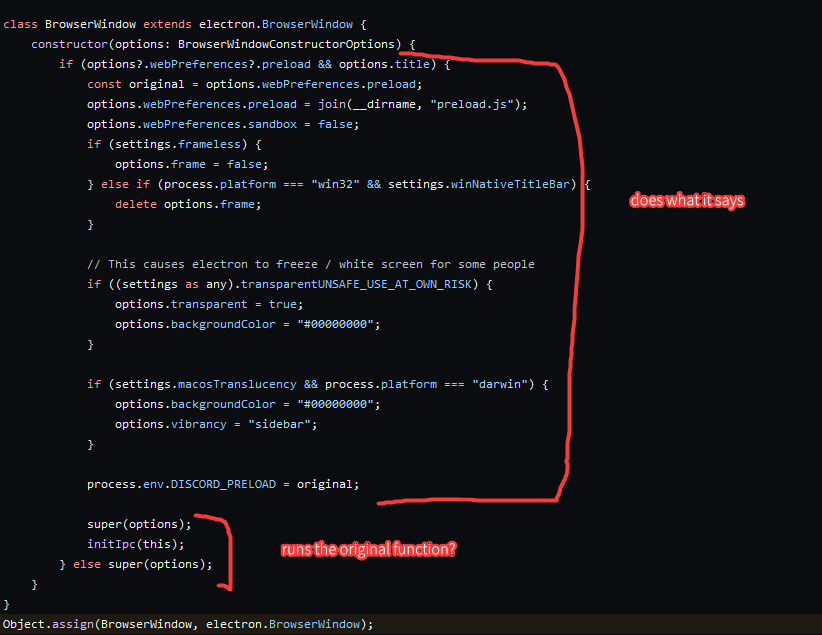
does this replace the dc browserwindow object with a custom one https://github.com/Vendicated/Vencord/blob/main/src/main/patcher.ts#L100

GitHub
The cutest Discord client mod. Contribute to Vendicated/Vencord development by creating an account on GitHub.
 proud parrotBOT
steel cipher
wait i just maybe realised something
does this replace the dc browserwindow obje...
proud parrotBOT
steel cipher
wait i just maybe realised something
does this replace the dc browserwindow obje...
**patcher.ts: **Line 100
Object.assign(BrowserWindow, electron.BrowserWindow);
this is very weird and confusing im still tryna get used to replacing the original dc source
dull magnet
proud valley
this is very weird and confusing im still tryna get used to replacing the origin...
it's way more powerful and performant than monkey patching
dull magnet
steel cipher
wait i just maybe realised something
does this replace the dc browserwindow obje...
yes but that line you linked to doesn't do that
steel cipher
oh
what does it do then
dull magnet

The Object.assign() static method
copies all enumerable
own properties from one or more
source objects to a target object. It returns the modified target
object.
 gusty patrol
Hey, can someone make me a plugin with which I can can read the messages in hidden channels and olso wright in them?
austere mauve
no
steel cipher
gusty patrol
Hey, can someone make me a plugin with which I can can read the messages in hidd...
just not possible
steel cipher
dull magnet
https://developer.mozilla.org/en-US/docs/Web/JavaScript/Reference/Global_Objects...
wait I think I got it now, is it like this? http://pkd.onl/i/_1zJVNBa.png
 dull magnet
do you know what super does
steel cipher
it calls the class it extends iirc
 median flare
gusty patrol
Hey, can someone make me a plugin with which I can can read the messages in hidd...
median flare
gusty patrol
Hey, can someone make me a plugin with which I can can read the messages in hidd...
not possible
 hushed loom
gusty patrol
Hey, can someone make me a plugin with which I can can read the messages in hidd...
hushed loom
gusty patrol
Hey, can someone make me a plugin with which I can can read the messages in hidd...
bros on somehting
oblique lark
is anyone here good at brigadier command creation
I'm trying to make a command with two optional arguments
but because of how the .then and .executes stuff works I have to duplicate a bunch of stuff
 rapid phoenix
can someone help me im doing sussy theme things and i cant find what this bit is in css so i can change the color and stuff of it.
(it looks really weird rn cuz im trying to debug it and stuff)

the bg of the channel list idk what to call it
 eager saffron
amogus

 viral tiger
oblique lark
but because of how the `.then` and `.executes` stuff works I have to duplicate a...
viral tiger
oblique lark
but because of how the `.then` and `.executes` stuff works I have to duplicate a...
Brigadier isn't really made for optional arguments. But you best ask on a Minecraft modding server (seems like a weird place to ask here, are there mc modders around?) assuming you are in fact modding minecraft, but even if not it shouldn't change how to handle Brigadier.
dire fern
rapid phoenix
can someone help me im doing sussy theme things and i cant find what this bit is...
what exactly? the top bar or just the arrow on it?
anyways, you can always press ctrl+shift+i to open the console, click the arrow at the top left of that window and then click on any object you wanna find
rapid phoenix
no thee background iteself
the background behind the red bit
ive searched thorugh the inspector and things but i really cant figure out what to use to change the color of it
background-color
dire fern
oh so you only want the red?
i dont know what your intentions are, do you want the channel list background to be removed so it shows the background of the app behind it? if so:
#channels {
  background-color: none;
}```
should workor rgba(0,0,0,0) as a background colour
rapid phoenix
dire fern
i dont know what your intentions are, do you want the channel list background to...
sorry im bad at explaining
i want to change the color of the panel thing whatever you wanna call it that is behind the red bit. I want that part to have a specific color but cant find or make it work with the css. The panel thing that the arrowhead is in
dire fern
oh just the top panel, say that earlier next time :3
dire fern
rapid phoenix
i want to change the color of the panel thing whatever you wanna call it that is...
#app-mount > div.appAsidePanelWrapper-ev4hlp > div.notAppAsidePanel-3yzkgB > div.app-3xd6d0 > div > div.layers-OrUESM.layers-1YQhyW > div > div > div > div > div.sidebar-1tnWFu > nav > div.container-1-ERn5.clickable-vvKY2q {
  background-color: red;
}```that would be the lazy and definitely working way to do it
container-1-ERn5 {
 -background-color: red;
}```
also works, just replace the red with whatever colour you want, if you want no colour or if you want transparency, use rgba values, they work with 4 different numbers, Red, Green, Blue, and of course [A]opacity (probably has a term that i do not know)works. thanks
dire fern
no problem!
steel cipher
how would I change the content security policy on the renderer?
dull magnet
steel cipher
ty
dire fern
can i make it so clicks go through a css object like it isnt there?
or is that a javascript/html thing?
crude iron
pointer-events: none
steel cipher
how do you visually remove the nitro themes via css/js? css doesn't seem to override (css .custom-theme-background { --custom-theme-background: none !important; } ) and js .remove() on the tag doing it, it just undeletes itself
green vessel
steel cipher
how do you visually remove the nitro themes via css/js? css doesn't seem to over...
Vencord.Webpack.findByCode(".backgroundGradientPresetId,")({ backgroundGradientPresetId: 0, theme: "dark" });
should work
doesnt actually remove it but it does change it to the default dark
steel cipher
any way without vencord?
dull magnet
i think they mean profile themes
green vessel
steel cipher
any way without vencord?
idk ill look into it
but discord keeps crashing with devtools for me so it might take a while
dull magnet
lmao
steel cipher
dull magnet
i think they mean profile themes
no i mean like the nitro full app theme
like the background colour thing
steel cipher
ik but i want it to autodisable when i turn on a theme
but keep it when signed in on other platforms
green vessel
yeah i dont think its possible
discord just keeps adding the nitro style back
this is the most you can do
.custom-theme-background {
    --custom-theme-background: '' !important;
}
but the colors are really off
green vessel
i tried to fix the colors
.custom-theme-background {
  --custom-theme-background: #fff !important;
}

.theme-dark.custom-theme-background {
    --bg-overlay-color: 0 0 0;
    --bg-overlay-color-inverse: 0 0 0;
    --bg-overlay-opacity-1: 0.;
    --bg-overlay-opacity-2: 0.;
    --bg-overlay-opacity-3: 0.;
    --bg-overlay-opacity-4: 0.;
    --bg-overlay-opacity-5: 0.;
    --bg-overlay-opacity-6: 0.;
    --bg-overlay-opacity-hover: 0.;
    --bg-overlay-opacity-hover-inverse: 0.;
    --bg-overlay-opacity-active: 0.;
    --bg-overlay-opacity-active-inverse: 0.;
    --bg-overlay-opacity-selected: 0.8;
    --bg-overlay-opacity-selected-inverse: 0;
    --bg-overlay-opacity-chat: 0;
    --bg-overlay-chat: #313338;
    --bg-overlay-opacity-home: 0.;
    --bg-overlay-opacity-home-card: 1;
    --bg-overlay-opacity-app-frame: 0.;
    --background-primary: #383a40;
}
its still pretty weird if you look at it for a bit but its better than this
steel cipher
will check that in a bit, tysm
proud valley
this question might have a simple answer but how do i know what code to replace for plugins
the patching stuff
viral roost
proud valley
this question might have a simple answer but how do i know what code to replace ...
you look in discord's source
you try to find what you want to patch (either via react devtools or guesswork in code search) and jump to the module
proud valley
oh ok
i see
thank you
whats react devtools? sorry this is all so new to me and there arent a lot of vencord docs on it
maybe vencord docs isnt the right place to look how to do this tho
viral roost
proud valley
whats react devtools? sorry this is all so new to me and there arent a lot of ve...
check vencord settings -> enable react devtools, then restart discord from tray and check under devtools options at the top
the only vencord docs (https://github.com/Vendicated/Vencord/blob/main/docs/2_PLUGINS.md) are extremely outdated and you're better off looking at what other plugins do tbh
proud valley
thats what ive been trying to do
i have a clone of the repo open alr
thank you tho
proud valley
viral roost
check vencord settings -> enable react devtools, then restart discord from tray ...
do i need to patch code to see when a message is sent
or is there some other way to do it
viral roost
proud valley
do i need to patch code to see when a message is sent
you can do that via flux
proud valley
ah thats what i thought i saw it in the message logger source code
sorry about the ping
viral roost
FluxDispatcher.subscribe("MESSAGE_CREATE", fn)
or the flux key in definePlugin
definePlugin({
    // ...
   flux: {
       MESSAGE_CREATE: fn
    }
})
latter is preffered if your use case allows it
proud valley
ok thanks
steel cipher
anyone know where the discord module location is on mac?
according to the BD installer it's ~/Library/Application Support but there's no discord folder there for me
oh it was at the end of the list
oh there's no discord_desktop_core module
oh wrong modules folder lmfao im sorry, i got it
proud valley
how do i test my plugins?
i was stupid and made the plugin in a clone of the repo before testing it
 tulip relic
hey guys.
so i have a simple request.
i just want to display a image that i can drag around my screen.
how do i accomplish this?
safe quiver
\0
 knotty gyro


 errant gale
time to abandon it and learn svelte instead 😎
 trim igloo
true
 proud valley
errant gale
time to abandon it and learn svelte instead 😎
proud valley
errant gale
time to abandon it and learn svelte instead 😎
i use svelte all the time its amazing
errant gale
true !!
last webdev related project i used astro and wasn't all that convinced
probably not really suited for my project but i wanted to try it out
proud valley
i used the new sveltekit to make a website for one of my projects
 proud valley
also i have a question for anyone who can answer, ik these docs are outdated but is the userplugins still a thing? https://github.com/Vendicated/Vencord/blob/main/docs/2_PLUGINS.md

GitHub
The cutest Discord client mod. Contribute to Vendicated/Vencord development by creating an account on GitHub.
proud parrotBOT
proud valley
also i have a question for anyone who can answer, ik these docs are outdated but...
**2_PLUGINS.md: **
# Plugins Guide

Welcome to Megu's Plugin Guide! In this file, you will learn about how to write your own plugin!

You don't need to run `pnpm build` every time you make a change. Instead, use `pnpm watch` - this will auto-compile Vencord whenever you make a change. If using code patches (recommended), you will need to CTRL+R to load the changes.

## Plugin Entrypoint

> If it doesn't already exist, create a folder called `userplugins` in the `src` directory of this repo.

1. Create a folder in `src/userplugins/` with the name of your plugin. For example, `src/userplugins/epicPlugin/` - All of your plugin files will go here.

2. Create a file in that folder called `index.ts`

3. In `index.ts`, copy-paste the following template code:

```ts
import definePlugin from "@utils/types";

export default definePlugin({
    name: "Epic Plugin",
    description: "This plugin is absolutely epic",
    authors: [
        {
            id: 12345n,
            name: "Your Name",
        },
    ],
    patches: [],
    // Delete these two below if you are only using code patches
... (82 lines left)
yea i used it when i tried doing some vencord stuff
proud valley
ok
errant gale
i eventually moved it up to the regular plugins tho
proud valley
so i put my plugin in userplugins and do pnpm test and it should work in my vencord?
or am i missing a step bc that doesnt sound right
chrome elbow
pnpm build
proud valley
ah ok
errant gale
idk i just made the plugin, ran pnpm build/inject and it worked
 errant gale
oh yea i gave up trying to figure flux shit out
proud valley
dull magnet
wdym
hmmm i only see
 errant gale
i wanted to make something to auto join streams in vc
proud valley
dull magnet
it has fully typed events list
im sorry but where do i find this?
bc the FluxEvents type is only the events and not the event objects
dull magnet
errant gale
oh yea i gave up trying to figure flux shit out
why
errant gale
me dumb
errant gale
and it's not that hard to click a button
dull magnet
or just ask :p
errant gale
dull magnet
there are many examples all over vencord of it in used
i did my research
but didn't really find anything that was similar enough
proud valley
dull magnet
what are you trying to do
rn im just reading messages and seeing if it has a codeblock in it
proud valley
dull magnet
there are many examples all over vencord of it in used
i first found out abt the FluxDispather in the message logger plugin
dull magnet
errant gale
but didn't really find anything that was similar enough
what u trying to do
errant gale
errant gale
i wanted to make something to auto join streams in vc
_ _
pure temple
_ _
 turbid spruce
is there a plugin that adds tabs like a browser but channels or dms?
tulip relic
turbid spruce
is there a plugin that adds tabs like a browser but channels or dms?
idk
proud valley
turbid spruce
is there a plugin that adds tabs like a browser but channels or dms?
no not for vencord
turbid spruce
sad
tulip relic
can i reload specific elements for testing
dull magnet
reload how
tulip relic
dull magnet
reload how
like refresh their styles
ok so i figured it out
can anyone tell me whats wrong with this?

it only works when i right click it
 quick lynx
how can i add my own plugin?
 gaunt anvil
dull magnet
quick lynx
how can i add my own plugin?
gaunt anvil
dull magnet
quick lynx
how can i add my own plugin?
vns
shrewd tundraBOT
quick lynx
how can i add my own plugin?
 proud valley
if i do pnpm watch after i pnpm inject than it should rebuild and update when i save updates right?
or do i have to reload discord in order for it to update
nevermind just learned the hard way
 pulsar saffron
how would I change the side bars with all my chats and the other side with peoples profiles into a different background color than the middle
 chrome elbow
.sidebar-1tnWFu,
.members-3WRCEx {
  background: #420727 !important;
}
 rocky jackal
can I ask here for help making a plugin?
proud valley
rocky jackal
can I ask here for help making a plugin?
if its a coding question its fair game
rocky jackal
Could someone help me create a button that opens a modal?


that's on betterdiscord
the only thing the other buttons do is apply themes
and im not saying to make it for me, if it's possible to guide me through the apis and patching
dull magnet
function Modal({ modalProps }: { modalProps: ModalProps }) {
  return (
    <ModalRoot {...modalProps}>
      <ModalContent>
        <Forms.FormText>Hello</Forms.FormText>
      </ModalContent>
    </ModalRoot>
  );
}

<Button onClick={() => openModal(props => <Modal modalProps={props} />)}>
  Open Modal
</Button>
pretty straight forward
crude iron
(I think he also means how to patch the button inside the guilds list)
 rocky jackal
Thank you so much, sorry if I'm asking too much
dull magnet
btw strencher do you know if there's any way to reduce modal boilerplate? Surely Discord has some wrapper that makes it easier
im tired of copy pasting the same boilerplate every time
ModalRoot
Add ModalHeader with FormTitle and ModalCloseButton, properly align them with css
Add ModalContent. Add padding to ModalContent
ITS SO BAD
we could make our own wrapper but surely discord has one right 
crude iron
I don't think they have something internally, only thing I know of is confirmmodal but not sure if that suits your needs
dull magnet
imagine like
openModal({
  title: "My Cool Modal",
  body: () => <div>Hi</div>
})
and it does all the boilerplate for u
crude iron
that's what confirm modal has
dull magnet
they have to be joking

wtf is Discord smoking
i would go fucking crazy having to work on discords code
vencord has like ~10 modals and it's already annoying me with how much duplicated boilerplate there is
crude iron
this is probably why only idiots work on their codebase
the good thing about this is, we have to worry less about them changing the structure of it 
dull magnet
this in its entirety is so much useless boilerplate
 crude iron
yeah
rocky jackal
does this modal have a footer?
dull magnet
yes
rocky jackal
can I add a class to the parent of the footer?
dull magnet
why
dull magnet
it is optional
rocky jackal
oh
dull magnet
it only shows if you add ModalFooter
rocky jackal
that helps

 rocky jackal
cause I add my own footer in bd, because the api doesn't allow for custom buttons
 dull magnet
header
content
footer
proud valley
async function addCompileButton(message: Message) {
    message.components.push({
        type: 1,
        components: [
            {
                type: 2,
                label: "Compile",
                style: 3,
                custom_id: "compile_button"
            }
        ]
    });

    await FluxDispatcher.dispatch({
        type: "MESSAGE_UPDATE",
        message
    });
}
how would i go about writing a callback for this button?
dull magnet
you need to patch some other place
you're better off not using that and instead using our MessageAccessoriesApi
it works in a similar way
proud valley
hmmm ill look into it
dull magnet
its really easy
austere mauve
why don't u make ur own modal component that wraps discord's
proud valley
dull magnet
wait is this it?
dull magnet
no thats modals
proud valley
oh mb
dull magnet
addAccessory("myCoolPlugin", props => {
  if (!someCondition(props.message))
    return null;

  return <Button onClick={() => myCallback(props.message)}>Hi</Button>
})
its really easy to use
proud valley
hmmm ok thank you
rocky jackal
dull magnet
```js
addAccessory("myCoolPlugin", props => {
if (!someCondition(props.message...
wait, can you make it so that is only appears if a specific inline codeblock exists?
rocky jackal
colorway:233365383265352c233134313531622c233063306431302c23303430343035
dull magnet
someCondition could check message.content
rocky jackal
My plugin generates a button on these strings
proud valley
dull magnet
```js
addAccessory("myCoolPlugin", props => {
if (!someCondition(props.message...
i put this code in the start function i assume?
rocky jackal
 proud valley
ok thank you so much
dull magnet
Vencord.Api.MessageAccessories.addAccessory("banana", props => {
    if (props.message.content.includes("colorway:"))
        return React.createElement(wp.Common.Button, { onClick: () => alert("hi") }, "Add this Colorway")
    return null;
})
 rocky jackal
sick, tysm
the button tho does some really weird crap
basically spawns a modal, injecting 2 specific classes, indicating that the creator was mounted by an id button

but that much I can figure it out
dull magnet
dont use it ever
crude iron
there's no need for it
crude iron
you most likely fucked up something since your original createElement fn checks if it starts with on
proud valley
dull magnet
```js
addAccessory("myCoolPlugin", props => {
if (!someCondition(props.message...
is the button component imported from @webpack/common
dull magnet
proud valley
is the button component imported from `@webpack/common`
possibly
or make ur own
but generally yes we just use discord's
crude iron
rocky jackal
you do not want to see
I looked at your plugin already and it was already the worst
rocky jackal
crude iron
you most likely fucked up something since your original `createElement` fn check...
That works perfectly fine actually
proud valley
ok its just the webpack one didnt seem like a discord one, just wanted to make sure
rocky jackal
crude iron
I looked at your plugin already and it was already the worst
I warned you
crude iron
you submitted to our official list, no escape for me not to look at it
austere mauve
everything in @webpack/common is from discord
rocky jackal
why innerHTML it in?
dull magnet
austere mauve
everything in `@webpack/common` is from discord
erm not true actually!!!!!! 
rocky jackal
just fixed it, let me check
dull magnet
dull magnet
erm not true actually!!!!!! <a:b_nerd:871368346338217995>
this does not look like "from discord" to me!!!!!!

rocky jackal
Yep, all fixed, no more inline onclicks
austere mauve

 dull magnet
yep
 austere mauve
hop on crypto.randomUUID()
 austere mauve
crypto is a web api ??
dull magnet
i realised udont even need ids
its optional
lol why is there a createToast

discord when
showToast(createToast("banana", "success"))
instead of just
showToast("banana", "success")

😭 what

this is createToast
oblique lark
cursed
rocky jackal
let nativeToast = (text,type) => {
    let toast = Toast.createToast(text,type);
    Toast.showToast(toast);
}
``` what I use for toastslet nativeToast = (e,t) => Toast.showToast(Toast.createToast(e,t));
one liner
dull magnet
ye
oblique lark
let nativeToast = (e,t) => Toast.createToast(e,t) |>> Toast.showToast;
I love the pipe operator
proud valley
javascript has the pipe operator?
austere mauve
cease
oblique lark
no :(
austere mauve
not yet
proud valley
damn
oblique lark
there's been proposals
proud valley
nice
austere mauve

GitHub
A proposal for adding a useful pipe operator to JavaScript. - GitHub - tc39/proposal-pipeline-operator: A proposal for adding a useful pipe operator to JavaScript.
dull magnet
oblique lark
```js
let nativeToast = (e,t) => Toast.createToast(e,t) |>> Toast.showToast;
```...
this is just objectively worse
pipe operator is horrid
austere mauve
I used to like it but current js stuff is just Not good for it
proud valley
i cant get the MessageAccessoriesApi to work
oblique lark
yeah this also is such a tiny amount of method chaining that you wouldn't even use it here
also I was using the f# style one for some reason?
austere mauve
it works in other languages because the pipe operator was always there
rocky jackal
changed another element creator
austere mauve
yeah f# pipes are cool
rocky jackal
let textInput = (placeholdr, idd) => {
    if(placeholdr) {
        return createElement("input", {
            type: "text",
            class: "inputDefault-Ciwd-S input-3O04eu",
            placeholder: placeholdr,
            id: idd
        })
    } else {
        return createElement("input", {
            type: "text",
            class: "inputDefault-Ciwd-S input-3O04eu"
        })
    }
};
```beforelet textInput = (e,t) => {
let n = { type: "text", class: "inputDefault-Ciwd-S input-3O04eu" }
if (e) n['placeholder'] = e;
if (t) n['id'] = t;
return createElement("input", n);
};
```afterpov you're learning js
oblique lark
I just realized that my stupid ligature font in vscode converts pipes into triangles
 rocky jackal
eyy it works
 proud valley
oblique lark
I just realized that my stupid ligature font in vscode converts pipes into trian...
proud valley
oblique lark
I just realized that my stupid ligature font in vscode converts pipes into trian...
haha yea my ligatures do that too
dull magnet
rocky jackal
```js
let textInput = (e,t) => {
let n = { type: "text", class: "inputDefaul...
this is still really bad
- don't hardcode discord class names. retrieve them from webpack
- why do you use single letter variable names
- why are you using raw dom, use react!!
also adding an id seems bad, you should likely use a class instead
rocky jackal
the class name, I can't find a good module to give me the proper classes
crude iron
dull magnet
1) don't hardcode discord class names. retrieve them from webpack
2) why do you ...
- it does protect our sanity
dull magnet
rocky jackal
the class name, I can't find a good module to give me the proper classes
all classes are exported as webpack modules
rocky jackal
 rocky jackal

 rocky jackal
don't mind that
oblique lark
proud valley
haha yea my ligatures do that too
THERE'S NOT EVEN A FONT OPTION TO DISABLE IT
THEY ADDED FIVE DIFFERENT ZEROES BUT YOU CAN'T TURN OFF TRIANGLE PIPES
proud valley
damn
proud valley
dull magnet
```js
addAccessory("myCoolPlugin", props => {
if (!someCondition(props.message...
its not working for me
gimme a sec im looking for any errors
dull magnet
enable ur plugin
proud valley
its enabled
export default definePlugin({
    name: "ExecutableCodeblocks",
    authors: [Devs.dylan, Devs.neverUsedDC],
    description: "Allows code inside codeblocks to be executed.",
    start: () => {
        addAccessory("executableCodeblocks", props => {
            console.log(props);
            return <Button size={Button.Sizes.LARGE} color={Button.Colors.BRAND_NEW}>Hi!</Button>;
        });
    },
    stop: () => {
        removeAccessory("executableCodeblocks");
    }
}
"not working" as in..
proud valley
its not adding the button but im not getting errors
ive tried rebuilding and closing discord from tray
i even reinjected vencord
viral roost
neither the console.log(props)?
proud valley
nope
dull magnet
Enable the MessageAccessoryApi plugin
or do it properly and add it your plugin's dependencies
dependencies: ["MessageAccessoryAPI"],
 rocky jackal
a one-line mess, but a working one nonetheless
 rocky jackal
oke, did a few minor improvements on the base plugin, ima probably start working on vencord's ver now
And believe me when I say, I will try my hardest so that no dom is involved
and I might just succeed
for now tho, if I can get the official colorways to display and work properly, I will be extremely happy
 fluid crescent
rocky jackal
a one-line mess, but a working one nonetheless
fluid crescent
rocky jackal
a one-line mess, but a working one nonetheless
Still better than using react
proud valley
idk react is nice
refusing to use react is weird when ur building something that runs on react
but if it works it works 🤷♂️
proud valley
how do i fix the margin/padding
 dull magnet
css
cedar marsh
.class { margin-top: 0.5rem; }
proud valley
is there anyway i can render these codeblocks?
 dull magnet
look at ViewRaw
dull magnet
you could just extract its Codeblock component to src/components
if you would like to
proud valley
too late
i will when i finish the plugin
oh nice the shiki codeblocks render

thats a goated plugin
dull magnet
yeah it patches the parser
pulsar saffron
anyway to force the banner to be a certain color?

ive tried my luck hasnt worked as I wanted
2 more things
is there a way to add little bars between sections
smth like this
 pulsar saffron
anyway to force the banner to be a certain color?
pulsar saffron
pulsar saffron
anyway to force the banner to be a certain color?
and is there a way to make that background blur more stretched down cause I've tried and it doesnt work for me
rocky jackal
rate my modal
 safe quiver
Looks modaly
pulsar saffron
rocky jackal
rate my modal
ooo how did u do that
dull magnet
code
rocky jackal
my brin is melting right now

The check for these lines is stupidly simple
oh
omg im dumb
nvm me
let's gooo

Theme specific colorways babyyyyyyy
 proud valley
rocky jackal
rate my modal
proud valley
rocky jackal
rate my modal
thats actually really good
proud valley
rocky jackal
Theme specific colorways babyyyyyyy
is this a plugin u built?
proud valley
oh
proud valley
yall should make boolean settings like this instead of the select menu
 rocky jackal
 rocky jackal
rate my modal
rocky jackal
rocky jackal
rate my modal
and as for this:

 opal iris
I don't see this anywhere, but is it possible to remove/rebind certain keybinds? ctrl+r is the bane of my existence when I'm trying to open the emotes window from my keyboard. I have looked for a plugin that would allow this, but I've not seen anything. Would it be possible to make that functionality into a plugin?
dull magnet
yes
document.addEventListener("keydown", e => {
    if (e.key === "r" && e.ctrlKey) {
        e.preventDefault()
        e.stopPropagation()
    }
}, true)
console for temporary test
opal iris
that totally works
omg
thank you very much! from this, I'm guessing I need to make a custom plug-in?
ionic breach
do you have openasar
opal iris
I do not
ionic breach
it's possible to run js on startup with openasar
if you open the vencord installer there's an option for it
opal iris
I see let me try that :)
oh btw I'm using vencord desktop
so there are not really any options with the installer
ionic breach
ohh
then yes you'll have to make a custom plugin
cuz there's no openasar for vencord desktop
opal iris
honestly I'm struggling to even find the plugin folder for vencord desktop lmao
opal iris
I've looked in local/vencorddesktop and roaming/vencorddesktop and I do not see them
oh
dull magnet
you need to build from source
ionic breach
you need to build vencord from source (not desktop)
dull magnet
vencord functions differently from other mods
opal iris
oh 
opal iris
understood
dull magnet
to add plugins you need to build from source
not that simple for stuff like this sadly
 I can try
ionic breach
I can try
ionic breach
out of curiosity, why are you using desktop instead of normal vencord
cuz if you use normal discord injected vencord you can use openasr and avoid this
opal iris
the person who suggested I try it out said that it was more stable for him
austere mauve
you dont need to rebuild vencord desktop, just vencord
ionic breach
yeah
austere mauve
it lets you select a path to ur vencord build
shrewd tundraBOT
ionic breach
vs install
- fixed, update, up
- linux, l
- mac, darwin, m
- missing features, keybinds, mf
- moreinfo, more info, mi
- reinstall, redownload
- windows, w, win
ionic breach
vf install
shrewd tundraBOT
How do I install Vencord?
We provide a convenient graphical installer you can use. Or you can just grab Vencord from the Chrome & Firefox webstores.
Visit our download page to find out more!
ionic breach
👍
austere mauve
why r u recommending that they still need to make a plugin
opal iris
and how do I set that up with OpenAsar?
ionic breach
austere mauve
why r u recommending that they still need to make a plugin
cuz if you keep scrolling up snake just wants to avoid having to reinject js everytime discord reloads
opal iris
you guys are the best btw
austere mauve
ctrl+r still exists on normal desktop?
opal iris
austere mauve
ctrl+r still exists on normal desktop?
yes
dull magnet
rini so slow 💔
austere mauve
you made me scroll up too much
austere mauve
dull magnet
rini so slow 💔
mean
ionic breach
opal iris
you guys are the best btw
specifically here https://media.discordapp.net/attachments/1097491379854266368/1097533901951483964/image.png?width=586&height=199
 dull magnet
what if i made gui for openasar js
 dull magnet
what if i made gui for openasar js
dull magnet
dull magnet
what if i made gui for openasar js
@tall kiln will u kill me
 tall kiln
opal iris
tall kiln
opal iris
this is my roaming/discord/settings.json

 opal iris
negative
ionic breach
ah... did you install openasar
opal iris
I did click the install openasar option
ionic breach
opal iris
I did click the install openasar option
actually did you click it twice
i think it has to be clicked twice
dull magnet
bleh too many buttons now

 opal iris
ionic breach
i think it has to be clicked twice
opal iris
ionic breach
i think it has to be clicked twice
:) that was my problem
ionic breach
nice
opal iris
ok
ionic breach
okie now do you see the openasar option in settings?
 ionic breach
excellent
ionic breach
ionic breach
specifically here https://media.discordapp.net/attachments/1097491379854266368/1...
so you probably want something like:
"openasar": {
   "setup": true,
   "js": "document.addEventListener(\"keydown\",(e=>{\"r\"===e.key&&e.ctrlKey&&(e.preventDefault(),e.stopPropagation())}),!0);",
   "quickstart": false
},
not valid json
opal iris
{
  "BACKGROUND_COLOR": "#202225",
  "IS_MAXIMIZED": false,
  "IS_MINIMIZED": false,
  "WINDOW_BOUNDS": {
    "x": 2562,
    "y": -36,
    "width": 1435,
    "height": 1696
  },
  "DANGEROUS_ENABLE_DEVTOOLS_ONLY_ENABLE_IF_YOU_KNOW_WHAT_YOURE_DOING": true,
  "MIN_WIDTH": 940,
  "MIN_HEIGHT": 500,
  "openasar": {
    "setup": true,
    "quickstart": false
    "js": "document.addEventListener("keydown", e => {if (e.key === "r" && e.ctrlKey) {e.preventDefault()e.stopPropagation()}}, true)"
  }
}
uhhhhhh
ionic breach
opal iris
```
{
"BACKGROUND_COLOR": "#202225",
"IS_MAXIMIZED": false,
"IS_MINIMIZED"...
make sure there's a comma after quickstart: false
does the js have to be minimized
i do not know
 ionic breach
looks like the answer is yes
try pasting there this instead:
document.addEventListener(\"keydown\",e=>{\"r\"===e.key&&e.ctrlKey&&(e.preventDefault(),e.stopPropagation())},!0);
austere mauve
you need to escape the quotes
opal iris




 ionic breach
amazing