Anyone have tips on optimiziation of SVD for apple silicon macs? I have a maxed out M2 Max and 25 frame SVD runs extremely slowly via Comfy (regular SDXL is tolerable so was hoping for SVD to work). I know it has something to do with compatibility with pytorch tapping into metal, but was hoping someone already played around with it.
#🧣|comfy-ui
1 messages · Page 3 of 1
 median furnace
 olive yoke
median furnace
Anyone have tips on optimiziation of SVD for apple silicon macs? I have a maxed ...
olive yoke
median furnace
Anyone have tips on optimiziation of SVD for apple silicon macs? I have a maxed ...
moderate your expectations because the apple hardware is quite weak in terms of potential performance
it's not due to the runtime being buggy
it is comparable to a 4050-4060
and maybe worse
 plush steppe
Hi, I wanted to ask a question to see if someone could help me.
I connected in Windows my plugin streamdiffusion inside touchdesigner to be able to create images in real time with stable turbo in a performance I'm doing, but the status of the plugin is not stable, sometimes it disconnects by itself and sometimes more than 1 minute is maintained, but still unstable and I have to press several times the re init button, anyone has any idea what could be the reason for this?
plush steppe
plush steppe
Hi, I wanted to ask a question to see if someone could help me.
I connected in ...
I have a slight suspicion that it may be due to the connection with the api, but why is it not stable?
 eager escarp
is it just me or did the order of the schedulers invert after the latest update?
 visual roost
In the dense forest, the sunlight casts colorful light and shadow through the dense leaves. Xiao Wang and Xiao Li walked through the intricate woods, and every step was accompanied by the soft sound of fallen leaves being trampled.
 sly sundial
...then one of them farted
sly sundial
eager escarp
is it just me or did the order of the schedulers invert after the latest update?
It's just you 😄
 south widget
how does tome node work? I haven't found much in the docs
sly sundial
There are docs?! 🤣
south widget
sly sundial
There are docs?! 🤣
somehow 😂
 unreal reef
Is there a functional difference between using the Preview Image and just right-click/saving ones I like and using a Save Image node?
sly sundial
It's safer to save them all automatically and just delete the ones you don't want. At least you don't forget or miss something that way.
Like everything, it's just personal choice.
olive yoke
plush steppe
Hi, I wanted to ask a question to see if someone could help me.
I connected in ...
what's your objective?
what is the application?
plush steppe
olive yoke
what's your objective?
I am creating a real time performance with dance and live visuals, but the status of the api seems to be not stable.
olive yoke
plush steppe
I am creating a real time performance with dance and live visuals, but the statu...
do you have a software engineering background?
plush steppe
olive yoke
do you have a software engineering background?
I have software skills, I am a dancer and I like coding.
olive yoke
plush steppe
I have software skills, I am a dancer and I like coding.
okay, i think this is going to be pretty hard to solve
are you following a guide?
plush steppe
olive yoke
okay, i think this is going to be pretty hard to solve
Is it going to be difficult just because I'm a dancer? lol I followed the guide and managed to run the stream, but it is not stable that is my problem
olive yoke
plush steppe
Is it going to be difficult just because I'm a dancer? lol I followed the guide ...
can you share the guide?
unreal reef
sly sundial
It's safer to save them all automatically and just delete the ones you don't wan...
I thought that too, but then I realized that everything is getting put into the /temp/ folder even if I don't save it. I wasn't sure what the "Save Image" node did exactly if the images all save automatically.
plush steppe
olive yoke
can you share the guide?

GitHub
TouchDesigner interface for ComfyUI. Contribute to olegchomp/TDComfyUI development by creating an account on GitHub.
olive yoke
plush steppe
https://github.com/olegchomp/TDComfyUI
unfortunately this touches a lot of things that can be pretty fragile
olive yoke
plush steppe
https://github.com/olegchomp/TDComfyUI
you can try to get everything in the exact versions it was tested with
 lapis marsh
is anyone here a comfyui dev? Id like to have a small chat about how it works under the hood
olive yoke
lapis marsh
is anyone here a comfyui dev? Id like to have a small chat about how it works un...
what are you trying to do?
lapis marsh
olive yoke
what are you trying to do?
building a tool similar like comfyui but for text
i wanted to ask a few questions on how litegraph is interacting to the backend
olive yoke
lapis marsh
i wanted to ask a few questions on how litegraph is interacting to the backend
litegraph helps build a json object encoding the graph that is submitted via an ordinary http REST API to the backend
the backend isn't aware of litegraph at all. it could be JSON from anywhere
olive yoke
lapis marsh
i wanted to ask a few questions on how litegraph is interacting to the backend
what is the concrete question?
lapis marsh
do you guys send the raw serialized json or do you format it into a specific structure?
 halcyon thorn
pure json
lapis marsh
the pure serialized json has all the nodes, inputs outputs etc
olive yoke
lapis marsh
do you guys send the raw serialized json or do you format it into a specific str...
a functiont transforms the litegraph data model of a graph into a graph encoded in JSON that is very similar.
olive yoke
lapis marsh
the pure serialized json has all the nodes, inputs outputs etc
no, not all the nodes that appear in litegraph's model appear in the graph that is sent to the backend
for example, primitive nodes
"this was a mistake" in some sense
it has its benefits too
lapis marsh
so nodes like math nodes etc all run in the backend with corresponding backend logic?
olive yoke
lapis marsh
so nodes like math nodes etc all run in the backend with corresponding backend l...
what math nodes?
no i'm saying the opposite. not all nodes in the UI have corresponding backend nodes
what's your goal
lapis marsh
but does that not mean as the graph executes that the results are sent back and forth
olive yoke
what do you want to do?
olive yoke
lapis marsh
but does that not mean as the graph executes that the results are sent back and ...
no, there's no back and forth
lapis marsh
our goal is to create something like comfyui for text llms, that it acts as a kind of middleware where you can select and use loras, middlewares etc
olive yoke
any nodes that exist only in the UI are computed entirely in the UI before being submitted
olive yoke
lapis marsh
our goal is to create something like comfyui for text llms, that it acts as a ki...
are you saying you want to create a graph based programming tool for building llm pipelines?
lapis marsh
olive yoke
are you saying you want to create a graph based programming tool for building ll...
exactly
olive yoke
okay, and you're asking what is important about graph based UIs? like how are they architected?
lapis marsh
yeah, I have a few ideas in my head but they're not fully clear yet
olive yoke
okay let's say there's a triangle.
in one corner, there's "pure product"
in another corner, there's "pure engineering"
and in the last corner, there's "pure mania"
where do you want to be inside this triangle?
like what is most important to you? that whatever you make be as useful to as many people as possible? that it be as well written as possible? or that you personally feel the most motivated writing it at all hours of the day?
lapis marsh
I am unsure tbh, If its me alone I'd embrace the mania, but the backend is written in go and I am building a tool for it, so they need to modify the backend a bit (I dont know go)
olive yoke
this is a pre-existing backend?
lapis marsh
yeah
aphrodite to be presize
its basically an llm tool to run multiple llm workers at once
olive yoke
lapis marsh
its basically an llm tool to run multiple llm workers at once
hmm
GitHub
PygmalionAI's large-scale inference engine. Contribute to PygmalionAI/aphrodite-engine development by creating an account on GitHub.
lapis marsh
yes
olive yoke
okay
olive yoke
well unfortunately i can't really be helpful for mania lol
halcyon thorn
oh pyg is still alive?
lapis marsh
halcyon thorn
oh pyg is still alive?
alive?
halcyon thorn
people still use pyg models?
halcyon thorn
ohh
olive yoke
lapis marsh
its basically an llm tool to run multiple llm workers at once
this looks like it's a wrapper around vllm
which is a good but buggy project
halcyon thorn
please be neox based
lapis marsh
the idea is to be able to run concurrent requests configure sampler orders etc
olive yoke
actually i can't generalize
lapis marsh
my concern was that if we run it in the backend with concurrent request, transforming stuff etc it would be a lot of work for them, so i was thinking about a dual backend
olive yoke
i can't speak to the quality of an LLM backend, other than to say that (looking at the product corner here) people will want to use the best model, which means you only really need to support 1 architecture
so anything that supports many architectures is kind of a waste of limited programmer resources
lapis marsh
so a tought of mine was that either
A. We compose a json of executions and be handles it all and then returns a single res
B. litegraph is the execution engine where we send multiple req and build the "result" together in the FE.
C. We have a nodejs server which handles the execution we did in step B so it can run like na api as well
olive yoke
litegraph isn't an execution engine. it's just a UI
you don't want to program in a graph
halcyon thorn
if you generalize enough then different architectures shouldnt be an issue
olive yoke
yeah but that generalization is basically worthless
as soon as the model is outperformed by something else, everything about that model isn't going to be used by anyone
the interfaces between them are totally fungible
so it would make the most sense to focus on the one model that currently performs the best today, which there are indeed open source models that outperform proprietary stuff, but it's like cogagent/cogvlm or whatever
lapis marsh
the engine is not model specific
olive yoke
anyway i digress
lapis marsh
it can host any llm model
olive yoke
well
i'm telling you that's a problem lol
that's a curse, not a feature
comfyui doesn't support every model
you think it's a feature and it's the opposite of a feature
it's a minus sign
olive yoke
it's something that takes 0.5 points off your physics AP exam problem, but in reality, if you get the minus sign wrong, your spaceship goes into the ground
lapis marsh
if lets say SD3 comes out, wont be comfy auto compatible with it?
olive yoke
lapis marsh
if lets say SD3 comes out, wont be comfy auto compatible with it?
well our dear developer had to go and write code to support it
and maybe it borrows some stuff here or there
but things must be written to support it anew
lapis marsh
yeha, but is it different to run SD1 then 2 or 3?
halcyon thorn
yep
lapis marsh
im not that knowledgable in that area
olive yoke
they have their similarities and their differences
halcyon thorn
comfy public has 0 sd3 code afaik
halcyon thorn
olive yoke
it's actually really unusual that SD1.5 is still "used"
nai leak
olive yoke
fooocus does (mania corner)
do you see what i am saying?
pick a corner
i can't really help you with mania
are you asking what is the right way to engineer this?
or how to make something that is actually valuable to people?
pick a point inside this triangle
lapis marsh
how to engineer this with actual value to people
olive yoke
okay
so actually this is the opposite of the mania corner lol
that's the opposite of what you said
lapis marsh
im still really uncertain
olive yoke
you said if it were up to you it would be mania, which is a very manic thing to say!
lol
lapis marsh
yeha, but im not the only person here
personally mania, but im not alone in that team
olive yoke
i mean you instantly had the insight that the open source projects are ordered by the amount of mania of their maintainers, which is a very not manic thing to know
halcyon thorn
just make comfy but text and not image
olive yoke
i didn't even have to explain to you what mania meant
you knew right away
which is very not manic
usually the really bonafide manic people aren't aware
lapis marsh
ah, i get that, i burned out
olive yoke
lol
olive yoke
okay so
we're getting to something juicy then. i think you are being really sincere, and you definitely want to work with your colleagues here to make something good
this is really good
lapis marsh
yeah, I am not as knowledgable on how llms work in a low level, but I wanna prepare a basic setup, and introduce more nodes with their guidance
my concern was do ppl use the aphrodite engine to get "step" results and compute the rest like concat etc locally, or does the aphrodite engine handle everything in a custom middleware
halcyon thorn
load model, load tokenizer, load lora sample etc
lapis marsh
yeah
olive yoke
in my opinion, there are a lot of things that have already been "Decided" in the LLM space:
- people will use the best models for the task. this means they will happily use GPT4, Claude, Gemini, alongside CogAgent, Deepseek-Coder, etc.
- the API is the OpenAI chat completions API with
tools. - there is only single question QA (the LLM is a library for another system) and chat UX (the LLM is the UX)
so the most productful and well engineered thing does these things the best
olive yoke
lapis marsh
my concern was do ppl use the aphrodite engine to get "step" results and compute...
suppose your frontend supported "both" aphrodisiac and openai's models. you know, if openai's models work better, what would people "use"?
lapis marsh
Oh, the ui we build is not aphrod specific, its just related to the aphrodite engine
olive yoke
yes
olive yoke
that's good. maybe this is giving you an idea for how you can build this "middleware" you're imagining
lapis marsh
if we do it in the "middleware" way on the engine itself then it would be strictly for use with our engine
olive yoke
your instinct for "it is a facade to aphrofuturism" but really "a facade to useful stuff"
that's all i'm really saying. and then, what is the UX it supports
it is kind of clunky to do chat UX with node graphs
and then it's like, what is someone going to be more productive in doing for a QA style programming task? writing code might be easier
lapis marsh
The idea was that you can use a frontend like SD or whatever, and send your "workflow.json" to the backend, it uses it as given and returns ur message
(if we do the its a frontend only and specific to aphrodite engine)
@olive yoke can I dm you a document?
olive yoke
i will take a look shortly
lapis marsh
thank you
olive yoke
just working on other stuff in the backgorund but
i like coordinating all the efforts together
lapis marsh
@olive yoke that document is what the main dev sent me, Im a really good frontend dev who basically wanted to help out with this
 hardy pebble
hi, I am trying to use a comfy ui workflow which connects photoshop to comfy ui and generates real time preview. so I have installed everything but i get this error.

do any of you guys use it or know?

Reddit
Explore this post and more from the comfyui community
olive yoke
hardy pebble
this is just saying you are trying to use a workflow with a controlnet checkpoint you do not have
hardy pebble
oh
i have all 14 checkpoints
but i am sharing the ones from auto1111,,is that a issue
olive yoke
hardy pebble
but i am sharing the ones from auto1111,,is that a issue
the exception is saying that the filename referenced in the workflow does not exist
i don't know why it's so arcane, but that's what it is saying
hardy pebble
in video he uses these

in my files i have these


in comfyui it shows this
so do i have to select my tile model in this comfyui panel?
Ohhh yess
it worked damn
thanks soo much
i would have never known

ty
i hope it does not run into issue again, it is doing something. atleast its working now
it works but one question, how can i pop up the preview?
it is like this

but in video its this

comfyui does have a node for this, it is there in my workflow too, but how do it pop it up
i am very noob : (
any of these options?

double click does nothing.
 hardy cloud
Hi! Can you suggest a node that can get a filename from Load Image? I want to use it in promt. It seems so simple, but I couldn't find it quickly
 steep marlin
hardy cloud
Hi! Can you suggest a node that can get a filename from Load Image? I want to us...
steep marlin
hardy cloud
Hi! Can you suggest a node that can get a filename from Load Image? I want to us...
It would take like two lines of code to change the default load image node within the nodes.py file. If I get some time later on, I might whip a custom node up because it is actually pretty handy if you want to save a text file along side an image with the same name (for variables)
sly sundial
steep marlin
It would take like two lines of code to change the default load image node withi...
Why not just embed the prompt in the image and use that?

You could also save your prompts directly into a file
 steep marlin
sly sundial
Why not just embed the prompt in the image and use that?
steep marlin
sly sundial
Why not just embed the prompt in the image and use that?
Long story short, I use some custom made LLM nodes for captioning within comfy and save the tags to a file along side the images
steep marlin
sly sundial
Why not just embed the prompt in the image and use that?
#✨|sdxl message like this
click it to see an image i posted of it in another channel here
@hardy cloud

put it in your custom nodes folder, let me know if it bugs out ever
hardy cloud
steep marlin
Long story short, I use some custom made LLM nodes for captioning within comfy a...
I'm trying to do exactly the same thing but I'm a newbie and I couldn't make it work in batch + 🔤 CR Save Text To File for some reason won't accept string as input for file_name 😭
steep marlin
hardy cloud
I'm trying to do exactly the same thing but I'm a newbie and I couldn't make it ...
Did you try the node in the zip I posted? If the string format is an issue, you can probably change the output within the custom node. I'll have to double check the exact format word for it, but it will be text instead of string. There might also be some string to text node within the million nodes in common packages
hardy cloud
steep marlin
Did you try the node in the zip I posted? If the string format is an issue, you ...
No no now it works with your node! Thank you!
steep marlin
Awesome, glad to hear
hardy cloud
steep marlin
Awesome, glad to hear
It worked one or more times and then stopped too. Strange. Similar bugs started popping up in the section where I clear the file name using TextSplit (Chibi Nodes) and CR Text Replace (Comfyroll Studio). And even if the cleanup passes, at the end CR Save Text To File says that my string is not a string. It worked before with another node where I found the file name and stopped. Then I ran yours and it worked too, but then it stopped with no any changes. I don't understand. It seems to be some kind of global error with my comfy (restarted) or browser...


 wispy kelp
the red errors are always scary and everytime i try a new workflow it has to dl more and more nodes, so confusing, this is why i am not comfortable with comfy
a plain promt/neg promt image genartion looks more confusing even if its an absolute breeze no brainer in forge or foooocus
it is very customizable tho i get that but so far i was able to do everything i wanted with forge so idk.... you stack a few contronlets and stuff and its almost the same customizability
olive yoke
hardy cloud
It worked one or more times and then stopped too. Strange. Similar bugs started ...
do you have some experience programming?
hardy cloud
olive yoke
do you have some experience programming?
Rather no than yes. Only with chatgpt, I can open vs code and correct something according to the guide/tutorial/comments from somewhere
hardy cloud
steep marlin
Did you try the node in the zip I posted? If the string format is an issue, you ...
See, I have two steps in my workflow to clean the filename. In the first step, I clean the name for the .txt file. In the second stage I clean it for the image caption text (the file name contains a concept, style, there are several of them in the dataset).
So when I select a file in Load Image for the first time and its name is displayed normally, I get an error (screenshot 2), but if I select another file and then the first one again, the name in the Load Image node shows name + (1), (2), (3)... and then there is no more error (screenshot 3). WTF is going on? 🙈
But the most interesting thing is that if I change CR Text Replace (Comfyroll Studio) to similar Find and Replace nodes from WAS Suite or YMC Suite, exactly the same error occurs (screenshot 4). It does not matter what exactly is entered in the Find field. Could you please check my workflow? Add any path in the last node and select any image in load image. Seems to be a problem in my Comfy or Chrome.


 lone bolt
I think the text split node returns a list and not a string. Didn't read the whole text though
lone bolt
No, wait. I looked at the code and it should return a string. But in your case it returns a list
hardy cloud
lone bolt
No, wait. I looked at the code and it should return a string. But in your case i...
Exactly! But why? And why does it happen with all Find and Replace nodes (Comfyroll, WAS, YMC) for me? And why does it change to string if a file is loaded the second and subsequent times it has a (1) in its name in the Load Image? (any Load Image node)
I honestly don't even know who exactly which team to report this bug to
lone bolt
Ok, so the untouched load image node works, and if you change the image it stops working?
hardy cloud
lone bolt
Ok, so the untouched load image node works, and if you change the image it stops...
Untouched node with any previous already loaded file, when "(1)" in the name -> yes. But with new file -> error.
lone bolt
hardy cloud
Untouched node with any previous already loaded file, when "(1)" in the name -> ...
Ahhh, ok. @steep marlin I think your code is missing an update somewhere.
hardy cloud
I'm not sure I understand what it means when Load Image adds a (1) to the file name? Does that mean it's loading it from somewhere else because it already "knows" the file?
lone bolt
In the loader node there is a method called IS_CHANGED. I think the bug lays in this part.
Let me try something.
Ok, i got something
Well, i thought i have it.
hardy cloud
Oh this is even more interesting. Just before @steep marlin made his "Load Image with File Name" node, I found Chibi Nodes where there is LoadImageExtended and it also has the "filename" output I need (but there along with the full path) and I ran into this problem first on that node. Now I rechecked and the behavior is exactly the same! If the file is loaded the first time then there is an error, if it is loaded the second time with (1) in the name then there is no error and everything works. How is this possible?
 lone bolt
Question, could you bypass the Show text nodes and try it?
Not that they somehow return lists for whatever reason.
@hardy cloud I am getting more and more sus about the Show Text node
-> OUTPUT_IS_LIST = (True,) is in the code from this node
hardy cloud
lone bolt
<@213892868043964416> I am getting more and more sus about the Show Text node
Wait I found something too, very strange
lone bolt
Other question. You just want to extract {forename} {surname} from the filename?
hardy cloud
lone bolt
<@213892868043964416> I am getting more and more sus about the Show Text node
-
Load Image with File Name (Ruiner) -> TextSplit -> TextSplit -> ❌ CR Text Replace
I tried to connect the test modifiers nodes TextSplit (Chibi Nodes) directly without Show Text and it didnt give a positive result. Error. -
Load Image with File Name (Ruiner) -> ✅ CR Text Replace
If I connect filename string with CR Text Replace directly, everything works. At this point you can decide that the problem is in Chibi Nodes, but wait.... -
LoadImageExtended (Chibi) -> TextSplit (Chibi) -> ✅ CR Text Replace
If I take a different node LoadImageExtended (Chibi) and string filename from there, but since it contains path, I delete it with TextSplit (Chibi) and then give CR Text Replace, everything works with the new file without (1). Then it turns out that the problem is not in TextSplit (Chibi), but maybe in some of its states.
😖
lone bolt
hardy cloud
1. Load Image with File Name (Ruiner) -> TextSplit -> TextSplit -> ❌ CR Text Rep...
Ok, but you just need forename and surname?
hardy cloud
lone bolt
Ok, but you just need forename and surname?
Yeah, but I have different file formats, and since I'm not an engineer, I did this complicated shit. Formats:
name-01.jpg
name-01-ig.jpg
name-name-01.jpg
name-name-01-ig.jpg
name-name-name-01.jpg
name-name-name-01-ig.jpg
+
for each of them Load Image inserts (1) into the file name for some reason if it was not loaded for the first time
hardy cloud
lone bolt
Ok, but you just need forename and surname?
But this is only when I need it for the style caption text in the second step. But in the first step I need to remove ".jpg" ".png" or " (1).jpg" " (1).png" where 1 can be any number -- this is the format I need for the .txt file name (CR Save Text To File).
lone bolt
Ok, got you
lone bolt
hardy cloud
But this is only when I need it for the style caption text in the second step. B...
Sent you a DM
wispy kelp
Finally. With the swarm I might be able to digest this.
olive yoke
wispy kelp
Finally. With the swarm I might be able to digest this.
what is your goal?
wispy kelp
olive yoke
what is your goal?
consistent characters from all direction and angles. the ability to generate different consistent characters, objects, backgrounds and then composite them in photoshop and then somehow image to image them together as if they were generated the same time and then paint in motion and lipsynching. this could cover 90% of all situations for a movie. for more action heavy scenes probably some controlnet action and somehow get motion from pre existign databanks or just rnadom videos online lol
olive yoke
wispy kelp
consistent characters from all direction and angles. the ability to generate dif...
oh yeah you wanted to make movies
wispy kelp
thast the goal i think for many of us
at leats music videos for now
something
I love how SD for 3D came out now - clearly AI is starting to udnerstand what 3D representation of things is. Very good sign
soon well be able to somehow lock a character or object down adn reuse it in infinite scenarios
steep marlin
I wrote a comfyui wrapper node for https://huggingface.co/roborovski/superprompt-v1 and his tiny model is surprisingly good. Way better than the gpt2 fine-tune that foooocus uses. I'll post it a few after I make it into its own node(it's in a custom node pack of mine right now with a bunch of other nodes of mine)

I should probably stop being lazy and make git pages and submit them to comfy manager so people can find and download them
 jovial field
Okay, I'm a bit out of the loop!
I'm used to CLIP vision only for images, but now there's BLIP, SigLIP... 😅 What's the hot new thing, Any good benchmark results or practical use-cases to help me get up to speed?
sly sundial
steep marlin
I wrote a comfyui wrapper node for https://huggingface.co/roborovski/superprompt...
I'm interested in trying this out, but I don't know how to set up superprompt to start with. Does it need to run as a separate entity and Comfy interfaces with it?
steep marlin
steep marlin
I wrote a comfyui wrapper node for https://huggingface.co/roborovski/superprompt...
Here's the lone node. It's a prompt expander/enhancer. Put it in your custom nodes folder. First time it runs, it has to download the huggingface model (it's super small, like 300mb). Let me know if anyone has any problems with it
steep marlin
sly sundial
I'm interested in trying this out, but I don't know how to set up superprompt to...
lol just in time
sly sundial
Thanks!!!! 😄
steep marlin
if you see replies getting cut off, raise the token number higher
you can use pysssss show text to see the output, i might work it into the node eventually, i'm just always pressed for time
sly sundial
steep marlin
you can use pysssss show text to see the output, i might work it into the node e...
It works, but there's something a bit buggy about the text input area. I'm trying to change the text and the cursor keeps jumping to the end of text.
steep marlin
Weird, I've noticed a few things like that lately in comfy. Well just right click it and convert the prompt to a pin and use a string node
sly sundial
I've only seen it in this node. The others still work fine.
How does this one differ from the "SuperPrompt" node?
steep marlin
I'll double check it. Not sure how it differs other than this is based off running a tiny llm in the background that takes basic keywords like "a dog in a park" and expands it to make a more meaningful prompt. And one thing I forgot to mention is that this is for SDXL based prompts and will work really well when SD3 comes out
Check the huggingface link to find out more about it
sly sundial
This is strange! I convert text to input and added a text box. The text box works fine, until I connect it to your node, and then it has the problem with cursor jumping to the end of the text, even if I delete your node it still does it. If I delete and re-add the text box it works fine until it's connected to your node again.
steep marlin
weird, yeah i'm not seeing a problem with it on my end and i've tested it on two machines now. try closing the comfyui browser tab and the command window, then relaunch it all. maybe press ctrl+f5 to force a hard refresh of the web page
sly sundial
I've actually got the SuperPrompt node to work with the same model, and it's not having any issues with the text box. 🙂
steep marlin
what is the node named? is it RX Superprompt-V1 Prompt Expander?
sly sundial
steep marlin
what is the node named? is it RX Superprompt-V1 Prompt Expander?
Isn't that yours?
The one that's working is just called "SuperPrompt"
steep marlin
Yeah thats mine, I don't know what the superprompt one is though and it's not on the comfy manager
The folder name is RX-Superprompt
that's mine
the node within comfyui is "RX superprompt v1 prompt expander"
sly sundial
It's from KJnodes
steep marlin
lemme check it out, maybe it's using the same variable names or something
sly sundial
It doesn't download the model automatically, and has a prompt input, but otherwise it seems the same as yours
 steep marlin
yeah i see it now
return {
"required": {
"instruction_prompt": ("STRING", {"default": 'Expand the following prompt to add more detail', "multiline": True}),
"prompt": ("STRING", {"default": '', "multiline": True, "forceInput": True}),
"max_new_tokens": ("INT", {"default": 128, "min": 1, "max": 4096, "step": 1}),
}
}
it's likely a variable name overlap issue
like if you have his node and mine in the same graph, they will bug each other out
steep marlin
oh wait, they still are loaded together anwyays when you start up comfy and it parses through all the installed nodes
they dont have to be in the same graph together
 deep gull
Does anyone know if https://github.com/castorini/daam has a script for this for comfy?

GitHub
Diffusion attentive attribution maps for interpreting Stable Diffusion. - castorini/daam
steep marlin
deep gull
Does anyone know if https://github.com/castorini/daam has a script for this for ...
if they use huggingface based libraries, they are usually pretty easy to make wrappers for
sly sundial
steep marlin
if they use huggingface based libraries, they are usually pretty easy to make wr...
That new one has the same problem
deep gull
steep marlin
if they use huggingface based libraries, they are usually pretty easy to make wr...
I can do this, but it's in the form of showing an Attention in clipseg. I'd like to find a DAAM that forms in a latent state, like the a1111 DAAM, but unfortunately I don't have the ability to create one myself, so I was wondering if there is one.
 steep marlin
sly sundial
That new one has the same problem
steep marlin
sly sundial
That new one has the same problem
yeah i missed some variables in there, i deleted the message, lemme double check again
steep marlin
sly sundial
That new one has the same problem
Alright, one last time lol... I really do appreciate you helping me test this out
I kept missing variables.like.this that needed to have the rx tagged to them lol
sly sundial
steep marlin
Alright, one last time lol... I really do appreciate you helping me test this ou...
Damn, still does it 😦
steep marlin
well just for final sanity's sake, temporarily move his node pack out of the custom nodes folder and try it again. this really sounds like some variable overlap issue and like i said, comfy parses through all the nodes at launch
sly sundial
When i first load it, everything works fine with the text already in the box. As soon as I cut and paste new text then the problem starts
steep marlin
are you making sure to delete the node after this tests?
sly sundial
Yes....aha!
steep marlin
and put a fresh one in each time
sly sundial
Try pasting this into your node a cinematic photo of a character intro of a {male|female} White Mage {|with white hair}
 steep marlin
yeah i did
sly sundial
2 secs...
steep marlin
thats why im finding this so weird lol
sly sundial
I disabled the other nodes, restarted, loaded your node...same problem 🤷🏻♂️
sly sundial
I did...
It just jumps to the end before I can edit anything in there
Could be it clashes with some other node, but the other superprompt works and I'll use that. Thanks anyway 🙂
steep marlin
yeah probably some other node then, i dont really know what to say. i have a lot of nodes on my main install and havent ever had an issue like that before
well his node does the same as mine, so if it works, it works
 rugged spear
https://github.com/taabata/LCM_Inpaint_Outpaint_Comfy Does any Expert here have run this nodes successfully yet?
GitHub
ComfyUI custom nodes for inpainting/outpainting using the new latent consistency model (LCM) - taabata/LCM_Inpaint_Outpaint_Comfy
olive yoke
websocket_image_save.py in custom nodes...
rugged spear
HELLO
 pure salmon
HEY THERE
rugged spear
This place is so deserted.Any friends who enjoy studying together
eager escarp
there is no such thing
you either copy 1 pixel and turn it into a 2x2 pixel block, or you have to guess at some of the details
rugged spear
Cool
wispy kelp
well these new text to 3D generators prove that AI is starting to udnerstand 3d shape so if it can generate somethign from one angle eventually we will be able to generate the same stuff from different angles
hence consistency
wispy kelp
the idea is to be able to generate props characters and sets and then combine them in photoshop and then re AI it with lighting and paint in animation
i think this will be the pipeline somehow eventually
essentially this could let us direct a movie
with total control
not just loose promts
wispy kelp
if you want total control over composition its a must
its the equivalent of dressing a set or tellign actors where to stand in real filmmaking
rugged spear
there are some nodes can do this
wispy kelp
well for someone very good at comfy
lol the rest of us would probably have to rely on PS
rugged spear
transfer from platform is time cost
wispy kelp
true however we can save time that's awesome
rugged spear
i am making all my process into ComfyUI now...
wispy kelp
wow
rugged spear
contains Programming, Text generations and ofcause Designing stuffs
 smoky ore
so i would like to have comfyui installed on its own virtual enviroment so it doesnt interfere with other programs. Does anyone have any good turtorials for doing this?
eager escarp
do you mean a python venv?
i'm using the portable install - it doesn't affect anything else on my system
it's on its own little island
olive yoke
smoky ore
so i would like to have comfyui installed on its own virtual enviroment so it do...
what is your goal?
smoky ore
eager escarp
do you mean a python venv?
i did, just spent an hour configuring it and it seems to work
but good to know that it doesnt affect the system if i just run a normal install going forward
smoky ore
olive yoke
what is your goal?
i wanted to make sure it was in an isolated enviroment as to not effect other projects i have on my computer. But if it is the case that it is self contained and completely portable then i will probably just run a normal install later on
sly sundial
smoky ore
i wanted to make sure it was in an isolated enviroment as to not effect other pr...
It is its own little box of contained magic 🙂
smoky ore
sly sundial
It is its own little box of contained magic 🙂
interesting, so if i install it on another computer, and transport it to another system that didnt have it before, would it still work?
sly sundial
smoky ore
interesting, so if i install it on another computer, and transport it to another...
In theory, yes. If you look inside you'll see it has its own python environment.
olive yoke
smoky ore
interesting, so if i install it on another computer, and transport it to another...
is that something you plan to do?
smoky ore
olive yoke
is that something you plan to do?
yea probably going to give it a try after i finish lunch
smoky ore
@sly sundial @olive yoke looks like it works. installed it on one machine, and ran it on another machine that didnt have any preinstalls on it without wifi
 spring jungle
am i allow to post a meme song i made about comfyui 

edm phonk, pronounced Irish vocal, song. Listen and make your own with Suno.

link wrong one xD
 surreal whale
@steep marlinyou release that node somewhere?
 daring grail

 sinful cape
Anyone know what the file model_metadata.ldb file is for?
steep marlin
surreal whale
<@204182589303554048>you release that node somewhere?
Which one?
olive yoke
sinful cape
Anyone know what the file model_metadata.ldb file is for?
i don't think that belongs to base comfyui
sinful cape
I didn't think so either. But ir appeared in my ComfyUI/models/checkpoints folder for some reason. Since I didn't put it there manually, I assume that one of the custom nodes did . . . ?
rugged spear
https://github.com/taabata/LCM_Inpaint_Outpaint_Comfy Does any Expert here have run this nodes successfully yet?
GitHub
ComfyUI custom nodes for inpainting/outpainting using the new latent consistency model (LCM) - taabata/LCM_Inpaint_Outpaint_Comfy
Any one knows how to Skip the Nodes which input is None?
smoky ore
is comfyui supposed to be faster than a1111?
halcyon thorn
smoky ore
is comfyui supposed to be faster than a1111?
faster? sometimes
more mem efficient? yes
halcyon thorn
sinful cape
I didn't think so either. But ir appeared in my ComfyUI/models/checkpoints folde...
its swarm
swarm adds that
 vital summit
Is there a way to replace someones head not with a picture, but with a LoRA?
Basically generating an image and after the fact apply a LoRA affecting only the head of the subject.
 rugged phoenix
I have 4gb vram .is there a way to install comfyui and stable diffusion and run smoothly
vital summit
rugged phoenix
I have 4gb vram .is there a way to install comfyui and stable diffusion and run ...
idk about smoothly, but it happened that I was reading a Reddit post with a guy telling how he run SD with only 4GB of VRAM:
https://www.reddit.com/r/comfyui/comments/18cf2sb/comment/kce8hm0/?utm_source=reddit&utm_medium=web2x&context=3
he may be able to help you with a workflow fine tuned for 4GB
Reddit
Explore this conversation and more from the comfyui community
 sick badger
thanks for the new websocket script @storm folio
https://github.com/comfyanonymous/ComfyUI/blob/master/script_examples/websockets_api_example_ws_images.py
olive yoke
sick badger
thanks for the new websocket script <@1059592307579564162>
https://github.com/co...
what are you using hte script for?
olive yoke
vital summit
Is there a way to replace someones head not with a picture, but with a LoRA?
Bas...
what is your goal?
you can use differential diffusion to make a "smooth" mask over the face and inpaint with various denoising settings with the lora enabled
sick badger
easy quick webapp, just took a few minutes 🙂
 olive yoke
sick badger
easy quick webapp, just took a few minutes 🙂
olive yoke
sick badger
easy quick webapp, just took a few minutes 🙂
what is the webapp for?
@sick badger oh you are already aware of this 🙂
i think you took a look a month ago
i just did a lot of updates for better API support

GitHub
A powerful and modular stable diffusion GUI with a graph/nodes interface. - hiddenswitch/ComfyUI
vital summit
olive yoke
what is your goal?
Hii! My goal is to generate images with my likeness in SD1.5 since I think it's more "creative" than SDXL. I already learned how to make good LoRAs and have both 1.5 and XL LoRAS of my face.
Anyway, getting back on track: My goal is to generate images with my likeness in SD1.5, then >try< to fix the face and upscale, then, somehow, send that 1.5 creation to an SDXL Workflow where I'll do a second pass of "face fixing" with my SDXL LoRA.
I don't know if I made my point clear but if I had to make an TD;LR it would be:
SD1.5 > Harriet_LORA_1.5 > Fix Face and Upscale > Send to SDXL > Fix Face again with Harriet_LORA_XL > gg?
olive yoke
vital summit
Hii! My goal is to generate images with my likeness in SD1.5 since I think it's ...
okay, and it's not essential that the generations look exactly like you, but as long as they're mostly like you and consistent?
it is kind of hard to do face transfer in a general way
or as you're calling it face fixing
i know you have this fine tuning that you've made
vital summit
olive yoke
okay, and it's not essential that the generations look exactly like you, but as ...
I guess??? I mean, the more it resembles me, the better. But I also wanna have it to be creative with anything else besides my face haha
vital summit
olive yoke
i know you have this fine tuning that you've made
and idk if I'll achieve this through LoRAs or just by making an generic image that doesn't resembles my face on SD1.5 and THEN inpainting my face on it.
olive yoke
like what is something concrete you've tried, and it "hasn't worked" with "just" a lora or "just" ip adapter
the technology just isn't there yet for non-celebrities
vital summit
olive yoke
like what is something concrete you've tried, and it "hasn't worked" with "just"...
I tried make an image of me wearing Shreks clothes
olive yoke
LoRA fine tunings on celebrities work because the real stability datasets have a lot of images of the people depicted already
of course with enough data good data you can make something flexible but it's very hard, it's exceptionally hard for photoreal
vital summit
olive yoke
like what is something concrete you've tried, and it "hasn't worked" with "just"...
i never tried IPAdapter 👀
olive yoke
good data means you have hundreds or thousands of specially staged images, with contrastive captions
vital summit
olive yoke
LoRA fine tunings on celebrities work because the real stability datasets have a...
oh, gotcha!
vital summit
olive yoke
of course with enough data good data you can make something flexible but it's ve...
Yesss, my SDXL LoRA is REALLY GOOD at generating my face in closeups and medium shots. But fails miserably when it reads the words "full body", ignoring the fact that I used 30 good quality full body pictures of myself in the dataset. 😑
@olive yoke anyway, do you happen to know any good workflows to make SD1.5 faces less shitty? Or even a good after-the-fact inpainting guide? 😬
olive yoke
vital summit
<@247793168056057857> anyway, do you happen to know any good workflows to make S...
have you tried manually creating a mask and seeing for yourself if inpainting will even work?
you would have to use differential diffusion to get a little bit of a chance of a good result. it's just 1 node, it does nothing more
vital summit
olive yoke
have you tried manually creating a mask and seeing for yourself if inpainting wi...
no, I never tried inpainting in ComfyUI before. Is there a way to draw a mask in comfy? 😮
olive yoke
i think so yes
have you tried achieving this in sdwebui?
or using one of the photoshop or krita plugins? if you want to manually edit stuff, it's great to use those interfaces
unless you need to generate a million images it's sort of better to just use a tool that is purpose built for inpainting
vital summit
olive yoke
have you tried achieving this in sdwebui?
gotcha! but unfortunately, no.
I use my partner's machine so I'm not allowed to install more programs 🤭
that's why I'm trying to make everything inside comfy
also, not tech savy lol
olive yoke
okay well i guess the punchline is that what you want to do is impossible in the general case. it will generally produce crummy results
there are a lot of face transfer tools online. you should try them first, just to see what is possible
if one of those work, then you know you can maybe achieve it in comfyui, because it's all the same BS
but if you can't find anything that works, it's impossible
vital summit
naah, it's possible! I just need to find the right guide for the steps I'm trying to make
SD1.5 > Harriet_LORA_1.5 > Fix Face and Upscale > Send to SDXL > Fix Face again with Harriet_LORA_XL > gg
OR
SD1.5 > Harriet_LORA_1.5 > Fix Face and Upscale > Send to an inpainting node > Inpaint my face on it
I believe! 🙌
but thanks Dr. Pangloss!
sinful cape
halcyon thorn
its swarm
Ahh thanks.
 silver nebula
sick badger
thanks for the new websocket script <@1059592307579564162>
https://github.com/co...
silver nebula
sick badger
thanks for the new websocket script <@1059592307579564162>
https://github.com/co...
How do you set this all up? Just add to Custom_Nodes directory?
 fallow jackal
A workflow for hexagon comparison grid! https://civitai.com/models/368486/hexagonal-grid-or-comfyui-workflow

Took me a while figure out all the math.

 tranquil parcel
I need an easy way of saving images in the dated folder in any directory I want, what are the best nodes for doing this?
 hollow bay
Hey guys, is it possible to make a comfyui SVD workflow, and then use it as an api for inference by passing an image?
smoky ore
does anyone know how to adjust the size of this?
 sly sundial
tranquil parcel
I need an easy way of saving images in the dated folder in any directory I want,...
sly sundial
tranquil parcel
I need an easy way of saving images in the dated folder in any directory I want,...
I use this from the WAS suite...

It creates the dated folder if it doesn't exist, and then dates the files inside it too.
fallow jackal
tranquil parcel
I need an easy way of saving images in the dated folder in any directory I want,...
A bird told me it's already supported in vanilla ComfyUI, with a filenames like this: %date:yyyy-MM-dd%/%KSampler.seed%. I didn't check it tho.
tranquil parcel
sly sundial
I use this from the WAS suite...
Thanks 🙏🏾
olive yoke
is there a circumstance where someone would want to open an image or workflow, and not have the option to download the models it references?
according to the steam hardware survey, which is representative of a random sample of PC users with GPUs, 85% have more than 100GB of free storage space
for me it has exclusively been a meaningless hassle. i never got more joy out of visiting the websites to download the models, as opposed to having it download automatically
sick badger
silver nebula
How do you set this all up? Just add to Custom_Nodes directory?
it's just a python script you can run on a web server or command-line that connects to your comfy instance where you can put your workflow
olive yoke
sick badger
it's just a python script you can run on a web server or command-line that conne...
"just"
 plain condor
Hello 👋🏻
I'm new to Comfy (and SD, in general). Slowly working my way through online tuts.
My first objective is to take an existing photo of someone and change their facial expression / mood. Preferably without changing perspective or composition.
I'd appreciate any tips, guides or scripts you may have to offer. Thanks.
fallow jackal
plain condor
Hello 👋🏻
I'm new to Comfy (and SD, in general). Slowly working my way throug...
Look for Impact Pack custom nodes, it basically designed around that task.
Well, technically, Impact Pack lets you inpaint a new face. Preserving it to look like an old face is another task, and one of the tool for that is Photomaker (included in vanilla ComfyUI).
jovial field
smoky ore
does anyone know how to adjust the size of this?
I use crl+ or - mouse
plain condor
fallow jackal
Well, technically, *Impact Pack* lets you inpaint a new face. Preserving it to l...
Thanks, for the guidance @fallow jackal
smoky ore
anyone know where i can ge a decent upscaler model?
 untold pine
smoky ore
does anyone know how to adjust the size of this?
untold pine
smoky ore
does anyone know how to adjust the size of this?
Yeah zoom in on the webs browser window.
untold pine
smoky ore
anyone know where i can ge a decent upscaler model?
SUPIR is my favorite right now.
silver nebula
smoky ore
does anyone know how to adjust the size of this?
Ctrl/Cmd +-
surreal whale
fallow jackal
A bird told me it's already supported in vanilla ComfyUI, with a filenames like ...
Certainly works, i use %date:yyyy-MM-dd%/%CheckpointLoaderSimple.ckpt_name%
 jolly warren
i install stable swarm and get error how to fix i replace comfyui old to dlbackend
 olive yoke
jolly warren
i install stable swarm and get error how to fix i replace comfyui old to dlbacke...
olive yoke
jolly warren
i install stable swarm and get error how to fix i replace comfyui old to dlbacke...
what is your goal? ordinary text to image? can you give an example prompt of something you want to make?
or something else?
olive yoke
jolly warren
i install stable swarm and get error how to fix i replace comfyui old to dlbacke...
it's telling you what the error is, but you're going to run into a lot of roadblocks like these
i don't know what the UI looks like in stableswarm-ui, but you are supposed to (probably) select a main.py file
silver nebula
What is NDI please?
sly sundial
silver nebula
What is NDI please?
Network Device Interface. I presume you're referring to this node?
https://github.com/ningxiaoxiao/comfyui-NDI

GitHub
NDI input and output functionality to the ComfyUI. - ningxiaoxiao/comfyui-NDI
 granite shore
I guys I've got a simple question: how I can decide the speed of a video generated with AnimdDiff stuff? Because i've generated 300 frames at 60fps and the result is super speedy. Is there a way to make a slow motion like video?
this is my workflow atm
 sly sundial
granite shore
I guys I've got a simple question: how I can decide the speed of a video generat...
sly sundial
granite shore
I guys I've got a simple question: how I can decide the speed of a video generat...
Less fps, or create more frames
Half the fps will be half the speed
...or twice the frames
granite shore
if i lowered the fps the video is scattering and isn't fluid. And if i've generate more frames the video length change but not the speed of transition
but i'll give another try generating more frame, in any case many thanks for the answare!
sly sundial
granite shore
but i'll give another try generating more frame, in any case many thanks for the...
Are you using interpolation to pad it?
granite shore
Sorry man i'm very unexperienced with comfy so probably mine are noob questions. The workflow that i'm using is attached above and i don't know where is and (if there is) the interpolation stage you're talking about
sly sundial
granite shore
Sorry man i'm very unexperienced with comfy so probably mine are noob questions....
Do you have this node?

That can multiply the number of frames you have and fill in the gaps
jovial field
for comfy:
Hi all, I'm curious what CUDA version others are using with their RTX 3080 graphics cards. Are you on V11.8, V12.2, V12.1, or something else? I'm mainly interested in the best choice for overall performance and compatibility with popular extensions and libraries like those used in ComfyUI. Thanks for any insights!
granite shore
sly sundial
Do you have this node?
yes i got it, but don't know where to put it
mabye after FILM FVI?
sly sundial
Between the frames output and the video combiner.
sly sundial
Wait, I think Film VFI may be the same thing
Not familiar with it, but try swapping the two and see if it makes much difference. You could increase the multiplier a bit more to get more frames.
granite shore
ok!
silver nebula
jovial field
for comfy:
Hi all, I'm curious what CUDA version others are using with their RTX...
RTX 2070 torch 2.2.1==CU121
 silver summit
Hi everyone, i am trying to use the best resolution for controlnet, for my image2image. in A1111, the resolution is in multiples of 8, while in comfyui, it is in multiples of 64.
is there a node for me to use controlnet in multiples of 8? how does controlnet actually work?
I will prefer to use multiples of 8 as i can get a depthmap to match my original img. the shape of my original image is very important and i want to try not to have it off by even 1 pixel.
 red dagger
https://twitter.com/beckylitv/status/1772407948481892396
This video is been making the rounds on socials. Looks pretty well done imo.
Wonder if something this good can be achieved manually using comfyUI. I've used reActor for face swap with good results, but what workflow would you recommend to achieve something as good as this (face swap, lip sync, etc)?
It’s terrible but I still think it’s wild that this can all be done with AI. Imagine in 6 months…

 Twitter
·
vital summit
Twitter
·
vital summit
Hii!
Is there a node that receives an image and, based on the size of that image, it outputs the closest width an height recommended for SD 1.5?
olive yoke
red dagger
https://twitter.com/beckylitv/status/1772407948481892396
This video is been mak...
this is very dubious
they have example ads from more than 1 brand that i've worked with, and i cannot find the referenced ad on the claimed platform anywhere
i did find something that resembles what they are demonstrating, but it wouldn't make sense to use them for that purpose
olive yoke
@storm folio have you looked at https://discord.com/channels/1106248220687994911/1151019966120873995 ? this is ideogram's bug-report channel
 hollow frost
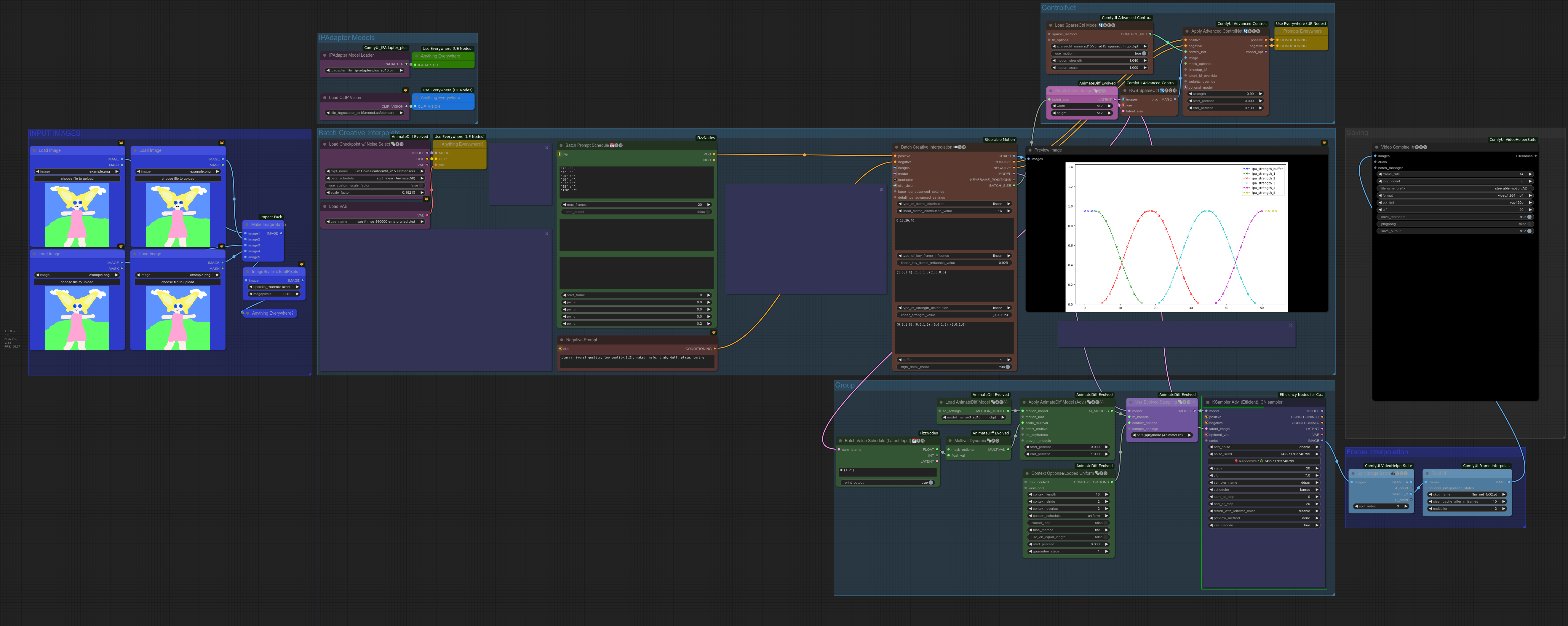
Hey guys, I've been trying to get comfyui working and I'm attempting to follow this https://raw.githubusercontent.com/nerdyrodent/AVeryComfyNerd/main/workflows/SD15/BatchImageAnimate.png workflow.
I keep getting errors over and over, mostly referring to 'NoneType' object has no attribute 'lower'.
I seem to be struggling with the IPAdaptor models, specifically the clip vision. I've found some info online but Ive been struggling for hours trying to solve this and I Cant. Any one ouut there that oculd possibly assist me? ❤️
 red dagger
olive yoke
this is very dubious
red dagger
olive yoke
this is very dubious
Yeah someone shared this on another discord https://twitter.com/BenjaminDEKR/status/1772906015610024022
Also saw her IG on another post, its arielmarie.ugc
So she either sold her likeness to that company by recording a few videos which you can just lip sync on top by using their service, or she's doing 'em one by one personally (no AI involved) which would be quite the grift 😆
So the "AI generated girl" in the car video?
Yeah, she appears to be a 100% real person named Arial who does gig videos on Fiverr
Some of the biggest AI influencers on X have been telling everyone this was AI generated, and two different AI video companies including…
 Twitter
·
olive yoke
red dagger
Yeah someone shared this on another discord https://twitter.com/BenjaminDEKR/sta...
Twitter
·
olive yoke
red dagger
Yeah someone shared this on another discord https://twitter.com/BenjaminDEKR/sta...
it's definitely using an image technology to produec the videos because it happens fast
olive yoke
hollow frost
Hey guys, I've been trying to get comfyui working and I'm attempting to follow t...
the NoneType object has no attribute lower bug means you are missing the model referenced by the node that is throwing the exception. it means the file isn't there, or it's in the wrong place, or has a different name than the workflow you uploaded. @storm folio this is a persistent source of grief from end users. it took 1 line to fix in my fork. if you looked at ideogram's bug reports, you'll see that they're real and interesting, compared to the issues you receive, which is people hung up on absolute pointless BS that is easy to fix
eager escarp
red dagger
https://twitter.com/beckylitv/status/1772407948481892396
This video is been mak...
Only the voice is changed
That's real video
red dagger
eager escarp
Only the voice is changed
Thanks!
So, circling back to my question. Is there a good way to do this locally? Like, downloading a lip sync model and wiring it up on ComfyUI or something. Any idea is appreciated.
eager escarp
Swap your own voice and do it with yourself
Or swap the voice of a video that's about it
Not really comfy related but yeah
There's plenty of free voice cloning software that can be run locally with a good GPU
eager escarp
Soviet Union domain tells you all you need to know about that
fallow jackal
plain condor
Hello 👋🏻
I'm new to Comfy (and SD, in general). Slowly working my way throug...
You gave me an idea to experiment with my old Photomaker workflow, and turns out it can be used to change face expressions! (workflow in metadata)
 hollow frost
@uncut shoal I sent you a pm but I understand that might be BM. I saw with the search results that you're pretty good at figuring this out and I've been stuck for almost 2 days. https://www.youtube.com/watch?v=bH-56e3cR2g <- I'm trying to do this tutorial ( or at least get this effect) and I'm stuck on 0% after waiting over 30 mins, any idea what could be the issue?

Steerable Motion is an amazing new custom node that allows you to easily interpolate a batch of images in order to create cool videos. Turn cats into rodents, people into cars or whatever you fancy!
Image interpolate has never been so easy and fun :)
== Links ==
ComfyUI Workflows: https://github.com/nerdyrodent/AVeryComfyNerd
== More Stable D...
 stiff forge
For folks calling comfy from python API, do you generally prefer using Anaconda / conda or Python / pip?
sick badger
stiff forge
For folks calling comfy from python API, do you generally prefer using Anaconda ...
python/pip
olive yoke
stiff forge
For folks calling comfy from python API, do you generally prefer using Anaconda ...
lemme introduce you to pip install git+https://github.com/hiddenswitch/ComfyUI.git
🤏 you have to know this much about creating a venv
olive yoke
stiff forge
For folks calling comfy from python API, do you generally prefer using Anaconda ...
from comfy.client.embedded_comfy_client import EmbeddedComfyClient
async with EmbeddedComfyClient() as client:
  outputs = await client.queue_prompt(prompt)
  save_image_node_id = next(key for key in prompt if prompt[key].class_type == "SaveImage")

  print(outputs[save_image_node_id]["images"][0]["abs_path"])
^ if you want to "just" start comfy locally and run workflows, not as a server, but like, as a library, like any other piece of code
from comfy.client.aio_client import AsyncRemoteComfyClient
client = AsyncRemoteComfyClient(server_address="http://localhost:8188")
# Now let's get the bytes of the PNG image saved by the SaveImage node:
png_image_bytes = await client.queue_prompt(prompt)
# You can save these bytes wherever you need!
with open("image.png", "rb") as f:
    f.write(png_image_bytes)
^if you want to run it remotely
@stiff forge is this helpful?
 sinful skiff
cat
 radiant wedge
is there some way to save text to a file from withint comfyui and have the file be like ComfyUi_32059.txt for my ComfyUi_32059.png ?
stiff forge
olive yoke
```py
from comfy.client.embedded_comfy_client import EmbeddedComfyClient
async w...
Amazing, this is exactly what I was looking for, thanks!
https://github.com/hiddenswitch/ComfyUI/blob/master/script_examples/basic_api_example.py
GitHub
A powerful and modular stable diffusion GUI with a graph/nodes interface. - hiddenswitch/ComfyUI
olive yoke
stiff forge
Amazing, this is exactly what I was looking for, thanks!
https://github.com/hid...
you will have to use the fork, and you will have to do some light fixes for custom nodes, at least for the next few weeks until i have the time to test all of those
stiff forge
olive yoke
you will have to use the fork, and you will have to do some light fixes for cust...
Wait, are you the author of the fork? If so, thank you so much for building this!
olive yoke
stiff forge
Wait, are you the author of the fork? If so, thank you so much for building this...
what is your use case?
stiff forge
olive yoke
what is your use case?
Experimenting with automatically tweaking prompts with an LLM. Not too specific to comfy, but that's the UI I'm already familiar with.
olive yoke
stiff forge
Experimenting with automatically tweaking prompts with an LLM. Not too specific ...
are you using something like ollama?
like from the point of view of interacting with comfyui as a JSON schemas defined tool like OpenAI does
i am not super up to date on the open models
i am already doing this so it may be useful to exchange notes
stiff forge
That'd be great. I'm planning on starting with a better model like claude3 then scaling down one POC is working.
Going to start with Instructor and see how far I get with that
olive yoke
stiff forge
That'd be great. I'm planning on starting with a better model like claude3 then ...
what exactly do you want to do? "just" rewrite prompts? invoke the prompts through a chat interface? or write new workflows in text?
stiff forge
TBH I don't have a super specific goal, just want to try out some ideas and see where that takes me
First experiment is generating variations of a prompt in a specific way.
olive yoke
okay it might be worth it to try to write it as a custom node first, using something like Phi2, because deterministic, small NLP tasks are well suited for the UX
if you are ambitious, use CogAgent / CogVLM
and don't do it using transformers / diffusers
or, write a wrapper for diffusers models to be compatible with comfyui's model loading and unloading, which would not be challenging
since people are constantly using them anyway
you can see in the chat here where i ask the comfyui author why he doesn't like huggingface's libraries and decide for yourself if it is a reason to avoid using them
stiff forge
olive yoke
if you are ambitious, use CogAgent / CogVLM
I wasn't familiar with these, thanks for the pointers!
stiff forge
olive yoke
and don't do it using `transformers` / `diffusers`
Why do you say this?
olive yoke
stiff forge
Why do you say this?
well you should
if you wanted to PR it it won't get merged
by upstream
are you on windows?
stiff forge
olive yoke
are you on windows?
I use mac/linux for work, windows/wsl outside of work
steep marlin
Writing nodes that wrap HF models super quick and easy
olive yoke
@real valve re: comfyui repo work
eager escarp
There's a lot of nodes for adjusting images, blending, sharpening, color correcting etc.... but the most important node of all - curves - doesnt seem to be a thing. Have I just overlooked a version of this somewhere?
olive yoke
eager escarp
There's a lot of nodes for adjusting images, blending, sharpening, color correct...
i was thinking of authoring a curve widget as part of changing values as sampling progresses
for loras, controlnets, etc.
to reduce the pain of having multiple samplers
but eventually it might make more sense to move the nodes into ane nvironment that laready has that stuff
rather than reinventing it all
for example blender's node editor
eager escarp
that would be a game changer imo
eager escarp
ive reallllly wished we had that so many times
olive yoke
rather than authoring more and more non-ML related nodes
curve or blender?
do you want all of The Foundry Nuke
eager escarp
the curve in comfy
olive yoke
architecturally what was missing was a contextlib Context that is available to all nodes
eager escarp
tbh, i havent used nuke
olive yoke
which would decouple a lot of this stuff in a good way
olive yoke
eager escarp
that would be a game changer imo
i'm not sure many people have discovered the superpower of changing parameters as a function of time (sample_t)
eager escarp
but yeah a few places where more manual control would be nice....
agreed
its extremely powerful and little explored
olive yoke
i wonder if this is already how dall-e3 works, and that they are cascading in the wrong direction
olive yoke
"DALL-E 3 has many improvements over DALL-E 2, many of which are not covered in this document and could not be ablated for time and compute reasons. "
that stability is cascading in the wrong direction*
eager escarp
Main limit for me with that stuff is too many stages= to many nodes= interface slows to a crawl
olive yoke
it should be 4 turbo models, each running 1 step, for that particular timestep
instead of thinking that the symmetry of the process is an advantage
it's a disadvantage
eager escarp
Yeah
Time stepping anything and everything has been interesting from my experiments
Even weird shit like skipping a denoising step at variable points
And now with the new ipadapter nodes... So many ideas
Being able to just draw curves would be so helpful and might get more ppl to experiment
olive yoke
hmm
well it's an ephiphany to me that Dall-E3 is probably "cascading through time"
instead of like stable cascade or IF/Imagen which is "cascading through space"
like i'm sure it does both, but the most important part is that it must be a latent space model "most of the time," and that there's a specifically trained model for each denoising step, instead of one model for all denoising steps
and i can't think of anyone who has published this
so maybe it's just crank nonsense
but considering how much work SDXL Turbo does in one step, and the idea behind that kind of distillation, i am pretty confident they distilled N distinct models each for t_i to t_i+1 for i <= N, and each model does the same amount of work as SDXL turbo
for some number of latent steps, then 1 pixel step like IF/Imagen
eager escarp
I think that makes a ton of sense
olive yoke
it also lines up with my experience for how much better control i get from fine choices throughout the duration of denoising
olive yoke
this might also be why they don't have an image fine tuning product
and why midjourney doesn't either
eager escarp
And tweaking the scheduled
Scheduler alone at various points has been huge
olive yoke
eager escarp
And tweaking the scheduled
Scheduler alone at various points has been huge
this has also been the case for me
i think the biggest surprise is to always start with ddim uniform, because that is what is used for training
meaning to always start trying to build the pipeline around ddim uniform
especially if you use community assets
eager escarp
And we've all seen it
With previews... Something you like changes about halfway through
olive yoke
stable cascade is i guess a similar idea
eager escarp
So then you gotta play with the scheduler manually
olive yoke
it has two distinct denoising stages
eager escarp
Or chain kadv
unreal reef
I've just begun playing with the SDXL prompt styler and I really like the way it turns out various art styles.
I have a good workflow I already like that is producing images. I want to take the output of that workflow and feed it through the stylerto turn those images into the desired aesthetic. I'm not sure how to wire them together though. At the moment I clearly have something hooked up wrong. Any advice?
Is there a method of using the styler on an image input rather than a text prompt?
olive yoke
unreal reef
I've just begun playing with the SDXL prompt styler and I really like the way it...
what is the "prompt styler"
you can put an image into a ksampler node using VAEEncode, aka img2img
unreal reef
olive yoke
what is the "prompt styler"

GitHub
Custom prompt styler node for SDXL in ComfyUI. Contribute to twri/sdxl_prompt_styler development by creating an account on GitHub.
unreal reef
olive yoke
you can put an image into a ksampler node using VAEEncode, aka img2img
Thanks - I'm still learning Comfy and that's helpful!
 sudden gull

 sly wolf
does someone know how to upscale in comfy without having to do tiled upscale
steep marlin
sly wolf
does someone know how to upscale in comfy without having to do tiled upscale
Find a model that doesn't implode when going beyond its training sizes. Other than that, you need to go the normal tiled route. If you're going from a 1.5 image at 512x512 to 1024, you can always use a 2x upsampler and then denoise it between 20-30% with an SDXL model. But if you want to do something like double an SDXL image, you're going to have to tile it
eager escarp
Tiling generally gives better results anyway
steep marlin
Usually, especially if you use a tiling control net along with it
 lone cape
sly wolf
does someone know how to upscale in comfy without having to do tiled upscale
lone cape
sly wolf
does someone know how to upscale in comfy without having to do tiled upscale
If you use SD ultimate upscaler, and the tile_width and tile_heighth is the final upscaled size, + set model_tyle and seam_fix_mode to 'none' you will get upscaler what not modify your generated image just upscale. I using SwinIR model and working well.
 prisma fern
i had a problem when just installing controlnet on comfyui with version "ComfyUI_windows_portable_nvidia_or_cpu_nightly_pytorch".
when i try install controlnet via Comfyui Manager Menu, having this kind of appearance, has a lot of conflict.
I repeatedly tried to install it, but it kept getting errors and failed.

next I tried with git clone.
still error.
then I tried using the manual method, by downloading and extracting it.
but it still has problems when running. can't read it


how should i fix it?
 robust dove
prisma fern
how should i fix it?
robust dove
prisma fern
how should i fix it?
These conflict messages are just cautionary, meaning that as long you don't mix the conflicted nodes on the same workflow you should be fine.
Here's a screenshot of my setup with controlnet installed. The warning is still there, even tho it works just fine

But that giant red and yellow warning scared me as well, and I had to look up online too.
Anyway, the Manager addon could do a better job of explaining that.
prisma fern
robust dove
These conflict messages are just cautionary, meaning that as long you don't mix ...
thanks for reply. you are quite helpful
and before installing custom nodes, I only need to update comfyui and pyhton dependencies. and wait for it to finish.

 hushed pike
on automatic1111 when you put a png with the same name as a checkpoint model in the folder with the checkpoints, that image will show up as being the preview image, is there a preview feature for stuff in comfyui, and does it work the same
 stable bluff
Does anyone know how to add an object's workflow
With the technology of fooocus, it is implemented in comfyui
 grand pike
hello lovelies, is there a prompt or lora than can help randomize a completely new person with every generation? No matter what terminology i use, it will consistently put out the same person.
olive yoke
grand pike
hello lovelies, is there a prompt or lora than can help randomize a completely n...
did you change your seed between clicks of Queue Prompt?
grand pike
I'm using comfy ui and it's set to randomize the seed every time.
Usually people have the opposite problem right? They want consistency lol
 toxic breach
hey all, Is paid google colab good to run comfyui or do you recommend something else?
 frank path
olive yoke
grand pike
Usually people have the opposite problem right? They want consistency lol
frank path
olive yoke
grand pike
Usually people have the opposite problem right? They want consistency lol
you would have to share your workflow
it is more about understanding what you are asking the interface to do
you are still programming, in disguise, and it can be really tough if you don't have experience programming
grand pike
@olive yoke Just made it back home, here's the workflow. Extremely basic with no custom nodes, Like it just fuses all races and skin colors into one person, lol

yeah i feel like i'm just not using the right words to get the program to understand what I'm trying to do. I've tried other tokens as well, like different person, alternate person, etc.
it does make a male version of the lady some times, but that's as random as it gets.
eager escarp
"random" is not a real prompt
imo
use dpmpp ancestral, cut your cfg back to 6, steps up to 35
grand pike
will try that now and get back to you, thanks!
eager escarp
that won't necessarily solve the issue of people looking similar, but your quality will be a bit better and the odds will be higher
try using a single descriptor word for a person, and changing that when you really want someone new
that could be clothing, hair, body, facial feature, whatever
grand pike

that seemed to do the trick, 35 steps is pretty rough on my 1660 ti though
i'm basically trying to mass produce generic stock photos with varied people, but i don't want to have to change the prompt every time
hhmm so it changed from that other lady but now it's stuck on a different one
olive yoke
grand pike
i'm basically trying to mass produce generic stock photos with varied people, bu...
okay well
you are still learning how to do this stuff
you should start by reading prompts from CivitAI, for portraits that you like, which will help you understand how other people have authored prompts that make unique individuals
grand pike
@olive yoke yeah i've tried replicating prompt techniques from civitai, and they help to get the specific look of a lora or something. But I just want a different person with each new generation, without having to edit the prompt.
olive yoke
grand pike
<@247793168056057857> yeah i've tried replicating prompt techniques from civitai...
just
😎
sounds like you want to pay for a service that does this. many exist
grand pike
im even more confused now lol
 distant pendant
try using wildcards in prompt, like just get a long list of random names and another one of surnames, and it will pick a different combination each gen, (probably) resulting in more varied people
wildcards for hair colors, clothes and such would obviously work too
(there should be a bunch of nodes for that in the manager)
grand pike
@distant pendant I did find this one here, but i'll have to learn how to use wildcards tho
A few wildcards I use when i want to "randomize" a few things in my prompts. Can be used with any model. :) Includes: RandomEth: Random ethnicities...
is comfyui-stable-wildcards the best custom node for wildcards?
 distant pendant
I haven't the foggiest which one is the best
grand pike
thats okay i'll just try them all.
thanks, i think this is the feature i've been looking for
grand pike
this isn't working ya'll, no matter what i do, no matter what wildcard i use, it refuses to make each person different. I'm going insane trying to figure this out. I never imagined something seemingly simple as a random person would be so difficult
plain condor
I'm running ComfyUI on a M3 MAX MBP with 128GB Memory running macos Sonoma 14.4. I seem to be running into one roadblock after another with it.
Roadblock #1 - latest versions of PyTorch and Sonoma 14.4 break GPU acceleration, so I need to run PyTorch 2.1.2 in a virtual environment running Python 3.11 in order to utilize my GPU. Otherwise, I'm stuck running Comfy in cpu-only mode.
Roadblock #2 - AnimateDiff Evolved crashes Python and is unusable. And the original Animate Diff Sampler only works for <10 frames. Otherwise, it just outputs black frames.
Roadblock #3 - Frame Interpolation (GMFSS Fortuna VFI) requires cupy... which no longer supports macos.
Are there any other mac users on here who have found solutions to any of these issues? It's feeling like for every roadblock I circumvent, a few more are just waiting for me around the bend. 😓
 frigid matrix
anyone know how to insert a civitai prompt directly into comfyui like you can with stable diffusion
 flat talon
grand pike
this isn't working ya'll, no matter what i do, no matter what wildcard i use, it...
flat talon
grand pike
this isn't working ya'll, no matter what i do, no matter what wildcard i use, it...
I think you can try the Portrait Master, which has many settings for facial details and random modes for each part (sorry, English is not my native language).
like this.

 grand pike
@flat talon oh wow. that looks amazing. Already downloading lol
is portrait maker related to it? saw that on the list as well
flat talon
Sorry, I don't know, I rarely pay attention to the author of the node
grand pike
That's okay, I appreciate your help ❤️
flat talon
😆
grand pike
do i gotta connect it to anything? positive and negative nodes are greyed out.
 flat talon
Right click on ClipTextEncode
 grand pike
I found a video tutorial homie, thanks. Actually the video does it differently, not even sure if it's method will work or not
flat talon
grand pike
I found a video tutorial homie, thanks. Actually the video does it differently, ...
Ok, bro, trying more will help you better understand comfyui.
 flat talon
yes, that's right!
 forest birch
Hoi, do you guys know of a workflow/models that can achieve really good video interpolation? Where i can choose how accurate it needs to be to achieve the least amount of artifacts?
olive yoke
forest birch
Hoi, do you guys know of a workflow/models that can achieve really good video in...
what is your goal? what kind of videos are you trying to make?
 hazy cliff


I released the new IPAdapter few days ago, let's see together all the new features and best practices!
forest birch
olive yoke
what is your goal? what kind of videos are you trying to make?
Any really.
Content depends on what funny/interesting video i want to interpolate. Could be a small clip, or an entire movie. live action, pixar style or anime/cartoons
olive yoke
forest birch
Content depends on what funny/interesting video i want to interpolate. Could be ...
okay that's pretty inspecific
you are going to have a bad time
it sounds like you want to use a ready-made plugin in an adobe suite program
forest birch
olive yoke
okay that's pretty inspecific
Because it will be used for any kind of video. Like flowframes, but more "in depth configs" and accuracy/targeted content, If there's different models per kind of media, do list them, as just with the different upscalers, some are best for anime, some for real, other for art, some for text etc
olive yoke
forest birch
Because it will be used for any kind of video. Like flowframes, but more "in dep...
is this for you or for someone else? like a service?
what is the idea?
forest birch
olive yoke
is this for you or for someone else? like a service?
For memes/jokes, as well as "seriousness", but personal use to interpolate movies that i'd want to watch with 2x and higher framerate for smoother motion
Avatar way of water being one for instance. As i hated bluray release never got a 48 fps release
olive yoke
okay, have you tried using a non-neural frame interpolator, like dlss3? or RIFE?
or FILM?
you can download programs that do this for free, in one click
adding a "little bit of motion" to "memes" is only really achievable by SVD style stuff, but that is also available "one click"
forest birch
Can't use DLSS3 due to 30 series card. And yes, flowframes, as well as SVP. SVP is too artifactry, and flowframes is way better, but nto as accurate. So i'd want for instance a workflow for comfy that would take a video apart frame by frame, analyze and interpolate each extracted PNG, then throw it all back into a mkv/mp4
olive yoke
it sounds like you are asking, is there a thing you can download off civitai, which is a workflow, and also works with all this comfyui manager stuff you are familiar with, which gives you "one click" solution to your inspecific task
that does everything for you
forest birch
forest birch
Hoi, do you guys know of a workflow/models that can achieve really good video in...
Literally what i asked lol
olive yoke
well did you search civitai?
comfyui is the opposite of what you are looking for. you are looking for a ready made application
a ready made application disguised as a bunch of comfyui artifacts, that's fine, but it is going to be inferior to anything you find on google
olive yoke
forest birch
Literally what i asked lol
anyway i think there are a lot of good results for "comfyui animation interpolate frames"
 small wagon


 weak urchin
forest birch
Literally what i asked lol
weak urchin
forest birch
Literally what i asked lol
I have an Interpolator at the end of this workflow, but I have one just for upscaling and Interpolating as well. https://civitai.com/models/367412/geeky-ghost-vid2vid-organized-v1
This workflow is designed for advanced video processing, incorporating various techniques such as style transfer, motion analysis, depth estimation...
Let's you manipulate video in a variety of ways with 2 images.
I'm going to do another update to it soon now that I got loras working well with animatediff to change the style.
 clever thunder
hello everyone. is there a node that can talk to an API? i would like to send an image to Replicate and getting it back all in comfy. any tips would be helpful. thx
olive yoke
clever thunder
hello everyone. is there a node that can talk to an API? i would like to send an...
can you be more specific
clever thunder
like this ..i would like to use replicate for some stuff, i use some of those in my own workspace in Replicate. but would like to integrate them into comfy https://replicate.com/tencentarc/gfpgan?input=python

Practical face restoration algorithm for old photos or AI-generated faces
so for example send a picture i generate locally to an upscaler or something like that, but using API
silver nebula
I updated my InstantID, and produced this "Splendour" SDXL Turbo/Pearl Mountain Collage Maker


 grand pike
Hello lovely people. If I wanted to insert my own custom background into a character image, how would I do that? Like using a picture of a real location and the AI will sort out all the messy pixel edges and whatnot.
 lapis garnet
Hi guys is there any workflow available for upscaling images similar to Leonardo AI within Comfy UI
unreal reef
Anyone ever run into an issue with not being able to type into CLIP Text Encode? My cursor keeps jumping to the end of the box.
sly sundial
unreal reef
Anyone ever run into an issue with not being able to type into CLIP Text Encode?...
Yes! For me, it was caused by a custom SuperPrompter node.
unreal reef
sly sundial
Yes! For me, it was caused by a custom SuperPrompter node.
Yeah, it only seems to do it in this one workflow - I'll have to see what else I've got loaded in here and rule stuff out.
sly sundial
I removed it and installed the one from the Manager...then it worked perfectly.
unreal reef
I'm still trying to figure out how to use the SDXL Prompt Styler. I wish I really understood what the hell I was doing rather than just copying examples and pushing buttons at random lol
sly sundial
unreal reef
Yeah, it only seems to do it in this one workflow - I'll have to see what else I...
This is when I hit the problem #🧣|comfy-ui message
sly sundial
unreal reef
I'm still trying to figure out how to use the SDXL Prompt Styler. I wish I reall...
I use that all the time. What's troubling you?
unreal reef
sly sundial
I use that all the time. What's troubling you?
Well, I have a workflow that I really dig - it's basically a flow of pony 2.5 going into a more realistic model so that I get the filth of pony with the photorealism of something better, but I was trying to then hook the output of that in as the source for a styler... i.e. take a completed image and apply a style to it. As far as I can tell, the styler is really designed to sit at the beginning of the process, not the end... it styles the prompt, but can't be used directly on img2img... but I might be doing it wrong.
sly sundial
unreal reef
Well, I have a workflow that I really dig - it's basically a flow of pony 2.5 go...
It is used just to add styling text to the prompt, so needs to be at the creation of the initial image.
The styles are just pre-written blocks of prompt additions.
unreal reef
sly sundial
It is used just to add styling text to the prompt, so needs to be at the creatio...
Yeah, I think I may need to figure out how to hook it into that second stage of the process where I convert the pony output to photoreal.
sly sundial
unreal reef
Yeah, I think I may need to figure out how to hook it into that second stage of ...
Possibly something like this, but just change the prompt input for the next model sampler https://civitai.com/images/6746526
That's Cascade with SDXL refiner, but the principal is the same.

In v4.0, the "KRestartSampler" node can be installed from: https://github.com/ssitu/ComfyUI_restart_sampling The dequality node is included in the ...
unreal reef
sly sundial
https://civitai.com/models/119257?modelVersionId=347573
Nice - I shall give that a spin!
 crisp ember
is there a way to load checkpoints from a string?
 lusty pewter
crisp ember
is there a way to load checkpoints from a string?
lusty pewter
crisp ember
is there a way to load checkpoints from a string?
Grab this set of nodes:
https://github.com/Suzie1/ComfyUI_Comfyroll_CustomNodes
Then use CR String To Combo:


GitHub
Custom nodes for SDXL and SD1.5 including Multi-ControlNet, LoRA, Aspect Ratio, Process Switches, and many more nodes. - Suzie1/ComfyUI_Comfyroll_CustomNodes
 maiden laurel
are there any nodes that remove letterboxing in outputs?
smoky ore
Is anyone familiar with this error? finally got UnifiedLoaderFaceID to work yesterday but now im getting this
 lusty pewter
smoky ore
Is anyone familiar with this error? finally got UnifiedLoaderFaceID to work yest...
lusty pewter
smoky ore
Is anyone familiar with this error? finally got UnifiedLoaderFaceID to work yest...
Update ComfyUI
crisp ember
Thanks for the tip about CR String To Combo, that was exactly what I was looking for!
But now I have a different problem. I'm filling up my queue A LOT. Like, I'm queuing up about 1k images in my workflow. The thing is, the queue gets really slow after the first 20 or so items are added... it starts to execute the flow before all items are queued up, which results in a traffic jam of sorts. When the queue finally fills up and new items stop being added, it becomes fast again...
As for my hardware stats, everything is basically idle.
- GPU is practically idle with plenty of VRAM to spare (as we speak, it's at 7Gb used out of 24Gb available and sitting at 9% utilization - I'm using
--highvramalready). - CPU is at 9% usage with roughly 2 cores (4 threads) spiking, but not much.
- Ram is at 65% utilization, stable
- No disk activity
And it's just choking and choking to fill up the queue
 serene trench
古代皇帝,书房,写字
 surreal glade
hello does anyone know if it's possible to show image on google colab and if it's possible how should i done it?
PS: here what i've tried
 smoky ore
lusty pewter
Update ComfyUI
smoky ore
lusty pewter
Update ComfyUI
it was updated. I found that the problem was i have the IPAdapter Model Loader connected to the unified loader. which for some reason was causing a conflict. once i disconnected it, it started working
 lusty pewter
olive yoke
is it expected that clip set layer does absolutely nothing?
lusty pewter
olive yoke
is it expected that clip set layer does absolutely nothing?
If you mean CLIP Set Last Layer, that's also known as "CLIP Skip" in A1111, and it works just fine. Take a model that requires a value that's not 1 and watch your output not work.
lusty pewter
It has an effect, but that impact may vary depending upon the model.
 smoky bear
hey everyone, can someone maybe help me with paths? WARNING: The script transformers-cli.exe is installed in 'C:\ComfyUI\ComfyUI_windows_portable\python_embeded\Scripts' which is not on PATH.
Consider adding this directory to PATH or, if you prefer to suppress this warning, use --no-warn-script-location.
i get this
WARNING: The scripts convert-caffe2-to-onnx.exe, convert-onnx-to-caffe2.exe and torchrun.exe are installed in 'C:\ComfyUI\ComfyUI_windows_portable\python_embeded\Scripts' which is not on PATH.
Consider adding this directory to PATH or, if you prefer to suppress this warning, use --no-warn-script-location.
and this
looked it up and stumbled upon environment variables
but i dont want to mess up even more
 fierce hornet
Those shouldn’t be an issue
Everything still works for you right? @smoky bear
It just means if you open a cmd prompt & try to run those commands from someplace other than being in the same directory the system won’t recognize them
 placid axle
ugly, deformed, noisy, blurry, distorted, out of focus, bad anatomy, extra limbs, poorly drawn face, poorly drawn hands, missing fingers, nudity, nude
fierce hornet
placid axle
ugly, deformed, noisy, blurry, distorted, out of focus, bad anatomy, extra limbs...
Who are you calling “ugly, deformed, noisy, blurry, distorted, out of focus, bad anatomy, extra limbs, poorly drawn face, poorly drawn hands, missing fingers, nudity, nude”?!
 wanton hull
anyone have a good google colab pro repo for running comfyui?
my old one is no longer working
silver nebula
smoky bear
hey everyone, can someone maybe help me with paths? WARNING: The script transfo...
Try this ...
 olive yoke
smoky bear
hey everyone, can someone maybe help me with paths? WARNING: The script transfo...
olive yoke
smoky bear
hey everyone, can someone maybe help me with paths? WARNING: The script transfo...
you can ignore this
 viral torrent
Heya, has anyone here figured out how to add IP Adapter to Searge's latest workflow? I think I'm feeling my brain simmering as I stare at this spaghetti
weak urchin
viral torrent
Heya, has anyone here figured out how to add IP Adapter to Searge's latest workf...
got a link to it?
viral torrent
weak urchin
got a link to it?
Yep! Here's Searge-SDXL https://civitai.com/models/111463/searge-sdxl-evolved-v432-optimized-workflow-for-comfyui-2023-11-13-txt2img-img2img-inpaint-revision-controlnet-loras-freeu-v1-and-v2
And here's IP Adapter Plus
https://github.com/cubiq/ComfyUI_IPAdapter_plus

Searge-SDXL: EVOLVED v4.3.2 Version 4.x is here. I made a convenient install script that can install the extension and workflow, the python depende...

GitHub
Contribute to cubiq/ComfyUI_IPAdapter_plus development by creating an account on GitHub.
weak urchin
viral torrent
Yep! Here's Searge-SDXL https://civitai.com/models/111463/searge-sdxl-evolved-v4...
I'll take a look at Searges. You just need the IP adapters integrated, and what were you looking to do with them? I'm familiar with them and use them for crazy things lol. https://civitai.com/models/385959/geekyghost-3-subject-cascade-and-svd-everything-but-the-kitchen-sink-workflow
So this one is still a work in progress, but I had an idea, and I ran with it. Forgive the shape and colors as I know it makes it harder to follow,...
weak urchin
viral torrent
Yep! Here's Searge-SDXL https://civitai.com/models/111463/searge-sdxl-evolved-v4...
And I see the issue lol. It would be extremely difficult to incorporate it into his workflow lol. There's a lot of merged nodes and custom nodes, the settings and flow seem delicate and already using a ton of resources. I would not be able to add it lol, well, I coulld probably, but the level of effort is beyond what I'm willing to expend.
viral torrent
weak urchin
I'll take a look at Searges. You just need the IP adapters integrated, and what ...
I’m glad it’s not just me 🤣 I wasn’t looking to do anything crazy, I’ve actually yet to try IP Adapter in any form, so I was just looking to get its basic functionality going. Sounds like if I want to do that though, it’s going to involve a new workflow - which I can’t say I’m thrilled about, but such is life. Do you have any workflow you’d recommend that wouldn’t be an unholy nightmare to stick IP adapter into?
weak urchin
viral torrent
I’m glad it’s not just me 🤣 I wasn’t looking to do anything crazy, I’ve actuall...
Ah, once you dive into workflow creation though you'll realize it's much easier than it looks. I had to turn off the spaghetti before I could even look at a workflow lol. But now I make them for fun to do random weird things lol. And I get weird with their layouts lol.

Supposed to be homer and a TV lol
viral torrent
Probably is easier than it looks, I just unfortunately don't have the free time to devote to getting good at it at the moment. That's where my attachment to Searge comes from, I learned that workflow when I had a lot more time on my hands, alas
weak urchin
Fair
If it helps, the IP adapter node comes with example workflows to use to check it out.
Works great for image to image, and I use it in video2video with animateDiff with good sucess.
viral torrent
Glad to hear it lives up to the hype, I'm looking forward to taking a look at it at some point
weak urchin
I've been using it to turn my Barbie Captain Marvel Image Gen into different styles lol
viral torrent
How is it for things that aren't people? Landscapes, architecture, that sort of thing?
weak urchin
weak urchin
viral torrent
How is it for things that aren't people? Landscapes, architecture, that sort of ...
For non people, I'd recommend using controlnets alongside it. It's great for subjects, but when you combine subjects with background images, things are going to bleed over.
Controlnets help force shapes, IP adapter helps force Style.
viral torrent
Hmm - last I heard, SDXL controlnets were, uh, not great. Have they improved much in the last several months?
weak urchin
Ah, that I don't know lol. I use 1.5 mostly. I have a custom Geeky Ghost model I started training when SD first dropped. I refuse to give it up, I test with LCM's for speed, and use mine when I need quality lol.
Plus all my good loras are for 1.5 and I can train my own controlnets, motion models, loras, embeddings, from scratch models, and etc. with my 3D renders and etc.
My render library ain't no joke lol. Here's 3D models I made of me and my wife lol.


 steep marlin
viral torrent
Hmm - last I heard, SDXL controlnets were, uh, not great. Have they improved muc...
steep marlin
viral torrent
Hmm - last I heard, SDXL controlnets were, uh, not great. Have they improved muc...
They work fine, people just use them incorrectly coupled with other vestigial baggage like having a novel's worth of negative tags and incorrect prompting
But hey, if the lab rat food dispenser ejected food when the rat spun, it is always going to think it has to spin to make the food come out, right?
Even if it was just set on a random time interval lol
 woeful grove
Guys, I'm excited to share that I just integrated Groq and OpenAI APIs inside comfyui, would appreciate it if you guys could check it out. https://github.com/ronniebasak/ComfyUI-Tara-LLM-Integration/blob/main/README.md

GitHub
Contribute to ronniebasak/ComfyUI-Tara-LLM-Integration development by creating an account on GitHub.

Reddit
Explore this post and more from the StableDiffusion community
 elfin jetty

 weak urchin
Adding a bit more info about the nodes for this workflow since I combined some and use some lesser used nodes. https://civitai.com/models/388864/geekyghost-aio-workflow
 eager escarp
viral torrent
Hmm - last I heard, SDXL controlnets were, uh, not great. Have they improved muc...
eager escarp
viral torrent
Hmm - last I heard, SDXL controlnets were, uh, not great. Have they improved muc...
some are indeed not nearly at the same level as SD15 versions
qrcodemonsterXL is a great example of that
silver nebula
I'm currently successfully using IPAdapter (original version). Is it yet possible to run IPAdaptr v2 alongside - and separate from - the original version without breaking it?
lusty pewter
silver nebula
I'm currently successfully using IPAdapter (original version). Is it yet possibl...
You can have both installed and even in the same workflow.
eager escarp
anyone know if there's any nodes that can be used like chained ksampleradvanced, except which actually allow transferring momentum?
i'd like to be able to switch models (ipadapter pipelines, specifically, to save vram, as i'm hitting the 23.3gb limit where my system basically freezes up) at various points during sampling but that doesn't work too well with ksampleradvanced as momentum is lost
that, or something that allows timestepping models
lusty pewter
Something I've been looking for was under my nose this whole time...I've wanted a preview node that didn't write to the temp folder.
Turns out CR Image Output has an option for UI only. No temp file, no output file, nothing written to the drive that I can find.
steep marlin
lusty pewter
Something I've been looking for was under my nose this whole time...I've wanted ...
Why? The temp cache clears out every time you relaunch comfyui
lusty pewter
steep marlin
Why? The temp cache clears out every time you relaunch comfyui
And writing tons of images to SSD adds unecessary wear.
eager escarp
lusty pewter
And writing tons of images to SSD adds unecessary wear.
good point...
smoky bear
hey everyone, i cant really figure out this path thing or i dont even really know what it is. installed python 3.10.10 and comfy worked wellfor a while. but for some reason when i check in python_embeded it says python version is 3.11.8. is this because i ran this "update_comfyui_and_python_dependencies"? faceinsight doesnt work and i get all kinds of error messages, like this: Error occurred when executing IPAdapterUnifiedLoaderFaceID:
IPAdapter model not found.
when i installed python i didnt add it to path
i only checked the vm box
im down to do everything from scratch again, i factory reset my pc a couple times already on my journey to figure stuff out. im kinda learning by doing so i broke a lot
can someone maybe guide me into the right direction on how to set it up properly for the future?
distant pendant
guessing it only updated dependencies for the main repo but not all your custom nodes, if you're using the manager you could probably reinstall all the dependencies for those
distant pendant
there should be an 'update all' button in settings I believe
I don't really use it myself so not positive on the specifics
smoky bear
did it close it opened again
Install: pip packages for 'C:\Comfy V2\ComfyUI_windows_portable_nvidia_cu121_or_cpu\ComfyUI_windows_portable\ComfyUI\custom_nodes\ComfyUI-Manager'
Install: pip packages for 'C:\Comfy V2\ComfyUI_windows_portable_nvidia_cu121_or_cpu\ComfyUI_windows_portable\ComfyUI\custom_nodes\ComfyUI_essentials'
Collecting pixeloe
Using cached pixeloe-0.0.7.tar.gz (13 kB)
Preparing metadata (setup.py): started
Preparing metadata (setup.py): finished with status 'error'
[!] error: subprocess-exited-with-error
[!]
[!] python setup.py egg_info did not run successfully.
[!] exit code: 1
[!]
[!] [6 lines of output]
[!] Traceback (most recent call last):
[!] File "<string>", line 2, in <module>
[!] File "<pip-setuptools-caller>", line 34, in <module>
[!] File "C:\Users\lukab\AppData\Local\Temp\pip-install-nsei9_c8\pixeloe_8b7be19700e240bdbf9ba7e04baf5147\setup.py", line 2, in <module>
[!] from pixeloe.cli import command_map
[!] ModuleNotFoundError: No module named 'pixeloe'
[!] [end of output]
[!]
[!] note: This error originates from a subprocess, and is likely not a problem with pip.
[!] error: metadata-generation-failed
[!]
[!] Encountered error while generating package metadata.
[!]
[!] See above for output.
[!]
[!] note: This is an issue with the package mentioned above, not pip.
[!] hint: See above for details.
got this
hmm can you maybe teach me how you would do it? instead of trying to fix the chaos i created
distant pendant
I'm not sure what pixeloe is tbh, personally what I do is use micromamba to create an env, then install torch and comfy requirements in it, then clone any nodes I want and just install their requirements manually
smoky bear
honestly no clue what you just said but ill look into it and try to replicate
maybe it gets me somewhere
distant pendant
conda/miniconda/mamba/micromamba - package managers, pick any flavor you like, micromamba is literally just a single executable, you can do python venvs too but that's under assumption you have python installed
package managers don't need anything at all
smoky bear
lets say you only want to run comfy on your pc, would you use mamba or python venv?
distant pendant
I use micromamba for everything personally since it's just so minimalist
but like assuming you had one of the above:
mamba create -n comfy python=3.11 git
mamba activate comfy
mamba install pytorch torchvision torchaudio pytorch-cuda=12.1 -c pytorch -c nvidia
git clone https://github.com/comfyanonymous/ComfyUI Comfy -b master --depth 1
pip install -r Comfy/requirements.txt
now you have a clean comfy install
oh forgot torch, one sec
there, done
steep marlin
lusty pewter
And writing tons of images to SSD adds unecessary wear.
SSDs have a higher average lifespan than HDDs do these days and most can handle many terabytes written. Talking like 500TB for your average 1TB drive. The capacitors will go bad before the drive's life dips below 90%... Now watch my SSDs die on me soon lol. Oh and to put that into perspective, a terabyte would be like 300-500k 1024x1024 pngs. To do 500TB worth of wear on your SSD, you'd need to generate like 150-250 million pngs
smoky bear
how do i interact with mamba?
cmd?
or is it a programm?
basicaly where would it put that text
distant pendant
assuming you have the micromamba executable, I mean
if you're on windows you can get it with winget
smoky bear
im on windows
distant pendant
winget install Mamba.Micromamba in terminal, default keyword might be micromamba not mamba, I forgot
smoky bear
should i switch to linux? was unsure about that too but then i thought if i also switch operating system it will become even more confusing
distant pendant
if you don't know your way around linux already it won't help you with anything
smoky bear
okay so i stay on windows:)
linux maybe for later then
how can i reset everything i did so far?
both python versions the paths etc
factory reset again? haha
distant pendant
I'm not sure how you installed everything but factory reset is way too drastic to get rid of a single repo and some python exe
lusty pewter
steep marlin
SSDs have a higher average lifespan than HDDs do these days and most can handle ...
While that may be true, there are other reasons why I don't want to move that data onto the drive unless I'm committing the file.
Scale is a thing.
smoky bear
okay i see
steep marlin
lusty pewter
While that may be true, there are other reasons why I don't want to move that da...
Oh paranoia and tinfoil hat stuff, worried people are going to see your waifus
smoky bear
is there some way to have a look at all my repos?
distant pendant
smoky bear
okay i see
if you just have python installed system-wide you can leave it alone, package managers won't interfere with it
lusty pewter
steep marlin
Oh paranoia and tinfoil hat stuff, worried people are going to see your waifus
Your mind went there, not mine.
smoky bear
distant pendant
if you just have python installed system-wide you can leave it alone, package ma...
i do but not added to path
whatever that means..
im sorry man
im really noob
but thanks for your help
steep marlin
lusty pewter
Your mind went there, not mine.
lol, but the shoe fits for a good 80% of SD users. stereotypes are a thing for a reason
smoky bear
steep marlin
lol, but the shoe fits for a good 80% of SD users. stereotypes are a thing for a...
more like 90 if you look at civit
lusty pewter
steep marlin
lol, but the shoe fits for a good 80% of SD users. stereotypes are a thing for a...
Okay. 🤷♂️
I guess you do your thing and I'll do mine? ☮️
distant pendant
smoky bear
whatever that means..
'in path' just means it's visible to all the scripts and you can call it from anywhere, if you search for 'edit environment variables' in windows you'll get the popup for it, just have to modify the 'Path' variable there, but like this is not strictly needed for what you're doing
steep marlin
yeah, i'll stick to making my desolate and abandoned desert landscapes and cities, you keep makin your anime t----s (rhymes with cities)
smoky bear
distant pendant
'in path' just means it's visible to all the scripts and you can call it from an...
i see how come comfy has a different python version then there is installed on my pc?
lusty pewter
steep marlin
yeah, i'll stick to making my desolate and abandoned desert landscapes and citie...
Well...though I enjoy a nice pair as much as the next person, like I said earlier, that's not where I went with it; nor am I planning to. I'm working on something at a scale that requires every ounce of performance. Writing to the drive adds to that at scale.
smoky bear
my guess would be comfy has some kind of venv? running pytrhon?
distant pendant
smoky bear
i see how come comfy has a different python version then there is installed on m...
if you install comfy by means of downloading the portable version from github it comes with its own python executable and venv
smoky bear
distant pendant
if you install comfy by means of downloading the portable version from github it...
i did that
distant pendant
it's in the python_embeded folder or something like that
distant pendant
yeah
smoky bear
okay this makes me think my issue is something else then...
distant pendant
you don't need anything other than the archive from github to run comfy
smoky bear
i just create new folder and git pull this https://github.com/comfyanonymous/ComfyUI.git into it?

GitHub
The most powerful and modular stable diffusion GUI, api and backend with a graph/nodes interface. - comfyanonymous/ComfyUI
and dont mess with anything else?
distant pendant
your initial issue was that your comfy update script modified python version and all the custom node dependencies went to hell because of that, I think
not sure about current issue
steep marlin
lusty pewter
Well...though I enjoy a nice pair as much as the next person, like I said earlie...
Not really if it's done with a separate thread. Also, I think comfyui now natively has support to not save previews/temp stuff in API mode. I'll dig up the pull off git
smoky bear
distant pendant
your initial issue was that your comfy update script modified python version and...
that sound like it makes sense
distant pendant
smoky bear
i just create new folder and git pull this https://github.com/comfyanonymous/Com...
you git clone (not pull) it if you want to install everything manually, otherwise you should use the archives in the releases tab
like if you just want a refresh download 'Download Link with stable pytorch 2.2 cu121'
lusty pewter
steep marlin
Not really if it's done with a separate thread. Also, I think comfyui now native...
Not using the API.
steep marlin
lusty pewter
Not using the API.
Well either way, the <1ms time that it might stall your pipeline to save a file is likely going to be the least of your worries. Even if you're doing some realtime video stuff, the highest you'll need to worry about might be 60fps(16.7ms per frame)
smoky bear
i dont find the archives in the releases tab do you maybe mean this? https://github.com/comfyanonymous/ComfyUI/releases/download/latest/ComfyUI_windows_portable_nvidia_cu121_or_cpu.7z
thats the direct download link
mb
distant pendant
yeah, that one
smoky bear
okay
so uninstall comfy uninstall python cause why not, then download this
how do i prevent it from upgrading python version in the future?
so this doesnt happen again
distant pendant
you don't technically need to uninstall anything since it comes with its own python and everything like I said before, and I mean the easiest way would be to simply not click on the updater...
smoky bear
okay:)
i installed faceinsight and something called onnx or something, will that cause any issues moving forward?
had to install visual studio for it to run
distant pendant
I mean, depends on where you installed it, but the comfy venv is just its own separate thing
if you compiled(?) those outside of the venv you won't be able to access them inside it (most likely)
smoky bear
probably did
how do i get rid of them?
look up how to get rid of certain dependencies?
is that the keyword?
distant pendant
pip list
then pip uninstall whatever-package
smoky bear
C:\Users\lukab>pip list
Package Version
pip 22.3.1
setuptools 65.5.0
[notice] A new release of pip available: 22.3.1 -> 24.0
[notice] To update, run: python.exe -m pip install --upgrade pip
feel like i update that pip about 100x btw
distant pendant
that means you basically don't have anything whatsoever in your system python install, might want to go with the fine-grained issues to tech support at this point tbh
distant pendant
no problem
smoky bear
one last question if you dont mind
any good reasons not to use the direct download link?
distant pendant
I mean, it's just a matter of preference, cloning the repo, installing torch and all the dependencies will likely take more time than downloading and extracting an archive but you have less control over it
it's just there if you're not very technologically inclined or just want an 'exe' to click on and gen images
smoky bear
okay, but i can still install dependecies individually within it right?
distant pendant
yeah but if you're doing that without the manager you have to use the python from embeded folder
like just calling pip in the main dir won't work, you should do python_embeded\python -m pip install whatever
smoky bear
okay i see
do i not have to enter full path?
i guess since there is only one python_embeded on my pc it finds it like that? is that how ti works
distant pendant
it's relative to current dir, I don't really have the full structure before my eyes but you can probably just go to the embeded dir and call python from there, it should take precedence over path
smoky bear
C:\ComfyV1\ComfyUI_windows_portable\python_embeded>
smoky bear
distant pendant
it's relative to current dir, I don't really have the full structure before my e...
i dont understand this but ill look it up
thank you very much really
distant pendant
you're welcome, and sorry, I'm not very good at explaining things 😅
spring jungle
so question i tried to load a workflow it says i have missing nodes but i cant install any of these node from manager so what do i do xD

i fix that problem i deleted the folder reinstall add on
 wild thicket
cfsccv
 hazy ivy
Folks, what is the best way to automatically crop face while preserving the latent size to 512x512 in ComfyUI?
 storm folio
sly sundial
storm folio
sly sundial
How long does it normally take to extract the windows portable version of comfyui? Mine is estimating 8.5 hours...?!?!
lone bolt
sly sundial
How long does it normally take to extract the windows portable version of comfyu...
What zip program are you using?
Windows was painfully slow. 7zip solved that.
sly sundial
lone bolt
What zip program are you using?
I am using Windows. The time has now updated to "More than 1 day" 😢
sly sundial
lone bolt
Windows was painfully slow. 7zip solved that.
Thanks! 7zip took 1.5 mins
I had it installed before, but forgot to re-install after replacing my C drive
smoky bear
Hello everyone, I started using comfy about a month ago, slowly getting used to it. So far I really enjoyed the journey and my jaw dropped more then once by the capabilities there are. Do you guys think comfy/stable swarm/auto1111 is here to stay and maybe become industry leader over the next couple years? I guess diffusion models in general are here to stay, so learning something like comfy will always be advantageous? The thing is, I'm down to put all my energy into it over the next couple of months I'm just a little scared I might waste my time if something else comes along. Does anyone maybe have some insight on what's on the horizon and how the future of diffusion models might look like?
 robust bloom
hello, i use mac, why my image is pure blue color image. vae:https://huggingface.co/stabilityai/sdxl-vae/tree/main, base:https://huggingface.co/stabilityai/stable-diffusion-xl-base-1.0/tree/main,refiner:https://huggingface.co/stabilityai/stable-diffusion-xl-refiner-1.0/tree/main, my comfyui log is : got prompt
model_type EPS
Using split attention in VAE
Using split attention in VAE
clip missing: ['clip_l.logit_scale', 'clip_l.transformer.text_projection.weight']
Requested to load SDXLClipModel
Loading 1 new model
Requested to load SDXL
Loading 1 new model
100%|██████████████████████████████████████████████████████████████████████████████████████████████████████████████████████| 20/20 [00:08<00:00, 2.34it/s]
Requested to load AutoencoderKL
Loading 1 new model
Prompt executed in 18.44 seconds

thanks to everyone.
eager escarp
smoky bear
Hello everyone, I started using comfy about a month ago, slowly getting used to...
i don't think it'll ever be a poor use of your time
here's the huge thing with comfyui: even if a new version of it and/or stableswarm comes along that overhauls the interface completely, you'll still have learned a ton about how the process actually works under the hood so to speak
i think everyone should learn how to use it and use it a lot for that reason
robust bloom
thank you. do you have a reminder of this issue? so i can learn from this issue. this workflow is a example of what comfyui offers.
i setup a svd workfow before,it successed. then i changed to text_image,it generates no image.

this is log of svd which can generate a two seconds video:To see the GUI go to: http://127.0.0.1:8188
got prompt
model_type V_PREDICTION_EDM
Using split attention in VAE
Using split attention in VAE
Requested to load CLIPVisionModelProjection
Loading 1 new model
Requested to load AutoencodingEngine
Loading 1 new model
Requested to load SVD_img2vid
Loading 1 new model, and, this is log of text_image : it seems that i missed something:
model_type EPS
Using split attention in VAE
Using split attention in VAE
clip missing: ['clip_l.logit_scale', 'clip_l.transformer.text_projection.weight']
Requested to load SDXLClipModel
Loading 1 new model
Requested to load SDXL
so the key point is :Using split attention in VAE
clip missing: ['clip_l.logit_scale', 'clip_l.transformer.text_projection.weight']. ?????
robust bloom
the same issue, anybody had this issue? https://github.com/comfyanonymous/ComfyUI/issues/3161
GitHub
i dont know if this affects anything when i generate i get this clip missing: ['clip_l.logit_scale', 'clip_l.transformer.text_projection.weight'] Loading 1 new model C:\Users\heruv...
olive yoke
smoky bear
Hello everyone, I started using comfy about a month ago, slowly getting used to...
what are you trying to do?
eager escarp
author of ImpactPack and InspirePack has patched the unsampler and tiled_ksampler nodes so they work again
https://github.com/BlenderNeko/ComfyUI_TiledKSampler/commit/8e4c354db1c94f915187170382b5cbdc4e7d81ef
https://github.com/BlenderNeko/ComfyUI_Noise/pull/28/files and another patch for the unsampler etc
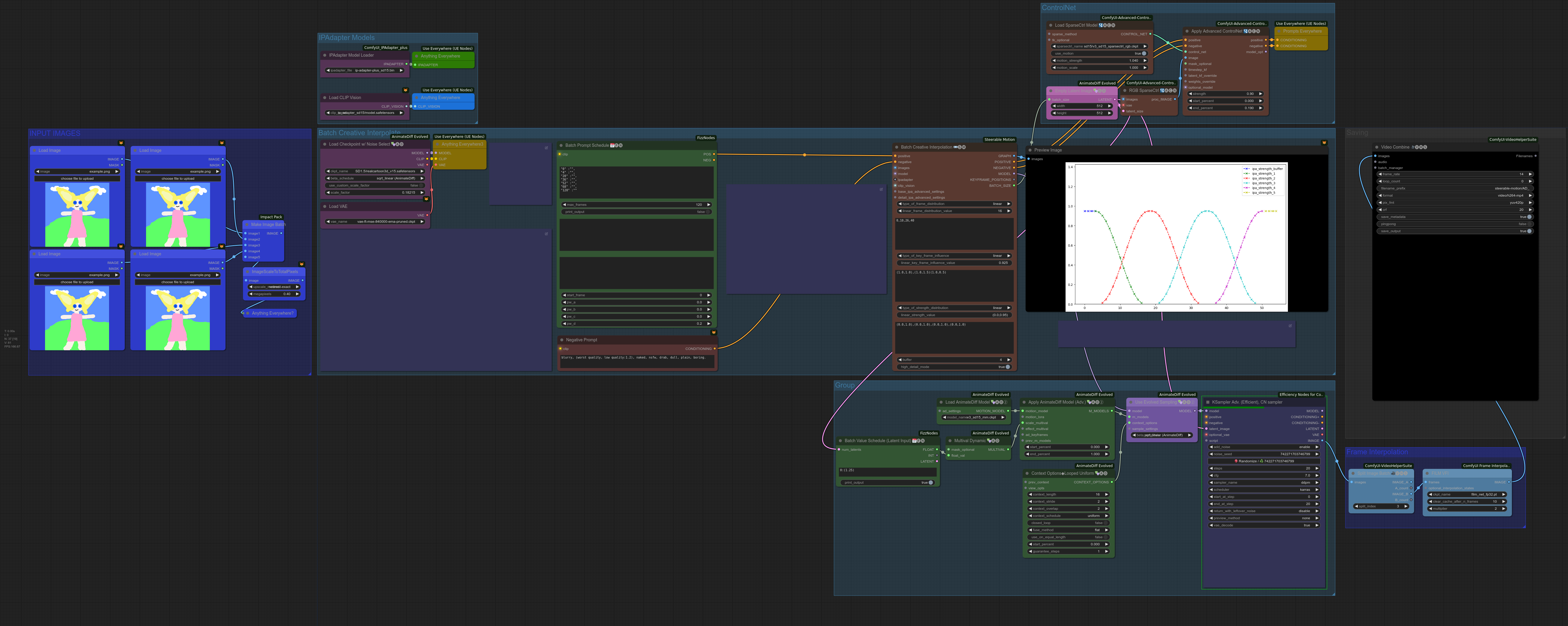 robust bloom
anybody here can remind me? it is pure color image, i think there may be a low level mistake in my workflow setting.
olive yoke
robust bloom
anybody here can remind me? it is pure color image, i think there may be a low l...
this is a little vague
olive yoke
robust bloom
do you mean this issue?
robust bloom
yes.
olive yoke
are you on an M1 mac?
olive yoke
you should share all the logs, including the startup logs
robust bloom
use startup.log.1 , i don't know what is spoiler which is automatically generated by discord
olive yoke
add --fp16-vae to your start arguments. it is unusual that you are invoking python this way
you should be using a virtual env
python3.11 main.py --force-fp16 --fp16-vae so try this.
robust bloom
i installed python in homebrew already, so i just took on this environment.
olive yoke
robust bloom
i installed python in homebrew already, so i just took on this environment.
you can ask a chatbot what i mean by virtual environment
and walk through the process on macos
robust bloom
thank you.
olive yoke
you will do something like
cd ~/Documents
python3.11 -m venv venv
source ~/Documents/venv/bin/activate
...
if i remove --force-fp16 . do i need to use --fp16-vae ?
olive yoke
robust bloom
if i remove --force-fp16 . do i need to use --fp16-vae ?
use the command i sent you
you should also do
python3.11 -c "import torch; print(torch.__version__)" to show your torch version
just in case
and share it here
robust bloom
python3.11 -c "import torch; print(torch.version)" to show your torch version
2.4.0.dev20240401
olive yoke
robust bloom
python3.11 -c "import torch; print(torch.__version__)" to show your torch versio...
i think it's a little ambitious to use a prerelease torch version
robust bloom

Apple Developer
PyTorch uses the new Metal Performance Shaders (MPS) backend for GPU training acceleration.
olive yoke
pip uninstall -y torch torchvision torchaudio && pip install torch torchvision
use the command i shared
robust bloom
i just use this to install pytorch
olive yoke
hmm