depends. style loras remain mostly unhurt, as long as the negative prompt doesn't cause it to go to extreme lengths (though you can just remove the negative input in refiner if this is happening)
existing concept lora remain either completely unhurt, or mostly unhurt - assuming a denoise value 15~25%
some specific concepts are hammered into the refiner (face/hands/body proportions/anatomy) - so those get obliverated in even just a few refiner steps - for those situations base only is your only option
#✨|sdxl
1 messages · Page 51 of 1
 boreal bough
^ also this is only true for default sdxl usage. if you're using sytans workflow, then you're out of luck - since it adds extra noise, which kills all lora options other than style, or prettier concepts
 sharp robin
boreal bough
depends. style loras remain mostly unhurt, as long as the negative prompt doesn'...
sharp robin
boreal bough
depends. style loras remain mostly unhurt, as long as the negative prompt doesn'...
this is pros and cons of refiner, wished we didnt go this route even tho sometimes refiner ads that pizzas.
 quasi remnant
let's goooooo. no need for standalone vae anymore xD


 sharp robin

 proper goblet
Where can I get sdxl_base_pruned_no-ema and sdxl_refiner_pruned_no-ema?
 ember cargo
this one has the same workflow with ultimate upscaler (Iceland lora is mine I trained it today with my own photos) @sharp robin

 soft zealot
Hmmm I have some questions to come back to there when I get off the sofa
 wicked frigate
it's SDXL 1.0 but without the older vae that some people prefer baked in
grab the new copy of SDXL^
quasi remnant
wicked frigate
it's SDXL 1.0 but without the older vae that some people prefer baked in
i didn't even need to zoom in most of the time. i noticed it on nearly every pic, was very visible around edges
sharp robin
ember cargo
this one has the same workflow with ultimate upscaler (Iceland lora is mine I tr...
thank you much appreciated, but in the end it appears that if we wan lora basically we forget ab refiner, THIS picture is stunning btw, thank you for shairing it, so pretty
ember cargo
sharp robin
thank you much appreciated, but in the end it appears that if we wan lora basica...
I know, i used the same WF with a person lora, and just a few refiner steps was *almost * fine, but like made the person many years older lol and thanks!!
 spark bear
so its 1.0 with .9 vae and 1.0 licence for both?
 dark jacinth
I have a Winston too he is smaller and more white hair
sharp robin
REFINER does leave a ton to be desired, trying out person lora and its like tossing a grenade into itjust base works well surprisingly in fact
ember cargo
I suppose we need some tuts on how to make a lora for the refiner
sharp robin
ember cargo
I suppose we need some tuts on how to make a lora for the refiner
turning into such a mess, and barrier to entry for older cards that much higher
 leaden marlin
What is a Lora?
 spring fulcrum
What is condensation
 dense chasm
two prompts combination is interesting like # prompt will be passed to OAI CLIP-ViT/L-14
prompt = "award winning photograph of elephant"
prompt_2 will be passed to OpenCLIP-ViT/bigG-14
prompt_2 = "award winning photograph of octopus"
 dense chasm
leaden marlin
What is a Lora?
dense chasm
leaden marlin
What is a Lora?
Our experiments were conducted on a single 40GB A100 GPU. https://github.com/huggingface/diffusers/blob/main/examples/dreambooth/README_sdxl.md
GitHub
🤗 Diffusers: State-of-the-art diffusion models for image and audio generation in PyTorch - huggingface/diffusers
quasi remnant
wicked frigate
it's SDXL 1.0 but without the older vae that some people prefer baked in
wait did the upload get messed up? how can they have the same sha256 and i still get chromatic aberration T_T
wicked frigate
huh?
dense chasm
Lora asks for high VRAM and GPU
wicked frigate
@hard fractal that's the wrong file lol


 indigo carbon

 swift acorn
Hi. I have few newbie questions.
- I need some custom VAE to SDXL? Link please, if yes.
- Why SDXL is so popular? Why this is not like every other model? Some tl;dr?
- Can I render this well at GF 4080? I need to know smth imporant about this model?
 midnight shuttle
quasi remnant
midnight shuttle
quasi remnant
Confirmed files are identical. Either a mistake or a placebo A/B test.
midnight shuttle
swift acorn
Hi. I have few newbie questions.
- I need some custom VAE to SDXL? Link please,...
Why SDXL is so popular? Why this is not like every other model? Some tl;dr? Better training set and larger native image size.
quasi remnant
i'm sure it was an accident, i don't even need to zoom in to see something went wrong with my gens xD i didn't even think to check the hash or anything til i saw it mess up T_T
indigo carbon
\
 boreal bough
@wicked frigate
could you maybe ask about this internally?
Cause currently this is the only newbie friendly option I feel confident posting on reddit/civitai :/
like training settings will only get you so far without a significant amount of knowledge if you go base only + lora.
wicked frigate
midnight shuttle
Confirmed files are identical. Either a mistake or a placebo A/B test.
simple mistake yeah, please hold, getting fixed atm
 orchid oar
 indigo carbon
 wicked frigate
you can merge loras into the base model and the train new loras atop that
indigo carbon

 white iris
Does anyone know what the style setting in dreamstudio does? For e.g. when selecting realism. Is it a positive/negative prompt? And did they ever show what the prompt/negative prompt is when that style is selected?
wicked frigate
white iris
Does anyone know what the style setting in dreamstudio does? For e.g. when selec...
it's pinned in this channel
swift acorn
Can SDXL create NSFW content? Didnt test it before.
wicked frigate
^
 eternal fog
wicked frigate
it's SDXL 1.0 but without the older vae that some people prefer baked in
eternal fog
wicked frigate
it's SDXL 1.0 but without the older vae that some people prefer baked in
Are you guys able to tell us why the new vae is the way that it is?
Just curious of the change
quasi remnant
eternal fog
Are you guys able to tell us why the new vae is the way that it is?
i think devs aren't allowed to discuss why; unless that's been lifted.
spark bear
im sure there will be a way to train the refiner reliably at some point, might even be beneficial, you can train the refiner with a cherry picked subset of the dataset from the base lora with only the highest quality/best textures
white iris
wicked frigate
^
Love this. thanks!
eternal fog
quasi remnant
i think devs aren't allowed to discuss why; unless that's been lifted.
It's a bit odd, because it just looks like they've done something wrong with the new one. But if they aren't allowed to talk about it for some reason I'll leave it.
quasi remnant
eternal fog
It's a bit odd, because it just looks like they've done something wrong with the...
yup; latest I know is they are not allowed to discuss it. don't think that policy has changed.
 sly jay
why is the refiner doing this? entirely changing face and imo making the image look much worse

 quasi remnant
the only worse part i see is the vae over the face, making eyes look weird
eternal fog
sly jay
why is the refiner doing this? entirely changing face and imo making the image l...
Either too many steps, or you are doing a straight img2img and you aren't feeding the noise from a partially finished base generated image
quasi remnant
i think the face structurally looks better in the 2nd one at least
 earnest herald
sly jay
why is the refiner doing this? entirely changing face and imo making the image l...
earnest herald
sly jay
why is the refiner doing this? entirely changing face and imo making the image l...
Maybe it thinks thats a kimono and is inferring that she should be more asian
 hard fractal
wicked frigate
<@691634595627794433> that's the wrong file lol
hard fractal
wicked frigate
<@691634595627794433> that's the wrong file lol
oh oops
telling Robin to reupload now
 azure oxide
no way LMAO
sly jay
eternal fog
Either too many steps, or you are doing a straight img2img and you aren't feedin...
how do I do that in a1111? i know how to in comfy but am setting up a1111 on a more powerful rig
quasi remnant
i think automatic1111 doesn't really have a way to use refiner yet @sly jay
comfy is the best UI for sdxl imo
eternal fog
sly jay
how do I do that in a1111? i know how to in comfy but am setting up a1111 on a m...
You can't do it in A1111 at the moment. It's incapable of using the refiner in the correct way.
 violet fossil
anyone have a good comfy ui sdxl setup i can use to study. I'm new to using it.
quasi remnant
violet fossil
anyone have a good comfy ui sdxl setup i can use to study. I'm new to using it.
mine is gonna change once the sdxl 1.0 0.9 vae weight thing comes out but otherwise it currently looks like this with a vae loader:
 eternal fog
So many steps
quasi remnant
eternal fog
So many steps
i want fully denoised images
sytan's workflow doesn't give enough detail for meeee
wicked frigate
midnight shuttle
Confirmed files are identical. Either a mistake or a placebo A/B test.
ps this a good demo of occam's razor. It could be a secret conspiracy testing on unsuspecting users... or somebody just clicked the wrong file lol.
we're all human yall
sly jay
quasi remnant
comfy is the best UI for sdxl imo
I know but i hate using comfy lol :/
quasi remnant
and there's been like charts & stuff showing around 50-60 steps of 2m gives best quality from what i've seen
azure oxide
(insert conspiracy theory of secretive, evil greedy corporation here grumblegrumble)
wicked frigate
quasi remnant
i think automatic1111 doesn't really have a way to use refiner yet <@25756713415...
StableSwarmUI can use refiner!
wicked frigate
sly jay
I know but i hate using comfy lol :/
you might love swarm owo
eternal fog
quasi remnant
and there's been like charts & stuff showing around 50-60 steps of 2m gives best...
I think it's decent at 20. But I've chosen 40 for now for a balance between the quality I want and speed.
sly jay
wicked frigate
you might love swarm owo
is it similar to comfybox?
boreal bough
rip those few users I told to get the new model :/
eternal fog
boreal bough
rip those few users I told to get the new model :/
Just another 6gb to download. Let's see if they even notice.
spark bear
at least we wont have 100 people a day asking why their gens look weird and how to load .9 vae
boreal bough
prob not. but poor interlaced mouths of whatever they generate
quasi remnant
eternal fog
Just another 6gb to download. Let's see if they even notice.
i... noticed in the very first pic i generated and again i don't even need to zoom in xD
wicked frigate
sly jay
is it similar to comfybox?
kinda similar ye. Not the same
quasi remnant
if there's lots of whites or like edges on the picture
you notice something "off" immediately
sly jay
does it have image to image, impainting. Those are the two I miss most from a1111
eternal fog
quasi remnant
i... noticed in the very first pic i generated and again i don't even need to zo...
There's plenty of people that somehow don't see it
wicked frigate
sly jay
does it have image to image, impainting. Those are the two I miss most from a111...
.> <.<
image2image, yes, via a placeholder Init Image field.
inpainting, not yet :(
 shy kelp
sly jay
how do I do that in a1111? i know how to in comfy but am setting up a1111 on a m...
shy kelp
sly jay
how do I do that in a1111? i know how to in comfy but am setting up a1111 on a m...
Hi. Mind if I ask what's a more powerful rig? What's the specs?
wicked frigate
that's definitely something i want it to have, but it's gonna be a big project to do that right
azure oxide
sly jay
is it similar to comfybox?
if this is in reference to just the UI, its essentially the same thing for end users. you can ignore the comfy nodes and use the new UI
orchid oar
Shocked Monster as it sees New York City
 wicked frigate
i'm not of the mind to settle for the bare minimum inpainting interface auto has
sly jay
shy kelp
Hi. Mind if I ask what's a more powerful rig? What's the specs?
3090ti, its not mine lol
shy kelp
orchid oar
Shocked Monster as it sees New York City
he doesn't look shocked. looks more upset. 😄
azure oxide
stablestudio has a beautiful inpainting gui
orchid oar
shy kelp
he doesn't look shocked. looks more upset. 😄
true, but that was the prompt i gave sdxl
 upbeat tundra
Is there a comfy UI workflow that has Loras and upscale? The ones on civitai either don't have lora or are broken
orchid oar
This one looks more shocked
 wicked frigate
azure oxide
stablestudio has a beautiful inpainting gui
wicked frigate
azure oxide
stablestudio has a beautiful inpainting gui
yeah dude one of these days ima convince @knotty lotus to cross-integrate studio and swarm
shy kelp
slightly more shocked yes
boreal bough
I think kaj's ui already has inpainting working, right?
orchid oar
upbeat tundra
Is there a comfy UI workflow that has Loras and upscale? The ones on civitai eit...
There are not many loras till now for SDXL, thats why i think
boreal bough
or is that still in preview mode
quasi remnant
wicked frigate
i'm not of the mind to settle for the bare minimum inpainting interface auto has
i'd love some kind of marquee selection, because circular brushes don't always get the exact area I want; as a random suggestion
sly jay
ahhhh so many ui's
eternal fog
upbeat tundra
Is there a comfy UI workflow that has Loras and upscale? The ones on civitai eit...
Setting up a LoRA is easy. It's just the LoRA loader node. And you feed the model and clip through it.
boreal bough
sly jay
ahhhh so many ui's
It's gonna be a while until it gets simple.
If you wanna learn it properly, start with comfyui, since all the cool ui's use that in the background - so any knowledge you gain here won't lose its value in the future
upbeat tundra
eternal fog
Setting up a LoRA is easy. It's just the LoRA loader node. And you feed the mode...
What's offset lora and why are people uploading UIs with that instead of simply load lora?
shy kelp
Man....I worked my butt off to get a used 3090, built a 5800x3d and 64GB ddr4 system, a few TB of storage, just so I'd be ready for sdxl 1.0. And as it turns out the reality is that I need you guys to help train it. It's a good model but it needs training. It will take a few months or sooner depending on the ambitions of certain nerds 😄
Geeks not nerds....to be more accurate.
quasi remnant
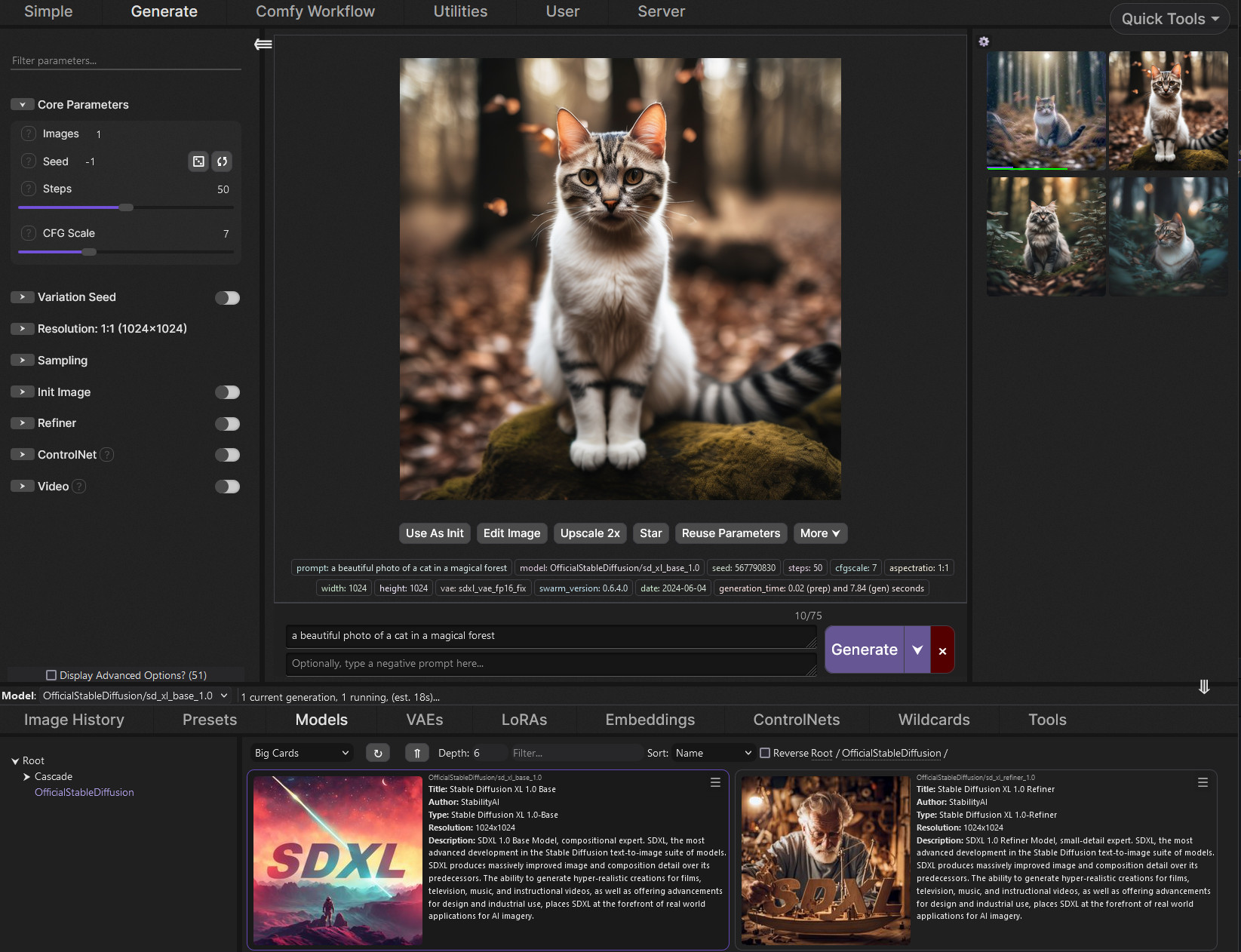
also does stableswarmUI have support for the refiner in the generate tab or do you have to use the comfyUI workflow editor? i'm looking at the example screenshot and i don't really see a way to use refiner? ._. https://raw.githubusercontent.com/Stability-AI/StableSwarmUI/master/.github/images/stableswarmui.jpg
 eternal fog
upbeat tundra
What's offset lora and why are people uploading UIs with that instead of simply ...
eternal fog
upbeat tundra
What's offset lora and why are people uploading UIs with that instead of simply ...
The offset LoRA was provided by stability, it would be selected in a load LoRA node.
boreal bough
shy kelp
Man....I worked my butt off to get a used 3090, built a 5800x3d and 64GB ddr4 sy...
watcha making?
anything 5k or under should be done in 2 days or less
 finite socket
I am newbie here 🙂 Is there any good tutorial for beginner?
shy kelp
boreal bough
watcha making?
anything 5k or under should be done in 2 days or less
Nothing really important. I wanted to dabble in robot soldier design and femtosecond handheld laser systems. You know....to take over the world with. Was hoping SD could help with that. 😄
sly jay
boreal bough
It's gonna be a while until it gets simple.
If you wanna learn it properly, star...
i've used comfy I just don't like the workflow
boreal bough
finite socket
I am newbie here 🙂 Is there any good tutorial for beginner?
https://github.com/Stability-AI/StableSwarmUI/releases/tag/0.5-Alpha
get this, let it install everything, then use the default settings for now - will get you through the first few days of usage, by then you'll know yourself where to continue
swift acorn
Can SDXL creater NSFW content? Or its censored model?
finite socket
boreal bough
https://github.com/Stability-AI/StableSwarmUI/releases/tag/0.5-Alpha
get this, l...
Than you so much!
thank
sly jay
finite socket
I am newbie here 🙂 Is there any good tutorial for beginner?
sdxl is kinda hard rn because unless you have a really beefy PC you have to mess with comfyui which can be difficult
shy kelp
From what I can see.....yes. But it needs training.
It's like a gifted child that doesn't know anything yet and needs to go to school.
azure oxide
quasi remnant
also does stableswarmUI have support for the refiner in the generate tab or do y...
#✨|sdxl message based on this i think we have to use the custom comfy workflow for now
shy kelp
But it's gifted
boreal bough
shy kelp
Nothing really important. I wanted to dabble in robot soldier design and femtos...
oh right! we did the prompt search for the cool mech soldier 😄
shy kelp
like that Chris Evans movie with the little genius girl
quasi remnant
sly jay
sdxl is kinda hard rn because unless you have a really beefy PC you have to mess...
even if you have a beefy PC comfyui is better (than a1111, stableswarm uses comfy and therefore is equal i believe?) i can do batches of 3 images on my 3090 on comfyui but only 1-2 on a1111.
boreal bough
yeah, definitely doable, without any big issues
shy kelp
boreal bough
oh right! we did the prompt search for the cool mech soldier 😄
Oh you remember that. 😄
white iris
wicked frigate
^
The reason why i asked, is cause i noticed theres a difference between the output from dreamstudio, and the one from clipdrop. I used the prompts from the pinned .txt file but it still doesnt come out as good for some reason. Not sure what the reason is.
boreal bough
you just need to get the captioning right. but training will be the easy part - I can give you the settings for whatever dataset you have, once the captions are done
sly jay
quasi remnant
even if you have a beefy PC comfyui is better (than a1111, stableswarm uses comf...
comfy is faster, a1111 is much easier
shy kelp
Yes.....SDXL 1.0 is the little genius girl from that Chris Evans movie. Gifted, bored from all the dumb people around her. But still doesn't know about life yet. She needs training.
boreal bough
since you have a 3090, your settings will be identical to mine
 knotty lotus
white iris
The reason why i asked, is cause i noticed theres a difference between the outpu...
knotty lotus
white iris
The reason why i asked, is cause i noticed theres a difference between the outpu...
slightly different wrappers (same core though) & different hardware
quasi remnant
faster and more efficient.
efficiency is huuuuge. a1111 takes like 4-5x longer
or it might just be 2-3x longer but still xD
boreal bough
knotty lotus
slightly different wrappers (same core though) & different hardware
ah perfect! you're online c:
since multiple users keep asking for inpainting,
is your UI ready for that? Can I refer them to it?
quasi remnant
sly jay
comfy is faster, a1111 is much easier
For basic inference, anything involving txt2img and upscaling, comfyUI is not difficult, you can use a community workflow.
wicked frigate
quasi remnant
also does stableswarmUI have support for the refiner in the generate tab or do y...
it's below init image, so scroll down (or git pull if you haven't in a while)
 civic sigil
boreal bough
since you have a 3090, your settings will be identical to mine
civic sigil
boreal bough
since you have a 3090, your settings will be identical to mine
Would you be willing to share your settings with me too?
quasi remnant
A1111 is more convenient for img2img/inpainting
boreal bough
civic sigil
Would you be willing to share your settings with me too?
sure!
 still dove
can you share that workflow we discussed?
civic sigil
Just got my 3090 build 🙂
 visual glade
inpainting is horrible on a1111
sly jay
quasi remnant
For basic inference, anything involving txt2img and upscaling, comfyUI is not di...
but no impainting or img to img no?
quasi remnant
sly jay
but no impainting or img to img no?
i totes just covered that xD
wicked frigate
azure oxide
https://discord.com/channels/1002292111942635562/1089974139927920741/11338592006...
that's outdated as of earlier today :D
knotty lotus
boreal bough
ah perfect! you're online c:
since multiple users keep asking for inpainting,
i...
StableStudio? it's not fully integrated with img2img or masking just yet. very busy with a ton of projects interally currently, will probably have time to spike that out this weekend.
boreal bough
civic sigil
Just got my 3090 build 🙂
just depends on your dataset/caption style/if its a concept or style
azure oxide
wicked frigate
that's outdated as of earlier today :D
niceeee
quasi remnant
visual glade
inpainting is horrible on a1111
well, it's good enuff. i like the interface with the painting & what not instead of uploading masks, though I wish there were different selection methods.
shy kelp
What!!!! pray tell, is the advantage of workflows/nodes in the creative process here? Why should I spend any energy on comfy?
boreal bough
knotty lotus
StableStudio? it's not fully integrated with img2img or masking just yet. very b...
alright. thanks for the update ❤️
 bold osprey
sly jay
but no impainting or img to img no?
bold osprey
sly jay
but no impainting or img to img no?
img2img is pretty intuitive but I didn't seem to get to an inpainting workflow
quasi remnant
wicked frigate
it's below init image, so scroll down (or git pull if you haven't in a while)
aight, i'll keep that in mind if I try it out sometime.
sly jay
quasi remnant
i totes just covered that xD
where? am i being dumb brained lol
civic sigil
boreal bough
just depends on your dataset/caption style/if its a concept or style
Yeah I usually only do full finetunes for styles, loras for subjects
bold osprey
shy kelp
What!!!! pray tell, is the advantage of workflows/nodes in the creative process...
you can chain multiple checkpoints and set up a feedback loop if you want to
sly jay
quasi remnant
here <@257567134157111297>
damn I am too dyslexic for this shit lmao
bold osprey
loads of stuff surpassing a1111 limitations
white iris
knotty lotus
slightly different wrappers (same core though) & different hardware
What do you mean by wrappers?
quasi remnant
sly jay
damn I am too dyslexic for this shit lmao
btw comfy DOES have img2img, but for inpainting you need to use masks
shy kelp
bold osprey
you can chain multiple checkpoints and set up a feedback loop if you want to
It negates the need to merge custom checkpoints?
quasi remnant
Regular img2img works fine, but you need to put pics in a specific folder i think
spark bear
still waiting for everydream to come out with a 1.0 trainer..but there's no way we'll be able to do full finetune with te on a 24 gig card, so will have to see how unet only looks.
quasi remnant
So it just comes down to convenience for a1111 for that specific part
shy kelp
Interesting!!!
boreal bough
civic sigil
Yeah I usually only do full finetunes for styles, loras for subjects
styles are currently by far the easiest to train in sdxl. even if you get most of the captions wrong it still works. loras now work amazingly for it.
concepts are fine as well - as long as they dont touch the face
sly jay
so is a1111 the only impainting option? I mean hypothetically I could gen in comfty img to img in a1111
visual glade
you can do live checkpoint merges: https://comfyanonymous.github.io/ComfyUI_examples/model_merging/
bold osprey
shy kelp
It negates the need to merge custom checkpoints?
well it's more like img2img but you can also define areas that your prompts affect and have much more control over it
 hasty smelt
Hi everyone, I'm facing an issue. The bot achieves a much superior result, very close to what I imagine. I'm sure it can still be improved, as I've done before. However, when using SD with the deliberate_v2 and lora:Drawing models, the outcome is far from what I expected using the same prompt. I would like to obtain a model or lora capable of achieving a similar result to SDXL, which is excellent with vintage illustrations.

 runic lark
How many model.safetensors are you supposed to download? 4th time in 2 days about 20 gb now each time
quasi remnant
sly jay
so is a1111 the only impainting option? I mean hypothetically I could gen in com...
i'd still prefer using comfy for img2img. but inpainting is a whole other thing
visual glade
sly jay
so is a1111 the only impainting option? I mean hypothetically I could gen in com...
you can do inpainting in comfyui by right clicking the image in the load image node and "open in maskeditor"
orchid oar
hasty smelt
Hi everyone, I'm facing an issue. The bot achieves a much superior result, very ...
You need a higher resolution i think
shy kelp
Live on the spot merges.....okay okay you got my attention. lol 😄
quasi remnant
visual glade
you can do inpainting in comfyui by right clicking the image in the load image n...
oh, i didn't know this
azure oxide
sly jay
so is a1111 the only impainting option? I mean hypothetically I could gen in com...
if you want to do this then i suggest you use invokeai instead of a1111, invokeai's inpainting UI is by far superior over a1's
orchid oar
hasty smelt
Hi everyone, I'm facing an issue. The bot achieves a much superior result, very ...
What model are u using?
boreal bough
hasty smelt
Hi everyone, I'm facing an issue. The bot achieves a much superior result, very ...
bot is running sdxl 1.0 - which is why the results are so different
orchid oar
The Bots use sdxl 1
sly jay
visual glade
you can do inpainting in comfyui by right clicking the image in the load image n...
okay! will try!
bold osprey
visual glade
you can do inpainting in comfyui by right clicking the image in the load image n...
damn I wasn't aware
ember cargo
still dove
can you share that workflow we discussed?
the image contains it, just drop/load it into comfy
bold osprey
feels way better than a1111 because zooming in doesn't reset your ui
seems more responsive too
 tender timber
Thank you! My 3060 12 GB model does 1024x1024 32 steps at about 1.5it/se, so they seem similar. Even though the it/s is always 1.47-1.48, the runtime ranges from 27.45 to 59.65 seconds. I'll check out the 6900 XT line, or the new ones, I'd like to take advantage of larger VRAM.
leaden marlin
Is it possible to go from sketch to ai image in comfyui
sly jay
anyone have any good starter workflows for sdxl in comfyui? specfically for using refiner and inpainting
visual glade
and you can right click copy (clipscape) and paste (clipspace) images from the save image node to the load image node
shy kelp
bold osprey
well it's more like img2img but you can also define areas that your prompts affe...
le sigh I was hoping that learning comfy wasn't going to be necessary. But perhaps I need to schedule in some learning time.
orchid oar
 bold osprey
shy kelp
*le sigh* I was hoping that learning comfy wasn't going to be necessary. But p...
bold osprey
shy kelp
*le sigh* I was hoping that learning comfy wasn't going to be necessary. But p...
this helped me get into it https://www.youtube.com/watch?v=OdMtJMzjNLg

Here are amazing ways to use ComfyUI. This node based UI can do a lot more than you might think. Especially Latent Images can be used in very creative ways. You can inject prompt changes. You can combine latent images to new results. Stop render steps and finishe the rendering after you changed to prompt, sampler and settings. A world of possibi...
boreal bough
shy kelp
Live on the spot merges.....okay okay you got my attention. lol 😄
comfyui is absolutely worth it to learn - as you can do some pretty creative things
will take a while to get used to though, as it doesn't provide shortcuts, and expects you to do things the right way - and also gives you settings that you shouldn't touch or combine
azure oxide
shy kelp
*le sigh* I was hoping that learning comfy wasn't going to be necessary. But p...
im sure theres popular shared workflows around already for the basic functions we're used to, you might not need to learn anything and just download those lol
quasi remnant
visual glade
and you can right click copy (clipscape) and paste (clipspace) images from the s...
so what I'm hearing is that comfyui just totally eclipses automatic1111 in nearly every single way xD (except maybe for things like adetailer), still lots I gotta learn
hasty smelt
Does anyone know of a model or Lora capable of performing well with vintage illustrations like SDXL does?
wicked frigate
visual glade
you can do inpainting in comfyui by right clicking the image in the load image n...
i didn't know that was a thing, awesome!
orchid oar
hasty smelt
Does anyone know of a model or Lora capable of performing well with vintage illu...
Why not use SDXL?
eternal fog
quasi remnant
so what I'm hearing is that comfyui just totally eclipses automatic1111 in nearl...
There are custom nodes for adetailer, although they are a bit complicated to setup.
boreal bough
comfyui can do everything XD just not very fast if you have a blank slate
quasi remnant
boreal bough
comfyui can do everything XD just not very fast if you have a blank slate
setting up my first workflow that i'm still using & refining today didn't take that long tbh.
hard fractal
visual glade
you can do inpainting in comfyui by right clicking the image in the load image n...
Today I learned.
sly jay
visual glade
and you can right click copy (clipscape) and paste (clipspace) images from the s...
the more I learn about comfy ui, the less I wanna use a1111, even with the gap in ease of use
hard fractal
visual glade
you can do inpainting in comfyui by right clicking the image in the load image n...
shy kelp
FINE!!! But I'm not bothering with invoke though! lol
hard fractal
shy kelp
FINE!!! But I'm not bothering with invoke though! lol
ditto 😐
hasty smelt
orchid oar
Why not use SDXL?
What is SDXL, and can I already download the model?
orchid oar
hasty smelt
What is SDXL, and can I already download the model?
Yes
Its Stable Diffsuion XL
Its a newer Model
bold osprey
visual glade
you can do inpainting in comfyui by right clicking the image in the load image n...
so this fills the area with the average color. do you need separate mask nodes so you could use a1111 inpainting options like latent noise or using the inpainted area as a reference?
sly jay
hasty smelt
What is SDXL, and can I already download the model?
sdxl is stable diffusion but bigggg(and better)
quasi remnant
hasty smelt
What is SDXL, and can I already download the model?
wait a little bit i think. they're uploading the 1.0 weights with a better vae
wicked frigate
sly jay
the more I learn about comfy ui, the less I wanna use a1111, even with the gap i...
you want comfyui with more ease of use? https://github.com/Stability-AI/StableSwarmUI
 shy kelp
hasty smelt
What is SDXL, and can I already download the model?
shy kelp
hasty smelt
What is SDXL, and can I already download the model?
Dude walks in on the launch party of the space shuttle, it can still be seen in the air in the distance flying to mars, but he asks what's a space shuttle. 😄
bold osprey
shy kelp
FINE!!! But I'm not bothering with invoke though! lol
didn't convince me either from the looks of it
quasi remnant
boreal bough
^ also read this!
https://huggingface.co/stabilityai/stable-diffusion-xl-base-1...
i think the vae weights are coming soon™️ thouuuugh xD
sly jay
wicked frigate
you want comfyui with more ease of use? <https://github.com/Stability-AI/StableS...
does this has impainting? If not I am just gonna bite the bullet and learn comfy
wicked frigate
it has comfy inside it, so technically yes
visual glade
bold osprey
so this fills the area with the average color. do you need separate mask nodes s...
for true inpainting use the VAEEncodeForInpaint like on: https://comfyanonymous.github.io/ComfyUI_examples/inpaint/
for img2img with the mask use latent->inpaint->Set Latent Noise Mask instead
quasi remnant
sly jay
does this has impainting? If not I am just gonna bite the bullet and learn comfy
it has comfy built into it
bold osprey
wicked frigate
you want comfyui with more ease of use? <https://github.com/Stability-AI/StableS...
I am way too nerdy to pick the easier option
still dove
ember cargo
the image contains it, just drop/load it into comfy
it did not work
sly jay
wicked frigate
it has comfy inside it, so technically yes
if it has comfy built in why not use comfy?
wicked frigate
sly jay
if it has comfy built in why not use comfy?
why not use swarm* you mean
boreal bough
wicked frigate
you want comfyui with more ease of use? <https://github.com/Stability-AI/StableS...
It still needs a new user guide XD
I hope your new prompt book comes with an additional swarmui book - which will be userfriendly enough so that even a first timer can gen a pretty raccoon
hasty smelt
I'm sorry, I thought the beta version was available only for selected individuals. Thank you very much for everyone's help; I'm already updating my files
quasi remnant
bold osprey
didn't convince me either from the looks of it
oh how far we've come... invokeAI used to be the one that was the best/everyone used, then automatic1111's webui took over, and now comfy/stableswarm xD
Invoke AI used to be Lincoln Stein's version IIRC?
was like the best cmd line version of SD
bold osprey
was there ever a colab version for invoke?
quasi remnant
idk
ember cargo
still dove
it did not work
it does, i do it myself. Be sure to open the original image
bold osprey
looked like a1111 was the most prominent one for colab
sly jay
also for swarm do I need a regular comfy install. I already have one if that is helpful
orchid oar
 quasi remnant
sly jay
also for swarm do I need a regular comfy install. I already have one if that is ...
quasi remnant
sly jay
also for swarm do I need a regular comfy install. I already have one if that is ...
swarm installs it automatically i think
azure oxide
a1 was always good enough that i never swapped off to try invokeai but i still always daydreamed about invoke's inpainting ui whenever i tried doing so on a1 😭
shy kelp
We need more YouTube teachers that can explain this stuff in a user friendly way.
still dove
ember cargo
it does, i do it myself. Be sure to open the original image
how can I find the original image? 🙂
bold osprey
shy kelp
We need more YouTube teachers that can explain this stuff in a user friendly way...
especially the comfy community needs to be more vocal than it is
wicked frigate
sly jay
also for swarm do I need a regular comfy install. I already have one if that is ...
you can use your existing one, or install one automatically, your choice
visual glade
if you want to use SDXL + refiner on free colab, the comfyui colab notebook works: https://github.com/comfyanonymous/ComfyUI#colab-notebook
sly jay
wicked frigate
you can use your existing one, or install one automatically, your choice
cool beans
 vale eagle
What captioning tool is recommended for lora training? Blip?
boreal bough
shy kelp
We need more YouTube teachers that can explain this stuff in a user friendly way...
ufff. on one hand I want this. on the other hand the spam & false info outperforms the quality
even if interest goes up, it just causes the false info to increase exponentially as well
bold osprey
visual glade
if you want to use SDXL + refiner on free colab, the comfyui colab notebook work...
I can gladly run it locally but having a colab is nice too!
shy kelp
orchid oar
Here's your assignment: Build a giant....and I mean a GIANT space station above earth. Something that is designed to service starships with crew and tenants in the thousands. Go!
azure oxide
bold osprey
especially the comfy community needs to be more vocal than it is
idk vlad fanbois were so vocal to the point that they were increasingly toxic towards anyone not using it lmao, i dont want anyone to become like that
eternal fog
vale eagle
What captioning tool is recommended for lora training? Blip?
For best results, manually.
You don't need many images to make a decent LoRA now.
wicked frigate
shy kelp
We need more YouTube teachers that can explain this stuff in a user friendly way...
sebastian kamph said he might make a video for swarmui (you should go tell him you want it to make sure he does :3)
orchid oar
shy kelp
Here's your assignment: Build a giant....and I mean a GIANT space station above ...
Will do
hasty smelt
Guys, I'm downloading the XL model. I wanted to know about the available styles in the bot. Are they already available for download?
bold osprey
azure oxide
idk vlad fanbois were so vocal to the point that they were increasingly toxic to...
lmao I meant in the sense of sharing and explaining
shy kelp
boreal bough
ufff. on one hand I want this. on the other hand the spam & false info outperfor...
I can't disagree. Most of them are like 20 year olds trying to create traffic with very little value.
bold osprey
hasty smelt
Guys, I'm downloading the XL model. I wanted to know about the available styles ...
https://drive.google.com/file/d/1IZq_0CGTbfxlAdIMsjz3VwRzHjl3JL-n/view
maybe you are looking for something like this
Google Docs
quasi remnant
hasty smelt
Guys, I'm downloading the XL model. I wanted to know about the available styles ...
vale eagle
eternal fog
For best results, manually.
You don't need many images to make a decent LoRA no...
hmm, using common sentence to descript the image?
quasi remnant
these are the styles used by the bot
shy kelp
wicked frigate
sebastian kamph said he might make a video for swarmui (you should go tell him y...
Maybe. 😄
eternal fog
vale eagle
hmm, using common sentence to descript the image?
Describe them the same way you'd prompt for that image.
quasi remnant
it's just additional prompt stuff
vale eagle
eternal fog
Describe them the same way you'd prompt for that image.
Ok, got it.
thanks
 crude sparrow
anybody have other fintuned xl models i can use?
 sly jay
oh yeah do styles work for comfy/swarm?
bold osprey
crude sparrow
anybody have other fintuned xl models i can use?
well damn
quasi remnant
sly jay
oh yeah do styles work for comfy/swarm?
you can save workflows with styles
wicked frigate
sly jay
oh yeah do styles work for comfy/swarm?
yep! They're called presets because you can configure more than just prompts with em if you want
shy kelp
"any other"? is there already a custom model using sdxl 1.0 as a base?
wicked frigate
if you have a .csv you can just import it directly in the Presets tab of the ui
crude sparrow
shy kelp
"any other"? is there already a custom model using sdxl 1.0 as a base?
dreamshaper xl (in alpha)
quasi remnant
and yea; like, you don't wanna use same cfg/sampler/scheduler for an anime image as you would a cinematic photographic image for instance
 spark sinew
thanks a lot for help and sharing,
wicked frigate
crude sparrow
anybody have other fintuned xl models i can use?
if you like anime there's https://huggingface.co/hakurei/waifu-diffusion-xl
quasi remnant
so you wanna save more than just the prompt, so saving the workflow/presets makes much more sense
sly jay
wicked frigate
yep! They're called presets because you can configure more than just prompts wit...
neeto
hasty smelt
quasi remnant
https://discord.com/channels/1002292111942635562/1089974139927920741/11309582519...
thanks buddy
shy kelp
I'll look for it on civitai.
sly jay
wicked frigate
yep! They're called presets because you can configure more than just prompts wit...
where can I find some starter presets?
bold osprey
bold osprey
https://drive.google.com/file/d/1IZq_0CGTbfxlAdIMsjz3VwRzHjl3JL-n/view
maybe you...
here
sly jay
also thanks for all the help everyone here has been super helpful!
quasi remnant
wicked frigate
if you like anime there's <https://huggingface.co/hakurei/waifu-diffusion-xl>
gonna be a bit before the 1.0 finetune is out. the 0.9 is good at pushing towards anime style but I think you can get better anime-style images in SDXL with proper prompting for now.
orchid oar
wicked frigate
if you like anime there's <https://huggingface.co/hakurei/waifu-diffusion-xl>
if you want anime fast positive:" anime artwork {prompt} . anime style, key visual, vibrant, studio anime, highly detailed"negative:"photo, deformed, black and white, realism, disfigured, low contrast"
hasty smelt
Guys, thanks for all the support. I'm downloading the XL now.
sly jay
hasty smelt
Guys, thanks for all the support. I'm downloading the XL now.
good luck!
quasi remnant
orchid oar
if you want anime fast positive:" anime artwork {prompt} . anime style, key visu...
i actually don't really like the default anime prompt from the styles list very much; usually ends up with messed up faces/some other features being a bit messed up
 tight crown
Is this recording going to be uploaded? 🙂
wicked frigate
sly jay
where can I find some starter presets?
quasi remnant
meanwhile you can get something like this with a super simple prompt xD


 bold osprey
 orchid oar
quasi remnant
i actually don't really like the default anime prompt from the styles list very ...
orchid oar
quasi remnant
i actually don't really like the default anime prompt from the styles list very ...
Yea the faces are not quite as good. For me its enough with the refiner
 boreal bough
quasi remnant
meanwhile you can get something like this with a super simple prompt xD
boreal bough
quasi remnant
meanwhile you can get something like this with a super simple prompt xD
damn those look legit XD
orchid oar
quasi remnant
meanwhile you can get something like this with a super simple prompt xD
Niceee
shy kelp
I'm going to immerse myself in comfy tutorials over the next few days.
sly jay
wicked frigate
https://discord.com/channels/1002292111942635562/1089974139927920741/11309570600...
oh I already have those on my a1111 styles! Is there anything I need to do specfically to get that working with swarm?
quasi remnant
orchid oar
Yea the faces are not quite as good. For me its enough with the refiner
that anime style won't get u to this level


(last one is 0.9)
orchid oar
quasi remnant
that anime style won't get u to this level
Is this waifu diffusion xl?
boreal bough
shy kelp
I'm going to immerse myself in comfy tutorials over the next few days.
just use a preset someone made, and go from there. for any questions feel free to ask here ❤️
quasi remnant
pure 1.0/0.9
wicked frigate
sly jay
oh I already have those on my a1111 styles! Is there anything I need to do specf...
just grab the styles.csv file from auto and yeet it into the Presets -> Import

shove the file in and click import
 boreal bough
@shy kelp here's a good comfyui setup to get you started,
made by the lovely @quasi remnant ❤️
orchid oar
quasi remnant
except last one which is 0.9
The workflow looks interesting. Im still new to Comfy so i just made myself a simple one with examples. Good job👍
quasi remnant
orchid oar
The workflow looks interesting. Im still new to Comfy so i just made myself a si...
the workflow won't need the vae loader soon™️
orchid oar
shy kelp
Here's your assignment: Build a giant....and I mean a GIANT space station above ...
Thats quite hard (for me)
quasi remnant
just waiting on this to become official xD
 boreal bough
XD
 brazen patrol
is there a recommended range for how many steps one should use the refiner relative to the base? i.e. 20% more steps with refiner or other?
boreal bough
#fake-news
orchid oar
shy kelp
Here's your assignment: Build a giant....and I mean a GIANT space station above ...
(not the best)


 bold osprey
brazen patrol
is there a recommended range for how many steps one should use the refiner relat...
bold osprey
brazen patrol
is there a recommended range for how many steps one should use the refiner relat...
I am using 32+8
 frozen sundial
Why is my automatic1111 running super slow with SDXL? >90s/it
I was running SDXL just fine yesterday with normal speeds (<1s/it)
brazen patrol
for example, out of curiosity I tried 40+10 with 2m, then tried same seed with 40+30 and second was much worse, so wondered
boreal bough
brazen patrol
is there a recommended range for how many steps one should use the refiner relat...
same steps as base, but denoise value between 0.2~0.5
smaller for less changes, bigger for more detail, but at the cost of some other details
there are other ways to use it, but this is a good starting value for base+refiner
orchid oar
quasi remnant
meanwhile you can get something like this with a super simple prompt xD
Can you share your prompt for these?
quasi remnant
orchid oar
Can you share your prompt for these?
it should be attached to every single one
just open the pic in a new tab and drag it to comfyui
orchid oar
I tried, the kimono girl worked but the figures not. Wait a sec im gonna try something
quasi remnant
o
the figures
is one i'm doing rn
just a simple prompt

OHJ
because
yea i know why that doesn't work
sorry xD
boreal bough
orchid oar
Can you share your prompt for these?
fyi, you can use https://discord.com/channels/1002292111942635562/1100167411493257218 as a source of inspiration for prompts
orchid oar
quasi remnant
just a simple prompt
Thx <3
quasi remnant
i was seeing if it saves any time on gens or anything
turns out i might save 0.1 second an image.
...not worth it tho just for a timesave lol
bold osprey
 quasi remnant
also i was seeing how much less bloated it'd make the file size
but i think it's just like .1 mb
or not even that
a lot less
xD


 vocal stream
a classic in 1.5 when doing higher height images, I guess training in multiple aspect ratios hasnt helped that much
quasi remnant
the refiner makes it so you don't ever wanna do too many steps i believe
you wanna pass it over with some noise left over, and have refiner finish last 20%
i found 48->60 to be pretty decent overall
orchid oar
quasi remnant
i found 48->60 to be pretty decent overall
Im normal doing 25 and i like a picture i set it high, sometimes to max like in this picture
 quasi remnant
now the nendos have their metadata xD

 orchid oar
quasi remnant
now the nendos have their metadata xD
orchid oar
quasi remnant
now the nendos have their metadata xD
Thanksss
quasi remnant
orchid oar
Im normal doing 25 and i like a picture i set it high, sometimes to max like in ...
i c ur using a bad vae in that image 
orchid oar
It works now
boreal bough
I wonder if there's any speedup from using the highest end ssd for model loading XD
getting my 12gb dataspeed ssd tomorrow 😄
orchid oar
quasi remnant
i c ur using a bad vae in that image <:thinking:1045136500393783326>
I thought i was using the offical one
quasi remnant
orchid oar
I thought i was using the offical one
are you connecting the vae node from your refiner/base model?
 shy kelp
orchid oar
(not the best)
shy kelp
orchid oar
(not the best)
Helluva good start! The two on the left is what I was after especially the one in the lower left.
quasi remnant
yes, that's the issue
bold osprey
 quasi remnant
orchid oar
quasi remnant
orchid oar
set up a load vae node, and use this https://huggingface.co/stabilityai/sdxl-vae/blob/main/sdxl_vae.safetensors
for any vae decode
boreal bough
orchid oar
props to good note usage
orchid oar
boreal bough
props to good note usage
i copied the workflow lol
 vast narwhal


 quasi remnant
ye, it's the official workflow
orchid oar
orchid oar
i copied the workflow lol
I just added somethings
quasi remnant
official workflow doesn't have a load vae node
orchid oar
quasi remnant
set up a load vae node, and use this https://huggingface.co/stabilityai/sdxl-vae...
Thx will do that
orchid oar
shy kelp
Helluva good start! The two on the left is what I was after especially the one ...
Glad you like it
quasi remnant
orchid oar
Thx will do that
put that in models/vae btw
just a note since you said new to comfy i think
xD
 zealous viper
Didn’t they update the models on hugging back to the .9? Just get the retrofitted model
quasi remnant
zealous viper
Didn’t they update the models on hugging back to the .9? Just get the retrofitte...
Not yet.
brazen patrol
boreal bough
same steps as base, but denoise value between 0.2~0.5
smaller for less changes, ...
I tried and for me at least this was way worse than a small refinement. Here are three images. first is 40 base + 10 steps refinement. Second is 30 steps and third is 40 + 40
quasi remnant
When they do it won't be necessary
shy kelp
orchid oar
Glad you like it
Now was that done on comfy?
 upbeat summit
vast narwhal
upbeat summit
vast narwhal
very cool!
orchid oar
Thanks, im new to Comfy but i know sd. Still thanks👍
orchid oar
shy kelp
Now was that done on comfy?
Yes
shy kelp
orchid oar
Yes
Okay, gonna invest the time and energy into learning it. 😄
quasi remnant
zealous viper
Didn’t they update the models on hugging back to the .9? Just get the retrofitte...
They are doing this but it's not ready yet; they accidentally uploaded the same weights (as in no changed vae) at first.
brazen patrol


 orchid oar
shy kelp
Okay, gonna invest the time and energy into learning it. 😄
orchid oar
shy kelp
Okay, gonna invest the time and energy into learning it. 😄
Best luck👍
quasi remnant
orchid oar
Thanks, im new to Comfy but i know sd. Still thanks👍
np; soon this won't be necessary, they're releasing the weights with 0.9 vae baked in soon.
but for nowwww
we need a load vae node xD
zealous viper
Ah thought I saw it posted earlier it was up, MB
orchid oar
quasi remnant
set up a load vae node, and use this https://huggingface.co/stabilityai/sdxl-vae...
I already had that vae installed lol, just didnt use it
vast narwhal
upbeat summit
very cool!
Thanks. Those are made 20 days ago from 0.9 tho
visual glade
one trick for doing anime with SDXL is using something like WD1.5 as a second pass model
 quasi remnant
lol
quasi remnant
visual glade
one trick for doing anime with SDXL is using something like WD1.5 as a second pa...
Oh?
brazen patrol
so this is 40+10 refinement, then 40+30 refiner and last is 40+40
orchid oar
quasi remnant
np; soon this won't be necessary, they're releasing the weights with 0.9 vae bak...
Didnt know that, thanks👍
quasi remnant
How many steps do you give it?
 last crane
hello there, I just stared using stable diffusion and I want to make some awesome art and my quesiton is how can I make something like this image:
 quasi remnant
Do you still give the second pass model just like 20% of the steps or do you give it more since it's a completely diff model architecture?
zealous viper
visual glade
one trick for doing anime with SDXL is using something like WD1.5 as a second pa...
Taking that to mean load a 1.5 model instead a refiner? Same steps?
quasi remnant
i am very interested in this xD
visual glade
in that workflow I latent upscale then do 8 steps with cfg 12 dpmpp_sde
on WD1.5 illusion (which is a SD2.1 768-v model)
quasi remnant
Oh is the workflow on that?
visual glade
yes
quasi remnant
is this part necessary? pokerface.png xD
 visual glade
not really
orchid oar
Now using the vae 👍
 sly jay
ngl still unsure what the point of stable swarm is. If I make workflows in comfy and use comfy, why would I bother with adding another layer on top of that? May as well just learn comfy fully
quasi remnant
oh and then you also use a different prompt for 2nd part (danbooru tagging instead of nat lang)
visual glade
yeah completely different model so that's why
visual glade
yeah kind of
quasi remnant
ahhh, no wonder it works so well
i'll try this out with the anime models i like to use
 clever verge
If you do a batch_size larger than 1, is it possible to generate one of the images again? Seems like all images have the same seed.
visual glade
so that way you can get the way better overall composition from SDXL with the style and details of your favorite anime checkpoint
quasi remnant
o lol you named your vae nearly the same thing i did
vast narwhal
 quasi remnant
infact i probly could've just... not changed that at all
xD
mine wasj ust capitalized i think

 visual glade
you can lower the cfg I use on the second pass a bit
 high skiff
@visual glade Do you happen to have a way to implement DDIM inverse into comfy UI? I have seen some papers on how it works, and I think it could be extremely beneficial to my upscale workflow
visual glade
the unsampler? https://github.com/BlenderNeko/ComfyUI_Noise#unsampler
orchid oar
visual glade
you can lower the cfg I use on the second pass a bit
Thx, will do that
high skiff
visual glade
the unsampler? https://github.com/BlenderNeko/ComfyUI_Noise#unsampler
I am not too sure, but I will have a look. Thank you!
 fleet harness
Thank you to all who share workflows! Now I have Mega Persian Cat X lol

more or less lol
spring fulcrum
What should the cfg be for the upscaler? can that be lowered as well or should that maybe even be higher than say 7.5?
quasi remnant
fleet harness
Thank you to all who share workflows! Now I have **Mega Persian Cat X** lol
Nice!
orchid oar
quasi remnant
now the nendos have their metadata xD
Cant wait for Loras so i can try nendos of saber or something
Thanks for sharing these pics
 strange thorn
Does anyone have a ComfyUI workflow for SDXL 1.0 image2image + refiner?
quasi remnant
first quick attempt, looks reaallly good.

 wicked frigate
#🐝|swarm-ui owo new channel get!
high skiff
its about time lol
quasi remnant
ty for sharing comfy <3
i see lots of potential with this since sdxl can make more varied scenes
fleet harness
again, thank you people for sharing. Now My Beamer is cruising Tokyo in style
 orchid oar
SDXL sadly doesnt really know the mercedes c123 coupe :(
 fleet harness
still works xD
 hearty ginkgo
orchid oar
SDXL sadly doesnt really know the mercedes c123 coupe :(
hearty ginkgo
orchid oar
SDXL sadly doesnt really know the mercedes c123 coupe :(
It also dosnt know car carriers
Hardest thing ever to reproduce
orchid oar
Yea sadly :(
 mossy lodge
How do I select DPM++ 2M Karras in comfyUI?
 static prawn
i dont know why my sdxl images always look do pixelated its weird, even more than 512x512 in 1.5
 uncut fiber
@static prawn probably you have not sdxl vae in proper folder?
static prawn
i have, its super weird
sly jay
mossy lodge
How do I select DPM++ 2M Karras in comfyUI?
depends on your work flow but should be the sampler and the scheduler
uncut fiber
can you post some image?
static prawn
i cropped this
shows it really well

looks weird pixelated more disorted than in 1.5
sure 1024*1024 gets pixelated in crop
uncut fiber
are you using hires?
static prawn
but its way more messed up than on 1.5
nono i dont use
but it looks messed up in general
uncut fiber
yes
sly jay
SDXL is really good at drawing pretty things but seems kinda meh at doing what I want
mossy lodge
sly jay
depends on your work flow but should be the sampler and the scheduler
I put this node for samplers, sorry I'm not using stable diffusion right now but in the sampler_name there is not DPM++ 2M Karras and other similar samplers.

 autumn forum
fleet harness
again, thank you people for sharing. Now My Beamer is cruising Tokyo in style
autumn forum
fleet harness
again, thank you people for sharing. Now My Beamer is cruising Tokyo in style
Omg this is great, I miss my e30’s 😦
zealous viper
static prawn
Did you switch to the .9 vae? Instead of the baked one?

 autumn forum
fleet harness
autumn forum
fleet harness
Is that a model/lora or sdxl output?
boreal bough
brazen patrol
I tried and for me at least this was way worse than a small refinement. Here are...
you sure the denoise is set correctly there? O_O cause those look like denoise set to 1
 ionic dragon
Can we now inpaint in SDXL?
static prawn
zealous viper
Did you switch to the .9 vae? Instead of the baked one?
using the new 1.0 vae but i tried both
fleet harness
autumn forum
Is that a model/lora or sdxl output?
SDXL 1.0 with 0.9 VAE only
brazen patrol
boreal bough
you sure the denoise is set correctly there? O_O cause those look like denoise s...
These are the settings I have:
 autumn forum
fleet harness
SDXL 1.0 with 0.9 VAE only
autumn forum
fleet harness
SDXL 1.0 with 0.9 VAE only
Wow it knows e30’s so well already that’s insane
vast narwhal

 sharp robin
brazen patrol
These are the settings I have:
sharp robin
brazen patrol
These are the settings I have:
i love how that prompt can generate something completely different with just a few variables, nonetheless thank you for ideas.
 brazen patrol
sharp robin
i love how that prompt can generate something completely different with just a f...
brazen patrol
sharp robin
i love how that prompt can generate something completely different with just a f...
lol. I have had fun testing all settings using the exacts same seed, to be sure that was not a factor, and yes, a lot of variety
zealous viper
static prawn
using the new 1.0 vae but i tried both
Use the 1.0 model but make sure you manual set the vae to .9 like mastadon said
quasi remnant
another example with comfy's anime workflow


 hollow halo
 quasi remnant
daaaang it's suuuch a difference
switched into using kl-f8 vae loader last step tho
(yea there's the random hand but ... lol)
brazen patrol
Same prompt, same seed


 static prawn
as i said i tried 0.9 vae and 1.0 vae , its always kinda pixelated
 paper phoenix
whats the deal with this
 static prawn
have no idea what im doing wrong
boreal bough
brazen patrol
These are the settings I have:
ah you're using sytans workflow.
yeah that reintroduces noise. good for some styles, less good for others.
either max 60 steps, with the second one ending at 60
that or changing samplers to one that's more friendly towards artwork, like dpm2m
paper phoenix
aaah, cheers, tysm
quasi remnant
The base model has right upload right now if you wanna use that
paper phoenix
the right vae baked on the base model, yeah?
 vernal cloak
static prawn
as i said i tried 0.9 vae and 1.0 vae , its always kinda pixelated
vernal cloak
static prawn
as i said i tried 0.9 vae and 1.0 vae , its always kinda pixelated
The same for me too btw
hollow halo
 quasi remnant
paper phoenix
the right vae baked on the base model, yeah?
quasi remnant
paper phoenix
the right vae baked on the base model, yeah?
yes
zealous viper
vernal cloak
The same for me too btw
Using a1111 or comfy
brazen patrol
boreal bough
ah you're using sytans workflow.
yeah that reintroduces noise. good for some sty...
I can disable the noise. Do you have a different recommended workflow?
vernal cloak
static prawn
have no idea what im doing wrong
I've also seen multiple images uploaded here with the same pixilation issue.
vernal cloak
zealous viper
Using a1111 or comfy
ComfyUi m8
 rustic garnet
brazen patrol
I can disable the noise. Do you have a different recommended workflow?
rustic garnet
brazen patrol
I can disable the noise. Do you have a different recommended workflow?
I mean, just use the standard workflow
visual glade
do you get pixelation with this workflow? https://comfyanonymous.github.io/ComfyUI_examples/sdxl/
rustic garnet
sytan got great results with his workflow, but it is totally unclear if it improves different style of images
vernal cloak
visual glade
do you get pixelation with this workflow? https://comfyanonymous.github.io/Comfy...
Errr I will try this out. thx btw!
brazen patrol
rustic garnet
sytan got great results with his workflow, but it is totally unclear if it impro...
my only purpose was to enable the Refiner
rustic garnet
in particular this "linguistic" promt is highly experimental
just do either img2img with refiner or stop the txt2img early and continue with refiner
hollow halo
 static prawn
i have absolutely no idea what im doing wrong bec. of thr pixelation
brazen patrol
rustic garnet
just do either img2img with refiner or stop the txt2img early and continue with ...
THat sounds like a massive hassle
rustic garnet
its how the refiner is supposed to be use
paper phoenix
static prawn
always a pixelation
link to a pixeled image?
vernal cloak
static prawn
always a pixelation
Are we seeing the same thing? Like Edges of objects are not being anti-aliased ?
boreal bough
brazen patrol
I can disable the noise. Do you have a different recommended workflow?
the official workflow. umm ask around, dont have a link on hand
brazen patrol
rustic garnet
its how the refiner is supposed to be use
Except his workflow does the second automatically. That is its purpose
rustic garnet
no it doesnt
you have to build the workflow once and then you can use it as often as you want withouzt hassle - same like sytans workflow
 zealous viper
@vernal cloak @static prawn you guys are using comfy's base workflow then adding the vaeloader node to the end right?
rustic garnet
the latter works as following:
1.) you use the KSampler (advanced). You set the number of steps to K and the "end_at_step" to K-(Kstrength). You set "return with leftover noise" to enabled
2.) You add a second KSampler (advanced). You set "start at step" to K-(Kstrength) and "end_at_step" to "K". You set "return with leftover noise" to "disabled" and connect this second KSampler with the refiner model
the other variant is:
1.) The first KSampler works normally as without refining
2.) The second KSamper is same as above, but with "add noise" is enabled
vernal cloak
zealous viper
<@278173678372519936> <@240100232585674753> you guys are using comfy's base work...
yeah. I've also experemented with image to image and also used the refiner, still getting blocky edges on objects. It's very minimal in some cases, but on some results it's rather noticeable.
rustic garnet
both methods work but might look slightly different
brazen patrol
which is what this does, no?
 rustic garnet
This is the variant: "1.) you use the KSampler (advanced). You set the number of steps to K and the "end_at_step" to K-(Kstrength). You set "return with leftover noise" to enabled
2.) You add a second KSampler (advanced). You set "start at step" to K-(Kstrength) and "end_at_step" to "K". You set "return with leftover noise" to "disabled" and connect this second KSampler with the refiner model"
my point is rather that the "linguistic prompt" is very strange and I would be careful with that. For some images it looks better for other images it looks worse
brazen patrol
rustic garnet
This is the variant: "1.) you use the KSampler (advanced). You set the number of...
I am failing to see how your description does not match the image
zealous viper
vernal cloak
yeah. I've also experemented with image to image and also used the refiner, stil...
dm me the workflow with a saved prompt and seed your using ill look at it and see if im seeing anything different then with mine.
rustic garnet
I'm sometimes a bit worried that so many people treat linguistic prompts as canonical, although they are totally different from how SDXL is supposed to be used
vernal cloak
zealous viper
dm me the workflow with a saved prompt and seed your using ill look at it and se...
ok m8. one moment.
 thick mist
which one is the good one?
 zealous viper
thick mist
which one is the good one?
zealous viper
thick mist
which one is the good one?
the newer one
boreal bough
brazen patrol
which is what this does, no?
the refiner, in theory, is an expert at generating the last 20% of the required steps. Hence, this hack option makes use of that, to significant success. It has some (few) downsides, but for any workflow where you don't experience those downsides, its the superior method to go
zealous viper
While im thinking of work flows, for Inpainting atm is it just better to run a 1.5 inpainting model
rustic garnet
brazen patrol
I am failing to see how your description does not match the image
erm, its exactly what I described lol
 hard oar
Is there a recording of the SDXL announcement from the other day? I wasn't able to listen to much of it, but it seemed like there was sharing of of some details that would be useful to know. I checked Stability AI's YouTube channel, but didn't see it there.
rustic garnet
zealous viper
While im thinking of work flows, for Inpainting atm is it just better to run a 1...
really? I heard that SDXL is really good in inpainting, but haven't tried yet
brazen patrol
rustic garnet
erm, its exactly what I described lol
ok, I was scratching my head thinking: what am I missing? lol
static prawn
zealous viper
<@278173678372519936> <@240100232585674753> you guys are using comfy's base work...
idk i mainly use auto, but also used different workflows with comfy
zealous viper
i tried it a couple of times and it was kinda jank
zealous viper
static prawn
idk i mainly use auto, but also used different workflows with comfy
i stopped using a1111 when it took 5mins to run a single image with 8gb vram and it took 30 seconds in comfy
rustic garnet
For refiner you can use both, img2img workflow or the early stopping workflow. But note that img2img takes a bit longer, but has the big advantage that you get both images (unrefined and refined) which is very useful when you sometimes experience that the refiner makes things worse
zealous viper
havn't messed with vae for a1111 with xl so i dont have an exact workflow
boreal bough
brazen patrol
ok, I was scratching my head thinking: what am I missing? lol
its because its using the advanced sampler, which hides the denoise value, and shows you the raw steps.
Essentially 1 - ending divided by starting step = denoise %
static prawn
zealous viper
i stopped using a1111 when it took 5mins to run a single image with 8gb vram and...
found a fix for that, since i use -medvram i went from 20 minutes to 2 minutes so im fine with auto 1111 now
brazen patrol
boreal bough
its because its using the advanced sampler, which hides the denoise value, and s...
Look, I'm willing to change this if there is a benefit. However I don't really plan to tweak the denoise from image to image.
boreal bough
brazen patrol
Look, I'm willing to change this if there is a benefit. However I don't really p...
the thing is you're using a highly optimized workflow - which brings out peak performance for photographs, and some artstyles
but as a downside, it ruins some other artstyles unless you change it to a less optimized workflow
if you just want the best 'average' workflow, then use the official one provided by comfyui. it will give you the best possible results if you wish to make no changes to the ui itself
zealous viper
static prawn
found a fix for that, since i use -medvram i went from 20 minutes to 2 minutes s...
have you updated your model to the one posted 45 mins ago on the hugging face page, listed with the .9 vae. if not do so without trying to change vae run it with the correct one baked in and see if that problem goes away
tender timber
@visual glade Thank you so much for placing notes in your updated workflows (https://comfyanonymous.github.io/ComfyUI_examples/sdxl/), I know they'll be really helpful as I go through and learn this system!
boreal bough
brazen patrol
Look, I'm willing to change this if there is a benefit. However I don't really p...
this is the official workflow btw
https://comfyanonymous.github.io/ComfyUI_examples/sdxl/
static prawn
zealous viper
have you updated your model to the one posted 45 mins ago on the hugging face pa...
always having the problem, even with 0.9 but i can try again
boreal bough
is it the new new 0.9 now? xD
cause they accidentally uploaded the same 1.0 vae again
zealous viper
reupload was an hour ago assuming that its correct atm
 shy kelp
any a1111 experts? Cause comfy seems to have taken over. On the latest 1.5.1 a1111 build I don't see the drop downs for the VAE or clip skip. Did I do something wrong?
vocal stream
look in settings, you can enable the dropdown from there
brazen patrol
boreal bough
this is the official workflow btw
https://comfyanonymous.github.io/ComfyUI_examp...
ok, thx
boreal bough
shy kelp
any a1111 experts? Cause comfy seems to have taken over. On the latest 1.5.1 a1...
those need to be added via quick settings, if memory serves me right
 elfin flare
Question.
Should I download the normal 1.0 base
or the 1.0 base 0.9 vae safetensors model?
boreal bough
elfin flare
Should I download the normal 1.0 base
the new one with 0.9vae
elfin flare
Thank you.
Do I need the refiner downloaded at all?
I have no clue yet how to set up SDXL on Vladmantic's.
elfin flare
Wait a second.
Where even does the refiner model go in automatic vladmantic's WebUI?
 inner ruin
what's a good scheduler for SDXL 1.0? I prefer fast over super good!
 thorny frost
that is the most furry i can get. Some tiny white hairs

 molten gull
1 second 🙂
elfin flare
Wait, do I even need to download sdxl_vae if it's incorporated in the main model?
molten gull
funny 🙂 aint so easy 🙂
 shy kelp
Hi guys, does anyone uses a gtx 4090 card. I want to know the it s of it
thorny frost
molten gull
funny 🙂 aint so easy 🙂
lol, it isnt. it is a very weird thing the model cant even imagine
molten gull
i m trying 🙂 and yes, got a 4090 here @shy kelp
shy kelp
molten gull
i m trying 🙂 and yes, got a 4090 here <@456226577798135808>
Is it takes like 5-6 sec for you?
 wary bay
elfin flare
Wait, do I even need to download sdxl_vae if it's incorporated in the main model...
wary bay
elfin flare
Wait, do I even need to download sdxl_vae if it's incorporated in the main model...
people are suggesting you use the 0.9 model's VAE with the 1.0 models
shy kelp
To generate a image
wary bay
the 1.0 vae is packaged into the 1.0 model so to use the 0.9 vae with it you'd need to separately download it
elfin flare
wary bay
the 1.0 vae is packaged into the 1.0 model so to use the 0.9 vae with it you'd n...

 noble shoal
 elfin flare
What's the link to the 0.9 vae?
wary bay
I don't have the link lol someone here probably does
molten gull
in the standard 512x512 test i get about 40it/s
shy kelp
molten gull
in the standard 512x512 test i get about 40it/s
with xl with 1024x?
molten gull
nah 🙂 that wouldnt be a 512x512 test, i guess
i dont even know the standard test for 1024
shy kelp
Oh can you test a 1024 image with XL 😭
I try to find best card
It takes with 4060 17 seconds
 soft bone
the new "sdxl-base-1.0_0.9vae" or whatever is the base model with the correct VAE baked in. If you get it, you do not need to also get sdxl_vae.
shy kelp
with a100 it takes 3 seconds
elfin flare
soft bone
the new "sdxl-base-1.0_0.9vae" or whatever is the base model with the correct VA...
Thank you for telling me.
wary bay
they added a version with 0.9 vae baked in? Last I saw they were saying it was all subjective 😋
molten gull
at 1024x1024 i get 3.3it/s
shy kelp
molten gull
at 1024x1024 i get 3.3it/s
Thats nice
thorny frost
noble shoal
Nice!
 sand pier
same with 4090, 3.3
soft bone
wary bay
they added a version with 0.9 vae baked in? Last I saw they were saying it was a...
molten gull
7-8 sec aint a value that makes sense, since it depends on the number of steps you go
 molten gull
a100 got a lot more vram, so thats a big plus there
 fair tartan
are you renting or buying cause the a100 is like 5x the price
sand pier
i'm curious how the 4060 ti 8 vs 16 gb benchmarks
shy kelp
A100 is like twice faster than 4090
fair tartan
doesn't make sense to look for few second savings
shy kelp
Price performance seems 4090 wins
visual glade
A100 should get about 8.5it/s on SDXL base at 1024x1024
molten gull
if you do stuff with LLMs you may run into problems that require >24gb vram
then an a100 makes sense
visual glade
and that's with just basic pytorch
wary bay
soft bone
https://huggingface.co/stabilityai/stable-diffusion-xl-base-1.0/tree/main
added...
Nice, does this change it back to the 0.9 license?
molten gull
i got indeed trouble with a furry octopus 🙂
thick mist
why are my images looking like this?
 sand pier
using an upscaler?
noble shoal
Jesus Christ. Well its a furry octo-thing
 sand pier
seen results like that with it
molten gull
can you post your comfyUI setting @thick mist ?
thick mist
i dont as far as i know, they get generated likle this
thick mist
molten gull
can you post your comfyUI setting <@276818873062260736> ?
i use automatic1111 1.5.1
 violet merlin
noble shoal
Jesus Christ. Well its a furry octo-thing
violet merlin
noble shoal
Jesus Christ. Well its a furry octo-thing
what a monstrosity... now if you'll excuse me i'll be in my bunk
soft bone
wary bay
Nice, does this change it back to the 0.9 license?
nope
molten gull
can you post your a1111 settings ?
thick mist
How can i export them?
molten gull
screenshot would be enough:)
noble shoal
noble shoal
Jesus Christ. Well its a furry octo-thing
Might as well post that in #1019361238234443776 😄
 void skiff
What they say "SDXL 1.0 can make amazing good images", what I get when trying.
 sand pier
anything that involves a beer is inheritly good
soft bone
void skiff
What they say "SDXL 1.0 can make amazing good images", what I get when trying.
pretty amazing imo. artists used to get payed big bucks for work like that
zealous viper
took me a second to make sure seeds were locked down but just so everyone is on the same page. new baked in .9 vae appears to be working without the artifacts noticed with the 1.0. Know this sounds obvious but,
this is the 1.0 model with a crop showing the artifacts (the slight green and pink line under pure black parts)

same shoulder with the 1.0 with .9 manual loaded

same part again with the .9 baked vae
 sand pier
most important thing to do with new model
 vast narwhal


 lilac wren
Guys, how do you activate in the settings to have this at the top of the page?

i don't remember
zealous viper
just select it from the menu and it loads isn't it ...
soft bone
isnt it called quick settings
zealous viper
oh nvm misread ... yeah something like that
lilac wren
soft bone
isnt it called quick settings
ty bro
vast narwhal
lilac wren
Guys, how do you activate in the settings to have this at the top of the page?
Settings, user interface, quicksettings
lilac wren
Yeah, thank you, its for a friend
 wraith apex
vast narwhal
wraith apex
vast narwhal
what promt. looks very nice style and its dreamshaper or base xl?
hearty ginkgo
what are you guys using for the cfg for comfy ui in sdxl 1
autumn forum
hearty ginkgo
what are you guys using for the cfg for comfy ui in sdxl 1
6 Base 6 refiner works well for me
wary bay
has anyone done any comparisons between outputs on 0.9 vs 1.0, same seed and settings?
soft bone
anyone using x/y grids in comfy? the only way I've found to do it is crazy complicated
zealous viper
Man I don't think I can thank stability enough for these new models, It's so much easier to prompt now
 soft bone
hearty ginkgo
what are you guys using for the cfg for comfy ui in sdxl 1
soft bone
hearty ginkgo
what are you guys using for the cfg for comfy ui in sdxl 1
I like 4. But I've heard 2/13 is useful. 8/8 works good for noobs
wraith apex
zealous viper
Man I don't think I can thank stability enough for these new models, It's so muc...
whats the prompt?
zealous viper
 azure oxide
grab the bottom one
zealous viper
it's not getting the hatchet right yet
i lost what i had were it was giving me a melee arm, properly
wary bay
1.0_0.9
soft bone
1.0_0.9 is new
sand pier
if model updates yes
soft bone
do you mean your auto1111 webui?
fair tartan
Is there a commanline flag I should be adding when running comfy w/ XL on linux? I'm getting 18+GB ram usage compared to 6gb ram usage when I run the same workflow on windows. The VRAM usage is about the same just the system memory differences.
 sand pier
yup
vast narwhal
wraith apex
what promt. looks very nice style and its dreamshaper or base xl?
Base XL and revanimated (1.5). It's a workflow comfy himself posted few hours ago
sand pier
and ouch
soft bone
rip i just got 600mbps
wraith apex
vast narwhal
Base XL and revanimated (1.5). It's a workflow comfy himself posted few hours ag...
oh mix of those and can mix 1.5 wow
vast narwhal
wraith apex
oh mix of those and can mix 1.5 wow
 vast narwhal
wraith apex
cool
vast narwhal
wraith apex
cool
The workflow is on the image
azure oxide
ya comfyui is cool in that you can use more than 1 model in your workflow
wary bay
Can I host my comfyui instance on a gradio link like with auto
wraith apex
vast narwhal
The workflow is on the image
sadly im running on runDiffusion, because i have AMD GPU and that does not even run on automatic1111, as says not enough vram with 8gb 😄
and confyUI no support on windows for AMD as far as i understood
im thinking to buy 3060 12gb for it 🙂 but testing in RunDiffusion now to see if i like sdxl
sand pier
how is the 12 gb cards working with the sdxl model?
wraith apex
nvidia vs amd 😄 1.5 i runned fine, sdxl does not want to run, no matter i add lowvram, medvram, set 1024 or 512 😦
 drifting sigil
Alright, no one asked but I made a clean comfyUI workflow inspired by others that may or may not be good (didn't test it that much)... If anyone is interested

 sand pier
other then no refiner, it looks nice
drifting sigil
sand pier
other then no refiner, it looks nice
There is though
tender timber
drifting sigil
Alright, no one asked but I made a clean comfyUI workflow inspired by others tha...
Sure, please share. I like clean ones over noodles of lines. I tired to load the PNG file from here into Comfy but it did not work
drifting sigil
yeah its really compacted
sand pier
getting used to comfyui 😄
drifting sigil
it's okay, i'm pretty new to it too haha
 slender timber
drifting sigil
slender timber
drifting sigil
so clean
 raw prairie
drifting sigil
Alright, no one asked but I made a clean comfyUI workflow inspired by others tha...
raw prairie
drifting sigil
Alright, no one asked but I made a clean comfyUI workflow inspired by others tha...
Looks cool
tender timber
drifting sigil
it's okay, i'm pretty new to it too haha
Ditto (new to Comfy, not SD) , don't understand 95% of it but slogging through
drifting sigil
sand pier
and pelase share 🙂
Oh yeah yeah I don't know if the image works so here it is:
raw prairie
drifting sigil
Oh yeah yeah I don't know if the image works so here it is:
Thanks
drifting sigil
The parameters may not be the best, I didn't really know what was good
sand pier
drifting sigil
Oh yeah yeah I don't know if the image works so here it is:
thanks
is there any way to disable nodes in comfyui?
 pure hazel
wary bay
the 1.0 vae is packaged into the 1.0 model so to use the 0.9 vae with it you'd n...
pure hazel
wary bay
the 1.0 vae is packaged into the 1.0 model so to use the 0.9 vae with it you'd n...
Thought they fixed the 1.0 vae?
lilac wren
I guess ControlNet is not functional with SDXL yet?
wary bay
pure hazel
Thought they fixed the 1.0 vae?
I haven't heard anything about 1.0 vae being fixed but I was told they added a version of 1.0 with the 0.9 vae now
 hot rover
I really hope some workflows get shared for segment anything masks and face restoration, those elude me right now.
 craggy valve
is there anything like controlNet that takes in vectors instead of images?
fleet harness
thick mist
why are my images looking like this?
 craggy valve
like instead of controls needing to be 512x512x3 images, could they be just 128 dim vectors etc
 rose vigil
What does the experimental Lora do?
vocal stream
craggy valve
like instead of controls needing to be 512x512x3 images, could they be just 128 ...
that's how GANs work, no idea what you are trying to do and actually asking about though
 shell oasis
wheres my 5 steps is plenty gang at
 craggy valve
vocal stream
that's how GANs work, no idea what you are trying to do and actually asking abou...
craggy valve
vocal stream
that's how GANs work, no idea what you are trying to do and actually asking abou...
for example you could make a network that encodes character designs as a feature vector
and some sort of control network that takes in this vector and diffuses images of the character
so even if you had a single image as example you could recreate that character as if you had a lora
slender timber
shell oasis
wheres my 5 steps is plenty gang at
they are right in front of you, you might just need to squint
shell oasis
lmao
vocal stream
I dont know what makes you think that would be better for handling single images
wary bay
rose vigil
What does the experimental Lora do?
I think that's the offset lora for adding contrast back in?
rose vigil
wary bay
I think that's the offset lora for adding contrast back in?
Thanks!
slender timber
helps w/ text too according to the stage yesterday
fleet harness
When SDXL walks in
 wicked frigate
soft bone
anyone using x/y grids in comfy? the only way I've found to do it is crazy compl...
wicked frigate
soft bone
anyone using x/y grids in comfy? the only way I've found to do it is crazy compl...
#🐝|swarm-ui SwarmUI can grid your comfy stuff
molten gull
 quasi remnant
spent a while modifying the workflow comfy posted earlier for my own purposes but it's sooooooooooooooo good for anime.


 arctic bloom

 slender raft
How is swarm to get running? Is the Linux flow any good?
 zealous horizon
highres workflow with 3 LoRAs on BASE
BASE -> REFINER -> BASE (variable upscale) -> 4x upscaler
(this is just for testing purpose, to include multiple LoRAs and perform upscaling while keeping the subject recognizable (even improve it)


 still prairie
I know dreambooth cant use sdxl today but can you create loras in automatic1111?
molten gull

use https://github.com/derrian-distro/LoRA_Easy_Training_Scripts for loras @still prairie
GitHub
A UI made in Pyside6 to make training LoRA/LoCon and other LoRA type models in sd-scripts easy - GitHub - derrian-distro/LoRA_Easy_Training_Scripts: A UI made in Pyside6 to make training LoRA/LoCon...
 jolly creek

 spice patio
Anyone had luck generating 16:9 aspect ratio images with SDXL 1.0? It generates weird + broken images on wide size.
raw prairie
spice patio
Anyone had luck generating 16:9 aspect ratio images with SDXL 1.0? It generates ...
Make sure it is exactly 1 mega pixel
spice patio
raw prairie
Make sure it is exactly 1 mega pixel
Noted. Let me focus on that part. Thanks 😄
arctic bloom
spice patio
Anyone had luck generating 16:9 aspect ratio images with SDXL 1.0? It generates ...
what resolution?
raw prairie
Try 1366×768
 sweet fog
I used 1333 x 749.
spice patio
arctic bloom
what resolution?
I tried 1920 x 1080
spice patio
sweet fog
I used 1333 x 749.
Perfect
still prairie
molten gull
use https://github.com/derrian-distro/LoRA_Easy_Training_Scripts for loras <@655...
Isnt that link Kohya, not automatic1111
sweet fog
I used excel to solve the equation of with two values in a 16/9 ratio multiplying to 1 million, and 1333 x 749 was the solution
zealous viper
did you try with the new model?
arctic bloom
static prawn
anyone having that pixelation issue too?
hmm, what kind of pixelation issue, like jpeg artifacts?
sweet fog
I actually used the 1333x749 on the 0.9 version of SDXL
static prawn


especially on the mouth it does some rainbow like artifacts
i dont even had that on 512x512 with sd 1.5
 alpine pine
static prawn
especially on the mouth it does some rainbow like artifacts
alpine pine
static prawn
especially on the mouth it does some rainbow like artifacts
Im getting this issues aswell
It may be the VAE?
zealous viper
bruh we've said get the new model off the hugging face site that was uploaded like 2 hours ago
static prawn
i used 0.9 vae and 1.0 vae
spice patio
sweet fog
I actually used the 1333x749 on the 0.9 version of SDXL
Perfect. Trying that as well
static prawn
zealous viper
bruh we've said get the new model off the hugging face site that was uploaded li...
will try it, sorry i didnt get all the messages bec. i was away for some hours
alpine pine
zealous viper
bruh we've said get the new model off the hugging face site that was uploaded li...
ah!
static prawn
but i had the problem with 0.9 aswell
zealous viper
static prawn
but i had the problem with 0.9 aswell
all good, this one is the one you want
 sweet fog
they updated the 1.0 model? I guess I'll try downloading that
zealous viper
if this fixes it there was an issue with the vae not loading even when specified in your UI
static prawn
will try it directly and report
zealous viper
but the artifacts your talking about have been identified as the vae
static prawn
mh i also had this problem with sdxl 0.9
violet merlin
When training LoRAs, do you expect the loss value to go down steadily? In my current training, it seems to be hovering around 0.08 without dropping much over time. Is that a sign that the LoRA is doomed or not necessarily?
static prawn
zealous viper
but the artifacts your talking about have been identified as the vae
do i just go for none vae then?
azure oxide
training is destructive
 fresh path
arctic bloom
https://huggingface.co/stabilityai/stable-diffusion-xl-base-1.0/tree/main
https:...
fresh path
arctic bloom
https://huggingface.co/stabilityai/stable-diffusion-xl-base-1.0/tree/main
https:...
am I stupid bc wheres the download button
static prawn
bec. its baked in
pure hazel
Hmm I'm getting images fried to a crisp using SDE sampler...
Used to work great in 2.1
slender timber
i gave up with sde
zealous horizon
static prawn
i dont even had that on 512x512 with sd 1.5
yeah, I get those too.
arctic bloom
fresh path
am I stupid bc wheres the download button
press on file name and
 zealous viper
static prawn
do i just go for none vae then?
zealous viper
static prawn
do i just go for none vae then?
the model in the image i posted you
fresh path
arctic bloom
press on file name and
I want to download all the files
zealous viper
yeah
static prawn
so i choose vae -> none
zealous viper
it has .9 baked in
arctic bloom
fresh path
I want to download all the files
git clone https://huggingface.co/stabilityai/stable-diffusion-xl-base-1.0/
zealous viper
vae the one baked into the model
azure oxide
fresh path
am I stupid bc wheres the download button
click on this down arrow to download it
 static prawn
nono dw 😄 , im sometimes overwhelmed by all the messages in general
arctic bloom
spice patio
Anyone had luck generating 16:9 aspect ratio images with SDXL 1.0? It generates ...
1600:904


 static prawn
im happy i found a fix for the 20 minutes images in auto 1111, now its fast
i have nearly the same speed as in comfy now
sweet fog
There are t wo files, use the one that states it was updated 2 hours ago, not the 3 days ago version
 candid spindle
How do I make this human hand plant look less photoshopped? Any good workflows for something like this?

If you try to grab the flower, it grabs you
fresh path
arctic bloom
`git clone https://huggingface.co/stabilityai/stable-diffusion-xl-base-1.0/ `
thanks
static prawn
i hope those comfy features especially with the multiple prompts will be added to automatic 1111 too in the future
and a better use of the refiner
zealous viper
@static prawn what was the fix, prob not gonna use auto again because I got comfy set up in a nice setting and I'm needing to learn to get comfortable with node based programing. But so i can pass info along
static prawn
zealous viper
<@240100232585674753> what was the fix, prob not gonna use auto again because I ...
i just used -medvram
zealous viper
k
static prawn
i never got any memory erros
but it got super slow without -medvram
went from 20 minutes to 2-3 minutes now, which is normal for 1 image for me
static prawn
zealous viper
<@240100232585674753> what was the fix, prob not gonna use auto again because I ...
i wish i could use it too but the unstructured way its displayed is just kinda cancer in my eyes , it disturbs me as hell
zealous viper
yea, i wanted to switch into using invoke because i liked the integrated canvas but I couldn't find a way to run the normal launch options if they even exist anymore
static prawn
and i dont get how i can add all those custom nodes and stuff
zealous viper
static prawn
i wish i could use it too but the unstructured way its displayed is just kinda c...
just move em around to look pretty. and you just drop the custom node git code into the folder ... pretty easy
candid spindle
clone the custom node repo into the "custom_nodes" folder
static prawn
but my biggest problem is i dont understand what all this extra stuff is doing and i dont find a detailed or simplified explanation for it
zealous viper
 static prawn
yeah it starts with i dont know what a scheduler is
for example
in auto 1111 u just have samplers, which are together with the schedulers
and i feel it kinda weird that there are 100s of workflows and everyone brings a different result, so u never know if u got the "best" one
autumn forum
static prawn
in auto 1111 u just have samplers, which are together with the schedulers
Maybe read a bit on this? https://stable-diffusion-art.com/samplers/
Many sampling methods are available in AUTOMATIC1111. Euler a, Heun, DDIM... What are samplers? How do they work? What is the difference between them? Which
static prawn
autumn forum
Maybe read a bit on this? https://stable-diffusion-art.com/samplers/
read a bit of that, but i still dont get what the benefit is combining euler with karras now
boreal bough
static prawn
but my biggest problem is i dont understand what all this extra stuff is doing ...
because its all new territory. everyone in the community is still experimenting, and there is no definite guide - since a lot of settings change in combination with other settings.
but the best 'explanation + good simple working worflow' will be the one from official comfyui, which has as much documentation as possible, without going overkill on details
https://comfyanonymous.github.io/ComfyUI_examples/sdxl/
(just save the photos and drag them into comfyui)
 hoary saddle
Best way to prompt for a word or letters?
static prawn
boreal bough
because its all new territory. everyone in the community is still experimenting,...
is that basic comfy workflow using the refiner aswell?
boreal bough
hoary saddle
Best way to prompt for a word or letters?
add to prompt: with the word "sdxl"
you can make variations of that. but the word 'text' is off limits, as its more of a garbage collection prompt
zealous viper
static prawn
and i feel it kinda weird that there are 100s of workflows and everyone brings a...
yeah true, I'm wanting to do some custom batching with things like prompt weights vs cfg scale so im wanting to be able to build the whole thing manually
boreal bough
static prawn
is that basic comfy workflow using the refiner aswell?
yep - with explanations for most things
static prawn
https://github.com/SeargeDP/SeargeSDXL i just tried this one but it was "a lot" for me

GitHub
Custom nodes and workflows for SDXL in ComfyUI. Contribute to SeargeDP/SeargeSDXL development by creating an account on GitHub.
static prawn
boreal bough
yep - with explanations for most things
ok might try this one again
zealous viper
yeah comfys base one explains alot in its notes
boreal bough
static prawn
https://github.com/SeargeDP/SeargeSDXL i just tried this one but it was "a lot" ...
xD yeah thats using all the advanced settings + custom nodes
bit overkill for learning the ui
static prawn
just wanna use a highresfix and refiner
thats probably the most important for me atm
static prawn
and those split prompts i wanna learn about, seems to be pretty important
i see workflows and there are like 4 /6 prompt fields
azure oxide
honestly idk if hires fix is necessary with sdxl given it being trained on 1024x1024 images
sweet fog
I've been using comfyui and I really like all the flexibility with how you can connect the nodes. I put in the 4x enlarger and then passed that through a sharpener at 0.5
zealous viper
there's prob an easy way to patch in highres into comfys, running refiner on comfy out the gate in a single press got me on the bandwagon so I didnt have to learn how to double run in A1111
static prawn
i think the refiner is a hit and miss sometimes
sometimes it makes stuff even worse for me, sometimes it adds a lot of detail
but im probably doing sth wrong
boreal bough
static prawn
i think the refiner is a hit and miss sometimes
first try it with the default comfy workflow. searge was doing a lot of experimental things that worked better in 0.9 (unless he updated it, and I missed that) yep its updated
static prawn
ok allright
but i think in general any sdxl images look kinda blurry, sometimes great but compared to 1.5 there are more blurry
im always missing some detail
boreal bough
static prawn
but i think in general any sdxl images look kinda blurry, sometimes great but co...
that's sampler + prompt fault
azure oxide
static prawn
but i think in general any sdxl images look kinda blurry, sometimes great but co...
put blurry, depth of field, and bokeh in your negative prompt to counteract that
boreal bough
all ancestral samplers cause the blur to go brrrrrrrrr
also many prompts have a lot of bokeh baked in
static prawn
someone posted an awesome picture here with a workflow, its really great, but if u look in the details it looks kinda blurry imo , especially for a 2048x2048
 cold mica
Our new weekend challenge is live if you'd like to test your sdxl skills! #1087493421209485393
 fast vector
what sampler do you usually use?
static prawn
always use dpm2 m karras
 eternal crystal
Im trying to use ComfyUI locally, but keep running out of memory, yet i've heard reports of people using the same workflow with 8GB vRAM
 fast vector
same
boreal bough
you can fix it via negatives, and by not having positive prompts that increase bokeh/blur (like "cinematic" or "4k")
 cinder aspen
Is SwarmUI the most simplistic way possible to use SDXL?
hoary saddle
boreal bough
add to prompt: `with the word "sdxl"`
you can make variations of that. but the w...
Quotes around the word needed?
indigo carbon
is this "backrooms" worthy?
 boreal bough
eternal crystal
Im trying to use ComfyUI locally, but keep running out of memory, yet i've heard...
boreal bough
eternal crystal
Im trying to use ComfyUI locally, but keep running out of memory, yet i've heard...
that error shouldn't show up, even if you did run out of memory. are you on an old nvidia driver?
static prawn
This is not my picture! that one was posted here i think a few hours ago . when u look closer its imo kinda blurry

in general it looks imo absolutely awesome
eternal crystal
boreal bough
that error shouldn't show up, even if you did run out of memory. are you on an o...
might be, ill update and report back
static prawn
but when u crop it , i miss a lot of details
boreal bough
hoary saddle
Quotes around the word needed?
depends. in some instances it works better, in some it doesn't. I usually have a quick run with and without, since it depends on the word
static prawn
boreal bough
you can fix it via negatives, and by *not* having positive prompts that increase...
oh i thought 4k / 8k makes stuff more crisp
boreal bough
static prawn
oh i thought 4k / 8k makes stuff more crisp
that was good bias in the 1.5 models. in sdxl it's the opposite.
basically any prompt that would result in images with extreme blur on google, will now also cause that blur in sdxl
wicked frigate
cinder aspen
Is SwarmUI the most simplistic way possible to use SDXL?
install it, follow install instructions and make sure you check the download sdxl button
run it
select the model in the models list
type a prompt in the prompt box
click generate
I thought you asked how not is it oops
is it: yes probably lol
check the pins in #🐝|swarm-ui
indigo carbon
is this like the backrooms?
 static prawn
boreal bough
that was good bias in the 1.5 models. in sdxl it's the opposite.
basically any p...
static prawn
boreal bough
that was good bias in the 1.5 models. in sdxl it's the opposite.
basically any p...
mh ok. i dunno i feel the overall images on sdxl always looks more blurry. but its probably because i always used trained models with 1.5
guess i might be to biased because of that.
and the comparison is kinda unfair
shy kelp
Hi, is it allowed to train XL
azure oxide
i thought all my gens from the first night were bad but after looking thru them, this one aint awful
 azure oxide
shy kelp
Hi, is it allowed to train XL
azure oxide
shy kelp
Hi, is it allowed to train XL
yes infact its encouraged =]
shy kelp
azure oxide
yes infact its encouraged =]
Do you know a good tutorial that I can learn how to do it best with large dataset
I am not good in this so need to learn first
boreal bough
static prawn
mh ok. i dunno i feel the overall images on sdxl always looks more blurry. but i...
its really a matter of what prompts you use
azure oxide
finetuning's the one thing ive yet to dabble with sorry. #🔧|finetune could probably help. you could also look up a video on kohya's gui
 native moon

 solemn scroll
Am I the only one?
 cinder aspen
wicked frigate
I thought you asked _how_ not _is it_ oops
cinder aspen
wicked frigate
I thought you asked _how_ not _is it_ oops
Well that one was helpful too xD thx for both 😄
boreal bough
static prawn
mh ok. i dunno i feel the overall images on sdxl always looks more blurry. but i...
a few examples from my generated images


basically no blur, unless I wanted it, with the burning man
boreal bough
shy kelp
Do you know a good tutorial that I can learn how to do it best with large datase...
large datasets are a lot harder to train. expecially if you're getting started, as each failure on a big dataset results in 20~40 hours of lost time. While on small datasets its around 20 minutes currently
 cunning geyser
 boreal bough
best to practice with small datasets, then progress to bigger and bigger as you get better (and also understand when you even need bigger datasets, as bigger rarely means better in sdxl training)
more angles = good
dataset size =
1~9 <- hard
10~29 <- good enough, if you tag properly
30~60 <- ideal. Will help correct some mistakes you could make while tagging.
60+ <- also good, but training takes longer. good if you want to teach multiple different things at the same time.
1k~10k <- approaching finetune levels of detail with a lora - really hard for beginners, average difficulty if you know your stuff
Tagging:
• always caption the background!
• have a trigger word, shuffle the rest
• dont tag the parts that you want to show up when you use your trigger word
• do tag everything else, especially background
 lost ridge
I've heard ti training should work the same as before. Haven't seen any attempts at it yet though. Has anyone tried it?
sweet fog
I just tried using 1920x1080 with the updated SDXL 1.0 with 0.9 VAE, and it now looks better than when I used the 1333x749 with the SDXL 0.9. I'm using Sytan's workflow with 2x upscale and then sharpening
 slender hinge
idk if im still doing something wrong, but the quality just does not seem there for me? seems textured / low res but blown up.

 azure oxide
slender hinge
idk if im still doing something wrong, but the quality just does not seem there ...
azure oxide
slender hinge
idk if im still doing something wrong, but the quality just does not seem there ...
are you using the new vae that was updated today?
slender hinge
azure oxide
are you using the new vae that was updated today?
i dont think so, where can i find it
azure oxide
that could help. the refiner should also help with details if you arent using it
eternal crystal
boreal bough
that error shouldn't show up, even if you did run out of memory. are you on an o...
updating the driver seems to have worked, thanks!
boreal bough
slender hinge
idk if im still doing something wrong, but the quality just does not seem there ...
you're using the new vae.
either get the new upload of base model with 0.9 vae
or download only the 0.9 vae and then put that in.
also blur/pixelated comes from prompts in your case. It looks like you've stacked multiple blur/bokeh inducing words in your positive prompt
azure oxide
here
lost ridge
Does your prompt have anything that would make the fuzziness on it own? Sometimes it stuff like soft light etc. It does that to photos irl too
slender hinge
boreal bough
you're using the new vae.
either get the new upload of base model with 0.9 vae
o...
i literally just copied a prompt i saw which was 'photo of beautiful age 18 girl, pastel hair, freckles sexy, beautiful, close up, young, dslr, 8k, 4k, ultrarealistic, realistic, natural skin, textured skin' no DOF / bokeh inducing words at all
boreal bough
eternal crystal
updating the driver seems to have worked, thanks!
👍
if it takes longer than 2 minutes to gen an image, report back. means its working but you still have overflow - in which case it can be fixed to generate images fast. just need to tweak settings
boreal bough
slender hinge
i literally just copied a prompt i saw which was 'photo of beautiful age 18 girl...
yeah - lots of bad prompts going around from 1.5 experiences.
dslr, 8k, 4k, ultrarealistic, realistic <-- all cause extreme blur
also 'realistic' is a word used to describe artwork, not photos - so that will just generally mess up a lot of things, as it will push your generated image into this weird artwork photo mix
'natural skin' I don't know. I'd try it with and without this prompt, see what changes
eternal crystal
boreal bough
👍
if it takes longer than 2 minutes to gen an image, report back. means its wo...
Took about 5 mins to gen, what kinda settings should i tweak
slender hinge
'photo of beautiful age 18 girl, pastel hair, freckles sexy, beautiful, close up, young'
 slender hinge
boreal bough
yeah - lots of bad prompts going around from 1.5 experiences.
dslr, 8k, 4k, ultr...
slender hinge
boreal bough
yeah - lots of bad prompts going around from 1.5 experiences.
dslr, 8k, 4k, ultr...
yeah idk, i feel there is just some strange texture to all the images I create that makes it worse than older models. Im downloading 1.0 with 0.9 vae now see if it helps
 nimble heart
boreal bough
'natural skin' I don't know. I'd try it with and without this prompt, see what c...
nimble heart
boreal bough
'natural skin' I don't know. I'd try it with and without this prompt, see what c...
why not use the clip retrieval thing to kinda get an idea of what you're actually asking it for? know it's not 1:1 with SD but kinda helps visualize how the model might see your tokens
https://rom1504.github.io/clip-retrieval/
slender hinge
minimised prompt down to just 'photo of beautiful girl, pastel hair, freckles'
Still it has this very strange almost moire pattern


 boreal bough
nimble heart
why not use the clip retrieval thing to kinda get an idea of what you're actuall...
boreal bough
nimble heart
why not use the clip retrieval thing to kinda get an idea of what you're actuall...
oohhh that's practical. I always tested everything manually

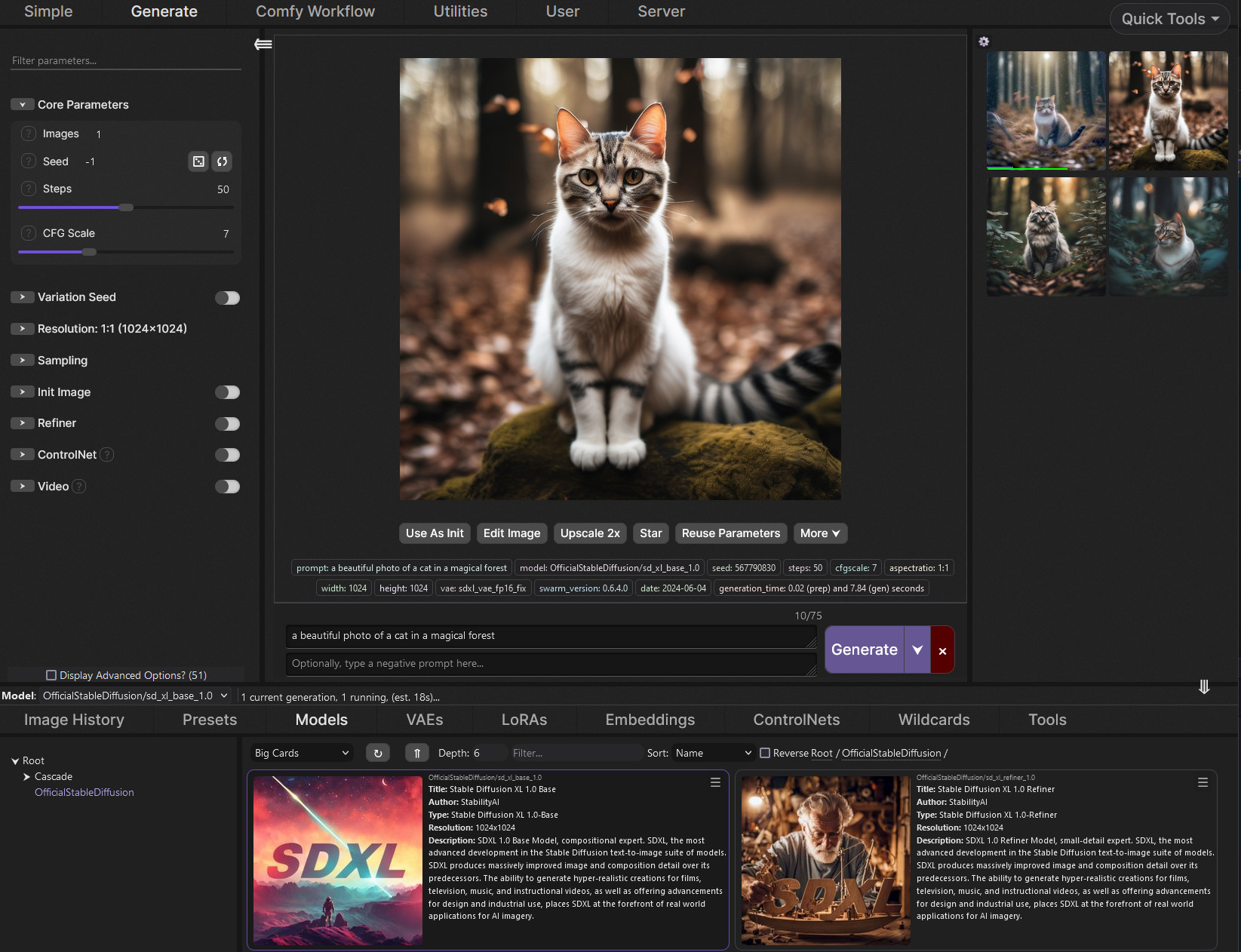 zealous viper
wait for finetunes
nimble heart
boreal bough
oohhh that's practical. I always tested everything manually
yea, for example things like "anatomy" give anatomical charts so I'm not sure adding "Bad anatomy" to negatives does what people think it does. Maybe with the rest of the prompt it can figure it out but I wouldn't bet on it
boreal bough
eternal crystal
Took about 5 mins to gen, what kinda settings should i tweak
first try with the 'tiled vae' node, and have it replace the 'vae decode' node. high chance that that is all you need
 rancid junco
how do i use a vae with automatic1111? don't see any vae options under sd xl in settings
nimble heart
vae is in sd settings
rancid junco
yeah but is that gonna.. uh i guess it is
nimble heart
sdxl settings are only specifically for xl
vae is universal
you can use any vae for any model, it just won't work that well 
boreal bough
rancid junco
how do i use a vae with automatic1111? don't see any vae options under sd xl in ...
there's a joke here to be made... about that choice happening for you automatically XD
it should be enableable in the quick settings
high skiff
Fuck yeah, just got the reverse transaction confirmation from the seller of my GPU
nimble heart
pro tip add the vae changer to your top menu thing like checkpoint already is so you can change it easily
boreal bough
high skiff
Fuck yeah, just got the reverse transaction confirmation from the seller of my G...
congrats! 😄
boreal bough
slender hinge
minimised prompt down to just 'photo of beautiful girl, pastel hair, freckles'
...
not entirely as bad as on your side, but yeah - something in the prompt is still adding way too much bokeh

 sweet bane
 slender hinge
boreal bough
not entirely as bad as on your side, but yeah - something in the prompt is still...
slender hinge
boreal bough
not entirely as bad as on your side, but yeah - something in the prompt is still...
yeah interesting, you also have a bit of the texture issue, but not as bad. Are we supposed to run the refiner as img2img after using the base model? or are we supposed to be able to use it by itself?
wary bay
Is there any way for me to host my local comfy instance to be remotely accessed, like how auto can run a gradio link?
sweet bane
 boreal bough
slender hinge
yeah interesting, you also have a bit of the texture issue, but not as bad. Are ...
boreal bough
slender hinge
yeah interesting, you also have a bit of the texture issue, but not as bad. Are ...
🤣 I think its the pastel hair + close up combo
 static prawn
how u would work with highresfix? Base Model -> Highresfix -> Refiner , or how are the steps?
slender hinge
boreal bough
🤣 I think its the pastel hair + close up combo
crazy & annoying aha