#🐝|swarm-ui
1 messages · Page 9 of 1
 signal forge
I let swarm install comfy as normal. cd comfyUI, rm -rf venv, pip install -r requirements.txt; then re-install the rocm pytorch. no issues
because I'm amd on linux, it doesnt make sense for me to have all these different container technologies within docker, like conda env and python venv. it becomes a mess to manage all those layers
 eternal aurora
I asked at GitHub about the failure of tensorrt to build an sdxl engine which works ... but no reply!
 verbal lantern
is stable sswarm faster then comfy?
 lucid bloom
verbal lantern
is stable sswarm faster then comfy?
lucid bloom
verbal lantern
is stable sswarm faster then comfy?
it is comfy in the back end
 cold flame
verbal lantern
is stable sswarm faster then comfy?
cold flame
verbal lantern
is stable sswarm faster then comfy?
they're the same. swarm is just a more user friendly frontend for comfy. it's still running comfy behind the scenes for the image generation
 nimble belfry
There is a new dedicated Discord for SwarmUI #🐝|swarm-ui message
 dim sonnet
https://www.reddit.com/r/StableDiffusion/comments/1dlivre/swarmui_is_now_independent_from_stability/
Reddit
Explore this post and more from the StableDiffusion community
verbal lantern
damn so i can do everything with swarm which is possible in comfy right?
dim sonnet
verbal lantern
damn so i can do everything with swarm which is possible in comfy right?
yes
 austere cypress
Just migrated. Going to give it go. Thanks @dim sonnet
 thick flicker
im having trouble with the img to img workflow in SwarmUI when generating my custom Pixart Sigma Img to Img workflow over to Swarm from ComfyUi
The regular Text to Img workflow for Pixart works perfect in swarm but for some reason INT IMG selection doesnt work
and the Load img node doesnt give me a option to load an img
it just shows up as a text selection
 dim sonnet
thick flicker
and the Load img node doesnt give me a option to load an img
dim sonnet
thick flicker
and the Load img node doesnt give me a option to load an img
swap it for a SwarmLoadImageB64 (or a SwarmInputImage if you want a clean paramater-managed workflow)
there's a special split thingo where LoadImage lets you specify filenames and SwarmLoadImageB64 lets you direct upload images to swarm ui
(lil messy ngl, needs work)
 main grotto
all results i've had with swarm have a washed out colorscheme to them. no matter what settings or model i've tried. with or without image input. it still wont' give me a dark look
they tend to have darker tones in the previews until the last step
eternal aurora
I asked over on REDDIT: can I just change the name of the StableSwarmUI folder to SwarmUI - and then git pull?
 drifting helm
eternal aurora
I asked over on REDDIT: can I just change the name of the StableSwarmUI folder t...
drifting helm
eternal aurora
I asked over on REDDIT: can I just change the name of the StableSwarmUI folder t...
nope, the .git folder still thinks its the old repo
dim sonnet
eternal aurora
I asked over on REDDIT: can I just change the name of the StableSwarmUI folder t...
just follow migration guide https://github.com/mcmonkeyprojects/SwarmUI/discussions/2
dim sonnet
main grotto
all results i've had with swarm have a washed out colorscheme to them. no matter...
some models have better color range (eg CosXL or SD3 are good, vs SDXL and SD1 are limited), also boosting CFG Scale can increase color range (just be careful cause it does other things too). For older models you can also find Offset Noise LoRAs which will improve the color range on those models
main grotto
using the same models in easy diffusion and invokeai seem to be better for it using the same settings. i tried loras too. but never seen offset noise ones sepecifically i'll have to look into that. something about swarm makes me wanna use it. but i keep ending up back at the now getting outdated easy diffusion.(rabbit hole plugin probably being the biggest reason i'm guessing)
 potent panther
main grotto
they tend to have darker tones in the previews until the last step
potent panther
main grotto
they tend to have darker tones in the previews until the last step
They previews aren’t decoded with the VAE
They don’t have the same color range
eternal aurora
I've migrated but cannot generate

Can I Symlink the Models Folder? I'm not sure what the status of the !OfficialStableDiffusion and OfficialStableDiffusion Folders is? Must I re-create these folders in the Symlinked Models Folder?
Good work, much appreciated what with all the upheaval! 😄
dim sonnet
eternal aurora
Can I Symlink the Models Folder? I'm not sure what the status of the !OfficialSt...
- you have not fully migrated, that is still Stable version, be sure to run an update after the migrate step
- you do have to select a model to generate lol
- you can set model folder path in Server Config (just be sure to restart swarm after), no need for symlinks
- if you have a folder with a
!prefix (?) that's... some form of weirdness on your PC not related to swarm, possibly some external program/antivirus/idk messing with files - do note Swarm has its own dedicated discord now as linked in the pinned post here and in the swarm readme
eternal aurora
I Symlinked the dlbackend/comfy/comfyui/custom_nodes to my main comfyui/custom_nodes folder - PiXart-Sigma now works perfectly!
dim sonnet
type clip into the parameters filter (top left) and check displayed advanced
 pliant junco
Does anyone have any tutorials or resources they recommend for sd3 w/ swarm ui?
dim sonnet
pliant junco
Does anyone have any tutorials or resources they recommend for sd3 w/ swarm ui?
if you join the swarm discord (pinned here), there's a channel with a list of youtube videos about swarm. Also there's this reddit post https://www.reddit.com/r/StableDiffusion/comments/1de65iz/how_to_run_sd3medium_locally_right_now/
 lofty roost
dim sonnet
https://www.reddit.com/r/StableDiffusion/comments/1dlivre/swarmui_is_now_indepen...
lofty roost
dim sonnet
https://www.reddit.com/r/StableDiffusion/comments/1dlivre/swarmui_is_now_indepen...
Sorry to jump in several days after your post, first big thanks for your work, and if you don't mind my asking, will the new SwarmUI, as you said it is supported by Comfy Org, also aim to become a multimodal interface like Comfy's plans for the future ?
dim sonnet
lofty roost
Sorry to jump in several days after your post, first big thanks for your work, a...
yeee
lofty roost
dim sonnet
yeee
Wonderful news, thanks Alex - now the simple minds like me have hope, can both download Comfy workflows and keep the click-this check-that 🥳
 verbal junco
how can one remove the masked area?

 open cairn
does swarm support reading the metadata from automatic1111 produced images?
dim sonnet
verbal junco
how can one remove the masked area?
max out creativity, optionally bump resettonorm too, and specify in prompt what you want to fill the area with
dim sonnet
open cairn
does swarm support reading the metadata from automatic1111 produced images?
yes, drag an image to the center area of swarm and it should parse it
open cairn
can you use upscaler models such as 4xultrasharp in swarm? if so how?
dim sonnet
open cairn
can you use upscaler models such as 4xultrasharp in swarm? if so how?
yes, under the Refine/Upscale parameter group
put the model in (Swarm)/models/upscale_models and it will show up in the upscale method list
 urban maple
how do i specialize the resolution for swarm ui?
it only says 1x or 2x which i hate
nvm exporting to comfy then importing back to swarm fixed it LMAO
verbal junco
In a1111 and foocus there's a tab for styles
That has gothic dark, cinematic etc
Is there a way to get those styles on swarm?
urban maple
verbal junco
That has gothic dark, cinematic etc
yes i was talking about hi rez
they have like 8 styles
im using a cyber one
ok theres 7
verbal junco
I see I see
urban maple
verbal junco
I see I see
Modern Dark, Modern White, Dark Dreams, Gravity Blue, Cyber Swarm, Punked, Eyesear White
urban maple
verbal junco
Could I just import all the ones
probably
im looking at them rn and it seems like it'd actually be easy to just make ur own

GitHub
StableSwarmUI, A Modular Stable Diffusion Web-User-Interface, with an emphasis on making powertools easily accessible, high performance, and extensibility. - Stability-AI/StableSwarmUI
can just mess around with the numbers and color codes before u get something you like
its all .css files
potent panther
That's the biggest miscommunication I have ever set my eyes upon this year
potent panther
verbal junco
In a1111 and foocus there's a tab for styles
Yes they are called presets here and they use a somewhat standard format if you want to search for some
potent panther
urban maple
Modern Dark, Modern White, Dark Dreams, Gravity Blue, Cyber Swarm, Punked, Eyese...
He was asking about presets on Fooocus not the ui theme xD
dim sonnet
urban maple
it only says 1x or 2x which i hate
what
dim sonnet
urban maple
https://github.com/Stability-AI/StableSwarmUI/blob/master/src/wwwroot/css/themes...
that's the legacy repo, not the modern one https://github.com/mcmonkeyprojects/SwarmUI/discussions/2
drifting helm
btw @dim sonnet, the pinned has the old repo
 dim sonnet
verbal junco
Could I just import all the ones
dim sonnet
verbal junco
Could I just import all the ones
generally yes you can just import styles from other UIs to the presets tab
dim sonnet
drifting helm
btw <@105458332365504512>, the pinned has the old repo
i literally can't edit this message :'(
non-staff aren't allowed to linkdump
and editing a prior linkdump triggers automod
drifting helm
oh
dim sonnet
maybe if i deleted the discord link it'd work but the discord link is important
drifting helm
ask a staff to post the linkdump
urban maple
potent panther
He was asking about presets on Fooocus not the ui theme xD
Ohhhh xD
He meant art styles I thought he meant ui themes...
potent panther
lol
verbal junco
dim sonnet
generally yes you can just import styles from other UIs to the presets tab
how to go about
doing so?
ok nvm
its pretty easy
verbal junco

GitHub
Detection Detailer hijack edition. Contribute to Bing-su/dddetailer development by creating an account on GitHub.
how to go about using this in swarm?
also why is every guide about a1111 when the SD discord doesnt even have a a1111 channel anymore lol
 silver spade
anyone here knows how to use LoRA Section Confinement (
signal forge
verbal junco
also why is every guide about a1111 when the SD discord doesnt even have a a1111...
Don't underestimate how many people still use auto, it's still the majority. You can install anything that works in comfy, I'm not aware of any limitations in that regard
dim sonnet
verbal junco
https://github.com/Bing-su/dddetailer
from the readme that looks about the same as https://github.com/mcmonkeyprojects/SwarmUI/blob/master/docs/Features/Prompt Syntax.md#automatic-segmentation-and-refining
silver spade
dim sonnet
?
sorry for the ignorance. but I am not very certain about how to use it.
silver spade
dim sonnet
?
when I try to define the coordinates in the advanced part of the interface, it gives error. I don|t think I am supposed to use text there. what I wanted is to define one region to use a lora and another region to use other.
silver spade
Lora Section Confinement? how do I set the coordinates there?
 versed copper
verbal junco
it adds extra fingers
versed copper
verbal junco
it adds extra fingers
much less of that if you set the refiner strength/creativity lower - depending on what you use
potent panther
verbal junco
it adds extra fingers
that isn't Swarm's fault
try tweaking your refiner settings
avoid latent upscale
dim sonnet
the "upscale 2x" button is laziest bare minimum method possible, don't use it if you want good results lol
i intentionally hit it under the "More" menu in a recent dev commit
potent panther
dim sonnet
the "upscale 2x" button is laziest bare minimum method possible, don't use it if...
I thought you had removed it already 😂
silver spade
can we use IP adapter in swarm ui?
dim sonnet
silver spade
can we use IP adapter in swarm ui?
yes, just drag an image to the prompt box
silver spade
dim sonnet
yes, just drag an image to the prompt box
You are sh*ting me... Now I have to go back home to try this!
silver spade
dim sonnet
yes, just drag an image to the prompt box
Mind blowing!!!
thick flicker
Tried it, worked flawlessly good job @dim sonnet
dim sonnet
 light badge
how can i do img2img ???
light badge
how can i do img2img ???
Init Image parameter group, or drag an image to the center and click Edit Image
verbal junco
HiRes: 4xNMKD-Siax_200k with 15 Steps and 0.3 Denoise + 1.5 Upscale
so this in swarm is Refiner Steps, denoise is refiner control %, refiner upscale
dim sonnet
something like that yeah
depending on who wrote it that could also be 50 steps and 0.3 control%
(ie is it 0.3 denoise of 50 steps yields 15 final steps, or is it 0.3 denoise of 15 steps flat no nonsense)
dim sonnet
silver spade
Lora Section Confinement? how do I set the coordinates there?
delayed reply but I finally realize what you mean, you dug into advanced/internal stuff and found the internal param by that name -- that's for <segment:> usage internally, not meant to be used directly, and doesn't support <region: currently, only <segment:
loras are also confined by <object: usage (though note that's handled separately internally not by the advanced internal param you found)
dim sonnet
- New Swarm Release version 0.9.1-Beta
https://new.reddit.com/r/StableDiffusion/comments/1dy9rzr/swarmui_091beta_release/
https://github.com/mcmonkeyprojects/SwarmUI/releases/tag/0.9.1-Beta
silver spade
anyone has any idea why some models end up producing images like this? matte and looking with wholes like it is eaten by some sort of insect?
 cold flame
silver spade
anyone has any idea why some models end up producing images like this? matte and...
cold flame
silver spade
anyone has any idea why some models end up producing images like this? matte and...
the person who uploaded the model most likely pruned the VAE. load the proper vae for the model type separately and you should get normal gens. if you need a link to download the correct VAE just let me know which SD version the model is and I can grab the link for you.
silver spade
cold flame
the person who uploaded the model most likely pruned the VAE. load the proper va...
that is fantastic, I loaded a VAE and worked like a charm, thanks

 chilly bobcat
any guides for getting started with making videos in swarmui? I am trying to make some videos to go along with my D&D campaign.
 dim sonnet
verbal junco
tried using faceid portrait unnorm
dim sonnet
verbal junco
tried using faceid portrait unnorm
oh, that's brand new in ipadapter -- i pushed a commit that adds support
verbal junco
ok
silver spade
hey Alex, would you guys accept requests for features? I have two: 1- to allow to export a collection as pair image + txt file so we can use good results for training loras and 2- integration with ollama and gpt for smart prompting.
dim sonnet
silver spade
hey Alex, would you guys accept requests for features? I have two: 1- to allow t...
feature reqs go to https://github.com/mcmonkeyprojects/SwarmUI/issues
LLM prompt assistance stuff is planned, not yet built
dim sonnet
verbal junco
is there some alternate that doesnt make me download a1111
what?
open cairn
Is it possible to acheive something similar to adetailer in swarmui?
open cairn
do BREAK and AND work in swarmui, or do you need to use alternatives?
 cold dirge
is their a way to install swarmui in to existing comfy location ?
cold dirge
nvm solved ti xD
dim sonnet
open cairn
do BREAK and AND work in swarmui, or do you need to use alternatives?
"BREAK" is <break> in Swarm syntax, "AND" uh... offhand i forget what that actually does
open cairn
dim sonnet
"BREAK" is `<break>` in Swarm syntax, "AND" uh... offhand i forget what that act...
Will the webui style syntax work at all in swarm, or do you always have to substitute the swamui way of doing things?
dim sonnet
open cairn
Will the webui style syntax work at all in swarm, or do you always have to subst...
some syntaxes are supported, others aren't - eg "BREAK" does not work written that way, you do need <break>
(some word:1.5) prompt weight syntax works fine (albeit weight values are interpretted a bit different since auto does renormalization and comfy/swarm don't)
[x:y:0.5] timestep syntax works fine
[downweight] doesn't, use (some word:0.9) instead
generally all syntax other than prompt weight in swarm you can just type a < and it'll pop up hints on what's available and how to use it
 open cairn
dim sonnet
open cairn
dim sonnet
Is alternate equivalent to the the use of | and || operators in webui? Particularly something like [thing | thing2 | thing3].
open cairn
Does swarmui use freeu or freeu2 by default?
dim sonnet
open cairn
Does swarmui use freeu or freeu2 by default?
idk what freeu2 is and googling it just gets results about apple's free u2 album lol
freeu was never particularly impressive either way imo
open cairn
dim sonnet
idk what freeu2 is and googling it just gets results about apple's free u2 album...
Its an improved version of the original freeu implementation outlined in the following paper. https://arxiv.org/abs/2309.11497v2 . I think there is a node available for it in comyui along with the original v1 implementation. My understanding is it is supposed to be more efficient while giving better results, although this is not something I have tested too much myself. Being able to choose which versions of freeu is used would be a nice feature to have in swarmUI for those who rely on it for their workflows.

arXiv.org
In this paper, we uncover the untapped potential of diffusion U-Net, which serves as a "free lunch" that substantially improves the generation quality on the fly. We initially investigate the key contributions of the U-Net architecture to the denoising process and identify that its main backbone primarily contributes to denoising, whereas its sk...
dim sonnet
that's the freeu paper
the 2 part is the part i haven't heard of
oh, heck, there is a FreeU_V2 in comfy
... is that even an actual thing or is that just comfy did an experiment 9 months ago and published it
open cairn
I have only used the v2 implementation in webui
dim sonnet
post on the swarm issues page @ https://github.com/mcmonkeyprojects/SwarmUI/issues to track a feature request for that
open cairn
Done.
potent panther
new compromised account
cold dirge
🤔
eternal aurora
dim sonnet
- New Swarm Release version 0.9.1-Beta
<https://new.reddit.com/r/StableDiffusion...
Just update current Swarm version; or a fresh install?
dim sonnet
eternal aurora
Just update current Swarm version; or a fresh install?
if you're on SwarmUI, just update. If you're on the old stability version, need to update, then migrate, then update again - or reinstall
eternal aurora
Thanks
 haughty moon
is there a way to define what the "Upscale 2x" button does? It seems to be using init image instead of refiner/upscale, takes longer, and introduces more change in the image than using the refiner tab to upscale
Also, when using the 'Reuse Parameters' button it resets the refiner settings to defaults if that data does not exist in the meta. I can see why disabling it would happen, but it's annoying to have to reset all those settings every time
 slender granite
haughty moon
is there a way to define what the "Upscale 2x" button does? It seems to be using...
slender granite
haughty moon
is there a way to define what the "Upscale 2x" button does? It seems to be using...
yooooooooooooooooooos ultimate upscale. Do not upscale latent. It suffers from bullsh*t
potent panther
haughty moon
is there a way to define what the "Upscale 2x" button does? It seems to be using...
it's a useless button
use refiner instead
haughty moon
I do use refiner, that's why i want to change the button
potent panther
Oh like having the upscale button use your refiner settings instrad?
Like a button called Refine
haughty moon
potent panther
Oh like having the upscale button use your refiner settings instrad?
Yes, exactly
 gray geyser
is swarm better then a1111 and comfyui ?
dim sonnet
gray geyser
is swarm better then a1111 and comfyui ?
Better than auto? Yeah
Better than comfy? Better interface, same internals. Swarm is built on top of comfy
gray geyser
i will try it tonight 👍
i hope it directly take civitai models and prompts to interface and save them as history.
since i am a non native speaker i prefer generated prompts.
 split sedge
I'm new to Swarm, so bear with me, lol. So I just jumped from Forge to Swarm and I'm trying to figure out Hires Fix. I created an ESRGAN Folder in the Models folder and copied my ESRGAN_4x and others into it. But when I click on Upscale Method, none o fmy upscalers are there. Any ideas what I might be doing wrong?
dim sonnet
split sedge
I'm new to Swarm, so bear with me, lol. So I just jumped from Forge to Swarm and...
the folder should be named upscale_models
after setting things up, you can refresh the models list or restart swarm (whichever's easier for you) and it should load
split sedge
Thanks! I just tried that, but not seeing it in any of the drop-down menus in the Refine/Upscale area. I think I'm maybe just looking in the wrong place?

 dim sonnet
split sedge
Thanks! I just tried that, but not seeing it in any of the drop-down menus in th...
dim sonnet
split sedge
Thanks! I just tried that, but not seeing it in any of the drop-down menus in th...
that looks right, it should show up under Upscale Method
split sedge
I appreciate your help. I was thinking they should be there too. For whatever reason, they're just not popping up. I'll try to reinstall in the morning. Thank you again for your help!

 lean spade
Does swarmUI support flux?
lean spade
When I specify the number of images, is that like Aut1111 batch size or the number of batches of size 1?
dim sonnet
lean spade
Does swarmUI support flux?
yes
dim sonnet
lean spade
When I specify the number of images, is that like Aut1111 batch size or the numb...
there's a separate batch param if you want batching, but for the most part it's pretty redundant to bother
lean spade
dim sonnet
yes
I'm getting an error when trying to load flux dev model in Windows
Error loading model on backend 0 (ComfyUI Self-Starting): System.InvalidOperationException: ComfyUI execution error: ERROR: Could not detect model type of: H:\projects\AI\SD\Base\flux1-dev-fp8.safetensors
at StableSwarmUI.Builtin_ComfyUIBackend.ComfyUIAPIAbstractBackend.GetAllImagesForHistory(JToken output, CancellationToken interrupt) in F:\projects\AI\swarmAI\StableSwarmUI\src\BuiltinExtensions\ComfyUIBackend\ComfyUIAPIAbstractBackend.cs:line 451
dim sonnet
lean spade
Error loading model on backend 0 (ComfyUI Self-Starting): System.InvalidOperatio...
if you didn't use the official download of flux, some third party reups have the metadata janked, meaning you'll have to fix it yourself
should join the swarm discord btw, pinned in this channel
split sedge
dim sonnet
that looks right, it should show up under Upscale Method
I got everything working and it's glorious! Thanks again for your help. Sometimes a fresh install is better than trying to figure out what you screwed up, lol. Got Flux working on Swarm now too. Amazing.


 robust summit
a boy and a girl , bench
lean spade
why does the standard install-windows.bat installs version 0.6.4, not the latst 0.9.1?
does it do that only for me?
dim sonnet
because you're in the StableSwarmUI repo not the modern https://github.com/mcmonkeyprojects/SwarmUI repo
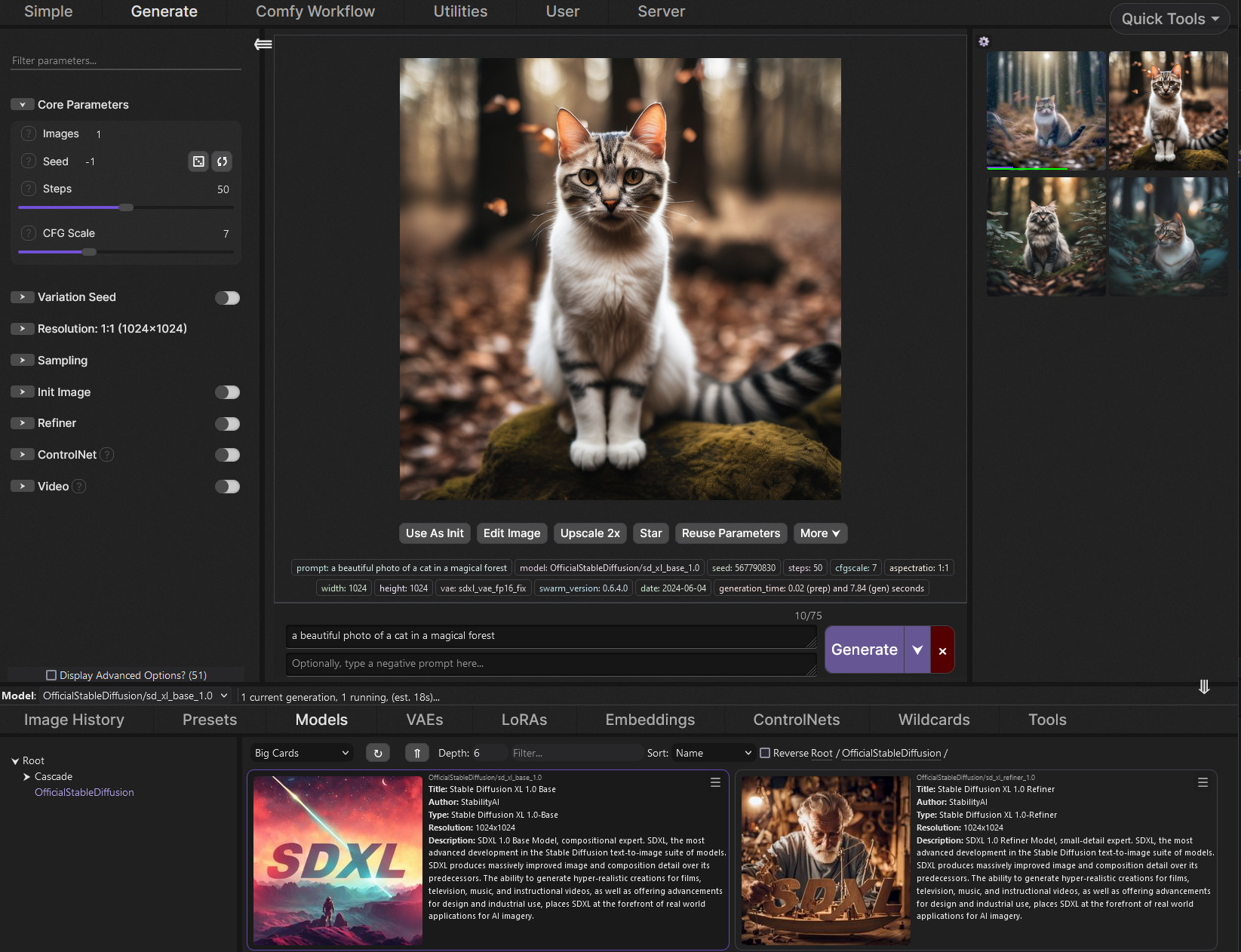
GitHub
SwarmUI (formerly StableSwarmUI), A Modular Stable Diffusion Web-User-Interface, with an emphasis on making powertools easily accessible, high performance, and extensibility. - mcmonkeyprojects/Swa...
 quasi marten
dim sonnet
because you're in the StableSwarmUI repo not the modern https://github.com/mcmon...
quasi marten
dim sonnet
because you're in the StableSwarmUI repo not the modern https://github.com/mcmon...
Pinned message should probably be updated to new repo.
quasi marten
sigh... had issues with swarm in the past and put it aside.
Revisiting, and can't even get it to run. 😦
Brand new install.
[ComfyUI-0/STDERR] OSError: [WinError 126] The specified module could not be found. Error loading "C:\sd\SwarmUI\dlbackend\comfy\python_embeded\Lib\site-packages\torch\lib\fbgemm.dll" or one of its dependencies.
quasi marten
seems to be a known issue - nightly torch resolved for me.
more info: https://github.com/pytorch/pytorch/issues/131662

GitHub
!pip uninstall torch !pip install torch --index-url https://download.pytorch.org/whl/cu121 Installing collected packages: torch Successfully installed torch-2.4.0+cu121 import torch {"name&quo...
gray geyser
same issue with comfyui
dim sonnet
a fresh install of swarm today should not have that error
gray geyser
@dim sonneti never had issue in swarm ui , i had it with comfy, was it a general torch issue ?
i mean how come installing extensions , restarting and everything get messy.
dim sonnet
gray geyser
<@105458332365504512>i never had issue in swarm ui , i had it with comfy, was it...
yes it's an upstream torch issue at the core, that comfy&swarm both have workarounds for
dim sonnet
gray geyser
i mean how come installing extensions , restarting and everything get messy.
because the pip landscape is a nightmare
in a better world we'd all leave python behind
gray geyser
i hope one day all these webui be standalone apps just like amuse 2.0 no venv no torch... no browser.
is it possible ?
dim sonnet
well there will always be stuff inside but yeah not having to look at / think about those, 100% I hope that too
"no browser" we can do that pretty easily by abusing Electron
Electron is just tiny embedded browser that hides that it's a browser. Which for example is how even Discord works, it's just electron
dim sonnet
dim sonnet
well there will always be stuff _inside_ but yeah not having to look at / think ...
Swarm itself is partially attempting this dream
Most things Just Work ™️
but... damn depending on python makes such a mess
gray geyser
is it a tough work from scratch if u leave python ?
gray geyser
for machine learning yeah
its tough to leave python
there's a C++ version of SDXL on github that seems cool but everything is much more work in C++
dim sonnet
I mean, https://github.com/dotnet/TorchSharp exists
literally pytorch but shoved into C#
very behind tho i think
gray geyser
thanks thats really cool
silver spade
hey, how can I load .sft files in swarm-ui?
dim sonnet
silver spade
hey, how can I load .sft files in swarm-ui?
if you're using the correct current SwarmUI (not old Stability version) https://github.com/mcmonkeyprojects/SwarmUI?tab=readme-ov-file#installing-on-windows they work automatically
 clear skiff
does swarmui not support fp16 flux-dev? when i tried to use swarmui again recently it threw out a bunch of errors when i tried loading the regular fp16 stuff, works fine in comfy tho.
oh nvm, i see the option in the text u provided
 earnest sinew
Hi! I'm using Swarm for the first time and I'm having a blast, but I'm having some trouble with the Segmentation feature
It detects the face correctly but regardless of what I write in the segment prompt (or nothing to repeat the main prompt), the segmented part in the final image is very blurry and low res
Does anyone know what could cause this?
dim sonnet
signal forge
I keep getting an error about an unset dtype when I try to load the flux workflow do I need to be on a different git branch?
Seems Like it only sees sdxl and sd3
dim sonnet
signal forge
I keep getting an error about an unset dtype when I try to load the flux workflo...
make sure you're on https://github.com/mcmonkeyprojects/SwarmUI?tab=readme-ov-file#installing-on-windows and it's fully up to date
the old stability version is way too old to support flux naturally
 ashen beacon
 silver spade
will swarm-ui support lora for flux?
gray geyser
 dim sonnet
silver spade
will swarm-ui support lora for flux?
dim sonnet
silver spade
will swarm-ui support lora for flux?
it does, just not for nf4 atm
 mighty raptor
dim sonnet
it does, just not for nf4 atm
mighty raptor
dim sonnet
it does, just not for nf4 atm
everyone's looking for gguf support too
dim sonnet
swarm supports gguf
signal forge
can you load flux models in the generate tab? I know they work in the comfy workflow tab
dim sonnet
signal forge
can you load flux models in the generate tab? I know they work in the comfy wor...
yes
signal forge
ok, they dont show up for me,do I need to be on a diff branch?
☰
StableSwarmUI v0.6.4.1 (2024-06-21 09:26:07)
dim sonnet
signal forge
☰
StableSwarmUI v0.6.4.1 (2024-06-21 09:26:07)
the Stable version is the old version, i quit stability a few months ago, the project is independent now https://github.com/mcmonkeyprojects/SwarmUI?tab=readme-ov-file#installing-on-windows
signal forge
thanks, I knew about that situation, but not that a new github was the result, but that does make sense. thanks
dim sonnet
that's the old repo, you want https://github.com/mcmonkeyprojects/SwarmUI?tab=readme-ov-file#installing-on-windows
 sudden skiff
When I launch SwarmUI, I get this error:
https://cdn.discordapp.com/attachments/1002602742667280404/1279316536204726314/image.png?ex=66d3ffde&is=66d2ae5e&hm=44bab20eba93dd2b5e5f972a0c7bb3aa452b6180b04bbcff5c966b9b7af3c43a&
Here is my cmd log:
https://cdn.discordapp.com/attachments/1002602742667280404/1279316938064924745/image.png?ex=66d4003e&is=66d2aebe&hm=d3beb51d0b1772012041d849d788781284e7f16d8ab4e6051c4ece1773af64f1&

 dim sonnet
sudden skiff
When I launch SwarmUI, I get this error:
https://cdn.discordapp.com/attachments/...
dim sonnet
sudden skiff
When I launch SwarmUI, I get this error:
https://cdn.discordapp.com/attachments/...
yeah AMD on Windows sucks, it'll do that. you can ignore that one. you'll want to disable previews in server->backends to make it less crashy
ideally use WSL or Linux since those have better drivers
sudden skiff
dim sonnet
yeah AMD on Windows sucks, it'll do that. you can ignore that one. you'll want t...
All of the boxes are grayed out, I cannot check or uncheck them. How do I uncheck them? Also, I should change that extraarg to --use zluda, shouldn't I, or no? Not that I can edit the text boxes either atm
 dim sonnet
sudden skiff
All of the boxes are grayed out, I cannot check or uncheck them. How do I unchec...
dim sonnet
sudden skiff
All of the boxes are grayed out, I cannot check or uncheck them. How do I unchec...
click the edit button (the lil pencil at top right), then edit, then save
dim sonnet
zluda does work better than directml if you can set that up
open cairn
Is there any additional information anywhere about what each of the refiner modes do? I am trying to figure out what each does, what settings are ideal for them, and what the use-case for each mode might be.
dim sonnet
open cairn
Is there any additional information anywhere about what each of the refiner mode...
do you mean the Refiner Method param, or something else?
 open cairn
that is the one
dim sonnet
the method param is advanced and should usually be left on post-apply, step-swap is just the original technique suggested for the SDXL Refiner Model, and Noisy is a variant of that which arguably works better in some cases
the default is the one to use 99% of the time
the actual internal difference is post-apply runs one generation, then img2img it, vs step-swap will stop the first gen before it's done, and img2img at the identical step count where it left off with the other model, and noisy will do that with an extra step iirc
so eg for 20 steps at 0.2 refiner control, PostApply does 20 steps base then 4/20 steps refiner, vs StepSwap does 16/20 steps base then 4/20 steps refiner
open cairn
dim sonnet
so eg for 20 steps at 0.2 refiner control, PostApply does 20 steps base then 4/2...
are step-swap and noisy preferable when using a different checkpoint for refining than the one for generation?
dim sonnet
no, again, those are almost never a good idea in practice
signal forge
something with comfy's newest commits broke the swarm workflow graph from loading. I had to revert comfy to v0.2.2. I'm running linux
I was able to run comfy separately
dim sonnet
signal forge
something with comfy's newest commits broke the swarm workflow graph from loadin...
update swarm to latest - also join the swarm discord lol, i announced the patch for that issue at very close to the same time you posted here
signal forge
cool, thanks
open cairn
anyone else find that the model downloader will fail for some models for no reason with the error "appears to be a CivitAI link, but seems to not be valid. Please double-check the link."?
it will fail to read metadata for these same urls, but not others
dim sonnet
open cairn
anyone else find that the model downloader will fail for some models for no reas...
gimme an example link that doesn't work
signal forge
I dont know what others do for inpainting, but I've found the krita plugin is pretty fabulous. inpainting was the thing I missed most I think. and it has basic flux support (no controlnet yet it seems)
 amber rune
I actually love Forge inpaint upload, I'm a Photoshop person and feels so much easier to mask stuff in PS and paste in Forge
Been trying Swarm as a step gap to comfyui but not easy
Took me a LOT of time just to figure how to have all of them using same models,clips,controller, etc files
dim sonnet
- SwarmUI 0.9.3 Beta Release https://github.com/mcmonkeyprojects/SwarmUI/releases/tag/0.9.3-Beta
Reddit thread: https://new.reddit.com/r/StableDiffusion/comments/1g2n9ya/swarmui_093_beta_release/
open cairn
Is it possible to add samplers and schedulers to swarmui like you would with comfyui?
dim sonnet
open cairn
Is it possible to add samplers and schedulers to swarmui like you would with com...
yes
mighty raptor
@grand sun stable swarm stuff in this channel
potent panther
mighty raptor
<@686480615524007937> stable swarm stuff in this channel
SwarmUI*
mighty raptor
potent panther
SwarmUI*
was just letting him know what channel to find what he and i had been DMing about
potent panther
StableSwarm shouldn’t be used anymore
mighty raptor
potent panther
StableSwarm shouldn’t be used anymore
really?
potent panther
mighty raptor
really?
What
mighty raptor
potent panther
What
first of all, you weren't reading the conversation i had with makrok, so you don't know what swarm i was talking about. i pinged him here to let him know what channel to look in. and secondly, not sure why you're down on stable swarm, but also not sure why you assumed that's what i was talking about
potent panther
Oh god what are you on about
dim sonnet
"StableSwarm" is the old name of the project that moved to now be the independent "SwarmUI"
open cairn
dim sonnet
gimme an example link that doesn't work
Stopped having the issue with a later update, not sure which update fixed it for me.
quasi marten
Trying to use a gguf model (flux) but get this. Anyone know how to use these?
`12:33:05.747 [Error] [BackendHandler] Backend request #92 failed: No backends match the settings of the request given! Backends refused for the following reason(s):
- Request requires model 'flux/fluxdev/gguf/flux1-dev-Q5_K_S.gguf' but the backend does not have that model`
I also get errors with the nf4 version. (v1 and v2) 😦
dim sonnet
quasi marten
Trying to use a gguf model (flux) but get this. Anyone know how to use these?
...
make sure you put gguf's in diffusion_models and not the normal model folder
quasi marten
dim sonnet
make sure you put gguf's in `diffusion_models` and not the normal model folder
I use custom specified folders for my model files. Is there a way to redefine the diffusion_models location within the settings?
dim sonnet
quasi marten
I use custom specified folders for my model files. Is there a way to redefine t...
not currently no, that's a weird special case folder
it needs more thought on how to handle it well and/or cheating and hacking comfy to just load diffusion_models out of the normal model folder instead of separating them like that
so for now it's just an internally tracked special magic folder
quasi marten
dim sonnet
so for now it's just an internally tracked special magic folder
Got it, thanks for the info. 🙂
How about the upscaler models folder? Same thing?
dim sonnet
quasi marten
How about the upscaler models folder? Same thing?
that one's less special, though I don't think anybody's ever asked to be able to rename it lol. Can post a feature request @ https://github.com/mcmonkeyprojects/SwarmUI though idk why you'd need to rename that
quasi marten
dim sonnet
that one's less special, though I don't think anybody's ever asked to be able to...
I keep all my models (checkpoints, loras, upscalers, etc.) on a separate, larger drive, from where I run UIs. They all get configured to point to the same alternate location and share models.
dim sonnet
quasi marten
I keep all my models (checkpoints, loras, upscalers, etc.) on a separate, larger...
oh - just edit the ModelRoot setting then
you don't need to edit anything else
quasi marten
dim sonnet
oh - just edit the _ModelRoot_ setting then
Fair, i could give that a try. 🙂 Will need to restructure the folders a bit, but should work.
quasi marten
Where are presets stored on the filesystem?
dim sonnet
quasi marten
Where are presets stored on the filesystem?
user database -- if you want manual file wrangling for em, you can export/import in the UI
btw there's a dedicated swarm discord linked in the pin here
quasi marten
Huh.. turns out I was already in there. 😄
eternal aurora

 barren moat
eternal aurora
https://huggingface.co/stabilityai/stable-diffusion-3.5-medium/tree/main
barren moat
eternal aurora
https://huggingface.co/stabilityai/stable-diffusion-3.5-medium/tree/main
Haven't seen you much in the Swarm server...
eternal aurora
Since Flux came along I've been more of a ComfyUI user - can never match up my personal workflows in ComfyUI as a backend in Swarm!
open cairn
Does swarm's download utiltiy only support civitai downloads, or can it also download from other places like tensor.art and huggingface?
dim sonnet
open cairn
Does swarm's download utiltiy only support civitai downloads, or can it also dow...
It has full support for Civitai, it technically supports HF but limited
the difference is civitai has a metadata API that swarm reads to load in the model's metadata automatically while downloading, whereas HF doesn't have a matching API, and worse usually has files without metadata of any form anyway.
Other platforms can be supported if a feature request is submitted to https://github.com/mcmonkeyprojects/SwarmUI/issues
 lavish breach
Hey, Im having a possible issue, i installed swarm and im getting this stuff in the server log, and I also get a warning on the top, will this be fine or no?

 dim sonnet
lavish breach
Hey, Im having a possible issue, i installed swarm and im getting this stuff in ...
dim sonnet
lavish breach
Hey, Im having a possible issue, i installed swarm and im getting this stuff in ...
at a glance, I'm guessing you have an AMD GPU that you've previously made work with Zluda? You're gonna have to patch the comfy install at SwarmUI/dlbackend/comfy with zluda as well
lavish breach
Okay cool, i didnt know it required that at the moment, I appreciate it, Ill try that later today!!
dim sonnet
swarm has an AMD compatible install by default (with DirectML), but you look to have disabled that in the installer. Which is good if you want to use zluda tho, zluda's better anyway, just not particularly clear how to automate in an installer, especially after the whole AMD takedown notice thing
lavish breach
dim sonnet
swarm has an AMD compatible install by default (with DirectML), but you look to ...
I see, yeah I had a bit of trouble trying to figure that out but im gonna try and add the comfy install into the folder!
 bronze shale
lavish breach
I see, yeah I had a bit of trouble trying to figure that out but im gonna try an...
bronze shale
lavish breach
I see, yeah I had a bit of trouble trying to figure that out but im gonna try an...
for what it's worth I find it easier to install and run ComfyUI separately and connect SwarmUI to it later (I run two instances of ComfyUI, one for each GPU)
Make sure you follow the readme and install the requirements.txt stuff
 dim sonnet
bronze shale
for what it's worth I find it easier to install and run ComfyUI separately and c...
dim sonnet
bronze shale
for what it's worth I find it easier to install and run ComfyUI separately and c...
it is very heavily recommended that you absolutely do not do that
there's a lot of weird ways that can go wrong and/or have unexpected non-obvious side effects
if you have a pre-existing Comfy install, use ComfyUI Self-Starting for it
bronze shale
dim sonnet
there's a lot of weird ways that can go wrong and/or have unexpected non-obvious...
I found exactly the opposite. I'll try it again I guess.
dim sonnet
the issues that hit you with self-start are in your face the moment you set it up, and once you fix them it's good
the issues that hit you with api by url are hidden surprises for later
bronze shale
I have my comfy stuff backed up at least
 uncut prism
Started trying out swarm but... I miss my Automatic1111 extensions
 plain cradle
I have started and trying out swarm as well but I am getting way worse images using swarmui than with auto 1111.. I am not sure why I am doing wrong and would love to get some help ❤️
dim sonnet
uncut prism
Started trying out swarm but... I miss my Automatic1111 extensions
What extension(s) specifically are you missing?
dim sonnet
plain cradle
I have started and trying out swarm as well but I am getting way worse images us...
That's pretty vague, would need more info. In theory as long as all your parameters are identical, you should get (near) identical outputs. (Not exactly identical, seeds and prompts are parsed very slightly differently).
So the two most likely problems are (1) you have a parameter difference somewhere you've missed or (2) you're just seeing different images and succumbing to human bias, it's different so must be wrong (I've seen a lot of people do this, but then if you gen a bunch and blind yourself to which came from which UI and look them over, you can't actually pick one as better than the other anymore)
plain cradle
dim sonnet
That's pretty vague, would need more info. In theory as long as all your paramet...
I did a comparison with auto 1111 and SwarmUI and all same settings (I think) and the swarmui was worse
dim sonnet
plain cradle
I did a comparison with auto 1111 and SwarmUI and all same settings (I think) an...
My only reply to that is repeating what I said above
So the two most likely problems are (1) you have a parameter difference somewhere you've missed or (2) you're just seeing different images and succumbing to human bias, it's different so must be wrong (I've seen a lot of people do this, but then if you gen a bunch and blind yourself to which came from which UI and look them over, you can't actually pick one as better than the other anymore)
plain cradle
dim sonnet
> So the two most likely problems are (1) you have a parameter difference somewh...
Could you recmmend some good negatives and settings?
dim sonnet

your results are bad because you're trying to use LoRAs that aren't right
the LoRAs menu at the bottom of the UI is the recommended way to set those up, if you must use prompt syntax, type it into the Swarm prompt box (don't just copypaste from auto) so that it will give you tab completions to get the names correct
side note: do remember this is a discord with a few hundred thousand people in it, and consider what prompts you want the general public to see you doing lol


 hardy falcon
any swarmui experience @mighty raptor
mighty raptor
hardy falcon
any swarmui experience <@407561236339752981>
a little. what is wrong?
hardy falcon
im getting All available backends failed to load the model 'D:\SwarmUI\Models\Stable-Diffusion/Flux\getphatFLUXReality_v20.safetensors'. error @mighty raptor
it works on sdxl models but not this flux model i just downloaded
mighty raptor
hardy falcon
it works on sdxl models but not this flux model i just downloaded
what flux model did you download and where'd you download it from?
mighty raptor
hardy falcon
getphatfluxreality v20 from civitai
does it work on other flux models?
hardy falcon
this the only one i have but it was a clean download
and lot of ppl have success using it from civitai
mighty raptor
hardy falcon
this the only one i have but it was a clean download
i don't know as i've not used that model. this is a question i think @dim sonnet probably needs to see
hardy falcon
@dim sonnet u there?
 kind marsh
swarmui on online services https://github.com/gutris1/segsmaker

GitHub
Stable Diffusion Webui, Forge, ComfyUI and SwarmUI for SageMaker Studio Lab, Kaggle and Google Colab - gutris1/segsmaker
 jagged mortar
Hi, new to swarm. I am trying to use control nets. I only have one control net downloaded, but my preprocessor looks like this. But anytime I try to use any of them I get an error like the one shown. Does anyone know how I download these pre processors so they actually work OR remove them from the list so Swarm stops lying to me?

 dim sonnet
jagged mortar
Hi, new to swarm. I am trying to use control nets. I only have one control net d...
dim sonnet
jagged mortar
Hi, new to swarm. I am trying to use control nets. I only have one control net d...
some of those preprocessors need models to work, and they're autodownloaded - this one failed its autodownload. Copy the path it has in the error, go open the folder it named, and delete the whole .cache folder, then restart and try again
for depth btw iirc MiDaS is the recommended default preprocessor for it
jagged mortar
dim sonnet
for depth btw iirc MiDaS is the recommended default preprocessor for it
Thanks I will give that a shot! And good to know, sadly I have the exact same error for midas as well.
dim sonnet
same basic solution should fix that too then -- but you'll want to figure out why downloads are failing if that happened repeatedly
you miight need to enable long paths according to a quick google search https://superuser.com/questions/1807770/how-to-enable-long-paths-on-windows-11-home

Super User
I need to enable long paths but my Windows 11 Home edition does not have the group policy editor.
Is there a way to enable this from the command line or install group policy editor on my machine?
jagged mortar
dim sonnet
same basic solution should fix that too then -- but you'll want to figure out wh...
Ill take a look at that when I have some more time. Sadly I deleted .cache, reset, and it just recreated .cache and printed the same error as before.
jagged mortar
dim sonnet
you miight need to enable long paths according to a quick google search https://...
Longpaths looks like it fixed it, thanks for that info, never heard of that before.
dim sonnet
pushed https://github.com/mcmonkeyprojects/SwarmUI/commit/bcced64eb8f75d61ba7ec9bfbfea8fb396475e1d to autodetect that and give a better error message
 true thistle
I updated because I got a message saying there were some available. I updated. Now it's broken.
"No backends available."
Might be about time to switch to Invoke. Gotta generate something tonight and I have no idea what to do about Swarm now.
true thistle
My Invoke generations look like ass, not sure why. 😅 Guess I'd better find out what's wrong with Swarm...
2024-11-23 20:48:54.050 [Info] Self-Start ComfyUI-0 unexpectedly exited (if something failed, change setting
LogLeveltoDebugto see why!)
2024-11-23 20:48:54.050 [Debug] Status of ComfyUI-0 after process end is LOADING
2024-11-23 20:48:54.050 [Info] Self-Start ComfyUI-0 had errors before shutdown:
[ComfyUI-0/STDERR] Total VRAM 24564 MB, total RAM 98045 MB
[ComfyUI-0/STDERR] pytorch version: 2.3.1+cu121
[ComfyUI-0/STDERR] Set vram state to: NORMAL_VRAM
[ComfyUI-0/STDERR] Device: cuda:0 NVIDIA GeForce RTX 4090 : cudaMallocAsync
[ComfyUI-0/STDERR] Using pytorch cross attention
[ComfyUI-0/STDERR] [Prompt Server] web root: C:\SwarmUI\dlbackend\comfy\ComfyUI\web_custom_versions\Comfy-Org_ComfyUI_frontend\1.3.26
[ComfyUI-0/STDERR] Traceback (most recent call last):
[ComfyUI-0/STDERR] File "C:\SwarmUI\dlbackend\comfy\ComfyUI\main.py", line 225, in <module>
[ComfyUI-0/STDERR] load_extra_path_config(config_path)
[ComfyUI-0/STDERR] File "C:\SwarmUI\dlbackend\comfy\ComfyUI\main.py", line 190, in load_extra_path_config
[ComfyUI-0/STDERR] for y in conf[x].split("\n"):
[ComfyUI-0/STDERR] ^^^^^^^^^^^^^
[ComfyUI-0/STDERR] AttributeError: 'bool' object has no attribute 'split'
2024-11-23 20:48:55.047 [Debug] [Load ComfyUI Self-Starting #0] ComfyUI-0 self-start port 7822 loop ending (should now be alive)
Anyone know what's going wrong here? I get backend errors ever since applying the latest SwarmUI update.
dim sonnet
true thistle
> 2024-11-23 20:48:54.050 [Info] Self-Start ComfyUI-0 unexpectedly exited (if so...
your comfy backend is outdated - go to server->backends->edit the comfy backend->set autoupdate to always or Forced->save
 next arch
@dim sonnet interested in adding this #1188183242747158630 message to SwarmUI?
It's CFG inference from a distilled model. Samples are using a negative prompt on Flux Dev.
(sorry about the ping on the other server. I didn't know about this channel before)
dim sonnet
next arch
<@105458332365504512> interested in adding this https://discord.com/channels/110...
not sure what specifically you're asking? Flux-Distilled works in Swarm if that's what you mean. also ftr swarm's dedicated discord is linked in the readme https://github.com/mcmonkeyprojects/SwarmUI?tab=readme-ov-file#swarmui
next arch
dim sonnet
not sure what specifically you're asking? Flux-Distilled works in Swarm if that'...
that's not what I mean. Follow the link. On the left side of the samples is Flux Distilled. On the right side of the samples is inference using CFG and negative prompts, as you would infer from an undistilled model - but using the distilled model (Flux Dev).
Is that already in Swarm? If so I haven't found it yet.
thanks for the link. I'm there now if you prefer to answer there.
dim sonnet
Er yes sorry I meant flux-undistilled is supported yes
There's an actual model where they undid the distillation
To readd cfg
next arch
I know but the quality isn't very good. This is inference using the distilled model but using real CFG.
not another model
it's a bit of math and code
dim sonnet
Using cfg on standard flux dev isn't great
You can use eg dynamic thresholding to unbreak it
Few different "cfg fix" techniques out there
next arch
🤔 so Swarm can already do that and/or not interested to implement negative prompts for Flux Dev distilled?
next arch
dim sonnet
Using cfg on standard flux dev isn't great
I think it works great. much better realism with negative prompt than distilled with only positive prompt
really not sure how dynamic thresholding is related to this
I tried the un-distilled model. It's nowhere close to this in quality
dim sonnet
next arch
I think it works great. much better realism with negative prompt than distilled ...
If you just want to use raw cfg and nothing more on flux, nothing is stopping you
next arch
dim sonnet
If you just want to use raw cfg and nothing more on flux, nothing is stopping yo...
I think we are talking past each other. raw CFG on Flux, i.e. just increasing the CFG factor from 1 in SwarmUI, obviously fails. That's not what I was proposing.
dim sonnet
next arch
I think we are talking past each other. raw CFG on Flux, i.e. just increasing th...
Then what are you proposing?
It's not raw CFG, it's not a CFG fix technique, it's not an undistillation model. But it is CFG. What is it?
next arch
dim sonnet
Then what _are_ you proposing?
replied here: #1243185862234210389 message
quasi marten
Does Swarm support this LTX video thing?
barren moat
quasi marten
Does Swarm support this LTX video thing?
If you need help setting it up I just did a video on it.

This is a little longer because there is more to cover using LTX video in swarm. Once you watch this tutorial you will be an old pro running it! I cover a little on setting up presets also!
Swarm Discord link:
https://discord.gg/swarmui-1243166023859961988
Custom GPT LTX Video Prompt Helper by Jean Thompson:
https://chatgpt.com/g/g-67414cf4a9...
Did y’all know there’s a dedicated swarm discord ran by the one and only mcmonkey? Now you do 🙂
quasi marten
barren moat
If you need help setting it up I just did a video on it.
https://youtu.be/Zzt9...
i'll scope it out
barren moat
if you need help just HMU
dim sonnet
- SwarmUI 0.9.4 Release! https://github.com/mcmonkeyprojects/SwarmUI/releases/tag/0.9.4.0-Beta
Reddit thread: https://new.reddit.com/r/StableDiffusion/comments/1h81y4c/swarmui_094_release/
 jaunty saddle
oh shitt this is PEAK
 quasi marten
Thanks Alex! Great to see the new release! 😄
quasi marten
barren moat
if you need help just HMU
is that 'frame interpolation' install really required?
barren moat
quasi marten
is that 'frame interpolation' install really required?
Not that I noticed
quasi marten
barren moat
Not that I noticed
cool
got it running.. just got pretty butt results... need to find a good test prompt 🙂
well... i mean.. it made something. 😄
 barren moat
it's not horrible
quasi marten
enough to know it works 😛
jaunty saddle
Why doesnt the lora get saved in the metadata?

im using comfyui workflow to generate tab tho
it should have the shrek lora but its not there in metadata
need to post to civit
dim sonnet
jaunty saddle
im using comfyui workflow to generate tab tho
things added by a workflow and not listed in the generate tab don't go into metadata
jaunty saddle
dim sonnet
things added by a workflow and not listed in the generate tab don't go into meta...
does this mean ill have to generate inside comfyui itself?
dim sonnet
if you want exactly correct metadata either (A) use the generate tab or (B) use the comfy tab
using both together gets a lil wonky
jaunty saddle
im not sure if vpred is automatically enabled on swarmui generate tab
dats why i need comfyui sampling discrete
dim sonnet
jaunty saddle
im not sure if vpred is automatically enabled on swarmui generate tab
Edit Metadata on the model -> set the prediction type
jaunty saddle
pretty sure newer noobaixl vpred has the state dict
dim sonnet
it should be automatic if marked properly for comfy yes
otherwise you can do it manually via the edit metadata menu
either way generate tab should work fine
quasi marten
So I've been using the "comfy" release of the flux dev model (flux dev fp8 with the text encoders built-in). And I use SwarmUI.
Is there now support for a faster workflow versus the original flux dev model? Anyone know?
dim sonnet
quasi marten
So I've been using the "comfy" release of the flux dev model (flux dev fp8 with ...
what do you mean a faster workflow
swarm supports both the "comfy version" and standard version of flux models ftr
quasi marten
dim sonnet
what do you mean a faster workflow
I recall the nf4/gguf models allowing for faster generation, but they required special support. Thought maybe there may be some other model releases with optimizations since then.
dim sonnet
quasi marten
I recall the nf4/gguf models allowing for faster generation, but they required s...
gguf is supported in Swarm. Nf4 is too technically but i don't recommend it.
those aren't faster in general, they use less vram which is faster if you're low on vram but slower if you have a high end card.
there's "hyper" flux which is like a turbo thingy, it lets you run flux dev in ~8 steps with a slight quality drop
quasi marten
dim sonnet
gguf is supported in Swarm. Nf4 is too technically but i don't recommend it.
tho...
Hmm, before I switched to Swarm they were definitely faster for me. NF4 was anyways. GGUF was slightly. 3060, 12GB VRAM.
Haven't tried the hyper flux thing. I'll take a look. I didn't much care for schnell.
dim sonnet
quasi marten
Hmm, before I switched to Swarm they were definitely faster for me. NF4 was any...
yeah 12gib vram is lowend for ai, so gguf would help yeah
flux is a 12b model, so fp8 needs 12 gigs for the model and a few more gigs for activations n context n all, so 16gib+ is flux's preferred space
quasi marten
dim sonnet
flux is a 12b model, so fp8 needs 12 gigs for the model and a few more gigs for ...
ah... maybe when that 5000 series drops. 😉
 timid crest
Hello there, any update regarding this feature https://github.com/mcmonkeyprojects/SwarmUI/pull/289, thanks
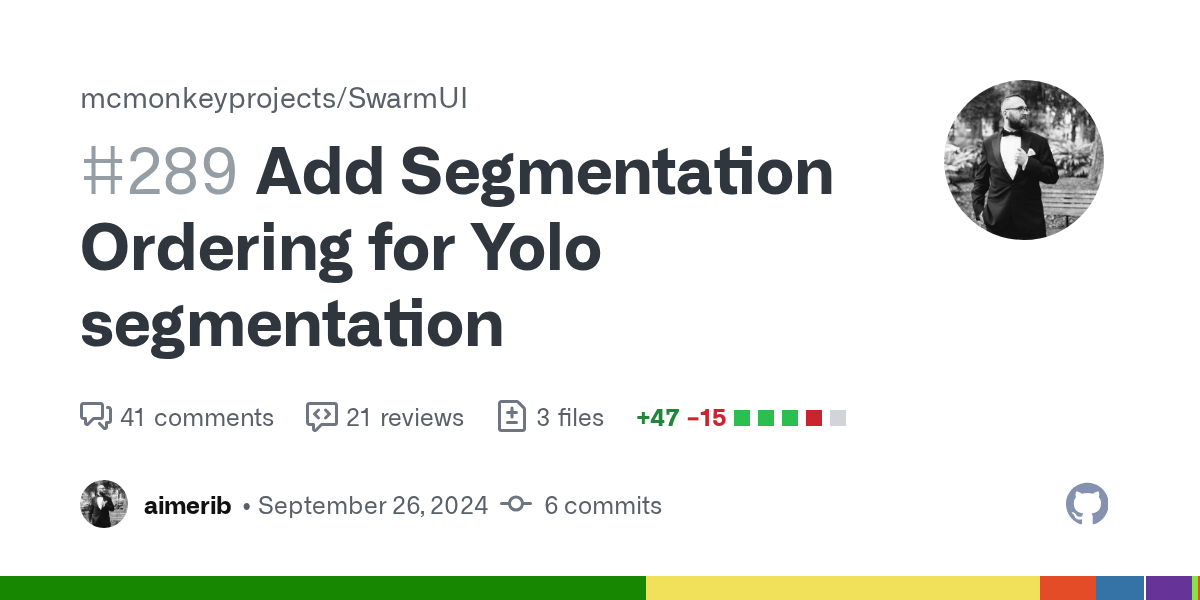
GitHub
Allow yolo segmentation to sort by left-right, top-bottom, largest-smallest, and reverse that order.
Params added to Regional Segmentation Group
 vocal bay
Controlnet union inpainting with sdxl seems to do nothing unless I set the controlnet strength super low (0.25 or something). How should I start looking for the source of the problem?
If I disable the controlnet, inpainting works but consistency is of course completely lost.
vocal bay
Got it workoing. SwarmUI has a bug in that it doesn't set "black pixel for xinsir cn" on in inpainting processor when controlnet union is used.
dim sonnet
vocal bay
Got it workoing. SwarmUI has a bug in that it doesn't set "black pixel for xinsi...
that's less bug more feature request, that's not something I've even heard of before. Please post as a feature request to https://github.com/mcmonkeyprojects/SwarmUI/issues
vocal bay
Well, if you consider "inpainting is completely broken for SDXL models" not a bug, sure
dim sonnet
vocal bay
Well, if you consider "inpainting is completely broken for SDXL models" not a bu...
That is not true. Inpainting is broken for xinsir(?) controlnet-union inpainting sdxl models, which is a class of model i've never touched
inpainting is great on SDXL outside of that specific thing
it's "lack of feature" not "bug" because i've never even attempted to include support for that specific subclass of model
dim sonnet
- SwarmUI 0.9.5
Release notes: https://github.com/mcmonkeyprojects/SwarmUI/releases/tag/0.9.5-Beta
Reddit thread: https://www.reddit.com/r/StableDiffusion/comments/1ieh81r/swarmui_095_release/
 hardy sorrel
good stuff
quasi marten
Docker support to sandbox - nice
dim sonnet
why did you copypaste an earlier message out of context
 gritty ether
🤖 (most likely)
 teal ruin
Hello~
Can anyone help me understand how to fix 'error code 128' when installing SD Auto1111?
Someone suggested using Swarm-UI but it was trying to run comfyui instead of auto1111...im so lost and confused
I've been trying to get SD running for the past 24 hours but nothing is working, i've tried everything I could think of from so many different forums
 turbid tusk
teal ruin
Can anyone help me understand how to fix 'error code 128' when installing SD Aut...
turbid tusk
teal ruin
Can anyone help me understand how to fix 'error code 128' when installing SD Aut...
Well swarm has a comfy ui backend while having a easy to use interface
turbid tusk
teal ruin
Can anyone help me understand how to fix 'error code 128' when installing SD Aut...
If you get an error. i recommend posting the full cmd into #🤝|tech-support
teal ruin
turbid tusk
Well swarm has a comfy ui backend while having a easy to use interface
Okay. I will try again later~
Thank you!
dim sonnet
guide to generating Wan videos faster in Swarm for anyone who wants that https://www.reddit.com/r/StableDiffusion/comments/1j0znur/run_wan_faster_highres_fix_in_2025/

Reddit
Explore this post and more from the StableDiffusion community
 sonic dirge
@dim sonnet hey sorry to bother you. i just saw your reddit article there that you posted about highres fix with Wan.
I dont use Swarm, but I was so interested in what you mentioned at Step 2: init image with the creativity value.
Since I am using ComfyUI and I think that swarm uses comfy in the background, this got me really interested as to what
is the equivalent of that technique in pure ComfyUI? Like what would be the workflow for that? Can you share a similar
workflow of that technique but for just ComfyUI? or is this technique only possible on swarm?
dim sonnet
sonic dirge
<@105458332365504512> hey sorry to bother you. i just saw your reddit article th...
that's just the way in swarmui you upload an image for use with image2video, the comfy equivalent is... use the reference image2video workflow
sonic dirge
sorry for late reply, was doing something. when you say reference image2video workflow, you mean from here:
https://comfyanonymous.github.io/ComfyUI_examples/wan/ ?
But isnt that just image to video and in your example you have basically like a video to video, cause you generate from step 1
and then step 2 input is that video?
can you quickly make a comfyui workflow and share it to showcase how would this work, cause i really dont get it
dim sonnet
sonic dirge
sorry for late reply, was doing something. when you say reference image2video wo...
OH I latched onto the wrong part of your initial question
The highres part is: load the first video, pass to an Upscale Image node, then run it through a sampler with whichever technique (image2video workflow recommended). Vae encode the 'image' (video) and pass that as the latent, instead of the latent generated by the i2v node
for non-swarm you need VHS nodes to load a video directly. Swarm has its own node for loading videos
also note: when in doubt, just set up a gen how you want in Swarm's Generate tab, then click the Comfy Workflow tab, and hit 'import', and it will give you the full comfy workflow for what you set up
swarm is designed among other things to help teach comfy
sonic dirge
kk il try ty 🙂
 limber zodiac
I want to install SwarmUI on my Mac, but I happen to have various versions of Python installed, including v3.13. I'm not sure where these versions are installed. I read on the Github not to use v3.13, so how can I avoid using this version? Or put otherwise: how to force SwarmUI to use e.g. v3.10 (which I have on my Mac).
dim sonnet
limber zodiac
I want to install SwarmUI on my Mac, but I happen to have various versions of Py...
if it's installed in /opt/homebrew/opt/python@3.10 (which it should be by default), it'll work automatically
Swarm favors 3.11 > 3.10 > 3.12 > system default, in that order
limber zodiac
dim sonnet
if it's installed in `/opt/homebrew/opt/python@3.10` (which it should be by defa...
Ah thanks! I will give it a go and report back.
dim sonnet
Swarm has a website now https://swarmui.net/ and a submission thread in the Swarm discord for images to add to the background scroll

SwarmUI - A Modular AI Image Generation Web-User-Interface, with an emphasis on making powertools easily accessible, high performance, and extensibility. Supports AI image models (Stable Diffusion, Flux, etc.), and AI video models (LTX-V, Hunyuan Video, Cosmos, Wan, etc.), with plans to support eg audio and more in the future.
limber zodiac
limber zodiac
Ah thanks! I will give it a go and report back.
I installed SwarmUI on my Mac Studio Ultra M2 and the process was extremely smooth and succeeded without any problem! I'm very impressed by the generating speed and the user interface. Of course I still have many aspects to discover, but I'm sure it will replace all my other applications for AI, like ComfyUI, Automatic1111, Draw Things etc. etc. Well done!
limber zodiac
I'm still OK with SwarmUI, but not for the first time when using AI applications on a Silicon Mac I get an error related to mps. This one came up when choosing the 2x upscale option in the image editor. For me atm it is not a big deal. but still...
 dim sonnet
wow, straight up internal pytorch error. ow
limber zodiac
I must be getting old, but how do I launch the server? (I had closed Safari on my Mac and had the idea that after starting Safari inputting "localhost:7801" would start SwarmUI, but Safari tells me it can't find the server...)
limber zodiac
limber zodiac
I must be getting old, but how do I launch the server? (I had closed Safari on m...
I'm feeling a tiny bit younger 😉. SwarmUI starts from the terminal after a 'cd' to SwarmUI folder and using the 'launch-macos.sh' command. (This was already pointed out on the website, sorry).
limber zodiac
dim sonnet
wow, straight up internal pytorch error. ow
So not your cup of tea?
dim sonnet
I don't even have a mac personally, and either way that's internal pytorch ie an error in these guys https://github.com/pytorch/pytorch code
it's possible that eg a manual torch upgrade will fix it? if it's an already-solved bug. In which case see here https://github.com/mcmonkeyprojects/SwarmUI/blob/master/docs/Troubleshooting.md#i-need-to-install-something-with-pip re pip install and you want to install -U torch torchvision torchaudio
limber zodiac
dim sonnet
I don't even _have_ a mac personally, and either way that's _internal pytorch_ i...
OK. I will have a look at the pytorch github and if needed report the error. Thanks!
 solemn vessel
#imagine dragon volando
imagina un gato con alas
lllllllllllllllllllllllllllllllllllllllll
imagina un dragón volando sobre un castillo
manzana
visita una fábrica de coca cola
gritty ether
solemn vessel
visita una fábrica de coca cola
That's not how it works .... #artisan-faq
dim sonnet
SwarmUI 0.9.6
Release notes: https://github.com/mcmonkeyprojects/SwarmUI/releases/tag/0.9.6-Beta
Reddit thread: https://www.reddit.com/r/StableDiffusion/comments/1jztcuu/swarmui_096_release/
sonic dirge
@dim sonnet hahahaha, im sorry i just love your Readme stuff, i was reading your HiDream readme and you have stuff like:
"HiDream uses a quad-textencoder of CLIP L, CLIP G, T5-XXL, and LLaMA-3.1-8B (this is unhinged I'm so sorry for your RAM size)" 🤣
i mean it is ridiculous indeed, according to what i saw from one reddit post, it seems the llama is doing all the heavy lifting anyway, so maybe
we can use only that, idk..
 fringe dragon
is there any way to change the noise mode inside swarm ui ? I got the feeling it's using auto 1111 gpu noise instead of cpu or cpu/gpu + internal seeds. I'm saying this because i'm comparing gens with comfyui and the noise type, in comfyui when, in auto1111 gpu noise, the images composition changes a lot, and for cetain workflows, overbakes the image, same type of overbaking the image i'm noticing in swarm ui. Any other noise mode does not do this in comfy. So i was wondering if swarm was doing an auto1111 gpu noise style and can we change that ?
dim sonnet
(replied to above in swarm discord)
 random valley
||What a healthy-looking eye.||
dim sonnet
random valley
||What a healthy-looking eye.||
what
 merry herald
dim sonnet
what
merry herald
dim sonnet
what
it's healthy
 analog coral
when trying to do randomisation between multiple prompt, like this {blue|orange|red} haired, it doesn't work, do i need to download or activate something?
 final jackal
analog coral
when trying to do randomisation between multiple prompt, like this {blue|orange|...
final jackal
analog coral
when trying to do randomisation between multiple prompt, like this {blue|orange|...
GitHub
SwarmUI (formerly StableSwarmUI), A Modular Stable Diffusion Web-User-Interface, with an emphasis on making powertools easily accessible, high performance, and extensibility. - mcmonkeyprojects/Swa...
analog coral
thanks!
 jovial ruin
fghn
 tight kayak
Hey guys, to mcmonkey’s delight I had finally added Swarm support to my discord bot relatively recently.
I’ve been developing this bot forever, it has lots of cool features. In terms of Swarm, probably the most enticing/unique feature is “Custom Commands”- allows the bot owner to very easily create slash commands to execute payloads / workflows with customized input fields (prompt, img/vid Attachments, booleans, ints, floats, Choices, etc etc).

GitHub
Discord bot which transforms your servers into hubs for limitless local AI-driven interaction and content creation. Features cutting-edge tools for professionals, and unlocks creative fun for casua...
 pliant agate
please dm me or tag me so i can receive notification
dim sonnet
multiple images yes, 8-15 probably not?
talking more like 1-4 as the reasonable range
yes you can run kontext locally in swarm just fine
swarm basic install here https://github.com/mcmonkeyprojects/SwarmUI?tab=readme-ov-file#installing-on-windows flux kontext specific info here https://github.com/mcmonkeyprojects/SwarmUI/blob/master/docs/Model Support.md#flux1-tools
pliant agate
dim sonnet
multiple images yes, 8-15 probably not?
but i don’t know exactly where to begin on comfyui, can you please give me a basic blueprint?
dim sonnet
pliant agate
but i don’t know exactly where to begin on comfyui, can you please give me a bas...
Install SwarmUI, use the generate tab, I linked docs here #🐝|swarm-ui message
 worthy zephyr
so I'm redownloading swarm and i wanted to ask if maybe the issue could be this.
"Run the launch-windows.bat. It will open up in Browser. Click 1. Agree, 2. No, for Default install (not AMD). 3. Just Install." I always click no for default install, i wanna make sure I'm not confused.
I have an AMD
final jackal
worthy zephyr
I have an AMD
It has been roughly 1 year since I started using SwarmUI and I never reinstalled, so...
I always go for 'custom', but I really don't know if it makes any difference for the backend, which is Comfy.
I believe you should use WSL2 bc amd implementation is better on Linux. Additionally install Zluda.
You're going to have a hard time using AMD and SwarmUI is just using ComfyUI as a backend. I recommend asking in their discord for help on drivers and dependencies.
sorry it was not possible to post an invite link here. You can jump from comfy org to their discord
dim sonnet
it's wsl2 =or= zluda rather
zluda is a hack to make amd work on windows
on linux there's good native drivers
that user already has a thread on the swarm discord
dim sonnet
SwarmUI 0.9.7 Release
GitHub release notes: https://github.com/mcmonkeyprojects/SwarmUI/releases/tag/0.9.7-Beta
Reddit post: https://www.reddit.com/r/StableDiffusion/comments/1mzsc62/swarmui_097_release/
dim sonnet
giant Z-Image grid made in swarm https://www.reddit.com/r/StableDiffusion/comments/1paj4pj/zimage_turbo_parameter_megagrid/
Reddit
Explore this post and more from the StableDiffusion community
quasi marten
Love it... going to check out the grid. 🙂
dim sonnet