#technical-help
1 messages · Page 90 of 1
 potent tangle
its been 12 hours keep like this wtf

 hasty tide
Fixed?
 late agate
how do you do that

 spark apex
Is there any way to know my UID without login into my server? My game keeps crashing
late agate
slight problem, I have a smaller laptop, and this is all I can see

I can not move the window or change it in settings either
 median kayak
just tell to your friends to check your profile @spark apex
late agate
I think
spark apex
median kayak
just tell to your friends to check your profile <@988217728630390794>
I just transfered so ye, no contacts yet
 ancient rose
hasty tide
Fixed?
ancient rose
hasty tide
Fixed?
stream version yes
late agate
late agate
slight problem, I have a smaller laptop, and this is all I can see
I FIGURED IT OUT NEVERMIND (in a very weird way, but i did it)

I'm gonna try repairing and then see how it works
 spring iron
You can still move the launcher, sometimes he bug too for me dw
 random crag
how did u make for launcher to appear? or didnt have that bug where launcher wont open?
hasty tide
Don't run the game
 random abyss
Hey guys, after the last patch, every time i try to enter the game in my smartphone, the game stucks at 0% and do not update.
Anyone had the same problem?
 median kayak
@ancient rose what mean stream version? how did i fix that?
hasty tide
ancient rose
stream version yes
What does it mean? Tell me what you did please T_T
 tranquil sigil
Anybody knows why the game crashes when using any kind of teleport mechanic while being in a team?
 hard tinsel
Missing Auto Clear option. Does someone know why?

 prisma scarab
random crag
how did u make for launcher to appear? or didnt have that bug where launcher won...
prisma scarab
random crag
how did u make for launcher to appear? or didnt have that bug where launcher won...
+1
late agate
spring iron
You can still move the launcher, sometimes he bug too for me dw
no I can't, I tried
also my game is still crashing and bugging out
repairing files didn't help at all
 fathom tendon
is there a way to turn off the motion blur while ads with annabella, i have motion blur off but its still on while adsing
 nimble shore
I play on large tablets and on a Samsung zfold4. is there anyway to fix the UI from overlapping???

 surreal linden
Hello everyone, any mor have problems before the update to start the game?
i dont wanna reinstall T_T
 calm urchin
downloading 

 pearl folio
Guys anyone facing issue with game and launcher not opening after update? Its happening to my friend
calm urchin
yup working 
 tranquil moat
I have enough storage but this keeps popping up 😭
 surreal linden
pearl folio
Guys anyone facing issue with game and launcher not opening after update? Its ha...
surreal linden
pearl folio
Guys anyone facing issue with game and launcher not opening after update? Its ha...
x2
calm urchin
tranquil moat
I have enough storage but this keeps popping up 😭
pc or phone ?
tranquil moat
phone
surreal linden
pc here
calm urchin
tranquil moat
phone
iphone or android ?
tranquil moat
iphone
calm urchin

What specs do you need to run Tower of Fantasy on PC and Mobile? Here's the system requirements to run the game smoothly.

PC-side usage
 tranquil moat
I’m on iPhone 12 Pro Max and I have 30GB free 
calm urchin
tranquil moat
I’m on iPhone 12 Pro Max and I have 30GB free <:annahmmbella:1063002542281347133...
you todo full installing ?
full patching 2.2.0 needed like 60GB(in pc-kun) 
calm urchin
tranquil moat
I’m on iPhone 12 Pro Max and I have 30GB free <:annahmmbella:1063002542281347133...
try cleanup caches if give more space..
tranquil moat
Thanks 🫶🏽
calm urchin

Lifewire
The storage space on your iPhone can fill up fast. Speed up your phone and reclaim storage by clearing cache. Here's what to do.
Apple Support
iOS and iPadOS monitor the storage on your device by analyzing how much space each app uses. You can also check the storage on your device in Settings, iTunes, or the Finder on your computer.
 fiery falcon
I tried the steam launcher , it works for me
prisma scarab
The launcher update caused it to never open again, only the notification icon appears, nothing else.
Does anyone know how to repair the launcher?
 ashen burrow
whats the most active EU english speaking server?
 shrewd forge
prisma scarab
The launcher update caused it to never open again, only the notification icon ap...
shrewd forge
prisma scarab
The launcher update caused it to never open again, only the notification icon ap...
Having same issue here, uninstalling and reinstalling did not fix it. It worked fine before the launcher update. PC here
random crag
same
 gritty fern
yep i suggest to use DX 11 instead of DX12 , to avoid any Graphical Corruption....
prisma scarab
shrewd forge
Having same issue here, uninstalling and reinstalling did not fix it. It worked ...
Yes, even if you uninstall the game and download the game on the official website and try to start the launcher, it still doesn't start, it stays the same
 outer oyster
feezes a lot (where gpu drops) after update, happens time to time+ almost always when i alt tab
 hasty tide
can anyone help me with this problem? it seems depth of field in photomode is not working, this problem started since version 2.3 was released
 verbal turret
do you guys ever experience lag at Void Abyss?? I can't do normal attack, skill and dodge at VA and can't cast all discharge (you can say I almost can't do anything there). My device and connection running well at every other mode but when it comes to VA its lagged. Is there any idea how to fix this?
 digital sierra
I have a problem. After I performed a server transfer from Valhalla to Scarlet I got this message box said that server transfer failed please contact support and after I contacted them I didn't get any help.
They said that server transfer is completed but I can't gain access to my character in scarlet server anyway. Help
 mild crest
Is transfer server safe?
fiery falcon
 languid cloud
So, no launcher fix yet?
languid cloud
So, no launcher fix yet?
Are you using tof steam launcher?
languid cloud
Official launcher/ Non-steam
prisma scarab
F
shrewd forge
😦
 fallen crypt
Will they actually allow iphones to play without external wifi? Do they even know what the problem is? I live in a car. I don't get many opportunities to use wifi.
mild crest
fallen crypt
Will they actually allow iphones to play without external wifi? Do they even kno...
Ouch
 pine imp
Where do I see tickets I posted in the support bot / form channel in-game?
 willow orchid
What happened to ultrawide "support"? now i have 2 black bars on both sides on 21:9 monitor 
median kayak
Launcher dont work, fix it please
 quick cliff
Hi there, I cannot start the game since it freezes on hotta logo then crashes both the game and launcher. Please advise.
 hasty tide
I have that too so I can't help you sorry
 honest bough
can anyone tell me why tof update is more than 30gb..
 dense pike
stuck at 90% after updating
 wispy drift
honest bough
can anyone tell me why tof update is more than 30gb..
wispy drift
honest bough
can anyone tell me why tof update is more than 30gb..
because pc is chonky paks files instead of separate paks so they have to update it all when 2.2 released
 surreal veldt
there is something on the input screen that spikes the graphics or FPS and overloads the hardware. I was able to play normally, but now I can't get past this screen. And what's worse, it's causing system interruption and entire PC crashes completely.
I don't understand why this splash screen crashing problem still persists and they still haven't fixed it. many people with the same problem. I'm trying to solve it, but after spending a little money on the game, I'm going to have to stop playing. I have no problem playing Genshin Impact, and that shows that the DEV's aren't worried about that.
hasty tide
quick cliff
Hi there, I cannot start the game since it freezes on hotta logo then crashes bo...
Check pinned messages
 serene birch
Hello, is there a way for me to instantly disband nu crew or a support place that could help me do that ?
Our crew did a server change and now I am left alone on my server and I need to wait 3 days before being able to play with them because crew disband has a countdown
languid cloud
 somber atlas
I take it not fixed yet?
somber atlas
I take it not fixed yet?
Nope.
 devout merlin
hello how to make my event has problem since 3 days impossible to have the prints it disappears all alone https://youtu.be/I0y8J323X0k

 unreal dirge
@radiant edge i saw your pin and had a quick question regarding the newly-added settings option
if i choose to run the game with dx12 and not dx11, will the game run just like it did prior to the vera patch 2.0?
i completely stopped playing the pc version starting from that patch onwards because of all the issues it brought about
wispy drift
devout merlin
hello how to make my event has problem since 3 days impossible to have the print...
if you have already pulled 20 times thats it to the event though it doesnt tell you if you hit the cap already
somber atlas
languid cloud
Nope.

gritty fern
unreal dirge
<@68941012038324224> i saw your pin and had a quick question regarding the newly...
DirectX 12 will run better if you have 6 cores processors and modern Graphics card (Pascal or Later for Nvidia , Polaris or Later for AMD) , it also bring back ray tracing options and no more DLSS memory leaking
median kayak
someone know how to fix launcher? Game dont running!
 radiant edge
@pearl ridge -- Probably not something that we’d provide any official guide on, being that there's file-differences between the two distributions with the potential for further divergence down the road. It’s just not something that we’d want to really encourage purely in that it ‘might’ cause issues.
-- That said, if you were to attempt this, you’d duplicate the “\Tower of Fantasy\Hotta\” folder from your launcher path, over to “\Steam\steamapps\common\Tower of Fantasy\Tower of Fantasy\Hotta\”.
Afterwards, you’d perform an installation through Steam. During the install, Steam should notice that the path already exists, and perform its pre-install discovery process.
@pearl nexus – Thanks for confirming that the launcher on Steam is working for you, and that you managed to get back into the game.
Far as those crashes--
Take a look under "%USERPROFILE%\AppData\Local\Hotta\Saved_Steam\Crashes" and see if you see any folders in this location. {do any of these line up, timestamp wise with the recent closures?}
If you can archive a couple of the most recent of these crash-dump folders {e.g, with winrar, winzip, 7zip, etc} and send me them (via DM's) -- would be glad to take a look and see if we can figure out what's going on here.
@pliant cypress – Assuming that a transaction completed by the merchant-system, and the order was passed over to the game-side, yet the goods were never delivered – then, yes they can. Customer Support should be able to assist you in getting the goods that you’re owed.
-- You’d of course need to open a ticket and get them to investigate what exactly happened, so this may take some time.
@shy moss – Do you suspend / sleep your computer by any chance whilest the launcher is left running in the background. That's a known trigger of this behavior.
@restive ivy – Is that a purely AMD system that you observed the leak on? Or AMD / Nvidia hybrid graphics with a DLSS capable card?
@late agate, @spring iron – Visual defects shown in that screenshot are common on Intel’s IGP’s. There may not be much that can be done about said defects, unfortunately --- yet we can certainly see about those crashes.
Take a look under "%USERPROFILE%\AppData\Local\Hotta\Saved\Crashes" and see if you see any folders in this location. [or, Saved_Steam, if the Steam version] {do any of these line up, timestamp wise with the recent closures?}
If you can archive a couple of the most recent of these crash-dump folders {e.g, with winrar, winzip, 7zip, etc} and send me them (via DM's) -- would be glad to take a look and see if we can figure out what's going on here.
@spark apex – You’d need to be able to sign into the game to view your UID, unless you’ve taken screenshots that otherwise display it.
Per the crashes, if you can send me a copy of your dumps would be happy to take a look if there's any obvious cause. Did this start immediately after the world transfer?
@unreal dirge – More or less yes, provided that the additional D3D12 features, such as raytracing, are disabled.
radiant edge
serene birch
Hello, is there a way for me to instantly disband nu crew or a support place tha...
You could try getting in touch with support. (see #game-support )
Unfortunately, I'm suspect that the turnaround time of the support contact, even if they were to assist you here -- may not be shorter than waiting out those three days. Can certainly understand why waiting alone as the last-person left behind wouldn't be fun though, and so we'd encourage you to minimally file #932914069395091456 here, "or" to contact support and express such.
 gritty rose
i think quite abit of the sand texture broke xD
 radiant edge
gritty rose
i think quite abit of the sand texture broke xD
radiant edge
gritty rose
i think quite abit of the sand texture broke xD
Will DM you to collect more details on your hardware.
-- Also be sure to play with the new D3D version selector, as one rendering backend may behave better than the other.
<#technical-help message>
 fossil rock
new update is causing crashes/double loading screen again. haiya so stoopid
 brazen fossil
No launcher for me
 supple kettle
Hello. At night I was playing, and out of nowhere the game crashed, I closed it completely, and when I wanted to open it again it asked me to update the launcher, I updated it and now every time I want to play the launcher it doesn't start.
I have already restarted my computer several times, I even reinstalled the game but it still does not open the launcher. Any solution to the problem?
wispy drift
gritty rose
i think quite abit of the sand texture broke xD
restart the game and maybe pc, common problem with unreal 4 texture streaming and its 200MB(?) cap on active load
brazen fossil
supple kettle
Hello. At night I was playing, and out of nowhere the game crashed, I closed it ...
Only Steam version can save this and it blocked my region 
Re-installed the game and window but didn't work
supple kettle
brazen fossil
Re-installed the game and window but didn't work
we have the same problem then
Steam is also not available in my region
radiant edge
@brazen fossil, @supple kettle -- I notice that you’ve both already tried reinstallation of the launcher {via the Miniloader}, and that this did not help.
You could try clearing out the contents of “%USERPROFILE%\AppData\Roaming\tof_launcher\” to be a bit more thorough than the install-over {factory resetting the launcher}. However, this has not-worked for most of those whom I’ve asked to try such.
- Additionally, you might try manually clearing out the "\Tower of Fantasy\Launcher\" folder, completely, then reinstalling the launcher. {albeit, same as above, has not helped for most people}
supple kettle
radiant edge
<@359141308184526858>, <@1011746780817395804> -- I notice that you’ve both alrea...
I'll try it right now, maybe I can solve it in my case
It hasn't worked
radiant edge
I'll add that if you're feeling adventurous, and are up for in-depth troubleshooting -- being that I cannot reproduce the launcher issue locally. Would love to experiment further / check more things with people who have this happening.
- So if that's the case, feel free to DM me.
brazen fossil
Thank you for responding, tried but still not showing
 slow crater
Hello, admin, I want to ask how to deal with stuck loading, how can I have been working all day and can't keep getting stuck loading
radiant edge
slow crater
Hello, admin, I want to ask how to deal with stuck loading, how can I have been ...
Where exactly do you get stuck loading?
For example, do you mean that the client freezes after the Hotta logo, and just hangs there indefinitely {client never starts fully}? Or, perhaps during a game-loading screen whenever attempting to connect to a server, such as a 90% loading stall?
Is this on the Windows Client, Android, or iOS?
slow crater
@radiant edge when you enter the server, you have to wait until 99% is already 99%, instead you go back to the lobby again
@radiant edge android
radiant edge
And what type of device is that on (hardware wise)? How long would you say that these loading screens take before you hit 99% and are ejected back to the lobby-?
slow crater
@radiant edge Vivo Y21a I wait from 90 to 99% for almost 5 minutes and up
@radiant edge Usually there must be a notification notification of entering the server but this isn't there at all
radiant edge
Indeed, 5 minutes is a long time. Probably in effect the server is giving up on waiting on the client--
Generally speaking there's two culprits for getting ejected like that back to the server select, of either the client taking too long to complete the initial load-in, or as a result of something connection related.
Don't suppose that you have access to any other Internet connection that you can try here?
slow crater
@radiant edge I've changed to WiFi and data but still the same can't enter the server
@radiant edge Is there no other way so I can play
radiant edge
slow crater
<@68941012038324224> Is there no other way so I can play
If you've access to some other device that can run the game, that would be the recommendation here. To see if it can sign into the game successfully.
 delicate badger
gritty fern
yep i suggest to use DX 11 instead of DX12 , to avoid any Graphical Corruption.....
delicate badger
gritty fern
yep i suggest to use DX 11 instead of DX12 , to avoid any Graphical Corruption.....
Well, my DX in game is DX 11 fyi....
And 850m support DX12 perfectly in every game I tried to play
Also, graphical problem is might be at DX11 since my Launcher didn't have switch for DX12 yet
calm urchin
game working fine AMD-side DX12

amd-gpu don't have dlss but (FSR)[working fine]

90fps(51temp) very good
 placid steeple
How do you change your server with the district orders?
willow orchid
willow orchid
What happened to ultrawide "support"? now i have 2 black bars on both sides on 2...
Just to give more information for possible future readers about ULTRAWIDE (using the word for ctrl+f), look like it was a windows failure, i got a windows update last night (windows 11) and everything on my computer stopped working on 3440x1440, had to do some update+restart windows to get 3440x1400 back, on everything including TOF
 charred fable


My friend play on pc, they can't transfer to another server and we don't know why he is missing the transfer data button - please help
 wary shuttle
charred fable
My friend play on pc, they can't transfer to another server and we don't know wh...
wary shuttle
charred fable
My friend play on pc, they can't transfer to another server and we don't know wh...
when he started playing?
charred fable
a few months ago
wary shuttle
charred fable
a few months ago
 charred fable
We both played together on the SOL-III, I got the option to transfer he didn't
wary shuttle
aaaa, hm
charred fable
We are a group of 4 friends, all 3 of us moved but he can't
@wary shuttle
Can you please post the link to the requirement page? I will go over with him and see if we missed something
wary shuttle
charred fable
<@909632349082378241>
Can you please post the link to the requirement page? I w...
Embark together on your fantasy adventure! Tower of Fantasy, a shared open world MMORPG for PC and mobile, now has reached 10 million downloads. Join us and enjoy the release events and rewards!
 wary shuttle
oooooooh
charred fable
I miss read it
Ok, we still not sure
I told him to follow that list, restart and see if there is any update
wary shuttle
charred fable
I told him to follow that list, restart and see if there is any update
if it doesn't help, let him #game-support in game or via email and tell them everything that you have just written here (about the server, nickname, friends, etc.) 
charred fable
I posted here to make sure we haven't missed something
So now I will take your advice and try to open a ticket
 versed chasm
Whats the toggle at the bottom? Steam version = no DLSS, Standalone = DLSS but no RT. Is this just a me problem?

 quiet heath
so i can play everything else like normal but everytime i enter JO (after everyone accept) this will happen to me (it says no connection and force me to the server menu and picture below happen if i try to enter) . For me to reenter the game i need to wait a long time, i assume until the time limit of the JO to finish.

 swift granite
erm... why my launcher won't even start up after i update the new launcher update awhile ago?
even restarted my PC doesn't work...
median kayak
@swift granite we have the same problem, i did everythings, unistall, reinstall, update windows, update grapichs card
languid cloud
Of course this is a client issue. Won't be solved whatever we do until there's a fix
swift granite
i can't battle using mobile... will make my head dizzy... if can't play with my PC... i maybe gonna quit...
calm urchin
ps. there lot guides in pin 📌
 glacial wyvern
I'm having trouble with my APAC account because it's saying my memory is too little to run the game (it's not, it clearly works on other servers and I already followed relevant troubleshooting) every time I try to get into the game. Is anyone having this same issue?
 native girder
Ok so I can't seem to open the launcher for some reason. I haven't even downloaded the game itself yet
prisma scarab
Thanks to the support of TOF email, it provided me with the solution to the launcher that does not open after the update. To solve it, you have to download Visual C++ from the Microsoft page, once installed, just restart the windows and the launcher will open
 eager zealot
someone help me... i literally have a rtx 3090 and my game is with 21 fps with the minimum graphics and no shades....

 pearl plume
Hello, does anyone know if the server transfer can make you lose your account? Because I lost mine and even tho it shows an existing character on the old server I was in it still restarted the game and even on the new server I chose.
 muted linden
please help me, I've been trying to play the new update but since I downloaded it the game just simply wont let me. when I start it up, it goes as far as the hotta logo from the intro. then it just stops loading and stays like that for 5 minutes before crashing. I've uninstalled the game and reinstaled it twice, the second time through steam yet nothing seems to work. any1 knows how to fix this?

 novel sphinx
I also have the same problem but the game loads up to 90% 😕
swift granite
@median kayak , i can login now after downloading the steam version...
glacial wyvern
I have a similar issue, but the game actually loads for me
once the loading screen shows up it says my pc memory isn't enough, but only on my main account
my alt works fine
swift granite
close all background programs?
muted linden
doesnt work for me. even when I rebooted my computer multiple times, it still didnt load further than that point
 elder robin
Have you tried resetting the game settings?
muted linden
how is that done?
shrewd forge
Did they fix the issue with the launcher not booting up after update ? its been more than 24 hours.
elder robin
muted linden
how is that done?
I think it is in this path:
C:\Users\<your username>\AppData\Local\Hotta```thanks, I'll try that
muted linden
elder robin
I think it is in this path:
```
C:\Users\<your username>\AppData\Local\Hotta```
unluckyly, it didnt work
however this time it actually reached the loading screen rather than freezing in the hotta logo. still froze at loading screen tho
elder robin
Well, if you deleted the settings, and it still doesn't work, I can't think of anything else...
glacial wyvern
didn't work for me either
muted linden
I have uninstalled and reinstalled the game yet again, no luck. only left with contacting tof support
glacial wyvern

gritty fern
delicate badger
Well, my DX in game is DX 11 fyi....
And 850m support DX12 perfectly in every ga...
🤔
and yeah for DX12 support in GTX 850m is not a full support though ,most of Games is not using full fledged DX12 (Cyberpunk for example)
you can download any UE5 Games or Assasin creed Valhalla , it will not run in your system since its not fully DX12 capable cards
 warm moss
anyone can help me fix the BSOD code "DPC Watchdog Violation" while playing ToF?, its usually BSOD when i close the game but now before 5 minutes playing the PC got BSOD 🥲 i play on win 11 btw
i already tried doing what Youtube tell but only works a week, and the BSOD back again
i play via standalone launcher not steam launcher
languid cloud
prisma scarab
Thanks to the support of TOF email, it provided me with the solution to the laun...
Which version? I have all installed
prisma scarab
languid cloud
Which version? I have all installed
Visual Studio all in 1, 2015,2017,2019 and 2022 X64 - X86
languid cloud
I have that installed for years!
prisma scarab
Last update
languid cloud
Okay, will chk. Ty tho
prisma scarab

languid cloud
sigh, not working. it's all the same XD
 snow kiln
my game says theres not enough storage when i have like 30gb available on my phone
 twin dove
snow kiln
my game says theres not enough storage when i have like 30gb available on my pho...
twin dove
snow kiln
my game says theres not enough storage when i have like 30gb available on my pho...
Can you take the screen shot of the notification ?
snow kiln
no, my phone has a time limit and i already used the free one minute thing
i can send it in about jalf an hour though
twin dove
just to make it clear, can you log in and play the game when you can access the phone ?
snow kiln
nope it tells me that right at the loading screen
twin dove
snow kiln
nope it tells me that right at the loading screen
you should clean up for more space or try reinstall the game.
I think this guy has the same problem as yours #technical-help message
snow kiln
i reinstalled the game,
i'll try again later
snow kiln
i checked my storage, i reinstalled the game, but it still says theres not enough space

i have 30gb available rn
prisma scarab
languid cloud
sigh, not working. it's all the same XD
Talk support email #game-support
send a normal message and they answer you with an automated one along with a form that you have to fill out
 snow orchid

brazen fossil
prisma scarab
send a normal message and they answer you with an automated one along with a for...
It WORKINGG
prisma scarab
 languid crypt
Guys, how to use server transfer card?
 rapid obsidian
languid crypt
Guys, how to use server transfer card?
rapid obsidian
languid crypt
Guys, how to use server transfer card?
Make sure already claim and delete all mail, claim bygone reward, left crew.
Then go to settings, left side of the screen there is data transfer button, click at it, there is 5 requirements, make sure its all green
Then got click continue, choose any server you want
After that you will be disconnected from server and send back to the main screen, then you check your account and login and done
shrewd forge
Is anyone still having that issue where after the launchers latest update it won't open anymore. 2nd day and it does not seem fixed yet.
rapid obsidian
shrewd forge
Is anyone still having that issue where after the launchers latest update it won...
My friend have same issue, anyone know the solution?
median kayak
@swift granite i didnt. i tryed too but dont work
languid crypt
rapid obsidian
Make sure already claim and delete all mail, claim bygone reward, left crew.
Th...
Ahh yes, got it, Thanks mate
shrewd forge
rapid obsidian
My friend have same issue, anyone know the solution?
Apparently reinstalling everything doesn't work either, seem to be launcher issue as I can confirm windows did not update anything and it literally happened after launcher update.
Anyone able to bump this issue up with admins so devs can be notified. 😦
rapid obsidian
shrewd forge
Apparently reinstalling everything doesn't work either, seem to be launcher issu...
Do you already try the steam version launcher? Is it work?
shrewd forge
rapid obsidian
Do you already try the steam version launcher? Is it work?
Oh, haven't tried that yet. Will try it a bit later, thanks for the suggestion.
median kayak
@rapid obsidian i tryed steam launcher, dont work, same problems "game dont run"
i fixed it to my wife... u know how? changed SSD
rapid obsidian
You change ssd or move it to ssd?
median kayak
changed + format
i did literally everythings before changed SSD, unistall, reinstall, modify file .ini, directx 11/12, antivirus, repair
i did ALL dont work, just 1 way work, change SSD
sorry for my english
rapid obsidian
Ah i see, thanks for the info
median kayak
idk, i hope they fix it fast... becouse i used my money on this game
with phone work bnw
brazen fossil
prisma scarab
Visual Studio all in 1, 2015,2017,2019 and 2022 X64 - X86
@rapid obsidian @shrewd forge try this?
This worked for me
After both x64 and x86 installed launcher pop up again
 prime drift
I can't bind any of my accounts to my steam. When I try to join a server I get error 3101
 shrewd forge
brazen fossil
<@689411698867830805> <@418723147437703168> try this?
shrewd forge
brazen fossil
<@689411698867830805> <@418723147437703168> try this?
Oh nice, Thanks. will give an update once I've had those installed.
 pliant cypress
radiant edge
<@694584372573110362> -- Probably not something that we’d provide any official g...
pliant cypress
radiant edge
<@694584372573110362> -- Probably not something that we’d provide any official g...
I sent a ticket. Then next day when i logged in i got the items ^^ soo i believe they helped me get the items that were missing
 calm urchin
median kayak
i installed all the Visual C++ nothing changed
calm urchin
median kayak
i installed all the Visual C++ nothing changed
tryed lookup hotta.log ?
path->C:\Users\username\AppData\Local\Hotta\Saved\Logs
median kayak
i tryed to remove hotta from %appdata%
still empty
it's like the launcher cant connect to the game
calm urchin
median kayak
still empty
you get launcher working ?
calm urchin
i meaning(install laucher)[installing logs]->showing up laucher[tofMiniLoader][logs]->presssing start(hotta.log made)
ohh laucher working
median kayak
launcher work, the game dont run
calm urchin

Check the system requirements. Can I Run it? Test your specs and rate your gaming PC.
crashes logs found at->C:\Users\username\AppData\Local\Hotta\Saved\Crashes
median kayak
 calm urchin
https://learn.microsoft.com/en-us/sysinternals/downloads/process-explorer you can check what happen when pressing start button

Find out what files, registry keys and other objects processes have open, which DLLs they have loaded, and more.
#technical-help message example show is working correctly
 calm urchin
is made that crash reports ?
median kayak
calm urchin
good video
median kayak
XD
calm urchin
C:\Users\username\AppData\Local\Hotta\Saved\Crashes is still empty ?
median kayak
i dont even have "saved" becouse i deleted folder, becouse i want to try what happen
but nothing happen, not even create new /saved folder
becouse the launcher dont run the game
so basically the game dont start = no new folder create
calm urchin
tryed run game with administator rights ?
calm urchin
tryed change dx11 or dx12 if working ?
calm urchin
tryed rebuild configs ? path->"C:\Users\username\AppData\Local\Hotta\Saved\Config\WindowsNoEditor"
median kayak
[D3DRHIPreference]
bPreferD3D12InGame=False
Tryed
calm urchin
#technical-help message guide
rapid obsidian
Update : The steam version working @median kayak @shrewd forge
median kayak
dont work aswell
i unistall normal one, then install from steam
dont work, same problem 😄
calm urchin
your pc(os-working),specs showing(green light), game just crashes with launcher(someting missing)
median kayak
idk how can autocreate local/hotta/Saved/config/Windowsnoeditor, becouse i remove it
calm urchin
median kayak
idk how can autocreate local/hotta/Saved/config/Windowsnoeditor, becouse i remov...
game rebuilding them automatic
median kayak
when game run right?
calm urchin
https://www.makeuseof.com/difference-between-chkdsk-sfc-and-dism-in-windows-10/ check windows if there no missing files

MUO
Confused about CHKDSK, SFC, and DISM? We look at the three Windows diagnostic tools and explain how they work in different ways.
median kayak
but if the game dont run how i can do it XD
calm urchin
 median kayak
i'm doing it, give me some time
calm urchin
 calm urchin
 vital bramble
Game keeps crashing after update. It played well before
 finite reef
are we able to transfer servers yet?
calm urchin
finite reef
are we able to transfer servers yet?
there game has transfer card not sure how is working
median kayak
@calm urchin i think i find some errors with scannow it say fixed some files, but game dont start anyway xDDDDDDDD
calm urchin
median kayak
<@318451219859374083> i think i find some errors with scannow it say fixed some ...
try restart pc if scannow fined errors(they effect restaring pc)
median kayak
maybe becouse i use an Optimizer? i disable somethings, but game work perfect after optimizer too, so the problem was after update launcher
ill restart real quick brb
calm urchin
calm urchin
tryed lookup logs->C:\Users\username\AppData\Local\Hotta\Saved QAVSDK_* logs
median kayak
calm urchin
median kayak
administator-account ?
median kayak
u asking if i'm admin on my pc?
calm urchin
median kayak
u asking if i'm admin on my pc?
yeah there multiple users can made in pc
 calm urchin
median kayak
i think i have to format... and download all my games from 0
 brave tartan
Since the 11th it doesn't let me enter the game double click and it doesn't load I don't know why any help is appreciated
calm urchin
median kayak
i think i have to format... and download all my games from 0
put games extenal-drive easyer to loading
calm urchin
os in ssd ?
median kayak
"os" what does mean? my english is bad sorry
calm urchin
os=operation system(C)
median kayak
ah yeah yeah
on SSD win 11 + tof
i can try to copy /hotta/saved etc etc from my wife pc
then paste what do u think?
calm urchin
median kayak
then paste what do u think?
sound good plan if works
zip hotta folder-save lot space and transfering easyer
hotta is around 60MB
calm urchin
flex pc
calm urchin
🙏
calm urchin
logs folder empty ?
median kayak
why i cant paste log ?
calm urchin
i got like some logs(they big list lines)
 calm urchin
median kayak
why i cant paste log ?
calm urchin
median kayak
why i cant paste log ?
too big
calm urchin
screenshot only 10 lines in end ?
median kayak

 median kayak
what i have to do?
calm urchin
you have antivirus-program checked if working ?
median kayak
i off antivirus but dont work, i'm gonna unistall if need
calm urchin
what type antivirus-program using name ?
median kayak
but that's not make sense, becouse since i start play i have the same antivirus
KasperSky Security
i just put someone for remove the message from windows XD "no antivirus bla bla bla"
i'm going to unistall
calm urchin
vital bramble
Ugh always stuck at 90% then crashes. Wont even let my pc shutdown properly after crashing. What does that game have to do with my shutting down. Have to focr shutdown my pc everytime this game crashes. What can i do
 grand vessel
willow orchid
What happened to ultrawide "support"? now i have 2 black bars on both sides on 2...
grand vessel
willow orchid
What happened to ultrawide "support"? now i have 2 black bars on both sides on 2...
still working for me
calm urchin
vital bramble
Ugh always stuck at 90% then crashes. Wont even let my pc shutdown properly afte...
C:\Users\username\AppData\Local\Hotta\Saved\Crashes there is logs find hotta.log->screenshot 10 lines in end
brave tartan
I don't know what's going on that won't let me open the game and I've already reinstalled it and I've restarted my pc and nothing happens, any help
 shy moss
game crashes every single time I try to pull
median kayak
@calm urchin nothing change again
vital bramble
calm urchin
```C:\Users\username\AppData\Local\Hotta\Saved\Crashes``` there is logs find hot...
 vital bramble
shy moss
game crashes every single time I try to pull
vital bramble
shy moss
game crashes every single time I try to pull
same here
calm urchin
vital bramble
config-error
vital bramble
calm urchin
config-error
what can i do
shy moss
shy moss
game crashes every single time I try to pull
fix to this?
calm urchin
vital bramble
what can i do
calm urchin
shy moss
game crashes every single time I try to pull
C:\Users\username\AppData\Local\Hotta\Saved\Crashes
there is logs find hotta.log->screenshot 10 lines in end
median kayak
for refresh the log i have to remove hotta.log?
then restart launcher then i get a new one? or what?
calm urchin
median kayak
for refresh the log i have to remove hotta.log?
yes game make new hotta.log with numbers are old files
 shy moss
 muted linden
my game freezes in the loading screen and then crashes a few minutes later. I have tried to contact tof support and none of what they told me to try has worked for now. I tried looking into the crash reports to see what could be the problem. could it maybe have to do with these error lines?
 median kayak
just try if work
calm urchin
muted linden
my game freezes in the loading screen and then crashes a few minutes later. I ha...
take screenshot 10 end-lines
shy moss
missing objects, renders failing and crashes every 2 seconds
muted linden
calm urchin
take screenshot 10 end-lines
 shy moss
example
 calm urchin
shy moss
example
calm urchin
shy moss
example
gpu-type ?
shy moss
other message was deemed explicit and got flagged
shy moss
calm urchin
gpu-type ?
that was on integrated
I have since upgraded and now support dx12
 calm urchin
shy moss
that was on integrated
calm urchin
shy moss
that was on integrated
https://www.systemrequirementslab.com/cyri/requirements/tower-of-fantasy/21774 test if give green-light ?
Check the system requirements. Can I Run it? Test your specs and rate your gaming PC.
shy moss
I've compared and yes I meet them 100%
ram proccessor disk space gpu everything
game still crashes every time I pull
calm urchin
shy moss
game still crashes every time I pull
tryed update drivers ?
median kayak
@calm urchin idk but "no hotta.log" create when i press Launch
calm urchin
median kayak
<@318451219859374083> idk but "no hotta.log" create when i press Launch
try reinstall launcher if working
median kayak
can u remind me how i reinstall only the launcher?
calm urchin
median kayak
can u remind me how i reinstall only the launcher?
there is 2 folders game-folder and laucher-folder(inside has uninst.exe) can uninstall laucher only
most programs as uninst.exe(path drive not matter)
shy moss
calm urchin
tryed update drivers ?
pretty sure they're up to date
calm urchin
shy moss
pretty sure they're up to date
your amd-gpu support FSR ?
shy moss
which is?
calm urchin
 shy moss
calm urchin
shy moss
calm urchin
how do I check that?
calm urchin
median kayak
i just pressed unist.exe but game folder gone 😂
need fresh-reinstall then(but uninstalling remove all old-settings and files)
calm urchin
shy moss
how do I check that?
AMD-Software: Adrenaling Edition
 median kayak
i'm downloading, brb 10 min
calm urchin

 calm urchin
shy moss
calm urchin
shy moss
looked even what that error ->https://www.partitionwizard.com/clone-disk/dxgi-error-device-removed.html
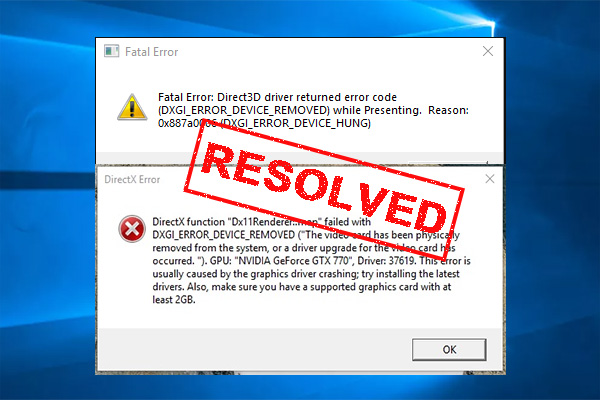
MiniTool
: Have you come across the “DXGI_ERROR_DEVICE_REMOVED” error? Now, you come to the right place. This post writes several effective ways to fix the DXGI error.
shy moss
last maint broke it
oh this might be the issue

although it worked before
in it's current state it was working
calm urchin
shy moss
oh this might be the issue
yay download new drivers 
shy moss
it just broke all of a sudden
calm urchin
showing driver version too

 shy moss
once it auto-updated and completely broke my gpu till I downgraded it back
so I probably won't update those
the app wasn't responding, it was displaying the wrong gpu
calm urchin
shy moss
once it auto-updated and completely broke my gpu till I downgraded it back
you can play tof-in-mobile(phone) too
muted linden
game keeps freezing then crashing in the loading screen. these are the last 10 lines of code. someone help please
 shy moss
calm urchin
you can play tof-in-mobile(phone) too
shy moss
calm urchin
you can play tof-in-mobile(phone) too
phone can't handle it
calm urchin
muted linden
game keeps freezing then crashing in the loading screen. these are the last 10 l...
#technical-help message try rebuilding configs
muted linden
still crashes
calm urchin
muted linden
still crashes
tryed cleanup caches->#technical-help message
calm urchin
shy moss
phone can't handle it
https://www.amd.com/en/support/kb/faq/dh2-012 there is amd-tuning guide
radiant edge
@versed chasm – Looking back through your history, you’re on a 4090 Founders Edition it’d seem.
The Standalone Launcher and Steam renditions of the game have separate config paths for both the launcher and game-client respectively.
Based on the description I’d say that your Standalone Client is launching under D3D11, whereas the Steam Client under D3D12. {per the lack of raytracing} That there’s no DLSS support listed under the Steam client is ‘odd’ for that hardware, of course.
Would suggest trying a config “reset” for the Steam Client, as detailed in the following pin:
<#technical-help message>
You’ll additionally find one on the D3D Version-Selector of the launcher, here:
<#technical-help message>
@quiet heath – Most of the time being booted in this manner from an instance, with the inability to reconnect (repeatedly, and instantly, being dropped) -- tends to be connection oriented.
When exactly did you first notice this? How long has it been ongoing for?
-- Do you have access to any other form of Internet Connection (such as Cellular Tethering) that you can try?
@eager zealot – From your chat history, it seems that you had no trouble hitting 120fps in the past.
Try a config-reset as detailed here, first and foremost:
<#technical-help message>
-- Probably that’s all you need, yet if the performance issues persist after that .. feel free to shoot me a DM for collecting more details on your environment.
@muted linden – Based on your description, the following two pins might be of help here:
<#technical-help message>
<#technical-help message>
-- Reinstallation of the game would not wipe your client-config, and likewise the graphics driver’s shader cache would still persist through this.
@warm moss – “DPC_WATCHDOG_VIOLATION” type errors tend to be related to the game’s anti-cheat driver.
A large bulk of the people who were reporting these problems, specifically found that they stopped happening after updating to Windows 11 22H2. If you’re not on 22H2, then updating to the latest feature-pack for the OS may well take care of your crashes.
@prisma scarab – Interesting, that would explain why those who performed a full wipe of their machine / fresh Windows install were still seeing this happen.
After we get a few confirmations, we’ll make a pin on this then.
shy moss
I updated the drivers
muted linden
calm urchin
tryed cleanup caches->https://discord.com/channels/932906923236401182/1004552582...
it actually worked, thanks!
quiet heath
radiant edge
<@267941944708169729> – Looking back through your history, you’re on a 4090 Foun...
that was the first time it happen to me, fixed it by logging out and restarting my laptop
shy moss
I'll try to launch
radiant edge
pearl plume
Hello, does anyone know if the server transfer can make you lose your account? B...
Will DM you to have a chat about your lost character and behavior of your account.
radiant edge
quiet heath
that was the first time it happen to me, fixed it by logging out and restarting ...
Ah, if this comes back up then --
The restart might be coincidence, as connection problems can come and go just like that.
pearl plume
radiant edge
Will DM you to have a chat about your lost character and behavior of your accoun...
Oh actually I found it
calm urchin
@radiant edge btw is there guide for transferring servers some ppl asked ( i don't know how guide them)
median kayak
@calm urchin 80% download
quiet heath
radiant edge
Ah, if this comes back up then --
The restart might be coincidence, as connecti...
i think so too that its connection problems, im at a place with slow coverage
radiant edge
pearl plume
Oh actually I found it
Ah, managed to get back on your character? Excellent.
We have seen several reports of this nature and are closely looking for any mention of transfer problems in general.
pearl plume
I found it after selecting every server in NA then found it in a server I didn’t want to be in
radiant edge
pearl plume
I found it after selecting every server in NA then found it in a server I didn’t...
If you're certain that this isn't the server that you selected for the transfer, of course do make sure that you file a ticket just the same.
pearl plume
I’ll take a recording of it next time, but for now I guess I’ll wait for them to merge servers since there’s just so many of them
median kayak
@calm urchin nothing, i reinstalled but game dont run and no hotta.log refreshed
i think i gonna format my SSD
radiant edge
vital bramble
Ugh always stuck at 90% then crashes. Wont even let my pc shutdown properly afte...
If the machine won't shut down after the crash, either there's something resident in the background that can't be closed, or the game termination may be driver related in its nature in some way {effecting the internals of the kernel}.
I do notice that you've a screenshot of the end of your Hotta.log from one of these incidents, yet the full crash-dump might give more context of what's happening. Take a look under "%USERPROFILE%\AppData\Local\Hotta\Saved\Crashes" and see if you see any folders in this location. [or, Saved_Steam, if the Steam version] {do any of these line up, timestamp wise with the recent closures?}
-- If you can archive a couple of the most recent of these crash-dump folders {e.g, with winrar, winzip, 7zip, etc} and send me them (via DM's) -- would be glad to take a look and see if we can figure out what's going on here.
median kayak
what can i do.... i have to download again alot things
calm urchin
median kayak
i think i gonna format my SSD
make backups games external-drive
calm urchin
median kayak
what can i do.... i have to download again alot things
fillup your 1TB(with full games)[then remove it][when installing os]
shy moss
@calm urchin updating drivers worked tysm
radiant edge
median kayak
i think i gonna format my SSD
-- Was reading through your case just now as well. Have only come across a handfull of people where the game won't launch at all like you've describing and showed. {where there's no Hotta folder created, no logs, etc}
Format will resolve it of course {100% confidence}, though unfortunately never did get to the bottom of what exactly the cause was.
median kayak
it's ok.. i just format now
calm urchin
radiant edge
-- Was reading through your case just now as well. Have only come across a hand...
true facts
calm urchin
median kayak
it's ok.. i just format now
there is one option too(windows-reset default settings too
radiant edge
calm urchin
there is one option too(windows-reset default settings too
Sadly this did not work with aforementioned people. Albeit, one of them at least had confirmed disk corruption.
 gentle depot
Does anyone know why my game doesn't open at all? Like, my computer says the launcher is running in the background but it's not in my task bar or anything.
calm urchin
radiant edge
Sadly this did not work with aforementioned people. Albeit, one of them at leas...
ohh ok
i haved one ppl, no internet connection(restaring os has only option)
radiant edge
gentle depot
Does anyone know why my game doesn't open at all? Like, my computer says the lau...
There was a report earlier by 'Blaxter1993', where they claimed that downloading and installing the latest version of the VC Runtimes solved the launcher start-issue.
calm urchin
that take about 1-2hours todo. full-install about 2-6hours
 gentle depot
radiant edge
There was a report earlier by 'Blaxter1993', where they claimed that downloading...
gentle depot
radiant edge
There was a report earlier by 'Blaxter1993', where they claimed that downloading...
The latest version of what?
radiant edge
gentle depot
The latest version of what?
Give me one second to look at "which runtimes" the launcher is built on, and I'll get you a link -- since that wasn't provided here.
gentle depot
But what is that
calm urchin
This article lists the download links for the latest versions of Visual C++ Redistributable packages.
radiant edge
gentle depot
But what is that
VC Runtimes? They're Microsoft libraries that're used if a program is built with Visual Studio. Basically, program dependencies.
gentle depot
radiant edge
VC Runtimes? They're Microsoft libraries that're used if a program is built wit...
Oh haven't heard of that.. so do I need to have that to even play the game without reinstalling?
radiant edge
gentle depot
Oh haven't heard of that.. so do I need to have that to even play the game witho...
Right now, we don't have enough reports to say if that'll solve the issue for everyone. It wouldn't require a reinstallation of the game, no.
median kayak
if u want fix 100% without try somethings, Format
i think the problem is for some ppls when update launcher
i'm going to format right now
couse we have same problem, i tryed alot of things, nothing work
my wife was with the same problem, i fixed with change SSD + Format
calm urchin
median kayak
my wife was with the same problem, i fixed with change SSD + Format
btw make backup drivers too(looking fast guide)
median kayak
i think i download Driver Booster 8
more simple, never had problem with that software
calm urchin

One of the most critical aspects of the Windows operating system is the drivers. Windows needs drivers for every hardware device that you connect to your
your case dism /online /export-driver /destination:D:\backup_drivers\
radiant edge
calm urchin
https://learn.microsoft.com/en-us/cpp/windows/latest-supported-vc-redist?view=ms...
The only files that I came across in the launcher folder are for 140. Yet I'm digging a bit more with Dependency Walker on all contained executables.
calm urchin
radiant edge
The only files that I came across in the launcher folder are for 140. Yet I'm d...
there is too in steam path->Steam\steamapps\common\Steamworks Shared_CommonRedist\vcredist
most games using that pack "Steamworks Shared" installing recommend files
radiant edge
calm urchin
there is too in steam path->Steam\steamapps\common\Steamworks Shared\_CommonRedi...
What I don't have an explanation for, is that people who had issues with the standalone launcher -- where the Steam version worked. The preinstall step of Steam would've installed those runtimes.
Yet, the standalone apparently still does not work thereafter. There may be more going on here---
calm urchin
radiant edge
What I don't have an explanation for, is that people who had issues with the sta...
yup facts
 bleak viper
I need help. Few days ago my steam installed ToF game works fine, but today my steam didn't detect it as if it was never been installed. Can someone help me with this problem?
calm urchin
bleak viper
I need help. Few days ago my steam installed ToF game works fine, but today my s...
what location type you using C-drive or other location ?
if ohter location->steamapps\common\Tower of Fantasy
appmanifest_2064650.acf(need checked too)
bleak viper
calm urchin
what location type you using C-drive or other location ?
it was on D-drive, I never move it anywhere
calm urchin
bleak viper
it was on D-drive, I never move it anywhere
check D-drive showing up steam-libaryes ?
in steam


(need build by steam)[when making steam-libraries]
 bleak viper
calm urchin
check D-drive showing up steam-libaryes ?
bleak viper
calm urchin
check D-drive showing up steam-libaryes ?
Ah, no. It was on "STEAM" folder. I move it to steam-library and it is detect it again. Thx for help
novel sphinx
muted linden
please help me, I've been trying to play the new update but since I downloaded i...
I don’t know if you found your problem but I did the update of NVIDIA and its solved mine
radiant edge
novel sphinx
I don’t know if you found your problem but I did the update of NVIDIA and its so...
Their issue was a corrupt shader cache. Updating display drivers has a side effect of flushing the cache.
 dim lantern
my launcher screen is too big how do i zoom out?
radiant edge
dim lantern
my launcher screen is too big how do i zoom out?
Minimum typical size of the launcher window is 1348x904. If your display res is higher than this, then the culprit is likely having Windows DPI scaling at above 100%. {or Windows automatically setting the scale to something like 150%}
dim lantern
radiant edge
Minimum typical size of the launcher window is 1348x904. If your display res is...
oh oki then what do i do to change it?
radiant edge
dim lantern
oh oki then what do i do to change it?
What resolution is your screen, first off? (for instance, 720p, 1080p)
dim lantern
wait idk
radiant edge
The DPI scale settings in Windows themselves can be found by right-clicking on the Windows Desktop (in empty space that doesn't contain icons), and selecting "Display Settings". From here, about half way down the page you'll find a section on "Scale and Layout".
radiant edge
If after the most recent update to the game’s launcher, the launcher starts in the system-tray – yet does not display any windows – please try installing the latest VC 140 (2015) runtimes:
https://aka.ms/vs/17/release/vc_redist.x86.exe
https://aka.ms/vs/17/release/vc_redist.x64.exe
-- This also applies if your Windows copy is 'fresh', and if you've not acquired these runtimes via other sources (e.g, other games or software installed on the system).
radiant edge
radiant edge
If after the most recent update to the game’s launcher, the launcher starts in t...
 lost lagoon
radiant edge
If after the most recent update to the game’s launcher, the launcher starts in t...
lost lagoon
radiant edge
If after the most recent update to the game’s launcher, the launcher starts in t...
i installed both and finally the launcher windows pop up. I can now play the game thankyou!
radiant edge
Thanks for confirming-
lost lagoon
im playing on steam btw
radiant edge
lost lagoon
im playing on steam btw
You had issues with the Steam Variant's launcher? Interesting. Thus far all of the reports that I'd seen had been isolated to the standalone launcher, whereas through Steam properly launched.
lost lagoon
radiant edge
You had issues with the Steam Variant's launcher? Interesting. Thus far all of...
im using the offcial launcher first then try the steam and both launcher wont work
after i install the thing
radiant edge
lost lagoon
im using the offcial launcher first then try the steam and both launcher wont wo...
Roger, will update the pin in light of that.
median kayak
@calm urchin
calm urchin
median kayak
<@318451219859374083>
fresh install ?
median kayak
my format end now, just give me 5 min to transfer tof in the SSD then create a link then start
uhm there is one problem

@calm urchin
maybe i have to start QRSL first
Repair let's see
radiant edge
median kayak
Relevant here: <#technical-help message>
Anyway, if after installing the June 2010 runtimes, you're still receiving that prompt -- let me know.
median kayak
ill try with repair first
then i do the download, i let u know soon
repair worked
game is running!
radiant edge
Ah, excellent.
median kayak
well format work 100% that's sure, at least ppls have an option xD, ofc not good option but
radiant edge
median kayak
well format work 100% that's sure, at least ppls have an option xD, ofc not good...
Not an easy option, yet certainly a good option since this guarantees you have a working environment and will basically get no further issues.
median kayak
yes, i agree
versed chasm
Cannot change directX version on standalone launcher any fixes? 2.2.5fixed Not sure what I did but this is fixed now

 warped swift
What is the problem? I can't log in to the game

 dark prairie
I purchased the bucket hat from the store but it is not showing up in my customization menu. I have the red dot but like there is a new item but it is not there
somber atlas
Standalone launcher still isnt working even after trying the possible options to fix pinned here
Cant use steam since ToF not available in my region
 zealous quail
is there a way to keep dlss turned off when I log into the game? every time I load up the game it turns on DLSS when I want it off instead, this has been happening since the newest memoria patch
 neat fable
need a little help again. when i switched to directx11 i was able to play the game again but switching to directx12 would get me the stuck at 90% issue. now my problem is: i click play game and game loads in normally but after level infinite and hotta pops up on screen all i get is a black screen afterwards
 thick cosmos
dark prairie
I purchased the bucket hat from the store but it is not showing up in my customi...
thick cosmos
dark prairie
I purchased the bucket hat from the store but it is not showing up in my customi...
It's likely not compatible with your current hairstyle
dark prairie
i tried changing hair and it didnt show up. wish it listed what it WAS compatible with
dark prairie
thick cosmos
It's likely not compatible with your current hairstyle
found one that works with it, thanks
 chilly raft
my inbox is empty, but it still won't let me server transfer
https://i.imgur.com/doVPap6.jpeg
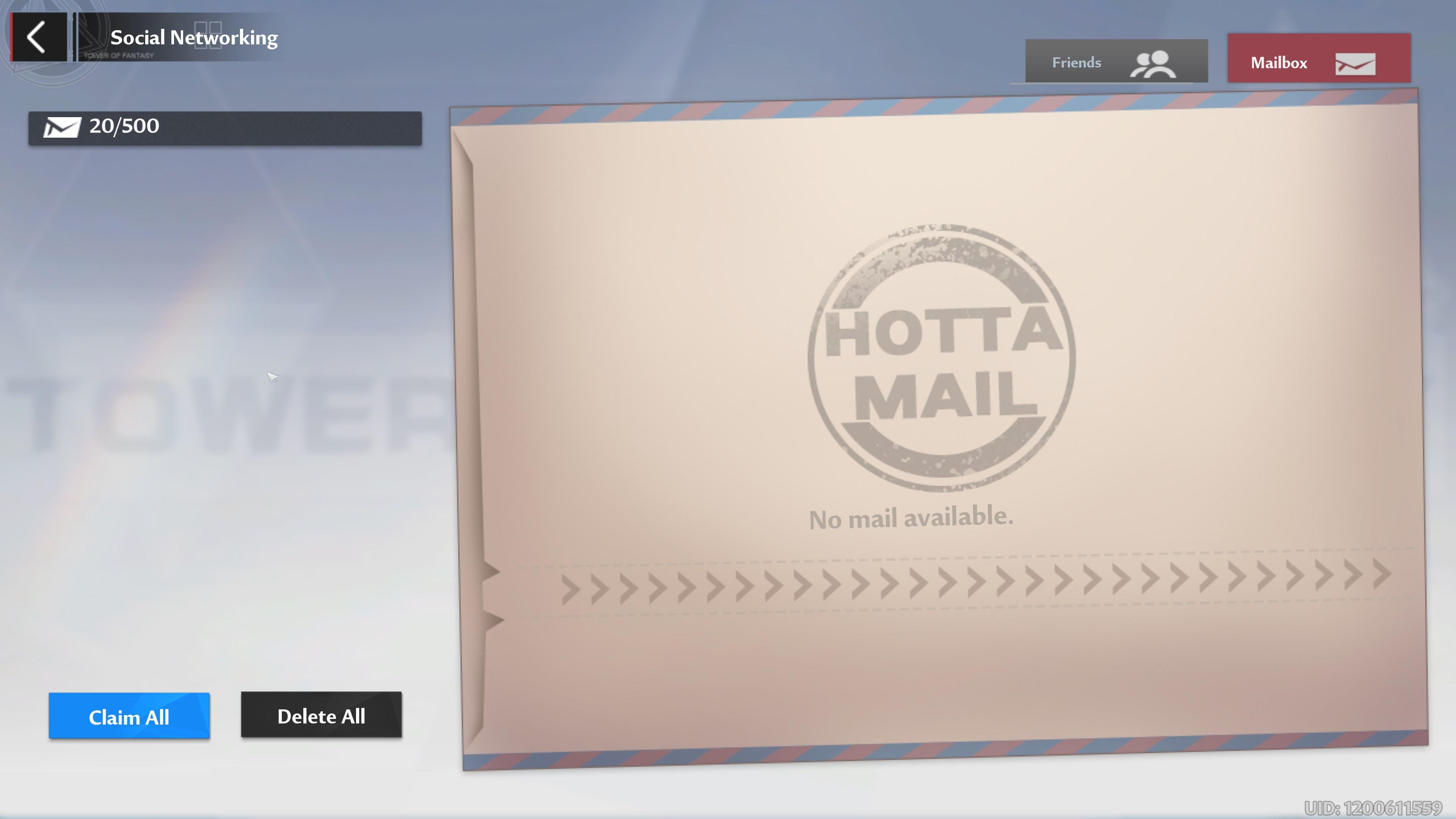 brave tartan
I am downloading the tof through steam since the game does not let me enter the official site since the 11th
 remote marsh
Im with the guild in the oasis, but it is just showing ppl idling while they see everyone dancing. Is there a way to fix this
 fallow coral
i tried to transfer servers and it was being glitchy i think my acc got reset
i need help please
fallow coral
nvm disregard
 hard blade
are there any work around to get rid of the blue circle on controller?
 amber granite
My PC account email doesn't work on mobile for my PC character
hard blade
amber granite
My PC account email doesn't work on mobile for my PC character
you have to connect your account to your apple ID if on iOS or I assume google if on android
shrewd forge
brazen fossil
<@689411698867830805> <@418723147437703168> try this?
Nice, installed both and Launcher now runs. Thanks a lot.
shrewd forge
rapid obsidian
Update : The steam version working <@260980930888466433> <@418723147437703168>
Good to know, tried the vcredist fix first and it seems to work out for me, launcher now running.
 bold gust
Is there no way to transfer from an Asian server to NA? I didn't realize when signed up it defaulted me to Eden. I saw I could transfer at level 40 so I leveled to 40, but I don't see NA options
 tranquil mango
my game always crashes everytime i wish it was like this in the early stages in the game and it stopped but after the 2.5fixed update it crashes everytime
 vapid kindle
bold gust
Is there no way to transfer from an Asian server to NA? I didn't realize when s...
vapid kindle
bold gust
Is there no way to transfer from an Asian server to NA? I didn't realize when s...
you are bound to your region
 stoic token
I need some help. I updated my pc client(official not steam) and the launcher does not show after. I see the ToF in my pc processes though. I already tried terminate/end task and pc restart.
 gritty fern
stoic token
I need some help. I updated my pc client(official not steam) and the launcher do...
gritty fern
stoic token
I need some help. I updated my pc client(official not steam) and the launcher do...
check the pins
second pins i mean
stoic token
gritty fern
check the pins
Saw it! I'll try that.
stoic token
gritty fern
check the pins
It is working now. Thank you very much!
 hybrid kayak
My game gets stuck at 90% in the loading screen when trying to load into my character after first logging in ie the loading screen after the Welcome to Aida screen with Nemesis. It started happening only after the 2.25 update. It seems I can sometimes fix it temporarily by swapping between DX11 and DX12 but DX12 also seems to be causing me to CTD on loading screens. I play on SEA Osrillon.
Laptop Name: Lenovo Legion 5
Processor: 12th Gen Intel(R) Core(TM) i7-12700H 2.30 GHz
Installed RAM: 16.0 GB (15.7 GB usable)
GPU: NVIDIA GeForce RTX 3060 Laptop GPU
DirectX Version: DirectX 12
 prime gate
hybrid kayak
My game gets stuck at 90% in the loading screen when trying to load into my char...
prime gate
hybrid kayak
My game gets stuck at 90% in the loading screen when trying to load into my char...
I was about say that too.. just starting today (played since launch), ive gotten the 90% stuck problem on the 2nd loading screen after selecting server and im not sure what's the issue (from lighthouse server, NA). I also have that problem too where if I run DX12, it gives me issue so i run 11. So yeah if anyone knows why and knows the solution, would appreciate it, thank you.
 north condor
hey, how do you unbind accounts?
i want to unbind my google and steam account, but it doesnt let me do so (i tried to do this by logging into tof with my email as well as with the connected accounts, i still cant unbind them)
 wary shuttle
north condor
hey, how do you unbind accounts?
i want to unbind my google and steam account, ...
wary shuttle
north condor
hey, how do you unbind accounts?
i want to unbind my google and steam account, ...
You can only unbind your accounts through the in game CustomSupport. But they turned this feature off over a month ago to improve it.
I can't check right now, but when I get into the game, I'll tell you if I see it or not
[upd: yup, you cannot yet]
 smoky drum
Hey I'm not too sure which channel to put this question in but I was wondering which South America server has the most English speakers?
 plush rampart
Since i changed servers my character is "unable to get rolls" on the referral program. Anyone knows a fix or is there someone else going trough the same problem ?
 pastel orbit
whenever I hit F to loot anything it takes like 10 times. also lots of random crashes
pastel orbit
fyi all settings are on low
 lean tartan
i launch the game and its stay like this after hota logo(steam ver)
 hasty tide
Does anyone know if there is any config setting to keep the camera distance the farthest at all times?
chilly raft
chilly raft
my inbox is empty, but it still won't let me server transfer
https://i.imgur.com...
Just in case anyone is experiencing the same issue as me, I resolved it by waiting to receive new mail, and instead of deleting the individual mail, I clicked delete all and it emptied my mailbox.
 dusty palm
Is there a time limit to the free server transfer?
vapid kindle
nope
 formal willow
everytime i load up tof my whole pc crashes
my pc can handle it and i have enough storage
what do i do 
 visual onyx
Who has transfer time today? I got ticket, button is on, but i cannot transfer? Is Solaris server not today?
 potent kernel
Anyone know an alive Europe server that’s English speaking? Celestial rise is pretty empty
wary shuttle
potent kernel
Anyone know an alive Europe server that’s English speaking? Celestial rise is pr...
Alintheus
 craggy wharf
Hi, I have a big problem In-game, I have some fps Issues. Basically, since the last update, I have a massive drop of fps (so, so random) that drop my fps from (It used to be from 70-90fps always) to 50-20fps. Then, doing my research I've found that in the task manager, right on GPU engine it says "GPU 0 - copy", and when I look up how much is my gpu working it says 10-20% only (screenshot to verify)

 short sparrow
What does that mean
 wary shuttle
short sparrow
What does that mean
wary shuttle
short sparrow
What does that mean
claim all messages and delete them
short sparrow
wary shuttle
claim all messages and delete them
Thx
 still mountain
Does account deletion only delete my account in the server or my entire tof account
visual onyx
When can you transfer to other servers? Which servers can transfer now?
 tired wave
How do you report someone in game? I just ran into my first hacker during a floating bumpers run, and I have no idea how to report the incident. I can't find any recent players list or something along those lines either
visual onyx
each player has UID
tired wave
How do I find out what their UID is? I couldn't click for any info during the match
visual onyx
no player profile?
tired wave
I don't know how to find their profile. I checked all the recent lists and saw nothing
visual onyx
not click on player?
tired wave
I couldn't do it in the floating bumper event. And I've no idea where they went after we were all kicked out of the room.
All I have is a username, but no UID and no way to search for player by username :/ Edit: I guess I'll just have to move on though it seems like they should probably add a way to deal with things like this in the future 🤷♂️
visual onyx
Is this correct Solaris server transfers will start at 25th Fabruary or not? Need confirm it. Or can i transfer now?
it works now but...... CAN you transfer from NA to EU side?
It's not listed there.
Stop talking about "free" server transfer too. Tooltip say it's free of change but it's misleading text. The transfer is not free, it costs you 500 blue blocks.
It just "allow" to transfer, NOT FREE.
Why it's hard to understand the meaning of "free".....
wary shuttle
@visual onyx <#gameplay-help message>
visual onyx
So EU is not possible right? Weird enough you can select ingame all districts. Why can i not go to EU side?
Still, transfer must not say "free of charge" if transfer itself is 500.
Transfer to EU: Possible with other ways or impossible?
wary shuttle
The transfer works only within the region.
You get one ticket for free, but if you spend it, the other transfers will cost 500 Tanium.
• The coverage of the first server-transfer round:
Servers that have been lived before October 20th, 2022.
All servers except the following:
Asia Pacific: Cocokonderu
South East Asia: Edenia
Europe: Karst Cave
North America: Polar
South America: Pyxis
• The coverage of the second server-transfer round:
All servers
 modern sage
What's Res V on report bug and what do I write there ?
 tacit crescent
hi im sorry if this is the wrong channel for this but im trying to uninstall the game since im low on space, and dont play it much anymore, but i cant get into the launcher bc it gives me a logging in loop that wont end, is there another way i can uninstall it? Edit: Fixed 😁
 fervent flicker
guys... i need help
i have error when i try enter my server polar
its error code 3101
visual onyx
So i can forget transfer to EU. Not even with service desk?
Because i noticed NA side is useless for me. I want to EU side.
 frank gust
does anyone know for the steam ver on tof can u use steam credits to buy stuff?
 steep vine
Hi guys i need help my friend is crashing when entering odyssey server but when he's trying to connect to other servers he don't crash tho this kinda weird problem ?
steep vine
Have u fixed this already ?
Ooof my mate has same problem too he play since launch then this update came then he crashing
Maybe try dm eliya crashwight
He helping most of the players here
Im trying to help my friend too so he doesn't quit the game lol
If we found solution i will tell you
Nice ty
 toxic pawn
Does anyone know how to implement promo codes
 old flame
How do we switch character servers?
 warm jungle
Help I can't load in Odyssey server but I can load in other servers using the same account. It always stops at loading after clicking during server login then it closes the game. I can loadin in Odyssey using my alt account tho. This is for PC. I can login with the said account in Odyssey server using my mobile phone perfectly fine.
wary shuttle
old flame
How do we switch character servers?
if you talk about Servet Transfer, then:
wary shuttle
visual onyx
So i can forget transfer to EU. Not even with service desk?
You can move to a more popular server in your area by asking in advance which one it is in game chat or #standard-chat , or create a new account in Europe. Because, yes, you can't move between regions
 hexed urchin
Anyone help me, i cant use my skill, doing basic attack or hit the enemies when i join JO End Game, Battle Test Area Raid, And void abys, i only can hit with long range weapon which is very annoying for me and my party as well i have change my provider using mobile internet using private wifi, using public wifi and i try to change my mobile provider to and doesnt help
Ah one more i only can use discharge
And i have green ping at 60ms so i think it doesnt delayed that much
Some weapon like frig i cant do anything
radiant edge
@hybrid kayak – Since you’ve mentioned CTD’s when using D3D12, and your hardware in that system otherwise looks perfectly capable-
Possible that I could get a copy of your crash-dumps? Take a look under "%USERPROFILE%\AppData\Local\Hotta\Saved\Crashes" and see if you see any folders in this location. [or, Saved_Steam, if the Steam version]
-- If you can archive a couple of the most recent of these crash-dump folders {e.g, with winrar, winzip, 7zip, etc} and send me them (via DM's) -- would be glad to take a look and see if we can figure out what's going on here.
[resolved: Display Driver Crashes]
@tranquil mango – Please DM me / send a copy of your crash-dumps for inspection. {as detailed above}
-- Just based on the description of when / where you’re seeing these, I suspect that you’re on a system with Integrated Graphics. There may be a few things that we can try to get the client stable here.
@prime gate – Likewise, if you could send a collection of your crash-dumps for inspection – would be happy to take a look here.
@craggy wharf – Per the ‘GPU 0 - copy’ Is this a laptop with hybrid graphics / multiple GPU’s present?
That said -- since the problem started abruptly after an update, please try a config-wipe / reset to see if this alleviates your issues. Detailed in the pin here: <#technical-help message>
-- If this does not get the client back up to speed, feel free to shoot me a DM, since I’d like to collect more details on your system.
@still mountain – The entire account and all associated characters would be deleted in the process.
-- If you believe this is the only recourse, then we’d recommend getting in contact with Customer Support and discussing what prompted the desire to do this.
@steep vine – I've responded to your DM, per your friend's issues.
radiant edge
hexed urchin
Anyone help me, i cant use my skill, doing basic attack or hit the enemies when ...
Do you know if your position appears accurate to the other players that you're partied with? {that is, if they see you where you think you are}
hexed urchin
radiant edge
Do you know if your position appears accurate to the other players that you're p...
Yess my party completly fine they can see me accurately moving jumping even discharge skill.
Only me cant see them and the enemies accurately
but strangely only in certain modes I experience that. When i play another mode its completly fine
My crewmate have the same issue with me too but in another mode void abyss he experienced that. But im not experienced that in void abyss. We try do certain solusion like he use fix from the launcher and reinstall and he try instal in the steam to. Me coz from mobile i try to reinstall it but its doesnt help for me and for my friend aswell
Same provider same internet same phone, little bit different in ping but is completly different experience.
Little bit different in fps coz its to crowded
But im sure fps wasnt the problem
I dont know if this is a bug or tech issues. So i posted here first coz im not sure its a bug
 oblique junco
Hi, I have a problem with unbinding. I connected a Google account and another Apple, but now I can't unbind as the key cannot be selected in the account center. Anyone can help o know how to resolve this?
wary shuttle
the unbinding function doesn't work at the moment
oblique junco
Ah... Ok thanks
 shadow citrus
Uhh im çoncerned like what will happen if i just turn off my pc mid download in the launcher
radiant edge
shadow citrus
Uhh im çoncerned like what will happen if i just turn off my pc mid download in ...
It would be advisable to leave the download running, and just keep the machine powered until it completes. Are you required to shut the machine off?
It won't break your installation, but you may lose download progress and have to re-download what you already have.
shadow citrus
My brother is using it as of now and he always turns it off without me knowing
And it can happen literally anytime
So i guess i'll just tell him
 safe delta
you can always pause it
 subtle remnant
Please CAN SOMEONE Tell me how to play when you have a AZERTY pc
 modern creek
Hey, does anyone know somethin about Magia Przygoda Aida and Excalibur EU servers? Two days ago MPA stops letting me in. When I click to start the game it kicks me out. Yesterday Excalibur started doing exactly the same thing. I am pretty concerned because my two main characters are on this server. Does anyone have any advice? Thank you!
 clear frost
Hello, I have a problem with connecting to my main server. The reason why I said main server is because logging in to other servers is fine however loading gets stuck when I tried logging in my main server for the first bootup
I have tried reinstalling, run as administrator, file repair, check update and it can't be my PC since logging in to the other server is fine
The only solution I found was logging into other server first > close the game > repoen ToF > then main server. This seems to work but it's such a big hassle to go through all those steps
 ebon rampart
Has anyone faced a lot of crashes since the last update?
steep vine
modern creek
Hey, does anyone know somethin about Magia Przygoda Aida and Excalibur EU server...
You have same issue with my friend
steep vine
clear frost
Hello, I have a problem with connecting to my main server. The reason why I said...
Yoo you have same problem with my friend
modern creek
steep vine
You have same issue with my friend
Did he find any solution? I tried to contact customer service but... bot ;-;
steep vine
Nah he didn't find any solution
Prolly thats a bug because lot of player experiencing it now
Like the shadow guy here too
modern creek
Yeah, but he could log in after changing server. Unfortunately it doesn't work for me.
Well, I will be trying. I let you know if I figure something out. Let me know pls if you get something new.
You too @clear frost
Thanks Guys!
clear frost
Yeah like i stated earlier, i could log in after changing servers. Not sure how or what the issue even is :/
somber atlas
ANy update on the standalone launcher/pc client?
Still isnt working on my end
almost been a week now cant even get the game to install
potent kernel
Best standard weapons to 5 star?
 fringe scaffold
Sorry if this is quite long, but this is what happened to me earlier.
I was unsatisfied with how the framerate never maxes out according to my setting. My laptop uses a gtx 1660ti so I was confident the game can go up to 90 or even 120 fps. Despite that, my framerate was inconsistent and stayed around 60 or lower. So I digged through this channel to find a solution.
Then I found a guide to do a config-reset, which I followed. The framerate finally improved. Tried 90 and 120 fps and the result was better than before.
Now the real problem came after that. I was hit with a "out of video memory" message and the game closed. So I looked for another solution in here. A guide to disable nvidia NGX support (I know the guide was meant for RTX 20xx users but still wanted to try). BTW the option to disable DLSS in-game is missing for me.
I only added this line and tried playing. Not solved.
[SystemSettings]
r.NGX.Enable=0
Then I added this too. No luck either.
r.ScreenPercentage=50
After all that, I undid the changes(deleted the two extra lines above). Entered the game again and set the fps to 60, and shortly after, still got the "out of video memory". I guess I won't be playing tof for the time being.
Another question, is the "out of video memory" basically a memory leak? Idk if its the same thing
 deep kernel
I have tried uninstalled it and reinstalling but it isn't working..

 grim gyro
heyy not really sure where else to ask this but does anybody know if unspent nucleus carry over when server swapping ? im wanting to swap to alintheus from andoes but im skeptical just incase i lose my red nuclei as ive saved them up for a while  tried googling and asking others but cant find a definite answer, has anybody else swapped and kept their nucleus or ??
just dont wanna risk losing them all
modern creek
modern creek
Yeah, but he could log in after changing server. Unfortunately it doesn't work f...
Back to the servers issue
I log in from another PC and both servers worked on my account.
wispy drift
grim gyro
heyy not really sure where else to ask this but does anybody know if unspent nuc...
Everything carries over, all you own, save for stuff like blacklist
Would recommend trying a server out beforehand before moving
 midnight ivy
uh…
is the droid here supposed to be underground?
 gritty fern
fringe scaffold
Sorry if this is quite long, but this is what happened to me earlier.
I was uns...
gritty fern
fringe scaffold
Sorry if this is quite long, but this is what happened to me earlier.
I was uns...
run your game in DX12
also which 1660 Ti u have ?
Max-Q or Max-P ?
fringe scaffold
gritty fern
run your game in DX12
already running in dx12
Max-P
 cunning iris
there is a way to compute ALL the information of the blackorbs, goldenorbs and redorbs iin a webpage? like the scryglass old page?
steep vine
modern creek
Back to the servers issue
I log in from another PC and both servers worked on m...
My friend did that too he installed tof on his laptop ang it worked
But the one pc his using when he enter the server its not working
 zenith iron
HOW DO I STOP TOWER OF FMATASY CRASHING IPAD?
modern creek
steep vine
But the one pc his using when he enter the server its not working
Same thing! Laptop and PC change!
 storm stump
is the referral program bugged? not getting any points when I claim them
 grave depot
I just download this game and its already buggy.
 sturdy rover
wil they ever fix the graphic and game being slow/buggy issue
steep vine
modern creek
Same thing! Laptop and PC change!
Yeah prolly a bug or if reformat
hasty tide
Is there a problem on pc app and on steam? I can't play on pc
gritty fern
fringe scaffold
already running in dx12
Max-P
Dat strange , Have you updated your graphics driver ?
cause mine with 3050 Ti working Fine
 vapid tangle
what does this mysterious unlabeled slider do in display settings?
 gritty fern
vapid tangle
what does this mysterious unlabeled slider do in display settings?
gritty fern
vapid tangle
what does this mysterious unlabeled slider do in display settings?
TAA U (Temporal Anti Aliasing Upscaling) Software Upscaling
its used to render your game in Lower resolution in and upscale it for better performance
vapid tangle
gritty fern
TAA U (Temporal Anti Aliasing Upscaling) Software Upscaling
its used to render y...
should i be turning this on if im on nvidia gtx 1660ti
gritty fern
vapid tangle
should i be turning this on if im on nvidia gtx 1660ti
if you have Problem with the game performance , yes
if you dont habe any problem , no
fringe scaffold
gritty fern
Dat strange , Have you updated your graphics driver ?
cause mine with 3050 Ti wo...
Sorry for late reply. I updated it last week. But anyway, you understand my situation, right? I believe my low framerate issue has persisted ever since GL's initial launch.
 hard escarp
Trying to redownload ToF but after i press lunch the launcher doesnt show up
gritty fern
fringe scaffold
Sorry for late reply. I updated it last week. But anyway, you understand my situ...
i understand , but yeah i have been playing CN version and there is like 0 issue for me
even 3050 Ti is able to get around 90+FPS with high settings , with DLSS i can get like 100-120FPS (depends on the location)
if you checked your GPU temperature and CPU temperature is fine , then i dont know what causing that
technically 1660 Ti should be faster than my 75 watt 3050 Ti
steep vine
@clear frost @modern creek So its really an issue
 modern creek
Good to know. I better hit the support channel.
 obsidian shard
I'm trying to log in via Google account on PC but it doesn't log in ?
I don't know why
hasty tide
steep vine
<@246677307429879808> <@410556901848514560> So its really an issue
Who is that person btw? Didn't see such announcement here
steep vine
hasty tide
Who is that person btw? Didn't see such announcement here
its from ToF Discord Philippines Official
hasty tide
Oh
brave tartan
What can be done to solve the problem that the game crashes
 jovial holly
Anyone know why i can never play tof on 5g? it always doesnt load and says disconnected from server (and yes i have data turned on for tof)
radiant edge
@hasty tide – Windows 11 installations prior to 22H2 (feature update / major version) tend to be the ones hit by bluescreens {notably 21H2}. Since you mentioned the entire machine going down with a BSOD shown, I’m essentially asking if your OS is fully updated.
Try the following:
Windows Key + R
type in: winver
-- OK the run prompt
-- Does the version displayed in the “About Windows” dialog that comes up indicate that you’re on “22H2”? This would be an optional update and not something that’s installed automatically by WUA.
@modern creek – Whenever you state that the game “kicks you out”, does this mean that the client drops back to the server / world select (initial login screen)? Or, more that the game closes entirely?
-- I do note that you managed to log in from another PC. Was this on the same network (Internet Connection) as your main PC?
@fringe scaffold – Most of the time the VRAM leaks are caused by DLSS ... yet clearly that’s not the case here as your hardware doesn’t support this. The less common culprit is interactions between the engine and other software on the machine, specifically software that injects hooks into the game process. (e.g, anything that contains a D3D overlay would be suspect here -- RTSS, AV software, etc)
-- Will DM you on this one to collect an msinfo export to look through your installed software.
@ebon rampart – Could you give me a brief description of your game crashes?
@clear frost – Will DM you on this one to collect more details on your hardware.
Just based on the description, signing into the game successfully on another character may be letting you into the game by pre-loading the game’s assets into memory. {which in turn speeds up the next sign-in attempt}
@hasty tide – What exactly happens whenever you attempt to run Tower of Fantasy?
-- For instance, does the game close abruptly, deadlock / stall, the machine freeze, BSOD, or something else entirely?
@hard escarp – Please check if this pin covers what you’re experiencing:
<#technical-help message>
@jovial holly – Is the device that you’re trying to use on Mobile Data an iPhone specifically?
-- If it is, then this is unfortunately a known issue with iPhones.
radiant edge
obsidian shard
I'm trying to log in via Google account on PC but it doesn't log in ?
I don't kn...
What exactly happens whenever you attempt to sign-in using the external Google Sign-in method? {e.g, what do you see?}
hasty tide
Whenever I attempt to run tower of fantasy in aeria server It stops loading during loading

Like this one
And if there is no problem in loading, everything is fine suddenly it freezes and I can't move and I'm forced to restart my laptop.

And it goes back to the first screenshot.
And this one from my new account the same happen, it freeze, and I play this in mistiltein server.

I am playing on my gaming laptop.
radiant edge
hasty tide
And if there is no problem in loading, everything is fine suddenly it freezes an...
Whenever you're unable to move, I presume that's a hardlock and that you have to forcefully shutdown the machine. e.g, you can't CTRL+ALT+DELETE, and shut down from there through software -- right?
-- Will DM you on this one then to collect more details on your laptop hardware.
hasty tide
ASUS VivoBook is the name of my gaming laptop.
I can't click anywhere in the in game, I can't close, what I do is press windows symbol and click restart.
And I almost forgot when I'm unable to move I can still hear some noises.
jovial holly
radiant edge
<@456226577798135808> – What exactly happens whenever you attempt to run Tower o...
Yeah its iPhone 12 pro max 😕 is there any fix or are they even working on one?
modern creek
radiant edge
<@456226577798135808> – Windows 11 installations prior to 22H2 (*feature update ...
The game is shutting down and I am back to launcher. And only on MPA and Excalibur
Yeah, same Internet connection.
 dusky meadow
Facing a lot of crash issue on iOS cant even play game for 1min
radiant edge
jovial holly
Yeah its iPhone 12 pro max 😕 is there any fix or are they even working on one?
There's not a fix currently, other than playing on WIFI with the phone.
For instance, if you transplanted that sim-card from your iPhone over to an iPad, the iPad would be able to play the game on mobile-data. Similarly, the iPhone would be able to connect through the iPad's mobile hotspot. Additionally, if an iPhone runs a hotspot, no other device can connect through its hotspot data. e.g, this has something to do with how mobile data is provisioned on Apple's Phones specifically.
-- Only advice that we can really offer here at this time is to contact your cellular carrier and ask if there's any difference with how Apple's products (such as the iPad and iPhone families of devices) are provisioned on their network.
 lunar plaza
apperently hotta doesnt understand what a bug is and isnt giving compensation for banners that were completely missed while being locked out of the game

ive never seen a company in complete denial of what is obviously a gamebreaking bug like this
they described a bug then said its not a bug
 cold nacelle
hi guys I have a identical problem like in this video: https://www.youtube.com/watch?v=BGu5d6TxcAA&t=39s . I wrote to support 3 days ago but my character isn't back. Is there anything that I can do to speed up this process?

Note: Contact CS if you face this error msg.
lunar plaza
"support" lol

 lapis light
How do I swap servers? I have the server change card but don’t know how to use it
 dense wraith
in setting, bottom left
dense wraith
lapis light
How do I swap servers? I have the server change card but don’t know how to use i...
data transfer
surreal veldt
a just downloaded the lacunher and did not open
why?
i mean, it's appear open but does not show me on the screen

 cosmic violet
Hi! I got an Abnormal Parameter 3101 error when trying to log in on Steam. I fixed it myself by simply:
Log out of the Steam Launcher > Log in again with Steam
hope it can help someone else 
steep vine
Work for what like the crashing thingy ?
 tender yacht
Any fix for the controller bug yet?
 sly spire
Hi, is this a known bug where name-plates seem to be cropped? I've never seen (or noticed) this issue before, and while fairly minor it is distracting. Is there a fix for it, or will it likely be addressed on the next patch?


 eternal locust
Whenever I'm on ToF and only ToF my computer occasionally mutes all sound, freeze ToF and causes my current youtube video to mute or outright buffer. I tried uninstalling, disabling DLSS, checking ram usage (not at maximum load), and checking other hardware (nowhere near maximum load). Anyone know a reason?
eternal locust
seems like it's shutting down my gpu or something because the moment it freezes my gpu usage plummets to 0%-3%
 wise compass
any help? is this really like this or something? im new at this game and im stuck at the announcement screen and idk what i must do

 upbeat hull
any solve?after updated 2.2.7

have tried to repair and restart launcher, still like that
edit : even i restarted the pc, still not solved
 wintry sedge
try turning off AV?
upbeat hull
wintry sedge
try turning off AV?
i just used windows 10 security ,and that's actived
 wild kelp
upbeat hull
any solve?after updated 2.2.7
wild kelp
upbeat hull
any solve?after updated 2.2.7
Have the same problem.
surreal veldt
steep vine
Work for what like the crashing thingy ?
No, It's another PC by the Way.
 vale basin
upbeat hull
any solve?after updated 2.2.7
vale basin
upbeat hull
any solve?after updated 2.2.7
Same problem here since the most recent update
 vital scroll
upbeat hull
any solve?after updated 2.2.7
vital scroll
upbeat hull
any solve?after updated 2.2.7
This also happened to me today, still woks on phone tho
 ivory lichen
upbeat hull
any solve?after updated 2.2.7
ivory lichen
upbeat hull
any solve?after updated 2.2.7
i faced the same problems 😦
vale basin
I reinstalled the game completely after the 2.2.7 launcher bug now I get this?
Can't find anything useful on google beside of people asking without solution

 glass zinc
Got same message too. I'd say their update is borked
vale basin
glass zinc
Got same message too. I'd say their update is borked
I heard it works for many, but for some it doesn't
ivory lichen
ill reinstall and see if it works
glass zinc
I reinstalled many times, losing a bunch of data in the process and it didn't help
vale basin
glass zinc
I reinstalled many times, losing a bunch of data in the process and it didn't he...
I even deleted the appdata folders but no difference
glass zinc
vale basin
I even deleted the appdata folders but no difference
I did so too and weirdly enough, while reinstalling the game, the appdata folder didn't recreate itself 🤔
 hazy knoll
vale basin
I reinstalled the game completely after the 2.2.7 launcher bug now I get this?
...
hazy knoll
vale basin
I reinstalled the game completely after the 2.2.7 launcher bug now I get this?
...
having the same issue
vale basin
Mine neither, but its possible that it returns after being able to join the game itself, but you don't come that far
Wrote a ticket, but they probably don't know how to fix their own problem either 😄
hazy knoll
vale basin
Wrote a ticket, but they probably don't know how to fix their own problem either...
lol, what the use paying high for devs if they cant fix an issue
a fatal one at that
vale basin
problem is I have a running pass for the daily login, I don't mind a short break usually but not if I have a active sub I paid for
hazy knoll
yeah i got a montly pass too
glass zinc
You can get your daily pass with your phone or through android emulator if you don't have time to collect'em today
vale basin
Its the first game in at least 20 years that made the problem even worse after reinstalling 😄
Many games have weird problems but this one is weird
glass zinc
Funny thing is that i was able to connect this morning CET time and then 2.2.7 came and boom 🙂
ivory lichen
yea reinstall didnt work fml
hazy knoll
vale basin
Its the first game in at least 20 years that made the problem even worse after r...
yeah they should make a guide how to fix because they have the error code
vale basin
I searched on google and everywhere else but there is literally nothing yet, I also tried a dnsflush and some other stuff but nothing works
glass zinc
vale basin
I searched on google and everywhere else but there is literally nothing yet, I a...
Don't bother yourself too much
It's on their side
vale basin
I could try it via steam but steam had other problems I didn't enjoy
standalone works a lot better usually
 hazy knoll
but i already deleted my old tof and then install the steam one
the steam one got that isuue
vale basin
huh?
let me guess, we think too much in a detailed way while it was something very simple
hazy knoll
glass zinc
I fixed it but i dunno if i can share it here ^^'
share please
 knotty heart
hey so i got the game already installed but i want to play it from the steam version, is there any way to do that or do i need to reinstall it on steam?
vale basin
hazy knoll
share please
he shared it with you already? Otherwise I do
hazy knoll
vale basin
he shared it with you already? Otherwise I do
yeah
fixed
its like fixing my past sins lol
vital scroll
vale basin
he shared it with you already? Otherwise I do
can you share it with me please
same problem
hazy knoll
vital scroll
same problem
you should undo the setting on ray tracing
 vast dawn
steep vine
what fix is this ?
vast dawn
steep vine
what fix is this ?
For the last update and it s not my screen
hybrid kayak
vast dawn
@steep vine
One of the comments from Reddit is the source of the screencap
reddit
5 votes and 11 comments so far on Reddit
subtle remnant

can someone help to change the keyboard, i'm on azerty
why can't i put a "Z" on the "W" key ? And why i can't change some keys ? Wtf is the problem in their codes for the game ? Is it keybind difficult to program ?
@slender tinsel
steep vine
hybrid kayak
https://www.reddit.com/r/TowerofFantasy/comments/10f29ev/cant_launch_the_game_ab...
ty man
 restive dragon
Hi!. Ihave a problem for Voice Over, It is stuck at JP i already select EN (Language that I want to use) then restart the client but still its on JP. All ready done Select EN - Close Client - Close Launcher then reopen Launcher still on JP. Please Help.
fringe scaffold
Not sure if anyone else is experiencing this. My MC uses the tall male model but the story cutscenes always portray him with the short model. It's quite funny but also disturbing seeing the MC shorter than every other character in those scenes. So I swapped to a medium-tall model but the change is not reflected in the cutscenes. I know this is a minor issue and not expecting a fix, just wanted to say it.
Will the dev team actually fix it if I report in #1007842564726075432 ?
hasty tide
Is it just me or is anyone else having these 'trouble with allocating rendering' or something abt video memory. Ik that it might be my pc in general but I just wanted to know if it was something other people were experiencing and if it could be fixed?
 tame stratus
My TOF launcher is updated and the option appears, but I'm unable to change it on. My system exceeds all requirements, and both game and launcher have been updated.
 tame stratus
Please reply with @ if response since my discord is muted in most servers
warm jungle
Patch 2.2.7 did not fix my issue
thick cosmos
fringe scaffold
Not sure if anyone else is experiencing this. My MC uses the tall male model but...
That's just how it is. I doubt it's a bug, more like just lazy coding to use default short height for cutscenes
 maiden portal
how can i fix this thanks

 pure nexus
How big is the file size of the mobile phone game? I have 12 storage free and it can’t update due to having no space. That sounds mad…
 thorny hinge
hi, how can i fix this?

 fluid socket
pure nexus
How big is the file size of the mobile phone game? I have 12 storage free and it...
fluid socket
pure nexus
How big is the file size of the mobile phone game? I have 12 storage free and it...

 rich nimbus
bump for this issue? Have reinstalled the game, deleted all traces of game files and restarted my computer with no sign of it being fixed

 hoary pulsar
Hello, does anyone else experience this issue today? If so is there a known solution please? Thanks in advance. (Tried: Auto-repair, uninstall -> reinstall, checked file is under the target directory, checked user/admin rights of file, logged out then logged back in, change DirectX version manually, and no custom Antivirus installed on this PC)

 wet shell
Don't even know if it's a bug, nor what could be causing it.
Basically I created a new account that was going just fine and then it's been 2 days that spending vitality awards me NO Blue Crystal dust whatsoever.
I get the EXP, I get the gold and purple (12 and 15) but no blue (supposed 36)
(Character is level 42 it shouldn't even drop gold dust yet btw)
thorny hinge
Look for GameUserSettings.ini in your pc, click on properties and uncheck read only @restive dragon
radiant edge
@hasty tide – From the Windows Start Menu, type in / search for “Windows Update”, open the Windows Update settings page – and click to manually search for updates.
Windows Update will state that your Operating System is “up to date”, however, if you scroll down on this dialog, you should see an “Optional Update”. The optional shown should be for installing 22H2.
-- Select to download that optional update, and reboot the machine whenever it has been installed.
@surreal veldt – We’ll remove that post purely in that it’s a repack of the VC Runtimes and contains more than should be required here. {Though the contents of that AIO repack appear to match Microsoft’s binaries at this time}
Did you try installation from the links in this pin before that AIO repack? <#technical-help message>
@eternal locust – Based on the description with ToF “freezing” in tandem to the other observations, your assertion here is probably right on the drivers crashing / being restarted.
Do you notice anything else such as the display momentarily losing signal, then coming back?
Either way, hopefully crash dumps are being recorded, despite that the game appears to be frozen. Take a look under "%USERPROFILE%\AppData\Local\Hotta\Saved\Crashes" and see if you see any folders in this location. [or, Saved_Steam, if the Steam version]
-- If you can archive a couple of the most recent of these crash-dump folders {e.g, with winrar, winzip, 7zip, etc} and send me them (via DM's) -- would be glad to take a look and see if we can figure out what's going on here.
@glass zinc – Hotta folder should exist before the client starts, though only contain a single file {intl_auth.txt}.
-- Whenever you attempt to launch the game, there’s nothing in the AppData path at all?
@hoary pulsar – A full reinstall, or even just a repair for that matter, normally should resolve an issue like that one.
I’m assuming that QRSL.exe exists at the path shown in the screenshot. Do subsequent "repair" attempts re-download any files or note mismatches?
-- Could you use a tool such as 7za {part of 7zip's extras download} to compute a hash of your copy of QRSL?
e.g, 7za.exe h -scrcsha1 QRSL.exe
upbeat hull
how to fix DoF without to turn off anti aliasing?

 gentle canopy
My game crashes saying not enough video memory. Any fixes for this?
wispy drift
well whats your vram (dedicated gpu memory) in task manager/performance/gpu
 high nebula
I am sorry, why vehicles upgrade that reset every 24 hr doesnt make me able to upgrade anymore? It is been a long time since I cant upgrade all of my vehicle pass level 80+.
 hasty tide
U normally can't upgrade beyond the lvl of ur character
 patent citrus


 eternal locust
radiant edge
<@456226577798135808> – From the Windows Start Menu, type in / search for “Windo...
eternal locust
radiant edge
<@456226577798135808> – From the Windows Start Menu, type in / search for “Windo...
it seems like the situation is solved either from a hotfix or uninstalling an audio driver that i was suggested to delete
 tawdry canopy
How do I fix this?
 wispy drift
@dusty turret devs already literally said high desync in bumpers is not gonna be fixed and to just deal with it in the patch notes
hoary pulsar
radiant edge
<@456226577798135808> – From the Windows Start Menu, type in / search for “Windo...
Hello and thank you for the swift reply. I've actually already done a complete removal and reinstall when I posted that message earlier. But as the same problem persisted, I've noticed that the qrsl.exe file name wasn't in capital letters, so I deliberately removed the file and attempted auto repair again, the repair process downloaded a capital letters exe file with a different checksum. Even doing that didn't seem to help, the second time after deleting the qrsl.exe and the qrsl_es.dll together, the auto repair process says something was wrong, as I kept asking it to repair it eventually downloaded the two missing files and game could launch. Maybe there's some problems with your file server feeds being out of sync? Anyways, thank you for your help.
 violet elk
I am not sure if this is the right place to ask but I went to reset my password and apparently my account no longer exists
 unkempt tinsel
any fix on the fps drop? after a certain update my tof fps is going crazy
vapid kindle
violet elk
I am not sure if this is the right place to ask but I went to reset my password ...
please contact support as shown in #game-support :)
wispy drift
unkempt tinsel
any fix on the fps drop? after a certain update my tof fps is going crazy
if it is only in vera such as the abyss, set your graphic presets to extreme and then redo custom settings via the advanced settings
 solemn zephyr
Hello. I still have space in my backpack, but these items just can’t be claimed. Neither can I delete my mail. So what do I do now? I tried opening chests and everything was fine, it’s just this particular chest lagging
 wary shuttle
solemn zephyr
Hello. I still have space in my backpack, but these items just can’t be claimed....
wary shuttle
solemn zephyr
Hello. I still have space in my backpack, but these items just can’t be claimed....
did you check food inventory?
solemn zephyr
Yeah, ty for responding Clara
I managed to fix it by opening a gift
 spring stone
hi i need help i cant enter ozera server when i try to play it close the game help pls
spring stone
help pls
 ripe sluice
Can someone tell me how I can use a district orders ticket
It says I can transfer servers with it
warm jungle
spring stone
hi i need help i cant enter ozera server when i try to play it close the game he...
Yep same problem as me on Odyssey and the CS can't understand even if I sent a video and explained it over and over.
spring stone
warm jungle
Yep same problem as me on Odyssey and the CS can't understand even if I sent a v...
;-; ok thx for that some help
 loud tulip
tawdry canopy
How do I fix this?
loud tulip
tawdry canopy
How do I fix this?
push, similar problem @radiant edge

 hushed matrix
??? why? it was 2.2.7 a while ago
 tawdry canopy
loud tulip
push, similar problem <@68941012038324224>
tawdry canopy
loud tulip
push, similar problem <@68941012038324224>
delete QRSL_dx12.exe, repair game files
this fixed it for me
 oblique igloo
how do people stream tof in full screen?
i gotta share my entire screen
 violet locust
how to fix this. I have some backpack slots contrary to what it says
 delicate badger
gentle canopy
My game crashes saying not enough video memory. Any fixes for this?
delicate badger
gentle canopy
My game crashes saying not enough video memory. Any fixes for this?
It's usually VRAM (or GPU Memory) that you could view it directly under Task Manager Performance tab.
Check if that's exceed the Memory Capacity.
Also what is your GPU type anyway?
How much is your GPU Maximum Capacity?
Also lowering your settings (such as disabling DLSS and reducing several settings) could reduce the Memory Usage.
If your VRAM is only 2 GB, then you need more powerful card or set the settings into lowest.
VRAM memory usage usually on 2 GB as minimum and can exceed to 4 GB depend on settings
gentle canopy
delicate badger
It's usually VRAM (or GPU Memory) that you could view it directly under Task Man...
Its an rtx 2060 6gb vram
delicate badger
gentle canopy
Its an rtx 2060 6gb vram
Try to disable DLSS and see what happened.
If still persist, try to configure with NVIDIA Control Panel
gentle canopy
delicate badger
Try to disable DLSS and see what happened.
If still persist, try to configure wi...
I kinda fixed it by going back to dx11.. lowering graphics down and disabling dlss.
delicate badger
gentle canopy
I kinda fixed it by going back to dx11.. lowering graphics down and disabling dl...
Forgot to mention, have you clear your TOF Configuration files?
gentle canopy
It works for few hours now before it crashes. Before it would crasg every 15-30 mins
gentle canopy
delicate badger
Forgot to mention, have you clear your TOF Configuration files?
I dont think i have. How do i do that?
delicate badger
Let's see....
This is like my problem before which dropping FPS and Eliya pointed it out to reduce the problem
Check the message on that time by using this link or going into 📌 Pinned Message
@gentle canopy
First one : For TOF launcher
Second one : For STEAM user
Also don't forget to update your GPU Driver as well to minimize the issue
gentle canopy
delicate badger
Also don't forget to update your GPU Driver as well to minimize the issue
I tried to find that folder last night cause i saw it in one of the pinned. But i couldnt find the windowsnoeditor
delicate badger
gentle canopy
I tried to find that folder last night cause i saw it in one of the pinned. But ...
That is the folder name....
Are you sure that the folder is gone?
 gentle canopy
delicate badger
That is the folder name....
Are you sure that the folder is gone?
gentle canopy
delicate badger
That is the folder name....
Are you sure that the folder is gone?
Yes i tried to find it cause one of the pinned comment said something about a .ini file. But i cant find a windowsnoeditor
delicate badger
that's not windowsnoeditor.ini
but instead that's a folder, you can check by using CMD if the folder exist or not
the Stars means all files inside that folder should be deleted
gentle canopy
delicate badger
I just copy this on cmd right?
delicate badger
And this is if you check on File Explorer

I'm censoring the name since it's private
Just copy this to File Explorer address bar
%USERPROFILE%\AppData\Local\Hotta\Saved\Config\WindowsNoEditor\
or you can go with this
%LocalAppData%\Hotta\Saved\Config\WindowsNoEditor\
Then press enter
Afterward, delete all of that files and relaunch your launcher
if you're using tof steam version, just use steam version line
Disclaimer :
After you delete all of them, you need to reconfigure the game from scratch, basically like just after installing the game / brand new
This is not affecting your account as long as you not touch the real game resources / root data
@gentle canopy try it and you can see
If you wanna use DLSS feature, just lower the game resolution (in full screen and compared to your desktop resolution) and then, enable DLSS
delicate badger
oblique igloo
how do people stream tof in full screen?
i gotta share my entire screen
Use OBS
Those are Driver Update, which haven't been installed in your system because it's too outdated and might result conflict.
22H2 will be shown as 22H2 if that feature already available in your device....
Ofc if you haven't receive the notification yet, that means Windows still not giving your devices a green light to update the version yet
The workaround of that, go to microsoft website and then download windows iso media creation, afterward place at your Flash Drive, lastly choose "Upgrade", not "Clean Install"
delicate badger
warm jungle
Yep same problem as me on Odyssey and the CS can't understand even if I sent a v...
- Reset Connection (Physically your router and/or using CMD for internally reset connection)
- Clear DNS Cache from CMD
- Change connection sources
- Make sure if your connection latency to world wide web stable
- Try to use another server first
- If it's possible, then you need to contact CS directly, it's your account problem
- If it's impossible as well, wait until your ISP fixed it
@spring stone could check on this as well, maybe it can help
delicate badger
unkempt tinsel
any fix on the fps drop? after a certain update my tof fps is going crazy
Try this
#technical-help message
radiant edge
@hoary pulsar – Interesting, usually the launcher has worked properly in detecting mismatches and replacing files that exist – yet just not so great at removal of those in excess. Sounds like this did not hold true on your system and the launcher wouldn't replace critical files that did exist. Far as file naming goes, NTFS / FAT is case insensitive, so that part wouldn't have caused any problems.
Did the repair process detect a problem with those files, yet just not replace them {on all runs}? Or, did it not detect anything wrong at all until they were entirely removed?
-- Either way that’s useful to know, thanks for reporting in what you’re seeing.
@hasty tide – Negative.
If it’s not showing under optional, nor directly on the Windows Update main-page for install – the next method would be via the Windows 11 “Installation Assistant”, OR by downloading a 22H2 install media (manually) → creating a disk containing the installer {via Microsoft's media creation tool / wizard}, and then performing an inplace upgrade install {maintaining files, programs, and settings}.
The following page should get you going in that direction:
https://www.microsoft.com/en-us/software-download/windows11
@tawdry canopy – Thanks for the report. “QRSL_dx12.exe” would not exist under normal circumstances without tinkering with the game’s files.
We don’t generally advocate doing anything of this nature, yet since this effects many people [quite a few DM's coming in saying similar] – we may make a pin in light of this (of how to undo the changes).
@oblique igloo – A-lot of the time capture software will actually work if it’s explicitly launched with administrative elevation. {due to the game-client being launched elevated, as well}
Or as Ferrenia eluded to, any capture software that uses a Windows Service should just-work due to running as SYSTEM.
radiant edge
If at any point in time you’ve followed a guide to make changes to “\Tower of Fantasy\Hotta\Binaries\Win64\” {such as with respect to forcing D3D12, ‘before’ official launcher support was added}, be that via Customer Support or otherwise, → please manually “delete” the folder containing those edits. Once the folder containing edits is removed, a launcher repair, or Steam file verification {under the properties for the game, then “local files”} will reset the folder’s structure to how it initially was.
Additionally, if you’ve made any changes in the OS’s registry, such as adding “Image Executable Options” entries for ‘QRSL.exe’. Please also reverse the steps that you were following by deleting these values from registry.
-- We would like to remind everyone that editing of files within the game-folder is something we do not condone, and may cause problems such as preventing the game from starting {or worse}. Please do not do so without the advisement of Customer Support.
 nova delta
I get this error every time I launch the game despite having like 50 GB of free space

this is on a new install btw have never played the game on this phone before
unkempt tinsel
delicate badger
Try this
https://discord.com/channels/932906923236401182/1004552582733254768/105...
tried it, still no luck
pastel orbit
don't know if this is technical help or bug but hard to get a screenshot and you guys deleted my post in bugs since it was incorrect formating I guess, someone over there sent correct formatting of same problem, other than i'm in different server and on steam they don't seem to be, anyway. game won't launch from launcher. goes to black screen then crashes. hard to get screenshot since it crashes so fast
 signal agate
Is anyone else experiencing problems with midasbuy top ups? The options to top up for TOF have been down for days now.
 wraith oak
Hi, I've been having a persistant issue for a week where when I try to launch the game, if it says this when I launch it just blackscreens and I have to restart PC if I want to play and even then it can take like 5 times to fix itself, so I have barely been playing. Any fix? Running a repair rn, I refuse to reinstall it didnt fix the issue last time. It doesn't crash, just black screens until I close it
 wraith oak
Ok I give up doing a total reinstall but I expect this issue to persist stbh so any tips is welsome
Bruh.

Oh apparently everyone is on fixed mb it only said fixed when broken
 wintry heath
The game is crashing all the time since todays update, I try fixing it, uninstalling and deleting all hotta files, and still keeps crashing, disable dlss raytracing..... i dont know what else to do
system error:
Nombre de la aplicación con errores: QRSL.exe, versión: 0.0.0.0, marca de tiempo: 0x00000000
Nombre del módulo con errores: unknown, versión: 0.0.0.0, marca de tiempo: 0x00000000
Código de excepción: 0xc0000005
Desplazamiento de errores: 0x00007ff68b19aba1
Identificador del proceso con errores: 0x0x7274
Hora de inicio de la aplicación con errores: 0x0x1D92CF40308C976
Ruta de acceso de la aplicación con errores: D:\Games\Tower Of Fantasy\Hotta\Binaries\Win64\QRSL.exe
calm urchin
wintry heath
The game is crashing all the time since todays update, I try fixing it, uninstal...
C:\Users\username\AppData\Local\Hotta\Saved\Crashes
there is logs find hotta.log->screenshot 10 lines in end
spring stone
is this normal is saying version 2.2.5fixed last day it was 2.2.7 and is close the game again

and when i go to another server i need to do all again ;-; help
 jovial garden
i got a new monitor and now the game consistently spikes to 0 fps pretty often
is there a way to fix that or do i just have to deal with it
delicate badger
nova delta
I get this error every time I launch the game despite having like 50 GB of free ...
Usually you need more spaces that it used to extract the downloaded files. It's take up to 2 times of the downloaded files size
nova delta
thank you
loud tulip
tawdry canopy
delete QRSL_dx12.exe, repair game files
this fixed it for me
i don´t have QRSL_dx12.exe only have QRSL.exe and deleting it and reparing don´t work but i started the QRSL.exe directly and now it works lol don´t know how 😄
 grizzled pollen
I'm running TOF on above 60fps on my laptop smoothly and no problems whatsoever... but after the latest update... my game crashes on launch... I don't know why tho. I have a high end laptop or so? but yeah it's high specs... As it can run GTA 5 smoothly on high graphics sooo anyways my game crashes on launch and I have no idea why... I tried switching the DirectX but still both 11 and 12 crashes on startup... I tried launching the game on steam, redownloading it but it's still the same... This is the first time this happened to me in this game sooo I'm kinda frustrated and desperate right now
grizzled pollen
wintry heath
The game is crashing all the time since todays update, I try fixing it, uninstal...
lol same here
wispy drift
spring stone
is this normal is saying version 2.2.5fixed last day it was 2.2.7 and is close t...
Normal
@near sorrel it's not getting fixed until v2.4
 near sorrel
Source?
wispy drift
In fact, it might get even worse in v2.3 locking up the whole screen until you press B when you pick up an exploration point
near sorrel
 prob gonna quit then rip
Genuinely unbearable and killing the game for me.
Might come back when fixed
Likely to. Ty for the info.
wispy drift


When its fixed it will be that smaller blue circle
But that didnt happen until two more weeks of suffering of 2.4 launch even
 spice niche
Does anyone have an apk file link to download the game? 
 thick arch
Can anyone tell me how to retrieve an account?
I just recently reinstalled it and it doesn't seem to log in to the account that I had before I uninstalled it..
 grim pike
Can u buy migration server ticket?
hasty tide
Abnormal parameter in request (3101)
Hi, can someone help me to fix this ?
 heady berry
@hasty tide are you playing on steam?
hasty tide
heady berry
<@456226577798135808> are you playing on steam?
Yes
heady berry
hasty tide
Yes
Have you try to logout from the steam, and relaunch it?
hasty tide
heady berry
Have you try to logout from the steam, and relaunch it?
Logout steam or the game ?
heady berry
No problem bang, I am using English to let them understand the case
Your welcome (7^-^)7
heady berry
 orchid copper
how do i reduce lag
orchid copper
how do i reduce lag
Hi, I just found it for you.
but first of all, try to reduce in-game graphic to the lowest.
https://jurnalhobi-com.translate.goog/post/Z2V0Y29udGVudDQy?_x_tr_sl=id&_x_tr_tl=en&_x_tr_hl=en&_x_tr_pto=wapp
hasty tide
Idk why tower of fantasy is kicking me out of the game in my tablet when i start the game. Just updated my tablet system
Can someone tell me how to solve it
heady berry
hasty tide
Idk why tower of fantasy is kicking me out of the game in my tablet when i start...
Have you try to restart the launcher?
heady berry
Oh, it's on mobile phone
Some people said that by reinstalling the game make it works, I am not playing on mobile tho... so, I guess you can try that...
hasty tide
But ill reinstall it tomorrow
potent kernel
Anyone know of random crashes on apple devices like opening the inventory
hasty tide
heady berry
Oh, it's on mobile phone
Some people said that by reinstalling the game make it ...
It work
orchid copper
heady berry
Hi, I just found it for you.
but first of all, try to reduce in-game graphic to ...
its not enough. idk what exactly is making my game lag
theres probably a specific thing in the settings but idk which one to change
 frozen wind
Hello, I just want to ask about server transfer. I still have a ticket here and I want to transfer servers. But when I am about to transfer, it is asking me to pay 500 tanium? Is that normal or that's a visual bug?
heady berry
orchid copper
its not enough. idk what exactly is making my game lag
if so, try to reduce visibility of other players in game, try to reduce it to 5 (the default normally is 15)
heady berry
frozen wind
Hello, I just want to ask about server transfer. I still have a ticket here and ...
If you have the transfer server card, it will be consumed... well after all, I am not guarantee.
But, as per my experience, the UI shows me that I'll have to pay for 500 Tanium, but then it just consuming my server transfer card
frozen wind
heady berry
If you have the transfer server card, it will be consumed... well after all, I a...
Thank you! I managed to transfer without cost www it did upon selecting a server!
 twin zinc
Did they fix this game's zooming in issue for ultrawide resolutions yet?
 spice whale
Do the asia pacific servers just not include australia?
I cant imagine anywhere else it would fit but theres no way youre meant to play with this ping
grizzled pollen
grizzled pollen
I'm running TOF on above 60fps on my laptop smoothly and no problems whatsoever....
???????
grizzled pollen
btw why is the game saying Current Version v2.2.5Fixed?
wispy drift
Thats what they chose to name it
grizzled pollen
Aight I think I found the problem
Graphics Driver - I am using AMD graphics and after windows update I get this error saying that the AMD Graphics driver was replaced by windows update... And I found out it's a common annoying issue to Windows 10 and 11... welp... guess all I need to do is reinstall the driver again, no wonder my other games are so laggy... because fckin windows updates...
 plush rose
Hello, should I wait a little after I transfer server to login in the new server?
I don't want to lose my character 🤔
Thanks!
wispy drift
sure if it makes you feel better
plush rose
Oh so it's uneless to wait :o
wispy drift
you could wait 5 minutes
thats their stated queue time if its overloaded
but thats just a placebo its instant
grizzled pollen
Lol aight my game is fixed now... Just outdated graphics driver lmaooo