#technical-help
1 messages · Page 89 of 1
 karmic kite
 wary shuttle
karmic kite
can I unbind some sync account ?
wary shuttle
karmic kite
can I unbind some sync account ?
you cannot unbind accounts rn, as i know 
 rough wharf
Guys i need help... What can i do against stuttering, lags, and the massage that I don't have enough memory 😅
CPU should be i7 9gen (not quite sure right now)
Grafic is rtx 2070
I've disabled DLSS and also shadow and play on lowest setting with 60 fps.
 solemn zephyr
Why don’t rankings load?:(
 jade latch
hello guys, my friend can't access to the game cause before he enters to the servers the game show him an error relative with "login status exception", can someone help us?
he has tried to make another account, but the error still appearing

 calm urchin
jade latch
he has tried to make another account, but the error still appearing
calm urchin
jade latch
he has tried to make another account, but the error still appearing
hi try guide->#technical-help message 
jade latch
hello, thank u for answer me, we have tried everything but the error still appearing
is in spanish, but it means the same as the cap that i sent before
 calm urchin
last option->https://becomethesolution.com/how-to-change-and-check-windows-mtu-size if you using wifi/mobile connection try set MTU 1440(or lower)
You can change the MTU (Maximum Transmission Unit) size in Windows by tying simple command line syntax. You can change the MTU for any network interface.
 elder robin
Why is the download from Steam so irregular?
 calm urchin
elder robin
Why is the download from Steam so irregular?
calm urchin
elder robin
Why is the download from Steam so irregular?
look taskmanager disk usage ?
elder robin
The disk is "stable", I'm talking about the network. At times it does not download anything and stays at 0
calm urchin
elder robin
The disk is "stable", I'm talking about the network. At times it does not downlo...
i meaning look Utilisation in disk if 100% meaning. Disk doing best job write/read(checking). then downloading next packet
 austere glade
Buenas tardes. Tengo un problema con el juego desde que actualicé el sistema operativo de mi celular (Antes Miui12, ahora está en miui13).
Antes de la actualización podía jugar sin problemas, pero ahora tengo bajas de fps y no puedo hacer nada. Habrá alguna solución? Qué puedo hacer para volver a jugar?
Mi celular es: Xiaomi redmi note 11 
elder robin
calm urchin
i meaning look Utilisation in disk if 100% meaning. Disk doing best job write/re...
Makes sense, but if you're still checking at the end of the download, why check between packages?
elder robin
austere glade
Buenas tardes. Tengo un problema con el juego desde que actualicé el sistema ope...
Posiblemente que lo desactualices, o uses el "Modo rendimiento" de MIUI
calm urchin
elder robin
Makes sense, but if you're still checking at the end of the download, why check ...
there each packets has crc-check codes(if connection bad)[it just redownloading same packet]
jade latch
calm urchin
last option->https://becomethesolution.com/how-to-change-and-check-windows-mtu-s...
It doesn't work, he has changed everything xd
jade latch
jade latch
is in spanish, but it means the same as the cap that i sent before
los que estáis hablando en español sabéis solucionar el problema este?
calm urchin

GINX
Tower of Fantasy is an upcoming open-world MMORPG game and if you plan to play it, here are the minimum and recommended specs it requires to run smoothly.
    Minimum: Kirin 710 / Snapdragon 660 AD
Recommended: Kirin 980/985/990/9000 , Snapdragon 855/865/870/888 or Dimensity 800/1000```Disculpa mi ignorancia, pero cómo podría hacer eso? Desactualizar
jade latch
calm urchin
https://www.ginx.tv/en/tower-of-fantasy/tower-of-fantasy-system-requirements
xdddd
 elder robin
jade latch
los que estáis hablando en español sabéis solucionar el problema este?
elder robin
jade latch
los que estáis hablando en español sabéis solucionar el problema este?
Normalmente tiene que ver con la conexión, pasa entre desconexiones. Debes cerrar el Launcher y volverlo a abrir, a mí me funciona cuando me pasa
calm urchin
jade latch
xdddd
yup problem is connection(stable)
jade latch
elder robin
Normalmente tiene que ver con la conexión, pasa entre desconexiones. Debes cerra...
Lo ha probado muchas veces pero no le funciona, antes en el patata portátil si que le dejaba
elder robin
Pero digo, darle a "quit" al launcher y cerrarlo del todo para iniciar sesion otra vez
jade latch
elder robin
Pero digo, darle a "quit" al launcher y cerrarlo del todo para iniciar sesion ot...
Sisis, ya lo hemos intentado
calm urchin
jade latch
xdddd
try that=>#technical-help message
jade latch
Hemos visto 90 tutoriales en yt xdd
elder robin
Usas wi-fi, o un cable de red? XD
jade latch
Mi amigo wifi
calm urchin
cable best choice for connection.
jade latch
calm urchin
try that=>https://discord.com/channels/932906923236401182/1004552582733254768/10...
he has tried it several times xddd, sry for being so annoying
elder robin
Lo que dice claude es verdad, es mejor usar un cable de red para las conexiones
calm urchin
wifi-has bad connection dropped packets lot if there wall has conrete
jade latch
elder robin
Lo que dice claude es verdad, es mejor usar un cable de red para las conexiones
valep, se lo estoy comentando :SSS
elder robin
A quien?
elder robin
Ah, o sea que no eres tú el del problema jajaja
jade latch
nonono es el
jade latch
calm urchin
wifi-has bad connection dropped packets lot if there wall has conrete
yeah ik, but he doesnt have it xdd
elder robin
austere glade
Disculpa mi ignorancia, pero cómo podría hacer eso? Desactualizar
Lo siento, Violette es algo tedioso y requiere tiempo. De unos 7 a 30 días
elder robin
jade latch
yeah ik, but he doesnt have it xdd
Buy one, it's not that expensive
calm urchin
jade latch
yeah ik, but he doesnt have it xdd
btw in wifi-case you can change channel in router diffrent type
https://www.hellotech.com/guide/for/how-to-change-wifi-channel-on-router if there lot wifi-connection they can mixed lot drop packets
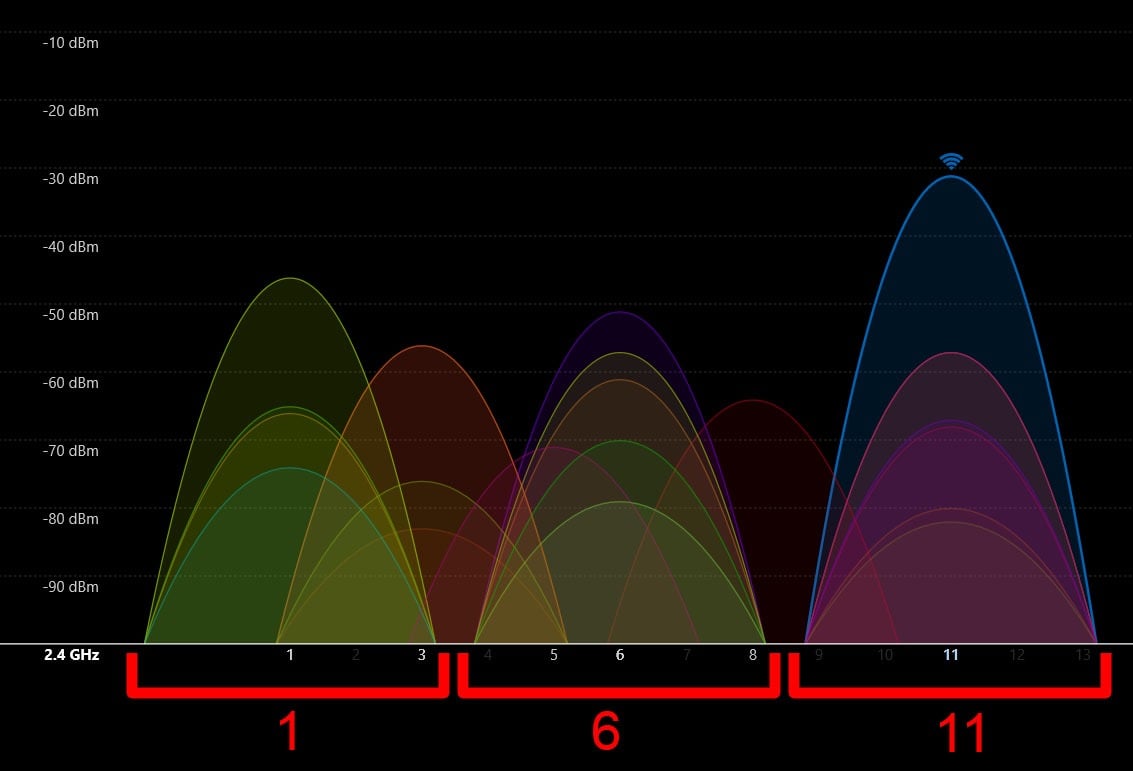
Learn how to change the WiFi channel on your router. Plus, how to find the best WiFi channel to get a faster connection.
jade latch
ok, i will tell him
calm urchin
one case, customer has multiple wifi-around in house. only choice was buying 6G(wifi).
elder robin
Posiblemente no haga la diferencia, no hemos tenido en cuenta que tan lejos está. Y es posible que los paquetes se pierdan su tu amigo esta muy lejos del enrutador
calm urchin
jade latch
elder robin
Posiblemente no haga la diferencia, no hemos tenido en cuenta que tan lejos está...
me ha dicho que esta detras de su pared xddd
calm urchin
 jade latch
y lo del lan no sep, yo tengo asi que no se si le convencere xddd
elder robin
Que tumbe la pared, o le haga un hueco ajajaja
elder robin
jade latch
me ha dicho que esta detras de su pared xddd
Las redes wifi son pésimas para atravesar cosas
jade latch
calm urchin
ok thank u ^^
elder robin
Si está detrás de algo o algo bloquea la señal, el rendimiento puede decaer
calm urchin
my recommend if router support 5G(enable that)[5G-has smaller wifi-range, but better stable connection]
elder robin
jade latch
ok thank u ^^
Oye, pero el enrutador usa 2.4G o 5G?
jade latch
elder robin
Oye, pero el enrutador usa 2.4G o 5G?
5g
ahora os comenta el mejor que se está uniendo al server jaja
elder robin
Aquí el que sabe cosas habla inglés, así que es mejor hablar inglés
elder robin
 jaunty apex
no creo que mi problema sea que soy de movistar verdad?
jaunty apex
no creo que mi problema sea que soy de movistar verdad?
Movistar/CO?
Fibra óptica? 🤨
jade latch
le hago de traductora
elder robin
jajajaja
jade latch
calm urchin
my recommend if router support 5G(enable that)[5G-has smaller wifi-range, but be...
my friend has joined the chat
jaunty apex
mi cerebro no da pa mucho
jade latch
idk if u can continue helping him xdd
jade latch
elder robin
jajajaja
sacando el b2 xdd
calm urchin
jade latch
my friend has joined the chat
trying
elder robin
Jajajaja
jade latch
he doesnt know too much english so i will be the translator xd
elder robin
jaunty apex
mi cerebro no da pa mucho
Hemos estado discutiendo un rato, y un poco a modo de broma. Pero en resumen, creo que deberías hacerte del otro lado de la pared, o comprar un cable convencional de red
calm urchin
jade latch
he doesnt know too much english so i will be the translator xd
ohh languange-barrel 

jade latch
calm urchin
trying <:aidaguide:1010649835898159114>
he has said that he has a router support of 5g
jade latch
calm urchin
ohh languange-barrel <:miaeyes:991488352064901191> <:miaderp:975525442062778389>
yeah hahah sorry for that
jaunty apex
elder robin
Hemos estado discutiendo un rato, y un poco a modo de broma. Pero en resumen, cr...
me cunde tirar la pared para que me reviente mi padre
calm urchin
jade latch
yeah hahah sorry for that
np, English not my frist-languange too
elder robin
jaunty apex
me cunde tirar la pared para que me reviente mi padre
Solo es un huequito de 2x2 cm
jade latch
calm urchin
np, English not my frist-languange too <:miaderp:975525442062778389>
ohhh nice ^^
jaunty apex
2x2 cm en mi frente
elder robin
jade latch
ohhh nice ^^
Dile lo de la pared jajqjq
elder robin
no, lo otro. Lo de que el router está detrás de una pared jajaja
calm urchin
jade latch
we are speaking about make a hole in the wall xddd
very good choice or just leave cable in roof
jade latch
ahhh and also that the router is behind a wall
jade latch
calm urchin
very good choice or just leave cable in roof
yeah but my friend is being a little bit rude and pigheaded xd
calm urchin
jade latch
ahhh and also that the router is behind a wall
can router move ohter room if wifi-connection works better ?
elder robin
calm urchin
very good choice or just leave cable in roof
normally an "indoor" cable is used
elder robin
jade latch
yeah but my friend is being a little bit rude and pigheaded xd
no digas esas mamadas, mariyein
jade latch
sry xd
jade latch
calm urchin
can router move ohter room if wifi-connection works better ?
idk, he left the room
he is a little bit tilted with the situation, cause in august he could play tof without any kind of error
and he had a computer that was shit xd
jaunty apex
im not tilted, you are boring and want a friend to play tof xd
jade latch
a little bit xd
calm urchin
jade latch
and he had a computer that was shit xd
i read there 4,5T combinations pc-builds can made
elder robin
I still think it's better to buy a network cable. it cost me 5 dollars for 20 meters
jade latch
calm urchin
i read there 4,5T combinations pc-builds can made <:miaeyes:991488352064901191>
wtf
jade latch
elder robin
I still think it's better to buy a network cable. it cost me 5 dollars for 20 me...
yeah i think that is the best optionxd
elder robin
my computer is also a potato
calm urchin
jade latch
wtf

Looking to build a PC? Check out my build guides below!
$700 Entry PC Build List: https://a.co/1HiyJAJ
$1000 Gaming PC Build List: https://a.co/gAhndFG
$1600 Gaming+Streaming PC Build List: https://a.co/gtQFGU1
Grab some mryeester merch! https://crowdmade.com/collections/mryeester
All my socials and links: https://www.mryeester.com
As an Ama...
calm urchin
elder robin
I still think it's better to buy a network cable. it cost me 5 dollars for 20 me...
i got like 20m cable too in router(3G/4G)[mobile]<->pc[works]
elder robin
calm urchin
i got like 20m cable too in router(3G/4G)[mobile]<->pc[works]
I have a 20 m cable, from the fiber optic router
calm urchin
elder robin
I have a 20 m cable, from the fiber optic router
nice 
elder robin
jade latch
yeah i think that is the best optionxd
y.. llegamos a un acuerdo entonces? jajaja
jade latch
elder robin
y.. llegamos a un acuerdo entonces? jajaja
jajaja no se que decirte
ahi esta pensando
muchas gracias por todo
thank u so much he is thinking about what to do xdd
elder robin
no es nada, solo estuve aquí platicando y riéndome jajaja
calm urchin
elder robin
but my potato only accepts 100Mbs
i think is network-card handle or cable not support over 100Mbs
6cat cable(good choice)[Category 6 cable]
elder robin
calm urchin
i think is network-card handle or cable not support over 100Mbs
The network card is too old and does not support more than 100mbs
elder robin
calm urchin
6cat cable(good choice)[Category 6 cable]
Yes, it was the one I bought
calm urchin
elder robin
The network card is too old and does not support more than 100mbs
ohh, but you can buy new network card support at 1000mbs, meybe 
elder robin
hahahaha, but not if the laptop supports the improvement, you know the laptop is very old
calm urchin
elder robin
hahahaha, but not if the laptop supports the improvement, you know the laptop is...
ohh 
i upgraded my gpu cards(RTX 3060 to RX 6600)[works better in AMD(cpu) and AMD(GPU)-setup
elder robin
calm urchin
i upgraded my gpu cards(RTX 3060 to RX 6600)[works better in AMD(cpu) and AMD(GP...
I have heard that the rx6600 are good
elder robin
What is the second option supposed to be?
 calm urchin
elder robin
What is the second option supposed to be?
calm urchin
elder robin
What is the second option supposed to be?
if gpu-support DLSS

Digital Trends
Nvidia's DLSS technology offers a huge boost to PC games, but how does it work, exactly? Here's everything you need to know about DLSS and what it can do.
ohh
elder robin
~90% with default settings
calm urchin
elder robin
~90% with default settings
try lower resolution if helping out
your gpu-hitting limits
NVIDIA Quadro M4000
 elder robin
There is no profile of the GPU, which performs better in 3D rendering?
calm urchin
RX 6600
 elder robin
you flexed me jajaja
calm urchin
NVIDIA GeForce RTX 3060
 calm urchin
elder robin
There is no profile of the GPU, which performs better in 3D rendering?
calm urchin
elder robin
There is no profile of the GPU, which performs better in 3D rendering?
hmm tryed look quality in settings ?
ohh update
 elder robin
calm urchin
hmm tryed look quality in settings ?
elder robin
calm urchin
hmm tryed look quality in settings ?
on the nvidia panel?
calm urchin

even lowering fps[lower gpu-usage drops lot]
yup looking better
advanced Settings+
there lot options you can select to find best optional for your gpu
60-80%(usage gpu)[sounds optional], 100%(bottlenecking hard)
exsample(AMD) users can enable FSR(in gpu-settings)

yup there is nvidia-tuning
elder robin
And later? 🤨
calm urchin
elder robin
And later? 🤨
i don't have nvidia-card anymore, so i cant show settings
it like searching correct settings in your laptop to works in that game
elder robin
It would be too much, I think that for now it works fine jajaj
"If it works, don't change it."
calm urchin
calm urchin
elder robin
"If it works, don't change it."
yes
elder robin
Thanks for the help
calm urchin
Good guide-> https://us.millenium.gg/news/27836.html

Millenium US
Are you fed up with FPS drops and would like some tips to make Tower of Fantasy run much smoother? Here are the parameters that you absolutely must modify in order to enjoy the game.
 low ferry
So i just started the game today. I never got an option to choose my gender but my game started with a girl character
 radiant edge
low ferry
So i just started the game today. I never got an option to choose my gender but ...
radiant edge
low ferry
So i just started the game today. I never got an option to choose my gender but ...
Since you've just started the game, during the tutorial -- do you remember seeing a sequence [non playable] where there's two characters {one male, one female} who are 'separated' from eachother after an encounter with a beast?
This scene is essentially where you select your character's gender.
If you're talking before that, just in the settings menu before even choosing a server -- that's purely visual and you've not been prompted yet.
 tulip latch
Soooo, I had played the game at launch, but due to drive space issues, uninstalled it for a while. Now I want to play again, but I no longer know on which of the many servers my existing character was on. Is there any way I can figure that out without hopping into every single one of them?
low ferry
No i never saw that
radiant edge
low ferry
No i never saw that
How far have you gone in the game thus far?
low ferry
i sasw start game and i saw the girl paused in animattion till i started and then she ent throgh the cave
i got to the character creation screen and even saw there i couldnt change gender
my friend is in discord with mee and she told me shes never run into this issue
radiant edge
low ferry
i sasw start game and i saw the girl paused in animattion till i started and the...
Ah, the section where the character was "paused in animation" was the scene that I was speaking of here unfortunately. Since you're very close to the start of the game, I would suggest choosing another server just to run through the tutorial again, to see if you notice this time that you have two characters that you can click on (that there's a choice to be made).
- Then, potentially using another account to make a new character on your desired server (with your friend). {e.g, to re-run that selection}
There's also an item in the shop that can change a character's gender after creation. However, this close to the start, I'd hate to propose making use of that.
low ferry
this sucks i was sharign my screen and we didnt see the gnder options oor 2 characters
radiant edge
low ferry
this sucks i was sharign my screen and we didnt see the gnder options oor 2 char...
Would also like to ask that you file #932914069395091456 if you would, especially after running through the tutorial one more time -- of how the selection process could be made more clear / improved. {given both of you didn't notice it}
tulip latch
tulip latch
Soooo, I had played the game at launch, but due to drive space issues, uninstall...
? :)
radiant edge
tulip latch
? :)
Whenever you're at the login-screen (showing selected server at the bottom), click on the server name to pull up the server selection / region list.
-- Assuming you're on the right account, and that this account contains characters, those servers containing characters should be shown under "Characters Owned" (the top most field).
 tulip latch
Ah, you're right. Now that you mentioned it, I remember that. Now let's see, either I was blind and didn't see the Characters Owned banner, or I somehow forgot that I have more than one account... gotta be one of the two. Anyway, thank you :)
Seems it's the later one. Guess I gotta try logging in with all of my way too many mail adresses now xD
radiant edge
tulip latch
Ah, you're right. Now that you mentioned it, I remember that. Now let's see, eit...
There's yet another possibility since you've mentioned that this was some time ago. If it was pre "Vera", back before 2.0, then this would be before the changes went into effect with the account binding system. {aka, where it 'might' be possible for someone to unlink the game-account}
In all cases, if you're unable to locate your characters, then you also can always #game-support and request their assistance here. Though of course you'd need to be able to provide some details on the characters, such as a UID from screenshots, or bank transaction details / some other means for them to locate the account and potentially prove ownership.
Remember in the case of "gmail" to try both Google's OAuth login, and plain-old-email from the launcher. {this is by far the most common mistake}
tulip latch
I see. It was defenitely pre Vera. And knowing myself, the chances are 50/50 I actually used the Google OAuth login. I'll try around for a while, and if not, I'll contact support. Thanks :)
Yup, on Google she is :D All good now :3
radiant edge
Looks like that’s a Paperspace ‘GPU+’ instance, streamed over Parsec.
- Be aware that the game's user-agreement contains clauses such as (c) - covering emulation and (s) - covering any form of IP-proxying that apply here. If you intend to do anything of this nature, you’ll need to contact Tower of Fantasy’s support and get clearance first if you have not done so already.
Discussions of that nature cannot be allowed for a variety of reasons on the Discord here.
elder robin
um, i'm so sorry 😦
radiant edge
elder robin
um, i'm so sorry 😦
The full user-agreement can be found here: https://www.toweroffantasy-global.com/UserAgreement.html
The section that's being referenced is 7. Player Conduct.
 lunar flax
I tried to do the tarot card event several times but it's not letting me flip a card. It just says "System busy, please try again!"

I've been trying again for a few minutes already
 dense raptor
i signed in to midasbuy with the wrong twitter and now its not letting me do the maid event cuz i cant link the correct account. is there a fix for this?
lunar flax
dense raptor
i signed in to midasbuy with the wrong twitter and now its not letting me do the...
I think this should do it: go to midasbuy.com > click your email in the top right > View Account > Linked Account > Unlink Tower of Fantasy Account
dense raptor
there is none
lunar flax
none what?
dense raptor
its only linked to my facebook on midasbuy
lunar flax
The Linked Account page shows only PUBG Mobile and Tower of Fantasy for me. No Facebook
dense raptor
there is no tower of fantasy account linked.
lunar flax
 dense raptor
im not going to say it a third time.
lunar flax
idk then
radiant edge
elder robin
Why is the download from Steam so irregular?
The bursty-behavior that you're observing with a sawtooth type pattern for Disk-IO -- I would assume is write caching / memory exhaustion and waiting on the physical disk, yet the peaks and troughs don't support that.
What type of drive do you have in there? {ah, just realized that's the Paperspace machine ... the write speeds would be variable, so this is cache exhaustion}
lunar flax
I mean, those are the steps I told u to unlink a Midasbuy account from a ToF account... so if that doesn't work then you just need to contact support is all I can really say.
elder robin
radiant edge
The bursty-behavior that you're observing with a sawtooth type pattern for Disk-...
Ignore that please, I'm already counting on support. It is done to what you warned me before
radiant edge
elder robin
Ignore that please, I'm already counting on support. It is done to what you warn...
Gotcha, wasn't sure if that was another system or not.
elder robin
radiant edge
Gotcha, wasn't sure if that was another system or not.
Don't worry, my physical computer is a potato. I did it because of that. 😦
But honestly I don't want to get in trouble. So I offer an apology and also that I am contacting support
radiant edge
elder robin
But honestly I don't want to get in trouble. So I offer an apology and also that...
No worries, thanks for doing so. This is the correct route with anything that's not clear on an initial read.
The user-agreement's clauses that apply are more indirect, and it's not obvious to most probably. We will bring this up.
wary shuttle
even if it doesn't help you, it's better to say it in a kind way, not in a rude way 
elder robin
Okay thank you very much
dense raptor
wary shuttle
even if it doesn't help you, it's better to say it in a kind way, not in a rude ...
very helpful thank you.
i signed into midasbuy via the twitter url to do the tarot event and it asked me to login and i used the wrong twitter cuz it was a different browser. i would like to know how to disconnect tof from midasbuy so i can sign in properly and do the tarot event.
radiant edge
dense raptor
very helpful thank you.
The most that we can really recommend is what Aikoh did earlier unfortunately. This is likely something that will require contacting customer support if you’ve not already done so.
-- You might also try Midasbuy’s support in an instance like this.
dense raptor
they already owe me 130 dollars in tanium i cant deal with their nonsense tbh. tof will just lose more money if there is no immediately apparent way to fix this.
gunn try it on a different device
radiant edge
dense raptor
gunn try it on a different device
If you believe it's device specific, you might try flushing your browser's cache (or even factory resetting the profile) first too.
dense raptor
its clearly not.. even using the account system in any way, so its probably just a temporary account being held in some cookie.
nvm it IS using the account system.
i have an idea. will report back.
its account locked. there is no option to link a tof account anywhere. there is no option to unlink a tof account anywhere.

this site sucks.
place for an avatar but no way to set an avatar. all the icons/images are broken and no way to unlink a linked tof account because it shows no tof account linked. also its nearly impossible to find tof from the home page.
 hasty tide
why does tof just reopen when i close it with task manager 😭
radiant edge
hasty tide
why does tof just reopen when i close it with task manager 😭
Could you show me which process that you're terminating specifically?
hasty tide
nevermind i found the solution for my problem]
elder robin
A friend installed 3 ram modules (3x8GB), on his motherboard. 2 are at 3600Mhz and one is 3200Mhz.
When starting Windows, it only marks two at 3600Mhz
dense raptor
cool.
 elder robin
A friend installed 3 ram modules (3x8GB), on his motherboard. 2 are at 3600Mhz a...
elder robin
elder robin
A friend installed 3 ram modules (3x8GB), on his motherboard. 2 are at 3600Mhz a...
It should be noted that all the modules are from the same manufacturer and the module that is not recognized he had before and it worked until this morning
dense raptor
this site just sucks so much lol.
dense raptor
dense raptor
cool.
@lunar flax i just made an entirely new account on midsbuy cuz zzzzzz but now were having the same issue.
lunar flax
haha. Yea, it just seems they don't want my money. I gave up already.
dense raptor
so not only is THIS web event broken but the referral event is also broken, and there is no speaking of a fix for it. TOF just cannot do web based events at all.
radiant edge
elder robin
It should be noted that all the modules are from the same manufacturer and the m...
Most likely your friend would want to run the two 3600 modules, and omit the 3rd. Three DIMMs would be running in single channel mode, and likely lose more performance than would be gained by the extra memory.
elder robin
radiant edge
Most likely your friend would want to run the two 3600 modules, and omit the 3rd...
But it is that it does not appear in any way, it only seems that the third module is not installed.
radiant edge
elder robin
But it is that it does not appear in any way, it only seems that the third modul...
Likely has to do with conflicting XMP profiles on them. Regardless, the decision the BIOS is making is what you want in this case.
elder robin
He mentions that the ICUE recognizes the third module to change the RGB colors
radiant edge
elder robin
He mentions that the ICUE recognizes the third module to change the RGB colors
Ah, would expect that behavior as well actually. {at least for the lighting interface}
dense raptor
would we be able to have like, a tof technical help channel and a generic computer repair channel so technical concerns related to the game dont just get buried?
elder robin
....
radiant edge
Just as a reminder, this channel is for anyone's technical problems that pertain to the game. Hardware issues can count as such, which as it turns out - JRNoob0237's friend's memory problems did. {They play ToF on that PC}
- Suggestions on how to refine the Discord's channels are always welcome, yet at the same time please remember that these channels are open to anyone that legitimately needs help just the same.
 fierce crane
Help the tarot card draw event keeps giving me an error, saying the server is busy, please try again
is what it is showing me? i signed out and re signed back in and still the same issue.. is there a way to fix this>?

 limpid seal
Same problem
fierce crane
others from my crew already got the outfit too, sadge days... fix the event please lol
dense raptor
its some issue to do with our accounts, basically.
ive tried many different devices, and even updated on PC to try the in game version. its midasbuy being an awful website and web integration between the site and the game not being managed properly.
i contacted midasbuy about it and i got a post with a bunch of typos and a google forms link to explain my issue instead of just, giving me help then and there.
 red void
I didnt receive the Engine...prolly bcs of that
dense raptor
red void
I didnt receive the Engine...prolly bcs of that
just convert 1 tanium to dc or wait 10 minutes and relog
you only get 5 mails at a time
red void
thank you will try
 last tendon
I maxed out the shop and for some reason the horns didnt arrive in the mail. People said wait 5 min but its been over an hour. And few min ago I claimed the free vitality potion and that arrived straight away. Anyone else having the same issue?


 granite latch
 fierce crane
so i'm not alone 
 red valley
anyone know how to fix the crashes in loading screen? trying to join to the normal world map?
 soft imp
its been like this for like 5mins n i cant click anything, any1 know how 2 solve?
 fierce crane
i guess we're the unlucky ones who'll never get anything from these types of events 
fierce crane
or can i assume they'll try to fix it? ... 
 dull marsh
My crew was saying something about how everyone getting the constant system busy message is in canada, apparently.
(Possibly other regions too, just everyone in our crew that can't do it seems to be canadian)
limpid seal
It doesn’t work for me and I am indeed Canadian
 tender gale
worked for me in Europe
 thick peak
doesnt work me in Europe
 barren walrus
anyone know why my game is stuck at loading when i try to log in and after a while it automatically sends me back to server select?
 mighty sigil
soft imp
its been like this for like 5mins n i cant click anything, any1 know how 2 solve...
mighty sigil
soft imp
its been like this for like 5mins n i cant click anything, any1 know how 2 solve...
same in Europe Estrela server right now
 primal onyx
Cant get in to arcania server it keeps kicking me out but i can join other servers?
 lament jackal
Anyone experiencing getting stuck at loading screen 90%?
 remote condor
can not do anything anyone got any idea what is the problem?
 hasty tide
Is it normal for us to get the physical specific combat engine on the new gachapon event?
hasty tide
hello, is there a way to always display teammates health bar on the group panel on the right of the screen instead of having to click on the button for this? Every time i join a group team mode i always have to click on this damn button
hasty tide
remote condor
can not do anything anyone got any idea what is the problem?
go to the event through your main web brower, don't use the ingame event browser, it should work better

#TowerofFantasy ⚔ Lucky Tarot Draw
A new lucky draw event starts soon! Try it in-game and in your browser! 🙌
Spend tanium to flip tarot cards and receive weapon batteries and random boxes! 🎁Rewards can be viewed in the Reward Overview.
Try it here: https://t.co/0H44ToIoO0
Likes
503

 Twitter
·
Twitter
·
 bitter void
POSSIBLE EVENT FIX To my fellow Canadians having issues with Midas website and the event... I found a rather dumb way to fix it, at least for me.
My account was set to Canadian... I opened it up in google chrome, changed it to US and bam, it went from "busy" to drawing rewards. (I tried it in firefox, but the same issues persisted.)[VPN may or may not help when used with this method, but not without.]
remote condor
hasty tide
<@119195168296534016> https://twitter.com/ToF_EN_Official/status/161113558444931...
the checked it in the browser but the Login button in browser does not work

 solar cairn
I need help i can't join any server In game Because there is always this one error popping up (I tried redownloadin and different server's and regions)
 hasty tide
bitter void
**POSSIBLE EVENT FIX** To my fellow Canadians having issues with Midas website a...
hasty tide
bitter void
**POSSIBLE EVENT FIX** To my fellow Canadians having issues with Midas website a...
it worked for me but i was already connected to my midasbuy account. Perhaps you need to create a midasbuy account and log in there before it works? Also perhaps you have an adblock addon on your web browser that blocks it? I used chrome
 cloud jewel
bitter void
**POSSIBLE EVENT FIX** To my fellow Canadians having issues with Midas website a...
cloud jewel
bitter void
**POSSIBLE EVENT FIX** To my fellow Canadians having issues with Midas website a...
may I ask how you did this? 
bitter void
hasty tide
it worked for me but i was already connected to my midasbuy account. Perhaps you...
I turned my adblocks off to try and get it to work before attempting this fix.
I already had a midas account which I connected to my ToF account but that hadn't fixed the issue. I found that changing my midas account settings from Canada to US is what worked, but only on chrome, not on firefox.
Important Edit: You will need a VPN set in US to do so. You won't get the option to make the change otherwise.
cloud jewel
bitter void
I turned my adblocks off to try and get it to work before attempting this fix.
I...
thank you!
hasty tide
bitter void
I turned my adblocks off to try and get it to work before attempting this fix.
I...
ah sorry i wanted to answer @remote condor and i clicked on your message by mistake lol
bitter void
hasty tide
ah sorry i wanted to answer <@119195168296534016> and i clicked on your message ...
Np. I hope I didn't sound harsh. I was just trying to clarify.
hasty tide
no worries
bitter void
I have just confirmed that you will need a VPN set in the US for it to work. Without it you don't get the option to change from Canada to US.
fierce crane
you can actually just change Canada to UK and do the event, instead of setting it to US, in which is what i did, I didn't get the US option and I got all of the rewards via in UK. Just make sure that it is connected to your NA account. Hope this helps! Good Luck and Have fun!
cloud jewel
So I have looked into this a bit further, I personally did not need a vpn. For those that are Canadian and cannot roll the tarot cards, What you do is go to the link of the page, and what you will be looking for is "country=ca&from=" segment of the link. What you will do is replace the ca to another country such as us (states) or gb (uk)

 inland horizon
last tendon
I maxed out the shop and for some reason the horns didnt arrive in the mail. Peo...
inland horizon
last tendon
I maxed out the shop and for some reason the horns didnt arrive in the mail. Peo...
Finally did you receive your horns ? I have the same issue but with the maid outfit.
 slow crater
Halo min cara atasin stuck loading gimana HP saya ram 4
dense raptor
cloud jewel
tysm holy shit
cloud jewel
dense raptor
tysm holy shit
rock that maid fit
last tendon
inland horizon
Finally did you receive your horns ? I have the same issue but with the maid out...
No I still haven’t. It’s kinda messed up. I’ve done everything they said on the page. Like spend taniums and log out and shit 🤦🏾♂️
 random plover
Hello, I am having an issue where it says Failed to open descriptor file ../../../Hotta/Hotta.uproject
the game then closes from there
hasty tide
how do i change the installation path, i wanna change it to my external D drive because there's not enough space in my C drive, but there's no option to change the installation location
cloud jewel
try using the browser version instead of the ingame window? I think that should fix it
bitter void
I'm honestly glad people are finding ways of doing it without the use of VPN that are much simpler. I'm not a very tech literate person and only tried methods until the very first one I found to work.
 copper tapir
Anyone seen this happen before? Wont let me teleport, and cant use unstuck button cause it wont bring up the esc menu. Team members say I'm moving when I use WASD, but I cant fall off map or anything

 random plover
Is there a way to change my email since they disabled unbinding accounts?
 dusk oriole
slow crater
Halo min cara atasin stuck loading gimana HP saya ram 4
dusk oriole
slow crater
Halo min cara atasin stuck loading gimana HP saya ram 4
Pas jalanin gamenya, kamu cuma bukan gamenya aja kan? Kalau ada buka aplikasi yang lain coba ditutup dulu sebelum buka gamenya kembali.
slow crater
@dusk oriole Alhamdulillah udah bisa sekarang
@dusk oriole tapi ga tau nanti terjadi lagi apa engga moga engga
wary shuttle
@dusk oriole @slow crater
this server is English speaking. If you want to talk in other languages -> #966294054092542012
 tender yacht
did they fix the controller bug? or are they just flat out ignoring that still?
 wispy drift
they are "ignoring" it because it will never be truly fixed until the current v2.4 CN state
only sip hopium that they bring forward the fixes
 coarse dock
Can we Move Original TOF Launcher To Steam Launcher ?
And It's That Safe ?

 stark torrent
Is there a fix for world boss bgm bug? its always replay after 5 second or stop playing at all
Most noticable in Dragon and Harrah boss battle, the single player version Harrah bgm is fine tho
 main lava
It keeps looping back to here help


 lime ember
main lava
It keeps looping back to here help
lime ember
main lava
It keeps looping back to here help
try to repair from launcher, sometimes helps
 verbal brook
main lava
It keeps looping back to here help
verbal brook
main lava
It keeps looping back to here help
I've had the same thing :< will load up to 90%, then load again and take me back to server selection screen. If anyone figures out a work around can you let know please as have tried redownloading it multiple times, force stopping app etc and still nothing
 polar gyro
I m suddenly getting " server connection failed"
 frosty solar
Do you guys know what EU servers are involved in the 2nd phase of the transfer?
hasty tide
hasty tide
how do i change the installation path, i wanna change it to my external D drive ...
I really need help with this, otherwise i won't be able to reinstall the game
dusk oriole
wary shuttle
<@334270005384577026> <@732922382699855932>
this server is English speaking. If...
Understood
solar cairn
How do i fix that i have tried different Server's and regions i even reinstalled the game and stuff but i cant fix that and it just appeared out of nowhere

 frosty fulcrum
in game im not going past this any help?

 gritty sail
Hello,im here asking on behalf of a friend
Platform:PC
Region:apac
Server:sakura
Using both launcher and steam
The issue is as follows:
it started by him being able to login but getting disconnected every time he attempts to teleport or join an instance (this started happenind from the time saki was released) and it kept on happening non stop so he quit, when he returned today he is no longer able to login at all and gets this msg(pic attatched), he tried to go into other servers but faced with the same issue, would appreciate any help regarding this matter and ty

 cinder tide
every time I close the launcher before the download is completed, and when I return to the launcher to continue the download, the download starts again with 5% even if I have installed more.
Are there any ways to download game files in different way like downloading with "Download Manager" or are there any ways to avoid it???
Pls help me! I want enjoy with this game too!
main lava
main lava
It keeps looping back to here help
W a i t you can't play now using mobile data? Huh I try my WiFi and it worked
Kekw so dumb
hasty tide
main lava
Kekw so dumb
Is it ios?
main lava
hasty tide
Is it ios?
No android
hasty tide
Hmm pretty weird
main lava
It's probably depends on what company your mobile data is
I don't think it's a phone issue too
 blissful drift
idk when this blue circle gone forever, so fking anoying. Playing tof by xbox controller after 2.0, this blue circle always move on my screen when i moved my character with controller.
 elder robin
blissful drift
idk when this blue circle gone forever, so fking anoying. Playing tof by xbox co...
elder robin
blissful drift
idk when this blue circle gone forever, so fking anoying. Playing tof by xbox co...
Apparently it has happened since a certain version. There are some reports in #1007842564726075432
elder robin
main lava
W a i t you can't play now using mobile data? Huh I try my WiFi and it worked
It will have a lot to do with the latency of a mobile network as opposed to a quality wi-fi network.
main lava
elder robin
It will have a lot to do with the latency of a mobile network as opposed to a qu...
It's wierd that I can do anything with mobile data like play G game and other games except for tower of fantasy theres something wrong it loops back to the main menu.
elder robin
Apparently Tower of Fantasy is very susceptible to these types of failures. It happens to me even using a network cable and a medium quality network
Without going too far, there seem to be issues with fault tolerance when using networks other than low latency.
main lava
I got bad internet WiFi but still works?
elder robin
Especially in crowded places or at logins, or even between loading screens
main lava
elder robin
Especially in crowded places or at logins, or even between loading screens
I tried mall WiFi still works only mobile data can't work
elder robin
Normally it stays charging at 90%, and even though they say they fixed it, it keeps failing
elder robin
main lava
I tried mall WiFi still works only mobile data can't work
A wifi from a mall?
main lava
elder robin
Normally it stays charging at 90%, and even though they say they fixed it, it ke...
Nah sometimes it loops back on 24%
main lava
elder robin
A wifi from a mall?
Yeah
main lava
Android
 marsh jolt
Guys I need some help I don't know what's wrong with my Tower of Fantasy, I want to download it and it's just downloading for like 2-3 days and it's at like 28%, idk why but it downloads in 700KB/s and that's really bad. I checked everything with my router and it's fine, idk what's wrong help what do I do I want this game so bad ;~;
elder robin
main lava
Android
I'll assume it meets the basic requirements, so all I can say is the mobile network is bad.
elder robin
marsh jolt
Guys I need some help I don't know what's wrong with my Tower of Fantasy, I want...
What is your download speed?
marsh jolt
elder robin
What is your download speed?
25.75Mbps
main lava
elder robin
I'll assume it meets the basic requirements, so all I can say is the mobile netw...
Ok
elder robin
marsh jolt
25.75Mbps
Where are you downloading the game from? By its installer or by Steam?
marsh jolt
elder robin
Where are you downloading the game from? By its installer or by Steam?
Installer
elder robin
main lava
Ok
I can only recommend patience as the development team manages to find the error or improve the situation.
And then recommend if it is possible to use a wi-fi network
elder robin
marsh jolt
Installer
If you like you can pause it, and try to download it through Steam
marsh jolt
But I tried and it also was slow ig..
elder robin
Is it slow on Steam too?
marsh jolt
Yeah... at least it seemed to be
elder robin
May I suggest you measure your speed, again?
elder robin
Do you use 2.4Ghz wi-fi or an ethernet cable?
marsh jolt
2.4Ghz wifi
elder robin
Is it possible that you have a network cable handy?
marsh jolt
I don't know where the cable is there's just my router pinned to the socket and the cable thru the rooms to the router
elder robin
Sorry. My English is not very good. I understand that you are using a repeater, right?
marsh jolt
I forgot what repeater is wait
I don't have that uh
I mean there's just a cable in router that provides wifi connection and then another one to plug in the socket to make it work
elder robin
Sorry. It's just that the literal translation was weird
marsh jolt
It's fine
elder robin
Oh okay. I think I understand you...
 elder robin
Awful
marsh jolt
Ugh.. ;c
elder robin
So to quickly summarize. The recommendations that they normally give is to use 5ghz wi-fi, or a network cable
marsh jolt
oh goddddddd
elder robin
That is, an ethernet cable (RJ45)
elder robin
marsh jolt
oh goddddddd
Is it possible for you to use any of those recommendations?
marsh jolt
elder robin
Is it possible for you to use any of those recommendations?
Sadly... I don't think
I don't know how do I get an ethernet cable because it's just these 2
Same as the 5ghz wi-fi
elder robin
I don't know what region you are from. But normally you can order one from online services like Amazon, MercadoLibre, etc; or even in a physical store near where you are.
marsh jolt
Hm I'll see
elder robin
Sorry I can't find a different way or any other advice. If anyone else can help, I'd be grateful.
 elder robin
marsh jolt
<@510880864645677068>
elder robin
marsh jolt
<@510880864645677068>
Yep
You can physically transfer 25Mbs/8
≈3.125MB/s
elder robin
What worked?
marsh jolt
Steam
elder robin
ok good luck
cloud jewel
Sorry about that, I was busy all day! Are you trying to login via your tof logins? If so then that isn’t correct, you need to create a midasbuy account and link your tof account to it
 lyric reef
I can run the game, fight, run around, talk to NPC's and everything is fine, but the moment I go into my backpack or any other menu my client freezes and I have to force close with task manager. Anyone else have this issue or did I mess something up? (Windows 11 Laptop with rec specs and using Steam version)
 half tapir
how do u fix TOF when launching browser stuff ingame like ex: buying titanium stuff cause it doesnt work and crashes after.
another example is lucky tarot, that brings up a browser that doesnt loadzzz
elder robin
lyric reef
I can run the game, fight, run around, talk to NPC's and everything is fine, but...
Then check the integrity of the game with Steam
It's the only thing that occurs to me
lyric reef
It says everything is Validated, I've also tried running as admin permanently, checking diff compatibility modes, and making an exception of my firewall. Hrm. I did notice something odd about my launcher. it doesn't have a file repair tool on it and it seems different than other youtube vids launchers. Maybe I'll re-install and that'll fix it.
 hasty scroll
quick question, does support answer their mails or i need to fill the form first?
elder robin
The fix is offered by Steam I guess
elder robin
hasty scroll
quick question, does support answer their mails or i need to fill the form first...
For support?
hasty scroll
elder robin
For support?
yeah
i sent a mail but don't know if i gotta fill the form too (i got an automatic reply saying so)
elder robin
I am not very clear about it, but I think that the form can also be used. Since I recently sent them an email and they asked me to fill out the form
elder robin
hasty scroll
i sent a mail but don't know if i gotta fill the form too (i got an automatic re...
I suppose that if you provide them with the information, they can offer you a more accurate and faster response.
hasty scroll
The thing is i sent the email because my account progress got deleted and my linked account too, the only thing i can provide is the date my account was created so yeah
I guess ill just wait if they answer
elder robin
Is it related to Google, Facebook or something?
Or is it an account created with an email and password in tof?
hasty scroll
elder robin
Or is it an account created with an email and password in tof?
created it since launch in tof, linked it to google and now its gone
both the progress and the link somehow
elder robin
Wait. Your name gives me the slight impression that you speak Spanish
hasty scroll
I do
elder robin
Yo también
hasty scroll
a
elder robin
Jajajaja
Recapitulando. Perdiste el progreso de tu cuenta? No tienes amigos que chequen tu cuenta o algo parecido?
hasty scroll
elder robin
Recapitulando. Perdiste el progreso de tu cuenta? No tienes amigos que chequen t...
nop
Con lujo de detalle te lo voy a explicar ahora
elder robin
Recuerdas el servidor y el nombre?
hasty scroll
Me cree la cuenta en el pre registro y la vincule a Google, la cosa es que deje de jugar por un tiempo. Cuando volvi (ahora) ya mi cuenta no estaba vinculada y no tenia mi progreso.
hasty scroll
elder robin
Recuerdas el servidor y el nombre?
Nop
elder robin
Si está un poco difícil, si no recuerdas mucho
hasty scroll
Creo que el servidor era Luna azul si no recuerdo mal, pero como te he dicho mas de eso no conozco
Se supone que aun deberia tener mi progreso guardado gracias a google pero mi cuenta se desvinculo sola
elder robin
No tienes ninguna captura de pantalla?
hasty scroll
Creo que no, dame un momento
elder robin
Me da la ligera impresión de que te has equivocado de correo o algo parecido. Sería muy raro que algo así pasará de la nada
hasty scroll
No tengo ninguna screenshot y no, no me he equivocado de correo ya que es el unico que use en su momento.
elder robin
Le hago una invitación a guardar la calma por favor, no es necesario molestarse o enojarse
Solo intento ayudar, pero es algo difícil por mi cuenta. Así que solo resta esperar a que ellos te respondan
Pensé en conseguir algo de información como el servidor y nombre, para buscar por mi cuenta pero no lo recuerdas así que está algo difícil
hasty scroll
No estoy enojado puedas o no ayudarme estoy agradecido ya que me estas dando parte de tu tiempo y atencion.
hasty scroll
elder robin
Pensé en conseguir algo de información como el servidor y nombre, para buscar po...
Prueba a buscar "Silica" creo que ese era el nombre dentro del juego
hasty scroll
Bueno, tocara esperar a ver si me responden, gracias por darme parte de tu tiempo y tu atencion, en caso de que no me respondan o no puedan ayudarme simplemente empezare denuevo, no habia avanzado mucho ni nada por el estilo pero no se si tendre las cosas del pre registro. Gracias denuevo.
lyric reef
lyric reef
It says everything is Validated, I've also tried running as admin permanently, c...
so I completely uninstalled and re-installed from Steam and I even set all the graphics settings to low seeing if that fixed my "Menu's Freeze" issue, but even with a clean install it's still happening? The game lets me run and fight and everything else just fine with no lag, it's only the menu's that cause the client to freeze? Whether it's Backpack or vehicle doesn't seem to matter?
 quasi rapids
What is this?
 lyric reef
so I completely uninstalled and re-installed from Steam and I even set all the g...
lyric reef
lyric reef
so I completely uninstalled and re-installed from Steam and I even set all the g...
So I've even tried to Non-steam version of the game and everything except menu's is working? ALL menu's cause my client to "Freeze" is that normal for PC?
 rancid oar
Hello, I would like to ask some help, I don't know if I'm the only who's experiencing this but, my Frigg (Balmung Weapon) is broken. Whenever I'm in my frost domain, my dash strike is not consistent and most of the time it does not execute a dash strike but a dash only. Can anyone help me with this?
lyric reef
lyric reef
So I've even tried to Non-steam version of the game and everything except menu's...
After using the non-steam version I seem to have fixed my issue. It required a few tweaks here and there. Sorry to have bothered everyone. :)
hasty scroll
Steam version for some reason is extremely buggy or not optimized at all
elder robin
hasty scroll
Steam version for some reason is extremely buggy or not optimized at all
Both versions are bugged
And without optimizing anything
hasty scroll
My bad then
elder robin
But I don't blame them, creating something like this takes time, resources and a lot of work.
 slender flume
for 2 days now my game has stopped responding as soon as it boots up, right after the hotta studios animation and before reaching the main menu. I've tried everything including re installing the game and updating windows but nothing has changed, I am playing with the steam version of the game
 cursive nest
rancid oar
Hello, I would like to ask some help, I don't know if I'm the only who's experie...
cursive nest
rancid oar
Hello, I would like to ask some help, I don't know if I'm the only who's experie...
You're not alone, experiencing the same issue
 brazen lantern
Hello, first of all my English is bad, I installed tof but when I launch the game it shows me a black screen after the "Hotta" logo appears who can help me please
 terse meadow
How do I delete my account?
hasty tide
I need help
Game is stuck on 99% loading
rancid oar
cursive nest
You're not alone, experiencing the same issue
I see being a frigg main and since the patch came I lost my worth. 😂
rancid oar
cursive nest
You're not alone, experiencing the same issue
If you know some remedy please let me know
 versed river
i get blue screen on launching the game after the logs ends
radiant edge
@main lava – Not aware of any Android devices that carry modifications out of the box that render them unable to connect on mobile data. So that assessment is probably right that it’s carrier specific in your case.
-- Would suggest getting in contact with the cellular carrier.
On your mention of a certain “G game”: The key difference is the engine, netcode, and specifically the protocol in use. The other game that you’ve referenced is completely TCP-based in its communication. TCP’s PMTU discovery and automatic re-transmission generally makes sure everything ‘just-works’ regardless of network conditions.
@lyric reef – Although I notice that you’ve already solved the issue, would still be interested if there’s any crash dumps generated. Given you’re freezing whenever accessing the inventory, these might not exist.. Yet on the chance that they do:
Take a look under "%USERPROFILE%\AppData\Local\Hotta\Saved\Crashes" and see if you see any folders in this location. [or, Saved_Steam, if the Steam version]
-- If you can find some of these folders that line timestamp wise up with your closures, then please archive a couple of the most recent of these crash-dump folders {e.g, with winrar, winzip, 7zip, etc} and send me them (via DM's).
Could you also detail the 'tweaks' that you've applied that halted the crashing?
radiant edge
versed river
i get blue screen on launching the game after the logs ends
Since you've mentioned a BSOD, please take a look under "%SystemRoot%\Minidump".
If you see any .dmp files in this location, and if you can shoot them my way {after verifying they line up with the attempts starting the game}, would be happy to take a look. Machine is most likely halting on loading the game's anti-cheat kernel driver, yet would like to confirm this before going any further.
main lava
radiant edge
<@281423642993229824> – Not aware of any Android devices that carry modification...
I see
Thanks
radiant edge
rancid oar
Hello, I would like to ask some help, I don't know if I'm the only who's experie...
Do you have the ability to experiment with the game on any other Internet Connections? Cellular Tethering or otherwise.
-- Inconsistent dash-strikes with Frigg tend to be packet-loss. Do you notice any other 'quirks' such as your discharges randomly being lost or not executing?
radiant edge
terse meadow
How do I delete my account?
If you're seeking the full removal of your account (account closure), this is something that'll require contacting customer support. {refer to #game-support for more details how to get in touch}
radiant edge
slender flume
for 2 days now my game has stopped responding as soon as it boots up, right afte...
Reinstallation of the game will not clear out the game's config files. Have you tried a factory reset of the client's config?
- If that doesn't work, please DM me for further troubleshooting.
@hasty scroll -- Just to be sure that I fully understand your circumstances here:
You had a Custom Account towards the launch of the game, which you bound (linked) to a Google Account (external sign-in). Some time into the game, you discontinued playing for awhile, and on attempting to come back -- your accounts {sign-in methods} are behaving as if they're "fresh accounts" (no characters on them / no bindings shown).
-- Do you remember roughly when you halted playing the game? Based on chat history, it looks like your last post was from 8/14. This would be specifically before 2.0 / Vera's launch, and before the changes to the account binding system went inplace that made account theft more difficult.
On the initial question: Yes, customer support does always respond. It may take a few days for them to get around to your ticket, yet rest-assured that they will. {even if the form is not complete -- just do your best with the details that you have on the account}
@cinder tide – There’s no offline-install of the game that can you can use a download manager for.
-- However, the Steam distribution of the game should support download-resume. If this is available in your region, that might be an option.
@gritty sail – Just based on the description you've provided {with the initial intermittency}, it sounds connection oriented.
-- I assume that all of the basics such as restarting Internet Equipment (router, CPE, etc) have already been attempted here, if not -- have them try that. Do they happen to have access to any alternate form of Internet Connection, such as cellular tethering, that they can try? {in an attempt to narrow things down}
If you can narrow things down to their connection: Then your friend will want to make sure they inform their ISP and Tower of Fantasy’s support.
- In the case of the ISP, they would want to explain the service that they’re having connectivity issues with (e.g, mention Tower of Fantasy), and when contacting Tower of Fantasy's support, they’d want to provide details on their ISP / where they're connecting from [along with their IP address].
^ The goal is to have both ends (their Internet Provider and Tower of Fantasy's support) look at routing in each direction, and hope that something problematic is found (in either direction).
Customer Support might also be able to authorize troubleshooting that otherwise would breach the user-agreement as well. It's worth keeping them in the loop of everything that's attempted, regardless if there's another Internet Provider that can be tried, and the outcome.
hasty scroll
radiant edge
<@265121276249505792> -- Just to be sure that I fully understand your circumstan...
Yes, that's right. I stopped playing around that date and just like you described that was exactly what happened.
radiant edge
hasty scroll
Yes, that's right. I stopped playing around that date and just like you describe...
Gotcha, then just on the description -- what you've done are the right steps to try to reach out to support. Anything that you can provide them will help here, even if it's not the questions on the form. Essentially they're going to need to confirm that you're the original account owner, and to locate your game-account.
Of course, if there's any chance that you might've used other email addresses or Google Accounts -- try those too.
hasty scroll
radiant edge
Gotcha, then just on the description -- what you've done are the right steps to ...
The only major thing I can provide is my UID since the IGN I'm not sure if it was between "Silica" or "Hana" and the server I think it was "Luna Azul" (Blue Moon).
hasty scroll
radiant edge
Of course, if there's any chance that you might've used other email addresses or...
Already done that. My last chance is to wait for support and provide what I just said to you
radiant edge
hasty scroll
The only major thing I can provide is my UID since the IGN I'm not sure if it wa...
That's a good start. If you've done any ingame purchases, bank statement records (the transaction ID's) might be a large help. You should also be able to provide them your connection origin, IP address, etc, unless you've physically been moving around.
 frosty locust
what?
 hasty scroll
radiant edge
That's a good start. If you've done any ingame purchases, bank statement record...
hasty scroll
radiant edge
That's a good start. If you've done any ingame purchases, bank statement record...
Sadly I didn't the only thing I have is a screenshot of one of my summons since sone of my data got corrupted and had to reinstall pretty much everything. And since I live in Uruguay my public IP address changes on it's own so I could only provide my internal IP.
radiant edge
hasty scroll
Sadly I didn't the only thing I have is a screenshot of one of my summons since ...
That's still sufficient -- the general area that you've always played from. (Since there might be for example, a point in the connection logs from Tower of Fantasy's side where your origin shifts across the globe)
hasty scroll
Then I'll go make a new request but this time filling the form with the info I have. Thank you.
radiant edge
hasty scroll
Then I'll go make a new request but this time filling the form with the info I h...
Sounds good. You can also always followup whenever they do ultimately reply as well. Effectively just trying to give you more datapoints / get you preemptively thinking about things here. {to expedite the entire process / raise the odds of success}
frosty locust
frosty locust
what?
Any help I can get here?
radiant edge
frosty locust
Any help I can get here?
Is this prohibiting you from signing into the game? Or just that the account's displayed name through the launcher is incorrect?
frosty locust
Just the name, I'm logged in alright
radiant edge
Ah, in that case this is something you can dismiss. The displayed name in the launcher is only for the launcher, and has no bearing on the game beyond that.
frosty locust
Well good to hear but still my issue still isn't solved tho. I want to change the name but I can't for some reason even after fulfilling all the conditions of setting the name
radiant edge
frosty locust
Well good to hear but still my issue still isn't solved tho. I want to change th...
Admittedly I've not tested renaming in quite some time. You'd likely need to reach out to customer support, though be aware that the name displayed is not even game-account associated, and not seen by anyone else.
It's different per sign-in method used. e.g, if you login through Google, your Google Account's associated name will be shown instead.
 wispy forum
https://gyazo.com/c6f1b17f33e143d54285241f8dee5773 i've seen it in a few places already but never saw an answer, is there a way to fix this bug?
 frosty locust
radiant edge
Admittedly I've not tested renaming in quite some time. You'd likely need to re...
frosty locust
radiant edge
Admittedly I've not tested renaming in quite some time. You'd likely need to re...
What does that even mean? I get that the username is not connected to the game but if the username is connected to the email or login service I used then there shouldn't be a username option for me to set my name then.
radiant edge
frosty locust
What does that even mean? I get that the username is not connected to the game b...
Worded another way: Account renaming {username through the launcher} is something only offered for Custom Accounts (plain-old-email). When signing in through say, Steam, Google, Twitter, or any other external service -- your nickname is read off of those associated services.
e.g, if I wanted to change my displayed name on Steam sign-in, I would need to change my Steam username, through Steam -- and this would be reflected on the launcher on the next sign-in. Similarly if I had a different nickname on different services, then my displayed name (on the launcher) would change if I signed in via different methods, despite that all are linked to the same game-account.
frosty locust
radiant edge
Worded another way: Account renaming {username through the launcher} is somethi...
pardon me but I am logged in through my gmail and i have it binded by my google account too. I also successfully changed my username before so I don't understand whats the issue here for me to not being able to change my username yet again
 radiant edge
frosty locust
pardon me but I am logged in through my gmail and i have it binded by my google ...
radiant edge
frosty locust
pardon me but I am logged in through my gmail and i have it binded by my google ...
gmail as a "Custom Account", and not through Google's OAuth login?
frosty locust
radiant edge
gmail as a "Custom Account", and not through Google's OAuth login?
as in logging in through my gmail account and password?
radiant edge
frosty locust
as in logging in through my gmail account and password?
Right, using the gmail as plain-old-email, rather than clicking the Google icon on the lower portion of the launcher.
frosty locust
yes
radiant edge
This would count as a Custom Account / plain-old-email then.
radiant edge
frosty locust
so why cant I change my username then?
Would not be able to answer that, haven't tested it recently (back when I did, the rename feature did work). If it's important to you, you'll need to contact Customer Support sadly.
- Another option would be to bind sign-in through "Google" using the external-provider, which would reflect your Google Account's name.
frosty locust
so I have to contact customer support for this?
radiant edge
If it's something that matters to you, yes. Though it's just the launcher display-name, and impacts nothing else beyond that. Noone other than you will ever see this nickname.
frosty locust
thats unfortunate. alright thanks
hasty scroll
radiant edge
Sounds good. You can also always followup whenever they do ultimately reply as ...
Oh yeah, sorry but what should I do for that kind of form? like what section. Account lost?
radiant edge
hasty scroll
Oh yeah, sorry but what should I do for that kind of form? like what section. Ac...
I'd actually recommend the use of email in this case for starting your contact:
support@toweroffantasy-global.com
Far as why: The exchange of emails from the address initially used on your Custom Account, shows that you're in ownership of that address. {and of course, the same may be offered for the gmail, and so on}
Update: We've come across many reports of crashes -- which have now been identified to be caused by Corsair's iCUE software, and this has been added this to the known interactions pin.
If you're running iCUE, are experiencing game-crashes, especially during instanced play (JointOps, RAIDs, etc), please attempt the removal of iCUE. You're also encouraged to report the problem to Corsair, of course.
radiant edge
random plover
Is there a way to change my email since they disabled unbinding accounts?
-- If this is critical, such as that you're going to lose access to that email address in the near future, would recommend (at least initially) binding another sign-in provider.
You might also reach out to customer support "not-using" the contact path that you did (winding up at the automated dead-end), or via email to discuss why you need the address changed. If circumstances deem it necessary, support still may aid you in unbinding an account (despite the automated message).
 maiden juniper
If the server transfer button does not show on the settings menu, does this mean that the server is unapproved for transfer? If not what does it mean?
gritty sail
radiant edge
<@767680538856521729> – There’s no offline-install of the game that can you can ...
Thank u for the reply, i relayed what u said to my friend and his response was
1-he did attempt using mobile data to login result=failed
2-attempted to use/turn off vpns to see if anything changes but nothing
3-this issue only happens for tower of fantasy specifically and he said that it doesnt affect any other game at all
4-he also said that he's been trying to contact customer service for a little ovet 2 months and their last response was that they'll look into his login issues but havent recieved any response till today and he even attempted to send in more emails in hope of getting an answer
 twilit zenith
If I play on futuria and I am lvl 80 and I created a lvl 1 character on the lycoris server then I will be able to transfer to lycoris?
 naive oar
not sure if this apply to this channel but any idea why i'm getting this ?
 wispy drift
maiden juniper
If the server transfer button does not show on the settings menu, does this mean...
wispy drift
maiden juniper
If the server transfer button does not show on the settings menu, does this mean...
Means not enabled yet
wispy drift
twilit zenith
If I play on futuria and I am lvl 80 and I created a lvl 1 character on the lyco...
Supposedly it will overwrite the chara on that server
maiden juniper
wispy drift
Means not enabled yet
Oh thank you
 fleet plume
I got the "Login status exception, exiting the game!" error AGAIN and this time it was caused by seemingly nothing?? All I did was update the game. This error is a huge problem because it makes you unable to even enter the game, either the devs need to fix it and stop it from happening or there needs to be an easy way to fix it, this is the second time I've encountered this error. Have any ideas?
 iron sparrow
I tried to log back into my ToF account but I can’t remember my login method. I have an email when I originally set up the account with a verification code so I hit forgot password and it says account does not exist
 tacit ocean
Help guys! I can't login my google account. even after restarting my pc, it's still in loading state, even lingking account on google. Is there any tips how to fix tthis?
 undone python
Trying to go into my server but every time I try to join and the loading screen pops up, after it reaches 100%, it just goes back to the home page where the different servers you can choose are placed so I can't actually go into game. Any solutions to fix this?
 inner thicket
can i unbind my account from google and then bind it to another google ?
or its just gonna ask me for the previous google i used?
dusk oriole
inner thicket
can i unbind my account from google and then bind it to another google ?
or its...
As i remember, you can change it when entering the game then, open account settings
inner thicket
dusk oriole
As i remember, you can change it when entering the game then, open account setti...
it says can only bind new account :S
dusk oriole
Sorry i've never try it before
inner thicket
that's fine, i just want to change my mail but i saw to do that i have to bind it and i dont want to
 hushed vine
does anyone know if the game deletes ur account after long time of inactivity? Already tried all my different accounts, and it just treats me as a new player, but when i select my old name in character selection it says the name is taken 
 errant bobcat

 fathom charm
Is there an option to invert y-axis yet for controller?
lyric reef
radiant edge
<@281423642993229824> – Not aware of any Android devices that carry modification...
I do not have any crashes from the times where the game had "Frozen" on a menu, apparently me closing the app forcefully didn't count as a crash. As for the tweaks, I had to use the non-steam version, make a firewall exception, run as admin, run in compatibility mode for windows 8 (I run 11), disable DLSS and everything worked once that was all done. I think it was disabling the DLSS that actually fixed everything though based on it being the last thing I did before it fixed.

 proven swan
so are we gonna be able to transfer servers safely after this maintenance?
hasty tide
 hard garnet
it's already started (for EU at least) You can go to https://www.midasbuy.com/ to play the event there (it's the official tencent website linked to this event)
Recharge Center
 little sparrow
also having a crash issues that actually seems to be related to the launcher.... its happened twice now
steam version- after an extended period of play it seems the launcher is taking up increasing amounts of memory... it was consuming 14/16 gigs of my ram mem b4 crashing around 15 mins ago
i was looking for an option to try and run a repair and see if that fixes it but oddly enough i do not see a repair button on the steam version of the launcher
steam however finds no issues on there repair end
lyric reef
little sparrow
steam version- after an extended period of play it seems the launcher is taking ...
I can't be totally sure but this SOUNDS like a memory leak caused by DLSS. Disabling that would probably fix that and google can explain THAT better than me.
 north grove
Hi, my game is stuck on black screen after the Hotta logo and before the usual loading screen. I've reinstalled the game a few times now but it doesn't help. I tried the pinned solution (#technical-help message) but I'm still stuck there. It was fine around 12 hours ago but it stopped working after I crash.
 narrow island
Hi, my lin summer skin is gone, what process do i have to follow to get it fixed asap
 tacit basin
narrow island
Hi, my lin summer skin is gone, what process do i have to follow to get it fixed...
tacit basin
narrow island
Hi, my lin summer skin is gone, what process do i have to follow to get it fixed...
if you check this channel's pinned messages, the top one has a link to the email address of customer support - you can send your inquiry and evidence of ownership/error/bug there.
 potent tangle
MT in 1 hour or tmrw
 tacit basin
potent tangle
MT in 1 hour or tmrw
tacit basin
potent tangle
MT in 1 hour or tmrw
moved to tomorrow
 viral oxide
what is this?

 lapis light
When’s the maintenance in nzt?
tacit basin
viral oxide
what is this?
it does what it says by teleporting you back to the nearest spawn point if youre say, stuck in a wall or in an instance with no way out.
lapis light
lapis light
When’s the maintenance in nzt?
Ohhh I’m dumb lol
Shoulda read the annc first
 uneven plaza
always stuk at 90% and go back to choose server, how to solve it?
 wispy drift
lapis light
When’s the maintenance in nzt?
wispy drift
lapis light
When’s the maintenance in nzt?
24h minus 40min
radiant edge
@north grove – Nvidia hardware, specifically RTX (20XX+) generation card?
Try clearing out the Nvidia Shader Cache located in “%USERPROFILE%\AppData\Local\NVIDIA\DXCache\”. If that doesn’t suffice, then please also try the pin on disabling the Engine’s NGX support entirely.
@inner thicket – Only a single account can be bound for a given sign-in method. There’s no automated means to unbind an account, nor to directly change the associated sign-in for a method, at this time.
That said, if there’s extenuating circumstances and if this is urgent, support may be able to assist you. More on this is topic in the tag to 'unluckymcaroni' below.
@wanton shale – Currently the only means to change an account’s associated email-address would be through Customer Support {see #game-support }. The option may be blocked through the helpdesk menu system {under the account sub-section}, and you might be informed that this is not offered at this time.
However, if there’s a critical reason / extenuating circumstances that necessitate a change of address immediately, such as if you suspect account compromise, that you’re going to lose access to the address that you’re using, etc – support will still assist you despite the notice.
-- e.g, please of course reach out if there’s extenuating circumstances that necessitate the change.
If it’s less urgent / non-critical, then you may bind another sign-in method {Settings → Compliance → Bind Account}.
@little sparrow – Generally the memory leaks tend to be DLSS if you’re on Nvidia RTX (20XX+) graphics hardware, just like Sojourner hinted.
Be aware that the option for the DLSS performance-level {under Display → Settings} may deceptively not be the applied after restarting the game-client. There’s a pin with a more permanent and thorough method here: <#technical-help message>
If not, any software that carries an “OSD” or injects hooks into the client might cause a memory-leak. You’ll find an example in one of the pins with Precision X.
@hasty tide – Is that BSOD something that happens 100% of the time on launching the game? If it’s explicitly on launch or closure of the client, that tends to be on either loading or unloading of the game’s bundled anti-cheat {per the trigger}.
Do you happen to remember the error code displayed? {For instance “DPC_WATCHDOG_VIOLATION”}
-- If you’re running Windows 11, and you’re not on 22H2 (feature pack) – please try updating to the latest feature-pack through Windows Update before anything else. The bulk of reports of the anti-cheat related crashes tend to be on 21H1 and 21H2 respectively, and many people report that their crashes subsided after updating to 22H2.
last tendon
radiant edge
<@127136503955587072> – Generally the memory leaks tend to be DLSS if you’re on ...
Any updates on whats happening with ToF not sending all the gacha rewards? I made a ticket 2 days ago with ToF and midasbuy and no answers on both.
radiant edge
iron sparrow
I tried to log back into my ToF account but I can’t remember my login method. I ...
In a situation like this one, where the account recovery system might not be working – the best bet would be to reach out to Customer Support by email {from the address that you suspect you’ve an account on}.
That email address is:
support@toweroffantasy-global.com
Support will either assist you in finding how your account was registered, or with its recovery.
radiant edge
last tendon
Any updates on whats happening with ToF not sending all the gacha rewards? I mad...
We don't have a general-update at this time. However, since you've a ticket in the system (and you've reported the problem), support should get back to you for your specific case soon as they can.
radiant edge
uneven plaza
always stuk at 90% and go back to choose server, how to solve it?
What type of a device are you playing the game on? And how long roughly would you say that your loading screens are (before you're booted back to the server select)?
-- Do you have access to any other form of Internet Connection that you can test here? {usually these are either connection oriented in some way, or that the device is taking long enough [e.g, minutes] that the connection process times out}
north grove
radiant edge
<@1022564944476111028> – Nvidia hardware, specifically RTX (20XX+) generation ca...
It worked. Thanks a lot.
 dim seal
How much data is the update today?
 celest fern
can't use Lucky Tarot Draw ingame. (pc)
choosing a card->confirming cost>System busy

tried using it at different times from event start
still getting this message
switching language didn't help
 wanton shale
radiant edge
<@1022564944476111028> – Nvidia hardware, specifically RTX (20XX+) generation ca...
wanton shale
radiant edge
<@1022564944476111028> – Nvidia hardware, specifically RTX (20XX+) generation ca...
how for mobile ?
undone python
uneven plaza
always stuk at 90% and go back to choose server, how to solve it?
Also having the same problem, still don't know how to fix it. I even emailed tof support team about it
wispy drift
dim seal
How much data is the update today?
maint is tmr
 tender cargo
why didnt i get transfer ticket
wary shuttle
 tender cargo
so transfer is tomorow
wary shuttle
tender cargo
so transfer is tomorow
yup, after the maintenance
 upbeat hull
how to fix depth of field?my graphics set is high and my gpu is gtx1650 gd6,thanks

 stray raptor
The new even hasn't been working for me anytime i open the website just this pops out and no matter how long i stay try to refresh it wont load i cant even confirm it
 solemn zephyr
upbeat hull
how to fix depth of field?my graphics set is high and my gpu is gtx1650 gd6,than...
solemn zephyr
upbeat hull
how to fix depth of field?my graphics set is high and my gpu is gtx1650 gd6,than...
Same problem
 austere relic
not available yet. they delayed the update by 1 day and transfers are not available before update is finished
 quaint crown
austere relic
not available yet. they delayed the update by 1 day and transfers are not availa...
quaint crown
austere relic
not available yet. they delayed the update by 1 day and transfers are not availa...
tyvm
 spare gulch
Its always like this when trying to connect using iOS. What could be the issue? Also, download speed is SLOW even with wifi, its faster to reinstall the game than try to update it.

 surreal veldt
hi! my game still crashing and freezing all my screen, and some times bluescreen. Every time i opne the game. I updated gpu already, but did not solved.
there us something to solve?
 languid kiln
Hi, since yesterday i can't log in my account, because the client don't load
The client close without actions
Someone can help me?
dim seal
Is the server transfer available now?
tacit basin
dim seal
Is the server transfer available now?
Pls check #game-announcements
 frosty fern
can i switch servers without losing my progress I kinda joined the wrong region
tacit basin
frosty fern
can i switch servers without losing my progress I kinda joined the wrong region
you can switch servers and retain your character. however, you cannot change regions.
frosty fern
well I had to switch my region so 
 sick stump
Ray Tracing where
 last shore
has anyone managed to transfer servers already? When I click pay and use the district transfer nothing happens
 fossil bridge
does anyone know how to fix this?

 steep spruce
guys i cant seem to find the settings
im using an rtx 3060
my friend is using the same thing and has this


 fallen wadi
steep spruce
guys i cant seem to find the settings
im using an rtx 3060
my friend is using th...
fallen wadi
steep spruce
guys i cant seem to find the settings
im using an rtx 3060
my friend is using th...
I updated my Nvidia Drivers, then relaunch the ToF Launcher and it had an update which now shows this option.
steep spruce
fallen wadi
I updated my Nvidia Drivers, then relaunch the ToF Launcher and it had an update...
oh no wonder thanks
 zinc geyser
How to get the transfer ticket
 brazen shadow
Where is the free transfer ticket , did anyone get it?
fossil bridge
brazen shadow
Where is the free transfer ticket , did anyone get it?
i think that's from mail because i've not logged in for a few months but still got it 2 ticket
brazen shadow
fossil bridge
i think that's from mail because i've not logged in for a few months but still g...
I have no transfer ticket on any of my 3 accounts on 3 different server .
 lean mason
fossil bridge
i think that's from mail because i've not logged in for a few months but still g...
lean mason
fossil bridge
i think that's from mail because i've not logged in for a few months but still g...
So gratefull to you your the only player who receive the free ticket
austere relic
some people who were part of the initial transfer group server got 2x tickets in mail if they logged in before the transfers were closed. dont think anyone got tickets after that
Oh nvm... i just now got my 1 ticket after being online for like 3 hours
 young maple
guys i exchanged my raid coins in the returner shop but didnt get the item and only lost my coins... help?
 austere apex
Bug: after the client update, when you open de game, select the server and click to login the final loading screen remains stuck at 90% then after around 2 minutes the game closes, i run RTX 3060 Nividia and i did try to reset launcher/pc and selected Directx 12.
The only way i found to fix this is select DirectX 11.
last shore
Server transfer not going through?
I have fulfilled the conditions but when I press pay nothing happens
 upper quiver
Anyone having problems on logging in via Twitter?
austere apex
upper quiver
Anyone having problems on logging in via Twitter?
i don't know anyone who is logging in via twitter so can't say for sure
radiant edge
If you’re experiencing a black-screen hang following the Hotta splash-logo {immediately after having applied a client update}, please try wiping your Shader Cache. Instructions have been provided below for AMD and Nvidia hardware on the latest drivers.
Nvidia:
-- Delete the contents stored in: "%USERPROFILE%\AppData\Local\NVIDIA\DXCache\"
AMD:
-- Open AMD’s Adrenaline Control Panel.
-- Click the Settings (gear) icon in the upper-right corner.
-- Select the “Graphics” tab.
-- Expand the “> Advanced” portion of the settings.
-- Scroll down to the bottom, and click on the “Perform Reset” button -- next to “Reset Shader Cache”.
NOTE: The method to clear shader cache may vary on legacy hardware with older drivers.
radiant edge
radiant edge
If you’re experiencing a *black-screen hang* following the Hotta splash-logo {*i...
 gritty fern
@radiant edge finally no more DLSS memory issue (supposedly , since the game is running in DX12)
radiant edge
austere apex
Bug: after the client update, when you open de game, select the server and clic...
Since the game closes completely, there's a chance that crash dumps are being generated.
Take a look under "%USERPROFILE%\AppData\Local\Hotta\Saved\Crashes" and see if you see any folders in this location. [or, Saved_Steam, if the Steam version] {do any of these line up, timestamp wise with the recent closures?}
If you can archive a couple of the most recent of these crash-dump folders {e.g, with winrar, winzip, 7zip, etc} and send me them (via DM's) -- would be glad to take a look and see if we can figure out what's going on here.
steep spruce
i tried pressing this and it wont work
 last shore
steep spruce
i tried pressing this and it wont work
last shore
steep spruce
i tried pressing this and it wont work
same
tender cargo
is it me or i cant transfer
austere apex
radiant edge
Since the game closes completely, there's a chance that crash dumps are being ge...
for me it worked by selecting DX11
bu thanks 🙂
tender cargo
there is no data in the settings
i think i will start another acc on a server i want T_T
 night sonnet
when I try to move from stardust to phantasia server in SEA, it doesnt show anything.. is there a fix to this guys?
 jovial bane
sea isnt working rn, i do want to move also to other server it doesnt do anything
 cosmic mulch
 raw bison
SEA still cant server transfer ?
 full sleet
does Void Abyss still lags?
 warped remnant
Server transfer is free rite coz mine is asking momey
last shore
warped remnant
Server transfer is free rite coz mine is asking momey
even when it shows 500 tanium for the transfer, the game will detect your ticket and use it first
tender cargo
I DIDNT GET THE TICKET
 sly storm
tender cargo
I DIDNT GET THE TICKET
sly storm
tender cargo
I DIDNT GET THE TICKET
check mail
 cinder zephyr
can I transfer my character across the region? like from Asia-Pacific to SEA?
 versed viper
cinder zephyr
can I transfer my character across the region? like from Asia-Pacific to SEA?
versed viper
cinder zephyr
can I transfer my character across the region? like from Asia-Pacific to SEA?
Sadly, nope
tender cargo
if i didnt get a stupid ticket what do i do
wispy drift
you don't get one if you are new or are in one of the newest servers
upbeat hull
upbeat hull
how to fix depth of field?my graphics set is high and my gpu is gtx1650 gd6,than...
sorry, no any solve for this?
wispy drift
you dun get no answer because they broke it again
if you want depth of field to work, you are gonna have to turn off antialiasing ingame
upbeat hull
wispy drift
if you want depth of field to work, you are gonna have to turn off antialiasing ...
lemme try
 dreamy geyser
Do you know why I still haven't received the ticket or it won't let me change servers? I'm from Polar / NA
 solemn forum
Hello. I'm from SEA I cant transfer when I click the server nothing happen is that normal ??
raw bison
solemn forum
Hello. I'm from SEA I cant transfer when I click the server nothing happen is th...
SEA cant server transfer at all
 proper python
i wouldnt recommend trasfering at the moment anyways i been unable to play for the past 30 min my character showes its lvl0
 onyx adder
Thanks, I got a reply.
 glass wadi
can't transfer yo Aestral to Oddysey
 strong crow
issue with login or its just steam?
 terse haven
i'm playing the game one mobile and for some reason the right controls have move up, i don't know why, there isn't even a setting that lets me manually adjust this
 slate zenith
gritty fern
<@68941012038324224> finally no more DLSS memory issue (supposedly , since the g...
slate zenith
gritty fern
<@68941012038324224> finally no more DLSS memory issue (supposedly , since the g...
Is there any way to check if ur on DX12? I heard that with the new update the game just automatically runs DX12 if u have an RTX card or something
frosty fern
why can’t I skip cutscenes? I click the skip button but it doesn’t work
 restive ivy
hello i have problem when i login into game i always stuck on 90% already use VPN and nothing happen.
last time i change my VGA card from NVDIA GTX 1650 to RX 6650 XT. please help me
 chilly pasture
I just wanna ask which server is the most active to transfer?
hasty tide
server transfer not fix?
 tacit goblet
Any way to turn off the blue disc floating around whilst playing on pc with a controller ?
 next dagger
slate zenith
Is there any way to check if ur on DX12? I heard that with the new update the ga...
next dagger
slate zenith
Is there any way to check if ur on DX12? I heard that with the new update the ga...
u have to update the luncher by click "checking update" in the lucnher's menu, then change it to dx12, with this dlss works fine for me, (op:win10 , card: 2060)

 slate zenith

 onyx flame
Hello, every time i launch the game and enter my server on my main account (MA), I always get stuck at loading 90%, then the game crashes. Every time I try loading into my alt account (AA), i do manage to log in and get into a server but one click / attack or several seconds in, i freeze and crash. I have no idea what is going on. I have tried repairing, manually selecting the 12 thingy, restarted several times, ran as administrator and logged and re-logged several times and nothing. If someone could help me with finding out what's up and solving the issues, i would be eternally grateful. (Game on my phone works fine but im a pc-gamer mainly)
 verbal zodiac
I'm having the same issue as well. I can log into another server while on my PC. But when I try to log into my home server, it loads up to 90% stalls and then closes the game. However I can log in just perfectly on my phone...
 snow socket
For some reason RT isn't working for me, already updated the game (via Steam) and chose DX12
My card is an RX 6650XT
no matter what I do, setting RT in the display settings doesn't do anything, no difference in the image and GPU load
despite my card being RT capable
in any case I'm on latest AMD driver for non 7xxx cards (22.11.2)
is it possible that enabling RT would make me run out of VRAM and the game just has no UI element for that or what?
as Original settings are using up ~6.8 GB
or atleast there's 6.8 allocated
snow socket
also q, is the unnamed setting under RT FSR 1.0 enablement?
Ah, figured it out I guess?
RT doesnt seem to do anything outside, but works only inside
verbal zodiac
onyx flame
Hello, every time i launch the game and enter my server on my main account (MA),...
I found a fix for my problem, but I dont know if it will apply to you. My graphics card driver appeared to be up to date. But I went to Nvidia to download a fresh copy of my driver anyway and installed it. The game then loaded past 90% on my server, and allowed me to play on my PC.
snow socket
snow socket
Ah, figured it out I guess?
RT doesnt seem to do anything outside, but works onl...
as I fix this, something else came up
RT works just fine one moment then my FPS tanks to 11-12 from 75 after enabling RT
I think I found the culprit
Material Quality going from low to medium causes an ~80% FPS drop with RT enabled
restarted the game with same settings as before and it just works
I dont get it, is the game not freeing up VRam fast enough?
surreal veldt
surreal veldt
hi! my game still crashing and freezing all my screen, and some times bluescreen...
The Crashreportclient.ini says:
[CrashReportClient]
bHideLogFilesOption=false
bIsAllowedToCloseWithoutSending=true
CrashConfigPurgeDays=2
.
.
what this means?
snow socket
snow socket
I dont get it, is the game not freeing up VRam fast enough?
Gonna record some gameplay and post it here at some point so maybe someone can figure it out
 fierce moth
I change my second account to my first account server and my first account gone hellp plz
Help pls
tacit basin
fierce moth
I change my second account to my first account server and my first account gone ...
Afaik, it was stated that a migrated character will overwrite an existing character in a server if you transfer. I don't think you'll get this reversed but the best you can do is check out the pinned messages in this channel and follow the instructions on how to contact customer support. The email address is indicated in the first pinned message.
 wanton aurora

 quartz turret
Is anyone else just not able to save Presets AT ALL? I've tried everything, and I've even contacted customer service, and I still can't do shit when it comes to being able to save my own presets and use them. I can only import other people's presets. If I try to save on my own character, it says that I "can't upload any more images", while if I do it on the preset creation menu, it does the whole "Save and use this look?" thing, but when I check my presets list, it's not there. I suspect it might be a file issue on my end, but I'm not really sure
 grizzled pecan
Am i doing something wrong cuz when i tap confirm to transfer server nothing happen
tacit basin
grizzled pecan
Am i doing something wrong cuz when i tap confirm to transfer server nothing hap...
SEA region server migration was put on hold due to mishaps and bugs. Can't remember when it'll go back online.
tacit basin
quartz turret
Is anyone else just not able to save Presets AT ALL? I've tried everything, and ...
I just checked and I can still save presets on mine, it's currently at 8. How many presets do you have saved in your lobby? Have you tried deleting one preset and saving a new one?
quartz turret
tacit basin
I just checked and I can still save presets on mine, it's currently at 8. How ma...
I have no presets. Since the game came out I literally have never been able to save a preset of my own, and I just checked the support ticket and it was a canned response
 fervent vale
Guys, I've had a problem since 2.0, I had to fix it on the login screen by stating that I'm underage, but because of that I still can't communicate in the global chat, and that's pretty bad for the game in general, can someone help me help how do i solve this?
I've tried contacting in-game support but to no avail.
 molten solstice
tacit basin
SEA region server migration was put on hold due to mishaps and bugs. Can't remem...
molten solstice
tacit basin
SEA region server migration was put on hold due to mishaps and bugs. Can't remem...
is there any official announcement, so disappointing
 empty leaf
My game doesnt open after this new update. I open de launcher and nothing happens. Already unninstaled and installed it again. But still... When i open de launcher, nothing happens. Can someone help me?
 prisma scarab
Not open launcher game after new update 
 sly karma
a
fervent vale
alguem consegue me ajudar ?
 rapid comet
what is Res V
 tacit basin
rapid comet
what is Res V
tacit basin
rapid comet
what is Res V
At the login page showing nemesis back side, this info is displayed in the lower left corner. Currently it is this:
 rapid comet
thank you
 steep path
Can you unbind the account right now?
 ancient rose
Tower Of Fantasy Not Launching on PC
Hey, I really wanted to play the game.
When I try to launch the game, it just says running for a few seconds before the Launch button changes back to yellow with (LAUNCH). I looked it up on Google but couldn't find anything. I'm wondering if my system is incapable of running the game but capable of running genshin impact but not ToF? I just wanted to share this information in case anyone knows of a solution.
 halcyon temple
Hello! Can someone help me with this problem? Out of nowhere the FPS drops to 5-10 as the video shows, the CPU temperature and everything else is fine. I don't understand what could be causing this.
I reinstalled the game on an SSD and still the same. MIN 2:27
oh, it doesn't show the video :/
prisma scarab
When it appeared 1 hour ago, an update of the game launcher appeared, well the fact is that it was updated and once it was finished I closed said window but when opening the launcher only the notification icon appears but the launcher executor does not
 pearl nexus
prisma scarab
Not open launcher game after new update <:miascream:1007843710119190669>
pearl nexus
prisma scarab
Not open launcher game after new update <:miascream:1007843710119190669>
+1
when the launcher is starts, it appears in the processes and in the tray, but does not start, a file with logs is created, but I cannot read what is in them
I have it since yesterday
prisma scarab
The game was normal until they gave an update to the launcher a few hours ago and now the pop-up window to log in to the game does not appear, only the game notification appears, nothing mad
in other words the launcher update ruined it
 safe linden
Any solution to dx12 not being able to launch the game? I have no issues with any other game except tof
last tendon
18 hours left on the tarot event and still no news from ToF on when they'll send out the rest of my prices. Thats crazy. First the black friday event now this. Get your shit together ToF
prisma scarab
safe linden
Any solution to dx12 not being able to launch the game? I have no issues with an...
In the game shortcut in the properties section add the following command just after " -dx11
safe linden
theres a setting in the launcher to change to dx11 now, i just want to be able to start in dx12 to test out since for some reason it lags like crazy for me on dx11
prisma scarab
safe linden
theres a setting in the launcher to change to dx11 now, i just want to be able t...
you would have to remove the command then and start the launcher again and within the game change the resolution and shadows
safe linden
the game just crashes on launch for me on dx12, was doing that since day 1 of the game
prisma scarab
Oh
maybe in the patch notes they fix the problem with the dx12
Or maybe some of the update did not go well in the update from hours ago

 pastel orbit
my game crashes on launch as well, and I'm wanderer level 75 so I'm going to guess it has something to do with new stuff
I can't get past hotta screen anymore
I see no settings for dx12 in the launcher
nvm found it
prisma scarab
Yes, there are many bugs in the mini game update, it is common for most players to experience it.
pastel orbit
I actually got a load screen by switching it back to dx11, may help some people for now
my guess is I actually have to update my dx and maybe others do too
seems to run normally on dx11
onyx flame
verbal zodiac
I found a fix for my problem, but I dont know if it will apply to you. My graphi...
thank you, will try today when i get home
radiant edge
@verbal zodiac – Reinstalling drivers, even the same version as already installed, would have a notable side-effect of flushing the shader cache.
-- Glad to hear it worked either way. Just the same, despite that it’s already solved for you – possible that I can get you to check for any generated crash dumps?
Take a look under "%USERPROFILE%\AppData\Local\Hotta\Saved\Crashes" and see if you see any folders in this location. [or, Saved_Steam, if the Steam version] {do any of these line up, timestamp wise with the recent closures?}
If you can archive a couple of the most recent of these crash-dump folders {e.g, with winrar, winzip, 7zip, etc} and send me them (via DM's) -- would be glad to take a look and see if we can figure out what's going on here.
@onyx flame – Similar to the request above to Tenshin, if you’ve any crash-dumps they’d be greatly appreciated to try to narrow things down here.
You might also give it a shot clearing your shader cache per this pin: <#technical-help message>
@surreal veldt – Are you on the same hardware that you were playing on the last time that we had a chat over DM’s? [e.g, the R7 M260 + Intel 5500 IGP]
@ancient rose – I’m assuming that you never see a game window pop open, even if just for a few seconds?
-- Are there any subfolders generated under “%USERPROFILE%\AppData\Local\Hotta\”, or just “intl_auth.txt” that you find in there?
To everyone else that's experiencing startup crashes, please (similarly to the requests above), take a look if any crash-dumps are being generated. If they are, I'd love to have a copy of your dumps for inspection.
radiant edge
halcyon temple
Hello! Can someone help me with this problem? Out of nowhere the FPS drops to 5-...
Not completely certain on why that's happening just from the video, however it appears something is triggering the machine to clock down hard / CPU throttle despite the temperatures of the CPU and GPU being in check. The 5fps looks like CPU choke from your RTSS overlay, and the GPU clocks falling are likely a response to this {not being fed data to act on}.
-- One possibility that comes to mind is if your motherboard's VRM's hit critical temp. Any chance that you can open the machine up and direct a spot cooler / fan at the general area? {if this is the culprit, that'll probably stop the throttling and performance stays high}
 surreal veldt
radiant edge
<@286265372611444738> – Reinstalling drivers, even the same version as already i...
surreal veldt
radiant edge
<@286265372611444738> – Reinstalling drivers, even the same version as already i...
Yes.😓
surreal veldt
i just sent the latest crashes.
 mild ferry
Im stuck in the Hotta loading screen... does someone else have the same problem?
radiant edge
surreal veldt
i just sent the latest crashes.
Thanks, took a look and provided a recommendation to try here.
radiant edge
mild ferry
Im stuck in the Hotta loading screen... does someone else have the same problem?
Does the Hotta Loading screen specifically mean the splashscreen with the Hotta logo, immediately after starting the game?
If yes, give this pin a try if you've not already: <#technical-help message>
 vapid tangle
can anyone help me? i just upgraded my pc and i have 16gb ram and a gtx 1660ti and i still can't hit 30 fps in combat 😦 i have all my settings on low and even disabled motion blur in engine.ini. i did factory reset on client as per pin. i turned off hardware accel on browser and discord. i turned on game mode, hardware accelerated gpu scheduling, and set graphics performance preference for TOF (both launcher and client) to high performance in windows graphics settings.
is there anything else i can do?
radiant edge
vapid tangle
is there anything else i can do?
Possibly, will DM you to collect more details on the rest of the hardware you're running on.
[solved: thermals]
snow socket
vapid tangle
can anyone help me? i just upgraded my pc and i have 16gb ram and a gtx 1660ti a...
What cpu are you using?
radiant edge
@steep path – If there’s circumstances that necessitate it being done, then yes. For example, such as in the case of account compromise or having lost access to the sign-in method in question.. ← in any situation like these, customer support will still assist you in changing bindings, or otherwise recovering the account, despite what the AI helpdesk indicates.
If it’s not critical on the otherhand, currently there is not.
@fierce moth – Although I do note that you’ve been directed to contact Customer Support by others on here, this is just chiming in to make sure that you do so.
-- This is definitely your best bet at character recovery.
@fervent vale – Going through Customer Support is the only way that you’ll be able to resolve any age-related mixup on an account.
What you’ve attempted is the correct course of action here -- If your ticket has not received a response yet, then it definitely will as soon as the team gets around to it.
vapid tangle
snow socket
What cpu are you using?
amd ryzen 5 3600
snow socket
Hrm, cross CCX latency should not affect the perf that much.
@signal token any idea about my issue with RT? Described it above but in areas with RT, FPS can randomly drop from 60-90 (area dependent) to 10-11, with GPU load at max, with the lowered FPS staying unless I disable RT, set to smooth and then back to my preferred settings or relauching the game entirely, either works temporarily until it happens again
My specs are are 5900X + 3600 MHz@CL16 32 GB ram + 6650XT with latest drivers
gritty fern
snow socket
My specs are are 5900X + 3600 MHz@CL16 32 GB ram + 6650XT with latest drivers
its AMD Ray Accelerators
Different than nvidia , AMD uses only Ray Accelerators (probably 6650XT pure ray tracing performance is worse than RTX 2060)
Rasterization wise , RX 6650XT destroy 3060
Even the Latest RDNA3 still cant catch up Nvidia Ray tracing Cores
snow socket
gritty fern
its AMD Ray Accelerators <:miaderp:975525442062778389>
Different than nvidia , A...
Yes, but when RT works properly, it does 60-90 fps
gritty fern
also benefit of nvidia graphics card is DLSS in the game
snow socket
Then the game decides to go to 11 fps
gritty fern
snow socket
Yes, but when RT works properly, it does 60-90 fps
even my RTX 3050 Ti do that sometime , especially when i first enter Vera
its going to drop like 20-24fps and then its back to 60fps
snow socket
In my case it doesnt recover
gritty fern
My settings is RT Medium + DLSS Balanced
snow socket
And doesnt happen otherwise anywhere else
gritty fern
snow socket
In my case it doesnt recover
have you tried TAAU ?
i wonder if that option avalable in global 🤔
snow socket
You mean unnamed button below RT?
gritty fern
snow socket
You mean unnamed button below RT?
i think so
gritty fern
i guess your only way to try is using DDU and re install the latest drivers
imma check with someone i know with RX 6750XT if they have problem like that too
snow socket
I doubt that will work, everything else works well (and I dont want to re-do my OC profiles)
Before anything, my OC is stable as far as I can tell, as I stress tested it
restive ivy
after update my fps drop from 60++ to <- 40fps and got stuttering too 😦
already uninstall and reinstall the game, but not fixed.
my specs are RX6650XT + I3-10100f
anyone please help :((
 pine imp
Hi I have yet to receive by Server transfer ticket.
Server: Edenia
Level: 74
Is it because the issue with SEA region?
radiant edge
restive ivy
after update my fps drop from 60++ to <- 40fps and got stuttering too 😦
alrea...
One of the big changes of this update, is that it re-enabled D3D12 support. Have you tried explicitly toggling between 11 and 12 rendering backends in the game's launcher, and seeing if performance improves on one or the other?
restive ivy
already cose D12 but still have FPS Drop and stuttering 😢
 gritty fern
restive ivy
already cose D12 but still have FPS Drop and stuttering 😢
gritty fern
restive ivy
already cose D12 but still have FPS Drop and stuttering 😢
D3D12 in RTSS
its still using DirectX 12 , you can change it in the launcher
restive ivy
gritty fern
**D3D12** in RTSS
like this ?
 gritty fern
snow socket
Before anything, my OC is stable as far as I can tell, as I stress tested it
gritty fern
snow socket
Before anything, my OC is stable as far as I can tell, as I stress tested it
i dont think it has issue with the OC , it just AMD Drivers or just the game dont want to be friendly with AMD xD
gritty fern
restive ivy
like this ?
yep , choose DirectX 11
 gritty fern
not sure , but why there is only CPU 1 and 2 in your RTSS ?
i3-10100F have 4C and 8T
restive ivy
Oh Mybad, i forgot i change my 10100f to 9100f because the pin was broken while i first time changing my pasta...
But it's that the problem? Because i playing other game like genshin, Apex, valorant, etc my PC run normal, and not got stuttering. 🥺
restive ivy
gritty fern
not sure , but why there is only CPU 1 and 2 in your RTSS ?
here

i played pso2 NGS too with hight setting, not got stuttering / fps drop 😢

 unreal dirge
have they finally added back directx12 and fixed the forced directx11 issue for pc client yet?
restive ivy
restive ivy
i played pso2 NGS too with hight setting, not got stuttering / fps drop 😢
i just want to play ToF Peacefully 😢
wispy drift
restive ivy
i played pso2 NGS too with hight setting, not got stuttering / fps drop 😢
that game is still running on a 2012 base
restive ivy
wispy drift
that game is still running on a 2012 base
yes
wispy drift
the game not your pc wheeze
restive ivy
your mean this ?
 restive ivy
or maybe anyone with AMD vga have same problem with me ?
any solution ?
please help me 😢
halcyon temple
radiant edge
Not completely certain on why that's happening just from the video, however it a...
I have 2 fan coolers that point directly to the motherboard
radiant edge
halcyon temple
I have 2 fan coolers that point directly to the motherboard
If you're certain that the VRM's are under control, will DM you to collect more details on the system.
[solved: driver problem]
 neat fable
need a little help. stuck at 90% loading and ive tried every available fix on reddit and what support says
 brave tartan
the game does not let me enter it just loads and leaves me on the home screen of the pc I already reinstalled the pc and nothing happens
 peak wadi
is anyone else experiencing this weird colour thingy? It appears randomly and different places. Only experiencing this after the annabelle update

 delicate badger
Got FPS drop after entering Oasis Club, then GPU Memory Usage more than 2 GB (Which never been happened before) and then got this....

@radiant edge did you know smth like this happened recently? or is it only for me?
 pearl ridge
Me just before there little update, but after update, my tof launcher cant run. Anyone have same case?
 opal quest
Am playing on iPad why is the download speed so low?
Anyone else experiencing the same?
 fiery falcon
pearl ridge
Me just before there little update, but after update, my tof launcher cant run. ...
fiery falcon
pearl ridge
Me just before there little update, but after update, my tof launcher cant run. ...
Im having the same problem , have you try steam tof ?
radiant edge
delicate badger
<@68941012038324224> did you know smth like this happened recently? or is it onl...
There was an update pushed recently, and that was for everyone. Noticed several point it out in the middle of troubleshooting with them over DM's. Just double checked on my end here too-
Far as the performance drops {specifically after the recent updates}, I don't know the extent of that yet. Though there's been some reports already.
 fathom cedar
made a new account and cant log out to go back on my main, does anyone know how to fix this?
there is no log out option in settings
anyone know what to do?
pearl ridge
fiery falcon
Im having the same problem , have you try steam tof ?
Not steam. How it for you now?
halcyon temple
pearl ridge
Me just before there little update, but after update, my tof launcher cant run. ...
Try closing the launcher and ToF processes completely.
Sometimes that fixes that error.
pearl ridge
halcyon temple
Try closing the launcher and ToF processes completely.
Sometimes that fixes that...
Already reinstall the game but still not working
 thick cosmos
fathom cedar
made a new account and cant log out to go back on my main, does anyone know how ...
thick cosmos
fathom cedar
made a new account and cant log out to go back on my main, does anyone know how ...
On PC? You need to log out from the launcher itself
 devout canopy
i tried to chance the server yesterday and now my Acc is just deleted
radiant edge
devout canopy
i tried to chance the server yesterday and now my Acc is just deleted
If you believe your character did not correctly transfer to another server / world, please #game-support and report the issue (if you've not already done so).
devout canopy
radiant edge
If you believe your character did not correctly transfer to another server / wor...
i tried but i need my UID and server name but i dont know the UID and wich server my Acc is on now
if my acc ist still there xD
radiant edge
devout canopy
i tried but i need my UID and server name but i dont know the UID and wich serve...
Indeed, this would be unique circumstances here. Just provide them whatever you can, along with an explanation of what you did, the target server, where you're transferring from -- and past UID if you can recover that from screenshots.
If you can't, no worries, I'm sure that Customer Support can still investigate this just based on your account's records.
devout canopy
okay thank you, I´m gonna try
 haughty rose
I can't enter the game
What happened to my account or something
pearl ridge
pearl ridge
Me just before there little update, but after update, my tof launcher cant run. ...
Help
haughty rose
I can't know
 hasty tide
was there a recent update? the game wont open
pearl ridge
haughty rose
I can't enter the game
What happened to my account or something
Mine cant run launcher. Myb its time to retire tof
radiant edge
The launcher itself won't open? Standalone launcher?
pearl ridge
hasty tide
my launcher wont open either
☝
hasty tide
what do you mean standalone launcher
haughty rose
Ok sir, thanks ☺️
radiant edge
hasty tide
what do you mean standalone launcher
Rendition of the game, Standalone -- or Steam. Rumble's looks like Standalone, judging from prior context.
hasty tide
okay then yeah standalone
 pearl ridge
radiant edge
Rendition of the game, Standalone -- or Steam. Rumble's looks like Standalone, ...
pearl ridge
radiant edge
Rendition of the game, Standalone -- or Steam. Rumble's looks like Standalone, ...
Windows app tof right? Me too
 zinc forge
anyone stuck at the loading screen 90%?
 stable tangle
radiant edge
Rendition of the game, Standalone -- or Steam. Rumble's looks like Standalone, ...
stable tangle
radiant edge
Rendition of the game, Standalone -- or Steam. Rumble's looks like Standalone, ...
You seem to have a bit of knowledge about graphics, can you help me?
radiant edge
@pearl ridge, @hasty tide -- For a start here, try re-downloading the Miniloader from the Tower of Fantasy Global site, then reinstalling the launcher over the existing install.
https://www.toweroffantasy-global.com/download/TofMiniLoader_official.wg.intl.exe
- Let me know if that works or not.
stable tangle
Ever since I updated the version to the .fixed version for some reason my game has been flickering a little? I don't know how to explain that, but it seems like the game pulsates often? It's not outright glitchy graphics, but it's as if the game isn't refreshing fast enough???
radiant edge
stable tangle
Ever since I updated the version to the .fixed version for some reason my game h...
Sounds almost like you're describing a lack of vsync. Tearing perhaps you mean instead of flickering?
hasty tide
im not going to do all that im too frustrated at this point
stable tangle
radiant edge
Sounds almost like you're describing a lack of vsync. Tearing perhaps you mean ...
Or tearing, yes, I'm getting this tearing issue now after the update
 somber atlas
so has anyone faced this issue that i faced yesterday after maintainance was over? my launcher didnt open plus didnt update
so i had to completely remove /uninstall everything and begin with a clean install
so that took me to the pre-load mini loader when we first launch the game but now its stuck like this for 10mins still each time i try to launch the installer and after roughly 10-15mins of being stuck at 0percent , the error shows in chinese

 somber atlas
radiant edge
<@694584372573110362>, <@456226577798135808> -- For a start here, try re-downloa...
somber atlas
radiant edge
<@694584372573110362>, <@456226577798135808> -- For a start here, try re-downloa...
have tried this method too
radiant edge
stable tangle
Or tearing, yes, I'm getting this tearing issue now after the update
Best guess would be that the new updates added a D3D API Selector, and bumped the game up to D3D12 if your hardware supports such. First thing I'd suggest trying would be using the selector to drop the game back down to the D3D11 backend and seeing if the tearing stops.
hasty tide
im just going to hope they push out another launcher update and hope for some compensation
cause this issue happened when the launcher updated
and now i cant play
pearl ridge
hasty tide
im just going to hope they push out another launcher update and hope for some co...
☝
pearl nexus
I have the same problem. I deleted the game, tried to download it again, the launcher is downloaded and does not start, well, more precisely, it is in the processes, in the tray, but it does not react to anything. I even reinstalled windows, didn't help. It all started after yesterday's launcher update
pearl ridge
pearl nexus
I have the same problem. I deleted the game, tried to download it again, the lau...
How it now?
somber atlas
Plus this is not the first time this happened, ver 2.2 update also made this issue come but got resolved by itself in one day
pearl nexus
pearl ridge
How it now?
still not working
somber atlas
radiant edge
Best guess would be that the new updates added a D3D API Selector, and bumped th...

hasty tide
i mean i understand the world isnt perfect and games do have bugs but this is just ridiculous
radiant edge
somber atlas
<:confusedmia:975522458671128636>
Response was to Michele on a different issue.
stable tangle
radiant edge
Best guess would be that the new updates added a D3D API Selector, and bumped th...
I switched to D11, while it didn't fix it completely, that significantly reduced it
somber atlas
Something like that happened to me ingame too , character was stuck(in an open space) plus the game graphics and music started cracking(or tearing as you said) suddenly and then it crashed
pearl ridge
pearl ridge
Me just before there little update, but after update, my tof launcher cant run. ...
any steam user have same problem?
stable tangle
somber atlas
Something like that happened to me ingame too , character was stuck(in an open ...
the game crashed, yea? And it fixed by itself after a day or two, I see. Can only hope it fixes for all soon in due time, doesn't seem to be system related?
pearl ridge
stable tangle
the game crashed, yea? And it fixed by itself after a day or two, I see. Can onl...
how can fixed when the launcher cant run?
radiant edge
pearl ridge
any steam user have same problem?
Not certain, the only thing that I can comment is that Steam version's launcher works here, and I'm also in chats with people on the Standalone who're starting the game successfully after that last update. Will see if I can reproduce this on any machine.
Certainly if you're unable to start the launcher, trying through Steam might be an option.
somber atlas
stable tangle
the game crashed, yea? And it fixed by itself after a day or two, I see. Can onl...
Yea seems to be the case
stable tangle
Hmm, changing back to DX11 has almost gotten rid of the tearing thing...
radiant edge
stable tangle
Hmm, changing back to DX11 has almost gotten rid of the tearing thing...
Will DM you to collect more details on what type of hardware you're playing on here.
[solved: Outdated Intel IGP drivers in Optimus solution]
stable tangle
It does that occasionally it seems, but it's not that much to be noticeable enough, I will try to come back if it gets stronger
somber atlas
I cannot try via steam because ToF isnt available for my country(region locked) due to some issues between the government and chinese companies but can still play due to PC client which doesnt seem to be blocked (thankfully)
delicate badger
radiant edge
Far as the performance drops {specifically after the recent updates}, I don't kn...
Well, this is my FPS now

Sometime hit 20 FPS
 radiant edge
delicate badger
Well, this is my FPS now
radiant edge
delicate badger
Well, this is my FPS now
Assume that you've already tried toying with the new D3D API version selector in the launcher? If not, since our prior chats revealed you're on an NVidia 850M -- it's worth doing so.
delicate badger
radiant edge
Assume that you've already tried toying with the new D3D API version selector in...
Nah, I'm just not toying anything anyway, just literally stay as it is from the starts
But when I curiously make this unknown shading turn on, FPS rose to 40-50 only
 pearl ridge
radiant edge
Certainly if you're unable to start the launcher, trying through Steam might be ...
pearl ridge
radiant edge
Certainly if you're unable to start the launcher, trying through Steam might be ...
Redownload 32gb? 💀
radiant edge
pearl ridge
Redownload 32gb? 💀
It's a better option than waiting, I assume. Not proposing the removal of the Standalone -- the two can remain on the system side by side.
 radiant edge
delicate badger
But when I curiously make this unknown shading turn on, FPS rose to 40-50 only
radiant edge
delicate badger
But when I curiously make this unknown shading turn on, FPS rose to 40-50 only
Just based on the description here, you're more likely than not hit with what this pin details: <#technical-help message>
delicate badger
At least like this
 delicate badger
radiant edge
Just based on the description here, you're more likely than not hit with what th...
delicate badger
radiant edge
Just based on the description here, you're more likely than not hit with what th...
Lemme check that then
radiant edge
aka, flushing your config and factory resetting the client probably will restore performance to normal levels without touching that toggle.
 languid cloud
After updating the client an hour ago, I am unable to launch the client.
Restarted the system, reinstalled the client but still nothing is happening.
delicate badger
radiant edge
aka, flushing your config and factory resetting the client probably will restore...
Well I wonder what does that toggle do...
radiant edge
delicate badger
Well I wonder what does that toggle do...
Does this mean that your issue is resolved following the config flush?
delicate badger
Still trying
Okay, done, after all reconfigurations, all solved, although accidentally entering different server
Trying to do with toggle of ON and Off again (now with 120 FPS capped)
I got like this
80-90 FPS when toggle "OFF"
90-110 FPS when toggle "ON"
Rest of settings just go as it is
Kinda wth is going on with that toggle
@radiant edge now I kinda curious what does that Toggle supposed doing for
radiant edge
delicate badger
<@68941012038324224> now I kinda curious what does that Toggle supposed doing fo...
The unlabeled toggle is in the place of where the DLSS performance sub-menu would be, if support for it exists. {which your Maxwell mobile GPU does not}
Toggling it on and off impacts resolution scaling, and whenever the config is in certain states {carried over from past versions of the game} -- the client can over-render at a higher than normal resolution, resulting in massive FPS drops.
delicate badger
radiant edge
The unlabeled toggle is in the place of where the DLSS performance sub-menu woul...
I see....
That's why I saw GPU Usage from 80% drop to 59% when I turned it on...
Although I don't quite know how that DLSS works and why that sub menu exist, as well as how it will affect the GPU and CPU performance
So I can assume that it's safe to leave it turned ON?
radiant edge
delicate badger
So I can assume that it's safe to leave it turned ON?
You can flip the toggle and there won't be any ill effects {as in, it won't break the game or anything}. Yet any actual impact may not persist between client starts.
delicate badger
I will try to enter and out from Oasis club once more
and see if the bug still exist again
pearl nexus
How can I link my account to Steam if the launcher doesn't start?
The official site is the most useless I have ever seen.
gritty fern
radiant edge
The unlabeled toggle is in the place of where the DLSS performance sub-menu woul...
its TAA-U
radiant edge
The latest major update for Tower of Fantasy has added a Direct3D API Version Selector to the launcher.
-- If you're encountering any stability, performance, or visual issues with the game -- please try switching between the D3D11 and D3D12 rendering backends respectively.

 radiant edge
The latest major update for Tower of Fantasy has added a Direct3D API Version Se...
gritty fern
radiant edge
radiant edge
The latest major update for Tower of Fantasy has added a Direct3D API Version Se...
gritty fern
FSR / XeSS like
languid cloud
pearl nexus
How can I link my account to Steam if the launcher doesn't start?
Is your launcher not starting as well?
radiant edge
gritty fern
radiant edge
The latest major update for Tower of Fantasy has added a Direct3D API Version Se...
where vulkan?
pearl nexus
languid cloud
Is your launcher not starting as well?
yes
radiant edge
pearl nexus
How can I link my account to Steam if the launcher doesn't start?
The Steam version's launcher also does not start?
languid cloud
Oh, I am not alone. 
pearl nexus
radiant edge
The Steam version's launcher also does not start?
what's the point of me downloading the steam version of the game if I can't log into my account?
delicate badger
Wait the.... what?
 gritty fern
delicate badger
I see....
That's why I saw GPU Usage from 80% drop to 59% when I turned it on......
gritty fern
delicate badger
I see....
That's why I saw GPU Usage from 80% drop to 59% when I turned it on......
that is TAA-U also stands for Temporal Anti Aliasing Upscaling , its like AMD FSR / Intel XeSS , uses Software to upscale your game (Unlike DLSS which requires Tensor Cores)
so... yeah the game will run at lower resolution and Upscale it to where its close to the native resolution
radiant edge
pearl nexus
what's the point of me downloading the steam version of the game if I can't log ...
If the Steam version were to start, then you'd be able to sign into your non-Steam account via that version of the game. The Steam version does not require use of a Steam account for login.
delicate badger
gritty fern
that is `TAA-U` also stands for `Temporal Anti Aliasing Upscaling` , its like AM...
Ohh I see....
radiant edge
gritty fern
that is `TAA-U` also stands for `Temporal Anti Aliasing Upscaling` , its like AM...
The problem that he was facing was that the game was running at 200% (at least that's what happened whenever I reproduced it), render scale when the checkbox was "off".
languid cloud
radiant edge
If the Steam version were to start, then you'd be able to sign into your non-Ste...
Can I use the non-Steam game file for the steam version?
gritty fern
radiant edge
The problem that he was facing was that the game was running at 200% (at least t...
200% scale ?
 normal scarab
Здравствуйте, у меня тоф лаунчер сворачивается в трей и открывается полностью, есть решения?
radiant edge
gritty fern
200% scale ?
Correct. aka, my system was rendering at 8K, then downsampling to 4K.
 delicate badger
gritty fern
that is `TAA-U` also stands for `Temporal Anti Aliasing Upscaling` , its like AM...
delicate badger
gritty fern
that is `TAA-U` also stands for `Temporal Anti Aliasing Upscaling` , its like AM...
Is it related to this as well?
 gritty fern
delicate badger
Is it related to this as well?
gritty fern
delicate badger
Is it related to this as well?
what is that ?
pearl nexus
normal scarab
Здравствуйте, у меня тоф лаунчер сворачивается в трей и открывается полностью, ...
нет
delicate badger
gritty fern
what is that ?
When trying to open Simulacrum / Weapon Pull banner, and I got this
gritty fern
delicate badger
When trying to open Simulacrum / Weapon Pull banner, and I got this
not sure , but with DLSS if you try to skip the Simulacrum banner , it will display Red Box
i guess its related to that
delicate badger
gritty fern
not sure , but with DLSS if you try to skip the Simulacrum banner , it will disp...
this one is not skipped yet
gritty fern
 normal scarab
pearl nexus
нет
normal scarab
pearl nexus
нет
Ппц поиду повешаюсь
pearl nexus
normal scarab
Ппц поиду повешаюсь
говорят пробуйте качать стим версию, тип оч редкая проблема и хз из-за чего
radiant edge
delicate badger
When trying to open Simulacrum / Weapon Pull banner, and I got this
Give toggling the D3D API version a try. On older hardware, that very well may be the issue. Many people are finding themselves moved up to 12 after the updates, and thus their older cards exhibiting issues that they had not prior since the game was default to D3D11.
gritty fern
radiant edge
Give toggling the D3D API version a try. On older hardware, that very well may ...
which Maxwell card he/she have ?
radiant edge
gritty fern
which Maxwell card he/she have ?
850M.
gritty fern
radiant edge
850M.
maxwell 1st gen , Only DX12 FL11.0 Support
better to use DX11 though
radiant edge
languid cloud
Can I use the non-Steam game file for the steam version?
Never personally tested this. You can certainly try moving the non-Steam game folder into the expected location by Steam and performing a file discovery -- however, the installs are not 100% identical and this may result in additional files being present / cause other problems.
gritty fern
also Eliya what DLSS version now in Global ?
even after 1GB patch yesterday in CN server , its still using 2.5.0 in here
radiant edge
2.3.0 in Global.
 silk root
Hi good day is there anyone who can help me retrieve my account
gritty fern
radiant edge
2.3.0 in Global.
they updated it ? i remember it was 2.2
radiant edge
silk root
Hi good day is there anyone who can help me retrieve my account
For account recovery, you'll need to get in touch with Tower of Fantasy's Customer Support team. {see #game-support }
 lost lagoon
how to fix launcher not opening?
 lament crystal
i keep getting this when i try to login, any fix?
 radiant edge
lost lagoon
how to fix launcher not opening?
radiant edge
lost lagoon
how to fix launcher not opening?
Lots of people reporting this right now, unfortunately we don't have a solution right at this time unless reinstallation of the launcher through the Miniloader works for you.
lament crystal
are servers down or something
lost lagoon
radiant edge
Lots of people reporting this right now, unfortunately we don't have a solution ...
i alrdy reinstalled it but it still not opening
 languid cloud
lost lagoon
i alrdy reinstalled it but it still not opening
languid cloud
lost lagoon
i alrdy reinstalled it but it still not opening
Same. Gonna wait for the fix then.
 manic sinew
Hello good day, this is my problem: The ticket that was sent to change server, I did not receive it. I claimed everything in my email and the ticket never appeared.
I also tried to log out and log in to the game, which did not work. What could have happened?
pearl ridge
radiant edge
Never personally tested this. You can certainly try moving the non-Steam game f...
any guide?
pearl ridge
radiant edge
Never personally tested this. You can certainly try moving the non-Steam game f...
which file/folder to move to steam folder (?) ?
 warped turret
???
 pearl nexus
radiant edge
If the Steam version were to start, then you'd be able to sign into your non-Ste...
pearl nexus
radiant edge
If the Steam version were to start, then you'd be able to sign into your non-Ste...
in steam and the launcher and the game started
pearl nexus
when will 3* Samir be fix up?
 pliant cypress
Is support able to add items to your inventory if a purchase is failed eventho it pulled the money? 
 shy moss
does anyone know why tof just takes50-60% cpu randomly even when not open? it's usually the launcher aswell and not even the game itself

this issue started when I switched over to the steam version
 austere relic
restive ivy
help....
after update why my memmory usage too high? 😦
austere relic
restive ivy
help....
after update why my memmory usage too high? 😦
Still the same issue with DLSS memory leak that has been happening since 2.0
restive ivy
so it's gonna be fixed later or ?
austere relic
it was supposedly fixed in 2.1
restive ivy
i can't play TTwTT
languid cloud
pearl nexus
in steam and the launcher and the game started
is the launcher working now?
pearl nexus
languid cloud
is the launcher working now?
yes, but for some reason my game crashes after a few minutes of playing
languid cloud
lol
restive ivy
after wait for 10 min + finally got in the game, but... the problem still same nah... even worse before update i got 20++ fps and now -20fps ?
memmory usage too high 😦
anyone have solution for my problem ?
please help me...

already solved, just clean uninstall my amd driver and reinstall again

idk why it's works
 verbal turret
do you guys ever experience lag at Void Abyss?? I can't do normal attack, skill and dodge at VA and can't cast all discharge (you can say I almost can't do anything there). My device and connection running well at every other mode but when it comes to VA its lagged. Is there any idea to fix this?
 random crag
restive ivy
already solved, just clean uninstall my amd driver and reinstall again
random crag
restive ivy
already solved, just clean uninstall my amd driver and reinstall again
that fixed the launcher not opening bug? :o
 pale canyon
I HAVE QUESTION why the lucky tarrot just loads in darker color and doesnt finish it
both ingame and on browser
 somber atlas
languid cloud
Same. Gonna wait for the fix then.
somber atlas
languid cloud
Same. Gonna wait for the fix then.
yes same waiting'
delicate badger
gritty fern
maxwell 1st gen , Only DX12 FL11.0 Support
Well, this is kinda old laptop
Since together with i7 4th gen CPU
delicate badger
radiant edge
Give toggling the D3D API version a try. On older hardware, that very well may ...
I don't see any toggling D3D yet here
 slate zenith
delicate badger
I don't see any toggling D3D yet here
slate zenith
delicate badger
I don't see any toggling D3D yet here
What GPU do u have
delicate badger
slate zenith
What GPU do u have
NVIDIA GeForce GTX 850m
slate zenith
delicate badger
NVIDIA GeForce GTX 850m
DX12 isn’t supported for that so u won’t see it
shy moss
shy moss
does anyone know why tof just takes50-60% cpu randomly even when not open? it's ...
anyone?
delicate badger
slate zenith
DX12 isn’t supported for that so u won’t see it
I think it's support DX12 already

Also

@slate zenith
slate zenith
Hm don’t know then
shy moss
game is highly unstable on dx11
delicate badger
Also, in Mirroria
Max Graphic settings give 35 FPS
But after replaying Ruby's B'day Cutscene, FPS became 60 stable
shy moss
also can I get an answer for why 2.0 completely bricked dx 11?
game went from normal to whatever this is

only fix was just get a new gpu and it fixed it but why 2.0 destroyed the game is beyond me
pearl ridge
Anyone know how to move the windows file to steam library folder? I want to reinstall it to steam, bcs my windows launcher.exe cant run/ open. So i dont need to redownload the 32
 late agate
my game keeps crashing after a few minutes (I'm on pc) and also this happened 🥲

 spring iron
late agate
my game keeps crashing after a few minutes (I'm on pc) and also this happened 🥲
spring iron
late agate
my game keeps crashing after a few minutes (I'm on pc) and also this happened 🥲
Got the same problem, game perma crash
since the update
late agate
I've only played since the update, started today, so maybe that's it??
spring iron
We are not the only people who got crash since the update, did you got any 90% and sometimes your game crash too ?
spring iron
Rip
 formal crow
delicate badger
I don't see any toggling D3D yet here
formal crow
delicate badger
I don't see any toggling D3D yet here
try update launcher via top right hamburger menu then choose "Check update"
it happen to me yesterday but after update it shown, in my case latest version show 0.0.6.461
pearl ridge
pearl ridge
Anyone know how to move the windows file to steam library folder? I want to rein...
Anyone?
 spark apex
spring iron
We are not the only people who got crash since the update, did you got any 90% a...
spark apex
spring iron
We are not the only people who got crash since the update, did you got any 90% a...
My game crashes when it gets to 90% too
spring iron
I repaired my files, didnt crash after that for now